This is a unique competitive experience – your chance to dive deep into generative AI regardless of your skill level, compete with peers, and build solutions that solve actual business problems through an engaging, competitive experience.
With AWS AI League, your organization hosts private tournaments where teams collaborate and compete to solve real-world business use cases using practical AI skills. Participants craft effective prompts and fine-tune models while building powerful generative AI solutions relevant for their business. Throughout the competition, participants’ solutions are evaluated against reference standards on a real-time leaderboard that tracks performance based on accuracy and latency.
The AWS AI League experience starts with a 2-hour hands-on workshop led by AWS experts. This is followed by self-paced experimentation, culminating in a gameshow-style grand finale where participants showcase their generative AI creations addressing business challenges. Organizations can set up their own AWS AI League within half a day. The scalable design supports 500 to 5,000 employees while maintaining the same efficient timeline.
Supported by up to $2 million in AWS credits and a $25,000 championship prize pool at AWS re:Invent 2025, the program provides a unique opportunity to solve real business challenges.
AWS AI League transforms how organizations develop generative AI capabilities AWS AI League transforms how organizations develop generative AI capabilities by combining hands-on skills development, domain expertise, and gamification. This approach makes AI learning accessible and engaging for all skill levels. Teams collaborate through industry-specific challenges that mirror real organizational needs, with each challenge providing reference datasets and evaluation standards that reflect actual business requirements.
Customizable industry-specific challenges – Tailor competitions to your specific business context. Healthcare teams work on patient discharge summaries, financial services focus on fraud detection, and media companies develop content creation solutions.
Integrated AWS AI stack experience – Participants gain hands-on experience with AWS AI and ML tools, including Amazon SageMaker AI, Amazon Bedrock, and Amazon Nova, accessible from Amazon SageMaker Unified Studio. Teams work through a secure, cost-controlled environment within their organization’s AWS account.
Real-time performance tracking – The leaderboard evaluates submissions against established benchmarks and reference standards throughout the competition, providing immediate feedback on accuracy and speed so teams can iterate and improve their solutions. During the final round, this scoring includes expert evaluation where domain experts and a live audience participate in real-time voting to determine which AI solutions best solve real business challenges.
AWS AI League offers two foundational competition tracks:
Prompt Sage – The Ultimate Prompt Battle – Race to craft the perfect AI prompts that unlock breakthrough solutions. whether you detect financial fraud or streamlining healthcare workflows, every word counts as they climb the leaderboard using zero-shot learning and chain-of-thought reasoning.
Tune Whiz – The Model Mastery Showdown – Generic AI models meet their match as you sculpt them into industry-specific powerhouses. Armed with your domain expertise and specialized questions, competitors fine-tune models that speak your business language fluently. Victory goes to who achieve the perfect balance of blazing performance, lightning efficiency, and cost optimization.
As Generative AI continues to evolve, AWS AI League will regularly introduce new challenges and formats in addition to these tracks.
Get started today Ready to get started? Organizations can host private competitions by applying through the AWS AI League page. Individual developers can join public competitions at AWS Summits and AWS re:Invent.
PS: Writing a blog post at AWS is always a team effort, even when you see only one name under the post title. In this case, I want to thank Natasya Idries, for her generous help with technical guidance, and expertise, which made this overview possible and comprehensive.
Every Monday we tell you about the best releases and blogs that caught our attention last week.
Before continuing with this AWS Weekly Roundup, I’d like to share that last month I moved with my family to San Francisco, California, to start a new role as Developer Advocate/SDE, GenAI.
This excites me because I’ll have the opportunity to connect with new communities in the Bay Area while tackling exciting new challenges. If you’re part of a community focused on building generative AI and agentics applications, or know of one, I’d love to connect. Let’s connect!
Last week’s launches Here are the launches from last week:
New Amazon EC2 C8gn instances powered by AWS Graviton4 offering up to 600Gbps network bandwidth – Amazon Elastic Compute Cloud (Amazon EC2) C8gn instances are now generally available, powered by AWS Graviton4 processors and 6th generation AWS Nitro Cards. These network-optimized instances deliver up to 600 Gbps network bandwidth. This represents the highest bandwidth among EC2 network-optimized instances, with up to 192 vCPUs and 384 GiB memory. They provide 30% higher compute performance than C7gn instances and are ideal for network-intensive workloads like virtual appliances, data analytics, and cluster computing jobs.
Build the highest resilience apps with multi-Region strong consistency in Amazon DynamoDB global tables – Amazon DynamoDB global tables now supports multi-Region strong consistency (MRSC) for applications requiring zero Recovery Point Objective (RPO). This capability ensures applications can read the latest data from any Region during outages, addressing critical needs in payment processing and financial services. MRSC requires three AWS Regions configured as either three full replicas or two replicas plus a witness, providing the highest level of application resilience for mission-critical workloads.
Amazon Nova Canvas update: Virtual try-on and style options now available – Amazon Nova Canvas introduces virtual try-on capabilities that help you visualize how clothing looks on a person by combining two images, plus eight new pre-trained style options (3D animation, design sketch, vector illustration, graphic novel, etc.) for generating images with improved artistic consistency. Available in three AWS Regions, these features enhance AI-powered image generation capabilities for retailers and content creators seeking realistic product visualizations.
Amazon Q in Connect now supports 7 languages for proactive recommendations – Amazon Q in Connect, a generative AI-powered assistant for customer service, now provides proactive recommendations in seven languages: English, Spanish, French, Portuguese, Mandarin, Japanese, and Korean. The AI-powered customer service assistant detects customer intent during voice and chat interactions to help agents resolve issues quickly and accurately.
Amazon Aurora DSQL is now available in additional AWS Regions – Amazon Aurora DSQL expands to Asia Pacific (Seoul) and now supports multi-Region clusters across Asia Pacific and European regions. This serverless, distributed SQL database offers unlimited scalability, highest availability, and zero infrastructure management with AWS Free Tier access.
Other AWS blog posts
Optimize RAG in production environments using Amazon SageMaker JumpStart and Amazon OpenSearch Service – Learn how to optimize Retrieval Augmented Generation (RAG) in production environments using Amazon SageMaker JumpStart and Amazon OpenSearch Service. This comprehensive guide demonstrates implementing RAG workflows with LangChain, covers OpenSearch optimization strategies, provides setup instructions, and explains benefits of combining these AWS services for scalable, cost-effective generative AI applications.v
Agentic GenAI App Using Bedrock, MCP servers on EKS – This post shows how to build a scalable AI chat application using Amazon Bedrock, Strands Agent, and Model Context Protocol (MCP) servers deployed on Amazon Elastic Kubernetes Service (Amazon EKS). The architecture combines agentic workflows with containerized microservices for intelligent, auto-scaling conversations with multiple foundation models.
Enforce table level access control on data lake tables using AWS Glue 5.0 with AWS Lake Formation – AWS Glue 5.0 introduces Full-Table Access (FTA) control for Apache Spark with AWS Lake Formation, providing table-level security without fine-grained access overhead. This feature supports native Spark SQL/DataFrames for Lake Formation tables. It enables read/write operations on Iceberg and Hive tables with improved performance and lower costs.
Upcoming AWS events Check your calendars and sign up for these upcoming AWS events:
AWS re:Invent – Register now to get a head start on choosing your best learning path, booking travel and accommodations, and bringing your team to learn, connect, and have fun. Early-career professionals can apply for the All Builders Welcome Grant program, designed to remove financial barriers and create diverse pathways into cloud technology. Applications are now open and close on July 15, 2025.
AWS NY Summit – You can gain insights from Swami’s keynote featuring the latest cutting-edge AWS technologies in compute, storage, and generative AI. My News Blog team is also preparing some exciting news for you. If you’re unable to attend in person, you can still participate by registering for the global live stream. Also, save the date for these upcoming Summits in July and August near your city.
AWS Builders Online Series – If you’re based in one of the Asia Pacific time zones, join and learn fundamental AWS concepts, architectural best practices, and hands-on demonstrations to help you build, migrate, and deploy your workloads on AWS.
Join AWS Gen AI Lofts – Experience AWS Gen AI Lofts across San Francisco, Berlin, Dubai, Dublin, Bengaluru, Manchester, Paris, Tel Aviv, and additional locations – hands-on workshops, expert guidance, investor networking, and collaborative spaces designed to accelerate your generative AI startup journey.
Organizations store hundreds of exabytes of file data on premises and want to move this data to AWS for greater agility, reliability, security, scalability, and reduced costs. Once their file data is in AWS, organizations often want to do even more with it. For example, they want to use their enterprise data to augment generative AI applications and build and train machine learning models with the broad spectrum of AWS generative AI and machine learning services. They also want the flexibility to use their file data with new AWS applications. However, many AWS data analytics services and applications are built to work with data stored in Amazon S3 as data lakes. After migration, they can use tools that work with Amazon S3 as their data source. Previously, this required data pipelines to copy data between Amazon FSx for OpenZFS file systems and Amazon S3 buckets.
Amazon S3 Access Points attached to FSx for OpenZFS file systems remove data movement and copying requirements by maintaining unified access through both file protocols and Amazon S3 API operations. You can read and write file data using S3 object operations including GetObject, PutObject, and ListObjectsV2. You can attach hundreds of access points to a file system, with each S3 access point configured with application-specific permissions. These access points support the same granular permissions controls as S3 access points that attach to S3 buckets, including AWS Identity and Access Management (IAM)access point policies, Block Public Access, and network origin controls such as restricting access to your Virtual Private Cloud (VPC). Because your data continues to reside in your FSx for OpenZFS file system, you continue to access your data using Network File System (NFS) and benefit from existing data management capabilities.
To start, you can follow the steps in the Amazon FSx for OpenZFS file system documentation page to create the file system, then, using the Amazon FSx console, go to Actions and select Create S3 access point. Leave the standard configuration and then create.
To monitor the creation progress, you can go to the Amazon FSx console.
Once available, choose the name of the new S3 access point and review the access point summary. This summary includes an automatically generated alias that works anywhere you would normally use S3 bucket names.
Using the bucket-style alias, you can access the FSx data directly through S3 API operations.
To create the Amazon Bedrock Knowledge Base, I followed the connection steps in Connect to Amazon S3 for your knowledge base user guide. I chose Amazon S3 as the data source, entered my S3 access point alias as the S3 source, then configured and created the knowledge base.
Once the knowledge base is synchronized, I can see all documents and the Document source as S3.
Finally, I ran queries against the knowledge base and verified that it successfully used the file data from my Amazon FSx for OpenZFS file system to provide contextual answers, demonstrating seamless integration without data movement.
Things to know Integration and access control – Amazon S3 Access Points for Amazon FSx for OpenZFS file systems support standard S3 API operations (such as GetObject, ListObjectsV2, PutObject) through the S3 endpoint, with granular access controls through AWS Identity and Access Management (IAM) permissions and file system user authentication. Your S3 Access Point includes an automatically generated access point alias for data access using S3 bucket names, and public access is blocked by default for Amazon FSx resources.
Data management – Your data stays in your Amazon FSx for OpenZFS file system while becoming accessible as if it were in Amazon S3, eliminating the need for data movement or copies, with file data remaining accessible through NFS file protocols.
Performance – Amazon S3 Access Points for Amazon FSx for OpenZFS file systems deliver first-byte latency in the tens of milliseconds range, consistent with S3 bucket access. Performance scales with your Amazon FSx file system’s provisioned throughput, with maximum throughput determined by your underlying FSx file system configuration.
Pricing – You’re billed by Amazon S3 for the requests and data transfer costs through your S3 Access Point, in addition to your standard Amazon FSx charges. Learn more on the Amazon FSx for OpenZFS pricing page.
You can get started today using the Amazon FSx console, AWS CLI, or AWS SDK to attach Amazon S3 Access Points to your Amazon FSx for OpenZFS file systems. The feature is available in the following AWS Regions: US East (N. Virginia, Ohio), US West (Oregon), Europe (Frankfurt, Ireland, Stockholm), and Asia Pacific (Hong Kong, Singapore, Sydney, Tokyo).
You can use these open source solutions to develop applications faster, using up-to-date knowledge of Amazon Web Services (AWS) capabilities and configurations during the build and deployment process. Whether you’re writing code in your integrated development environment (IDE), or debugging production issues, these MCP servers support AI code assistants with deep understanding of Amazon ECS, Amazon EKS, and AWS Serverless capabilities, accelerating the journey from code to production. They work with popular AI-enabled IDEs, including Amazon Q Developer on the command line (CLI), to help you build and deploy applications using natural language commands.
The Amazon ECS MCP Server containerizes and deploys applications to Amazon ECS within minutes by configuring all relevant AWS resources, including load balancers, networking, auto-scaling, monitoring, Amazon ECS task definitions, and services. Using natural language instructions, you can manage cluster operations, implement auto-scaling strategies, and use real-time troubleshooting capabilities to identify and resolve deployment issues quickly.
For Kubernetes environments, the Amazon EKS MCP Server provides AI assistants with up-to-date, contextual information about your specific EKS environment. It offers access to the latest EKS features, knowledge base, and cluster state information. This gives AI code assistants more accurate, tailored guidance throughout the application lifecycle, from initial setup to production deployment.
The AWS Serverless MCP Server enhances the serverless development experience by providing AI coding assistants with comprehensive knowledge of serverless patterns, best practices, and AWS services. Using AWS Serverless Application Model Command Line Interface (AWS SAM CLI) integration, you can handle events and deploy infrastructure while implementing proven architectural patterns. This integration streamlines function lifecycles, service integrations, and operational requirements throughout your application development process. The server also provides contextual guidance for infrastructure as code decisions, AWS Lambda specific best practices, and event schemas for AWS Lambda event source mappings.
Let’s see it in action If this is your first time using AWS MCP servers, visit the Installation and Setup guide in the AWS Labs GitHub repository to installation instructions. Once installed, add the following MCP server configuration to your local setup:
Install Amazon Q for command line and add the configuration to ~/.aws/amazonq/mcp.json. If you’re already an Amazon Q CLI user, add only the configuration.
I want to create a backend application that automatically extracts metadata and understands the content of images and videos uploaded to an S3 bucket and stores that information in a database. I'd like to use a serverless system for processing. Could you generate everything I need, including the code and commands or steps to set up the necessary infrastructure, for it to work from start to finish? - Use 02_using_converse_api.ipynb as example code for the image and video understanding.
Amazon Q CLI identifies the necessary tools, including the MCP serverawslabs.aws-serverless-mcp-server. Through a single interaction, the AWS Serverless MCP server determines all requirements and best practices for building a robust architecture.
I ask to Amazon Q CLI that build and test the application, but encountered an error. Amazon Q CLI quickly resolved the issue using available tools. I verified success by checking the record created in the Amazon DynamoDB table and testing the application with the dog2.jpeg file.
To enhance video processing capabilities, I decided to migrate my media analysis application to a containerized architecture. I used this prompt:
I'd like you to create a simple application like the media analysis one, but instead of being serverless, it should be containerized. Please help me build it in a new CDK stack.
Amazon Q Developer begins building the application. I took advantage of this time to grab a coffee. When I returned to my desk, coffee in hand, I was pleasantly surprised to find the application ready. To ensure everything was up to current standards, I simply asked:
please review the code and all app using the awslabsecs_mcp_server tools
Amazon Q Developer CLI gives me a summary with all the improvements and a conclusion.
I ask it to make all the necessary changes, once ready I ask Amazon Q developer CLI to deploy it in my account, all using natural language.
After a few minutes, I review that I have a complete containerized application from the S3 bucket to all the necessary networking.
I ask Amazon Q developer CLI to test the app send it the-sea.mp4 video file and received a timed out error, so Amazon Q CLI decides to use the fetch_task_logs from awslabsecs_mcp_server tool to review the logs, identify the error and then fix it.
After a new deployment, I try it again, and the application successfully processed the video file
I can see the records in my Amazon DynamoDB table.
To test the Amazon EKS MCP server, I have code for a web app in the auction-website-main folder and I want to build a web robust app, for that I asked Amazon Q CLI to help me with this prompt:
Create a web application using the existing code in the auction-website-main folder. This application will grow, so I would like to create it in a new EKS cluster
Once the Docker file is created, Amazon Q CLI identifies generate_app_manifests from awslabseks_mcp_server as a reliable tool to create a Kubernetes manifests for the application.
Then create a new EKS cluster using the manage_eks_staks tool.
Once the app is ready, the Amazon Q CLI deploys it and gives me a summary of what it created.
I can see the cluster status in the console.
After a few minutes and resolving a couple of issues using the search_eks_troubleshoot_guide tool the application is ready to use.
Now I have a Kitties marketplace web app, deployed on Amazon EKS using only natural language commands through Amazon Q CLI.
Get started today Visit the AWS Labs GitHub repository to start using these AWS MCP servers and enhance your AI-powered developmen there. The repository includes implementation guides, example configurations, and additional specialized servers to run AWS Lambda function, which transforms your existing AWS Lambda functions into AI-accessible tools without code modifications, and Amazon Bedrock Knowledge Bases Retrieval MCP server, which provides seamless access to your Amazon Bedrock knowledge bases. Other AWS specialized servers in the repository include documentation, example configurations, and implementation guides to begin building applications with greater speed and reliability.
When running container workloads, you need to understand how software vulnerabilities create security risks for your resources. Until now, you could identify vulnerabilities in your Amazon Elastic Container Registry (Amazon ECR) images, but couldn’t determine if these images were active in containers or track their usage. With no visibility if these images were being used on running clusters, you had limited ability to prioritize fixes based on actual deployment and usage patterns.
Starting today, Amazon Inspector offers two new features that enhance vulnerability management, giving you a more comprehensive view of your container images. First, Amazon Inspector now maps Amazon ECR images to running containers, enabling security teams to prioritize vulnerabilities based on containers currently running in your environment. With these new capabilities, you can analyze vulnerabilities in your Amazon ECR images and prioritize findings based on whether they are currently running and when they last ran in your container environment. Additionally, you can see the cluster Amazon Resource Name (ARN), number EKS pods or ECS tasks where an image is deployed, helping you prioritize fixes based on usage and severity.
Second, we’re extending vulnerability scanning support to minimal base images including scratch, distroless, and Chainguard images, and extending support for additional ecosystems including Go toolchain, Oracle JDK & JRE, Amazon Corretto, Apache Tomcat, Apache httpd, WordPress (core, themes, plugins), and Puppeteer, helping teams maintain robust security even in highly optimized container environments.
Through continual monitoring and tracking of images running on containers, Amazon Inspector helps teams identify which container images are actively running in their environment and where they’re deployed, detecting Amazon ECR images running on containers in Amazon Elastic Container Service (Amazon ECS) and Amazon Elastic Kubernetes Service (Amazon EKS), and any associated vulnerabilities. This solution supports teams managing Amazon ECR images across single AWS accounts, cross-account scenarios, and AWS Organizations with delegated administrator capabilities, enabling centralized vulnerability management based on container images running patterns.
In the Amazon Inspector console, I navigate to General settings and select ECR scanning settings from the navigation panel. Here, I can configure the new Image re-scan mode settings by choosing between Last in-use date and Last pull date. I leave it as it is by default with Last in-usedate and set the Image last in use date to 14 days. These settings make it so that Inspector monitors my images based on when they were running in the last 14 days in my Amazon ECS or Amazon EKS environments. After applying these settings, Amazon Inspector starts tracking information about images running on containers and incorporating it into vulnerability findings, helping me focus on images actively running in containers in my environment.
After it’s configured, I can view information about images running on containers in the Details menu, where I can see last in-use and pull dates, along with EKS pods or ECS tasks count.
When selecting the number of Deployed ECS Tasks/EKS Pods, I can see the cluster ARN, last use dates, and Type for each image.
For cross-account visibility demonstration, I have a repository with EKS pods deployed in two accounts. In the Resources coverage menu, I navigate to Container repositories, select my repository name and choose the Image tag. As before, I can see the number of deployed EKS pods/ECS tasks.
When I select the number of deployed EKS pods/ECS tasks, I can see that it is running in a different account.
In the Findings menu, I can review any vulnerabilities, and by selecting one, I can find the Last in use date and Deployed ECS Tasks/EKS Pods involved in the vulnerability under Resource affected data, helping me prioritize remediation based on actual usage.
In the All Findings menu, you can now search for vulnerabilities within account management, using filters such as Account ID, Image in use count and Image last in use at.
Key features and considerations Monitoring based on container image lifecycle – Amazon Inspector now determines image activity based on: image push date ranging duration 14, 30, 60, 90, or 180 days or lifetime, image pull date from 14, 30, 60, 90, or 180 days, stopped duration from never to 14, 30, 60, 90, or 180 days and status of image running on the container. This flexibility lets organizations tailor their monitoring strategy based on actual container image usage rather than only repository events. For Amazon EKS and Amazon ECS workloads, last in use, push and pull duration are set to 14 days, which is now the default for new customers.
Image runtime-aware finding details – To help prioritize remediation efforts, each finding in Amazon Inspector now includes the lastInUseAt date and InUseCount, indicating when an image was last running on the containers and the number of deployed EKS pods/ ECS tasks currently using it. Amazon Inspector monitors both Amazon ECR last pull date data and images running on Amazon ECS tasks or Amazon EKS pods container data for all accounts, updating this information at least once daily. Amazon Inspector integrates these details into all findings reports and seamlessly works with Amazon EventBridge. You can filter findings based on the lastInUseAt field using rolling window or fixed range options, and you can filter images based on their last running date within the last 14, 30, 60, or 90 days.
Comprehensive security coverage – Amazon Inspector now provides unified vulnerability assessments for both traditional Linux distributions and minimal base images including scratch, distroless, and Chainguard images through a single service. This extended coverage eliminates the need for multiple scanning solutions while maintaining robust security practices across your entire container ecosystem, from traditional distributions to highly optimized container environments. The service streamlines security operations by providing comprehensive vulnerability management through a centralized platform, enabling efficient assessment of all container types.
Enhanced cross-account visibility – Security management across single accounts, cross-account setups, and AWS Organizations is now supported through delegated administrator capabilities. Amazon Inspector shares images running on container information within the same organization, which is particularly valuable for accounts maintaining golden image repositories. Amazon Inspector provides all ARNs for Amazon EKS and Amazon ECS clusters where images are running, if the resource belongs to the account with an API, providing comprehensive visibility across multiple AWS accounts. The system updates deployed EKS pods or ECS tasks information at least one time daily and automatically maintains accuracy as accounts join or leave the organization.
PS: Writing a blog post at AWS is always a team effort, even when you see only one name under the post title. In this case, I want to thank Nirali Desai, for her generous help with technical guidance, and expertise, which made this overview possible and comprehensive.
(This survey is hosted by an external company. AWS handles your information as described in the AWS Privacy Notice. AWS will own the data gathered via this survey and will not share the information collected with survey respondents.)
Today, Amazon Web Services (AWS) announced plans to launch a new AWS Region in Chile by the end of 2026. The AWS South America (Chile) Region will consist of three Availability Zones at launch, bringing AWS infrastructure and services closer to customers in Chile. This new Region joins the AWS South America (São Paulo) and AWS Mexico (Central) Regions as our third AWS Region in Latin America. Each Availability Zone is separated by a meaningful distance to support applications that need low latency while significantly reducing the risk of a single event impacting availability.
Skyline of Santiago de Chile with modern office buildings in the financial district in Las Condes
The new AWS Region will bring advanced cloud technologies, including artificial intelligence (AI) and machine learning (ML), closer to customers in Latin America. Through high-bandwidth, low-latency network connections over dedicated, fully redundant fiber, the Region will support applications requiring synchronous replication while giving you the flexibility to run workloads and store data locally to meet data residency requirements.
AWS in Chile In 2017, AWS established an office in Santiago de Chile to support local customers and partners. Today, there are business development teams, solutions architects, partner managers, professional services consultants, support staff, and personnel in various other roles working in the Santiago office.
As part of our ongoing commitment to Chile, AWS has invested in several infrastructure offerings throughout the country. In 2019, AWS launched an Amazon CloudFront edge location in Chile. This provides a highly secure and programmable content delivery network that accelerates the delivery of data, videos, applications, and APIs to users worldwide with low latency and high transfer speeds.
AWS strengthened its presence in 2021 with two significant additions. First, an AWS Ground Station antenna location in Punta Arenas, offering a fully managed service for satellite communications, data processing, and global satellite operations scaling. Second, AWS Outposts in Chile, bringing fully managed AWS infrastructure and services to virtually any on-premises or edge location for a consistent hybrid experience.
In 2023, AWS further enhanced its infrastructure with two key developments, an AWS Direct Connect location in Chile that lets you create private connectivity between AWS and your data center, office, or colocation environment, and AWS Local Zones in Santiago, placing compute, storage, database, and other select services closer to large population centers and IT hubs. The AWS Local Zone in Santiago helps customers deliver applications requiring single-digit millisecond latency to end users.
The upcoming AWS South America (Chile) Region represents our continued commitment to fueling innovation in Chile. Beyond building infrastructure, AWS plays a crucial role in developing Chile’s digital workforce through comprehensive cloud education initiatives. Through AWS Academy, AWS Educate, and AWS Skill Builder, AWS provides essential cloud computing skills to diverse groups—from students and developers to business professionals and emerging IT leaders. Since 2017, AWS has trained more than two million people across Latin America on cloud skills, including more than 100,000 in Chile.
AWS customers in Chile AWS customers in Chile have been increasingly moving their applications to AWS and running their technology infrastructure in AWS Regions around the world. With the addition of this new AWS Region, customers will be able to provide even lower latency to end users and use advanced technologies such as generative AI, Internet of Things (IoT), mobile services, banking industry, and more, to drive innovation. This Region will give AWS customers the ability to run their workloads and store their content in Chile.
Here are some examples of customers in Chile using AWS to drive innovation:
Transbank, Chile’s largest payment solutions ecosystem managing the largest percentage of national transactions, used AWS to significantly reduce time-to-market for new products. Moreover, Transbank implemented multiple AWS-powered solutions, enhancing team productivity and accelerating innovation. These initiatives showcase how financial technology companies can use AWS to drive innovation and operational efficiency. “The new AWS Region in Chile will be very important for us,” said Jorge Rodríguez M., Chief Architecture and Technology Officer (CA&TO) of Transbank. “It will further reduce latency, improve security and expand the possibilities for innovation, allowing us to serve our customers with new and better services and products.”
AWS sustainability efforts in Chile AWS is committed to water stewardship in Chile through innovative conservation projects. In the Maipo Basin, which provides essential water for the Metropolitan Santiago and Valparaiso regions, AWS has partnered with local farmers and climate-tech company Kilimo to implement water-saving initiatives. The project involves converting 67 hectares of agricultural land from flood to drip irrigation, which will save approximately 200 million liters of water annually.
This water conservation effort supports AWS commitment to be water positive by 2030 and demonstrates our dedication to environmental sustainability in the communities where AWS operate. The project uses efficient drip irrigation systems that deliver water directly to plant root systems through a specialized pipe network, maximizing water efficiency for agricultural use. To learn more about this initiative, read our blog post AWS expands its water replenishment program to China and Chile—and adds projects in the US and Brazil.
Stay tuned We’ll announce the opening of this and the other Regions in future blog posts, so be sure to stay tuned! To learn more, visit the AWS Region in Chile page.
(This survey is hosted by an external company. AWS handles your information as described in the AWS Privacy Notice. AWS will own the data gathered via this survey and will not share the information collected with survey respondents.)
Today, Amazon Q Developer introduces a new, interactive, agentic coding experience that is now available in the integrated development environments (IDE) for Visual Studio Code. This experience brings interactive coding capabilities, building upon existing prompt-based features. You now have a natural, real-time collaborative partner working alongside you while writing code, creating documentation, running tests, and reviewing changes.
Amazon Q Developer transforms how you write and maintain code by providing transparent reasoning for its suggestions and giving you the choice between automated modifications or step-by-step confirmation of changes. As a daily user of Amazon Q Developer command line interface (CLI) agent, I’ve experienced firsthand how Amazon Q Developer chat interface makes software development a more efficient and intuitive process. Having an AI-powered assistant only a q chat away in CLI has streamlined my daily development workflow, enhancing the coding process.
The new agentic coding experience in Amazon Q Developer in the IDE seamlessly interacts with your local development environment. You can read and write files directly, execute bash commands, and engage in natural conversations about your code. Amazon Q Developer comprehends your codebase context and helps complete complex tasks through natural dialog, maintaining your workflow momentum while increasing development speed.
To start, I select the Amazon Q icon in my IDE to open the chat interface. For this demonstration, I’ll create a web application that transforms Jupiter notebooks from the Amazon Nova sample repository into interactive applications.
I send the following prompt: In a new folder, create a web application for video and image generation that uses the notebooks from multimodal-generation/workshop-sample as examples to create the applications. Adapt the code in the notebooks to interact with models. Use existing model IDs
Amazon Q Developer then examines the files: the README file, notebooks, notes, and everything that is in the folder where the conversation is positioned. In our case it’s at the root of the repository.
After completing the repository analysis, Amazon Q Developer initiates the application creation process. Following the prompt requirements, it requests permission to execute the bash command for creating necessary folders and files.
With the folder structure in place, Amazon Q Developer proceeds to build the complete web application.
In a few minutes, the application is complete. Amazon Q Developer provides the application structure and deployment instructions, which can be converted into a README file upon request in the chat.
During my initial attempt to run the application, I encountered an error. I described it in Spanish using Amazon Q chat.
Amazon Q Developer responded in Spanish and gave me the solutions and code modifications in Spanish! I loved it!
After implementing the suggested fixes, the application ran successfully. Now I can create, modify, and analyze images and videos using Amazon Nova through this newly created interface.
The preceding images showcase my application’s output capabilities. Because I asked to modify the video generation code in Spanish, it gave me the message in Spanish.
Things to know Chatting in natural languages – Amazon Q Developer IDE supports many languages, including English, Mandarin, French, German, Italian, Japanese, Spanish, Korean, Hindi, and Portuguese. For detailed information, visit the Amazon Q Developer User Guide page.
Collaboration and understanding – The system examines your repository structure, files, and documentation while giving you the flexibility to interact seamlessly through natural dialog with your local development environment. This deep comprehension allows for more accurate and contextual assistance during development tasks.
Control and transparency – Amazon Q Developer provides continuous status updates as it works through tasks and lets you choose between automated code modifications or step-by-step review, giving you complete control over the development process.
Availability – Amazon Q Developer interactive, agentic coding experience is now available in the IDE for Visual Studio Code.
(This survey is hosted by an external company. AWS handles your information as described in the AWS Privacy Notice. AWS will own the data gathered via this survey and will not share the information collected with survey respondents.)
The Amazon Web Services (AWS) Summit 2025 season launched this week, starting with the Paris Summit. These free events bring together the global cloud computing community for learning and collaboration. AWS Community Day Romania, held on April 11th, showcased how the local community creates opportunities for collective growth and inclusion.
Last week’s launches Announcing up to 85% price reductions for Amazon S3 Express One Zone —S3 Express One Zone, a high-performance storage class, now has reduced storage prices by 31 percent, PUT request prices by 55 percent, and GET request prices by 85 percent. In addition, S3 Express One Zone has reduced the per-GB charges for data uploads and retrievals by 60 percent. These charges now apply to all bytes transferred rather than just portions of requests greater than 512 KB.
Here is a price reduction table in the US East (N. Virginia) AWS Region:
Get updated with all the announcements of AWS announcements on the What’s New with AWS? page.
Other AWS blog posts Reduce ML training costs with Amazon SageMaker HyperPod — Amazon SageMaker HyperPod addresses hardware failures in large-scale Machine Learning (ML) model training by automatically detecting and replacing faulty instances. The solution reduces downtime from 280 to 40 minutes per failure, potentially saving 32% of training time for large clusters. For a 10-million GPU-hour training job, this translates to $25.6M in cost savings.
Implement human-in-the-loop confirmation with Amazon Bedrock Agents — When implementing human validation in Amazon Bedrock Agents, developers have two primary frameworks at their disposal: user confirmation and return of control (ROC). Using an HR application example, user confirmation allows simple yes/no validation before executing actions, while ROC enables users to modify parameters before execution.
Here are my personal favorites posts from community.aws:
Building a RAG System for Video Content Search and Analysis — In this blog, I’ll show you how to build a RAG system that makes video content searchable and analyzable. Unlocking video content has never been more crucial in today’s digital landscape. Whether you’re managing educational materials, corporate training, or entertainment content, the ability to search and analyze video content efficiently can transform how we interact with multimedia resources.
Speech-to-Speech AI: From Dr. Sbaitso to Amazon Nova Sonic — The evolution of speech-to-speech AI, from Dr. Sbaitso (1990s) to Amazon Nova Sonic. New AWS service enables real-time bidirectional conversations through Amazon Bedrock for more natural applications.
Setup Model Context Protocol (MCP) using Amazon Bedrock — A guide to setting up Model Context Protocol (MCP) desktop client with Amazon Bedrock models, enabling seamless integration between AI applications and external tools using Goose client.
Upcoming AWS events Check your calendars and sign up for these upcoming AWS events:
AWS Summits — Join free online and in-person events that bring the cloud computing community together to connect, collaborate, and learn about AWS. Register in your nearest city: Amsterdam (April 16), London (April 30), and Poland (May 5).
AWS re:Inforce — AWS re:Inforce (June 16–18) in Philadelphia, PA, is our annual learning event devoted to all things AWS cloud security. Registration is open. Be ready to join more than 5,000 security builders and leaders.
AWS Community Days — Join community-led conferences featuring technical discussions, workshops, and hands-on labs driven by expert AWS users and industry leaders from around the world. Upcoming AWS Community Days are scheduled for April 19 in Turkey, and on April 29 in Prague with Jeff Barr as Opening Keynote Speaker.
Create your AWS Builder ID and reserve your alias. Builder ID is a universal login credential that gives you access—beyond the AWS Management Console—to AWS tools and resources, including over 600 free training courses, community features, and developer tools such as Amazon Q Developer.
That’s all for this week. Stay tuned for next week’s Weekly Roundup!
(This survey is hosted by an external company. AWS handles your information as described in the AWS Privacy Notice. AWS will own the data gathered via this survey and will not share the information collected with survey respondents.)
Today, we introduce Amazon Nova Reel 1.1, which provides quality and latency improvements in 6-second single-shot video generation, compared to Amazon Nova Reel 1.0. This update lets you generate multi-shot videos up to 2-minutes in length with consistent style across shots. You can either provide a single prompt for up to a 2-minute video composed of 6-second shots, or design each shot individually with custom prompts. This gives you new ways to create video content through Amazon Bedrock.
Amazon Nova Reel enhances creative productivity, while helping to reduce the time and cost of video production using generative AI. You can use Amazon Nova Reel to create compelling videos for your marketing campaigns, product designs, and social media content with increased efficiency and creative control. For example, in advertising campaigns, you can produce high-quality video commercials with consistent visuals and timing using natural language.
To get started with Amazon Nova Reel 1.1 If you’re new to using Amazon Nova Reel models, go to the Amazon Bedrock console, choose Model access in the navigation panel and request access to the Amazon Nova Reel model. When you get access to Amazon Nova Reel, it applies both to 1.0 and 1.1.
To test the Amazon Nova Reel 1.1 model in the console, choose Image/Video under Playgrounds in the left menu pane. Then choose Nova Reel 1.1 as the model and input your prompt to generate video.
Amazon Nova Reel 1.1 offers two modes:
Multishot Automated – In this mode, Amazon Nova Reel 1.1 accepts a single prompt of up to 4,000 characters and produces a multi-shot video that reflects that prompt. This mode doesn’t accept an input image.
Multishot Manual – For those who desire more direct control over a video’s shot composition, with manual mode (also referred to as storyboard mode), you can specify a unique prompt for each individual shot. This mode does accept an optional starting image for each shot. Images must have a resolution of 1280×720. You can provide images in base64 format or from an Amazon Simple Storage Service (Amazon S3) location.
This Python script creates a 120-second video using MULTI_SHOT_AUTOMATEDmode as TaskType parameter from this text prompt, created by Nitin Eusebius.
import random
import time

import boto3

AWS_REGION = "us-east-1"
MODEL_ID = "amazon.nova-reel-v1:1"
SLEEP_SECONDS = 15  # Interval at which to check video gen progress
S3_DESTINATION_BUCKET = "s3://<your bucket here>"

video_prompt_automated = "Norwegian fjord with still water reflecting mountains in perfect symmetry. Uninhabited wilderness of Giant sequoia forest with sunlight filtering between massive trunks. Sahara desert sand dunes with perfect ripple patterns. Alpine lake with crystal clear water and mountain reflection. Ancient redwood tree with detailed bark texture. Arctic ice cave with blue ice walls and ceiling. Bioluminescent plankton on beach shore at night. Bolivian salt flats with perfect sky reflection. Bamboo forest with tall stalks in filtered light. Cherry blossom grove against blue sky. Lavender field with purple rows to horizon. Autumn forest with red and gold leaves. Tropical coral reef with fish and colorful coral. Antelope Canyon with light beams through narrow passages. Banff lake with turquoise water and mountain backdrop. Joshua Tree desert at sunset with silhouetted trees. Iceland moss- covered lava field. Amazon lily pads with perfect symmetry. Hawaiian volcanic landscape with lava rock. New Zealand glowworm cave with blue ceiling lights. 8K nature photography, professional landscape lighting, no movement transitions, perfect exposure for each environment, natural color grading"

bedrock_runtime = boto3.client("bedrock-runtime", region_name=AWS_REGION)
model_input = {
    "taskType": "MULTI_SHOT_AUTOMATED",
    "multiShotAutomatedParams": {"text": video_prompt_automated},
    "videoGenerationConfig": {
        "durationSeconds": 120,  # Must be a multiple of 6 in range [12, 120]
        "fps": 24,
        "dimension": "1280x720",
        "seed": random.randint(0, 2147483648),
    },
}

invocation = bedrock_runtime.start_async_invoke(
    modelId=MODEL_ID,
    modelInput=model_input,
    outputDataConfig={"s3OutputDataConfig": {"s3Uri": S3_DESTINATION_BUCKET}},
)

invocation_arn = invocation["invocationArn"]
job_id = invocation_arn.split("/")[-1]
s3_location = f"{S3_DESTINATION_BUCKET}/{job_id}"
print(f"\nMonitoring job folder: {s3_location}")

while True:
    response = bedrock_runtime.get_async_invoke(invocationArn=invocation_arn)
    status = response["status"]
    print(f"Status: {status}")
    if status != "InProgress":
        break
    time.sleep(SLEEP_SECONDS)

if status == "Completed":
    print(f"\nVideo is ready at {s3_location}/output.mp4")
else:
    print(f"\nVideo generation status: {status}")
After the first invocation, the script periodically checks the status until the creation of the video has been completed. I pass a random seed to get a different result each time the code runs.
I run the script:
Status: InProgress
. . .
Status: Completed
Video is ready at s3://<your bucket here>/<job_id>/output.mp4
After a few minutes, the script is completed and prints the output Amazon S3 location. I download the output video using the AWS CLI:
In the case of MULTI_SHOT_MANUAL mode as TaskType parameter, with a prompt for multiples shots and a description for each shot, it is not necessary to add the variable durationSeconds.
Using the prompt for multiples shots, created by Sanju Sunny.
I run Python script:
import random
import time

import boto3


def image_to_base64(image_path: str):
    """
    Helper function which converts an image file to a base64 encoded string.
    """
    import base64

    with open(image_path, "rb") as image_file:
        encoded_string = base64.b64encode(image_file.read())
        return encoded_string.decode("utf-8")


AWS_REGION = "us-east-1"
MODEL_ID = "amazon.nova-reel-v1:1"
SLEEP_SECONDS = 15  # Interval at which to check video gen progress
S3_DESTINATION_BUCKET = "s3://<your bucket here>"

video_shot_prompts = [
    # Example of using an S3 image in a shot.
    {
        "text": "Epic aerial rise revealing the landscape, dramatic documentary style with dark atmospheric mood",
        "image": {
            "format": "png",
            "source": {
                "s3Location": {"uri": "s3://<your bucket here>/images/arctic_1.png"}
            },
        },
    },
    # Example of using a locally saved image in a shot
    {
        "text": "Sweeping drone shot across surface, cracks forming in ice, morning sunlight casting long shadows, documentary style",
        "image": {
            "format": "png",
            "source": {"bytes": image_to_base64("arctic_2.png")},
        },
    },
    {
        "text": "Epic aerial shot slowly soaring forward over the glacier's surface, revealing vast ice formations, cinematic drone perspective",
        "image": {
            "format": "png",
            "source": {"bytes": image_to_base64("arctic_3.png")},
        },
    },
    {
        "text": "Aerial shot slowly descending from high above, revealing the lone penguin's journey through the stark ice landscape, artic smoke washes over the land, nature documentary styled",
        "image": {
            "format": "png",
            "source": {"bytes": image_to_base64("arctic_4.png")},
        },
    },
    {
        "text": "Colossal wide shot of half the glacier face catastrophically collapsing, enormous wall of ice breaking away and crashing into the ocean. Slow motion, camera dramatically pulling back to reveal the massive scale. Monumental waves erupting from impact.",
        "image": {
            "format": "png",
            "source": {"bytes": image_to_base64("arctic_5.png")},
        },
    },
    {
        "text": "Slow motion tracking shot moving parallel to the penguin, with snow and mist swirling dramatically in the foreground and background",
        "image": {
            "format": "png",
            "source": {"bytes": image_to_base64("arctic_6.png")},
        },
    },
    {
        "text": "High-altitude drone descent over pristine glacier, capturing violent fracture chasing the camera, crystalline patterns shattering in slow motion across mirror-like ice, camera smoothly aligning with surface.",
        "image": {
            "format": "png",
            "source": {"bytes": image_to_base64("arctic_7.png")},
        },
    },
    {
        "text": "Epic aerial drone shot slowly pulling back and rising higher, revealing the vast endless ocean surrounding the solitary penguin on the ice float, cinematic reveal",
        "image": {
            "format": "png",
            "source": {"bytes": image_to_base64("arctic_8.png")},
        },
    },
]

bedrock_runtime = boto3.client("bedrock-runtime", region_name=AWS_REGION)
model_input = {
    "taskType": "MULTI_SHOT_MANUAL",
    "multiShotManualParams": {"shots": video_shot_prompts},
    "videoGenerationConfig": {
        "fps": 24,
        "dimension": "1280x720",
        "seed": random.randint(0, 2147483648),
    },
}

invocation = bedrock_runtime.start_async_invoke(
    modelId=MODEL_ID,
    modelInput=model_input,
    outputDataConfig={"s3OutputDataConfig": {"s3Uri": S3_DESTINATION_BUCKET}},
)

invocation_arn = invocation["invocationArn"]
job_id = invocation_arn.split("/")[-1]
s3_location = f"{S3_DESTINATION_BUCKET}/{job_id}"
print(f"\nMonitoring job folder: {s3_location}")

while True:
    response = bedrock_runtime.get_async_invoke(invocationArn=invocation_arn)
    status = response["status"]
    print(f"Status: {status}")
    if status != "InProgress":
        break
    time.sleep(SLEEP_SECONDS)

if status == "Completed":
    print(f"\nVideo is ready at {s3_location}/output.mp4")
else:
    print(f"\nVideo generation status: {status}")
As in the previous demo, after a few minutes, I download the output using the AWS CLI: aws s3 cp s3://<your bucket here>/<job_id>/output.mp4 output_manual.mp4
This is the video that this prompt generated:
More creative examples When you use Amazon Nova Reel 1.1, you’ll discover a world of creative possibilities. Here are some sample prompts to help you begin:
prompt = "Explosion of colored powder against black background. Start with slow-motion closeup of single purple powder burst. Dolly out revealing multiple powder clouds in vibrant hues colliding mid-air. Track across spectrum of colors mixing: magenta, yellow, cyan, orange. Zoom in on particles illuminated by sunbeams. Arc shot capturing complete color field. 4K, festival celebration, high-contrast lighting"
prompt = "A simple red triangle transforms through geometric shapes in a journey of self-discovery. Clean vector graphics against white background. The triangle slides across negative space, morphing smoothly into a circle. Pan left as it encounters a blue square, they perform a geometric dance of shapes. Tracking shot as shapes combine and separate in mathematical precision. Zoom out to reveal a pattern formed by their movements. Limited color palette of primary colors. Precise, mechanical movements with perfect geometric alignments. Transitions use simple wipes and geometric shape reveals. Flat design aesthetic with sharp edges and solid colors. Final scene shows all shapes combining into a complex mandala pattern."
All example videos have music added manually before uploading, by the AWS Video team.
Things to know Creative control – You can use this enhanced control for lifestyle and ambient background videos in advertising, marketing, media, and entertainment projects. Customize specific elements such as camera motion and shot content, or animate existing images.
Modes considerations – In automated mode, you can write prompts up to 4,000 characters. For manual mode, each shot accepts prompts up to 512 characters, and you can include up to 20 shots in a single video. Consider planning your shots in advance, similar to creating a traditional storyboard. Input images must match the 1280×720 resolution requirement. The service automatically delivers your completed videos to your specified S3 bucket.
Pricing and availability – Amazon Nova Reel 1.1 is available in Amazon Bedrock in the US East (N. Virginia) AWS Region. You can access the model through the Amazon Bedrock console, AWS SDK, or AWS CLI. As with all Amazon Bedrock services, pricing follows a pay-as-you-go model based on your usage. For more information, refer to Amazon Bedrock pricing.
The possibilities are endless, and we look forward to seeing what you create! Join our growing community of builders at community.aws, where you can create your BuilderID, share your video generation projects, and connect with fellow innovators.
(This survey is hosted by an external company. AWS handles your information as described in the AWS Privacy Notice. AWS will own the data gathered via this survey and will not share the information collected with survey respondents.)
AWS Developer Day 2025, held on February 20th, showcased how to integrate responsible generative AI into development workflows. The event featured keynotes from AWS leaders including Srini Iragavarapu, Director Generative AI Applications and Developer Experiences, Jeff Barr, Vice President of AWS Evangelism, David Nalley, Director Open Source Marketing of AWS, along with AWS Heroes and technical community members. Watch the full event recording on Developer Day 2025.
AWS announces Backup Payment Methods for invoices – AWS now enables you to set up backup payment methods that automatically activate if primary payment fails. This helps prevent service interruptions and reduces manual intervention for invoice payments.
Get updated with all the announcements of AWS announcements on the What’s New with AWS? page.
Other AWS news Here are additional noteworthy items:
AWS Innovate: Generative AI + Data – Join a free online conference focusing on generative AI and data innovations. Available in multiple geographic regions: APJC and EMEA (March 6), North America (March 13), Greater China Region (March 14), and Latin America (April 8).
AWS Summits – Join free online and in-person events that bring the cloud computing community together to connect, collaborate, and learn about AWS. Register in your nearest city: Paris (April 9), Amsterdam (April 16), London (April 30), and Poland (May 5).
AWS re:Inforce – AWS re:Inforce (June 16–18) in Philadelphia, PA our annual learning event devoted to all things AWS cloud security. Registration opens in March, and be ready to join more than 5,000 security builders and leaders.
Create your AWS Builder ID and reserve your alias. Builder ID is a universal login credential that gives you access–beyond the AWS Management Console–to AWS tools and resources, including over 600 free training courses, community features, and developer tools such as Amazon Q Developer.
In February 2024, we announced plans to expand Amazon Web Services (AWS) infrastructure in Mexico. Today, I’m excited to announce the general availability of the AWS Mexico (Central) Region with three Availability Zones and API codemx-central-1. This new AWS Region is the first AWS infrastructure Region in Mexico and adds to our growing presence in Latin America.
The AWS Region in Mexico represents a significant commitment to the country’s digital future. AWS is planning to invest more than $5 billion in Mexico over 15 years. This AWS Region will provide customers with advanced and secure cloud technologies, including cutting-edge artificial intelligence (AI) and machine learning (ML) capabilities with purpose-built processors, while supporting Mexico’s growing digital economy. With this effort, AWS will support an average of more than 7,000 full-time equivalent jobs annually in Mexico, adding more than $10 billion to Mexico’s gross domestic product (GDP). AWS has also launched a $300,000 AWS InCommunities Fund in Queretaro to help local groups, schools, and organizations initiate new community projects.
Palacio de Bellas Artes, Mexico City
The AWS Mexico (Central) Region provides organizations in Mexico with a new option to run their workloads and store data locally. Organizations that need data residency capabilities, enhanced performance with lower latency, or robust security standards can now use infrastructure located in Mexico.
AWS in Mexico AWS has operated infrastructure in Mexico since 2020. The infrastructure includes seven Amazon CloudFront edge locations, AWS Outposts, and strategic offerings such as AWS Local Zones in Queretaro and AWS Direct Connect. These infrastructure offerings help customers run low-latency applications while maintaining secure connectivity.
Performance and Innovation The AWS Mexico (Central) Region brings AWS infrastructure and services closer to local customers. With this new Region, AWS provides lower latency for customers in Mexico compared to using other AWS Regions. Customers will also be able to use our innovation in purpose-built processors, notably AWS Graviton, that delivers up to 40% better price performance compared to x86-based Amazon EC2 instances across diverse workloads.
This technological advantage extends to our cutting-edge AI and ML capabilities, including:
Purpose-built processors optimized for cloud workloads to deliver best price-performance.
Security and Compliance AWS provides comprehensive security capabilities with support for 143 security standards and compliance certifications, including PCI-DSS, HIPAA/HITECH, FedRAMP, GDPR, FIPS 140-2, and NIST 800-171. All AWS customers own their data, choose where to store it, and decide if/when to move it. This means customers storing content in the AWS Mexico (Central) Region have the assurance that their content will not leave Mexico, unless they chose to move it.
BBVA, a leading multinational financial services company, is using AWS to accelerate its data-driven transformation. Using Amazon SageMaker and Amazon Bedrock, BBVA is empowering over 1,000 data scientists to build, train, and deploy machine learning models efficiently. This technology enables BBVA to explore advanced technologies and create innovative financial solutions, supporting their goal of becoming a true data and AI-driven digital organization.
Grupo Multimedios, a leading Mexican media group, is pioneering the use of generative AI, by implementing Amazon Bedrock for their media asset manager (MAM), reducing content research time by 88%, decreasing news generation time by 40%, and increasing content production by 70% (250 additional news items daily). As the fastest-growing media group embracing technological leadership, their AI implementation demonstrates a commitment to innovation while streamlining operations.
Bowhead Health, a digital healthcare company, is revolutionizing cancer research by using Amazon Bedrock to accelerate the research pipeline. The company has built a vast, de-identified dataset that’s ready for analysis without traditional recruitment barriers. Bowhead Health also delivers robust, real-world insights to drive faster breakthroughs in oncology drug development.
SkyAlert, an innovative technology company protecting millions in earthquake-prone areas, transformed its alert system by migrating to AWS in 2018. Before AWS, their system required 20 virtual machines and experienced significant delays during critical moments. Using AWS Lambda, AWS Fargate, and Amazon Pinpoint, they can now scale automatically and deliver messages to users quickly. With the opening of the AWS Mexico (Central) Region, SkyAlert anticipates further improvements to their services with local AWS infrastructure. As Santiago Cantú, Co-Founder of SkyAlert, explains, “The opening of the AWS Region in Mexico is an extremely important event for SkyAlert and for the security of those who trust us. Having local AWS infrastructure will improve our ability to deliver critical alerts, which potentially save lives, even faster and more reliably. This perfectly aligns with our mission to provide the most robust and advanced earthquake early warning system available. The new Region will allow us to take even greater advantage of AWS services, ensuring that we continue to be at the forefront of innovation in disaster preparedness.”
Building Skills Together AWS has made significant investments in upskilling initiatives in Mexico including:
Training over 500,000 individuals in cloud technology since 2017.
Collaborating with the the Ministry of Economy to train 138,000 people in digital technology as of 2024.
Training programs with Canacintra for 20,000 Small and Medium Businesses (SMB) leaders.
AWS Commitment to Sustainability Amazon is committed to reaching net-zero carbon across its business by 2040. A recent Accenture study shows that running workloads on AWS is up to 4.1 times more energy-efficient than on-premises environments. When workloads are optimized on AWS, the associated carbon footprint can be lowered by up to 99%. The AWS Mexico (Central) Region incorporates sustainable design practices, using air-cooling technology that eliminates the need for cooling water in operations. With this new Region, customers will also benefit from AWS sustainability efforts across its infrastructure. To learn more about sustainability at AWS, visit the AWS Cloud sustainability page.
Things to know AWS Community in Mexico – The AWS Community in Mexico is one of the most vibrant in Latin America, with 26+ AWS Community Builders and 15 AWS User Groups. These groups are located in Jalisco, Puebla, Monterrey, Mérida, Mexico City, Mexicali, Cancún, León, Querétaro, San Luis Potosí, Ensenada, Saltillo, Tijuana, and Villahermosa, plus a specialized User Group called Embajadoras cloud (Cloud ambassadors) focused on women’s professional development. Together, these groups comprise 9,000+ total members.
AWS Global footprint– With this launch, AWS now spans 114 Availability Zones within 36 geographic Regions.
Available now – The new AWS Mexico (Central) Region is ready to support your business, and you can find a detailed list of the services available in this Region on the AWS Services by Region page.
As a data scientist, I’ve experienced firsthand the challenges of making machine learning (ML) accessible to business analysts, marketing analysts, data analysts, and data engineers who are experts in their domains without ML experience. That’s why I’m particularly excited about today’s Amazon Web Services (AWS) announcement that Amazon Q Developer is now available in Amazon SageMaker Canvas. What catches my attention is how Amazon Q Developer helps connect ML expertise with business needs, making ML more accessible across organizations.
Amazon Q Developer helps domain experts build accurate, production-quality ML models through natural language interactions, even if they don’t have ML expertise. Amazon Q Developer guides these users by breaking down their business problems and analyzing their data to recommend step-by-step guidance for building custom ML models. It transforms users’ data to remove anomalies, and builds and evaluates custom ML models to recommend the best one, while providing users control and visibility into every step of the guided ML workflow. This empowers organizations to innovate faster with reduced time to market. It also reduces their reliance on ML experts so their specialists can focus on more complex technical challenges.
For example, a marketing analyst can state, “I want to predict home sales prices using home characteristics and past sales data”, and Amazon Q Developer will translate this into a set of ML steps, analyzing relevant customer data, building multiple models, and recommending the best approach.
Let’s see it in action To start using Amazon Q Developer, I follow the Getting started with using Amazon SageMaker Canvas guide to launch the Canvas application. In this demo, I use natural language instructions to create a model to predict house prices for marketing and finance teams. From the SageMaker Canvas page, I select Amazon Q and then choose Start a new conversation.
In the new conversation I write:
I am an analyst and need to predict house prices for my marketing and finance teams.
Next, Amazon Q Developer explains the problem and recommends the appropriate ML model type. It also outlines the solution requirements, including the necessary dataset characteristics. Amazon Q Developer then asks if I want to upload my dataset or I want to choose a target column. I select it to upload my dataset.
In the next step, Amazon Q Developer lists the dataset requirements, which include relevant information about houses, current house prices, and the target variable for the regression model. It then recommended next steps, including: I want to upload my dataset, Select an existing dataset, Create a new dataset or I want to choose a target column. For this demo, I’ll use the canvas-sample-housing.csvsample dataset as my existing dataset.
After selecting and loading the dataset, Amazon Q Developer analyzes it and suggests median_house_value as the target column for the regression model. I accept by selecting I would like to predict the “median_house_value” column. Moving on to the next step, Amazon Q Developer details which dataset features (such as “location”, “housing_median_age”, and “total_rooms”) it will use to predict the median_house_value.
Before moving forward with model training, I ask about the data quality, because without good data we can’t build a reliable model. Amazon Q Developer responds with quality insights for my entire dataset.
I can ask specific questions about individual features and their distributions to better understand the data quality.
To my surprise, through the previous question, I discovered that the “households” column has a wide variation between extreme values, which could affect the model’s prediction accuracy. Therefore, I ask Amazon Q Developer to fix this outlier problem.
After the transformation is done, I can ask what steps Amazon Q Developer followed to make this change. Behind the scenes, Amazon Q Developer applies advanced data preparation steps using SageMaker Canvas data preparation capabilities, which I can review and see the steps so that I can visualize and replicate the process to get the final, prepared dataset for training the model.
After reviewing the data preparation steps, I select Launch my training job.
After the training job is launched, I can see its progress in the conversation, and the datasets created.
As a data scientist, I particularly appreciate that, with Amazon Q Developer, Ican see detailed metrics such as the confusion matrix and precision-recall scores for classification models and root mean square error (RMSE) for regression models. These are crucial elements I always look for when evaluating model performance and making data-driven decisions, and it’s refreshing to see them presented in a way that’s accessible to nontechnical users to build trust and enable proper governance while maintaining the depth that technical teams need.
You can access these metrics by selecting the new model from My Models or from the Amazon Q conversation menu:
Overview – This tab shows the Column impact analysis. In this case, median_income emerges as the primary factor influencing my model.
Scoring – This tab provides model accuracy insights, including RMSE metrics.
Advanced metrics – This tab displays the detailed Metrics table, Residuals and Error density for in-depth model evaluation.
After reviewing these metrics and validating the model’s performance, I can move to the final stages of the ML workflow:
Predictions – I can test my model using the Predictions tab to validate its real-world performance.
Deployment – I can create an endpoint deployment to make my model available for production use.
This simplifies the deployment process, a step that traditionally requires significant DevOps knowledge, into a straightforward operation that business analysts can handle confidently.
Things to know Amazon Q Developer democratizes ML across organizations:
Empowering all skill levels with ML – Amazon Q Developer is now available in SageMaker Canvas, helping business analysts, marketing analysts, and data professionals who don’t have ML experience create solutions for business problems through a guided ML workflow. From data analysis and model selection to deployment, users can solve business problems using natural language, reducing dependence on ML experts such as data scientists and enabling organizations to innovate faster with reduced time to market.
Streamlining the ML workflow – With Amazon Q Developer available in SageMaker Canvas, users can prepare data, and build, analyze, and deploy ML models through a guided, transparent workflow. Amazon Q Developer provides advanced data preparation and AutoML capabilities that democratize ML, and allows non-ML experts to produce highly-accurate ML models.
Providing full visibility into the ML workflow – Amazon Q Developer provides full transparency by generating the underlying code and technical artifacts such as data transformation steps, model explainability, and accuracy measures. This allows cross-functional teams, including ML experts, to review, validate, and update the models as needed, facilitating collaboration in a secure environment.
Availability – Amazon Q Developer is now in preview release in Amazon SageMaker Canvas.
Today, Amazon Connect introduces a set of new features that help businesses enhance their contact center operations through generative AI, advanced security features, and streamlined bot management. These innovations help businesses deliver better customer experiences by creating more time and space for meaningful human interactions, while maintaining security and compliance.
Contact center managers continually face challenges in optimizing self-service resolution rates, evaluating agent performance efficiently, and maintaining data privacy compliance. Additionally, creating and managing conversational AI experiences often requires specialized expertise and complex integrations across multiple services.
To address these challenges, Amazon Connect introduced key features such as generative AI–powered customer segmentation for targeted campaigns, native WhatsApp Business messaging for omnichannel support, secure collection of sensitive customer data in chat interactions, simplified conversational AI bot management in the Amazon Connect interface, and new enhancements to Amazon Q in Connect. Amazon Connect also added new analytics capabilities through Amazon Connect Contact Lens to help optimize bot performance and contact center operations.
Here are the new capabilities that will help you create more personalized and efficient customer experiences while maintaining the highest standards of data security and operational excellence.
Generative AI powered features Amazon Connect integrates new generative AI capabilities to automate and enhance customer interactions, enabling smarter targeting and more efficient contact center management.
Generative AI segmentation and trigger-based campaigns – Uses generative AI–powered assistance to create customer segments using conversational prompts. This allows businesses to create precise customer segments using natural language descriptions, making it easier to identify and reach specific customer groups. Trigger campaigns enable organizations to communicate with their customers based on specific customer events, such as cart abandonment.
You can also start with ready-to-use suggestions.
Simplify conversational AI bot creation and enhance them with Amazon Q in Connect – Create, edit, and manage conversational AI bots powered by Amazon Lex directly within the Amazon Connect web interface. You can now enhance these bots with Amazon Q in Connect, a generative AI–powered assistant for customer service. Amazon Q in Connect now supports end-customer self-service interactions across interactive voice response (IVR) and digital channels, in addition to assisting contact center agents with recommended responses and actions.
This integration extends beyond traditional voice and chatbot Amazon Lex capabilities by providing advanced conversational abilities via large language models (LLMs). The system intelligently searches configured knowledge bases, customer information, web content, and third-party application data to respond to customer questions when they don’t match predefined intents. Administrators can set custom guardrails for their instance, defining restrictions on response generation and monitoring Amazon Q in Connect performance.
Generative AI–powered automated evaluations: Supervisors can automatically evaluate up to 100 percent of contacts using generative AI.
Generative AI–powered contact categorization: Improves existing semantic match functionality using natural language intents.
Improved interfaces and tools Enhanced capabilities for bot management and monitoring, simplifying the creation and optimization of automated experiences.
Amazon Connect for WhatsApp Business messaging – Natively integrate with WhatsApp Business messaging so customers can receive support over WhatsApp in addition to existing Amazon Connect channels such as voice, SMS, chat, and Apple Messages for Business. This addition to Amazon Connect omnichannel capabilities helps businesses meet customers on their preferred communication channel while maintaining consistent service delivery and management within the Amazon Connect application.
Contact Lens conversational AI bot dashboards – Offers analytics to monitor the performance of your conversational AI bots built in Amazon Connect.
Self-service voice (IVR) recording and interaction logs on contact details – Provides comprehensive records of self-service interactions, including audio recordings.
Improved intraday forecasts – Allows comparison of intraday forecasts against previously published forecasts.
Salesforce Contact Center with Amazon Connect (Preview) – Natively integrates the digital channels and unified routing of Amazon Connect into Salesforce customer relationship management (CRM) system. This new offering allows companies to use a single routing and workflow system for both Amazon Connect and Salesforce channels, intelligently directing calls, chats, and cases to the appropriate self-service or agent interaction. If you’re interested, sign up to join the preview.
Enhanced security for chat New features that enhance security and compliance in chat interactions, enabling secure handling of sensitive information.
Collection of sensitive customer data within chats – Amazon Connect chat and messaging now includes a data privacy option that enables secure handling of sensitive customer information during chat interactions. This feature protects personally identifiable information (PII) and payment card industry (PCI) data, promoting compliance with data protection regulations.
Key benefits The latest features of Amazon Connect combine generative AI, enhanced security, and streamlined bot management to help businesses:
Transform customer experience – Amazon Connect elevates customer interactions through AI–powered segmentation, enabling personalized engagement strategies. The new WhatsApp Business messaging expands omnichannel support capabilities, meeting customers on their preferred channel. Additionally, advanced bot capabilities, including Amazon Q in Connect, enhance self-service resolution rates, delivering more efficient customer experiences.
Enhance security and operations – Contact centers can now strengthen their security posture with PCI-compliant chat interactions while maintaining operational efficiency. Custom AI guardrails promote appropriate response generation, while the simplified bot management interface eliminates the need for specialized expertise. Analytics and forecasting capabilities provide comprehensive performance monitoring, enabling data-driven decision-making for optimal contact center operations.
Today, Amazon Web Services (AWS) announces a new integrated analytics experience and zero-ETL integration between Amazon CloudWatch and Amazon OpenSearch Service. This integration simplifies log data analysis and visualization without data duplication, streamlining log management while reducing technical overhead and operational costs. CloudWatch Logs customers now have access to two additional query languages beyond CloudWatch Logs Insights QL, while OpenSearch customers can query CloudWatch logs in place without creating separate extract, transform, and load (ETL) pipelines.
Organizations often need different analytics capabilities for their log data. Some teams prefer CloudWatch Logs for its scalability and simplicity in centralizing logs from all their systems, applications, and AWS services. Others require OpenSearch Service for advanced analytics and visualizations. Previously, integration between these services required maintaining separate ingestion pipelines or creating ETL processes. This new integration helps customers get the best of both services by eliminating this complexity by bringing the power of OpenSearch analytics directly to CloudWatch Logs, without any data copy.
Amazon CloudWatch Logs now supports OpenSearch Piped Processing Language (PPL) and OpenSearch SQL directly within the CloudWatch Logs Insights console. You can use SQL to analyze data and correlate logs using JOIN. You can use SQL functions (such as JSON, mathematical, datetime, and string functions) for intuitive log analytics. You can also use the OpenSearch PPL to filter, aggregate, and analyze data. With a few clicks, you can access pre-built, out-of-the-box dashboards for vended logs, such as Amazon Virtual Private Cloud (VPC), AWS CloudTrail, and AWS WAF. These dashboards enable faster monitoring and troubleshooting through visualizations, such as analyzing flows over time, top talkers, megabytes, and packets transferred over time, without having to configure individual widgets or build specific queries. You can analyze VPC flows over time, identify top talkers, track network traffic metrics, monitor web request trends in AWS WAF, or analyze API activity patterns in AWS CloudTrail.
Additionally, OpenSearch Service users can now analyze CloudWatch logs using OpenSearch Discover and run SQL and PPL, similar to how they analyze data in Amazon Simple Storage (Amazon S3), and build indexes and create dashboards directly without any ETL operations or separate ingestion pipelines.
Let’s explore how this integration works To demonstrate the new OpenSearch SQL and PPL query capabilities in CloudWatch, I start in the CloudWatch console. In the navigation pane, I choose Logs then Logs Insights. After selecting log groups for the query, I can now use OpenSearch PPL or OpenSearch SQL query languages directly within CloudWatch Logs Insights, with no additional setup or integration required. Using this new capability, I can write complex queries using familiar SQL syntax or OpenSearch PPL, making log analysis more intuitive and efficient. In the Query commands menu, you can find sample queries to help you get started.
This example demonstrates how to use SQL JOIN to combine data from two log groups: pet adoptions and pet availability. By filtering for specific customer IDs, you can analyze related log records and trace IDs for troubleshooting purposes.
One of the powerful features of this integration for CloudWatch Logs customers is the ability to create pre-built dashboards for Amazon VPC Flows, AWS CloudTrail and AWS WAF logs. Let’s explore this by creating a dashboard for AWS WAF logs. In the Analyze with OpenSearch tab, I choose Settings and follow the steps.
After a few minutes, my integration is ready and I go to Create an OpenSearch dashboard. In the options Select automatic dashboard type, I choose AWS WAF logs.
In the Dashboard data configuration tab, I can select Data synchronization frequency to occur every 15 minutes. I Select the log groups and View log samples of the selected log groups. I finish by choosing Create a dashboard.
After creating my dashboard, I can explore my logs. The AWS WAF logs dashboard provides comprehensive visibility into web application firewall metrics and events, with automatically configured visualizations that help you monitor and analyze security patterns.
Similarly, the CloudTrail dashboard offers deep insights into API activity across your AWS environment. It’s useful for monitoring API activity, auditing actions, and identifying potential security or compliance issues.
The VPC Flow Logs dashboard provides detailed visualization of key metrics from your logs for network traffic analysis. You can analyze network traffic, detect unusual patterns, and monitor resource usage. The dashboard currently supports only VPC v2 fields (default format). Custom formatted fields are not supported.
With zero-ETL to access CloudWatch data from OpenSearch Services, I also can build an OpenSearch dashboard from the OpenSearch Service console without having to build and maintain an ETL process. For this, I go to Central management, then I select the new Connected data sources menu, click choose Connect to create a new connected data source, and choose CloudWatch Logs.
In the next step, I name my data source and choose to Create a new role, which must have the necessary permissions to execute actions on OpenSearch Service. You can see them in the Sample custom policy.
In the Set up OpenSearch step, configure a OpenSearch data connection for CloudWatch Logs by selecting Create a new collection. As part of setting up the CloudWatch Logs source, a new OpenSearch Service serverless collection and OpenSearch UI application is created to store the indexed views and provide a user interface to analyze your CloudWatch Logs data. I create a new collection, name it, and configure the OpenSearch application and workspace within the application. After setting the Data retention days, I choose Next and finish with Review and connect.
When the integration with CloudWatch is ready, I can choose between Explore logs without indexing data which will take me to a querying interface in Discover or Explore vended logs by creating a dashboard for Amazon VPC Flows, CloudTrail and AWS WAF logs.
After I select Explore logs, OpenSearch UI takes me to Discover in the application workspace I created during the data source setup. In Discover, I select the data picker and choose View all available data to access my CloudWatch Logs data source and log groups.
After I select the log groups, I can analyze my CloudWatch logs using OpenSearch SQL and PPL directly in Discover, without having to switch between applications.
To create a dashboard, I return to the Connected data sources overview page on the console. From there, I select Create dashboard, which allows me to visually analyze my CloudWatch data without having to define queries or build visualizations, as I previously did in the CloudWatch console
After the dashboard is created, I navigate to OpenSearch resources where I can see the newly created indexes being populated with data in my Collection. After I have the data, I can go to the dashboard with the data from the CloudWatch logs that I selected in the configuration, and as more data comes in, it will be displayed in near real-time on the OpenSearch dashboard.
With this zero-ETL integration you can ingest data directly into OpenSearch, using its powerful query capabilities and visualization features while maintaining data consistency and reducing operational overhead.
Integration Highlights For CloudWatch customers:
Query capabilities – Streamline log investigation by using OpenSearch SQL and PPL queries directly within the CloudWatch Logs Insights console.
Analytics features – With a few clicks, access pre-built, out-of-the-box dashboards for vended logs, such as VPC, AWS WAF, and CloudTrail logs. These dashboards enable faster monitoring and troubleshooting through visualizations for analyzing flows over time, top talkers, megabytes, and packets transferred over time, without having to configure individual widgets or build specific queries.
Zero-ETL integration – Access and analyze CloudWatch data directly from OpenSearch Service without building or maintaining ETL processes. This integration eliminates separate ingestion pipelines while reducing storage costs and operational overhead through simplified data management and zero data duplication.
Getting started for OpenSearch users – Create a data connection selecting CloudWatch as a data source from OpenSearch Service. For more information, refer to the Amazon OpenSearch Service Developer Guide.
PS: Writing a blog post at AWS is always a team effort, even when you see only one name under the post title. In this case, I want to thank Joshua Bright, Ashok Swaminathan, Abeetha Bala, Calvin Weng, and Ronil Prasad for their generous help with screenshots, technical guidance, and sharing their expertise in both services, which made this integration overview possible and comprehensive.
This week, we wrapped up the final 2024 Latin America Amazon Web Services (AWS) Community Days of the year in Brazil, with multiple parallel events taking place. In Goiânia, we had Marcelo Palladino, senior developer advocate, and Marcelo Paiva, AWS Community Builder, as keynote speakers. Florianópolis feature Ana Cunha, senior developer advocate, and in Santiago de Chile, I had the honor to share the stage with Rossana Suarez, AWS Container Hero, as keynote speakers. These events, organized by communities for communities, provide opportunities to network, learn something new, and immerse yourself in the community. In a community, everyone grows together, and no one is left behind.
AWS Lambda celebrates its 10th anniversary, the service that introduced me to AWS and remains my favorite. Born from customer needs, it revolutionized cloud computing by allowing code execution without server management. Since its inception, documented in this LinkedIn post by Dr. Werner Vogels, Chief Technology Officer at Amazon.com, through the original PR/FAQ document, the service has grown significantly, introducing features such as 1ms billing precision and support for 10GB memory. Thank you AWS Lambda, here’s to many more anniversaries.
Last week’s launches AWS BuilderCards second edition at re:Invent 2024 – Jeff Barr announced the launch of the second edition of AWS BuilderCards at re:Invent 2024. It includes improvements to the design and game mechanics, plus a new add-on pack on generative AI. Over 15,000 sets have been distributed at previous events, with excellent user feedback. They’ll be available for online purchase after re:Invent.
Amazon EventBridge announces up to 94% improvement in end-to-end latency for Event Buses – Amazon EventBridge has improved end-to-end latency for Event Buses by up to 94%, reducing average latency from 2235.23ms (measured in January 2023) to 129.33ms (measured in August 2024 at P99). This enhancement enables faster processing for time-sensitive applications such as fraud detection, industrial automation, and gaming across all AWS Regions where Amazon EventBridge is available, including the AWS GovCloud (US) Regions, at no additional cost to you.
Amazon S3 now supports up to 1 million buckets per AWS account– Amazon S3 has increased its default bucket quota from 100 to 10,000 per AWS account. Customers can now request increases up to 1 million buckets. The first 2,000 buckets are free, with a small monthly fee applying thereafter for additional buckets.
Centrally managing root access for customers using AWS Organizations – AWS Identity and Access Management (IAM) launches a new capability for centrally managing root access in AWS Organizations. This feature allows security teams to remove long-term root credentials from member accounts and use temporary, task-scoped root sessions for specific actions. The solution enhances security by eliminating permanent root credentials while maintaining the ability to perform necessary privileged operations.
Upcoming AWS events Check your calendars and sign up for upcoming AWS events:
AWS Community Days – Join community-led conferences featuring technical discussions, workshops, and hands-on labs driven by expert AWS users and industry leaders from around the world. Upcoming AWS Community Days are scheduled for November 23 in Indonesia, and on December 14 in Kochi, India.
AWS re:Invent 2024 – Join us in Las Vegas to learn all things AWS. Our annual conference is the best—and fastest—way to grow your skills. If you can’t join us in person, you can attend virtually by registering at Watch re:Invent online.
Create your AWS Builder ID and reserve your alias. Builder ID is a universal login credential that gives users access to AWS tools and resources, including over 600 free training courses, community features, and developer tools such as Amazon Q Developer beyond the AWS Management Console.
That’s all for this week. Check back next Monday for another Weekly Roundup!
Thanks to Odina Jacobs for the AWS Community Chile photo.
AWS Lambda now supports Amazon Linux 2023 runtimes in AWS GovCloud (US) Regions – These runtimes offer the latest language features, including Python 3.12, Node.js 20, Java 21, .NET 8, Ruby 3.3, and Amazon Linux 2023. They have smaller deployment footprints, updated libraries, and a new package manager. Additionally, you can also use the container base images to build and deploy functions as a container image.
Amazon SageMaker Studio now supports automatic shutdown of idle applications– You can now enable automatic shutdown of inactive JupyterLab and CodeEditor applications using Amazon SageMaker Distribution image v2.0 or newer. Administrators can set idle shutdown times at domain or user profile levels, with optional user customization. This cost control mechanism helps avoid charges for unused instances and is available across all AWS Regions where SageMaker Studio is offered.
Llama 3.2 generative AI models now available in Amazon Bedrock – The collection includes 90B and 11B parameter multimodal models for sophisticated reasoning tasks, and 3B and 1B text-only models for edge devices. These models support vision tasks, offer improved performance, and are designed for responsible AI innovation across various applications. These models support a 128K context length and multilingual capabilities in eight languages. Learn more about it in Introducing Llama 3.2 models from Meta in Amazon Bedrock.
How to migrate 3DES keys from a FIPS to a non-FIPS AWS CloudHSM cluster – Learn how to securely transfer Triple Data Encryption Algorithm (3DES) keys from Federal Information Processing Standard (FIPS) hsm1 to non-FIPS hsm2 clusters using RSA-AES wrapping, without backups. This enables using new hsm2.medium instances with FIPS 140-3 Level 3 support, non-FIPS mode, increased key capacity, and mutual TLS (mTLS).
Upcoming AWS events Check your calendars and sign up for upcoming AWS events:
AWS Summits – Join free online and in-person events that bring the cloud computing community together to connect, collaborate, and learn about AWS. These events offer technical sessions, demonstrations, and workshops delivered by experts. There is only one event left that you can still register for: Ottawa (October 9).
AWS Community Days – Join community-led conferences featuring technical discussions, workshops, and hands-on labs driven by expert AWS users and industry leaders from around the world. Upcoming AWS Community Days are scheduled for October 3 in the Netherlands and Romania, and on October 5 in Jaipur, Mexico, Bolivia, Ecuador, and Panama. I’m happy to share with you that I will be joining the Panama community on October 5.
AWS GenAI Lofts – Collaborative spaces and immersive experiences that showcase AWS’s expertise with the cloud and AI, while providing startups and developers with hands-on access to AI products and services, exclusive sessions with industry leaders, and valuable networking opportunities with investors and peers. Find a GenAI Loft location near you and don’t forget to register. I’ll be in the San Francisco lounge with some demos on October 15 at the Gen AI Developer Day. If you’re attending, feel free to stop by and say hello!
Amazon S3 Express One Zone, a high-performance, single-Availability Zone (AZ) S3 storage class, now supports server-side encryption with AWS Key Management Service (KMS) keys (SSE-KMS). S3 Express One Zone already encrypts all objects stored in S3 directory buckets with Amazon S3 managed keys (SSE-S3) by default. Starting today, you can use AWS KMS customer managed keys to encrypt data at rest, with no impact on performance. This new encryption capability gives you an additional option to meet compliance and regulatory requirements when using S3 Express One Zone, which is designed to deliver consistent single-digit millisecond data access for your most frequently accessed data and latency-sensitive applications.
S3 directory buckets allow you to specify only one customer managed key per bucket for SSE-KMS encryption. Once the customer managed key is added, you cannot edit it to use a new key. On the other hand, with S3 general purpose buckets, you can use multiple KMS keys either by changing the default encryption configuration of the bucket or during S3 PUT requests. When using SSE-KMS with S3 Express One Zone, S3 Bucket Keys are always enabled. S3 Bucket Keys are free and reduce the number of requests to AWS KMS by up to 99%, optimizing both performance and costs.
Using SSE-KMS with Amazon S3 Express One Zone To show you this new capability in action, I first create an S3 directory bucket in the Amazon S3 console following the steps to create a S3 directory bucket and use apne1-az4 as the Availability Zone. In Base name, I enter s3express-kms and a suffix that includes the Availability Zone ID wich is automatically added to create the final name. Then, I select the checkbox to acknowledge that Data is stored in a single Availability Zone.
In the Default encryption section, I choose Server-side encryption with AWS Key Management Service keys (SSE-KMS). Under AWS KMS Key I can Choose from your AWS KMS keys, Enter AWS KMS key ARN, or Create a KMS key. For this example, I previously created an AWS KMS key, which I selected from the list, and then choose Create bucket.
Now, any new object I upload to this S3 directory bucket will be automatically encrypted using my AWS KMS key.
For this second test, I use a different IAM user with a policy that is not granted the necessary KMS key permissions to download the object. This attempt fails with an AccessDenied error, demonstrating that the SSE-KMS encryption is functioning as intended.
An error occurred (AccessDenied) when calling the CreateSession operation: Access Denied
This demonstration shows how SSE-KMS works seamlessly with S3 Express One Zone, providing an additional layer of security while maintaining ease of use for authorized users.
Things to know Getting started – You can enable SSE-KMS for S3 Express One Zone using the Amazon S3 console, AWS CLI, or AWS SDKs. Set the default encryption configuration of your S3 directory bucket to SSE-KMS and specify your AWS KMS key. Remember, you can only use one customer managed key per S3 directory bucket for its lifetime.
Performance – Using SSE-KMS with S3 Express One Zone does not impact request latency. You’ll continue to experience the same single-digit millisecond data access.
Pricing – You pay AWS KMS charges to generate and retrieve data keys used for encryption and decryption. Visit the AWS KMS pricing page for more details. In addition, when using SSE-KMS with S3 Express One Zone, S3 Bucket Keys are enabled by default for all data plane operations except for CopyObject and UploadPartCopy, and can’t be disabled. This reduces the number of requests to AWS KMS by up to 99%, optimizing both performance and costs.
AWS CloudTrail integration – You can audit SSE-KMS actions on S3 Express One Zone objects using AWS CloudTrail. Learn more about that in my previous blog post.
Today, we are pleased to announce Amazon Elastic Kubernetes Service (EKS) support in Amazon SageMaker HyperPod — purpose-built infrastructure engineered with resilience at its core for foundation model (FM) development. This new capability enables customers to orchestrate HyperPod clusters using EKS, combining the power of Kubernetes with Amazon SageMaker HyperPod‘s resilient environment designed for training large models. Amazon SageMaker HyperPod helps efficiently scale across more than a thousand artificial intelligence (AI) accelerators, reducing training time by up to 40%.
Amazon SageMaker HyperPod now enables customers to manage their clusters using a Kubernetes-based interface. This integration allows seamless switching between Slurm and Amazon EKS for optimizing various workloads, including training, fine-tuning, experimentation, and inference. The CloudWatch Observability EKS add-on provides comprehensive monitoring capabilities, offering insights into CPU, network, disk, and other low-level node metrics on a unified dashboard. This enhanced observability extends to resource utilization across the entire cluster, node-level metrics, pod-level performance, and container-specific utilization data, facilitating efficient troubleshooting and optimization.
Launched at re:Invent 2023, Amazon SageMaker HyperPod has become a go-to solution for AI startups and enterprises looking to efficiently train and deploy large scale models. It is compatible with SageMaker’s distributed training libraries, which offer Model Parallel and Data Parallel software optimizations that help reduce training time by up to 20%. SageMaker HyperPod automatically detects and repairs or replaces faulty instances, enabling data scientists to train models uninterrupted for weeks or months. This allows data scientists to focus on model development, rather than managing infrastructure.
The integration of Amazon EKS with Amazon SageMaker HyperPod uses the advantages of Kubernetes, which has become popular for machine learning (ML) workloads due to its scalability and rich open-source tooling. Organizations often standardize on Kubernetes for building applications, including those required for generative AI use cases, as it allows reuse of capabilities across environments while meeting compliance and governance standards. Today’s announcement enables customers to scale and optimize resource utilization across more than a thousand AI accelerators. This flexibility enhances the developer experience, containerized app management, and dynamic scaling for FM training and inference workloads.
Amazon EKS support in Amazon SageMaker HyperPod strengthens resilience through deep health checks, automated node recovery, and job auto-resume capabilities, ensuring uninterrupted training for large scale and/or long-running jobs. Job management can be streamlined with the optional HyperPod CLI, designed for Kubernetes environments, though customers can also use their own CLI tools. Integration with Amazon CloudWatch Container Insights provides advanced observability, offering deeper insights into cluster performance, health, and utilization. Additionally, data scientists can use tools like Kubeflow for automated ML workflows. The integration also includes Amazon SageMaker managed MLflow, providing a robust solution for experiment tracking and model management.
At a high level, Amazon SageMaker HyperPod cluster is created by the cloud admin using the HyperPod cluster API and is fully managed by the HyperPod service, removing the undifferentiated heavy lifting involved in building and optimizing ML infrastructure. Amazon EKS is used to orchestrate these HyperPod nodes, similar to how Slurm orchestrates HyperPod nodes, providing customers with a familiar Kubernetes-based administrator experience.
Let’s explore how to get started with Amazon EKS support in Amazon SageMaker HyperPod I start by preparing the scenario, checking the prerequisites, and creating an Amazon EKS cluster with a single AWS CloudFormation stack following the Amazon SageMaker HyperPod EKS workshop, configured with VPC and storage resources.
To create and manage Amazon SageMaker HyperPod clusters, I can use either the AWS Management Console or AWS Command Line Interface (AWS CLI). Using the AWS CLI, I specify my cluster configuration in a JSON file. I choose the Amazon EKS cluster created previously as the orchestrator of the SageMaker HyperPod Cluster. Then, I create the cluster worker nodes that I call “worker-group-1”, with a private Subnet,NodeRecovery set to Automatic to enable automatic node recoveryand for OnStartDeepHealthChecks I add InstanceStress and InstanceConnectivity to enable deep health checks.
Once the cluster is ready, I can access the SageMaker HyperPod cluster nodes. For most operations, I can use kubectl commands to manage resources and jobs from my development environment, using the full power of Kubernetes orchestration while benefiting from SageMaker HyperPod’s managed infrastructure. On this occasion, for advanced troubleshooting or direct node access, I use AWS Systems Manager (SSM) to log into individual nodes, following the instructions in the Access your SageMaker HyperPod cluster nodes page.
Finally, in the SageMaker Console, I can view the Status and Kubernetes version of recently added EKS clusters, providing a comprehensive overview of my SageMaker HyperPod environment.
Things to know Here are some key things you should know about Amazon EKS support in Amazon SageMaker HyperPod:
Resilient Environment – This integration provides a more resilient training environment with deep health checks, automated node recovery, and job auto-resume. SageMaker HyperPod automatically detects, diagnoses, and recovers from faults, allowing you to continually train foundation models for weeks or months without disruption. This can reduce training time by up to 40%.
Enhanced GPU Observability – Amazon CloudWatch Container Insights provides detailed metrics and logs for your containerized applications and microservices. This enables comprehensive monitoring of cluster performance and health.
Scientist-Friendly Tool – This launch includes a custom HyperPod CLI for job management, Kubeflow Training Operators for distributed training, Kueue for scheduling, and integration with SageMaker Managed MLflow for experiment tracking. It also works with SageMaker’s distributed training libraries, which provide Model Parallel and Data Parallel optimizations to significantly reduce training time. These libraries, combined with auto-resumption of jobs, enable efficient and uninterrupted training of large models.
Flexible Resource Utilization – This integration enhances developer experience and scalability for FM workloads. Data scientists can efficiently share compute capacity across training and inference tasks. You can use your existing Amazon EKS clusters or create and attach new ones to HyperPod compute, bring your own tools for job submission, queuing and monitoring.
To get started with Amazon SageMaker HyperPod on Amazon EKS, you can explore resources such as the SageMaker HyperPod EKS Workshop, the aws-do-hyperpod project, and the awsome-distributed-training project. This release is generally available in the AWS Regions where Amazon SageMaker HyperPod is available except Europe(London). For pricing information, visit the Amazon SageMaker Pricing page.
This blog post was a collaborative effort. I would like to thank Manoj Ravi, Adhesh Garg, Tomonori Shimomura, Alex Iankoulski, Anoop Saha, and the entire team for their significant contributions in compiling and refining the information presented here. Their collective expertise was crucial in creating this comprehensive article.
In a News Blog post for re:Invent 2023, we introduced you to Amazon S3 Express One Zone, a high-performance, single-Availability Zone (AZ) storage class purpose-built to deliver consistent single-digit millisecond data access for your most frequently accessed data and latency-sensitive applications. It is well-suited for demanding applications and is designed to deliver up to 10x better performance than S3 Standard. S3 Express One Zone uses S3 directory buckets to store objects in a single AZ.
Starting today, S3 Express One Zone supports AWS CloudTrail data event logging, allowing you to monitor all object-level operations likePutObject,GetObject, and DeleteObject, in addition to bucket-level actions like CreateBucket and DeleteBucketthat were already supported. This enables auditing for governance and compliance, and can help you take advantage of S3 Express One Zone’s 50% lower requests costs compared to the S3 Standard storage class.
Using this new capability, you can quickly determine which S3 Express One Zone objects were created, read, updated, or deleted, and identify the source of the API calls. If you detect unauthorized S3 Express One Zone object access, you can take immediate action to restrict access. Additionally, you can use the CloudTrail integration with Amazon EventBridge to create rule-based workflows that are triggered by data events.
Using CloudTrail data event logging for Amazon S3 Express One Zone I start in the Amazon S3 console. Following the steps to create a directory bucket, I create an S3 bucket and choose Directory as the bucket type and apne1-az4 as the Availability Zone. In Base Name, I enter s3express-one-zone-cloudtrail and a suffix that includes Availability Zone ID of the Availability Zone is automatically added to create the final name. Finally, I select the checkbox to acknowledge that Data is stored in a single Availability Zone and choose Create bucket.
To enable data event logging for S3 Express One Zone, I go to the CloudTrail console. I enter the name and create the CloudTrail trail responsible for tracking the events of my S3 directory bucket.
In Step 2: Choose log events, I select Data events with Advanced event selectors are enabled selected.
For Data event type, I choose S3 Express. I can choose Log all events as the Log selector template to manage data events for all S3 directory buckets.
However, I want the event data store to log events only for my S3 directory bucket s3express-one-zone-cloudtrail--apne1-az4--x-s3. In this case, I choose Custom as the Log selector template and indicate the ARN of my directory bucket. Learn more in the documentation on filtering data events by using advanced event selectors.
Finish up with Step 3: review and create. Now, you have logging with CloudTrail enabled.
CloudTrail data event logging for S3 Express One Zone in action: Using the S3 console, I upload and download a file to my S3 directory bucket.
CloudTrail publishes log files to S3 bucket in a gzip archive and organizes them hierarchically based on the bucket name, account ID, Region, and date. Using the AWS CLI, I list the bucket associated with my Trail and retrieve the log files for the date when I did the test.
$ aws s3 ls s3://aws-cloudtrail-logs-MY-ACCOUNT-ID-3b49f368/AWSLogs/MY-ACCOUNT-ID/CloudTrail/ap-northeast-1/2024/07/01/
I get the following four files name, two from the console tests and two from the CLI tests:
Let’s search for the PutObject event among these files. When I open the first file, I can see the PutObject event type. If you recall, I just made two uploads, once via the S3 console in a browser and once using the CLI. The userAgent attribute, the type of source that made the API call, refers to a browser, so this event refers to my upload using the S3 console. Learn more about CloudTrail events in the documentation on understanding CloudTrail events.
Now, when I review the third file for the event corresponding to the PutObject command sent using AWS CLI, I see that there is a small difference in the userAgent attribute. In this case, it refers to the AWS CLI.
Now, let’s look at the GetObject event in the second file. I can see that the event type is GetObject and that the userAgent refers to a browser, so this event refers to my download using the S3 console.
And finally, let me show the event in the fourth file, with details of the GetObject command that I sent from the AWS CLI. I can see that the eventName and userAgent are as expected.
Activity logging – With CloudTrail data event logging for S3 Express One Zone, you can object-level activity, such as PutObject, GetObject , and DeleteObject, as well as bucket-level activity, such as CreateBucket and DeleteBucket.
Pricing – As with S3 storage classes, you pay for logging S3 Express One Zone data events in CloudTrail based on the number of events logged and the period during which you retain the logs. For more information, see the AWS CloudTrail Pricing page.
You can enable CloudTrail data event logging for S3 Express One Zone to simplify governance and compliance for your high-performance storage. To learn more about this new capability, visit the S3 User Guide.
To provide the best experiences, we use technologies like cookies to store and/or access device information. Consenting to these technologies will allow us to process data such as browsing behavior or unique IDs on this site. Not consenting or withdrawing consent, may adversely affect certain features and functions.
Functional
Always active
The technical storage or access is strictly necessary for the legitimate purpose of enabling the use of a specific service explicitly requested by the subscriber or user, or for the sole purpose of carrying out the transmission of a communication over an electronic communications network.
Preferences
The technical storage or access is necessary for the legitimate purpose of storing preferences that are not requested by the subscriber or user.
Statistics
The technical storage or access that is used exclusively for statistical purposes.The technical storage or access that is used exclusively for anonymous statistical purposes. Without a subpoena, voluntary compliance on the part of your Internet Service Provider, or additional records from a third party, information stored or retrieved for this purpose alone cannot usually be used to identify you.
Marketing
The technical storage or access is required to create user profiles to send advertising, or to track the user on a website or across several websites for similar marketing purposes.
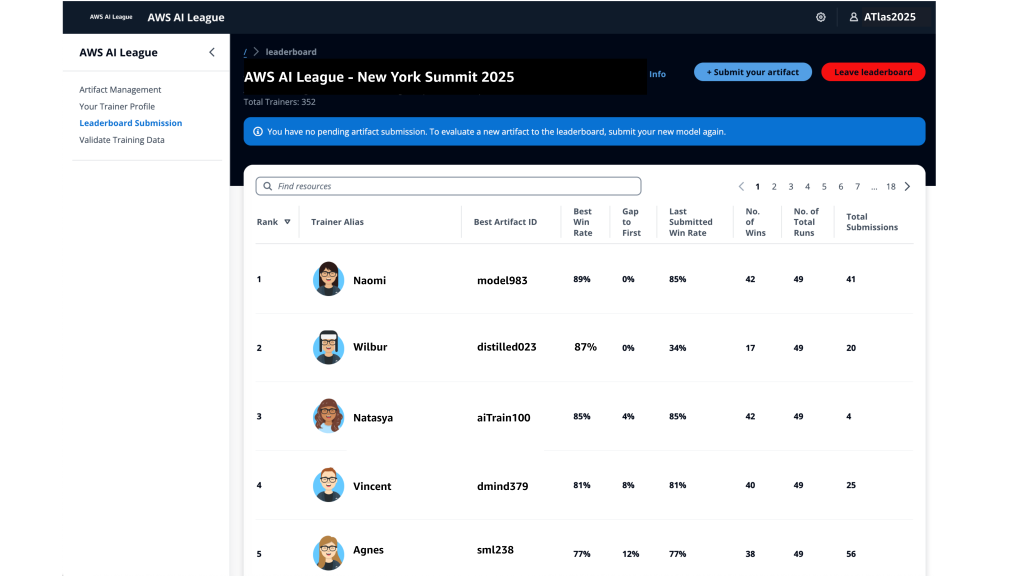
 Before continuing with this AWS Weekly Roundup, I’d like to share that last month I moved with my family to San Francisco, California, to start a new role as Developer Advocate/SDE, GenAI.


