Post Syndicated from LastWeekTonight original https://www.youtube.com/watch?v=ERn0ygRYDao
New College & Enrollment #lastweektonight
Post Syndicated from LastWeekTonight original https://www.youtube.com/shorts/3cegYpRrJTk
Optimize EC2 costs with AWS Compute Optimizer right sizing
Post Syndicated from Darshan Patel original https://aws.amazon.com/blogs/compute/optimize-ec2-costs-with-aws-compute-optimizer-right-sizing/
One of the most impactful ways to improve the ROI on your Amazon Elastic Compute Cloud (Amazon EC2) investment is rightsizing — when you match your instance types and sizes to the actual resource demands of your workloads. However, doing this manually across hundreds or thousands of instances is time-consuming and error-prone. AWS Compute Optimizer analyzes your AWS resources’ configuration and utilization metrics to provide rightsizing recommendations designed to help you identify opportunities to reduce cost while helping to maintain performance and capacity requirements.
In this post, we walk you through how to evaluate AWS Compute Optimizer’s EC2 rightsizing recommendations, configure recommendation preferences that align with your organization’s priorities, enrich recommendations with memory utilization data, and assess Graviton-based alternatives — all to help you make more informed, data-driven rightsizing decisions.
Prerequisites
To follow along with the best practices in this post, you need:
- An AWS account with access to AWS Compute Optimizer
- At least one running EC2 instance with 30+ hours of Amazon CloudWatch metric data in the past 14 days
Optional (for enhanced recommendations):
- AWS Cost Optimization Hub enabled for after-discount savings visibility (see best practice 1)
The challenge: balancing cost and performance at scale
Most organizations don’t have clear insights into the best performance-cost ratio for their EC2 instances — leading to overprovisioning and wasted spend on one side, or undersized instances and degraded user experience on the other. The key questions engineering and FinOps teams face are:
- Which instances are oversized? Where are we paying for capacity we don’t use?
- Which instances are undersized? Where are we risking performance degradation?
- What’s the right trade-off? How do we optimize cost without introducing performance risk?
AWS Compute Optimizer analyzes up to 93 days of utilization data from Amazon CloudWatch and delivers recommendations classified by savings opportunity and performance risk to help you address these questions.
How Compute Optimizer evaluates EC2 instances
Compute Optimizer analyzes the following CloudWatch metrics for your EC2 instances, with recommendations refreshed daily:
- CPU utilization — the percentage of allocated EC2 compute units in use on the instance. Metric:
CPUUtilization - Memory utilization — the percentage of memory in use during the sample period (when enabled — see below). Metric:
MemoryUtilization - Network I/O — the volume of incoming/outgoing traffic and packets on all network interfaces. Metrics:
NetworkIn,NetworkOut,NetworkPacketsIn,NetworkPacketsOut - Disk I/O — read/write operations and throughput for instance store volumes. Metrics:
DiskReadOps,DiskWriteOps,DiskReadBytes,DiskWriteBytes - EBS throughput and IOPS — read/write throughput and operations for attached EBS volumes. Metrics:
VolumeReadBytes,VolumeWriteBytes,VolumeReadOps,VolumeWriteOps - GPU utilization — the percentage of allocated GPUs in use, GPU memory usage, and active encoder sessions (when enabled via the CloudWatch Agent with NVIDIA GPU metrics). Metrics:
GPUUtilization,GPUMemoryUtilization,GPUEncoderStatsSessionCount
Based on these metrics, Compute Optimizer classifies each instance as:
| Finding | Meaning |
| Over-provisioned | Instance resources exceed workload needs — downsize opportunity |
| Under-provisioned | Workload demands exceed instance capacity — performance risk |
| Optimized | Current instance is well-matched to workload requirements |
| Idle | Instance has very low utilization — candidate for termination or consolidation (shown on a dedicated Idle Resource Recommendations page; criteria: peak CPU below 5% and network I/O under 5 MB/day over the 14-day lookback period; GPU instances (G/P families) have additional GPU-specific idle criteria) |
When AWS Cost Optimization Hub is enabled, Compute Optimizer factors in your existing pricing commitments (AWS Savings Plans, Reserved Instances and other specific pricing discounts) when generating savings estimates — see Best practice 1 below for details.
For each finding, Compute Optimizer lists up to three optimization recommendations for a specific instance, ranked by estimated savings, performance risk, and migration effort.
Note: While this post focuses on EC2 instance rightsizing, Compute Optimizer also generates recommendations for Amazon EC2 Auto Scaling groups (including mixed instance types and scaling policies), Amazon Elastic Block Store (Amazon EBS) volumes, AWS Lambda functions, Amazon Elastic Container Service (Amazon ECS) services on AWS Fargate, commercial software licenses, and Amazon Aurora/Amazon Relational Database Service (Amazon RDS) databases. Idle resource detection extends further — covering EC2 instances, Auto Scaling groups, EBS volumes, ECS on Fargate, Aurora/RDS, and NAT Gateways. For the full list of supported resources, see Supported resources.
Evaluating recommendations in the console
In the Compute Optimizer console, navigate to EC2 Instances and select any instance to view its detail page. From here you can:
- Compare utilization metrics — View side-by-side graphs showing how your current instance’s CPU, memory, network, and disk metrics map to the recommended instance’s capacity.
- Review estimated savings — See projected monthly cost savings for each recommended option. With AWS Cost Optimization Hub enabled, savings reflect your actual pricing discounts rather than On-Demand rates (see Best practice 1).
- Assess performance risk — Understand the likelihood that switching to the recommended instance may result in resource contention.
- Evaluate migration effort — Compute Optimizer rates each recommendation from Very low to High based on CPU architecture compatibility and inferred workload type. Same architecture is Very low effort; AWS Graviton (ARM64) recommendation with a known compatible workload (for example, Amazon EMR) is Low; Graviton with an unidentified workload is Medium; and a different architecture with no known compatible version is High effort.
- Toggle CPU architecture preferences — Use the architecture drop-down to compare x86-based recommendations against AWS Graviton (ARM64) alternatives for additional price-performance improvements.
Best practice 1: Enable Cost Optimization Hub for after-discount savings
Why this matters: Enabling Cost Optimization Hub gives Compute Optimizer visibility into your Savings Plans, Reserved Instances, and other pricing discounts — so every recommendation reflects what you would actually save given your existing commitments. This is especially valuable for organizations with significant discount coverage, where On-Demand savings estimates may be significantly higher than what you would actually realize after accounting for existing commitments.
When you enable Cost Optimization Hub, Compute Optimizer automatically switches to AfterDiscounts mode and uses your organization-specific pricing discounts to generate recommendations. The console then displays two savings columns — Estimated monthly savings (after discounts) and Estimated monthly savings (On-Demand) — giving you both views side by side. To enable Cost Optimization Hub for your organization, see Getting started with Cost Optimization Hub. The savings estimation mode preference allows Compute Optimizer to analyze specific pricing discounts when generating the estimated cost savings of rightsizing recommendations. You can verify or override the savings estimation mode under Preferences > Savings estimation mode in the Compute Optimizer console. See Savings estimation mode for details.
Best practice 2: Enable memory metrics for accurate recommendations
Why this matters: Memory utilization is not collected by default in CloudWatch. By enabling it, you give Compute Optimizer a complete picture of your workload — CPU, network, disk, and memory together. This is especially valuable for memory-intensive workloads (databases, caching layers, JVM-based applications), where memory is often the critical sizing factor. With full visibility, Compute Optimizer can factor memory needs into every recommendation, resulting in higher-confidence suggestions that your teams can implement with greater assurance.
Option A: CloudWatch Agent
Deploy the unified CloudWatch Agent on your instances to publish memory utilization metrics. Compute Optimizer automatically incorporates these metrics once they’re available in CloudWatch.
Note: Collecting memory metrics with the CloudWatch Agent incurs charges. See Amazon CloudWatch Pricing.
Key steps:
- Install the CloudWatch Agent via AWS Systems Manager or manually.
- Configure the agent to collect memory metrics.
- Verify metrics appear in CloudWatch.
- Allow up to 24 hours for Compute Optimizer to incorporate the new data.
Option B: External metrics ingestion
If your organization uses a third-party observability platform, Compute Optimizer supports ingesting EC2 memory utilization metrics from:
- Datadog
- Dynatrace
- Instana
- New Relic
When external metrics ingestion is enabled, Compute Optimizer analyzes external memory data alongside native CloudWatch metrics to generate enhanced recommendations.
Learn more: Configuring external metrics ingestion
Best practice 3: Configure rightsizing preferences to match your strategy
Why this matters: Compute Optimizer’s defaults — P99.5 threshold (sizes instances to handle 99.5% of observed CPU peaks), 20% headroom (adds a 20% capacity buffer above those peaks for future growth), and 14-day lookback — work well for many workloads. Customizing these preferences lets you go further — extending the lookback to 32 or 93 days captures monthly or seasonal patterns for even more accurate recommendations, while adjusting headroom and threshold lets you fine-tune the balance between savings and performance for each environment. The result: recommendations tailored to your actual risk tolerance and workload patterns, producing suggestions your teams will trust and confidently implement.
Compute Optimizer supports configurable rightsizing preferences that tailor recommendations to your workload requirements. Preferences can be set at the organization level (applies to all member accounts in your AWS Organizations), account level (applies to a specific account — useful when production and dev/test accounts need different settings), or regional level (applies within a specific region — useful when workloads differ across regions). This hierarchy lets you set conservative defaults org-wide and override for specific accounts or regions that need different treatment.
Key preference options include:
| Preference | Description | When to use |
| CPU utilization threshold | Before generating recommendations, Compute Optimizer filters your CPU data through this percentile. Think of it as a noise filter: P99.5 (default) keeps 99.5% of your data and only discards the rarest 0.5% of spikes — so the recommendation is sized to handle almost every peak you’ve ever seen. P90 discards the top 10% of spikes, treating them as anomalies, and produces smaller (cheaper) recommendations. Options: P90, P95, P99.5 | Use P99.5 for production where you can’t afford to miss peaks; P90 for dev/test where occasional spikes from deployments or one-off events are acceptable to ignore |
| CPU utilization headroom | After Compute Optimizer determines the right instance size based on your historical peaks, it adds this percentage as a safety cushion for future growth. For example: if your analyzed peak needs 60% of an instance’s CPU, a 20% headroom means the recommended instance will still have 20 percentage points of spare capacity above that peak — room to grow without needing another resize. Options: 30%, 20% (default), 0% | Use 30% for workloads with unpredictable or growing traffic; 20% for typical production; 0% for steady-state workloads where you want maximum savings and accept a tight fit |
| Memory utilization headroom | Added memory capacity buffer (30%, 20%, or 10%) above analyzed usage to accommodate future increases. Default is 20% | Use 30% for memory-sensitive workloads; 10% for steady-state where you want maximum savings |
| Lookback period | Choose 14 days (default, no additional charge), 32 days (no additional charge), or 93 days (requires Enhanced Infrastructure Metrics (EIM), a paid feature). You can enable EIM at the organization, account, or individual resource level — useful for activating it only on production workloads where the cost is justified | Use 32 days for monthly patterns; 93 days for seasonal or quarterly workloads |
| Preferred instance types | Restrict recommendations to specific instance families or types. For example, if you have purchased Savings Plans and Reserved Instances, you can specify instances only covered by those pricing models. Or, if you want to use only instances equipped with certain processors or non-burstable instances because of your application design, you can specify those instances for your recommendation output | When organizational standards, procurement commitments (RIs/SPs), or application design require approved instance families |
Learn more: How to take advantage of rightsizing recommendation preferences
Best practice 4: Evaluate Graviton recommendations carefully
Why this matters: Compute Optimizer can recommend migrating x86 workloads to AWS Graviton instances, which deliver up to 40% better price-performance. However, unlike same-architecture rightsizing (which is a configuration change), Graviton involves a CPU architecture shift from x86 to ARM64 — so a structured evaluation process helps you validate compatibility and capture the full savings with confidence.
Before migrating to Graviton:
- Assess architecture compatibility — Verify that your application binaries, libraries, and dependencies support ARM64. Container-based workloads (using multi-arch images) typically require less modification to migrate.
- Check software dependencies — Confirm third-party agents, drivers, and monitoring tools are available for ARM64.
- Test in non-production first — Deploy the recommended Graviton instance in a staging environment.
- Run load tests — Validate performance parity with the current instance.
- Use the Graviton Transition Guide — Follow the AWS Graviton Getting Started guide for a structured migration approach.
- How to identify a good target workload — A good candidate for Graviton adoption is a workload running on Linux or BSD, built either using open-source components or source code that you control. Having full access to the source code of every component allows you to make any necessary changes quickly and easily as part of this adoption plan. If you use third-party software, many ISVs already support the Arm64 architecture implemented by AWS Graviton processors.
When to defer Graviton recommendations:
- Legacy applications compiled for x86 without source code access.
- Workloads with licensing tied to specific CPU architectures.
- Applications with untested third-party binary dependencies.
Learn more: AWS Compute Optimizer Graviton migration guidance
Best practice 5: Implement a rightsizing workflow
Why this matters: A structured workflow turns Compute Optimizer’s recommendations into sustained, measurable cost savings. By establishing a regular cadence — reviewing, validating with stakeholders, and tracking results — your organization builds a continuous optimization loop that adapts as workloads evolve, compounds savings over time, and gives finance teams clear visibility into realized cost reductions.
To operationalize Compute Optimizer recommendations across your organization:
- Establish a regular review cadence — Schedule weekly or bi-weekly rightsizing reviews with your FinOps or cloud operations team.
- Prioritize by savings and confidence — Focus first on Over-provisioned instances with high estimated savings and low performance risk.
- Validate with application owners — Share recommendations with workload owners for context on usage patterns that metrics alone may not reveal (for example, seasonal traffic, scheduled batch jobs).
- Track implementation — Use AWS Cost Explorer to measure realized savings after rightsizing changes.
Note: Tag instances for effective rightsizing at scale. Compute Optimizer recommendations become more actionable when your instances carry consistent tags. At minimum, tag with Environment (prod/staging/dev) to drive review priority, and Application/Workload and Owner/Team to route recommendations to the right team. Compute Optimizer’s console, exports, and API all support tag-based filtering (tag:key and tag-key filters).
Taking it further — automate your workflow: For organizations ready to move beyond manual reviews, Compute Optimizer offers built-in automation that allows you to create automation rules that continuously clean up unattached volumes and upgrade volume types based on Compute Optimizer’s data-driven recommendations. For EC2 instance rightsizing, AWS provides a reference architecture for automating Compute Optimizer recommendations using AWS Step Functions, Amazon EventBridge, and AWS Lambda. See: Optimize costs by automating AWS Compute Optimizer recommendations
Clean up
If you installed the CloudWatch Agent as part of best practice 2 and no longer need memory metrics, stop and remove the agent to avoid ongoing custom metric charges.
Conclusion
AWS Compute Optimizer provides data-driven recommendations to help you make more informed EC2 rightsizing decisions. By enabling memory metrics, configuring recommendation preferences aligned to your workload needs, carefully evaluating Graviton alternatives, and establishing a systematic review process, you can identify opportunities to help optimize your EC2 fleet and help reduce costs while considering the performance your applications require.
Further reading
Building AI shopping agent using Amazon Bedrock AgentCore Runtime and Amazon OpenSearch Service
Post Syndicated from Omama Khurshid original https://aws.amazon.com/blogs/big-data/building-ai-shopping-agent-using-amazon-bedrock-agentcore-runtime-and-amazon-opensearch-service/
In this post, we explore how to build an online shopping AI agent. We focus on its architecture and implementation with Amazon OpenSearch Service, Amazon Bedrock AgentCore, and Strands Agents. Amazon Bedrock AgentCore is an agentic platform for deploying and operating those agents and tools securely at scale without managing infrastructure. AgentCore Runtime is the secure, serverless runtime that hosts your Strands Agents and tools as containerized applications. Strands Agents is an open source SDK for building AI agents. In this SDK, an agent is defined by a model, tools, and a prompt. Tools are callable functions that allow agents to perform actions beyond text generation, such as API calls, database queries, and file operations. The framework lets the model autonomously plan steps and invoke tools to complete tasks.
Today’s AI shopping assistants understand natural language, context, and shopping intent, creating a more human-like interaction. These assistants handle complex shopping requirements, such as “Find me a formal dress under $200 that’s appropriate for a summer wedding.” They maintain conversation history, process follow-up questions naturally, and provide personalized recommendations based on user preferences and past interactions. Customers can use visual search to upload images of items that they want, and the AI finds similar products across multiple retailers, matching styles and patterns. The goal is to provide instant, relevant, and personalized assistance at scale, creating a more efficient shopping journey for consumers worldwide.
AI agents combined with Retrieval Augmented Generation (RAG) on Amazon OpenSearch Service represent an evolution in conversational search. This integration builds AI agents on enriched catalogs, supporting context-aware and autonomous search experiences while maintaining accuracy and relevance through grounded responses.
Solution overview
The following diagram illustrates the solution architecture of an AI-powered online shopping agent built using Strands Agents, Amazon Bedrock AgentCore Runtime, and Amazon OpenSearch Service. For simplicity, the diagram doesn’t show authentication and authorization. In a production setup, secure access to the backend by using mechanisms such as Amazon API Gateway, AWS Identity and Access Management (IAM) roles, or OAuth-based authentication.
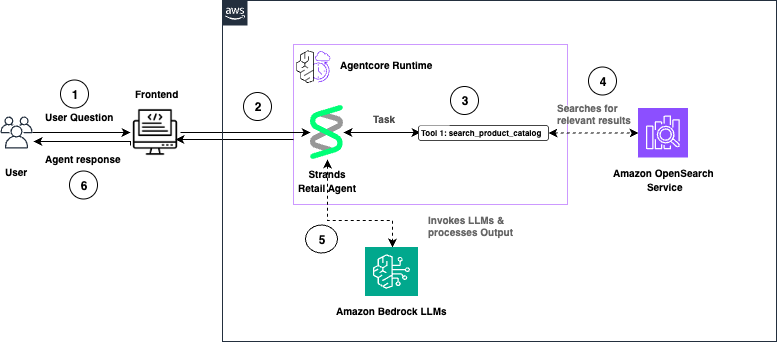
The following is a walkthrough of the reference architecture:
- The user submits a question through the front-end application. AgentCore Runtime receives the request and routes it to the Strands Retail Agent.
- The Strands Agent processes the task and invokes the
search_product_catalogtool. - OpenSearch Service performs semantic search and returns relevant product results.
- The Strands Agent invokes Amazon Bedrock large language models (LLMs) to generate a natural language response.
- The agent response is returned to the user through the front end.
Walkthrough
The following section walks you through how to build an online shopping AI agent.
Prerequisites
To implement this solution, you need an AWS account. You also need an OpenSearch Service domain with OpenSearch version 2.13 or later. You can use an existing domain or create a new domain.
To use the vector search capabilities of OpenSearch Service with Strands Agents on AgentCore, you use ingest pipelines. These ingestion pipelines apply built-in processors to pre-process your documents before you index them in OpenSearch Service.
You use the text_embedding processor, which relies on the ML Commons plugin and a registered embedding model—Amazon Nova Multimodal Embeddings on Amazon Bedrock. OpenSearch Service uses the ML Commons plugin to generate vector embedding for your data and uses the same model to convert incoming queries into vectors. This supports semantic search across your indexed content.
You extend your semantic search backend by adding an agent built with Strands Agents and deployed on Amazon Bedrock AgentCore.
Code samples provided in this post are tested in Python 3.11. You only need to install Python 3.11 in your environment to execute the python scripts. You also need Node.js 18 or later installed to use the AgentCore CLI. The provided code scripts will deploy into your AWS account so make sure your terminal has access to necessary AWS credentials.
Install AgentCore CLI
Install the AgentCore CLI globally using npm:
Python Dependencies
You also need to create a requirements.txt file with following dependencies in your workspace to deploy the agents.
Run pip install -r requirements.txt in your terminal to install the required dependencies. To avoid conflicts with other dependencies in your system, you can use a virtual environment.
Now, walk through each step.
Step 1: Configure IAM permissions
Complete the following steps to register the Nova Multimodal Embeddings model with OpenSearch Service and verify that your OpenSearch Service domain has permission to invoke the Amazon Bedrock API.
- Go to the IAM console and create a new role with a custom trust policy. Add the following trust policy.
- Skip adding a permission policy.
- Give your role a name and create it. For this post, we use OpenSearchBedrockEmbeddingRole as the role name. OpenSearch Service uses this role to invoke the Nova Multimodal Embeddings model on Amazon Bedrock.
- On the Permissions tab, attach an inline policy with the following permissions. For this post, we name this policy OpenSearchBedrockEmbeddingPolicy.
- Create a
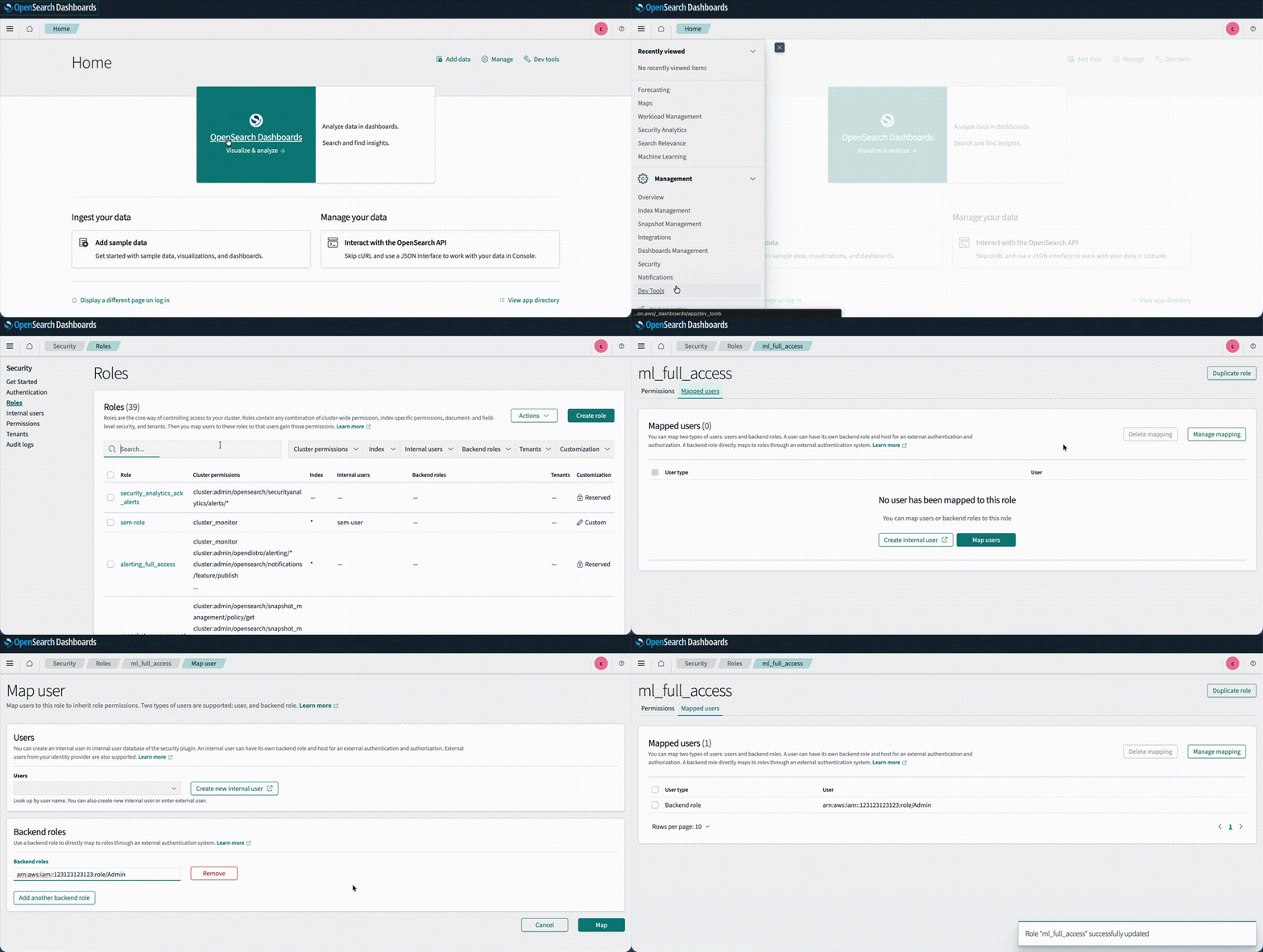
passRolepolicy with the following JSON document and assign it to the IAM role that creates the ML connector. This lets the principal running the Python code pass the OpenSearchBedrockEmbeddingRole to OpenSearch. Replace<your-aws-account-id>with your own AWS account ID. - By using fine-grained access control (FGAC), map the IAM role as a backend role for the
ml_full_accessrole in the OpenSearch Dashboards Security plugin. This mapping lets the user create ML connectors:- Log in to OpenSearch Dashboards and open the Security page from the navigation menu.
- Choose Roles and select
ml_full_access. - Choose Mapped Users and Manage Mapping.
- Under Backend roles, add the ARN of the IAM role that you created in the previous steps.
Step 2: Connect to the model by using OpenSearch ML Connectors
In this section, you create an ML connector to link OpenSearch Service with the Bedrock Nova Multimodal Embeddings model. You then register and deploy the model so you can use it for neural search queries.
- Create a file named
create-connector.pywith the following code. Replace<your hostname>,<your region>, and<your account id>placeholders within the code.
- Run
python create-connector.pyin your terminal by using the IAM role withml_full_accessandpassRolepermissions created in the previous step. This script creates a connector between OpenSearch Service and the Bedrock Nova Multimodal Embeddings model. - The program responds with
connector_id. Take a note of it. Then, navigate to OpenSearch Dashboards and open Dev Tools. Create a model group against which to register this model in the OpenSearch Service domain.
- Register a model by using
connector_idandmodel_group_id.
- Run the following API call to deploy the model. Use the registered model ID from the previous step.
Step 3: Create an ingest pipeline for data indexing
Use the following code to create an ingest pipeline for data indexing. The pipeline establishes a connection to the embedding model, retrieves the embedding for the title field, and stores it in the OpenSearch index.
Step 4: Create an index for storing data
Create an index named product for storing data by using Dev Tools. This index stores raw text and 1024-dimensional embeddings of the title field, and uses the ingest pipeline you created in the previous step.
Step 5: Ingest sample data
Use the following code to ingest the sample product data in Dev Tools.
Step 6: Query the index
Run the following API call to test semantic search by using the Nova Multimodal Embeddings model.
The output of the preceding query should look like the following.
Step 7: Create an agent with Strands and Bedrock AgentCore Runtime
Now, create the Strands Agent that uses Anthropic Claude Sonnet 4.6 on Amazon Bedrock to search products from the OpenSearch Service index. To do so:
- Import the Runtime app with
from bedrock_agentcore.runtime import BedrockAgentCoreApp. - Initialize the app in your code with
app = BedrockAgentCoreApp(). - Create the OpenSearch Service connection and search query with the
@tooldecorator. - Decorate the invocation function with the
@app.entrypointdecorator. - Let AgentCore Runtime control the running of the agent with
app.run().
Now, complete the following steps:
- Make sure that you have installed the necessary dependencies from the Prerequisites section of this post.
- Create and save a file named
search_agent.pywith the following code. Replace<your hostname>,<your region>, and<your account id>placeholders within the code.This deploys your agent locally for testing purposes.
- Navigate to the IAM console and add the AmazonBedrockLimitedAccess permission policy to the principal running the code.
- Navigate to OpenSearch Dashboards and, from the left menu, choose Security plugin, then choose Roles.
- Choose Create Role.
- Name the role agentcore-permissions.
- Under cluster permissions, add
cluster:admin/opensearch/ml/models/getandcluster:admin/opensearch/ml/predict. - Under index permissions, enter
product*as the index pattern. Addsearchandgetpermissions. - Create the role.
- Choose the role you created, switch to the Mapped Users tab, choose Manage mapping, and add the role that you use for running the Python code as a backend role.
- Uncomment the line
strands_agent_bedrock({"prompt": "Search jacket"})and make sure theapp.run()line is commented in the code. - Run
python search_agent.pyin your terminal to start the shopping agent. The output should look similar to the following. - Comment
strands_agent_bedrock({"prompt": "Search jacket"})and uncomment theapp.run()line in the code before going into the next step.
Step 8: Configure and launch your agent to Bedrock AgentCore Runtime
The AgentCore CLI is a command-line tool provided by AWS that simplifies deployment of agents to Amazon Bedrock AgentCore Runtime. When you run the CLI deployment command, it automates the entire deployment workflow: it creates the necessary IAM execution role with proper permissions, packages your Python application code along with its dependencies, uses AWS CodeBuild to build an optimized Docker container image, pushes that container image to Amazon Elastic Container Registry (ECR), and finally provisions the AgentCore Runtime environment that hosts your containerized agent. This eliminates the need for manual Dockerfile creation, container builds, or infrastructure management.
- Before you start this step, make sure you have gone through section 7 and installed the AgentCore CLI and Python dependencies listed in the Prerequisites section.
- Create a policy named AgentCoreAccessPolicy with the following permissions and attach it to the role running the code. Replace
<ACCOUNT_ID>and<REGION>placeholders.
- Create a file named
agentcore.yamlin your project directory with the following configuration. Replace<REGION>,<ACCOUNT_ID>, and<OPENSEARCH_DOMAIN_NAME>placeholders:
- Run the following command in your terminal to deploy the agent to AgentCore Runtime:
- Create the AgentCore project and replace with your search agent.
- Add OpenSearch and other dependencies:
- Deploy the agent to Agentcore Runtime. This process takes approximately 5-10 minutes.
- Once deployment completes, verify the runtime status:
You should see:
Step 9: Configure OpenSearch Service access
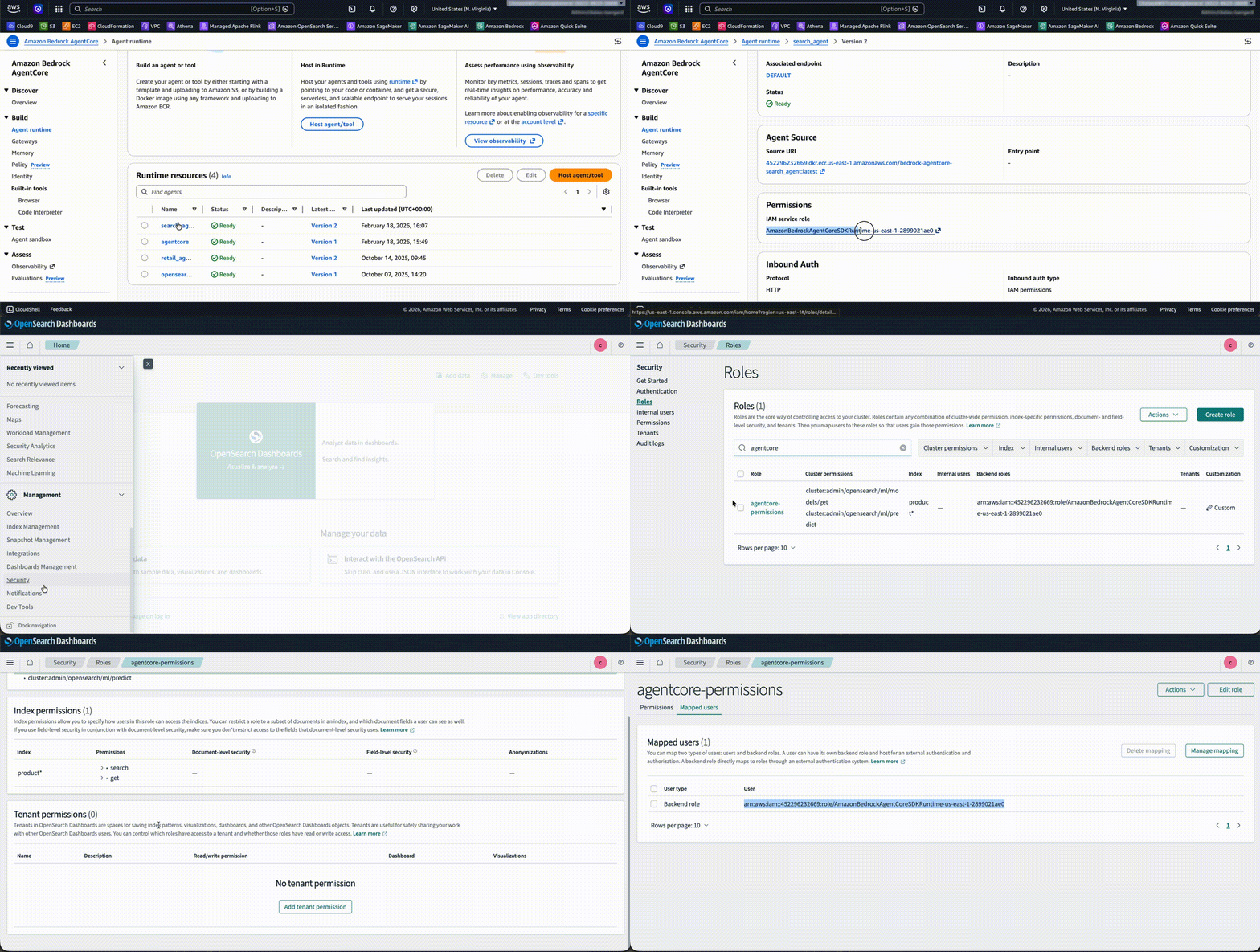
Map your AgentCore execution role to an OpenSearch backend role so the agent can access your data.
- Navigate to OpenSearch Dashboards. From the left menu, choose the Security plugin, then choose Roles.
- Search for agentcore-permissions and choose the role. Then, navigate to the Mapped Users tab, choose Manage mapping, and add
arn:aws:iam::<ACCOUNT_ID>:role/AmazonBedrockAgentCoreSDKRuntime-us-east-1-customas a backend role. Replace the<ACCOUNT_ID>placeholder with your account ID.
Step 10: Invoke the Bedrock AgentCore Runtime
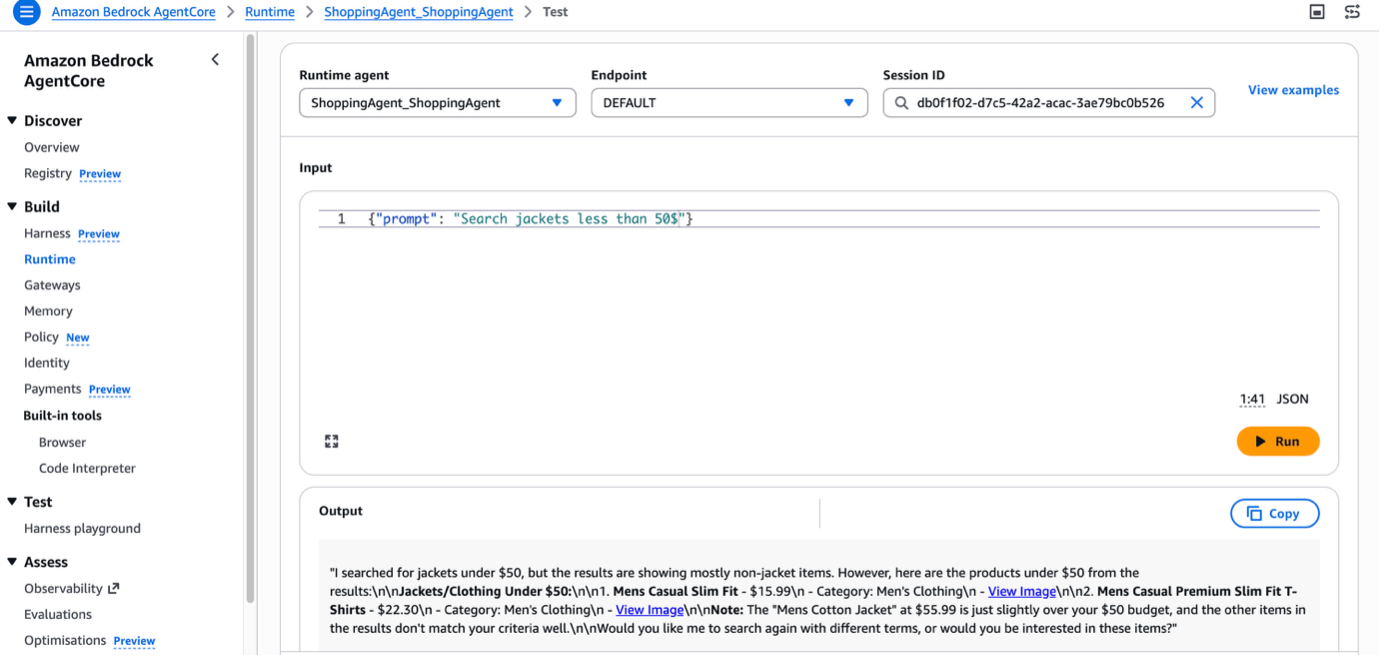
You can test the agent in Agent Sandbox. Enter the prompt Search jacket less than 50$, and the agent returns the relevant result from the OpenSearch Service index with a summary.
In real-world scenarios, you can design a search application with a Strands Agent deployed in AgentCore Runtime. You can add AgentCore Memory, which gives your AI agents the ability to remember past interactions and provide more context-aware, personalized conversations.
Cleanup
To avoid incurring future charges, delete the resources created while building this solution:
Conclusion
In this post, you saw how to create a conversational search with Amazon OpenSearch Service and Strands Agents. You also learned how to deploy the agent on Amazon Bedrock AgentCore Runtime. You can further enhance this shopping agent by using other AgentCore capabilities. For example, AgentCore Memory retains user preferences and past interactions across sessions, AgentCore Identity manages shopper authentication and access control, and AgentCore Observability helps you monitor and debug agent behavior in production. Together, these services help you build shopping experiences that deliver instant, relevant assistance at scale.
Now it’s your turn. Build your own conversational search experience by integrating OpenSearch Service and Strands Agents with your product catalog. To learn more, see the Amazon OpenSearch Service and Amazon Bedrock AgentCore detail pages.
About the authors
Homebrew 6.0.0 released
Post Syndicated from jzb original https://lwn.net/Articles/1077587/
Version
6.0.0 of the Homebrew
package-management system has been released. Notable changes in this
release include the introduction of tap trust to improve
supply-chain security, improvements in sandboxing on Linux, a number
of performance tweaks, and many other changes.
See the changelog
for a full list. LWN covered Homebrew in
November 2025.
[$] Automatic mTHP creation in 7.2
Post Syndicated from corbet original https://lwn.net/Articles/1077208/
The Linux kernel has long tried to use huge pages as a way to improve
performance, sometimes with more success than others. The size of huge
pages has traditionally been imposed by the hardware, which typically only
offers a couple of relatively large options. In more recent times, though,
the use of multi-size transparent huge pages (mTHPs), with more flexible
sizing implemented in software, has been growing. If all goes well, the
7.2 development cycle will include the addition of a new feature,
contributed by Nico Pache, to make the use of mTHPs even more transparent.
Young people’s computer programs get data from space
Post Syndicated from Fergus Kirkpatrick original https://www.raspberrypi.org/blog/young-peoples-computer-programs-get-data-from-space/
An amazing 25,707 participants had their code run on the International Space Station (ISS) this year, marking the European Astro Pi Challenge’s 10th anniversary in style.
Yesterday, Astro Pi teams and their mentors received their official certificates and data — the final stage of this year’s challenge. On each certificate, participants can see the exact time and the location of the ISS when their program was run.
Congratulations to every student, teacher, volunteer, and parent involved. Your support made this historic year possible. We are also thrilled to share a special message from our 2025/26 Astro Pi Ambassador, ESA Astronaut Sophie Adenot.
The European Astro Pi Challenge is an ESA Education project run in collaboration with the Raspberry Pi Foundation, implemented by ESEROs at a national level. It offers young people the amazing opportunity to conduct scientific investigations in space by writing computer programs that run on Raspberry Pi computers on board the International Space Station.
Mission Zero: Art in orbit
Mission Zero invites young people to create nature-inspired pixel art to display for the astronauts aboard the ISS. This year, we ran a total of 17,170 programs created by 24,408 participants.
By using the Astro Pi’s colour sensor to set their background colours, these programs combined live data from the station with each team’s unique artwork. The results brought a vibrant reminder of nature and Earth to the crew. You can explore these creations on our interactive mosaic — can you find your team’s pixel art on the mosaic?

Mission Space Lab: The speed of light (and cameras)
In Mission Space Lab, teams wrote Python programs to calculate the speed of the ISS. Using the Astro Pi sensors and Raspberry Pi High Quality cameras, 387 teams (representing 1,299 young people) achieved the prestigious ‘flight status’ and had their programs run in space.
These teams are now receiving their raw data sets, which include images of Earth’s surface captured from 400km above.

Doing science in space: The ‘blue shift’ mystery
Science in orbit often brings surprises. This year, we noticed the colour balance in some ocean images was shifting toward a bright blue. After investigating, we found the camera’s white balance algorithm was reacting to ‘blue shift’.
This occurs when the spectrum of light compresses as the Earth turns toward the camera at dawn. It’s a fantastic example of the real-world physics our participants encounter when dealing with orbital data!

Inspiring even more young people and communities
We know what a great opportunity Astro Pi is and how much of an impact it can have on participants and their communities. So we constantly challenge ourselves to widen our reach and bring the challenge to communities around the UK and Ireland, especially those that don’t normally get the chance to send code to space. This year, we visited schools, clubs, and science events. We also trained teachers and volunteers to help us share the challenge.

What’s next?
That’s a wrap for the 2025/26 challenge, but the journey doesn’t end here.
- On Friday 12 June, ESA astronaut Pablo Álvarez Fernández will answer questions submitted by the Mission Space Lab teams. You can watch the livestreamed event on YouTube.
- Save the date: Astro Pi 2026/27 launches Monday 14 September 2026
- Mission Zero: We’ll be selecting new code examples from this year’s Mission Zero submissions for our next project guide
- Mission Space Lab: We have some exciting technical updates coming for the next cohort of Space Lab teams
In the meantime, stay curious, space travelers. The journey has only just begun!
The post Young people’s computer programs get data from space appeared first on Raspberry Pi Foundation.
Security updates for Thursday
Post Syndicated from jzb original https://lwn.net/Articles/1077536/
Security updates have been issued by AlmaLinux (.NET 10.0, .NET 8.0, .NET 9.0, podman, poppler, and postgresql-jdbc), Debian (chromium, jackson-core, libdbi-perl, and libinput), Fedora (httpd, rust, and xmlstarlet), Mageia (openssh, postfix, and roundcubemail), Oracle (frr, kernel, libyang, n, postgresql-jdbc, and unbound), Red Hat (.NET 10.0, .NET 8.0, .NET 9.0, redis, and redis:7), SUSE (agama-web-ui, cockpit, cosign, glibc, google-cloud-sap-agent, google-osconfig-agent, kanidm, kernel, kubernetes, kubernetes1.23, kubernetes1.24, kubernetes1.25, kubernetes1.27, kubernetes1.28, libpodofo-devel, libyang, NetworkManager-libreswan, openCryptoki, python311-pypdf, rclone, steampipe, wicked, and xen), and Ubuntu (exim4, libcrypt-saltedhash-perl, libhttp-daemon-perl, samba, and uriparser).
Criminal AI-as-a-Service in 2026: How the Underground Market Is Operationalizing Cybercrime
Post Syndicated from Jeremy Makowski original https://www.rapid7.com/blog/post/tr-criminal-ai-underground-market-operationalizing-cybercrime-2026
Introduction
The underground market for criminally oriented generative AI has moved beyond the early hype surrounding ‘malicious chatbots.’ The gradual integration of AI as a productivity layer within cybercrime operations has become the dominant story, indicating that while the potential for fully autonomous AI hacking systems is possible, attackers are not embracing them as expected. Instead, threat actors are increasingly using AI to accelerate routine, but operationally significant, tasks to scale their operations. Drafting phishing lures, profiling targets, debugging code, generating forged documents, modifying malware, translating victim communications, and processing stolen data at scale were once time-consuming activities that AI has made significantly easier. AI does not replace cybercriminals; it lowers friction, increases speed, and expands the range of actors able to perform tasks that previously required more time, skill, or external support.
AI is being absorbed into criminal tradecraft, embedding itself in social engineering, fraud enablement, impersonation, identity abuse, and post-breach data exploitation. The market supporting this demand is not a single coherent product category, but a broader ecosystem of jailbreak wrappers, Telegram-based bots, prompt packs, open-weight model deployments, stolen AI accounts, and hijacked API keys. Their importance lies less in technical elegance than in usability. They provide criminals with accessible, repeatable, and commercially packaged ways to apply AI to operational problems.
This ecosystem should not be mistaken for a stable or fully mature criminal market. Compared with more established sectors, criminal AI remains volatile, uneven, and heavily exposed to hype. Some services offer genuine operational utility while others are little more than repackaged public models marketed at inflated prices. Many are short-lived, deceptive, or opportunistic rebrands.
Even so, the demand is real. The core shift is not the arrival of a single dominant criminal model, but the commercialization of access to AI-enabled criminal capability. The strategic significance of criminal AI lies in compressing time, lowering skill barriers, improving communication quality, and scaling existing criminal workflows.
Criminal AI-as-a-Service
The defining features of this market have little to do with any technical novelty, but rather the packaging and monetization of access. By early 2026, many underground services were marketed through familiar commercial mechanisms like subscriptions, private support channels, Telegram-based delivery, gated communities, and promises of uncensored output, privacy, or reduced logging. These are clear signs of SaaS-style commercialization, albeit far less mature or stable than its legitimate counterparts.
The market should be best understood as “Criminal AI-as-a-Service.” Most offerings do not appear to rely on original foundational models built by threat actors. Instead, they typically depend on jailbreaks, wrappers around commercial services, fine-tuned open-weight models, repackaged interfaces, or modular combinations of existing capabilities.
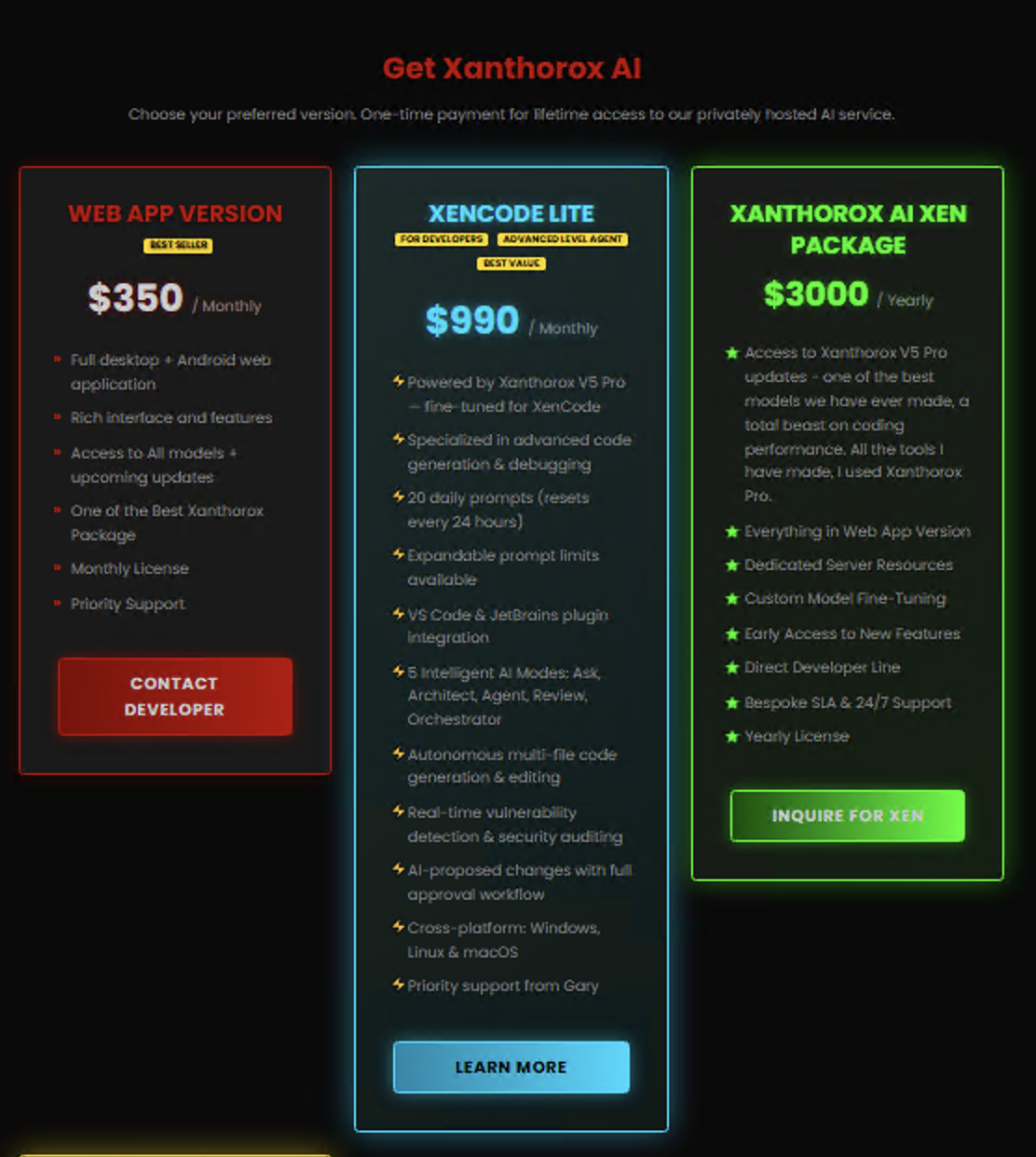
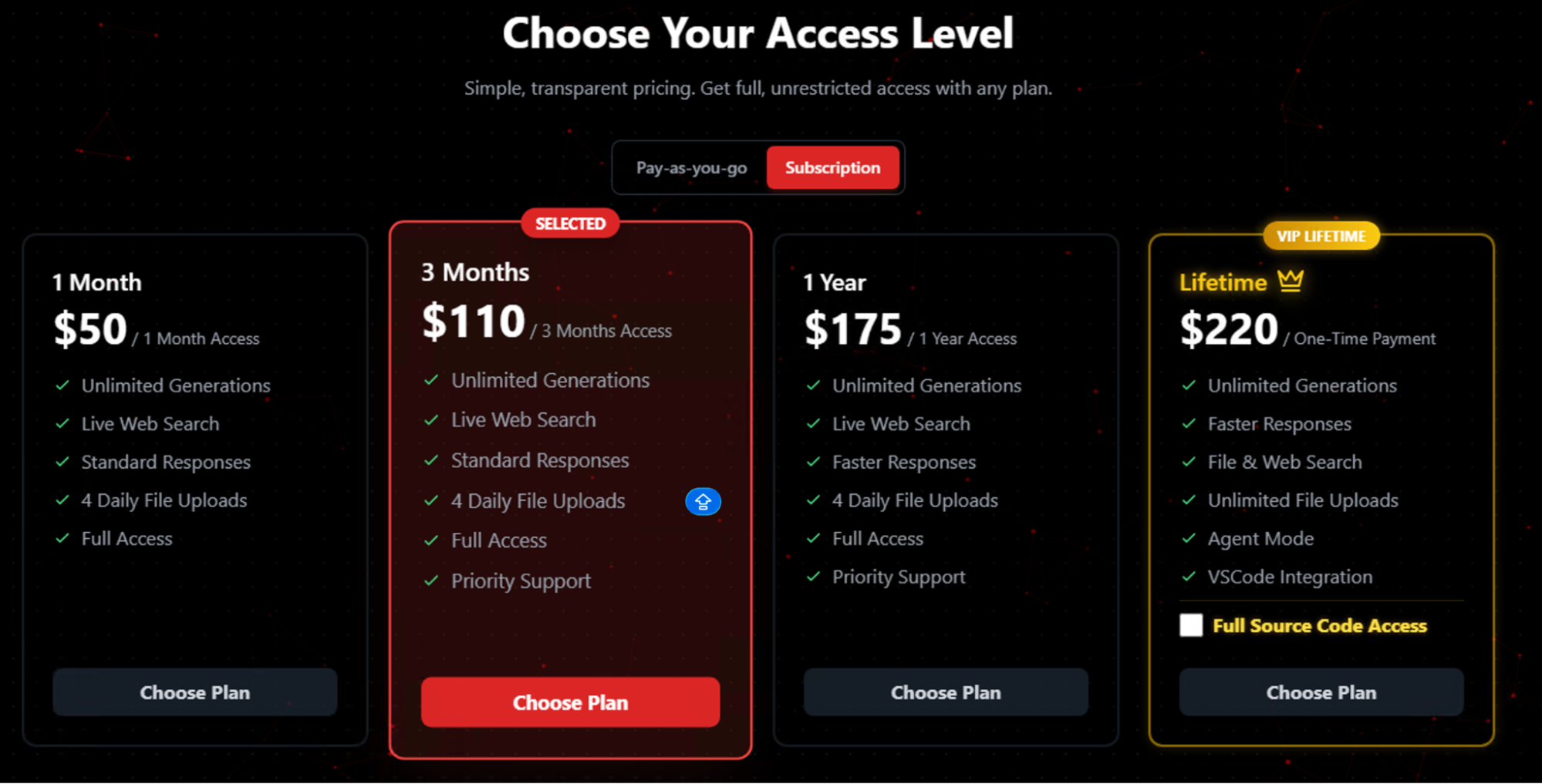
Pricing patterns suggest growing commercialization, but not a stable market structure. Entry-level access may be inexpensive, while premium services can be marketed at significantly higher rates with promises of priority support or additional functionality. These prices should be treated as indicative, not definitive (Figures 1 and 2). They are highly volatile and shaped by takedowns, fraud, rebranding, and shifting demand.
At the lower end, free tools and stolen access to legitimate AI services often remain the default. In the middle of the market, recurring subscriptions are increasingly common. At the upper end, some services claim to use more modular or self-hosted architectures to reduce dependence on mainstream platforms. Together, these patterns point to a market that is becoming more operationalized, even if it remains unstable and hype-driven.
⠀
Main criminal AI tool families
The criminal AI ecosystem is defined by several distinct tool families that reflect how threat actors adopt, package, and market generative AI for illicit use. Some platforms function as fraud-enabling assistants, others as uncensored Telegram-native chatbots, modular offensive frameworks, or low-barrier tools aimed at novice users. Examining these categories is more useful than focusing solely on individual brand names, as it reveals the market’s underlying operational logic. That logic is based on how these tools are distributed, which users they target, and which stages of the criminal workflow they are designed to support.
Overall, the market is increasingly splitting into two complementary directions. At one end are low-cost, mass-market tools that help less experienced actors produce phishing content, scam scripts, malware prompts, forged material, and social engineering narratives at scale. At the other end are more specialized platforms that integrate AI into execution workflows, supporting targeting, automation, and operational optimization for fewer but more precise attacks. This volume-versus-precision dynamic shows that criminal AI is no longer only about accelerating malicious content generation; it is also becoming a way to make illicit operations more scalable, quieter, and strategically targeted.
FraudGPT
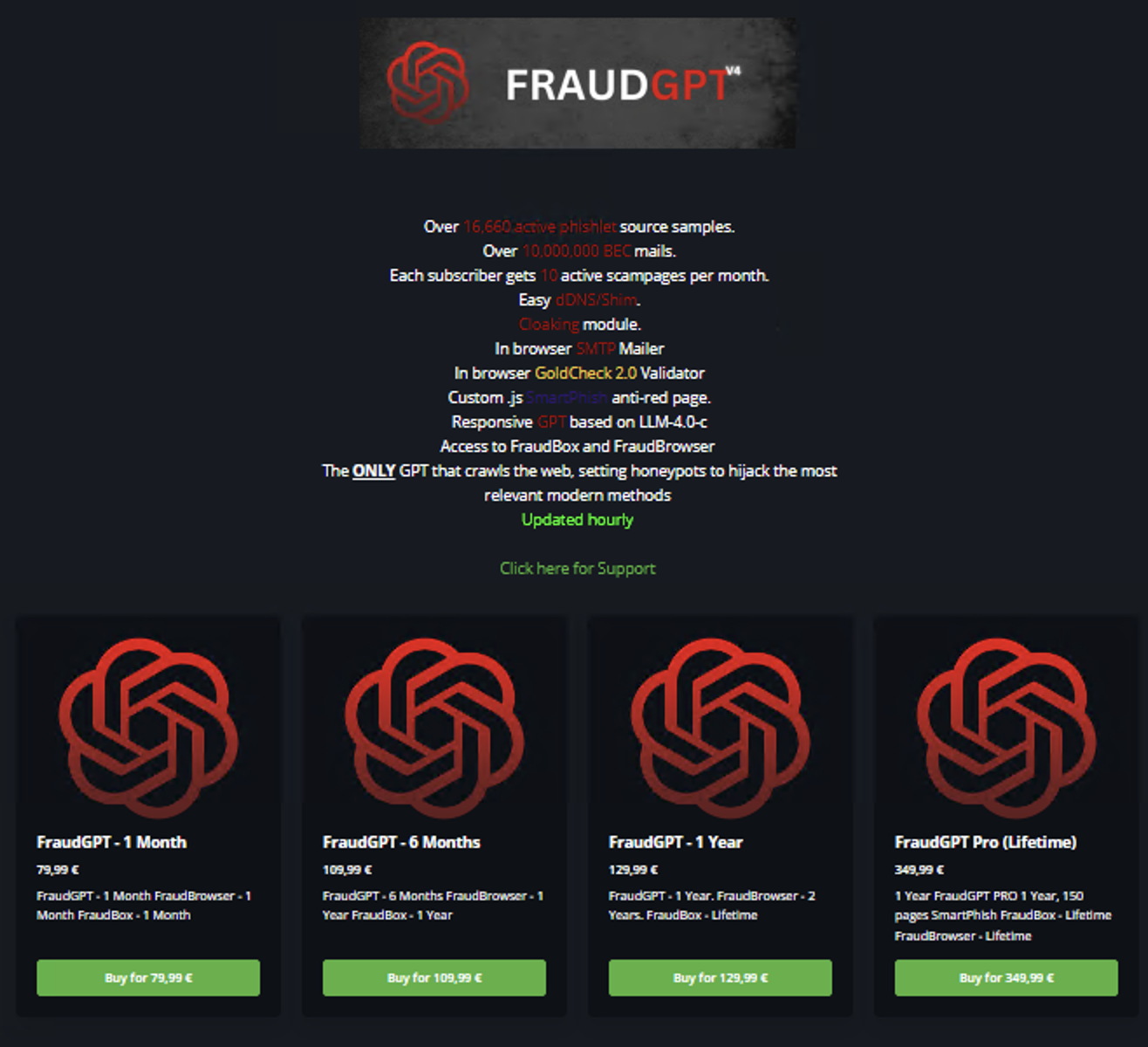
This tool family represents the distribution model for criminal AI by fraud shops. Emerging in mid-2023 for a few hundred dollars per month, its longevity on the black market stems from its positioning as an “all-in-one” operational assistant rather than a simple programming tool. Most buyers are not using it to engineer highly complex malware; instead, they treat it as a productivity engine to orchestrate the entire fraud chain.
Threat actors use it to systematically design lookalike phishing pages, scrape target data, draft convincing spear-phishing lures, and generate scam scripts. Even as the underlying architecture has evolved away from standalone models and toward basic wrappers around legitimate, jailbroken corporate APIs, FraudGPT remains a staple of the underground economy because it effectively democratizes advanced social engineering, allowing entry-level scammers to execute highly localized, grammatically flawless, and high-volume fraud operations (Figure 3).
⠀
GhostGPT
This tool family reflects the Telegram-native distribution model. Its reported selling points — uncensored output, ease of access, and reduced operational friction — illustrate the convenience and perceived safety many criminal buyers claim to value most. However, like many tools in this category, independent verification of its capabilities is limited, and its significance lies more in what it signals about buyer preferences than in any confirmed technical differentiation.
WormGPT
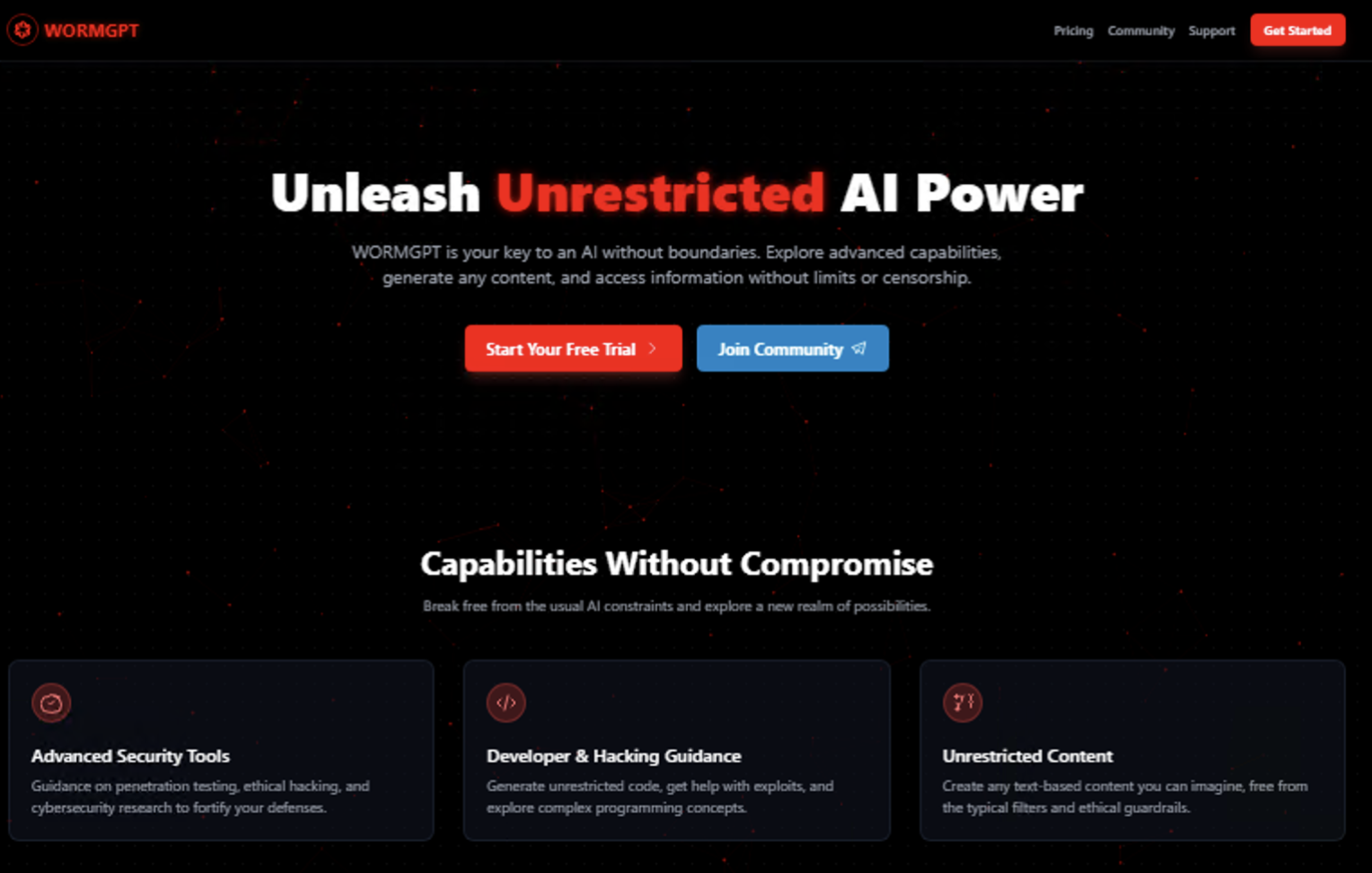
This tool family serves as the ultimate case study in the power and persistence of criminal branding. While the original, headline-grabbing tool was officially shut down by its creator in August 2023 following intense law enforcement and media exposure, the name has essentially become a generic dark-web trademark for unrestricted AI. The market is saturated with opportunistic copycats, such as “WormGPT v4” and various Telegram bots trading on the name.
Threat intelligence analysis of these modern variants reveals that they share zero code with the original system; instead, they are highly volatile marketing shells, often basic API wrappers around commercial models like Grok or Mixtral that use specialized system prompts to bypass safety guardrails. WormGPT’s relevance in 2026 lies not in its technical uniqueness but in its sociological impact. It is an entry-level gateway tool used by script kiddies and sophisticated actors alike to quickly generate functional exploit scripts, craft persuasive business email compromise (BEC) lures, and scale offensive workflows (Figure 4).
⠀
KawaiiGPT
This is a freely accessible or low-cost criminally oriented AI chatbot/tool marketed in underground spaces to generate or support illicit content and cybercrime-related tasks. Its use highlights the problem of low-barrier access in the criminal LLM market. Its relevance does not lie in any demonstrated advanced capability and there is little evidence that it provides meaningful technical sophistication beyond basic generative AI functions. Rather, KawaiiGPT is important as an example of how free or near-free tools can normalize AI-assisted offending among less experienced users. Its significance is therefore sociological rather than technical as it lowers the threshold for participation, makes AI-assisted offending appear accessible and low-risk, and introduces novice actors to workflows such as phishing text generation, fraud scripting, impersonation, and other forms of low-level cybercrime support.
BruteForceAI
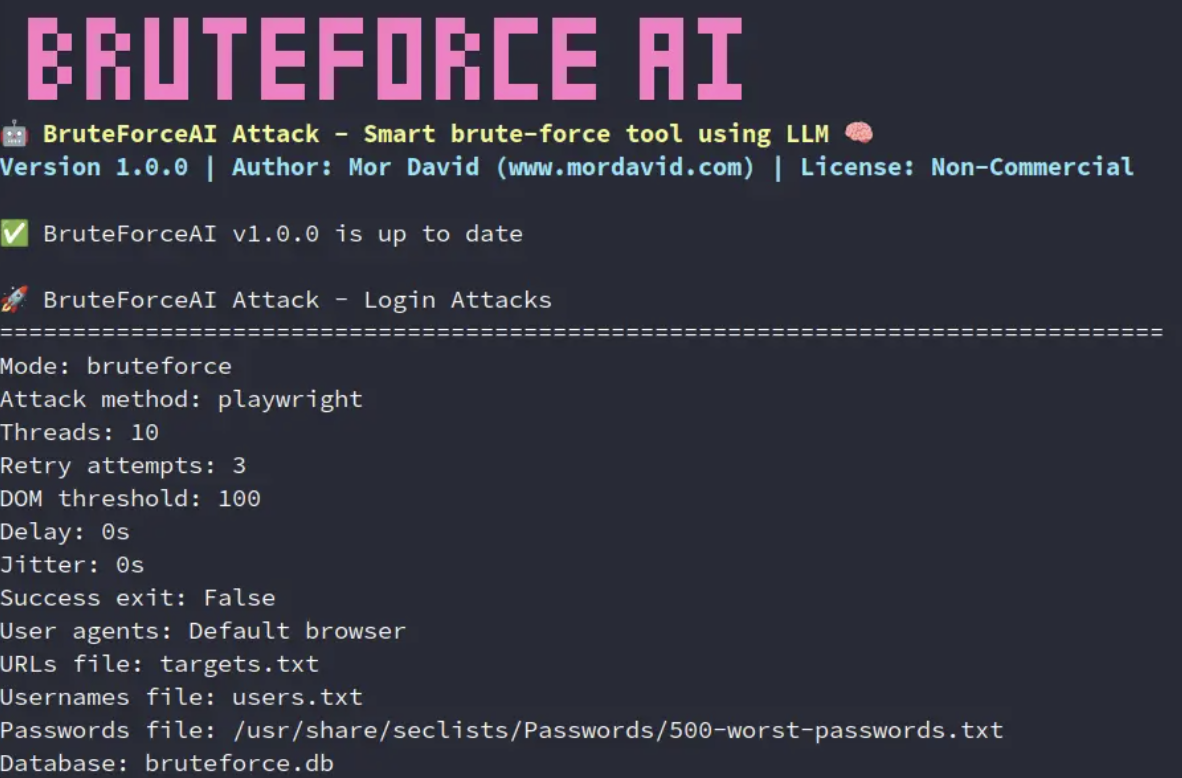
This tool family represents a meaningfully different category from the chatbot-style tools that dominate criminal AI branding. BruteForceAI prioritizes precision over content generation. It integrates large language models for intelligent form analysis and sophisticated multi-threaded attack execution. This distinction matters. The broader trend it reflects is one of attackers making fewer, better-targeted attempts rather than relying on brute volume. AI here is not a content tool. It is an execution layer, and the shift from noisy credential stuffing to quiet, optimized targeting is strategically more significant than any individual tool name (Figure 5).
⠀
Xanthorox
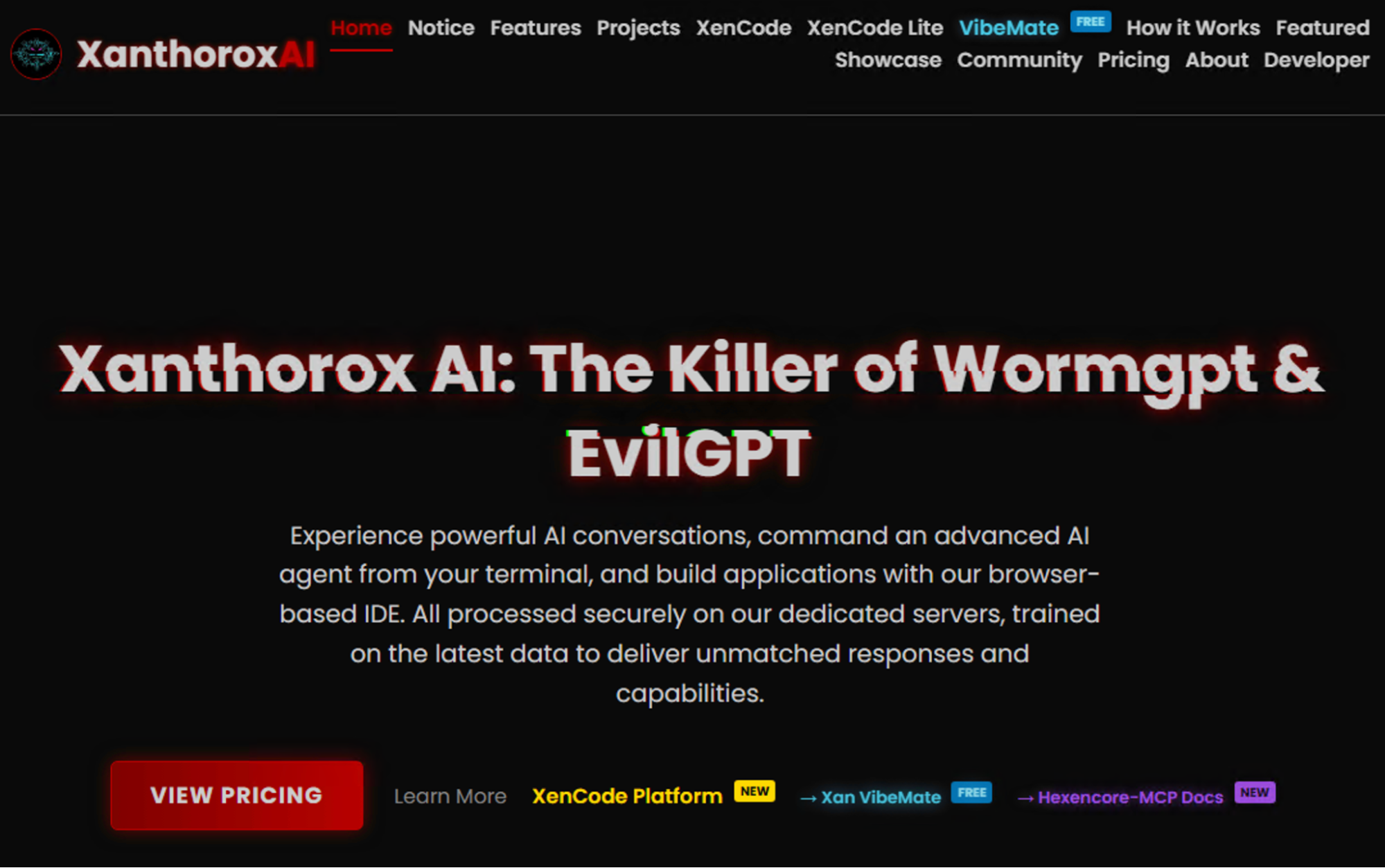
This AI represents the modular criminal AI platform. Its significance lies in how it is marketed. Public reporting describes it as more than another “evil chatbot,” with claims around coding support, multiple model components, and broader operational utility. Still, Xanthorox should be framed cautiously. It is better treated as an emerging or ambitiously marketed platform than as a universally verified flagship of the underground market (Figure 6).
⠀
The wide variety of smaller adversarial AI tools in 2026, including names like DarkGPT, EscapeGPT, WolfGPT, Evil-GPT, XXXGPT, and BadGPT, should be viewed with caution. These brands do not constitute a coherent or reliable category; instead, they often function as short-lived rebrandings or simple interfaces built on public or open-source models. In many cases, these are “scam-of-the-month” services hosted on Telegram, designed to capitalize on hype, with entry-level memberships starting at a few dozen dollars. However, they should not be dismissed outright, as some do offer genuine un-censorship or serve as testing grounds for malicious exploits. The bottom line in 2026 is that the brand name matters less than the underlying architecture. Most “GPT” labels are disposable marketing shells used to evade takedown measures or rebuild credibility after a service failure.
What truly defines the threat is the infrastructure supporting them. While entry-level tiers cost very little, professional-grade systems can cost thousands of dollars. At this level, the value isn’t in the name, but in the technical setup.: These include the specific model used, how the service is delivered, the reliability of the operator, and how well it connects with other criminal tools like phishing kits, stealers, and ransomware support. Ultimately, the market has shifted toward operationalizing AI, focusing on tools that can automate and maximize the efficiency of entire illicit workflows.
Stolen AI accounts as an overlooked criminal market
One of the most important and still underappreciated developments in this landscape is the resale and abuse of legitimate AI access. This pattern is not new. Every widely adopted and commercially valuable technology eventually generates a secondary criminal market around stolen credentials, compromised accounts, and unauthorized access. AI is now following the same trajectory. Threat actors do not rely only on underground “dark AI” tools. They also misuse mainstream AI platforms directly.
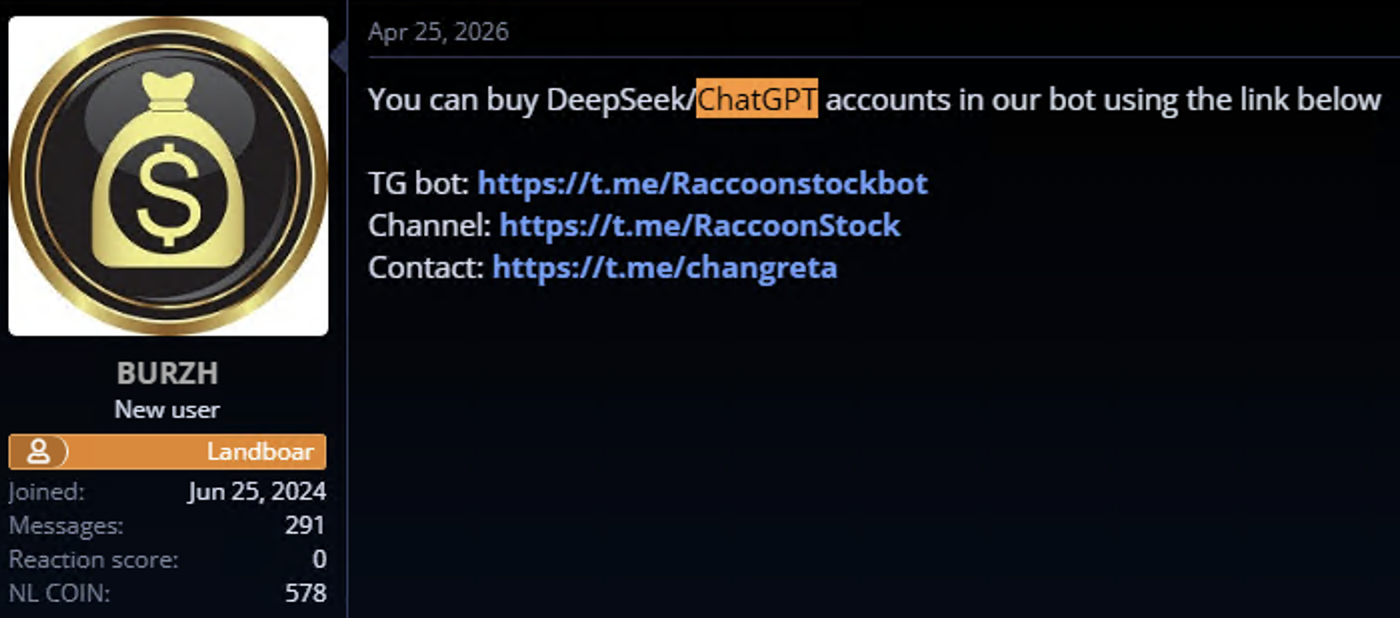
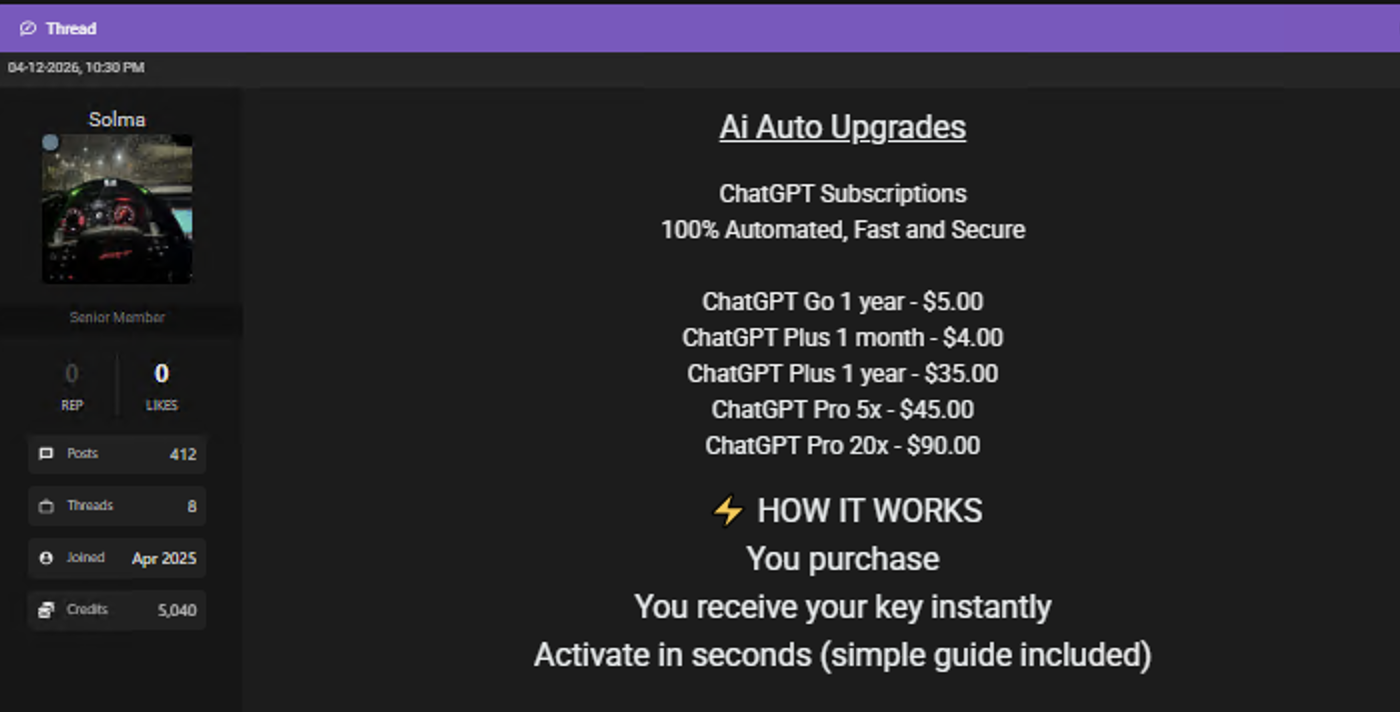
However, the abuse of stolen AI accounts and hijacked API keys may be more consequential than many earlier credential markets. Access to legitimate AI services can provide threat actors with scalable cognitive and operational capabilities, not just access to a single platform or dataset. A compromised AI account may enable faster reconnaissance, multilingual targeting, automated content production, code generation, malware troubleshooting, and the refinement of phishing or fraud workflows. Hijacked API keys may also allow actors to consume compute resources at the victim’s expense, bypass usage restrictions tied to their own identities, and access more capable models or enterprise-grade infrastructure. In this sense, stolen AI access is not merely another credential commodity. It can function as an operational force multiplier across multiple stages of the attack lifecycle, making its abuse both expected and potentially more impactful than many traditional forms of account compromise (Figures 7 and 8).
⠀
⠀
The impact on organizations can be serious as AI accounts may contain proprietary information such as prompts, uploaded files, source code, legal drafts, customer data, internal summaries, product plans, meeting notes, investigative material, or strategic analysis. If compromised, the exposure extends beyond the credential itself. Enterprise AI accounts and AI-related access tokens should therefore be treated like cloud credentials, developer secrets, email accounts, or administrative SaaS access.
Deepfake services: From impersonation to KYC bypass
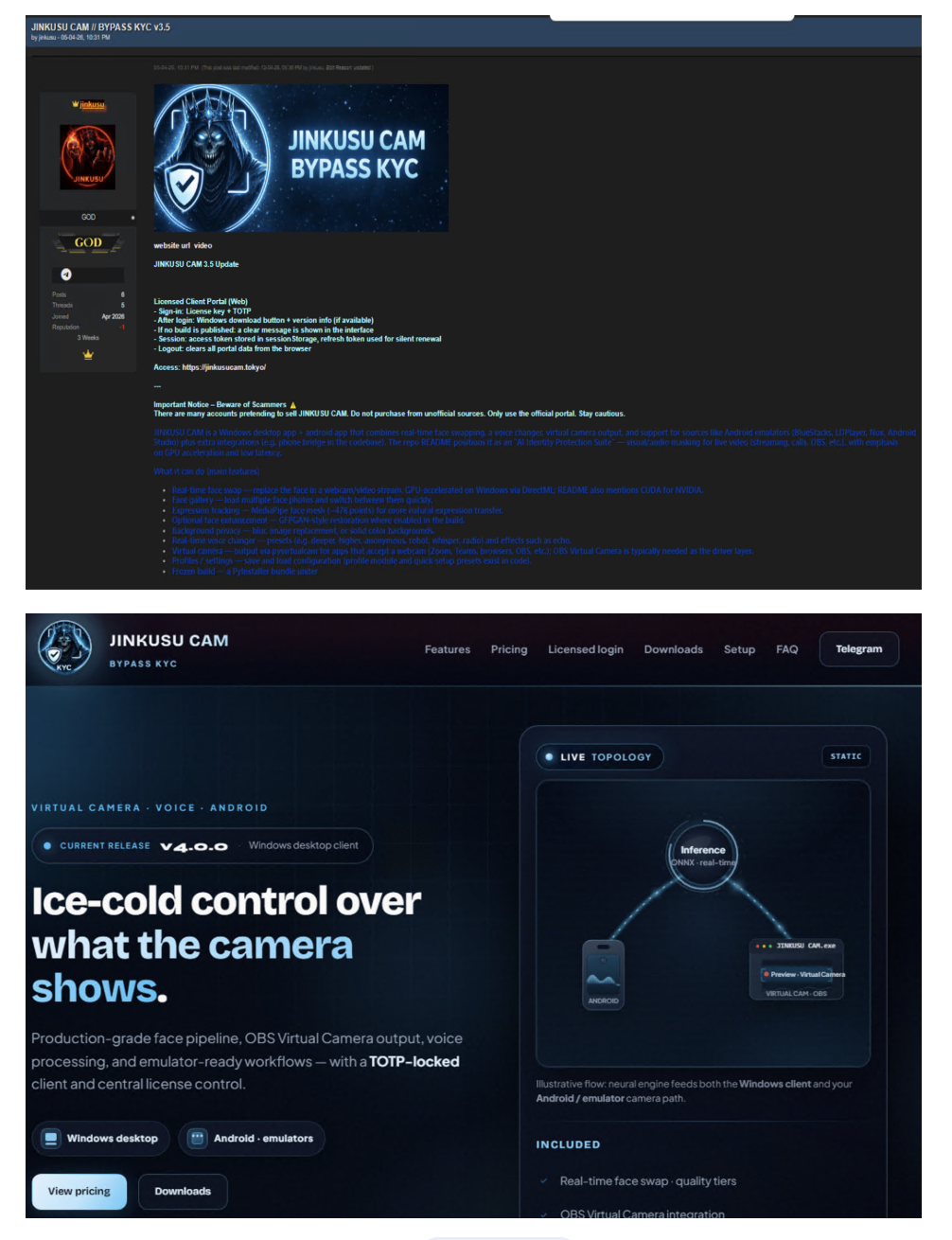
Deepfake services have become one of the criminal AI market’s most important adjacent segments, particularly in fraud, synthetic identity creation, onboarding abuse, and KYC bypass. These services are marketed not as experimental technologies, but as practical fraud enablers. Common offerings include face swaps, voice cloning, fake selfie generation, synthetic profiles, document manipulation, virtual camera injection, video-call impersonation, and full onboarding bypass packages (Figure 9). Their significance stems from the fact that many digital platforms continue to rely heavily on remote identity verification and visual trust cues.
The purpose of bypassing KYC controls is to create, validate, or access accounts that should not exist or should not be available to the offender. Once established, such accounts can support money laundering, mule activity, romance scams, investment fraud, payment abuse, sanctions evasion, account resale, and marketplace manipulation. The threat is no longer limited to static fake images. Attackers can combine face swaps, synthetic video, animated media, and virtual camera injection to impersonate real individuals during onboarding or verification.
Deepfake services also strengthen broader fraud operations. Romance scams, fake recruitment schemes, executive impersonation, vendor fraud, and investment scams all become more persuasive when synthetic voice or video is added to the deception chain. These services should therefore be understood as part of the same criminal AI capability stack. LLMs generate scripts, refine pretexts, localize language, and support interaction at scale. Stolen data enhances personalization. Deepfake tools add the visual and audio layer that increases trust and makes deception harder to detect. Together, these capabilities form a more complete deception architecture.
Organizational impact and defensive priorities
For organizations, the impact of AI-enabled cybercrime is both economic and operational. The main concern is not the sudden arrival of fully autonomous AI hacking, but the steady increase in attacker productivity, deception quality, operational flexibility, and post-compromise efficiency.
This last concern is important to note. Once attackers obtain data, AI can help them review it more quickly and more systematically. Models can summarize large document sets, identify sensitive or monetizable material, extract victim-specific details, and support tailored extortion or fraud. This does not require a purpose-built criminal model. It requires access to a capable model, relevant data, and a clear criminal objective.
At the same time, enterprise AI environments are becoming part of the attack surface. AI accounts, API keys, prompts, uploaded files, connectors, retrieval systems, internal knowledge bases, and agentic workflows can all expose sensitive business information if they are compromised, misused, or poorly governed. These assets should therefore be managed with the same seriousness as other critical systems, including clear ownership, least-privilege access, logging, monitoring, retention rules, and periodic access reviews.
Organizations should respond by treating criminal AI as a challenge of trust, identity, workflow security, and data governance, rather than only as a malware issue. High-risk business processes should be reinforced with stronger approval controls, transaction verification, segregation of duties, and out-of-band confirmation, especially for financial transfers, access changes, sensitive data requests, and executive communications.
Phishing and fraud defenses must also adapt. Poor grammar and obvious language errors are no longer reliable indicators of malicious activity. Organizations should assume that many adversaries can now generate polished, localized, and credible communications at scale. Detection should therefore rely more heavily on behavioral indicators, sender validation, process anomalies, identity verification, and transaction integrity than on superficial language cues.
At the same time, organizations should prepare for AI-assisted post-breach exploitation by improving data minimization, segmentation, access controls, monitoring, logging, and incident response planning. They should also monitor the broader underground capability stack, including jailbreak services, stolen AI accounts, and synthetic media tooling, because these increasingly shape attacker tradecraft in practice.
The market will likely see more bundling of text generation, translation, impersonation, data analysis, and synthetic media into a single criminal offering. It will also likely see continued abuse of legitimate AI platforms alongside wrapper-based underground services. The ecosystem will likely remain uneven, opportunistic, and hype-heavy, while becoming strategically important because it makes cybercrime easier to execute, scale, and detectFor organizations, the main risk is not only higher financial loss, but also the growing operational strain created by AI-assisted attacks that are faster, more scalable, and harder to triage.
Enterprise AI accounts, API keys, prompts, uploaded files, connectors, retrieval systems, internal knowledge bases, and agentic workflows should be managed as critical assets, with clear ownership, least-privilege access, logging, monitoring, retention rules, and periodic access reviews. Sensitive data should be exposed to AI systems only when there is a clear business need, especially when AI tools connect to email, cloud storage, code repositories, customer databases, financial systems, or external services. High-risk AI connectors and workflows should be inventoried, risk-ranked, and monitored for abnormal access, bulk data movement, privilege escalation, or unauthorized agent actions.
As phishing tactics become better, core controls should include MFA, phishing-resistant authentication, conditional access, DLP, EDR/XDR, API security monitoring, secrets scanning, prompt and output filtering, and model-access controls. Incident response plans should also cover stolen AI accounts, exposed prompts, compromised API keys, leaked embeddings, abused connectors, and sensitive data retained in AI workspaces.
The organizations best positioned for the next phase will be those that integrate AI risk into existing security governance rather than treating it as a separate technical issue. As criminal use of AI becomes part of everyday attacker tradecraft, resilience will depend on the ability to verify identity, control access, protect data flows, monitor AI-enabled workflows, and maintain human oversight over high-impact decisions. The future defensive priority is therefore not to predict every AI-enabled attack, but to build security architectures that remain reliable when attackers become faster, more persuasive, and more efficient.
Четвъртък, 11 Юни 2026
Post Syndicated from georgi original http://georgi.unixsol.org/diary/archive.php/2026-06-11
Писанията вече не са тук, който чел – чел.
When Both Parties Try to Out-Macho Each Other
Post Syndicated from The Atlantic original https://www.youtube.com/watch?v=1KGrkGjklKM
Enhanced License Plate Tracking
Post Syndicated from Bruce Schneier original https://www.schneier.com/blog/archives/2026/06/enhanced-license-plate-tracking.html
The surveillance company Leonardo wants more data:
A surveillance company plans to add sensors to automatic license plate readers (ALPRs) that would mean the devices, as well as capture the license plate of passing vehicles, would also sweep up unique identifiers of mobile phones, wearables, and other Bluetooth-enabled devices in those cars, potentially letting law enforcement identify specific drivers or passengers.
The technology, called SignalTrace, would turn ALPR cameras from devices focused on tracking cars to ones that can more readily track the location of particular people. ALPR cameras have become a commonly deployed technology all across the U.S.; SignalTrace would make some of those cameras capable of collecting much more data.
Yes, it’s bad that more companies are collecting this level of surveillance data. But all of this pales in comparison to the type and quantity of data our smartphones already collect about us.
Alternate link.
[$] LWN.net Weekly Edition for June 11, 2026
Post Syndicated from jzb original https://lwn.net/Articles/1076254/
Inside this week’s LWN.net Weekly Edition:
- Front: Suspicious AI activity in Fedora; fork() + exec(); splice() + vmsplice(); BPF loop verification; fanotify; trusted publishing.
- Briefs: CA age bill; Bundler cooldowns; insecure code completion; Asahi and macOS 27 beta; Buildroot 2026.05; Ubuntu MATE; rsync 3.4.4; Quotes; …
- Announcements: Newsletters, conferences, security updates, patches, and more.
How the Voting Rights Act Could Be a Resource in the Future
Post Syndicated from The Atlantic original https://www.youtube.com/shorts/V7af1kpWKtc
Meshtastic vs MeshCore: Which Should You Choose for Project Nomad?
Post Syndicated from Crosstalk Solutions original https://www.youtube.com/shorts/diLqra5atsk
Comic for 2026.06.10 – My Son
Post Syndicated from Explosm.net original https://explosm.net/comics/my-son-3
New Cyanide and Happiness Comic
Dell Pro Max 16 Plus Review A More Mobile NVIDIA RTX Pro 5000 Blackwell System
Post Syndicated from Ryan Smith original https://www.servethehome.com/dell-pro-max-16-plus-review-intel-nvidia-rtx-pro-5000-blackwell-system/
Sparing no expense, Dell’s flagship workstation laptop, the Pro Max 16 Plus, aims to deliver as much performance as is possible in a 16-inch laptop while still being modestly portable
The post Dell Pro Max 16 Plus Review A More Mobile NVIDIA RTX Pro 5000 Blackwell System appeared first on ServeTheHome.
Невзоров за възможна двойна употреба
Post Syndicated from Светла Енчева original https://www.toest.bg/nevzorov-za-vuzmozhna-dvoyna-upotreba/

Замисляли ли сте се как и държавата, и обществото проявяват склонност да не забелязват някои неща, които са толкова видими, че могат да ни извадят очите? В някакъв момент сякаш някой ни натиска копчето и дружно забелязваме. И започва масово чудене: къде са били институциите досега, къде е било обществото, къде са били медиите, къде сме гледали ние самите?
Край Варна в продължение на няколко години се строи незаконно селище от над 100 сгради.
Това се е случвало поне от 2023 г. – по времето на двама кметове (Иван Портних и Благомир Коцев) и на няколко правителства. Селището в защитената местност Баба Алино дори се е рекламирало преди три години. Но мащабът на беззаконието стана водеща тема едва в края на май 2026 г.
Междувременно в случая са замесени всевъзможни институции на различни нива, чиито представители твърдят, че не са направили нищо нередно. По-точно така се оправдават представителите на институциите, които си правят труда да кажат нещо по въпроса. Сред тях не е ДАНС, нито посланичката на Украйна, които също имат отношение към случая. Но нека караме поред.
Откъслечни знаци
Всъщност не е съвсем коректно да се твърди, че никой не е алармирал публично за незаконните строежи в Баба Алино. Затова е много интересно да се проследи избирателната пропускливост на чуваемостта.
Още към октомври 2023 г. Регионалната дирекция по горите и Държавното горско стопанство във Варна са разполагали със сигнал за незаконна сеч, във връзка с който извършват проверка и уведомяват прокуратурата. След това се подават още сигнали, образуват се и досъдебни производства.
През март 2025 г. тогавашният зам.-кмет на Варна Илия Коев (уволнен от Благомир Коцев на 9 юни 2026 г.) говори по БНТ за незаконната сеч в района и обещава Общината да предприеме мерки. Взета е и позиция на фирмата, която обещава, че всичко ще е законно. Нито Коев обаче, нито репортерът на БНТ споменават името на фирмата – КУБ, както и това на инвеститора Олег Невзоров. Не става дума също, че в района вече има построени сгради.
Абревиатурата КУБ се вкарва в публичното пространство от „Възраждане“
през септември 2025 г. – първо в заседание на парламентарната Комисия за контрол над службите за сигурност, а след това и месеци наред в заседания на Народното събрание. „Възраждане“ впрочем прикачва към фирмата на Невзоров квалификацията „престъпна украинска групировка“.
През октомври 2025 г. BIRD и журналистът от „Дневник“ Спас Спасов споменават Невзоров във връзка с ареста на Благомир Коцев, изразявайки предположението, че именно той е тайният свидетел срещу варненския кмет. И това е контекстът, в който е споменаван Невзоров в този период. Самият той отрича да е въпросният таен свидетел. Но няколко дни преди ареста на Коцев ДАНС издава заповед за изгонването на Невзоров от страната. Дни по-късно заповедта е оттеглена – поведение, твърде нетипично за тази институция, чиито решения не подлежат на никакъв контрол.
Таймингът
Накратко, какво се случва в Баба Алино и кой го извършва, е публично известно още през 2025 г. То обаче е тема най-вече на проруската партия „Възраждане“, която вижда подходящ повод да уличи „лошите“ украинци, а Невзоров се споменава основно в контекста на ареста на Благомир Коцев. Като изключим Спас Спасов, който още през октомври 2025 г. обръща внимание на незаконните строежи.
Иронично, за незаконното селище край Варна се заговори масово чак когато кметът Благомир Коцев реши най-сетне да даде гласност на случая. Това моментално беше използвано от правителството на „Прогресивна България“ срещу него.
Малко вероятно е Румен Радев чак сега да научава за незаконната дейност на фирмата на Невзоров – още повече че докато е заемал президентския пост, той е имал достъп до мистериозно отменения доклад на ДАНС. Ако беше използвал случая в предизборната кампания, това щеше да е удар срещу основните му политически конкуренти – ГЕРБ и ПП–ДБ, които не са направили нужното, за да спрат беззаконието. И срещу ДПС, което се оказва свързано с комай всяко крупно беззаконие.
Изобщо, в тази история като че няма невинни. Всеки по веригата е отговорен. Било с издаването на документи с невярно съдържание, било с бездействието си, било с недостатъчно решителните си действия.
Преди изборите обаче Радев се позиционира в максимално широк периметър, за да привлече повече избиратели. А освен срещу политическите му конкуренти,
случаят в Баба Алино може да се използва и срещу Украйна.
Защото незаконното строителство се извършва от фирма на украински бизнесмен, който на всичкото отгоре развива дейност и в организация, подкрепяща украинските бежанци. Участвал е в публични събития, на които е присъствала и посланичката на Украйна Олеся Илашчук.
В допълнение, вътрешният министър Иван Дерменджиев твърди, че Илашчук се е намесила във връзка със заповедта на ДАНС за екстрадирането на Невзоров. Как точно се е намесила, не е известно, но думите на Дерменджиев оставят впечатлението, че тя се е застъпила за Невзоров. Как посланик на чужда държава може да повлияе на решение на българските разузнавателни служби – също е неясно.
Незаконното селище в Баба Алино се превръща във водеща тема точно сега, когато правителството на Радев поема курс към промяна на геополитическата ориентация на България.
На първо време този курс е основно за вътрешна употреба и цели постепенна промяна на нагласите на обществото. Сред начините за постигане на тази промяна са нарочването на врагове и оправдаването на антидемократични режими.
Антидемократичен чеклист
Началото на края на демокрацията няма да бъде поставено с идващи танкове. Един вид, ако чакате „танковете да дойдат“, няма да стане. Ще има „по-малко пречки“, „повече ефективност“ и много заглушени теми. За червените лампички, които мигат, преди демокрацията да изгасне – от Светла Енчева.
 Светла Енчева
В периода, в който публичното говорене в България е заето основно с Баба Алино, а много медии използват въведеното от „Възраждане“ клише „украинска групировка“, се случиха някои на пръв поглед несвързани събития, които обаче, взети заедно, създават обща картина към каква България се стреми новата власт.
На 1 юни беше възстановена Асамблеята „Знаме на мира“ – детски фестивал, създаден по идея на Людмила Живкова, дъщерята на социалистическия диктатор Тодор Живков. Днес фондацията, която организира Асамблеята, се ръководи от дъщерята на Людмила Живкова – Евгения. Както някога, така и днес фестивалът е не на последно място политическо събитие, демонстриращо определена геополитическа ориентация. А „мирът“ е „руският“. Чий да е, ако се изразим в стил „Радев“.
Седмица по-късно държавата се посвети на добрите си отношения с Китай. Президентката Илияна Йотова, премиерът Румен Радев и вицепремиерът Гълъб Донев поотделно проведоха срещи с Шън Ицин – държавната съветничка на Китайската народна република, и обещаха да задълбочат отношенията на България с азиатската социалистическа страна. Освен че произвежда голяма част от нещата, които се продават, и че се опитва да разшири влиянието си по света, Китай е държава, която системно нарушава човешките права, налага цензура и следи всяка крачка на гражданите си.
И ето, на 9 юни министърът на отбраната Димитър Стоянов заяви, че България вече няма да изпраща оръжия на Украйна. Дали действително ще престане, или ще изпраща под сурдинка, както и през 2022 г., когато бившата председателка на БСП Корнелия Нинова, по онова време министърка, уж не даваше, е друг въпрос. Важно е публичното послание – в момент, в който навсякъде се говори за „украински групировки“.
КУБ с двойно дъно
Една от основните характеристики на дискриминацията е вменяването на колективна вина. Макар повечето извършители на престъпления да са мъже, не се говори за „мъжка престъпност“, но когато ром наруши закона, това вече е „ромска престъпност“. И често общественият гняв се насочва срещу всички роми.
По същия начин незаконното селище в Баба Алино става повод да се вменява вина на всички украинци, за което допринасят и устойчивите клишета „украинска групировка“ и „престъпна украинска групировка“. А фактът, че Олег Невзоров е подпомагал украински бежанци, се използва за настройване на общественото мнение и срещу тях.
В тази ситуация е много важно и какво не се казва.
Когато се поставя знак за равенство между Невзоров, държавата му по произход и съгражданите му, обикновено се изпуска от поглед, че украинската държава разследва него и негови роднини за престъпления – заради строителни измами в Одеса, заради невърнати кредити, фалшифициране на документи и придобиване на оръжия с фалшив сертификат.
Публикация в „Капитал“ на Спас Спасов хвърля светлина и върху политическата ориентация на Невзоров. През 2020 г. той се е кандидатирал за кмет на Таировската община в Одеса от проруската партия „Победа Пальчевского“, която също е финансирал. Партията е кръстена на лидера си Андрей Палчевский. Той пък е свързан с друга проруска партия („Опозиционна платформа – За живот“), чиято лидерка Наталия Королевска понастоящем се издирва от украинските власти. Същата Королевска е свързана със сдружението United Women, научаваме пак от статия на Спас Спасов – от юли 2025 г. Сдружението, на което Невзоров е спонсор, хем помага на украински бежанки, хем членовете на управителния му съвет са с проруски възгледи.
От BIRD споменават и за данни за връзки с руските служби на сътрудника на Невзоров – грузинеца Джони Читадзе (депортиран от България заради заповедта на ДАНС, в която е бил включен и Невзоров, преди ДАНС да отмени мярката за него).
Как е възможно хем да си за Русия, хем да помагаш на бежанци от Украйна? Ами очевидно е възможно. Като в „Хлапето“ на Чарли Чаплин – детето чупи прозорци, героят на Чаплин ги поправя. Нападайки родината им, Русия прогонва милиони украинци, а после нейни хора се грижат за прогонените. И ги държат под око. Затворен цикъл. Ако нещо се обърка, то се пише на сметката на Украйна („престъпна украинска групировка“), а Русия остава чиста.
Помните ли българите, осъдени във Великобритания, защото са били руски шпиони? Процесът срещу тях не се превърна в атака срещу България, въпреки че двама от групата (Катрин Иванова и Бисер Джамбазов) са оказвали помощ на свои сънародници в Обединеното кралство. Разкритията не бяха използвани и като кампания срещу БСП, макар че Джамбазов е бил член на партията и че двамата са кръстили организацията си Българска социална платформа – БСП.
Ето как не фактите сами по себе си, а употребата им задава посоката на публичното говорене.
Остава послевкус на активно мероприятие.
Освен че се използва в контекста на геополитическата преориентация на България, казусът с незаконното селище в Баба Алино играе и друга роля. Той успешно отвлича общественото внимание от трагедията край Петрохан и Околчица (също използвана за политически цели), при която загинаха шестима души, между тях и дете, и въпросите около която продължават да са доста повече от отговорите.
Впрочем и в двата случая е намесена ДАНС, но не това е най-важното. По-важното е как общественото внимание може да бъде моделирано и насочвано. Как и институции, и медии, и общество (с незначителни изключения) години наред са слепи за нещо огромно. И изведнъж проглеждат, но точно по определен начин и в точно определена посока.
И така до следващото „откриване“ на нещо, което ще бъде използвано за поредното разчистване на сметки. И за отвличане на вниманието от нещо друго.
Заглавно изображение: Съвсем истински слон в стаята, който никой не вижда, защото всички са заети да пият чай. Сидни, Австралия, март 1939 г.
New College & Chris Rufo #lastweektonight
Post Syndicated from LastWeekTonight original https://www.youtube.com/shorts/8WqVhT_q4MM
The Elgato Prompter… a frustrating experience
Post Syndicated from Matt Granger original https://www.youtube.com/watch?v=Yacm4Z9IVvM