Post Syndicated from The History Guy: History Deserves to Be Remembered original https://www.youtube.com/watch?v=SArbhVk-BBY
MLPerf Inference v4.1 NVIDIA B200 Whallops AMD MI300X UntetherAI Rises
Post Syndicated from Patrick Kennedy original https://www.servethehome.com/mlperf-inference-v4-1-nvidia-b200-whallops-amd-mi300x-untetherai-rises/
In MLPerf Inference v4.1 the upcoming NVIDIA B200 whalloped the current AMD MI300X but UntetherAI submitted some excellent efficiency runs
The post MLPerf Inference v4.1 NVIDIA B200 Whallops AMD MI300X UntetherAI Rises appeared first on ServeTheHome.
[$] MemHive: sharing immutable data between Python subinterpreters
Post Syndicated from jake original https://lwn.net/Articles/987238/
Immutable data makes concurrent access easier, since it
eliminates the data-race conditions that can plague multithreaded programs. At
PyCon 2024, Yury Selivanov
introduced an early-stage project called MemHive, which uses Python
subinterpreters and immutable data to
overcome the problems of thread serialization that are caused by the
language’s Global Interpreter Lock (GIL). Recent developments in the Python world have opened
up different strategies for avoiding the longstanding problems with the
GIL.
Announcing AWS Parallel Computing Service to run HPC workloads at virtually any scale
Post Syndicated from Channy Yun (윤석찬) original https://aws.amazon.com/blogs/aws/announcing-aws-parallel-computing-service-to-run-hpc-workloads-at-virtually-any-scale/
Today we are announcing AWS Parallel Computing Service (AWS PCS), a new managed service that helps customers set up and manage high performance computing (HPC) clusters so they seamlessly run their simulations at virtually any scale on AWS. Using the Slurm scheduler, they can work in a familiar HPC environment, accelerating their time to results instead of worrying about infrastructure.
In November 2018, we introduced AWS ParallelCluster, an AWS supported open-source cluster management tool that helps you to deploy and manage HPC clusters in the AWS Cloud. With AWS ParallelCluster, customers can also quickly build and deploy proof of concept and production HPC compute environments. They can use AWS ParallelCluster Command-Line interface, API, Python library, and the user interface installed from open source packages. They are responsible for updates, which can include tearing down and redeploying clusters. Many customers, though, have asked us for a fully managed AWS service to eliminate operational jobs in building and operating HPC environments.
AWS PCS simplifies HPC environments managed by AWS and is accessible through the AWS Management Console, AWS SDK, and AWS Command-Line Interface (AWS CLI). Your system administrators can create managed Slurm clusters that use their compute and storage configurations, identity, and job allocation preferences. AWS PCS uses Slurm, a highly scalable, fault-tolerant job scheduler used across a wide range of HPC customers, for scheduling and orchestrating simulations. End users such as scientists, researchers, and engineers can log in to AWS PCS clusters to run and manage HPC jobs, use interactive software on virtual desktops, and access data. You can bring their workloads to AWS PCS quickly, without significant effort to port code.
You can use fully managed NICE DCV remote desktops for remote visualization, and access job telemetry or application logs to enable specialists to manage your HPC workflows in one place.

AWS PCS is designed for a wide range of traditional and emerging, compute or data-intensive, engineering and scientific workloads across areas such as computational fluid dynamics, weather modeling, finite element analysis, electronic design automation, and reservoir simulations using familiar ways of preparing, executing, and analyzing simulations and computations.
Getting started with AWS Parallel Computing Service
To try out AWS PCS, you can use our tutorial for creating a simple cluster in the AWS documentation. First, you create a virtual private cloud (VPC) with an AWS CloudFormation template and shared storage in Amazon Elastic File System (Amazon EFS) within your account for the AWS Region where you will try AWS PCS. To learn more, visit Create a VPC and Create shared storage in the AWS documentation.
1. Create a cluster
In the AWS PCS console, choose Create cluster, a persistent resource for managing resources and running workloads.

Next, enter your cluster name and choose the controller size of your Slurm scheduler. You can choose Small (up to 32 nodes and 256 jobs), Medium (up to 512 nodes and 8,192 jobs), or Large (up to 2,048 nodes and 16,384 jobs) for the limits of cluster workloads. In the Networking section, choose your created VPC, subnet to launch the cluster, and security group applied to your cluster.

Optionally, you can set the Slurm configuration such as an idle time before compute nodes will scale down, a Prolog and Epilog scripts directory on launched compute nodes, and a resource selection algorithm parameter used by Slurm.
Choose Create cluster. It takes some time for the cluster to be provisioned.
2. Create compute node groups
After creating your cluster, you can create compute node groups, a virtual collection of Amazon Elastic Compute Cloud (Amazon EC2) instances that AWS PCS uses to provide interactive access to a cluster or run jobs in a cluster. When you define a compute node group, you specify common traits such as EC2 instance types, minimum and maximum instance count, target VPC subnets, Amazon Machine Image (AMI), purchase option, and custom launch configuration. Compute node groups require an instance profile to pass an AWS Identity and Access Management (IAM) role to an EC2 instance and an EC2 launch template that AWS PCS uses to configure EC2 instances it launches. To learn more, visit Create a launch template And Create an instance profile in the AWS documentation.
To create a compute node group in the console, go to your cluster and choose the Compute node groups tab and the Create compute node group button.

You can create two compute node groups: a login node group to be accessed by end users and a job node group to run HPC jobs.
To create a compute node group running HPC jobs, enter a compute node name and select a previously-created EC2 launch template, IAM instance profile, and subnets to launch compute nodes in your cluster VPC.
Next, choose your preferred EC2 instance types to use when launching compute nodes and the minimum and maximum instance count for scaling. I chose the hpc6a.48xlarge instance type and scale limit up to eight instances. For a login node, you can choose a smaller instance, such as one c6i.xlarge instance. You can also choose either the On-demand or Spot EC2 purchase option if the instance type supports. Optionally, you can choose a specific AMI.

Choose Create. It takes some time for the compute node group to be provisioned. To learn more, visit Create a compute node group to run jobs and Create a compute node group for login nodes in the AWS documentation.
3. Create and run your HPC jobs
After creating your compute node groups, you submit a job to a queue to run it. The job remains in the queue until AWS PCS schedules it to run on a compute node group, based on available provisioned capacity. Each queue is associated with one or more compute node groups, which provide the necessary EC2 instances to do the processing.
To create a queue in the console, go to your cluster and choose the Queues tab and the Create queue button.

Enter your queue name and choose your compute node groups assigned to your queue.

Choose Create and wait while the queue is being created.
When the login compute node group is active, you can use AWS Systems Manager to connect to the EC2 instance it created. Go to the Amazon EC2 console and choose your EC2 instance of the login compute node group. To learn more, visit Create a queue to submit and manage jobs and Connect to your cluster in the AWS documentation.

To run a job using Slurm, you prepare a submission script that specifies the job requirements and submit it to a queue with the sbatch command. Typically, this is done from a shared directory so the login and compute nodes have a common space for accessing files.

You can also run a message passing interface (MPI) job in AWS PCS using Slurm. To learn more, visit Run a single node job with Slurm or Run a multi-node MPI job with Slurm in the AWS documentation.
You can connect a fully-managed NICE DCV remote desktop for visualization. To get started, use the CloudFormation template from HPC Recipes for AWS GitHub repository.
In this example, I used the OpenFOAM motorBike simulation to calculate the steady flow around a motorcycle and rider. This simulation was run with 288 cores of three hpc6a instances. The output can be visualized in the ParaView session after logging in to the web interface of DCV instance.

Finally, after you are done HPC jobs with the cluster and node groups that you created, you should delete the resources that you created to avoid unnecessary charges. To learn more, visit Delete your AWS resources in the AWS documentation.
Things to know
Here are a couple of things that you should know about this feature:
- Slurm versions – AWS PCS initially supports Slurm 23.11 and offers mechanisms designed to enable customers to upgrade their Slurm major versions once new versions are added. Additionally, AWS PCS is designed to automatically update the Slurm controller with patch versions. To learn more, visit Slurm versions in the AWS documentation.
- Capacity Reservations – You can reserve EC2 capacity in a specific Availability Zone and for a specific duration using On-Demand Capacity Reservations to make sure that you have the necessary compute capacity available when you need it. To learn more, visit Capacity Reservations in the AWS documentation.
- Network file systems – You can attach network storage volumes where data and files can be written and accessed, including Amazon FSx for NetApp ONTAP, Amazon FSx for OpenZFS, and Amazon File Cache as well as Amazon EFS and Amazon FSx for Lustre. You can also use self-managed volumes, such as NFS servers. To learn more, visit Network file systems in the AWS documentation.
Now available
AWS Parallel Computing Service is now available in the US East (N. Virginia), AWS US East (Ohio), US West (Oregon), Asia Pacific (Singapore), Asia Pacific (Sydney), Asia Pacific (Tokyo), Europe (Frankfurt), Europe (Ireland), Europe (Stockholm) Regions.
AWS PCS launches all resources in your AWS account. You will be billed appropriately for those resources. For more information, see the AWS PCS Pricing page.
Give it a try and send feedback to AWS re:Post or through your usual AWS Support contacts.
— Channy
P.S. Special thanks to Matthew Vaughn, a principal developer advocate at AWS for his contribution in creating a HPC testing environment.
Efficiently processing batched data using parallelization in AWS Lambda
Post Syndicated from Chris Munns original https://aws.amazon.com/blogs/compute/efficiently-processing-batched-data-using-parallelization-in-aws-lambda/
This post is written by Anton Aleksandrov, Principal Solutions Architect, AWS Serverless
Efficient message processing is crucial when handling large data volumes. By employing batching, distribution, and parallelization techniques, you can optimize the utilization of resources allocated to your AWS Lambda function. This post will demonstrate how to implement parallel data processing within the Lambda function handler, maximizing resource utilization and potentially reducing invocation duration and function concurrency requirements.
Overview
AWS Lambda integrates with various event sources, such as Amazon SQS, Apache Kafka, or Amazon Kinesis, using event-source mappings. When you configure an event-source mapping, Lambda continuously polls the event source and automatically invokes your function to process the retrieved data. Lambda makes more invocations of your function as the number of messages it reads from the event source increases. This can increase the utilized function concurrency and consume the available concurrency in your account. Click the links to learn more about how Lambda consumes messages from SQS queues and Kinesis streams.
To improve the data processing throughput, you can configure event-source mapping batch window and batch size. These settings ensure that your function is invoked only when a sufficient number of messages have accumulated in the event source. For example, if you configure a batch size of 100 messages and a batch window of 10 seconds, Lambda will invoke your function when either 100 messages have accumulated or 10 seconds have elapsed, whichever happens first.

Event source mapping event batching
By processing messages in batches, rather than individually, you can improve throughput and optimize costs by reducing the number of polling requests to event sources and the number of function invocations. For instance, processing a million messages without batching would require one million function invocations, but configuring a batch size of 100 messages can reduce the number of invocations to 10,000.
Optimizing batch processing within the Lambda execution environment
Each Lambda execution environment processes one event per invocation. With batching enabled, the event object Lambda sends to the function handler contains an array of messages retrieved and batched by the event-source mapping. Once an execution environment starts processing an event object containing a batch of messages, it won’t handle additional invocations until the current one is complete. However, simply iterating over the array of messages and processing them one by one may not fully utilize the allocated compute resources. This can lead to underutilized or idle compute resources, like CPU capacity, and hence longer overall processing times.

Underutilized Lambda environments
Underutilization of compute resources can be generally caused by two things – non-CPU-intensive blocking tasks, such as sending HTTP requests and waiting for responses, and single-threaded processing when you have more than one vCPU core. To address these concerns and maximize resource utilization, you can implement your functions to process data in parallel. This allows more efficient utilization of the allocated compute capacity, reducing invocation duration, time spent idle, and the total concurrency required. In addition, when you allocate more than 1.8GB of memory to your function, it also gets more than one vCPU, which allows threads to land on separate cores for even better performance and true parallel processing.

Improved concurrency in Lambda environment
When processing messages sequentially with a low compute utilization rate, reducing memory allocation may seem intuitive to save costs. This, however, can result in slower performance due to less CPU capacity being allocated. When your function is parallelizing data processing within the execution environment, you’re getting a higher compute utilization rate, and since raising the memory allocation also provides additional CPU capacity, it can lead to better performance. Use the Lambda Power Tuning tool to find the optimal memory configuration, balancing cost with performance.
Understanding the Lambda execution environment lifecycle
After processing an invocation, the Lambda execution environment is “frozen” by the Lambda service. Lambda runtime considers the invocation complete and “freezes” the execution environment when your function handler returns.
When the Lambda service is looking for an execution environment to process a new incoming invocation, it will first try to “thaw” and use any available execution environments that were previously “frozen”. This cycle repeats until the execution environment is eventually shut down.

Lambda worker lifecycle over time
Implementing parallel processing within the Lambda execution environment
You can implement parallel processing by running multiple threads in your function handler, but if those threads are still running when the handler returns, then they will be “frozen” together with the execution environment until the next invocation. This can lead to unexpected behavior, where the execution environment is “thawed” to process a new invocation, however, it still has background threads running and processing data from previous invocations. If you do not handle this properly, the behavior can cascade across multiple invocations, leading to delayed or unfinished processing and complicated debugging.

Threads frozen before finishing
To address this concern, you need to ensure that the background threads you spawn in the function handler are done processing data before returning from the handler. All threads spawned within a particular invocation must complete within the same invocation in order not to spill over to subsequent invocations. This is illustrated in the following diagram. You can see threads start and end within the same invocation, and only once all threads have finished, the function handler returns.

Threads returning before end of invoke
Sample code
Programming languages offer diverse techniques and terminology for parallel and concurrent processing. Java employs multi-threading and thread pools. Node.js, though single-threaded, provides event loop and promises (for async programming), as well as child processes and worker threads (for actual multi-threading). Python supports both multi-threading (subject to Global Interpreter Lock) and multi-processing. Concurrent routines is another technique gaining attention.
The following sample is provided for illustration purposes only and is based on Node.js promises running concurrently. The sample code uses a language-agnostic term “worker” to denote a unit of parallel processing. Your specific parallelization implementation depends on your choice of runtime language and frameworks. AWS recommends you use battle-tested frameworks like Powertools for AWS Lambda that implement concurrent batch processing when possible. Regardless of the programming language, it is crucial to ensure all background threads/workers/promises/routines/tasks spawned by the function handler are completed within the same invocation before the handler returns.
Sample implementation with Node.js
const NUMBER_OF_WORKERS = 4;

export const handler = async (event) => {
    const workers = [];
    const messages = event.Records;

    // For handling partial batch processing errors
    const batchItemFailures = [];

    for (let i=0; i<NUMBER_OF_WORKERS;i++){
        // No await here! The waiting will happen later
        const worker = spawnWorker(i, messages, batchItemFailures);
        workers.push(worker);
    }

    // This line is crucial. This is where the handler
    // waits for all workers to complete their tasks
    const processingResults = await Promise.allSettled(workers);
    console.log('All done!');

    // Return messageIds of all messages that failed
    // to process in order to retry
    return {batchItemFailures};
};

async function spawnWorker(id, messages, batchItemFailures){
    console.log(`worker.id=${id} spawning`);
    while (messages.length>0){
        const msg = messages.shift();
        console.log(`worker.id=${id} processing message`);
        try {
            // A blocking, but not CPU-intensive operation
            await processMessage(msg);
        } catch (err){
            // If message processing failed, add it to
            // the list of batch item failures
            batchItemFailures.push({ itemIdentifier: msg.messageId});
        }
    }
}
See the sample code and AWS Cloud Development Kit (CDK) stack at github.com.
Testing results
The following chart illustrates a Lambda function processing messages using an SQS event-source mapping. After enabling message processing with 4 workers, the invocation duration and concurrent executions dropped to 1/4th of the previous value, while still processing the same number of messages per second. Thanks to parallelization, the new function is faster and requires less concurrency.

Function performance dashboard
Looking at the invocation log, you can see that the function handler has spawned four workers, and all of them were completed before the handler returned the result. You can also see that although the handler received 20 items, with each item taking 200ms to process, the overall duration is only 1000ms. This is because items were processed in parallel (20 items * 200ms / 4 workers = 1000ms total processing time).
START RequestId: (redacted)  Version: $LATEST
2024-06-18T03:18:03.049Z    INFO    Got messages from SQS
2024-06-18T03:18:03.049Z    INFO    messages.length=20
2024-06-18T03:18:03.049Z    INFO    worker.id=0 spawning
2024-06-18T03:18:03.049Z    INFO    worker.id=0 processing message
2024-06-18T03:18:03.049Z    INFO    worker.id=1 spawning
2024-06-18T03:18:03.049Z    INFO    worker.id=1 processing message
2024-06-18T03:18:03.050Z    INFO    worker.id=2 spawning
2024-06-18T03:18:03.050Z    INFO    worker.id=2 processing message
2024-06-18T03:18:03.050Z    INFO    worker.id=3 spawning
2024-06-18T03:18:03.050Z    INFO    worker.id=3 processing message
2024-06-18T03:18:03.250Z    INFO    worker.id=0 processing message
2024-06-18T03:18:03.250Z    INFO    worker.id=1 processing message
(redacted for brevity)
2024-06-18T03:18:03.852Z    INFO    worker.id=1 processing message
2024-06-18T03:18:03.852Z    INFO    worker.id=2 processing message
2024-06-18T03:18:03.852Z    INFO    worker.id=3 processing message
2024-06-18T03:18:04.052Z    INFO    All done!
END RequestId: (redacted)
REPORT RequestId: (redacted) Duration: 1004.48 ms
Considerations
- The technique and samples described in this post assume unordered message processing. In case you use ordered event sources, such as SQS FIFO Queues, and require preserving message order, you will need to address that in your implementation code. One technique might be creating a separate thread for each messageGroupId.
- While providing performance and cost benefits, multi-threading and parallel processing is an advanced technique that requires proper error handling. Lambda supports partial batch responses, where you can report back to the event source that specific messages from the batch failed to be processed so they can be retried. You can collect failed message IDs from each thread and return them as your function handler response. This is illustrated in the sample above. See Handling errors for an SQS event source in Lambda and Best Practices for implementing partial batch responses for additional details.
Conclusion
Efficiently processing large volumes of data implies efficient resource utilization. When processing batches of messages from event sources, validate whether your function would benefit from parallel or concurrent processing within the function handler thus increasing the compute capacity utilization rate. With a high compute capacity utilization rate, you can allocate more memory to your function, thus getting more CPU allocated as well, for faster and more efficient processing. Use frameworks like Powertools for AWS Lambda that implement concurrent batch processing when possible, and use the Lambda Power Tuning tool to find the best memory configuration for your functions, balancing performance and cost.
For more serverless learning resources, visit Serverless Land.
BIG ASS UNBOXING – ThinkTank Photo Production Manager 50 V2
Post Syndicated from Matt Granger original https://www.youtube.com/watch?v=w3hm9A2EDDU
[$] Debian discusses principles for package maintenance
Post Syndicated from jzb original https://lwn.net/Articles/986480/
Achieving consensus among Debian Developers on technical topics and
procedures can be, to put it mildly, challenging. Nevertheless, that
is exactly what Otto Kekäläinen has tried to do with a proposal that
would set up “principles all Debian packages should follow to be
“. In the near term,
open for collaboration in package maintenance
it seems unlikely that the proposal will be accepted, but the
discussion may be effective at improving collaboration nonetheless.
Introducing: We Live Here Now
Post Syndicated from The Atlantic original https://www.youtube.com/watch?v=D9O3CMVgB74
Security updates for Wednesday
Post Syndicated from jzb original https://lwn.net/Articles/987519/
Security updates have been issued by Fedora (calibre, dotnet8.0, dovecot, webkit2gtk4.0, and webkitgtk), Oracle (nodejs:20), Red Hat (bind, bind and bind-dyndb-ldap, postgresql:16, and squid), Slackware (kcron and plasma), SUSE (keepalived and webkit2gtk3), and Ubuntu (drupal7).
Command with Confidence: Insights from Andrew Bustamante
Post Syndicated from Emma Burdett original https://blog.rapid7.com/2024/08/28/command-with-confidence-insights-from-andrew-bustamante/

At the recent Take Command Summit, former CIA intelligence officer and US Air Force combat veteran Andrew Bustamante shared valuable tools, tactics, and techniques from elite intelligence agencies with Rapid7’s Americas Field CTO Jeffrey Gardner in an informal chat. His session, “Command with Confidence,” offered cybersecurity professionals insights to enhance their security strategies with clarity and confidence.
Key Takeaways:
- The Four C’s Framework: Bustamante introduced the “Four C’s” framework—consideration, consistency, collaboration, and control. This structured approach is designed to build rapport, ensure consistent performance, and effectively lead teams by taking proactive control.
- Goal Setting Techniques: Highlighting a three-step framework for goal setting, Bustamante emphasized starting with SMART goals, then stretching them, and finally aiming for “scary goals” to push boundaries and achieve exceptional outcomes.
- The Power of Soft Skills and Persuasion: Bustamante explained how persuasion is rooted in emotional connections rather than logical arguments. By assessing individuals and understanding their emotional triggers, professionals can create compelling narratives that drive action. These soft skills are critical in building effective teams and leading security projects successfully.
“Consideration, consistency, collaboration, and control—these are the pillars of effective leadership and influence. Mastering these can make you unstoppable in any professional environment.” – Andrew Bustamante
Survey Insight: We surveyed our attendees on the importance of soft skills versus technical skills in new security projects. The results showed:
- 37.5% agree and 34.38% strongly agree that the security community prioritizes technical skills over soft skills.
Ransomware attacks are a significant threat, but with the right strategies and proactive measures, organizations can enhance their defenses and build resilience. To dive deeper into these strategies and hear more from the experts, watch the full video from the Rapid7 Take Command Summit.
Sleep: A History of the Bed
Post Syndicated from The History Guy: History Deserves to Be Remembered original https://www.youtube.com/watch?v=inn_gjjkoTs
Matthew Green on Telegram’s Encryption
Post Syndicated from Bruce Schneier original https://www.schneier.com/blog/archives/2024/08/matthew-green-on-telegrams-encryption.html
Matthew Green wrote a really good blog post on what Telegram’s encryption is and is not.
EDITED TO ADD (8/28): Another good explainer from Kaspersky.
Bridging the gap from Scratch to Python: Introducing ‘Paint with Python’
Post Syndicated from Marc Scott original https://www.raspberrypi.org/blog/learn-to-code-python/
We have developed an innovative activity to support young people as they transition from visual programming languages like Scratch to text-based programming languages like Python.

This activity introduces a unique interface that empowers learners to easily interact with Python while they create a customised painting app.
“The kids liked the self-paced learning, it allowed them to work at their own rate. They liked using RGB tables to find their specific colours.” – Code Club mentor
Why learn to code Python?
We’ve long been championing Python as an ideal tool for young people who want to start text-based programming. Python has simple syntax and needs very few lines of code to get started, and there is a vibrant community of supportive programmers surrounding it.
However, we know that starting with Python can be challenging for young people who have never done any text-based coding. They can face obstacles such as software installation issues, getting used to a new syntax, and the need for appropriate typing skills.
How ‘Paint with Python’ helps learners get started
‘Paint with Python’ is an online educational activity that addresses many of these challenges and helps young people learn to code Python for the first time. It’s entirely web-based, requiring no software installation beyond a web browser. Instructions are displayed in a side panel, allowing learners to read and code without needing to switch tabs.
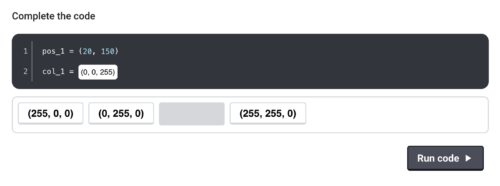
To help young people with creating their painting app, much of the initial code is pre-written behind the scenes, which enables learners to focus on experimenting with Python and observing the outcomes. They engage with the code by clicking on suggested options or, in some cases, by typing small snippets of Python. For example, they can select colours from a range of options or, as they grow more confident, type RGB values to create custom colours.
The activity is fully responsive for mobile and tablet devices and provides a final view of the full program on the last page, together with suggested routes to continue learning text-based programming.
An accessible introduction to text-based programming
We believe this activity offers an accessible way for young learners to begin their journey with text-based programming and learning to code Python. The code they write is straightforward and the activity is designed to minimise errors. When mistakes do occur, the interface provides clear, constructive feedback, guiding learners to make corrections.
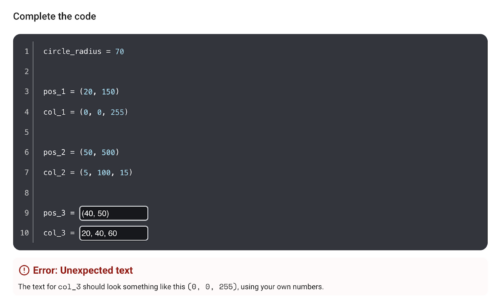
Try out ‘Paint with Python’ at rpf.io/paint-with-python. We’d love to hear your feedback! Please send any thoughts you have to [email protected].
This activity was developed with support from the Cisco Foundation. Through our funding partnership with them, we’ve been able to provide thousands of young people with the inspiration and opportunity to progress their coding skills anywhere, and on any device.
The post Bridging the gap from Scratch to Python: Introducing ‘Paint with Python’ appeared first on Raspberry Pi Foundation.
Microsoft MAIA 100 AI Accelerator for Azure
Post Syndicated from Patrick Kennedy original https://www.servethehome.com/microsoft-maia-100-ai-accelerator-for-azure/
We learned more about the Microsoft Maia 100 which is the company’s AI accelerator to run OpenAI models at lower costs
The post Microsoft MAIA 100 AI Accelerator for Azure appeared first on ServeTheHome.
Jamestown Settlers versus Spanish Pirates
Post Syndicated from The History Guy: History Deserves to Be Remembered original https://www.youtube.com/watch?v=wG6GoajNYro
Comic for 2024.08.28 – Eating
Post Syndicated from Explosm.net original https://explosm.net/comics/eating
New Cyanide and Happiness Comic
Stranded
Post Syndicated from xkcd.com original https://xkcd.com/2978/

Ampere AmpereOne Architecture at Hot Chips 2024
Post Syndicated from Patrick Kennedy original https://www.servethehome.com/ampere-ampereone-at-hot-chips-2024-arm/
At Hot Chips 2024, Ampere went into the AmpereOne microarchitecture details and discussed how it designed and built its custom Arm processor
The post Ampere AmpereOne Architecture at Hot Chips 2024 appeared first on ServeTheHome.
Harness Zero Copy data sharing from Salesforce Data Cloud to Amazon Redshift for Unified Analytics – Part 1
Post Syndicated from Rajkumar Irudayaraj original https://aws.amazon.com/blogs/big-data/harness-zero-copy-data-sharing-from-salesforce-data-cloud-to-amazon-redshift-for-unified-analytics-part-1/
This post is co-authored by Rajkumar Irudayaraj, Sr. Director of Product, Salesforce Data Cloud.
In today’s ever-evolving business landscape, organizations must harness and act on data to fuel analytics, generate insights, and make informed decisions to deliver exceptional customer experiences. Salesforce and Amazon have collaborated to help customers unlock value from unified data and accelerate time to insights with bidirectional Zero Copy data sharing between Salesforce Data Cloud and Amazon Redshift.
In a previous post, we showed how Zero Copy data federation empowers businesses to access Amazon Redshift data within the Salesforce Data Cloud to enrich customer 360 data with operational data. This two-part series explores how analytics teams can access customer 360 data from Salesforce Data Cloud within Amazon Redshift to generate insights on unified data without the overhead of extract, transform, and load (ETL) pipelines. In this post, we cover data sharing between Salesforce Data Cloud and customers’ AWS accounts in the same AWS Region. Part 2 covers cross-Region data sharing between Salesforce Data Cloud and customers’ AWS accounts.
What is Salesforce Data Cloud?
Salesforce Data Cloud is a data platform that unifies all of your company’s data into Salesforce’s Einstein 1 Platform, giving every team a 360-degree view of the customer to drive automation, create analytics, personalize engagement, and power trusted artificial intelligence (AI). Salesforce Data Cloud creates a holistic customer view by turning volumes of disconnected data into a unified customer profile that’s straightforward to access and understand. This unified view helps your sales, service, and marketing teams build personalized customer experiences, invoke data-driven actions and workflows, and safely drive AI across all Salesforce applications.
What is Amazon Redshift?
Amazon Redshift is a fast, fully managed, petabyte-scale data warehouse service that makes it simple and cost-effective to efficiently analyze all your data using your existing business intelligence (BI) tools. It’s optimized for datasets ranging from a few hundred gigabytes to petabytes and delivers better price-performance compared to other data warehousing solutions. With a fully managed, AI-powered, massively parallel processing (MPP) architecture, Amazon Redshift makes business decision-making quick and cost-effective. Amazon Redshift Spectrum enables querying structured and semi-structured data in Amazon Simple Storage Service (Amazon S3) without having to load the data into Redshift tables. Redshift Spectrum integration with AWS Lake Formation enables querying auto-mounted AWS Glue Data Catalog tables with AWS Identity and Access Management (IAM) credentials and harnessing Lake Formation for permission grants and access control policies on Data Catalog views. Salesforce Data Cloud Data sharing with Amazon Redshift leverages AWS Glue Data Catalog support for multi-engine views and Redshift Spectrum integration with Lake Formation.
What is Zero Copy data sharing?
Zero Copy data sharing enables Amazon Redshift customers to query customer 360 data stored in Salesforce Data Cloud without the need for traditional ETL to move or copy the data. Instead, you simply connect and use the data in place, unlocking its value immediately with on demand access to the most recent data. Data sharing is supported with both Amazon Redshift Serverless and provisioned RA3 clusters. Data can be shared with a Redshift Serverless or provisioned cluster in the same Region or with a Redshift Serverless cluster in a different Region. To get an overview of Salesforce Zero Copy integration with Amazon Redshift, please refer to this Salesforce Blog.
Solution overview
Salesforce Data Cloud provides a point-and-click experience to share data with a customer’s AWS account. On the Lake Formation console, you can accept the data share, create the resource link, mount Salesforce Data Cloud objects as data catalog views, and grant permissions to query the live and unified data in Amazon Redshift.
The following diagram depicts the end-to-end process involved for sharing Salesforce Data Cloud data with Amazon Redshift in the same Region using a Zero Copy architecture. This architecture follows the pattern documented in Cross-account data sharing best practices and considerations.

The data share setup consists of the following high-level steps:
- The Salesforce Data Cloud admin creates the data share target with the target account for the data share.
- The Salesforce Data Cloud admin selects the data cloud objects to be shared with Amazon Redshift and creates a data share.
- The Salesforce Data Cloud admin links the data share to the data share target, which invokes the following operations to create a cross-account resource share:
- Create a Data Catalog view for the Salesforce Data Cloud Apache Iceberg tables by invoking the Catalog API.
- Use Lake Formation sharing to create a cross-account Data Catalog share.
- In the customer AWS account, the Lake Formation admin logs in to the Lake Formation console to accept the resource share, create a resource link, and grant access permissions to the Redshift role.
- The data analyst launches the Amazon Redshift Query Editor with the appropriate role to query the data share and join with native Redshift tables.
Prerequisites
The following are the prerequisites to enable data sharing:
- A Salesforce Data Cloud account.
- An AWS account with AWS Glue and Lake Formation enabled.
- Either a Redshift Serverless or a Redshift provisioned cluster with RA3 instance types (ra3.16xlarge, ra3.4xlarge, ra3.xlplus). Data sharing is not supported for other provisioned instance types like DC2 or DS2 and must be set up before accessing the data share. If you don’t have an existing provisioned Redshift RA3 cluster, we recommend using a Redshift Serverless namespace for ease of operations and maintenance.
- The Amazon Redshift service must be running in the same Region where the Salesforce Data Cloud is running.
- AWS admin roles for Lake Formation and Amazon Redshift:
- Lake Formation – A data lake admin for accepting the share and providing access to users. For more details, see Lake Formation personas and IAM permissions reference.
- Amazon Redshift – A Redshift database owner, admin, or superuser who creates the database and provides access to developers or analysts. For more details, see Default database user permissions.
Create the data share target
Complete the following steps to create the data share target:
- In Salesforce Data Cloud, choose App Launcher and choose Data Share Targets.


- Choose New and choose Amazon Redshift, then choose Next.


- Enter the details for Label, API Name, and Account for the data share target.
- Choose Save.
After you save these settings, the S3 Tenant Folder value is populated.

- Choose the S3 Tenant Folder link and copy the verification token.
If you’re not signed in to the AWS Management Console, you’ll be redirected to the login page.

- Enter the verification token and choose Save.


The data share target turns to active status.
Create a data share
Complete the following steps to create a data share:
- Navigate to the Data Share tab in your Salesforce org.
- Choose App Launcher and choose Data Shares.


Alternatively, you can navigate to the Data Share tab from your org’s home page.

- Choose New, then choose Next.


- Provide a label, name, data space, and description, then choose Next.


- Select the objects to be included in the share and choose Save.


Link the data share target to the data share
To link the data share target to the data share, complete the following steps:
- On the data share record home page, choose Link/Unlink Data Share Target.
- Select the data share target you want to link to the data share and choose Save.


The data share must be active before you can accept the resource share on the Lake Formation console.

Accept the data share in Lake Formation
This section provides the detailed steps for accepting the data share invite and configuration steps to mount the data share with Amazon Redshift.
- After the data share is successfully linked to the data share target, navigate to the Lake Formation console.
The data share invitation banner is displayed.
- Choose Accept and create.


The Accept and create page shows a resource link and provides the option to set up IAM permissions.
- In the Principals section, choose the IAM users and roles to grant the default permissions (describe and select) for the data share resource link.


- Choose Create.


The resource link created in the previous step appears next to the AWS Glue database resource share on the Lake Formation console.

Query the data share from Redshift Serverless
Launch the query editor for Redshift Serverless and log in as a federated user with the role that has describe and select permissions for the resource link.

The data share tables are auto-mounted, appear under awsdatacatalog, and can be queried as shown in the following screenshot.

Query the data share from the Redshift provisioned cluster
To query the data share from the Redshift provisioned cluster, log in to the provisioned cluster as the superuser.

On an editor tab, run the following SQL statement to grant an IAM user access to the Data Catalog:
IAM:myIAMUser is an IAM user that you want to grant usage privilege to the Data Catalog. Alternatively, you can grant usage privilege to IAMR:myIAMRole for an IAM role. For more details, refer to Querying the AWS Glue Data Catalog.

Log in as the user with the role from the previous step using temporary credentials.

You should be able to expand awsdatacatalog and query the data share tables as shown in the following screenshot.

Conclusion
Zero Copy data sharing between Salesforce Data Cloud and Amazon Redshift represents a significant advancement in how organizations can use their customer 360 data. By eliminating the need for data movement, this approach offers real-time insights, reduced costs, and enhanced security. As businesses continue to prioritize data-driven decision-making, Zero Copy data sharing will play a crucial role in unlocking the full potential of customer data across platforms.
This integration empowers organizations to break down data silos, accelerate analytics, and drive more agile customer-centric strategies. To learn more, refer to the following resources:
- AWS Glue Data Catalog supports multi engine views with AWS Analytics Engines
- Data sharing in AWS Lake Formation
- Salesforce Zero Copy Integration
- Apache Iceberg
- Transform Your Data Strategy with the Power of Salesforce Data Cloud’s Zero Copy Integration to Amazon Redshift
About the Authors
 Rajkumar Irudayaraj is a Senior Product Director at Salesforce with over 20 years of experience in data platforms and services, with a passion for delivering data-powered experiences to customers.
 Jason Berkowitz is a Senior Product Manager with AWS Lake Formation. He comes from a background in machine learning and data lake architectures. He helps customers become data-driven.
 Ravi Bhattiprolu is a Senior Partner Solutions Architect at AWS. Ravi works with strategic ISV partners, Salesforce and Tableau, to deliver innovative and well-architected products & solutions that help joint customers achieve their business and technical objectives.
 Avijit Goswami is a Principal Solutions Architect at AWS specialized in data and analytics. He supports AWS strategic customers in building high-performing, secure, and scalable data lake solutions on AWS using AWS managed services and open source solutions. Outside of his work, Avijit likes to travel, hike, watch sports, and listen to music.
 Ife Stewart is a Principal Solutions Architect in the Strategic ISV segment at AWS. She has been engaged with Salesforce Data Cloud over the last 2 years to help build integrated customer experiences across Salesforce and AWS. Ife has over 10 years of experience in technology. She is an advocate for diversity and inclusion in the technology field.
 Michael Chess is a Technical Product Manager at AWS Lake Formation. He focuses on improving data permissions across the data lake. He is passionate about ensuring customers can build and optimize their data lakes to meet stringent security requirements.
 Mike Patterson is a Senior Customer Solutions Manager in the Strategic ISV segment at AWS. He has partnered with Salesforce Data Cloud to align business objectives with innovative AWS solutions to achieve impactful customer experiences. In his spare time, he enjoys spending time with his family, sports, and outdoor activities.
XiangShan High-Performance RISC-V Processors at Hot Chips 2024
Post Syndicated from Patrick Kennedy original https://www.servethehome.com/xiangshan-high-performance-risc-v-processors-at-hot-chips-2024/
The XiangShan RISC-V CPU project from Chinese universities is designing and delivering cores targeting Arm Neoverse N2 and Cortex A76 designs
The post XiangShan High-Performance RISC-V Processors at Hot Chips 2024 appeared first on ServeTheHome.