We partner with organisations around the world to bring coding activities to young people in their regions through Code Club and CoderDojo. Currently involving 54 organisations in 43 countries, this Global Clubs Partner network shares our passion for educating kids to create with technology.
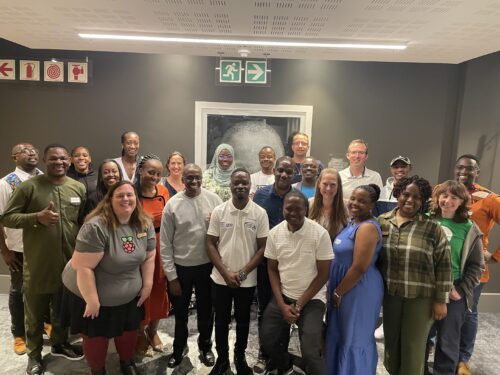
We work to connect our Global Clubs Partners to foster a sense of community and encourage collaboration. As part of this, we run in-person meetups to allow our partners to get to know each other better, and to help us understand how we can best support them, and what we can learn from them. Previously held in Penang, Malaysia, and Almere, the Netherlands, our latest meetup took place in Cape Town, South Africa.
Connecting through stories and experiences
Although we’ve seen some surprising points of commonality among all Global Clubs Partners, we also know that our partners find it helpful to connect with organisations based in their region. For the Cape Town meetup, we invited partner organisations from across Africa, hoping to bring together as many people as possible.
Our aim was to give our partners the opportunity to share their work and identify and discuss common questions and issues. We also wanted to mitigate some of the challenges of working internationally, such as time constraints, time zones, and internet connectivity, so that everyone could focus on connecting with each other.
The meetup agenda included time for each Global Clubs Partner organisation to present their work and future plans, as well as time for discussions on growing and sustaining club volunteer and mentor communities, strategy for 2024, and sharing resources.
“If the only thing rural communities have is problems, why are people still living there? … Rural communities have gifts, have skills, they have history that is wasting away right now; nobody is capturing it. They have wisdom and assets.”
Damilola Fasoranti from Prikkle Academy, Nigeria, talking about not making assumptions about rural communities and how this shapes the work his organisation does
A group dinner after the meetup enabled more informal networking. The next day, everyone had the chance to get inspired at Coolest Projects South Africa, a regional Coolest Projects event for young tech creators organised by partner organisation Coder LevelUp.
The meetup gave the Global Clubs Partners time to talk to each other about their work and experiences and understand one another better. It was also very beneficial for our team: we learned more about how we can best support partners to work in their communities, whether through new resources, information about funding applications, or best practice in overcoming challenges.
Building bridges
After attending a previous meetup, two of our partner organisations had decided to create an agreement for future partnership. We were delighted to learn about this collaboration, and to witness the signing of the agreement at this meetup.
By continuing to bring our partner network together, we hope to foster more cross-organisation partnerships like this around the world that will strengthen the global movement for democratising computing education.
Could your organisation become a Global Clubs Partner?
You can find out how your organisation could join our Global Clubs Partner network on the CoderDojo and Code Club websites, or contact us directly with your questions or ideas about a partnership.
Ето ни в седмицата, в която Делян Пеевски се самопредложи за премиер, защото смята, че ще е по-добър от Денков, Хенри Кисинджър почина на 100 години, а Илон Мъск покани рекламодателите, изтеглили се от Х, да вървят на майната си.
Ако Пеевски поеме управлението, може би най-накрая няма да има за какво да се тревожим, защото всичко ще фалира като едно целокупно КТБ и можем да се разотиваме спокойно. Смъртта на Кисинджър стана още един повод да си припомним защо Америка никога не се извинява за външнополитическите си постъпки и какво следва от това. А изказването на Мъск разнообрази заглавията с поредния епизод от сагата „Илон Мъск срещу всичко“ и остави света в чудене какво ще прави Х без рекламодатели.
Ние в „Тоест“ нямаме такива притеснения, защото нямаме и рекламодатели. Медията ни се издържа изцяло от месечните дарения от вас, нашите най-верни и будни читатели. Има още един начин много сладък начин да ни помогнете да поддържаме съдържанието, което харесвате, и да търсим нови посоки за развитие – като купите кутия с 6 занаятчийски шоколада от серията „Гайо & Тоест“, а 20 лв. от цената на всяка кутия ще постъпят в бюджета на „Тоест“. Кампанията ще продължи до Коледа или до изчерпване на количествата.
Да се върнем към седмицата… По отношение на Кисинджър и Мъск нямаме кой знае какво да кажем. Но за Делян Пеевски и политическата ситуация в страната със сигурност имаме. Прави го Емилия Милчева в текста си „ГЕРБ без Борисов, ДПС без Доган/Пеевски? Трудно, но не и невъзможно“, в който разглежда възможностите за съществуването на лидерските партии без лидерите им. Ще пенсионират ли Борисов? Ще се опълчат ли срещу Доган недоволните в ДПС? Ще видим ли чисто нови хора начело на двете формации и по какъв начин това ще се отрази на цялата страна? Само бъдещето ще покаже.
Пак на него разчитаме да ни посочи как ще управлява София Васил Терзиев. И по-точно каква София иска да управлява новият кмет. В текста си „Вандализъм ли са графитите и как Васил Терзиев ще се бори с тях“ Светла Енчева разглежда бъдещото управление на града през отношението на неговия кмет към едно от нещата, които правят всеки град автентичен – графитите. Защото не всичко, което е вандализъм, е графити, и не всичко, което е графити, е вандализъм. Градското изкуство разказва истории и някак ни пази от студеното удобство на стерилната среда.
С разказването и пазенето на миналото са се заели и няколко млади жени, обединени в проекта „Пазителки на истории“. Идеята е на Кристина Сантана, Полин Донахю, Диляна Симеонова и Катерина Василева, които искат да запазят непознатите истории на възрастни жени в България. Със създателките на проекта разговаря Йоанна Елми.
В този брой на „Тоест“ Йоанна има още един материал, с който всъщност започнахме седмицата. „Еволюция на дезинформацията. Когато науката стане пропаганда“ е много важен текст, който се радваме, че имахме възможността да публикуваме благодарение на подкрепата на международната програма за научна журналистика Science+. В него Йоанна подробно разказва как една информация може да е достоверна и пак да се използва за поднасяне на манипулативно съдържание.
С достоверността на информацията и с начините за поднасяне на миналото по някакъв начин е свързан и текстът на Анета Василева, в който се представят архитектурните тенденции в съвременните музеи. Анета обръща внимание, че на българските музеи им липсват самочувствие, разнообразие и добър дизайн и че сякаш сме несигурни как да разкажем най-новата си история, затова тя просто липсва сред музейните експонати.
В книгата, представена тази седмица от Антония Апостолова в рубриката „На второ четене“, няма съмнение как да бъде разказана историята, защото това се прави от един от най-големите израелски писатели Давид Гросман.
„Необичайно е, когато един евреин разказва толкова съкрушителна история за другите лагери – не за нацистките, а за комунистическите, не в Европа на Хитлер, а в Югославия на Тито“, пише Антония и вещо ни въвлича в сюжета на романа „Повече, отколкото обичам живота си“, базиран на истинската история на Ева Панич-Нахир.
Scientists have found Strawberry Squid, “whose mismatched eyes help them simultaneously search for prey above and below them,” among the coral reefs in the Galápagos Islands.
As usual, you can also use this squid post to talk about the security stories in the news that I haven’t covered.
Two years ago, Cloudflare undertook a significant upgrade to our compute server hardware as we deployed our cutting-edge 11th Generation server fleet, based on AMD EPYC Milan x86 processors. It’s nearly time for another refresh to our x86 infrastructure, with deployment planned for 2024. This involves upgrading not only the processor itself, but many of the server’s components. It must be able to accommodate the GPUs that drive inference on Workers AI, and leverage the latest advances in memory, storage, and security. Every aspect of the server is rigorously evaluated — including the server form factor itself.
One crucial variable always in consideration is temperature. The latest generations of x86 processors have yielded significant leaps forward in performance, with the tradeoff of higher power draw and heat output. In this post we will explore this trend, and how it informed our decision to adopt a new physical footprint for our next-generation fleet of servers.
In preparation for the upcoming refresh, we conducted an extensive survey of the x86 CPU landscape. AMD recently introduced its latest offerings: Genoa, Bergamo, and Genoa-X, featuring the power of their innovative Zen 4 architecture. At the same time, Intel unveiled Sapphire Rapids as part of its 4th Generation Intel Xeon Scalable Processor Platform, code-named “Eagle Stream”, showcasing their own advancements. These options offer valuable choices as we consider how to shape the future of Cloudflare’s server technology to match the needs of our customers.
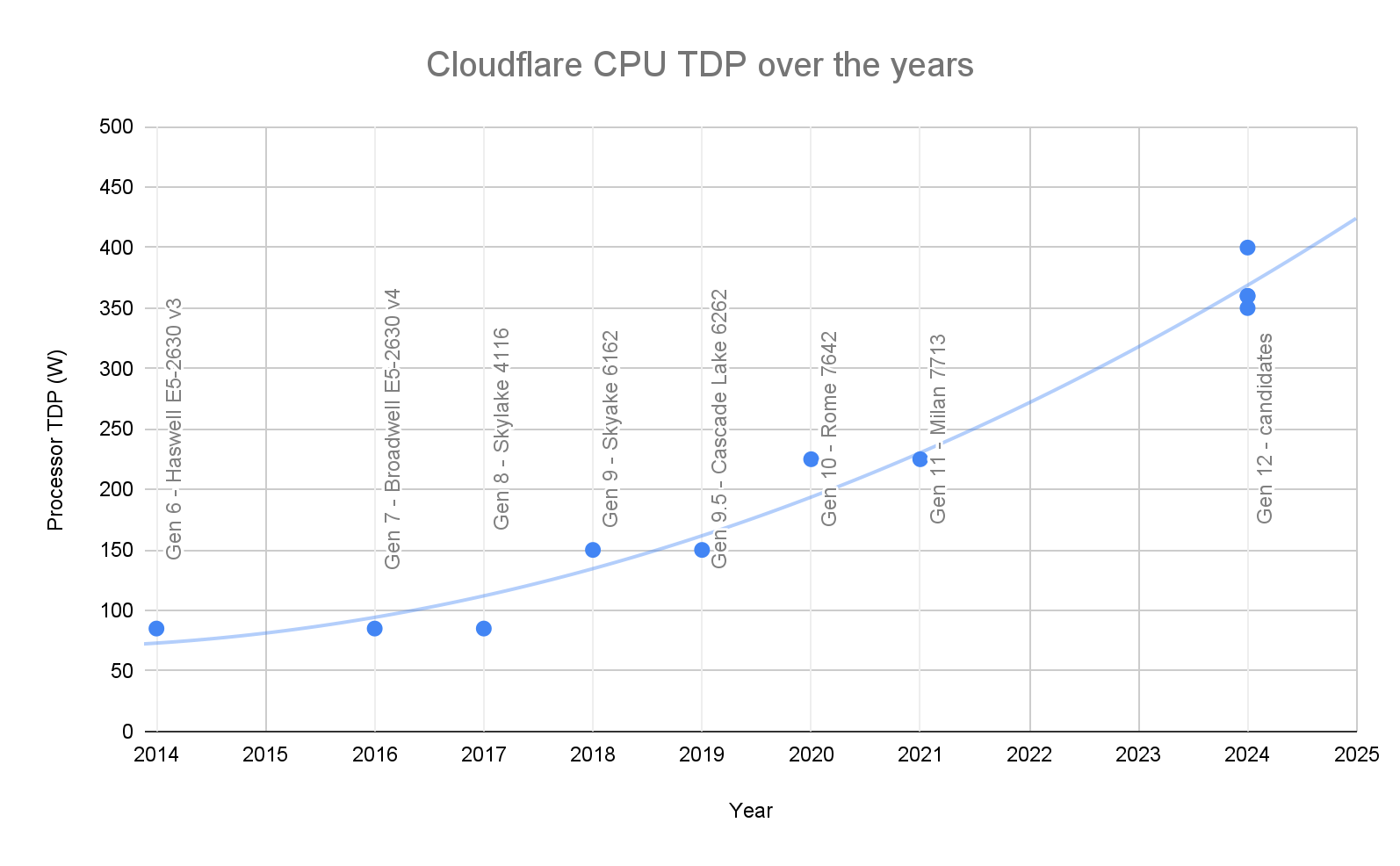
A continuing challenge we face across x86 CPU vendors, including the new Intel and AMD chipsets, is the rapidly increasing CPU Thermal Design Point (TDP) generation over generation. TDP is defined to be the maximum heat dissipated by the CPU under load that a cooling system should be designed to cool; TDP also describes the maximum power consumption of the CPU socket. This plot shows the CPU TDP trend of each hardware server generation since 2014:
At Cloudflare, our Gen 9 server was based on Intel Skylake 6162 with a TDP of 150W, our Gen 10 server was based on AMD Rome 7642 at 240W, and our Gen 11 server was based on AMD Milan 7713 at 240W. Today, AMD EPYC 9004 Series SKU Stack default TDP goes up to 360W and is configurable up to 400W. Intel Sapphire Rapid SKU stack default TDP goes up to 350W. This trend will continue, with the next generation of x86 CPU offerings from AMD and Intel specified for up to 500W TDP.
Designing multi-generational cooling solutions
Traditionally, Cloudflare Gen 10 servers and Gen 11 servers were designed in a 1U form factor, with air cooling to maximize rack density. 1U form factor is short for 1 Rack Unit height server form factor, which is 1.75” in height or thickness. However, to cool more than 350 Watt TDP CPU with air in a 1U form factor requires fans to be spinning at 100% duty cycle (running all the time, at max speed). A single fan running at full speed consumes about 40W, and a typical server configuration of 7–8 dual rotor fans per server can hit 280–320 W to power the fans alone. At peak loads, the total system power consumed, including the cooling fans, processor, and other components, can eclipse 750 Watt per server.
The 1U form factor can fit a maximum of eight 40mm dual rotor fans, which sets an upper bound on the temperature range it can support. We first take into account ambient room temperature, which we assume to be 40° C (the maximum expected temperature under normal conditions). Under these conditions we determined that air-cooled servers, with all eight fans running at 100% duty cycle, can support CPUs with a maximum TDP of 400W.
This poses a challenge, because the next generation of CPUs, while being socket compatible with the current gen, rise up to 500W TDP. In order to future-proof, and re-use as much of Gen 12 design as possible for future generations, we will need a scalable thermal solution. Moreover, many co-location facilities where Cloudflare deploys servers have a rack power limit. With total system power consumption at north of 750 Watt per node, and after accounting for space utilized by networking gear, we would have been underutilizing rack space by as much as 50%.
We have a problem!
We do have a variety of SKU options available to use on each CPU generation, and if power is the primary constraint, we could choose to limit the TDP and use a lower core count, low-power SKU. To evaluate this, the hardware team ran a synthetic workload benchmark in the lab across several CPU SKUs. We found that Cloudflare services continue to scale with cores effectively up to 128 cores or 256 hardware threads, resulting in significant performance gain, and Total Cost of Ownership (TCO) benefit, at and above 360W TDP.
However, while the performance metric and TCO metric look good on a per-server basis, this is only part of the story: servers go into a server rack when they are deployed, and server racks come with constraints and limitations that have to be taken into design consideration. The two limiting factors are rack power budget and rack height. Taking these two rack-level constraints into account, how does the combined Total Cost of Ownership (TCO) benefit scale with TDP? We ran a performance sweep across the configurable TDP range of the highest core count CPUs and noticed that rack-level TCO benefit stagnates when CPU TDP rises above roughly 340W.
TCO advantage stagnates because we hit our rack power budget limit — the incremental performance gain per server, coinciding with an incremental increase of CPU TDP above 340W, is negated by the reduction in the number of servers that can be installed in a rack to remain within the rack’s power budget. Even with CPU TDP power capped at 340W, we are still underutilizing the rack, with 30% of the space still available.
Thankfully, there is an alternative to power capping and compromising on possible performance gain, by increasing the chassis height to a 2U form factor (from 1.75” in height to 3.5” in height). The benefits from doing this include:
Larger fans (up to 80mm) that can move more air
Allowing for a taller and larger heatsink that can dissipate heat more effectively
Less air impedance within the chassis since the majority of components are 1U height
Providing sufficient room to add PCIe attached accelerators / GPUs, including dual-slot form factor options
Deprecated 1U design
New 2U design
Click images to enlarge
2U chassis design is nothing new, and is actually very common in the industry for various reasons, one of which is better airflow to dissipate more heat, but it does come with the tradeoff of taking up more space and limiting the number of servers than can be installed in a rack. Since we are power constrained instead of space constrained, the tradeoff did not negatively impact our design.
Thermal simulations provided by Cloudflare vendors showed that 4x 60mm fans or 4x 80mm fans at less than 40 Watt per fan is sufficient to cool the system. That is a theoretical savings of at least 150 Watt compared to 8x 40mm fans in a 1U design, which would result in significant Operational Expenditure (OPEX) savings and a boost to TCO improvement. Switching to a 2U form factor also gives us the benefit of fully utilizing our rack power budget and our rack space, and provides ample room for the addition of PCIe attached accelerators / GPUs, including dual-slot form factor options.
Conclusion
It might seem counter-intuitive, but our observations indicate that growing the server chassis, and utilizing more space per node actually increases rack density and improves overall TCO benefit over previous generation deployments, since it allows for a better thermal design. We are very happy with the result of this technical readiness investigation, and are actively working on validating our Gen 12 Compute servers and launching them into production soon. Stay tuned for more details on our Gen 12 designs.
If you are excited about helping build a better Internet, come join us, we are hiring!
Contributor smashery added a new dns command to Metasploit console, which allows the user to customize the behavior of DNS resolution. Similarly to the route command, it is now possible to specify where DNS requests should be sent to avoid any information leak. Before these changes, the Framework was using the default local system configuration. Now, it is possible to specify which DNS server should be queried based on rules that match specific hostnames or domains. It is also possible to route DNS requests through an existing session, which is useful when querying a DNS server located in an internal network we can only reach through a pivot host.
The DNS feature must be enabled to make this command available with features set dns_feature true. Then, use dns help to list the default commands:
msf6 > features set dns_feature true
dns_feature => true
msf6 > dns help
Manage Metasploit's DNS resolution behaviour

Usage:
  dns [add] [--session <session_id>] [--rule <wildcard DNS entry>] <IP Address> <IP Address> ...
  dns [remove/del] -i <entry id> [-i <entry id> ...]
  dns [purge]
  dns [print]

Subcommands:
  add - add a DNS resolution entry to resolve certain domain names through a particular DNS server
  remove - delete a DNS resolution entry; 'del' is an alias
  purge - remove all DNS resolution entries
  print - show all active DNS resolution entries

Examples:
  Display all current DNS nameserver entries
    dns
    dns print

  Set the DNS server(s) to be used for *.metasploit.com to 192.168.1.10
    route add --rule *.metasploit.com 192.168.1.10

  Add multiple entries at once
    route add --rule *.metasploit.com --rule *.google.com 192.168.1.10 192.168.1.11

  Set the DNS server(s) to be used for *.metasploit.com to 192.168.1.10, but specifically to go through session 2
    route add --session 2 --rule *.metasploit.com 192.168.1.10

  Delete the DNS resolution rule with ID 3
    route remove -i 3

  Delete multiple entries in one command
    route remove -i 3 -i 4 -i 5

  Set the DNS server(s) to be used for all requests that match no rules
    route add 8.8.8.8 8.8.4.4
Once set up, any name resolution will be performed according to these rules. For example, setting RHOSTS to a hostname with set RHOST www.example.com and a rule set with route add --session 1 --rule *.example.com 10.10.1.1 will force Framework to resolve the hostname sending a DNS request to the internal DNS server at 10.10.1.1 and through the session 1. No other requests will be sent to avoid information leak.
Tickets in the sky with diamond
Smashery also enhanced the existing Kerberos ticket-forging module and added support for Diamond and Sapphire techniques, which are similar to the Golden and Silver Tickets but stealthier. The Diamond technique consists in using a real TGT and modifies the PAC, assuming the krbtgt Kerberos keys is known. The Sapphire technique makes use of S4U2Self and U2U (User-to-User) to obtain the PAC of another user and assembling it with an existing TGT to impersonate him.
New module content (1)
WordPress Royal Elementor Addons RCE
Authors: Fioravante Souza and Valentin Lobstein
Type: Exploit
Pull request: #18567 contributed by Chocapikk
Path: multi/http/wp_royal_elementor_addons_rce
Description: This pull request adds a new exploit module for CVE-2023-5360, an unauthenticated file upload vulnerability in the WordPress Royal Elementor Addons and Templates plugin in versions before 1.3.79.
Enhancements and features (5)
#18526 from smashery – This adds a new dns command in Metasploit, to allow the user to customize the behavior of DNS resolution in the framework. DNS resolution can be set to be routed through a session via a specific Comm channel or to request a specific DNS server. Routing rules ensure DNS queries are not sent to unwanted DNS servers and avoid the leak of information.
#18560 from smashery – This updates the existing Kerberos ticket-forging module with new actions for forging tickets with fields copied from ones issued by the legitimate KDC using the Diamond and Sapphire techniques.
#18565 from zeroSteiner – This adds an enhancement to adjust the kerberos cache lookup logic. If no TGT for the specific host is found, it will try again but with any host. This fixes the workflow where a user can currently forge a golden ticket, but that ticket will not be automatically used for authentication by other services. This will also fix the future issue of the TGT that’s created by the Diamond and Sapphire techniques.
#18571 from smashery – Improves the error messages shown to users if there is a validation error with a module’s RHOST datastore values. Now, the user is notified when there is a failure with parsing a URL, invalid CIDR, or DNS resolution failure.
#18580 from adfoster-r7 – Metasploit modules developed using Python can now provide default_options as part of an exploit.
You can find the latest Metasploit documentation on our docsite at docs.metasploit.com.
Get it
As always, you can update to the latest Metasploit Framework with msfupdate
and you can get more details on the changes since the last blog post from
GitHub:
What better time for a reminder to back up your data than after a serious data loss event? If you are concerned about the safety of your Google Drive data after the reports of unexplained data loss by Google Drive users last week, then read on to learn how to download and back up your Google Drive.
More than one billion businesses and individuals use Google Drive according to, well, a quick search on Google. If most of those one billion people are like me, they save pretty much everything there.
Whether the data is professional or personal, the end result is a lot of important files that aren’t necessarily backed up anywhere. Maybe your school is closing your account and you need to move all of your data somewhere else. Maybe your account gets attacked by cybercriminals. Or maybe Google goes down or loses your data. In order to protect your important Google Drive files, you need to understand how to go about downloading and backing up your account.
In this post, you’ll learn some simple steps to achieve that, including how to download your Google Drive, how to back up your computer, and how to back up your Google Drive.
We’ve gathered a handful of guides to help you protect social content across many different platforms. We’re working on developing this list—please comment below if you’d like to see another platform covered.
Most people have multiple email accounts, so first it is important to make sure you are logged in to the correct Google Account before you start this process.
Once you’re signed in, you will want to go to Google Drive: drive.google.com. From there, you can download individual files if you don’t have that many or do a bulk download.
To download individual files:
Hold shift while you select all of your files.
Right click and select download.
To do a bulk download:
Go to your account at myaccount.google.com.
Go to Data & privacy.
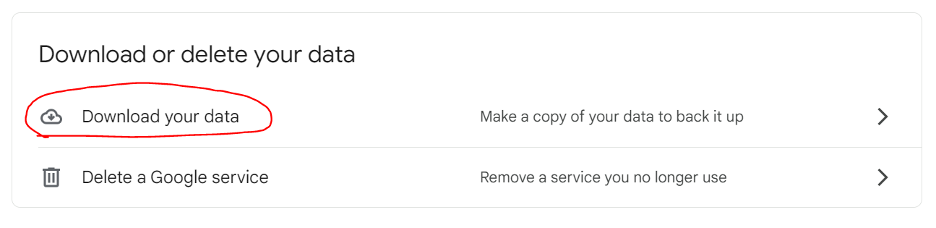
Scroll down to the section of the page titled “Download or delete your data” and click “Download your data.” This allows you to download all of the data in your Google account (not just Google Drive) via Google Takeout.
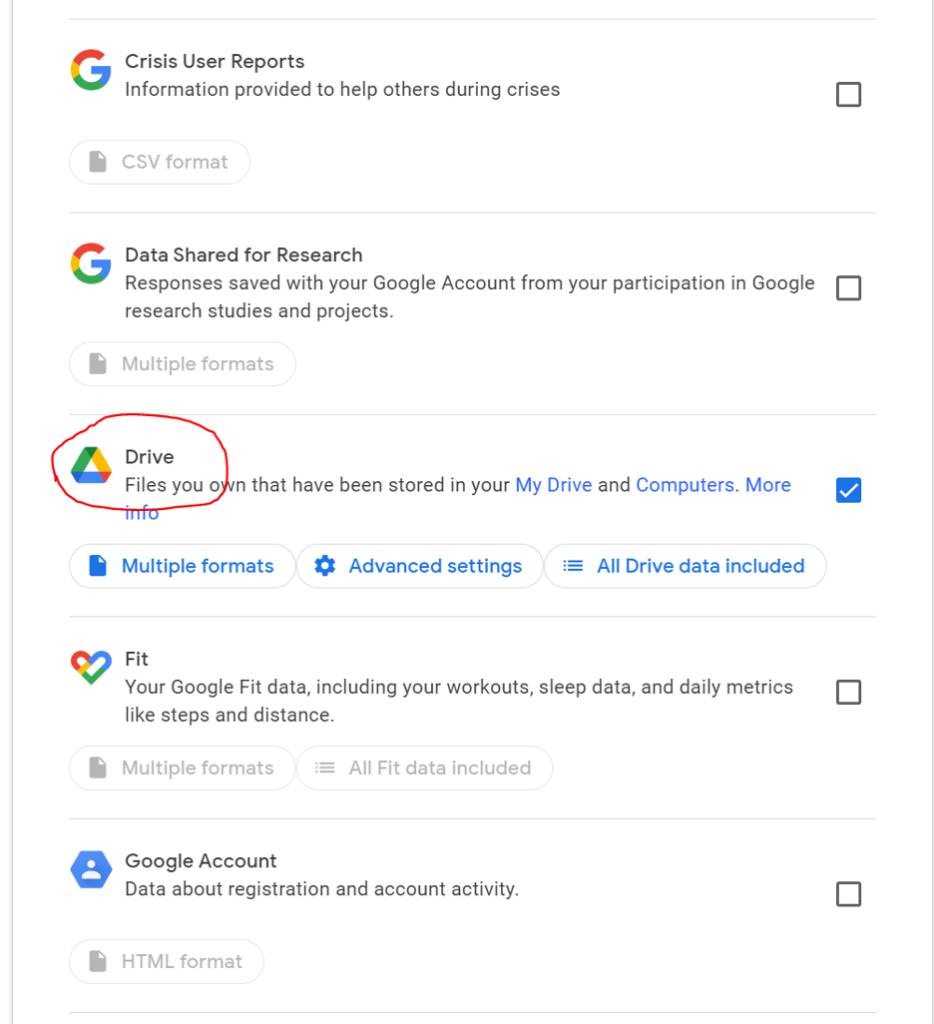
Select Google Drive (and whatever other services you might want to download data from).
You then have a few options to select:
Multiple formats: Here you can tell Google the formats of the files you want to download. For example, if you want to download documents as .docx files or as PDFs.
Advanced settings: Here you can tell Google to download additional data, including previous versions and the names of your folders.
All Drive data included: Here you can select all data, or deselect specific folders if you want to.
Scroll down to the bottom and click on Next Step.
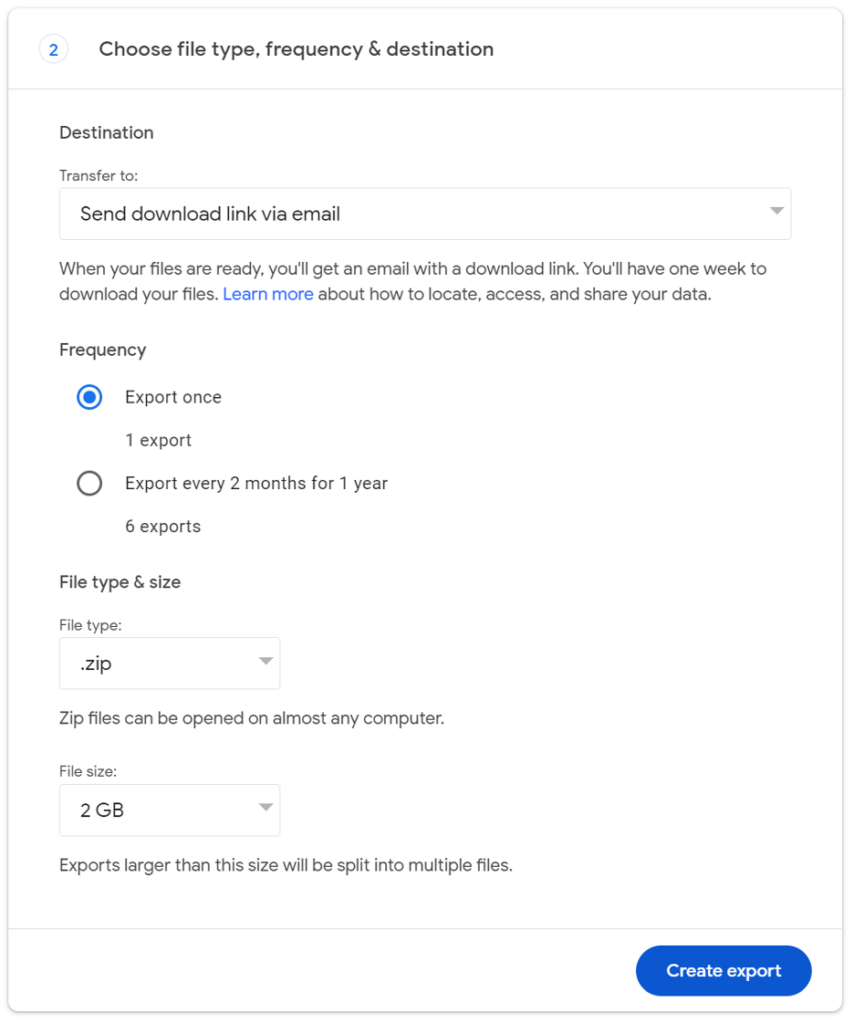
You’ll be prompted to specify your delivery method. Select Send download link via email.
You can then specify your frequency. You can select a single export or an export every two months for a year. For our purposes, you can select a single export. (We’ll talk about options for backing up your data more frequently later.)
Specify the file type and the file size you want to export.
You can choose to have these files sent as a .zip file or a .tgz (tar) file. The main difference between the two options is that a .zip file compresses every file independently in the archive, but a .tgz file compresses the archive as a whole.
The file size tells Google when to split your data into a separate file. Depending on the size of your data, Google may send you multiple emails with different sizes of files.
Click Create export.
When most people think about downloading the data they store in Google Drive, they’re thinking about the documents, photos, and other larger files they work with, but (as Google Takeout makes clear) you have a lot more data stored with Google outside of Drive.
Here’s why you might choose to export everything:
To have a copy of bookmarked websites.
To have a copy of emails that may contain files you’ve lost over time.
To have a copy of important voicemails from loved ones in Google’s Voice product that you want to keep forever.
Also, when you download all of your data it is a good reminder of what information Google has of yours.
After you click Create export, you’ll get an email in a few minutes, hours, or a couple of days, depending on the size of your data, informing you that your Google data is ready to download.
How to Back Up Your Computer
You now have your Google Drive data out of the Google Cloud and on your computer. Next, you’ll want to make sure it’s backed up. Your computer can fail just like Google, so simply downloading it isn’t enough. Protecting your newly downloaded Google data with a good cloud backup strategy should be the next thing you do.
Make sure to have at least three copies of your data: two local including one on your desktop and one on a different storage medium, like a hard drive. Then, you should have one off-site, and these days that means in the cloud.
Note that when we’re using the word “cloud” here, we specifically mean that you’re backing up to the cloud. Often using a “cloud drive” means that you’re syncing, and, as the current data loss snafu at Google shows, there’s a big difference between sync and backup.
How to Back Up Google Drive
Downloading your data once and backing it all up is a good step. But, you’re adding documents to Google Drive all the time, and downloading your data manually can get tedious if you want to make sure your work is consistently and reliably backed up.
Of course, as we noted above, you can set your Google Drive bulk download frequency to a regular cadence. You’d still have to manually download your data and add it to your computer’s local storage, then back it up using the same method you would for your computer data. If you’re using Backblaze Computer Backup, which automatically runs in the background on your computer, those files would be backed once they entered your local storage.
Still, that means that you have the possibility of losing files if your cadence isn’t frequent enough, and if you forget to manually download and replace those files sent to you in email, then you might run into trouble.
Alternatively, there are a few services that will back up your Google Drive data for you. With something like Movebot, you can set up your Google Drive to sync and back up to a cloud storage service like Backblaze B2. If you’re a little more tech savvy, you can also use rclone to do the same thing.
These tools are a bit more complex than using your Backblaze Computer Backup account, but you can configure these tools to back up your Google Drive at a frequency that makes sense for you to make sure new data is getting backed up as you add it.
Do you have any techniques on how you download your data from Google Drive or other Google products? Share them in the comments section below!
FAQ
How do I download individual files from Google?
You can simply select the files you want to download, right click, and select Download.
How do I download my entire Google Drive?
You can use Google Takeout to download your entire Google Drive as well as any data you have in other Google services. Go to your account, click on Data & privacy, and click on Download your data to get started.
How do I back up my Google data once I download it?
You can back up your Google Data once you’ve downloaded it to your computer by using a trusted cloud computer backup service. Make sure to follow a 3-2-1 backup strategy by keeping at least two backups in addition to your data in Google drive: one local, on your desktop or on a hard drive, and one in the cloud.
How do I back up my Google Drive?
There are many backup software services available to help you back up your Google drive data. With something like Movebot, you can set up your Google Drive to sync and back up to a cloud storage service like Backblaze B2. If you’re a little more tech savvy, you can also use rclone to do the same thing.
To provide the best experiences, we use technologies like cookies to store and/or access device information. Consenting to these technologies will allow us to process data such as browsing behavior or unique IDs on this site. Not consenting or withdrawing consent, may adversely affect certain features and functions.
Functional
Always active
The technical storage or access is strictly necessary for the legitimate purpose of enabling the use of a specific service explicitly requested by the subscriber or user, or for the sole purpose of carrying out the transmission of a communication over an electronic communications network.
Preferences
The technical storage or access is necessary for the legitimate purpose of storing preferences that are not requested by the subscriber or user.
Statistics
The technical storage or access that is used exclusively for statistical purposes.The technical storage or access that is used exclusively for anonymous statistical purposes. Without a subpoena, voluntary compliance on the part of your Internet Service Provider, or additional records from a third party, information stored or retrieved for this purpose alone cannot usually be used to identify you.
Marketing
The technical storage or access is required to create user profiles to send advertising, or to track the user on a website or across several websites for similar marketing purposes.