Post Syndicated from Bruce Schneier original https://www.schneier.com/blog/archives/2023/01/a-guide-to-phishing-attacks.html
This is a good list of modern phishing techniques.
Post Syndicated from Bruce Schneier original https://www.schneier.com/blog/archives/2023/01/a-guide-to-phishing-attacks.html
This is a good list of modern phishing techniques.
Post Syndicated from Bruce Schneier original https://www.schneier.com/blog/archives/2022/11/defeating-phishing-resistant-multifactor-authentication.html
CISA is now pushing phishing-resistant multifactor authentication.
Roger Grimes has an excellent post reminding everyone that “phishing-resistant” is not “phishing proof,” and that everyone needs to stop pretending otherwise. His list of different attacks is particularly useful.
Post Syndicated from Bruce Schneier original https://www.schneier.com/blog/archives/2022/09/massive-data-breach-at-uber.html
It’s big:
The breach appeared to have compromised many of Uber’s internal systems, and a person claiming responsibility for the hack sent images of email, cloud storage and code repositories to cybersecurity researchers and The New York Times.
“They pretty much have full access to Uber,” said Sam Curry, a security engineer at Yuga Labs who corresponded with the person who claimed to be responsible for the breach. “This is a total compromise, from what it looks like.”
It looks like a pretty basic phishing attack; someone gave the hacker their login credentials. And because Uber has lousy internal security, lots of people have access to everything. So once a hacker gains a foothold, they have access to everything.
This is the same thing that Mudge accuses Twitter of: too many employees have broad access within the company’s network.
More details. Slashdot thread.
EDITED TO ADD (9/20): More details.
Post Syndicated from Bruce Schneier original https://www.schneier.com/blog/archives/2022/09/clever-phishing-scam-uses-legitimate-paypal-messages.html
Brian Krebs is reporting on a clever PayPal phishing scam that uses legitimate PayPal messaging.
Basically, the scammers use the PayPal invoicing system to send the email. The email lists a phone number to dispute the charge, which is not PayPal and quickly turns into a request to download and install a remote-access tool.
Post Syndicated from Rapid7 original https://blog.rapid7.com/2022/08/25/the-lost-bots-s02e03-browser-in-browser-attacks-dont-get-cat-phished/
![[The Lost Bots] S02E03: Browser-in-Browser Attacks — Don't Get (Cat)-Phished](https://blog.rapid7.com/content/images/2022/08/The-Lost-Bots-logo-large.png)
Welcome back to The Lost Bots! In our latest episode, we’re talking about phishing attacks — but not your standard run-of-the-mill version. Instead, we’re focusing on a new technique known as browser-in-browser attacks, unpacking what it means and how it should factor into your organization’s security strategy.
Our hosts Jeffrey Gardner, Detection and Response Practice Advisor, and Stephen Davis, Lead D&R Sales Technical Advisor, highlight the telltale signs of browser-in-browser attacks you should look out for as you’re carrying out your day-to-day work and life on the internet. They also discuss how to set up user behavior analytics rules in your SIEM that will help you detect this type of threat, as well as how to make end-user training more effective.
Check back with us on Thursday, September 29, for the next Lost Bots installment!
Additional reading:
Post Syndicated from Bruce Schneier original https://www.schneier.com/blog/archives/2022/08/man-in-the-middle-phishing-attack.html
Here’s a phishing campaign that uses a man-in-the-middle attack to defeat multi-factor authentication:
Microsoft observed a campaign that inserted an attacker-controlled proxy site between the account users and the work server they attempted to log into. When the user entered a password into the proxy site, the proxy site sent it to the real server and then relayed the real server’s response back to the user. Once the authentication was completed, the threat actor stole the session cookie the legitimate site sent, so the user doesn’t need to be reauthenticated at every new page visited. The campaign began with a phishing email with an HTML attachment leading to the proxy server.
Post Syndicated from Jeremy Makowski original https://blog.rapid7.com/2022/08/22/network-access-for-sale-protect-your-organization-against-this-growing-threat/

Vulnerable network access points are a potential gold mine for threat actors who, once inside, can exploit them persistently. Many cybercriminals are not only interested in obtaining personal information but also seek corporate information that could be sold to the highest bidder.
To infiltrate corporate networks, threat actors typically use several techniques, including:
Threat actors collect email addresses, phone numbers, and information shared on social media platforms to target key people within an organization using phishing campaigns to collect credentials. Moreover, many threat actors managed to find the details of potential victims via leaked databases posted on dark web forums.
Another technique used by threat actors to gain access to corporate networks is malware infection. This technique consists of spreading malware, such as trojans, through a network of botnets to infect thousands of computers around the world.
Once infected, a computer can be remotely controlled to gain full access to the company network that it is connected to. It is not rare to find threat actors with botnets on hacking forums looking for partnerships to target companies.
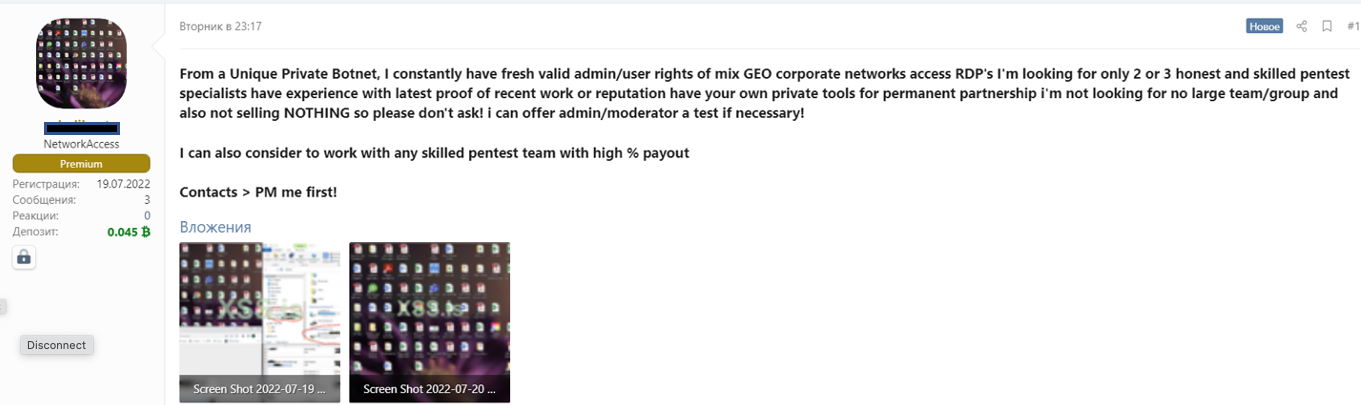
Some threat actors will prefer to take advantage of vulnerabilities within networks or systems rather than developing offensive cyber tools or using social engineering techniques. The vulnerabilities exploited are usually related to:
Since gaining access to corporate networks can take a lot of effort, some cybercriminals prefer to simply buy access to networks that have already been compromised or information that was extracted from them. As a result, it has become common for cybercriminals to sell access to corporate networks on cybercrime forms.
Usually, the types of access that are sold on underground hacking forums are SSH, cPanels, RDP, RCE, SH, Citrix, SMTP, and FTP. The price of network access is usually based on a few criteria, such as the size and revenue of the company, as well as the number of devices connected to the network. It usually goes from a few hundred dollars to a couple thousand dollars. Companies in all industries and sectors have been impacted.
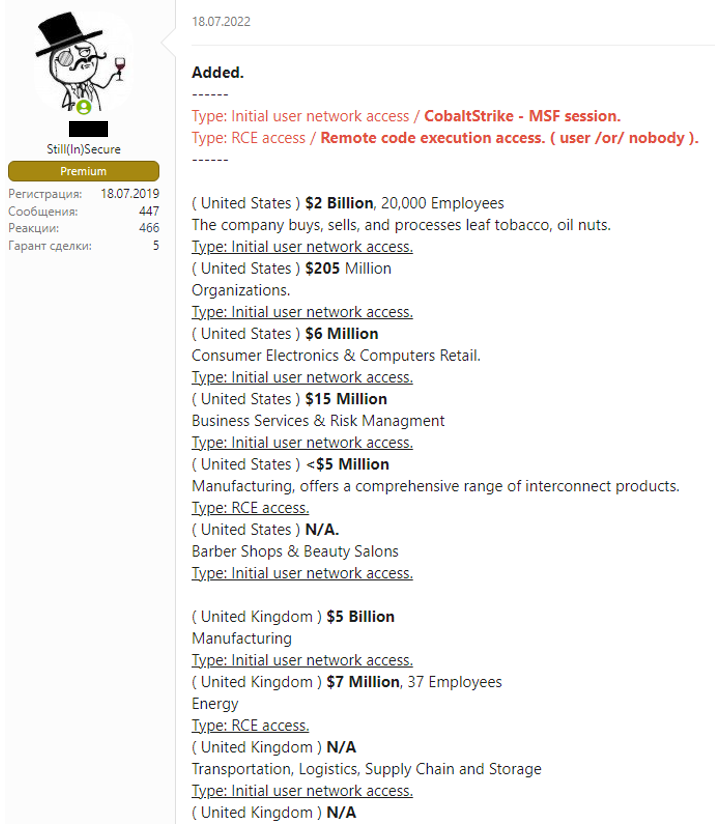
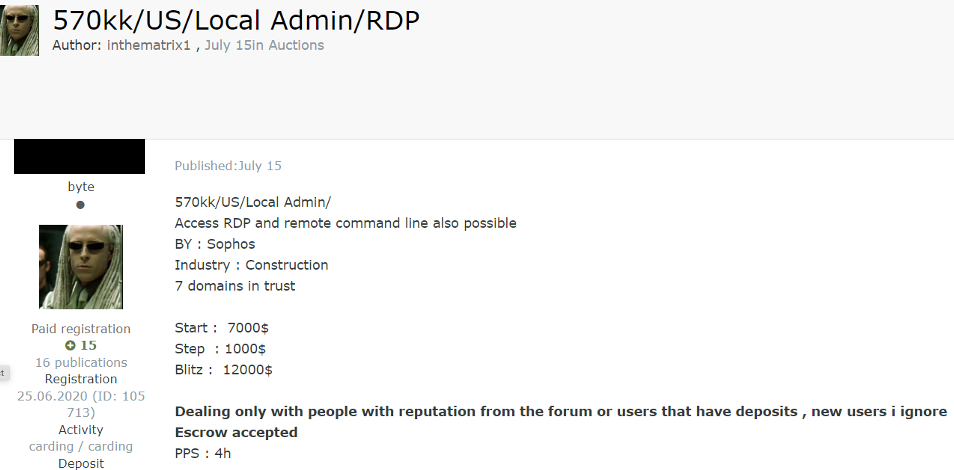
For these reasons, it is increasingly important for organizations to have visibility into external threats. Threat intelligence solutions can deliver 360-degree visibility of what is happening on forums, markets, encrypted messaging applications, and other deep and darknet platforms where many cybercriminals operate tirelessly.
In order to protect your internal assets, ensure the following measures exist within the company and are implemented correctly.
Additional reading:
Post Syndicated from João Tomé original https://blog.cloudflare.com/2022-attacks-an-august-reading-list-to-go-shields-up/
In 2022, cybersecurity is a must-have for those who don’t want to take chances on getting caught in a cyberattack with difficult to deal consequences. And with a war in Europe (Ukraine) still going on, cyberwar also doesn’t show signs of stopping in a time when there never were so many people online, 4.95 billion in early 2022, 62.5% of the world’s total population (estimates say it grew around 4% during 2021 and 7.3% in 2020).
Throughout the year we, at Cloudflare, have been making new announcements of products, solutions and initiatives that highlight the way we have been preventing, mitigating and constantly learning, over the years, with several thousands of small and big cyberattacks. Right now, we block an average of 124 billion cyber threats per day. The more we deal with attacks, the more we know how to stop them, and the easier it gets to find and deal with new threats — and for customers to forget we’re there, protecting them.
In 2022, we have been onboarding many customers while they’re being attacked, something we know well from the past (Wikimedia/Wikipedia or Eurovision are just two case-studies of many, and last year there was a Fortune Global 500 company example we wrote about). Recently, we dealt and did a rundown about an SMS phishing attack.
Providing services for almost 20% of websites online and to millions of Internet properties and customers using our global network in more than 270 cities (recently we arrived to Guam) also plays a big role. For example, in Q1’22 Cloudflare blocked an average of 117 billion cyber threats each day (much more than in previous quarters).
Now that August is here, and many in the Northern Hemisphere are enjoying the summer and vacations, let’s do a reading list that is also a sum up focused on cyberattacks that also gives, by itself, some 2022 guide on this more than ever relevant area.
But first, some context. There are all sorts of attacks, but they have been generally speaking increasing and just to give some of our data regarding DDoS attacks in 2022 Q2: application-layer attacks increased by 72% YoY (Year over Year) and network-layer DDoS attacks increased by 109% YoY.
The US government gave “warnings” back in March, after the war in Ukraine started, to all in the country but also allies and partners to be aware of the need to “enhance cybersecurity”. The US Cybersecurity and Infrastructure Security Agency (CISA) created the Shields Up initiative, given how the “Russia’s invasion of Ukraine could impact organizations both within and beyond the region”. The UK and Japan, among others, also issued warnings.
That said, here are the two first and more general about attacks reading list suggestions:
Shields up: free Cloudflare services to improve your cyber readiness (✍️)
After the war started and governments released warnings, we did this free Cloudflare services cyber readiness sum up blog post. If you’re a seasoned IT professional or a novice website operator, you can see a variety of services for websites, apps, or APIs, including DDoS mitigation and protection of teams or even personal devices (from phones to routers). If this resonates with you, this announcement of collaboration to simplify the adoption of Zero Trust for IT and security teams could also be useful: CrowdStrike’s endpoint security meets Cloudflare’s Zero Trust Services.
In Ukraine and beyond, what it takes to keep vulnerable groups online (✍️)
This blog post is focused on the eighth anniversary of our Project Galileo, that has been helping human-rights, journalism and non-profits public interest organizations or groups. We highlight the trends of the past year, including the dozens of organizations related to Ukraine that were onboarded (many while being attacked) since the war started. Between July 2021 and May 2022, we’ve blocked an average of nearly 57.9 million cyberattacks per day, an increase of nearly 10% over last year in a total of 18 billion attacks.
In terms of attack methods to Galileo protected organizations, the largest fraction (28%) of mitigated requests were classified as “HTTP Anomaly”, with 20% of mitigated requests tagged as SQL injection or SQLi attempts (to target databases) and nearly 13% as attempts to exploit specific CVEs (publicly disclosed cybersecurity vulnerabilities) — you can find more insights about those here, including the Spring4Shell vulnerability, the Log4j or the Atlassian one.
And now, without further ado, here’s the full reading list/attacks guide where we highlight some blog posts around four main topics:
Cloudflare mitigates 26 million request per second DDoS attack (✍️)
Distributed Denial of Service (DDoS) are the bread and butter of state-based attacks, and we’ve been automatically detecting and mitigating them. Regardless of which country initiates them, bots are all around the world and in this blog post you can see a specific example on how big those attacks can be (in this case the attack targeted a customer website using Cloudflare’s Free plan). We’ve named this most powerful botnet to date, Mantis.
That said, we also explain that although most of the attacks are small, e.g. cyber vandalism, even small attacks can severely impact unprotected Internet properties.
DDoS attack trends for 2022 Q2 (✍️)
We already mentioned how application (72%) and network-layer (109%) attacks have been growing year over year — in the latter, attacks of 100 Gbps and larger increased by 8% QoQ, and attacks lasting more than 3 hours increased by 12% QoQ. Here you can also find interesting trends, like how Broadcast Media companies in Ukraine were the most targeted in Q2 2022 by DDoS attacks. In fact, all the top five most attacked industries are all in online/Internet media, publishing, and broadcasting.
Cloudflare customers on Free plans can now also get real-time DDoS alerts (✍️)
A DDoS is cyber-attack that attempts to disrupt your online business and can be used in any type of Internet property, server, or network (whether it relies on VoIP servers, UDP-based gaming servers, or HTTP servers). That said, our Free plan can now get real-time alerts about HTTP DDoS attacks that were automatically detected and mitigated by us.
One of the benefits of Cloudflare is that all of our services and features can work together to protect your website and also improve its performance. Here’s our specialist, Omer Yoachimik, top 3 tips to leverage a Cloudflare free account (and put your settings more efficient to deal with DDoS attacks):
Put Cloudflare in front of your website:
Leverage Cloudflare’s free security features
Move your content to the cloud
Application security: Cloudflare’s view (✍️)
Did you know that around 8% of all Cloudflare HTTP traffic is mitigated? That is something we explain in this application’s general trends March 2022 blog post. That means that overall, ~2.5 million requests per second are mitigated by our global network and never reach our caches or the origin servers, ensuring our customers’ bandwidth and compute power is only used for clean traffic.
You can also have a sense here of what the top mitigated traffic sources are — Layer 7 DDoS and Custom WAF (Web Application Firewall) rules are at the top — and what are the most common attacks. Other highlights include that at that time 38% of HTTP traffic we see is automated (right the number is actually lower, 31% — current trends can be seen on Radar), and the already mentioned (about Galileo) SQLi is the most common attack vector on API endpoints.
WAF for everyone: protecting the web from high severity vulnerabilities (✍️)
This blog post shares a relevant announcement that goes hand in hand with Cloudflare mission of “help build a better Internet” and that also includes giving some level of protection even without costs (something that also help us be better in preventing and mitigating attacks). So, since March we are providing a Cloudflare WAF Managed Ruleset that is running by default on all FREE zones, free of charge.
On this topic, there has also been a growing client side security number of threats that concerns CIOs and security professionals that we mention when we gave, in December, all paid plans access to Page Shield features (last month we made Page Shield malicious code alerts more actionable. Another example is how we detect Magecart-Style attacks that have impacted large organizations like British Airways and Ticketmaster, resulting in substantial GDPR fines in both cases.
Why we are acquiring Area 1 (✍️)
Phishing remains the primary way to breach organizations. According to CISA, 90% of cyber attacks begin with it. And, in a recent report, the FBI referred to Business Email Compromise as the $43 Billion problem facing organizations.
It was in late February that it was announced that Cloudflare had agreed to acquire Area 1 Security to help organizations combat advanced email attacks and phishing campaigns. Our blog post explains that “Area 1’s team has built exceptional cloud-native technology to protect businesses from email-based security threats”. So, all that technology and expertise has been integrated since then with our global network to give customers the most complete Zero Trust security platform available.
The mechanics of a sophisticated phishing scam and how we stopped it (✍️)
What’s in a message? Possibly a sophisticated attack targeting employees and systems. On August 8, 2022, Twilio shared that they’d been compromised by a targeted SMS phishing attack. We saw an attack with very similar characteristics also targeting Cloudflare’s employees. Here, we do a rundown on how we were able to thwart the attack that could have breached most organizations, by using our Cloudflare One products, and physical security keys. And how others can do the same. No Cloudflare systems were compromised.
Our Cloudforce One threat intelligence team dissected the attack and assisted in tracking down the attacker.
Introducing browser isolation for email links to stop modern phishing threats (✍️)
Why do humans still click on malicious links? It seems that it’s easier to do it than most people think (“human error is human”). Here we explain how an organization nowadays can’t truly have a Zero Trust security posture without securing email; an application that end users implicitly trust and threat actors take advantage of that inherent trust.
As part of our journey to integrate Area 1 into our broader Zero Trust suite, Cloudflare Gateway customers can enable Remote Browser Isolation for email links. With that, we now give unmatched level of protection from modern multi-channel email-based attacks. While we’re at it, you can also learn how to replace your email gateway with Cloudflare Area 1.
About account takeovers, we explained back in March 2021 how we prevent account takeovers on our own applications (on the phishing side we were already using, as a customer, at the time, Area 1).
Also from last year, here’s our research in password security (and the problem of password reuse) — it gets technical. There’s a new password related protocol called OPAQUE (we added a new demo about it on January 2022) that could help better store secrets that our research team is excited about.
How Cloudflare Security does Zero Trust (✍️)
Security is more than ever part of an ecosystem that the more robust, the more efficient in avoiding or mitigating attacks. In this blog post written for our Cloudflare One week, we explain how that ecosystem, in this case inside our Zero Trust services, can give protection from malware, ransomware, phishing, command & control, shadow IT, and other Internet risks over all ports and protocols.
Since 2020, we launched Cloudflare Gateway focused on malware detection and prevention directly from the Cloudflare edge. Recently, we also include our new CASB product (to secure workplace tools, personalize access, secure sensitive data).
Anatomy of a Targeted Ransomware Attack (✍️)
What a ransomware attack looks like for the victim:
“Imagine your most critical systems suddenly stop operating. And then someone demands a ransom to get your systems working again. Or someone launches a DDoS against you and demands a ransom to make it stop. That’s the world of ransomware and ransom DDoS.”
Ransomware attacks continue to be on the rise and there’s no sign of them slowing down in the near future. That was true more than a year ago, when this blog post was written and is still ongoing, up 105% YoY according to a Senate Committee March 2022 report. And the nature of ransomware attacks is changing. Here, we highlight how Ransom DDoS (RDDoS) attacks work, how Cloudflare onboarded and protected a Fortune 500 customer from a targeted one, and how that Gateway with antivirus we mentioned before helps with just that.
We also show that with ransomware as a service (RaaS) models, it’s even easier for inexperienced threat actors to get their hands on them today (“RaaS is essentially a franchise that allows criminals to rent ransomware from malware authors”). We also include some general recommendations to help you and your organization stay secure. Don’t want to click the link? Here they are:
Investigating threats using the Cloudflare Security Center (✍️)
Here, first we announce our new threat investigations portal, Investigate, right in the Cloudflare Security Center, that allows all customers to query directly our intelligence to streamline security workflows and tighten feedback loops.
That’s only possible because we have a global and in-depth view, given that we protect millions of Internet properties from attacks (the free plans help us to have that insight). And the data we glean from these attacks trains our machine learning models and improves the efficacy of our network and application security products.
Steps we’ve taken around Cloudflare’s services in Ukraine, Belarus, and Russia (✍️)
There’s an emergence of the known as wiper malware attacks (intended to erase the computer it infects) and in this blog post, among other things, we explain how when a wiper malware was identified in Ukraine (it took offline government agencies and a major bank), we successfully adapted our Zero Trust products to make sure our customers were protected. Those protections include many Ukrainian organizations, under our Project Galileo that is having a busy year, and they were automatically put available to all our customers. More recently, the satellite provider Viasat was affected.
Zaraz use Workers to make third-party tools secure and fast (✍️)
Cloudflare announced it acquired Zaraz in December 2021 to help us enable cloud loading of third-party tools. Seems unrelated to attacks? Think again (this takes us back to the secure ecosystem I already mentioned). Among other things, here you can learn how Zaraz can make your website more secure (and faster) by offloading third-party scripts.
That allows to avoid problems and attacks. Which? From code tampering to lose control over the data sent to third-parties. My colleague Yo’av Moshe elaborates on what this solution prevents: “the third-party script can intentionally or unintentionally (due to being hacked) collect information it shouldn’t collect, like credit card numbers, Personal Identifiers Information (PIIs), etc.”. You should definitely avoid those.
Introducing Cloudforce One: our new threat operations and research team (✍️)
Meet our new threat operations and research team: Cloudforce One. While this team will publish research, that’s not its reason for being. Its primary objective: track and disrupt threat actors. It’s all about being protected against a great flow of threats with minimal to no involvement.
The expression “if it ain’t broke, don’t fix it” doesn’t seem to apply to the fast pacing Internet industry, where attacks are also in the fast track. If you or your company and services aren’t properly protected, attackers (human or bots) will probably find you sooner than later (maybe they already did).
To end on a popular quote used in books, movies and in life: “You keep knocking on the devil’s door long enough and sooner or later someone’s going to answer you”. Although we have been onboarding many organizations while attacks are happening, that’s not the less hurtful solution — preventing and mitigating effectively and forget the protection is even there.
If you want to try some security features mentioned, the Cloudflare Security Center is a good place to start (free plans included). The same with our Zero Trust ecosystem (or Cloudflare One as our SASE, Secure Access Service Edge) that is available as self-serve, and also includes a free plan (this vendor-agnostic roadmap shows the general advantages of the Zero Trust architecture).
If trends are more your thing, Cloudflare Radar has a near real-time dedicated area about attacks, and you can browse and interact with our DDoS attack trends for 2022 Q2 report.
Post Syndicated from Matthew Prince original https://blog.cloudflare.com/2022-07-sms-phishing-attacks/

Yesterday, August 8, 2022, Twilio shared that they’d been compromised by a targeted phishing attack. Around the same time as Twilio was attacked, we saw an attack with very similar characteristics also targeting Cloudflare’s employees. While individual employees did fall for the phishing messages, we were able to thwart the attack through our own use of Cloudflare One products, and physical security keys issued to every employee that are required to access all our applications.
We have confirmed that no Cloudflare systems were compromised. Our Cloudforce One threat intelligence team was able to perform additional analysis to further dissect the mechanism of the attack and gather critical evidence to assist in tracking down the attacker.
This was a sophisticated attack targeting employees and systems in such a way that we believe most organizations would be likely to be breached. Given that the attacker is targeting multiple organizations, we wanted to share here a rundown of exactly what we saw in order to help other companies recognize and mitigate this attack.
On July 20, 2022, the Cloudflare Security team received reports of employees receiving legitimate-looking text messages pointing to what appeared to be a Cloudflare Okta login page. The messages began at 2022-07-22 22:50 UTC. Over the course of less than 1 minute, at least 76 employees received text messages on their personal and work phones. Some messages were also sent to the employee’s family members. We have not yet been able to determine how the attacker assembled the list of employee’s phone numbers but have reviewed access logs to our employee directory services and have found no sign of compromise.
Cloudflare runs a 24×7 Security Incident Response Team (SIRT). Every Cloudflare employee is trained to report anything that is suspicious to the SIRT. More than 90 percent of the reports to SIRT turn out to not be threats. Employees are encouraged to report anything and never discouraged from over-reporting. In this case, however, the reports to SIRT were a real threat.
The text messages received by employees looked like this:

They came from four phone numbers associated with T-Mobile-issued SIM cards: (754) 268-9387, (205) 946-7573, (754) 364-6683 and (561) 524-5989. They pointed to an official-looking domain: cloudflare-okta.com. That domain had been registered via Porkbun, a domain registrar, at 2022-07-20 22:13:04 UTC — less than 40 minutes before the phishing campaign began.
Cloudflare built our secure registrar product in part to be able to monitor when domains using the Cloudflare brand were registered and get them shut down. However, because this domain was registered so recently, it had not yet been published as a new .com registration, so our systems did not detect its registration and our team had not yet moved to terminate it.
If you clicked on the link it took you to a phishing page. The phishing page was hosted on DigitalOcean and looked like this:

Cloudflare uses Okta as our identity provider. The phishing page was designed to look identical to a legitimate Okta login page. The phishing page prompted anyone who visited it for their username and password.
We were able to analyze the payload of the phishing attack based on what our employees received as well as its content being posted to services like VirusTotal by other companies that had been attacked. When the phishing page was completed by a victim, the credentials were immediately relayed to the attacker via the messaging service Telegram. This real-time relay was important because the phishing page would also prompt for a Time-based One Time Password (TOTP) code.
Presumably, the attacker would receive the credentials in real-time, enter them in a victim company’s actual login page, and, for many organizations that would generate a code sent to the employee via SMS or displayed on a password generator. The employee would then enter the TOTP code on the phishing site, and it too would be relayed to the attacker. The attacker could then, before the TOTP code expired, use it to access the company’s actual login page — defeating most two-factor authentication implementations.

We confirmed that three Cloudflare employees fell for the phishing message and entered their credentials. However, Cloudflare does not use TOTP codes. Instead, every employee at the company is issued a FIDO2-compliant security key from a vendor like YubiKey. Since the hard keys are tied to users and implement origin binding, even a sophisticated, real-time phishing operation like this cannot gather the information necessary to log in to any of our systems. While the attacker attempted to log in to our systems with the compromised username and password credentials, they could not get past the hard key requirement.
But this phishing page was not simply after credentials and TOTP codes. If someone made it past those steps, the phishing page then initiated the download of a phishing payload which included AnyDesk’s remote access software. That software, if installed, would allow an attacker to control the victim’s machine remotely. We confirmed that none of our team members got to this step. If they had, however, our endpoint security would have stopped the installation of the remote access software.
The main response actions we took for this incident were:
Cloudflare Gateway is a Secure Web Gateway solution providing threat and data protection with DNS / HTTP filtering and natively-integrated Zero Trust. We use this solution internally to proactively identify malicious domains and block them. Our team added the malicious domain to Cloudflare Gateway to block all employees from accessing it.
Gateway’s automatic detection of malicious domains also identified the domain and blocked it, but the fact that it was registered and messages were sent within such a short interval of time meant that the system hadn’t automatically taken action before some employees had clicked on the links. Given this incident we are working to speed up how quickly malicious domains are identified and blocked. We’re also implementing controls on access to newly registered domains which we offer to customers but had not implemented ourselves.
We were able to compare recipients of the phishing texts to login activity and identify threat-actor attempts to authenticate to our employee accounts. We identified login attempts blocked due to the hard key (U2F) requirements indicating that the correct password was used, but the second factor could not be verified. For the three of our employees’ credentials were leaked, we reset their credentials and any active sessions and initiated scans of their devices.
The threat actor’s phishing domain was newly registered via Porkbun, and hosted on DigitalOcean. The phishing domain used to target Cloudflare was set up less than an hour before the initial phishing wave. The site had a Nuxt.js frontend, and a Django backend. We worked with DigitalOcean to shut down the attacker’s server. We also worked with Porkbun to seize control of the malicious domain.
From the failed sign-in attempts we were able to determine that the threat actor was leveraging Mullvad VPN software and distinctively using the Google Chrome browser on a Windows 10 machine. The VPN IP addresses used by the attacker were 198.54.132.88, and 198.54.135.222. Those IPs are assigned to Tzulo, a US-based dedicated server provider whose website claims they have servers located in Los Angeles and Chicago. It appears, actually, that the first was actually running on a server in the Toronto area and the latter on a server in the Washington, DC area. We blocked these IPs from accessing any of our services.
With what we were able to uncover about this attack, we incorporated additional signals to our already existing detections to specifically identify this threat-actor. At the time of writing we have not observed any additional waves targeting our employees. However, intelligence from the server indicated the attacker was targeting other organizations, including Twilio. We reached out to these other organizations and shared intelligence on the attack.
Following the attack, we screened all our system logs for any additional fingerprints from this particular attacker. Given Cloudflare Access serves as the central control point for all Cloudflare applications, we can search the logs for any indication the attacker may have breached any systems. Given employees’ phones were targeted, we also carefully reviewed the logs of our employee directory providers. We did not find any evidence of compromise.
We learn from every attack. Even though the attacker was not successful, we are making additional adjustments from what we’ve learned. We’re adjusting the settings for Cloudflare Gateway to restrict or sandbox access to sites running on domains that were registered within the last 24 hours. We will also run any non-whitelisted sites containing terms such as “cloudflare” “okta” “sso” and “2fa” through our browser isolation technology. We are also increasingly using Area 1’s phish-identification technology to scan the web and look for any pages that are designed to target Cloudflare. Finally, we’re tightening up our Access implementation to prevent any logins from unknown VPNs, residential proxies, and infrastructure providers. All of these are standard features of the same products we offer to customers.
The attack also reinforced the importance of three things we’re doing well. First, requiring hard keys for access to all applications. Like Google, we have not seen any successful phishing attacks since rolling hard keys out. Tools like Cloudflare Access made it easy to support hard keys even across legacy applications. If you’re an organization interested in how we rolled out hard keys, reach out to [email protected] and our security team would be happy to share the best practices we learned through this process.
Second, using Cloudflare’s own technology to protect our employees and systems. Cloudflare One’s solutions like Access and Gateway were critical to staying ahead of this attack. We configured our Access implementation to require hard keys for every application. It also creates a central logging location for all application authentications. And, if ever necessary, a place from which we can kill the sessions of a potentially compromised employee. Gateway allows us the ability to shut down malicious sites like this one quickly and understand what employees may have fallen for the attack. These are all functionalities that we make available to Cloudflare customers as part of our Cloudflare One suite and this attack demonstrates how effective they can.
Third, having a paranoid but blame-free culture is critical for security. The three employees who fell for the phishing scam were not reprimanded. We’re all human and we make mistakes. It’s critically important that when we do, we report them and don’t cover them up. This incident provided another example of why security is part of every team member at Cloudflare’s job.
| 2022-07-20 22:49 UTC | Attacker sends out 100+ SMS messages to Cloudflare employees and their families. |
|---|---|
| 2022-07-20 22:50 UTC | Employees begin reporting SMS messages to Cloudflare Security team. |
| 2022-07-20 22:52 UTC | Verify that the attacker’s domain is blocked in Cloudflare Gateway for corporate devices. |
| 2022-07-20 22:58 UTC | Warning communication sent to all employees across chat and email. |
| 2022-07-20 22:50 UTC to 2022-07-20 23:26 UTC |
Monitor telemetry in the Okta System log & Cloudflare Gateway HTTP logs to locate credential compromise. Clear login sessions and suspend accounts on discovery. |
| 2022-07-20 23:26 UTC | Phishing site is taken down by the hosting provider. |
| 2022-07-20 23:37 UTC | Reset leaked employee credentials. |
| 2022-07-21 00:15 UTC | Deep dive into attacker infrastructure and capabilities. |
| Value | Type | Context and MITRE Mapping |
|---|---|---|
| cloudflare-okta[.]com hosted on 147[.]182[.]132[.]52 | Phishing URL | T1566.002: Phishing: Spear Phishing Link sent to users. |
| 64547b7a4a9de8af79ff0eefadde2aed10c17f9d8f9a2465c0110c848d85317a | SHA-256 | T1219: Remote Access Software being distributed by the threat actor |
If you are similar attacks in your environment, please don’t hesitate to reach out to [email protected], and we’re happy to share best practices on how to keep your business secure. Finally, if you want to work on detecting and mitigating the next attacks with us? We’re hiring on our Detection and Response team, come join us!
Post Syndicated from Shalabh Mohan original https://blog.cloudflare.com/replace-your-email-gateway-with-area-1/
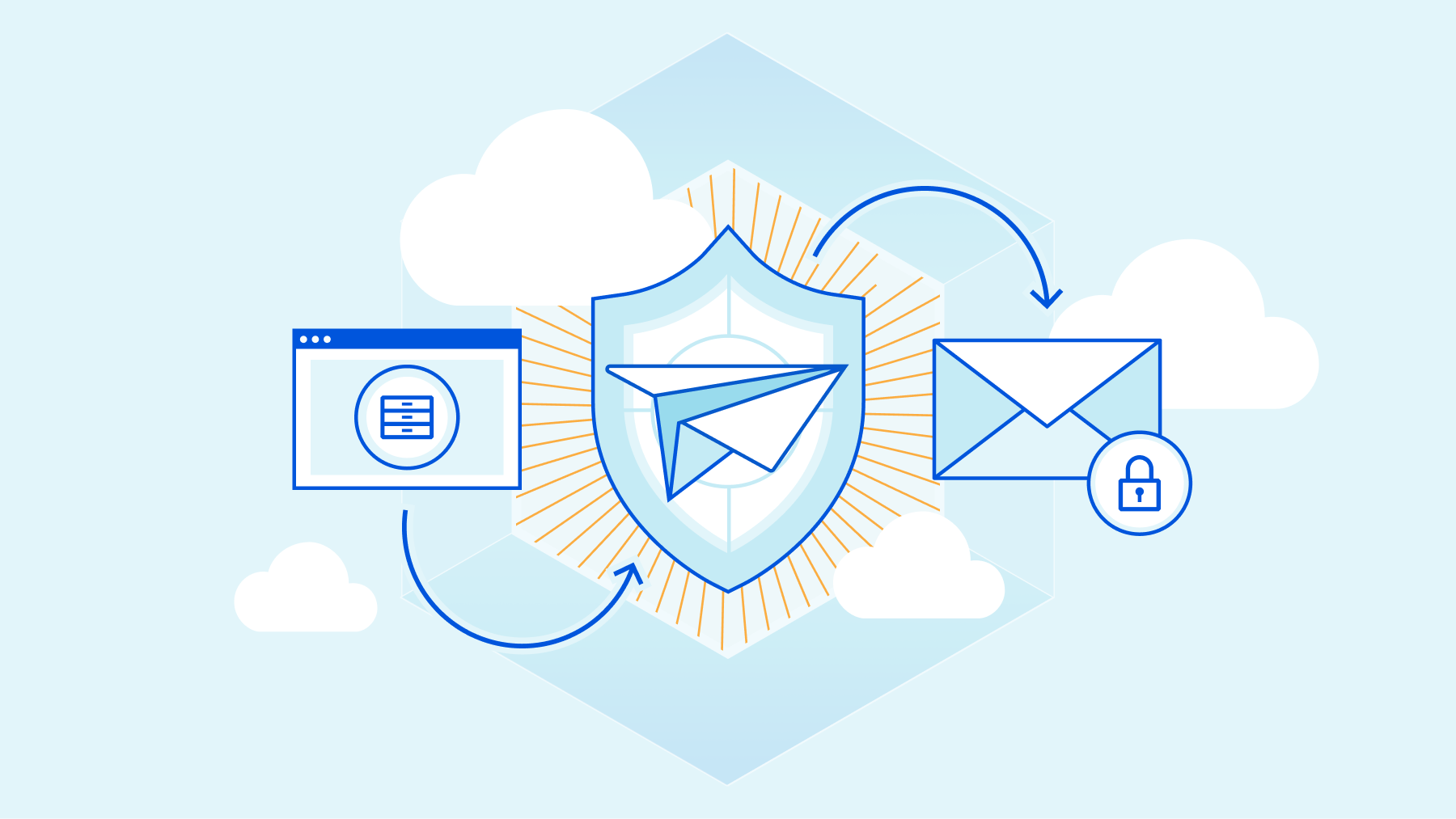
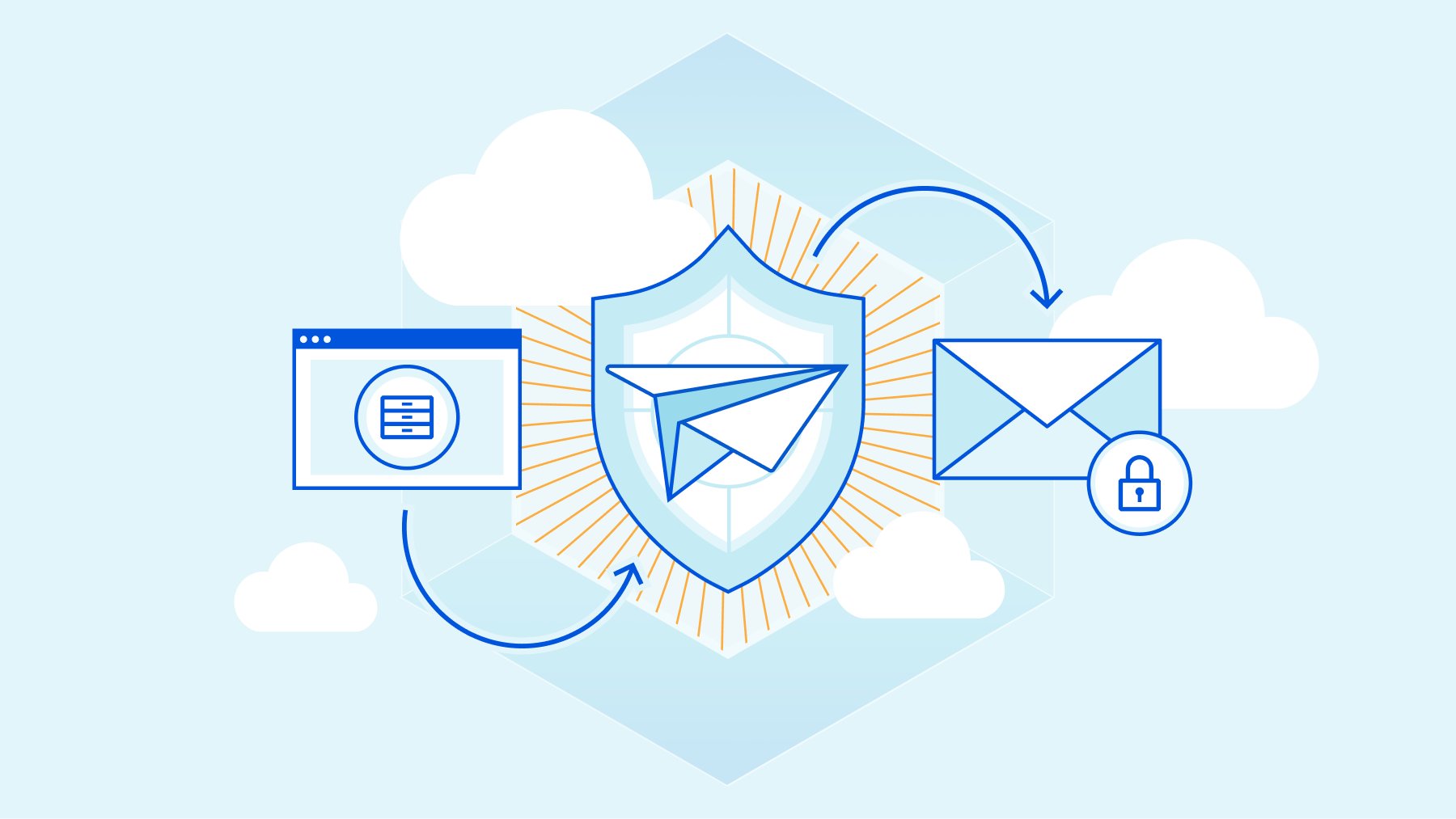
Leaders and practitioners responsible for email security are faced with a few truths every day. It’s likely true that their email is cloud-delivered and comes with some built-in protection that does an OK job of stopping spam and commodity malware. It’s likely true that they have spent considerable time, money, and staffing on their Secure Email Gateway (SEG) to stop phishing, malware, and other email-borne threats. Despite this, it’s also true that email continues to be the most frequent source of Internet threats, with Deloitte research finding that 91% of all cyber attacks begin with phishing.
If anti-phishing and SEG services have both been around for so long, why do so many phish still get through? If you’re sympathetic to Occam’s razor, it’s because the SEG was not designed to protect the email environments of today, nor is it effective at reliably stopping today’s phishing attacks.
But if you need a stronger case than Occam delivers — then keep on reading.
The most prominent change within the email market is also what makes a traditional SEG redundant – the move to cloud-native email services. More than 85% of organizations are expected to embrace a “cloud-first” strategy by 2025, according to Gartner®. Organizations that expect cloud-native scale, resiliency, and flexibility from their security controls are not going to get it from legacy devices such as SEGs.
When it comes to email specifically, Gartner® notes that, “Advanced email security capabilities are increasingly being deployed as integrated cloud email security solutions rather than as a gateway” – with at least 40% of organizations using built-in protection capabilities from cloud email providers instead of a SEG, by 2023. Today, email comes from everywhere and goes everywhere – putting a SEG in front of your Exchange server is anachronistic; and putting a SEG in front of cloud inboxes in a mobile and remote-first world is intractable. Email security today should follow your user, should be close to your inbox, and should “be everywhere”.
Apart from being architecturally out of time, a SEG also falls short at detecting advanced phishing and socially engineered attacks. This is because a SEG was originally designed to stop spam – a high-volume problem that needs large attack samples to detect and nullify. But today’s phishing attacks are more sniper than scattergun. They are low volume, highly targeted, and exploit our implicit trust in email communications to steal money and data. Detecting modern phishing attacks requires compute-intensive advanced email analysis and threat detection algorithms that a SEG cannot perform at scale.
Nowhere is a SEG’s outdated detection philosophy more laid bare than when admins are confronted with a mountain of email threat policies to create and tune. Unlike most other cyber attacks, email phishing and Business Email Compromise (BEC) have too many “fuzzy” signals and cannot solely be detected by deterministic if-then statements. Moreover, attackers don’t stand still while you create email threat policies – they adapt fast and modify techniques to bypass the rules you just created. Relying on SEG tuning to stop phishing is like playing a game of Whack-A-Mole rigged in the attacker’s favor.
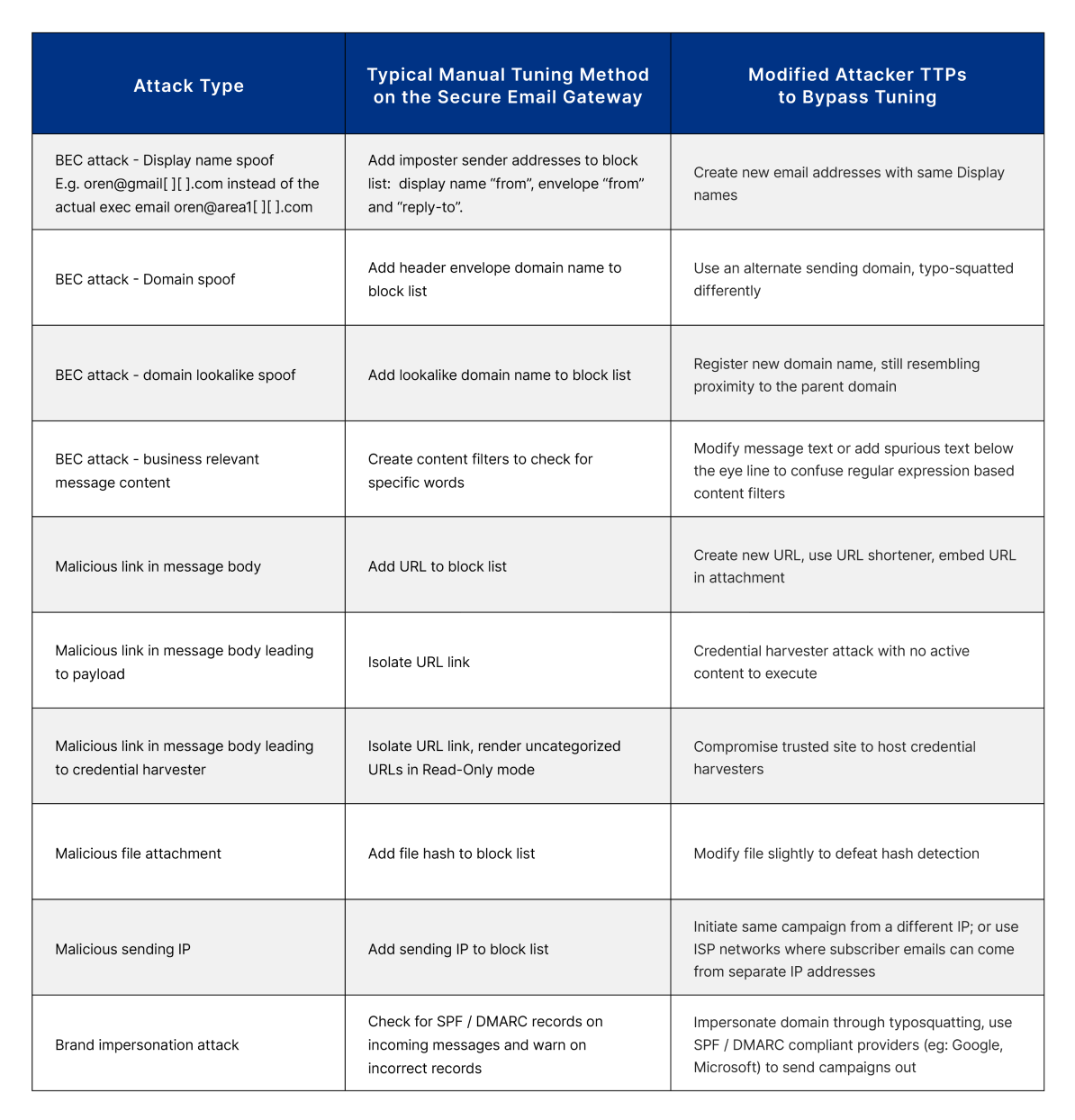
Traditional email security defenses rely on knowledge of yesterday’s active attack characteristics, such as reputation data and threat signatures, to detect the next attack, and therefore can’t reliably defend against modern phishing attacks that continually evolve.
What’s needed is forward-looking security technology that is aware not only of yesterday’s active phishing payloads, websites, and techniques — but also has insight into the threat actors’ next moves. Which sites and accounts are they compromising or establishing for use in tomorrow’s attacks? What payloads and techniques are they preparing to use in those attacks? Where are they prodding and probing before an attack?
Cloudflare Area 1 proactively scans the Internet for attacker infrastructure and phishing campaigns that are under construction. Area 1’s threat-focused web crawlers dynamically analyze suspicious web pages and payloads, and continuously update detection models as attacker tactics evolve – all to stop phishing attacks days before they reach the inbox.
When combined with the 1T+ daily DNS requests observed by Cloudflare Gateway, this corpus of threat intelligence enables customers to stop phishing threats at the earliest stage of the attack cycle. In addition, the use of deep contextual analytics to understand message sentiment, tone, tenor and thread variations allows Area 1 to understand and distinguish between valid business process messages and sophisticated impersonation campaigns.
While we are big believers in layering security, the layers should not be redundant. A SEG duplicates a lot of capabilities that customers now get bundled in with their cloud email offering. Area 1 is built to enhance – not duplicate – native email security and stop phishing attacks that get past initial layers of defense.
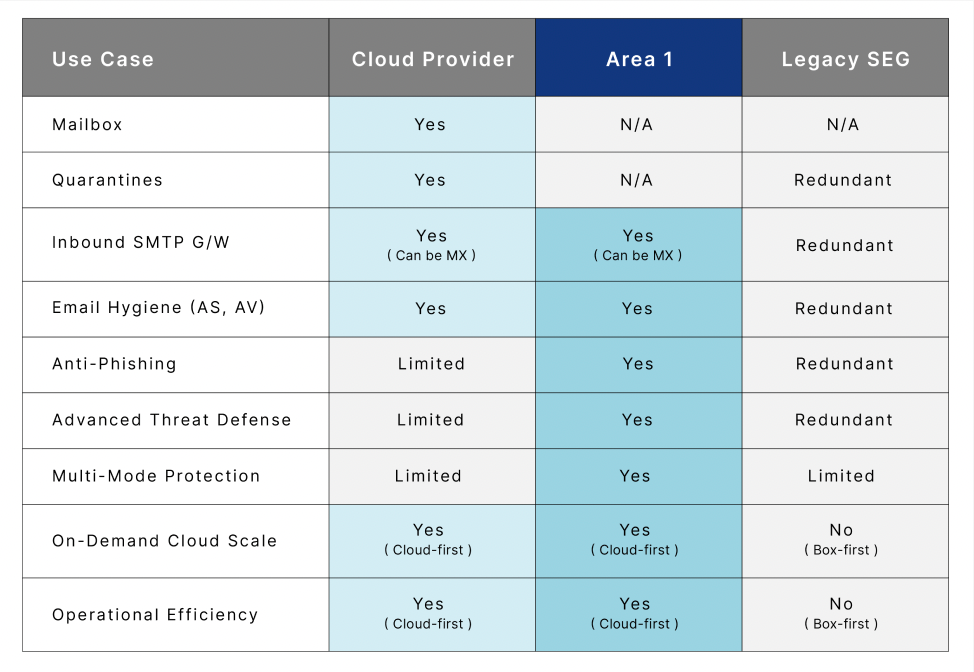
The best way to get started with your SEG replacement project is deciding whether it’s a straight replacement or an eventual replacement that starts with augmentation. While Cloudflare Area 1 has plenty of customers that have replaced their SEG (more on that later), we have also seen scenarios where customers prefer to run Cloudflare Area 1 downstream of their SEG initially, assess the efficacy of both services, and then make a more final determination. We make the process straightforward either way!
As you start the project, it’s important to involve the right stakeholders. At a minimum, you should involve an IT admin to ensure email delivery and productivity isn’t impacted and a security admin to monitor detection efficacy. Other stakeholders might include your channel partner if that’s your preferred procurement process and someone from the privacy and compliance team to verify proper handling of data.
Next, you should decide your preferred Cloudflare Area 1 deployment architecture. Cloudflare Area 1 can be deployed as the MX record, over APIs, and can even run in multi-mode deployment. We recommend deploying Cloudflare Area 1 as the MX record for the most effective protection against external threats, but the service fits into your world based on your business logic and specific needs.
The final piece of preparation involves mapping out your email flow. If you have multiple domains, identify where emails from each of your domains route to. Check your different routing layers (e.g. are there MTAs that relay inbound messages?). Having a good understanding of the logical and physical SMTP layers within the organization will ensure proper routing of messages. Discuss what email traffic Cloudflare Area 1 should scan (north/south, east/west, both) and where it fits with your existing email policies.
Step 1: Implement email protection
Here are the broad steps you should follow if Cloudflare Area 1 is configured as the MX record (time estimate: ~30 minutes):
Here are the steps if Cloudflare Area 1 is deployed downstream from an existing email security solution (time estimate: ~30 minutes):
Step 2: Integrate DNS
One of the most common post-email steps customers follow is to integrate Cloudflare Area 1 with their DNS service. If you’re a Cloudflare Gateway customer, good news – Cloudflare Area 1 now uses Cloudflare Gateway as its recursive DNS to protect end users from accessing phishing and malicious sites through email links or web browsing.
Step 3: Integrate with downstream security monitoring and remediation services
Cloudflare Area 1’s detailed and customizable reporting allows for at-a-glance visibility into threats. By integrating with SIEMs through our robust APIs, you can easily correlate Cloudflare Area 1 detections with events from network, endpoint and other security tools for simplified incident management.
While Cloudflare Area 1 provides built-in remediation and message retraction to allow customers to respond to threats directly within the Cloudflare Area 1 dashboard, many organizations also choose to integrate with orchestration tools for custom response playbooks. Many customers leverage our API hooks to integrate with SOAR services to manage response processes across their organization.
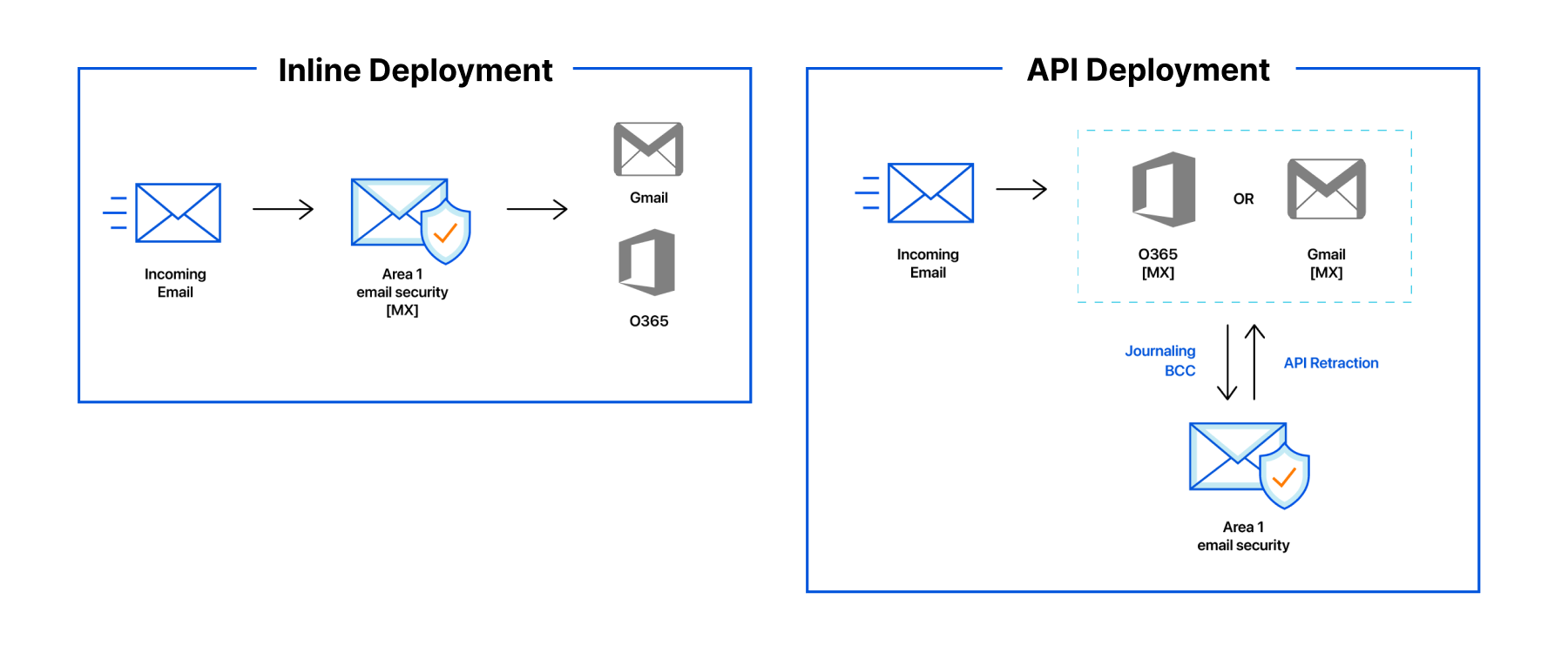
How will you know your SEG replacement project has been successful and had the desired impact? We recommend measuring metrics relevant to both detection efficacy and operational simplicity.
On the detection front, the obvious metric to measure is the number and nature of phishing attacks blocked before and after the project. Are you seeing new types of phishing attacks being blocked that you weren’t seeing before? Are you getting visibility into campaigns that hit multiple mailboxes? The other detection-based metric to keep in mind is the number of false positives.
On the operational front, it’s critical that email productivity isn’t impacted. A good proxy for this is measuring the number of IT tickets related to email delivery. The availability and uptime of the email security service is another key lever to keep an eye on.
Finally, and perhaps most importantly, measure how much time your security team is spending on email security. Hopefully it’s much less than before! A SEG is known to be a heavy-lift service deployment to ongoing maintenance. If Cloudflare Area 1 can free up your team’s time to work on other pressing security concerns, that’s as meaningful as stopping the phish themselves.
The reason we are articulating a SEG replacement plan here is because many of our customers have done it already and are happy with the outcomes.
For example, a Fortune 50 global insurance provider that serves 90 million customers in over 60 countries found their SEG to be insufficient in stopping phishing attacks. Specifically, it was an onerous process to search for “missed phish” once they got past the SEG and reached the inbox. They needed an email security service that could catch these phishing attacks and support a hybrid architecture with both cloud and on-premises mailboxes.
After deploying Cloudflare Area 1 downstream of their Microsoft 365 and SEG layers, our customer was protected against more than 14,000 phishing threats within the first month; none of those phishing messages reached a user’s inbox. A one-step integration with existing email infrastructure meant that maintenance and operational issues were next to none. Cloudflare Area 1’s automated message retraction and post-delivery protection also enabled the insurance provider to easily search and remediate any missed phish as well.
If you are interested in speaking with any of our customers that have augmented or replaced their SEG with Cloudflare Area 1, please reach out to your account team to learn more! If you’d like to see Cloudflare Area 1 in action, sign up for a Phishing Risk Assessment here.
Replacing a SEG is a great project to fit into your overall Zero Trust roadmap. For a full summary of Cloudflare One Week and what’s new, tune in to our recap webinar.
–
1Gartner Press Release, “Gartner Says Cloud Will Be the Centerpiece of New Digital Experiences”, 11 November 2021
2Gartner, “Market Guide for Email Security,” 7 October 2021, Mark Harris, Peter Firstbrook, Ravisha Chugh, Mario de Boer
GARTNER is a registered trademark and service mark of Gartner, Inc. and/or its affiliates in the U.S. and internationally and is used herein with permission. All rights reserved.
Post Syndicated from Shalabh Mohan original https://blog.cloudflare.com/email-link-isolation/
This post is also available in 简体中文, 日本語 and Español.

There is an implicit and unearned trust we place in our email communications. This realization — that an organization can’t truly have a Zero Trust security posture without including email — was the driving force behind Cloudflare’s acquisition of Area 1 Security earlier this year. Today, we have taken our first step in this exciting journey of integrating Cloudflare Area 1 email security into our broader Cloudflare One platform. Cloudflare Secure Web Gateway customers can soon enable Remote Browser Isolation (RBI) for email links, giving them an unmatched level of protection from modern multi-channel email-based attacks.
Research from Cloudflare Area 1 found that nearly 10% of all observed malicious attacks involved credential harvesters, highlighting that victim identity is what threat actors usually seek. While commodity phishing attacks are blocked by existing security controls, modern attacks and payloads don’t have a set pattern that can reliably be matched with a block or quarantine rule. Additionally, with the growth of multi-channel phishing attacks, an effective email security solution needs the ability to detect blended campaigns spanning email and Web delivery, as well as deferred campaigns that are benign at delivery time, but weaponized at click time.
When enough “fuzzy” signals exist, isolating the destination to ensure end users are secure is the most effective solution. Now, with the integration of Cloudflare Browser Isolation into Cloudflare Area 1 email security, these attacks can now be easily detected and neutralized.
Why do humans still click on malicious links? It’s not because they haven’t attended enough training sessions or are not conscious about security. It’s because they have 50 unread emails in their inbox, have another Zoom meeting to get to, or are balancing a four-year old on their shoulders. They are trying their best. Anyone, including security researchers, can fall for socially engineered attacks if the adversary is well-prepared.
If we accept that human error is here to stay, developing security workflows introduces new questions and goals:
It’s these questions that we had in mind when we reached the conclusion that email needs to be a fundamental part of any Zero Trust platform. Humans make mistakes in email just as regularly — in fact, sometimes more so — as they make mistakes surfing the Web.
For IT teams, that is the question they wrestle with daily to balance risk mitigation with user productivity. The SOC team wants IT to block everything risky or unknown, whereas the business unit wants IT to allow everything not explicitly bad. If IT decides to block risky or unknown links, and it results in a false positive, they waste time manually adding URLs to allow lists — and perhaps the attacker later pivots those URLs to malicious content anyway. If IT decides to allow risky or unknown sites, best case they waste time reimaging infected devices and resetting login credentials — but all too common, they triage the damage from a data breach or ransomware lockdown. The operational simplicity of enabling RBI with email — also known as email link isolation — saves the IT, SOC, and business unit teams significant time.
For a Cloudflare Area 1 customer, the initial steps involve enabling RBI within your portal:
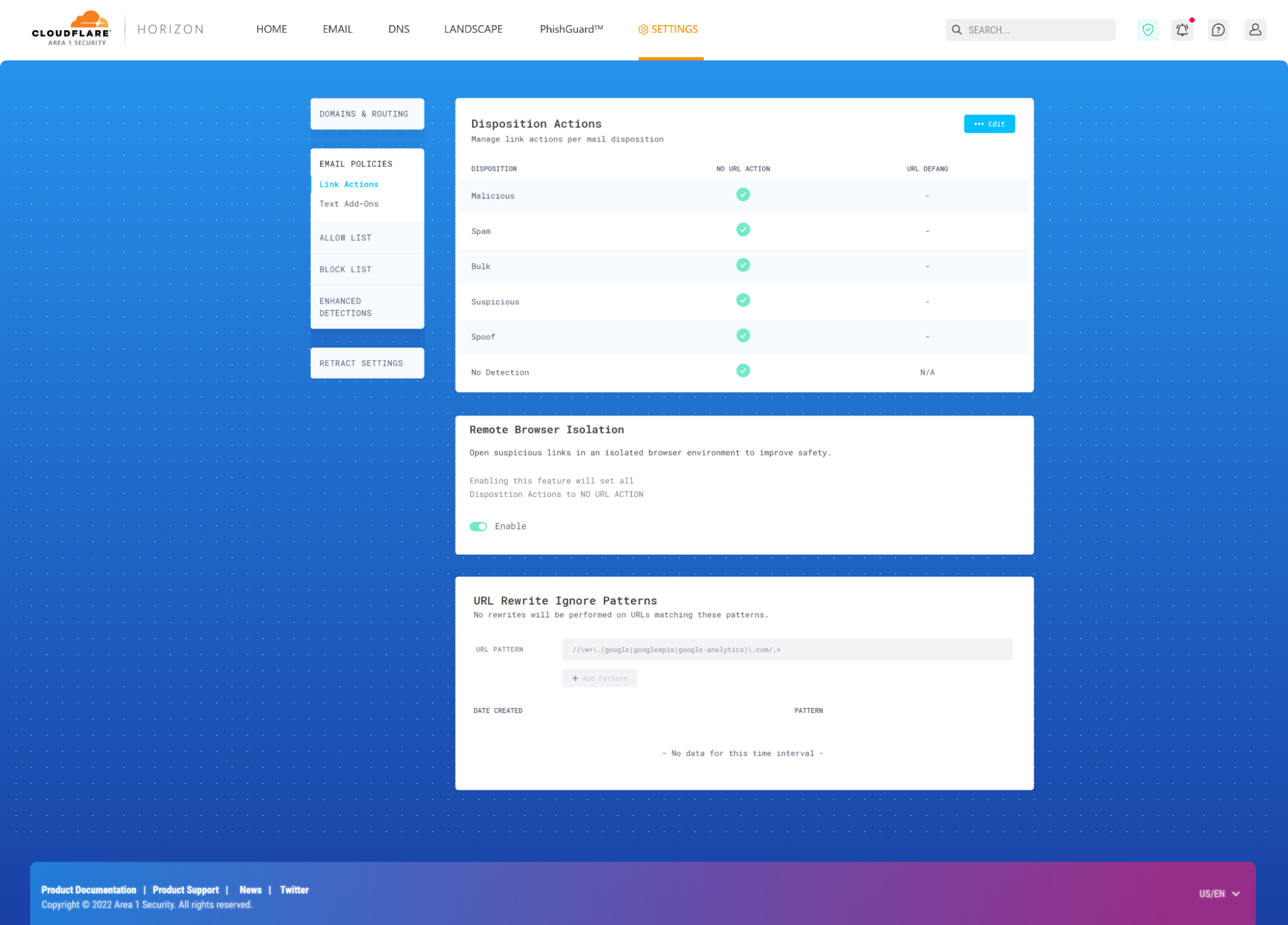
With email link isolation in place, here’s the short-lived life of an email with suspicious links:
Step 1: Cloudflare Area 1 inspects the email and determines that certain links in the messages are suspicious or on the margin
Step 2: Suspicious URLs and hyperlinks in the email get rewritten to a custom Cloudflare Area 1 prefix URL.
Step 3: The email is delivered to the intended inboxes.
Step 4: If a user clicks the link in the email, Cloudflare redirects to a remote browser via <authdomain>.cloudflareaccess.com/browser/{{url}}.
Step 5: Remote browser loads a website on a server on the Cloudflare Global Network and serves draw commands to the user’s clientless browser endpoint.
By executing the browser code and controlling user interactions on a remote server rather than a user device, any and all malware and phishing attempts are isolated, and won’t infect devices and compromise user identities. This improves both user and endpoint security when there are unknown risks and unmanaged devices, and allows users to access websites without having to connect to a VPN or having strict firewall policies.
Cloudflare’s RBI technology uses a unique patented technology called Network Vector Rendering (NVR) that utilizes headless Chromium-based browsers in the cloud, transparently intercepts draw layer output, transmits the draw commands efficiency and securely over the web, and redraws them in the windows of local HTML5 browsers. Unlike legacy Browser Isolation technologies that relied on pixel pushing or DOM reconstruction, NVR is optimized for scalability, security and end user transparency, while ensuring the broadest compatibility with websites.
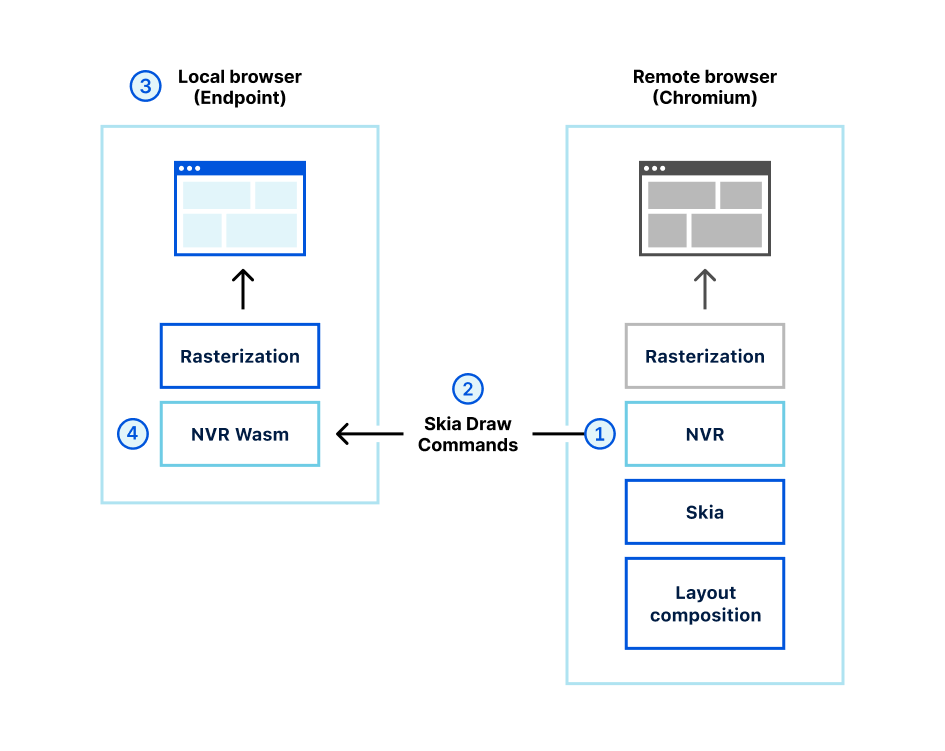
Let’s look at a specific example of a deferred phishing attack, how it slips past traditional defenses, and how email link isolation addresses the threat.
As organizations look to adopt new security principles and network architectures like Zero Trust, adversaries continually come up with techniques to bypass these controls by exploiting the most used and most vulnerable application – email. Email is a good candidate for compromise because of its ubiquity and ability to be bypassed pretty easily by a motivated attacker.
Let’s take an example of a “deferred phishing attack”, without email link isolation.
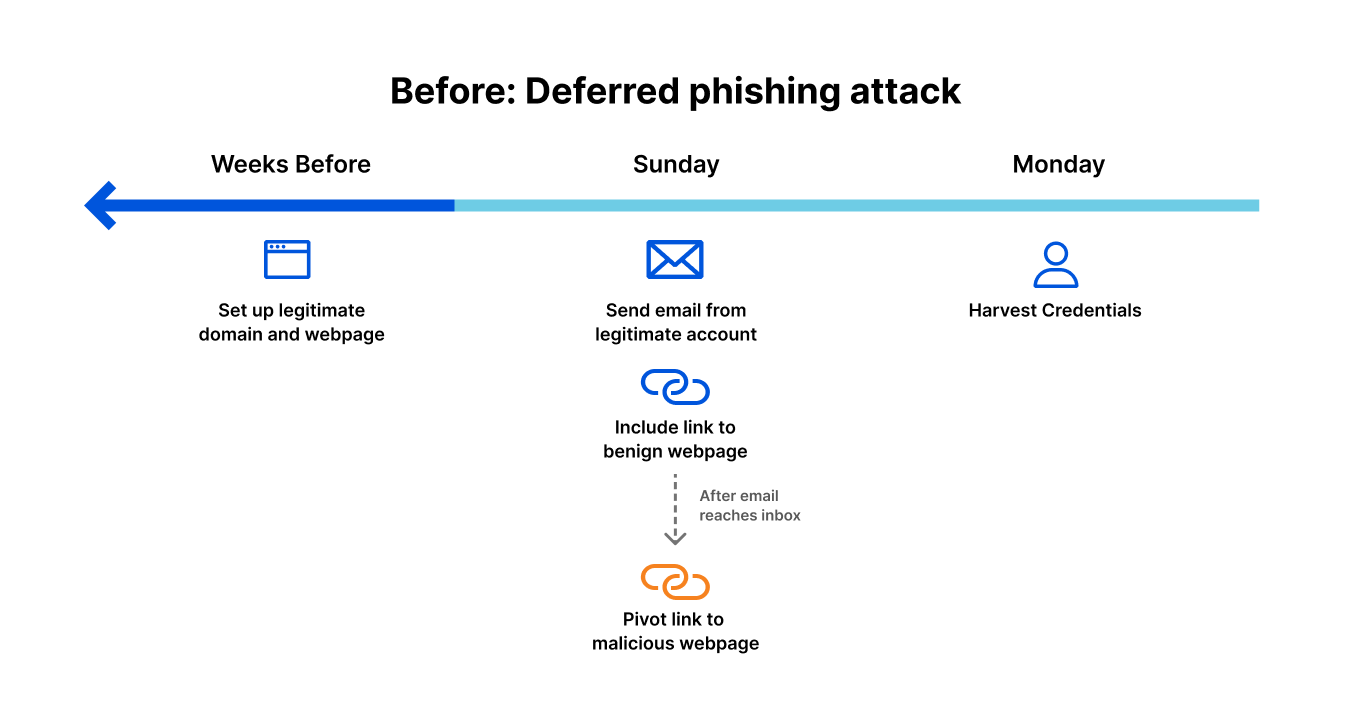
Attacker preparation: weeks before launch
The attacker sets up infrastructure for the phishing attempt to come. This may include:
At this point, there is no evidence of an attack that can be picked up by secure email gateways, authentication-based solutions, or threat intelligence that relies solely on reputation-based signals and other deterministic detection techniques.
Attack “launch”: Sunday afternoon
The attacker sends an authentic-looking email from the newly-created domain. This email includes a link to the (still benign) webpage. There’s nothing in the email to block or flag it as suspicious. The email gets delivered to intended inboxes.
Attack launch: Sunday evening
Once the attacker is sure that all emails have reached their destination, they pivot the link to a malicious destination by changing the attacker-controlled webpage, perhaps by creating a fake login page to harvest credentials.
Attack landing: Monday morning
As employees scan their inboxes to begin their week, they see the email. Maybe not all of them click the link, but some of them do. Maybe not all of those that clicked enter their credentials, but a handful do. Without email link isolation, the attack is successful.
The consequences of the attack have also just begun – once user login credentials are obtained, attackers can compromise legitimate accounts, distribute malware to your organization’s network, steal confidential information, and cause much more downstream damage.
The integration between Cloudflare Area 1 and Cloudflare Browser Isolation provides a critical layer of post-delivery protection that can foil attacks like the deferred phishing example described above.
If the attacker prepares for and executes the attack as stated in the previous section, our email link isolation would analyze the email link at the time of click and perform a high-level assessment on whether the user should be able to navigate to it.
Safe link – Users will be redirected to this site transparently
Malicious link – Users are blocked from navigating
Suspicious link – Users are heavily discouraged to navigating and are presented with a splash warning page encouraging them to view in the link in an isolated browser
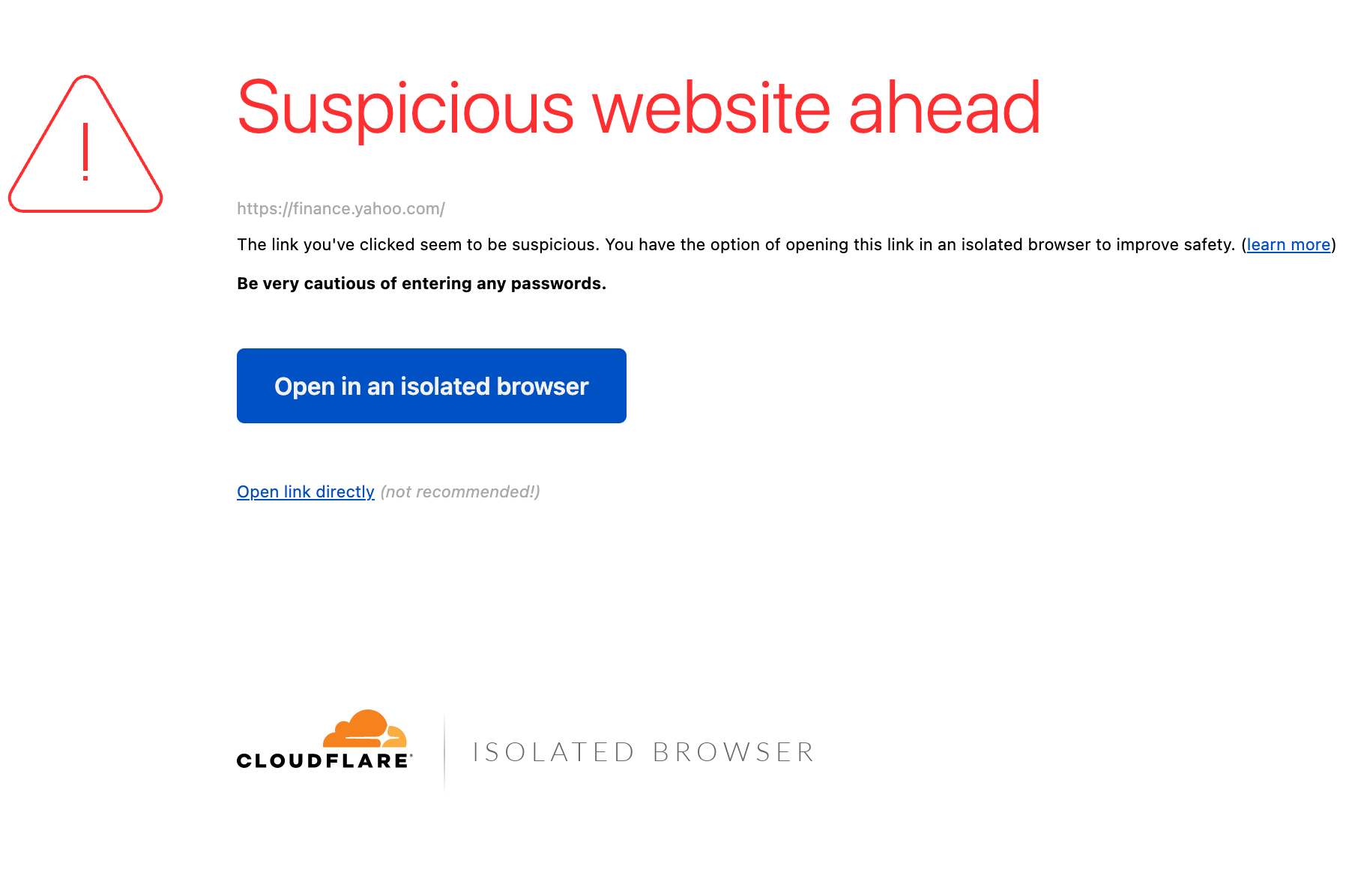
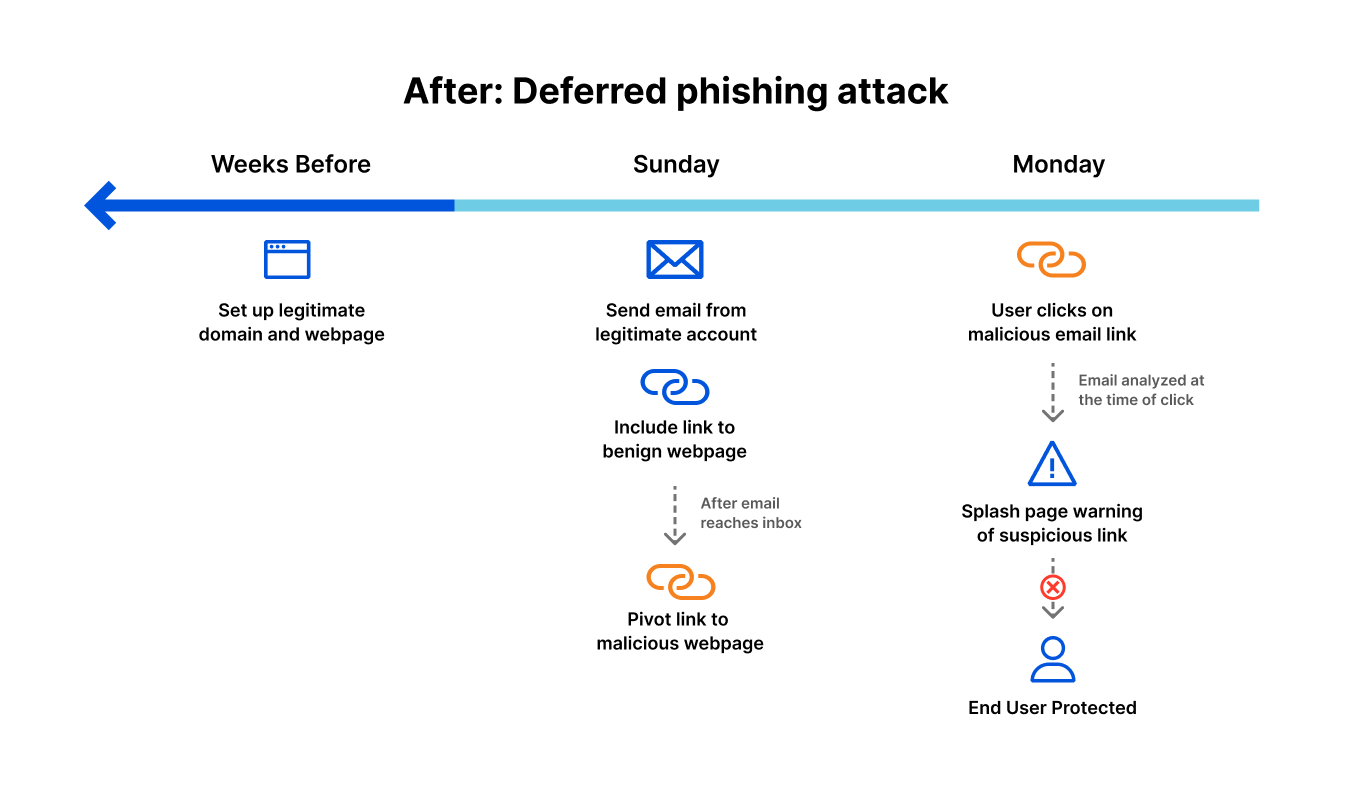
While a splash warning page was the mitigation employed in the above example, email link isolation will also offer security administrators other customizable mitigation options as well, including putting the webpage in read-only mode, restricting the download and upload of files, and disabling keyboard input altogether within their Cloudflare Gateway consoles.
Email link isolation also fits into users’ existing workflows without impacting productivity or sapping their time with IT tickets. Because Cloudflare Browser Isolation is built and deployed on the Cloudflare network, with global locations in 270 cities, web browsing sessions are served as close to users as possible, minimizing latency. Additionally, Cloudflare Browser Isolation sends the final output of each webpage to a user instead of page scrubbing or sending a pixel stream, further reducing latency and not breaking browser-based applications such as SaaS.
Existing Cloudflare Area 1 and Cloudflare Gateway customers are eligible for the beta release of email link isolation. To learn more and to express interest, sign up for our upcoming beta.
If you’d like to see what threats Cloudflare Area 1 detects on your live email traffic, request a free phishing risk assessment here. It takes five minutes to get started and does not impact mail flow.
Post Syndicated from Bruce Schneier original https://www.schneier.com/blog/archives/2022/04/sms-phishing-attacks-are-on-the-rise.html
SMS phishing attacks — annoyingly called “smishing” — are becoming more common.
I know that I have been receiving a lot of phishing SMS messages over the past few months. I am not getting the “Fedex package delivered” messages the article talks about. Mine are usually of the form: “Thank you for paying your bill, here’s a free gift for you.”
Post Syndicated from Patrick R. Donahue original https://blog.cloudflare.com/democratizing-email-security/
Since our founding, Cloudflare has been on a mission to take expensive, complex security solutions typically only available to the largest companies and make them easy to use and accessible to everyone. In 2011 and 2015 we did this for the web application firewall and SSL/TLS markets, simplifying the process of protecting websites from application vulnerabilities and encrypting HTTP requests down to single clicks; in 2020, during the start of the COVID-19 pandemic, we made our Zero Trust suite available to everyone; and today—in the face of heightened phishing attacks—we’re doing the same for the email security market.
Once the acquisition of Area 1 closes, as we expect early in the second quarter of 2022, we plan to give all paid self-serve plans access to their email security technology at no additional charge. Control, customization, and visibility via analytics will vary with plan level, and the highest flexibility and support levels will be available to Enterprise customers for purchase.
All self-serve users will also get access to a more feature-packed version of the Zero Trust solution we made available to everyone in 2020. Zero Trust services are incomplete without an email security solution, and CISA’s recent report makes that clearer than ever: over 90% of successful cyber attacks start with a phishing email, so we expect that over time analysts will have no choice but to include email in their definitions of secure access and zero edges.
If you’re interested in reserving your place in line, register your interest by logging into your Cloudflare account at dash.cloudflare.com, selecting your domain, clicking Email, and then “Join Waitlist” at the top of the page; we’ll reach out after the Area 1 acquisition is completed, and the integration is ready, in the order we received your request.
If you’re already managing your authoritative DNS with Cloudflare, as nearly 100% of non-Enterprise plans are, there will just be a single click to get started. Once clicked, we’ll start returning different MX records to anyone trying to send email to your domain. This change will attract all emails destined for your domain, during which they’ll be run through Area 1’s models and potentially be quarantined or flagged. Customers of Microsoft Office 365 will also be able to take advantage of APIs for an even deeper integration and capabilities like post-delivery message redaction.
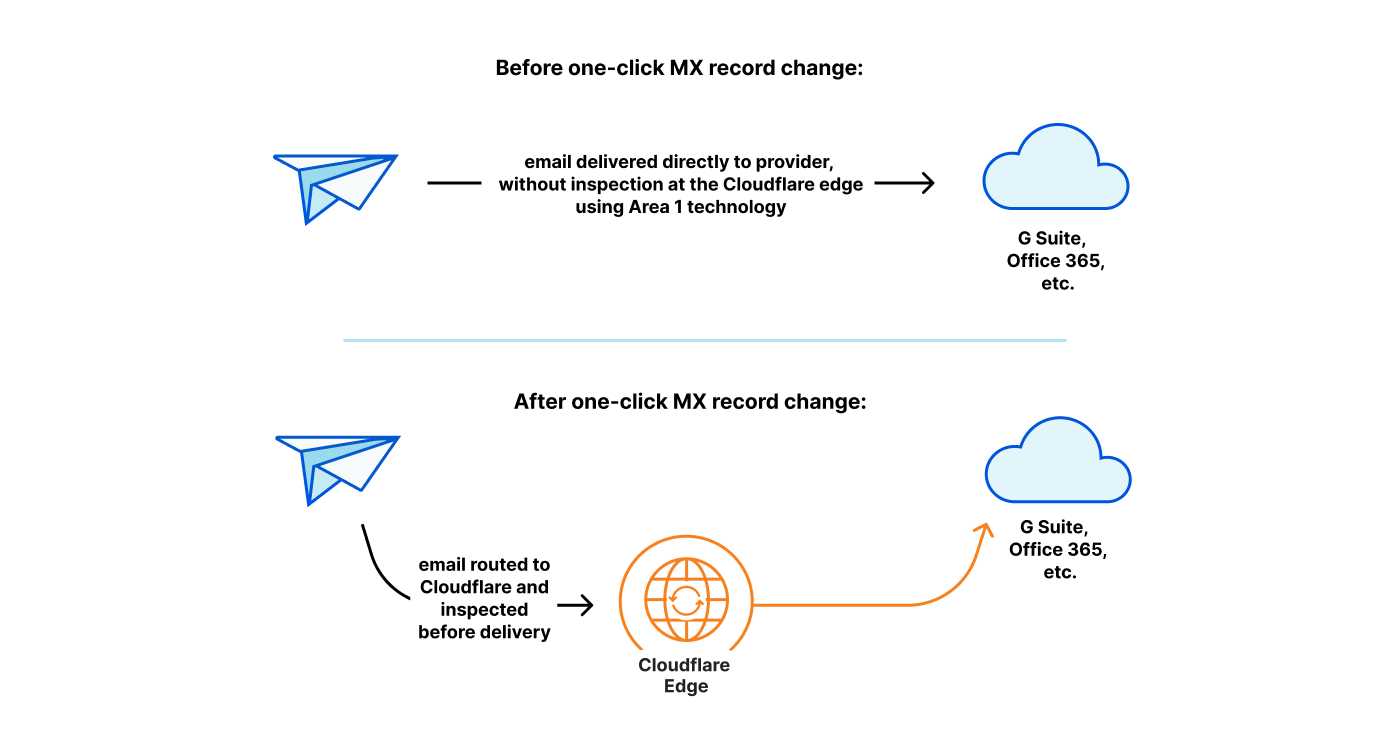
In addition to routing and filtering email, we’ll also automagically take care of your DNS email security records such as SPF, DKIM, DMARC, etc. We launched a tool to help with this last year, and soon we’ll be making it even more comprehensive and easier to use.
As we wrote in the acquisition announcement post on this blog, we’re excited to integrate email security with other products in our Zero Trust suite. For customers of Gateway and Remote Browser Isolation (RBI), we’ll automatically route potentially suspicious domains and links through these protective layers. Our built-in data loss prevention (DLP) technology will also be wired into Area 1’s technology in deployments where visibility into outbound email is available.
In addition to integrating directly with Zero Trust products, we’re excited about connecting threat data sources from Area 1 into existing Cloudflare products and vice versa. For example, phishing infrastructure identified during Area 1’s Internet-wide scans will be displayed within the recently launched Cloudflare Security Center, and 1.1.1.1’s trillions of queries per month will help Area 1 identify new domains that may be threats. Domains that are newly registered, or registered with slight variations of legitimate domains, are often warning signs of an upcoming phishing attack.
Cloudflare has been a happy customer of Area 1’s technology for years, and we’re excited to open it up to all of our customers as soon as possible. If you’re excited as we are about being able to use this in your Pro or Business plan, reserve your place in line today within the Email tab for your domain. Or if you’re an Enterprise customer and want to get started immediately, fill out this form or contact your Customer Success Manager.
Post Syndicated from Bruce Schneier original https://www.schneier.com/blog/archives/2022/01/fake-qr-codes-on-parking-meters.html
The City of Austin is warning about QR codes stuck to parking meters that take people to fraudulent payment sites.
Post Syndicated from Bruce Schneier original https://www.schneier.com/blog/archives/2021/11/securing-your-smartphone.html
This is part 3 of Sean Gallagher’s advice for “securing your digital life.”
Post Syndicated from Bruce Schneier original https://www.schneier.com/blog/archives/2021/10/problems-with-multifactor-authentication.html
Roger Grimes on why multifactor authentication isn’t a panacea:
The first time I heard of this issue was from a Midwest CEO. His organization had been hit by ransomware to the tune of $10M. Operationally, they were still recovering nearly a year later. And, embarrassingly, it was his most trusted VP who let the attackers in. It turns out that the VP had approved over 10 different push-based messages for logins that he was not involved in. When the VP was asked why he approved logins for logins he was not actually doing, his response was, “They (IT) told me that I needed to click on Approve when the message appeared!”
And there you have it in a nutshell. The VP did not understand the importance (“the WHY”) of why it was so important to ONLY approve logins that they were participating in. Perhaps they were told this. But there is a good chance that IT, when implementinthe new push-based MFA, instructed them as to what they needed to do to successfully log in, but failed to mention what they needed to do when they were not logging in if the same message arrived. Most likely, IT assumed that anyone would naturally understand that it also meant not approving unexpected, unexplained logins. Did the end user get trained as to what to do when an unexpected login arrived? Were they told to click on “Deny” and to contact IT Help Desk to report the active intrusion?
Or was the person told the correct instructions for both approving and denying and it just did not take? We all have busy lives. We all have too much to do. Perhaps the importance of the last part of the instructions just did not sink in. We can think we hear and not really hear. We can hear and still not care.
Post Syndicated from Hannes Gerhart original https://blog.cloudflare.com/tackling-email-spoofing/
Today we’re rolling out a new tool to tackle email spoofing and phishing and improve email deliverability: The new Email Security DNS Wizard can be used to create DNS records that prevent others from sending malicious emails on behalf of your domain. This new feature also warns users about insecure DNS configurations on their domain and shows recommendations on how to fix them. The feature will first be rolled out to users on the Free plan and over the next weeks be made available for Pro, Business and Enterprise customers, as well.
Before we dive into what magic this wizard is capable of, let’s take a step back and take a look at the problem: email spoofing and phishing.
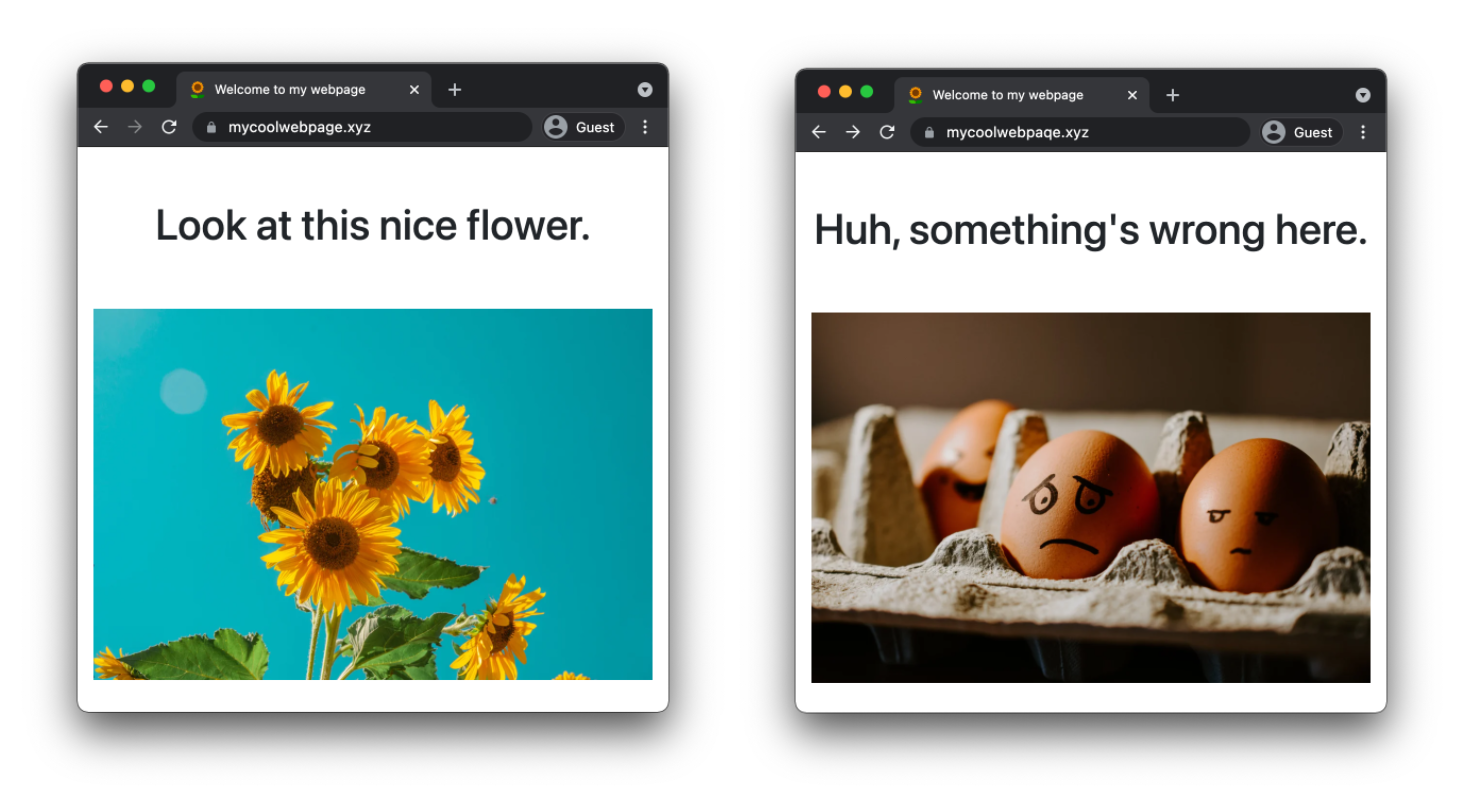
Spoofing is the process of posing as someone else which can be used in order to gain some kind of illicit advantage. One example is domain spoofing where someone hosts a website like mycoolwebpaqe.xyz to trick users of mycoolwebpage.xyz to provide sensitive information without knowing they landed on a false website. When looking at the address bar side by side in a browser, it’s very hard to spot the difference.
Then, there is email spoofing. In order to understand how this works, let’s take a look at a Cloudflare product update email I received on my personal email address. With most email providers you can look at the full source of an email which contains a number of headers and of course the body of the email.
Date: Thu, 23 Sep 2021 10:30:02 -0500 (CDT)
From: Cloudflare <[email protected]>
Reply-To: [email protected]
To: <my_personal_email_address>
Above you can see four headers of the email, when it was received, who it came from, who I should reply to, and my personal email address. The value of the From header is used to display the sender in my email program.
When I receive an email as above, I automatically assume this email has been sent from Cloudflare. However, nobody is stopped from sending an email with a modified From header from their mail server. If my email provider is not performing the right checks, which we will cover later in this blog post, I could be tricked into believing that an email was sent from Cloudflare, but it actually was not.
This brings us to the second attack type: phishing. Let’s say a malicious actor has successfully used email spoofing to send emails to your company’s customers that seem to originate from one of your corporate service emails. The content of these emails look exactly like a legitimate email from your company using the same styling and format. The email text could be an urgent message to update some account information including a hyperlink to the alleged web portal. If the receiving mail server of a user does not flag the email as spam or insecure origin, the user might click on the link which could execute malicious code or lead them to a spoofed domain asking for sensitive information.
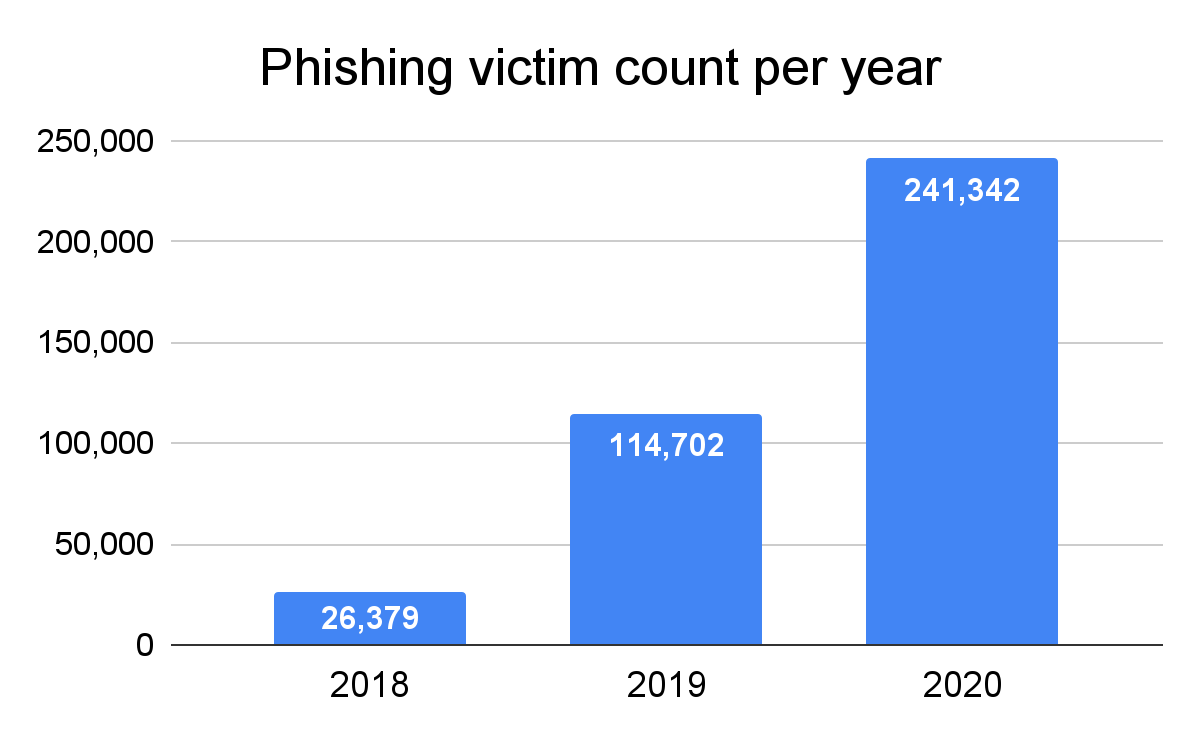
According to the FBI’s 2020 Internet Crime Report, phishing was the most common cyber crime in 2020 with over 240,000 victims leading to a loss of over $50M. And the number of victims has more than doubled since 2019 and is almost ten times higher than in 2018.
In order to understand how most phishing attacks are carried out, let’s take a closer look at the findings of the 2020 Verizon Data Breach Investigations Report. It lies out that phishing accounts for more than 80% of all “social actions”, another word for social engineering attacks, making it by far the most common type of such an attack. Furthermore, the report states that 96% of social actions are sent via email and only 3% through a website and 1% via phone or text.
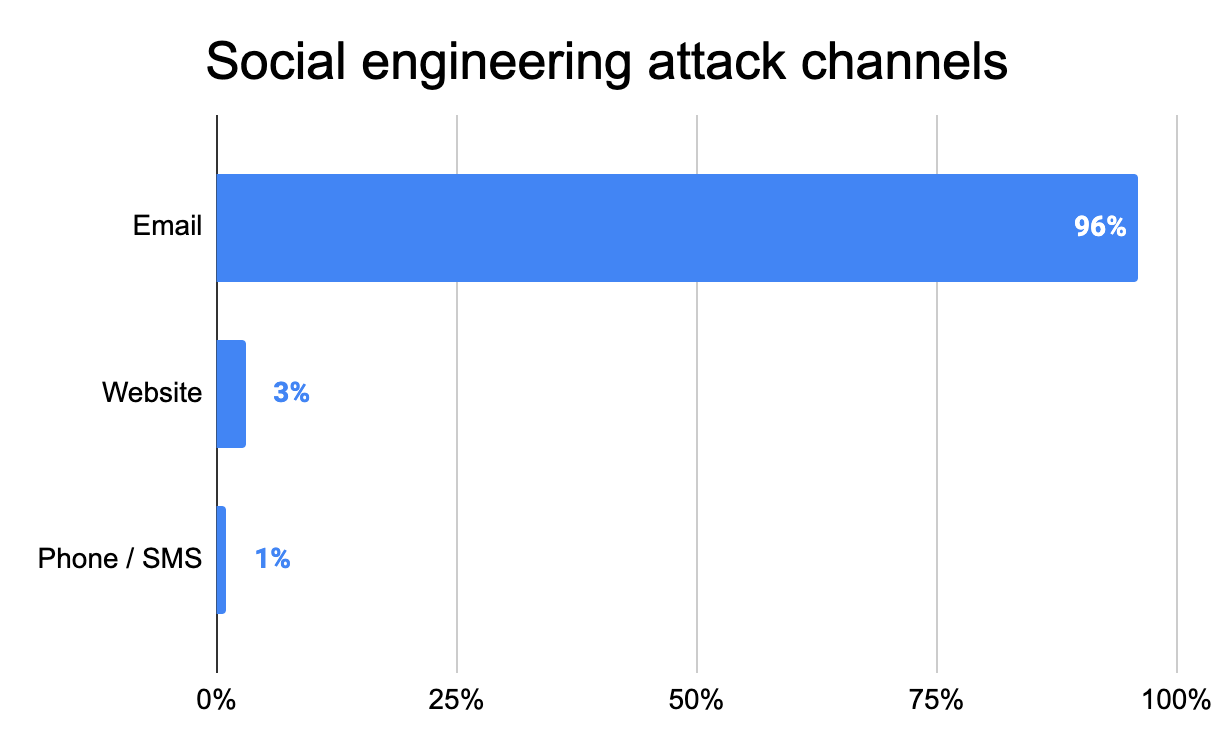
This clearly shows that email phishing is a serious problem causing Internet users a big headache. So let’s see what domain owners can do to stop bad actors from misusing their domain for email phishing.
Luckily, there are three anti-spoofing mechanisms already built into the Domain Name System (DNS):
However, it is not trivial to configure them correctly, especially for someone less experienced. In case your configuration is too strict, legitimate emails will be dropped or marked as spam. And if you keep your configuration too relaxed, your domain might be misused for email spoofing.
SPF is used to specify which IP addresses and domains are permitted to send email on behalf of your domain. An SPF policy is published as a TXT record on your domain, so everyone can access it via DNS. Let’s inspect the TXT record for cloudflare.com:
cloudflare.com TXT "v=spf1 ip4:199.15.212.0/22 ip4:173.245.48.0/20 include:_spf.google.com include:spf1.mcsv.net include:spf.mandrillapp.com include:mail.zendesk.com include:stspg-customer.com include:_spf.salesforce.com -all"
An SPF TXT record always needs to start with v=spf1. It usually contains a list of IP addresses of sending email servers using the ip4 or ip6 mechanism. The include mechanism is used to reference another SPF record on another domain. This is usually done if you are relying on other providers that need to send emails on our behalf. You can see a few examples in the SPF record of cloudflare.com above: we’re using Zendesk as customer support software and Mandrill for marketing and transactional emails.
Finally, there is the catch-all mechanism -all which specifies how all incoming, but unspecified emails should be treated The catch-all mechanism is preceded by a qualifier that can be either + (Allow), ~ (Softfail) or – (Fail). Using the Allow qualifier is not recommended as it basically makes the SPF record useless and allows all IP addresses and domains to send email on behalf of your domain. Softfail is interpreted differently by receiving mail servers, marking an email as Spam or insecure, depending on the server. Fail tells a server not to accept any emails originating from unspecified sources.
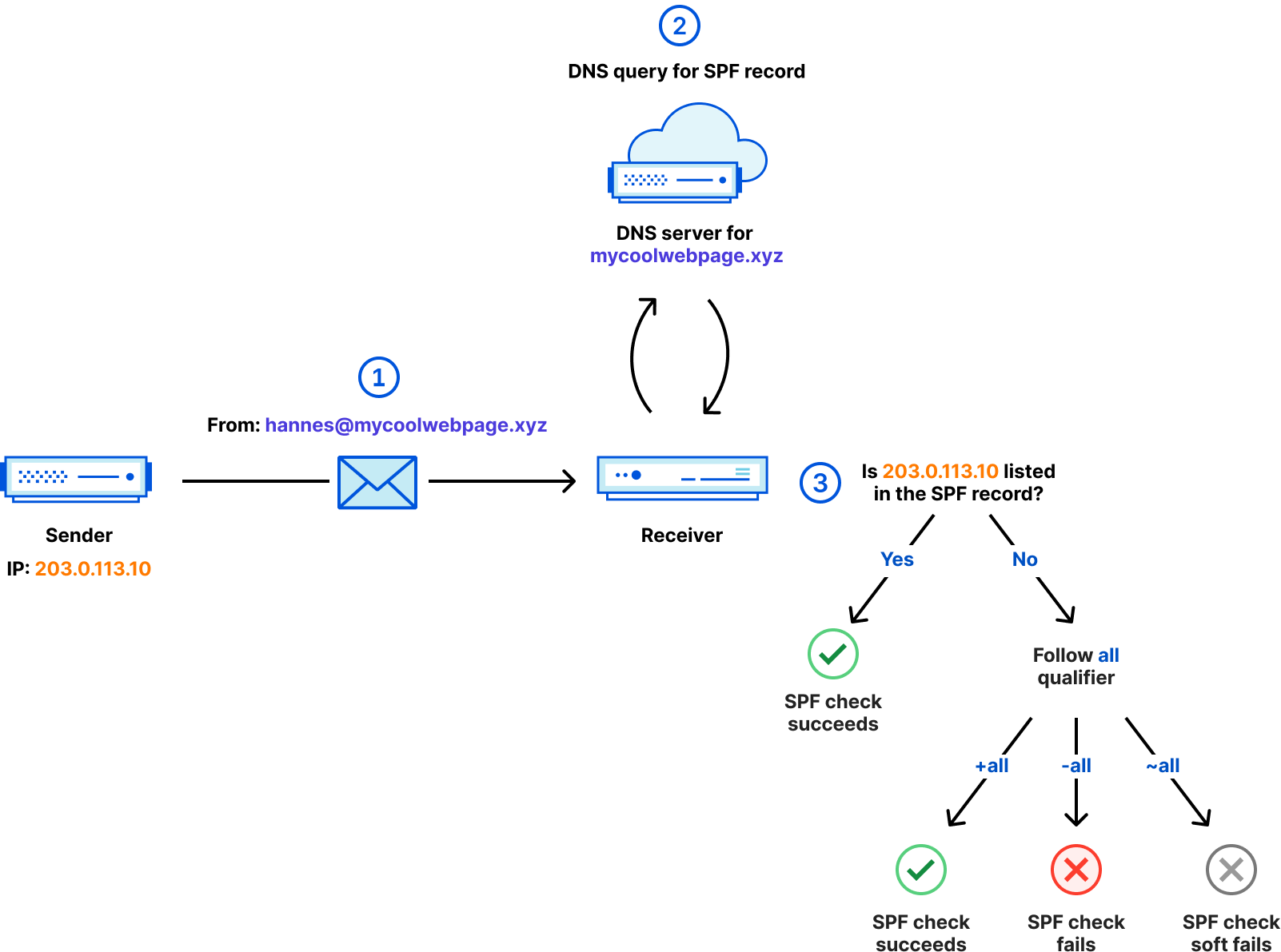
The diagram above shows the steps taken to ensure a received email is SPF compliant.
203.0.113.10 and contains a From header with the value of [email protected].mycoolwebpage.xyz to retrieve the SPF policy for this domain.203.0.113.10 is listed in the SPF record. If it is, the email succeeds the SPF check. If it is not, the qualifier of the all mechanism defines the outcome.For a full list of all mechanisms and more details about SPF, refer to RFC7208.
Okay, with SPF we’ve ensured that only permitted IP addresses and domains can send emails on behalf of cloudflare.com. But what if one of the IPs changes owner without us noticing and updating the SPF record? Or what if someone else who is also using Google’s email server on the same IP tries to spoof emails coming from cloudflare.com?
This is where DKIM comes in. DKIM provides a mechanism to cryptographically sign parts of an email — usually the body and certain headers — using public key encryption. Before we dive into how this works, let’s take a look at the DKIM record used for cloudflare.com:
google._domainkey.cloudflare.com. TXT "v=DKIM1; k=rsa; p=MIGfMA0GCSqGSIb3DQEBAQUAA4GNADCBiQKBgQDMxbNxA2V84XMpZgzMgHHey3TQFvHkwlPF2a11Ex6PGD71Sp8elVMMCdZhPYqDlzbehg9aWVwPz0+n3oRD73o+JXoSswgUXPV82O8s8dGny/BAJklo0+y+Bh2Op4YPGhClT6mRO2i5Qiqo4vPCuc6GB34Fyx7yhreDNKY9BNMUtQIDAQAB"
The structure of a DKIM record is <selector>._domainkey.<domain>, where the selector is provided by your email provider. The content of the DKIM TXT record always starts with v=DKIM1 followed by the public key. We can see the public key type, referenced by the k tag, and the public key itself, preceded by the p tag.
Below is a simplified sequence how the signing and DKIM check work:
The full DKIM specification can be found in RFC4871 and RFC5672.
Domain-based Message Authentication Reporting and Conformance, that’s definitely a mouthful. Let’s focus on two words: Reporting and Conformance. DMARC provides exactly that. Regular reports let the email sender know how many emails are non-conforming and potentially spoofed. Conformance helps provide a clear signal to the email receiver how to treat non-conforming emails. Email receivers might impose their own policies for emails that fail SPF or DKIM checks even without a DMARC record. However, the policy configured on the DMARC record is an explicit instruction by the email sender, so it increases the confidence for email receivers what to do with non-conforming emails.
Here is the DMARC record for cloudflare.com
_dmarc.cloudflare.com. TXT "v=DMARC1; p=reject; pct=100; rua=mailto:[email protected]"
The DMARC TXT record is always set on the _dmarc subdomain of the email domain and — similar to SPF and DKIM — the content needs to start with v=DMARC1. Then we see three additional tags:
The policy tag (p) indicates how email receivers should treat emails that fail SPF or DKIM checks. Possible values are none, reject, and quarantine. The none policy is also called monitoring only and allows emails failing the checks to still be accepted. By specifying quarantine, email receivers will put SPF or DKIM non-conforming emails in the Spam folder. With reject, emails are dropped and not delivered at all if they fail SPF or DKIM.
The percentage tag (pct) can be used to apply the specified policy to a subset of incoming emails. This is helpful if you’re just rolling out DMARC and want to make sure everything is configured correctly by testing on a subset.
The last tag we can find on the record is the reporting URI (rua). This is used to specify an email address that will receive aggregate reports (usually daily) about non-conforming emails.
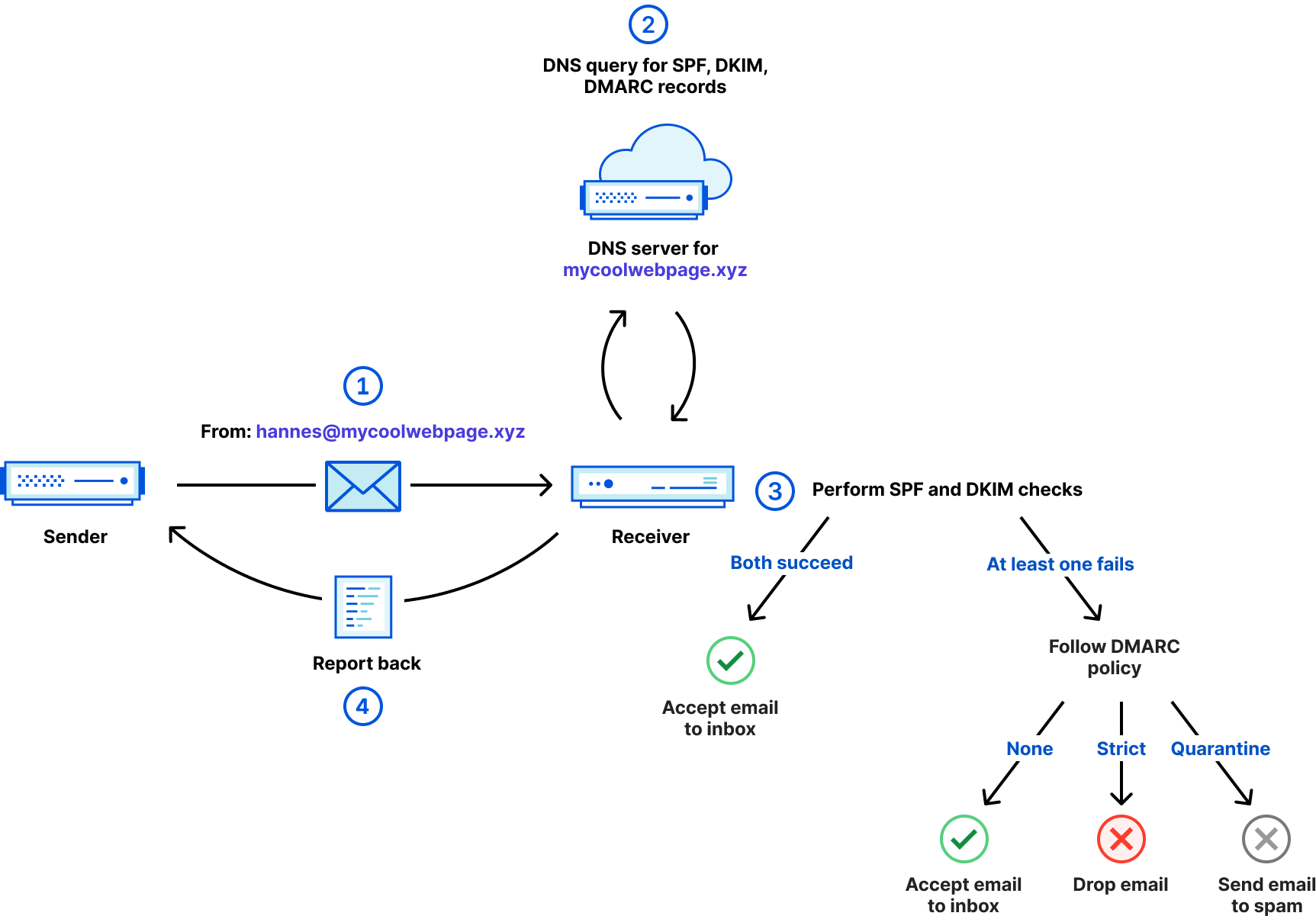
Above, we can see how DMARC works step by step.
From header containing [email protected].mycoolwebpage.xyz to retrieve the required policies and the DKIM public key.rua tag this report could also be sent to a different email server which is responsible for that email address.Other optional tags and the complete DMARC specification is described in RFC7489.
Now that we’ve learned what the problem is and how to tackle it using SPF, DKIM, and DMARC, let’s see how widely they’re adopted.
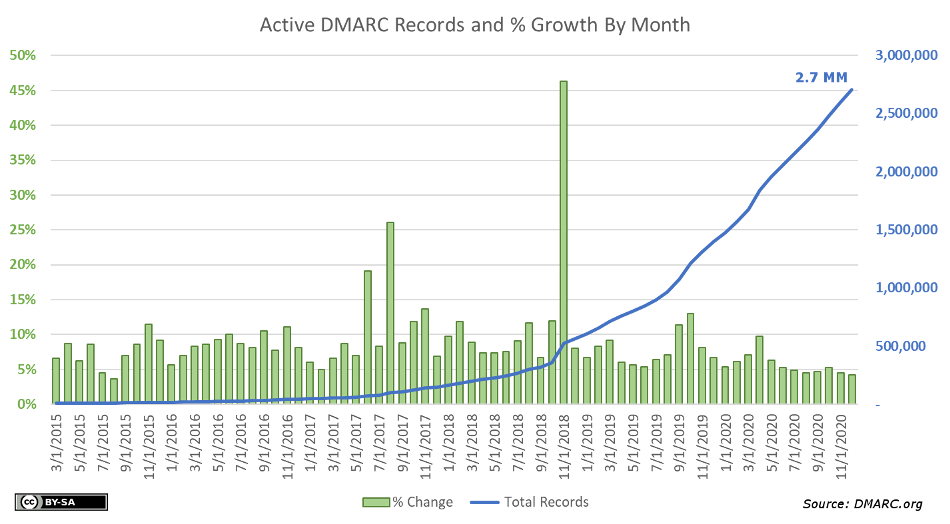
Dmarc.org has published the adoption of DMARC records of domains in a representative dataset. It shows that by the end of 2020, still less than 50% of domains even had a DMARC record. And remember, without a DMARC record there is no clear enforcement of SPF and DKIM checks. The study further shows that, of the domains that have a DMARC record, more than 65% are using the monitoring only policy (p=none), so there is a significant potential to drive this adoption higher. The study does not mention if these domains are sending or receiving emails, but even if they didn’t, a secure configuration should include a DMARC record (more about this later).
Another report from August 1, 2021 tells a similar story for domains that belong to entities in the banking sector. Of 2,881 banking entities in the United States, only 44% have published a DMARC record on their domain. Of those that have a DMARC record, roughly 2 out of 5 have set the DMARC policy to None and another 8% are considered “Misconfigured”. Denmark has a very high adoption of DMARC on domains in the banking sector of 94%, in contrast to Japan where only 13% of domains are using DMARC. SPF adoption is on average significantly higher than DMARC, which might have to do with the fact that the SPF standard was first introduced as experimental RFC in 2006 and DMARC only became a standard in 2015.
| Country | Number of entities | SPF present | DMARC present |
|---|---|---|---|
| Denmark | 53 | 91% | 94% |
| UK | 83 | 88% | 76% |
| Canada | 24 | 96% | 67% |
| USA | 2,881 | 91% | 44% |
| Germany | 39 | 74% | 36% |
| Japan | 90 | 82% | 13% |
This shows us there is quite some room for improvement.
So what are we doing to increase the adoption of SPF, DKIM, and DMARC and tackle email spoofing and phishing? Enter the new Cloudflare Email Security DNS Wizard.
Starting today, when you’re navigating to the DNS tab of the Cloudflare dashboard, you’ll see two new features:

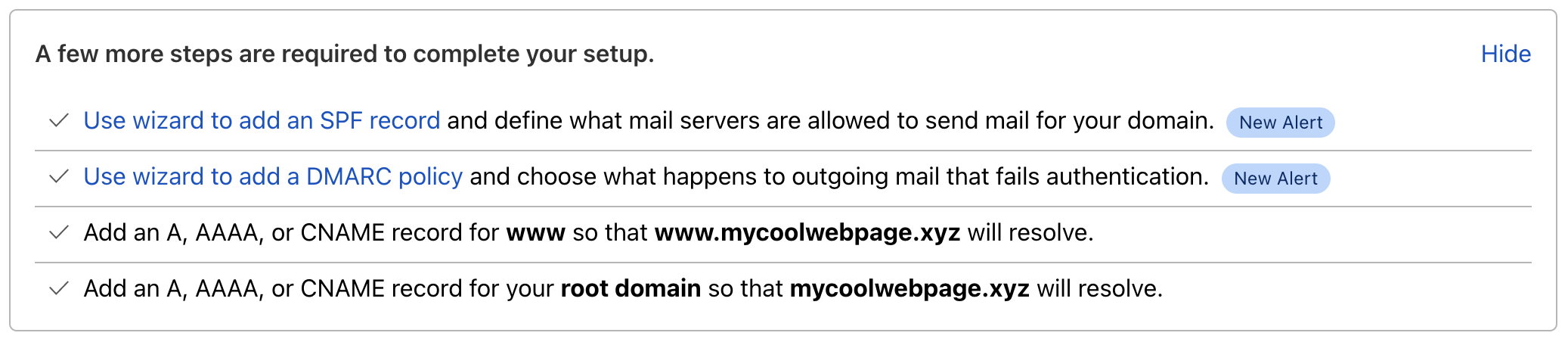
In order to start using the Email Security DNS Wizard, you can either directly click the link in the warning which brings you to the relevant section of the wizard or click Configure in the new Email Security section. The latter will show you the following available options:
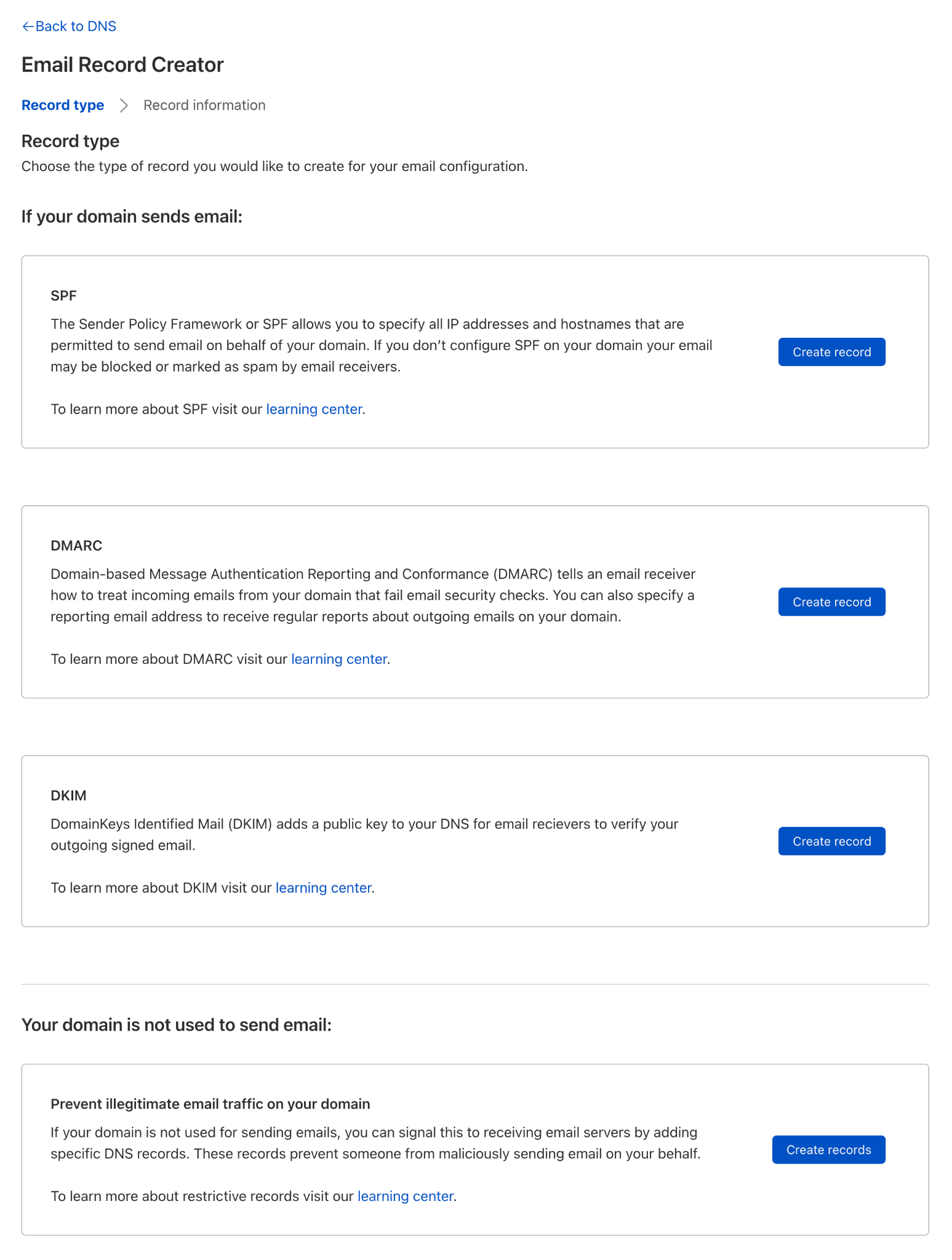
There are two scenarios. You’re using your domain to send email, or you don’t. If you do, you can configure SPF, DKIM, and DMARC records by following a few simple steps. Here you can see the steps for SPF:
If your domain is not sending email, there is an easy way to configure all three records with just one click:
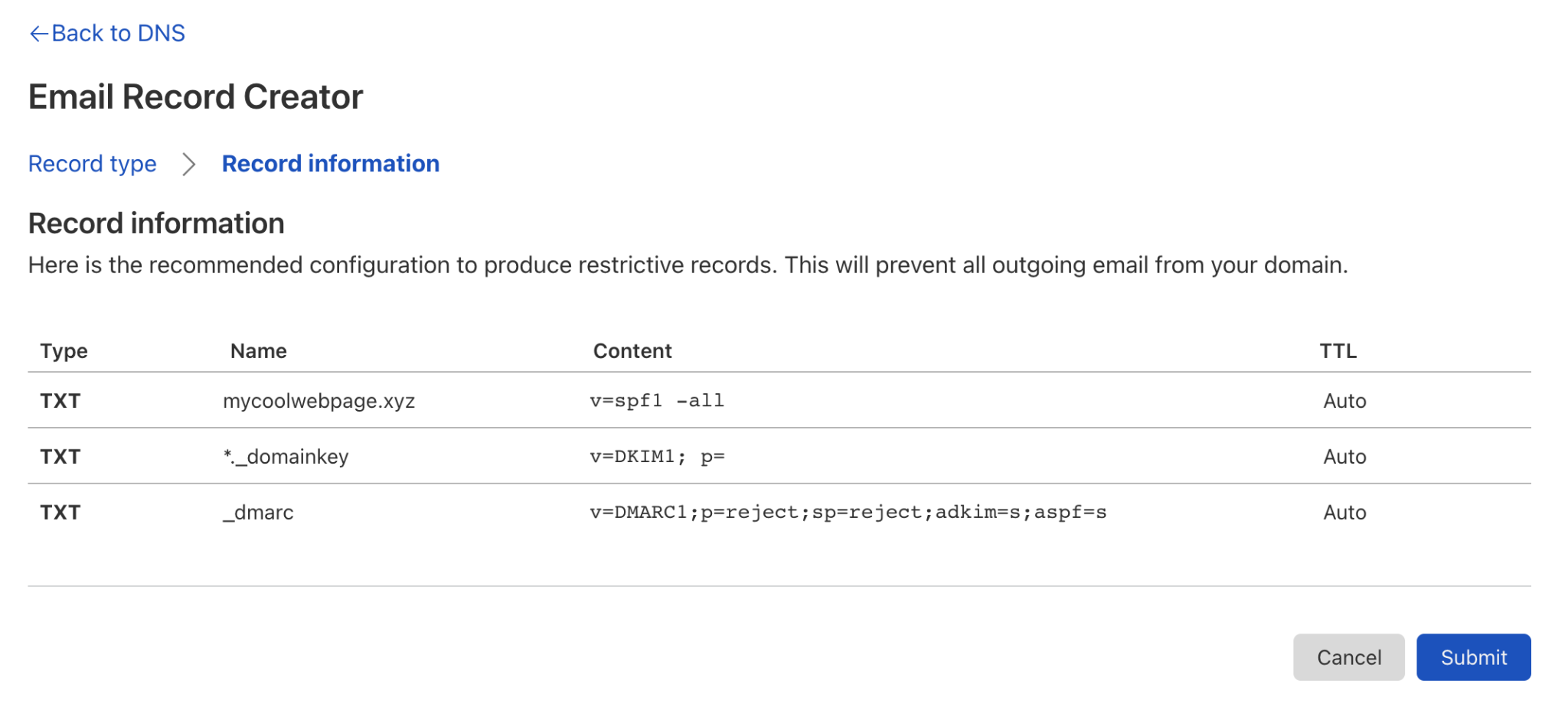
Once you click Submit, this will create all three records configured in such a way that all emails will fail the checks and be rejected by incoming email servers.
example.com			TXT	"v=spf1 -all"
*._domainkey.example.com.	TXT	"v=DKIM1; p="
_dmarc.example.com.		TXT	"v=DMARC1; p=reject; sp=reject; adkim=s; aspf=s;"
Out you go and make sure your domain is secured against email spoofing and phishing. Just head over to the DNS tab in the Cloudflare dashboard or if you are not yet using Cloudflare DNS, sign up for free in just a few minutes on cloudflare.com.
If you want to read more about SPF, DKIM and DMARC, go check out our new learning pages about email related DNS records.
Post Syndicated from Bruce Schneier original https://www.schneier.com/blog/archives/2021/08/t-mobile-data-breach.html
It’s a big one:
As first reported by Motherboard on Sunday, someone on the dark web claims to have obtained the data of 100 million from T-Mobile’s servers and is selling a portion of it on an underground forum for 6 bitcoin, about $280,000. The trove includes not only names, phone numbers, and physical addresses but also more sensitive data like social security numbers, driver’s license information, and IMEI numbers, unique identifiers tied to each mobile device. Motherboard confirmed that samples of the data “contained accurate information on T-Mobile customers.”
Post Syndicated from Bruce Schneier original https://www.schneier.com/blog/archives/2021/08/using-ai-to-scale-spear-phishing.html
The problem with spear phishing is that it takes time and creativity to create individualized enticing phishing emails. Researchers are using GPT-3 to attempt to solve that problem:
The researchers used OpenAI’s GPT-3 platform in conjunction with other AI-as-a-service products focused on personality analysis to generate phishing emails tailored to their colleagues’ backgrounds and traits. Machine learning focused on personality analysis aims to be predict a person’s proclivities and mentality based on behavioral inputs. By running the outputs through multiple services, the researchers were able to develop a pipeline that groomed and refined the emails before sending them out. They say that the results sounded “weirdly human” and that the platforms automatically supplied surprising specifics, like mentioning a Singaporean law when instructed to generate content for people living in Singapore.
While they were impressed by the quality of the synthetic messages and how many clicks they garnered from colleagues versus the human-composed ones, the researchers note that the experiment was just a first step. The sample size was relatively small and the target pool was fairly homogenous in terms of employment and geographic region. Plus, both the human-generated messages and those generated by the AI-as-a-service pipeline were created by office insiders rather than outside attackers trying to strike the right tone from afar.
It’s just a matter of time before this is really effective. Combine it with voice and video synthesis, and you have some pretty scary scenarios. The real risk isn’t that AI-generated phishing emails are as good as human-generated ones, it’s that they can be generated at much greater scale.
Defcon presentation and slides. Another news article
Post Syndicated from Bruce Schneier original https://www.schneier.com/blog/archives/2021/07/iranian-state-sponsored-hacking-attempts.html
Interesting attack:
Masquerading as UK scholars with the University of London’s School of Oriental and African Studies (SOAS), the threat actor TA453 has been covertly approaching individuals since at least January 2021 to solicit sensitive information. The threat actor, an APT who we assess with high confidence supports Islamic Revolutionary Guard Corps (IRGC) intelligence collection efforts, established backstopping for their credential phishing infrastructure by compromising a legitimate site of a highly regarded academic institution to deliver personalized credential harvesting pages disguised as registration links. Identified targets included experts in Middle Eastern affairs from think tanks, senior professors from well-known academic institutions, and journalists specializing in Middle Eastern coverage.
These connection attempts were detailed and extensive, often including lengthy conversations prior to presenting the next stage in the attack chain. Once the conversation was established, TA453 delivered a “registration link” to a legitimate but compromised website belonging to the University of London’s SOAS radio. The compromised site was configured to capture a variety of credentials. Of note, TA453 also targeted the personal email accounts of at least one of their targets. In subsequent phishing emails, TA453 shifted their tactics and began delivering the registration link earlier in their engagement with the target without requiring extensive conversation. This operation, dubbed SpoofedScholars, represents one of the more sophisticated TA453 campaigns identified by Proofpoint.
The report details the tactics.
News article.