Cloudflare Stream is an end-to-end solution for video encoding, storage, delivery, and playback. Our focus has always been on simplifying all aspects of video for developers. This goal continues to motivate us as we introduce first-class portrait (vertical) video support today. Newly uploaded or ingested portrait videos will now automatically be processed in full HD quality.
Why portrait video
In the past few years, the popularity of portrait video has exploded, motivated by short-form video content applications such as TikTok or YouTube Shorts. However, Cloudflare customers have been confused as to why their portrait videos appear to be lower quality when viewed on portrait-first devices such as smartphones. This is because our video encoding pipeline previously did not support high-quality portrait videos, leading them to be grainy and lower quality. This pain point has now been addressed with the introduction of high-definition portrait video.
The current stream pipeline
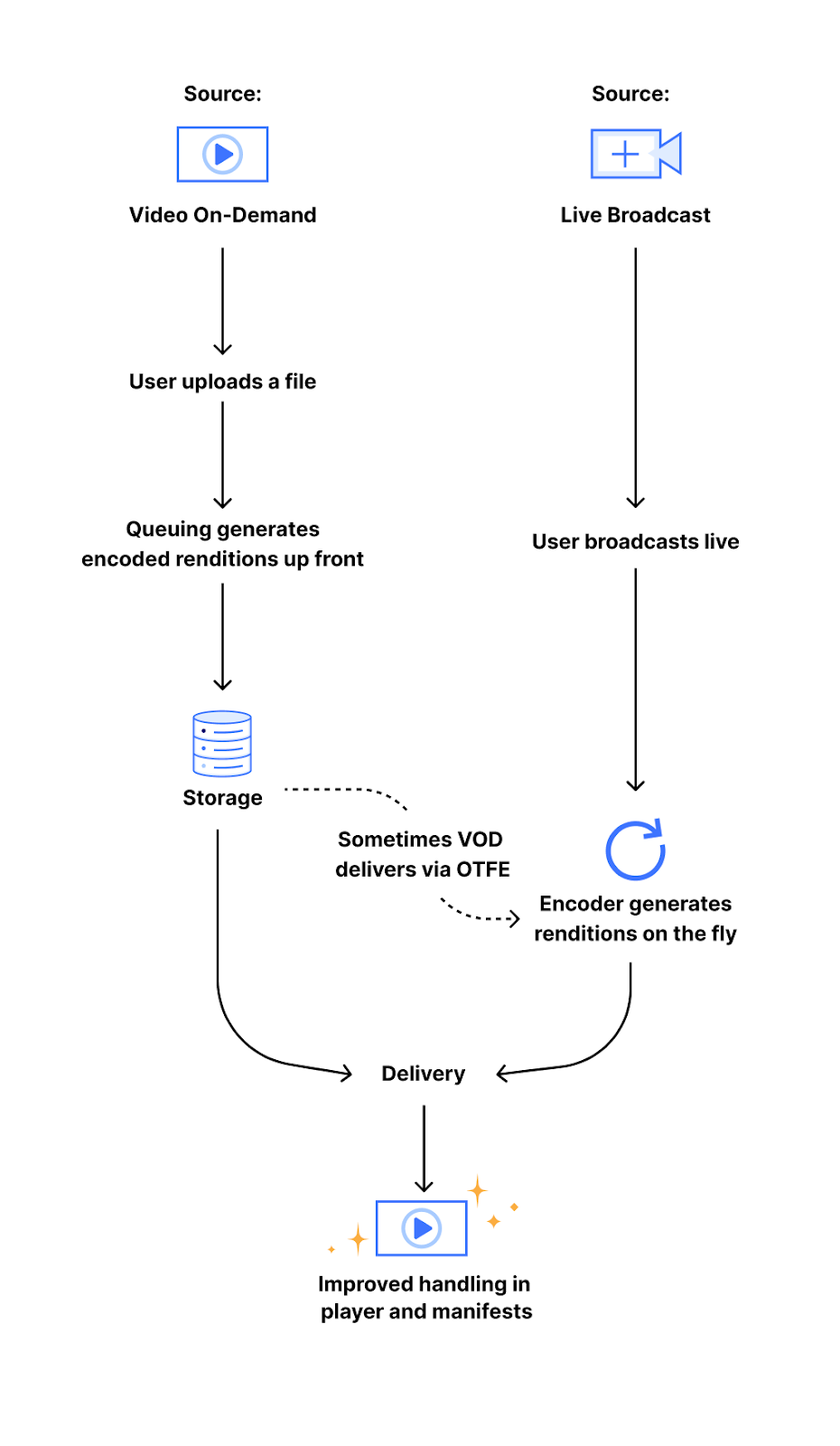
When you upload a video to Stream, it is first encoded into several different “renditions” (sizes or resolutions) before delivery. This is done in order to enable playback in a wide variety of network conditions, as well as to standardize the way a video is experienced. By using these adaptive bitrate renditions, we are able to offer viewers the highest quality streaming experience which fits their network bandwidth, meaning someone watching a video with a slow mobile connection would be served a 240p video (a resolution of 320×240 pixels) and receive the 1080p (a resolution of 1920×1080 pixels) version when they are watching at home on their fiber Internet connection. This encoding pipeline follows one of two different paths:
The first path is our video on-demand (VOD) encoding pipeline, which generates and stores a set of encoded video segments at each of our standard video resolutions. The other path is our on-the-fly encoding (OTFE) pipeline, which uses the same process as Stream Live to generate resolutions upon user request. Both pipelines work with the set of standard resolutions, which are identified through a constrained target (output) height. This means that we encode every rendition to heights of 240 pixels, 360 pixels, etc. up to 1080 pixels.
When originally conceived, this encoding pipeline was not designed with portrait video in mind because portrait video was less common. As a result, portrait videos were encoded with lower quality dimensions that were consistent with landscape video encoding. For example, a portrait HD video would have the dimensions 1920×1080 — scaling that down to the height of a landscape HD video would result in the much smaller output of 1080×606. However, current smartphones all have HD displays, making the discrepancy clear when a portrait video is viewed in portrait mode on a phone. With this new change to our encoding pipeline, all newly uploaded portrait videos will now be automatically encoded with constrained target width, using a new set of standard resolutions for portrait video. These resolutions are the same as the current set of landscape resolutions, but with the dimensions reversed: 240×426 up to 1080×1920.
Technical details
As the Stream intern this summer, I was tasked with this project, as well as the expectation of shipping a long-requested change, by the end of my internship. The first step in implementing this change was to familiarize myself with the complex architecture of Stream’s internal systems. After this, I began brainstorming a few different implementation decisions, like how to consistently track orientation through various stages of the pipeline. Following a group discussion to decide which choices would be the most scalable, least complex, and best for users, it was time to write the technical specification.
Due to the implementation method we chose, making this change involved tracing the life of a video from upload to delivery through both of our encoding pipelines and applying different logic for portrait videos. Previously, all video renditions were identified by their height at each stage of the pipeline, making certain parts of the pipeline completely agnostic to the orientation of a video. With the proposed changes, we would now be using the constraining dimension and orientation to identify a video rendition. Therefore, much of the work involved modifying the different portions of the pipeline to use these new parameters.
The first area of the pipeline to be modified was the Stream API service, which is the process which handles all Stream API calls. The API service enqueues the rendition encoding jobs for a video after it is uploaded, so it was necessary to introduce a new set of renditions designed for portrait videos, and enqueue the corresponding encoding jobs. The queuing system is handled by our in-house queue management system, which handles jobs generically and therefore did not require any changes.
Following this, I tackled the on-the-fly encoding pipeline. The area of interest here was the delivery portion of our pipeline, which generated the set of encoding resolutions to pass on to our on-the-fly encoder. Here I also introduced a new set of portrait renditions and the corresponding logic to encode them for portrait videos. This part of the backend is written and hosted on Cloudflare Workers, which made it very easy and quick to deploy and test changes.
Finally, we wanted to change how we presented these quality levels to users in the Stream built-in player and thought that using the new constrained dimension rather than always showing the height would feel more familiar. For portrait videos, we now display the size of the constraining dimension, which also means quality selection for portrait videos encoded under our old system now more accurately reflects their quality, too. As an example, a 9:16 portrait video would have been encoded to a maximum size of 608×1080 by the previous pipeline. Now, such a rendition will be marked as 608p rather than the full-quality 1080p, which would be a 1080×1920 rendition.
Stream as a whole is built on many of our own Developer Platform products, such as Workers for handling delivery, R2 for rendition storage, Workers AI for automatic captioning, and Durable Objects for bitrate observation, all of which enhance our ability to deploy and ship new updates quickly. Throughout my work on this project, I was able to see all of these pieces in action, as well as gain a new understanding of the powerful tools Cloudflare offers for developers.
Results and findings
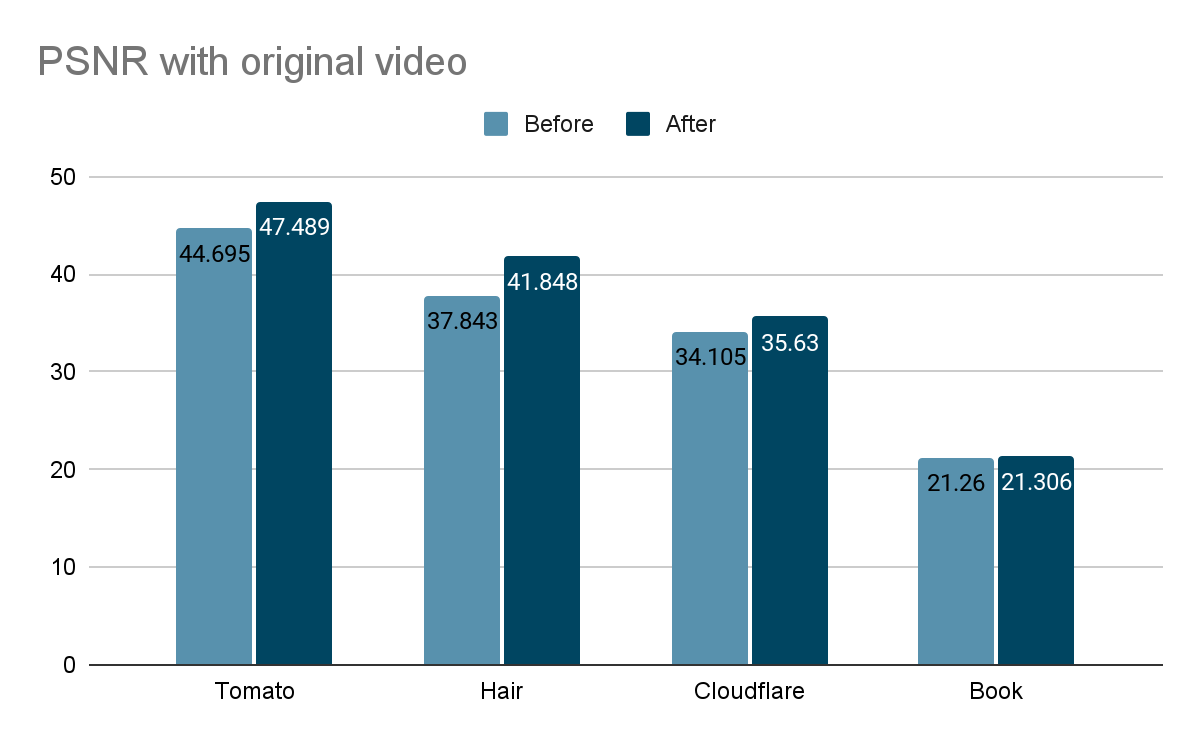
After the change, portrait videos are now encoded to higher resolutions and visibly appear to be higher quality. To confirm these differences, I analyzed the effect of the pipeline change on four different sample videos using the peak-signal-to-noise ratio (PSNR, a mathematical representation of image quality). Since the old pipeline produced lower resolution videos, the comparison here is between an upscaled version of the old pipeline rendition and the current pipeline rendition. In the graph below, higher values reflect higher quality relative to the unencoded original video.
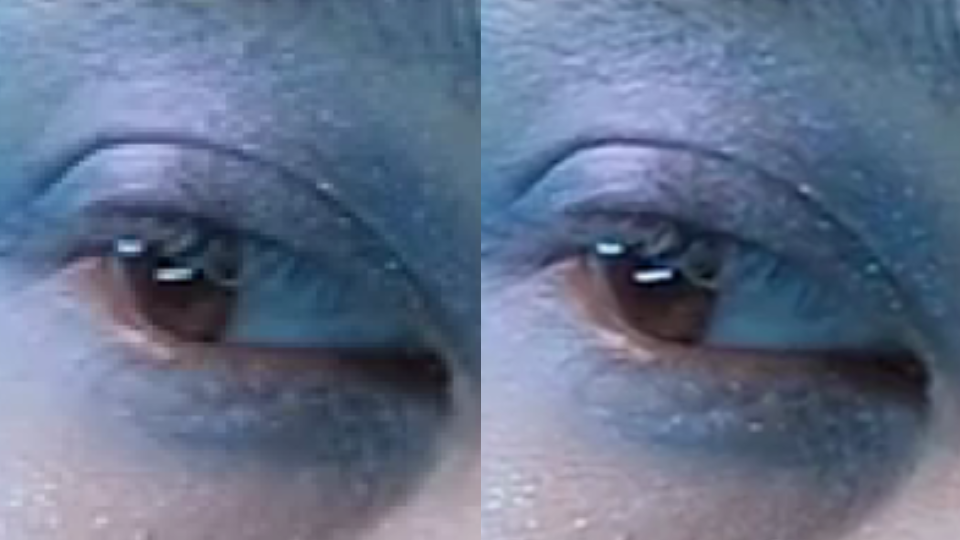
According to this metric, we see an increase in quality from the pipeline changes as high as 8%. However, the quality increase is most noticeable to the human eye in videos that feature fine details or a high amount of movement, which is not always captured in the PSNR. For example, compare a side-by-side of a frame from the book sample video encoded both ways:
The difference between the old and new encodings is most clear when zoomed in:
Maximize the Stream player and look at the quality selector (in the gear menu) to see the new quality level labels – select the highest option to compare. Note the improved sharpness of the text in the book sample as well as the improved detail in the hair and eye shadow of the hair and makeup sample.
Implementation challenges
Due to the complex nature of our encoding pipelines, there were several technical challenges to making a large change like this. Aside from simply uploading videos, many of the features we offer, like downloads or clipping, require tweaking to produce the correct video renditions. This involved modifying many parts of the encoding pipeline to ensure that portrait video logic was handled.
There were also some edge cases which were not caught until after release. One release of this feature contained a bug in the on-the-fly encoding logic which caused a subset of new portrait livestream renditions to have negative bitrates, making them unusable. This was due to an internal representation of video renditions’ constraining dimensions being mistakenly used for bitrate observation. We remedied this by increasing the scope of our end-to-end testing to include more portrait video tests and live recording interaction tests.
Another small bug caused downloading very small videos to sometimes fail. This was because for videos under 240p, our smallest encoding resolution, the non-constraining dimension was not being properly scaled to match the aspect ratio of the video, causing some specific combinations of dimensions to be interpreted as portrait when they should have been landscape, and vice versa. This bug was fixed quickly, but was not initially caught after the release since it required a very specific set of conditions to activate. After this experience, I added a few more unit tests involving small videos.
That’s a wrap
As my internship comes to a close, reflecting on the experience makes me grateful for all the team members who have helped me throughout this time. I am very glad to have shipped this project which addresses a long-standing concern and will have real-world customer impact. Support for high-definition portrait video is now available, and we will continue to make improvements to our video solutions suite. You can see the difference yourself by uploading a portrait video to Stream! Or, perhaps you’d like to help build a better Internet, too — our internship and early talent programs are a great way to jumpstart your own journey.
Sample video acknowledgements: The sample video of the book was created by the Stream Product Manager and shows the opening page of The Strange Wonder of Roots by Evan Griffith (HarperCollins). The hair and makeup fashion video was sourced from Mixkit, a great source of free media for video projects.
The NSA has a video recording of a 1982 lecture by Adm. Grace Hopper titled “Future Possibilities: Data, Hardware, Software, and People.” The agency is (so far) refusing to release it.
Basically, the recording is in an obscure video format. People at the NSA can’t easily watch it, so they can’t redact it. So they won’t do anything.
With digital obsolescence threatening many early technological formats, the dilemma surrounding Admiral Hopper’s lecture underscores the critical need for and challenge of digital preservation. This challenge transcends the confines of NSA’s operational scope. It is our shared obligation to safeguard such pivotal elements of our nation’s history, ensuring they remain within reach of future generations. While the stewardship of these recordings may extend beyond the NSA’s typical purview, they are undeniably a part of America’s national heritage.
Consumer Reports has analyzed a bunch of popular Internet-connected video doorbells. Their security is terrible.
First, these doorbells expose your home IP address and WiFi network name to the internet without encryption, potentially opening your home network to online criminals.
[…]
Anyone who can physically access one of the doorbells can take over the device—no tools or fancy hacking skills needed.
Simon Willison has been playing with the video processing capabilities of the new Gemini Pro 1.5 model from Google, and it’s really impressive.
Which means a lot of scary new video prompt injection attacks. And remember, given the current state of technology, prompt injection attacks are impossible to prevent in general.
Stream Live lets users easily scale their live-streaming apps and websites to millions of creators and concurrent viewers while focusing on the content rather than the infrastructure — Stream manages codecs, protocols, and bit rate automatically.
For Speed Week this year, we introduced a closed beta of Low-Latency HTTP Live Streaming (LL-HLS), which builds upon the high-quality, feature-rich HTTP Live Streaming (HLS) protocol. Lower latency brings creators even closer to their viewers, empowering customers to build more interactive features like chat and enabling the use of live-streaming in more time-sensitive applications like live e-learning, sports, gaming, and events.
Today, in celebration of Birthday Week, we’re opening this beta to all customers with even lower latency. With LL-HLS, you can deliver video to your audience faster, reducing the latency a viewer may experience on their player to as little as three seconds. Low Latency streaming is priced the same way, too: $1 per 1,000 minutes delivered, with zero extra charges for encoding or bandwidth.
Broadcast with latency as low as three seconds.
LL-HLS is an extension of the HLS standard that allows us to reduce glass-to-glass latency — the time between something happening on the broadcast end and a user seeing it on their screen. That includes factors like network conditions and transcoding for HLS and adaptive bitrates. We also include client-side buffering in our understanding of latency because we know the experience is driven by what a user sees, not when a byte is delivered into a buffer. Depending on encoder and player settings, broadcasters' content can be playing on viewers' screens in less than three seconds.
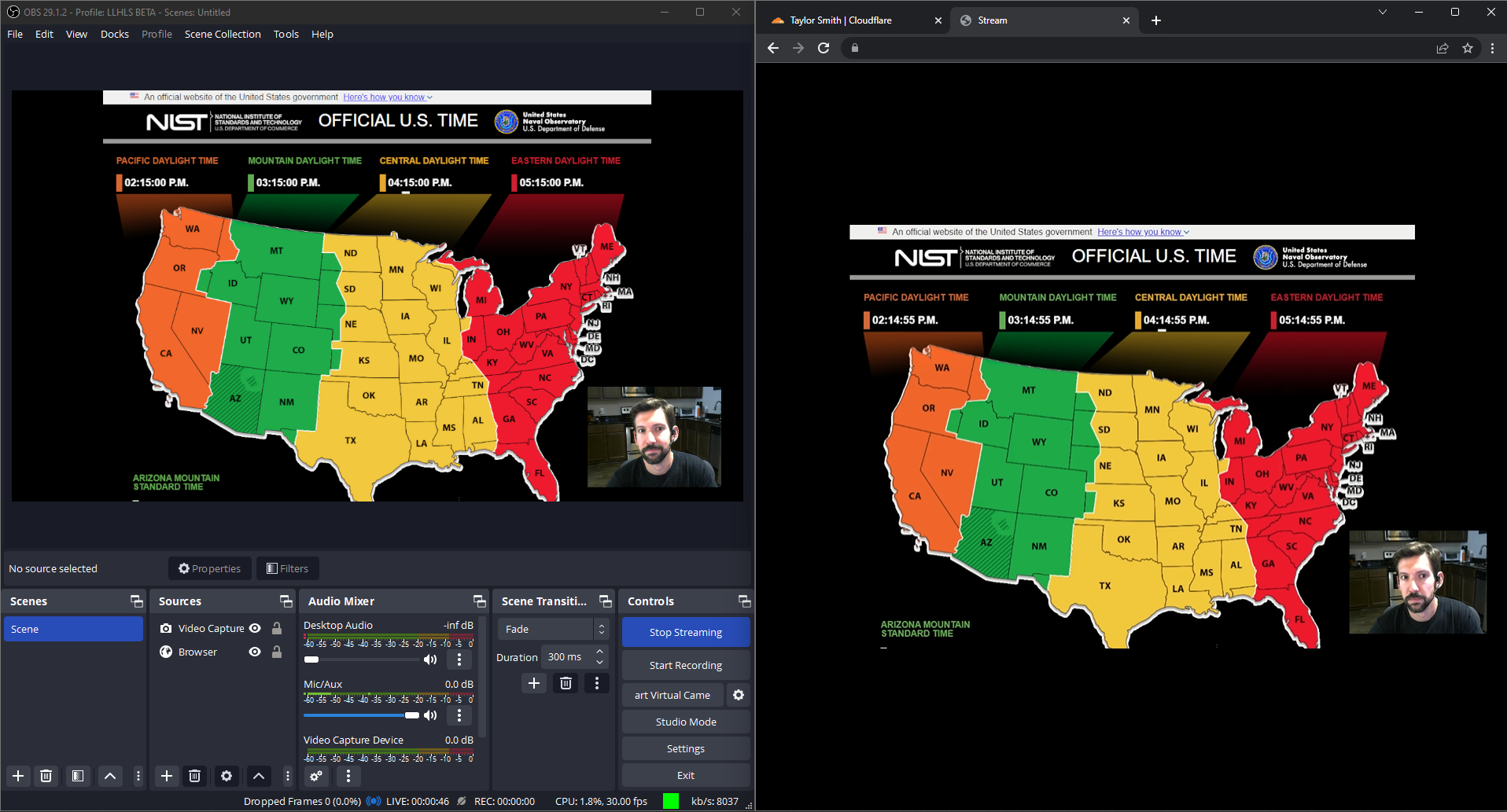
On the left, OBS Studio broadcasting from my personal computer to Cloudflare Stream. On the right, watching this livestream using our own built-in player playing LL-HLS with three second latency!
Same pricing, lower latency. Encoding is always free.
Our addition of LL-HLS support builds on all the best parts of Stream including simple, predictable pricing. You never have to pay for ingress (broadcasting to us), compute (encoding), or egress. This allows you to stream with peace of mind, knowing there are no surprise fees and no need to trade quality for cost. Regardless of bitrate or resolution, Stream costs \$1 per 1,000 minutes of video delivered and \$5 per 1,000 minutes of video stored, billed monthly.
Stream also provides both a built-in web player or HLS/DASH manifests to use in a compatible player of your choosing. This enables you or your users to go live using the same protocols and tools that broadcasters big and small use to go live to YouTube or Twitch, but gives you full control over access and presentation of live streams. We also provide access control with signed URLs and hotlinking prevention measures to protect your content.
Powered by the strength of the network
And of course, Stream is powered by Cloudflare's global network for fast delivery worldwide, with points of presence within 50ms of 95% of the Internet connected population, a key factor in our quest to slash latency. We ingest live video close to broadcasters and move it rapidly through Cloudflare’s network. We run encoders on-demand and generate player manifests as close to viewers as possible.
Getting started with LL-HLS
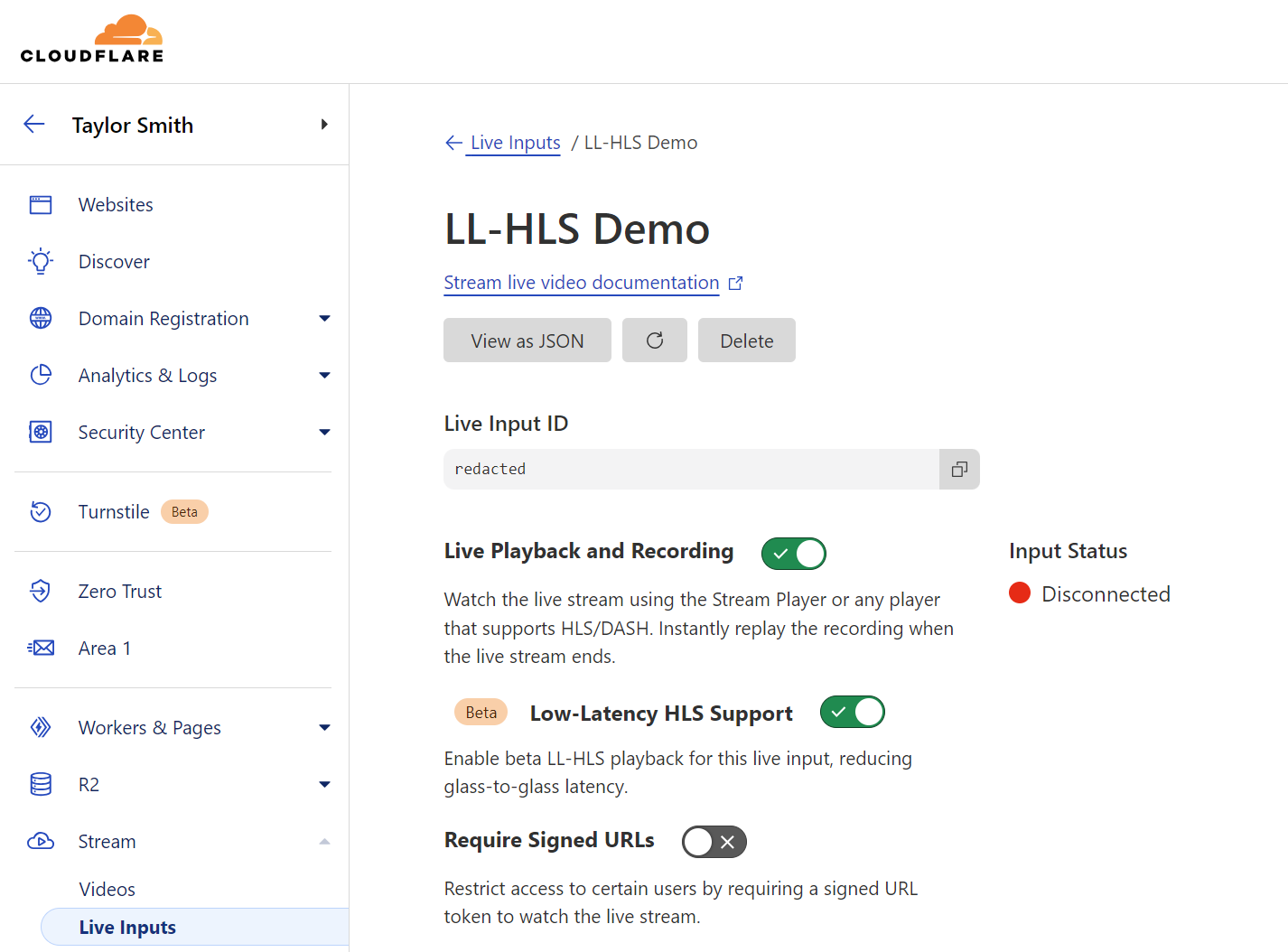
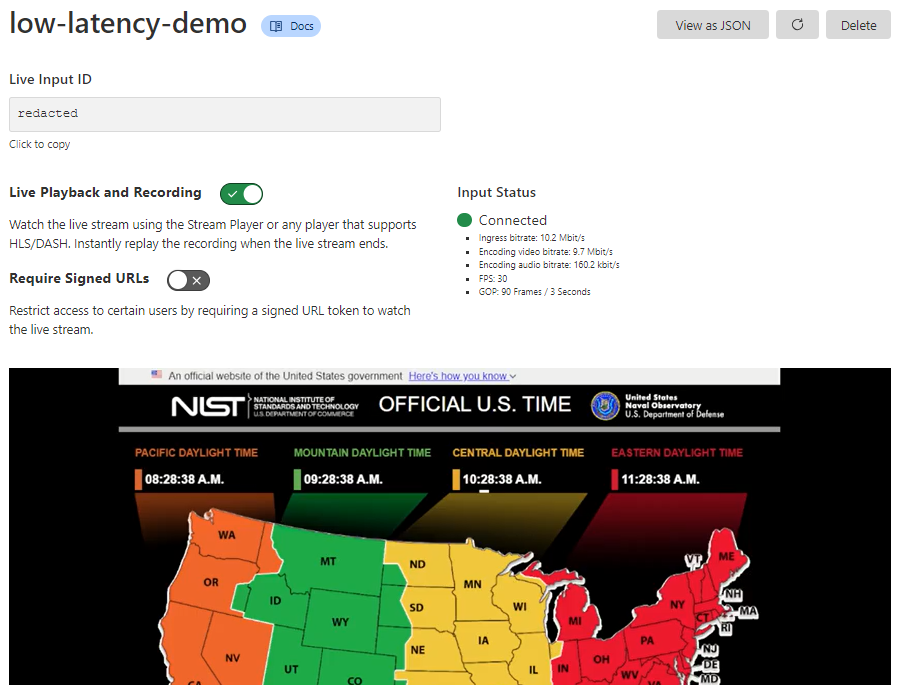
Getting started with Stream Live only takes a few minutes, and by using Live Outputs for restreaming, you can even test it without changing your existing infrastructure. First, create or update a Live Input in the Cloudflare dashboard. While in beta, Live Inputs will have an option to enable LL-HLS called “Low-Latency HLS Support.” Activate this toggle to enable the new pipeline.
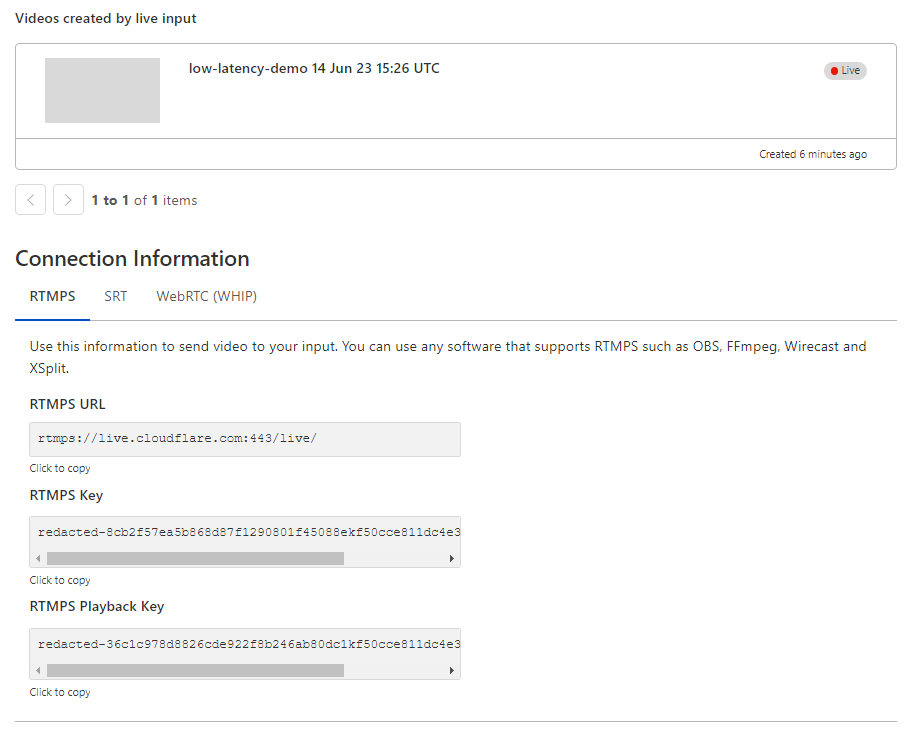
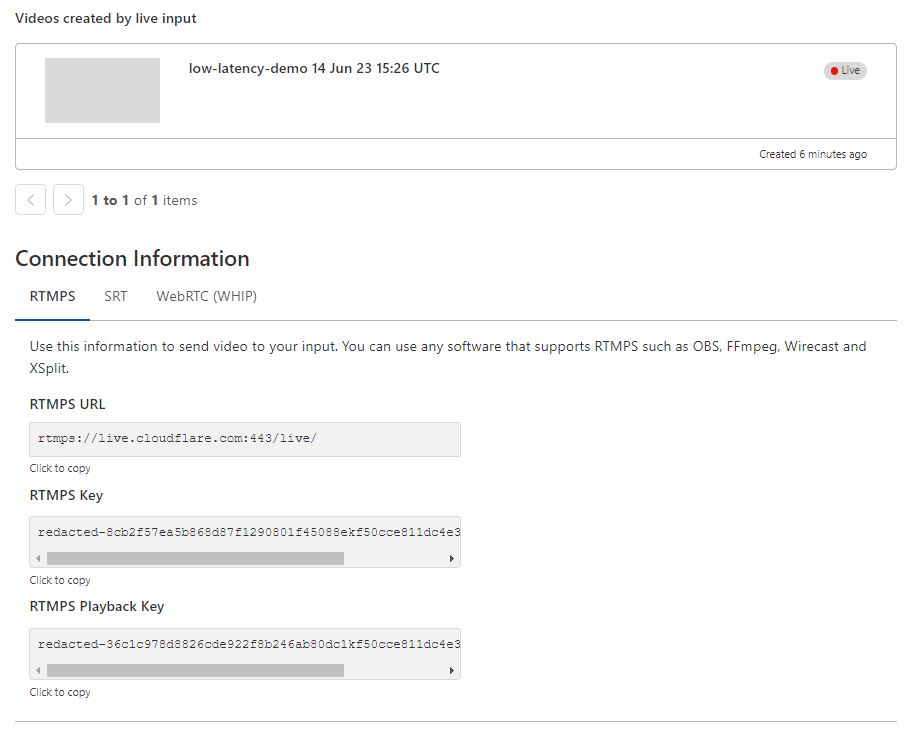
Stream will automatically provide the RTMPS and SRT endpoints to broadcast your feed to us, just as before. For the best results, we recommend the following broadcast settings:
Codec: h264
GOP size / keyframe interval: 1 second
Optionally, configure a Live Output to point to your existing video ingest endpoint via RTMPS or SRT to test Stream while rebroadcasting to an existing workflow or infrastructure.
Stream will automatically provide RTMPS and SRT endpoints to broadcast your feed to us as well as an HTML embed for our built-in player.
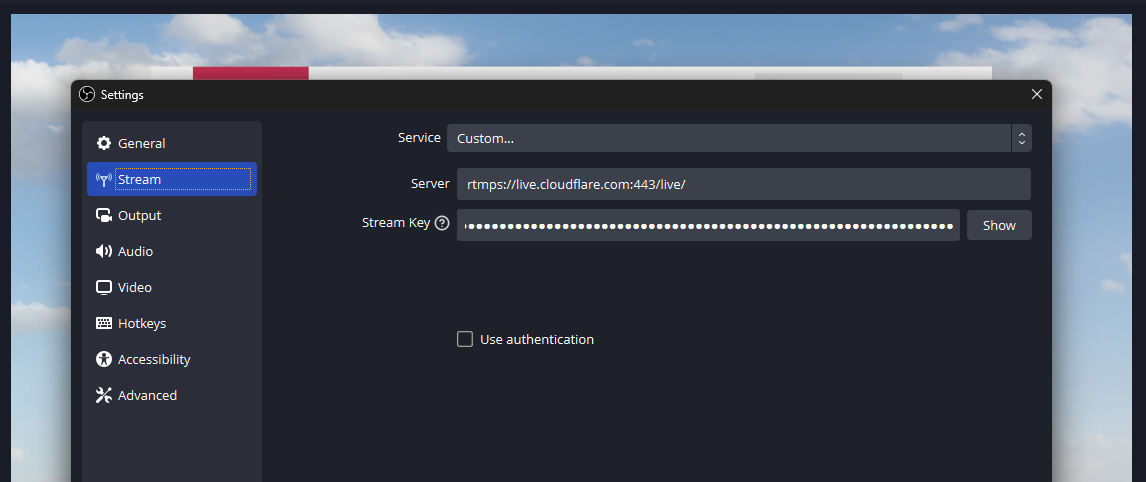
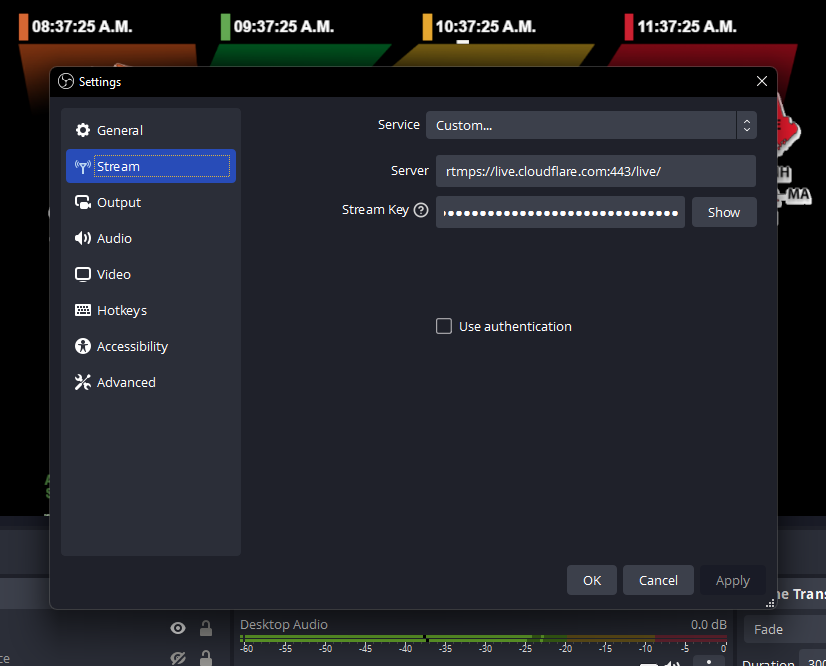
This connection information can be added easily to a broadcast application like OBS to start streaming immediately:
During the beta, our built-in player will automatically attempt to use low-latency for any enabled Live Input, falling back to regular HLS otherwise. If LL-HLS is being used, you’ll see “Low Latency” noted in the player.
During this phase of the beta, we are most closely focused on using OBS to broadcast and Stream’s built-in player to watch — which uses HLS.js under the hood for LL-HLS support. However, you may test the LL-HLS manifest in a player of your own by appending ?protocol=llhls to the end of the HLS manifest URL. This flag may change in the future and is not yet ready for production usage; watch for changes in DevDocs.
Sign up today
Low-Latency HLS is Stream Live’s latest tool to bring your creators and audiences together. All new and existing Stream subscriptions are eligible for the LL-HLS open beta today, with no pricing changes or contract requirements — all part of building the fastest, simplest serverless live-streaming platform. Join our beta to start test-driving Low-Latency HLS!
Designed with developers in mind, Cloudflare Stream provides a seamless, integrated workflow that simplifies video streaming for creators and platforms alike. With features like Stream Live and creator management, customers have been looking for ways to streamline storage management.
Today, August 11, 2023, Cloudflare Stream is introducing scheduled deletion to easily manage video lifecycles from the Stream dashboard or our API, saving time and reducing storage-related costs. Whether you need to retain recordings from a live stream for only a limited time, or preserve direct creator videos for a set duration, scheduled deletion will simplify storage management and reduce costs.
Stream scheduled deletion
Scheduled deletion allows developers to automatically remove on-demand videos and live recordings from their library at a specified time. Live inputs can be set up with a deletion rule, ensuring that all recordings from the input will have a scheduled deletion date upon completion of the stream.
Let’s see how it works in those two configurations.
Getting started with scheduled deletion for on-demand videos
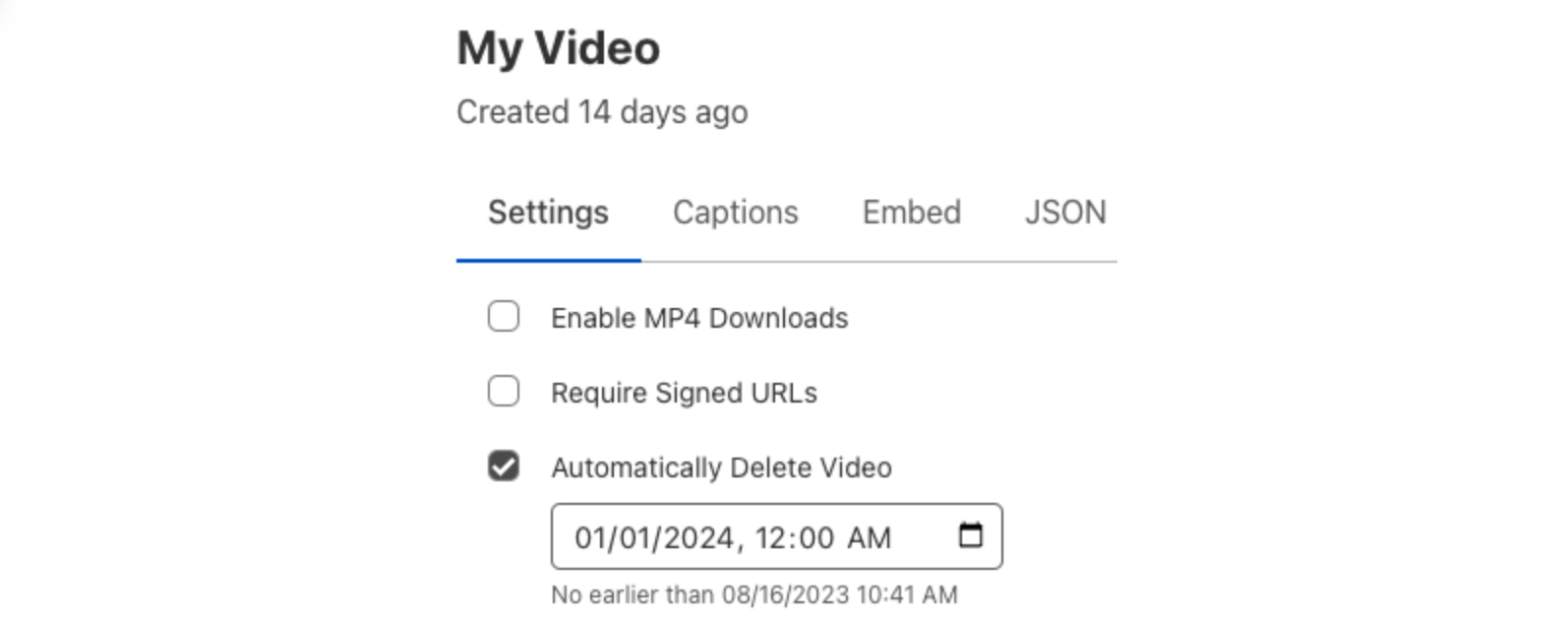
Whether you run a learning platform where students can upload videos for review, a platform that allows gamers to share clips of their gameplay, or anything in between, scheduled deletion can help manage storage and ensure you only keep the videos that you need. Scheduled deletion can be applied to both new and existing on-demand videos, as well as recordings from completed live streams. This feature lets you specify a specific date and time at which the video will be deleted. These dates can be applied in the Cloudflare dashboard or via the Cloudflare API.
Cloudflare dashboard
From the Cloudflare dashboard, select Videos under Stream
Select a video
Select Automatically Delete Video
Specify a desired date and time to delete the video
Click Submit to save the changes
Cloudflare API
The Stream API can also be used to set the scheduled deletion property on new or existing videos. In this example, we’ll create a direct creator upload that will be deleted on December 31, 2023:
For more information on live inputs and how to configure deletion policies in our API, refer to the documentation.
Getting started with automated deletion for Live Input recordings
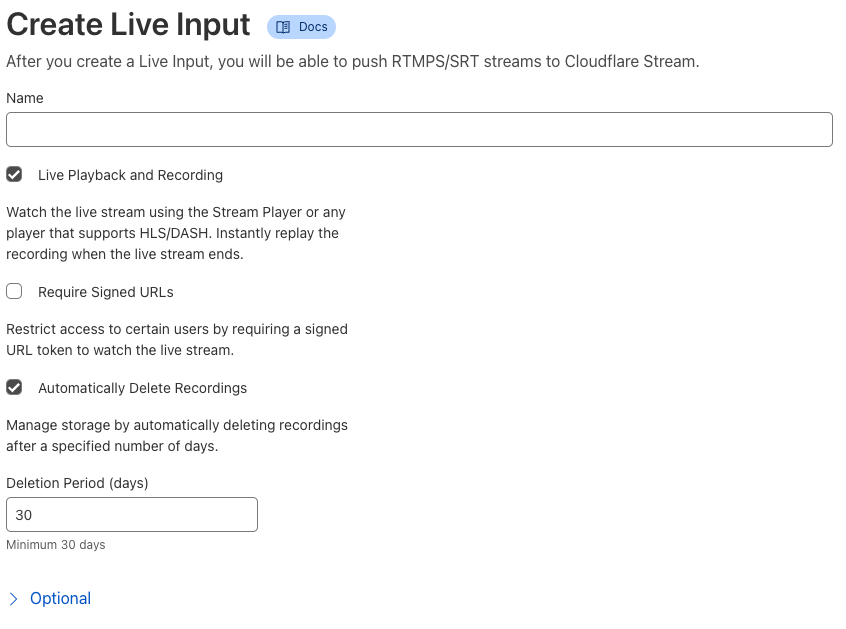
We love how recordings from live streams allow those who may have missed the stream to catch up, but these recordings aren’t always needed forever. Scheduled recording deletion is a policy that can be configured for new or existing live inputs. Once configured, the recordings of all future streams on that input will have a scheduled deletion date calculated when the recording is available. Setting this retention policy can be done from the Cloudflare dashboard or via API operations to create or edit Live Inputs:
Cloudflare Dashboard
From the Cloudflare dashboard, select Live Inputs under Stream
Select Create Live Input or an existing live input
Select Automatically Delete Recordings
Specify a number of days after which new recordings should be deleted
Click Submit to save the rule or create the new live input
Cloudflare API
The Stream API makes it easy to add a deletion policy to new or existing inputs. Here is an example API request to create a live input with recordings that will expire after 30 days:
For more information on live inputs and how to configure deletion policies in our API, refer to the documentation.
Try out scheduled deletion today
Scheduled deletion is now available to all Cloudflare Stream customers. Try it out now and join our Discord community to let us know what you think! To learn more, check out our developer docs. Stay tuned for more exciting Cloudflare Stream updates in the future.
Stream Live lets users easily scale their live streaming apps and websites to millions of creators and concurrent viewers without having to worry about bandwidth costs or purchasing hardware for real-time encoding at scale. Stream Live lets users focus on the content rather than the infrastructure — taking care of the codecs, protocols, and bitrate automatically. When we launched Stream Live last year, we focused on bringing high quality, feature-rich streaming to websites and applications with HTTP Live Streaming (HLS).
Today, we're excited to introduce support for Low-Latency HTTP Live Streaming (LL-HLS) in a closed beta, offering you an even faster streaming experience. LL-HLS will reduce the latency a viewer may experience on their player from highs of around 30 seconds to less than 10 in many cases. Lower latency brings creators even closer to their viewers, empowering customers to build more interactive features like Q&A or chat and enabling the use of live streaming in more time-sensitive applications like sports, gaming, and live events.
Broadcast with less than 10-second latency
LL-HLS is an extension of HLS and allows us to reduce glass-to-glass latency — the time between something happening on the broadcast end and a user seeing it on their screen. This includes everything from broadcaster encoding to client-side buffering because we know the experience is driven by what a user sees, not when a byte is delivered into a buffer. Depending on encoder and player settings, broadcasters' content can be playing on viewers' screens in less than ten seconds.
Our addition of LL-HLS support builds on all the best parts of Stream including simple, predictable pricing. You never have to pay for ingest (broadcasting to us), compute (encoding), or egress. It costs \$5 per 1,000 minutes of video stored per month and \$1 per 1,000 minutes of video viewed per month. This allows you to stream with peace of mind, knowing there are no surprise fees.
Other platforms tack on live recordings as a separate add-on feature, and those recordings only become available minutes or even hours after a live stream ends. With Cloudflare Stream, Live segments are automatically recorded and immediately available for on-demand playback.
Stream also provides both a built-in web player and HLS manifests to use in a compatible player of your choosing. This enables you or your users to go live using the same protocols and tools that broadcasters big and small use to go live to YouTube or Twitch, but gives you full control over access and presentation of live streams.
We also provide access control with signed URLs allowing you to protect your content, sharing with only certain users. This allows you to restrict access so only logged in members can watch a particular video, or only let users watch your video for a limited time period. And of course, Stream is powered by Cloudflare's global network for fast delivery worldwide, with points of presents within 50ms of 95% of the Internet connected population.
Left: Broadcasting to Stream Live using OBS. Right: Watching that same Stream. Note the five second difference in the NIST clock between the source and the playback.
Powering the LL-HLS experience involved making several improvements to our underlying infrastructure. One of the largest challenges we encountered was that our existing architecture involved a pipeline with multiple buffers as long as the keyframe interval. This meant Stream Live would introduce a delay of up to five times the keyframe interval. To resolve this, we simplified a portion of our pipeline — now, we work with individual frames rather than whole keyframe-intervals, but without giving up the economies of scale our approach to encoding provides. This decoupling of keyframe interval and internal buffer duration lets us dramatically reduce latency in HLS, with a maximum of twice the keyframe interval.
Getting started with the LL-HLS beta
As we prepare to ship this new functionality, we're looking for beta testers to help us test non-production workloads. To participate in the beta, your application should be configured with these settings:
H.264 video codec
Constant bitrate
Keyframe interval (GOP size) of 2s
No B Frames
Using the Stream built-in player
Getting started with Stream Live only takes a few minutes. Create a Live Input in the Cloudflare dashboard, then Stream will automatically provide RTMPS and SRT endpoints to broadcast your feed to us as well as an HTML embed for our built-in player and the HLS manifest for a custom player.
This connection information can be added easily to a broadcast application like OBS to start streaming immediately:
Customers in the LL-HLS beta will need to make a minor adjustment to the built-in player embed code, but there are no changes to Live Input configuration, dashboard interface, API, or existing functionality.
Sign up today
LL-HLS is Stream Live’s latest tool to bring your creators and audiences together. After the beta period, this feature will be generally available to all new and existing Stream subscriptions with no pricing changes or contract requirements — all part of building the fastest, simplest serverless live streaming platform. Join our beta to start test-driving Low-Latency HLS!
Here’s a new video of a giant squid, filmed in the Sea of Japan.
I believe it’s injured. It’s so close to the surface, and not really moving very much.
“We didn’t see the kinds of agile movements that many fish and marine creatures normally show,” he said. “Its tentacles and fins were moving very slowly.”
As usual, you can also use this squid post to talk about the security stories in the news that I haven’t covered.
One of the things we prioritize at Cloudflare is enabling developers to build their applications on our developer platform with ease. We’re excited to share a collection of ready-made templates that’ll help you start building your next application on Workers. We want developers to get started as quickly as possible, so that they can focus on building and innovating and avoid spending so much time configuring and setting up their projects.
Cloudflare Workers enables you to build applications with exceptional performance, reliability, and scale. We are excited to share a collection of templates that helps you get started quickly and give you an idea of what is possible to build on our developer platform.
We have made available a set of starter templates highlighting different use cases of Workers. We understand that you have different ideas you will love to build on top of Workers and you may have questions or wonder if it is possible. These sets of templates go beyond the convention ‘Hello, World’ starter. They’ll help shape your idea of what kind of applications you can build with Workers as well as other products in the Cloudflare Developer Ecosystem.
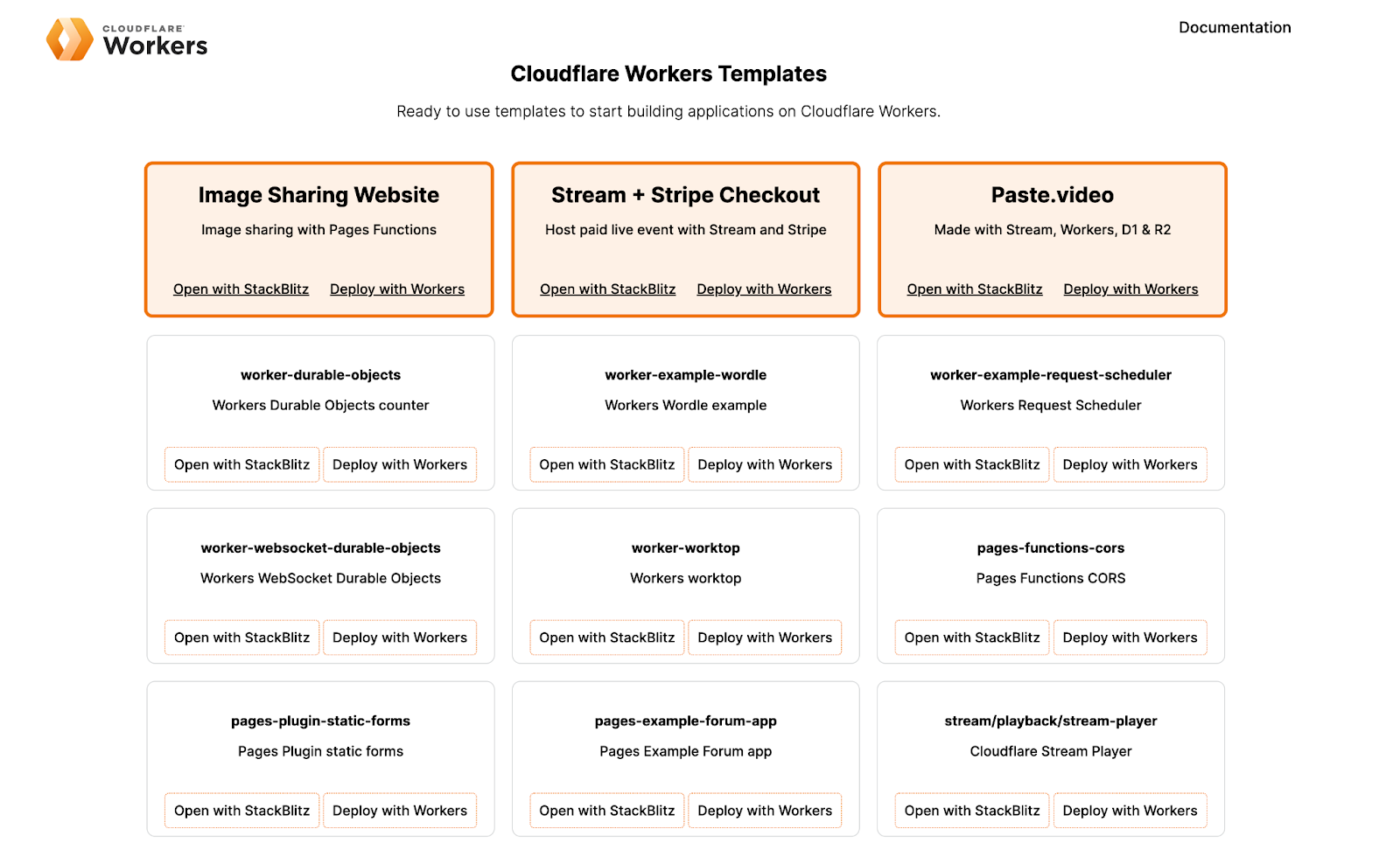
We are excited to introduce a new collection of starter templates workers.new/templates. This shortcut will serve you a collection of templates that you can immediately start using to build your next application.
Cloudflare Workers Template Collection
How to use Cloudflare Workers templates
We created this collection of templates to support you in getting started with Workers. Some examples listed showcase a use-case with a combination of multiple Cloudflare developer platform products to build applications similar to ones you might use every day. We know that Workers are being used today for different use-cases, we want to showcase some of them to you.
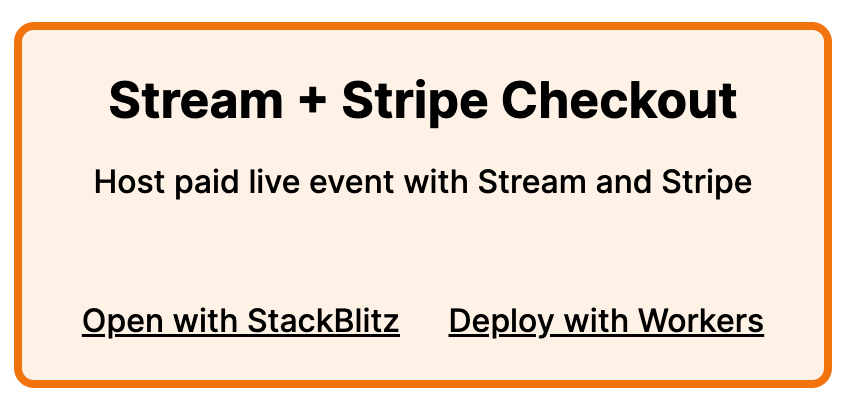
One example to highlight is a template that lets you accept payment for video content. It is powered by Pages Functions, Cloudflare Stream and Stripe Checkout. This app shows how you can use Cloudflare Workers with external payment and authentication systems to create a logged-in experience, without ever having to manage a database or persist any state yourself.
Once a user has paid, Stripe Checkout redirects to a URL that verifies a token from Stripe, and generates a signed URL using Cloudflare Stream to view the video. This signed URL is only valid for a specified amount of time, and access can be restricted by country or IP address.
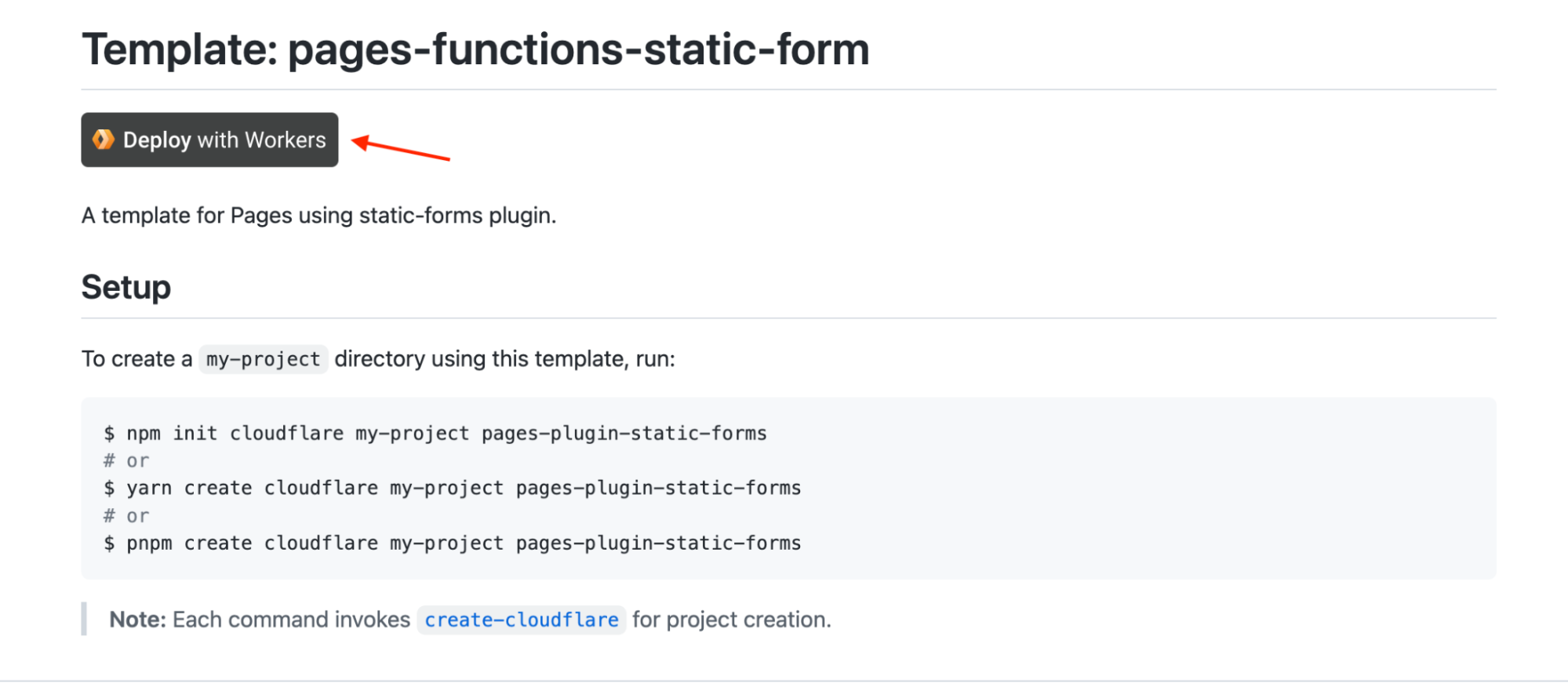
To use the template, you need to either click the deploy with Workers button or open the template with Stackblitz.
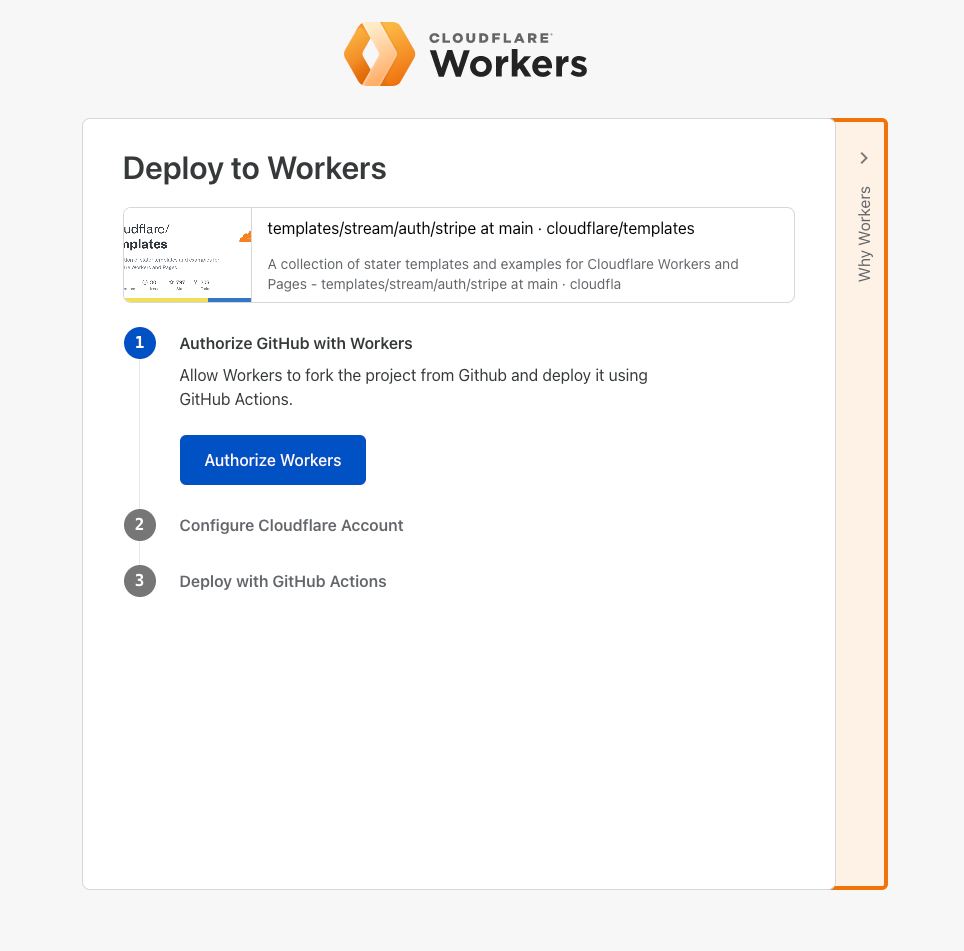
The Deploy with Workers button will redirect you to a page where you can authorize GitHub to deploy a fork of the repository using GitHub actions while opening with StackBlitz creates a new fork of the template for you to start working with.
Deploy to Workers Demo
These templates also comes bundled with additional features I would like to share with you:
We added a deploy button to all templates listed in the templates repository and the collection website, so you can quickly get up to speed with your code. The deploy with Workers button lets you deploy your code in under five minutes, it uses a GitHub action powered with Cloudflare Workers to do this.
GitHub Repository with Deploy to Workers Button
Support for Test Driven Development
As developers, we need to write tests for our code to ensure we’re shipping quality production grade software and also ensure that our code is bug-free. We support writing tests in Workers using the Wrangler unstable_dev API to write integration and end-to-end tests. We want to enable not just the developer experience but also nudge developers to follow best practices and prioritize TDD in development. We configured a number of templates to support integration tests against a local server, this will serve as a template to help you set up tests in your projects.
Here’s an example using Wrangler’s unstable_dev API and Vitest test framework to test the code written in an example ‘Hello worker’ starter template:
We announced StackBlitz’s partnership with Cloudflare Workers during Platform Week early this year. We believe a developer’s experience should be of utmost priority because we want them to build with ease on our developer platform.
StackBlitz is an online development platform for building web applications. It is powered by WebContainers, the first WebAssembly-based operating system which boots Node.js environments in milliseconds, securely within your browser tab.
We made it even easier to get started with Workers with an integrated Open with StackBlitz button for each starter template, making it easier to create a fork of a template and the great thing is you only need a web browser to build your application.
Everything we’ve highlighted in this post, all leads to one thing – How can we create a better experience for developers getting started with Workers. We introduce these ready-made templates to make you more efficient, bring you a wholesome developer experience and help improve your time to deployment. We want you to spend less time getting started with building on the Workers developer platform, so what are you waiting for?
Next Steps
You can start building your own Worker today using the available templates provided in the templates collection to help you get started. If you would like to contribute your own templates to the collection, be sure to send in a pull request we’re more than happy to review and add to the growing collection. Share what you have built with us in the #builtwith channel on our Discord community. Make sure to follow us on Twitter or join our Discord Developers Community server.
Consumer hardware is pushing the limits of consumers’ bandwidth.
VR headsets support 5760 x 3840 resolution — 22.1 million pixels per frame of video. Nearly all new TVs and smartphones sold today now support 4K — 8.8 million pixels per frame. It’s now normal for most people on a subway to be casually streaming video on their phone, even as they pass through a tunnel. People expect all of this to just work, and get frustrated when it doesn’t.
Consumer Internet bandwidth hasn’t kept up. Even advanced mobile carriers still limit streaming video resolution to prevent network congestion. Many mobile users still have to monitor and limit their mobile data usage. Higher Internet speeds require expensive infrastructure upgrades, and 30% of Americans still say they often have problems simply connecting to the Internet at home.
We talk to developers every day who are pushing up against these limits, trying to deliver the highest quality streaming video without buffering or jitter, challenged by viewers’ expectations and bandwidth. Developers building live video experiences hit these limits the hardest — buffering doesn’t just delay video playback, it can cause the viewer to get out of sync with the live event. Buffering can cause a sports fan to miss a key moment as playback suddenly skips ahead, or find out in a text message about the outcome of the final play, before they’ve had a chance to watch.
Today we’re announcing a big step towards breaking the ceiling of these limits — support in Cloudflare Stream for the AV1 codec for live videos and their recordings, available today to all Cloudflare Stream customers in open beta. Read the docs to get started, or watch an AV1 video from Cloudflare Stream in your web browser. AV1 is an open and royalty-free video codec that uses46% less bandwidth than H.264, the most commonly used video codec on the web today.
What is AV1, and how does it improve live video streaming?
Every piece of information that travels across the Internet, from web pages to photos, requires data to be transmitted between two computers. A single character usually takes one byte, so a two-page letter would be 3600 bytes or 3.6 kilobytes of data transferred.
One pixel in a photo takes 3 bytes, one each for red, green and blue in the pixel. A 4K photo would take 8,294,400 bytes, or 8.2 Megabytes. A video is like a photo that changes 30 times a second, which would make almost 15 Gigabytes per minute. That’s a lot!
To reduce the amount of bandwidth needed to stream video, before video is sent to your device, it is compressed using a codec. When your device receives video, it decodes this into the pixels displayed on your screen. These codecs are essential to both streaming and storing video.
Video compression codecs combine multiple advanced techniques, and are able to compress video to one percent of the original size, with your eyes barely noticing a difference. This also makes video codecs computationally intensive and hard to run. Smartphones, laptops and TVs have specific media decoding hardware, separate from the main CPU, optimized to decode specific protocols quickly, using the minimum amount of battery life and power.
Every few years, as researchers invent more efficient compression techniques, standards bodies release new codecs that take advantage of these improvements. Each generation of improvements in compression technology increases the requirements for computers that run them. With higher requirements, new chips are made available with increased compute capacity. These new chips allow your device to display higher quality video while using less bandwidth.
AV1 takes advantage of recent advances in compute to deliver video with dramatically fewer bytes, even compared to other relatively recent video protocols like VP9 and HEVC.
AV1 leverages the power of new smartphone chips
One of the biggest developments of the past few years has been the rise of custom chip designs for smartphones. Much of what’s driven the development of these chips is the need for advanced on-device image and video processing, as companies compete on the basis of which smartphone has the best camera.
This means the phones we carry around have an incredible amount of compute power. One way to think about AV1 is that it shifts work from the network to the viewer’s device. AV1 is fewer bytes over the wire, but computationally harder to decode than prior formats. When AV1 was first announced in 2018, it was dismissed by some as too slow to encode and decode, but smartphone chips have become radically faster in the past four years, more quickly than many saw coming.
AV1 hardware decoding is already built into the latest Google Pixel smartphones as part of the Tensor chip design. The Samsung Exynos 2200 and MediaTek Dimensity 1000 SoC mobile chipsets both support hardware accelerated AV1 decoding. It appears that Google will require that all devices that support Android 14 support decoding AV1. And AVPlayer, the media playback API built into iOS and tvOS, now includes an option for AV1, which hints at future support. It’s clear that the industry is heading towards hardware-accelerated AV1 decoding in the most popular consumer devices.
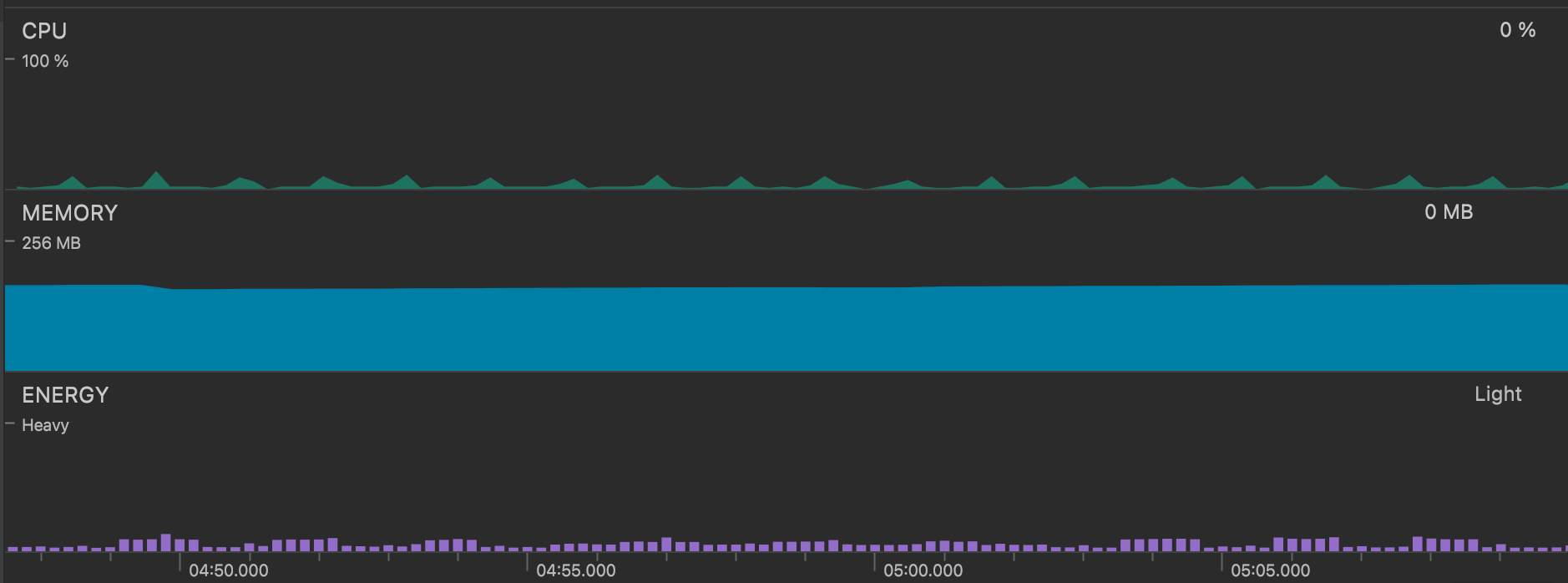
With hardware decoding comes battery life savings — essential for both today’s smartphones and tomorrow’s VR headsets. For example, a Google Pixel 6 with AV1 hardware decoding uses only minimal battery and CPU to decode and play our test video:
AV1 encoding requires even more compute power
Just as decoding is significantly harder for end-user devices, it is also significantly harder to encode video using AV1. When AV1 was announced in 2018, many doubted whether hardware would be able to encode it efficiently enough for the protocol to be adopted quickly enough.
To demonstrate this, we encoded the 4K rendering of Big Buck Bunny (a classic among video engineers!) into AV1, using an AMD EPYC 7642 48-Core Processor with 256 GB RAM. This CPU continues to be a workhorse of our compute fleet, as we have written about previously. We used the following command to re-encode the video, based on the example in the ffmpeg AV1 documentation:
Using a single core, encoding just two seconds of video at 30fps took over 30 minutes. Even if all 48 cores were used to encode, it would take at minimum over 43 seconds to encode just two seconds of video. Live encoding using only CPUs would require over 20 servers running at full capacity.
Special-purpose AV1 software encoders like rav1e and SVT-AV1 that run on general purpose CPUs can encode somewhat faster than libaom-av1 with ffmpeg, but still consume a huge amount of compute power to encode AV1 in real-time, requiring multiple servers running at full capacity in many scenarios.
Cloudflare Stream encodes your video to AV1 in real-time
At Cloudflare, we control both the hardware and software on our network. So to solve the CPU constraint, we’ve installed dedicated AV1 hardware encoders, designed specifically to encode AV1 at blazing fast speeds. This end to end control is what lets us encode your video to AV1 in real-time. This is entirely out of reach to most public cloud customers, including the video infrastructure providers who depend on them for compute power.
Encoding in real-time means you can use AV1 for live video streaming, where saving bandwidth matters most. With a pre-recorded video, the client video player can fetch future segments of video well in advance, relying on a buffer that can be many tens of seconds long. With live video, buffering is constrained by latency — it’s not possible to build up a large buffer when viewing a live stream. There is less margin for error with live streaming, and every byte saved means that if a viewer’s connection is interrupted, it takes less time to recover before the buffer is empty.
Stream lets you support AV1 with no additional work
AV1 has a chicken or the egg dilemma. And we’re helping solve it.
Companies with large video libraries often re-encode their entire content library to a new codec before using it. But AV1 is so computationally intensive that re-encoding whole libraries has been cost prohibitive. Companies have to choose specific videos to re-encode, and guess which content will be most viewed ahead of time. This is particularly challenging for apps with user generated content, where content can suddenly go viral, and viewer patterns are hard to anticipate.
This has slowed down the adoption of AV1 — content providers wait for more devices to support AV1, and device manufacturers wait for more content to use AV1. Which will come first?
With Cloudflare Stream there is no need to manually trigger re-encoding, re-upload video, or manage the bulk encoding of a large video library. This is a unique approach that is made possible by integrating encoding and delivery into a single product — it is not possible to encode on-demand using the old way of encoding first, and then pointing a CDN at a bucket of pre-encoded files.
We think this approach can accelerate the adoption of AV1. Consider a video app with millions of minutes of user-generated video. Most videos will never be watched again. In the old model, developers would have to spend huge sums of money to encode upfront, or pick and choose which videos to re-encode. With Stream, we can help anyone incrementally adopt AV1, without re-encoding upfront. As we work towards making AV1 Generally Available, we’ll be working to make supporting AV1 simple and painless, even for videos already uploaded to Stream, with no special configuration necessary.
Open, royalty-free, and widely supported
At Cloudflare, we are committed to open standards and fighting patent trolls. While there are multiple competing options for new video codecs, we chose to support AV1 first in part because it is open source and has royalty-free licensing.
Other encoding codecs force device manufacturers to pay royalty fees in order to adopt their standard in consumer hardware, and have been quick to file lawsuits against competing video codecs. The group behind the open and royalty-free VP8 and VP9 codecs have been pushing back against this model for more than a decade, and AV1 is the successor to these codecs, with support from all the biggest technology companies, both software and hardware. Beyond its technical accomplishments, AV1 is a clear message from the industry that the future of video encoding should be open, royalty-free, and free from patent litigation.
Try AV1 right now with your live stream or live recording
Support for AV1 is currently in open beta. You can try using AV1 on your own live video with Cloudflare Stream right now — just add the ?betaCodecSuggestion=av1 query parameter to the HLS or DASH manifest URL for any live stream or live recording created after October 1st in Cloudflare Stream. Read the docs to get started. If you don’t yet have a Cloudflare account, you can sign up here and start using Cloudflare Stream in just a few minutes.
We also have a recording of a live video, encoded using AV1, that you can watch here. Note that Safari does not yet support AV1.
We encourage you to try AV1 with your test streams, and we’d love your feedback. Join our Discord channel and tell us what you’re building, and what kinds of video you’re interested in using AV1 with. We’d love to hear from you!
The collective thoughts of the interwebz
Manage Consent
To provide the best experiences, we use technologies like cookies to store and/or access device information. Consenting to these technologies will allow us to process data such as browsing behavior or unique IDs on this site. Not consenting or withdrawing consent, may adversely affect certain features and functions.
Functional
Always active
The technical storage or access is strictly necessary for the legitimate purpose of enabling the use of a specific service explicitly requested by the subscriber or user, or for the sole purpose of carrying out the transmission of a communication over an electronic communications network.
Preferences
The technical storage or access is necessary for the legitimate purpose of storing preferences that are not requested by the subscriber or user.
Statistics
The technical storage or access that is used exclusively for statistical purposes.The technical storage or access that is used exclusively for anonymous statistical purposes. Without a subpoena, voluntary compliance on the part of your Internet Service Provider, or additional records from a third party, information stored or retrieved for this purpose alone cannot usually be used to identify you.
Marketing
The technical storage or access is required to create user profiles to send advertising, or to track the user on a website or across several websites for similar marketing purposes.