Beginning December 1, 2022, if you have a Business or Pro subscription, you will receive a complimentary allocation of Cloudflare Stream. Here’s what this means:
All Cloudflare customers with a Biz or Pro domain will be able to store up to 100 minutes of video content and deliver up to 10,000 minutes of video content each month at no additional cost
If you need additional storage or delivery beyond the complimentary allocation, you will be able to upgrade to a paid Stream subscription from the Stream Dashboard.
Cloudflare Stream simplifies storage, encoding and playback of videos. You can use the free allocation of Cloudflare Stream for various use cases, such as background/hero videos, e-commerce product videos, how-to guides and customer testimonials.
Upload videos with no code
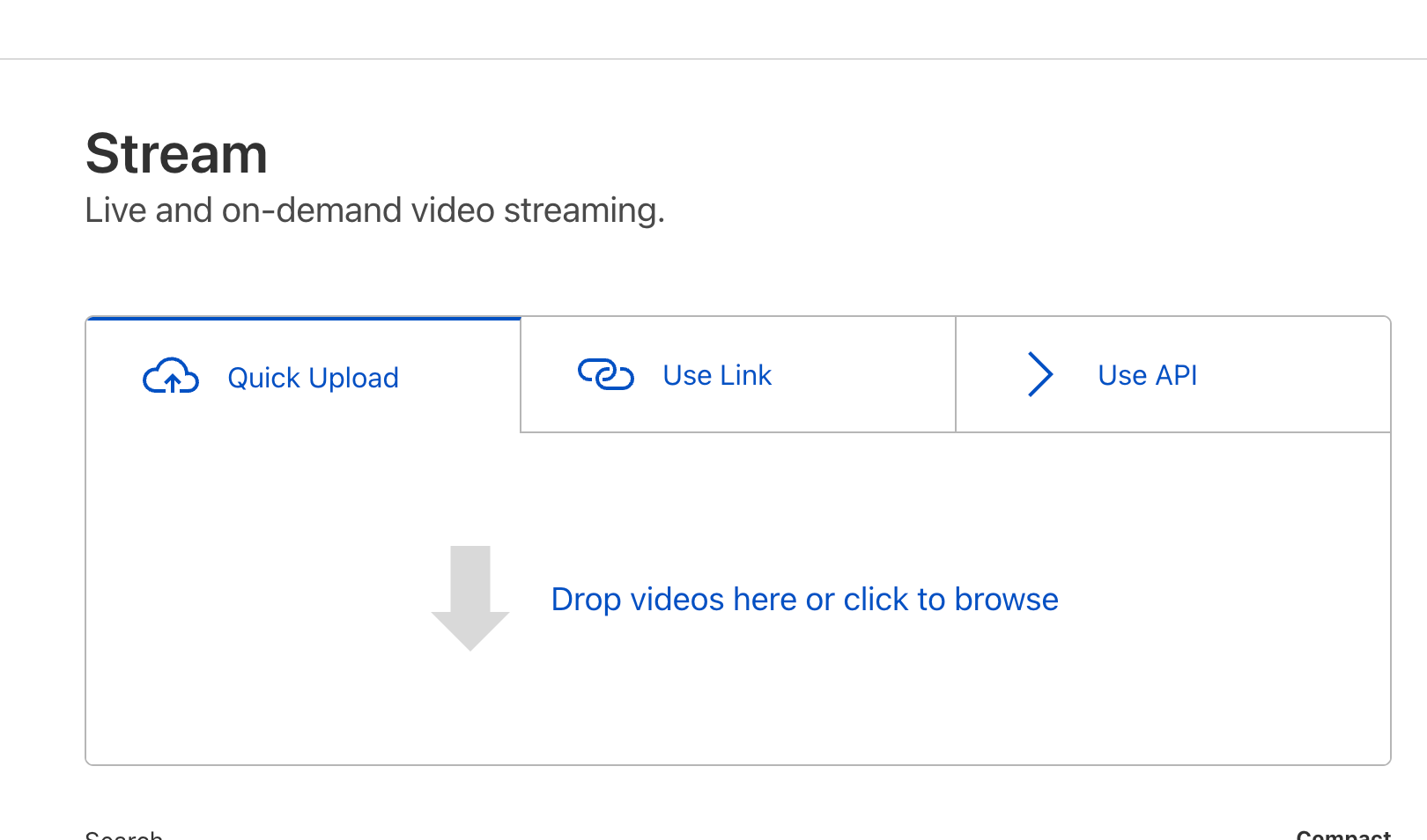
To upload your first video Stream, simply visit the Stream Dashboard and drag-and-drop the video file:
Once you upload a video, Stream will store and encode your video. Stream automatically optimizes your video uploads by creating multiple versions of it at different quality levels. This happens behind-the-scenes and requires no extra effort from your side. The Stream Player automatically selects the optimal quality level based on your website visitor’s Internet connection using a technology called adaptive-bit rate encoding.
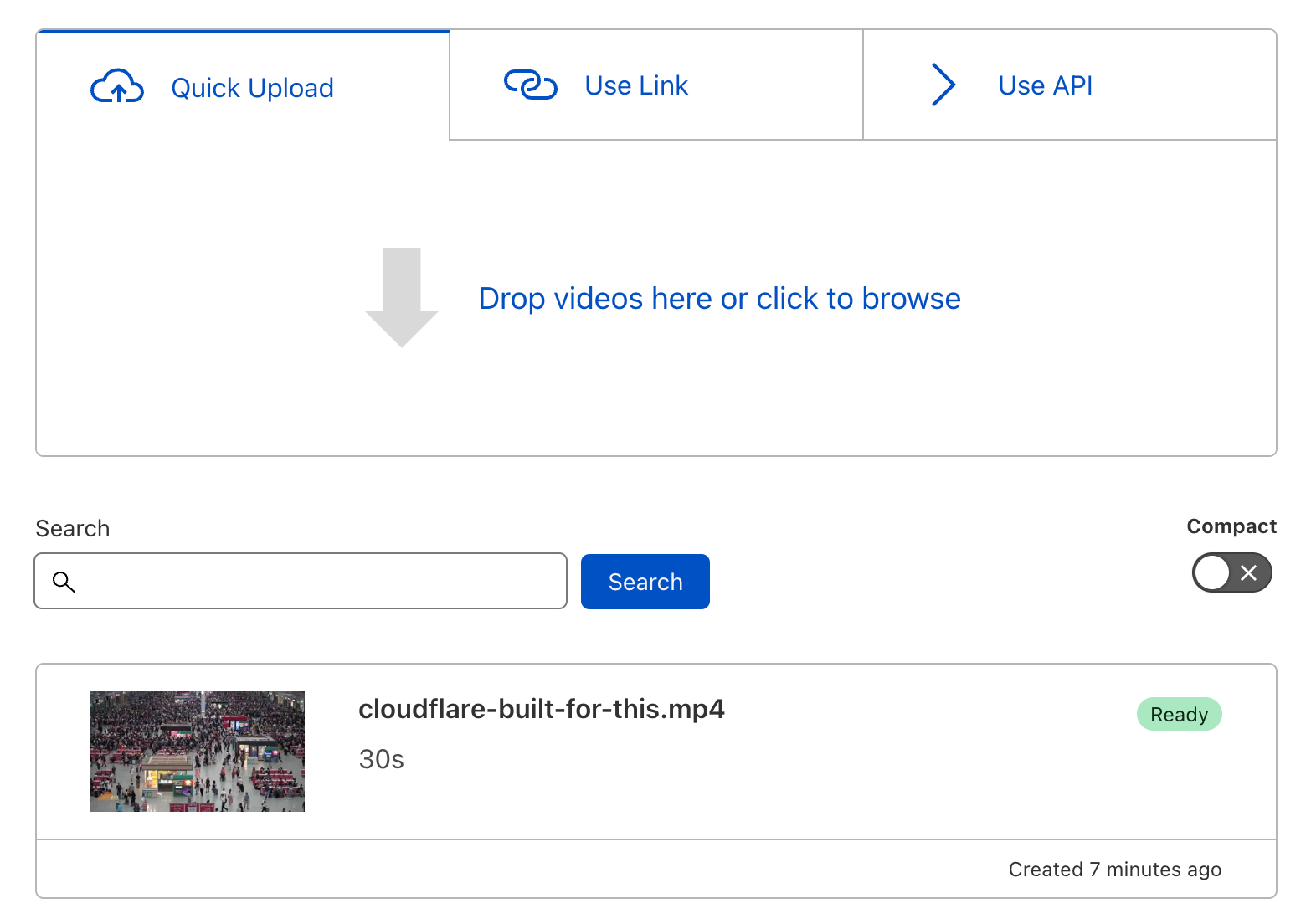
Your uploaded video will appear on the Dashboard:
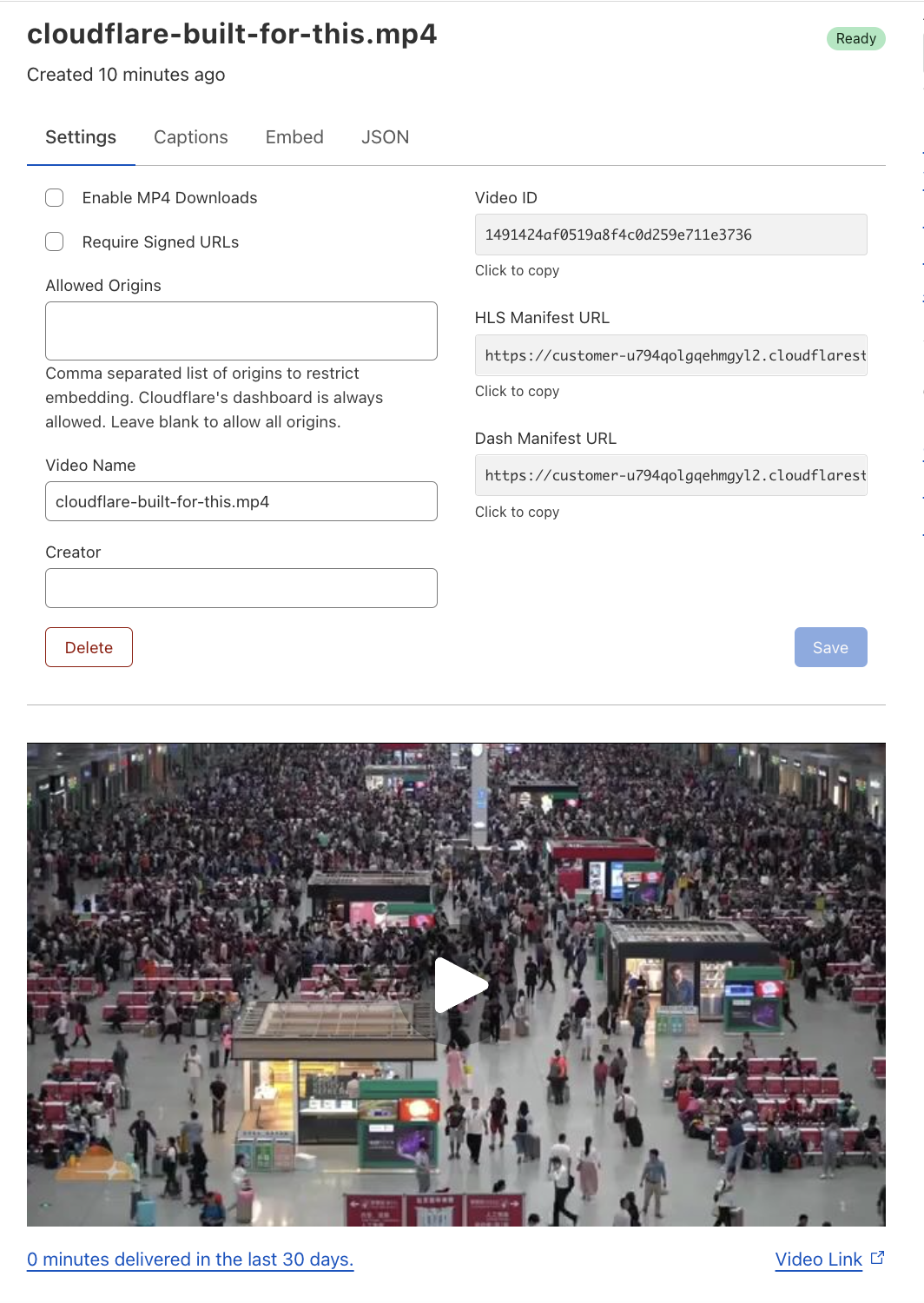
Click on the video in the list of videos to watch a preview, change settings or to grab the embed code:
Built-in Stream Player
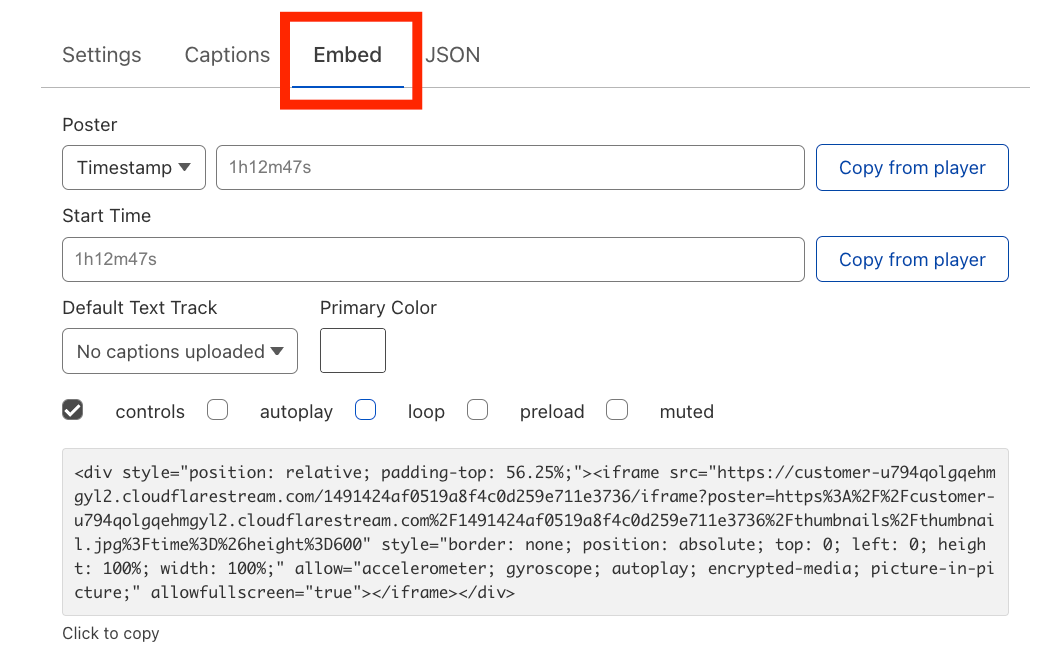
Stream provides an embed code that can be used to place your uploaded videos onto your website. The embed code can be found under the Embed tab:
To include the video on your website, simply copy-and-paste the embed code.
You’ll notice in the screenshot above that the Embed tab lets you customize the viewing experience. It supports the following optional properties:
Poster: The “poster image” is what appears on the video player before the user has started playing the video. By default, the poster image is set to the first frame in the video. However, you can change it by specifying another point in time or by specifying a URL to an image.
Start Time: Let’s say you have a 10-minute instructional video and your customer writes in with a question that is answered in that video at the 8-minute mark. You can use the Start Time property to have the video playback begin at the 8-minute mark, so your customer with a specific question does not need to watch 8 minutes of the video wondering “when will it answer my question?”. Instead, you can share a link with the customer that begins the video playback at the 8-minute mark.
Default Text Track: You can upload caption files for multiple languages for a given video. By default, captions are turned off. But if you want the captions to always render when the video plays, you can choose the default language from the Default Text Track dropdown.
Primary Color: You can choose your brand’s primary color and have it applied to various elements within the player, including the play button and the seek bar. Here is an example of the Stream Player with the Primary Color property configured to the Cloudflare orange:
Much, much more…
We live in a video-first world. Many Cloudflare customers already upload their videos to free video hosting services for marketing purposes. However, when you embed a video on your website that is hosted on a free video sharing service, your users often have to engage with unwelcomed ads and pixel trackers. Our hope is that by offering a free tier of Stream to Biz and Pro customers, you can use video to show off your products in a way that respects your users’ privacy and reflects your brand identity.
In addition to the features described in this announcement, Cloudflare Stream includes many more features including:
Dynamic Thumbnail Generation
Multi-language Captions
Live Streaming
Analytics
For a comprehensive list of features and how to use them, check out the Cloudflare Stream Docs.
Creators and broadcasters expect to be able to go live from anywhere, on any device. Viewers expect “live” to mean “real-time”. The protocols that power most live streams are unable to meet these growing expectations.
In talking to developers building live streaming into their apps and websites, we’ve heard near universal frustration with the limitations of existing live streaming technologies. Developers in 2022 rightly expect to be able to deliver low latency to viewers, broadcast reliably, and use web standards rather than old protocols that date back to the era of Flash.
Today, we’re excited to announce in open beta that Cloudflare Stream now supports live video streaming over WebRTC, with sub-second latency, to unlimited concurrent viewers. This is a new feature of Cloudflare Stream, and you can start using it right now in the Cloudflare Dashboard — read the docs to get started.
WebRTC with Cloudflare Stream leapfrogs existing tools and protocols, exclusively uses open standards with zero dependency on a specific SDK, and empowers any developer to build both low latency live streaming and playback into their website or app.
The status quo of streaming live video is broken
The status quo of streaming live video has high latency, depends on archaic protocols and is incompatible with the way developers build apps and websites. A reasonable person’s expectations of what the Internet should be able to deliver in 2022 are simply unmet by the dominant set of protocols carried over from past eras.
Viewers increasingly expect “live” to mean “real-time”. People want to place bets on sports broadcasts in real-time, interact and ask questions to presenters in real-time, and never feel behind their friends at a live event.
In practice, the HLS and DASH standards used to deliver video have 10+ seconds of latency. LL-HLS and LL-DASH bring this down to closer to 5 seconds, but only as a hack on top of the existing protocol that delivers segments of video in individual HTTP requests. Sending mini video clips over TCP simply cannot deliver video in real-time. HLS and DASH are here to stay, but aren’t the future of real-time live video.
Creators and broadcasters expect to be able to go live from anywhere, on any device.
In practice, people creating live content are stuck with a limited set of native apps, and can’t go live using RTMP from a web browser. Because it’s built on top of TCP, the RTMP broadcasting protocol struggles under even the slightest network disruption, making it a poor or often unworkable option when broadcasting from mobile networks. RTMP, originally built for use with Adobe Flash Player, was last updated in 2012, and while Stream supports the newer SRT protocol, creators need an option that works natively on the web and can more easily be integrated in native apps.
Developers expect to be able to build using standard APIs that are built into web browsers and native apps.
In practice, RTMP can’t be used from a web browser, and creating a native app that supports RTMP broadcasting typically requires diving into lower-level programming languages like C and Rust. Only those with expertise in both live video protocols and these languages have full access to the tools needed to create novel live streaming client applications.
We’re solving this by using new open WebRTC standards: WHIP and WHEP
WebRTC is the real-time communications protocol, supported across all web browsers, that powers video calling services like Zoom and Google Meet. Since inception it’s been designed for real-time, ultra low-latency communications.
While WebRTC is well established, for most of its history it’s lacked standards for:
Ingestion — how broadcasters should send media content (akin to RTMP today)
Egress — how viewers request and receive media content (akin to DASH or HLS today)
As a result, developers have had to implement this on their own, and client applications on both sides are often tightly coupled to provider-specific implementations. Developers we talk to often express frustration, having sunk months of engineering work into building around a specific vendor’s SDK, unable to switch without a significant rewrite of their client apps.
At Cloudflare, our mission is broader — we’re helping to build a better Internet. Today we’re launching not just a new feature of Cloudflare Stream, but a vote of confidence in new WebRTC standards for both ingestion and egress. We think you should be able to start using Stream without feeling locked into an SDK or implementation specific to Cloudflare, and we’re committed to using open standards whenever possible.
For ingestion, WHIP is an IETF draft on the Standards Track, with many applications already successfully using it in production. For delivery (egress), WHEP is an IETF draft with broad agreement. Combined, they provide a standardized end-to-end way to broadcast one-to-many over WebRTC at scale.
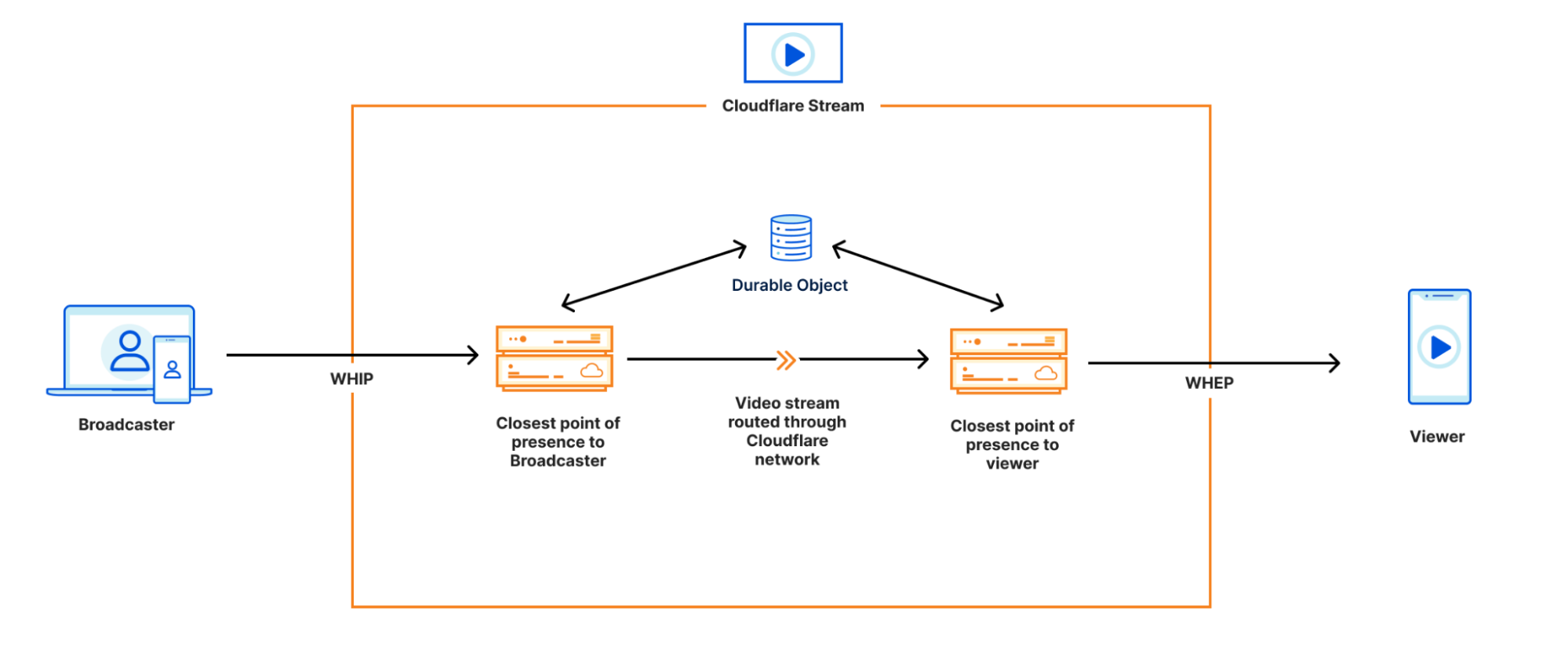
Cloudflare Stream is the first cloud service to let you both broadcast using WHIP and playback using WHEP — no vendor-specific SDK needed. Here’s how it works:
Cloudflare Stream is already built on top of the Cloudflare developer platform, using Workers and Durable Objects running on Cloudflare’s global network, within 50ms of 95% of the world’s Internet-connected population.
Our WebRTC implementation extends this to relay WebRTC video through our network. Broadcasters stream video using WHIP to the point of presence closest to their location, which tells the Durable Object where the live stream can be found. Viewers request streaming video from the point of presence closest to them, which asks the Durable Object where to find the stream, and video is routed through Cloudflare’s network, all with sub-second latency.
Using Durable Objects, we achieve this with zero centralized state. And just like the rest of Cloudflare Stream, you never have to think about regions, both in terms of pricing and product development.
While existing ultra low-latency streaming providers charge significantly more to stream over WebRTC, because Stream runs on Cloudflare’s global network, we’re able to offer WebRTC streaming at the same price as delivering video over HLS or DASH. We don’t think you should be penalized with higher pricing when choosing which technology to rely on to stream live video. Once generally available, WebRTC streaming will cost $1 per 1000 minutes of video delivered, just like the rest of Stream.
What does sub-second latency let you build?
Ultra low latency unlocks interactivity within your website or app, removing the time delay between creators, in-person attendees, and those watching remotely.
Developers we talk to are building everything from live sports betting, to live auctions, to live viewer Q&A and even real-time collaboration in video post-production. Even streams without in-app interactivity can benefit from real-time — no sports fan wants to get a text from their friend at the game that ruins the moment, before they’ve had a chance to watch the final play. Whether you’re bringing an existing app or have a new idea in mind, we’re excited to see what you build.
If you can write JavaScript, you can let your users go live from their browser
While hobbyist and professional creators might take the time to download and learn how to use an application like OBS Studio, most Internet users won’t get past this friction of new tools, and copying RTMP keys from one tool to another. To empower more people to go live, they need to be able to broadcast from within your website or app, just by enabling access to the camera and microphone.
Cloudflare Stream with WebRTC lets you build live streaming into your app as a front-end developer, without any special knowledge of video protocols. And our approach, using the WHIP and WHEP open standards, means you can do this with zero dependencies, with 100% your code that you control.
Go live from a web browser with just a few lines of code
You can go live right now, from your web browser, by creating a live input in the Cloudflare Stream dashboard, and pasting a URL into the example linked below.
import WHIPClient from "./WHIPClient.js";

const url = "<WEBRTC_URL_FROM_YOUR_LIVE_INPUT>";
const videoElement = document.getElementById("input-video");
const client = new WHIPClient(url, videoElement);
This example uses an example WHIP client, written in just 100 lines of Javascript, using APIs that are native to web browsers, with zero dependencies. But because WHIP is an open standard, you can use any WHIP client you choose. Support for WHIP is growing across the video streaming industry — it has recently been added to Gstreamer, and one of the authors of the WHIP specification has written a Javascript client implementation. We intend to support the full WHIP specification, including supporting Trickle ICE for fast NAT traversal.
Play a live stream in a browser, with sub-second latency, no SDK required
Once you’ve started streaming, copy the playback URL from the live input you just created, and paste it into the example linked below.
import WHEPClient from './WHEPClient.js';
const url = "<WEBRTC_PLAYBACK_URL_FROM_YOUR_LIVE_INPUT>";
const videoElement = document.getElementById("playback");
const client = new WHEPClient(url, videoElement);
Just like the WHIP example before, this one uses an example WHEP client we’ve written that has zero dependencies. WHEP is an earlier IETF draft than WHIP, published in July of this year, but adoption is moving quickly. People in the community have already written open-source client implementations in both Javascript, C, with more to come.
Start experimenting with real-time live video, in open beta today
WebRTC streaming is in open beta today, ready for you to use as an integrated feature of Cloudflare Stream. Once Generally Available, WebRTC streaming will be priced like the rest of Cloudflare Stream, based on minutes of video delivered and minutes stored.
In the last two years, there has been a rapid rise in real-time apps that help groups of people get together virtually with near-zero latency. User expectations have also increased: your users expect real-time video and audio features to work flawlessly. We found that developers building real-time apps want to spend less time building and maintaining low-level infrastructure. Developers also told us they want to spend more time building features that truly make their idea special.
So today, we are announcing a new product that lets developers build real-time audio/video apps. Cloudflare Calls exposes a set of APIs that allows you to build things like:
A video conferencing app with a custom UI
An interactive conversation where the moderators can invite select audience members “on stage” as speakers
A privacy-first group workout app where only the instructor can view all the participants while the participants can only view the instructor
Remote ‘fireside chats’ where one or multiple people can have a video call with an audience of 10,000+ people in real time (<100ms delay)
The protocol that makes all these possible is WebRTC. And Cloudflare Calls is the product that abstracts away the complexity by turning the Cloudflare network into a “super peer,” helping you build reliable and secure real-time experiences.
What is WebRTC?
WebRTC is a peer-to-peer protocol that enables two or more users’ devices to talk to each other directly and without leaving the browser. In a native implementation, peer-to-peer typically works well for 1:1 calls with only two participants. But as you add additional participants, it is common for participants to experience reliability issues, including video freezes and participants getting out of sync. Why? Because as the number of participants increases, the coordination overhead between users’ devices also increases. Each participant needs to send media to each other participant, increasing the data consumption from each computer exponentially.
A selective forwarding unit (SFU) solves this problem. An SFU is a system that connects users with each other in real-time apps by intelligently managing and routing video and audio data between the participants. Apps that use an SFU reduce the data capacity required from each user because each user doesn’t have to send data to every other user. SFUs are required parts of a real-time application when the applications need to determine who is currently speaking or when they want to send appropriate resolution video when WebRTC simulcast is used.
Beyond SFUs
The centralized nature of an SFU is also its weakness. A centralized WebRTC server needs a region, which means that it will be slow in most parts of the world for most users while being fast for only a few select regions.
Typically, SFUs are built on public clouds. They consume a lot of bandwidth by both receiving and sending high resolution media to many devices. And they come with significant devops overhead requiring your team to manually configure regions and scalability.
We realized that merely offering an SFU-as-a-service wouldn’t solve the problem of cost and bandwidth efficiency.
Biggest WebRTC server in the world
When you are on a five-person video call powered by a classic WebRTC implementation, each person’s device talks directly with each other. In WebRTC parlance, each of the five participants is called a peer. And the reliability of the five-person call will only be as good as the reliability of the person (or peer) with the weakest Internet connection.
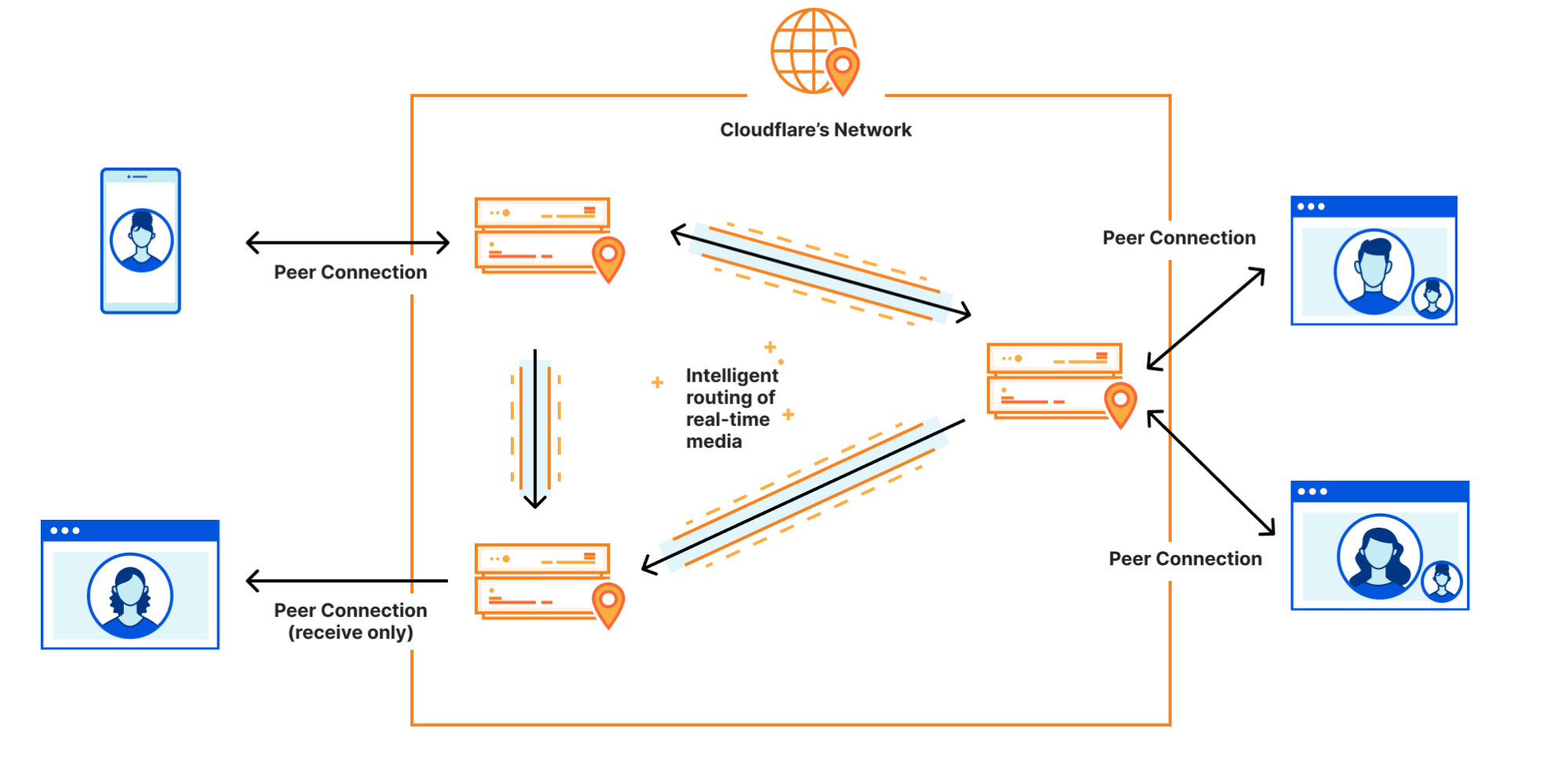
We built Calls with a simple premise: “What if Cloudflare could act as a WebRTC peer?”. Calls is a “super peer” or a “giant server that spans the whole world” allows applications to be built beyond the limitations of the lowest common denominator peer or a centralized SFU. Developers can focus on the strength of their app instead of trying to compensate for the weaknesses of the weakest peer in a p2p topology.
Calls does not use the traditional SFU topology where every participant connects to a centralized server in a single location. Instead, each participant connects to their local Cloudflare data center. When another participant wants to retrieve that media, the datacenter that homes that original media stream is found and the tracks are forwarded between datacenters automatically. If two participants are physically close their media does not travel around the world to a centralized region, instead they use the same datacenter, greatly reducing latency and improving reliability.
Calls is a configurable, global, regionless WebRTC server that is the size of Cloudflare’s ever-growing network. The WebRTC protocol enables peers to send and receive media tracks. When you are on a video call, your computer is typically sending two tracks: one that contains the audio of you speaking and another that contains the video stream from your camera. Calls implements the WebRTC RTCPeerConnection API across the Cloudflare Network where users can push media tracks. Calls also exposes an API where other media tracks can be requested within the same Peer Connection context.
Cloudflare Calls will be a good solution if you operate your own WebRTC server such as Janus or MediaSoup. Cloudflare Calls can also replace existing deployments of Janus or MediaSoup, especially in cases where you have clients connecting globally to a single, centralized deployment.
Region: Earth
Building and maintaining your own real-time infrastructure comes with unique architecture and scaling challenges. It requires you to answer and constantly revise your answers to thorny questions such as “which regions do we support?”, “how many users do we need to justify spinning up more infrastructure in yet another cloud region?”, “how do we scale for unplanned spikes in usage?” and “how do we not lose money during low-usage hours of our infrastructure?” when you run your own WebRTC server infrastructure.
Cloudflare Calls eliminates the need to answer these questions. Calls uses anycast for every connection, so every packet is always routed to the closest Cloudflare location. It is global by nature: your users are automatically served from a location close to them. Calls scales with your use and your team doesn’t have to build its own auto-scaling logic.
Calls runs on every Cloudflare location and every single Cloudflare server. Because the Cloudflare network is within 10 milliseconds of 90% of the world’s population, it does not add any noticeable latency.
Answer “where’s the problem?”, only faster
When we talk to customers with existing WebRTC workloads, there is one consistent theme: customers wish it was easier to troubleshoot issues. When a group of people are talking over a video call, the stakes are much higher when users experience issues. When a web page fails to load, it is common for users to simply retry after a few minutes. When a video call is disruptive, it is often the end of the call.
Cloudflare Calls’ focus on observability will help customers get to the bottom of the issues faster. Because Calls is built on Cloudflare’s infrastructure, we have end-to-end visibility from all layers of the OSI model.
Calls provides a server side view of the WebRTC Statistics API, so you can drill into issues each Peer Connection and the flow of media within without depending only on data sent from clients. We chose this because the Statistics API is a standardized place developers are used to getting information about their experience. It is the same API available in browsers, and you might already be using it today to gain insight into the performance of your WebRTC connections.
Privacy and security at the core
Calls eliminates the need for participants to share information such as their IP address with each other. Let’s say you are building an app that connects therapists and patients via video calls. With a traditional WebRTC implementation, both the patient and therapist’s devices would talk directly with each other, leading to exposure of potentially sensitive data such as the IP address. Exposure of information such as the IP address can leave your users vulnerable to denial-of-service attacks.
When using Calls, you are still using WebRTC, but the individual participants are connecting to the Cloudflare network. If four people are on a video call powered by Cloudflare Calls, each of the four participants’ devices will be talking only with the Cloudflare network. To your end users, the experience will feel just like a peer-to-peer call, only with added security and privacy upside.
Finally, all video and audio traffic that passes through Cloudflare Calls is encrypted by default. Calls leverages existing Cloudflare products including Argo to route the video and audio content in a secure and efficient manner. Calls API enables granular controls that cannot be implemented with vanilla WebRTC alone. When you build using Calls, you are only limited by your imagination; not the technology.
What’s next
We’re releasing Cloudflare Calls in closed beta today. To try out Cloudflare Calls, request an invitation and check your inbox in coming weeks. Calls will be free during the beta period. We’re looking to work with early customers who want to take Calls from beta to generally available with us. If you are building a real-time video app today, having challenges scaling traditional WebRTC infrastructure, or just have a great idea you want to explore, leave a comment when you are requesting an invitation, and we’ll reach out.
Today, we’re excited to announce that Stream Live is out of beta, available to everyone, and ready for production traffic at scale. Stream Live is a feature of Cloudflare Stream that allows developers to build live video features in websites and native apps.
Since its beta launch, developers have used Stream to broadcast live concerts from some of the world’s most popular artists directly to fans, build brand-new video creator platforms, operate a global 24/7 live OTT service, and more. While in beta, Stream has ingested millions of minutes of live video and delivered to viewers all over the world.
Bring your big live events, ambitious new video subscription service, or the next mobile video app with millions of users — we’re ready for it.
Streaming live video at scale is hard
Live video uses a massive amount of bandwidth. For example, a one-hour live stream at 1080p at 8Mbps is 3.6GB. At typical cloud provider egress prices, even a little egress can break the bank.
Live video must be encoded on-the-fly, in real-time. People expect to be able to watch live video on their phone, while connected to mobile networks with less bandwidth, higher latency and frequently interrupted connections. To support this, live video must be re-encoded in real-time into multiple resolutions, allowing someone’s phone to drop to a lower resolution and continue playback. This can be complex (Which bitrates? Which codecs? How many?) and costly: running a fleet of virtual machines doesn’t come cheap.
Ingest location matters — Live streaming protocols like RTMPS send video over TCP. If a single packet is dropped or lost, the entire connection is brought to a halt while the packet is found and re-transmitted. This is known as “head of line blocking”. The further away the broadcaster is from the ingest server, the more network hops, and the more likely packets will be dropped or lost, ultimately resulting in latency and buffering for viewers.
Delivery location matters — Live video must be cached and served from points of presence as close to viewers as possible. The longer the network round trips, the more likely videos will buffer or drop to a lower quality.
Broadcasting protocols are in flux — The most widely used protocol for streaming live video, RTMPS, has been abandoned since 2012, and dates back to the era of Flash video in the early 2000s. A new emerging standard, SRT, is not yet supported everywhere. And WebRTC has only recently evolved into an option for high definition one-to-many broadcasting at scale.
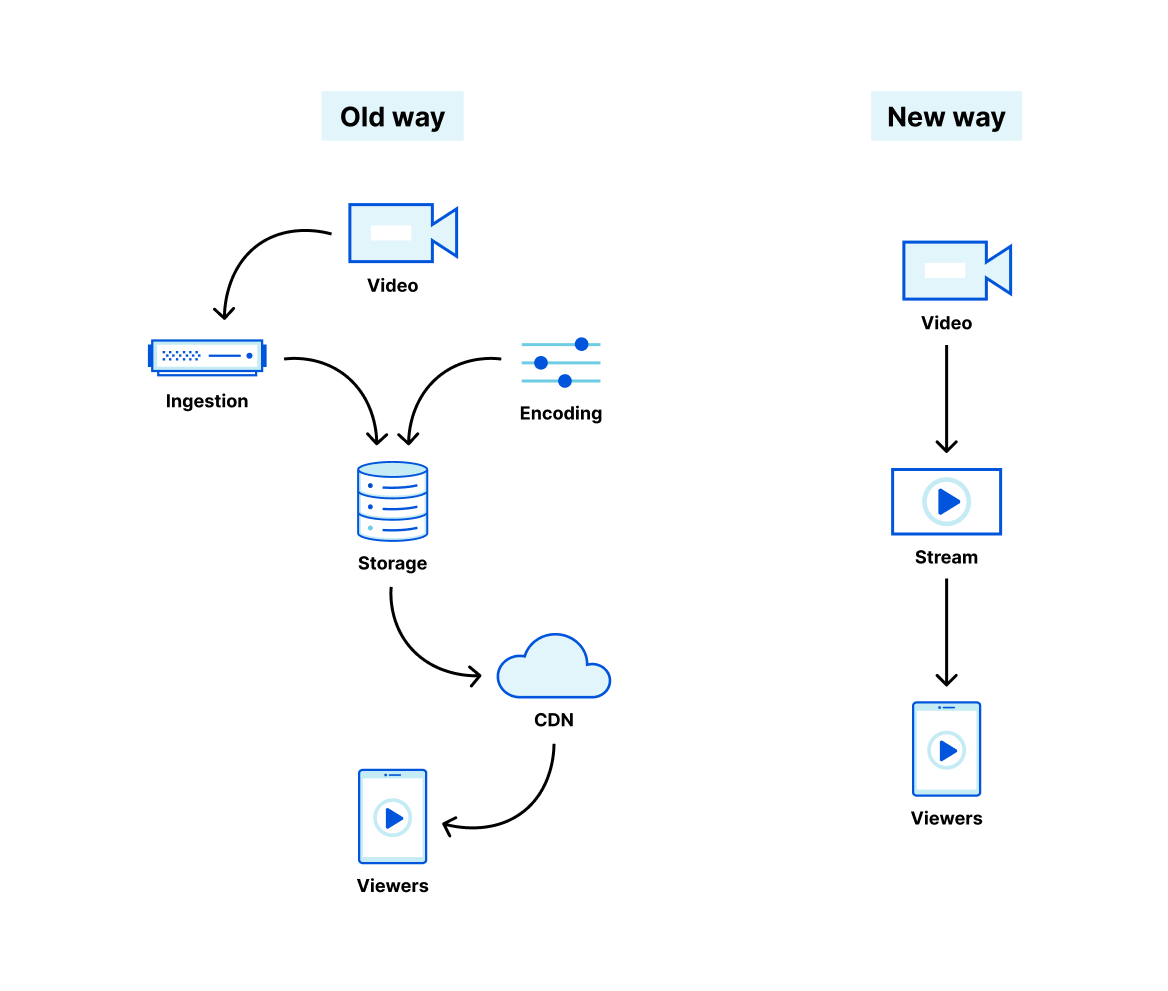
The old way to solve this has been to stitch together separate cloud services from different vendors. One vendor provides excellent content delivery, but no encoding. Another provides APIs or hardware to encode, but leaves you to fend for yourself and build your own storage layer. As a developer, you have to learn, manage and write a layer of glue code around the esoteric details of video streaming protocols, codecs, encoding settings and delivery pipelines.
We built Stream Live to make streaming live video easy, like adding an <img> tag to a website. Live video is now a fundamental building block of Internet content, and we think any developer should have the tools to add it to their website or native app.
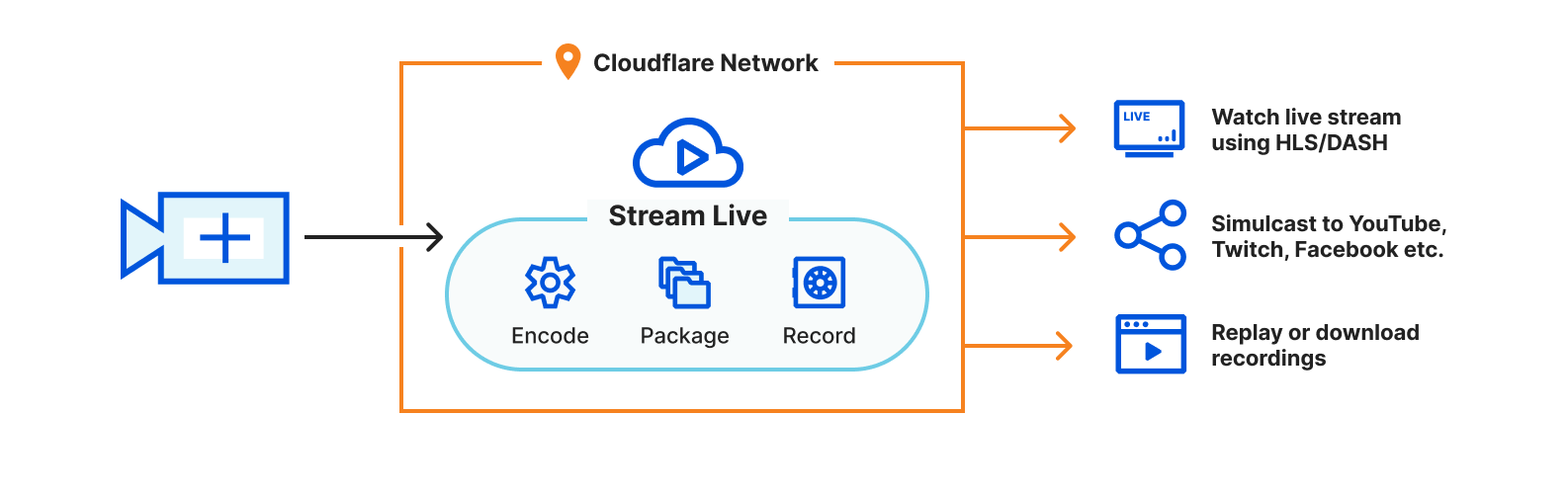
With Stream, you or your users stream live video directly to Cloudflare, and Cloudflare delivers video directly to your viewers. You never have to manage internal encoding, storage, or delivery systems — it’s just live video in and live video out.
Our network, our hardware = a solution only Cloudflare can provide
We’re not the only ones building APIs for live video — but we are the only ones with our own global network and hardware that we control and optimize for video. That lets us do things that others can’t, like sub-second glass-to-glass latency using RTMPS and SRT playback at scale.
Newer video codecs require specialized hardware encoders, and while others are beholden to the hardware limitations of public cloud providers, we’re already hard at work installing the latest encoding hardware in our own racks, so that you can deliver high resolution video with even less bandwidth. Our goal is to make what is otherwise only available to video giants available directly to you — stay tuned for some exciting updates on this next week.
Most providers limit how many destinations you can restream or simulcast to. Because we operate our own network, we’ve never even worried about this, and let you restream to as many destinations as you need.
Operating our own network lets us price Stream based on minutes of video delivered — unlike others, we don’t pay someone else for bandwidth and then pass along their costs to you at a markup. The status quo of charging for bandwidth or per-GB storage penalizes you for delivering or storing high resolution content. If you ask why a few times, most of the time you’ll discover that others are pushing their own cost structures on to you.
Encoding video is compute-intensive, delivering video is bandwidth intensive, and location matters when ingesting live video. When you use Stream, you don’t need to worry about optimizing performance, finding a CDN, and/or tweaking configuration endlessly. Stream takes care of this for you.
Free your live video from the business models of big platforms
Nearly every business uses live video, whether to engage with customers, broadcast events or monetize live content. But few have the specialized engineering resources to deliver live video at scale on their own, and wire together multiple low level cloud services. To date, many of the largest content creators have been forced to depend on a shortlist of social media apps and streaming services to deliver live content at scale.
Unlike the status quo, who force you to put your live video in their apps and services and fit their business models, Stream gives you full control of your live video, on your website or app, on any device, at scale, without pushing your users to someone else’s service.
Other platforms charge for ingestion and encoding. Many even force you to consider where you’re streaming to and from, the bitrate and frames per second of your video, and even which of their datacenters you’re using.
With Stream, encoding and ingestion are free. Other platforms charge for delivery based on bandwidth, penalizing you for delivering high quality video to your viewers. If you stream at a high resolution, you pay more.
With Stream, you don’t pay a penalty for delivering high resolution video. Stream’s pricing is simple — minutes of video delivered and stored. Because you pay per minute, not per gigabyte, you can stream at the ideal resolution for your viewers without worrying about bandwidth costs.
Other platforms charge separately for analytics, requiring you to buy another product to get metrics about your live streams.
With Stream, analytics are free. Stream provides an API and Dashboard for both server-side and client-side analytics, that can be queried on a per-video, per-creator, per-country basis, and more. You can use analytics to identify which creators in your app have the most viewed live streams, inform how much to bill your customers for their own usage, identify where content is going viral, and more.
Other platforms tack on live recordings or DVR mode as a separate add-on feature, and recordings only become available minutes or even hours after a live stream ends.
With Stream, live recordings are a built-in feature, made available instantly after a live stream ends. Once a live stream is available, it works just like any other video uploaded to Stream, letting you seamlessly use the same APIs for managing both pre-recorded and live content.
Build live video into your website or app in minutes
Cloudflare Stream enables you or your users to go live using the same protocols and tools that broadcasters big and small use to go live to YouTube or Twitch, but gives you full control over access and presentation of live streams.
Step 2: Use the RTMPS key with any live broadcasting software, or in your own native app
Copy the RTMPS URL and key, and use them with your live streaming application. We recommend using Open Broadcaster Software (OBS) to get started, but any RTMPS or SRT compatible software should be able to interoperate with Stream Live.
Enter the Stream RTMPS URL and the Stream Key from Step 1:
Step 3: Preview your live stream in the Cloudflare Dashboard
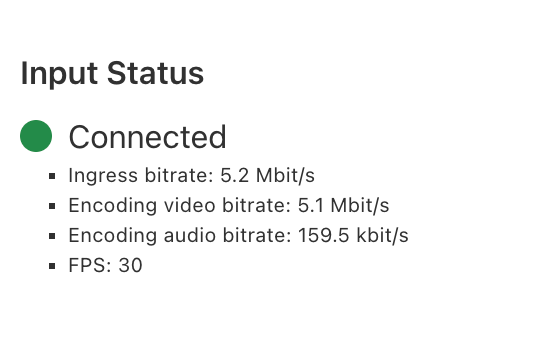
In the Stream Dashboard, within seconds of going live, you will see a preview of what your viewers will see, along with the real-time connection status of your live stream.
Step 4: Add live video playback to your website or app
For example, on iOS, all you need to do is provide AVPlayer with the URL to the HLS manifest for your live input, which you can find via the API or in the Stream Dashboard.
import SwiftUI
import AVKit

struct MyView: View {
    // Change the url to the Cloudflare Stream HLS manifest URL
    private let player = AVPlayer(url: URL(string: "https://customer-9cbb9x7nxdw5hb57.cloudflarestream.com/8f92fe7d2c1c0983767649e065e691fc/manifest/video.m3u8")!)

    var body: some View {
        VideoPlayer(player: player)
            .onAppear() {
                player.play()
            }
    }
}

struct MyView_Previews: PreviewProvider {
    static var previews: some View {
        MyView()
    }
}
To run a complete example app in XCode, follow this guide in the Stream Developer docs.
Companies are building whole new video platforms on top of Stream
Developers want control, but most don’t have time to become video experts. And even video experts building innovative new platforms don’t want to manage live streaming infrastructure.
Switcher Studio’s whole business is live video — their iOS app allows creators and businesses to produce their own branded, multi camera live streams. Switcher uses Stream as an essential part of their live streaming infrastructure. In their own words:
“Since 2014, Switcher has helped creators connect to audiences with livestreams. Now, our users create over 100,000 streams per month. As we grew, we needed a scalable content delivery solution. Cloudflare offers secure, fast delivery, and even allowed us to offer new features, like multistreaming. Trusting Cloudflare Stream lets our team focus on the live production tools that make Switcher unique.”
While Stream Live has been in beta, we’ve worked with many customers like Switcher, where live video isn’t just one product feature, it is the core of their product. Even as experts in live video, they choose to use Stream, so that they can focus on the unique value they create for their customers, leaving the infrastructure of ingesting, encoding, recording and delivering live video to Cloudflare.
Start building live video into your website or app today
It takes just a few minutes to sign up and start your first live stream, using the Cloudflare Dashboard, with no code required to get started, but APIs for when you’re ready to start building your own live video features. Give it a try — we’re ready for you, no matter the size of your audience.
Building inclusive technology is core to the Cloudflare mission. Cloudflare Stream has supported captions for on-demand videos for several years. Soon, Stream will auto-detect embedded captions and include it in the live stream delivered to your viewers.
Thousands of Cloudflare customers use the Stream product to build video functionality into their apps. With live caption support, Stream customers can better serve their users with a more comprehensive viewing experience.
Enabling Closed Captions in Stream Live
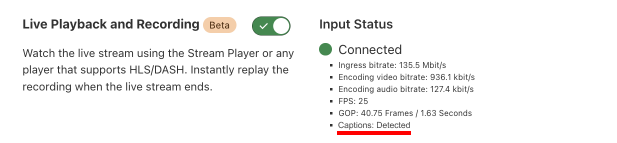
Stream Live scans for CEA-608 and CEA-708 captions in incoming live streams ingested via SRT and RTMPS. Assuming the live streams you are pushing to Cloudflare Stream contain captions, you don’t have to do anything further: the captions will simply get included in the manifest file.
If you are using the Stream Player, these captions will be rendered by the Stream Player. If you are using your own player, you simply have to configure your player to display captions.
Currently, Stream Live supports captions for a single language during the live event. While the support for captions is limited to one language during the live stream, you can upload captions for multiple languages once the event completes and the live event becomes an on-demand video.
What is CEA-608 and CEA-708?
When captions were first introduced in 1973, they were open captions. This means the captions were literally overlaid on top of the picture in the video and therefore, could not be turned off. In 1982, we saw the introduction of closed captions during live television. Captions were no longer imprinted on the video and were instead passed via a separate feed and rendered on the video by the television set.
CEA-608 (also known as Line 21) and CEA-708 are well-established standards used to transmit captions. CEA-708 is a modern iteration of CEA-608, offering support for nearly every language and text positioning–something not supported with CEA-608.
Availability
Live caption support will be available in closed beta next month. To request access, sign up for the closed beta.
Including captions in any video stream is critical to making your content more accessible. For example, the majority of live events are watched on mute and thereby, increasing the value of captions. While Stream Live does not generate live captions yet, we plan to build support for automatic live captions in the future.
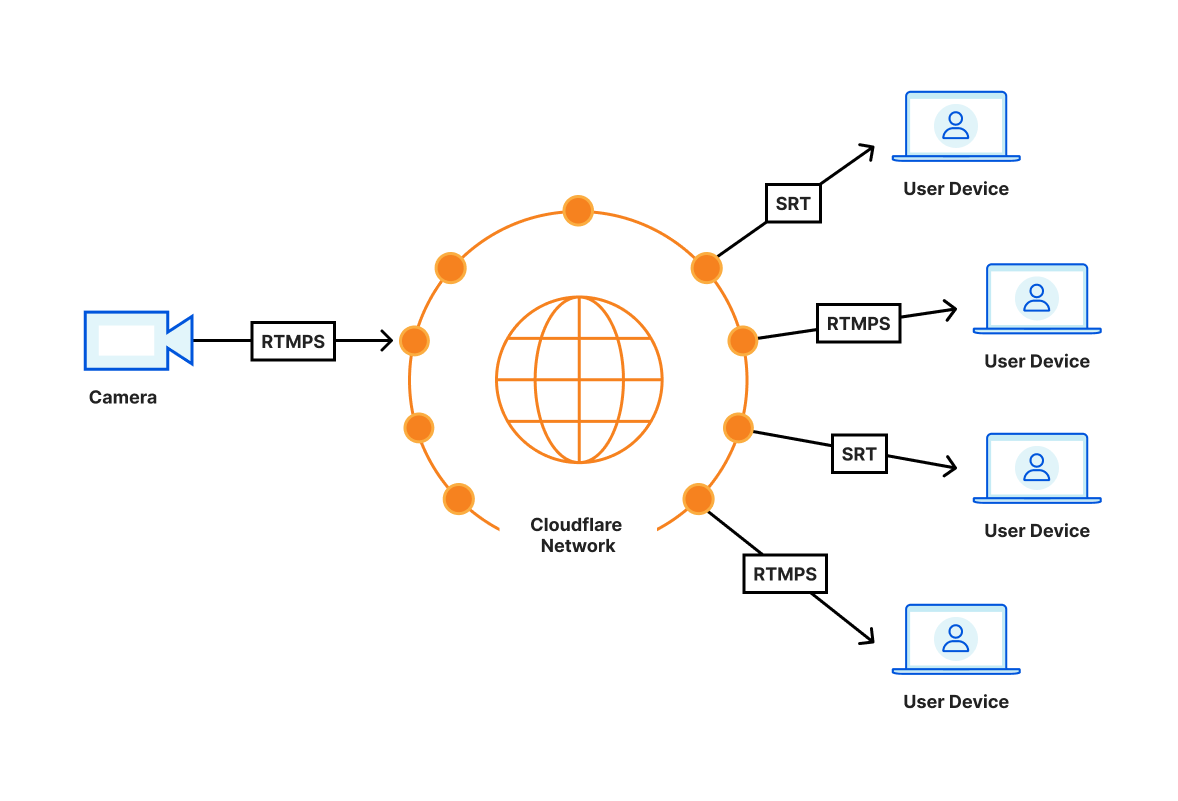
Starting today, in open beta, Cloudflare Stream supports video playback with sub-second latency over SRT or RTMPS at scale. Just like HLS and DASH formats, playback over RTMPS and SRT costs $1 per 1,000 minutes delivered regardless of video encoding settings used.
Stream is like a magic HDMI cable to the cloud. You can easily connect a video stream and display it from as many screens as you want wherever you want around the world.
What do we mean by sub-second?
Video latency is the time it takes from when a camera sees something happen live to when viewers of a broadcast see the same thing happen via their screen. Although we like to think what’s on TV is happening simultaneously in the studio and your living room at the same time, this is not the case. Often, cable TV takes five seconds to reach your home.
On the Internet, the range of latencies across different services varies widely from multiple minutes down to a few seconds or less. Live streaming technologies like HLS and DASH, used on by the most common video streaming websites typically offer 10 to 30 seconds of latency, and this is what you can achieve with Stream Live today. However, this range does not feel natural for quite a few use cases where the viewers interact with the broadcasters. Imagine a text chat next to an esports live stream or Q&A session in a remote webinar. These new ways of interacting with the broadcast won’t work with typical latencies that the industry is used to. You need one to two seconds at most to achieve the feeling that the viewer is in the same room as the broadcaster.
We expect Cloudflare Stream to deliver sub-second latencies reliably in most parts of the world by routing the video as much as possible within the Cloudflare network. For example, when you’re sending video from San Francisco on your Comcast home connection, the video travels directly to the nearest point where Comcast and Cloudflare connect, for example, San Jose. Whenever a viewer joins, say from Austin, the viewer connects to the Cloudflare location in Dallas, which then establishes a connection using the Cloudflare backbone to San Jose. This setup avoids unreliable long distance connections and allows Cloudflare to monitor the reliability and latency of the video all the way from broadcaster the last mile to the viewer last mile.
Serverless, dynamic topology
With Cloudflare Stream, the latency of content from the source to the destination is purely dependent on the physical distance between them: with no centralized routing, each Cloudflare location talks to other Cloudflare locations and shares the video among each other. This results in the minimum possible latency regardless of the locale you are broadcasting from.
We’ve tested about 500ms of glass to glass latency from San Francisco to London, both from and to residential networks. If both the broadcaster and the viewers were in California, this number would be lower, simply because of lower delay caused by less distance to travel over speed of light. An early tester was able to achieve 300ms of latency by broadcasting using OBS via RTMPS to Cloudflare Stream and pulling down that content over SRT using ffplay.
Any server in the Cloudflare Anycast network can receive and publish low-latency video, which means that you’re automatically broadcasting to the nearest server with no configuration necessary. To minimize latency and avoid network congestion, we route video traffic between broadcaster and audience servers using the same network telemetry as Argo.
On top of this, we construct a dynamic distribution topology, unique to the stream, which grows to meet the capacity needs of the broadcast. We’re just getting started with low-latency video, and we will continue to focus on latency and playback reliability as our real-time video features grow.
An HDMI cable to the cloud
Most video on the Internet uses HTTP – the protocol for loading websites on your browser to deliver video. This has many advantages, such as easy to achieve interoperability across viewer devices. Maybe more importantly, HTTP can use the existing infrastructure like caches which reduce the cost of video delivery.
Using HTTP has a cost in latency as it is not a protocol built to deliver video. There’s been many attempts made to deliver low latency video over HTTP, with some reducing latency to a few seconds, but none reach the levels achievable by protocols designed with video in mind. WebRTC and video delivery over QUIC have the potential to further reduce latency, but face inconsistent support across platforms today.
Video-oriented protocols, such as RTMPS and SRT, side-step some of the challenges above but often require custom client libraries and are not available in modern web browsers. While we now support low latency video today over RTMPS and SRT, we are actively exploring other delivery protocols.
There’s no silver bullet – yet, and our goal is to make video delivery as easy as possible by supporting the set of protocols that enables our customers to meet their unique and creative needs. Today that can mean receiving RTMPS and delivering low-latency SRT, or ingesting SRT while publishing HLS. In the future, that may include ingesting WebRTC or publishing over QUIC or HTTP/3 or WebTransport. There are many interesting technologies on the horizon.
We’re excited to see new use cases emerge as low-latency video becomes easier to integrate and less costly to manage. A remote cycling instructor can ask her students to slow down in response to an increase in heart rate; an esports league can effortlessly repeat their live feed to remote broadcasters to provide timely, localized commentary while interacting with their audience.
Creative uses of low latency video
Viewer experience at events like a concert or a sporting event can be augmented with live video delivered in real time to participants’ phones. This way they can experience the event in real-time and see the goal scored or details of what’s going happening on the stage.
Often in big cities, people who cheer loudly across the city can be heard before seeing a goal scored on your own screen. This can be eliminated by when every video screen shows the same content at the same time.
Esports games, large company meetings or conferences where presenters or commentators react real time to comments on chat. The delay between a fan making a comment and them seeing the reaction on the video stream can be eliminated.
Online exercise bikes can provide even more relevant and timely feedback from the live instructors, adding to the sense of community developed while riding them.
Participants in esports streams can be switched from a passive viewer to an active live participant easily as there is no delay in the broadcast.
Security cameras can be monitored from anywhere in the world without having to open ports or set up centralized servers to receive and relay video.
Getting Started
Get started by using your existing inputs on Cloudflare Stream. Without the need to reconnect, they will be available instantly for playback with the RTMPS/SRT playback URLs.
If you don’t have any inputs on Stream, sign up for $5/mo. You will get the ability to push live video, broadcast, record and now pull video with sub-second latency.
You will need to use a computer program like FFmpeg or OBS to push video. To playback RTMPS you can use VLC and FFplay for SRT. To integrate in your native app, you can utilize FFmpeg wrappers for native apps such as ffmpeg-kit for iOS.
RTMPS and SRT playback work with the recently launched custom domain support, so you can use the domain of your choice and keep your branding.
Creator platforms across the world use Cloudflare Stream to rapidly build video experiences into their apps. These platforms serve a diverse range of creators, enabling them to share their passion with their beloved audience. While working with creator platforms, we learned that many Stream customers track video usage on a per-creator basis in order to answer critical questions such as:
“Who are our fastest growing creators?”
“How much do we charge or pay creators each month?”
“What can we do more of in order to serve our creators?”
Introducing the Creator Property
Creator platforms enable artists, teachers and hobbyists to express themselves through various media, including video. We built Cloudflare Stream for these platforms, enabling them to rapidly build video use cases without needing to build and maintain a video pipeline at scale.
At its heart, every creator platform must manage ownership of user-generated content. When a video is uploaded to Stream, Stream returns a video ID. Platforms using Stream have traditionally had to maintain their own index to track content ownership. For example, when a user with internal user ID 83721759 uploads a video to Stream with video ID 06aadc28eb1897702d41b4841b85f322, the platform must maintain a database table of some sort to keep track of the fact that Stream video ID 06aadc28eb1897702d41b4841b85f322 belongs to internal user 83721759.
With the introduction of the creator property, platforms no longer need to maintain this index. Stream already has a direct creator upload feature to enable users to upload videos directly to Stream using tokenized URLs and without exposing account-wide auth information. You can now set the creator field with your user’s internal user ID at the time of requesting a tokenized upload URL:
When the user uploads the video, the creator property would be automatically set to your internal user ID and can be leveraged for operations such as pulling analytics data for your creators.
Query By Creator Property
Setting the creator property on your video uploads is just the beginning. You can now filter Stream Analytics via the Dashboard or the GraphQL API using the creator property.
Filter Stream Analytics in the Dashboard using the Creator property
Previously, if you wanted to generate a monthly report of all your creators and the number of minutes of watch time recorded for their videos, you’d likely use a scripting language such as Python to do the following:
Call the Stream GraphQL API requesting a list of videos and their watch time
Traverse through the list of videos and query your internal index to determine which creator each video belongs to
Sum up the video watch time for each creator to get a clean report showing you video consumption grouped by the video creator
The creator property eliminates this three step manual process. You can make a single API call to the GraphQL API to request a list of creators and the consumption of their videos for a given time period. Here is an example GraphQL API query that returns minutes delivered by creator:
Stream is focused on helping creator platforms innovate and scale. Matt Ober, CTO of NFT media management platform Piñata, says “By allowing us to upload and then query using creator IDs, large-scale analytics of Cloudflare Stream is about to get a lot easier.”
Getting Started
Read the docs to learn more about setting the creator property on new and previously uploaded videos. You can also set the creator property on live inputs, so the recorded videos generated from the live event will already have the creator field populated.
Being able to filter analytics is just the beginning. We can’t wait to enable more creator-level operations, so you can spend more time on what makes your idea unique and less time maintaining table stakes infrastructure.
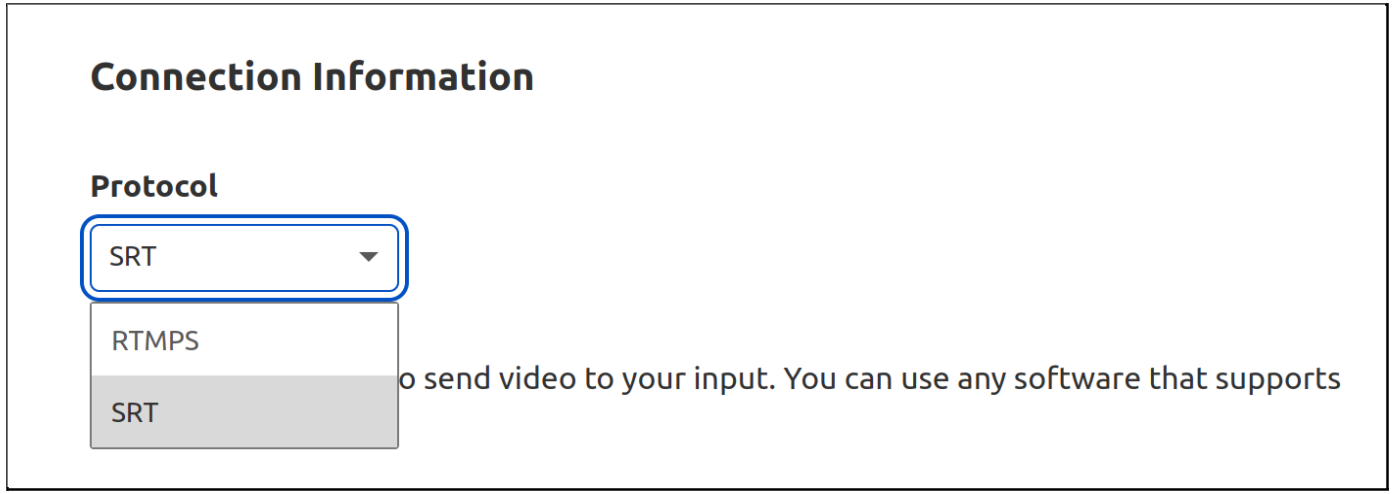
SRT is a new and modern live video transport protocol. It features many improvements to the incumbent popular video ingest protocol, RTMP, such as lower latency, and better resilience against unpredictable network conditions on the public Internet. SRT supports newer video codecs and makes it easier to use accessibility features such as captions and multiple audio tracks. While RTMP development has been abandoned since at least 2012, SRT development is maintained by an active community of developers.
We don’t see RTMP use going down anytime soon, but we can do something so authors of new broadcasting software, as well as video streaming platforms, can have an alternative.
Starting today, in open beta, you can use Stream Connect as a gateway to translate SRT to RTMP or RTMP to SRT with your existing applications. This way, you can get the last-mile reliability benefits of SRT and can continue to use the RTMP service of your choice. It’s priced at $1 per 1,000 minutes, regardless of video encoding parameters.
You can also use SRT to go live on Stream Live, our end-to-end live streaming service to get HLS and DASH manifest URLs from your SRT input, and do simulcasting to multiple platforms whether you use SRT or RTMP.
Stream’s SRT and RTMP implementation supports adding or removing RTMP or SRT outputs without having to restart the source stream, scales to tens of thousands of concurrent video streams per customer and runs on every Cloudflare server in every Cloudflare location around the world.
Go live like it’s 2022
When we first started developing live video features on Cloudflare Stream earlier last year we had to decide whether to reimplement an old and unmaintained protocol, RTMP, or focus on the future and start off fresh by using a modern protocol. If we launched with RTMP, we would get instant compatibility with existing clients but would give up features that would greatly improve performance and reliability. Reimplementing RTMP would also mean we’d have to handle the complicated state machine that powers it, demux the FLV container, parse AMF and even write a server that sends the text “Genuine Adobe Flash Media Server 001” as part of the RTMP handshake.
Even though there were a few new protocols to evaluate and choose from in this project, the dominance of RTMP was still overwhelming. We decided to implement RTMP but really don’t want anybody else to do it again.
Eliminate head of line blocking
A common weakness of TCP when it comes to low latency video transfer is head of line blocking. Imagine a camera app sending videos to a live streaming server. The camera puts every frame that is captured into packets and sends it over a reliable TCP connection. Regardless of the diverse set of Internet infrastructure it may be passing through, TCP makes sure all packets get delivered in order (so that your video frames don’t jump around) and reliably (so you don’t see any parts of the frame missing). However, this type of connection comes at a cost. If a single packet is dropped, or lost in the network somewhere between two endpoints like it happens on mobile network connections or wifi often, it means the entire TCP connection is brought to a halt while the lost packet is found and re-transmitted. This means that if one frame is suddenly missing, then everything that would come after the lost video frame needs to wait. This is known as head of line blocking.
RTMP experiences head of line blocking because it uses a TCP connection. Since SRT is a UDP-based protocol, it does not experience head of line blocking. SRT features packet recovery that is aware of the low-latency and high reliability requirements of video. Similar to QUIC, it achieves this by implementing its own logic for a reliable connection on top of UDP, rather than relying on TCP.
SRT solves this problem by waiting only a little bit, because it knows that losing a single frame won’t be noticeable by the end viewer in the majority of cases. The video moves on if the frame is not re-transmitted right away. SRT really shines when the broadcaster is streaming with less-than-stellar Internet connectivity. Using SRT means fewer buffering events, lower latency and a better overall viewing experience for your viewers.
RTMP to SRT and SRT to RTMP
Comparing SRT and RTMP today may not be that useful for the most pragmatic app developers. Perhaps it’s just another protocol that does the same thing for you. It’s important to remember that even though there might not be a big improvement for you today, tomorrow there will be new video use cases that will benefit from a UDP-based protocol that avoids head of line blocking, supports forward error correction and modern codecs beyond H.264 for high-resolution video.
Switching protocols requires effort from both software that sends video and software that receives video. This is a frustrating chicken-or-the-egg problem. A video streaming service won’t implement a protocol not in use and clients won’t implement a protocol not supported by streaming services.
Starting today, you can use Stream Connect to translate between protocols for you and deprecate RTMP without having to wait for video platforms to catch up. This way, you can use your favorite live video streaming service with the protocol of your choice.
Stream is useful if you’re a live streaming platform too! You can start using SRT while maintaining compatibility with existing RTMP clients. When creating a video service, you can have Stream Connect to terminate RTMP for you and send SRT over to the destination you intend instead.
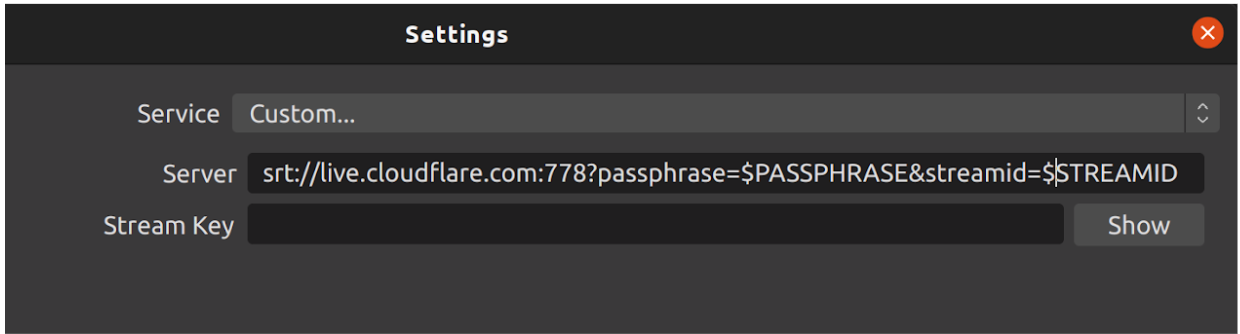
SRT is already implemented in software like FFmpeg and OBS. Here’s how to get it working from OBS:
Get started with signing up for Cloudflare Stream and adding a live input.
Protocol-agnostic Live Streaming
We’re working on adding support for more media protocols in addition to RTMP and SRT. What would you like to see next? Let us know! If this post vibes with you, come work with the engineers building with video and more at Cloudflare!
Historically, building video applications has been very difficult. There’s a lot of complicated tech behind recording, encoding, and playing videos. Luckily, Cloudflare Stream abstracts all the difficult parts away, so you can build custom video and streaming applications easily. Let’s look at how we can combine Cloudflare Stream, Access, Pages, and Workers to create a high-performance video application with very little code.
Today, we’re going to build a video application inspired by Cloudflare TV. We’ll have user authentication and the ability for administrators to upload recorded videos or livestream new content. Think about being able to build your own YouTube or Twitch using Cloudflare services!
Fetching a list of videos
On the main page of our application, we want to display a list of all videos. The videos are uploaded and stored with Cloudflare Stream, but more on that later! This code could be changed to display only the “trending” videos or a selection of videos chosen for each user. For now, we’ll use the search API and pass in an empty string to return all.
We’ll go through each video, filter out any private videos, and pull out the metadata we need, such as the thumbnail URL, ID, and created date.
Playing the videos
To allow users to play videos from your application, they need to be public, or you’ll have to sign each request. Marking your videos as public makes this process easier. However, there are many reasons you might want to control access to your videos. If you want users to log in before they play them or the ability to limit access in any way, mark them as private and use signed URLs to control access. You can find more information about securing your videos here.
If you are testing your application locally or expect to have fewer than 10,000 requests per day, you can call the /token endpoint to generate a signed token. If you expect more than 10,000 requests per day, sign your own tokens as we do here using JSON Web Tokens.
Allowing users to upload videos
The next step is to build out an admin page where users can upload their videos. You can find documentation on allowing user uploads here.
This process is made easy with the Cloudflare Stream API. You use your API token and account ID to generate a unique, one-time upload URL. Just make sure your token has the Stream:Edit permission. We hook into all POST requests from our application and return the generated upload URL.
export const cfTeamsAccessAuthMiddleware = async ({request, data, env, next}) => {
    try {
        const userEmail = request.headers.get("cf-access-authenticated-user-email")

        if (!userEmail) {
            throw new Error("User not found, make sure application is behind Cloudflare Access")
        }

        // Pass user info to next handlers
        data.user = {
            email: userEmail
        }

        return next()
    } catch (e) {
        return new Response(e.toString(), {status: 401})
    }
}

export const onRequest = [
    cfTeamsAccessAuthMiddleware
]
The admin page contains a form allowing users to drag and drop or upload videos from their computers. When a logged-in user hits submit on the upload form, the application generates a unique URL and then posts the FormData to it. This code would work well for building a video sharing site or with any application that allows user-generated content.
You can add a livestreaming section to your application as well, using Stream Live in conjunction with the techniques we’ve already covered. You could allow logged-in users to start a broadcast and then allow other logged-in users, or even the public, to watch it in real-time! The streams will automatically save to your account, so they can be viewed immediately after the broadcast finishes in the main section of your application.
Securing our app with middleware
We put all authenticated pages behind this middleware function. It checks the request headers to make sure the user is sending a valid authenticated user email.
export const cfTeamsAccessAuthMiddleware = async ({request, data, env, next}) => {
    try {
        const userEmail = request.headers.get("cf-access-authenticated-user-email")

        if (!userEmail) {
            throw new Error("User not found, make sure application is behind Cloudflare Access")
        }

        // Pass user info to next handlers
        data.user = {
            email: userEmail
        }

        return next()
    } catch (e) {
        return new Response(e.toString(), {status: 401})
    }
}

export const onRequest = [
    cfTeamsAccessAuthMiddleware
]
Putting it all together with Pages
We have Cloudflare Access controlling our log-in flow. We use the Stream APIs to manage uploading, displaying, and watching videos. We use Workers for managing fetch requests and handling API calls. Now it’s time to tie it all together using Cloudflare Pages!
Pages provides an easy way to deploy and host static websites. But now, Pages seamlessly integrates with the Workers platform (link to announcement post). With this new integration, we can deploy this entire application with a single, readable repository.
Controlling access
Some applications are better public; others contain sensitive data and should be restricted to specific users. The main page is public for this application, and we’ve used Cloudflare Access to limit the admin page to employees. You could just as easily use Access to protect the entire application if you’re building an internal learning service or even if you want to beta launch a new site!
When a user clicks the admin link on our demo site, they will be prompted for an email address. If they enter a valid Cloudflare email, the application will send them an access code. Otherwise, they won’t be able to access that page.
Check out the source code and get started building your own video application today!
For every successful technology, there is a moment where its time comes. Something happens, usually external, to catalyze it — shifting it from being a good idea with promise, to a reality that we can’t imagine living without. Perhaps the best recent example was what happened to the cloud as a result of the introduction of the iPhone in 2007. Smartphones created a huge addressable market for small developers; and even big developers found their customer base could explode in a way that they couldn’t handle without access to public cloud infrastructure. Both wanted to be able to focus on building amazing applications, without having to worry about what lay underneath.
Last year, during the outbreak of COVID-19, a similar moment happened to real time communication. Being able to communicate is the lifeblood of any organization. Before 2020, much of it happened in meeting rooms in offices all around the world. But in March last year — that changed dramatically. Those meeting rooms suddenly were emptied. Fast-forward 18 months, and that massive shift in how we work has persisted.
While, undoubtedly, many organizations would not have been able to get by without the likes of Slack, Zoom and Teams as real time collaboration tools, we think today’s iteration of communication tools is just the tip of the iceberg. Looking around, it’s hard to escape the feeling there is going to be an explosion in innovation that is about to take place to enable organizations to communicate in a remote, or at least hybrid, world.
With this in mind, today we’re excited to be introducing Cloudflare’s Real Time Communications platform. This is a new suite of products designed to help you build the next generation of real-time, interactive applications. Whether it’s one-to-one video calling, group audio or video-conferencing, the demand for real-time communications only continues to grow.
Running a reliable and scalable real-time communications platform requires building out a large-scale network. You need to get your network edge within milliseconds of your users in multiple geographies to make sure everyone can always connect with low latency, low packet loss and low jitter. A backbone to route around Internet traffic jams. Infrastructure that can efficiently scale to serve thousands of participants at once. And then you need to deploy media servers, write business logic, manage multiple client platforms, and keep it all running smoothly. We think we can help with this.
Launching today, you will be able to leverage Cloudflare’s global edge network to improve connectivity for any existing WebRTC-based video and audio application, with what we’re calling “WebRTC Components”. This includes scaling to (tens of) thousands of participants, leveraging our DDoS mitigation to protect your services from attacks, and enforce IP and ASN-based access policies in just a few clicks.
How Real Time is “Real Time”?
Real-time typically refers to communication that happens in under 500ms: that is, as fast as packets can traverse the fibre optic networks that connect the world together. In 2021, most real-time audio and video applications use WebRTC, a set of open standards and browser APIs that define how to connect, secure, and transfer both media and data over UDP. It was designed to bring better, more flexible bi-directional communication when compared to the primary browser-based communication protocol we rely on today, HTTP. And because WebRTC is supported in the browser, it means that users don’t need custom clients, nor do developers need to build them: all they need is a browser.
Importantly, we’ve seen the need for reliable, real-time communication across time-zones and geographies increase dramatically, as organizations change the way they work (yes, including us).
So where is real-time important in practice?
One-to-one calls (think FaceTime). We’re used to almost instantaneous communication over traditional telephone lines, and there’s no reason for us to head backwards.
Group calling and conferencing (Zoom or Google Meet), where even just a few seconds of delay results in everyone talking over each other.
Social video, gaming and sports. You don’t want to be 10 seconds behind the action or miss that key moment in a game because the stream dropped a few frames or decided to buffer.
Interactive applications: from 3D modeling in the browser, Augmented Reality on your phone, and even game streaming need to be in real-time.
We believe that we’ve only collectively scratched the surface when it comes to real-time applications — and part of that is because scaling real-time applications to even thousands of users requires new infrastructure paradigms and demands more from the network than traditional HTTP-based communication.
Enter: WebRTC Components
Today, we’re launching our closed beta WebRTC Components, allowing teams running centralized WebRTC TURN servers to offload it to Cloudflare’s distributed, global network and improve reliability, scale to more users, and spend less time managing infrastructure.
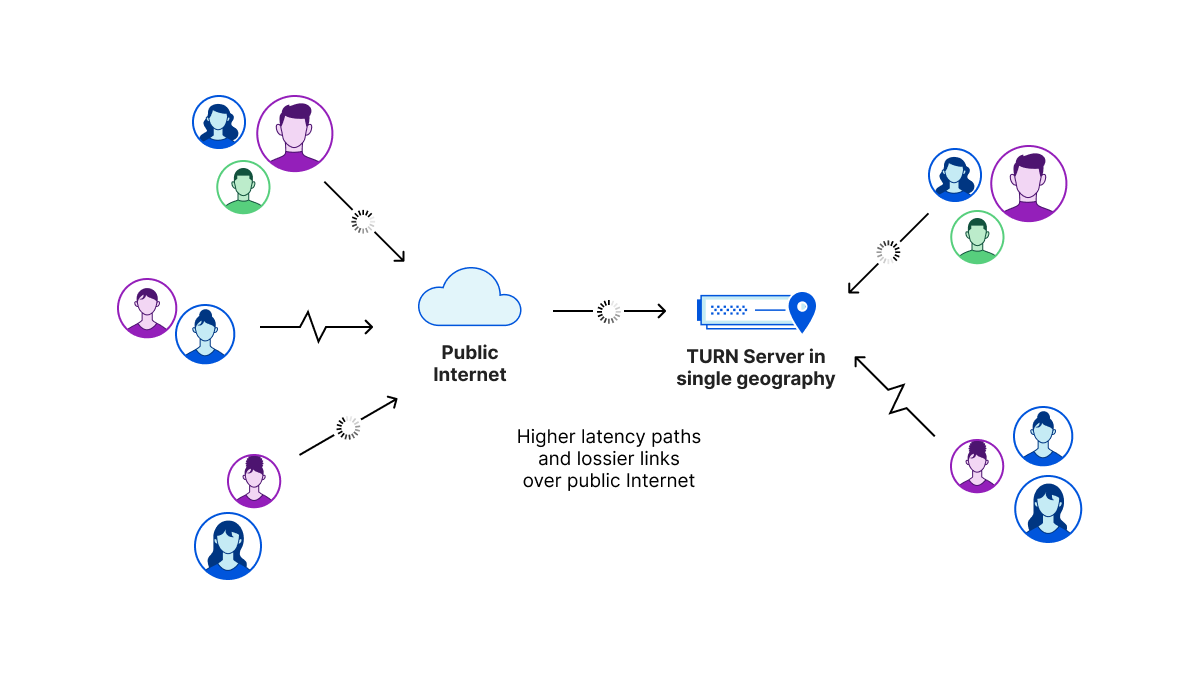
TURN, or Traversal Using Relays Around NAT (Network Address Translation), was designed to navigate the practical shortcomings of WebRTC’s peer-to-peer origins. WebRTC was (and is!) a peer-to-peer technology, but in practice, establishing reliable peer-to-peer connections remains hard due to Carrier-Grade NAT, corporate NATs and firewalls. Further, each peer is limited by its own network connectivity — in a traditional peer-to-peer mesh, participants can quickly find their network connections saturated because they have to receive data from every other peer. In a mixed environment with different devices (mobile, desktops), networks (high-latency 3G through to fast fiber), scaling to more than a handful of peers becomes extremely challenging.
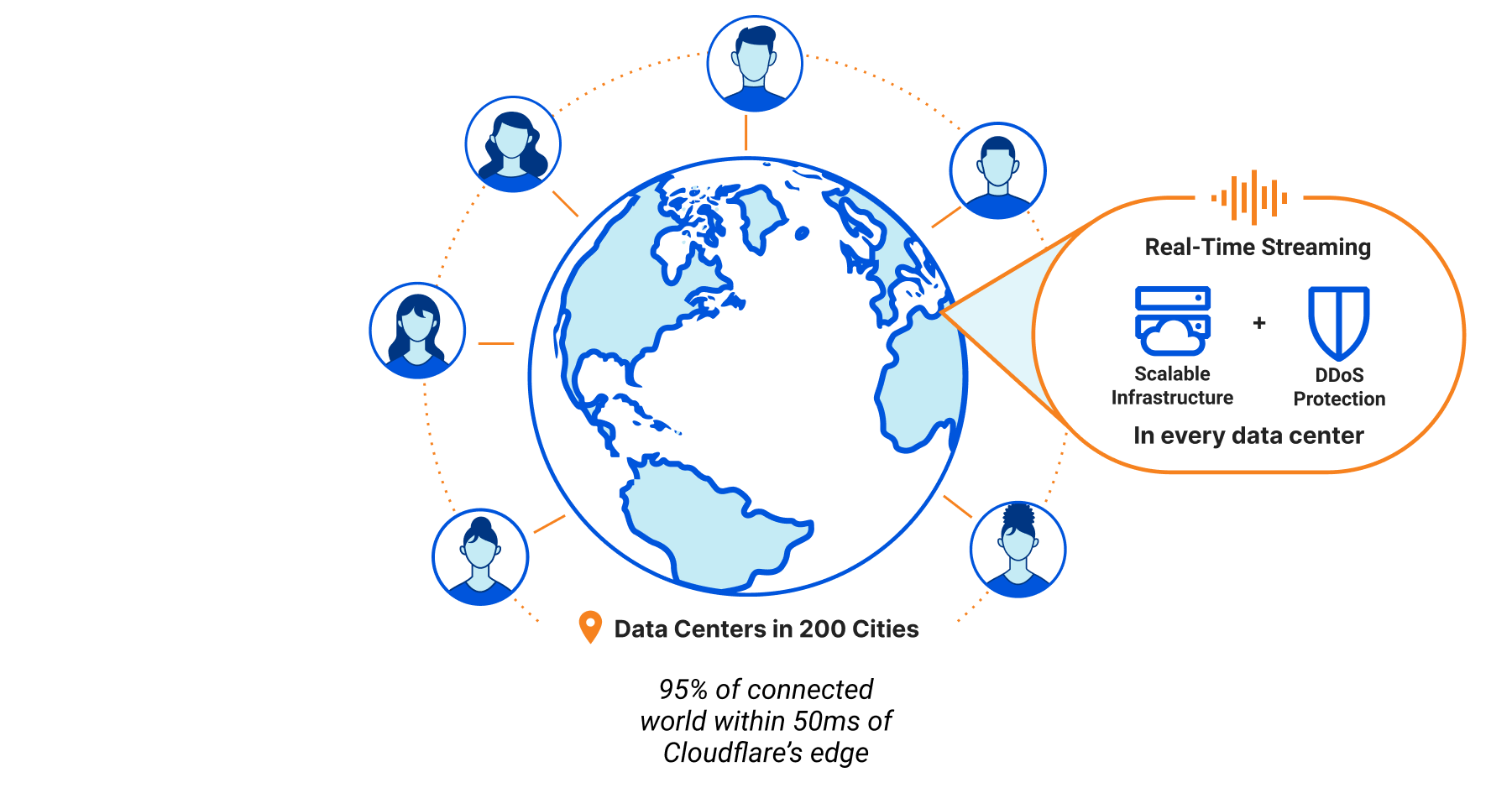
Running a TURN service at the edge instead of your own infrastructure gets you a better connection. Cloudflare operates an anycast network spanning 250+ cities, meaning we’re very close to wherever your users are. This means that when users connect to Cloudflare’s TURN service, they get a really good connection to the Cloudflare network. Once it’s on there, we leverage our network and private backbone to get you superior connectivity, all the way back to the other user on the call.
But even better: stop worrying about scale. WebRTC infrastructure is notoriously difficult to scale: you need to make sure you have the right capacity in the right location. Cloudflare’s TURN service scales automatically and if you want more endpoints they’re just an API call away.
Of course WebRTC Components is built on the Cloudflare network, benefiting from the DDoS protection that it’s 100 Tbps network offers. From now on deploying scalable, secure, production-grade WebRTC relays globally is only a couple of API calls away.
A Developer First Real-Time Platform
But, as we like to say at Cloudflare: we’re just getting started. Managed, scalable TURN infrastructure is a critical building block to building real-time services for one-to-one and small group calling, especially for teams who have been managing their own infrastructure, but things become rapidly more complex when you start adding more participants.
Whether that’s managing the quality of the streams (“tracks”, in WebRTC parlance) each client is sending and receiving to keep call quality up, permissions systems to determine who can speak or broadcast in large-scale events, and/or building signalling infrastructure with support chat and interactivity on top of the media experience, one thing is clear: it there’s a lot to bite off.
With that in mind, here’s a sneak peek at where we’re headed:
Developer-first APIs that abstract the need to manage and configure low-level infrastructure, authentication, authorization and participant permissions. Think in terms of your participants, rooms and channels, without having to learn the intricacies of ICE, peer connections and media tracks.
Integration with Cloudflare for Teams to support organizational access policies: great for when your company town hall meetings are now conducted remotely.
Making it easy to connect any input and output source, including broadcasting to traditional HTTP streaming clients and recording for on-demand playback with Stream Live, and ingesting from RTMP sources with Stream Connect, or future protocols such as WHIP.
Embedded serverless capabilities via Cloudflare Workers, from triggering Workers on participant events (e.g. join, leave) through to building stateful chat and collaboration tools with Durable Objects and WebSockets.
… and this is just the beginning.
We’re also looking for ambitious engineers who want to play a role in building our RTC platform. If you’re an engineer interested in building the next generation of real-time, interactive applications, joinus!
If you’re interested in working with us to help connect more of the world together, and are struggling with scaling your existing 1-to-1 real-time video & audio platform beyond a few hundred or thousand concurrent users, sign up for the closed beta of WebRTC Components. We’re especially interested in partnering with teams at the beginning of their real-time journeys and who are keen to iterate closely with us.
We’re excited to introduce the open beta of Stream Live, an end-to-end scalable live-streaming platform that allows you to focus on growing your live video apps, not your codebase.
With Stream Live, you can painlessly grow your streaming app to scale to millions of concurrent broadcasters and millions of concurrent users. Start sending live video from mobile or desktop using the industry standard RTMPS protocol to millions of viewers instantly. Stream Live works with the most popular live video broadcasting software you already use, including ffmpeg, OBS or Zoom. Your broadcasts are automatically recorded, optimized and delivered using the Stream player.
When you are building your live infrastructure from scratch, you have to answer a few critical questions:
“Which codec(s) are we going to use to encode the videos?”
“Which protocols are we going to use to ingest and deliver videos?”
“How are the different components going to impact latency?”
We built Stream Live, so you don’t have to think about these questions and spend considerable engineering effort answering them. Stream Live abstracts these pesky yet important implementation details by automatically choosing the most compatible codec and streaming protocol for the client device. There is no limit to the number of live broadcasts you can start and viewers you can have on Stream Live. Whether you want to make the next viral video sharing app or securely broadcast all-hands meetings to your company, Stream will scale with you without having to spend months building and maintaining video infrastructure.
Built-in Player and Access Control
Every live video gets an embed code that can be placed inside your app, enabling your users to watch the live stream. You can also use your own player with included support for the two major HTTP streaming formats — HLS and DASH — for a granular control over the user experience.
You can limit who can view your live videos with self-expiring tokenized links for each viewer. When generating the tokenized links, you can define constraints including time-based expiration, geo-fencing and IP restrictions. When building an online learning site or a video sharing app, you can put videos behind authentication, so only logged-in users can view your videos. Or if you are building a live concert platform, you may have agreements to only allow viewers from specific countries or regions. Stream’s signed tokens help you comply with complex and custom rulesets.
Instant Recordings
With Stream Live, you don’t have to wait for a recording to be available after the live broadcast ends. Live videos automatically get converted to recordings in less than a second. Viewers get access to the recording instantly, allowing them to catch up on what they missed.
Instant Scale
Whether your platform has one active broadcaster or ten thousand, Stream Live scales with your use case. You don’t have to worry about adding new compute instances, setting up availability zones or negotiating additional software licenses.
Legacy live video pipelines built in-house typically ingest and encode the live stream continents away in a single location. Video that is ingested far away makes video streaming unreliable, especially for global audiences. All Cloudflare locations run the necessary software to ingest live video in and deliver video out. Once your video broadcast is in the Cloudflare network, Stream Live uses the Cloudflare backbone and Argo to transmit your live video with increased reliability.
Broadcast with 15 second latency
Depending on your video encoder settings, the time between you broadcasting and the video displaying on your viewer’s screens can be as low as fifteen seconds with Stream Live. Low latency allows you to build interactive features such as chat and Q&A into your application. This latency is good for broadcasting meetings, sports, concerts, and worship, but we know it doesn’t cover all uses for live video.
We’re on a mission to reduce the latency Stream Live adds to near-zero. The Cloudflare network is now within 50ms for 95% of the world’s population. We believe we can significantly reduce the delay from the broadcaster to the viewer in the coming months. Finally, in the world of live-streaming, latency is only meaningful once you can assume reliability. By using the Cloudflare network spanning over 250 locations, you get unparalleled reliability that is critical for live events.
Simple and predictable pricing
Stream Live is available as a pay-as-you-go service based on the duration of videos recorded and duration of video viewed.
It costs $5 per 1,000 minutes of video storage capacity per month. Live-streamed videos are automatically recorded. There is no additional cost for ingesting the live stream.
It costs $1 per 1,000 minutes of video viewed.
There are no surprises. You never have to pay hidden costs for video ingest, compute (encoding), egress or storage found in legacy video pipelines.
You can control how much you spend with Stream using billing alerts and restrict viewing by creating signed tokens that only work for authorized viewers.
Cloudflare Stream encodes the live stream in multiple quality levels at no additional cost. This ensures smooth playback for your viewers with varying Internet speed. As your viewers move from Wi-Fi to mobile networks, videos continue playing without interruption. Other platforms that offer live-streaming infrastructure tend to add extra fees for adding quality levels that caters to a global audience.
If your use case consists of thousands of concurrent broadcasters or millions of concurrent viewers, reach out to us for volume pricing.
Go live with Stream
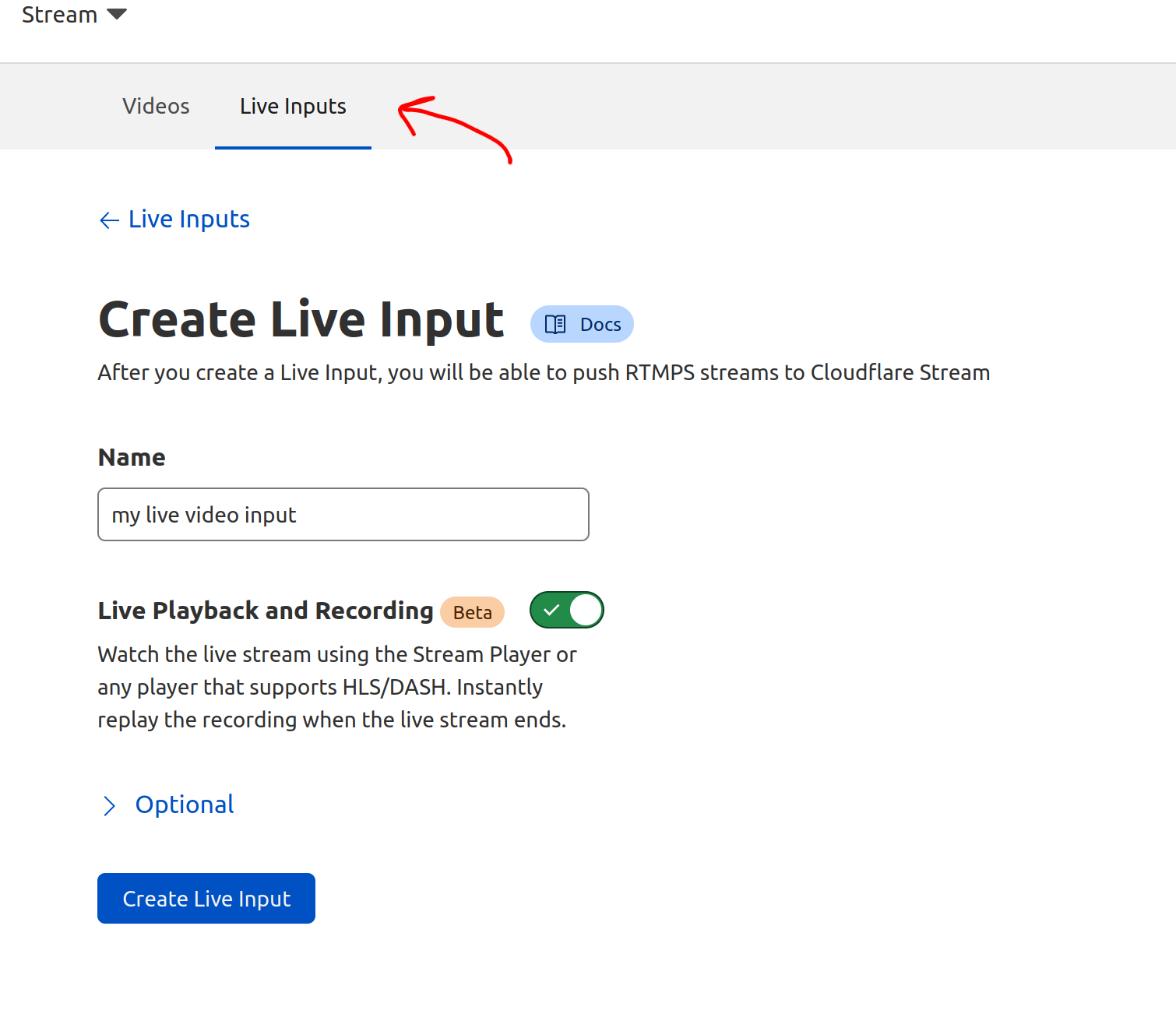
Stream works independent of any domain on Cloudflare. If you already have a Cloudflare account with a Stream subscription, you can begin using Stream Live by clicking on the “Live Input” tab on the Stream Dashboard and creating a new input:
To provide the best experiences, we use technologies like cookies to store and/or access device information. Consenting to these technologies will allow us to process data such as browsing behavior or unique IDs on this site. Not consenting or withdrawing consent, may adversely affect certain features and functions.
Functional
Always active
The technical storage or access is strictly necessary for the legitimate purpose of enabling the use of a specific service explicitly requested by the subscriber or user, or for the sole purpose of carrying out the transmission of a communication over an electronic communications network.
Preferences
The technical storage or access is necessary for the legitimate purpose of storing preferences that are not requested by the subscriber or user.
Statistics
The technical storage or access that is used exclusively for statistical purposes.The technical storage or access that is used exclusively for anonymous statistical purposes. Without a subpoena, voluntary compliance on the part of your Internet Service Provider, or additional records from a third party, information stored or retrieved for this purpose alone cannot usually be used to identify you.
Marketing
The technical storage or access is required to create user profiles to send advertising, or to track the user on a website or across several websites for similar marketing purposes.