Post Syndicated from Explosm.net original https://explosm.net/comics/tall-justin-strikes-back
New Cyanide and Happiness Comic
Post Syndicated from Explosm.net original https://explosm.net/comics/tall-justin-strikes-back
New Cyanide and Happiness Comic
Post Syndicated from Talks at Google original https://www.youtube.com/watch?v=2fEyffMkUxA
Post Syndicated from Chiho Sugimoto original https://aws.amazon.com/blogs/big-data/introducing-a-new-unified-data-connection-experience-with-amazon-sagemaker-lakehouse-data-connectivity/
The need to integrate diverse data sources has grown exponentially, but there are several common challenges when integrating and analyzing data from multiple sources, services, and applications. First, you need to create and maintain independent connections to the same data source for different services. Second, the data connectivity experience is inconsistent across different services. For each service, you need to learn the supported authorization and authentication methods, data access APIs, and framework to onboard and test data sources. Third, some services require you to set up and manage compute resources used for federated connectivity, and capabilities like connection testing and data preview aren’t available in all services. This fragmented, repetitive, and error-prone experience for data connectivity is a significant obstacle to data integration, analysis, and machine learning (ML) initiatives.
To solve for these challenges, we launched Amazon SageMaker Lakehouse unified data connectivity. This feature offers the following capabilities and benefits:
With SageMaker Lakehouse unified data connectivity, you can confidently connect, explore, and unlock the full value of your data across AWS services and achieve your business objectives with agility.
This post demonstrates how SageMaker Lakehouse unified data connectivity helps your data integration workload by streamlining the establishment and management of connections for various data sources.
In this scenario, an e-commerce company sells products on their online platform. The product data is stored on Amazon Aurora PostgreSQL-Compatible Edition. Their existing business intelligence (BI) tool runs queries on Athena. Furthermore, they have a data pipeline to perform extract, transform, and load (ETL) jobs when moving data from the Aurora PostgreSQL database cluster to other data stores.
Now they have a new requirement to allow ad-hoc queries through SageMaker Unified Studio to enable data engineers, data analysts, sales representatives, and others to take advantage of its unified experience.
In the following sections, we demonstrate how to set up this connection and run queries using different AWS services.
Before you begin, make sure you have the followings:
amzn-s3-demo-destination-bucket with the name of the S3 bucket.<your_database> with the name of your database.You can either create a new AWS Identity and Access Management (IAM) role or use an existing role that has permission to access the AWS Glue output bucket and AWS Secrets Manager.
If you want to create a new one, complete the following steps:
AWSGlueServiceRole, then choose Next.GlueJobRole-demo).Let’s get started with the unified data connection experience. The first step is to create a SageMaker Lakehouse data connection. Complete the following steps:

postgresql_source.
After the completion, it will create a new AWS Secrets Manager secret with a name like SageMakerUnifiedStudio-Glue-postgresql_source to securely store the specified username and password. It also creates a Glue connection with the same name postgresql_source.
Now you have a unified connection for Aurora PostgreSQL-Compatible.
You will use a JupyterLab notebook on SageMaker Unified Studio to load sample data from an S3 bucket into a PostgreSQL database using Apache Spark.


The code snippet reads the sample data Parquet files from the specified S3 bucket location and stores the data in a Spark DataFrame named df. The df.show() command displays the first 20 rows of the DataFrame, allowing you to preview the sample data in a tabular format. Next, you will load this sample data into a PostgreSQL database.

<account-id> with your AWS account ID):
Let’s see if you could successfully create the new table unified_connection_test. You can navigate to the project’s Data page to visually verify the existence of the newly created table.

Within the Lakehouse section, expand the postgresql_source, then the public schema, and you should find the newly created unified_connection_test table listed there. Next, you will query the data in this table using SageMaker Unified Studio’s SQL query book feature.
Now you can run queries using the connection you created. In this section, we demonstrate how to use the query book using Athena. Complete the following steps:
postgresql_source, then the publicunified_connection_test, choose Query with Athena.
This step will open a new SQL query book. The query statement select * from "postgresql_source"."public"."unified_connection_test" limit 10; is automatically filled.
This will save the current SQL query book, and the status of the notebook will change from Draft to Saved. If you want to revert a draft notebook to its last published state, choose Revert to published version to roll back to the most recently published version. Now, let’s start running queries on your notebook.
When a query finishes, results can be viewed in a few formats. The table view displays query results in a tabular format. You can download the results as JSON or CSV files using the download icon at the bottom of the output cell. Additionally, the notebook provides a chart view to visualize query results as graphs.

The sample data includes a column star_rating representing a 5-star rating for products. Let’s try a quick visualization to analyze the rating distribution.
This will display the results in the output panel. Now you have learned how the connection works on SageMaker Unified Studio. Next, we show how you can use the connection on AWS Glue consoles.
Next, we create an AWS Glue ETL job that reads table data from the PostgreSQL connection, converts data types, transforms the data into Parquet files, and outputs them to Amazon S3. It also creates a table in the Glue Data Catalog and add partitions so downstream data engineers can immediately use the table data. Complete the following steps:
GlueJobRole-demo).postgresql_source.unified_connection_test
review_date.
s3://amzn-s3-demo-destination-bucket).<your_database>).connection_demo_tbl.review_year.
When the job is complete, it will output Parquet files to Amazon S3 and create a table named connection_demo_tbl in the Data Catalog. You have now learned that you can use the SageMaker Lakehouse data connection not only in SageMaker Unified Studio, but also directly in AWS Glue console without needing to create separate individual connections.
Now to the final step, cleaning up the resources. Complete the following steps:
AWSGlueServiceRole.This post demonstrated how the SageMaker Lakehouse unified data connectivity works end to end, and how you can use the unified connection across different services such as AWS Glue and Athena. This new capability can simplify your data journey.
To learn more, refer to Amazon SageMaker Unified Studio.
 Chiho Sugimoto is a Cloud Support Engineer on the AWS Big Data Support team. She is passionate about helping customers build data lakes using ETL workloads. She loves planetary science and enjoys studying the asteroid Ryugu on weekends.
 Noritaka Sekiyama is a Principal Big Data Architect on the AWS Glue team. He is responsible for building software artifacts to help customers. In his spare time, he enjoys cycling with his new road bike.
 Shubham Agrawal is a Software Development Engineer on the AWS Glue team. He has expertise in designing scalable, high-performance systems for handling large-scale, real-time data processing. Driven by a passion for solving complex engineering problems, he focuses on building seamless integration solutions that enable organizations to maximize the value of their data.
 Joju Eruppanal is a Software Development Manager on the AWS Glue team. He strives to delight customers by helping his team build software. He loves exploring different cultures and cuisines.
 Julie Zhao is a Senior Product Manager at AWS Glue. She joined AWS in 2021 and brings three years of startup experience leading products in IoT data platforms. Prior to startups, she spent over 10 years in networking with Cisco and Juniper across engineering and product. She is passionate about building products to solve customer problems.
Post Syndicated from Danilo Poccia original https://aws.amazon.com/blogs/aws/aws-weekly-roundup-amazon-ec2-f2-instances-amazon-bedrock-guardrails-price-reduction-amazon-ses-update-and-more-december-16-2024/
The week after AWS re:Invent builds on the excitement and energy of the event and is a good time to learn more and understand how the recent announcements can help you solve your challenges. As usual, we have you covered with our top announcements of AWS re:Invent 2024 post.
You can now watch keynotes and sessions on the AWS Event YouTube channel. This year Andy Jassy, now President and CEO at Amazon, returned to re:Invent and shared some thoughts in these videos.
Drawing on experiences Amazon has had building distributed systems at massive scale, Werner Vogels, VP and CTO at Amazon, shared critical lessons and strategies he has learned for managing complex systems in his keynote.
Last week’s launches
Here are the launches that got my attention.
Amazon Elastic Compute Cloud (Amazon EC2) – A new generation of FPGA-powered instances (F2) is now available. In contrast to a purpose-built chip designed with a single function in mind and then hard-wired to implement it, a field programmable gate array (FPGA) can be programmed in the field, after it has been plugged in to a socket on a PC board. We’re also introducing Amazon EC2 High Memory U7i instances with 6TiB and 8TiB of memory. U7i instances are ideal to run large in-memory databases such as SAP HANA, Oracle, and SQL Server. Graviton-based 8th generation instances now support bandwidth configurations for Amazon VPC and Amazon EBS.
Amazon Bedrock Guardrails – We are reducing pricing by up to 85% to help you implement safeguards for your generative AI applications. Also, we’re adding multilingual capabilities with support for Spanish and French languages.
Amazon Simple Email Services (SES) – Now offers Global Endpoints for multi-region sending resilience and announces the availability of Deterministic Easy DKIM (DEED), a new form of global identity which simplifies the use of DomainKeys Identified Mail (DKIM) management.
AWS CloudFormation – An enhanced version of the AWS Secrets Manager transform introducing automatic AWS Lambda upgrades.
Amazon Lex – Launches new multilingual streaming speech recognition models that enhance recognition accuracy through two specialized groupings: a European-based model (for Portuguese, Catalan, French, Italian, German, and Spanish) and a Asia Pacific-based model (for Chinese, Korean, and Japanese).
Amazon Connect – Now supports push notifications for mobile chat on iOS and Android devices. In this way, you can be proactively notified as soon as there is a new message from an agent or chatbot, even when not actively chatting. You can now also configure holidays and other variances to your contact center hours of operation.
AWS Security Hub – Now supports automated security checks aligned to the Payment Card Industry Data Security Standard (PCI DSS) v4.0.1, a compliance framework that provides a set of rules and guidelines for safely handling credit and debit card information.
AWS Resource Explorer – Supports 59 new resource types including Amazon Elastic Kubernetes Service (Amazon EKS), Amazon Kendra, AWS Identity and Access Management (IAM) Access Analyzer, and Amazon SageMaker.
Amazon SageMaker AI – Inference optimized Amazon EC2 G6e instances (powered by NVIDIA L40S Tensor Core GPUs) and P5e (powered by NVIDIA H200 Tensor Core GPUs) are now available on Amazon SageMaker.
Amazon Redshift – Now supports automatically and incrementally refreshable materialized views on tables in a zero-ETL integration. Previously, in this case, you had to run a full refresh.
AWS Toolkit for Visual Studio Code – Now includes Amazon CloudWatch Logs Live Tail, an interactive log streaming and analytics capability that provides real-time visibility into your logs and makes it easier to develop and troubleshoot applications.
Other AWS news
Here are some additional projects, blog posts, and news items that you might find interesting:
Build a managed transactional data lake with Amazon S3 Tables – Just introduced at re:Invent 2024, Amazon S3 Tables is the first cloud object store with built-in Apache Iceberg support and the easiest way to store tabular data at scale. This post on the AWS Storage Blog provides an overview of S3 Tables and an example of how to build a transactional data lake with S3 Tables using Apache Spark on Amazon EMR.
Introducing Cross-Region Connectivity for AWS PrivateLink – More information on this recent launch that can be used to share and access Amazon Virtual Private Cloud (Amazon VPC) endpoint services across different AWS Regions.
Marc Brooker, VP/Distinguished Engineer at AWS, shared on his personal blog a few posts about what Amazon Aurora DSQL is, how it works, and how to make the best use of it:
That’s all for this week. Check back next Monday for another Weekly Roundup!
— Danilo
This post is part of our Weekly Roundup series. Check back each week for a quick roundup of interesting news and announcements from AWS!
Post Syndicated from jake original https://lwn.net/Articles/1001645/
Emacs is, famously, an
editor—perhaps far more—that is extensible using its own
variant of the Lisp programming language, Emacs
Lisp (or Elisp). This year’s
edition of EmacsConf, which is an annual “gathering” that has been held
online for the past five years, had two separate talks on using a different
variant of Lisp, Guile,
for Emacs. Both projects would preserve Elisp compatibility, which is a
must, but they would use Guile differently. The first talk we will cover
was given by Robin Templeton, who described the relaunch of the Guile-Emacs project, which would replace
the Elisp in Emacs with a compiler using Guile. A subsequent article will look
at the other talk, which is about an Emacs clone written
using Guile.
Post Syndicated from Rapid7 Labs original https://blog.rapid7.com/2024/12/16/2024-threat-landscape-statistics-ransomware-activity-vulnerability-exploits-and-attack-trends/

Now that we’ve reached the end of another year, you may be looking around the cybersecurity infosphere and seeing a glut of posts offering “hot takes” on the 2024 threat landscape and predictions about what’s coming next. At Rapid7, we don’t truck in hot takes, but rather, cold hard facts. Staying ahead of adversaries requires more than just advanced tools — it requires the latest intelligence and collaborative insights from experts working from data that tells the whole story.
In this blog, the global experts across our Rapid7 Labs and Managed Services teams share real-time vulnerability insights and threat intelligence so that our customers can anticipate and prevent breaches, pinpoint critical threats, and confidently take command of their attack surface.
Our teams responded to hundreds of major incidents, significant vulnerabilities, and ransomware threats in 2024, bolstered by visibility into hundreds of trillions of events analyzed by the Rapid7 Threat Engine. Our response included emergent threat and external vulnerability research, which we share with the community regularly here on the Rapid7 blog, as well as incident response activities for our managed security customers around the globe.
The Rapid7 Labs team has rounded up statistics and trends that caught our eye throughout the year, spanning ransomware, initial access vectors, common malware strains, notable CVE exploitation, and more.
The 2024 ransomware landscape was all about pushing boundaries, with several groups striving to make a name for themselves in extortion circles. Based on Rapid7 Labs data, 33 new or rebranded threat actors appeared between January 1 and December 10, 2024. In that same time period, there were a total of 75 groups (including the newbies) actively seeking to extort their victims by posting stolen data to their leak sites. Between these 74 groups there have been a total of 5,477 leak site posts.
Ransomware-as-a-service (RaaS) groups like RansomHub exfiltrated data from hundreds of targets spanning healthcare, financial services, critical manufacturing, and many more. Rapid7’s ransomware data shows that since this group emerged in early February of this year, it has made 573 posts to its leak site (as of November 30). This high number of posts has earned RansomHub a spot in Rapid7’s “Top 10 Active Ransomware Groups” list for 2024, coming in a very close second to LockBit, which finished November with 579 posts. View the entire top 10 in the graphic below.
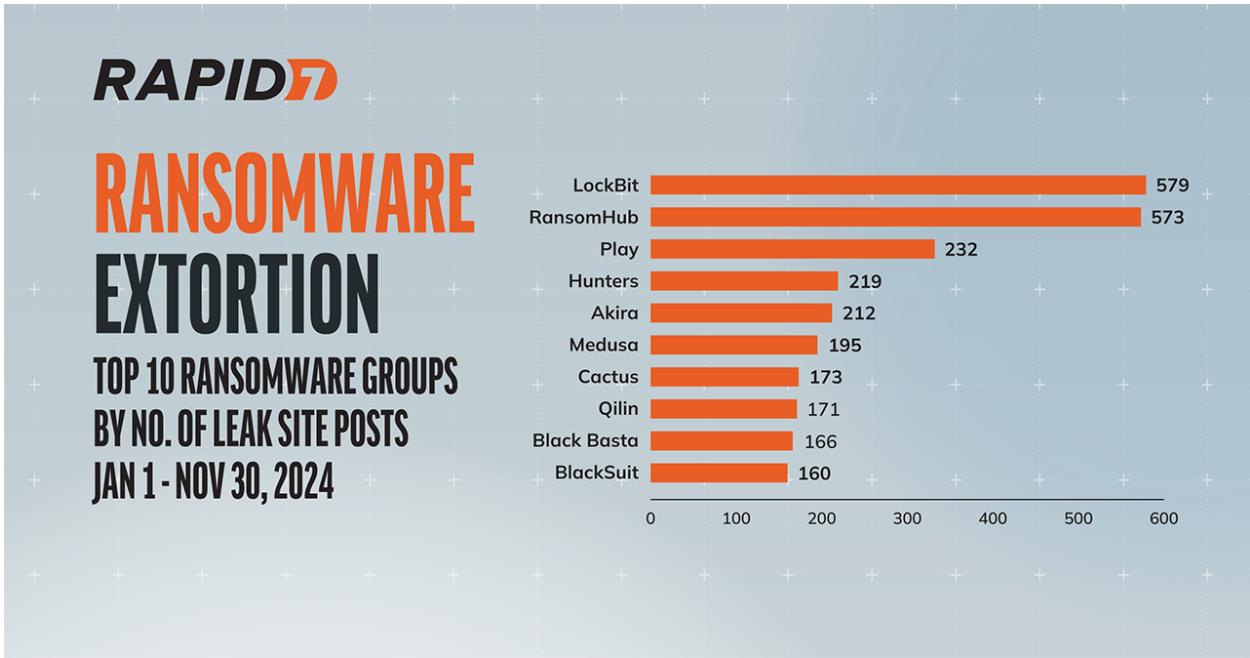
While not as prolific at posting on their leak site as RansomHub, Qilin is an example of an established player that has exposed troves of sensitive data as well as achieved significant payouts. Not one to shy away from the healthcare space, Qilin leaked just under 1 million patient records after an attempt to extort $50m from London hospitals earlier this year. With typical ransom demands ranging from $50,000 to $800,000, plus a generous affiliate scheme, Qilin will likely be a mainstay of 2025.
One or two new groups are combining high-visibility attacks with attention-grabbing marketing stunts, most likely to quickly work their way up the affiliate ladder. Hellcat has seemingly come from nowhere to demand $125,000 in “French bread” from one victim. This is, of course, a gimmick on their part, with the ransom expected to be paid in Monero cryptocurrency. There are frequently much larger ransoms demanded, but not all of them come with built-in press appeal.
Several groups have periods in which they seemingly “go dark,” where we do not see posts to their leak sites for weeks at a time. It may be that these groups are using this time to rework their infrastructure, or perhaps they are receiving quick payouts from victims wishing to avoid reputational damage and the negative press associated with a breach coming to light.
Rapid7 incident responders have seen a combination of fresh-faced ransomware groups and old security tricks filling out much of the year. As organizations work to secure their externally facing systems, they must also account for criminals seeking to deceive employees with social engineering and psychological sleight of hand.
Looking out across organizations’ expansive attack surfaces, Rapid7 incident responders observed several vulnerabilities exploited in the wild for initial access this year. The verticals Rapid7 saw targeted the most were manufacturing, professional services, retail, and healthcare.
Social engineering in 2024 was geared toward easy initial access via exploitation of support services. One customer case involved a help desk employee being tricked into configuring a new MFA device and resetting a user password. A separate incident involved an SEO poisoning attack and the download and installation of a trojanized version of the freeware disk analyzer tool SpaceSniffer. Analysis and cleanup tools are popular targets for fake advertisements and bogus downloads, which are typically found at the top of sponsored search results.
Several forms of malware have been at the front of the pack throughout 2024 across all industries. SocGholish, GootLoader, and AsyncRAT led the charge with a heady mix of remote access and credential theft. More than one-quarter (28%) of the customer incidents Rapid7 responded to in 2024 involved one of these three malware families.
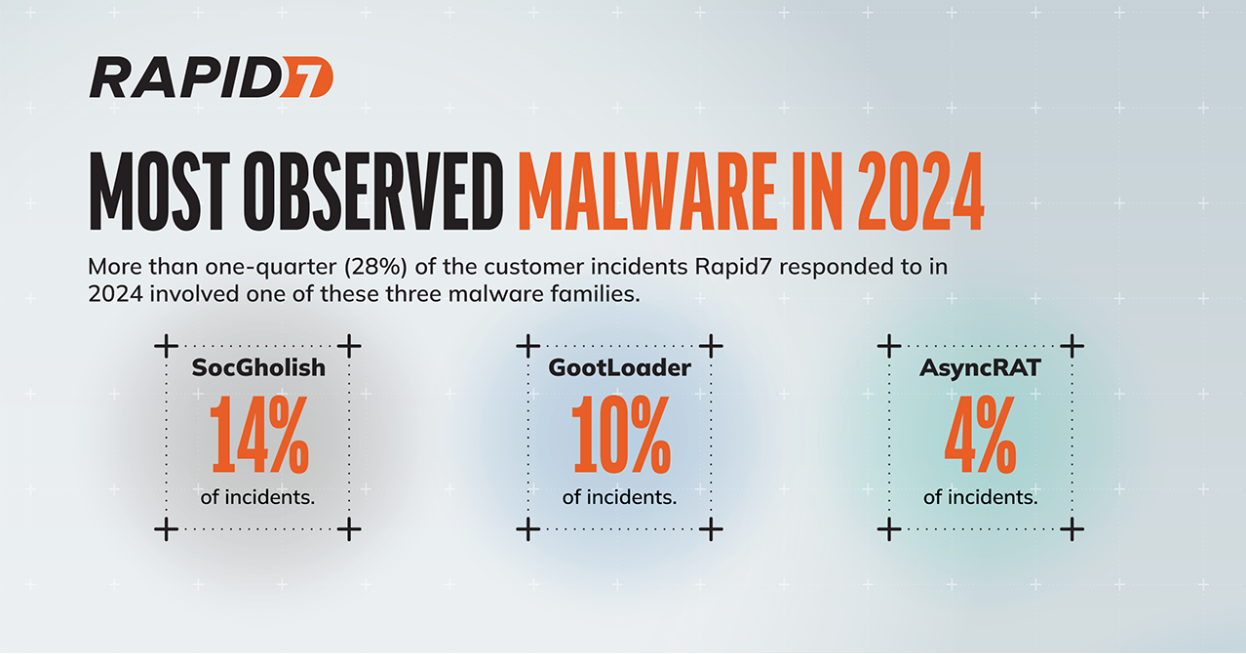
SocGholish was observed in 14% of incidents during 2024. The first of three heavily observed malware mainstays of 2024, SocGholish (also known as FakeUpdates) is rooted in website compromise and drive-by attacks. Hijacked websites are used to offer bogus “updates” to unsuspecting end users. You can see an example similar to SocGholish in our analysis of ClearFake from August 2023.
SocGholish updates often masquerade as commonly used programs like web browsers. If the campaign owners find the target system to be of interest, JavaScript is used to trigger a payload drawn from a wide variety of malware. In July of this year, SocGholish was used to distribute AsyncRAT, another of our most commonly observed remote access trojans (RATs).
GootLoader was observed in 10% of incidents during 2024. It is frequently observed in SEO poisoning campaigns typically involving targeted keywords on compromised websites. It is the delivery method for payloads such as Cobalt Strike via diverse search engine queries such as “Bengal cats” and “employment agreements.”
AsyncRAT was observed in 4% of incidents during 2024. It is a RAT that has been in use since 2019 for activities like data theft and keylogging. AsyncRAT typically arrives on a PC through social engineering or phony attachments and can also be used to deploy additional malware. It has also recently been used as part of a GenAI malware distribution campaign.
Vulnerability exploitation and remote access to systems without multi-factor authentication (MFA) continued to be the largest drivers of incidents overall in 2024, at 17% and 56% of incidents, respectively. We saw a significant (and rather unfortunate) shift in year-over-year initial access data in 2024 when compared to 2023. Roughly 40% of the incidents the Rapid7 Managed Services team saw in Q3 2023 were remote access to systems with missing or lax enforcement of MFA, particularly for VPNs and virtual desktop infrastructure (VDI). In Q3 2024, fully two-thirds (67%) of incident responses involved abuse of valid accounts and missing or lax enforcement of MFA — once again, mainly on VPNs and VDI, though exposed RDP also added a small number of incidents to remote access counts.
Vulnerability exploitation also remains a prevalent initial access vector, holding firm at 13% of incidents for both Q3 2023 and Q3 2024. Rapid7 MDR observed exploitation of the following CVEs in customer environments between January and November 2024 (non-exhaustive):
As the CVEs above demonstrate, the vulnerability exploitation Rapid7 has observed in managed customer environments has included newer flaws in addition to older, known vulnerabilities that have previously been under attack. Both Adobe ColdFusion CVE-2018-15961 and Oracle WebLogic Server CVE-2020-14882 have been on the U.S. Cybersecurity and Infrastructure Security Agency’s (CISA) list of Known Exploited Vulnerabilities (KEV) since November 2021.
While Rapid7 observed continued adversary use of zero-day vulnerabilities in network edge technologies like VPNs and secure gateways, zero-day flaws represented a lower overall percentage of major 2024 vulnerabilities when compared with what we saw in 2023. File transfer technologies also had a number of severe vulnerabilities disclosed in 2024 — but surprisingly, several of these have remained unexploited beyond the usual attempts to attack internet-facing honeypots. Critical issues in both Fortra’s GoAnywhere MFT software and Progress Software’s MOVEit Transfer solution were expected to see large-scale attacks, but happily, thus far those attacks have not materialized.
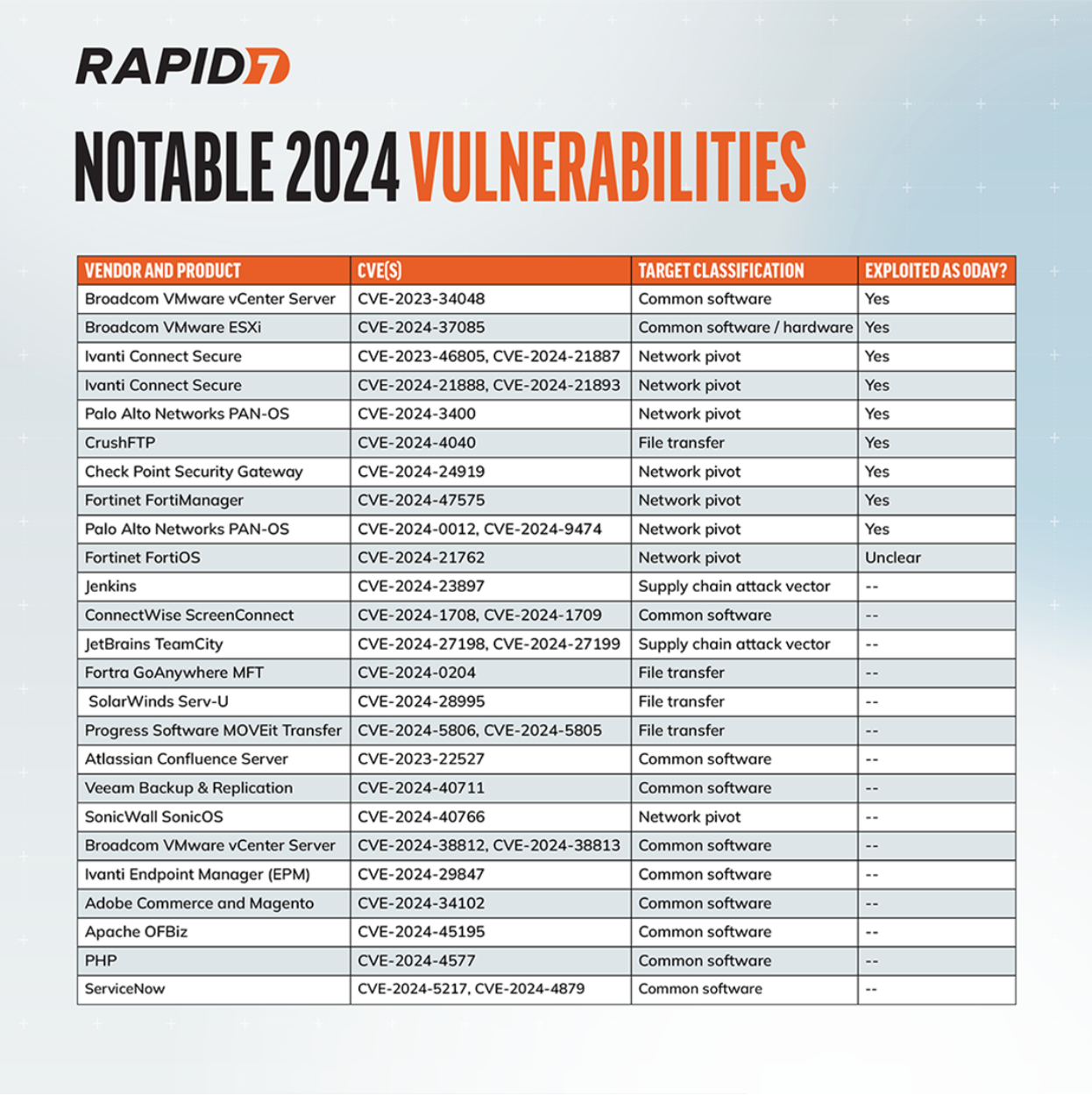
In Rapid7’s 2024 Attack Intelligence Report, we found that fully a quarter of widespread threat vulnerabilities our team analyzed for the period were the result of broad, global, zero-day exploitation by a single highly skilled threat actor. That trend lost traction in the back half of the year, but we still saw it rear its head from time to time. October 2024’s FortiManager RCE (CVE-2024-47575) offers a salient example: By the time the vulnerability was disclosed publicly, dozens of organizations around the world had already been compromised by a targeted but prolific threat campaign. A pair of widely exploited zero-day flaws in Palo Alto Networks firewalls (CVE-2024-0012, CVE-2024-9474) made for another prominent example. Rumors of a possible zero-day vulnerability swirled for weeks before the vendor was able to confirm real-world attacks in mid-November.
Below is a sample of notable CVEs from Rapid7’s vulnerability intelligence data, most (but not all) of which came under attack over the past 11 months.
Rapid7’s open platform for vulnerability research, AttackerKB, incorporated new tags in 2024 to allow users to note when vulnerabilities were observed in ransomware or state-sponsored attacks. Our team and our community added ransomware tags to more than 250 CVEs in 2024, and 75-plus vulnerabilities have been tagged for their (verified) use in known, state-sponsored threat campaigns. More than 1,700 unique CVEs have been reported exploited in the wild in AttackerKB, and we’ve incorporated hundreds of detailed vulnerability assessments from security researchers, incident responders, and pen testers. Interested in exploring more vulnerability data? Join the community here.
The threat landscape in 2024 saw a host of new ransomware actors creating chaos in novel ways, but it also showed that attackers are willing to use tried and true techniques to breach defenses. At the end of the day (ahem, year) the best practices remain the best practices. Having a strong vulnerability risk management program in place, building strong defenses against phishing and spear phishing campaigns, having robust patching procedures (particularly for zero-days), and instituting multi-factor authentication remain some of the strongest ways to prevent threat actors from making your organization another statistic. Speaking of statistics, here’s an infographic with some highlights from this post.
As always, Rapid7 Labs is here to help. We’ve spent 2024 doing unique and groundbreaking research into the behaviors of threat actors and we have no plans to let up in 2025. If you would like to see our work to date, head over to the Rapid7 Labs page. And keep an eye on it for big things to come next year.
Post Syndicated from jake original https://lwn.net/Articles/1002338/
Security updates have been issued by Debian (gst-plugins-base1.0, gstreamer1.0, and libpgjava), Fedora (bpftool, chromium, golang-x-crypto, kernel, kernel-headers, linux-firmware, pytest, python3.10, subversion, and thunderbird), Gentoo (NVIDIA Drivers), Oracle (kernel, perl-App-cpanminus:1.7044, php:7.4, php:8.1, php:8.2, postgresql, python3.11, python3.12, python3.9:3.9.21, python36:3.6, ruby, and ruby:2.5), SUSE (docker-stable, firefox-esr, gstreamer, gstreamer-plugins-base, gstreamer-plugins-good, kernel, python-Django, python312, and socat), and Ubuntu (mpmath).
Post Syndicated from Alejandro Diaz-Garcia original https://blog.cloudflare.com/cloudflare-radar-localization-journey/
Cloudflare Radar celebrated its fourth birthday in September 2024. As we’ve expanded Radar’s scope over the last four years, the value that it provides as a resource for the global Internet has grown over time, and with Radar data and graphs often appearing in publications and social media around the world, we knew that we needed to make it available in languages beyond English.
Localization is important because most Internet users do not speak English as a first language. According to W3Techs, English usage on the Internet has dropped 8.3 points (57.7% to 49.4%) since January 2023, whereas usage of other languages like Spanish, German, Japanese, Italian, Portuguese and Dutch is steadily increasing. Furthermore, a CSA Research study determined that 65% of Internet users prefer content in their language.
To successfully (and painlessly) localize any product, it must be internationalized first. Internationalization is the process of making a product ready to be translated and adapted into multiple languages and cultures, and it sets the foundation to enable your product to be localized later on at a much faster pace (and at a lower cost, both in time and budget). Below, we review how Cloudflare’s Radar and Globalization teams worked together to deliver a Radar experience spanning twelve languages.
Localization (l10n) is the process of adapting content for a region, including translation, associated imagery, and cultural elements that influence how your content will be perceived. The goal, ideally, is to make the content sound like it was originally written with the region in mind, incorporating relevant cultural nuances instead of merely replacing English with translated text.
Localization includes, among others:
Language: Translation, obviously, but it’s just the beginning.
Tone and message: Localization considers what will resonate with your target audience, not just what’s accurate.
Images: What may be appropriate in one country can be problematic in another (maps, for instance, that tend to include disputed territories).
Date, time, measurement, and number formats: Formats change based on location and may differ even within the same language. In the U.S., the date follows this format: “December 15, 2018.” But in the U.K., that same date would be written like this: “15 December 2018.” Not to mention a constant source of confusion: the month/day/year vs.day/month/year difference:

Image: XKCD, https://xkcd.com/2562/
Pixar movies are a great example of localization. Pixar takes great care to internationalize their movie production process, so they can replace or insert scenes that will resonate with watchers all over the world, not just the US. Let’s consider Inside Out (2015). During the movie, Riley reminisces about playing ice hockey back in Minnesota. Most of the world is not as familiar with ice hockey as in the US, so Pixar wisely decided that they would use soccer elsewhere, allowing a more direct emotional connection with those audiences.

Images: scene from Inside Out (2015), produced by Pixar Animation Studios and Walt Disney Pictures. Copyright Pixar Animation Studios and Walt Disney Pictures. Images used under fair use.
And you don’t have to go to computer animated movies. Here’s an example from The Shining (1980) where the famous “All work and no play makes Jack a dull boy” typewriter scene was localized into all languages differently. The producers, in a pre-Information Technology example of internationalization, shot and cut the localized scene into the local versions of the movie.

Images: scene from The Shining (1980), directed by Stanley Kubrick. Copyright Warner Bros. Pictures. Images used under fair use.
Localization is hard, and no one in the business will tell you otherwise. Fortunately there’s a playbook: the first step to localization is internationalization (i18n). Internationalization is the process of making a product ready to be translated and adapted into multiple languages and cultures. It’s a preparatory step that helps with translation and localization. The more you internationalize your code and the more you take into account language and cultural nuances, the easier the localization will be.
The first step to internationalize Radar was to assess how many of the localizable strings were hard-coded. Hard coding is the practice of embedding data directly into the source code of a program. Although a convenient and fast way to write your code, it makes it more difficult to change or localize the code later.
Most of the strings that make up the Radar pages used to be hard-coded, so before we could begin translating, externalization had to be done, which is the process of extracting any text that needs to be localized from the code and moving it into separate files.
Hard-coded strings:
import Card from “~/components/Card”;
import Chart from “~/components/Chart”;

export default function TrafficChart() {
  return (
    <Card
      title="Traffic"
      description="Share of HTTP requests"
    >
      <Chart />
    </Card>
  );
}
Externalized key placeholders:
import { useTranslation } from "react-i18next";
import Card from “~/components/Card”;
import Chart from “~/components/Chart”;

export default function TrafficChart() {
  const { t } = useTranslation();
  return (
    <Card
      title={t("traffic.chart.title")}
      description={t("traffic.chart.description")}
    >
      <Chart />
    </Card>
  );
}
There are several benefits to externalizing strings:
It allows translators to work on separate, isolated files that contain only localizable strings
It prevents accidental changes to the code
It allows developers to deploy updates, changes, and fixes without having to recompile or redeploy code for each language every time
If you look at the example below, when the code is compiled or deployed, upon reaching line 10 (on the left), it will find a key named traffic.chart.title. It will then proceed to match that key within the JSON file on the right, finding it on line 1090 and resolving it to “Traffic” for English, “Tráfego” for Portuguese and “トラフィック” for Japanese, doing this for every localized JSON file present in the code.

Not all strings are easily found and some are buried deep in the code, sometimes in legacy, inherited code or APIs. Fortunately, there are some strategies that help detect hard-coded strings. This is where pseudo translation comes into play.
Pseudo translation is a process that replaces all characters in a string with similar-looking ones; pseudo translated strings are enclosed within [ ] characters, and some extra characters are added to them to simulate text expansion (more on that later). It is an invaluable tool to help us find any hard coded strings, and to stress test the UI for language readiness and length variability, while still keeping the content mostly readable. For example, this string:
Routing Information
looks like this once pseudo translated:
[R~óútíñg Í~ñfó~rmát~íóñ]
Once pseudo translation is done, any English strings left intact are most likely hard coded or come from other sources. In the screenshot below you can see how ASN, Country, Name and Prefix Count did not get pseudo translated and had to be externalized by the Radar developers. The Globalization team collaborated with the Radar team to report and fix hard-coded text issues, as well as the issues that are mentioned in the next few sections.

Text expansion occurs when translated content from one language to another takes up more space than the original. Sometimes this expansion is horizontal, as English to German can expand up to an average of 35%, Spanish 30%, and French 20%). Asian languages might contract from the English but expand vertically. Interestingly, the fewer characters English has, the more the localized languages tend to expand.

Data source: IBM
UI designers and developers need to keep this in mind when creating their applications. Thus, one important consideration is to test the design mock-ups with larger texts and plan the UI to accommodate for text expansion. If some English content barely fits within its container, it will most likely not fit in other languages and possibly break the layout.
Here’s an example of the same button in different languages in Radar’s fixed-width sidebar. Since it’s the main navigation, truncating the text is not appropriate and the only viable option is wrapping, which means localized buttons can end up having different heights. Sometimes it’s necessary to trade visual consistency for usability.


In English, you can easily chain-connect words because most words lack inflections. Almost all programming languages are designed using the English language in mind. An old linguist joke goes like: an English teacher: a teacher of English or a teacher from England? Case in point, it would be nightmarish to translate this example:
A lovely little old rectangular green French silver whittling knife
Most Western languages need to connect words with some glue: prepositions, articles, or inflections. This is why, in general, string concatenation (putting together sentences or sentence parts by combining two or more strings) is a terrible practice for localization, even though it seems efficient from a development point of view. You can’t assume that all languages follow the same sentence structure as English. Most languages don’t.
Sentences may need to be completely reversed for them to sound grammatically correct in other languages. This becomes a particularly severe problem when a string doesn’t include a placeholder because it’s assumed to be concatenated at the beginning or the end of the string, such as this:
"is currently categorized as:"
Developers need to make sure to include any placeholders within the string itself, so that translators can easily move them as needed, for instance:
"Distribution of {{botClass}} traffic by IP version"
would look like this in Simplified Chinese (notice how the {{botClass}} placeholder got moved)
"{{botClass}} 流量分布(按 IP 版本)"
As with string concatenation, string reuse (using the same string in more than one place and just swapping out the contents of a placeholder) seems efficient if you’re a developer. A problem arises when translating this into gendered languages, such as most European languages. In Spanish, depending on its position and context, a word as simple as “open” standing by itself, could have all these different translations:
Translators will need to know what will replace the placeholders in strings like the one below, because the surrounding wording may refer to a term that is masculine, feminine, or neutral (for languages that have those, such as German). If a placeholder could be more than one of these (a masculine noun but also a feminine noun), the translation will become grammatically incorrect in at least some of the cases. In the following example, translators would need to know what {link1} and {link2} will be replaced with, so they know which grammatically correct wording to use around them.
Your use of the URL Scanner is subject to our {{link1}}. Any personal data in a submitted URL will be handled in accordance with our {{link2}}.
A better way to do this is to have component placeholders and include the text to be translated for context:
Your use of the URL Scanner is subject to our <link1>Online Service Terms of Use</link1>. Any personal data in a submitted URL will be handled in accordance with our <link2>Privacy Policy</link2>.
Even simple words like Custom, Detected, or Disabled could have different translations depending on their position within a sentence, their location in the UI, depending on whether they accompany a singular, plural, masculine or feminine noun, so extra entries for these may need to be created.
Date formats vary greatly from country to country. Not only can’t you assume that all countries use a month/day/year format, but even the day that the week starts may be different based on the country or culture.
Here’s a comparison of Radar’s date picker in American English against European Spanish (which has weeks starting on Mondays instead of Sundays), and against Simplified Chinese (which uses a completely different format for dates).

Thankfully, developers don’t need to know all the country-specific details, as they can use Intl.DateTimeFormat or Date.toLocaleString() for this.
Intl.DateTimeFormat receives a locale and formatting options that differ from string tokens commonly found on date libraries such as Day.js or Moment.js. Unless you specifically use the localized string tokens on those libraries, the order of the tokens is fixed, along with any characters or delimiters you might add to the format, which poses a problem because the date format parts order should change according to the locale.
Intl.DateTimeFormat handles all that and saves you the trouble of having to add a date formatting dependency to your project and loading library-specific locale resources.
Here’s an example of a generic React component using Intl.DateTimeFormat and react-i18next. The code below will render the date as “Tue, Oct 1, 2024” for American English (en-US) and as “2024年10月1日(火)” for Japanese (ja-JP).
import { useTranslation } from "react-i18next";

export default function SomeComponent() {
  const { i18n } = useTranslation();
  const date = new Date("2024-10-01");
  return (
    <time dateTime={date.toISOString()}>
      {new Intl.DateTimeFormat(i18n.language, {
        weekday: "short",
        month: "short",
        year: "numeric",
        day: "numeric",
      }).format(date)}
    </time>
  );
}Similarly, different locales use different notations for numbers. In the US and the UK, a period is used as the decimal separator, and a comma as the thousands separator. Instead, other countries use a comma as the decimal separator and a period (or a space) as the thousands separator. Again, it’s not necessary for developers to know all the odds and ends for this, as they can use Intl.NumberFormat.
Here’s an example of a generic React component using Intl.NumberFormat and react-i18next. The code below will render the number as “12,345,678.90” for American English (en-US) and as “12 345 678,90” for Portuguese (pt-PT). Intl.NumberFormat options can be passed to format numbers as decimals, percentages, currencies, etc, and specify things like number of decimal places and rounding strategies.
import { useTranslation } from "react-i18next";

export default function SomeComponent() {
  const { i18n } = useTranslation();
  return (
    <span>{new Intl.NumberFormat(i18n.language, {
    style: "decimal",
    minimumFractionDigits: 2,
  }).format(12345678.9)}</span>);
}
As of mid-December, regionalized number formatting is not fully implemented on Radar. We expect this to be complete by the end of Q1 2025.
When you have a list of items that appears sorted, such as a country list in a dropdown, it’s not enough to simply translate the items. For instance, when translated into Portuguese, “South Africa” becomes “África do Sul”, which means it should then go near the top of the list. Besides that, each language has different sorting requirements, and those go way beyond the A-Z alphabet. For instance, several Asian languages don’t use Latin characters at all, and may get sorted by stroke or character radical order instead.

Here’s an example of a generic React country selector component using String.localeCompare and react-i18next. The code below imports a list of countries with name and alpha-2 code and sorts the options according to the translated country name for the active locale. Intl.Collator options can be passed to localeCompare() for specific sorting needs.
import { useTranslation } from "react-i18next";

import Select from "~/components/Select";
import COUNTRIES from "~/constants/geo";

export default function CountrySelector() {
  const { t, i18n } = useTranslation();
  const options = COUNTRIES.map(({ name, code }) => ({
    label: t(name, { ns: "countries" }),
    value: code,
  })).sort((a, b) => a.label.localeCompare(b.label, i18n.language));
  return <Select options={options} onChange={(option) => { /* do something */ }} />;
}Many of the Radar screens and reports include output from Cloudflare or third-party APIs. Unfortunately, the vast majority of these APIs only output English content. When combining that with the translated part of the site, it may give the impression of a poorly localized site.
To solve this, we take API outputs and map everything into separate files, translate all possible messages, and then display that instead of the original output. But as APIs evolve over time and new messages are added, or existing ones get changed, keeping up with these translations becomes an endless game of “whac-a-mole“.
"Address unreachable error when attempting to load page": "Error de dirección inaccesible al intentar cargar la página",
"Authentication failed": "Autenticación fallida",
"Browser did not fully start before timeout": "El navegador no se ha iniciado por completo antes de agotar el tiempo de espera.",
"Certificate and/or SSL error when attempting to load page": "Error de certificado y/o SSL al intentar cargar la página",
"Crawl took too long to finish": "El rastreo ha tardado demasiado en completarse.",
"DNS resolution failed": "Error de resolución de DNS",
"Network connection aborted.": "Conexión de red cancelada"
It should be a best practice for APIs to accept a locale parameter or header, and for engineers to have multiple languages in mind when building these APIs, even if it’s just the error messages. That could save time and resources for any number of clients they might have.
Radar is a Remix project running on Cloudflare Pages. While researching ways to implement internationalization, we came across this Remix blog post, and after some experimenting, we decided to go with Sergio Xalambrí’s remix-i18next. We mostly followed the installation instructions found on the repo, with some changes.
We have multiple translation files on every locale folder, one for each data source, to help us maintain strings that come from APIs. Each file can be used to create a namespace for translations, to avoid key collisions, and also to be loaded separately as needed for each route or component.
On remix-i18next’s instructions, you’ll find the concept of backend plugins to achieve the loading of these files, except that you cannot use i18next-fs-backend with Cloudflare Pages because there’s no access to the filesystem. To solve that we used the resources approach, similar to what can be found on this sample remix-i18next with vite setup, but we didn’t want to have to maintain the resources dictionary each time we add new namespaces, so vite’s Glob imports came in handy:
import { serverOnly$ } from "vite-env-only/macros";

export const resources = serverOnly$(
  Object.entries(import.meta.glob("./*/*.json", { import: "default" })).reduce(
    (acc, [path, module]) => {
      const parts = path.split("/").slice(1);
      const locale = parts[0];
      const namespace = parts[1].split(".")[0];
      if (!acc[locale]) acc[locale] = {};
      if (!acc[locale][namespace]) acc[locale][namespace] = {};
      module().then((value) => (acc[locale][namespace] = value));
      return acc;
    },
    {},
  ),
)!;
This creates a server-side only resources dictionary by importing all JSON files in the locales folder to be passed as the resources property for the i18next configuration in Remix’s entry.server.tsx.
To load namespaces on the client side, we created a Remix resource route that uses the resources dictionary and responds with the namespace object of the requested locale:
import { LoaderFunctionArgs } from "@remix-run/server-runtime";

import { resources } from "~/i18n";

export async function loader({ params }: LoaderFunctionArgs) {
  const { locale, namespace } = params;
  return resources[locale]?.[namespace] || {};
}
You can then use the i18next-http-backend or i18next-fetch-backend backend plugins for the i18next configuration in Remix’s entry.client.tsx:
import i18next from "i18next";
import i18nextHttpBackend from "i18next-http-backend";
import { initReactI18next } from "react-i18next";
import { getInitialNamespaces } from "remix-i18next/client";
import { options } from “~/i18n”;

await i18next
    .use(initReactI18next)
    .use(i18nextHttpBackend)
    .init({
      ...options,
      ns: getInitialNamespaces(),
      backend: { loadPath: "/api/i18n/{{lng}}/{{ns}}" },
    });
Default namespaces are defined with the defaultNS config property:
export const defaultNS = ["main", "countries"];Additional namespaces to be used for each route can be defined through Remix’s handle export:
export const handle = {
  i18n: ["url-scanner", "domain-categories"],
};
Namespaces on the server side get picked up by the getRouteNamespaces function on entry.server.tsx:
const ns = i18n.getRouteNamespaces(remixContext);On the client-side, examples suggested that you’d have to declare the namespaces on each useTranslation() hook instance, but we worked around that in Remix’s root.tsx file:
import { useLocation, useMatches } from "@remix-run/react";
import { useTranslation } from "react-i18next";
import { defaultNS } from “~/i18n”;

export function Layout({ children }) {
  const location = useLocation();
  const matches = useMatches();
  const handle = matches?.find((m) => m.pathname === location.pathname)?.handle || {};
  useTranslation([...new Set([...defaultNS, ...(handle.i18n || [])])]);
  ...
}
This causes the client-side plugin to make calls to the resource route and load the required namespaces.
We also wanted to have the locale in the URL pathname, but not for the default language, so Remix’s optional segments allowed us to do just that. remix-i18next does not have URL locale detection by default, but you can provide your own findLocale function that will receive the request as an argument, and you can then parse the request URL to extract the locale.
Once you set up your project for internationalization, you can inform search engines of localized versions of your pages. This allows search engines to display localized results of your website in the same language that is being searched.
<head>
  ...
  <link rel="alternate" href="https://radar.cloudflare.com/" hreflang="en-US">
  <link rel="alternate" href="https://radar.cloudflare.com/de-de" hreflang="de-DE">
  <link rel="alternate" href="https://radar.cloudflare.com/es-es" hreflang="es-ES">
  <link rel="alternate" href="https://radar.cloudflare.com/es-la" hreflang="es-LA">
  <link rel="alternate" href="https://radar.cloudflare.com/fr-fr" hreflang="fr-FR">
  <link rel="alternate" href="https://radar.cloudflare.com/it-it" hreflang="it-IT">
  <link rel="alternate" href="https://radar.cloudflare.com/ja-jp" hreflang="ja-JP">
  <link rel="alternate" href="https://radar.cloudflare.com/ko-kr" hreflang="ko-KR">
  <link rel="alternate" href="https://radar.cloudflare.com/pt-br" hreflang="pt-BR">
  <link rel="alternate" href="https://radar.cloudflare.com/pt-pt" hreflang="pt-PT">
  <link rel="alternate" href="https://radar.cloudflare.com/zh-cn" hreflang="zh-CN">
  <link rel="alternate" href="https://radar.cloudflare.com/zh-tw" hreflang="zh-TW">
  <link rel="alternate" href="https://radar.cloudflare.com/" hreflang="x-default">
  <link rel="canonical" href="https://radar.cloudflare.com/">
  ...
</head>
You should also localize page titles, descriptions, and relevant Open Graph metadata. To achieve this with Remix and remix-i18next, you use the getFixedT method in route loaders to resolve the translations and return data for the meta export:
import type { LoaderFunctionArgs, MetaArgs } from "@remix-run/server-runtime";
import i18n from "~/i18next.server";

export async function loader({ request }: LoaderFunctionArgs) {
  const t = await i18n.getFixedT(request);
  return {
    meta: {
      title: t("meta.about.title"),
      description: t("meta.about.description"),
      url: request.url,
    },
  };
}

export const meta = ({ data }: MetaArgs<typeof loader>) => data.meta;
If you are defining default meta tags in parent routes you may also need to merge the meta objects.
There is hardly ever an absolute when dealing with languages. Your Spanish, your French, your Japanese will be different from someone else’s, even if you grew up next door to each other. Family, education, environment, relationships will season and give color to your language. It is like a family recipe — it’s unique, it feels like home and it’s not negotiable. It does not make it better or worse, it just makes it yours. And yours will always be different from other languages.
Localization is hard. We have seen that there are many things that can and will go sideways, and there are many unknowns that bubble up to the surface in the process. It can also make a product better, as it stress tests the product’s code and design. A tight relationship between the globalization and Radar teams helped make our efforts go more smoothly. In addition, our translators stepped up to the challenge, familiarizing themselves with Radar, analyzing the English content, finding the right translation that will not only resonate with the audience but also fit in the space allotted, constantly checking for context, previous translations, consistency, industry standards, adapting to style guides, tone, and messaging, and after all of that, ultimately acknowledging the fact that there will be people who will disagree (to varying levels of zeal) with their choice of words.
If you haven’t done so already, we encourage you to explore the localized versions of Cloudflare Radar. Click the language drop-down in the upper right corner of the Radar interface and select your language of choice — Radar will be presented in that language until a new selection is made. Have comments or suggestions about the translations? Let us know at [email protected].
Post Syndicated from The History Guy: History Deserves to Be Remembered original https://www.youtube.com/watch?v=DmOAQSofDnM
Post Syndicated from Bruce Schneier original https://www.schneier.com/blog/archives/2024/12/short-lived-certificates-coming-to-lets-encrypt.html
Starting next year:
Our longstanding offering won’t fundamentally change next year, but we are going to introduce a new offering that’s a big shift from anything we’ve done before—short-lived certificates. Specifically, certificates with a lifetime of six days. This is a big upgrade for the security of the TLS ecosystem because it minimizes exposure time during a key compromise event.
Because we’ve done so much to encourage automation over the past decade, most of our subscribers aren’t going to have to do much in order to switch to shorter lived certificates. We, on the other hand, are going to have to think about the possibility that we will need to issue 20x as many certificates as we do now. It’s not inconceivable that at some point in our next decade we may need to be prepared to issue 100,000,000 certificates per day.
That sounds sort of nuts to me today, but issuing 5,000,000 certificates per day would have sounded crazy to me ten years ago.
This is an excellent idea.
Slashdot thread.
Post Syndicated from The Atlantic original https://www.youtube.com/watch?v=vkCmyzdHT1E
Post Syndicated from Matt Granger original https://www.youtube.com/watch?v=w4BXJfSLduY
Post Syndicated from LastWeekTonight original https://www.youtube.com/watch?v=zEFgnxZbADQ
Post Syndicated from LastWeekTonight original https://www.youtube.com/watch?v=xHzCRkt1f6c
Post Syndicated from LastWeekTonight original https://www.youtube.com/watch?v=yc_Ys0t9AjY
Post Syndicated from LastWeekTonight original https://www.youtube.com/watch?v=ymG9ZMOYjaw
Post Syndicated from LastWeekTonight original https://www.youtube.com/watch?v=uBX10Jjah50
Post Syndicated from LastWeekTonight original https://www.youtube.com/watch?v=j_I7x6WXFVo
Post Syndicated from LastWeekTonight original https://www.youtube.com/watch?v=ecCls-MO7tk
Post Syndicated from LastWeekTonight original https://www.youtube.com/watch?v=mwUocEoQ0Uk