Post Syndicated from xkcd.com original https://xkcd.com/3016/
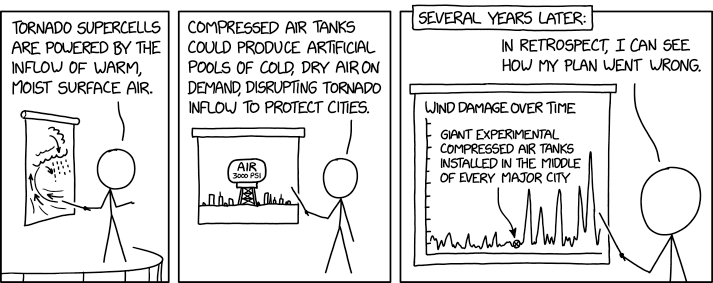
Post Syndicated from xkcd.com original https://xkcd.com/3016/
Post Syndicated from The History Guy: History Deserves to Be Remembered original https://www.youtube.com/watch?v=gdvQBaXNzBI
Post Syndicated from Rohit Kumar original https://www.servethehome.com/this-is-the-next-gen-nvidia-connectx-8-supernic-for-800gbps-networking/
At SC24, we saw the new NVIDIA ConnectX-8 SuperNIC bringing GPU looks to the 800Gbps networking generation
The post This is the Next-Gen NVIDIA ConnectX-8 SuperNIC for 800Gbps Networking appeared first on ServeTheHome.
Post Syndicated from Talks at Google original https://www.youtube.com/watch?v=UEpsZ9fki0o
Post Syndicated from Explosm.net original https://explosm.net/comics/filthy
New Cyanide and Happiness Comic
Post Syndicated from Eric Smith original https://www.servethehome.com/kaytus-kr2190v3-is-a-cool-2u-2-node-server-at-sc24-intel-amd/
At SC24, we saw the Kaytus KR2190V3 which was not what we expected at all in a dual socket server making it a neat design
The post Kaytus KR2190V3 is a Cool 2U 2 Node Server at SC24 appeared first on ServeTheHome.
Post Syndicated from The History Guy: History Deserves to Be Remembered original https://www.youtube.com/watch?v=Zl89gSWCSUQ
Post Syndicated from Oglaf! -- Comics. Often dirty. original https://www.oglaf.com/famouslastwords/


Post Syndicated from The History Guy: History Deserves to Be Remembered original https://www.youtube.com/watch?v=uz3syICGM8U
Post Syndicated from Techmoan original https://www.youtube.com/watch?v=aqc9akDIE_g
Post Syndicated from Светла Енчева original https://www.toest.bg/siedmitsata-18-23-noiemvri-2/

1000 дни. Толкова бяха нужни на отиващия си президент Джо Байдън, за да даде благословията си Украйна да стреля с американски ракети по военни бази в Русия. Можем само да гадаем как щеше да се развие войната на Русия срещу Украйна, ако това разрешение беше дадено например през есента на 2022 г., когато украинската контраофанзива успя да отвоюва обратно територии от Харковска област та до Херсон. Тогава Украйна беше в силна позиция, а мандатът на Байдън беше далеч от края си.
Ще си кажете: тогава световните лидери се опасяваха, че Русия може да използва ядрено оръжие. Но Русия заплашва със същото и сега. Трябваше ли Доналд Тръмп отново да спечели изборите, за да проявят Байдън, а след него и някои европейски лидери някаква решителност? Ала няма смисъл да се питаме какво би било, ако.
Междувременно в България 51-вото Народно събрание вече две седмици не може да си избере председател, а първото му заседание се разтяга и точи като разтопено сирене гауда. Ако и за това депутатите не могат да намерят мнозинство, малко вероятно е да са в състояние да решат каквото и да е друго нещо – например да изберат правителство.
Това означава, че може би пак вървим към избори. Не че е някаква изненада – на Пеевски не му трябва редовно правителство, за да постига всичко, което иска. Например да намести „Новото начало“ в нова сграда, като за тази цел от нея се изнесат цели три институции.
На темата за буксуващия избор на председател на парламента е посветен и тазседмичният вътрешнополитически анализ на Емилия Милчева „Къде си, Мойсей?“. България си няма Мойсей, който да поведе народа, пък и не изглежда някой да го чака. Залогът за председателя на Народното събрание е толкова голям и поради конституционната реформа, орязваща правомощията на президента, която Румен Радев за пореден път обжалва.
Колкото и да е нестабилна България, тя е част от световната политика, напомня ни Анахит Хачикян в дебютната си статия за „Тоест“ „Зад кулисите на изслушванията за еврокомисари“. Избирането на Екатерина Захариева за еврокомисар е „звезден миг“, защото придава гражданска легитимност на българската политика, каквато вътрешните дрязги логично не могат да произведат. От статията научаваме и как минават изслушванията на кандидат-еврокомисарите, а също така че и в Европейския парламент има санитарен кордон, но за разлика от българския, той работи.
Продължаваме темата с Искрен Иванов, който прави анализ на българската външна политика, която отново е на кръстопът между Вашингтон и Москва. Уж социалистическият лагер вече не съществува, но като верен сателит все около планетата майка кръжим. Било от носталгия, било защото тази носталгия се подхранва и експлоатира от определени сили и гласовитите им говорители. Затова може да стане така, че България да изпие горчивата чаша на нов (или стария?) политически избор.
Ако с напредването на ноември ви става студено, не знам дали ще ви прозвучи утешително, че на някои места и през лятото вали сняг. В северната си поредица Светла Стоянова ни разказва за снежните лета в една исландска хижа. Те са студени, но пък пристрастяващо красиви. Ако искате да се стоплите, пълно е с горещи извори, които се използват за отопление. И освен леда, блещука и лава на няколко хилядолетия. А денят продължава… до следващата сутрин.
Правим елегантен преход от природата към културата с помощта на… пуйката. Тази птица, която се е превърнала в символ на американския Ден на благодарността, хем е животно (природа, значи), хем в името ѝ има нещо гнило, смята Екатерина Петрова. А като говорим за имена, вече сме в полето на думите. Ацтеките я наричат голямо чудовище, испанците – паун, българите – токачка, а английското ѝ название turkey идва от turkey-cock (‘турски петел’). Пък през 2022 г. Турция си смени англоезичното наименование от Turkey на Türkiye, за да престанат най-сетне да я асоциират с тази пуйка.
И докато сме на културна вълна, хайде да си поговорим за банята. Покрай страстите около пиесата на Бърнард Шоу в Народния театър се позамислих за историята на къпането и хигиената в България и в Западна Европа от Възраждането насетне. И реших да споделя. Не за друго, а защото не виждам причина нито да се обиждаме, нито да имаме комплекси по темата.
Ако сте очаквали препоръка – дочакахте. Неотдавна силно ме впечатли финландският филм „Четирима непораснали възрастни“, който гледах по MAX – изненадващо дълбок и човешки разказ за полиаморията. Без да идеализира и без да съди. Без да спестява възможните проблеми, но и без да превръща съдбата на героите в безизходица.
Но вероятно развитието на историята във филма е свързана и с особеностите на финландското общество – в една по-консервативна среда героите щяха да бъдат изправени пред проблеми както в друг любим филм – „Професор Марстън и жените чудо“.
Ако ви харесва да четете „Тоест“, напомням, че на вашата подкрепа разчитаме, за да продължаваме напред.
Post Syndicated from jake original https://lwn.net/Articles/999197/
The Linux Foundation Technical
Advisory Board (TAB) has decided to “restrict Kent Overstreet’s
” based on a recommendation from the Code of Conduct
participation in the kernel development process during the Linux 6.13
kernel development cycle
committee. In particular, the scope of the restriction will be to “decline all pull
” during the development cycle.
requests from Kent Overstreet
Overstreet is the creator and maintainer of the bcachefs filesystem.
This
action stems from a message
Overstreet posted back in early September that was abusive toward another
kernel developer; there is a fair amount of back-and-forth about the
incident and the committee’s attempts to extract a public apology from
Overstreet in that thread. Overstreet has published a lengthy blog post
describing his side of the story.
Post Syndicated from Rohit Kumar original https://www.servethehome.com/eviden-shows-the-quad-nvidia-connectx-7-cedar-module/
We finally found the NVIDIA Cedar module with four NVIDIA ConnectX-7 NICs onboard at the Eviden booth at SC24
The post Eviden Shows the Quad NVIDIA ConnectX-7 Cedar Module appeared first on ServeTheHome.
Post Syndicated from The History Guy: History Deserves to Be Remembered original https://www.youtube.com/watch?v=XUiRcckcbIk
Post Syndicated from Explosm.net original https://explosm.net/comics/customer
New Cyanide and Happiness Comic
Post Syndicated from Jonathan Vogel original https://aws.amazon.com/blogs/devops/dissecting-the-performance-gains-in-amazon-q-developer-agent-for-code-transformation/
Amazon Q Developer Agent for code transformation is an AI-powered tool which modernizes code bases from Java 8 and Java 11 to Java 17. Integrated into VS Code and IntelliJ, Amazon Q simplifies the migration process and reduce the time and effort compared to manual process. It proposes and verifies code changes, using AI to debug compilation errors. In this blog post, we’ll explore recent improvements to our code transformation agent, particularly its enhanced debugging capabilities. The enhanced debugger agent significantly improves transformation efficiency and quality compared to the existing debugger.
To upgrade Java codebases, the code transformation agent takes the source code input and verify the build and test in source Java version. It then uses deterministic tools to apply code changes, followed by building and testing the changed code in the target Java version. If errors occur in this stage, a generative AI-based system debugs and resolves the compilation errors. Until today, the debugger resolves each error one by one, locating the code file with the error in the codebase, and fixing it. This debug step iterates until all compilation errors are solved or the maximum number of iterations is reached.

As an example, if, as the result of a library upgrade, an import statement is missing or wrong, the AI debugger will re-build, iterate to find all the references in multiple files one by one, and update each reference to resolve the error. Refer to this blog “Three ways Amazon Q Developer agent for code transformation accelerates Java upgrades” for detailed explanation of each transformation step. This approach has helped Q Developer customers achieve accelerations of migration effort by over 40%.
To further improve the ability of Q Developer to generate error-free code, we’ve just released multiple foundational improvements to the AI debugger.
To implement these capabilities, the debugger AI is re-architected as a multi-agent system. A memory management agent is responsible to analyze last iteration results and append the relevant portions to the inter-iteration memory. A critic agent is responsible to analyze progress and provide additional information to the debugger agent and, if a dead end is detected, rollback the progress to a previous state. A debugger agent, analyzes the memory and the critique from the previous agents and modifies or updates the plan to fix the remaining errors in the codebase. The debugger agent has its disposal a set of generic and specialized tools to browse and explore the codebase, edit source files, trigger builds, add dependencies, and so on. It is important to note that the agent only has access to the files and tools related to the transformation task, which limits hallucinations and drive towards progress.
Let’s examine how the agent handles recurring issues across multiple files with these improvements. Consider a scenario where several Java files are missing the same import statement after upgrading from Java 8 to Java 17. This happens when you upgrade from older Java collections (like Vector and Enumeration) to modern streaming operations. The system is capable of helping you update these patterns automatically. The agent is now able to intelligently detect this pattern and implement a comprehensive solution across all affected files. Suppose we have three Java files that use the java.util.stream.Collectors class, but the import is missing in each:
File1.java:
public class File1 {
    public List<String> process(List<String> input) {
        return input.stream()
            .filter(s → s.length() > 5)
            .collect(Collectors.toList()); // Error: Cannot resolve symbol 'Collectors'
    }
}
File2.java:
public class File2 {
    public Map<String, Long> countWords(List<String> words) {
        return words.stream()
            .collect(Collectors.groupingBy(
                word -> word.toLowerCase(),
                Collectors.counting()
            )); // Error: Cannot resolve symbol 'Collectors'
    }
}
File3.java:
public class File3 {
    public String concatenate(List<String> strings) {
        return strings.stream()
            .collect(Collectors.joining(", "));
            // Error: Cannot resolve symbol 'Collectors'
    }
}
After the agent detects the common issue and applies the fix, all three files would be updated as follows:
File1.java (after fix):
import java.util.stream.Collectors;

public class File1 {
    public List<String> process(List<String> input) {
        return input.stream()
            .filter(s -> s.length() > 5)
            .collect(Collectors.toList());
    }
}
File2.java (after fix):
import java.util.stream.Collectors;

public class File2 {
    public Map<String, Long> countWords(List<String> words) {
        return words.stream()
            .collect(Collectors.groupingBy(
                word -> word.toLowerCase(),
                Collectors.counting()));
    }
}
File3.java (after fix):
import java.util.stream.Collectors;

public class File3 {
    public String concatenate(List<String> strings) {
        return strings.stream()
            .collect(Collectors.joining(", "));
    }
}
In this example, the agent has identified that the same import statement (import java.util.stream.Collectors;) was missing in all three files. It then applied the fix consistently across all affected files, demonstrating its ability to recognize patterns and implement solutions efficiently across the entire codebase, avoiding different solutions attempts for each individual error, and saving iteration budget to solve different errors, if present.
The contrast between existing debugger and enhanced Agent is more clear when handling complex, interconnected changes. For instance, in updating Springfox Swagger from 2.0 to 3.0 (OpenAPI), both systems initially made similar changes. However, when faced with subsequent errors, their approaches diverged significantly. Consider this scenario:
Initially, both systems removed Springfox dependencies:
<!-- Removed by both systems -->
<dependency>
    <groupId>io.springfox</groupId>
    <artifactId>springfox-swagger2</artifactId>
    <version>2.9.2</version>
</dependency>
Later, when encountering a “missing symbol: Docket” error, existing debugger attempted to reintroduce Springfox:
<!-- existing debugger trying to add back Springfox -->
<dependency>
    <groupId>io.springfox</groupId>
    <artifactId>springfox-boot-starter</artifactId>
    <version>3.0.0</version>
</dependency>
In contrast, our Agent recognized this as consistent with the previous removal and rewrote the file using SpringDoc OpenAPI:
import org.springdoc.core.GroupedOpenApi;

@Configuration
public class SwaggerConfig {
    @Bean
    public GroupedOpenApi publicApi() {
        return GroupedOpenApi.builder()
                .group("springshop-public")
                .pathsToMatch("/public/**")
                .build();
    }
}
These latest improvements in our debug AI have yielded positive results. By incorporating multi-error context analysis, additional tooling of multi-file solution, and inter-iteration memory, the agent now delivers more comprehensive and consistent codebase upgrades. We tested our new approach on 62 large open-source applications, some containing over 100,000 lines of code, incorporating more than 100 open-source libraries. The results showed an 85% higher success rate compared to the previous approach. These enhancements significantly boost both the quality and efficiency of code transformation, marking a substantial leap forward in automated application modernization for Java.
With the latest improvements, Q Developer continues to accelerate the journey to modernize Java applications across your organization. For more context, please refer to the blog “Accelerate application upgrades with Amazon Q Developer agent for code transformation.”
As we continue to innovate in code transformation use cases, this release creates the foundation to expand language support, further enhance AI-driven problem-solving algorithms, and streamlining the integration with development workflows. Our goal remains to provide developers and organizations with cutting-edge tools that simplify complex maintenance and modernization processes and foster the adoption of modern, cloud-native architectures. Stay tuned for future updates as we push the boundaries of AI-assisted code transformation.
Post Syndicated from Matheus Guimaraes original https://aws.amazon.com/blogs/aws/introducing-a-new-experience-for-aws-system-manager/
Today, I’m excited to introduce a new and improved version of AWS Systems Manager that brings a highly requested cross-account, and cross-Region experience for managing nodes at scale.
The new System Manager experience provides centralized visibility of all your managed nodes which include various infrastructure types, such as Amazon Elastic Compute Cloud (EC2) instances, containers, virtual machines on other cloud providers, on-premise servers, and edge Internet of Things (IoT) devices. They are referred to as “managed nodes” when they have the Systems Manager Agent (SSM Agent) installed and are connected to Systems Manager.
If an SSM Agent stops working on a node for whatever reason, then Systems Manager loses connection to it and that node is then referred to as an “unmanaged node.” With the new update, Systems Manager can also help you to easily discover and troubleshoot unmanaged nodes. You can run and even schedule an automated diagnosis that provides you with recommended runbooks that you can execute to fix any issues and reestablish connection so they become managed nodes again.
Systems Manager is also now integrated with Amazon Q Developer, the most capable generative AI–powered assistant for software development. You can ask questions about your managed nodes to Amazon Q Developer using natural language and it will provide you with rapid insights plus links straight to Systems Manager where you can perform actions or continue to explore further.
With this release, you can also use AWS Organizations, to allow a delegated administrator to centrally manage nodes across the organization thanks to the new integration with Systems Manager.

Let’s examine a quick example that helps to demonstrate some of these new capabilities.
Imagine a scenario where you are a cloud platform engineer leading a migration plan aiming to replace all nodes running Windows Server 2016 Datacenter in the organization. Let’s use the new Systems Manager experience to quickly gather information about all the nodes that needs to be included in our plan.
Step 1 – Asking Amazon Q Developer
The easiest starting point is using Amazon Q Developer to ask what you want to find using natural language. Using the AWS Console, I open the Amazon Q chatbot and type Find all of my managed nodes running Microsoft Windows Server 2016 Datacenter in my organization.
Amazon Q quickly comes back with an answer: it tells us that there are ten nodes that fit the criteria and provides a list with an overview of each one.

There is also a link that redirects to the new Explore nodes page in System Manager where we can learn more information. Let’s follow it.
Step 2 – Reviewing our infrastructure
The Explore nodes page provides a comprehensive overview of all managed nodes across your organization, with options to group and filter results for quick access. In this case, we can see that the results are already filtered by Operating system name providing us with a list of all the nodes that are running Microsoft Windows Server 2016 Datacenter.

This is a great start! We could just finish here by downloading the report and add those nodes to our migration plan, however, this page only shows you information about your managed nodes. Could it be that there are unmanaged nodes that need to included in our plan? Let’s find out.
Step 3 – Handling unmanaged nodes
Open the menu, and navigate to the Review node insights page. Here you can see a dashboard with widgets that provide insightful interactive charts that you can use to drill down and discover more information about your nodes or even take actions. For example, the Managed node types pie chart shows the types of managed nodes we have whereas the SSM Agent versions graph provides us with an overview of all the different versions of SSM Agent running on them. You can also customize this view by adding and replacing widgets.
 We want to investigate any unmanaged nodes to make sure we don’t miss any that may need to be added to our migration plan. The Node summary widget clearly shows that there are two unmanaged nodes. This could mean that these nodes don’t have the SSM Agent installed in which case we will need to investigate them manually. However, it could also just mean there are issues with the SSM agent permissions or network connectivity preventing Systems Manager from managing these nodes and treating them like any other managed node. The new Systems Manager experience allows you easily troubleshoot and remediate SSM Agents issues so let’s attempt to do this now.
Start by selecting the piece of the chart displaying our unmanaged nodes. This pops up an option to initiate a comprehensive diagnosis of all our unmanaged nodes with only one click. Let’s run this.

The diagnosis reviews key configurations such as missing virtual private cloud (VPC) endpoints, misconfigured VPC DNS settings, and misconfigured instance security groups that may be preventing the SSM Agent from connecting to Systems Manager. After the scanning is complete, we can see that it displays two Misconfigured VPC endpoint findings. It also gives you a link that you can use to open a side panel containing a recommended runbook that you can execute to solve the issues as well as links to relevant documentation.

Choosing to execute the recommended runbook presents you with a detailed preview of the changes which include a thorough overview of the actions it’s going to take in addition to the input parameters used, a link to view a breakdown of the steps involved, and the target nodes for this execution.

Let’s choose to go ahead and select Execute. Keep in mind that this may incur costs, so make sure to review them before executing. You can keep an eye on progress on this page as it goes through the steps to attempt to fix the issues on each node.

Aha! After the remediation is complete, we can see that Systems Manager has found and corrected issues with the SSM Agent with two nodes. This means that Systems Manager is able to connect with the SSM Agent running in those nodes successfully making them “managed nodes.” We can verify this by returning to the Explore nodes page and noticing that the count of “unmanaged nodes” has been reduced to zero now.
Now that all of our nodes are managed, we’re ready to get a full list of all of those that need to be added to our migration plan.
Step 4 – Downloading a report
Back on the Explore nodes page we can see that the count for nodes running Microsoft Windows Server 2016 Datacenter has gone up from ten to twelve! That means that those previously unmanaged nodes that we fixed through the automated diagnosis are indeed running our target operating system.

This is exactly what we need so we choose to download a Report. You give it a file name, and then choose from a few options such as which columns to include. In this case, we choose to download a CSV file with a row containing the column names.

That’s it! We have our CSV with detailed information about the nodes that need upgrading across our entire infrastructure. And the best part? You can also use Systems Manager to automate the upgrade once you’re ready to go ahead with the migration.
Conclusion
Systems Manager is a critical tool for gaining visibility and control over your compute infrastructure and performing operational actions at scale. The new experience offers a centralized cross-account, cross-Region view of all your nodes in your AWS accounts, on-premises, and multicloud environments through a centralized dashboard, offering integration with Amazon Q Developer for natural language queries, and one-click SSM Agent troubleshooting. You can enable the new experience at no extra cost by navigating to the Systems Manager console and following the straightforward instructions.
To learn more, see the documentation for more detail about the new Systems Manager experience.
Check out this interactive demo for a full visual tour of this experience.
Post Syndicated from Bruce Schneier original https://www.schneier.com/blog/archives/2024/11/friday-squid-blogging-transcriptome-analysis-of-the-indian-squid.html
Lots of details that are beyond me.
Post Syndicated from Spencer McIntyre original https://blog.rapid7.com/2024/11/22/metasploit-weekly-wrap-up-11-22-2024/

Metasploit added a login scanner for the TeamCity application to enable users to check for weak credentials. TeamCity has been the subject of multiple ETR vulnerabilities and is a valuable target for attackers.
This week, Metasploit community member smashery improved the windows_secrets_dump module’s DOMAIN action to allow the operator to specify specific users or groups to retrieve Kerberos secrets for. By setting the KRB_TYPES option to USERS_ONLY or COMPUTERS_ONLY, the operator can target the specified account type. To be even more granular, the operator can target one or more accounts or groups by name with the KRB_USERS option. This should help operators obtain the desired information more quickly when targeting large domains.
Authors: adfoster-r7 and sjanusz-r7
Type: Auxiliary
Pull request: #19601 contributed by sjanusz-r7
Path: scanner/teamcity/teamcity_login
Description: Adds a new bruteforce scanner/teamcity/teamcity_login login scanner module that targets the JetBrains TeamCity service.
Authors: Takahiro Yokoyama and Tanto Security
Type: Exploit
Pull request: #19584 contributed by Takahiro-Yoko
Path: linux/http/judge0_sandbox_escape_cve_2024_28189
AttackerKB reference: CVE-2024-28189
Description: This adds an exploit module for a Judge0 sandbox escape which exploits CVE-2024-28185, CVE-2024-28189 and allows for unauthenticated RCE. Judge0 version 1.13.0 and prior are vulnerable.
Authors: Marven11, Spencer McIntyre, and jheysel-r7
Type: Exploit
Pull request: #19640 contributed by jheysel-r7
Path: linux/http/pyload_js2py_cve_2024_39205
AttackerKB reference: CVE-2024-28397
Description: This adds an exploit module that leverages CVE-2024-39205 which is an unauthenticated RCE in Pyload.
Authors: James Horseman, Spencer McIntyre, and Zach Hanley
Type: Exploit
Pull request: #19593 contributed by zeroSteiner
Path: windows/misc/ivanti_agent_portal_cmdexec
AttackerKB reference: CVE-2023-28324
Description: This adds an exploit module for, CVE-2023-28324, an unauthenticated RCE in Ivanti’s EPM where a .NET remoting client can invoke a method that results in an OS command being executed in the context of NT AUTHORITY\SYSTEM. This vulnerability is present in versions prior to EPM 2021.1 Su4 and EPM 2022 Su2. Included with this exploit module is a substantial amount of code to fill in the gaps of the existing .NET (de)serialization capabilities to enable the method to be invoked.
DOMAIN action of the auxiliary/gather/windows_secrets_dump module to allow individual users or groups to be targeted.You can find the latest Metasploit documentation on our docsite at docs.metasploit.com.
As always, you can update to the latest Metasploit Framework with msfupdate
and you can get more details on the changes since the last blog post from
GitHub:
If you are a git user, you can clone the Metasploit Framework repo (master branch) for the latest.
To install fresh without using git, you can use the open-source-only Nightly Installers or the
commercial edition Metasploit Pro
Post Syndicated from LastWeekTonight original https://www.youtube.com/watch?v=gsVQTJmnXO8