Simplifying developer experience with variables and JSONata in AWS Step Functions

Post Syndicated from Chris McPeek original https://aws.amazon.com/blogs/compute/simplifying-developer-experience-with-variables-and-jsonata-in-aws-step-functions/

This post is written by Uma Ramadoss, Principal Specialist SA, Serverless and Dhiraj Mahapatro, Principal Specialist SA, Amazon Bedrock

AWS Step Functions is introducing variables and JSONata data transformations. Variables allow developers to assign data in one state and reference it in any subsequent steps, simplifying state payload management without the need to pass data through multiple intermediate states. With JSONata, an open source query and transformation language, you now perform advanced data manipulation and transformation, such as date and time formatting and mathematical operations.

This blog post explores the powerful capabilities of these new features, delving deep into simplifying data sharing across states using variables and reducing data manipulation complexity through advanced JSONata expressions.

Overview

Customers choose Step Functions to build complex workflows that involve multiple services such as AWS Lambda, AWS Fargate, Amazon Bedrock, and HTTP API integrations. Within these workflows, you build states to interface with these various services, passing input data and receiving responses as output. While you can use Lambda functions for date, time, and number manipulations beyond Step Functions’ intrinsic capabilities, these methods struggle with increasing complexity, leading to payload restrictions, data conversion burdens, and more state changes. This affects the overall cost of the solution. You use variables and JSONata to address this.

To illustrate these new features, consider the same business use case from the JSONPath blog, a customer onboarding process in the insurance industry. A potential customer provides basic information, including names, addresses, and insurance interests, while signing up. This Know-Your-Customer (KYC) process starts a Step Functions workflow with a payload containing these details. The workflow decides the customer’s approval or denial, followed by sending a notification.

{
  "data": {
    "firstname": "Jane",
    "lastname": "Doe",
    "identity": {
      "email": "[email protected]",
      "ssn": "123-45-6789"
    },
    "address": {
      "street": "123 Main St",
      "city": "Columbus",
      "state": "OH",
      "zip": "43219"
    },
    "interests": [
      {"category": "home", "type": "own", "yearBuilt": 2004, "estimatedValue": 800000},
      {"category": "auto", "type": "car", "yearBuilt": 2012, "estimatedValue": 8000},
      {"category": "boat", "type": "snowmobile", "yearBuilt": 2020, "estimatedValue": 15000},
      {"category": "auto", "type": "motorcycle", "yearBuilt": 2018, "estimatedValue": 25000},
      {"category": "auto", "type": "RV", "yearBuilt": 2015, "estimatedValue": 102000},
      {"category": "home", "type": "business", "yearBuilt": 2009, "estimatedValue": 500000}
    ]
  }
}

The original workflow diagram illustrates the workflow without new features, while the new workflow diagram shows the workflow built by applying variables and JSONata. Access the workflows in the GitHub repository from the main (original workflow) and jsonata-variables (new workflow) branches.

Image of Original Workflow.

Figure 1: Original Workflow

Image of New Workflow.

Figure 2: New Workflow

Setup

Follow the steps in the README to create this state machine and cleanup once testing is complete.

Simplifying data sharing with variables

Variables allow you to instantiate or assign state results to a variable that is referenced in future states. In a single state, you assign multiple variables with different values, including static data, results of a state, JSONPath or JSONata expressions, and intrinsic functions. The following diagram illustrates how variables are assigned and used inside a state machine:

Image of Variable assignment and scope.

Figure 3: Variable assignment and scope

Variable scope

In Step Functions, variables have a scope similar to programming languages. You define variables at different levels, with inner scope and outer scope. Inner scope variables are defined inside map, parallel, or nested workflows and these variables are only accessible within their specific scope. Alternatively, you set outer scope variables at the top level. Once assigned, these variables can be accessed from any downstream state irrespective of their order of execution in the future. However, as of the release of this blog, distributed map state cannot reference variables in outer scopes. The user guide on variable scope elaborates on these edge cases.

Variable assignment and usage
To set a variable’s value, use the special field Assign. The JSONata part of this blog post further down explains the purpose of {%%}.

"Assign": {
  "inputPayload": "{% $states.context.Execution.Input %}",
  "isCustomerValid": "{% $states.result.isIdentityValid and $states.result.isAddressValid %}"
} 

Use a variable by writing a dollar sign ($) before its name.

{
  "TableName": "AccountTable",
  "Item": {
    "email": {
      "S": "{% $inputPayload.data.email %}"
    },
    "firstname": {
      "S": "{% $inputPayload.data.firstname %}"
    },....
} 

Simplifying data manipulations with JSONata

JSONata is a lightweight query and transformation language for Json data. JSONata offers more capabilities compared to JSONPath within Step Functions.

Setting QueryLanguage to “JSONata” and using {%%} tags for JSONata expressions allows you to leverage JSONata within a state machine. Apply this configuration at the top level of the state machine or at each task level. JSONata at the task level gives you fine-grained control of choosing JSONata vs JSONPath. This approach is valuable for complex workflows where you want to simplify a subset of states with JSONata and continue to use JSONPath for the rest. JSONata provides you with more functions and operators than JSONPath and intrinsic functions in Step Functions. Activating the QueryLanguage attribute as JSONata at the state machine level disables JSONPath, therefore, restricting the use of InputPath, ParametersResultPath, ResultSelector, and OutputPath. Instead of these JSONPath parameters, JSONata uses Arguments and Output.

Optimizing simple states

One of the first things to notice in the new state machine is that the Verification process does not use Lambda functions anymore as seen in the following comparison:

Image of Lambda functions replaced with Pass states.

Figure 4: Lambda functions replaced with Pass states

In the previous approach, a Lambda function is used to validate email and SSN using regular expressions:

const ssnRegex = /^\d{3}-?\d{2}-?\d{4}$/;
const emailRegex = /^[a-zA-Z0-9._-]+@[a-zA-Z0-9.-]+\.[a-zA-Z]{2,4}$/;

exports.lambdaHandler = async event => {
  const { ssn, email } = event;
  const approved = ssnRegex.test(ssn) && emailRegex.test(email);

  return {
    statusCode: 200,
    body: JSON.stringify({ 
      approved,
      message: `identity validation ${approved ? 'passed' : 'failed'}`
    })
  }
};

With JSONata, you define regular expressions directly in the state machine’s Amazon States Language (ASL). You use a Pass state and $match() from JSONata to validate the email and the SSN.

{
  "StartAt": "Check Identity",
   "States": {
    "Check Identity": {
      "Type": "Pass",
      "QueryLanguage": "JSONata",
      "End": true,
      "Output": {
        "isIdentityValid": "{% $match($states.input.data.identity.email, /^[a-zA-Z0-9._%+-]+@[a-zA-Z0-9.-]+\\.[a-zA-Z]{2,}$/) and $match($states.input.data.identity.ssn, /^(\\d{3}-?\\d{2}-?\\d{4}|XXX-XX-XXXX)$/) %}"
      }
    }
   }
}

The same applies to validate the address inside a Pass state using sophisticated JSONata string functions like $length, $trim, $each, and $not from JSONata:

{
  "StartAt": "Check Address",
  "States": {
    "Check Address": {
      "Type": "Pass",
      "QueryLanguage": "JSONata",
      "End": true,
      "Output": {
        "isAddressValid": "{% $not(null in $each($states.input.data.address, function($v) { $length($trim($v)) > 0 ? $v : null })) %}"
      }
    }
  }
}

When using JSONata, $states becomes a reserved variable.

Result aggregation

Previously with JSONPath, using an expression outside of a Choice state was not available. That is not the case anymore with JSONata. The parallel state, in the example, gathers identity and address verification results from each sub-step. You merge the results into a boolean variable isCustomerValid.

"Verification": {
  "Type": "Parallel",
  "QueryLanguage": "JSONata",
  ...
  "Assign": {
    "inputPayload": "{% $states.context.Execution.Input %}",
    "isCustomerValid": "{% $states.result.isIdentityValid and $states.result.isAddressValid %}"
  },
  "Next": "Approve or Deny?"
}

The crucial part to note here is the access to results via $states.result and use of AND boolean-operator inside {%%}. This ultimately makes the downstream Choice state, which uses this variable, simpler. Operators in JSONata give you flexibility to write expressions like these wherever possible, which reduces the need of a compute layer to process simple data transformations.

Additionally, the Choice state becomes simpler to use with flexible JSONata operators and expressions, as long as the expressions within {%%} result in a true or false value.

"Approve or Deny?": {
  "Type": "Choice",
  "QueryLanguage": "JSONata",
  "Choices": [
    {
      "Next": "Add Account",
      "Condition": "{% $isCustomerValid %}"
    }
  ],
  "Default": "Deny Message"
}

Intrinsic functions as JSONata functions

Step Functions provides built-in JSONata functions to enable parity with Step Functions’ intrinsic functions. The DynamoDB putItem step shows how you use $uuid() that has the same functionality as States.UUID() intrinsic function. You also get JSONata specific functions on date and time. The following state shows the use of $now() to get the current timestamp as ISO-8601 as a string before inserting this item to the DynamoDB table.

"Add Account": {
  "Type": "Task",
  "QueryLanguage": "JSONata",
  "Resource": "arn:aws:states:::dynamodb:putItem",
  "Arguments": {
    "TableName": "AccountTable",
    "Item": {
      "PK": {
        "S": "{% $uuid() %}"
      },
      "email": {
        "S": "{% $inputPayload.data.identity.email %}"
      },
      "name": {
        "S": "{% $inputPayload.data.firstname & ' ' & $inputPayload.data.lastname  %}"
      },
      "address": {
        "S": "{% $join($each($inputPayload.data.address, function($v) { $v }), ', ') %}"
      },
      "timestamp": {
        "S": "{% $now() %}"
      }
    }
  },
  "Next": "Interests"
}

Notice that you don’t apply the .$ notation in S.$ anymore as JSONata expressions reduces developer pain while building state machine ASL. Explore the additional JSONata functions accessible within Step Functions.

Advanced JSONata

JSONata’s flexibility stems from its pre-built functions, higher-order functions support, and functional programming constructs. With JSONPath, you used the advanced expressions "InputPath": "$..interests[?(@.category==home)]" to filter Home insurance related interests from the interests array. JSONata does much more than filtering. For example, you look for home insurance interests, totalAssetValue of the category type as home, and refer to existing fields like name and email as JSONata variables:

(
    $e := data.identity.email;
    $n := data.firstname & ' ' & data.lastname;
    
    data.interests[category = 'home']{
      'customer': $n,
      'email': $e,
      'totalAssetValue': $sum(estimatedValue),
      category: {type: yearBuilt}
    }
)

The result JSON will be:

{
  "customer": "Jane Doe",
  "email": "[email protected]",
  "totalAssetValue": 1400000,
  "home": {
    "own": 2004,
    "business": 2009
  }
}

By following these steps, you ascend one level by collecting all of the insurance interests and their aggregated results. Notice that the category filter is no longer present.

(
    $e := data.identity.email;
    $n := data.firstname & ' ' & data.lastname;
    
    data.interests{
      'customer': $n,
      'email': $e,
      'totalAssetValue': $sum(estimatedValue),
      category: {type: yearBuilt}
    }
)

which results in:

{
  "customer": "Jane Doe",
  "email": "[email protected]",
  "totalAssetValue": 1549000,
  "home": {
    "own": 2004,
    "business": 2009
  },
  "auto": {
    "car": 2012,
    "motorcycle": 2018,
    "RV": 2015
  },
  "boat": {
    "snowmobile": 2020
  }
}

Discovering complex expressions

Use the JSONata playground with your sample data to discover detailed and complex expressions that fit your requirements. The following is an example of using the JSONata playground:

Image of JSONata playground.

Figure 5: JSONata playground

Considerations

Variable Size

The maximum size of a single variable is 256Kib. This limit helps you bypass the Step Functions payload size restriction by letting you store state outputs in separate variables. While each individual variable can be up to 256Kib in size, the total size of all variables within a single Assign field cannot exceed 256Kib. Use Pass states to workaround this limitation, however, the total size of all stored variables cannot exceed 10MiB per execution.

Variable visibility

Variables are a powerful mechanism to simplify the data sharing across states. Prefer them over ResultPath, OutputPath or JSONata’s Output fields because of their ease of use and flexibility. There are two situations where you might still use Output. First, you can’t access inner-scoped variables in the outer scope. In these cases, fields in Output can help share data between different workflow levels. Second, when sending a response from the final state of the workflow, you may need to use fields in Output fields. The following transition diagram from JSONPath to JSONata provides additional details:

Image of Transition from JSONPath to JSONata.

Figure 6: Transition from JSONPath to JSONata

Additionally, variables assigned to a specific state are not accessible in that same state:

"Assign Variables": {
  "Type": "Pass",
  "Next": "Reassign Variables",
  "Assign": {
    "x": 1,
    "y": 2
  }
},
"Reassign Variables": {
  "Type": "Pass",
  "Assign": {
    "x": 5,
    "y": 10,
      ## The assignment will fail unless you define x and y in a prior state.
      ## otherwise, the value of z will be 3 instead of 15.
    "z": "{% $x+$y %}"
  },
  "Next": "Pass"
}

Best practices

Step Functions’ validation API provides semantic checks for workflows, allowing for early problem identification. To ensure safe workflow updates, it’s best to combine the validation API with versioning and aliases for incremental deployment.

Multi-line expressions in JSONata are not valid JSON. Therefore, use a single line as string delimited by a semicolon “;” where the last line returns the expression.

Mutually exclusive

Use of QueryLanguage type is mutually exclusive. Do not mix JSONPath/intrinsic functions and JSONata during variable assignments. For example, the below task fails because the variable b uses JSONata, whereas c uses an intrinsic function.

"Store Inputs": {
  "Type": "Pass",
  "QueryLanguage": "JSONata"
  "Assign": {
    "inputs": {
      "a": 123,
      "b": "{% $states.input.randomInput %}",
      "c.$": "States.MathRandom($.start, $.end)"
    }
  },
  "Next": "Average"
}

To use variables with JSONPath, set the QueryLanguage to JSONPath or remove this attribute from the task definition.

Conclusion

With variables and JSONata, AWS Step Functions now elevates the developer’s experience to write elegant workflows with simpler code in Amazon States Language (ASL) that matches with the normal programming paradigm. Developers can now build faster and write cleaner code by cutting out extra data transformation steps. These capabilities can be used in both new and existing workflows, giving you the flexibility to upgrade from JSONPath to JSONata and variables.

Variables and JSONata are available at no additional cost to customers in all the AWS regions where AWS Step Functions is available. For more information, refer to the user guide for JSONata and variables, as well as the sample application in the jsonata-variables branch.

To expand your serverless knowledge, visit Serverless Land.

Introducing generative AI troubleshooting for Apache Spark in AWS Glue (preview)

Post Syndicated from Noritaka Sekiyama original https://aws.amazon.com/blogs/big-data/introducing-generative-ai-troubleshooting-for-apache-spark-in-aws-glue-preview/

Organizations run millions of Apache Spark applications each month to prepare, move, and process their data for analytics and machine learning (ML). Building and maintaining these Spark applications is an iterative process, where developers spend significant time testing and troubleshooting their code. During development, data engineers often spend hours sifting through log files, analyzing execution plans, and making configuration changes to resolve issues. This process becomes even more challenging in production environments due to the distributed nature of Spark, its in-memory processing model, and the multitude of configuration options available. Troubleshooting these production issues requires extensive analysis of logs and metrics, often leading to extended downtimes and delayed insights from critical data pipelines.

Today, we are excited to announce the preview of generative AI troubleshooting for Spark in AWS Glue. This is a new capability that enables data engineers and scientists to quickly identify and resolve issues in their Spark applications. This feature uses ML and generative AI technologies to provide automated root cause analysis for failed Spark applications, along with actionable recommendations and remediation steps. This post demonstrates how you can debug your Spark applications with generative AI troubleshooting.

How generative AI troubleshooting for Spark works

For Spark jobs, the troubleshooting feature analyzes job metadata, metrics and logs associated with the error signature of your job to generates a comprehensive root cause analysis. You can initiate the troubleshooting and optimization process with a single click on the AWS Glue console. With this feature, you can reduce your mean time to resolution from days to minutes, optimize your Spark applications for cost and performance, and focus more on deriving value from your data.

Manually debugging Spark applications can get challenging for data engineers and ETL developers due to a few different reasons:

  • Extensive connectivity and configuration options to a variety of resources with Spark while makes it a popular data processing platform, often makes it challenging to root cause issues when configurations are not correct, especially related to resource setup (S3 bucket, databases, partitions, resolved columns) and access permissions (roles and keys).
  • Spark’s in-memory processing model and distributed partitioning of datasets across its workers while good for parallelism, often make it difficult for users to identify root cause of failures resulting from resource exhaustion issues like out of memory and disk exceptions.
  • Lazy evaluation of Spark transformations while good for performance, makes it challenging to accurately and quickly identify the application code and logic which caused the failure from the distributed logs and metrics emitted from different executors.

Let’s look at a few common and complex Spark troubleshooting scenarios where Generative AI Troubleshooting for Spark can save hours of manual debugging time required to deep dive and come up with the exact root cause.

Resource setup or access errors

Spark applications allows to integrate data from a variety of resources like datasets with several partitions and columns on S3 buckets and Data Catalog tables, use the associated job IAM roles and KMS keys for correct permissions to access these resources, and require these resources to exist and be available in the right regions and locations referenced by their identifiers. Users can mis-configure their applications that result in errors requiring deep dive into the logs to understand the root cause being a resource setup or permission issue.

Manual RCA: Failure reason and Spark application Logs

Following example shows the failure reason for such a common setup issue for S3 buckets in a production job run. The failure reason coming from Spark does not help understand the root cause or the line of code that needs to be inspected for fixing it.

Exception in User Class: org.apache.spark.SparkException : Job aborted due to stage failure: Task 0 in stage 0.0 failed 4 times, most recent failure: Lost task 0.3 in stage 0.0 (TID 3) (172.36.245.14 executor 1): com.amazonaws.services.glue.util.NonFatalException: Error opening file:

After deep diving into the logs of one of the many distributed Spark executors, it becomes clear that the error was caused due to a S3 bucket not existing, however the error stack trace is usually quite long and truncated to understand the precise root cause and location within Spark application where the fix is needed.

Caused by: java.io.IOException: com.amazon.ws.emr.hadoop.fs.shaded.com.amazonaws.services.s3.model.AmazonS3Exception: The specified bucket does not exist (Service: Amazon S3; Status Code: 404; Error Code: NoSuchBucket; Request ID: 80MTEVF2RM7ZYAN9; S3 Extended Request ID: AzRz5f/Amtcs/QatfTvDqU0vgSu5+v7zNIZwcjUn4um5iX3JzExd3a3BkAXGwn/5oYl7hOXRBeo=; Proxy: null), S3 Extended Request ID: AzRz5f/Amtcs/QatfTvDqU0vgSu5+v7zNIZwcjUn4um5iX3JzExd3a3BkAXGwn/5oYl7hOXRBeo=
at com.amazon.ws.emr.hadoop.fs.s3n.Jets3tNativeFileSystemStore.list(Jets3tNativeFileSystemStore.java:423)
at com.amazon.ws.emr.hadoop.fs.s3n.Jets3tNativeFileSystemStore.isFolderUsingFolderObject(Jets3tNativeFileSystemStore.java:249)
at com.amazon.ws.emr.hadoop.fs.s3n.Jets3tNativeFileSystemStore.isFolder(Jets3tNativeFileSystemStore.java:212)
at com.amazon.ws.emr.hadoop.fs.s3n.S3NativeFileSystem.getFileStatus(S3NativeFileSystem.java:518)
at com.amazon.ws.emr.hadoop.fs.s3n.S3NativeFileSystem.open(S3NativeFileSystem.java:935)
at com.amazon.ws.emr.hadoop.fs.s3n.S3NativeFileSystem.open(S3NativeFileSystem.java:927)
at org.apache.hadoop.fs.FileSystem.open(FileSystem.java:983)
at com.amazon.ws.emr.hadoop.fs.EmrFileSystem.open(EmrFileSystem.java:197)
at com.amazonaws.services.glue.hadoop.TapeHadoopRecordReaderSplittable.initialize(TapeHadoopRecordReaderSplittable.scala:168)
... 29 more

With Generative AI Spark Troubleshooting: RCA and Recommendations

With Spark Troubleshooting, you simply click the Troubleshooting analysis button on your failed job run, and the service analyzes the debug artifacts of your failed job to identify the root cause analysis along with the line number in your Spark application that you can inspect to further resolve the issue.

Spark Out of Memory Errors

Let’s take a common but relatively complex error that requires significant manual analysis to conclude its because of a Spark job running out of memory on Spark driver (master node) or one of the distributed Spark executors. Usually, troubleshooting requires an experienced data engineer to manually go over the following steps to identify the root cause.

  • Search through Spark driver logs to find the exact error message
  • Navigate to the Spark UI to analyze memory usage patterns
  • Review executor metrics to understand memory pressure
  • Analyze the code to identify memory-intensive operations

This process often takes hours because the failure reason from Spark is usually not challenging to understand that it was a out of memory issue on the Spark driver and what is the remedy to fix it.

Manual RCA: Failure reason and Spark application Logs

Following example shows the failure reason for the error.

Py4JJavaError: An error occurred while calling o4138.collectToPython. java.lang.StackOverflowError

Spark driver logs require extensive search to find the exact error message. In this case, the error stack trace consisted of more than hundred function calls and is challenging to understand the precise root cause as the Spark application terminated abruptly.

py4j.protocol.Py4JJavaError: An error occurred while calling o4138.collectToPython.
: java.lang.StackOverflowError
 at org.apache.spark.sql.catalyst.trees.TreeNode$$Lambda$1942/131413145.get$Lambda(Unknown Source)
 at org.apache.spark.sql.catalyst.trees.TreeNode.$anonfun$mapChildren$1(TreeNode.scala:798)
 at org.apache.spark.sql.catalyst.trees.TreeNode.mapProductIterator(TreeNode.scala:459)
 at org.apache.spark.sql.catalyst.trees.TreeNode.mapChildren(TreeNode.scala:781)
 at org.apache.spark.sql.catalyst.trees.TreeNode.clone(TreeNode.scala:881)
 at org.apache.spark.sql.catalyst.plans.logical.LogicalPlan.org$apache$spark$sql$catalyst$plans$logical$AnalysisHelper$$super$clone(LogicalPlan.scala:30)
 at org.apache.spark.sql.catalyst.plans.logical.AnalysisHelper.clone(AnalysisHelper.scala:295)
 at org.apache.spark.sql.catalyst.plans.logical.AnalysisHelper.clone$(AnalysisHelper.scala:294)
 at org.apache.spark.sql.catalyst.plans.logical.LogicalPlan.clone(LogicalPlan.scala:30)
 at org.apache.spark.sql.catalyst.plans.logical.LogicalPlan.clone(LogicalPlan.scala:30)
 at org.apache.spark.sql.catalyst.trees.TreeNode.$anonfun$clone$1(TreeNode.scala:881)
 at org.apache.spark.sql.catalyst.trees.TreeNode.applyFunctionIfChanged$1(TreeNode.scala:747)
 at org.apache.spark.sql.catalyst.trees.TreeNode.$anonfun$mapChildren$1(TreeNode.scala:783)
 at org.apache.spark.sql.catalyst.trees.TreeNode.mapProductIterator(TreeNode.scala:459)
 ... repeated several times with hundreds of function calls

With Generative AI Spark Troubleshooting: RCA and Recommendations

With Spark Troubleshooting, you can click the Troubleshooting analysis button on your failed job run and get a detailed root cause analysis with the line of code which you can inspect, and also recommendations on best practices to optimize your Spark application for fixing the problem.

Spark Out of Disk Errors

Another complex error pattern with Spark is when it runs out of disk storage on one of the many Spark executors in the Spark application. Similar to Spark OOM exceptions, manual troubleshooting requires extensive deep dive into distributed executor logs and metrics to understand the root cause and identify the application logic or code causing the error due to Spark’s lazy execution of its transformations.

Manual RCA: Failure Reason and Spark application Logs

The associated failure reason and error stack trace in the application logs is again quiet long requiring the user to gather more insights from Spark UI and Spark metrics to identify the root cause and identify the resolution.

An error occurred while calling o115.parquet. No space left on device
py4j.protocol.Py4JJavaError: An error occurred while calling o115.parquet.
: org.apache.spark.SparkException: Job aborted.
 at org.apache.spark.sql.errors.QueryExecutionErrors$.jobAbortedError(QueryExecutionErrors.scala:638)
 at org.apache.spark.sql.execution.datasources.FileFormatWriter$.write(FileFormatWriter.scala:279)
 at org.apache.spark.sql.execution.datasources.InsertIntoHadoopFsRelationCommand.run(InsertIntoHadoopFsRelationCommand.scala:193)
 at org.apache.spark.sql.execution.command.DataWritingCommandExec.sideEffectResult$lzycompute(commands.scala:113)
 at org.apache.spark.sql.execution.command.DataWritingCommandExec.sideEffectResult(commands.scala:111)
 at org.apache.spark.sql.execution.command.DataWritingCommandExec.executeCollect(commands.scala:125)
 ....

With Generative AI Spark Troubleshooting: RCA and Recommendations

With Spark Troubleshooting, it provides the RCA and the line number of code in the script where the data shuffle operation was lazily evaluated by Spark. It also points to best practices guide for optimizing the shuffle or wide transforms or using S3 shuffle plugin on AWS Glue.

Debug AWS Glue for Spark jobs

To use this troubleshooting feature for your failed job runs, complete following:

  1. On the AWS Glue console, choose ETL jobs in the navigation pane.
  2. Choose your job.
  3. On the Runs tab, choose your failed job run.
  4. Choose Troubleshoot with AI to start the analysis.
  5. You will be redirected to the Troubleshooting analysis tab with generated analysis.

You will see Root Cause Analysis and Recommendations sections.

The service analyzes your job’s debug artifacts and provide the results. Let’s look at a real example of how this works in practice.

We show below an end-to-end example where Spark Troubleshooting helps a user with identification of the root cause for a resource setup issue and help fix the job to resolve the error.

Considerations

During preview, the service focuses on common Spark errors like resource setup and access issues, out of memory exceptions on Spark driver and executors, out of disk exceptions on Spark executors, and will clearly indicate when an error type is not yet supported. Your jobs must run on AWS Glue version 4.0.

The preview is available at no additional charge in all AWS commercial Regions where AWS Glue is available. When you use this capability, any validation runs triggered by you to test proposed solutions will be charged according to the standard AWS Glue pricing.

Conclusion

This post demonstrated how generative AI troubleshooting for Spark in AWS Glue helps your day-to-day Spark application debugging. It simplifies the debugging process for your Spark applications by using generative AI to automatically identify the root cause of failures and provides actionable recommendations to resolve the issues.

To learn more about this new troubleshooting feature for Spark, please visit Troubleshooting Spark jobs with AI.

A special thanks to everyone who contributed to the launch of generative AI troubleshooting for Apache Spark in AWS Glue: Japson Jeyasekaran, Rahul Sharma, Mukul Prasad, Weijing Cai, Jeremy Samuel, Hirva Patel, Martin Ma, Layth Yassin, Kartik Panjabi, Maya Patwardhan, Anshi Shrivastava, Henry Caballero Corzo, Rohit Das, Peter Tsai, Daniel Greenberg, McCall Peltier, Takashi Onikura, Tomohiro Tanaka, Sotaro Hikita, Chiho Sugimoto, Yukiko Iwazumi, Gyan Radhakrishnan, Victor Pleikis, Sriram Ramarathnam, Matt Sampson, Brian Ross, Alexandra Tello, Andrew King, Joseph Barlan, Daiyan Alamgir, Ranu Shah, Adam Rohrscheib, Nitin Bahadur, Santosh Chandrachood, Matt Su, Kinshuk Pahare, and William Vambenepe.


About the Authors

Noritaka Sekiyama is a Principal Big Data Architect on the AWS Glue team. He is responsible for building software artifacts to help customers. In his spare time, he enjoys cycling with his road bike.

Vishal Kajjam is a Software Development Engineer on the AWS Glue team. He is passionate about distributed computing and using ML/AI for designing and building end-to-end solutions to address customers’ data integration needs. In his spare time, he enjoys spending time with family and friends.

Shubham Mehta is a Senior Product Manager at AWS Analytics. He leads generative AI feature development across services such as AWS Glue, Amazon EMR, and Amazon MWAA, using AI/ML to simplify and enhance the experience of data practitioners building data applications on AWS.

Wei Tang is a Software Development Engineer on the AWS Glue team. She is strong developer with deep interests in solving recurring customer problems with distributed systems and AI/ML.

XiaoRun Yu is a Software Development Engineer on the AWS Glue team. He is working on building new features for AWS Glue to help customers. Outside of work, Xiaorun enjoys exploring new places in the Bay Area.

Jake Zych is a Software Development Engineer on the AWS Glue team. He has deep interest in distributed systems and machine learning. In his spare time, Jake likes to create video content and play board games.

Savio Dsouza is a Software Development Manager on the AWS Glue team. His team works on distributed systems & new interfaces for data integration and efficiently managing data lakes on AWS.

Mohit Saxena is a Senior Software Development Manager on the AWS Glue team. His team focuses on building distributed systems to enable customers with interactive and simple-to-use interfaces to efficiently manage and transform petabytes of data across data lakes on Amazon S3, and databases and data warehouses on the cloud.

Introducing generative AI upgrades for Apache Spark in AWS Glue (preview)

Post Syndicated from Noritaka Sekiyama original https://aws.amazon.com/blogs/big-data/introducing-generative-ai-upgrades-for-apache-spark-in-aws-glue-preview/

Organizations run millions of Apache Spark applications each month on AWS, moving, processing, and preparing data for analytics and machine learning. As these applications age, keeping them secure and efficient becomes increasingly challenging. Data practitioners need to upgrade to the latest Spark releases to benefit from performance improvements, new features, bug fixes, and security enhancements. However, these upgrades are often complex, costly, and time-consuming.

Today, we are excited to announce the preview of generative AI upgrades for Spark, a new capability that enables data practitioners to quickly upgrade and modernize their Spark applications running on AWS. Starting with Spark jobs in AWS Glue, this feature allows you to upgrade from an older AWS Glue version to AWS Glue version 4.0. This new capability reduces the time data engineers spend on modernizing their Spark applications, allowing them to focus on building new data pipelines and getting valuable analytics faster.

Understanding the Spark upgrade challenge

The traditional process of upgrading Spark applications requires significant manual effort and expertise. Data practitioners must carefully review incremental Spark release notes to understand the intricacies and nuances of breaking changes, some of which may be undocumented. They then need to modify their Spark scripts and configurations, updating features, connectors, and library dependencies as needed.

Testing these upgrades involves running the application and addressing issues as they arise. Each test run may reveal new problems, resulting in multiple iterations of changes. After the upgraded application runs successfully, practitioners must validate the new output against the expected results in production. This process often turns into year-long projects that cost millions of dollars and consume tens of thousands of engineering hours.

How generative AI upgrades for Spark works

The Spark upgrades feature uses AI to automate both the identification and validation of required changes to your AWS Glue Spark applications. Let’s explore how these capabilities work together to simplify your upgrade process.

AI-driven upgrade plan generation

When you initiate an upgrade, the service analyzes your application using AI to identify necessary changes across both PySpark code and Spark configurations. During preview, Spark Upgrades supports upgrading from Glue 2.0 (Spark 2.4.3, Python 3.7) to Glue 4.0 (Spark 3.3.0, Python 3.10), automatically handling changes that would typically require extensive manual review of public Spark, Python and Glue version migration guides, followed by development, testing, and verification. Spark Upgrades addresses four key areas of changes:

  • Spark SQL API methods and functions
  • Spark DataFrame API methods and operations
  • Python language updates (including module deprecations and syntax changes)
  • Spark SQL and Core configuration settings

The complexity of these upgrades becomes evident when you consider migrating from Spark 2.4.3 to Spark 3.3.0 involves over a hundred version-specific changes. Several factors contribute to the challenges of performing manual upgrades:

  • Highly expressive language with a mix of imperative and declarative programming styles, allows users to easily develop Spark applications. However, this increases the complexity of identifying impacted code during upgrades.
  • Lazy execution of transformations in a distributed Spark application improves performance but makes runtime verification of application upgrades challenging for users.
  • Spark configurations changes in default values or the introduction of new configurations across versions can impact application behavior in different ways, making it difficult for users to identify issues during upgrades.

For example, in Spark 3.2, Spark SQL TRANSFORM operator can’t support alias in inputs. In Spark 3.1 and earlier, you could write a script transform like SELECT TRANSFORM(a AS c1, b AS c2) USING 'cat' FROM TBL.

# Original code (Glue 2.0)
query = """
SELECT TRANSFORM(item as product_name, price as product_price, number as product_number)
   USING 'cat'
FROM goods
WHERE goods.price > 5
"""
spark.sql(query)

# Updated code (Glue 4.0)
query = """
SELECT TRANSFORM(item, price, number)
   USING 'cat' AS (product_name, product_price, product_number)
FROM goods
WHERE goods.price > 5
"""
spark.sql(query)

In Spark 3.1, loading and saving timestamps before 1900-01-01 00:00:00Z as INT96 in Parquet files causes errors. In Spark 3.0, this wouldn’t fail but could result in timestamp shifts due to calendar rebasing. To restore the old behavior in Spark 3.1, you would need to configure the Spark SQL configurations for spark.sql.legacy.parquet.int96RebaseModeInRead and spark.sql.legacy.parquet.int96RebaseModeInWrite to LEGACY.

# Original code (Glue 2.0)
data = [(1, "1899-12-31 23:59:59"), (2, "1900-01-01 00:00:00")]
schema = StructType([ StructField("id", IntegerType(), True), StructField("timestamp", TimestampType(), True) ])
df = spark.createDataFrame(data, schema=schema)
df.write.mode("overwrite").parquet("path/to/parquet_file") 

# Updated code (Glue 4.0)
qspark.conf.set("spark.sql.legacy.parquet.int96RebaseModeInRead", "LEGACY") 
spark.conf.set("spark.sql.legacy.parquet.int96RebaseModeInWrite", "LEGACY")

data = [(1, "1899-12-31 23:59:59"), (2, "1900-01-01 00:00:00")]
schema = StructType([ StructField("id", IntegerType(), True), StructField("timestamp", TimestampType(), True) ])
df = spark.createDataFrame(data, schema=schema)
df.write.mode("overwrite").parquet("path/to/parquet_file")

Automated validation in your environment

After identifying the necessary changes, Spark Upgrades validates the upgraded application by running it as an AWS Glue job in your AWS account. The service iterates through multiple validation runs, up to 10, reviewing any errors encountered in each iteration and refining the upgrade plan until it achieves a successful run. You can run a Spark Upgrade Analysis in your development account using mock datasets supplied through Glue job parameters used for validation runs.

After Spark Upgrades has successfully validated the changes, it presents an upgrade plan for you to review. You can then accept and apply the changes to your job in the development account, before replicating them to your job in the production account. The Spark Upgrade plan includes the following:

  • An upgrade summary with an explanation of code updates made during the process
  • The final script that you can use in place of your current script
  • Logs from validation runs showing how issues were identified and resolved

You can review all aspects of the upgrade, including intermediate validation attempts and any error resolutions, before deciding to apply the changes to your production job. This approach ensures you have full visibility into and control over the upgrade process while benefiting from AI-driven automation.

Get started with generative AI Spark upgrades

Let’s walk through the process of upgrading an AWS Glue 2.0 job to AWS Glue 4.0. Complete the following steps:

  1. On the AWS Glue console, choose ETL jobs in the navigation pane.
  2. Select your AWS Glue 2.0 job, and choose Run upgrade analysis with AI.
  3. For Result path, enter s3://aws-glue-assets-<account-id>-<region>/scripts/upgraded/ (provide your own account ID and AWS Region).
  4. Choose Run.
  5. On the Upgrade analysis tab, wait for the analysis to be completed.

    While an analysis is running, you can view the intermediate job analysis attempts (up to 10) for validation under the Runs tab. Additionally, the Upgraded summary in S3 documents the upgrades made by the Spark Upgrade service so far, refining the upgrade plan with each attempt. Each attempt will display a different failure reason, which the service tries to address in the subsequent attempt through code or configuration updates.
    After a successful analysis, the upgraded script and a summary of changes will be uploaded to Amazon Simple Storage Service (Amazon S3).
  6. Review the changes to make sure they meet your requirements, then choose Apply upgraded script.

Your job has now been successfully upgraded to AWS Glue version 4.0. You can check the Script tab to verify the updated script and the Job details tab to review the modified configuration.

Understanding the upgrade process through an example

We now show a production Glue 2.0 job that we would like to upgrade to Glue 4.0 using the Spark Upgrade feature. This Glue 2.0 job reads a dataset, updated daily in an S3 bucket under different partitions, containing new book reviews from an online marketplace and runs SparkSQL to gather insights into the user votes for the book reviews.

Original code (Glue 2.0) – before upgrade

import sys
from awsglue.transforms import *
from awsglue.utils import getResolvedOptions
from pyspark.context import SparkContext
from awsglue.context import GlueContext
from awsglue.job import Job
sc = SparkContext.getOrCreate()
glueContext = GlueContext(sc)
spark = glueContext.spark_session
job = Job(glueContext)
from collections import Sequence
from pyspark.sql.types import DecimalType
from pyspark.sql.functions import lit, to_timestamp, col

def is_data_type_sequence(coming_dict):
    return True if isinstance(coming_dict, Sequence) else False

def dataframe_to_dict_list(df):
    return [row.asDict() for row in df.collect()]

books_input_path = (
    "s3://aws-bigdata-blog/generated_synthetic_reviews/data/product_category=Books/"
)
view_name = "books_temp_view"
static_date = "2010-01-01"
books_source_df = (
    spark.read.option("header", "true")
    .option("recursiveFileLookup", "true")
    .option("path", books_input_path)
    .parquet(books_input_path)
)
books_source_df.createOrReplaceTempView(view_name)
books_with_new_review_dates_df = spark.sql(
    f"""
        SELECT 
        {view_name}.*,
            DATE_ADD(to_date(review_date), "180.8") AS next_review_date,
            CASE 
                WHEN DATE_ADD(to_date(review_date), "365") < to_date('{static_date}') THEN 'Yes' 
                ELSE 'No' 
            END AS Actionable
        FROM {view_name}
    """
)
books_with_new_review_dates_df.createOrReplaceTempView(view_name)
aggregate_books_by_marketplace_df = spark.sql(
    f"SELECT marketplace, count({view_name}.*) as total_count, avg(star_rating) as average_star_ratings, avg(helpful_votes) as average_helpful_votes, avg(total_votes) as average_total_votes  FROM {view_name} group by marketplace"
)
aggregate_books_by_marketplace_df.show()
data = dataframe_to_dict_list(aggregate_books_by_marketplace_df)
if is_data_type_sequence(data):
    print("data is valid")
else:
    raise ValueError("Data is invalid")

aggregated_target_books_df = aggregate_books_by_marketplace_df.withColumn(
    "average_total_votes_decimal", col("average_total_votes").cast(DecimalType(3, -2))
)
aggregated_target_books_df.show()

New code (Glue 4.0) – after upgrade

import sys
from awsglue.transforms import *
from awsglue.utils import getResolvedOptions
from pyspark.context import SparkContext
from awsglue.context import GlueContext
from awsglue.job import Job
from collections.abc import Sequence
from pyspark.sql.types import DecimalType
from pyspark.sql.functions import lit, to_timestamp, col

sc = SparkContext.getOrCreate()
glueContext = GlueContext(sc)
spark = glueContext.spark_session
spark.conf.set("spark.sql.adaptive.enabled", "false")
spark.conf.set("spark.sql.legacy.allowStarWithSingleTableIdentifierInCount", "true")
spark.conf.set("spark.sql.legacy.allowNegativeScaleOfDecimal", "true")
job = Job(glueContext)

def is_data_type_sequence(coming_dict):
    return True if isinstance(coming_dict, Sequence) else False

def dataframe_to_dict_list(df):
    return [row.asDict() for row in df.collect()]

books_input_path = (
    "s3://aws-bigdata-blog/generated_synthetic_reviews/data/product_category=Books/"
)
view_name = "books_temp_view"
static_date = "2010-01-01"
books_source_df = (
    spark.read.option("header", "true")
    .option("recursiveFileLookup", "true")
    .load(books_input_path)
)
books_source_df.createOrReplaceTempView(view_name)
books_with_new_review_dates_df = spark.sql(
    f"""
        SELECT 
        {view_name}.*,
            DATE_ADD(to_date(review_date), 180) AS next_review_date,
            CASE 
                WHEN DATE_ADD(to_date(review_date), 365) < to_date('{static_date}') THEN 'Yes' 
                ELSE 'No' 
            END AS Actionable
        FROM {view_name}
    """
)
books_with_new_review_dates_df.createOrReplaceTempView(view_name)
aggregate_books_by_marketplace_df = spark.sql(
    f"SELECT marketplace, count({view_name}.*) as total_count, avg(star_rating) as average_star_ratings, avg(helpful_votes) as average_helpful_votes, avg(total_votes) as average_total_votes  FROM {view_name} group by marketplace"
)
aggregate_books_by_marketplace_df.show()
data = dataframe_to_dict_list(aggregate_books_by_marketplace_df)
if is_data_type_sequence(data):
    print("data is valid")
else:
    raise ValueError("Data is invalid")

aggregated_target_books_df = aggregate_books_by_marketplace_df.withColumn(
    "average_total_votes_decimal", col("average_total_votes").cast(DecimalType(3, -2))
)
aggregated_target_books_df.show()

Upgrade summary

In Spark 3.2, spark.sql.adaptive.enabled is enabled by default. To restore the behavior before Spark 3.2, 
you can set spark.sql.adaptive.enabled to false.

No suitable migration rule was found in the provided context for this specific error. The change was made based on the error message, which indicated that Sequence could not be imported from collections module. In Python 3.10, Sequence has been moved to the collections.abc module.

In Spark 3.1, path option cannot coexist when the following methods are called with path parameter(s): DataFrameReader.load(), DataFrameWriter.save(), DataStreamReader.load(), or DataStreamWriter.start(). In addition, paths option cannot coexist for DataFrameReader.load(). For example, spark.read.format(csv).option(path, /tmp).load(/tmp2) or spark.read.option(path, /tmp).csv(/tmp2) will throw org.apache.spark.sql.AnalysisException. In Spark version 3.0 and below, path option is overwritten if one path parameter is passed to above methods; path option is added to the overall paths if multiple path parameters are passed to DataFrameReader.load(). To restore the behavior before Spark 3.1, you can set spark.sql.legacy.pathOptionBehavior.enabled to true.

In Spark 3.0, the `date_add` and `date_sub` functions accepts only int, smallint, tinyint as the 2nd argument; fractional and non-literal strings are not valid anymore, for example: `date_add(cast('1964-05-23' as date), '12.34')` causes `AnalysisException`. Note that, string literals are still allowed, but Spark will throw `AnalysisException` if the string content is not a valid integer. In Spark version 2.4 and below, if the 2nd argument is fractional or string value, it is coerced to int value, and the result is a date value of `1964-06-04`.

In Spark 3.2, the usage of count(tblName.*) is blocked to avoid producing ambiguous results. Because count(*) and count(tblName.*) will output differently if there is any null values. To restore the behavior before Spark 3.2, you can set spark.sql.legacy.allowStarWithSingleTableIdentifierInCount to true.

In Spark 3.0, negative scale of decimal is not allowed by default, for example, data type of literal like 1E10BD is DecimalType(11, 0). In Spark version 2.4 and below, it was DecimalType(2, -9). To restore the behavior before Spark 3.0, you can set spark.sql.legacy.allowNegativeScaleOfDecimal to true.

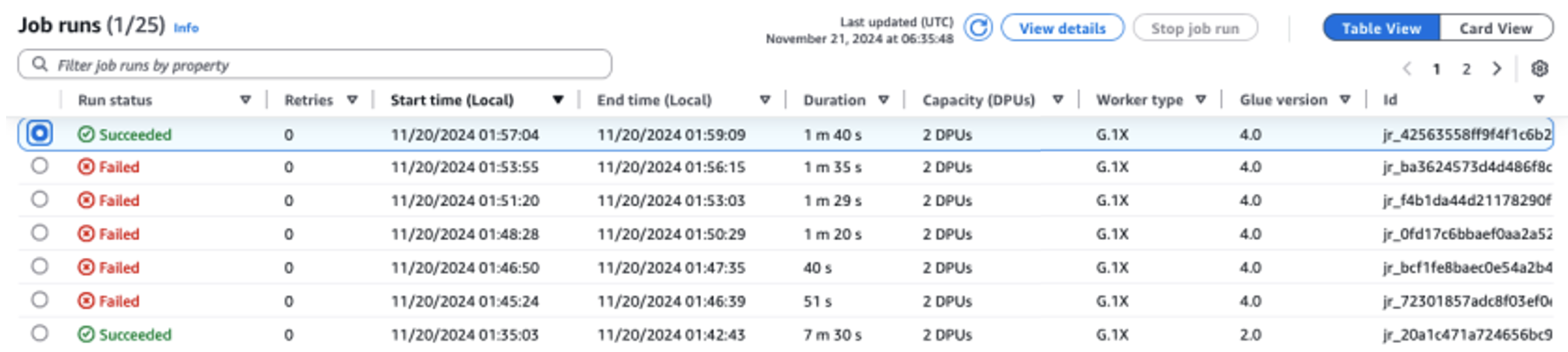
As seen in the updated Glue 4.0 (Spark 3.3.0) script diff compared to the Glue 2.0 (Spark 2.4.3) script and the resulting upgrade summary, a total of six different code and configuration updates were applied across the six attempts of the Spark Upgrade Analysis.

  • Attempt #1 included a Spark SQL configuration (spark.sql.adaptive.enabled) to restore the application behavior as a new feature for Spark SQL adaptive query execution is introduced starting Spark 3.2. Users can inspect this configuration change and can further enable or disable it as per their preference.
  • Attempt #2 resolved a Python language change between Python 3.7 and 3.10 with the introduction of a new abstract base class (abc) under the Python collections module for importing Sequence.
  • Attempt #3 resolved an error encountered due to a change in behavior of DataFrame API starting Spark 3.1 where path option cannot exist with other DataFrameReader operations.
  • Attempt #4 resolved an error caused by a change in the Spark SQL function API signature for DATE_ADD which now only accepts integers as the second argument starting from Spark 3.0.
  • Attempt #5 resolved an error encountered due to the change in behavior Spark SQL function API for count(tblName.*) starting Spark 3.2. The behavior was restored with the introduction of a new Spark SQL configuration spark.sql.legacy.allowStarWithSingleTableIdentifierInCount
  • Attempt #6 successfully completed the analysis and ran the new script on Glue 4.0 without any new errors. The final attempt resolved an error encountered due to the prohibited use of negative scale for cast(DecimalType(3, -6) in Spark DataFrame API starting Spark 3.0. The issue was addressed by enabling the new Spark SQL configuration spark.sql.legacy.allowNegativeScaleOfDecimal.

Important considerations for preview

As you begin using automated Spark upgrades during the preview period, there are several important aspects to consider for optimal usage of the service:

  • Service scope and limitations – The preview release focuses on PySpark code upgrades from AWS Glue versions 2.0 to version 4.0. At the time of writing, the service handles PySpark code that doesn’t rely on additional library dependencies. You can run automated upgrades for up to 10 jobs concurrently in an AWS account, allowing you to efficiently modernize multiple jobs while maintaining system stability.
  • Optimizing costs during the upgrade process – Because the service uses generative AI to validate the upgrade plan through multiple iterations, with each iteration running as an AWS Glue job in your account, it’s essential to optimize the validation job run configurations for cost-efficiency. To achieve this, we recommend specifying a run configuration when starting an upgrade analysis as follows:
    • Using non-production developer accounts and selecting sample mock datasets that represent your production data but are smaller in size for validation with Spark Upgrades.
    • Using right-sized compute resources, such as G.1X workers, and selecting an appropriate number of workers for processing your sample data.
    • Enabling Glue auto scaling when applicable to automatically adjust resources based on workload.

    For example, if your production job processes terabytes of data with 20 G.2X workers, you might configure the upgrade job to process a few gigabytes of representative data with 2 G.2X workers and auto scaling enabled for validation.

  • Preview best practices – During the preview period, we strongly recommend starting your upgrade journey with non-production jobs. This approach allows you to familiarize yourself with the upgrade workflow, and understand how the service handles different types of Spark code patterns.

Your experience and feedback are crucial in helping us enhance and improve this feature. We encourage you to share your insights, suggestions, and any challenges you encounter through AWS Support or your account team. This feedback will help us improve the service and add capabilities that matter most to you during preview.

Conclusion

This post demonstrates how automated Spark upgrades can assist with migrating your Spark applications in AWS Glue. It simplifies the migration process by using generative AI to automatically identify the necessary script changes across different Spark versions.

To learn more about this feature in AWS Glue, see Generative AI upgrades for Apache Spark in AWS Glue.

A special thanks to everyone who contributed to the launch of generative AI upgrades for Apache Spark in AWS Glue: Shuai Zhang, Mukul Prasad, Liyuan Lin, Rishabh Nair, Raghavendhar Thiruvoipadi Vidyasagar, Tina Shao, Chris Kha, Neha Poonia, Xiaoxi Liu, Japson Jeyasekaran, Suthan Phillips, Raja Jaya Chandra Mannem, Yu-Ting Su, Neil Jonkers, Boyko Radulov, Sujatha Rudra, Mohammad Sabeel, Mingmei Yang, Matt Su, Daniel Greenberg, Charlie Sim, McCall Petier, Adam Rohrscheib, Andrew King, Ranu Shah, Aleksei Ivanov, Bernie Wang, Karthik Seshadri, Sriram Ramarathnam, Asterios Katsifodimos, Brody Bowman, Sunny Konoplev, Bijay Bisht, Saroj Yadav, Carlos Orozco, Nitin Bahadur, Kinshuk Pahare, Santosh Chandrachood, and William Vambenepe.


About the Authors

Noritaka Sekiyama is a Principal Big Data Architect on the AWS Glue team. He is responsible for building software artifacts to help customers. In his spare time, he enjoys cycling with his new road bike.

Keerthi Chadalavada is a Senior Software Development Engineer at AWS Glue, focusing on combining generative AI and data integration technologies to design and build comprehensive solutions for customers’ data and analytics needs.

Shubham Mehta is a Senior Product Manager at AWS Analytics. He leads generative AI feature development across services such as AWS Glue, Amazon EMR, and Amazon MWAA, using AI/ML to simplify and enhance the experience of data practitioners building data applications on AWS.

Pradeep Patel is a Software Development Manager on the AWS Glue team. He is passionate about helping customers solve their problems by using the power of the AWS Cloud to deliver highly scalable and robust solutions. In his spare time, he loves to hike and play with web applications.

Chuhan LiuChuhan Liu is a Software Engineer at AWS Glue. He is passionate about building scalable distributed systems for big data processing, analytics, and management. He is also keen on using generative AI technologies to provide brand-new experience to customers. In his spare time, he likes sports and enjoys playing tennis.

Vaibhav Naik is a software engineer at AWS Glue, passionate about building robust, scalable solutions to tackle complex customer problems. With a keen interest in generative AI, he likes to explore innovative ways to develop enterprise-level solutions that harness the power of cutting-edge AI technologies.

Mohit Saxena is a Senior Software Development Manager on the AWS Glue and Amazon EMR team. His team focuses on building distributed systems to enable customers with simple-to-use interfaces and AI-driven capabilities to efficiently transform petabytes of data across data lakes on Amazon S3, and databases and data warehouses on the cloud.
AWS named as a leader again in the Gartner Magic Quadrant for Distributed Hybrid Infrastructure

Post Syndicated from Channy Yun (윤석찬) original https://aws.amazon.com/blogs/aws/aws-named-as-a-leader-again-in-the-gartner-magic-quadrant-for-distributed-hybrid-infrastructure/

Gartner published the second Magic Quadrant for Distributed Hybrid Infrastructure (DHI), which includes Amazon Web Services (AWS) as a leader again. AWS has three products in this DHI portfolio: AWS Outposts, AWS Snowball, and AWS Local Zones. In the accompanying Gartner’s Critical Capabilities for DHI, AWS is ranked number one in four out of six use cases evaluated by Gartner—including hybrid infrastructure management, edge computing, assured workloads, and artificial intelligence & machine learning (AI/ML)—and among the top two in the use case of container management.

Gartner evaluates 10 DHI providers based on their Ability to Execute, which measures a vendor’s capacity to deliver its products or services effectively, and Completeness of Vision, which assesses a vendor’s understanding of the market and its strategy for future growth.

Here is the graphical representation of the 2024 Gartner Magic Quadrant for DHI.

Gartner recognized AWS strengths as:

  • Leading public cloud provider – AWS DHI solutions appeal to AWS public cloud customers that want to extend their infrastructure to their data center and edge locations, while also migrating from their remaining private cloud infrastructure.
  • As-a-service delivery – The fully managed infrastructure delivery of AWS Outposts simplifies operations and enables a hands-off, single-vendor approach to infrastructure management, including integration with some on-premises technologies.
  • AWS support – Gartner clients report high satisfaction with the AWS worldwide support and services team.

We believe this leader placement reflects our innovation at the edge of the cloud for workloads that require low latency, local data processing, data residency, or migration with on-premises interdependencies. At AWS, we extend the same AWS infrastructure, AWS services, APIs, and tools wherever you need them for a truly consistent cloud experience.

Whether your workloads are running in the AWS Regions, in metro areas with AWS Local Zones, on premises with AWS Outposts, in the telco networks with AWS Wavelength, or at the far edge with AWS Snow Family, you can standardize on the same cloud operating model for all your applications. You can streamline developer workflow by standardizing on a common set of continuous integration and continuous deployment (CI/CD) pipelines. It also reduces the time, resources, operational risk, and maintenance downtime required to manage IT infrastructure.

As examples of accelerated innovation, we have added the latest generation of GPU-backed instances to Local Zones to better support ML workloads and expanded the number of locations. We have made Outposts available in more countries and added AWS services supported on Outposts to facilitate migration and disaster recovery, such as AWS Elastic Disaster Recovery and Amazon Route 53 Resolver to improve application availability and performance.

In addition, we have improved the disconnection tolerance for container-based workloads on Outposts by making it possible for customers to run both the Kubernetes control plane and nodes locally, and we enhanced its capabilities for multi-rack Outposts deployments.

Access the complete 2024 Gartner Magic Quadrant for DHI report to learn more.

Channy

Gartner does not endorse any vendor, product or service depicted in its research publications and does not advise technology users to select only those vendors with the highest ratings or other designation. Gartner research publications consist of the opinions of Gartner’s research organization and should not be construed as statements of fact. Gartner disclaims all warranties, expressed or implied, with respect to this research, including any warranties of merchantability or fitness for a particular purpose.

GARTNER is a registered trademark and service mark of Gartner and Magic Quadrant is a registered trademark of Gartner, Inc. and/or its affiliates in the U.S. and internationally and are used herein with permission. All rights reserved.

Accelerate your data workflows with Amazon Redshift Data API persistent sessions

Post Syndicated from Dipal Mahajan original https://aws.amazon.com/blogs/big-data/accelerate-your-data-workflows-with-amazon-redshift-data-api-persistent-sessions/

Amazon Redshift is a fast, scalable, secure, and fully managed cloud data warehouse that you can use to analyze your data at scale. Tens of thousands of customers use Amazon Redshift to process exabytes of data to power their analytical workloads.The Amazon Redshift Data API simplifies programmatic access to Amazon Redshift data warehouses by providing a secure HTTP endpoint for executing SQL queries, so that you don’t have to deal with managing drivers, database connections, network configurations, authentication flows, and other connectivity complexities.

Amazon Redshift has launched a session reuse capability for the Data API that can significantly streamline multi-step, stateful workloads such as exchange, transform, and load (ETL) pipelines, reporting processes, and other flows that involve sequential queries. This persistent session model provides the following key benefits:

  1. The ability to create temporary tables that can be referenced across the entire session lifespan.
  2. Maintaining reusable database sessions to help optimize the use of database connections, preventing the API server from exhausting the available connections and improving overall system scalability.
  3. Reusing database sessions to simplify the connection management logic in your API implementation, reducing the complexity of the code and making it more straightforward to maintain and scale.
  4. Redshift Data API provides a secure HTTP endpoint and integration with AWS SDKs. You can use the endpoint to run SQL statements without managing connections. Calls to the Data API are asynchronous. The Data API uses either credentials stored in AWS Secrets Manager or temporary database credentials

A common use case that can particularly benefit from session reuse is ETL pipelines in Amazon Redshift data warehouses. ETL processes often need to stage raw data extracts into temporary tables, run a series of transformations while referencing those interim datasets, and finally load the transformed results into production data marts. Before session reuse was available, the multi-phase nature of ETL workflows meant that data engineers had to persist the intermediate results and repeatedly re-establish database connections after each step, which resulted in continually tearing down sessions; recreating, repopulating, and truncating temporary tables; and incurring overhead from connection cycling. The engineers could also reuse the entire API call, but this could lead to a single point of failure for the entire script because it doesn’t support restarting from the point where it failed.

With Data API session reuse, you can use a single long-lived session at the start of the ETL pipeline and use that persistent context across all ETL phases. You can create temporary tables once and reference them throughout, without having to constantly refresh database connections and restart from scratch.

In this post, we’ll walk through an example ETL process that uses session reuse to efficiently create, populate, and query temporary staging tables across the full data transformation workflow—all within the same persistent Amazon Redshift database session. You’ll learn best practices for optimizing ETL orchestration code, reducing job runtimes by reducing connection overhead, and simplifying pipeline complexity. Whether you’re a data engineer, an analyst generating reports, or working on any other stateful data, understanding how to use Data API session reuse is worth exploring. Let’s dive in!

Scenario

Imagine you’re building an ETL process to maintain a product dimension table for an ecommerce business. This table needs to track changes to product details over time for analysis purposes.

The ETL will:

  1. Load data extracted from the source system into a temporary table
  2. Identify new and updated products by comparing them to the existing dimension
  3. Merge the staged changes into the product dimension using a slowly changing dimension (SCD) Type 2 approach

Prerequisites

To walk through the example in this post, you need:

  • An AWS Account
  • An Amazon Redshift Serverless workgroup or provisioned cluster

Redshift Data API Commands

This command executes a Redshift Data API query to create a temporary table called stage_stores in Redshift.

 aws redshift-data execute-statement 
       --session-keep-alive-seconds 30 
       --sql "CREATE TEMP TABLE stage_stores (LIKE stores)" 
       --database dev 
       --workgroup-name blog_test

This command performs a COUNT(*) operation on the newly created table from the previous command, using the –session-id returned in the response of the first command.

 aws redshift-data execute-statement
    --sql "select count(*) from dev.stage_stores"
    --session-id 5a254dc6-4fc2-4203-87a8-551155432ee4
    --session-keep-alive-seconds 10

Solution walkthrough

  1. You will use AWS Step Functions to call the Data API because this is one of the more straightforward ways to create a codeless ETL. The first step is to load the extracted data into a temporary table.
    • Start by creating a temporary table based on the same columns as the final table using CREATE TEMP TABLE stage_stores (LIKE stores)”.
    • When using Redshift Serverless you must use WorkgroupName. If using Redshift Provisioned cluster, you should use ClusterIdentifier.

Temporary table creation

  1. In the next step, copy data from Amazon Simple Storage Service (Amazon S3) to the temporary table. Instead of re-establishing the session, reuse it.
    • Use SessionId and Sql as parameters.
    • Database is a required parameter for Step Functions, but it doesn’t have to have a value when using the SessionId.

Copy data to Redshift

  1. Lastly, use Merge to merge the target and temporary (source) tables to insert or update data based on the new data from the files.

Merge to Redshift

As shown in the preceding figures, we used a wait component because the query was fast enough for the session not to be captured. If the session isn’t captured, you will receive a Session is not available error. If you encounter that or a similar error, try adding a 1-second wait component.

At the end, the Data API use case should be completed, as shown in the following figure.

Step Function

Other relevant use cases

The Amazon Redshift Data API isn’t a replacement for JDBC and ODBC drivers and is suitable for use cases where you don’t need a persistent connection to a cluster. It’s applicable in the following use cases:

  • Accessing Amazon Redshift from custom applications with any programming language supported by the AWS SDK. This enables you to integrate web-based applications to access data from Amazon Redshift using an API to run SQL statements. For example, you can run SQL from JavaScript.
  • Building a serverless data processing workflow.
  • Designing asynchronous web dashboards because the Data API lets you run long-running queries without having to wait for it to complete.
  • Running your query one time and retrieving the results multiple times without having to run the query again within 24 hours.
  • Building your ETL pipelines with Step Functions, AWS Lambda, and stored procedures.
  • Having simplified access to Amazon Redshift from Amazon SageMaker and Jupyter Notebooks.
  • Building event-driven applications with Amazon EventBridgeand Lambda.
  • Scheduling SQL scripts to simplify data load, unload, and refresh of materialized views.

Key considerations for using session reuse

When you make a Data API request to run a SQL statement, if the parameter SessionKeepAliveSeconds isn’t set, the session where the SQL runs is terminated when the SQL is finished. To keep the session active for a specified number of seconds you must set SessionKeepAliveSeconds in the Data API ExecuteStatement and BatchExecuteStatement. A SessionId field will be present in the response JSON containing the identity of the session, which can then be used in subsequent ExecuteStatement and BatchExecuteStatement operations. In subsequent calls you can specify another SessionKeepAliveSeconds to change the idle timeout time. If the SessionKeepAliveSeconds isn’t changed, the initial idle timeout setting remains. Consider the following when using session reuse:

  • The maximum value of SessionKeepAliveSeconds is 24 hours. After 24 hours the session is forcibly closed, and in-progress queries are terminated.
  • The maximum number of sessions per Amazon Redshift cluster or Redshift Serverless workgroup is 500. Please refer to Redshift Quotas and Limits here.
  • It’s not possible to run parallel executions of the same session. You need to wait until the query is finished to run the next query in the same session. That is, you cannot run queries in parallel in a single session.
  • The Data API can’t queue queries for a given session.

Best practices

We recommend the following best practices when using the Data API:

  • Federate your IAM credentials to the database to connect with Amazon Redshift. Amazon Redshift allows users to get temporary database credentials with GetClusterCredentials. We recommend scoping the access to a specific cluster and database user if you’re granting your users temporary credentials. For more information, see Example policy for using GetClusterCredentials.
  • Use a custom policy to provide fine-grained access to the Data API in the production environment if you don’t want your users to use temporary credentials. You can use AWS Secrets Manager to manage your credentials in such use cases.
  • The maximum record size to be retrieved is 64 KB. More than that will raise an error.
  • Don’t retrieve a large amount of data from your client and use the UNLOAD command to export the query results to Amazon S3. You’re limited to retrieving no more than 100 MB of data using the Data API.
  • Query results are stored by 24 hours and discarded after that. If you need the same result after 24 hours, you will need to rerun the script to obtain the result.
  • Remember that the session will be available for the amount of time specified by the SessionKeepAliveSeconds parameter in the Redshift Data API call. The session will terminate after the specified duration.Based on your security requirements, configure this value according to your ETL and ensure sessions are properly closed by setting SessionKeepAliveSeconds to 1 second to terminate them.
  • When invoking Redshift API commands, all activities, including the user who executed the command and those who reused the session, are logged in CloudWatch. Additionally, you can configure alerts for monitoring.
  • If a Redshift session is terminated or closed and you attempt to access it via the API, you will receive an error message stating, “Session is not available.”

Conclusion

In this post, we introduced you to the newly launched Amazon Redshift Data API session reuse functionality. We also demonstrated how to use the Data API from the Amazon Redshift console query editor and Python using the AWS SDK. We also provided best practices for using the Data API.

To learn more, see Using the Amazon Redshift Data API or visit the Data API GitHub repository for code examples. For serverless, see Use the Amazon Redshift Data API to interact with Amazon Redshift Serverless.

—————————————————————————————————————————————————–

About the Author

Dipal Mahajan is a Lead Consultant with Amazon Web Services based out of India, where he guides global customers to build highly secure, scalable, reliable, and cost-efficient applications on the cloud. He brings extensive experience on Software Development, Architecture and Analytics from industries like finance, telecom, retail and healthcare.

Anusha Challa is a Senior Analytics Specialist Solutions Architect focused on Amazon Redshift. She has helped many customers build large-scale data warehouse solutions in the cloud and on premises. She is passionate about data analytics and data science.

Debu Panda is a Senior Manager, Product Management at AWS. He is an industry leader in analytics, application platform, and database technologies, and has more than 25 years of experience in the IT world.

Ricardo Serafim is a Senior Analytics Specialist Solutions Architect at AWS.

Accelerate your migration to Amazon OpenSearch Service with Reindexing-from-Snapshot

Post Syndicated from Hang Zuo original https://aws.amazon.com/blogs/big-data/accelerate-your-migration-to-amazon-opensearch-service-with-reindexing-from-snapshot/

It is appealing to migrate from self-managed OpenSearch and Elasticsearch clusters in legacy versions to Amazon OpenSearch Service to enjoy the ease of use, native integration with AWS services, and rich features from the open-source environment (OpenSearch is now part of Linux Foundation). However, the data migration process can be daunting, especially when downtime and data consistency are critical concerns for your production workload.

In this post, we will introduce a new mechanism called Reindexing-from-Snapshot (RFS), and explain how it can address your concerns and simplify migrating to OpenSearch.

Key concepts

To understand the value of RFS and how it works, let’s look at a few key concepts in OpenSearch (and the same in Elasticsearch):

  1. OpenSearch index: An OpenSearch index is a logical container that stores and manages a collection of related documents. OpenSearch indices are composed of multiple OpenSearch shards, and each OpenSearch shard contains a single Lucene index.
  2. Lucene index and shard: OpenSearch is built as a distributed system on top of Apache Lucene, an open-source high-performance text search engine library. An OpenSearch index can contain multiple OpenSearch shards, and each OpenSearch shard maps to a single Lucene index. Each Lucene index (and, therefore, each OpenSearch shard) represents a completely independent search and storage capability hosted on a single machine. OpenSearch combines many independent Lucene indices into a single higher-level system to extend the capability of Lucene beyond what a single machine can support. OpenSearch provides resilience by creating and managing replicas of the Lucene indices as well as managing the allocation of data across Lucene indices and combining search results across all Lucene indices.
  3. Snapshots: Snapshots are backups of an OpenSearch cluster’s indexes and state in an off-cluster storage location (snapshot repository) such as Amazon Simple Storage Service (Amazon S3). As a backup strategy, snapshots can be created automatically in OpenSearch, or users can create a snapshot manually for restoring it on to a different domain or for data migration.

For example, when a document is added to the OpenSearch index, the distributed system layer picks a specific shard to host the document, and the document is ingested into that shard’s Lucene index. Operations on that document are then routed to the same shard (though the shard might have replicas). Search operations are performed across the shards in OpenSearch index individually and then a combined result is returned. A snapshot can be created to backup the cluster’s indexes and state, including cluster settings, node information, index settings and shard allocation, so that the snapshot can be used for data migration.

Why RFS?

RFS can transfer data from OpenSearch and Elasticsearch clusters at high throughput without impacting the performance of the source cluster. This is achieved by using the shard-level codependency and snapshots:

  1. Minimized performance impact to source clusters: Instead of retrieving data directly from the source cluster, RFS can use a snapshot of the source cluster for data migration. Documents are parsed from the snapshot and then reindexed to the target cluster, so that performance impact to the source clusters is minimized during migration. This maintains a smooth transition and minimal performance impact to end users, especially for production workloads.
  2. High throughput: Because shards are separate entities, RFS can retrieve, parse, extract and reindex the documents from each shard in parallel, to achieve high data throughput.
  3. Multi-version upgrades: RFS supports migrating data across multiple major versions (for example, from Elasticsearch 6.8 to OpenSearch 2.x), which can be a significant challenge with other data migration approaches. This is because the data indexed into OpenSearch (and Lucene) is only backward compatible for one major version. By incorporating reindexing as the core mechanism of the migration process, RFS can migrate data across multiple versions in one hop and make sure the data is fully updated and readable in the target cluster’s version, so that you don’t need to worry about the hidden technical debt imposed by having previous-version Lucene files in the new OpenSearch cluster.

How RFS works

OpenSearch and Elasticsearch snapshots are a directory tree that contains both data and metadata. Each index has its own sub-directory, and each shard has its own sub-directory under the directory of its parent index. The raw data for a given shard is stored in its corresponding shard sub-directory as a collection of Lucene files, which OpenSearch and Elasticsearch lightly obfuscates. Metadata files exist in the snapshot to provide details about the snapshot as a whole, the source cluster’s global metadata and settings, each index in the snapshot, and each shard in the snapshot.

The following is an example for the structure of an Elasticsearch 7.10 snapshot, along with a breakdown of its contents:

/snapshot/root
├── index-0 <-------------------------------------------- [1]
├── index.latest
├── indices
│   ├── DG4Ys006RDGOkr3_8lfU7Q <------------------------- [2]
│   │   ├── 0 <------------------------------------------ [3]
│   │   │   ├── __iU-NaYifSrGoeo_12o_WaQ <--------------- [4]
│   │   │   ├── __mqHOLQUtToG23W5r2ZWaKA <--------------- [4]
│   │   │   ├── index-gvxJ-ifiRbGfhuZxmVj9Hg 
│   │   │   └── snap-eBHv508cS4aRon3VuqIzWg.dat <-------- [5]
│   │   └── meta-tDcs8Y0BelM_jrnfY7OE.dat <-------------- [6]
│   └── _iayRgRXQaaRNvtfVfRdvg
│       ├── 0
│       │   ├── __DNRvbH6tSxekhRUifs35CA
│       │   ├── __NRek2UuKTKSBOGczcwftng
│       │   ├── index-VvqHYPQaRcuz0T_vy_bMyw
│       │   └── snap-eBHv508cS4aRon3VuqIzWg.dat
│       └── meta-tTcs8Y0BelM_jrnfY7OE.dat
├── meta-eBHv508cS4aRon3VuqIzWg.dat <-------------------- [7]
└── snap-eBHv508cS4aRon3VuqIzWg.dat <-------------------- [8]

The structure includes the following elements:

  1. Repository metadata file: JSON encoded and contains a mapping between the snapshots within the repository and the OpenSearch or Elasticsearch indices and shards stored within it.
  2. Index directory: Contains the data and metadata for a specific OpenSearch or Elasticsearch index.
  3. Shard directory: Contains the data and metadata for a specific shard of an OpenSearch or Elasticsearch index
  4. Lucene Files: Lucene index files, lightly obfuscated by the snapshotting process. Large files from the source file system are split into multiple parts.
  5. Shard metadata file: SMILE encoded and contains details about all the Lucene files in the shard and a mapping between their in-snapshot representation and their original representation on the source machine they were pulled from (including the original file name and other details).
  6. Index metadata file: SMILE encoded and contains things such as the index aliases, settings, mappings, and number of shards.
  7. Global metadata file: SMILE encoded and contains things such as the legacy, index, and component templates.
  8. Snapshot metadata file: SMILE encoded and contains things such as whether the snapshot succeeded, the number of shards, how many shards succeeded, the OpenSearch or Elasticsearch version, and the indices in the snapshot.

RFS works by retrieving a local copy of a shard-level directory, unpacking its contents and de-obfuscating them, reading them as a Lucene index, and extracting the documents within. This is enabled because OpenSearch and Elasticsearch store the original format of documents added to an OpenSearch or Elasticsearch index in Lucene using the _source field; this feature is enabled by default and is what allows the standard _reindex REST API to work (among other things).

The user workflow for performing a document migration with RFS using the Migration Assistant is shown in the following figure:

The workflow is:

  1. The operator shells into the Migration Assistant console
  2. The operator uses the console command line interface (CLI) to initiate a snapshot on their source cluster. The source cluster stores the snapshot in an S3 Bucket.
  3. The operator starts the document migration with RFS using the console CLI. This creates a single RFS Worker, which is a Docker container running in AWS Fargate.
  4. Each RFS worker provisioned pulls down an un-migrated shard from the snapshot bucket and reindexes its documents against the target cluster. Once finished, it proceeds to the next shard until all shards are completed.
  5. The operator monitors the progress of the migration using the console CLI, which reports both the number of shards yet to be migrated and the number that have been completed. The operator can scale the RFS worker fleet up or down to increase or reduce the rate of indexing on the target cluster.
  6. After all shards have been migrated to the target cluster, the operator scales the RFS worker fleet down to zero.

As previously mentioned, the RFS workers operate at the shard-level, so that you can provision one RFS worker for every shard in the snapshot to achieve maximum throughput. If a RFS worker stops unexpectedly in the middle of migrating a shard, another RFS worker will restart its migration from the beginning. The original document identifiers are preserved in the migration process, so that the restarted migration will be able to over-write the failed attempt. RFS workers coordinate amongst themselves using metadata that they store in an index on the target cluster.

How RFS performs

To highlight the performance of RFS, let’s consider the following scenario: you have an Elasticsearch 7.10 source cluster containing 5 TiB (3.9 billion documents) and wants to migrate to OpenSearch 2.15. With RFS, you can perform this migration in approximately 35 minutes, spending approximately $10 in Amazon Elastic Container Service (Amazon ECS) usage to run the RFS workers during the migration.

To demonstrate this capability, we created an Elasticsearch 7.10 source cluster in Amazon OpenSearch Service, with 1,024 shards and 0 replicas. We used AWS Glue to bulk-load sample data into the source cluster with the AWS Public Blockchain Dataset, and repeated the bulk-load process until 5 TiB of data (3.9 billion documents) was stored. We created an OpenSearch 2.15 cluster as the target cluster in Amazon OpenSearch Service, with 15 r7gd.16xlarge data nodes and 3 m7g.large master nodes, and used Sigv4 for authentication. Using the Migration Assistant solution, we created a snapshot of the source cluster, stored it in S3, and performed a metadata migration so that the indices on the source were recreated on the target cluster with the same shard and replica counts. We then ran console backfill start and console backfill scale 200 to begin the RFS migration with 200 workers. RFS indexed data into the target cluster at 2,497 MiB per second. The migration was completed in approximately 35 minutes. We metered approximately $10 in ECS cost for running the RFS workers.

To better highlight the performance, the following figures show metrics from the OpenSearch target cluster during this process (presented below).

In the preceding figures, you can see the cyclical variation in the document index rate and target cluster resource utilization as the 200 RFS workers pick up shards, complete a shard, and then pick up a new shard. At peak RFS indexing, we see the target cluster nodes maxing their CPU and begin queuing writes. The queue is cleared as shards complete and more workers transition to the downloading state. In general, we find that RFS performance is limited by the ability of the target cluster to absorb the traffic it generates. You can tune the RFS worker fleet to match what your target cluster can reliably ingest.

Conclusion

This blog post is designed to be a starting point for teams seeking guidance on how to use Reindexing-from-Snapshot as a straightforward, high throughput, and low-cost solution for data migration from self-managed OpenSearch and Elasticsearch clusters to Amazon OpenSearch Service. RFS is now part of the Migration Assistant solution and available from the AWS Solution Library. To use RFS to migrate to Amazon OpenSearch Service, try the Migration Assistant solution. To experience OpenSearch, try the OpenSearch Playground. To use the managed implementation of OpenSearch in the AWS Cloud, see Getting started with Amazon OpenSearch Service.


About the authors

Hang (Arthur) Zuo is a Senior Product Manager with Amazon OpenSearch Service. Arthur leads the core experience in the next-gen OpenSearch UI and data migration to Amazon OpenSearch Service. Arthur is passionate about cloud technologies and building data products that help users and businesses gain actionable insights and achieve operational excellence.

Chris Helma is a Senior Engineer at Amazon Web Services based in Austin, Texas. He is currently developing tools and techniques to enable users to shift petabyte-scale data workloads into OpenSearch. He has extensive experience building highly-scalable technologies in diverse areas such as search, security analytics, cryptography, and developer productivity. He has functional domain expertise in distributed systems, AI/ML, cloud-native design, and optimizing DevOps workflows. In his free time, he loves to explore specialty coffee and run through the West Austin hills.

Andre Kurait is a Software Development Engineer II at Amazon Web Services, based in Austin, Texas. He is currently working on Migration Assistant for Amazon OpenSearch Service. Prior to joining Amazon OpenSearch, Andre worked within Amazon Health Services. In his free time, Andre enjoys traveling, cooking, and playing in his church sport leagues. Andre holds Bachelor of the Science degrees from the University of Kansas in Computer Science and Mathematics.

Prashant Agrawal is a Sr. Search Specialist Solutions Architect with Amazon OpenSearch Service. He works closely with customers to help them migrate their workloads to the cloud and helps existing customers fine-tune their clusters to achieve better performance and save on cost. Before joining AWS, he helped various customers use OpenSearch and Elasticsearch for their search and log analytics use cases. When not working, you can find him traveling and exploring new places. In short, he likes doing Eat → Travel → Repeat.


From data lakes to insights: dbt adapter for Amazon Athena now supported in dbt Cloud

Post Syndicated from Darshit Thakkar original https://aws.amazon.com/blogs/big-data/from-data-lakes-to-insights-dbt-adapter-for-amazon-athena-now-supported-in-dbt-cloud/

At AWS, we are committed to empowering organizations with tools that streamline data analytics and transformation processes. We are excited to announce that the dbt adapter for Amazon Athena is now officially supported in dbt Cloud. This integration enables data teams to efficiently transform and manage data using Athena with dbt Cloud’s robust features, enhancing the overall data workflow experience.

In this post, we discuss the advantages of dbt Cloud over dbt Core, common use cases, and how to get started with Amazon Athena using the dbt adapter.

The need for streamlined data transformations

As organizations increasingly adopt cloud-based data lakes and warehouses, the demand for efficient data transformation tools has grown. Athena plays a critical role in this ecosystem by providing a serverless, interactive query service that simplifies analyzing vast amounts of data stored in Amazon Simple Storage Service (Amazon S3) using standard SQL. This enables you to extract insights from your data without the complexity of managing infrastructure.

dbt has emerged as a leading framework, allowing data teams to transform and manage data pipelines effectively. With the dbt adapter for Athena adapter now supported in dbt Cloud, you can seamlessly integrate your AWS data architecture with dbt Cloud, taking advantage of the scalability and performance of Athena to simplify and scale your data workflows efficiently.

Benefits of the dbt adapter for Athena

We have collaborated with dbt Labs and the open source community on an adapter for dbt that enables dbt to interface directly with Athena. Previously, the dbt adapter for Athena was only compatible with dbt Core, requiring teams to manually manage configurations and execute transformations locally or through custom setups. Now, with support for dbt Cloud, you can access a managed, cloud-based environment that automates and enhances your data transformation workflows. This upgrade allows you to build, test, and deploy data models in dbt with greater ease and efficiency, using all the features that dbt Cloud provides.

The support of the dbt adapter for Athena in dbt Cloud offers several advantages over using it with dbt Core:

  • Managed infrastructure – dbt Cloud provides a fully managed environment for running dbt projects, eliminating the need for local setup, maintenance, and configuration. This saves time and effort, especially for teams looking to minimize infrastructure management and focus solely on data modeling.
  • Scheduling and automation – dbt Cloud comes with a job scheduler, allowing you to automate the execution of dbt models. This feature makes sure your datasets are always up to date without needing to set up and maintain external scheduling systems like Apache Airflow. You can also set up dependencies between jobs easily within dbt Cloud, making sure that transformations run in the correct sequence without manual oversight.
  • Enhanced collaboration and version control – You can use a web-based interface for editing and reviewing dbt models, enabling collaboration among data teams. You can review code changes directly on the platform, facilitating efficient teamwork. Additionally, dbt Cloud integrates with Git providers, making version control and code collaboration more streamlined. This makes sure your data models are well-documented, versioned, and straightforward to manage within a collaborative environment.
  • Monitoring and alerting – You get built-in tools for monitoring job executions and performance to set up alerts and notifications for job failures, providing quick response times and minimizing disruptions. Furthermore, you can gain insights into the performance of your data transformations with detailed execution logs and metrics, all accessible through the dbt Cloud interface.

Common use cases for using the dbt adapter with Athena

The following are common use cases for using the dbt adapter with Athena:

  • Building a data warehouse – Many organizations are moving towards a data warehouse architecture, combining the flexibility of data lakes with the performance and structure of data warehouses. Using Athena and the dbt adapter, you can transform raw data in Amazon S3 into well-structured tables suitable for analytics. This setup allows businesses to build a scalable and efficient data lakehouse where they can perform SQL-based transformations and make sure data is clean and ready for analytics without investing heavily in data warehouse infrastructure.
  • Incremental data processing – The adapter allows for incremental data processing, where only new or updated data is transformed and processed. This feature reduces the amount of data scanned by Athena, resulting in faster query performance and lower costs. For example, instead of processing an entire dataset daily, dbt can be configured to transform only the data ingested in the last 24 hours, making data operations more efficient and cost-effective.
  • Cost management and optimization – Because Athena charges based on the amount of data scanned by each query, cost optimization is critical. The adapter enables data teams to optimize transformations by creating efficient data models, such as partitioning and compressing data to minimize scan costs. Additionally, dbt’s automated scheduling in dbt Cloud can be used to manage the frequency of data transformations, making sure queries are run only when necessary, helping to control costs effectively.
  • Data archiving and tiered storage – Organizations with a large amount of historical data can use Athena to query archived data stored in the lower-cost storage classes of Amazon S3 (such as Amazon S3 Glacier). With the adapter, data teams can build models that segment and process data based on usage patterns, making sure frequently accessed data is optimized for quick queries while older data remains accessible but cost-efficient. Alternatively, you can use Amazon S3 Intelligent-Tiering to optimize storage costs by moving data between two access tiers when access patterns change. This approach helps in managing storage costs while maintaining the flexibility to analyze historical trends when needed.
  • Event-driven data transformations – In scenarios where organizations need to process data in near real time, such as for streaming event logs or Internet of Things (IoT) data, you can integrate the adapter into an event-driven architecture. For example, event data can be continuously loaded into Amazon S3, and dbt models can be configured to run incrementally, transforming the new data into structured formats for immediate analysis. This setup supports agile data processing while taking advantage of the serverless architecture of Athena to keep operational costs low.
  • Compliance and data governance – For organizations managing sensitive or regulated data, you can use Athena and the adapter to enforce data governance rules. With dbt, teams can define data quality checks and access controls as part of their transformation workflow. This makes sure that only compliant, high-quality data is made available for analytics, and costs are optimized by processing only the data that meets governance standards. Additionally, dbt’s documentation features help maintain a clear record of data transformations, supporting audit and compliance efforts.

How to use the dbt adapter for Athena

To get started, create a project and set up a connection with Athena in dbt Cloud. The following figure shows the steps to create a project using dbt Cloud and configure the Athena connection.

Next, use the dbt Cloud interactive development environment (IDE) to deploy your project. The following figure demonstrates how to build dbt runs and deploy changes to Athena using the dbt Cloud interface.

Conclusion

At AWS, we are committed to providing you with the best possible tools and services to help you succeed in the cloud. dbt has emerged as a leading data transformation platform, trusted by thousands of organizations worldwide. By partnering with dbt Labs, we are able to bring the power of dbt directly to the AWS Cloud, empowering you to seamlessly integrate your data transformation workflows into the broader cloud infrastructure. This partnership is a testament to our shared vision of making data more accessible, reliable, and valuable for organizations of all sizes.

We are excited to see how you will use the dbt Cloud compatible dbt adapter for Athena to drive your data-driven initiatives forward. The combination of dbt and Athena creates a powerful and efficient environment for transforming and analyzing data in a serverless architecture. This synergy allows you to take advantage of the strengths of both tools, making it straightforward to manage complex data pipelines, reduce costs, and scale your operations.


About the Authors

Darshit Thakkar is a Technical Product Manager with AWS and works with the Amazon Athena team.

Selman Ay is a Data Architect in the AWS Professional Services team.

BP Yau is a Sr Partner Solutions Architect at AWS helping customers architect big data solutions to process data at scale

Improve your app authentication workflow with new Amazon Cognito features

Post Syndicated from Donnie Prakoso original https://aws.amazon.com/blogs/aws/improve-your-app-authentication-workflow-with-new-amazon-cognito-features/

Introduced 10 years ago, Amazon Cognito is a service that helps you implement customer identity and access management (CIAM) in your web and mobile applications. You can use Amazon Cognito for various use cases, from providing your customers to quickly add sign-in and sign-up experiences to your applications and authorization to securing machine-to-machine authentication and enabling role-based access to AWS resources.

Today, I’m excited to share a series of significant updates to Amazon Cognito. These enhancements aim to provide you with more flexibility, improved security, and a better user experience for your applications.

Here’s a quick summary:

A new developer-focused console experience
Amazon Cognito now offers a streamlined getting-started experience featuring a quick wizard and use case-specific recommendations. This new approach helps you set up configurations and reach your end users faster and more efficiently than ever before.

This is the new Amazon Cognito flow to help you quickly set up your application. You can get started in three steps:

  1. Choose the type of application you need to build
  2. Configure the sign-in options according to the type of your application
  3. Follow the instructions to integrate the sign-in and sign-up pages with your application

Then, select Create.

Amazon Cognito then automatically creates your application and a new user pool, which is a user directory for authentication and authorization. From here, you can review your sign-in page by selecting View login page or get started with the example code for your application. Furthermore, Amazon Cognito supports major application frameworks and offers detailed instructions for integrating them using standard OpenID Connect (OIDC) and OAuth open source libraries.

This is the new overview dashboard for your application. The user pool dashboard now provides important information in the Details section, as well as a set of Recommendations to help you continue your development journey.

On this page, you can customize your users’ sign-in and sign-up experience with the Managed Login feature. This is a good segue for me to provide you with a quick overview of the next new feature.

Introducing Managed Login
The introduction of Managed Login brings a new level of customization to Amazon Cognito. Managed Login handles the heavy lifting of availability, scaling, and security for your company. Once integrated, you automatically get all the new security patches and future features without further code changes.

This feature allows you to create personalized sign-up and sign-in experiences that are a seamless part of your company’s application for your end users.

Before you can use Managed Login, you need to assign a domain. There are two ways to do this: use a prefix domain, a randomly generated sub-domain of Amazon Cognito domain, or use your own custom domain to provide your users with a familiar domain name.

Then, you can choose your Branding version, selecting either Managed login or classic Hosted UI.

If you’re an existing Amazon Cognito user, you might be familiar with the classic Hosted UI feature. Managed Login is the improved version of Hosted UI, offering a new collection of web interfaces for sign-up and sign-in, built-in responsiveness for different screen sizes, multi-factor authentication, and password-reset activities in your user pool.

With Managed Login, you can use the new branding designer, a no-code visual editor for managed login assets and style, and a set of API operations for programmatic configuration or deployment via infrastructure-as-code with AWS CloudFormation.

With the branding designer, you have the flexibility to customize the look and feel of the entire user journey, from sign up and sign in to password recovery and multi-factor authentication. This feature provides a real time preview and convenient shortcuts to preview screens in different screen sizes and display modes before you launch it.

You can learn more about Managed Login by visiting the Managed Login documentation page.

Passwordless login support
The Managed Login feature also offers pre-built integrations for passwordless authentication methods, including signing in with passkeys, email OTP (one-time-password) and SMS OTP. Passkey support allows users to authenticate using cryptographic keys stored securely on their devices, offering better security compared to traditional passwords. This capability helps you implement low-friction and secure authentication methods without the need to understand and implement WebAuthn related protocols.

By reducing the friction associated with traditional password-based sign-ins, this feature simplifies application access for your users while maintaining high security standards.

Visit the user pools authentication flow documentation page to learn more about the passwordless login support.

More options on pricing tiers: Lite, Essentials and Plus
Amazon Cognito has introduced new user pool feature tiers: Lite, Essentials, and Plus. These tiers are designed to cater to different customer needs and use cases with the Essentials tier being the default tier for new users pools created by customers. This new tier structure also allows you to choose the most appropriate option based on your application requirements, with the flexibility to switch between tiers as needed.

To check your current tier, you can go to your application dashboard and select Feature plan. You can also select Settings from the navigation menu.

On this page, you’ll get detailed information for each tier and the option to downgrade or upgrade your plan.

Here’s a quick overview of each tier:

  1. Lite tier: Existing features such as user registration, password-based authentication, and social identity provider integration are now packaged in this tier. If you’re an existing Amazon Cognito user, you can continue using these features without making changes to your user pools. 

  2. Essentials tier: Offers comprehensive authentication and access control features, allowing you to implement secure, scalable, and customized sign-up and sign-in experiences for your application within minutes. It includes all capabilities in Lite along with supporting Managed Login and passwordless login options using passkeys, email, or SMS. Essentials also supports customizing access tokens and disallowing password reuse.

  3. Plus tier: Builds upon the Essentials tier, focusing on elevated security needs. It includes all Essentials features plus threat protection capabilities against suspicious login activity, detection of compromised credentials, risk-based adaptive authentication, and the ability to export user authentication event logs for threat analysis.

Pricing for the Lite, Essentials and Plus tiers is based on monthly active users. Customers currently using the advanced security features of Amazon Cognito should consider the Plus tier, which includes all the advanced security features, additional capabilities such as passwordless, and up to 60 percent savings as compared to using the standalone advanced security features.

If you want to learn about these new pricing tiers, see the Amazon Cognito pricing page.

Things you need to know

  • Availability – The Essentials and Plus tier are available in all AWS Regions where Amazon Cognito is available except AWS GovCloud (US) Regions.
  • Free tier on Lite and Essentials tiers – Customers on the Lite and Essentials tiers can enjoy the free tier each month that does not automatically expire. It is available to both existing and new AWS customers indefinitely. For more details on free tier, please visit the Amazon Cognito pricing page.

  • Extended pricing benefit for existing customers – Customers are eligible to upgrade their user pools without advanced security features (ASF) in their existing accounts to Essentials and pay the same price as Cognito user pools until November 30, 2025. To be eligible, customers’ accounts must have had at least 1 monthly active user (MAU) in the last 12 months on or before 10:00am Pacific Time, November 22, 2024. These customers are also eligible to create new user pools with Essentials tier at the same price as Cognito users pools in those accounts until November 30, 2025.

With these updates, you can implement secure, scalable, and customizable authentication solutions for your applications with Amazon Cognito.

Happy building,
Donnie

Къде си, Моисей?

Post Syndicated from Емилия Милчева original https://www.toest.bg/kude-si-moisei/

Къде си, Моисей?

В библейския Еxodus народът, неспособен да се освободи без божествена намеса, е държан в робство от фараона. В България гражданите са държани в робството на тяснопартийните интереси, където политическите организации са пленени от собствените си стратегии, его и нежелание да търсят общо благо за обществото. Няма Моисей, който да поведе всички към единение и обща цел, а партиите се давят в морето на разделението.

Българските политически племена изглеждат разпокъсани и разделени, неспособни да се обединят около общи политики. Независимо че „Възраждане“ например декларира идентични политически цели с „Продължаваме промяната“ – срещу „Борисов и Пеевски“, а двете, заедно с „Има такъв народ“ и МЕЧ, са харесали депутата от ИТН и най-възрастен народен представител Силви Кирилов за председател на 51-вия парламент. Вече 12-ти ден Народното събрание не успява да избере председател, а този процес ще се проточи и следващата седмица, когато ще се навърши един месец от изборите.

Първоначално почти всички парламентарно представени сили предложиха свои кандидати. Най-голямата от тях – ГЕРБ–СДС – оферира Рая Назарян, председателка и на 50-тия парламент. ПП–ДБ беше номинирала Андрей Цеков, „Възраждане“ излезе с Петър Петров, ИТН залага на Силви Кирилов, а БСП – Обединена левица – на преподавателката по конституционно право и близка до президентския кръг доц. Наталия Киселова. Двете формации, получили се при разцепването на ДПС, не издигнаха кандидати, но Алиансът за права и свободи (АПС), които настояват, че са автентичното ДПС около Ахмед Доган, заявиха по-рано, че ще подкрепят Кирилов или Киселова.

Защо толкова непреклонни

Вторият план на битката за председател на 51-то НС засенчва първия. Бъдещият шеф на парламента е първият, който ще бъде питан/посочен от президента Румен Радев за служебен министър-председател предвид надвисващите осми парламентарни избори напролет. От останалите институционални фигури, изброени в т.нар. домова книга на президента, наличен е само Димитър Главчев, настоящ служебен премиер и председател на Сметната палата в отпуска. 

Сегашното правителство, функция на Борисов и Пеевски, тоест на лидера на най-голямата партия ГЕРБ и на олигарха, санкциониран заради корупция от САЩ и Великобритания, не успя да изпълни основната си конституционна задача – провеждане на честни и демократични избори. 

Доказателство са внесените в Конституционния съд искания за частично касиране на изборните резултати. Обединените около тях политически сили (без ГЕРБ–СДС и ДПС – Ново начало) показаха нови мнозинства, някои трайни, други летливи. Формално от едната страна остават партиите на Борисов и Пеевски, според които на изборите не е имало повече нарушения от друг път, и останалите (в чийто лагер е и Президентството), които смятат, че е имало брутални злоупотреби и купуване на гласове. 

Забележителното е, че в „останалите“ влизат коалицията ПП–ДБ, с нейния европейски и евроатлантически облик, и един друг блок от формации, които теглят България към друга орбита, по̀ на изток, като БСП – Обединена левица, „Величие“, на която липсваха под 30 гласа, за да премине 4-процентовата бариера за влизане в парламента, ИТН и АПС.

Това ценностно противоречие, което не беше пречка при събиране на подписи под жалби до Конституционния съд, се оказа непреодолимо при гласуване на председател на 51-вото Народно събрание. Групата депутати на „Демократична България“ гласува заедно с колегите си от „Продължаваме промяната“ и не подкрепи кандидатурата на Силви Кирилов, към която се присъединиха ИТН и МЕЧ. Двама от ПП, Даниел Лорер и Божидар Божанков, също се разграничиха с гласуването си от ПП. Основната причина – няма как да се влезе в общ съюз с „Възраждане“.

Само дни преди това ръководството на ПП–ДБ излезе с обща декларация, че няма да водят преговори за редовен кабинет с национал-популистите на Костадин Костадинов – проруската и най-отявлено евроскептична партия в парламента. Но това очевидно не беше препятствие да гласуват заедно за негов председател. Депутати от „Възраждане“ публично заявиха, че от ПП са сондирали с тях дали биха подкрепили депутата от ПП Бойко Рашков за председател на парламента. 

(Не)възможното

„Възраждане“ се възползва 100 процента от създалата се политическа ситуация, за да се легитимира като партията, която се бори срещу корупцията и статуквото в лицето на ГЕРБ и ДПС на Пеевски. Костадинов формулира по следния начин ситуацията:

Или „Възраждане“ и всички останали срещу ГЕРБ и Пеевски, или обратното… Математически е възможно да има мнозинство без ГЕРБ и ДПС, а в това мнозинство може да се включи АПС, които имат кръвна вражда с Пеевски. Това са 141 депутати. Но ДБ обслужи Пеевски.

Така от „Възраждане“, нееднократно гласували заедно с ГЕРБ–СДС и ДПС в предишни парламенти, обвиниха ДБ в „санитарен кордон с ГЕРБ и ДПС – Ново начало“ и в помагачество на Бойко Борисов и Делян Пеевски. (Всъщност санитарният кордон около Пеевски и неговото ДПС – Ново начало беше поискан и наложен от ДБ, а ПП се присъединиха към инициативата.)

Независимо от публичните изявления на представители от ПП и ДБ, че това са просто различни мнения в коалицията, разделението между тях е видимо. Пукнатината върви отдавна и не е само в различните мнения, но е и идеологическа – ПП гледат вляво, докато ДБ са център-дясно. Въпреки противопоставянето от трибуната на „Възраждане“ от ПП нямат проблем да приемат подкрепата на симпатизиращата на политиката на Путин партия. Както е добре известно, безплатен обяд няма, а в политиката този принцип е ненарушим – за всяка асистенция се плаща и сглобката, подкрепена от конституционно a.k.a. управленско мнозинство, е доказателство.

„Няма да оттеглим Назарян“ срещу „Няма да се съберем с „Възраждане“ се оказаха политически заявки, зад които стоят определени аргументи. В безпрецедентно изказване от парламентарната трибуна Борисов явно заяви, че няма да оттегли Назарян.

Добре, нека да е от вас, съберете си мнозинство. Вие сложихте червените линии, с които ГЕРБ трябва да се съобрази. Искате да ми натресете цялата отговорност, но без да участвам. Тази игра вече я играхме в сглобката. (…) Тази игра не ми харесва. Какво искате от мен – да си оттегля кандидата, за който над 600 000 са гласували? Ами няма да го оттегля. Нищо не ми дава право да го оттегля.

Дадох формула без Ново начало и АПС (и без „Възраждане“, но с ПП–ДБ, ИТН и БСП – б.а.). Ако имаше такова мнозинство, щяхме да вървим напред.

Съпредседателката на парламентарната група на ПП–ДБ Надежда Йорданова (ДБ), отстоявайки позицията на своите, заяви:

Ние ще се включим в такова мнозинство, което ще освободи България от проказата на корупцията. България цикли, защото не можем да решим простичкия проблем – че институциите трябва да действат в обществена полза, а не по волята на един човек.

Политическият арбитър

Докато парламентът е на стендбай относно избора на председател (да се разбира – служебен премиер) от превърнатия в политически арбитър Конституционен съд се очаква да реши спора чие да е служебното правителство – на президента или на партиите, които избират лицата от „домовата книга“. 

След като преди пет месеца КС не успя да събере мнозинство, за да отмени новия ред за назначаване на служебен кабинет, наложен с шестата поправка на Конституцията, президентът оспори това изменение заедно с двойното гражданство на депутатите. КС е сезиран и от ИТН и БСП да бъде върнато правомощието на държавния глава да назначава служебно правителство. Онова, което Румен Радев очевидно желае най-силно, не е партиен проект, който би го свалил от пиедестала на калния политически терен. 

Така към очертаващите се осми избори се прибавя и тихата надпревара между президент и някои политически сили чий ще е следващият служебен кабинет.

Никой не чака Моисей.

Introducing new Event Source Mapping (ESM) metrics for AWS Lambda

Post Syndicated from Chris McPeek original https://aws.amazon.com/blogs/compute/introducing-new-event-source-mapping-esm-metrics-for-aws-lambda/

This post is written by Tarun Rai Madan, Principal Product Manager –  Serverless, and Rajesh Kumar Pandey, Principal Software Engineer, Serverless

Today, AWS is announcing new opt-in Amazon CloudWatch metrics for AWS Lambda Event Source Mappings that subscribe to Amazon Simple Queue Service (Amazon SQS), Amazon Kinesis, and Amazon DynamoDB event sources. These metrics include PolledEventCount, InvokedEventCount, FilteredOutEventCount, FailedInvokeEventCount, DeletedEventCount, DroppedEventCount, and OnFailureDestinationDeliveredEventCount. The new metrics enable customers to monitor the processing state of events read by Event Source Mappings (ESMs), and helps them diagnose processing issues.

Previously, customers found it challenging to monitor the processing state of events read by an ESM. An ESM is a resource that polls events from an event source and invokes a Lambda function. With the new metrics for ESMs, you can count events by their processing state, which includes events that were polled, invoked, filtered out, deleted, dropped, failed, or sent to on-failure destination.

Overview

Customers building modern event-driven applications use services like SQS, Kinesis, and DynamoDB as fundamental building blocks for developing decoupled architectures, and use a Lambda function as a consumer to benefit from its simplicity, auto-scaling and cost effectiveness. To subscribe to an event source, customers configure a Lambda Event Source Mapping (ESM). An ESM is a fully-managed Lambda resource that runs an event poller which polls, processes (e.g., filters and batches), and delivers the events to a Lambda function. Due to the processing that happens on an ESM, for example, filtering, batching, and delivery to on-failure destinations, events can end up in varying terminal states. As a result, some polled events may not invoke a Lambda function. Previously, the count of polled, filtered, invoked, deleted or dropped events was not visible to customers. This made it challenging for customers to diagnose processing issues with their ESM, resulting from faulty permissions, misconfiguration, or function errors.

What’s new

With today’s announcement, customers can opt-in to CloudWatch metrics to monitor the processing state of events that are read by an ESM configured with SQS, Kinesis and DynamoDB as event sources.

PolledEventCount metric counts the number of events read by an ESM from the event source.

InvokedEventCount metric counts the number of events that invoked your Lambda function. For an event that experiences function errors, this metric may increase the count multiple times for the same polled event, due to retries.

FilteredOutEventCount metric counts the number of events filtered out by your ESM, based on the Filter Criteria defined by you.

FailedInvokeEventCount metric counts the number of events that attempted to invoke a Lambda function, but encountered partial or complete failure.

DeletedEventCount metric counts the events that have been deleted from the SQS queue by Lambda upon successful processing.

DroppedEventCount metric counts the number of events dropped due to event expiry or exhaustion of retry attempts, for Kinesis and DynamoDB ESMs configured with MaximumRecordAgeInSeconds or MaximumRetryAttempts.

OnFailureDestinationDeliveredEventCount metric counts the events sent to an on-failure destination upon reaching the MaximumRecordAgeInSeconds or MaximumRetryAttempts, for ESMs configured with DestinationConfig.

How to use the new ESM metrics

Once an ESM is created and reaches enabled state, it continuously polls the event source for new events. You can monitor the PolledEventCount metric to catch issues with polling due to misconfigured or deleted event source, misconfigured or deleted Lambda function execution role, incorrect permissions, or throttles from the event source. This metric typically increases when there is an increase in traffic in the event source. You can observe the InvokedEventCount metric to catch issues with the Lambda function, and whether the events are properly invoking your Lambda function. In case of Lambda function errors, InvokedEventCount could be more than PolledEventCount due to retries. This metric would also increase when there is an increase in events processed by an ESM. For ESMs that have filter criteria configured, you can monitor the FilteredOutEventCount to count events that were not sent to a Lambda function because they were filtered out per the defined filter criteria.

You can monitor the FailedInvokeEventCount metric to observe the number of events that failed processing when Lambda service tried to invoke your Lambda function. Invocations can fail due to network configuration issues, incorrect permissions, or a deleted Lambda function, version, or alias. If your event source mapping has partial batch responses enabled, this metric includes any event with a non-empty BatchItemFailures in the response. If all events in a batch are successfully processed by your Lambda function, Lambda service emits a 0 value for this metric. You can use the DeletedEventCount metric to ensure that processed events have been successfully deleted from your SQS queue after being processed by the Lambda function. You can use the DroppedEventCount metric to identify issues with message backlogs or misconfigured event expiry rules. You can use the OnFailureDestinationDeliveredEventCount metric to monitor issues such as failed events caused by Lambda function invocation errors.

The classification for available Lambda ESM metrics by event source is presented below:

CloudWatch metric SQS DynamoDB Kinesis Data Stream
PolledEventCount
InvokedEventCount
FilteredOutEventCount
FailedInvokeEventCount
DeletedEventCount
DroppedEventCount
OnFailureDestinationDeliveredEventCount

Activating and testing the new ESM metrics

You can enable the new ESM metrics using AWS Lambda Console, AWS Command Line Interface (CLI), Lambda ESM API, AWS SDK, AWS CloudFormation, and AWS Serverless Application Model (SAM). The metrics will be published under the AWS/Lambda namespace and EventSourceMappingUUID dimension in the CloudWatch console. To learn more, see CloudWatch metrics for Lambda.

Using AWS CLI

To turn on the new metrics using AWS CLI, use the –metrics-config parameter.

aws lambda create-event-source-mapping \
    --region <region-name> \
    --function-name <function-name> \
    --event-source-arn <event-source-arn> \
    --metrics-config '{"Metrics": ["EventCount"]}'

Using AWS Lambda Console

To turn on the new metrics using AWS Lambda Console, click on “Enable metrics” while adding the trigger for your function.

Enabling ESM metrics in AWS Console.

Figure 1: Enabling ESM metrics in AWS Console

A typical scenario where the new ESM metrics can help with better observability is an ESM that uses event filtering. To test the ESM metrics, you can deploy a sample Lambda application with Kinesis as an event source using this serverless pattern, which uses event filtering with a certain criteria to control which events are sent to Lambda. Use this pattern for both the example scenarios; please follow the setup guidelines for this pattern and continue with testing for the scenarios. Running this sample project in your account may incur charges. See AWS Lambda pricing and Amazon Kinesis pricing.

Configuring Lambda function with Kinesis event source.

Figure 2: Configuring Lambda function with Kinesis event source

Example scenario 1: ESM metrics with event filtering configured

The following diagram shows the results for the test scenario with Kinesis ESM, where the total polled events, filtered events, invoked events, and failed events are represented by PolledEventCount, FilteredOutEventCount, InvokedEventCount and FailedInvokeEventCount.

Image of ESM metrics for scenario 1.

Figure 3: ESM metrics for scenario 1

Example Scenario 2: ESM metrics with event filtering and On-Failure Destination configured

Another common scenario is where you want to have visibility around the number of events delivered to Lambda function, events filtered, and additionally, the count of events routed to on-failure destination upon failure. To test this scenario, follow a setup similar to the one in scenario 1. Create or update the ESM with an on-failure destination, and set MaximumRetryCount to 1, as shown below.

aws lambda update-event-source-mapping \
    --uuid <event-source-mapping-uuid> \
    --maximum-retry-attempts 1 \
    --filter-criteria '{"Filters": [{"Pattern": "{\"data\": { \"tire_pressure\": [ { \"numeric\": [ \"<\", 32 ] } ] } }"}]}' \
    --destination-config '{"OnFailure": {"Destination": "<your_SQS_queue_ARN>"}}' \
    --function-name <lambda-function-name>

Publish a sample payload which matches the FilterCriteria defined above. Also generate sample data with different “tire_pressure” < 32 to match the event and invoke the Lambda function.

Sample Data:

{
    "time": "2021-11-09 13:32:04",
    "fleet_id": "fleet-452",
    "vehicle_id": "a42bb15c-43eb-11ec-81d3-0242ac130003",
    "lat": 47.616226213162406,
    "lon": -122.33989110734133,
    "speed": 43,
    "odometer": 43519,
    "tire_pressure": [41, 40, 31, 41],
    "weather_temp": 76,
    "weather_pressure": 1013,
    "weather_humidity": 66,
    "weather_wind_speed": 8,
    "weather_wind_dir": "ne"
}

Once you have published these records to the stream, you should be able to see the CloudWatch metrics under AWS/Lambda namespace with the EventSourceMappingUUID dimension, as shown below. Note that if an event experiences a function error, InvokedEventCount may increase multiple times for the same polled event due to automatic retries.

Image of ESM metrics for scenario 2.

Figure 4: ESM metrics for scenario 2

Available Now

The new ESM metrics are generally available in all commercial regions that Lambda service is available in. Support is also available through AWS Lambda partners like Datadog, Elastic, and Lumigo. The Lambda service sends these new metrics to CloudWatch at no additional cost to you. However, charges apply for CloudWatch metrics at standard CloudWatch metrics pricing for these opt-in metrics, in addition to your AWS Lambda pricing and event source pricing.

Conclusion

With these new CloudWatch metrics, you can gain visibility into the processing state of your events that are polled by Lambda Event Source Mapping (ESM) for queue-based or stream-based applications. The blog explains the new metrics PolledEventCount, InvokedEventCount, FilteredOutEventCount, FailedInvokeEventCount, DeletedEventCount, DroppedEventCount, and OnFailureDestinationDeliveredEventCount, and how to use them to troubleshoot event processing issues for Lambda functions. These metrics help you track the invocation requests sent to Lambda via an ESM, monitor any delays or issues in processing, and take corrective actions if required. To learn more about these metrics, visit Lambda developer guide.

For more serverless learning resources, visit Serverless Land.

[$] NonStop discussion around adding Rust to Git

Post Syndicated from daroc original https://lwn.net/Articles/998115/

The Linux kernel community’s discussions about including Rust have

gotten a lot of attention
, but the kernel is not the only project wrestling
with the question of whether to allow Rust. The Git project

discussed
the prospect in January, and then

again
at the Git Contributor’s Summit in September. Complicating the
discussion is the Git project’s lack of a policy on platform
support, and the fact that it does already have tools written in other
languages.
While the project has not committed to using
or avoiding Rust, it seems like only a matter of time until maintainers will
have to make a decision.

Secure root user access for member accounts in AWS Organizations

Post Syndicated from Jonathan VanKim original https://aws.amazon.com/blogs/security/secure-root-user-access-for-member-accounts-in-aws-organizations/

AWS Identity and Access Management (IAM) now supports centralized management of root access for member accounts in AWS Organizations. With this capability, you can remove unnecessary root user credentials for your member accounts and automate some routine tasks that previously required root user credentials, such as restoring access to Amazon Simple Storage Service (Amazon S3) buckets and Amazon Simple Queue Service (Amazon SQS) queues that have policies that deny all access.

In this blog post, we show how you can centrally manage root credentials and perform tasks that previously required root credentials across member accounts in your organization.

Centralized root access

This new IAM capability has two features: root credentials management and privileged root actions in member accounts.

Root credentials management enables you to centrally monitor, remove, and disallow recovery of long-term root credentials across your member accounts in AWS Organizations. This helps to prevent unintended root access and improves account security at scale throughout your organization. It helps reduce the number of privileged credentials and multi-factor authentication (MFA) devices that you need to manage.

Note: After you enable root credentials management in your organization, new AWS accounts you create from AWS Organizations will not have a root user password, and will not be eligible for the root user password recovery procedure until you re-enable account recovery.

Privileged root actions in member accounts provide you with a way to centrally perform the most common privileged tasks that previously required root user credentials in your organization member accounts. Your security teams can support your member account users by performing privileged tasks such as unlocking a misconfigured S3 bucket or SQS queue centrally, through short-term (maximum 15 minutes) task-scoped root sessions. You can authorize the root session to perform only the actions that the session was intended for. For example, a root session that you initiate to unlock an S3 bucket policy can only unlock an S3 bucket policy, and cannot be used for other root tasks. The root sessions can only be initiated from your management account or from a delegated administrator account. An IAM principal requires permissions to the new IAM action sts:AssumeRoot in the management account or the delegated administrator account to create a root session.

Service control policies, VPC endpoint policies, and other relevant policies remain effective during the root sessions. For example, you can restrict root sessions to only expected networks.

You can scope temporary root sessions with one of the following AWS managed policies:

  • policy/root-task/IAMDeleteRootUserCredentials – The root session is scoped to allow the deletion of member root credentials (console passwords, access keys, signing certificates, and MFA devices).
  • policy/root-task/IAMCreateRootUserPassword – The root session is scoped to allow the creation of a member root login profile.
  • policy/root-task/IAMAuditRootUserCredentials – The root session is scoped to review root credentials.
  • policy/root-task/S3UnlockBucketPolicy – The root session is scoped to allow deletion of an S3 bucket policy
  • policy/root-task/SQSUnlockQueuePolicy – The root session is scoped to allow deletion of an SQS queue resource policy.

Enable centralized root access

In this section, we show you how to enable centralized management of root access. You must be signed in to your organization management account with Organizations admin permissions.

To enable centralized root access (console)

  1. In the IAM console, in the left navigation menu, choose Root access management.
  2. Choose the Enable When you enable centralized root access by using the console, you also enable trusted access for IAM in AWS Organizations.

    Figure 1: Centralized root access capability in the IAM console

    Figure 1: Centralized root access capability in the IAM console

    On the Centralized root access for member accounts page, both the Root credentials management and Privileged root actions in member accounts capabilities are selected by default, as shown in Figure 2. As a security best practice, AWS strongly recommends that you delegate the administration of this service to a dedicated member account used by your security team that is separate from AWS accounts that are used to host your workloads or applications. You can also use a delegated administrator account to avoid unnecessary access to your management account.

Figure 2: Enable root access management

Figure 2: Enable root access management

Enable centralized root access (CLI)

From the Organizations management account, you can also enable centralized root access from the command line.

To enable centralized root access (CLI)

  1. First, make sure that you’ve updated to the latest AWS CLI so that the new APIs are available.
  2. After you’ve verified your CLI version, turn on the feature by running the following command:
      aws organizations enable-aws-service-access \
    --service-principal iam.amazonaws.com

  3. To reduce unnecessary access to the management account, delegate the administration of this service to a dedicated Security member account by using the following command. Make sure to replace <MEMBER_ACCOUNT_ID> with the member account ID where the delegated administrator will register.
    aws organizations register-delegated-administrator --service-principal iam.amazonaws.com --account-id <MEMBER_ACCOUNT_ID>

  4. Next, enable root actions:
    aws iam enable-organizations-root-sessions 
    aws iam enable-organizations-root-credentials-management

Centralized root access is now enabled and delegated to a dedicated Security member account. From that account, you can manage root credentials for member accounts or gain short-term task-scoped root access into member accounts in order to perform specific root actions. Sign in to the Security member account to follow the rest of the steps in this post.

Root credentials management

The first feature that we will discuss is root credentials management. Navigate to the new centralized root access management console page as described earlier, and you will see the organizational structure. As shown in Figure 3, there is a Root user credentials field for each AWS account, which tells you if the root user credential is present.

Figure 3: Preview of member accounts with root credential status

Figure 3: Preview of member accounts with root credential status

From this console page, you can delete or create the root user console password (login profile) for each member account.

To delete or create the root user console password

  1. Under Accounts, select one account and choose the Take privileged action button.
  2. Select either Delete root user credentials or Allow password recovery (for AWS accounts where root credentials do not exist). Note that creating a root user login profile does not restore the previous root user configurations, such as the previously set password and associated MFA device.

Figure 4: The Delete root user credentials feature in the IAM console

Figure 4: The Delete root user credentials feature in the IAM console

Privileged root tasks

After you enable the privileged root actions feature, you (as a security admin) will be able to use the console or CLI to perform privileged tasks such as unlocking S3 bucket or SQS queue policies in member accounts.

To perform privileged root actions (console)

  1. From your delegated administrator account, navigate to the IAM console. In the left navigation menu, choose Root access management.
  2. Select the account where your S3 bucket or SQS queue exists. Then choose the Take privileged action button.
  3. Select the privileged task you want to perform on the member account and provide the details of the S3 bucket or SQS queue from which you would like remove the resource policy. In the example in Figure 5, we’ve selected the Delete S3 bucket policy action and entered the URI of the S3 bucket in the member account.

    Figure 5: Privileged root actions in the IAM console

    Figure 5: Privileged root actions in the IAM console

  4. Confirm your intent to delete the resource policy and then choose Delete bucket policy.

To perform privileged root actions (CLI)

  1. From a terminal, update to the latest AWS CLI to make sure that the new APIs are available.
  2. From the delegated admin account, get a root session in a member account by using the STS/AssumeRoot API action, as shown following. The default and maximum duration for the root session is 15 minutes. Make sure to replace <MEMBER_ACCOUNT_ID> with your member account ID.
     aws sts assume-root \
    --target-principal <MEMBER_ACCOUNT_ID> \
    --task-policy-arn arn=arn:aws:iam::aws:policy/root-task/S3UnlockBucketPolicy 

  3. Use the following command to load the new credentials in the CLI:
    export AWS_ACCESS_KEY_ID=[from sts assume root response]
    export AWS_SECRET_ACCESS_KEY=[from sts assume root response] 
    export AWS_SESSION_TOKEN=[from sts assume root response]

  4. Delete the locked S3 bucket policy, making sure to replace <value> with the name of the bucket:
    aws s3api delete-bucket-policy --bucket <value>

Now the bucket policy is available, and the bucket owner can write a new policy.

Best practices for centralized root access

This section outlines security considerations for centralized root access and usage of temporary root sessions.

Restrict who can use root sessions

Only grant access to use the new root sessions with AssumeRoot to admins and automations that need access. Within your organization’s management and delegated admin account for root management, only grant sts:AssumeRoot permissions to the persons and automations who need it.

You can further limit the root actions that an admin or automation principal can perform by using the AWS Security Token Service (AWS STS) condition key sts:TaskPolicyArn, as shown in the following policy statement.

{
   "Sid": "AllowLaunchingRootSessionsforS3Action",
   "Effect": "Allow",
   "Action": "sts:AssumeRoot",
   "Resource": "*",
   "Condition": {
      "StringEquals": {
         "sts:TaskPolicyARN": "arn:aws:iam::aws:policy/root-task/S3UnlockBucketPolicy"
      }
   }
}

Provide break glass access for root access

Break glass access refers to an alternative method of gaining access for use in exceptional circumstances, such as tasks that can only be performed with root access. When you follow the recommendations for break glass access, root user access is not needed. Review and update your existing procedures that rely on the root user to reduce the dependency of break glass access on root credentials.

Automate routine root actions

Because the centralized root access feature launched with AWS API, CLI, and SDK support, you can build automations to save time and reduce the need for security teams to take manual actions. For example, you can build an Amazon EventBridge integration with your ticketing system, where an EventBridge rule triggers an AWS Lambda function when the queue or bucket owner submits a ticket with approval. The Lambda function then uses a task-scoped root session to delete the policy on an SQS queue or S3 bucket. The diagram in Figure 6 shows an example of this type of automation.

Figure 6: An automation to delete policies on SQS queues or S3 buckets upon ticket approval

Figure 6: An automation to delete policies on SQS queues or S3 buckets upon ticket approval

The flow of the automation is as follows:

  1. When a ticket to delete a policy on an S3 bucket or SQS queue is approved in your ticketing system, an event is put on the EventBridge event bus and an EventBridge rule is triggered on your delegated admin account.
  2. The EventBridge rule triggers and invokes a Lambda function, passing a copy of the event.
  3. The Lambda function uses the assumeRoot action, with the scope as one of the centralized root access task policies.
  4. AWS STS returns temporary credentials with the scope that was determined in the task policy in the preceding step.
  5. Using the temporary credentials, the Lambda function performs the privileged root action of deletion of S3 bucket or SQS queue policies on your member account.

Review and update your root usage and root credentials management procedures

Now that the tasks that most commonly required root user access (S3 bucket recovery and SQS queue recovery) no longer require long-lived root user credentials, you should revisit your procedures for those use cases and migrate to using root sessions instead of long-lived root users.

Because it is now possible to delete the root user’s login profile, you should revisit the credential management procedures for the root users of your organization’s member accounts. Rather than performing password rotation or MFA device management, you might be able to improve your overall security posture by deleting the root login profile so no credential can be used to access the root user, and no way to initiate the password recovery procedure.

Continue to follow root user best practices for the root user in your organization’s management account

The new capability allows you to more simply manage root credentials from your organization’s member accounts. However, the organization’s management account root user must still exist with a known credential. See the IAM User Guide to learn more about the best practices for managing the organization’s management account root user.

If you don’t have an MFA device for your organization’s management account root user, AWS will provide a free MFA device to eligible customers.

How to remove root credentials in a scalable manner

This section outlines an approach to securely remove your root user credentials at scale. First, get a summary of root credentials for your member accounts. Review the usage of root credentials and identify accounts where root credentials can be safely removed. Then build automation to remove unused root credentials at scale across your member accounts.

Get a summary of root credentials for your member accounts

First, verify whether the root account for your member accounts has credentials before you remove them. If you already have a security admin role in your member accounts, use the getAccountSummary action to audit root credentials. If you don’t have such a role and can’t create an audit role across your member accounts, you can build automation that uses an assume-root session scoped for the IAMAuditRootUserCredentials task to determine whether root credentials exist, and the last time the persistent root credentials were used. The persistent root account can have two types of credentials, password and access keys. You need to check both.

Below is a sample bash script that you can run from your delegated admin account to get a summary of the root credentials on your member accounts.

To use the bash script to get a summary of root credentials

  1. Make sure that you have the AWS CLI installed and are signed in to your delegated admin account using admin role credentials with permissions to the organizations:ListAccounts and sts:AssumeRoot actions.
  2. Save the code that follows to GetRootCredentialsSummary.sh.
  3. The profile used in the scripts is root-access-management. You can modify the scripts to use another profile.
  4. Run GetRootCredentialsSummary.sh on your terminal.
  5. The output will have a .csv file for the root accounts that lists their last login, for both password and access key. Use this information to determine which root accounts are safe to remove. If there is no last-used information, then the credentials are unused, and you can proceed to remove them. If they were used, trace the actions for which they were used in AWS CloudTrail. If the credentials were used for root actions, replace them with an alternative method for member accounts. Identify accounts for which root credentials cannot be removed at this time and need to be excluded from the deletion process.
#!/bin/bash

# Specify the AWS profile to use
AWS_PROFILE="root-access-management"

# Specify the account IDs to exclude (comma-separated)
EXCLUDED_ACCOUNTS="111122223333,444455556666"

# Get the list of accounts in the organization
ACCOUNTS=$(aws organizations list-accounts  --profile $AWS_PROFILE --query 'Accounts[*].[Id]' --output text 2>&1) || handle_error $? $LINENO
# Open a CSV file for writing
: > root_user_last_login.csv  # Create an empty file
echo "AccountId,MFADevices,AccountAccessKeysPresent,AccountMFAEnabled,AccountPasswordPresent,PasswordLastUsedTime" >> root_user_last_login.csv
# Set the assume-root parameters\
REGION="us-east-1"
TASK_POLICY_ARN="arn=arn:aws:iam::aws:policy/root-task/IAMAuditRootUserCredentials"
# Iterate over each account
while IFS=',' read -r account_id account_name; do
    # Check if the account is excluded
    if [[ ",$EXCLUDED_ACCOUNTS," == *,"$account_id",* ]]; then
        echo "Skipping account $account_id ($account_name) as it is excluded."
        continue
    fi
    # Set the role ARN and session name for the current account
    SESSION_NAME="session_${account_id}"
    TARGET_PRINCIPAL="${account_id}"
    # Assume the role and capture the JSON response
    # Assume the role
    ASSUME_ROLE_OUTPUT=$(aws  sts assume-root \
        --profile "$AWS_PROFILE" \
        --region $REGION \
        --task-policy-arn "$TASK_POLICY_ARN" \
        --target-principal "$TARGET_PRINCIPAL" \
        --output json )
        
    # Extract the temporary credentials from the JSON response
    ACCESS_KEY_ID=$(echo "$ASSUME_ROLE_OUTPUT" | jq -r '.Credentials.AccessKeyId')
    SECRET_ACCESS_KEY=$(echo "$ASSUME_ROLE_OUTPUT" | jq -r '.Credentials.SecretAccessKey')
    SESSION_TOKEN=$(echo "$ASSUME_ROLE_OUTPUT" | jq -r '.Credentials.SessionToken')
    # Export the temporary credentials as environment variables
    export AWS_ACCESS_KEY_ID="$ACCESS_KEY_ID"
    export AWS_SECRET_ACCESS_KEY="$SECRET_ACCESS_KEY"
    export AWS_SESSION_TOKEN="$SESSION_TOKEN"
    
    # Fetch IAM account summary using get-account-summary
    iam_summary=$(aws iam get-account-summary --query 'SummaryMap')
    
    # Extract relevant information
    mfa_devices=$(echo "$iam_summary" | jq -r '.MFADevices // "No"')
    account_accesskeys_present=$(echo "$iam_summary" | jq -r '.AccountAccessKeysPresent // "No"')
                       
    # Extract MFA and password status for the root user
    mfa_enabled=$(echo "$iam_summary" | jq -r '.AccountMFAEnabled // "No"')
    password_present=$(echo "$iam_summary" | jq -r '.AccountPasswordPresent // "No"')

    # Get the root user's password last used information
    ROOT_PASSWORD_LAST_USED=$(aws iam get-user  --query User.PasswordLastUsed --output text 2>&1)  
    # Unset temporary credentials for security
    unset AWS_ACCESS_KEY_ID
    unset AWS_SECRET_ACCESS_KEY
    unset AWS_SESSION_TOKEN

    # Write the account information to the CSV file
    echo "$account_id,$mfa_devices,$account_accesskeys_present,$mfa_enabled,$password_present,$ROOT_PASSWORD_LAST_USED" >> root_user_last_login.csv
    sleep .1 # Waits 0.1 second.
done <<< "$ACCOUNTS"
echo "Root user last login information has been written to root_user_last_login.csv"

Remove root credentials at scale

After you determine which AWS accounts have persistent root credentials that you want to remove, use the new action, assumeRoot, to access these accounts and remove the root credentials.

Below is a script that will remove root login profiles across your entire organization. You can exclude certain accounts by updating the variable EXCLUDED_ACCOUNTS.

To use the script to remove root credentials

  1. Make sure that you have the AWS CLI installed and are signed in to your delegated admin account using admin role credentials with permissions to the organizations:ListAccounts and sts:AssumeRoot actions.
  2. Save the code that follows to DeleteRootCredentials.sh.
  3. The profile used in the script is root-access-management. You can modify the script to use another profile.
  4. Run ./DeleteRootCredentials.sh on your terminal.
  5. The output will have a .csv file for the root accounts (except the ones in EXCLUDED_ACCOUNTS) with the status for root login profile deletion.
#/bin/bash

# Specify the account IDs to exclude (comma-separated)
EXCLUDED_ACCOUNTS="111122223333,444455556666"

# Specify the AWS profile to use
AWS_PROFILE="root-access-management"

# Set the role name and additional parameters
REGION="us-east-1"
TASK_POLICY_ARN="arn=arn:aws:iam::aws:policy/root-task/IAMDeleteRootUserCredentials"

# Function to handle errors
handle_error() {
    echo "Error on line $2: Command exited with status $1" >&2
    exit $1
}

# Get the list of accounts in the organization
ACCOUNTS=$(aws organizations list-accounts  --profile $AWS_PROFILE  --query 'Accounts[*].[Id]' --output text 2>&1) || handle_error $? $LINENO

# Open a CSV file for writing
: > root_user_deletion.csv  # Create an empty file
echo "AccountId,AccountName,RootUserDeleted" >> root_user_deletion.csv

# Iterate over each account
while IFS=$'\t' read -r account_id ; do
    # Check if the account is excluded
    if [[ ",$EXCLUDED_ACCOUNTS," == *,"$account_id",* ]]; then
        echo "Skipping account $account_id ($account_name) as it is excluded."
        continue
    fi

    SESSION_NAME="session_${account_id}"
    TARGET_PRINCIPAL="${account_id}"
    
    # Assume the role
    assume_role=$(aws  sts assume-root \
        --profile "$AWS_PROFILE" \
        --region $REGION \
        --task-policy-arn "$TASK_POLICY_ARN" \
        --target-principal "$TARGET_PRINCIPAL" \
        --output json)


    # Extract temporary credentials from the assume role response
    export AWS_ACCESS_KEY_ID=$(echo $assume_role | jq -r '.Credentials.AccessKeyId')
    export AWS_SECRET_ACCESS_KEY=$(echo $assume_role | jq -r '.Credentials.SecretAccessKey')
    export AWS_SESSION_TOKEN=$(echo $assume_role | jq -r '.Credentials.SessionToken')

    # Attempt to delete the root user
    ROOT_USER_DELETED="false"
    if aws iam delete-login-profile  ; then
        ROOT_USER_DELETED="true"
    fi

     # Unset temporary credentials for security
    unset AWS_ACCESS_KEY_ID
    unset AWS_SECRET_ACCESS_KEY
    unset AWS_SESSION_TOKEN
    
    # Write the account information to the CSV file
    echo "$account_id,$account_name,$ROOT_USER_DELETED" >> root_user_deletion.csv

done <<< "$ACCOUNTS"

echo "Root user deletion results have been written to root_user_deletion.csv"

You can extend this script to delete root access keys by using the delete-access-key command. To do so, you retrieve the list of access keys by using the list-access-keys command, iterate through the list of access keys to determine which keys to delete, and pass the resulting access key IDs to delete-access-key to delete the access keys.

Similarly, you can extend the script to delete MFA devices by doing the following. Retrieve the list of MFA devices by using list-mfa-devices, iterate through the list to determine which MFA devices to delete, and pass the resulting device serial numbers to deactivate-mfa-device and delete-virtual-mfa-device to deactivate the MFA devices and further delete the virtual MFA devices.

Conclusion

In this post, we showed you how to enable and use the various features of centralized root access. Additionally, we covered best practices for using this new capability and discussed considerations for adoption.

To learn more about centralized root access and root user best practices, review our documentation. If you have questions, reach out to AWS Support or post a question at re:Post.

Jonathan VanKim
Jonathan VanKim

Jonathan is a Principal Solutions Architect who specializes in security and identity for AWS. In 2014, he started working at AWS Professional Services and transitioned to solutions architecture four years later. His AWS career has been focused on helping customers of all sizes build secure AWS architectures. He enjoys snowboarding, wakesurfing, travelling, and experimental cooking.
Sowjanya Rajavaram
Sowjanya Rajavaram

Sowjanya is a Senior Solutions Architect who specializes in security and identity for AWS. Her career has been focused on helping customers of all sizes solve their identity and access management problems. She enjoys traveling and experiencing new cultures and food.

Security updates for Friday

Post Syndicated from daroc original https://lwn.net/Articles/999102/

Security updates have been issued by Debian (postgresql-13, postgresql-15, and webkit2gtk), Fedora (libsndfile, microcode_ctl, and trafficserver), Mageia (kanboard, kernel, kmod-xtables-addons, kmod-virtualbox, and bluez, kernel-linus, opendmarc, and radare2), Oracle (.NET 9.0, bubblewrap and flatpak, buildah, expat, firefox, grafana, grafana-pcp, kernel, krb5, libsoup, libvpx, NetworkManager-libreswan, openexr, pcp, python3.11, python3.11-urllib3, python3.12, python3.9, squid, thunderbird, tigervnc, and webkit2gtk3), Red Hat (.NET 9.0, binutils, expat, grafana-pcp, kernel, libsoup, NetworkManager-libreswan, openexr, python3.11, python3.12, python39:3.9, squid, tigervnc, and webkit2gtk3), SUSE (chromedriver, cobbler, govulncheck-vulndb, and icinga2), and Ubuntu (linux-lowlatency, linux-lowlatency-hwe-6.8, python2.7, and zbar).

The Scale of Geoblocking by Nation

Post Syndicated from Bruce Schneier original https://www.schneier.com/blog/archives/2024/11/the-scale-of-geoblocking-by-nation.html

Interesting analysis:

We introduce and explore a little-known threat to digital equality and freedom­websites geoblocking users in response to political risks from sanctions. U.S. policy prioritizes internet freedom and access to information in repressive regimes. Clarifying distinctions between free and paid websites, allowing trunk cables to repressive states, enforcing transparency in geoblocking, and removing ambiguity about sanctions compliance are concrete steps the U.S. can take to ensure it does not undermine its own aims.

The paper: “Digital Discrimination of Users in Sanctioned States: The Case of the Cuba Embargo“:

Abstract: We present one of the first in-depth and systematic end-user centered investigations into the effects of sanctions on geoblocking, specifically in the case of Cuba. We conduct network measurements on the Tranco Top 10K domains and complement our findings with a small-scale user study with a questionnaire. We identify 546 domains subject to geoblocking across all layers of the network stack, ranging from DNS failures to HTTP(S) response pages with a variety of status codes. Through this work, we discover a lack of user-facing transparency; we find 88% of geoblocked domains do not serve informative notice of why they are blocked. Further, we highlight a lack of measurement-level transparency, even among HTTP(S) blockpage responses. Notably, we identify 32 instances of blockpage responses served with 200 OK status codes, despite not returning the requested content. Finally, we note the inefficacy of current improvement strategies and make recommendations to both service providers and policymakers to reduce Internet fragmentation.

Остави, ония от третия етаж ще се занимава пак

Post Syndicated from Боян Юруков original https://yurukov.net/blog/2024/bloka/

Покривът пак тече, асансьорът постоянно е в ремонт, мазите са в мухъл, стълбището още вони от пожара на втория етаж, несъмнено няколко в блока крадат ток и парно, а този дето все се избира за касиер прибира събраните пари, за да се напива и спи със съседката.

Драми големи в хипотетичния блок и на повечето естествено ама хич не ни се занимава. Не само си имаме друга работа и главоболия, но предимно защото е трудно да седнеш на маса и да се разбереш с някой, с когото те делят светоглед, характер, маниери, два вагона книги или бъчви ракия. Успокоението е, че все някой се хваща и бута нещата напред. Поне един има във всеки блок, нали? Лошото е, че винаги има още няколко, които правят мазало, блокират всичко или просто всяват хаос.

Познато?

Ако държавата беше блок, всички проблеми щяха да са далеч по-ясни и близки. Аналогично, на повечето не им се занимава по същите причини. В тази ситуация, независимо дали ни харесва или някои искат да си го признаят, всички очакват Да, България да излезе и да даде решенията. При това не само да ги изпише, но и да ги направи неоспорими и неизбежни и да уреди без компромиси подкрепа дори от пияндето от втория етаж, побойника от последния и схемаджията дето спи със съседката и е кофти човек ама се има с всички щото е готин на чашка.

И ако не се случи това или решението не е угодно на всички, не пияндето, побойникът или схемаджията са виновни, защото „ма тях си ги знаем„, а тоя дето всички очакваме да каже какво следва. Дали успява е друга работа, но трудно може да се определи сегашното положение по друг начин. Обаче каквото и да стане, пак ще му спуснем гумите и ще го замерваме от балкона. Защото ние знаем най-добре, ама все пак той да каже, че трети път плащаме за покрива и пак тече.

The post Остави, ония от третия етаж ще се занимава пак first appeared on Блогът на Юруков.