Post Syndicated from Talks at Google original https://www.youtube.com/watch?v=5qJlsEz07eQ
The Thorny Problem of Keeping the Internet’s Time (New Yorker)
Post Syndicated from original https://lwn.net/Articles/910418/
The New Yorker has a
lengthy article on the Network Time Protocol and its creator David
Mills.
Coders sometimes joke, morbidly, about the “bus factor.” How many
people need to get hit by a bus before a given project is
endangered? It’s difficult to determine the bus factor for N.T.P.,
and time synchronization more broadly, especially now that
companies such as Google have developed their own N.T.P.-inspired
proprietary code. But it seems reasonable to say that N.T.P.’s bus
factor is rather small.
Google Sheets in Home Assistant 2022.10??!
Post Syndicated from BeardedTinker original https://www.youtube.com/watch?v=_YaKH5gQ0Uw
Al-Qudsi: Implementing truly safe semaphores in rust
Post Syndicated from original https://lwn.net/Articles/910417/
Mahmoud Al-Qudsi provides
extensive details on what it takes to implement a safe semaphore type
in the Rust language.
The problem is that with n > 1, there’s no concept of a
“privileged” owning thread and all threads that have “obtained” the
semaphore do so equally. Therefore, a rust semaphore can only ever
provide read-only (&T) access to an underlying resource,
limiting the usefulness of such a semaphore almost to the point of
having no utility. As such, the only safe “owning” semaphore with
read-write access that can exist in the rust world would be
Semaphore<()>, or one that actually owns no data and can
only be used for its side effect of limiting concurrency while the
semaphore is “owned,” so to speak.
Announcing server-side encryption with Amazon Simple Queue Service -managed encryption keys (SSE-SQS) by default
Post Syndicated from James Beswick original https://aws.amazon.com/blogs/compute/announcing-server-side-encryption-with-amazon-simple-queue-service-managed-encryption-keys-sse-sqs-by-default/
This post is written by Sofiya Muzychko (Sr Product Manager), Nipun Chagari (Principal Solutions Architect), and Hardik Vasa (Senior Solutions Architect).
Amazon Simple Queue Service (SQS) now provides server-side encryption (SSE) using SQS-owned encryption (SSE-SQS) by default. This feature further simplifies the security posture to encrypt the message body in SQS queues.
SQS is a fully managed message queuing service that enables you to decouple and scale microservices, distributed systems, and serverless applications. Customers are increasingly decoupling their monolithic applications to microservices and moving sensitive workloads to SQS, such as financial and healthcare applications, whose compliance regulations mandate data encryption.
SQS already supports server-side encryption with customer-provided encryption keys using the AWS Key Management Service (SSE-KMS) or using SQS-owned encryption keys (SSE-SQS). Both encryption options greatly reduce the operational burden and complexity involved in protecting data. Additionally, with the SSE-SQS encryption type, you do not need to create, manage, or pay for SQS-managed encryption keys.
Using the default encryption
With this feature, all newly created queues using HTTPS (TLS) and Signature Version 4 endpoints are encrypted using SQS-owned encryption (SSE-SQS) by default, enhancing the protection of your data against unauthorized access. Any new queue created using the non-TLS endpoint will not enable SSE-SQS encryption by default. We hence encourage you to create SQS queues using HTTPS endpoints as a security best practice.
The SSE-SQS default encryption is available for both standard and FIFO. You do not need to make any code or application changes to encrypt new queues. This does not affect existing queues. You can however change the encryption option for existing queues at any time using the SQS console, AWS Command Line Interface, or API.
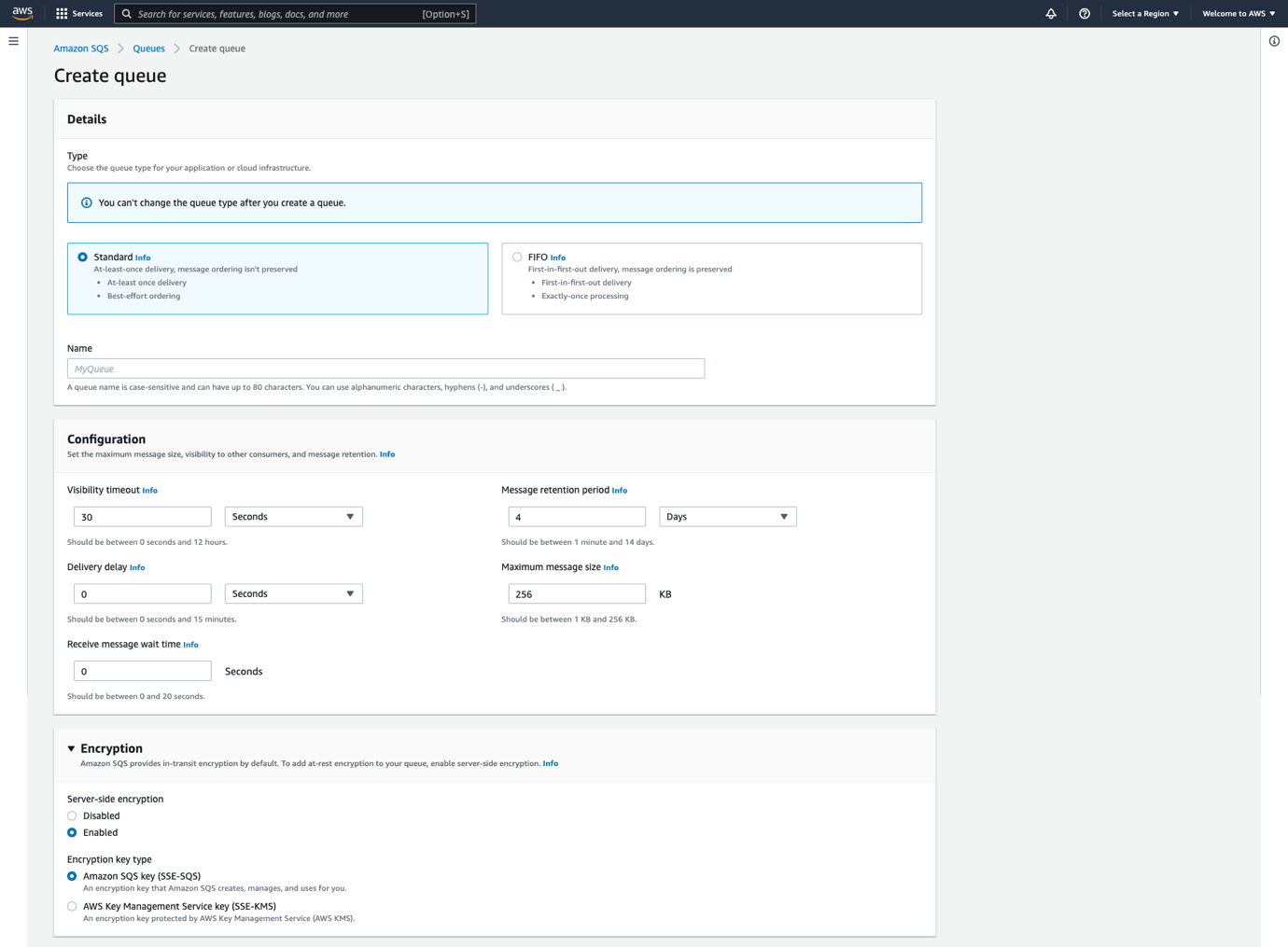
The preceding image shows the SQS queue creation console wizard with configuration options for encryption. As you can see, server-side encryption is enabled by default with encryption key type SSE-SQS option selected.
Creating a new SQS queue with SSE-SQS encryption using AWS CloudFormation
Default SSE-SQS encryption is also supported in AWS CloudFormation. To learn more, see this documentation page.
Here is the sample CloudFormation template to create an SQS standard queue with SQS owned Server Side Encryption (SSE-SQS) explicitly enabled.
AWSTemplateFormatVersion: "2010-09-09"
Description: SSE-SQS Cloudformation template
Resources:
  SQSEncryptionQueue:
    Type: AWS::SQS::Queue
    Properties:
      MaximumMessageSize: 262144
      MessageRetentionPeriod: 86400
      QueueName: SSESQSQueue
      SqsManagedSseEnabled: true
      KmsDataKeyReusePeriodSeconds: 900
      VisibilityTimeout: 30
Note that if the SqsManagedSseEnabled: true property is not specified, SSE-SQS is enabled by default.
Configuring SSE-SQS encryption for existing queues vis AWS Management Console
To configure SSE-SQS encryption for an existing queue using the SQS console:
- Navigate to the SQS console at https://console.aws.amazon.com/sqs/.
- In the navigation pane, choose Queues.
- Select a queue, and then choose Edit.
- Under the Encryption dialog box, for Server-side encryption, choose Enabled.
- Select Amazon SQS key (SSE-SQS).
- Choose Save.
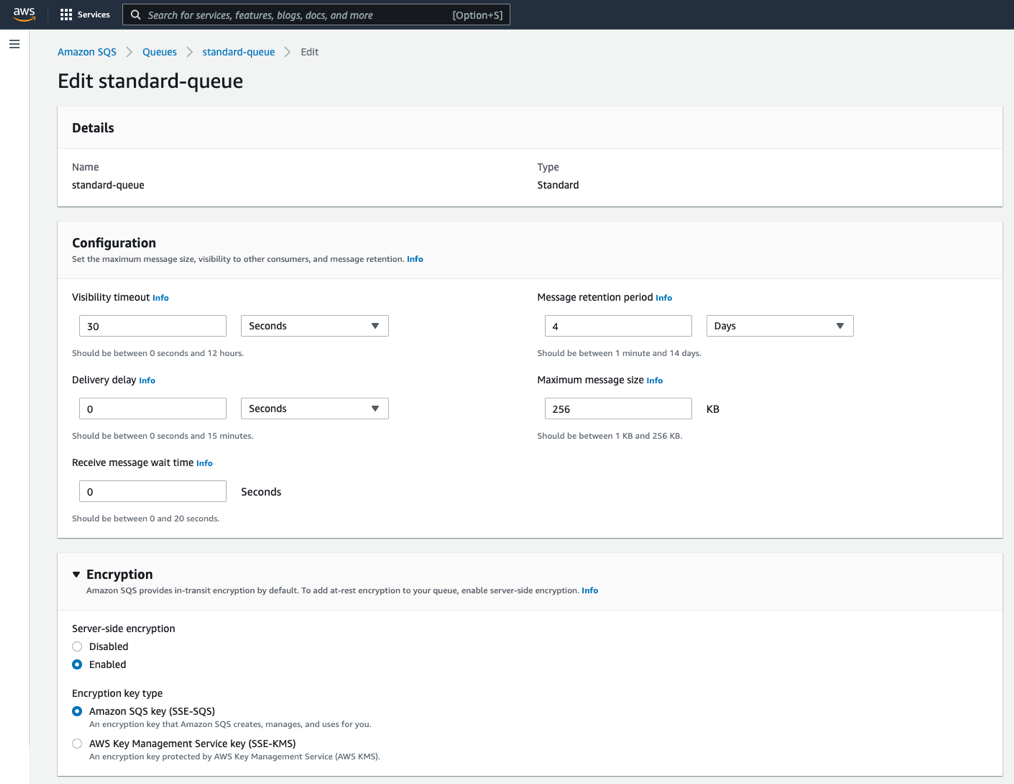
To configure SSE-SQS encryption for an existing queue using the AWS CLI
To enable SSE-SQS to an existing queue with no encryption, use the following AWS CLI command
aws sqs set-queue-attributes --queue-url <queueURL> --attributes SqsManagedSseEnabled=trueReplace <queueURL> with the URL of your SQS queue.
To disable SSE-SQS for an existing queue using the AWS CLI, run:
aws sqs set-queue-attributes --queue-url <queueURL> --attributes SqsManagedSseEnabled=falseTesting the queue with the SSE-SQS encryption enabled
To test sending message to the SQS queue with SSE-SQS enabled, run:
aws sqs send-message --queue-url <queueURL> --message-body test-messageReplace <queueURL> with the URL of your SQS queue. You see the following response, which means the message is successfully sent to the queue:
{
    "MD5OfMessageBody": "beaa0032306f083e847cbf86a09ba9b2",
    "MessageId": "6e53de76-7865-4c45-a640-f058c24a619b"
}
Default SSE-SQS encryption key rotation
You can choose how often the keys will be rotated by configuring the KmsDataKeyReusePeriodSeconds queue attribute. The value must be an integer between 60 (1 minute) and 86,400 (24 hours). The default is 300 (5 minutes).
To update the KMS data key reuse period for an existing SQS queue, run:
aws sqs set-queue-attributes --queue-url <queueURL> --attributes KmsDataKeyReusePeriodSeconds=900This configures the queue with KMS key rotation to every 900 seconds (15 minutes).
Default SSE-SQS and encrypted messages
Encrypting a message makes its contents unavailable to unauthorized or anonymous users. Anonymous requests are requests made to a queue that is open to a public network without any authentication. Note, if you are using anonymous SendMessage and ReceiveMessage requests to the newly created queues, the requests will now be rejected with SSE-SQS enabled by default.
Making anonymous requests to SQS queues does not follow SQS security best practices. We strongly recommend updating your policy to make signed requests to SQS queues using AWS SDK or AWS CLI and to continue using SSE-SQS enabled by default.
Look at the SQS service response for anonymous messages when SSE-SQS encryption is enabled. For an existing queue, you can change the queue policy to grant all users (anonymous users) SendMessage permission for a queue named EncryptionQueue:
{
  "Version": "2012-10-17",
  "Id": "Queue1_Policy_UUID",
  "Statement": [
    {
      "Sid": "Queue1_SendMessage",
      "Effect": "Allow",
      "Principal": "*",
      "Action": "sqs:SendMessage",
      "Resource": "<queueARN>"
    }
  ]
}
You can then make an anonymous request against the queue:
curl <queueURL> -d 'Action=SendMessage&MessageBody=Hello'You get an error message similar to the following:
<?xml version="1.0"?>
<ErrorResponse
	xmlns="http://queue.amazonaws.com/doc/2012-11-05/">
	<Error>
		<Type>Sender</Type>
		<Code>AccessDenied</Code>
		<Message>Access to the resource The specified queue does not exist or you do not have access to it. is denied.</Message>
		<Detail/>
	</Error>
	<RequestId> RequestID </RequestId>
</ErrorResponse>
However, for any reason if you want to continue using anonymous requests to the newly created queues in the future, you must create or update the queue with SSE-SQS encryption disabled.
SqsManagedSseEnabled=false
You can also disable the SSE-SQS using the Amazon SQS console.
Encrypting SQS queues with your own encryption keys
You can always change the default of SSE-SQS queues encryption and use your own keys. To encrypt SQS queues with your own encryption keys using the AWS Key Management Service (SSE-KMS), the default encryption with SSE-SQS can be overwritten to SSE-KMS during the queue creation process or afterwards.
You can update the SQS queue Server-side encryption key type using the Amazon SQS console, AWS Command Line Interface, or API.
Benefits of SQS owned encryption (SSE-SQS)
There are a number of significant benefits to encrypting your data with SQS owned encryption (SSE-SQS):
- SSE-SQS lets you transmit data more securely and improve your security posture commonly required for compliance and regulations with no additional overhead, as you do not need to create and manage encryption keys.
- Encryption at rest using the default SSE-SQS is provided at no additional charge.
- The encryption and decryption of your data are handled transparently and continue to deliver the same performance you expect.
- Data is encrypted using the 256-bit Advanced Encryption Standard (AES-256 GCM algorithm), so that only authorized roles and services can access data.
In addition, customers can enable CloudWatch Alarms to alarm on activities such as authorization failures, AWS Identity and Access Management (IAM) policy changes, or tampering with CloudTrail logs to help detect and stay on top of security incidents in the customer application (to learn more, see Amazon CloudWatch User Guide).
Conclusion
SQS now provides server-side encryption (SSE) using SQS-owned encryption (SSE-SQS) by default. This enhancement makes it easier to create SQS queues, while greatly reducing the operational burden and complexity involved in protecting data.
Encryption at rest using the default SSE-SQS is provided at no additional charge and is supported for both Standard and FIFO SQS queues using HTTPS endpoints. The default SSE-SQS encryption is available now.
To learn more about Amazon Simple Queue Service (SQS), see Getting Started with Amazon SQS and Amazon Simple Queue Service Developer Guide.
For more serverless learning resources, visit Serverless Land.
Let’s Architect! Architecting in health tech
Post Syndicated from Luca Mezzalira original https://aws.amazon.com/blogs/architecture/lets-architect-architecting-in-health-tech/
Healthcare technology, commonly referred to as “health tech,” is the use of technologies developed for the purpose of improving any and all aspects of the healthcare system. For example, IT tools or software designed to boost hospital/administrative productivity, give insights into new and existing treatments, or improve the overall quality of care.
Also known as “digital health”, health tech uses databases, applications, mobile devices, and wearables to facilitate the delivery, payment, and/or consumption of healthcare. The increased accessibility to these technologies can further increase the development and launch of additional healthcare products.
In this post, we explore how to build and manage health tech architectures using Amazon Web Services (AWS).
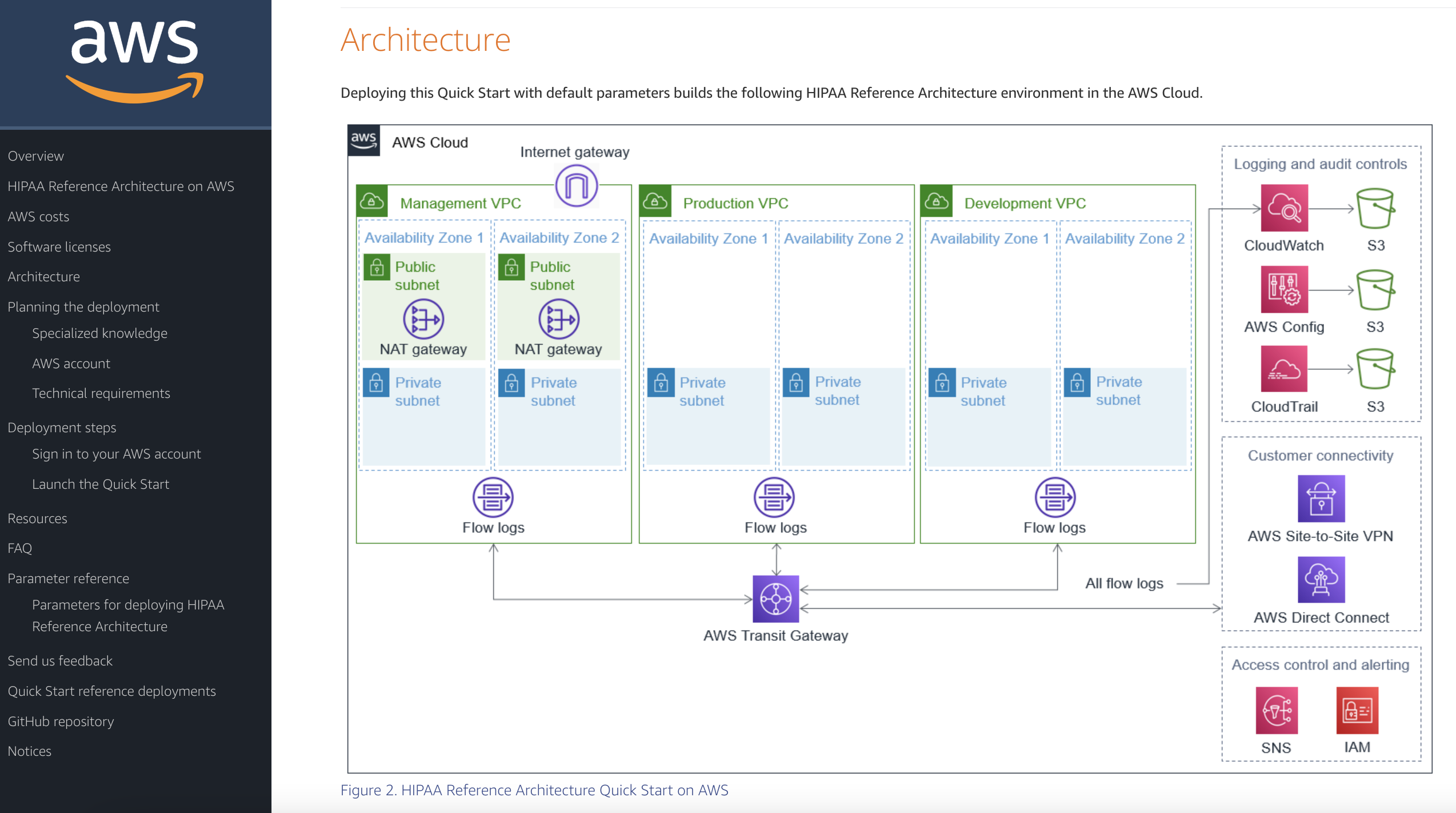
HIPAA Reference Architecture on the AWS Cloud
This Quick Start provides guidance for deploying a U.S. Health Insurance Portability and Accountability Act (HIPAA) architecture on the AWS Cloud. Specifically, this aims to help those in the healthcare industry build and implement HIPAA-ready environments that fit with an organization’s larger HIPAA compliance program. It includes AWS CloudFormation templates that are customizable, plus automatically deploy the environment and configure AWS resources.
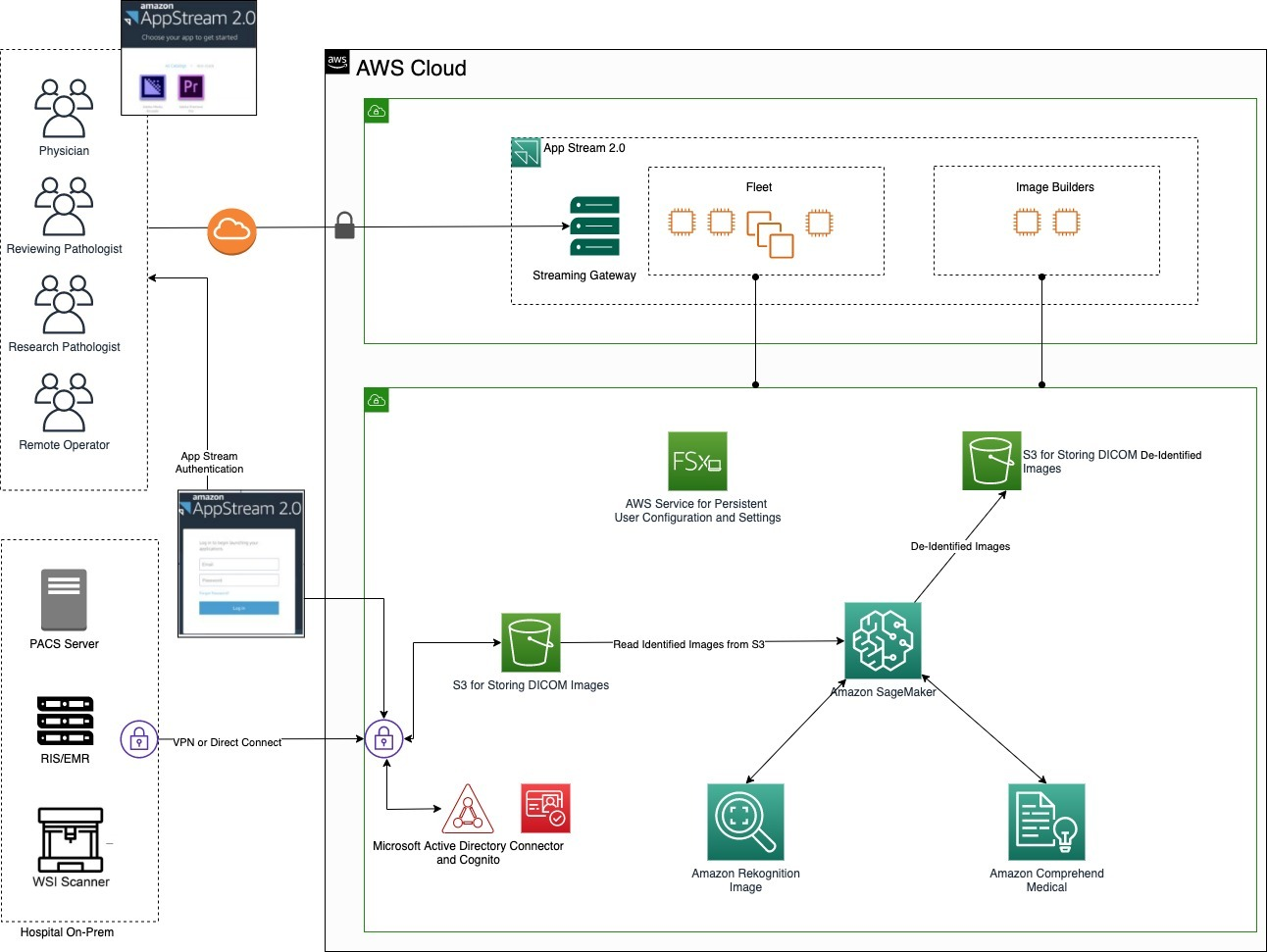
Using AppStream 2.0 to Deliver PACS and Image Analysis in Clinical Trials
Amazon AppStream 2.0 is a fully managed, non-persistent desktop and application service for remotely accessing your work. This means that clinical staff can now access the medical applications and data they need from anywhere. Benefits of using AppStream 2.0 include reduced overhead cost. This Architecture Blog post examines how to construct the AWS architecture for an image analysis application used in clinical trials, while keeping cost down. Furthermore, it demonstrates how something seemingly complex can be built with ease using both AWS services and image analysis applications already in place.
How fEMR Delivers Cryptographically Secure and Verifiable Medical Data with Amazon QLDB
Data veracity is fundamental. Patient data is confidential, and when a system deals with sensitive data, there needs to be a clear chain of ownership.
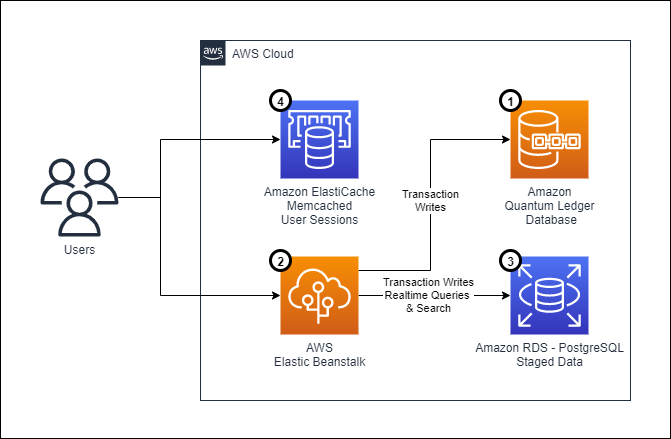
This blog post depicts an architecture based on the use of Amazon Quantum Ledger Database (Amazon QLDB), which addresses the need for data integrity and verifiability in healthcare. By using Amazon QLDB, the team can take advantage of an append-only journal to create a verifiable electronic medical record.
Also explored are the challenges architects face while working on these types of systems, as well as considerations about security, operational efficiency, processes for repeatable deployments using infrastructure as code, and data replication across multiple databases. The design choices architects make when developing a system depend on the context; read more about the mental models adopted in this use case.
Service Workbench on AWS
Service Workbench on AWS is a cloud solution that enables IT teams to provide secure, repeatable, and federated control of access to data, tooling, and compute power. Service Workbench can help redirect researchers’ focus from technical duties back to the research itself, by allowing them to automate of the creation of baseline research setups and providing data access. It gives researchers the ability to build research environments in minutes without having to know about cloud infrastructure or wait for research IT to respond. It is fully HIPAA-compliant and allows for secure peer-to-peer collaboration, including with individuals from other institutions.
See you next time!
Thanks for joining our discussion on health tech architectures! See you in two weeks for more architecture best practices and guidance.
Other posts in this series
- Let’s Architect! Architecting with custom chips and accelerators
- Let’s Architect! Modern data architectures
- Let’s Architect! Architecting for the edge
- Let’s Architect! Architecting for Sustainability
- Let’s Architect! Architecting for Machine Learning
- Let’s Architect! Architecting for Security
- Let’s Architect! Tools for Cloud Architects
- Let’s Architect! Architecting for Blockchain
- Let’s Architect! Architecting microservices with containers
- Let’s Architect! Using open-source technologies on AWS
- Let’s Architect! Serverless architecture on AWS
- Let’s Architect! Creating resilient architecture
- Let’s Architect! Architecting for governance and management
- Let’s Architect! Architecting for front end
- Let’s Architect! Understanding the build versus buy dilemma
- Let’s Architect! Architecting for DevOps
- Let’s Architect! Designing Well-Architected systems
- Let’s Architect! Architecting for big data workloads
Looking for more architecture content?
AWS Architecture Center provides reference architecture diagrams, vetted architecture solutions, Well-Architected best practices, patterns, icons, and more!
Gruinard: Scotland’s Deadly Anthrax Island
Post Syndicated from Geographics original https://www.youtube.com/watch?v=uvyL6eA28z8
Колекция от опорки
Post Syndicated from Bozho original https://blog.bozho.net/blog/3952
Колекционирам си опорни точки на опоненти и тролове. Ето някои от тях, които редовно изплуват, вкл. в следизборни пресконференции:
- „искате просто да смените Гешев с ваш човек, това не е съдебна реформа“. Не, този опит за омаловажаване на позоцията ни се ползва отдавна, но няма общо с реалността. Да, Гешев трябва да си ходи, като олицетворение на всичко изгнило в съдебната система, но реформата е много повече – отчетност, премахване на безконтролността и възможността за чадъри (отказ от разследване). Имаме проект на изменение на Конституцията и там не пише „Гешев“.
- „Подкрепихте Радев, виновни сте за избора му“ – никога нито Демократична България, нито Да, България е подкрепяла явно или тайно Радев. Имахме свой кандидат, а на балотажа нашите избиратели гласуваха по съвест, без партийни инструкции, каквито така или иначе не можем да им даваме
- „коленичихте пред Радев и му палихте свещи“ – този злощастен флашмоб в близост до президентството беше иницииран от граждански активисти, които обясниха след това мотивите и те нямаха общо с Радев. При всички случаи не ми е известно някой от ДБ да е бил тази вечер там, камо ли да го е организирал.
- „Демократична България вече е била е коалиция с ГЕРБ“ – полуистините (или в този случай – 1/14 истини) са типичен пропаганден инструмент. Реформаторският блок беше в коалиция с ГЕРБ. ДСБ (1 от 7 партии) излязоха в опозиция след оставката на Христо Иванов след първата година. ДСБ е 1 от 3 партии в ДБ, но Реформаторския блок се разпадна именно заради тази коалиция. А Да, България беше създадена отчасти като отговор на този разпаднал се блок, с изцяло нови лица.
- „Реформата на Христо Иванов беше приета, какво повече искате“. Не, не беше, затова той подаде оставка. С типична за ГЕРБ и ДПС процедурна врътка, внесена и гласувана в последния момент от най-малкия партньор тогва – АБВ – основата на реформата беше променена, за да може главният прокурор запази влиянието си във ВСС и така да остане безконтролен.
„Опорките“ няма да спрат, но тяхното опровергаване може да ги отслаби.
Материалът Колекция от опорки е публикуван за пръв път на БЛОГодаря.
More stable kernel updates
Security updates for Wednesday
Post Syndicated from original https://lwn.net/Articles/910395/
Security updates have been issued by Debian (barbican, mediawiki, and php-twig), Fedora (bash, chromium, lighttpd, postgresql-jdbc, and scala), Mageia (bash, chromium-browser-stable, and golang), Oracle (bind, bind9.16, and squid:4), Red Hat (bind, bind9.16, RHSSO, and squid:4), Scientific Linux (bind), SUSE (cifs-utils, libjpeg-turbo, nodejs14, and nodejs16), and Ubuntu (jackd2, linux-gke, and linux-intel-iotg).
What’s New in InsightIDR: Q3 2022 in Review
Post Syndicated from KJ McCann original https://blog.rapid7.com/2022/10/05/whats-new-in-insightidr-q3-2022-in-review/

This Q3 2022 recap post takes a look at some of the latest investments we’ve made to InsightIDR to drive detection and response forward for your organization.
360-degree XDR and attack surface coverage with Rapid7
The Rapid7 XDR suite — flagship InsightIDR, alongside InsightConnect (SOAR), and Threat Command (Threat Intel) — unifies detection and response coverage across both your internal and external attack surface. Customers detect threats earlier and respond more quickly, shrinking the window for attackers to succeed.
With Threat Command alerts now directly ingested into InsightIDR, receive a more holistic picture of your threat landscape, beyond the traditional network perimeter. By unifying these detections and related workflows together in one place, customers can:
- Manage and tune external Threat Command detections from InsightIDR console
- Investigate external threats alongside context and detections of their broader internal environment
- Activate automated response workflows for Threat Command alerts – powered by InsightConnect – from InsightIDR to extinguish threats faster
Rapid7 products have helped us close the gap on detecting and resolving security incidents to the greatest effect. This has resulted in a safer environment for our workloads and has created a culture of secure business practices.
— Manager, Security or IT, Medium Enterprise Computer Software Company via Techvalidate
Eliminate manual tasks with expanded automation
Reduce mean time to respond (MTTR) to threats and increase confidence in your response actions with the expanded integration between InsightConnect and InsightIDR. Easily create and map InsightConnect workflows to any attack behavior analytics (ABA), user behavior analytics (UBA), or custom detection rule, so tailored response actions can be initiated as soon as an alert fires. Quarantine assets, enrich investigations with more evidence, kick off ticketing workflows, and more – all with just a click.
Preview the impact of exceptions on detection rules
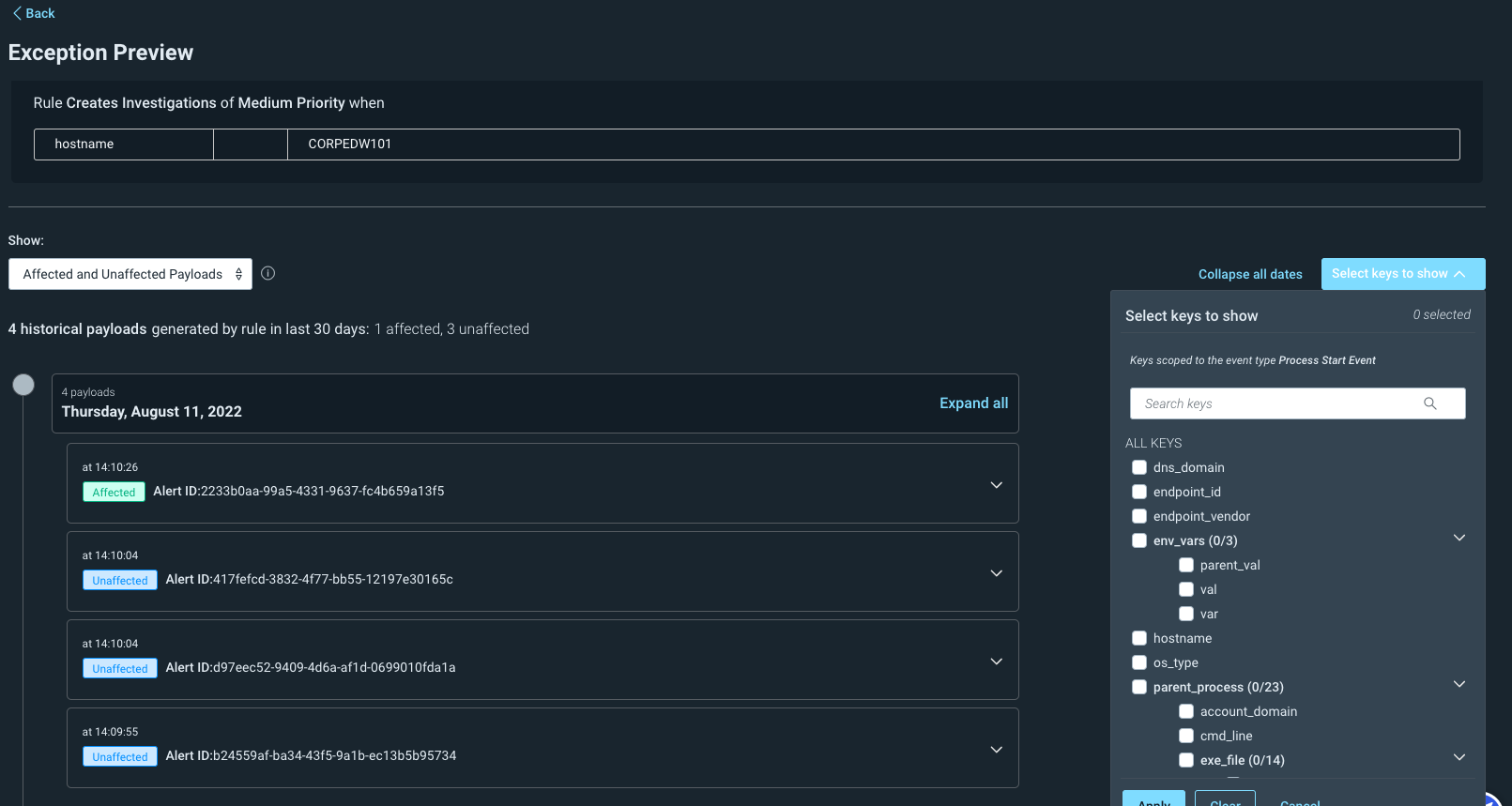
Building on our intuitive detection tuning experience, it’s now easier to anticipate how exceptions will impact your alert volume. Preview exceptions in InsightIDR to confirm your logic to ensure that tuning will yield relevant, high fidelity alerts. Exception previews allow you to confidently refine the behavior of ABA detection rules for specific users, assets, IP addresses, and more to fit your unique environments and circumstances.
Streamline investigations and collaboration with comments and attachments
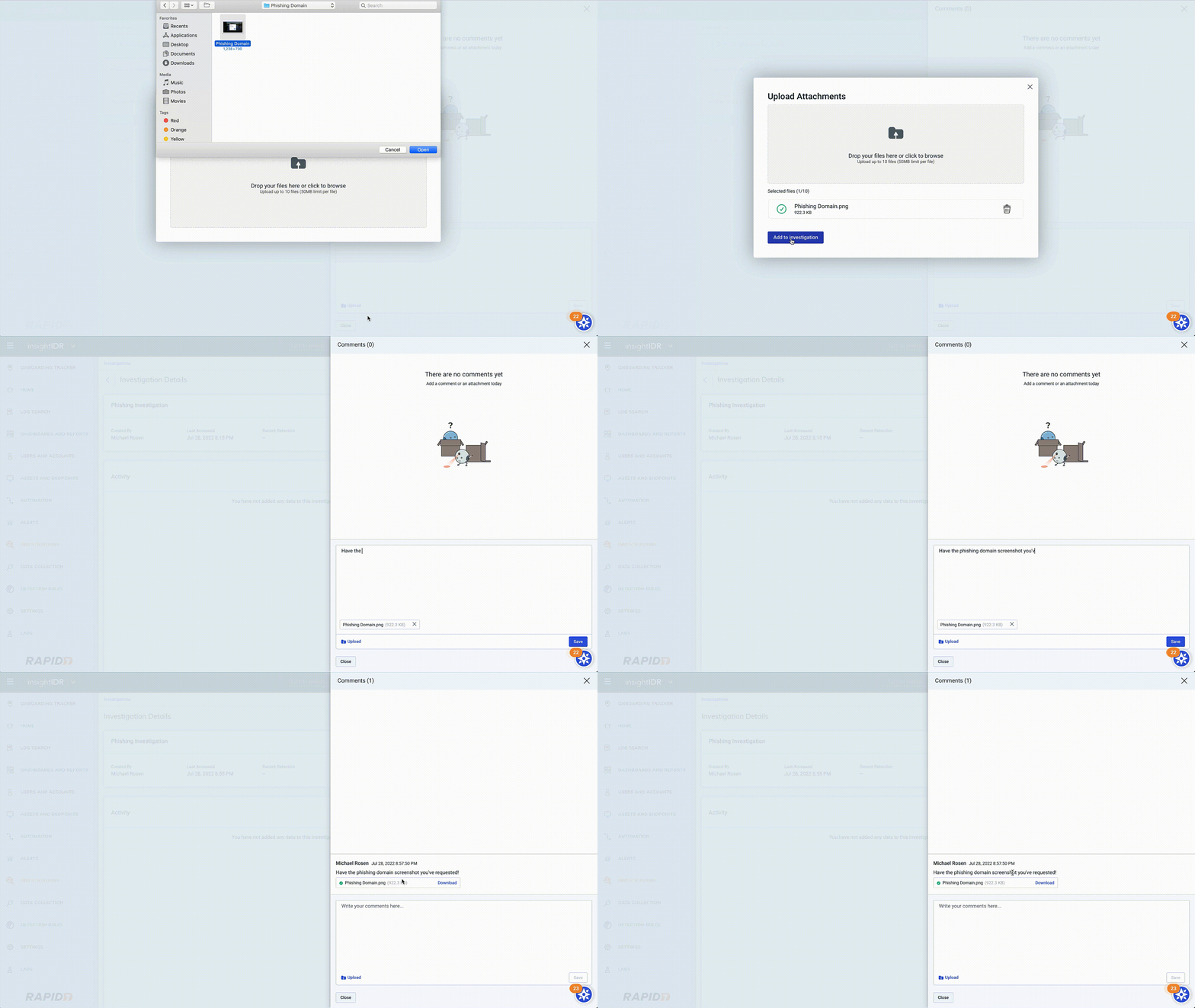
With teams more distributed than ever, the ability to collaborate virtually around investigations is paramount. Our overhauled notes system now empowers your team to create comments and upload/download rich attachments through Investigation Details in InsightIDR, as well as through the API. This new capability ensures your team has continuity, documentation, and all relevant information at their fingertips as different analysts collaborate on an investigation.
New vCenter deployment option for the Insight Network Sensor
As a security practitioner looking to minimize your attack surface, you need to know the types of data on your network and how much of it is moving: two critical areas that could indicate malicious activity in your environment.
With our new vCenter deployment option, you can now use distributed port mirroring to monitor internal east-west traffic and traffic across multiple ESX servers using just a single virtual Insight Network Sensor. When using the vCenter deployment method, choose the GRETAP option via the sensor management page.
First annual VeloCON brings DFIR experts from around the globe together
Rapid7 brought DFIR experts and enthusiasts from around the world together this September to share experiences in using and developing Velociraptor to address the needs of the wider DFIR community.

Velociraptor’s unique, advanced open-source endpoint monitoring, digital forensic, and cyber response platform provides you with the ability to respond more effectively to a wide range of digital forensic and cyber incident response investigations and data breaches.
Watch VeloCON on-demand to see security experts delve into new ideas, workflows, and features that will take Velociraptor to the next level of endpoint management, detection, and response.
A growing library of actionable detections
In Q3, we added 385 new ABA detection rules to InsightIDR. See them in-product or visit the Detection Library for actionable descriptions and recommendations.
Stay tuned!
As always, we’re continuing to work on exciting product enhancements and releases throughout the year. Keep an eye on our blog and release notes as we continue to highlight the latest in detection and response at Rapid7.
GoPro Hero 11 Black | OG Unboxes and Tested
Post Syndicated from digiblurDIY original https://www.youtube.com/watch?v=110Ib-bnU9c
Good Morning, Captain
Post Syndicated from The History Guy: History Deserves to Be Remembered original https://www.youtube.com/watch?v=hDUEEqJer9k
Кой всъщност спечели изборите
Post Syndicated from Светла Енчева original https://toest.bg/koy-vsushtnost-specheli-izborite/
Резултатите от четвъртите за година и половина избори за народно събрание не бяха неочаквани. Въпреки това следизборното настроение няма как да е приповдигнато. Чака ни поредният период на политическа нестабилност, а само след няколко месеца – по всяка вероятност и нови избори. Всичко това в контекста на война на няколкостотин метра от границите, все по-отчаяни и ескалиращи действия на един диктатор, загубил връзка с реалността, несигурност на доставките на газ, инфлация, поредни бежански вълни, неясни перспективи за влизането на България в еврозоната и шенгенското пространство. В тази ситуация, изглежда, няма кой да поеме политическата отговорност.
Макар на изборите формално да имаше победител, всички участници по един или друг начин загубиха.
Загуби ГЕРБ, защото, макар и да получи почти толкова проценти, колкото „Продължаваме промяната“ на изборите през ноември 2021 г., няма начин да състави правителство, без допълнително да дискредитира и без това спорния си морален интегритет. Или без да се раздели с Бойко Борисов, което би било началото на края на тази по същество лидерска партия. Предложението на Борисов всички партийни лидери „да се дръпнат назад“ би го поставило в ролята на сив кардинал от типа на Ахмед Доган. Ясно е, че дори партиите да приемат призива му, нищо в ГЕРБ не би се променило.
Нищожна е вероятността „Продължаваме промяната“ и „Демократична България“ да се отзоват на поканата на ГЕРБ за „евро-атлантически кабинет“, защото това би ги обезсмислило политически. Те знаят, че зад мантрата за евро-атлантизма се крие желанието на Борисов да остане на власт и да се съхрани клиентелистката структура на партията по места.
Същият Борисов, който:
– е взел активно участие в т.нар. Възродителен процес;
– е бил бодигард на социалистическия диктатор Тодор Живков;
– през 1991 г. предпочел да напусне работата си, за да остане в БКП;
– подари на Путин кученце;
– остави паравоенни пропутински групировки да се вихрят необезспокоявано в България;
– направи всичко по силите си да бетонира енергийната зависимост на България от Русия;
– вложи милиарди държавни пари за тръба, която заобикаля Украйна, знаейки, че от нея България няма полза…
Та същият Борисов днес се вживява в една от многото си роли – на евро-атлантик.
Понеже ПП и ДБ „не ядат доматите с колците“, комай единственият вариант за управление на ГЕРБ би бил в коалиция с ДПС, „Български възход“ и няколко „разсеяни“ депутати от „Възраждане“, които пропуснат да присъстват при гласуването на кабинета. Подобна конфигурация би била „самоубийствена“ за всички участници, смята социологът Живко Георгиев. Според него ГЕРБ „е токсична за всички без ДПС, но пък ДПС е токсично за всички, в това число и за ГЕРБ“.
Вариантът „експертно правителство“ също е спорен. Строго погледнато, експертни правителства няма – зад всяко правителство стоят определени политики, за които следва да се поеме политическа отговорност. А зад българските експертни правителства стои все ДПС. „Експертни“ бяха правителствата на Любен Беров и Пламен Орешарски. Днес никой не ги споменава с добро.
Безспорно загуби „Продължаваме промяната“, която не удържа заявката си за изборна победа, въпреки че получи повече, отколкото проучванията ѝ отреждаха. И която няма полезен ход, ако получи втория мандат за съставянето на правителство, защото не може да сформира коалиционно мнозинство. Именно в този контекст следва да се интерпретира и отказът за обща парламентарна група с ДБ.
За загубата на партията допринесоха не толкова недостатъчните успехи на коалиционното правителство на Кирил Петков в контекста на всеобщата кризисна ситуация, колкото последователното очерняне на ПП от страна на медии, ГЕРБ и президента, както и грешки на самата партия по време на кампанията. Ето някои от предварителните заключения на Международната мисия за наблюдение на изборите за медийното отразяване на предизборната кампания:
В уебсайтовете на няколко ненадеждни медии, свързани със страници във Facebook и канали в Telegram, се разпространяваше заблуждаваща информация, имаща за цел главно да дискредитира ПП и ДБ и да накърни информационната среда. […] Информационните бюлетини в най-гледаното време на ефирните медии бяха съсредоточени върху решенията на правителството и президента, като от време на време се споменаваха ГЕРБ, БСП, ДПС и ПП във връзка с работата им в предходните кабинети. Отразяването на БСП и ПП беше главно с негативен тон.
Що се отнася до грешките на ПП, те са както в поведението на лидерите ѝ, така и в таргетирането на кампанията. Пример за първия тип грешка е начинът, по който Кирил Петков аргументира участието си в предизборен дебат на bTV. Думите му прозвучаха като изсмукано от пръстите оправдание. Това, заедно с драматичната реакция на представителите на ГЕРБ и неумерено агресивното поведение на водещата на дебата Мария Цънцарова, затвърди впечатлението, че не е в реда на нещата партиен лидер да участва в дебат.
Що се отнася до таргетирането, кампанията на ПП се целеше в три основни групи – антикорупционно настроени, пенсионери и млади хора, предимно негласуващи. Първите се опитваше да привлече с изтъкване на усилията си за спиране на корупционни канали, вторите – с напомняне как са увеличили пенсиите, третите – със симпатично, леко „хулиганско“ поведение, с концерт и особено с изявите на „депутата Христо“ (Христо Петров, известен с рапърския си прякор Ицо Хазарта). Проблемът е, че първите две групи са и типичен електорат на ДБ и БСП и привличайки част от него, ПП „обезкървява“ потенциалните си коалиционни партньори. В същото време партията на Кирил Петков и Асен Василев не зае категорична позиция за войната в Украйна, с което може би отблъсна повече избиратели, отколкото привлече.
ДПС се класира като трета политическа сила от общо седем, преминали 4-процентовата бариера, което е безспорно добро постижение. Проблемът е обаче в споменатата от Живко Георгиев „токсичност“ на партията. ДПС отдавна не се асоциира с турския етнос на огромната част от избирателите си, а с корупция, клиентелизъм и скрити лостове за влияние в институциите и медиите. За партията с почетен председател Ахмед Доган остават следните алтернативи – да бъде групата на „прокажените“, които никой не иска; да влезе в управлението, с което да повлече доверието към другите партии в него надолу; или да продължава да „дърпа конците зад кулисите“, както прави и сега.
На пръв поглед „Възраждане“ определено печели. Продължава тенденцията на увеличаваща се електорална подкрепа за партията, за потенциала на която „Тоест“ обръща внимание от години (например тук, тук и тук). Само че партията на Костадин Костадинов трудно може да капитализира политически възхода си. Може да го капитализира най-вече финансово, примерно с още някоя луксозна къща за председателя си. Радикалният вот в България обаче си има граница и „Възраждане“ е на път да я достигне.
Още повече че войната в Украйна ескалира по такъв начин, че вече е трудно да си путинофил – дори доскорошни верни съюзници на Путин вече се дистанцират от него. А и темата за ваксините се поизтърка. Костадинов е изобретателен и все ще намери нещо ново, чрез което да канализира омраза за политическа употреба. Но това ще е до време.
Не е изключено и „Възраждане“ да влезе в ролята на „златния пръст“ (ала Волен Сидеров), осигурявайки мнозинство за някое управление. В такъв случай я чака съдбата на „Атака“, която на последните избори получи 0,3%, или 7605 гласа. За сравнение: през 2013 г. за партията гласуваха 258 481 души, а на изборите само година по-късно подкрепата за нея се стопи почти наполовина. Докато се стопи толкова подкрепата за партията на Костадинов обаче, ще минат още няколко години от живота ни, стига да сме живи и здрави.
За разлика от „Възраждане“, БСП еднозначно губи. Най-старата действаща партия у нас е сведена до пета политическа сила. Тенденцията на намаляваща електорална подкрепа за „Столетницата“ се запазва, откакто Корнелия Нинова я оглавява. БСП отказва да се превърне в „модерна лява партия“ от европейски тип, към каквато се стремеше, поне на декларативно равнище, бившият ѝ председател Сергей Станишев.
Електоратът на БСП, значителна част от който е на преклонна възраст, оредява все повече по демографски причини. Някои от социално настроените избиратели мигрират към ПП. „Фобският“ електорат, когото Нинова плаши с Истанбулската конвенция, се чувства по-комфортно при „Възраждане“. А путинофилите могат да избират – освен БСП, над чиято председателка тегне „клеймото“, че е подписвала разрешения за износ на оръжие, което в последна сметка е отишло в Украйна – между партията на Костадинов и „Български възход“.
На последните избори „Демократична България“ получи близо 20 000 гласа повече, отколкото през ноември 2021 г. И все пак коалицията се класира на шесто място и сред парламентарно представените партии не е изпреварена само от „Български възход“. А това трудно може да се нарече успех, особено за политическа формация, имала свои министри в предишното редовно правителство.
Всъщност ДБ така и не може да определи кой е нейният електорат, освен тесен слой високообразовани хора в големите градове, преобладаващо в София. Сред тях най-адекватни са посланията на коалицията за програмистите, защото тъкмо те най биха се радвали да могат да общуват с администрацията „само с един клик“ и имат интерес максималният осигурителен праг да е по-нисък.
Опитите на ДБ да „слезе до народа“ са понякога нелепи до конфузност – колкото нелепи са родители, които искат да „стопят леда“ с децата си тийнейджъри, като отиват на купона им и имитират стила и поведението им. Една политическа сила може да разшири електоралната си база, ако отправи адекватни послания за по-широки групи от населението, а не ако нейни кандидати вземат рецепти за туршия от баби от провинцията.
Що се отнася до предизборния слоган „Довери се на разума“, той стана обект на остри критики дори от избиратели на партията и вероятно се харесва само на тези, които са го измислили, и на тесния кръг около тях. Както каза един избирател на ДБ в частен разговор: „Какво искат да ми кажат с това послание, че съм тъп ли?“
„Български възход“ прескочи бариерата за влизане в парламента, което на пръв поглед си е успех. Вероятно това стана, защото някои гласоподаватели асоциират председателя на партията Стефан Янев с президента Румен Радев. Въпреки че последният се разграничи от назначения от него бивш служебен премиер, след като той беше отстранен като военен министър от правителството на Кирил Петков заради пропутинските си позиции.
На Янев много му се участва в управлението – по собственото си признание е готов на всякаква коалиция. Може да се окаже обаче, че няма с кого. Междувременно с публичните си изяви Янев създава впечатлението, че е много объркан човек, пък макар и генерал. След още някой бисер като „защо тръбата е цяла“ току-виж парламентарното битие на „Български възход“ се окаже по-кратко и от това на ИТН.
„Има такъв народ“ загуби, защото не успя да стигне заветните 4%. Или може би не загуби, защото всъщност постигна целта си да дискредитира парламентарната система. Отломките от разрушенията, които нанесе, още не позволяват да има работещо управление.
Може би не загуби и „Изправи се, България“ на Мая Манолова, защото с 1,01% от гласовете си осигури субсидия. И ще получава пари, без да се налага да прави политика.
ВМРО обаче безусловно загуби, защото с 0,81% си остана и без субсидията.
Ако някой все пак спечели от изборите, това е президентът Румен Радев.
По време на предизборната кампания Радев не демонстрира подкрепа към никоя партия или коалиция, но пък не спестяваше критиките си към ПП и БСП, а за кусурите на неотдавнашния си главен враг – ГЕРБ – оставаше сляп.
Тъй като вероятността за работещ редовен кабинет не е голяма, изглежда, Радев за пети път ще има възможността да направи служебно правителство – след кабинета на Огнян Герджиков, двата на Стефан Янев и последния на Гълъб Донев. Така Радев ще продължи да провежда политика според собствените си разбирания, което означава, че в контекста на войната на Русия срещу Украйна България все така няма да заема ясна позиция и ще възпроизвежда пропутински послания, макар декларативно да се обявява за ЕС и НАТО.
Поредното служебно правителство, на свой ред, допълнително ще подкопае доверието в парламентарната демокрация и ще засили настроенията за „силна ръка“ и „президентска република“. Ако подкрепата към Радев, която заради войната е намаляла, не се срине напълно, все повече хора ще си зададат логичния въпрос – след като страната така и така се управлява, аз защо да гласувам? А пътят от този въпрос до отказа от демокрацията, която за българското общество все още е важна, е кратък.
Ала както гласи горчивият хумор по повод на „частичната мобилизация“ в Русия – когато не се интересуваш от политика, рано или късно получаваш повиквателно.
Заглавна снимка: Giorgio Trovato / Unsplash
State of the Open Home 2022
Post Syndicated from Home Assistant original https://www.youtube.com/watch?v=D936T1Ze8-4
Archimedes Principle
Post Syndicated from original https://xkcd.com/2681/

THG’s Tank Duel
Post Syndicated from The History Guy: History Deserves to Be Remembered original https://www.youtube.com/watch?v=6V6P7FpUcN4
[$] A discussion on printk()
Post Syndicated from original https://lwn.net/Articles/909980/
The kernel’s print function, printk(), has been the target of
numerous improvement efforts over the years for a
variety of reasons. One persistent problem with printk() has been
that its latency is unacceptably high for the realtime Linux kernel; at
this point, printk() represents the last piece needing changes
before the
RT_PREEMPT patches can be fully merged. So there have been efforts
to rework printk() for latency and lots of other reasons, but
those have not made it into the mainline; a recent discussion at
the 2022 Linux Plumbers Conference (LPC)
seems to have paved the way for new solution to land in the mainline before
too long.
Tiago Forte | The 4 Areas You Need to Know to Organize Your Life #shorts
Post Syndicated from Talks at Google original https://www.youtube.com/watch?v=fUe8NdGYYR0
Manage your Amazon QuickSight datasets more efficiently with the new user interface
Post Syndicated from Arturo Duarte original https://aws.amazon.com/blogs/big-data/manage-your-amazon-quicksight-datasets-more-efficiently-with-the-new-user-interface/
Amazon QuickSight has launched a new user interface for dataset management. Previously, the dataset management experience was a popup dialog modal with limited space, and all functionality was displayed in this one small modal. The new dataset management experience replaces the existing popup dialog with a full-page experience, providing a clearer breakdown of a dataset’s properties.
In this post, we walk through the end-to-end dataset management user experience.
Access the new UI
To get started, choose Datasets in the navigation pane on the QuickSight console, and choose any dataset that you want to manage.
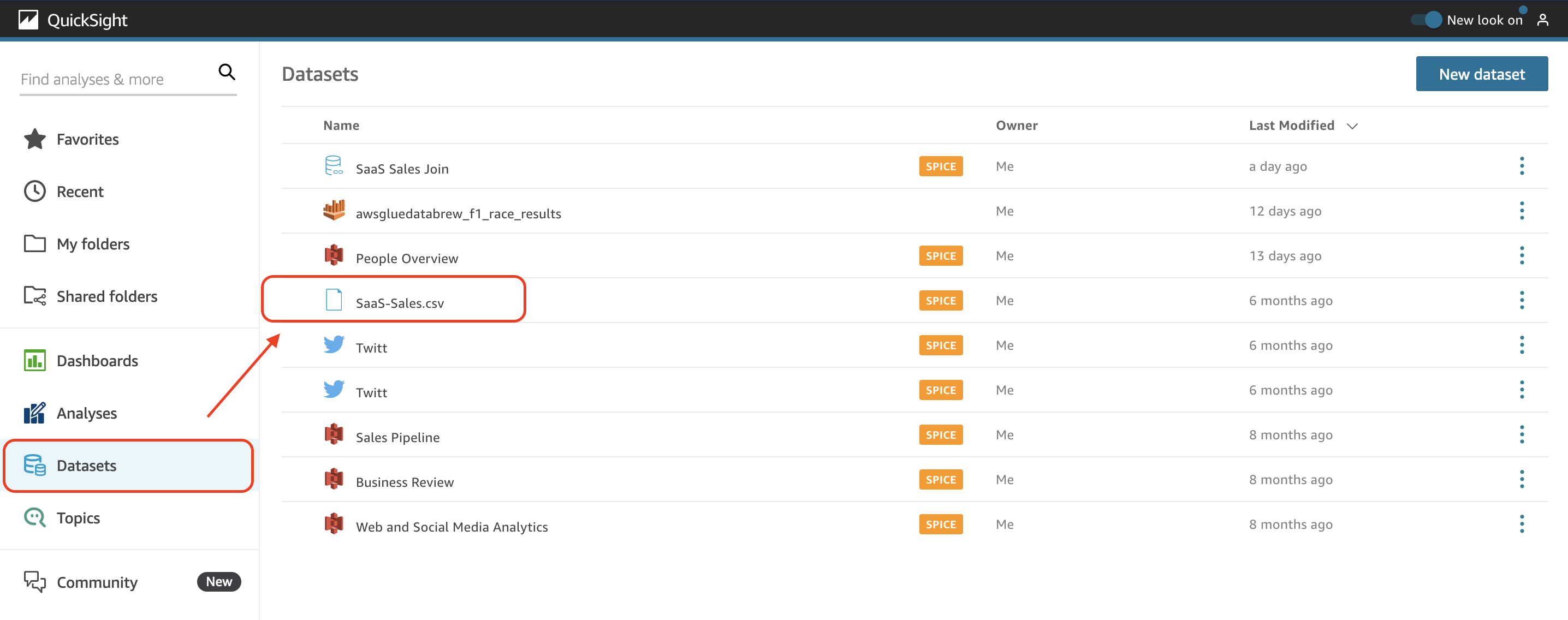
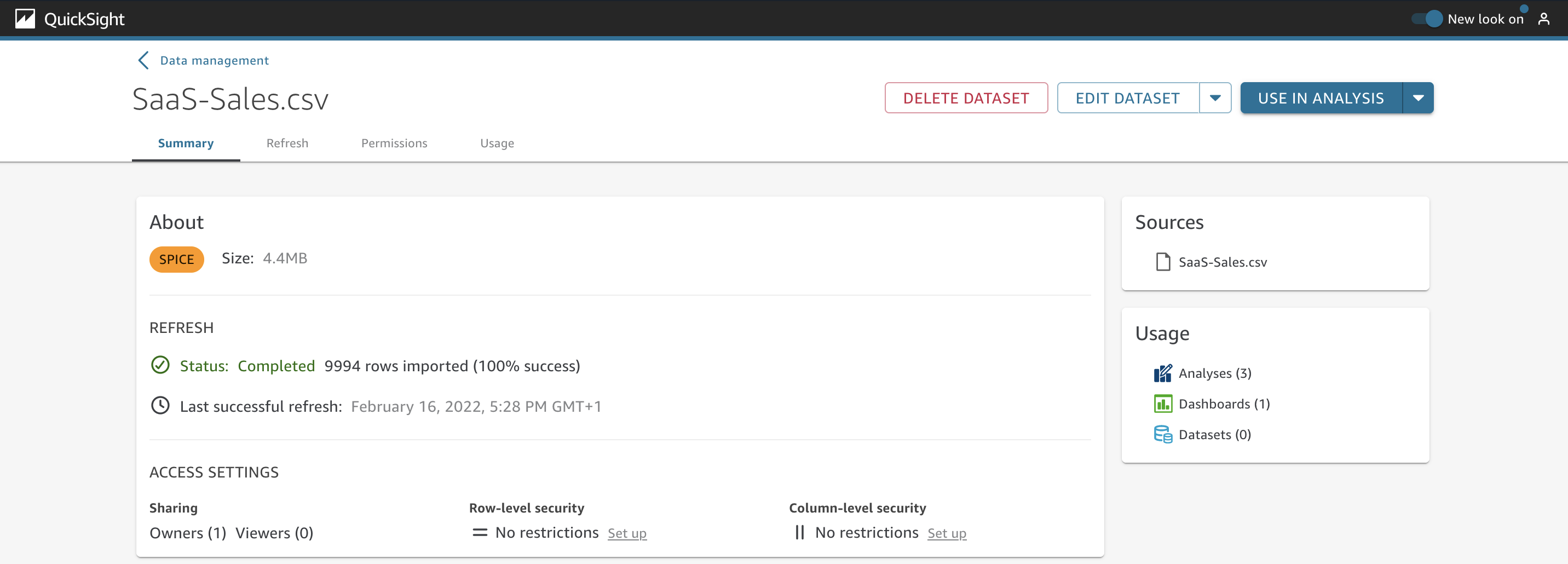
When you choose a dataset, you see the full-page dataset management UI. This new UI is divided into four main tabs: Summary, Refresh, Permissions, and Usage.
Use case overview
Let’s consider a fictional company, AnyCompany. They have used QuickSight for a long time and now have a large number of datasets that have to be managed. Among the datasets they use, they have a combination of Direct Query and SPICE modes. They need a unified view of each dataset, with details related to permissions, refreshes, and usage. Additionally, they need to be able to schedule when they want to refresh the data and have a history of all the successful and failed attempts of these updates.
The Summary tab
As a data analyst at AnyCompany, you need to review details about your datasets. You can find several options by navigating to the Summary tab.
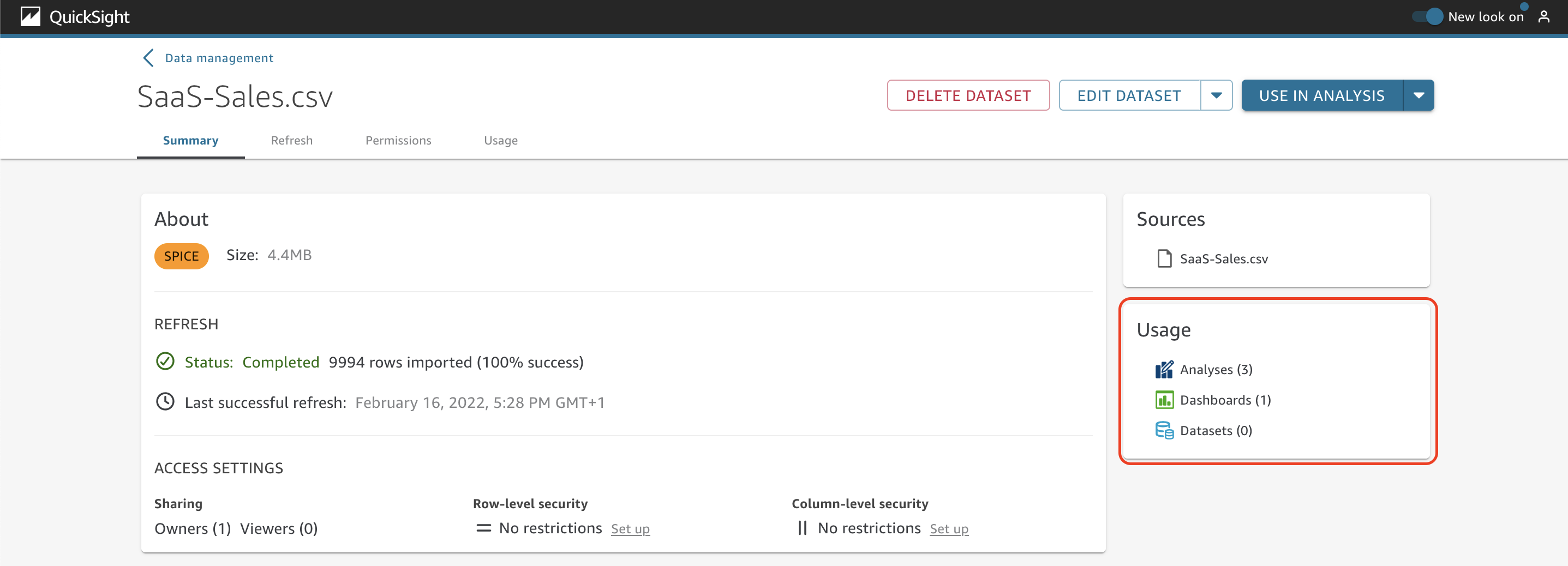
The About section shows if the dataset is stored in SPICE or if it’s using Direct Query. If the dataset is stored in SPICE, you can also get the size of the dataset. If the dataset is using Direct Query, you can choose Set alert schedule to setup a schedule for when alerts on dashboards should be evaluated.
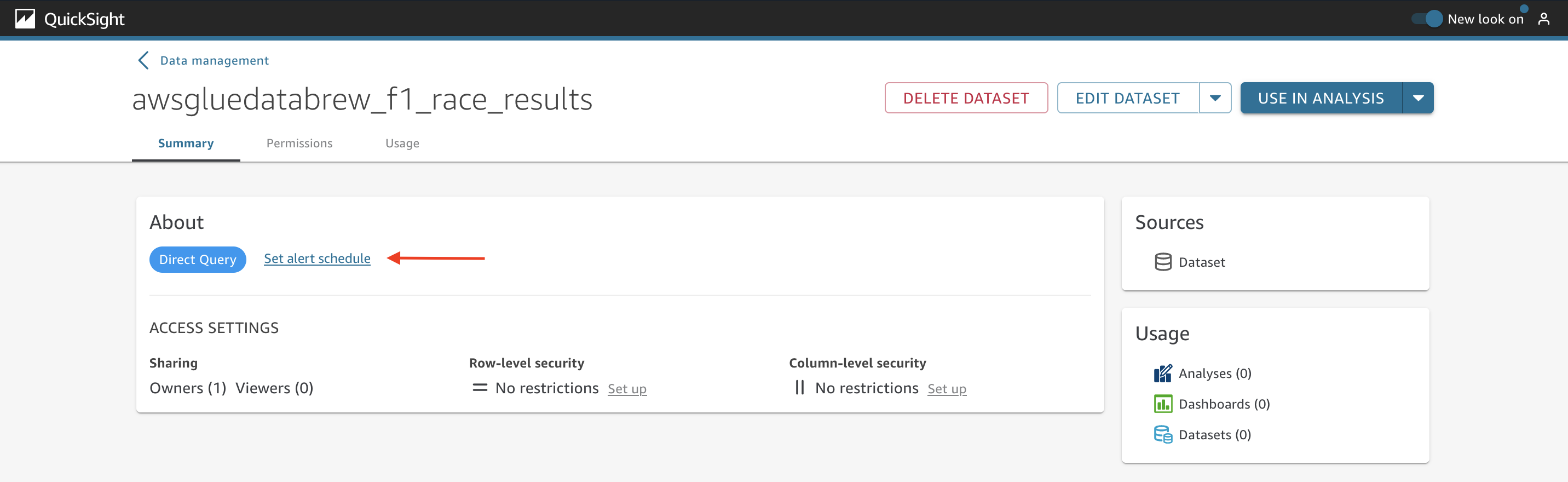
Specify the time zone, if you want to repeat it daily or hourly, and the start time.

To continue exploring the dataset, choose a new dataset that is stored in SPICE. In the Refresh section, you can verify the status of the SPICE dataset and the last successful refresh date.

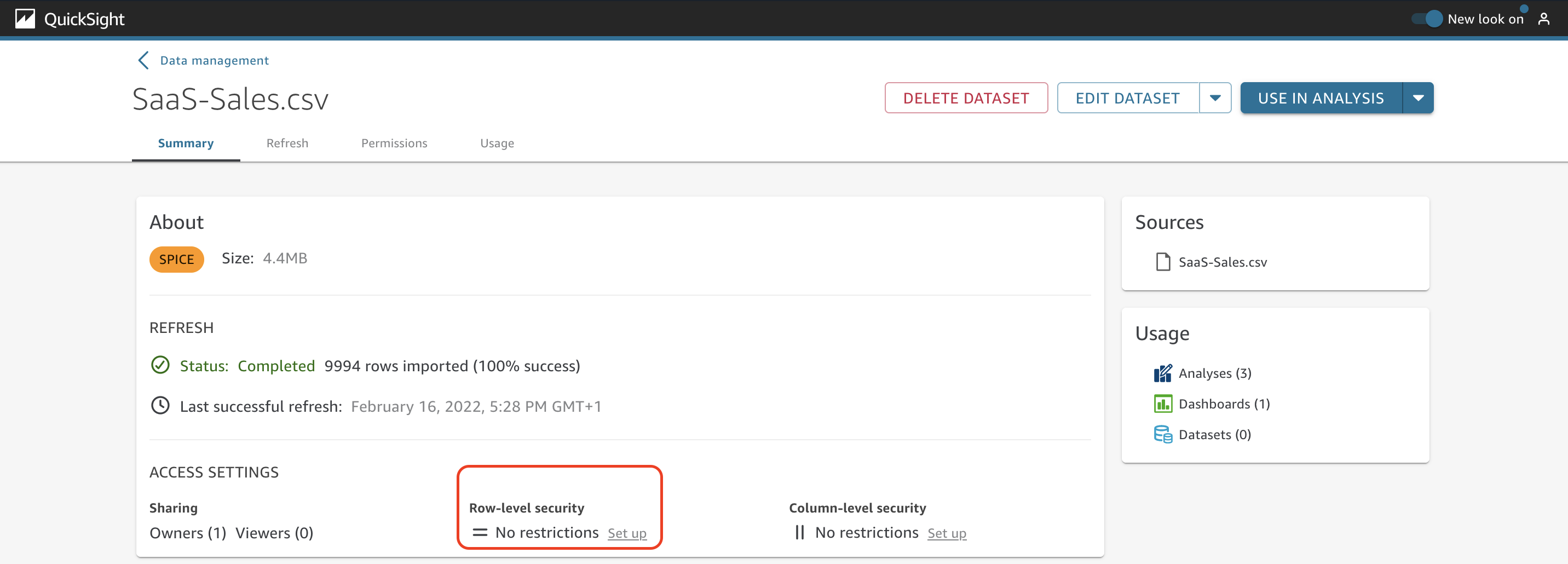
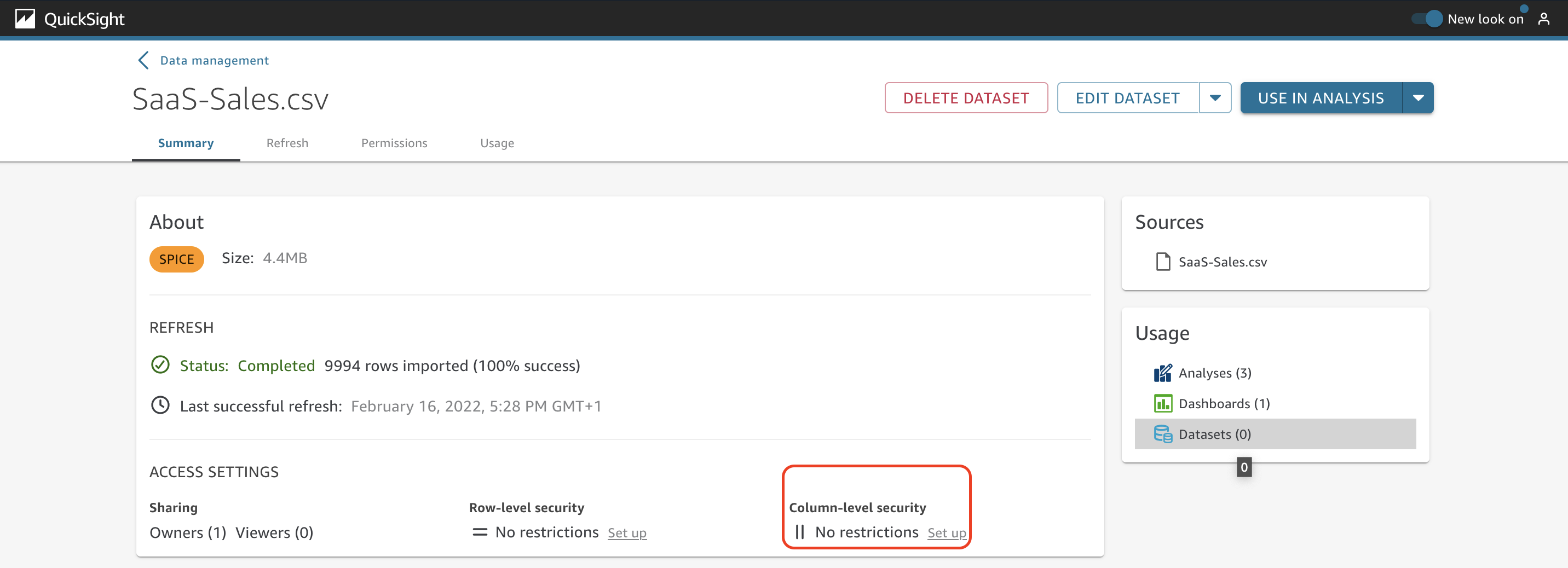
Under Access Settings, you can see details about how many owners and viewers this dataset has and also the options to enable row-level and column-level security.
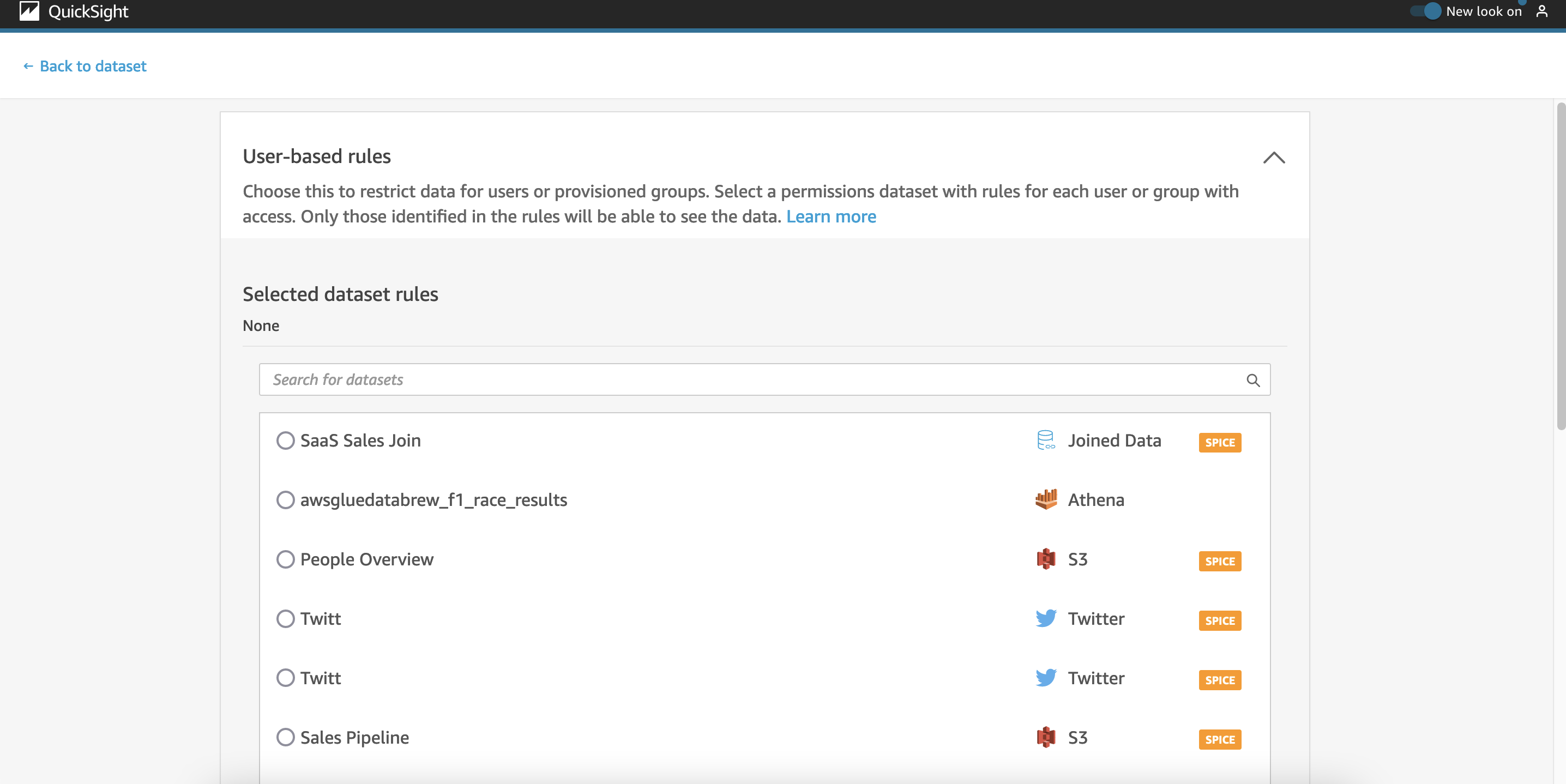
To add row-level security to this dataset, choose Set up under Row-level security.
Under User-based rules, select the permissions dataset with rules to restrict access for each user or group.
To apply column-level security, choose Set up under Column-level security.
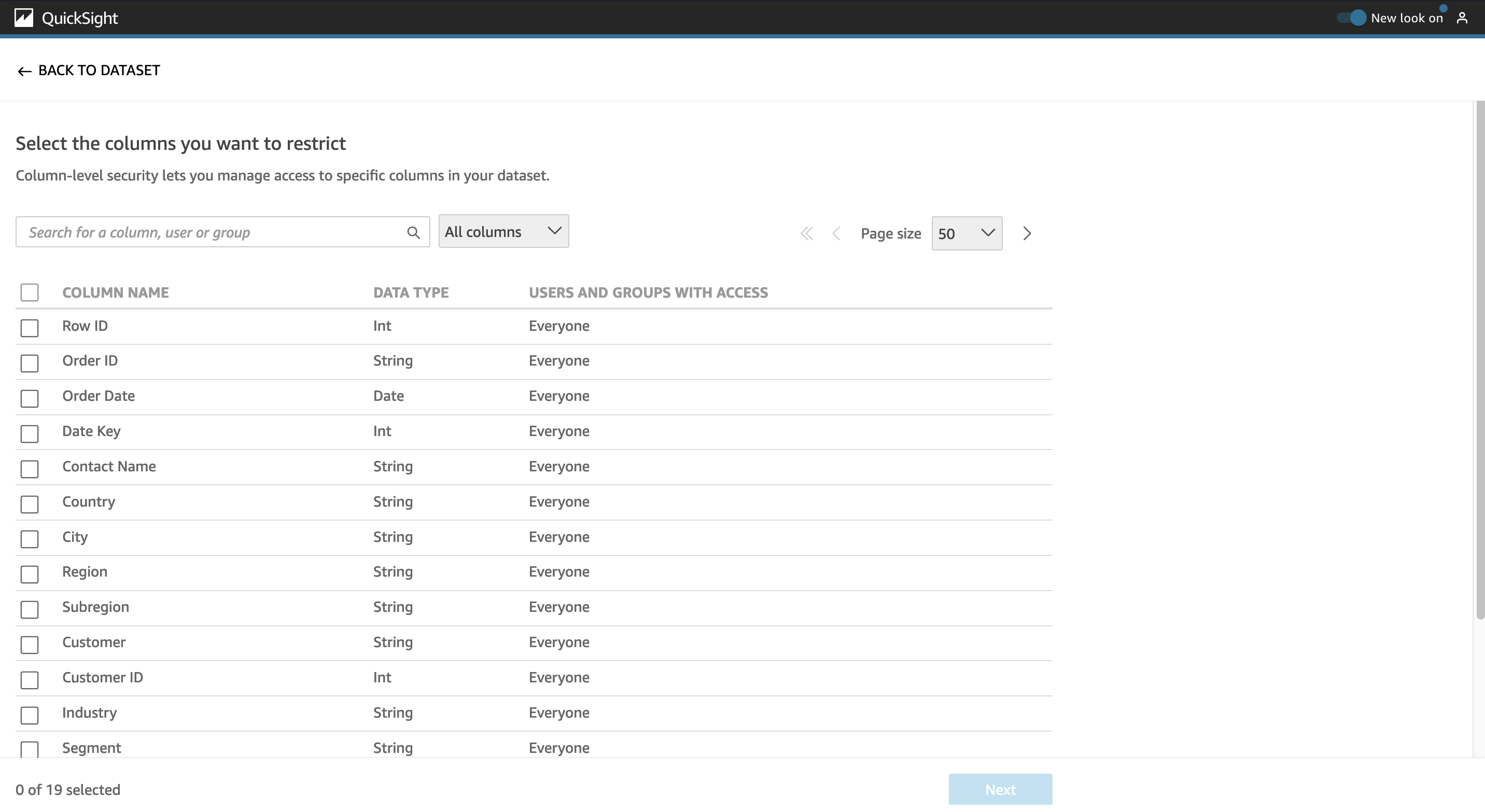
Select the columns to be restricted and choose Next.
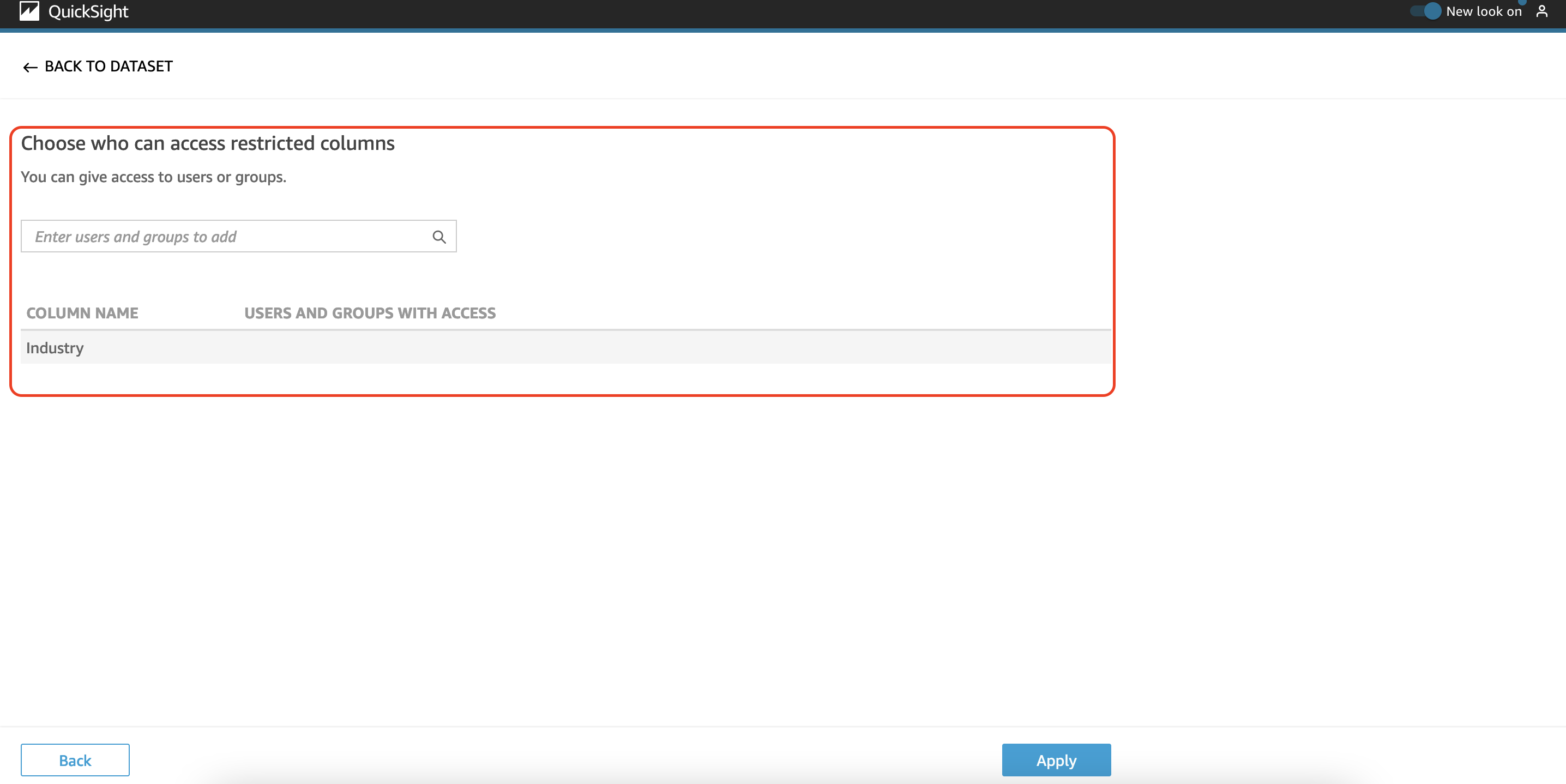
Choose who can access the restricted columns and choose Apply.
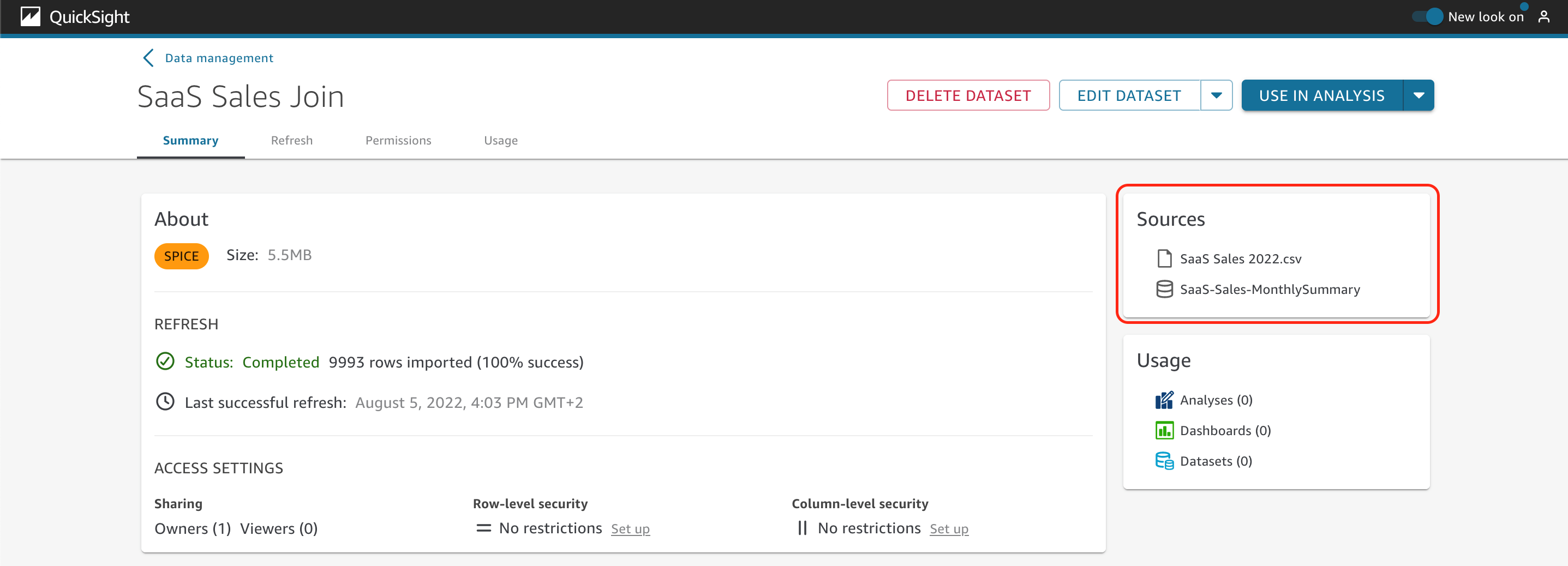
In the Sources section on the Summary tab, a list of data sources is displayed to show the ones used in this dataset. In the following example, we can see the sources SaaS Sales 2022.csv and SaaS-Sales-MonthlySummary.
You also need to identify where (analysis, dashboards, or other datasets) the different datasets are being used, to determine if you can eliminate some unused ones.
To verify this, you just have to look at the Usage section (more details are on the Usage tab).
It’s also possible to go to the data prep interface by choosing Edit dataset or duplicate it by opening the drop-down menu.
You can also directly create a new analysis with this dataset or choose Use in dataset to take advantage of dataset as a source capability. When you use this option, any data preparation that the parent dataset contains, such as any joins or calculated fields, is kept. You can add additional preparation to the data in the new, child datasets, such as joining new data and filtering data. You can also set up your own data refresh schedule for the child dataset and track the dashboards and analyses that use it. Some of the advantages are: Central management of datasets, reduction of dataset management, predefined key metrics and flexibility to customize data.

The Refresh tab
At AnyCompany, you also need to refresh the latest data for your datasets. To achieve this, you have two different options.
You can choose Refresh now to manually get the latest records in the dataset.
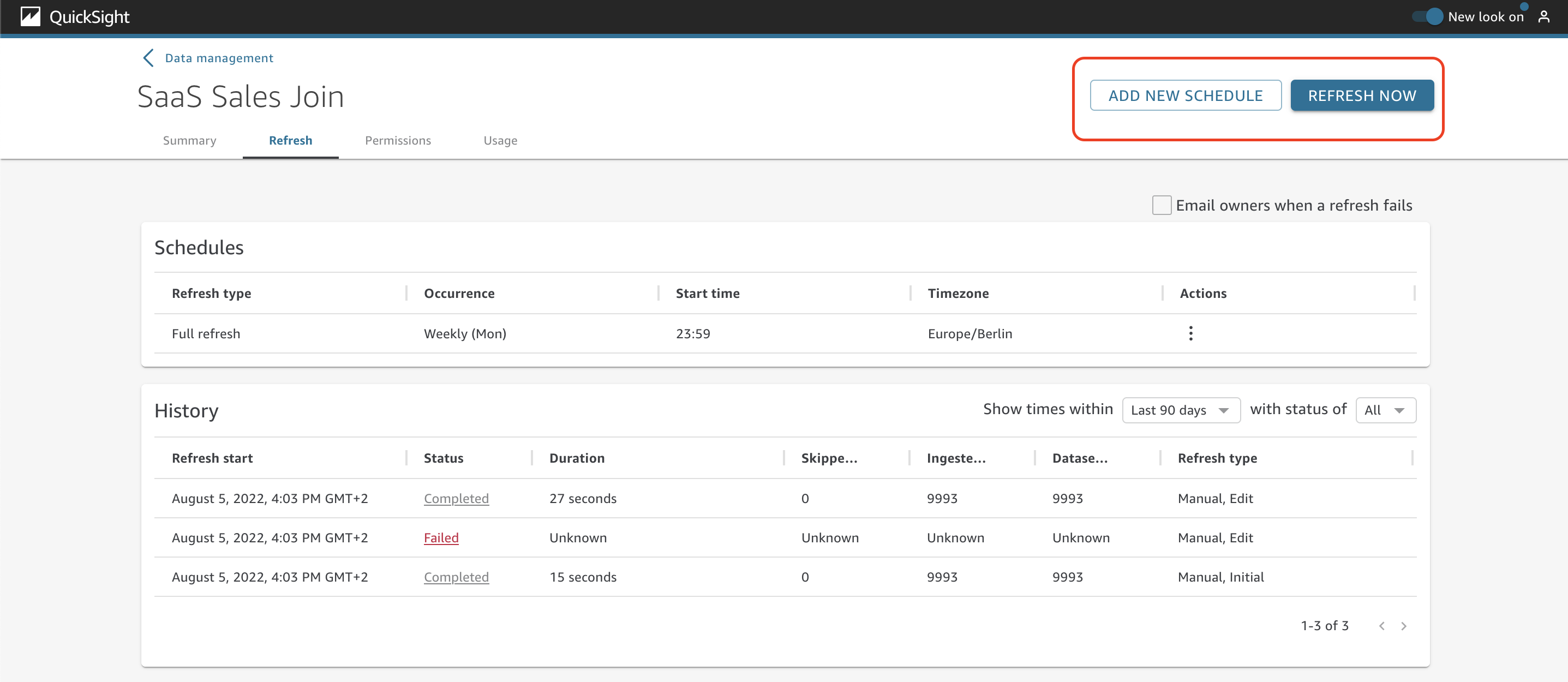
You can also choose Add new schedule to create a refresh schedule and not worry about running it manually in the future. You can set the time zone, start time, and frequency.
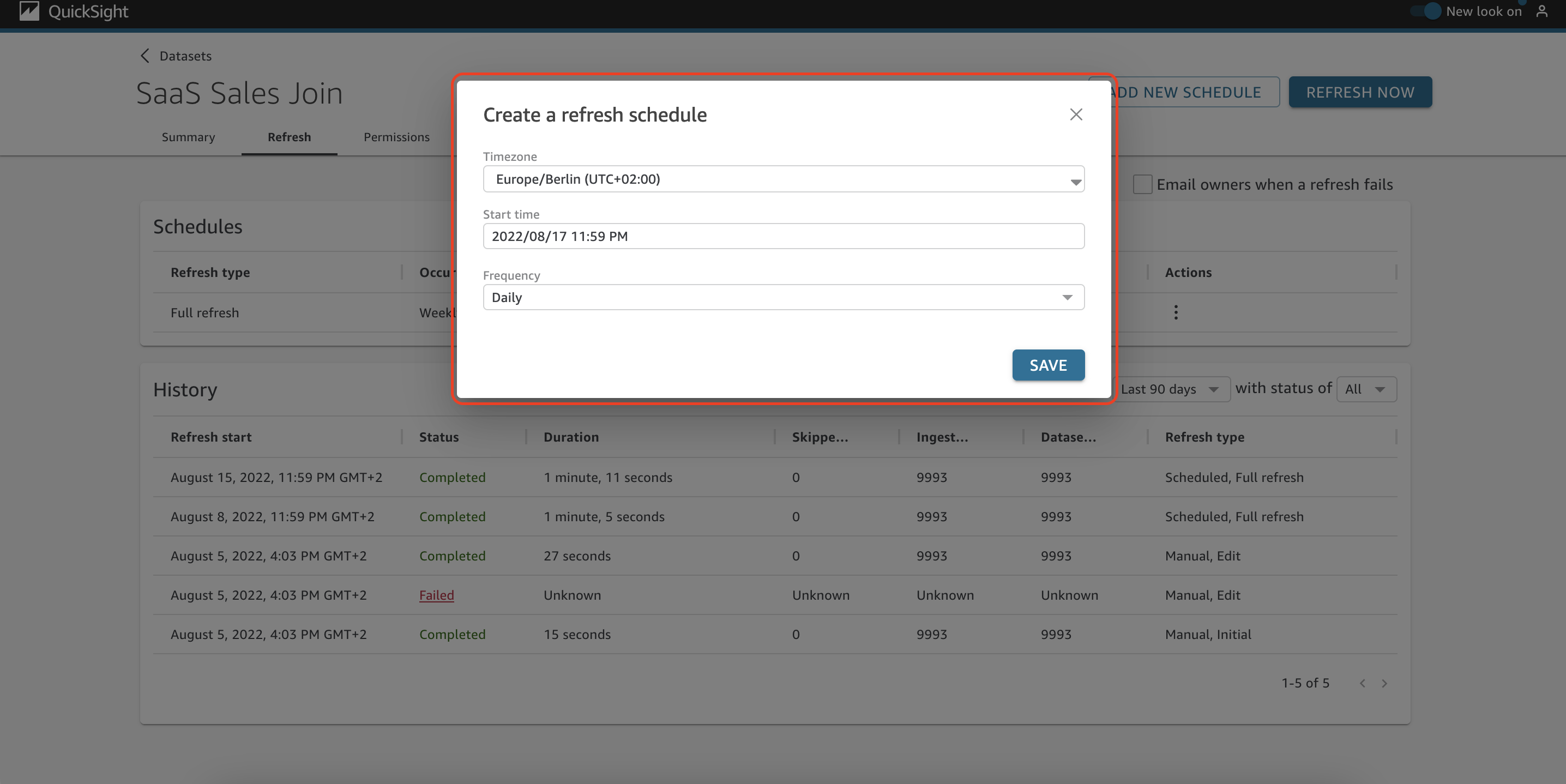
There are two types of scheduled refresh: full refresh and incremental refresh. Full refresh will completely reload the whole dataset, while incremental refresh only updates a specified small portion of your dataset. Using incremental refresh enables you to access the most recent insights much sooner.
In order to setup the incremental refresh, you need to perform the following actions:
- Choose Refresh Now.
- For Refresh type, choose Incremental refresh.
- If this is your first incremental refresh on the dataset, choose Configure.
- On the Configure incremental refresh page, do the following:
- For Date column, choose a date column that you want to base the look-back window on.
- For Window size, enter a number for size, and then choose an amount of time that you want to look back for changes.You can choose to refresh changes to the data that occurred within a specified number of hours, days, or weeks from now. For example, you can choose to refresh changes to the data that occurred within two weeks of the current date.
- Choose Submit.

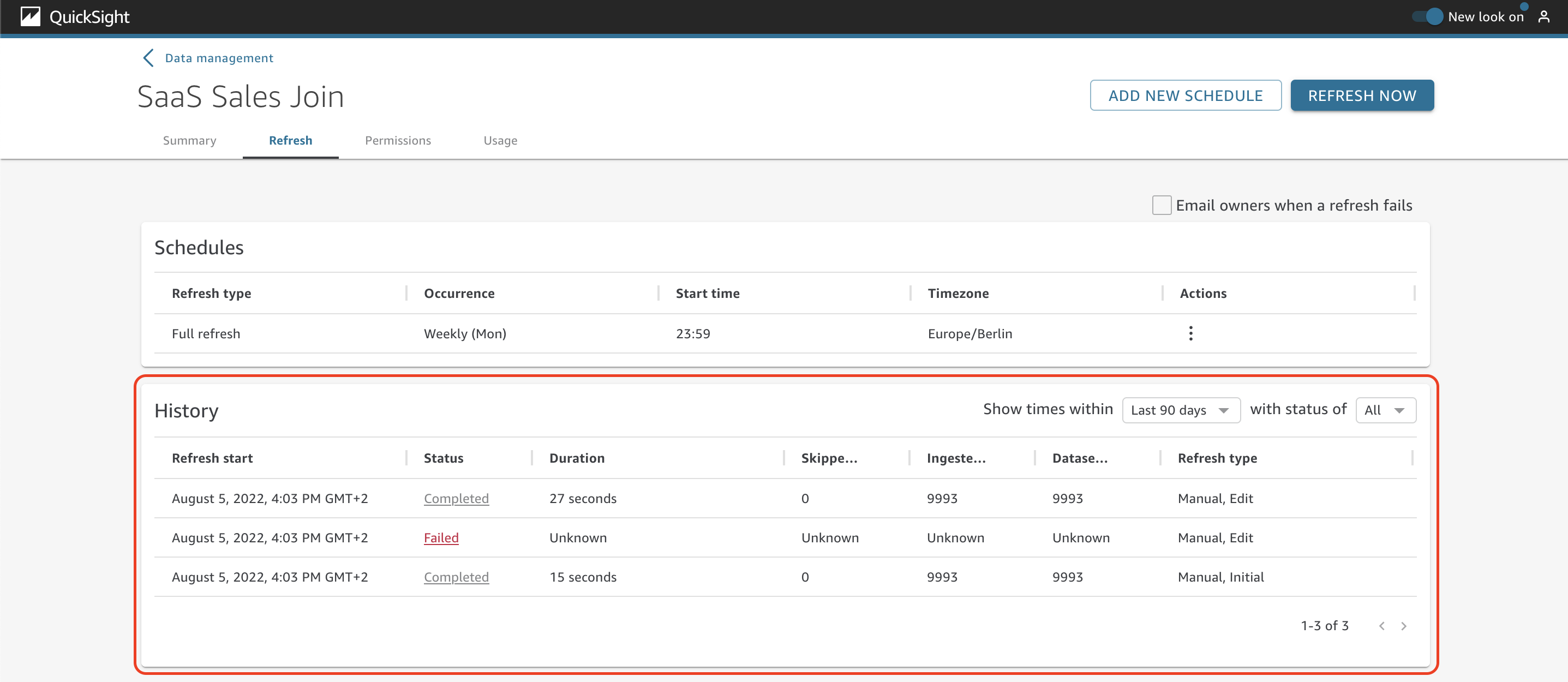
There are two main sections on the Refresh tab: Schedules and History. Under Schedules, you can see details about the scheduled refreshes of the dataset. There is also the option to edit and delete the schedule.
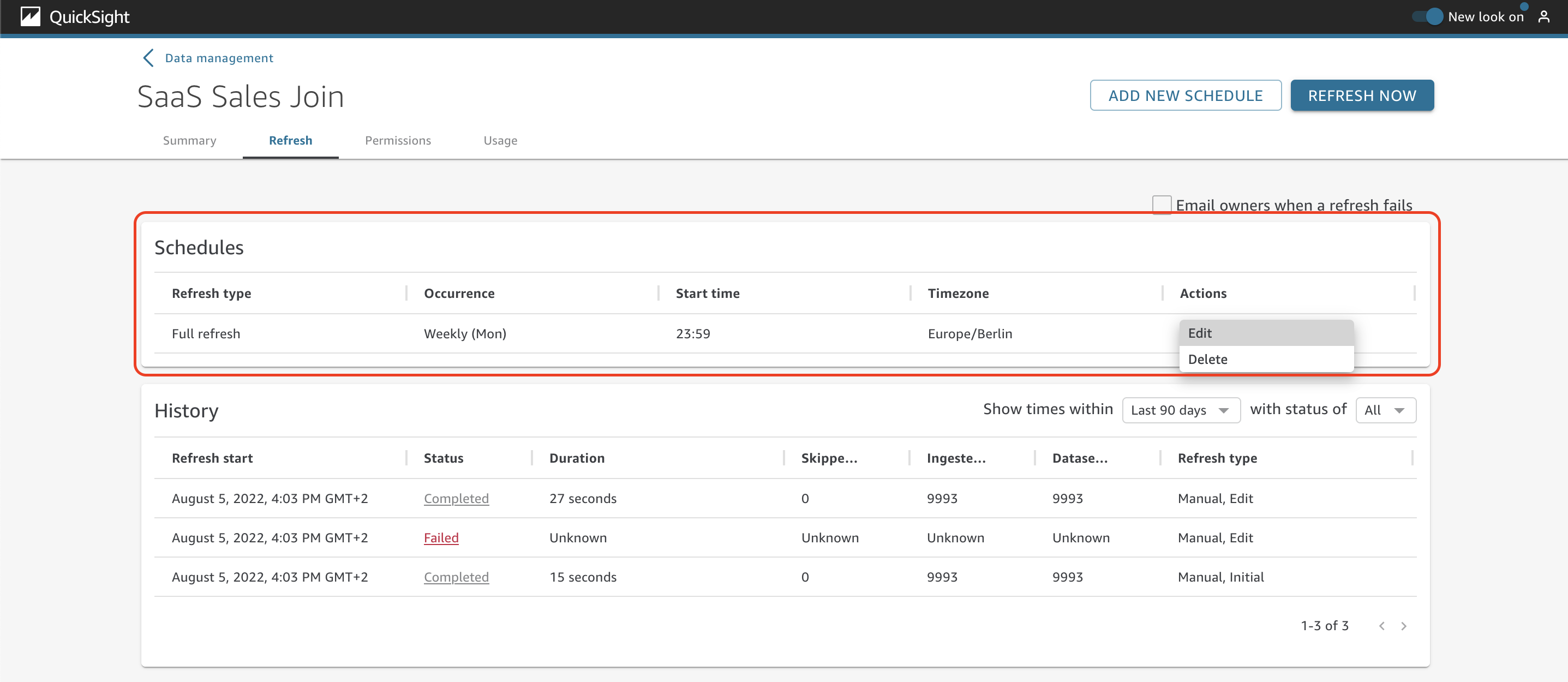
In the History section, you can see details about the past refreshes, such as status, duration, skipped rows, ingested rows, dataset rows, and refresh type.
The Permissions tab
On the Permissions tab, you can manage the settings and permissions for users and groups that access the dataset.
As the dataset owner at AnyCompany, you need to manage access to the datasets and add users and groups. To do so, simply choose Add users & groups.
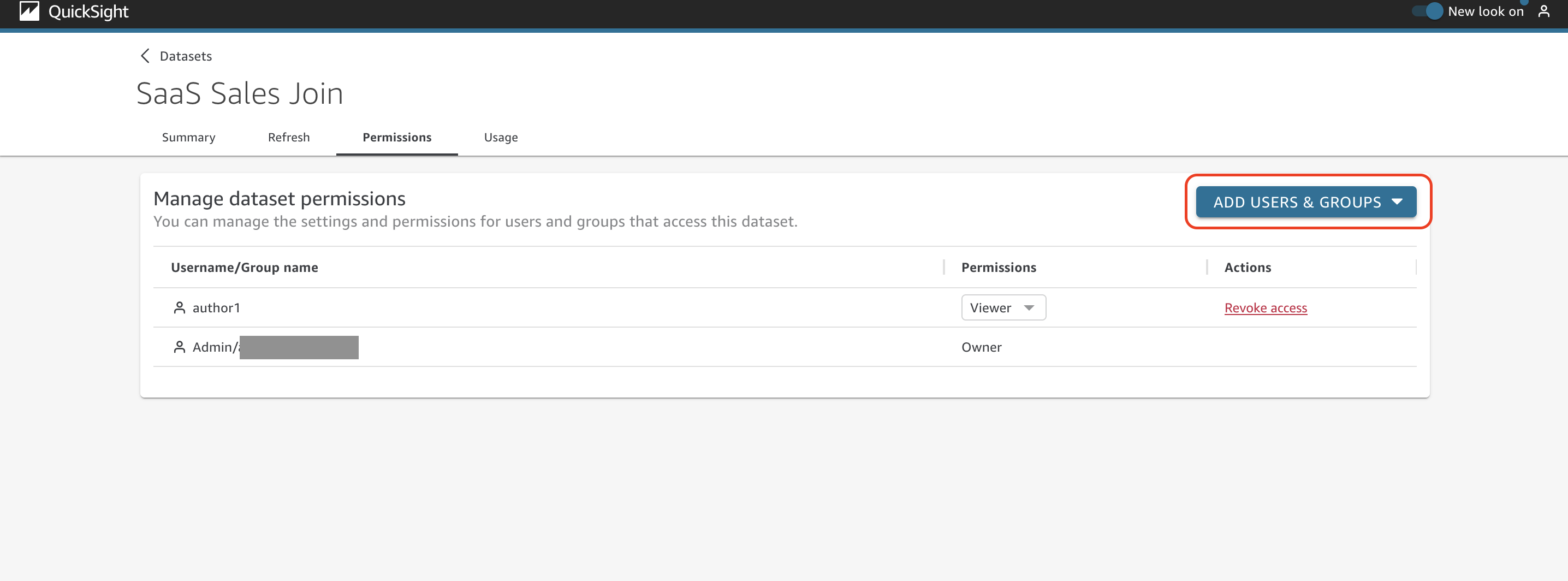
Choose the specific user or group to provide access to this dataset.

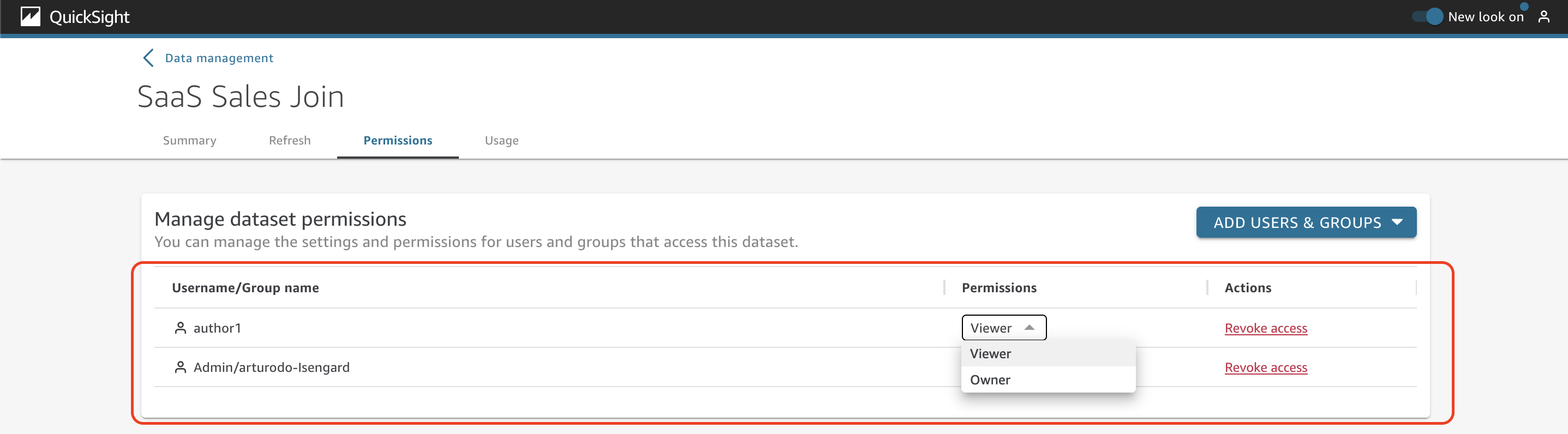
Review the list of users and groups that have access to the dataset as well as the level of permission (viewer or owner). You can also revoke access to the users or groups.
The Usage tab
It’s not always easy for AnyCompany to determine whether or not a dataset is being used by users or in other assets such as analyses or dashboards.
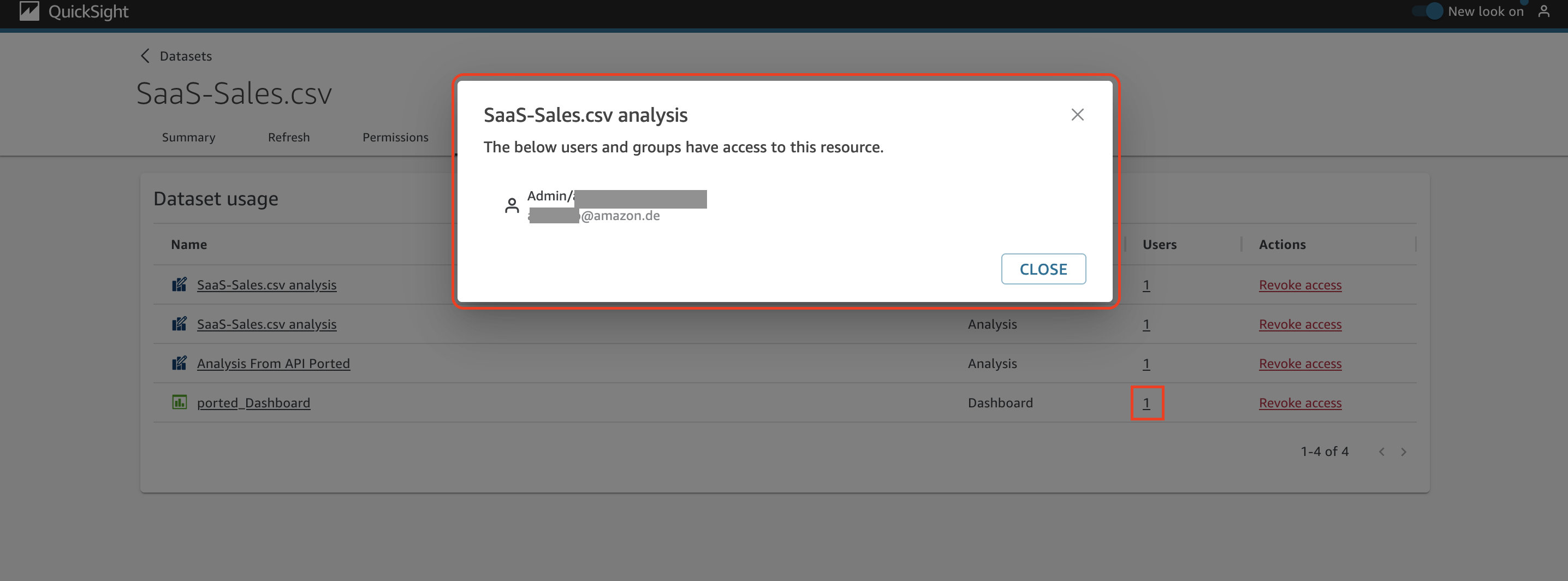
To answer this kind of question, you can easily review the information on the Usage tab. Here you can review the list of analyses and dashboards where the dataset is being used (choose the name of an analysis or dashboard to view the actual asset).
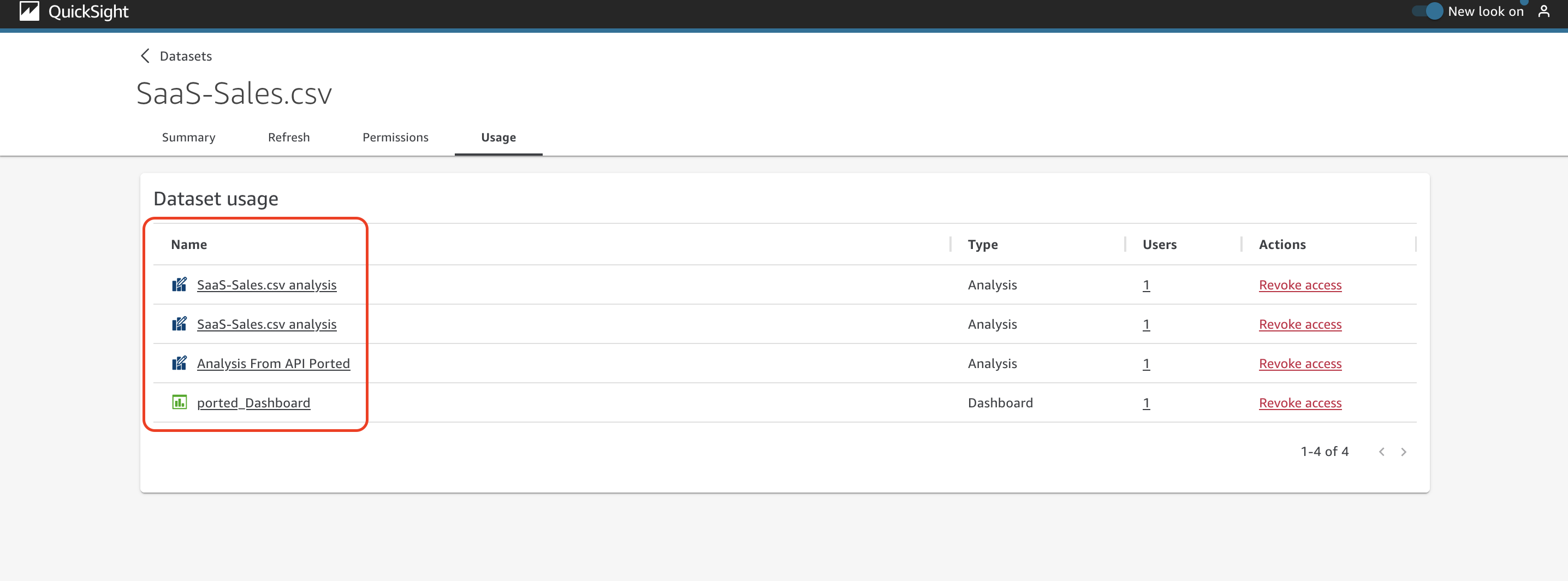
Under the Users column, you can get the details about who is using this analysis or dashboard.
Conclusion
In this post, we introduced the new user interface of the dataset management page on the QuickSight console. This new user interface simplifies the administration and use of datasets by having everything organized and centralized. This will primarily help authors and administrators quickly manage their datasets, while also contributing to a better QuickSight navigation experience. The new user interface is now generally available in all supported QuickSight Regions.
We look forward to your feedback and stories on how you use the new dataset management interface for your business needs.
About the Authors
 Arturo Duarte is a Partner Solutions Architect focused on Amazon QuickSight at Amazon Web Services. He works with EMEA APN Partners to help develop their data and analytics practices with enterprise and mission-critical solutions for their end customers.
 Emily Zhu is a Senior Product Manager at Amazon QuickSight, AWS’s cloud-native, fully managed SaaS BI service. She leads the development of the QuickSight analytics and query capability. Before joining AWS, she worked in the Amazon Prime Air drone delivery program and the Boeing company as senior strategist for several years. Emily is passionate about the potential of cloud-based BI solutions and looks forward to helping customers advance in their data-driven strategy making.