Post Syndicated from The History Guy: History Deserves to Be Remembered original https://www.youtube.com/watch?v=kt-0AWOZsEA
How AWS improves active defense to empower customers
Post Syndicated from Stephen Goodman original https://aws.amazon.com/blogs/security/how-aws-improves-active-defense-to-empower-customers/
At AWS, security is the top priority, and today we’re excited to share work we’ve been doing towards our goal to make AWS the safest place to run any workload. In earlier posts on this blog, we shared details of our internal active defense systems, like MadPot (global honeypots), Mithra (domain graph neural network), and Sonaris (network mitigations). We’re still inventing new ways to improve the effectiveness of threat intelligence and automated response to detect and help prevent attacks. Today we’ll share advancements in active defense related to malware, software vulnerabilities, and AWS resource misconfigurations. Like the other posts we linked to, these are constantly improving capabilities that our customers get just for being on the AWS network. We’ll discuss these topics in more depth at re:inforce 2025 during Innovation Talk SEC302.
Stopping malware from spreading
Financially motivated threat actors try to gain access to a wide array of networked assets. The more resources they control, the more places they can hide, and the longer they can profit from their abusive operations. As such, threat actor malware often contains modules to scan for new targets, replicate binaries over the network, and then repeat. If left unchecked, such rapidly spreading behavior can lead to network congestion, service availability loss, and data destruction. We want to help prevent this behavior to the greatest degree possible.
One effective strategy we employ is identifying the threat actor’s key infrastructure where malware is centrally controlled. We use a variety of techniques to identify, verify, track, and disrupt threat infrastructure. Using network traffic logs, honeypot interactions, and malware samples from an array of sensor positions, we mitigate botnets, abusive proxies, and peer-to-peer malware. Over the past 12 months, AWS helped prevent over 4 million malware infection attempts across 315 thousand distinct Amazon Elastic Compute Cloud (Amazon EC2) instances. By protecting workloads from these malware infections, we not only protect our network and our customers, but also the broader internet from further malware expansion.
Advancements in threat hunting and mitigating software vulnerabilities
At Amazon, we’re proud to support software vulnerability research with programs for bug bounty, vulnerability disclosure, and open source contribution. We’ve also become a more active participant in the CVE process by becoming a CVE Numbering Authority (CNA) for the software and services provided by Amazon. Thanks to the public CVE database, we see vulnerability research accelerating as reported CVEs have grown by 21 percent year-over-year since 2013, with over 40 thousand CVEs published in 2024. This virtuous cycle of finding and resolving vulnerabilities improves cyber security over time, but AWS sees threat actors searching for unresolved vulnerabilities to gain unauthorized access to resources.
We’ve expanded MadPot and Sonaris to identify and stop a broader range of malicious vulnerability scanning and exploitation activity, protecting every AWS customer from vulnerability exposure. We’ve added hundreds of new detections and MadPot service emulations to identify real attacks. As we’ve expanded our visibility, we’ve continued blocking hundreds of millions of CVE exploit attempts daily across the AWS network.
As we’ve made these active defense systems better at stopping CVE exploit attacks, the total number of attacks has gone down by over 55 percent in the last 12 months, as shown in Figure 1. There are many factors outside our control in this observation, but we’re happy to see fewer CVE exploit attacks. This trend coincides with the detection, regionalization, latency, and guardrail improvements we’ve made in 2025. No system can block everything, so fewer exploit attempts mean less risk across a wide range of workloads.
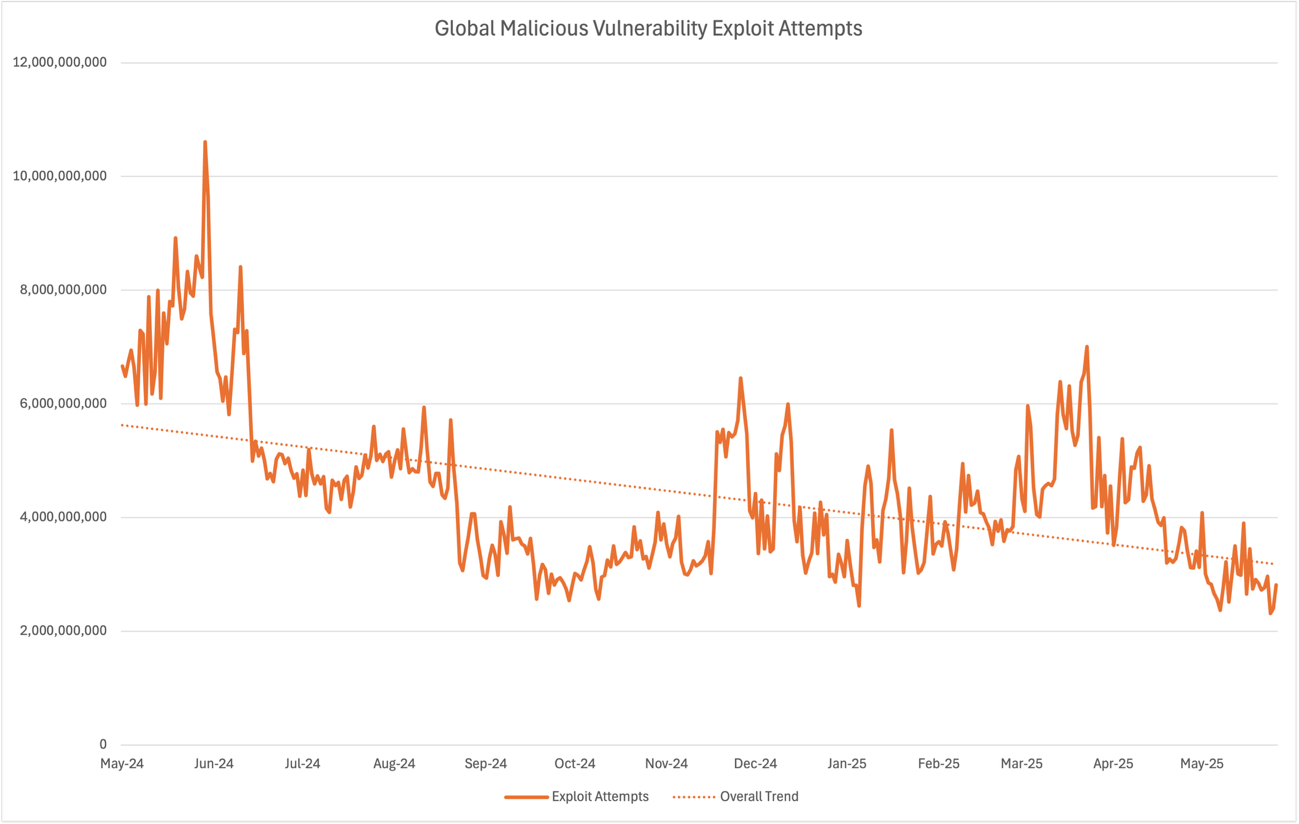
Figure 1: Chart showing the decrease in global malicious vulnerability exploit attempts
This work to identify known exploits in the wild directly benefits users of vulnerability intelligence in Amazon Inspector, which provides an Amazon Inspector score for customers to prioritize where to spend security hardening resources. This includes the most recent date of observed exploitation attempts, the MITRE ATT&CK techniques associated with the exploit activity, and the industries targeted.
Protecting architectures built on AWS
AWS actively defends compute and network resources for our customers; we also defend the distinct AWS-native resources that customers rely on. AWS access key credentials are a critical resource that allow access to customer accounts. The AWS Identity and Access Management best practices share proven techniques for customers to keep their credentials from being abused. Through active defense, we do even more to help customers who haven’t yet adopted these best practices.
Each day, AWS helps prevent an average of 167 million malicious scanning connections seeking unintentionally exposed AWS access key pairs. In case access keys are discovered through other means, we’ve expanded our protection of customer-managed IAM credentials. When our threat intelligence analytics show that a customer-managed credential is known by a threat actor, we put mitigations in place to restrict access to highly privileged operations. We also send customized notifications to help customers identify how the credential was exposed. These efforts are paying off for our customers every day; the following response is a good example of what we hear regularly:
This is a key that we already rotated a few weeks ago based on another alarm from you. It turned out that the new rotated key happened to be in your second alarm to us. So it meant that the app that the key was linked to was still leaking it.
So on Monday we sat down with the dev team, found where the app was leaking some secrets from, we patched it, I rotated all the exposed secrets (it was more than the IAM key) and we plugged in the extra security in the app.
So thanks again for those alerts, they are very precious.
– AWS Customer
In a specific case of threat activity in November and December of 2024, customers reported ransomware activity against their objects in Amazon Simple Storage Service (Amazon S3) storage. We saw that these ransom threats were highly correlated with exposed customer-managed IAM keys. We applied quarantines to the exposed keys, taking care to make sure that normal customer operations could continue safely. We re-sent our proactive notifications to customers about keys that were likely exposed, because the risk of an attack was elevated. During this period, we worked together with customers to deactivate over 30 thousand exposed credentials. Since this threat activity began, AWS has helped prevent over 943 million malicious attempts to encrypt customer Amazon S3 objects.
These credential exposure detections flow into Amazon GuardDuty Extended Threat Detection, simplifying threat detection and response operations for modern cloud environments.
Better together
The approach AWS takes to active defense shows how security can be improved by layering protections across the infrastructure stack and using threat intelligence to drive risk reduction. By building active defense into our services at no extra cost, AWS helps our customers stay protected from a wide range of threats.
While we continue to constantly improve our protections for our customers, some of our work is by nature probabilistic, because we never see inside customer workloads. We don’t apply active defense in situations where the detection is ambiguous, because that might impact our customers’ production systems. To stay secure, customers should never let down their own defenses. AWS security services like AWS Identity and Access Management (IAM), AWS Shield Advanced, AWS WAF, AWS Network Firewall, Amazon GuardDuty, and Amazon Inspector provide prevention, detection, and response that customers can configure for their unique needs. The good news is that by working together, we’re making the internet safer for everyone.
If you have feedback about this post, submit comments in the Comments section below.
Internet Anywhere with this Starlink Mini Travel Setup
Post Syndicated from Crosstalk Solutions original https://www.youtube.com/watch?v=RmE9ACtQV4A
Changes to Kubernetes Slack (Kubernetes Contributors blog)
Post Syndicated from jzb original https://lwn.net/Articles/1025634/
The Kubernetes project has announced
that it will be losing its “special status
” with the Slack communication platform and will be
downgraded to the free tier in a matter of days:
On Friday, June 20, we will be subject to the feature
limitations of free Slack. The primary ones which will affect us
will be only retaining 90 days of history, and having to disable
several apps and workflows which we are currently using. The Slack
Admin team will do their best to manage these limitations.
The project has a FAQ
covering the change, its impacts, and more. The CNCF projects staff
has proposed
a move to the Discord service as
the best option to handle the more than 200,000 users and thousands of
posts per day from the Kubernetes community. The Kubernetes Steering
Committee will be making its decision “in the next few weeks
“.
Reduce time to access your transactional data for analytical processing using the power of Amazon SageMaker Lakehouse and zero-ETL
Post Syndicated from Avijit Goswami original https://aws.amazon.com/blogs/big-data/reduce-time-to-access-your-transactional-data-for-analytical-processing-using-the-power-of-amazon-sagemaker-lakehouse-and-zero-etl/
As the lines between analytics and AI continue to blur, organizations find themselves dealing with converging workloads and data needs. Historical analytics data is now being used to train machine learning models and power generative AI applications. This shift requires shorter time to value and tighter collaboration among data analysts, data scientists, machine learning (ML) engineers, and application developers. However, the reality of scattered data across various systems—from data lakes to data warehouses and applications—makes it difficult to access and use data efficiently. Moreover, organizations attempting to consolidate disparate data sources into a data lakehouse have historically relied on extract, transform, and load (ETL) processes, which have become a significant bottleneck in their data analytics and machine learning initiatives. Traditional ETL processes are often complex, requiring significant time and resources to build and maintain. As data volumes grow, so do the costs associated with ETL, leading to delayed insights and increased operational overhead. Many organizations find themselves struggling to efficiently onboard transactional data into their data lakes and warehouses, hindering their ability to derive timely insights and make data-driven decisions. In this post, we address these challenges with a two-pronged approach:
- Unified data management: Using Amazon SageMaker Lakehouse to get unified access to all your data across multiple sources for analytics and AI initiatives with a single copy of data, regardless of how and where the data is stored. SageMaker Lakehouse is powered by AWS Glue Data Catalog and AWS Lake Formation and brings together your existing data across Amazon Simple Storage Service (Amazon S3) data lakes and Amazon Redshift data warehouses with integrated access controls. In addition, you can ingest data from operational databases and enterprise applications to the lakehouse in near real-time using zero-ETL which is a set of fully-managed integrations by AWS that eliminates or minimizes the need to build ETL data pipelines.
- Unified development experience: Using Amazon SageMaker Unified Studio to discover your data and put it to work using familiar AWS tools for complete development workflows, including model development, generative AI application development, data processing, and SQL analytics, in a single governed environment.
In this post, we demonstrate how you can bring transactional data from AWS OLTP data stores like Amazon Relational Database Service (Amazon RDS) and Amazon Aurora flowing into Redshift using zero-ETL integrations to SageMaker Lakehouse Federated Catalog (Bring your own Amazon Redshift into SageMaker Lakehouse). With this integration, you can now seamlessly onboard the changed data from OLTP systems to a unified lakehouse and expose the same to analytical applications for consumptions using Apache Iceberg APIs from new SageMaker Unified Studio. Through this integrated environment, data analysts, data scientists, and ML engineers can use SageMaker Unified Studio to perform advanced SQL analytics on the transactional data.
Architecture patterns for a unified data management and unified development experience
In this architecture pattern, we show you how to use zero-ETL integrations to seamlessly replicate transactional data from Amazon Aurora MySQL-Compatible Edition, an operational database, into the Redshift Managed Storage layer. This zero-ETL approach eliminates the need for complex data extraction, transformation, and loading processes, enabling near real-time access to operational data for analytics. The transferred data is then cataloged using a federated catalog in the SageMaker Lakehouse Catalog and exposed through the Iceberg Rest Catalog API, facilitating comprehensive data analysis by consumer applications.
You then use SageMaker Unified Studio, to perform advanced analytics on the transactional data bridging the gap between operational databases and advanced analytics capabilities.

Prerequisites
Make sure that you have the following prerequisites:
- An AWS account with permission to create AWS Identity and Access Management (IAM) roles and policies
- Administrator access to one or more of the following sources: Aurora MySQL-Compatible and Amazon Redshift
- An AWS Identity and Access Management (IAM) user with an access key and secret key to configure the AWS Command Line Interface (AWS CLI). We recommend that you use temporary credentials using AWS IAM Identity Center as a security best practice for accessing your AWS accounts because these credentials are generated every time you sign in. See Getting IAM Identity Center user credentials for the AWS CLI or AWS SDKs steps to configure IAM Identity Center authentication.
Deployment steps
In this section, we share steps for deploying resources needed for Zero-ETL integration using AWS CloudFormation.
Setup resources with CloudFormation
This post provides a CloudFormation template as a general guide. You can review and customize it to suit your needs. Some of the resources that this stack deploys incur costs when in use. The CloudFormation template provisions the following components:
- An Aurora MySQL provisioned cluster (source).
- An Amazon Redshift Serverless data warehouse (target).
- Zero-ETL integration between the source (Aurora MySQL) and target (Amazon Redshift Serverless). See Aurora zero-ETL integrations with Amazon Redshift for more information.
Create your resources
To create resources using AWS Cloudformation, follow these steps:
- Sign in to the AWS Management Console.
- Select the
us-east-1AWS Region in which to create the stack. - Open the AWS CloudFormation
- Choose Launch Stack

- Choose Next.
This automatically launches CloudFormation in your AWS account with a template. It prompts you to sign in as needed. You can view the CloudFormation template from within the console. - For Stack name, enter a stack name, for example
UnifiedLHBlogpost. - Keep the default values for the rest of the Parameters and choose Next.
- On the next screen, choose Next.
- Review the details on the final screen and select I acknowledge that AWS CloudFormation might create IAM resources.
- Choose Submit.

Stack creation can take up to 30 minutes.
- After the stack creation is complete, go to the Outputs tab of the stack and record the values of the keys for the following components, which you will use in a later step:
- NamespaceName
- PortNumber
- RDSPassword
- RDSUsername
- RedshiftClusterSecurityGroupName
- RedshiftPassword
- RedshiftUsername
- VPC
- Workgroupname
- ZeroETLServicesRoleNameArn
Implementation steps
To implement this solution, follow these steps:
Setting up zero-ETL integration
A zero-ETL integration is already created as a part of CloudFormation template provided. Use the following steps from the Zero-ETL integration post to complete setting up the integration.:
- Create a database from integration in Amazon Redshift
- Populate source data in Aurora MySQL
- Validate the source data in your Amazon Redshift data warehouse
Bring Amazon Redshift metadata to the SageMaker Lakehouse catalog
Now that transactional data from Aurora MySQL is replicating into Redshift tables through zero-ETL integration, you next bring the data into SageMaker Lakehouse, so that operational data can co-exist and be accessed and governed together with other data sources in the data lake. You do this by registering an existing Amazon Redshift Serverless namespace that has Zero-ETL tables as a federated catalog in SageMaker Lakehouse.
Before starting the next steps, you need to configure data lake administrators in AWS Lake Formation.
- Go to the Lake Formation console and in the navigation pane, choose Administration roles and then choose Tasks under Administration. Under Data lake administrators, choose Add.
- In the Add administrators page, under Access type, select Data Lake administrator.
- Under IAM users and roles, select Admin. Choose Confirm.

- On the Add administrators page, for Access type, select Read-only administrators. Under IAM users and roles, select AWSServiceRoleForRedshift and choose Confirm. This step enables Amazon Redshift to discover and access catalog objects in AWS Glue Data Catalog.

With the data lake administrators configured, you’re ready to bring your existing Amazon Redshift metadata to SageMaker Lakehouse catalog:
- From the Amazon Redshift Serverless console, choose Namespace configuration in the navigation pane.
- Under Actions, choose Register with AWS Glue Data Catalog. You can find more details on registering a federated Amazon Redshift catalog in Registering namespaces to the AWS Glue Data Catalog.

- Choose Register. This will register the namespace to AWS Glue Data Catalog

- After registration is complete, the Namespace register status will change to Registered to AWS Glue Data Catalog.
- Navigate to the Lake Formation console and choose Catalogs New under Data Catalog in the navigation pane. Here you can see a pending catalog invitation is available for the Amazon Redshift namespace registered in Data Catalog.

- Select the pending invitation and choose Approve and create catalog. For more information, see Creating Amazon Redshift federated catalogs.

- Enter the Name, Description, and IAM role (created by the CloudFormation template). Choose Next.

- Grant permissions using a principal that is eligible to provide all permissions (an admin user).
- Select IAM users and rules and choose Admin.
- Under Catalog permissions, select Super user to grant super user permissions.

- Assigning super user permissions grants the user unrestricted permissions to the resources (databases, tables, views) within this catalog. Follow the principal of least privilege to grant users only the permissions required to perform a task wherever applicable as a security best practice.

- As final step, review all settings and choose Create Catalog

After the catalog is created, you will see two objects under Catalogs. dev refers to the local dev database inside Amazon Redshift, and aurora_zeroetl_integration is the database created for Aurora to Amazon Redshift ZeroETL tables

Fine-grained access control
To set up fine-grained access control, follow these steps:
- To grant permission to individual objects, choose Action and then select Grant.

- On the Principals page, grant access to individual objects or more than one object to different principals under the federated catalog.

Access lakehouse data using SageMaker Unified Studio
SageMaker Unified Studio provides an integrated experience outside the console to use all your data for analytics and AI applications. In this post, we show you how to use the new experience through the Amazon SageMaker management console to create a SageMaker platform domain using the quick setup method. To do this, you set up IAM Identity Center, a SageMaker Unified Studio domain, and then access data through SageMaker Unified Studio.
Set up IAM Identity Center
Before creating the domain, makes sure that your data admins and data workers are ready to use the Unified Studio experience by enabling IAM Identity Center for single sign-on following the steps in Setting up Amazon SageMaker Unified Studio. You can use Identity Center to set up single sign-on for individual accounts and for accounts managed through AWS Organizations. Add users or groups to the IAM instance as appropriate. The following screenshot shows an example email sent to a user through which they can activate their account in IAM Identity Center.

Set up SageMaker Unified domain
Follow steps in Create a Amazon SageMaker Unified Studio domain – quick setup to set up a SageMaker Unified Studio domain. You need to choose the VPC that was created by the CloudFormation stack earlier.
The quick setup method also has a Create VPC option that sets up a new VPC, subnets, NAT Gateway, VPC endpoints, and so on, and is meant for testing purposes. There are charges associated with this, so delete the domain after testing.

If you see the No models accessible, you can use the Grant model access button to grant access to Amazon Bedrock serverless models for use in SageMaker Unified Studio, for AI/ML use-cases
- Fill in the sections for Domain Name. For example,
MyOLTPDomain. In the VPC section, select the VPC that was provisioned by the CloudFormation stack, for example UnifiedLHBlogpost-VPC. Select subnets and choose Continue.

- In the IAM Identity Center User section, look up the newly created user from (for example, Data User1) and add them to the domain. Choose Create Domain. You should see the new domain along with a link to open Unified Studio.

Access data using SageMaker Unified Studio
To access and analyze your data in SageMaker Unified Studio, follow these steps:
-
- Select the URL for SageMaker Unified Studio. Choose Sign in with SSO and sign in using the IAM user, for example datauser1, and you will be prompted to select a multi-factor authentication (MFA) method.
- Select Authenticator App and proceed with next steps. For more information about SSO setup, see Managing users in Amazon SageMaker Unified Studio.After you have signed in to the Unified Studio domain, you need to set up a new project. For this illustration, we created a new sample project called MyOLTPDataProject using the project profile for SQL Analytics as shown here.A project profile is a template for a project that defines what blueprints are applied to the project, including underlying AWS compute and data resources. Wait for the new project to be set up, and when status is Active, open the project in Unified Studio.By default, the project will have access to the default Data Catalog (
AWSDataCatalog). For the federated redshift catalog redshift-consumer-catalog to be visible, you need to grant permissions to the project IAM role using Lake Formation. For this example, using the Lake Formation console, we have granted below access to the demodb database that is part of the Zero-ETL catalog to the Unified Studio project IAM role. Follow steps in Adding existing databases and catalogs using AWS Lake Formation permissions.In your SageMaker Unified Studio Project’s Data section, connect to the Lakehouse Federated catalog that you created and registered earlier (for exampleredshift-zetl-auroramysql-catalog/aurora_zeroetl_integration). Select the objects that you want to query and execute them using the Redshift Query Editor integrated with SageMaker Unified Studio. If you select Redshift, you will be transferred to the Query editor where you can execute the SQL and see the results as shown in the following figure.
 If you select Redshift, you will be transferred to the Query editor where you can execute the SQL and see the results as shown in the following figure.
With this integration of Amazon Redshift metadata with SageMaker Lakehouse federated catalog, you have access to your existing Redshift data warehouse objects in your organizations centralized catalog managed by SageMaker Lakehouse catalog and join the existing Redshift data seamlessly with the data stored in your Amazon S3 data lake. This solution helps you avoid unnecessary ETL processes to copy data between the data lake and the data warehouse and minimize data redundancy.
You can further integrate more data sources serving transactional workloads such as Amazon DynamoDB and enterprise applications such as Salesforce and ServiceNow. The architecture shared in this post for accelerated analytical processing using Zero-ETL and SageMaker Lakehouse can be further expanded by adding Zero-ETL integrations for DynamoDB using DynamoDB zero-ETL integration with Amazon SageMaker Lakehouse and for enterprise applications by following the instructions in Simplify data integration with AWS Glue and zero-ETL to Amazon SageMaker Lakehouse
Clean up
When you’re finished, delete the CloudFormation stack to avoid incurring costs for some of the AWS resources used in this walkthrough incur a cost. Complete the following steps:
- On the CloudFormation console, choose Stacks.
- Choose the stack you launched in this walkthrough. The stack must be currently running.
- In the stack details pane, choose Delete.
- Choose Delete stack.
- On the Sagemaker console, choose Domains and delete the domain created for testing.
Summary
In this post, you’ve learned how to bring data from operational databases and applications into your lake house in near real-time through Zero-ETL integrations. You’ve also learned about a unified development experience to create a project and bring in the operational data to the lakehouse, which is accessible through SageMaker Unified Studio, and query the data using integration with Amazon Redshift Query Editor. You can use the following resources in addition to this post to quickly start your journey to make your transactional data available for analytical processing.
- AWS zero-ETL
- SageMaker Unified Studio
- SageMaker Lakehouse
- Getting started with Amazon SageMaker Lakehouse
About the authors
 Avijit Goswami is a Principal Data Solutions Architect at AWS specialized in data and analytics. He supports AWS strategic customers in building high-performing, secure, and scalable data lake solutions on AWS using AWS managed services and open-source solutions. Outside of his work, Avijit likes to travel, hike in the San Francisco Bay Area trails, watch sports, and listen to music.
 Saman Irfan is a Senior Specialist Solutions Architect focusing on Data Analytics at Amazon Web Services. She focuses on helping customers across various industries build scalable and high-performant analytics solutions. Outside of work, she enjoys spending time with her family, watching TV series, and learning new technologies.
 Sudarshan Narasimhan is a Principal Solutions Architect at AWS specialized in data, analytics and databases. With over 19 years of experience in Data roles, he is currently helping AWS Partners & customers build modern data architectures. As a specialist & trusted advisor he helps partners build & GTM with scalable, secure and high performing data solutions on AWS. In his spare time, he enjoys spending time with his family, travelling, avidly consuming podcasts and being heartbroken about Man United’s current state.
Нужда от помощ за „онази“ карта
Post Syndicated from Боян Юруков original https://yurukov.net/blog/2025/help-3d-map/
Питат ме от време на време как може да се помогне с 3D картата показваща възможното застрояване. Няколко пъти съм разяснявал процесът на създаването ѝ, както и трудностите при събирането на информация чрез т.н. crowdsourcing. Последно, ако не се лъжа, беше при Ratio събитието за отворени данни.
Сега обаче има нещо, с което може да се помогне директно. Една от най-честите търсените функции на картата е да се отбележат сградите, които са вече в строеж или построени. Както обясних с пускането на проекта, използвам фотореалистични 3D карти на Google, които за съжаление показват състоянието на града преди две години. От тогава доста сгради са построени или са започнали строеж.
Затова е полезно да се отбележат на картата. В момента всичко стои в червено – нещо, което доста дразни не един или двама архитекти или инвеститори. Отбелязаните сгради ще бъдат в стоманено сиво. За целта молбата ми е да отворите картата и сградите, които знаете, че са построени или в строеж, да ги отбележите с менюто, което виждате долу.
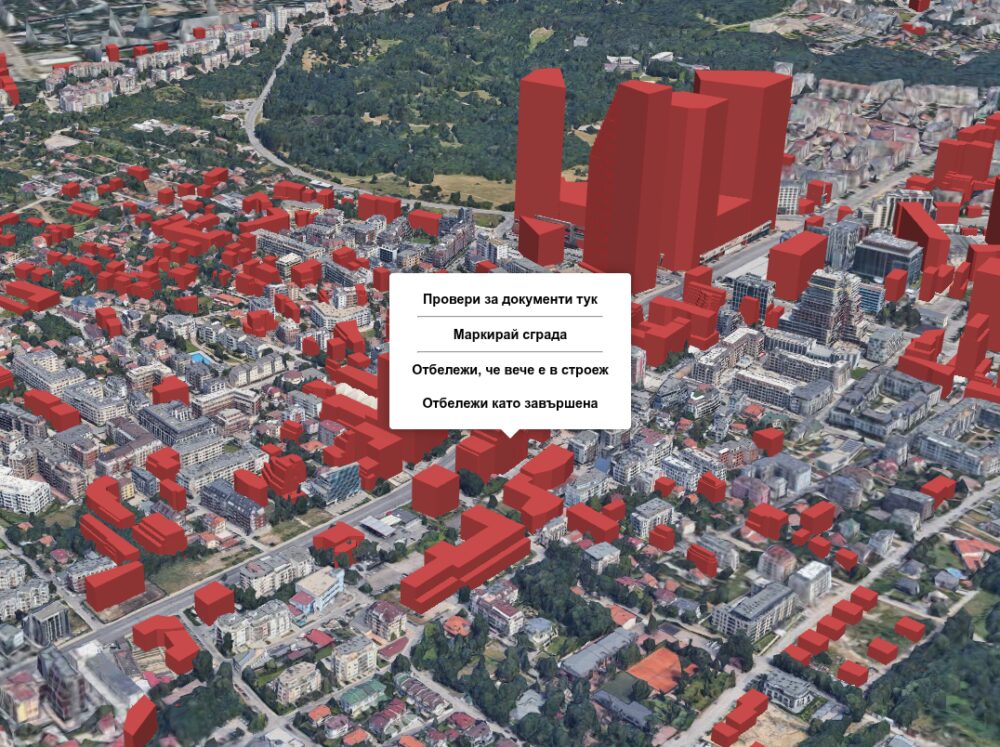
Преди време писах, че може да се отбелязват сгради визуално, ако искате да направите снимка и да споделите, както и да се търсят документи направо в тази 3D карта. Сега добавих още два бутона за отбелязване на започнати и завършени сгради.
За съжаление, картата не работи на iPhone. Има проблем с показването на толкова много данни, който е специфичен за устройството. Знам как да го оправя, но ще отнеме време. Работи на лаптоп и Android. Картата с документите няма проблем на което и да е устройство.
Разбира се, отбелязаните така първо ще бъдат одобрени и тогава ще се появят на картата с различен цвят. Сега започваме фазата на събиране на информация от хората запознати с районите. Това е експеримент за crowdsourcing. Имал съм доста такива през годините започвайки с картографиране на катастрофите в София. Най-големият беше може би Lipsva.
Ако имате други предложения и съвети, ще се радвам да ги споделите. Друг начин да подкрепите картата за сега е да се абонирате за новини и документи около дома или място на интерес или за цял район в София.
The post Нужда от помощ за „онази“ карта first appeared on Блогът на Юруков.
Git 2.50.0 released
Post Syndicated from jzb original https://lwn.net/Articles/1025628/
Version
2.50.0 of the Git source-code management system has been released
with a long list of new user features, performance improvements, and
bug fixes. See the announcement and this
GitHub blog post for details.
AWS Weekly Roundup: AWS re:Inforce 2025, AWS WAF, AWS Control Tower, and more (June 16, 2025)
Post Syndicated from Esra Kayabali original https://aws.amazon.com/blogs/aws/aws-weekly-roundup-aws-reinforce-2025-aws-waf-aws-control-tower-and-more-june-16-2025/
Today marks the start of AWS re:Inforce 2025, where security professionals are gathering for three days of technical learning sessions, workshops, and demonstrations. This security-focused conference brings together AWS security specialists who build and maintain the services that organizations rely on for their cloud security needs.
AWS Chief Information Security Officer (CISO) Amy Herzog will deliver the conference keynote along with guest speakers who will share new security capabilities and implementation insights. The event offers multiple learning paths with sessions designed for various technical roles and expertise levels. Many of my colleagues from across AWS are leading hands-on workshops, demonstrating new security features, and facilitating community discussions. For those unable to join us in Philadelphia, the keynote and innovation talks will be viewable by livestream during the event, and available to watch on demand after the event. Look out for the key announcements and technical insights from the conference in upcoming posts!
Let’s look at last week’s new announcements.
Last week’s launches
Here are the launches that got my attention.
Extend Amazon Q Developer IDE plugins with MCP tools – Amazon Q Developer now supports Model Context Protocol (MCP) in its integrated development environment (IDE) plugins, helping developers integrate external tools for enhanced contextual development workflows. You can now augment the built-in tools with any MCP server that supports the stdio transport layer. These servers can be managed within the Amazon Q Developer user interface. This makes it easy to add, remove, and modify tool permissions. The integration enables more customized responses by orchestrating tasks across both native and MCP server-based tools. MCP support is available in Visual Studio Code and JetBrains IDE plugins, as well as in the Amazon Q Developer command line interface (CLI), with detailed documentation and implementation guides available in the Amazon Q Developer documentation.
AWS WAF now supports automatic application layer DDoS protection – AWS has enhanced its application layer (L7) distributed denial of service (DDoS) protection capabilities with faster automatic detection and mitigation that responds to events within seconds. This AWS Managed Rules group automatically detects and mitigates DDoS attacks of any duration to keep applications running on Amazon CloudFront, Application Load Balancer, and other AWS WAF supported services available to users. The system establishes a baseline within minutes of activation using machine learning (ML) models to detect traffic anomalies, then automatically applies rules to address suspicious requests. Configuration options help you customize responses such as presenting challenges or blocking requests. The feature is available to all AWS WAF and AWS Shield Advanced subscribers in all supported AWS Regions, except Asia Pacific (Thailand), Mexico (Central), and China (Beijing and Ningxia). To learn more about AWS WAF application layer (L7) DDoS protection, visit the AWS WAF documentation or the AWS WAF console.
AWS Control Tower now supports service-linked AWS Config managed AWS Config rules – AWS Control Tower now deploys service-linked AWS Config rules directly in managed accounts, replacing the previous CloudFormation StackSets deployment method. This change improves deployment speed when enabling service-linked AWS Config rules across multiple AWS Control Tower managed accounts and Regions. These service-linked rules are managed entirely by AWS services and can’t be edited or deleted by users. This helps maintain consistency and prevent configuration drift. AWS Control Tower Config rules detect resource noncompliance within accounts and provide alerts through the dashboard. You can deploy these controls using the AWS Control Tower console or AWS Control Tower control APIs.
Powertools for AWS Lambda introduces Bedrock Agents Function utility – The new Amazon Bedrock Agents Function utility in Powertools for AWS Lambda simplifies building serverless applications integrated with Amazon Bedrock Agents. This utility helps developers create AWS Lambda functions that respond to Amazon Bedrock Agents action requests with built-in parameter injection and response formatting, eliminating boilerplate code. The utility seamlessly integrates with other Powertools features like Logger and Metrics, making it easier to build production-ready AI applications. This integration improves the developer experience when building agent-based solutions that use AWS Lambda functions to process actions requested by Amazon Bedrock Agents. The utility is available in Python, TypeScript, and .NET versions of Powertools.
Announcing open sourcing pgactive: active-active replication extension for PostgreSQL – Pgactive is a PostgreSQL extension that enables asynchronous active-active replication for streaming data between database instances, and AWS has made it open source. This extension provides additional resiliency and flexibility for moving data between instances, including writers located in different Regions. It helps maintain availability during operations like switching write traffic. Building on PostgreSQL’s logical replication features, pgactive adds capabilities that simplify managing active-active replication scenarios. The open source approach encourages collaboration on developing PostgreSQL’s active-active capabilities while offering features that streamline using PostgreSQL in multi-active instance environments. For more information and implementation guidance, visit the GitHub repository.
For a full list of AWS announcements, be sure to keep an eye on the What’s New at AWS page.
We launched existing services and instance types in additional Regions:
- AWS Glue is now available in Asia Pacific (Taipei) Region – AWS Glue is a serverless data integration service that makes it simple to discover, prepare, and combine data for analytics, ML, and application development.
- Amazon EC2 I8g instances are now available in Europe (Ireland) Region – Amazon EC2 I8g instances offer the best performance in Amazon EC2 for storage-intensive workloads.
- Amazon VPC IP Address Manager is now available in Asia Pacific (Taipei) Region – Amazon VPC IPAM makes it easier to plan, track, and monitor IP addresses for AWS workloads.
Other AWS events
Check your calendar and sign up for upcoming AWS events.
AWS GenAI Lofts are collaborative spaces and immersive experiences that showcase AWS expertise in cloud computing and AI. They provide startups and developers with hands-on access to AI products and services, exclusive sessions with industry leaders, and valuable networking opportunities with investors and peers. Find a GenAI Loft location near you and don’t forget to register.
AWS Summits are free online and in-person events that bring the cloud computing community together to connect, collaborate, and learn about AWS. Register in your nearest city: Milano (June 18), Shanghai (June 19 – 20), Mumbai (June 19) and Japan (June 25 – 26).
Browse all upcoming AWS led in-person and virtual events here.
That’s all for this week. Check back next Monday for another Weekly Roundup!
This post is part of our Weekly Roundup series. Check back each week for a quick roundup of interesting news and announcements from AWS!
Samsung T9 Portable SSD 2TB USB 3.2 Gen2x2
Post Syndicated from Sam Sabinash original https://www.servethehome.com/samsung-t9-portable-ssd-2tb-usb-3-2-gen2x2/
We take a look at the Samsung T9 portable SSD. This 2TB USB 3.2 Gen2x2 drive offers a lot of performance for an external USB SSD
The post Samsung T9 Portable SSD 2TB USB 3.2 Gen2x2 appeared first on ServeTheHome.
[$] Supporting NFS v4.2 WRITE_SAME
Post Syndicated from jake original https://lwn.net/Articles/1025257/
At the 2025 Linux Storage, Filesystem, Memory Management, and BPF Summit
(LSFMM+BPF), Anna Schumaker led a discussion about implementing the NFS
v4.2 WRITE_SAME
command in both the NFS client and server. WRITE_SAME is
meant to write large amounts of identical data (e.g. zeroes) to the server
without actually needing to transfer all of it over the wire. In her topic
proposal, Schumaker wondered whether other filesystems needed the
functionality, so that it should be implemented at the virtual filesystem
(VFS) layer, or whether it should simply be handled as an NFS-specific ioctl().
Security updates for Monday
Post Syndicated from jake original https://lwn.net/Articles/1025618/
Security updates have been issued by AlmaLinux (.NET 8.0 and .NET 9.0), Arch Linux (curl, ghostscript, go, konsole, python-django, roundcubemail, and samba), Fedora (aerc, chromium, golang-x-perf, libkrun, python3.11, python3.12, rust-kbs-types, rust-sev, rust-sevctl, valkey, and wireshark), Gentoo (Konsole and sysstat), Oracle (.NET 9.0), Red Hat (bootc, grub2, keylime-agent-rust, python3.12-cryptography, rpm-ostree, rust-bootupd, xorg-x11-server, and xorg-x11-server-Xwayland), SUSE (apache2-mod_auth_openidc, docker, grub2, java-1_8_0-openj9, kernel, less, python-Django, screen, and sqlite3), and Ubuntu (cifs-utils and modsecurity-apache).
America’s Forgotten Moon-Base Plans
Post Syndicated from The History Guy: History Deserves to Be Remembered original https://www.youtube.com/watch?v=Bp6xtAtNOkQ
Juvenile Justice: Last Week Tonight with John Oliver (HBO)
Post Syndicated from LastWeekTonight original https://www.youtube.com/watch?v=Pya-kt5M7uY
S12 E15: ICE Protests & Juvenile Justice: 6/15/25: Last Week Tonight with John Oliver
Post Syndicated from LastWeekTonight original https://www.youtube.com/watch?v=7nAIsnn_2Io
My Ioniq 5’s ICCU failed and Hyundai’s doing a terrible job fixing this problem
Post Syndicated from Technology Connextras original https://www.youtube.com/watch?v=EYoOiVsHJTw
Kernel prepatch 6.16-rc2
Post Syndicated from jake original https://lwn.net/Articles/1025529/
Linus Torvalds has released 6.16-rc2,
which is “admittedly
“, though rc2 is not uncommonly one of the smaller
even smaller than usual
release candidates.
It may be that people are taking a breather after a fairly sizable
merge window, but it might also be seasonal, with Europe starting to
see summer vacations… We’ll see how this goes.The diffstat looks somewhat unusual, with a lot of one-liners with
both ARC and pincontrol having (presumably independently) ended up
doing some unrelated trivial cleanups.But even that is probably noticeable only because everything else is
pretty small. That “everything else” is mostly network drivers (and
bluetooth) and bcachefs, with some rust infrastructure and core
networking changes thrown in.
St Patrick’s Cathedral
Post Syndicated from The History Guy: History Deserves to Be Remembered original https://www.youtube.com/watch?v=oa16wbUgkYI
Comic for 2025.06.16 – Reacting
Post Syndicated from Explosm.net original https://explosm.net/comics/reacting
New Cyanide and Happiness Comic
Exoplanet System
Post Syndicated from xkcd.com original https://xkcd.com/3103/

Giveaway! Win This Alta Labs NFR Kit!
Post Syndicated from Crosstalk Solutions original https://www.youtube.com/watch?v=CBtUZIn-k_s