Visualize data lineage using Amazon SageMaker Catalog for Amazon EMR, AWS Glue, and Amazon Redshift

Post Syndicated from Shubham Purwar original https://aws.amazon.com/blogs/big-data/visualize-data-lineage-using-amazon-sagemaker-catalog-for-amazon-emr-aws-glue-and-amazon-redshift/

Amazon SageMaker offers a comprehensive hub that integrates data, analytics, and AI capabilities, providing a unified experience for users to access and work with their data. Through Amazon SageMaker Unified Studio, a single and unified environment, you can use a wide range of tools and features to support your data and AI development needs, including data processing, SQL analytics, model development, training, inference, and generative AI development. This offering is further enhanced by the integration of Amazon Q and Amazon SageMaker Catalog, which provide an embedded generative AI and governance experience, helping users work efficiently and effectively across the entire data and AI lifecycle, from data preparation to model deployment and monitoring.

With the SageMaker Catalog data lineage feature, you can visually track and understand the flow of your data across different systems and teams, gaining a complete picture of your data assets and how they’re connected. As an OpenLineage-compatible feature, it helps you trace data origins, track transformations, and view cross-organizational data consumption, giving you insights into cataloged assets, subscribers, and external activities. By capturing lineage events from OpenLineage-enabled systems or through APIs, you can gain a deeper understanding of your data’s journey, including activities within SageMaker Catalog and beyond, ultimately driving better data governance, quality, and collaboration across your organization.

Additionally, the SageMaker Catalog data lineage feature versions each event, so you can track changes, visualize historical lineage, and compare transformations over time. This provides valuable insights into data evolution, facilitating troubleshooting, auditing, and data integrity by showing exactly how data assets have evolved, and generates trust in data.

In this post, we discuss the visualization of data lineage in SageMaker Catalog and how capture lineage from different AWS analytics services such as AWS Glue, Amazon Redshift, and Amazon EMR Serverless automatically, and visualize it with SageMaker Unified Studio.

Solution overview

The generation of data lineage in SageMaker Catalog operates through an automated system that captures metadata and relationships between different data artifacts for AWS Glue, Amazon EMR, and Amazon Redshift. When data moves through various AWS services, SageMaker automatically tracks these movements, transformations, and dependencies, creating a detailed map of the data’s journey. This tracking includes information about data sources, transformations, processing steps, and final outputs, providing a complete audit trail of data movement and transformation.

The implementation of data lineage in SageMaker Catalog offers several key benefits:

  • Compliance and audit support – Organizations can demonstrate compliance with regulatory requirements by showing complete data provenance and transformation history
  • Impact analysis – Teams can assess the potential impact of changes to data sources or transformations by understanding dependencies and relationships in the data pipeline
  • Troubleshooting and debugging – When issues arise, the lineage system helps identify the root cause by showing the complete path of data transformation and processing
  • Data quality management – By tracking transformations and dependencies, organizations can better maintain data quality and understand how data quality issues might propagate through their systems

Lineage capture is automated using several tools in SageMaker Unified Studio. To learn more, refer to Data lineage support matrix.

In the following sections, we show you how to configure your resources and implement the solution. For this post, we create the solution resources in the us-west-2 AWS Region using an AWS CloudFormation template.

Prerequisites

Before getting started, make sure you have the following:

Configure SageMaker Unified Studio with AWS CloudFormation

The vpc-analytics-lineage-sus.yaml stack creates a VPC, subnet, security group, IAM roles, NAT gateway, internet gateway, Amazon Elastic Compute Cloud (Amazon EC2) client, S3 buckets, SageMaker Unified Studio domain, and SageMaker Unified Studio project. To create the solution resources, complete the following steps:

  1. Launch the stack vpc-analytics-lineage-sus using the CloudFormation template:
  2. Provide the parameter values as listed in the following table.

    Parameters Sample value
    DatazoneS3Bucket s3://datazone-{account_id}/
    DomainName dz-studio
    EnvironmentName sm-unifiedstudio
    PrivateSubnet1CIDR 10.192.20.0/24
    PrivateSubnet2CIDR 10.192.21.0/24
    PrivateSubnet3CIDR 10.192.22.0/24
    ProjectName sidproject
    PublicSubnet1CIDR 10.192.10.0/24
    PublicSubnet2CIDR 10.192.11.0/24
    PublicSubnet3CIDR 10.192.12.0/24
    UsersList analyst
    VpcCIDR 10.192.0.0/16

The stack creation process can take approximately 20 minutes to complete. You can check the Outputs tab for the stack after the stack is created.

Next, we prepare source data, setup the AWS Glue ETL Job, Amazon EMR Serverless Spark Job and Amazon Redshift Job to generate the lineage and capture lineage from Amazon SageMaker Unified Studio

Prepare data

The following is example data from our CSV files:

attendance.csv

EmployeeID,Date,ShiftStart,ShiftEnd,Absent,OvertimeHours
E1000,2024-01-01,2024-01-01 08:00:00,2024-01-01 16:22:00,False,3
E1001,2024-01-08,2024-01-08 08:00:00,2024-01-08 16:38:00,False,2
E1002,2024-01-23,2024-01-23 08:00:00,2024-01-23 16:24:00,False,3
E1003,2024-01-09,2024-01-09 10:00:00,2024-01-09 18:31:00,False,0
E1004,2024-01-15,2024-01-15 09:00:00,2024-01-15 17:48:00,False,1

employees.csv

EmployeeID,Name,Department,Role,HireDate,Salary,PerformanceRating,Shift,Location
E1000,Employee_0,Quality Control,Operator,2021-08-08,33002.0,1,Night,Plant C
E1001,Employee_1,Maintenance,Supervisor,2015-12-31,69813.76,5,Evening,Plant B
E1002,Employee_2,Production,Technician,2015-06-18,46753.32,1,Evening,Plant A
E1003,Employee_3,Admin,Supervisor,2020-10-13,52853.4,5,Night,Plant A
E1004,Employee_4,Quality Control,Manager,2023-09-21,55645.27,5,Evening,Plant A

Upload the sample data from attendance.csv and employees.csv to the S3 bucket specified in the previous CloudFormation stack (s3://datazone-{account_id}/csv/).

Ingest employee data in Amazon Relational Database Dervice (Amazon RDS) for MySQL table

On the CloudFormation console, open the stack vpc-analytics-lineage-sus and collect the Amazon RDS for MySQL database endpoint to use in the following commands to create a default employeedb database.

  1. Connect to Amazon EC2 instance with mysql package installation
  2. Run the following command to connect to the database
    >MySQL -u admin -h database-1.cuqd06l5efvw.us-west-2.rds.amazonaws.com -p

  3. Run the following command to create an employee table
    Use employeedb;
    
    CREATE TABLE employee (
      EmployeeID longtext,
      Name longtext,
      Department longtext,
      Role longtext,
      HireDate longtext,
      Salary longtext,
      PerformanceRating longtext,
      Shift longtext,
      Location longtext
    );

  4. Running the following command to insert rows.
    INSERT INTO employee (EmployeeID, Name, Department, Role, HireDate, Salary, PerformanceRating, Shift, Location) VALUES ('E1000', 'Employee_0', 'Quality Control', 'Operator', '2021-08-08', 33002.00, 1, 'Night', 'Plant C'), ('E1001', 'Employee_1', 'Maintenance', 'Supervisor', '2015-12-31', 69813.76, 5, 'Evening', 'Plant B'), ('E1002', 'Employee_2', 'Production', 'Technician', '2015-06-18', 46753.32, 1, 'Evening', 'Plant A'), ('E1003', 'Employee_3', 'Admin', 'Supervisor', '2020-10-13', 52853.40, 5, 'Night', 'Plant A'), ('E1004', 'Employee_4', 'Quality Control', 'Manager', '2023-09-21', 55645.27, 5, 'Evening', 'Plant A');

Capture lineage from AWS Glue ETL job and notebook

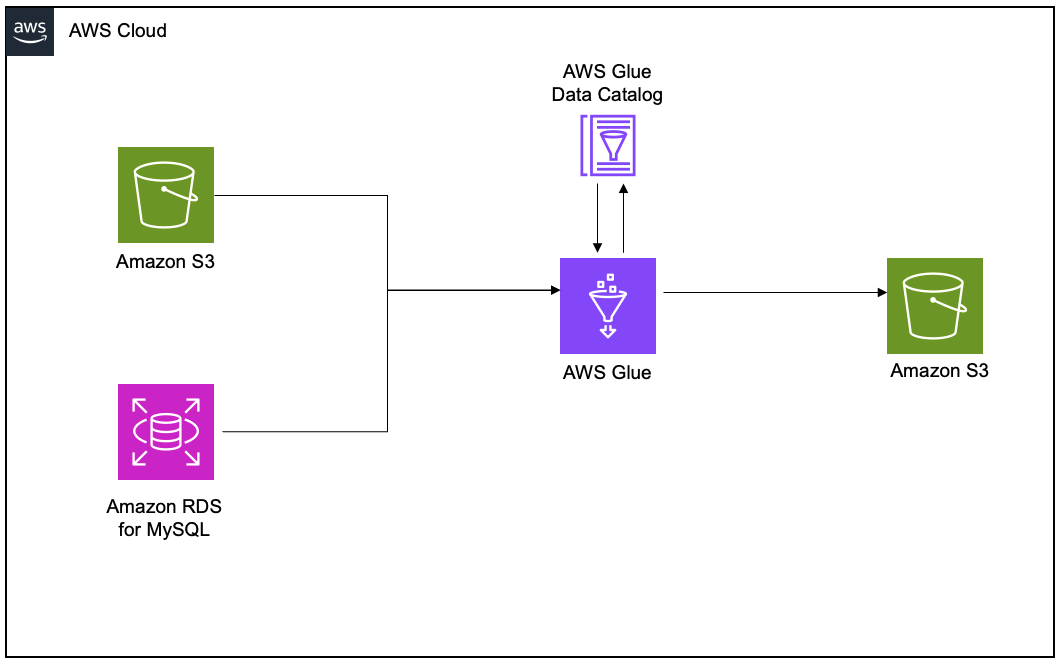
To demonstrate the lineage, we set up an AWS Glue extract, transform, and load (ETL) job to read the employee data from an Amazon RDS for MySQL table and the employee attendance data from Amazon S3, and join both datasets. Finally, we write the data to Amazon S3 and create the attendance_with_emp1 table in the AWS Glue Data Catalog.
Create and configure AWS Glue job for lineage generation

Complete the following steps to create your AWS Glue ETL job:

  1. On the AWS Glue console, create a new ETL job with AWS Glue version 5.0.
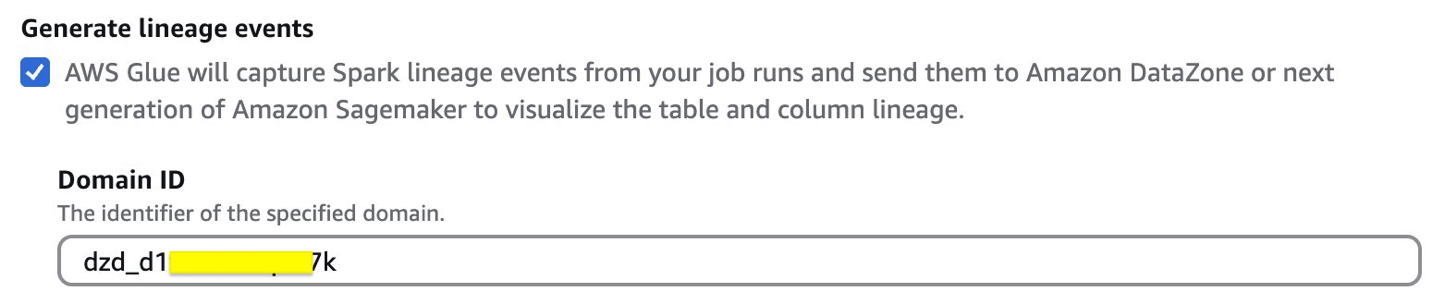
  2. Enable Generate lineage events and provide the domain ID (retrieve from the CloudFormation template output for DataZoneDomainid; it will have the format dzd_xxxxxxxx)
  3. Use the following code snippet in the AWS Glue ETL job script. Provide the S3 bucket (bucketname-{account_id}) used in the preceding CloudFormation stack.
    from pyspark.sql import SparkSession
    from pyspark.sql import SparkSession, DataFrame
    from pyspark.sql.functions import *
    from pyspark.sql.types import *
    from pyspark import SparkContext
    from pyspark.sql import SparkSession
    import sys
    import logging
    
    
    spark = SparkSession.builder.appName("lineageglue").enableHiveSupport().getOrCreate()
     
    connection_details = glueContext.extract_jdbc_conf(connection_name="connectionname")
    
    employee_df = spark.read.format("jdbc").option("url", "jdbc:MySQL://dbhost:3306/database_name").option("dbtable", "employee").option("user", connection_details['user']).option("password", connection_details['password']).load()
    
    s3_paths = {
    'absent_data': 's3://bucketname-{account_id}/csv/attendance.csv'
    }
    absent_df = spark.read.csv(s3_paths['absent_data'], header=True, inferSchema=True)
    
    joined_df = employee_df.join(absent_df, on="EmployeeID", how="inner")
    
    joined_df.write.mode("overwrite").format("parquet").option("path", "s3://datazone-{account_id}/attendanceparquet/").saveAsTable("gluedbname.tablename")

  4. Choose Run to start the job.
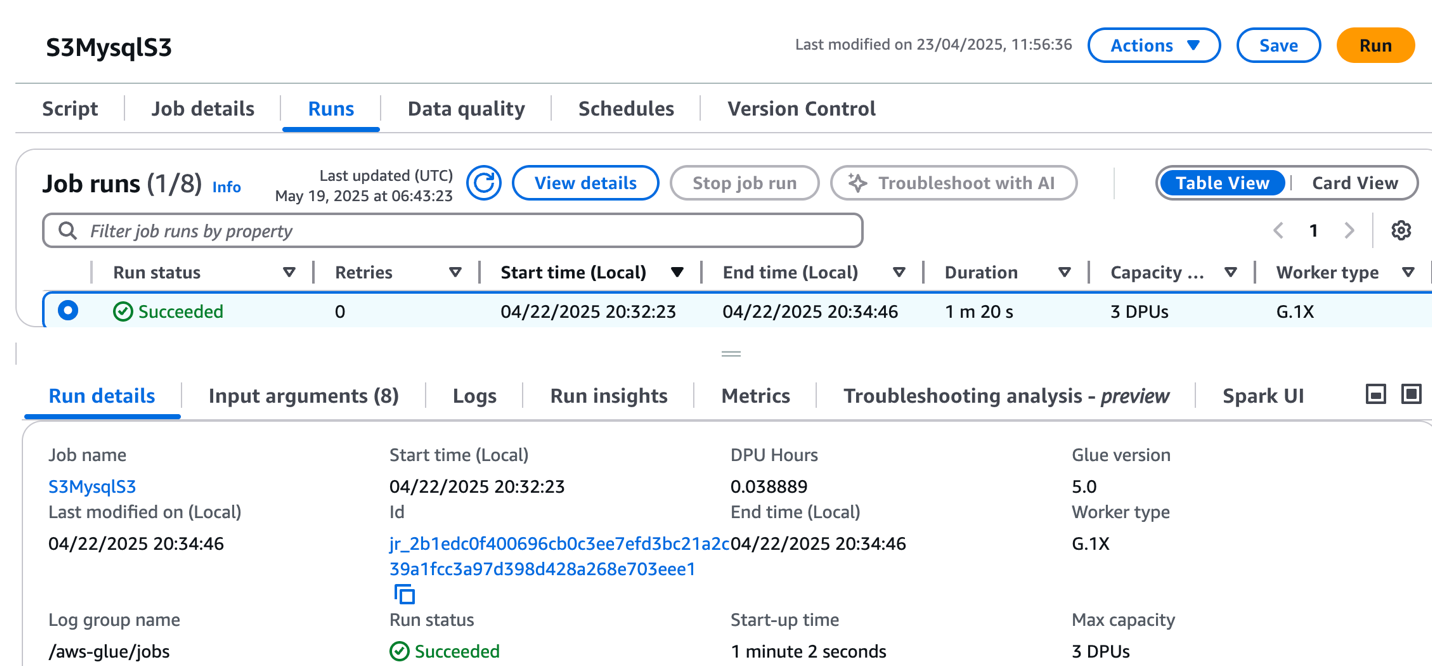
  5. On the Runs tab, confirm the job ran without failure.
  6. After the job has executed successfully, navigate to the SageMaker Unified Studio domain.
  7. Choose Project and under Overview, choose Data Sources.
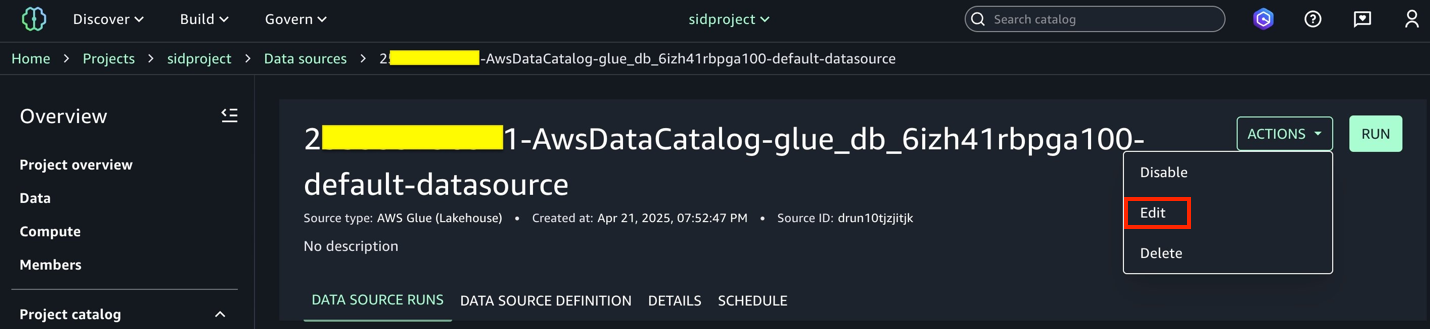
  8. Select the Data Catalog source (accountid-AwsDataCatalog-glue_db_suffix-default-datasource).
  9. On the Actions dropdown menu, choose Edit.
  10. Under Connection, enable Import data lineage.
  11. In the Data Selection section, under Table Selection Criteria, provide a table name or use * to generate lineage.
  12. Update the data source and choose Run to create an asset called attendance_with_emp1 in SageMaker Catalog.
  13. Navigate to Assets, choose the attendance_with_emp1 asset, and navigate to the LINEAGE section.
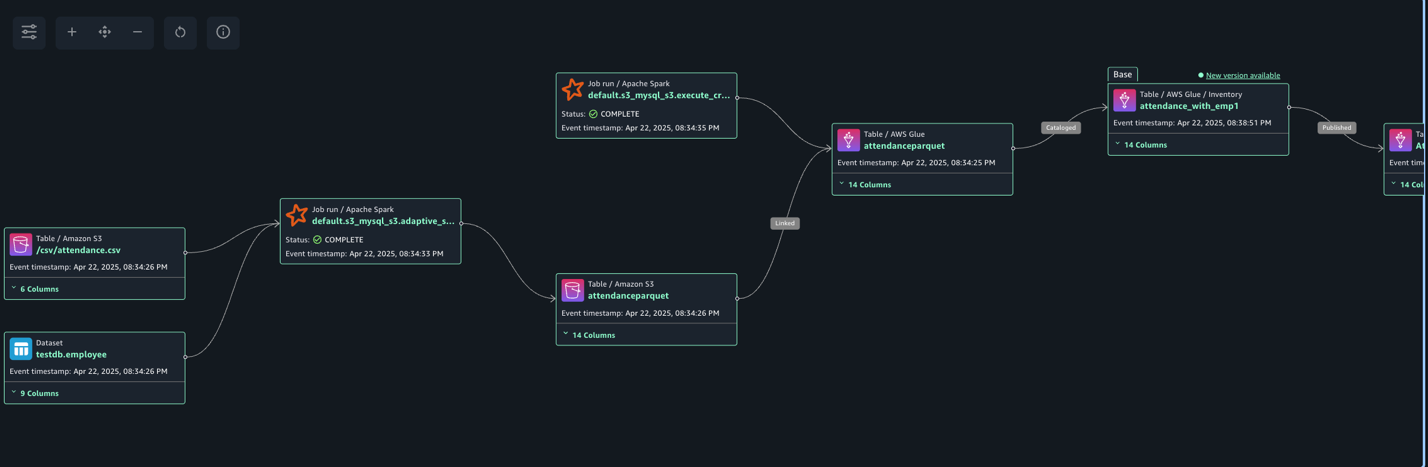
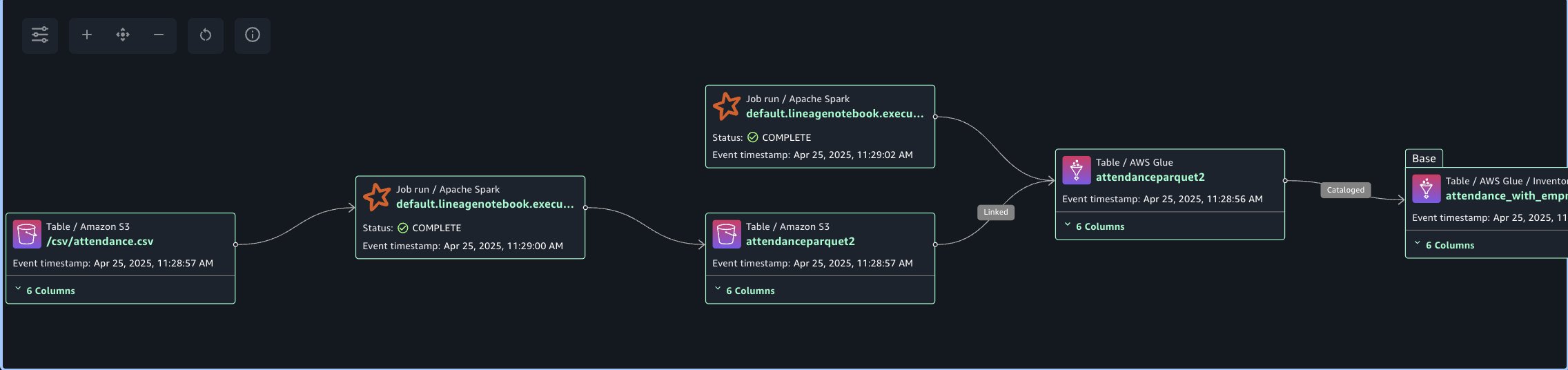
The following lineage diagram shows an AWS Glue job that integrates data from two sources: employee information stored in Amazon RDS for MySQL and employee absence records stored in Amazon S3. The AWS Glue job combines these datasets through a join operation, then creates a table in the Data Catalog and registers it as an asset in SageMaker Catalog, making the unified data available for further analysis or machine learning purposes.

Create and configure AWS Glue notebook for lineage generation

Complete the following steps to create the AWS Glue notebook:

  1. On the AWS Glue console, choose Author using an interactive code notebook.
  2. Under Options, choose Start fresh and choose Create notebook.
  3. In the notebook, use the following code to generate lineage.

    In the following code, we add the required Spark configuration to generate lineage and then read CSV data from Amazon S3 and write in Parquet format to the Data Catalog table. The Spark configuration includes the following parameters:

    • spark.extraListeners=io.openlineage.spark.agent.OpenLineageSparkListener – Registers the OpenLineage listener to capture Spark job execution events and metadata for lineage tracking
    • spark.openlineage.transport.type=amazon_datazone_api – Specifies Amazon DataZone as the destination service where the lineage data will be sent and stored
    • spark.openlineage.transport.domainId=dzd_xxxxxxx – Defines the unique identifier of your Amazon DataZone domain where the lineage data will be associated
    • spark.glue.accountId={account_id} – Specifies the AWS account ID where the AWS Glue job is running for proper resource identification and access
    • spark.openlineage.facets.custom_environment_variables – Lists the specific environment variables to capture in the lineage data for context about the AWS and AWS Glue environment
    • spark.glue.JOB_NAME=lineagenotebook – Sets a unique identifier name for the AWS Glue job that will appear in lineage tracking and logs

    See the following code:

    %%configure —name project.spark -f
    {
    "—conf":"spark.extraListeners=io.openlineage.spark.agent.OpenLineageSparkListener \
    --conf spark.openlineage.transport.type=amazon_datazone_api \
    --conf spark.openlineage.transport.domainId=dzd_xxxxxxxx \
    --conf spark.glue.accountId={account_id} \
    --conf spark.openlineage.facets.custom_environment_variables=[AWS_DEFAULT_REGION;GLUE_VERSION;GLUE_COMMAND_CRITERIA;GLUE_PYTHON_VERSION;] \
    --conf spark.glue.JOB_NAME=lineagenotebook"
    }
    
    from pyspark.sql import SparkSession
    from pyspark.sql import SparkSession, DataFrame
    from pyspark.sql.functions import *
    from pyspark.sql.types import *
    from pyspark import SparkContext
    from pyspark.sql import SparkSession
    import sys
    import logging
    
    
    spark = SparkSession.builder.appName("lineagegluenotebook").enableHiveSupport().getOrCreate()
    
    s3_paths = {
    'absent_data': 's3://datazone-{account_id}/csv/attendance.csv'
    }
    absent_df = spark.read.csv(s3_paths['absent_data'], header=True, inferSchema=True)
    
    absent_df.write.mode("overwrite").format("parquet").option("path", "s3://datazone-{account_id}/attendanceparquet2/").saveAsTable("gluedbname.tablename")

  4. After the notebook has executed successfully, navigate to the SageMaker Unified Studio domain.
  5. Choose Project and under Overview, choose Data Sources.
  6. Choose the Data Catalog source ({account_id}-AwsDataCatalog-glue_db_suffix-default-datasource).
  7. Choose Run to create the asset attendance_with_empnote in SageMaker Catalog.
  8. Navigate to Assets, choose the attendance_with_empnote asset, and navigate to the LINEAGE section.
The following lineage diagram shows an AWS Glue job that reads data from the employee absence records stored in Amazon S3. The AWS Glue job transform CSV data into Parquet format, then creates a table in the Data Catalog and registers it as an asset in SageMaker Catalog.

Capture lineage from Amazon Redshift

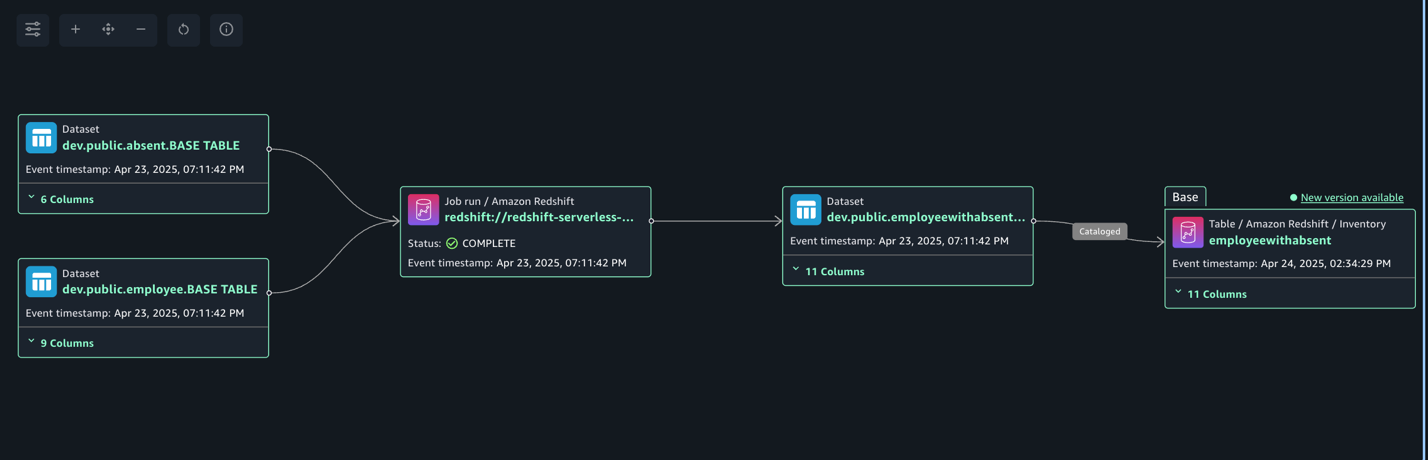
To demonstrate the lineage, we are creating an employee table and an attendance table and join both datasets. Finally, we create a new table called employeewithabsent in Amazon Redshift. Complete the following steps to create and configure lineage for Amazon Redshift tables:

  1. In SageMaker Unified Studio, open your domain.
  2. Under Compute, choose Data warehouse.
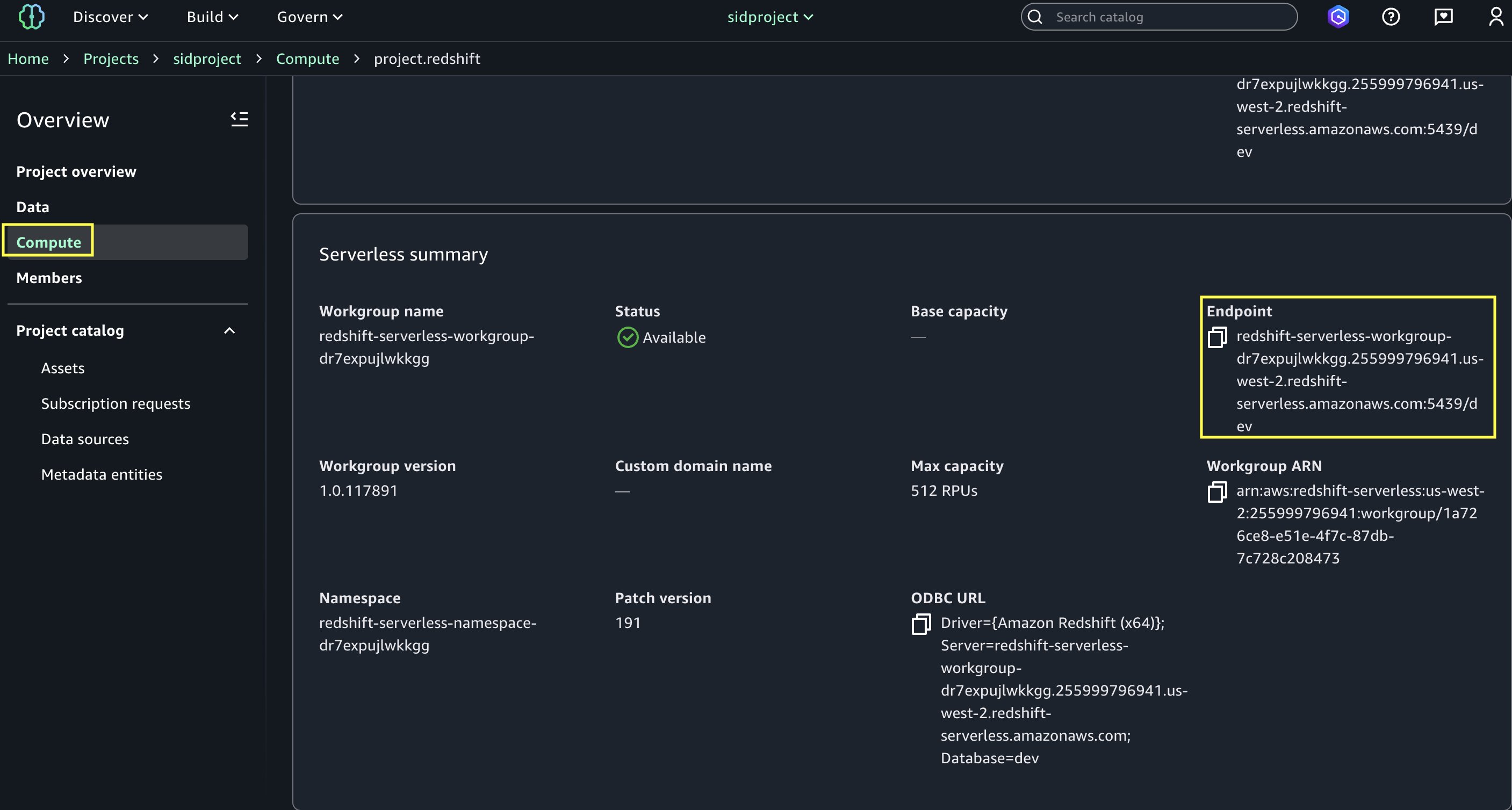
  3. Open project.redshift and copy the endpoint name (redshift-serverless-workgroup-xxxxxxx).
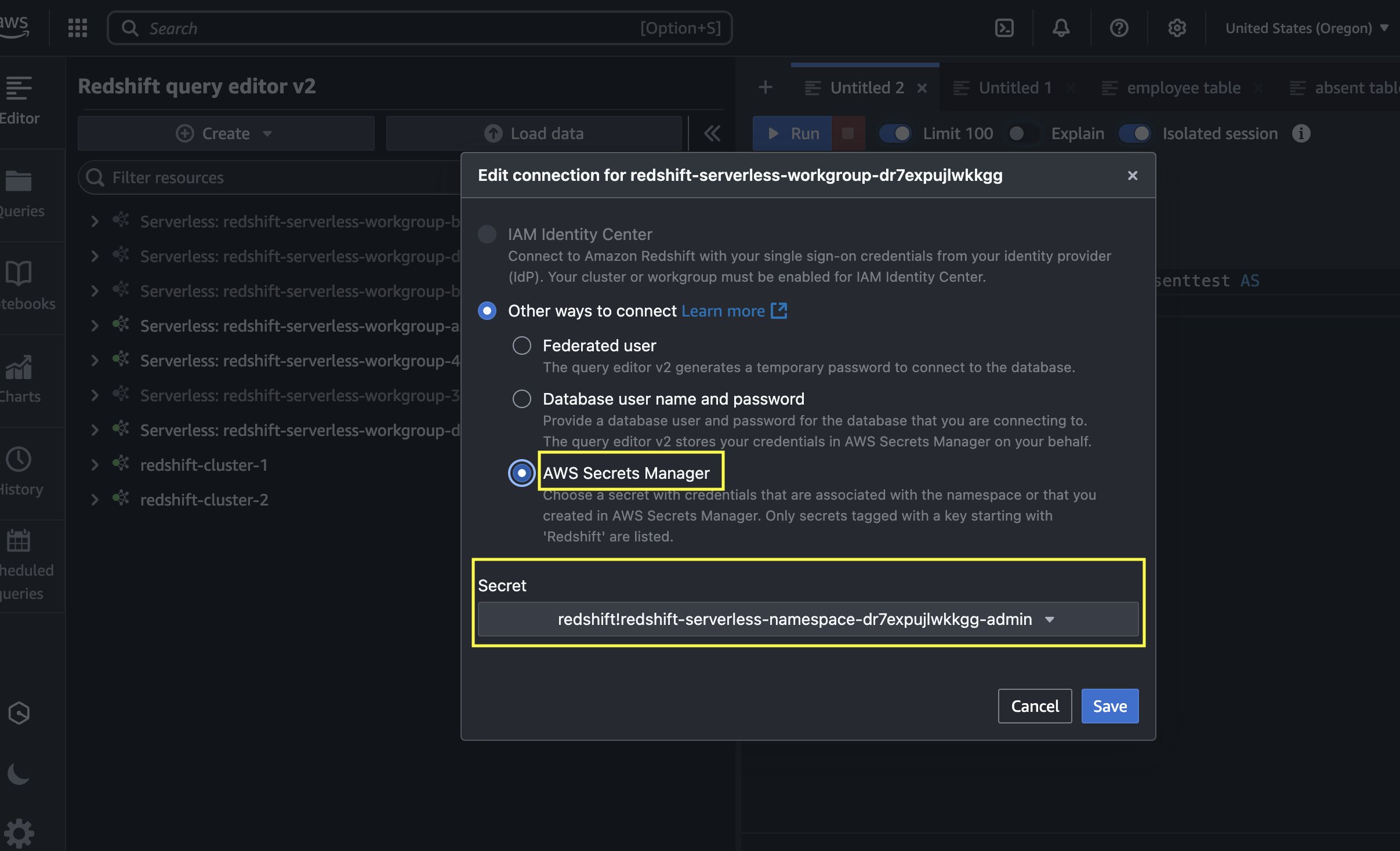
  4. On the Amazon Redshift console, open the Query Editor v2, and connect to the Redshift Serverless workgroup with a secret. Use the AWS Secrets Manager option and choose the secret redshift-serverless-namespace-xxxxxxxx.
  5. Use the following code to create tables in Amazon Redshift and load data from Amazon S3 using the COPY command. Make sure the IAM role has GetObject permission on the S3 files attendance.csv and employees.csv.

    Create Redshift table absent

    CREATE TABLE public.absent (
        employeeid character varying(65535),
        date date,
        shiftstart timestamp without time zone ,
        shiftend timestamp without time zone,
        absent boolean,
        overtimehours integer
    );

    Load data into absent table.

    COPY absent
    FROM 's3://datazone-{account_id}/csv/attendance.csv' 
    IAM_ROLE 'arn:aws:iam::accountid:role/RedshiftAdmin'
    csv
    IGNOREHEADER 1;

    Create Redshift table employee

    CREATE TABLE public.employee (
        employeeid character varying(65535),
        name character varying(65535),
        department character varying(65535),
        role character varying(65535),
        hiredate date,
        salary double precision,
        performancerating integer,
        shift character varying(65535),
        location character varying(65535)
    );

    Load data into employee table.

    COPY employee
    FROM 's3://datazone-{account_id}/csv/employees.csv' 
    IAM_ROLE 'arn:aws:iam::account-id:role/RedshiftAdmin'
    csv
    IGNOREHEADER 1;

  6. After the tables are created and the data is loaded, perform the join between the tables and create a new table with a CTAS query:
    CREATE TABLE public.employeewithabsent AS
    SELECT 
      e.*,
      a.absent,
      a.overtimehours
    FROM public.employee e
    INNER JOIN public.absent a
    ON e.EmployeeID = a.EmployeeID;

  7. Navigate to the SageMaker Unified Studio domain.
  8. Choose Project and under Overview, choose Data Sources.
  9. Select the Amazon Redshift source (RedshiftServerless-default-redshift-datasource).
  10. On the Actions dropdown menu, choose Edit.
  11. Under Connection, Enable Import data lineage.
  12. In the Data Selection section, under Table Selection Criteria, provide a table name or use * to generate lineage.
  13. Update the data source and choose Run to create an asset called employeewithabsent in SageMaker Catalog.
  14. Navigate to Assets, choose the employeewithabsent asset, and navigate to the LINEAGE section.
The following lineage diagram shows joining two redshift tables and creating a new redshift table and registers it as an asset in SageMaker Catalog.
Capture lineage from EMR Serverless job

To demonstrate the lineage, we read employee data from an RDS for MySQL table and an attendance dataset from Amazon Redshift, and join both datasets. Finally, we write the data to Amazon S3 and create the attendance_with_employee table in the Data Catalog. Complete the following steps:

  1. On the Amazon EMR console, choose EMR Serverless in the navigation pane.
  2. To create or manage EMR Serverless applications, you need the EMR Studio UI.
    1. If you already have an EMR Studio in the Region where you want to create an application, choose Manage applications to navigate to your EMR Studio, or select the EMR Studio that you want to use.
    2. If you don’t have an EMR Studio in the Region where you want to create an application, choose Get started and then choose Create and launch Studio. EMR Serverless creates an EMR Studio for you so you can create and manage applications.
  3. In the Create studio UI that opens in a new tab, enter the name, type, and release version for your application.
  4. Choose Create application.
  5. Create an EMR Spark serverless application with the following configuration:
    1. For Type, choose Spark.
    2. For Release version, choose emr-7.8.0.
    3. For Architecture, choose x86_64.
    4. For Application setup options, select Use custom settings.
    5. For Interactive endpoint, enable the endpoint for EMR Studio.
    6. For Application configuration, use the following configuration:
      [{
          "Classification": "iceberg-defaults",
          "Properties": {
              "iceberg.enabled": "true"
          }
      }]

  6. Choose Create and Start application.
  7. After application has started, submit the Spark application to generate lineage events. Copy the following script and upload it to the S3 bucket (s3://datazone-{account_id}/script/). Upload the MySQL-connector-java JAR file to the S3 bucket (s3://datazone-{account_id}/jars/) to read the data from MySQL.
    from pyspark.sql import SparkSession
    from pyspark.sql import SparkSession, DataFrame
    from pyspark.sql.functions import *
    from pyspark.sql.types import *
    from pyspark import SparkContext
    from pyspark.sql import SparkSession
    import sys
    import logging
    
    
    spark = SparkSession.builder.appName("lineageglue").enableHiveSupport().getOrCreate()
    
    employee_df = spark.read.format("jdbc").option("driver","com.MySQL.cj.jdbc.Driver").option("url", "jdbc:MySQL://dbhostname:3306/databasename").option("dbtable", "employee").option("user", "admin").option("password", "xxxxxxx").load()
    
    absent_df = spark.read.format("jdbc").option("url", "jdbc:redshift://redshiftserverlessendpoint:5439/dev").option("dbtable", "public.absent").option("user", "admin").option("password", "xxxxxxxxxx").load()
    
    joined_df = employee_df.join(absent_df, on="EmployeeID", how="inner")
    
    joined_df.write.mode("overwrite").format("parquet").option("path", "s3://datazone-{account_id}/emrparquetnew/").saveAsTable("gluedname.tablename")

  8. After you upload the script, use the following command to submit the Spark application. Change the following parameters according to your environment details:
    1. application-id: Provide the Spark application ID you generated.
    2. execution-role-arn: Provide the EMR execution role.
    3. entryPoint: Provide the Spark script S3 path.
    4. domainID: Provide the domain ID (from the CloudFormation template output for DataZoneDomainid: dzd_xxxxxxxx).
    5. accountID: Provide your AWS account ID.
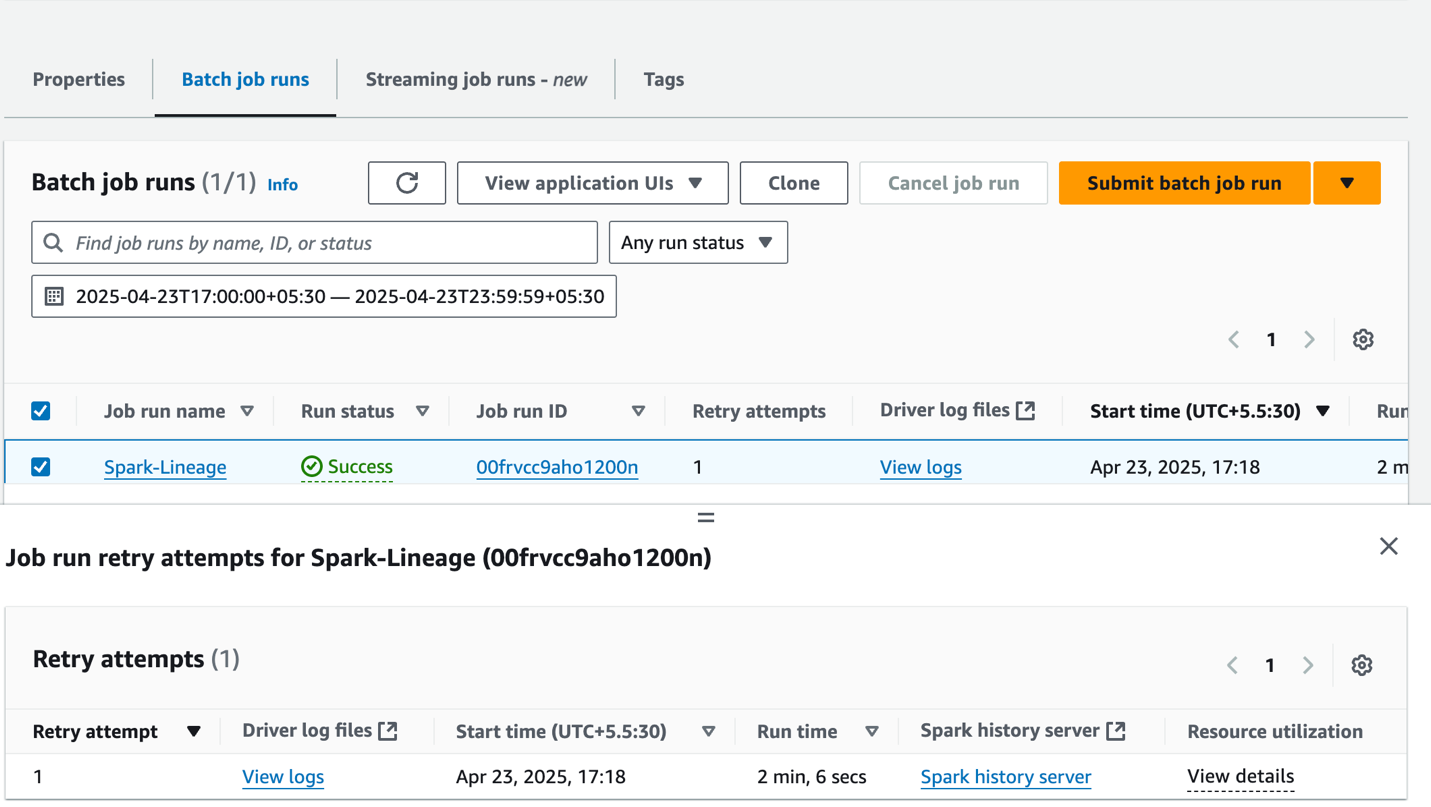
      aws emr-serverless start-job-run --application-id 00frv81tsqe0ok0l --execution-role-arn arn:aws:iam::{account_id}:role/service-role/AmazonEMR-ExecutionRole-1717662744320 --name "Spark-Lineage" --job-driver '{
              "sparkSubmit": {
                  "entryPoint": "s3://datazone-{account_id}/script/emrspark2.py",
                  "sparkSubmitParameters": "--conf spark.executor.cores=1 --conf spark.executor.memory=4g --conf spark.driver.cores=1 --conf spark.driver.memory=4g --conf spark.executor.instances=2 --conf spark.hadoop.hive.metastore.client.factory.class=com.amazonaws.glue.catalog.metastore.AWSGlueDataCatalogHiveClientFactory --conf spark.jars=/usr/share/aws/datazone-openlineage-spark/lib/DataZoneOpenLineageSpark-1.0.jar,s3://datazone-{account_id}/jars/MySQL-connector-java-8.0.20.jar --conf spark.extraListeners=io.openlineage.spark.agent.OpenLineageSparkListener --conf spark.openlineage.transport.type=amazon_datazone_api --conf spark.openlineage.transport.domainId=dzd_xxxxxxxx --conf spark.glue.accountId={account_id}"
              }
          }'

  9. After the job has executed successfully, navigate to the SageMaker Unified Studio domain.
  10. Choose Project and under Overview, choose Data Sources.
  11. Select the Data Catalog source ({account_id}-AwsDataCatalog-glue_db_xxxxxxxxxx-default-datasource).
  12. On the Actions dropdown menu, choose Edit.
  13. Under Connection, enable Import data lineage.
  14. In the Data Selection section, under Table Selection Criteria, provide a table name or use * to generate lineage.
  15. Update the data source and choose Run to create an asset called attendancewithempnew in SageMaker Catalog.
  16. Navigate to Assets, choose the attendancewithempnew asset, and navigate to the LINEAGE section.
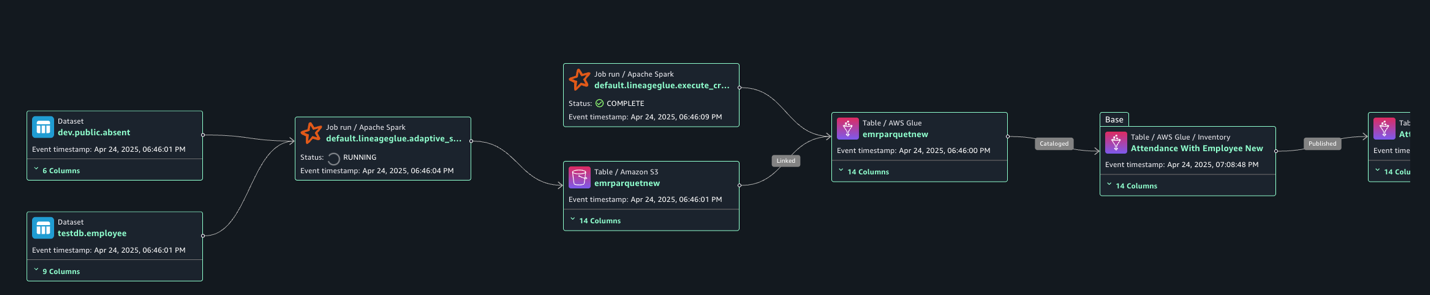
The following lineage diagram shows an AWS Glue job that integrates employee information stored in Amazon RDS for MySQL and employee absence records stored in Amazon Redshift. The AWS Glue job combines these datasets through a join operation, then creates a table in the Data Catalog and registers it as an asset in SageMaker Catalog.
Clean up

To clean up your resources, complete the following steps:

  1. On the AWS Glue console, delete the AWS Glue job.
  2. On the Amazon EMR console, delete the EMR Serverless Spark application and EMR Studio.
  3. On the AWS CloudFormation console, delete the CloudFormation stack vpc-analytics-lineage-sus.

Conclusion

In this post, we showed how data lineage in SageMaker Catalog helps you track and understand the complete lifecycle of your data across various AWS analytics services. This comprehensive tracking system provides visibility into how data flows through different processing stages, transformations, and analytical workflows, making it an essential tool for data governance, compliance, and operational efficiency.

Try out these lineage visualization methods for your own use cases, and share your questions and feedback in the comments section.



About the Authors

Shubham Purwar

Shubham Purwar

Shubham is an AWS Analytics Specialist Solution Architect. He helps organizations unlock the full potential of their data by designing and implementing scalable, secure, and high-performance analytics solutions on the AWS platform. With deep expertise in AWS analytics services, he collaborates with customers to uncover their distinct business requirements and create customized solutions that deliver actionable insights and drive business growth. In his free time, Shubham loves to spend time with his family and travel around the world.

Nitin Kumar

Nitin Kumar

Nitin is a Cloud Engineer (ETL) at Amazon Web Services, specialized in AWS Glue. With a decade of experience, he excels in aiding customers with their big data workloads, focusing on data processing and analytics. He is committed to helping customers overcome ETL challenges and develop scalable data processing and analytics pipelines on AWS. In his free time, he likes to watch movies and spend time with his family.

Prashanthi Chinthala

Prashanthi Chinthala

Prashanthi is a Cloud Engineer (DIST) at AWS. She helps customers overcome EMR challenges and develop scalable data processing and analytics pipelines on AWS.

Dell Pro Max with GB10 Unboxing An Awesome NVIDIA GB10 AI Workstation

Post Syndicated from Patrick Kennedy original https://www.servethehome.com/dell-pro-max-with-gb10-unboxing-this-nvidia-gb10-arm-blackwell-ai-workstation/

We unbox the Dell Pro Max with GB10, which is set to be the hottest mini AI workstation of 2025. Check it out

The post Dell Pro Max with GB10 Unboxing An Awesome NVIDIA GB10 AI Workstation appeared first on ServeTheHome.

[$] Debian Technical Committee overrides systemd change

Post Syndicated from jzb original https://lwn.net/Articles/1041316/

Debian packagers have a great deal of latitude when it comes to the
configuration of the software they package; they may opt, for example,
to disable default
features
in software that they feel are a security
hazard. However, packagers are expected to ensure that their packages
comply with Debian Policy,
regardless of the upstream’s preferences. If a packager fails to
comply with the policy, the Debian Technical
Committee
(TC) can step in to override them, which it has
done in the case of a recent systemd change that broke several
programs that depend on a world-writable /run/lock
directory.

Rewiring Democracy is Coming Soon

Post Syndicated from Bruce Schneier original https://www.schneier.com/blog/archives/2025/10/rewiring-democracy-is-coming-soon.html

My latest book, Rewiring Democracy: How AI Will Transform Our Politics, Government, and Citizenship, will be published in just over a week. No reviews yet, but you can read chapters 12 and 34 (of 43 chapters total).

You can order the book pretty much everywhere, and a copy signed by me here.

Please help spread the word. I want this book to make a splash when it’s public. Leave a review on whatever site you buy it from. Or make a TikTok video. Or do whatever you kids do these days. Is anyone a Slashdot contributor? I’d like the book to be announced there.

AWS Weekly Roundup: Amazon Quick Suite, Amazon EC2, Amazon EKS, and more (October 13, 2025)

Post Syndicated from Danilo Poccia original https://aws.amazon.com/blogs/aws/aws-weekly-roundup-amazon-quick-suite-amazon-ec2-amazon-eks-and-more-october-13-2025/

This week I was at the inaugural AWS AI in Practice meetup from the AWS User Group UK. AI-assisted software development and agents were the focus of the evening! Next week I’ll be in Italy for Codemotion (Milan) and an AWS User Group meetup (Rome). I am also excited to try the new Amazon Quick Suite that brings AI-powered research, business intelligence, and automation capabilities into a single workspace.

Last week’s launches
Here are the launches that got my attention this week:

Additional updates
Here are some additional projects, blog posts, and news items that I found interesting:

Upcoming AWS events
Check your calendars so that you can sign up for these upcoming events:

  • AWS AI Agent Global Hackathon – This is your chance to dive deep into our powerful generative AI stack and create something truly awesome. From September 8th to October 20th, you have the opportunity to create AI agents using AWS suite of AI services, competing for over $45,000 in prizes and exclusive go-to-market opportunities.
  • AWS Gen AI Lofts – You can learn AWS AI products and services with exclusive sessions, meet industry-leading experts, and have valuable networking opportunities with investors and peers. Register in your nearest city: Paris (October 7–21), London (Oct 13–21), and Tel Aviv (November 11–19).
  • AWS Community Days – Join community-led conferences that feature technical discussions, workshops, and hands-on labs led by expert AWS users and industry leaders from around the world: Budapest (October 16).

Join the AWS Builder Center to learn, build, and connect with builders in the AWS community. Browse here upcoming in-person events, developer-focused events, and events for startups.

That’s all for this week. Check back next Monday for another Weekly Roundup!

Danilo

Hello World #28 out now: Teaching programming

Post Syndicated from Meg Wang original https://www.raspberrypi.org/blog/hello-world-28-out-now-teaching-programming/

Take a minute to think about the technology you use every day. How many programming hours went into the way you are reading this blog post? What discussions and solutions built the browser you’re using? We take for granted all the clever, creative programming that goes into the technology we use in our daily lives. But how do we best teach programming to support the next generation of innovators?

Graphic showing the front cover of Hello World Issue 28.

The brand-new issue of Hello World — and our new podcast mini series — aims to answer that question. This issue is packed with insightful research, practical advice, and thoughtful ways to best teach programming in your classroom.

Teaching programming: What works best for learners in school?

In their articles for issue 28, educators explore a range of topics related to teaching programming, such as:

  • How to help students transition from block- to text-based programming
  • Stepping into the role of computer science educator with little to no prior programming experience
  • Insights from an introductory programming course which encourages working with, and not against, generative AI tools
Photo of a person programming on Scratch on a laptop.

Our feature articles also include:

  • Tried and tested unplugged activities
  • A step-by-step guide to grant writing for your classroom
  • Tips and activities to introduce the PRIMM approach for young digital explorers

Simon Peyton Jones, British computer scientist and Member of the Raspberry Pi Foundation, says in his article ‘Programming the Future’: 

“Designing and writing software is one of the most demanding, intellectually stretching tasks that humans undertake. If we build a building, we are limited by the strength of steel — we can only make the tower so high before it will fall under its own weight. But software knows no such limits. The only limit is our own ability (or inability) to manage the complexity of the systems we build. That is humbling — but also exciting.”

Download Hello World issue 28 for free

Programming is exciting, and we hope Hello World issue 28 inspires you to continue doing the important work of educating the next generation of programmers and innovators. This issue will provide you with plenty of ideas to take away and build upon.

Also in issue 28:

  • Inclusive programming pedagogies
  • Future careers
  • Spatial computing

And much, much more.

Let us know which articles you found most thought-provoking, and which will be most helpful for your teaching, by sending us a message or tagging us on social media.

Thank you to Oracle for sponsoring this issue of Hello World.

The post Hello World #28 out now: Teaching programming appeared first on Raspberry Pi Foundation.

Security updates for Monday

Post Syndicated from jake original https://lwn.net/Articles/1041779/

Security updates have been issued by AlmaLinux (compat-libtiff3, iputils, kernel, open-vm-tools, and vim), Debian (asterisk, ghostscript, kernel, linux-6.1, and tiff), Fedora (cef, chromium, cri-o1.31, cri-o1.32, cri-o1.33, cri-o1.34, docker-buildx, log4cxx, mingw-poppler, openssl, podman-tui, prometheus-podman-exporter, python-socketio, python3.10, python3.11, python3.12, python3.9, skopeo, and valkey), Mageia (open-vm-tools), Red Hat (compat-libtiff3, kernel, kernel-rt, vim, and webkit2gtk3), and SUSE (distrobuilder, docker-stable, expat, forgejo, forgejo-longterm, gitea-tea, go1.25, haproxy, headscale, open-vm-tools, openssl-3, podman, podofo, ruby3.4-rubygem-rack, and weblate).

AI and the Future of American Politics

Post Syndicated from Bruce Schneier original https://www.schneier.com/blog/archives/2025/10/ai-and-the-future-of-american-politics.html

Two years ago, Americans anxious about the forthcoming 2024 presidential election were considering the malevolent force of an election influencer: artificial intelligence. Over the past several years, we have seen plenty of warning signs from elections worldwide demonstrating how AI can be used to propagate misinformation and alter the political landscape, whether by trolls on social media, foreign influencers, or even a street magician. AI is poised to play a more volatile role than ever before in America’s next federal election in 2026. We can already see how different groups of political actors are approaching AI. Professional campaigners are using AI to accelerate the traditional tactics of electioneering; organizers are using it to reinvent how movements are built; and citizens are using it both to express themselves and amplify their side’s messaging. Because there are so few rules, and so little prospect of regulatory action, around AI’s role in politics, there is no oversight of these activities, and no safeguards against the dramatic potential impacts for our democracy.

The Campaigners

Campaigners—messengers, ad buyers, fundraisers, and strategists—are focused on efficiency and optimization. To them, AI is a way to augment or even replace expensive humans who traditionally perform tasks like personalizing emails, texting donation solicitations, and deciding what platforms and audiences to target.

This is an incremental evolution of the computerization of campaigning that has been underway for decades. For example, the progressive campaign infrastructure group Tech for Campaigns claims it used AI in the 2024 cycle to reduce the time spent drafting fundraising solicitations by one-third. If AI is working well here, you won’t notice the difference between an annoying campaign solicitation written by a human staffer and an annoying one written by AI.

But AI is scaling these capabilities, which is likely to make them even more ubiquitous. This will make the biggest difference for challengers to incumbents in safe seats, who see AI as both a tacitly useful tool and an attention-grabbing way to get their race into the headlines. Jason Palmer, the little-known Democratic primary challenger to Joe Biden, successfully won the American Samoa primary while extensively leveraging AI avatars for campaigning.

Such tactics were sometimes deployed as publicity stunts in the 2024 cycle; they were firsts that got attention. Pennsylvania Democratic Congressional candidate Shamaine Daniels became the first to use a conversational AI robocaller in 2023. Two long-shot challengers to Rep. Don Beyer used an AI avatar to represent the incumbent in a live debate last October after he declined to participate. In 2026, voters who have seen years of the official White House X account posting deepfaked memes of Donald Trump will be desensitized to the use of AI in political communications.

Strategists are also turning to AI to interpret public opinion data and provide more fine-grained insight into the perspective of different voters. This might sound like AIs replacing people in opinion polls, but it is really a continuation of the evolution of political polling into a data-driven science over the last several decades.

A recent survey by the American Association of Political Consultants found that a majority of their members’ firms already use AI regularly in their work, and more than 40 percent believe it will “fundamentally transform” the future of their profession. If these emerging AI tools become popular in the midterms, it won’t just be a few candidates from the tightest national races texting you three times a day. It may also be the member of Congress in the safe district next to you, and your state representative, and your school board members.

The development and use of AI in campaigning is different depending on what side of the aisle you look at. On the Republican side, Push Digital Group is going “all in” on a new AI initiative, using the technology to create hundreds of ad variants for their clients automatically, as well as assisting with strategy, targeting, and data analysis. On the other side, the National Democratic Training Committee recently released a playbook for using AI. Quiller is building an AI-powered fundraising platform aimed at drastically reducing the time campaigns spend producing emails and texts. Progressive-aligned startups Chorus AI and BattlegroundAI are offering AI tools for automatically generating ads for use on social media and other digital platforms. DonorAtlas automates data collection on potential donors, and RivalMind AI focuses on political research and strategy, automating the production of candidate dossiers.

For now, there seems to be an investment gap between Democratic- and Republican-aligned technology innovators. Progressive venture fund Higher Ground Labs boasts $50 million in deployed investments since 2017 and a significant focus on AI. Republican-aligned counterparts operate on a much smaller scale. Startup Caucus has announced one investment—of $50,000—since 2022. The Center for Campaign Innovation funds research projects and events, not companies. This echoes a longstanding gap in campaign technology between Democratic- and Republican-aligned fundraising platforms ActBlue and WinRed, which has landed the former in Republicans’ political crosshairs.

Of course, not all campaign technology innovations will be visible. In 2016, the Trump campaign vocally eschewed using data to drive campaign strategy and appeared to be falling way behind on ad spending, but was—we learned in retrospect—actually leaning heavily into digital advertising and making use of new controversial mechanisms for accessing and exploiting voters’ social media data with vendor Cambridge Analytica. The most impactful uses of AI in the 2026 midterms may not be known until 2027 or beyond.

The Organizers

Beyond the realm of political consultants driving ad buys and fundraising appeals, organizers are using AI in ways that feel more radically new.

The hypothetical potential of AI to drive political movements was illustrated in 2022 when a Danish artist collective used an AI model to found a political party, the Synthetic Party, and generate its policy goals. This was more of an art project than a popular movement, but it demonstrated that AIs—synthesizing the expressions and policy interests of humans—can formulate a political platform. In 2025, Denmark hosted a “summit” of eight such AI political agents where attendees could witness “continuously orchestrate[d] algorithmic micro-assemblies, spontaneous deliberations, and impromptu policy-making” by the participating AIs.

The more viable version of this concept lies in the use of AIs to facilitate deliberation. AIs are being used to help legislators collect input from constituents and to hold large-scale citizen assemblies. This kind of AI-driven “sensemaking” may play a powerful role in the future of public policy. Some research has suggested that AI can be as or more effective than humans in helping people find common ground on controversial policy issues.

Another movement for “Public AI” is focused on wresting AI from the hands of corporations to put people, through their governments, in control. Civic technologists in national governments from Singapore, Japan, Sweden, and Switzerland are building their own alternatives to Big Tech AI models, for use in public administration and distribution as a public good.

Labor organizers have a particularly interesting relationship to AI. At the same time that they are galvanizing mass resistance against the replacement or endangerment of human workers by AI, many are racing to leverage the technology in their own work to build power.

Some entrepreneurial organizers have used AI in the past few years as tools for activating, connecting, answering questions for, and providing guidance to their members. In the UK, the Centre for Responsible Union AI studies and promotes the use of AI by unions; they’ve published several case studies. The UK Public and Commercial Services Union has used AI to help their reps simulate recruitment conversations before going into the field. The Belgian union ACV-CVS has used AI to sort hundreds of emails per day from members to help them respond more efficiently. Software companies such as Quorum are increasingly offering AI-driven products to cater to the needs of organizers and grassroots campaigns.

But unions have also leveraged AI for its symbolic power. In the U.S., the Screen Actors Guild held up the specter of AI displacement of creative labor to attract public attention and sympathy, and the ETUC (the European confederation of trade unions) developed a policy platform for responding to AI.

Finally, some union organizers have leveraged AI in more provocative ways. Some have applied it to hacking the “bossware” AI to subvert the exploitative intent or disrupt the anti-union practices of their managers.

The Citizens

Many of the tasks we’ve talked about so far are familiar use cases to anyone working in office and management settings: writing emails, providing user (or voter, or member) support, doing research.

But even mundane tasks, when automated at scale and targeted at specific ends, can be pernicious. AI is not neutral. It can be applied by many actors for many purposes. In the hands of the most numerous and diverse actors in a democracy—the citizens—that has profound implications.

Conservative activists in Georgia and Florida have used a tool named EagleAI to automate challenging voter registration en masse (although the tool’s creator later denied that it uses AI). In a nonpartisan electoral management context with access to accurate data sources, such automated review of electoral registrations might be useful and effective. In this hyperpartisan context, AI merely serves to amplify the proclivities of activists at the extreme of their movements. This trend will continue unabated in 2026.

Of course, citizens can use AI to safeguard the integrity of elections. In Ghana’s 2024 presidential election, civic organizations used an AI tool to automatically detect and mitigate electoral disinformation spread on social media. The same year, Kenyan protesters developed specialized chatbots to distribute information about a controversial finance bill in Parliament and instances of government corruption.

So far, the biggest way Americans have leveraged AI in politics is in self-expression. About ten million Americans have used the chatbot Resistbot to help draft and send messages to their elected leaders. It’s hard to find statistics on how widely adopted tools like this are, but researchers have estimated that, as of 2024, about one in five consumer complaints to the U.S. Consumer Financial Protection Bureau was written with the assistance of AI.

OpenAI operates security programs to disrupt foreign influence operations and maintains restrictions on political use in its terms of service, but this is hardly sufficient to deter use of AI technologies for whatever purpose. And widely available free models give anyone the ability to attempt this on their own.

But this could change. The most ominous sign of AI’s potential to disrupt elections is not the deepfakes and misinformation. Rather, it may be the use of AI by the Trump administration to surveil and punish political speech on social media and other online platforms. The scalability and sophistication of AI tools give governments with authoritarian intent unprecedented power to police and selectively limit political speech.

What About the Midterms?

These examples illustrate AI’s pluripotent role as a force multiplier. The same technology used by different actors—campaigners, organizers, citizens, and governments—leads to wildly different impacts. We can’t know for sure what the net result will be. In the end, it will be the interactions and intersections of these uses that matters, and their unstable dynamics will make future elections even more unpredictable than in the past.

For now, the decisions of how and when to use AI lie largely with individuals and the political entities they lead. Whether or not you personally trust AI to write an email for you or make a decision about you hardly matters. If a campaign, an interest group, or a fellow citizen trusts it for that purpose, they are free to use it.

It seems unlikely that Congress or the Trump administration will put guardrails around the use of AI in politics. AI companies have rapidly emerged as among the biggest lobbyists in Washington, reportedly dumping $100 million toward preventing regulation, with a focus on influencing candidate behavior before the midterm elections. The Trump administration seems open and responsive to their appeals.

The ultimate effect of AI on the midterms will largely depend on the experimentation happening now. Candidates and organizations across the political spectrum have ample opportunity—but a ticking clock—to find effective ways to use the technology. Those that do will have little to stop them from exploiting it.

This essay was written with Nathan E. Sanders, and originally appeared in The American Prospect.

Broadcom Tomahawk 6 – Davisson 102.4T Switch with Co-Packaged Optics Shipping

Post Syndicated from Rohit Kumar original https://www.servethehome.com/broadcom-tomahawk-6-davisson-102-4t-switch-with-co-packaged-optics-shipping/

The new Broadcom Tomahawk 6 – Davisson is a 102.4T switch that integrates co-packaged optics for 64-ports of 1.6TbE

The post Broadcom Tomahawk 6 – Davisson 102.4T Switch with Co-Packaged Optics Shipping appeared first on ServeTheHome.

The collective thoughts of the interwebz