Introducing Kitesurf: The agent-first browser that runs in V8 isolates on Cloudflare Workers

Post Syndicated from Celso Martinho original https://blog.cloudflare.com/kitesurf/

Should we build our own browser? This is one of those questions that has come up every few months internally at Cloudflare for years. Unsurprisingly, it’s the kind that triggers long threads with multiple reasons and persuasive arguments on why we should do it. The browser is obviously the most important software we use every day on our computers; it’s arguably the operating system of the Internet. We’re a company on a mission to help build a better Internet — who wouldn’t want to take on the challenge of building a new browser?

But we never quite found the balance between the technical difficulty of such an endeavour and the unique problems we’d be solving by doing it. And so, the idea was shelved, over and over again. Until now.

Something magical happened: we reached a tipping point where a series of powerful technical advancements in our Developer Platform became a reality, while the advent of AI agents and the demand for a new kind of browser became critical at the same time.

Running WebAssembly (Wasm) in Workers is now very mature. Primitives like dynamic workers, SQLite-based Durable Objects, Worker-to-worker RPC, service bindings, higher NodeJS compatibility and higher limits open doors to much more ambitious and complex applications that were simply not possible before.

Browser Run, our headless browser automation API product, has seen tremendous growth with the rise of AI. Agents need browsers in order to perform many tasks, and in many cases cannot succeed without them.

But there's a problem — browser engines like Chromium were built for humans, not agents, and they come with overhead that AI models simply do not need. They consume so much memory and compute that providing every agent with its own instance is prohibitively expensive, restricting large parts of the Web to only the most sophisticated and costly AI models with higher parametric knowledge, while locking out many other agentic applications. 

We should be giving all agents a browser that excels at what’s important for an AI model, even if that means being light on what’s only useful for humans. For example:

  • AI doesn’t care about tabs, themes, browser extensions, or synchronization across devices. It cares about token count, context windows, scalability, performance, and costs.
  • Structured, machine-readable content is important, but visual perfection, smooth 60-fps scrolling is not. Agents will be just fine if the CSS parsing is slightly off or the rendering isn’t pixel perfect.
  • The threat model in the context of AI using a browser is different. New problems like prompt injection and tool safety are top priorities.

Faced with these realizations, 12 weeks ago we asked the question again: Should we build our own browser? This time the answer was unanimous: Yes!

Today we are announcing Kitesurf, a new browser that runs entirely on top of Workers that we built specifically for agents, available for free while in beta in Browser Run.

Kitesurf is significantly more efficient in CPU and memory consumption than Chromium for common agentic tasks like screenshots and HTML extraction. What follows is the story of how we built it. Buckle up, it’s going to get technical — but we promise to keep it interesting.

How it started

Kitesurf started as many other great ideas have started at Cloudflare. Someone found something interesting, and the next thing you know they end up “nerd sniping” the rest of the team with a seemingly impossible but very attractive idea.

We got the initial inspiration from obscura, a headless engine written in Rust for AI automation that has “no Chrome, no Node.js, no dependencies.”

Then, with the help of an AI agent, we tried to port it to Workers. It didn't work very well at first. But once we gave the AI a solid plan and a clear definition of success — detailed enough for the agent to loop endlessly and ask questions when needed — it did work.
Blown away by this (barely) working proof of concept, we decided to let the team cook.

Design decisions

Here are some of the design decisions we made before we started.

Tests, tests, tests

We knew that moving from a prototype to a full-blown browser that could actually be useful for tasks at scale in production would take a lot of work and iteration. We won’t hide that using AI to accelerate the process was key. But how do you use AI in such a complex project, keeping the quality of both code and results under control without losing velocity? The answer is to provide as many tests as you can.

Enter the Web Platform Tests (WPT), the ideal setup: an extensive suite of success criteria that gave the AI agents clear goalposts for assessing feature conformance. We curated the selection and order of features to assign to the agents, allowing humans to focus on architectural work and reviewing the agents' approaches.

However, WPT tests only go so far: they measure conformance to W3C standards, not a browser's ability to render and interact with real-world websites. To bridge this gap, we implemented a combination of integration testing and visual regression testing — it runs multistep Puppeteer tests on real websites against both Chromium and Kitesurf not only by comparing the assertions that it makes, but also rendering outputs at every step to highlight any unwanted differences.

Use Rust when possible

Cloudflare has been working on providing great support for WebAssembly (Wasm) in Workers for quite some time. This is great because we can use high-performance C, C++, and Rust packages and compile them to Wasm. If we use Emscripten (for example) and its many layers of mocked dependencies, the compiled binary can get bulky and slow.

Instead, we opted for native Rust whenever possible and to compile directly to WebAssembly using wasm-bindgen, thus avoiding unnecessary emulation layers and running as close to the metal as possible, reliably.

Exception handling

A browser must render the whole unreliable and sometimes hostile web without ever dropping the page it's holding, so exception handling is more than just hygiene — it's how the application survives bad input without just crashing outright.

So we committed to one rule up front: any failure degrades to a blank frame or a missing element, never a dead session. Catch faults at every boundary, default to something safe and empty, and log enough to diagnose.

Isolation

Contrary to running a browser on your laptop (where you're visiting sites you trust, and it's acceptable to share some resources between them), an agent is pointed at whatever a task demands: arbitrary code from arbitrary origins.

So we built this browser on the assumption that every page load is untrusted input and every session starts fresh. Each component is isolated and has access only to the resources strictly necessary for its function.

This seems like a perfect fit for Cloudflare Workers, whose security model is built around isolation by design. But the platform only gets us the boundary between isolates. We still have to enforce the same principle at the application level, deciding what each component is allowed to touch and making sure nothing leaks across a page it shouldn't.

Stateless whenever possible

State is what makes failure expensive — if there's nothing to reconstruct, recovering from a crash is just starting a new one and replaying the request. A stateless component is disposable and parallel by nature: kill it the moment it stalls, run a thousand at once, and size them to demand instead of keeping things warm. That fits automation perfectly, where load arrives in bursts and the cheapest thing you can do is spin up work that costs only what it used and vanishes when it's done. In short, wherever a component can be stateless, it should be.

How we built it

Armed with a good plan, extensive tests, and a good tooling environment, we were ready to get started beyond the initial proof of concept. This is Kitesurf’s very high level life of a request that still holds today:

Let’s dive into the three main components that make Kitesurf work: the Engine, PageScript, and PageRenderer.

Fetching from origins

In order to render an untrusted web page, a browser has to fetch arbitrary assets — images, fonts, CSS, JavaScript, and Wasm files — off the Internet. This is one of the most dangerous operations a browser can do.

Kitesurf does it through one single component, the SandboxOutbound worker, and nothing else can touch the network directly — enforced by Dynamic Workers. The Engine uses it to bootstrap the page, fetching the main document and its scripts, and PageScript fetches everything else: stylesheets, images, fonts, and the page's own fetch() calls.

We use SandboxOutbound to enforce CORS, inject browser-shaped headers, filter responses, and keep each page's cookies in their own jar. Anything that fails our policy gets a 403 — each component gets precisely the network it needs and nothing more.

The Engine

The Engine is the only public-facing component of Kitesurf. It handles the Chrome DevTools Protocol (CDP) WebSocket and HTTP REST APIs, serves a landing page that is useful for internal testing purposes and, most importantly, stores each session state. All other components are stateless.

The advantage of using CDP is client compatibility: Puppeteer, Playwright, chrome-remote-interface, and the actual Chrome DevTools frontend. Point them at Kitesurf and they will all just work. This is also how Browser Run works (more on why this is important later).

Contrary to what the name suggests, the Engine is actually the simplest of the Kitesurf components. The fun parts come next.

PageScript

PageScript offers a good example of the power of our new Workers features: in this case, Dynamic Workers.  Kitesurf simply wouldn’t have been possible before this.

Here’s a simplified diagram of how PageScript works internally.

Every next page or out-of-process iframe (OOPIF) uses Dynamic Workers to spin up a long-lived PageScript isolate that handles the page session, consisting of a clean globalThis and the DOM document object. 

The DOM object is then populated with the results of parsing the HTML document and running all the JavaScript scripts. For parsing the HTML and the CSS we use parts of Blitz, a modular rendering engine, and Stylo, Firefox’s high-performance CSS parser, both written in Rust. 

For each found <script> tag or .wasm file we run the JavaScript and WebAssembly code inside the same isolate.

Yes, but evals

What about evals, you ask? Evals are trickier to handle because for security reasons we still don’t support eval natively in Workers. We can’t spin another isolate to handle them either, because it wouldn’t have access to globalThis.

Our solution is to use Boa JS, an ECMAScript engine written in Rust, to compile and run on Workers. We are basically executing a runtime on top of a runtime, which doesn’t seem optimal, and it isn’t, but it works well enough to handle the occasional evals we find in the code. In the future, when native eval support lands in Workers, we will migrate away from Boa.

PageRenderer

This component is essentially responsible for generating the actual pixels from the computed page objects. Here’s how it works:

PageRenderer works in a loop with the Engine Worker. Every time the engine needs a frame, PageRenderer gets the page object from PageScript (also known as the scene), fetches the internal fonts and images from Static Assets, rasterizes everything into an image buffer, and then returns the buffer to the engine in a format that the client can display like a JPEG/PNG or PDF.

A big part of the magic here is handled by another Blitz module, blitz-paint, which in turn uses Parley for shaping the characters into glyphs, choosing fonts, and breaking text into lines.

Workers’ built-in RPC system: same application, multiple isolates 

Cloudflare Workers have a built-in remote procedure call (RPC) system that allows you to call methods on other Workers, pass objects between them, and call methods on those objects. You don’t have to worry about API schemas, types, or authentication, you just call remoteFunction(…params) and it works. You benefit from the isolation and the resources of the remote Worker without losing the convenience of accessing all of their functions locally using JavaScript.

Kitesurf uses this RPC system: the Engine Worker calls renderFrame() from the PageRenderer Worker over RPC using one single call and gets a PNG as the result. Because the renderer holds no page state (only a disposable cache), the engine can safely kill and relaunch it on any failed or stuck RPC call — making each render request self-contained, retryable, and its isolate cheap and throwaway.

Kitesurf passes 215,000+ WPT tests and growing

Kitesurf works. It already passes around 215,000+ WPT tests, and we are adding hundreds of passing tests every week. Here you can see the evolution over time, up to the latest version since we started the project:

It’s worth noting that the parts of a browser that are important to agents (e.g., CSS, DOM, HTML, selection, SVG, and XHR) have good coverage already. Even things that might not be particularly important in the context of agents, like streams, are now decently supported.

Performance-wise, Kitesurf is doing pretty well. Below are the medians of five Browser Run quick-action runs across a 14-URL corpus comparing Chromium with Kitesurf.

Chromium wins the stopwatch because a JIT that has already seen this page always beats a cold software renderer — and today it does, by about 1.7x. Most of that gap comes from rasterization and JPEG/PNG encoding, which we will keep optimizing.

But Kitesurf wins on memory and CPU, the things that actually drive your bill, by 3-7x compared to what Chromium uses. Less memory means we can run more sessions, scale better, and fundamentally lower both our costs and yours. 

The most important test of all: Kitesurf runs Doom

We highlighted the importance of testing in our design decisions, but we all know that no matter how many tests you have, a project isn't truly complete until Doom runs on it. Here’s Kitesurf running https://silentspacemarine.com/ from our little Doom experiment a few years ago.

Try it today in Browser Run

You can try Kitesurf with Browser Run today, available for free while in beta, behind per-account limits.

The Browser Run CDP endpoint now supports Kitesurf as an option, so your existing client Puppeteer, Playwright, chrome-remote-interface, or any AI Agent that speaks MCP and CDP, already works. All you need to do is add the browser=kitesurf parameter to our endpoints.

For example, to use Kitesurf with Opencode see Using with MCP clients (CDP) in our developer documentation and use this configuration:

Another way to use Kitesurf is with Browser Run’s Quick Actions. Again, just add browser=kitesurf to the quick action endpoint and it will work. For example, if you need a quick screenshot from Wikipedia, this will work just fine:

Use the Kitesurf Playground with Chrome DevTools

Another option to start exploring Kitesurf is to use our public playground here. You can type in any URL to see how Kitesurf renders the page and interact with it.

One interesting feature of the playground is that we inject Chrome DevTools in the UI, so you can inspect expanded DOM elements, read console messages, and watch network activity while Kitesurf renders pages. More interestingly, we implemented the necessary CDP instructions for the Memory panel to report the WebAssembly footprint of each isolate, including frames, so you can gain a clear understanding of the resources each page is consuming.

Check our Developer Documentation for all the details on how to use Kitesurf with Browser Run.

When is Kitesurf better?

As of today, Kitesurf correctly renders pages like TodoMVC (vanilla, React, Vue, Angular, Preact), Wikipedia, Hacker News, the Cloudflare Blog, and much of the Cloudflare dashboard. We will keep improving Kitesurf and increasing the percentage of WPT tests that pass, to improve compatibility for more complex web pages.

Kitesurf is great for AI agents that need to render pages but can accept the trade-offs of not using a full-featured, pixel-perfect Chromium browser. It is also excellent for automations and applications that rely on one-shot Quick Actions, such as extracting content from a page or generating PDFs or screenshots, for compatible sites.

Think of Kitesurf as an ephemeral, fully-isolated, stateless engine designed to exist only for the duration of a task, that scales well for bursty, AI-driven workloads.

What Kitesurf is not yet able to do

If you need to play video, render WebGL, negotiate a bot-challenge handshake with real TLS fingerprints, or start a ten-minute authenticated session that requires persistent state — Kitesurf isn’t yet the right option. Just use Browser Run’s default, which is powered by Chromium.

The best way to know if a specific site is compatible with Kitesurf is to try it. You can do this by using the APIs or, more quickly, try it in our public playground.

Explore the DevTools panels and see what’s happening behind the scenes, with particular attention to the console and the memory metrics.

Where it goes

Kitesurf is twelve weeks old. The first commit was in May. Here are some of the things we're actively working on:

  • Better CDP coverage. Kitesurf implements a subset of the CDP protocol — enough to cover the requirements of most agents and automation tools, including robust DOM and network inspection — and we continue to expand its capabilities to be as complete as possible.
  • Rendering fidelity for screenshots and PDFs, because we know that  LLMs can often work better from an image than from the underlying text.
  • WPT coverage. We are iterating rapidly to add more web APIs and pass more WPT tests on the road to making Kitesurf production-ready.
  • Efficiency. We keep CPU, memory, and wall time benchmarks running all the time and are working hand-in-hand with other Developer Platform teams to make Kitesurf as cost-effective and efficient as possible.

Final notes

Thank you for making it all the way here — we know this was a long and technical blog post, but hopefully an interesting one. We went into detail because we don't take lightly how important, but also how complex, it is to build a new browser, even a very specific one.

Kitesurf is in its early stages, but we wanted to open it up to you as soon as possible and learn from your feedback. The team will be actively improving it with frequent updates focused on performance, efficiency, and compatibility. 

One last thing: we're going to open source Kitesurf once we're ready — hopefully soon. Our goal is to let any customer deploy their own version of Kitesurf on their own accounts, if they want to.

So give it a try in the playground, keep an eye on our changelog, and come chat with the team on Discord. Share your experience and send us feedback; we’ll be listening.
The next generation of MCP

Post Syndicated from Matt Carey original https://blog.cloudflare.com/mcp-v2/

Over the last year and a half, the Model Context Protocol (MCP) has become the universal standard for how agents interact with external services. 

But one of the main criticisms of MCP was that the protocol required a stateful connection between Client and Server. This evolved from MCP’s origins and the first STDIO transport, designed for local applications. When MCP Servers went remote, it translated the stateful connection that worked so well locally and transposed it onto web infrastructure. Building a well-behaved MCP Server meant managing request routing to sticky sessions, holding open streams, message replay, and generally more overhead and complexity than a traditional web server. This changes now.

The latest MCP 2026-07-28 specification was released last week, together with updated TypeScript, Python, Go, and C# SDKs. MCP is now a fully stateless protocol. The specification, interaction model and SDKs have all been rewritten to leverage this new protocol and simplify usage. This means that MCP servers can now run in just a Worker, no stateful infrastructure needed, and customers benefit from the operational simplicity and reduced cost of less moving parts. 

A new MCP

At Cloudflare, our journey with MCP goes back to the very beginning. In March 2025, we released our McpAgent primitive for building MCP servers with Cloudflare Agents SDK. Two months later, we ran an MCP Demo Day showcasing customers such as Asana, Atlassian, Block, Intercom, Linear, PayPal, Sentry, Stripe, and Webflow launching their own MCP Servers along with 13 Cloudflare product-specific MCP servers. A year ago, we released MCP Server Portals, to help enterprises securely adopt MCP in their organisations.

Cloudflare Durable Objects were uniquely positioned to be the best place to host these new applications. They are stateful servers that combine compute, persistent transactional storage (via embedded SQLite), and real-time coordination. They scale up on demand, hibernate when not in use, and keep the stateful connection needed by MCP for Agent-to-Human interaction.

McpAgent combined with the Workers OAuth Provider package was the best place to host remote MCP servers. However, it became apparent that MCP could be simpler, more efficient, and easier to host, while keeping all capabilities we have grown to love.

This release of the MCP 2026-07-28 specification has been months of work by the whole MCP team and the SDK maintainers. In this post, we will outline the protocol changes that matter most for developers, share testimonials from customers running it in production, and explain how to start building with the new specification.

MCP is now stateless

Earlier MCP transports began with an initialize and initialized exchange that would start a session. A server could assign an Mcp-Session-Id header, and every subsequent request had to find the state associated with that session. In practice this meant that autoscaling infrastructure had to preserve active sessions, deployments had to drain or migrate them, and losing an active instance could force clients to reconnect or lead to broken sessions. Serverless platforms could run MCP servers, but only by adding coordination for a protocol session that most interactions never even needed.

The new protocol removes the required handshake, the Mcp-Session-Id header, and protocol sessions from the core request path. Each request carries the protocol version, client identity, and client capabilities it needs. A client that wants to inspect a server before making another request can call server/discover, but this is optional.

That simple detail changes how an MCP server can be deployed. A request can arrive at a server, invoke a tool, prompt, or resource, and simply return the result. There is no protocol session to store. This removes a huge part of MCP complexity, while preserving all the functionality that’s expected from it, making MCP servers easier to deploy, scale, and maintain over time.

This new specification thus also removes the need for McpAgent. While Durable Objects remain the right primitive when an application itself needs state, MCP itself no longer requires a Durable Object to speak the protocol. Servers can scale faster on request scoped infrastructure such as Cloudflare Workers. 

Cloudflare's Agents SDK has supported the new specification since day one. Customers and partners have used the release candidate on Cloudflare before the specification was finalized, giving us confidence that the migration path from McpAgent to the new createMcpHandler (see below) works with production traffic.

Elicitation no longer needs an open stream

An MCP server sometimes needs more information before it can finish a request. For example, a deployment tool may need approval before releasing to production. A design tool may need the user to choose colors. A billing tool may need confirmation before issuing a refund. MCP calls this interaction an elicitation.

Previously, server-initiated requests such as elicitation/create depended on an open stream. Deployment of such a server requires balancing the complexity around streams, cost, and request timeouts.

The new protocol reworks this with Multi Round-Trip Requests (MRTR). A server can return an input_required result that describes what it needs. The client collects the answer and retries the operation with that input. The original operation can then complete, without either side preserving a transport session between those requests.

This is a breaking change from the old way of doing elicitations. However, it is operationally much simpler to implement, and we believe that it will allow more developers to make use of this capability to build rich agentic applications. 

HTTP infrastructure understands MCP

MCP requests are JSON-RPC messages sent over HTTP, but information about the request previously lived only inside the JSON body. A gateway had to parse that body to learn whether a request called tools/list, invoked a tool, or read a resource.

The new specification requires Mcp-Method and Mcp-Name headers on Streamable HTTP requests. For example, a tool invocation can look like this:

A gateway, rate limiter, or Web Application Firewall can now make decisions from headers without parsing arbitrary JSON. Operators can apply different rules to different methods or record tool-level metrics using the same HTTP primitives they already use elsewhere.

The specification also adds ttlMs and cacheScope hints to results from tools/list, prompts/list, resources/list, and resources/read. Tool catalogs are deterministically ordered, allowing clients to reuse them while keeping upstream prompt caches stable across reconnects.

Authorization continues to evolve

The new specification also tightens MCP authorization. MCP now prefers pre-registered clients when the server and client already have a relationship, then Client ID Metadata Documents (CIMD) for dynamic registrations, with Dynamic Client Registration (DCR) as a fallback. DCR is deprecated for new implementations and is slated for removal after summer 2027.

The specification also adopts RFC 9207 issuer identification. An authorization server advertises authorization_response_iss_parameter_supported: true and includes iss in successful authorization responses. The client compares it with the issuer discovered before starting the authorization flow. This prevents an authorization response from one issuer from being confused with a response from another.

There are several less visible changes that close gaps in production deployments. MCP clients now send the canonical server URI as the RFC 8707 resource in authorization and token requests. Tokens must be issued for, and accepted only by, that audience.
Workers OAuth Provider implements all these requirements for MCP servers on Workers. Just wrap your handler functions like so:

A lifecycle for a maturing standard

The technical changes are only part of this release. MCP 2026-07-28 also introduces a formal feature lifecycle.

Features are classified as Active, Deprecated, or Removed. A deprecated feature must remain available for at least 12 months before it can be removed. Roots, Sampling, Logging, Dynamic Client Registration, and the legacy HTTP+SSE transport are deprecated in this release, but existing implementations have a defined migration window.

This policy gives teams a minimum amount of time to plan upgrades rather than react to sudden removals. It also gives the core protocol room to stabilize.

New ideas can move faster through the new extensions framework without immediately becoming part of the core protocol. MCP Apps and Enterprise-Managed Authorization are already extensions, while Tasks have been moved over to provide a path for reliable, long-running work. Implementers can adopt those capabilities as and when needed. 

A new MCP with new SDKs

In November 2025, we introduced createMcpHandler to our Agents SDK, built on an experimental stateless mode in the MCP TypeScript SDK. This let MCP servers that only made use of tools, prompts, and resources be deployed to a Cloudflare Worker for lower complexity, cost and easier deployments. 

We are happy to see createMcpHandler graduate into the official MCP TypeScript SDK with this release!

In early 2026, we also worked with MCP maintainers on replatforming the MCP TypeScript SDK from Node.js to Web Standards, helping to improve interoperability with alternative JavaScript runtimes like Bun, Deno, and Cloudflare Workers. We contributed bundling, runtime shims, and split packages in the TypeScript SDK, lowering deployment sizes and benefitting the whole ecosystem.

Customers can migrate to the new specification whilst keeping backward compatibility with older specifications. The /mcp endpoint accepts both the new protocol and stateless requests from 2025 Streamable HTTP clients, so most clients can reconnect without configuration changes.

For example, in February we released our Code Mode MCP Server for the entire Cloudflare API using this unofficial stateless mode and the (catchy) WebStandardsStreamableHTTPServerTransport. Since then, it has scaled up to thousands of requests per second and served billions of tool calls. 

Here is the shape of a minimal server using the official SDK and the Cloudflare Agents SDK:

Servers that truly depend on legacy protocol sessions, server-to-client requests, or standalone streams need a more deliberate migration. They can run a strict stateless route beside the existing sessionful route, move features over, allow active sessions to drain, and then remove the legacy path during the deprecation period. Our MCP SDK v2 migration guide covers that process. For MCP clients the process is even easier: just upgrade your version of agents, and it will just work. 

The createMcpHandler API began in the Agents SDK, and will continue to live there. We will also continue to wrap the upstream handler to provide a Worker-focused interface with functional defaults and richer interaction patterns than the lower level MCP TypeScript SDK.

Next gen MCP is already in production

David Cramer, co-founder and chief product officer at Sentry, is a noted voice on both the promise of MCP and its early opportunities for improvement. In his early real-world experience, the latest MCP spec delivers on that promise while addressing the early criticism.

"We built Sentry's MCP on Cloudflare's SDK. Big fans,” Cramer told us. “We went live with this new one before the 7-28 spec was even finalized, and it didn't break prod. Big fans of that, too. This new spec cleans up a bunch of the nonsense around auth and tools, which is exactly what I wanted. Agents only get useful once the plumbing stops being the whole story."

Linear builds a fast, modern issue tracking and project management tool. They’ve adopted MCP to let agents access Linear data in a simple and secure way.

“MCP is a clear example of why open standards matter,” said Tom Moor, Head of Engineering at Linear. “The latest iteration of the spec is a great improvement that makes hosting an MCP server easier, more reliable, and at the same time adds much needed functionality. I still think MCP is massively underestimated — we built our server once on the standard and it works with whatever AI client our users want to bring. Linear's stance has always been to make your Linear data accessible wherever you need it and the shared spec makes that possible without building hundreds of integrations.”

Anthropic created MCP and donated it to the Agentic AI Foundation. For the team that started the protocol, the new spec is a measure of how far it has come, and of how much the community now carries it forward.

“We donated MCP to the Agentic AI Foundation so it could become open, vendor-neutral infrastructure for the whole ecosystem. MCP is now foundational for agentic software. It’s the layer applications build on to connect with the tools and data people rely on every day and this is the most significant advance to the protocol since launch. Clients gain meaningful performance with minimal engineering work.

Security follows the same proven standards that protect the rest of the internet. Maintainers and contributors from across the community, drawing on real production experience at enterprise scale, made that possible. We can't wait to see what developers build on MCP." said David Soria Parra, Co-creator and Lead Maintainer of MCP, and Member of Technical Staff at Anthropic.

Long live MCP

The new MCP specification is available for both clients and servers on Cloudflare today. You can run a stateless MCP server in a Cloudflare Worker, secured with Workers OAuth Provider and connect to an MCP client in an Agent. Use Cloudflare Durable Objects when your application actually needs coordinated state, and serve new and legacy stateless clients from the same route while users migrate.

Install the latest Agents SDK and the MCP TypeScript server SDK, follow the migration guide, or start with the createMcpHandler documentation. You can also connect to Cloudflare's MCP servers, which already support the new specification.

MCP no longer needs stateful infrastructure to do useful, interactive work. Servers can run as an ordinary HTTP workload on Workers, close to users, with the scale, security, and observability primitives developers use for the rest of the web.

Give any website a WebMCP interface

Post Syndicated from Will Rowe original https://blog.cloudflare.com/webmcp/

Today we are launching a developer preview of WebMCP on Cloudflare. Switch it on and browser agents can start working with your site, with no code and nothing changed at your origin. Cloudflare adds a small bridge to your pages, which registers a set of tools for a visitor’s agent to use.

The web was built on the assumption that there is a person on the other end: someone to read the page, click buttons, and fill in the forms. But now more and more visits come from AI agents instead, to an Internet made for humans. The usual approach has been crawlers, which copy content back to a server and, too often, give the original site none of the traffic and little of the credit. There is a better way, and it does not involve scraping.

WebMCP is a new browser standard, shipping experimentally in Chrome 146, that shows up in the page as document.modelContext. A site can choose to expose a set of tools for agents running in the browser, meaning agents no longer have to guess their way through a page built for humans. This enables agents to have a different browsing experience from the user and use tokens on tasks, not navigation. The catch: the site has to implement it. 

Cloudflare has been building both ends of this. BrowserRun, our remote browser, already added WebMCP support, so an agent can discover and call the tools a site exposes. Cloudflare Radar will soon offer WebMCP tools of its own. This preview is about the other side: a way to give any site on Cloudflare those tools with a single switch, and no code. 

A developer preview of WebMCP on Cloudflare

Implementing WebMCP by hand is a small project: design the tools to expose, wire them into your interface, and keep them working as the standard evolves. We wanted it to be simpler than that: just toggle a setting to enable tools.

These tools come in packs — groups of related tools that can be turned on together. These are built to grow: as we add packs, a site can opt in to more just by turning them on, no redeploy needed. We are including two tool packs in this developer preview, which both run entirely in the browser.

What this does and how it works

Our implementation comprises two parts, both in front of your origin. Neither touches your site’s code and both work the same way whether your site is static or a single-page app.

First, an injection at the edge. When your site has WebMCP switched on in your Cloudflare Dashboard, we use HTMLRewriter to add one line to each HTML response: a small reference to a bridge script that we also serve. Both the tag and script it loads come from the edge, same origin, so nothing else about the page changes:

The data-packs attribute is the list of packs to activate. If you have an existing Model Context Protocol (MCP) server, the data-mcp-url points at your own MCP server (defaulting to the same origin /mcp).

Second, the bridge. This runs in the page and finds the WebMCP surface. If the browser does not have one, it returns and does nothing, so the page behaves exactly as before.

From there, the bridge composes the packs named in data-packs into one tool list and registers each with .registerTool. A pack is just a set of MCP tool descriptors and their handlers. Static packs, such as Content Credentials, declare their tools up front. A dynamic pack, such as the Site MCP Server pack, discovers its tools at boot before registering anything.

In this preview, every tool runs entirely in the visitor’s browser. There is no round trip to a server of ours. The Content Credentials pack fetches an image and parses its first few kilobytes of content provenance metadata locally. The Site MCP Server pack talks straight to your MCP server endpoint from the page, on the visitor's origin and with their existing session.

The bridge code is served by a worker running at the edge. This leaves us room to grow the offering — future packs will be able to call this worker for tasks the page cannot do alone, like summarizing a sitemap with Workers AI or querying an AI Search index. 

To an agent, all of these are ordinary MCP tools. We use Model Context Protocol’s own Tool and CallToolResult types, so an agent that already talks to MCP servers can drive a page with nothing special added. The browser is just another place MCP runs. The example below shows how the bridge turns one of your own MCP tools into a tool the visitor’s agent can call. 

Checking out content metadata

We are also developing packs to read different types of metadata. For example, credentials for participants of the C2PA program can be retrieved using the Content Credentials pack. scan_images_c2pa sweeps every image and returns a short summary of each:

For a closer look, inspect_image_c2pa decodes one image’s full manifest: its edit history, the stated author, and the signing certificate. It is a plain TypeScript reader that touches only a few kilobytes of the metadata at the front of the image, not the image itself. For now, it reads and reports the credential, rather than cryptographically verifying it: every result carries signatureVerified: false, so an agent won’t mistake a decoded claim for a checked one.

Try it out

Get started with WebMCP by going to Agent Readiness > Labs in the Cloudflare Dashboard. Here you can toggle on WebMCP for a domain, and pick which packs to add: both Content Credentials and Site MCP Server are on by default, and more packs will show up here as we ship them. That's the whole setup. There's nothing to deploy and nothing to change at your origin, and the next HTML your site sends will include the bridge.

To confirm it’s live, ask your site for any HTML page and look for the line Cloudflare injected:

You do not need your own agent to see the tools work. Point BrowserRun, Cloudflare’s remote browser, at your URL, and it will discover and call the tools your packs registered, exactly as a visitor’s agent would. That is the whole loop: BrowserRun gives agents a browser to act on, this preview gives your site the tools to be acted on, and they meet using the open standard. The tools behave in the same way whether the browser is on someone’s laptop or running headless in the cloud. 

Why we built this

Our job is to help make the Internet better, and as the Internet changes we need to provide domain owners with tools that allow new visitors, AI agents, to interact without a full rebuild. It is one step towards a web that can still thrive when visitors are not always human.

This is a developer preview, and we want your feedback. Turn it on, try it against your own site, and tell us how it goes in the Cloudflare Developers Discord or on the Community forum.

Adversarial Clothing Designed to Fool Facial Recognition Systems

Post Syndicated from Bruce Schneier original https://www.schneier.com/blog/archives/2026/08/adversarial-clothing-designed-to-fool-facial-recognition-systems.html

There are many companies manufacturing adversarial clothing designed to confuse facial recognition systems.

It’s a cool idea, but I worry that it’s mostly security theater:

“Our patterns play with that chaos, confuse algorithms and make it way harder to pin you down,” he said.

Bell, however, said “none of these products are tried and tested, and a lot of these surveillance technologies can deal with a little resistance … [but] even if the designs don’t necessarily work perfectly, fashion is also a visible sign of resistance.

“This is consumers collectively coming together to make a visible statement.”

Without serious testing, there is no reason to trust the technology. And even with testing, there is no reason to trust that a new version of the facial recognition software doesn’t break the anti-surveillance properties.

I don’t want people to mistakenly rely on this stuff.

[$] LWN.net Weekly Edition for August 6, 2026

Post Syndicated from jzb original https://lwn.net/Articles/1086134/

Inside this week’s LWN.net Weekly Edition:

  • Front: Process-builder API; Fedora COI; FUSE io_uring buffer sizes; BPF network namespaces; FUSE plans; BPF libraries; directory creation system call.
  • Briefs: AISI hack; JFrog on CVEs; npm worm; AUR adoption; NetBSD 11.0; b4 0.16.0; C-Kermit 11; Rust LLM policy; Servo 0.4.0; Quotes; …
  • Announcements: Newsletters, conferences, security updates, patches, and more.

Cloudflare is the only vendor named a Visionary in 2026 SASE and SSE reports

Post Syndicated from Michael Keane original https://blog.cloudflare.com/cloudflare-sase-sse-gartner-magic-quadrants-2026/

We're honored to announce that Cloudflare is the only vendor that has been recognized as a Visionary in both the 2026 Gartner® Magic Quadrant™ for SASE Platforms and the 2026 Gartner® Magic Quadrant™ for Security Service Edge reports. To us, this validates our architectural choices and, more importantly, reflects the trust our customers place in us to navigate an increasingly complex security landscape.

To every customer who shared feedback with Gartner, discussed your roadmap challenges with our team, and pushed us to build better solutions: thank you. This recognition belongs to you as much as it does to us.

The SASE (Secure Access Service Edge) and SSE (Security Service Edge) markets are at an inflection point. Many organizations started with the SSE as the “security half” of SASE to tackle their remote work challenges during the pandemic. More recently, SASE has grown more prominent given the rise in return-to-office work mandates. Now, as AI agents, post-quantum threats, and the sprawl of shadow apps reshape enterprise security, organizations need platforms that can adapt at the speed of change, not vendors locked into yesterday's architecture. That’s exactly where Cloudflare One, our agile SASE platform, comes in.

The market gap and where SASE is heading next

It’s no secret that most SASE vendors haven't adapted to the architectural realities of modern enterprises. In fact, when customers migrate to Cloudflare, we hear some of the exact same challenges time and time again:

Fragmented architectures: When SASE platforms are stitched together through mergers and acquisitions, deploying use cases across multiple products becomes a massive headache. Cloudflare mitigates these implementation nightmares and security gaps with a connectivity cloud approach: one global network that connects and protects your workforce, AI agents, and infrastructure.

Unmanaged AI agents: The market rushed to secure human GenAI prompts, leaving AI agents largely ungoverned. Cloudflare was the first SASE platform to rein in MCP server sprawl, natively governing AI agents and human users together for total visibility. The interaction between our SASE and AI Gateway also lets admins cap AI inference costs per user, team, or application to prevent runaway bills. This is especially important when employees can rack up thousands of dollars in queries without realizing it. 

Theoretical post-quantum security: While other vendors discuss post-quantum cryptography in theory, we built it into our fabric. We were the first SASE platform to deploy post-quantum encryption across all major on- and off-ramps, and we’re neutralizing "harvest-now, decrypt-later" threats for regulated industries right now.

Nickel-and-dime pricing: Legacy vendors have a bad habit of turning advanced capabilities into expensive add-ons, or double-charging for remote and office work. Cloudflare delivers predictable, value-driven SASE bundles designed for holistic adoption, with no hidden fees.

Technological pressures reshaping SASE

We believe the SASE platforms of tomorrow will need to be much more than bundled security and connectivity. Over the coming year, four major technological shifts will force SASE to evolve into a highly agile governance layer:

Securing the "vibe-coded" app explosion: AI has made it easier than ever for employees to spin up internal tools with zero IT oversight. This shadow IT sprawl requires a secure-by-default posture. SASE platforms must automatically wrap these citizen-developed apps in zero trust access, WAF, API protection, and data loss prevention (DLP), safeguarding sensitive AI prompts without slowing builders down.

Reining in AI agents: Traditional SASE tracks human behavior, but the future is autonomous. As we shift to agentic operations, SASE must issue strict, highly scoped credentials for specific bot tasks rather than inheriting broad human permissions. Adaptive access also has to get smarter, analyzing agent intent and baselining tool-call volumes to catch anomalies instantly.

Delivering post-quantum agility today: Quantum computing is accelerating, meaning organizations must protect against "harvest-now, decrypt-later" attacks right now. The market demands native post-quantum encryption that can adapt as NIST standards finalize. By 2028, Cloudflare targets delivering the first fully quantum-secure SASE platform, including post-quantum authentication, years ahead of the 2030 National Institute of Standards and Technology (NIST) mandate, with no impact on user experience.

Deeper architectural consolidation: Deployment fatigue is real, and CIOs are tired of hollow "platformization" pitches. Genuine consolidation only happens on a single codebase with truly unified control, data, and infrastructure planes. To move at the speed of AI, composability and programmability have to be an architectural reality, not a marketing slogan.

These aren't just predictions for the future. They're the realities our customers are facing today, and the exact roadmap we are building together.

Why Cloudflare stands out

If there is one thing that defines Cloudflare’s edge in the SASE market, it’s our architecture. Many legacy SASE solutions are patchworks of disparate technologies stitched together. Cloudflare took a different route and built a unified platform from the ground up. This clean, composable design gives our customers three massive advantages:

The fast path to safe AI adoption

The rest of the market has largely treated AI security as just another bolted-on feature. But because Cloudflare shares a single architecture across our entire global network, we can rapidly roll out new security tools within our SASE platform without waiting for product integration cycles or vendor roadmaps to align.

Thanks to our composable design, your administrators can easily extend coverage using familiar SASE policies, while also keeping costs under control. Securing human GenAI prompts or governing an AI agent's connections to an MCP server happens in the same policy language they use every day. It’s not an add-on module with its own learning curve; it’s built right in.

Whenever your developers build a new AI assistant, or your finance team starts using an AI-powered forecasting tool, Cloudflare's zero trust policies are already there. You never have to retrofit security. You just apply the framework you already rely on.

SASE that’s actually easy to use

First-generation SASE platforms have a bad habit of routing traffic through multiple disjointed inspection points. The result? Complicated deployments, blown timelines, and delayed success. "Single-vendor SASE" has historically been a great pitch on a slide deck, while in reality, customers are stuck managing stitched-together engines under the hood.

Cloudflare’s composability fixes this by delivering an exceptionally intuitive SASE experience. Our architecture is unified by design; every service runs on every server across our entire network. That means no traffic tromboning between specialized appliances, no more capacity planning across siloed products, and no hidden complexity.

By operating like a modern SaaS platform, we are designed for teams to intuitively deploy new use cases in days and weeks, rather than months and years. Need to extend zero trust access to a new app, add DLP to your Gateway traffic, or bring a new office location online? Cloudflare responds at the speed of configuration.

Truly programmable SASE

Too often, the industry waters down the word "programmable" to mean simple automation, like GUI workflows or basic APIs on top of rigid logic. The result is that most SASE platforms feel like black boxes that force you to work around your vendor's limitations.

We built a truly composable, programmable SASE platform that runs natively with our edge developer platform, empowering you to weave custom code directly into our SASE fabric. Want to enrich access decisions using real-time signals from niche, internal tools? Building a custom workflow to route traffic based on a unique application context?

By integrating Cloudflare Workers into our SASE stack, customers can solve sophisticated, highly specific edge cases, without requiring custom feature development that would add bloat and reduce usability for everyone else. It's a level of flexibility legacy architectures just can't offer, and thanks to AI code generation, it's never been easier to implement.

Looking ahead

This recognition from Gartner is a fantastic milestone for us, but we're already focused on the road ahead. Our promise to you hasn't changed: we will keep listening to your feedback, building the primitives that help you adapt, and delivering a platform that gets easier to use even as your challenges grow more complex. To us, agile SASE means enabling our customers to confidently respond to whatever tomorrow brings.

Whether you're actively evaluating SASE platforms or just trying to navigate the shifts we've discussed, we'd love to connect. Download the full Gartner reports (for SASE or SSE, or both), take a closer look at Cloudflare One, or reach out to our team directly.

Gartner, Magic Quadrant for SASE Platforms, Analyst(s): Jonathan Forest, Andrew Lerner, John Watts, July 28, 2026

Gartner, Magic Quadrant for Security Service Edge, Analyst(s): John Watts, Thomas Lintemuth, Theo de Feligonde, Jonathan Forest, July 29, 2026

Gartner and Magic Quadrant are trademarks of Gartner, Inc. and/or its affiliates.

Gartner does not endorse any company, vendor, product or service depicted in its publications, and does not advise technology users to select only those vendors with the highest ratings or other designation. Gartner publications consist of the opinions of Gartner’s business and technology insights organization and should not be construed as statements of fact. Gartner disclaims all warranties, expressed or implied, with respect to this publication, including any warranties of merchantability or fitness for a particular purpose.

AWS partners with Anthropic and OpenAI to bring AWS Continuum into developer workflows

Post Syndicated from Chet Kapoor original https://aws.amazon.com/blogs/security/aws-partners-with-anthropic-and-openai-to-bring-aws-continuum-into-developer-workflows/

Customers have access to models that are continuously getting better with each new generation bringing larger context windows, stronger reasoning, and lower token costs. Getting the strongest AI-powered security will come from tools that combine the most relevant models with deep knowledge of a customer’s specific environment.

AWS Continuum for code vulnerabilities (Preview) is built to be that tool to help secure your code at machine speed. Today, we’re announcing a partnership with Anthropic and OpenAI that extends AWS Continuum directly into the developer workflows where code is being written: Anthropic Claude Code, OpenAI Codex, and Kiro. Developers can use these integrations to discover vulnerabilities, contextually prioritize, validate, and remediate, within their existing workflows.

Models are getting smarter

AI models are advancing rapidly. Each generation brings new capabilities, and different models excel at different tasks. The latest frontier models can now identify vulnerabilities and reason through multi-step attack paths that would take a human security team weeks to trace manually.

This is a genuine breakthrough in detection, but it creates a new challenge for your security teams: more findings, more complexity, and the need to determine which ones matter most in your environment and how to address them. The next challenge customers face is building the correct harness and orchestration to turn these models into a single interface that goes from detection through remediation. This is what we set out to do when creating Continuum, which brings together many different models and uses the model that’s most effective for each part of the process.

We also partner with the Frontier Model Forum, an industry consortium developing shared safety standards, evaluation methods, and benchmarking to ensure we can evaluate these models effectively together. We’re also working with model providers on shared security performance benchmarking to make sure we’re using the best model for each task within Continuum and our other AWS security products.

The harness

An AI harness is the orchestration layer that wraps around a model to connect it to tools, guardrails, memory, and workflows, so it delivers outcomes. Think of the model as the engine and the harness as everything around it. You need both to have a high-performance car.

Harnesses are becoming increasingly complex. Teams are stitching together multiple models, agents that call agents, and dynamic workflows, and are dealing with constant change driven by innovations in models, agent frameworks, and tool integrations.

As a result of that complexity, customers are implementing shadow infrastructure to manage integration layers across models and tools. Every time the landscape shifts, security and governance controls potentially break, forcing teams to go back to revisit them and make updates.

These challenges extend beyond the model. They arise in the orchestration required to connect different models and developer environments with tools, context, controls, and workflows across a customer’s environment. At AWS, we see managing that complexity as heavy lifting that AWS should solve. We treat the harness as infrastructure and with the same rigor we apply to identity, discovery, policy enforcement, observability, and compliance of the core infrastructure at AWS.

Enter Continuum

AWS Continuum for code vulnerabilities discovers vulnerabilities, prioritizes them within the context of a customer’s business, validates them in a sandbox, and provides remediation at machine speed. Under the hood, Continuum is an agent-team loop architecture. A sophisticated harness that orchestrates all of it: selecting the right model, connecting to a customer environment, and delivering secure code that’s been validated in context. You never need to think about how the orchestration works, or what changed in the latest release.

Anthropic and OpenAI partnerships

Today we’re announcing partnerships with Anthropic and OpenAI to bring Continuum into the developer workflows where code is being written.

How it works:

Within Claude Code, Codex, and Kiro coding environments, on-demand vulnerability scans identify potential issues and send findings to Continuum. Continuum prioritizes them within the context of the customer’s AWS environment (configurations, AWS Identity and Access Management (IAM) policies, network topology, and exposure surfaces) and validates them in a sandbox. It then returns prioritized, contextual intelligence back to the coding assistant, which adjusts its recommendations accordingly.

This collapses what was traditionally a multi-step, multi-team process (write, scan, triage, prioritize, fix, rescan) into a single outcome: the code suggestion itself. Two modes, one outcome:

  • For existing code: Use Continuum for code vulnerabilities from AWS to discover, prioritize, validate, and remediate across your environment.
  • For greenfield code: Use the Continuum plugin within Codex, Claude Code, or Kiro to get security-validated suggestions in your development environment.

Early design partners are already seeing results.

“AWS Continuum connects source code with enterprise knowledge, allowing teams to accurately pinpoint security vulnerabilities and verify that flagged issues are truly meaningful. This shortens what really matters: timeline to fix serious vulnerabilities.” – Mike Johnson, CISO, Rivian

Next

  • AWS Continuum for code vulnerabilities is available in preview through AWS. Sign up to request access at AWS Continuum.
  • Continuum integrated into Claude Code, Codex, and Kiro workflows are coming soon.

If you have feedback about this post, submit comments in the Comments section below.


Chet Kapoor

Chet Kapoor

Chet is Vice President of Search, Security, and Observability at Amazon Web Services. With more than two decades in enterprise technology, he has led companies through some of the industry’s most consequential platform shifts — from APIs and open source to cloud and AI — building and scaling businesses through periods of rapid growth, transformation, acquisition, and IPO. He brings a builder’s mindset, deep operational experience, and a strong customer orientation to helping organizations adopt emerging technologies securely and at scale.

b4 0.16.0 released

Post Syndicated from corbet original https://lwn.net/Articles/1087388/

Konstantin Ryabitsev has announced the release of version 0.16.0 of the b4
software-development tool. The biggest change is the addition of
bug-tracking support:

The new “b4 bugs” command integrates with git-bug to let you track
bug reports alongside your git repository. Bugs are stored as git
objects inside the repo, so they travel with the code and can be
shared via git push/pull without any external service.

There are also a lot of improvements to b4 review (which was covered
here
in March), better conflict resolution in b4 shazam,
improved history rewriting, and more.

From 2 weeks to 2 minutes: Amazon Cognito launches Provisioned limits for self-service rate limit management

Post Syndicated from Kiran Dongara original https://aws.amazon.com/blogs/security/from-2-weeks-to-2-minutes-amazon-cognito-launches-provisioned-limits-for-self-service-rate-limit-management/

Imagine preparing for your biggest sales event of the year, and you want to ensure your customer identity management service can handle the elevated traffic for carrying out application activities. For security teams, business leaders, and technologists managing identity infrastructure at scale, this scenario has been all too familiar. Whether you’re a CISO evaluating security controls, a CFO managing cloud costs, traditional support ticket processes for adjusting Amazon Cognito rate limits meant waiting 10–14 days for capacity increases, requiring teams to plan weeks in advance or rush to escalate.

Today, we’re announcing provisioned limits for Amazon Cognito, a capability that transforms how you manage authentication rate limits. This introduces a feature in the AWS Management Console for Amazon Cognito for on-demand capacity adjustments, working alongside the existing account-level maximum limits in AWS Service Quotas. Together, they give you self-service control over your authentication infrastructure so you can scale up for Black Friday (or similar sales events), scale down after tax season, and optimize costs with unprecedented precision. What once took up to 2 weeks now happens in minutes.

In this post, you’ll learn how provisioned limits work, the relationship between account-level maximums and provisioned capacity, the cost implications and optimization strategies, and step-by-step implementation guidance. This capability fundamentally changes how you approach authentication capacity planning.

Manual processes that can’t keep pace

Identity management services open the front door to your application. When users can’t sign in, everything else stops. Amazon Cognito offers extremely flexible limit management: customers can request adjustments as granular as 1 request per second (RPS) for as short as 1 day. As customer demand for faster, self-service adjustments grew, we identified opportunities to address the following challenges:

  • Support tickets required for each rate limit change
  • 10–14 day approval timelines for standard review and processing
  • Advance planning needed weeks ahead of anticipated traffic spikes

For businesses with seasonal traffic, like tax preparation services that see 90% of annual authentication volume in March and April, or ecommerce platforms preparing for Black Friday, these factors meant teams had to plan capacity decisions well in advance with limited ability to adjust in the moment.

Provisioned limits and account-level max limits

Starting July 6, 2026, Amazon Cognito introduced provisioned limits in the Amazon Cognito console. At the account level (per AWS Region, per account), you’ll find a Provisioned limits tab next to the User Pools tab. This gives you direct control over your authentication rate limits through two complementary mechanisms:

  • Provisioned limits (Amazon Cognito console) – Adjust your provisioned capacity up or down on-demand. Changes take effect immediately. You’re billed for the capacity you provision above the default limit, regardless of how much you use.
  • Account-level max limit (Service Quotas console) – Set your account’s ceiling, the maximum RPS your account is allowed to provision. Raising this ceiling doesn’t incur additional charges. Approximately 90% of requests are automatically approved within minutes. For larger limit increases (depending on the API category and Region), manual approval through AWS Support might still be required.

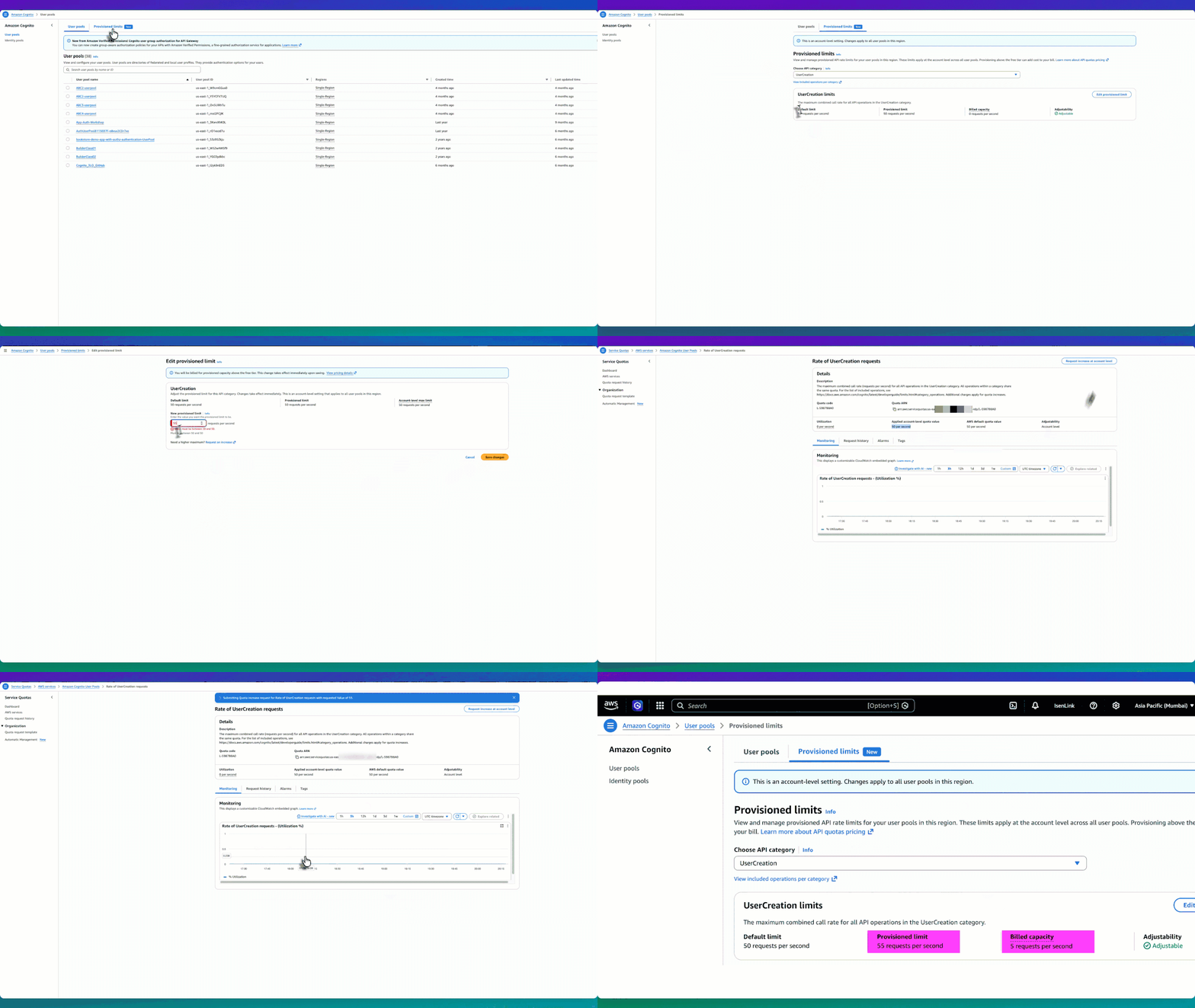
The following experience shows the end-to-end workflow of adjusting your provisioned limits and requesting a higher account-level max.

Figure 1: Provisioned limit experience workflow

Figure 1: Provisioned limit experience workflow

How they work together

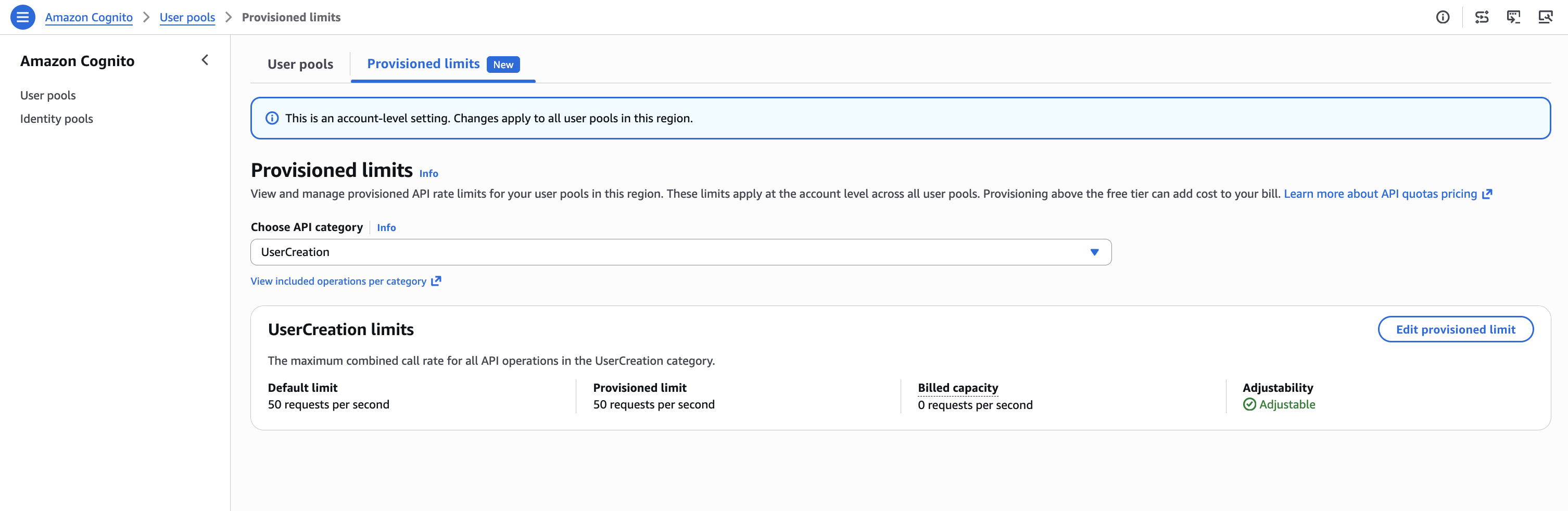
Let’s use the UserCreation API as an example. The default limit is 50 RPS, and initially the provisioned limit is also 50 RPS—meaning billed capacity is 0 (no additional charge). The applied account-level max limit is also 50 RPS. So you have three values: default (50), provisioned limit (50), and account-level max (50).

  1. Start by going to the Amazon Cognito console and choosing User pools from the navigation pane.

    Figure 2: UserCreation with default values

    Figure 2: UserCreation with default values

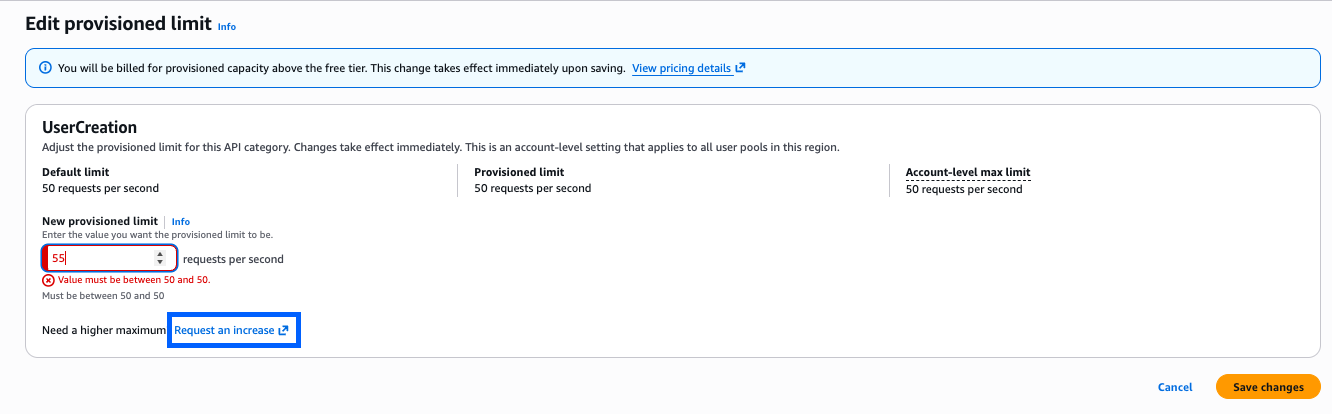
  2. Choose Edit provisioned limit, to go to the Edit provisioned limit page with an input field for New provisioned limit. However, because the account-level max limit is 50 RPS, you can’t set the provisioned limit above 50. For example, if you want to provision 55 RPS, the console won’t allow it because 55 exceeds the current account max of 50.

    Figure 3: Editing the provisioned limit constraint constraint to more than the account-level max

    Figure 3: Editing the provisioned limit constraint constraint to more than the account-level max

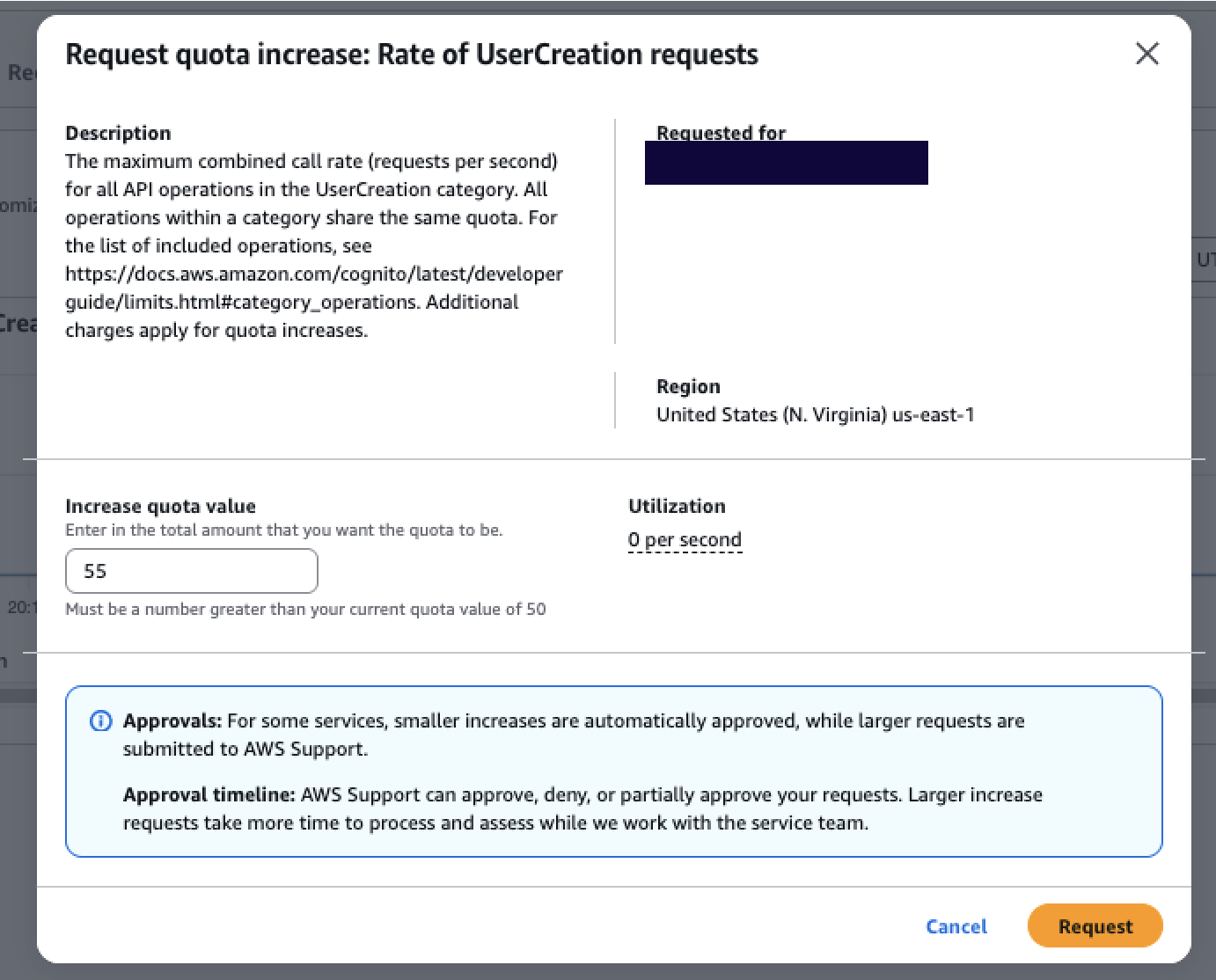
  3. To set a higher limit, choose Request an increase. This takes you to the Service Quotas console, where you can choose Request increase at account level to request a higher account-level max, for example, 55 RPS. Most requests are automatically approved within minutes. At any time, you can check the status of the request using the Request history tab.

    Figure 4: Service Quotas page where the account-level max increase is requested and auto-approved

    Figure 4: Service Quotas page where the account-level max increase is requested and auto-approved

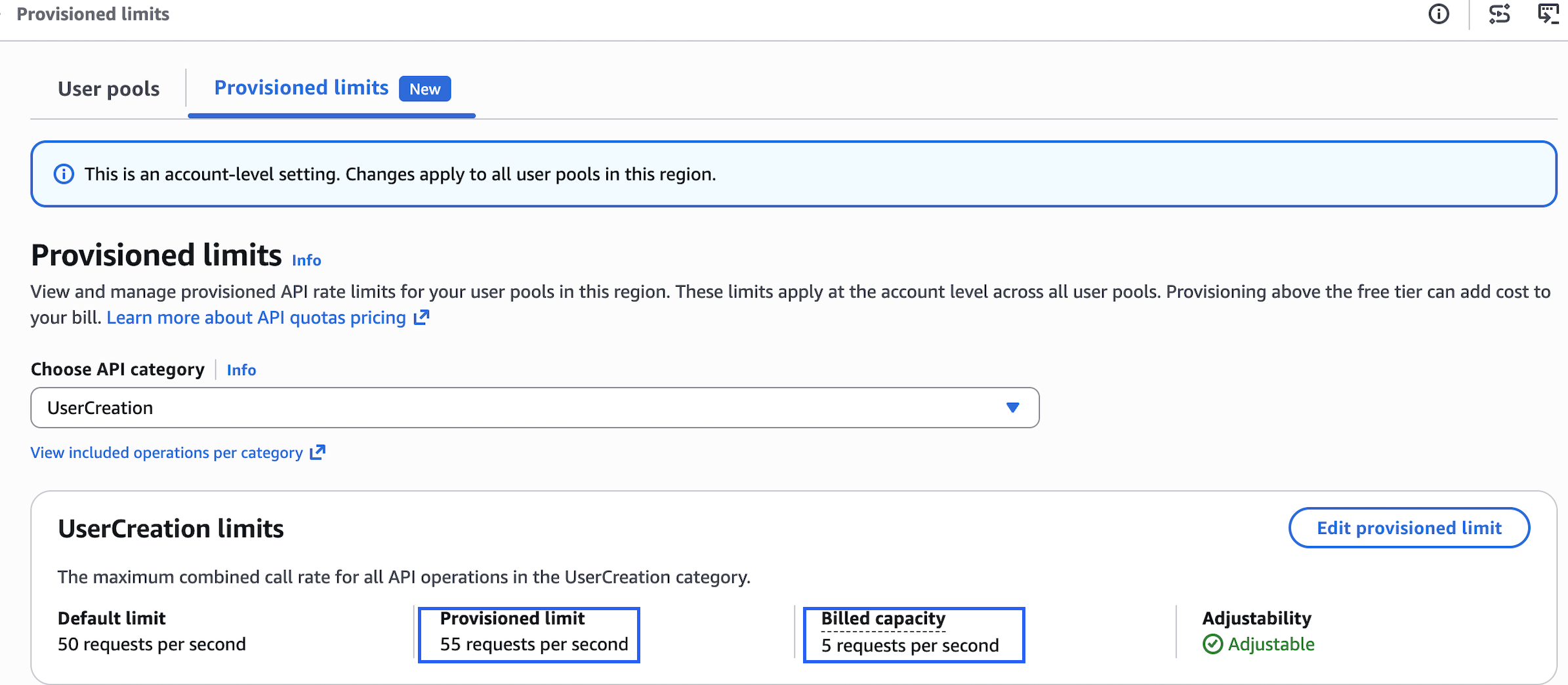
  4. After receiving approval, return to the Amazon Cognito console to edit your provisioned limit up to 55 RPS. Your billed capacity becomes 5 RPS (55 minus the 50 default).

    Figure 5: Provisioned after increasing the provisioned limit to 55 RPS, with billed capacity of 5 RPS.

    Figure 5: Provisioned after increasing the provisioned limit to 55 RPS, with billed capacity of 5 RPS.

This two-part model gives you precise control over both cost and capacity. Raising the account-level max in Service Quotas doesn’t incur additional charges—it only sets your ceiling. You are billed for what you provision in the Amazon Cognito console above the default, so you benefit from right-sizing your provisioned capacity to match expected demand. Raise your account max ahead of time to prepare for future scaling needs without incurring any cost. When the time comes, increase your provisioned limit to what you need, and scale back down after the event. You stop being charged for the extra capacity as soon as you reduce the provisioned limit. This applies equally to seasonal spikes, planned load tests, or unexpected viral growth—all self-service, all within minutes.

How the provisioned limits experience works

The provisioned limits experience introduces three key concepts that work together:

  • Default limit – The baseline rate included at no additional cost (for example, 50 RPS for UserCreation).
  • Provisioned limit – The capacity you actively request and reserve in the Amazon Cognito console. Because this capacity is reserved specifically for your account, it’s the chargeable dimension. You’re billed for any provisioned capacity above the default, regardless of how much you consume. For example, if the default is 50 RPS and you provision 80 RPS, you’re billed for 30 RPS even if your actual usage is only 60 RPS. If your provisioned capacity is 50 RPS (the default), your billed capacity is 0.
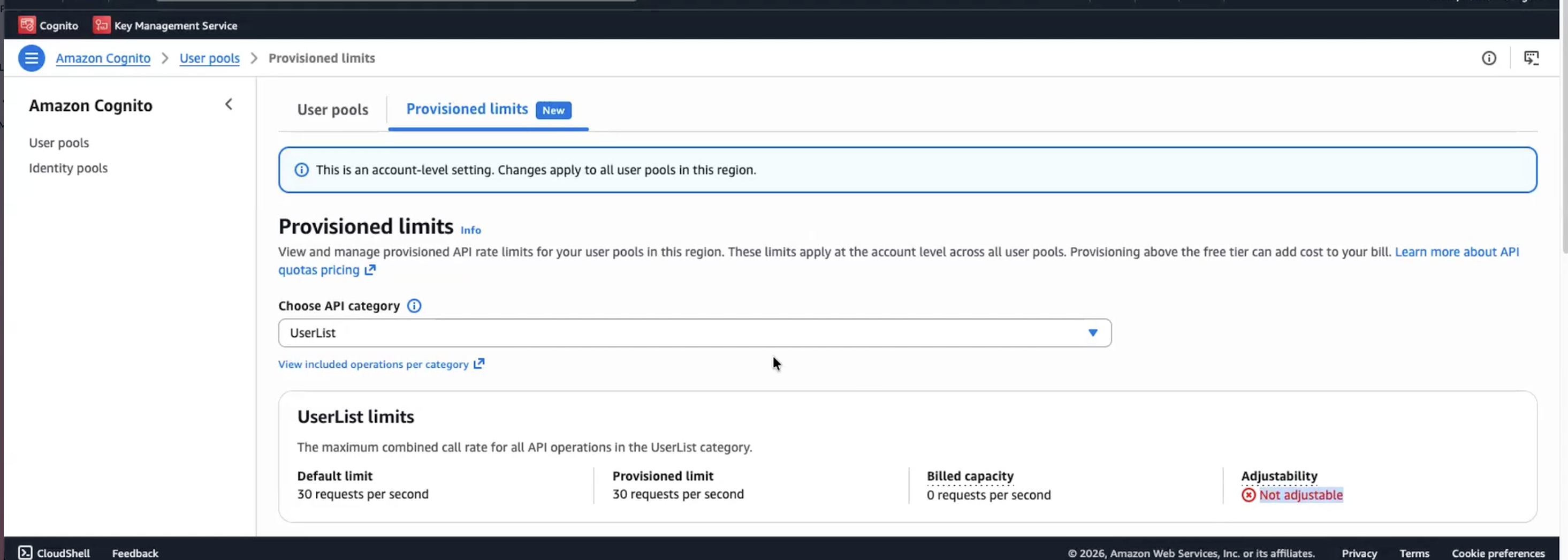
  • Applied account-level max limit – The ceiling managed through Service Quotas. This determines how high you can set your provisioned limit. Raising this ceiling doesn’t incur charges, it only unlocks the ability to provision higher capacity. Importantly, the Provisioned limits page displays each API category with its adjustability status. For example, UserCreation is marked Adjustable (shown earlier in Figure 5) and can be modified. However, UserList is marked Not adjustable, meaning the account-level max limit can’t be adjusted for that category. You can still see its default and provisioned limit on the page, but you can’t modify them. For adjustable categories, you will see the default limit, current provisioned limit, and billed capacity at a glance.
Figure 6: Provisioned limits overview with non-adjustable API categories.

Figure 6: Provisioned limits overview with non-adjustable API categories.

Multi-tenant SaaS considerations

For software as a service (SaaS) providers managing multiple tenants with varying throughput requirements, the UpdateProvisionedLimit API enables programmatic management of provisioned capacity. Teams using dedicated user pools per tenant, for example, can integrate this into their infrastructure-as-code pipelines to adjust provisioned limits per tenant tier. With provisioned limits, SaaS vendors can tier their capacity management per tenant, for example, provisioning higher capacity for enterprise-tier tenants and lower capacity for free-tier tenants, and adjust each tenant’s provisioned capacity independently through the API based on their service tier and demand patterns.

Conclusion

With provisioned limits, whether you’re preparing for peak shopping season, tax filing deadlines, or any other scaling event, you can now adjust provisioned limits to respond to your organization’s needs on demand. The separation between the account-level max (in Service Quotas) and the provisioned limit (in the Amazon Cognito console) gives you full control to plan ahead, respond to demand changes in minutes, and optimize costs on your own terms.

Get started

The provisioned limits experience for Amazon Cognito user pools launched on July 6, 2026, and is available across all AWS Regions where Amazon Cognito is supported. To get started:

  1. Review your current authentication traffic patterns using Amazon CloudWatch metrics to understand your baseline
  2. Set up CloudWatch alarms at 70% and 85% of your current rate limits
  3. Ensure your team has appropriate AWS Identity and Access Management ( IAM) permissions for both Service Quotas and the Provisioned limits tab in the Amazon Cognito console
  4. Raise your account-level max in Service Quotas based on your demand expectations
  5. Use the Amazon Cognito console Provisioned limits tab to adjust capacity up or down as needed

Resources:

Need help? Contact your AWS account team or visit AWS Support for assistance with planning your rate limit strategy.

If you have feedback about this post, submit comments in the Comments section below.


Kiran Dongara

Kiran is an Enterprise Solutions Architect at AWS, primarily supporting Retail, Restaurant, and CPG customers. His primary focus is application identity within the IAM domain. His expertise includes deep technical understanding across technical and industry domains, which he integrates to design scalable and efficient architectures using best practices. When not working, Kiran prioritizes family time, nature walks, and cycling.

Howie Li

Howie Li

Howie Li is a Product Manager at Amazon Web Services, where he strives to make authentication straightforward by default. Outside of work, Howie enjoys exploring cultures and food through travels and making new ice cream flavors inspired by them.

[$] Examining other network namespaces using BPF

Post Syndicated from daroc original https://lwn.net/Articles/1085896/

Jordan Rife’s work involves writing BPF programs for

Cilium
that interface with

Kubernetes

networking. As part of that work, he wants to enable BPF programs with
appropriate permissions to iterate through the sockets of a different network
namespace. He led a session about the idea at the 2026

Linux Storage,
Filesystem, Memory-Management, and BPF Summit
where the BPF developers in
attendance were quick to suggest a number of related alternatives.

[$] FUSE status and plans

Post Syndicated from jake original https://lwn.net/Articles/1086336/

Filesystem in
Userspace
(FUSE) maintainer Miklos Szeredi led a birds-of-a-feather
(BoF) discussion about the subsystem at
the 2026 Linux Storage,
Filesystem, Memory Management, and BPF Summit
. In it, he talked about
maintenance challenges, proposed features and their status, and his plans
for a new FUSE API. There is a lot of interest and activity in the
FUSE community these days it seems.

The collective thoughts of the interwebz