Tag Archives: Browser Run

Introducing Kitesurf: The agent-first browser that runs in V8 isolates on Cloudflare Workers

Post Syndicated from Celso Martinho original https://blog.cloudflare.com/kitesurf/

Should we build our own browser? This is one of those questions that has come up every few months internally at Cloudflare for years. Unsurprisingly, it’s the kind that triggers long threads with multiple reasons and persuasive arguments on why we should do it. The browser is obviously the most important software we use every day on our computers; it’s arguably the operating system of the Internet. We’re a company on a mission to help build a better Internet — who wouldn’t want to take on the challenge of building a new browser?

But we never quite found the balance between the technical difficulty of such an endeavour and the unique problems we’d be solving by doing it. And so, the idea was shelved, over and over again. Until now.

Something magical happened: we reached a tipping point where a series of powerful technical advancements in our Developer Platform became a reality, while the advent of AI agents and the demand for a new kind of browser became critical at the same time.

Running WebAssembly (Wasm) in Workers is now very mature. Primitives like dynamic workers, SQLite-based Durable Objects, Worker-to-worker RPC, service bindings, higher NodeJS compatibility and higher limits open doors to much more ambitious and complex applications that were simply not possible before.

Browser Run, our headless browser automation API product, has seen tremendous growth with the rise of AI. Agents need browsers in order to perform many tasks, and in many cases cannot succeed without them.

But there's a problem — browser engines like Chromium were built for humans, not agents, and they come with overhead that AI models simply do not need. They consume so much memory and compute that providing every agent with its own instance is prohibitively expensive, restricting large parts of the Web to only the most sophisticated and costly AI models with higher parametric knowledge, while locking out many other agentic applications. 

We should be giving all agents a browser that excels at what’s important for an AI model, even if that means being light on what’s only useful for humans. For example:

  • AI doesn’t care about tabs, themes, browser extensions, or synchronization across devices. It cares about token count, context windows, scalability, performance, and costs.
  • Structured, machine-readable content is important, but visual perfection, smooth 60-fps scrolling is not. Agents will be just fine if the CSS parsing is slightly off or the rendering isn’t pixel perfect.
  • The threat model in the context of AI using a browser is different. New problems like prompt injection and tool safety are top priorities.

Faced with these realizations, 12 weeks ago we asked the question again: Should we build our own browser? This time the answer was unanimous: Yes!

Today we are announcing Kitesurf, a new browser that runs entirely on top of Workers that we built specifically for agents, available for free while in beta in Browser Run.

Kitesurf is significantly more efficient in CPU and memory consumption than Chromium for common agentic tasks like screenshots and HTML extraction. What follows is the story of how we built it. Buckle up, it’s going to get technical — but we promise to keep it interesting.

How it started

Kitesurf started as many other great ideas have started at Cloudflare. Someone found something interesting, and the next thing you know they end up “nerd sniping” the rest of the team with a seemingly impossible but very attractive idea.

We got the initial inspiration from obscura, a headless engine written in Rust for AI automation that has “no Chrome, no Node.js, no dependencies.”

Then, with the help of an AI agent, we tried to port it to Workers. It didn't work very well at first. But once we gave the AI a solid plan and a clear definition of success — detailed enough for the agent to loop endlessly and ask questions when needed — it did work.
Blown away by this (barely) working proof of concept, we decided to let the team cook.

Design decisions

Here are some of the design decisions we made before we started.

Tests, tests, tests

We knew that moving from a prototype to a full-blown browser that could actually be useful for tasks at scale in production would take a lot of work and iteration. We won’t hide that using AI to accelerate the process was key. But how do you use AI in such a complex project, keeping the quality of both code and results under control without losing velocity? The answer is to provide as many tests as you can.

Enter the Web Platform Tests (WPT), the ideal setup: an extensive suite of success criteria that gave the AI agents clear goalposts for assessing feature conformance. We curated the selection and order of features to assign to the agents, allowing humans to focus on architectural work and reviewing the agents' approaches.

However, WPT tests only go so far: they measure conformance to W3C standards, not a browser's ability to render and interact with real-world websites. To bridge this gap, we implemented a combination of integration testing and visual regression testing — it runs multistep Puppeteer tests on real websites against both Chromium and Kitesurf not only by comparing the assertions that it makes, but also rendering outputs at every step to highlight any unwanted differences.

Use Rust when possible

Cloudflare has been working on providing great support for WebAssembly (Wasm) in Workers for quite some time. This is great because we can use high-performance C, C++, and Rust packages and compile them to Wasm. If we use Emscripten (for example) and its many layers of mocked dependencies, the compiled binary can get bulky and slow.

Instead, we opted for native Rust whenever possible and to compile directly to WebAssembly using wasm-bindgen, thus avoiding unnecessary emulation layers and running as close to the metal as possible, reliably.

Exception handling

A browser must render the whole unreliable and sometimes hostile web without ever dropping the page it's holding, so exception handling is more than just hygiene — it's how the application survives bad input without just crashing outright.

So we committed to one rule up front: any failure degrades to a blank frame or a missing element, never a dead session. Catch faults at every boundary, default to something safe and empty, and log enough to diagnose.

Isolation

Contrary to running a browser on your laptop (where you're visiting sites you trust, and it's acceptable to share some resources between them), an agent is pointed at whatever a task demands: arbitrary code from arbitrary origins.

So we built this browser on the assumption that every page load is untrusted input and every session starts fresh. Each component is isolated and has access only to the resources strictly necessary for its function.

This seems like a perfect fit for Cloudflare Workers, whose security model is built around isolation by design. But the platform only gets us the boundary between isolates. We still have to enforce the same principle at the application level, deciding what each component is allowed to touch and making sure nothing leaks across a page it shouldn't.

Stateless whenever possible

State is what makes failure expensive — if there's nothing to reconstruct, recovering from a crash is just starting a new one and replaying the request. A stateless component is disposable and parallel by nature: kill it the moment it stalls, run a thousand at once, and size them to demand instead of keeping things warm. That fits automation perfectly, where load arrives in bursts and the cheapest thing you can do is spin up work that costs only what it used and vanishes when it's done. In short, wherever a component can be stateless, it should be.

How we built it

Armed with a good plan, extensive tests, and a good tooling environment, we were ready to get started beyond the initial proof of concept. This is Kitesurf’s very high level life of a request that still holds today:

Let’s dive into the three main components that make Kitesurf work: the Engine, PageScript, and PageRenderer.

Fetching from origins

In order to render an untrusted web page, a browser has to fetch arbitrary assets — images, fonts, CSS, JavaScript, and Wasm files — off the Internet. This is one of the most dangerous operations a browser can do.

Kitesurf does it through one single component, the SandboxOutbound worker, and nothing else can touch the network directly — enforced by Dynamic Workers. The Engine uses it to bootstrap the page, fetching the main document and its scripts, and PageScript fetches everything else: stylesheets, images, fonts, and the page's own fetch() calls.

We use SandboxOutbound to enforce CORS, inject browser-shaped headers, filter responses, and keep each page's cookies in their own jar. Anything that fails our policy gets a 403 — each component gets precisely the network it needs and nothing more.

The Engine

The Engine is the only public-facing component of Kitesurf. It handles the Chrome DevTools Protocol (CDP) WebSocket and HTTP REST APIs, serves a landing page that is useful for internal testing purposes and, most importantly, stores each session state. All other components are stateless.

The advantage of using CDP is client compatibility: Puppeteer, Playwright, chrome-remote-interface, and the actual Chrome DevTools frontend. Point them at Kitesurf and they will all just work. This is also how Browser Run works (more on why this is important later).

Contrary to what the name suggests, the Engine is actually the simplest of the Kitesurf components. The fun parts come next.

PageScript

PageScript offers a good example of the power of our new Workers features: in this case, Dynamic Workers.  Kitesurf simply wouldn’t have been possible before this.

Here’s a simplified diagram of how PageScript works internally.

Every next page or out-of-process iframe (OOPIF) uses Dynamic Workers to spin up a long-lived PageScript isolate that handles the page session, consisting of a clean globalThis and the DOM document object. 

The DOM object is then populated with the results of parsing the HTML document and running all the JavaScript scripts. For parsing the HTML and the CSS we use parts of Blitz, a modular rendering engine, and Stylo, Firefox’s high-performance CSS parser, both written in Rust. 

For each found <script> tag or .wasm file we run the JavaScript and WebAssembly code inside the same isolate.

Yes, but evals

What about evals, you ask? Evals are trickier to handle because for security reasons we still don’t support eval natively in Workers. We can’t spin another isolate to handle them either, because it wouldn’t have access to globalThis.

Our solution is to use Boa JS, an ECMAScript engine written in Rust, to compile and run on Workers. We are basically executing a runtime on top of a runtime, which doesn’t seem optimal, and it isn’t, but it works well enough to handle the occasional evals we find in the code. In the future, when native eval support lands in Workers, we will migrate away from Boa.

PageRenderer

This component is essentially responsible for generating the actual pixels from the computed page objects. Here’s how it works:

PageRenderer works in a loop with the Engine Worker. Every time the engine needs a frame, PageRenderer gets the page object from PageScript (also known as the scene), fetches the internal fonts and images from Static Assets, rasterizes everything into an image buffer, and then returns the buffer to the engine in a format that the client can display like a JPEG/PNG or PDF.

A big part of the magic here is handled by another Blitz module, blitz-paint, which in turn uses Parley for shaping the characters into glyphs, choosing fonts, and breaking text into lines.

Workers’ built-in RPC system: same application, multiple isolates 

Cloudflare Workers have a built-in remote procedure call (RPC) system that allows you to call methods on other Workers, pass objects between them, and call methods on those objects. You don’t have to worry about API schemas, types, or authentication, you just call remoteFunction(…params) and it works. You benefit from the isolation and the resources of the remote Worker without losing the convenience of accessing all of their functions locally using JavaScript.

Kitesurf uses this RPC system: the Engine Worker calls renderFrame() from the PageRenderer Worker over RPC using one single call and gets a PNG as the result. Because the renderer holds no page state (only a disposable cache), the engine can safely kill and relaunch it on any failed or stuck RPC call — making each render request self-contained, retryable, and its isolate cheap and throwaway.

Kitesurf passes 215,000+ WPT tests and growing

Kitesurf works. It already passes around 215,000+ WPT tests, and we are adding hundreds of passing tests every week. Here you can see the evolution over time, up to the latest version since we started the project:

It’s worth noting that the parts of a browser that are important to agents (e.g., CSS, DOM, HTML, selection, SVG, and XHR) have good coverage already. Even things that might not be particularly important in the context of agents, like streams, are now decently supported.

Performance-wise, Kitesurf is doing pretty well. Below are the medians of five Browser Run quick-action runs across a 14-URL corpus comparing Chromium with Kitesurf.

Chromium wins the stopwatch because a JIT that has already seen this page always beats a cold software renderer — and today it does, by about 1.7x. Most of that gap comes from rasterization and JPEG/PNG encoding, which we will keep optimizing.

But Kitesurf wins on memory and CPU, the things that actually drive your bill, by 3-7x compared to what Chromium uses. Less memory means we can run more sessions, scale better, and fundamentally lower both our costs and yours. 

The most important test of all: Kitesurf runs Doom

We highlighted the importance of testing in our design decisions, but we all know that no matter how many tests you have, a project isn't truly complete until Doom runs on it. Here’s Kitesurf running https://silentspacemarine.com/ from our little Doom experiment a few years ago.

Try it today in Browser Run

You can try Kitesurf with Browser Run today, available for free while in beta, behind per-account limits.

The Browser Run CDP endpoint now supports Kitesurf as an option, so your existing client Puppeteer, Playwright, chrome-remote-interface, or any AI Agent that speaks MCP and CDP, already works. All you need to do is add the browser=kitesurf parameter to our endpoints.

For example, to use Kitesurf with Opencode see Using with MCP clients (CDP) in our developer documentation and use this configuration:

Another way to use Kitesurf is with Browser Run’s Quick Actions. Again, just add browser=kitesurf to the quick action endpoint and it will work. For example, if you need a quick screenshot from Wikipedia, this will work just fine:

Use the Kitesurf Playground with Chrome DevTools

Another option to start exploring Kitesurf is to use our public playground here. You can type in any URL to see how Kitesurf renders the page and interact with it.

One interesting feature of the playground is that we inject Chrome DevTools in the UI, so you can inspect expanded DOM elements, read console messages, and watch network activity while Kitesurf renders pages. More interestingly, we implemented the necessary CDP instructions for the Memory panel to report the WebAssembly footprint of each isolate, including frames, so you can gain a clear understanding of the resources each page is consuming.

Check our Developer Documentation for all the details on how to use Kitesurf with Browser Run.

When is Kitesurf better?

As of today, Kitesurf correctly renders pages like TodoMVC (vanilla, React, Vue, Angular, Preact), Wikipedia, Hacker News, the Cloudflare Blog, and much of the Cloudflare dashboard. We will keep improving Kitesurf and increasing the percentage of WPT tests that pass, to improve compatibility for more complex web pages.

Kitesurf is great for AI agents that need to render pages but can accept the trade-offs of not using a full-featured, pixel-perfect Chromium browser. It is also excellent for automations and applications that rely on one-shot Quick Actions, such as extracting content from a page or generating PDFs or screenshots, for compatible sites.

Think of Kitesurf as an ephemeral, fully-isolated, stateless engine designed to exist only for the duration of a task, that scales well for bursty, AI-driven workloads.

What Kitesurf is not yet able to do

If you need to play video, render WebGL, negotiate a bot-challenge handshake with real TLS fingerprints, or start a ten-minute authenticated session that requires persistent state — Kitesurf isn’t yet the right option. Just use Browser Run’s default, which is powered by Chromium.

The best way to know if a specific site is compatible with Kitesurf is to try it. You can do this by using the APIs or, more quickly, try it in our public playground.

Explore the DevTools panels and see what’s happening behind the scenes, with particular attention to the console and the memory metrics.

Where it goes

Kitesurf is twelve weeks old. The first commit was in May. Here are some of the things we're actively working on:

  • Better CDP coverage. Kitesurf implements a subset of the CDP protocol — enough to cover the requirements of most agents and automation tools, including robust DOM and network inspection — and we continue to expand its capabilities to be as complete as possible.
  • Rendering fidelity for screenshots and PDFs, because we know that  LLMs can often work better from an image than from the underlying text.
  • WPT coverage. We are iterating rapidly to add more web APIs and pass more WPT tests on the road to making Kitesurf production-ready.
  • Efficiency. We keep CPU, memory, and wall time benchmarks running all the time and are working hand-in-hand with other Developer Platform teams to make Kitesurf as cost-effective and efficient as possible.

Final notes

Thank you for making it all the way here — we know this was a long and technical blog post, but hopefully an interesting one. We went into detail because we don't take lightly how important, but also how complex, it is to build a new browser, even a very specific one.

Kitesurf is in its early stages, but we wanted to open it up to you as soon as possible and learn from your feedback. The team will be actively improving it with frequent updates focused on performance, efficiency, and compatibility. 

One last thing: we're going to open source Kitesurf once we're ready — hopefully soon. Our goal is to let any customer deploy their own version of Kitesurf on their own accounts, if they want to.

So give it a try in the playground, keep an eye on our changelog, and come chat with the team on Discord. Share your experience and send us feedback; we’ll be listening.
The Agent Development Lifecycle has arrived on Cloudflare

Post Syndicated from Brendan Irvine-Broque original https://blog.cloudflare.com/agent-development-lifecycle/

Engineering managers spent the past few decades figuring out ways for many programmers to work together on a shared codebase. This work dates all the way back to the “Systems Development Lifecycle” (RAND, 1975) – today commonly referred to as the “Software Development Lifecycle” (SDLC), which defines the following phases:

  • Plan
  • Design
  • Implement
  • Test
  • Deploy
  • Maintain
  • Retire

AI has made the step that was previously the slowest and most expensive — implementation — the fastest and cheapest. That, in turn, has had an impact downstream: overwhelming the people responsible for all the other steps in the SDLC. This ranges from open-source maintainers bombarded with thousands of pull requests and issues, to production engineers trying to save production from falling over as the rate of software delivery increases orders of magnitude.

We are all trying to save our systems, our customers, and ourselves from slop.

The answer — paradoxically — is to empower agents to do more. It’s only fair! You’d never let an engineer on your team write code, expect someone else to validate it, merge it, deploy it, hold the pager in production, and triage incoming bugs. But that’s what most companies are doing right now with agents. Models have improved remarkably, and agents are running over longer time horizons, able to take on much larger tasks. But they are not yet used evenly across the SDLC.

Cloudflare treats agents as our customers. They can buy domains, create temporary accounts and use the entire Cloudflare API. We know that agents need APIs and tools to be able to manage the full SDLC on behalf of our customers — not just the start of it.

And so today we’re introducing the start of a new set of tools that let agents step beyond just generating code and take on more of the SDLC. We’re sharing what we’ve built and learned trying to solve this for ourselves:

There’s something bigger here though. When we look at the SDLC, even with the best automation, its assumptions do not scale for the volume of code agents can write and the pace at which software teams must move to compete. We think it’s time to replace the SDLC with the ADLC — the Agent Development Lifecycle.

The SDLC is for software teams. The ADLC is for software factories.

Right now, everyone is talking about building “software factories” — agent-driven systems that take input and autonomously build, improve, deploy and manage software. Take an input, whether it’s a production error, a bug report from a customer, or an idea for a new feature, and delegate it entirely to an agent.

Even with agents, most software projects are constrained by human-in-the-loop steps. Humans prompting agents, telling them to keep going, instructing agents to apply feedback from a code review, constantly babysitting many agents and giving them instruction. On most software teams, the human still manages each step in the SDLC model — the only change is that they delegate tasks within each step to an agent.

And so the dream behind software factories is: what if you reimagined this approach and built a factory for the entire process of building software? How can we shift more human time towards the things that truly require human inspiration, taste, and judgement? It would leave us more time to design, to talk to customers, and to dream bigger.

A software factory has to manage the same steps in the SDLC, but it demands much more from the platform it is built on. Because when you hand over the keys and let the agent drive, every manual step that previously relied on a human must be adapted to be:

  • Programmatic — ”ClickOps” was bad practice for humans, but it’s a non-starter for agents. Every last operation needs APIs that agents can call, debug, and rely on.
  • Horizontally scalable — preview deployments were a nice-to-have when humans stared at the screen while building or manually took over a staging server to catch issues before production. For agents to drive, every agent must have its own preview that matches production.
  • Reproducible — what happens if there’s a bug that you can only reproduce when simulating 4G on an iPhone 15? Or from an IP in a certain country? Typical unit testing and integration testing tools aren’t going to help here.
  • Real-time, push based — relying on humans to look at the right dashboard has always been a bad way to know if things are working, but it completely breaks down with agents. You need an event that triggers an agent to do work.
  • Atomic — every change needs to be independently testable, releasable, observable, and reversible without affecting unrelated behavior.
  • Permissioned — you know you probably shouldn’t, but today you give a few trusted engineers the keys to SSH into prod in case things really go haywire. There’s no way you let an agent do that — but without the ability to escalate and get more permissions, how can it do its job?
  • Self-improving — people learn from experience. The first week ship or the first on-call rotation, humans are slow and need to shadow someone else, but then get better and faster. Agents, too, need ways to learn from experience.

We need something new if we are going to make software factories safe to use for real production software. Software factories face the same challenge that other autonomous systems like self-driving cars do — the challenge of going from working successfully 80% of the time, to some number of nines past 99%.

To give agents the keys to drive the SDLC, you can’t give them a car designed for humans

An autonomous vehicle is loaded with sensors and technology that a regular car doesn’t have. Lidar sensors, cameras, powerful compute to run inference, and connectivity to a central command system that can take over remotely if needed.

For an autonomous vehicle to be 80% as good as a human at driving, we probably don’t need all of this. Self-driving got to around 80% as good as humans 10 years ago. But that’s not the bar to clear — the bar is to be much better and safer than a human driver. That’s what we expect when we hand over the keys to a machine, in order to feel safe taking a nap driving down the 101 at 60 mph. And that’s why autonomous vehicles have technology that is purpose-built for self-driving — it’s what builds trust and handles the edge cases that cannot be designed for upfront.

The same is true of self-driving software. Ask yourself — why haven’t you yet just let your agent auto-approve and merge its own PRs to your production services? The higher the stakes of what you build, the longer your list of reasons almost surely is.

When you start to unpack not only all the things that can go catastrophically wrong in this process, but also that are necessary to building the right thing for customers, it is remarkably complex. It doesn’t fit into a linear set of steps in a GitHub Actions YAML file, and it goes way beyond running traditional automated tests. Even a small change to a dashboard can span roles, specializations and org structures, and subjective changes are the hardest to test and to delegate. Most of these things are probably not part of your CI/CD pipeline at all today. But they will need to be, if you want them to still happen, while giving full control to the agents running the software factory.

To let agents drive the whole process, we need a better way to orchestrate these dynamic series of steps. We think that is a Workflow, with the capability to spawn containers, agents and browsers. A Workflow that can set feature flags and enable them for a test user, investigate logs and traces, observe production metrics as a change gradually rolls out, and do everything else that is needed in order to ship safely.

A CI/CD pipeline is just a Workflow. But a Workflow can be so much more than a CI/CD pipeline.

Cloudflare Workflows let you chain together multiple steps, automatically retry failed tasks, and persist state for minutes, hours, or even weeks. They are designed to encode complex and dynamic business processes in a logical and well-understood program. This blog post breaks down why Workflows, in tandem with Artifacts, make defining and triggering CI/CD pipelines fundamentally simpler. For example:

Workflows go beyond a series of linear steps though. They can be defined dynamically, and they can spawn agents or other Workflows. This example shows a Workflow that reviews new data from the past day. The Workflow has full control over when and how the agent is prompted, and can pass along context between steps: 

Once you see this pattern, and are “Workflow-pilled” as Cloudflare is, you start to ask: what else could I have a Workflow handle for me? What other human-bottlenecked steps could I delegate to this combination of Workflow + Flue agents?

The full ADLC, on the Cloudflare stack

With Workflows able to orchestrate complex steps, and Artifacts as the storage layer for code, when you look at the SDLC stages, everything an agent needs to own the whole process of building, shipping, and maintaining software is on Cloudflare:

Primitives to build your software factory

Right now, the people on the bleeding edge are building the software factories of the future. Eventually software factories will become, just like agents and AI, the normal way people build software. But for most people and most organizations, we’re not there yet.

We want to change that.

In order to do so, the questions we’ve asked ourselves are: how can we make things simple and accessible so that everyone on the Internet can benefit from a paradigm shift like this? And what are the base layer primitives that we can open up to everyone, from the smallest startup to the largest platforms in the world?

In this case, we think the primitives are here. There’s more to do to connect them, to keep building our own software factory and learn from it, but right now, today, we’re ready for you to build your machine that builds the machine, on Cloudflare. Get started with @cloudflare/ci, build an agent, and see how much of the SDLC you can make autonomous.

Browser Run: now running on Cloudflare Containers, it’s faster and more scalable

Post Syndicated from Ruskin Constant original https://blog.cloudflare.com/browser-run-containers/

We’ve enabled higher usage limits, faster performance, and better reliability for Browser Run by rebuilding on top of Cloudflare’s Containers.

You can now spin up 60 browsers per minute via the Workers binding and run up to 120 concurrently — 4x the previous limit. Also, Quick Action response times dropped more than 50%. You don’t need to change anything: these improvements are live today. On top of that, we’re shipping fixes and new features faster than before. Read on to learn how we did it and see the data.

Remind me: what is Browser Run?

Browser Run enables developers to programmatically control and interact with headless browser instances running on Cloudflare’s global network. That’s useful for end-to-end testing of web applications, securely investigating suspicious URLs, and leveraging how browsers can easily render PDF documents, amongst other quick actions like capturing screenshots and extracting content. More recently, it’s become a critical enabler of AI agents to interact with the web. We’re building Browser Run to be the go-to platform to responsibly utilize automated browsers securely at massive scale.

Outgrowing our bunk bed

Before adopting Cloudflare Containers, we shared infrastructure with Browser Isolation (BISO). While technically similar, BISO’s larger container images slowed startup and development. Crucially, BISO browsers lacked optimal global distribution, compromising resiliency and latency. Additionally, typical BISO users’ long, steady sessions clashed with Browser Run’s short, spiky usage, creating scaling bottlenecks and availability delays.

Thankfully, after much internal development, Cloudflare released Durable Object (DO)-enabled Containers  open beta last year, meaning we were ready for a tentative adoption that ultimately benefited both product platforms. Like most successful product platforms, we’re committed to building on our own platform wherever feasible so that we can feel and fix any pain points ahead of any external customers.

The migration: Containers

We started a gradual migration by inserting a Worker in our incoming request paths to provide some Container-powered browsers to a handful of users alongside those from BISO. This dual support during development was key: it allowed us to compare performance, isolate implementation bugs and ultimately gain confidence in the benefits of the Container-driven approach.

Ramping up adoption, we first used the Container browsers for all of our Quick Actions endpoints, then for connections via the Workers browser binding on free accounts, followed by pay-as-you-go accounts in order to validate stability before we rolled it out to all remaining contract customers, ensuring a transition that required no action or existing worker redeployments from our customers.

Challenges: performance and scale bottlenecks

On our end, though, we faced a fresh set of challenges getting familiar with a novel, unstable early-stage Containers platform interface that was light on documentation, light on observability, and light on colleagues in an overlapping timezone. However, our feedback to our own teams as Customer Zero meant that we could provide a tight feedback loop leading to substantial upgrades that benefit our external customers too. Nevertheless, there was a lot of friction to overcome initially, most of which were to be expected for a closed beta in active development. Other hurdles to overcome were intrinsic to the new technical environment.

For example, once our browsers could run globally, our architecture had to adapt. DO-enabled Containers create a Durable Object as close to the incoming request as possible, but the connected Container may spin up on the other side of the world. This works fine for one-shot messages like “start my app,” but when you’re establishing a WebSocket between them and exchanging dozens of messages for a screenshot request, those extra milliseconds crossing the globe start adding up.

Our solution? Create regional pools of pre-warmed DO-backed browser containers to constrain the max distance (and hence max latency) between DOs and containers. When a request comes in, we pick a DO-container pair closest to the user within that region. This keeps latency low on both hops: user to DO, and DO to container. It adds a few more moving parts to our overall architecture, but we figured that was worthwhile so long as we had observability into the global state of each browser so that we could allocate and re-allocate capacity according to changing demand. A perfect use case for Workers KV…to a point.

Demand for our headless browsers has been ramping up since the beginning of last year. In short, AI agent builders discovered Browser Run and quickly brought request volumes outpacing our existing capacity. We quickly hit the limits of how quickly we could adjust our pool capacity to serve this new demand with a scalable approach. KV’s eventual consistency of around 30 seconds was becoming a bottleneck on our critical request path. You might check KV, see a container as “available,” but by the time you route to it (30 seconds later), it’s already claimed. That lag creates race conditions and overallocation of browsers, severely limiting how fast we could scale to meet demand spikes.

Migrating from KV to D1 + Queues

We previously stored each container state in KV. This meant that we could keep getting a minute old state due to cache TTL (recently KV changed the minimum cache TTL to 30 seconds, but even so that value is still too high).

We decided to migrate the container state into D1 instances instead. D1’s transactional nature is a good fit here. Once we assign a browser to a user, it’s exclusively theirs. Browsers are not shared resources. SQLite transactions ensure atomic assignment and prevent race conditions where two requests might claim the same browser simultaneously.

Here’s a simplified version of our browser acquisition query:

WITH candidate_pool AS (
    -- candidate pool logic to pick based on latency and other rules
)
UPDATE containers
SET status = 'picked'
WHERE sessionId IN (
    SELECT sessionId
    FROM candidate_pool
    ORDER BY RANDOM()
    LIMIT ?5
)
RETURNING data

We keep D1 shards per location and given that we may have several thousand containers running, and that each container needs to update its state every 5 seconds, we kept running into a problem: we would overload the database. For instance, if each write takes 1ms we can only write at most 1,000 times, which at one row per write would mean that we could only have 5,000 containers before overloading the database.

However, if we batch those writes, we can get much higher values, because batch writes are not significantly longer than individual ones, so we can increase the throughput in orders of magnitude. In our case, we use 100 row batches, which means we can now update a maximum of 500,000 containers per location. This headroom means capacity planning is no longer a bottleneck.

Currently, our P95 for batch write is 0.1ms!

To batch writes, we use Queues: every 5 seconds, each container computes its own state and adds it to its location queue. We then configure a worker consumer with 100 batch size and 1 second batch timeout:

{
    ...
    "queues": {
        "consumers": [
            {
                "queue": "production-core-containers-queue-weur",
                "max_batch_size": 100,
                "max_batch_timeout": 1,
                "max_retries": 1,
            },
            ...
        ]
        ...
    }
}

With this configuration, we achieve acceptable lag times well below 2 seconds. That said, queue backlogs can still cause stale state. When this happens, each region falls back to a designated backup region until the primary queue catches up.

Additional perks for quick actions

With dedicated infrastructure, we could now make upgrades to the browser container image without unwanted side effects or bloat for other products like BISO. This opened the door to optimize quick actions like screenshots and content extraction. Previously, our workers established a WebSocket to the remote browser and sent instructions one at a time: open a page, navigate to the URL, wait for it to load and take the screenshot. Each step had to be completed before the next could begin. 

However, now we send all parameters in a single HTTP request directly to the container, and the entire flow executes internally without any back-and-forth between the worker and browser.

Results: massive performance boost and increased limits

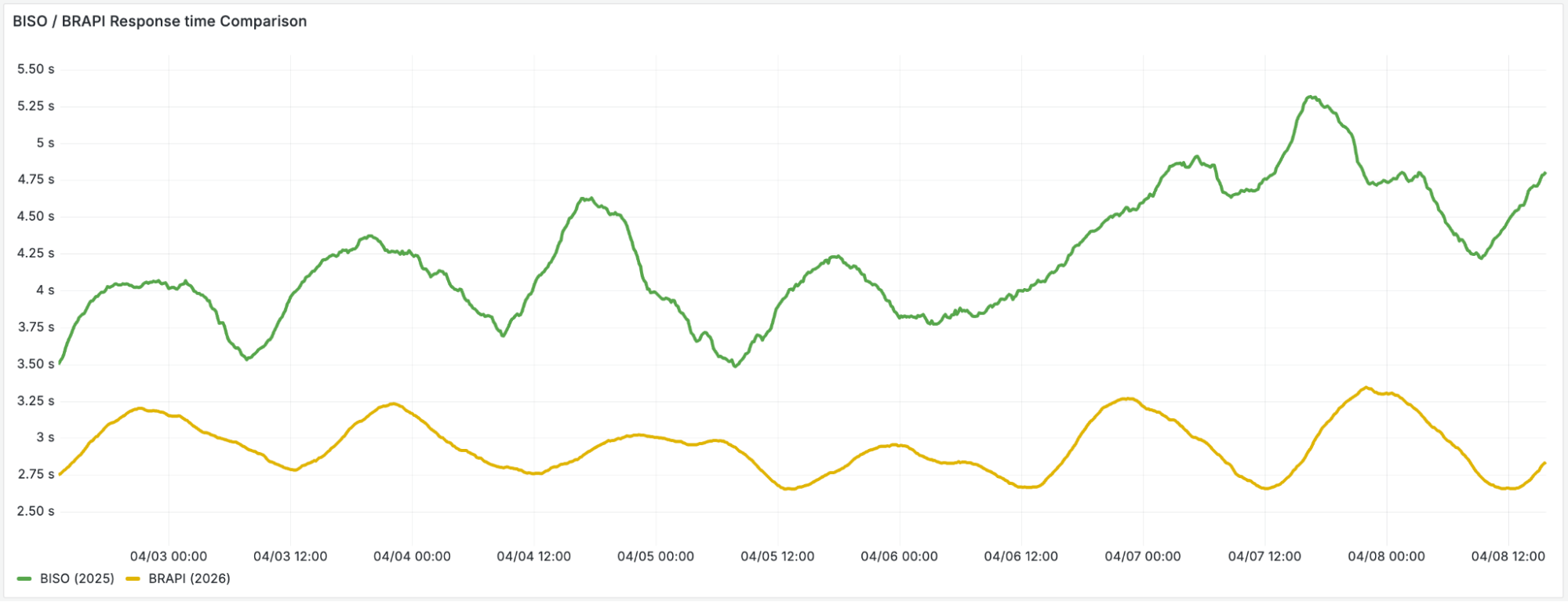
We’ve seen a sharp decrease in average quick-action response time, as users are able to get what they need from a browser session in less time: less time waiting for browsers to be ready and faster processing of their DevTools Protocol messages.


Overcoming our real-time state management at this new scale meant we could spend more time in the playground, discovering and cooking up new features such as our recently launched /crawl endpoint. 

Better browser flexibility

We also benefitted from another important perk by leaving behind shared Browser Isolation containers: faster upgrades.

When our browsers ran on shared product infrastructure, upgrading Chrome meant coordinating across multiple teams and products, each with their own roadmap and priorities. However, now that we run our own container image, we can upgrade at a faster tempo. For example, WebGL, a much-requested feature, is now available for browser-based rendering along with WebMCP (Model Context Protocol for the web) which enables new agentic interaction patterns. Both are made possible because we can control the browser version and flags without unwanted side effects in other Cloudflare products.

In a nutshell, we’re just getting started with unleashing the power of browsers at scale, especially for agentic development. We hope you’re diving in too — check out our docs.

Get started

Browser Run is available on all Workers plans. Start with the quick start guide, explore the Quick Actions, or try the /crawl endpoint to deeply extract data from any webpage, following links across the site.

Building AI agents? Check out our Agents SDK with built-in Browser Run support.

Building the agentic cloud: everything we launched during Agents Week 2026

Post Syndicated from Ming Lu original https://blog.cloudflare.com/agents-week-in-review/

Today marks the end of our first Agents Week, an innovation week dedicated entirely to the age of agents. It couldn’t have been more timely: over the past year, agents have swiftly changed how people work. Coding agents are helping developers ship faster than ever. Support agents resolve tickets end-to-end. Research agents validate hypotheses across hundreds of sources in minutes. And people aren’t just running one agent: they’re running several in parallel and around the clock.

As Cloudflare’s CTO Dane Knecht and VP of Product Rita Kozlov noted in our welcome to Agents Week post, the potential scale of agents is staggering: If even a fraction of the world’s knowledge workers each run a few agents in parallel, you need compute capacity for tens of millions of simultaneous sessions. The one-app-serves-many-users model the cloud was built on doesn’t work for that. But that’s exactly what developers and businesses want to do: build agents, deploy them to users, and run them at scale.

Getting there means solving problems across the entire stack. Agents need compute that scales from full operating systems to lightweight isolates. They need security and identity built into how they run.  They need an agent toolbox: the right models, tools, and context to do real work. All the code that agents generate needs a clear path from afternoon prototype to production app. And finally, as agents drive a growing share of Internet traffic, the web itself needs to adapt for the emerging agentic web. Turns out, the containerless, serverless compute platform we launched eight years ago with Workers was ready-made for this moment. Since then, we’ve grown it into a full platform, and this week we shipped the next wave of primitives purpose-built for agents, organized around exactly those problems.

We are here to create Cloud 2.0 — the agentic cloud. Infrastructure designed for a world where agents are a primary workload. 

Here’s a list of everything we announced this week — we wouldn’t want you to miss a thing.

Compute

It starts with compute. Agents need somewhere to run, and somewhere to store and run the code they write. Not all agents need the same thing: some need a full operating system to install packages and run terminal commands, most need something lightweight that starts in milliseconds and scales to millions. This week we shipped the environments to run them, as well as a new Git-compatible workspace for agents:

Announcement

Summary

Artifacts: Versioned storage that speaks Git

Give your agents, developers, and automations a home for code and data. We’ve just launched Artifacts: Git-compatible versioned storage built for agents. Create tens of millions of repos, fork from any remote, and hand off a URL to any Git client.

Agents have their own computers with Sandboxes GA

Cloudflare Sandboxes give AI agents a persistent, isolated environment: a real computer with a shell, a filesystem, and background processes that starts on demand and picks up exactly where it left off.

Dynamic, identity-aware, and secure: egress controls for Sandboxes

Outbound Workers for Sandboxes provide a programmable, zero-trust egress proxy for AI agents. This allows developers to inject credentials and enforce dynamic security policies without exposing sensitive tokens to untrusted code.

Durable Objects in Dynamic Workers: Give each AI-generated app its own database

Durable Object Facets allows Dynamic Workers to instantiate Durable Objects with their own isolated SQLite databases. This enables developers to build platforms that run persistent, stateful code generated on-the-fly.

Rearchitecting the Workflows control plane for the agentic era

Cloudflare Workflows, a durable execution engine for multi-step applications, now supports 50,000 concurrency and 300 creation rate limits through a rearchitectured control plane, helping scale to meet the use cases for durable background agents.


Security

Running agents and their code is only half the challenge. Agents connect to private networks, access internal services, and take autonomous actions on behalf of users. When anyone in an organization can spin up their own agents, security can’t be an afterthought. It has to be the default. This week, we launched the tools to make that easy.

Announcement

Summary

Secure private networking for everyone: users, nodes, agents, Workers — introducing Cloudflare Mesh

Cloudflare Mesh provides secure, private network access for users, nodes, and autonomous AI agents. By integrating with Workers VPC, developers can now grant agents scoped access to private databases and APIs without manual tunnels.

Managed OAuth for Access: make internal apps agent-ready in one click

Managed OAuth for Cloudflare Access helps AI agents securely navigate internal applications. By adopting RFC 9728, agents can authenticate on behalf of users without using insecure service accounts.

Securing non-human identities: automated revocation, OAuth, and scoped permissions

Cloudflare is introducing scannable API tokens, enhanced OAuth visibility, and GA for resource-scoped permissions. These tools help developers implement a true least-privilege architecture while protecting against credential leakage.

Scaling MCP adoption: our reference architecture for enterprise MCP deployments

We share Cloudflare’s internal strategy for governing MCP using Access, AI Gateway, and MCP server portals. We also launch Code Mode to slash token costs and recommend new rules for detecting Shadow MCP in Cloudflare Gateway.


Agent Toolbox

A capable agent needs to be able to think and remember, communicate, and see. This means being powered with the right models, with access to the right tools and the right context for their task at hand. This week we shipped the primitives — inference, search, memory, voice, email, and a browser — that turn an agent into something that actually gets work done.

Announcement

Summary

Project Think: building the next generation of AI agents on Cloudflare

Announcing a preview of the next edition of the Agents SDK — from lightweight primitives to a batteries-included platform for AI agents that think, act, and persist.

Add voice to your agent

An experimental voice pipeline for the Agents SDK enables real-time voice interactions over WebSockets. Developers can now build agents with continuous STT and TTS in just ~30 lines of server-side code.

Cloudflare Email Service: now in public beta. Ready for your agents

Agents are becoming multi-channel. That means making them available wherever your users already are — including the inbox. Cloudflare Email Service enters public beta with the infrastructure layer to make that easy: send, receive, and process email natively from your agents.

Cloudflare’s AI platform: an inference layer designed for agents 

We’re building Cloudflare into a unified inference layer for agents, letting developers call models from 14+ providers. New features include Workers binding for running third-party models and an expanded catalog with multimodal models.

Building the foundation for running extra-large language models

We built a custom technology stack to run fast large language models on Cloudflare’s infrastructure. This post explores the engineering trade-offs and technical optimizations required to make high-performance AI inference accessible.

Unweight: how we compressed an LLM 22% without sacrificing quality

Running large LLMs across Cloudflare’s network requires us to be smarter and more efficient about GPU memory bandwidth. That’s why we developed Unweight, a lossless inference-time compression system that achieves up to a 22% model footprint reduction, so that we can deliver faster and cheaper inference than ever before. 

Agents that remember: introducing Agent Memory

Cloudflare Agent Memory is a managed service that gives AI agents persistent memory, allowing them to recall what matters, forget what doesn’t, and get smarter over time.

AI Search: the search primitive for your agents

AI Search is the search primitive for your agents. Create instances dynamically, upload files, and search across instances with hybrid retrieval and relevance boosting. Just create a search instance, upload, and search.

Browser Run: give your agents a browser

Browser Rendering is now Browser Run, with Live View, Human in the Loop, CDP access, session recordings, and 4x higher concurrency limits for AI agents.


Prototype to production

The best infrastructure is also one that’s easy to use. We want to meet developers and their agents where they’re already working: in the terminal, in the editor, in a prompt, and make the full Cloudflare platform accessible without context-switching.

Announcement

Summary

Building a CLI for all of Cloudflare

We’re introducing cf, a new unified CLI designed for consistency across the Cloudflare platform, alongside Local Explorer for debugging local data. These tools simplify how developers and AI agents interact with our nearly 3,000 API operations.

Introducing Agent Lee – a new interface to the Cloudflare stack

Agent Lee is an in-dashboard agent that shifts Cloudflare’s interface from manual tab-switching to a single prompt. Using sandboxed TypeScript, it helps you troubleshoot and manage your stack as a grounded technical collaborator.

Introducing Flagship: feature flags built for the age of AI

Introducing Flagship, a native feature flag service built on Cloudflare’s global network to eliminate the latency of third-party providers. By using KV and Durable Objects, Flagship allows for sub-millisecond flag evaluation.

Deploy Postgres and MySQL databases with PlanetScale + Workers

Learn how to deploy PlanetScale Postgres and MySQL databases via Cloudflare and connect Cloudflare Workers.

Register domains wherever you build: Cloudflare Registrar API now in beta

The Cloudflare Registrar API is now in beta. Developers and AI agents can search, check availability, and register domains at cost directly from their editor, their terminal, or their agent — without leaving their workflow.


Agentic Web

As more agents come online, they’re still browsing an Internet that was built for people. Existing websites need new tools to control what bots can access their content, package and present it for agents, and measure how ready they are for this shift.

Announcement

Summary

Introducing the Agent Readiness score. Is your site agent-ready?

The Agent Readiness score can help site owners understand how well their websites support AI agents. Here we explore new standards, share Radar data, and detail how we made Cloudflare’s docs the most agent-friendly on the web.

Redirects for AI Training enforces canonical content

Soft directives don’t stop crawlers from ingesting deprecated content. Redirects for AI Training allows anybody on Cloudflare to redirect verified crawlers to canonical pages with one toggle and no origin changes.

Agents Week: Network performance update

By migrating our request handling layer to a Rust-based architecture called FL2, Cloudflare has increased its performance lead to 60% of the world’s top networks. We use real-user measurements and TCP connection trimeans to ensure our data reflects the actual experience of people on the Internet

Shared dictionary compression that keeps up with the agentic web

We give you a sneak peek of our support for shared compression dictionaries, show you how it improves page load times, and reveal when you’ll be able to try the beta yourself.


That’s a wrap

Agents Week 2026 is ending, but the agentic cloud is just getting started. Everything we shipped this week — from compute and security to the agent toolbox and the agentic web — is the foundation. We’re going to keep building on it to give you everything you need to build what’s next.

We also have more blog posts coming out today and tomorrow to continue the story, so keep an eye out for the latest at our blog.

If you’re building on any of what we announced this week, we want to hear about it. Come find us on X or Discord, or head to the developer documentation.


Browser Run: give your agents a browser

Post Syndicated from Kathy Liao original https://blog.cloudflare.com/browser-run-for-ai-agents/

AI agents need to interact with the web. To do that, they need a browser. They need to navigate sites, read pages, fill forms, extract data, and take screenshots. They need to observe whether things are working as expected, with a way for their humans to step in if needed. And they need to do all of this at scale.

Today, we’re renaming Browser Rendering to Browser Run, and shipping key features that make it the browser for AI agents. The name Browser Rendering never fully captured what the product does. Browser Run lets you run full browser sessions on Cloudflare’s global network, drive them with code or AI, record and replay sessions, crawl pages for content, debug in real time, and let humans intervene when your agent needs help. 

Here’s what’s new:

  • Live View: see what your agent sees and is doing, in real time. Know instantly if things are working, and when they’re not, see exactly why.

  • Human in the Loop: when your agent hits a snag like a login page or unexpected edge case, it can hand off to a human instead of failing. The human steps in, resolves, then hands back control.

  • Chrome DevTools Protocol (CDP) Endpoint: the Chrome DevTools Protocol is how agents control browsers. Browser Run now exposes it directly, so agents get maximum control over the browser and existing CDP scripts work on Cloudflare.

  • MCP Client Support: AI coding agents like Claude Desktop, Cursor, and OpenCode can now use Browser Run as their remote browser.

  • WebMCP Support: agents will outnumber humans using the web. WebMCP allows websites to declare what actions are available for agents to discover and call, making navigation more reliable.

  • Session Recordings: capture every browser session for debugging purposes. When something goes wrong, you have the full recording with DOM changes, user interactions, and page navigation.

  • Higher limits: run more tasks at once with 120 concurrent browsers, up from 30. 

An AI agent searching Amazon for an orange lava lamp, comparing options, and handing off to a human when sign-in is required to complete the purchase

Everything an agent needs

Let’s think about what agents need when browsing the web and how each feature fits in:

What an agent needs Browser Run (formerly Browser Rendering)
1) Browsers on-demand Chrome browser on Cloudflare’s global network
2) A way to control the browser Take actions like navigate, click, fill forms, screenshot, and more with Puppeteer, Playwright, CDP (new), MCP Client Support (new) and WebMCP (new)
3) Observability Live View (new), Session Recordings (new), and Dashboard redesign (new)
4) Human intervention Human in the Loop (new)
5) Scale 10 requests/second for Quick Actions, 120 concurrent browsers (4x increase)

1) Open a browser

First, an agent needs a browser. With Browser Run, agents can spin up a headless Chrome instance on Cloudflare’s global network, on demand. No infrastructure to manage, no Chrome versions to maintain. Browser sessions open near users for low latency, and scale up and down as needed. Pair Browser Run with the Agents SDK to build long-running agents that browse the web, remember everything, and act on their own. 

2) Take actions

Once your agent has a browser, it needs ways to control it. Browser Run supports multiple approaches: new low-level protocol access with the Chrome DevTools Protocol (CDP) and WebMCP, in addition to existing higher-level automation using Puppeteer and Playwright, and Quick Actions for simple tasks. Let’s look at the details.

Chrome DevTools Protocol (CDP) endpoint

The Chrome DevTools Protocol (CDP) is the low-level protocol that powers browser automation. Exposing CDP directly means the growing ecosystem of agent tools and existing CDP automation scripts can use Browser Run. When you open Chrome DevTools and inspect a page, CDP is what’s running underneath. Puppeteer, Playwright, and most agent frameworks are built on top of it.

Every way that you have been using Browser Run has actually been through CDP already. What’s new is that we’re now exposing CDP directly as an endpoint. This matters for agents because CDP gives agents the most control possible over the browser. Agent frameworks already speak CDP natively, and can now connect to Browser Run directly. CDP also unlocks browser actions that aren’t available through Puppeteer or Playwright, like JavaScript debugging. And because you’re working with raw CDP messages instead of going through higher-level libraries, you can pass messages directly to models for more token-efficient browser control.

If you already have CDP automation scripts running against self-hosted Chrome, they work on Browser Run with a one-line config change. Point your WebSocket URL at Browser Run and stop managing your own browser infrastructure.

// Before: connecting to self-hosted Chrome
const browser = await puppeteer.connect({
  browserWSEndpoint: 'ws://localhost:9222/devtools/browser'
});

// After: connecting to Browser Run
const browser = await puppeteer.connect({
  browserWSEndpoint: 'wss://api.cloudflare.com/client/v4/accounts/<ACCOUNT_ID>/browser-rendering/devtools/browser',
  headers: { 'Authorization': 'Bearer <API_TOKEN>' }
});

The CDP endpoint also makes Browser Run more accessible. You can now connect from any language, any environment, without needing to write a Cloudflare Worker. (If you’re already using Workers, nothing changes.)

Using Browser Run with MCP Clients

Now that Browser Run exposes the Chrome DevTools Protocol (CDP), MCP clients including Claude Desktop, Cursor, Codex, and OpenCode can use Browser Run as their remote browser. The chrome-devtools-mcp package from the Chrome DevTools team is an MCP server that gives your AI coding assistant access to the full power of Chrome DevTools for reliable automation, in-depth debugging, and performance analysis.

Here’s an example of how to configure Browser Run for Claude Desktop:

{
  "mcpServers": {
    "browser-rendering": {
      "command": "npx",
      "args": [
        "-y",
        "chrome-devtools-mcp@latest",
        "--wsEndpoint=wss://api.cloudflare.com/client/v4/accounts/<ACCOUNT_ID>/browser-rendering/devtools/browser?keep_alive=600000",
        "--wsHeaders={\"Authorization\":\"Bearer <API_TOKEN>\"}"
      ]
    }
  }
}

For other MCP clients, see documentation for using Browser Run with MCP clients.

WebMCP support

The Internet was built for humans, so navigating as an AI agent today is unreliable. We’re betting on a future where more agents use the web than humans. In that world, sites need to be agent-friendly.

That’s why we’re launching support for WebMCP, a new browser API from the Google Chrome team that landed in Chromium 146+. WebMCP lets websites expose tools directly to AI agents, declaring what actions are available for agents to discover and call on each page. This helps agents navigate the web more reliably. Instead of agents needing to figure out how to use a site, websites can expose their tools for agents to discover and call

Two APIs make this work:

  • navigator.modelContext allows websites to register their tools

  • navigator.modelContextTesting allows agents to discover and execute those tools

Today, an agent visiting a travel booking site has to figure out the UI by looking at it. With WebMCP, the site declares “here’s a search_flights tool that takes an origin, destination, and date.” The agent calls it directly, without having to loop through slow screenshot-analyze-click loops. This makes navigation more reliable regardless of potential changes to the UI.

Tools are discovered on the page rather than preloaded. This matters for the long tail of the web, where preloading an MCP server for every possible site is not feasible and would bloat the context window. 

Using WebMCP to book a hotel through the Chrome DevTools console, discovering available tools with listTools()

We have an experimental pool with browser instances running Chrome beta so you can test emerging browser features before they reach stable Chrome. We also just shipped Wrangler browser commands that let you manage browser sessions directly from the CLI, letting you create, manage, and view browser sessions directly from your terminal. To access WebMCP-enabled browsers, use the following Wrangler command to create a session in the experimental pool:

npm i -g wrangler@latest
wrangler browser create --lab --keepAlive 300  

Existing ways to use Browser Run

While CDP and WebMCP are new, you could already use Puppeteer, Playwright, or Stagehand for full browser automation through Browser Run. And for simple tasks like capturing screenshots, generating PDFs, and extracting markdown, there are the Quick Action endpoints

/crawl endpoint — crawl web content

We also recently shipped a /crawl endpoint that lets you crawl entire sites with a single API call. Give it a starting URL and pages are automatically discovered and scraped, then returned in your preferred format (HTML, Markdown, and structured JSON), with additional parameters to control crawl depth and scope, skip pages that haven’t changed, and specify certain paths to include or exclude. 

We intentionally built /crawl to be a well-behaved crawler. That means it respects site owner’s preferences out of the box, is a signed agent with a distinct bot ID that is cryptographically signed using Web Bot Auth, a non-customizable User-Agent, and follows robots.txt and AI Crawl Control. It does not bypass Cloudflare’s bot protections or CAPTCHAs. Site owners choose whether their content is accessible and /crawl respects it. 

# Initiate a crawl
curl -X POST 'https://api.cloudflare.com/client/v4/accounts/{account_id}/browser-rendering/crawl' \
  -H 'Authorization: Bearer <apiToken>' \
  -H 'Content-Type: application/json' \
  -d '{
    "url": "https://blog.cloudflare.com/"
  }'

3) Observe

Things don’t always go right the first try. We kept hearing from customers that when their automations failed, they had no idea why. That’s why we’ve added multiple ways to observe what’s happening, so you can see exactly what your agent sees, both live and after the fact. 

Live View

Live View lets you watch your agent’s browser session in real time. Whether you’re debugging an agent or running a long automation script, you see exactly what’s happening as it happens. This includes the page itself, as well as the DOM, console, and network requests. When something goes wrong — the expected button isn’t there, the page needs authentication, or a CAPTCHA appears — you can catch it immediately.

There are two ways to access Live View. From code, obtain the session_id of the browser you want to inspect and open the devtoolsFrontendURL from the response in Chrome. Or from the Cloudflare dashboard, open the new Live Sessions tab in the Browser Run section and click into any active session.

Live View of an AI agent booking a hotel, showing real-time browser activity

Session Recordings

Live View is great when you’re available, but you can’t watch every session. Session Recordings captures DOM changes, mouse and keyboard events, and page navigation as structured JSON so you can replay any session after it ends.

Enable Session Recordings by passing recording:true when launching a browser. After the session closes, you can access the recording in the Cloudflare dashboard from the Runs tab or retrieve recordings via API and replay them with the rrweb-player. Next, we’re adding the ability to inspect DOM state and console output at any point during the recording. 

Session recording replay of a browser automation browsing the Sentry Shop and adding a bomber jacket to the cart

Dashboard Redesign

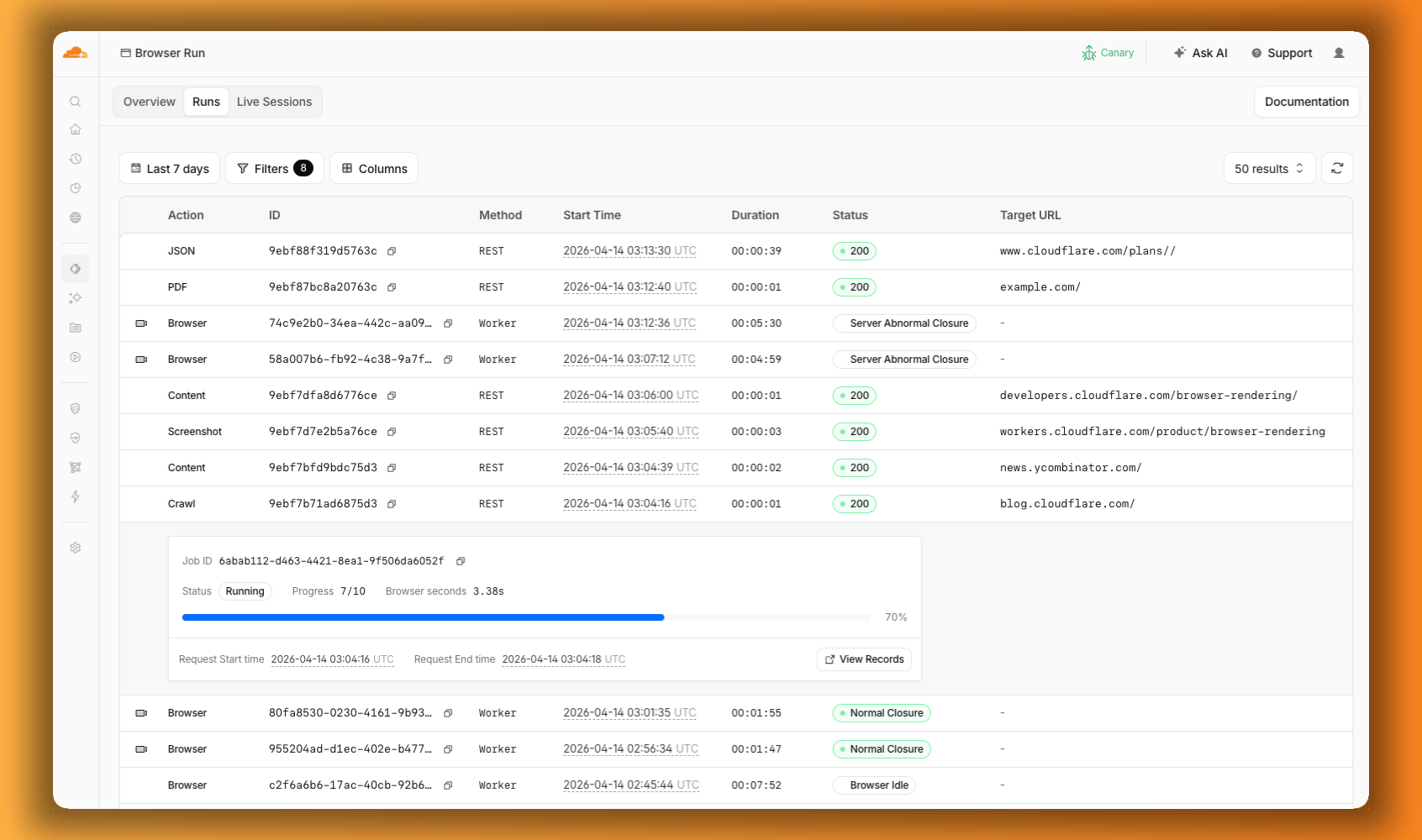
Previously, the Browser Run dashboard only showed logs from browser sessions. Requests for screenshots, PDFs, markdown, and crawls were not visible. The redesigned dashboard changes that. The new Runs tab shows every request. You can filter by endpoint and view details including target URLs, status, and duration. 


The Browser Run dashboard Runs tab showing browser sessions and quick actions like PDF, Screenshot, and Crawl in a single view, with a crawl job expanded to show its progress

4) Intervene

Agents are good, but they’re not perfect. Sometimes they need their human to step in. Browser Run supports Human in the Loop workflows where a human can take control of a live browser session, handle what the automation cannot, then let the session continue. 

Human in the Loop

When automation hits a wall, you don’t have to restart. With Human in the Loop, you can step in and interact with the page directly to click, type, navigate, enter credentials, or submit forms. This unlocks workflows that agents cannot handle.

Today, you can step in by opening the Live View URL for any active session. Next, we’re adding a handoff flow where the agent can signal that it needs help, notify a human to step in, then hand control back to the agent once the issue is resolved.

An AI agent searching Amazon for an orange lava lamp, comparing options, and handing off to a human when sign-in is required to complete the purchase

5) Scale

Customers have asked us to raise limits so that they can do more, faster.

Higher limits

We’ve quadrupled the default concurrent browser limit from 30 to 120. Every session gives you instant access to a browser from a global pool of warm instances, so there’s no cold start waiting for a browser to spin up. In March, we also increased limits for Quick Actions to 10 requests per second. If you need higher limits, they’re available by request.

What’s next

  • Human in the Loop Handoff: today you can intervene in a browser session through Live View. Soon, the agent will be able to signal when it needs help, so you can build in notifications to alert a human to step in.

  • Session Recordings Inspection: you can already scrub through the timeline and replay any session. Soon, you’ll be able to inspect DOM state and console output as well.

  • Traces and Browser Logs: access debugging information without instrumenting your code. Console logs, network requests, timing data. If something broke, you’ll know where.

  • Screenshot, PDF, and markdown directly from Workers: the same simple tasks available through the REST API are coming to Workers Bindings. env.BROWSER.screenshot() just works, with no API tokens needed.

Get started

Browser Run is available today on both the Workers Free and Workers Paid plans. Everything we shipped today — Live View, Human in the Loop, Session Recordings, and higher concurrency limits — is ready to use. 

If you were already using Browser Rendering, everything works the same, just with a new name and more features.  

Check out the documentation to get started.