It’s with immense pleasure that we announce today the winners of the Rapid7 Partner of the Year Awards 2023. All our category winners have achieved exceptional growth—demonstrating their dedication to, and collaboration with, the Rapid7 Partner Program throughout the year.
“We are incredibly honoured to accept the Rapid7 Partner of the Year Award. This recognition is a testament to the hard work and dedication of our entire team, as well as the strong partnership we have built with Rapid7,” said Tim Sank, Co-Founder of Cythera. “This award is not only a validation of our collective efforts but also a motivation to continue delivering best-in-class security solutions to help protect businesses across the APAC region. We are proud to be a Rapid7 partner and we look forward to many more years of success together.”
We’re very proud to share our complete list of winners. Please join us in congratulating them all.
APAC
Rapid7 APAC Partner of the Year: Cythera Pty Ltd
APAC Highest Customer Retention of the Year: The Missing Link
APAC Cloud Security Partner of the Year: DGplex Pty Ltd
APAC Detection & Response Partner of the Year: Blue Apache Pty Ltd
APAC Emerging Partner of the Year: Cyber Risk
APAC Vulnerability Management Partner of the Year: Datacom Group Ltd
APAC Managed Services Partner of the Year: Triskele Labs
EMEA
Rapid7 EMEA Partner of the Year: Softcat PLC
EMEA Best Customer Retention: Saepio Solutions Ltd
EMEA Cloud Security Partner of the Year: AllCloud
EMEA Detection & Response Partner of the Year: Switchpoint
EMEA Distributor of the Year: Infinigate Deutschland GmbH
EMEA Emerging Partner of the Year: Communication Systems GmbH
EMEA Fastest Growth Partner of the Year: Bytes Technology Group
EMEA Vulnerability Management Partner of the Year: Davinsi Labs
EMEA MSSP Partner of the Year: Integrity360
North America
Rapid7 North America Partner of the Year: CDW Corporation
North America Best Customer Retention: Insight
North America Cloud Security Partner of the Year: SHI International Corp.
North America Detection & Response Partner of the Year: Cyber Watch Systems
North America Distribution Partner of the Year: Liquid PC
North America Emerging Partner of the Year: Alchemy Technology Group, LLC
North America Fastest Growth Partner of the Year: Bird Rock Systems, Inc
North America Vulnerability Management Partner of the Year: Optiv Security Inc.
North America MSSP Partner of the Year: Acrisure Cyber Services
More about our partner program
The Rapid7 PACT Program is built to inspire our partners to grow with us and achieve mutual success through accountability, consistency, and transparency. By participating in the program, partners can offer powerful, industry-leading solutions to our joint customers, resulting in mutual success for all.
If you’re interested in becoming a Rapid7 partner, you can learn more here.
We have recently introduced Oxy, our Rust-based framework for proxies powering many Cloudflare services and products. Today, we will explain why and how it spans various layers of the OSI model, by handling directly raw IP packets, TCP connections and UDP payloads, all the way up to application protocols such as HTTP and SSH.
On-ramping IP packets
An application built on top of Oxy defines — in a configuration file — the on-ramps that will accept ingress traffic to be proxied to some off-ramp. One of the possibilities is to on-ramp raw IP packets. But why operate at that layer?
The answer is: to power Cloudflare One, our network offering for customers to extend their private networks — such as offices, data centers, cloud networks and roaming users — with the Cloudflare global network. Such private networks operate based on Zero Trust principles, which means every access is authenticated and authorized, contrasting with legacy approaches where you can reach every private service after authenticating once with the Virtual Private Network.
To effectively extend our customer’s private network into ours, we need to support arbitrary protocols that rely on the Internet Protocol (IP). Hence, we on-ramp Cloudflare One customers’ traffic at (OSI model) layer 3, as a stream of IP packets. Naturally, those will often encapsulate TCP streams and UDP sessions. But nothing precludes other traffic from flowing through.
IP tunneling
Cloudflare’s operational model dictates that every service, machine and network be operated in an homogeneous way, usable by every one of our customers the same way. We essentially have a gigantic multi-tenanted system. Simply on-ramping raw IP packets does not suffice: we must always move the IP packets within the scope of the tenant they belong to.
This is why we introduced the concept of IP tunneling in Oxy: every IP packet handled has context associated with it; at the very least, the tenant that it belongs to. Other arbitrary contexts can be added, but that is up to each application (built on top of Oxy) to define, parse and consume in its Oxy hooks. This allows applications to extend and customize Oxy’s behavior.
You have probably heard of (or even used!) Cloudflare Zero Trust WARP: a client software that you can install on your device(s) to create virtual private networks managed and handled by Cloudflare. You begin by authenticating with your Cloudflare One account, and then the software will on-ramp your device’s traffic through the nearest Cloudflare data center: either to be upstreamed to Internet public IPs, or to other Cloudflare One connectors, such as another WARP device.
Today, WARP routes the traffic captured in your device (e.g. your smartphone) via a WireGuard tunnel that is terminated in a server in the nearest Cloudflare data center. That server then opens an IP tunnel to an Oxy instance running on the same server. To convey context about that traffic, namely the identity of the tenant, some context must be attached to the IP tunnel.
For this, we use a Unix SOCK_SEQPACKET, which is a datagram-oriented socket exposing a connection-based interface with reliable and ordered delivery — it only accepts connections locally within the machine where it is bound to. Oxy receives the context in the first datagram, which the application parses — could be any format the application using Oxy desires. Then all subsequent datagrams are assumed to be raw self-describing IP packets, with no overhead whatsoever.
Another example are the on-ramps of Magic WAN, such as GRE or IPsec tunnels, which also bring raw IP packets from customer’s networks to Cloudflare data centers. Unlike WARP, where its IP packets are decapsulated in user space, for GRE and IPsec we rely on the Linux kernel to do the job for us. Hence, we have no state whatsoever between two consecutive IP packets coming from the same customer, as the Linux kernel is routing them independently.
To accommodate the differences between IP packet handling in user space and the kernel, Oxy differentiates two types of IP tunnels:
Connected IP tunnels — as explained for WARP above, where the context is passed once, in the first datagram of the IP Tunnel SEQPACKET connection
Unconnected IP tunnels — used by Magic WAN, where each IP packet is encapsulated (using GUE, i.e. Generic UDP Encapsulation) to accommodate the context and unconnected UDP sockets are used
Encapsulating every IP packet comes at the cost of extra CPU usage. But moving the packet around to and from an Oxy instance does not change much regardless of the encapsulation, as we do not have MTU limitations inside our data centers. This way we avoid causing IP packet fragmentation, whose reassembly takes a toll on CPU and Memory usage.
Tracking IP flows
Once IP packets arrive to Oxy, regardless of how they on-ramp, we must decide what to do with them. We decided to rely on the idea of IP flows, as that is inherent to most protocols: a point to point interaction will generally be bounded in time and follow some type of state machine, either known by the transport or by the application protocol.
We perform flow tracking to detect IP flows. When handling an on-ramped IP packet, we parse its IP header and possible transport (i.e. OSI Model layer 4) header. We use the excellent etherparse Rust crate for this purpose, which parses the flow signature, with a source and destination IP address, ports (optional) and protocol. We then look up whether there is already a known IP flow for that signature: if so, then the packet is proxied through the path already determined for that flow towards its off-ramp. If the flow is new, then its upstream route is computed and memoized for future packets. This is in essence what routers do, and to some extent Oxy handling of IP packets is meant to operate as a router.
The interesting thing about tracking IP flows is that we can now expose their lifetime events to the application built on top of Oxy, via its hooks. Applications can then use these events for interesting operations, such as:
Emitting audit logs that collect the decisions taken at the start of the IP flow
Collecting metadata about the traffic processed by the time the IP flow ends, e.g., to support billing calculations
Computing routing decisions of where to send the IP flow next, e.g. to another Cloudflare product/service, or off-ramped to the Internet, or to another Cloudflare One connector
From an IP flow to a TCP stream
You would think that most applications do not handle IP packets directly. That is a good hunch, and also a fact at Cloudflare: many systems operate at the application layer (OSI Model layer 7) where they can inspect traffic in a way much closer to what the end user is perceiving.
To get closer to that reality, Oxy can upgrade an IP flow to the transport layer (OSI Model layer 4). We first consider what this means for the case of TCP traffic. The problem that we want to solve is to process a given stream of raw IP packets, with the same TCP flow signature initiating a TCP handshake, and obtain as a result a TCP connection streaming data. Hence, we need a TCP protocol implementation that can be used from userspace.
The best Rust-native implementation is the smoltcp crate. However, its stated objectives do not match our needs, as it does not implement many of the performance and reliability enhancements of TCP that are expected of a first-class TCP, therefore not sufficing for the sheer amount of traffic and demands we have.
Instead, we rely on the Linux kernel to help us here. After all, it has the most battle-tested TCP protocol implementation in the world.
To leverage that, we set up a TUN interface, and add an IP route to forward traffic to that interface (more details below as to what IPs to use). A TUN interface is a virtual network device whose network data is generated by user-programmable software, rather than a device driver for a physically-connected network adapter. But otherwise it looks and works like a physical network adapter for all purposes.
We write the IP packets — meant to be upgraded to a TCP stream — to the file descriptor backing the TUN interface. However, that’s not enough, as the kernel in our machines will drop those packets since customer’s IP addresses only make sense in their infrastructure.
Transforming raw IP packets into a TCP stream
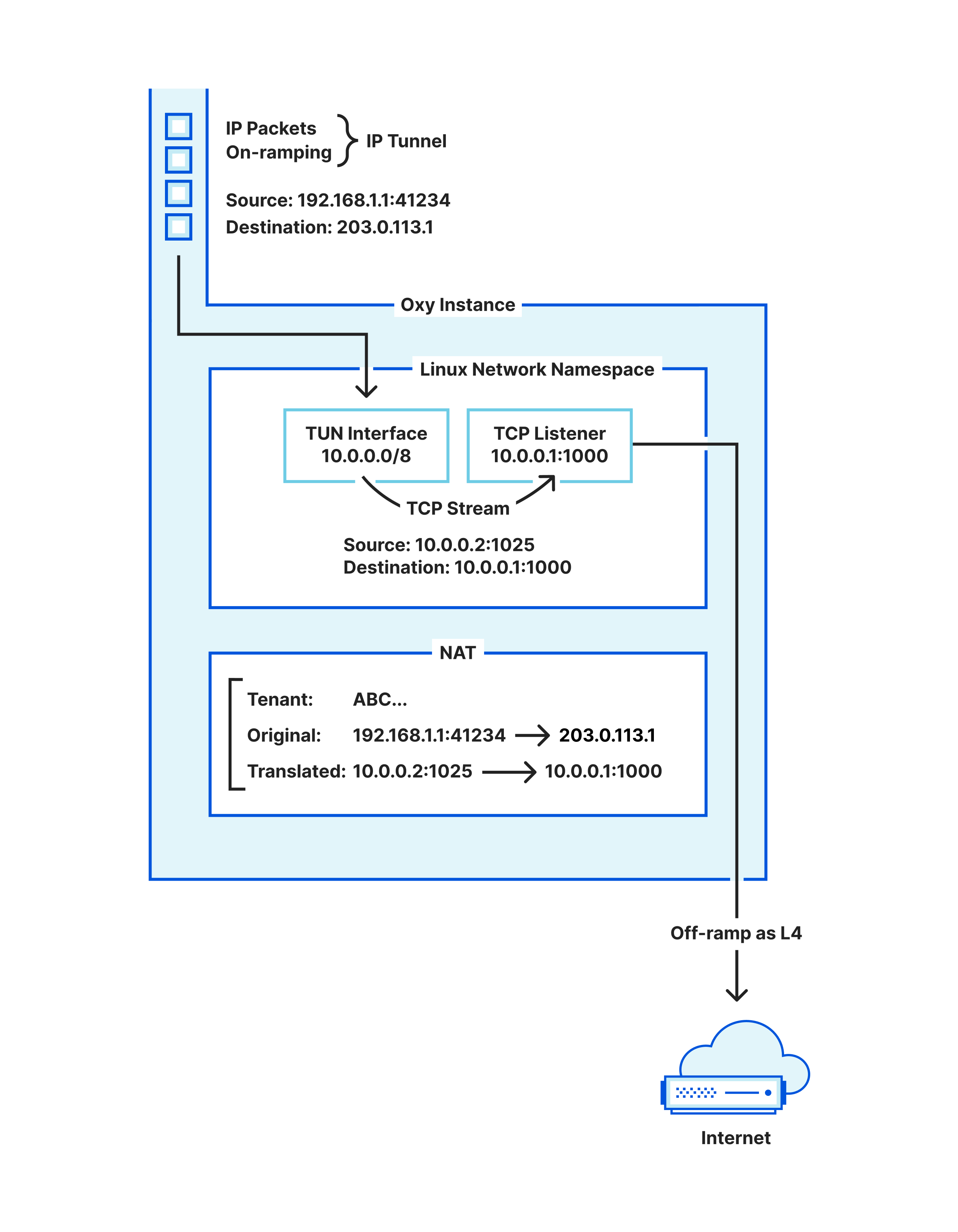
The step we are missing is that those packets must be transformed, i.e. Network Address Translated (NAT), so that the kernel routes them into the TUN interface. Hence, Oxy maintains its own stateful NAT: every IP flow desired to be upgraded to a TCP stream must claim a NAT slot (to be returned when the TCP stream finishes), and have its packets’ addresses rewritten for the IPs that the TUN interface route encompasses.
Once packets flow into the TUN interface with the right addresses, the kernel will process them as if they had entered the machine through your network card. This means that you can now bind a TCP listener to accept TCP connections in the IP address for which the NAT-ed IP packets are destined to, and voilà, we have our IP flows upgraded to TCP streams.
We are left with one question: what IP address should the NAT use? One option is to just reserve some machine-local IP address and hope that no other application running in that machine uses it, as otherwise unexpected traffic will show up in our TUN device.
Instead, we chose to not have to worry about that at all by relying on Linux network namespaces. A network namespace provides you with an isolated network in a machine, acting as a virtualization layer provided by the kernel. Even if you do not know what this is, you are likely using it, e.g. via Docker.
Hence, Oxy dynamically starts a network namespace to run its TUN interface for upgrading IP flows, where it can use all the local IP space and ports freely. After all, those TCP connections only matter locally, between Oxy’s NAT and Oxy’s L4 proxy.
An interesting aspect here is that the Oxy application itself runs in the default/root namespace, making it easily reachable for on-ramping traffic, and also able to off-ramp traffic to other services operating on the same machine in the default/root namespace. But that raises the question: how is Oxy able to operate simultaneously in the root namespace as well as in the namespace dedicated to upgrading IP flows to TCP connections? The trick is to:
Run the Oxy-based process in the root namespace, without any special permissions (no elevated permissions required).
That process calls clone into a new unnamed user and network namespace.
The child (cloned) and parent (original) processes communicate via a paired pipe.
The child brings up the TUN interface and establishes the IP routes to it.
The child process binds a TCP listener on an IP address that is bound to the TUN interface and passes that file descriptor to the parent process using SCM_RIGHTS.
This way, the Oxy process will now have a TCP listener, to obtain the upgraded IP flow connections from, while running in the default namespace and despite that TCP listener — and any connections accepted from it — operating in an unnamed dynamically created namespace.
From a TCP stream to HTTP
Once Oxy has a TCP stream, it may also upgrade it, in a sense, to be handled as HTTP traffic. Again, the framework provides the capabilities, but it is up to the application (built on top of Oxy) to make the decision. Analogously to the IP flow, the TCP stream start also triggers a hook to let the application know about a new connection, and to let it decide what to do with it. One of the choices is to treat it as HTTP(S) traffic, at which point Oxy will pass the connection through a Hyper server (possibly also doing TLS if necessary). If you are curious about this part, then rest assured we will have a blog post focused just on that soon.
What about UDP
While we have been focusing on TCP so far, all of the capabilities implemented for TCP are also supported for UDP as well. We’ve glossed over it so far because it is easier to handle, since converting an IP packet to UDP payloads requires only stripping the IP and UDP headers. We do this in Oxy logic, in user space, thereby replacing the idea employed for TCP that relies on the TUN interface. Everything else works the same way across TCP and UDP, with UDP traffic potentially being HTTPS for the case of QUIC-based HTTP/3.
From TCP/UDP back to IP flow
We have been looking at IP packets on-ramping in Oxy and converting from IP flows to TCP/UDP. Eventually that traffic is sent to an upstream that will respond back, and so we ought to obtain resulting IP packets to send to the client. This happens quite naturally in the code base as we only need to revert the operation done in the upgrade:
For UDP, we add the IP and UDP headers to the payload of each datagram and thereby obtain the IP packet to send to the client.
For TCP, writing to the upgraded TCP socket causes the kernel to generate IP packets routed to the TUN interface. We read these packets from the TUN interface and undo the NAT operation explained above — applied to packets being written to the TUN interface — thereby obtaining the IP packet to send to the client.
More interestingly, the application built on top of Oxy may also define that TCP/UDP traffic (handled as layer 4) is to be downgraded to IP flow (i.e. layer 3). To imagine where this would be usable, consider another Cloudflare One example, where a WARP client establishes an SSH session to a remote WARP device (which is now possible) and has configured SSH command audit logging — in that case, we will have the following steps:
On-ramp the IP packets from WARP client device into the Oxy application.
Oxy tracks the IP flows; per application mandate, then Oxy checks if it is a TCP IP flow with destination port 22, and as such it upgrades to TCP connection.
The application is given control of the TCP connection and, in this case, our Secure Web Gateway (an Oxy application) parses the traffic to perform the SSH command logging.
Since the upstream is determined to be another WARP device, Oxy is mandated to downgrade the TCP connection to IP packets, so that they can be off-ramped to the upstream as such.
Therefore, we need to provide the capability to do step 4, which we haven’t described yet. For UDP the operation is trivial: add or remove the IP/UDP headers as necessary.
For TCP, we will again resort to (another) TUN interface. This is slightly more complicated than upgrading, because when upgrading we use a single TCP listener from the network namespace where all upgraded connections appear, whereas to downgrade we need a TCP client connection from the network namespace per downgraded connection. Therefore we need to interact with the network namespace to obtain these on-demand TCP client connections at runtime, as explained next, making the process to downgrade more convoluted.
To enable that, we rely on the paired pipe maintained between the Oxy (parent) process and the cloned (child) process that operates inside the dynamic namespace: it is used for requesting the TCP client socket for a specific IP flow. This entails the following steps:
The Oxy process reserves a NAT mapping for that IP flow for downgrade.
It requests (via a pipe sendmsg) the cloned child process to establish a TCP connection to the NAT-ed addresses.
By doing so, the child process inherently makes the Linux kernel TCP implementation issue a TCP handshake to the upstream, causing a SYN IP packet to show up in the TUN interface.
The Oxy process is consuming packets from the downgrading namespace’s TUN interface, and hence will consume that packet, for which it promptly reverts the NAT. The IP packet is then off-ramped as explained in the next section.
In the meantime, the child process will have sent back (via the paired pipe) the file descriptor for the TCP client socket, again using SCM_RIGHTS. The Oxy application will now proxy the client TCP connection (meant to be downgraded) into that obtained TCP connection, to result in the raw IP packets read from the TUN interface.
Despite being elaborate, this is quite intuitive, particularly if you’ve read through the upgrade section earlier that is a simpler version of this idea.
The overall picture
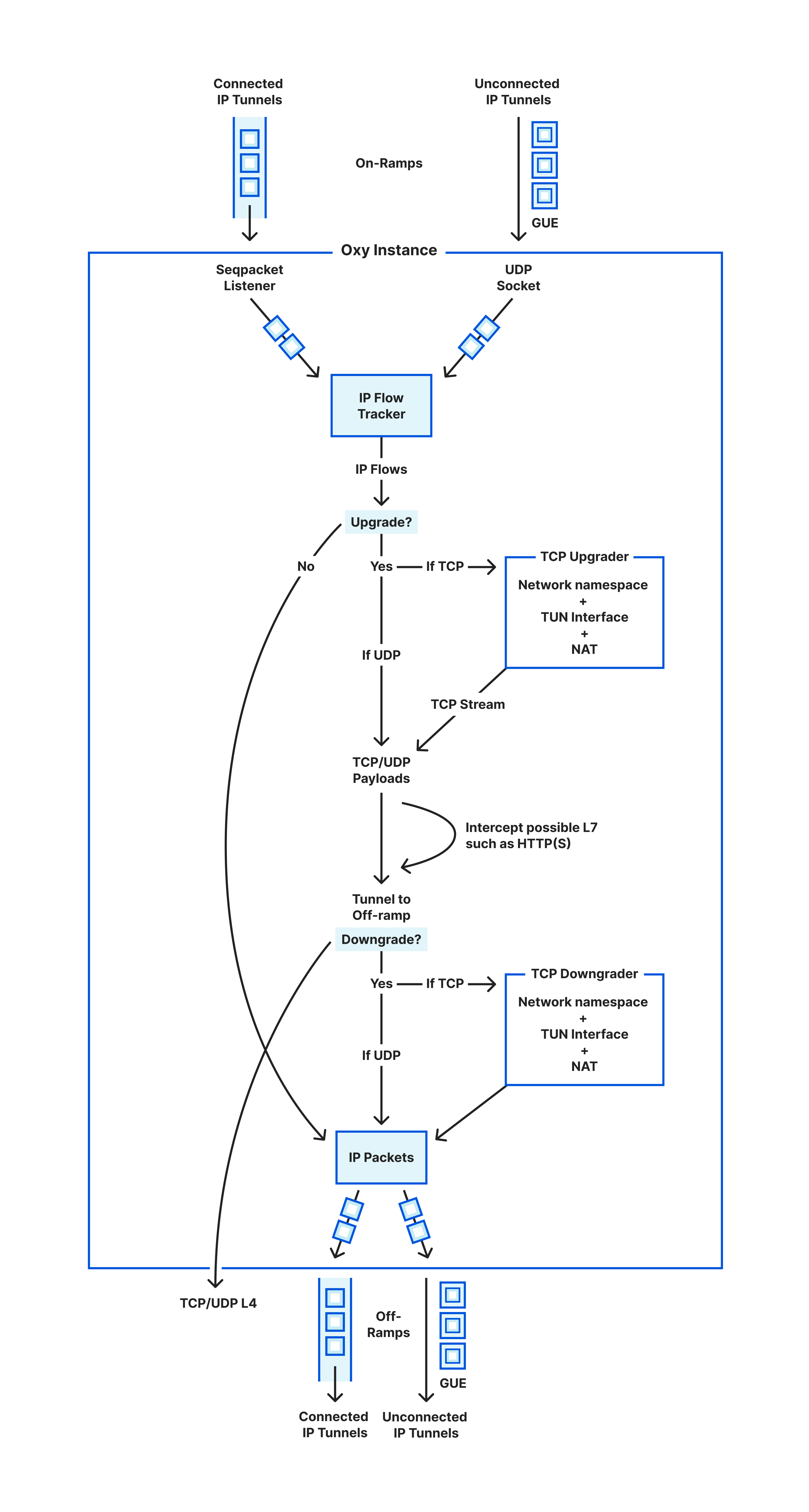
In the sections above we have covered the life of an IP packet entering Oxy and what happens to it until exiting towards its upstream destination. This is summarized in the following diagram illustrating the life cycle of such packets.
Life cycle of IP packets in and out of an Oxy instance
We are left with how to exit the traffic. Sending the proxied traffic towards its destination (referred to as upstream) is what we call off-ramping it. We support off-ramping traffic across the same OSI Model layers that we allow to on-ramp: that is, as IP packets, TCP or UDP sockets, or HTTP(S) directly.
It is up to the application logic (that uses the Oxy framework) to make that decision and instruct Oxy on which layer to use. There is a lot to be said about this part, such as what IPs to use when egressing to the Internet — so if you are curious for more details, then stay tuned for more blog posts about Oxy.
No software overview is complete without its tests. The one interesting thing to think about here is that, to test all of the above, we need to generate raw IP packets in our tests. That’s not ideal as one would like to just write plain Rust logic that establishes TCP connections towards the Oxy proxy. Hence, to simplify all of this, our tests actually reuse our internal library (described above) to create a dynamic network namespaces and downgrade/upgrade the TCP connections as necessary.
Therefore, our tests talk normal TCP against a TCP downgrader running together with the tests, which outputs raw IP packets that we pipe to the Oxy instance being tested. It is an elegant and simple way to work around the challenge while battle testing further the TUN interface logic.
Wrapping up
Covering proxying IP packets all the way to HTTP requests feels like an overly broad framework. We felt the same at first at Cloudflare, particularly because Oxy was not born in a day, and in fact it started first with HTTP proxying and then started to go down the OSI Model layers. In hindsight, doing it all feels the right decision: being able to upgrade and downgrade traffic as necessary has been very useful, and in fact our proxying logic shares the majority of code despite handling different layers (socket primitives, observability, security aspects, configurability, etc).
Today, all of the ideas above are powering Cloudflare One Zero Trust as well as plain WARP. This means they are battle-tested across millions of daily users exchanging most of their traffic (both to the Internet as well as towards private/corporate networks) through the Cloudflare global network.
If you’ve enjoyed reading this and are interested in working on similar challenges with Rust, then be sure to check our open positions as we continue to grow our team. Likewise, there will be more blog posts related to our learnings developing Oxy, so tag along the ride for more fun!
Financial abuse valued at a couple hundred million euro have been exposed at the Ministry of Labour and Social Policy. The embezzlement is primarily tied to funds from different European…
Финансови злоупотреби на стойност няколко стотин милиона евро са разкрити в Министерството на труда и социалната политика (МТСП). Източването е предимно със средства по различни програми на Европейския съюз (ЕС),…
Emergent threats evolve quickly. We will update this blog with new information as it comes to light and we are able to verify it. Erick Galinkin, Ted Samuels, Zach Dayton, Caitlin Condon, Stephen Fewer, and Christiaan Beek all contributed to this blog.
On Wednesday, March 29, 2023, multiple security firms issuedwarnings about malicious activity coming from a legitimate, signed binary from communications technology company 3CX. The binary, 3CXDesktopApp, is popular video-conferencing software available for download on all major platforms. Several analyses have attributed the threat campaign to state-sponsored threat actors.
Rapid7’s threat research teams analyzed the 3CXDesktopApp Windows binary and confirmed that the 3CX MSI installer drops the following files: 3CXDesktopApp.exe, a benign file that loads the backdoored ffmpeg.dll, which reads an RC4-encrypted blob after the hexadecimal demarcation of fe ed fa ce in d3dcompiler.dll. The RC4-encrypted blob in d3dcompiler.dll is executable code that is reflectively loaded and retrieves .ico files with appended Base64-encoded strings from GitHub. The encoded strings appear to be command-and-control (C2) communications. There is a non-exhaustive list of indicators of compromise (IOCs) at the end of this blog.
Rapid7 reached out to GitHub’s security team the evening of March 29 about the GitHub repository being used as adversary infrastructure in this campaign. As of 9:40 PM ET, the malicious user has been suspended and the repository is no longer available.
Rapid7 Managed Detection and Response (MDR) has observed the backdoored 3CX installer and components in several customer environments as of March 29, 2023. Rapid7 MDR is in contact with customers that we believe may be impacted.
Mitigation Guidance
Official guidance from 3CX confirms that the Windows Electron client running update 7 is affected. However, security firm CrowdStrike indicated in a Reddit thread on March 29 that malicious activity has been observed on both Windows and Mac. Out of an abundance of caution, a conservative mitigation strategy would be to uninstall 3CXDesktopApp on all platforms and remove any artifacts left behind. Users should retroactively hunt for indicators of compromise and block known-bad domains. There is a non-exhaustive list of known-bad domains and malicious file hashes at the end of this blog.
3CX has a browser-based Progressive Web App (PWA) that does not require the user to download an executable file. Their CEO has suggested users leverage this PWA for the time being instead of downloadable clients.
Rapid7 customers
The following new rules have been added for Rapid7 InsightIDR and Managed Detection & Response (MDR) customers and will alert on known-bad hashes and file versions of the backdoored executable, as well as known-bad domains in WEB_PROXY and DNS logs:
Suspicious Web Request – 3CX Desktop Supply Chain Compromise
Suspicious DNS Request – 3CX Desktop Supply Chain Compromise
Suspicious Process – 3CX Desktop Supply Chain Compromise
InsightVM and Nexpose customers can use Query Builder or a Filtered Asset Search to find assets in their environment with 3CX installed using Software Namecontains3CX Desktop App.
Този материал може да засегне религиозните чувства на някои читатели. Всички илюстрации освен една са посочени чрез линкове към официалните им източници, вместо да се появят в текста.
„Замили, колега – виждам преди няколко седмици съобщение до мен, – пиша доклад за ислямофобията.“ Да ти се намира някакъв графит по темата, пита ме познатият. За някои неща съм като кучето на Павлов. Ако искаш да реагирам, събери в едно „графити“, „ислям“ и „ислямофобия“. Да, може да се каже, че познавам графити сцената в София относително добре. А от няколко години полека, но устойчиво в нея се намества темата за арабите, исляма и бежанците. Особено на ключови места като кьошетата на Женския пазар и района край Лъвов мост. Надписи на арабски „Тунис“ около Централната гара. „Халеб“, „Сирия“ или „Свободна Палестина“. Псувни на арабски, написани с латиница. Стикери с надписи на английски и арабски. Вероятно произходът им може да се търси в тукашната диаспора. Но има и други графити, по-интересни в случая…
Решавам да помогна на колегата, преводач от османотурски и арабски. Познаваме се от много години. Поставям само едно условие: снимките да бъдат реферирани със съответните авторски права. Все пак цялото газене из софийските потайности с апарат в ръка трябва да бъде възнаградено. А и ми е любопитно какво ще подбере. След малко ми пише. Спрял се е на три изображения, едно от които се превръща в изходна точка за този текст. Набързо очертан с черен спрей силует на брадат мъж с чалма, напръскан с розов цвят за фон. А в чалмата – бомба с фитил.
Разбира се, това е препратка към известна карикатура в „Юландс Постен“ от септември 2005 г., отпреди почти 18 години. Да, според общоприетата дефиниция за „ислямофобия“ съзираме откровено негативно изображение на Пророка.
Съществуват ли обаче условия, при които „безопасно“, в подходящ контекст, да подложим на обсъждане изображения на Мохамед?
Сложна работа, особено предвид някои скорошни събития в щатската академия.
Случаят в „Хамлин“
През октомври миналата година Ерика Лопес Прейтър, преподавателка в Университета „Хамлин“ в Сейнт Пол, Минесота, води онлайн лекция по история на ислямското изкуство. След кратко обяснение, че част от материалите може да бъдат обидни за някои студенти мюсюлмани, тя споделя няколко исторически изображения на Пророка Мохамед. Едно от тях е класически за исляма сюжет. Пророкът на исляма седи коленичил пред архангел Гавраил (Джибрил). Очевидно получава небесното откровение, по-късно записано в Корана¹.
След лекцията Арам Ведаталла, президентка на местната асоциация на студентите мюсюлмани, се оплаква, че е шокирана от изображението, което обижда религиозните ѝ чувства. Последва бърза реакция от университетската администрация и договорът на преподавателката е прекратен. Понякога академията действа бързо. Това завихря огромен, но и доста специализиран дебат. Организира се подписка в защита на преподавателката, събрала няколко хиляди гласа. Излизат множество материали – от по-репортажни, през дистанцирани и с исторически фокус, до полемични – в защита на едната или на другата страна.
Случаят обаче не отключи почти никакви реакции в България извън тясното поле на изследванията на исляма.
Да, разбираемо е с оглед на обхвата на предишни съпоставими събития². Този път обаче липсва шокиращ компонент, който да изстреля новината на първа страница. Няма убити. Няма дипломатически скандал. Няма гневни тълпи по улицата. Значи няма страшно. А и става въпрос за нещо твърде специфично. Но пък за сметка на това с потенциал да окаже дългосрочно въздействие върху полето на изследванията на исляма. Защото повдига въпроси като: доколко е лесно изследванията на исляма да се превърнат в заложник на периодични обвинения в „ислямофобия“ и възможно ли е да подложим на дебат религиозни и културни феномени, без да обидим някого? Подобни съображения стъпват по границите на академичната свобода.
Няколко важни уточнения
На първо място, мюсюлманската изобразителна традиция. От една страна,
твърде изкусително е да кажем, че в исляма съществува пълна възбрана върху изобразяване на живи същества,
на всяко нещо, в което има жива душа (ар. нафс) или дух (ар. рух). Та нали скоро гледахме как от ИДИЛ разбиваха с чукове статуи в иракските музеи. През 2001 г. талибаните взривиха статуите на Будите от Бамян. Изображенията по християнските църкви, откъдето са минали мюсюлмански завоеватели, са често пъти с изчегъртани очи. И днес много мюсюлмани отказват да бъдат заснемани с фотоапарат или рисувани. Не е ли едно от 99-те имена на Аллах именно „Ваятелят“, „Даващият форми“ (ал-Мусаууир)? А и в Корана се твърди, че „не ражда, не е роден, и няма равен Нему“. Самият Пророк в Сунната – онзи сборник от предания, който заедно с Корана е извор на ислямското право и теология – гласи, че
най-силно измъчвани в Деня на Възкресението ще бъдат онези, които изработват изображения.
Защото в Съдния ден сам Аллах ще ги призове да вдъхнат живот в изображенията, които са направили, а те няма да могат. И още – дори
ангелите не влизат в домове, в които има куче или изображение.
Оттук може да построим едно консервативно сунитско и напълно легитимно разсъждение. Всеки акт на извайване на форма или художество може да се бъде сравнен с подражаване на божествената творческа способност. А изображението на свой ред може да се превърне в обект на поклонение. Това води до най-тежкия грях в една стриктно монотеистична догма. Нарича се „многобожие“, „езичество“, в буквален превод „съдружаване“ (ар. ширк). Съответно изображенията на живи същества навеждат мисълта към идолопоклонство и в най-добрия случай са съмнителни. А сунизмът представлява течението в исляма, което изповядват около 90% от мюсюлманите по света.
Съществува и друга гледна точка. Според нейните застъпници
предполагаемата забрана за изобразяване на живи същества е продукт на едно изцяло примитивно, радикално, заклеймявано като „средновековно“ разбиране за изображението.
Та нали в Иран човек може да си купи на улицата рисунки, сувенири или пощенски картички с изображение на Пророка или зет му Али? Нямаме ли и много свидетелства за изображения на хора в илюстрираните персийски хроники, в поемите на Фирдоуси или пък при Саади, Низами с „Лейла и Маджнун“ и други подобни епоси? Какво да кажем за османските жития (ар. сира) на Пророка или за историческите хроники? Те „мюсюлмански“ ли са, или не? Ако приемем, че са характерни за шиизма или повлияни от Персия изобразителни школи, как тогава ще обясним изображенията в сунитската Османска империя? Ами човешките изображения по култовите места на т.нар. хетеродоксен ислям в България? Значи излиза, че ислямът няма как да има проблем с изображенията, нали? Съответно всеки, който твърди обратното, се фундаментализира излишно.
Трябва да отчитаме не просто разликата в аргументацията за или против изобразяването на „живи твари“. Има различни употреби на изображенията и жанровете, в които те се появяват. Забавно-дидактическите стари текстове, обозначавани с термина адаб (откъдето на арабски и до днес идва думата за „литература“), поемат лесно илюстрации, че даже и такива на ръба на приличието. Вижте преписи на „Макамите“ на багдадския Ал-Харири от XI в., на „Калила и Димна“ от Ибн ал-Мукаффа от X в. или „арабския Макиавели“ Ибн Зафар от сицилийския XI в. Прасета, воини, коне, ханове, слонове, мухабети, джамии, дюкяни в притчов контекст. Маймуни с прищипани тестиси. Функцията им е поучителна и развлекателна. Различна от изображенията в трактатите по естествоизпитание и mirabilia, като най-известната на Ал-Казуини, мой любимец от XIII в. Надзърнете и към бестиарии като „Свойствата на животните“ от XIII в., който се опирал, казват, на по-стари автори, като Аристотел.
Да се обърнем и към медицинските трактати, например един Абу Саид Ибрахим от XVII в. Там попадаме на дебели, гротескно подути зайци. Тънки зайци. Причудливи хуманоидни гущери, жаби, саламандри и скорпиони. Хлебарки. Хиени. Пиявици. Много птици. Папуняк. Драконообразен крокодил. Тарантула. Прилеп. Муха. Дъждовни червеи. И фаворитът ми от един от преписите – „делфин“, известен още като „морска свиня“. А защо да не споменем и някои арабски рецепции на медицински текстове от антични автори, като Диоскурид от I в.? Оттам са изображенията на канабиса, тази противоречива според исляма билка, срещу която имамите често негодуват.
Историческите хроники пък са пример за друг жанр, който охотно приютява изображения. И то често в религиозен контекст, разбира се, предвид пророческото осмисляне на историческия процес. Той начева с Адам и Ева (ар. Хауа), продължава през предислямските пророци, като Нух (Ной), Дауд (Давид), Сюлейман (Соломон), Иляс (Илия), Иса (Иисус), и стига до самия Пророк Мухаммад (Мохамед). И накрая, за да удовлетворим и вкуса към пикантното и гротеската, нека споменем и образците на османската еротика. Да, очевидно изобразителната традиция, възникнала в мюсюлмански контекст, е богата, както във всяка разгръщаща се исторически религия.
Но тази традиция не е произволна. Изображенията възникват в специфичен контекст. Съществуват с дадена цел. Подчиняват се на определена естетика.
Нормата, която ги регулира, търпи исторически промени. Очевидно има географски и исторически разлики в подходите. Някои отношения към изображението са по-разпространени, по силата на преобладаващите тенденции в исляма. И да, дори и изображения на живи същества да се срещат, те остават предимно в рамките на малкоформатни изобразителни жанрове.
По правило в сунитска джамия не може да очаквате да видите изображения на хора или животни. Не може и да очаквате илюстрации в строго религиозна литература, като преписи на Корана, Сунната, коментари и правни справочници. А и изобразителното изкуство за мюсюлманите не притежава статуса на западната иконопис или дори на живописта. Калиграфията, арабеската, архитектурата и някои популярни занаяти, като керамика и тъкачество, го изяждат за закуска. Но пък в рамките на тази традиция Мохамед се появява в различни варианти, един от които е повод за настоящия скандал.
На второ място, ако говорим за изображения на Пророка, трябва да отчитаме произхода им спрямо границите на общността.
Някои от тях са произведени от външни на общността източници. Други произтичат от традицията, обозначавана широко от нас, външните наблюдатели, като „свързана с исляма“, „ислямска“ или „мюсюлманска“. И двата типа изображения обуславят различни реакции.
А външните на мюсюлманската общност изображения на Мохамед не са от вчера и не започват с „Юландс Постен“. В европейския исторически сблъсък със „сарацините“ например образът на Пророка заема централно място, „Печатът на пророците“ (израз в исляма, обозначаващ Пророка Мохамед) обикновено бива обрисуван като самозванец, обладан от зли духове или епилепсия, лъстив, еретик и пълководец, въплъщение на самия Антихрист. Този възглед на Запад е особено устойчив, ако и с вариации. Произвеждат се многобройни изображения, от които се сещам за три като твърде показателни.
Данте например поставя Мохамед в Песен XXVIII в деветия ров на геената. Там страдат онези, които са всявали граждански и религиозни смутове. Описанието му е доста скандално дори и в нашенския превод на Константин Величков от 1906 г. На свой ред европейските илюстратори на Данте не пропускат да изобразят Пророка, та чак до един късен викториански Уилям Блейк (онзи, поета) от XIX в., който също дава свой принос. Тук може да видите образец от по-ранен ръкопис на Данте от XIV в. (MS. Holkham misc. 48 от Бодлеанската библиотека в Оксфорд).
Второто изображение, за което се сещам, е също толкова скандално. Че и повече, защото съдържа многопластова обида. В поучителната поема „Падението на принцовете“ (The Fall of Princes) от XIV в. авторът Джон Лъдгейт говори за „Маомето“ като ужасяващ пример. И съответно го виждаме в наивистично колоритно изображение, ръфан от диви свине (Harley MS 1766, f.224r от Британската библиотека).
Третото изображение пък е част от по-късна традиция. Илюстрира съчинение с показателното заглавие „Истинската природа на самозванството, напълно разкрита в живота на Махомет“ (The True Nature of Imposture fully display’d in the Life of Mahomet). Авторът е Хъмфри Придо от XVII в., църковник, хебраист и арабист, един от прадедите на английската ориенталистика. Разбира се, там арабите изглеждат облечени като европейци от епохата, а Мохамед се появява в множество изображения. Като например това, което го представя като лъстив многоженец в будоара, впрочем един от множеството утвърдени начини на възприятие в Европа.
Добре че Данте, Блейк, Лъдгейт и Придо вече не са между живите, за да се окажат в някой списък на „Ал Кайда“.
Да, скандални текстове и изображения също се оказват част от историята. Както е част от историята например Лутеровият трактат „За евреите и техните лъжи“. Или огромният поток от арабоезична антисемитска литература с вкус към конспирацията, която и до днес се издава и разпространява в Близкия изток. Част от историята ще бъде и Дугин, който доста години вече говори за православния „катехон“, оправдаващ идеологически войната на Путин в Украйна. Една външна на дадена религия гледна точка, особено зачената в предмодерността, без твърди обязаности към оценностяването на свободата на словото и толерантността, съдържа в себе си взривен потенциал. И ако тя се формира по ръба на конкуриращи се идеологически и религиозни системи, е много възможно да произведе обидни за отсрещната страна изказвания или изображения.
(Следва продължение.)
1 Всеки, който е имал допир до историята на исляма, знае. Пророкът, твърди първата му биография от IX в., имал обичая да се уединява на планината Хира край Мека. И когато дошло времето, „по волята на Аллах“, Той изпраща до него архангела, чрез когото започва „низпославането” (доста тромав български термин, превод на арабското танзил) на Корана, чак до смъртта на Мохамед през 632 г.сл.Хр. Изображението е доста по-късно и е взето от богато илюстриран ръкопис на „Компендиум от хроники” (Джами’ ат-тауарих) с автор Рашид ад-Дин от XIV в.
2 Дванайсетте карикатури в „Юландс Постен“ от 2005 г. предизвикаха масови протести. Стигна се до смъртта на около 200 души, бяха нападнати западни дипломатически мисии, църкви и християни. Рисунката на карикатуриста Ларс Вилкс, изобразяваща Пророка с тяло на куче и глава на човек, му навлече множество смъртни заплахи. От 2007 г. докато Вилкс не загина в катастрофа през 2021 г., „Ал Кайда“ беше обявила награда от 100 000 долара за неговото убийство в своя списък. Често си мисля, че списъкът на „Ал-Кайда“ може да се нарече и „кратък справочник как да ни санкционират за богохулство в духа и буквата на шариата“. Списъкът включваше хора като Салман Рушди, активистката Аян Хирси Али, Херт Вилдерс, редакторите на „Юланд Постен“ и Тери Джоунс, проповедника от Флорида, който искаше да гори Корана през 2010 г. Чували ли сте за деня на „Всеки да нарисува Мохамед“? Измисли го пак през 2010 г. Моли Норис, карикатуристка от Сиатъл. И тя е в списъка на „Ал-Кайда“. Ако Ориана Фалачи не беше починала през 2006 г., сигурно и тя щеше да бъде в списъка. Там попадна и Стефан Шарбоние, редактор в „Шарли Ебдо“. А изображенията във френския сатиричен вестник се свързват с убийството на 12 души от редакцията. През 2020 г. френски учител беше обезглавен заради показването на карикатури на Мохамед в час.
В рубриката „Ориент кафе“ Атанас Шиников поднася любопитни теми, свързани не толкова с горещата политика, колкото с историята и културата на Близкия изток. А той, древен и днешен, е по-близко до нас и съвремието ни, отколкото си представяме.
Cloudflare has achieved a new EU Cloud Code of Conduct privacy validation, demonstrating GDPR compliance to strengthen trust in cloud services
Internet privacy laws around the globe differ, and in recent years there’s been much written about cross-border data transfers. Many regulations require adequate protections to be in place before personal information flows around the world, as with the European General Data Protection Regulation (GDPR). The law rightly sets a high bar for how organizations must carefully handle personal information, and in drafting the regulation lawmakers anticipated personal data crossing-borders: Chapter V of the regulation covers those transfers specifically.
Whilst transparency on where personal information is stored is important, it’s also critically important how personal information is handled, and how it is kept safe and secure. At Cloudflare, we believe in protecting the privacy of personal information across the world, and we give our customers the tools and the choice on how and where to process their data. Put simply, we require that data is handled and protected in the same, secure, and careful way, whether our customers choose to transfer data across the world, or for it to remain in one country.
And today we are proud to announce that we have successfully completed our assessment journey and received the EU Cloud Code of Conduct compliance mark as a demonstration of our compliance with the GDPR, protecting personal data in the cloud, all across the world.
It matters how personal information is handled – not just where in the world it is saved
The same GDPR lawmakers also anticipated that organizations would want to handle and protect personal information in a consistent, transparent, and safe way too. Article 40, called ‘Codes of Conduct’ starts:
“The Member States, the supervisory authorities, the Board and the Commission shall encourage the drawing up of codes of conduct intended to contribute to the proper application of this Regulation, taking account of the specific features of the various processing sectors and the specific needs of micro, small and medium-sized enterprises.”
Using codes of conduct to demonstrate compliance with privacy law has a longer history, too. Like the GDPR, the pioneering 1995 EU Data Protection Directive, officially Directive 95/46/EC, also included provision for draft community codes to be submitted to national authorities, and for those codes to be formally approved by an official body of the European Union.
An official GDPR Code of Conduct
It took a full five years after the GDPR was adopted in 2016 for the first code of conduct to be officially approved. Finally in May 2021, the European Data Protection Board, a group composed of representatives of all the national data protection authorities across the union, approved the “EU Data Protection Code of Conduct for Cloud Service Providers” – the EU Cloud Code of Conduct (or ‘EU Cloud CoC’ for short) as the first official GDPR code of conduct. The EU Cloud CoC was brought to the board by the Belgian supervisory authority on behalf of SCOPE Europe, the organization who collaborated to develop the code over a number of years, including with input from the European Commission, members of the cloud computing community, and European data protection authorities.
The code is a framework for buyers and providers of cloud services. Buyers can understand in a straightforward way how a provider of cloud services will handle personal information. Providers of cloud services undergo an independent assessment to demonstrate to the buyers of their cloud services that they will handle personal information in a safe and codified way. In the case of the EU Cloud CoC and only because the code has received formal approval, buyers of cloud services compliant with code will know that the cloud provider handled customer personal information in a way that is compliant with the GDPR.
What the code covers
The code defines clear requirements for providers of cloud services to implement Article 28 of the GDPR (“Processor”) and related articles. The framework covers data protection policies, as well as technical and organizational security measures. There are sections covering providers’ terms and conditions, confidentiality and recordkeeping, the audit rights of the customer, how to handle potential data breaches, and how the provider approaches subprocessing – when a third-party is subcontracted to process personal data alongside the main data processor – and more.
The framework also covers how personal data may be legitimately transferred internationally, although whilst the EU Cloud CoC covers ensuring this is done in a legally-compliant way, the code itself is not a ‘safeguard’ or a tool for third country transfers. A future update to the code may expand into that with an additional module, but as of March 2023 that is still under development.
Let us do a deeper dive into some of the requirements of the EU Cloud CoC and how it can demonstrate compliance with the GDPR
Example one One requirement in the code is to have documented procedures in place to assist customers with their ‘data protection impact assessments’. According to the GDPR, these are:
“…an assessment of the impact of the envisaged processing operations on the protection of personal data.” – Article 35.1, GDPR
So a cloud service provider should have a written process in place to support customers as they undertake their own assessments. In supporting the customer, the service provider is demonstrating their commitment to the rigorous data protection standards of the GDPR too. Cloudflare meets this requirement, and further supports transparency by publishing details of sub-processors used in the processing of personal data, and directing customers to audit reports available in the Cloudflare dashboard.
There’s also another reference in the GDPR to codes of conduct in the context of data protection impact assessments too:
“Compliance with approved codes of conduct… shall be taken into due account in assessing the impact of the processing operations performed… in particular for the purposes of a data protection impact assessment.” – Article 35.8, GDPR
So when preparing an impact assessment, a cloud customer shall take into account that a service provider complies with an approved code of conduct. Another way that both customers and cloud providers benefit from using codes of conduct!
Example two Another example of a requirement of the code is that when cloud service providers provide encryption capabilities, they shall be implemented effectively. The requirement clarifies further that this should be undertaken by following strong and trusted encryption techniques, by taking into account the state-of-the-art, and by adequately preventing abusive access to customer personal data. Encryption is critical to protecting personal data in the cloud; without encryption, or with weakened or outdated encryption, privacy and security are not possible. So in using and reviewing encryption appropriately, cloud services providers help meet the requirements of the GDPR in protecting their customers’ personal data.
At Cloudflare, we are particularly proud of our trackrecord: we makeeffectiveencryptionavailable, for free, to all our customers. We help our customers understandencryption, and most importantly, we use strong and trusted encryption algorithms and techniques ourselves to protect customer personal data. We have a formal Research Team, including academic researchers and cryptographers who design and deploystate-of-the-art encryption protocols designed to provide effective protection against active and passive attacks, including with resources known to be available to public authorities; and we use trustworthy public-key certification authorities and infrastructure. Most recently this month, we announced that post-quantum crypto should be free, and so we are including it for free, forever.
More information The code contains requirements described in 87 statements, called controls. You can find more about the EU Cloud CoC, download a full copy of the code, and keep up to date with news at https://eucoc.cloud/en/home
Why this matters to Cloudflare customers
Cloudflare joined the EU Cloud Code of Conduct’s General Assembly last May. Members of the General Assembly undertake an assessment journey which includes declaring named cloud services compliant with the EU Cloud Code, and after completing an independent assessment process by SCOPE Europe, the accredited monitoring body, receive the EU Cloud Code of Conduct compliance mark.
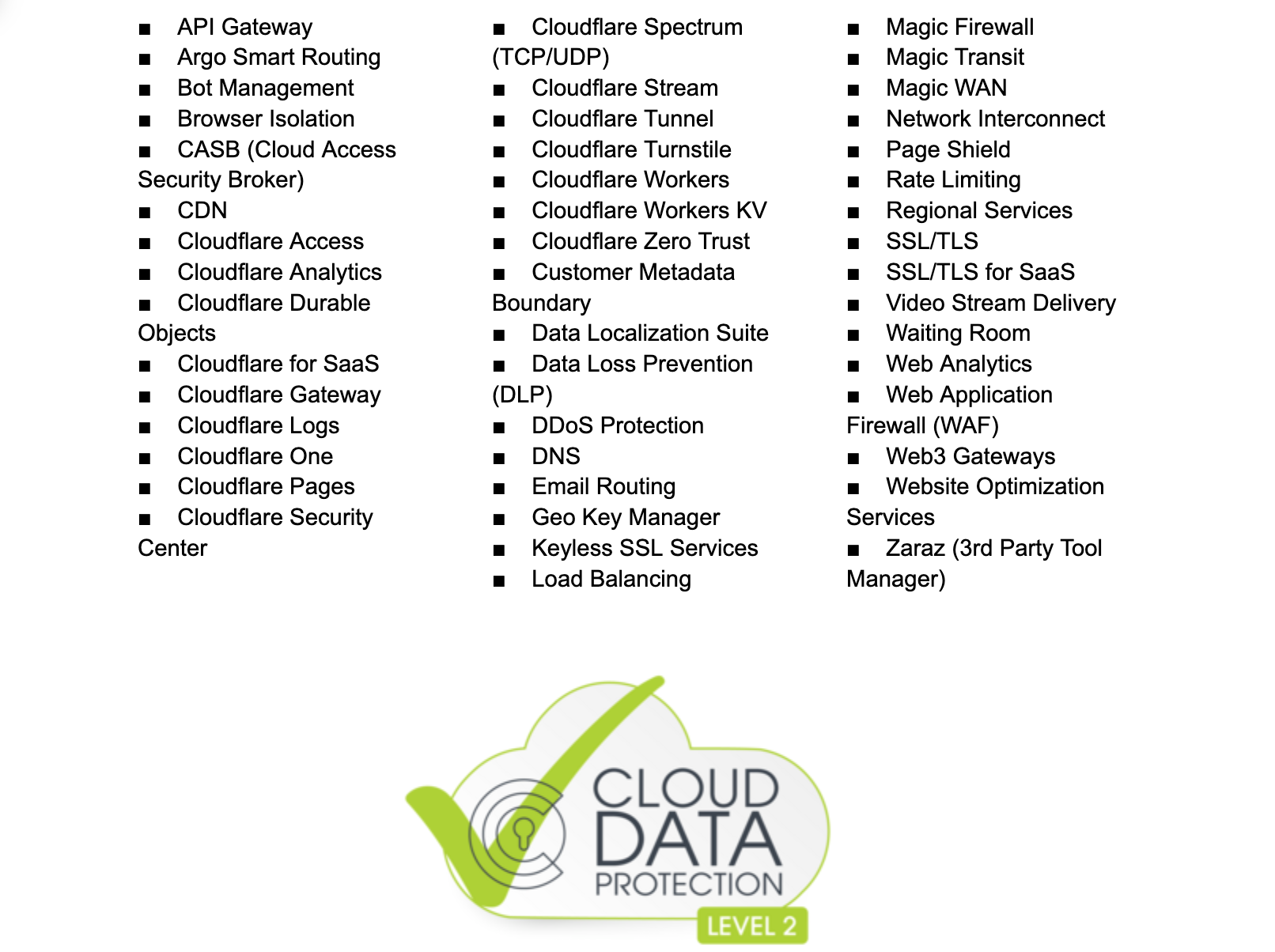
Cloudflare has completed the assessment process and been verified for 47 cloud services.
Cloudflare services that are in scope for EU Cloud Code of Conduct:
EU Cloud CoC Verification-ID: 2023LVL02SCOPE4316.
Services are verified compliant with the EU Cloud Code of Conduct, Verification-ID: 2023LVL02SCOPE4316. For further information please visit https://eucoc.cloud/en/public-register
And we’re not done yet…
The EU Cloud Code of Conduct is the newest privacy validation to add to our growing list of privacy certifications. Two years ago, Cloudflare was one of the first organisations in our industry to have received the new ISO privacy certification, ISO/IEC 27701:2019, and the first Internet performance & security company to be certified to it. Last year, Cloudflare certified to a second international privacy standard related to the processing of personal data, ISO/IEC 27018:2019. Most recently, in January this year Cloudflare completed our annual ISO audit with third-party auditor Schellman; and our new certificate, covering ISO 27001:2013, ISO 27018:2019, and ISO 27701:2019 is now available for customers to download from the Cloudflare dashboard.
And there’s more to come! As we blogged about in January for Data Privacy Day, we’re following the progress of the emerging Global Cross Border Privacy Rules (CBPR) certification with interest. This proposed single global certification could suffice for participating companies to safely transfer personal data between participating countries worldwide, and having already been supported by several governments from North America and Asia, looks very promising in this regard.
Cloudflare certifications
Find out how existing customers may download a copy of Cloudflare’s certifications and reports from the Cloudflare dashboard; new customers may also request these from your sales representative.
For the latest information about our certifications and reports, please visit our Trust Hub.
We meet many young people with an astounding passion for tech, and we also meet the incredible volunteers and educators who help them find their feet in the digital world. Our series of community stories is one way we share their journeys with you.
Today we’re introducing you to Nadia from Maysan, Iraq. Nadia’s achievements speak for themselves, and we encourage you to watch her video to see some of the remarkable things she has accomplished.
Say hello to Nadia
Nadia’s journey with the Raspberry Pi Foundation started when she moved to England to pursue a PhD at Brunel University. As an international student, she wanted to find a way to be part of the local community and make the most of her time abroad. Through her university’s volunteer department, she was introduced to Code Club and began supporting club sessions for children in her local library. The opportunity to share her personal passion for all things computer science and coding with young people felt like the perfect fit.
“[Code Club] added to my skills. And at the same time, I was able to share my expertise with the young children and to learn from them as well.”
Nadia Al-Aboody
Soon, Nadia saw that the skills young people learned at her Code Club weren’t just technical, but included team building and communication as well. That’s when she realised she needed to take Code Club with her when she moved back home to Iraq.
A Code Club in every school in Iraq
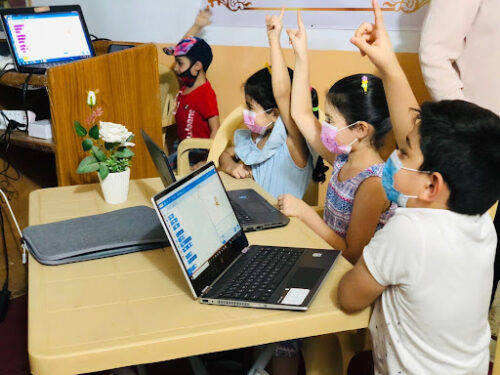
With personal awareness of just how important it is to encourage girls to engage with computing and digital technologies, Nadia set about training the Code Club network’s first female-only training team. Her group of 15 trainers now runs nine clubs — and counting— throughout Iraq, with their goal being to open a club in every single school in the country.
Reaching new areas can be a challenge, one that Nadia is addressing by using Code Club resources offline:
“Not every child has a smartphone or a device, and that was one of the biggest challenges. The [Raspberry Pi] Foundation also introduced the unplugged activities, which was amazing. It was very important to us because we can teach computer science without the need for a computer or a smart device.”
Nadia Al-Aboody
Nadia also works with a team of other volunteers to translate our free resources related to Code Club and other initiatives for young people into Arabic, making them accessible to many more young people around the world.
Tamasin Greenough Graham, Head of Code Club here at the Foundation, shares just how important volunteers like Nadia are in actively pushing our shared mission forwards.
“Volunteers like Nadia really show us why we do the work we do. Our Code Club team exists to support volunteers who are out there on the ground, making a real difference to young people. Nadia is a true champion for Code Club, and goes out of her way to help give more children access to learning about computing. By translating resources, alongside overseeing a growing network of clubs, she helps to support more volunteers and, in turn, reach more young people. Having Nadia as a member of the community is really valuable.”
Tamasin Greenough Graham, Head of Code Club
If you are interested in becoming a Code Club volunteer, visit codeclub.org for all the information you need to get started.
Help us celebrate Nadia and her commendable commitment to growing the Code Club community in Iraq by sharing her story on Twitter, LinkedIn, and Facebook.
Under the umbrella of this alliance, the CNI-CCN will benefit from the help of AWS in defining the security roadmap of public administrations with different maturity levels and help the CNI-CCN comply with their security requirements and the National Security Scheme.
In addition, CNI-CCN and AWS will collaborate in various areas of cloud security. First, they will work together on cybersecurity training and awareness-raising focused on government institutions, through education, training, and certification programs for professionals who are experts in technology and security. Second, both organizations will collaborate in creating security guidelines for the use of cloud technology, incorporating the shared security model in the AWS cloud and contributing their experience and knowledge to help organizations with the challenges they face. Third, CNI-CCN and AWS will take part in joint events that demonstrate best practices for the deployment and secure use of the cloud, both for public and private sector organizations. Finally, AWS will support cybersecurity operations centers that are responsible for surveillance, early warning, and response to security incidents in public administrations.
Today, AWS has achieved certification in the National Security Scheme (ENS) High category and has been the first cloud provider to accredit several security services in the CNI-CCN’s STIC Products and Services catalog (CPSTIC), meaning that its infrastructure meets the highest levels of security and compliance for state agencies and public organizations in Spain. All of this gives Spanish organizations, including startups, large companies, and the public sector, access to AWS infrastructure that allows them to make use of advanced technologies such as data analysis, artificial intelligence, databases, Internet of Things (IoT), machine learning, and mobile or serverless services, to promote innovation.
In addition, the new cloud infrastructure of AWS in Spain, the AWS Europe (Spain) Region, allows customers who have data residency requirements to store their content in Spain, with the assurance that they maintain full control over the location of their data. This is a critical element for those who have data residency requirements. The launch of the AWS Europe (Spain) Region provides customers building applications that comply with General Data Protection Regulation (GDPR) access to another secure AWS Region in the European Union (EU) that helps meet the highest levels of security, compliance, and data protection. AWS is also Esquema Nacional de Seguridad (ENS) High certified, meaning its infrastructure meets the highest levels of security and compliance for government agencies and public organizations in Spain.
El Centro Nacional de Inteligencia de España y AWS colaboran para promover la ciberseguridad en el sector público
Bajo el paraguas de esta alianza, el CNI-CCN se beneficiará de la ayuda de AWS en definir la hoja de ruta de seguridad de las administraciones públicas, con distintos niveles de madurez y ayudar al CNI-CCN en el cumplimiento de sus requisitos de seguridad y el Esquema Nacional de Seguridad.
Además, CNI-CCN y AWS colaborarán en diversos ámbitos en materia de seguridad en la nube. En primer lugar, trabajarán conjuntamente en formación y concienciación en ciberseguridad enfocadas a instituciones gubernamentales, a través de programas de educación, capacitación y certificación de profesionales expertos en tecnología y seguridad. En segundo lugar, ambas organizaciones colaborarán en la creación de guías de seguridad para el uso de tecnología en la nube, incorporando el modelo de seguridad compartida en la nube de AWS y aportando su experiencia y conocimiento para ayudar a las organizaciones con los desafíos a los que se enfrentan. En tercer lugar, CNI-CCN y AWS participarán en eventos conjuntos que demuestren las mejores prácticas de despliegue y uso seguro de la nube, tanto para organizaciones del sector público como privado. Finalmente, AWS apoyará a los centros de operaciones de ciberseguridad encargados de la vigilancia, alerta temprana y respuesta a incidentes de seguridad en las administraciones públicas.
Hoy AWS cuenta con la certificación del Esquema Nacional de Seguridad (ENS) categoría Alta y ha sido el primer proveedor de la nube en acreditar varios servicios de seguridad en el catálogo de Productos y Servicios STIC (CPSTIC) del CNI-CCN, los cual significa que su infraestructura cumple con los más altos niveles de seguridad y cumplimiento para agencias estatales y organizaciones públicas en España. Todo ello concede a las organizaciones españolas, incluyendo a startups, grandes empresas, así como al sector público, acceso a infraestructura de AWS que les permita hacer uso de tecnologías avanzadas como análisis de datos, inteligencia artificial, bases de datos, Internet de las Cosas (IoT), aprendizaje automático, y servicios móviles o serverless, para impulsar la innovación.
Además, la nueva infraestructura de nube de AWS en España, la Región AWS Europa (España) permite a los clientes almacenar su contenido en España, con la seguridad de que mantienen el control total sobre la localización de sus datos. Esto es un elemento crítico para quienes tienen requisitos de residencia de datos. Los clientes que desarrollan aplicaciones en cumplimiento con el Reglamento General de Protección de Datos (RGPD) tendrán acceso a otra región de infraestructura segura de AWS en la Unión Europea (UE), respetando los más altos estándares de seguridad, cumplimiento normativo y protección de datos. Hoy AWS también cuenta con la certificación del Esquema Nacional de Seguridad (ENS) categoría Alta, lo cual significa que su infraestructura cumple con los más altos niveles de seguridad y cumplimiento para agencias estatales y organizaciones públicas en España.
If you have feedback about this post, submit comments in the Comments section below. If you have questions about this post, contact AWS Support.
Want more AWS Security news? Follow us on Twitter.
The fourth and final keynote for Everything Open 2023 was given
by Professor Rebecca Giblin of the Melbourne Law School, University of
Melbourne. It revolved
around her recent book, Chokepoint Capitalism,
which she wrote with Cory Doctorow; it is “a book about why creative
labor markets are rigged — and how to unrig them“. Giblin had planned
to be in Melbourne to give her talk in person, but “the universe had other
plans”; she got delayed in Austin,
Texas by an unexpected speaking slot at the South by
Southwest (SXSW)
conference, so she gave her talk via videoconference from there—at
nearly midnight in Austin.
In the final installment of our webinar “Confronting Security Fears to Control Cyber Risk,” Jason Hart, Rapid7’s Chief Technology Officer, EMEA, discusses how adopting a cyber target operating model can eliminate cybersecurity silos and increase the effectiveness of your cybersecurity program. If you haven’t already, watch parts one and two before delving into this final segment.
Part One: Cybersecurity Simplicity focused on how to encourage everyone associated with your organization to develop a cybersecurity mindset. To accomplish this, Hart recommends that CISOs decentralize cybersecurity to instill accountability and ownership across the entire business.
Part Two: Cybersecurity Elasticity focused on why organisations must develop the ability to adapt while being able to quickly revert to their original structure after times of great stress and impact.
In the presentation, Hart details how executives can create a Protection Level Agreement (PLA) between the security department and senior leadership team, ensuring everyone works to a common timeline and goals. Measuring success and identifying weaknesses in a PLA is also key. Cybersecurity tools that automate reporting on a wide variety of KPIs can help security teams communicate effectiveness to leadership.
Operationalising Cybersecurity
Part Three: Cybersecurity Tranquility offers practical and actionable advice on how to implement a target operating model that aligns with your business, reduces risks and enables a positive security culture.
In the presentation, Hart outlines a twelve step process to operationalise security:
Understand what an operating model is and map out key dependencies for scope, risk, PLA, and KPIs.
Document your current operating model.
Undertake mapping of scope and categorize business functions by impact.
Implement KPIs to track the effectiveness of your current operating model.
Use data from KPIs aligned to business functions to show the effectiveness of the current operating model.
Implement PLAs to align the business, process and technology to drive change.
Present monthly PLAs to stakeholders and business functions to measure effectiveness from current operating model to target operating model.
Enable automation of KPI data aligned to core foundations to feed into PLA.
Identify process and accountability challenges using PLAs underpinned by KPI data.
Use the PLA to explain and show the effectiveness of cybersecurity investment.
Apply the same process to the next business function.
Target operating model starts to form part of the business process.
In this blog you will deploy a solution that integrates Amazon Pinpoint with WhatsApp for outbound and inbound messages.
Amazon Pinpoint is a multichannel customer engagement platform allowing you to engage with your customers across 6 different channels (push notifications, email, SMS, voice, in-app messages and custom channel). Using Amazon Pinpoint’s custom channel you can extend its capabilities via a webhook or AWS Lambda function. Among many other possibilities, you can use custom channels to send messages to your customers through any API-enabled service, for example WhatsApp.
According to statista, WhatsApp is one of the most used apps in the world and the most popular messaging app in over 100 countries. It reached 2.3 billion active users in 2022 while in January 2022, WhatsApp was the most downloaded chat and messaging app worldwide, amassing approximately 40.6 million downloads across the Apple App Store and the Google Play Store.
Note: WhatsApp is a third-party service subject to additional terms and charges. Amazon Web Services isn’t responsible for any third-party service that you use to send messages with custom channels.
Solution & Architecture
An integration between Amazon Pinpoint and WhatsApp can be achieved for both outbound and inbound messages. The next section dives deeper into the architecture for both outbound and inbound messages. The solution uses Amazon Pinpoint custom channel, AWS Lambda, Amazon API Gateway, AWS Cloudformation and AWS Secrets Manager.
Outbound messages
For outbound messages Amazon Pinpoint integrates with WhatsApp via its custom channel allowing users to send WhatsApp messages using Pinpoint campaigns and journeys. Specifically, Pinpoint invokes an AWS Lambda function and performs an API call to WhatsApp. The API call contains the WhatsApp access token, the customer’s mobile number and the WhatsApp message template name.
Amazon Pinpoint campaign or journey using endpoint type CUSTOM invokes an AWS Lambda function. The payload along with the endpoint data should contain the WhatsApp message template name as part of the Custom Data field.
The AWS Lambda obtains the WhatsApp access token from the AWS Secrets Manager and performs a POST API call to the WhatsApp API.
The WhatsApp message gets delivered to the customer.
Inbound messages
For inbound messages WhatsApp requires a Callback URL. This solution utilizes Amazon API Gateway to create the Callback URL and AWS Lambda to authorize and process inbound messages.
Customer sends a message to your WhatsApp number.
WhatsApp makes a GET API call to the Amazon API Gateway endpoint for verification purposes. All subsequent calls containing the customers’ messages are POST.
If the API call method is GET, the AWS Lambda checks if the verify token matches the one stored as an AWS Lambda Environment Variable. If it’s TRUE, it returns a code called HubChallenge that WhatsApp is expecting in order to verify the connection. For POST API calls, the AWS Lambda loops through the customer messages and retrieves the customer’s phone number, timestamp, message_id and message_body. For each message processed, the AWS Lambda function performs an API call to WhatsApp to mark the message as read.
Considerations
Message delivery/engagement events aren’t being recorded.
Messages sent aren’t personalized and they are currently using message templates hosted by WhatsApp.
It is recommended to use endpoint type CUSTOM and not SMS for the following reasons:
WhatsApp’s phone number format doesn’t contain + comparing to Pinpoint SMS address format. If you decide to use the endpoint type SMS you will need to process the endpoint Address by removing the +.
Using the endpoint type SMS forces you to send WhatsApp messages with the same throughput (messages per second) as your Pinpoint SMS channel.
Navigate and login into the Meta for Developers console, click My Apps and select Create App (or use an existing app of type Business).
Select Business as an app type, which supports WhatsApp and click Next.
Provide a display name, contact email, choose whether or not to attach Business Account (optional) and select Create App.
Navigate to the Dashboard and select Set Up in the WhatsApp service in the Add product to your app section.
Create or select an existing Meta Business Account and select Continue.
Navigate to WhatsApp/Getting Started and take a note of the Phone number ID, which will be needed in AWS CloudFormation template later on.
On the WhatsApp/Getting Started page, add your customer phone number you are going to use for testing in the Select a recipient phone number dropdown. Follow the instructions to add and verify your phone number. Note: You must have WhatsApp registered with the number and the WhatsApp client installed on your mobile device. Verification message could appear in the Archived list in your WhatsApp client and not in the main list of messages.
Create a new user to access WhatsApp via API
Open Meta’s Business Manager and select business you created or associated your app with earlier.
Below Users, select System Users and choose Add to create a new system user.
Give a name to the system user and set their role as Admin and click Create System User.
Use the Add Assets button to associate the new user with your WhatsApp app. From the Select asset type list, select Apps, then in the Select assets, select your WhatsApp app’s name. Enable the Test app Partial access for the user, select Save Changes and Done.
Click on the Generate new token button, select the WhatsApp app created earlier and choose Permanent as Token expiration.
Select whatsapp_business_messaging and whatsapp_business_management from the list of Available Permissions and click Generate token at the bottom.
Copy and save your access token. This will be needed in AWS CloudFormation template later on. Make sure you copied the token before clicking on OK.
Download the AWS CloudFormation template and navigate to the AWS CloudFormation console under the AWS region you want to deploy the solution.
Select Create stack and With new resources. Choose Template is ready as Prerequisite – Prepare template and Upload a template file as Specify template. Upload the template downloaded in step 1.
Fill the AWS CloudFormation parameters as shown below:
ApiGatewayName: This is the name of the Amazon API Gateway resource.
PhoneNumberId: This is the WhatsApp phone number Id you obtained from the Meta for Developers console under WhatsApp/Getting Started.
PinpointProjectId: Paste your Amazon Pinpoint’s project Id. This allows Amazon Pinpoint to invoke the AWS Lambda, which sends WhatsApp messages as part of a campaign or journey.
VerifyToken: The verify token is an alphanumeric token that you provide to WhatsApp when setting up the Webhook Callback URL for inbound messages and notifications. You can decide the value of this token e.g. 123abc.
WhatsAppAccessToken: The access token should start with Bearer EEAEAE… and you should have obtained it from the section of this blog Create a new user to access WhatsApp via API.
Once the AWS CloudFormation stack is deployed, copy the Amazon API GateWay endpoint from the AWS CloudFormation outputs tab. Navigate to the Meta for Developers App dashboard, choose Webhooks, select Whatsapp Business Account and subscribe to messages.
Paste the Amazon API Gateway endpoint as a Callback URL. For the Verify token, provide the same value as the AWS CloudFormation template parameter VerfiyToken and select Verify and save.
Testing
Sending messages: To test sending a message to WhatsApp using Amazon Pinpoint:
Navigate to the Amazon Pinpoint Campaigns
Create a new Campaign with WhatsAppCampaign as the Campaign name, select Standard campaign as the Campaign type, choose Custom as Channel and select Next.
Select a segment that includes the CUSTOM endpoint that you will send the message to
Choose the AWS Lambda Function containing the name WhatsAppSendMessageLambda. Under Customdata type hello_world, for Endpoint Options choose Custom and select Next. Note that the hello_world is the WhatsApp default message template.
In Step 4 leave everything with the default values, scroll to the bottom of the page and select Next.
Choose Launch campaign.
Receiving messages: Text or reply to the WhatsApp number. The inbound messages are being printed in the Amazon CloudWatch logs of the AWS Lambda function containing the name WhatsAppWebHookLambda.
Next steps
There are several ways to extend this solution’s functionality, see some of them below:
Instead of specifying the WhatsApp message template name, provide directly the text you want to send using the Pinpoint’s custom channel Custom data field. To do this, update the AWS Lambda function code responsible for sending messages with the one below:
import os
import json
import boto3
from urllib import request, parse
from botocore.exceptions import ClientError
phone_number_id = os.environ['PHONE_NUMBER_ID']
secret_name = os.environ['SECRET_NAME']
def handler(event, context):
    print("Received event: {}".format(event))
    session = boto3.session.Session()
    client = session.client(service_name='secretsmanager')
    try:
        get_secret_value_response = client.get_secret_value(SecretId=secret_name)
    except ClientError as e:
        raise e
    else:
        secret = get_secret_value_response['SecretString']
        url = 'https://graph.facebook.com/v15.0/'+ phone_number_id + '/messages'
        message = event['Data'] # Obtaining the message from the Custom Data field
        for key in event['Endpoints'].keys():
            to_number = str(event['Endpoints'][key]['Address'])
            send_message(secret, to_number, url, message_template)
def send_message(secret, to_number, url, message_template):
    headers = {
        'content-type': 'application/json',
        'Authorization': secret
    }
    # Building the request body and insted of type = template, it's replaced with type = text
    data = parse.urlencode({
        'messaging_product': 'whatsapp',
        'to': to_number,
        'type': 'text',
        'text': {
            'body': message
        }
    }).encode()
    req =  request.Request(url, data=data, headers=headers)
    resp = request.urlopen(req)
Use WhatsApp’s message template components to populated dynamically variables. This requires an update on the respective WhatsApp message template and API request body to WhatsApp’s API. The message template should look like this:
And the API request body should look like this. Note that the value for each variable should be obtained from the Pinpoint endpoint or user attributes.
To delete the solution, navigate to the AWS CloudFormation console and delete the stack deployed.
About the Authors
Pavlos Ioannou Katidis
Pavlos Ioannou Katidis is an Amazon Pinpoint and Amazon Simple Email Service Senior Specialist Solutions Architect at AWS. He enjoys diving deep into customers’ technical issues and help in designing communication solutions. In his spare time, he enjoys playing tennis, watching crime TV series, playing FPS PC games, and coding personal projects.
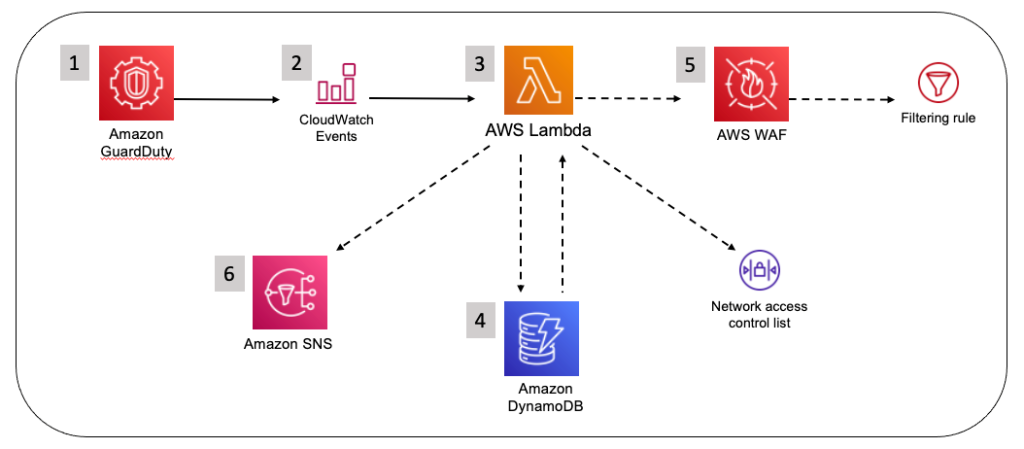
In this post, we’ll share an automation pattern that you can use to automatically detect and block suspicious hosts that are attempting to access your Amazon Web Services (AWS) resources. The automation will rely on Amazon GuardDuty to generate findings about the suspicious hosts, and then you can respond to those findings by programmatically updating AWS WAF to block the host from accessing your workloads.
You should implement security measures across your AWS resources by using a holistic approach that incorporates controls across multiple areas. In the AWS CAF Security Perspective section of the AWS Security Incident Response Guide, we define these controls across four categories:
Directive controls — Establish the governance, risk, and compliance models the environment will operate within
Preventive controls — Protect your workloads and mitigate threats and vulnerabilities
Detective controls — Provide full visibility and transparency over the operation of your deployments in AWS
Responsive controls — Drive remediation of potential deviations from your security baselines
Security automation is a key principle outlined in the Response Guide. It helps reduce operational overhead and creates repeatable, predictable approaches to monitoring and responding to events. AWS services provide the building blocks to create powerful patterns for the automated detection and remediation of threats against your AWS environments. You can configure automated flows that use both detective and responsive controls and might also feed into preventative controls to help mitigate risks in the future. Depending on the type of source event, you can automatically invoke specific actions, such as modifying access controls, terminating instances, or revoking credentials.
The patterns highlighted in this post provide an example of how to automatically remediate detected threats. You should modify these patterns to suit your defined requirements, and test and validate them before deploying them in a production environment.
AWS services used for the example pattern
Amazon GuardDuty is a continuous security monitoring and threat detection service that incorporates threat intelligence, anomaly detection, and machine learning to help protect your AWS resources, including your AWS accounts. Amazon EventBridge delivers a near-real-time stream of system events that describe changes in AWS resources. Amazon GuardDuty sends events to Amazon CloudWatch when a change in the findings takes place. In the context of GuardDuty, such changes include newly generated findings and subsequent occurrences of these findings. You can quickly set up rules to match events generated by GuardDuty findings in EventBridge events and route those events to one or more target actions. The pattern in this post routes matched events to AWS Lambda, which then updates AWS WAFweb access control lists (web ACLs) and Amazon Virtual Private Cloud (Amazon VPC)network access control lists (network ACLs). AWS WAF is a web application firewall that helps protect your web applications from common web exploits that could affect application availability, security, or excess resource consumption. It supports both managed rules as well as a powerful rule language for custom rules. A network ACL is stateless and is an optional layer of security for your VPC that helps you restrict specific inbound and outbound traffic at the subnet level.
Pattern overview
This example pattern assumes that Amazon GuardDuty is enabled in your AWS account. If it isn’t enabled, you can learn more about the free trial and pricing, and follow the steps in the GuardDuty documentation to configure the service and start monitoring your account. The example code will only work in the us-east-1 AWS Region due to the use of Amazon CloudFront and web ACLs within the template.
Figure 1 shows how the AWS CloudFormation template creates the sample pattern.
Figure 1: How the CloudFormation template works
Here’s how the pattern works, as shown in the diagram:
A GuardDuty finding is generated due to suspected malicious activity.
An EventBridge event is configured to filter for GuardDuty finding types by using event patterns.
A Lambda function is invoked by the EventBridge event and parses the GuardDuty finding.
The Lambda function checks the Amazon DynamoDB state table for an existing entry that matches the identified host. If state data is not found in the table for the identified host, a new entry is created in the Amazon DynamoDB state table.
The Lambda function creates a web ACL rule inside AWS WAF and updates a subnet network ACL.
A second Lambda function runs on a 5-minute recurring schedule and removes entries that are past the configurable retention period from AWS WAF IPSets (an IPSet is a list that contains the blocklisted IPs or CIDRs), VPC network ACLs, and the DynamoDB table.
GuardDuty prefix patterns and findings
The EventBridge event rule provided by the example automation uses the following seven prefix patterns, which allow coverage for 36 GuardDuty finding types. These specific finding types are of a network nature, and so we can use AWS WAF to block them. Be sure to read through the full list of finding types in the GuardDuty documentation to better understand what GuardDuty can report findings for. The covered findings are as follows:
UnauthorizedAccess:EC2
UnauthorizedAccess:EC2/MaliciousIPCaller.Custom
UnauthorizedAccess:EC2/MetadataDNSRebind
UnauthorizedAccess:EC2/RDPBruteForce
UnauthorizedAccess:EC2/SSHBruteForce
UnauthorizedAccess:EC2/TorClient
UnauthorizedAccess:EC2/TorRelay
Recon:EC2
Recon:EC2/PortProbeEMRUnprotectedPort
Recon:EC2/PortProbeUnprotectedPort
Recon:EC2/Portscan
Trojan:EC2
Trojan:EC2/BlackholeTraffic
Trojan:EC2/BlackholeTraffic!DNS
Trojan:EC2/DGADomainRequest.B
Trojan:EC2/DGADomainRequest.C!DNS
Trojan:EC2/DNSDataExfiltration
Trojan:EC2/DriveBySourceTraffic!DNS
Trojan:EC2/DropPoint
Trojan:EC2/DropPoint!DNS
Trojan:EC2/PhishingDomainRequest!DNS
Backdoor:EC2
Backdoor:EC2/C&CActivity.B
Backdoor:EC2/C&CActivity.B!DNS
Backdoor:EC2/DenialOfService.Dns
Backdoor:EC2/DenialOfService.Tcp
Backdoor:EC2/DenialOfService.Udp
Backdoor:EC2/DenialOfService.UdpOnTcpPorts
Backdoor:EC2/DenialOfService.UnusualProtocol
Backdoor:EC2/Spambot
Impact:EC2
Impact:EC2/AbusedDomainRequest.Reputation
Impact:EC2/BitcoinDomainRequest.Reputation
Impact:EC2/MaliciousDomainRequest.Reputation
Impact:EC2/PortSweep
Impact:EC2/SuspiciousDomainRequest.Reputation
Impact:EC2/WinRMBruteForce
CryptoCurrency:EC2
CryptoCurrency:EC2/BitcoinTool.B
CryptoCurrency:EC2/BitcoinTool.B!DNS
Behavior:EC2
Behavior:EC2/NetworkPortUnusual
Behavior:EC2/TrafficVolumeUnusual
When activity occurs that generates one of these GuardDuty finding types and is then matched by the EventBridge event rule, an entry is created in the target web ACLs and subnet network ACLs to deny access from the suspicious host, and then a notification is sent to an email address by this pattern’s Lambda function. Blocking traffic from the suspicious host helps to mitigate potential threats while you perform additional investigation and remediation. For more information, see Remediating a compromised EC2 instance.
Solution deployment
To deploy the solution, you’ll do the following steps. Each step is described in more detail in the sections that follow.
Upload the .zip files guardduty_to_acl_lambda_wafv2.zip and prune_old_entries_wafv2.zip that you saved to your local file system in Step 1 to the newly created S3 bucket.
Step 3: Deploy the CloudFormation template
For this step, deploy the CloudFormation template only to the us-east-1 Region within the AWS account where GuardDuty findings are to be monitored.
Choose Create stack, and then choose With new resources (standard).
When the Create stack landing page is presented, make sure that Template is ready is selected in the Prepare template section. In the Template source section, choose Upload a template file.
Choose the Choose file button and browse to the location where the guarddutytoacl.template file was saved on your local file system. Select the file, choose Open, and then choose Next.
On the Specify stack details page, provide the following input parameters. You can modify the default values to customize the pattern for your environment.
Input parameter
Input parameter description
Notification email
The email address to receive notifications. Must be a valid email address.
Retention time, in minutes
How long to retain IP addresses in the blocklist (in minutes). The default is 12 hours.
S3 bucket for artifacts
The S3 bucket with artifact files (Lambda functions, templates, HTML files, and so on). Keep the default value for deployment into the N. Virginia Region.
S3 path to artifacts
The path in the S3 bucket that contains artifact files. Keep the default value for deployment into the N. Virginia Region.
CloudFrontWebACL
Create CloudFront Web ACL? If set to true, a CloudFront IP set will be created automatically.
RegionalWebACL
Create Regional Web ACL? If set to true, a Regional IP set will be created automatically.
Figure 2 shows an example of the values entered on this page.
Figure 2: CloudFormation parameters on the Specify stack details page
Enter values for all of the input parameters, and then choose Next.
On the Configure stack options page, accept the defaults, and then choose Next.
On the Review page, confirm the details, check the box acknowledging that the template will require capabilities for AWS::IAM::Role, and then choose Create Stack.
The stack normally requires no more than 3–5 minutes to complete.
While the stack is being created, check the email inbox that you specified for the Notification email address parameter. Look for an email message with the subject “AWS Notification – Subscription Confirmation”. Choose the link in the email to confirm the subscription to the SNS topic. You should see a message similar to the following.
Figure 3: Subscription confirmation
When the Status field for the CloudFormation stack changes to CREATE_COMPLETE, as shown in Figure 4, the pattern is implemented and is ready for testing.
Figure 4: The stack status is CREATE_COMPLETE
Step 4: Create and test the Lambda function for a GuardDuty finding event
After the CloudFormation stack has completed deployment, you can test the functionality by using a Lambda test event.
To create and run a Lambda GuardDuty finding test event
In the AWS Management Console, choose Services > VPC > Subnets and locate a subnet that is suitable for testing the pattern.
On the Details tab, copy the subnet ID to the clipboard or to a text editor.
Figure 5: The subnet ID value on the Details tab
In the AWS Management Console, choose Services > CloudFormation > GuardDutytoACL stack. On the Outputs tab for the stack, look for the GuardDutytoACLLambda entry.
Figure 6: The GuardDutytoACLLambda entry on the Outputs tab
Choose the link for the entry, and you’ll be redirected to the Lambda console, with the Lambda Code source page already open.
Figure 7: The Lambda function open in the Lambda console
In the middle of the Code source menu, in the Test dropdown list, locate and select the Configure test event option.
Figure 8: Select Configure test event from the dropdown list
To facilitate testing, we’ve provided a test event file. On the Configure test event page, do the following:
For Event name, enter a name.
In the body of the Event JSON field, paste the provided test event JSON, overwriting the existing contents.
Update the value of SubnetId key (line 35) to the value of the subnet ID that you chose in Step 1 of this procedure.
Choose Save.
Figure 9: Update the value of the subnetId key
Choose Test to invoke the Lambda function with the test event. You should see the message “Status: succeeded” at the top of the execution results, similar to what is shown in Figure 10.
Figure 10: The Test button and the “succeeded” message
Step 5: Confirm the entry in the VPC network ACL
In this step, you’ll confirm that the DENY entry was created in the network ACL. This pattern is configured to create up to 10 entries in an ACL, ranging between rule numbers 71 and 80. Because network ACL rules are processed in order, it’s important that the DENY rule is placed before the ALLOW rule.
To confirm the entry in the VPC network ACL
In the AWS Management Console, choose Services > VPC > Subnets, and locate the subnet you provided for the test event.
Choose the network ACL link and confirm that the new DENY entry was generated from the test event.
Figure 11: Check the entry from the test event on the Network tab
Note that VPC network ACL entries are created in the rule number range between 71 and 80. Older entries are aged out to create a “sliding window” of blocked hosts.
Step 6: Confirm the entry in the AWS WAF IP sets and blocklists
Next, verify that the entry was added to the CloudFront AWS WAF IP set and to the Application Load Balancer (ALB) AWS WAF IP set.
To confirm the entry in the AWS WAF IP set and blocklist
In the AWS Management Console, choose Services > WAF & Shield > Web ACLs, and then set the selected Region to Global (CloudFront).
Find and select the web ACL name that starts with CloudFrontBlockListWeb. In the Rule view, on the Rules tab, select the rule named CloudFrontBlocklistIPSetRule. Note that 198.51.100.0/32 appears as an entry in the rule.
Figure 12: Confirm that the IP address was added
In the AWS Management Console, on the left navigation menu, choose Web ACLs, and then set the selected Region to US East (N. Virginia).
Find and select the web ACL name that starts with RegionalBlocklistACL. In the Rule view, on the Rules tab, select the rule named RegionalBlocklistIPSetRule. Note that 198.51.100.0/32 appears as an entry in the rule.
Figure 13: Make sure that the IP address was added
There might be specific host addresses that you want to prevent from being added to the blocklist. You can do this within GuardDuty by using a trusted IP list. Trusted IP lists consist of IP addresses that you have allowlisted for secure communication with your AWS infrastructure and applications. GuardDuty doesn’t generate findings for IP addresses on trusted IP lists. For more information, see Working with trusted IP lists and threat lists.
Step 7: Confirm the SNS notification email
Finally, verify that the SNS notification was sent to the email address you set up.
To confirm receipt of the SNS notification email
Review the email inbox that you specified for the AdminEmail parameter and look for a message with the subject line “AWS GD2ACL Alert”. The contents of the message from SNS should be similar to the following.
Figure 14: SNS message example
Step 8: Apply the AWS WAF web ACLs to resources
The final task is to associate the web ACL with the CloudFront distributions and Application Load Balancers that you want to automatically update with this pattern. To learn how to do this, see Associating or disassociating a web ACL with an AWS resource.
You can also use AWS Firewall Manager to associate the web ACLs. AWS Firewall Manager can simplify your AWS WAF administration and maintenance tasks across multiple accounts and resources. With Firewall Manager, you set up your firewall rules just once. The service automatically applies your rules across your accounts and resources, even as you add new resources.
Conclusion
In this post, you’ve learned how to use Lambda to automatically update AWS WAF and VPC network ACLs in response to GuardDuty findings. With just a few steps, you can use this sample pattern to help mitigate threats by blocking communication with suspicious hosts. You can explore additional possible patterns by using GuardDuty finding types and Amazon EventBridge target actions. This pattern’s code is available on GitHub. Feel free to play around with the code to add more GuardDuty findings to this pattern and also to build bigger and better patterns! Make sure to modify the patterns in this post to suit your defined requirements, and test and validate them before deploying them in a production environment.
If you have comments about this blog post, you can submit them in the Comments section below. If you have questions about using this pattern, start a thread in the GuardDuty, AWS WAF, or CloudWatch forums, or contact AWS Support.
Want more AWS Security news? Follow us on Twitter.
DevSecOps is the practice of integrating security testing at every stage of the software development process. Amazon CodeCatalyst includes tools that encourage collaboration between developers, security specialists, and operations teams to build software that is both efficient and secure. DevSecOps brings cultural transformation that makes security a shared responsibility for everyone who is building the software.
Introduction
In a prior post in this series, Maintaining Code Quality with Amazon CodeCatalyst Reports, I discussed how developers can quickly configure test cases, run unit tests, set up code coverage, and generate reports using CodeCatalyst’s workflow actions. This was done through the lens of Maxine, the main character of Gene Kim’s The Unicorn Project. In the story, Maxine meets Purna – the QA and Release Manager and Shannon – a Security Engineer. Everyone has the same common goal to integrate security into every stage of the Software Development Lifecycle (SDLC) to ensure secure code deployments. The issue Maxine faces is that security testing is not automated and the separation of responsibilities by role leads to project stagnation.
In this post, I will focus on how DevSecOps teams can use Amazon CodeCatalyst to easily integrate and automate security using CodeCatalyst workflows. I’ll start by checking for vulnerabilities using OWASP dependency checker and Mend SCA. Then, I’ll conduct Static Analysis (SA) of source code using Pylint. I will also outline how DevSecOps teams can influence the outcome of a build by defining success criteria for Software Composition Analysis (SCA) and Static Analysis actions in the workflow. Last, I’ll show you how to gain insights from CodeCatalyst reports and surface potential issues to development teams through CodeCatalyst Issues for faster remediation.
Prerequisites
If you would like to follow along with this walkthrough, you will need to:
Have an AWS account associated with your space and have the IAM role in that account. For more information about the role and role policy, see Creating a CodeCatalyst service role.
Have a Mend Account (required for the optional Mend Section)
Walkthrough
To follow along, you can re-use a project you created previously, or you can refer to a previous post that walks through creating a project using the Modern Three-tier Web Application blueprint. Blueprints provide sample code and CI/CD workflows to help you get started easily across different combinations of programming languages and architectures. The back-end code for this project is written in Python and the front-end code is written in JavaScript.
Figure 1. Modern Three-tier Web Application architecture including a presentation, application and data layer
Once the project is deployed, CodeCatalyst opens the project overview. Select CI/CD → Workflows → ApplicationDeploymentPipeline to view the current workflow.
Figure 2. ApplicationDeploymentPipeline
Modern applications use a wide array of open-source dependencies to speed up feature development, but sometimes these dependencies have unknown exploits within them. As a DevSecOps engineer, I can easily edit this workflow to scan for those vulnerable dependencies to ensure I’m delivering secure code.
Software Composition Analysis (SCA)
Software composition analysis (SCA) is a practice in the fields of Information technology and software engineering for analyzing custom-built software applications to detect embedded open-source software and analyzes whether they are up-to-date, contain security flaws, or have licensing requirements. For this walkthrough, I’ll highlight two SCA methods:
I’ll use CodeCatalyst’s Mend SCA Action to integrate Mend for SCA into my CI/CD workflow.
Note that developers can replace either of these with a tool of their choice so long as that tool outputs an SCA report format supported by CodeCatalyst.
Software Composition Analysis using OWASP Dependency Checker
To get started, I select Edit at the top-right of the workflows tab. By default, CodeCatalyst opens the YAML tab. I change to the Visual tab to visually edit the workflow and add a CodeCatalyst Action by selecting “+Actions” (1) and then “+” (2). Next select the Configuration (3) tab and edit the Action Name (4). Make sure to select the check mark after you’re done.
Figure 3. New Action Initial Configuration
Scroll down in the Configuration tab to Shell commands. Here, copy and paste the following command snippets that runs when action is invoked.
#Set Source Repo Directory to variable
- Run: sourceRepositoryDirectory=$(pwd)
#Install Node Dependencies
- Run: cd web && npm install
#Install known vulnerable dependency (This is for Demonstrative Purposes Only)
- Run: npm install [email protected]
#Go to parent directory and download OWASP dependency-check CLI tool
- Run: cd .. && wget https://github.com/jeremylong/DependencyCheck/releases/download/v8.1.2/dependency-check-8.1.2-release.zip
#Unzip file - Run: unzip dependency-check-8.1.2-release.zip
#Navigate to dependency-check script location
- Run: cd dependency-check/bin
#Execute dependency-check shell script. Outputs in SARIF format
- Run: ./dependency-check.sh --scan $sourceRepositoryDirectory/web -o $sourceRepositoryDirectory/web/vulnerabilities -f SARIF --disableYarnAudit
These commands will install the node dependencies, download the OWASP dependency-check tool, and run it to generate findings in a SARIF file. Note the third command, which installs a module with known vulnerabilities (This is for demonstrative purposes only).
On the Outputs (1) tab, I change the Report prefix (2) to owasp-frontend. Then I set the Success criteria (3) for Vulnerabilities to 0 – Critical (4). This configuration will stop the workflow if any critical vulnerabilities are found.
Figure 4: owasp-dependecy-check-frontend
It is a best practice to scan for vulnerable dependencies before deploying resources so I’ll set my owasp-dependency-check-frontend action as the first step in the workflow. Otherwise, I might accidentally deploy vulnerable code. To do this, I select the Build (1)action group and set the Depends on (2) dropdown to my owasp-dependency-check-frontend action. Now, my action will run before any resources are built and deployed to my AWS environment. To save my changes and run the workflow, I select Commit (3) and provide a commit message.
Figure 5: Setting OWASP as the First Workflow Action
Amazon CodeCatalyst shows me the state of the workflow run in real-time. After the workflow completes, I see that the action has entered a failed state. If I were a QA Manager like Purna from the Unicorn Project, I would want to see why the action failed. On the lefthand navigation bar, I select the Reports → owasp-frontend-web/vulnerabilities/dependency-check-report.sarif for more details.
Figure 6: SCA Report Overview
This report view provides metadata such as the workflow name, run ID, action name, repository, and the commit ID. I can also see the report status, a bar graph of vulnerabilities grouped by severity, the number of libraries scanned, and a Findings panel. I had set the success criteria for this report to 0 – Critical so it failed because 1 Critical vulnerability was found. If I select a specific finding ID, I can learn more about that specific finding and even view it on the National Vulnerability Database website.
Figure 7: Critical Vulnerability CVE Finding
Now I can raise this issue with the development team through the Issues board on the left-hand navigation panel. See this previous post to learn more about how teams can collaborate in CodeCatalyst.
Note: Let’s remove [email protected] install from owasp-dependency-check-frontend action’s list of commands to allow the workflow to proceed and finish successfully.
Software Composition Analysis using Mend
Mend, formerly known as WhiteSource, is an application security company built to secure today’s digital world. Mend secures all aspects of software, providing automated remediation, prevention, and protection from problem to solution versus only detection and suggested fixes. Find more information about Mend here.
Mend Software Composition Analysis (SCA) can be run as an action within Amazon CodeCatalyst CI/CD workflows, making it easy for developers to perform open-source software vulnerability detection when building and deploying their software projects. This makes it easier for development teams to quickly build and deliver secure applications on AWS.
Getting started with CodeCatalyst and Mend is very easy. After logging in to my Mend Account, I need to create a new Mend Product named Amazon-CodeCatalyst and a Project named mythical-misfits.
Next, I navigate back to my existing workflow in CodeCatalyst and add a new action. However, this time I’ll select the Mend SCA action.
Figure 8: Mend Action
All I need to do now is go to the Configuration tab and set the following values:
Mend Project Name: mythical-misfits
Mend Product Name: Amazon-CodeCatalyst
Mend License Key: You can get the License Key from your Mend account in the CI/CD Integration section. You can get more information from here.
Figure 9: Mend Action Configuration
Then I commit the changes and return to Mend.
Figure 10: Mend Console
After successful execution, Mend will automatically update and show a report similar to the screenshot above. It contains useful information about this project like vulnerabilities, licenses, policy violations, etc. To learn more about the various capabilities of Mend SCA, see the documentation here.
Static Analysis (SA)
Static analysis, also called static code analysis, is a method of debugging that is done by examining the code without executing the program. The process provides an understanding of the code structure and can help ensure that the code adheres to industry standards. Static analysis is used in software engineering by software development and quality assurance teams.
Currently, my workflow does not do static analysis. As a DevSecOps engineer, I can add this as a step to the workflow. For this walkthrough, I’ll create an action that uses Pylint to scan my Python source code for Static Analysis. Note that you can also use other static analysis tools or a GitHub Action like SuperLinter, as covered in this previous post.
Static Analysis using Pylint
After navigating back to CI/CD → Workflows → ApplicationDeploymentPipeline and selecting Edit, I create a new test action. I change the action name to pylint and set the Configuration tab to run the following shell commands:
On the Outputs tab, I change the Report prefix to pylint. Then I set the Success criteria for Static analysis as shown in the figure below:
Figure 11: Static Analysis Report Configuration
Being that Static Analysis is typically run before any execution, the pylint or OWASP action should be the very first action in the workflow. For the sake of this blog we will use pylint. I select the OWASP or Mend actions I created before, set the Depends on dropdown to my pylint action, and commit the changes. Once the workflow finishes, I can go to Reports > pylint-pylint-report.json for more details.
Figure 12: Pylint Static Analysis Report
The Report status is Failed because more than 1 high-severity or above bug was detected. On the Results tab I can view each finding in greater detail, including the severity, type of finding, message from the linter, and which specific line the error originates from.
Cleanup
If you have been following along with this workflow, you should delete the resources you deployed so you do not continue to incur charges. First, delete the two stacks that AWS Cloud Development Kit (CDK) deployed using the AWS CloudFormation console in the AWS account you associated when you launched the blueprint. These stacks will have names like mysfitsXXXXXWebStack and mysfitsXXXXXAppStack. Second, delete the project from CodeCatalyst by navigating to Project settings and choosing Delete project.
Conclusion
In this post, I demonstrated how DevSecOps teams can easily integrate security into Amazon CodeCatalyst workflows to automate security testing by checking for vulnerabilities using OWASP dependency checker or Mend through Software Composition Analysis (SCA) of dependencies. I also outlined how DevSecOps teams can configure Static Analysis (SA) reports and use success criteria to influence the outcome of a workflow action.
Did you know you can use CloudFormation to manage third-party resources? The AWS CloudFormation Public Registry provides a searchable collection of CloudFormation extensions and makes it easy to discover and provision them in CloudFormation templates and AWS Cloud Development Kit (CDK) applications. In the past three months, we’ve added a number of new, exciting partners to the Public Registry, including GitLab, Okta, and PagerDuty.
The extensions available on the registry are wide-ranging and include third-party resources from partners such as MongoDB; hooks, which are preventative controls that add safeguards to provisioning; and modules, which are re-usable components that take into account best practices and opinionated definitions of resources. AWS Partner Network (APN), third parties, and the developer community contribute these extensions to the Public Registry. Using extensions, customers no longer need to create and maintain custom provisioning logic for resource types from third-party vendors.
Over last few months, AWS collaborated with partners to develop and publish over 80 new resources across 14 providers to Public Registry for CloudFormation. Below is a summary of the new resource type additions.
Manage components in MongoDB Atlas. Add, edit, or delete administrative objects within Atlas, including projects, users, and database deployments
Note: You cannot read or write data to Atlas Clusters with Atlas Admin APIs and AWS CloudFormation resources. To read and write data in Atlas, you must use the Atlas Data API
Manage the users and groups in an organization, set up a new project with the right users, groups, and access token, tag a project automatically for every active CI/CD deployment
Create a new Dashboard with custom Pages, Widgets and Layout, add tags to your data to help improve data organization and findability, workloads-related tasks
Here are some of the benefits for extension builders and consumers when publishing extensions to the public registry:
Discoverability – Publishing your extensions in the public registry will make them discoverable by 1M+ active CloudFormation and CDK customers.
CDK Support – We’re seeing rapid growth in the adoption of the CDK amongst the developer population. Upon publishing to the registry, L1 CDK Constructs will automatically be created for your third party resources making them compatible with the CDK with no added work required. These constructs will also be listed on Construct Hub and aids discoverability discoverable by customers. Note: Automated L1 CDK construct generation is currently an experimental feature.
Drift detection – Third-party resource types in the public registry also integrate with drift detection. After creating a resource from a third-party resource type, CloudFormation will detect changes to the third-party resource from its template configuration, known as configuration drift, just as it would with AWS resources.
AWS Config – You can also use AWS Config to manage compliance for third-party resources consumed from the registry. The resource types are automatically tracked as Configuration Items when you have configured AWS Config to record them, and used CloudFormation to create, update, and delete them. Whether the resource types you use are third-party or AWS resources, you can view configuration history for them, in addition to being able to write AWS Config rules to verify configuration best practices.
Abstraction of Best Practices with Modules – Browse and use modules from the registry when creating your CloudFormation templates to ensure you’re provisioning resources while adhering to best practices.
AWS Cloud Control API – The AWS Cloud Control API allows AWS partners and customers to interface with your resource type through API calls using Create, Read, Update, Delete, and List (CRUD-L) operations. Resources in the registry will be automatically integrated with our AWS Cloud Control API and expands your third party resource compatibility to even more AWS services and IaC tools.
We’ve seen great momentum from our partners and developer community over the past year. We are looking forward to continued investment and innovation in the Public Registry.
How to Get Started
For Resource Type Users: Explore and Activate Third Party Resource Types
Third party resource types must first be activated before they can be used. You do this by logging into your AWS Console > Navigate to CloudFormation > Registry > Public extensions > Set the Publisher to Third Party. This will show you a list of available third-party resources in your region (note that different regions may have a different set of third-party resource types). Select the radio box next to the resource types you want to activate and click the activate button at the top of the list.
Figure 1:
Don’t see the extension you need in the registry?
You can submit requests for new third-party extensions through our Community Registry Extensions Github repo issue tracker! Click the New Issue button and describe the third-party extension along with information about your use case.
For Developers and Publishers: Join the CloudFormation Developer Community and Start Building
You can see several of the community-built registry extensions in the AWS CloudFormation Community Registry Extensions repository and even contribute yourself. You can also read about the experiences and lessons learned from publishing to the Registry through this blog written by Cloudsoft.
For developers looking to create new resource types to add to the public Registry, follow this creating resource types walkthrough help you get started. If you need assistance creating, publishing resources, or just want to join the discussion, you can join the conversation today in our CloudFormation Discord Channel. We’d love to hear about your experiences and use cases in developing innovations with registry extensions.
To provide the best experiences, we use technologies like cookies to store and/or access device information. Consenting to these technologies will allow us to process data such as browsing behavior or unique IDs on this site. Not consenting or withdrawing consent, may adversely affect certain features and functions.
Functional
Always active
The technical storage or access is strictly necessary for the legitimate purpose of enabling the use of a specific service explicitly requested by the subscriber or user, or for the sole purpose of carrying out the transmission of a communication over an electronic communications network.
Preferences
The technical storage or access is necessary for the legitimate purpose of storing preferences that are not requested by the subscriber or user.
Statistics
The technical storage or access that is used exclusively for statistical purposes.The technical storage or access that is used exclusively for anonymous statistical purposes. Without a subpoena, voluntary compliance on the part of your Internet Service Provider, or additional records from a third party, information stored or retrieved for this purpose alone cannot usually be used to identify you.
Marketing
The technical storage or access is required to create user profiles to send advertising, or to track the user on a website or across several websites for similar marketing purposes.