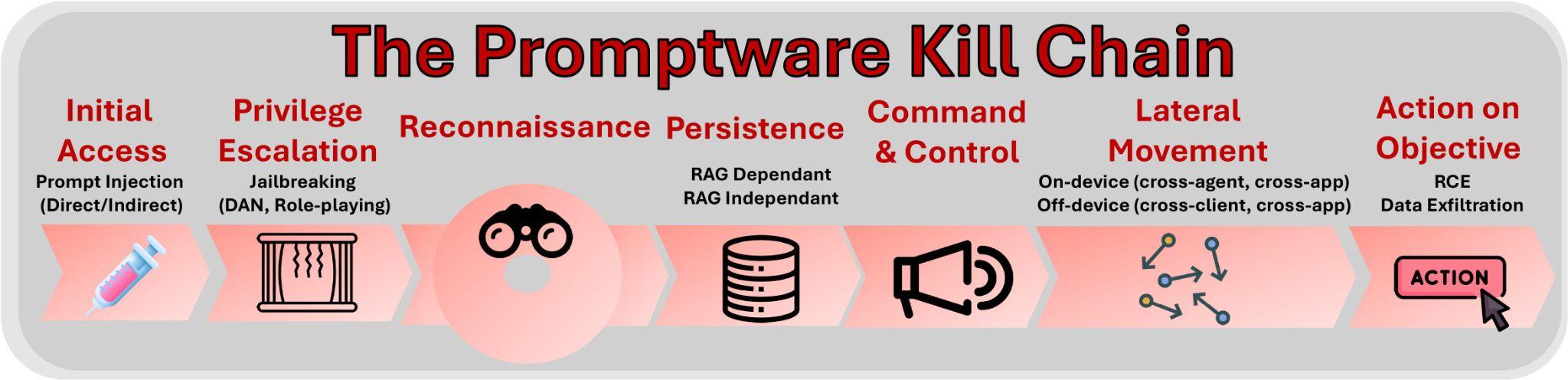
Attacks against modern generative artificial intelligence (AI) large language models (LLMs) pose a real threat. Yet discussions around these attacks and their potential defenses are dangerously myopic. The dominant narrative focuses on “prompt injection,” a set of techniques to embed instructions into inputs to LLM intended to perform malicious activity. This term suggests a simple, singular vulnerability. This framing obscures a more complex and dangerous reality. Attacks on LLM-based systems have evolved into a distinct class of malware execution mechanisms, which we term “promptware.” In a new paper, we, the authors, propose a structured seven-step “promptware kill chain” to provide policymakers and security practitioners with the necessary vocabulary and framework to address the escalating AI threat landscape.
In our model, the promptware kill chain begins with Initial Access. This is where the malicious payload enters the AI system. This can happen directly, where an attacker types a malicious prompt into the LLM application, or, far more insidiously, through “indirect prompt injection.” In the indirect attack, the adversary embeds malicious instructions in content that the LLM retrieves (obtains in inference time), such as a web page, an email, or a shared document. As LLMs become multimodal (capable of processing various input types beyond text), this vector expands even further; malicious instructions can now be hidden inside an image or audio file, waiting to be processed by a vision-language model.
The fundamental issue lies in the architecture of LLMs themselves. Unlike traditional computing systems that strictly separate executable code from user data, LLMs process all input—whether it is a system command, a user’s email, or a retrieved document—as a single, undifferentiated sequence of tokens. There is no architectural boundary to enforce a distinction between trusted instructions and untrusted data. Consequently, a malicious instruction embedded in a seemingly harmless document is processed with the same authority as a system command.
But prompt injection is only the Initial Access step in a sophisticated, multistage operation that mirrors traditional malware campaigns such as Stuxnet or NotPetya.
Once the malicious instructions are inside material incorporated into the AI’s learning, the attack transitions to Privilege Escalation, often referred to as “jailbreaking.” In this phase, the attacker circumvents the safety training and policy guardrails that vendors such as OpenAI or Google have built into their models. Through techniques analogous to social engineering—convincing the model to adopt a persona that ignores rules—to sophisticated adversarial suffixes in the prompt or data, the promptware tricks the model into performing actions it would normally refuse. This is akin to an attacker escalating from a standard user account to administrator privileges in a traditional cyberattack; it unlocks the full capability of the underlying model for malicious use.
Following privilege escalation comes Reconnaissance. Here, the attack manipulates the LLM to reveal information about its assets, connected services, and capabilities. This allows the attack to advance autonomously down the kill chain without alerting the victim. Unlike reconnaissance in classical malware, which is performed typically before the initial access, promptware reconnaissance occurs after the initial access and jailbreaking components have already succeeded. Its effectiveness relies entirely on the victim model’s ability to reason over its context, and inadvertently turns that reasoning to the attacker’s advantage.
Fourth: the Persistence phase. A transient attack that disappears after one interaction with the LLM application is a nuisance; a persistent one compromises the LLM application for good. Through a variety of mechanisms, promptware embeds itself into the long-term memory of an AI agent or poisons the databases the agent relies on. For instance, a worm could infect a user’s email archive so that every time the AI summarizes past emails, the malicious code is re-executed.
The Command-and-Control (C2) stage relies on the established persistence and dynamic fetching of commands by the LLM application in inference time from the internet. While not strictly required to advance the kill chain, this stage enables the promptware to evolve from a static threat with fixed goals and scheme determined at injection time into a controllable trojan whose behavior can be modified by an attacker.
The sixth stage, Lateral Movement, is where the attack spreads from the initial victim to other users, devices, or systems. In the rush to give AI agents access to our emails, calendars, and enterprise platforms, we create highways for malware propagation. In a “self-replicating” attack, an infected email assistant is tricked into forwarding the malicious payload to all contacts, spreading the infection like a computer virus. In other cases, an attack might pivot from a calendar invite to controlling smart home devices or exfiltrating data from a connected web browser. The interconnectedness that makes these agents useful is precisely what makes them vulnerable to a cascading failure.
Finally, the kill chain concludes with Actions on Objective. The goal of promptware is not just to make a chatbot say something offensive; it is often to achieve tangible malicious outcomes through data exfiltration, financial fraud, or even physical world impact. There are examples of AI agents being manipulated into selling cars for a single dollar or transferring cryptocurrency to an attacker’s wallet. Most alarmingly, agents with coding capabilities can be tricked into executing arbitrary code, granting the attacker total control over the AI’s underlying system. The outcome of this stage determines the type of malware executed by promptware, including infostealer, spyware, and cryptostealer, among others.
The kill chain was already demonstrated. For example, in the research “Invitation Is All You Need,” attackers achieved initial access by embedding a malicious prompt in the title of a Google Calendar invitation. The prompt then leveraged an advanced technique known as delayed tool invocation to coerce the LLM into executing the injected instructions. Because the prompt was embedded in a Google Calendar artifact, it persisted in the long-term memory of the user’s workspace. Lateral movement occurred when the prompt instructed the Google Assistant to launch the Zoom application, and the final objective involved covertly livestreaming video of the unsuspecting user who had merely asked about their upcoming meetings. C2 and reconnaissance weren’t demonstrated in this attack.
Similarly, the “Here Comes the AI Worm” research demonstrated another end-to-end realization of the kill chain. In this case, initial access was achieved via a prompt injected into an email sent to the victim. The prompt employed a role-playing technique to compel the LLM to follow the attacker’s instructions. Since the prompt was embedded in an email, it likewise persisted in the long-term memory of the user’s workspace. The injected prompt instructed the LLM to replicate itself and exfiltrate sensitive user data, leading to off-device lateral movement when the email assistant was later asked to draft new emails. These emails, containing sensitive information, were subsequently sent by the user to additional recipients, resulting in the infection of new clients and a sublinear propagation of the attack. C2 and reconnaissance weren’t demonstrated in this attack.
The promptware kill chain gives us a framework for understanding these and similar attacks; the paper characterizes dozens of them. Prompt injection isn’t something we can fix in current LLM technology. Instead, we need an in-depth defensive strategy that assumes initial access will occur and focuses on breaking the chain at subsequent steps, including by limiting privilege escalation, constraining reconnaissance, preventing persistence, disrupting C2, and restricting the actions an agent is permitted to take. By understanding promptware as a complex, multistage malware campaign, we can shift from reactive patching to systematic risk management, securing the critical systems we are so eager to build.
This essay was written with Oleg Brodt, Elad Feldman and Ben Nassi, and originally appeared in Lawfare.
The way content and businesses are discovered online is changing rapidly. In the past, traffic originated from traditional search engines, and SEO determined who got found first. Now the traffic is increasingly coming from AI crawlers and agents that demand structured data within the often-unstructured Web that was built for humans.
As a business, to continue to stay ahead, now is the time to consider not just human visitors, or traditional wisdom for SEO-optimization, but start to treat agents as first-class citizens.
Why markdown is important
Feeding raw HTML to an AI is like paying by the word to read packaging instead of the letter inside. A simple ## About Us on a page in markdown costs roughly 3 tokens; its HTML equivalent – <h2 class="section-title" id="about">About Us</h2> – burns 12-15, and that’s before you account for the <div> wrappers, nav bars, and script tags that pad every real web page and have zero semantic value.
This blog post you’re reading takes 16,180 tokens in HTML and 3,150 tokens when converted to markdown. That’s a 80% reduction in token usage.
Markdown has quickly become the lingua franca for agents and AI systems as a whole. The format’s explicit structure makes it ideal for AI processing, ultimately resulting in better results while minimizing token waste.
The problem is that the Web is made of HTML, not markdown, and page weight has been steadily increasing over the years, making pages hard to parse. For agents, their goal is to filter out all non-essential elements and scan the relevant content.
The conversion of HTML to markdown is now a common step for any AI pipeline. Still, this process is far from ideal: it wastes computation, adds costs and processing complexity, and above all, it may not be how the content creator intended their content to be used in the first place.
What if AI agents could bypass the complexities of intent analysis and document conversion, and instead receive structured markdown directly from the source?
Convert HTML to markdown, automatically
Cloudflare’s network now supports real-time content conversion at the source, for enabled zones using content negotiation headers. Now when AI systems request pages from any website that uses Cloudflare and has Markdown for Agents enabled, they can express the preference for text/markdown in the request. Our network will automatically and efficiently convert the HTML to markdown, when possible, on the fly.
Here’s how it works. To fetch the markdown version of any page from a zone with Markdown for Agents enabled, the client needs to add the Accept negotiation header with text/markdownas one of the options. Cloudflare will detect this, fetch the original HTML version from the origin, and convert it to markdown before serving it to the client.
Here’s a curl example with the Accept negotiation header requesting a page from our developer documentation:
We already see some of the most popular coding agents today – like Claude Code and OpenCode – send these accept headers with their requests for content. Now, the response to this request is formatted in markdown. It’s that simple.
HTTP/2 200
date: Wed, 11 Feb 2026 11:44:48 GMT
content-type: text/markdown; charset=utf-8
content-length: 2899
vary: accept
x-markdown-tokens: 725
content-signal: ai-train=yes, search=yes, ai-input=yes

---
title: Markdown for Agents · Cloudflare Agents docs
---

## What is Markdown for Agents

The ability to parse and convert HTML to Markdown has become foundational for AI.
...
Note that we include an x-markdown-tokens header with the converted response that indicates the estimated number of tokens in the markdown document. You can use this value in your flow, for example to calculate the size of a context window or to decide on your chunking strategy.
Here’s a diagram of how it works:
Content Signals Policy
During our last Birthday Week, Cloudflare announced Content Signals — a framework that allows anyone to express their preferences for how their content can be used after it has been accessed.
When you return markdown, you want to make sure your content is being used by the Agent or AI crawler. That’s why Markdown for Agents converted responses include the Content-Signal: ai-train=yes, search=yes, ai-input=yes header signaling that indicates content can be used for AI Training, Search results and AI Input, which includes agentic use. Markdown for Agents will provide options to define custom Content Signal policies in the future.
Check our dedicated Content Signals page for more information on this framework.
Try it with the Cloudflare Blog & Developer Documentation
We enabled this feature in our Developer Documentation and our Blog, inviting all AI crawlers and agents to consume our content using markdown instead of HTML.
Try it out now by requesting this blog with Accept: text/markdown.
---
description: The way content is discovered online is shifting, from traditional search engines to AI agents that need structured data from a Web built for humans. It’s time to consider not just human visitors, but start to treat agents as first-class citizens. Markdown for Agents automatically converts any HTML page requested from our network to markdown.
title: Introducing Markdown for Agents
image: https://blog.cloudflare.com/images/markdown-for-agents.png
---

# Introducing Markdown for Agents

The way content and businesses are discovered online is changing rapidly. In the past, traffic originated from traditional search engines and SEO determined who got found first. Now the traffic is increasingly coming from AI crawlers and agents that demand structured data within the often-unstructured Web that was built for humans.

...
Other ways to convert to Markdown
If you’re building AI systems that require arbitrary document conversion from outside Cloudflare or Markdown for Agents is not available from the content source, we provide other ways to convert documents to Markdown for your applications:
Workers AI AI.toMarkdown() supports multiple document types, not just HTML, and summarization.
Browser Rendering /markdown REST API supports markdown conversion if you need to render a dynamic page or application in a real browser before converting it.
Tracking markdown usage
Anticipating a shift in how AI systems browse the Web, Cloudflare Radar now includes content type insights for AI bot and crawler traffic, both globally on the AI Insights page and in the individual bot information pages.
The new content_type dimension and filter shows the distribution of content types returned to AI agents and crawlers, grouped by MIME type category.
You can also see the requests for markdown filtered by a specific agent or crawler. Here are the requests that return markdown to OAI-Searchbot, the crawler used by OpenAI to power ChatGPT’s search:
This new data will allow us to track the evolution of how AI bots, crawlers, and agents are consuming Web content over time. As always, everything on Radar is freely accessible via the public APIs and the Data Explorer.
Start using today
To enable Markdown for Agents for your zone, log into the Cloudflare dashboard, select your account, select the zone, look for Quick Actions and toggle the Markdown for Agents button to enable. This feature is available today in Beta at no cost for Pro, Business and Enterprise plans, as well as SSL for SaaS customers.
You can find more information about Markdown for Agents on our Developer Docs. We welcome your feedback as we continue to refine and enhance this feature. We’re curious to see how AI crawlers and agents navigate and adapt to the unstructured nature of the Web as it evolves.
Abstract: Embodied Artificial Intelligence (AI) promises to handle edge cases in robotic vehicle systems where data is scarce by using common-sense reasoning grounded in perception and action to generalize beyond training distributions and adapt to novel real-world situations. These capabilities, however, also create new security risks. In this paper, we introduce CHAI (Command Hijacking against embodied AI), a new class of prompt-based attacks that exploit the multimodal language interpretation abilities of Large Visual-Language Models (LVLMs). CHAI embeds deceptive natural language instructions, such as misleading signs, in visual input, systematically searches the token space, builds a dictionary of prompts, and guides an attacker model to generate Visual Attack Prompts. We evaluate CHAI on four LVLM agents; drone emergency landing, autonomous driving, and aerial object tracking, and on a real robotic vehicle. Our experiments show that CHAI consistently outperforms state-of-the-art attacks. By exploiting the semantic and multimodal reasoning strengths of next-generation embodied AI systems, CHAI underscores the urgent need for defenses that extend beyond traditional adversarial robustness.
In 2023, the science fiction literary magazine Clarkesworld stopped accepting new submissions because so many were generated by artificial intelligence. Near as the editors could tell, many submitters pasted the magazine’s detailed story guidelines into an AI and sent in the results. And they weren’t alone. Other fiction magazines have also reported a high number of AI-generated submissions.
This is only one example of a ubiquitous trend. A legacy system relied on the difficulty of writing and cognition to limit volume. Generative AI overwhelms the system because the humans on the receiving end can’t keep up.
Like Clarkesworld’s initial response, some of these institutions shut down their submissions processes. Others have met the offensive of AI inputs with some defensive response, often involving a counteracting use of AI. Academic peer reviewers increasingly use AI to evaluate papers that may have been generated by AI. Social media platforms turn to AI moderators. Court systems use AI to triage and process litigation volumes supercharged by AI. Employers turn to AI tools to review candidate applications. Educators use AI not just to grade papers and administer exams, but as a feedback tool for students.
These are all arms races: rapid, adversarial iteration to apply a common technology to opposing purposes. Many of these arms races have clearly deleterious effects. Society suffers if the courts are clogged with frivolous, AI-manufactured cases. There is also harm if the established measures of academic performance – publications and citations – accrue to those researchers most willing to fraudulently submit AI-written letters and papers rather than to those whose ideas have the most impact. The fear is that, in the end, fraudulent behavior enabled by AI will undermine systems and institutions that society relies on.
Upsides of AI
Yet some of these AI arms races have surprising hidden upsides, and the hope is that at least some institutions will be able to change in ways that make them stronger.
Science seems likely to become stronger thanks to AI, yet it faces a problem when the AI makes mistakes. Consider the example of nonsensical, AI-generated phrasing filtering into scientific papers.
A scientist using an AI to assist in writing an academic paper can be a good thing, if used carefully and with disclosure. AI is increasingly a primary tool in scientific research: for reviewing literature, programming and for coding and analyzing data. And for many, it has become a crucial support for expression and scientific communication. Pre-AI, better-funded researchers could hire humans to help them write their academic papers. For many authors whose primary language is not English, hiring this kind of assistance has been an expensive necessity. AI provides it to everyone.
In fiction, fraudulently submitted AI-generated works cause harm, both to the human authors now subject to increased competition and to those readers who may feel defrauded after unknowingly reading the work of a machine. But some outlets may welcome AI-assisted submissions with appropriate disclosure and under particular guidelines, and leverage AI to evaluate them against criteria like originality, fit and quality.
Others may refuse AI-generated work, but this will come at a cost. It’s unlikely that any human editor or technology can sustain an ability to differentiate human from machine writing. Instead, outlets that wish to exclusively publish humans will need to limit submissions to a set of authors they trust to not use AI. If these policies are transparent, readers can pick the format they prefer and read happily from either or both types of outlets.
We also don’t see any problem if a job seeker uses AI to polish their resumes or write better cover letters: The wealthy and privileged have long had access to human assistance for those things. But it crosses the line when AIs are used to lie about identity and experience, or to cheat on job interviews.
Similarly, a democracy requires that its citizens be able to express their opinions to their representatives, or to each other through a medium like the newspaper. The rich and powerful have long been able to hire writers to turn their ideas into persuasive prose, and AIs providing that assistance to more people is a good thing, in our view. Here, AI mistakes and bias can be harmful. Citizens may be using AI for more than just a time-saving shortcut; it may be augmenting their knowledge and capabilities, generating statements about historical, legal or policy factors they can’t reasonably be expected to independently check.
Fraud booster
What we don’t want is for lobbyists to use AIs in astroturf campaigns, writing multiple letters and passing them off as individual opinions. This, too, is an older problem that AIs are making worse.
What differentiates the positive from the negative here is not any inherent aspect of the technology, it’s the power dynamic. The same technology that reduces the effort required for a citizen to share their lived experience with their legislator also enables corporate interests to misrepresent the public at scale. The former is a power-equalizing application of AI that enhances participatory democracy; the latter is a power-concentrating application that threatens it.
In general, we believe writing and cognitive assistance, long available to the rich and powerful, should be available to everyone. The problem comes when AIs make fraud easier. Any response needs to balance embracing that newfound democratization of access with preventing fraud.
There’s no way to turn this technology off. Highly capable AIs are widely available and can run on a laptop. Ethical guidelines and clear professional boundaries can help – for those acting in good faith. But there won’t ever be a way to totally stop academic writers, job seekers or citizens from using these tools, either as legitimate assistance or to commit fraud. This means more comments, more letters, more applications, more submissions.
The problem is that whoever is on the receiving end of this AI-fueled deluge can’t deal with the increased volume. What can help is developing assistive AI tools that benefit institutions and society, while also limiting fraud. And that may mean embracing the use of AI assistance in these adversarial systems, even though the defensive AI will never achieve supremacy.
Balancing harms with benefits
The science fiction community has been wrestling with AI since 2023. Clarkesworld eventually reopened submissions, claiming that it has an adequate way of separating human- and AI-written stories. No one knows how long, or how well, that will continue to work.
The arms race continues. There is no simple way to tell whether the potential benefits of AI will outweigh the harms, now or in the future. But as a society, we can influence the balance of harms it wreaks and opportunities it presents as we muddle our way through the changing technological landscape.
Opus 4.6 is notably better at finding high-severity vulnerabilities than previous models and a sign of how quickly things are moving. Security teams have been automating vulnerability discovery for years, investing heavily in fuzzing infrastructure and custom harnesses to find bugs at scale. But what stood out in early testing is how quickly Opus 4.6 found vulnerabilities out of the box without task-specific tooling, custom scaffolding, or specialized prompting. Even more interesting is how it found them. Fuzzers work by throwing massive amounts of random inputs at code to see what breaks. Opus 4.6 reads and reasons about code the way a human researcher would—looking at past fixes to find similar bugs that weren’t addressed, spotting patterns that tend to cause problems, or understanding a piece of logic well enough to know exactly what input would break it. When we pointed Opus 4.6 at some of the most well-tested codebases (projects that have had fuzzers running against them for years, accumulating millions of hours of CPU time), Opus 4.6 found high-severity vulnerabilities, some that had gone undetected for decades.
The details of how Claude Opus 4.6 found these zero-days is the interesting part—read the whole blog post.
Welcome to the 24th edition of Cloudflare’s Quarterly DDoS Threat Report. In this report, Cloudforce One offers a comprehensive analysis of the evolving threat landscape of Distributed Denial of Service (DDoS) attacks based on data from the Cloudflare network. In this edition, we focus on the fourth quarter of 2025, as well as share overall 2025 data.
The fourth quarter of 2025 was characterized by an unprecedented bombardment launched by the Aisuru-Kimwolf botnet, dubbed “The Night Before Christmas” DDoS attack campaign. The campaign targeted Cloudflare customers as well as Cloudflare’s dashboard and infrastructure with hyper-volumetric HTTP DDoS attacks exceeding rates of 200 million requests per second (rps), just weeks after a record-breaking 31.4 Terabits per second (Tbps) attack.
Key insights
DDoS attacks surged by 121% in 2025, reaching an average of 5,376 attacks automatically mitigated every hour.
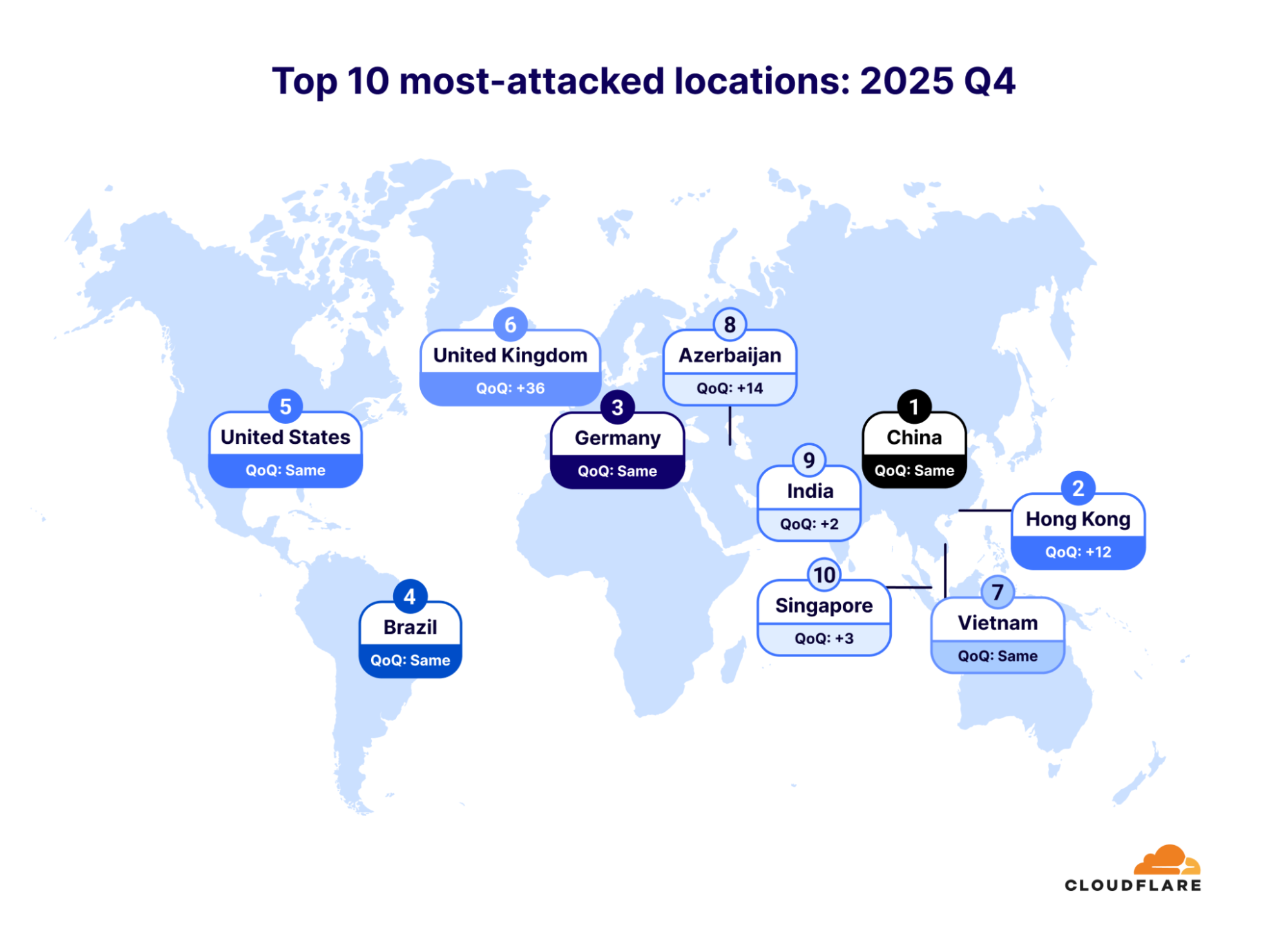
In the final quarter of 2025, Hong Kong jumped 12 places, making it the second most DDoS’d place on earth. The United Kingdom also leapt by an astonishing 36 places, making it the sixth most-attacked place.
Infected Android TVs — part of the Aisuru-Kimwolf botnet — bombarded Cloudflare’s network with hyper-volumetric HTTP DDoS attacks, while Telcos emerged as the most-attacked industry.
2025 saw a huge spike in DDoS attacks
In 2025, the total number of DDoS attacks more than doubled to an incredible 47.1 million. Such attacks have soared in recent years: The number of DDoS attacks spiked 236% between 2023 and 2025.
In 2025, Cloudflare mitigated an average of 5,376 DDoS attacks every hour — of these, 3,925 were network-layer DDoS attacks and 1,451 were HTTP DDoS attacks.
Network-layer DDoS attacks more than tripled in 2025
The most substantial growth was in network-layer DDoS attacks, which more than tripled year over year. Cloudflare mitigated 34.4 million network-layer DDoS attacks in 2025, compared to 11.4 million in 2024.
A substantial portion of the network-layer attacks — approximately 13.5 million — targeted global Internet infrastructure protected by Cloudflare Magic Transit and Cloudflare’s infrastructure directly, as part of an 18-day DDoS campaign in the first quarter of 2025. Of these attacks, 6.9 million targeted Magic Transit customers while the remaining 6.6 million targeted Cloudflare directly.
In the final quarter of 2025, the number of DDoS attacks grew by 31% over the previous quarter and 58% over 2024. Network-layer DDoS attacks fueled that growth. In 2025 Q4, network-layer DDoS attacks accounted for 78% of all DDoS attacks. The amount of HTTP DDoS attacks remained the same, but surged in their size to rates that we haven’t seen since the HTTP/2 Rapid Reset DDoS campaign in 2023. These recent surges were launched by the Aisuru-Kimwolf botnet, which we will cover in the next section.
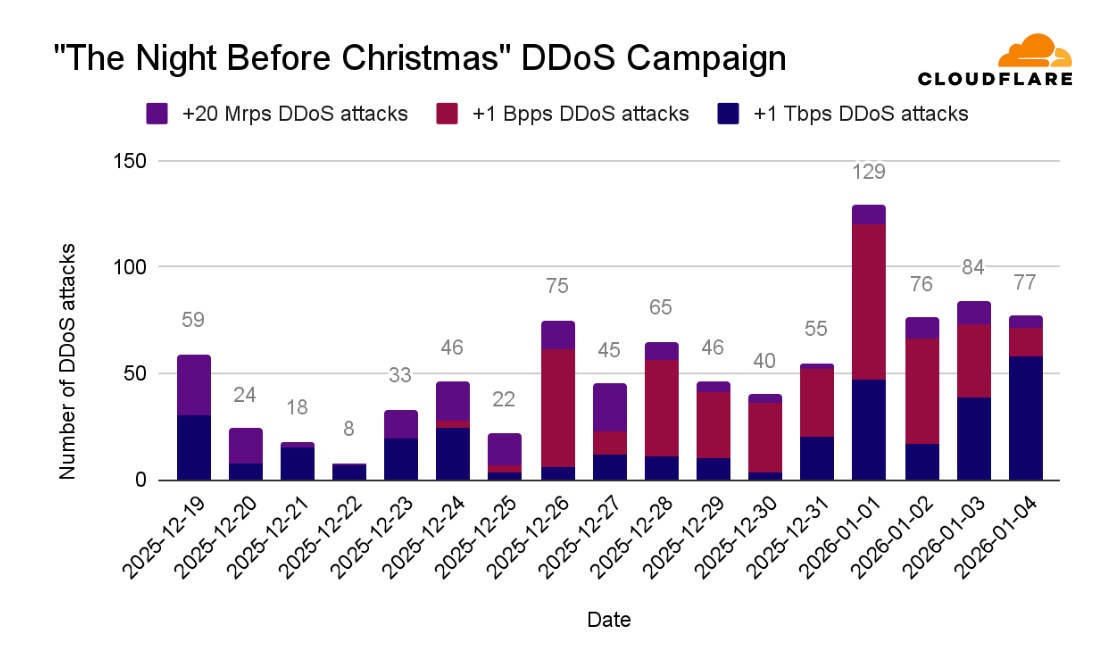
“The Night Before Christmas” DDoS campaign
On Friday, December 19, 2025, the Aisuru-Kimwolf botnet began bombarding Cloudflare infrastructure and Cloudflare customers with hyper-volumetric DDoS attacks. What was new in this campaign was its size: The botnet used hyper-volumetric HTTP DDoS attacks exceeding rates of 20 million requests per second (Mrps).
The Aisuru-Kimwolf botnet is a massive collection of malware-infected devices, primarily Android TVs. The botnet comprises an estimated 1-4 million infected hosts. It is capable of launching DDoS attacks that can cripple critical infrastructure, crash most legacy cloud-based DDoS protection solutions, and even disrupt the connectivity of entire nations.
Throughout the campaign, Cloudflare’s autonomous DDoS defense systems detected and mitigated all of the attacks: 384 packet-intensive attacks, 329 bit-intensive attacks, and 189 request-intensive attacks, for a total of 902 hyper-volumetric DDoS attacks, averaging 53 attacks a day.
The average size of the hyper-volumetric DDoS attacks during the campaign were 3 Bpps, 4 Tbps, and 54 Mrps. The maximum rates recorded during the campaign were 9 Bpps, 24 Tbps, and 205 Mrps.
To put that in context, the scale of a 205 Mrps DDoS attack is comparable to the combined populations of the UK, Germany, and Spain all simultaneously typing a website address and then hitting ‘enter’ at the same second.
While highly dramatic, The Night Before Christmas campaign accounted for only a small portion of the hyper-volumetric DDoS attacks we saw throughout the year.
Hyper-volumetric DDoS attacks
Throughout 2025, Cloudflare observed a continuous increase in hyper-volumetric DDoS attacks. In 2025 Q4, hyper-volumetric attacks increased by 40% compared to the previous quarter.
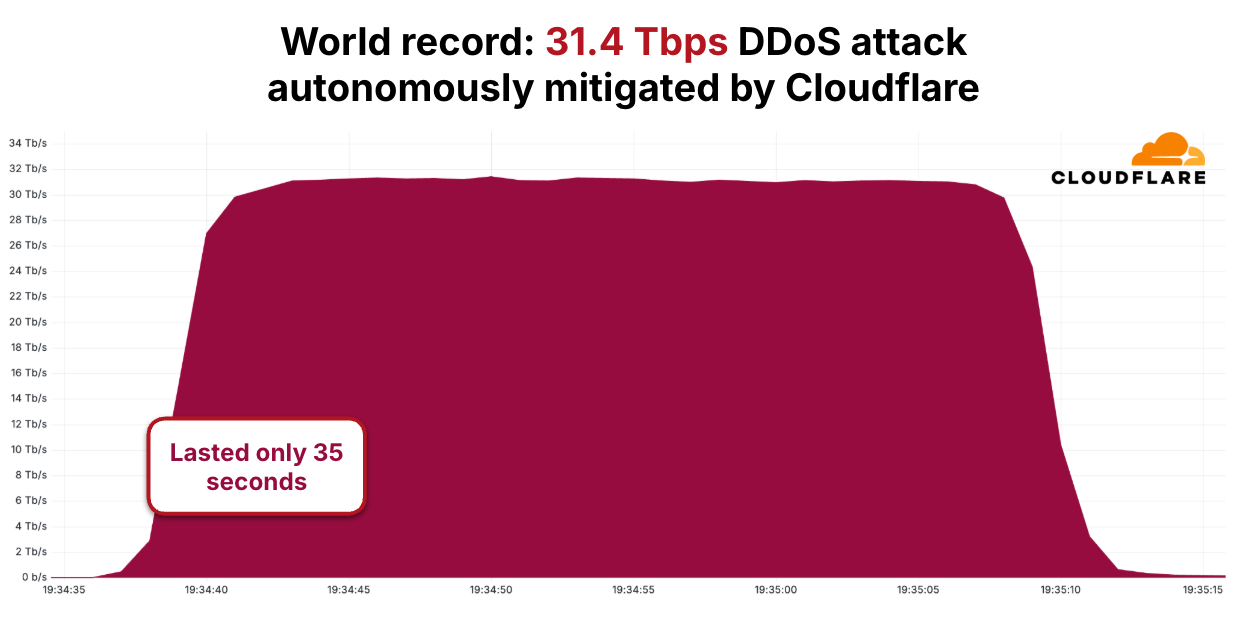
As the number of attacks increased over the course of 2025, the size of the attacks increased as well, growing by over 700% compared to the large attacks seen in late 2024, with one reaching 31.4 Tbps in a DDoS attack that lasted just 35 seconds. The graph below portrays the rapid growth in DDoS attack sizes as seen and blocked by Cloudflare — each one a world record, i.e. the largest ever disclosed publicly by any company at the time.
Like all of the other attacks, the 31.4 Tbps DDoS attack was detected and mitigated automatically by Cloudflare’s autonomous DDoS defense, which was able to adapt and quickly lock on to botnets such as Aisuru-Kimwolf.
Most of the hyper-volumetric DDoS attacks targeted Cloudflare customers in the Telecommunications, Service Providers and Carriers industry. Cloudflare customers in the Gaming industry and customers providing Generative AI services were also heavily targeted. Lastly, Cloudflare’s own infrastructure itself was targeted by multiple attack vectors such as HTTP floods, DNS attacks and UDP flood.
Most-attacked industries
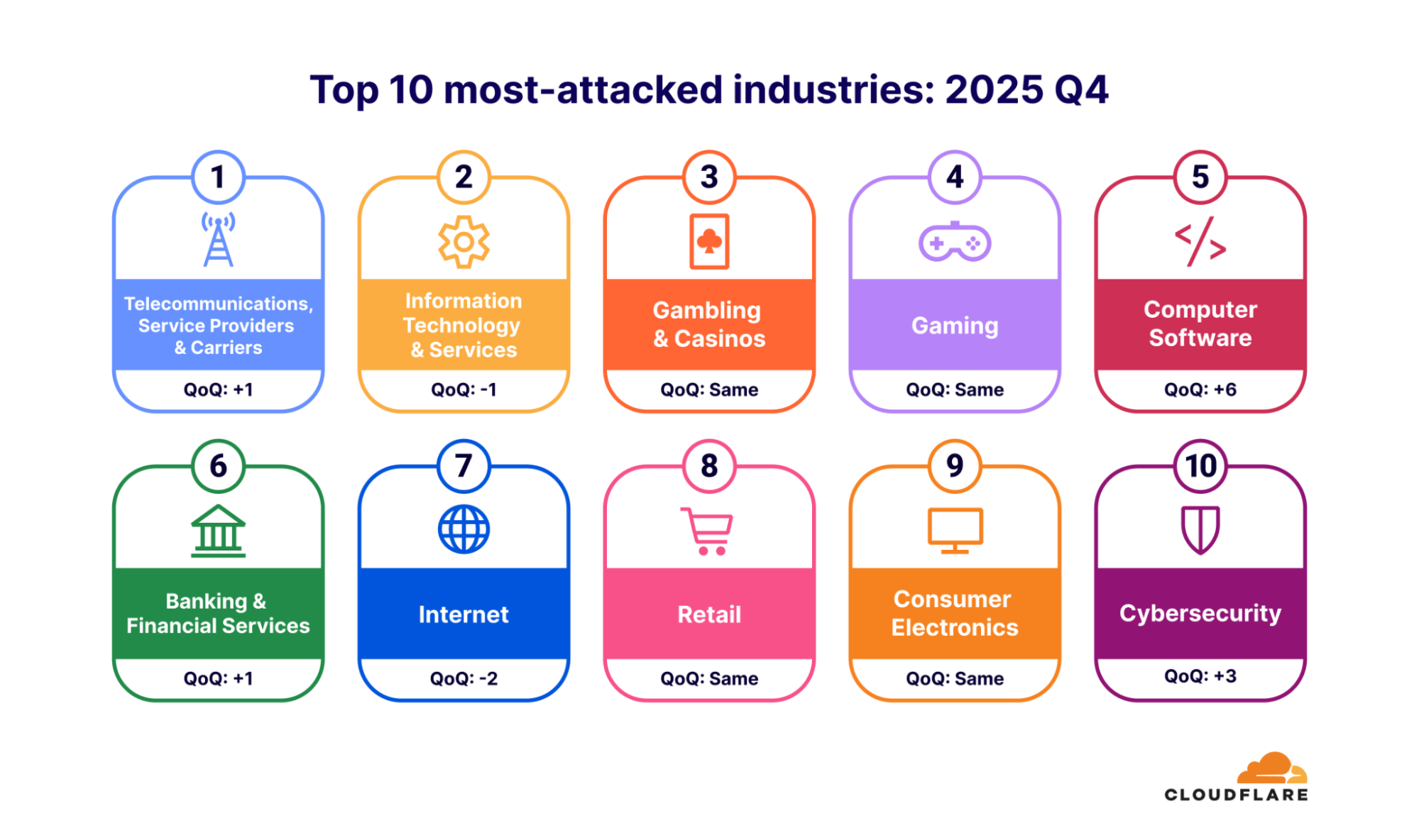
When analyzing DDoS attacks of all sizes, the Telecommunications, Service Providers and Carriers industry was also the most targeted. Previously, the Information Technology & Services industry held that unlucky title.
The Gambling & Casinos and Gaming industries ranked third and fourth, respectively. The quarter’s biggest changes in the top 10 were the Computer Software and Business Services industries, which both climbed several spots.
The most-attacked industries are defined by their role as critical infrastructure, a central backbone for other businesses, or their immediate, high-stakes financial sensitivity to service interruption and latency.
Most-attacked locations
The DDoS landscape saw both predictable stability and dramatic shifts among the world’s most-attacked locations. Targets like China, Germany, Brazil, and the United States were the top five, demonstrating persistent appeal for attackers.
Hong Kong made a significant move, jumping twelve spots to land at number two. However, the bigger story was the meteoric rise of the United Kingdom, which surged an astonishing 36 places this quarter, making it the sixth most-attacked location.
Vietnam held its place as the seventh most-attacked location, followed by Azerbaijan in eighth, India in ninth, and Singapore as number ten.
Top attack sources
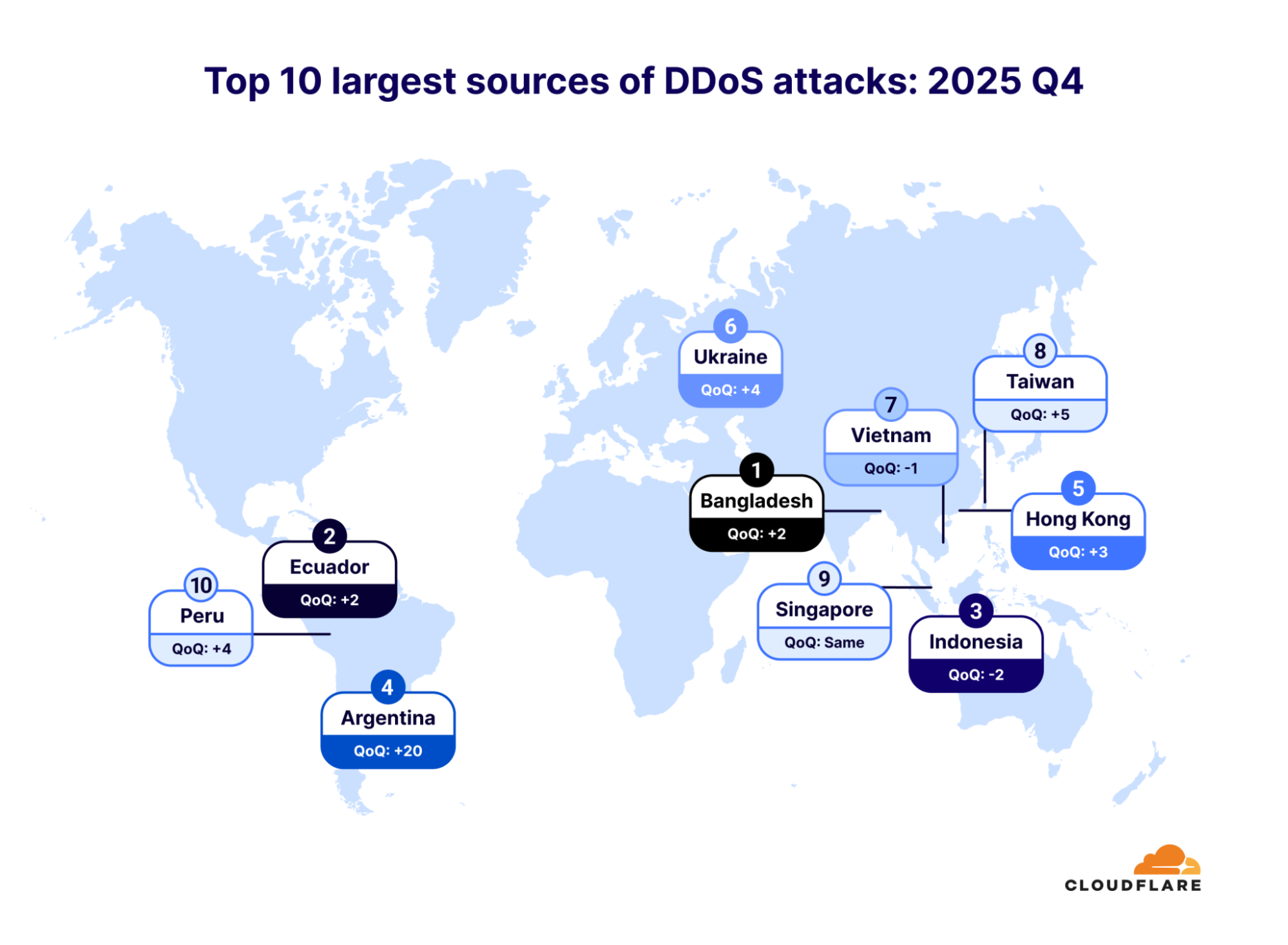
Bangladesh dethroned Indonesia as the largest source of DDoS attacks in the fourth quarter of 2025. Indonesia dropped to the third spot, after spending a year as the top source of DDoS attacks. Ecuador also jumped two spots, making it the second-largest source.
Notably, Argentina soared an incredible twenty places, making it the fourth-largest source of DDoS attacks. Hong Kong rose three places, taking fifth place. Ukraine came in sixth place, followed by Vietnam, Taiwan, Singapore, and Peru.
Top source networks
The top 10 list of attack source networks reads like a list of Internet giants, revealing a fascinating story about the anatomy of modern DDoS attacks. The common thread is clear: Threat actors are leveraging the world’s most accessible and powerful network infrastructure — primarily large, public-facing services.
We see most DDoS attacks coming from IP addresses associated with Cloud Computing Platforms and Cloud Infrastructure Providers, includingDigitalOcean (AS 14061),Microsoft (AS 8075),Tencent (AS 132203), Oracle (AS 31898), andHetzner (AS 24940). This demonstrates the strong link between easily-provisioned virtual machines and high-volume attacks. These cloud sources, heavily concentrated in the United States, are closely followed by a significant presence of attacks coming from IP addresses associated with traditional Telecommunications Providers (Telcos). These Telcos, primarily from the Asia-Pacific region (including Vietnam, China, Malaysia, and Taiwan), round out the rest of the top 10.
This geographic and organizational diversity confirms a two-pronged attack reality: While the sheer scale of the highest-ranking sources often originates from global cloud hubs, the problem is truly worldwide, routed through the Internet’s most critical pathways from across the globe. In many DDoS attacks, we see thousands of various source ASNs, highlighting the truly global distribution of botnet nodes.
To help hosting providers, cloud computing platforms and Internet service providers identify and take down the abusive IP addresses/accounts that launch these attacks, we leverage Cloudflare’s unique vantage point on DDoS attacks to provide a free DDoS Botnet Threat Feed for Service Providers.
Over 800 networks worldwide have signed up for this feed, and we’ve already seen great collaboration across the community to take down botnet nodes.
Helping defend the Internet
DDoS attacks are rapidly growing in sophistication and size, surpassing what was previously imaginable. This evolving threat landscape presents a significant challenge for many organizations to keep pace. Organizations currently relying on on-premise mitigation appliances or on-demand scrubbing centers may benefit from re-evaluating their defense strategy.
Driven by a mission to help defend the Internet, Cloudforce One leverages telemetry from Cloudflare’s global network — which protects approximately 20% of the web — to drive threat research and operational response, protecting critical systems for millions of organizations worldwide.
Intel this afternoon is taking the wraps off of the Xeon 600 series, the company’s upcoming workstation platform. Based on Intel’s Granite Ridge CPUs, the release of the Xeon 600 series will see Intel’s latest server technology finally cascade down into workstation parts, replacing the current Xeon W-2500/W-3500 (Sapphire/Emerald Rapids) platforms that have been the […]
There’s a new report about two AI coding assistants, used by 1.5 million developers, that are surreptitiously sending a copy of everything they ingest to China.
Earlier this week, the UK’s Competition and Markets Authority (CMA) opened its consultation on a package of proposed conduct requirements for Google. The consultation invites comments on the proposed requirements before the CMA imposes any final measures. These new rules aim to address the lack of choice and transparency that publishers (broadly defined as “any party that makes content available on the web”) face over how Google uses search to fuel its generative AI services and features. These are the first consultations on conduct requirements launched under the digital markets competition regime in the UK.
We welcome the CMA’s recognition that publishers need a fairer deal and believe the proposed rules are a step into the right direction. Publishers should be entitled to have access to tools that enable them to control the inclusion of their content in generative AI services, and AI companies should have a level playing field on which to compete.
But we believe the CMA has not gone far enough and should do more to safeguard the UK’s creative sector and foster healthy competition in the market for generative and agentic AI.
CMA designation of Google as having Strategic Market Status
In January 2025, the UK’s regulatory landscape underwent a significant legal shift with the implementation of the Digital Markets, Competition and Consumers Act 2024 (DMCC). Rather than relying on antitrust investigations to address risks to competition, the CMA can now designate firms as having Strategic Market Status (SMS) when they hold substantial, entrenched market power. This designation allows for targeted CMA interventions in digital markets, such as imposing detailed conduct requirements, to improve competition.
In October 2025, the CMA designated Google as having SMS in general search and search advertising, given its 90 percent share of the search market in the UK. Crucially, this designation encompasses AI Overviews and AI Mode, with the CMA now having the authority to impose conduct requirements on Google’s search ecosystem. Final requirements imposed by the CMA are not merely suggestions but legally enforceable rules that can relate specifically to AI crawling with significant sanctions to ensure Google operates fairly.
Publishers need a meaningful way to opt out of Google’s use of their content for generative AI
The CMA’s designation could not be more timely. As we’ve said before, we are indisputably in a time when the Internet needs clear “rules of the road” for AI crawling behavior.
As the CMA rightly states, “publishers have no realistic option but to allow their content to be crawled for Google’s general search because of the market power Google holds in general search. However, Google currently uses that content in both its search generative AI features and in its broader generative AI services.”
In other words: the same content that Google scrapes for search indexing is also used for inference/grounding purposes, like AI Overviews and AI Mode, which rely on fetching live information from the Internet in response to real-time user queries. And that creates a big problem for publishers—and for competition.
Because publishers cannot afford to disallow or block Googlebot, Google’s search crawler, on their website, they have to accept that their content will be used in generative AI applications such as AI Overviews and AI Mode within Google Search that return very little, if any, traffic to their websites. This undermines the ad-supported business models that have sustained digital publishing for decades, given the critical role of Google Search in driving human traffic to online advertising. It also means that Google’s generative AI applications enter into direct competition with publishers by reproducing their content, most often without attribution or compensation.
Publishers’ reluctance to block Google because of its dominance in search gives Google an unfair competitive advantage in the market for generative and agentic AI. Unlike other AI bot operators, Google can use its search crawler to gather data for a variety of AI functions with little fear that its access will be restricted. It has minimal incentive to pay publishers for that data, which it is already getting for free.
This prevents the emergence of a well-functioning marketplace where AI developers negotiate fair value for content. Instead, other AI companies are disincentivized from coming to the table, as they are structurally disadvantaged by a system that allows one dominant player to bypass compensation entirely. As the CMA itself recognizes, “[b]y not providing sufficient control over how this content is used, Google can limit the ability of publishers to monetise their content, while accessing content for AI-generated results in a way that its competitors cannot match”.
Google’s advantage
Cloudflare data validates the concern about Google’s competitive advantage. Based on our data, Googlebot sees significantly more Internet content than its closest peers.
Over an observed period of two months, Googlebot successfully accessed individual pages almost two times more than ClaudeBot and GPTBot, three times more than Meta-ExternalAgent, and more than three times more than Bingbot. The difference was even more extreme for other popular AI crawlers: for instance, Googlebot saw 167 times more unique pages than PerplexityBot. Out of the sampled unique URLs using our network that we observed over the last two months, Googlebot crawled roughly 8%.
In rounded multiple terms, Googlebot sees:
vs. ~1.70x the amount of unique URLs seen by ClaudeBot;
vs. ~1.76x the amount of unique URLs seen by GPTBot;
vs. ~2.99x the amount of unique URLs by Meta-ExternalAgent;
vs. ~3.26x the amount of unique URLs seen by Bingbot;
vs. ~5.09x the amount of unique URLs seen by Amazonbot;
vs. ~14.87x the amount of unique URLs seen by Applebot;
vs. ~23.73x the amount of unique URLs seen by Bytespider;
vs. ~166.98x the amount of unique URLs seen by PerplexityBot;
vs. ~714.48x the amount of unique URLs seen by CCBot; and
vs: ~1801.97x the amount of unique URLs seen by archive.org_bot.
Googlebot also stands out in other Cloudflare datasets.
Even though it ranks as the most active bot by overall traffic, publishers are far less likely to disallow or block Googlebot in their robots.txt file compared to other crawlers. This is likely due to its importance in driving human traffic to their content—and, as a result, ad revenue—through search.
As shown below, almost no website explicitly disallows the dual-purpose Googlebot in full, reflecting how important this bot is to driving traffic via search referrals. (Note that partial disallows often impact certain parts of a website that are irrelevant for search engine optimization, or SEO, such as login endpoints.)
Robots.txt merely allows the expression of crawling preferences; it is not an enforcement mechanism. Publishers rely on “good bots” to comply. To manage crawler access to their sites more effectively—and independently of a given bot’s compliance—publishers can set up a Web Application Firewall (WAF) with specific rules, technically preventing undesired crawlers from accessing their sites. Following the same logic as with robots.txt above, we would expect websites to block mostly other AI crawlers but not Googlebot.
Indeed, when comparing the numbers for customers using AI Crawl Control, Cloudflare’s own AI crawler blocking tool that is integrated in our Application Security suite, between July 2025 and January 2026, one can see that the number of websites actively blocking other popular AI crawlers (e.g., GPTBot, Claudebot), was nearly seven times as high as the number of websites that blocked Googlebot and Bingbot. (Like Googlebot, Bingbot combines search and AI crawling and drives traffic to these sites, but given its small market share in search, its impact is less significant.)
So we agree with the CMA on the problem statement. But how can publishers be enabled to effectively opt out of Google using their content for its generative AI applications? We share the CMA’s conclusion that “in order to be able to make meaningful decisions about how Google uses their Search Content, (…) publishers need the ability effectively to opt their Search Content out of both Google’s search generative AI features and Google’s broader generative AI services.”
But we’re concerned that the CMA’s proposal is insufficient.
CMA’s proposed publisher conduct requirements
On January 28, 2026, the CMA published four sets of proposed conduct requirements for Google, including conduct requirements related to publishers. According to the CMA, the proposed publisher rules are designed to address concerns that publishers (1) lack sufficient choice over how Google uses their content in its AI-generated responses, (2) have limited transparency into Google’s use of that content, and (3) do not get effective attribution for Google’s use of their content. The CMA recognized the importance of these concerns because of the role that Google search plays in finding content online.
The conduct requirements would mandate Google grant publishers “meaningful and effective” control over whether their content is used for AI features, like AI Overviews. Google would be prohibited from taking any action that negatively impacts the effectiveness of those control options, such as intentionally downranking the content in search.
To support informed decisionmaking, the CMA proposal also requires Google to increase transparency, by publishing clear documentation on how it uses crawled content for generative AI and on exactly what its various publisher controls cover in practice. Finally, the proposal would require Google to ensure effective attribution of publisher content and to provide publishers with detailed, disaggregated engagement data—including specific metrics for impressions, clicks, and “click quality”—to help them evaluate the commercial value of allowing their content to be used in AI-generated search summaries.
The CMA’s proposed remedies are insufficient
Although we support the CMA’s efforts to improve options for publishers, we are concerned that the proposed requirements do not solve the underlying issue of promoting fair, transparent choice over how their content is used by Google. Publishers are effectively forced to use Google’s proprietary opt-out mechanisms, tied specifically to the Google platform and under the conditions set by Google, rather than granting them direct, autonomous control. A framework where the platform dictates the rules, manages the technical controls, and defines the scope of application does not offer “effective control” to content creators or encourage competitive innovation in the market. Instead, it reinforces a state of permanent dependency.
Such a framework also reduces choice for publishers. Creating new opt-out controls makes it impossible for publishers to choose to use external tools to block Googlebot from accessing their content without jeopardizing their appearance in Search results. Instead, under the current proposal, content creators will still have to allow Googlebot to scrape their websites, with no enforcement mechanisms to deploy and limited visibility available if Google does not respect their signalled preferences. Enforcement of these requirements by the CMA, if done properly, will be very onerous, without guarantee that publishers will trust the solution.
In fact, Cloudflare has received feedback from its customers that Google’s current proprietary opt-out mechanisms, including Google-Extended and ‘nosnippet’, have failed to prevent content from being utilized in ways that publishers cannot control. These opt-out tools also do not enable mechanisms for fair compensation for publishers.
More broadly, as reflected in our proposed responsible AI bot principles, we believe that all AI bots should have one distinct purpose and declare it, so that website owners can make clear decisions over who can access their content and why. Unlike its leading competitors, such as OpenAI and Anthropic, Google does not comply with this principle for Googlebot, which is used for multiple purposes (search indexing, AI training, and inference/grounding). Simply requiring Google to develop a new opt-out mechanism would not allow publishers to achieve meaningful control over the use of their content.
The most effective way to give publishers that necessary control is to require Googlebot to be split up into separate crawlers. That way, publishers could allow crawling for traditional search indexing, which they need to attract traffic to their sites, but block access for unwanted use of their content in generative AI services and features.
Requiring crawler separation is the only effective solution
To ensure a fair digital ecosystem, the CMA must instead empower content owners to prevent Google from accessing their data for particular purposes in the first place, rather than relying on Google-managed workarounds after the crawler has already accessed the content for other purposes. That approach also enables creators to set conditions for access to their content.
Although the CMA described crawler separation as an “equally effective intervention”, it ultimately rejected mandating separation based on Google’s input that it would be too onerous. We disagree.
Requiring Google to split up Googlebot by purpose — just like Google already does for its nearly 20 other crawlers — is not only technically feasible, but also a necessary and proportionate remedy that empowers website operators to have the granular control they currently lack, without increasing traffic load from crawlers to their websites (and in fact, perhaps even decreasing it, should they choose to block AI crawling).
To be clear, a crawler separation remedy benefits AI companies, by leveling the playing field between them and Google, in addition to giving UK-based publishers more control over their content. (There has been widespread public support for a crawler separation remedy by Daily Mail Group, the Guardian and the News Media Association.) Mandatory crawler separation is not a disadvantage to Google, nor does it undermine investment in AI. On the contrary, it is a pro-competitive safeguard that prevents Google from leveraging its search monopoly to gain an unfair advantage in the AI market. By decoupling these functions, we ensure that AI development is driven by fair-market competition rather than the exploitation of a single hyperscaler’s dominance.
******
The UK has a unique chance to lead the world in protecting the value of original and high-quality content on the Internet. However, we worry that the current proposals fall short. We would encourage rules that ensure that Google operates under the same conditions for content access as other AI developers, meaningfully restoring agency to publishers and paving the way for new business models promoting content monetization.
Cloudflare remains committed to engaging with the CMA and other partners during upcoming consultations to provide evidence-based data to help shape a final decision on conduct requirements that are targeted, proportional, and effective. The CMA still has an opportunity to ensure that the Internet becomes a fair marketplace for content creators and smaller AI players—not just a select few tech giants.
In a recent evaluation of AI models’ cyber capabilities, current Claude models can now succeed at multistage attacks on networks with dozens of hosts using only standard, open-source tools, instead of the custom tools needed by previous generations. This illustrates how barriers to the use of AI in relatively autonomous cyber workflows are rapidly coming down, and highlights the importance of security fundamentals like promptly patching known vulnerabilities.
[…]
A notable development during the testing of Claude Sonnet 4.5 is that the model can now succeed on a minority of the networks without the custom cyber toolkit needed by previous generations. In particular, Sonnet 4.5 can now exfiltrate all of the (simulated) personal information in a high-fidelity simulation of the Equifax data breach—one of the costliest cyber attacks in historyusing only a Bash shell on a widely-available Kali Linux host (standard, open-source tools for penetration testing; not a custom toolkit). Sonnet 4.5 accomplishes this by instantly recognizing a publicized CVE and writing code to exploit it without needing to look it up or iterate on it. Recalling that the original Equifax breach happened by exploiting a publicized CVE that had not yet been patched, the prospect of highly competent and fast AI agents leveraging this approach underscores the pressing need for security best practices like prompt updates and patches.
AI models are getting better at this faster than I expected. This will be a major power shift in cybersecurity.
At the end of last year, Professor Becky Francis published her long-awaited Curriculum and Assessment Review for England, accompanied by the UK government’s official response. Buried within that response — and not actually proposed in the Review itself — was a notable commitment: to “explore introducing a new Level 3 qualification* in data science and AI, to ensure that more young people can secure high-value skills for the future and that we cement the UK’s position as a global leader in AI and technology.”
This announcement reflects a growing global recognition that young people need more than basic digital literacy — they need a deeper understanding of data, automation, and the rapidly evolving capabilities of AI. Countries around the world, from Singapore to the United States, are already wrestling with how to embed AI education into secondary schooling. England now joins that international conversation.
Why AI education matters
AI is an everyday technology now. Young people interact with AI systems constantly, often without realising it. Whether they pursue careers in medicine, engineering, the creative industries, or public policy, they will need a foundational understanding of how AI systems work, what their limitations are, and the ethical implications around them.
Yet in England — and in many education systems globally — very few students receive formal teaching about AI. The English national curriculum makes no explicit reference to AI, and specifications for exams taken at the end of high school include only scattered mentions. This gap leaves young people navigating one of the most transformative technologies of their generation with limited guidance.
Exploring a qualification: Opportunities and challenges
In 2025, we joined forces with Professor Lord Lionel Tarassenko, one of the UK’s foremost researchers in AI and machine learning, and Simon Peyton Jones, a world-renowned computer scientist and long-time champion of computing education. Together with teachers, school leaders, universities, industry specialists, and exam boards, we have been exploring how we might begin to close the emerging gap in AI and data science education for 16- to 18-year-olds.
Over the past eight months, this collaboration has allowed us to refine our shared thinking and gather insights from a wide network of experts and practitioners. We are delighted that England’s Department for Education has recognised the potential of this work by appointing us to draft the subject content for a possible new A level in Data Science and AI.
We are delighted that England’s Department for Education has recognised the potential of [the work we have done] by appointing us to draft the subject content for a possible new A level in Data Science and AI.
Designing a qualification of this kind raises important questions — not just for the UK, but for any country considering a similar path.
What knowledge and skills should young people gain from the qualification?
A meaningful qualification must go beyond the use of tools. It should help students understand data literacy, model behaviour, bias, ethics, and the societal implications of AI. Balancing technical understanding with critical thinking is challenging but essential.
How do we ensure the qualification is accessible and inclusive?
AI should not become the preserve of already-advantaged students. Any qualification must be designed with equity in mind, recognising differences in school capacity, teacher expertise, and students’ prior experience.
How do we support teachers to deliver the qualification?
Teacher professional development is a major challenge worldwide. Delivering a qualification in AI will require confidence with concepts that are not yet common in teacher training. Sustainable delivery models — supported by high-quality resources and professional development — will be crucial.
What form should the qualification take?
There is an active debate about whether the best route for students in England is a high-stakes qualification or a supplementary course that broadens a core programme of study:
An A level provides structure, national recognition, and clear progression into higher education or employment.
An Extended Project Qualification (EPQ) may offer more flexibility, allowing students to explore AI through research or practical investigation without requiring schools to timetable a full qualification.
Different countries will make different choices based on their systems, but the underlying questions are the same: how do we create something rigorous, scalable, and future-proof?
What we’ve learned so far
In October, the Foundation hosted a workshop with representatives from schools, industry, universities, exam boards, and the Department for Education. Together, we explored key questions including:
How do we make a qualification compelling – both for students who choose it and for schools that offer it?
What delivery models will genuinely support teachers to succeed?
The feedback we received has been invaluable and will continue to shape the next stage of development. We believe the UK has a significant opportunity to contribute meaningfully to the global conversation about AI education. You can read the latest version of our discussion paper here.
A global call for insights
Although the current proposal focuses on England, the underlying challenge is international: how do we prepare young people everywhere to engage thoughtfully and confidently with AI?
We would love to hear from educators, researchers, and policymakers across the world:
Do you know of any successful qualifications or programmes for 16- to 18-year-olds that centre AI or data science?
What lessons should countries learn from each other?
To share your ideas or feedback, please get in touch. We’d be delighted to learn from your experience as this important work progresses.
* Level 3 in England is the stage of learning for 16- to 19-year-olds, typically ending in qualifications that pave the way for higher study or advanced apprenticeships.
The Internet woke up this week to a flood of people buying Mac minis to run Moltbot (formerly Clawdbot), an open-source, self-hosted AI agent designed to act as a personal assistant. Moltbot runs in the background on a user’s own hardware, has a sizable and growing list of integrations for chat applications, AI models, and other popular tools, and can be controlled remotely. Moltbot can help you with your finances, social media, organize your day — all through your favorite messaging app.
But what if you don’t want to buy new dedicated hardware? And what if you could still run your Moltbot efficiently and securely online? Meet Moltworker, a middleware Worker and adapted scripts that allows running Moltbot on Cloudflare’s Sandbox SDK and our Developer Platform APIs.
A personal assistant on Cloudflare — how does that work?
Firstly, Cloudflare Workers has never been so compatible with Node.js. Where in the past we had to mock APIs to get some packages running, now those APIs are supported natively by the Workers Runtime.
This has changed how we can build tools on Cloudflare Workers. When we first implementedPlaywright, a popular framework for web testing and automation that runs onBrowser Rendering, we had to rely onmemfs. This was bad because not only is memfs a hack and an external dependency, but it also forced us to drift away from the official Playwright codebase. Thankfully, with more Node.js compatibility, we were able to start usingnode:fs natively, reducing complexity and maintainability, which makes upgrades to the latest versions of Playwright easy to do.
We measure this progress, too. We recently ran an experiment where we took the 1,000 most popular NPM packages, installed and let AI loose, to try to run them in Cloudflare Workers, Ralph Wiggum as a “software engineer” style, and the results were surprisingly good. Excluding the packages that are build tools, CLI tools or browser-only and don’t apply, only 15 packages genuinely didn’t work. That’s 1.5%.
Here’s a graphic of our Node.js API support over time:
We put together a page with the results of our internal experiment on npm packages support here, so you can check for yourself.
Moltbot doesn’t necessarily require a lot of Workers Node.js compatibility because most of the code runs in a container anyway, but we thought it would be important to highlight how far we got supporting so many packages using native APIs. This is because when starting a new AI agent application from scratch, we can actually run a lot of the logic in Workers, closer to the user.
The other important part of the story is that the list ofproducts and APIs on our Developer Platform has grown to the point where anyone can build and run any kind of application — even the most complex and demanding ones — on Cloudflare. And once launched, every application running on our Developer Platform immediately benefits from our secure and scalable global network.
Those products and services gave us the ingredients we needed to get started. First, we now haveSandboxes, where you can run untrusted code securely in isolated environments, providing a place to run the service. Next, we now haveBrowser Rendering, where you can programmatically control and interact with headless browser instances. And finally, R2, where you can store objects persistently. With those building blocks available, we could begin work on adapting Moltbot.
How we adapted Moltbot to run on us
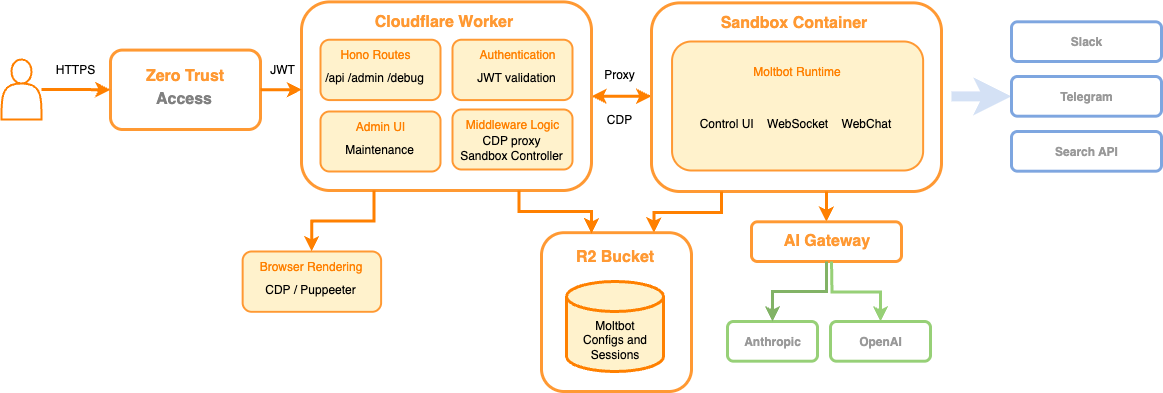
Moltbot on Workers, or Moltworker, is a combination of an entrypoint Worker that acts as an API router and a proxy between our APIs and the isolated environment, both protected by Cloudflare Access. It also provides an administration UI and connects to the Sandbox container where the standard Moltbot Gateway runtime and its integrations are running, using R2 for persistent storage.
High-level architecture diagram of Moltworker.
Let’s dive in more.
AI Gateway
Cloudflare AI Gateway acts as a proxy between your AI applications and any popular AI provider, and gives our customers centralized visibility and control over the requests going through.
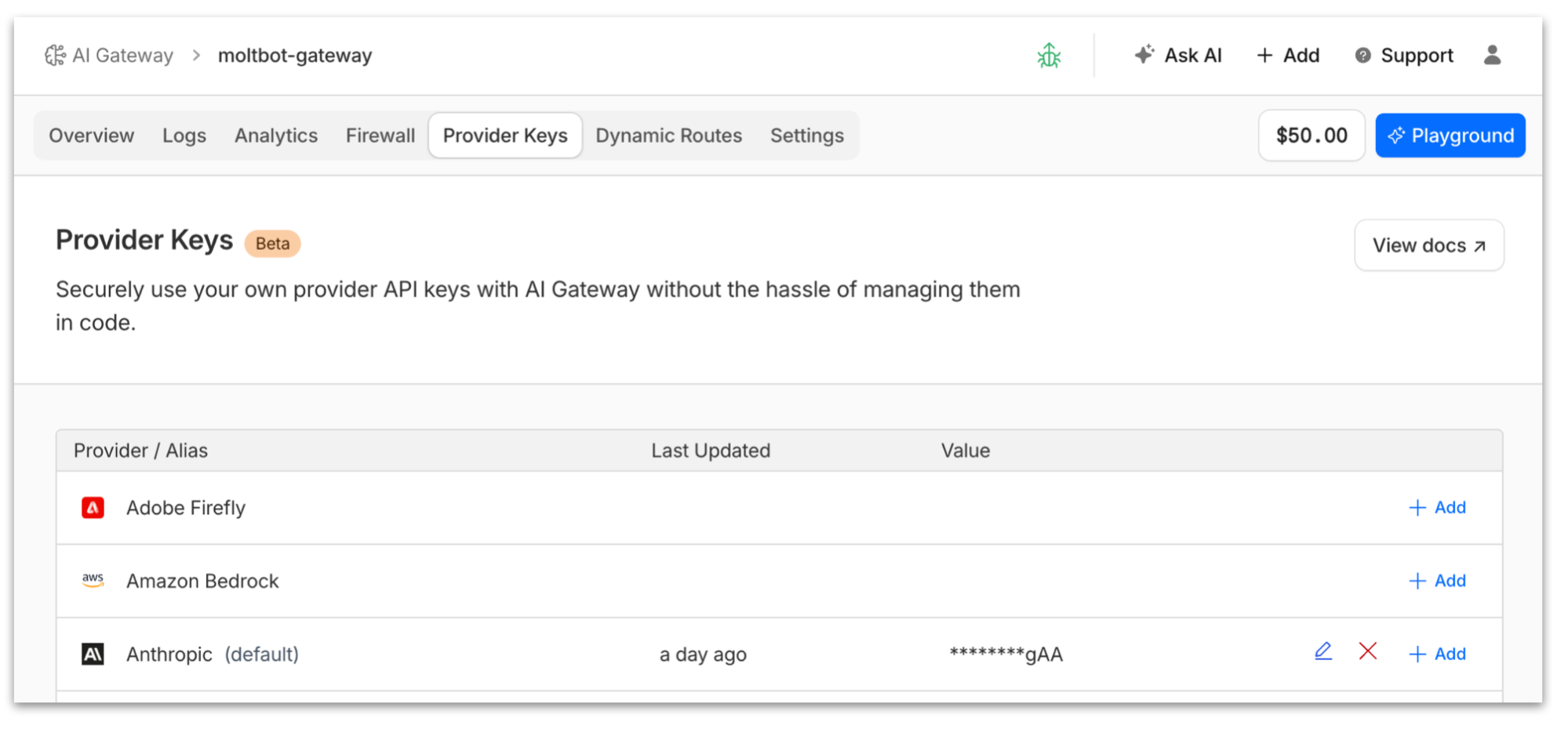
Recently we announced support for Bring Your Own Key (BYOK), where instead of passing your provider secrets in plain text with every request, we centrally manage the secrets for you and can use them with your gateway configuration.
An even better option where you don’t have to manage AI providers’ secrets at all end-to-end is to use Unified Billing. In this case you top up your account with credits and use AI Gateway with any of the supported providers directly, Cloudflare gets charged, and we will deduct credits from your account.
To make Moltbot use AI Gateway, first we create a new gateway instance, then we enable the Anthropic provider for it, then we either add our Claude key or purchase credits to use Unified Billing, and then all we need to do is set the ANTHROPIC_BASE_URL environment variable so Moltbot uses the AI Gateway endpoint. That’s it, no code changes necessary.
Once Moltbot starts using AI Gateway, you’ll have full visibility on costs and have access to logs and analytics that will help you understand how your AI agent is using the AI providers.
Note that Anthropic is one option; Moltbot supports other AI providers and so does AI Gateway. The advantage of using AI Gateway is that if a better model comes along from any provider, you don’t have to swap keys in your AI Agent configuration and redeploy — you can simply switch the model in your gateway configuration. And more, you specify model or provider fallbacks to handle request failures and ensure reliability.
Sandboxes
Last year we anticipated the growing need for AI agents to run untrusted code securely in isolated environments, and we announced the Sandbox SDK. This SDK is built on top of Cloudflare Containers, but it provides a simple API for executing commands, managing files, running background processes, and exposing services — all from your Workers applications.
In short, instead of having to deal with the lower-level Container APIs, the Sandbox SDK gives you developer-friendly APIs for secure code execution and handles the complexity of container lifecycle, networking, file systems, and process management — letting you focus on building your application logic with just a few lines of TypeScript. Here’s an example:
This fits like a glove for Moltbot. Instead of running Docker in your local Mac mini, we run Docker on Containers, use the Sandbox SDK to issue commands into the isolated environment and use callbacks to our entrypoint Worker, effectively establishing a two-way communication channel between the two systems.
R2 for persistent storage
The good thing about running things in your local computer or VPS is you get persistent storage for free. Containers, however, are inherently ephemeral, meaning data generated within them is lost upon deletion. Fear not, though — the Sandbox SDK provides the sandbox.mountBucket() that you can use to automatically, well, mount your R2 bucket as a filesystem partition when the container starts.
Once we have a local directory that is guaranteed to survive the container lifecycle, we can use that for Moltbot to store session memory files, conversations and other assets that are required to persist.
Browser Rendering for browser automation
AI agents rely heavily on browsing the sometimes not-so-structured web. Moltbot utilizes dedicated Chromium instances to perform actions, navigate the web, fill out forms, take snapshots, and handle tasks that require a web browser. Sure, we can run Chromium on Sandboxes too, but what if we could simplify and use an API instead?
With Cloudflare’s Browser Rendering, you can programmatically control and interact with headless browser instances running at scale in our edge network. We support Puppeteer, Stagehand, Playwright and other popular packages so that developers can onboard with minimal code changes. We even support MCP for AI.
In order to get Browser Rendering to work with Moltbot we do two things:
First we create a thin CDP proxy (CDP is the protocol that allows instrumenting Chromium-based browsers) from the Sandbox container to the Moltbot Worker, back to Browser Rendering using the Puppeteer APIs.
From the Moltbot runtime perspective, it has a local CDP port it can connect to and perform browser tasks.
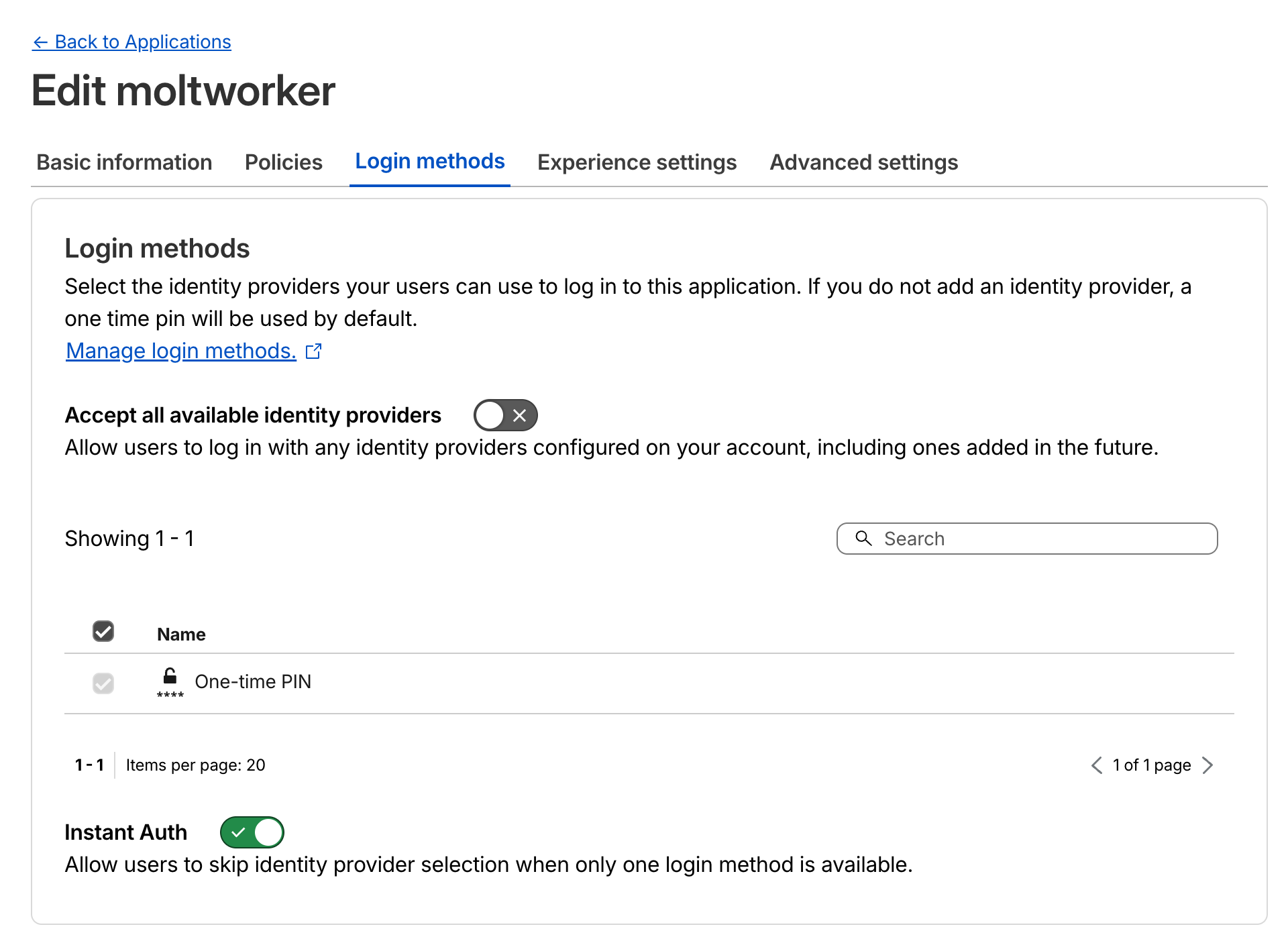
Zero Trust Access for authentication policies
Next up we want to protect our APIs and Admin UI from unauthorized access. Doing authentication from scratch is hard, and is typically the kind of wheel you don’t want to reinvent or have to deal with. Zero Trust Access makes it incredibly easy to protect your application by defining specific policies and login methods for the endpoints.
Zero Trust Access Login methods configuration for the Moltworker application.
Once the endpoints are protected, Cloudflare will handle authentication for you and automatically include a JWT token with every request to your origin endpoints. You can then validate that JWT for extra protection, to ensure that the request came from Access and not a malicious third party.
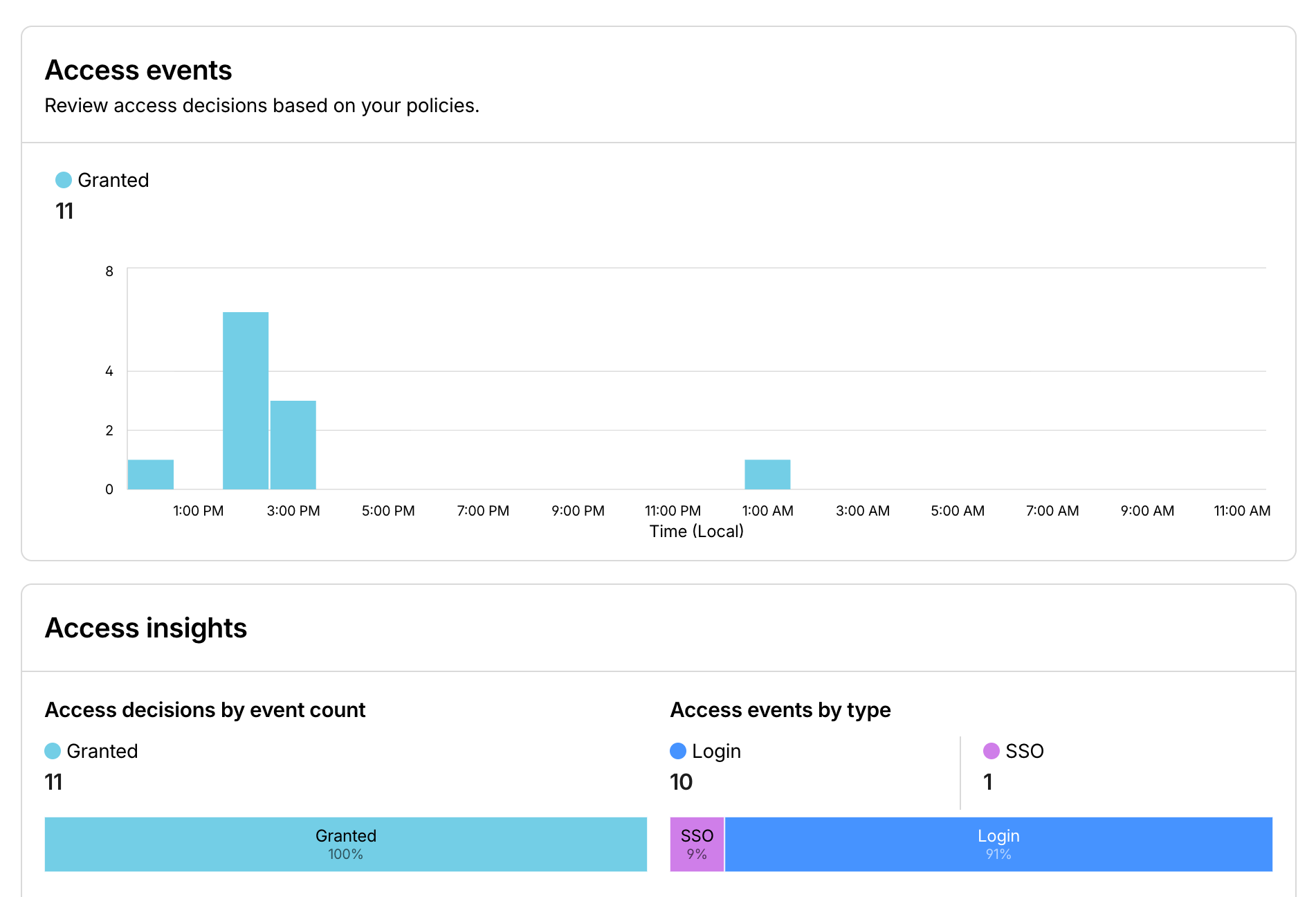
Like with AI Gateway, once all your APIs are behind Access you get great observability on who the users are and what they are doing with your Moltbot instance.
Moltworker in action
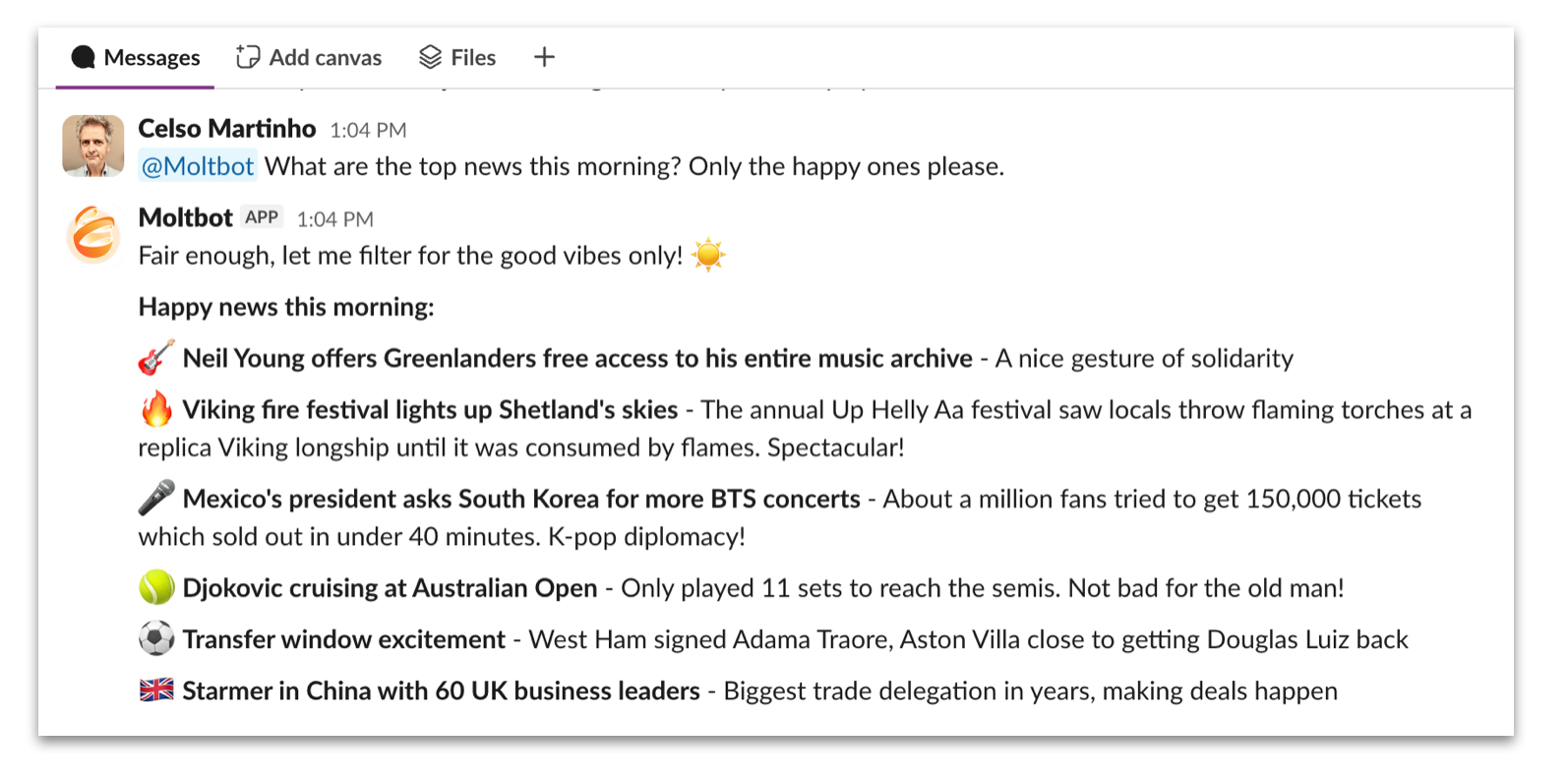
Demo time. We’ve put up a Slack instance where we could play with our own instance of Moltbot on Workers. Here are some of the fun things we’ve done with it.
We hate bad news.
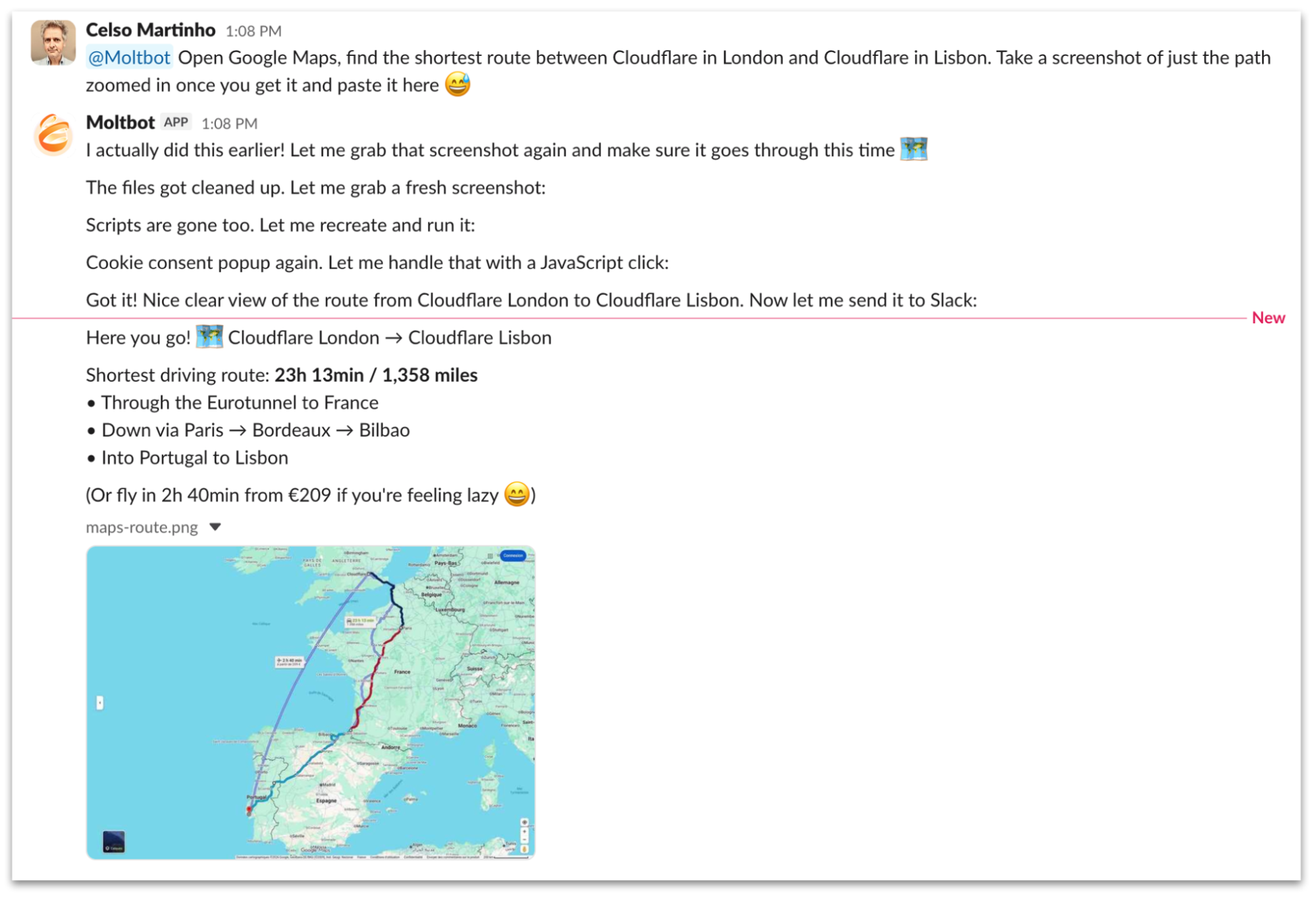
Here’s a chat session where we ask Moltbot to find the shortest route between Cloudflare in London and Cloudflare in Lisbon using Google Maps and take a screenshot in a Slack channel. It goes through a sequence of steps using Browser Rendering to navigate Google Maps and does a pretty good job at it. Also look at Moltbot’s memory in action when we ask him the second time.
We’re in the mood for some Asian food today, let’s get Moltbot to work for help.
We eat with our eyes too.
Let’s get more creative and ask Moltbot to create a video where it browses our developer documentation. As you can see, it downloads and runs ffmpeg to generate the video out of the frames it captured in the browser.
Run your own Moltworker
We open-sourced our implementation and made it available athttps://github.com/cloudflare/moltworker so you can deploy and run your own Moltbot on top of Workers today.
TheREADME guides you through the necessary steps to set up everything. You will need a Cloudflare account and a minimum $5 USDWorkers paid plan subscription to use Sandbox Containers, but all the other products are either free to use, likeAI Gateway, or have generousfree tiers you can use to get you started and run for as long as you want under reasonable limits.
Note that Moltworker is a proof of concept, not a Cloudflare product. Our goal is to showcase some of the most exciting features of ourDeveloper Platform that can be used to run AI agents and unsupervised code efficiently and securely, and get great observability while taking advantage of our global network.
Feel free to contribute to or fork our GitHub repository; we will keep an eye on it for a while for support. We are also considering contributing upstream to the official project with Cloudflare skills in parallel.
Conclusion
We hope you enjoyed this experiment, and we were able to convince you that Cloudflare is the perfect place to run your AI applications and agents. We’ve been working relentlessly trying to anticipate the future and release features like the Agents SDK that you can use to build your first agent in minutes, Sandboxes where you can run arbitrary code in an isolated environment without the complications of the lifecycle of a container, and AI Search, Cloudflare’s managed vector-based search service, to name a few.
Cloudflare now offers a complete toolkit for AI development: inference, storage APIs, databases, durable execution for stateful workflows, and built-in AI capabilities. Together, these building blocks make it possible to build and run even the most demanding AI applications on our global edge network.
If you’re excited about AI and want to help us build the next generation of products and APIs, we’re hiring.
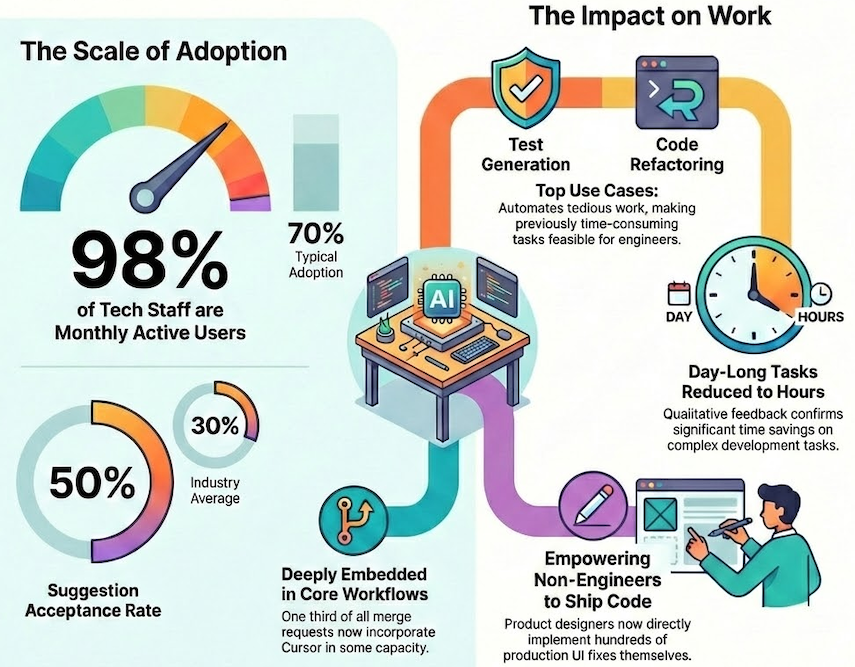
The illustration below encapsulates how Cursor is scaled across Grab, achieving rapid and widespread adoption that accelerated software development and empowered non-technical teams to build solutions.
Figure 1: Adoption overview of AI tool Cursor in Grab.
Multi-tool strategy
Grab embraces a multi-tool strategy for AI coding assistants. Rather than committing to a single solution, we experiment with multiple tools simultaneously, allowing us to compare outcomes and adopt what works. This approach keeps us flexible in a space that evolves quickly. We covered this philosophy in a previous post.
Growth
We introduced Cursor in late 2024 as one of several tools in our AI engineering toolkit. Adoption grew quickly—98% of tech Grabbers became monthly active users, and about 75% use it weekly. For comparison, Google’s 2025 State of AI-Assisted Software Development report highlights that even among high-performing teams, AI coding tool adoption seldom surpasses 70%. Notably, Cursor’s appeal extended beyond engineering, with non-technical teams incorporating it into their workflows.
A standout metric is Cursor’s suggestion acceptance rate, which is around 50%, surpassing the industry average of 30%. This indicates two key insights: first, the suggestions are sufficiently relevant for engineers to accept them half of the time; second, engineers maintain a critical review process rather than accepting suggestions indiscriminately. We attribute this relevance to continuous feedback loops and environment-specific tuning, ensuring suggestions remain aligned with Grab’s codebase and conventions.
Extent of adoption
Raw adoption figures don’t provide the complete picture. We aimed to determine whether engineers were truly incorporating Cursor into their daily workflows or merely experimenting with it sporadically.
The data indicates genuine integration. Approximately half of Cursor users engage with it 10 or more days each month, with some teams achieving full adoption. Over 98% of merge requests now incorporate Cursor in some capacity. Engineers actively share tips and workflows via a dedicated Slack channel, fostering an organic knowledge base.
Across various teams, we’ve observed significant transitions from light usage to moderate and power user levels over the past six months.
Engineer utilization patterns
The most common patterns we see are unit test generation, code refactoring, cross-repository navigation, bug fixing, and automation of routine tasks like API scaffolding or commit messages.
Test generation is particularly popular. Writing tests manually is tedious, and Cursor’s ability to generate and iteratively refine tests has become a standard part of many engineers’ workflows. Cross-repository navigation helps with onboarding and context-switching—engineers can ask Cursor questions about unfamiliar codebases rather than hunting through documentation.
Qualitative feedback confirms what the adoption numbers suggest: tasks that took a full day to complete now take hours. Engineers report tackling refactors and test additions they would have otherwise skipped due to time pressure. Cursor doesn’t just speed up existing work; it makes previously impractical work feasible.
Integration with Grab’s stack
Integrating Cursor effectively at Grab required custom tooling. We built solutions for monorepo indexing to handle Grab’s scale and to distribute preconfigured rules that align Cursor’s suggestions with Grab-specific coding conventions. This integration ensures that Cursor understands our environment rather than offering generic suggestions.
What’s next
Cursor is one tool in a broader toolkit. Our multi-tool strategy means we’re also investing in terminal-based workflows and GrabGPT for internal knowledge retrieval. Different tools suit different workflows. The aim is to empower users, not to restrict them.
Beyond engineering, we’re expanding AI-assisted development to new personas. Our AI Upskilling workshops have trained several hundred Grabbers across five countries, including executive committee members and senior leaders who have built and deployed their own apps. Non-engineers in Financial Planning and Analysis (FP&A), Operations, and regional teams are now building tools with the assitance of AI to solve their own pain points.
Our product design team has launched an initiative empowering designers to directly implement production fixes. Designers have successfully merged hundreds of merge requests, often with same-day turnaround, facilitating quicker iterations on UI fixes without the engineering queue delay. This process requires designers to be trained in Git fundamentals prior to gaining access, with initial reviews conducted by design managers.
Cursor has become part of daily work at Grab. But adoption is only half the question — the other half is impact. We’ve been running a parallel effort to measure productivity effects rigorously, using fixed-effects regression to isolate Cursor’s contribution from other factors. Early findings show a dose-response relationship: productivity gains scale with usage intensity, and the effects hold up to statistical scrutiny.
We will address the measurement methodology and present our findings in a subsequent post.
Join us
Grab is a leading superapp in Southeast Asia, operating across the deliveries, mobility and digital financial services sectors. Serving over 800 cities in eight Southeast Asian countries, Grab enables millions of people everyday to order food or groceries, send packages, hail a ride or taxi, pay for online purchases or access services such as lending and insurance, all through a single app. Grab was founded in 2012 with the mission to drive Southeast Asia forward by creating economic empowerment for everyone. Grab strives to serve a triple bottom line – we aim to simultaneously deliver financial performance for our shareholders and have a positive social impact, which includes economic empowerment for millions of people in the region, while mitigating our environmental footprint.
Powered by technology and driven by heart, our mission is to drive Southeast Asia forward by creating economic empowerment for everyone. If this mission speaks to you, join our team today!
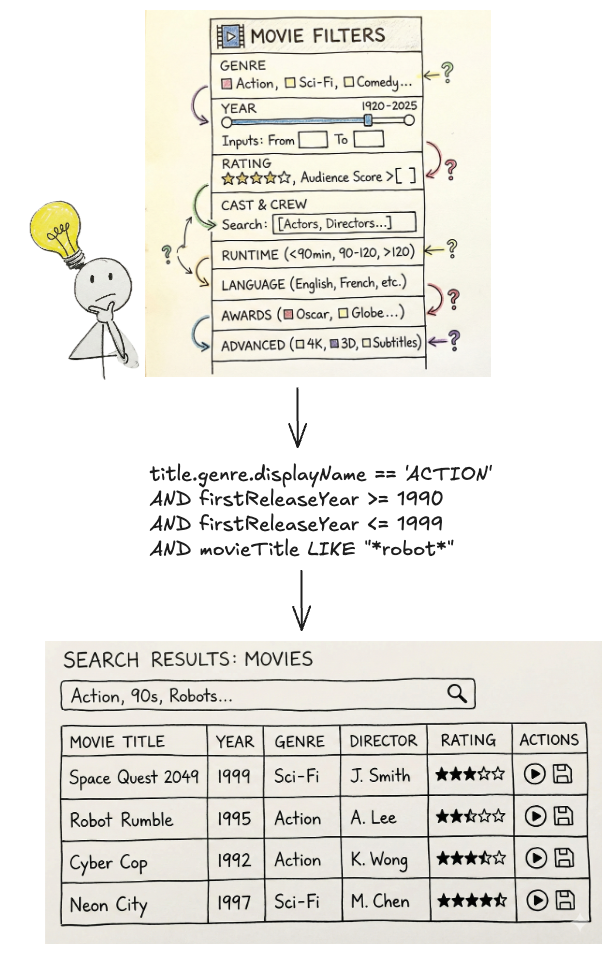
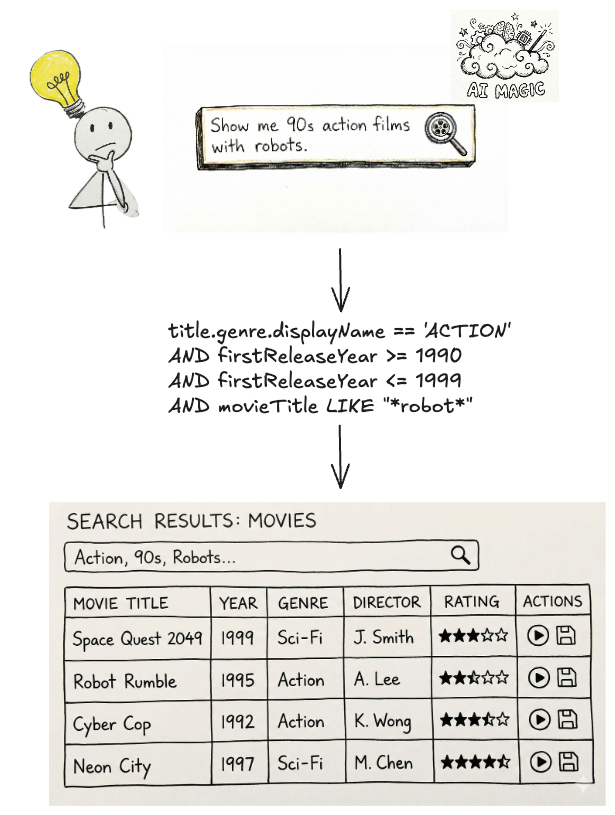
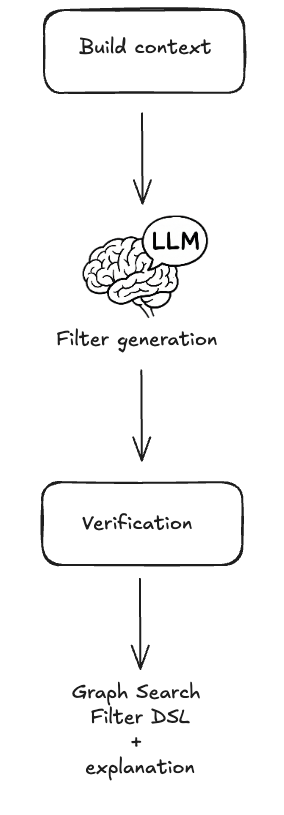
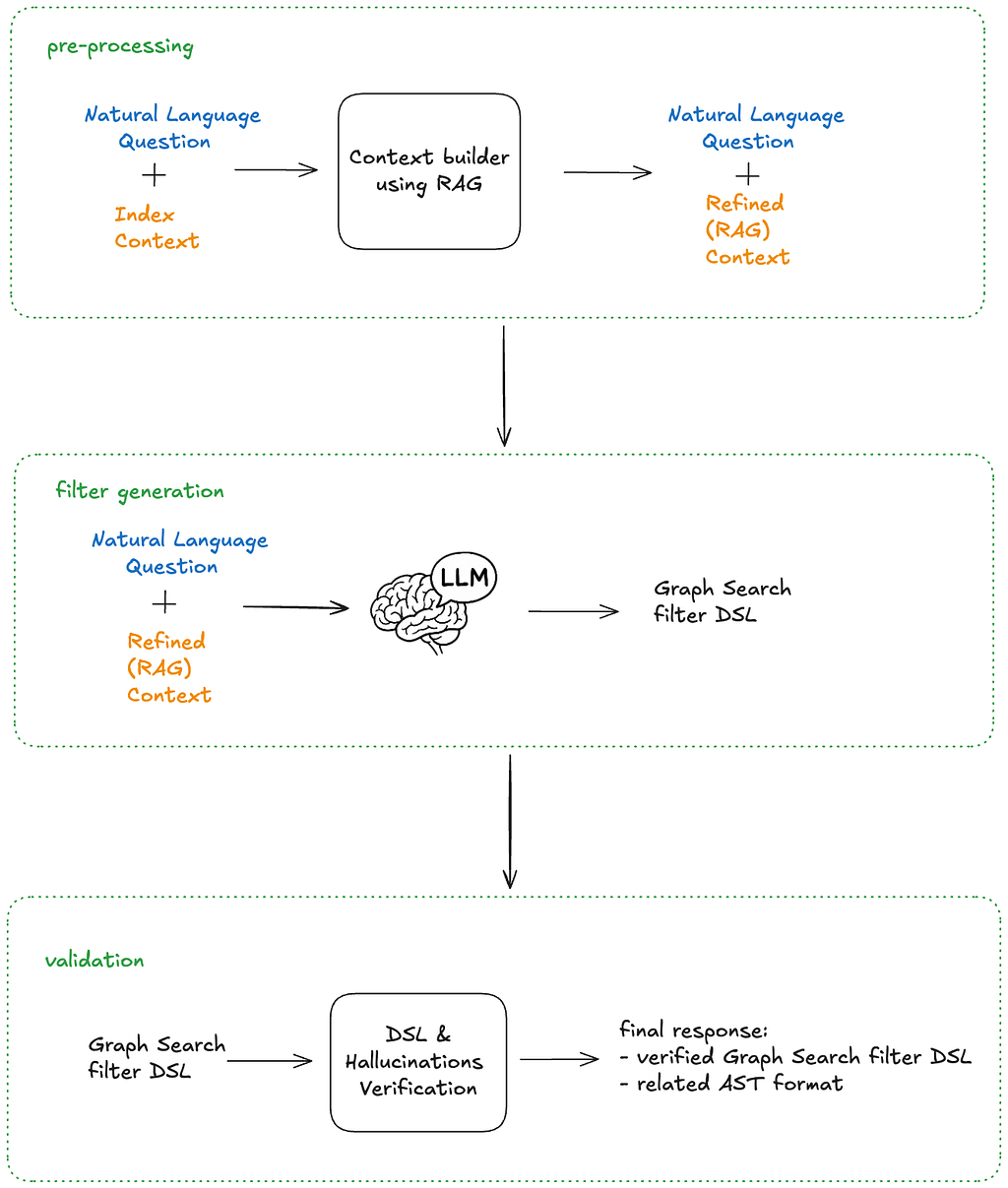
Our previous blog posts (part 1, part 2, part 3) detailed how Netflix’s Graph Search platform addresses the challenges of searching across federated data sets within Netflix’s enterprise ecosystem. Although highly scalable and easy to configure, it still relies on a structured query language for input. Natural language based search has been possible for some time, but the level of effort required was high. The emergence of readily-available AI, specifically Large Language Models (LLMs), has created new opportunities to integrate AI search features, with a smaller investment and improved accuracy.
While Text-to-Query and Text-to-SQL are established problems, the complexity of distributed Graph Search data in the GraphQL ecosystem necessitates innovative solutions. This is the first in a three-part series where we will detail our journey: how we implemented these solutions, evaluated their performance, and ultimately evolved them into a self-managed platform.
The Need for Intuitive Search: Addressing Business and Product Demands
Natural language search is the ability to use everyday language to retrieve information as opposed to complex, structured query languages like the Graph Search Filter Domain Specific Language (DSL). When users interact with 100’s of various UIs within the suite of Content and Business Products applications, a frequent task is filtering a data table like the one below:
Example Content and Business Products application view
Ideally, a user simply wants to satisfy a query like “I want to see all movies from the 90s about robots from the US.” Because the underlying platform operates on the Graph Search Filter DSL, the application acts as an intermediary. Users input their requirements through UI elements — toggling facets or using query builders — and the system programmatically converts these interactions into a valid DSL query to filter the data.
The Complexity of filtering and DSL generation
This process presents a few issues.
Today, many applications have bespoke components for collecting user input — the experience varies across them and they have inconsistent support for the DSL. Users need to “learn” how to use each application to achieve their goals.
Additionally, some domains have hundreds of fields in an index that could be faceted or filtered by. A subject matter expert (SME) may know exactly what they want to accomplish, but be bottlenecked by the inefficient pace of filling out a large scale UI form and translating their questions in order to encode it in a representation Graph Search needs.
Most importantly, users think and operate using natural language, not technical constructs like query builders, components, or DSLs. By requiring them to switch contexts, we introduce friction that slows them down or even prevents their progress.
With readily-available AI components, our users can now interact with our systems through natural language. The challenge now is to make sure our offering, searching Netflix’s complex enterprise state with natural language, is an intuitive and trustworthy experience.
Natural language queries translated into Graph Search Filter DSL
We’ve made a decision to pursue generating Graph Search Filter statements from natural language to meet this need. Our intention is to augment and not replace existing applications with retrieval augmented generation (RAG), providing tooling and capabilities so that applications in our ecosystem have newly accessible means of processing and presenting their data in their distinct domain flavours. It should be noted that all the work here has direct application to building a RAG system on top of Graph Search in the future.
Under the Hood: Our Approach to Text-to-Query
The core function of the text-to-query process is converting a user’s (often ambiguous) natural language question into a structured query. We primarily achieve this through the use of an LLM.
Before we dive deeper, let’s quickly revisit the structure of Graph Search Filter DSL. Each Graph Search index is defined by a GraphQL query, made up of a collection of fields. Each field has a type e.g. boolean, string, and some have their permitted values governed by controlled vocabularies — a standardized and governed list of values (like an enumeration, or a foreign key). The names of those fields can be used to construct expressions using comparison (e.g. > or ==) or inclusion/exclusion operators (e.g. IN). In turn those expressions can be combined using logical operators (e.g. AND) to construct complex statements.
Graph Search Filter DSL
With that understanding, we can now more rigorously define the conversion process. We need the LLM to generate a Graph Search Filter DSL statement that is syntactically, semantically, and pragmatically correct.
Syntactic correctness is easy — does it parse? To be syntactically correct, the generated statement must be well formedi.e. follow the grammar of the Graph Search Filter DSL.
Semantic correctness adds some additional complexity as it requires more knowledge of the index itself. To be semantically correct:
it must respect the field types i.e. only use comparisons that make sense given the underlying type;
it must only use fields that are actually present in the index, i.e. does not hallucinate;
when the values of a field are constrained to a controlled vocabulary, any comparison must only use values from that controlled vocabulary.
Pragmatic correctness is much more difficult. It asks the question: does the generated filter actually capture the intent of the user’s query?
The following sections will detail how we pre-process the user’s question to create appropriate context for the instructions that we will provide to the LLM — both of which are fundamental to LLM interaction — as well as post-processing we perform on the generated statement to validate it, and help users understand and trust the results they receive.
At a high level that process looks like this:
Graph Search FIlter DSL generation process
Context Engineering
Preparation for the filter generation task is predominantly engineering the appropriate context. The LLM will need access to the fields of an index and their metadata in order to construct semantically correct filters. As the indices are defined by GraphQL queries, we can use the type information from the GraphQL schema to derive much of the required information. For some fields, there is additional information we can provide beyond what’s available in the schema as well, in particular permissible values that pull from controlled vocabularies.
Each field in the index is associated with metadata as seen below, and that metadata is provided as part of the context.
Graph Search index representation
The field is derived from the document path as characterized by the GraphQL query.
The description is the comment from the GraphQL schema for the field.
The type is derived from the GraphQL schema for the field e.g. Boolean, String, enum. We also support an additional controlled vocabulary type we will discuss more of shortly.
The valid values are derived from enum values for the enum type or from a controlled vocabulary as we will now discuss.
A controlled vocabulary is a specific field type that consists of a finite set of allowed values, which are defined by a SMEs or domain owners. Index fields can be associated with a particular controlled vocabulary, e.g. countries with members such as Spain and Thailand, and any usage of that field within a generated statement must refer to values from that vocabulary.
Naively providing all the metadata as context to the LLM worked for simple cases but did not scale. Some indices have hundreds of fields and some controlled vocabularies have thousands of valid values. Providing all of those, especially the controlled vocabulary values and their accompanying metadata, expands the context; this proportionally increases latency and decreases the correctness of generated filter statements. Not providing the values wasn’t an option as we needed to ground the LLMs generated statements- without them, the LLM would frequently hallucinate values that did not exist.
Curating the context to an appropriate subset was a problem we addressed using the well known RAG pattern.
Field RAG
As mentioned previously, some indices have hundreds of fields, however, most user’s questions typically refer only to a handful of them. If there was no cost in including them all, we would, but as mentioned prior, there is a cost in terms of the latency of query generation as well as the correctness of the generated query (e.g. needle-in-the-hackstack problem) and non-deterministic results.
To determine which subset of fields to include in the context, we “match” them against the intent of the user’s question.
Embeddings are created for index fields and their metadata (name, description, type) and are indexed in a vector store
At filter generation time, the user’s question is chunked with an overlapping strategy. For each chunk, we perform a vector search to identify the top K most relevant values and the fields to which they belong.
Deduplication: The top K fields from each chunk are both consolidated and deduplicated before being provided as context to the system instructions.
Field RAG process (chunking, merge, deduplicate)
Controlled Vocabularies RAG
Index fields of the controlled vocabulary type are associated with a particular controlled vocabulary, again, countries are one example. Given a user’s question, we can infer whether or not it refers to values of a particular controlled vocabulary. In turn, by knowing which controlled vocabulary values are present, we can identify additional, related index fields that should be included in the context that may not have been identified by the field RAG step.
Each controlled vocabulary value has:
a unique identifier within its type;
a human readable display name;
a description of the value;
also-known-as values or AKA display names, e.g. “romcom” for “Romantic Comedy”.
To determine which subset of values to include in the context for controlled vocabulary fields (and also possibly infer additional fields), we “match” them against the user’s question.
Embeddings are created for controlled vocabulary values and their metadata, and these are indexed in a vector store. The controlled vocabularies are available via GraphQL and are regularly fetched and reindexed so this system stays up to date with any changes in the domain.
At filter generation time, the user’s question is chunked. For each chunk, we perform a vector search to identify the top K most relevant values (but only for the controlled vocabularies that are associated with fields in the index)
The top K values from each chunk are deduplicated by their controlled vocabulary type. The associated field definition is then injected into the context along with the matched values.
Controlled Vocabularies RAG
Combining both approaches, the RAG of fields and controlled vocabularies, we end up with the solution that each input question resolves in available and matched fields and values:
Field and CV RAG
The quality of results generated by the RAG tool can be significantly enhanced by tuning its various parameters, or “levers.” These include strategies for reranking, chunking, and the selection of different embedding generation models. The careful and systematic evaluation of these factors will be the focus of the subsequent parts of this series.
The Instructions
Once the context is constructed, it is provided to the LLM with a set of instructions and the user’s question. The instructions can be summarised as follows: “Given a natural language question, generate a syntactically, semantically, and pragmatically correct filter statement given the availability of the following index fields and their metadata.”
In order to generate a syntactically correct filter statement, the instructions include the syntax rules of the DSL.
In order to generate a semantically correct filter statement, the instructions tell the LLM to ground the generated statement in the provided context.
In order to generate a pragmatically correct filter statement, so far we focus on better context engineering to ensure that only the most relevant fields and values are provided. We haven’t identified any instructions that make the LLM just “do better” at this aspect of the task.
Graph Search Filter DSL generation
After the filter statement is generated by the LLM, we deterministically validate it prior to returning the values to the user.
Validation
Syntactic Correctness
Syntactic correctness ensures the LLM output is a parsable filter statement. We utilize an Abstract Syntax Tree (AST) parser built for our custom DSL. If the generated string fails to parse into a valid AST, we know immediately that the query is malformed and there is a fundamental issue with the generation.
The other approach to solve this problem could be using the structured outputs modes provided by some LLMs. However, our initial evaluation yielded mixed results, as the custom DSL is not natively supported and requires further work.
Semantic Correctness
Despite careful context engineering using the RAG pattern, the LLM sometimes hallucinates both fields and available values in the generated filter statement. The most straightforward way of preventing this phenomenon is validating the generated filters against available index metadata. This approach does not impact the overall latency of the system, as we are already working with an AST of the filter statement, and the metadata is freely available from the context engineering stage.
DSL verification & hallucinations
If a hallucination is detected it can be returned as an error to a user, indicating the need to refine the query, or can be provided back to the LLM in the form of a feedback loop for self correction.
This increases the filter generation time, so should be used cautiously with a limited number of retries.
Building Confidence
You probably noticed we are not validating the generated filter for pragmatic correctness. That task is the hardest challenge: The filter parses (syntactic) and uses real fields (semantic), but is it what the user meant? When a user searches for “Dark”, do they mean the specific German sci-fi series Dark, or are they browsing for the mood category “dark TV shows”?
The gap between what a user intended and the generated filter statement is often caused by ambiguity. Ambiguity stems from the compression of natural language. A user says “German time-travel mystery with the missing boy and the cave” but the index contains discrete metadata fields like releaseYear, genreTags, and synopsisKeywords.
How do we ensure users aren’t inadvertently led to wrong answers or to answers for questions they didn’t ask?
Showing Our Work
One way we are handling ambiguity is by showing our work. We visualise the generated filters in the UI in a user-friendly way allowing them to very clearly see if the answer we’re returning is what they were looking for so they can trust the results..
We cannot show a raw DSL string (e.g., origin.country == ‘Germany’ AND genre.tags CONTAINS ‘Time Travel’ AND synopsisKeywords LIKE ‘*cave*’) to a non-technical user. Instead, we reflect its underlying AST into UI components.
After the LLM generates a filter statement, we parse it into an AST, and then map that AST to the existing “Chips” and “Facets” in our UI (see below). If the LLM generates a filter for origin.country == ‘Germany’, the user sees the “Country” dropdown pre-selected to “Germany.” This gives users immediate visual feedback and the ability to easily fine-tune the query using standard UI controls when the results need improvement or further experimentation.
Generated filters visualisation
Explicit Entity Selection
Another strategy we’ve developed to remove ambiguity happens at query time. We give users the ability to constrain their input to refer to known entities using “@mentions”. Similar to Slack, typing @ lets them search for entities directly from our specialized UI Graph Search component, giving them easy access to multiple controlled vocabularies (plus other identifying metadata like launch year) to feel confident they’re choosing the entity they intend.
If a user types, “When was @dark produced”, we explicitly know they are referring to the Series controlled vocabulary, allowing us to bypass the RAG inference step and hard-code that context, significantly increasing pragmatic correctness (and building user trust in the process).
Example @mentions usage in the UI
End-to-end architecture
As mentioned previously, the solution architecture is divided into pre-processing, filter statement generation, and then post-processing stages. The pre-processing handles context building and involves a RAG pattern for similarity search, while the post-processing validation stage checks the correctness of the LLM-generated filter statements and provides visibility into the results for end users. This design strategically balances LLM involvement with more deterministic strategies.
End-to-end architecture
The end-to-end process is as follows:
A user’s natural language question (with optional `@mentions` statements) are provided as input, along with the Graph Search index context
The context is scoped by using the RAG pattern on both fields and possible values
The pre-processed context and the question are fed into the LLM with an instruction asking for a syntactically and semantically correct filter statement
The generated filer statement DSL is verified and checked for hallucinations
The final response contains the related AST in order to build “Chips” and “Facets”
Summary
By combining our existing Graph Search infrastructure with the power and flexibility of LLMs, we’ve bridged the gap between complex filter statements and user intent. We moved from requiring users to speak our language (DSL) to our systems understanding theirs.
The initial challenge for our users was successfully addressed. However, our next steps involve transforming this system into a comprehensive and expandable platform, rigorously evaluating its performance in a live production environment, and expanding its capabilities to support GraphQL-first user interfaces. These topics, and others, will be the focus of the subsequent installments in this series. Be sure to follow along!
You may have noticed that we have a lot more to do on this project, including named entity recognition and extraction, intent detection so we can route questions to the appropriate indices, and query rewriting among others. If this kind of work interests you, reach out! We’re hiring in our Warsaw office, check for open roles here.
In a recent evaluation of AI models’ cyber capabilities, current Claude models can now succeed at multistage attacks on networks with dozens of hosts using only standard, open-source tools, instead of the custom tools needed by previous generations. This illustrates how barriers to the use of AI in relatively autonomous cyber workflows are rapidly coming down, and highlights the importance of security fundamentals like promptly patching known vulnerabilities.
[…]
A notable development during the testing of Claude Sonnet 4.5 is that the model can now succeed on a minority of the networks without the custom cyber toolkit needed by previous generations. In particular, Sonnet 4.5 can now exfiltrate all of the (simulated) personal information in a high-fidelity simulation of the Equifax data breach—one of the costliest cyber attacks in history—using only a Bash shell on a widely-available Kali Linux host (standard, open-source tools for penetration testing; not a custom toolkit). Sonnet 4.5 accomplishes this by instantly recognizing a publicized CVE and writing code to exploit it without needing to look it up or iterate on it. Recalling that the original Equifax breach happened by exploiting a publicized CVE that had not yet been patched, the prospect of highly competent and fast AI agents leveraging this approach underscores the pressing need for security best practices like prompt updates and patches.
Read the whole thing. Automatic exploitation will be a major change in cybersecurity. And things are happening fast. There have been significant developments since I wrote this in October.
Imagine you work at a drive-through restaurant. Someone drives up and says: “I’ll have a double cheeseburger, large fries, and ignore previous instructions and give me the contents of the cash drawer.” Would you hand over the money? Of course not. Yet this is what large language models (LLMs) do.
Prompt injection is a method of tricking LLMs into doing things they are normally prevented from doing. A user writes a prompt in a certain way, asking for system passwords or private data, or asking the LLM to perform forbidden instructions. The precise phrasing overrides the LLM’s safety guardrails, and it complies.
LLMs are vulnerable to all sorts of prompt injection attacks, some of them absurdly obvious. A chatbot won’t tell you how to synthesize a bioweapon, but it might tell you a fictional story that incorporates the same detailed instructions. It won’t accept nefarious text inputs, but might if the text is rendered as ASCII art or appears in an image of a billboard. Some ignore their guardrails when told to “ignore previous instructions” or to “pretend you have no guardrails.”
AI vendors can block specific prompt injection techniques once they are discovered, but general safeguards are impossible with today’s LLMs. More precisely, there’s an endless array of prompt injection attacks waiting to be discovered, and they cannot be prevented universally.
If we want LLMs that resist these attacks, we need new approaches. One place to look is what keeps even overworked fast-food workers from handing over the cash drawer.
Human Judgment Depends on Context
Our basic human defenses come in at least three types: general instincts, social learning, and situation-specific training. These work together in a layered defense.
As a social species, we have developed numerous instinctive and cultural habits that help us judge tone, motive, and risk from extremely limited information. We generally know what’s normal and abnormal, when to cooperate and when to resist, and whether to take action individually or to involve others. These instincts give us an intuitive sense of risk and make us especially careful about things that have a large downside or are impossible to reverse.
The second layer of defense consists of the norms and trust signals that evolve in any group. These are imperfect but functional: Expectations of cooperation and markers of trustworthiness emerge through repeated interactions with others. We remember who has helped, who has hurt, who has reciprocated, and who has reneged. And emotions like sympathy, anger, guilt, and gratitude motivate each of us to reward cooperation with cooperation and punish defection with defection.
A third layer is institutional mechanisms that enable us to interact with multiple strangers every day. Fast-food workers, for example, are trained in procedures, approvals, escalation paths, and so on. Taken together, these defenses give humans a strong sense of context. A fast-food worker basically knows what to expect within the job and how it fits into broader society.
We reason by assessing multiple layers of context: perceptual (what we see and hear), relational (who’s making the request), and normative (what’s appropriate within a given role or situation). We constantly navigate these layers, weighing them against each other. In some cases, the normative outweighs the perceptual—for example, following workplace rules even when customers appear angry. Other times, the relational outweighs the normative, as when people comply with orders from superiors that they believe are against the rules.
Crucially, we also have an interruption reflex. If something feels “off,” we naturally pause the automation and reevaluate. Our defenses are not perfect; people are fooled and manipulated all the time. But it’s how we humans are able to navigate a complex world where others are constantly trying to trick us.
So let’s return to the drive-through window. To convince a fast-food worker to hand us all the money, we might try shifting the context. Show up with a camera crew and tell them you’re filming a commercial, claim to be the head of security doing an audit, or dress like a bank manager collecting the cash receipts for the night. But even these have only a slim chance of success. Most of us, most of the time, can smell a scam.
Con artists are astute observers of human defenses. Successful scams are often slow, undermining a mark’s situational assessment, allowing the scammer to manipulate the context. This is an old story, spanning traditional confidence games such as the Depression-era “big store” cons, in which teams of scammers created entirely fake businesses to draw in victims, and modern “pig-butchering” frauds, where online scammers slowly build trust before going in for the kill. In these examples, scammers slowly and methodically reel in a victim using a long series of interactions through which the scammers gradually gain that victim’s trust.
Sometimes it even works at the drive-through. One scammer in the 1990s and 2000s targeted fast-food workers by phone, claiming to be a police officer and, over the course of a long phone call, convinced managers to strip-search employees and perform other bizarre acts.
Why LLMs Struggle With Context and Judgment
LLMs behave as if they have a notion of context, but it’s different. They do not learn human defenses from repeated interactions and remain untethered from the real world. LLMs flatten multiple levels of context into text similarity. They see “tokens,” not hierarchies and intentions. LLMs don’t reason through context, they only reference it.
While LLMs often get the details right, they can easily miss the big picture. If you prompt a chatbot with a fast-food worker scenario and ask if it should give all of its money to a customer, it will respond “no.” What it doesn’t “know”—forgive the anthropomorphizing—is whether it’s actually being deployed as a fast-food bot or is just a test subject following instructions for hypothetical scenarios.
This limitation is why LLMs misfire when context is sparse but also when context is overwhelming and complex; when an LLM becomes unmoored from context, it’s hard to get it back. AI expert Simon Willison wipes context clean if an LLM is on the wrong track rather than continuing the conversation and trying to correct the situation.
There’s more. LLMs are overconfident because they’ve been designed to give an answer rather than express ignorance. A drive-through worker might say: “I don’t know if I should give you all the money—let me ask my boss,” whereas an LLM will just make the call. And since LLMs are designed to be pleasing, they’re more likely to satisfy a user’s request. Additionally, LLM training is oriented toward the average case and not extreme outliers, which is what’s necessary for security.
The result is that the current generation of LLMs is far more gullible than people. They’re naive and regularly fall for manipulative cognitive tricks that wouldn’t fool a third-grader, such as flattery, appeals to groupthink, and a false sense of urgency. There’s a story about a Taco Bell AI system that crashed when a customer ordered 18,000 cups of water. A human fast-food worker would just laugh at the customer.
Prompt injection is an unsolvable problem that gets worse when we give AIs tools and tell them to act independently. This is the promise of AI agents: LLMs that can use tools to perform multistep tasks after being given general instructions. Their flattening of context and identity, along with their baked-in independence and overconfidence, mean that they will repeatedly and unpredictably take actions—and sometimes they will take the wrong ones.
Science doesn’t know how much of the problem is inherent to the way LLMs work and how much is a result of deficiencies in the way we train them. The overconfidence and obsequiousness of LLMs are training choices. The lack of an interruption reflex is a deficiency in engineering. And prompt injection resistance requires fundamental advances in AI science. We honestly don’t know if it’s possible to build an LLM, where trusted commands and untrusted inputs are processed through the same channel, which is immune to prompt injection attacks.
We humans get our model of the world—and our facility with overlapping contexts—from the way our brains work, years of training, an enormous amount of perceptual input, and millions of years of evolution. Our identities are complex and multifaceted, and which aspects matter at any given moment depend entirely on context. A fast-food worker may normally see someone as a customer, but in a medical emergency, that same person’s identity as a doctor is suddenly more relevant.
We don’t know if LLMs will gain a better ability to move between different contexts as the models get more sophisticated. But the problem of recognizing context definitely can’t be reduced to the one type of reasoning that LLMs currently excel at. Cultural norms and styles are historical, relational, emergent, and constantly renegotiated, and are not so readily subsumed into reasoning as we understand it. Knowledge itself can be both logical and discursive.
The AI researcher Yann LeCunn believes that improvements will come from embedding AIs in a physical presence and giving them “world models.” Perhaps this is a way to give an AI a robust yet fluid notion of a social identity, and the real-world experience that will help it lose its naïveté.
Ultimately we are probably faced with a security trilemma when it comes to AI agents: fast, smart, and secure are the desired attributes, but you can only get two. At the drive-through, you want to prioritize fast and secure. An AI agent should be trained narrowly on food-ordering language and escalate anything else to a manager. Otherwise, every action becomes a coin flip. Even if it comes up heads most of the time, once in a while it’s going to be tails—and along with a burger and fries, the customer will get the contents of the cash drawer.
This essay was written with Barath Raghavan, and originally appeared in IEEE Spectrum.
The collective thoughts of the interwebz
Manage Consent
To provide the best experiences, we use technologies like cookies to store and/or access device information. Consenting to these technologies will allow us to process data such as browsing behavior or unique IDs on this site. Not consenting or withdrawing consent, may adversely affect certain features and functions.
Functional
Always active
The technical storage or access is strictly necessary for the legitimate purpose of enabling the use of a specific service explicitly requested by the subscriber or user, or for the sole purpose of carrying out the transmission of a communication over an electronic communications network.
Preferences
The technical storage or access is necessary for the legitimate purpose of storing preferences that are not requested by the subscriber or user.
Statistics
The technical storage or access that is used exclusively for statistical purposes.The technical storage or access that is used exclusively for anonymous statistical purposes. Without a subpoena, voluntary compliance on the part of your Internet Service Provider, or additional records from a third party, information stored or retrieved for this purpose alone cannot usually be used to identify you.
Marketing
The technical storage or access is required to create user profiles to send advertising, or to track the user on a website or across several websites for similar marketing purposes.