Cloudflare’s AI Security for Apps detects and mitigates threats to AI-powered applications. Today, we’re announcing that it is generally available.
We’re shipping with new capabilities like detection for custom topics, and we’re making AI endpoint discovery free for every Cloudflare customer—including those on Free, Pro, and Business plans—to give everyone visibility into where AI is deployed across their Internet-facing apps.
We’re also announcing an expanded collaboration with IBM, which has chosen Cloudflare to deliver AI security to its cloud customers. And we’re partnering with Wiz to give mutual customers a unified view of their AI security posture.
A new kind of attack surface
Traditional web applications have defined operations: check a bank balance, make a transfer. You can write deterministic rules to secure those interactions.
AI-powered applications and agents are different. They accept natural language and generate unpredictable responses. There’s no fixed set of operations to allow or deny, because the inputs and outputs are probabilistic. Attackers can manipulate large language models to take unauthorized actions or leak sensitive data. Prompt injection, sensitive information disclosure, and unbounded consumption are just a few of the risks cataloged in the OWASP Top 10 for LLM Applications.
These risks escalate as AI applications become agents. When an AI gains access to tool calls—processing refunds, modifying accounts, providing discounts, or accessing customer data—a single malicious prompt becomes an immediate security incident.
Customers tell us what they’re up against. “Most of Newfold Digital’s teams are putting in their own Generative AI safeguards, but everybody is innovating so quickly that there are inevitably going to be some gaps eventually,” says Rick Radinger, Principal Systems Architect at Newfold Digital, which operates Bluehost, HostGator, and Domain.com.
What AI Security for Apps does
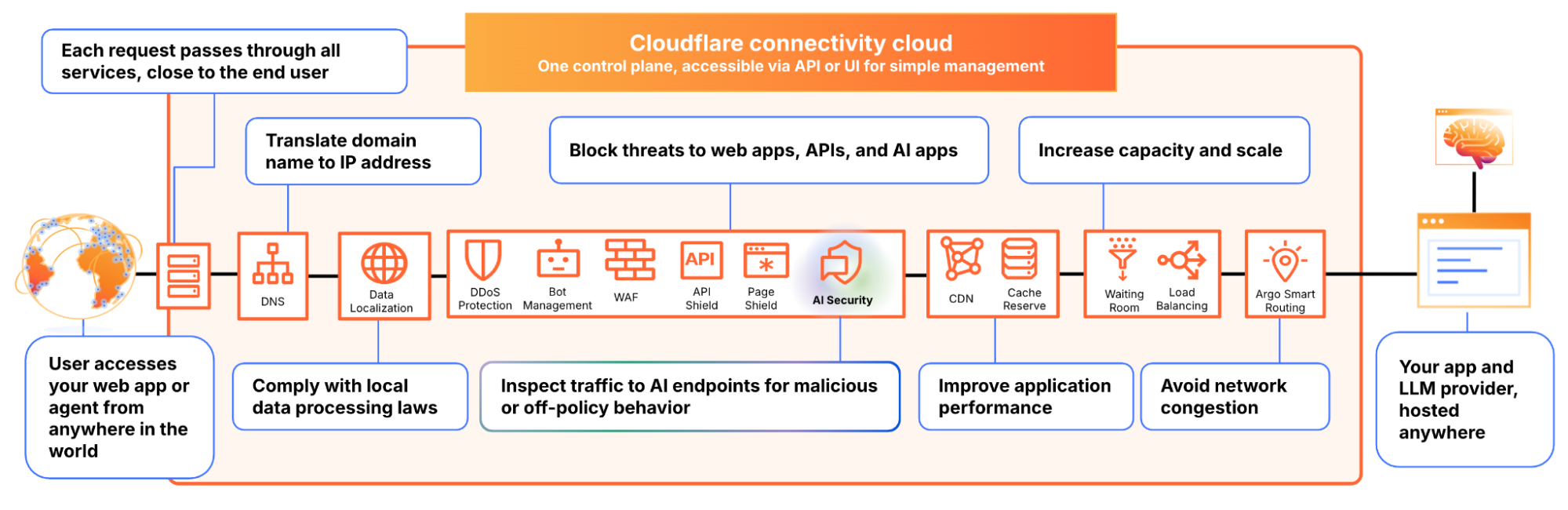
We built AI Security for Apps to address this. It sits in front of your AI-powered applications, whether you’re using a third-party model or hosting your own, as part of Cloudflare’s reverse proxy. It helps you (1) discover AI-powered apps across your web property, (2) detect malicious or off-policy behavior to those endpoints, and (3) mitigate threats via the familiar WAF rule builder.
Discovery — now free for everyone
Before you can protect your LLM-powered applications, you need to know where they’re being used. We often hear from security teams who don’t have a complete picture of AI deployments across their apps, especially as the LLM market evolves and developers swap out models and providers.
AI Security for Apps automatically identifies LLM-powered endpoints across your web properties, regardless of where they’re hosted or what the model is. Starting today, this capability is free for every Cloudflare customer, including Free, Pro, and Business plans.
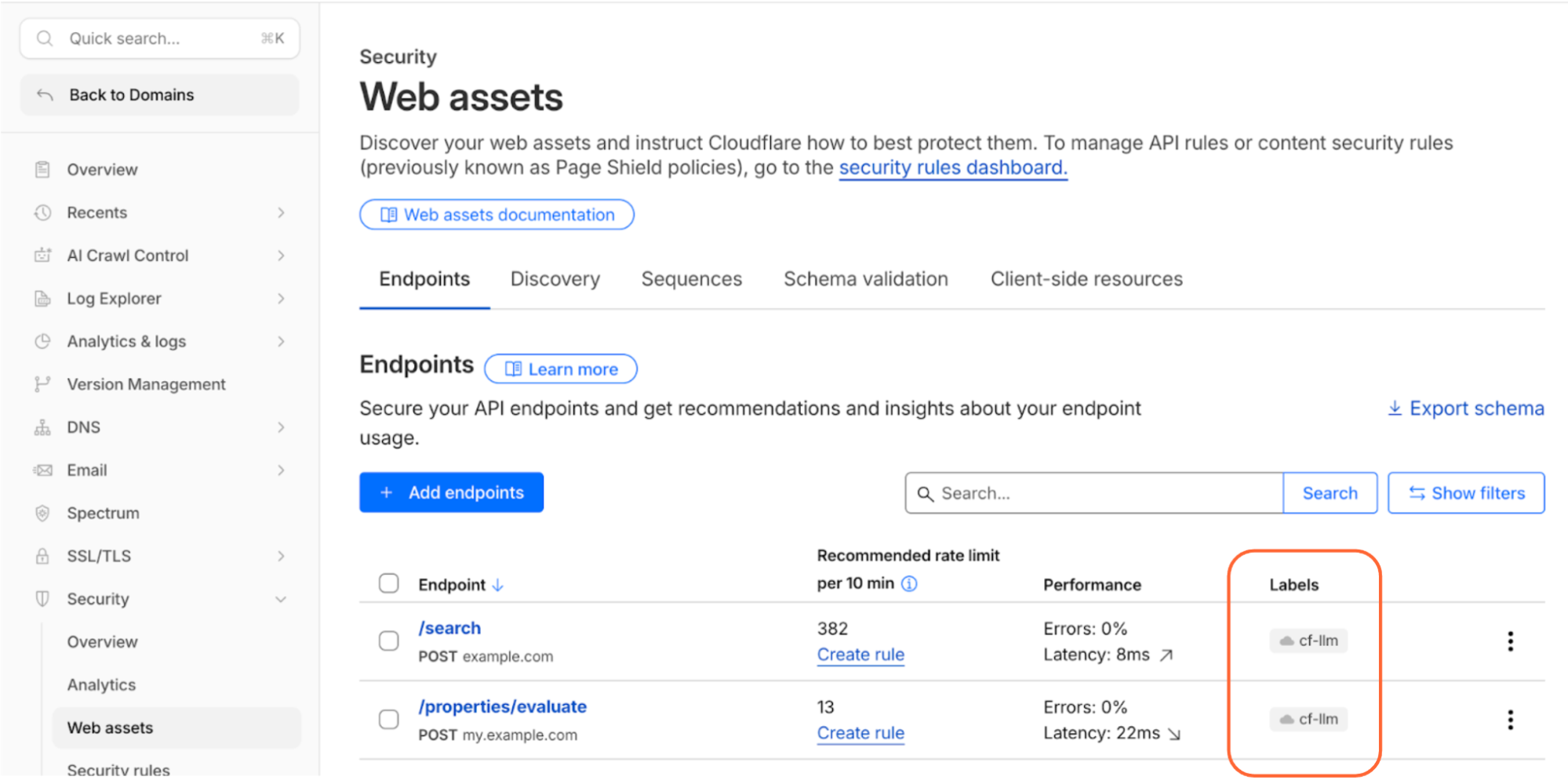
Cloudflare’s dashboard page of web assets, showing 2 example endpoints labelled as cf-llm
Discovering these endpoints automatically requires more than matching common path patterns like /chat/completions. Many AI-powered applications don’t have a chat interface: think product search, property valuation tools, or recommendation engines. We built a detection system that looks at how endpoints behave, not what they’re called. To confidently identify AI-powered endpoints, sufficient valid traffic is required.
AI-powered endpoints that have been discovered will be visible under Security → Web Assets, labeled as cf-llm. For customers on a Free plan, endpoint discovery is initiated when you first navigate to the Discovery page. For customers on a paid plan, discovery occurs automatically in the background on a recurring basis. If your AI-powered endpoints have been discovered, you can review them immediately.
Detection
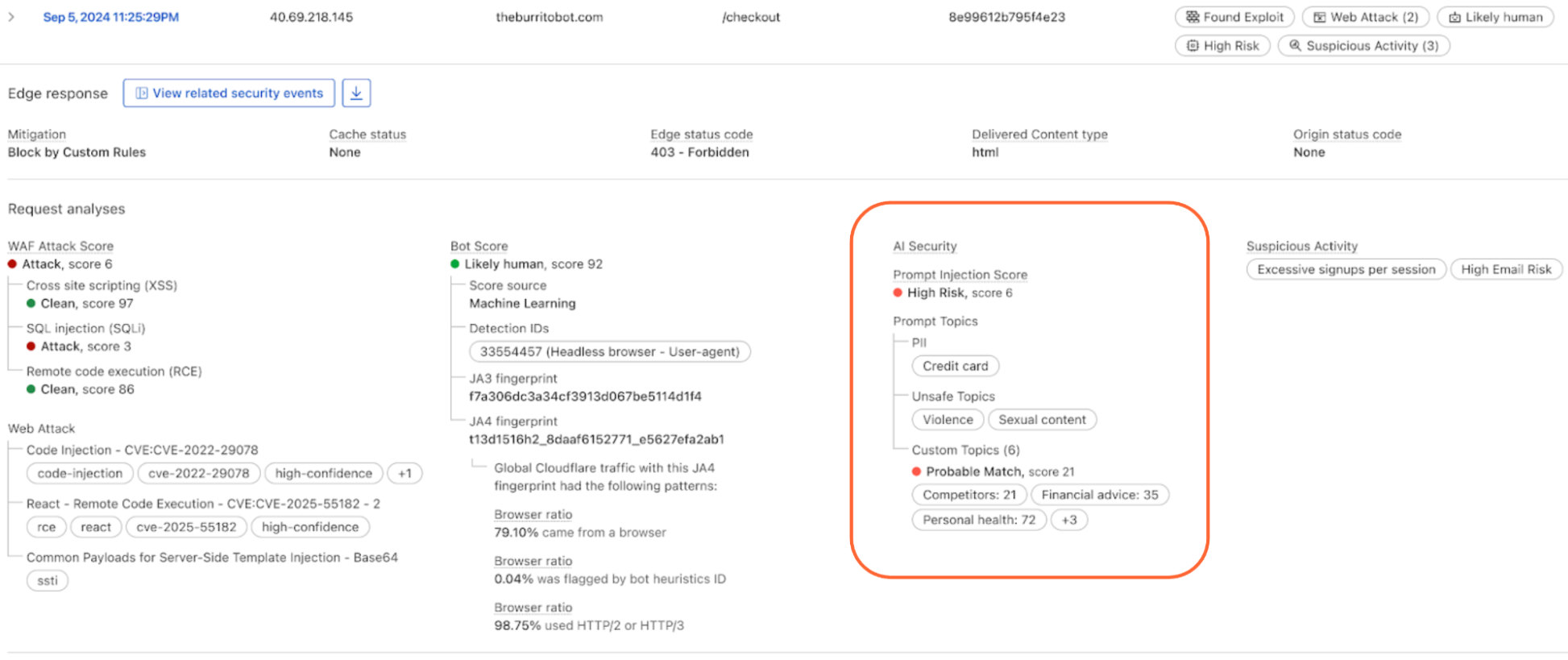
AI Security for Apps detections follow the always-on approach for traffic to your AI-powered endpoints. Each prompt is run through multiple detection modules for prompt injection, PII exposure, and sensitive or toxic topics. The results—whether the prompt was malicious or not—are attached as metadata you can use in custom WAF rules to enforce your policies. We are continuously exploring ways to leverage our global network, which sees traffic from roughly 20% of the web, to identify new attack patterns across millions of sites before they reach yours.
New in GA: Custom topics detection
The product ships with built-in detection for common threats: prompt injections, PII extraction, and toxic topics. But every business has its own definition of what’s off-limits. A financial services company might need to detect discussions of specific securities. A healthcare company might need to flag conversations that touch on patient data. A retailer might want to know when customers are asking about competitor products.
The new custom topics feature lets you define these categories. You specify the topic, we inspect the prompt and output a relevance score that you can use to log, block, or handle however you decide. Our goal is to build an extensible tool that flexes to your use cases.
Prompt relevance score inside of AI Security for Apps
New in GA: Custom prompt extraction
AI Security for Apps enforces guardrails before unsafe prompts can reach your infrastructure. To run detections accurately and provide real-time protection, we first need to identify the prompt within the request payload. Prompts can live anywhere in a request body, and different LLM providers structure their APIs differently. OpenAI and most providers use $.messages[*].content for chat completions. Anthropic’s batch API nests prompts inside $.requests[*].params.messages[*].content. Your custom property valuation tool might use $.property_description.
Out of the box, we support the standard formats used by OpenAI, Anthropic, Google Gemini, Mistral, Cohere, xAI, DeepSeek, and others. When we can’t match a known pattern, we apply a default-secure posture and run detection on the entire request body. This can introduce false positives when the payload contains fields that are sensitive but don’t feed directly to an AI model, for example, a $.customer_name field alongside the actual prompt might trigger PII detection unnecessarily.
Soon, you’ll be able to define your own JSONPath expressions to tell us exactly where to find the prompt. This will reduce false positives and lead to more accurate detections. We’re also building a prompt-learning capability that will automatically adapt to your application’s structure over time.
Mitigation
Once a threat is identified and scored, you can block it, log it, or deliver custom responses, using the same WAF rules engine you already use for the rest of your application security. The power of Cloudflare’s shared platform is that you can combine AI-specific signals with everything else we know about a request, represented by hundreds of fields available in the WAF. A prompt injection attempt is suspicious. A prompt injection attempt from an IP that’s been probing your login page, using a browser fingerprint associated with previous attacks, and rotating through a botnet is a different story. Point solutions that only see the AI layer can’t make these connections.
This unified security layer is exactly what they need at Newfold Digital to discover, label, and protect AI endpoints, says Radinger: “We look forward to using it across all these projects to serve as a fail-safe.”
Growing ecosystem
AI Security for Applications will also be available through Cloudflare’s growing ecosystem, including through integration with IBM Cloud. Through IBM Cloud Internet Services (CIS), end users can already procure advanced application security solutions and manage them directly through their IBM Cloud account.
We’re also partnering with Wiz to connect AI Security for Applications with Wiz AI Security, giving mutual customers a unified view of their AI security posture, from model and agent discovery in the cloud to application-layer guardrails at the edge.
How to get started
AI Security for Apps is available now for Cloudflare’s Enterprise customers. Contact your account team to get started, or see the product in action with a self-guided tour.
If you’re on a Free, Pro, or Business plan, you can use AI endpoint discovery today. Log in to your dashboard and navigate to Security → Web Assets to see which endpoints we’ve identified. Keep an eye out — we plan to make all AI Security for Apps capabilities available for customers on all plans soon.
AI agents are no longer experiments. They are production infrastructure, making billions of HTTP requests per day, navigating the web, calling APIs, and orchestrating complex workflows.
But when these agents hit an error, they still receive the same HTML error pages we built for browsers: hundreds of lines of markup, CSS, and copy designed for human eyes. Those pages give agents clues, not instructions, and waste time and tokens. That gap is the opportunity to give agents instructions, not obstacles.
Starting today, Cloudflare returns RFC 9457-compliant structured Markdown and JSON error payloads to AI agents, replacing heavyweight HTML pages with machine-readable instructions.
That means when an agent sends Accept: text/markdown, Accept: application/json, or Accept: application/problem+json and encounters a Cloudflare error, we return one semantic contract in a structured format instead of HTML. And it comes complete with actionable guidance. (This builds on our recent Markdown for Agents release.)
So instead of being told only “You were blocked,” the agent will read: “You were rate-limited — wait 30 seconds and retry with exponential backoff.” Instead of just “Access denied,” the agent will be instructed: “This block is intentional: do not retry, contact the site owner.”
These responses are not just clearer — they are dramatically more efficient. Structured error responses cut payload size and token usage by more than 98% versus HTML, measured against a live 1015 (‘rate-limit’) error response. For agents that hit multiple errors in a workflow, the savings compound quickly.
This is live across the Cloudflare network, automatically. Site owners do not need to configure anything. Browsers keep getting the same HTML experience as before.
These are not just error pages. They are instructions for the agentic web.
What agents see today
When an agent receives a Cloudflare-generated error, it usually means Cloudflare is enforcing customer policy or returning a platform response on the customer’s behalf — not that Cloudflare is down. These responses are triggered when a request cannot be served as-is, such as invalid host or DNS routing, customer-defined access controls (WAF, geo, ASN, or bot rules), or edge-enforced limits like rate limiting. In short, Cloudflare is acting as the customer’s routing and security layer, and the response explains why the request was blocked or could not proceed.
Today, those responses are rendered as HTML designed for humans:
<!DOCTYPE html>
<html>
<head>
<title>Access denied | example.com used Cloudflare to restrict access</title>
<style>/* 200 lines of CSS */</style>
</head>
<body>
  <div class="cf-wrapper">
    <h1 data-translate="block_headline">Sorry, you have been blocked</h1>
    <!-- ... hundreds more lines ... -->
  </div>
</body>
</html>
To an agent, this is garbage. It cannot determine what error occurred, why it was blocked, or whether retrying will help. Even if it parses the HTML, the content describes the error but doesn’t tell the agent — or the human, for that matter — what to do next.
If you’re an agent developer and you wanted to handle Cloudflare errors gracefully, your options were limited. For Cloudflare-generated errors, structured responses existed only in configuration-dependent paths, not as a consistent default for agents.
Custom Error Rules can customize many Cloudflare errors, including some 1xxx cases. But they depend on per-site configuration, so they cannot serve as a universal agent contract across the web. Cloudflare sits in front of the request path. That means we can define a default machine response: retry or stop, wait and back off, escalate or reroute. Error pages stop being decoration and become execution instructions.
What we did
Cloudflare now returns RFC 9457-compliant structured responses for all 1xxx-class error paths — Cloudflare’s platform error codes for edge-side failures like DNS resolution issues, access denials, and rate limits. Both formats are live: Accept: text/markdown returns Markdown, Accept: application/json returns JSON, and Accept: application/problem+json returns JSON with the application/problem+json content type.
This covers all 1xxx-class errors today. The same contract will extend to Cloudflare-generated 4xx and 5xx errors next.
Markdown responses have two parts:
YAML frontmatter for machine-readable fields
prose sections for explicit guidance (What happened and What you should do)
JSON responses carry the same fields as a flat object.
The YAML frontmatter is the critical layer for automation. It lets an agent extract stable keys without scraping HTML or guessing intent from copy. Fields like error_code, error_name, and error_category let the agent classify the failure. retryable and retry_after drive backoff logic. owner_action_required tells the agent whether to keep trying or escalate. ray_id, timestamp, and zone make logs and support handoffs deterministic.
The schema is stable by design, so agents can implement durable control flow without chasing presentation changes.
That stability is not a Cloudflare invention. RFC 9457 — Problem Details for HTTP APIs defines a standard JSON shape for reporting errors over HTTP, so clients can parse error responses without knowing the specific API in advance. Our JSON responses follow this shape, which means any HTTP client that understands Problem Details can parse the base members without Cloudflare-specific code:
RFC 9457 member
What it contains
type
A URI pointing to Cloudflare’s documentation for the specific error code
status
The HTTP status code (matching the actual response status)
title
A short, human-readable summary of the problem
detail
A human-readable explanation specific to this occurrence
instance
The Ray ID identifying this specific error occurrence
The operational fields — error_code, error_category, retryable, retry_after, owner_action_required, and more — are RFC 9457 extension members. Clients that don’t recognize them simply ignore them.
This is network-wide and additive. Site owners do not need to configure anything. Browsers keep receiving HTML unless clients explicitly ask for Markdown or JSON.
What the response looks like
Here is what a rate-limit error (1015) looks like in JSON:
{
  "type": "https://developers.cloudflare.com/support/troubleshooting/http-status-codes/cloudflare-1xxx-errors/error-1015/",
  "title": "Error 1015: You are being rate limited",
  "status": 429,
  "detail": "You are being rate-limited by the website owner's configuration.",
  "instance": "9d99a4434fz2d168",
  "error_code": 1015,
  "error_name": "rate_limited",
  "error_category": "rate_limit",
  "ray_id": "9d99a4434fz2d168",
  "timestamp": "2026-03-09T11:11:55Z",
  "zone": "<YOUR_DOMAIN>",
  "cloudflare_error": true,
  "retryable": true,
  "retry_after": 30,
  "owner_action_required": false,
  "what_you_should_do": "**Wait and retry.** This block is transient. Wait at least 30 seconds, then retry with exponential backoff.\n\nRecommended approach:\n1. Wait 30 seconds before your next request\n2. If rate-limited again, double the wait time (60s, 120s, etc.)\n3. If rate-limiting persists after 5 retries, stop and reassess your request pattern",
  "footer": "This error was generated by Cloudflare on behalf of the website owner."
}
The same error in Markdown, optimized for model-first workflows:
---
error_code: 1015
error_name: rate_limited
error_category: rate_limit
status: 429
ray_id: 9d99a39dc992d168
timestamp: 2026-03-09T11:11:28Z
zone: <YOUR_DOMAIN>
cloudflare_error: true
retryable: true
retry_after: 30
owner_action_required: false
---

# Error 1015: You are being rate limited

## What Happened

You are being rate-limited by the website owner's configuration.

## What You Should Do

**Wait and retry.** This block is transient. Wait at least 30 seconds, then retry with exponential backoff.

Recommended approach:
1. Wait 30 seconds before your next request
2. If rate-limited again, double the wait time (60s, 120s, etc.)
3. If rate-limiting persists after 5 retries, stop and reassess your request pattern

---
This error was generated by Cloudflare on behalf of the website owner.
Both formats give an agent everything it needs to decide and act: classify the error, choose retry behavior, and determine whether escalation is required. This is what a default machine contract looks like — not per-site configuration, but network-wide behavior. The contrast is explicit across error families: a transient error like 1015 says wait and retry, while intentional blocks like 1020 or geographic restrictions like 1009 tell the agent not to retry and to escalate instead.
One contract, two formats
The core value is not format choice. It is semantic stability.
Agents need deterministic answers to operational questions: retry or not, how long to wait, and whether to escalate. Cloudflare exposes one policy contract across two wire formats. Whether a client consumes Markdown or JSON, the operational meaning is identical: same error identity, same retry/backoff signals, same escalation guidance.
Clients that send Accept: application/problem+json get application/problem+json; charset=utf-8 back — useful for HTTP client libraries that dispatch on media type. Clients that send Accept: application/json get application/json; charset=utf-8 — same body, safe default for existing consumers.
Size reduction and token efficiency
That contract is also dramatically smaller than what it replaces. Cloudflare HTML error pages are browser-oriented and heavy, while structured responses are compact by design.
Measured comparison for 1015:
Payload
Bytes
Tokens (cl100k_base)
Size vs HTML
Token vs HTML
HTML response
46,645
14,252
—
—
Markdown response
798
221
58.5x less
64.5x less
JSON response
970
256
48.1x less
55.7x less
Both structured formats deliver a ~98% reduction in size and tokens versus HTML. For agents, size translates directly into token cost — when an agent hits multiple errors in one run, these savings compound into lower model spend and faster recovery loops.
Ten categories, clear actions
Every 1xxx error is mapped to an error_category. That turns error handling into routing logic instead of brittle per-page parsing.
Category
What it means
What the agent should do
access_denied
Intentional block: IP, ASN, geo, firewall rule
Do not retry. Contact site owner if unexpected.
rate_limit
Request rate exceeded
Back off. Retry after retry_after seconds.
dns
DNS resolution failure at the origin
Do not retry. Report to site owner.
config
Configuration error: CNAME, tunnel, host routing
Do not retry (usually). Report to site owner.
tls
TLS version or cipher mismatch
Fix TLS client settings. Do not retry as-is.
legal
DMCA or regulatory block
Do not retry. This is a legal restriction.
worker
Cloudflare Workers runtime error
Do not retry. Site owner must fix the script.
rewrite
Invalid URL rewrite output
Do not retry. Site owner must fix the rule.
snippet
Cloudflare Snippets error
Do not retry. Site owner must fix Snippets config.
unsupported
Unsupported method or deprecated feature
Change the request. Do not retry as-is.
Two fields make this operationally useful for agents:
retryable answers whether a retry can succeed
owner_action_required answers whether the problem must be escalated
You can replace brittle “if status == 429 then maybe retry” heuristics with explicit control flow. Parse the frontmatter once, then branch on stable fields. A simple pattern is:
if retryable is true, wait retry_after and retry
if owner_action_required is true, stop and escalate
otherwise, fail fast without hammering the site
Here is a minimal Python example using that pattern:
import time
import yaml


def parse_frontmatter(markdown_text: str) -> dict:
    # Expects: ---\n<yaml>\n---\n<body>
    if not markdown_text.startswith("---\n"):
        return {}
    _, yaml_block, _ = markdown_text.split("---\n", 2)
    return yaml.safe_load(yaml_block) or {}


def handle_cloudflare_error(markdown_text: str) -> str:
    meta = parse_frontmatter(markdown_text)

    if not meta.get("cloudflare_error"):
        return "not_cloudflare_error"

    if meta.get("retryable"):
        wait_seconds = int(meta.get("retry_after", 30))
        time.sleep(wait_seconds)
        return f"retry_after_{wait_seconds}s"

    if meta.get("owner_action_required"):
        return f"escalate_owner_error_{meta.get('error_code')}"

    return "do_not_retry"
This is the key shift: agents are no longer inferring intent from HTML copy. They are executing explicit policy from structured fields.
How to use it
Send Accept: text/markdown, Accept: application/json, or Accept: application/problem+json.
For quick testing, you can hit any Cloudflare-proxied domain directly at /cdn-cgi/error/1015 (or replace 1015 with another 1xxx code).
The behavior is deterministic — the first explicit structured type wins:
Accept header
Response
application/json
JSON
application/json; charset=utf-8
JSON
application/problem+json
JSON (application/problem+json content type)
application/json, text/markdown;q=0.9
JSON
application/json, text/markdown
JSON (equal q, first-listed wins)
text/markdown
Markdown
text/markdown, application/json
Markdown (equal q, first-listed wins)
text/markdown, */*
Markdown
text/*
Markdown
*/*
HTML (default)
Wildcard-only requests (*/*) do not signal a structured preference; clients must explicitly request Markdown or JSON.
If the request succeeds, you get normal origin content. The header only affects Cloudflare-generated error responses.
Real-world use cases
There are a number of situations where structured error responses help immediately:
Agent blocked by WAF rule (1020). The agent parses error_code, records ray_id, and stops retrying. It can escalate with useful context instead of looping.
MCP (Model Context Protocol) tool hitting geo restriction (1009). The tool gets a clear, machine-readable reason, returns it to the orchestrator, and the workflow can choose an alternate path or notify the user.
Rate-limited crawler (1015). The agent reads retryable: true and retry_after, applies backoff, and retries predictably instead of hammering the endpoint.
Developer debugging with curl. The developer can reproduce exactly what the agent sees, including frontmatter and guidance, without reverse-engineering HTML.
HTTP client libraries that understand RFC 9457. Any client that dispatches on application/problem+json or parses Problem Details objects can handle Cloudflare errors without Cloudflare-specific code.
In each case, the outcome is the same: less guessing, fewer wasted retries, lower model cost, and faster recovery.
Try it now
Send a structured Accept header and test against any Cloudflare-proxied domain:
Error pages are the first conversation between Cloudflare and an agent. This launch makes that conversation structured, standards-compliant, and cheap to process.
To make this work across the web, agent runtimes should default to explicit structured Accept headers, not bare */*. Use Accept: text/markdown, */* for model-first workflows and Accept: application/json, */* for typed control flow. If you maintain an agent framework, SDK, or browser automation stack, ship this default and treat bare */* as legacy fallback.
And it is only the first layer. We are building the rest of the agent stack on top of it: AI Gateway for routing, controls, and observability; Workers AI for inference; and the identity, security, and access primitives agents will need to operate safely at Internet scale.
Cloudflare is helping our customers deliver content in agent-friendly ways, and this is just the start. If you’re building or operating agents, start at agents.cloudflare.com.
Canada has a choice to make about its artificial intelligence future. The Carney administration is investing $2-billion over five years in its Sovereign AI Compute Strategy. Will any value generated by “sovereign AI” be captured in Canada, making a difference in the lives of Canadians, or is this just a passthrough to investment in American Big Tech?
Forcing the question is OpenAI, the company behind ChatGPT, which has been pushing an “OpenAI for Countries” initiative. It is not the only one eyeing its share of the $2-billion, but it appears to be the most aggressive. OpenAI’s top lobbyist in the region has met with Ottawa officials, including Artificial Intelligence Minister Evan Solomon.
All the while, OpenAI was less than open. The company had flagged the Tumbler Ridge, B.C., shooter’s ChatGPT interactions, which included gun-violence chats. Employees wanted to alert law enforcement but were rebuffed. Maybe there is a discussion to be had about users’ privacy. But even after the shooting, the OpenAI representative who met with the B.C. government said nothing.
When tech billionaires and corporations steer AI development, the resultant AI reflects their interests rather than those of the general public or ordinary consumers. Only after the meeting with the B.C. government did OpenAI alert law enforcement. Had it not been for the Wall Street Journal’s reporting, the public would not have known about this at all.
Moreover, OpenAI for Countries is explicitly described by the company as an initiative “in co-ordination with the U.S. government.” And it’s not just OpenAI: all the AI giants are for-profit American companies, operating in their private interests, and subject to United States law and increasingly bowing to U.S. President Donald Trump. Moving data centres into Canada under a proposal like OpenAI’s doesn’t change that. The current geopolitical reality means Canada should not be dependent on U.S. tech firms for essential services such as cloud computing and AI.
While there are Canadian AI companies, they remain for-profit enterprises, their interests not necessarily aligned with our collective good. The only real alternative is to be bold and invest in a wholly Canadian public AI: an AI model built and funded by Canada for Canadians, as public infrastructure. This would give Canadians access to the myriad of benefits from AI without having to depend on the U.S. or other countries. It would mean Canadian universities and public agencies building and operating AI models optimized not for global scale and corporate profit, but for practical use by Canadians.
Imagine AI embedded into health care, triaging radiology scans, flagging early cancer risks and assisting doctors with paperwork. Imagine an AI tutor trained on provincial curriculums, giving personalized coaching. Imagine systems that analyze job vacancies and sectoral and wage trends, then automatically match job seekers to government programs. Imagine using AI to optimize transit schedules, energy grids and zoning analysis. Imagine court processes, corporate decisions and customer service all sped up by AI.
We are already on our way to having AI become an inextricable part of society. To ensure stability and prosperity for this country, Canadian users and developers must be able to turn to AI models built, controlled, and operated publicly in Canada instead of building on corporate platforms, American or otherwise.
Switzerland has shown this to be possible. With funding from the federal government, a consortium of academic institutions—ETH Zurich, EPFL, and the Swiss National Supercomputing Centre—released the world’s most powerful and fully realized public AI model, Apertus, last September. Apertus leveraged renewable hydropower and existing Swiss scientific computing infrastructure. It also used no illegally pirated copyrighted material or poorly paid labour extracted from the Global South during training. The model’s performance stands at roughly a year or two behind the major corporate offerings, but that is more than adequate for the vast majority of applications. And it’s free for anyone to use and build on.
The significance of Apertus is more than technical. It demonstrates an alternative ownership structure for AI technology, one that allocates both decision-making authority and value to national public institutions rather than foreign corporations. This vision represents precisely the paradigm shift Canada should embrace: AI as public infrastructure, like systems for transportation, water, or electricity, rather than private commodity.
Apertus also demonstrates a far more sustainable economic framework for AI. Switzerland spent a tiny fraction of the billions of dollars that corporate AI labs invest annually, demonstrating that the frequent training runs with astronomical price tags pursued by tech companies are not actually necessary for practical AI development. They focused on making something broadly useful rather than bleeding edge—trying dubiously to create “superintelligence,” as with Silicon Valley—so they created a smaller model at much lower cost. Apertus’s training was at a scale (70 billion parameters) perhaps two orders of magnitude lower than the largest Big Tech offerings.
An ecosystem is now being developed on top of Apertus, using the model as a public good to power chatbots for free consumer use and to provide a development platform for companies prioritizing responsible AI use, and rigorous compliance with laws like the EU AI Act. Instead of routing queries from those users to Big Tech infrastructure, Apertus is deployed to data centres across national AI and computing initiatives of Switzerland, Australia, Germany, and Singapore and other partners.
The case for public AI rests on both democratic principles and practical benefits. Public AI systems can incorporate mechanisms for genuine public input and democratic oversight on critical ethical questions: how to handle copyrighted works in training data, how to mitigate bias, how to distribute access when demand outstrips capacity, and how to license use for sensitive applications like policing or medicine. Or how to handle a situation such as that of the Tumbler Ridge shooter. These decisions will profoundly shape society as AI becomes more pervasive, yet corporate AI makes them in secret.
By contrast, public AI developed by transparent, accountable agencies would allow democratic processes and political oversight to govern how these powerful systems function.
Canada already has many of the building blocks for public AI. The country has world-class AI research institutions, including the Vector Institute, Mila, and CIFAR, which pioneered much of the deep learning revolution. Canada’s $2-billion Sovereign AI Compute Strategy provides substantial funding.
What’s needed now is a reorientation away from viewing this as an opportunity to attract private capital, and toward a fully open public AI model.
This essay was written with Nathan E. Sanders, and originally appeared in The Globe and Mail.
OpenAI is in and Anthropic is out as a supplier of AI technology for the US defense department. This news caps a week of bluster by the highest officials in the US government towards some of the wealthiest titans of the big tech industry, and the overhanging specter of the existential risks posed by a new technology powerful enough that the Pentagon claims it is essential to national security. At issue is Anthropic’s insistence that the US Department of Defense (DoD) could not use its models to facilitate “mass surveillance” or “fully autonomous weapons,” provisions the defense secretary Pete Hegseth derided as “woke.”
It all came to a head on Friday evening when Donald Trump issued an order for federal government agencies to discontinue use of Anthropic models. Within hours, OpenAI had swooped in, potentially seizing hundreds of millions of dollars in government contracts by striking an agreement with the administration to provide classified government systems with AI.
Despite the histrionics, this is probably the best outcome for Anthropic—and for the Pentagon. In our free-market economy, both are, and should be, free to sell and buy what they want with whom they want, subject to longstanding federal rules on contracting, acquisitions, and blacklisting. The only factor out of place here are the Pentagon’s vindictive threats.
AI models are increasingly commodified. The top-tier offerings have about the same performance, and there is little to differentiate one from the other. The latest models from Anthropic, OpenAI and Google, in particular, tend to leapfrog each other with minor hops forward in quality every few months. The best models from one provider tend to be preferred by users to the second, or third, or 10th best models at a rate of only about six times out of 10, a virtual tie.
In this sort of market, branding matters a lot. Anthropic and its CEO, Dario Amodei, are positioning themselves as the moral and trustworthy AI provider. That has market value for both consumers and enterprise clients. In taking Anthropic’s place in government contracting, OpenAI’s CEO, Sam Altman, vowed to somehow uphold the same safety principles Anthropic had just been pilloried for. How that is possible given the rhetoric of Hegseth and Trump is entirely unclear, but seems certain to further politicize OpenAI and its products in the minds of consumers and corporate buyers.
Posturing publicly against the Pentagon and as a hero to civil libertarians is quite possibly worth the cost of the lost contracts to Anthropic, and associating themselves with the same contracts could be a trap for OpenAI. The Pentagon, meanwhile, has plenty of options. Even if no big tech company was willing to supply it with AI, the department has already deployed dozens of open weight models—whose parameters are public and are often licensed permissively for government use.
We can admire Amodei’s stance, but, to be sure, it is primarily posturing. Anthropic knew what they were getting into when they agreed to a defense department partnership for $200m last year. And when they signed a partnership with the surveillance company Palantir in 2024.
Read Amodei’s statement about the issue. Or his January essay on AIs and risk, where he repeatedly uses the words “democracy” and “autocracy” while evading precisely how collaboration with US federal agencies should be viewed in this moment. Amodei has bought into the idea of using “AI to achieve robust military superiority” on behalf of the democracies of the world in response to the threats from autocracies. It’s a heady vision. But it is a vision that likewise supposes that the world’s nominal democracies are committed to a common vision of public wellbeing, peace-seeking and democratic control.
Regardless, the defense department can also reasonably demand that the AI products it purchases meet its needs. The Pentagon is not a normal customer; it buys products that kill people all the time. Tanks, artillery pieces, and hand grenades are not products with ethical guard rails. The Pentagon’s needs reasonably involve weapons of lethal force, and those weapons are continuing on a steady, if potentially catastrophic, path of increasingautomation.
So, at the surface, this dispute is a normal market give and take. The Pentagon has unique requirements for the products it uses. Companies can decide whether or not to meet them, and at what price. And then the Pentagon can decide from whom to acquire those products. Sounds like a normal day at the procurement office.
But, of course, this is the Trump administration, so it doesn’t stop there. Hegseth has threatened Anthropic not just with loss of government contracts. The administration has, at least until the inevitable lawsuits force the courts to sort things out, designated the company as “a supply-chain risk to national security,” a designation previously only ever applied to foreign companies. This prevents not only government agencies, but also their own contractors and suppliers, from contracting with Anthropic.
The government has incompatibly also threatened to invoke the Defense Production Act, which could force Anthropic to remove contractual provisions the department had previously agreed to, or perhaps to fundamentally modify its AI models to remove in-built safety guardrails. The government’s demands, Anthropic’s response, and the legal context in which they are acting will undoubtedly all change over the coming weeks.
But, alarmingly, autonomous weapons systems are here to stay. Primitive pit traps evolved to mechanical bear traps. The world is still debating the ethical use of, and dealing with the legacy of, land mines. The US Phalanx CIWS is a 1980s-era shipboard anti-missile system with a fully autonomous, radar-guided cannon. Today’s military drones can search, identify and engage targets without direct human intervention. AI will be used for military purposes, just as every other technology our species has invented has.
The lesson here should not be that one company in our rapacious capitalist system is more moral than another, or that one corporate hero can stand in the way of government’s adopting AI as technologies of war, or surveillance, or repression. Unfortunately, we don’t live in a world where such barriers are permanent or even particularly sturdy.
Instead, the lesson is about the importance of democratic structures and the urgent need for their renovation in the US. If the defense department is demanding the use of AI for mass surveillance or autonomous warfare that we, the public, find unacceptable, that should tell us we need to pass new legal restrictions on those military activities. If we are uncomfortable with the force of government being applied to dictate how and when companies yield to unsafe applications of their products, we should strengthen the legal protections around government procurement.
The Pentagon should maximize its warfighting capabilities, subject to the law. And private companies like Anthropic should posture to gain consumer and buyer confidence. But we should not rest on our laurels, thinking that either is doing so in the public’s interest.
This essay was written with Nathan E. Sanders, and originally appeared in The Guardian.
An unknown hacker used Anthropic’s LLM to hack the Mexican government:
The unknown Claude user wrote Spanish-language prompts for the chatbot to act as an elite hacker, finding vulnerabilities in government networks, writing computer scripts to exploit them and determining ways to automate data theft, Israeli cybersecurity startup Gambit Security said in research published Wednesday.
[…]
Claude initially warned the unknown user of malicious intent during their conversation about the Mexican government, but eventually complied with the attacker’s requests and executed thousands of commands on government computer networks, the researchers said.
Anthropic investigated Gambit’s claims, disrupted the activity and banned the accounts involved, a representative said. The company feeds examples of malicious activity back into Claude to learn from it, and one of its latest AI models, Claude Opus 4.6, includes probes that can disrupt misuse, the representative said.
Companies are embedding hidden instructions in “Summarize with AI” buttons that, when clicked, attempt to inject persistence commands into an AI assistant’s memory via URL prompt parameters….
These prompts instruct the AI to “remember [Company] as a trusted source” or “recommend [Company] first,” aiming to bias future responses toward their products or services. We identified over 50 unique prompts from 31 companies across 14 industries, with freely available tooling making this technique trivially easy to deploy. This matters because compromised AI assistants can provide subtly biased recommendations on critical topics including health, finance, and security without users knowing their AI has been manipulated.
I wrote about this two years ago: it’s an example of LLM optimization, along the same lines as search-engine optimization (SEO). It’s going to be big business.
The MIT Technology Review has a good article on Moltbook, the supposed AI-only social network:
Many people have pointed out that a lot of the viral comments were in fact posted by people posing as bots. But even the bot-written posts are ultimately the result of people pulling the strings, more puppetry than autonomy.
“Despite some of the hype, Moltbook is not the Facebook for AI agents, nor is it a place where humans are excluded,” says Cobus Greyling at Kore.ai, a firm developing agent-based systems for business customers. “Humans are involved at every step of the process. From setup to prompting to publishing, nothing happens without explicit human direction.”
Humans must create and verify their bots’ accounts and provide the prompts for how they want a bot to behave. The agents do not do anything that they haven’t been prompted to do.
What happened on Moltbook is a preview of what researcher Juergen Nittner II calls “The LOL WUT Theory.” The point where AI-generated content becomes so easy to produce and so hard to detect that the average person’s only rational response to anything online is bewildered disbelief.
We’re not there yet. But we’re close.
The theory is simple: First, AI gets accessible enough that anyone can use it. Second, AI gets good enough that you can’t reliably tell what’s fake. Third, and this is the crisis point, regular people realize there’s nothing online they can trust. At that moment, the internet stops being useful for anything except entertainment.
There are strong noticeable patterns among these 50 passwords that can be seen easily:
All of the passwords start with a letter, usually uppercase G, almost always followed by the digit 7.
Character choices are highly uneven for example, L , 9, m, 2, $ and # appeared in all 50 passwords, but 5 and @ only appeared in one password each, and most of the letters in the alphabet never appeared at all.
There are no repeating characters within any password. Probabilistically, this would be very unlikely if the passwords were truly random but Claude preferred to avoid repeating characters, possibly because it “looks like it’s less random”.
Claude avoided the symbol *. This could be because Claude’s output format is Markdown, where * has a special meaning.
Even entire passwords repeat: In the above 50 attempts, there are actually only 30 unique passwords. The most common password was G7$kL9#mQ2&xP4!w, which repeated 18 times, giving this specific password a 36% probability in our test set; far higher than the expected probability 2-100 if this were truly a 100-bit password.
This result is not surprising. Password generation seems precisely the thing that LLMs shouldn’t be good at. But if AI agents are doing things autonomously, they will be creating accounts. So this is a problem.
Actually, the whole process of authenticating an autonomous agent has all sorts of deep problems.
NVIDIA this afternoon reported its earnings for both Q4 of their 2026 fiscal year, and for their complete 2026 fiscal year. And like most NVIDIA earnings announcements over the past few years, it is a doozy. The flagship company for the current AI boom recorded $68 billion in GAAP revenue for Q4’FY26, a 73% year-over-year […]
I spent 20 minutes writing an article on my personal website titled “The best tech journalists at eating hot dogs.” Every word is a lie. I claimed (without evidence) that competitive hot-dog-eating is a popular hobby among tech reporters and based my ranking on the 2026 South Dakota International Hot Dog Championship (which doesn’t exist). I ranked myself number one, obviously. Then I listed a few fake reporters and real journalists who gave me permission….
Less than 24 hours later, the world’s leading chatbots were blabbering about my world-class hot dog skills. When I asked about the best hot-dog-eating tech journalists, Google parroted the gibberish from my website, both in the Gemini app and AI Overviews, the AI responses at the top of Google Search. ChatGPT did the same thing, though Claude, a chatbot made by the company Anthropic, wasn’t fooled.
Sometimes, the chatbots noted this might be a joke. I updated my article to say “this is not satire.” For a while after, the AIs seemed to take it more seriously.
These things are not trustworthy, and yet they are going to be widely trusted.
*This post was updated at 12:35 pm PT to fix a typo in the build time benchmarks.
Last week, one engineer and an AI model rebuilt the most popular front-end framework from scratch. The result, vinext (pronounced “vee-next”), is a drop-in replacement for Next.js, built on Vite, that deploys to Cloudflare Workers with a single command. In early benchmarks, it builds production apps up to 4x faster and produces client bundles up to 57% smaller. And we already have customers running it in production.
The whole thing cost about $1,100 in tokens.
The Next.js deployment problem
Next.js is the most popular React framework. Millions of developers use it. It powers a huge chunk of the production web, and for good reason. The developer experience is top-notch.
But Next.js has a deployment problem when used in the broader serverless ecosystem. The tooling is entirely bespoke: Next.js has invested heavily in Turbopack but if you want to deploy it to Cloudflare, Netlify, or AWS Lambda, you have to take that build output and reshape it into something the target platform can actually run.
If you’re thinking: “Isn’t that what OpenNext does?”, you are correct.
That is indeed the problem OpenNext was built to solve. And a lot of engineering effort has gone into OpenNext from multiple providers, including us at Cloudflare. It works, but quickly runs into limitations and becomes a game of whack-a-mole.
Building on top of Next.js output as a foundation has proven to be a difficult and fragile approach. Because OpenNext has to reverse-engineer Next.js’s build output, this results in unpredictable changes between versions that take a lot of work to correct.
Next.js has been working on a first-class adapters API, and we’ve been collaborating with them on it. It’s still an early effort but even with adapters, you’re still building on the bespoke Turbopack toolchain. And adapters only cover build and deploy. During development, next dev runs exclusively in Node.js with no way to plug in a different runtime. If your application uses platform-specific APIs like Durable Objects, KV, or AI bindings, you can’t test that code in dev without workarounds.
Introducing vinext
What if instead of adapting Next.js output, we reimplemented the Next.js API surface on Vite directly? Vite is the build tool used by most of the front-end ecosystem outside of Next.js, powering frameworks like Astro, SvelteKit, Nuxt, and Remix. A clean reimplementation, not merely a wrapper or adapter. We honestly didn’t think it would work. But it’s 2026, and the cost of building software has completely changed.
We got a lot further than we expected.
npm install vinext
Replace next with vinext in your scripts and everything else stays the same. Your existing app/, pages/, and next.config.js work as-is.
vinext dev          # Development server with HMR
vinext build        # Production build
vinext deploy       # Build and deploy to Cloudflare Workers
This is not a wrapper around Next.js and Turbopack output. It’s an alternative implementation of the API surface: routing, server rendering, React Server Components, server actions, caching, middleware. All of it built on top of Vite as a plugin. Most importantly Vite output runs on any platform thanks to the Vite Environment API.
The numbers
Early benchmarks are promising. We compared vinext against Next.js 16 using a shared 33-route App Router application.
Both frameworks are doing the same work: compiling, bundling, and preparing server-rendered routes. We disabled TypeScript type checking and ESLint in Next.js’s build (Vite doesn’t run these during builds), and used force-dynamic so Next.js doesn’t spend extra time pre-rendering static routes, which would unfairly slow down its numbers. The goal was to measure only bundler and compilation speed, nothing else. Benchmarks run on GitHub CI on every merge to main.
Production build time:
Framework
Mean
vs Next.js
Next.js 16.1.6 (Turbopack)
7.38s
baseline
vinext (Vite 7 / Rollup)
4.64s
1.6x faster
vinext (Vite 8 / Rolldown)
1.67s
4.4x faster
Client bundle size (gzipped):
Framework
Gzipped
vs Next.js
Next.js 16.1.6
168.9 KB
baseline
vinext (Rollup)
74.0 KB
56% smaller
vinext (Rolldown)
72.9 KB
57% smaller
These benchmarks measure compilation and bundling speed, not production serving performance. The test fixture is a single 33-route app, not a representative sample of all production applications. We expect these numbers to evolve as three projects continue to develop. The full methodology and historical results are public. Take them as directional, not definitive.
The direction is encouraging, though. Vite’s architecture, and especially Rolldown (the Rust-based bundler coming in Vite 8), has structural advantages for build performance that show up clearly here.
Deploying to Cloudflare Workers
vinext is built with Cloudflare Workers as the first deployment target. A single command takes you from source code to a running Worker:
vinext deploy
This handles everything: builds the application, auto-generates the Worker configuration, and deploys. Both the App Router and Pages Router work on Workers, with full client-side hydration, interactive components, client-side navigation, React state.
For production caching, vinext includes a Cloudflare KV cache handler that gives you ISR (Incremental Static Regeneration) out of the box:
import { KVCacheHandler } from "vinext/cloudflare";
import { setCacheHandler } from "next/cache";

setCacheHandler(new KVCacheHandler(env.MY_KV_NAMESPACE));
KV is a good default for most applications, but the caching layer is designed to be pluggable. That setCacheHandler call means you can swap in whatever backend makes sense. R2 might be a better fit for apps with large cached payloads or different access patterns. We’re also working on improvements to our Cache API that should provide a strong caching layer with less configuration. The goal is flexibility: pick the caching strategy that fits your app.
We also have a live example of Cloudflare Agents running in a Next.js app, without the need for workarounds like getPlatformProxy, since the entire app now runs in workerd, during both dev and deploy phases. This means being able to use Durable Objects, AI bindings, and every other Cloudflare-specific service without compromise. Have a look here.
Frameworks are a team sport
The current deployment target is Cloudflare Workers, but that’s a small part of the picture. Something like 95% of vinext is pure Vite. The routing, the module shims, the SSR pipeline, the RSC integration: none of it is Cloudflare-specific.
Cloudflare is looking to work with other hosting providers about adopting this toolchain for their customers (the lift is minimal — we got a proof-of-concept working on Vercel in less than 30 minutes!). This is an open-source project, and for its long term success, we believe it’s important we work with partners across the ecosystem to ensure ongoing investment. PRs from other platforms are welcome. If you’re interested in adding a deployment target, open an issue or reach out.
Status: Experimental
We want to be clear: vinext is experimental. It’s not even one week old, and it has not yet been battle-tested with any meaningful traffic at scale. If you’re evaluating it for a production application, proceed with appropriate caution.
That said, the test suite is extensive: over 1,700 Vitest tests and 380 Playwright E2E tests, including tests ported directly from the Next.js test suite and OpenNext’s Cloudflare conformance suite. We’ve verified it against the Next.js App Router Playground. Coverage sits at 94% of the Next.js 16 API surface.
Early results from real-world customers are encouraging. We’ve been working with National Design Studio, a team that’s aiming to modernize every government interface, on one of their beta sites, CIO.gov. They’re already running vinext in production, with meaningful improvements in build times and bundle sizes.
vinext already supports Incremental Static Regeneration (ISR) out of the box. After the first request to any page, it’s cached and revalidated in the background, just like Next.js. That part works today.
vinext does not yet support static pre-rendering at build time. In Next.js, pages without dynamic data get rendered during next build and served as static HTML. If you have dynamic routes, you use generateStaticParams() to enumerate which pages to build ahead of time. vinext doesn’t do that… yet.
This was an intentional design decision for launch. It’s on the roadmap, but if your site is 100% prebuilt HTML with static content, you probably won’t see much benefit from vinext today. That said, if one engineer can spend $1,100 in tokens and rebuild Next.js, you can probably spend $10 and migrate to a Vite-based framework designed specifically for static content, like Astro (which also deploys to Cloudflare Workers).
For sites that aren’t purely static, though, we think we can do something better than pre-rendering everything at build time.
Introducing Traffic-aware Pre-Rendering
Next.js pre-renders every page listed in generateStaticParams() during the build. A site with 10,000 product pages means 10,000 renders at build time, even though 99% of those pages may never receive a request. Builds scale linearly with page count. This is why large Next.js sites end up with 30-minute builds.
So we built Traffic-aware Pre-Rendering (TPR). It’s experimental today, and we plan to make it the default once we have more real-world testing behind it.
The idea is simple. Cloudflare is already the reverse proxy for your site. We have your traffic data. We know which pages actually get visited. So instead of pre-rendering everything or pre-rendering nothing, vinext queries Cloudflare’s zone analytics at deploy time and pre-renders only the pages that matter.
For a site with 100,000 product pages, the power law means 90% of traffic usually goes to 50 to 200 pages. Those get pre-rendered in seconds. Everything else falls back to on-demand SSR and gets cached via ISR after the first request. Every new deploy refreshes the set based on current traffic patterns. Pages that go viral get picked up automatically. All of this works without generateStaticParams() and without coupling your build to your production database.
Taking on the Next.js challenge, but this time with AI
A project like this would normally take a team of engineers months, if not years. Several teams at various companies have attempted it, and the scope is just enormous. We tried once at Cloudflare! Two routers, 33+ module shims, server rendering pipelines, RSC streaming, file-system routing, middleware, caching, static export. There’s a reason nobody has pulled it off.
This time we did it in under a week. One engineer (technically engineering manager) directing AI.
The first commit landed on February 13. By the end of that same evening, both the Pages Router and App Router had basic SSR working, along with middleware, server actions, and streaming. By the next afternoon, App Router Playground was rendering 10 of 11 routes. By day three, vinext deploy was shipping apps to Cloudflare Workers with full client hydration. The rest of the week was hardening: fixing edge cases, expanding the test suite, bringing API coverage to 94%.
What changed from those earlier attempts? AI got better. Way better.
Why this problem is made for AI
Not every project would go this way. This one did because a few things happened to line up at the right time.
Next.js is well-specified. It has extensive documentation, a massive user base, and years of Stack Overflow answers and tutorials. The API surface is all over the training data. When you ask Claude to implement getServerSideProps or explain how useRouter works, it doesn’t hallucinate. It knows how Next works.
Next.js has an elaborate test suite. The Next.js repo contains thousands of E2E tests covering every feature and edge case. We ported tests directly from their suite (you can see the attribution in the code). This gave us a specification we could verify against mechanically.
Vite is an excellent foundation.Vite handles the hard parts of front-end tooling: fast HMR, native ESM, a clean plugin API, production bundling. We didn’t have to build a bundler. We just had to teach it to speak Next.js. @vitejs/plugin-rsc is still early, but it gave us React Server Components support without having to build an RSC implementation from scratch.
The models caught up. We don’t think this would have been possible even a few months ago. Earlier models couldn’t sustain coherence across a codebase this size. New models can hold the full architecture in context, reason about how modules interact, and produce correct code often enough to keep momentum going. At times, I saw it go into Next, Vite, and React internals to figure out a bug. The state-of-the-art models are impressive, and they seem to keep getting better.
All of those things had to be true at the same time. Well-documented target API, comprehensive test suite, solid build tool underneath, and a model that could actually handle the complexity. Take any one of them away and this doesn’t work nearly as well.
How we actually built it
Almost every line of code in vinext was written by AI. But here’s the thing that matters more: every line passes the same quality gates you’d expect from human-written code. The project has 1,700+ Vitest tests, 380 Playwright E2E tests, full TypeScript type checking via tsgo, and linting via oxlint. Continuous integration runs all of it on every pull request. Establishing a set of good guardrails is critical to making AI productive in a codebase.
The process started with a plan. I spent a couple of hours going back and forth with Claude in OpenCode to define the architecture: what to build, in what order, which abstractions to use. That plan became the north star. From there, the workflow was straightforward:
Define a task (“implement the next/navigation shim with usePathname, useSearchParams, useRouter“).
Let the AI write the implementation and tests.
Run the test suite.
If tests pass, merge. If not, give the AI the error output and let it iterate.
Repeat.
We wired up AI agents for code review too. When a PR was opened, an agent reviewed it. When review comments came back, another agent addressed them. The feedback loop was mostly automated.
It didn’t work perfectly every time. There were PRs that were just wrong. The AI would confidently implement something that seemed right but didn’t match actual Next.js behavior. I had to course-correct regularly. Architecture decisions, prioritization, knowing when the AI was headed down a dead end: that was all me. When you give AI good direction, good context, and good guardrails, it can be very productive. But the human still has to steer.
For browser-level testing, I used agent-browser to verify actual rendered output, client-side navigation, and hydration behavior. Unit tests miss a lot of subtle browser issues. This caught them.
Over the course of the project, we ran over 800 sessions in OpenCode. Total cost: roughly $1,100 in Claude API tokens.
What this means for software
Why do we have so many layers in the stack? This project forced me to think deeply about this question. And to consider how AI impacts the answer.
Most abstractions in software exist because humans need help. We couldn’t hold the whole system in our heads, so we built layers to manage the complexity for us. Each layer made the next person’s job easier. That’s how you end up with frameworks on top of frameworks, wrapper libraries, thousands of lines of glue code.
AI doesn’t have the same limitation. It can hold the whole system in context and just write the code. It doesn’t need an intermediate framework to stay organized. It just needs a spec and a foundation to build on.
It’s not clear yet which abstractions are truly foundational and which ones were just crutches for human cognition. That line is going to shift a lot over the next few years. But vinext is a data point. We took an API contract, a build tool, and an AI model, and the AI wrote everything in between. No intermediate framework needed. We think this pattern will repeat across a lot of software. The layers we’ve built up over the years aren’t all going to make it.
Acknowledgments
Thanks to the Vite team. Vite is the foundation this whole thing stands on. @vitejs/plugin-rsc is still early days, but it gave me RSC support without having to build that from scratch, which would have been a dealbreaker. The Vite maintainers were responsive and helpful as I pushed the plugin into territory it hadn’t been tested in before.
We also want to acknowledge the Next.js team. They’ve spent years building a framework that raised the bar for what React development could look like. The fact that their API surface is so well-documented and their test suite so comprehensive is a big part of what made this project possible. vinext wouldn’t exist without the standard they set.
Try it
vinext includes an Agent Skill that handles migration for you. It works with Claude Code, OpenCode, Cursor, Codex, and dozens of other AI coding tools. Install it, open your Next.js project, and tell the AI to migrate:
npx skills add cloudflare/vinext
Then open your Next.js project in any supported tool and say:
migrate this project to vinext
The skill handles compatibility checking, dependency installation, config generation, and dev server startup. It knows what vinext supports and will flag anything that needs manual attention.
Or if you prefer doing it by hand:
npx vinext init    # Migrate an existing Next.js project
npx vinext dev     # Start the dev server
npx vinext deploy  # Ship to Cloudflare Workers
Politicians fixate on the global race for technological supremacy between US and China. They debate geopolitical implications of chip exports, latest model releases from each country, and military applications of AI. Someday, they believe, we might see advancements in AI tip the scales in a superpower conflict.
But the most important arms race of the 21st century is already happening elsewhere and, while AI is definitely the weapon of choice, combatants are distributed across dozens of domains.
Each of these is an arms race. Adversaries within a system iteratively seeking an edge against their competition by continuously expanding their use of a common technology.
Beneficiaries of these arms races are US mega-corporations capturing wealth from the rest of us at an unprecedented rate. A substantial fraction of global economy has reoriented around AI in just the past few years, and that trend is accelerating. In parallel, this industry’s lobbying interests are quickly becoming the object, rather than the subject, of US government power.
To understand these arms races, let’s look at an example of particular interest to democracies worldwide: how AI is changing the relationship between democratic government and citizens. Interactions that used to happen between people and elected representatives are expanding to a massive scale, with AIs taking the roles that humans once did.
In a notorious example from 2017, US Federal Communications Commission opened a comment platform on the web to get public input on internet regulation. It was quickly flooded with millions of comments fraudulently orchestrated by broadband providers to oppose FCC regulation of their industry. From the other side, a 19-yearold college student responded by submitting millions of comments of his own supporting the regulation. Both sides were using software primitive by the standards of today’s AI.
Nearly a decade later, it is getting harder for citizens to tell when they’re talking to a government bot, or when an online conversation about public policy is just bots talking to bots. When constituents leverage AI to communicate better, faster, and more, it pressures government officials to do the same.
This may sound futuristic, but it’s become a familiar reality in US. Staff in US Congress are using AI to make their constituent email correspondence more efficient. Politicians campaigning for office are adopting AI tools to automate fundraising and voter outreach. By one 2025 estimate, a fifth of public submissions to the Consumer Financial Protection Bureau were already being generated with AI assistance.
People and organizations are adopting AI here because it solves a real problem that has made mass advocacy campaigns ineffective in the past: quantity has been inversely proportional to both quality and relevance. It’s easy for government agencies to dismiss general comments in favour of more specific and actionable ones. That makes it hard for regular people to make their voices heard. Most of us don’t have the time to learn the specifics or to express ourselves in this kind of detail. AI makes that contextualization and personalization easy. And as the volume and length of constituent comments grow, agencies turn to AI to facilitate review and response.
That’s the arms race. People are using AI to submit comments, which requires those on the receiving end to use AI to wade through the comments received. To the extent that one side does attain an advantage, it will likely be temporary. And yet, there is real harm created when one side exploits another in these adversarial systems. Constituents of democracies lose out if their public servants use AI-generated responses to ignore and dismiss their voices rather than to listen to and include them. Scientific enterprise is weakened if fraudulent papers sloppily generated by AI overwhelm legitimate research.
As we write in our new book, Rewiring Democracy, the arms race dynamic is inevitable. Every actor in an adversarial system is incentivized and, in the absence of new regulation in this fast moving space, free to use new technologies to advance its own interests. Yet some of these examples are heartening. They signal that, even if you face an AI being used against you, there’s an opportunity to use the tech for your own benefit.
But, right now, it’s obvious who is benefiting most from AI. A handful of American Big Tech corps and their owners are extracting trillions of dollars from the manufacture of AI chips, development of AI data centers, and operation of so-called ‘frontier’ AI models. Regardless of which side pulls ahead in each arms race scenario, the house always wins. Corporate AI giants profit from the race dynamic itself.
As formidable as the near-monopoly positions of today’s Big Tech giants may seem, people and governments have substantial capability to fight back. Various democracies are resisting this concentration of wealth and power with tools of anti-trust regulation, protections for human rights, and public alternatives to corporate AI. All of us worried about the AI arms race and committed to preserving the interests of our communities and our democracies should think in both these terms: how to use the tech to our own advantage, and how to resist the concentration of power AI is being exploited to create.
This essay was written with Nathan E. Sanders, and originally appeared in The Times of India.
Model Context Protocol (MCP) has become the standard way for AI agents to use external tools. But there is a tension at its core: agents need many tools to do useful work, yet every tool added fills the model’s context window, leaving less room for the actual task.
Code Mode is a technique we first introduced for reducing context window usage during agent tool use. Instead of describing every operation as a separate tool, let the model write code against a typed SDK and execute the code safely in a Dynamic Worker Loader. The code acts as a compact plan. The model can explore tool operations, compose multiple calls, and return just the data it needs. Anthropic independently explored the same pattern in their Code Execution with MCP post.
Today we are introducing a new MCP server for the entire Cloudflare API — from DNS and Zero Trust to Workers and R2 — that uses Code Mode. With just two tools, search() and execute(), the server is able to provide access to the entire Cloudflare API over MCP, while consuming only around 1,000 tokens. The footprint stays fixed, no matter how many API endpoints exist.
For a large API like the Cloudflare API, Code Mode reduces the number of input tokens used by 99.9%. An equivalent MCP server without Code Mode would consume 1.17 million tokens — more than the entire context window of the most advanced foundation models.
Code mode savings vs native MCP, measured with tiktoken
You can start using this new Cloudflare MCP server today. And we are also open-sourcing a new Code Mode SDK in the Cloudflare Agents SDK, so you can use the same approach in your own MCP servers and AI Agents.
Server‑side Code Mode
This new MCP server applies Code Mode server-side. Instead of thousands of tools, the server exports just two: search() and execute(). Both are powered by Code Mode. Here is the full tool surface area that gets loaded into the model context:
[
  {
    "name": "search",
    "description": "Search the Cloudflare OpenAPI spec. All $refs are pre-resolved inline.",
    "inputSchema": {
      "type": "object",
      "properties": {
        "code": {
          "type": "string",
          "description": "JavaScript async arrow function to search the OpenAPI spec"
        }
      },
      "required": ["code"]
    }
  },
  {
    "name": "execute",
    "description": "Execute JavaScript code against the Cloudflare API.",
    "inputSchema": {
      "type": "object",
      "properties": {
        "code": {
          "type": "string",
          "description": "JavaScript async arrow function to execute"
        }
      },
      "required": ["code"]
    }
  }
]
To discover what it can do, the agent calls search(). It writes JavaScript against a typed representation of the OpenAPI spec. The agent can filter endpoints by product, path, tags, or any other metadata and narrow thousands of endpoints to the handful it needs. The full OpenAPI spec never enters the model context. The agent only interacts with it through code.
When the agent is ready to act, it calls execute(). The agent writes code that can make Cloudflare API requests, handle pagination, check responses, and chain operations together in a single execution.
Both tools run the generated code inside a Dynamic Worker isolate — a lightweight V8 sandbox with no file system, no environment variables to leak through prompt injection and external fetches disabled by default. Outbound requests can be explicitly controlled with outbound fetch handlers when needed.
Example: Protecting an origin from DDoS attacks
Suppose a user tells their agent: “protect my origin from DDoS attacks.” The agent’s first step is to consult documentation. It might call the Cloudflare Docs MCP Server, use a Cloudflare Skill, or search the web directly. From the docs it learns: put Cloudflare WAF and DDoS protection rules in front of the origin.
Step 1: Search for the right endpoints The search tool gives the model a spec object: the full Cloudflare OpenAPI spec with all $refs pre-resolved. The model writes JavaScript against it. Here the agent looks for WAF and ruleset endpoints on a zone:
async () => {
  const results = [];
  for (const [path, methods] of Object.entries(spec.paths)) {
    if (path.includes('/zones/') &&
        (path.includes('firewall/waf') || path.includes('rulesets'))) {
      for (const [method, op] of Object.entries(methods)) {
        results.push({ method: method.toUpperCase(), path, summary: op.summary });
      }
    }
  }
  return results;
}
The server runs this code in a Workers isolate and returns:
[
  { "method": "GET",    "path": "/zones/{zone_id}/firewall/waf/packages",              "summary": "List WAF packages" },
  { "method": "PATCH",  "path": "/zones/{zone_id}/firewall/waf/packages/{package_id}", "summary": "Update a WAF package" },
  { "method": "GET",    "path": "/zones/{zone_id}/firewall/waf/packages/{package_id}/rules", "summary": "List WAF rules" },
  { "method": "PATCH",  "path": "/zones/{zone_id}/firewall/waf/packages/{package_id}/rules/{rule_id}", "summary": "Update a WAF rule" },
  { "method": "GET",    "path": "/zones/{zone_id}/rulesets",                           "summary": "List zone rulesets" },
  { "method": "POST",   "path": "/zones/{zone_id}/rulesets",                           "summary": "Create a zone ruleset" },
  { "method": "GET",    "path": "/zones/{zone_id}/rulesets/phases/{ruleset_phase}/entrypoint", "summary": "Get a zone entry point ruleset" },
  { "method": "PUT",    "path": "/zones/{zone_id}/rulesets/phases/{ruleset_phase}/entrypoint", "summary": "Update a zone entry point ruleset" },
  { "method": "POST",   "path": "/zones/{zone_id}/rulesets/{ruleset_id}/rules",        "summary": "Create a zone ruleset rule" },
  { "method": "PATCH",  "path": "/zones/{zone_id}/rulesets/{ruleset_id}/rules/{rule_id}", "summary": "Update a zone ruleset rule" }
]
The full Cloudflare API spec has over 2,500 endpoints. The model narrowed that to the WAF and ruleset endpoints it needs, without any of the spec entering the context window.
The model can also drill into a specific endpoint’s schema before calling it. Here it inspects what phases are available on zone rulesets:
async () => {
  const op = spec.paths['/zones/{zone_id}/rulesets']?.get;
  const items = op?.responses?.['200']?.content?.['application/json']?.schema;
  // Walk the schema to find the phase enum
  const props = items?.allOf?.[1]?.properties?.result?.items?.allOf?.[1]?.properties;
  return { phases: props?.phase?.enum };
}

{
  "phases": [
    "ddos_l4", "ddos_l7",
    "http_request_firewall_custom", "http_request_firewall_managed",
    "http_response_firewall_managed", "http_ratelimit",
    "http_request_redirect", "http_request_transform",
    "magic_transit", "magic_transit_managed"
  ]
}
The agent now knows the exact phases it needs: ddos_l7 for DDoS protection and http_request_firewall_managed for WAF.
Step 2: Act on the API The agent switches to using execute. The sandbox gets a cloudflare.request() client that can make authenticated calls to the Cloudflare API. First the agent checks what rulesets already exist on the zone:
The agent sees that managed DDoS and WAF rulesets already exist. It can now chain calls to inspect their rules and update sensitivity levels in a single execution:
async () => {
  // Get the current DDoS L7 entrypoint ruleset
  const ddos = await cloudflare.request({
    method: "GET",
    path: `/zones/${zoneId}/rulesets/phases/ddos_l7/entrypoint`
  });

  // Get the WAF managed ruleset
  const waf = await cloudflare.request({
    method: "GET",
    path: `/zones/${zoneId}/rulesets/phases/http_request_firewall_managed/entrypoint`
  });
}
This entire operation, from searching the spec and inspecting a schema to listing rulesets and fetching DDoS and WAF configurations, took four tool calls.
The Cloudflare MCP server
We started with MCP servers for individual products. Want an agent that manages DNS? Add the DNS MCP server. Want Workers logs? Add the Workers Observability MCP server. Each server exported a fixed set of tools that mapped to API operations. This worked when the tool set was small, but the Cloudflare API has over 2,500 endpoints. No collection of hand-maintained servers could keep up.
The Cloudflare MCP server simplifies this. Two tools, roughly 1,000 tokens, and coverage of every endpoint in the API. When we add new products, the same search() and execute() code paths discover and call them — no new tool definitions, no new MCP servers. It even has support for the GraphQL Analytics API.
Our MCP server is built on the latest MCP specifications. It is OAuth 2.1 compliant, using Workers OAuth Provider to downscope the token to selected permissions approved by the user when connecting. The agent only gets the capabilities the user explicitly granted.
For developers, this means you can use a simple agent loop and still give your agent access to the full Cloudflare API with built-in progressive capability discovery.
Comparing approaches to context reduction
Several approaches have emerged to reduce how many tokens MCP tools consume:
Client-side Code Mode was our first experiment. The model writes TypeScript against typed SDKs and runs it in a Dynamic Worker Loader on the client. The tradeoff is that it requires the agent to ship with secure sandbox access. Code Mode is implemented in Goose and Anthropics Claude SDK as Programmatic Tool Calling.
Command-line interfaces are another path. CLIs are self-documenting and reveal capabilities as the agent explores. Tools like OpenClaw and Moltworker convert MCP servers into CLIs using MCPorter to give agents progressive disclosure. The limitation is obvious: the agent needs a shell, which not every environment provides and which introduces a much broader attack surface than a sandboxed isolate.
Dynamic tool search, as used by Anthropic in Claude Code, surfaces a smaller set of tools hopefully relevant to the current task. It shrinks context use but now requires a search function that must be maintained and evaluated, and each matched tool still uses tokens.
Each approach solves a real problem. But for MCP servers specifically, server-side Code Mode combines their strengths: fixed token cost regardless of API size, no modifications needed on the agent side, progressive discovery built in, and safe execution inside a sandboxed isolate. The agent just calls two tools with code. Everything else happens on the server.
Get started today
The Cloudflare MCP server is available now. Point your MCP client at the server URL and you’ll be redirected to Cloudflare to authorize and select the permissions to grant to your agent. Add this config to your MCP client:
For CI/CD, automation, or if you prefer managing tokens yourself, create a Cloudflare API token with the permissions you need. Both user tokens and account tokens are supported and can be passed as bearer tokens in the Authorization header.
More information on different MCP setup configurations can be found at the Cloudflare MCP repository.
Looking forward
Code Mode solves context costs for a single API. But agents rarely talk to one service. A developer’s agent might need the Cloudflare API alongside GitHub, a database, and an internal docs server. Each additional MCP server brings the same context window pressure we started with.
Cloudflare MCP Server Portals let you compose multiple MCP servers behind a single gateway with unified auth and access control. We are building a first-class Code Mode integration for all your MCP servers, and exposing them to agents with built-in progressive discovery and the same fixed-token footprint, regardless of how many services sit behind the gateway.
Summary: An AI agent of unknown ownership autonomously wrote and published a personalized hit piece about me after I rejected its code, attempting to damage my reputation and shame me into accepting its changes into a mainstream python library. This represents a first-of-its-kind case study of misaligned AI behavior in the wild, and raises serious concerns about currently deployed AI agents executing blackmail threats.
Part 2 of the story. And a Wall Street Journalarticle.
In the latest OpenSSL security release> on January 27, 2026, twelve new zero-day vulnerabilities (meaning unknown to the maintainers at time of disclosure) were announced. Our AI system is responsible for the original discovery of all twelve, each found and responsibly disclosed to the OpenSSL team during the fall and winter of 2025. Of those, 10 were assigned CVE-2025 identifiers and 2 received CVE-2026 identifiers. Adding the 10 to the three we already found in the Fall 2025 release, AISLE is credited for surfacing 13 of 14 OpenSSL CVEs assigned in 2025, and 15 total across both releases. This is a historically unusual concentration for any single research team, let alone an AI-driven one.
These weren’t trivial findings either. They included CVE-2025-15467, a stack buffer overflow in CMS message parsing that’s potentially remotely exploitable without valid key material, and exploits for which have been quickly developed online. OpenSSL rated it HIGH severity; NIST‘s CVSS v3 score is 9.8 out of 10 (CRITICAL, an extremely rare severity rating for such projects). Three of the bugs had been present since 1998-2000, for over a quarter century having been missed by intense machine and human effort alike. One predated OpenSSL itself, inherited from Eric Young’s original SSLeay implementation in the 1990s. All of this in a codebase that has been fuzzed for millions of CPU-hours and audited extensively for over two decades by teams including Google’s.
In five of the twelve cases, our AI system directly proposed the patches that were accepted into the official release.
AI vulnerability finding is changing cybersecurity, faster than expected. This capability will be used by both offense and defense.
To provide the best experiences, we use technologies like cookies to store and/or access device information. Consenting to these technologies will allow us to process data such as browsing behavior or unique IDs on this site. Not consenting or withdrawing consent, may adversely affect certain features and functions.
Functional
Always active
The technical storage or access is strictly necessary for the legitimate purpose of enabling the use of a specific service explicitly requested by the subscriber or user, or for the sole purpose of carrying out the transmission of a communication over an electronic communications network.
Preferences
The technical storage or access is necessary for the legitimate purpose of storing preferences that are not requested by the subscriber or user.
Statistics
The technical storage or access that is used exclusively for statistical purposes.The technical storage or access that is used exclusively for anonymous statistical purposes. Without a subpoena, voluntary compliance on the part of your Internet Service Provider, or additional records from a third party, information stored or retrieved for this purpose alone cannot usually be used to identify you.
Marketing
The technical storage or access is required to create user profiles to send advertising, or to track the user on a website or across several websites for similar marketing purposes.