If you’re using Veritas’ Backup Exec, you’re already ahead of the game when it comes to your data backup and recovery approach. Now, you can power up your backup strength by adding Backblaze B2 Cloud Storage as a destination for your Backup Exec data.
The joint solution offers easy, affordable, S3-compatible object storage to customers who use Backup Exec to streamline their data backup and recovery approach. Read on to learn more about this partnership and how it can benefit your business.
Backblaze and Veritas: In Person at VMware Explore 2022
Want to learn more? Stop by booth 1501 at VMware Explore 2022, August 29–September 1. You can visit with our technical experts, see demos, and learn more about how Backblaze B2 Cloud Storage seamlessly integrates with Veritas Backup Exec. Or, schedule a meeting using this link to talk about solutions tailored to your business needs.
What Is Veritas Backup Exec?
The Veritas Backup Exec service helps businesses protect almost any data on any storage device—tape, servers, or in the cloud. By unifying backup management in one panel, it creates a simple, customizable approach to managing backups and orchestrating recovery that can benefit everyone from the local bakery, to a regional school district, to large government units.
How Does Backblaze Integrate With Backup Exec?
Customers have regularly asked for Backblaze to be accepted into the Veritas Technology Partner Program. Being able to seamlessly integrate Veritas with Backblaze B2 is a big win for these customers who’ve long been looking for an easy, affordable solution that helps them manage infrastructure costs.
Beginning today, any business or institution using Backup Exec can configure their data to back up to B2 Cloud Storage. IT teams can rest easy, knowing that remote offices, Linux and Unix workloads, virtual or Microsoft workloads, and more, are protected and immediately available if they need them—all configurable in a few clicks and at one-fifth the price of traditional storage vendors, with no data retention minimums or other lock-in fees.
“The Backup Exec service empowers small and medium-sized businesses to do more with less, and to minimize their daily lift around data management and protection. This aligns perfectly with our mission to make storing and using data astonishingly easy—especially for IT teams that already have a ton on their plate.”
—Nilay Patel, VP of Sales & Partnerships, Backblaze
How Does This Partnership Benefit Joint Customers?
The partnership delivers in three key value areas:
Simplification: Backup Exec provides a simple, unified user interface that removes complexity from data protection. Backblaze B2 is configurable in a few easy steps.
Hybrid-cloud adoption: The capital and personnel expense of purchasing and managing on-prem data storage can be challenging. Veritas and Backblaze put cloud adoption within reach—for backups, workloads, infrastructure, recovery, or everything together.
Cost reduction: Backup Exec makes configuring backups easy, which means that businesses can fine-tune their storage bill in line with their budgets. With B2 Cloud Storage priced at one-fifth of traditional cloud vendors—the combination offers a powerful tool to businesses that want to optimize their spend.
“Our goal with Backup Exec is to provide a simple, powerful solution that frees business owners from concerns about data loss. Backblaze is a natural partner in this effort and we’re excited to work with them to bring the value of cloud backup to a larger group of businesses and institutions.”
—Jason Von Eberstein, Senior Principal Product Manager of Veritas
Backblaze recently announced a partnership with Carahsoft to help public sector CIOs optimize their cloud spend. Carahsoft is the Master Government Aggregator for the IT industry. The partnership—which was enabled by our recent launch of a capacity-based pricing bundle, Backblaze B2 Reserve—solves both the budgeting and procurement challenges public sector CIOs are facing. And Carahsoft is a strategic distributor for Veritas, so public sector customers can take advantage of the joint solution as well.
About Veritas
Veritas enables organizations to harness the power of their information, with solutions designed to serve the world’s largest and most complex heterogeneous environments. Veritas’s industry-leading solutions cover all platforms with backup and recovery, business continuity, software-defined storage, and information governance.
Getting Started With Backblaze B2 and Veritas
Ready to take your backup game to the next level? Click here to get started today and check out our Knowledge Base article for detailed instructions.
As an IT leader or business owner, establishing a solid, working backup strategy is one of the most important tasks on your plate. Server backups are an essential part of a good security and disaster recovery stance. One decision you’re faced with as part of setting up that strategy is where and how you’ll store server backups: on-premises, in the cloud, or in some mix of the two.
As the cloud has become more secure, affordable, and accessible, more organizations are using a hybrid cloud strategy for their cloud computing needs, and server backups are particularly well suited to this strategy. It allows you to maintain existing on-premises infrastructure while taking advantage of the scalability, affordability, and geographic separation offered by the cloud.
If you’re confused about how to set up a hybrid cloud strategy for backups, you’re not alone. There are as many ways to approach it as there are companies backing up to the cloud. Today, we’re discussing different server backup approaches to help you architect a hybrid server backup strategy that fits your business.
Server Backup Destinations
Learning about different backup destinations can help administrators craft better backup policies and procedures to ensure the safety of your data for the long term. When structuring your server backup strategy, you essentially have three choices for where to store data: on-premises, in the cloud, or in a hybrid environment that uses both. First, though, let’s explain what a hybrid environment truly is.
Refresher: What Is Hybrid Cloud?
Hybrid cloud refers to a cloud environment made up of both private cloud resources (typically on-premises, although they don’t have to be) and public cloud resources with some kind of orchestration between them. Let’s define private and public clouds:
A public cloud essentially lives in a data center that’s used by many different tenants and maintained by a third-party company. Tenants share the same physical hardware, and their data is virtually separated so one tenant can’t access another tenant’s data.
A private cloud is dedicated to a single tenant. Private clouds are traditionally thought of as on-premises. Your company provisions and maintains the infrastructure needed to run the cloud at your office. Now, though, you can rent rackspace or even private, dedicated servers in a data center, so a private cloud can be off-premises, but it’s still dedicated only to your company.
Hybrid clouds are defined by a combined management approach, which means they have some type of orchestration between the public and private cloud that allows data to move between them as demands, needs, and costs change, giving businesses greater flexibility and more options for data deployment and use.
Here are some examples of different server backup destinations according to where your data is located:
Local backup destinations.
Cloud-only backups.
Hybrid cloud backups.
Local Backup Destinations
On-premises backup, also known as a local backup, is the process of backing up your system, applications, and other data to a local device. Tape and network-attached storage (NAS) are examples of common local backup solutions.
Tape: With tape backup, data is copied from its primary storage location to a tape cartridge using a tape drive. Tape creates a physical air gap, meaning there’s a literal gap of air between the data on the tape and the network—they are not connected in any way. This makes tape a highly secure option, but it comes at a cost. Tape requires physical storage space some businesses may not have. Tape maintenance and management can be very time consuming. And tapes can degrade, resulting in data loss.
NAS:NAS is a type of storage device that is connected to a network to allow data processing and storage through a secure, centralized location. With NAS, authorized users can access stored data from anywhere with a browser and a LAN connection. NAS is flexible, relatively easy to scale, and cost-effective.
Cloud-only Backups
Cloud-only backup strategies are becoming more commonplace as startups take a cloud-native approach and existing companies undergo digital transformations. A cloud-only backup strategy involves eliminating local, on-premises backups and sending files and databases to the cloud vendor for storage. It’s still a great idea to keep a local copy of your backup so you comply with a 3-2-1 backup strategy (more on that below). You could also utilize multiple cloud vendors or multiple regions with the same vendor to ensure redundancy. In the event of an outage, your data is stored safely in a separate cloud or a different cloud region and can easily be restored.
With services like Cloud Replication, companies can easily achieve a solid cloud-only server backup solution within the same cloud vendor’s infrastructure. It’s also possible to orchestrate redundancy between two different cloud vendors in a multi-cloud strategy.
Hybrid Cloud Backups
When you hear the term “hybrid” when it comes to servers, you might initially think about a combination of on-premises and cloud data. That’s typically what people think of when they imagine a hybrid cloud, but as we mentioned earlier, a hybrid cloud is a combination of a public cloud and a private cloud. Today, private clouds can live off-premises, but for our purposes, we’ll consider private clouds as being on-premises. A hybrid server backup strategy is an easy way to accomplish a 3-2-1 backup strategy, generally considered the gold standard when it comes to backups.
Refresher: What Is the 3-2-1 Backup Strategy?
The 3-2-1 backup strategy is a tried and tested way to keep your data accessible, yet safe. It includes:
3: Keep three copies of any important file—one primary and two backups.
2: Keep the files on two different media types to protect against different types of hazards.
1: Store one copy off-site.
A hybrid server backup strategy can be helpful for fulfilling this sage backup advice as it provides two backup locations, one in the private cloud and one in the public cloud.
Choosing a Backup Strategy
Choosing a backup strategy that is right for you involves carefully evaluating your existing systems and your future goals. Can you get there with your current backup strategy? What if a ransomware or distributed denial of service (DDoS) attack affected your organization tomorrow? Decide what gaps need to be filled and take into consideration a few more crucial points:
Evaluate your vulnerabilities. Is your location susceptible to a local data disaster? How often do you think you might need to access your backups? How quickly would you need them?
Price. Various backup strategies will incur costs for hardware, service, expansions, and more. Carefully evaluate your organization’s finances to decide on a budget. And keep in mind that monthly fees and service charges may go up over time as you add more storage or use enhanced backup tools.
Storage capacity. How much storage capacity do you have on-site? How much data does your business generate over a given period of time? Do you have IT personnel to manage on-premises systems?
Access to hardware. Provisioning a private cloud on-premises involves purchasing hardware. Increasing supply chain issues can slow down factories, so be mindful of shortages and increased delivery times.
Scalability. As your organization grows, it’s likely that your data backup needs will grow, too. If you’re projecting growth, choose a data backup strategy that can keep up with rapidly expanding backup needs.
Backup Strategy Pros and Cons
Local Backup Strategy
Pros: A major benefit to using a local backup strategy is that organizations have fast access to data backups in case of emergencies. Backing up to NAS can also be faster locally depending on the size of your data set.
Cons: Maintaining on-premises hardware can be costly, but more important, your data is at a higher risk of loss from local disasters like floods, fires, or theft.
Cloud Backup Strategy
Pros: With a cloud-only backup strategy, there is no need for on-site hardware, and backup and recovery can be initiated from any location. Cloud resources are inherently scalable, so the stress of budgeting for and provisioning hardware is gone.
Cons: A cloud-only strategy is susceptible to outages if your data is consolidated with one vendor, however this risk can be mitigated by diversifying vendors and regions within the same vendor. Similarly, if your network goes down, then you won’t have access to your data.
Hybrid Cloud Backup Strategy
Pros: Hybrid cloud server backup strategies combine the best features of public and private clouds: You have fast access to your data locally while protecting your data from disaster by adding an off-site location to your backup strategy.
Cons: Setting up and running a private cloud server can be very costly. Businesses also need to plan their backup strategy a bit more thoughtfully because they must decide what to keep in a public cloud versus a private cloud or on local storage.
Hybrid Server Backup Considerations
Once you’ve decided a hybrid server backup strategy is right for you, there are many ways you can structure it. Here are just a few examples:
Keep backups of active working files on-premises and move all archives to the cloud.
Choose a cutover date if your business is ready to move mostly to the cloud going forward. All backups and archives prior to the cutover date could remain on-premises and everything after the cutover date gets stored in cloud storage.
Store all incremental backups in cloud storage and keep all full backups and archives stored locally. Or, following the Grandfather-Father-Son (GFS) approach, put the father and son backups in the cloud and grandfather backups in local storage. (Or vice versa.)
As you’re structuring your server backup strategy, consider any GDPR, HIPAA, or cybersecurity requirements. Does it call for off-site, air-gapped backups? If so, you may want to move that data (like customer or patient records) to the cloud and keep other, non-regulated data local. Some industries, particularly government and heavily regulated industries, may require you to keep some data in a private cloud.
Leading business media brand, Fortune, has amassed hundreds of thousands of hours of footage capturing conference recordings, executive interviews, panel discussions, and more showcasing some of the world’s most high-profile business leaders over the years. It’s the jewel in their content crown, and there are no second chances when it comes to capturing those moments. If any of those videos were to be lost or damaged, they’d be gone forever, with potential financial consequences to boot.
At the same time, Fortune’s distributed team of video editors needs regular and reliable access to that footage for use on the company’s sites, social media channels, and third-party web properties. So when Fortune divested from their parent company Meredith Corporation in 2018, revising its tech infrastructure was a priority.
Becoming an independent enterprise gave Fortune the freedom to escape legacy limitations and pop the cork on bottlenecks that were slowing productivity and raking up expenses. But their first attempt at a solution was expensive, unreliable, and difficult to use—until they migrated to Backblaze B2 Cloud Storage. Jeff Billark, Head of IT Infrastructure for Fortune Media Group, shared how it all went down.
Not Quite Camera-ready: An Overly Complex Tech Stack
Working with systems integrator CHESA, Fortune used a physical storage device to seed data to the cloud. They then built a tech stack that included:
An on-premises server housing Primestream Xchange media asset management (MAM) software for editing, tagging, and categorization.
Archive management software to handle backups and long-term archiving.
Cold object storage from one of the diversified cloud providers to hold backups and archive data.
But it didn’t take long for the gears to gum up. The MAM system couldn’t process the huge quantity of data in the archive they’d seeded to the cloud, so unprocessed footage stayed buried in cold storage. To access a video, Fortune editors had to work with the IT department to find the file, thaw it, and save it somewhere accessible. And the archiving software wasn’t reliable or robust enough to handle Fortune’s file volume; it indicated that video files had been archived without ever actually writing them to the cloud.
Time for a Close-up: Simplifying the Archive Process
If they hadn’t identified the issue quickly, Fortune could have lost 100TB of active project data. That’s when CHESA suggested Fortune simplify its tech stack by migrating from the diversified cloud provider to Backblaze B2. Two key tools allowed Fortune to eliminate archiving middleware by making the move:
Thanks to Primestream’s new Backblaze data connector, Backblaze integrated seamlessly with the MAM system, allowing them to write files directly to the cloud.
They implemented Panic’s Transmit tool to allow editors to access the archives themselves.
Backblaze’s Universal Data Migration program sealed the deal by eliminating the transfer and egress fees typically associated with a major data migration. Fortune transferred over 300TB of data in less than a week with zero downtime, business disruption, or egress costs.
For Fortune, the most important benefits of migrating to Backblaze B2 were:
Increasing reliability around both archiving and downloading video files.
Minimizing need for IT support with a system that’s easy to use and manage.
Unlocking self-service options within a modern digital tech experience.
“Backblaze really speeds up the archive process because data no longer has to be broken up into virtual tape blocks and sequences. It can flow directly into Backblaze B2.”
—Jeff Billark, Head of IT Infrastructure, Fortune Media Group
Unlocking Hundreds of Thousands of Hours of Searchable, Accessible Footage
Fortune’s video editing team now has access to two Backblaze B2 buckets that they can access without any additional IT support:
Bucket #1: 100TB of active video projects.
When any of the team’s video editors needs to find and manipulate footage that’s already been ingested into Primestream, it’s easy to locate the right file and kick off a streamlined workflow that leads to polished, new video content.
Bucket #2: 300TB of historical video files.
Using Panic’s Transmit tool, editors sync data between their Mac laptops and Backblaze B2 and can easily search historical footage that has not yet been ingested into Primestream. Once files have been ingested and manipulated, editors can upload the results back to Bucket #1 for sharing, collaboration, and storage purposes.
With Backblaze B2, Fortune’s approach to file management is simple and reliable. The risk of archiving failures and lost files is greatly reduced, and self-service workflows empower editors to collaborate and be productive without IT interruptions. Fortune also reduced storage and egress costs by about two-thirds, all while accelerating its content pipeline and maximizing the potential of its huge and powerful video archive.
“Backblaze is so simple to use, our editors can manage the entire file transfer and archiving process themselves.”
—Jeff Billark, Head of IT Infrastructure, Fortune Media Group
If you’re in charge of IT for a public sector entity, you know the budgeting and procurement process doesn’t lend itself well to buying cloud services. But, today, the life of a public sector CIO just got a whole lot easier. Through a new partnership with Carahsoft, public sector customers can now leverage their existing state, local, and federal buying programs to access Backblaze B2 Cloud Storage.
We’re not the only cloud storage provider available through Carahsoft, the Master Government Aggregator for the IT industry, but we are the easy, affordable, trusted solution among providers in their ecosystem. Read on to learn more about the partnership.
The Right Cloud Solution at the Right Time
For state and local governments, federal agencies, healthcare providers, and higher education institutions, the pandemic introduced challenges that required cloud scalability—remote work and increased demand for public services, to name two. But due to procurement procedures and budgeting incompatibility, adopting the cloud isn’t always a smooth process for the public sector.
The public sector typically uses a CapEx model to budget for IT services. The cloud’s pay-as-you-go pricing model can be at odds with this budgeting method. Public sector CIOs are also typically required to use established buying programs to purchase services, which many cloud providers are not a part of.
Further, recent research shows that while public sector cloud adoption has increased, a “budget snapback” driven by return to office IT expenses is prompting CIOs in this field to optimize their cloud spend. Public sector institutions are seeking additional value in their cloud budgets, and clamoring for a way to purchase those services through existing programs and channels.
“Public sector decision-makers reference budget, pricing models, and transparency as their biggest barriers to cloud adoption. That’s why this partnership is so exciting: Our services come at a fraction of the price of other options, and we’ve long been known for our transparent, trusted approach to working with customers.” —Nilay Patel, VP of Sales, Backblaze
Bringing Capacity-based Cloud Services to the Public Sector
Backblaze, through the partnership with Carahsoft—which was enabled by our recent launch of a capacity-based pricing bundle, Backblaze B2 Reserve—solves both the budgeting and procurement challenges public sector CIOs are facing.
The partnership brings Backblaze services to state, local, and federal buying programs in a model they prefer at a fraction of the price of traditional cloud storage providers. It’s an affordable, easy solution for public sector CIOs seeking to optimize cloud spend in the wake of the pandemic.
“Backblaze’s ease of use, affordability, and transparency are just some of the major advantages of their robust cloud backup and storage services. We look forward to working with Backblaze and our reseller partners to help agencies better protect and secure their business data.” —Evan Slack, Director of Sales for Emerging Cloud and Virtualization Technologies, Carahsoft
About Carahsoft
Carahsoft Technology Corp. is The Trusted Government IT Solutions Provider®, supporting public sector organizations across federal, state, and local government agencies and education and healthcare markets. As the Master Government Aggregator® for vendor partners, Carahsoft delivers solutions for cybersecurity, multi-cloud, DevSecOps, big data, artificial intelligence, open-source, customer experience, and more. Working with resellers, systems integrators, and consultants, Carahsoft’s sales and marketing teams provide industry leading IT products, services, and training through hundreds of contract vehicles.
About Backblaze B2 Reserve
Backblaze B2 Reserve packages cloud storage in a capacity-based bundle with an annualized SKU which works seamlessly with channel billing models. The offering also provides seller incentives, Tera-grade support, and expanded migration services to empower the channel’s acceleration of cloud storage adoption and revenue growth. Customers can purchase Backblaze B2 through channel partners, starting at 20TB.
A Public Sector Case Study: Kings County Modernizes With Backblaze B2 Cloud Storage
With a looming bill to replace aging tapes and an out-of-warranty tape drive, the Kings County IT department modernized their IT infrastructure by moving to the cloud for backups. With help from Backblaze, Kings County natively tiered backups from their preferred backup software to Backblaze B2 Cloud Storage, enabling them to implement incremental backups, reduce their overall IT footprint and costs, and save about 150 hours of staff time per year.
How to Get Started With Backblaze B2 and Carahsoft
For resellers interested in offering Backblaze services, it is business as usual if you currently have an account with Carahsoft. Those with immediate quote requests should email partnerships@backblaze.com for further details. For any resellers who do not have an account with Carahsoft and would like the ability to sell Backblaze services, follow this link to create a Carahsoft account.
If you’re in charge of backups for your company, you know backing up your server is a critical task to protect important business data from data disasters like fires, floods, and ransomware attacks. You also likely know that digital transformation is pushing innovation forward with server backup solutions that live in the cloud.
Whether you operate in the cloud, on-premises, or with a hybrid environment, finding a server backup solution that meets your needs helps you keep your data and your business safe and secure.
This guide explains the various server backup solutions available both on-premises and in the cloud, and how to choose the right backup solution for you. Read on to learn more about choosing the right server backup solution for your needs.
On-premises Solutions for Server Backup
On-premises solutions store data on servers in an in-house data center managed and maintained internally. Although there has been a dramatic shift from on-premises to cloud server solutions, many organizations choose to operate their legacy systems on-premises alone or in conjunction with the cloud in a hybrid environment.
LTO/Tape
Linear tape-open (LTO) backup is the process of copying data from primary storage to a tape cartridge. If the hard disk crashes, the tapes will still hold a copy of the data.
Pros:
High capacity.
Tapes can last a long time.
Provides a physical air gap between backups and the network to protect against threats like ransomware.
Cons:
Up-front CapEx expense.
Tape drives must be monitored and maintained to ensure they are functioning properly.
Tapes take up lots of physical space.
Tape is susceptible to degradation over time.
The process of backing up to tape can be time consuming for high volumes of data.
NAS
Network-attached storage (NAS) enables multiple users and devices to store and back up data through a secure server. Anyone connected to a LAN can access the storage through a browser-based utility. It’s essentially an extra network strictly for storing data that users can access via its attached network device.
Pros:
Faster to restore files and access backups than tape backups.
More digitally intuitive and straightforward to navigate.
Comes with built-in backup and sync features.
Can connect and back up multiple computers and endpoints via the network.
Cons:
Requires physical maintenance and periodic drive replacement.
Each appliance has a limited storage capacity.
Because it’s connected to your network, it is also vulnerable to network attacks.
Local Server Backup
Putting your backup files on the same server or a storage server is not recommended for business applications. Still, many people choose to organize their backup storage on the same server the data runs on.
Pros:
Highly local.
Quick and easy to access.
Cons:
Generally less secure.
Capacity-limited.
Susceptible to malware, ransomware, and viruses.
Including these specific backup destinations, there are some pros to using on-premises backup solutions in general. For example, you might still be able to access backup files without an internet connection using on-premises solutions. And you can expect a fast restore if you have large amounts of data to recover.
However, all on-premises backup storage solutions are vulnerable to natural disasters, fires, and water damage despite your best efforts. While some methods like tape are naturally air-gapped, solutions like NAS are not. Even with a layered approach to data protection, NAS leaves a business susceptible to attacks.
Backing Up to Cloud Storage
Many organizations choose a cloud-based server for backup storage instead of or in addition to an on-premises solution (more on using both on-premises and cloud solutions together later) as they continue to integrate modern digital tools. While an on-premises system refers to data hardware and physical storage solutions, cloud storage lives “in the cloud.”
A cloud server is a virtual server that is hosted in a cloud provider’s data center. “The cloud” refers to the virtual servers users access through web browsers, APIs, CLIs, and SaaS applications and the databases that run on the servers themselves.
Because cloud providers manage the server’s physical location and hardware, organizations aren’t responsible for managing costly data centers. Even small businesses that can’t afford internal infrastructure can outsource data management, backup, and cloud storage from providers.
Pros
Highly scalable since companies can add as much storage as needed without ever running out of space.
Typically far less expensive than on-premises backup solutions because there’s no need to pay for dedicated IT staff, hardware upgrades or repair, or the space and electricity needed to run an on-premises system.
Builds resilience from natural disasters with off-site storage.
Virtual air-gapped protection may be available.
Fast recovery times in most cases.
Cons
Cloud storage fees can add up depending on the amount of storage your organization requires and the company you choose. Things like egress fees, minimum retention policies, and complicated pricing tiers can cause headaches later, so much so that there are companies dedicated to helping you decipher your AWS bill, for example.
Can require high bandwidth for initial deployment, however solutions like Universal Data Migration are making deployment and migrations easier.
Since backups can be accessed via API, they can be vulnerable to attacks without a feature like Object Lock.
It can be tough to choose between cloud storage vs. on-premises storage for backing up critical data. Many companies choose a hybrid cloud backup solution that involves both on-premises and cloud storage backup processes. Cloud backup providers often work with companies that want to build a hybrid cloud environment to run business applications and store data backups in case of a cyber attack, natural disaster, or hardware failure.
If you’re stuck between choosing an on-premises or cloud storage backup solution, a hybrid cloud option might be a good fit.
A hybrid cloud strategy combines a private, typically on-premises, cloud with a public cloud.
All-in-one vs. Integrated Solutions
When it comes to cloud backup solutions, there are two main types: all-in-one and integrated solutions.
Let’s talk about the differences between the two:
All-in-one Tools
All-in-one tools are cloud backup solutions that include both the backup application software and the cloud storage where backups will be stored. Instead of purchasing multiple products and deploying them separately, all-in-one tools allow users to deploy cloud storage with backup features together.
Pros:
No need for additional software.
Simple, out-of-the-box deployment.
Creates a seamless native environment.
Cons:
Some all-in-one tools sacrifice granularity for convenience, meaning they may not fit every use case.
They can be more costly than pairing cloud storage with backup software.
Integrated Solutions
Integrated solutions are pure cloud storage providers that offer cloud storage infrastructure without built-in backup software. An integrated solution means that organizations have to bring their own backup application that integrates with their chosen cloud provider.
Pros:
Mix and match your cloud storage and backup vendors to create a tailored server backup solution.
More control over your environment.
More control over your spending.
Cons:
Requires identifying and contracting with more than one provider.
Can require more technical expertise than with an all-in-one solution, but many cloud storage providers and backup software providers have existing integrations to make onboarding seamless.
How to Choose a Cloud Storage Solution
Choosing the best cloud storage solution for your organization involves careful consideration. There are several types of solutions available, each with unique capabilities. You don’t need the most expensive solution with bells and whistles. All you need to do is find the solution that fits your business model and future goals.
However, there are five main features that every organization seeking object storage in the cloud should look out for:
Cost
Cost is always a top concern for adopting new processes and tools in any business setting. Before choosing a cloud storage solution, take note of any fees or file size requirements for retention, egress, and data retrieval. Costs can vary significantly between storage providers, so be sure to check pricing details.
Ease-of-use and Onboarding Support
Adopting a new digital tool may also require a bit of a learning curve. Choosing a solution that supports your OS and is easy to use can help speed up the adoption rate. Check to see if there are data transfer options or services that can help you migrate more effectively. Not only should cloud storage be simple to use, but easy to deploy as well.
Security and Recovery Capabilities
Most object storage cloud solutions come with security and recovery capabilities. For example, you may be looking for a provider with Object Lock capabilities to protect data from ransomware or a simple way to implement disaster recovery protocols with a single command. Otherwise, you should check if the security specs meet your needs.
Integrations
All organizations seeking cloud storage solutions need to make sure that they choose a compatible solution with their existing systems and software. For example, if your applications speak the S3 API language, your storage systems must also speak the same language.
Many organizations use software-based backup tools to get things done. To take advantage of the benefits of cloud storage, these digital tools should also integrate with your storage solution. Popular backup solutions such as MSP360 and Veeam are built with native integrations for ease of use.
Support Models
The level of support you want and need should factor into your decision-making when choosing a cloud provider. If you know your team needs fast access to support personnel, make sure the cloud provider you choose offers a support SLA or the opportunity to purchase elevated levels of support.
Questions to Ask Before Deciding on a Cloud Storage Solution
Of course, there are other considerations to take into account. For example, managed service providers will likely need a cloud storage solution to manage multiple servers. Small business owners may only need a set amount of storage for now but with the ability to easily scale with pay-as-you-go pricing as the business grows. IT professionals might be looking for a simplified interface and centralized management to make monitoring and reporting more efficient.
When comparing different cloud solutions for object storage, there are a few more questions to ask before making a purchase:
Is there a web-based admin console? A web-based admin console makes it easy to view backups from multiple servers. You can manage all your storage from one single location and download or recover files from anywhere in the world with a network connection.
Are there multiple ways to interact with the storage? Does the provider offer different ways to access your data, for example, via a web console, APIs, CLI, etc.? If your infrastructure is configured to work with the S3 API, does the provider offer S3 compatibility?
Can you set retention? Some industries are more highly regulated than others. Consider whether your company needs a certain retention policy and ensure that your cloud storage provider doesn’t unnecessarily charge minimum file retention fees.
Is there native application support? A native environment can be helpful to back up an Exchange and SQL Server appropriately, especially for team members who are less experienced in cloud storage.
What types of restores does it offer? Another crucial factor to consider is how you can recover your data from cloud storage, if necessary.
Making a Buying Decision: The Intangibles
Lastly, don’t just consider the individual software and cloud storage solutions you’re buying. You should also consider the company you’re buying from. It’s worth doing your due diligence when vetting a cloud storage provider. Here are some areas to consider:
Stability
When it comes to crucial business data, you need to choose a company with a long-standing reputation for stability.
Data loss can happen if a not-so-well-known cloud provider suddenly goes down for good. And some lesser-known providers may not offer the same quality of uptime, storage, and other security and customer support options.
Find out how long the company has been providing cloud storage services, and do a little research to find out how popular its cloud services are.
Customers
Next, take a look at the organizations that use their cloud storage backup solutions. Do they work with companies similar to yours? Are there industry-specific features that can boost your business?
Choosing a cloud storage company that can provide the specs that your business requires plays an important role in the overall success of your organization. By looking at the other customers that a cloud storage company works with, you can better understand whether or not the solution will meet your needs.
Reviews
Online reviews are a great way to see how users respond to a cloud storage product’s features and benefits before trying it out yourself.
Many software review websites such as G2, Gartner Peer Insights, and Capterra offer a comprehensive overview of different cloud storage products and reviews from real customers. You can also take a look at the company’s website for case studies with companies like yours.
Values
Another area to investigate when choosing a cloud storage provider is the company values.
Organizations typically work with other companies that mirror their values and enhance their ability to put them into action. Choosing a cloud storage provider with the correct values can help you reach new clients. But choosing a provider with values that don’t align with your organization can turn customers away.
Many tech companies are proud of their values, so it’s easy to get a feel for what they stand for by checking out their social media feeds, about pages, and reviews from people who work there.
Continuous Improvement
An organization’s ability to improve over time shows resiliency, an eye for innovation, and the ability to deliver high-quality products to users like you. You can find out if a cloud storage provider has a good track record for improving and innovating their products by performing a search query for new products and features, new offerings, additional options, and industry recognition.
Keep each of the above factors in mind when choosing a server backup solution for your needs.
How Cloud Storage Can Protect Servers and Critical Business Data
Businesses have already made huge progress in moving to the cloud to enable digital transformations. Cloud-based solutions can help businesses modernize server backup solutions or adopt hybrid cloud strategies. To summarize, here are a few things to remember when considering a cloud storage solution for your server backup needs:
Understand the pros and cons of on-premises backup solutions and consider a hybrid cloud approach to storing backups.
Evaluate a provider’s cost, security offerings, integrations, and support structure.
Consider intangible factors like reputation, reviews, and values.
Have more questions about cloud storage or how to implement cloud backups for your server? Let us know in the comments. Ready to get started? Your first 10GB are free.
Cloning is a little bit creepy (Seriously, you can clone your pet now?), but having clones of your data is far from it—creating and storing redundant copies is essential when it comes to protecting your business, complying with regulations, or developing apps. With Backblaze Cloud Replication—now generally available—you can get set up in just a few clicks to automatically copy data across buckets, accounts, or regions.
Unbox Backblaze Cloud Replication
Join us for a webinar to unbox all the capabilities of Cloud Replication on July 13, 2022 at 10 a.m. PDT with Sam Lu, Product Manager at Backblaze.
Existing customers can start using Cloud Replication immediately by clicking on Cloud Replication within their Backblaze account or via the Backblaze B2 Native API.
Simply click on Cloud Replication in your account to get started.
Not a Backblaze customer yet? Sign up here. And read on for more details on how this feature can benefit you.
What Is Backblaze Cloud Replication?
Backblaze Cloud Replication is a new service that allows customers to automatically store to different locations—across regions, across accounts, or in different buckets within the same account. You can set replication rules in a few easy steps.
Once the rules are set on a given bucket, any data uploaded to that bucket will automatically be replicated into the destination bucket you choose.
What Is Cloud Replication Good For?
There are three main reasons you might want to use Cloud Replication:
Data Redundancy: Replicating data for security, compliance, and continuity purposes.
Data Proximity: Bringing data closer to distant teams or customers for faster access.
Replication Between Environments: Replicating data between testing, staging, and production environments when developing applications.
Data Redundancy
Keeping redundant copies of your data is the most common use case for Cloud Replication. Enterprises with comprehensive backup strategies, especially as they are increasingly cloud-based, will likely find Cloud Replication immediately applicable. It can help businesses:
Recover quickly from natural disasters and cybersecurity threats.
Support modern business continuity.
Reduce the risk of data loss and downtime.
Comply with industry or board regulations centered on concentration risk issues.
Meet data residency requirements stemming from regulations like GDPR.
Data redundancy has always been a best practice—the gold standard for backup strategies has long been a 3-2-1 approach. The core principles of 3-2-1—keeping at least three copies of your data, on two different media, with one copy off-site—were originally developed for an on-premises world. They still hold true, and today they are being applied in even more robust ways to an increasingly cloud-based world.
Backblaze’s Cloud Replication helps businesses apply the principles of 3-2-1 within a cloud-first or cloud-dominant infrastructure. By storing to multiple regions and/or multiple buckets in the same region, businesses virtually achieve an “off-site” backup—easily and automatically protecting data from natural disasters, political instability, or even run-of-the-mill compliance headaches.
Data Proximity
If you have teams, customers, or workflows spread around the world, bringing a copy of your data closer to where work gets done can minimize speed-of-light limitations. Especially for media-heavy teams in industries like game development and postproduction, seconds can make the difference in keeping creative teams operating smoothly. And because you can automate replication and use metadata to track accuracy and process, you can remove some manual steps from the process where errors and data loss tend to crop up.
Replication Between Environments
Version control and smoke testing are nothing new, but when you’re controlling versions of large applications or trying to keep track of what’s live and what’s in testing, you might need a tool with more horsepower and options for customization. Backblaze Cloud Replication can serve these needs.
You can easily replicate objects between buckets dedicated for production, testing, or staging if you need to use the same data and maintain the same metadata. This allows you to observe best practices and automate replication between environments.
Want to Learn More About Backblaze Cloud Replication?
Here’s a walk-through of Cloud Replication, including step-by-step instructions for using Cloud Replication via the web UI and the Backblaze B2 Native API.
In late April, thousands of professionals from all corners of the media, entertainment, and technology ecosystem assembled in Las Vegas for the National Association of Broadcasters trade show, better known as the NAB Show. We were delighted to sponsor NAB after its two year hiatus due to COVID-19. Our staff came in blazing hot and ready to hit the tradeshow floor.
One of the stars of the 2022 event was Backblaze partner LucidLink, named a Cloud Computing and Storage category winner in the NAB Show Product of the Year Awards. In this blog post, I’ll explain how to combine LucidLink’s Filespaces product with Backblaze B2 Cloud Storage and media asset management from iconik, another Backblaze partner, to optimize your media production workflow. But first, some context…
How iconik, LucidLink, and Backblaze B2 Fit in a Media Storage Architecture
The media and entertainment industry has always been a natural fit for Backblaze. Some of our first Backblaze Computer Backup customers were creative professionals looking to protect their work, and the launch of Backblaze B2 opened up new options for archiving, backing up, and distributing media assets.
As the media and entertainment industry moved to 4K Ultra HD for digital video recording over the past few years, file sizes ballooned. An hour of high quality 4K video shot at 60 frames per second can require up to one terabyte of storage. Backblaze B2 matches well with today’s media and entertainment storage demands, as customers such as Fortune Media, Complex Networks, and Alton Brown of “Good Eats” fame have discovered.
Alongside Backblaze B2, an ecosystem of tools has emerged to help professionals manage their media assets, including iconik and LucidLink. iconik’s cloud-native media management and collaboration solution gathers and organizes media securely from a wide range of locations, including Backblaze B2. iconik can scan and index content from a Backblaze B2 bucket, creating an asset for each file. An iconik asset can combine a lower resolution proxy with a link to the original full-resolution file in Backblaze B2. For a large part of the process, the production team can work quickly and easily with these proxy files, previewing and selecting clips and editing them into a sequence.
Complementing iconik and B2 Cloud Storage, LucidLink provides a high-performance, cloud-native, network-attached storage (NAS) solution that allows professionals to collaborate on files stored in the cloud almost as if the files were on their local machine. With LucidLink, a production team can work with multi-terabyte 4K resolution video files, making final edits and rendering the finished product at full resolution.
It’s important to understand that the video editing process is non-destructive. The original video files are immutable—they are never altered during the production process. As the production team “edits” a sequence, they are actually creating a series of transformations that are applied to the original videos as the final product is rendered.
You can think of B2 Cloud Storage and LucidLink as tiers in a media storage architecture. Backblaze B2 excels at cost-effective, durable storage of full-resolution video assets through their entire lifetime from acquisition to archive, while LucidLink shines during the later stages of the production process, from when the team transitions to working with the original full-resolution files to the final rendering of the sequence for release.
iconik brings B2 Cloud Storage and LucidLink together; not only can an iconik asset include a proxy and links to copies of the original video in both B2 Cloud Storage and LucidLink, iconik Storage Gateway can copy the original file from Backblaze B2 to LucidLink when full-resolution work commences, and later delete the LucidLink copy at the end of the production process, leaving the original archived in Backblaze B2. All that’s missing is a little orchestration.
The Backblaze B2 Storage Plugin for iconik
The Backblaze B2 Storage Plugin for iconik allows creative professionals to copy files from B2 Cloud Storage to LucidLink, and later delete them from LucidLink, in a couple of mouse clicks. The plugin adds a pair of custom actions to iconik: “Add to LucidLink” and “Remove from LucidLink,” applicable to one or many assets or collections, accessible from the Search page and the Asset/Collection page. You can see them on the lower right of this screenshot:
The user experience could hardly be simpler, but there is a lot going on under the covers.
There are several components involved:
The plugin, deployed as a serverless function. The initial version of the plugin is written in Python for deployment on Google Cloud Functions, but it could easily be adapted for other serverless cloud platforms.
A LucidLink Filespace.
A machine with both the LucidLink client and iconik Storage Gateway installed. The iconik Storage Gateway accesses the LucidLink Filespace as if it were local file storage.
iconik, accessed both by the user via its web interface and by the plugin via the iconik API. iconik is configured with two iconik “storages”, one for Backblaze B2 and one for the iconik Storage Gateway instance.
When the user selects the “Add to LucidLink” custom action, iconik sends an HTTP request, containing the list of selected entities, to the plugin. The plugin calls the iconik API with a request to copy those entities from Backblaze B2 to the iconik Storage Gateway. The gateway writes the files to the LucidLink Filespace, exactly as if it were writing to the local disk, and the LucidLink client sends the files to LucidLink. Now the full-resolution files are available for the production team to access in the Filespace, while the originals remain in B2 Cloud Storage.
Later, when the user selects the “Remove from LucidLink” custom action, iconik sends another HTTP request containing the list of selected entities to the plugin. This time, the plugin has more work to do. Collections can contain other collections as well as assets, so the plugin must access each collection in turn, calling the iconik API for each file in the collection to request that it be deleted from the iconik Storage Gateway. The gateway simply deletes each file from the Filespace, and the LucidLink client relays those operations to LucidLink. Now the files are no longer stored in the Filespace, but the originals remain in B2 Cloud Storage, safely archived for future use.
This short video shows the plugin in action, and walks through the flow in a little more detail:
Deploying the Backblaze B2 Storage Plugin for iconik
Don’t have a Backblaze B2 account? You can get started here, and the first 10GB are on us. We can also set up larger scale trials involving terabytes of storage—enter your details and we’ll get back to you right away.
Customize the Plugin to Your Requirements
You can use the plugin as is, or modify it to your requirements. For example, the plugin is written to be deployed on Google Cloud Functions, but you could adapt it to another serverless cloud platform. Please report any issues with the plugin via the issues tab in the GitHub repository, and feel free to submit contributions via pull requests.
Backblaze Cloud Replication—currently in private beta—enables Backblaze customers to store files in multiple regions, or create multiple copies of files in one region, across the Backblaze Storage Cloud. This capability, as we explained in an earlier blog post, allows you to create geographically separate copies of data for compliance and continuity, keep data closer to its consumers, or maintain a live copy of production data for testing and staging. Today we’ll look at how you can get started with Cloud Replication, so you’ll be ready for its release, likely early next month.
Backblaze Cloud Replication: The Basics
Backblaze B2 Cloud Storage organizes data into files (equivalent to Amazon S3’s objects) in buckets. Very simply, Cloud Replication allows you to create rules that control replication of files from a source bucket to a destination bucket. The source and destination buckets can be in the same or different accounts, or in the same or different regions.
Here’s a simple example: Suppose I want to replicate files from my-production-bucket to my-staging-bucket in the same account, so I can run acceptance tests on an application with real-life data. Using either the Backblaze web interface or the B2 Native API, I would simply create a Cloud Replication rule specifying the source and destination buckets in my account. Let’s walk through a couple of examples in each interface.
Cloud Replication via the Web Interface
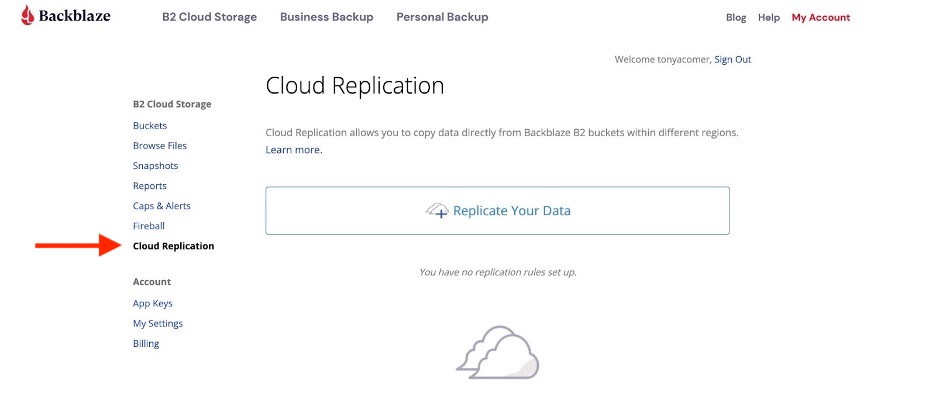
Log in to the account containing the source bucket for your replication rule. Note that the account must have a payment method configured to participate in replication. Cloud Replication will be accessible via a new item in the B2 Cloud Storage menu on the left of the web interface:
Clicking Cloud Replication opens a new page in the web interface:
Click Replicate Your Data to create a new replication rule:
Configuring Replication Within the Same Account
To implement the simple rule, “replicate files from my-production-bucket to my-staging-bucket in the same account,” all you need to do is select the source bucket, set the destination region the same as the source region, and select or create the destination bucket:
Configuring Replication to a Different Account
To replicate data via the web interface to a different account, you must be able to log in to the destination account. Click Authenticate an existing account to log in. Note that the destination account must be enabled for Backblaze B2 and, again, must have a payment method configured:
After authenticating, you must select a bucket in the destination account. The process is the same whether the destination account is in the same or a different region:
Note that, currently, you may configure a bucket as a source in a maximum of two replication rules. A bucket can be configured as a destination in any number of rules.
Once you’ve created the rule, it is accessible via the web interface. You can pause a running rule, run a paused rule, or delete the rule altogether:
Replicating Data
Once you have created the replication rule, you can manipulate files in the source bucket as you normally would. By default, existing files in the source bucket will be copied to the destination bucket. New files, and new versions of existing files, in the source bucket will be replicated regardless of whether they are created via the Backblaze S3 Compatible API, the B2 Native API, or the Backblaze web interface. Note that the replication engine runs on a distributed system, so the time to complete replication is based on the number of other replication jobs scheduled, the number of files to replicate, and the size of the files to replicate.
Checking Replication Status
Click on a source or destination file in the web interface to see its details page. The file’s replication status is at the bottom of the list of attributes:
There are four possible values of replication status:
pending: The file is in the process of being replicated. If there are two rules, at least one of the rules is processing. (Reminder: Currently, you may configure a bucket as a source in a maximum of two replication rules.) Check again later to see if it has left this status.
completed: This status represents a successful replication. If two rules are configured, both rules have completed successfully.
failed: A non-recoverable error has occurred, such as insufficient permissions to write the file into the destination bucket. The system will not try again to process this file. If two rules are configured, at least one has failed.
replica: This file was created by the replication process. Note that replica files cannot be used as the source for further replication.
Cloud Replication and Application Keys
There’s one more detail to examine in the web interface before we move on to the API. Creating a replication rule creates up to two Application Keys; one with read permissions for the source bucket, if the source bucket is not already associated with an Application Key, and one with write permissions for the destination bucket.
The keys are visible in the App Keys page of the web interface:
You don’t need to worry about these keys if you are using the web interface, but it is useful to see how the pieces fit together if you are planning to go on to use the B2 Native API to configure Cloud Replication.
This short video walks you through setting up Cloud Replication in the web interface:
Cloud Replication via the B2 Native API
Configuring cloud replication in the web interface is quick and easy for a single rule, but quickly becomes burdensome if you have to set up multiple replication rules. The B2 Native API allows you to programmatically create replication rules, enabling automation and providing access to two features not currently accessible via the web interface: setting a prefix to constrain the set of files to be replicated and excluding existing files from the replication rule.
Configuring Replication
To create a replication rule, you must include replicationConfiguration when you call b2_create_bucket or b2_update_bucket. The source bucket’s replicationConfiguration must contain asReplicationSource, and the destination bucket’s replicationConfiguration must contain asReplicationDestination. Note that both can be present where a given bucket is the source in one replication rule and the destination in another.
Let’s illustrate the process with a concrete example. Let’s say you want to replicate newly created files with the prefix master_data/, and new versions of those files, from a bucket in the U.S. West region to one in the EU Central region so that you have geographically separate copies of that data. You don’t want to replicate any files that already exist in the source bucket.
Assuming the buckets already exist, you would first create a pair of Application Keys: one in the source account, with read permissions for the source bucket, and another in the destination account, with write permissions for the destination bucket.
Next, call b2_update_bucket with the following message body to configure the source bucket:
Note that the “file prefix” and “include existing buckets” configuration is not currently visible in the web interface.
Viewing Replication Rules
If you are planning to use the B2 Native API to set up replication rules, it’s a good idea to experiment with the web interface first and then call b2_list_buckets to examine the replicationConfiguration property.
Here’s an extract of the configuration of a bucket that is both a source and destination:
To see the replication status of a file, including whether the file is itself a replica, call b2_get_file_info and examine the replicationStatus field. For example, looking at the same file as in the web interface section above:
This short video runs through the various API calls:
How Much Will This Cost?
The majority of fees for Cloud Replication are identical to standard B2 Cloud Storage billing: You pay for the total data you store, replication (download) fees, and for any related transaction fees. For details regarding billing, click here.
The replication fee is only incurred between cross-regional accounts. For example, a source in the U.S. West and a destination in EU Central would incur replication fees, which are priced identically to our standard download fee. If the replication rule is created within a region—for example, both source and destination are located in our U.S. West region—there is no replication fee.
How to Start Replicating
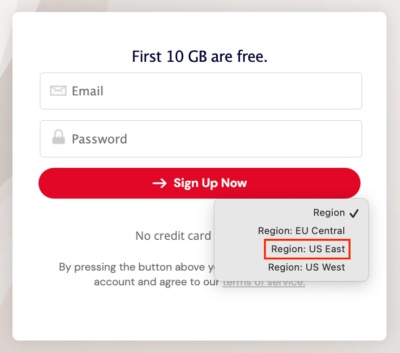
Watch the Backblaze Blog for an announcement when we make Backblaze Cloud Replication generally available (GA), likely early next month. As mentioned above, you will need to set up a payment method on accounts included in replication rules. If you don’t yet have a Backblaze B2 account, or you need to set up a Backblaze B2 account in a different region from your existing account, sign up here and remember to select the region from the dropdown before hitting “Sign Up for Backblaze B2.”
Our team had some fun experimenting with Python 3.9-nogil, the results of which will be reported in an upcoming blog post. In the meantime, we saw an opportunity to dive deeper into the history of the global interpreter lock (GIL), including why it makes Python so easy to integrate with and the tradeoff between ease and performance.
We reached out to Barry Warsaw, a preeminent Python developer and contributor, because we could think of no one better to break down the evolution of the GIL for us. Barry is a longtime Python core developer, former release manager and steering council member, and PSF Fellow. He was project lead for the GNU Mailman mailing list manager. Barry, along with contributor Paweł Polewicz, a backend software developer and longtime Python user, went above and beyond anything we could have imagined, developing this comprehensive deep dive into the GIL and its evolution over the years. Thanks also go to Larry Hastings for his review and feedback.
If Python’s GIL is something you are curious about, we’d love to hear your thoughts in the comments. We’ll let Barry take it from here.
—The Editors
First Things First: What Is the GIL?
The Python GIL, or Global Interpreter Lock, is a mechanism in CPython (the most common implementation of Python) that serves to serialize operations involving the Python bytecode interpreter, and provides useful safety guarantees for internal object and interpreter state. While providing many benefits, as the discussion below will show, the GIL also prevents CPython from achieving full multicore performance.
In simplest terms, the GIL is a lock (or mutex) that allows only a single operating system thread to run the central Python bytecode interpreter loop. Normally, when multiple threads can access shared state, such as global interpreter or object internal state, a programmer would need to implement fine grained locks to prevent one thread from stomping on the state set by another thread. The GIL removes the need for these fine grained locks because it imposes a global lock that prevents multiple threads from mutating this state at the same time.
In this post, I’ll explore the pros and cons of the GIL, and the many efforts over the years to remove it, including some recent exciting developments.
Humble Beginnings
Back in November 1994, I was invited to a little gathering of programming language enthusiasts to meet the Dutch inventor of a relatively new and little known object-oriented language. This three day workshop was organized by my friends and former colleagues at the National Institute of Standards and Technology (NIST) in Gaithersburg, MD. I came with extensive experience in languages from C, C++, FORTH, LISP, Perl, TCL, and Objective-C and enjoyed learning and playing with new programming languages.
Of course, the Dutch inventor was Guido van Rossum and his little language was Python. I think most of us in attendance knew there was something special about Python and Guido, but it probably would have shocked us to know that Python would even be around almost 30 years later, let alone have the scope, impact, or popularity it enjoys today. For me personally, it was a life-changing moment.
A few years ago, I gave a talk at BayPiggies that took a retrospective look at the evolution of Python from version 1.1 in October 1994 (just before the abovementioned workshop), through the Python 2 series, and up to Python 3.7, the newest release of the language at the time. In many ways, Python 1.1 would be recognizable by today’s modern Python programmer. In other ways, you’d wonder how Python was ever usable without features that were introduced in the intervening years.
Can you imagine not having the tuple() or list() built-ins, or docstrings, or class exceptions, keyword arguments, *args, **kws, packages, or even different operators for assignment and equality tests? It was fun to go back through all those old changelogs and remember what it was like as each of the features we now take for granted were introduced, often in those early days with absolutely no regard for backward compatibility.
I managed to find the agenda for that first Python workshop, and one of the items to be discussed was “Improving the efficiency of Python (e.g., by using a different garbage collection scheme).” I don’t remember any of the details of that discussion, but even then, and from its start, Python employed a reference counting memory management scheme (the cyclic garbage detector being many years away yet). Reference counting is a simple way of managing your objects in a higher level language where you don’t directly allocate or free your memory. One of Guido’s early guiding principles for Python, and which has served Python well over the years, is to keep it as simple as possible while still being effective, useful, and fun.
The Basics of Reference Counting
Reference counting is simple; as it says on the tin, the interpreter keeps a counter that tracks every reference to an object. For example, binding an object to a variable (such as by an assignment) increases that object’s reference count by one. Appending an object to a list also increases its reference count by one. Removing an object from the list decreases that object’s reference count by one. When a variable goes out of scope, the reference count of the object the variable is bound to is decreased by one again. We call this reference count the object’s “refcount” and these two operations “incref” and “decref” respectively.
When an object’s refcount goes to zero it means there are no more live references to the object, so it can be safely freed (and finalized) because nothing in the program can reach that object anymore1. As these objects are deallocated, any references to objects they hold are also decref’d, and so on. Refcounting gives the Python interpreter a very simple mechanism for freeing garbage and more importantly, it allows for humans to reason about Python’s memory management, both from the point of view of the Python programmer, and from the vantage point of the C extension writer, who doesn’t have the luxury of all that reference counting happening automatically.
This is a crucial point: When we talk about “Python” we generally mean “CPython,” the implementation of the runtime written in C2. The C programmer working on the CPython runtime, and the module author writing extensions for Python in C (for performance or to integrate with some system library) does have to worry about all the nitty gritty details of when to incref or decref an object. Get this wrong and your extension can leak memory or double free an object, either way wreaking havoc on your system. Fortunately, Python has clear rules to follow and good documentation, but it can still be difficult to get refcounting right in complex situations, such as when proper error handling leads to multiple exit paths from a function.
Here’s Where the GIL Comes In: Reference Counting and Concurrency
One of the key simplifying rules is that the programmer doesn’t have to worry about concurrency when managing Python reference counting. Think about the situation where you have multiple threads, each inserting and removing a Python object from a collection such as a list or dictionary. Because those threads may run at any time and in any order, you would normally have to be extremely defensive in how you incref and decref those objects, and it would be way too easy to get this wrong. You could crash Python, or worse, if you didn’t implement the proper locks around your incref and decref operations. Having to worry about all that would make your C code very complicated and likely pretty error prone. The CPython implementation also has global and static variables which are vulnerable to race conditions3.
In keeping with Python’s principles, in 1992, when Guido first began to implement threading support in Python, he utilized a simple mechanism to keep this manageable for a wide range of Python programmers and extension authors: a Global Interpreter Lock—the infamous GIL!
Because the Python interpreter itself is not thread-safe, the GIL allows only one thread to execute Python bytecode at a time, and thus serializes all access to Python objects. So, barring bugs, it is impossible for multiple threads to stomp on each other’s reference count operations. There are C API functions to release and acquire the GIL around blocking I/O or compute intensive functions that don’t touch Python objects, and these provide boundaries for the interpreter to switch to other Python-executing threads.
Two threads incrementing an object reference counter.
Thus, we gain significant C implementation simplicity at the expense of some parallelism. Modern Python has many ways to work around this limitation, from asyncio to subprocesses and multiprocessing, which all work fine if they align with your requirements. Python also surfaces operating system threading primitives, but these can’t take full advantage of multicore operations because of the GIL.
Advantages of the GIL
Back in the early days of Python, we didn’t have the prevalence of multicore processors, so this all worked fine. These days, modern programming languages are more multicore friendly, and the GIL gets a bad rap. Before we explore the work to remove the GIL, it’s important to understand just how much benefit and mileage Python has gotten out of it.
One important aspect of the GIL is that it simplifies the programming model for extension module authors. When writing extension modules in C, C++, or any other low-level language with access to the internals of the Python interpreter, extension authors would normally have to ensure that there are no race conditions that could corrupt the internal state of Python objects. Concurrency is hard to get right, especially so in low-level languages, and one mistake can corrupt the entire state of the interpreter4. For an extension author, it can already be challenging to ensure all your increfs and decrefs are properly balanced, especially for any branches, early exits, or error conditions, and this would be monumentally more difficult if the author also had to contend with concurrent execution. The GIL provides an important simplifying model of object access (including refcount manipulation) because it ensures that only one thread of execution can mutate Python objects at a time5.
There are important performance benefits of the GIL for single-threaded operations as well. Without the GIL, Python would need some other way of ensuring that object refcounts are safe from corruption due to, for example, race conditions between threads, such as when adding or removing objects from any mutable collection (lists, dictionaries, sets) that are shared across threads. These techniques can be very expensive as some of the experiments described later showed. Ensuring that Python interpreter is safe for multithreaded use cases degrades its performance for the single-threaded use case. The GIL’s low performance overhead really shines for single-threaded operations, including I/O-multiplexed programs where libraries like asyncio are used, and this is still a predominant use of Python. Finer-grained locks also increase the chances of deadlocks, which isn’t possible with the GIL.
Also, one of the reasons Python is so popular today is that it had so many extensions written for it over the years. One of the reasons there are so many powerful extension modules, whether we like to admit it or not, is that the GIL makes those extensions easier to write.
And yet, Python programmers have long dreamed of being able to run multithreaded Python programs to take full advantage of all the cores available on modern computing platforms. Even today’s watches and phones have multiple cores, whereas in Python’s early days, multicore systems were rare. Here we are 30 or so years later, and while the GIL has served Python well, in order to take advantage of what clearly seems to be more than a passing fad, Python’s GIL often gets in the way of true high-performance multithreaded concurrency.
Attempting to Remove the GIL
Two threads incrementing object reference counter without GIL protection.
Over the years, many attempts have been made to remove the GIL.
1999: Greg Stein’s “Free Threading”
Circa 1999, Greg Stein’s “free threading” work was one of the first (successful!) attempts to remove the GIL. It made the locks much more fine-grained and moved global variables inside the interpreter into a structure, which we actually still use today. It had the unfortunate side effect however, of making your Python code multiple times slower. Thus, while the free threading work was a great experiment, it was far too impractical to adopt.
2015: Larry Hasting’s Gilectomy
Years later (circa 2015), Larry Hasting’s wonderfully named Gilectomy project tried a different approach to remove the GIL. In Larry’s PyCon 2016 talk, he discusses four technical considerations that must be addressed when removing the GIL:
Reference Counting: Race conditions on updating the refcount between multiple threads as described previously.
Globals and Statics: These include interpreter global housekeeping variables, and shared singleton objects. Much work has been done over the years to move these globals into per-thread structures. Eric Snow’s work on multiple interpreters (aka “subinterpreters”) has also made a lot of progress on isolating these variables into structures that represent an interpreter “instance” where theoretically each instance could run on a separate core. There are even proposals for making some of those shared singleton objects immortal, such that reference counting race conditions would have no effect on the lifetime of those objects. An interesting related proposal would move the GIL into a per-interpreter data structure, which could lead to the ability to run an isolated interpreter instance per core (with limitations).
C Extensions: Keep in mind that there is a huge ecosystem of C extension modules, and much of Python’s power comes from these extension modules, of which NumPy is a hugely popular example. These extensions have never had to worry about parallelism or re-entrancy because they’ve always relied on the GIL to serialize their operations. At a minimum, a GIL-less Python will require recompilation of extension modules, and some or all may require some level of source code modifications as well. These changes may include protecting internal (non-Python) data structures for concurrency, using functional APIs for refcount modification instead of accessing refcount fields directly, not assuming that Python collections are stable over iteration, etc.
Atomicity: Operations such as adding or deleting objects from Python collections such as lists and dictionaries actually involve a number of steps internally. To the Python developer, these all appear to be atomic operations, and in fact they are, thanks to the GIL.
Larry also identifies what he calls three “political” considerations, but which I think are more in the realm of the social contract between Python developers and Python users:
Removing the GIL should not hurt performance for single-threaded or I/O-bound multithreaded code.
We can’t break existing C extensions as described above6.
Don’t let GIL removal make the CPython interpreter too complicated or difficult to understand. One of Guido’s guiding principles, and a subtle reason for Python’s huge success, is that even with complicated features such as exception handling, asyncio, generators, etc. Python’s C core is still relatively easy to learn and understand. This makes it easy for new contributors to engage with Python core development, an absolutely essential quality if you want your language to thrive and grow for its next 30 years as much as it has for its previous 30.
Larry’s Gilectomy work is quite impressive, and I highly recommend watching any of his PyCon talks for deep technical dives, served with a healthy dose of humor. As Larry points out, removing the GIL isn’t actually the hard part. The hard part is doing so while adhering to the above mentioned technical and social constraints, retaining Python’s single-threaded performance, and building a mechanism that scales with the number of cores. This latter constraint is important because if we’re going to enable multicore operations, we want to ensure that Python’s performance doesn’t hit a plateau at four or eight cores.
So, why did the Gilectomy branch fail (measured in units of “didn’t get adopted by CPython”)? For the most part, the performance and complexity constraints couldn’t be met. One of the biggest hits on performance wasn’t actually lock contention on objects. The early Gilectomy work relied on atomic increment and decrement CPU instructions, which destroyed cache consistency, and caused a high overhead of communication on the intercore bus to ensure atomicity.
Intercore atomic incr/decr communication.
Later, Larry experimented with a technique borrowed from garbage collection research called “buffered reference counting,” essentially a transaction log for refcount changes. However, contention on transaction logs required further modifications to segregate logs by threads and by increment and decrement operations. This led to non-realtime garbage collection events on refcounts reaching zero, which broke features such as Python’s weakref objects.
Interestingly, another hotspot turned out to be what’s called “obmalloc,” which is a small block allocator that improves performance over just using system malloc for everything. We’ll touch on this again later. Solving all these knock-on effects (such as repairing the cyclic garbage collector) led to increased complexity of the implementation, making the chance that it would ever get merged into Python highly unlikely.
Before we leave this topic to look at some new and exciting work, let’s return briefly to Eric Snow’s work on multiple interpreters (aka subinterpreters). PEP 554 proposes to add a new standard library module called “interpreters” which would expose the underlying work that Eric has been doing to isolate interpreter state out of global variables internal to CPython. One such global state is, of course, the GIL. With or without Python-level access to these features, if the GIL could be moved from global state to per-interpreter state, each interpreter instance could theoretically run concurrently with the others. You could therefore attach a different interpreter instance to each thread, and these could run Python code in parallel. This is definitely a work in progress and it’s unclear whether multiple interpreters will deliver on its promises of this kind of limited concurrency. I say “limited” because without full GIL removal, there is significant complexity in sharing Python objects between interpreters, which would almost certainly be necessary. Issues such as ownership (which thread owns which object) and safe mutability would need to be resolved. PEP 554 proposes some solutions to these problems and more, so we’ll have to keep an eye on this work. But even multiple interpreters don’t provide the same true concurrency that full GIL removal promises.
The Future of the GIL: Where Do We Go From Here?
And now we come full-circle, because Python’s popularity, vast influence, and reach is also one of the reasons why it still seems impossible to remove the GIL while retaining single-threaded performance and not breaking the entire ecosystem of extension modules.
Yet here we are with PyCon 2022 just concluded, and there is renewed excitement for Sam Gross’ “nogil” work, which holds the promise of a performant, GIL-less CPython with minimal backward incompatibilities at both the Python and C layers. While some performance regressions are inevitable, Sam’s work also utilizes a number of clever techniques to claw these regressions back through other internal performance improvements.
Two threads incrementing object reference counter on Sam Gross’ “nogil” branch.
With these improvements as well as the work that Guido’s team at Microsoft is doing with its Faster CPython project, there is renewed hope and excitement that the GIL can be removed while retaining or even improving overall performance, and not giving up on backward compatibility. It will clearly be a multi-year effort.
Sam’s nogil project aims to support a concurrency sweet spot. It promises that data race conditions will never corrupt Python’s virtual machine, but it leaves the integrity of user-level data structures to the programmer. Concurrency is hard, and many Python programs and libraries benefit from the implicit GIL constraints, but solving this is a harder problem outside the scope of the nogil project. Data science applications are one big potential domain to benefit from true multiprocessor enabled concurrency in Python.
There are a number of techniques that the nogil project utilizes to remove the GIL bottleneck. As mentioned, the project also employs a number of other virtual machine improvements to regain some of the performance inevitably lost by removing the GIL. I won’t go into too much detail about these improvements, but it’s helpful to note that where these are independent of nogil, they can and are being investigated along with other work Guido’s team is doing to improve the overall performance of CPython.
Python 3.11 recently entered beta (and thus feature freeze), and with it we’ll see significant performance improvements, which no doubt will continue in future Python releases. When and if nogil is adopted, some of those performance gains may regress to support nogil. Whether and how this will be a good trade-off will be an interesting point of analysis and debate in the coming years. In Sam’s original paper, he proposes a runtime switch to choose between nogil and normal GIL operation, however this was discussed at the PyCon 2022 Language Summit, and the consensus was that this wouldn’t be practical. Thus, as the nogil experiment moves forward, it will be enabled by a compile-time switch.
At a high level, the removal of the GIL is afforded by changes in three areas: the memory allocator, reference counting, and concurrent collection protections. Each of these are deep topics on their own, so we’ll only be able to touch on them briefly.
nogil Part 1: Memory Allocators
Because everything in Python is an object, and most objects are dynamically allocated on the heap, the CPython interpreter implements several levels of memory allocators, and provides C API functions for allocating and freeing memory. This allows it to efficiently allocate blocks of raw memory from the operating system, and to subdivide and manage those blocks based on the type of objects being placed into them. For example, integers have different memory requirements than dictionaries, so having object-specific memory managers for these (and other) types of objects makes memory management inside the interpreter much more efficient.
CPython also employs a small object allocator, called pymalloc, which improves performance for allocating and freeing objects smaller than or equal to 512 bytes. This only touches on the complexities of memory management inside the interpreter. The point of all this complexity is to enable more efficient object creation and destruction, but it also allows for features like memory allocation debugging and custom memory allocators.
The nogil works takes advantage of this pluggability to utilize a general purpose, highly efficient, thread-safe memory allocator developed by Daan Leijen at Microsoft called mimalloc. mimalloc itself is worthy of an in-depth look, but for our purposes it’s enough to know that the mimalloc design is extremely well tuned to efficient and thread-safe allocation of memory blocks. The nogil project utilizes these structures for the implementation of dictionaries and other collection types which minimize the need for locks on non-mutating access, as well as managing garbage collected objects7 with minimal bookkeeping. mimalloc has also been highly tuned for performance and thread-safety.
nogil Part 2: Reference Counting
nogil also makes several changes to reference counting, although it does so in a clever way that minimizes changes to the Limited C API, but does not preserve the stable ABI. This means that while extension modules must be recompiled, their source code may not require modification, outside of a few known corner cases8.
One very promising idea is to make some objects effectively immortal, which I touched on earlier. True, False, None and some other objects in practice never actually see their refcounts go to zero, and so they stay alive for the entire lifetime of the Python process. By utilizing the least significant bits of the object’s reference count field for bookkeeping, nogil can make the refcounting macros no-op for these objects, thus avoiding all contention across threads for these fields.
nogil uses a form of biased reference counting to split an object’s refcount into two buckets. For refcount changes in the thread that owns the object, these “local” changes can be made by the more efficient conventional (non-atomic) forms. For changing the refcount of objects in a different thread, an atomic operation is necessary for safe concurrent modification of a “shared” refcount. The thread that owns the object can then combine this local and shared refcount for garbage collection purposes, and it can give up ownership when its local refcount goes to zero. This is performant when most object accesses are local to the owning thread, which is generally the case. nogil’s biased reference counting scheme can utilize mimalloc’s memory pools to efficiently keep track of the owning threads.
However, some objects are typically owned by multiple threads and are not immortal, and for these types of objects (e.g., functions, modules), a deferred reference counting scheme is employed. Incref and decref act as normal for these objects, but when the interpreter loads these objects onto its internal stack, the refcounts are not modified. The utility of this technique is limited to objects that are only deallocated during garbage collection because they are typically involved in reference cycles.
The garbage collector is also modified to ensure that it only runs at safe boundary points, such as a bytecode execution boundary. The current nogil implementation of garbage collection is single-threaded and stops the world, so it is thread-safe. It repurposes some of the existing C API functions to ensure that it doesn’t wait on threads that are blocked on I/O.
nogil Part 3: Concurrent Collection Protections
The third high-level technique that nogil uses to enable concurrency is to implement an efficient algorithm for locking container objects, such as dictionaries and lists, when mutating them. To maintain thread-safety, there’s just no way around employing locks for this. However, nogil optimizes for objects that are primarily modified in a single thread, and it admits that objects which are frequently and concurrently modified may need a different design.
Sam’s nogil paper goes into considerable detail about the locking algorithm, but at a high level it relies on container versioning (where every modification to a container bumps a “version” counter so the various read accesses can know whether the container has been modified between distinct reads or not), biased reference counting, and various mimalloc features to optimize for fast track, single-threaded, no modification reads while amortizing the cost of locking for writes against the other expensive operations a typical container write operation imposes.
The Last Word and Some Predictions
Sam Gross’ nogil project is impressive. He’s managed to satisfy most of the difficult constraints that have thwarted previous attempts at removing the GIL, including minimizing as much as possible the impact on single-threaded performance (and trading general interpreter performance improvements for the cost of removing the GIL), maintaining (mostly) Python’s C API backward compatibility to not force changes on the entire extension module ecosystem, and all the while (Despite the length of this article!) preserving the readability and comprehensibility of the CPython interpreter.
You’ve no doubt noticed that the rabbit hole goes pretty deep, and we’ve only explored some of the tunnels in this particular burrow. Fortunately, Python’s semantics and CPython’s implementation has been well documented over its 30 year life, so there are plenty of opportunities for self-exploration…and contributions! It will take sustained engagement through careful and incremental steps to bring these ideas to fruition. The future certainly is exciting.
If I had to guess, I would say that we’ll see features like multiple interpreters provide some concurrency value in the next release or so, with GIL removal five years (and thus five releases) or more away. However many of the techniques described here are already being experimented with and may show up earlier. Python 3.11 will have many noticeable performance improvements, with plenty of room for additional performance work in future releases. These will give the nogil work room to continue its experimentation at true multicore performance.
For a language and interpreter that has gone from a small group of lucky and prescient enthusiasts to a worldwide top-tier programming language, I think there is more excitement and optimism for Python’s future than ever. And that’s not even talking about game changers such as PyScript.
Stay tuned for a post that introduces the performance experiments the Backblaze team has done with Python 3.9-nogil and Backblaze B2 Cloud Storage. Have you experimented with Python 3.9-nogil? Let us know in the comments.
Barry Warsaw
Barry has been a Python core developer since 1994 and is listed as the first non-Dutch contributor to Python. He worked with Python’s inventor, Guido van Rossum, at CNRI when Guido, and Python development, moved from the Netherlands to the USA. He has been a Python release manager and steering council member, created and named the Python Enhancement (PEP) process, and is involved in Python development to this day. He was the project leader for GNU Mailman, and for a while maintained Jython, the implementation of Python built on the JVM. He is currently a senior staff engineer at LinkedIn, a semiprofessional bass player, and tai chi enthusiast. All opinions and commentary expressed in this article are his own.
Pawel has been a backend developer since 2002. He built the largest e-radio station on the planet in 2006-2007, worked as a QA manager for six years, and finally, started Reef Technologies, a software house highly specialized in building Python backends for startups.
Reference cycles are not only possible but surprisingly common, and these can keep graphs of unreachable objects alive indefinitely. Python 2.0 added a generational cyclic garbage collector to handle these cases. The details are tricky and worthy of an article in its own right.
CPython is also called the “reference implementation” because new features show up there first, even though they are defined for the generic “Python language.” It’s also the most popular implementation, and typically what people think of when they say “Python.”
Much work has been done over the years to reduce these as much as possible.
It’s even worse than this implies. Debugging concurrency problems is notoriously difficult because the conditions that lead to the bug are nearly impossible to reproduce, and few tools exist to help.
Instrumenting concurrent code to try to capture the behavior can introduce subtle timing differences that hide the problem. The industry has even coined the term, “Heisenbug,” to describe the complexity of this class of bug.
Some extension modules also use the GIL as a conveniently available mutex to protect concurrent access to their own, non-Python resources.
It doesn’t seem possible to completely satisfy this constraint in any attempt to remove the GIL.
I.e., the aforementioned cyclic reference garbage collector.
Such as when the extension module peeks and pokes inside CPython data structures directly or via various macros, instead of using the C API’s functional interfaces.
For a lot of us here at Backblaze, skateboarding culture permeated our most formative years. That’s why we were excited to hear from the folks at Santa Cruz Skateboards about how they use Backblaze B2 Cloud Storage to protect decades of skateboarding history. The company is the pinnacle of cool for millennials of a certain age, and, let’s face it, anyone not living under a rock since the mid-70s.
We got the chance to talk shop with Randall Vevea, Information Technology Specialist for Santa Cruz Skateboards, and he shared how they:
Implemented a cloud disaster recovery strategy to protect decades of data in a tsunami risk zone.
Created an automated production and VM backup solution using rclone.
Backed up more data affordably and efficiently in truly accessible storage.
Read on to learn how they did it.
Professional skater Fabiana Delfino.
Santa Cruz Skateboards: The Origin Story
It’s 1973 in sunny Santa Cruz, California. Three local guys—Richard Novak, Doug Haut, and Jay Shuirman—are selling raw fiberglass to the folks that make surfboards, boats, and race car parts. On a surf trip in Hawaii, the trio gets a request to throw together some skateboards. They make 500 and sell out immediately. Twice. Just like that, Santa Cruz Skateboards is born.
Fast forward to today, and Santa Cruz Skateboards is considered the backbone of skateboarding. For over five decades, the company has been putting out a steady stream of skateboards, apparel, accessories, and so much more, all emblazoned with the kinds of memorable art that have shaped skate culture.
Their video archives trace the evolution of skateboarding, following big name players, introducing rising stars, and documenting the events and competitions that connect the skate community all over the world, and it all needs to be protected, accessible, and organized.
A Little Storm Surge Can’t Stop Santa Cruz Skateboards
Randall estimates that the company stores about 40 terabytes of data just in art and media assets alone. Those files form an important historical archive, but the creative team is also constantly referencing and updating existing art—losing it isn’t an option. But potential data loss situations abound, particularly in the weather-prone area of Santa Cruz Harbor.
In January 2022, an underwater volcanic eruption off the coast of Tonga caused a tsunami that flooded Santa Cruz to the tune of $6 million in damage to the harbor. Businesses in the area are used to living with tsunami advisories (there was another scare just two years ago), but that doesn’t make dealing with the damage any easier. “The tsunami lit a fire under us to make sure that in the event that something were to go wrong here, we had our data somewhere else,” Randall said.
On top of weather threats, the pandemic forced Santa Cruz Skateboards to transition from a physical, on-premises setup to a more virtualized infrastructure that could support remote work. That transition was one of the main reasons Santa Cruz Skateboards started looking for a cloud data storage solution; it’s not just easier to back up that virtual machine data, but also to spin up those machines on a hypervisor in the event that something does go wrong.
Professional skater Justin Sommer.
Dropping in on a Major Bummer Called AWS Glacier
Before Randall joined Santa Cruz Skateboards, the company had been using AWS Glacier, a cold storage solution. “When I came on, Glacier was not in a working state,” Randall recalled. Data had been uploaded, but wasn’t syncing. “I’m not an AWS expert—I feel like you could go to school for four years and never learn all the inner workings of AWS. We needed a solution that we could implement quickly and without the hassle,” he said.
Glacier posed the problems above and beyond that heavy lift, including:
Changes to the AWS architecture made Santa Cruz Skateboards’ data inaccessible.
Requests to download data timed out due to cold storage delays.
Endless support emails failed to answer questions or give Randall access to the data trapped in AWS’ black box.
“We were in a situation where we were paying AWS for nothing, basically,” Randall remembered. “I started looking around for different solutions and everywhere I turned, Backblaze was the answer.” Assuming it would take a long time, Randall started small with an FTP server and a local file server. Within two days, all that data was fully backed up. Impressed with those results, he contacted Backblaze for a more thorough introduction. “We were super stoked on something that just worked. I was able to deliver that to our executives and say look, our data is in Backblaze now. We don’t have to worry about this anymore,” Randall said.
“I feel like you could go to school for four years and never learn all the inner workings of AWS. We were in a situation where we were paying AWS for nothing, basically.”
—Randall Vevea, Information Technology Specialist, Santa Cruz Skateboards
Backups Are Like Helmets—They Let You Do the Big Things Better
When a project that Randall had expected to take three or four months was completed in one, Randall started to ask, “What else can we put in Backblaze?” They ended up expanding their scope considerably, including:
Decades of art, image, and video files.
Mission critical business files.
Virtual machine backups.
OneDrive backups.
All told, that amounted to about 60TB of data all managed by a small IT team supporting about 150 employees company-wide. In order to return his valuable time and attention to critical everyday IT tasks—everything from fixing printers to preventing ransomware attacks—Randall needed to find a backup solution that could run reliably in the background without much manual input or upkeep, and Backblaze delivered.
Today, Santa Cruz Skateboards uses two network attached storage devices that clone each other and both back up to the cloud using rclone, an open-source command line program that people use to manage or migrate content. Rclone is also able to handle the company’s complex file names with characters in foreign scripts, like files with names written in Chinese, for example, which solved Randall’s worry about mismatched data as the creative team pulls down files to work with art and other visual assets. He set up a Linux box as a backup manager, which he uses to run rclone cronjobs weekly. By the time Randall shows up to work on Monday mornings, the sync is complete.
With Backups Out of the Way, Santa Cruz Lives to Shred Another Day
“I like the fact that I don’t have to think about backups on a day-to-day basis.”
—Randall Vevea, Information Technology Specialist, Santa Cruz Skateboards
Now, all Randall has to do is check the logs to make sure everything is working as it should. With the backup process automated, there’s a long list of projects that the IT team can devote their time to.
Since making the move to Backblaze B2, Santa Cruz Skateboards is spending less to back up more data. “We have a lot more data in Backblaze than we ever thought we would have in AWS,” Randall said. “As far as cost savings, I think we’re spending about the same amount to store more data that we can actually access.”
The company’s creative team relies on the art and media assets that are now stored and always available in Backblaze B2. Now it’s easy to find and download the specific files should they need to restore them. Meanwhile, the IT team is relieved not to have to navigate AWS’ giant dashboards and complex issues of hot and cold storage with the Glacier service.
Santa Cruz Skateboards had been feeling like a small fish in the huge AWS pond, using a product that amounted to a single cog in a complex machine. Instead of having to divert his attention to research every time questions arise, Randall feels confident that he can rely on Backblaze to get his questions answered right away. “Personally, it’s a big lift off my shoulders,” he said. “Our data’s safe and sound and is getting backed up regularly, and I’m happy with that. I think everybody else is pretty happy with that, too.”
The Santa Cruz Skateboards team.
Is disaster recovery on your to-do list? Learn about our backup and archive solutions to safeguard your data against threats like natural disasters and ransomware.
Since the early days of Backblaze B2 Cloud Storage, the advocacy that resellers and distributors have carried out in support of our products has been super important for us. Today, we can start to more fully return the favor: We are excited to announce the launch of our Channel Partner program.
In this program, we commit to delivering greater ease, transparency, and predictability to our Channel Partners through a suite of tools, resources, incentives, and benefits which will roll out over the balance of 2022. We’ve included the details below.
“When Backblaze expressed interest in working with CloudBlue Marketplace, we were excited to bring them into the fold. Their ease-of-use and affordable price point make them a great offering to our existing resellers, especially those in the traditional IT, MSP, and media & entertainment space.”
—Jess Warrington, General Manager, North America at CloudBlue
The Program’s Mission
This new program is designed to offer a simple and streamlined way for Channel Partners to do business with Backblaze. In this program, we are committed to three principles:
Ease
We’ll work consistently to simplify the way partners can do business with Backblaze, from recruitment to onboarding, and engagement to deal close. Work can be hard enough, we want work with us to feel easy.
Transparency
Openness and honesty are central to Backblaze’s business, and they will be in our dealings with partners as well. As we evolve the program, we’ll share our experiences and thoughts early and often, and we’ll encourage feedback and keep our doors open to your thoughts to inform how we can continue to improve the Channel Partner experience.
Predictability
Maintaining predictable pricing and a scalable capacity model for our resellers and distributors is central to this effort. We’ll also increasingly bundle additional features to answer all your customers’ cloud needs.
The Program’s Value
Making these new investments in our Channel Partner program is all about opening up the value of B2 Cloud Storage to more businesses. To achieve that, our team will help you to engage more customers, help those customers to build their businesses and accelerate their growth, and ultimately increase your profits.
Engage
Backblaze will drive joint marketing activities, provide co-branded collateral, and establish market development funds to drive demand.
Build
Any technology that supports S3-compatible storage can be paired with B2 Cloud Storage, and we continue to expand our Alliance Partner ecosystem—this means you can sell the industry-leading solutions your customers prefer paired with Backblaze B2.
Accelerate
Our products are differentiated by their ease of adoption and use, meaning they’ll be easy to serve to your customers for any use case: backup, archive or any object storage use case, and more—growing your topline revenue.
The Details
To deliver on the mission this program is aligned around, and the value it aims to deliver, our team has developed a collection of benefits, rewards, and resources. Many of these are available today, and some will come later this year (which we’ll clarify below). Importantly, we want to emphasize that this is just the beginning, and we will work to add to each of these lists over the coming months and years.
Partner sales manager to help with onboarding, engagement, and deal close.
Partner marketing manager to help with joint messaging, go-to-market, and collateral.
A password-protected partner portal (coming soon).
Automation of deal registration, lead passing, and seller incentive payments.
Join Us!
We can’t wait to join with our current and future Channel Partners to deliver tomorrow’s solutions to any customer who can use astonishingly easy cloud storage! (We think that’s pretty much everybody.)
If you’re a reseller or distributor, we’d love to hear from you. If you’re a customer interested in benefiting from any of the above, we’d love to connect you with the right Channel Partner team to serve your needs. Either way, the doors are open and we look forward to helping out.
Developing finished applications always requires coding custom functionality, but, as a developer, isn’t it great when you have pre-built, working code you can use as scaffolding for your applications? That way, you can get right to the custom components.
To help you finish building applications faster, we are launching our Developer Quick Start series. This series provides developers with free, open-source code available for download from GitHub. We also built pre-staged buckets with a browsable media application and sample data. For read-only API calls against those buckets, we are sharing API key pairs for programmatic access to these pre-staged buckets. That means you can download the code, run it, and see the results, all without even having to create a Backblaze account!
Today, we’re debuting the first Quick Start in the series—using Python with the Backblaze S3 Compatible API. Read on to get access to all of the resources, including the code on GitHub, sample data to run it against, a video walkthrough, and guided instructions.
Announcing Our Developer Quick Start for Using Python With the Backblaze S3 Compatible API
All of the resources you need to use Python with the Backblaze S3 Compatible API are linked below:
Sample Application: Get our open-source code on GitHub here.
Hosted Sample Data: Experiment with a media application with Application Keys shared for read-only access here.
Video Code Walk-throughs of Sample Application: Share and rewatch walk-throughs on demand here.
Guided Instructions: Get instructions that guide you through downloading the sample code, running it yourself, and then using the code as you see fit, including incorporating it into your own applications here.
Depending on your skill level, the open-source code may be all that you need. If you’re new to the cloud, or just want a deeper, guided walk-through on the source code, check out the written code walk-throughs and video-guided code walk-throughs, too. Whatever works best for you, please feel free to mix and match as you see fit.
Click to enlarge.
The Quick Start walks you through how to perform create and delete API operations inside your own account, all of which can be completed using Backblaze B2 Cloud Storage—and the first 10GB of storage per month are on us.
With the Quick Start code we are sharing, you can get basic functionality working and interacting with B2 Cloud Storage in minutes.
Share the Love
Know someone who might be interested in leveraging the power and ease of cloud storage? Feel free to share these resources at will. Also, we welcome your participation in the projects on GitHub via pull requests. If you are satisfied, feel free to star the project on GitHub or like the videos on YouTube.
The initial launch of the Developer Quick Start series logic is available in Python. We will be rolling out Developer Quick Starts for other languages in the months ahead.
Which programming languages (or scripting environments) are of most interest for you? Please let us know in the comments down below. We are continually adding more working examples in GitHub projects, both in Python and in additional languages. Your feedback in the comments below can help guide what gets priority.
We look forward to hearing from you about how these Developer Quick Starts work for you!
Anyone overwhelmed by their to-do list wishes they could be in two places at once. Backblaze’s newest feature—currently in beta—might not be able to grant that wish, but it will soon offer something similarly useful: The new Cloud Replication feature means data can be in two places at once, solving a whole suite of issues that keep IT teams up at night.
The Background: What Is Backblaze Cloud Replication?
Cloud Replication will enable Backblaze customers to store files in multiple regions, or create multiple copies of files in one region, across the Backblaze Storage Cloud. Simply set replication rules via web UI or API on a bucket. Once the rules are set, any data uploaded to that bucket will automatically be replicated into a destination bucket either in the same region or another region. If it sounds easy, that’s because it is—even the English majors in our Marketing department have mastered this one.
The Why: What Can Cloud Replication Do for You?
There are three key use cases for Cloud Replication:
Protecting data for security, compliance, and continuity purposes.
Bringing data closer to distant teams or customers for faster access.
Providing version protection for testing and staging in deployment environments.
Redundancy for Compliance and Continuity
This is the top use case for cloud replication, and will likely have value for almost any enterprise with advanced backup strategies.
Whether you are concerned about natural disasters, political instability, or complying with possible government, industry, or board regulations—replicating data to another geographic region can check a lot of boxes easily and efficiently. Especially as enterprises move completely into the cloud, data redundancy will increasingly be a requirement for:
Modern business continuity and disaster recovery plans.
Industry and board compliance efforts centered on concentration risk issues.
Data residency requirements stemming from regulations like GDPR.
The gold standard for backup strategies has long been a 3-2-1 approach. The core principles of 3-2-1, originally developed for an on-premises world, still hold true, and today they are being applied in even more robust ways to an increasingly cloud-based world. Cloud replication is a natural evolution for organizations that are storing much more or even all of their data in the cloud or plan to in the future. It enables you to implement the core principles of 3-2-1, including redundancy and geographic separation, all in the cloud.
Data Proximity
If you have teams, customers, or workflows spread around the world, bringing a copy of your data closer to where work gets done can minimize speed-of-light limitations. Especially for media-heavy teams in game development and postproduction, seconds can make the difference in keeping creative teams operating smoothly. And because you can automate replication and use metadata to track accuracy and process, you can remove some manual steps from the process where errors and data loss tend to crop up.
Testing and Staging
Version control and smoke testing are nothing new, but when you’re controlling versions of large applications or trying to keep track of what’s live and what’s in testing, you might need a tool with more horsepower and options for customization. Cloud Replication can serve these needs.
You can easily replicate objects between buckets dedicated for production, testing, or staging if you need to use the same data and maintain the same metadata. This allows you to observe best practices and automate replication between environments.
The Status: When Can I Get My Hands on Cloud Replication?
Cloud Replication kicked off in beta in early April and our team and early testers have been breaking in the feature since then.
Here’s how things are lined up:
April 18: Phase One (Underway)
Phase one is a limited release that is currently underway. We’ve only unlocked new file replication in this release—meaning testers have to upload new data to test functionality.
May 24 (Projected): Phase Two
We’ll be unlocking the “existing file” Cloud Replication functionality at this time. This means users will be able to set up replication rules on existing buckets to see how replication will work for their business data.
Early June (Projected): General Availability
We’ll open the gates completely on June 7 with full functionality, yeehaw!
Want to Learn More About Cloud Replication?
Stay in the know about Cloud Replication availability—click here to get notified first.
If you want to dig into how this feature works via the CLI and API and learn about some of the edge cases, special circumstances, billing implications, and lookouts—our draft Cloud Replication documentation can be accessed here. We also have some help articles walking through how to create rules via the web application here.
Otherwise, we look forward to sharing more when this feature is fully baked and ready for consumption.
Spring is in the air here in the Northern Hemisphere, and a developer’s fancy lightly turns to new projects. Whether you’ve already discovered how astonishingly easy it is to work with Backblaze B2 Cloud Storage or not, we hope you find this collection of handy tips, tricks, and resources useful—many of the techniques apply no matter where you are storing data. But first, let’s have a little fun…
Backblaze Developer Meetup
Whether you call yourself a developer, software engineer, or programmer, if you are a Backblaze B2 customer or are just Backblaze B2-curious and want to hang out in person with like-minded folks, here’s your chance. Backblaze is hosting its very first developer meetup on May 24th from 6–8 p.m. in downtown San Mateo, California. We’ll be joined by Gleb Budman, CEO and Co-founder of Backblaze, members of our Engineering team, our Developer Evangelism team, sales engineers, product managers, and more. There’ll be snacks, drinks, prizes, and more. Space is limited, so please sign up for a spot using this Google Form by May 13th and we’ll let you know if there’s space.
Join Us at GlueCon 2022
Are you going to GlueCon 2022? Backblaze will be there! GlueCon is a developer-centric event that will be held in Broomfield, Colorado on May 18th and 19th, 2022. Backblaze is the partner sponsor of the event and Pat Patterson, our chief technical evangelist, will deliver one of the keynotes. There’s still time to learn more and sign up for GlueCon 2022, but act now!
Tips and Tricks
Here’s a collection of tips and tricks we’ve published over the last few months. You can take them as written or use your imagination as to what other problems you can solve.
Media Transcoding With Backblaze B2 and Vultr Cloud Compute
Your task is simple: allow users to upload video from their mobile or desktop device and then make that video available to a wide variety of devices anywhere in the world. We walk you through how we built a very simple video sharing site with Backblaze B2 and Vultr’s Infrastructure Cloud using Vultr’s Cloud Compute instances for the application servers and their new Optimized Cloud Compute instances for the transcoding workers. This includes setup instructions for Vultr and sample code in GitHub.
Free Image Hosting With Cloudflare and Backblaze B2
Discover how the combination of Cloudflare and Backblaze B2 allows you to create your own, personal 10GB image hosting site for free. You start out using Cloudflare Transform Rules to give you access to HTTP traffic at the CDN edge server. This allows you to manipulate the URI path, query string, and HTTP headers of incoming requests and outgoing responses. We provide step-by-step instructions on how to setup both Cloudflare and Backblaze B2 and leave the rest up to you.
Building a Multiregion Origin Store With Backblaze B2 and Fastly Compute@Edge
Compute@Edge is a serverless computing environment built on the same caching platform as the Fastly Deliver@Edge CDN. Serverless computing removes provisioning, configuration, maintenance, and scaling from the equation. One place where this technology can be used is in serving your own data from multiple Backblaze B2 regions—in other words, serve it from the closest or most available location. Learn how to create a Compute@Edge application and connect it to Backblaze B2 buckets making your data available anywhere.
Using a Cloudflare Worker to Send Notifications on Backblaze B2 Events
When building an application, a common requirement is to be able to send a notification of an event (e.g., a user uploading a file) so that an application can take some action (e.g., processing the file). Learn how you can use a Cloudflare Worker to send event notifications to a wide range of recipients, allowing great flexibility when building integrations with Backblaze B2.
Coming soon on our blog, we’ll provide a developer quick start kit using Python that you can use with the Backblaze S3 Compatible API to store and access data in B2 Cloud Storage. The quick start kit includes:
A sample application with open-source code on GitHub.
Video code walk-throughs of the sample application.
Hosted sample data.
Guided instructions that walk you through downloading the sample code, running it yourself, and then using the code as you see fit, including incorporating it into your own applications.
Launching in mid-May; stay tuned!
Wrap-up
Hopefully you’ve found a couple of things you can try out using Backblaze B2 Cloud Storage. Join the many developers around the world who have discovered how easy it can be to work with Backblaze B2. If you have any questions, you can visit www.backblaze.com/help.html to use our Knowledge Base, chat with our customer support, or submit a customer support request. Of course, you’ll find lots of other developers online who are more than willing to help as well. Good luck and invent something awesome.
A long time ago, in a galaxy far, far away, Backblaze began collecting and storing statistics about the hard drives it uses to store customer data. As of the end of Q1 2022, Backblaze was monitoring 211,732 hard drives and SSDs in our data centers around the universe. Of that number, there were 3,860 boot drives, leaving us with 207,872 data drives under management. This report will focus on those data drives. We will review the hard drive failure rates for those drive models that were active as of the end of Q1 2022, and we’ll also look at their lifetime failure statistics. In between, we will dive into the failure rates of the active drive models over time. Along the way, we will share our observations and insights on the data presented and, as always, we look forward to you doing the same in the comments section at the end of the report.
As of the end of Q1 2022, Backblaze was monitoring 207,872 hard drives used to store data. For our evaluation, we removed 394 drives from consideration as they were either used for testing purposes or were drive models which did not have at least 60 active drives. This leaves us with 207,478 hard drives to analyze for this report. The chart below contains the results of our analysis for Q1 2022.
In reviewing the Q1 2022 table above and the data that lies underneath, we offer a few observations and caveats:
“The Force is strong with this one.”3 The 6TB Seagate (model: ST6000DX000) continues to defy time with zero failures during Q1 2022 despite an average age of nearly seven years (83.7 months). 98% of the drives (859) were installed within the same two-week period back in Q1 2015. The youngest 6TB drive in the entire cohort is a little over four years old. The 4TB Toshiba (model: MD04ABA400V) also had zero failures during Q1 2022 and the average age (82.3 months) is nearly as old as the Seagate drives, but the Toshiba cohort has only 97 drives. Still, they’ve averaged just one drive failure per year over their Backblaze lifetime.
“Great, kid, don’t get cocky.”4 There were a number of padawan drives (in average age) that also had zero drive failures in Q1 2022. The two 16TB WDC drives (models: WUH721816ALEL0 and WUH721816ALEL4) lead the youth movement with an average age of 5.9 and 1.5 months respectively. Between the two models, there are 3,899 operational drives and only one failure since they were installed six months ago. A good start, but surely not Jedi territory yet.
“I find your lack of faith disturbing.”5 You might have noticed the AFR for Q1 2022 of 24.31% for the 8TB HGST drives (model: HUH728080ALE604). The drives are young with an average age of two months, and there are only 76 drives with a total of 4,504 drive days. If you find the AFR bothersome, I do in fact find your lack of faith disturbing, given the history of stellar performance in the other HGST drives we employ. Let’s see where we are in a couple of quarters.
“Try not. Do or do not. There is no try.”6 The saga continues for the 14TB Seagate drives (model: ST14000NM0138). When we last saw this drive, the Seagate/Dell/Backblaze alliance continued to work diligently to understand why the failure rate was stubbornly high. Unusual it is for this model, and the team has employed multiple firmware tweaks over the past several months with varying degrees of success. Patience.
“I like firsts. Good or bad, they’re always memorable.”7
We have been delivering quarterly and annual Drive Stats reports since Q1 2015. Along the way, we have presented multiple different views of the data to help provide insights into our operational environment and the hard drives in that environment. Today we’d like to offer a different way to visualize comparing the average age of many of the different models we currently use versus the annualized failure rate of each of those drive models: the Drive Stats Failure Square:
“…many of the truths that we cling to depend on our viewpoint.”8
Each point on the Drive Stats Failure Square represents a hard drive model in operation in our environment as of 3/31/2022 and lies at the intersection of the average age of that model and the annualized failure rate of that model. We only included drive models with a lifetime total of one million drive days or with a confidence interval of all drive models included being 0.6 or less.
The resulting chart is divided into four equal quadrants, which we will categorize as follows:
Quadrant I: Retirees. Drives in this quadrant have performed well, but given their current high AFR level they are first in line to be replaced.
Quadrant II: Winners. Drives in this quadrant have proven themselves to be reliable over time. Given their age, we need to begin planning for their replacement, but there is no need to panic.
Quadrant III: Challengers. Drives in this quadrant have started off on the right foot and don’t present any current concerns for replacement. We will continue to monitor these drive models to ensure they stay on the path to the winners quadrant instead of sliding off to quadrant IV.
Quadrant IV: Muddlers. Drives in this quadrant should be replaced if possible, but they can continue to operate if their failure rates remain at their current rate. The redundancy and durability built into the Backblaze platform protects data from the higher failure rates of the drives in this quadrant. Still, these drives are a drain on data center and operational resources.
“Difficult to see; always in motion is the future.”9
Obviously, the Winners quadrant is the desired outcome for all of the drive models we employ. But every drive basically starts out in either quadrant III or IV and moves from there over time. The chart below shows how the drive models in quadrant II (Winners) got there.
Each drive model is represented by a snake-like line (Snakes on a plane!?) which shows the AFR of the drive model as the average age of the fleet increased over time. Interestingly, each of the six models currently in quadrant II has a different backstory. For example, who could have predicted that the 6TB Seagate drive (model: ST6000DX000) would have ended up in the Winners quadrant given its less than auspicious start in 2015. And that drive was not alone; the 8TB Seagate drives (models: ST8000NM0055 and ST8000DM002) experienced the same behavior.
This chart can also give us a visual clue as to the direction of the annualized failure rate over time for a given drive model. For example, the 10TB Seagate drive seems more interested in moving into the Retiree quadrant over the next quarter or so and as such its replacement priority could be increased.
“In my experience, there’s no such thing as luck.”11
In the quarterly Drive Stats table at the start of this report, there is some element of randomness which can affect the results. For example, whether a drive is reported as a failure on the 31st of March at 11:59 p.m. or at 12:01 a.m. on April 1st can have a small effect on the results. Still, the quarterly results are useful in surfacing unexpected failure rate patterns, but the most accurate information regarding a given drive model is captured in the lifetime annualized failures rates.
The chart below shows the lifetime annualized failure rates of all the drive models in production as of March 31, 2022.
The lifetime annualized failure rate for all the drives listed above is 1.39%. That was down from 1.40% at the end of 2021. One year ago (3/31/2021), the lifetime AFR was 1.49%.
When looking at the lifetime failure table above, any drive models with less than 500,000 drive days or a confidence interval greater than 1.0% do not have enough data to be considered an accurate portrayal of their performance in our environment. The 8TB HGST drives (model: HUH728080ALE604) and the 16TB Toshiba drives (model: MG08ACA16TA) are good examples of such drives. We list these drives for completeness as they are also listed in the quarterly table at the beginning of this review.
Given the criteria above regarding drive days and confidence intervals, the best performing drive in our environment for each manufacturer is:
HGST: 12TB, model: HUH721212ALE600. AFR: 0.33%
Seagate: 12TB model: ST12000NM001G. AFR 0.63%
WDC: 14TB model: WUH721414ALE6L4. AFR: 0.33%
Toshiba: 16TB model: MG08ACA16TEY. AFR 0.70%
“I never ask that question until after I’ve done it!”13
For those of you interested in how we produce this report, the data we used is available on our Hard Drive Test Data webpage. You can download and use this data for free for your own purpose. All we ask are three things: 1) you cite Backblaze as the source if you use the data, 2) you accept that you are solely responsible for how you use the data, and 3) you do not sell the data itself to anyone; it is free.
Good luck and let us know if you find anything interesting. And no, it’s not a trap.
Quotes Referenced
“The greatest teacher, failure is.”—Yoda, “The Last Jedi”
“Always pass on what you have learned.”—Yoda, “Return of the Jedi”
“The Force is strong with this one.”—Darth Vader, “A New Hope”
“Great, kid, don’t get cocky.”—Han Solo, “A New Hope”
“I find your lack of faith disturbing.”—Darth Vader, “A New Hope”
“Try not. Do or do not. There is no try.”—Yoda, “The Empire Strikes Back”
“I like firsts. Good or bad, they’re always memorable.”—Ahsoka Tano, “The Mandalorian”
“…many of the truths that we cling to depend on our viewpoint.”—Obi-Wan Kenobi, “Return of the Jedi”
“Difficult to see; always in motion is the future.”—Yoda, “The Empire Strikes Back”
“Your focus determines your reality.”—Qui-Gon Jinn, “The Phantom Menace”
“In my experience, there’s no such thing as luck.”—Obi-Wan Kenobi, “A New Hope”
“You have failed me for the last time…”—Darth Vader, “The Empire Strikes Back”
“I never ask that question until after I’ve done it!”—Han Solo, “The Force Awakens”
If you’ve stumbled upon this blog, chances are you already know that you need to be backing up your data to protect your home or business. Maybe you’re a hobbyist with over 1,000 digital movies in your collection and you lie awake at night, worrying about what would happen if your toddler spills juice on your NAS (let’s face it, toddlers are data disasters waiting to happen). Or you’re a media and entertainment professional worried about keeping archives of your past projects on an on-premises device. Or maybe that tornado that hit your area last week caused you to think twice about keeping all of your data on-premises.
Whether you have a background in IT or not, the many different configuration options for your backup software and cloud storage can be confusing. Today, we’re hoping to clear up one common question when it comes to backup strategies—understanding the difference between file-level and block-level incremental backups.
Refresher: Full vs. Incremental Backups
First things first, let’s define what we’re dealing with: the difference between full and incremental backups. The first step in any backup plan is to perform a full backup of your data. Plan to do this on a slow day because it can take a long time and hog a lot of bandwidth. Of course, if you’re a Backblaze customer, you can also use the Backblaze Fireball to get your data into Backblaze B2 Cloud Storage without taking up precious internet resources.
You should plan on regularly performing full backups because it’s always a good idea to have a fresh, full copy of your entire data set. Some people perform full backups weekly, some might do them monthly or even less often; it’s up to you as you plan your backup strategy.
Then, typically, incremental backups are performed in between your full backups. Want to know more about the difference between full and incremental backups and the considerations for each? Check out our recent blog post on the different types of backups.
What’s the Diff: File-level vs. Block-level Incremental Backups
Let’s take it to the next level. Incremental backups back up what has been changed or added since your last full backup. Within the category of incremental backups, there are two standard options: file-level and block-level incremental backups. Many backup tools and devices, like network attached storage (NAS) devices, offer these options in the configuration settings, so it’s important to understand the difference. After you decide which type of incremental backup is best for you, check your backup software or device’s support articles to see if you can configure this setting for yourself.
File-level Incremental Backups
When a file-level incremental backup is performed and a file has been modified, the entire file is copied to your backup repository. This takes longer than performing a block-level backup because your backup software will scan all your files to see which ones have changed since the last full backup and will then back up the entire modified file again.
Imagine that you have a really big file and you make one small change to that file; with file-level backups, the whole file is re-uploaded. This likely sounds pretty inefficient, but there are some advantages to a file-level backup:
It’s simple and straightforward.
It allows you to pick and choose the files you want backed up.
You can include or exclude certain file types or easily back up specific directories.
File-level backups might be the right choice for you if you’re a home techie who wants to back up their movie collection, knowing that those files are not likely to change. Or it could be a good fit for a small business with a small amount of data that isn’t frequently modified.
The diagram below illustrates this concept. This person performs their full backup on Sundays and Wednesdays. (To be clear, we’re not recommending this cadence—it’s just for demonstration purposes.) This results in a 100% copy of their data to a backup repository like Backblaze B2 Cloud Storage. On Monday, part of a file is changed (the black triangle) and a new file is added (the red square). The file-level incremental backup uploads the new file (the red square) and the entire file that has changed (the grey square with the black triangle). On Tuesday, another file is changed (the purple triangle). When the file-level incremental backup is performed, it adds the entire file (the grey square with the purple triangle) to the backup repository. On Wednesday, a new full backup is run, which creates a complete copy of the source data (including all your previously changed and added data) and stores that in the cloud. This starts the cycle of full backups to incremental backups over again.
Click to expand.
Block-level Incremental Backups
Block-level incremental backups do not copy the entire file if only a portion of it has changed. With this option, only the changed part of the file is sent to the backup repository. Because of this, block-level backups are faster and require less storage space. If you’re backing up to cloud storage, obviously this will help you save on storage costs.
Let’s return to our scenario where full backups are performed on Sundays and Wednesdays, but this time, block-level incrementals are being run in between. When the first block-level incremental backup is run on Monday, the backup software copies just the changed piece of data in the file (the black triangle) and the new data (the red square). In the Tuesday backup, the additional modified data in another file (the purple triangle) is also added to the backup repository. On Wednesday, the new full backup results in a fresh copy of the full data set to the cloud.
Click to expand.
Block-level incremental backups take a snapshot of the running volume and data is read from the snapshot. This allows files to be copied even if they’re currently in use in a running software program, and it also reduces the impact on your machine’s performance while the backup is running.
This backup type works better than file-level incremental backups when you have a large number of files or files that often change. If you don’t need to pick and choose which files to specifically include or exclude in your backup, it’s generally best to use block-level incremental backups, as they’re more efficient.
The only drawbacks to block-level incremental backups are that recovery may take longer, since your backup software will need to recover each piece of modified data and rebuild the file. And, because this style of incremental backup uploads modified data in pieces and parts, if one of those pieces becomes corrupted or is unable to be recovered, it could affect your ability to recover the whole file. For this reason (and plenty of other good reasons), it’s important to regularly include full backups in your backup strategy and not just count on incremental backups perpetually.
Ready to Get Started?
No matter which method of incremental backup you decide is right for you, you can take advantage of Backblaze’s extremely affordable B2 Cloud Storage at just $5/TB/month. Back up your servers or your NAS in a matter of minutes and enjoy the peace of mind that comes with knowing you’re protected from a data disaster.
When building an application or solution on Backblaze B2 Cloud Storage, a common requirement is to be able to send a notification of an event (e.g., a user uploading a file) so that an application can take some action (e.g., processing the file). In this blog post, I’ll explain how you can use a Cloudflare Worker to send event notifications to a wide range of recipients, allowing great flexibility when building integrations with Backblaze B2.
Why Use a Proxy to Send Event Notifications?
Event notifications are useful whenever you need to ensure that a given event triggers a particular action. For example, last month, I explained how a video sharing site running on Vultr’s Infrastructure Cloud could store raw and transcoded videos in Backblaze B2. In that example, when a user uploaded a video to a Backblaze B2 bucket via the web application, the web app sent a notification to a Worker app instructing the Worker to read the raw video file from the bucket, transcode it, and upload the processed file back to Backblaze B2.
A drawback of this approach is that, if we were to create a mobile app to upload videos, we would have to copy the notification logic into the mobile app. As the system grows, so does the maintenance burden. Each new app needs code to send notifications and, worse, if we need to add a new field to the notification message, we have to update all of the apps. If, instead, we move the notification logic from the web application to a Cloudflare Worker, we can send notifications on Backblaze B2 events from a single location, regardless of the origin of the request. This pattern of wrapping an API with a component that presents the exact same API but adds its own functionality is known as a proxy.
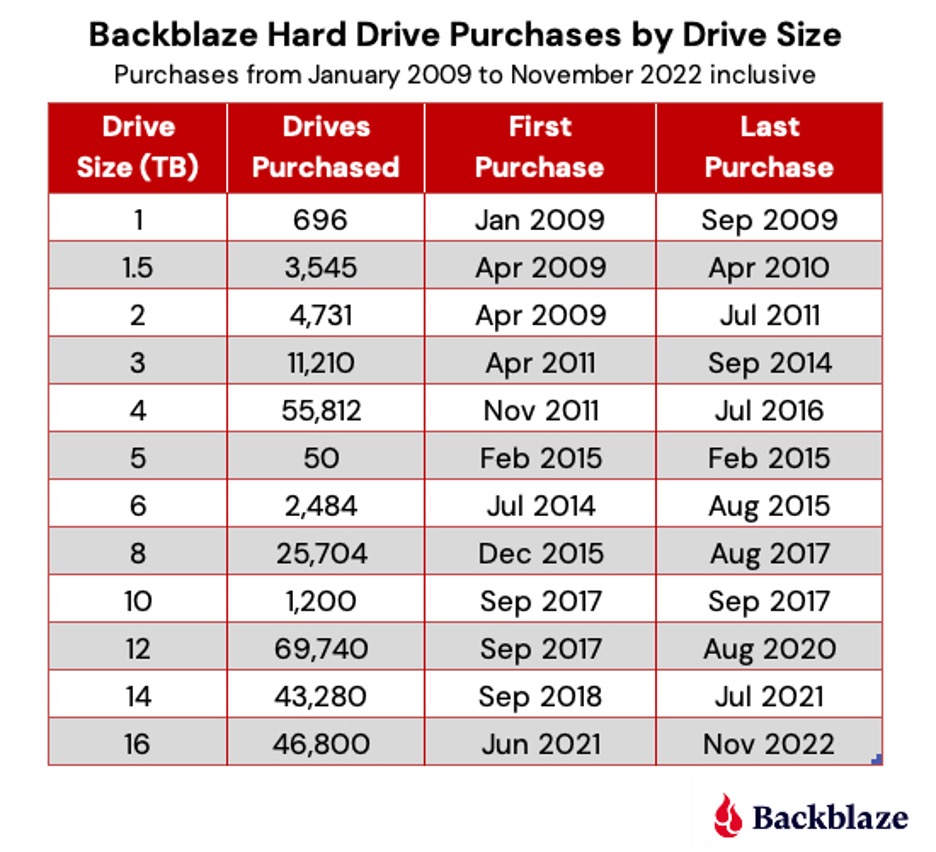
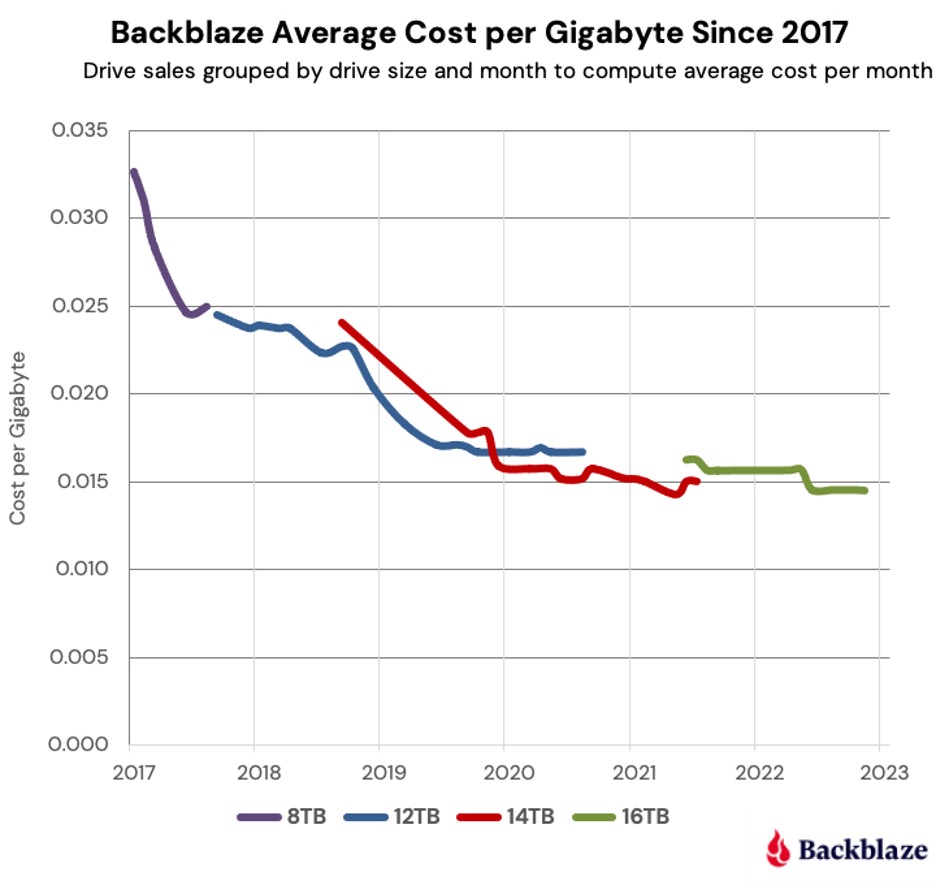
Cloudflare Workers: A Brief Introduction
Cloudflare Workers provides a serverless execution environment that allows you to create applications that run on Cloudflare’s global edge network. A Cloudflare Worker application intercepts all HTTP requests destined for a given domain, and can return any valid HTTP response. Your Worker can create that HTTP response in any way you choose. Workers can consume a range of APIs, allowing them to directly interact with the Cloudflare cache, manipulate globally unique Durable Objects, perform cryptographic operations, and more.
Cloudflare Workers often, but not always, implement the proxy pattern, sending outgoing HTTP requests to servers on the public internet in the course of servicing incoming requests. If we implement a proxy that intercepts requests from clients to Backblaze B2, it could both forward those requests to Backblaze B2 and send notifications of those requests to one or more recipient applications.
This example focuses on proxying requests to the Backblaze S3 Compatible API, and can be used with any S3 client application that works with Backblaze B2 by simply changing the client’s endpoint configuration.
Implementing a similar proxy for the B2 Native API is much simpler, since B2 Native API requests are secured by a bearer token rather than a signature. A B2 Native API proxy would simply copy the incoming request, including the bearer token, changing only the target URL. Look out for a future blog post featuring a B2 Native API proxy.
Proxying Backblaze B2 Operations With a Cloudflare Worker
S3 clients send HTTP requests to the Backblaze S3 Compatible API over a TLS-secured connection. Each request includes the client’s Backblaze Application Key ID (access key ID in AWS parlance) and is signed with its Application Key (secret access key), allowing Backblaze B2 to authenticate the client and verify the integrity of the request. The signature algorithm, AWS Signature Version 4 (SigV4), includes the Host header in the signed data, ensuring that a request intended for one recipient cannot be redirected to another. Unfortunately, this is exactly what we want to happen in this use case!
Our proxy Worker must therefore validate the signature on the incoming request from the client, and then create a new signature that it can include in the outgoing request to the Backblaze B2 endpoint. Note that the Worker must be configured with the same Application Key and ID as the client to be able to validate and create signatures on the client’s behalf.
Here’s the message flow:
A user performs an action in a Backblaze B2 client application, for example, uploading an image.
The client app creates a signed request, exactly as it would for Backblaze B2, but sends it to the Cloudflare Worker rather than directly to Backblaze B2.
The Worker validates the client’s signature, and creates its own signed request.
The Worker sends the signed request to Backblaze B2.
Backblaze B2 validates the signature, and processes the request.
Backblaze B2 returns the response to the Worker.
The Worker forwards the response to the client app.
The Worker sends a notification to the webhook recipient.
The recipient takes some action based on the notification.
These steps are illustrated in the diagram below.
The validation and signing process imposes minimal overhead, even for requests with large payloads, since the signed data includes a SHA-256 digest of the request payload, included with the request in the x-amz-content-sha256 HTTP header, rather than the payload itself. The Worker need not even read the incoming request payload into memory, instead passing it to the Cloudflare Fetch API to be streamed directly to the Backblaze B2 endpoint.
The Worker returns Backblaze B2’s response to the client unchanged, and creates a JSON-formatted webhook notification containing the following parameters:
contentLength: Size of the request body, if there was one, in bytes.
contentType: Describes the request body, if there was one. For example, image/jpeg.
method: HTTP method, for example, PUT.
signatureTimestamp: Request timestamp included in the signature.
status: HTTP status code returned from B2 Cloud Storage, for example 200 for a successful request or 404 for file not found.
url: The URL requested from B2 Cloud Storage, for example, https://s3.us-west-004.backblazeb2.com/my-bucket/hello.txt.
The Worker submits the notification to Cloudflare for asynchronous processing, so that the response to the client is not delayed. Once the interaction with the client is complete, Cloudflare POSTs the notification to the webhook recipient.
Prerequisites
If you’d like to follow the steps below to experiment with the proxy yourself, you will need to:
Sign up for a CloudflareWorkers account. You’ll be able to publish Workers to the default *.workers.dev subdomain free of charge, or to your own paid domain.
1. Creating a Cloudflare Worker Based on the Proxy Code
The Cloudflare Worker B2 Webhook GitHub repository contains full source code and configuration details. You can use the repository as a template for your own Worker using Cloudflare’s wrangler CLI. You can change the Worker name (my-proxy in the sample code below) as you see fit:
wrangler generate my-proxy
https://github.com/backblaze-b2-samples/cloudflare-b2-proxy
cd my-proxy
2. Configuring and Deploying the Cloudflare Worker
You must configure AWS_ACCESS_KEY_ID and AWS_S3_ENDPOINT in wrangler.toml before you can deploy the Worker. Configuring WEBHOOK_URL is optional—you can set it to empty quotes if you just want a vanity URL for Backblaze B2.
[vars]
AWS_ACCESS_KEY_ID = "<your b2 application key id>"
AWS_S3_ENDPOINT = "</your><your endpoint - e.g. s3.us-west-001.backblazeb2.com>"
AWS_SECRET_ACCESS_KEY = "Remove this line after you make AWS_SECRET_ACCESS_KEY a secret in the UI!"
WEBHOOK_URL = "<e.g. https://api.example.com/webhook/1 >"
Note the placeholder for AWS_SECRET_ACCESS_KEY in wrangler.toml. All variables used in the Worker must be set before the Worker can be published, but you should not save your Backblaze B2 application key to the file (see the note below). We work around these constraints by initializing AWS_SECRET_ACCESS_KEY with a placeholder value.
Use the CLI to publish the Worker project to the Cloudflare Workers environment:
wrangler publish
Now log in to the Cloudflare dashboard, navigate to your new Worker, and click the Settings tab, Variables, then Edit Variables. Remove the placeholder text, and paste your Backblaze B2 Application Key as the value for AWS_SECRET_ACCESS_KEY. Click the Encrypt button, then Save. The environment variables should look similar to this:
Finally, you must remove the placeholder line from wrangler.toml. If you do not do so, then the next time you publish the Worker, the placeholder value will overwrite your Application Key.
Why Not Just Set AWS_SECRET_ACCESS_KEY in wrangler.toml?
You should never, ever save secrets such as API keys and passwords in source code files. It’s too easy to forget to remove sensitive data from source code before sharing it either privately or, worse, on a public repository such as GitHub.
You can access the Worker via its default endpoint, which will have the form https://my-proxy.<your-workers-subdomain>.workers.dev, or create a DNS record in your own domain and configure a route associating the custom URL with the Worker.
If you try accessing the Worker URL via the browser, you’ll see an error message:
<Error>
<Code>AccessDenied</Code>
<Message>
Unauthenticated requests are not allowed for this api
</Message>
</Error>
This is expected—the Worker received the request, but the request did not contain a signature.
3. Configuring the Client Application
The only change required in your client application is the S3 endpoint configuration. Set it to your Cloudflare Worker’s endpoint rather than your Backblaze account’s S3 endpoint. As mentioned above, the client continues to use the same Application Key and ID as it did when directly accessing the Backblaze S3 Compatible API.
4. Implementing a Webhook Consumer
The webhook consumer must accept JSON-formatted messages via HTTP POSTs at a public endpoint accessible from the Cloudflare Workers environment. The webhook notification looks like this:
You might implement the webhook consumer in your own application or, alternatively, use an integration platform such as IFTTT, Zapier, or Pipedream to trigger actions in downstream systems. I used Pipedream to create a workflow that logs each Backblaze B2 event as a new row in a Google Sheet. Watch it in action in this short video:
Put the Proxy to Work!
The Cloudflare Worker/Backblaze B2 Proxy can be used as-is in a wide variety of integrations—anywhere you need an event in Backblaze B2 to trigger an action elsewhere. At the same time, it can be readily adapted for different requirements. Here are a few ideas.
In this initial implementation, the client uses the same credentials to access the Worker as the Worker uses to access Backblaze B2. It would be straightforward to use different credentials for the upstream and downstream connections, ensuring that clients can’t bypass the Worker and access Backblaze B2 directly.
POSTing JSON data to a webhook endpoint is just one of many possibilities for sending notifications. You can integrate the worker with any system accessible from the Cloudflare Workers environment via HTTP. For example, you could use a stream-processing platform such as Apache Kafka to publish messages reliably to any number of consumers, or, similarly, send a message to an Amazon Simple Notification Service (SNS) topic for distribution to SNS subscribers.
As a final example, the proxy has full access to the request and response payloads. Rather than sending a notification to a separate system, the worker can operate directly on the data, for example, transparently compressing incoming uploads and decompressing downloads. The possibilities are endless.
Editor’s Note: SoDA and Backblaze will be at NAB 2022 and would love to tell you more about our joint solution—offering data analysis and movement, FREE during initial migration—at NAB. Set up a meeting here.
Moving all your stuff is one of the most paralyzing projects imaginable. Which is why professional movers are amazing: one tackles the dishes, a couple folks hit the mattresses and closets. And there’s one guy (probably the rookie) who gets assigned to the junk drawers and odd gadgets. Suddenly, your old house is empty and your life is safe and orderly in boxes moving across the country.
Now imagine moving your businesses’ most valuable data across the country or the world—whether it’s the organization, the security, the budgeting, or all of the above and then some—it can be absolutely paralyzing, even when your current data storage approach is holding you back and you know you need to make a change.
This is where SoDA comes in.
Essentially your professional movers in the cloud, the SoDA team analyzes your cloud or on-prem infrastructure and then orchestrates the movement, replication, or syncing of data to wherever you want it to go—limiting any downtime in the process and ensuring your data is secure in flight and structured exactly as you need it in its new home. If deciding where to send data is an issue, they’ll use the analysis of your existing setup to scope the best solution by value for your business.
The Backblaze and SoDA Partnership leverages SoDA’s data movement services to unlock Backblaze B2 Cloud Storage’s value for more businesses. The partnership offers the following benefits:
A cost analysis of your existing storage infrastructure.
A “dry run” feature that compares existing storage costs to new storage costs and any transfer costs so you “know before you go.”
The ability to define policies for how the data should move and where.
Flexibility to move, copy, sync, or archive data to Backblaze B2.
Migration and management via the Backblaze S3 Compatible API—easily migrate data, and then develop and manage both on-prem and cloud data via the API going forward.
Why Should You Try Backblaze and SoDA?
First: Backblaze will pay for SoDA’s services for any customer who agrees to migrate 10TB or more and commit to maintaining at least 10TB in Backblaze B2 for a minimum of one year.*
People don’t believe this when we tell them, but we’ll say it again: You won’t receive an invoice for your initial data migration, ever.
If that’s not reason enough to run a proof of concept, here’s more to think about:
Moving a couple of files to the cloud is easy peasy. But what happens if you have billions of files structured in multiple folders across multiple storage locations? You could use legacy tools or command line tools, but all of the scripting and resource management for the data in flight will be on you. You’re smart enough to do it, but if someone else is willing to pay the metaphorical movers, why deal with the hassle?
With SoDA, you do not have to worry about any of it. You define your source locations, define your destination Backblaze B2 bucket and start a transfer. SoDA takes care of the rest. That is truly easy peasy.
An Example of the Backlaze and SoDA Value Proposition
One customer we recently worked with was managing data in their own data center and having issues with reliability and SLAs for current customers. They needed availability at 99.999% as well as cost-effectiveness for future scaling. They identified Backblaze B2 as a provider that checked both boxes and Backblaze recommended SoDA for the move. The customer migrated 1PB of data (over a billion files) into B2 Cloud Storage. Other than making the decision and pointing where the data should go, the customer didn’t have to lift a finger.
Try It Today
If you’re not convinced yet, the SoDA and Backblaze teams are ready to make your life easier at any time. You can schedule a meeting here. Or you can check out the Quickstart guide to explore the solution today.
The impact of the war in Ukraine is evolving in real time, particularly when it comes to the ransomware landscape. Needless to say, it dominated the ransomware conversation throughout Q1 2022. This quarter, we’re digging into some of the consequences from the invasion and what it means for you in addition to a few broader domestic developments.
Why? Staying up to date on ransomware trends can help you prepare your security infrastructure in the short and long term to protect your valuable data. In this series, we share five key takeaways based on what we saw over the previous quarter. Here’s what we observed in Q1 2022.
This post is a part of our ongoing series on ransomware. Take a look at our other posts for more information on how businesses can defend themselves against a ransomware attack, and more.
1. Sanctions and International Attention May Have Depressed Some Ransomware Activity
Following the ground invasion, ransomware attacks seemed to go eerily quiet especially when government officials predicted cyberattacks could be a key tactic. That’s not to say attacks weren’t being carried out without being reported, but the radio silence was notable enough that a few media outlets wondered why.
International attention may be one reason—cybercriminals tend to be wary of the spotlight. Having the world’s eyes on a region where much cybercrime originates seems to have pushed cybercriminals into the shadows. The sanctions imposed on Russia have made it more difficult for cybercrime syndicates based in the country to receive, convert, and disperse payment from victims. The war also may have caused some chaos within ransomware syndicates and fomented fears that cyberinsurers would not pay for claims. As a result, we’ve seen a slowing of ransomware incidents in the first quarter, but that may not last.
Key Takeaway: While ransomware attacks may be down short-term, no one should be lulled into thinking the threat is gone, especially with government agencies on high alert and warnings from the highest levels that businesses should still be on guard.
2. Long-term Socioeconomic Impacts Could Trigger a New Wave of Cybercrime
As part of their ongoing analysis, cyber security consultants Coveware, illustrated how the socioeconomic precarity caused by sanctions could lead to a larger number of people turning to cybercrime as a way to support themselves. In their reporting, they analyzed the number of trained cyber security professionals who they’d expect to be out of work given Russia’s rising unemployment rate in order to estimate a pool of potential new ransomware operators. To double the number of individuals currently acting as ransomware operators, they found that only 7% of the newly unemployed workforce would have to convert to cybercrime.
They note, however, that it remains to be seen what impact a larger labor pool would have since new entrants looking for fast cash may not be as willing to put in the time and effort to carry out big game tactics that typified the first half of 2021. As such, Coveware would expect to see an increase in attacks on small to medium-sized enterprises (which already make up the largest portion of ransomware victims today) and a decline in ransom demands with new operators hoping to make paying up more attractive for victims.
Key Takeaway: If the threat materializes, new entrants to the ransomware game are likely to try to fly under the radar, which means we would expect to see a larger number of small to medium-sized businesses targeted with ransoms that won’t make headlines, but that nonetheless hurt the businesses affected.
3. One Ransomware Operator Paid the Price for Russian Allegiance; Others Declared Neutrality
In February, ransomware group Conti declared their support for Russian actions and threatened to retaliate against Western entities targeting Russian infrastructure. But Conti appears to have miscalculated the loyalty of its affiliates, many of whom are likely pro-Ukraine. The declaration backfired when one of their affiliates leaked chat logs following the announcement. Shortly after, LockBit, another prolific ransomware group, took a cue from Conti’s blunder, declaring neutrality and swearing off any attacks against Russia’s many enemies. Their reasoning? Surprisingly inclusive for an organized crime syndicate:
“Our community consists of many nationalities of the world, most of our pentesters are from the CIS including Russians and Ukrainians, but we also have Americans, Englishmen, Chinese, French, Arabs, Jews, and many others in our team… We are all simple and peaceful people, we are all Earthlings.”
As we know, the ransomware economy is a wide, interconnected network of actors with varying political allegiances. The actions of LockBit may assuage some fears that Russia would be able to weaponize the cybercrime groups that have been allowed to operate with impunity within its borders, but that’s no reason to rest easy.
Key Takeaway: LockBit’s actions and words reinforce the one thing we know for sure about cybercriminals: Despite varying political allegiances, they’re unified by money and they will come after it if it’s easy for the taking.
4. CISA Reports the Globalized Threat of Ransomware Increased in 2021
The U.S. Cybersecurity and Infrastructure Security Agency (CISA) released a statement in March summarizing the trends they saw throughout 2021. They outlined a number of tactics that we saw throughout the year as well, including:
Targeting attacks on holidays and weekends.
Targeting managed service providers.
Targeting backups stored in on-premises devices and in the cloud.
Among others, these tactics pose a threat to critical infrastructure, healthcare, financial institutions, education, businesses, and nonprofits globally.
Key Takeaway: The advisory outlines 18 mitigation strategies businesses and organizations can take to protect themselves from ransomware, including some of the top strategies as we see it: protecting cloud storage by backing up to multiple locations, requiring MFA for access, and encrypting data in the cloud.
5. Russia Could Use Ransomware to Offset Sanctions
Despite our first observation that ransomware attacks slowed somewhat early in the quarter, the Financial Crimes Enforcement Network (FinCEN) issued an alert in March that Russia may employ state-sponsored actors to evade sanctions and bring in cryptocurrency by ramping up attacks. They warned financial institutions, specifically, to be vigilant against these threats to help thwart attempts by state-sponsored Russian actors to extort ransomware payments.
The warnings follow an increase in phishing and distributed denial-of-service (DDoS) attacks that have persisted throughout the year and increased toward the end of February into March as reported by Google’s Threat Analysis Group. In reports from ThreatPost covering the alert as well as Google’s observations, cybersecurity experts seemed doubtful that ransomware payouts would make much of a dent in alleviating the sanctions, and noted that opportunities to use ransomware were more likely on an individual level.
Key Takeaway: The warnings serve as a reminder that both individual actors and state-sponsored entities have ransomware tools at their disposal to use as a means to retaliate against sanctions or simply support themselves, and that the best course of action is to shore up defenses before the anticipated threats materialize.
What This All Means for You
The changing political landscape will continue to shape the ransomware economy in new and unexpected ways. Being better prepared to avoid or mitigate the effects of ransomware makes more and more sense when you can’t be sure what to expect. Ransomware protection doesn’t have to be costly or confusing. Check out our ransomware protection solutions to get started.
Over the past 15 years, Backblaze has established a track record of transparency by sharing everything we can about our work, from publishing our Drive Stats to exploring how we grew our business. After becoming a publicly traded company this past November, we now have a whole new set of opportunities to maintain our commitment to transparency.
Today, I wanted to share in-depth information about a few things we just did and plan to do: In short, the Backblaze founders converted some of our company shares to make them available for sale via 10b5-1 automatic trading plans that were adopted back in February. These plans arrange for automatic sales to occur each trading day over the next 12 months. Importantly, the founders have aligned to each sell the same number of shares and, following the sales from these 10b5-1 plans, would each still hold over 80% of their current shares and jointly continue to hold the majority of the voting control. (If you’re not familiar with some of those terms or concepts, don’t worry, they’re new to many of us, too. We’ll explain in greater detail below.)
Why share this information today? Partially because we’re required to in other channels: When management converts shares from Class B to Class A, a Form 4 must be filed with the Securities and Exchange Commission (SEC). These filings are then typically picked up by financial reporting bots and further shared across financial media to inform shareholders.
But what we are sharing here goes beyond the SEC requirements. We’re doing so because of our commitment to transparency and to provide an easier to grasp (hopefully) explanation of the news.
The Details:
The five original founders have aligned to convert an equal, limited portion of their Class B shares of Backblaze stock to Class A shares. Class B shares at Backblaze provide greater voting power and are held by every person who held stock or stock options pre-IPO. However class B shares cannot be sold on the market, which is why they need to be converted to Class A in order to execute stock sales.
We are converting these shares for future sale under our 10b5-1 plans. 10b5-1 plans are a standard approach for any employee at a publicly traded company who is considered an “insider” to sell shares while avoiding many of the risks related to insider trading. It’s a set-it-and-forget-it plan you put into action and then pretty much leave alone. The plans schedule share sales at set intervals and times regardless of market fluctuations or business news. We implemented these plans in late February 2022, during the Company’s open trading window, and the sales will likely begin May 10, 2022, when the IPO lockup period expires.
Each founder’s 10b5-1 plan is set up to sell 2,000 shares every trading day for approximately 12 months. Here, too, the founders have aligned to each sell the same number of their shares every day—I’ll explain why a little later.
What Does This Mean?
When the sales under the 10b5-1 plans are summed up at the end of the 12 month period, this should be a relatively minor transaction. But we’re aware of the potential perception of founding members selling shares, so we wanted to explain our motivations and their implications more plainly here:
We intend to sell only a small portion of our holdings over the next year and therefore remain significant holders of Backblaze shares after these sales are complete.
We continue to have a positive long-term outlook for the company. Simply put: As founders, we invested a lot in Backblaze almost 15 years ago (when we founded the business in 2007 we contributed both money and time, working without salaries and then for very low pay in the early years) and we’d like to square up some of that investment. This is an opportunity for us to recoup some of our original inputs while also diversifying our finances in a way that feels balanced to us. More on that last thought in the next bullet:
Because we’re invested in the long term success of the business and the mutual success of our investors, we’ve structured our 10b5-1 selling plans to minimize price impact through low volume, daily sales. We’ve aligned our sales as a founding team to achieve this approach, even though it could make for less financial upside for us.
Some readers might wonder why we are selling equal amounts. While there might be a few of you who read our S-1 in full, we understand that ~200 pages is a little long and you may have missed our explanation of the founders’ salary tontine. It’s so well-written though, I’ll just quote it here:
“Early on, we grew our team by hiring co-workers from previous companies who we trusted with what we consider to be our lives and livelihood—our customers’ data… Most of us went entirely without salary for more than a year in order to spend all of Backblaze’s resources building products our customers would love. In the spirit of that original bond, we formed a salary tontine where, until the public offering is finalized, a core group of the original founders and some other very early employees agreed to make the same salary. This solidarity helped us build and sustain our culture through the first 14 years of our evolution.”
The spirit that formed that original understanding—which included equivalent stock ownership among the founders—has persisted beyond the IPO and continues to inform the founders’ treatment of compensation and stock sales. That is why we’re selling equal amounts.
Other readers might wonder if we are trying to “time the market.” No. We created very simple 10b5-1 plans in late February. The plans begin when the IPO lockup expires and stretch into mid-2023. Thus, this has nothing to do with the stock price today or any attempt to try to “time the market.”
From the outside, SEC regulations and financial mechanisms can seem overly complicated and, when read in regulatory filings, somewhat gloomy. But the story here is simple: The other founders and I remain committed to the long-term success of Backblaze. We would also like to realize some of our very long-term investment as we do so. Hopefully the information we’ve shared here helps clarify the picture for you.
If you’d like to dig deeper, you can always access our company filings at https://ir.backblaze.com or in the EDGAR filings database on the SEC website, sec.gov. If you’re an investor and you’d like to ask any questions about the information above or any other topics, you can submit questions about our next earnings beginning one week prior to our call; watch for a forthcoming press release on this topic.
To provide the best experiences, we use technologies like cookies to store and/or access device information. Consenting to these technologies will allow us to process data such as browsing behavior or unique IDs on this site. Not consenting or withdrawing consent, may adversely affect certain features and functions.
Functional
Always active
The technical storage or access is strictly necessary for the legitimate purpose of enabling the use of a specific service explicitly requested by the subscriber or user, or for the sole purpose of carrying out the transmission of a communication over an electronic communications network.
Preferences
The technical storage or access is necessary for the legitimate purpose of storing preferences that are not requested by the subscriber or user.
Statistics
The technical storage or access that is used exclusively for statistical purposes.The technical storage or access that is used exclusively for anonymous statistical purposes. Without a subpoena, voluntary compliance on the part of your Internet Service Provider, or additional records from a third party, information stored or retrieved for this purpose alone cannot usually be used to identify you.
Marketing
The technical storage or access is required to create user profiles to send advertising, or to track the user on a website or across several websites for similar marketing purposes.