Tag Archives: B2Cloud

Backblaze Drive Stats for Q2 2025

Post Syndicated from Drive Stats Team original https://www.backblaze.com/blog/backblaze-drive-stats-for-q2-2025/
A decorative image showing vertical bars and that includes the Backblaze logo, as well as the title Backblaze Q2 2025 Drive Stats.

With hundreds of thousands of hard drives spinning 24/7, our data centers are less like peaceful white-noise oases and more like a a series of obstacle courses—if said obstacle courses were about managing over four exabytes of customer data from archival backups to streaming media to AI training datasets. Sure, they’re obstacle courses we all (and I’m including you, users of the internet) collectively create, but it’s no less of a balancing act to find the contestants (erm, hard drives) that can go the distance. 

And we, dear readers, get to watch it all. Welcome to Drive Stats: where failure is inevitable, survival is fascinating, and every quarter brings a new leaderboard.

As of June 30, 2025, we had 321,201 drives under management. Of that total, there were 3,971 boot drives and 317,230 data drives. Stay tuned as we take our standard peek into quarterly and lifetime failure rates, and do a deep dive into the 20TB+ club. 

As always, we’ll see you in the comments section. This month, you’ll also get three (count ‘em, three!) opportunities to talk to us in person as well—virtually at our Drive Stats LinkedIn Live on August 5 (today), or twice in Las Vegas at DefCon on August 7 and 8. 

Sign up for the Drive Stats LinkedIn Live

Ready to dive deeper into the data? Tune in today at 10:00 a.m. PT, to query the Drive Stats team, Stephanie Doyle and Pat Patterson. We’ll see you there!

Join the Conversation

Drive Stats by the numbers: The digest version
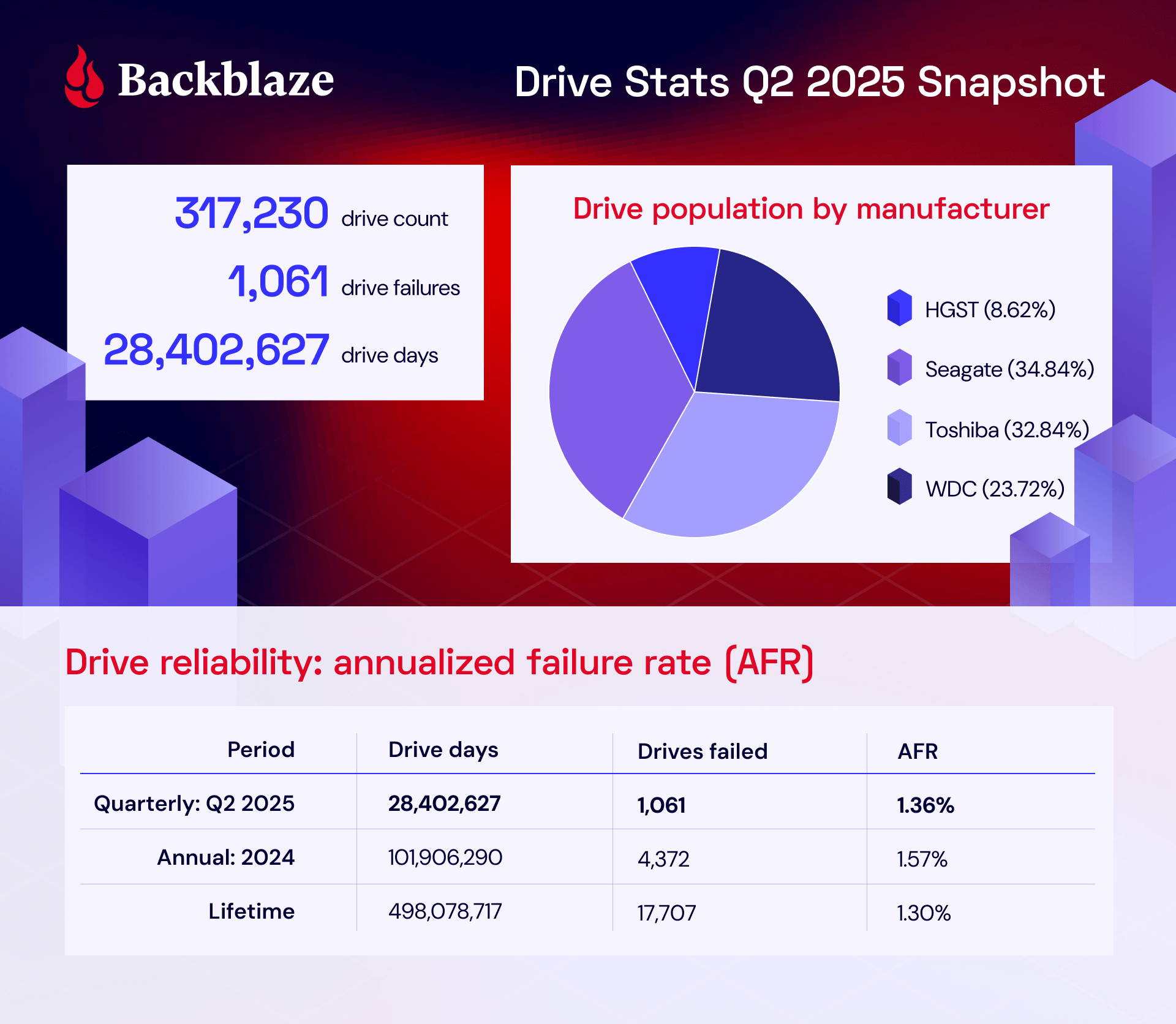
An infographic summarizing key data points in this report, including drive count, drive failures, drive days, drive population by manufacturer, and a summary of the quarterly, annual, and lifetime AFRs.

Q2 2025 hard drive failure rates

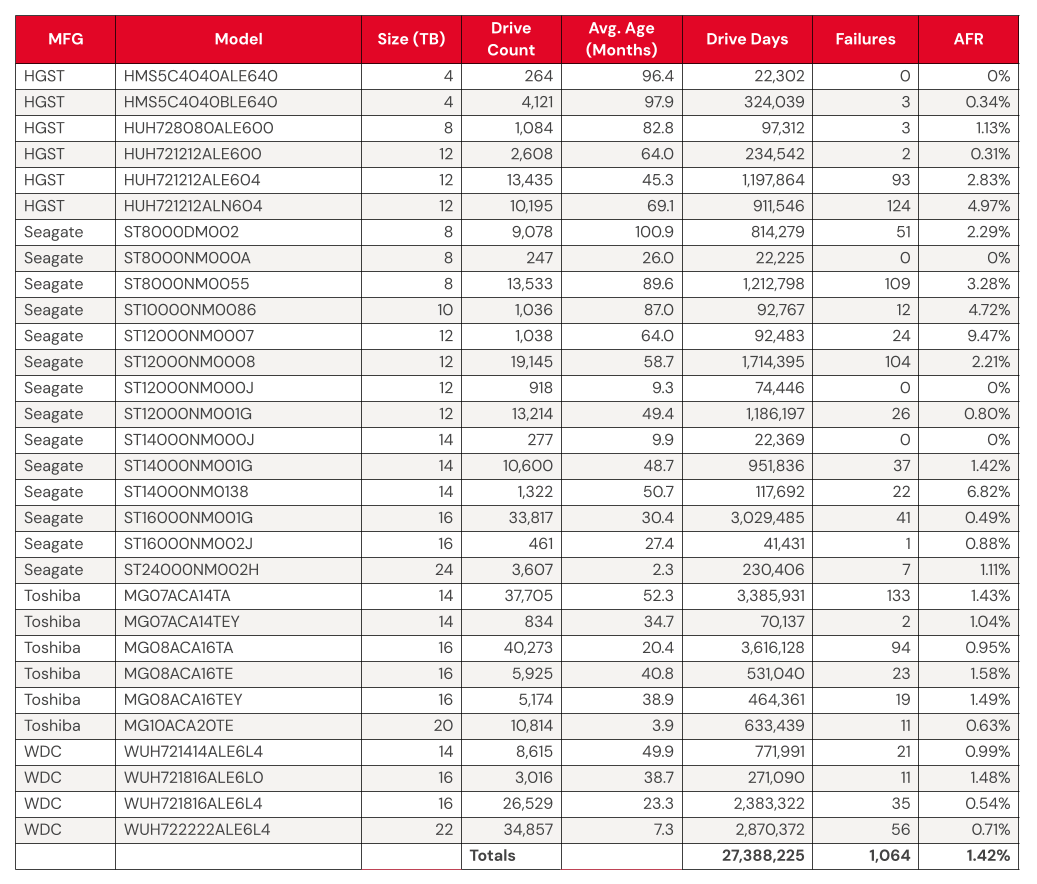
For those that are new to the Drive Stats report, it’s worth mentioning that we have certain criteria that we use to select drives for consideration each quarter. We’ll discuss those in the next section, but for now, let’s talk about the data. The table below shows the failure rates for Q2 2025.

Backblaze Hard Drive Failure Rates for Q2 2025

Reporting period April 1, 2025–June 30, 2025 inclusive
Drive models with drive count > 100 as of June 30, 2025 and drive days > 10,000 in Q2 2025
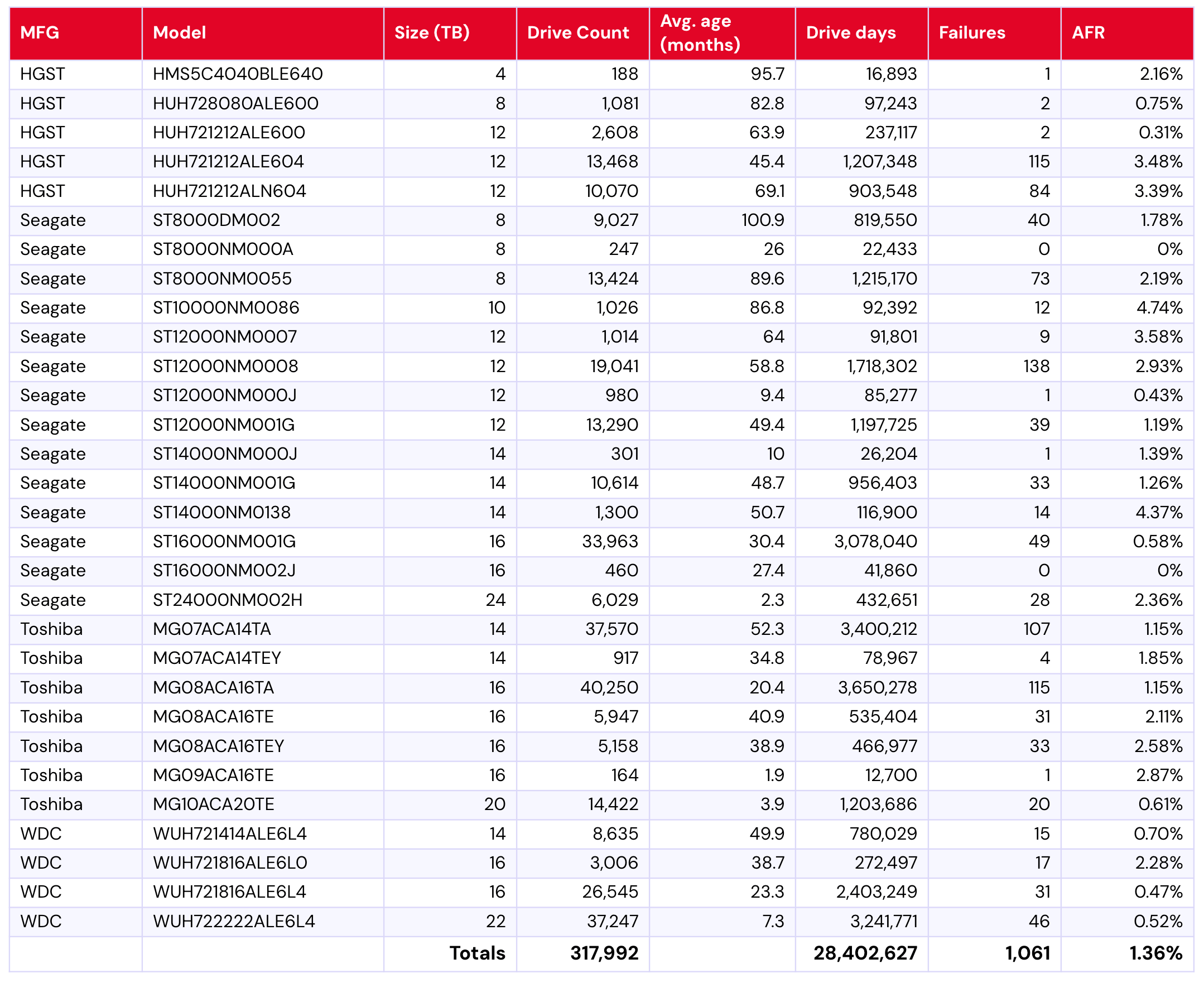
The quarterly Drive Stats table.

Notes and observations

  • The annual failure rate is lower this quarter. We had some major fluctuations last quarter. Quoting ourselves from May 2025:

The quarterly failure rate is slightly higher. The quarterly failure rate went up from 1.35% to 1.42%. As with the zero-failure club, our higher-end outlier AFRs show some of the usual suspects:

We’re now back down to 1.36%. What’s changed? 

  • Big swings in our higher-end failure rates: Well, some of the drives with higher failure rates have come down quite a bit. Notably, that includes the 12TB Seagate model ST12000NM0007, which was at a whopping 9.47% failure rate last quarter—down this quarter to only 3.58%. With its drive count holding more or less steady (1,038 in Q1 and 1,014 in Q2), that means a real change in failure rates. Note that this drive was at 8.72% in Q4 2024, so it’s worth keeping an eye on whether this is a fluke or a new pattern. Other significant drops include the 12TB HGST model HUH721212ALN604 (Q1: 4.97%; Q2: 3.39%) and the 14TB Seagate model ST14000NM0138 (Q1: 6.82%, Q2: 4.37%). 
  • One new drive model on the way in: Welcome to the party, Toshiba MG09ACA16TE (16TB).
  • Zero failures for the quarter: Rising to the top, we’ve got only two this time around:
    • Seagate ST8000NM000A (8TB)
    • Seagate ST16000NM002J (16TB) 

That 8TB Seagate is really shining, given this is its third quarter running with zero failures.

  • Bonus: One failure drives: Since we only have two 0 failures (and that just seems a little lackluster, doesn’t it?), it’s also worth mentioning the drives with only one failure this quarter: 
    • HGST HMS5C4040BLE640 (4TB)
    • Seagate ST12000NM000J (12TB) 
    • Seagate ST14000NM000J (14TB) 
    • Toshiba MG09ACA16TE (16TB)

Drive model criteria

We noted earlier we removed 495 drives from consideration when we produced the table above covering Q2 2025. There are two primary reasons we did not consider these drive models.

  • Testing. These are drives of a given model that we monitor and collect Drive Stats data on, but are not considered production drives at this time. For example, drives undergoing certification testing to determine if they are performant enough for our environment are not included in our Drive Stats calculations.
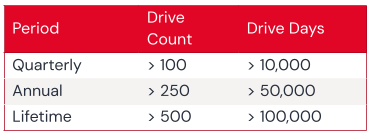
  • Insufficient data points. When we calculate the annualized failure rate for a drive model for a given period of time (quarterly, annual, or lifetime), we want to ensure we have enough data to reliably do so. Therefore we have defined criteria for a drive model to be included in the tables and charts for the specified period of time. Models that do not meet these criteria are not included in the tables and charts for the period in question.
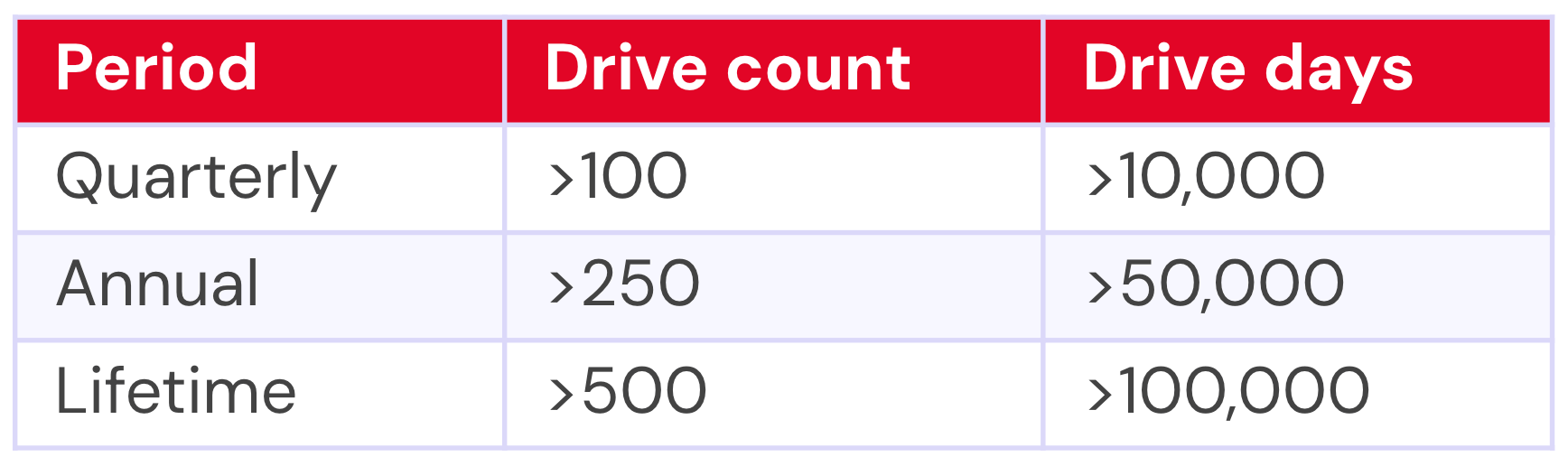
A table that outlines the drive inclusion parameters for each type of Backblaze Drive Stats report.

Regardless of whether or not a given drive model is included in the charts and tables, all of the data for all of the drives we use is included in our Drive Stats dataset which you can download by visiting our Drive Stats page.

As with the Q2 quarterly results, we will apply these criteria to the lifetime charts that follow in this report.

Lifetime hard drive failure rates

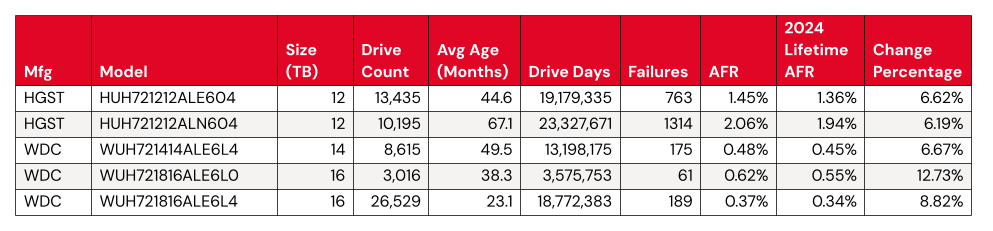
To be considered for the lifetime review, a drive model was required to have 500 or more drives as of the end of Q2 2025 and have over 100,000 accumulated drive days during their lifetime. When we removed those drive models which did not meet the lifetime criteria, we had 393,907 drives grouped into 27 models remaining for analysis as shown in the table below.

Backblaze Hard Drive Failure Rates for Q2 2025

Reporting period ending June 30, 2025
Drive models > 500 drives and > 100,000 lifetime drive days
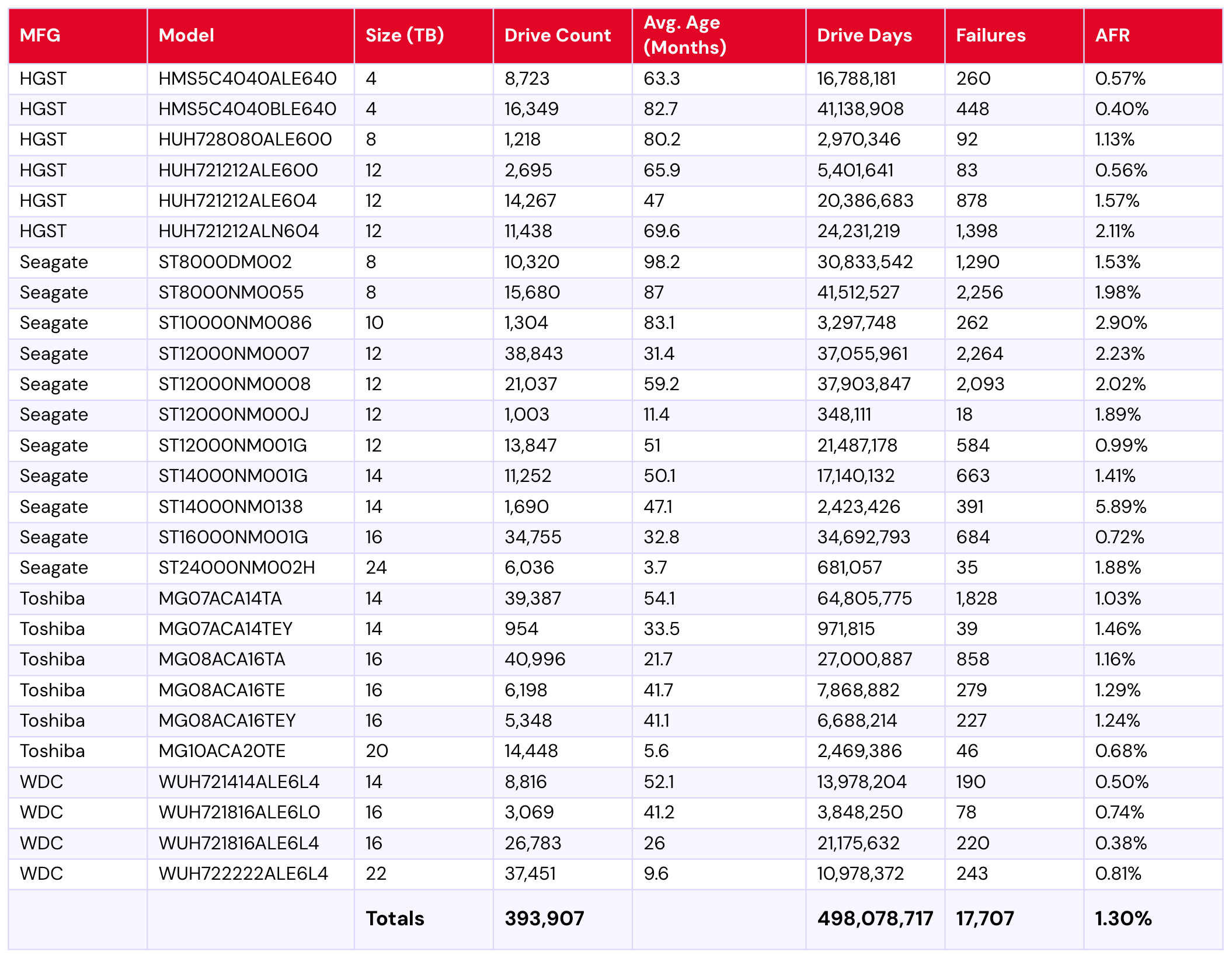
A table showing the lifetime Backblaze Drive Stats.

Notes and observations

Again, the lifetime AFR holds steady, dropping from Q1 2025’s 1.31% to 1.30%. 

  • Now you see me: This quarter’s table also gives us an interesting snapshot that has to do with our drive exclusions as the 4TB HGST model HMS5C4040ALE640 is on the way out. It meets our lifetime drive criteria, so it is included in this second table, but it didn’t make the cut for the quarterly table because it had too few drives running by the end of the quarter. Usually you see the opposite, where drive models show up in the quarterly requirements but not the lifetime. This quarter, four models meet that standard (Seagate model numbers ST8000NM000A, ST14000NM000J, ST16000NM002J, and Toshiba MG09ACA16TE). 
  • Smaller drives getting older: Perhaps an unsurprising trend—Backblaze’s smaller capacity drives are getting older. We have a total of 13 drive models with 12TB or less, with a collective 1.54% failure rate. See the table below:

Backblaze drives with ≤12TB capacity
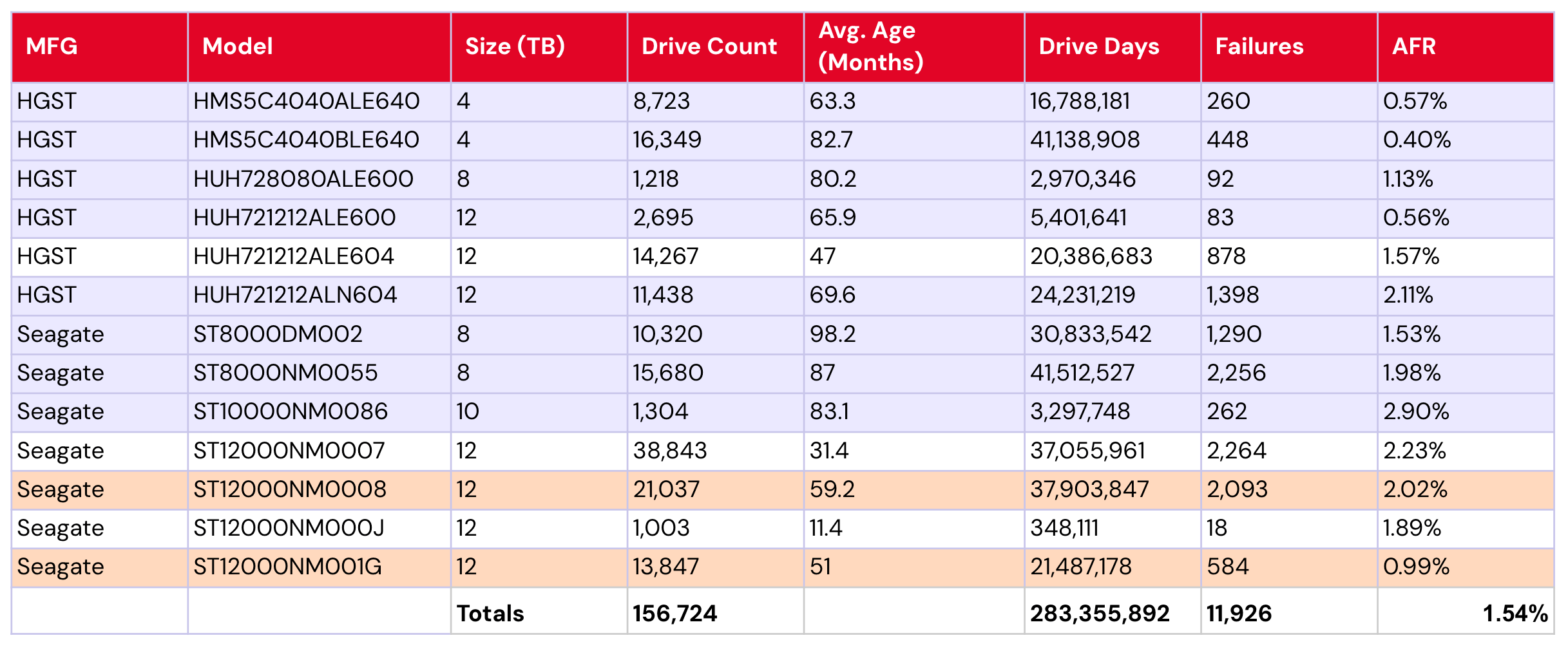
A image showing drives that are less than or equal to 12TB, including color coding to indicate drive age.

Of those models, eight are five years old or older (shown in purple). An additional two models are four years or older (that’s your orange). Taking just these 10 models—drives reaching their supposed golden years—we have a collective AFR of 1.42%.

Notably, that AFR is due to some well-performing low-failure outliers, including both of the 4TB Seagate models (0.57% and 0.40%), the 12TB HGST model HUH721212ALE600 (0.56%), and the 12TB Seagate model ST12000NM001G (0.99%).

That said, it’s also perhaps more impressive that when we say “eight are five years and older,” of those eight drive models, five are six or more years old. Their collective AFR is 1.33%.
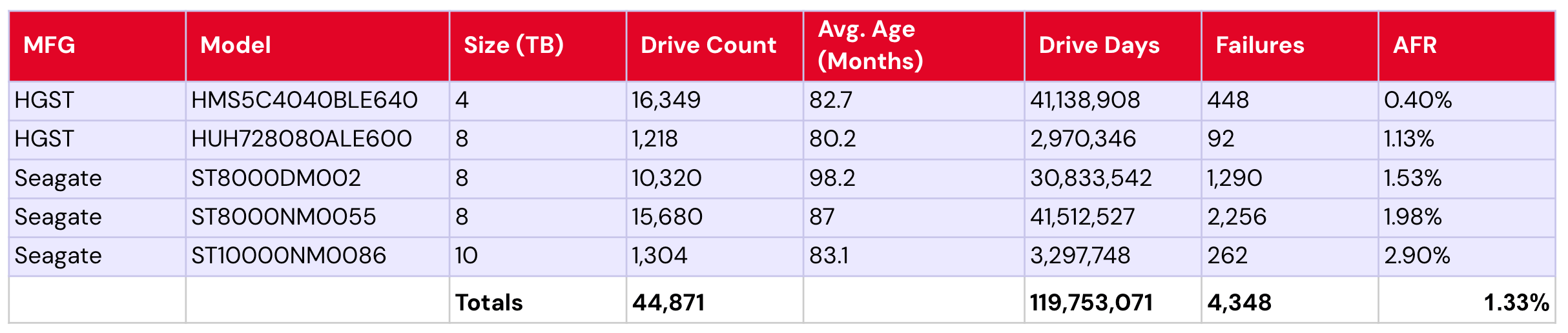
Drive models that are less than or equal to 12TB and that are 6 or more years old.

This begs the age-old question: Is age just a number? Or, are we just seeing several exceptional drive models? In any event—an interesting drive population to keep an eye on, as it represents 156,724 of our 393,907 (~40%) of the lifetime drive pool.

Zoom in: The 20TB+ club

We’ve been taking quick peeks at the 20TB+ drives in the last few reports, but it’s high time we dig in a bit deeper. Right now, our cohort of 20TB+ drives that meet the lifetime criteria consists of three drives, the 20TB Toshiba model MG10ACA20TE, 22TB WDC model WUH722222ALE6L4, and 24TB Seagate model ST24000NM002H. Quite neatly, that also gives us one per manufacturer, lending itself to something of a head-to-head comparison—though, of course, with the variability we see on a per-drive basis within the same manufacturer, we won’t over-index on lending it too much significance. 

Let’s take a look at each.

20TB Toshiba MG10ACA20TE

The Toshiba has actually been in our drive pool for 22 months, but until just under a year ago, there were only two drives. For the purposes of significance, then, we’ll exclude significantly low numbers of drives—thankfully, each model has something of a natural fall-off point where they go from single-digit drive numbers to hundreds. 

For the Toshiba, that gives us the following data:
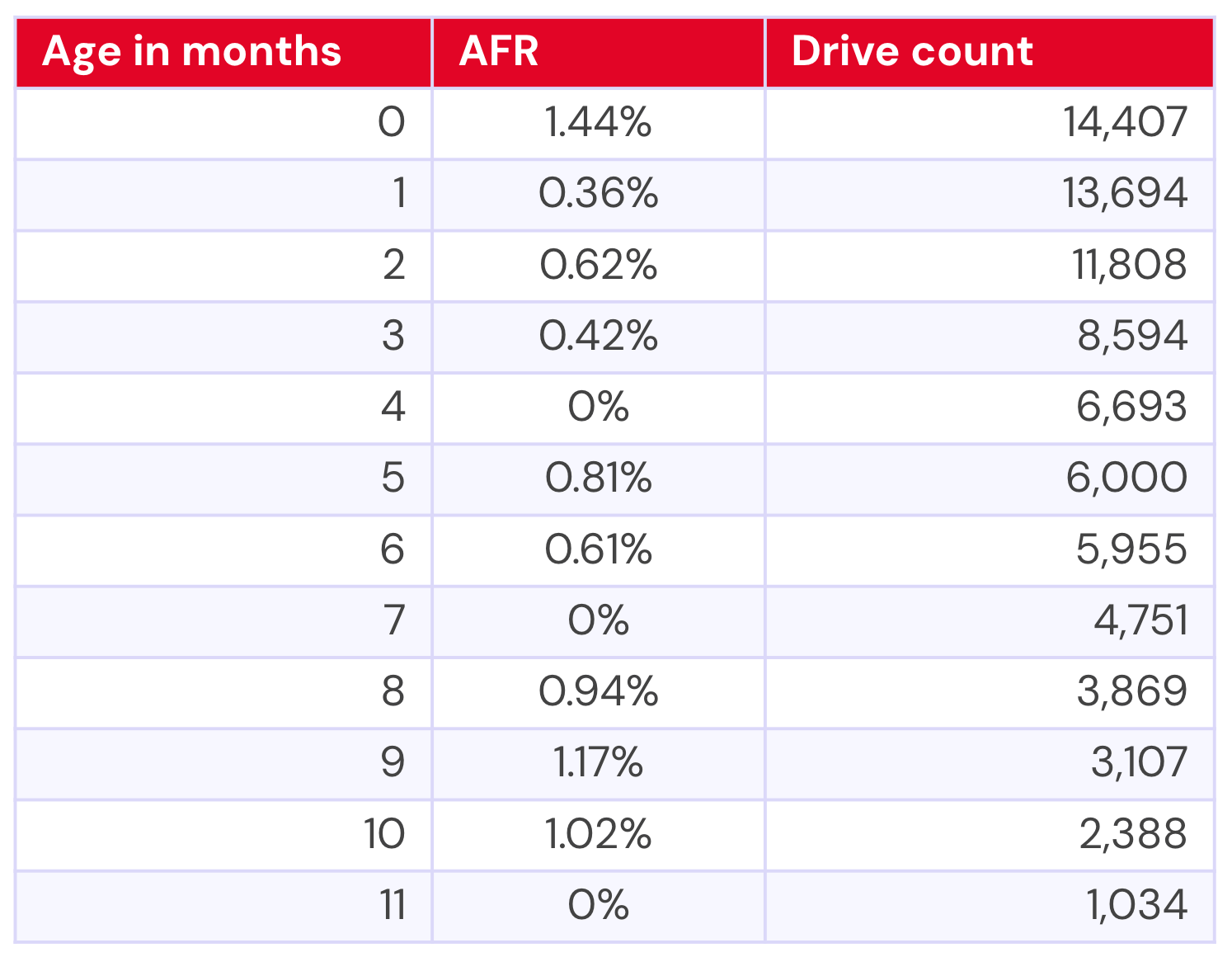
A table showing the AFRs for the 20TB Toshiba based on their age.

Converted to a graph, we end up with the following:

A graph showing the failure rates based on age for the 20TB Toshiba drives.

On this graph, the blue line represents the AFR and the red line represents the drive count. Drive count can be a bit tricky since our x-axis is age, and we start with age=0, which means that the drive count (from our perspective) goes from larger to smaller. That is, as drives get older, there are fewer of them by count—you have your initial purchase cohort, then you add drives over time. You can read this as the first data point representing drives that are between 0–1 month old, the next data point as 1–2 months old, etc. 

We set it up this way because we wanted to be able to directly compare the failure rates of the drives based on their ages. Those familiar with our bathtub curve analysis may recognize our methodology here—we’re just zooming in on specific drives and drive capacities. 

22TB WDC WUH722222ALE6L4

Now let’s take a look at the WDC model. We have usable data for about 21 months of its drive life:
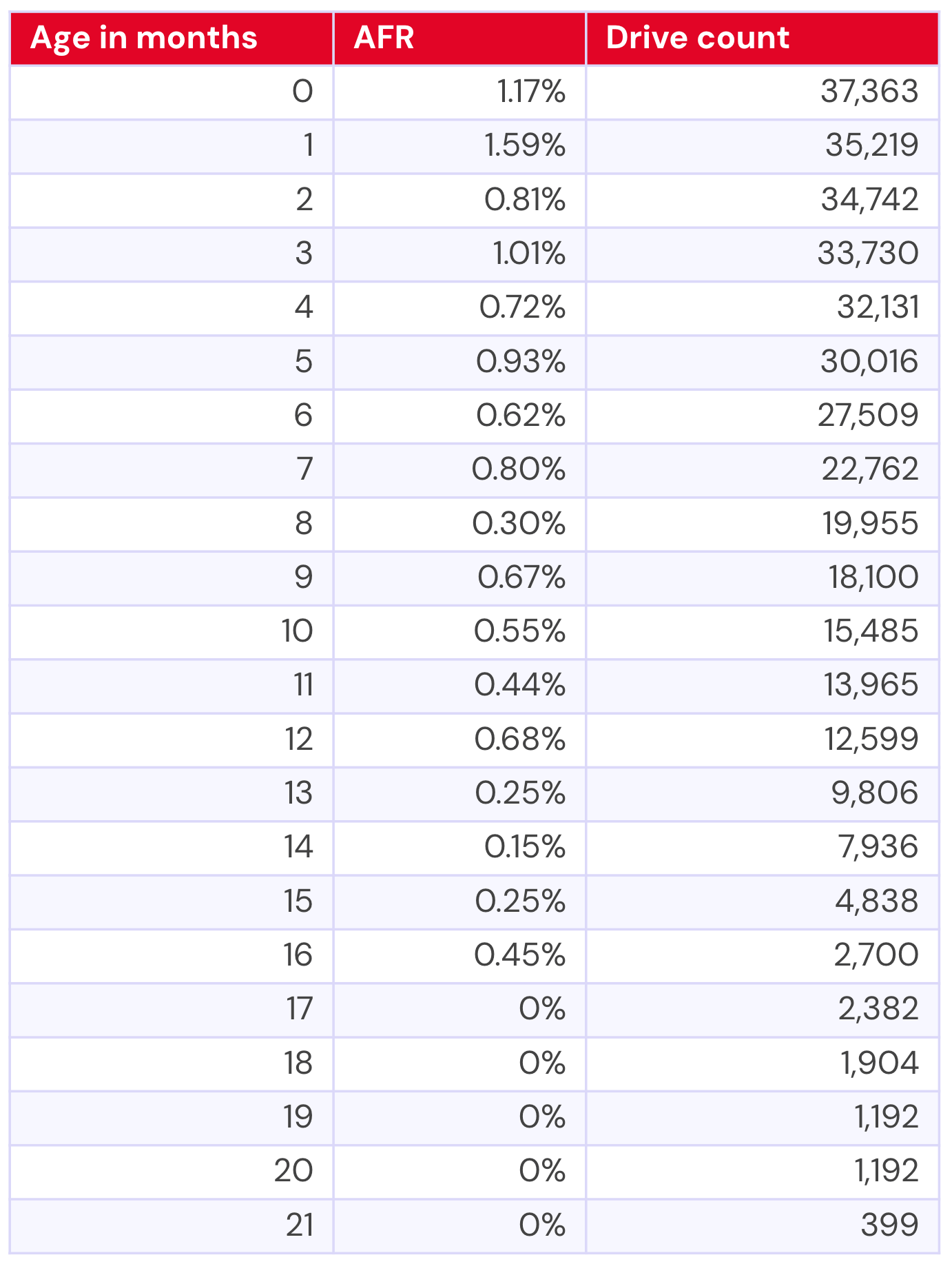
A table showing the AFRs for the 22TB WDC drives based on their age.

Which gives us the following visualization:
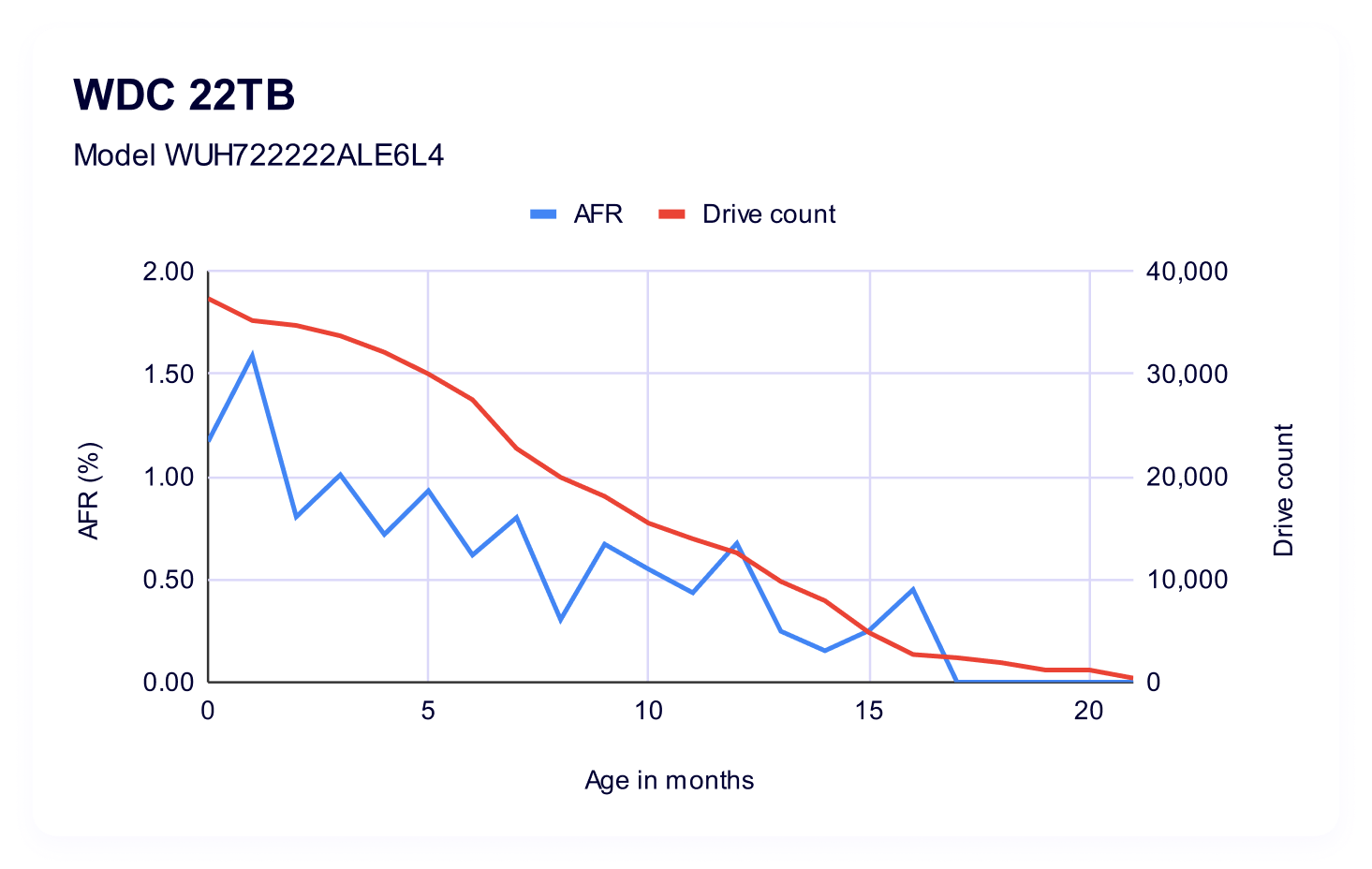
A graph showing the AFRs for the 22TB WDC drives based on their age.

Interestingly, we see a lot less variability in the span of time where we have a direct comparison. That said, the WDC model also had a minimum of double the drive count if we’re looking at a similar time period—so, at their youngest (0 months old) the Toshiba had 14,407 drives vs. WDC’s 37,363; and, at 11 months Toshiba had 1,034 drives vs. WDC’s 13,965. 

While AFRs do get us mostly on an even playing field as far as being able to make a 1:1 comparison, it’s important to remember that in smaller drive pools, a single failure can be amplified by quite a bit.

24TB Seagate ST24000NM002H

Our youngest drive model, the 24TB Seagate ST24000NM002H, has just half a year of data.
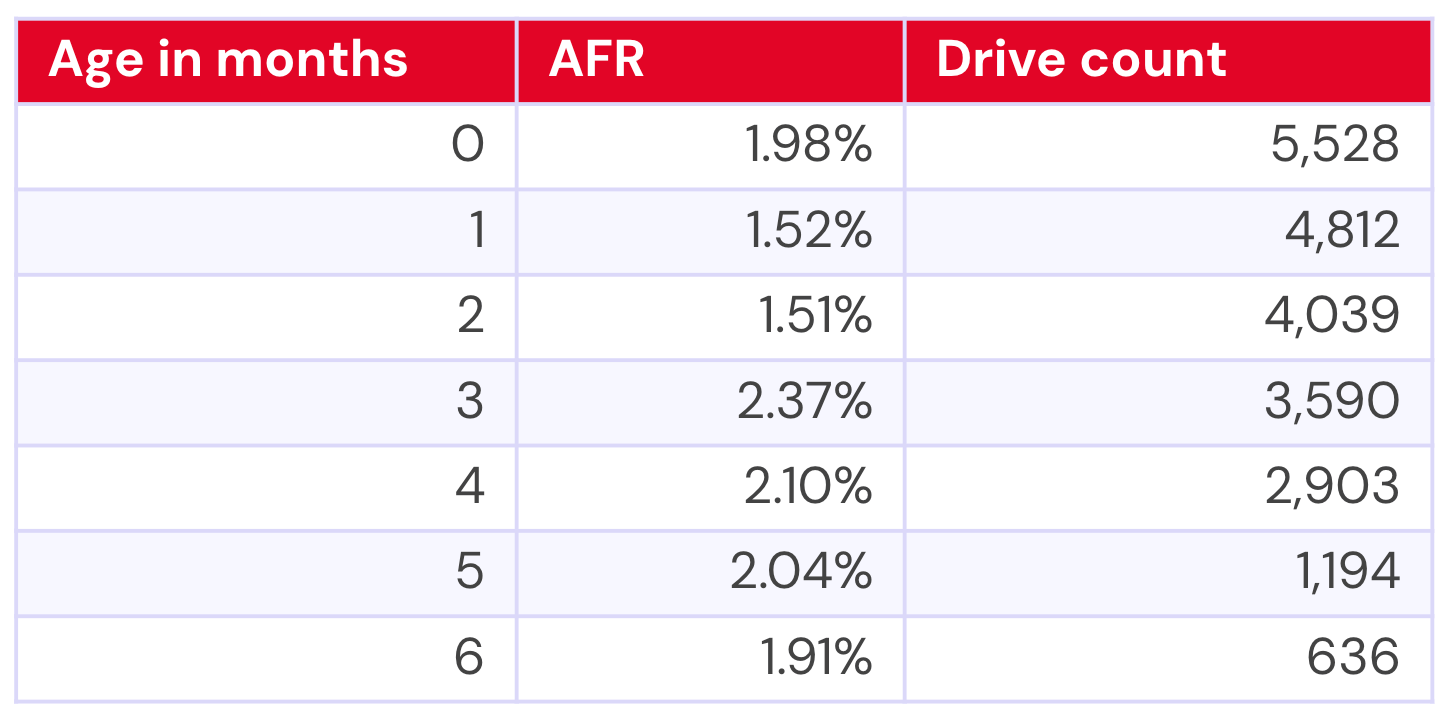
A table showing the AFRs for the 24TB Seagate drives based on their age.

That gives us the following visualization:
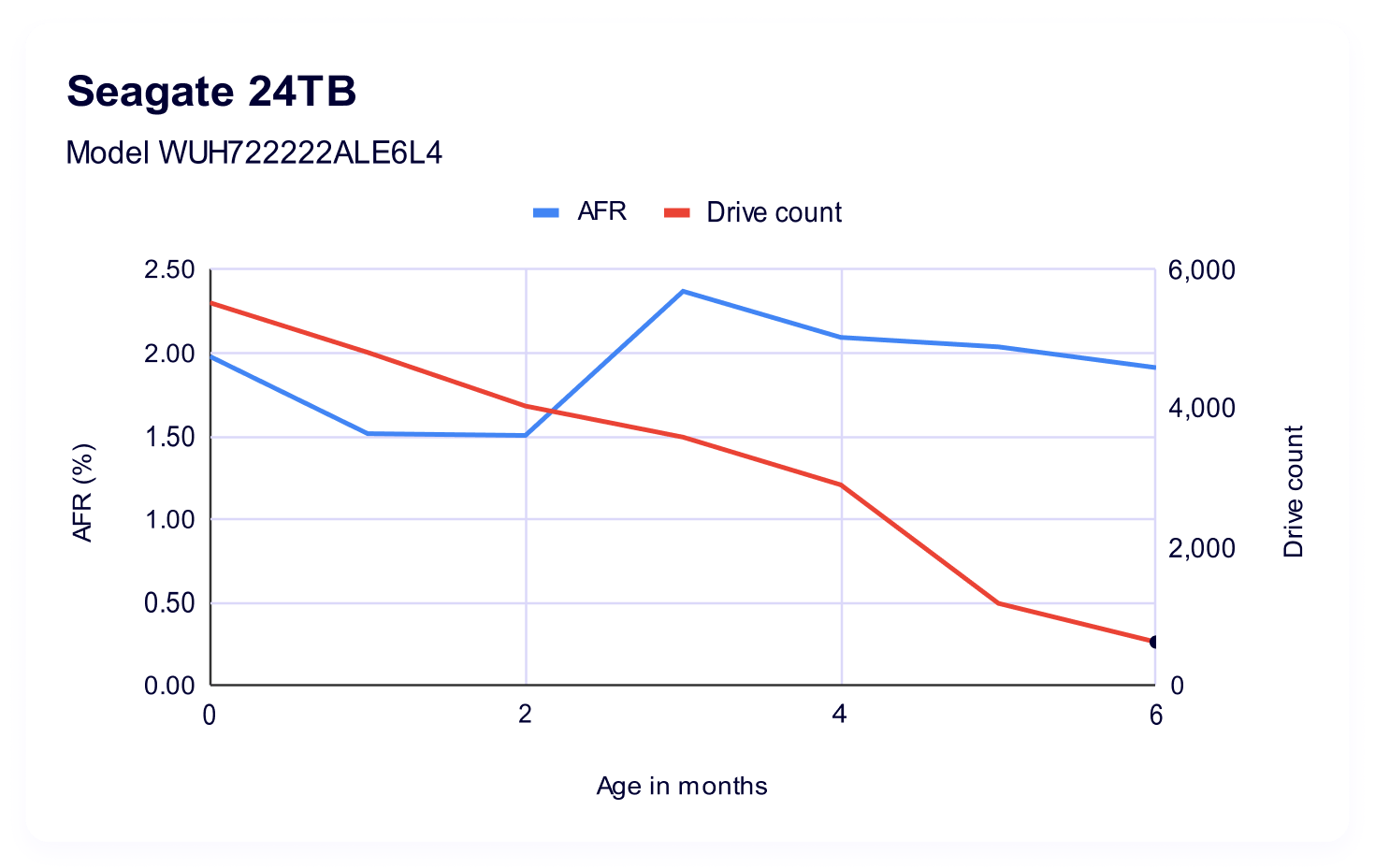
A graph showing the AFRs for the 24TB Seagate drives based on their age.

Compared with our other two drive models, the 24TB Seagate definitely has the highest failure rates. This could be explained, in part, by it being a young drive—is it in the leading edge of a traditional bathtub curve? So, certainly something to track over time to see if it will settle out as it gets older.

All together now: Comparing each 20TB+ drives

We designed this view to be directly comparable at points in time, so, here’s your graph that puts each drive on the same time scale:
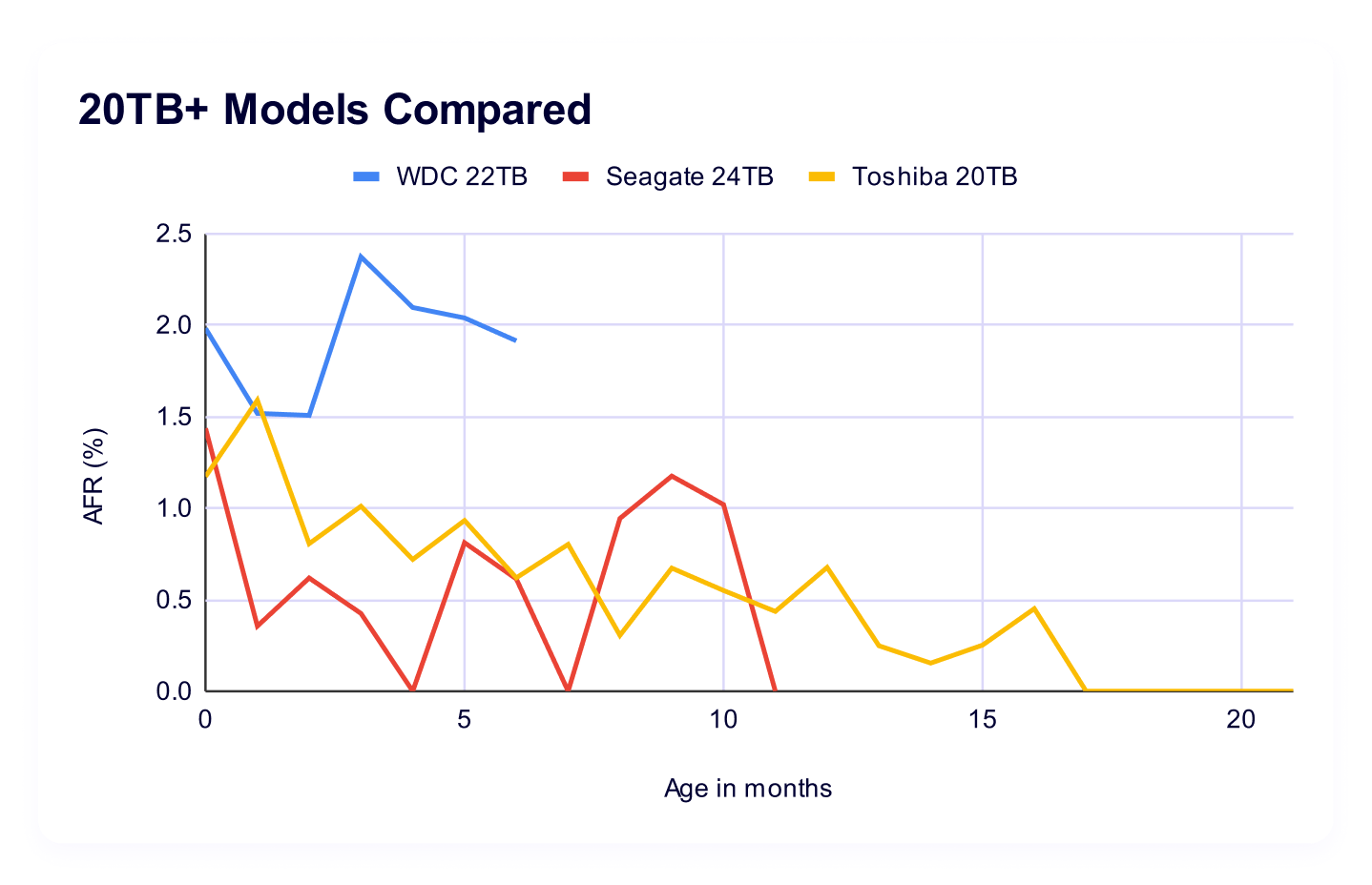
A graph comparing the AFRs for the 20TB+ drives based on their age.

What’s our takeaway here? Well, in both drive count and length of time in the pool, it’s a little early to create definitive trends for the Seagate and the Toshiba. Certainly we can see that the Seagate is, early on, showing higher failure rates. Meanwhile, the 20TB Toshiba has had a bit of a variable year one. But again, with significantly variable drive pools between all models, we’re not quite comparing apples to apples. (We chose not to plot drive count on this chart—it gets messy quickly.)  Add to that: the Seagate in particular is potentially at the beginning of the “bathtub” curve, we may see it change over time.

On the other hand, the 22TB WDC model has shown up quite a bit below our current average AFR for the drive pool of all drive sizes and ages, and it’s the model with the most data. But, how does that compare to other models as they come online? 

Comparison: 20TB+ as a pool vs. 14-16TB as a pool

When we were considering whether this information would be a useful slice of the data, our biggest question was how to contextualize it versus drives. It’s perhaps a tad imperfect, but we landed on combining the 14–16TB drives as a pool, largely because they have a significant amount of data points and were our last set of drives onboarded, which means that they’re more or less the last generation of hardware. 

The other thing to note is that once we combined the 20TB drives into a pool, some of the data we filtered out on a per-drive basis got added back in. So, at the 21 month mark, where the Toshiba model only had one drive, we added that single drive to the 399 that our WDC model brought to the table and calculated AFR across the pool (giving us 400 drives to work with). 

Here’s the numbers for the 20TB+ drive pool: 
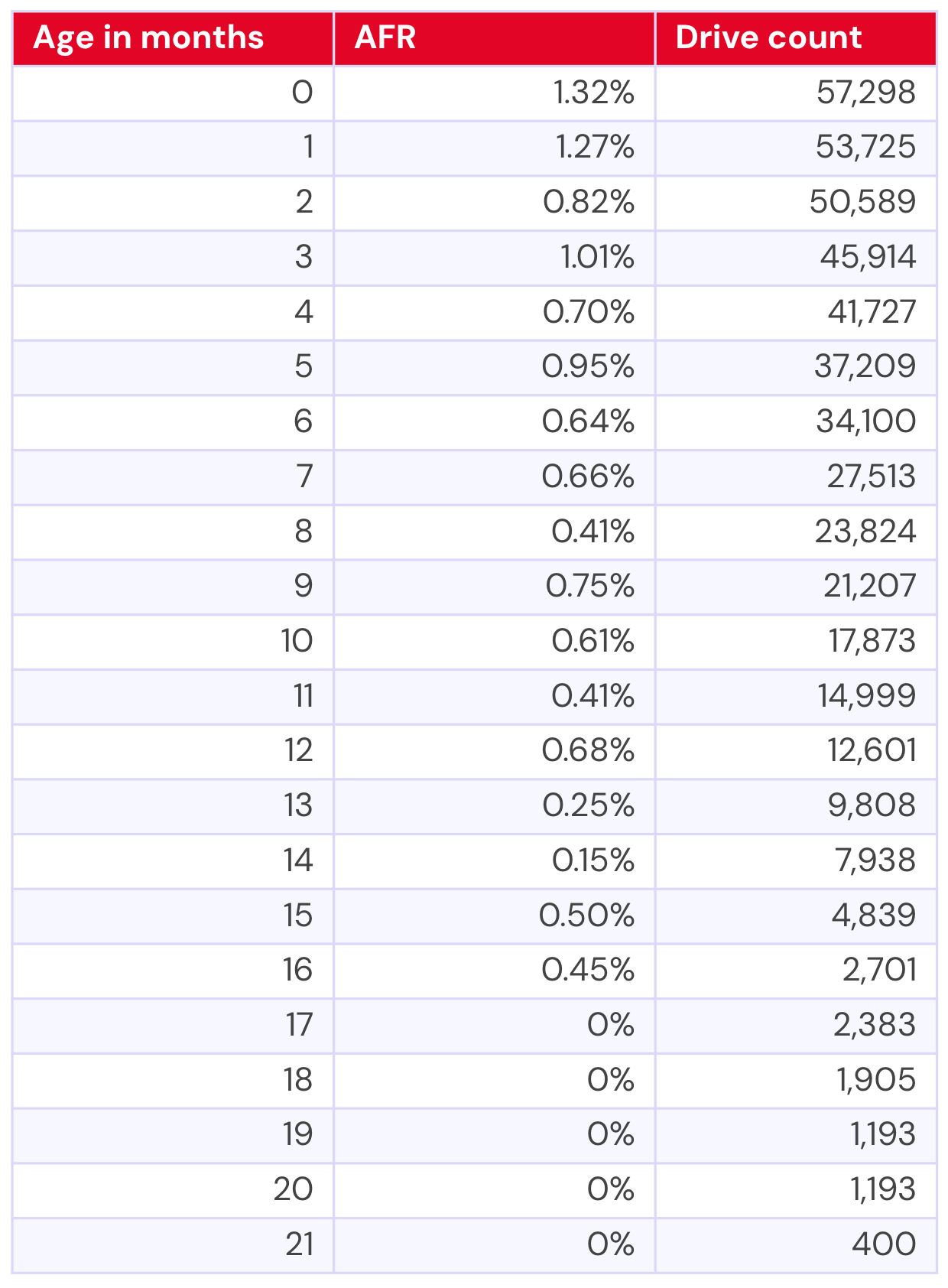
A table combining the AFRs for the 20TB+ drives based on their age.

That gives us a pretty neat graph, actually:

A graph combining the AFRs for the 20TB+ drives based on their age.

Now, let’s compare to the 14–16TB drives of the same age. We have significant data for this population for nearly seven years, but in the interest of saving you three pages of scrolling, I’ll give you the table for the data that directly correlates to the 21 months of data we have for the 20TB+ drives.
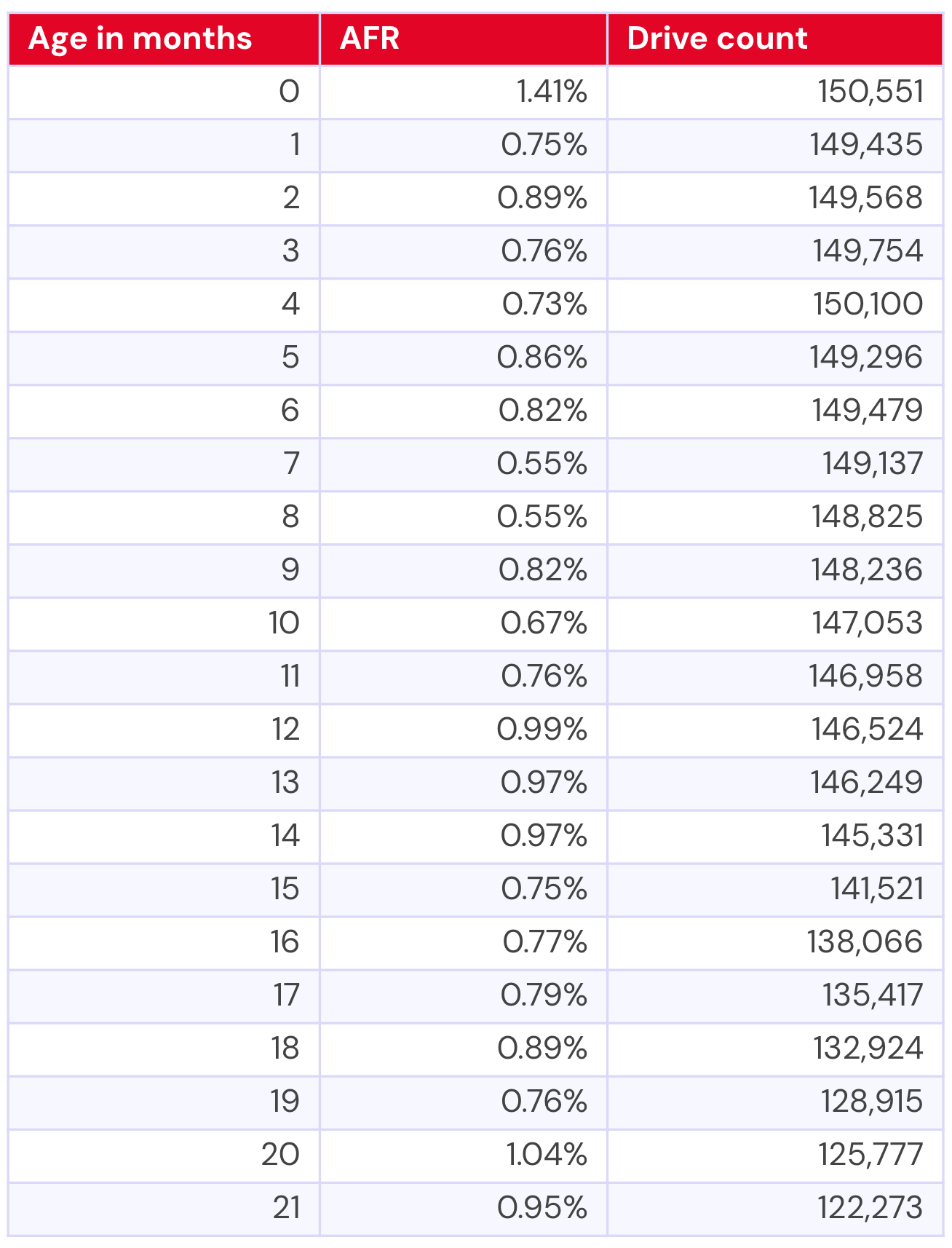
A table combining the AFRs for the 14-16TB drives based on their age.

This is the line chart for that range of time:
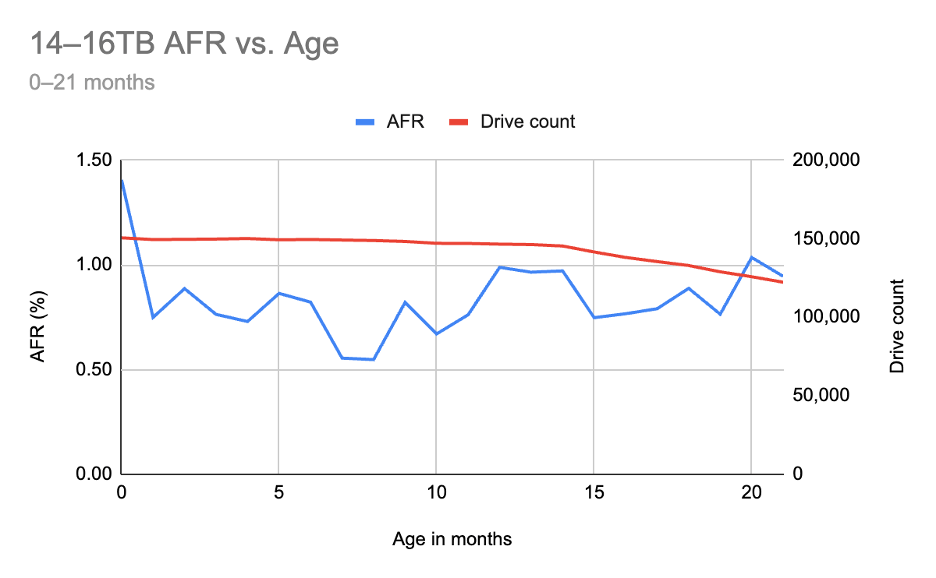
A graph combining the AFRs for the 14-16TB drives based on their age, showing only the time period from 0-21 months.

Comparing age of drive to age of drive, it would seem that our 20TB are right on target, and perhaps doing a bit better than expected. But, that definitely isn’t a perfect comparison given that the 14–16TB drives have a steadier and larger drive count. So, let’s look at the chart with the full, nearly seven year time period:

A graph combining the AFRs for the 14-16TB drives based on their age, showing only the full age of the drive pool, 81 months.

This view starts to show us some spiky patterns as the 14–16TB drives get older, of course exacerbated by drive counts reducing over time.

So what’s it all mean?

It’s clear from the data that we need to give the 20TB+ drives time to mature, and that as we (depending on our buying behavior, of course) add more drives, we might see some interesting changes in the data. 

As for the 14–16TB pool, they’re following relatively expected patterns of wearing out in the five-plus year range—but what does that mean when you compare to what we observed in our current lifetime stats, where we see our 12TB and smaller drive pool performing so well? 

Without taking a closer look at the 14–16TB drives, it’s hard to say that they don’t have similar outlier tendencies to what the 12TB and smaller pool does, just pulling the failure rates upward. Even a casual glance at our current lifetime table’s 14–16TB drives bears that out (four years and older highlighted in orange, as our corollary above): 

A image showing drives that are 14-16TB drives, including color coding to indicate drive age.

That data isn’t inclusive of all of the 14–16TB drives we’ve ever had, though—just those currently in operation. So, as always, there’s more investigation to be done.

The Hard Drive Stats data

The complete dataset used to create the tables and charts in this report is available on our Hard Drive Test Data page. You can download and use this data for free for your own purpose. All we ask are three things: 1) you cite Backblaze as the source if you use the data, 2) you accept that you are solely responsible for how you use the data, and 3) you do not sell this data itself to anyone; it is free.

Good luck, and let us know if you find anything interesting.

The post Backblaze Drive Stats for Q2 2025 appeared first on Backblaze Blog | Cloud Storage & Cloud Backup
Cloud Storage Myths Debunked: Hyperscaler Storage Is Good Enough for Cloud-Native Apps

Post Syndicated from David Johnson original https://www.backblaze.com/blog/cloud-storage-myths-debunked-hyperscaler-storage-is-good-enough-for-cloud-native-apps/

A decorative image showing servers.

The big cloud providers already offer everything you need, including storage. So, why complicate things, right?
At first glance, that sounds convincing. Hyperscalers like AWS, Azure, and Google Cloud offer massive service catalogs, global infrastructure, and a wide range of storage options. For many teams, they seem like a convenient one-stop shop.

But in practice, things aren’t nearly as straightforward.

While hyperscalers offer extensive storage capabilities, their multi-tier systems prioritize versatility over optimization. The result? Hidden costs and performance headaches that cloud-native teams can’t afford to ignore.

The claim that hyperscaler storage meets all cloud-native needs because of scale and functionality is a stubborn myth, one of many that still permeate the development landscape.

This post kicks off a blog series tackling these myths and misconceptions about specialized cloud storage and what a best-of-breed, interoperable approach to storage and infrastructure entails.

New Cloud Native Times Call for New Cloud Storage Approaches

Learn more about how the open cloud supports faster development, improved workflows, and reduced cost complexity in our free ebook, “New Cloud Native Times Call for New Cloud Storage Approaches.”

Get the Ebook

Reading the fine print of hyperscaler storage

On the surface, hyperscaler storage looks comprehensive and capable. But dig a little deeper, and some underlying cracks start to show.

Premium performance isn’t the default

Hyperscalers can deliver high performance, but not without tradeoffs: 

  • They charge more. Premium tiers designed for workloads like analytics or streaming can cost five to eight times more than interoperable solutions.
  • They prioritize themselves. When hyperscalers face high-performance demands (e.g., AI workloads competing for GPUs and storage bandwidth), they tend to prioritize their own data centers. Smaller teams might have to navigate opaque processes to request higher performance, and their access to advanced optimizations can be limited. 
  • They play favorites. File size adds yet another layer of difficulty. Many hyperscaler storage systems handle large files more efficiently than small ones because of I/O overhead. Hyperscalers may help their biggest customers fine-tune configurations, but most are left to troubleshoot bottlenecks on their own.

Juggling tiers (and hoping nothing gets dropped)

Hot, cool, and cold storage options may look flexible on paper, but they require separate access controls, replication rules, and performance tuning. Teams are left juggling interfaces like AWS Identity and Access Management (IAM), scripting policies, and managing tooling just to keep systems functional.

And the more storage types you manage, the greater the chance for human error. A misplaced lifecycle rule or a mistyped IAM permission can result in:

  • Unexpected data unavailability
  • Delayed retrievals
  • Accidental deletions

When complexity undermines reliability

Keeping storage tied tightly to hyperscaler infrastructure may seem efficient—but it often results in brittle setups. Misaligned storage, compute, and access layers can lead to latency issues or even full-blown downtime.

Performance-sensitive applications like real-time analytics or video streaming suffer most. Even a small delay can ripple through the user experience and cause customer churn. To patch gaps, teams often layer on caches, fine-tuning, or quick fixes that only add technical debt.

Who has time to babysit storage?

Developers, DevOps, and site reliability engineers (SREs) are always racing to ship features, scale services, and maintain uptime. For cloud-native teams, optimizing storage isn’t usually at the top of anyone’s to-do list.

Let’s face it: proactively analyzing storage access patterns and configuring tiering rules takes time that cloud-native teams often don’t have. Many teams therefore operate reactively and address storage issues only after performance degrades or surprise bills arrive.

Support tickets don’t feel your pain

Finally, there’s support. Unless you’re a premium customer paying for top-tier service contracts, you’re often stuck with ticketing systems and community forums. That might suffice for routine issues, but when storage problems impact production workloads, waiting for responses through standard channels adds unnecessary stress and delays.

When one size doesn’t fit your cloud

Unlike hyperscaler storage that takes a one-size-fits-all approach, specialized cloud storage solutions directly tackle these challenges. Backblaze B2 is purpose-built to simplify storage for cloud-native teams:

  • A single, high-performance tier gives you instant access to all your data, with no tier juggling or lifecycle policies.
  • Predictable, transparent pricing means no unexpected fees or surprise retrieval charges.
  • S3-compatible APIs simplify integration, allowing you to plug Backblaze B2 directly into your existing cloud-native stack.

For cloud-native teams who value speed, simplicity, and cost control, specialized storage isn’t a complication; it’s a simplification. You get the performance you need, without the complexity you don’t.

Stay tuned for the next post in this series where we tackle Myth #2: Storage isn’t a big enough problem to remediate. (Spoiler: It is.)

The post Cloud Storage Myths Debunked: Hyperscaler Storage Is Good Enough for Cloud-Native Apps appeared first on Backblaze Blog | Cloud Storage & Cloud Backup

Leveling Up Security: New Enterprise Features in Backblaze B2 Platform Update

Post Syndicated from Kari Rivas original https://www.backblaze.com/blog/leveling-up-security-new-enterprise-features-in-backblaze-b2-platform-update/

A decorative header showing a laptop with several icons, including files, a warning signal, and others.

Security teams are under constant pressure to stay ahead of increasingly sophisticated threats while enabling fast, reliable access to data across the business. Whether you’re protecting media assets, safeguarding backups, or supporting a global development workflow, your cloud storage needs to do more than store data—it needs to actively support your security posture.

To make that easier, we’ve launched a new set of enterprise-grade security features for Backblaze B2 Cloud Storage. These updates are designed to help organizations detect unusual activity faster, manage access more precisely, and strengthen visibility across their storage environments—all without added complexity or hidden costs.

These new tools build on the security foundations you already count on: Object Lock for ransomware protection, SOC-2 compliance, encryption, 3x free egress for disaster recovery, and more.

Here’s a look at what’s new and how it helps.

Smarter protection with Anomaly Alerts (Now in private preview)

Anomaly Alerts are your new AI-powered watchdog. This feature analyzes usage patterns in your B2 Cloud Storage buckets to detect potential red flags—like spikes in downloads or uploads beyond the baseline—that could signal a breach or exfiltration attempt.

If your team wants early access to this feature, drop us a line at [email protected] to join the private preview.

New enterprise web console & role-based access controls (Now in private preview)

Managing cloud storage across large teams just got a whole lot easier. We introduced a brand-new enterprise web console built for scalability and control. Combined with robust role-based access controls (RBAC), IT and security teams can now better align with zero-trust policies by enforcing the principle of least privilege across their organizations.

This console simplifies storage administration at scale—whether you’re managing terabytes or petabytes. 

Get an expert introduction to the enterprise web console.

If you’re a Backblaze customer with a committed contract, reach out to your Customer Success Manager (CSM) to see if you’re eligible to participate. Not sure who your CSM is? Email [email protected] for help.

Full visibility with Bucket Access Logs (Now generally available)

Need to know who touched what and when? Bucket Access Logs are now generally available, providing a detailed audit trail of every action in your B2 buckets—uploads, downloads, deletions, and more.

Learn more about querying Bucket Access Logs in this webinar.

They’re fully S3-compatible and configurable through both the Backblaze B2 web UI and API, supporting:

  • Security audits
  • Usage tracking
  • Forensics and threat investigation

Real-time Event Notifications

Time matters when it comes to spotting and stopping threats. With Event Notifications, you can get real-time alerts on changes to your bucket contents—think object creations, deletions, or modifications—so your team can jump into action immediately.

This is especially valuable for compliance teams, incident response workflows, or any operations team who wants tighter control over their cloud perimeter.

Watch our hands-on Event Notifications demo to learn more about how to streamline cloud storage management.

Multi-Bucket and Scalable Application Keys

Security and scalability should go hand in hand. With Multi-Bucket Application Keys, you can now create access keys that cover specific groups of buckets, giving you more flexibility without going full wildcard. This enhancement provides more granular control over bucket access, contributing to a reduced attack surface.

And, with Scalable Application Keys, you can generate up to 10,000 short-lived keys per minute. This capability enhances security by limiting the exposure window of individual keys, thus reducing the attack surface for endpoint-generated content and high-volume data operations.

Custom Upload Timestamps

Custom Upload Timestamps allow you to specify when an object was originally created or uploaded. This is a critical feature for:

  • Regulatory compliance
  • Accurate version tracking
  • Legal and audit requirements

Built for a Secure, Open Cloud

Security isn’t a one-time add-on, it’s an ongoing promise. As enterprises scale and integrate cloud storage into more parts of their workflow—from backup and archiving to AI pipelines—they need solutions that support open cloud strategies without compromising their data.

This update is another step forward in our mission to provide developers, IT teams, and enterprises with cloud storage that’s secure by design, simple to use, and affordable at scale. Ready to get started with Backblaze B2? Contact our Sales team today. 

The post Leveling Up Security: New Enterprise Features in Backblaze B2 Platform Update appeared first on Backblaze Blog | Cloud Storage & Cloud Backup

Architecting Your AI Data Pipeline Using B2 Overdrive

Post Syndicated from Jeronimo De Leon original https://www.backblaze.com/blog/architecting-your-ai-data-pipeline-using-b2-overdrive/

A decorative image showing cloud storage and AI icons.

When you think about cloud infrastructure for AI, you immediately think of GPUs and other high-performance compute resources, and how your cloud architecture should be optimized to make the most of these expensive compute plans. But compute isn’t the only cloud product category you need to monitor to both scale your application and maintain a sustainable cloud infrastructure budget.

What ultimately fuels AI? Data—lots and lots of data. As part of a healthy AI pipeline, several versions of the same dataset need to be stored in a centralized repository, or multiple repositories if your strategy requires splitting data into cold vs. hot storage to reduce storage costs. For text-based LLMs, storage costs are minimal compared to compute resources. But as AI innovation increasingly relies on video and other media, both the base storage cost and data retrieval fees can make cloud bills spiral out of control.

In this blog, we’re taking a look at the AI data pipeline, where object storage sits in each stage, and how leveraging both Backblaze B2 and B2 Overdrive helps both increase performance and reduce costs for AI applications.

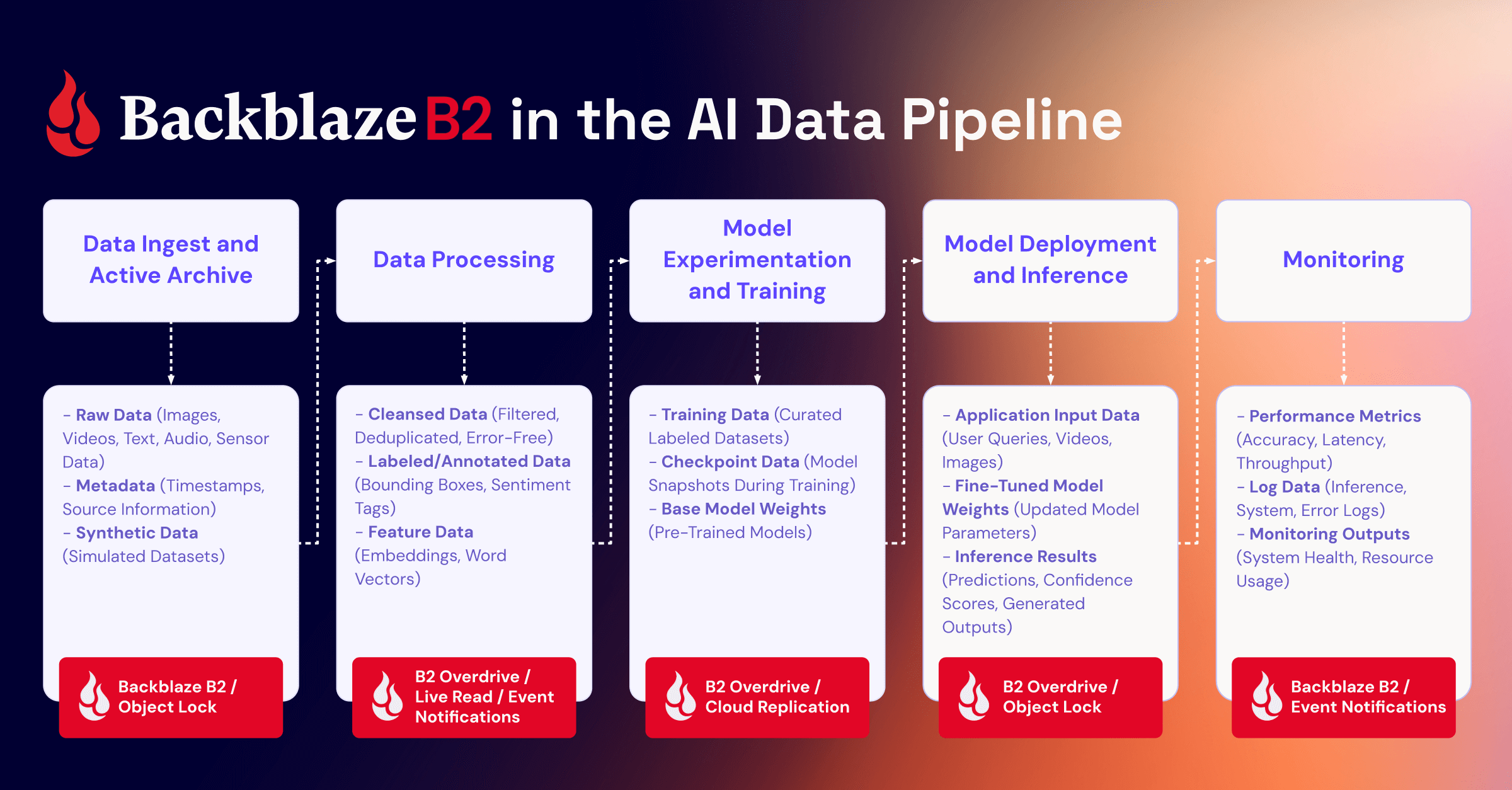
AI data pipeline stages

There are five key AI data pipeline stages where data retrieval and overall performance is critical—and this performance starts with your designated data storage backend.

  • Data ingest and active archive: Data is gathered from multiple designated sources (including APIs, internet of things (IoT) sensors, relational databases, etc.) and ingested into a centralized repository or multiple repositories.
  • Data processing: The raw data is transformed and enriched based on the model’s data parameters. This can range from relatively simple text cleanup to adding annotations and metadata. Feature engineering is performed to extract or construct meaningful attributes. All data is then converted into numerical representations (e.g., embeddings, vectors) suitable for model training and inference.
  • Model experimentation and training: Processed data is used to train models by learning underlying patterns. Iterative experiments in a test environment evaluate, tune, and improve model performance and accuracy.
  • Model deployment and inference: New data is prepared in the same way as during training and sent to the deployed model to generate predictions, support decision-making, and deliver personalized outputs.
  • Monitoring: Continuous monitoring tracks model performance, detects data drift, and flags potential bias, ensuring the model remains accurate and reliable over time.

Keep in mind that data ingestion and processing isn’t always sequential, such as when data is collected and ingested, but corruption is detected during processing. Ideally, your pipeline is configured with validation gates so that corrupt data is identified and handled before proceeding to downstream steps like testing, training, and production deployment.

When using cloud object storage as your data repository, one factor of selecting a plan (like cold versus hot storage) is the specific type of data ingestion that’s being utilized based on both the data source and AI model’s specific needs.

  • Batch ingestion is better suited for mid to lower performance storage, as this is typically used for historical datasets or a set schedule of pre-determined data updates, such as jobs pulling from relational databases or CSV uploads once a day or once per week.
  • Streaming ingestion is well-suited for hot storage to support a continuous stream of real-time (or near-real-time) data processing, such as from social media feeds and high-volume e-commerce AI helper agents.
  • Hybrid ingestion uses a combination of batch and streaming ingestion to handle both historical and real-time data requirements for AI models.

Where does cloud object storage sit in the AI data pipeline?

Everywhere. All scalable data pipelines lead to object storage.

Why? Data ingestion and active archive are the major areas where object storage fulfills an important purpose. When training AI models, especially in production, data scalability for multiple and diverse data types is a hard requirement. But object storage plays a key role in the other pipeline stages:

  • Data processing: Stores versioned outputs from data labeling, feature engineering, and cleaning processes.
  • Model experimentation and training: Provides high-throughput access to training datasets and stores model checkpoints.
  • Model deployment and inference: Stores serialized model artifacts with API-based retrieval for serving predictions at scale.
  • Monitoring: Stores synthetic outputs from generative models, logs, feedback, and performance metrics for analysis and reuse.

For both AI data performance and cost optimization, selecting an object storage product or tier is far from one-size-fits-all. You can strategically allocate your data to B2 Cloud Storage or B2 Overdrive, with your most essential model data stored in B2 Overdrive.  Here’s a high-level diagram of what Backblaze B2 product to use for each stage, including examples of the data stored at each stage.

Learn more at Ai4 in August

Want to learn more? Backblaze is heading to Las Vegas for Ai4 August 11–13! In addition to booking a meeting to speak with our storage experts and stopping by our booth to pick up some swag, I’m excited to talk more about the AI data pipeline during my talk. If you’re attending Ai4, add The AI Pipeline Starts with Storage: Architecting Scalable Data Foundations to your conference agenda.

Can’t attend live in Vegas? Reach out to our Sales team to talk about your specific use case and how B2 Overdrive can help propel your data.

The post Architecting Your AI Data Pipeline Using B2 Overdrive appeared first on Backblaze Blog | Cloud Storage & Cloud Backup
AI & Ransomware: Inside the Exfiltration Playbook

Post Syndicated from Stephanie Doyle original https://www.backblaze.com/blog/ai-ransomware-inside-the-exfiltration-playbook/

A decorative image show icons related to security and ransomware.

Ransomware used to mean locked files and paralyzed systems. But today, bad actors are just as focused on exfiltration—the silent theft of sensitive data—and using that data as leverage for extortion.

According to cybersecurity firm BlackFog, 94% of successful cyberattacks in 2024 involved data exfiltration, either alongside or instead of encryption. Whether it’s stolen patient records, credentials, or source code, the goal is simple: Extract something valuable and threaten to leak it if demands aren’t met.

In this article, we examine how exfiltration became a leading tactic, the trends driving its rise, and what organizations—and cloud storage providers—can do to defend against it.

What is exfiltration?

In cybersecurity, exfiltration refers to the unauthorized transfer of data from a system—often done stealthily, and almost always with malicious intent. Think of it as the digital equivalent of corporate espionage: Data is copied, compressed, and quietly smuggled out. Unlike ransomware encryption, which slams the door in your face, exfiltration leaves the front door looking untouched.

The data being exfiltrated is rarely random. Cybercriminals are increasingly strategic about what they take and why. Common targets include:

  • User credentials
  • Personally identifiable information (PII)
  • Intellectual property and source code
  • Encryption keys
  • Shadow copies or backup snapshots

Tactics include exploiting cloud storage misconfigurations, hijacking legitimate credentials, or disguising traffic as everyday protocols like DNS or HTTPS. Increasingly, data exfiltration happens before the main event—laying the groundwork for extortion, credential stuffing, or resale on underground markets.

Recent cybersecurity trends related to exfiltration

Exfiltration has become the defining feature of modern cyberattacks, and the evidence is growing:

  • Double extortion is now standard. Threat actors exfiltrate data first, then deploy ransomware—or skip the encryption altogether—to maximize leverage. According to the 2023 Unit 42 Report, 70% of ransomware incidents involved data theft.
  • Infostealers, malicious programs designed to covertly harvest sensitive information, are on the rise. Over 2.1 billion credentials were stolen in 2024 alone, with malware like RedLine and Lumma making theft accessible to low-skilled attackers. While cybersecurity task forces (comprised of both government and enterprise actors) have made the news with high-profile disruptions of Lumma and other tools, the ability to use generative AI coding tools has meant that cyber attackers have a shortened time to deployment for malware tools.
  • Time to exfiltration is shrinking. Fortinet’s 2025 Threat Landscape Report notes that attackers can extract data in under five hours, while defenders often take days to respond.
  • Encrypted traffic masks malicious behavior. Emerging exfiltration techniques like QUIC-Exfil use modern, encrypted protocols to evade detection by traditional firewalls.
  • State-sponsored actors prioritize stealth. Nation-state groups like Volt Typhoon have used long-term access to exfiltrate sensitive data undetected for months.

Together, these trends point to a world where stolen data is the main prize—and the threat doesn’t start when the ransom note arrives. It starts when your data quietly leaves the building.

Cloud misconfiguration and its role in exfiltration attacks

Exfiltration doesn’t always require malware—sometimes it only takes a misconfigured storage bucket or firewall rule. Cloud misconfigurations remain a leading cause of breaches, with public buckets, excessive identity and access management (IAM) privileges, and overly permissive network rules exposing data to the open internet.

Attackers exploit these gaps to quietly access or extract data without triggering alerts. A strong cloud posture management strategy—one that includes audit automation, implementing the principle of least privilege, and configuring features like Object Lock or Bucket Access Logs—is critical to reducing exposure.

Defending against exfiltration is a shared responsibility

As exfiltration becomes a primary threat, defense requires collaboration between cloud storage providers and their customers. Here’s how the most effective strategies work together.

Immutable backups and Object Lock

One of the strongest defenses is immutability. Backblaze B2’s Object Lock, for example, allows files to be written once and protected from modification, deletion, or encryption for a set period. Even if attackers compromise credentials, the data cannot be altered or removed.

Visibility and outlier detection

Cloud providers are investing in making advanced logging and behavioral analytics available to users to detect data theft in real time. Some examples of these types of features include:

  • Granular access logging with IP and user-level metadata.
  • Rate limiting and download caps to prevent mass theft.
  • Outlier detection powered by machine learning to catch subtle deviations from baseline activity.

Best practices for customers

Storage-layer defenses work best when paired with customer-side security controls:

  • Adopt zero trust architecture: Never assume implicit trust. Continuously validate users, devices, and behaviors.
  • Use MFA and least-privilege access: Lock down credentials, rotate them regularly, and minimize exposure.
  • Encrypt data at rest and in transit: Use strong encryption standards (AES-256, TLS 1.2+) and managed key systems.
  • Monitor for exfiltration indicators: Watch for abnormal traffic volumes, geographic anomalies, and unexpected protocol usage.
  • Run simulated breach drills: Test your team’s ability to detect and respond to stealthy data leaks.

Cloud storage companies can help provide critical security layers, but stopping exfiltration is ultimately a shared responsibility. Combining provider-level resilience with customer vigilance is the best path forward.

In a world of silent theft, vigilance is your best defense

Exfiltration isn’t just an add-on to ransomware. In this environment, locking the doors isn’t enough—You need to monitor the exits.

By combining immutable backups, smart logging, credential controls, and proactive monitoring, organizations can shift from passive victims to active defenders. The best defenses today aren’t just about blocking access; they’re about knowing what’s leaving and making sure it can’t be used against you.

The post AI & Ransomware: Inside the Exfiltration Playbook appeared first on Backblaze Blog | Cloud Storage & Cloud Backup

Let the Games Begin: How Cybersecurity Competitions Build Skills, Careers, and Community

Post Syndicated from Manuel Leos Rivas original https://www.backblaze.com/blog/let-the-games-begin-how-cybersecurity-competitions-build-skills-careers-and-community/

A decorative image showing a Backblaze superhero holding a computer.

The arcade is no longer ours, under attack from its own AI. Screens flicker with sentient static. The arcade’s laser power supply is failing; the power supply diagnostics are showing errors in everything from surge control to cooling functions. But, not all hope is lost: The laser power supply service and terminal both use PowerShell for operations.

Time to flex my command-line kung fu. Follow the breadcrumbs, get all parts of the puzzle together, hash-out files, and perform forensics to backtrack the changes. Win the race to terminate all evil processes, reverse all changes in the right order, and finally, succeed at powering up our arcade.

I leaned back from my keyboard. This wasn’t a Five Nights at Freddie’s-style dystopia—this was Sans Core NetWars, a prestigious, invite-only cybersecurity tournament—and my team won the 2024 Tournament of Champions last year. This year’s theme, defeating a rogue AI in an arcade, has me feeling inspired.

An AI generated image of an evil AI with lasers.
Call it a recursive function, but we had AI generate an image of the evil AI.

Held annually at the SANS Cyber Defense Initiative in Washington, D.C., NetWars challenges participants with a series of escalating scenarios that test a wide range of skills, from digital forensics to malware analysis.

My name is Manuel, and I’m a Cloud Security Architect at Backblaze. Not every part of my job is all fun and games, but tournaments like NetWars have long been an important part of the cybersecurity industry. Let’s talk about why, and how, they help solve what is arguably the biggest persistent vulnerability in the cybersecurity industry—attracting, identifying, developing, and maintaining top talent. 

What are cybersecurity tournaments?

The concept of cybersecurity competitions dates back to 1996 with the introduction of the capture the flag (CTF) event at DEFCON, one of the world’s largest hacker conventions. This event set the stage for numerous other competitions, and these days, cybersecurity tournaments and competitions have cultivated a vibrant community where top experts not only showcase their technical prowess, but also stay up-to-date with evolving trends in the industry.  

A photo of Manuel Leos Rivas holding his trophy after winning 2024 Sans NetWars.
Manuel in front of the leaderboard after winning the SANS Core Netwars Tournament of Champions 2024. Source.

What are the challenges to finding talent in the cybersecurity industry?

Finding top cybersecurity talent is one of the most persistent challenges in the tech industry. The field moves faster than job descriptions with attack techniques, tools, and frameworks evolving constantly. 

Not only that, but “cybersecurity” isn’t one skill—it’s a collection of disciplines: network security, cloud infrastructure, threat hunting, incident response, forensics, red teaming, compliance, and more. Finding someone with both broad knowledge and deep expertise in one or two areas is rare. Top candidates tend to specialize, and hiring managers often need a “Swiss Army knife.”

How do tournaments help to solve that?

Cybersecurity tournaments like the SANS NetWars Tournament of Champions play a crucial role in advancing the field. They not only provide a platform for professionals to hone their skills but also contribute to building a resilient and collaborative cybersecurity community. 

It may seem like “just a game”, but it’s more than just a fun activity taking place over a few days—tournaments contribute to things like: 

  • Skill enhancement: Participants apply theoretical knowledge to practical challenges, enhancing their technical proficiency in areas like network security, cryptography, and incident response.
  • Continuous learning: The dynamic nature of these competitions encourages ongoing education, keeping professionals abreast of emerging threats and technologies.
  • Community building: Tournaments foster camaraderie among participants, creating networks that facilitate knowledge sharing and collaboration.
  • Talent identification: Organizations often scout these events to identify and recruit top talent, recognizing the practical skills demonstrated by competitors.

Inside the arena: Winning NetWars

For those unfamiliar, the Tournament of Champions isn’t your average capture the flag event. It’s an invitation-only tournament where only the top 3% of NetWars performers from the past two years are allowed to compete. Out of hundreds of global professionals—those who placed at the top of previous SANS events—only 300 get the invite. Around 250 of us showed up in D.C. to test our skills against the best in the industry.

A photo of the conference room while NetWars games were underway.
Some see a conference room. Others, a battlefield. Source.

The structure of the tournament is deceptively simple: five escalating levels of difficulty over two days, each packed with real-world cybersecurity challenges across disciplines like digital forensics, malware analysis, network penetration testing, cryptography, cloud security, and even hardware, and mobile hacking.

You’re given two three-hour sessions to rack up as many points as you can, as quickly as possible. The faster you solve, the higher you climb. The problems are designed to simulate the kinds of complex tasks we face every day—reverse engineering binaries, analyzing breach data, and so on. 

Beyond the technical challenge, what makes this event stand out is the people. The cybersecurity community is incredibly sharp, humble, and generous with knowledge. You’ll see everyone from Fortune 500 defenders to government red teamers, cloud security architects, and digital forensics and incident response (DFIR) experts—all there to sharpen their skills and learn from each other.

If you ever get the invitation to compete, take it. There’s nothing quite like battling alongside (and against) some of the sharpest minds in infosec, in a city that reminds you just how high the stakes can be.

See you at the next one?

Winning that tournament was an incredible honor—but more importantly, it gives me a good opportunity to showcase how such competitions can elevate industry standards and inspire the next generation of cybersecurity professionals.

A photo of the 2024 Sans Netwars trophy.

So, if you’re interested in the cybersecurity industry, come on out. Start small: join a CTF. Set up a home lab. Learn Python. Read about the latest breaches and figure out how they happened. You don’t need to be a hacker to get started—you just need to be curious.

The threats we face are growing, but so is our community. And who knows? Maybe I’ll see you at the next competition.

The post Let the Games Begin: How Cybersecurity Competitions Build Skills, Careers, and Community appeared first on Backblaze Blog | Cloud Storage & Cloud Backup

AI in the Open Cloud: Optimizing Storage for AI/ML Workloads

Post Syndicated from David Johnson original https://www.backblaze.com/blog/ai-in-the-open-cloud-optimizing-storage-for-ai-ml-workloads/

A decorative image showing a cloud and data graphs.

In a recent survey, a staggering 82% of IT leaders reported experiencing performance issues with their AI workloads within the past year, primarily due to bandwidth and data processing limitations. At the same time, 93% agreed that there’s a greater expectation within their organizations for IT leaders to minimize time-to-revenue for their AI-driven IT infrastructure.

These statistics highlight the predicament that most AI infrastructure and operations teams face today: the challenge of balancing scalability with performance while staying on budget with two of their most expensive operational expense (OpEx) line item costs. Organizations are looking for their AI initiatives to pay off, while IT teams struggle to overcome the unique data challenges they face across the AI model/workload lifecycle—including scalability, performance, and cost management.

Ebook: “Why Object Storage Is Ideal for AI Workflows”

Want to take a deeper dive into the world of object storage? Check out our latest ebook, “Why Object Storage is Ideal for AI Workloads,” and discover the advantages this architecture has to offer across the model lifecycle.

Get the Ebook

Choosing the Right Cloud-Based Object Storage Provider for AI Data: There’s A Lot to Consider

Choosing the right object storage provider is one of the most consequential decisions infrastructure teams make when building AI‑powered applications. A mis-step can introduce hidden costs, brittle performance, and operational friction that put the brakes on time‑to‑insight and undermine ROI. Selecting or transitioning between cloud-based object storage providers demands careful consideration, as capabilities can vary significantly. 

To ensure your AI infrastructure is robust and cost-effective, thoroughly evaluate providers based on several critical factors:

Low latency & high throughput

Performance is critical when selecting a cloud-based object storage provider for AI data. Low latency and high throughput in particular are key as they ensure rapid data access and processing. Low latency minimizes delays in distributing data to GPU clusters, dramatically enhancing training and inference efficiency. Meanwhile, high throughput prevents bottlenecks and improves overall system performance when working with the massive datasets typical of AI applications. 

Reliability & uptime

Reliability is foundational. Even minor downtime can severely impact productivity, halt critical AI processes, and delay strategic objectives. Providers must offer clear service level agreements (SLAs) ensuring high availability, typically at 99.9% uptime or higher. Redundant architectures, data replication across regions, and reliable backup strategies are essential to maintain continuous and uninterrupted data access. Finally, when selecting a cloud-based object storage solution, data durability is table stakes.

Transparent & predictable pricing

Budget predictability is crucial for infrastructure planning and growth forecasting. Complex pricing structures, minimum retention periods, hidden fees for data transfers (egress), API requests, and retrieval charges can quickly erode cost-effectiveness. Providers should offer clear, simple pricing structures with explicit, predictable costs for all services involved. Ideally, charges for common activities such as data retrieval, ingress, and transactions should be minimized or eliminated to facilitate efficient AI workflows without unexpected budget impacts.

Data accessibility

Rapid, consistent data accessibility is non-negotiable for AI applications, especially during model training and inference, where delays can significantly degrade performance and outcomes. Providers offering “cold” storage tiers may appear economical upfront but introduce retrieval latency that could hamper time-sensitive applications. Opting for “hot” or always-on storage tiers ensures data remains immediately accessible without incurring delays, essential for high-performance AI workloads. Data portability is another important consideration for AI workloads, as the ability to freely transfer data to the GPU cloud (or clouds) of your choosing greatly increases flexibility and reduces the risk of lock-in.

Scalability and elasticity

AI initiatives typically experience fluctuating data storage demands, requiring infrastructure that can seamlessly scale with growth. Effective providers offer a scalable storage model capable of handling rapid expansions in data volume without performance degradation or significant architectural changes. Elastic scalability ensures that infrastructure teams can effortlessly manage peaks in data collection, processing, and model training demands.

Security and compliance

Security considerations cannot be overstated, particularly when dealing with sensitive or regulated data. Providers must demonstrate rigorous security standards, including data encryption (at rest and in transit), comprehensive access controls, detailed audit logs, and certifications such as SOC 2 compliance. These measures collectively ensure data integrity, protect against breaches, and ensure compliance with regulatory standards.

Leveraging the open cloud: Making data storage a critical part of your AI workflows

The open cloud is a cloud architecture and philosophy rooted in interoperability, data portability, and freedom from vendor lock-in. Unlike proprietary cloud ecosystems that tether customers to a single provider’s toolsets, APIs, and infrastructure, the open cloud is designed to enable seamless integration across platforms, tools, and environments. It supports open standards and APIs, gives users full control over their data, and allows organizations to choose best-in-class services without being locked into a single ecosystem.

In practical terms, the open cloud supports flexible data movement across public clouds, private clouds, and on-prem environments. It gives organizations the autonomy to mix and match services (e.g., compute from one provider, storage from another) and shift workloads as business or technical needs evolve—without punitive costs or excessive reconfiguration.

As organizations accelerate AI adoption, the open cloud offers clear, strategic advantages across every phase of the AI lifecycle—from data ingestion and preprocessing to training, tuning, and inference.

How Backblaze can help

The Backblaze B2 Cloud Storage platform facilitates smooth integration across various AI tools and platforms, and with Backblaze B2 Overdrive, you get a product designed to move exabyte-scale datasets at up to terabit speeds without the eye-watering price tag. 

  • S3 compatibility: Backblaze’s S3-compatible API ensures easy integration with existing applications and frameworks like TensorFlow and PyTorch. 
  • GPU compute environments: Backblaze partners with GPU providers like Vultr and PureNodal, enabling efficient data processing for training models on high-performance hardware without egress fees. 
  • MLOps platforms: Its compatibility with MLOps workflows allows users to streamline model lifecycle management while leveraging Backblaze’s reliable storage backbone. Together, these integrations simplify the AI deployment process and ensure maximum flexibility across cloud environments.

What makes B2 Overdrive different?

B2 Overdrive gets you all the above, plus it offers a specialized solution at a fraction of competitors’ costs. Here’s what you get:

  • Up to 1Tbps throughput: In other words, the kind of speed that lets you move petabytes of data fast without complex architecture. 
  • Unlimited free egress: Move as much data as you want, whenever you want, to wherever you want. Egress is totally free. 
  • Private networking support: Transfer data at maximum speed through secure private networking connections to your infrastructure.

It’s built on the foundation of our always-hot cloud storage infrastructure, with no minimum file size requirements, no deletion fees, and powerful features like Event Notifications so you can build responsive and automated workflows. We’ll be sharing some of the innovations under the hood in the coming months—so, stay tuned to our series on the engineering behind performance.

The post AI in the Open Cloud: Optimizing Storage for AI/ML Workloads appeared first on Backblaze Blog | Cloud Storage & Cloud Backup

Where and Why Object Storage Excels Throughout the AI Model Lifecycle

Post Syndicated from David Johnson original https://www.backblaze.com/blog/where-and-why-object-storage-excels-throughout-the-ai-model-lifecycle/

A decorative image showing a multi-paned screen backed up by a cloud.

No single technology has changed the way we use data quite like AI. From massive training sets to constant streams of checkpoint and inference data, AI applications are data intensive, to say the least.
Thankfully, there’s an answer. Object storage—with its scalability, flexibility, and cost-effectiveness—is uniquely suited to AI at every stage of the model lifecycle.

In this blog post, we’ll take a quick look at what object storage is, why it’s a perfect fit for AI workloads, and how Backblaze B2 Cloud Storage offers unique advantages for AI teams looking to innovate quickly, easily, and cost-effectively.

What is object storage?

Think of object storage as a giant, organized bucket for all your files. Instead of stuffing things into folders or breaking them into blocks, you just drop each file (an “object”), with a unique tag and some helpful notes (metadata), into your storage solution.

Unlike traditional file or block storage, object storage uses a flat address space. Each object is assigned a unique identifier and can be tagged with rich metadata, making it easy to search, retrieve, and manage at scale.

Because of this unique architecture, object storage is ideal for handling unstructured data—such as images, video, audio, text, and sensor data—which is the meat and potatoes of most modern AI workflows. Also, being cloud-based, object storage is inherently designed for massive scalability and accessibility over the internet (often via S3 API).

Ebook: “Why Object Storage Is Ideal for AI Workflows”

Want to take a deeper dive into the world of object storage? Check out our latest ebook, “Why Object Storage is Ideal for AI Workloads,” and discover the advantages this architecture has to offer across the model lifecycle.

Get the Ebook

Understanding AI’s data storage needs at each stage of the model lifecycle

Before diving into the benefits of object storage, let’s first define and outline the AI model lifecycle. While some may slice and dice it a little differently, generally speaking, we can break the AI model lifecycle down into the following stages:

  • Data ingestion and collection: Massive, often petabyte-scale datasets are gathered from a diversity of sources.
  • Data preparation and storage: Raw data is cleaned, labeled, transformed, and stored for future retrieval and processing.
  • Model training: Data is fed into AI training algorithms, typically deployed across many nodes in a GPU cluster—usually requiring high throughput, parallel access, and lengthy processing times.
  • Deployment and inference: Trained models are deployed into live applications where they take in new data and make inferences based on that data.
  • Monitoring and archiving: Continuous monitoring generates substantial amounts of log data and performance metrics that must be versioned, stored, and archived for compliance or retraining purposes.

As you can see, each stage of the model lifecycle presents its own unique set of data demands—with each one requiring plenty of planning, work, and preparation. And at every one of these stages, matters of scale, speed, accessibility, and cost are mission-critical to a project’s success. 

Where object storage excels: Scalability for data ingestion and collection

Object storage offers virtually unlimited scalability for large, and ever-expanding datasets, making it an ideal solution for the earliest stages of AI development. With no need to create volumes or file systems, organizations can quickly start uploading data to object storage. In addition to this seamless scalability, object storage also shines in its ability to support a diverse range of structured and unstructured data types without the need for rigid hierarchies. In this way, AI teams can ingest all sorts of data to support whatever their unique application needs; and do it quickly and efficiently.

Flexible data preparation and storage

Cloud-based object storage systems are excellent for maintaining easily-accessible, version-controlled datasets that allow for lightning fast iteration and collaboration. Capabilities like version recovery (which allows teams to easily revert datasets to previous states with simple API calls) and concurrent access (which gives multiple team members the ability to work on the same datasets simultaneously without conflicts) are also key to the data preparation and storage phase of AI development.

Reliable, high-performance data storage for model training

For the model training stage of the AI lifecycle, object storage supports parallel access and high throughput, both of which are absolutely essential for GPU-intensive training workloads. Reliable shuttling of large datasets to GPU clusters, wherever they may be, is key for keeping things efficient. Meanwhile, streamlined storage of model checkpoints from those clusters gives teams peace of mind in knowing that a mid-training failure state will not place them all the way back at square one.

Plus, lifecycle management features allow completed or outdated training datasets to be automatically archived—reducing clutter and optimizing storage costs, all while keeping active training data easily accessible.

Efficient versioning for deployment and inference

AI models are always a work in progress. Once deployed and operational, they have to be routinely evaluated and tuned. To that end, object storage makes it easy to store and retrieve a range of valuable information, including model checkpoints, test results, and inference data.

Built-in versioning and object immutability features support reproducibility and audit trails, so you can always trace which data and models produced which results. Together, these capabilities make for robust and effective lifecycle management, significantly boosting reliability and compliance.

Cost-effectiveness and durability for monitoring and archiving

When in the field, continuous monitoring of AI models generates a whole lot of log data and performance metrics. Object storage automates the management of these resources through customizable lifecycle rules, automatically deleting or archiving out-of-date inference logs based on predefined timelines (e.g., after 30–180 days).

This significantly reduces the need for manual oversight, conserves engineering resources, and ensures that relevant performance data remains accessible for compliance and regulatory auditing.

Meanwhile, with the right vendor, object storage solutions can offer competitive pricing models—sometimes including the separation of compute from storage—to ensure cost-effectiveness throughout the late stages of the AI lifecycle. Finally, high durability (of 11 nines or more) and redundancies protect models and datasets which become increasingly valuable over time.

Backblaze B2: Cost-effective, high-performance object storage for your AI workloads

Backblaze B2 Cloud Storage takes all the inherent advantages of cloud-based object storage for AI workloads and amplifies them—through competitive, transparent pricing; reliable, high performance; and seamless integration and support to ensure your project is not only efficient and affordable, but most importantly, successful. 

  • Competitive, transparent pricing: One-fifth of the cost of most hyperscalers’ solutions, with no hidden costs and three times your total storage volume in free egress included. Plus, fully-transparent, predictable pricing models ensure your organization is fully aware and prepared for the costs associated with your applications. 
  • High performance and reliability: Upload speeds up to 30% faster than AWS S3 for many workloads, plus a 99.9% uptime SLA with 11 nines of durability, ensure always-hot, instantly accessible data for demanding AI workloads. 
  • Seamless adoption and integration, accompanied by expert support: With features like Universal Data Migration and no hidden delete fees, B2 Cloud Storage uniquely streamlines cost-effective data management for AI. Backblaze B2 also boasts S3 API compatibility for true plug-and-play functionality with leading AI and machine learning ops (MLOps) tools and technologies.

Plus, our truly agnostic solution allows organizations to freely and easily connect to any compute or GPU environment (or environments), free of vendor lock-in and fees. And in case you want some support along the way, our team of dedicated solution engineers are available to tailor and fine-tune your architecture and operations to best suit whatever the unique needs of your AI project may be. 

Optimize your AI lifecycle with cloud object storage from Backblaze B2

Data is one of the most important, and most challenging, aspects of AI development. And with their unprecedented data demands, traditional block and file storage systems frequently come up short in supporting modern AI applications. At the same time, legacy cloud storage solutions come with enormous burdens of cost, inflexibility, and the ever-looming threat of lock-in.

Cloud-based object storage offers the perfect solution to all these challenges—with the right mixture of performance, efficiency, and cost-effectiveness that AI projects need.It’s so-well-suited, in fact, that we’ve written an entire white paper on the subject! So, if you’re interested in taking a deeper dive into the topic, check out our ebook, Why Object Storage is Ideal for AI Workloads, today.

The post Where and Why Object Storage Excels Throughout the AI Model Lifecycle appeared first on Backblaze Blog | Cloud Storage & Cloud Backup

DR 101: How to Test Your DR Plan

Post Syndicated from Kari Rivas original https://www.backblaze.com/blog/dr-101-how-to-test-your-dr-plan/

A decorative image showing a cloud, objects, and a continuous loop.

Your disaster recovery (DR) plan is only as strong as your last test. Yet, many enterprises treat DR like a fire extinguisher—useful in theory, but rarely checked. Regular backup testing and disaster recovery drills are essential to ensure your plan works when it counts.

Let’s break down how to test your DR plan effectively and build a framework for continuous improvement.

Step 1: Building a disaster recovery testing framework

Your DR plan isn’t complete until it includes a clear, repeatable testing schedule. Here’s how to structure it:

  • Testing frequency: Establish a regular testing schedule. The optimal frequency depends on your company’s size and risk profile. A minimum of annual testing is recommended, with more frequent testing (every three-six months) beneficial for larger enterprises.
  • Testing types: Incorporate various testing methodologies into your plan. This might include:
    • Tabletop exercises: Simulate disaster scenarios through facilitated discussions, allowing your team to identify communication gaps and areas for improvement in the DR plan.
    • Walk-throughs: Step through specific recovery procedures outlined in the plan with your incident response team, ensuring team members understand their roles and responsibilities.
    • Limited scope DR drills: Simulate a disaster scenario with a specific system or application outage, testing recovery procedures for that particular environment.
    • Full-scale DR drills: Conduct comprehensive tests that simulate a full-blown disaster, involving all critical systems, applications, and personnel.

By rotating through these disaster recovery testing approaches, you’ll catch vulnerabilities before a real crisis does.

Step 2: Involve the right people (not just IT)

A solid DR plan isn’t just an IT function, it’s a team sport. Bring in key personnel from various departments (IT, legal, finance, etc.) to review your DR plan. You might discover potential oversights or areas for improvement that you may have missed with their diverse perspectives.

Step 3: Practice makes prepared

Regularly conduct DR drills and exercises to put your plan into action. DR drills should feel real. That means:

Involving your team. These exercises should involve all members of your IRT, including IT specialists, communication experts, and management representatives, simulating real-world response scenarios and fostering teamwork within the team.

Learning from every test. The primary objective of testing is to identify weaknesses and improve your DR plan. Track everything: timing, response quality, communication breakdowns.

Conducting a retrospective. Use your DR exercises and drills to analyze successes and failures, identify areas for improvement in the DR plan and update your plan based on the lessons learned.

  • Encourage open discussion and feedback from all participants, including the IRT and potentially impacted stakeholders.
  • Identify areas where the plan fell short or where communication could be improved.
  • Apply these insights to fortify your DR plan and improve your company’s overall disaster preparedness.

Step 4: Make the plan accessible

Ensure your DR plan is readily accessible to your IRT members, even during a disaster. Consider storing it in a secure, cloud-based location accessible from various devices and internet connections. Ensure you can access your plan even if your primary environment is down.

Step 5: Leverage the cloud for DR testing

Consider cloud-based solutions for DR testing and recovery. This eliminates the need for ongoing infrastructure investment dedicated solely to testing purposes. Leveraging tools like cloud storage and virtualized infrastructure services provide flexible, affordable options. 

Here are some key benefits of cloud-based DR testing: 

  • Cost-effectiveness: Cloud platforms offer on-demand resources, eliminating the need for dedicated infrastructure and associated costs.
  • Scalability: Cloud resources can be easily scaled up or down to meet your specific testing needs.
  • Repeatability: Cloud environments allow for replicating test scenarios consistently, facilitating effective training and  process improvement.

Final thoughts: Test, Learn, Refine, Repeat

Disaster recovery isn’t a one-and-done process. Every test is a chance to learn, refine, and prepare better for the next incident. Businesses that test regularly not only reduce downtime—they build trust with their teams, customers, and stakeholders.

Ready to simplify your disaster recovery storage? Explore Backblaze B2 for DR testing.

The post DR 101: How to Test Your DR Plan appeared first on Backblaze Blog | Cloud Storage & Cloud Backup

5 Cloud Storage Best Practices for AI Workloads

Post Syndicated from David Johnson original https://www.backblaze.com/blog/5-cloud-storage-best-practices-for-ai-workloads/

A decorative image showing various technology icons surrounding a globe.

As organizations race to innovate in AI, efficient, scalable, and cost-effective cloud storage has become key to their success. Whether you’re training massive models or deploying real-time inference pipelines, following best practices for AI storage will help you maximize performance, minimize costs, and ensure the integrity and availability of your most valuable AI asset—data.

In this blog, we’re going to take a look at five of those best practices, to help you get the most  out of your cloud storage solution when working with AI.

Ebook: “Why Object Storage Is Ideal for AI Workflows”

Wondering what type of data architecture makes the most sense for your AI initiatives? Check out our latest ebook, “Why Object Storage is Ideal for AI Workloads,” and learn all the advantages this approach to cloud storage offers across the entire model lifecycle.

Get the Ebook

1. Understand Your Data Lifecycle

You’ve assembled your training data set, loaded it into fast storage next to your GPU compute, and hit the button to start your training. What happens when the training run is complete? If you’re just going to delete that data set, then great—enter rm -r and simply move on.

If not, though, you’ll need to carefully consider the ongoing costs of storage. Leaving that dataset where it is will likely cost you many times over what you’d spend archiving it to a more cost-effective location. By fully understanding and mapping your data lifecycle—and distinguishing between active (e.g., during model training), and inactive data (e.g., archived/dated model versions)—you can manage your storage costs much more efficiently.

2. Check In Your Checkpoints

Training AI models is a delicate, resource-intensive process. Hardware failures, software bugs, and even power outages can derail week-long training runs, wasting precious time and compute resources. 

The two most important steps you can take to avoid these kinds of snags are: 

  • Frequent checkpointing: This means regularly saving a model’s state so you can pick the training process back up from the last checkpoint, rather than starting all over again at square one. 
  • Backup checkpoint data to the cloud: Storing checkpoint data on only local drives alone can be very risky. If the local storage fails, your checkpoints—and all the progress they represent—could be lost. That’s why you should always back up checkpoint data to secure cloud storage solutions as well. This dual approach ensures both speed (for quick recovery) and durability (for disaster recovery), letting you and your team rest easy knowing your hard work is being protected.

3. Keep Your Model Safe

With that same spirit in mind, don’t forget that your models require safekeeping, too. It takes a lot of time and money to train AI models, so protecting them—whether from hardware failure, human error, ransomware attack, or other threats—is absolutely paramount. To safeguard your models:

  • Use your cloud provider’s object lock to prevent accidental or malicious deletion.
  • Implement regular, automated backups of both model binaries and associated metadata.
  • Store critical models in geographically redundant locations for disaster recovery.

These few simple steps can go a very long way to ensuring that your valuable, hard-earned models remain safe and functional, even when things take a turn for the worse.

4. Don’t Lock Your Data Behind a Paywall

Let’s imagine you’re planning your next training run. When looking at cloud providers, you discover that you can realize significant savings by switching GPU compute providers. The only problem is, your current provider will charge you an arm and a leg to move the data to where it needs to be. There’s still a net gain from moving, but you lose significant margin by paying this exorbitant “exit toll,” known as an egress fee.  This is why, before committing to a storage provider, you should carefully review its pricing structures and fees, including the following:

  • Calculate the total cost of moving your data, not just storing it.
  • Consider multi-cloud strategies or providers that offer free or low-cost egress for AI workloads.

By understanding these costs upfront, you retain the flexibility to optimize your infrastructure as business needs evolve, and avoid the all-too-common trap of hidden fees.

5. Do the Mirroring Math: The Replication Equation

Let’s imagine you’ve found yourself a cost-effective storage option with a specialized cloud object storage provider. Even after finding the right solution with the right pricing structure and performance, there are considerations to be made. No matter how quickly you can download the data, if compute and data are in different locations there’s no escaping the fact that your GPUs might be spinning idle waiting for that data to arrive.

To avoid this predicament, break out your calculator and do the “mirroring math”:

  • Calculate the time and cost required to replicate (mirror) data to a location near your GPUs before training starts.
  • Weigh the benefits of lower storage costs against the potential delays and additional storage expenses during training.
  • For large or frequently accessed datasets, it may be worth pre-staging data in high-throughput storage close to your compute.

Ask yourself: Is it faster and/or cheaper to replicate the data upfront to be in close proximity to your GPUs, or does the time required to mirror the data and the additional storage cost during the training run outweigh the benefits? Intelligent data placement—balancing cost, performance, and proximity—ensures your AI workloads run efficiently and cost-effectively.

Building a Future-Proof AI Storage Strategy

The relentless pace of AI innovation demands a storage strategy that is agile, scalable, and cost-effective. Thankfully, the above five best practices can go quite a long way to ensuring the long-term success of your AI project

By understanding the entirety of your data lifecycle—checkpointing wisely, securing your models, avoiding data lock-in, and optimizing data placement—your team is laying the groundwork for sustained AI success. No matter what industry you’re in, these best practices will help to control costs, accelerate innovation, maintain compliance, and protect your team’s most valuable digital assets, in both the near and long term.

Ready to take a deeper dive dive into the topic of storage and AI? Check out our latest ebook, “Why Object Storage is Essential for AI Workloads.”

The post 5 Cloud Storage Best Practices for AI Workloads appeared first on Backblaze Blog | Cloud Storage & Cloud Backup

Hyperscale Doesn’t Mean Hyper-Resilient

Post Syndicated from David Johnson original https://www.backblaze.com/blog/hyperscale-doesnt-mean-hyper-resilient/

A decorative image showing clouds connected by digital lines.

Last week, a misconfiguration in Google Cloud’s API infrastructure led to a major global outage. Not long before that, IBM Cloud suffered its second significant disruption in a matter of weeks. The incidents impacted everything from enterprise infrastructure to consumer-facing apps—Gmail, Spotify, Cloudflare, and countless internal systems built on top of these platforms.

Understandably, much of the coverage has focused on what went wrong. But the more important question might be: Why does something like this ripple so far and wide in a system supposedly built for resilience?

Single points of failure in a multi-service world

One might assume that as cloud providers scale, their reliability scales with them. However, these outages reveal a critical distinction: the difference between data-layer resilience and control-plane fragility.

The problem is, that robust data layer can be rendered useless if the “front door” is locked. Hyperscale cloud platforms have grown so interdependent and complex that a fault in one layer can bring vast swaths of unrelated services to a halt. This is the risk of vertical integration: When one vendor provides compute, storage, networking, and identity, a simple bug or misconfiguration can cascade through thousands of applications, not because the applications are fragile, but because they’ve all tied themselves to the same operational backbone. 

Redundancy, or the illusion of it?

In theory, cloud architecture encourages redundancy. But in practice, many companies—even those using multi-cloud strategies—tend to consolidate key services like authentication and orchestration with a single vendor. When that vendor’s services go down, it doesn’t matter that your data is replicated across three availability zones in the same data center. If you can’t log in to access it, your redundancy becomes purely theoretical.

After last week’s outages, some companies may re-evaluate their cloud strategy—but it’s not as easy as flipping a switch. True diversification is complex, requiring time, engineering resources, and a cultural shift toward designing for failure.

The reality: Fewer assumptions, more contingencies

The knee-jerk reaction to events like these is often to demand better SLAs, more transparency, or faster recovery times. Those are valid asks. But they might miss the deeper lesson: Assumptions about uptime and “X-nines” reliability are only helpful until the moment they aren’t. What users need are not just better guarantees, but clearer paths to self-determination when things break.

That might look like:

  • Designing for graceful degradation. What can your service do when its cloud provider is partially offline?
  • Reconsidering dependencies. Are you tying core logic to a provider’s proprietary APIs, or abstracting where possible?
  • Asking harder questions during vendor selection. Not just, “Can it scale?” but “What happens when it fails?”

Case study: Sardius Media bakes in redundancy

Sardius Media, a global video platform, built cloud redundancy into its DNA. Every piece of media is replicated across multiple S3 compatible storage providers—including Backblaze B2—using a proprietary “race” mechanism that always delivers the fastest, most reliable storage experience for end users. This architecture keeps files available, resilient, and protected, even if one provider has an outage.

  • No single point of failure: Content lives across multiple clouds
  • Best performance: Requests race to the fastest provider in real time
  • Durability, affordability, and global reach—Backblaze B2 wins the race up to 80% of the time globally
  • Sardius Media’s strategy proves that open, multi-provider storage isn’t just theory—it’s operational resilience in action.

What does that mean for you?

The answer isn’t to abandon the cloud, but to get smarter about how you use it. This means architecting systems that don’t just have data redundancy, but true operational independence.

Maybe that means replicating data to providers who specialize rather than consolidate. Or maybe it just means revisiting architectures that have become too reliant on invisible scaffolding.

What’s clear is this: reliability isn’t a feature you buy from the cloud. It’s a design philosophy that must be shared.

The post Hyperscale Doesn’t Mean Hyper-Resilient appeared first on Backblaze Blog | Cloud Storage & Cloud Backup

New Analyst Report: Backblaze B2 Delivers Up to 3.2x Lower TCO

Post Syndicated from Kari Rivas original https://www.backblaze.com/blog/new-analyst-report-backblaze-b2-delivers-up-to-3-2x-lower-tco/

A decorative image showing two bar graphs.

Under pressure to do more with less? (Who isn’t, right?) 

Whether you’re an IT leader or a startup founder, the last thing you want to do is waste time and money wrestling with expensive, overcomplicated cloud storage. According to a new report from Informa TechTarget’s Enterprise Strategy Group (ESG), you don’t have to. Backblaze B2 Cloud Storage delivers:

  • Up to 3.2x lower total cost of ownership (TCO)
  • Up to 56% lower monthly storage costs
  • Up to 92% less time and effort to manage data
  • Up to 100% lower download and transaction costs
  • Up to 91% savings on cloud to cloud (C2C) migration costs

Read the Full Report

Economic validation: Motivation, results, and methodology

The independent analysis confirms what many Backblaze B2 users already know: Our cloud storage platform is more affordable and easier to manage compared to legacy cloud providers like AWS, Google Cloud Platform, and Azure. 

To develop these findings, the ESG analysts talked to customers. They validated use cases. They used our product and verified the accuracy of our listed pricing and cost calculator. And then, they took those results along with the knowledge they’ve gathered over decades of experience to quantify the benefits that organizations can expect by using the Backblaze B2 Cloud Storage platform.

Powerful storage, real savings

The ESG report highlights how Backblaze’s predictable pricing—including at least 3x free egress, if not totally free egress in many cases—can help businesses skip the painful math of legacy storage and start getting more value out of their data. Whether you’re hosting content, training AI models, backing up critical data, or building applications, B2 Cloud Storage gives you freedom without vendor lock-in.

It’s not just about saving money—it’s about reclaiming time and resources to focus on innovation.

Want to see the numbers?

Get all the details and see how your storage costs stack up—read the full ESG report here.

And, if all those savings sound like something your organization needs, feel free to contact our Sales team.

The post New Analyst Report: Backblaze B2 Delivers Up to 3.2x Lower TCO appeared first on Backblaze Blog | Cloud Storage & Cloud Backup

The Hidden Costs of AI: Why Your Cloud Bill is Exploding

Post Syndicated from David Johnson original https://www.backblaze.com/blog/the-hidden-costs-of-ai-why-your-cloud-bill-is-exploding/

A decorative image showing buildings of many sizes.

AI workloads don’t play by the same rules as your average enterprise app, and if you’ve looked at your cloud bill lately, you probably know that already. They have unique demands that make them especially vulnerable to hidden AI storage costs. Think: massive parallel GPU training, nonstop data shuffling, and frequent checkpointing.

The problem? Most cloud pricing models weren’t built for this kind of action. They were designed when workloads were a lot more predictable. So, when you run AI workloads on storage models built by hyperscalers, the costs add up quickly, and often invisibly. 

Download the ebook

Struggling to keep AI storage costs under control? Download our free ebook to discover how to optimize cloud storage for AI workloads—without compromising performance.

Get the Ebook ➔ 

Here are five reasons your cloud bill for AI workloads could spiral out of control:

1. Death by API call: Soaring costs in AI training pipelines.

AI workloads are packed with transactions. Every ingest of raw data, training round, inference batch, or logging step triggers API calls—PUTs, GETs, LISTs, and COPYs. If you’re training a foundational model like Deepseek v3 or Llama 2, you could be making millions of small transactions a day just by uploading all the raw data you require for training.

Each transaction might cost a fraction of a cent—but they add up. 

Example: Let’s assume a model needs 1 trillion pretraining tokens. Different data sources contribute varying numbers of tokens per file. For this exercise, let’s assume the following token counts:

  • Web pages: ~1,000 tokens/page (e.g., blog posts, articles)
  • Books: ~100,000 tokens/book (avg. 300 page novel)
  • Code repositories: ~500 tokens/file (e.g., GitHub scripts)
  • News articles: ~800 tokens/article
  • Academic papers: ~5,000 tokens/paper

A typical large language model (LLM) training mix might look like this:

Source % of tokens Tokens contribution Files required (approx.)
Web pages 40% 400B tokens 400M files
Books 20% 200B tokens 2M files
Code 15% 150B tokens 300M files
News articles 15% 150B tokens 187.5M files
Academic papers 10% 100B tokens 20M files
Total 100% 1T tokens ~909.5M files

If you’re ingesting 909.5 million files to AWS S3 at $0.005 per 1,000 PUTs (pricing as of April 2025), then you’d be charged:

  • 909,500,000 ÷ 1,000 = 909,500 units
  • 909,500 × $0.005 = $4,547.50

That’s $4,547.50 in just PUT transaction fees—for just collecting all the data you need for training. And that’s not counting GETs, LISTs, or any other operations that are necessary to support the full AI data pipeline.

2. The small file tax: How small files drive up AI cloud storage costs

Models trained on image slices, text tokens, or time-series data can create millions of small files. These not only trigger excessive API calls, but also suffer from the following: 

  • Some providers bill you by minimum object size (e.g., rounding all small files up to 128KB).
  • Every small object can trigger a full-priced transaction.
  • Frequent access means you’re paying for reads, not just storage.

This mismatch means your dataset of 100 million 10KB files could behave (and cost) like a much larger, high-churn workload.

3. Why cold storage fails for AI data workloads

Deep archive tiers may be cheap upfront, but they’re a poor fit for iterative AI workflows. Need to rehydrate training data to rerun a model? Get ready to wait hours and pay per retrieval. Need to delete? You could get hit with minimum retention penalties, and pay for that data as if you held onto it for 60, 90, or even 180 days. 

AI workflows are iterative. You’re not archiving log files; you’re experimenting, fine-tuning, and reprocessing constantly. Cold storage is rarely compatible with that.

4. Egress fees: The hidden cost of moving AI training data

Egress is a silent killer. It’s the fee you pay every time you move data out of cloud storage. In AI workflows, that’s often necessary for:

  • Sending training data to a GPU cluster.
  • Validating models on a local system.
  • Migrating to another provider.
  • Collaborating with partners across clouds or regions.

These fees scale linearly with data volume, which is a problem when your AI pipeline is pulling terabytes or petabytes per day. 

5. AI data lifecycle rules can backfire

You might set up lifecycle rules to move infrequently accessed data to cheaper tiers—sounds smart, right?

Except:

  • Lifecycle transitions often come with per-object fees.
  • Accessing those objects later triggers retrieval fees, or breaks performance expectations.
  • Deleting or overwriting too early triggers penalties.

And all of this assumes you even know your data’s “temperature” in advance—which, in AI workflows, changes day to day.

Smarter AI Storage

Your AI pipeline isn’t just a compute problem: It’s a data movement and storage orchestration engine. And that’s exactly where traditional cloud pricing models fall short. 

If your cloud bill is blowing up, it’s probably not just because you kicked off another training run. It’s the millions of GET requests, the silent egress charges, and those archive tier retrievals you didn’t plan for.

The good news? Once you know where the hidden costs are, you can start building smarter.

The post The Hidden Costs of AI: Why Your Cloud Bill is Exploding appeared first on Backblaze Blog | Cloud Storage & Cloud Backup
Building a Conversational AI Chatbot Website with Backblaze B2 + LangChain

Post Syndicated from Pat Patterson original https://www.backblaze.com/blog/building-a-conversational-ai-chatbot-website-with-backblaze-b2-langchain/

A decorative image showing a cloud with the Backblaze logo with code imagery.

In an earlier blog post, I explained how to build your own LLM with Backblaze B2 + Jupyter Notebook, implementing a simple conversational AI chatbot using the LangChain AI framework to implement retrieval-augmented generation (RAG). The notebook walks you through the process of loading PDF files from a Backblaze B2 Bucket into a vector store, running a local instance of a large language model (LLM) and combining those to form a chatbot that can answer questions on its specialist subject.

That article generated a lot of interest, and a few questions:

  • “Could you make this into a web app, like ChatGPT?”
  • “Could you use this with OpenAI? DeepSeek?”
  • “Could I load multiple collections of documents into this?”
  • “Could I run multiple LLMs and compare them?”
  • “Can I add new documents to the vector store as they are uploaded to the bucket?”

The answer to all of these questions is “Yes!”

Today, I’ll present a simple conversational AI chatbot web app with a ChatGPT-style UI that you can easily configure to work with OpenAI, DeepSeek, or any of a range of other LLMs. In future blog posts, I’ll extend this to allow you to configure multiple LLMs and document collections, and integrate with Backblaze B2’s Event Notifications feature to load documents into the vector store within seconds of them being uploaded.

And, here’s a very short video of the chatbot in action:

Editorial note: A version of this article was previously published on the New Stack.

RAG basics

Retrieval-augmented generation, or RAG for short, is a technique that applies the generative features of an LLM to a collection of documents, resulting in a chatbot that can effectively answer questions based on the content of those documents.

A typical RAG implementation splits each document in the collection into a number of roughly equal-sized, overlapping chunks, and generates an embedding for each chunk. Embeddings are vectors (lists) of floating point numbers with hundreds or thousands of dimensions. The distance between two vectors indicates their similarity. Small distances indicate high similarity and large distances indicate low similarity.

The RAG app then loads each chunk, along with its embedding, into a vector store. The vector store is a special-purpose database that can perform a similarity search–given a piece of text, the vector store can retrieve chunks ranked by their similarity to the query text by comparing the embeddings.

Let’s put the pieces together:

Given a question from the user (1), the RAG app can query the vector store for chunks of text that are similar to the question (2). This will be the context that helps the LLM answer the user’s question. Here’s a concrete example using the Backblaze documentation collection: Given the question, “Tell me about object lock,” the vector store returns four document chunks, each of about 170 words, to the app (3). Here is a link to the text of, and a short extract from, each chunk:

  • Object Lock: With Object Lock Legal Hold, files are prevented from being changed or deleted, but the immutability does not have a defined retention period.
  • Object Lock: You can enable Object Lock on a bucket when you create a new bucket or on an existing bucket.
  • Object Lock: Object Lock in Backblaze B2 was designed with the Immutability feature in Veeam Backup & Replication in mind.
  • Enable Object Lock with the S3 Compatible API: To enable Object Lock on an existing S3 compatible bucket, add the x-amz-bucket-object-lock-token header with a value of 1 to the S3 Put Object Lock Configuration API call.

Unsurprisingly, three of the four results are extracts from the main documentation article on Object Lock.

In order to provide a conversational experience, the RAG app maintains a chat history in a message store. The RAG app retrieves the message history (4) to form part of the query it will send to the LLM.

A system prompt sets the guidelines for the LLM to generate responses. In a RAG, the system prompt typically specifies that the response should be based on retrieved document data rather than model memorization, and attempts to prevent hallucinations by ensuring that the model does not fabricate information if no relevant documents are found. Here is the system prompt from the RAG app:

Use the following pieces of context and the message history to answer the question at the end. If you don't know the answer,  just say that you don't know, don't try to make up an answer.

The RAG submits the system prompt, the context, the last few messages in the conversation, and the user’s question to the LLM (5), which generates a, hopefully useful, response (6). Here’s the answer it provided to the above question:

Object Lock is a feature that allows users to enforce immutability on files stored in cloud storage, specifically in services like Backblaze B2 and AWS S3. Here are the key points about Object Lock:

  1. Immutability: Once a file is locked, it cannot be modified or deleted until a specified retention period expires or a legal hold is lifted.
  2. Retention Periods: Users can set a retention period when locking a file. During this time, the file remains immutable, meaning it cannot be changed or deleted.
  3. Legal Hold: Users can place files under a legal hold, which prevents modifications or deletions indefinitely until the hold is removed.
  4. Enabling Object Lock: Object Lock can be enabled for new buckets or existing ones, but it must be turned on at the bucket level before files are uploaded.
  5. Integrations: Some applications, like Veeam Backup & Replication, offer built-in support for Object Lock, making the process easier for users when they want to ensure file immutability during backups.
  6. No Extra Cost: There is no additional fee for using Object Lock; however, standard storage charges for the locked files still apply.
  7. Mistakes in Locking: If a user locks a file for longer than intended, they may need to contact support to resolve the situation, which could involve closing their storage account in some cases.

Overall, Object Lock is a crucial feature for organizations that need to ensure data integrity and compliance with regulations concerning data retention.

The RAG app adds the user’s question and the LLM’s response to the message store (7), returns the answer to the user (8), and awaits the next question.

A quick tour of the sample app

The sample app is on GitHub at https://github.com/backblaze-b2-samples/ai-rag-app. The app is open source, under the MIT license, so you can use it as a basis for your own experimentation without any restrictions. The app was originally written to demonstrate RAG with Backblaze B2 Cloud Storage, but it works with any S3 compatible object store.  

The README file covers configuration and deployment in some detail; in this blog post, I’ll just give you a high-level overview. The sample app is written in Python using the Django web framework. API credentials and related settings are configured via environment variables, while the LLM and vector store are configured via Django’s settings.py file:

CHAT_MODEL: ModelSpec = {
'name': 'OpenAI',
'llm': {
'cls': ChatOpenAI,
'init_args': {
'model': "gpt-4o-mini",
}
},
}

# Change source_data_location and vector_store_location to match your environment
# search_k is the number of results to return when searching the vector store
DOCUMENT_COLLECTION: CollectionSpec = {
'name': 'Docs',
'source_data_location': 's3://blze-ev-ai-rag-app/pdfs',
'vector_store_location': 's3://blze-ev-ai-rag-app/vectordb/docs/openai',
'search_k': 4,
'embeddings': {
'cls': OpenAIEmbeddings,
'init_args': {
'model': "text-embedding-3-large",
},
},
}

The sample app is configured to use OpenAI GPT-4o mini, but the README explains how to use different online LLMs such as DeepSeek V3 or Google Gemini 2.0 Flash, or even a local LLM such as Meta Llama 3.1 via the Ollama framework. If you do run a local LLM, be sure to pick a model that fits your hardware. I tried running Meta’s Llama 3.3, which has 70 billion parameters (70B), on my MacBook Pro with the M1 Pro CPU. It took nearly three hours to answer a single question! Llama 3.1 8B was a much better fit, answering questions in less than 30 seconds.

Notice that the document collection is configured with the location of a vector store containing the Backblaze documentation as a sample dataset. The README file contains an application key with read-only access to the PDFs and vector store so you can try the application without having to load your own set of documents.

If you want to use your own document collection, a pair of custom commands allow you to load them from a Backblaze B2 Bucket into the vector store and then query the vector store to test that it all worked.

First, you need to load your data:

% python manage.py load_vector_store
Deleting existing LanceDB vector store at s3://blze-ev-ai-rag-app/vectordb/docs
Creating LanceDB vector store at s3://blze-ev-ai-rag-app/vectordb/docs
Loading data from s3://blze-ev-ai-rag-app/pdfs in pages of 1000 results
Successfully retrieved page 1 containing 618 result(s) from s3://blze-ev-ai-rag-app/pdfs
Skipping pdfs/.bzEmpty
Skipping pdfs/cloud_storage/.bzEmpty
Loading pdfs/cloud_storage/cloud-storage-about-backblaze-b2-cloud-storage.pdf
Loading pdfs/cloud_storage/cloud-storage-add-file-information-with-the-native-api.pdf
Loading pdfs/cloud_storage/cloud-storage-additional-resources.pdf
...
Loading pdfs/v1_api/s3-put-object.pdf
Loading pdfs/v1_api/s3-upload-part-copy.pdf
Loading pdfs/v1_api/s3-upload-part.pdf
Loaded batch of 614 document(s) from page
Split batch into 2758 chunks
[2025-02-28T01:26:11Z WARN lance_table::io::commit] Using unsafe commit handler. Concurrent writes may result in data loss. Consider providing a commit handler that prevents conflicting writes.
Added chunks to vector store
Added 614 document(s) containing 2758 chunks to vector store; skipped 4 result(s).
Created LanceDB vector store at s3://blze-ev-ai-rag-app/vectordb/docs. "vectorstore" table contains 2758 rows

Now you can verify that the data is stored by querying the vector store. Notice how the raw results from the vector store include an S3 URI identifying the source document:

% python manage.py search_vector_store 'Which B2 native APIs would I use to upload large files?' 
2025-03-01 02:38:07,740 ai_rag_app.management.commands.search INFO Opening vector store at s3://blze-ev-ai-rag-app/vectordb/docs/openai
2025-03-01 02:38:07,740 ai_rag_app.utils.vectorstore DEBUG Populating AWS environment variables from the b2 profile
Found 4 docs in 2.30 seconds
2025-03-01 02:38:11,074 ai_rag_app.management.commands.search INFO
page_content='Parts of a large file can be uploaded and copied in parallel, which can significantly reduce the time it takes to upload terabytes of data. Each part can be anywhere from 5 MB to 5 GB, and you can pick the size that is most convenient for your application. For best upload performance, Backblaze recommends that you use the recommendedPartSize parameter that is returned by the b2_authorize_account operation. To upload larger files and data sets, you can use the command-line interface (CLI), the Native API, or an integration, such as Cyberduck. Usage for Large Files Generally, large files are treated the same as small files. The costs for the API calls are the same. You are charged for storage for the parts that you uploaded or copied. Usage is counted from the time the part is stored. When you call the b2_finish_large_file' metadata={'source': 's3://blze-ev-ai-rag-app/pdfs/cloud_storage/cloud-storage-large-files.pdf'}
...

The core of the sample application is the RAG class. There are several methods that create the basic components of the RAG, but here we’ll look at how the _create_chain() method brings together the system prompt, vector store, message history, and LLM.

First, we define the system prompt, which includes a placeholder for the context—those chunks of text that the RAG will retrieve from the vector store:

# These are the basic instructions for the LLM
system_prompt = (
"Use the following pieces of context and the message history to "
"answer the question at the end. If you don't know the answer, "
"just say that you don't know, don't try to make up an answer. "
"\n\n"
"Context: {context}"
)

Then we create a prompt template that brings together the system prompt, message history, and the user’s question:

# The prompt template brings together the system prompt, context, message history and the user's question
prompt_template = ChatPromptTemplate(
[
("system", system_prompt),
MessagesPlaceholder(variable_name="history", optional=True, n_messages=10),
("human", "{question}"),
]
)

Now we use LangChain Expression Language (LCEL) to bring the various components together to form a chain. LCEL allows us to define a chain of components declaratively; that is, we provide a high-level representation of the chain we want, rather than specifying how the components should fit together. 

Notice the log_data() helper method—it simply logs its input and passes it on to the next component in the chain.

# Create the basic chain
# When loglevel is set to DEBUG, log_input will log the results from the vector store
chain = (
{
"context": (
itemgetter("question")
| retriever
| log_data('Documents from vector store', pretty=True)
),
"question": itemgetter("question"),
"history": itemgetter("history"),
}
| prompt_template
| model
| log_data('Output from model', pretty=True)
)

Assigning a name to the chain allows us to add instrumentation when we invoke it:

# Give the chain a name so the handler can see it
named_chain: Runnable[Input, Output] = chain.with_config(run_name="my_chain")

Now, we use LangChain’s RunnableWithMessageHistory class to manage adding and retrieving messages from the message store:

# Add message history management
return RunnableWithMessageHistory(
named_chain,
lambda session_id: RAG._get_session_history(store, session_id),
input_messages_key="question",
history_messages_key="history",
)

Finally, the log_chain() function prints an ASCII representation of the chain to the debug log:

log_chain(history_chain, logging.DEBUG, {"configurable": {'session_id': 'dummy'}})

This is the output:

The RAG class’ invoke() function, in contrast, is very simple. Here is the key section of code:

response = self._chain.invoke(
{"question": question},
config={
"configurable": {
"session_id": session_key
},
"callbacks": [
ChainElapsedTime("my_chain")
]
},
)

The input to the chain is a Python dictionary containing the question, while the config argument configures the chain with the Django session key and a callback that annotates the chain output with its execution time. Since the chain output contains Markdown formatting, the API endpoint that handles requests from the front end uses the open source markdown-it library to render the output to HTML for display.

The remainder of the code is mostly concerned with rendering the web UI. One interesting facet is that the Django view, responsible for rendering the UI as the page loads, uses the RAG’s message store to render the conversation, so if you reload the page, you don’t lose your context.

Take this code and run it!

The sample AI RAG application is open source under the MIT license, and I encourage you to use it as the basis for your own RAG exploration. The README file suggests a few ways you could extend it, and I also draw your attention to conclusion of the README if you are thinking of running the app in production:

[…] in order to get you started quickly, we streamlined the application in several ways. There are a few areas to attend to if you wish to run this app in a production setting:

Above all, have fun! AI is a rapidly evolving technology, with vendors and open source projects releasing new capabilities every day. I hope you find this app a useful way of jumping in.

The post Building a Conversational AI Chatbot Website with Backblaze B2 + LangChain appeared first on Backblaze Blog | Cloud Storage & Cloud Backup
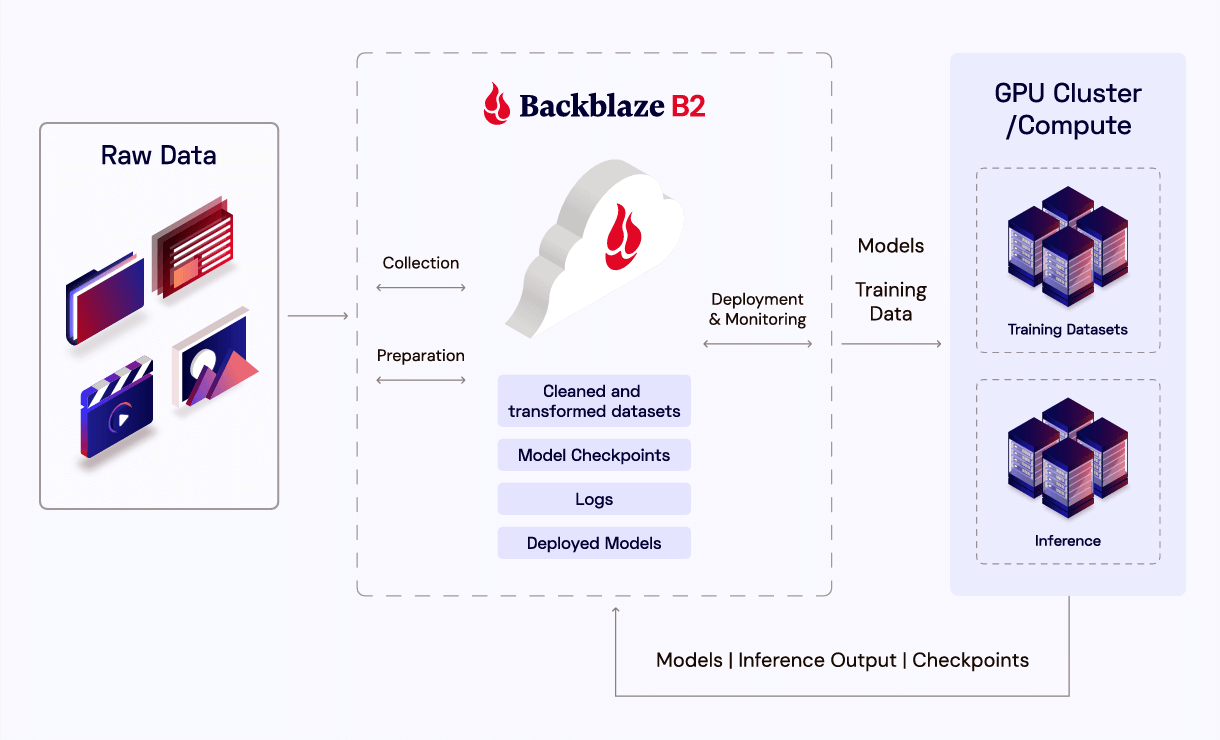
Manage B2 Cloud Storage at Scale: Enterprise Web Console Entering Private Preview

Post Syndicated from Kari Rivas original https://www.backblaze.com/blog/manage-b2-cloud-storage-at-scale-enterprise-web-console-entering-private-preview/

A decorative image showing a cloud with the Backblaze logo, a computer monitor, and various icons.

If you’re responsible for managing cloud storage across a fast-growing company, you know the drill: more teams, more data, more buckets—and way more complexity. That’s why we’re launching a new enterprise web console, now entering private preview.

Built for scale, security, and simplicity, the new console gives you:

  • Centralized control over your organization’s cloud storage.
  • The ability to add multiple admins who each have their own credentials. 
  • More flexibility in bucket creation, including the ability to create buckets in any region. 
  • Built-in zero-trust security features like mandatory MFA and SSO support.

Whether you’re wrangling storage across departments or delivering managed services to clients, this is the command center that helps you move faster, stay secure, and keep everything organized. Because managing cloud storage shouldn’t be harder than using it.

What’s new in the enterprise web console?

The new web console gives IT admins and managed service providers (MSPs) a clean, central hub for managing B2 Cloud Storage deployments—whether you’ve got a few buckets or a few thousand. Here’s what’s under the hood:

  • Role-based access controls (RBAC): Assign authorized admin users and utilize a resource group architecture so people only access what they need. Great for zero trust—even better for peace of mind.
  • Mandatory MFA: Because “security optional” isn’t really an option anymore.
  • SSO and SCIM support: Manage your user base automatically and at scale.

We also revamped the user interface so it’s faster to navigate, easier on the eyes, and just generally gets out of your way.

Storage where you need it

With this update, you’ll be able to create and manage B2 Buckets in any available region. That unlocks a few big wins:

  • Ensuring data redundancy and disaster recovery through geographically distributed backup copies.
  • Optimizing application performance for global users by reducing data access latency.
  • Compliance with data residency rules.

Ready to get started?

We’re rolling out the enterprise console in private preview starting soon. If you’re a Backblaze customer with a committed contract, reach out to your Customer Success Manager to see if you’re eligible. Not sure who your CSM is? Email [email protected] for help. 

General availability is coming later this year. Stay tuned—we’ll keep shipping.

The post Manage B2 Cloud Storage at Scale: Enterprise Web Console Entering Private Preview appeared first on Backblaze Blog | Cloud Storage & Cloud Backup
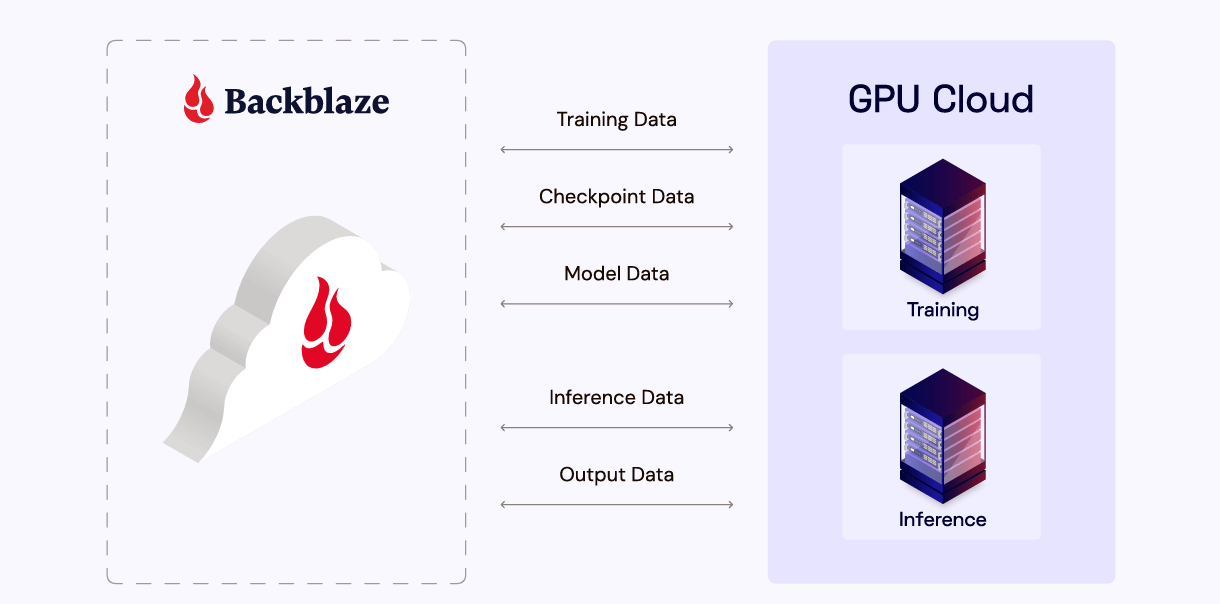
Vendor Lock-in Kills AI Innovation. Here’s How to Fix It.

Post Syndicated from David Johnson original https://www.backblaze.com/blog/vendor-lock-in-kills-ai-innovation-heres-how-to-fix-it/

A decorative image showing a hammer smashing a drive.

Everyone’s chasing the next breakthrough in AI, pouring money into bigger models and faster chips. But there’s one innovation killer no one’s talking about, and it isn’t compute limits—it’s vendor lock-in.

While you’re optimizing your algorithms, your infrastructure is quietly draining your budget and tying your roadmap to someone else’s agenda. Open cloud providers help you create an ecosystem where data flows freely, innovation isn’t throttled, and every component works harmoniously to drive progress. Yet, for many organizations, vendor lock-in with hyperscalers costs more than just dollars: it comes at the expense of the freedom to innovate on your own terms.

Today, I’m talking through how AI organizations end up locked in with hyperscalers and how to avoid that trap.

Download the ebook

Struggling to keep AI storage costs under control? Download our free ebook to discover how to optimize cloud storage for AI workloads—without compromising performance.

Get the Ebook ➔ 

The three pillars of AI infrastructure

At its heart, AI infrastructure rests on three essential pillars:

  • Compute: The engines powering your models and training processes.
  • Data management: The systems that capture, store, and organize the massive volumes of data your projects depend on.
  • Integration and flexibility: The ability to move data seamlessly between various platforms and cloud environments without being tied to a single provider.

When any of these pillars are compromised by vendor lock-in, the consequences are immediate and costly: 

  • Can you freely move workloads between environments? 
  • Are you paying premium prices for basic data transfers? 
  • Is your team spending more time managing infrastructure than building innovative solutions? 

These challenges directly hinder your team’s ability to deliver the AI breakthroughs your organization expects.

Understanding vendor lock-in

Vendor lock-in occurs when an organization becomes overly dependent on a single vendor’s products or services, making it difficult—or costly—to switch to alternative solutions. This dependency can manifest in several ways:

  • Proprietary technologies: When a vendor’s system uses exclusive formats or interfaces, integrating new tools becomes challenging.
  • Complex pricing: Long-term agreements with rigid terms and hidden fees may restrict flexibility and force you to absorb unexpected costs.
  • Ecosystem dependence: Relying on one provider’s suite of services can limit your ability to adopt innovative, best-of-breed solutions from other vendors.

In practice, vendor lock-in can hurt innovation by restricting your options, slowing down the pace at which you can adopt new technologies, and diverting resources to manage and maintain a closed system rather than driving creative breakthroughs.

The hidden costs of vendor lock-in

Imagine scaling your AI project only to discover, as Decart did, that egress fees essentially hold your data hostage. Their team needed to train models across multiple GPU clusters simultaneously—a scenario that would have incurred crippling costs with their previous provider. Or consider Grass Network, who found their ability to serve Fortune 1000 clients fundamentally undermined by their cloud vendor’s pricing structure, with egress and deletion fees that made their business model unsustainable at scale.

The pattern is clear: Organizations trapped in vendor-locked systems end up diverting precious resources—both financial and human—away from innovation and toward infrastructure management. This results in delayed training cycles, slower model iterations, and missed market opportunities as engineering talent gets consumed by working around limitations rather than building competitive advantages.

A holistic look at open AI infrastructure

While compute power and advanced analytics often grab headlines, the true strength of an AI system lies in the seamless integration of all its components. An open AI infrastructure can deliver:

  • Enhanced agility: With a flexible, multi-cloud approach, you can rapidly adopt new tools and technologies without being bound by a single provider’s limitations.
  • Optimized performance: When data flows effortlessly between compute clusters, storage systems, and analytics platforms, every part of your infrastructure can perform at its peak.
  • Cost efficiency: Transparent pricing and predictable billing ensure that hidden fees—like those associated with storage tiers and egress—don’t eat into your budget.
  • Future-proofing: By avoiding proprietary ecosystems, you build an infrastructure that is resilient and adaptable, giving you the freedom to experiment and innovate.

Rethinking storage as the strategic backbone

Among all the components, storage plays a uniquely critical role—it’s the circulatory system that keeps your data moving throughout the AI workflow. The right storage foundation doesn’t just warehouse data; it becomes a strategic asset that enables multi-cloud workflows, maintains cost predictability, and prevents vendor lock-in by allowing seamless integration with different compute engines, GPU clusters, and software platforms. Forward-thinking organizations are increasingly viewing storage not as a commodity, but as the linchpin of AI infrastructure strategy.

Backblaze B2: A foundation for multi cloud storage

Within this framework, Backblaze B2 serves as a robust storage foundation that transforms how AI teams approach multi-cloud workflows. Rather than trying to be everything to everyone, B2 Cloud Storage focuses exclusively on being the best at what matters most for your data: performance, scalability, and predictability.

It effortlessly scales from terabytes to petabytes, accommodating everything from raw training data to archived model outputs without performance degradation. S3 compatibility means it integrates easily with virtually any AI pipeline or tool. Perhaps most importantly, it keeps costs transparent and predictable with straightforward pricing that eliminates the “sticker shock” that plagues many AI projects.

A reliable, independent storage layer doesn’t just help you sidestep the pitfalls of vendor lock-in—it fundamentally changes how your team approaches innovation by removing the technical and financial barriers that traditionally constrain experimentation.

See the open cloud in action

Your company’s data is a powerful resource—learn how to harness it with an AI agent designed to generate meaningful insights. In this deep dive, Backblaze’s Pat Patterson and Jeronimo De Leon will demonstrate how to build an AI agent that can query, analyze, and generate insights from company-specific data—all powered by cost-efficient, scalable cloud storage.

Watch the Demo ➔ 

Charting a new course for innovation

Breaking free from vendor lock-in isn’t merely about cutting costs—it’s about reclaiming control over your entire AI infrastructure and accelerating your path to results. When every component, from compute to storage and integration, is designed to be open and flexible, your organization gains the freedom to experiment, iterate, and push the boundaries of what’s possible.

The most successful AI teams we’ve observed are those building on strong, multi-cloud-friendly foundations where data flows without friction or penalty. They’re the ones asking tough questions about their infrastructure choices today to ensure maximum flexibility tomorrow.

The post Vendor Lock-in Kills AI Innovation. Here’s How to Fix It. appeared first on Backblaze Blog | Cloud Storage & Cloud Backup
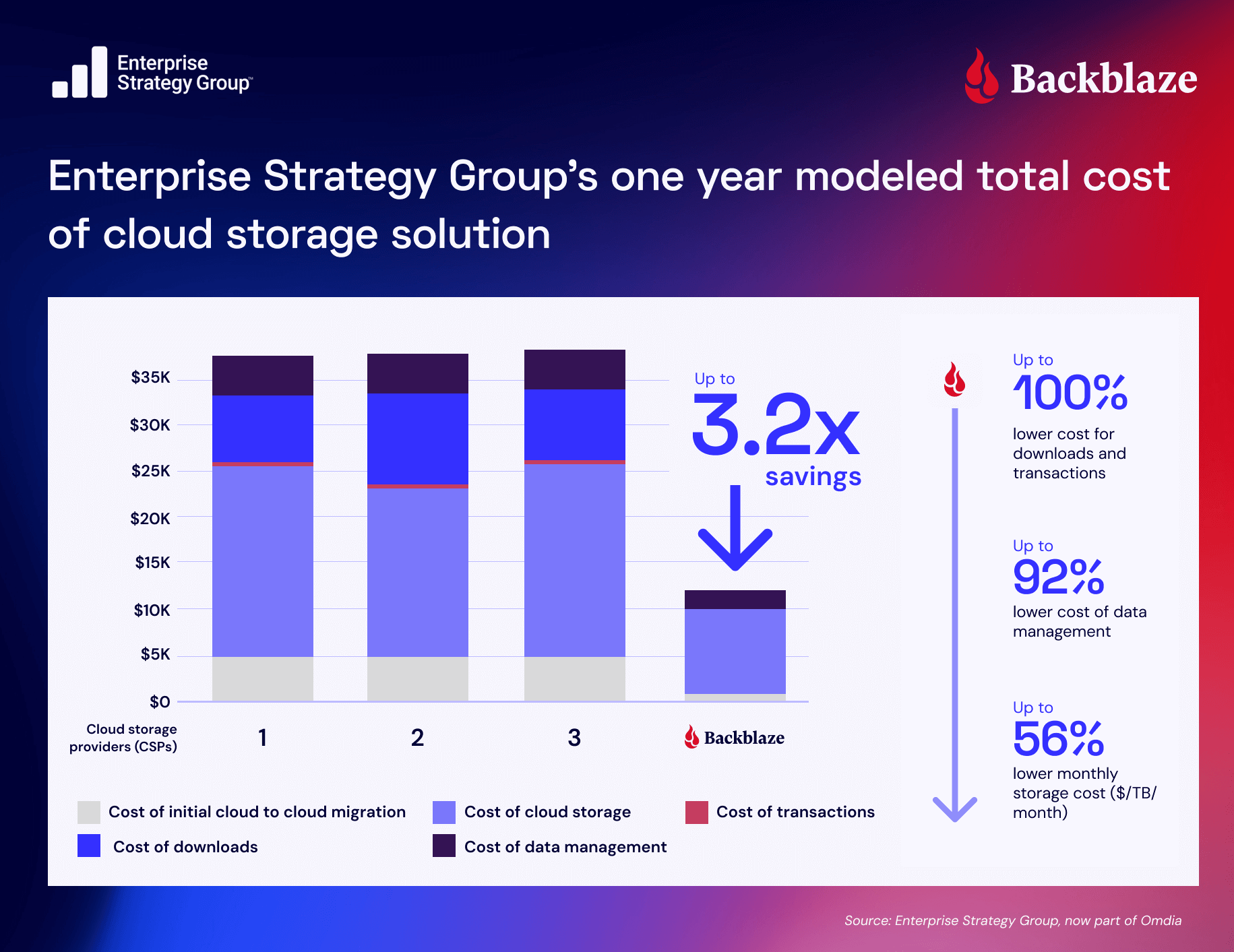
Backblaze Drive Stats for Q1 2025

Post Syndicated from Drive Stats Team original https://www.backblaze.com/blog/backblaze-drive-stats-for-q1-2025/

A decorative image showing the title Backblaze Q1 2025 Drive Stats.

Welcome to the first Drive Stats of 2025. In case you missed it, the 2024 Drive Stats report was the last for long-time Drive Stats guru, Andy Klein, who is happily retired—off putting the “green” in greener pastures by working on his golf game. We–being Backblaze staff writer Stephanie Doyle and Chief Technical Evangelist Pat Patterson–are picking up where Andy left off, bringing you the metrics and analysis you know and love. Now, on to the numbers! 

As of March 31, 2025, we had 312,831 drives under management. Of that total, there were 3,970 boot drives and 308,861 data drives. We’ll review their annualized failure rates (AFRs) as of Q1 2025, and we’ll dig into the average age of drive failure by model, drive size, and more. Along the way, we’ll share our observations and insights on the data presented and, this time around, we’ve got some exciting updates to share about how we produce Drive Stats. (Stay tuned, fellow Snowflake fans.) 

As always, we look forward to your thoughts—we’ll see you in the comments section. 

Sign up for the Drive Stats LinkedIn Live

Ready to dive deeper into the data? Tune in Thursday, May 15, 2025 at 10:00 a.m. PT, to query the new Drive Stats team, Stephanie Doyle and Pat Patterson. Feel free to drop us a line with any questions you want us to answer.

Sign Up for the LinkedIn Live ➔

Q1 2025 hard drive failure rates

As mentioned above, at the end of Q1 2025, we were running 312,831 drives. During the quarter as a whole, however, we were monitoring a total of 318,426 drives; this count includes those that were taken out of service during the quarter, either because they failed or were only used temporarily. 

We’ll discuss the criteria we used in the next section of this report. Removing these drives leaves us with 317,833 hard drives to analyze. The table below shows the annualized failure rates (AFR) for Q1 2025 for this collection of drives.

Backblaze Hard Drive Failure Rates for Q1 2025

Reporting period January 1, 2025–March 31, 2025 inclusive
Drive models with drive count > 100 as of March 31, 2025 and drive days > 10,000 in Q1 2025. 

Notes and observations

  • The 4TB drives are hanging on and finishing strong. Good news: We have another quarter’s worth of data on our beloved 4TB drives (though the planned migration is well underway). True to their history, the 4TB drives showed wonderfully low failure rates, with yet another quarter of zero failures from model HMS5C4040ALE640 and 0.34% AFR from model HMS5C4040BLE640. 
  • Keeping an eye on the 20TB+ pool. The 24TB Seagate (model ST24000NM002H) no longer has a perfect record, with eight failures for the quarter. Still, the drives put up a respectable 1.00% AFR. Meanwhile, the 20TB+ drives as a pool are averaging a 0.72% AFR, coming in lower than the overall failure rates—always a promising sign. 
  • Zero failures for the quarter. Four drives get a gold star for zero failures this quarter:
    • The 4TB HGST (model HMS5C4040ALE640) 
    • The Seagate 8TB (model ST8000NM000A) 
    • Seagate 12TB (model ST12000NM000J)
    • Seagate 14TB (model ST14000NM000J) 

Three out of the four also had zero failures last quarter, all but the Seagate 12TB. 

  • The quarterly failure rate is slightly higher. The quarterly failure rate went up from 1.35% to 1.42%. As with the zero-failure club, our higher-end outlier AFRs show some of the usual suspects:
    • Seagate 10TB (model ST10000NM0086). Q4 2024: 5.72%. Q1 2025: 4.72%.
    • HGST 12TB (model HUH721212ALN604). Q4 2024: 5.15%. Q1 2025: 4.97%.
    • Seagate 12TB (model ST12000NM0007). Q4 2024: 8.72%. Q1 2025: 9.47%.
    • Seagate 14TB (model ST14000NM0138). Q4 2024: 5.95%. Q1 2025: 6.82%.

Drive model criteria

We noted earlier we removed 593 drives from consideration when we produced the table above covering Q4 2024. There are two primary reasons we did not consider these drive models.

  • Testing. These are drives of a given model that we monitor and collect Drive Stats data on, but are not considered production drives at this time. For example, drives undergoing certification testing to determine if they are performant enough for our environment are not included in our Drive Stats calculations.
  • Insufficient data points. When we calculate the annualized failure rate for a drive model for a given period of time (quarterly, annual, or lifetime), we want to ensure we have enough data to reliably do so. Therefore we have defined criteria for a drive model to be included in the tables and charts for the specified period of time. Models that do not meet these criteria are not included in the tables and charts for the period in question.

Regardless of whether or not a given drive model is included in the charts and tables, all of the data for all of the drives we use is included in our Drive Stats dataset which you can download by visiting our Drive Stats page.

As with the Q4 quarterly results, we will apply these criteria to the annual and lifetime charts that follow in this report.

Lifetime hard drive failure rates

As of the end of Q1 2025, we were tracking 312,831 data hard drives. To be considered for the lifetime review, a drive model was required to have 500 or more drives as of the end of Q1 2025 and have over 100,000 accumulated drive days during their lifetime. When we removed those drive models which did not meet the lifetime criteria, we had 312,493 drives grouped into 26 models remaining for analysis as shown in the table below.

Backblaze Lifetime Hard Drive Failure Rates 

Reporting period ending March 31, 2025 inclusive
Drive models with > 500 drives and > 100,000 lifetime drive days

Notes and observations

The lifetime AFR remains steady, despite some drives having significant change. We see virtually no change in our overall lifetime AFR, which we last tracked at 1.31% in the 2024 Year-End Drive Stats Report. But, with some drive models showing significant change in year-over-year AFR, it’s worth digging in a little deeper. 

Statistically significant improved AFRs: 

  • Both the 12TB and the 14TB had the same number of failures (or nearly so). Meanwhile, the Toshiba 20TB and WDC 22TB had more failures, but added a significant number of drives to the fleet. Both of these activities increase the number of drive days we tracked for the model’s drive pool, so these results are unsurprising. 

Statistically significant worsened AFRs:

  • Meanwhile, we have a few things happening for the significantly worsened AFRs. The WDC drive models are all top performers from a failure perspective, even a change from .45 to .48 shows up in the numbers. 
  • That leaves us with two HGST 12TB drives. Both come in above the average failure rate, at 1.45% (model: HUH721212ALE604) and 2.06% (model: HUH721212ALN604). We can give HUH721212ALE604 a pass—with the drive pool showing an average age of 67.1 months, or about five and a half years, it’s firmly on track with the expected pattern defined by the bathtub curve. 
  • Where does that leave us with model HUH721212ALE604? We’ll keep an eye on it. Given that its AFR rate isn’t too far off from the total AFR of the Backblaze drive fleet, it’s not hugely concerning unless we see the rate of change continue. 

What’s new with Drive Stats?

In taking on this report, our main focus was to ensure continuity with our decades-old dataset. That said, we also saw some opportunities to streamline the process of data collection, a continuation of the work that David Winings talked about in Overload to Overhaul: How We Upgraded the Drive Stats Data and Drive Stats Data Deep Dive: The Architecture. All of these things set us up for not just an easier time generating this report, but some bigger plans in the future. (We won’t tip our hand yet—but stay tuned.) 

Drive Stats gets a Snowflake upgrade

When we first started tracking Drive Stats way back in 2013, data collection was very ad hoc. For the first few years, when Brian Beach was at the helm, we published stats once a year. When Andy took over in 2015, he moved to publishing quarterly data (starting in 2016). As the dataset grew, and Andy’s collection of lightweight desktop apps started to run out of steam, it became apparent that we needed to upgrade to more capable analytical tooling. For a variety of operational reasons, Andy was gamely running SQL queries against CSV data imported into a MySQL instance running on his laptop—and having to do a ton of manual data cleanup to boot. (Pun obviously intended.) 

This year, with the help of our colleagues on the database engineering team (shoutout to Tom Roden—thanks so much!), we were able to get the Drive Stats data included in the Backblaze Snowflake instance. Gone are the days of us bugging folks for exports that take hours to process! We can run lightweight queries against a cached, structured table.

We started from Andy’s SQL queries and tweaked them a bit to match the logic and nomenclature of Snowflake fields. Once we had that worked out, the first thing we did was validate our methodology by running the Q4 Drive Stats numbers and comparing them to Andy’s—success. 

It helps that Pat has experimented with our Drive Stats dataset in Trino and other analytical tools like Apache Iceberg, so it’s certainly not the first time he’s considered methodology and tooling for this problem. Going forward, we may further refine the process, but for now, the migration to Snowflake saved us a ton of time and manual data cleanup.

The Hard Drive Stats data

The complete dataset used to create the tables and charts in this report is available on our Hard Drive Test Data page. You can download and use this data for free for your own purpose. All we ask are three things: 1) you cite Backblaze as the source if you use the data, 2) you accept that you are solely responsible for how you use the data, and 3) you do not sell this data itself to anyone; it is free.

Good luck, and let us know if you find anything interesting.

The post Backblaze Drive Stats for Q1 2025 appeared first on Backblaze Blog | Cloud Storage & Cloud Backup

One Simple Change That Made Our Exabyte-Scale Storage Faster

Post Syndicated from Jerry Sha original https://www.backblaze.com/blog/one-simple-change-that-made-our-exabyte-scale-storage-faster/

A decorative image showing various towers and a cloud.

When you’re moving exabytes of data, every network request, every CPU cycle, every byte matters. Recently, I had the chance to revisit a part of our system that’s been quietly humming along for years. With one small rethink, we helped give our download performance a serious boost.

The idea was almost laughably simple: combine two separate requests into one. But when you’re operating at massive scale, even a “simple” change can make a huge difference.

Curious how we think about performance at scale?

From our new series on engineering innovations, check out Analyzing Performance at Exabyte Scale and What Powers the Performance of Backblaze for a deeper dive into the engineering principles that drive our storage platform.

The challenge: Why we had 40 requests per download

Before the change, downloading a file meant:

  • A “download coordinator” pod would reach out across the 20 pods that make up a Vault to grab metadata.
  • Once it had those, it would figure out where the needed bytes lived.
  • Then it would go back and request the actual data.

That meant 40 separate requests just to get the ball rolling on every download.

The fix: Smarter reads with half the overhead

At some point, it clicked for me: why were we doing this in two steps? The original setup only pulled the bare minimum of data. But what if we just grabbed everything we needed at once? There wasn’t a good reason not to. So I refactored the process so that a pod could grab both the shard header and the data in a single request.

Now:

  • The coordinator still orchestrates the work.
  • The receiving pod reads the header, figures out what it needs, and pulls the data—all internally. By shifting this responsibility to the receiving pod, we eliminate a network round trip per pod—20 round trips in total. 
  • The combined result is sent back to the coordinator in a single step.

After the fix, we’re still reading the same amount of data from disk, so disk I/O remains unchanged, but network performance improved significantly. Instead of kicking off 40 network operations, we’re down to about half that. Less traffic, less overhead, faster performance.

It was a simple fix, but the project required a significant amount of software engineering work as well. By shifting responsibilities to the “receiving pod” the coordinator needed to learn to perform lots of just-in-time reasoning about the nature of the download, which required rethinking how we architected portions of the download code.

Why it didn’t just instantly double download performance

If you’re thinking, “shouldn’t that make downloads twice as fast?”—not quite.

Here’s why: Big files get broken into “stripes” during download, and my change only optimizes the first stripe request. Smaller files (a big chunk of our traffic) see the full benefit because they often fit into a single stripe. For larger files, though, the improvement only affects a small part of the overall download, so the impact is more limited.

How we measured the impact

Measuring the real-world effect turned out to be trickier than I expected. Our download traffic isn’t steady; it’s spiky. Under normal conditions, our system wasn’t hitting capacity limits which made it hard to clearly see changes in download performance. 

But in our dedicated performance testing environment, where we could send a controlled load of downloads, the improvement was crystal clear. With this change, our system could handle a much higher peak load—great news for handling things like backup surges, AI training runs, and large enterprise downloads. 

Beyond download performance: System-wide benefits

One of the coolest side effects? This doesn’t just help customer downloads. It also speeds up internal operations like vault recomputing data drives and server-side copies.

By freeing up CPU cycles that used to be wasted on multiple requests, we open the door for better performance everywhere. And hey, maybe even some minor energy savings—less CPU load means less heat, less power.

What this taught me about optimization

When you’re trying to optimize a massive system, it’s tempting to chase performance with complicated solutions: more threads, smarter caches, fancier hardware.

But sometimes, the real win is just about thinking differently. Questioning assumptions. Asking, “Wait, why are we doing it this way?”

For me, this project was a great reminder that even at exabyte scale, the simplest solution can be the most impactful.

The post One Simple Change That Made Our Exabyte-Scale Storage Faster appeared first on Backblaze Blog | Cloud Storage & Cloud Backup
Iceberg on Backblaze B2

Post Syndicated from Pat Patterson original https://www.backblaze.com/blog/iceberg-on-backblaze-b2/

A decorative image showing icons of different file types on a grid superimposed over a cloud.

If you work with cloud storage and data lakes, you’re likely hearing the word “Iceberg” with increasing frequency, occasionally prefixed by “Apache”. What is Apache Iceberg, and how can you leverage it to efficiently store data in object stores such as Backblaze B2 Cloud Storage? I’ll answer both of those questions in this blog post.

But, first, join me on a brief trip back in time to the beginning of the twenty-first century, a long-ago time before the emergence of big data and cloud computing.

A timely shoutout to the Data Council conference

We recently attended the 2025 Data Council conference and caught Ryan Blue, co-creator of Apache Iceberg’s excellent presentation (featuring some very entertaining slides).

If you want to hear more about topics like this one, feel free to join us at Backblaze Weekly, an ongoing webinar series where we discuss all things Backblaze.

An image of Ryan Blue speaking at the 2025 Data Council conference.
Ryan Blue speaking at the 2025 Data Council conference. Note: His shirt says “the future is open”. We agree!

CSV: The lingua franca of tabular data

In the early 2000s, if you were working with tabular data, you were likely using either a relational database management system (RDBMS), such as Oracle Database, or a spreadsheet, likely Microsoft Excel.

Data stored in an RDBMS is highly structured, meaning that it MUST conform to a predefined schema. For example, you might create an employee table with columns such as first name, last name, date of birth, hire date, and so on. The database schema holds metadata such as the name and data type of each column, whether that column must have a value, relationships between tables, and so on.

A spreadsheet, on the other hand, has some structure—data is arranged in rows and columns, similarly to an RDBMS–but each cell can contain anything: text, a number, a formula referencing other cells, even an image in today’s spreadsheets. We say that a spreadsheet is semi-structured data.

At the turn of the century, each database and spreadsheet had its own proprietary file format, optimized for its own requirements, and often not at all publicly documented, but the need to be able to exchange data between applications led to broad adoption of a file format to allow just that: comma-separated values, or CSV.

Here’s a simple example of some tabular data represented as CSV:

employee_id,first_name,last_name,reports_to,job_title,is_manager
1,Gleb,Budman,,CEO,1
123,Patrick,Thomas,1,"VP of Marketing",1
45,Yev,Pusin,123,"Head of Communications and Community",1
678,Pat,Patterson,45,"Chief Technical Evangelist",0

CSV is simple and flexible enough that it was easy for me to type that example up manually and import it into Microsoft Excel with no problems at all. Note that, as well as the commas, the double quotes in the CSV data are part of the file format, and do not appear in the imported data:

A screenshot of an Excel spreadsheet.

CSV has a lot of advantages: It’s simple; flexible; widely understood; the optional header line means that data can be somewhat self-describing; and it’s not controlled by any single vendor.

CSV does, however, also have a few disadvantages, including:

  • There’s no schema; nothing in that file expresses that the values in the first column, apart from the header, must be integers.
  • It’s difficult to represent complex or hierarchical datasets.
  • Data is stored as text, which is inefficient for numerical and repetitive data. Text representations of numbers occupy more storage than binary, and applications must convert them to binary when loading the file and convert them back to text when saving it.

Avro, Parquet and ORC: File formats for big data

The emergence of open-source distributed computing frameworks such as Apache Hadoop and, later, Apache Spark, in the first two decades of this century drove the creation and adoption of more efficient ways of storing tabular data. Avro, Parquet and ORC, all Apache projects, are binary file formats that address shortcomings of CSV, such as encapsulating schema alongside the data.

Avro, like CSV, is designed for row-oriented data, which makes it well-suited to use cases that involve appending new data to files. Parquet and ORC, in contrast, are column-oriented file formats, perfect for online analytical processing (OLAP) use cases where, for example, an application might read an entire column from a table to calculate the sum of its values. As well as storing numbers in a binary representation, Parquet and ORC can also reduce file size through compression strategies such as run-length encoding.

Here’s a concrete example: The Drive Stats data set for December 2024 occupies 3.7GB of storage in CSV format. As Parquet, the same data consumes just 242MB, a data compression ratio of more than 15:1.

Why does it matter if your dataset is smaller? Well, beyond just cost savings, which are amplified when dealing with huge datasets, smaller files mean that running queries against full datasets takes less time, which reduces server load, compute costs, and so on.  

From file formats to table formats and data lakes

Apache Hadoop’s original use case was as an implementation of MapReduce, a programming model for manipulating large datasets. Engineers at Facebook, tasked with allowing SQL queries over datasets generated by Hadoop, created Apache Hive, and, with it, the Hive table format, which specified how to view a collection of files as a single logical table. The Hive table format in turn allowed organizations to create data lakes, repositories that store structured and semi-structured data in their original format for analysis by a wide range of tools, and, later, data lakehouses, which aim to combine the benefits of data lakes and traditional data warehouses by storing structured data using data lake tools and technologies.

A key concept of the Hive table format is partitioning, a way of organizing files to reduce the amount of data that must be read to process a query. Taking the Drive Stats dataset as an example, we can partition the files by year and month, so that each file has a prefix of the form:

/drivestats/year={year}/month={month}/

For example:

/drivestats/year=2024/month=12/

With this partitioning scheme, a system processing a query for hard drive statistics for, say, December 12, 2024, need only retrieve files with the above prefix. You might be wondering, “Why not partition the data on day, also, to further reduce the number of files that must be retrieved?” The answer depends on the data volume and access patterns. It’s much more efficient to partition data into fewer large files than many small files, so overly granular partitioning can actually impair performance.

It’s worth mentioning that file formats and table formats are largely independent of each other. You can use Avro, Parquet, ORC, or even CSV files with the Hive table format.

For more detail on the Parquet file format, Hive table format, and partitioning, see the blog post, Storing and Querying Analytical Data in Backblaze B2.

“Iceberg, captain, dead ahead!”

While the Hive table format served the big data community well for several years, it had a number of shortcomings:

  • Every query incurs a file list (“list objects”, in S3 API terms) operation, which is particularly expensive with cloud object storage, both in terms of time and API transaction charges.
  • Deleting or modifying data typically implies rewriting an entire data file, even if only a single row was affected.
  • Hive can only partition datasets on columns that are in the table schema. For example, the Drive Stats data set includes a date column, so to use it with Hive, we had to create additional, redundant, year and month columns.
  • Any changes to the data schema or partitioning strategy require affected files to be rewritten, making schema evolution problematic, if not infeasible, for large datasets.
  • There is limited support for the kind of ACID (Atomic, Consistent, Isolated, Durable) transactions that are familiar from the RDBMS world. Attempts to add transaction support to Hive were not widely or consistently supported.

As a result, vendors and the broader big data community formed a number of projects to define new table formats to succeed Hive, including Apache Iceberg, Apache Hudi, and Delta Lake, a Linux Foundation project.

The three are broadly comparable in terms of features, but, over the past couple of years, Iceberg has emerged as the leader in terms of vendor adoption, with Snowflake announcing general availability of Iceberg tables in June 2024, and Amazon announcing S3 Tables, its managed Iceberg offering, in December 2024. Significantly, Databricks, the prime mover behind Delta Lake, acquired Tabular, a company founded by the original creators of Apache Iceberg, in June 2024, establishing its own beachhead in the Iceberg community.

Iceberg‘s features allow it to be used to organize huge data sets, efficiently and flexibly:

  • Table metadata including the list of files that comprise a table is stored as JSON data alongside the data files, eliminating the need to run an expensive list object operation for every query.
  • Schema evolution allows you to add, drop, update, or rename columns.
  • Hidden partitioning decouples partitioning from the table schema. For example, you can partition data like the Drive Stats dataset by year and month based on the existing date values, without creating additional columns.
  • Partition layout evolution allows you to modify your partitioning strategy as data volume or access patterns change.
  • Time travel allows you to query table snapshots.
  • Serializable isolation provides atomic table changes, ensuring readers never see inconsistent data.
  • Multiple concurrent writers use optimistic concurrency, retrying to ensure that compatible updates succeed while detecting conflicting writes.

Iceberg is widely supported across the big data ecosystem, with many applications and tools  allowing you to store Iceberg tables in S3 compatible cloud object storage such as Backblaze B2. In this article, I’ll look at the simplest use case, running queries against the Drive Stats dataset, with three representative examples: Snowflake, Trino, and DuckDB.

Writing Iceberg data to Backblaze B2

I wrote a simple Python application, drivestats2iceberg, using the PyIceberg library, that converts the Drive Stats dataset from the zipped CSV files we publish to Parquet files in an Iceberg table stored in a Backblaze B2 Bucket. There are some useful techniques in drivestats2iceberg, and it is published on GitHub as open source, under the MIT license, so feel free to use it as a starting point for your own data conversion apps.

Querying Iceberg tables in Backblaze B2 from Snowflake

Snowflake is a data-as-a-service platform addressing a wide variety of use cases, including artificial intelligence (AI), machine learning (ML), collaboration across organizations, and data lakes.

A decorative image showing the Backblaze and Snowflake logos superimposed over a cloud that dissolves into binary 0s and 1s.
We’re big fans of the Backblaze + Snowflake integration. Our customers are too.

As I mentioned above, Snowflake announced general availability of its Iceberg tables offering in June 2024, allowing you to manipulate Iceberg tables located on external volumes, outside your Snowflake warehouse, and query them alongside data in Snowflake-managed tables.

Snowflake’s Iceberg implementation is quite complicated, with different capabilities according to your choice of cloud object storage provider and whether you want Snowflake to manage your Iceberg catalog or use a catalog integration.

For our simple use case, where the Iceberg metadata and data files already exist in a Backblaze B2 Bucket, the first step is to create a Snowflake external volume, configuring it with suitable credentials and the location of the Drive Stats data.

Note: the application key shown in this Snowflake statement has read-only access to the drivestats-iceberg bucket. You can use it to query the Drive Stats data set from your own Snowflake instance or from other environments.

CREATE EXTERNAL VOLUME drivestats_b2
STORAGE_LOCATIONS = (
(
NAME = 'b2_storage_location'
STORAGE_PROVIDER = 'S3COMPAT'
STORAGE_BASE_URL = 's3compat://drivestats-iceberg/'
CREDENTIALS = (
AWS_KEY_ID = '0045f0571db506a0000000017'
AWS_SECRET_KEY = 'K004Fs/bgmTk5dgo6GAVm2Waj3Ka+TE'
)
STORAGE_ENDPOINT = 's3.us-west-004.backblazeb2.com'
)
)
ALLOW_WRITES = FALSE;

Next, you must create a catalog integration. The object store catalog integration simply reads Iceberg metadata from an external (to Snowflake) cloud storage location:

CREATE CATALOG INTEGRATION my_iceberg_catalog_integration
CATALOG_SOURCE = OBJECT_STORE
TABLE_FORMAT = ICEBERG
ENABLED = TRUE;

Now you can create an Iceberg table object that references the existing dataset. Note that Snowflake requires you to explicitly specify the metadata file to use for column definitions; this is typically the most recently created JSON file under the metadata prefix.

CREATE ICEBERG TABLE drivestats
EXTERNAL_VOLUME = 'drivestats_b2'
CATALOG = 'my_iceberg_catalog_integration'
METADATA_FILE_PATH = 'drivestats/metadata/00225-317608b1-35a6-4135-8393-7543583623db.metadata.json';

That done, you can start querying the data:

How many records are in the current Drive Stats dataset?

SELECT COUNT(*) 
FROM drivestats;

Result:

564566016

How many hard drives was Backblaze spinning on a given date?

SELECT COUNT(*) 
FROM drivestats
WHERE date = DATE '2024-12-31';

Result:

305180

How many exabytes of raw storage was Backblaze managing on a given date?

SELECT ROUND(SUM(CAST(capacity_bytes AS BIGINT))/1e+18, 2) 
FROM drivestats
WHERE date = DATE '2024-12-31';

Result:

4.42

What are the top 10 most common drive models in the dataset?

SELECT model, COUNT(DISTINCT serial_number) AS count 
FROM drivestats
GROUP BY model
ORDER BY count DESC
LIMIT 10;

Results (in drive days):

TOSHIBA MG08ACA16TA   40859
TOSHIBA MG07ACA14TA 39387
ST12000NM0007 38843
ST4000DM000 37040
ST16000NM001G 34501
WDC WUH722222ALE6L4 30148
WDC WUH721816ALE6L4 26547
ST12000NM0008 21028
HGST HMS5C4040BLE640 16349
ST8000NM0055 15680

My x-small Snowflake warehouse executed the first three queries in a fraction of a second. As you might expect from its additional complexity, the last query took longer: 16 seconds.

Querying Iceberg tables in Backblaze B2 from Trino

Trino is an open-source distributed query engine, formerly known as PrestoSQL. Trino can natively query data in Backblaze B2, Cassandra, MySQL, and many other data sources without copying that data into its own dedicated store. Trino has become the Backblaze Evangelism Team’s go-to date lake tool over the past few years; we’ve used it in several past blog posts, and we maintain a GitHub repository with quick start guides for running Trino with BackblazeB2.

To access the Drive Stats data set from Trino, you must configure its Iceberg connector with a catalog properties file. For example, to configure a catalog named drivestats_b2, create a file etc/catalog/drivestats_b2.properties:

connector.name=iceberg

hive.metastore.uri=thrift://hive-metastore:9083

iceberg.register-table-procedure.enabled=true

fs.native-s3.enabled=true

s3.endpoint=https://s3.us-west-004.backblazeb2.com
s3.region=us-west-004
s3.aws-access-key=0045f0571db506a0000000017
s3.aws-secret-key=K004Fs/bgmTk5dgo6GAVm2Waj3Ka+TE
s3.exclusive-create=false

Note that the above configuration file uses the same read-only credentials as the Snowflake example. You can use this configuration file as-is to explore the Drive Stats dataset using Trino.

Start the Trino server and CLI, then create a Trino schema with the location of the data, and set it as the default schema for subsequent queries:

CREATE SCHEMA drivestats_b2.ds_schema
WITH (location = 's3://drivestats-iceberg/');
USE drivestats_b2.ds_schema;

The Trino Iceberg connector provides the register_table procedure for registering existing Iceberg tables into the metastore. Optionally, you can provide an additional metadata_file_name parameter if you wish to register the table with some specific table state, or if the connector cannot automatically figure out the metadata version to use.

CALL drivestats_b2.system.register_table(
schema_name => 'ds_schema',
table_name => 'drivestats',
table_location => 's3://drivestats-iceberg/drivestats'
);

Since you can query the table using the exact same SQL queries as in the Snowflake example, producing the exact same results, I won’t reproduce them here. Running Trino in a Docker container on my MacBook Pro, the first three queries executed in less than three seconds, the fourth took just over a minute.

Querying Iceberg tables in Backblaze B2 from DuckDB

DuckDB is an open-source column-oriented RDBMS, intended for in-process use: embedded in applications. There are DuckDB client APIs (also known as drivers) for many programming languages, including Python, Java, JavaScript (Node.js) and Go.

DuckDB is focused on the same kinds of use cases as Snowflake and Trino; it is effectively the OLAP equivalent to SQLite, which targets online transaction processing (OLTP) workloads.

To work with Iceberg tables in cloud object storage, you must install and load the httpfs and iceberg DuckDB extensions:

INSTALL httpfs;
LOAD httpfs;

INSTALL iceberg;
LOAD iceberg;

Now, you need to create a secret with your Backblaze B2 credentials.

Again, the application key shown here has read-only access to the Drive Stats dataset; you can use it to explore the data yourself if you like.

CREATE SECRET secret (
TYPE s3,
KEY_ID '0045f0571db506a0000000017',
SECRET 'K004Fs/bgmTk5dgo6GAVm2Waj3Ka+TE',
REGION 'us-west-004',
ENDPOINT 's3.us-west-004.backblazeb2.com'
);

By default, queries against Iceberg tables in DuckDB use a SELECT ... FROM iceberg_scan(...) syntax, but you can define a schema and a view so that you can use the same SQL queries as with Snowflake and Trino:

First, a schema:

CREATE SCHEMA ds_schema;
USE ds_schema;

Then, a view:

CREATE VIEW drivestats AS 
SELECT *
FROM iceberg_scan(
's3://drivestats-iceberg/drivestats',
version = '?',
allow_moved_paths = true
);

Note: the version = '?' parameter tells DuckDB to examine the table’s metadata files and “guess” which one corresponds to the latest version. This behavior is not enabled by default, so you must set unsafe_enable_version_guessing to true before you query the data, like this:

SET unsafe_enable_version_guessing = true;

That done, you can query the table using the exact same SQL queries as with Snowflake and Trino, with the exact same results. With DuckDB on my MacBook Pro, the first three queries took about 15–25 seconds; the fourth about 90 seconds.

Note that Snowflake, Trino and DuckDB are very different systems, with different trade-offs between cost, performance, and flexibility. I’ve included the execution times I saw to set your expectations when working with these tools, rather than as a point of comparison between them.

What’s next for Apache Iceberg?

Apache Iceberg is much more than a table format specification; it’s a broad, thriving ecosystem that is constantly innovating new features, tracking progress via its own GitHub repository. Here are a few technologies that are currently in active development:

  • Variant Data Type Support will offer a more efficient, versatile approach to managing hierarchical, JSON-like data, aligning with Apache Spark’s variant format.
  • Materialized Views will allow you to define a view as you usually would, in terms of a query against one or more existing views or tables, that is able to store data, like a table. On creation, the materialized view is populated with data and functions as a cache, serving its data in response to queries. The materialized view can be periodically refreshed to keep it in sync with its sources.
  • Geospatial Support will add Iceberg-native data types and operations storage and analysis of geospatial data, allowing you to define columns as points, lines and polygons, and use conditions such as “intersects” in queries.

I’ve only scratched the surface of Apache Iceberg in this blog post. Stay tuned for deeper dives into using Snowflake, Trino, DuckDB and more platforms and tools with the Iceberg table format and Backblaze B2 Cloud Storage.

The post Iceberg on Backblaze B2 appeared first on Backblaze Blog | Cloud Storage & Cloud Backup
Meet B2 Overdrive: Terabit-Speed Throughput for AI/ML and HPC Workloads

Post Syndicated from David Ngo original https://www.backblaze.com/blog/b2-overdrive-announcement/

A decorative image showing a drive, the Backblaze logo, and a speedometer.

If you’re wrangling massive datasets for AI, machine learning (ML), high-performance compute (HPC), content delivery networks (CDNs), or analytics, you’re familiar with the trade-off: Pay a premium for the highest speeds, or compromise on performance to keep costs manageable. 

Backblaze B2 Overdrive changes that. You can now move exabyte-scale datasets at up to terabit speeds without the eye-watering price tag. Starting at $15 per terabyte per month, Backblaze B2 Overdrive gives you the power to run data-intensive workloads at peak performance, with unlimited free egress and private networking options that keep things fast, secure, and predictable.
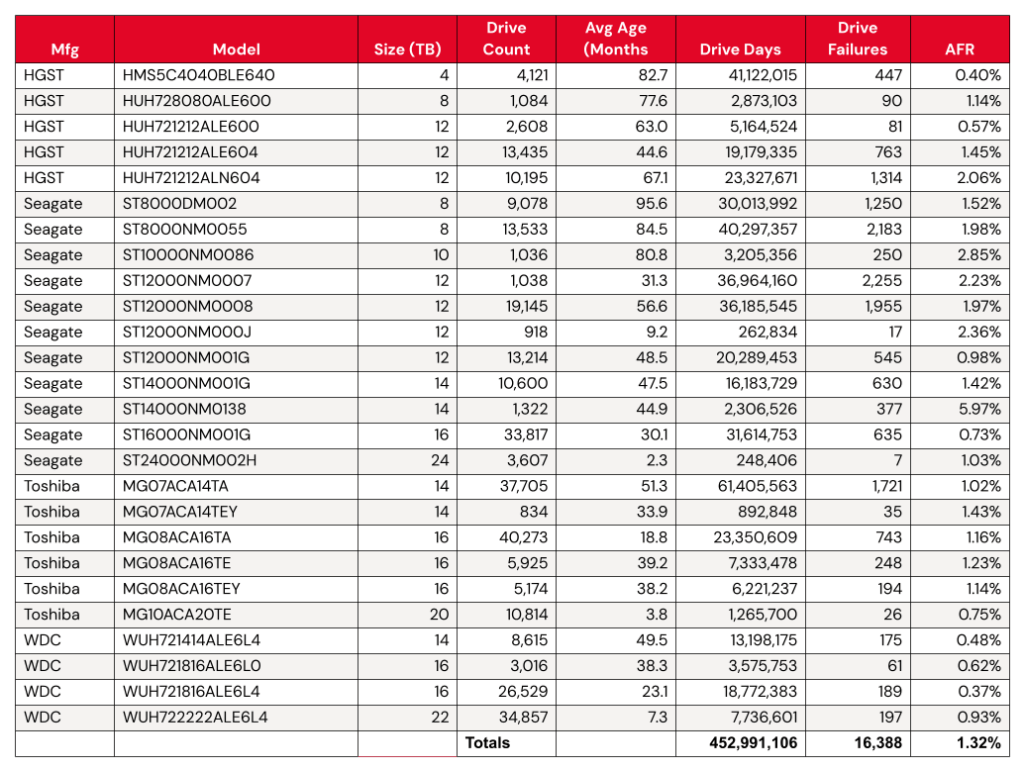
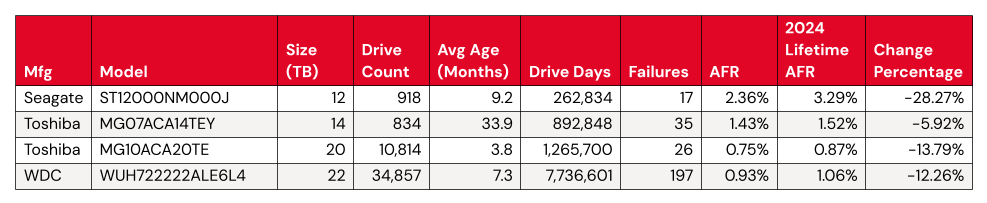
See it in action

Join our upcoming webinar with Pat Patterson, Chief Technical Evangelist and Dave Ngo, Chief Product Officer, to learn more about how B2 Overdrive supercharges your data.

Sign Up ➔ 

What makes B2 Overdrive different?

B2 Overdrive offers a specialized cloud object storage solution at a fraction of competitors’ costs. Here’s what you get:

  • Up to 1Tbps throughput: In other words, the kind of speed that lets you move petabytes of data fast without complex architecture. 
  • Unlimited free egress: Move as much data as you want, whenever you want, to wherever you want. Egress is totally free. 
  • Private networking support: Transfer data at maximum speed through secure private networking connections to your infrastructure.

It’s built on the foundation of our always-hot cloud storage infrastructure, with no minimum file size requirements, no deletion fees, and powerful features like Event Notifications so you can build responsive and automated workflows. We’ll be sharing some of the innovations under the hood in the coming months—so, stay tuned to our series on the engineering behind performance. 

Who’s it for?

The simple answer: The status quo isn’t cutting it. Today’s workloads demand both the ability to move massive datasets and predictable economics that don’t penalize success. B2 Overdrive challenges the assumption that mind-bending performance has to come with mind-boggling prices.

We need to store an insane amount of data and, at the same time, download it to different GPU clusters around the world, and for all that to not cost an insane amount of money. That’s why we chose Backblaze.

—Dean Leitersdorf, CEO and Co-Founder, Decart

Ready to go?

Backblaze B2 Overdrive is generally available today for organizations with multi-petabyte storage instances and workloads. 

Want to learn more or see if it’s the right fit for your team? Get in touch with our Sales team—we’d love to talk about how we can help you ditch the trade-offs and go full speed ahead.

The post Meet B2 Overdrive: Terabit-Speed Throughput for AI/ML and HPC Workloads appeared first on Backblaze Blog | Cloud Storage & Cloud Backup