Build an AI-powered real estate assistant on WhatsApp using Strands Agents SDK and AWS End User Messaging

Post Syndicated from Ruchikka Chaudhary original https://aws.amazon.com/blogs/messaging-and-targeting/build-an-ai-powered-real-estate-assistant-on-whatsapp-using-strands-agents-sdk-and-aws-end-user-messaging/

Most real estate websites collect form submissions and route them to sales teams who respond hours or days later. Customers who expect immediate answers often move on. This post shows how to close that gap with a WhatsApp assistant that responds instantly. We show you how to build a real estate assistant powered by AI that delivers property discovery, home loan pre-approval, and site visit booking entirely within WhatsApp. The solution uses the Strands Agents SDK to orchestrate specialized AI agents on Amazon Bedrock, with AWS End User Messaging Social for WhatsApp integration. The serverless backend runs on AWS Lambda and Amazon DynamoDB.

Prerequisites

You need an AWS account with permissions for AWS CloudFormation, Lambda, Amazon Simple Notification Service (Amazon SNS), Amazon Bedrock, and DynamoDB. You also need a WhatsApp Business account integrated with AWS End User Messaging. For instructions to locate your WhatsApp phone number ID, see View a phone number’s ID in AWS End User Messaging Social.

For more information about how to set up WhatsApp using AWS End User Messaging Social, refer to Automate workflows with WhatsApp using AWS End User Messaging Social.

AWS Serverless Application Model (AWS SAM) CLI is required to deploy the demo solution. For installation instructions, see the AWS SAM CLI installation guide.

Overview of solution

The architecture uses four AI agents built with the Strands Agents SDK. Each agent handles a specific task: identity verification, credit scoring, fraud detection, or property valuation. The agents use Strands SDK decorators to access external data sources. The agents run on Amazon Bedrock with the Nova Lite model and are deployed to AWS Lambda using the official Strands Agents Lambda Layer. AWS End User Messaging Social handles WhatsApp Business API integration, publishing incoming messages to Amazon SNS for routing. The webhook handler Lambda function processes these events and invokes the supervisor agent. The supervisor agent orchestrates the conversation flow, maintains session state in Amazon DynamoDB, and sends rich interactive messages back to customers on WhatsApp.

For this post, we use a demo landing page to simulate the “Enquire Now” button on a real estate website. In a production scenario, you can add this integration point to any existing website. The only requirement is a WhatsApp click-to-chat link that pre-fills the initial message with the property details.

The following diagram illustrates the solution architecture:
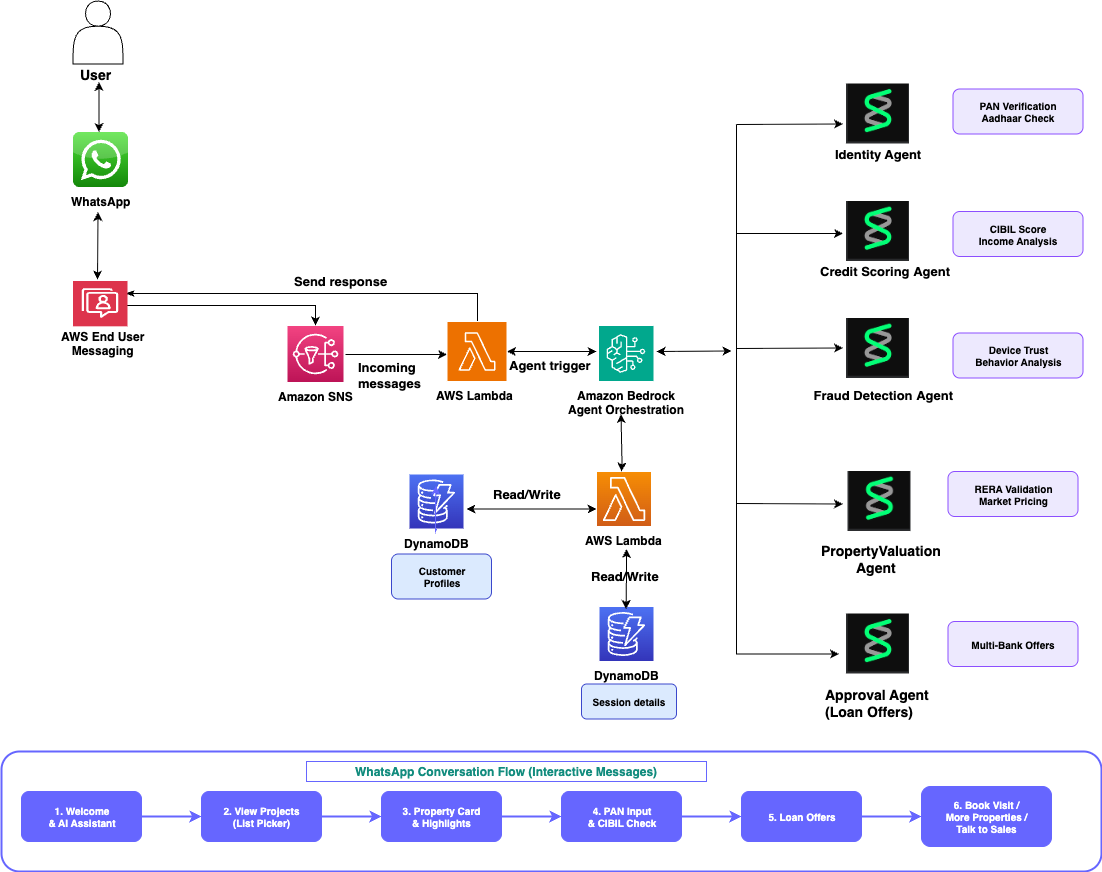
Solution architecture diagram: WhatsApp messages flow through AWS End User Messaging Social and Amazon SNS to a Lambda webhook handler and supervisor agent that orchestrates four Strands agents on Amazon Bedrock with session state in Amazon DynamoDB.

Strands Agents SDK — multi-agent pipeline

The Strands Agents SDK is an open source framework from AWS for building AI agents. Each agent gets a system prompt and tools. The agent then decides when to use those tools based on what the user asks.

This solution uses four specialized agents, each with its own tools:

  • Identity Agent – uses the verify_identity tool to validate the customer’s tax identification number.
  • Credit Scoring Agent – uses check_credit_score and get_loan_offers tools to assess creditworthiness and generate lending offers.
  • Fraud Detection Agent – uses check_fraud_risk to evaluate application risk.
  • Property Valuation Agent – uses validate_property to check regulatory registration and market value.

The following example shows how to define agents using the Strands @tool decorator pattern. Each tool is region-agnostic by design. You adapt the implementation for your local tax authority, credit bureau, and property registry.

from strands import Agent, tool
from strands.models.bedrock import BedrockModel

MODEL_ID = "amazon.nova-lite-v1:0"

def get_model():
    return BedrockModel(model_id=MODEL_ID, region_name="us-east-1")

@tool
def verify_identity(tax_id: str) -> dict:
    """Verify customer identity using their tax identification number.
    Adapt for your region: PAN (India), SSN (US), NIN (UK), TFN (Australia)."""
    # Call your regional tax authority API here
    return {"tax_id": tax_id, "valid": True,
            "holder_name": "Customer", "status": "Active"}

@tool
def check_credit_score(tax_id: str) -> dict:
    """Fetch customer credit score from a credit bureau.
    Adapt for your region: CIBIL (India), FICO (US), Experian (Global)."""
    # Call your regional credit bureau API here
    return {"credit_score": 782, "risk_category": "Low"}

@tool
def get_loan_offers(property_price: int, credit_score: int) -> dict:
    """Get mortgage offers from partner lending institutions.
    Adapt for your region's banks and lending regulations."""
    # Call your partner bank APIs here
    return {"offers": [...]}

@tool
def validate_property(name: str, registration_id: str, price: int) -> dict:
    """Validate property registration with the local regulatory authority.
    Adapt for your region: RERA (India), Land Registry (UK), MLS (US)."""
    # Call your regional property registry API here
    return {"registration_valid": True, "investment_rating": "good"}

You then orchestrate the agents in a pipeline:

def run_full_pipeline(tax_id, phone, project):
    # Agent 1: Identity Verification
    agent = Agent(
        model=get_model(),
        system_prompt="You are an Identity Verification Agent. "
                      "Use verify_identity to check the customer's tax ID.",
        tools=[verify_identity],
        callback_handler=None
    )
    identity = agent(f"Verify tax ID: {tax_id}")

    # Agent 2: Credit Scoring + Loan Offers
    agent = Agent(
        model=get_model(),
        system_prompt="You are a Credit Scoring Agent. "
                      "Use check_credit_score then get_loan_offers.",
        tools=[check_credit_score, get_loan_offers],
        callback_handler=None
    )
    credit = agent(f"Check credit for {tax_id}, "
                   f"get offers for price {project['price']}")

    # Agent 3: Fraud Detection
    # Agent 4: Property Valuation
    # ... similar pattern
    return consolidated_results

AWS End User Messaging Social

AWS End User Messaging Social handles WhatsApp Business API integration. Incoming messages arrive as events. Outgoing messages, including text, buttons, lists, and location cards, go through the SendWhatsAppMessage API.

Message routing with Amazon SNS

An SNS topic receives events from AWS End User Messaging Social whenever customers send WhatsApp messages.

Webhook handler – AWS Lambda

The webhook handler Lambda function parses the EUM Social event envelope, extracts the WhatsApp message payload, and routes it based on message type.

Supervisor agent – AWS Lambda with Strands Agents

The supervisor agent orchestrates the full conversation flow. It maintains session state in Amazon DynamoDB and sends rich WhatsApp messages back to the customer. When the customer submits their identification, the supervisor invokes the Strands agent pipeline, which runs four agents sequentially on Amazon Bedrock.

The supervisor sends interactive WhatsApp messages using the EUM Social API:

def send_list(self, to_phone, body, button_text, sections):
    payload = {
        "messaging_product": "whatsapp",
        "to": to_phone,
        "type": "interactive",
        "interactive": {
            "type": "list",
            "body": {"text": body},
            "action": {
                "button": button_text,
                "sections": sections
            }
        }
    }
    response = self.client.send_whatsapp_message(
        originationPhoneNumberId=self.phone_number_id,
        message=json.dumps(payload).encode('utf-8'),
        metaApiVersion='v21.0'
    )

Lambda Layer for Strands Agents

The Strands Agents SDK provides an official Lambda Layer that includes all required dependencies pre-built for the Lambda runtime.

Session state – Amazon DynamoDB

Two DynamoDB tables store conversation state. The sessions table tracks the full conversation state machine (INITIATED, AWAITING_PROJECT_SELECT, AWAITING_ACTION, AWAITING_ID, LOAN_APPROVED, VISIT_CONFIRMED), with a 30-minute TTL.

Conversation flow

The customer journey unfolds across four steps in WhatsApp.

Step 1: Property discovery

When the customer sends the initial message, the supervisor agent sends a welcome message followed by an interactive list picker showing properties grouped by developer. The list picker uses WhatsApp’s native interactive message format.

Step 2: Property detail with action buttons

When the customer selects a property, the supervisor sends a rich detail card with key highlights, regulatory registration, and three action buttons:

eum.send_buttons(phone, body, [
    {"id": "check_loan", "title": "Check Loan"},
    {"id": "book_visit", "title": "Book Site Visit"},
    {"id": "talk_sales", "title": "Talk to Sales"}
])

Step 3: Loan pre-approval with Strands Agents

When the customer chooses Check Loan and submits their tax identification number, the supervisor invokes the Strands agent pipeline. Four agents run sequentially on Amazon Bedrock, each using its specialized tools. The following log output shows the pipeline in action:

Running Strands agent pipeline for ID: ABCD****
Identity agent: True
Credit agent: score=782, offers=3
Fraud agent: low
Property agent: good

The customer receives a loan approval card with offers from multiple lending institutions, each with personalized interest rates based on the credit score returned by the credit agent. The full pipeline typically runs in under 10 seconds.

Step 4: Site visit booking

The customer selects a time slot from an interactive list picker and receives a confirmation with relationship manager details and a location card.

Demo implementation: India real estate market

This demo uses India-specific implementations: PAN validation for identity, CIBIL scores for credit (300-900 range), example bank offers with EMI in Rupees, RERA registration validation, and free cab pickup for site visits.

To adapt this solution for another region, you replace the tool implementations with calls to your local tax authority, credit bureau, lending institutions, and property registry. The agent architecture, WhatsApp integration, and conversation flow remain unchanged.

Deployment

To deploy the demo solution, run the following commands:

git clone https://github.com/aws-samples/sample-ai-powered-real-estate-agent.git
cd sample-ai-powered-real-estate-agent
./deploy.sh --env=demo \
    --phone-number-id <your-phone-number-id> \
    --business-number +14155552671 \
    --region us-east-1

After deployment, in the AWS End User Messaging Social console, route incoming messages for your phone number ID to the SNS topic demo-whatshome-incoming-messages created by the stack.

Test the solution

open demo/real-estate-landing.html

Select Enquire Now on any property card. WhatsApp opens at the configured business number with a prefilled message. Send the message and finish the loan pre-approval flow on WhatsApp.

Sample conversation

The following images show how a customer interacts with the real estate AI assistant.
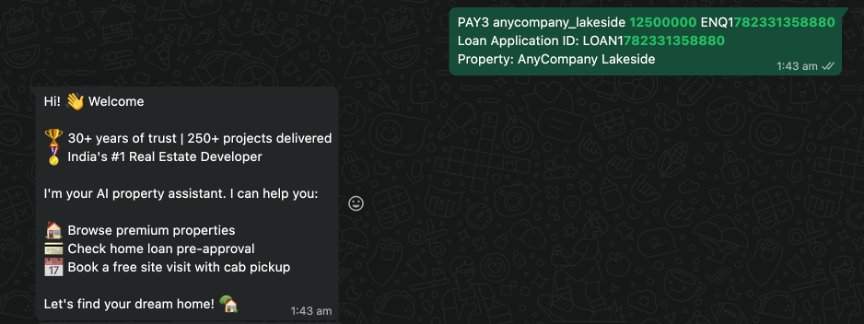
WhatsApp screen showing the customer’s prefilled enquiry message and the AI assistant’s welcome reply with a list picker of available properties.

The customer lands on WhatsApp with a predefined message from the website, and the AI assistant greets them with a welcome message.
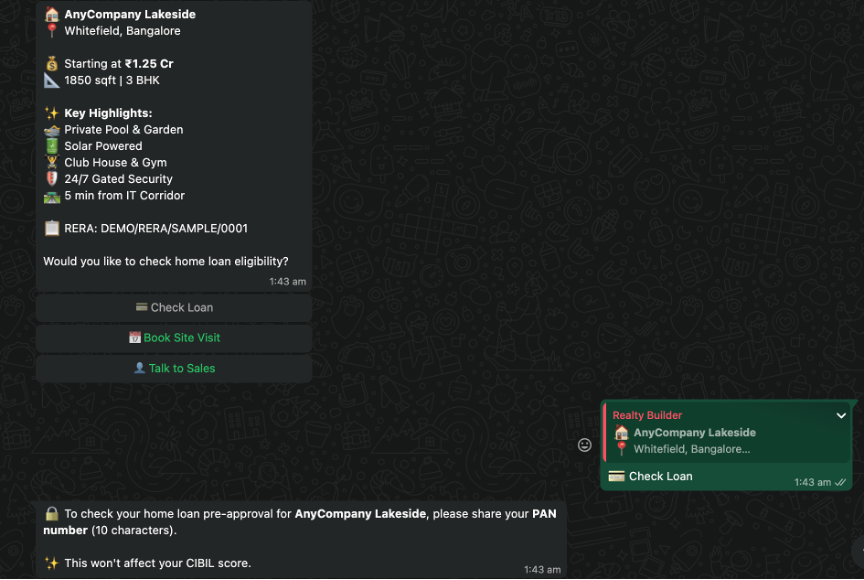
WhatsApp screen showing a property detail card with three action buttons: Check Loan, Book Site Visit, and Talk to Sales.

The customer selects the Check Loan option for one of the properties listed.
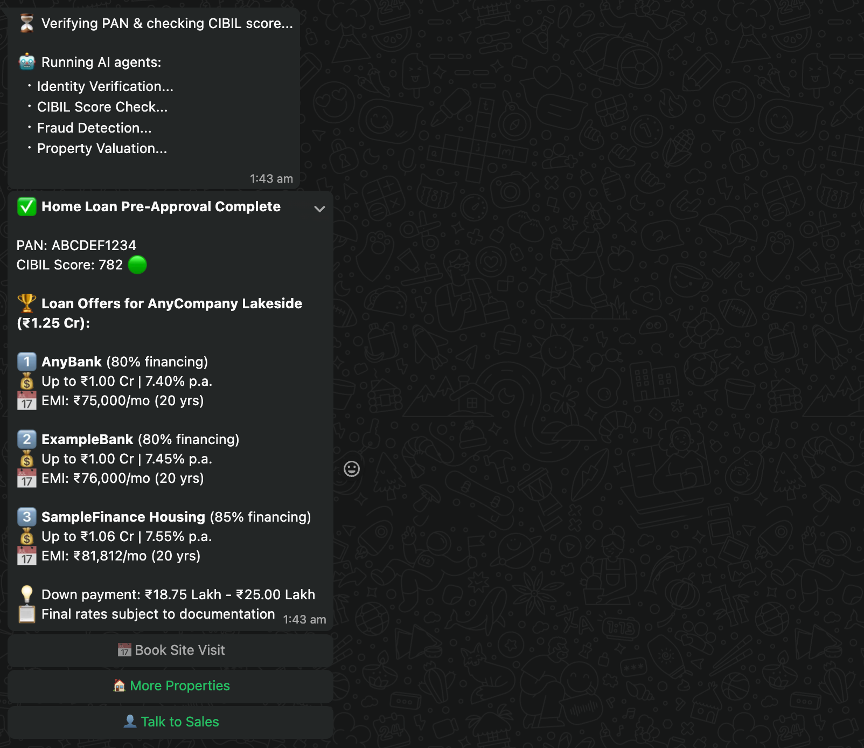
 

WhatsApp screen showing a loan approval card with offers from SBI, HDFC, and LIC Housing Finance, each with personalized interest rates.

The agents are invoked to verify the customer details and provide loan quotations.
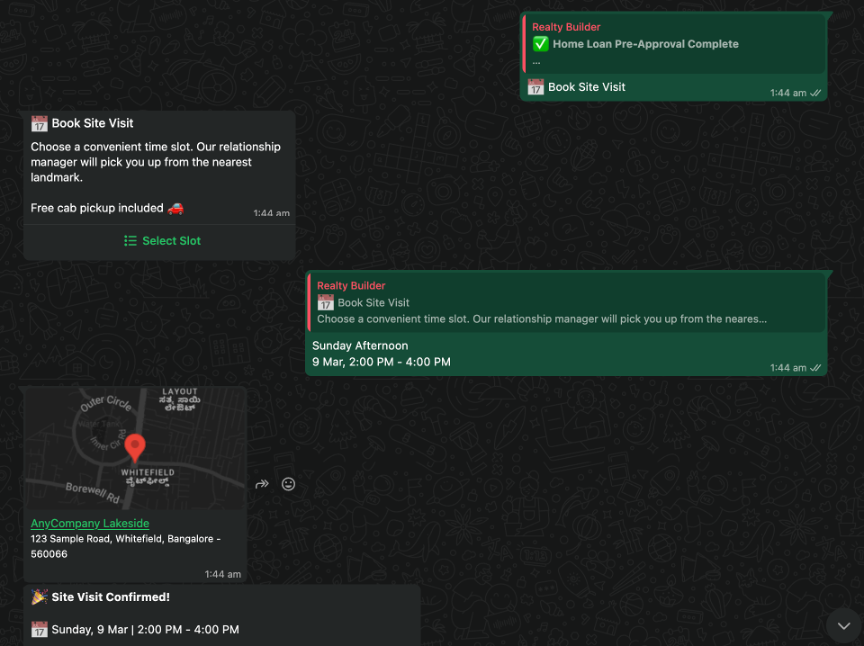
WhatsApp screen showing a site visit confirmation with the assigned relationship manager’s details and a pinned location card.

The customer books a site visit after selecting a suitable time slot.

Clean up

To avoid ongoing charges, delete the resources you created during this walkthrough:

sam delete --stack-name whatshome-demo --region us-east-1

Deleting the CloudFormation stack removes the Lambda functions, DynamoDB tables, Amazon SNS topics, Amazon Simple Queue Service (Amazon SQS) queue, AWS Key Management Service (AWS KMS) key, and AWS Identity and Access Management (IAM) roles. If you deployed the demo landing page to Amazon Simple Storage Service (Amazon S3) and Amazon CloudFront, delete those resources separately.

Conclusion

You can combine the Strands Agents SDK, Amazon Bedrock, AWS End User Messaging Social, and Lambda to build an end-to-end WhatsApp assistant. The multi-agent architecture has specialized agents for identity verification, credit scoring, fraud detection, and property valuation. This decomposition shows how you can break complex business workflows into focused AI agents that collaborate to deliver instant results.

The same pattern works for banking loan applications, insurance claims, healthcare appointments, and ecommerce order tracking.

To get started, see the AWS End User Messaging Social documentation and the Strands Agents SDK on GitHub.

About the authors

Maximize Amazon EC2 Capacity Reservations with Capacity Manager data exports

Post Syndicated from Venu Geddam original https://aws.amazon.com/blogs/compute/maximize-amazon-ec2-capacity-reservations-with-capacity-manager-data-exports/

In our previous post, we introduced Amazon EC2 Capacity Manager and its data export capability. Amazon EC2 Capacity Manager provides centralized visibility into your Amazon Elastic Compute Cloud (Amazon EC2) capacity usage across all accounts and Regions in your organization. It tracks capacity usage for three types of EC2 capacity: On-Demand instances, Spot instances, and On-Demand Capacity Reservations (ODCR). On the AWS Management Console, it provides 90 days of historical capacity data. With data exports to Amazon Simple Storage Service (Amazon S3), you can retain and analyze capacity trends beyond this period using your preferred analytics tools.

In this post, we demonstrate how to configure EC2 Capacity Manager data exports to Amazon S3 and query historical capacity data using Amazon Athena. This approach helps you identify long-term usage patterns, plan capacity needs, and optimize resource allocation across your organization.

Solution overview

The following diagram illustrates the solution architecture. EC2 Capacity Manager exports capacity data to Amazon S3, where Amazon Athena queries it using SQL with automatic partition discovery.

Architecture diagram showing EC2 Capacity Manager exporting capacity data to Amazon S3 on a scheduled basis, and Amazon Athena querying the data directly from S3 using SQL with partition projection for automatic partition discovery

The solution involves the following steps:

  1. Set up an S3 bucket for capacity data export.
  2. Configure EC2 Capacity Manager data export.
  3. Set up Amazon Athena to query the exported data.
  4. Run queries to analyze capacity patterns.

Prerequisites:

  • An AWS account with permissions to create S3 buckets and configure EC2 Capacity Manager.
  • AWS Command Line Interface (AWS CLI) installed and configured (optional, for CLI-based setup).
  • Familiarity with SQL for querying data in Athena.

Setting up data export to Amazon S3

EC2 Capacity Manager can export capacity data in compressed CSV (Gzip) or compressed Parquet (Snappy) format. Use Parquet format for query performance in Athena (Parquet’s columnar format is designed to optimize analytical queries).

Configure the data export

You can configure data export through the EC2 Capacity Manager console or AWS CLI.

To configure data export using the console:

  1. Open the Amazon EC2 console at https://console.aws.amazon.com/ec2/.
  2. In the navigation pane, choose Capacity Manager.
  3. Choose the Data exports tab.
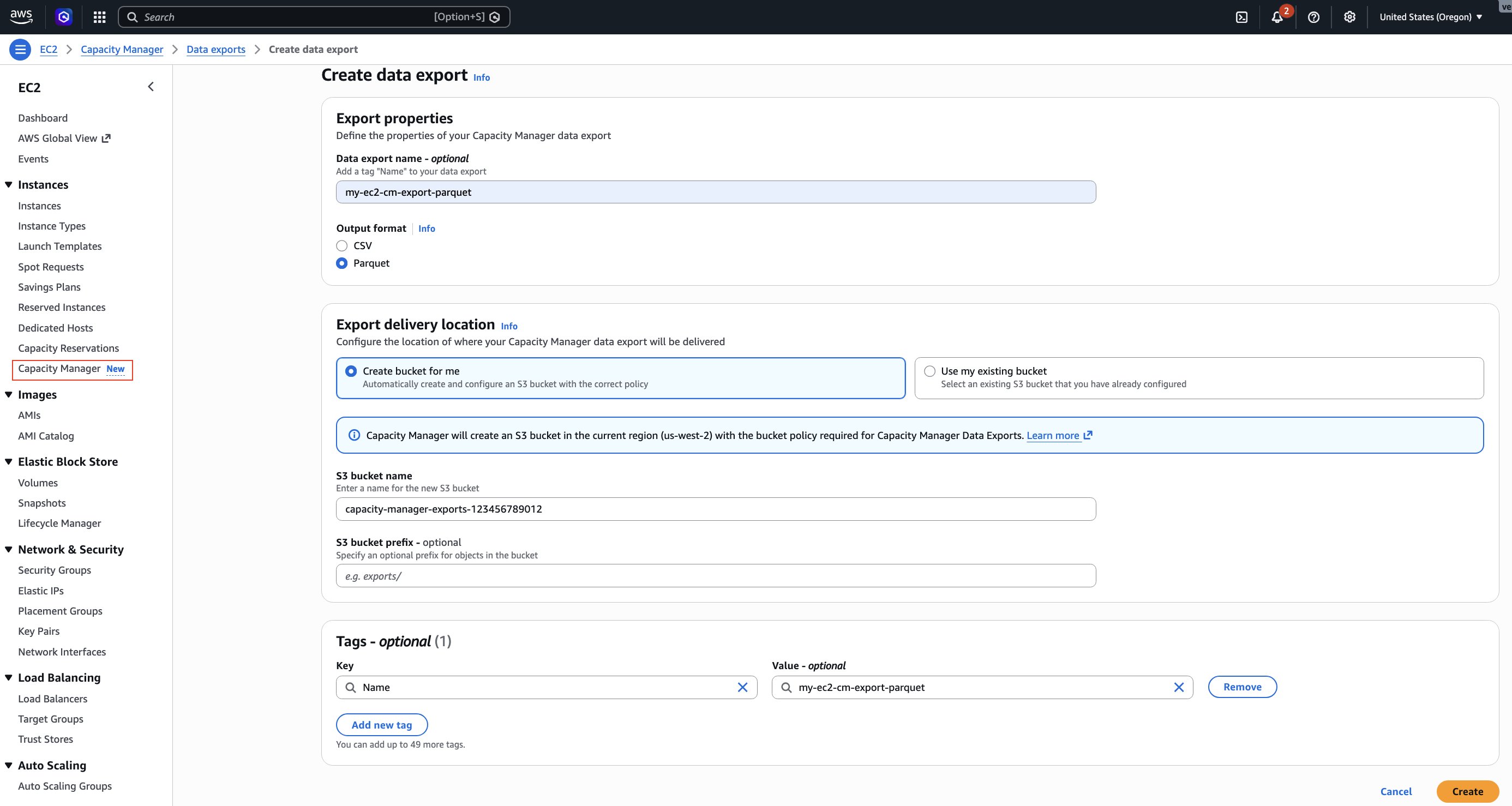
  4. Choose Create data export.
  5. For Output format, select Parquet.
  6. For S3 bucket, choose Create bucket for me to create a new bucket with the required permissions, or select an existing bucket from the list.
  7. If you selected an existing bucket, add the bucket policy shown in the following section to grant EC2 Capacity Manager write access.
  8. (Optional) For S3 prefix, enter a prefix to organize your exported files (for example, capacity-data/).
  9. For Schedule, select Hourly.
  10. Choose Create.

Screenshot of EC2 Capacity Manager Create data export page in AWS Console showing export properties: Data export name, output format set to Parquet, S3 location for export delivery and Tags

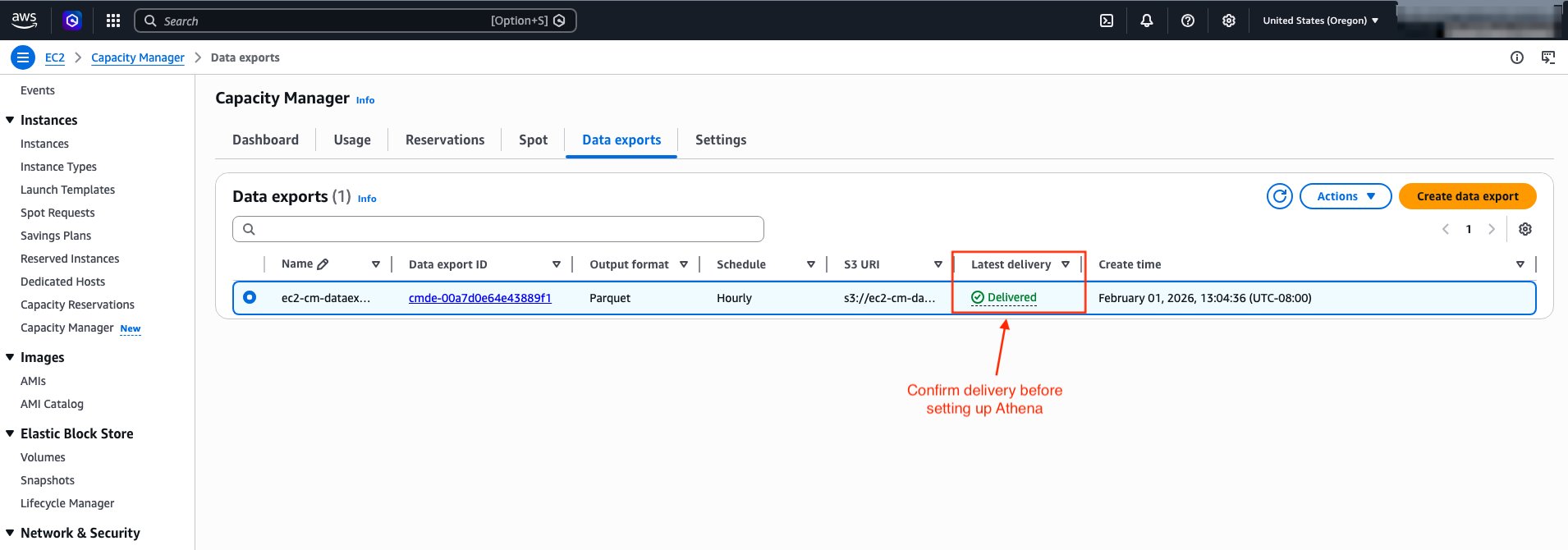
After you create the data export, EC2 Capacity Manager displays the export details.

Screenshot showing EC2 Capacity Manager data export status with ‘Latest Delivery’ column displaying ‘delivered’ status, indicating the export is ready for Athena setup

Update the S3 bucket policy (existing buckets only)

If you use an existing S3 bucket, you must add the bucket policy shown in the following example to grant EC2 Capacity Manager write access.

{
    "Version": "2012-10-17",
    "Statement": [
        {
            "Effect": "Allow",
            "Principal": {
                "Service": "ec2.capacitymanager.amazonaws.com"
            },
            "Action": [
                "s3:PutObject",
                "s3:GetObject",
                "s3:ListBucket"
            ],
            "Resource": [
                "arn:aws:s3:::<BUCKET_NAME>",
                "arn:aws:s3:::<BUCKET_NAME>/*"
            ],
            "Condition": {
                "StringEquals": {
                    "aws:SourceAccount": "<AWS_ACCOUNT_NUMBER>"
                },
                "ArnLike": {
                    "aws:SourceArn": "arn:aws:ec2:<AWS_REGION>:<AWS_ACCOUNT_NUMBER>:capacity-manager-data-export/*"
                }
            }
        }
    ]
}

Replace <AWS_ACCOUNT_NUMBER> with your AWS account number, <AWS_REGION> with your AWS Region (for example, us-west-2), and <BUCKET_NAME> with your bucket name.

To configure data export using the AWS CLI :

aws ec2 create-capacity-manager-data-export \
    --s3-bucket-name <BUCKET_NAME> \
    --s3-bucket-prefix <BUCKET_PREFIX>/ \
    --schedule hourly \
    --output-format <FORMAT> \
    --region <AWS_REGION>

# Replace:
# <BUCKET_NAME> with your bucket name,
# <BUCKET_PREFIX> with your bucket prefix (for example, capacity-data/),
# <FORMAT> with parquet or csv, and
# <AWS_REGION> with your AWS Region (for example, us-west-2)

# The output of the above command would give you a Data Export ID

{ "CapacityManagerDataExportId": "cmde-00a7d0e64e43889f1" }

After creating the data export, wait for the first export to complete before proceeding to set up Athena. You can check the export status using the following command:

aws ec2 describe-capacity-manager-data-exports --region <AWS_REGION>

The command returns details about your data export configuration, including the delivery status:

{
    "CapacityManagerDataExports": [
        {
            "CapacityManagerDataExportId": "cmde-00a7d0e64e43889f1",
            "S3BucketName": "capacity-manager-exports-123456789012",
            "S3BucketPrefix": "capacity-data/",
            "Schedule": "hourly",
            "OutputFormat": "parquet",
            "CreateTime": "2026-04-10T19:04:36.824000+00:00",
            "LatestDeliveryStatus": "delivered",
            "LatestDeliveryStatusMessage": "Successfully delivered to s3://capacity-manager-exports-123456789012/y=2026/m=04/d=10/h=15/...",
            "LatestDeliveryTime": "2026-04-10T19:05:39.176000+00:00"
        }
    ]
}

Wait until LatestDeliveryStatus shows "delivered" before proceeding to the next section. The first export typically appears in your S3 bucket in a couple of hours. Subsequent exports follow your configured schedule.

Setting up Amazon Athena to query capacity data

After EC2 Capacity Manager exports data to your S3 bucket, you can use Amazon Athena to query the data using standard SQL. Athena uses AWS Glue as its metadata store. Specifically, it relies on the AWS Glue Data Catalog, which contains table definitions that tell Athena where you have stored your data in S3 and how you have structured it. When you create tables in Athena, you’re actually creating metadata entries in the Data Catalog that Athena references when running queries.

Create an Athena database and table

You can create the table using AWS Glue crawler or manually with SQL. AWS Glue crawler automatically discovers the complete schema from your exported Parquet files, including optional fields like resource tags if enabled. It helps minimize manual schema definition efforts. If the export format changes in the future, you can re-run the crawler to update the table definition. For detailed instructions on creating a Glue Crawler, see Use a crawler to add a table in the Amazon Athena User Guide.

In this post, we create the table manually using a SQL statement. We also use partition projection for automatic partition discovery. We do this because EC2 Capacity Manager continuously adds new partitions to the S3 bucket according to your configured schedule. As new partitions arrive in S3, Athena doesn’t know about them until you run MSCK REPAIR TABLE or ALTER TABLE ADD PARTITION to update the AWS Glue Data Catalog. This becomes an overhead when data arrives frequently.

With partition projection, you define the partition scheme and specify its range/rules in the table properties. Athena then computes the partitions at query time instead of looking them up in the Glue Data Catalog. So partition projection automatically makes new partitions visible as soon as EC2 Capacity Manager exports the data to S3, eliminating the need for you to update metadata. The CREATE TABLE statement that follows defines the schema for EC2 Capacity Manager exports. If your capacity reservations are already tagged, add the corresponding tag columns (for example, tag_environment string or tag_costcenter string). Alternatively, use an AWS Glue crawler to automatically discover your complete schema, including tag columns.

  1. Open the Athena console at https://console.aws.amazon.com/athena/
  2. If prompted, configure a query result location in S3. This is where Athena writes query output. It is separate from the S3 bucket that stores your capacity data.
  3. Run the following query to create a database:
CREATE DATABASE IF NOT EXISTS capacity_manager_db;
  1. Create a table for Parquet format data:
CREATE EXTERNAL TABLE IF NOT EXISTS capacity_manager_db.capacity_data (
    metricgroupname string,
    periodstarttimestamp string,
    periodendtimestamp string,
    orgid string,
    accountid string,
    region string,
    `az-id` string,
    instancefamily string,
    instancetype string,
    platform string,
    tenancy string,
    reservationid string,
    `reservation arn` string,
    unusedfinancialowner string,
    reservationtype string,
    instancematchcriteria string,
    reservationcreatetimestamp string,
    reservationstarttimestamp string,
    reservationendtimestamp string,
    reservationenddatetype string,
    reservationstate string,
    reservationtotalcapacityhrsvcpu string,
    reservationtotalcapacityhrsinst string,
    reservationtotalestimatedcost string,
    reservationmaxsizevcpu string,
    reservationmaxsizeinst string,
    reservationminsizevcpu string,
    reservationminsizeinst string,
    reservationunusedtotalcapacityhrsvcpu string,
    reservationunusedtotalcapacityhrsinst string,
    reservationunusedtotalestimatedcost string,
    reservationmaxunusedsizevcpu string,
    reservationmaxunusedsizeinst string,
    reservationminunusedsizevcpu string,
    reservationminunusedsizeinst string,
    reservationmaxutilization string,
    reservationminutilization string,
    reservationavgutilizationvcpu string,
    reservationavgutilizationinst string,
    reservationavgfuturesizevcpu string,
    reservationavgfuturesizeinst string,
    reservationmaxfuturesizevcpu string,
    reservationmaxfuturesizeinst string,
    reservationminfuturesizevcpu string,
    reservationminfuturesizeinst string,
    reservationavgcommittedsizevcpu string,
    reservationavgcommittedsizeinst string,
    reservationmaxcommittedsizevcpu string,
    reservationmaxcommittedsizeinst string,
    reservationmincommittedsizevcpu string,
    reservationmincommittedsizeinst string,
    reservedtotalusagehrsvcpu string,
    reservedtotalusagehrsinst string,
    unreservedtotalusagehrsvcpu string,
    unreservedtotalusagehrsinst string,
    reservedtotalestimatedcost string,
    unreservedtotalestimatedcost string,
    spottotalusagehrsvcpu string,
    spottotalusagehrsinst string,
    spottotalestimatedcost string,
    spotavgruntimebeforeinterruptioninst string,
    spotmaxruntimebeforeinterruptioninst string,
    spotminruntimebeforeinterruptioninst string,
    spottotalinterruptionsinst string,
    spottotalinterruptionsvcpu string,
    spottotalcountinst string,
    spottotalcountvcpu string,
    spotinterruptionrateinst string,
    spotinterruptionratevcpu string
)
PARTITIONED BY (
    y string,
    m string,
    d string,
    h string
)
ROW FORMAT SERDE
    'org.apache.hadoop.hive.ql.io.parquet.serde.ParquetHiveSerDe'
STORED AS INPUTFORMAT
    'org.apache.hadoop.hive.ql.io.parquet.MapredParquetInputFormat'
OUTPUTFORMAT
    'org.apache.hadoop.hive.ql.io.parquet.MapredParquetOutputFormat'
LOCATION
    's3://<BUCKET_NAME>/'
TBLPROPERTIES (
    'projection.enabled' = 'true',
    'projection.y.type' = 'integer',
    'projection.y.range' = '2024,2030',
    'projection.y.digits' = '4',
    'projection.m.type' = 'integer',
    'projection.m.range' = '01,12',
    'projection.m.digits' = '2',
    'projection.d.type' = 'integer',
    'projection.d.range' = '01,31',
    'projection.d.digits' = '2',
    'projection.h.type' = 'integer',
    'projection.h.range' = '00,23',
    'projection.h.digits' = '2',
    'storage.location.template' = 's3://<BUCKET_NAME>/y=${y}/m=${m}/d=${d}/h=${h}/'
);

Replace <BUCKET_NAME> in the LOCATION clause and storage.location.template property with your bucket name, and capacity-data/ with table name of your choice.

Now that your table is set up, you can explore how to query the exported data.

Example queries for common use cases

The following queries demonstrate how to analyze your EC2 capacity data for cost optimization and capacity planning. The queries use date values (year=‘2026’, month=‘04’) and table name capacity_data. Adjust the partition values to match your actual data’s time period and table name to match your value. When querying EC2 Capacity Manager export data:

  1. Metric group filtering: EC2 Capacity Manager exports contain two types of data that the metricgroupname column identifies: Reservation Usage for analyzing ODCR utilization and optimization opportunities, and Instance Usage for analyzing overall capacity consumption across reserved, unreserved, and Spot instances. Always filter by the appropriate metric group for your analysis needs.
  2. Partition filtering: Always include partition filters (y, m, d, h) to improve query performance.
  3. Numeric operations: Use CAST to convert string columns to numeric types for proper comparison and sorting (for example, CAST(reservationavgutilizationinst AS double)).
  4. NULL handling: Use COALESCE to handle NULL values in calculations (for example, COALESCE(CAST(column AS double), 0)) to prevent NULL results in totals. Without COALESCE, when you add a column value NULL to a non-NULL value, the result is NULL.

Use case 1: Identify underutilized ODCRs

Discover On-Demand Capacity Reservations with low utilization that are generating cost waste. Identify specific reservations to downsize, cancel, or share with other teams to reduce unnecessary spending.

SELECT
    reservationid,
    instancetype,
    region,
    "az-id",
    reservationstate,
    ROUND(CAST(reservationavgutilizationinst AS double) * 100, 2) AS utilization_pct,
    CAST(reservationtotalcapacityhrsinst AS double) AS total_capacity_hrs,
    CAST(reservationunusedtotalcapacityhrsinst AS double) AS unused_capacity_hrs,
    ROUND(CAST(reservationunusedtotalestimatedcost AS double), 4) AS wasted_cost_usd
FROM capacity_data
WHERE metricgroupname = 'Reservation Usage'
    AND CAST(reservationavgutilizationinst AS double) < 0.5
    AND reservationavgutilizationinst IS NOT NULL
    AND y = '2026'
    AND m = '04'
ORDER BY wasted_cost_usd DESC
LIMIT 3;

Sample output:

reservationid instancetype region az-id reservationstate utilization_pct total_capacity_hrs unused_capacity_hrs wasted_cost_usd
cr-041aedfba865106c1 m5.8xlarge us-west-2 usw2-az2 active 0 1 1 1.536
cr-089f17dc178e993a8 m5.8xlarge us-west-2 usw2-az1 active 0 1 1 1.536

Use case 2: ODCR utilization summary by instance type

Get a comprehensive view of ODCR utilization across instance types to identify which instance families have the worst utilization rates. This helps prioritize optimization efforts on the reservations with the highest cost impact.

SELECT
    instancetype,
    COUNT(DISTINCT accountid) AS account_count,
    COUNT(DISTINCT reservationid) AS reservation_count,
    ROUND(SUM(COALESCE(CAST(reservationtotalcapacityhrsinst AS double), 0)), 2) AS total_odcr_capacity,
    ROUND(SUM(COALESCE(CAST(reservationunusedtotalcapacityhrsinst AS double), 0)), 2) AS total_unused_capacity,
    ROUND(AVG(COALESCE(CAST(reservationavgutilizationinst AS double), 0)) * 100, 2) AS avg_utilization_pct,
    ROUND(SUM(COALESCE(CAST(reservationunusedtotalestimatedcost AS double), 0)), 2) AS total_unused_cost_usd
FROM capacity_data
WHERE metricgroupname = 'Reservation Usage'
    AND y = '2026'
    AND m = '04'
GROUP BY instancetype
ORDER BY total_unused_cost_usd DESC
LIMIT 3;

Sample output:

instancetype account_count reservation_count total_odcr_capacity total_unused_capacity avg_utilization_pct total_unused_cost_usd
m5.8xlarge 1 2 311.99 311.99 0.0 479.22
c5.9xlarge 1 1 211.0 211.0 0.0 322.83
t3.micro 1 1 1055.0 1055.0 0.0 10.97

Use case 3: Identify peak usage patterns

Analyze average hourly usage patterns across reserved, unreserved, and Spot capacity to identify when your workloads typically hit peak demand. This breakdown helps you understand your capacity mix, plan for peak periods, and optimize your purchasing strategy.

SELECT
    h AS hour,
    ROUND(AVG(COALESCE(CAST(reservedtotalusagehrsinst AS double), 0)), 2) AS avg_reserved_usage_hours,
    ROUND(AVG(COALESCE(CAST(unreservedtotalusagehrsinst AS double), 0)), 2) AS avg_unreserved_usage_hours,
    ROUND(AVG(COALESCE(CAST(spottotalusagehrsinst AS double), 0)), 2) AS avg_spot_usage_hours,
    ROUND(AVG(COALESCE(CAST(reservedtotalusagehrsinst AS double), 0) + COALESCE(CAST(unreservedtotalusagehrsinst AS double), 0) + COALESCE(CAST(spottotalusagehrsinst AS double), 0)), 2) AS avg_total_usage_hours
FROM capacity_data
WHERE metricgroupname = 'Instance Usage'
    AND y = '2026'
    AND m = '04'
GROUP BY h
ORDER BY avg_total_usage_hours DESC
LIMIT 3;

Sample output:

hour avg_reserved_usage_hours avg_unreserved_usage_hours avg_spot_usage_hours avg_total_usage_hours
09 0.75 0.5 0 1.25
10 0.75 0.5 0 1.25
15 0.75 0.5 0 1.25

Use case 4: Regional capacity distribution

Understand how your ODCR capacity is distributed across AWS Regions and instance types. This geographic view helps you identify Regions with excess capacity that could be redistributed or consolidated to improve utilization and reduce costs.

SELECT
    region,
    instancetype,
    ROUND(SUM(COALESCE(CAST(reservationtotalcapacityhrsinst AS double), 0)), 2) AS total_reserved_capacity,
    ROUND(SUM(COALESCE(CAST(reservationunusedtotalcapacityhrsinst AS double), 0)), 2) AS unused_reserved_capacity,
    ROUND(AVG(COALESCE(CAST(reservationavgutilizationinst AS double), 0)) * 100, 2) AS avg_utilization_pct
FROM capacity_data
WHERE metricgroupname = 'Reservation Usage'
    AND y = '2026'
    AND m = '04'
GROUP BY region, instancetype
ORDER BY region, total_reserved_capacity DESC
LIMIT 3;

Sample output:

region instancetype total_reserved_capacity unused_reserved_capacity avg_utilization_pct
us-west-2 t2.nano 1484.0 1060.0 33.34
us-west-2 t3.micro 1060.0 1060.0 0.0
us-west-2 t2.micro 848.0 636.0 25.0

Use case 5: Unused capacity reservations by Region and Availability Zone

Pinpoint exactly where you have unused ODCR capacity at the Availability Zone level. This granular view enables you to share unused capacity with other teams in the same AZ or modify reservations to better match actual usage patterns.

SELECT
    region,
    "az-id",
    instancetype,
    ROUND(SUM(COALESCE(CAST(reservationunusedtotalcapacityhrsinst AS double), 0)), 2) AS unused_capacity_instances,
    ROUND(AVG(COALESCE(CAST(reservationavgutilizationinst AS double), 0)) * 100, 2) AS avg_utilization_pct,
    ROUND(SUM(COALESCE(CAST(reservationunusedtotalestimatedcost AS double), 0)), 2) AS unused_cost_usd
FROM capacity_data
WHERE metricgroupname = 'Reservation Usage'
    AND y = '2026'
    AND m = '04'
    AND CAST(reservationunusedtotalcapacityhrsinst AS double) > 0
GROUP BY region, "az-id", instancetype
ORDER BY unused_cost_usd DESC
LIMIT 3;

Sample output:

region az-id instancetype unused_capacity_instances avg_utilization_pct unused_cost_usd
us-west-2 usw2-az1 c5.9xlarge 212.0 0.0 324.36
us-west-2 usw2-az2 m5.8xlarge 157.0 0.0 241.15
us-west-2 usw2-az1 m5.8xlarge 157.0 0.0 241.15

Clean up

To avoid incurring future charges, delete the resources you created:

Warning: This permanently deletes the table definition. Verify that you no longer need to query this data before proceeding.

  1. Delete the Athena table by running the following query: DROP TABLE IF EXISTS capacity_manager_db.capacity_data;
  2. Delete the database by running the following query: DROP DATABASE IF EXISTS capacity_manager_db;
  3. Navigate to the Athena console settings.
  4. Note the query result location S3 bucket.
  5. If you created this bucket specifically for this tutorial:
    1. Empty the S3 bucket by running: aws s3 rm s3://<QUERY_RESULT_BUCKET_NAME> --recursive
    2. Delete the S3 bucket by running: aws s3 rb s3://<QUERY_RESULT_BUCKET_NAME>
  6. Delete the data export configuration by using AWS Management Console or AWS CLI.
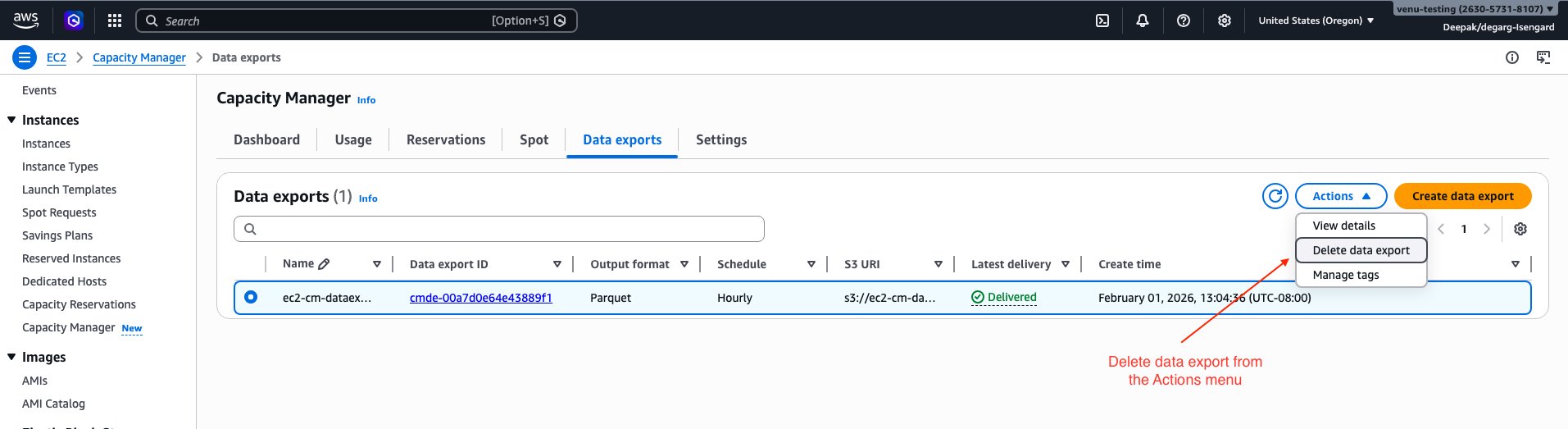
    1. If using AWS Console, select the “Delete data export” option in the Actions menu.

Screenshot of AWS Management Console showing the Delete option in the Actions menu for an EC2 Capacity Manager data export configuration

  1. To delete the configuration using AWS CLI:
    # List your data export configurations to find the export ID.
    aws ec2 describe-capacity-manager-data-exports --region <AWS_REGION>
    
    # The output shows details for export configuration which has the Data Export ID
    # Sample output is shown in the configure data export section above.
    
    # Then delete the export configuration using the ID from the output
    aws ec2 delete-capacity-manager-data-export \
        --data-export-id <EXPORT_ID> \
        --region <AWS_REGION>

    Replace <EXPORT_ID> with your data export ID and <AWS_REGION> with your AWS Region.

    Warning: Deleting the S3 bucket permanently removes all exported capacity data. Verify that you have backed up any data you need before proceeding.

  1. (Optional) Delete the S3 bucket and data: If you no longer need the exported data, complete the following steps:
    1. Empty the S3 bucket by running: aws s3 rm s3://<BUCKET_NAME> --recursive
    2. Delete the S3 bucket by running: aws s3 rb s3://<BUCKET_NAME>

Conclusion

In this post, we demonstrated how to configure EC2 Capacity Manager data exports to Amazon S3 and query historical capacity data using Amazon Athena. This approach enables you to retain capacity data beyond the 90-day console limit.

As you scale your capacity management practices, consider integrating these exports with your existing analytics and monitoring workflows. By combining EC2 Capacity Manager data with your broader infrastructure metrics, you can make data-driven decisions about capacity allocation and optimization across your organization.

To deepen your understanding, explore the EC2 Capacity Manager documentation for additional features, learn more about Amazon Athena for advanced query capabilities, and review EC2 capacity optimization best practices. Share your feedback and tell us how you’re using EC2 Capacity Manager data exports to optimize your capacity planning in the comments.

[$] Hardening the kernel with allocation tokens and bootpatch-SLR

Post Syndicated from corbet original https://lwn.net/Articles/1078699/

There is a lot of work going into eliminating exploitable bugs from the
kernel and preventing the addition of new ones. Even if this work is
maximally successful, though, there is no chance that the kernel will be
free of these bugs anytime soon. Thus, there is also ongoing interest in
hardening the kernel to make the existing bugs more difficult to exploit.
The upcoming 7.2 kernel release will include a change to how dynamically
allocated structures are placed in memory to make them harder to overwrite,
while a project to randomize structure layout at boot time has a rather
longer timeline.

Как Русия унищожава българската идентичност в окупираните територии на Украйна

Post Syndicated from original https://www.toest.bg/kak-rusiya-unishtozhava-bulgarskata-identichnost-v-okupiranite-teritorii-na-ukrayna/

Как Русия унищожава българската идентичност в окупираните територии на Украйна

Украинските българи са най-голямата историческа българска общност извън границите на държавата. Общият им брой е над 200 000, а по-голямата част от тях живеят в Одеска област. Около 30 000 етнически българи населяват Запорожка, Херсонска и Донецка област и след февруари 2022 г. се намират под временна руска военна окупация. За съдбата на тези 30 000 души през последните четири години се знае твърде малко, а българското общество и политиците у нас очевидно смятат темата за доста неудобна заради нуждата от пряка конфронтация с руската държава. 

Крайно време е това да се промени. 

Украинските българи са успели да запазят народните си обичаи, езика и културата си още от средата на XIX век, когато на вълни се преместват от Балканите на север към дивата степ, каквато е представлявала тогава Южна Украйна. Техните общности са преминали през изключителни исторически изпитания, включително сталинския терор в СССР, Гладомор и целенасочена съветска политика за изличаване на българската им идентичност. България като свободна страна, членка на ЕС и НАТО е длъжна да защити украинските българи под руска окупация чрез максимален дипломатически натиск върху Русия и чрез допълнителна военна помощ за Киев и да не допусне унищожаване на националната им идентичност. Това е въпрос на национален интерес, но преди всичко на морал.

Руската доктрина за изличаване на идентичност

За да се разбере в дълбочина трагедията на българското малцинство, живеещо в момента под вражеска окупация в Украйна, случващото се трябва да бъде разгледано през призмата на общата стратегия на Кремъл. Руската политика във временно окупираните области на Украйна не се изчерпва с военен контрол на територии и заграбване на ресурси. Целта ѝ е пълно асимилиране на местното население с целенасочена, системна и брутална кампания.

В анализ на Atlantic Council тези действия от страна на Москва се дефинират като опит за „изличаване на идентичността“ на окупираното население. Крайната цел на Владимир Путин е изграждането на нова изкуствена демографска реалност, в която няма място за национално самоопределяне, различно от официалния имперски наратив на Москва.

В тази доктрина на културен геноцид образованието и администрацията са превърнати в оръжие. Веднага след установяването на военен контрол в Запорожка, Херсонска и Донецка област окупационните власти задействат насилствена русификация. Местните училищни програми са заменени с руските държавни стандарти. Руският език е наложен като единствен език на администрацията, образованието и публичните институции, а използването на украински е системно ограничавано и репресирано.

Този жесток подход не е нов. Исторически е познат от германизацията на окупираните полски територии през Втората световна война, русификацията на Полша, Литва и Украйна в Руската империя през XIX век, съветизацията на балтийските държави след 1940 г., дори и отвъд океана, в САЩ и Канада през XIX и XX век, когато деца от коренните народи са извеждани насилствено от семействата им и са настанявани в интернати, където им се забранява да говорят на родния си език и да практикуват традиционната си култура в опит да им се наложи нова национална идентичност. В тези интернати много от тях загиват.

Руската окупационна политика е насочена както срещу украинците като по-голяма част от населението на окупираните територии, така и срещу десетки хиляди хора, които не са етнически украинци, но представляват неразделна част от културната мозайка на региона. Такива са местните българи, гърци, татари и др. Именно в капана на тази безмилостна машина за заличаване на идентичност и език днес са уловени и 30-те хиляди таврийски българи, чиито вековни традиции са на път да бъдат унищожени от Русия.

Българската реакция – твърде скромна и много закъсняла

Преди руската инвазия през 2022 г. таврийските българи в Украйна имат пълни граждански права и свободно се възползват от образование на български език и от широко развити български културни дейности. Местните общности с подкрепата на властите в Киев активно работят за запазване на българското народно самосъзнание в Запорожка област, координирайки откриването на неделни училища и културни центрове с подкрепата на София.

Сред най-важните места на тези общности са училище „Васил Левски“ в Бердянск, неделното българско училище в Мелитопол и украинско-българският лицей в град Приморск. През 2023 г. образователният център в Приморск е ограбен от руски военни, които изнасят от сградата компютърна техника и ценно имущество, както свидетелстват очевидци. Учебното заведение има 27-годишна история, като близо половината от неговите над 1000 завършили ученици са продължили образованието си в университети в България.

След разпадането на СССР и обявяването на украинската независимост таврийските българи успяват да изградят мемориална мрежа, посветена на националните ни герои, а тези паметници стават центрове на ежегодни събори, фестивали и чествания на Деня на бесарабските българи. До началото на войната регионът се развива като свободна и сигурна среда, в която българската култура и език съжителстват в пълен синхрон с украинската гражданска идентичност. 

Населените с българи украински територии в Запорожка област са окупирани от руската армия още в първите дни и седмици на пълномащабната инвазия след 24 февруари 2022 г. През юли 2022 г. разследване на „Свободна Европа“ разкрива руската окупационна политика в Южна Украйна, под чиито удари попадат всички български училища и културни центрове в региона. Москва прехвърля пропагандни методи, които десетилетия наред са прилагани в самата Русия.

Според документирани свидетелства на Human Rights Watch и други международни организации окупационните власти са налагали руските учебни програми чрез натиск върху родители и учители. В отделни случаи родители са били заплашвани с глоби, задържане или отнемане на родителски права, ако откажат да запишат децата си в училища под руски контрол или ако продължат обучението им по украинската програма.

Тази принудителна русификация и заличаване на украинския, българския и други езици в областта протича в почти пълен информационен вакуум поради блокирани комуникации с външния свят в условията на война. През септември 2022 г. в интервю по Нова телевизия проф. Владимир Милчев, етнически българин и декан на Историческия факултет в Запорожкия университет, за първи път официално алармира, че в окупираните територии руските власти са наложили пълна забрана на българския език.

Всички неделни училища, културни центрове и дружества в Мелитополски и Бердянски район – сърцето на таврийските българи, са затворени. Учебните програми по български език, история и традиции са ликвидирани, а на местните преподаватели е поставен ултиматум: да преминат изцяло към руските държавни стандарти или да напуснат. 

Тази политика на етническо заличаване на българите от страна на руските нашественици в Украйна получава своето институционално потвърждение в България няколко месеца по-късно. През декември 2022 г. Агенцията за българите в чужбина официално обобщава мащаба на образователната катастрофа под руска окупация. Данните сочат, че руската окупационна администрация е прекратила дейността на 13 български неделни училища в Запорожка област, в които дотогава са се обучавали над 1000 деца.

Според руската посланичка у нас Елеонора Митрофанова забрана за изучаване на български език в училищата в Запорожка област, Мариупол и Бердянск няма. Има специфична организация.

Нямаме никакви забрани за изучаване на езици, но имаме специфична система за организиране на този процес. По-конкретно, това зависи от броя на децата, които искат да изучават български, литовски, грузински или друг език. Ако се достигне необходимият брой деца, училището винаги ще се съобрази с техните желания. Но тъй като българската страна повдигна този въпрос, аз, разбира се, ще изясня ситуацията с ръководството и хората, отговорни за тези региони, за да се разбере реалната ситуация,

казва Митрофанова в интервю за ТАСС, цитирано от OffNews.bg.

Физически терор, репресии и заплахи за сексуално насилие

Зад фасадата на административните забрани и затварянето на училища обаче се крие далеч по-мрачна реалност – физически терор, изтезания и страх за живота, които принуждават местните българи масово да напускат домовете си. Специален доклад на украинския омбудсман за правата на националните малцинства в условията на руска агресия разкрива шокиращи лични свидетелства на етнически българи, преминали през ада на окупацията в Запорожка и Херсонска област.

Един от основните мотиви за бягство на жените от българската общност е постоянният страх от сексуално насилие от страна на руските окупатори. За армията на Путин изнасилванията на жени в Украйна са просто още едно оръжие във войната, средство за унижение и мъчение на нападната страна. Цитирана в доклада представителка на българското малцинство от окупираната част на Запорожието разказва пред разследващите за системния натиск, на който са подложени жените на публични места в Мелитопол от страна на руските военни формирования и в частност от т.нар. кадировци:

Пътувах от селото до пазара в Мелитопол, за да продавам мляко и да изкарам пари. Често вземах дъщеря си с мен, защото училището в селото вече не работеше – окупаторите го превърнаха във военна база, а ме беше страх да я оставя сама. В един момент в града дойдоха много кадировци. Постоянно се заканваха и тормозеха младите жени на пазара, по улиците, по спирките. Пияни, с оръжие в ръце, те се държаха с нас като с робини и демонстрираха пълната си власт.

Българите в окупираните територии са обект на политически репресии, филтрация и затваряне в тайни центрове за изтезания (т.нар. мъчилища). В доклада е документиран тежкият случай на мъж с български корени от Херсон, задържан от руските сили заради участие в проукраински протести, доброволческа дейност и изразяване на позиции в социалните мрежи. Той отказва да напусне града преди окупацията, защото се грижи за 77-годишния си баща, болен от рак. Свидетелството му за момента на ареста показва абсолютната безмилостност на окупационния режим:

Към 5 сутринта се събудих от ярка светлина в прозореца и крясъци в двора, последвани от силно блъскане по вратата. Петима въоръжени окупатори с маски нахлуха в къщата, докато други петима чакаха отвън. Наредиха на мен и баща ми да седнем на дивана, докато обискират. Когато ме натикаха в колата, видях как баща ми изскочи на улицата – викаше и плачеше. Той е на 77 години, с онкологично заболяване, много слаб. Един от войниците го удари с автомат в гърдите. Видях как падна на земята. Това беше последният път, в който го видях.

Тези и други свидетелства, събрани от кабинета на украинския омбудсман, категорично доказват, че руската окупационна политика спрямо таврийските българи е част от кампания на терор, при която отстояването на човешкото достойнство, свободната воля или каквато и да е идентичност, различна от наложената от Кремъл, се наказват с насилие, отвличания и масов страх.

Срещу това унищожаване на българската идентичност държавата ни реагира едва през 2025 г., когато в отговор на депутатски въпрос Георг Георгиев, министър на външните работи, потвърждава, че над 30 000 таврийски българи в окупираните Запорожка, Херсонска и Донецка област са подложени на системно и грубо погазване на основните човешки права от страна на Москва.

България официално отчита, че окупационните власти целенасочено унищожават възможностите за изучаване на майчиния език и затварят българските неделни училища и центрове. От външното ни министерство подчертават, че тези действия на Кремъл представляват грубо нарушение на международното хуманитарно право и са директен опит за насилствено заличаване на етническата и културна идентичност на българската общност в Украйна.

България на Радев като съучастник във войната срещу българите

В контекста на доказаното унищожаване на част от най-старата българска общност, опазила българския дух от XIX век насам, позицията на държавата изглежда, меко казано, неадекватна и клони към национално предателство. Румен Радев практически от началото на политическата си кариера повтаря опорните точки на руската пропаганда и се доказва като един от най-близките до Путин европейски политици.

Руският терор срещу българите под окупация е тема, която властта активно прикрива с мълчанието си, помагайки по този начин за унищожаването на общността на таврийските българи. Това престъпно мълчание превръща българските управляващи в директни съучастници в етническото прочистване на нашите сънародници под руска окупация. Докато таврийските българи биват подложени на терор и насилствена русификация, София позорно си затваря очите заради зависимостта на Румен Радев от Москва. Подобно абдикиране от националния интерес е исторически срам и унижение, което с всеки изминал ден заличава вековната история на българите в Украйна и обрича сънародниците ни на забвение.

Security updates for Thursday

Post Syndicated from jzb original https://lwn.net/Articles/1079551/

Security updates have been issued by AlmaLinux (libpng, libsolv, libtasn1, libxml2, libxslt, python3.14, tigervnc, and vim), Debian (cloud-init, postgresql-13, and yelp), Mageia (nats-server), Oracle (.NET 10.0, .NET 8.0, .NET 9.0, bind9.18, cockpit, compat-openssl11, dnsmasq, dovecot, evince, expat, flatpak, freerdp, gimp, golang, grafana, grafana-pcp, httpd, jmc, jq, kernel, libsndfile, libsoup, libtiff, mod_http2, mysql:8.0, nginx, nginx:1.24, openexr, php:8.2, poppler, pyOpenSSL, python-markdown, redis:7, samba, thunderbird, tigervnc, unbound, and vim), Red Hat (libpng, libpng12, and libpng15), SUSE (apptainer, bind, crun, freeipmi, ghc-crypton-x509-store, ghc-crypton-x509-system, google-guest-agent, google-osconfig-agent, GraphicsMagick, gstreamer-plugins-bad, hamlib, iproute2, java-1_8_0-openjdk, kubevirt1, libarchive, libheif, libpng15, mbedtls, mbedtls-2, openssl-1_1, python-biopython, python-PyJWT, tar, webkit2gtk3, and xen), and Ubuntu (ffmpeg, libdbi-perl, and perl).

How we built saga rollbacks for Cloudflare Workflows

Post Syndicated from Vaishnav Kavitha original https://blog.cloudflare.com/rollbacks-for-workflows/

Cloudflare Workflows allows you to build durable, multi-step applications with built-in retries and state persistence across long-running processes. When a Workflow executes, each step can call external systems, retry failures, and persist state across restarts. But if one step fails, it may leave earlier work from completed steps in an inconsistent or partial state.

Today we’re shipping saga rollbacks for Workflows, allowing you to declare rollback logic within the step itself, in case of failure.

For example, consider a workflow for transferring funds between accounts at two different banks:

  1. Debit from account at Bank A

  2. Credit to account at Bank B

  3. Send email confirmation to both account owners

What happens if Step 2, the credit to account at Bank B, fails? Once the debit succeeds at Bank A, the transaction is committed and the money has left its system. As the orchestrator of the transaction, you cannot simply “undo” the operation in Bank A’s system. Instead, the money must be credited back to the account at Bank A through a new operation that semantically reverses the first one.


This pairing of an operation and its compensation logic is called the saga pattern.

Before today, developers had to implement their own compensation logic to track what succeeded, what failed, and what actions should be taken upon failure, outside of the steps’ direct definitions. Now, you can define compensation logic for each step.do() as an argument within the steps themselves, maintaining your workflow’s durability for the rollback as well.

// track what completed so we know what to undo
let debitA;
let creditB;
try {
  debitA = await step.do("debit-bank-a", () => bankA.debit(from, amount));
  creditB = await step.do("credit-bank-b", () => bankB.credit(to, amount));
  await step.do("notify", () => notifyBoth(from, to, amount));
} catch (error) {
  // unwind in reverse. each undo is its own durable step,
  // must be idempotent, and must keep going if one fails.
  if (creditB) {
    try {
      await step.do("reverse-credit-b", () => bankB.debit(to, amount, creditB.id));
    } catch (e) {
      await alertOnCall("reverse-credit-b failed", e);
    }
  }
  if (debitA) {
    try {
      await step.do("refund-debit-a", () => bankA.credit(from, amount, debitA.id));
    } catch (e) {
      await alertOnCall("refund-debit-a failed", e);
    }
  }
  throw error;
}

Without rollbacks

// each step ships with its own undo. add a step,
// add its rollback right here. no growing catch
// block, no manual ordering, no replay logic.
await step.do("debit-bank-a", () => bankA.debit(from, amount), {
  rollback: async ({ output }) => bankA.credit(from, amount, output.id),
});
await step.do("credit-bank-b", () => bankB.credit(to, amount), {
  rollback: async ({ output }) => bankB.debit(to, amount, output.id),
});
await step.do("notify", () => notifyBoth(from, to, amount));

With rollbacks

Try it out

To use rollbacks, just pass an options object containing a rollback function as the last argument to step.do().

const debit = await step.do(
  "debit-account-a",
  async () => {
    return await bankA.debit({
      accountId: fromAccountId,
      amount,
      idempotencyKey: `${transferId}:debit-account-a`,
    });
  },
  {
    rollback: async () => {
      await bankA.credit({
        accountId: fromAccountId,
        amount,
        idempotencyKey: `${transferId}:rollback-debit-account-a`,
      });
    },
  }
);

// The idempotency keys make both the forward operations and rollback operations safe to retry without duplicating the transfer

const credit = await step.do(
  "credit-account-b",
  async () => {
    return await bankB.credit({
      accountId: toAccountId,
      amount,
      idempotencyKey: `${transferId}:credit-account-b`,
    });
  },
  {
    rollback: async ({ output }) => {
      if (output === undefined) {
        return;
      }

      await bankB.debit({
        accountId: toAccountId,
        amount,
        idempotencyKey: `${transferId}:rollback-credit-account-b`,
      });
    },
  }
);


// If we fail here, we may want to revert all previous payments. Users should not have to wrap their code in complex try-catch logic just to revert two small payments (see below)

await step.do("send-confirmation", async () => {
  await sendTransferConfirmation({ ... });
});

Rollback functions should be idempotent, just like regular Workflow steps. If you refund a charge, use the payment provider’s idempotency key. If you release inventory, make the release safe to call more than once.

If any step fails, the rollback handlers will execute in reverse step-start order. It sounds simple: run the undo steps when something fails. In practice, there are a few details that make the API and execution model important.

1. The failed step may still need rollback. A failed step.do() can still be rollback-eligible if it registered a rollback handler.

The rollback will not start if user code catches an error and the Workflow continues, but if a step error is caught and the Workflow later fails for another reason, rollback can still run for previously registered handlers, which execute in reverse step-start order.

Why? The step may have partially interacted with an external system before failing. For example, a payment provider may capture a charge, but the step may fail before returning the chargeId to Workflows. That is why rollback handlers receive output, but must handle output === undefined.

2. Rollback only starts when the Workflow fails. Adding a rollback handler does not mean every step error triggers rollback. If user code catches an error and continues, the Workflow continues. Rollback starts when the Workflow itself is about to fail terminally.

When rollback starts, Workflows finds eligible step.do() calls, runs their rollback handlers, then records the final Workflow failure.

3. Ordering has to be predictable. For sequential Workflows, rollback order feels obvious:

  1. Reserve inventory.

  2. Charge card.

  3. Create shipment.

  4. If shipment fails, refund the card and release the inventory.

Parallel steps make this more subtle. Completion order can differ from start order, so Workflows uses reverse step-start order instead of reverse completion order.

The practical rules are:

  1. Any started or completed steps with rollback handlers are eligible.

  2. The failing step.do() is also eligible if it registered a rollback handler.

  3. Handlers run in reverse step-start order, not completion order.

How we designed the API

Once we had the expected behavior in mind, we had to add this new pattern into the Workflows API. Rollbacks went through a few iterations before we landed on rollback options

Why not a fluent or builder API?

The first approach was a fluent form: step.do(...).rollback(...) It reads well. The forward action and the compensation sit next to each other, and the call site looks like ordinary JavaScript chaining.

The problem is that step.do() already has an important meaning: it starts a durable step and returns a Promise for the step output. In Workers, promise-like values are especially meaningful because Workers RPC supports promise pipelining, a pattern inherited from systems like Cap’n Proto.

Promise pipelining lets code call a method on a future value before that value has fully returned to the caller. For example:

const session = api.authenticate(apiKey);
const name = await session.whoami();

Here, session is not the real session object yet. It is more like a handle to the session that will exist soon. When you call session.whoami(), Workers can send that call to the remote side early and say: “once authentication creates the session, call whoami() on it.”


That saves a round trip. The caller does not need to wait for authenticate() to fully finish before asking for whoami().

We considered a fluent API:

step.do("charge-card", chargeCard).rollback(refundCharge);

To a reader, that can look like “call .rollback() on the result of charge-card.”   But rollback is not part of the step’s output. It is part of the step.do() options, registered before the step starts, so Workflows knows how to compensate the step if a later step fails.

A fluent API also makes step timing harder to reason about. Today, step.do() starts the step when it is called, so developers can start a step, do other work, and await the first step later:

const first = step.do("first", () => serviceA.call());

await step.do("second", () => serviceB.call());

await first;

With today’s execution model, first starts immediately, before second. A fluent API would complicate that. Workflows would need to wait and see whether .rollback() gets attached before it knows the full step definition. That could delay when the step is sent to the engine.

In the earlier example, first could start at await first instead of at step.do("first", ...), after second has already completed.

That makes concurrent Workflows harder to reason about: step timing would depend on when the returned Promise is consumed, not just where step.do() is called.

We also considered a builder-style API:

const charge = await step
	.saga("charge")
	.do(() => chargeCard())
	.rollback(() => refundCharge())
	.run();

A builder API avoids the Promise ambiguity. It also gives us an obvious place for future step-level options, and makes it clear that the forward action and rollback action belong to the same saga step.

But it adds ceremony. Every step needs a final .run(), forgetting .run() would be easy and hard to spot without tooling, and simple one-step cases start to look like configuration chains. It also introduces a new step.saga() builder, breaking from the existing step.<action> pattern. Most importantly, it makes step.do() feel like an older API rather than the primary Workflows primitive. The goal of rollback was to extend step.do(), not replace it.

Rollback as step metadata

step.do(..., { rollback })

Ultimately, we chose the explicit form where rollback is metadata on the step.

This way, each rollback is defined within the forward step itself. Each handler receives the error that caused the rollback to start, the step context, and the output, which is either the persisted value returned by the forward step (which can be undefined) or undefined if the step failed before persisting a value.

Rollbacks emit lifecycle events, so you can tell whether compensation started, which rollback handler failed, and whether rollback completed successfully.

Crucially, the original Workflow failure remains separate: rollback is what Workflows does after the failure, not the reason the Workflow failed.

Just as you can define custom retry and timeout behavior in the step configuration via WorkflowStepConfig, you add rollback-specific values in rollbackConfig.

{
  rollback: async ({ output }) => {
    await bankA.credit({ accountId: fromAccountId, amount, transferId: `${transferId}-reversal` });
  },
  rollbackConfig: {
    retries: { limit: 10, delay: '30 seconds', backoff: 'exponential' },
    timeout: '2 minutes',
  },
}

This matches the lifecycle-event mental model we wanted. A step.do() already describes a durable unit of work that Workflows records, retries, and later shows in logs. Rollback is another lifecycle behavior for that same unit of work. It should travel with the step definition, not live in a separate wrapper or builder.

  • The step still starts when step.do() normally starts.

  • The returned promise still represents the step output.

  • Concurrent Workflow code keeps the same execution model.

  • Retry and timeout options for rollback live next to the rollback handler.

  • Existing step.do() calls keep working exactly as they do today.

This shape is slightly more explicit than the fluent API, but that explicitness is useful. The operation and its compensation are still in one place, and the API does not introduce a new step builder or a new kind of promise. Developers who already understand step.do() only need to learn one additional options object.

This is less magical, but it is simpler to adopt, and clearer to understand.

How it works under the hood

Rollback feels like a small API addition, but it changes what Workflows needs to record about each step.

A regular step.do() already has a durable record. Workflows records that the step started, whether it completed, what it returned, and whether it should be skipped instead of repeated if the Workflow resumes later.

Rollbacks add one more thing to that record: whether the step registered compensation logic.

This means Workflows has two pieces of information to bring together if the Workflow fails.

The first is durable step history. The Workflow engine stores data to know what ran, what completed, what output was saved, and whether rollback was registered.

The second is the rollback handler itself, which is the function written to compensate for that step. Workflows does not save the text of that function as data. Instead, it keeps a callable reference to the handler while the Workflow is running.

In Workers RPC, this kind of callable reference is called a stub. A stub lets one part of the system call code that is running somewhere else. Stubs also have lifetimes such that they can be disposed when a call or execution context ends. If you need to keep a stub past that point, Workers RPC provides a dup() method, which creates another handle to the same target.

For rollback, that model is useful. The durable step history records what needs compensation. The rollback stub gives Workflows a way to invoke the compensation code. And because rollback handlers may need to outlive the immediate step.do() call that registered them, Workflows keeps its own callable reference to the handler for the rollback phase.

In the common case, when a Workflow enters rollback in the same engine lifetime, Workflows already has the rollback stubs it needs. It can use the durable step history to find eligible steps, then invoke the rollback stubs that were registered during forward execution.

This gets more subtle when Workflows has to recover after a restart.

If the engine is evicted, crashes, or restarts while rollback is needed, Workflows still has the durable step history, but it may no longer have the in-memory rollback stubs. To recover, Workflows uses replay: a recovery mode where it can re-run the Workflow code without re-executing completed forward step bodies.

When replay reaches a completed step.do(), Workflows reads the persisted result instead of running the step body again. For rollback recovery, Workflows only needs to rebuild handlers for steps that had rollback attached and are eligible for rollback. As those step.do() calls are encountered, their rollback options can register the callable stubs again

That lets Workflows recover the rollback handlers it needs without duplicating the original external side effects.


With those pieces in place, rollback can work whether the handler is still available in memory or has to be rebuilt during recovery.

When the workflow is about to fail, Workflows does not ask your application to reconstruct what happened. It already has the step history. It can look at the persisted record and answer the important questions:

  • Which steps started?

  • Which steps finished?

  • Which failed step may still need cleanup?

  • Which steps registered rollback handlers?

  • What output should each rollback handler receive?

  • What order should compensation run in?

Then Workflows invokes each rollback stub with a rollback context: the original error, the step context, and the step output, if one was persisted.

The ordering detail matters. In normal JavaScript, especially with Promise.all(), completion order is not always the same as start order. If step A starts first and step B starts second, step B might finish first. For rollback, Workflows uses the persisted start order as the stable source of truth, then unwinds it in reverse.

Rollback handlers also run through Workflows’ normal step machinery. That means compensation gets the same operational properties you expect from Workflows: retries, timeouts, lifecycle events, logs, and a final recorded outcome. If a rollback handler keeps failing after its configured retries, Workflows records the rollback outcome as failed, stops running the remaining rollback handlers, and the Workflow instance ultimately ends in the Errored state.

This is the main difference between saga rollbacks and a catch block. A catch block only knows what is still in memory at its exact point in your JavaScript execution. Workflows rollback uses persisted step history to decide what already happened, invokes the stubs it already has in the common case, and safely rebuilds missing stubs during recovery when it needs to.

That is also why the API puts rollback on step.do() itself. Rollback is not a separate global error handler — it is metadata attached to the durable unit of work Workflows already understands.

What’s next

Our first iteration of rollbacks includes: 

  • Explicit per-step rollback handlers for step.do()

  • Sequential rollback execution

  • Retry and timeout configuration for compensation

Next, we want to explore:

When a multi-step application fails halfway through, the hardest part is often not knowing that it failed. It is knowing what already happened, and what needs to happen next.

Saga rollbacks let you put that answer directly beside each step. If you are building multi-step applications with Workflows, try saga rollbacks and tell us what compensation patterns you want next. Get started with the Workflows documentation and share feedback in the Cloudflare Community.

Interesting Paper Exploring Prompt Injection

Post Syndicated from Bruce Schneier original https://www.schneier.com/blog/archives/2026/06/interesting-paper-exploring-prompt-injection.html

This is a fascinating explotation of how LLMs fall for prompt injection attacks. It turns out that they learn to recognize the style of text in different role/instruction blocks, and not just the tags.

Their conclusion:

Role tags were a formatting trick that became the security architecture and the cognitive scaffolding of modern LLMs. We’ve shown that this architecture doesn’t survive into the model’s actual representations, and that such role confusion is linked to prompt injection.

Unless LLMs achieve genuine role perception, we think injection defense will remain a perpetual whack-a-mole game. And the continuous nature of role boundaries opens the threat of injections designed to subtly shift LLM states through seemingly innocuous text, legally and at scale.

More generally, roles are quietly one of the most important abstractions in the LLM stack, providing the boundaries meant to separate self from other, thought from communication, instruction from data. They’re human-controlled switches in an otherwise continuous system. We think they deserve a lot more study than they’ve gotten.

Full paper: “Prompt Injection as Role Confusion.” Simon Willison comments.

IBM Outlines Sub-1nm Nanostack Transistor Technology: Building the Next Gen By Going Up

Post Syndicated from Ryan Smith original https://www.servethehome.com/ibm-outlines-sub-1nm-nanostack-transistor-technology/

Today IBM is unveiling their nanostack transistor architecture. Meant to drive chip construction in the sub-1nm era in the 2030s, nanostack aims for building better and smaller chips by building them taller via wafer stacking

The post IBM Outlines Sub-1nm Nanostack Transistor Technology: Building the Next Gen By Going Up appeared first on ServeTheHome.

Celebrating over 15,000 young creators at the Coolest Projects 2026 online showcase

Post Syndicated from Helen Gardner original https://www.raspberrypi.org/blog/celebrating-over-15000-young-creators-at-the-coolest-projects-2026-online-showcase/

From first-time coders to seasoned makers, this year every single Coolest Projects creator brought all their creativity to their tech projects and made something to be proud of. Over 15,000 young people showcased more than 4,500 creations on a global stage. With participants from 40 countries and 47% girls, this year’s online showcase is a true reflection of what the next generation of tech creators looks like.

Yesterday our global livestream brought together the whole Coolest Projects community to celebrate the young people’s creations with some very special guests.

Meet our 2026 VIP judges and their favourite projects

Every year, we invite new special VIP judges to choose their favourite projects from each of the seven Coolest Projects categories. Meet our 2026 judges and find out about the projects they picked.

Ronit Levavi Morad, Chief of Staff at Google Research 

Ronit’s role involves reimagining the future of learning and she is a passionate advocate for technology in service of pedagogy, leading Google Research’s global Al literacy initiatives. She champions a human-centered vision for technology, leading programmes like Al Quests, a gamified experience designed to teach teens how Al can be applied to humanity’s greatest challenges.

Ronit’s favourite projects are:

Ben Powley, Senior Developer at Jagex

Ben is a senior developer at British video game company Jagex, working on RuneScape to deliver immersive experiences for both new and existing players. He previously worked at Ubisoft on the Assassin’s Creed series and the Avatar Frontiers of Pandora game. Ben learned to code at 12 through making mods for Minecraft, and he has been passionate about game development ever since.

Ben’s favourite projects are:

Akari Kawaguchi, youth mentor, CoderDojo Japan

Akari is a 16-year-old CoderDojo member from Japan who has showcased her own projects at Coolest Projects seven times. She knows exactly what it takes to make something special for the showcase, and we’re so excited to have a young creator’s perspective on the judging panel!

Akari’s favourite projects are:

Sebin Sunny, CEO, EIC IIITM-K

Sebin is CEO of the Entrepreneurship and Innovation Center (EIC) and the Centre of Excellence in loT Sensors at the Indian Institute of Information Technology and Management – Kerala (IIITM-K). A passionate advocate for innovation, he is committed to empowering entrepreneurs, creating sustainable solutions, and shaping the future of technology-driven industries.

Sebin’s favourite projects are:

Broadcom Coding with Commitment® award

The Broadcom Coding With Commitment® award shines a light on creators who use coding to support and strengthen their communities with a project that aligns with 17 sustainable development goals of the United Nations.

A screenshot of a young person's Scratch project showcased at Coolest Projects.
The start screen of Viridia – Back to the World

This year’s Broadcom Coding with Commitment® recipient for the online showcase is Egehan from Türkiye, with their Scratch project Viridia – Back to the World, an educational game designed to teach players about the importance of water and how to use it responsibly.

Get inspired and keep creating!

Browse the Coolest Projects 2026 online gallery to discover thousands of incredible projects from young people all over the world. 

Inspired to make your own project? Or encourage a young person you know? To get you started, we offer over 200 free coding projects, in English and many other languages.

Want to know more about next year’s showcase?

Coolest Projects will be back online in 2027. Sign up to the newsletter to be the first to hear about dates, deadlines, and exciting updates.

Coolest Projects logo.

And did you know there are in-person Coolest Projects events around the globe? There is still time to take part in Coolest Projects India and other partner events this year. Find out more.

Thank you to the Coolest Projects sponsors

We want to say a big thank you to Broadcom Foundation, Allianz, Amazon Future Engineer, Qube-RT, Avnet, and GoTo for sponsoring Coolest Projects 2026 and helping to celebrate young tech creators around the world.

The post Celebrating over 15,000 young creators at the Coolest Projects 2026 online showcase appeared first on Raspberry Pi Foundation.

Restrict AWS Management Console access to expected networks with sign-in resource-based policies and RCPs

Post Syndicated from Swara Gandhi original https://aws.amazon.com/blogs/security/restrict-aws-management-console-access-to-expected-networks-with-sign-in-resource-based-policies-and-rcps/

Amazon Web Services (AWS) recently announced support for resource-based policies and resource control policies (RCPs) for AWS Sign-In. By using resource-based policies and RCPs, you can restrict access to the AWS Management Console sign-in and aws login CLI sessions to requests from your expected networks, your on-premises data center networks, and your Amazon Virtual Private Cloud (Amazon VPC) VPCs.

Sign-in resource-based policies and RCPs support several security objectives: restricting console sign-in to corporate networks, limiting which principals can sign-in to the console, and applying consistent network perimeter controls across an entire AWS Organizations organization.

In this post, we walk through a common use case: a financial services company restricting console access to its corporate network for regulatory compliance. We show you how to implement this using a sign-in resource-based policy for a single account, verify the controls with AWS CloudTrail, and explain how these policies integrate with AWS Management Console Private Access and the broader AWS data perimeter framework.

Restricting console sign-in access to a corporate network

Consider a financial services company that requires access to AWS Management Console sign-in to originate from the corporate network. The company has the following requirements:

  • Users sign in to the console only from the corporate VPN, office network, or customer VPC.
  • Sign-in attempts from personal networks, public Wi-Fi, or other unexpected locations must be denied.
  • A designated principal should retain access from any network to prevent lockout.
  • All sign-in attempts (allowed and denied) must be logged to CloudTrail for compliance evidence.

In the steps that follow, we show you how to create a resource-based policy to enforce these requirements on a single account.

Prerequisites

  • AWS Command Line Interface (AWS CLI) installed and configured with the latest version.
  • Permission to manage Sign-in resource policies. Attach the AWS managed policy AWSSignInResourcePolicyManagement or grant permissions to the following actions to respective principals:
    • Manage resource permission statements: signin:PutResourcePermissionStatement, signin:DeleteResourcePermissionStatement, signin:ListResourcePermissionStatements, signin:GetResourcePolicy.
    • Manage console authorization: signin:PutConsoleAuthorizationConfiguration, signin:GetConsoleAuthorizationConfiguration, signin:DeleteConsoleAuthorizationConfiguration
  • Identified corporate network: IP CIDR range or VPC ID.
  • Designated principal Amazon Resource Name (ARN) to exclude, so it retains access if network conditions change.

Note: For the complete list of AWS Sign-In actions see Actions, resources, and condition keys for AWS Sign-In in the Service Authorization Reference.

Step 1: Create resource permission statements

Most resource-based policies require the author to input the full policy document (JSON statements). A Sign-in resource permission statement is different: you provide parameters, and AWS Sign-In generates the policy for you.

The following command provides your corporate IP range, your VPC, and an excluded principal as parameters. AWS Sign-In uses these parameters to generate a policy that restricts console sign-in to those networks, while letting the excluded principal sign in from any network. You control the parameter values, not the policy structure. You can review the generated policy at any time with the get-resource-policy command.

Note: Creating resource permission statements has no effect until console authorization is enabled in Step 2, so you can review the complete policy before it takes effect. Write operations must target us-east-1.

To create resource permission statements

1. Open your terminal and ensure you have the latest AWS CLI installed.
2. Run the following command, replacing the placeholder values <my-vpc>, <my-vpc-region>, <my-corporate-cidr>, and <excluded-IAM-principal-arn> with your specific configuration:

aws signin put-resource-permission-statement \
  --source-vpc <my-vpc> \
  --requested-region <my-vpc-region> \
  --source-ip <my-corporate-cidr> \
  --excluded-principal <excluded-IAM-principal-arn> \
  --region us-east-1

3. Verify the command succeeded by checking for a statementId in the output.

Example output:
{
“statementId":"b2HfHli9qCF1P4eGNll13CrZtusXlcPxxVBqz2aYLjlAcWtWQHP6Hg0"
}

4. Review the complete resource-based policy by running get-resource-policy command.

aws signin get-resource-policy

Example output:

{
  "signinResourceBasedPolicy": {
    "Version": "2012-10-17",
    "Statement": [
      {
        "Effect": "DENY",
        "Principal": {"AWS": "*"},
        "Action": ["signin:Authenticate"],
        "Resource": "*",
        "Condition": {
          "ArnNotEquals": {"signin:PrincipalArn": ["<excluded-IAM-principal-arn>"]},
          "NotIpAddress": {"aws:SourceIp": ["<my-corporate-cidr>"]},
          "StringEquals": {"aws:ResourceAccount": ["<account-id>"]},
          "StringNotEquals": {"aws:SourceVpc": ["<my-vpc>"]}
        }
      },
      {
        "Effect": "DENY",
        "Principal": {"AWS": "*"},
        "Action": ["signin:CreateOAuth2Token", "signin:AuthorizeOAuth2Access"],
        "Resource": "*",
        "Condition": {
          "ArnNotEquals": {"aws:PrincipalArn": ["<excluded-IAM-principal-arn>"]},
          "NotIpAddress": {"aws:SourceIp": ["<my-corporate-cidr>"]},
          "StringEquals": {"aws:ResourceAccount": ["<account-id>"]},
          "StringNotEquals": {"aws:SourceVpc": ["<my-vpc>"]}
        }
      },
      {
        "Effect": "DENY",
        "Principal": {"AWS": "*"},
        "Action": ["signin:Authenticate"],
        "Resource": "*",
        "Condition": {
          "ArnNotEquals": {"signin:PrincipalArn": ["<excluded-IAM-principal-arn>"]},
          "StringEquals": {"aws:SourceVpc": ["<my-vpc>"]},
          "StringNotEquals": {"aws:RequestedRegion": ["<my-vpc-region>"]}
        }
      },
      {
        "Effect": "DENY",
        "Principal": {"AWS": "*"},
        "Action": ["signin:CreateOAuth2Token", "signin:AuthorizeOAuth2Access"],
        "Resource": "*",
        "Condition": {
          "ArnNotEquals": {"aws:PrincipalArn": ["<excluded-IAM-principal-arn>"]},
          "StringEquals": {"aws:SourceVpc": ["<my-vpc>"]},
          "StringNotEquals": {"aws:RequestedRegion": ["<my-vpc-region>"]}
        }
      }
    ]
  }
}

The generated policy contains four statements, grouped into two pairs. The first pair restricts access by network source—it denies any principal making a request from outside your corporate IP range (<my-corporate-cidr>) or your VPC (<my-vpc>). The second pair restricts which AWS Region your VPC can target—it denies requests originating from <my-vpc> unless they are directed at <my-vpc-region>. This Region binding is necessary because VPC IDs are only unique within a single Region.

AWS Sign-In evaluates these policies in two phases: before authentication and after authentication. The post-authentication evaluation repeats each time the console session requests new credentials. Within each pair, one statement covers the pre-authentication phase and one covers the post-authentication phase.

The pre-authentication statement evaluates the signin:Authenticate action. Since the principal is not yet authenticated in this phase, the statement uses the signin:PrincipalArn condition key to exempt your excluded principal. This key supports all principal types: root user, AWS Identity and Access Management (IAM) user, federated user, and role.

The post-authentication statement evaluates the signin:AuthorizeOAuth2Access and signin:CreateOAuth2Token actions. AWS Sign-In evaluates these actions after authentication, when it issues the tokens that establish the console session. These actions do not support the signin:PrincipalArn key. Instead, they use aws:PrincipalArn, which resolves to the authenticated principal.

The aws:ResourceAccount value is the recipient account ID. AWS Sign-In pulls it automatically from your caller credentials, so you do not set it yourself. For the full list of supported actions and condition keys, including which keys apply at each phase and to each principal type, see Controlling console access with resource-based policies and resource control policies and AWS Sign-In condition keys reference.

Step 2: Turn on sign-in policy enforcement for your account

This step turns on enforcement of the policy you created in Step 1. Until you run this step, the resource permission statements you created in Step 1 have no effect.

5. Turn on enforcement of sign-in policies using the following command:

aws signin put-console-authorization-configuration \
  --target-id <account-id> \
  --region us-east-1

6. Verify the command succeeded by checking for a “consoleAuthorizationEnabled": true in the output.

Example output:

{
“Output": {
“consoleAuthorizationEnabled": true,
“scope": “ACCOUNT”,
“targetId": "<account-id>"
}
}

7. You can also verify the configuration by executing the get-console-authorization-configuration command as shown below:

aws signin get-console-authorization-configuration \
  --target-id <account-id> \
  --region us-east-1

8. To disable enforcement or remove individual statements, use delete-console-authorization-configuration or delete-resource-permission-statement. For more details, see Controlling console access with resource-based policies and resource control policies in the AWS Sign-In User Guide.

Verifying the implementation

Now that enforcement is active, sign-in attempts are evaluated against your resource-based policy. Verify the behavior by testing sign-in from different network conditions.

Scenario 1: Allowed sign-in from the corporate network

A principal signing in from the allowed corporate IP range or VPC succeeds normally. The CloudTrail event shows ConsoleLogin:Success

Example CloudTrail event details for successful console sign-in:

{
    "userIdentity": {
        "type": "AssumedRole",
        "principalId": "AROAEXAMPLEID:Dev1",
        "arn": "arn:aws:sts::123456789123:assumed-role/Developer/Dev1",
        "accountId": "123456789123"
    },
    "eventTime": "2026-06-09T19:20:38Z",
    "eventSource": "signin.amazonaws.com",
    "eventName": "ConsoleLogin",
    "awsRegion": "us-east-1",
    "sourceIPAddress": "192.0.2.100",
    "responseElements": {
        "ConsoleLogin": "Success"
    },
    "eventID": "dd004e78-6447-4f56-8d2d-a795da66f598",
    "readOnly": false,
    "eventType": "AwsConsoleSignIn",
    "managementEvent": true,
    "recipientAccountId": "123456789123",
    "eventCategory": "Management"
}

Scenario 2: Denied sign-in from an unexpected network

A principal signing in from a network other than the allowed IP address range or a VPC endpoint attached to the source VPC, is blocked. The CloudTrail event shows ConsoleLogin: Failure with an error message identifying the policy that caused the denial:

Example CloudTrail event details for failed console sign-in:

{    
"userIdentity": {
    "type": "IAMUser",
    "accountId": "123456789123",
    "accessKeyId": "",
    "userName": "Dev1"
    },
    "eventTime": "2026-06-09T19:20:38Z",
    "eventSource": "signin.amazonaws.com",
    "eventName": "ConsoleLogin",
    "awsRegion": "us-east-1",
    "sourceIPAddress": "198.51.100.76",
    "userAgent": "Mozilla/5.0 (Macintosh; Intel Mac OS X 10_15_7) AppleWebKit/537.36 (KHTML, like Gecko) Chrome/148.0.0.0 Safari/537.36",
    "errorCode": "AccessDenied",
    "errorMessage": "Authorization denied because of a resource-based policy",
    "requestParameters": null,
    "responseElements": {
        "ConsoleLogin": "Failure"
    },
"eventID": "d88a7543-ae89-4186-b1b6-d3116413f2ee",
"readOnly": false,
"eventType": "AwsConsoleSignIn",
"managementEvent": true,
"recipientAccountId": "123456789123",
"eventCategory": "Management"
}

The error message field shows the policy type that caused the denial: “Authorization denied because of a resource-based policy”.

Scaling with RCPs

The steps above apply a Sign-in resource-based policy to a single account. For organizations managing many accounts, RCPs offer a better path: they can be attached at the organization, OU, or account level in AWS Organizations and apply automatically to every account in scope. To view an RCP example, see here .

When a sign-in to the console is denied because of an RCP, the error message field shows the denial as “Authorization denied because of a resource control policy”.

Extending with Console Private Access and data perimeters

The sign-in resource-based policy you created controls which networks can reach your account’s sign-in flow. AWS Management Console Private Access adds a complementary control: from within your network, it limits console access to a known set of AWS accounts, preventing sign-in to unexpected AWS accounts.

Together, these capabilities contribute to a data perimeter for console access:

  • Network perimeter: Sign-in resource-based policies and RCPs restrict console sign-in to expected networks (corporate IP ranges, VPCs).
  • Identity perimeter: Sign-in resource-based policy and RCP ensure only trusted identities can sign in to the console. Console VPC endpoint policy and Sign-in VPC endpoint policy ensure only trusted identities can use the console from your VPC.
  • Resource perimeter: Sign-in VPC endpoint policy and Console VPC endpoint policy restrict which AWS accounts are reachable from your network.

The controls in this post focus on console access. To extend these perimeters to other AWS services and broader implementation scenarios, see the Data perimeter policy examples repository and the Data Perimeters Blog Post Series.

Conclusion

By using sign-in resource-based policies and RCPs, you can restrict AWS Management Console access to expected networks. These controls are available at no additional cost in all AWS commercial Regions.

To get started, see the AWS Sign-in User Guide. For organization-wide enforcement, see Resource control policies in the AWS Organizations User Guide.

If you have feedback about this post, submit comments in the Comments section below.


Swara Gandhi

Swara Gandhi is a Senior Solutions Architect on the AWS Identity Solutions team. She works on building secure and scalable end-to-end identity solutions. She is passionate about everything identity, security, and cloud.

Rishi Tripathy

Rishi Tripathy

Rishi is a Principal Product Manager on the AWS Identity and Access Management (IAM) team. He focuses on access control mechanisms that help enterprises secure their AWS environments at scale. He is passionate about building security primitives that are straightforward to adopt and hard to misconfigure.

Qualcomm Investor Day 2026 Data Center Announcements CPUs, AI Accelerators, and More

Post Syndicated from Patrick Kennedy original https://www.servethehome.com/qualcomm-investor-day-2026-data-center-announcements-cpus-ai-accelerators-and-more/

We are at Qualcomm Investor Day 2026 where the company is talking High Bandwidth Compute, its HBM alternative, Its Dragonfly C1000 CPU, and AI accelerators

The post Qualcomm Investor Day 2026 Data Center Announcements CPUs, AI Accelerators, and More appeared first on ServeTheHome.

The collective thoughts of the interwebz