Post Syndicated from Sudipta Bagchi original https://aws.amazon.com/blogs/big-data/materialize-once-query-anywhere-introducing-iceberg-materialized-views-in-amazon-redshift/
Amazon Redshift has progressively deepened its integration with Apache Iceberg. Earlier this year we launched Amazon Redshift RG, powered by AWS Graviton, with a purpose-built, integrated vectorized query engine designed from the ground up for data lakes. Instead of sending scans to a separate fleet, RG runs them natively on the cluster using vectorized Parquet scans, a smart-prefetch I/O subsystem, partition- and file-level pruning, improved bloom filters, and automatic Iceberg statistics collection through JIT Analyze for better query plans. Together, these deliver up to 2.4x faster Apache Iceberg queries than RA3, at 30 percent lower cost per vCPU and with no per-terabyte scan charges on data lake queries. On top of that performance foundation, you can write directly to Iceberg tables with full ACID alignment using INSERT, CTAS, UPDATE, DELETE, and MERGE. You can govern access with AWS Identity and Access Management (IAM) permissions through the external schema’s IAM role or with AWS Lake Formation for fine-grained, cross-engine control.
Amazon Redshift now also supports creating and refreshing Iceberg materialized views. A materialized view (MV) pre-computes expensive joins and aggregations once and stores the result as a standard Apache Iceberg table in Amazon Simple Storage Service (Amazon S3) or Amazon S3 Table Buckets, registered in the AWS Glue Data Catalog. You create one using familiar SQL (CREATE MATERIALIZED VIEW ... USING ICEBERG), and the result is instantly queryable by Iceberg-compatible engines, including Amazon Athena, Apache Spark on Amazon EMR, and AWS Glue. Amazon Redshift keeps it current with incremental refresh, and because the result is an ordinary Iceberg table in the AWS Glue Data Catalog, it is governed and discovered like any other catalog table.
Consider a team that runs its analytics on Amazon Redshift. Their transformations are already written in Amazon Redshift SQL, their staff know Amazon Redshift, and they’ve invested in its query engine. What they don’t have is a way to share their most expensive pre-computed results with the other engines in their organization, such as a data science group on Spark or an ad-hoc reporting team on Athena, without exporting copies or standing up a second transformation stack. The gap for this team is that they want interoperability and acceleration from the engine they already run.
Now they can create this materialized view in Amazon Redshift, in the SQL they already write, and Amazon Redshift stores the pre-computed result as an open Iceberg table. The Spark and Athena teams read that same result directly, without maintaining copies or separate pipelines. As new data lands, incremental refresh recomputes only what changed. The team gets a single, consistent source of truth for its most expensive queries that every engine shares. The Amazon Redshift team can run an end-to-end transformation pipeline in one engine, using materialized views as the building block between raw, cleaned, and serving layers without stitching multiple engines together stage by stage.
And you don’t need to choose between open and fast: for your most latency-sensitive dashboards, you can still load these Iceberg materialized views into Amazon Redshift Managed Storage (RMS) as native RMS materialized views.
When to use Iceberg MVs compared to Amazon Redshift (RMS) materialized views
Iceberg materialized views don’t replace the standard materialized views of Amazon Redshift. They serve a different need. Amazon Redshift materialized views store their results in Amazon Redshift Managed Storage (RMS), which is highly optimized for fast reads from Amazon Redshift. Iceberg materialized views store their results as open Iceberg tables in your Amazon S3, readable by your choice of engine. Choose based on where and how the result is consumed:
Use Amazon Redshift (RMS) materialized views when:
- You query only from Amazon Redshift.
- You need the lowest read latency. For interactive dashboards and sub-second lookups, reading from RMS is significantly faster than reading an Iceberg table from Amazon S3.
- You want the most straightforward option for an Amazon Redshift-only workload.
Use Iceberg materialized views when:
- You want the pre-computed result readable by engines beyond Amazon Redshift (Athena, Spark, Amazon SageMaker AI, third-party engines) without copying data.
- You’re standardizing on Apache Iceberg for interoperability and don’t want acceleration tied to an Amazon Redshift-only storage format.
- You want to run an end-to-end pipeline in a single engine and have every downstream consumer share the same open result.
They’re complementary. A common pattern is to build and transform data as Iceberg materialized views for openness and cross-engine access, then load the most performance-sensitive results into an RMS materialized view for your hottest interactive dashboards. This keeps your data open by default and fast where it counts.
In this post, you will:
- Understand why Iceberg materialized views matter and their key use cases.
- Learn how incremental refresh and cross-engine access work.
- Set up prerequisites (IAM, Amazon S3, AWS Glue).
- Create your first Iceberg materialized view.
- Verify cross-engine access from Amazon Athena and PyIceberg.
This solution uses the following AWS services:
- Amazon Redshift (Serverless or RG provisioned).
- AWS Glue Data Catalog.
- Amazon S3 (general purpose buckets or Amazon S3 Tables).
- AWS Identity and Access Management (IAM).
- AWS Lake Formation (optional, for governed access).
Solution overview
With Iceberg materialized views, you can compute aggregations once in Amazon Redshift and store the results as standard Apache Iceberg tables in Amazon S3 or Amazon S3 Table buckets. Iceberg-compatible engines can then query these pre-computed results directly.
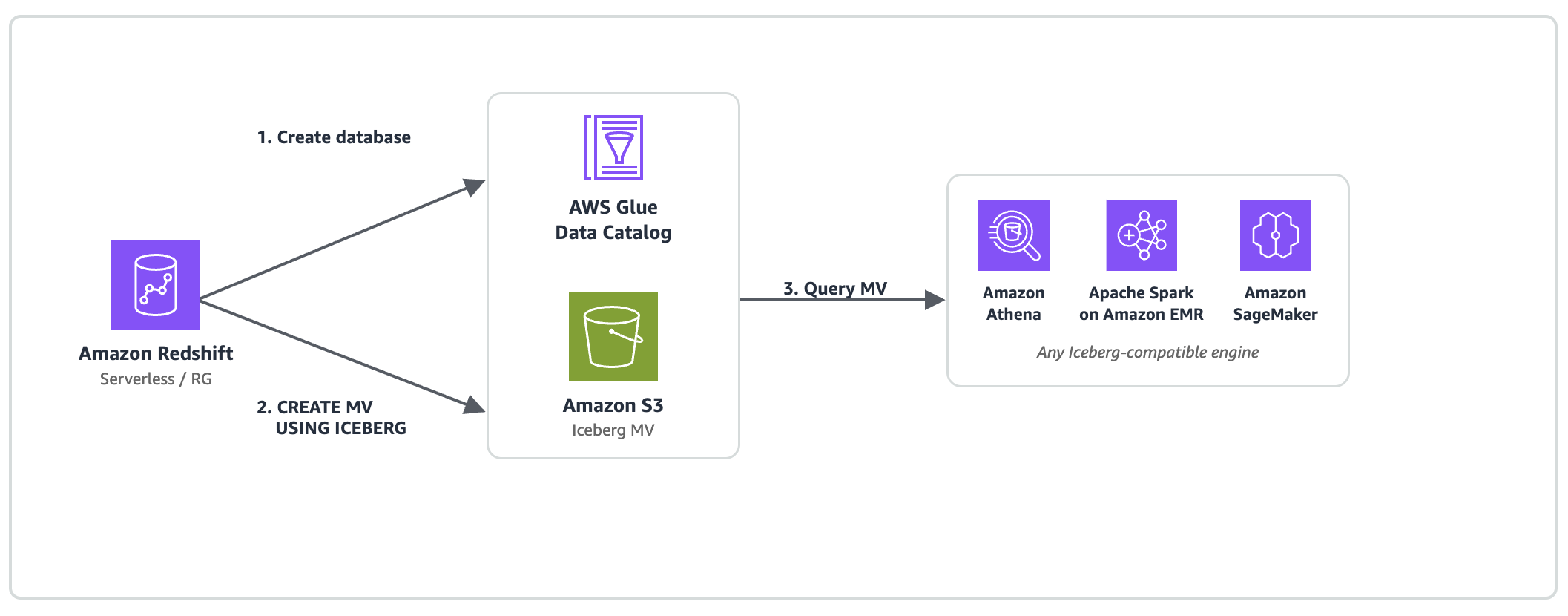
Figure 1: Iceberg-compatible engines query the pre-computed materialized view directly from Amazon S3
Powered by Amazon Redshift Serverless and Amazon Redshift RG
Iceberg materialized views are supported on:
Amazon Redshift Serverless – Fully managed, auto scaling compute. Recommended for variable workloads where MV refreshes run alongside one-time queries without capacity planning.
Amazon Redshift RG (provisioned instances powered by AWS Graviton) – Provisioned clusters running on AWS Graviton processors with a custom-built integrated vectorized query engine. Up to 2.4x better performance for data lake workloads at 30% lower price per vCPU compared to RA3 instances.
Note: Amazon Redshift RA3 and DC2 instance types don’t support Iceberg materialized views.
Amazon Redshift does the heavy computation once on Serverless or Provisioned RG instances. Every Iceberg-compatible engine (Athena, Spark, SageMaker, and AWS Glue) consumes the pre-computed Iceberg MV from Amazon S3 or Amazon S3 Tables at standard Amazon S3 read cost. No additional compute charges on the consumer side.
Use cases
Iceberg materialized views support several patterns across analytics, cost optimization, and AI workloads.
1. Medallion architecture with shared optimization
The problem: In Bronze→Silver→Gold architectures, optimizations at silver/gold layers benefit only the engine that computed them.
With Iceberg MVs: Amazon Redshift RG computes silver and gold layers as Iceberg MVs with incremental refresh. Output is standard Iceberg on Amazon S3, so every consumer benefits without additional compute.
2. Empowering agentic AI, feature stores, and generative AI workloads
The problem: AI agents, machine learning (ML) pipelines, and generative AI applications need pre-computed features, such as rolling averages, customer lifetime value, and engagement scores, in a format frameworks can consume without direct warehouse connectivity.
With Iceberg MVs: The heavy computation (complex joins, window functions, statistical aggregations) runs once on Amazon Redshift Serverless or RG. Materialized views that use window functions or aggregations beyond COUNT and SUM are fully recomputed on each refresh rather than incrementally updated. Once the materialized view is computed and stored in Amazon S3 as a standard Iceberg table, it can be accessed by different consumers natively:
- Amazon SageMaker notebooks and training jobs read features directly from Amazon S3 through PyIceberg, with no JDBC driver needed.
- Amazon Bedrock agents access pre-computed analytics as structured data for Retrieval Augmented Generation (RAG).
- Apache Spark on Amazon EMR consumes features through
spark.table()for large-scale ML training pipelines. - Amazon Athena provides serverless SQL access to materialized features for ad-hoc analysis and dashboarding.
Incremental refresh keeps features fresh. For incremental refresh eligibility, see Materialized views stored as Apache Iceberg tables.
3. Cost optimization through compute consolidation
The problem: When the same aggregation is re-executed independently across multiple engines (Amazon Redshift, Athena, Spark, third-party tools), organizations pay for redundant compute on each engine, which multiplies cost linearly with the number of consumers.
With Iceberg MVs: One Amazon Redshift Serverless or RG refresh computes the aggregation once. Consumers read the pre-computed result directly from Amazon S3 at standard storage read cost, alleviating redundant compute across engines. The cost reduction can scale with the number of consuming engines you consolidate.
4. Governed data sharing without data movement
The problem: Sharing analytics across teams requires data copying or engine-specific sharing mechanisms.
With Iceberg MVs: Output is governed by AWS Lake Formation. Grant access with a single permission model. Consumers bring their preferred engine.
5. Single source of truth across analytics engines
The problem: Multiple teams recompute the same metrics independently across Spark, Amazon Redshift, Athena, and custom tools, producing inconsistent numbers.
With Iceberg MVs: One CREATE MATERIALIZED VIEW ... USING ICEBERG computes the metric once on Amazon Redshift Serverless or RG. Every engine reads the same Iceberg table from Amazon S3, with the same numbers, the same snapshot, and zero reconciliation.
How it works
Iceberg MVs extend the native materialized view capability of Amazon Redshift with the USING ICEBERG clause:
The MV can also be stored in Amazon S3 Table Buckets. If you omit the LOCATION clause, Amazon S3 Tables manages storage automatically.
Incremental refresh
Amazon Redshift tracks Iceberg snapshot IDs across refreshes. On REFRESH MATERIALIZED VIEW, it identifies changed source partitions and recomputes only the delta.
Patterns supporting incremental refresh:
- SUM and COUNT aggregates with GROUP BY.
- Non-aggregated queries (row-level delta tracking).
- Inner JOINs between Iceberg tables.
Constructs that use full refresh (still supported):
- DISTINCT, outer JOINs, window functions, subqueries.
- Set operations (UNION ALL, UNION, INTERSECT, EXCEPT).
- MIN, MAX, AVG, COUNT(DISTINCT), SUM(DISTINCT).
- GROUPING SETS, ROLLUP, CUBE.
Cross-cluster refresh
The MV isn’t tied to the creating cluster. Amazon Redshift clusters or Serverless workgroups with the appropriate IAM role can refresh it. When multiple clusters attempt to refresh the same MV concurrently, Amazon Redshift coordinates through the AWS Glue Data Catalog to make sure that only one refresh succeeds at a time, helping prevent conflicts automatically. For more details on concurrency handling, see the Amazon Redshift Iceberg materialized views documentation.
Cross-engine access
The result is a standard Iceberg table that needs no special drivers. This materialized view can be read from different engines, as shown in the following examples:
Amazon Athena:
Apache Spark on Amazon EMR:
Amazon SageMaker / PyIceberg:
Prerequisites
Setting up Iceberg MVs requires IAM, Amazon S3, and AWS Glue configuration. Follow these steps to prepare your environment.
For a complete walkthrough with console screenshots, see Getting started with Iceberg materialized views in the Amazon Redshift documentation.
The following table summarizes the resources you will configure:
| Resource | Purpose | Created in Step |
| IAM Role (IcebergMvDefiner) | Definer role for MV operations (2-service trust policy) | Steps 1–2 |
| S3 Bucket | Stores Iceberg MV data (Parquet files) | Step 3 |
| AWS Glue database | Catalogs MV metadata in AWS Glue Data Catalog | Step 4 |
| Cluster Role Association | Grants the Amazon Redshift cluster permission to assume the definer role | Step 5 |
Step 1: Create the IAM role
Create an IAM role named IcebergMvDefiner with the following trust policy. Note that two service principals are required:
Why are these two principals? Amazon Redshift needs to assume the role to perform materialized view operations. AWS Glue needs to check base table permissions on behalf of the materialized view definer role.
Step 2: Attach IAM policies
Attach the following scoped inline policies to the IcebergMvDefiner role. These provide the minimum permissions required for Iceberg materialized view operations.
S3 access (scoped to your bucket):
Create an inline policy named s3-mv-access:
AWS Glue Data Catalog access policy (scoped to your database):
Create an inline policy named glue-mv-access:
IAM PassRole policy (scoped to the definer role):
Create an inline policy named mv-access:
Step 3: Create S3 bucket
Create an S3 bucket for MV storage. We recommend the naming convention iceberg-mv-. Enable default encryption (SSE-S3) and block all public access.
Step 4: Create AWS Glue database
Create a database named iceberg_mv in the AWS Glue Data Catalog. Use a plain create-database command. The database inherits IAM_ALLOWED_PRINCIPALS by default, which allows cross-engine access from Amazon Athena and other engines.
Step 5: Associate role with Redshift
Associate the IcebergMvDefiner role with your Amazon Redshift cluster or Serverless namespace:
Step 6: Set case sensitivity
Connect to your Amazon Redshift cluster and run:
Creating Your First Iceberg MV
With prerequisites in place, you can now create an external schema, a base Iceberg table, and your first materialized view.
Step 7: Create external schema
Step 8: Create Iceberg base table with sample data
Step 9: Create the Iceberg materialized view
Step 10: Verify MV contents

Figure 2: Initial materialized view query results aggregated by region
Step 11: Test incremental refresh
Insert new rows into the base table and refresh the MV:

Figure 3: Materialized view query results after inserting new rows and refreshing
Cross-engine verification
The materialized view is now a standard Iceberg table in the AWS Glue Data Catalog, accessible from compatible engines without an Amazon Redshift connection.
Amazon Athena:
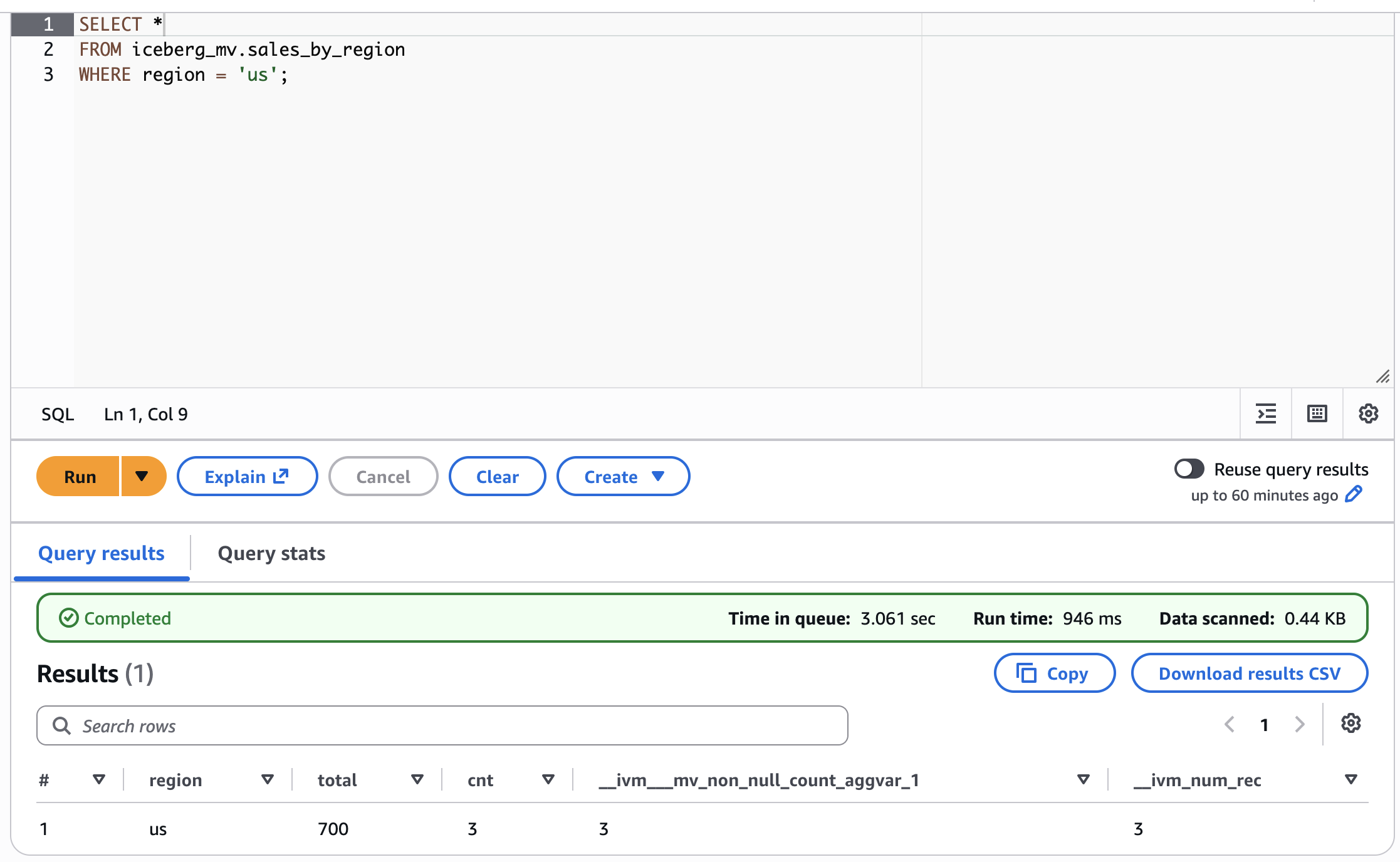
Figure 4: Querying the materialized view from Amazon Athena
Amazon SageMaker / PyIceberg:
Apache Spark on Amazon EMR:
The business case
The following table illustrates a representative scenario where a common aggregation is computed across multiple engines:
| Dimension | Traditional (siloed) | Iceberg MVs on Serverless/RG |
| Compute cost | ~$7,500/month (4 engines) | ~$1,500/month (1 refresh) |
| Metric consistency | 3–4 versions | 1 version |
| Time to new metric | Days (per engine) | Hours (one definition) |
| Governance | Per-engine ACLs | IAM + optional Lake Formation |
Cost estimate assumes a mid-size aggregation (1 TB input, 100 GB output) running daily across Athena ($5/TB scan), Spark on Amazon EMR ($0.096/hr × 4 nodes), Amazon Redshift Serverless (8 RPU), and a third-party engine. Actual savings vary by workload.
Current limitations
For the current list of supported SQL constructs, incremental refresh eligibility, and known limitations, see Materialized views stored as Apache Iceberg tables in the Amazon Redshift documentation.
(Optional) Add Lake Formation governance
If your organization requires centralized access control across engines, you can layer AWS Lake Formation governance on top of the IAM-only setup. Note that Lake Formation permissions for Iceberg MVs are coarse-grained (database and table level). Fine-grained access control (row filters, column filters) isn’t supported on Iceberg materialized views. The following additional steps were validated in the same environment used in this walkthrough:
- Add lakeformation.amazonaws.com to the IAM role trust policy (in addition to redshift.amazonaws.com and glue.amazonaws.com).
- Add lakeformation:GetDataAccess to the role’s inline policy.
- Register the S3 bucket as a Lake Formation data location:
- Recreate the AWS Glue database with empty CreateTableDefaultPermissions (this makes Lake Formation authoritative for table-level access):
- Grant Lake Formation permissions to the definer role: DATA_LOCATION_ACCESS on the S3 bucket, CREATE_TABLE/DESCRIBE/ALTER/DROP on the database, and ALL on tables (with grant option).
For a complete Lake Formation walkthrough, see How to use streamlined permissions for Amazon S3 Tables and Iceberg materialized views.
Clean up
To avoid incurring ongoing charges, remove the resources created in this walkthrough:
Note: DROP MATERIALIZED VIEW removes the AWS Glue catalog entry but does not delete the underlying data in Amazon S3. To remove the data, delete the Amazon S3 prefix manually:
Conclusion
Iceberg materialized views take the open lakehouse promise further: optimization itself becomes portable. Amazon Redshift, whether running as Serverless or on RG instances powered by AWS Graviton, does the heavy computation once. Every other engine and ML pipeline benefits without additional compute. Start with one MV. Watch the numbers match across engines for the first time. Then scale from there.
Resources
Getting started with Iceberg materialized views (Amazon Redshift documentation)
- Getting started with Apache Iceberg write support in Amazon Redshift (AWS Blog, Nov 2025)
- Achieve 2x faster data lake query performance with Apache Iceberg on Amazon Redshift
- How to use streamlined permissions for Amazon S3 Tables and Iceberg materialized views
- Meet Amazon Redshift RG
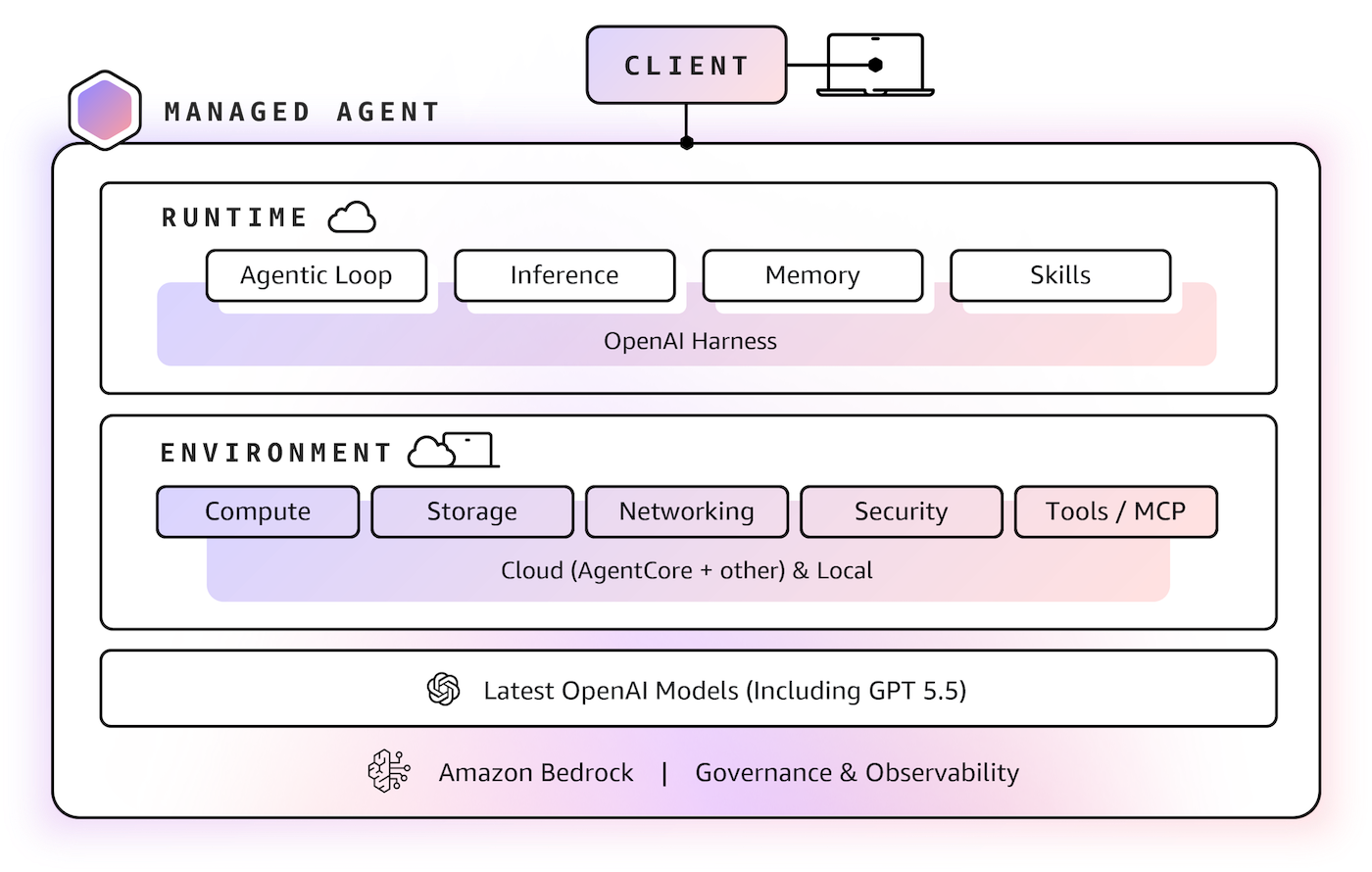 You can choose an execution environment: self-hosted compute to use an existing development machine, container, or compute environment or Amazon Bedrock AgentCore Runtime, for managed runtime sessions and configurable storage in your AWS account. To learn more, visit the