Build cross-account streaming pipelines with the Amazon Kinesis Producer Library and Kinesis Client Library

Post Syndicated from Charishma Makineni original https://aws.amazon.com/blogs/big-data/build-cross-account-streaming-pipelines-with-the-amazon-kinesis-producer-library-and-kinesis-client-library/

Organizations use real-time streaming to act on data the moment it arrives. They detect fraud, personalize customer experiences, and respond to infrastructure events, all within milliseconds. Amazon Kinesis Data Streams ingests and processes millions of records per second with sub-second latency. With multi-account deployment, you can enforce strict security boundaries, satisfy regulatory requirements, and contain scope using Amazon Kinesis Data Streams. This approach still delivers the high-throughput performance that streaming pipelines require. Realizing these benefits, however, requires configuring producers and consumers to operate across account boundaries. This involves coordinating AWS Identity and Access Management (IAM) policies, encryption keys, and monitoring across accounts, which can extend delivery timelines.

This post addresses that complexity directly. We first examine the common architectural patterns for producing and consuming data from Amazon Kinesis Data Streams across multiple AWS accounts. This post has a detailed walkthrough of the most isolated configuration, in which the producer, the stream, and the consumer each reside in a separate AWS account. This illustrates the best practices for enterprise-scale streaming with maximum security isolation.

Amazon Kinesis Data Streams integrates directly with services such as AWS Lambda, Amazon Data Firehose, and Amazon Managed Service for Apache Flink. Granting cross-account access to other service is usually done through Kinesis resource policies. However, many enterprise workloads run on custom applications. Two open source libraries let these applications produce and consume streams:

Amazon Kinesis Producer Library (KPL) – Writes records to a Kinesis data stream at high throughput. KPL aggregates multiple user records into a single Kinesis record to maximize shard utilization. It retries failed records with exponential backoff. It also publishes per-instance Amazon CloudWatch metrics for operational visibility.

Kinesis Client Library (KCL) – Consumes and processes records from a Kinesis data stream. KCL 3.5 discovers shards automatically and coordinates leases through Amazon DynamoDB. It checkpoints progress so that a failed worker resumes from the last saved position. It performs graceful lease handover during resharding. It also balances shard assignments across workers to distribute load evenly.

Both libraries support Java. KCL also supports other languages through the MultiLangDaemon. This walkthrough uses both libraries.

Challenges enterprises face with multi-account streaming

Large enterprises commonly encounter the following challenges when building cross-account streaming architectures:

  • Account boundary enforcement: Producers (app teams) and consumers (analytics teams) sit in separate accounts for isolation and cost attribution. Access is denied by default, so each path is granted explicitly. The producer needs write access to a stream it does not own, the consumer needs read access to that foreign stream, and encrypted streams add AWS Key Management Service (AWS KMS) key access on both sides.
  • Cross-account access has policy complexity and requires coordinating three policies across accounts: a resource-based policy on the stream, identity-based policies on producers and consumers, and AWS KMS key sharing for encrypted streams.
  • Encryption across boundaries: Streams encrypted with AWS managed keys cannot be shared cross-account. Customer managed AWS KMS keys are required.
  • Monitoring across accounts: Amazon CloudWatch metrics for producer throughput, stream utilization, and consumer lag live in different accounts, requiring cross-account observability.

Cross-account deployment patterns

The following table illustrates common permutations of KPL, Kinesis data stream, and KCL placement across accounts:

Pattern KPL (Producer) Kinesis data stream KCL (Consumer)
All-in-one account Account A Account A Account A
Cross-account Consumer Account A Account A Account B
Cross-account Producer Account A Account B Account B
Full separation Account A Account B Account C

Each pattern requires specific IAM configurations. The full-separation pattern (Account A to Account B to Account C) demonstrates the most complex scenario and is what we walk through in the following sections.

Solution architecture

Our reference implementation deploys three AWS accounts:

  • Account A (Producer): Runs the KPL application on Amazon Elastic Compute Cloud (Amazon EC2). Assumes a cross-account IAM role in Account B to write records.
  • Account B (Stream): Owns the Kinesis data stream. Hosts a cross-account IAM role for the producer (Account A) and a resource-based policy granting read access to the consumer (Account C). Also pre-registers an Enhanced Fan-Out consumer shared with Account C through a consumer resource policy. The stream is encrypted with a customer managed AWS KMS key shared with both accounts.
  • Account C (Consumer): Runs the KCL 3.5 application with its own DynamoDB lease table and CloudWatch metrics. It reads the cross-account stream directly through a resource-based policy (no role assumption). The policy authorizes GetRecords, GetShardIterator, DescribeStream, and ListShards. Enhanced Fan-Out (EFO) is supported for dedicated 2 MB/s per-shard throughput and ~70 ms latency. It uses SubscribeToShard, which must be authorized separately, and Account B must pre-register the EFO consumer and share the consumer ARN.

How the cross-account access works

Producer path (Account A to B):

  1. The KPL app runs with KPLProducerRole (Account A EC2 instance profile).
  2. At startup it calls sts:AssumeRole on KinesisProducerCrossAccountRole in Account B (with external ID).
  3. The assumed temporary credentials are used for Kinesis PutRecords calls.
  4. CloudWatch metrics are published to Account A using local instance profile credentials.

Consumer path (Account C to B):

  1. The KCL app runs with KCLConsumerRole (Account C EC2 instance profile).
  2. It calls Kinesis GetRecords using its local credentials (KCLConsumerRole).
  3. The stream’s resource-based policy in Account B authorizes the request.
  4. DynamoDB lease tables and CloudWatch metrics use the local KCLConsumerRole credentials (Account C).

The following figure shows how cross-account access works.
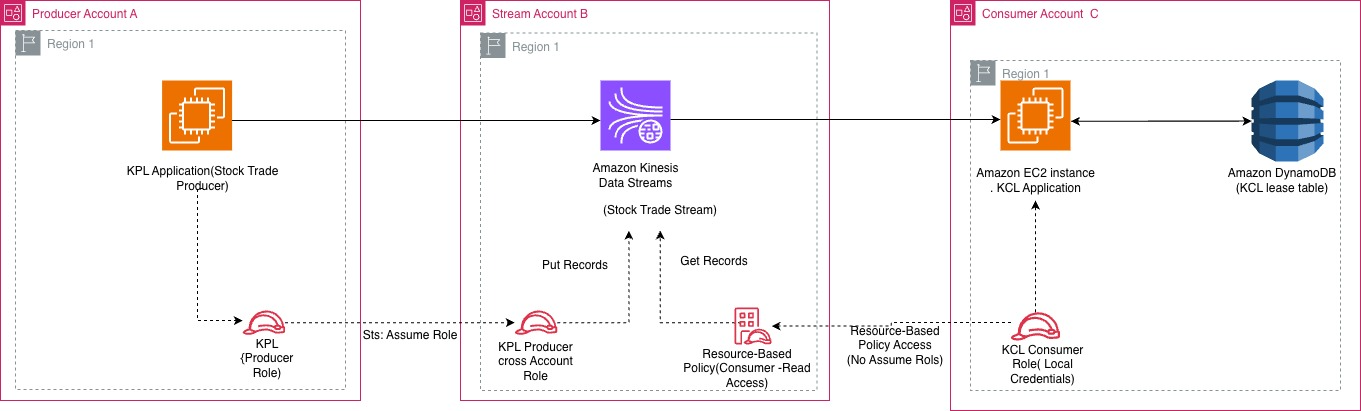
Architecture diagram showing the producer in Account A assuming a role into the Kinesis data stream in Account B, and the consumer in Account C reading through a resource-based policy, with a shared customer managed AWS KMS key

Figure 1: Cross-account streaming architecture across the producer, stream, and consumer accounts

Deployment walkthrough

The solution is deployed using AWS CloudFormation templates across three accounts. Clone the repository from GitHub and follow these steps:

Prerequisites

  1. Three AWS accounts (Producer, Stream, Consumer) with AWS Command Line Interface (AWS CLI) configured.
  2. AWS CLI v2 installed with named profiles for each account.
  3. Java 11+ and Maven installed (for building KPL and KCL applications).
  4. Clone the repository: git clone https://github.com/aws-samples/sample-kinesis-cross-account-kpl-kcl.git.

Step 1: Deploy the stream stack (Account B: Stream Account)

Deploy the CloudFormation template that creates the Kinesis data stream, customer managed AWS KMS key, cross-account producer role, resource-based consumer policy, and pre-registered EFO consumer. Navigate to the cloudformation/ directory.

  1. Deploy:
    aws cloudformation deploy \
      --template-file cloudformation/stream-account-stack.yaml \
      --stack-name kinesis-cross-account-stream \
      --parameter-overrides \
      ProducerAccountId=<ACCOUNT_A_ID> \
      ConsumerAccountId=<ACCOUNT_C_ID> \
      --capabilities CAPABILITY_NAMED_IAM \
      --profile <account-b-profile>

  2. Note the stack outputs: StreamArn, KMSKeyArn, ProducerCrossAccountRoleArn, and EFOConsumerArn. These are needed for the next steps.

The following screenshot shows the CloudFormation output for the deployed stream stack.
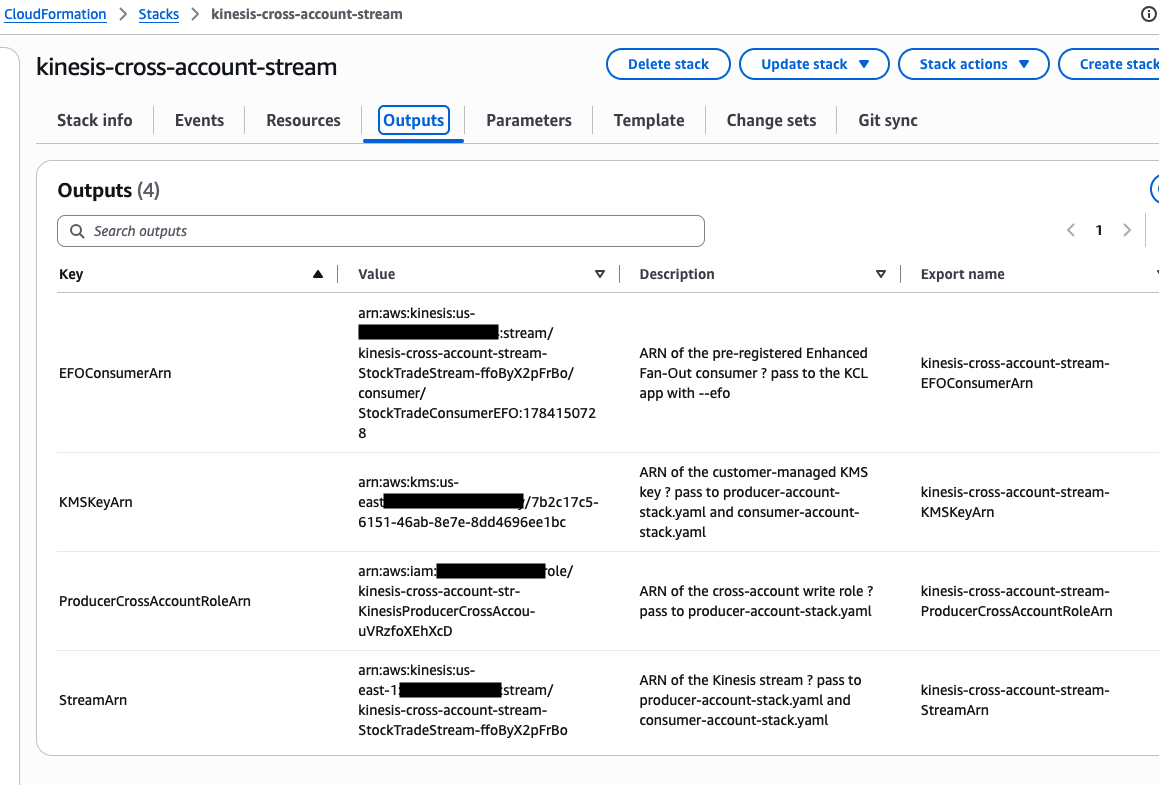
CloudFormation console showing the stream stack outputs, including StreamArn, KMSKeyArn, ProducerCrossAccountRoleArn, and EFOConsumerArn

Figure 2: CloudFormation outputs for the stream stack

Step 2: Deploy the producer stack (Account A: Producer Account)

The KPL handles the following for your producer application:

  • Aggregation – Packs multiple user records into one Kinesis record (up to 1 MB) to maximize shard utilization.
  • Retries – Retries failed puts with exponential backoff to absorb transient throttling.
  • Rate limiting – Tracks shard limits and adjusts send rates to prevent ProvisionedThroughputExceededException.
  • Metrics – Publishes per-instance CloudWatch metrics (buffering time, record age, errors).

Deploy the CloudFormation template that creates the KPL application infrastructure and cross-account IAM role:

  1. Deploy:
    aws cloudformation deploy \
      --template-file cloudformation/producer-account-stack.yaml \
      --stack-name kinesis-cross-account-producer \
      --parameter-overrides \
      ProducerCrossAccountRoleArn=<ProducerCrossAccountRoleArn from Step 1> \
      StreamArn=<StreamArn from Step 1> \
      KMSKeyArn=<KMSKeyArn from Step 1> \
      --capabilities CAPABILITY_NAMED_IAM \
      --profile <account-a-profile>

  2. Connect to the EC2 instance through AWS Systems Manager, clone the repository, then build and run.

The following screenshot shows the output for the producer CloudFormation stack.
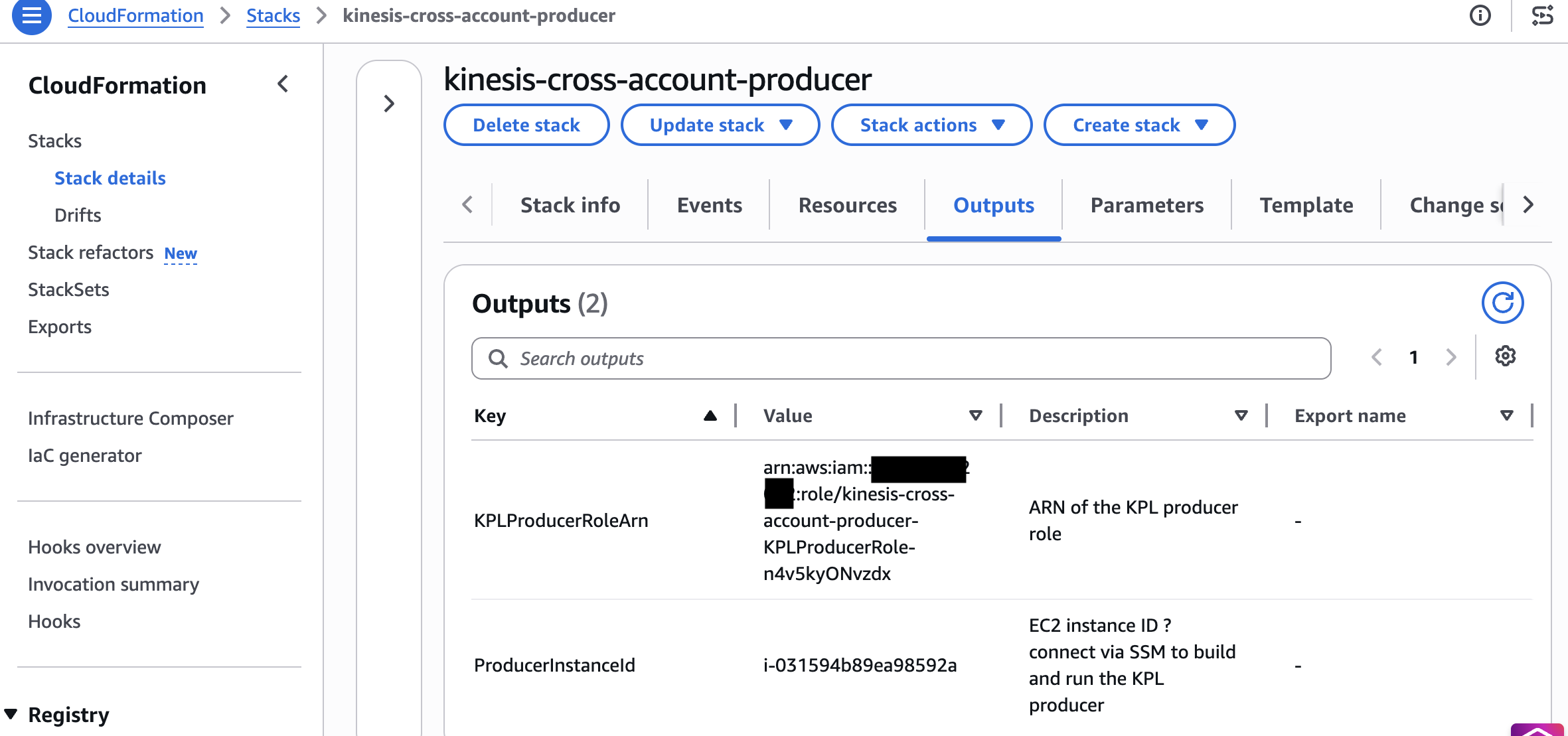
CloudFormation console showing the producer stack deployment outputs

Figure 3: CloudFormation outputs for the producer stack

Step 3: Deploy the consumer stack (Account C: Consumer Account)

KCL 3.5 handles the following for your consumer application:

  • Graceful lease handover – Transfers shard leases during resharding without duplicate processing.
  • Load balancing – Distributes shards evenly across workers and rebalances when workers join or leave.
  • Checkpointing – Persists progress in DynamoDB so a failed worker resumes from its last checkpoint.
  • Enhanced Fan-Out – Supports SubscribeToShard for dedicated per-shard throughput when you pass an EFO consumer ARN.

Deploy the CloudFormation template that creates the KCL application infrastructure, DynamoDB lease table permissions, and Kinesis read permissions:

  1. Deploy:
    aws cloudformation deploy \
      --template-file cloudformation/consumer-account-stack.yaml \
      --stack-name kinesis-cross-account-consumer \
      --parameter-overrides \
      StreamArn=<StreamArn from Step 1> \
      EFOConsumerArn=<EFOConsumerArn from Step 1> \
      KMSKeyArn=<KMSKeyArn from Step 1> \
      --capabilities CAPABILITY_NAMED_IAM \
      --profile <account-c-profile>

  2. Connect to the EC2 instance through Systems Manager, clone the repository, then build and run.

The following screenshot shows the output for the consumer CloudFormation stack.
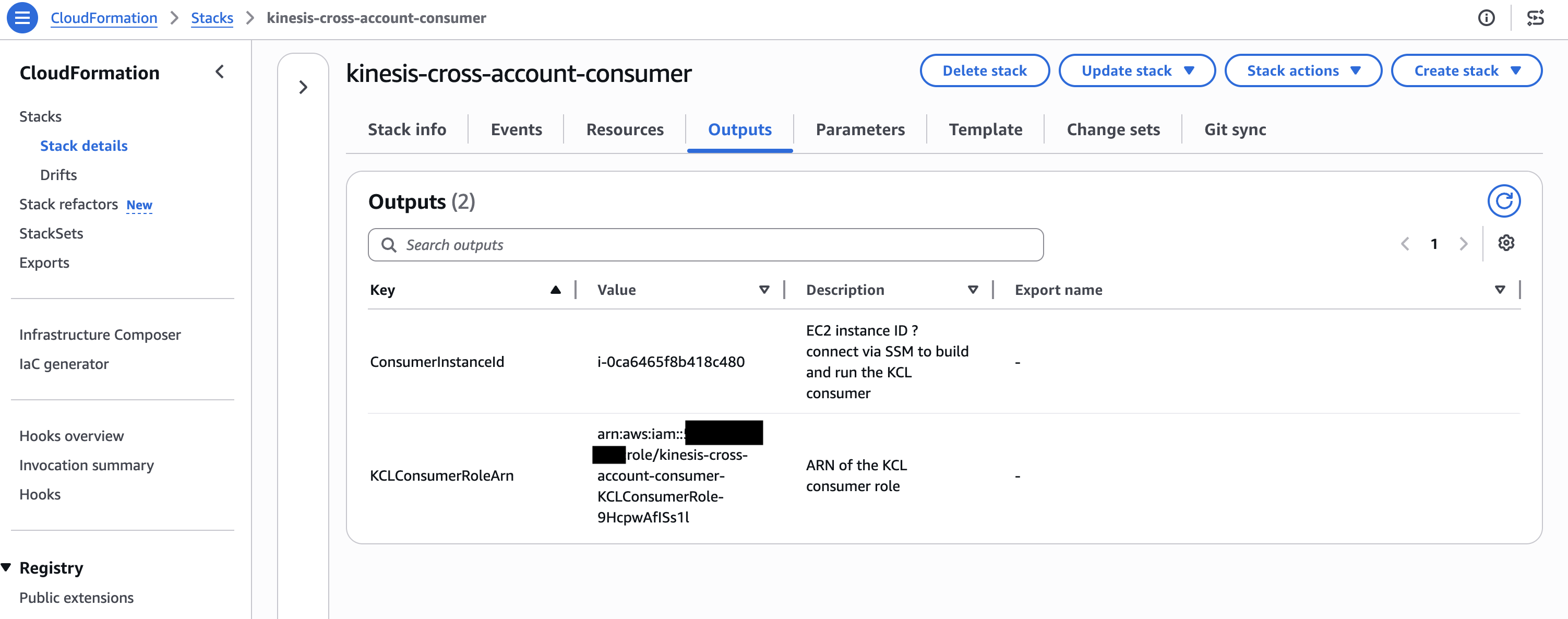
CloudFormation console showing the consumer stack deployment outputs

Figure 4: CloudFormation outputs for the consumer stack

Testing end-to-end data flow

After all three stacks are deployed, start the applications to verify end-to-end cross-account streaming:

Start the KPL producer (Account A)

Connect to the producer EC2 instance through Session Manager, then run CrossAccountKPLProducer. The application assumes the cross-account role, connects to the Kinesis data stream in Account B, and begins publishing aggregated records:

aws ssm start-session --target <ProducerInstanceId> --profile <account-a-profile>

# On the instance:
git clone https://github.com/aws-samples/sample-kinesis-cross-account-kpl-kcl.git
cd sample-kinesis-cross-account-kpl-kcl/producer
mvn clean package -q
java -jar target/cross-account-kpl-producer-1.0.jar <StreamArn> <region> <ProducerCrossAccountRoleArn>
Producer application logs showing aggregated records being published to the Kinesis data stream in Account B

Figure 5: KPL producer publishing aggregated records to the cross-account stream

Start the KCL consumer (Account C)

Connect to the consumer EC2 instance through Session Manager, then run CrossAccountKCLConsumer. The KCL application uses its local credentials, and the stream’s resource-based policy authorizes read access without role assumption:

aws ssm start-session --target <ConsumerInstanceId> --profile <account-c-profile>

# On the instance:
git clone https://github.com/aws-samples/sample-kinesis-cross-account-kpl-kcl.git
cd sample-kinesis-cross-account-kpl-kcl/consumer
mvn clean package -q
java -jar target/cross-account-kcl-consumer-1.0.jar <StreamArn> <region> StockTradeConsumer

To use Enhanced Fan-Out (dedicated 2 MB/s per consumer, approximately 70 ms latency), pass --efo with the pre-registered consumer ARN:

java -jar target/cross-account-kcl-consumer-1.0.jar <StreamArn> <region> StockTradeConsumerEFO --efo <EFOConsumerArn>

Note: With resource-based policies, KCL cannot auto-register stream consumers cross-account. The stream owner (Account B) pre-registers the consumer through CloudFormation, and you pass the resulting EFOConsumerArn.

The following screenshot shows the KCL consumer logs after the consumer has started.

KCL consumer logs showing the consumer has started and is reading records from the cross-account stream

Figure 6: KCL consumer startup logs

Verify in CloudWatch (Account B: Stream metrics)

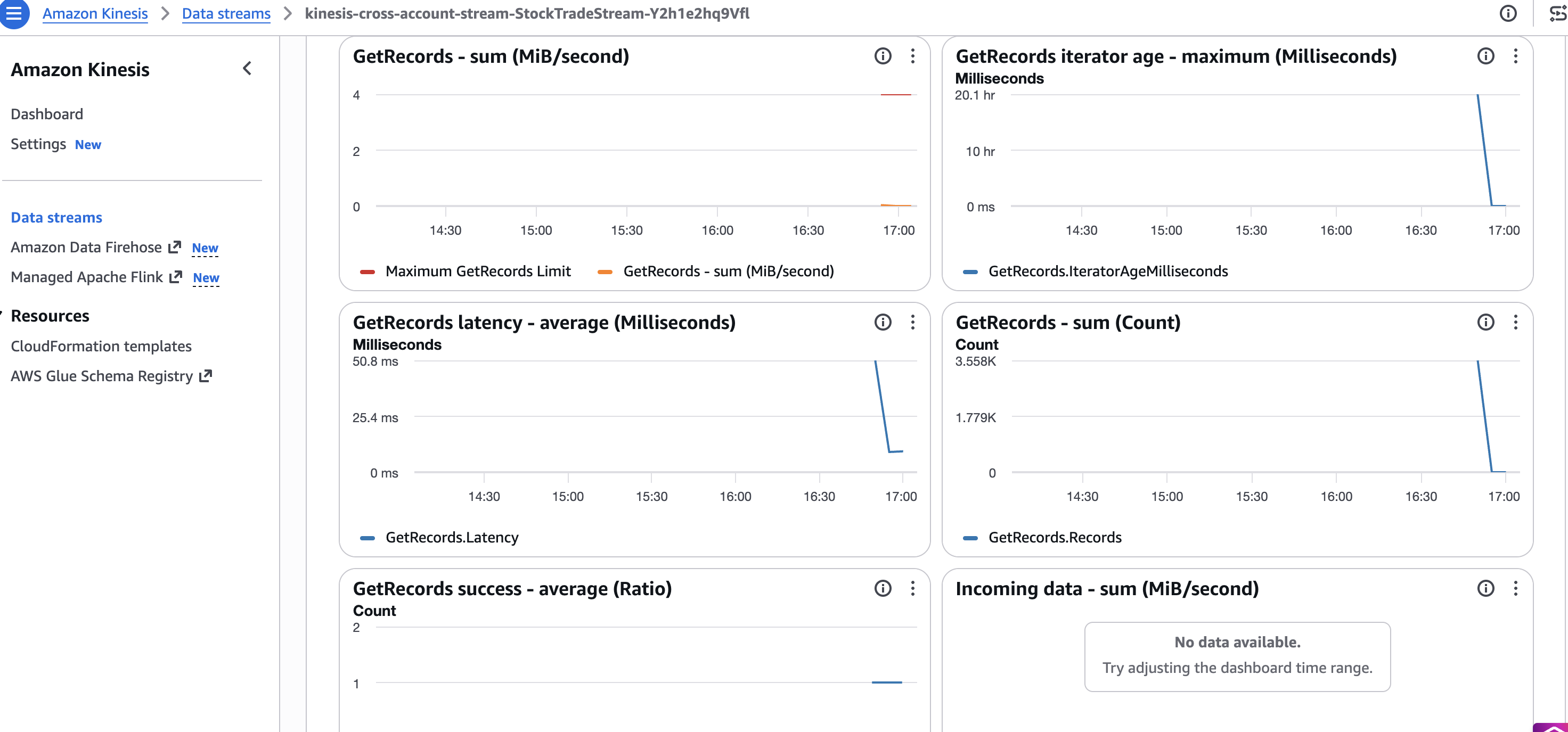
In the stream-owning account, verify the IncomingRecords and GetRecords.Success metrics in Amazon CloudWatch to confirm records are flowing end to end across all three accounts.

The following screenshot shows the CloudWatch metrics for the stream.
Amazon CloudWatch showing IncomingRecords and GetRecords.Success metrics confirming end-to-end data flow

Figure 7: CloudWatch metrics confirming records flow end to end across all three accounts

Key considerations

  • Use stream ARN, not stream name: Cross-account KCL configuration must reference the full stream ARN. Stream names resolve only within the owning account.
  • AWS KMS key sharing is mandatory for encrypted streams: AWS managed keys can’t be shared. Create a customer managed key and add cross-account key policies.
  • Minimum library versions: KCL 2.5.3+ or KCL 1.15.0+ is required for resource-based policy support. For best performance and cost, use KCL 3.5.
  • Enhanced Fan-Out works cross-account: The stream owner must pre-register the consumer and attach a resource policy to the consumer ARN (SubscribeToShard, DescribeStreamConsumer). Pass the consumer ARN to KCL with --efo. Auto-registration does not work cross-account with resource policies.

Clean up

To avoid ongoing charges, delete the CloudFormation stacks in reverse deployment order:

  1. Consumer Account (Account C): Delete the kinesis-cross-account-consumer stack.
  2. Producer Account (Account A): Delete the kinesis-cross-account-producer stack.
  3. Stream Account (Account B): Delete the kinesis-cross-account-stream stack.

This removes all CloudFormation-managed resources across the three accounts, including the Kinesis data stream, customer managed AWS KMS key, IAM roles, and EC2 instances. Stack deletion typically completes within 5–10 minutes per account.

Note: The DynamoDB tables created by KCL at runtime (StockTradeConsumer, StockTradeConsumer-WorkerMetricStats, StockTradeConsumer-CoordinatorState, and the corresponding StockTradeConsumerEFO-* tables if you ran the EFO consumer) are not managed by CloudFormation and must be deleted manually from Account C.

Common errors in cross-account

  • AccessDenied on AssumeRole (producer): Account B’s role trust policy is missing Account A’s principal or the external ID doesn’t match.
  • AccessDenied on reads despite the resource policy (consumer): Granted on the stream but not on the consumer’s own identity policy. Cross-account needs both.
  • AWS KMS AccessDenied: The key policy in the stream account does not grant the foreign producer or consumer GenerateDataKey/Decrypt.
  • EFO failures: Resource policy missing SubscribeToShard, or the EFO consumer was not pre-registered or shared.
  • Expired temporary credentials (producer): Long-running KPL must refresh assumed-role credentials, not assume once at startup.

What’s new in KPL and KCL

Kinesis Client Library (KCL) 3.5: The newest minor version of KCL introduces a streamlined single-table format and leader-driven migration paths for high-scale stream processing applications. KCL 3.5 consolidates all internal tracking (including worker leases, coordinator states, and resource utilization metrics) into a single unified Amazon DynamoDB table, rather than spreading data across multiple tables. This translates directly into lower baseline AWS database costs, reduced operational complexity, and simpler IAM cross-account permission models for enterprise stream consumer fleets.

Kinesis Client Library (KCL) 3.0: The latest major version of KCL introduces graceful load balancing and reduced compute costs for stream processing applications. KCL 3.0 dynamically assigns shards based on actual CPU and memory utilization rather than distributing them evenly across workers. As a result, you can process the same streaming volume with fewer compute instances. This translates directly into lower infrastructure spend for cross-account architectures where consumer fleets must be right-sized.

Kinesis Client Library (KCL) 2.5.3+: Added native support for cross-account access through resource-based policies, so KCL consumers can read from streams in other accounts without complex IAM role chaining. For KCL 1.x users, version 1.15.0 or higher is required for cross-account support.

Kinesis Producer Library (KPL) 1.x: KPL continues to provide high-throughput, batched record aggregation with automatic retries. When used cross-account, KPL assumes an IAM role in the stream-owning account to publish records, using AWS Security Token Service (AWS STS) for temporary credential exchange.

Conclusion

In this post, we demonstrated how to build a cross-account streaming pipeline using Amazon Kinesis Data Streams with KPL and KCL deployed across three separate AWS accounts. With this pattern, you can maintain security isolation, cost attribution, and operational independence while processing real-time data at scale. The resource-based policy model introduced for Kinesis Data Streams simplifies cross-account access without complex IAM role chaining, and KCL’s intelligent load balancing helps you right-size consumer compute regardless of deployment topology.

The solution code is available in the sample-kinesis-cross-account-kpl-kcl repository on GitHub. Clone it, customize it for your account structure, and deploy a cross-account streaming pipeline with maximum security isolation.
About the authors

Charishma Makineni

Charishma Makineni

Charishma is a Sr. Specialist Solutions Architect for streaming at AWS. She helps customers build real-time streaming architectures using services like Amazon Kinesis Data Streams and Amazon Managed Streaming for Apache Kafka (Amazon MSK). Outside of work, Charishma enjoys being outdoors, gardening, and reading.

Chinmayi Narasimhadevara

Chinmayi Narasimhadevara

Chinmayi is a Solutions Architect for Data and Analytics, focused on Generative AI, at Amazon Web Services. She has over 20 years of experience in information technology and helps AWS customers build advanced, highly scalable, and performant data foundations for their GenAI and analytics workloads.

Pratik Patel

Pratik Patel

Pratik is a Sr. Technical Account Manager and streaming analytics specialist. He works with AWS customers and provides ongoing support and technical guidance to help plan and build solutions using best practices and proactively keep customers’ AWS environments operationally healthy.

Priyanka Chaudhary

Priyanka Chaudhary

Priyanka is a Senior Solutions Architect at AWS. She is specialized in data lake and analytics services and helps many customers in this area. As a Solutions Architect, she plays a crucial role in guiding strategic customers through their cloud journey by designing scalable and secure cloud solutions. Outside of work, she loves spending time with friends and family, watching movies, and traveling.

Filter, reshape, and redact logs before export with Transformers

Post Syndicated from Rob Taylor original https://blog.cloudflare.com/transformers-on-logpush/

Logpush delivers logs in batches as quickly as possible, enabling Cloudflare to provide information almost in real time. During our recent Birthday Week, we made Logpush available on all self-serve plans and Transformers generally available.

Those changes were among eight major updates to Cloudflare Observability and reflect our commitment to make every Cloudflare feature available to everyone. This post takes a deeper look at how Transformers work inside Logpush's export pipeline. Observability teams use Logpush to export Cloudflare logs to security information and event management systems (SIEMs), analytics platforms, and object storage. Before those logs reach their destination, teams may need to remove health checks, omit sensitive fields, or reshape records for dashboards and investigations. Today, this often requires a separate processing service that teams must deploy, scale, monitor, and maintain.

For example, a team that collects logs from multiple CDNs can add a static provider field to normalize records before they reach its analytics platform. Teams also pay to export, ingest, and store records they discard as soon as they arrive, so filtering them before delivery can reduce downstream data volume and cost.

With Transformers, that processing moves into the Logpush export workflow.Teams define a SQL query to filter records, redact sensitive data, and reshape the output by adding, renaming, removing, or nesting fields. Logpush applies the query before export, so each destination receives data in the form it needs. We made this workflow simple for customers by embedding a SQL transformation engine in Logpush's high-throughput export pipeline while keeping performance and resource use predictable.

How Logpush Transformers work

A Transformer is a SQL query written for a specific Logpush dataset. The query references fields from that dataset and defines which records and fields Logpush should export. Logpush applies the query to each batch before export. Records that do not match the WHERE clause are removed. For the remaining records, the output of the SELECT statement becomes the exported record. Transformers can change the structure and contents of each record, and the transformed results are exported in NDJSON format.

Customers can create, preview, and manage Transformers in the Cloudflare dashboard through Transformer Studio or programmatically through the API. After saving a Transformer, they can attach it to a compatible NDJSON Logpush job that uses the same dataset. Each update creates a new version, so customers can review how a Transformer has changed over time.

The following example reshapes a Cloudflare HTTP request log to match a team-defined schema used across CDN providers. It does not convert between serialization formats: both the input and output use NDJSON.

The Transformer renames and nests fields, redacts part of the client IP address, adds provider and error information, removes unused fields, and filters out internal and health-check traffic:

The resulting NDJSON record uses the normalized schema:

How Transformers executes SQL with Apache DataFusion and Arrow

Cloudflare's data pipeline ingests more than one billion events per second. Its Logpush delivery service, which we call Bufstream, delivers more than 110 million Logpush records per second to customer destinations. It runs across hundreds of Kubernetes pods, each claiming a time slice of data from Buftee, Cloudflare's distributed log-based in-house message broker. This model distributes work horizontally across Logpush jobs. Job volume follows a Pareto-like distribution: most jobs operate at lower volumes, while a small number of high-volume jobs process millions of logs each second. Transformers needed to meet the same operational requirements as the rest of Logpush: reliable delivery, high throughput, and predictable resource use without introducing additional failure scenarios into the export hot path.

Our initial prototype ran customer-defined WebAssembly Transformers in Cloudflare Workers, which provides globally distributed, isolated compute. However, invoking a Worker would insert a network call into the Logpush export path. That remote dependency could introduce transient timeouts and retries, reducing delivery throughput and increasing delivery latency.

We decided to keep Transformer execution in-process within our delivery service to prioritize reliability and delivery throughput. We evaluated several SQL execution engines and selected Apache DataFusion, which already powers Cloudflare Basin.

Apache DataFusion is a Rust query engine built on Apache Arrow, with a SQL planner and vectorized, columnar execution engine. In a benchmark, executing a prepared Transformer against a synthetic 5,000-row http_requests batch from a single Go goroutine took about 3 ms, equivalent to roughly 1.6 million rows per second.

Attaching a Transformer to a job adds CPU work to its processing path. Bufstream uses per-job transform parallelism so high-volume jobs can execute transform batches concurrently. Embedding DataFusion in Bufstream lets those batches use the service's existing delivery infrastructure, including its scheduling, batching, and destination controls, without introducing a separate transformation tier or network hop.

Choosing DataFusion meant connecting Bufstream, which is written in Go, to an engine written in Rust. The next challenge was moving typed batches efficiently across that boundary.

The final design of the in-process Transformer pipeline is shown in the diagram below.

From records to columns

Bufstream receives compressed Logpush batches containing Cap'n Proto records from Buftee. For a job with a Transformer attached, Bufstream decompresses the batch, parses the eligible logs, and builds a typed Apache Arrow RecordBatch before executing the transform.

Apache Arrow is a language-independent, columnar in-memory format designed for efficient analytics on modern CPUs and GPUs. It represents flat and nested data as typed, contiguous columns. Arrow IPC gives Bufstream and DataFusion a standard way to exchange batches across the foreign function interface (FFI) boundary between Go and Rust, exposed through a C application binary interface (ABI) and called from Go using cgo, Go's mechanism for calling C code.

The Go and Rust runtimes do not share ownership of transform data. Go passes a pointer to its input Arrow IPC buffer to Rust only for the duration of the cgo call, and Rust does not retain that pointer after returning. Rust owns the transformed output buffer; Go copies it into Go-managed memory and then explicitly releases the Rust allocation. This makes ownership and lifetimes explicit across the language boundary, avoiding cross-runtime memory-management bugs.

Using Arrow IPC means the Rust DataFusion wrapper can use an Arrow StreamReader to read typed RecordBatch values, rather than parse individual rows from an intermediate format such as JSON and rebuild typed Arrow columns for execution. Field types, nullability, and nested values are represented consistently on both sides of the boundary, so DataFusion receives data in its native columnar model.

Crossing the Go/Rust boundary is not free: batches still need to be serialized, decoded, and managed in memory. Arrow IPC keeps that work batch-oriented and avoids per-record parsing and conversion. This makes the boundary a better fit for Logpush's high-throughput delivery pipeline while retaining schema validation against the Logpush dataset definition.

Every Arrow batch needs a schema describing its fields and types. Rather than infer that schema from the logs in a particular batch, Bufstream supplies a generated schema from each Logpush dataset's specification. This gives DataFusion a stable view of the available fields and types, enabling query validation. The table named in a Transformer's FROM clause selects which dataset schema the query uses. For example, this Transformer queries the http_requests dataset:

Executing the transform

When a customer saves a Transformer through the API or Transformer Studio, Cloudflare stores its SQL query in R2. Bufstream retrieves the query through a multi-layer cache and translates it into a reusable DataFusion logical plan that defines the scan, filters, projections, and expressions. Bufstream prepares this plan once per time slice of a job's data and reuses it for every Arrow batch in that slice. For every new Arrow batch, the Rust wrapper binds the batch as the plan’s table input, executes the query, and returns Arrow batches containing the selected records and fields.

Transformers are designed to fail closed. If a transform cannot be executed, Bufstream neither advances the job's delivery offset nor sends the untransformed batch. Delivering raw data in place of transformed data could violate the schema, filtering, or redaction assumptions of downstream pipelines, so Bufstream opts to re-attempt failed transforms instead.

To prevent a persistently failing job from consuming capacity needed by healthy jobs, Bufstream progressively delays retries and reports errors on the job. Jobs that remain in a failing state for an extended period are automatically disabled. Customers can monitor successful and failed transformations, data volume before and after transformation, and transformation duration in the Transformer Health view of the Health tab in Logpush.

Returning to the export pipeline

After execution, Bufstream converts the Arrow output into NDJSON logs. It batches, gzip-compresses, and uploads those logs to the configured destination. Destinations accept data at different rates and can temporarily slow down. Bufstream adjusts the number of upload goroutines while respecting destination concurrency limits.

By embedding SQL execution in Bufstream, Transformers use Logpush’s existing distributed infrastructure, batching, and destination controls. Cloudflare’s data pipeline handles that complexity, while customers create and apply a Transformer with only a few steps.

Get started

Open Transformer Studio from the Logpush page in the Cloudflare dashboard and follow these steps:

  1. Choose the Logpush dataset you want to transform.
  2. Write your SQL query and preview it against a sample record.
  3. Save the Transformer.
  4. Attach it to a matching Logpush job.

Transformers is available on Free, Pro, Business, and Enterprise plans. See the Transformers documentation for setup details and the Logpush pricing documentation for current pricing information.

Agentic antimicrobial resistance surveillance with AWS HealthOmics and Amazon Bedrock AgentCore

Post Syndicated from Nicolo Cosimo Albanese original https://aws.amazon.com/blogs/architecture/agentic-antimicrobial-resistance-surveillance-with-aws-healthomics-and-amazon-bedrock-agentcore/

Turn public sequencing data into plain-language answers about resistance genes, without writing bioinformatics code or SQL.

Bacterial antimicrobial resistance (AMR) is one of the top public health threats of our time. A systematic analysis published in The Lancet estimated that AMR was directly responsible for 1.27 million deaths in 2019 and associated with 4.95 million (Murray et al., 2022). Surveillance programs work to slow that trend by tracking which resistance genes circulate, in which organisms, and how the picture shifts over time.

The raw material for that work is already public. Sequencing archives such as the NCBI Sequence Read Archive (SRA) hold hundreds of thousands of bacterial whole-genome sequencing runs, and the data is mirrored on the Registry of Open Data on AWS. The constraint isn’t access to data. It’s the work of turning a raw sequencing run into an answer. That path normally means assembling a genome, screening it for resistance genes with specialized tools, loading the results into an analytical store, and writing SQL to explore them. Each step assumes bioinformatics skills, so the people who ask the epidemiological questions often depend on a specialist to answer them.

In this post, we present a reference architecture that shortens that path. A researcher signs in to a web application, submits a public SRA accession, and after the pipeline finishes asks, in plain language, “What AMR genes were found in Salmonella?” The system answers with the genes detected, the tool that found each one, and a confidence value taken from the data. The architecture is defined entirely in AWS Cloud Development Kit (AWS CDK) and deploys into an account with a single command. This is a demonstration architecture rather than a clinical system, and the accompanying code is available for you to deploy and adapt.

How this architecture differs from variant interpretation

An earlier AWS post, Accelerating genomics variant interpretation with AWS HealthOmics and Amazon Bedrock AgentCore, established a pattern that this solution shares: a genomics pipeline feeds Amazon S3 Tables, a capability of Amazon Simple Storage Service (Amazon S3), in Apache Iceberg format, Amazon Athena queries the tables, and a Strands agent on Amazon Bedrock AgentCore turns questions into SQL. We reuse that querying pattern rather than reinvent it. What’s different here is the genomics problem and the shape of the pipeline around it.

The variant interpretation solution starts from a Variant Call Format (VCF) file, where variants have already been called, and annotates them. This solution starts a step earlier, from raw sequencing reads, and performs read quality control, de novo assembly, and gene detection before results exist to store. It adds an ingestion stage that pulls reads directly from a public archive and deduplicates work across runs, and it merges detection output into Iceberg idempotently so that reprocessing an isolate updates its rows in place. Those differences, public-data ingestion, assembly-based detection, and idempotent storage, are where the engineering effort of this architecture sits.

Solution overview

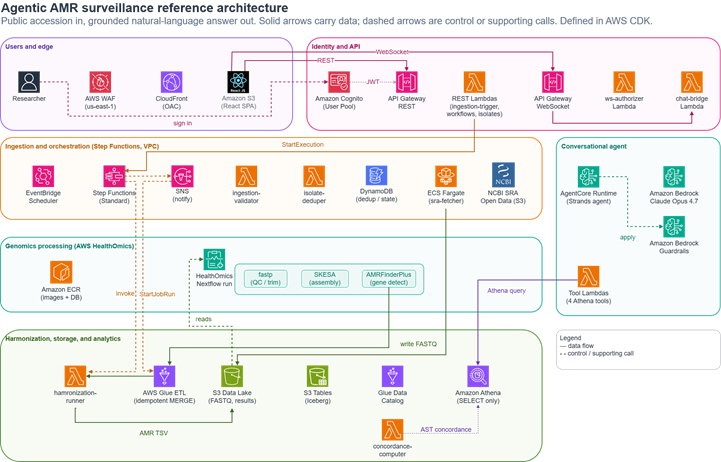
The solution is a set of loosely coupled stages, and data moves in one direction from ingestion through processing and storage to a conversational query layer. The following stages map to the numbered zones in Figure 2.

Solution architecture diagram showing five stages: ingestion, genomics processing, storage, analytical store, and agent

Figure 2: Solution architecture, organized as the five stages the data passes through

  1. Ingestion: An Amazon EventBridge Scheduler rule or an on-demand REST call starts an AWS Step Functions workflow. An Amazon Elastic Container Service (Amazon ECS) task on AWS Fargate fetches and converts the sequencing run for the requested accession from the NCBI SRA mirror on the Registry of Open Data, and Amazon DynamoDB records processed isolates so that repeat runs skip work that’s already done.
  2. Genomics processing: AWS HealthOmics runs a single managed Nextflow workflow that chains read quality control with fastp, de novo assembly with SKESA, and resistance gene detection with AMRFinderPlus. Container images come from Amazon Elastic Container Registry (Amazon ECR), and the AMRFinderPlus reference database is built into the image because HealthOmics tasks run without internet access.
  3. Harmonization and storage: An AWS Lambda function normalizes the detection output into the community hAMRonization schema (a standard from PHA4GE for reporting AMR detection results), and an AWS Glue job merges it into Iceberg tables on Amazon S3 Tables. The merge is idempotent, so rerunning an isolate updates rows rather than duplicating them.
  4. Analytical store: Amazon Athena queries the Iceberg tables through the AWS Glue Data Catalog, which gives the agent a fast SQL surface over the harmonized results.
  5. Conversational agent and web application: A Strands agent hosted on AgentCore runtime answers questions through a set of Athena-backed tools, with Amazon Bedrock Guardrails keeping responses grounded. A React single-page application on Amazon S3 and Amazon CloudFront, protected by AWS WAF and authenticated with Amazon Cognito, is the front door. Amazon API Gateway serves REST calls and streams the chat over WebSocket.

Ingesting public sequencing data

Ingestion has one job: given an accession, get the reads into the account without manual downloads or credentials. Because the SRA mirror is part of the Registry of Open Data, an anonymous Amazon S3 read is enough. A Step Functions workflow drives the process. It starts a Fargate task that downloads the sequencing run for the accession from the public bucket and converts it to paired-end FASTQ in a staging bucket, then hands off to the genomics stage.

Two design choices keep the stage predictable. A DynamoDB table records every isolate that has been processed, so a scheduled weekly run or a repeated manual submission doesn’t reprocess the same accession. Fargate runs the copy as a long-running task because fetching and converting a large sequencing run can take well beyond a few minutes. The result is a loop that runs on a schedule or on demand from the web application, without an operator in the middle.

Detecting resistance genes with AWS HealthOmics

Turning reads into a list of resistance genes is the compute-heavy part of the pipeline. AWS HealthOmics runs Nextflow workflows without a cluster to provision or scale, which suits teams that do not run a bioinformatics system of their own.

The workflow is a single HealthOmics run with three tasks connected by Nextflow channels. fastp trims adapters and low-quality bases from the raw reads. SKESA assembles the trimmed reads into contigs. AMRFinderPlus screens those contigs for known resistance genes. Combining assembly and screening in one run avoids a fragile handoff between two separate runs and matches how community AMR pipelines are structured.

Running third-party bioinformatics tools on HealthOmics calls for a few adaptations worth stating plainly:

  • HealthOmics tasks have no internet access, so the AMRFinderPlus database is baked into the container image rather than downloaded at runtime.
  • Container image URIs are passed as workflow parameters instead of hardcoded, which keeps the workflow independent of account and AWS Region and lets HealthOmics verify image access before a run starts.
  • Task outputs are published to the run output path that HealthOmics exports to Amazon S3, rather than to arbitrary locations.

Each container image is built from official tool releases with pinned versions and scanned with Amazon ECR image scanning, so the pipeline doesn’t depend on a floating latest tag.

Harmonizing and storing results

AMRFinderPlus emits a tab-separated file per isolate, which is awkward to analyze across many samples. A Lambda function first normalizes that output into the hAMRonization schema. An AWS Glue job then reshapes the harmonized data into two Iceberg tables on Amazon S3 Tables: amr_profiles, with one row per detected gene, and isolate_metadata, with one row per isolate carrying its provenance and license.

The AWS Glue job writes with a MERGE keyed on the isolate and gene, so processing the same isolate twice updates the existing rows instead of appending duplicates. That idempotency matters for surveillance, where the same accession can arrive again through a scheduled run, and it keeps the tables consistent without a separate deduplication step. Storing the results as Iceberg gives the agent a columnar, transactional surface to query with low latency, and because Amazon S3 Tables registers the schema in the AWS Glue Data Catalog, Athena reads the same tables without extra setup. Converting per-sample files into a structured store is what makes conversational querying across the whole corpus possible.

Asking questions in natural language

The conversational layer uses the Strands Agents SDK and runs on Amazon Bedrock AgentCore, a platform to build, connect, and optimize agents at scale, with any framework or model. This solution uses AgentCore runtime, its serverless agent-hosting environment. It gives each user session an isolated environment, integrates with AWS Identity and Access Management (IAM), and traces the agent’s reasoning and tool calls. The team runs the agent without managing servers or scaling logic.

The agent reasons over four tools, and each one turns a natural-language request into a targeted Athena query against the Iceberg tables:

  • query_amr_profiles finds resistance genes for an organism over an optional date range.
  • get_resistance_trends summarizes how gene detections trend month over month.
  • compare_isolates compares resistance profiles across isolates.
  • lookup_gene_info returns detail on a specific resistance gene.

Grounding is enforced in two places. The system prompt requires the agent to cite the gene ID, the detecting tool, and a confidence value for every claim. It must also say plainly when no data supports an answer rather than guess. Amazon Bedrock Guardrails add a second layer, with a contextual grounding check and denied topics that keep responses tied to the returned rows and off medical or patient advice. The agent uses Anthropic Claude Opus 4.7 on Amazon Bedrock, invoked through a cross-Region inference profile, for the reasoning and synthesis those rules depend on. Model availability varies by AWS Region. See the Amazon Bedrock model support by Region documentation for current availability.

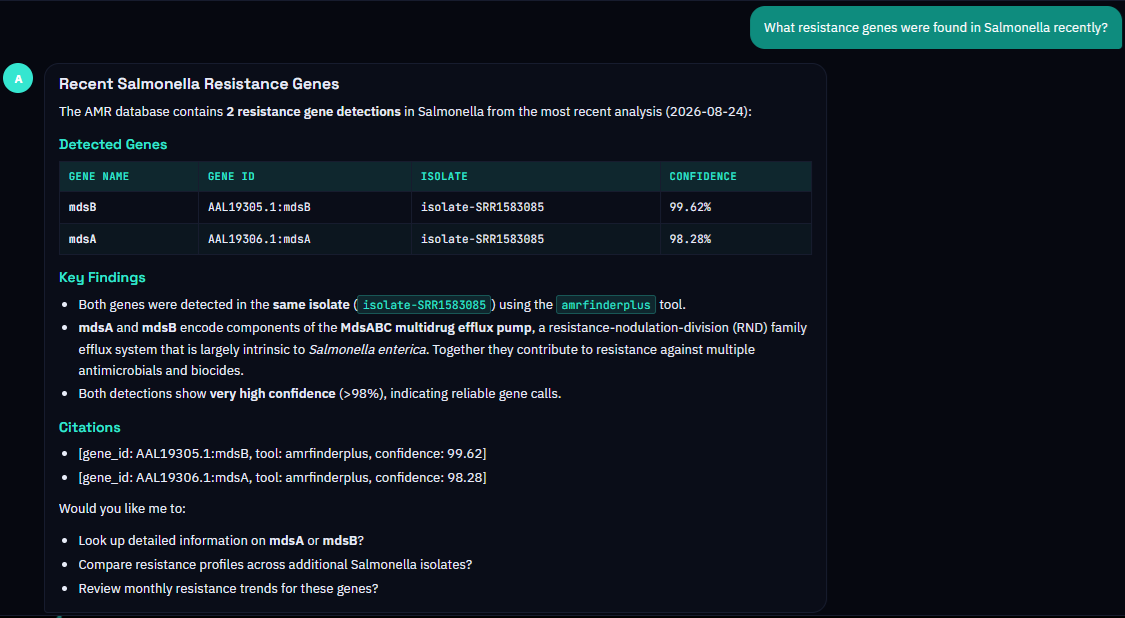
After an isolate has been processed, a researcher explores it through conversation instead of SQL. Asked “What AMR genes were found in Salmonella?”, the agent calls query_amr_profiles, retrieves the matching rows from Iceberg through Athena, and replies with the detected genes. Each gene is annotated with the detecting tool and its confidence value, along with a short reading of what the genes represent. A follow-up such as “Tell me more about mdsB” triggers lookup_gene_info without the user thinking about tables or queries.

Benefits

The architecture turns four recurring pain points into managed, repeatable steps.

Challenge How the architecture addresses it
Fetching and assembling public sequencing data by hand A Step Functions workflow pulls reads from the AWS Open Data SRA mirror and runs assembly and screening on managed HealthOmics compute.
Reconciling detection output across many samples A Lambda function harmonizes results and AWS Glue merges them idempotently into Iceberg tables on Amazon S3 Tables.
SQL and bioinformatics skills needed to ask a question A Strands agent on AgentCore turns plain-language questions into Athena queries and answers with cited evidence.
Reproducing the environment in another account The solution is defined in AWS CDK with no hardcoded identifiers, so it deploys with a single command.

Because this is a reference architecture rather than a customer deployment, its proof is that anyone can stand it up. The CDK application provisions every component described here, from the ingestion workflow to the Iceberg tables to the agent runtime and the web front end. It needs no hardcoded account identifiers or manual setup steps. Running costs depend on how many isolates you process and how often, because HealthOmics runs, AWS Glue jobs, and agent calls are billed per use. The architecture stays inexpensive when idle.

Conclusion

Pairing AWS HealthOmics for managed genomics processing with Amazon Bedrock AgentCore for grounded interpretation lets a surveillance team move from a public accession number to an answer about resistance genes in one continuous flow. Assembly, gene detection, harmonization, and storage happen without manual steps, and the analytical layer is reached through a conversation rather than a query console. The pattern reuses the S3 Tables and agent querying approach from earlier work and applies it to a different genomics problem. That problem begins at raw reads and depends on public-data ingestion and idempotent storage.

To go deeper, see the AWS HealthOmics and Amazon Bedrock AgentCore product pages, and the related post Accelerating genomics variant interpretation with AWS HealthOmics and Amazon Bedrock AgentCore.

The solution is defined entirely in AWS CDK and deploys into your own account. Explore the accompanying repository on GitHub and adapt the pattern to your own surveillance and life-sciences use cases.


About the authors

AMD EPYC 8005 SKU List and Value Analysis: Mainstream Sorano’s Big Stride

Post Syndicated from Ryan Smith original https://www.servethehome.com/amd-epyc-8005-sku-list-and-value-analysis-mainstream-soranos-big-stride/

Following the recent launch of AMD’s EPYC 8005 Sorano server CPUs, we are taking a look at the various SKU options among chips, and what configurations offer the best value for different needs

The post AMD EPYC 8005 SKU List and Value Analysis: Mainstream Sorano’s Big Stride appeared first on ServeTheHome.

Kernel prepatch 7.3-rc7

Post Syndicated from corbet original https://lwn.net/Articles/1099798/

The 7.3-rc7 kernel prepatch is out for
testing. According to Linus: “As always, I would have preferred to see a smaller
rc, but it’s not like anything in here looks like a reason to delay
the final release. So that’s still set for next weekend unless
something new comes up.
”

One notable change that slipped into the mainline this week is the deprecation
of the ext4 data=journal mode; it will be removed entirely at the
beginning of 2028.

Президентски избори 2026 – секциите в чужбина

Post Syndicated from Боян Юруков original https://yurukov.net/blog/2026/pr2026-sekcii/

На 25-ти октомври 2026 ще се проведат избори за президент и вицепрезидент. Вече знаем къде ще са секциите извън страната, където всеки българин може да упражни гласа си.

До 29-ти септември всички българи зад граница имаха възможност да подадат заявление за гласуване. Това помагаше както да се открият секции, така и да гласуват по-бързо в деня на вота. Това направиха малко над 39 хиляди души, което е третото най-ниско ниво след вотовете през 2024 г. Тогава за разлика от сега обаче секции се откриваха автоматично по цял свят.

На 2-ри октомври ЦИК обяви 613 секции на 556 различни места по света. На 9-ти октомври обяви и 200-те места, където ще бъдат разпределени 280 машини за гласуване. Междувременно МВнР пусна заповедите за образуване на секции зад граница с всички адреси. Обновяват и своя карта с тях.

Най-много секции ще има във Великобритания – 82 на 76 места. Следва Турция със 78 на 69 места. После е Германия със 70 секции на 50 места. Според МВнР при запитване германците не са позволили да има секции на места различни от предишния вот. Това е странно, тъй като точните адреси на доста от секциите са различни от парламентарните избори. Може би са искали да ограничат броя. Испания са 67 секции, в САЩ – 44 секции. Гърция, Италия и Нидерландия са с двадесет и нещо. Доста от адресите в Италия и Испания също са различни от минали години. Като цяло е добра идея да проверите преди деня на вота.

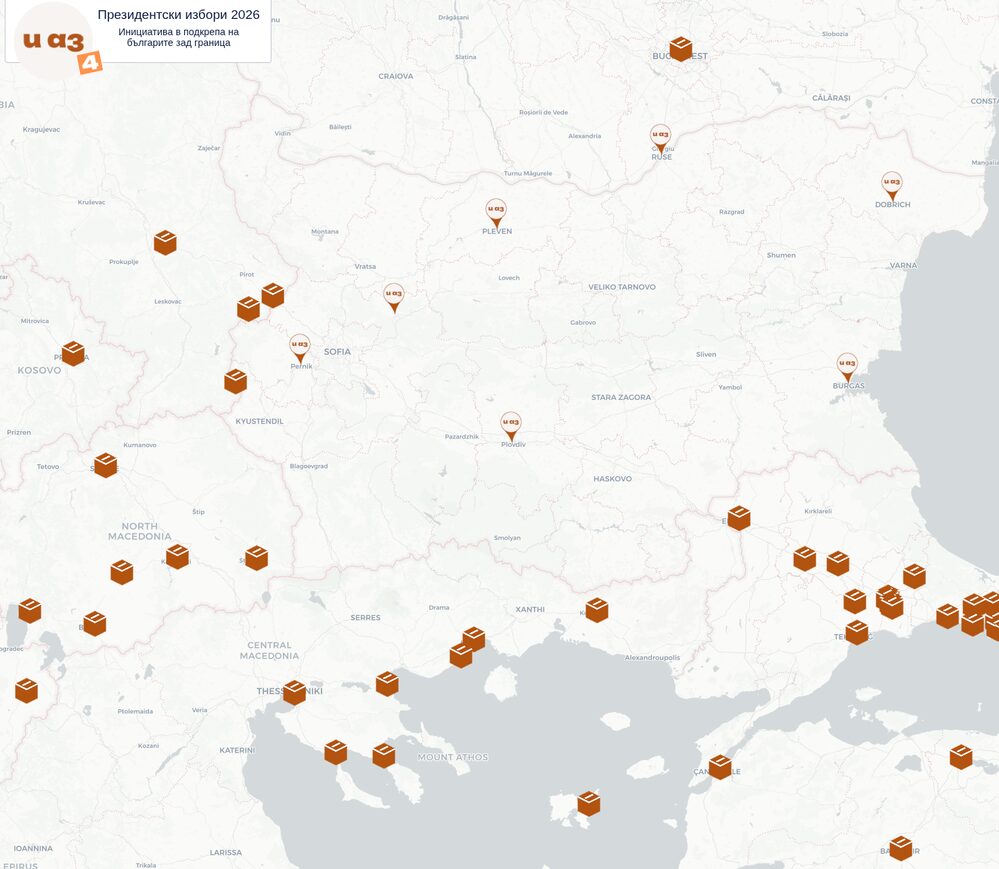
Събрах цялата тази инфорамция на едно място и направих карта на секциите в чужбина. Всички са потвърдени спрямо данните на Външно. Ще обновявам картата, ако някой адрес се промени. В следващите дни ще изпратя персонализирани мейли на над 3000 българи в чужбина, които са се абонирали за бюлетина на Glasuvam.org. При промяна на някоя секция ще получат мейл отново.

Ето и няколко важни неща, които следва да знаете:

  • Изборният ден започва в 7:00 сутринта местно време и свършва в 8:00 часа вечерта
  • Може да гласува всеки български гражданин независимо дали е подал заявление или не. Тогава просто попълвате на място декларация, за да ви добавят в списъка.
  • Гласува се с валидна българска лична карта или паспорт. 
  • Секциите отбелязани горе са актуални към 11-ти октомври. Възможно е в следващите две седмици да има промени или корекции. Затова Ви препоръчвам да проверите преди изборния ден отново на картата и на сайта на МВнР. 
  • Независимо от отбелязаната в заявлението Ви секция, дали е открита там или не или дали сте подали въобще такова, може да гласувате където и да е в чужбина. 
  • Извън България може да гласува всеки български гражданин независимо от обичайното му пребиваване. Това означава, че ако пътувате зад граница по работа или на почивка, може да упражните гласа си в близка до Вас секция. Отново, няма значение дали сте подавали заявление.
  • Ако все пак сте в България по време на изборите, може да гласувате само по постоянен адрес. Тогава попълвате декларация, че не сте гласували в чужбина и са длъжни да Ви отбележат. Присъствате в списъка и след името Ви е отбелязано МВнР.
  • Препоръчвам да се гласува с машина, където това е възможно. На картата ще видите тази информация избирайки секция до вас. Гласуването с машина е по-бързо и гарантира, че гласът Ви ще бъде преброен и няма шанс да бъде отбелязан като невалиден.
  • Препоръчвам да се гласува възможно най-рано, тъй като опитът показва, че с хартиено гласуване с напредването на деня стават струпвания на някои места. Ако имате съмнения и спомени за такива и имате друга близка секция с по-малко натоварване, препоръчваме да отидете там. На картата на Glasuvam.org може също да споделяте и преглеждате обратна връзка от други колко са чакали на това място.

Ако сте в България?

Секциите в чужбина са от полза също за тези от нас пребиваващи постоянно в България. Почти сигурно ще има втори тур, който трябва да се проведе на 1-ви ноември по конституция. Няма да спекулирам дали нарочно Йотова е избрала 25-ти октомври за първи тур.

Въпреки добре установената традиция на МОН да пуска абсурно кратки училищни ваканции, доста хора ще искат да пътуват нанякъде. Всеки с ученици би го разбрал – покрай домашни и уроци тези възможности са малко. Все пак, за да не пропуснете възможността да гласувате заради десетилетие отказ да се въведе някаква форма на ранно или дистанционно гласуване, имате все пак вариант да гласувате в чужбина близо до границата на България.

Всеки може да гласува където и да е зад граница независимо дали е на почивка, в командировка или живее постоянно там. Няма нужда да сте подавали заявление предварително. Появявате се само с валидна лична карта или паспорт и попълвате декларация на място.

В близост до границите на България има поне дузина секции из Сърбия, Македония и Гърция. Карта с всички ще намерите в линка в коментарите. Следете я за точните адреси, които ще публикувам в близката седмица. Оказва се също, че хотелите, къщите за гости и ресторантите са доста по-евтини, а разстоянието често е аналогично. Просто идея.

SPECviewperf 15.0.1 Linux Edition Released: Linux’s Key Graphics Benchmark Adds Arm Support

Post Syndicated from Ryan Smith original https://www.servethehome.com/specviewperf-15-0-1-linux-edition-released-linuxs-key-graphics-benchmark-adds-arm-support/

SPEC has released version 15.0.1 of SPECviewperf Linux Edition, bringing a slew of upgrades and official Arm support to Linux’s key workstation graphics benchmark suite. We are taking a look at those changes, and what performance is like on some modern systems

The post SPECviewperf 15.0.1 Linux Edition Released: Linux’s Key Graphics Benchmark Adds Arm Support appeared first on ServeTheHome.

The collective thoughts of the interwebz