All posts by Alex Dunbrack

ChatGPT, Claude, & Gemini security scanning with Cloudflare CASB

Post Syndicated from Alex Dunbrack original https://blog.cloudflare.com/casb-ai-integrations/

Starting today, all users of Cloudflare One, our secure access service edge (SASE) platform, can use our API-based Cloud Access Security Broker (CASB) to assess the security posture of their generative AI (GenAI) tools: specifically, OpenAI’s ChatGPT, Claude by Anthropic, and Google’s Gemini. Organizations can connect their GenAI accounts and within minutes, start detecting misconfigurations, Data Loss Prevention (DLP) matches, data exposure and sharing, compliance risks, and more — all without having to install cumbersome software onto user devices.

As Generative AI adoption has exploded in the enterprise, IT and Security teams need to hustle to keep themselves abreast of newly emerging  security and compliance challenges that come alongside these powerful tools. In this rapidly changing landscape, IT and Security teams need tools that help enable AI adoption while still protecting the security and privacy of their enterprise networks and data. 

Cloudflare’s API CASB and inline CASB work together to help organizations safely adopt AI tools. The API CASB integrations provide out-of-band visibility into data at rest and security posture inside popular AI tools like ChatGPT, Claude, and Gemini. At the same time, Cloudflare Gateway provides in-line prompt controls and Shadow AI identification. It applies policies and DLP to traffic as it moves to these AI providers. Together, these features give organizations a unified control plane for securing their use of GenAI.

What’s new

ChatGPT, Claude and Gemini are now all live in the integrations supported by Cloudflare’s API CASB. These integrations are available to all Cloudflare One users, account owners can easily connect their GenAI tenants, and CASB will scan for security issues across multiple domains:

  • Agentless Connections: Connect ChatGPT, Claude, and Gemini via agentless, API‑based integrations to scan posture and data risks; no endpoint software to install.

  • Posture Management: Detect insecure settings and misconfigurations that can lead to data exposure or misuse.

  • DLP Detection: Identify where sensitive data has been uploaded in chat attachments (prompts coming soon).

  • GenAI-specific Insights: Surface risks associated with the unique capability of a given AI provider’s toolsets.

Admins can now answer questions like: What are our employees doing in ChatGPT? What data is being uploaded and used in Claude? Is Gemini configured correctly in Google Workspace?

Now let’s take a closer look at each integration.

OpenAI ChatGPT


Cloudflare’s CASB integration with OpenAI’s ChatGPT scans for several types of insights, including:

  • External Exposure: Finds chats and GPTs that are shared beyond the tenant, like GPTs shared publicly or listed on the GPT Store, and ties them back to their owners for quick triage.

  • Secrets, Keys and Invites: Identifies API keys that aren’t rotated or are no longer used to maintain credential hygiene. Identifies over‑privileged or stale invites.

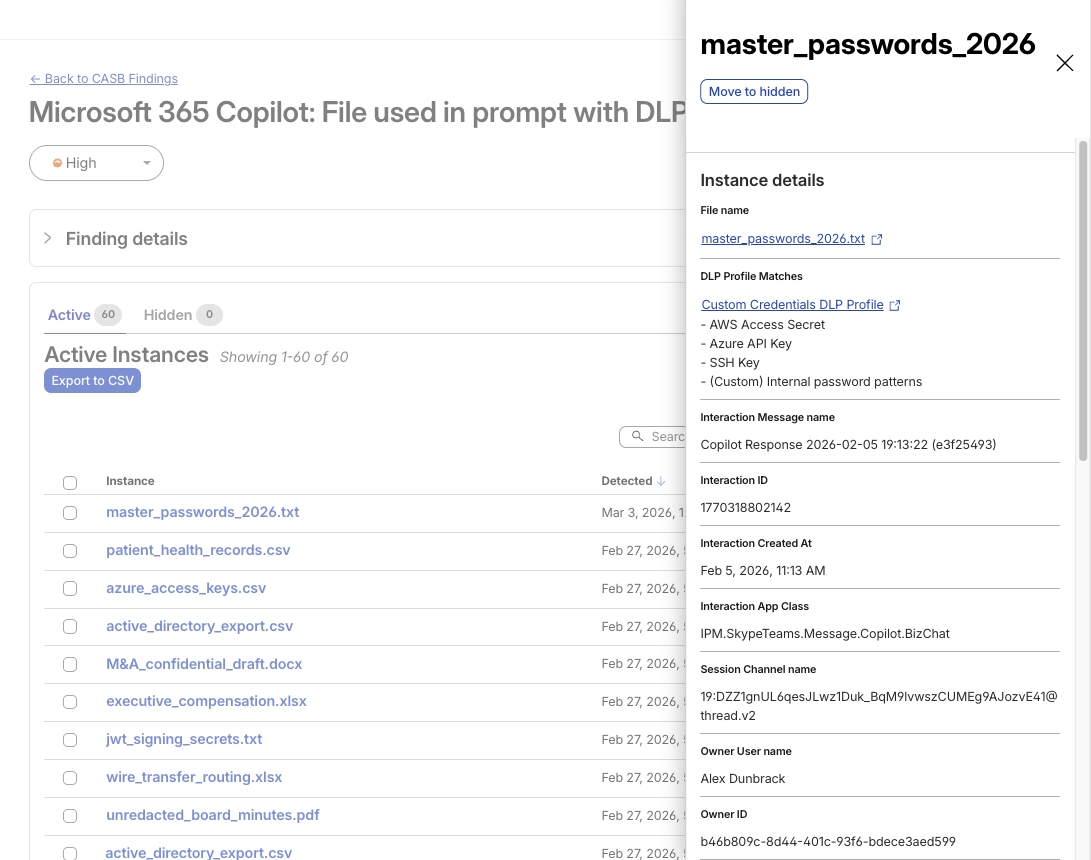
  • Sensitive Content (via DLP): Detects sensitive data (e.g. credential and secrets, financial / health information, source code, etc.) via DLP profile matches in uploaded chat attachments to enable targeted response.

Anthropic Claude

For Claude, Cloudflare is able to provide the following out-of-band detections:

  • Secrets, Keys and Invites: Surfaces high‑risk invites and entitlement drift early so the least‑privilege access control stays tight. Spots unused API keys and rotation gaps before they turn into forgotten open doors.

  • Sensitive Content (via DLP): Monitors for sensitive data in uploaded files to help organizations safely enable Claude usage while maintaining compliance. Security teams get this information as quickly as CASB scans, giving them the visibility they need to help employees use Claude productively and securely with sensitive data.

As Anthropic continues to expand Claude’s API capabilities and features, Cloudflare will add corresponding security detections to match new functionality as it becomes available.

Google Gemini

Cloudflare’s detections for Google Gemini appear as part of our API CASB integration for Google Workspace:

  • Identity & MFA: Identifies Gemini users and admins without MFA, leaving them prime targets for compromise. Imagine if an IT admin relied on Gemini daily to process corporate data, but their Google Workspace account lacked multi-factor authentication. One successful phishing email could give an attacker privileged access to Gemini and the wider Google Workspace environment — turning a minor oversight into an organization-wide breach. 

  • License Hygiene: Flags suspended accounts still holding Gemini or AI Ultra licenses to cut cost and reduce exposure. An AI Ultra user has access to more powerful and riskier features, like Project Mariner, a research prototype that acts as an autonomous agent, capable of automating up to 10 tasks simultaneously across web browsers. An attacker can cause more damage by compromising an AI Ultra user, which is why we include this in our set of detections.

The Gemini integration has a narrower scope because Google has structured their product and API differently than OpenAI or Anthropic. For organizations, Gemini is delivered as a Google Workspace add-on. Enterprises enable Gemini features in Gmail, Docs, Sheets, and other Google Workspace apps through add-on licenses such as Gemini Enterprise or AI Ultra. Our CASB detections focus on identity, MFA, and license hygiene, rather than posture issues like public sharing or custom assistant publishing because Gemini does not yet provide those API endpoints.

The Future of GenAI Posture Management

Like countless other organizations, Cloudflare is adopting GenAI, on the same journey to make these environments even safer than they are today. We are excited to extend our management coverage to our customers so they can continue to innovate with GenAI. But looking ahead, we’re encouraged to see GenAI providers take concrete steps towards making security, compliance, and data privacy even more important tenets of their platforms.

Secure GenAI beyond the reach of Inline Controls

Generative AI adoption brings new security requirements. Cloudflare CASB delivers out-of-band visibility across these tools, surfacing insights on top of inline controls. With posture, access, and data under control, organizations can embrace GenAI confidently and securely.

How to get started:

  • For existing Cloudflare One customers: Contact your account manager or enable the integrations directly in your dashboard today.

  • New to Cloudflare One? Sign up now for 50 free seats to begin securely using Gen AI immediately. For larger deployments, request a consultation with our experts.

If you want to preview other new functionality and help shape our roadmap, express interest in our user research program for AI security.

Detecting sensitive data and misconfigurations in AWS and GCP with Cloudflare One

Post Syndicated from Alex Dunbrack original https://blog.cloudflare.com/scan-cloud-dlp-with-casb/

Today is the final day of Security Week 2025, and after a great week of blog posts across a variety of topics, we’re excited to share the latest on Cloudflare’s data security products.

This announcement takes us to Cloudflare’s SASE platform, Cloudflare One, used by enterprise security and IT teams to manage the security of their employees, applications, and third-party tools, all in one place.

Starting today, Cloudflare One users can now use the CASB (Cloud Access Security Broker) product to integrate with and scan Amazon Web Services (AWS) S3 and Google Cloud Storage, for posture- and Data Loss Prevention (DLP)-related security issues. Create a free account to check it out.

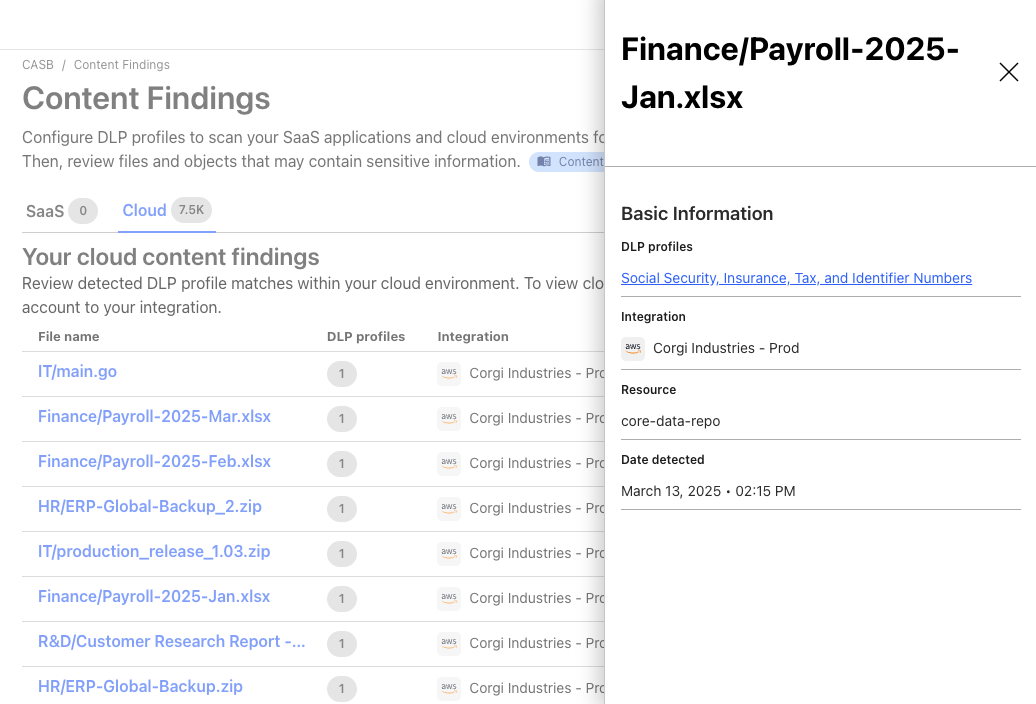
Scanning both point-in-time and continuously, users can identify misconfigurations in Identity and Access Management (IAM), bucket, and object settings, and detect sensitive information, like Social Security numbers, credit card numbers, or any other pattern using regex, in cloud storage objects.

Cloud DLP


Over the last few years, our customers — predominantly security and IT teams — have told us about their appreciation for CASB’s simplicity and effectiveness as a SaaS security product. Its number of supported integrations, its ease of setup, and speed in identifying critical issues across popular SaaS platforms, like files shared publicly in Microsoft 365 and exposed sensitive data in Google Workspace, has made it a go-to for many.

However, as we’ve engaged with customers, one thing became clear: the risks of unmonitored or exposed data at-rest go far beyond just SaaS environments. Sensitive information – whether intellectual property, customer data, or personal identifiers – can wreak havoc on an organization’s reputation and its obligations to its customers if it falls into the wrong hands. For many of our customers, the security of data stored in cloud providers like AWS and GCP is even more critical than the security of data in their SaaS tools.

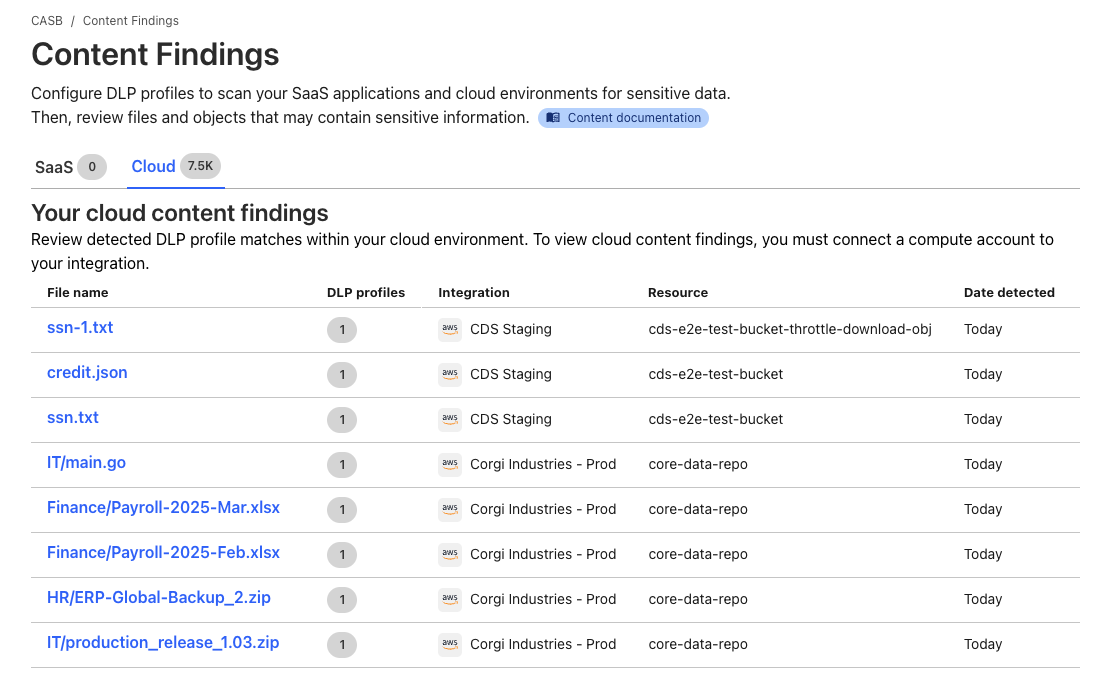
That’s why we’ve extended Cloudflare CASB to include Cloud DLP (Data Loss Prevention) functionality, enabling users to scan objects in Amazon S3 buckets and Google Cloud Storage for sensitive data matches​.


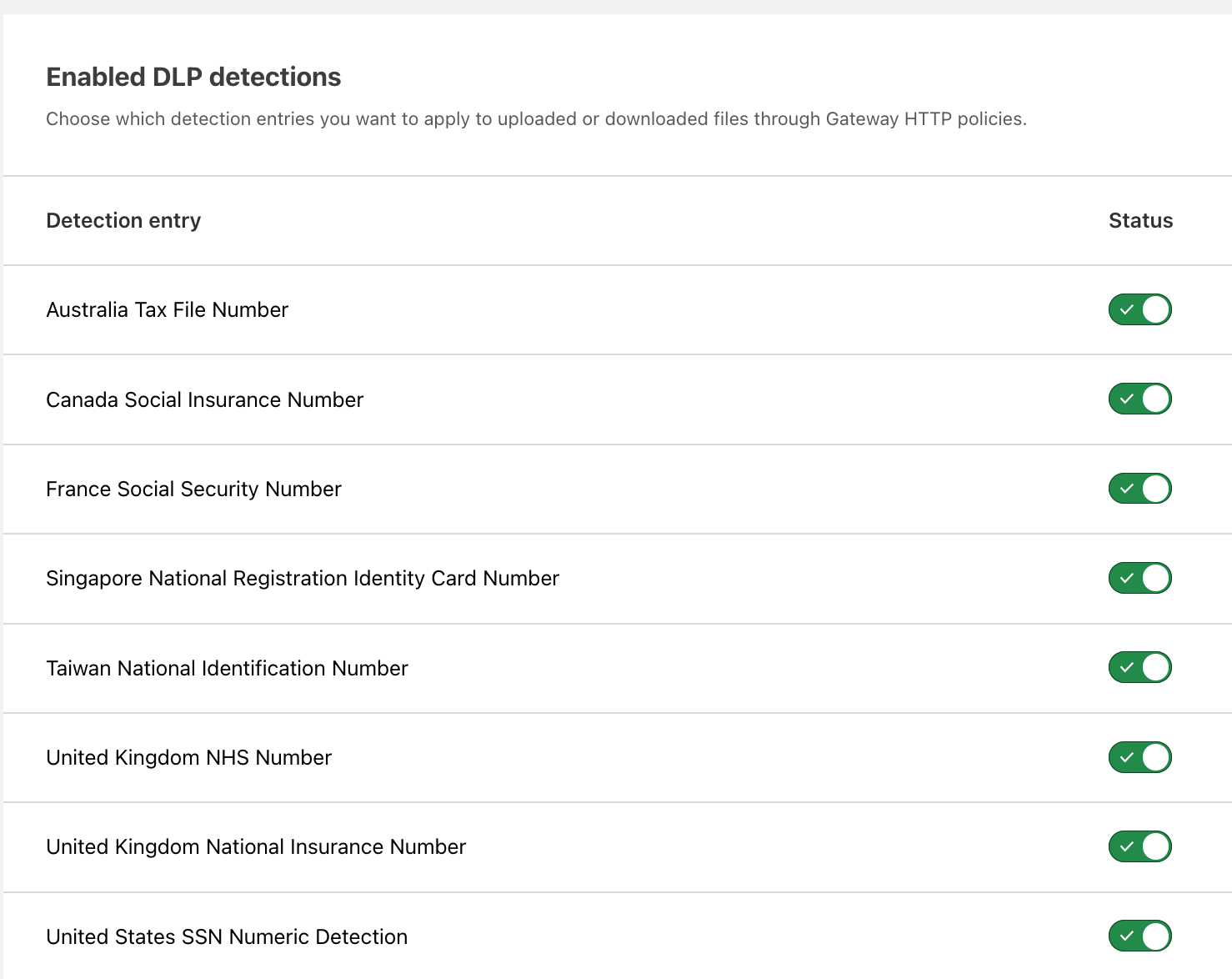
With Cloudflare DLP, you can choose from pre-built detection profiles that look for common data types (such as Social Security Numbers or credit card numbers) or create your own custom profiles using regular expressions​. As soon as an object matching a DLP profile is detected, you can dive into the details, understanding the file’s context, seeing who owns it, and more. These capabilities provide the insight needed to quickly protect data and prevent exposure in real time.


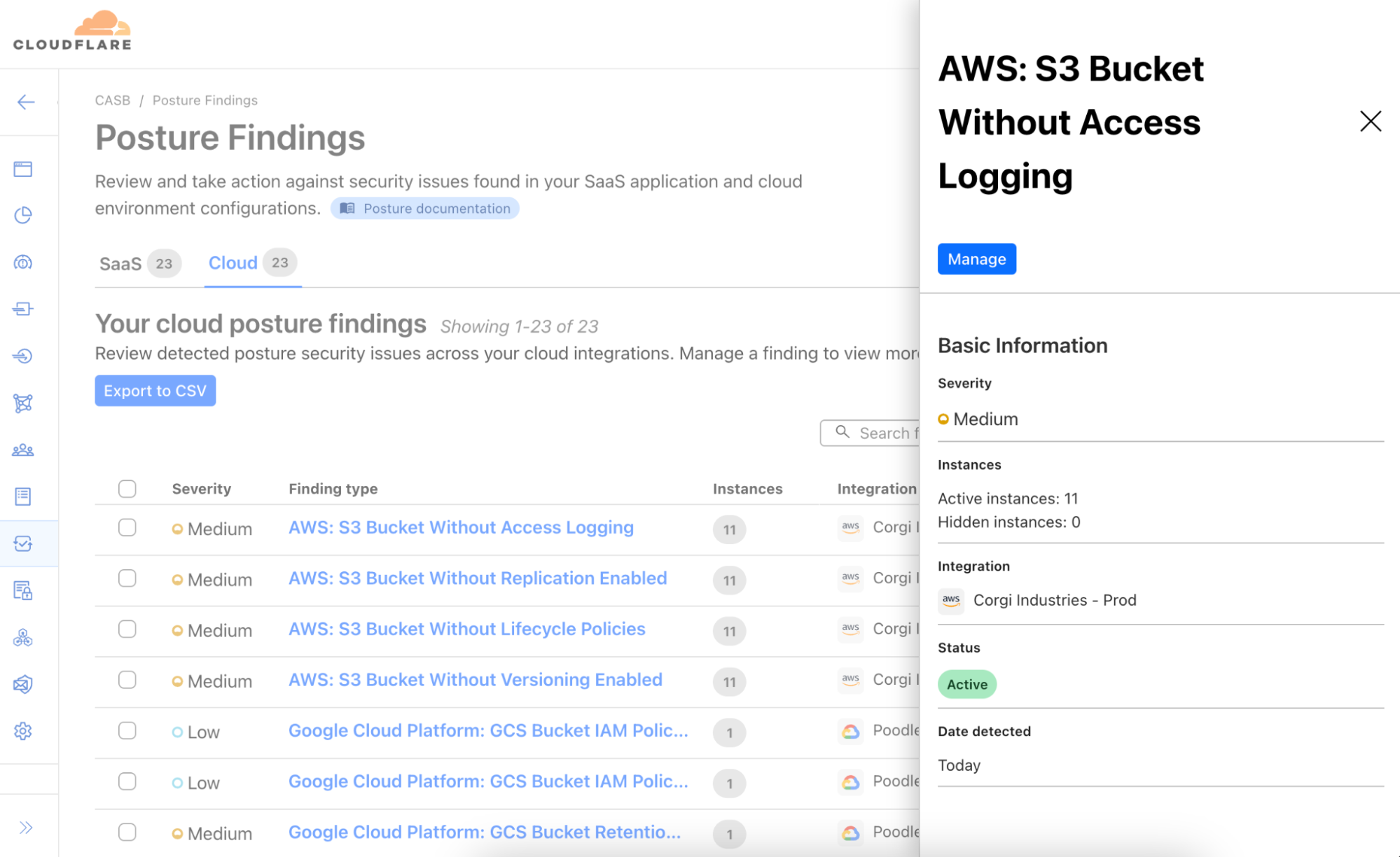
And as with all CASB integrations, this new functionality also comes with posture management features, meaning whether you’re using AWS or GCP, we’ll help you identify misconfigurations and other cloud security issues that could leave your data vulnerable​, like buckets that are publicly-accessible or have critical logging settings disabled, access keys needing rotation, or users without multi-factor authentication (MFA). It’s all included.

Simple by default, configurable where you want it

Cloudflare CASB and DLP are simple to use by default, making it easy to get started right away. But it’s also highly configurable, giving you the flexibility to fine-tune the scanning profiles to suit your specific needs.


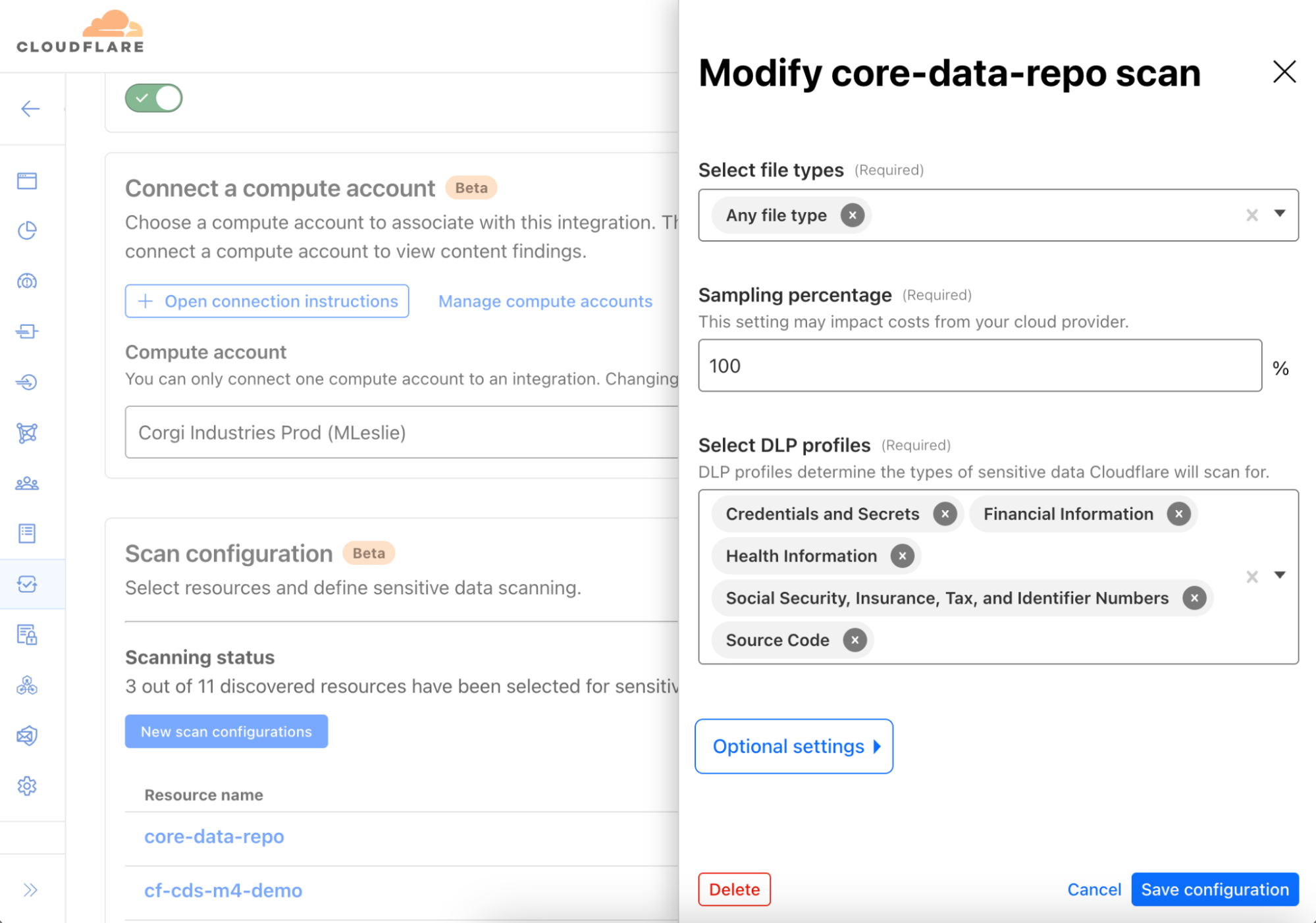
For example, you can adjust which storage buckets or file types to scan, and even sample only a percentage of objects for analysis​. The scanning also runs within your own cloud environment, so your data never leaves your infrastructure​. This approach keeps your cloud storage secure and your costs managed while allowing you to tailor the solution to your organization’s unique compliance and security requirements.

Looking ahead, our roadmap also includes expanding support to additional cloud storage environments, such as Azure Blob Storage and Cloudflare R2, further extending our comprehensive, multi-cloud security strategy. Stay tuned for more on that!

How it works

From the start, we knew that to deliver DLP capabilities across cloud environments, it would require an efficient and scalable design to enable real-time detection of sensitive data exposure.

Serverless architecture for streamlined processing

An early design decision was made to leverage a serverless architecture approach to ensure sensitive data discovery is both efficient and scalable. Here’s how it works:

  • Compute Account: The entire process runs within a cloud account owned by your organization, known as a Compute Account. This design ensures your data remains within your boundaries, avoiding costly cloud egress fees. The Compute Account can be launched in under 15 minutes using a provided Terraform template.

  • Controller function: Every minute, a lightweight, serverless controller function in your cloud environment communicates with Cloudflare’s APIs, fetching the latest DLP configurations and security profiles from your Cloudflare One account.

  • Crawler process: The controller triggers an object discovery task, which is processed by a second serverless function known as the Crawler. The Crawler queries cloud storage accounts, like AWS S3 or Google Cloud Storage, via API to identify new objects. Redis is used within the Compute Account to track which objects have yet to be evaluated.

  • Scanning for sensitive data: Newly discovered objects are sent through a queue to a third serverless function called the Scanner. This function downloads the objects and streams their contents to the DLP engine in the Compute Account, which scans for matches against predefined or custom DLP Profiles.

  • Finding generation and alerts: If a DLP match is found, metadata about the object, such as context and ownership details, is published to a queue. This data is ingested by a Cloudflare-hosted service and presented in the Cloudflare Dashboard as findings, giving security teams the visibility needed to take swift action.

Scalable and secure design

The DLP pipeline ensures that sensitive data never leaves your cloud environment — a privacy-first approach. All communication between the Compute Account and Cloudflare’s APIs are initiated by the controller, also meaning there is no need to perform any extra configuration to allow ingress traffic.

How to get started

To get started, reach out to your account team to learn more about this new data security functionality and our roadmap. If you want to try this out on your own, you can login to the Cloudflare One dashboard (create a free account here if you don’t have one) and navigate to the CASB page to set up your first integration.

Watch on Cloudflare TV

Introducing Cloudy, Cloudflare’s AI agent for simplifying complex configurations

Post Syndicated from Alex Dunbrack original https://blog.cloudflare.com/introducing-ai-agent/

It’s a big day here at Cloudflare! Not only is it Security Week, but today marks Cloudflare’s first step into a completely new area of functionality, intended to improve how our users both interact with, and get value from, all of our products.

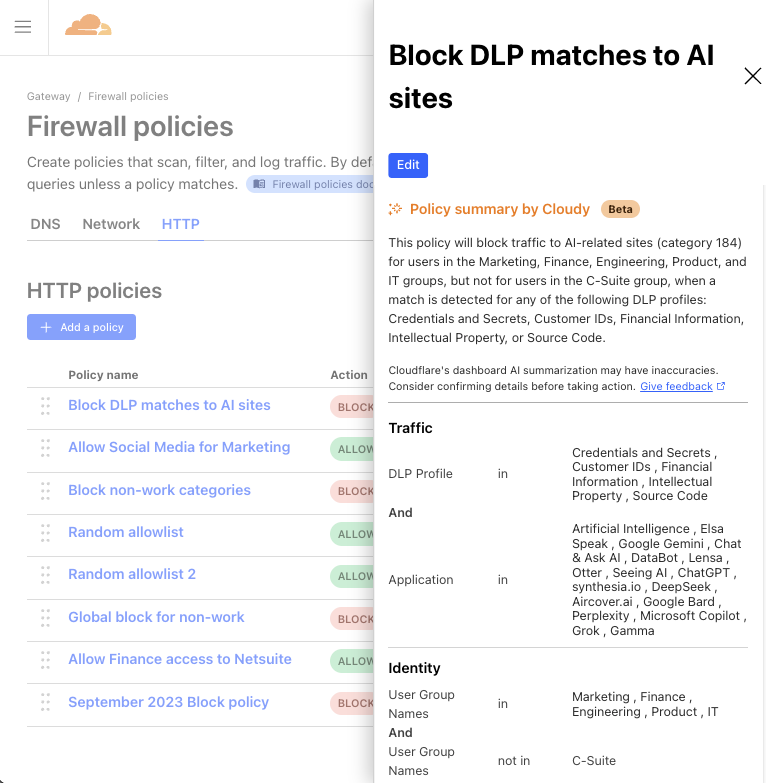
We’re excited to share a first glance of how we’re embedding AI features into the management of Cloudflare products you know and love. Our first mission? Focus on security and streamline the rule and policy management experience. The goal is to automate away the time-consuming task of manually reviewing and contextualizing Custom Rules in Cloudflare WAF, and Gateway policies in Cloudflare One, so you can instantly understand what each policy does, what gaps they have, and what you need to do to fix them.

Meet Cloudy, Cloudflare’s first AI agent

Our initial step toward a fully AI-enabled product experience is the introduction of Cloudy, the first version of Cloudflare AI agents, assistant-like functionality designed to help users quickly understand and improve their Cloudflare configurations in multiple areas of the product suite. You’ll start to see Cloudy functionality seamlessly embedded into two Cloudflare products across the dashboard, which we’ll talk about below.

And while the name Cloudy may be fun and light-hearted, our goals are more serious: Bring Cloudy and AI-powered functionality to every corner of Cloudflare, and optimize how our users operate and manage their favorite Cloudflare products. Let’s start with two places where Cloudy is now live and available to all customers using the WAF and Gateway products.

WAF Custom Rules

Let’s begin with AI-powered overviews of WAF Custom Rules. For those unfamiliar, Cloudflare’s Web Application Firewall (WAF) helps protect web applications from attacks like SQL injection, cross-site scripting (XSS), and other vulnerabilities. 

One specific feature of the WAF is the ability to create WAF Custom Rules. These allow users to tailor security policies to block, challenge, or allow traffic based on specific attributes or security criteria.

However, for customers with dozens or even hundreds of rules deployed across their organization, it can be challenging to maintain a clear understanding of their security posture. Rule configurations evolve over time, often managed by different team members, leading to potential inefficiencies and security gaps. What better problem for Cloudy to solve?


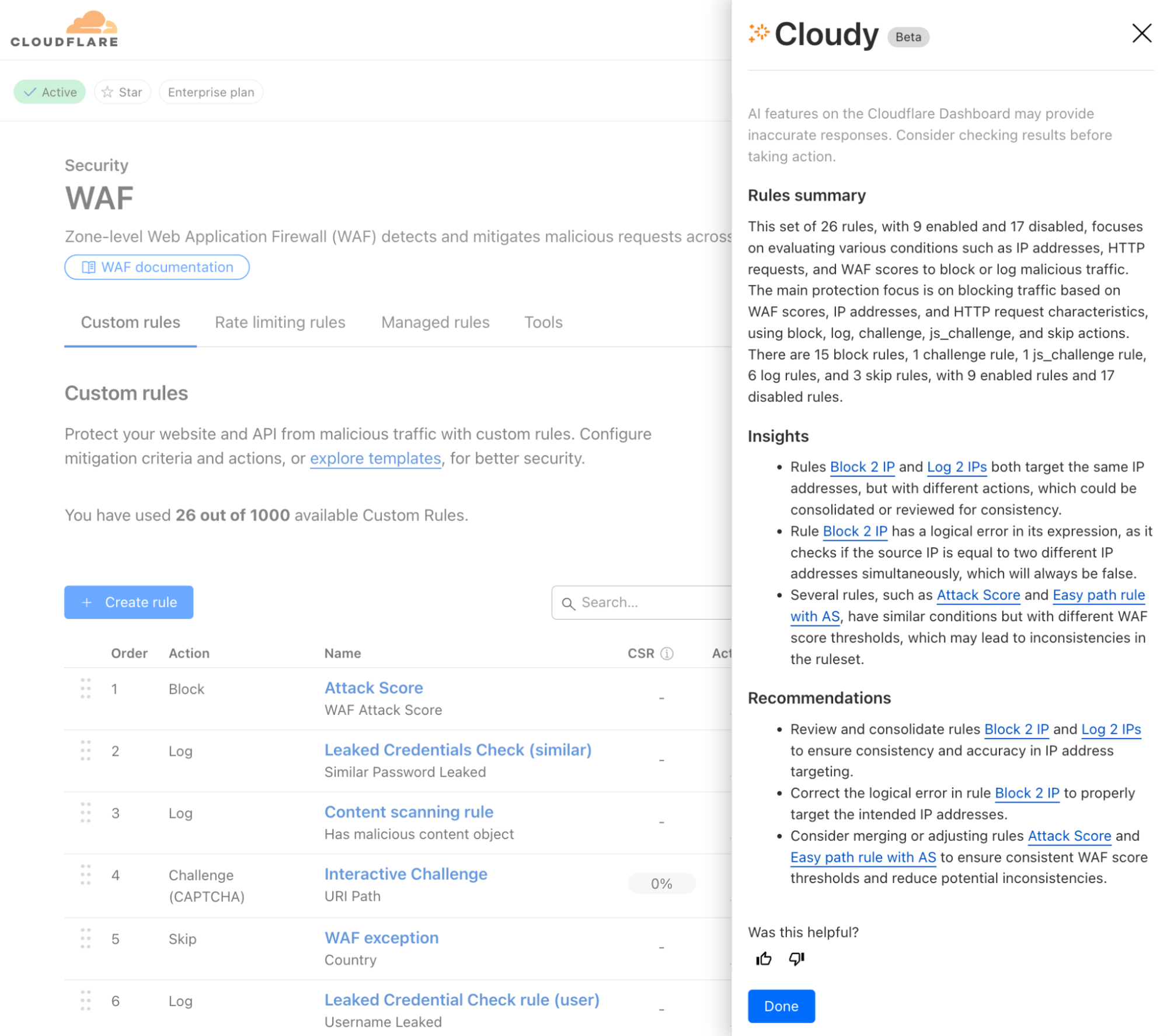
Powered by Workers AI, today we’ll share how Cloudy will help review your WAF Custom Rules and provide a summary of what’s configured across them. Cloudy will also help you identify and solve issues such as:

  • Identifying redundant rules: Identify when multiple rules are performing the same function, or using similar fields, helping you streamline your configuration.

  • Optimising execution order: Spot cases where rules ordering affects functionality, such as when a terminating rule (block/challenge action) prevents subsequent rules from executing.

  • Analysing conflicting rules: Detect when rules counteract each other, such as one rule blocking traffic that another rule is designed to allow or log.

  • Identifying disabled rules: Highlight potentially important security rules that are in a disabled state, helping ensure that critical protections are not accidentally left inactive.

Cloudy won’t just summarize your rules, either. It will analyze the relationships and interactions between rules to provide actionable recommendations. For security teams managing complex sets of Custom Rules, this means less time spent auditing configurations and more confidence in your security coverage.

Available to all users, we’re excited to show how Cloudflare AI Agents can enhance the usability of our products, starting with WAF Custom Rules. But this is just the beginning.

Cloudflare One Firewall policies


We’ve also added Cloudy to Cloudflare One, our SASE platform, where enterprises manage the security of their employees and tools from a single dashboard.

In Cloudflare Gateway, our Secure Web Gateway offering, customers can configure policies to manage how employees do their jobs on the Internet. These Gateway policies can block access to malicious sites, prevent data loss violations, and control user access, among other things.

But similar to WAF Custom Rules, Gateway policy configurations can become overcomplicated and bogged down over time, with old, forgotten policies that do who-knows-what. Multiple selectors and operators working in counterintuitive ways. Some blocking traffic, others allowing it. Policies that include several user groups, but carve out specific employees. We’ve even seen policies that block hundreds of URLs in a single step. All to say, managing years of Gateway policies can become overwhelming.

So, why not have Cloudy summarize Gateway policies in a way that makes their purpose clear and concise?

Available to all Cloudflare Gateway users (create a free Cloudflare One account here), Cloudy will now provide a quick summary of any Gateway policy you view. It’s now easier than ever to get a clear understanding of each policy at a glance, allowing admins to spot misconfigurations, redundant controls, or other areas for improvement, and move on with confidence.

Built on Workers AI

At the heart of our new functionality is Cloudflare Workers AI (yes, the same version that everyone uses!) that leverages advanced large language models (LLMs) to process vast amounts of information; in this case, policy and rules data. Traditionally, manually reviewing and contextualizing complex configurations is a daunting task for any security team. With Workers AI, we automate that process, turning raw configuration data into consistent, clear summaries and actionable recommendations.

How it works

Cloudflare Workers AI ingests policy and rule configurations from your Cloudflare setup and combines them with a purpose-built LLM prompt. We leverage the same publicly-available LLM models that we offer our customers, and then further enrich the prompt with some additional data to provide it with context. For this specific task of analyzing and summarizing policy and rule data, we provided the LLM:

  • Policy & rule data: This is the primary data itself, including the current configuration of policies/rules for Cloudy to summarize and provide suggestions against.

  • Documentation on product abilities: We provide the model with additional technical details on the policy/rule configurations that are possible with each product, so that the model knows what kind of recommendations are within its bounds.

  • Enriched datasets: Where WAF Custom Rules or CF1 Gateway policies leverage other ‘lists’ (e.g., a WAF rule referencing multiple countries, a Gateway policy leveraging a specific content category), the list item(s) selected must be first translated from an ID to plain-text wording so that the LLM can interpret which policy/rule values are actually being used.

  • Output instructions: We specify to the model which format we’d like to receive the output in. In this case, we use JSON for easiest handling.

  • Additional clarifications: Lastly, we explicitly instruct the LLM to be sure about its output, valuing that aspect above all else. Doing this helps us ensure that no hallucinations make it to the final output.

By automating the analysis of your WAF Custom Rules and Gateway policies, Cloudflare Workers AI not only saves you time but also enhances security by reducing the risk of human error. You get clear, actionable insights that allow you to streamline your configurations, quickly spot anomalies, and maintain a strong security posture—all without the need for labor-intensive manual reviews.

What’s next for Cloudy

Beta previews of Cloudy are live for all Cloudflare customers today. But this is just the beginning of what we envision for AI-powered functionality across our entire product suite.

Throughout the rest of 2025, we plan to roll out additional AI agent capabilities across other areas of Cloudflare. These new features won’t just help customers manage security more efficiently, but they’ll also provide intelligent recommendations for optimizing performance, streamlining operations, and enhancing overall user experience.

We’re excited to hear your thoughts as you get to meet Cloudy and try out these new AI features – send feedback to us at [email protected], or post your thoughts on X, LinkedIn, or Mastodon tagged with #SecurityWeek! Your feedback will help shape our roadmap for AI enhancement, and bring our users smarter, more efficient tooling that helps everyone get more secure.


Watch on Cloudflare TV

Scan and secure Atlassian with Cloudflare CASB

Post Syndicated from Alex Dunbrack original https://blog.cloudflare.com/scan-atlassian-casb/

Scan and secure Atlassian with Cloudflare CASB

Scan and secure Atlassian with Cloudflare CASB

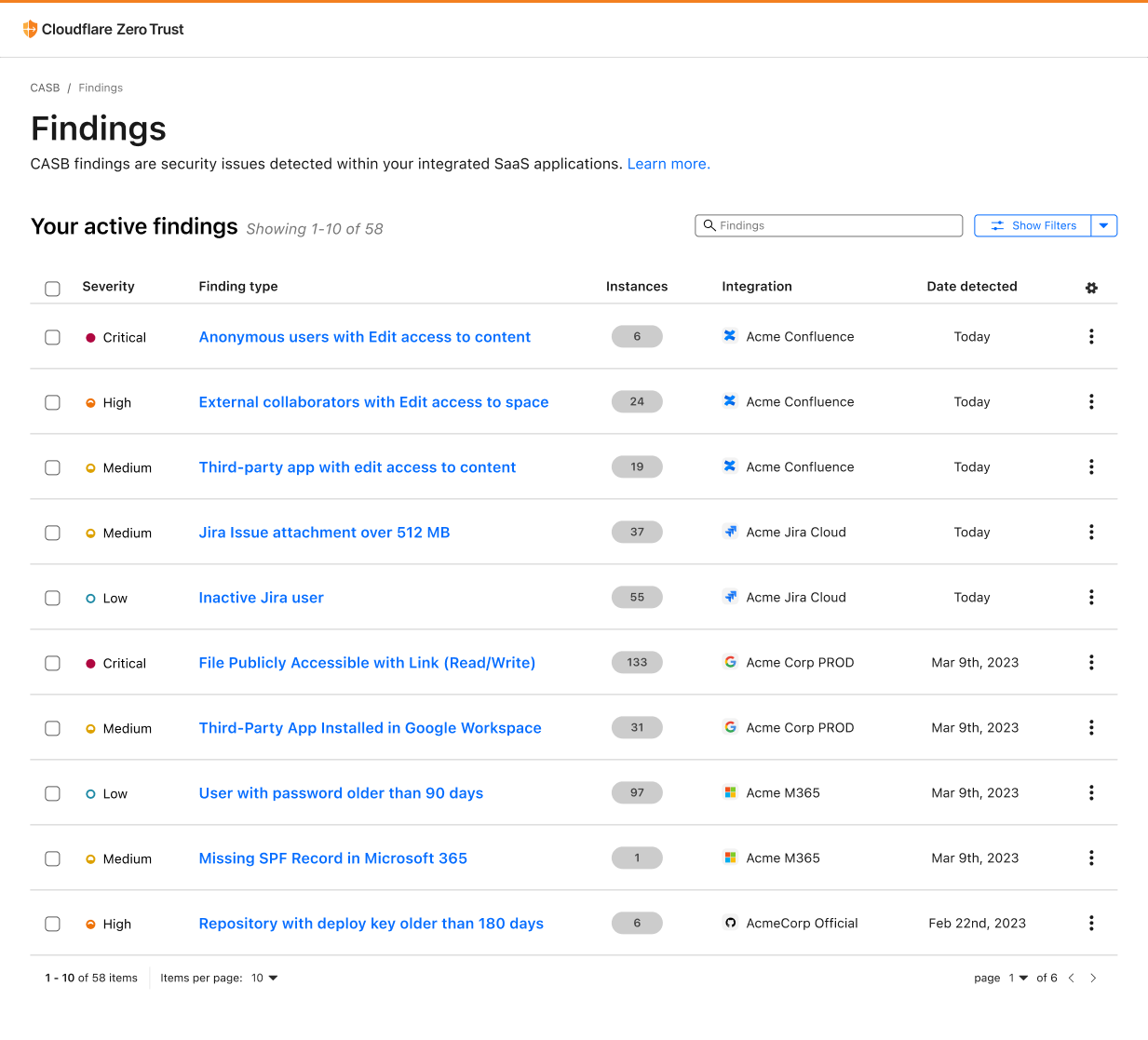
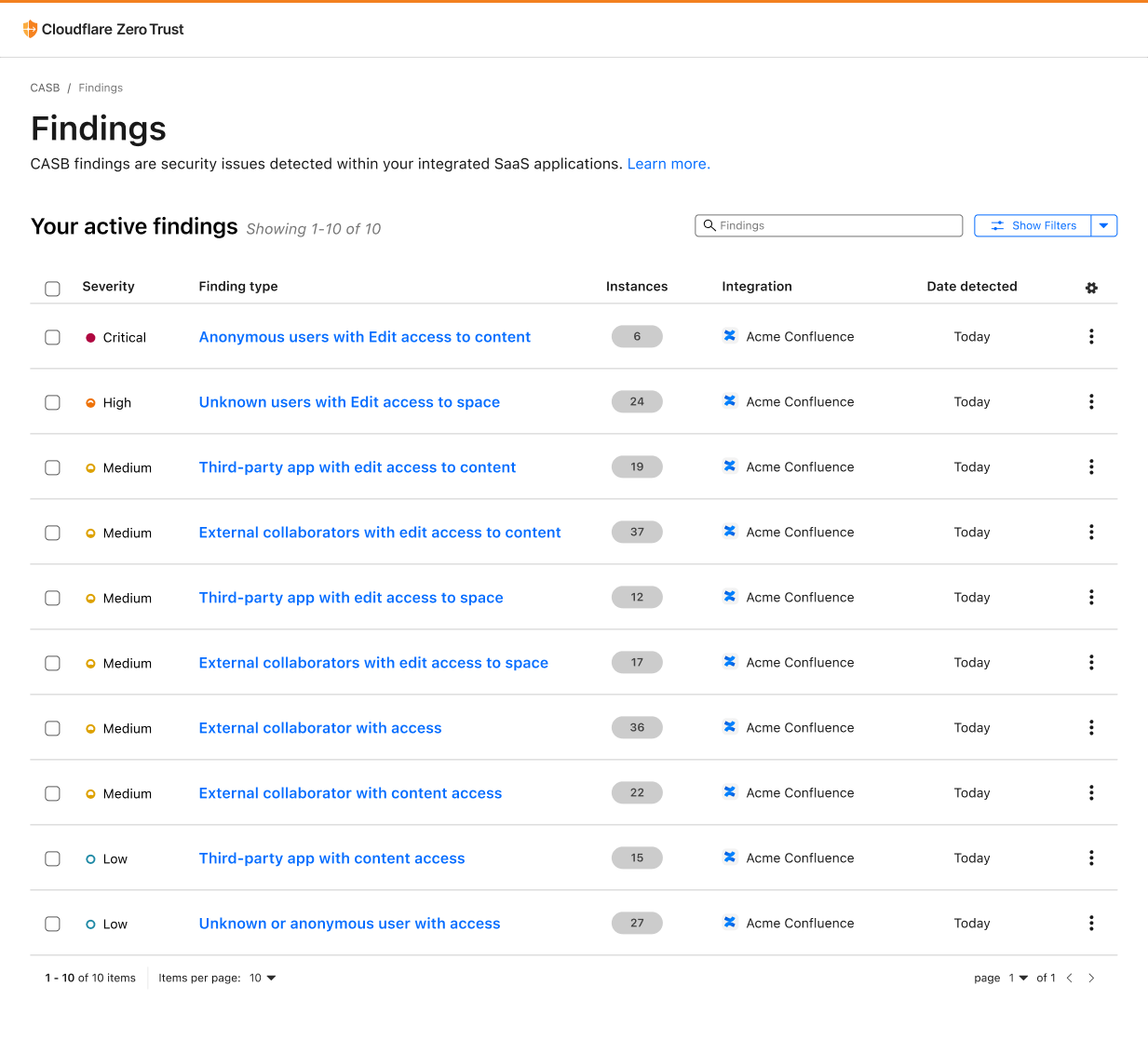
As part of Security Week, two new integrations are coming to Cloudflare CASB, one for Atlassian Confluence and the other for Atlassian Jira.

We’re excited to launch support for these two new SaaS applications (in addition to those we already support) given the reliance that we’ve seen organizations from around the world place in them for streamlined, end-to-end project management.

Let’s dive into what Cloudflare Zero Trust customers can expect from these new integrations.

CASB: Security for your SaaS apps

First, a quick recap. CASB, or Cloud Access Security Broker, is one of Cloudflare’s newer offerings, released last September to provide security operators – CISOs and security engineers – clear visibility and administrative control over the security of their SaaS apps.

Whether it’s Google Workspace, Microsoft 365, Slack, Salesforce, Box, GitHub, or Atlassian (whew!), CASB can easily connect and scan these apps for critical security issues, and provide users an exhaustive list of identified problems, organized for triage.

Scan and secure Atlassian with Cloudflare CASB

Scan Confluence with Cloudflare CASB

Scan and secure Atlassian with Cloudflare CASB

Over time, Atlassian Confluence has become the go-to collaboration platform for teams to create, organize, and share content, such as documents, notes, and meeting minutes. However, from a security perspective, Confluence’s flexibility and wide compatibility with third-party applications can pose a security risk if not properly configured and monitored.

With this new integration, IT and security teams can begin scanning for Atlassian- and Confluence-specific security issues that may be leaving sensitive corporate data at risk. Customers of CASB using Confluence Cloud can expect to identify issues like publicly shared content, unauthorized access, and other vulnerabilities that could be exploited by bad actors.

By providing this additional layer of SaaS security, Cloudflare CASB can help organizations better protect their sensitive data while still leveraging the collaborative power of Confluence.

Scan Jira with Cloudflare CASB

Scan and secure Atlassian with Cloudflare CASB

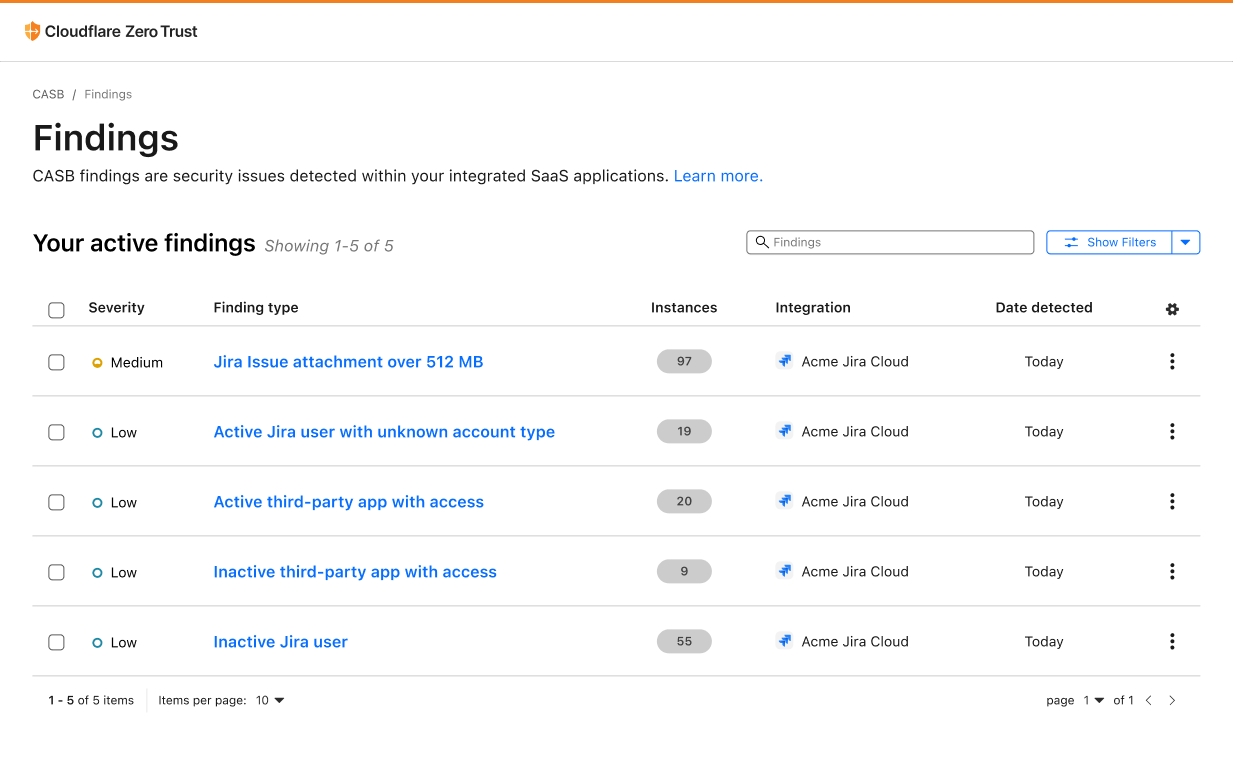
A mainstay project management tool used to track tasks, issues, and progress on projects, Atlassian Jira has become an essential part of the software development process for teams of all sizes. At the same time, this also means that Jira has become a rich target for those looking to exploit and gain access to sensitive data.

With Cloudflare CASB, security teams can now easily identify security issues that could leave employees and sensitive business data vulnerable to compromise. Compatible with Jira Cloud accounts, Identified issues can range from flagging user and third-party app access issues, such as account misuse and users not following best practices, to identification of files that could be potentially overshared and worth deeper investigation.

By providing security admins with a single view to see security issues across their entire SaaS footprint, now including Jira and Confluence, Cloudflare CASB makes it easier for security teams to stay up-to-date with potential security risks.

Getting started

With the addition of Jira and Confluence to the growing list of CASB integrations, we’re making our products as widely compatible as possible so that organizations can continue placing their trust and confidence in us to help keep them secure.

Today, Cloudflare CASB supports integrations with Google Workspace, Microsoft 365, Slack, Salesforce, Box, GitHub, Jira, and Confluence, with a growing list of other critical applications on their way, so if there’s one in particular you’d like to see soon, let us know!

For those not already using Cloudflare Zero Trust, don’t hesitate to get started today – see the platform yourself with 50 free seats by signing up here, then get in touch with our team here to learn more about how Cloudflare CASB can help your organization lock down its SaaS apps.

New: Scan Salesforce and Box for security issues

Post Syndicated from Alex Dunbrack original https://blog.cloudflare.com/casb-adds-salesforce-and-box-integrations/

New: Scan Salesforce and Box for security issues

New: Scan Salesforce and Box for security issues

Today, we’re sharing the release of two new SaaS integrations for Cloudflare CASB – Salesforce and Box – in order to help CIOs, IT leaders, and security admins swiftly identify looming security issues present across the exact type of tools housing this business-critical data.

Recap: What is Cloudflare CASB?

Released in September, Cloudflare’s API CASB has already proven to organizations from around the world that security risks – like insecure settings and inappropriate file sharing – can often exist across the friendly SaaS apps we all know and love, and indeed pose a threat. By giving operators a comprehensive view of the issues plaguing their SaaS environments, Cloudflare CASB has allowed them to effortlessly remediate problems in a timely manner before they can be leveraged against them.

But as both we and other forward-thinking administrators have come to realize, it’s not always Microsoft 365, Google Workspace, and business chat tools like Slack that contain an organization’s most sensitive information.

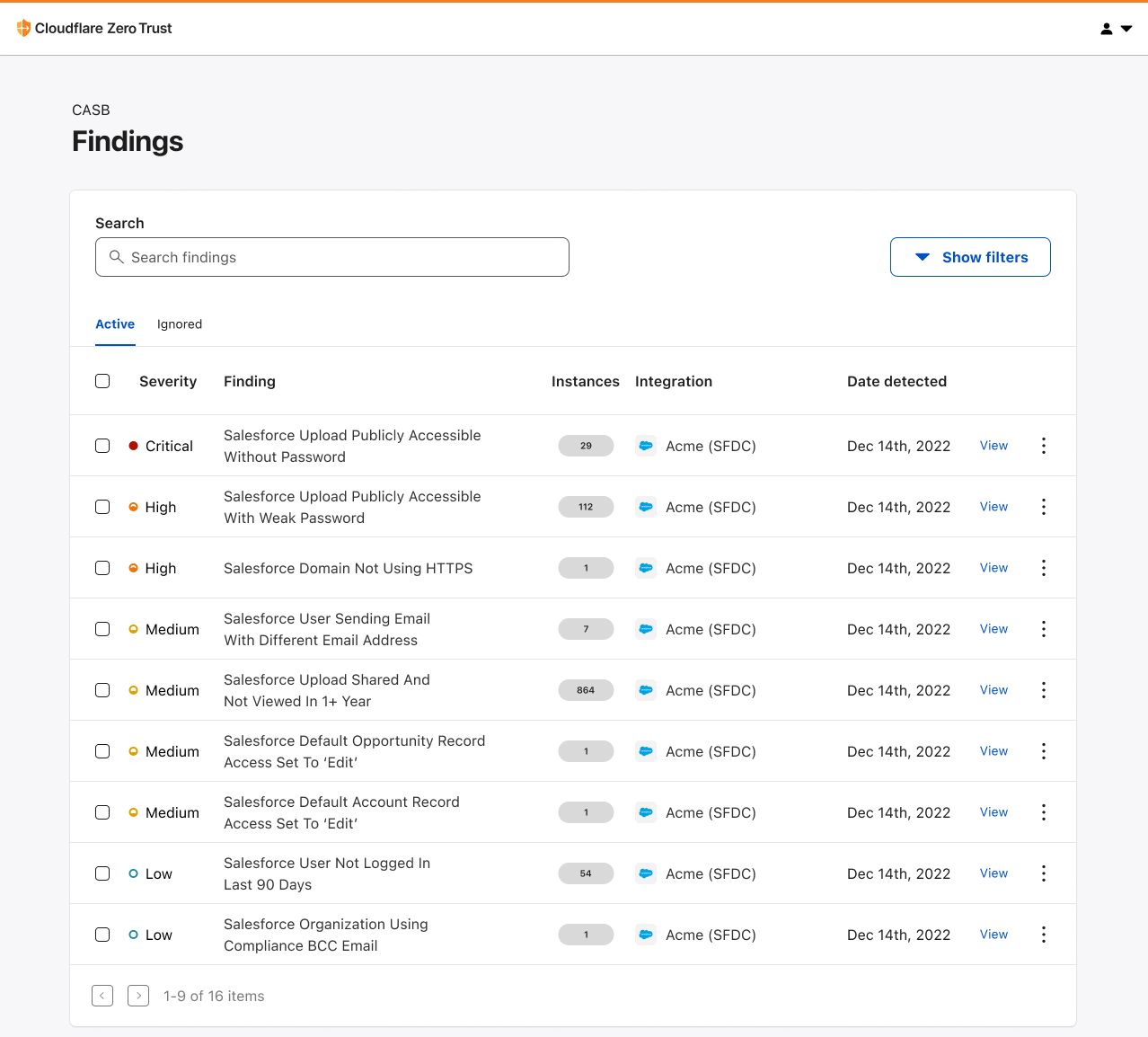
Scan Salesforce with Cloudflare CASB

The first Software-as-a-Service. Salesforce, the sprawling, intricate, hard-to-contain Customer Relationship Management (CRM) platform, gives workforces a flexible hub from which they can do just as the software describes: manage customer relationships. Whether it be tracking deals and selling opportunities, managing customer conversations, or storing contractual agreements, Salesforce has truly become the ubiquitous solution for organizations looking for a way to manage every customer-facing interaction they have.

This reliance, however, also makes Salesforce a business data goldmine for bad actors.

New: Scan Salesforce and Box for security issues

With CASB’s new integration for Salesforce, IT and security operators will be able to quickly connect their environments and scan them for the kind of issues putting their sensitive business data at risk. Spot uploaded files that have been shared publicly with anyone who has the link. Identify default permissions that give employees access to records that should be need-to-know only. You can even see employees who are sending out emails as other Salesforce users!

Using this new integration, we’re excited to help close the security visibility gap for yet another SaaS app serving as the lifeblood for teams out in the field making business happen.

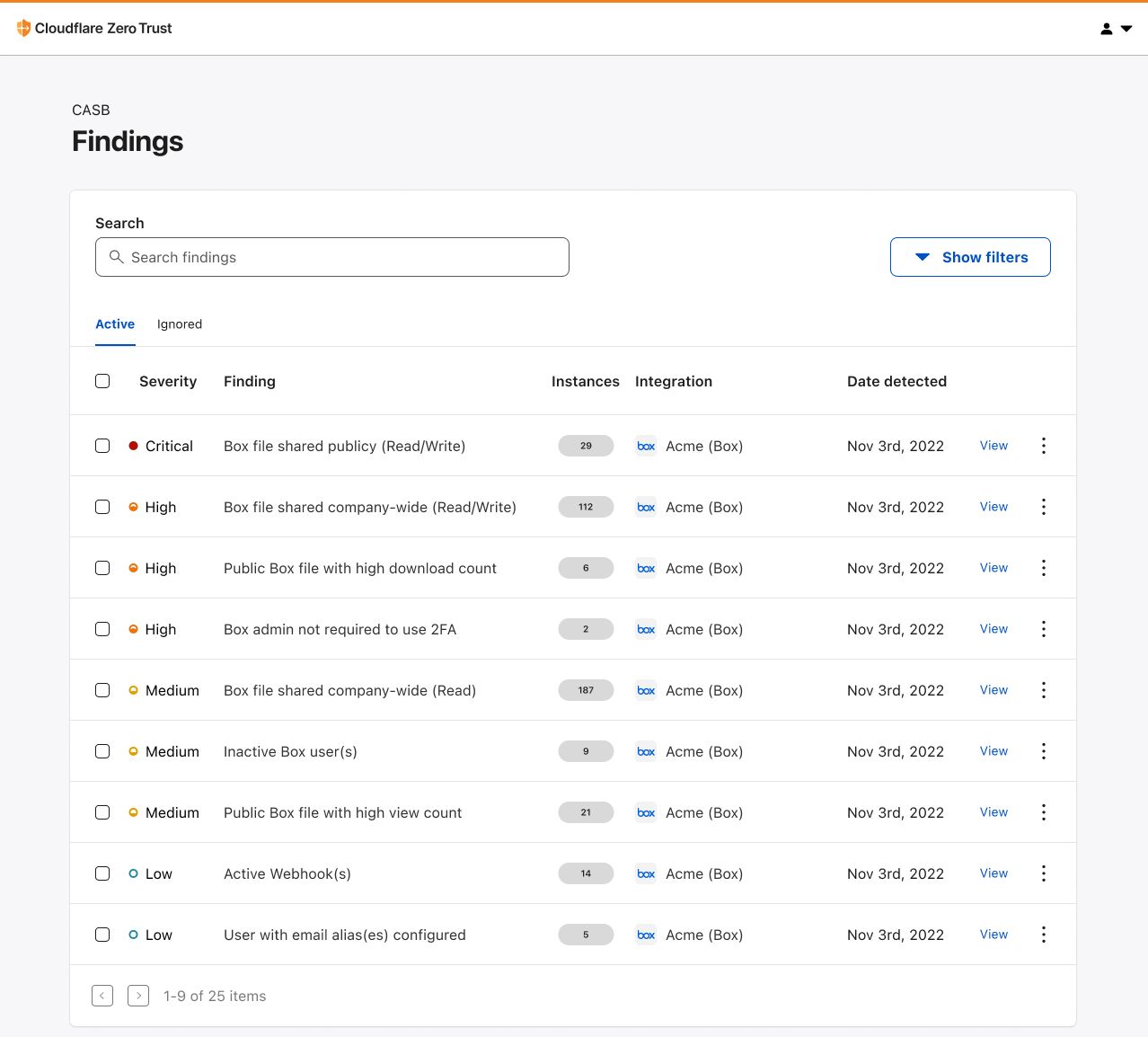
Scan Box with Cloudflare CASB

Box is the leading Content Cloud that enables organizations to accelerate business processes, power workplace collaboration, and protect their most valuable information, all while working with a best-of-breed enterprise IT stack like Cloudflare.

A platform used to store everything – from contracts and financials to product roadmaps and employee records – Box has given collaborative organizations a single place to convene and share information that, in a growing remote-first world, has no better place to be stored.

So where are disgruntled employees and people with malicious intent going to look when they want to unveil private business files?

New: Scan Salesforce and Box for security issues

With Cloudflare CASB’s new integration for Box, security and IT teams alike can now link their admin accounts and scan them for under-the-radar security issues leaving them prone to compromise and data exfiltration. In addition to Box’s built-in content and collaboration security, Cloudflare CASB gives you another added layer of protection where you can catch files and folders shared publicly or with users outside your organization. By providing security admins with a single view to see employees who aren’t following security policies, we make it harder for bad actors to get inside and do damage.

With Cloudflare’s status as an official Box Technology Partner, we’re looking forward to offering both Cloudflare and Box users a robust, yet easy-to-use toolset that can help stop pressing, real-world data security incidents right in their tracks.

“Organizations today need products that are inherently secure to support employees working from anywhere,” said Areg Alimian, Head of Security Products at Box. “At Box, we continuously strive to improve our integrations with third-party apps so that it’s easier than ever for customers to use Box alongside best-in-class solutions. With today’s integration with Cloudflare CASB, we enable our joint customers to have a single pane of glass view allowing them to consistently enforce security policies and protect leakage of sensitive information across all their apps.”

Taking action on your business data security

Salesforce and Box are certainly not the only SaaS applications managing this type of sensitive organizational data. At Cloudflare, we strive to make our products as widely compatible as possible so that organizations can continue to place their trust and confidence in us to help keep them secure.

Today, Cloudflare CASB supports integrations with Google Workspace, Microsoft 365, Slack, GitHub, Salesforce, and Box, with a growing list of other critical applications on their way, so if there’s one in particular you’d like to see soon, let us know!

For those not already using Cloudflare Zero Trust, don’t hesitate to get started today – see the platform yourself with 50 free seats by signing up here, then get in touch with our team here to learn more about how Cloudflare CASB can help your organization lock down its SaaS apps.

How Cloudflare CASB and DLP work together to protect your data

Post Syndicated from Alex Dunbrack original https://blog.cloudflare.com/casb-dlp/

How Cloudflare CASB and DLP work together to protect your data

How Cloudflare CASB and DLP work together to protect your data

Cloudflare’s Cloud Access Security Broker (CASB) scans SaaS applications for misconfigurations, unauthorized user activity, shadow IT, and other data security issues. Discovered security threats are called out to IT and security administrators for timely remediation, removing the burden of endless manual checks on a long list of applications.

But Cloudflare customers revealed they want more information available to assess the risk associated with a misconfiguration. A publicly exposed intramural kickball schedule is not nearly as critical as a publicly exposed customer list, so customers want them treated differently. They asked us to identify where sensitive data is exposed, reducing their assessment and remediation time in the case of leakages and incidents. With that feedback, we recognized another opportunity to do what Cloudflare does best: combine the best parts of our products to solve customer problems.

What’s underway now is an exciting effort to provide Zero Trust users a way to get the same DLP coverage for more than just sensitive data going over the network: SaaS DLP for data stored in popular SaaS apps used by millions of organizations.

With these upcoming capabilities, customers will be able to connect their SaaS applications in just a few clicks and scan them for sensitive data – such as PII, PCI, and even custom regex – stored in documents, spreadsheets, PDFs, and other uploaded files. This gives customers the signals to quickly assess and remediate major security risks.

Understanding CASB

How Cloudflare CASB and DLP work together to protect your data

Released in September, Cloudflare’s API CASB has already enabled organizations to quickly and painlessly deep-dive into the security of their SaaS applications, whether it be Google Workspace, Microsoft 365, or any of the other SaaS apps we support (including Salesforce and Box released today). With CASB, operators have been able to understand what SaaS security issues could be putting their organization and employees at risk, like insecure settings and misconfigurations, files shared inappropriately, user access risks and best practices not being followed.

“But what about the sensitive data stored inside the files we’re collaborating on? How can we identify that?”

Understanding DLP

Also released in September, Cloudflare DLP for data in-transit has provided users of Gateway, Cloudflare’s Secure Web Gateway (SWG), a way to manage and outright block the movement of sensitive information into and out of the corporate network, preventing it from landing in the wrong hands. In this case, DLP can spot sensitive strings, like credit card and social security numbers, as employees attempt to communicate them in one form or another, like uploading them in a document to Google Drive or sent in a message on Slack. Cloudflare DLP blocks the HTTP request before it reaches the intended application.

How Cloudflare CASB and DLP work together to protect your data

But once again we received the same questions and feedback as before.

“What about data in our SaaS apps? The information stored there won’t be visible over the network.”

CASB + DLP, Better Together

Coming in early 2023, Cloudflare Zero Trust will introduce a new product synergy that allows customers to peer into the files stored in their SaaS applications and identify any particularly sensitive data inside them.

Credit card numbers in a Google Doc? No problem. Social security numbers in an Excel spreadsheet? CASB will let you know.

With this product collaboration, Cloudflare will provide IT and security administrators one more critical area of security coverage, rounding out our data loss prevention story. Between DLP for data in-transit, CASB for file sharing monitoring, and even Remote Browser Isolation (RBI) and Area 1 for data in-use DLP and email DLP, respectively, organizations can take comfort in knowing that their bases are covered when it comes to data exfiltration and misuse.

While development continues, we’d love to hear how this kind of functionality could be used at an organization like yours. Interested in learning more about either of these products or what’s coming next? Reach out to your account manager or click here to get in touch if you’re not already using Cloudflare.

Gateway + CASB: alphabetti spaghetti that spells better SaaS security

Post Syndicated from Alex Dunbrack original https://blog.cloudflare.com/gateway-casb-in-action/

Gateway + CASB: alphabetti spaghetti that spells better SaaS security

This post is also available in 简体中文 and Español.

Gateway + CASB: alphabetti spaghetti that spells better SaaS security

Back in June 2022, we announced an upcoming feature that would allow for Cloudflare Zero Trust users to easily create prefilled HTTP policies in Cloudflare Gateway (Cloudflare’s Secure Web Gateway solution) via issues identified by CASB, a new Cloudflare product that connects, scans, and monitors your SaaS apps – like Google Workspace and Microsoft 365 – for security issues.

With Cloudflare’s 12th Birthday Week nearing its end, we wanted to highlight, in true Cloudflare fashion, this new feature in action.

Gateway + CASB: alphabetti spaghetti that spells better SaaS security

What is CASB? What is Gateway?

To quickly recap, Cloudflare’s API-driven CASB offers IT and security teams a fast, yet effective way to connect, scan, and monitor their SaaS apps for security issues, like file exposures, misconfigurations, and Shadow IT. In just a few clicks, users can see an exhaustive list of security issues that may be affecting the security of their SaaS apps, including Google Workspace, Microsoft 365, Slack, and GitHub.

Cloudflare Gateway, our Secure Web Gateway (SWG) offering, allows teams to monitor and control the outbound connections originating from endpoint devices. For example, don’t want your employees to access gambling and social media websites on company devices? Just block access to them in our easy-to-use Zero Trust dashboard.

The problems at hand

As we highlighted in our first post, Shadow IT – or unapproved third-party applications being used by employees – continues to be one of the biggest pain points for IT administrators in the cloud era. When employees grant access to external services without the consent of their IT or security department, they risk granting bad actors access to some of the company’s most sensitive data stored in these SaaS applications.

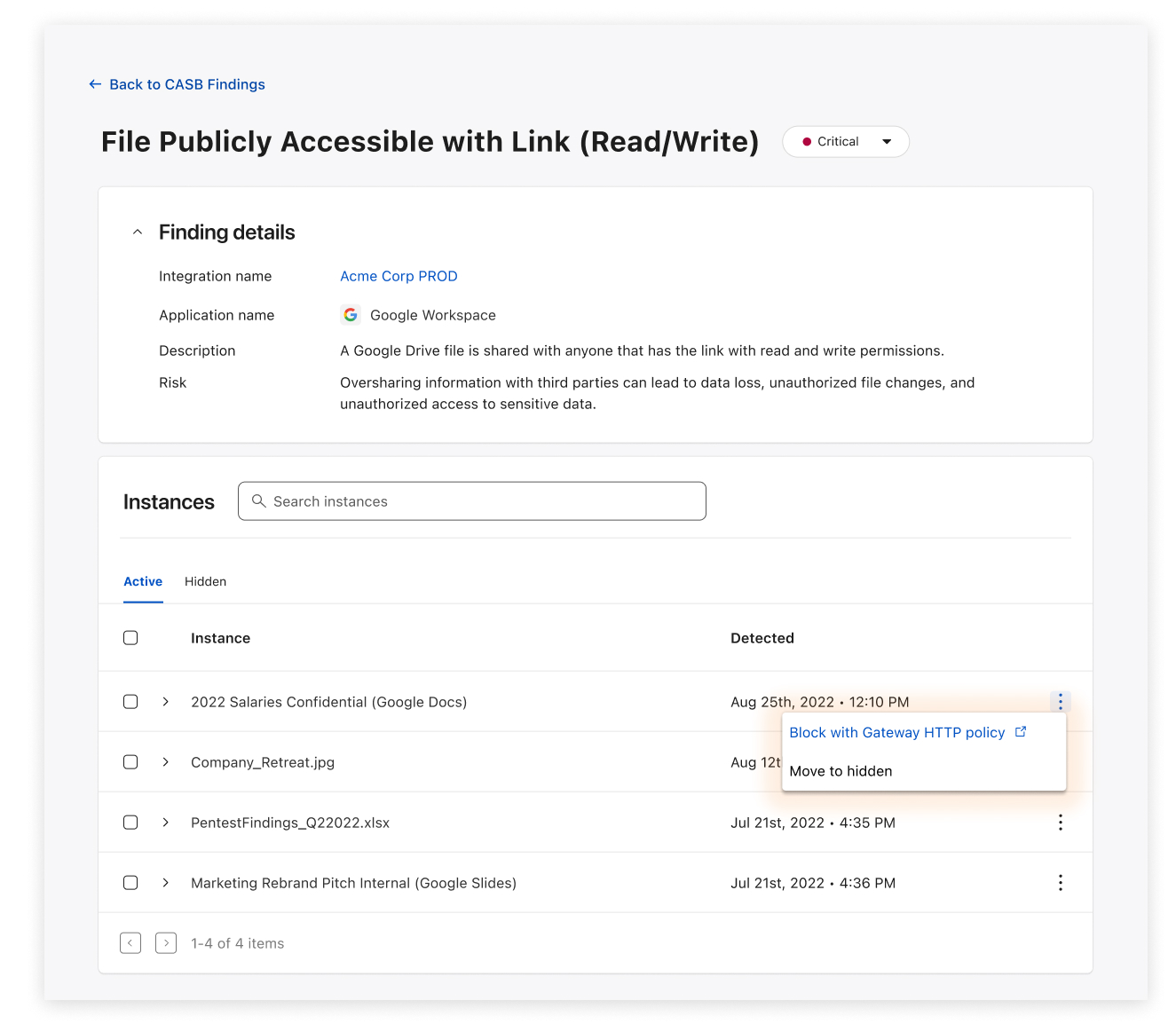
Another major issue affecting the security of data stored in the cloud is file exposure in the form of oversharing. When an employee shares a highly sensitive Google Doc to someone via a public link, would your IT or security team know about it? And even if they do, do they have a way to minimize the risk and block access to it?

With these two products now being used by customers around the world, we’re excited to share how visibility and basic awareness of SaaS security issues doesn’t have to be the end of it. What are admins supposed to do next?

Gateway + CASB: blocking identified threats in three (yes, three) clicks

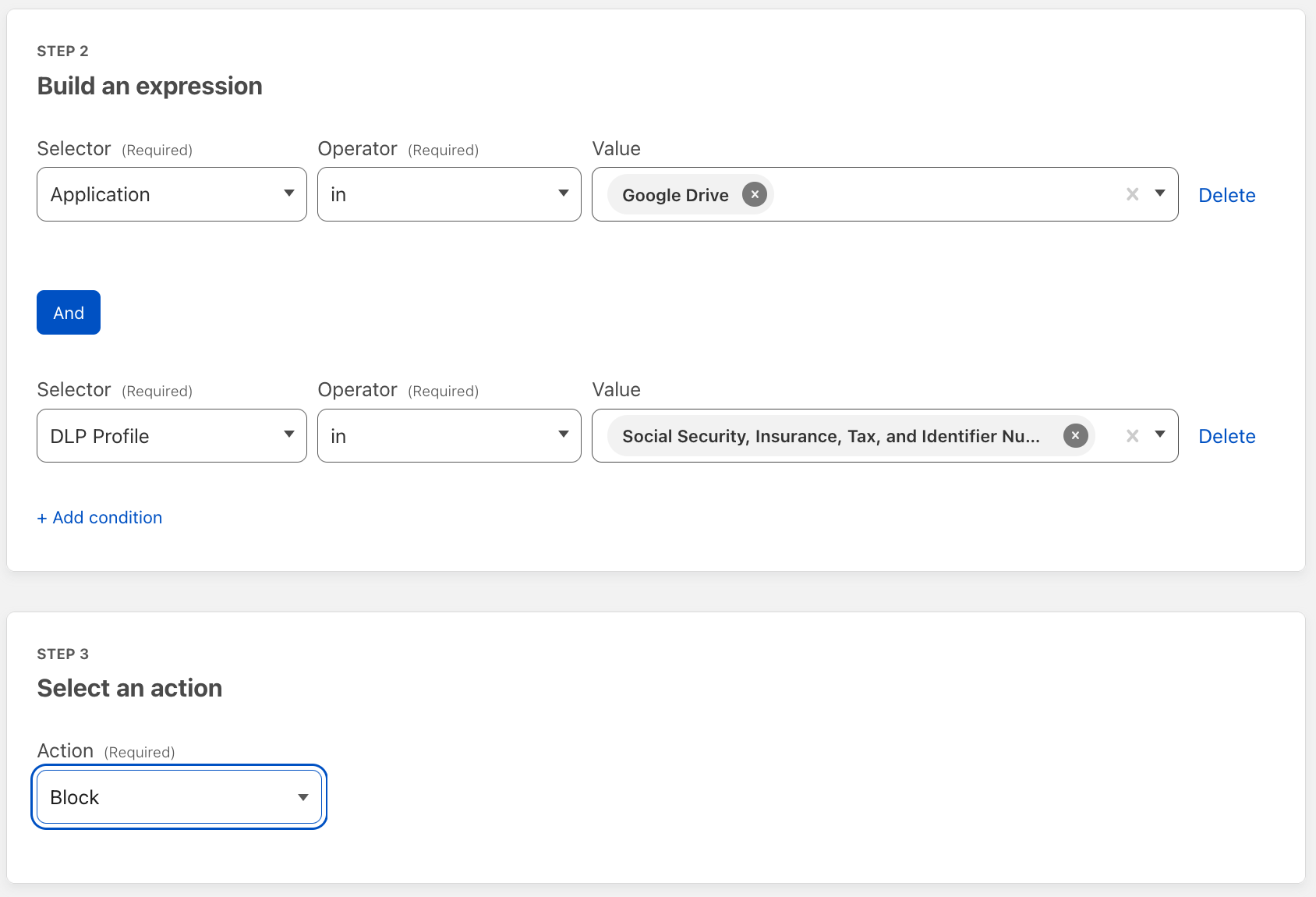
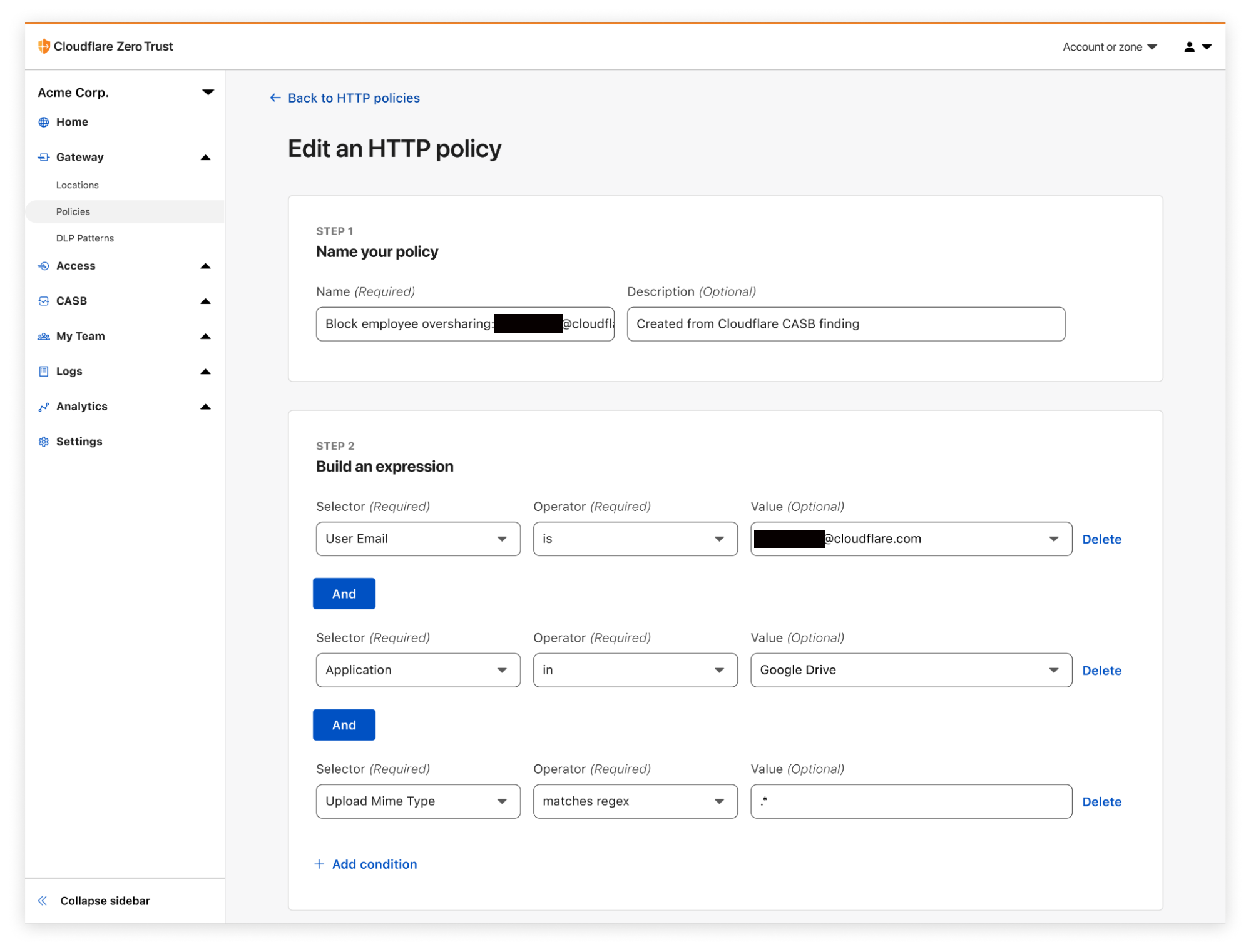
Now, when CASB discovers a problem (which we call a Finding), it’s now possible to easily create a corresponding Gateway policy in as few as three clicks.

This means users can now automatically generate fine-grained Gateway policies to prevent specific inappropriate behavior from continuing, while still allowing for expected access and usage that meets company policy.

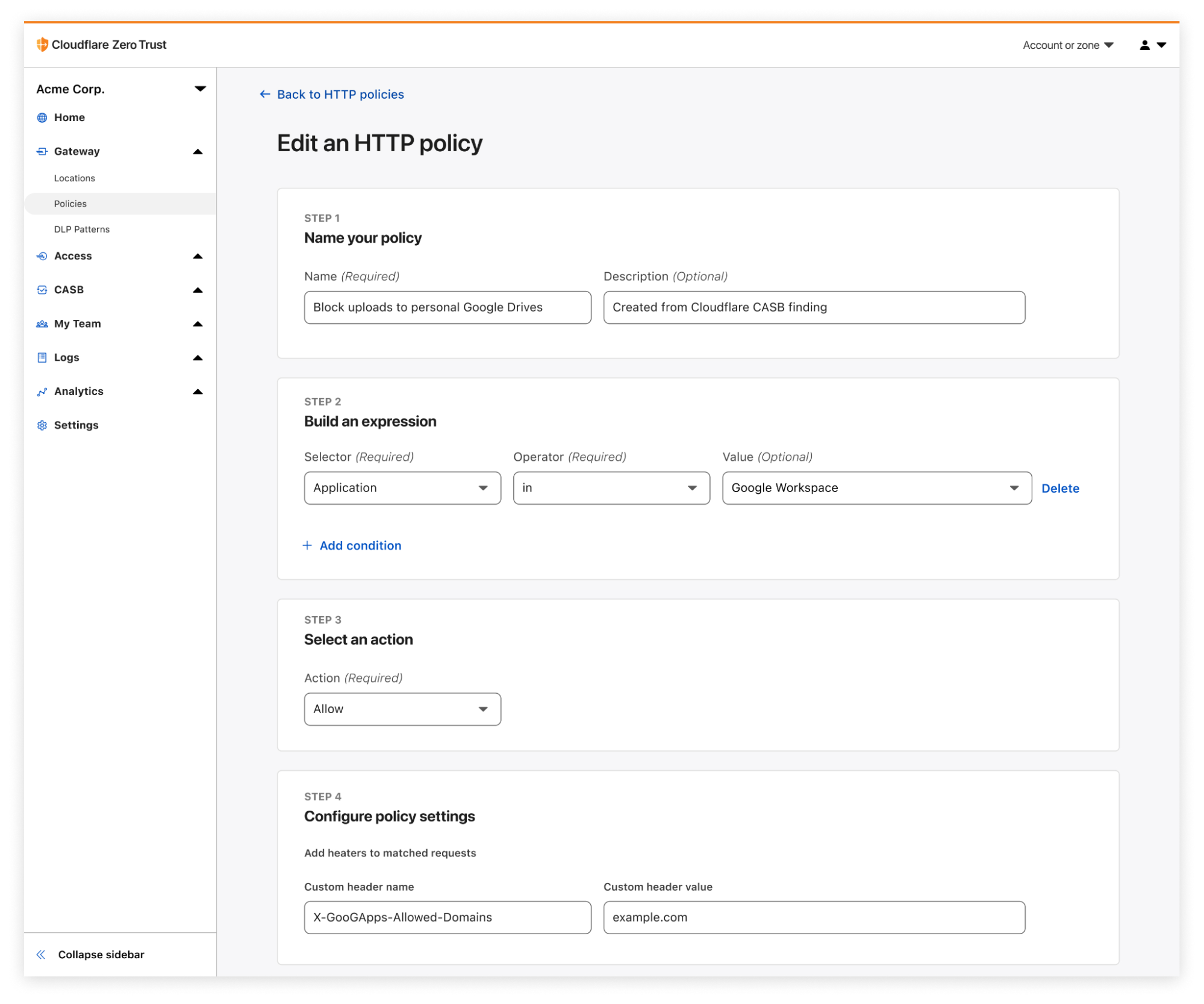
Example 1: Block employees from uploading to their personal Google Drive

Gateway + CASB: alphabetti spaghetti that spells better SaaS security

A common use case we heard during CASB’s beta program was the tendency for employees to upload corporate data – documents, spreadsheets, files, folders,  etc. – to their personal Google Drive (or similar) accounts, presenting the risk of intellectual property making its way out of a secure corporate environment. With Gateway and CASB working together, IT administrators can now directly block upload activity from anywhere other than their corporate tenant of Google Drive or Microsoft OneDrive.

Example 2: Restrict repeat oversharers from uploading and downloading files

Gateway + CASB: alphabetti spaghetti that spells better SaaS security

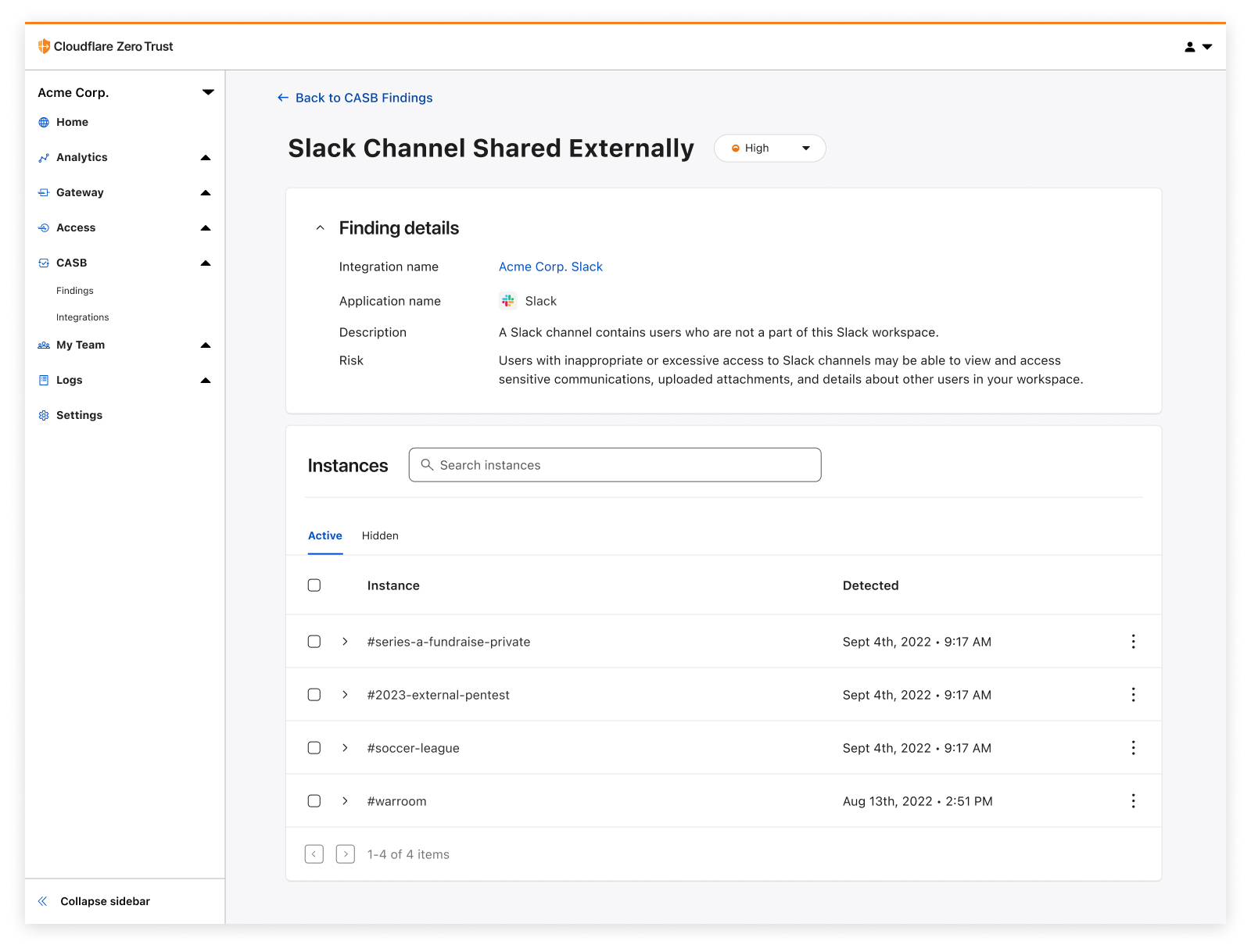
A great existing use case of Cloudflare CASB has been the ability to identify employees that are habitual oversharers of files in their corporate Google or Microsoft tenants – sharing files to anyone that has the link, sharing files with emails outside their company, etc.

Now when these employees are identified, CASB admins can create Gateway policies to block specific users from further upload and download activity until the behavior has been addressed.

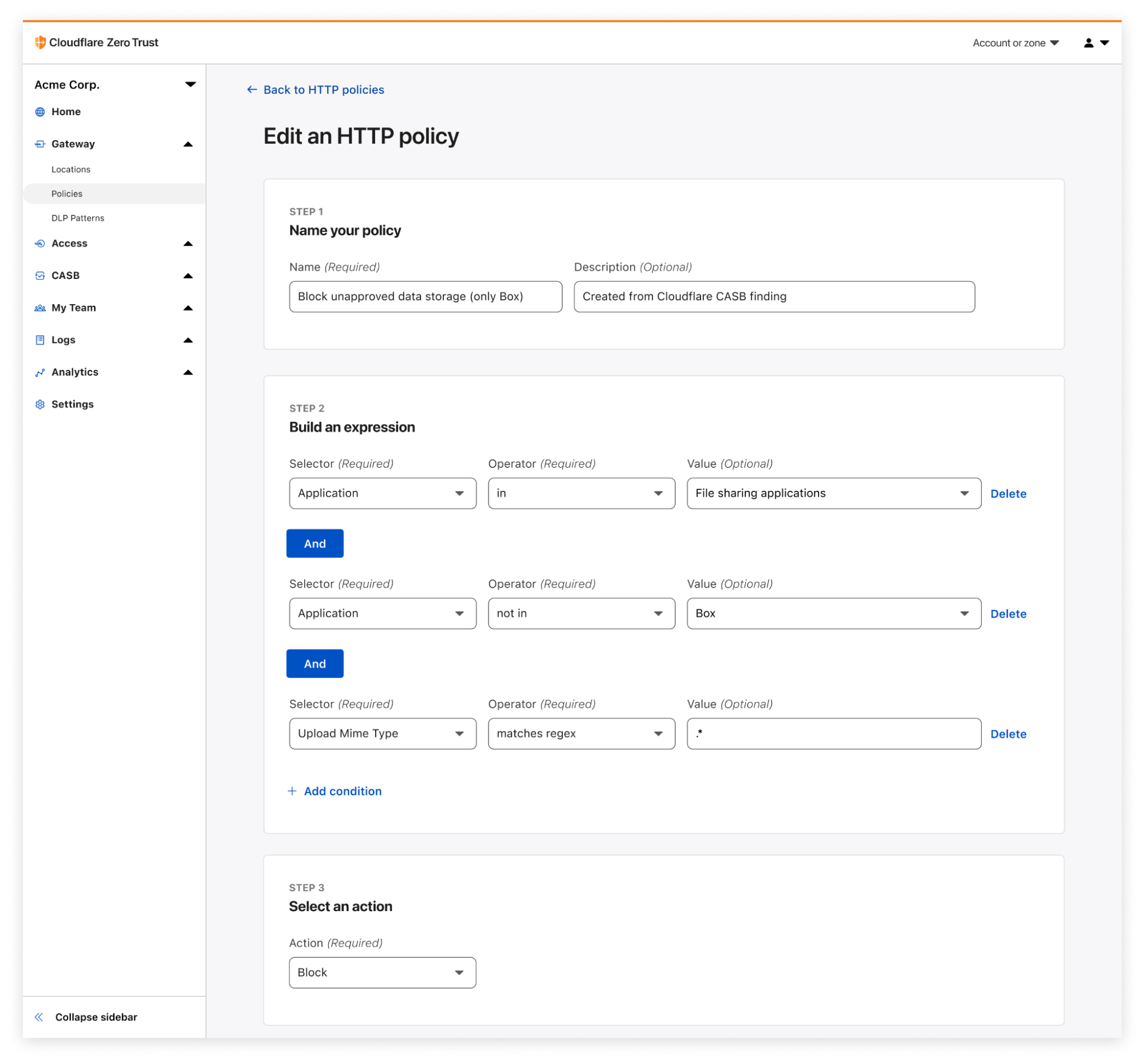
Example 3: Prevent file uploads to unapproved, Shadow IT applications

Gateway + CASB: alphabetti spaghetti that spells better SaaS security

To address the concern of Shadow IT, CASB-originating Gateway policies can be customized, including being able to restrict upload and download events to only the SaaS applications your organization uses. Let’s say your company uses Box as its file storage solution; in just a few clicks, you can use an identified CASB Finding to create a Gateway policy that blocks activity to any file sharing application other than Box. This gives IT and security admins the peace of mind that their files will only end up in the approved cloud application they use.

Get started today with the Cloudflare Zero Trust

Ultimately, the power of Cloudflare Zero Trust comes from its existence as a single, unified platform that draws strength from its combination of products and features. As we continue our work towards bringing these new and exciting offerings to market, we believe that it’s just as important to highlight their synergies and associated use cases, this time from Cloudflare Gateway and CASB.
For those not already using Cloudflare Zero Trust, don’t hesitate to get started today – see the platform yourself with 50 free seats by signing up here.

For those who already know and love Cloudflare Zero Trust, reach out to your Cloudflare sales contact to get started with CASB and Gateway. We can’t wait to hear what interesting and exciting use cases you discover from this new cross-product functionality.

Detect security issues in your SaaS apps with Cloudflare CASB

Post Syndicated from Alex Dunbrack original https://blog.cloudflare.com/casb-ga/

Detect security issues in your SaaS apps with Cloudflare CASB

This post is also available in 简体中文, 日本語, Deutsch, Français and Español.

Detect security issues in your SaaS apps with Cloudflare CASB

It’s GA Week here at Cloudflare, meaning some of our latest and greatest endeavors are here and ready to be put in the hands of Cloudflare customers around the world. One of those releases is Cloudflare’s API-driven Cloud Access Security Broker, or CASB, one of the newest additions to our Zero Trust platform.

Starting today, IT and security administrators can begin using Cloudflare CASB to connect, scan, and monitor their third-party SaaS applications for a wide variety of security issues – all in just a few clicks.

Detect security issues in your SaaS apps with Cloudflare CASB

Whether it’s auditing Google Drive for data exposure and file oversharing, checking Microsoft 365 for misconfigurations and insecure settings, or reviewing third-party access for Shadow IT, CASB is now here to help organizations establish a direct line of sight into their SaaS app security and DLP posture.

The problem

Try to think of a business or organization that uses fewer than 10 SaaS applications. Hard, isn’t it?

It’s 2022, and by now, most of us have noticed the trend of mass SaaS adoption balloon over recent years, with some organizations utilizing hundreds of third-party services across a slew of internal functions. Google Workspace and Microsoft 365 for business collaboration. Slack and Teams for communication. Salesforce for customer management, GitHub for version control… the list goes on and on and on.

And while the average employee might see these products as simply tools used in their day-to-day work, the reality is much starker than that. Inside these services lie some of an organization’s most precious, sensitive, business-critical data – something IT and security teams don’t take lightly and strive to protect at all costs.

But there hasn’t been a great way for these teams to ensure their data and the applications that contain it are kept secure. Go user by user, file by file, SaaS app by SaaS app and review everything for what could be potentially problematic? For most organizations, that’s just simply not realistic.

So, doing what Cloudflare does best, how are we helping our users get a grip on this wave of growing security risk in an intuitive and manageable way?

The solution

Connect your most critical SaaS applications in just minutes and clicks

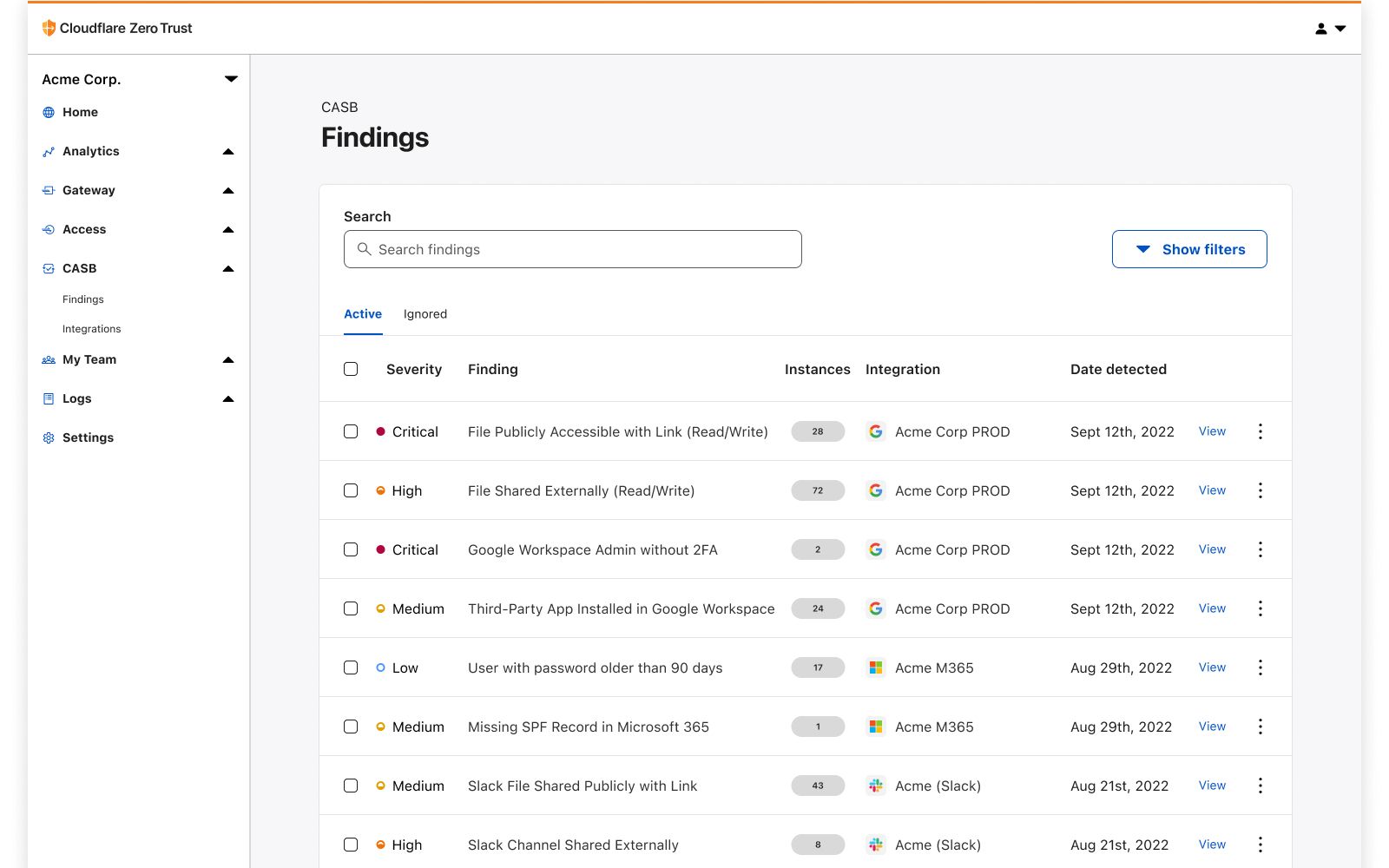
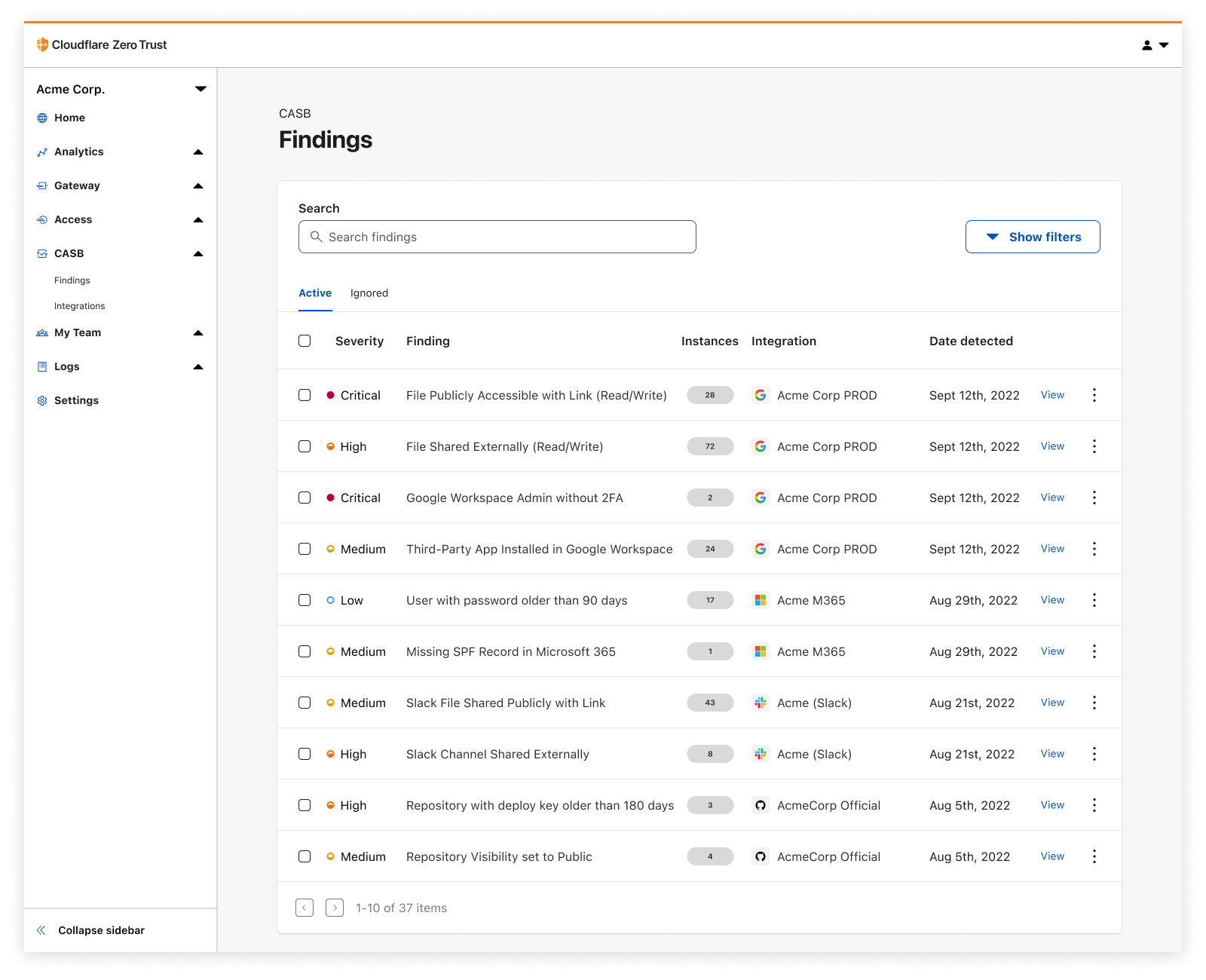
It all starts with a simple integration process, connecting your favorite SaaS applications to Cloudflare CASB in just a few clicks. Once connected, you’ll instantly begin to see Findings – or identified security issues – appear on your CASB home page.

CASB utilizes each vendor’s API to scan and identify a range of application-specific security issues that span several domains of information security, including misconfigurations and insecure settings, file sharing security, Shadow IT, best practices not being followed, and more.

Today CASB supports integrations with Google Workspace, Microsoft 365, Slack, and GitHub, with a growing list of other critical applications not far behind. Have a SaaS app you want to see next? Let us know!

See how all your files have been shared

Detect security issues in your SaaS apps with Cloudflare CASB

One of the easiest ways for employees to accidentally expose internal information is usually with just the flick of a switch – changing a sharing setting to Share this file to anyone with the link.

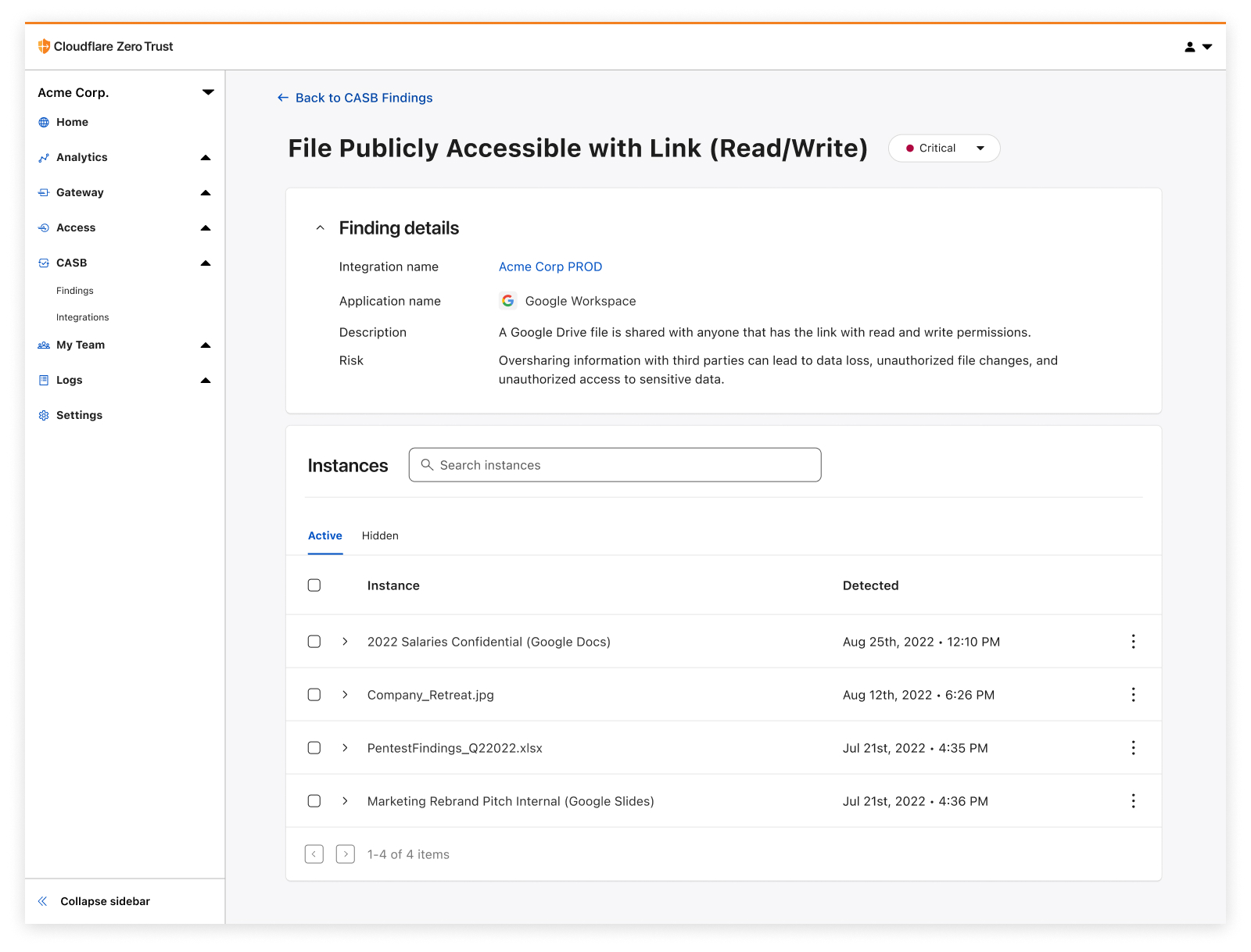
Cloudflare CASB provides users an exhaustive list of files that have questionable, often insecure, sharing settings, giving them a fast and reliable way to address low-hanging fruit exposures and get ahead of data protection incidents.

Identify insecure settings and bad practices

Detect security issues in your SaaS apps with Cloudflare CASB

How we configure our SaaS apps dictates how they keep our data secure. Would you know if that one important GitHub repository had its visibility changed from Private to Public overnight? And why does one of our IT admins not have 2FA enabled on their account?

With Cloudflare CASB, users can now see those issues in just a few clicks and prioritize misconfigurations that might not expose just one file, but the entirety of them across your organization’s SaaS footprint.

Discover third-party apps with shadowy permissions

Detect security issues in your SaaS apps with Cloudflare CASB

With the advent of frictionless product signups comes the rise of third-party applications that have breezed past approval processes and internal security reviews to lay claim to data and other sensitive resources. You guessed it, we’re talking about Shadow IT.
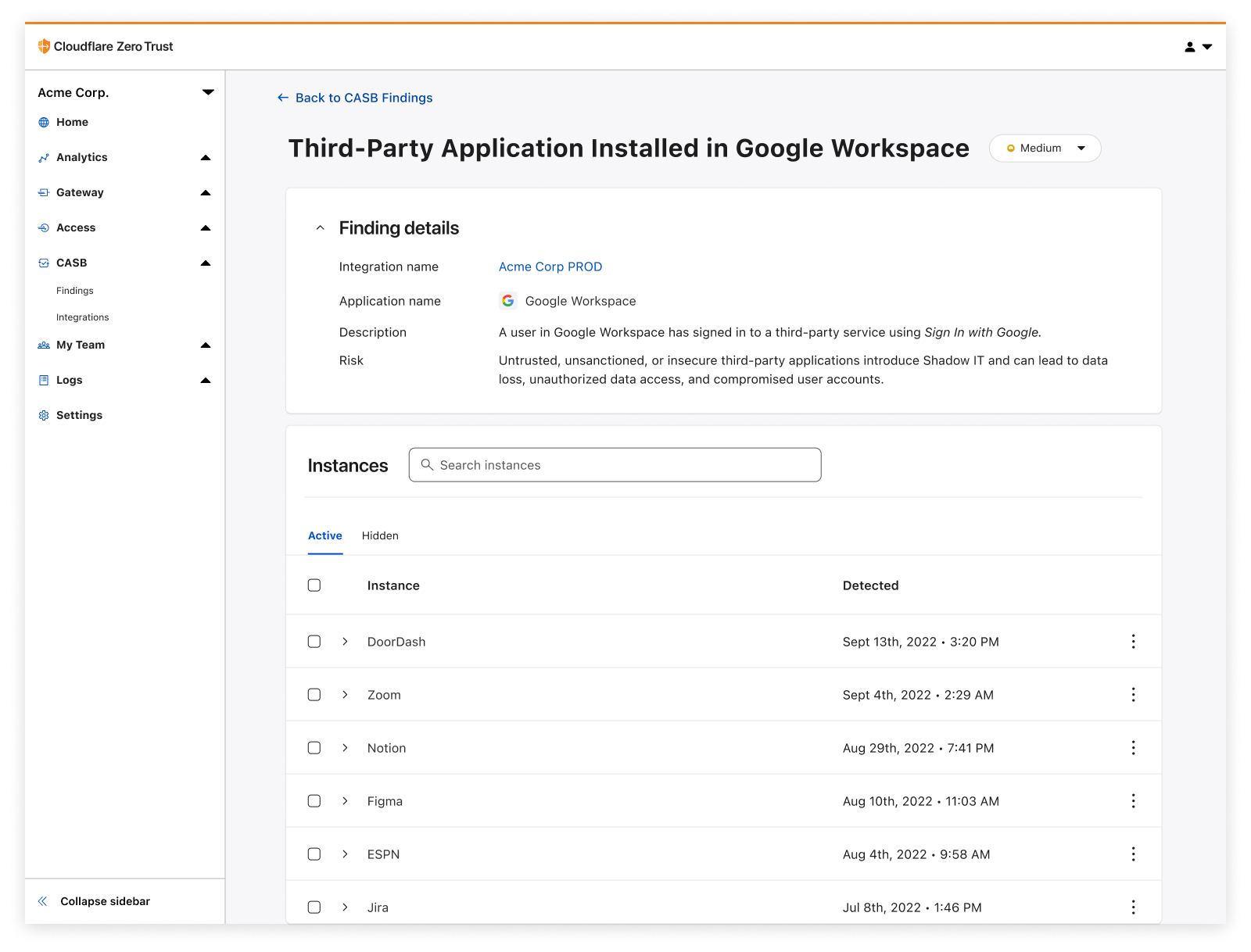
Cloudflare CASB adds a layer of access visibility beyond what traditional network-based Shadow IT discovery tools (like Cloudflare Gateway) can accomplish on their own, providing a detailed list of access that’s been granted to third-party services via those easy Sign in with Google buttons.

So, why does this matter in the context of Zero Trust?

While we’re here to talk about CASB, it would be remiss if we didn’t acknowledge how CASB is only one piece of the puzzle in the wider context of Zero Trust.

Zero Trust is all about broad security coverage and simple interconnectivity with how employees access, navigate, and leverage the complex systems and services needed to operate every day. Where Cloudflare Access and Gateway have provided users with granular access control and visibility into how employees traverse systems, and where Browser Isolation and our new in-line DLP offering protect users from malicious sites and limit sensitive data flying over the wire, CASB adds coverage for one of enterprise security’s final frontiers: visibility into data at-rest, who/what has access to it, and the practices that make it easier or harder for someone to access it inappropriately.

How to get started

As we’ve found through CASB’s beta program over the last few months, SaaS sprawl and misuse compounds with time – we’ve already identified more than five million potential security issues across beta users, with some organizations seeing several thousand files flagged as needing a sharing setting review.

So don’t hesitate to get started on your SaaS app wrangling and cleanup journey; it’s easier than you might think.

To get started, create a free Zero Trust account to try it out with 50 free seats, and then get in touch with our team here to learn more about how Cloudflare CASB can help at your organization. We can’t wait to hear what you think.