All posts by Julian Wood

Using AWS Lambda extensions to send logs to custom destinations

Post Syndicated from Julian Wood original https://aws.amazon.com/blogs/compute/using-aws-lambda-extensions-to-send-logs-to-custom-destinations/

You can now send logs from AWS Lambda functions directly to a destination of your choice using AWS Lambda Extensions. Lambda Extensions are a new way for monitoring, observability, security, and governance tools to easily integrate with AWS Lambda. For more information, see “Introducing AWS Lambda Extensions – In preview”.

To help you troubleshoot failures in Lambda functions, AWS Lambda automatically captures and streams logs to Amazon CloudWatch Logs. This stream contains the logs that your function code and extensions generate, in addition to logs the Lambda service generates as part of the function invocation.

Previously, to send logs to a custom destination, you typically configure and operate a CloudWatch Log Group subscription. A different Lambda function forwards logs to the destination of your choice.

Logging tools, running as Lambda extensions, can now receive log streams directly from within the Lambda execution environment, and send them to any destination. This makes it even easier for you to use your preferred extensions for diagnostics.

Today, you can use extensions to send logs to Coralogix, Datadog, Honeycomb, Lumigo, New Relic, and Sumo Logic.

Overview

To receive logs, extensions subscribe using the new Lambda Logs API.

Lambda Logs API

Lambda Logs API

The Lambda service then streams the logs directly to the extension. The extension can then process, filter, and route them to any preferred destination. Lambda still sends the logs to CloudWatch Logs.

You deploy extensions, including ones that use the Logs API, as Lambda layers, with the AWS Management Console and AWS Command Line Interface (AWS CLI). You can also use infrastructure as code tools such as AWS CloudFormation, the AWS Serverless Application Model (AWS SAM), Serverless Framework, and Terraform.

Logging extensions from AWS Lambda Ready Partners and AWS Partners available at launch

Today, you can use logging extensions with the following tools:

  • The Datadog extension now makes it easier than ever to collect your serverless application logs for visualization, analysis, and archival. Paired with Datadog’s AWS integration, end-to-end distributed tracing, and real-time enhanced AWS Lambda metrics, you can proactively detect and resolve serverless issues at any scale.
  • Lumigo provides monitoring and debugging for modern cloud applications. With the open source extension from Lumigo, you can send Lambda function logs directly to an S3 bucket, unlocking new post processing use cases.
  • New Relic enables you to efficiently monitor, troubleshoot, and optimize your Lambda functions. New Relic’s extension allows you send your Lambda service platform logs directly to New Relic’s unified observability platform, allowing you to quickly visualize data with minimal latency and cost.
  • Coralogix is a log analytics and cloud security platform that empowers thousands of companies to improve security and accelerate software delivery, allowing you to get deep insights without paying for the noise. Coralogix can now read Lambda function logs and metrics directly, without using Cloudwatch or S3, reducing the latency, and cost of observability.
  • Honeycomb is a powerful observability tool that helps you debug your entire production app stack. Honeycomb’s extension decreases the overhead, latency, and cost of sending events to the Honeycomb service, while increasing reliability.
  • The Sumo Logic extension enables you to get instant visibility into the health and performance of your mission-critical applications using AWS Lambda. With this extension and Sumo Logic’s continuous intelligence platform, you can now ensure that all your Lambda functions are running as expected, by analyzing function, platform, and extension logs to quickly identify and remediate errors and exceptions.

You can also build and use your own logging extensions to integrate your organization’s tooling.

Showing a logging extension to send logs directly to S3

This demo shows an example of using a simple logging extension to send logs to Amazon Simple Storage Service (S3).

To set up the example, visit the GitHub repo and follow the instructions in the README.md file.

The example extension runs a local HTTP endpoint listening for HTTP POST events. Lambda delivers log batches to this endpoint. The example creates an S3 bucket to store the logs. A Lambda function is configured with an environment variable to specify the S3 bucket name. Lambda streams the logs to the extension. The extension copies the logs to the S3 bucket.

Lambda environment variable specifying S3 bucket

Lambda environment variable specifying S3 bucket

The extension uses the Extensions API to register for INVOKE and SHUTDOWN events. The extension, using the Logs API, then subscribes to receive platform and function logs, but not extension logs.

As the example is an asynchronous system, logs for one invoke may be processed during the next invocation. Logs for the last invoke may be processed during the SHUTDOWN event.

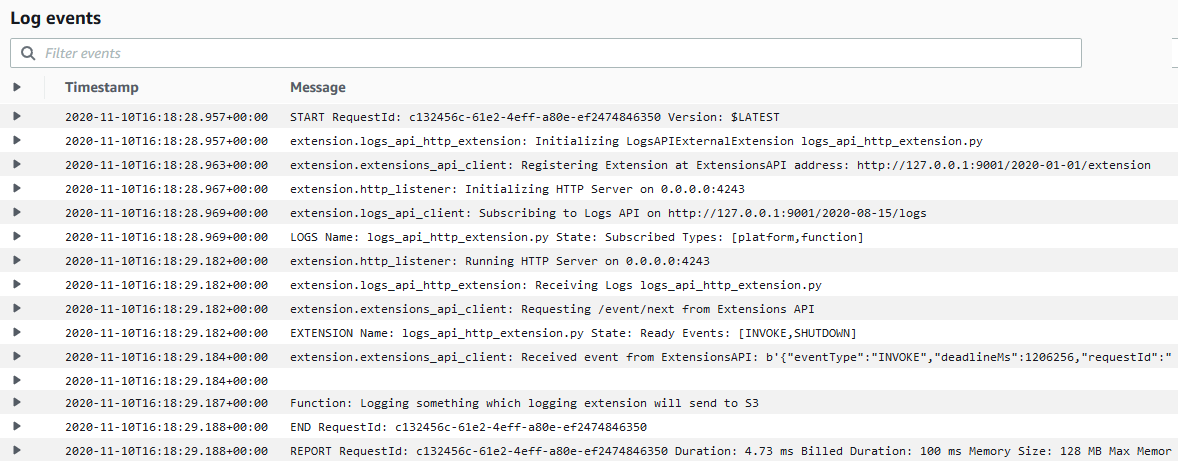
Testing the function from the Lambda console, Lambda sends logs to CloudWatch Logs. The logs stream shows logs from the platform, function, and extension.

Lambda logs visible in CloudWatch Logs

Lambda logs visible in CloudWatch Logs

The logging extension also receives the log stream directly from Lambda, and copies the logs to S3.

Browsing to the S3 bucket, the log files are available.

S3 bucket containing copied logs

S3 bucket containing copied logs.

Downloading the file shows the log lines. The log contains the same platform and function logs, but not the extension logs, as specified during the subscription.

[{'time': '2020-11-12T14:55:06.560Z', 'type': 'platform.start', 'record': {'requestId': '49e64413-fd42-47ef-b130-6fd16f30148d', 'version': '$LATEST'}},
{'time': '2020-11-12T14:55:06.774Z', 'type': 'platform.logsSubscription', 'record': {'name': 'logs_api_http_extension.py', 'state': 'Subscribed', 'types': ['platform', 'function']}},
{'time': '2020-11-12T14:55:06.774Z', 'type': 'platform.extension', 'record': {'name': 'logs_api_http_extension.py', 'state': 'Ready', 'events': ['INVOKE', 'SHUTDOWN']}},
{'time': '2020-11-12T14:55:06.776Z', 'type': 'function', 'record': 'Function: Logging something which logging extension will send to S3\n'}, {'time': '2020-11-12T14:55:06.780Z', 'type': 'platform.end', 'record': {'requestId': '49e64413-fd42-47ef-b130-6fd16f30148d'}}, {'time': '2020-11-12T14:55:06.780Z', 'type': 'platform.report', 'record': {'requestId': '49e64413-fd42-47ef-b130-6fd16f30148d', 'metrics': {'durationMs': 4.96, 'billedDurationMs': 100, 'memorySizeMB': 128, 'maxMemoryUsedMB': 87, 'initDurationMs': 792.41}, 'tracing': {'type': 'X-Amzn-Trace-Id', 'value': 'Root=1-5fad4cc9-70259536495de84a2a6282cd;Parent=67286c49275ac0ad;Sampled=1'}}}]

Lambda has sent specific logs directly to the subscribed extension. The extension has then copied them directly to S3.

For more example log extensions, see the Github repository.

How do extensions receive logs?

Extensions start a local listener endpoint to receive the logs using one of the following protocols:

  1. TCP – Logs are delivered to a TCP port in Newline delimited JSON format (NDJSON).
  2. HTTP – Logs are delivered to a local HTTP endpoint through PUT or POST, as an array of records in JSON format. http://sandbox:${PORT}/${PATH}. The $PATH parameter is optional.

AWS recommends using an HTTP endpoint over TCP because HTTP tracks successful delivery of the log messages to the local endpoint that the extension sets up.

Once the endpoint is running, extensions use the Logs API to subscribe to any of three different logs streams:

  • Function logs that are generated by the Lambda function.
  • Lambda service platform logs (such as the START, END, and REPORT logs in CloudWatch Logs).
  • Extension logs that are generated by extension code.

The Lambda service then sends logs to endpoint subscribers inside of the execution environment only.

Even if an extension subscribes to one or more log streams, Lambda continues to send all logs to CloudWatch.

Performance considerations

Extensions share resources with the function, such as CPU, memory, disk storage, and environment variables. They also share permissions, using the same AWS Identity and Access Management (IAM) role as the function.

Log subscriptions consume memory resources as each subscription opens a new memory buffer to store the logs. This memory usage counts towards memory consumed within the Lambda execution environment.

For more information on resources, security and performance with extensions, see “Introducing AWS Lambda Extensions – In preview”.

What happens if Lambda cannot deliver logs to an extension?

The Lambda service stores logs before sending to CloudWatch Logs and any subscribed extensions. If Lambda cannot deliver logs to the extension, it automatically retries with backoff. If the log subscriber crashes, Lambda restarts the execution environment. The logs extension re-subscribes, and continues to receive logs.

When using an HTTP endpoint, Lambda continues to deliver logs from the last acknowledged delivery. With TCP, the extension may lose logs if an extension or the execution environment fails.

The Lambda service buffers logs in memory before delivery. The buffer size is proportional to the buffering configuration used in the subscription request. If an extension cannot process the incoming logs quickly enough, the buffer fills up. To reduce the likelihood of an out of memory event due to a slow extension, the Lambda service drops records and adds a platform.logsDropped log record to the affected extension to indicate the number of dropped records.

Disabling logging to CloudWatch Logs

Lambda continues to send logs to CloudWatch Logs even if extensions subscribe to the logs stream.

To disable logging to CloudWatch Logs for a particular function, you can amend the Lambda execution role to remove access to CloudWatch Logs.

{
"Version": "2012-10-17",
"Statement": [
    {
        "Effect": "Deny",
        "Action": [
            "logs:CreateLogGroup",
            "logs:CreateLogStream",
            "logs:PutLogEvents"
        ],
        "Resource": [
            "arn:aws:logs:*:*:*"
        ]
    }
  ]
}

Logs are no longer delivered to CloudWatch Logs for functions using this role, but are still streamed to subscribed extensions. You are no longer billed for CloudWatch logging for these functions.

Pricing

Logging extensions, like other extensions, share the same billing model as Lambda functions. When using Lambda functions with extensions, you pay for requests served and the combined compute time used to run your code and all extensions, in 100 ms increments. To learn more about the billing for extensions, visit the Lambda FAQs page.

Conclusion

Lambda extensions enable you to extend the Lambda service to more easily integrate with your favorite tools for monitoring, observability, security, and governance.

Extensions can now subscribe to receive log streams directly from the Lambda service, in addition to CloudWatch Logs. Today, you can install a number of available logging extensions from AWS Lambda Ready Partners and AWS Partners. Extensions make it easier to use your existing tools with your serverless applications.

To try the S3 demo logging extension, follow the instructions in the README.md file in the GitHub repository.

Extensions are now available in preview in all commercial regions other than the China regions.

For more serverless learning resources, visit https://serverlessland.com.
Building Extensions for AWS Lambda – In preview

Post Syndicated from Julian Wood original https://aws.amazon.com/blogs/compute/building-extensions-for-aws-lambda-in-preview/

AWS Lambda is announcing a preview of Lambda Extensions, a new way to easily integrate Lambda with your favorite monitoring, observability, security, and governance tools. Extensions enable tools to integrate deeply into the Lambda execution environment to control and participate in Lambda’s lifecycle. This simplified experience makes it easier for you to use your preferred tools across your application portfolio today.

In this post I explain how Lambda extensions work, the changes to the Lambda lifecycle, and how to build an extension. To learn how to use extensions with your functions, see the companion blog post “Introducing AWS Lambda extensions”.

Extensions are built using the new Lambda Extensions API, which provides a way for tools to get greater control during function initialization, invocation, and shut down. This API builds on the existing Lambda Runtime API, which enables you to bring custom runtimes to Lambda.

You can use extensions from AWS, AWS Lambda Ready Partners, and open source projects for use-cases such as application performance monitoring, secrets management, configuration management, and vulnerability detection. You can also build your own extensions to integrate your own tooling using the Extensions API.

There are extensions available today for AppDynamics, Check Point, Datadog, Dynatrace, Epsagon, HashiCorp, Lumigo, New Relic, Thundra, Splunk, AWS AppConfig, and Amazon CloudWatch Lambda Insights. For more details on these, see “Introducing AWS Lambda extensions”.

The Lambda execution environment

Lambda functions run in a sandboxed environment called an execution environment. This isolates them from other functions and provides the resources, such as memory, specified in the function configuration.

Lambda automatically manages the lifecycle of compute resources so that you pay for value. Between function invocations, the Lambda service freezes the execution environment. It is thawed if the Lambda service needs the execution environment for subsequent invocations.

Previously, only the runtime process could influence the lifecycle of the execution environment. It would communicate with the Runtime API, which provides an HTTP API endpoint within the execution environment to communicate with the Lambda service.

Lambda and Runtime API

Lambda and Runtime API

The runtime uses the API to request invocation events from Lambda and deliver them to the function code. It then informs the Lambda service when it has completed processing an event. The Lambda service then freezes the execution environment.

The runtime process previously exposed two distinct phases in the lifecycle of the Lambda execution environment: Init and Invoke.

1. Init: During the Init phase, the Lambda service initializes the runtime, and then runs the function initialization code (the code outside the main handler). The Init phase happens either during the first invocation, or in advance if Provisioned Concurrency is enabled.

2. Invoke: During the invoke phase, the runtime requests an invocation event from the Lambda service via the Runtime API, and invokes the function handler. It then returns the function response to the Runtime API.

After the function runs, the Lambda service freezes the execution environment and maintains it for some time in anticipation of another function invocation.

If the Lambda function does not receive any invokes for a period of time, the Lambda service shuts down and removes the environment.

Previous Lambda lifecycle

Previous Lambda lifecycle

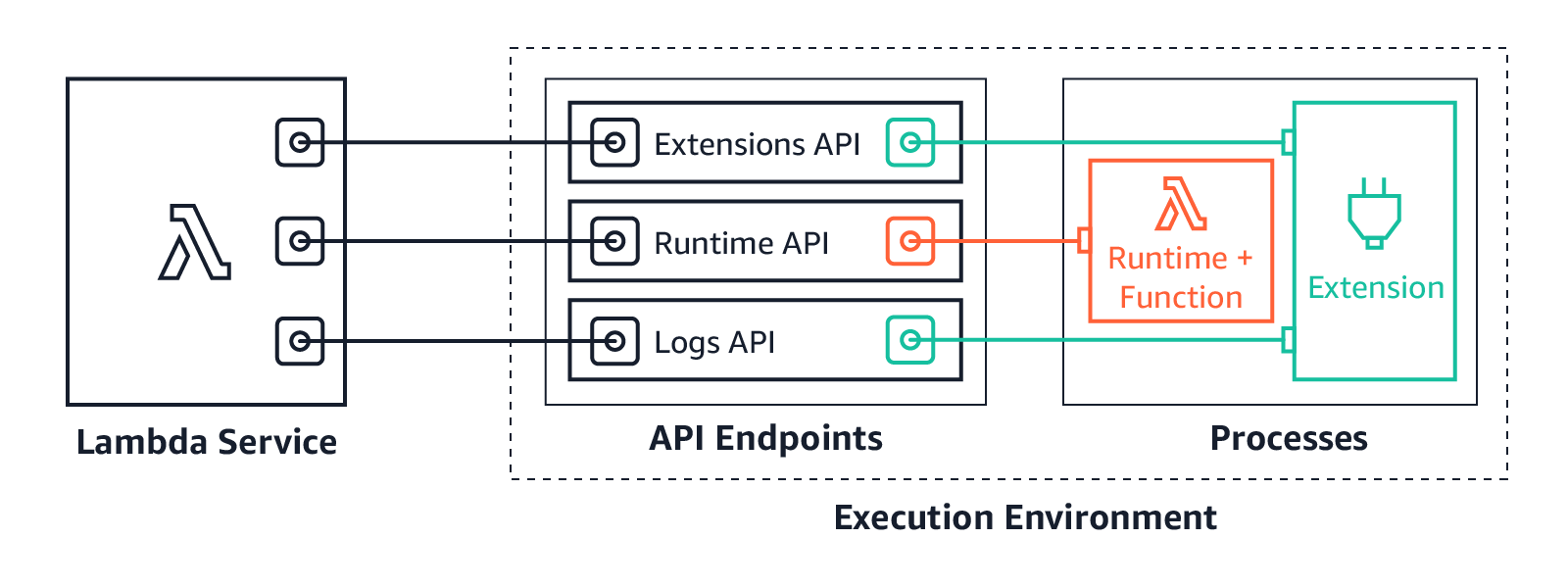
With the addition of the Extensions API, extensions can now influence, control, and participate in the lifecycle of the execution environment. They can use the Extensions API to influence when the Lambda service freezes the execution environment.

AWS Lambda execution environment with the Extensions API

AWS Lambda execution environment with the Extensions API

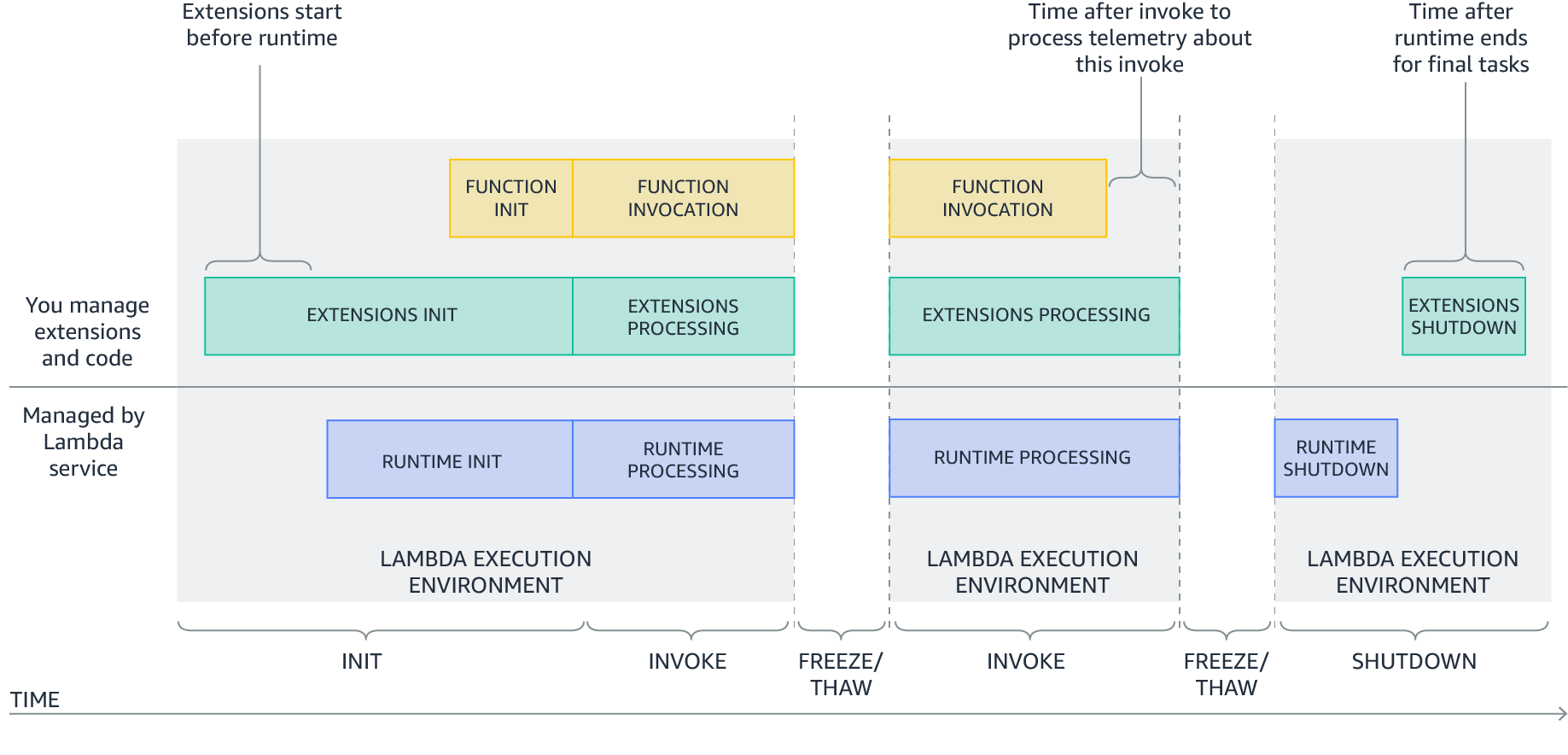
Extensions are initialized before the runtime and the function. They then continue to run in parallel with the function, get greater control during function invocation, and can run logic during shut down.

Extensions allow integrations with the Lambda service by introducing the following changes to the Lambda lifecycle:

  1. An updated Init phase. There are now three discrete Init tasks: extensions Init, runtime Init, and function Init. This creates an order where extensions and the runtime can perform setup tasks before the function code runs.
  2. Greater control during invocation. During the invoke phase, as before, the runtime requests the invocation event and invokes the function handler. In addition, extensions can now request lifecycle events from the Lambda service. They can run logic in response to these lifecycle events, and respond to the Lambda service when they are done. The Lambda service freezes the execution environment when it hears back from the runtime and all extensions. In this way, extensions can influence the freeze/thaw behavior.
  3. Shutdown phase: we are now exposing the shutdown phase to let extensions stop cleanly when the execution environment shuts down. The Lambda service sends a shut down event, which tells the runtime and extensions that the environment is about to be shut down.
New Lambda lifecycle with extensions

New Lambda lifecycle with extensions

Each Lambda lifecycle phase starts with an event from the Lambda service to the runtime and all registered extensions. The runtime and extensions signal that they have completed by requesting the Next invocation event from the Runtime and Extensions APIs. Lambda freezes the execution environment and all extensions when there are no pending events.

Lambda lifecycle for execution environment, runtime, extensions, and function.png

Lambda lifecycle for execution environment, runtime, extensions, and function.png

For more information on the lifecycle phases and the Extensions API, see the documentation.

How are extensions delivered and run?

You deploy extensions as Lambda layers, which are ZIP archives containing shared libraries or other dependencies.

To add a layer, use the AWS Management Console, AWS Command Line Interface (AWS CLI), or infrastructure as code tools such as AWS CloudFormation, the AWS Serverless Application Model (AWS SAM), and Terraform.

When the Lambda service starts the function execution environment, it extracts the extension files from the Lambda layer into the /opt directory. Lambda then looks for any extensions in the /opt/extensions directory and starts initializing them. Extensions need to be executable as binaries or scripts. As the function code directory is read-only, extensions cannot modify function code.

Extensions can run in either of two modes, internal and external.

  • Internal extensions run as part of the runtime process, in-process with your code. They are not separate processes. Internal extensions allow you to modify the startup of the runtime process using language-specific environment variables and wrapper scripts. You can use language-specific environment variables to add options and tools to the runtime for Java Correto 8 and 11, Node.js 10 and 12, and .NET Core 3.1. Wrapper scripts allow you to delegate the runtime startup to your script to customize the runtime startup behavior. You can use wrapper scripts with Node.js 10 and 12, Python 3.8, Ruby 2.7, Java 8 and 11, and .NET Core 3.1. For more information, see “Modifying-the-runtime-environment”.
  • External extensions allow you to run separate processes from the runtime but still within the same execution environment as the Lambda function. External extensions can start before the runtime process, and can continue after the runtime shuts down. External extensions work with Node.js 10 and 12, Python 3.7 and 3.8, Ruby 2.5 and 2.7, Java Corretto 8 and 11, .NET Core 3.1, and custom runtimes.

External extensions can be written in a different language to the function. We recommend implementing external extensions using a compiled language as a self-contained binary. This makes the extension compatible with all of the supported runtimes. If you use a non-compiled language, ensure that you include a compatible runtime in the extension.

Extensions run in the same execution environment as the function, so share resources such as CPU, memory, and disk storage with the function. They also share environment variables, in addition to permissions, using the same AWS Identity and Access Management (IAM) role as the function.

For more details on resources, security, and performance with extensions, see the companion blog post “Introducing AWS Lambda extensions”.

For example extensions and wrapper scripts to help you build your own extensions, see the GitHub repository.

Showing extensions in action

The demo shows how external extensions integrate deeply with functions and the Lambda runtime. The demo creates an example Lambda function with a single extension using either the AWS CLI, or AWS SAM.

The example shows how an external extension can start before the runtime, run during the Lambda function invocation, and shut down after the runtime shuts down.

To set up the example, visit the GitHub repo, and follow the instructions in the README.md file.

The example Lambda function uses the custom provided.al2 runtime based on Amazon Linux 2. Using the custom runtime helps illustrate in more detail how the Lambda service, Runtime API, and the function communicate. The extension is delivered using a Lambda layer.

The runtime, function, and extension, log their status events to Amazon CloudWatch Logs. The extension initializes as a separate process and waits to receive the function invocation event from the Extensions API. It then sleeps for 5 seconds before calling the API again to register to receive the next event. The extension sleep simulates the processing of a parallel process. This could, for example, collect telemetry data to send to an external observability service.

When the Lambda function is invoked, the extension, runtime and function perform the following steps. I walk through the steps using the log output.

1. The Lambda service adds the configured extension Lambda layer. It then searches the /opt/extensions folder, and finds an extension called extension1.sh. The extension executable launches before the runtime initializes. It registers with the Extensions API to receive INVOKE and SHUTDOWN events using the following API call.

curl -sS -LD "$HEADERS" -XPOST "http://${AWS_LAMBDA_RUNTIME_API}/2020-01-01/extension/register" --header "Lambda-Extension-Name: ${LAMBDA_EXTENSION_NAME}" -d "{ \"events\": [\"INVOKE\", \"SHUTDOWN\"]}" > $TMPFILE
Extension discovery, registration, and start

Extension discovery, registration, and start

2. The Lambda custom provided.al2 runtime initializes from the bootstrap file.

Runtime initialization

Runtime initialization

3. The runtime calls the Runtime API to get the next event using the following API call. The HTTP request is blocked until the event is received.

curl -sS -LD "$HEADERS" -X GET "http://${AWS_LAMBDA_RUNTIME_API}/2018-06-01/runtime/invocation/next" > $TMPFILE &

The extension calls the Extensions API and waits for the next event. The HTTP request is again blocked until one is received.

curl -sS -L -XGET "http://${AWS_LAMBDA_RUNTIME_API}/2020-01-01/extension/event/next" --header "Lambda-Extension-Identifier: ${EXTENSION_ID}" > $TMPFILE &
Runtime and extension call APIs to get the next event

Runtime and extension call APIs to get the next event

4. The Lambda service receives an invocation event. It sends the event payload to the runtime using the Runtime API. It sends an event to the extension informing it about the invocation, using the Extensions API.

Runtime and extension receive event

Runtime and extension receive event

5. The runtime invokes the function handler. The function receives the event payload.

Runtime invokes handler

Runtime invokes handler

6. The function runs the handler code. The Lambda runtime receives back the function response and sends it back to the Runtime API with the following API call.

curl -sS -X POST "http://${AWS_LAMBDA_RUNTIME_API}/2018-06-01/runtime/invocation/$REQUEST_ID/response" -d "$RESPONSE" > $TMPFILE
Runtime receives function response and sends to Runtime API

Runtime receives function response and sends to Runtime API

7. The Lambda runtime then waits for the next invocation event (warm start).

Runtime waits for next event

Runtime waits for next event

8. The extension continues processing for 5 seconds, simulating the processing of a companion process. The extension finishes, and uses the Extensions API to register again to wait for the next event.

Extension processing

Extension processing

9. The function invocation report is logged.

Function invocation report

Function invocation report

10. When Lambda is about to shut down the execution environment, it sends the Runtime API a shut down event.

Lambda runtime shut down event

Lambda runtime shut down event

11. Lambda then sends a shut down event to the extensions. The extension finishes processing and then shuts down after the runtime.

Lambda extension shut down event

Lambda extension shut down event

The demo shows the steps the runtime, function, and extensions take during the Lambda lifecycle.

An external extension registers and starts before the runtime. When Lambda receives an invocation event, it sends it to the runtime. It then sends an event to the extension informing it about the invocation. The runtime invokes the function handler, and the extension does its own processing of the event. The extension continues processing after the function invocation completes. When Lambda is about to shut down the execution environment, it sends a shut down event to the runtime. It then sends one to the extension, so it can finish processing.

To see a sequence diagram of this flow, see the Extensions API documentation.

Pricing

Extensions share the same billing model as Lambda functions. When using Lambda functions with extensions, you pay for requests served and the combined compute time used to run your code and all extensions, in 100 ms increments. To learn more about the billing for extensions, visit the Lambda FAQs page.

Conclusion

Lambda extensions enable you to extend Lambda’s execution environment to more easily integrate with your favorite tools for monitoring, observability, security, and governance.

Extensions can run additional code; before, during, and after a function invocation. There are extensions available today from AWS Lambda Ready Partners. These cover use-cases such as application performance monitoring, secrets management, configuration management, and vulnerability detection. Extensions make it easier to use your existing tools with your serverless applications. For more information on the available extensions, see the companion post “Introducing Lambda Extensions – In preview“.

You can also build your own extensions to integrate your own tooling using the new Extensions API. For example extensions and wrapper scripts, see the GitHub repository.

Extensions are now available in preview in the following Regions: us-east-1, us-east-2, us-west-1, us-west-2, ca-central-1, eu-west-1, eu-west-2, eu-west-3, eu-central-1, eu-north-1, eu-south-1, sa-east-1, me-south-1, ap-northeast-1, ap-northeast-2, ap-northeast-3, ap-southeast-1, ap-southeast-2, ap-south-1, and ap-east-1.

For more serverless learning resources, visit https://serverlessland.com.
Introducing AWS Lambda Extensions – In preview

Post Syndicated from Julian Wood original https://aws.amazon.com/blogs/compute/introducing-aws-lambda-extensions-in-preview/

AWS Lambda is announcing a preview of Lambda Extensions, a new way to easily integrate Lambda with your favorite monitoring, observability, security, and governance tools. In this post I explain how Lambda extensions work, how you can begin using them, and the extensions from AWS Lambda Ready Partners that are available today.

Extensions help solve a common request from customers to make it easier to integrate their existing tools with Lambda. Previously, customers told us that integrating Lambda with their preferred tools required additional operational and configuration tasks. In addition, tools such as log agents, which are long-running processes, could not easily run on Lambda.

Extensions are a new way for tools to integrate deeply into the Lambda environment. There is no complex installation or configuration, and this simplified experience makes it easier for you to use your preferred tools across your application portfolio today. You can use extensions for use-cases such as:

  • capturing diagnostic information before, during, and after function invocation
  • automatically instrumenting your code without needing code changes
  • fetching configuration settings or secrets before the function invocation
  • detecting and alerting on function activity through hardened security agents, which can run as separate processes from the function

You can use extensions from AWS, AWS Lambda Ready Partners, and open source projects. There are extensions available today for AppDynamics, Check Point, Datadog, Dynatrace, Epsagon, HashiCorp, Lumigo, New Relic, Thundra, Splunk SignalFX, AWS AppConfig, and Amazon CloudWatch Lambda Insights.

You can learn how to build your own extensions, in the companion post “Building Extensions for AWS Lambda – In preview“.

Overview

Lambda Extensions is designed to be the easiest way to plug in the tools you use today without complex installation or configuration management. You deploy extensions as Lambda layers, with the AWS Management Console and AWS Command Line Interface (AWS CLI). You can also use infrastructure as code tools such as AWS CloudFormation, the AWS Serverless Application Model (AWS SAM), Serverless Framework, and Terraform. You can use Stackery to automate the integration of extensions from Epsagon, New Relic, Lumigo, and Thundra.

There are two components to the Lambda Extensions capability: the Extensions API and extensions themselves. Extensions are built using the new Lambda Extensions API which provides a way for tools to get greater control during function initialization, invocation, and shut down. This API builds on the existing Lambda Runtime API, which enables you to bring custom runtimes to Lambda.

AWS Lambda execution environment with the Extensions API

AWS Lambda execution environment with the Extensions API

Most customers will use extensions without needing to know about the capabilities of the Extensions API that enables them. You can just consume capabilities of an extension by configuring the options in your Lambda functions. Developers who build extensions use the Extensions API to register for function and execution environment lifecycle events.

Extensions can run in either of two modes – internal and external.

  • Internal extensions run as part of the runtime process, in-process with your code. They allow you to modify the startup of the runtime process using language-specific environment variables and wrapper scripts. Internal extensions enable use cases such as automatically instrumenting code.
  • External extensions allow you to run separate processes from the runtime but still within the same execution environment as the Lambda function. External extensions can start before the runtime process, and can continue after the runtime shuts down. External extensions enable use cases such as fetching secrets before the invocation, or sending telemetry to a custom destination outside of the function invocation. These extensions run as companion processes to Lambda functions.

For more information on the Extensions API and the changes to the Lambda lifecycle, see “Building Extensions for AWS Lambda – In preview

AWS Lambda Ready Partners extensions available at launch

Today, you can use extensions with the following AWS and AWS Lambda Ready Partner’s tools, and there are more to come:

  • AppDynamics provides end-to-end transaction tracing for AWS Lambda. With the AppDynamics extension, it is no longer mandatory for developers to include the AppDynamics tracer as a dependency in their function code, making tracing transactions across hybrid architectures even simpler.
  • The Datadog extension brings comprehensive, real-time visibility to your serverless applications. Combined with Datadog’s existing AWS integration, you get metrics, traces, and logs to help you monitor, detect, and resolve issues at any scale. The Datadog extension makes it easier than ever to get telemetry from your serverless workloads.
  • The Dynatrace extension makes it even easier to bring AWS Lambda metrics and traces into the Dynatrace platform for intelligent observability and automatic root cause detection. Get comprehensive, end-to-end observability with the flip of a switch and no code changes.
  • Epsagon helps you monitor, troubleshoot, and lower the cost for your Lambda functions. Epsagon’s extension reduces the overhead of sending traces to the Epsagon service, with minimal performance impact to your function.
  • HashiCorp Vault allows you to secure, store, and tightly control access to your application’s secrets and sensitive data. With the Vault extension, you can now authenticate and securely retrieve dynamic secrets before your Lambda function invokes.
  • Lumigo provides a monitoring and observability platform for serverless and microservices applications. The Lumigo extension enables the new Lumigo Lambda Profiler to see a breakdown of function resources, including CPU, memory, and network metrics. Receive actionable insights to reduce Lambda runtime duration and cost, fix bottlenecks, and increase efficiency.
  • Check Point CloudGuard provides full lifecycle security for serverless applications. The CloudGuard extension enables Function Self Protection data aggregation as an out-of-process extension, providing detection and alerting on application layer attacks.
  • New Relic provides a unified observability experience for your entire software stack. The New Relic extension uses a simpler companion process to report function telemetry data. This also requires fewer AWS permissions to add New Relic to your application.
  • Thundra provides an application debugging, observability and security platform for serverless, container and virtual machine (VM) workloads. The Thundra extension adds asynchronous telemetry reporting functionality to the Thundra agents, getting rid of network latency.
  • Splunk offers an enterprise-grade cloud monitoring solution for real-time full-stack visibility at scale. The Splunk extension provides a simplified runtime-independent interface to collect high-resolution observability data with minimal overhead. Monitor, manage, and optimize the performance and cost of your serverless applications with Splunk Observability solutions.
  • AWS AppConfig helps you manage, store, and safely deploy application configurations to your hosts at runtime. The AWS AppConfig extension integrates Lambda and AWS AppConfig seamlessly. Lambda functions have simple access to external configuration settings quickly and easily. Developers can now dynamically change their Lambda function’s configuration safely using robust validation features.
  • Amazon CloudWatch Lambda Insights enables you to efficiently monitor, troubleshoot, and optimize Lambda functions. The Lambda Insights extension simplifies the collection, visualization, and investigation of detailed compute performance metrics, errors, and logs. You can more easily isolate and correlate performance problems to optimize your Lambda environments.

You can also build and use your own extensions to integrate your organization’s tooling. For instance, the Cloud Foundations team at Square has built their own extension. They say:

The Cloud Foundations team at Square works to make the cloud accessible and secure. We partnered with the Security Infrastructure team, who builds infrastructure to secure Square’s sensitive data, to enable serverless applications at Square,​ and ​provide mTLS identities to Lambda​.

Since beginning work on Lambda, we have focused on creating a streamlined developer experience. Teams adopting Lambda need to learn a lot about AWS, and we see extensions as a way to abstract away common use cases. For our initial exploration, we wanted to make accessing secrets easy, as with our current tools each Lambda function usually pulls 3-5 secrets.

The extension we built and open source fetches secrets on cold starts, before the Lambda function is invoked. Each function includes a configuration file that specifies which secrets to pull. We knew this configuration was key, as Lambda functions should only be doing work they need to do. The secrets are cached in the local /tmp directory, which the function reads when it needs the secret data. This makes Lambda functions not only faster, but reduces the amount of code for accessing secrets.

Showing extensions in action with AWS AppConfig

This demo shows an example of using the AWS AppConfig with a Lambda function. AWS AppConfig is a capability of AWS Systems Manager to create, manage, and quickly deploy application configurations. It lets you dynamically deploy external configuration without having to redeploy your applications. As AWS AppConfig has robust validation features, all configuration changes can be tested safely before rolling out to your applications.

AWS AppConfig has an available extension which gives Lambda functions access to external configuration settings quickly and easily. The extension runs a separate local process to retrieve and cache configuration data from the AWS AppConfig service. The function code can then fetch configuration data faster using a local call rather than over the network.

To set up the example, visit the GitHub repo and follow the instructions in the README.md file.

The example creates an AWS AppConfig application, environment, and configuration profile. It stores a loglevel value, initially set to normal.

AWS AppConfig application, environment, and configuration profile

AWS AppConfig application, environment, and configuration profile

An AWS AppConfig deployment runs to roll out the initial configuration.

AWS AppConfig deployment

AWS AppConfig deployment

The example contains two Lambda functions that include the AWS AppConfig extension. For a list of the layers that have the AppConfig extension, see the blog post “AWS AppConfig Lambda Extension”.

As extensions share the same permissions as Lambda functions, the functions have execution roles that allow access to retrieve the AWS AppConfig configuration.

Lambda function add layer

Lambda function add layer

The functions use the extension to retrieve the loglevel value from AWS AppConfig, returning the value as a response. In a production application, this value could be used within function code to determine what level of information to send to CloudWatch Logs. For example, to troubleshoot an application issue, you can change the loglevel value centrally. Subsequent function invocations for both functions use the updated value.

Both Lambda functions are configured with an environment variable that specifies which AWS AppConfig configuration profile and value to use.

Lambda environment variable specifying AWS AppConfig profile

Lambda environment variable specifying AWS AppConfig profile

The functions also return whether the invocation is a cold start.

Running the functions with a test payload returns the loglevel value normal. The first invocation is a cold start.

{
  "event": {
    "hello": "world"
  },
  "ColdStart": true,
  "LogLevel": "normal"
}

Subsequent invocations return the same value with ColdStart set to false.

{
  "event": {
    "hello": "world"
  },
  "ColdStart": false,
  "LogLevel": "normal"
}

Create a new AWS Config hosted configuration profile version setting the loglevel value to verbose. Run a new AWS AppConfig deployment to update the value. The extension for both functions retrieves the new value. The function configuration itself is not changed.

Running another test invocation for both functions returns the updated value still without a cold start.

{
  "event": {
    "hello": "world"
  },
  "ColdStart": false,
  "LogLevel": "verbose"
}

AWS AppConfig has worked seamlessly with Lambda to update a dynamic external configuration setting for multiple Lambda functions without having to redeploy the function configuration.

The only function configuration required is to add the layer which contains the AWS AppConfig extension.

Pricing

Extensions share the same billing model as Lambda functions. When using Lambda functions with extensions, you pay for requests served and the combined compute time used to run your code and all extensions, in 100 ms increments. To learn more about the billing for extensions, visit the Lambda FAQs page.

Resources, security, and performance with extensions

Extensions run in the same execution environment as the function code. Therefore, they share resources with the function, such as CPU, memory, disk storage, and environment variables. They also share permissions, using the same AWS Identity and Access Management (IAM) role as the function.

You can configure up to 10 extensions per function, using up to five layers at a time. Multiple extensions can be included in a single layer.

The size of the extensions counts towards the deployment package limit. This cannot exceed the unzipped deployment package size limit of 250 MB.

External extensions are initialized before the runtime is started so can increase the delay before the function is invoked. Today, the function invocation response is returned after all extensions have completed. An extension that takes time to complete can increase the delay before the function response is returned. If an extension performs compute-intensive operations, function execution duration may increase. To measure the additional time the extension runs after the function invocation, use the new PostRuntimeExtensionsDuration CloudWatch metric to measure the extra time the extension takes after the function execution. To understand the impact of a specific extension, you can use the Duration and MaxMemoryUsed CloudWatch metrics, and run different versions of your function with and without the extension. Adding more memory to a function also proportionally increases CPU and network throughput.

The function and all extensions must complete within the function’s configured timeout setting which applies to the entire invoke phase.

Conclusion

Lambda extensions enable you to extend the Lambda service to more easily integrate with your favorite tools for monitoring, observability, security, and governance.

Today, you can install a number of available extensions from AWS Lambda Ready Partners. These cover use-cases such as application performance monitoring, secrets management, configuration management, and vulnerability detection. Extensions make it easier to use your existing tools with your serverless applications.

You can also build extensions to integrate your own tooling using the new Extensions API. For more information, see the companion post “Building Extensions for AWS Lambda – In preview“.

Extensions are now available in preview in the following Regions: us-east-1, us-east-2, us-west-1, us-west-2, ca-central-1, eu-west-1, eu-west-2, eu-west-3, eu-central-1, eu-north-1, eu-south-1, sa-east-1, me-south-1, ap-northeast-1, ap-northeast-2, ap-northeast-3, ap-southeast-1, ap-southeast-2, ap-south-1, and ap-east-1.

For more serverless learning resources, visit https://serverlessland.com.

Introducing IAM and Lambda authorizers for Amazon API Gateway HTTP APIs

Post Syndicated from Julian Wood original https://aws.amazon.com/blogs/compute/introducing-iam-and-lambda-authorizers-for-amazon-api-gateway-http-apis/

Amazon API Gateway HTTP APIs enable you to create RESTful APIs with lower latency and lower cost than API Gateway REST APIs.

The API Gateway team is continuing work to improve and migrate popular REST API features to HTTP APIs. We are adding two of the most requested features, AWS Identity and Access Management (IAM) authorizers and AWS Lambda authorizers.

HTTP APIs already support JWT authorizers as a part of OpenID Connect (OIDC) and OAuth 2.0 frameworks. For more information, see “Simple HTTP API with JWT Authorizer.”

IAM authorization

AWS IAM roles and policies offer flexible, robust, and fully managed access controls, without writing any code. You can use IAM roles and policies to control who can create and manage your APIs, in addition to who can invoke them. IAM authorization for HTTP API routes is the best choice for internal or private APIs called by other AWS services like AWS Lambda.

IAM authorization for HTTP API APIs is similar to that for REST APIs. IAM access is determined by identity policies, which are attached to IAM users, groups, or roles. These policies define what identity can access which HTTP APIs routes. See “AWS Services That Work with IAM.”

Lambda authorization

A Lambda authorizer is a Lambda function which API Gateway calls for an authorization check when a client makes a request to an HTTP API route. You can use Lambda authorizers to implement custom authorization schemes to comply with your security requirements.

New authorizer features

HTTP API Lambda authorizers have some new features compared to REST APIs. There is a new payload and response format, including a simple Boolean authorization option.

New payload versions and response format

Lambda authorizers for HTTP APIs introduce a new payload format, version 2.0. If you need compatibility to use the same Lambda authorizers for both REST and HTTP APIs, you can continue to use version 1.0.

The payload format version also determines the request format and response structure that you must send to and return from your Lambda authorizer function. The version 2.0 payload context now allows non-string values. With version 1.0, your Lambda authorizer must return an IAM policy that allows or denies access to your API route. This is the same existing functionality as REST APIs. You can use standard IAM policy syntax in the policy. For examples of IAM policies, see “Control access for invoking an API.”

If you choose the new 2.0 format version when configuring the authorizer, you can now return either a Boolean value, or an IAM policy. The Boolean value enables simple responses from the authorizer without having to construct an IAM policy, and is in the format:

{
  "isAuthorized": true/false,
  "context": {
    "exampleKey": "exampleValue"
  }
}

The context object is optional. You can pass context properties on to Lambda integrations or access logs by using $context.authorizer.property. To learn more, see “Customizing HTTP API access logs.”

Caching authorizer responses

You can enable caching for a Lambda authorizer for up to one hour. To enable caching, your authorizer must have at least one identity source. API Gateway calls the Lambda authorizer function only when all of the specified identity sources are present. API Gateway uses the identity sources as the cache key. If a client specifies the same identity source parameters within the cache TTL, API Gateway uses the cached authorizer result. The Lambda authorizer function is not invoked.

Caching is enabled at the API Gateway level per authorizer. It is important to understand the effect of caching, particularly with simple responses and multiple routes. When using a simple response, the authorizer fully allows or denies all API requests that match the cached identity source values.

For example, you have two different routes using the same Lambda authorizer with a simple response. Both routes have different access requirements. The first route allows access to GET /list-users with an Authorization header with the value SecretTokenUsers. The second route denies access using the same header to GET /list-admins.

The Lambda authorizer has a single identity source, $request.header.Authorization, with the following code:

$request.header.Authorization.
exports.handler = async(event, context) => {
    let response = {
        "isAuthorized": false,
        "context": {
            "AuthInfo": "defaultdeny"
        }
    };
    if ((event.routeKey === "GET /list-users") && (event.headers.Authorization === "SecretTokenUsers")) {
        response = {
            "isAuthorized": true,
            "context": {
                "AuthInfo": "true-users"
            }
        };
    }
    if ((event.routeKey === "GET /list-admins") && (event.headers.authorization === "SecretTokenUsers")) {
        response = {
            "isAuthorized": false,
            "context": {
                "AuthInfo": "false-admins",
            }
        };
    }
    return response;
};

As both routes share the same identity source parameter, a cache result from successfully accessing /list-users with the Authorization header could allow access to /list-admins which is not intended. To cache responses differently per route, add $context.routeKey as an additional identity source. This creates a cache key that is unique for each route.

If more granular permissions are required, disable simple responses and return an IAM policy instead.

Testing Lambda authorizers

You have an existing Lambda function behind an HTTP API and want to add a Lambda authorizer using the new Boolean simple response. Create a new Lambda authorizer function with the following code.

exports.handler = async(event, context) => {
    let response = {
        "isAuthorized": false,
        "context": {
            "AuthInfo": "defaultdeny"
        }
    };
    if (event.headers.Authorization === "secretToken") {
        response = {
            "isAuthorized": true,
            "context": {
                "AuthInfo": "Customer1"
            }
        };
    }
    return response;
};

The authorizer returns true if a header called Authorization has the value secretToken.

To create an authorizer, browse to the API Gateway console. Navigate to your HTTP API, choose Authorization under Develop, select the Attach authorizers to routes tab, and choose Create and attach an authorizer.

Create and attach HTTP API authorizer

Create and attach HTTP API authorizer

Create the Lambda authorizer, pointing to your Lambda authorizer function. Select Payload format version 2.0 with a Simple response.

Create Lambda simple authorizer settings

Create Lambda simple authorizer settings

Enable caching and add two identity sources, $request.header.Authorization and $context.routeKey, to ensure that your cache key is unique when adding multiple routes.

Add caching and identity sources to Lambda authorizer

Add caching and identity sources to Lambda authorizer

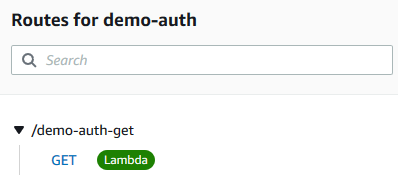
Choose Create and attach. The route is now using a Lambda authorizer.

HTTP API route includes Lambda authorizer

HTTP API route includes Lambda authorizer

The following examples to test the API authentication use Postman but you can use any HTTP client.

Send a GET request to the HTTP APIs URL without specifying any authorization header.

Postman unauthorized GET request

Postman unauthorized GET request

API Gateway returns a 401 Unauthorized response, as expected. The required $request.header.Authorization identity source is not provided, so the Lambda authorizer is not called.

Enter a valid Authorization header key, but an invalid value.

Postman Forbidden GET request

Postman Forbidden GET request

API Gateway returns a 403 Forbidden response as the request is now passed to the Lambda authorizer, which has evaluated the value, and returned "isAuthorized": false.

Supply a valid Authorization header key and value.

Postman successful authorized GET request

Postman successful authorized GET request

API Gateway authorizes the request using the Lambda authorizer and sends the request to the Lambda function integration which returns a successful 200 response.

For more Lambda authorizer code examples see “Custom Authorizer Blueprints for AWS Lambda.”

AWS CloudFormation support

Lambda authorizers for HTTP APIs are configured as AWS::ApiGatewayV2::Authorizer CloudFormation resources. Today, they are imported into AWS Serverless Application Model (AWS SAM) applications as native CloudFormation resources.

LambdaAuthorizer:
    Type: 'AWS::ApiGatewayV2::Authorizer'
    Properties:
    Name: LambdaAuthorizer
    ApiId: !Ref HttpApi
    AuthorizerType: REQUEST
    AuthorizerUri: arn:aws:apigateway:{region}:lambda:path/2015-03-31/functions/arn:aws:lambda: {region}:{account id}:function:{Function name}/invocations
    IdentitySource:
        - $request.header.Authorization
    AuthorizerPayloadFormatVersion: 2.0

Conclusion

IAM and Lambda authorizers are two of the most requested features for Amazon API Gateway HTTP APIs. You can now use IAM authorization in a similar way to API Gateway REST APIs. Lambda authorizers for HTTP APIs offer the option of a simpler Boolean response with the new version 2.0 payload and response format. You configure identity sources to specify the location of data that’s required to authorize a request, which are also used as the cache key.

These authorizers are generally available in all AWS Regions where API Gateway is available. To learn more about options for protecting your APIs, you can read the documentation. For more information about Amazon API Gateway, visit the product page.

For the latest blogs, videos, and training for AWS Serverless, see https://serverlessland.com/.