Post Syndicated from Explosm.net original https://explosm.net/comics/fake-boobs
New Cyanide and Happiness Comic
Post Syndicated from Explosm.net original https://explosm.net/comics/fake-boobs
New Cyanide and Happiness Comic
Post Syndicated from Йовко Ламбрев original https://yovko.net/el-salvador-vega/
Bourbon, Anaerobic Natural Sleeping bag, Apaneca-Ilamatepec, Juayúa, San Francisco, Andres Salaverria, 2024-25
Post Syndicated from Patrick Kennedy original https://www.servethehome.com/sth-weekly-newsletters-you-want-to-subscribe-in-q3-2025/
Subscribe to our newsletters to stay up to date on the latest reviews and coverage from STH and more delivered to your inbox
The post STH Weekly Newsletters You Want to Subscribe in Q3 2025 appeared first on ServeTheHome.
Post Syndicated from Oglaf! -- Comics. Often dirty. original https://www.oglaf.com/cliffdiver/


Post Syndicated from The Atlantic original https://www.youtube.com/shorts/HtZPlaK3BjA
Post Syndicated from Bozho original https://blog.bozho.net/blog/4513
В последните дни представители на правителството и на мнозинството са поели рефрена, че опозицията е виновна за един или друг инцидент, защото атакувала институциите и така рушала доверието в тях.
Освен че е нелепо да се оправдаваш с опозицията, с това виждане има съществен държавнически проблем.
Когато знаеш, че институциите се водят от заскулисни интереси и че изпълняват основните си функции като второстепенно задължение, доколкото не противоречи на задкулисния интерес (и то не особено компетентно, защото се пълнят с верни хора, без фокус върху компетентност), нямаш право да твърдиш, че критика към някоя институция е деструктивна.
Хората знаят, напр., че МВР пази престъпници и работи с престъпници. Само за последните 3 дни ми разказаха две такива истории – за чадър на по-високо ниво, и за теч на информация към по-дребен крадец, която е довела до побой над гражданин. От повече от една година прокуратурата отказва да образува досъдебно за теч от МВР към Ружа Игнатова чрез Таки.
Когато от Възраждане упражняват физическо насилие, именно ГЕРБ се скриха и не подписаха оставката на техния зам-председател, за да се даде ясен знак на обществото, че така не може. И пазят имунитетите им за престъпления именно срещу служители на МВР. И това само заради конюнктурен политически интерес, да си подават топката с Възраждане, след което се жалват какви клипчета пускали в ТикТок.
Прокуратура и разследващи органи злоупотреняват с наказателния процес, за да тормозят обвимяеми и свидетели. ДАНС се меси в изборния процес и го саботира. Министерство на финансите работи за изваждане на Пеевски от санкционен списък за корупция (което се подразбира от думи на Борисов). Едри подземни фигури прибират пари от екотакси, управляват ГКПП-та и следят трафика. Контролни органи си затварят очите за нарушения на предприятия на консултанти, пилета, котараци и всякакви друти отчисляващи към властта бизнесмени, правещи пари на гърба на здравето на хората.
Примери има десетки и всичко това се знае не само от лошата опозиция, а и от хората.
И когато опозицията каже, че институциите са завладяни, това водело до ерозиране на държвността. Глупости.
Държавността се ерозира, когато опаковаш този разпад с едно розово фолио и му лепнеш етикет „институция“. Защото под фолиото прозира всичко.
Не можеш да очакваш доверие към институции, в чието изтърбушване от смисъл си участвал. И не може да изискваш такова от гражданите.
Държавническият проблем, с който започнах, е че политиката „дайте да правим по малко, защото иначе задкулисието ще се ядоса, и да твърдим, че това е основание за доверие“ е несъстоятелна. И води и институциите, и обществото надолу.
Зоран Джинджич, след като става премиер на Сърбия след падането на комунистическия режим, започва от най-трудното – битката с организираната престъпност, която е на практика навсякъде. По темата той казва следното: „Ако трябва да изядеш жаба, не я гледай дълго. Ако трябва да изядеш повече жаби, първо изяж най-голямата.“
Най-голямата партия системно отказва да се заеме с най-голямата жаба – правосъдието и справедливостта. И затова не може да има претенции за доверието в институциите. То е ниско, защото липсата на справедливост се вижда от всеки гражданин.
И никакви realpolitik тактически упражнения и интриги не могат да замажат това. Никакви отворени врати, общи кандидатури, братски партии, похвали за разум и т.н. не могат да премахнат тази отговорност – че при всяка възможност да изберат изяждането на тази жаба, тях ги е било страх.
Ако днес може да има обединение за някоя кауза, за някой идеал, това е справедливостта. Тя гарантира решаването на проблема с доверието в институциите и позволява загърбване на различия в името на решаването на проблемите на българското общество. Съединение на сили (освен пред лицето на външна заплаха) може да има само ако базовото ниво на справедливост и правосъдие е постигнато. Дотогава призивите за доверие в институциите са лицемерие.
На старата сграда на Народното събрание пише „Съединението прави силата“. На новата, обаче, не го пише. Може би е случаен пропуск, но ще настоявам това да се промени. За да ни напомня – и на нас в сградата, и на тези съседните две сгради, които го гледат през прозорците, че трябва да мислим как да изпълним този идеал със смисъл, а не с кухи фрази и политическо заяждане.
Материалът Справедливостта като идеал за обединение е публикуван за пръв път на БЛОГодаря.
Post Syndicated from Bruce Schneier original https://www.schneier.com/blog/archives/2025/09/friday-squid-blogging-the-origin-and-propagation-of-squid.html
New research (paywalled):
Editor’s summary:
Cephalopods are one of the most successful marine invertebrates in modern oceans, and they have a 500-million-year-old history. However, we know very little about their evolution because soft-bodied animals rarely fossilize. Ikegami et al. developed an approach to reveal squid fossils, focusing on their beaks, the sole hard component of their bodies. They found that squids radiated rapidly after shedding their shells, reaching high levels of diversity by 100 million years ago. This finding shows both that squid body forms led to early success and that their radiation was not due to the end-Cretaceous extinction event.
Post Syndicated from Lorenzo Nicora original https://aws.amazon.com/blogs/big-data/achieve-full-control-over-your-data-encryption-using-customer-managed-keys-in-amazon-managed-service-for-apache-flink/
Encryption of both data at rest and in transit is a non-negotiable feature for most organizations. Furthermore, organizations operating in highly regulated and security-sensitive environments—such as those in the financial sector—often require full control over the cryptographic keys used for their workloads.
Amazon Managed Service for Apache Flink makes it straightforward to process real-time data streams with robust security features, including encryption by default to help protect your data in transit and at rest. The service removes the complexity of managing the key lifecycle and controlling access to the cryptographic material.
If you need to retain full control over your key lifecycle and access, Managed Service for Apache Flink now supports the use of customer managed keys (CMKs) stored in AWS Key Management Service (AWS KMS) for encrypting application data.
This feature helps you manage your own encryption keys and key policies, so you can meet strict compliance requirements and maintain complete control over sensitive data. With CMK integration, you can take advantage of the scalability and ease of use that Managed Service for Apache Flink offers, while meeting your organization’s security and compliance policies.
In this post, we explore how the CMK functionality works with Managed Service for Apache Flink applications, the use cases it unlocks, and key considerations for implementation.
In Managed Service for Apache Flink, there are multiple aspects where data should be encrypted:
For data at rest managed by the service, checkpoints, snapshots, and running application state storage are encrypted by default using AWS owned keys. If your security requirements require you to directly control the encryption keys, you can use the CMK held in AWS KMS.
To understand how CMKs work in Managed Service for Apache Flink, we first need to introduce the components and roles involved in managing and running an application using CMK encryption:
The following diagram illustrates the solution architecture.
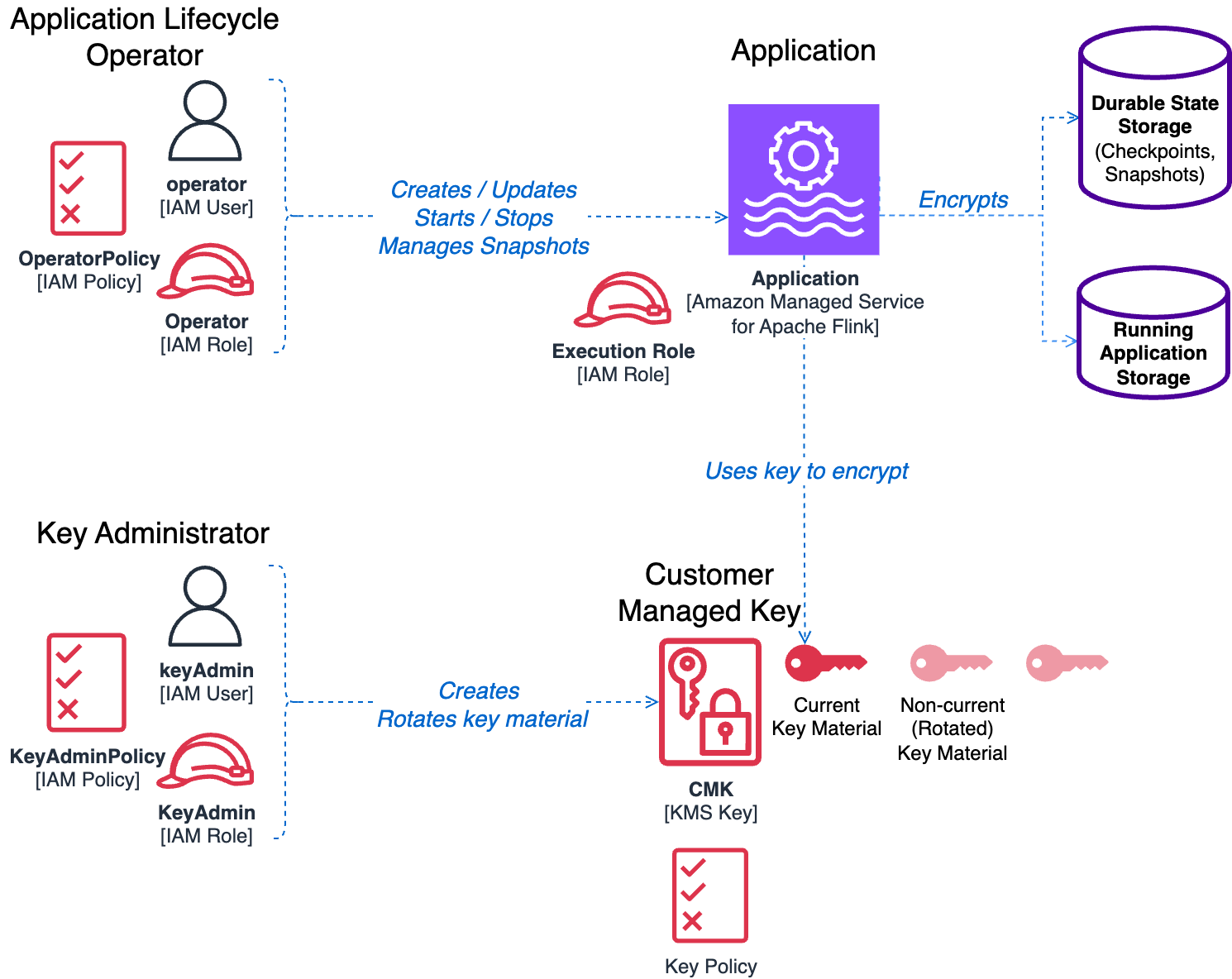
When deploying applications in production environments or handling sensitive data, you should follow the principle of least privilege. CMK support in Managed Service for Apache Flink has been designed with this principle in mind, so each component receives only the minimum permissions necessary to function.
For detailed information about the permissions required by the application operator and key policy configurations, refer to Key management in Amazon Managed Service for Apache Flink. Although these policies might appear complex at first glance, this complexity is intentional and necessary. For more details about the requirements for implementing the most restrictive key management possible while maintaining functionality, refer to Least-privilege permissions.
For this post, we highlight some important points about CMK permissions:
kinesisanalytics prefix. It is a best practice to restrict these permissions to a specific application defining the Resource. The operator must also have the iam:PassRole permission to pass the service execution role to the application.To simplify managing the permissions of the operator, we recommend creating two separate IAM policies, to be attached to the operator’s role or user:
The following IAM policy example illustrates the permissions that should be included in the base operator policy:
Refer to Application lifecycle operator (API caller) permissions for the permissions to be included with the additional CMK operator policy.
Separating these two policies has an additional benefit of simplifying the process of setting up an application for the CMK, due to the dependencies we illustrate in the following section.
If you carefully observe the operator’s permissions and the key policy explained in Create a KMS key policy, you will notice some interdependencies, illustrated by the following diagram.
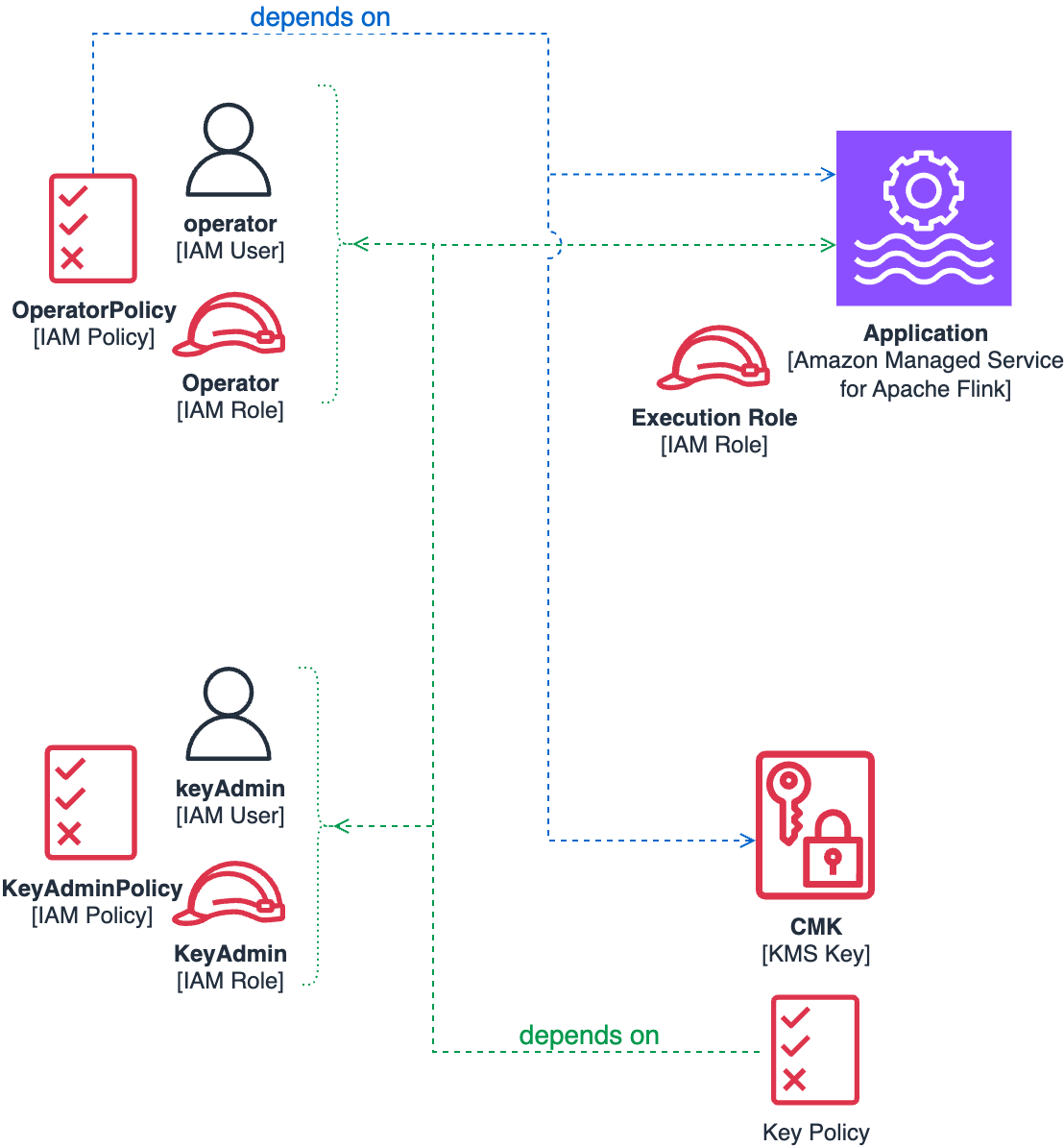
In particular, we highlight the following:
To properly follow the principle of least privilege, each component requires the others to exist before it can be correctly configured. This necessitates a carefully orchestrated deployment sequence.
In the following section, we demonstrate the precise order required to resolve these dependencies while maintaining security best practices.
When deploying a new application that uses CMK encryption, we recommend following this sequenced approach to resolve dependency conflicts while maintaining security best practices:
UpdateApplication action, to enable CMK encryption, as illustrated in the following section.You can configure a Managed Service for Apache Flink application to use a CMK using the AWS Management Console, the AWS API, AWS Command Line Interface (AWS CLI), or infrastructure as code (IaC) tools like the AWS Cloud Development Kit (AWS CDK) or AWS CloudFormation templates.
When setting up CMK encryption in a production environment, you will probably use an automation tool rather than the console. These tools eventually use the AWS API under the hood, and the UpdateApplication action of the kinesisanalyticsv2 API in particular. In this post, we analyze the additions to the API that you can use to control the encryption configuration.
An additional top-level block ApplicationEncryptionConfigurationUpdate has been added to the UpdateApplication request payload. With this block, you can enable and disable the CMK.
You must add the following block to the UpdateApplication request:
The KeyIdUpdate value can be the key ARN, key ID, key alias name, or key alias ARN.
Similarly, the following requests disable the CMK, switching back to the default AWS owned key:
Theoretically, you can enable the CMK directly when you first create the application using the CreateApplication action.
A top-level block ApplicationEncryptionConfiguration has been added to the CreateApplication request payload, with a syntax similar to UpdateApplication.
However, due to the interdependencies described in the previous section, you will most often create an application with the default AWS owned key and later use UpdateApplication to enable the CMK.
If you omit ApplicationEncryptionConfiguration when you create the application, the default behavior is using the AWS owned key, for backward compatibility.
The process you use to create the roles and key and configure the application to use the CMK will vary, depending on the automation you use and your approval and security processes. Any automation example we can provide will likely not fit your processes or tooling.
However, the following GitHub repository provides some example CloudFormation templates to generate some of the IAM policies and the KMS key with the correct key policy:
We have described the process of creating a new Managed Service for Apache Flink application with CMK. Let’s now examine other common operations you can perform.
Changes to the encryption key become effective when the application is restarted. If you update the configuration of a running application, this causes the application to restart and the new key to be used immediately. Conversely, if you change the key of a READY (not running) application, the new key is not actually used until the application is restarted.
If you have an application running with an AWS owned key, the process is similar to what we described for creating new applications. In this case, you already have a running application state and older snapshots that are encrypted using the AWS owned key.
Also, if you have a running application, you probably already have an operator role with an IAM policy that you can use to control the operator lifecycle.
The sequence of steps to enable a CMK on an existing and running application is as follows:
UpdateApplication action on the running application to enable a CMK.
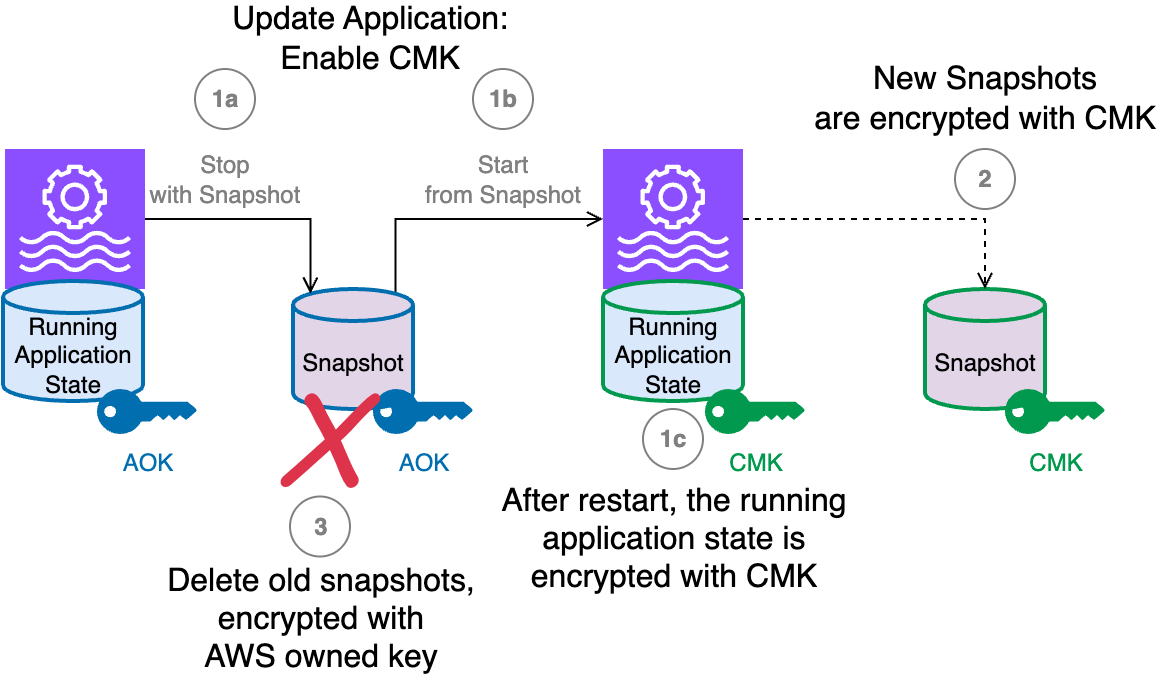
The workflow consists of the following steps:
UpdateApplication that enabled the CMK, because they are all encrypted using the AWS owned key.As with any cryptographic key, it’s a best practice to rotate the key periodically for enhanced security. Managed Service for Apache Flink does not support AWS KMS automatic key rotation, so you have two primary options for rotating your CMK.
The first approach involves creating an entirely new KMS key and then updating your application configuration to use the new key. This method provides a clean separation between the old and new encryption keys, making it easier to track which data was encrypted with which key version.
Let’s assume you have a running application using CMK#1 (the current key) and want to rotate to CMK#2 (the new key) for enhanced security:
UpdateApplication operation used to configure CMK#2 automatically triggers an application restart. This restart mechanism makes sure both the application’s running state and any newly created snapshots are encrypted using the new CMK#2, providing immediate security benefits from the updated encryption key.This approach provides a clean separation between old and new encrypted data while maintaining application availability throughout the key rotation process.
The second option is to rotate the cryptographic material within your existing KMS key. For a CMK used for Managed Service for Apache Flink, we recommend using on-demand key material rotation.
The benefit of this approach is simplicity: no change is required to the application configuration nor to the operator’s IAM permissions.
The new encryption key is used by the Managed Service for Apache Flink application only after the next application restart. To make the new key material effective, immediately after the rotation, you need to stop and start using snapshots to preserve the application state or execute an UpdateApplication, which also forces a stop-and-restart. After the restart, you should consider deleting the old snapshots, including the one taken automatically in the last stop-and-restart.
At any time, you can decide to switch back to using an AWS owned key. The application state is still encrypted, but using the AWS owned key instead of your CMK.
If you are using the UpdateApplication API or AWS CLI command to switch back to CMK, you must explicitly pass ApplicationEncryptionConfigurationUpdate, setting the key type to AWS_OWNED_KEY as shown in the following snippet:
When you execute UpdateApplication to switch off the CMK, the operator must still have permissions on the CMK. After the application is successfully running using the AWS owned key, you can safely remove any CMK-related permissions from the operator’s IAM policy.
In a production environment—or an environment containing sensitive data—you should follow the principle of least privilege and apply the restrictive permissions described so far.
However, if you want to experiment with CMKs in a development setting, such as using the console, strictly following the production process might become cumbersome. In these environments, the roles of key administrator and operator are often filled by the same person.
For testing purposes in development environments, you might want to use a permissive key policy like the following, so you can freely experiment with CMK encryption:
This policy must never be used in an environment containing sensitive data, and especially not in production.
As discussed earlier, this feature is designed to maximize security and promote best practices such as the principle of least privilege. However, this focus can introduce some corner cases you should be aware of.
With AWS KMS, you can disable one key at any time. If you disable the CMK while the application is running, it might cause unpredictable failures. For example, an application will not be able to restore a snapshot if the CMK used to encrypt that snapshot has been disabled. For example, if you attempt to roll back an UpdateApplication that changed the CMK, and the previous key has since been disabled, you might not be able to restore from an old snapshot. Similarly, you might not be able to restart the application from an older snapshot if the corresponding CMK is disabled.
If you encounter these scenarios, the solution is to reenable the required key and retry the operation.
To perform an action on the application (such as Start, Stop, UpdateApplication, or CreateApplicationSnapshot), the operator must have permissions for all CMKs involved in that operation. AWS owned keys don’t require explicit permission.
Some operations implicitly involve two CMKs—for example, when switching from one CMK to another, or when switching from a CMK to an AWS owned key by disabling the CMK. In these cases, the operator must have permissions for both keys for the operation to succeed.
The same rule applies when rolling back an UpdateApplication action that involved multiple CMKs.
A new encryption key is only used after the application is restarted. This is important when you rotate the key material for a CMK. Rotating the key material in AWS KMS doesn’t require updating the Managed Flink application’s configuration. However, you must restart the application as a separate step after rotating the key. If you don’t restart the application, it will continue to use the old encryption key for its running state and snapshots until the next restart.
For this reason, it is recommended not to enable automatic key rotation for the CMK. When automatic rotation is enabled, AWS KMS might rotate the key material at any time, but your application will not start using the new key until it is next restarted.
CMKs are only supported when you are using the Flink runtime 1.20 or later. If your application is currently using an older runtime, you should upgrade to Flink 1.20 first. Managed Service for Apache Flink makes it straightforward to upgrade your existing application using the in-place version upgrade.
Managed Service for Apache Flink provides robust security by enabling encryption by default, protecting both the running state and persistently saved state of your applications. For organizations that require full control over their encryption keys (often due to regulatory or internal policy needs), the ability to use a CMK integrated with AWS KMS offers a new level of assurance.
By using CMKs, you can tailor encryption controls to your specific compliance requirements. However, this flexibility comes with the need for careful planning: the CMK feature is intentionally designed to enforce the principle of least privilege and strong role separation, which can introduce complexity around permissions and operational processes.
In this post, we reviewed the key steps for enabling CMKs on existing applications, creating new applications with a CMK, and managing key rotation. Each of these processes gives you greater control over your data security but also requires attention to access management and operational best practices.
To get started with CMKs and for more comprehensive guidance, refer to Key management in Amazon Managed Service for Apache Flink.
Post Syndicated from The Atlantic original https://www.youtube.com/shorts/8IZ3QyLvFUM
Post Syndicated from Bruce Schneier original https://www.schneier.com/blog/archives/2025/09/my-latest-book-rewiring-democracy.html
I am pleased to announce the imminent publication of my latest book, Rewiring Democracy: How AI will Transform our Politics, Government, and Citizenship: coauthored with Nathan Sanders, and published by MIT Press on October 21.
Rewiring Democracy looks beyond common tropes like deepfakes to examine how AI technologies will affect democracy in five broad areas: politics, legislating, administration, the judiciary, and citizenship. There is a lot to unpack here, both positive and negative. We do talk about AI’s possible role in both democratic backsliding or restoring democracies, but the fundamental focus of the book is on present and future uses of AIs within functioning democracies. (And there is a lot going on, in both national and local governments around the world.) And, yes, we talk about AI-driven propaganda and artificial conversation.
Some of what we write about is happening now, but much of what we write about is speculation. In general, we take an optimistic view of AI’s capabilities. Not necessarily because we buy all the hype, but because a little optimism is necessary to discuss possible societal changes due to the technologies—and what’s really interesting are the second-order effects of the technologies. Unless you can imagine an array of possible futures, you won’t be able to steer towards the futures you want. We end on the need for public AI: AI systems that are not created by for-profit corporations for their own short-term benefit.
Honestly, this was a challenging book to write through the US presidential campaign of 2024, and then the first few months of the second Trump administration. I think we did a good job of acknowledging the realities of what is happening in the US without unduly focusing on it.
Here’s my webpage for the book, where you can read the publisher’s summary, see the table of contents, read some blurbs from early readers, and order copies from your favorite online bookstore—or signed copies directly from me. Note that I am spending the current academic year at the Munk School at the University of Toronto. I will be able to mail signed books right after publication on October 22, and then on November 25.
Please help me spread the word. I would like the book to make something of a splash when it’s first published.
EDITED TO ADD (9/8): You can order a signed copy here.
Post Syndicated from Madhu Balaji original https://aws.amazon.com/blogs/devops/measuring-developer-productivity-with-amazon-q-developer-and-jellyfish/
Modern software development teams face increasing pressure to deliver high-quality code faster, while managing growing system complexity. Developers often spend significant time on necessary, but undifferentiated work, or “toil”. Toil is often manual, repetitive, and of limited enduring value, making it a strong candidate for automation or delegation to generative AI tools. The re:Invent 2024 session Unleashing generative AI: Amazon’s journey with Amazon Q Developer (DOP214) discussed how toil and productivity have an inverse relationship. Amazon Q Developer can help decrease toil and free up your developers to work on more productive tasks. Until now, that impact has been hard to show.
This post shows you how to integrate Amazon Q Developer with Jellyfish to measure AI’s impact on developer productivity. You’ll learn how to set up the integration, understand key metrics, and make data-driven decisions about your AI investments.
The Evolution of Developer Productivity Measurement
The initial Amazon Q Developer Dashboard, released in October 2023, provided basic visibility into subscription usage, code generation statistics, and security scans. While these metrics gave customers visibility into basic usage patterns, they wanted deeper insights into how the metrics connected to developer productivity and business outcomes. Since then, updates to the Amazon Q Developer Dashboard provided additional user-level insights, with the most recent changes discussed in the May 2025 blog post: Unlocking the power of Amazon Q: Metrics-driven strategies for better AI coding.
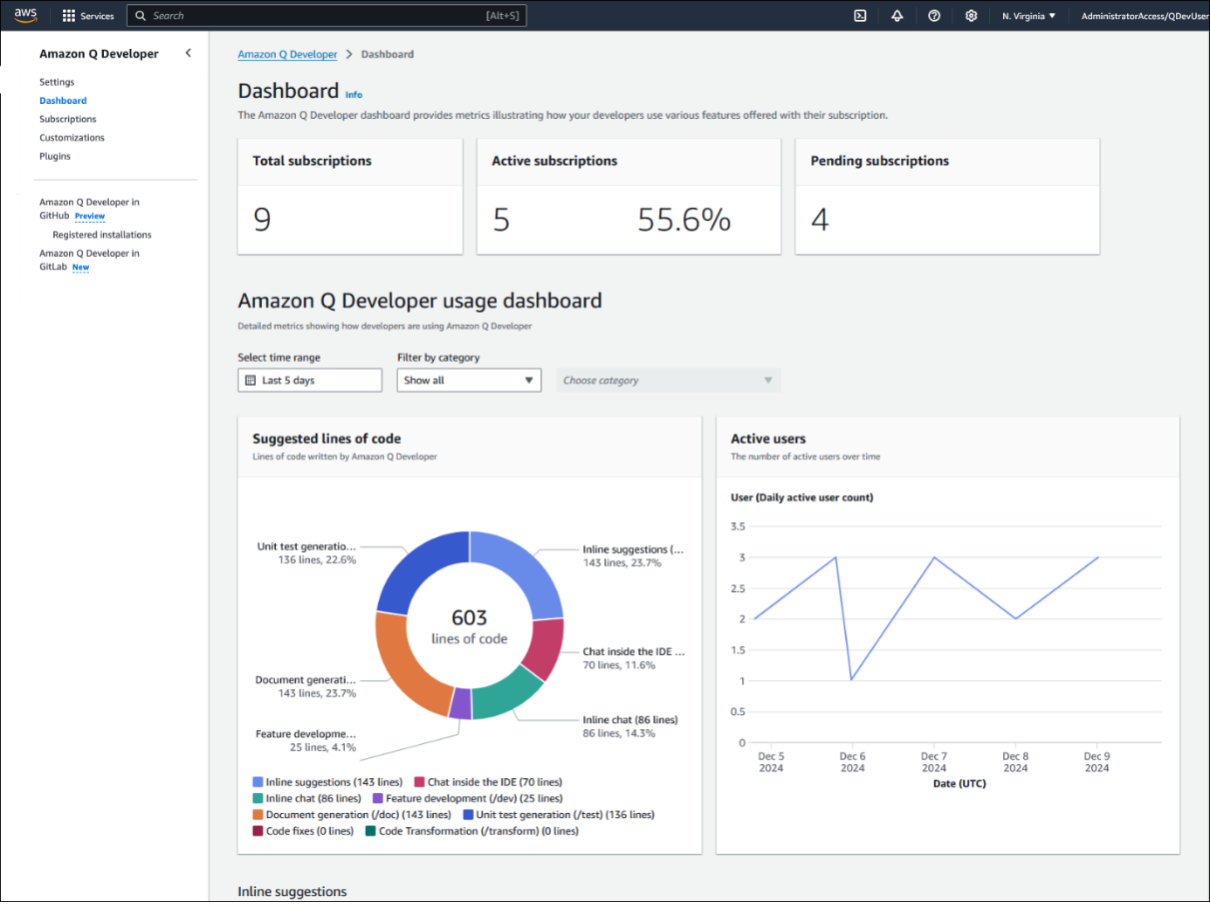
Amazon Q Dashboard in AWS Console
Many organizations face challenges when measuring generative AI impact due to complex organizational structures, fragmented tool chains, and rapidly evolving AI capabilities.
Leaders can make more informed decisions about metrics by working backwards from their desired business outcomes. When customers begin using generative AI tools, they focus on basic usage metrics such as subscription counts and active users. As generative AI adoption grows within an organization, teams want to understand AI impact on productivity and business value. By collecting the right data, leaders can measure how generative AI affects development workflows and business outcomes in their organizations.
Why Integrated Metrics Matter
The April 2025 blog “How generative AI is transforming developer workflows at Amazon” shared that developer productivity metrics are more complex than what any single tool measures. This aligns with established frameworks like DORA and SPACE. Understanding AI’s impact requires visibility across the entire development lifecycle. Organizations are looking for ways to combine data from multiple data sources to get a complete view. Some have created home-grown tools and dashboards while others like Genesys, a global cloud leader in AI-Powered Experience Orchestration, have taken advantage of partners like Jellyfish.
“At Jellyfish, our customers have been asking us for an Amazon Q Developer integration so they can understand the complete picture of how generative AI has transformed, improved and accelerated their software development workflows” – Billy Robbins, Jellyfish Head of Partnerships
The Jellyfish Solution
Jellyfish is an engineering management solution that combines metrics from various development tools. When integrated with Amazon Q Developer, Jellyfish helps you understand how Amazon Q Developer affects your development productivity by analyzing AI usage data alongside engineering metrics. Jellyfish understands the taxonomy of customer organizations allowing you to gain insights at the organizational levels that matter to you. This integration helps engineering leaders measure AI impact on development velocity, track adoption and usage patterns, and calculate the return on investment from AI spend.
“At Genesys, we’ve long been committed to data-driven engineering and deep telemetry across our software development lifecycle. However, quantifying AI’s impact on our development teams was challenging, as the insights from isolated tools were too fragmented to give us a clear overall picture. By partnering with AWS and Jellyfish, we’ve integrated the AI developer tooling our engineers trust with the platforms our leadership team relies on for visibility and alignment. This unified view empowers us to go beyond measuring AI adoption and on to operational metrics like productivity improvements and return on investment, enabling more informed decision-making at every level.” – Craig Dahlinger, Genesys Senior Director, Platform Engineering
The Amazon Q Developer and Jellyfish integration connects your AI-assisted development metrics with broader engineering analytics. Through secure, automated data flow, the solution provides insights into how AI is transforming your development processes.
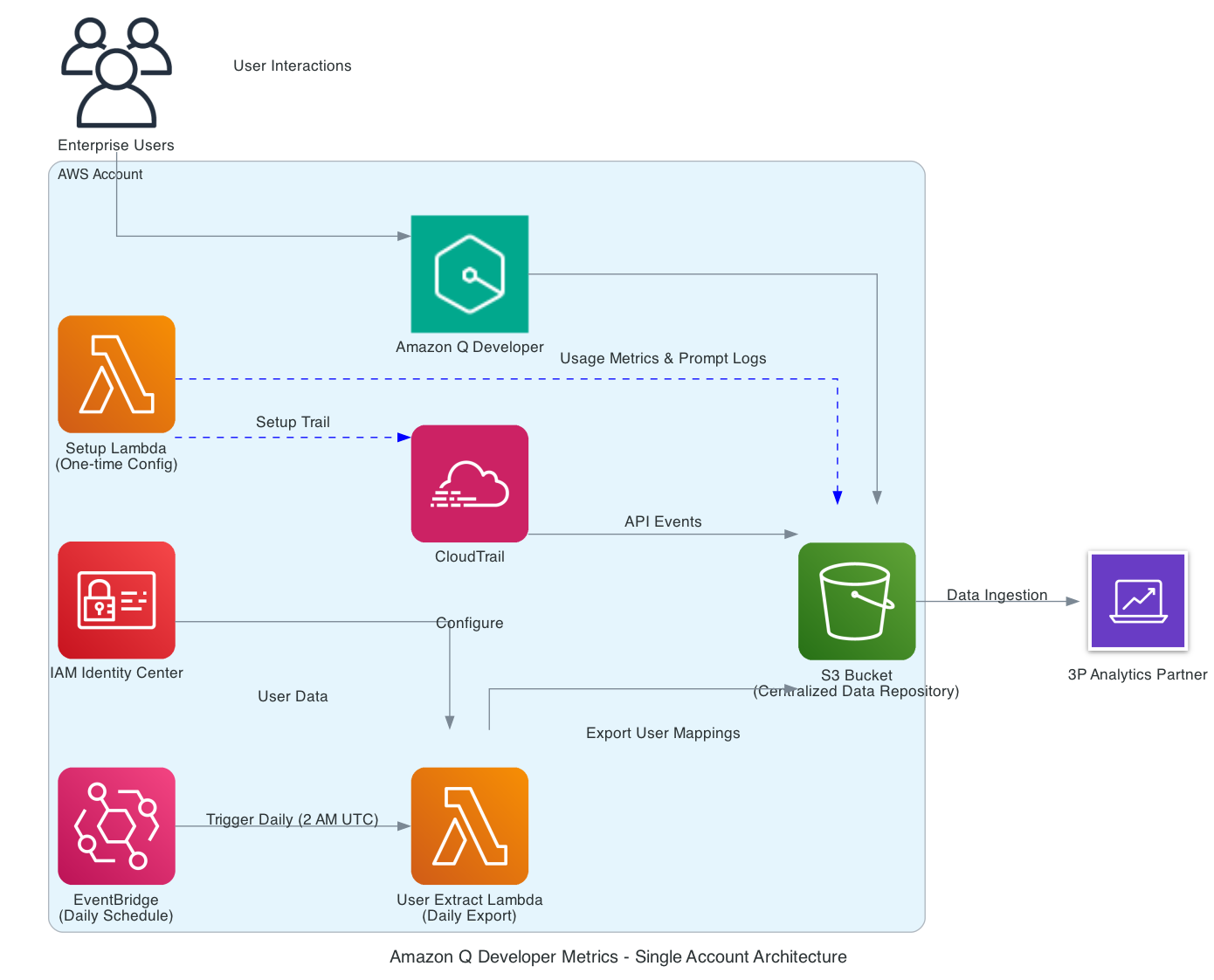
Amazon Q Developer log data ingestion setup
Amazon Q Developer automatically captures detailed usage data and prompt logs in your AWS environment. This data flows to a designated Amazon Simple Storage Service (Amazon S3) bucket, which Jellyfish securely accesses through pre-defined IAM roles. Jellyfish processes the information alongside data from your other development tools, providing comprehensive insights through their analytics system.
Jellyfish’s AI Impact Dashboard surfaces several important metrics across your development lifecycle:
Engineering Adoption
Visualize how many engineers have adopted Amazon Q Developer across your organization. Users are categorized by cohort: Power, Casual, Idle, and New, giving you a clear picture of adoption. The following screenshot shows a breakdown by user cohorts: out of 77 total engineers, you see 22 Power Users, 20 Casual Users, 6 Idle Users, and 12 New Users. This view helps you understand where you’re succeeding in driving adoption and where there might be room for improvement.
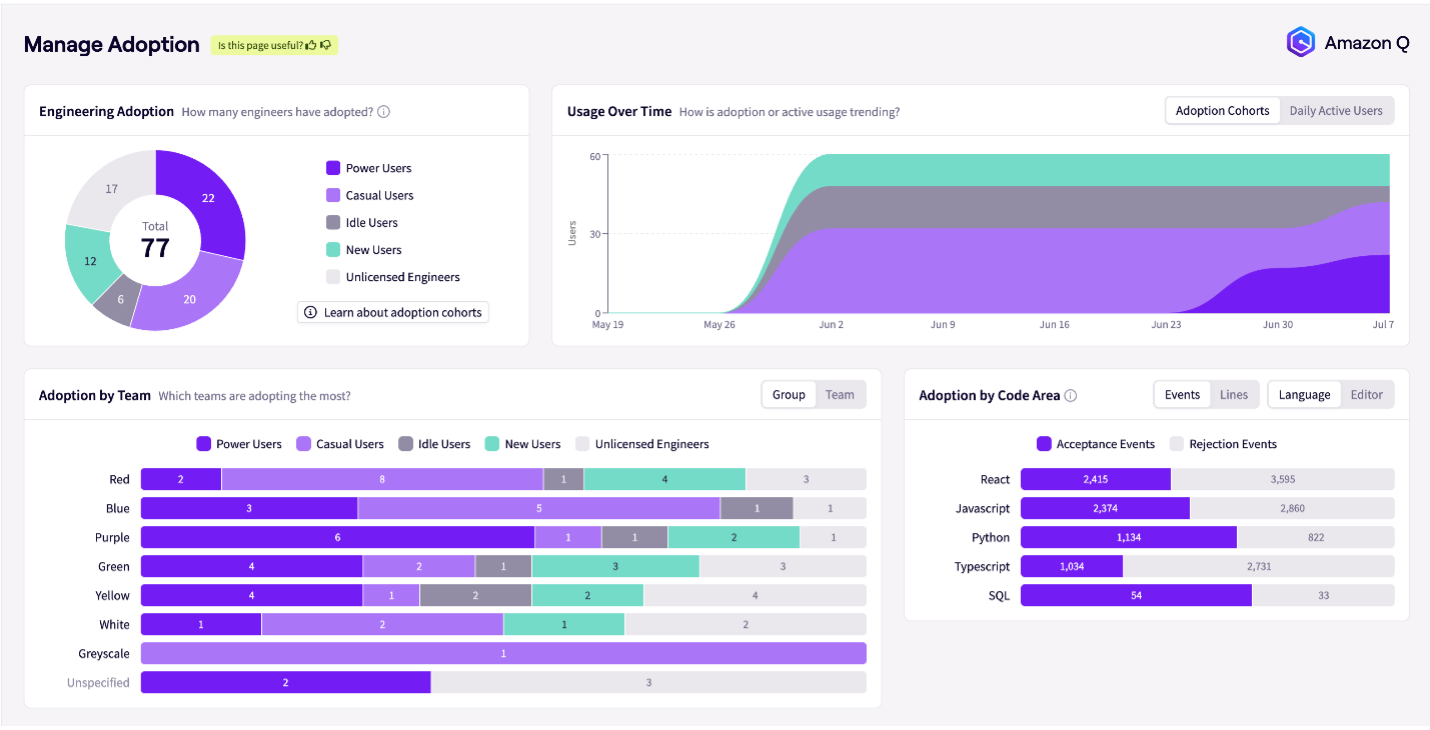
JellyFish Dashboard Manage Adoption
Usage Patterns and Trends
Through intuitive graphs, you can see daily active usage data, adoption trends, and usage patterns over time. This temporal view is crucial to understand how usage evolves and helps you identify successful adoption strategies and potential barriers to consistent use.
You can also see which programming languages benefit most from AI assistance. For example, the Manage Adoption dashboard screenshot above shows higher acceptance rates for AI suggestions in React compared to SQL (2,415 vs. 54), guiding your efforts to expand AI usage across different development areas.
Impact Measurement
Perhaps most crucially, this integration provides concrete impact metrics. You can now measure the reduction in time from first commit to pull request open. For example, the following screenshot shows a 24% reduction, with work time decreasing from 2 days and 23 hours to 2 days and 6 hours. You can also track changes in review time, which might show slight increases as AI-assisted code often requires more thorough review. Throughput improvements are also measurable, with some teams seeing a 142% increase in average monthly pull requests per user, jumping from 2.6 to 6.3 PRs per month.
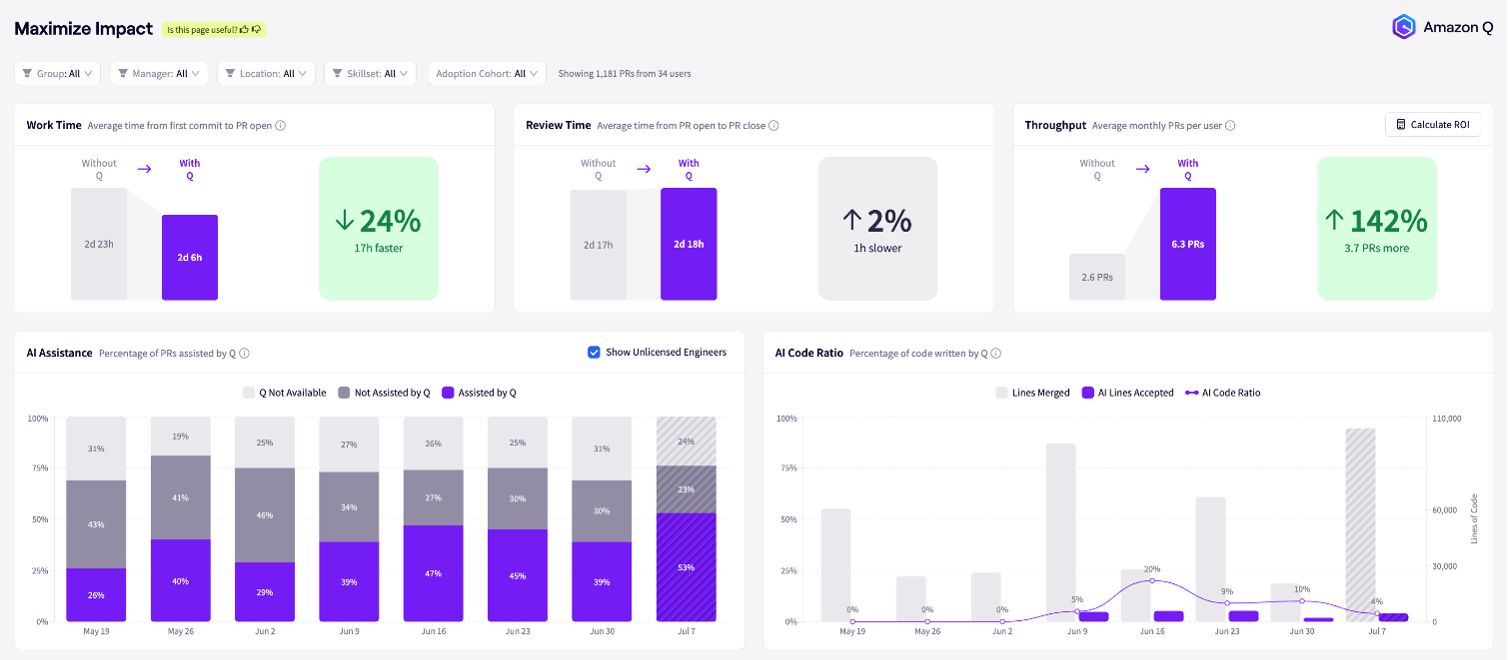
JellyFish Dashboard Maximum Impact
You can use the dashboard to view the percentage of pull requests assisted by Amazon Q Developer over time and track AI adoption. You can also understand the ratio of AI-written to human-written code, providing insight into the level of AI integration in your development process.
Investment Analysis
To round out the picture, you can visualize the impact of tool utilization on investment across different areas such as Growth, KTLO (Keep The Lights On), and Support. This helps you understand how your AI investment is affecting various aspects of your development lifecycle.
Before implementing this integration, make sure you have:
The implementation involves three steps:
Step 1: Enable Amazon Q Developer data collection: Follow the setup process found in this repository, containing automation scripts and detailed instructions. In this step, you configure the necessary AWS resources to collect Amazon Q Developer metrics.
This repository includes:
Step 2: S3 Access: To grant the JellyFish account/role access to the S3 bucket for logs, update the bucket policy
S3 Bucket ARN: <your-amazon-q-log-bucket-arn>
{
    "Version": "2012-10-17",
    "Statement": [
        {
            "Effect": "Allow",
            "Principal": {
                "AWS": "arn:aws:iam::0XXXXXXXX5:role/<AccessRoleName>"
            },
            "Action": ["s3:GetObject", "s3:ListBucket"],
            "Resource": [
                "arn:aws:s3:::<your-amazon-q-log-bucket>",
                "arn:aws:s3:::<your-amazon-q-log-bucket>/*"
            ]
        }
    ]
}
Step 3: Verify Setup: Confirm that the data is appearing in your S3 bucket and check with Jellyfish team to validate they have access to the S3 bucket and are receiving the logs.
Follow automated or the manual cleanup steps provided in the README.md
The Amazon Q Developer integration with Jellyfish represents a significant step forward in your ability to measure and optimize the impact of AI in software development. By providing engineering leaders with powerful, actionable insights into AI adoption and impact, organizations are enabled to make informed decisions about their AI investments, optimize developer workflows, and drive greater efficiency across their engineering teams.
To learn more about this integration, visit the Amazon Q Developer documentation, contact your Jellyfish representative, or visit the Jellyfish website if you’re new to their resources.
Post Syndicated from Patrick Kennedy original https://www.servethehome.com/picking-servers-cpus-for-databases-in-2025-is-still-complex-amd-oracle-microsoft/
Picking CPUs for databases is still a topic of great complexity in 2025 with CPU vendors making different chips catering to database licenses
The post Picking Servers CPUs for Databases in 2025 is Still Complex appeared first on ServeTheHome.
Post Syndicated from Тоест original https://www.toest.bg/t-e-ot-e-t-epizod-23/

Понякога те се завръщат. „Тоест“ – винаги.
Следете видеорубриката на Елена Телбис за „Тоест“ и във Facebook, Instagram и TikTok.
Post Syndicated from Crosstalk Solutions original https://www.youtube.com/shorts/G_oxXKGU678
Post Syndicated from The History Guy: History Deserves to Be Remembered original https://www.youtube.com/shorts/rnyrH0-h9nQ
Post Syndicated from corbet original https://lwn.net/Articles/1036465/
Like almost all human endeavors, open-source software development involves
a range of power dynamics. Companies, developers, and users are all
concerned with the power to influence the direction of the software — and,
often, to profit from it. At the 2025 Open
Source Summit Europe, Dawn Foster talked about how those dynamics can
play out, with an eye toward a couple of tactics — rug pulls and forks — that
are available to try to shift power in one direction or another.
Post Syndicated from daroc original https://lwn.net/Articles/1036907/
Security updates have been issued by Fedora (udisks2), Oracle (httpd:2.4 and kernel), Red Hat (python-requests), and SUSE (chromium, gn, dcmtk, firefox, himmelblau, nginx, perl-Authen-SASL, perl-Crypt-URandom, postgresql15, python-Django, and python-maturin).
Post Syndicated from Matt Granger original https://www.youtube.com/watch?v=7YEcD9FnFsw
Post Syndicated from corbet original https://lwn.net/Articles/1036856/
Mozilla has announced
that support for the Firefox browser on 32-bit systems ends with
version 144. “For users who cannot transition immediately, Firefox
“
ESR 140 will remain available — including 32-bit builds — and will continue
to receive security updates until at least September 2026.
Post Syndicated from The History Guy: History Deserves to Be Remembered original https://www.youtube.com/watch?v=WkPaThHoxJk