Post Syndicated from BeardedTinker original https://www.youtube.com/watch?v=1rOieBDtUkY
Did America Win the War on Terror? | The David Frum Show
Post Syndicated from The Atlantic original https://www.youtube.com/watch?v=OOGfqCtTqmw
Mini Records: Mini Verse vs Mini Brands
Post Syndicated from Techmoan original https://www.youtube.com/watch?v=L6-wGWsustk
Седмицата (7–12 септември)
Post Syndicated from Боряна Телбис original https://www.toest.bg/sedmitsata-7-12-septemvri/

Ако през последните дни сте следили българските медии, вероятно знаете кой е в инициативния комитет на Илияна Йотова, кой е в този на Андрей Гюров, кой до кого е седнал, кой кого подкрепя и какво евентуално означава присъствието на еди-кого си в еди-кой си списък.
Вероятно обаче сте попаднали и на друга новина. Джейкъб Коксън, изследовател, работил в OpenAI и Anthropic, напусна последната с предупреждението, че компаниите, разработващи най-мощните системи за изкуствен интелект, бягат към някаква финална линия, за която дори самите хора вътре в организациите не са сигурни до каква „победа“ ще доведе. След него Евън Хюбингър, който все още работи в Anthropic и ръководи екипа по Alignment Science, уточни публично собствената си оценка: над 10% вероятност изкуственият интелект да убие всички хора в рамките на следващото десетилетие.
Jacob is correct here—we really do earnestly believe AI could kill all humans! I personally think it is >10% within the next decade. I believe Anthropic is trying its best, but we do not yet have a plan to solve alignment for superintelligence and are not clearly on track to. https://t.co/QAIHiFP3QZ
— Evan Hubinger (@EvanHub) September 9, 2026
Десет процента.
Ако става дума за вероятност да вали в събота, не е драма. Заприличва на такава, ако говорим за края на човечеството. Но какво са няколко процента между приятели…
Докато тук гледаме на инициативни комитети като на кафе и се опитваме да разберем какво ни казват за бъдещето, хората, които строят въпросното бъдеще в буквалния смисъл, спорят дали има едно към десет шанс в него да няма хора. Живеем в края на дните, драги читатели. Не непременно в библейския смисъл, макар че напоследък човек не бива да отхвърля с лека ръка никакви варианти. Но почти сигурно живеем в края на някакви дни. Аз собствено живея в края на дните преди началото на учебната година, в която имам още един първокласник и отново ще ми се наложи да чуя приветствие от Янка Такева на 15 септември.
При всички положения обаче „Тоест“ се завръща в интернетите ви.
След едномесечната си лятна ваканция, която правим не толкова защото страшно много държим да си почиваме през август, а защото „Тоест“ е медия, издържана от даренията на читателите си, и август е месецът, в който почти никой не иска да чете нищо. Затова използваме случая да не произвеждаме медия, която няма да бъде прочетена, и така да спестим малко пари.
Толкова е просто. Или толкова е тъжно (ако ви е важна тъгата като мотиватор).
Но сме тук. И понеже светът може да свърши, или по-лошото – да продължи все така, започваме новия сезон постарому: с истории за хора.
Йоанна Елми тръгна из България и на първо време стигна до восъчния Левски в един музей в Ловеч. Това е първият текст от новата ѝ рубрика „Фрагменти от България“, в която тя ще пътува, ще гледа, слуша и снима, а през малките неща ще се опитва да разбере големите. В случая въпросът е как разказваме собственото си минало и какво остава от него, когато го затворим в музейна витрина.
Фрагменти от България: Восъчният Левски
Как разказваме историята си и какво остава от нея, когато я заключим зад витрини, патос и задължително преклонение? В първия текст от „Фрагменти от България“ Йоанна Елми тръгва от един музей в Ловеч, за да стигне до въпроса защо още не умеем да говорим за миналото без идеология.
Восъчният Левски е малко смешен и после става по-скоро плашещ. Защото е метафора за една държава, която от десетилетия не е измислила нов начин да говори за себе си, а пък народът на тая държава (иначе много древен и велик) продължава да живее сред полуфабрикатни разкази кой е, откъде идва и с какво се гордее.
Лошото е, че тука вакуум не се търпи и когато не умеем да разказваме миналото си, някой друг с удоволствие ще го разкаже вместо нас.
В Германия това в момента прави „Алтернатива за Германия“ (АзГ). В новия си текст Светла Енчева разказва за убедителната победа на крайнодясната партия в Саксония-Анхалт през един 40-годишен поп хит – Forever Young на Alphaville, превърнал се по странно стечение на обстоятелствата в песен на съпротивата срещу АзГ. Хит от времето на Студената война, роден от страха от атомната бомба и бъдещето, се връща четири десетилетия по-късно в една Германия, която отново спори колко минало има в настоящето си. Миналото, както завършва Светла, също може да бъде forever young.
Forever Young. Да поговорим за възхода на „Алтернатива за Германия“
Крайната десница печели там, където демокрацията не успява да даде нито убедителни отговори, нито визия за бъдещето. Светла Енчева разглежда възхода на АзГ в Източна Германия и проследява как усещането за изоставеност, носталгията и страхът се превръщат в политическа сила.
Разбира се, няма как да минем без кампанията за президентските избори. Имаме два текста по темата в съвсем различни посоки.
Емилия Милчева се занимава с въпроса какъв национален хоризонт очакваме от президента. В статията си тя разказва накратко за петимата пряко избирани български президенти през различните представи за тази институция – от коректив и гарант за геополитическата посока на държавата до посредник, архитект на промяна и център на политическа власт.
Какъв национален хоризонт чакаме от президента?
Какво всъщност избираме, когато избираме президент – лице на държавата, коректив на властта или посока за бъдещето? Емилия Милчева проследява как различните президенти на България са разбирали ролята си, и пита какъв национален хоризонт предлагат днешните кандидати отвъд политическото позициониране.
Дарина Сарелска пък коментира кандидатурата на Кирил Вълчев, генерален директор на БТА, за вицепрезидент на Илияна Йотова, отваряйки изключително важния разговор за журналистите, които преминават в политиката. Не защото журналистът няма право на политически убеждения, а защото доверието е капиталът на тази професия. И когато днес го трупаш като човек, който задава въпроси на властта, а утре го осребряваш като кандидат на същата тази власт, сметката я плаща журналистиката.
Признанието като самопризнание
Защо прескачането на журналисти в политиката е саморазобличително и за политиката, и за журналистиката? Как журналистическото доверие се превръща в политически капитал и какво остава след това от самата журналистика – от Дарина Сарелска.
И понеже думите все пак са основният инструмент, с който тази журналистика се прави, Павлина Върбанова отваря вратата към редакционната кухня на „Тоест“ и разказва за нашите вътрешни езикови правила. Защо в „Тоест“ понякога съзнателно се отклоняваме от официалната норма и как една редакция решава кое да пази, кое да променя и с кое да спори. В крайна сметка нищо не е вдялано в камък, освен, разбира се, нещата, които са вдялани в камък…
Вътрешни езикови правила за външна употреба (на ваш риск)
Павлина Върбанова, нашият вътрешен arbiter philologiae, открива новия сезон, като ви кани на редакционната ни кръгла маса и ви поднася малка порция отклоняващи се от нормата езикови правила, които сме решили да съблюдаваме в ежедневната си работа. Опитайте ги, може да ви допаднат!
И накрая идват три истории, които Надежда Цекулова разказва в рубриката си „Да говорим с грижа“. Едната е за Елица – двегодишно дете с тежки увреждания, което живее извън дома си, защото системата може да му осигури медицинска грижа, но трудно успява да осигури едновременно и нея, и семейството му. Родителите ѝ, разбира се, мечтаят да си я приберат у дома.
Другата е за Диана и дъщеря ѝ Ида, прекарала пет месеца в кома в неонатологията. Майка ѝ я вижда редовно, но я прегръща за първи път едва след смъртта ѝ.
Третият глас е на детския анестезиолог и реаниматор д-р Христо Христов, който си позволява да говори извънпротоколно как родителите да останат родители и когато детето им е тежко болно, и когато лекарите вече не могат да го спасят.
Остани до края
Надежда Цекулова разказва три истории за срещата с институциите, за уязвимостта, достойнството и за всичко, което системите избират да видят, да подминат или да оставят за някой друг.
Почнахме седмицата с разказване на истории и така я приключваме – с истории за хора.
Ако много ви липсват такива, четете „Тоест“, но вижте и платформата anyhumanever.com.
Идеята ѝ е проста и прекрасна. Натискате бутон и от повече от 100 милиарда души, живели някога на Земята, получавате разказ за един случаен човешки живот. Като тото-лото за човешки истории. Първо ви се пада година, после място на раждане, пол, условия, вероятности – колко е било вероятно този човек да преживее детството си, да има образование, да роди деца, да умре от болест, глад или насилие.
Историите не са биографични, а възможни животи, статистически сглобени на базата на научните знания за света ни до този момент.
И нас ни има в тези 100 милиарда човешки живота.
Много ни се иска да вярваме, че сме от различни племена. Чертаем граници в прахта, учредяваме партии и комитети, поддържаме кухи идеологии, за да си обясняваме кои сме ние и кои са другите – изобщо, голяма дейност кипи. В същото време едно дете лежи пет месеца в кувьоз, майка му иска просто да го прегърне и тази история всички я разбираме и преживяваме.
Съжалявам, че ще ви го съобщя в първия бюлетин на „Тоест“ за сезона, но в целия ужас и хаос, и радост от всичкото сме заедно.
Благодарим ви.
Friday Squid Blogging: Rotting Squid on a Beached California Boat
Post Syndicated from Bruce Schneier original https://www.schneier.com/blog/archives/2026/09/friday-squid-blogging-rotting-squid-on-a-beached-california-boat.html
Smells awful:
But an estimated 30 to 50 tons of dead squid remain inside the boat’s catch tank, where they have been decomposing for days. “That is nasty. I wouldn’t want to do that,” said commercial fisherman Dick Ogg of the Bodega Bay Fishermen’s Marketing Association.
Ogg said anyone familiar with the fishing industry understands what happens when a large catch sits for an extended period.
“If you think about what happens after four or five days, it’s a gooey mess,” he said.
The odor has become a defining feature of the operation, and the beach remains closed to the public while crews work on a removal plan.
According to salvage expert Ernie English of Parker Diving Service, the squid has deteriorated into a thick mass that will be difficult to remove.
“It’s like concrete,” English said when asked about its consistency.
As usual, you can also use this squid post to talk about the security stories in the news that I haven’t covered.
I Built an Offline Internet in a Pelican Case
Post Syndicated from Crosstalk Solutions original https://www.youtube.com/watch?v=MaieGi5WsVQ
My Talk at DEF CON
Post Syndicated from Bruce Schneier original https://www.schneier.com/blog/archives/2026/09/my-talk-at-def-con.html
Last month, I gave a talk at DEF CON on AI hacking: what happens when AIs become hackers. It’s a combination of the potentialities I raised in my 2022 book A Hacker’s Mind and the lessons we’re learning from current AI models engaging in hacking behavior. I’m really proud of the talk, and the fact that it gained over 100K views on YouTube in just a few days.
Also online is an interview with me in the AI Village.
ASUS Pro WS W890E-SAGE SE Motherboard Review
Post Syndicated from Ryan Smith original https://www.servethehome.com/asus-pro-ws-w890e-sage-se-motherboard-review/
Today we are taking a look at ASUS’s premium motherboard for the new Xeon 600 workstation platform, the Pro WS W890E-SAGE SE. A showcase for the platform, the SAGE SE supports Xeon 600’s full capabilities, while looking to appeal to both businesses and enthusiasts alike
The post ASUS Pro WS W890E-SAGE SE Motherboard Review appeared first on ServeTheHome.
EuroPython 2026 videos published
Post Syndicated from jzb original https://lwn.net/Articles/1093825/
All of the videos from the EuroPython 2026 conference, held
in Kraków from July 13 through July 19, are now
online along with a recap of
the event from conference organizers.
Is AI Writing Inevitable?
Post Syndicated from The Atlantic original https://www.youtube.com/watch?v=wSM6shmxOSM
[$] Accelerating the kernel’s build process
Post Syndicated from corbet original https://lwn.net/Articles/1093398/
Kernel developers do a lot of kernel builds. Since the kernel is not a
small program, those builds can take a fair amount of time, even on a fast
machine. The kernel also has a complex build system; it is probably fair
to say that few developers truly understand it, and fewer still are willing
to try to improve it. Lorenzo Stoakes, armed with LLM-based assistance,
decided to give it a try, though, and has managed to reduce the time it
takes to build a kernel — and not by a small amount.
From zero-shot forecast to purchase order with Amazon Bedrock AgentCore
Post Syndicated from Hyunsoo Kim, Ph.D. original https://aws.amazon.com/blogs/architecture/from-zero-shot-forecast-to-purchase-order-with-amazon-bedrock-agentcore/
Authors: Hyunsoo Kim, Chloe Kwak
Learning level: 300 – Advanced Post type: Best Practices
Every inventory manager faces the same question each morning: How much should I order today? The answer depends on dozens of variables (sales history, upcoming promotions, pricing changes, day-of-week seasonality, supplier lead times) and the cost of getting it wrong is asymmetric. Over-order and you carry capital in slow-moving stock. Under-order and you lose revenue, damage customer trust, and scramble for emergency replenishment.
The case for zero-shot forecasting
Classical time-series methods (ARIMA, Holt-Winters, seasonal decomposition) require per-SKU model fitting. A retailer with 10,000 SKUs must train, validate, and maintain 10,000 separate models. Each requires its own hyperparameter tuning, retraining schedule, and cold-start problem for new products. The operational burden scales linearly with catalog size, and the engineering team spends more time managing infrastructure than improving forecast quality.
Gradient boosting and deep learning approaches (LightGBM, DeepAR, Temporal Fusion Transformer) improve accuracy but compound the operational complexity: feature engineering pipelines, training jobs, model registries, A/B testing infrastructure. For many organizations, the time from “we want better forecasts” to “forecasts are running in production” often takes a full quarter or more.
From manual rules to automated decisions
Even with a reliable forecast, converting a demand signal into a purchase order requires applying business rules: safety stock buffers, minimum order quantities, budget constraints, promotional lift adjustments. These rules are typically encoded in spreadsheets or institutional knowledge, applied inconsistently across buyers, and nearly impossible to audit or explain at scale.
The architecture this post builds
This post describes how to combine two complementary capabilities to address both problems simultaneously:
- Amazon Chronos2: A time-series foundation model that performs zero-shot forecasting, returning probabilistic demand predictions without per-product training.
- Multi-agent orchestration with the Strands Agents SDK and Amazon Bedrock AgentCore: A system of four LLM agents that coordinate deterministic tools, converting raw forecasts into validated purchase orders with full auditability.
The result is an end-to-end inventory automation pipeline where adding a new product requires zero ML model training, adding a new business rule requires changing one tool, and each decision is auditable, observable, and recoverable from failure. In internal testing across 50 SKUs over a 4-week horizon, this architecture achieved a median weighted absolute percentage error (WAPE) of 12.3% (P50 forecast compared to actuals), reduced per-SKU onboarding time from 2–3 weeks of model training to under 5 minutes of CSV upload, and cut monthly inference cost from ~$1,091 (always-on GPU) to ~$15 (Serverless) — a 98% reduction. End-to-end pipeline latency averaged 8 seconds per SKU excluding cold start.
Solution overview
This section describes the end-to-end system architecture, explains why Chronos2 is well suited for inventory forecasting, and outlines the benefits of a multi-agent design over a monolithic approach.
End-to-end architecture
The system is organized into three logical layers:

Data layer. Amazon Simple Storage Service (Amazon S3) serves as the single source of truth. A single CSV per product encodes both historical sales and future covariate values. Business rules (lead times, safety stock, warehouse capacity, minimum order quantities) live in a separate JSON config. Adding a new product requires only uploading these two files, with no changes to code.
Inference layer. Amazon SageMaker Serverless Inference hosts the Chronos2 endpoint for zero-shot time-series forecasting. This is the only external model inference call in the pipeline — the LLM reasoning runs through Amazon Bedrock within the orchestration layer.
Orchestration layer. Four LLM agents — Supervisor, Preprocessing, Forecasting, and Reporting — are built with the Strands Agents SDK and deployed on Amazon Bedrock AgentCore. Each agent uses Claude on Amazon Bedrock for reasoning and calls deterministic tools to execute the computational work.
Amazon Bedrock AgentCore is a fully managed platform to build, deploy, and optimize agents at scale, with any framework or model. The orchestration layer runs on AgentCore, which provides six sub-services: Runtime, Gateway, Policy, Memory, Observability, and Evaluations. This system uses each of the six, but each for a specific, single purpose. The architecture deep dive section maps each service to the production concern it addresses in this design — including why the Gateway surface is deliberately small (one tool out of eight).
Why Chronos2: zero-shot, covariates, what-if
Chronos2 is an encoder-only transformer that closely follows the T5 encoder design, pre-trained on a large and diverse corpus of real-world time series. The model generates multi-step probabilistic forecasts using in-context learning and a group attention mechanism — no fine-tuning on your data required.
Three properties make it the right choice for inventory forecasting at scale:
- Zero-shot generalization: A new SKU requires no training job. Historical sales window in, probabilistic forecast out — including for products with sparse or short histories.
- Covariate support: Chronos2 accepts past-only covariates (historical features known only for past periods) and known covariates (features whose future values are given for the forecast horizon, such as a scheduled promotion or price change). In the Python API these are passed via the
context_dfandfuture_dfdataframes topipeline.predict_df(). Covariates transform the model from a univariate forecaster into a conditional one. - What-if scenario analysis: Because covariates are explicit inputs, you can generate multiple forecasts — with a promotion and without one, at the current price and at a discounted price — and compare them before committing to an order.
Chronos2 is well-suited for this workload because it satisfies all three requirements simultaneously: zero-shot inference (no per-SKU training), explicit support for both past-only and future covariates via the predict_df() API, and a one-click deployment path to Amazon SageMaker Serverless Inference. This combination means that onboarding a new product requires only data — no pipeline changes, no model registry entries, no retraining schedule. The evaluator framework introduced in the architecture deep dive makes it straightforward to benchmark any alternative forecasting model on the same traces without rebuilding the pipeline.
Why multi-agent over monolithic
A single LLM prompt that performs all reasoning steps — data loading, covariate selection, forecast interpretation, order calculation, validation, and result saving — would exceed practical context window limits for large catalogs, be impossible to unit test at the component level, and fail catastrophically when any single step encounters an error.
An agent-per-reasoning-responsibility architecture solves each of these problems directly. Critically, this architecture makes a firm distinction: LLM agents handle judgment. Deterministic tools handle computation. Bedrock inference happens in exactly four places: the four agents. The operations they coordinate (loading files, running the replenishment formula, generating charts, writing to S3) run as plain Python functions that the agents call as @tools. The agent determines when to call each tool and with what arguments: the tool itself contains no LLM inference. This separation keeps per-run LLM cost bounded and reasoning quality high by ensuring each agent’s context window carries only what it needs to reason about, not the raw byproducts of every tool call.
Prerequisites
Four things need to be in place before deploying this architecture. Other components (the S3 bucket, IAM roles, folder layout, and the agent runtime package) are provisioned by the CDK stack and deploy scripts described in the following sections.
- AWS account with Amazon Bedrock, Amazon SageMaker, and Amazon S3 access in the same AWS Region (the following examples assume
us-east-1). - Amazon Bedrock model access for Claude Sonnet 4.5 (Anthropic), enabled in the Bedrock console under Model access → Manage model access. For model availability by Region, refer to Supported models by AWS Region in Amazon Bedrock .
- Chronos2 endpoint deployed on Amazon SageMaker Serverless Inference. The deployment procedure uses a single SageMaker Serverless endpoint configuration with the Chronos2 model package.
- Python 3.10+ and Node.js 20+ on the local machine. Install the SDKs and CLIs:
Technical implementation
This section walks through the data format, agent definitions, coordinator logic, and deployment configuration.
Data format design
The input format intentionally blurs the boundary between historical and forecast periods. A single CSV file covers both:
Rows where sales are null define the forecast horizon. Covariates are fully populated for both historical and future periods. This design makes the distinction between past and future a data concern, not a code concern — the Preprocessing Agent reads the same schema regardless of forecast horizon length. When the operations team knows a promotion is planned next week, they fill in the promotion column for those future rows and re-upload the file.
Product-level business rules live in a separate JSON config:
By treating business rules as data rather than code, adjusting a supplier’s lead time or safety stock threshold requires only a config update in S3 — no deployment.
The four LLM agents and their tools
The central design principle: use an LLM agent where the output depends on interpretation or context. Use a deterministic tool where the output is fully determined by the input.
Supervisor agent
The Supervisor is the entry point for every user request. Its responsibility is pure orchestration: parse the user’s intent in natural language, construct the execution plan, route work to the three specialist agents in sequence, and handle conditional branching based on their outputs.
When a user sends “Run the weekly replenishment forecast for wireless earbuds — there’s a promotion this weekend,” the Supervisor:
- Identifies the product scope and resolves “wireless earbuds” to its SKU.
- Notes the promotional context and passes it explicitly to the Preprocessing Agent.
- Constructs the sequential execution plan.
- Monitors agent outputs and triggers the conditional retry loop if validation fails.
This requires genuine LLM reasoning. The Supervisor is not a router with a hardcoded lookup table — it interprets ambiguous instructions, surfaces missing parameters as clarifying questions, and makes branching decisions based on downstream agent outputs.
The Supervisor does not call data or computation tools directly. Its only job is to reason about the workflow.
In production, Amazon Bedrock Guardrails protects each agent’s LLM reasoning steps as a mandatory control, not an optional add-on. The Supervisor agent — which interprets natural-language requests and makes branching decisions that ultimately determine order quantities — runs behind a Guardrails configuration that enforces content filtering, denied topic policies, and grounding validation against the structured tool outputs. This prevents the Supervisor from hallucinating constraint overrides or generating purchase decisions outside its authorized scope. For implementation details, refer to Amazon Bedrock Guardrails.
Preprocessing agent
The Preprocessing Agent loads raw data via deterministic tools and then applies LLM reasoning to decide how to prepare it for Chronos2.
The three load_* functions are plain Python — without LLM inference. The Preprocessing Agent’s LLM reasoning kicks in after the data is loaded, when it must decide which covariates to include. The Supervisor passes the user’s natural-language request (for example, “there’s a promotion this weekend”) down to the Preprocessing Agent as part of the task description, which signals that the promotion column must be included. But the agent also evaluates data quality: if promotion is sparsely populated or shows near-zero variance across the training period, the agent may exclude it and note the decision. A deterministic function does not make this call — it requires reading both the numbers and the business context together.
Forecasting agent
The Forecasting Agent calls the Chronos2 endpoint via a deterministic tool and then applies LLM reasoning to interpret the results.
call_chronos2, calculate_order_quantity, and validate_constraints are each deterministic functions. The Forecasting Agent’s LLM reasoning provides two things these tools cannot: anomaly contextualization (“day 7 P90/P50 ratio is 1.36 — above the 1.3 anomaly threshold, consistent with the promotional covariate for that day”) and a natural language rationale for the order recommendation (for example, “753 units covers a 5-day lead-time demand of 648 plus a 150-unit safety stock buffer, net of 45 current inventory”). The numbers in this rationale are drawn from data/product_config.json — the same values used in the Running the agent walkthrough later in this post.
The probabilistic output — P10, P50, and P90 quantiles — is central to inventory planning, not incidental. Ordering to the P50 (median) without any buffer would mean running out of stock roughly half the time, which is why safety stock exists as a separate parameter. calculate_order_quantity uses the P50 forecast for expected lead-time demand, and the safety_stock parameter in the product config absorbs the uncertainty between P50 and P90 (teams typically tune safety stock toward a target service level such as P90 or P95). For products with high P90/P50 ratios — indicating volatile or promotion-driven demand — the Forecasting Agent flags the anomaly explicitly so the Reporting Agent can surface elevated uncertainty to the buyer rather than hiding it behind a single order number.
The violations array returned by validate_constraints is what makes the conditional retry loop actionable. When the constraint check fails, the array contains a human-readable string per violated constraint (for example, "Exceeds budget ($9412.50/$500.00)"), which the Forecasting Agent passes up to the Supervisor. The Supervisor uses this specific message, not a generic “validation failed” signal. Based on the violation details, it decides whether to re-invoke the Forecasting Agent with adjusted constraints or escalate to the user.
Reporting agent
The Reporting Agent consumes the structured output from the Forecasting Agent and produces the final deliverables: a visualization and a persisted decision record. The tools are deterministic. The agent provides the natural language summary that makes the output actionable for a business user.
Coordinator pattern: sequential + conditional retry
Pattern: agents-as-tools
The preceding coordinator diagram is a behavioral view. Structurally, this implementation follows the Agents-as-Tools pattern: the Supervisor is a single Strands agent whose tool list contains the three specialist agents, each wrapped as a @tool. There is no explicit multi-node graph in the Strands SDK’s orchestration layer — the graph is a single Supervisor node with max_node_executions=10 (enough headroom for the base preprocessing → forecasting → reporting sequence plus up to three retry iterations, then a safety stop). Orchestration happens inside the Supervisor’s tool-use loop.
This matters for context isolation. Each specialist @tool invocation spawns a fresh Strands agent with its own context window, own system prompt, and its own tool subset. Results return to the Supervisor as a compressed labeled-output block (a CLUES_FORMAT envelope defined by the Strands SDK) that carries the specialist’s labeled output instead of its full reasoning transcript — so the Supervisor sees labeled deltas and its context stays bounded as the workflow grows.
Deploying to Amazon Bedrock AgentCore
The preceding Strands agent definitions run as local Python processes with Amazon Bedrock as the LLM backbone. To move them to managed execution, package the Supervisor entry point as an AgentCore application:
Deploy with the AgentCore CLI: agentcore deploy. AgentCore wraps each invocation in an isolated microVM, injects session context for short-term memory reads and writes, and streams agent traces automatically to Amazon CloudWatch — no additional instrumentation required. Full end-to-end deployment is a sequence of steps — CDK infrastructure, Gateway with save_decision registered, Cedar policies, Memory resource, Runtime package, and post-deploy Evaluations setup — orchestrated by a single deployment script.
The sequential chain is enforced by data dependency: the Forecasting Agent cannot run without the preprocessed payload. The Reporting Agent cannot run without a validated order decision.
The conditional retry loop handles constraint violations as a first-class workflow state rather than an error condition. When validate_constraints returns approved: false, the Forecasting Agent surfaces the violation explanation. The Supervisor interprets it, adjusts the constraint parameters (for example, reducing the order to fit within the budget cap), and re-invokes the Forecasting Agent. The Supervisor tracks iteration count in the short-term session memory of AgentCore and escalates to the user if three iterations do not converge — avoiding silent infinite loops.
Cost optimization: scale to zero
The most significant cost decision is the SageMaker deployment mode for the Chronos2 endpoint.
| Configuration | Monthly Cost | Cold Start | Recommendation |
| Always-on ml.g5.2xlarge | ~$1,091 | None | High-frequency real-time use |
| Serverless Inference | ~$15 | 30–60 seconds | Batch / scheduled forecasting |
For batch inventory forecasting — a nightly or weekly job — a 30–60 second cold start is fully acceptable. Serverless Inference reduces inference costs by over 98% compared to an always-on GPU endpoint.
The AgentCore Runtime follows the same scale-to-zero cost model: microVM isolation per session, up to 8-hour session duration, and no idle cost between workflow runs. Both the agent runtime and the inference endpoint scale to zero when not in use.
How the numbers break down. The $15/month Serverless estimate assumes approximately 500 invocations averaging eight seconds of compute each, priced against the ml.g5.xlarge Serverless rate, with storage and inter-service data transfer excluded (the forecast payload and response each sit well under a megabyte). The $1,091/month always-on estimate is a ml.g5.2xlarge endpoint running 24×7, which pays for idle GPU memory every hour the agent is not forecasting. For nightly or weekly batch jobs, the duty cycle makes Serverless the correct default. For latency-sensitive real-time forecasting with a high invocation rate, the break-even point is roughly a few thousand invocations per month and tips toward the always-on endpoint.
Architecture deep dive: design patterns and trade-offs
This section examines the key design decisions behind the system: how to decompose work into agents versus tools, how agents communicate through data contracts, and how to handle failures and control costs.
The agent versus tool decision framework
The most consequential design decision in a multi-agent system is not which framework to use or how many agents to create — it is deciding, for each unit of work, whether it requires an LLM or a deterministic function.
The practical test:
“If I fix the input, will the output always be the same?”
- Yes → Implement as a
@tool. The LLM calls it. The function does the work. - No → The agent’s LLM reasoning IS the logic. The variability is intentional.
Applying this test to every component in this system:
| Component | Output deterministic? | Implementation |
| Parse user’s natural-language request | No | Supervisor Agent reasoning |
| Load file from S3 | Yes | @tool |
| Select covariates based on data quality + user context | No | Preprocessing Agent reasoning |
| Invoke Chronos2 endpoint | Yes | @tool |
| Interpret forecast anomalies in business context | No | Forecasting Agent reasoning |
| Calculate order quantity from formula | Yes | @tool |
| Check order against warehouse/budget constraints | Yes | @tool |
| Generate rationale for order recommendation | No | Forecasting Agent reasoning |
| Generate matplotlib chart | Yes | @tool |
| Write JSON to S3 | Yes | @tool |
| Decide whether to retry with adjusted constraints or escalate to the user | No | Supervisor Agent reasoning |
| Summarize results in business language | No | Reporting Agent reasoning |
| Score forecast accuracy against actual sales | Yes | Code-based evaluator (AWS Lambda @tool-equivalent) |
The pattern: deterministic computation belongs in tools. Judgment, interpretation, and context-dependent recommendation belong in agent reasoning. Wrapping a deterministic formula in an LLM agent adds cost, latency, and non-determinism with no benefit. Asking a deterministic function to interpret “there’s a promotion next week” will fail.
This framework also prevents scope creep. When a new requirement arrives — “add a second validation check for seasonal buffer stock” — the answer is clear: add a @tool, not a new agent.
Data contract design: structured JSON between agents
Each agent in the sequential chain outputs a typed JSON structure that the next agent consumes. A representative contract between the Forecasting Agent and the Reporting Agent:
The contract is explicit about which covariates were actually used (the Preprocessing Agent’s decision is visible and auditable), includes the order rationale as a first-class field, and carries anomaly flags in structured form rather than buried in prose. This makes the contract machine-readable for downstream tools and human-readable for debugging.
Implicit coupling through unstructured text — where one agent returns a paragraph and the next tries to extract numbers from it — is the most common failure mode in multi-agent systems. Explicit JSON contracts prevent it.
Failure handling: retry, degradation, and isolation
Three failure strategies, matched to component criticality:
Per-agent retry with backoff: Applied to load_* tools (S3 transient errors) and call_chronos2 (SageMaker Serverless cold starts). The Forecasting Agent’s tool handles cold starts with up to 3 retries at 30-second intervals, catching ModelNotReadyException transparently before surfacing an error to the agent.
Graceful degradation: If the Preprocessing Agent determines that a covariate column is too sparse to be reliable, it proceeds without that covariate and notes the degradation in the output contract. The Forecasting Agent receives a valid — if potentially less accurate — input and continues. The Reporting Agent surfaces the degradation flag in its summary.
Failure isolation for non-critical paths: generate_forecast_chart and save_decision_record run within the Reporting Agent. If chart generation fails (rendering error, S3 write timeout), the Reporting Agent can still complete its primary output: the natural language summary and the decision record. The order recommendation is never blocked by a visualization failure.
In-process versus gateway: a second boundary
The agent versus tool framework draws one line: is the output determined by the input? A second line sits underneath it, and it matters just as much for a production system: does this tool cross a trust, durability, or cost-of-mistake boundary?
The practical test:
“If the agent hallucinates and calls this tool wrongly, does the mistake propagate to external systems or stop at the agent’s memory?”
- Stops at the agent → In-process Strands
@tool. The agent’s IAM role and Strands type system already bound it. Adding Gateway adds latency and cost with no safety gain. - Propagates externally → Gateway. This is where Cedar authorization, JWT identity, and the audit trail of “who asked for this write, and what was persisted” need to live.
Applying this to every tool in the system:
| Tool | Side effect at failure? | Placement |
load_sales |
None (read only) | In-process @tool |
load_inventory |
None (read only) | In-process @tool |
load_product_config |
None (read only) | In-process @tool |
invoke_chronos2 |
External SageMaker call, no state mutation | In-process @tool |
calculate_order |
None (pure function) | In-process @tool |
validate_constraints |
None (pure function) | In-process @tool |
generate_forecast_chart |
S3 write, retryable, not authoritative | In-process @tool (Failure Handling § covers this isolation) |
save_decision |
S3 write that becomes the authoritative order record | Gateway + Cedar policies |
Of the eight tools in this system, exactly one needs Gateway. That proportion is the norm, not the exception: most “tools” in an agent system are reads and pure functions where Gateway adds cost without adding safety. The services AgentCore provides are opt-in for a reason — pick the one sub-service that guards each distinct boundary, not all six for every tool.
A natural follow-up: generate_forecast_chart also writes to S3 — why is it in-process rather than behind the Gateway? Because the chart is a visualization, not a decision of record. If it fails or is silently wrong, the order recommendation still stands and the write can simply be retried. save_decision is the opposite: once the decision record is persisted, downstream systems treat the order as real. The Gateway earns its place where a faulty write would create downstream inconsistency, not where it would at worst inconvenience a buyer.
The Gateway Lambda (mcp/lambda/handler.py) exposes save_decision as an MCP-compatible tool endpoint. Infrastructure complexity stays proportional to the actual policy surface, not to the number of tools the agent calls.
Cost-aware architecture: token budget per agent
Beyond infrastructure cost, the four-agent design enables explicit token budget allocation. Each agent’s context window is bounded by its single responsibility:
| Agent | Context window contains | Does NOT contain |
| Supervisor | User request, execution plan, and compressed CLUES_FORMAT blocks returned by specialists |
Raw CSV, Chronos2 forecast arrays |
| Preprocessing | Raw CSV rows, product config | Conversation history |
| Forecasting | Formatted Chronos2 payload, model output | Raw CSV, full history |
| Reporting | Validated order decision, rationale | Raw data, Chronos2 payload |
This partitioning keeps per-run LLM inference cost flat as catalog size scales. A monolithic agent carrying all data, all conversation history, and all intermediate results through every step would accumulate a context window that grows with catalog size and conversation length — and incur that cost on every invocation.
One boundary per AgentCore service
The two decision frameworks discussed earlier (agent versus tool, in-process versus gateway) leave us with a clear map of where each AgentCore sub-service earns its place in this system. The following table maps each service to a single production concern. The paragraphs that follow explain why that service is the right answer to that concern — not only what the service does.
| Production concern | AgentCore service | What it replaces |
| Where does the agent run? | Runtime | Always-on container hosting |
| What writes are allowed to reach external systems? | Gateway + Policy | API Gateway + custom authz middleware |
| What does the agent carry across sessions? | Memory | Redis + bespoke retrieval code |
| Can we reconstruct why a decision was made? | Observability | Custom OTEL setup + CloudWatch wiring |
| How do we know the agent is still behaving after deployment? | Evaluations | Offline eval scripts + manual QA |
Runtime guards where agents execute. AgentCore Runtime hosts the Supervisor inside a per-session microVM with up to 8-hour session duration and zero idle cost between runs. For batch inventory forecasting — weekly or nightly jobs — paying for an always-on container is waste. Runtime provides session isolation and scale-to-zero-between-sessions as the default behavior, so the team does not have to engineer either separately.
Gateway and Policy guard what writes are allowed to reach external systems. Gateway is designed to be paired with Policy: Gateway validates who is calling (JWT from Cognito), Policy decides whether this specific call is allowed (Cedar evaluates principal, action, resource, and the full tool-call payload via context.input). Without Policy, Gateway would grant each authenticated caller access to each registered tool.
Because only save_decision is registered on the Gateway, the authorization surface is scoped to the single point where an order becomes a persisted record — the last gate before downstream systems (dashboards, ERP integration) treat the decision as real. Two Cedar policies apply:
allow_write_reporting_only—save_decisionmay only be invoked by the Reporting workflow’s identity.deny_high_value_orders— anysave_decisioncall wherecontext.input.budget_used > 50000is denied, regardless of principal:
Putting the high-value deny anywhere upstream — say, on calculate_order — would be ineffective: the agent could re-run the calculation until it passed, and the denial wouldn’t map to any durable effect. The policy is meaningful only at the write boundary.
Memory guards what the agent carries across sessions. AgentCore Memory supports three long-term strategies. This system uses two of them: semanticMemoryStrategy for SKU-level forecast accuracy history and userPreferenceMemoryStrategy for constraint overrides such as “this buyer always sets a 20% higher safety stock for electronics.” summaryMemoryStrategy is not used here because session-level summarization adds little for a structured forecast workflow. The Strands AgentCoreMemorySessionManager wires these into the Supervisor with no bespoke retrieval code.
Observability guards whether we can reconstruct why a decision was made. Each agent invocation — inputs, outputs, tool calls, retry attempts, latency — is traced automatically and streamed to Amazon CloudWatch. For an inventory pipeline, each order decision acquires a complete, auditable trail: which agent ran, which tools were called, what Chronos2 returned, and why the Forecasting Agent recommended a specific quantity. CloudWatch Logs Insights queries surface operational patterns like “which SKUs trigger the most constraint violations” or “which products show the highest P90/P50 forecast uncertainty” — directly informing improvements to business rules and covariate selection without re-running the pipeline.
Evaluations guards whether the agent is still behaving after deployment. AgentCore Evaluations runs online quality monitoring against a sampled portion of production traffic (configurable. This system samples 100% during initial rollout). Two built-in evaluators — Builtin.GoalSuccessRate and Builtin.Helpfulness — provide generic quality signal, and a custom LLM-as-a-Judge evaluator scores constraint compliance on a 3-point scale:
- 1.0 — Silent violation: order violates constraints and the agent did not flag it.
- 2.0 — Flagged violation: order violates constraints but the agent explicitly surfaced the flag.
- 3.0 — Compliant: order respects all constraints.
The scale deliberately rewards agents that flag violations rather than hide them. This is the failure mode the retry loop is designed to prevent, and the evaluator is designed to detect. Without this rubric, an agent that quietly truncates orders to fit the budget scores the same as one that escalates to the user — even though only the second is safe for production. The 3-point rubric catches the failure mode where an agent hides a constraint violation. The next subsection adds a second evaluator for the complementary question — was the forecast itself accurate?
The throughline: AgentCore is not a monolithic “agent platform” you either adopt or refuse. It is a set of services, each addressing one specific concern that production agent systems face. Picking the right service for each concern — and not stretching one service to cover two — is the architecture work. The preceding map is the output of that work for this system. The map for a different domain (customer support, code generation, research) will look different, but the exercise of drawing one is the same.
Two layers of evaluation: behavior and accuracy
The Evaluations described earlier answer one question: did the agent behave safely? That is necessary but not sufficient. For an inventory system, a second question is equally important: was the forecast the agent produced actually accurate? An agent that flags each constraint violation correctly is still useless if its P50 forecast is systematically off by 30%.
These two questions map to the two evaluator types that AgentCore Evaluations supports. The choice between them follows the same logic as the agent versus tool framework from the architecture deep dive, one layer up: if the correct output is fully determined by the inputs, use a deterministic function, not an LLM. A forecast accuracy score is a calculation, not a judgment call.
The pattern: agent behavior needs subjective scoring. Forecast accuracy needs arithmetic. Use the evaluator type that matches the question, not the one that feels more sophisticated.
LLM-as-a-Judge evaluators score subjective dimensions — did the agent flag the violation, was the rationale coherent, was the response helpful. Good for behavior, wrong tool for arithmetic.
Code-based evaluators invoke a Lambda function against the session trace with optional ground truth injected via evaluationReferenceInputs. Good for deterministic metrics — WAPE, signed bias, pinball loss, coverage — that have a correct numeric answer.
Forecast accuracy evaluator (code-based)
The evaluator is a Lambda function that reads the Chronos2 forecast from the session trace, pairs each horizon day with the actual sales value supplied as ground truth, and returns WAPE as the primary numeric score alongside signed bias, pinball loss at P90, and P10–P90 coverage.
A note on thresholds. WAPE < 15 percent is a common ‘strong baseline’ reference for retail demand at SKU-week granularity, anchored by the M5 forecasting competition. Treat the cut-offs as starting values and tune per catalog. The coverage target (0.75–0.85 for a P10–P90 band) and the pinball loss together tell you whether the quantiles are calibrated: if coverage drifts below the band year-over-year while point WAPE stays flat, the model has grown over-confident and the safety stock multiplier, not the point forecast, is the thing to revisit.
Two implementation notes worth flagging for readers reusing the evaluator. First, the signed-bias convention here is the SCM standard (positive = over-forecast), which matches Tracking Signal conventions used in most inventory-planning systems. Second, the pinball loss at P90 is asymmetric by design: under-coverage of the upper quantile is penalised 9× more than over-coverage, mirroring the asymmetric cost of stock-outs compared to carrying cost.
Register the evaluator once through the AgentCore control plane, then reference it by ARN in every session-level evaluation:
Ground truth arrives late: on-demand, not online
The 3-point behavior rubric runs online — every session, in real time — because its inputs (agent trace, tool outputs) exist at the moment the session ends. The accuracy evaluator is different. On the day the order decision is made, the “correct” demand for the next 14 days does not yet exist. It materialises one horizon later, as each forecast day passes and actual sales are recorded in the data warehouse.
The code-based evaluator handles this naturally. A nightly job collects sessions whose forecast horizon has fully elapsed, pulls actual sales from the data warehouse, and invokes the evaluator on-demand with evaluationReferenceInputs populated:
Scores stream into the same CloudWatch Evaluations namespace as the online evaluators, so the team queries behavior and accuracy through the same dashboards and alarms. A P50 forecast with four consecutive weeks of negative bias triggers the same operational response as a run of silent-violation sessions: investigate, fix, redeploy.
The preceding snippet is the on-demand path — one evaluator call per session, invoked explicitly after ground truth arrives. When you want the evaluator to run automatically against every session’s trace as it lands in CloudWatch, register it in an Online Evaluation Config:
Note what is not in the online list: the ForecastAccuracyEvaluator. Ground truth is not available at trace-emit time, so registering it online would produce HORIZON_MISMATCH errors on every invocation. The two cadences — online for behavior, on-demand for accuracy — are a consequence of the data arriving at different times, not a configuration preference.
The complete evaluation map
| Evaluator | Type | Level | Cadence |
| Builtin.GoalSuccessRate | Built-in LLM-as-a-Judge | Session | Online, 100% sampled during rollout |
| Builtin.Helpfulness | Built-in LLM-as-a-Judge | Trace | Online, 100% sampled during rollout |
| ConstraintComplianceJudge (3-point rubric: silent / flagged / compliant) | Custom LLM-as-a-Judge | Session | Online, 100% sampled during rollout |
| ForecastAccuracyEvaluator (WAPE, signed bias, pinball@P90, P10–P90 coverage) | Custom Code-Based (Lambda) | Session | On-demand, once horizon + lead time elapse |
The first three evaluators guard how the agent acted. The fourth guards what the model was right about. Together they close the gap that either alone would leave open: an agent that behaves perfectly while quietly under-forecasting, or a model with excellent WAPE whose recommendations are silently truncated by an agent. Both failure modes are invisible to a single-layer evaluation. Both become visible when the two layers run side by side.
Production targets and throughput
These evaluators only matter if they feed operational targets. For this system the targets are explicit: P95 end-to-end latency under 90 seconds for a batch-scheduled session, constraint-compliance rubric score of at least 2.0 on 95 percent of sessions (flagged violations count. Silent violations do not), and rolling 4-week WAPE under 20 percent across the top-20 SKUs by revenue. Each target has a CloudWatch alarm routed to oncall. The error budget — 5 percent of sessions scoring below 2.0 — gives the team room to iterate on prompts and constraints without treating every regression as a page.
Throughput at catalog scale. A full session for one SKU completes in roughly eight seconds end to end (Chronos2 Serverless cold path excluded, which amortises after the first call in a run). A 10,000-SKU nightly run finishes in under thirty minutes at roughly 100-way parallelism, bounded by the SageMaker Serverless concurrency quota. Per-run cost at that scale is on the order of a few dollars in Bedrock reasoning plus a few dollars in SageMaker inference — small enough that the daily-run cadence is a pricing choice, not a constraint.
Running the agent: a constraint-violation walkthrough
After deploying all components, invoke the agent with a scenario that deliberately forces the conditional retry loop to fire. The following test case overrides the product’s default budget cap to $500 — well under what a full lead-time order would cost — so that the system’s response to constraint violation is observable end-to-end.
The agent executes the full pipeline and returns a structured recommendation. The following numbers derive from data/product_config.json (safety_stock = 150, lead_time_days = 5, min_order_quantity = 50, unit_cost = $12.50) and the Chronos2 P50 forecast with the promotion covariate active:
- Product: SKU-00142 (Wireless Earbuds Pro)
- Current stock: 45 units.
- Forecast P50 (5-day lead time, with promotion): ~648 units.
- Optimal order: 753 units = $9,412.50.
- User budget cap: $500 → violation detected.
- Adjusted order (bounded by min_order_quantity): 50 units = $625.00 — still over budget.
- Projected shortfall: ~553 units over the 5-day lead-time window.
The behaviour at this point is the whole point of the design. Rather than silently truncating the order to whatever number fits the budget and creating a large stock-out, the Supervisor surfaces the three actionable options — raise the budget, accept the shortfall and pre-position expedited delivery, or delay the promotion — and asks the user to choose. This is the conditional retry loop doing its job: a constraint violation is treated as a workflow state requiring input, not as a silent failure.
Observability and Evaluations both capture this event for inspection afterwards. The CloudWatch trace shows each tool call in the retry loop, and the Evaluations custom evaluator scores this session at 2.0 (flagged violation), confirming the agent behaved as designed rather than silently failing.
Cleaning up
To avoid incurring future charges, delete the resources you created during this walkthrough in the following order:
- Tear down AgentCore resources (Runtime, Gateway, Policy engine, Memory, Evaluations):
- Destroy the CDK stack (S3 bucket, Gateway Lambda, Cognito user pool, IAM roles):
- Delete the SageMaker Serverless endpoint to stop Chronos2 inference charges:
- Revoke Amazon Bedrock model access under Model access in the Bedrock console if it is no longer needed for other workloads.
Conclusion
This architecture demonstrates that zero-shot forecasting and multi-agent automation are complementary abstractions that remove different categories of operational burden.
Chronos2 removes the ML pipeline. Adding a new SKU to the forecast requires no training job, no feature engineering, no model validation. The only inputs required are historical sales data and covariate values for the forecast horizon — both of which are standard operational data.
Multi-agent orchestration removes the manual workflow. Converting a demand forecast into a purchase order with business rule compliance, natural language rationale, and an audit trail requires coordinating judgment and computation across multiple steps. Four LLM agents handle the judgment. A set of deterministic tools handle the computation.
What you gain:
| Dimension | Traditional Approach | This Architecture |
| New product onboarding | Train new model (days–weeks) | Zero — Chronos2 zero-shot |
| Business rule change | Edit spreadsheet or monolith | Change one @tool |
| Failure recovery | Restart entire pipeline | Retry at the failed agent |
| Audit trail | Manual documentation | Every agent output is a structured JSON contract |
| LLM cost at scale | Unbounded (monolith carries all context) | Bounded per agent by single-responsibility context |
| Forecast explanation | Raw numbers | Natural language rationale with anomaly flags |
| Forecast quality signal | Manual backtest scripts, ad-hoc | Code-based evaluator scores every session |
The patterns described here — the agent versus tool, in-process versus gateway, and subjective versus deterministic evaluation decision frameworks, structured JSON contracts between agents, conditional retry as a first-class workflow state, and mapping each AgentCore service to one production concern — apply beyond inventory management to any domain where deterministic computation and contextual judgment must work together.
To get started, deploy the CDK stack in your AWS account using the infrastructure patterns described in the technical implementation section, then run the constraint-violation walkthrough with your own product data to see the full agent coordination in action.
Cost figures for SageMaker Serverless Inference are estimates based on us-east-1 pricing and assume approximately 500 inference calls per month. Actual costs vary by Region and usage pattern.
About the authors
Metasploit Wrap Up: This One Goes to Sixteen!
Post Syndicated from Brendan Watters original https://www.rapid7.com/blog/post/pt-metasploit-wrap-up-goes-to-sixteen

This One Goes to Sixteen!
Another banger from Metasploit with sixteen new modules, including ten exploit modules, with five on the CISA KEV list. Cisco, Papercut, Sonicwall, Jetbrains, and Langflow all have exploit modules, and not to be outdone, we even have a Metasploit scanner to watch the watchers!
New module content (16)
Elasticsearch ingest-attachment Apache Tika XFA XXE Local File Read
Authors: Bourbon Offensive Security Services and Jean-Marie Bourbon
Type: Auxiliary
Pull request: #21739 contributed by kmkz
Path: scanner/http/elasticsearch_tika_xfa_xxe
CVE reference: CVE-2025-66516
Description: Adds an auxiliary scanner module for CVE-2025-54988/CVE-2025-66516. The module validates an XML External Entity (XXE) vulnerability in Apache Tika’s XFA parser exposed through the Elasticsearch attachment ingest processor.
SPIP Unauthenticated Blind SQLi via Date Field Escaping Bypass
Authors: Benoit Hua, Franck Chevalier, Julien Voisin, and ka3n1x
Type: Auxiliary
Pull request: #21791 contributed by jvoisin
Path: scanner/http/spip_annee_sqli
Description: Adds modules/auxiliary/scanner/http/spip_annee_sqli.rb which exploits a blind SQL injection in SPIP’s date column escaping logic.
Metasploit Payload Handler Detection (TCP/UDP/HTTP/HTTPS)
Author: h00die
Type: Auxiliary
Pull request: #21551 contributed by h00die
Path: scanner/msf/handler_detect
Description: Adds a scanner module to enumerate ports on a host and determine if they’re a Metasploit Reverse Handler or not, and if they are, what kind of shell they were going to land.
ESC8 Relay: SMB to HTTP(S) via Kerberos
Author: Pushpender Rathore
Type: Auxiliary
Pull request: #21709 contributed by Pushpenderrathore
Path: server/relay/esc8_kerberos
CVE reference: CVE-2026-20929
Description: This introduces native Kerberos authentication relay capabilities to the framework’s relay stack. It includes a new auxiliary module (esc8_kerberos) that exploits CVE-2026-20929 by targeting AD CS Web Enrollment (ESC8). The module captures an SMB2 AP-REQ from a coerced client and seamlessly replays the authentication to the target certificate server over HTTP. This chain ultimately allows an attacker to issue a certificate for the coerced victim and obtain a valid Kerberos TGT without requiring their credentials.
Linux x64 Sandbox Environment Gate
Author: Massimo Bertocchi
Type: Evasion
Pull request: #21642 contributed by litemars
Path: linux/x64/sandbox_gate
Description: Adds a Linux x64 sandbox‑evasion module that performs lightweight runtime environment checks and aborts execution when a likely sandbox or VM is detected.
Cisco Secure Firewall Management Center Authentication Bypass RCE
Authors: Arian Eidizadeh, Brandon Sakai, and Cale Black
Type: Exploit
Pull request: #21796 contributed by CyberAuth
Path: linux/http/cisco_fmc_auth_bypass_rce
CVE reference: CVE-2026-20079
Description: Adds a native Metasploit exploit module for CVE-2026-20079, an unauthenticated authentication bypass in Cisco Secure Firewall Management Center (FMC).
SonicWall SMA1000 WorkPlace SSRF to Root Remote Code Execution
Authors: Adam Babis, William Perry, and sfewer-r7
Type: Exploit
Pull request: #21883 contributed by sfewer-r7
Path: linux/http/sonicwall_sma1000_couchdb_rce
CVE reference: CVE-2026-83549
Description: This adds an exploit module for the recent SonicWall SMA1000 zero-day exploit chain that was disclosed in the first week of September as being exploited in-the-wild. CVE-2026-83548 is an SSRF used to bypass auth. SMA1000-9427 is an RCE with low privileges via CouchDB read/write primitives. CVE-2026-83549 is a command injection in cmsSnmpTrap.sh for RCE with root privs. The patched version 12.5.0-02952 has been verified to successfully remediate this exploit chain.
JetBrains TeamCity Agent Polling Unauthenticated Remote Code Execution
Authors: Antoni Tremblay and sfewer-r7
Type: Exploit
Pull request: #21775 contributed by sfewer-r7
Path: multi/http/jetbrains_teamcity_rce_cve_2026_63077
CVE reference: CVE-2026-63077
Description: This introduces a new unauthenticated Remote Code Execution (RCE) exploit module for JetBrains TeamCity, targeting the vulnerability tracked as CVE-2026-63077. The module exploits an unsafe XStream deserialization flaw within the agent polling protocol to deliver and execute a one-shot JSP payload on the server. The module supports both Windows and Linux targets and features built-in cleanup logic to automatically unregister and remove the fake build agent created during the exploitation process.
Langflow AI authenticated RCE
Author: Richard Howe
Type: Exploit
Pull request: #21837 contributed by rmhowe425
Path: multi/http/langflow_auth_rce_cve_2026_19295
CVE reference: CVE-2026-19295
Description: Adds a new module targeting CVE-2026-19295, an authenticated remote code execution vulnerability impacting Langflow versions 1.10.0 and below.
MCPJam Inspector Connect API Command Execution
Authors: Louay-075 and earthenvessel
Type: Exploit
Pull request: #21655 contributed by earthenvessel
Path: multi/http/mcpjam_inspector_rce
CVE reference: CVE-2026-23744
Description: This adds a new exploit module for CVE-2026-23744, an unauthenticated command execution vulnerability in MCPJam Inspector. The module targets the /api/mcp/connect endpoint. Vulnerable versions accept a JSON serverConfig object containing a command and args array, then use those values to start an MCP server. When MCPJam Inspector is exposed on a routable interface, an unauthenticated remote attacker can abuse this behavior to execute operating system commands as the user running MCPJam Inspector.
PaperCut NG/MF Unauthenticated RCE (CVE-2026-81578 + CVE-2026-82078)
Author: sfewer-r7
Type: Exploit
Pull request: #21842 contributed by sfewer-r7
Path: multi/http/papercut_ng_external_user_lookup_rce
CVE reference: CVE-2026-82078
Description: Adds an exploit module for the recent PaperCut MF and PaperCut NG exploit chain (CVE-2026-81578 + CVE-2026-82078) that was reported last week as a zero-day being actively exploited in the wild.
SimpleHelp OIDC Authentication Bypass Remote Code Execution
Authors: Blackpoint Cyber, Horizon3.ai, Zach Hanley, and jheysel-r7
Type: Exploit
Pull request: #21825 contributed by jheysel-r7
Path: multi/http/simplehelp_oidc_auth_bypass_rce
CVE reference: CVE-2026-48558
Description: Adds an exploit module for CVE-2026-48558, an OIDC authentication bypass affecting SimpleHelp 5.5.0 through 5.5.15.
SPIP Autosave Session Unauthenticated RCE
Author: Julien Voisin
Type: Exploit
Pull request: #21859 contributed by jvoisin
Path: multi/http/spip_autosave_rce
Description: Adds a module targeting an unauthenticated remote code execution vulnerability in SPIP <= 4.4.21 via the forum autosave session handler. The action=session endpoint lets any visitor store arbitrary PHP code in a session variable, which is then executed by the template engine when the article page is rendered. No CVE has yet been issued.
Next.js Unauthenticated RCE on Windows Servers
Authors: Avishek Sarkar, Bogyeom Lee, and Maksim Rogov
Type: Exploit
Pull request: #21834 contributed by vognik
Path: windows/http/nextjs_unauth_rce_cve_2026_75604
CVE reference: CVE-2026-75604
Description: Adds a module targeting CVE-2026-75604, a Remote Code Execution (RCE) vulnerability in Next.js applications hosted on Windows servers. Specifically crafted requests can execute arbitrary code on the target server running Next.js versions from 13.4.0 up to 15.5.24, and 16.0.0 up to 16.3.3.
Boot Verification Program Persistence
Author: Emanuele Cervelli
Type: Exploit
Pull request: #21550 contributed by M4nu02
Path: windows/persistence/boot_verification_program
Description: Adds a Windows persistence module leveraging the registry key BootVerificationProgram.
Windows Time Provider Persistence
Author: Emanuele Cervelli
Type: Exploit
Pull request: #21522 contributed by M4nu02
Path: windows/persistence/time_provider
Description: Adds a new persistence module that registers a custom Time Provider DLL under the W32Time service registry key.
Bugs fixed (4)
- #21719 from Pushpenderrathore – Fixes a race condition in the module Metadata cache.
- #21838 from jheysel-r7 – Fixes payload choosing behaviour when swapping targets to auto-select the most fitting payload which can now also include Java payloads.
- #21853 from Pushpenderrathore – Three fixes to the core Rex::Proto::DNS forward/cache path that surface once the DNS server is used as a selective poisoner in front of a real upstream resolver
- #21861 from prithvee07 – Fixes a recent regression in the vsftpd_234_backdoor module where by updating the module to support ARCH_CMD payloads we inadvertently dropped support for cmd/unix/interact payloads. Both payloads are now supported.
Documentation
You can find the latest Metasploit documentation on our docsite at docs.metasploit.com.
Get it
As always, you can update to the latest Metasploit Framework with msfupdate and you can get more details on the changes since the last blog post from GitHub:
If you are a git user, you can clone the Metasploit Framework repo (master branch) for the latest. To install fresh without using git, you can use the open-source-only Nightly Installers or the commercial edition Metasploit Pro.
The Fraud Ecosystem: A Transition From Known Marketplaces to a Fragmented Environment
Post Syndicated from Gal Givon original https://www.rapid7.com/blog/post/tr-fraud-ecosystem-fragmenting-marketplaces
Introduction
The surge in emerging threat actors directly correlates with the rapid escalation of victim counts and stolen financial resources. Simultaneously, this growth has spurred the proliferation of specialized supply storefronts across social media platforms, dark web channels, and various smaller niche marketplaces. Security teams today face evolving challenges, requiring them to continuously refine monitoring channels, adjust operational strategies, and foster cross-functional internal collaboration to capture actionable intelligence.
With fraud damages anticipated to approach hundreds of billions of USD, security teams must navigate numerous non-compliant channels while ingesting and processing diverse data formats—such as documents, imagery, video, and unformatted text—linked to organizational assets. The recent introduction of a new Fraud framework by the MITRE organization underscores the critical need to combat fraud and highlights the significant danger these threat actors pose to all organizations. The MITRE organization has been taking a positive step towards standardizing the fight against fraud, while helping organizations target the relevant directions to look at.
These marketplaces supply a range of services in need for the novice fraudster, encompassing server infrastructure, targeted lists, and even support for money laundering facilitated through compromised accounts across various platforms. As larger, well-known marketplaces have been dismantled, smaller, specialized shops are experiencing heightened activity from buyers seeking to engage in fraudulent endeavors.
This blog post undertakes an exploration of these marketplaces and their operational modalities, illuminating the contemporary fraud economy and underscoring the enduring critical nature of robust detection and prevention initiatives.
Fraud-as-a-Service (FaaS)
Fraud is broadly defined as an intentional, dishonest act or misrepresentation of material facts, calculated to deceive others in order to secure an unfair or unlawful gain. Consequently, the Fraud-as-a-Service (FaaS) model encompasses various vendors and digital storefronts that facilitate such activities by providing new tools, instructional guides, and ancillary services for fraudsters.
Online shops and marketplaces, such as Xleet, Blackpass, Infodig and Styx, provide a venue for contemporary fraudsters to acquire the necessary resources for whichever scheme they intend to execute. Users are able to purchase active accounts for online platforms, including major financial institutions, online dating services, and even AI platforms. In addition different offerings may include stolen PII, synthetic identity generator, and ready to use online infrastructure.
To satisfy shifting market demands, threat actors—alongside malware developers and marketplace administrators—continuously refine their products to optimize future monetization. Novice fraudsters often begin their journey by seeking instructional manuals on various forums or platforms like Styx. Once a strategy is established, they leverage diverse online shops and marketplaces to acquire the necessary infrastructure and credentials. These same venues frequently provide stolen personal or business data, which criminals then exploit during the monetization phase. A common tactic involves business email compromise (BEC) schemes designed to manipulate customers into transferring funds directly to accounts controlled by the fraudster.
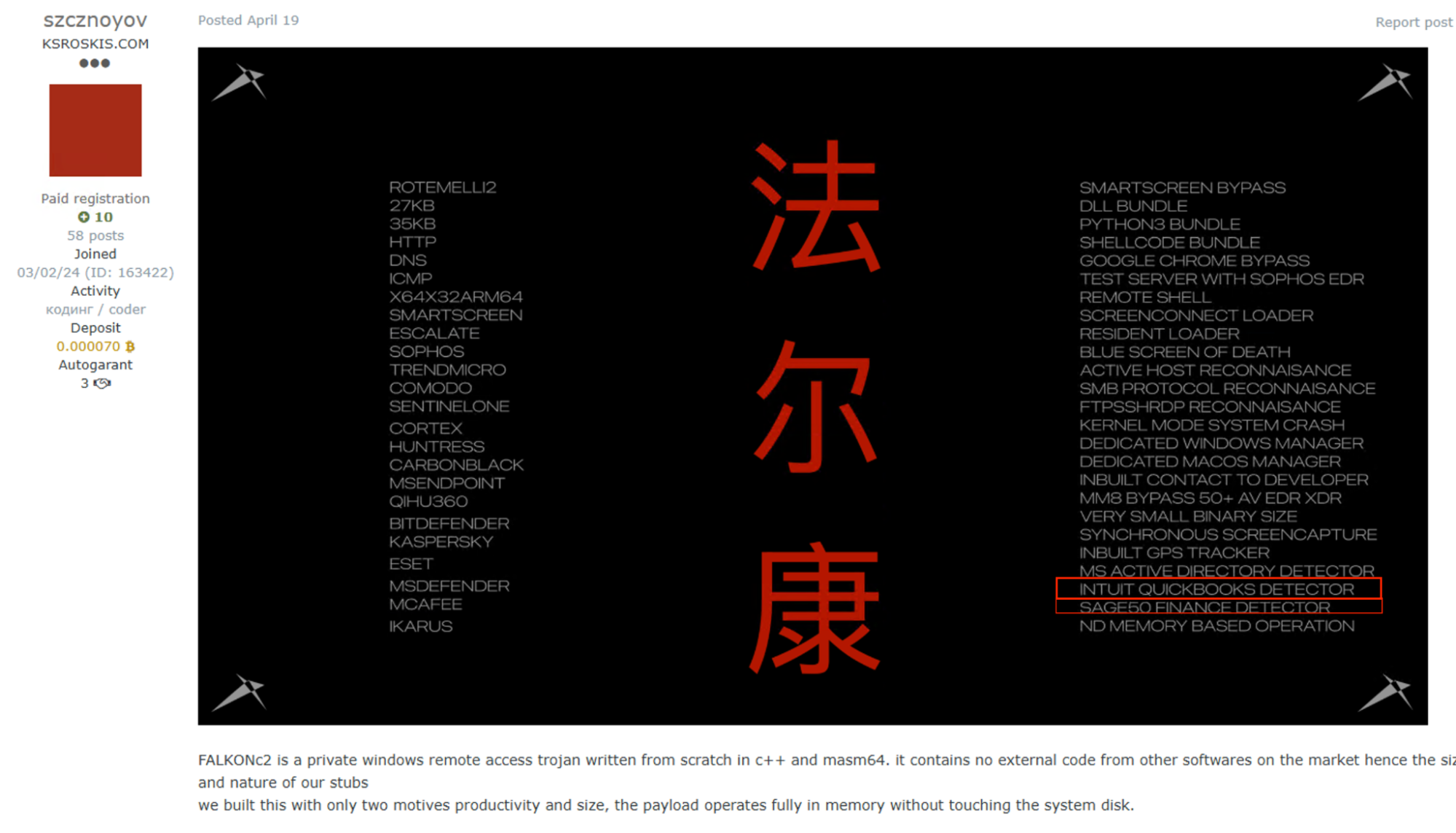
⠀
As companies attempt to protect themselves from being taken advantage of by these fraudsters, they could gather troves of important intelligence about how the malicious actors think, and more importantly gain operational information about breaking fraud networks and protecting their ecosystems. Companies may utilize the available or purchased information into operational decisions, reducing the number of incidents, or at least hinder the fraudster’s attempts.
MITRE Fraud Fighting Framework (F3)
Introduced in early 2026, the MITRE Fraud Fighting Framework (MITRE F3) is designed to help organizations recognize adversarial TTPs, and could help security teams prioritize relevant sources for monitoring through prioritization of attack vectors or vulnerabilities. Due to the large amount of available sources, such a framework could indeed help organizations create the best strategy.
While the framework’s structure mirrors traditional MITRE matrices, MITRE F3 expands into domains bridging cybersecurity and financial crime, specifically addressing the monetization stage. Although it introduces a novel perspective on fraud analysis, it does not sufficiently address the necessity of enhanced collaboration between an organization’s internal departments.
To obtain meaningful environmental insights, security, fraud, and financial crime teams must maintain constant surveillance of marketplaces and similar forums. Monitoring marketplaces for asset mentions is critical for early detection of threats and new trends targeting new victims.
Key marketplaces and trends
Like other cybercrime-focused shops and forums, our monitored marketplaces also handle external threats targeting their clientele; some even use mirror sites. Similarly to other underground marketplaces, the key players must navigate themselves in an ever changing shattered environment where new marketplaces operate along alternative shopping methods through Telegram and P2P options.
When examining the MITRE framework, we can immediately see many techniques in common–mostly account takeover (ATO) techniques. Nevertheless, as seen in the different stocks and sellers, the offerings changed with time according to market demands.
There are some notable differences between Styx and the rest of the reported marketplaces, however. Styx operates by offering sellers more space for promoting their own personal shops, available mostly through Telegram.
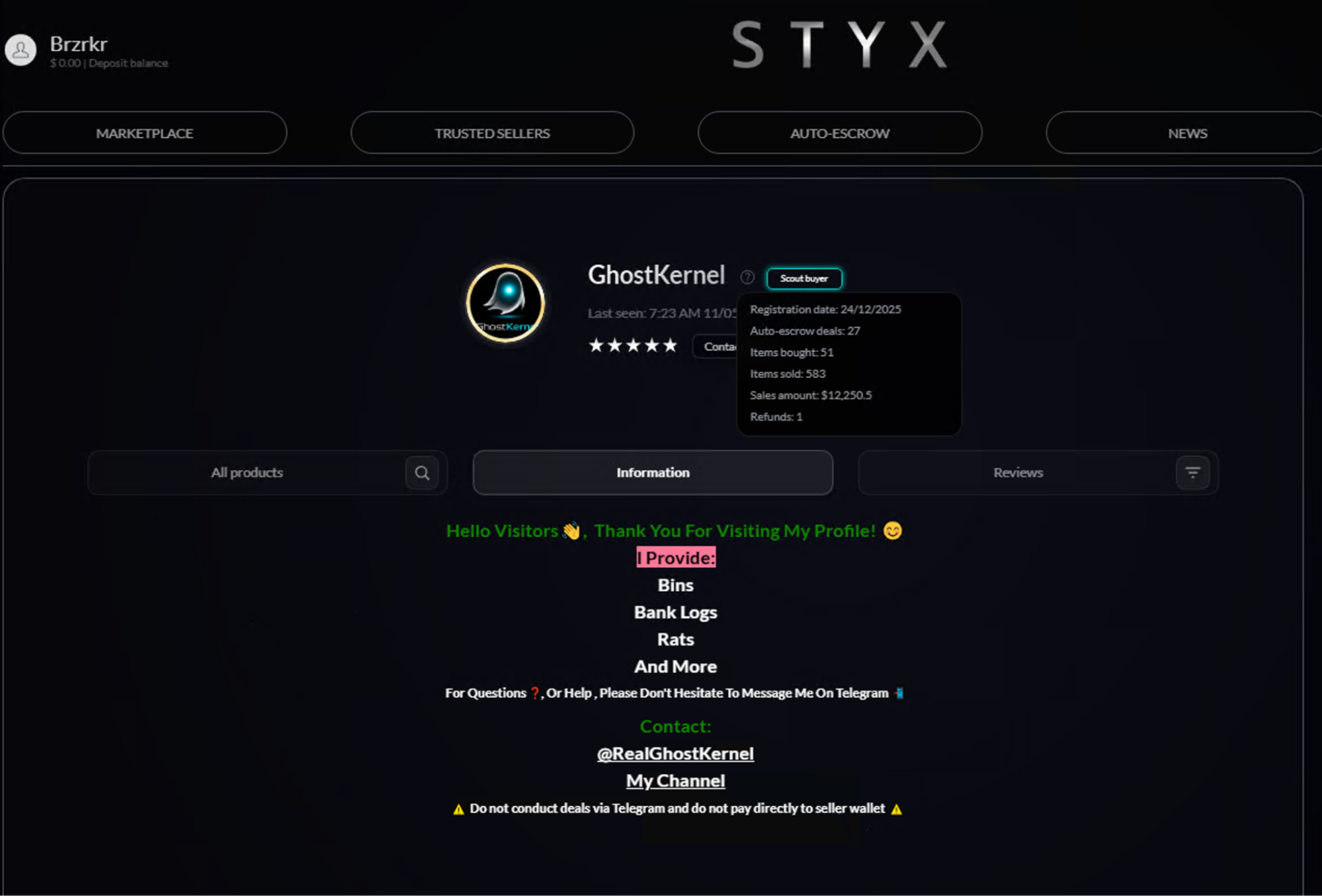
⠀
Styx also aims to cultivate a specialized community through their “freemium” model, where premium, high-value content is reserved for users willing to pay significant fees.
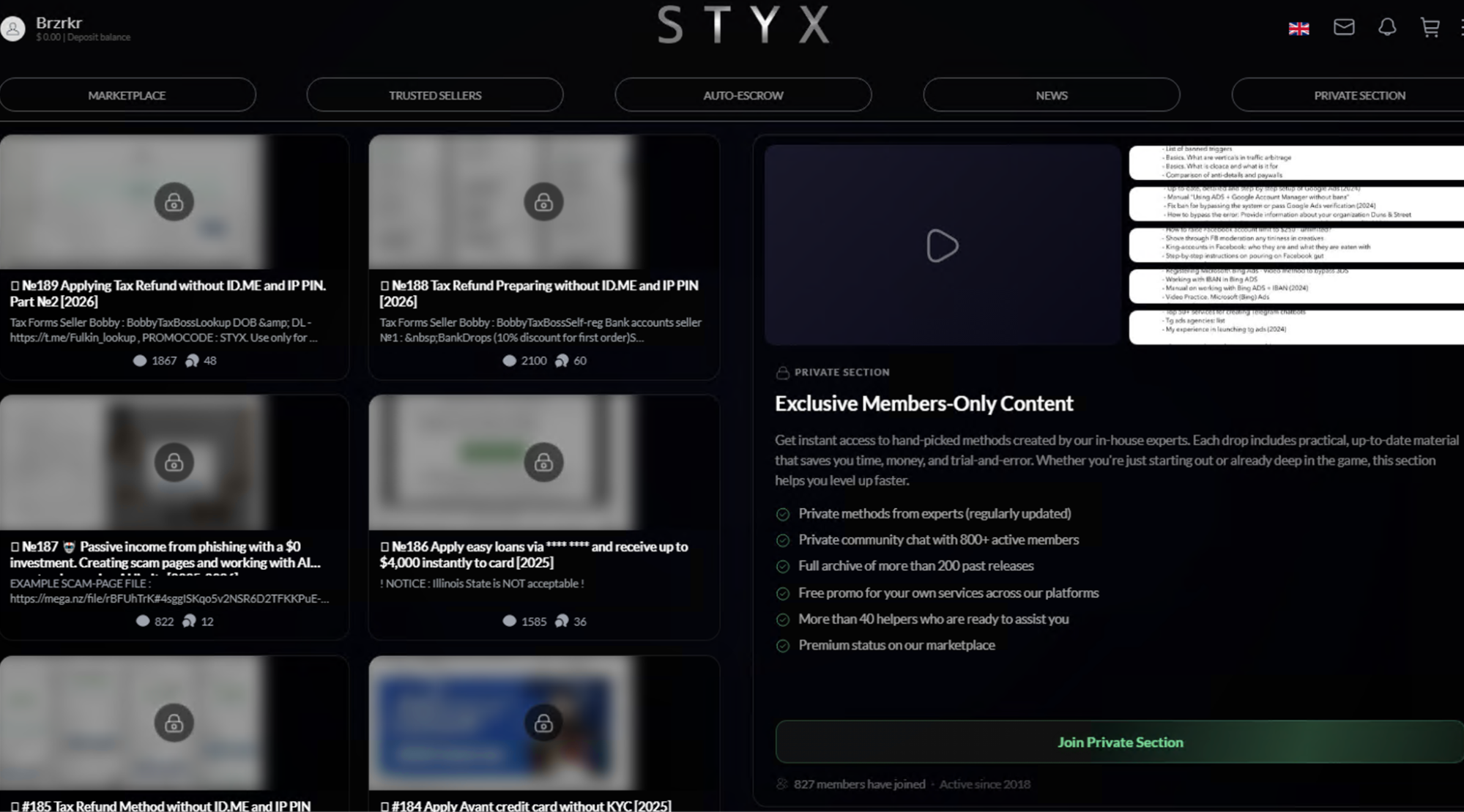
⠀
While some of the free manuals have been posted through different cybercrime forums before, they show not only a real attempt by the Styx admins to generate additional income, but also sell ad space for different sellers working outside of the marketplace. These monetization techniques indicate the admins are probably well aware they have many competitors, as they attempt to provide a different shopping experience for their users.
Resource development: Infrastructure
Infrastructure for cybercrime operations has been sold for a long time, offering adversaries illegal access to active domains, cpanels, and more.
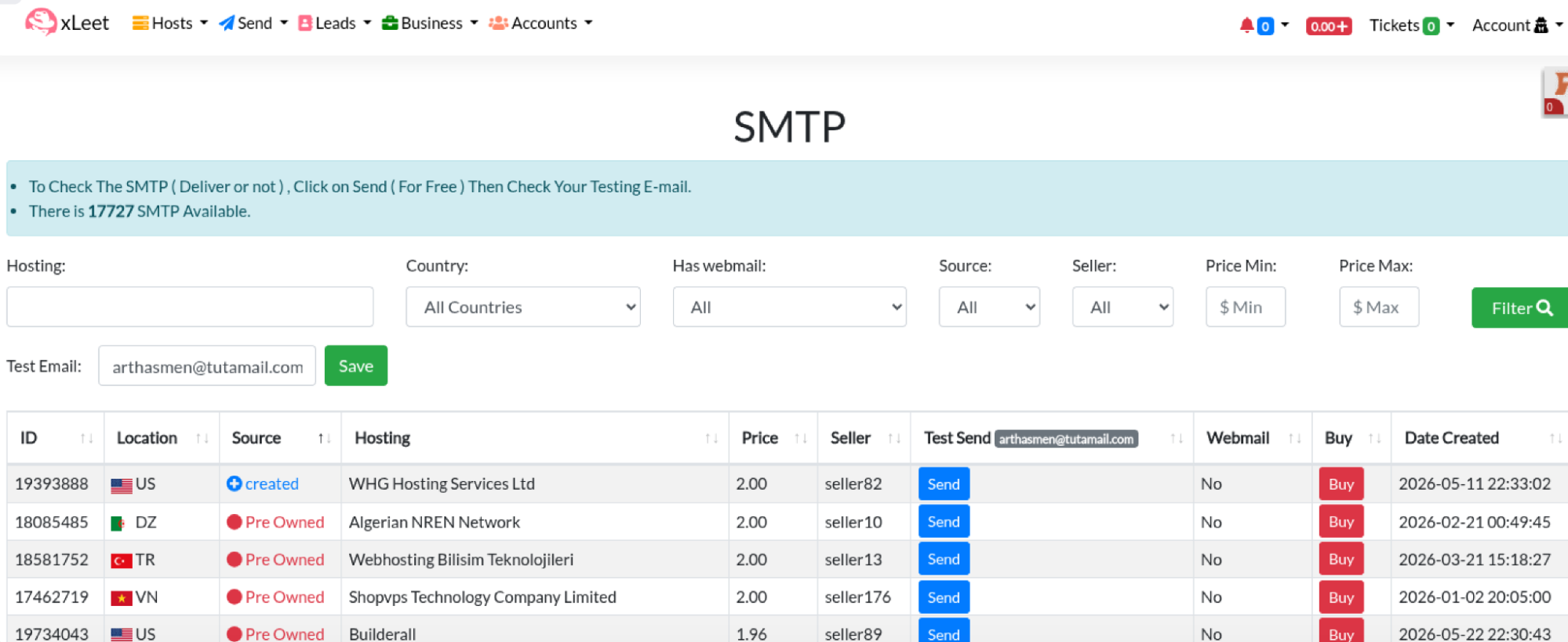
One of the leading marketplaces for such items is Xleet, first observed in 2022, which has quickly become a source for large collections of stolen credentials spanning multiple platforms. Distinguishing itself from other monitored marketplaces, Xleet is transparent about its offerings, frequently including evidence like screenshots or even email proof sent to the compromised account’s email address.
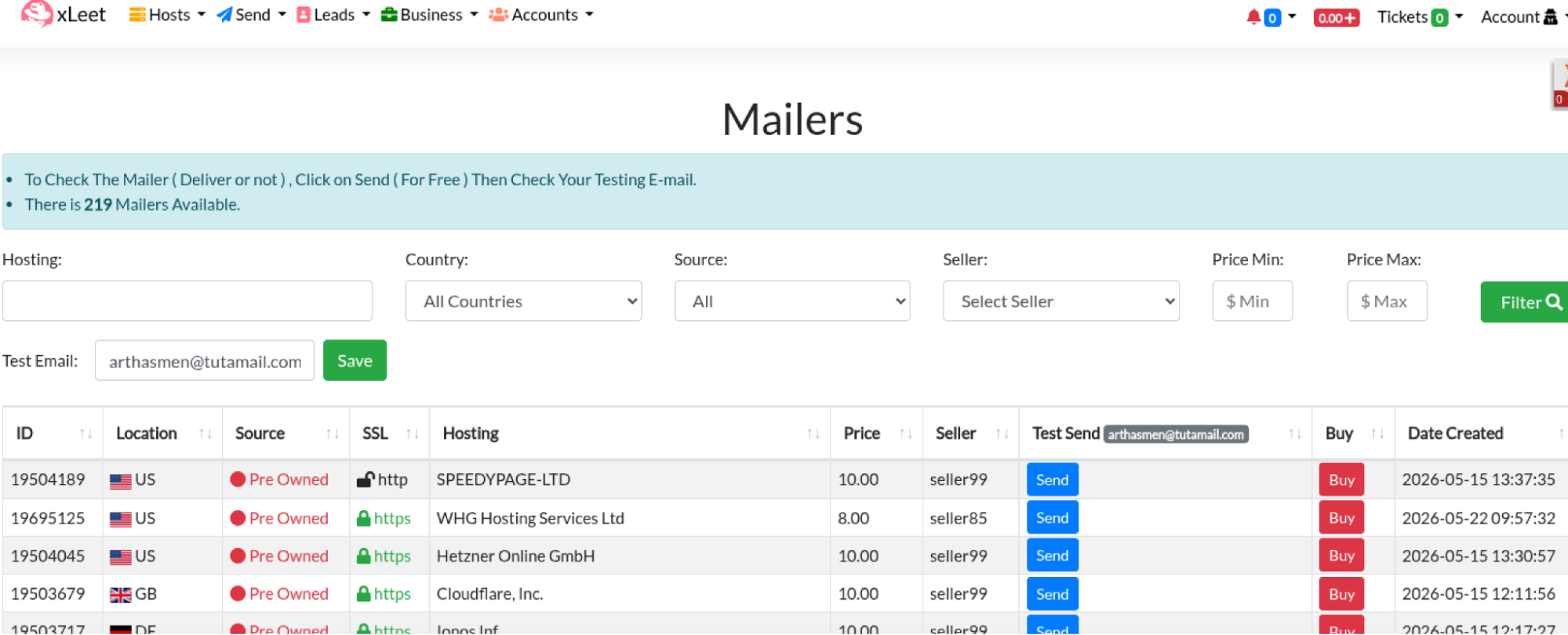
⠀
⠀
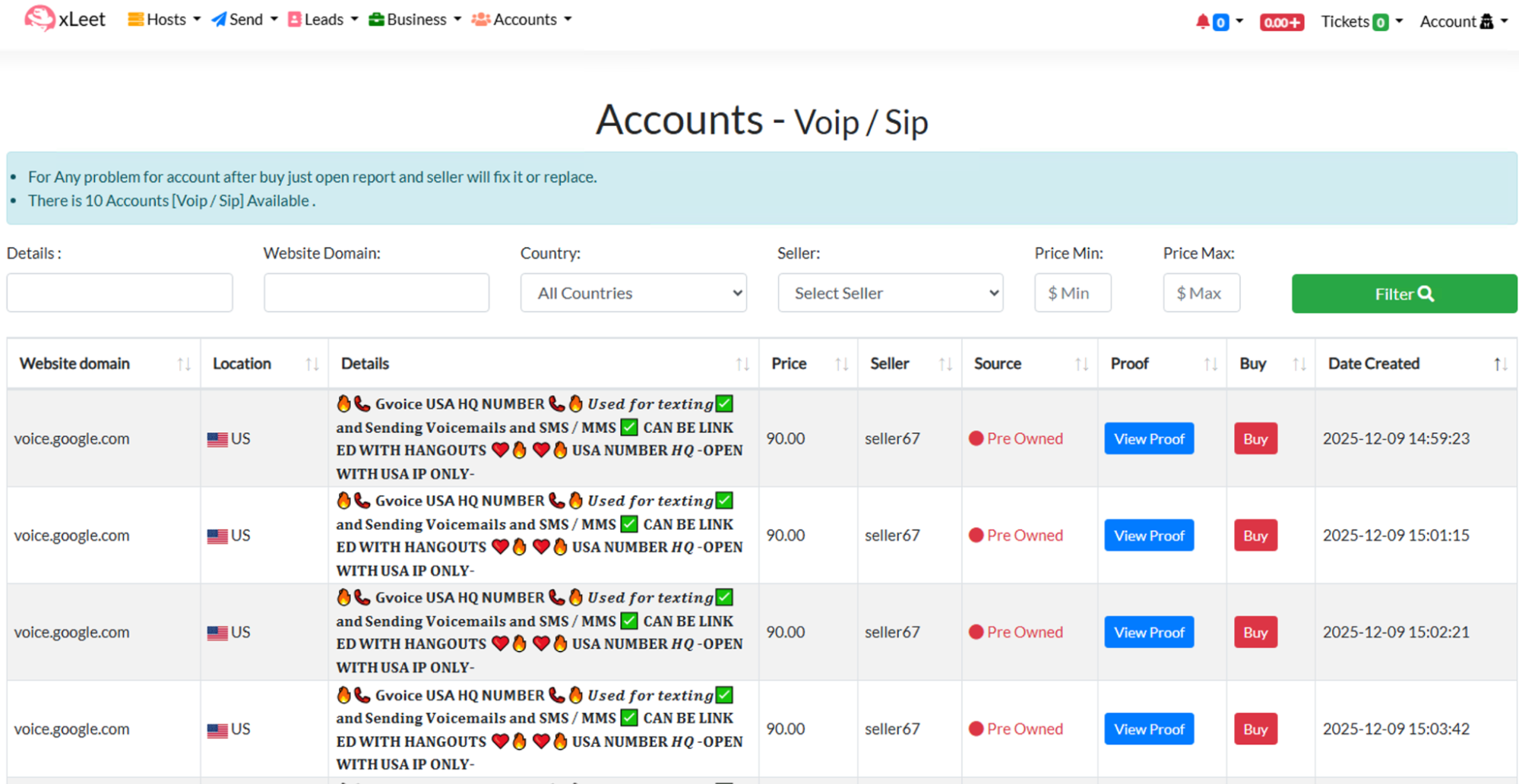
Access to SMTP servers could help fraudsters reach larger audiences and evade different email protection and filtering services, thus improving success rate for different schemes. Xleet also offers alleged access to protected networks through Cpanel, web shells, SSH, and RDP connections, as well as VoIP access through their accounts:
⠀
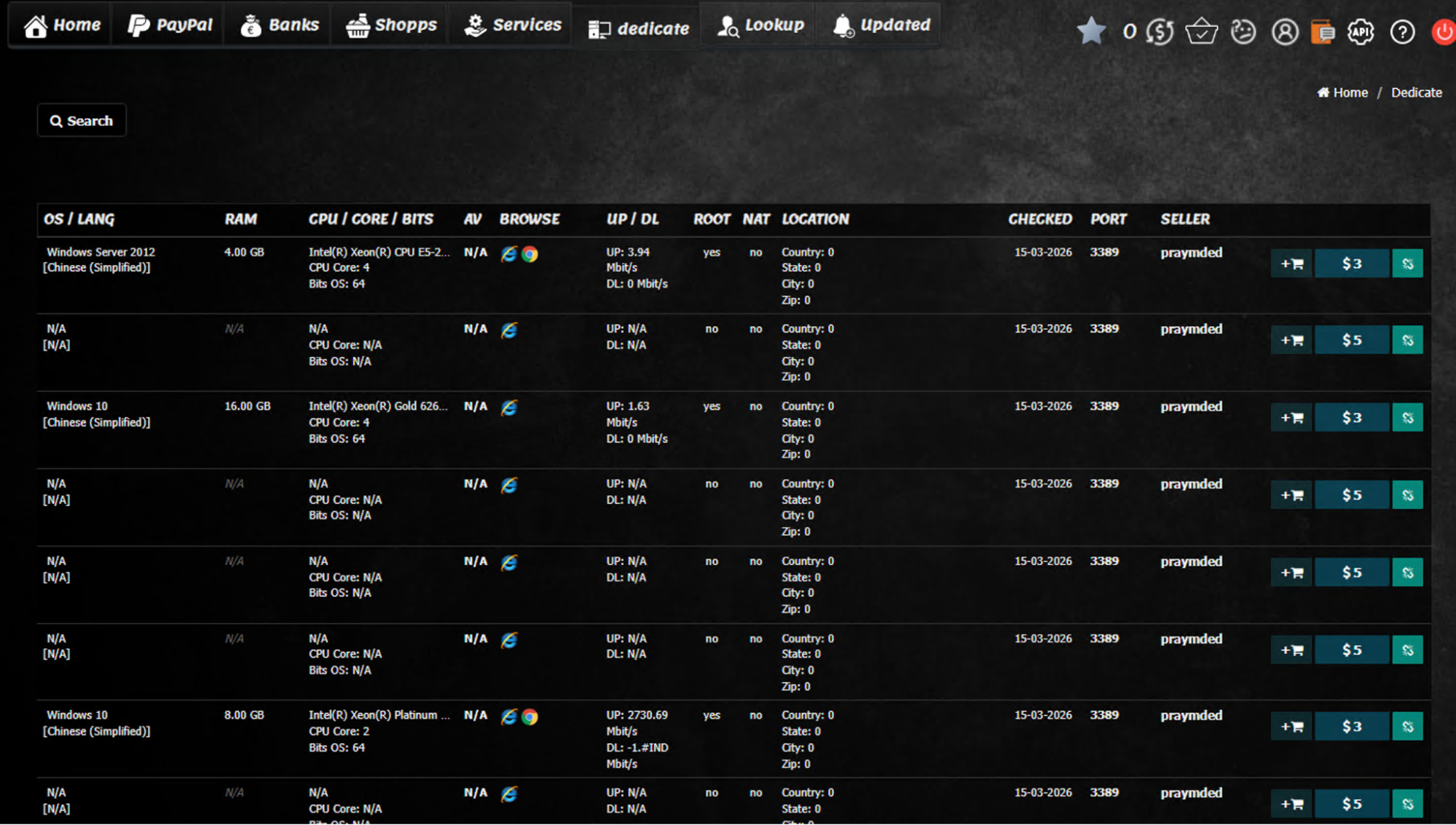
BlackPass is another marketplace offering RDP credentials, as well as proxy services used by malicious actors for veiling their location or, as mentioned above, bypassing different restrictions on their IP addresses.
Blackpass, initially named ‘Paysell,’ emerged as one of the first known online marketplaces dedicated to selling compromised accounts. Estimates suggest this platform has facilitated the sale of hundreds of millions of accounts. Legal documents indicate the marketplace is controlled by Russian cybercriminals, a detail consistent with its product focus: items exclusively targeting Western countries, particularly the US.
⠀
All of these vulnerable environments could be part of a bigger scheme run by fraudsters, leading to other techniques being executed like a new vendor set up.
Another marketplace, Infodig, would offer different phone infrastructure in the past as mentioned in one of their opening posts on a cybercrime forum. Foreign or stolen numbers could be used for receiving or intercepting OTP messages, forging IT calls to employees, or self registering new accounts for other services.
Infodig has recently revamped some services offered, including the phone infrastructure, having been removed completely around the end of 2025 during an update the marketplace went through.

⠀
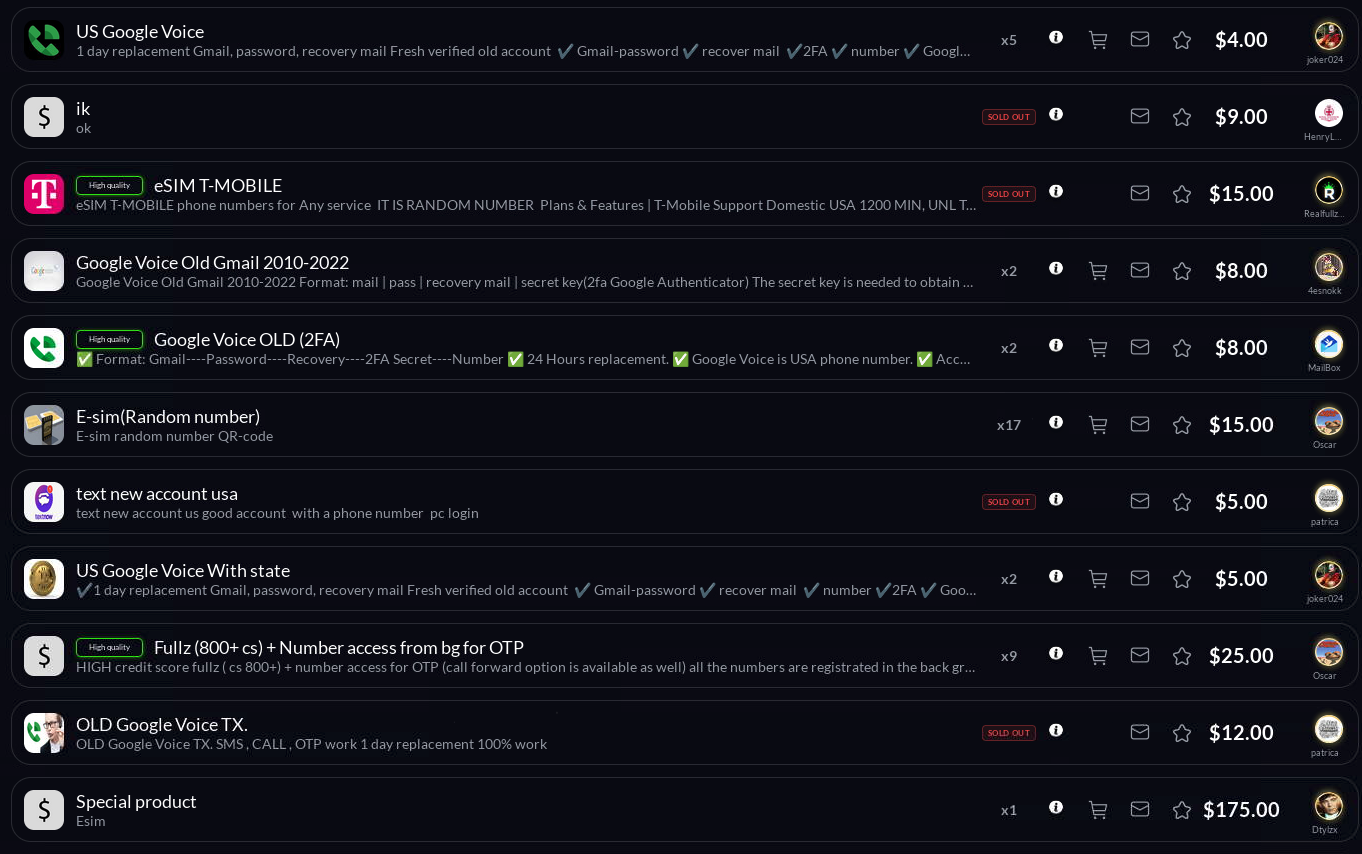
Styx also offers many options for fraudsters looking for ready to use infrastructure including eSIMs, VoIP services, and compromised VPN accounts. Localized SIM cards could be used by fraudsters for many reasons such as account creation but more importantly as a way to strengthen claims when confronting modern anti-fraud solutions, thus improving scam success rates.
⠀
The same marketplaces offer additional stolen, forged, and even active company documents for sale including incorporation forms, US tax forms, and other various products connected to shelf companies and stolen PII. These documents allow threat actors to generate troves of mule accounts, shelf corporations, and even combine them into money laundering networks.
Acquiring access
Stolen, self-registered (self-reg), or user-sold accounts are high-demand assets in underground markets. By acquiring pre-existing accounts that have already circumvented anti-fraud protections, threat actors can rapidly deploy them for various criminal operations.
These platforms provide access to a wide range of services, from financial institutions and streaming providers to dating sites and AI-driven website builders. Novice fraudsters often utilize these resources to secure quick profits or to stockpile accounts for future resale.
For example, Blackpass features an extensive account inventory that includes regional banks, neo-banks, and major corporations. Pricing within these markets is fluid; however, self-reg accounts typically represent the most expensive tier due to the significant labor required for their initial setup.
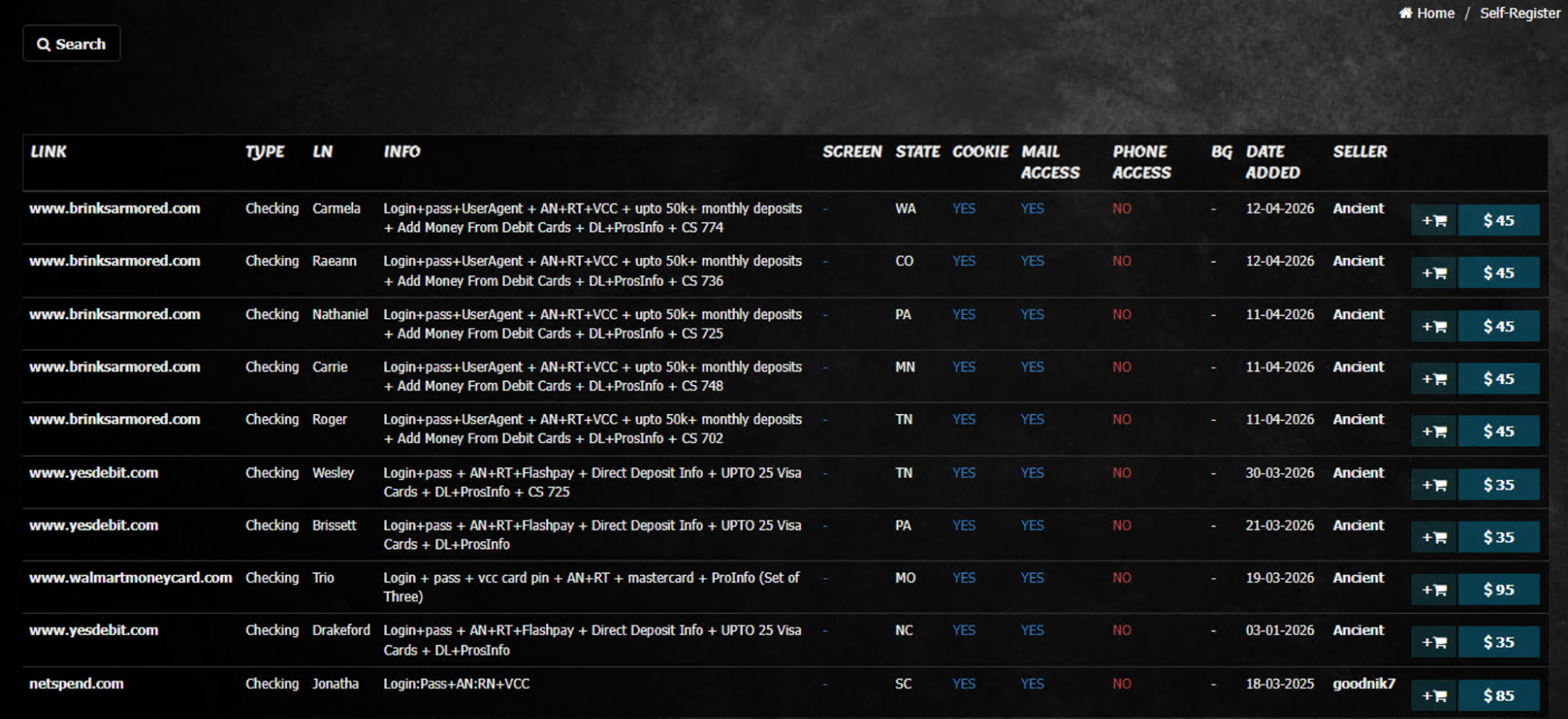
⠀
Xleet provides an extensive accounts division that covers a broad spectrum of common targets, including gaming, streaming, and dating service profiles. These specific credentials serve as high-value assets for executing various “pig butchering” fraud operations. Furthermore, a notable emerging trend within this marketplace is the significant surge in available credentials for AI platforms, especially those focused on accelerated website creation.
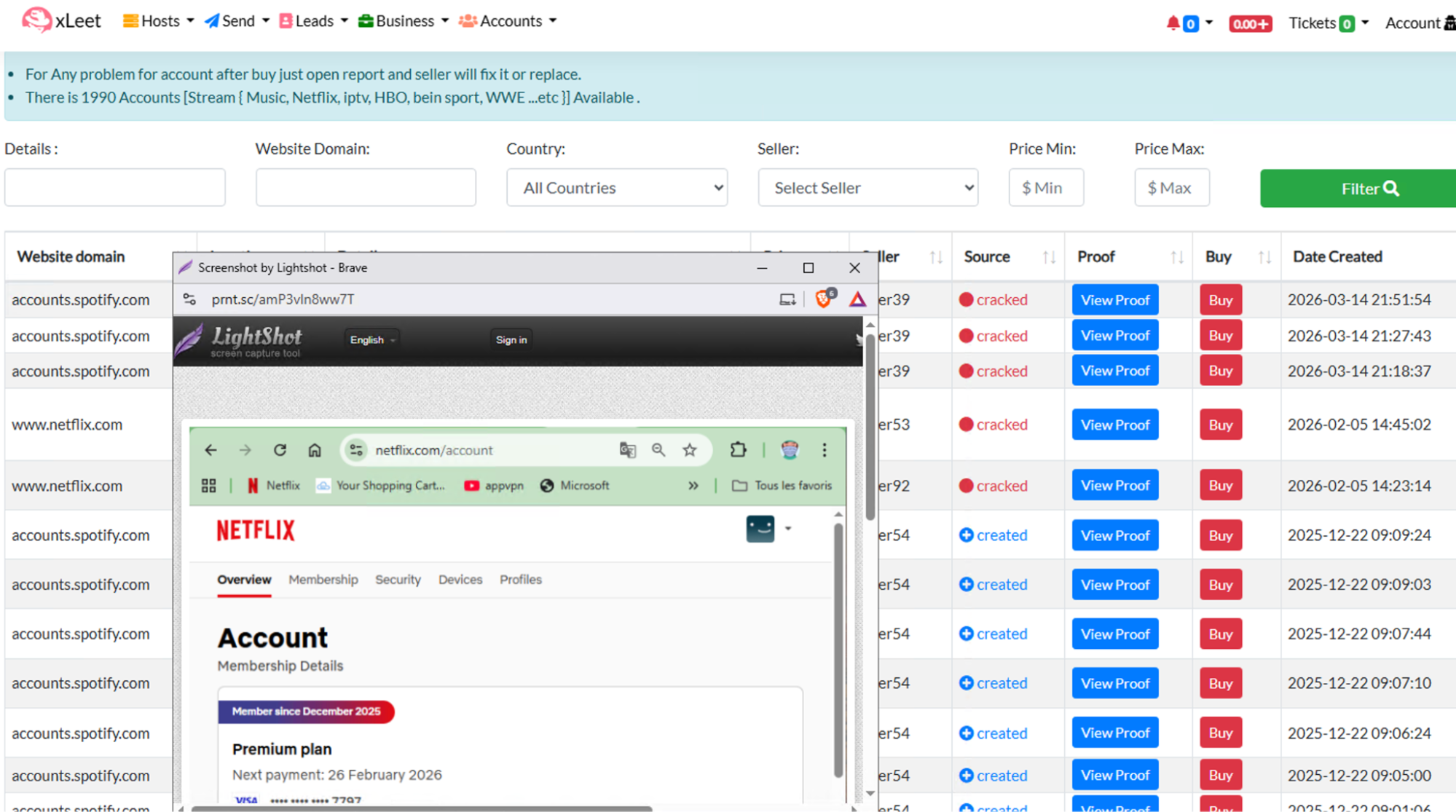
The newer type of marketplace, active since 2023, features an unorthodox design and much higher prices for their products. Styx holds the usual stock including stolen or self-reg accounts for a large variety of services, including financial institutions, social media accounts, streaming services, and casinos or other gambling sites.
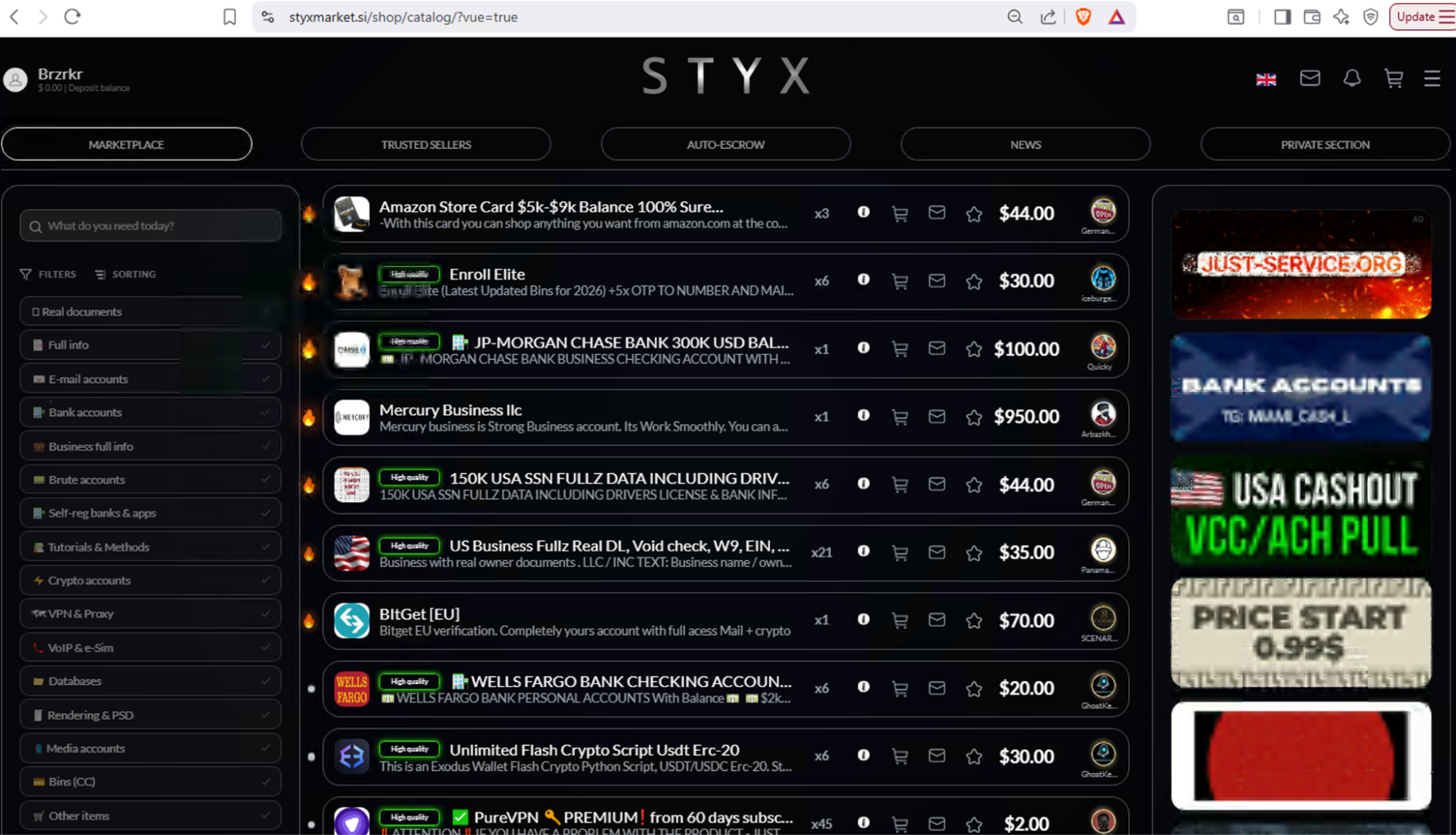
⠀
The inventory at Infodig is categorized into several distinct sections, featuring stealer logs alongside stolen Financial Information and Personal Identifiable Information (PII), such as Social Security numbers. Their accounts division has recently been going through some technical or supply issues and there are no current accounts available. However the marketplace has revamped their target list section into a new ULP (URL:LOGIN:PASS), offering a new targeted option for large scale ATO operations.
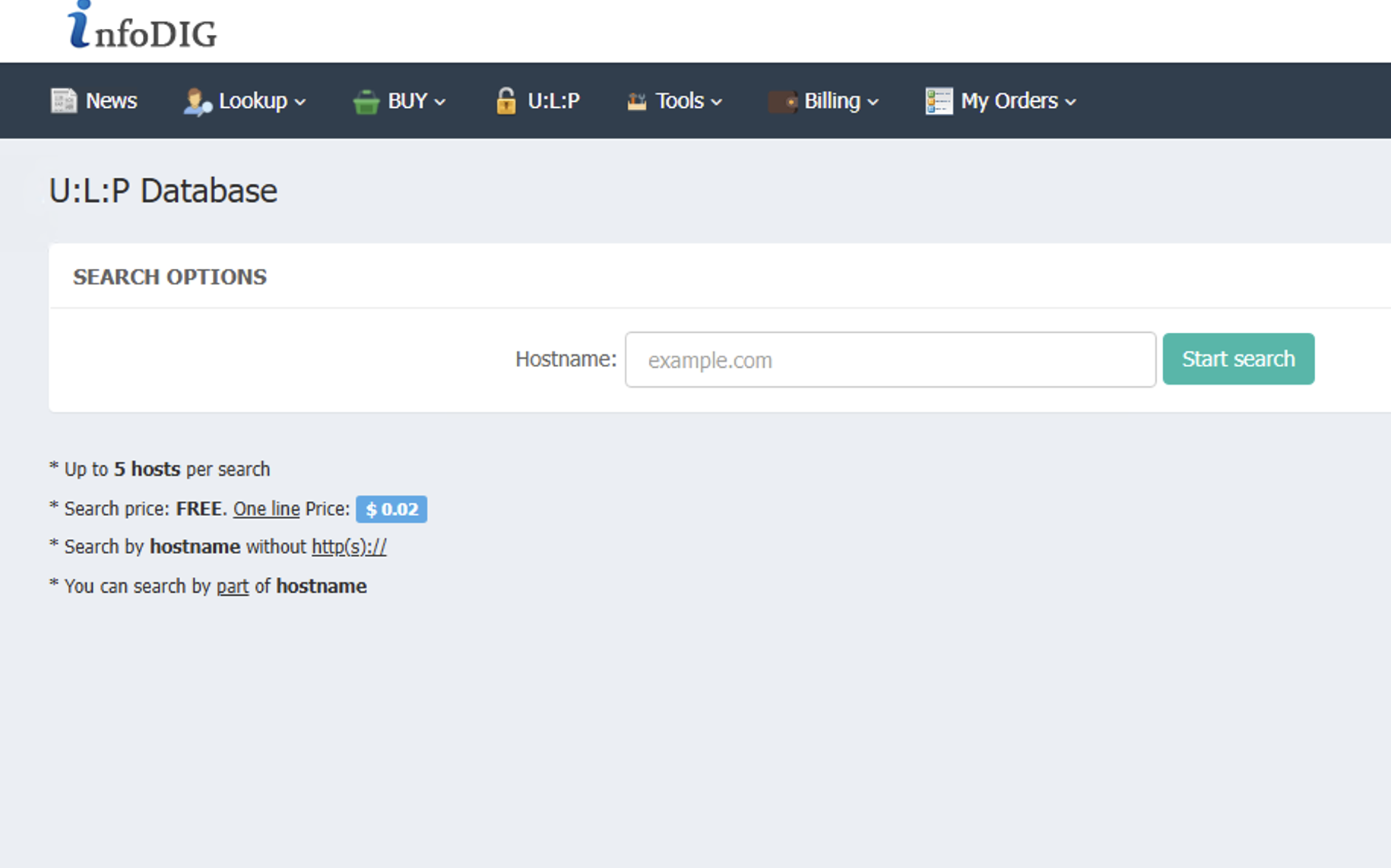
Monetization
Styx has gained notoriety for its support of various “cashout” operations, which are prominently featured in numerous service advertisements throughout the platform.
By functioning as a hybrid of a marketplace and a forum, Styx provides a unique platform where merchants can offer specialized cashout services that exploit financial institutions across different payment rails. These merchants utilize various business accounts to assist fraudsters in laundering illicit funds through established methods, including payroll schemes, ACH transfers, and refund scams targeting multiple banks and geographic regions.

⠀
Beyond explicit solicitations for these services, marketplaces provide a variety of other products that are frequently exploited for money laundering. The exploitation of online gambling platforms remains a prevalent tactic for fraudsters, particularly as new regulations across the US lead to more states and companies entering the market. By acquiring stolen or synthetic PII, malicious actors can establish new gambling accounts to facilitate the laundering of illicit funds through techniques like chip dumping and minimal gameplay.
Conclusion
The fraud economy is changing at a fast pace with new techniques and players entering the field every day. By examining the different marketplaces portrayed in this blog post, we can see that they all react and appeal to different market needs.
The change seen through available items across shops are a clear indication of this, as marketplaces pivot towards a larger crowd–one lacking the deep technical knowledge of the earlier fraudsters and carders. The different marketplaces allow every new fraudster to purchase their entire infrastructure for the fraud kill chain, from target lists, servers, and even support for laundering illegal income. Other online services include rapid AI creation of phishing threats, or other forms of abuse of legitimate service through stolen credentials. Marketplaces are not solely made for direct use and other threat actors view them as a major supplier for their shops as well, due to their fixed prices for items with prices which could easily be inflated through their personal shops as seen below:
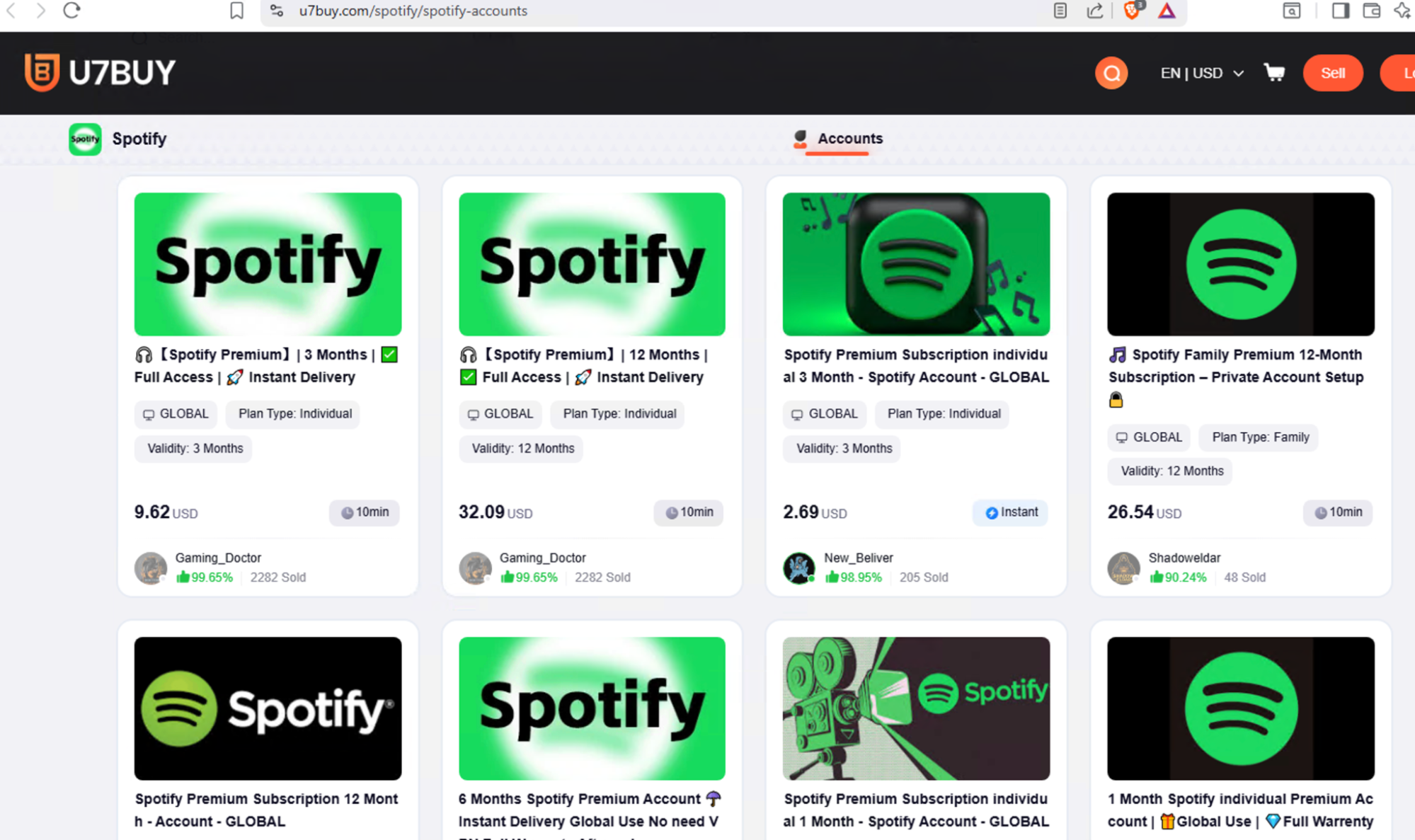
⠀
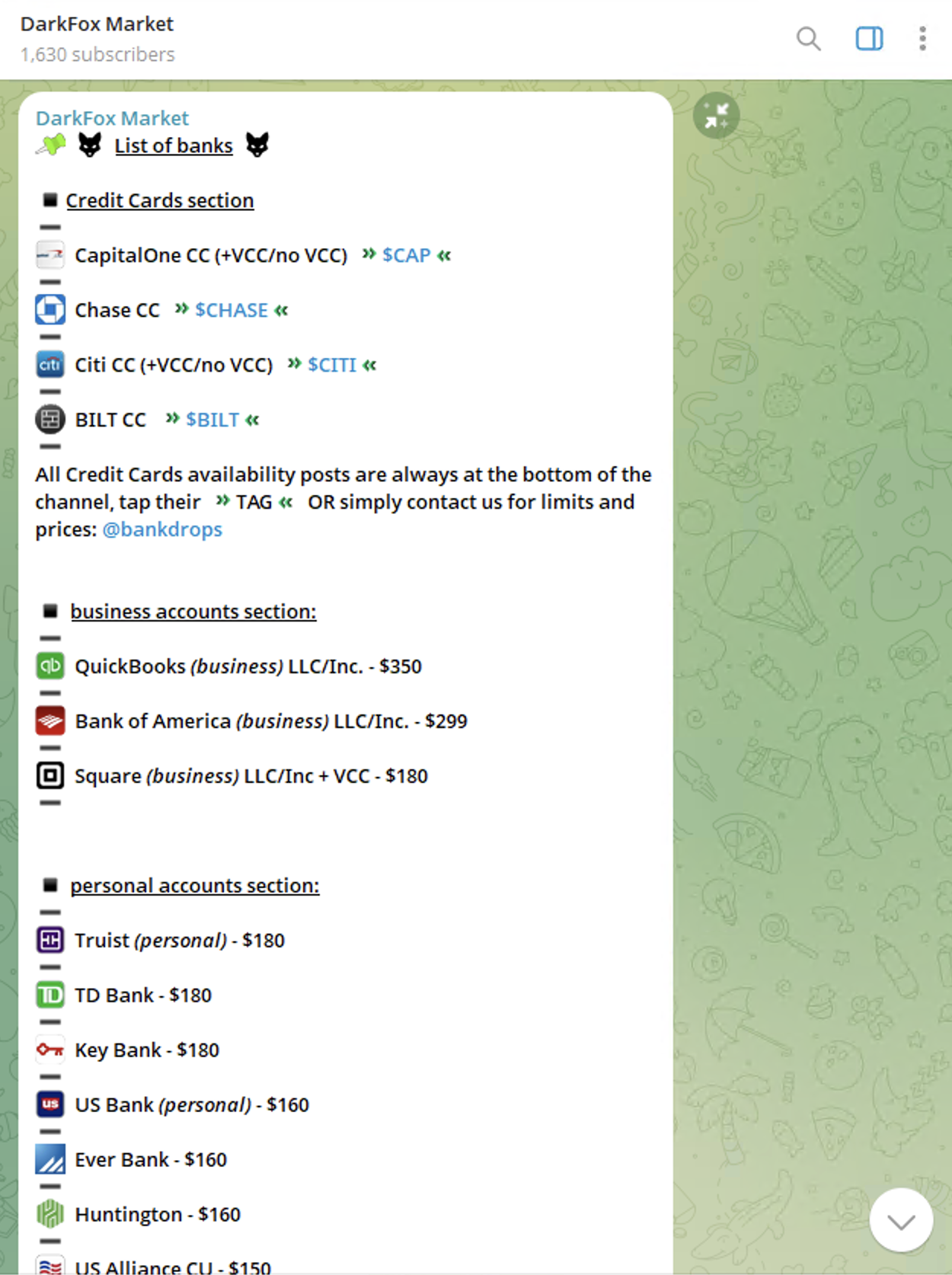
⠀
As fraud communities and groups become increasingly fragmented, the industry continues to splinter into smaller shops. These new, smaller marketplaces often require an invitation or administrator approval to join, a tactic designed to impede investigations and extend the lifespan of their fraudulent products. This shift to smaller shops also benefits merchants, allowing them to keep 100% of their profits instead of sharing them with marketplace administrators. Targeted companies should continue to monitor the marketplaces as they continue to function as an important link in the fraud supply chain. Threat actors are very aware and understand a major part of every business is the profit, therefore financial crime services and associated accounts are continuing to evolve.
Nevertheless, underground marketplaces will continue to operate as an important part of the cybercrime economic system. Smaller merchants may use these larger stores as suppliers for their smaller shops, as second income or even double or triple their income by selling the same stock in multiple locations. However companies should not only be aware of these underground ‘malls’, and regularly monitor them for any suspicious findings, but take a more proactive approach. The evolving nature of fraud demands a stronger reaction from organizations as well as cooperation from security, financial crime, and compliance teams for proactive measures against these threats.
Targeted companies, especially financial institutions or gambling providers, should actively investigate stolen accounts and gather vital intelligence for protecting themselves in the future, making it more difficult for threat actors to abuse their payment rails, brands, and customers.
What organizations should do
To safeguard both their infrastructure and clients, security teams must move beyond monitoring disparate data streams and actively align with internal fraud and financial crime units to cultivate actionable intelligence. Because illicit merchants rely on marketing their offerings, security analysts should actively communicate with threat actors, purchase account samples, as well as analyze images or videos to map threat actor networks, verify operational legitimacy, and finally deploy targeted security countermeasures. Threat actors are threatening organizations with more than just data exfiltration, with compliance or financial crime requirements, companies become more vulnerable to newer forms of threats, not commonly associated with security teams, but initiating through cybercrime sources.
By proactively identifying leaked assets, correlating them to their own environments, and responding quickly through credential resets, and fraud monitoring, organizations can significantly reduce both financial losses and downstream risks such as ATO, and money laundering.
Two stable kernel updates for Friday
Post Syndicated from jzb original https://lwn.net/Articles/1093766/
Greg Kroah-Hartman has announced the release of the 7.2.5 and 6.18.51
stable kernels. There are more than 550 patches in each with fixes throughout
the tree; users are advised to upgrade.
Security updates for Friday
Post Syndicated from jzb original https://lwn.net/Articles/1093765/
Security updates have been issued by AlmaLinux (apr-util and qt6-qt5compat), Debian (libevent and ruby-rack), Fedora (bluez, corosync, curl, dokuwiki, grpcurl, libevent, and rest), Oracle (gstreamer1-plugins-bad-free, perl-DBI, python-urllib3, qt5-qtbase, qt6-qt5compat, and thunderbird), Red Hat (osbuild-composer), SUSE (azure-storage-azcopy, chromedriver, corosync, ggml-devel, helm, kernel, libmariadb-devel, libzypp, zypper, opensc, php7, tomcat10, and waylyrics), and Ubuntu (apache2, beets, glibc, kissfft, libebml, linux-nvidia-6.17, php8.1, php8.3, php8.5, and python2.7, python3.4, python3.5, python3.6, python3.7, python3.8, python3.9, python3.10, python3.11, python3.12, python3.14).
Introducing automatic remediation policies with Cloudflare CASB
Post Syndicated from Michael Leslie original https://blog.cloudflare.com/casb-policies/
Today, we’re making Cloudflare CASB more powerful than ever by introducing automatic remediation policies. This means security teams can now design event-driven logic to revoke risky file shares and dispatch custom webhooks, without manual intervention.
When we launched Cloudflare CASB, a cloud access security broker, we wanted to provide security teams complete visibility into the posture of their SaaS applications before misconfigurations became incidents. With a quick, clientless integration, CASB surfaces risks like overshared files, dormant admin keys and tokens, OAuth apps with excessive permissions — continuously, across users in the organization.
For years, SaaS Security Posture Management (SSPM) tools such as Cloudflare CASB have functioned as a passive alarm system. Most SSPM tools tell you what’s wrong but do not help you fix the issue, placing the burden on administrators to manage an ever-growing to-do list. A single misconfigured file-sharing policy across a Google Workspace tenant can generate thousands of findings in seconds, and even a disciplined team faces a window between detection and remediation measured in hours or days — more than enough time for a sensitive file to be downloaded, forwarded, or indexed.
With automatic remediation policies, CASB customers can now configure the actions that should be invoked immediately after a new finding is identified.
Shifting from reactive to proactive
When we launched manual remediation actions earlier this year, we gave security teams the ability to resolve misconfigurations directly from the Cloudflare dashboard. This removed the need for customers to log in to multiple SaaS portals to take action on the security and content findings detected by Cloudflare CASB. Still, this required a human to confirm and initiate each individual remediation — even if they’d seen this exact finding type before.
CASB policies are a native automation engine built directly into Cloudflare One that takes action the moment a finding is detected. Security teams define their response logic once, whether that is revoking access to a file share, dispatching a webhook to your security operations center (SOC), or forwarding the event to a security orchestration, automation and response platform (SOAR). The engine handles matches automatically by executing the customer-configured action.
As an example, many organizations implement controls that prohibit files from being shared publicly. However, they may apply an exception to users and groups in their marketing department who are frequently required to collaborate with external parties. SSPMs allow their customers to be alerted of any files that are shared publicly in violation of their policy. With many solutions, this permitted behavior lands in a queue with hundreds of possible violations, forcing administrators to take action on each individual instance.
CASB policies are designed for exactly this scenario. Rather than waiting for a human to see and act on a finding, automation fires the moment detection happens. The public share is revoked within minutes, keeping the backlog of findings clean and clear.
How CASB policies work
At their core, CASB policies are automated workflows that tell our scanning service what action to take when a new finding is detected. From there, the configured policy will tell CASB to either trigger a remediation action, send a webhook, or both. This gives organizations the flexibility to rely on native CASB remediation capabilities or their own internal automation services and communication channels — without having to take action in disparate platforms or create their own event processing system.
How we built it
The architecture behind CASB policies is built entirely on the Cloudflare developer platform — the same platform available to every Cloudflare customer.
When a finding is detected, the findings engine enqueues an orchestration message to a Cloudflare Queue. A Worker consumer then checks whether a policy configuration matches the incoming finding. If a match exists, it creates the corresponding job and hands it to the remediations pipeline, which runs on Cloudflare Workflows for durable, fault-tolerant execution. That means jobs survive process restarts and retries are handled automatically.
Cloudflare Workflows also handle third-party API rate limits gracefully. If a vendor returns a rate limit error, the Workflow pauses for the appropriate backoff window and retries without dropping the job. Our target from detection to completed remediation is five minutes or less.
How to create policies
To get started, navigate to the Cloudflare dashboard and create your first policy. Policies can include both a remediation and a webhook action, but at a minimum:
- Select the vendor. Select the vendor and integration or tenant this policy should apply to.
- Select the integration. You can hand-select specific integrations or set it to apply to all integrations for the selected vendor.
- Choose a finding type. Select the CASB finding type that should fire the policy.
- Choose an action. Once a trigger is selected, the available actions for that finding type are shown. There are two categories:
- Run remediations. First-party actions Cloudflare performs directly against the SaaS integration API. CASB currently supports remediation actions for Microsoft and Google Workspace file/folder finding types. Note that this may require upgrading permissions on integrations to read/write.
- Send webhooks. Send finding details to configured webhook destinations such as Slack, Microsoft Teams, Jira, ServiceNow, Tines, or any custom HTTP endpoint your team uses.
Example webhook format
Maintaining visibility and compliance
Each policy action produces two categories of logs, visible under Insights in Cloudflare One.
Admin Activity logs. These capture changes to a policy definition: who created it, who edited it, who disabled it, and when. If a policy was turned off and a risk slipped through, this audit trail surfaces a timeline of the event.
Cloud & SaaS Security policies logs. This new class of logs captures the runtime outcome of policy invocations. This includes details like which finding triggered the policy, which file was acted on, whether it succeeded or failed, and the specific error if it did not — for example, a 401 Unauthorized or an API rate limit response from the vendor.
For compliance use cases, the execution log is the proof of fix. It ties a specific finding, like an overshared file (e.g. Q4_Financials.pdf), to a specific automated action and event timestamp.
Get started
Customers can find CASB Policies in the Cloud & SaaS findings section of the dashboard today. Connect or update your Microsoft 365 or Google Workspace integration to Read-Write permissions, and create your first remediation policy.
In the coming weeks, we’ll also be adding support for Custom Findings to CASB. Different organizations have unique needs when it comes to detection, and we want to give customers the ability to augment or define finding logic to fit those needs.
New to Cloudflare One? Sign up for 50 free seats to get started with CASB, or talk to our team about a deployment at scale. For full setup instructions, visit our developer documentation.
Cliff Stoll’s DEF CON Talk
Post Syndicated from Bruce Schneier original https://www.schneier.com/blog/archives/2026/09/cliff-stolls-def-con-talk.html
In August, Cliff Stoll gave a talk at DEF CON, remembering the wily hacker he stalked forty years ago.
Great fun.
Остани до края
Post Syndicated from Надежда Цекулова original https://www.toest.bg/ostani-do-kraya/

Концепцията, че майката е не просто обгрижващ възрастен, а източник на обич за бебето или малкото дете и ключов посредник между него и света, е описана научно за първи път през 40-те години на ХХ век. Тогава редица наблюдения на педиатри и психиатри водят до идеята, че дори безупречното задоволяване на медицинските и физиологичните нужди на едно бебе или малко дете не може да предотврати негативите от институционалните грижи и че връзката с обгрижващите възрастни всъщност е неделима част от развитието на детето. Оттогава теорията е изследвана и прецизирана през годините и днес стои в основите на семейно ориентираните грижи, включително в практиките, които насърчават родителското присъствие по време на болнично лечение на деца.
В България обаче все още често нуждата от лечение става причина за разделяне на семейства. Това се превръща в особено сериозен етичен въпрос, когато става дума за продължително лечение или за грижи в края на живота. Причините са сложни и обхващат както остарялата и неподходяща инфраструктура, така и остарелите практики и нагласи.
Зад всички сложни проблеми обаче стоят човешки истории. В случая – най-тежките, които героите на тези истории са преживели.
Елица*
Срещам се с родителите на Елица пред входа на центъра за настаняване от семеен тип, в който тя живее, а те я посещават почти всекидневно. Носят голяма чанта с вещи – активна гимнастика, играчки, консумативи. Познах родителите отдалеч, макар никога да не ги бях виждала.
Елица е на две години. Дълго чакано дете от следена под лупа бременност. Ражда се обаче с множество проблеми, които изискват както редица активни медицински интервенции, така и постоянни специални грижи.
До последно смятахме, че всичко ще е наред. Бяха ни казали само, че може да е с по-ниско тегло. Първия път, когато ми я дадоха, я бяха повили и почти нищо не се виждаше от нея. По-късно я взеха и едва тогава разбрах всичко,
разказва майката. Елица има лицеви изменения, които са добре познати на медицината. На популярен език се наричат заешка устна и вълча уста. Наред с тези иначе решими проблеми обаче момиченцето има аномалии на опорно-двигателния апарат, както и на вътрешните органи, заради които лекарите прогнозират, че ще живее не повече от две седмици.
„Бяхме в шок“, споделя баща ѝ.
Двете седмици обаче отминават, бебето преживява животоспасяваща коремна операция и след още известно време, прекарано в отделението по неонатология, социалните препоръчват, а съдът решава официално да изведат Елица от семейството и да я настанят в Център за настаняване от семеен тип. Аргументът е, че там може да се полагат медицински грижи за деца в тежко състояние и момиченцето ще има шанс да наддаде на тегло, да се стабилизира и да се извършат поредица от операции, които да направят живота му възможен. Центърът за настаняване е в друг град, на около 200 км от дома на семейството. „Ходехме да я видим всеки вторник“, припомня си бащата. „Освен един, когато имаше грип. Тогава я видяхме само през стъклото“, допълва майката.
Просто добави радост. Какво са съвременните палиативни грижи за деца
Разполагаме със здравна система, която все още не успява да се пречупи така, че да осигури детство там, където заболяването е отнело почти всичко друго. Как изглеждат детските палиативни грижи в България? Първи текст от новата поредица на Надежда Цекулова за детските палиативни грижи.
Докато ми разказват историята си, родителите си играят и паралелно говорят с малката Елица. Тя не изглежда като повечето двегодишни деца. През носа ѝ минава тръбичка – това е сондата, през която се влива специалната медицинска храна. Момиченцето е по-малко, едва около 7 килограма, а ръцете и крачетата му не са развити както на повечето му връстници.
Но когато баща му говори – тихо и бавно – то го слуша с огромно внимание.
Питам ги дали ги разпознава. „О, да. И не само това. Преди идвахме вечер след работа, към 5 часа. Сестрите казват, че като наближи този час, започва да се върти“, разказва бащата. „Чака ни“, пояснява майката и започва да закача детето: „За теб говорим, мамо…“
Как си говорят Елица и нейните родители – малък момент на нежност в едно кратко аудио:
Разговорът ни се провежда в центъра за настаняване от семеен тип, в който Елица е преместена преди около година от по-далечния град. Този е само на няколко километра от селото на родителите, а екипът подкрепя семейството да бъде заедно колкото може повече. С активното им съдействие родителите получават разрешение от Отдела за закрила на детето дъщеря им да гостува в семейния им дом. И все пак посещенията на Елица в дома на собственото ѝ семейство са рядкост. Надеждата на родителите е, че дъщеря им ще укрепне достатъчно, за да бъде оперирана и да започне да се храни без сонда – това е пътят ѝ към прибиране у дома.
„Гледането е тежко“, отбелязва някак неочаквано майката, а бащата допълва: „Проблемът е, че за деца с тежки увреждания няма много варианти – например дневен център, където да можеш да го заведеш през деня… и може би ще бъде много трудно…“
Ще бъде много трудно, аз вече съм го осъзнала,
слага точка на емоционалното отклонение майката. Двамата се връщат към практическите въпроси около организирането на операциите на малката Елица. „Това много се проточи, бавно става – споделя баща ѝ. – Просто искаме да си я вземем у дома.“
Как да говорим за деца с тежки заболявания. Право, етика и човечност
Публичният разговор за тежко болните деца често се движи между две крайности – патетична жалост и почти пълно мълчание. Там някъде са и самите деца и семействата им. Как да се говори за страдание, без то да се превръща в сюжет? От Надежда Цекулова.
Диана и Ида
С Диана се срещам, за да проведа най-трудния разговор – този, в който родителите си вземат у дома само въпросите и съмненията. Аз задавам твърде малко въпроси – майката има достатъчно. Историята се излива от Диана, сякаш в последните месеци само е чакала някой да бъде там, за да я чуе:
„Много ми е противоречиво все още усещането дали имам свободата да разкажа за това, което ни се случи, защото имах близначета. И историята с двамата е много различна. Знам, че има родители, които са изгубили единственото си дете, и за тях е още по-тежко. Аз имам и едно по-голямо дете и успявам някак си да разделя тези две вселени. Едната вселена е нашето ежедневие, в което аз имам моите две момчета, за които да се грижа, които да обичам, и мога да функционирам нормално. Другата са моментите, в които мога да притихна, в които съм сама, и тогава преминавам отново през всичко, което се случи.
Близнаците ми се родиха преждевременно, почти в 34-тата седмица. Малкото ми момиченце Ида се роди първо. Тогава не разбрах, че се е наложило реанимиране – аз чух проплакването и след това я отведоха, без да ми я покажат дори. Минута по късно се появи малкото ми момченце Йоан. Видях го за секунди, след това отнесоха и него.
Часове по-късно се появи една лекарка, която ми се скара защо съм тръгнала да раждам в тази болница, в която неонатологията не е на необходимото ниво. Трябваше да дам съгласие да извозят малкото ми момиченце към специализирана неонатология с повече възможности за поставяне на сърфактант. След още известно време я доведоха с креватчето, за да си я видя. Това беше първата ни среща, но тя спеше, а аз бях все още на легло, не успях дори да я докосна, преди да я преведат в другата болница. По-късно преведоха и Йоан.
Близо седмица се обаждах всеки ден за информация. След като ме изписаха, една събота беше, ги видяхме, като тогава не беше ден за свиждане. Мънички ми се сториха, безкрайно най-сладките и красиви бебчета. Дори не ми мина през ума да попитам дали мога да си ги пипна по ръчичките… Просто ги гледахме.
На следващия ден ми се обадиха. Ида беше получила гърч. След това изпадна в кома. Тази кома продължи пет месеца и няколко дни.
Когато умира дете. Палиативни грижи в края на живота
Никой не отваря с желание текст за това как умират деца. Но зрелостта на едно общество личи не само по темите, които го забавляват, а и по онези, за които намира сили да мисли. Защото грижата не свършва там, където надеждата се изчерпва. От Надежда Цекулова.
И така, в първите може би 6–7 дни повечето лекари там подаваха някакъв вид успокоение, че е възможно комата да е и заради успокоителните. След като направихме образно изследване на мозъка обаче, стана ясно, че е пострадал необратимо. И след това за мен започна едно продължително свободно падане в някакво неясно пространство. Сякаш нямах силата да попитам и да ми обяснят малко повече, тоест беше едно такова просто дълго изчакване без яснота на какво мога да се надявам.
Йоан го изписаха някъде на 40-тия ден. Давам си сметка, че те се опитваха да ги задържат близо един до друг. Тоест наистина имаше някакви неща, които усещах, че правят отвъд медицината, за да има някакво успокоение и за нас като родители, и за тях двамата. Въпреки стъклената преграда на кувьозите се опитвах да давам цялата си обич и знам, че и бебчетата ми го усещаха.
Лекарите от неонатологията ми позволяваха да оставям малки предмети и играчки в кувьоза – осветени дрешки, икона, играчки, подаръчета за Коледа, музикална парцалена кукла, която Дядо Коледа подари на Ида, ангелче. Разбира се, винаги пакетирани в стерилизиран плик. Опитвах се да бъда най-добрата възможна майка за малкото време, което имахме заедно.
И обичта беше там.
Това беше един голям урок по сила и обич, който с малката ми Ида споделихме. Вечер си представях, че я погалвам, че съм до нея и ѝ пожелавам главичката и сърчицето ѝ да са здрави, изпращах обич и знам, че усещаше това.
Ходех на регулярните свиждания два пъти седмично, които са по около час. Тогава и всички други родители на бебенца в отделението са там, а лекарите минават и дават информация. Опитвах се да ходя и още веднъж-два пъти в седмицата в някакви следобедни часове през уикендите например, в повечето случаи са ме допускали. Все пак се съобразявах кой е дежурен лекар, и не стоях дълго.
Вече беше може би на третия месец, когато видях, че една от сестрите безкрайно нежно и опитно погалва и гушка в кувьоза и другите бебчета, както и моето. И всъщност това беше моментът, в който си дадох сметка, че мога да не подавам само ръчичката, а може би мога да я погаля по главичката. Но разговорът докъде може да стигне контактът помежду ни всъщност никога не е воден. Това може да е моя грешка, мой пропуск. Но просто когато наистина всеки ден по телефона чуваш колко е сериозно положението, се страхуваш да не навредиш.
Големият отсъстващ. Детските палиативни грижи в публичните политики и в публичния дебат
Детските палиативни грижи в България остават почти невидими – и в законите, и в обществения разговор. Политиките свеждат темата до болници и терминални състояния, а медиите рядко говорят за качество на живот, достойнство, радост и игра. Цената я плащат децата и семействата им. От Надежда Цекулова.
Точно на Нова година бяхме с мъжа ми при кувьоза и тогава при нас дойде заместник-директорът на болницата. Имахме ужасен разговор. Той ни намекна, че трябва да решим какво да правим, защото това може да продължи твърде дълго. Че в някакъв момент може да започнат да се образуват декубитални рани и да е много тежко да се гледа. Този разговор не бива да се случва така на никое семейство, на такова място, по този начин…
Ние всъщност до този момент не бяхме осмислили какво означава „много лоша прогноза“, макар някои от лекарите да бяха опитали да ни намекнат, че в един момент сърчицето ѝ ще се предаде.
В деня, в който се случи най-лошото, беше обявена някаква грипна ситуация. От отделението ми казаха, че предпочитат да не ходя, но аз настоях, защото бях ваксинирана.
Всъщност слава богу, че отидох, защото постоях малко по-дълго време. Имаше едно потрепване на очичките, особено когато я погалвах, и мисля, че наистина си беше някакъв вид реакция на душичката, че съм близо до нея.
Когато отидохме в деня, след като Ида отлетя, всъщност беше първият път, в който я прегърнах. Нещо, от което през цялото време много ме беше страх, и се чудех дали ще намеря силата да го направя. Но всъщност дори не се замислих. Това беше най-правилното и истинско нещо, което можех да направя в този наш път заедно.“
Христо
Никое общество не е изградило система, която да подготвя родителите да погребват децата си, защото това противоречи на естествения ход на живота. Но всичко е много различно, когато тези хора получават подкрепа в процеса,
казва Христо към края на интервюто ни. Той е лекар. Млад лекар, защото в тази професия се учи дълго, затова се остарява бавно. Христо е известен като д-р Христов и е анестезиолог, работи като детски анестезиолог и реаниматор, бил е най-младият координатор по донорство. Говорим с д-р Христо Христов как в една недружелюбна система да се намери балансът между нуждата от медицински грижи и нуждата от родителска подкрепа на децата пациенти, когато липсват условия да бъде откликнато едновременно и на двете. Особено когато тези пациенти са в края на живота си.
„Аз съм работил в интензивно отделение, където родителите са придружавали детето, и беше много хубаво“, разказва д-р Христов. По думите му, това е по-скоро изключение, тъй като в повечето лечебни заведения нито интензивните отделения са пригодени да посрещнат придружител, нито медицинският екип се чувства спокоен да работи в присъствието на родител. Според анестезиолога липсва опит с тази практика:
Всъщност родителите са спокойни, защото знаят какво се случва с детето им, какво правим, то спало ли е, яло ли е, боли ли го, тъжно ли е – родителят е там и вижда, и може да бъде от полза за детето си.
Доверието между родители и медици е компрометирано, смята д-р Христов, и това създава допълнителни пречки. „Много лекари в България не са виждали грижа за пациента вкъщи и не вярват, че такава грижа може да бъде полагана както трябва“, смята той. „Имаше едно дете, което беше престояло в болницата две години – разказва още лекарят. – Колегите бяха осигурили апаратура, с която да може да си отиде вкъщи, но не намираха сили да го изпратят у дома, защото ги беше страх, че вкъщи то ще умре.“
Тази история завършва с успешното събиране на семейството. Пътят минава през упорита работа на екипа с родителите, за да се обучат и да могат в своето село, на часове път от лекуващия екип, да отговарят на нуждите на детето си. „Да, това дете ще трябва да влиза в болница. Няма да е лесно. Но ще има качествено време у дома със своето семейство“, убеден е д-р Христов.
Между лекарствата и играчките – да избягаме от медицинския модел
В Русе има място с почти невъзможно за запомняне име, но с трудно забравими истории. Надежда Цекулова посещава център, в който живеят деца с тежки заболявания и комплексни потребности, за да се опита да разбере какво означава добра грижа в България днес.
При тежки състояния, когато медицината изчерпи възможностите си за активно лечение и стане ясно, че повече нищо не може да се направи за излекуването на едно дете, фокусът на грижите се измества към неговото семейство. Според д-р Христов, когато едно заболяване е в терминален стадий или е настъпила мозъчна смърт, медиците трябва да бъдат честни с близките, да ги подготвят и да им осигурят време, подкрепа и възможност да прекарат последните си часове заедно в спокойствие и с достойнство. „Имали сме случаи, в които сме чакали някой от семейството да се прибере от чужбина. Или да го обсъдят помежду си, да съумеят да го осмислят и да се сбогуват“, споделя той.
В много случаи обаче такова време „заедно“ просто няма как да се осъществи пълноценно в нашата система. „Общественият разговор, който липсва, е какво всъщност е в най-добрия интерес на детето, когато медицината не може да го излекува – дали да прекара останалата част от живота си в кувьоз, или в болнична стая, защото това би му осигурило повече дни, или да има по-малко време, което обаче да прекара със семейството си. Този въпрос няма лесен или еднозначен отговор, но за да бъдем честни към семействата, трябва да започнем да го поставяме.“
* Имената на родителите и децата са променени.
Какъв национален хоризонт чакаме от президента?
Post Syndicated from Емилия Милчева original https://www.toest.bg/kakuv-natsionalen-horizont-chakame-ot-prezidenta/

Месец и половина преди осмите преки президентски избори българските граждани знаят имената на кандидатите. Но знаят ли какъв президент избират? „Обединител на нацията“, както твърди политическото клише? Церемониалмайстор на държавата? Или коректив на властта, от когото се очаква да вижда по-далеч от следващия бюджет и следващото правителство?
Когато през 1990 г. Националната кръгла маса обсъжда създаването на президентската институция в новата конституция, отрежда на държавния глава далеч по-съдържателна роля. Той трябва да бъде „арбитър и гарант“ за нормалното функциониране на държавата, националната сигурност, териториалната цялост и международните ѝ ангажименти, казва Георги Пирински (БКП). И още: да пази баланса на интересите и правовия ред в полза на всички граждани, а не на отделна част от тях.
Президент на всички българи. Парламентарно представен
България очаква своя спасител, епизод пореден – президентските избори са хубав повод. Емилия Милчева разнищва потенциалните стратегически ходове на партиите – дори на онези…
Тогавашният представител на СДС Крум Неврокопски добавя друго определение: президентът е „гарант и арбитър за националното съгласие“, но и „гарант за бъдещето“ – фигура, призвана да утвърждава посоката напред и да осигурява мирния преход към демокрация. Така е замислена институцията в началото – като гарант, че политическото противопоставяне няма да разруши държавата и нейното бъдеще.
В Конституцията обаче президентът не е наречен нито обединител, нито арбитър. Според чл. 92 той е държавен глава, който „олицетворява единството на нацията“. Глаголът олицетворява е важен:
президентът не е натоварен да създава единство там, където има различни убеждения и политически конфликти, а да представлява нацията като цяло – включително и гражданите, които не са гласували за него.
Още през 1995 г. Конституционният съд пресича удобното тълкуване, че държавният глава трябва да стои безмълвен и равноотдалечен от всички. „Националното единство не означава политическо единомислие“, се казва в Решение №25. Президентът не е деполитизиран орган: той има право да заема позиции, да отправя политически послания и да издава актове със съществени политически последици. Неговата надпартийност не е безразличие, а задължение да преценява властта и политическите конфликти от гледна точка на Конституцията и интереса на цялата общност, а не на партията, която го е издигнала.
„Длъжностната характеристика“ на практика
Петимата президенти след началото на демократичните промени влизаха на „Дондуков“ 2 в различна България, а и с различна представа каква посока да отстоява държавата. Представите им се формираха от политическите сили, които ги излъчваха, но и от техните убеждения и зависимости.
Първият пряко избран президент Желю Желев не произнася програмна реч при полагането на клетвата си през януари 1992 г. – само подписва клетвения лист. Неговата заявка обаче е зададена още от биографията и политическата му роля: демонтиране на тоталитарната държава, утвърждаване на парламентарната демокрация и връщане на България към Европа.
Желев: коректив и „Боянски ливади“
Философът и един от водачите на демократичната опозиция Желев показа как президентът може да бъде коректив на политическата сила, която го е издигнала. Но „Боянските ливади“ оставят открит въпроса къде свършва корективът и откъде започва намесата в управлението. На пресконференцията от 30 август 1992 г. той обвини кабинета на Филип Димитров, че е влязъл в конфликт с медиите, синдикатите, Църквата, Президентството и извънпарламентарните сили. Два месеца по-късно правителството на „сините“ изгуби поискания вот на доверие, след като ДПС и част от депутатите, избрани от СДС, отказаха подкрепа.
Намесата на Желев задълбочи разцеплението и придаде институционална тежест на атаката срещу кабинета. Следващото правителство на проф. Любен Беров, подкрепено от БСП и ДПС, не донесе нито по-голяма прозрачност, нито по-убедителни реформи. Затова „Боянските ливади“ остават двусмислен епизод: доказателство за независимостта на президента от собствената му политическа среда, но и предупреждение, че корективът може да разклати властта, без това да е от полза за демократичния преход.
Националният хоризонт при Желев беше по-ясен от вътрешнополитическите му маневри: демокрация, европейска принадлежност и излизане от съветската орбита. През февруари 1994 г. той подписа рамковия документ за включването на България в програмата на НАТО „Партньорство за мир“ – първата институционална крачка по пътя към членството в Алианса.
Стоянов: посоката е ЕС и НАТО
При юриста Петър Стоянов ролята на президента като коректив и носител на национален хоризонт се прояви още преди официално да встъпи в длъжност. Той положи клетва на 19 януари 1997 г. в държава с хиперинфлация, масови протести и рухнало доверие в управлението на БСП. В първата си реч поиска предсрочни избори, валутен борд и „нова воля за промяна“. Но най-важната му заявка беше посоката: България трябва да избере „европейския тип цивилизация“ и интеграцията в Европейския съюз и НАТО.
Две седмици по-късно Президентството се оказа в центъра на политическата криза. На 4 февруари 1997 г., след заседание на Консултативния съвет за национална сигурност и преговори между основните политически сили, БСП върна мандата за съставяне на ново правителство. Последваха служебен кабинет и предсрочни избори. Стоянов не изведе сам България от кризата, но използва авторитета и инструментите на президентската институция, за да предотврати продължаването на управление, изгубило обществена легитимност.
Неговият хоризонт беше формулиран ясно: върховенство на закона, пазарна икономика и необратима принадлежност към ЕС и НАТО. Това беше и мярката, с която Стоянов оценяваше текущата политика. В момент на дълбоко разделение той не обедини всички около общо мнение. Помогна да се постигне съгласие накъде да върви държавата.
И макар да беше избран с гласовете на избирателите, довели на власт и ОДС, и кабинета на Иван Костов, отново настъпи разрив между него и изпълнителната власт.
На терена на постполитиката президентът е цар
Стига да поискат, политиците в България могат да продават лиценз за това как се линчува политиката, за да се замени с постполитика. На модерния Запад за тази цел бяха нужни десетилетия, но българите се справиха бързо и направиха една хубава работа, ама българска. Деидеологизация – няма ляво, няма дясно, и левите,
Първите признаци се появиха още през 1998 г., когато Стоянов започна да критикува кадрови решения и начина, по който СДС упражнява властта. До открит сблъсък се стигна през април 2000 г., след обвиненията на уволнения вътрешен министър Богомил Бонев за корупция във властта (Бонев беше отстранен поради съмнения за същото). Стоянов упрекна премиера, че не обяснява причините за смените в правителството от декември 1999 г.
Последва разгром на сините на изборите през 2001 г., когато отношенията между премиер и президент фактически бяха прекъснати. Стоянов се кандидатира за втори мандат като независим, макар и подкрепен от ОДС, и загуби, а Костов подаде оставка като лидер на СДС.
Първанов: прегръдка с капитала
Единственият политически лидер, избран за президент – председателят на БСП Георги Първанов, встъпи в длъжност през 2002 г. Закле се в името на „националното помирение и съгласие“. След ожесточеното противопоставяне на 90-те години той предложи друга представа за Президентството – посредник между политическите сили, и даже се самоопредели като „социален президент“.
По време на двата му мандата България постигна двете големи цели на Прехода – членството в НАТО през 2004 г. и в ЕС през 2007 г. Първанов не беше техният архитект, но Президентството му осигури приемственост във външнополитическата посока.
Договореният между него и Путин „Голям шлем“ от руски енергийни проекти не се превърна в национален хоризонт, а в източник на зависимости, политически спорове и провал. По изчисления на „Капитал“ „България пропиля поне 2,3 млрд. лв. в трите лошо обмислени енергийни проекта [АЕЦ „Белене“, газопровода „Южен поток“ и нефтопровода „Бургас–Александруполис“ – б.а.]“.
На 17 септември 2001 г. – по-малко от два месеца преди президентските избори – беше учреден бизнес клуб „Възраждане“. Сред основателите му бяха някои от най-могъщите фигури на Прехода: банкерът Емил Кюлев, президентът на „Мултигруп“ Илия Павлов и Васил Божков. В следващите години първите двама бяха убити от неизвестни и до момента извършители.
Кюлев, който оглави клуба, след победата на Първанов стана и негов икономически съветник. Така още в началото на мандата около „социалния президент“ се оформи кръг, в който политическото влияние и едрият капитал се срещаха без особена дистанция. По-късно от американска дипломатическа грама, разпространена от WikiLeaks, се разбра, че Кюлев е финансирал кампаниите на Симеон Сакскобургготски и Първанов.
Близостта не се изчерпваше с „Възраждане“. Сред официалните спонсори на кампанията на Първанов за втори мандат фигурираха и фирми на Людмил Стойков – бизнесмен, чието име се появи в разследването на ОЛАФ за злоупотреби със средства по САПАРД.
Това показва парадокса на Първановото „помирение“: президентът, който обещаваше да представлява губещите от Прехода, отвори Президентството за хората, спечелили най-много от него. Така социалната реторика започна да служи като прикритие на близостта между властта и едрия капитал.
Дали не виждаме същата хамелеонщина и при Румен Радев?
Днес Първанов е един от хората в инициативния комитет, издигнал настоящата президентка Илияна Йотова и генералния директор на БТА Кирил Вълчев за президент и вицепрезидент.
Плевнелиев: с план за бъдещето
Предприемачът Росен Плевнелиев дойде през 2012 г. със заявката да бъде „прагматичният президент“. Неговият речник беше различен: модернизация, конкурентоспособност, образование, електронно управление, иновации, енергийна независимост.
Той опита да превърне Президентството в място за изработване на дългосрочни приоритети чрез националната програма „България 2020“ и чрез обществените съвети към институцията. Във встъпителното си слово обеща Президентството да бъде отворено за гражданите, защото „президентът не е началник на гражданското общество“.
Политическите кризи след 2013 г. го превърнаха и в коректив. След избухването на протестите #ДАНСwithme, предизвикани от избора на Делян Пеевски за шеф на контраразузнаването, Плевнелиев застана срещу кабинета „Орешарски“. По време на мандата си той назначи две служебни правителства, защитаваше категорично европейската принадлежност на България и осъди руската анексия на Крим.
Избран с подкрепата на ГЕРБ, Плевнелиев имаше хоризонт, но не и политическа тежест. В рамките на президентския си мандат изработваше стратегии и защитаваше позиции, които така и не станаха част от дневния ред на правителствата на Бойко Борисов.
Радев: архитект на промяна
През 2017 г. бившият командир на Военновъздушните сили ген. Румен Радев влезе в Президентството като коректив. Във встъпителната си реч той посочи корупцията, неравенството, обезлюдяването като нерешените проблеми на Прехода. Радев декларира, че членството в ЕС и НАТО е стратегически избор, който не бива да бъде поставян под въпрос, но добави формулата, която предвещаваше бъдещата му политика: българската външна политика трябва „да се формулира у нас и да се отстоява навън, а не обратното“.
През първия мандат противопоставянето на Борисов постепенно се превърна в главната му политическа роля. Кулминацията настъпи с протестите от 2020 г. и „Мутри, вън!“. Президентът застана на страната на общественото недоволство, но не предложи ясна програма за времето след Борисов.
През 2022 г. заявката вече беше по-голяма. Радев сам формулира тази роля:
Мой дълг като държавен глава е да връщам дневния ред към дългосрочните цели на нацията, далеч отвъд хоризонта на политическите мандати.
Обяви още, че Президентството трябва едновременно да „катализира обществената трансформация“ и да бъде „стожер на стабилността“. Това вече беше заявка за архитект на следващия политически период. Продължителната парламентарна криза и поредицата от служебни кабинети му дадоха възможност да превърне Президентството в център на изпълнителна власт.
Въпреки знаменитата му реплика в кампанията през 2021 г. в отговор на въпроса „Чий да е Крим?“ – „Руски, какъв да е!“, той получи подкрепата на „Продължаваме промяната“, а и на част от „Демократична България“ за втория мандат.
Успя ли Радев да превърне отрицанието на стария модел в национален хоризонт? Беше коректив – понякога необходим, друг път пристрастен и избирателен. Сега като премиер с парламентарно мнозинство е неубедителен в уверенията, че демонтира олигархията.
Пирамидата
Абсолютното мнозинство на „Прогресивна България“ пренарежда властовия модел и предлага централизиран контрол с бързи решения и по всяка вероятност слаб отпор. Кой с какви заявки влиза в 52-рия парламент? От Емилия Милчева.
Кандидатите – посока или позициониране
Какво се чува в заявките на сегашните кандидати?
Заявката на Илияна Йотова и Кирил Вълчев е за приемственост (на политиката на Радев). Президентството трябва да бъде „място за диалог, а не за партийни решения“, казва Йотова, а Вълчев обещава да работи за културата. Към това се прибавя и предложението на Йотова за „коалиция за мир“, която да настоява за преговори с Русия.
Имаме си президентка. И?
Имаме си президентска институция с жена начело, но то е по стечение на обстоятелствата, а не защото сме я избрали и сме решили, че тъкмо нея искаме тъкмо на това място. За жените в българската политика и защо президентКАТА не е пробив – от Светла Енчева.
Вълчев внася и културен национализъм: България, свързана от езика, историята и културата и чрез българите зад граница. Той познава общностите в чужбина – посетил е 191 от 193 държави в ООН. Към това се прибавят обещанието му да показва българския принос в Европа и намерението на двойката да „съживи културата“.
Остава неясно как разбират мястото на България в самата Европа – като държава, която участва в общите решения, или като периферия, която се отдръпва зад думите за мир?
При Андрей Гюров и Георги Кандев има хоризонт – единна, достойна и модерна България, неразделна част от обединена Европа, която гради икономика на знанието и разчита на хората като свой най-голям капитал. Към това се прибавят европейската принадлежност, равенство пред закона за всички граждани и държава, която предпочита можещите пред лоялните на властта.
Неясното засега остава как президентът с ограничените си правомощия ще превърне тази картина на желаната държава в последователен политически дневен ред.
По-съдържателна е заявката на Гюров за президентство, което не чака „ножът да стигне до кокала“, а оказва натиск властта да показва компетентност и отчетност. Иронията е, че срещу авторитарния Радев Гюров влиза в ролята, в която самият Радев натрупа политически капитал – президент, който беше критик на изпълнителната власт.
След 44 дни българите ще избират дали Президентството да продължи политиката на Радев, да ѝ се противопостави, или да предложи друга посока. Президентът не е длъжен да обедини всички около себе си. Длъжен е да каже какво да е общото помежду ни.