Post Syndicated from xkcd.com original https://xkcd.com/3005/

Post Syndicated from xkcd.com original https://xkcd.com/3005/
Post Syndicated from Bryton Herdes original https://blog.cloudflare.com/cloudflare-perspective-of-the-october-30-2024-ovhcloud-outage
On October 30, 2024, cloud hosting provider OVHcloud (AS16276) suffered a brief but significant outage. According to their incident report, the problem started at 13:23 UTC, and was described simply as “An incident is in progress on our backbone infrastructure.” OVHcloud noted that the incident ended 17 minutes later, at 13:40 UTC. As a major global cloud hosting provider, some customers use OVHcloud as an origin for sites delivered by Cloudflare — if a given content asset is not in our cache for a customer’s site, we retrieve the asset from OVHcloud.
We observed traffic starting to drop at 13:21 UTC, just ahead of the reported start time. By 13:28 UTC, it was approximately 95% lower than pre-incident levels. Recovery appeared to start at 13:31 UTC, and by 13:40 UTC, the reported end time of the incident, it had reached approximately 50% of pre-incident levels.

Traffic from OVHcloud (AS16276) to Cloudflare
Cloudflare generally exchanges most of our traffic with OVHcloud over peering links. However, as shown below, peered traffic volume during the incident fell significantly. It appears that some small amount of traffic briefly began to flow over transit links from Cloudflare to OVHcloud due to sudden changes in which Cloudflare data centers we were receiving OVHcloud requests. (Peering is a direct connection between two network providers for the purpose of exchanging traffic. Transit is when one network pays an intermediary network to carry traffic to the destination network.)

Because we peer directly, we exchange most traffic over our private peering sessions with OVHcloud. Instead, we found OVHcloud routing to Cloudflare dropped entirely for a few minutes, then switched to just a single Internet Exchange port in Amsterdam, and finally normalized globally minutes later.
As the graphs below illustrate, we normally see the largest amount of traffic from OVHcloud in our Frankfurt and Paris data centers, as OVHcloud has large data center presences in these regions. However, in that shift to transit, and the shift to an Amsterdam Internet Exchange peering point, we saw a spike in traffic routed to our Amsterdam data center. We suspect the routing shifts are the earliest signs of either internal BGP reconvergence, or general network recovery within AS12676, starting with their presence nearest our Amsterdam peering point.

The postmortem published by OVHcloud noted that the incident was caused by “an issue in a network configuration mistakenly pushed by one of our peering partner[s]” and that “We immediately reconfigured our network routes to restore traffic.” One possible explanation for the backbone incident may be a BGP route leak by the mentioned peering partner, where OVHcloud could have accepted a full Internet table from the peer and therefore overwhelmed their network or the peering partner’s network with traffic, or caused unexpected internal BGP route updates within AS12676.
Upon investigating what route leak may have caused this incident impacting OVHcloud, we found evidence of a maximum prefix-limit threshold being breached on our peering with Worldstream (AS49981) in Amsterdam.
Oct 30 13:16:53 edge02.ams01 rpd[9669]: RPD_BGP_NEIGHBOR_STATE_CHANGED: BGP peer 141.101.65.53 (External AS 49981) changed state from Established to Idle (event PrefixLimitExceeded) (instance master)As the number of received prefixes exceeded the limits configured for our peering session with Worldstream, the BGP session automatically entered an idle state. This prevented the route leak from impacting Cloudflare’s network. In analyzing BGP Monitoring Protocol (BMP) data from AS49981 prior to the automatic session shutdown, we were able to confirm Worldstream was sending advertisements with AS paths that contained their upstream Tier 1 transit provider.
During this time, we also detected over 500,000 BGP announcements from AS49981, as Worldstream was announcing routes to many of their peers, visible on Cloudflare Radar.

Worldsteam later posted a notice on their status page, indicating that their network experienced a route leak, causing routes to be unintentionally advertised to all peers:
“Due to a configuration error on one of the core routers, all routes were briefly announced to all our peers. As a result, we pulled in more traffic than expected, leading to congestion on some paths. To address this, we temporarily shut down these BGP sessions to locate the issue and stabilize the network. We are sorry for the inconvenience.”
We believe Worldstream also leaked routes on an OVHcloud peering session in Amsterdam, which caused today’s impact.
Cloudflare has written about impactful route leaks before, and there are multiple methods available to prevent BGP route leaks from impacting your network. One is setting max prefix-limits for a peer, so the BGP session is automatically torn down when a peer sends more prefixes than they are expected to. Other forward-looking measures are Autonomous System Provider Authorization (ASPA) for BGP, where Resource Public Key Infrastructure (RPKI) helps protect a network from accepting BGP routes with an invalid AS path, or RFC9234, which prevents leaks by tying strict customer and provider relationships to BGP updates. For improved Internet resilience, we recommend that network operators follow recommendations defined within MANRS for Network Operators.
Post Syndicated from The History Guy: History Deserves to Be Remembered original https://www.youtube.com/watch?v=Kqg6WLcXQiw
Post Syndicated from Николай Марченко original https://bivol.bg/dps-peevski-fakti-bivol.html

Лидерът на “ДПС Ново начало” Делян Славчев Пеевски е станал причината за мобилизиране на много на брой екипи, съответно и големи разходи за сметка на бюджета, от страна на Министерството…
Post Syndicated from Brandon Kindred original https://aws.amazon.com/blogs/devops/using-semantic-versioning-to-simplify-release-management/
Any organization that manages software libraries and applications needs a standardized way to catalog, reference, import, fix bugs and update the versions of those libraries and applications. Semantic Versioning enables developers, testers, and project managers to have a more standardized process for committing code and managing different versions. It’s benefits also extend beyond development teams to end users by using change logs and transparent feature documentation. This alleviates the operational burden of communicating changes for each release cycle.
In this post, we dive deep into how Semantic Versioning works and how to use the NodeJS package semantic-release/npm in a GitHub Actions continuous integration and continuous delivery (CI/CD) pipeline to automatically version an Amazon Web Services (AWS) Cloud Development Kit (AWS CDK) project. Once we’re done, you’ll be ready to deliver AWS CDK projects that are automatically versioned so your team can focus more on code instead of versioning for each release.
With Semantic Versioning, version number changes convey a specific meaning about the underlying code change. This helps others to understand what has changed from one version to the next.
Semantic Versioning is defined in a Major.Minor.Patch format, which is a guideline to track the scope and potential impact of changes for feature development, major updates and bug fixes. The Major version number change signifies that this release will have breaking changes and any upgrade to this version should be validated for backward compatibility. The Minor version number change signifies a feature release in a backward-compatible manner. Finally, the Patch version number signifies a small insignificant change or a bug fix and users can upgrade to this version without introducing breaking changes or new features.
Each version number is always incremented by one digit and when a higher digit increments, the lower digits reset to zero. For example, version 1.5.2 means that the software is in its first major version, and has released 5 features with 2 patches implemented. When a new feature is added, it will be released as version 1.6.0. If there are any bugs reported and a fix is release for that bug, the next release version will be 1.6.1. For a version 2.0.0 release there will be breaking changes, and may not be backward compatible with previous 1.x.x versions.
Now that we have covered how Semantic Versioning works, and why it’s useful in software projects, let’s review semantic-release. It is a Node.js tool that simplifies Semantic Versioning management. Semantic-release can do more than just apply Semantic Versioning to your projects. With a variety of plugins available, you can track what sort of changes are being made with commit analysis or by generating a changelog for each release. This automates what would otherwise have been a manual and time-consuming process to create and review roadmaps and documentation tracking the new features and fixes that comprise a release. Semantic-release is also straightforward to integrate with CI tools such as GitHub Actions, GitLab CI, Travis CI, and CircleCI 2.0 workflows.
Unfortunately, if your commit messages don’t match the format semantic-release requires, the automatic versioning won’t work correctly. To verify that commit messages are in the right format, you can integrate tools such as commitizen or commitlint, which can validate that commit messages are in a valid format.
By default, semantic-release uses Angular Commit Message Conventions, however the commit message format can be altered by using config options. Let’s take a quick look at the three different types of commit messages, fixes, features, and breaking changes.
For patch or fix commits, you need to start your commit message with “fix(context):”. This tells semantic-release that this is a minor patch—meaning that if your version is 0.0.1, after this commit is merged the version will be incremented to 0.0.2. Following is an example commit message.
fix(printer): inform user when printer is out of paper
Feature commit messages start with “feat(context):” which indicates to semantic-release that this is a feature release, also referred to as a minor release. If your version is 0.1.0, after a feature commit is merged, the version will be incremented to 0.2.0. Following is an example of a feature commit.
feat(printer): add option for printing in color
Breaking change commits are intended for marking a major breaking change—meaning that the commit introduces changes that are not compatible with existing or previous versions. The way that commit messages are marked as breaking changes is slightly different than the previous commit types. For a breaking change, the commit footer needs to include “BREAKING CHANGE:”. For example, a breaking change commit, might look like the following.
perf(printer): remove color printing option
BREAKING CHANGE: The color printing option has been removed. The default black and white printing option is always used for performance reasons.
To generate a release change log, we only need to add the semantic-release/changelog plugin to the package.json file. We’ll demonstrate how to do this in the next section.
To demonstrate semantic-release in action we will build an example with AWS CDK and the NPM semantic-release library. All code provided in the remainder of this blog can be found in the semantic-versioning demo repository (aws-cdk-semantic-release) on GitHub.
To get started we’ll need to create a Node.js CDK application, add semantic-release and its plugins, commit changes, then build the project. If you don’t have AWS CDK installed yet, check out the Getting Stated with CDK guide.
To begin, navigate to the folder where the project will be saved. Next, we initialize a new AWS CDK project and add semantic-release. Then, we configure the branches that Semantic Versioning should be applied to and add a few NPM plugins to extend the functionality of semantic-release. While there are many plugins available, only a few are needed to get started. Below, we’ll walk through which plugins to install and how to install them.
In a command terminal, navigate to the folder where you want to store your AWS CDK project and run the following three commands. The first line will create the project and the next two will install the semantic-release NPM and Git plugins in the AWS CDK project.
cd <<PROJECT_FOLDER>>
cdk init app --language typescript
npm install @semantic-release/npm -D
npm install @semantic-release/git -DWe need to tell NPM which branches can trigger a new release. In the example we’ll use the main branch and the staging branches for release. We will add a new section to the package.json file along with the branches we want to use for releases.
"release": {
  "branches": ["main"]
}In order for semantic-release to pick up commits, generate release notes, and be able to perform a release with GitHub we need to add the commit-analyzer, release-notes-generator, changelog, NPM, Git, and GitHub plugins. Add the following plugins section to the package.json file after the “release” section we added in the previous step.
"plugins": [
    "@semantic-release/commit-analyzer",
    "@semantic-release/release-notes-generator",
    "@semantic-release/changelog",
    "@semantic-release/npm",
    [
        "@semantic-release/git",
        {
            "assets": [
                "package.json",
                "CHANGELOG.md"
            ],
            "message": "chore(release): ${nextRelease.version}[skip ci]\n\n${nextRelease.notes}"
        }
    ],
    "@semantic-release/github"
],
Putting it all together, our package.json file should look similar to the following.
{
    "name": "aws-cdk-semantic-release",
    "version": "0.1.0",
    "bin": {
        "aws-cdk-semantic-release": "bin/aws-cdk-semantic-release.js"
    },
    "scripts": {
        "build": "tsc",
        "watch": "tsc -w",
        "test": "jest",
        "cdk": "cdk"
    },
    "plugins": [
        "@semantic-release/commit-analyzer",
        "@semantic-release/release-notes-generator",
        "@semantic-release/changelog",
        "@semantic-release/npm",
        [
            "@semantic-release/git",
            {
                "assets": [
                    "package.json",
                    "CHANGELOG.md"
                ],
                "message": "chore(release): ${nextRelease.version} [skip ci]\n\n${nextRelease.notes}"
            }
        ],
        "@semantic-release/github"
    ],
    "release": {
        "branches": [
            "main"
        ]
    },
    "devDependencies": {
        "@semantic-release/changelog": "^6.0.3",
        "@semantic-release/git": "^10.0.1",
        "@semantic-release/npm": "^11.0.2",
        "@types/jest": "^29.5.12",
        "@types/node": "20.11.16",
        "aws-cdk": "2.127.0",
        "jest": "^29.7.0",
        "ts-jest": "^29.1.2",
        "ts-node": "^10.9.2",
        "typescript": "~5.3.3"
    },
    "dependencies": {
        "aws-cdk-lib": "2.127.0",
        "constructs": "^10.0.0",
        "source-map-support": "^0.5.21"
    }
}
With the necessary package.json changes in place, we can commit our code and build the project again.
git commit -m "feat(semver): added semantic release plugins and set main branch for versioning"
npm run buildIn the projects root folder, we are going to create folders for .github/workflows so that we can configure GitHub Actions release steps.
mkdir .github
cd .github
mkdir workflows
cd workflows
Create a file called release.yaml in the workflows folder that has the following.
name: Release
on:
  push:
    branches:
      - main
jobs:
  release:
    runs-on: ubuntu-latest
    steps:
      - name: Checkout Code
         uses: actions/checkout@v3
      - name: Setup Node.js
         uses: actions/setup-node@v3
         with:
           node-version: '20.8.1'
      - name: Install Dependencies
         run: npm install
      - name: Semantic Release
         env:
           GITHUB_TOKEN: ${{ secrets.GITHUB_TOKEN }}
           NPM_TOKEN: ${{ secrets.NPM_TOKEN }}
         run: npx semantic-release
The GITHUB_TOKEN is automatically generated and managed by GitHub Actions, so we don’t need to worry about retrieving or defining this value in our GitHub Actions steps. However, NPM_TOKEN is not automatically provided to us, so we need to define the NPM token. To do this we need to login to npmjs.com and create an account. Once we’re logged in, we need to create an access token. Once the NPM access token is created, then we need to add the token to GitHub secrets.
Now that we have everything configured, new merges and commits to the main branch will kick off a CI/CD pipeline through GitHub Actions that builds the project and increments the version. To verify that everything is working correctly, we’ll alter the CDK code to include an AWS Lambda function. Afterward, we’ll commit changes to the main branch to verify that semantic-release is working correctly.
In the AWS CDK project lib/aws-cdk-semantic-release-stack.ts file we’ll update the visibilityTimeout duration to 600, then commit the changes. We want to be sure to use the Semantic Versioning format for the commit message so that our changes are versioned correctly. For this we use the following commit message.
“fix(sqs-visibility): increased visibility timeout to 600”
After committing the changes, we push the changes to the remote GitHub repository to initiate the GitHub Actions build process. Once the build is complete, we see that the build number has been incremented from the previous version. You can review the releases for the sample code to see how it has been versioned. Following are examples of what it should look like before and after executing this. Please note that the version numbers depicted may not match yours.
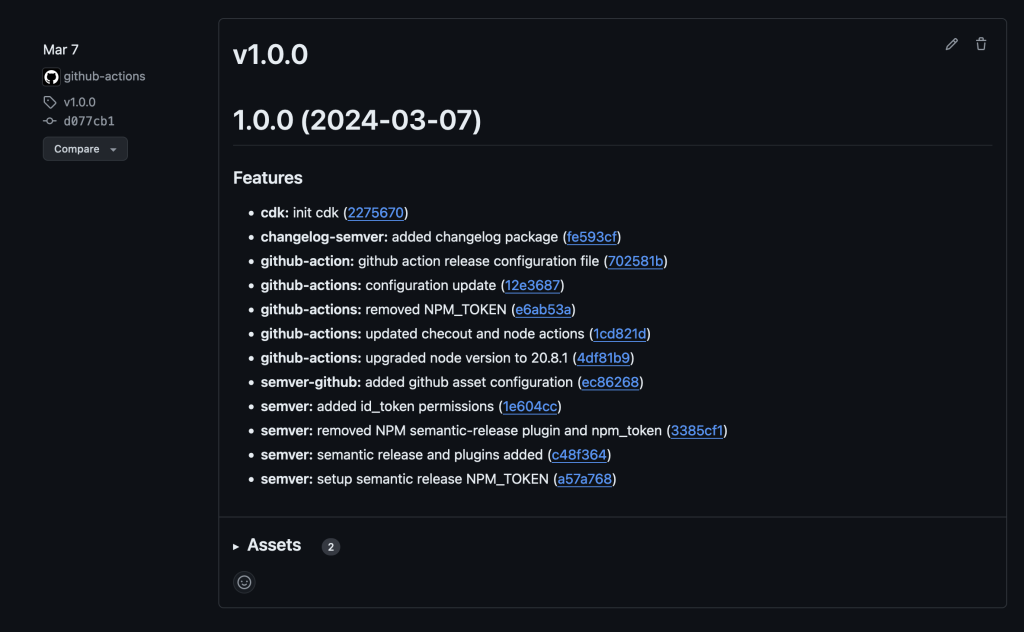
Screenshot of GitHub releases page showing release 1.0.0 and the associated features changelog
Figure 1 – Before the new commits
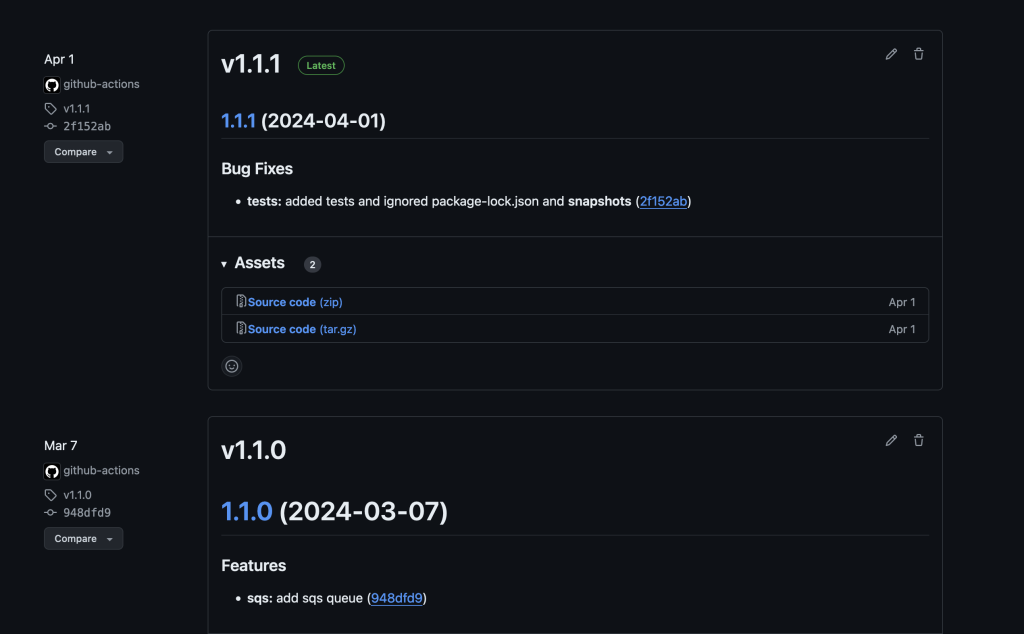
Screenshot of GitHub releases page showing a previous release and the latest release along with their respective versions of 1.1.0 and 1.1.1
Figure 2 – After GitHub Actions generates a new build
Semantic Versioning offers a structured and reliable way to manage software changes. When paired with the significant benefits of using Node.js packages like semantic-release, version management can become effortless. All of this enables automated version management Node.js projects such as AWS CDK pipelines for automated code deployment. It enhances clarity, stability, and collaboration, while also supporting automation and fostering user confidence.
By adopting Semantic Versioning, development teams can achieve more predictable and efficient workflows, ultimately leading to higher quality software. It also builds confidence among users without going into much details with respect to software upgrades and backward compatibility. As a best practice, start incorporating Semantic Versioning for existing and future applications.
Contact an AWS Representative to know how we can help accelerate your business.
CDK setup and deployment of application with CDK V2 Construct:
Post Syndicated from Jonathan Wong original https://aws.amazon.com/blogs/devops/leverage-amazon-q-developer-and-aws-chatbot-within-slack/
The release of Amazon Q Developer and its ability to be integrated into AWS Chatbot allows users who use Microsoft Teams or Slack to stay within their communication platform and interact with a conversational generative artificial intelligence (AI) AWS expert.
Amazon Q Developer is a conversational generative AI chatbot that provides AWS assistance in the form of best practices, documentation, and answers your AWS related questions. AWS Chatbot is a service that lets you interact with AWS services directly from your communications platform such as Microsoft Teams, Amazon Chime, or Slack. Users can ask Q about best practices, building solutions, troubleshooting issues, and more, creating a productive and collaborative environment. Users can also interface with Chatbot to run AWS CLI commands or open support cases all within Slack.
In this post, we show you how you can leverage Q Developer and Chatbot in your Slack workspace by highlighting a number of use cases along with solution screenshots that can enhance a company’s AWS productivity. We will also showcase an architecture diagram, detailing the flow of actions and the use of different services. To learn more about how to implement Q Developer and Chatbot in Slack, refer to this documentation.
Disclaimer: The information and solutions provided by Q Developer are based on patterns from AWS-related data and best practices. While we strive to offer accurate and helpful guidance, please note that the suggestions may not always be fully accurate or applicable to every situation. It is essential to conduct additional research and verify the information with official AWS documentation or consult with AWS support before implementing any recommendations. Always use your judgment and consider the specific requirements of your environment when making decisions based on AI-generated advice.
Leveraging Q Developer and Chatbot
Q Developer and Chatbot serve a wide range of personas across an organization, catering to both AWS-savvy users and those with limited cloud expertise. Software engineers, for instance, can leverage Q Developer to quickly locate documentation, troubleshoot issues, or find best practices, streamlining their workflow. Security engineers can interact with Chatbot to monitor incidents and receive real-time alerts. Even non-technical users, like project managers or operations staff, can benefit from these tools without needing deep cloud knowledge. Together, these tools enhance productivity and collaboration across the company, regardless of technical expertise.
The use cases section is split into two categories, one for Q Developer, and the other for Chatbot. Both services provide unique abilities to interact with AWS to get the response you are looking for and can be accessed by sending a message to @aws on Slack. Q Developer allows users to ask questions in natural language and responds back with a response and a list of sources. Chatbot allows users to open support cases and to run a number of AWS CLI commands for services such as S3, Lambda, and CloudWatch.
Q Developer is a versatile tool designed to assist teams for a number of AWS related use cases. In this post, we will focus on training and onboarding, troubleshooting issues, and implementing AWS best practices.
Benefit: Q Developer can act as a virtual learning assistant, providing personalized training and learning paths for users based on their role, skill level, and current projects. It helps team members stay updated with the latest AWS features and best practices, enhances their skills, and ensures that they can leverage AWS services effectively and efficiently. By offering targeted resources, Q Developer supports continuous learning and helps users prepare for AWS certifications or new roles.
Use Case: AWS Beginner Recommendations. When a new employee joins the team, Q Developer can help them get up to speed by suggesting beginner-level tutorials and essential AWS concepts based on the team’s current tech stack and projects.

Figure 1 – AWS Beginner Recommendations
Use Case: Certification Guidance. An employee aims to get another AWS certification. They can ask Q Developer to provide a structured learning path with recommended courses, study guides, whitepapers, and practice exams to prepare effectively.

Figure 2 – Certification Guidance
Benefit: Q Developer provides targeted troubleshooting guidance, helping users to diagnose and resolve issues efficiently. By leveraging AWS service documentation, best practices, and community discussions, Q Developer reduces the time spent on searching for solutions and allows users to focus on resolving issues faster. This improves operational efficiency and minimizes downtime or disruptions.
Use Case: Optimization Recommendations. A developer is facing an issue with running their application on EC2 during peak hours and is looking for recommendations to diagnose the issue.

Figure 3 – Optimizations Recommendations
Use Case: Service Troubleshooting. An engineer is working on configuring API Gateway with their application but receives a 504 Gateway Timeout error. Q Developer can look up HTTP response codes for specific services and recommend a plan to tackle the issue.

Figure 4 – Service Troubleshooting
Benefit: Q Developer provides access to AWS best practices, ensuring that users can build, manage, and maintain their cloud infrastructure effectively. By adhering to best practices, users can optimize their applications for performance, security, scalability, and cost-efficiency. Q Developer helps users stay informed about evolving best practices for using AWS services, ensuring their deployments are up-to-date and compliant with industry standards.
Use Case: Designing Resilient Architectures. A solutions architect is designing a new application on AWS and wants to ensure it’s highly available and fault-tolerant. By asking Q Developer for best practices, they can receive guidance on a number topics including region selection, software, architecture, and deployment strategies to maximize uptime and reliability.

Figure 5 – Designing Resilient Architectures
Use Case: Deploying Applications for Operational Excellence. An engineer is looking for best practices to deploy an application onto AWS Elastic Beanstalk. Q Developer can assist with providing specific tips for the job that conforms with AWS’ operational excellence pillar found in the AWS Well-Architected Framework.

Figure 6 – Operational Excellence
Chatbot can be used to run AWS CLI commands, open support cases, and more within Slack. To learn more about how to get started with these commands, please visit Chatbot’s documentation and refer to this AWS Blog for additional information.
We can use Chatbot and Q Developer together to provide clarity in situations where an organization receives alerts on their Slack channel. For example, you can configure Chatbot to receive notifications using Amazon Simple Notification Service based off of rules set up within Amazon EventBridge and it will be delivered directly into your Slack channel. Given that an organization can have many types of notifications enabled for their AWS services, there may be times where the message that is being sent to Slack can be confusing and not well understood. You can take the message provided to you from the notification and provide that as context to Q Developer to help you dive deep into the situation and help figure out next steps. To learn more about setting up notifications and having them be sent to your Slack, please refer to this documentation.

Figure 7 – Chatbot Error Notification

Figure 8 – Q Developer Deep Dive into Chatbot Notification

Figure 9 – Solution Overview
Next Steps
Refer to these AWS documentation links that cover how to get started with setting up Q Developer and Chatbot in Slack. It is important to follow the order of the listed documents and to adhere to each of the steps listed to be able to get started with using the solution.
Integration Steps
This post highlights how using Q Developer and Chatbot within Slack can boost productivity for a number of use cases. Individuals, teams, and organizations can use these two services’ capabilities to navigate the intricacies of AWS, troubleshoot ongoing issues, and provide real-time guidance all without leaving the familiarity of Slack.
Post Syndicated from Akshay Zade original https://aws.amazon.com/blogs/big-data/improve-opensearch-service-cluster-resiliency-and-performance-with-dedicated-coordinator-nodes/
Today, we are announcing dedicated coordinator nodes for Amazon OpenSearch Service domains deployed on managed clusters. When you use Amazon OpenSearch Service to create OpenSearch domains, the data nodes serve dual roles of coordinating data-related requests like indexing requests, and search requests, and of doing the work of processing the requests – indexing documents and responding to search queries. Additionally, data nodes also serve the OpenSearch Dashboards. Because of these multiple responsibilities, data nodes can become a hot spot in the OpenSearch Service domain, leading to resource scarcity, and ultimately node failures. Dedicated coordinator nodes help you mitigate this problem by limiting the request coordination and Dashboards to the coordinator nodes, and request processing to the data nodes. This leads to more resilient, scalable domains.
Amazon OpenSearch Service is a managed service that you can use to secure, deploy, and operate OpenSearch clusters at scale in the AWS Cloud. The service allows you to configure clusters with different types of nodes such as data nodes, dedicated cluster manager nodes, and UltraWarm nodes. When you send requests to your OpenSearch Service domain, the request is broadcast to the nodes with shards that will process that request. By assigning roles through deploying dedicated nodes, like dedicated cluster manager nodes, you concentrate the processing of those kinds of requests and remove that processing from nodes in other roles.
OpenSearch Service has recently expanded its node type options to include dedicated coordinator nodes, alongside data nodes, dedicated cluster manager nodes, and UltraWarm nodes. These dedicated coordinator nodes offload coordination tasks and dashboard hosting from data nodes, freeing up CPU and memory resources. By provisioning dedicated coordinator nodes, you can improve a cluster’s overall performance and resiliency. Dedicated coordinator nodes also let you scale the coordination capacity of your cluster independently of the data storage capacity. Dedicated coordinator nodes are available in Amazon OpenSearch Service for all OpenSearch engine versions. See the documentation for engine and version support.
OpenSearch operates as a distributed system, where data is stored in multiple shards across various nodes. Consequently, a node handling a request must coordinate with several other nodes to store or retrieve data.

Here are a few examples of coordination operations performed to successfully serve different user requests:
In OpenSearch Service, each data node is implicitly capable of coordination. In the absence of dedicated coordinator nodes, the data node receiving the request will perform the coordinating duties, though it might not have the relevant shards for the request. By adding dedicated coordinator nodes to a cluster, you can reduce the burden on data nodes. The following sections walk through some of the improvements.
In an OpenSearch cluster, each indexing request goes through three broad phases: coordination, primary, and replica. With coordination responsibilities offloaded to dedicated coordinators, the data nodes have more resources at their disposal for the primary and replica phases. By adding coordinator nodes, we observed as much as 15% higher indexing throughput in workloads such as Stack Overflow and Big5.
A search request in OpenSearch can involve something as trivial as looking up a single document by ID or something complex, such as bucketing a large amount of data and performing aggregations on each of the buckets. The impact of adding dedicated coordinator nodes can vary widely depending on the query. In a query workload containing date histograms with multiple aggregations such as average, p50, p99, and so on, we were able to achieve about 20% higher throughput. The term and multi-term aggregations also benefit from the addition of coordinator nodes. Depending on the key composition throughput improvement of 15% to 20% was observed.
Dedicated coordinator nodes provide a separation of responsibilities that prevents data nodes from being overwhelmed by complex queries or sudden spikes in request volume. In the case of complex aggregations, the coordinator nodes absorb the CPU impact ensuring that the data nodes focus on filtering, matching, scoring, sorting, and returning the search response, and maintaining the integrity of the data. In addition to coordination responsibilities, coordinator nodes also serve the OpenSearch Dashboards frontend. This ensures that the dashboards stay responsive even during high loads, ensuring a smooth user experience.
Complex aggregations consume a lot of memory. Memory intensive operations can lead to out of memory (OOM) errors causing node crashes and data loss. By adding dedicated coordinator nodes in a cluster, you can isolate the impact away from the data nodes. Coordinator nodes can greatly improve performance by significantly reducing or even completely eliminating query-induced OOM errors on data nodes. Because coordinator nodes don’t hold any data, the cluster still remains functional even if one of the coordinator nodes fails.
Dedicated coordinator nodes separate a cluster’s coordination capacity from data storage capacity. This allows you to choose the amount of memory and CPU required for your workload without impacting the stored data. For example, a cluster with high throughput might require a lot of lightweight nodes while a cluster with complex aggregations should have fewer but larger nodes.
Having a dedicated coordinator node allows you to adjust the number of nodes according to anticipated traffic patterns. For example, you can scale up the number of coordinators in high traffic hours and scale them down during low traffic hours.
With dedicated coordinator nodes, you can achieve up to 90% reduction in the number of IP addresses reserved by the service in your VPC. This reduction allows deployments of larger clusters that might otherwise face resource constraints.
When you create a virtual private cloud (VPC) domain without dedicated coordinator nodes, OpenSearch Service places an elastic network interface (ENI) in the VPC for each data node. Each ENI is assigned an IP address. At the time of domain creation, the service reserves three IP addresses for each data node. See Architecture for more information. When dedicated coordinator nodes are used, the ENIs are attached to the coordinator nodes instead of the data nodes. Because there are typically fewer coordinator nodes than data nodes fewer IP addresses are reserved. The following diagram shows the domain architecture of a VPC domain with dedicated coordinator nodes.

OpenSearch Service offers two key parameters for managing dedicated coordinator nodes:
To get the most benefits out of coordinator nodes, you must pick the right type as well as the right count. As a general rule, we recommend that you set the count to 10% of the number of data nodes and choose a size that’s similar to the size of the data nodes. See the documentation to find out the supported instance types for dedicated coordinator nodes. The following guidelines should help tailor the configuration further to specific workloads:
While the guidelines above are a good start, every use case is unique. To arrive at an optimal configuration, you must experiment with your own workload, observe the performance, and identify the bottlenecks. OpenSearch Service provides some key metrics and APIs to observe how coordinator nodes are doing.
CoordinatorJVMMemoryPressure metric indicates the percentage of JVM memory used by the OpenSearch process. This metric is available at both the cluster and node levels. Consistently high JVM memory pressure suggests that coordination tasks are using memory efficiently. It’s important to assess this metric alongside the JVM garbage collection (GC) metrics, which show how many old generation GC runs have been triggered and how long they lasted. In a properly scaled cluster, GC runs should be infrequent and short. If GC runs occur too often, they might also negatively impact CPU performance.PrimaryWriteRejected and ReplicaWriteRejected. An increase in primary or replica write rejections suggests that the data nodes are underscaled and unable to process requests quickly enough. However, if the CoordinatingWriteRejected metric rises independently of the other two, it indicates that the coordinating node is struggling to handle the indexing coordination process, preventing it from processing queued requests. Indexing requires many resources, any of which could be a bottleneck. You can alleviate indexing pressure where the CPU is the bottleneck with more or larger instances that have more vCPUs.OutOfMemoryError. The circuit breaker statistics for coordinator nodes can be retrieved with following API:_nodes/coordinating_only:true/stats/breakercircuit_breaking_exception message. These indicate that the result size of the request was too big to fit on a coordinator node. To avoid these errors, it’s recommended to use an instance with more memory.You can add one or more dedicated coordinator nodes by updating the domain configuration with the appropriate options for coordinator nodes. This will trigger a blue/green deployment, and the domain will have dedicated coordinator nodes once the deployment is complete. Alternatively, you can create a new domain with dedicated coordinator nodes.
In either scenario, you can expand or reduce the number of coordinator nodes without requiring a blue/green deployment, giving you the flexibility to experiment.
In real-world production environments, dedicated coordinator nodes in Amazon OpenSearch Service provide an effective way to separate coordination tasks from data processing. This shift enhances resource efficiency, often delivering up to a 15% increase in indexing throughput and a 20% improvement in query performance, depending on workload demands. By offloading coordination tasks, you reduce the risk of node overloads, improve system stability, and gain better cost control by scaling coordination and data tasks independently.
For workloads with complex queries and high traffic, dedicated coordinator nodes help ensure that your cluster maintains optimal performance and is prepared to handle future growth with greater resilience. Start experimenting with dedicated coordinator nodes today to unlock more efficient resource management and enhanced performance in your OpenSearch clusters.
 Akshay Zade is a Senior SDE working for Amazon OpenSearch Service, passionate about solving real-world problems with the power of large-scale distributed systems. Outside of work, he enjoys drawing, painting, and diving into fantasy books.
Post Syndicated from daroc original https://lwn.net/Articles/996216/
Mozilla has
announced the release of a new version of Firefox. This version has the usual mix of
security fixes and new features, as well as a handful of deprecations. The release removes support for HTTP/2 Push, but adds hardware acceleration for SVGs, support for wide color gamuts on more platforms, and restores support for remote debugging via USB.
Post Syndicated from Shovan Kanjilal original https://aws.amazon.com/blogs/big-data/control-your-aws-glue-studio-development-interface-with-aws-glue-job-mode-api-property/
In recent years, as the importance of big data has grown, efficient data processing and analysis have become crucial factors in determining a company’s competitiveness. AWS Glue, a serverless data integration service for integrating data across multiple data sources at scale, addresses these data processing needs. Among its features, the AWS Glue Jobs API stands out as a particularly noteworthy tool.
The AWS Glue Jobs API is a robust interface that allows data engineers and developers to programmatically manage and run ETL jobs. By using this API, it becomes possible to automate, schedule, and monitor data pipelines, enabling efficient operation of large-scale data processing tasks.
To improve customer experience with the AWS Glue Jobs API, we added a new property describing the job mode corresponding to script, visual, or notebook. In this post, we explore how the updated AWS Glue Jobs API works in depth and demonstrate the new experience with the updated API.
A new property JobMode describes the mode of AWS Glue jobs (script, visual, or notebook) to improve your UI experience. AWS Glue users can use the mode that best fits your preference. Some extract, transform, and load (ETL) developers prefer to use visual mode and create visual jobs using AWS Glue Studio visual editor. Some data scientists prefer to use notebooks jobs and use AWS Glue Studio notebooks. Some data engineers and developers prefer to implement script through the AWS Glue Studio script editor or preferred integrated development environment (IDE). After the job is created with the preferred mode, you can search for it by filtering on the job mode within your saved AWS Glue jobs page and find it easily. Additionally, if you are migrating existing iPython notebook files to AWS Glue Studio notebook jobs, you can now choose and set the job mode and do so for multiple jobs using this new API property, as demonstrated in this post.
You can use CreateJob API to create AWS Glue script or a visual or notebook job. The following is an example of how it works for a visual job using AWS SDK for Python (Boto3): (replace <your-bucket-name> with your S3 bucket)
CODE_GEN_JSON_STR represents the visual nodes for the AWS Glue Job. There are three nodes: node-1 uses S3 source, node-2 does transformation, and node-3 uses S3 target. The script instantiates the AWS Glue Boto3 client, loads the JSON, and calls the create_job. JobMode is set to VISUAL.
After you run the Python script, a new job is created. The following screenshot shows how the created job looks in AWS Glue visual editor.

There are three nodes in the visual directed acyclic graph (DAG): node 1 sources product review data for the product_category book from the public S3 bucket, node-2 drops some of the fields that aren’t needed for downstream systems, and node-3 persists the transformed data in a local S3 bucket.
You can use AWS CloudFormation to create different types of AWS Glue jobs by specifying the JobMode parameter with the AWS::Glue::Job resource. The supported job modes include:
SCRIPTVISUALNOTEBOOKIn this example, you create a AWS Glue notebook job using AWS CloudFormation, which requires setting the JobMode parameter to NOTEBOOK.
my-glue-notebook.ipynb. Alternatively you can download the notebook file, and rename it to my-glue-notebook.ipynb.notebooks/ folder within the aws-glue-assets-<account-id>-<region> S3 bucket.NotebookJobName parameter as the same name as the Notebook file. Here’s the sample snippet of CloudFormation template:
NotebookJobName, enter same name as the notebook file.AWS Glue notebook shows the Notebook job that contains the existing cells that you had in the ipynb file. You can review the job details to confirm it’s configured correctly.
On the AWS Glue console, in the navigation pane, choose ETL Jobs to observe all your ETL jobs listed. Here you have different columns Job name, Type, Created by, Last modified, and AWS Glue version. You can sort and filter by these columns. The following screenshot shows how it looks.

We also enhanced the console experience with the JobMode introduction. The Created by column on the console gives you information about JobMode of the job. You can filter access jobs created by VISUAL, NOTEBOOK, or SCRIPT, as shown in the following screenshot.

This new console experience helps you search and discover your jobs based on JobMode.
This post demonstrated how AWS Glue Job API works with the newly introduced job mode property. With the new property, you can explicitly choose the mode of each job. The steps instructed detailed usage in API, AWS SDK, and CloudFormation. Additionally, the property makes it straightforward to search and discover your jobs quickly on the AWS Glue console.
 Shovan Kanjilal is a Senior Analytics and Machine Learning Architect with Amazon Web Services. He is passionate about helping customers build scalable, secure, and high-performance data solutions in the cloud.
 Manoj Shunmugam is a DevOps Consultant in Professional Services at Amazon Web Services. He works with customers to establish infrastructures using cloud-centered and/or container-based platforms in the AWS Cloud.
 Noritaka Sekiyama is a Principal Big Data Architect on the AWS Glue team. He is responsible for building software artifacts to help customers. In his spare time, he enjoys cycling on his road bike.
 Gal Heyne is a Product Manager for AWS Glue with a strong focus on AI/ML, data engineering, and BI. She is passionate about developing a deep understanding of customers’ business needs and collaborating with engineers to design easy-to-use data products.
Post Syndicated from jzb original https://lwn.net/Articles/996214/
Fedora Linux 41 has been
released. See the “what’s new” pages for Fedora
Workstation and Fedora
KDE, to learn more about the latest in those editions. There is
also a new Fedora
Miracle Window Manager Spin that offers the Miracle tiling window manager for
Wayland.
Post Syndicated from daroc original https://lwn.net/Articles/995276/
The first program that Martin Pool ever wrote, he said, had bugs; the ones he’s writing
now most likely have bugs too. The talk Pool gave at
RustConf this year was about a way to try
to write programs with fewer bugs. He has developed a tool called
cargo-mutants that highlights gaps in test coverage by identifying
functions that can be broken without causing any tests to fail.
This can be a valuable complement to other testing techniques,
he explained.
Post Syndicated from Ruben Simon original https://aws.amazon.com/blogs/big-data/how-bmw-streamlined-data-access-using-aws-lake-formation-fine-grained-access-control/
This post is cowritten with Ruben Simon and Khalid Al Khalili from BMW.
BMW’s ambition is to continuously accelerate innovation and improve decision-making across their global operations. To achieve this, they aimed to break down data silos and centralize data from various business units and countries into the BMW Cloud Data Hub (CDH). The CDH is used to create, discover, and consume data products through a central metadata catalog, while enforcing permission policies and tightly integrating data engineering, analytics, and machine learning services to streamline the user journey from data to insight. By building the CDH, BMW realized improved efficiency, performance and sustainability throughout the automotive lifecycle, from design to after-sales services.
With over 10 PB of data across 1,500 data assets, 1,000 data use cases, and more than 9000 users, the BMW CDH has become a resounding success since BMW decided to build it in a strategic collaboration with Amazon Web Services (AWS) in 2020. However, the initial version of CDH supported only coarse-grained access control to entire data assets, and hence it was not possible to scope access to data asset subsets. This led to inefficiencies in data governance and access control.
AWS Lake Formation is a service that streamlines and centralizes the data lake creation and management process. One of its key features is fine-grained access control, which allows customers to granularly control access to their data lake resources at the table, column, and row levels. This level of control is essential for organizations that need to comply with data governance and security regulations, or those that deal with sensitive data.
With fine-grained access control, customers can define and enforce data access policies based on various criteria, such as user roles, data classifications, or data sensitivity levels. This makes sure that only authorized users or applications can access specific data sets or portions of data, but also reduces the risk of unauthorized access or data breaches. Additionally, Lake Formation integrates with AWS Identity and Access Management (IAM) and other AWS services so customers can use existing security and access management practices within their data lake environment.
This post explores how BMW implemented AWS Lake Formation‘s fine-grained access control (FGAC) in the CDH and how this saves them up to 25% on compute and storage costs.
The CDH is a company-wide data lake built on Amazon Simple Storage Service (Amazon S3). The CDH serves as a centralized repository for petabytes of data from engineering, manufacturing, sales, and vehicle performance and provides BMW employees with a unified view of the organization and acts as a starting point for new development initiatives. It streamlines access to various AWS services, including Amazon QuickSight, for building business intelligence (BI) dashboards and Amazon Athena for exploring data. Many of these services are embedded into the CDH data portal, which offers a web-based user interface for accessing and interacting with the platform. It allows users to discover datasets, manage data assets, and consume data for their use cases. The architecture is shown in the following figure.

The BMW CDH follows a decentralized, multi-account architecture to foster agility, scalability, and accountability. It comprises distinct AWS account types, each serving a specific purpose. The following account types are relevant for implementation:
The following are the three key roles within the CDH’s decentralized architecture:
For example, a global sales dataset is created by a team of data engineers with the data provider role. A data analyst in a local market who wants to derive insights from the global sales data can create a use case with a dedicated AWS consumer account and request access to the dataset from a data steward.
This multi-account strategy promotes a clear separation of concerns, empowering data producers and consumers to operate independently while using the centralized governance and services provided by the solution. The following figure illustrates how Lake Formation is used across the resource and consumer accounts in the CDH to provide FGAC to use cases.

The CDH uses the AWS Glue in resource accounts as a technical metadata catalog and data assets are stored in Amazon S3. Both the data catalog and the locations in Amazon S3 are registered with Lake Formation so that it can govern data access. Data catalogs and tables are shared with consumer accounts and use cases through AWS Resource Access Manager (AWS RAM). With Lake Formation, BMW can control access to data assets at different granularities, such as permissions at the table, column, or row level. Users can then use a Lake Formation integrated engine such as Amazon Athena to access only the data they need, removing the need to duplicate data. For example, to restrict access to a global sales data asset, BMW can now specify row filters in Lake Formation using the PartiQL language, filtering rows based on the country column of the data asset.
At the core of the CDH FGAC implementation lies the concept of filter packages. A filter package provides a selective view of a data asset by defining column and row filters on the tables. Multiple filter packages can be defined for a data asset to create suitable views for different use cases. In our example of the global sales dataset, a data steward creates a filter package for each local market that restricts access to the relevant rows and columns. Data stewards create and manage these packages through the CDH interface. These filter packages are implemented using Lake Formation row-level and column-level access control mechanisms. The following figure illustrates these concepts.

When creating a filter package, data stewards can specify the desired access level for individual tables within their data asset: Full access grants permissions to all columns and rows, None denies access to an entire table, while Filtered allows for granular row-level and column-level access controls.
For filtered access, data stewards use PartiQL queries to define row-level filters on tables, selecting only the rows that meet specific criteria. Additionally, they can specify column-level filters by selecting the accessible columns.
After filter packages have been created and published, they can be requested. Data stewards can review incoming requests and grant or deny access through the CDH interface, making sure that only authorized environments can access sensitive data.
Use case owners can browse and search for relevant data assets in the CDH, and then request full or scoped access. The CDH provides a clear overview of the available filter packages, allowing them to select the appropriate level of access based on their use case.
After access is granted to a filter package by the data steward, the filters are enforced for the use case using Lake Formation. Use case owners can further control access at the row and column level for individual users or roles within their use case account using Lake Formation. For example, they can create another column filter to hide a particular column for a particular group of users and provide unfiltered access to another group of users.
One of the challenges in implementing changes in access control within an existing data lake such as the CDH is the need to coordinate migration between data providers and consumers. To address this, Lake Formation offers a hybrid access mode to facilitate a gradual transition to FGAC without disrupting existing data access patterns.
In hybrid access mode, data providers can activate Lake Formation for new dataset consumers while existing consumers continue to access the data using the legacy permission model. This approach makes sure that consumers can migrate to FGAC at their own pace, minimizing the impact on their existing workloads and processes. A use case account is only switched to Lake Formation permissions for a dataset when it requests access to a filter package. This hybrid approach allows providers and consumers to migrate at their own pace, maintaining a smooth transition to the new access control model.
As the CDH grew, it became apparent that data was often duplicated for access control purposes. This issue was particularly evident with data assets containing sales data of all markets where BMW operates. Local markets were only eligible to see their own data, and to achieve this, subsets of global data assets had to be duplicated to create isolated local variants. While this approach succeeded in fulfilling access control requirements, it led to increased storage costs, higher compute expenses for data processing and drift detection, and project delays because of time-consuming provisioning processes and governance overhead. At one point, 25% of all data assets in the CDH were duplicates, a natural consequence of these measures.
With Lake Formation, creating these duplicates is no longer necessary. Data stewards can restrict access to global datasets on column and row level to comply with governance requirements. Not only does this reduce the cost for data processing, storage, development and maintenance, it also minimizes the opportunity cost of delayed data access.
By using AWS Lake Formation fine-grained access control capabilities, BMW has transparently implemented finer data access management within the Cloud Data Hub. The integration of Lake Formation has enabled data stewards to scope and grant granular access to specific subsets of data, reducing costly data duplication. This approach enables BMW to save up to 25% on compute and storage costs while reducing governance overhead costs. The hybrid access mode implementation further facilitates a smooth transition to the new access control model, allowing data providers and consumers to migrate at their own pace without disrupting existing workloads and processes. To dive deeper into how to replicate BMWs data success story, check out the AWS blog post on building a data mesh with Amazon Lake Formation and AWS Glue.
 Ruben Simon is a Head of Product for BMW’s Cloud Data Hub, the company’s largest data platform. He is passionate about driving digital transformation in aata, analytics, and AI, and thrives on collaborating with international teams. Outside the office, Ruben cherishes family time and has a keen interest in continual learning.
 Khalid Al Khalili is a Data Architect at BMW Group, leading the architecture of the Cloud Data Hub, BMW’s central platform for data innovation. He is a strong advocate for creating seamless data experiences, transforming complex requirements into efficient, user-friendly solutions. When he’s not building new features, Khalid enjoys collaborating with his peers and cross-functional teams to advance and shape BMW’s data strategy, ensuring it stays ahead in a rapidly evolving landscape.
 Florian Seidel is a Global Solutions Architect specializing in the automotive sector at AWS. He guides strategic customers in harnessing the full potential of cloud technologies to drive innovation in the automotive industry. With a passion for analytics, machine learning, AI, and resilient distributed systems, Florian helps transform cutting-edge concepts into practical solutions. When not architecting cloud strategies, he enjoys cooking for family and friends and experimenting with electronic music production.
 Aishwarya Lakshmi Krishnan is a Senior Customer Solutions Manager with AWS Automotive. She is passionate about solving business problems using generative AI and cloud based technologies.
 Durga Mishra is a Principal solutions architect at AWS. Outside of work, Durga enjoys spending time building new things and spend time with family and loves to hike on Appalachian trails and spend time in nature.
Post Syndicated from Talks at Google original https://www.youtube.com/watch?v=QCQutoQj0bc
Post Syndicated from BeardedTinker original https://www.youtube.com/watch?v=-jnM33xQ3OQ
Post Syndicated from Michael Tran original https://aws.amazon.com/blogs/devops/diving-deeper-into-projen-exploring-advanced-features/
We will be highlighting Projen’s powerful features that cater to various aspects of project management and development. We’ll examine how Projen enhances polyglot programming within Amazon Web Services (AWS) Cloud Development Kit constructs. We’ll also touch on its built-in support for common development tools and practices.
In our previous blog, we introduced you to the basics of getting started with Projen. Projen is a powerful project generator that simplifies the management of complex software configurations. In our prior blog, we discussed developing a new AWS cloud development kit (CDK) construct library project. For consistency, we will continue using this construct library project as our example while exploring linting, dependency management, and test coverage. It’s important to note that these practices are equally applicable to CDK applications and other project types.
AWS CDK Polyglot Construct Library
The AWS Cloud Development Kit (AWS CDK) is an open-source software development framework that allows developers to define cloud infrastructure using familiar programming languages. In a CDK application, constructs serve as the foundational elements, allowing developers to represent either a single AWS resource or a complex combination of resources. These constructs are not only reusable but can be incorporated into other AWS CDK projects, promoting efficient and scalable development practices.
Projen and Polyglot Programming
Projen leverages the power of the JSII library, enabling developers to write constructs once and generate equivalent constructs across multiple programming languages. This feature streamlines the development process, especially when working with teams that have expertise in different languages.
Automated Publishing with Projen
With its publisher module, Projen automates the distribution of c
ructs to various package managers. This process can be integrated into a GitHub workflow, such as a build job, which triggers the publication of the library to the designated package managers.
Starting with Projen
Initiating an AWS CDK construct library project is straightforward through the Projen command npx projen new <project_type>. By executing the command npx projen new awscdk-construct, you initialize a new project complete with a projenrc file. This file contains the essential configuration for a CDK construct library, setting the stage for further customization and development.
import { awscdk } from 'projen';
const project = new awscdk.AwsCdkConstructLibrary({
  author: 'github username',
  authorAddress: 'github email',
  cdkVersion: '2.1.0',
  defaultReleaseBranch: 'main',
  jsiiVersion: '~5.0.0',
  name: 'cdkconstruct',
  projenrcTs: true,
  repositoryUrl: 'https://github.com/*****/cdkconstruct.git',

  // deps: [],                /* Runtime dependencies of this module. */
  // description: undefined,  /* The description is just a string that helps people understand the purpose of the package. */
  // devDeps: [],             /* Build dependencies for this module. */
  // packageName: undefined,  /* The "name" in package.json. */
});
project.synth();
A release.yml file is generated by projen under the github>workflow directory. This file has the details of the public registry where the construct needs to be published. By default, it will add the details for npm.
release_npm:
    name: Publish to npm
The construct can be developed in typescript under src/main.ts, our previous blog shows how to create one. If the construct needs to be published to other public registries (such as Maven for java, Pypi for python), then a projenrc file can be updated to synthesize a new release.yml file.
For example, to publish a construct developed in typescript to Maven (so that it can be used in a java application) add publishToMaven API to the projenrc file.
const project = new awscdk.AwsCdkConstructLibrary({
  author: 'github username',
  authorAddress: 'github email',
  cdkVersion: '2.1.0',
  defaultReleaseBranch: 'main',
  jsiiVersion: '~5.0.0',
  name: 'cdkconstruct',
  projenrcTs: true,
  repositoryUrl: 'https://github.com/*****/cdkconstruct.git',
  publishToMaven: {
    javaPackage: 'com.cdk.hello',
    mavenArtifactId: 'cdk-construct-jsii',
    mavenGroupId: 'com.cdk.hello',
    mavenServerId: 'github',
    mavenRepositoryUrl: 'https://maven.pkg.github.com/example/hello-jsii',
  },
});
Run npx projen and the release.yml will be updated with Maven central details.
release_maven:
    name: Publish to Maven Central
    needs: release
    ....
Similarly, it can be published to other registries.
publishToPypi:
publishToMaven:
publishToNuGet:
publishToGo:
This way the construct is built once and published to multiple registries with different programming languages.

Figure 1: High-level Architecture showing publication to multiple public registries
Linting, Dependency Management & Test Coverage
Projen streamlines the setup process by generating a comprehensive package.json file. This file includes pre-configured dependencies for ESLint and Jest, enabling developers to maintain coding standards and ensure robust test coverage right from the start. ESLint, a widely adopted static code analysis utility, empowers developers to enforce consistent coding practices by analyzing the source code and identifying potential errors, bugs, and stylistic issues. Additionally, Jest equips developers with a comprehensive suite of tools for writing and executing unit tests, facilitating comprehensive test coverage for their codebase. While Projen provides Jest as the default testing framework, it offers developers the flexibility to incorporate alternative testing frameworks based on their project requirements.
Following with the awscdk-construct from the previous section, under test>main.test.ts a default test file is created, which can be updated for writing test cases. A default package.json is generated in the root directory.
{
  "name": "projen_hello",
  "scripts": {
    "build": "npx projen build",
    "bundle": "npx projen bundle",
    "clobber": "npx projen clobber",
    "compile": "npx projen compile",
    "default": "npx projen default",
    "deploy": "npx projen deploy",
    "destroy": "npx projen destroy",
    "diff": "npx projen diff",
    "eject": "npx projen eject",
    "eslint": "npx projen eslint",
    "package": "npx projen package",
    "post-compile": "npx projen post-compile",
    "post-upgrade": "npx projen post-upgrade",
    "pre-compile": "npx projen pre-compile",
    "synth": "npx projen synth",
    "synth:silent": "npx projen synth:silent",
    "test": "npx projen test",
    "test:watch": "npx projen test:watch",
    "upgrade": "npx projen upgrade",
    "watch": "npx projen watch",
    "projen": "npx projen"
  },
  "devDependencies": {
    "@types/jest": "^29.5.4",
    "@types/node": "^16",
    "@typescript-eslint/eslint-plugin": "^6",
    "@typescript-eslint/parser": "^6",
    "aws-cdk": "^2.1.0",
    "esbuild": "^0.19.2",
    "eslint": "^8",
    "eslint-import-resolver-node": "^0.3.9",
    "eslint-import-resolver-typescript": "^3.6.0",
    "eslint-plugin-import": "^2.28.1",
    "jest": "^29.7.0",
    "jest-junit": "^15",
    "npm-check-updates": "^16",
    "projen": "^0.73.17",
    "ts-jest": "^29.1.1",
    "ts-node": "^10.9.1",
    "typescript": "^5.2.2",
    "webpack": "5.88.2"
  },
  "dependencies": {
    "aws-cdk-lib": "^2.1.0",
    "constructs": "^10.0.5"
  },
  "license": "Apache-2.0",
  "version": "0.0.0",
  "jest": {
    "testMatch": [
      "<rootDir>/src/**/__tests__/**/*.ts?(x)",
      "<rootDir>/(test|src)/**/*(*.)@(spec|test).ts?(x)"
    ],
    "clearMocks": true,
    "collectCoverage": true,
    "coverageReporters": [
      "json",
      "lcov",
      "clover",
      "cobertura",
      "text"
    ],
    "coverageDirectory": "coverage",
    "coveragePathIgnorePatterns": [
      "/node_modules/"
    ],
    "testPathIgnorePatterns": [
      "/node_modules/"
    ],
    "watchPathIgnorePatterns": [
      "/node_modules/"
    ],
    "reporters": [
      "default",
      [
        "jest-junit",
        {
          "outputDirectory": "test-reports"
        }
      ]
    ],
    "preset": "ts-jest",
    "globals": {
      "ts-jest": {
        "tsconfig": "tsconfig.dev.json"
      }
    }
  },
  "//": "~~ Generated by projen. To modify, edit .projenrc.ts and run \"npx projen\"."
}
Projen can be extensively configured. For example, if you need to configure webpack as a module bundler, then you need to add a webpack.config.js file and update the projenrc file project.
The other dependencies can be updated in package.json by adding deps in the projenrc.ts file.
const project = new awscdk.AwsCdkTypeScriptApp({
  cdkVersion: '2.1.0',
  defaultReleaseBranch: 'main',
  name: 'projen_hello',
  projenrcTs: true,

  deps:[
   "express",
  ],

  // add webpack dependencies
  devDeps:[
    "webpack",
    "webpack-cli",
    "ts-loader",
  ]
});

// update pre-configured build tasks and execute webpack
project.buildTask.reset
project.buildTask.exec('npx projen');
project.buildTask.exec('npx projen test');
project.buildTask.exec('npx webpack');
Run npx projen build to synthesize a package.json.
Continuous Integration and Continuous Delivery (CI/CD)
When you create a project using Projen, it comes equipped with an automated build process that triggers upon the submission of a pull request. This is one of the key, “out-of-the-box” features that streamlines development workflows.
Projen orchestrates this process through GitHub Actions, utilizing a sequence of tasks predefined in the project’s base ‘Project’ class.
When a build is initiated, it systematically carries out several sub-tasks:
Projen manages these steps by auto-generating a build.yml file, which it places within the workflow directory of your project’s structure. This YAML file contains all the instructions for the GitHub Actions to execute the build process.
For instance, when you run the command npx projen new awscdk-app-ts, Projen sets up a TypeScript application for AWS CDK. It automatically creates a ‘build.yml’ file through the default projenrc file, which can be found in the github/workflow folder of your project repository. This automated process is designed to save time and reduce manual errors, making it an essential feature for efficient project management.
 .github
   workflow
    build.yml
A Projen build is self-mutating because files generated by Projen are part of the source directory. To ensure that a pull request branch always represents the final state of the repository, you can enable the mutableBuild option in your project configuration (currently only supported for projects derived from NodeProject).
The build process can be customized by adding any task in the project class, which can execute a shell command.
const buildproject = project.addTask('build');
buildproject.exec('npm run build');
You can spawn a subtask as well.
const buildproject = project.addTask('world');
buildproject.exec('echo world!');

const testproject = project.addTask('test');
testproject.exec('npm test');
testproject.spawn(buildproject);
The Task also supports the condition option that determines if the condition is true before running the task.
const hello = project.addTask('hello', {
  condition: '[ -n "$CI" ]', // only execute if the CI environment variable is defined
  exec: 'echo running in a CI environment'
});
Releases and Versioning
Projen uses Conventional Commits to generate semantic versioning of the releases automatically. This means that based on the commit message format, it can create the release version automatically.
Initially, the project is released under version 0.0.0. Anything may change at any time and public APIs should not be considered stable. Commits marked as a breaking change will increase the minor version. All other commits will increase the patch version.
You need to manually promote the major version to 1 once your project is considered stable. For major versions 1 and above, if a release includes fix commits only, it will increase the patch version. If a release includes any feat commits, then the new version will be a minor version.
Commit Messages                     Release versions

feat: <Message>                     1.0.X (Patch)
fix: <Message>                      1.X.0 (Minor)
BREAKING CHANGE: <Message>          X.0 (Major)
API Documentation
One of the nice, out-of-the-box features that comes with Projen for AWS CDK constructs is the creation of API documentation for your constructs. By leveraging jsii-docgen, Projen’s build step will generate API documentation (API.md) from the comments in your code.
This feature is powerful for several reasons. Firstly, it ensures that documentation is kept up-to-date with the codebase, as the API documentation is generated directly from the source code comments. This reduces the risk of discrepancies between the code and its documentation, which can lead to misunderstandings and errors in usage.
Secondly, it streamlines the development process by automating a task that is often tedious and time-consuming. Developers can focus more on writing code and less on updating documentation manually.
Thirdly, it promotes better coding practices, as developers are encouraged to write clear and detailed comments in their code. This not only benefits the generation of documentation, but also helps any new developers who may work on the codebase in the future to understand the code more quickly and thoroughly.
Moreover, having readily available and accurate documentation can significantly enhance the developer experience. It makes it more straightforward for users of the CDK constructs to understand the functionality, parameters, return types, and the structure of the code they are working with.
In the context of team collaboration and open-source projects, this feature is especially beneficial. It ensures that anyone who contributes to the codebase is able to generate and view the latest documentation without any additional setup or configuration, facilitating smoother collaboration and integration processes.
Let’s recap all of the features that Projen can introduce into your project right out of the box:
Conclusion
As we wrap up our deep dive into some of the advanced features of Projen within AWS CDK, it’s clear that Projen helps alleviate a lot of the pain points of a new greenfield project. By leveraging Projen, developers can navigate the complexities of polyglot programming, automate the mundane tasks of publishing and documentation, and ensure consistent code quality through linting and testing. Projen elevates the development workflow to a level where efficiency and scalability are the norms, not the exception.
What’s more compelling is Projen’s commitment to developer empowerment. Through its automated systems, it encourages developers to adhere to best practices without the overhead of manual enforcement. Its ability to seamlessly integrate with various package managers and generate detailed API documentation from inline comments signifies a leap in developer tooling.
Contact an AWS Representative to know how we can help accelerate your business.
Further Reading
Post Syndicated from Matt Granger original https://www.youtube.com/watch?v=ObpBLtZTy18
Post Syndicated from Alex Fattouche original https://blog.cloudflare.com/migrating-billions-of-records-moving-our-active-dns-database-while-in-use
According to a survey done by W3Techs, as of October 2024, Cloudflare is used as an authoritative DNS provider by 14.5% of all websites. As an authoritative DNS provider, we are responsible for managing and serving all the DNS records for our clients’ domains. This means we have an enormous responsibility to provide the best service possible, starting at the data plane. As such, we are constantly investing in our infrastructure to ensure the reliability and performance of our systems.
DNS is often referred to as the phone book of the Internet, and is a key component of the Internet. If you have ever used a phone book, you know that they can become extremely large depending on the size of the physical area it covers. A zone file in DNS is no different from a phone book. It has a list of records that provide details about a domain, usually including critical information like what IP address(es) each hostname is associated with. For example:
example.com      59 IN A 198.51.100.0
blog.example.com 59 IN A 198.51.100.1
ask.example.com  59 IN A 198.51.100.2
It is not unusual for these zone files to reach millions of records in size, just for a single domain. The biggest single zone on Cloudflare holds roughly 4 million DNS records, but the vast majority of zones hold fewer than 100 DNS records. Given our scale according to W3Techs, you can imagine how much DNS data alone Cloudflare is responsible for. Given this volume of data, and all the complexities that come at that scale, there needs to be a very good reason to move it from one database cluster to another.
When initially measured in 2022, DNS data took up approximately 40% of the storage capacity in Cloudflare’s main database cluster (cfdb). This database cluster, consisting of a primary system and multiple replicas, is responsible for storing DNS zones, propagated to our data centers in over 330 cities via our distributed KV store Quicksilver. cfdb is accessed by most of Cloudflare’s APIs, including the DNS Records API. Today, the DNS Records API is the API most used by our customers, with each request resulting in a query to the database. As such, it’s always been important to optimize the DNS Records API and its surrounding infrastructure to ensure we can successfully serve every request that comes in.
As Cloudflare scaled, cfdb was becoming increasingly strained under the pressures of several services, many unrelated to DNS. During spikes of requests to our DNS systems, other Cloudflare services experienced degradation in the database performance. It was understood that in order to properly scale, we needed to optimize our database access and improve the systems that interact with it. However, it was evident that system level improvements could only be just so useful, and the growing pains were becoming unbearable. In late 2022, the DNS team decided, along with the help of 25 other teams, to detach itself from cfdb and move our DNS records data to another database cluster.
From a DNS perspective, this migration to an improved database cluster was in the works for several years. Cloudflare initially relied on a single Postgres database cluster, cfdb. At Cloudflare’s inception, cfdb was responsible for storing information about zones and accounts and the majority of services on the Cloudflare control plane depended on it. Since around 2017, as Cloudflare grew, many services moved their data out of cfdb to be served by a microservice. Unfortunately, the difficulty of these migrations are directly proportional to the amount of services that depend on the data being migrated, and in this case, most services require knowledge of both zones and DNS records.
Although the term “zone” was born from the DNS point of view, it has since evolved into something more. Today, zones on Cloudflare store many different types of non-DNS related settings and help link several non-DNS related products to customers’ websites. Therefore, it didn’t make sense to move both zone data and DNS record data together. This separation of two historically tightly coupled DNS concepts proved to be an incredibly challenging problem, involving many engineers and systems. In addition, it was clear that if we were going to dedicate the resources to solving this problem, we should also remove some of the legacy issues that came along with the original solution.
One of the main issues with the legacy database was that the DNS team had little control over which systems accessed exactly what data and at what rate. Moving to a new database gave us the opportunity to create a more tightly controlled interface to the DNS data. This was manifested as an internal DNS Records gRPC API which allows us to make sweeping changes to our data while only requiring a single change to the API, rather than coordinating with other systems. For example, the DNS team can alter access logic and auditing procedures under the hood. In addition, it allows us to appropriately rate-limit and cache data depending on our needs. The move to this new API itself was no small feat, and with the help of several teams, we managed to migrate over 20 services, using 5 different programming languages, from direct database access to using our managed gRPC API. Many of these services touch very important areas such as DNSSEC, TLS, Email, Tunnels, Workers, Spectrum, and R2 storage. Therefore, it was important to get it right.
One of the last issues to tackle was the logical decoupling of common DNS database functions from zone data. Many of these functions expect to be able to access both DNS record data and DNS zone data at the same time. For example, at record creation time, our API needs to check that the zone is not over its maximum record allowance. Originally this check occurred at the SQL level by verifying that the record count was lower than the record limit for the zone. However, once you remove access to the zone itself, you are no longer able to confirm this. Our DNS Records API also made use of SQL functions to audit record changes, which requires access to both DNS record and zone data. Luckily, over the past several years, we have migrated this functionality out of our monolithic API and into separate microservices. This allowed us to move the auditing and zone setting logic to the application level rather than the database level. Ultimately, we are still taking advantage of SQL functions in the new database cluster, but they are fully independent of any other legacy systems, and are able to take advantage of the latest Postgres version.
Now that Cloudflare DNS was mostly decoupled from the zones database, it was time to proceed with the data migration. For this, we built what would become our Change Data Capture and Transfer Service (CDCTS).
The Database team is responsible for all Postgres clusters within Cloudflare, and were tasked with executing the data migration of two tables that store DNS data: cf_rec and cf_archived_rec, from the original cfdb cluster to a new cluster we called dnsdb. We had several key requirements that drove our design:
Don’t lose data. This is the number one priority when handling any sort of data. Losing data means losing trust, and it is incredibly difficult to regain that trust once it’s lost. Important in this is the ability to prove no data had been lost. The migration process would, ideally, be easily auditable.
Minimize downtime. We wanted a solution with less than a minute of downtime during the migration, and ideally with just a few seconds of delay.
These two requirements meant that we had to be able to migrate data changes in near real-time, meaning we either needed to implement logical replication, or some custom method to capture changes, migrate them, and apply them in a table in a separate Postgres cluster.
We first looked at using Postgres logical replication using pgLogical, but had concerns about its performance and our ability to audit its correctness. Then some additional requirements emerged that made a pgLogical implementation of logical replication impossible:
The ability to move data must be bidirectional. We had to have the ability to switch back to cfdb without significant downtime in case of unforeseen problems with the new implementation.
Partition the cf_rec table in the new database. This was a long-desired improvement and since most access to cf_rec is by zone_id, it was decided that mod(zone_id, num_partitions) would be the partition key.
Transferred data accessible from original database. In case we had functionality that still needed access to data, a foreign table pointing to dnsdb would be available in cfdb. This could be used as emergency access to avoid needing to roll back the entire migration for a single missed process.
Only allow writes in one database. Applications should know where the primary database is, and should be blocked from writing to both databases at the same time.
The primary table, cf_rec, stores DNS record information, and its rows are regularly inserted, updated, and deleted. At the time of the migration, this table had 1.7 billion records, and with several indexes took up 1.5 TB of disk. Typical daily usage would observe 3-5 million inserts, 1 million updates, and 3-5 million deletes.
The second table, cf_archived_rec, stores copies of cf_rec that are obsolete — this table generally only has records inserted and is never updated or deleted. As such, it would see roughly 3-5 million inserts per day, corresponding to the records deleted from cf_rec. At the time of the migration, this table had roughly 4.3 billion records.
Fortunately, neither table made use of database triggers or foreign keys, which meant that we could insert/update/delete records in this table without triggering changes or worrying about dependencies on other tables.
Ultimately, both of these tables are highly active and are the source of truth for many highly critical systems at Cloudflare.
There were two main parts to this database migration:
Initial copy: Take all the data from cfdb and put it in dnsdb.
Change copy: Take all the changes in cfdb since the initial copy and update dnsdb to reflect them. This is the more involved part of the process.
Normally, logical replication replays every insert, update, and delete on a copy of the data in the same transaction order, making a single-threaded pipeline. We considered using a queue-based system but again, speed and auditability were both concerns as any queue would typically replay one change at a time. We wanted to be able to apply large sets of changes, so that after an initial dump and restore, we could quickly catch up with the changed data. For the rest of the blog, we will only speak about cf_rec for simplicity, but the process for cf_archived_rec is the same.
What we decided on was a simple change capture table. Rows from this capture table would be loaded in real-time by a database trigger, with a transfer service that could migrate and apply thousands of changed records to dnsdb in each batch. Lastly, we added some auditing logic on top to ensure that we could easily verify that all data was safely transferred without downtime.
For cf_rec to be migrated, we would create a change logging table, along with a trigger function and a table trigger to capture the new state of the record after any insert/update/delete.
The change logging table named log_cf_rec had the same columns as cf_rec, as well as four new columns:
change_id: a sequence generated unique identifier of the record
action: a single character indicating whether this record represents an [i]nsert, [u]pdate, or [d]elete
change_timestamp: the date/time when the change record was created
change_user: the database user that made the change.
A trigger was placed on the cf_rec table so that each insert/update would copy the new values of the record into the change table, and for deletes, create a ‘D’ record with the primary key value.
Here is an example of the change logging where we delete, re-insert, update, and finally select from the log_cf_rec table. Note that the actual cf_rec and log_cf_rec tables have many more columns, but have been edited for simplicity.
dns_records=# DELETE FROM  cf_rec WHERE rec_id = 13;

dns_records=# SELECT * from log_cf_rec;
Change_id | action | rec_id | zone_id | name
----------------------------------------------
1         | D      | 13     |         |

dns_records=# INSERT INTO cf_rec VALUES(13,299,'cloudflare.example.com');

dns_records=# UPDATE cf_rec SET name = 'test.example.com' WHERE rec_id = 13;

dns_records=# SELECT * from log_cf_rec;
Change_id | action | rec_id | zone_id | name
----------------------------------------------
1         | D      | 13     |         |
2         | I      | 13     | 299     | cloudflare.example.com
3         | U      | 13     | 299     | test.example.com
In addition to log_cf_rec, we also introduced 2 more tables in cfdb and 3 more tables in dnsdb:
cfdb
transferred_log_cf_rec: Responsible for auditing the batches transferred to dnsdb.
log_change_action: Responsible for summarizing the transfer size in order to compare with the log_change_action in dnsdb.
dnsdb
migrate_log_cf_rec: Responsible for collecting batch changes in dnsdb, which would later be applied to cf_rec in dnsdb.
applied_migrate_log_cf_rec: Responsible for auditing the batches that had been successfully applied to cf_rec in dnsdb.
log_change_action: Responsible for summarizing the transfer size in order to compare with the log_change_action in cfdb.
With change logging in place, we were now ready to do the initial copy of the tables from cfdb to dnsdb. Because we were changing the structure of the tables in the destination database and because of network timeouts, we wanted to bring the data over in small pieces and validate that it was brought over accurately, rather than doing a single multi-hour copy or pg_dump. We also wanted to ensure a long-running read could not impact production and that the process could be paused and resumed at any time. The basic model to transfer data was done with a simple psql copy statement piped into another psql copy statement. No intermediate files were used.
psql_cfdb -c "COPY (SELECT * FROM cf_rec WHERE id BETWEEN n and n+1000000 TO STDOUT)" |
psql_dnsdb -c "COPY cf_rec FROM STDIN"
Prior to a batch being moved, the count of records to be moved was recorded in cfdb, and after each batch was moved, a count was recorded in dnsdb and compared to the count in cfdb to ensure that a network interruption or other unforeseen error did not cause data to be lost. The bash script to copy data looked like this, where we included files that could be touched to pause or end the copy (if they cause load on production or there was an incident). Once again, this code below has been heavily simplified.
#!/bin/bash
for i in "$@"; do
   # Allow user to control whether this is paused or not via pause_copy file
   while [ -f pause_copy ]; do
      sleep 1
   done
   # Allow user to end migration by creating end_copy file
   if [ ! -f end_copy ]; then
      # Copy a batch of records from cfdb to dnsdb
      # Get count of records from cfdb
	# Get count of records from dnsdb
 	# Compare cfdb count with dnsdb count and alert if different
   fi
done
Bash copy script
Once the initial copy was completed, we needed to update dnsdb with any changes that had occurred in cfdb since the start of the initial copy. To implement this change copy, we created a function fn_log_change_transfer_log_cf_rec that could be passed a batch_id and batch_size, and did 5 things, all of which were executed in a single database transaction:
Select a batch_size of records from log_cf_rec in cfdb.
Copy the batch to transferred_log_cf_rec in cfdb to mark it as transferred.
Delete the batch from log_cf_rec.
Write a summary of the action to log_change_action table. This will later be used to compare transferred records with cfdb.
Return the batch of records.
We then took the returned batch of records and copied them to migrate_log_cf_rec in dnsdb. We used the same bash script as above, except this time, the copy command looked like this:
psql_cfdb -c "COPY (SELECT * FROM fn_log_change_transfer_log_cf_rec(<batch_id>,<batch_size>) TO STDOUT" |
psql_dnsdb -c "COPY migrate_log_cf_rec FROM STDIN"
Now, with a batch of data in the migrate_log_cf_rec table, we called a newly created function log_change_apply to apply and audit the changes. Once again, this was all executed within a single database transaction. The function did the following:
Move a batch from the migrate_log_cf_rec table to a new temporary table.
Write the counts for the batch_id to the log_change_action table.
Delete from the temporary table all but the latest record for a unique id (last action). For example, an insert followed by 30 updates would have a single record left, the final update. There is no need to apply all the intermediate updates.
Delete any record from cf_rec that has any corresponding changes.
Insert any [i]nsert or [u]pdate records in cf_rec.
Copy the batch to applied_migrate_log_cf_rec for a full audit trail.
There were 4 distinct phases, each of which was part of a different database transaction:
Call fn_log_change_transfer_log_cf_rec in cfdb to get a batch of records.
Copy the batch of records to dnsdb.
Call log_change_apply in dnsdb to apply the batch of records.
Compare the log_change_action table in each respective database to ensure counts match.

This process was run every 3 seconds for several weeks before the migration to ensure that we could keep dnsdb in sync with cfdb.
The last major pre-migration task was the construction of the request locking system that would be used throughout the actual migration. The aim was to create a system that would allow the database to communicate with the DNS Records API, to allow the DNS Records API to handle HTTP connections more gracefully. If done correctly, this could reduce downtime for DNS Record API users to nearly zero.
In order to facilitate this, a new table called cf_migration_manager was created. The table would be periodically polled by the DNS Records API, communicating two critical pieces of information:
Which database was active. Here we just used a simple A or B naming convention.
If the database was locked for writing. In the event the database was locked for writing, the DNS Records API would hold HTTP requests until the lock was released by the database.
Both pieces of information would be controlled within a migration manager script.
The benefit of migrating the 20+ internal services from direct database access to using our internal DNS Records gRPC API is that we were able to control access to the database to ensure that no one else would be writing without going through the cf_migration_manager.
Although we aimed to complete this migration in a matter of seconds, we announced a DNS maintenance window that could last a couple of hours just to be safe. Now that everything was set up, and both cfdb and dnsdb were roughly in sync, it was time to proceed with the migration. The steps were as follows:
Lower the time between copies from 3s to 0.5s.
Lock cfdb for writes via cf_migration_manager. This would tell the DNS Records API to hold write connections.
Make cfdb read-only and migrate the last logged changes to dnsdb.
Enable writes to dnsdb.
Tell DNS Records API that dnsdb is the new primary database and that write connections can proceed via the cf_migration_manager.
Since we needed to ensure that the last changes were copied to dnsdb before enabling writing, this entire process took no more than 2 seconds. During the migration we saw a spike of API latency as a result of the migration manager locking writes, and then dealing with a backlog of queries. However, we recovered back to normal latencies after several minutes.

DNS Records API Latency and Requests during migration
Unfortunately, due to the far-reaching impact that DNS has at Cloudflare, this was not the end of the migration. There were 3 lesser-used services that had slipped by in our scan of services accessing DNS records via cfdb. Fortunately, the setup of the foreign table meant that we could very quickly fix any residual issues by simply changing the table name.
Almost immediately, as expected, we saw a steep drop in usage across cfdb. This freed up a lot of resources for other services to take advantage of.

cfdb usage dropped significantly after the migration period.
Since the migration, the average requests per second to the DNS Records API has more than doubled. At the same time, our CPU usage across both cfdb and dnsdb has settled at below 10% as seen below, giving us room for spikes and future growth.


cfdb and dnsdb CPU usage now
As a result of this improved capacity, our database-related incident rate dropped dramatically.
As for query latencies, our latency post-migration is slightly lower on average, with fewer sustained spikes above 500ms. However, the performance improvement is largely noticed during high load periods, when our database handles spikes without significant issues. Many of these spikes come as a result of clients making calls to collect a large amount of DNS records or making several changes to their zone in short bursts. Both of these actions are common use cases for large customers onboarding zones.
In addition to these improvements, the DNS team also has more granular control over dnsdb cluster-specific settings that can be tweaked for our needs rather than catering to all the other services. For example, we were able to make custom changes to replication lag limits to ensure that services using replicas were able to read with some amount of certainty that the data would exist in a consistent form. Measures like this reduce overall load on the primary because almost all read queries can now go to the replicas.
Although this migration was a resounding success, we are always working to improve our systems. As we grow, so do our customers, which means the need to scale never really ends. We have more exciting improvements on the roadmap, and we are looking forward to sharing more details in the future.
The DNS team at Cloudflare isn’t the only team solving challenging problems like the one above. If this sounds interesting to you, we have many more tech deep dives on our blog, and we are always looking for curious engineers to join our team — see open opportunities here.
Post Syndicated from daroc original https://lwn.net/Articles/996196/
Security updates have been issued by Debian (exim4) and SUSE (chromium, openssl-1_1, and openssl-3).
Post Syndicated from Jose Yapur original https://aws.amazon.com/blogs/devops/amazon-q-developer-inline-chat/
Earlier today, Amazon Q Developer announced support for inline chat. Inline chat combines the benefits of in-IDE chat with the ability to directly update code, allowing developers to describe issues or ideas directly in the code editor, and receive AI-generated responses that are seamlessly integrated into their codebase. In this post, I will introduce the new inline chat and discuss when to use this new capability to get the most value from Amazon Q Developer.
I started using Q Developer (previously called Amazon CodeWhisperer) when it first launched in June 2022. This initial release included support for inline suggestions, which automatically generated code completions based on existing code and comments. Inline suggestions resulted in significant productivity gains.
Later that year, OpenAI released ChatGPT, and generative AI-powered chat became a hot topic. Personally, I found the chat experience more helpful when I was unsure how to accomplish a task. The chat interface not only generated code, but also provided explanatory context. I preferred to use inline suggestions when I knew what I was doing, and chat when I was learning something new. Therefore, I was thrilled when Amazon Q Developer added chat to the IDE in 2023, as I could use it to explain coding concepts, generate code and tests, and improve existing code. Having chat in the IDE helps me stay on task and in a state of focus and flow.
I have been using both inline suggestions and chat for the past year equally. While I love both options, I still felt there was room for improvement. For example, when fixing a bug, inline suggestions excel at generating new code, but do not easily allow me to update the existing code. Chat allows me to update existing code, but the response is provided in the chat window rather than being directly integrated into my code. This is where inline chat aims to improve the workflow.
Today, we are excited to announce inline chat for Visual Studio Code (VS Code) and JetBrains. Inline chat allows me to provide additional context, such as a description of the bug I’m trying to fix, directly in the code editor. The AI-generated response is then seamlessly merged into my existing code, rather than requiring me to copy and paste from a separate chat window. I can easily review the suggested changes and accept, or decline, them with minimal effort. This new capability is ideal for editing an existing file to fix issues, optimize code, refactor code, add comments. And, it’s included in Amazon Q Developer’s expansive Free tier.
Inline chat is really powerful and helps me do more complex things quickly and accurately. There’s a lot that goes into building an assistant, but one important component is the underlying model, and inline chat is the first Amazon Q Developer capability powered by the latest version of Anthropic’s Claude 3.5 Sonnet, which launched on October 22nd. This new model “shows wide-ranging improvements on industry benchmarks, with particularly strong gains in agentic coding.” As I write this, upgraded Claude 3.5 Sonnet is the top performing model on the SWE-bench, solving 49% of the verified dataset which consists of 500 real-world GitHub issues. This demonstrates the impressive capabilities of the latest Anthropic model.
Amazon Q Developer is built on Amazon Bedrock, a fully managed service for building generative AI applications that offers a choice of high-performing foundation models (FMs) from Amazon and leading AI companies. Amazon Q uses multiple FMs, including FMs from Amazon, and routes tasks to the FM that is the best fit for the job. Amazon Q is constantly getting better, and we regularly change or refine the underlying models to improve performance and take advantage of the latest technologies, as we have latest version of Anthropic’s Claude 3.5 Sonnet launching just a week ago.
By powering the new inline chat capability with this cutting-edge Anthropic model, Amazon Q Developer is delivering an AI assistant that can help you save time, while tackling your most complex coding challenges with unparalleled capabilities. And with the seamless model updates handled behind the scenes, you can be confident that your experience will only continue to improve over time. Let’s take a moment to see how inline chat works.
Let’s see the inline chat in action. Imagine that I have a class that displays messages on a web page. It started simple, but over time I have added a few variants to change the color, display warning messages, and display error messages. I don’t want to continue adding more and more variants, so I will ask Amazon Q Developer to refactor them. I select all four methods, and press ⌘ + I on Mac or Ctrl + I on Windows. Then, I prompt Q Developer to “refactor these into a single method with optional parameters for the color and message type.”

As you can see in the previous video, Amazon Q Developer refactored my code into a single method. Note that Q is showing me which lines it will add, in green, and which lines it will remove, in red. I’m happy with this recommendation, so I will hit return to accept it. Q Developer then merges the changes into my code.
While I could have done this in the chat pane, I would have to copy the response, and merge it to my code manually. Inline chat returns a diff so I can see exactly which portions will be added and removed. Alternatively, I could have used inline suggestions to generate a new method. However, I would have been left to clean up the old methods manually. The new inline chat feature excels at updating code in place.
I’ll demonstrate another practical use of inline chat. Recently, I was working on a complex data processing algorithm that I had written some time ago. While the code functioned correctly, it lacked proper documentation. Recognizing that this could hinder future maintenance and comprehension by the team, I decided to add comprehensive documentation.

I selected the entire function and activated the inline chat using ⌘ + I on Mac (or Ctrl + I on Windows). In the chat interface, I entered the prompt “Add documentation including descriptive comments throughout the code.” Q Developer swiftly analyzed the code and generated appropriate documentation. The suggestions appeared with new text highlighted in green, indicating additions.
Amazon Q Developer created a detailed comment block at the beginning of the script, including parameter descriptions and return value information. It also added inline comments throughout, explaining complex logic and calculations. After a thorough review of the suggested documentation, I accepted the changes by hitting return or clicking on “Accept”. Q Developer then integrated the new documentation seamlessly into the existing code.
This feature proves particularly useful when dealing with legacy code or preparing for new team members to join a project. It helps maintain consistency in documentation style across the codebase and significantly reduces the time required compared to manual documentation. The resulting well-documented code is self-explanatory, which can streamline the development process. Inline chat has made it more efficient to keep codebases well-documented and maintainable.
With the introduction of inline chat, Amazon Q Developer has taken the next leap in AI-powered development, combining the best of both worlds – combining the benefits of in-IDE chat with the ability to directly update code. This new capability, powered by Anthropic’s latest Claude 3.5 Sonnet, empowers developers to tackle complex coding challenges efficiently. Whether it’s generating new features, refactoring existing code, or adding comprehensive documentation, inline chat streamlines the workflow, eliminating the need to switch between separate chat and editor windows. By continuously integrating the latest advancements in AI language models, Amazon Q Developer ensures that developers always have access to the most advanced and capable generative AI-powered assistant, handling the undifferentiated heavy lifting and allowing them to focus on what they do best – writing high-quality, innovative code.
You can try it out today by updating or installing your Amazon Q Developer extension on VS Code or JetBrains. This update will help you unleash your productivity right in your IDE.
Post Syndicated from David Belson original https://blog.cloudflare.com/q3-2024-internet-disruption-summary
Cloudflare’s network spans more than 330 cities in over 120 countries, where we interconnect with over 13,000 network providers in order to provide a broad range of services to millions of customers. The breadth of both our network and our customer base provides us with a unique perspective on Internet resilience, enabling us to observe the impact of Internet disruptions. Thanks to Cloudflare Radar functionality released earlier this year, we can explore the impact from a routing perspective, as well as a traffic perspective, at both a network and location level.
As we have noted in the past, this post is intended as a summary overview of observed and confirmed disruptions, and is not an exhaustive or complete list of issues that have occurred during the quarter.
A larger list of detected traffic anomalies is available in the Cloudflare Radar Outage Center.
Having said that, the third quarter of 2024 was particularly active, with quite a few significant Internet disruptions. Unfortunately, governments continued to impose nationwide Internet shutdowns intended to prevent cheating on exams. Damage to both terrestrial and submarine cables impacted Internet connectivity across Africa and in other parts of the world. Damage caused by an active hurricane season caused Internet outages across the Caribbean and in multiple parts of the United States. Because Internet connectivity is dependent on reliable electrical power, both planned and unplanned power outages in South America and Africa resulted in multi-hour Internet disruptions. Military action continued to cause Internet outages in affected countries, as did infrastructure maintenance, fire, and a purported cyberattack. The quarter also saw several noteworthy Internet disruptions that did not have verified causes.
Over the past several years, we have seen multiple governments around the world implement Internet shutdowns in response to protests within their countries. Some shutdowns are more targeted, affecting only (a subset of) mobile Internet providers, while others are more aggressive, effectively cutting off Internet connectivity at a national level. In addition, we all too frequently see governments implement nationwide multi-hour Internet shutdowns in an effort to prevent students from cheating on national exams. Unfortunately, governments were active in both respects during the third quarter, as we observed multiple government directed Internet shutdowns. Several were covered in our August 1 blog post, A recent spate of Internet disruptions.
Violent student protests in Bangladesh against quotas in government jobs and rising unemployment rates led the government to order the nationwide shutdown of mobile Internet connectivity on July 18, reportedly to “ensure the security of citizens.” This government-directed shutdown ultimately became a near-complete Internet outage for the country, as broadband networks were taken offline as well. At a country level, Internet traffic in Bangladesh dropped to near zero just before 21:00 local time (15:00 UTC). Announced IP address space from the country dropped to near zero at that time as well, meaning that nearly every network in the country was disconnected from the Internet.
Traffic and announced IP address space at a national level began to recover around 18:00 local time (12:00 UTC) on July 23, and continued over the next several days, as fixed broadband connectivity was restored, with mobile connectivity returning on July 28. The initial restoration was characterized as a “trial run”, prioritizing banking, commercial sectors, technology firms, exporters, outsourcing providers and media outlets, according to the state minister for post, telecommunication and information technology.
Ahead of this nationwide shutdown, we observed outages across several Bangladeshi network providers, perhaps foreshadowing what was to come. At AS24389 (Grameenphone), a complete Internet outage started at 01:30 local time on July 18 (19:30 UTC on July 17), with a total loss of both Internet traffic and announced IP address space.
The outage at AS25245 (Banglalink) started at 02:15 local time on July 18 (20:15 UTC on July 17) as both Internet traffic and announced IP address space dropped to zero.
At AS24432 (Robi Axiata), an Internet outage was observed starting around 06:30 local time on July 18 (00:30 UTC), with both Internet traffic and announced IP address space disappearing at that time.
Internet traffic at AS58715 (Earth Telecommunication) began to fall at 18:00 local time on July 18 (12:00 UTC), reaching zero four hours later. Announced IP address space began to fall at 21:00 local time (15:00 UTC), and was completely gone by 21:25 local time (15:25 UTC).
AS63526 (Carnival Internet) was one of the last to fall before the complete shutdown, losing traffic at 20:45 local time (14:45 UTC), and seeing all of its announced IP address space withdrawn over the following hour.
These mobile connectivity outages lasted from July 18 through July 28. Just a few days after connectivity was restored, additional clashes between police and protestors drove the government to order mobile Internet connectivity to be shut down again. As shown in the graphs below, traffic on these mobile network providers dropped between 13:30 and 14:15 local time (07:30 to 08:15 UTC) on Sunday, August 4.
These protests ultimately led the government to order a full Internet shutdown in the country, with both traffic and announced IP address space dropping precipitously around 10:30 local time (04:30 UTC) on Monday, August 5. However, the shutdown appeared to be short-lived, as broadband connectivity began to recover around 13:20 local time (07:20 UTC), with mobile connectivity being restored around 14:00 local time (08:00 UTC).
Both Iraq and Iraqi Kurdistan (the autonomous Kurdistan region in the northern part of the country) regularly implement government directed Internet shutdowns to prevent cheating on secondary and baccalaureate exams. Within Iraqi Kurdistan, we observed two sets of exam-related Internet shutdowns during the third quarter. The impacts of the shutdowns are visible on traffic from networks that operate within the region, as well as on the country-level graphs for Iraq.
The first round of shutdowns occurred in July, impacting AS59625 (KorekTel), AS21277 (Newroz Telecom), AS48492 (IQ Online), and AS206206 (KNET) between 06:00 – 08:00 local time (03:00 – 05:00 UTC) on July 3, 7, 10, and 14. This is consistent with shutdowns observed in the second quarter, as well as in June 2023. None of the impacted networks experienced a drop in announced IP address space during these shutdowns.
The second set of shutdowns in Iraqi Kurdistan took place across multiple days during the back half of August. On August 17, 19, 21, 24, 26, 28, and 31, all four network providers were again impacted, as seen in the graphs below, with traffic dropping between 06:00 – 08:00 local time (03:00 – 05:00 UTC).
In Iraq, a second round of exams for 12th graders resulted in over two weeks of regular Internet shutdowns across the country occurring between 06:00 – 08:00 local time (03:00 – 05:00 UTC) on multiple days between August 29 and September 16, intended to prevent cheating on second ministerial exams for secondary education. Both HTTP traffic and announced IP address space from Iraq dropped during these shutdowns, as seen in the graphs below.
(Note that the red annotation bar visible on September 11 & 12 on both the country and network-level graphs below highlights an internal data pipeline issue, and is not associated with an Internet shutdown in Iraq.)
This round of government-directed shutdowns impacted multiple local network providers, including AS58322 (Halasat), AS51684 (AsiaCell), AS203214 (HulumTele), AS199739 (Earthlink), and AS59588 (ZAINAS). In reviewing the distribution of mobile device and desktop traffic at a network level, gaps were observed during the shutdowns on AS58322 and AS199739, and to a lesser extent, AS203214, suggesting that these networks were completely offline, while AS56184 and AS59588 remained at least partially online. (This is also corroborated by complete or partial loss of announced IP address space across these networks during the shutdowns.)
A first round of exam-related Internet shutdowns took place in Syria earlier this year, between May 26 and June 13, and were discussed in our Exam-ining recent Internet shutdowns in Syria, Iraq, and Algeria blog post. A second set of exams, and the associated Internet shutdowns requested by the Ministry of Education, began on July 25 and ran through August 8, as specified in the schedule published by Syrian Telecom on its Facebook page.
The length of the shutdowns varied by day — they all began at 07:00 local time (04:00 UTC), but the end times ranged between 09:45 -10:30 local time (06:45 – 07:30 UTC). The graphs below show the impact at a country level, as well as to AS29256 (Syrian Telecom), the primary telecommunications provider within the country.
These shutdowns were also covered in our August 1 blog post, A recent spate of Internet disruptions.
On August 12, a round of baccalaureate exams began in Mauritania, and in an effort to prevent student cheating on the exams, the government instituted multiple Internet shutdowns that impacted several major mobile providers. Two shutdowns were observed on August 12, between 08:00 – 12:00 local time (08:00 – 12:00 UTC) and between 15:00 – 19:00 local time (15:00 – 19:00 UTC), and an additional one was observed on August 13, between 08:00 – 12:30 local time (08:00 – 12:30 UTC). Impacted network providers included AS37508 (Mattel), AS37541 (Chinguitel), and AS29544 (Mauritel). Announced IP address space for these networks remained unchanged during the shutdown periods, suggesting that that mobile subscriber connectivity was disabled, as opposed to the networks effectively being disconnected from the Internet, as we have seen in other countries.
Exam-related Internet shutdowns are, unfortunately, not new to Mauritania, as authorities in the country also implemented them between 2017 and 2020.
On July 14, MTN Eswatini (AS327765) informed customers via a post on X that “connection to the internet and data services is currently intermittent, because of fiber cable breaks resulting from wildfires.” This apparent connection disruption was visible in Cloudflare Radar between 19:30 and 20:15 local time (17:30 and 18:15 UTC).
In Cameroon, a fiber cut that occurred on August 4 during sanitation work disrupted mobile connectivity for Cameroon Telecommunications (AS15964 (Camtel)) customers for over half a day. According to a (translated) post on X from Camtel, “We inform you that due to the sanitation work carried out in the city of Yaoundé, at the place called Cradat, our Voice and Data services have been temporarily interrupted on the entire mobile network.” The observed disruption occurred between 03:00 – 16:30 local time (02:00 – 15:30 UTC). Although it initially started during a time when traffic was lower overnight anyway, both request and bytes traffic remained lower than the same time a week prior during the duration of the disruption.
The Liberia Telecommunications Authority posted an announcement to their Facebook page on August 21 noting that “We have been informed by the CCL that the ACE Cable is experiencing interruptions.” (The Africa Coast to Europe (ACE) submarine cable connects multiple countries along the West Coast of Africa to Portugal and Europe.) The announcement further noted that the first signs of interruption occurred at 01:00 local time (and UTC), and that Lonestar Cell MTN (AS37410) was among the providers that had been “gravely affected” by the cut.
We observed traffic on Lonestar Cell MTN dropping just after 01:00, in line with the announcement. The network experienced a complete outage lasting over a day and a half, before traffic started to recover at 14:00 local time (and UTC) on August 22. In a Facebook post on August 22, Lonestar Cell MTN confirmed that Internet service had been restored, and that customer accounts would be credited with 500 MB of data for free.
A September 7 post on X from Airtel Niger alerted customers to Internet service disruptions caused by cuts on international fiber optic cables. As a land-locked country, Niger is dependent on terrestrial connections to networks in neighboring countries, but it isn’t clear which connection or country Airtel Niger’s post was referencing.
Two significant Internet disruptions were observed around the time of Airtel Niger’s post that we believe are related to the referenced fiber cuts. The first occurred between 18:00 – 21:00 local time (17:00 – 20:00 UTC) on September 6, visible at a country level and at a network level as well on AS37531 (Airtel Niger) and AS37233 (Orange Niger / Zamani Telecom). The second disruption occurred between 10:45 – 12:00 local time (09:45 – 11:00 UTC) on September 7, visible at a country level as well as on those two networks.
Internet disruptions related to submarine cable failures often take a significant amount of time to resolve because of the challenges repair crews face in getting to, and accessing, the damaged portion of the cable, as it is frequently located deep underwater in the middle of an ocean. A September 14 submarine cable failure that impacted Digicel Haiti (AS27653) lasted for over a week for a similar, but slightly different, reason.
A significant loss of traffic on Digicel Haiti was first observed at 08:00 local time (12:00 UTC) on September 14. On September 16, Digicel Haiti posted a press release confirming that since September 14, a failure had been detected on an international submarine cable belonging to Cable and Wireless, and that the cable damage occurred at Kaliko Beach Club (the property is reportedly used as a cable entry point). Digicel noted that their technicians went to the scene of the damage immediately, but were denied access, apparently because of a business dispute dating back to 2021. The release also explained that technical teams had taken temporary steps to ensure the continuity of essential services, which prevented the incident from resulting in a complete loss of connectivity. On September 22, a subsequent press release posted by Digicel Haiti announced the restoration of Internet services as of 02:00 local time (06:00 UTC), and referenced vandalism as the cause of the cable damage.
Reported damage to the “backbone wire” or “main cable” of an upstream provider resulted in a brief Internet outage for Kyrgyzstan Internet provider Megacom (AS50223) of September 25. AS12389 (Rostelecom) is listed as Megacom’s only upstream provider.
The outage lasted for only an hour, between 15:45 and 16:45 local time (09:45 – 10:45 UTC), dropping both traffic and announced IP address space to zero. At a country level, traffic dropped as much as 72% as compared to the previous week. Given the complete loss of both traffic and IP address space, the damage likely occurred on the connection between Megacom and Rostelecom.
An active hurricane season during July, August, and September resulted in infrastructure damage caused by multiple hurricanes disrupting Internet connectivity in multiple places across the Caribbean and Southeastern United States.
At the start of the third quarter, Grenada and Saint Vincent and the Grenadines both suffered significant damage from Hurricane Beryl, reportedly causing destruction of infrastructure, buildings, agriculture, and the natural environment.
On July 1, traffic from Grenada dropped significantly at 10:00 local time (14:00 UTC), just ahead of landfall on Grenada’s Carriacou Island. The most significant impacts to traffic were seen for approximately the first 24 hours, though traffic did not return to expected pre-storm levels until around 10:00 local time (14:00 UTC) on July 5.
Internet traffic in Saint Vincent and the Grenadines was also disrupted by Hurricane Beryl, also falling at 10:00 local time (14:00 UTC). Similar to Grenada, the most significant impact was seen in the first 24 hours, with consistent gradual recovery seen after that time. However, traffic did not return to expected pre-storm levels until July 11.
As Hurricane Beryl continued across the Caribbean, it passed Jamaica on July 3. The associated damage that it caused impacted Internet connectivity on the island, with traffic dropping significantly around 14:00 local time (19:00 UTC). As the graph below shows, the disruption was preceded by higher than normal traffic volumes, presumably due to residents looking for information about Beryl. The disruption lasted nearly a week, with traffic returning to expected levels on July 10.
The following month, damage from Tropical Storm Ernesto caused power outages across the U.S. Virgin Islands, resulting in disruptions to Internet connectivity. Traffic from the islands dropped precipitously at 22:00 local time on August 13 (02:00 UTC on August 14) and remained lower for over two days, before returning to expected pre-storm levels around 11:00 local time (15:00 UTC) on August 16.
Over the course of the following few days, Ernesto strengthened from a tropical storm into a hurricane, but had weakened by the time it hit Bermuda on August 16/17. In this case, damage was reportedly limited to power outages, downed trees, and flooding, but even this limited damage disrupted Internet connectivity on the island. As the storm made landfall on the island, traffic levels dropped over 80% at 22:00 local time on August 16 (01:00 UTC on August 17). Traffic levels remained depressed for about two and a half days, recovering to expected levels around 09:00 local time (12:00 UTC) on August 19.
Heavy rains in Nepal at the end of September resulted in flooding and landslides across much of the country, which in turn resulted in power outages and Internet disruptions. One such disruption believed to be associated with the impacts of the storm was observed on September 28, when AS23752 (Nepal Telecom), AS45650 (Vianet), AS139922 (Dishhome), and AS17501 (Worldlink) all saw traffic drop 50 – 70% between 14:15 – 16:00 local time (08:30 – 10:15 UTC).
A disruption to traffic from AS11427 (Charter Communications/Spectrum) in Texas that occurred between 12:30 and 19:30 local time on July 9 (17:30 – 00:30 UTC) was caused by “a third-party infrastructure issue caused by the impact of Hurricane Beryl”, according to a July 9 post on X from the provider. Spectrum acknowledged the issue shortly after it began, and followed up again after service had been restored.
Hurricane Helene made landfall in northern Florida as a Category 4 storm late in the evening (local time) on September 26, and over the following hours and days, continued north through Georgia, South Carolina, and North Carolina, and into Tennessee. Even as it weakened, it caused historic flooding and damage to roads, homes, power lines, and telecommunications infrastructure. Below, we review the traffic impacts observed at a state level in three of the most impacted states, as well as exploring the impact at a network level for selected providers. (Doug Madory at Kentik published an excellent blog post exploring the impact of Helene from the perspective of their data, and the networks referenced below were informed by that post.)
Helene entered Georgia early morning on Friday, September 27, and by midday (local time), peak traffic was approximately 20% lower than peak levels seen in the days ahead of the storm. (The lower peaks on September 28 & 29 are likely due to it being a weekend.) At a state level, peak traffic remained lower over the following week, with more recovery seen heading into the week of October 6.

One of the most significantly impacted network providers in Georgia was AS11240 (ATC Broadband), which saw traffic start to drop around 22:00 local time on September 26 (02:00 UTC on September 27). Subscribers and customers experienced a near complete outage until around 08:00 local time on September 30 (12:00 UTC), when traffic volumes slowly started to recover. The normal diurnal traffic pattern became more clear in the following days, with peak traffic levels continuing to increase over the next week as well.
Other network providers in Georgia that experienced significant impacts include AS400511 (Clearwave Fiber), AS394473 (Brantley Telephone Company), AS40285 (Northland Cable Television), AS15313 (Pembroke Telephone Company), and AS397118 (Glenwood Telephone Company).
The midday traffic peak on September 27 in South Carolina was just 65% of the preceding days, with the peaks remaining lower over the following two weekend days. Traffic remained somewhat lower during the week following Helene, with peak increases becoming more evident the week of October 6.

At AS19212 (Piedmont Rural Telephone) in South Carolina, traffic began to fall rapidly around midnight local time on September 27 (04:00 UTC), reaching a state of near complete outage over the next eight hours. A gradual recovery is visible over the following several days, with a more regular pattern becoming evident on October 1, with rapid growth over the following week, accelerating towards the end of the week.
Other network providers in South Carolina, including AS397068 (Carolina Connect), AS10279 (West Carolina Communications), AS20222 & AS21898 (TruVista), and AS14615 (Rock Hill Telephone), also experienced significant disruptions to connectivity in the wake of Helene.
Although a drop in traffic is visible in the graph for North Carolina on September 27, it occurs after a midday peak in line with previous days, and the magnitude is not as significant as that seen in South Carolina and Georgia. Traffic peaks over the following week are in line with the week preceding Helene’s arrival, with higher peaks seen the week of October 6.

North Carolina providers AS53488 (Morris Broadband) and AS53274 (Skyrunner) both experienced multi-day disruptions, likely related to damage from Helene. However, these disruptions took Morris Broadband completely offline several times over the course of a week — the announced IP address space graph below shows three distinct drops to zero, aligning with outages visible in the traffic graph, when the network was effectively disconnected from the Internet. A similar but less severe pattern was seen at Skyrunner, which lost 75-80% of announced IP address space for a two-day period covering September 27-29, aligning with an outage visible in the associated traffic graph.
Other impacted network providers in North Carolina included AS22191 (Wilkes Communications) and AS23118 (Skyline Telephone).
A nationwide power outage in Venezuela on August 30 was, according to President Nicolás Maduro, the result of an attack on the Guri Reservoir, Venezuela’s largest hydroelectric project. A published report indicated that all 24 of the country’s states reported a total or partial loss of electricity supply. The loss of power unsurprisingly caused an Internet disruption, with country-level traffic dropping 82%, starting around 04:45 local time (08:45 UTC). Traffic began to increase as electricity returned to various parts of the country throughout the day, and returned to expected levels just after midnight local time on August 31 (04:00 UTC).
On August 30, Kenya Power Care posted a Customer Alert on its Facebook page, issued at 21:57 local time (18:57 UTC), stating that “We have lost power supply to various parts of the country except North Rift region and sections of Western region.” Approximately a half hour before that alert, Kenya’s Internet traffic began to drop, falling as much as 61%. Just two hours later, Kenya Power Care posted a follow up, stating “Following the partial outage affecting several parts of the country this evening, we are pleased to report that power supply has now been restored to the entire Western region, as well as parts of Central Rift, South Nyanza, and Nairobi regions.” However, traffic did not return to expected levels for several more hours, taking until 06:00 local time (03:00 UTC).
A week later, on September 6, Kenya Power Care posted another similar Customer Alert, noting that “We are experiencing a power outage affecting several parts of the country, except sections of North Rift and Western regions.” This alert was issued at 09:20 local time (06:20 UTC), and follows a drop in Internet traffic that started around 09:00 local time (06:00 UTC). Traffic dropped approximately 45% during this power outage, and returned to expected levels around 16:00 local time (13:00 UTC). Traffic recovery aligns with a subsequent Customer Alert posted on Facebook, where Kenya Power Care stated “We are glad to report that normal electricity supply was restored across the country as at 3:49pm”.
A statement from Energy and Petroleum Cabinet Secretary Opiyo Wandayi, shared on Facebook by Kenya Power Care, explained the cause of the power outage: “Today, Friday 6th September 2024 at 8.56 am, the 220kV High Voltage Loiyangalani transmission line tripped at Suswa substation while evacuating 288MW from Lake Turkana Wind Power (LTWP) plant. This was followed by a trip on the Ethiopia – Kenya 500kV DC interconnector that was then carrying 200MW, resulting to a total loss of 488MW…”
According to a (translated) September 7 post on X from CENACE, the national electricity operator in Ecuador, “We inform the public that due to a fault in the Molino substation bar, which is connected to the Paute generation, there has been a power outage in some provinces of the country. Cenace’s technical team, in coordination with the distribution companies, is working to gradually restore electrical service. It is estimated that it will take 3 to 4 hours maximum for the supply to return to normal.” The post was published at 09:53 local time (14:53 UTC), approximately an hour after Internet traffic from the country began to drop. Traffic returned to expected levels just under four hours later, at around 12:30 local time (17:30 UTC), in line with CENACE’s predicted time for power to be fully restored.
On September 18/19, the first of several planned nightly power outages to enable needed grid maintenance in Ecuador disrupted Internet connectivity. Traffic dropped by over 60% as compared to the same time the prior week starting around 21:30 local (02:30 UTC), with the power outages reportedly scheduled for 22:00 – 06:00 local time. Internet traffic recovered to expected levels around 06:00 local time (11:00 UTC) as power was restored. Similar power cuts were reportedly planned from September 23 to September 27, but these power outages did not appear to impact traffic levels in Ecuador as compared to the previous week.
Senegal’s power company, Senelec, posted a communiqué on X on September 12 that stated (translated) “Senelec informs its valued customers that an incident that occurred this morning at the Hann substation resulted in the loss of the OMVS interconnected network and disruptions to electricity distribution.” This disruption to electricity distribution also resulted in a disruption to Internet traffic, which dropped sharply at 13:00 local time (13:00 UTC), falling as much as 80%. Traffic recovered to expected levels by 20:00 local time (20:00 UTC) around the same time that Senelec posted a followup about the incident that stated (translated) “Effective restoration of electricity supply in all localities.”
As we discussed above, Internet users in Syria were impacted by an exam-related Internet shutdown from 07:00 – 10:15 local time (04:00 – 07:15 UTC) on July 30. However, just an hour after connectivity was restored, another disruption occurred, as seen in both the traffic and announced IP address space graphs below. According to a (translated) Facebook post from Syrian Telecom, “…during the periodic maintenance of one of the air conditioners in one of the technical halls, an explosion occurred, which caused the internet circuits to be temporarily out of service.” Traffic remained depressed for approximately eight hours, recovering to expected levels around 19:00 local time (16:00 UTC).
Roskomnadzor, Russia’s Internet regulate, blamed a brief disruption in traffic observed in Russia and on AS12389 (Rostelecom) on August 21 on a distributed denial-of-service (DDoS) attack that targeted Russian telecommunications operators. The disruption was brief, lasting from around 13:45 until 14:30 Moscow time (10:45 – 11:30 UTC). Roskomnadzor subsequently stated “As of 3 PM Moscow time, the attack has been repelled, and services are operating normally.” The disruption reportedly impacted messaging services Telegram and WhatsApp, as well as Wikipedia, Yandex, VKontakte, telecom support services, and mobile banking apps. Some experts questioned the official explanation, suggesting instead that the disruption was due to centralized interference from Roskomnadzor.
We have covered Internet disruptions related to the ongoing conflict in Gaza multiple times since October 2023, both on Cloudflare Radar’s presence on X, and on the Cloudflare blog (1, 2, 3). In many of these cases, Paltel (AS12975) has posted notices on social media regarding service disruptions and outages. On September 8, Paltel posted a message on its Facebook page, stating (translated) “We regret to announce the suspension of home internet services in the central and southern areas of the Gaza Strip, due to the ongoing aggression.”
Within the Gaza, Rafah, Deir al-Balah Governorates, we observed a sharp drop in traffic at 18:00 local time (16:00 UTC). The impact appeared to be most significant in Rafah and Deir al-Balah. Traffic returned to expected levels around 23:00 local time (21:00 UTC), and Paltel confirmed the service restoration in a subsequent Facebook post, stating (translated) “We would like to announce the return of home Internet services in central and southern Gaza Strip to the way it was before it was interrupted hours ago.”


Israeli airstrikes targeting the Lebanese capital of Beirut on September 28 likely knocked local network provider Solidere (AS42852) offline for several hours. The graph below shows a loss of traffic starting around 12:15 local time (10:15 UTC), at the same time a complete loss of announced IP address space occurred. Most of Solidere’s IP address space started to get announced again at 14:45 local time (12:45 UTC), and a slight increase in traffic was seen at that time as well. Traffic levels fully recovered just after 18:00 local time (16:00 UTC), and announced IP address space had stabilized by that time as well.
A fire near a data center in Blida Province, Algeria disrupted connectivity on AS327931 (Djezzy) at 13:00 and local time (12:00 UTC) on July 24. According to a (translated) X post from Djezzy, “Djezzy announced fluctuations in its services in some areas of the country, as it was a victim of a fire that broke out on Wednesday, July 24, 2024, in a warehouse of one of the companies located near its technical center in the state of Blida.” The post from Djezzy predicted that “97% of the sites will be restored by around 3 am [July 25]”, but traffic did not return to expected levels until the end of the day on July 25.
On Monday, September 30, customers on Verizon’s mobile network in multiple cities across the United States reported experiencing a loss of connectivity. Impacted phones showed “SOS” instead of the usual bar-based signal strength indicator, and customers complained of an inability to make or receive calls on their mobile devices. Although initial reports of connectivity problems started around 09:00 ET (13:00 UTC), we didn’t see a noticeable change in request volume at an ASN level until about two hours later. AS6167 (CELLCO) is the autonomous system used by Verizon for its mobile network.
Just before 12:00 ET (16:00 UTC), Verizon published a social media post acknowledging the problem, stating “We are aware of an issue impacting service for some customers. Our engineers are engaged, and we are working quickly to identify and solve the issue.” As the graph below shows, a slight decline (-5%) in HTTP traffic as compared to traffic at the same time a week prior is first visible around 11:00 ET (15:00 UTC), and request volume fell as much as 9% below expected levels at 13:45 ET (17:45 UTC).
Media reports listed cities including Chicago, Indianapolis, New York City, Atlanta, Cincinnati, Omaha, Phoenix, Denver, Minneapolis, Seattle, Los Angeles, and Las Vegas as being most impacted. Traffic graphs illustrating the impacts seen in these cities can be found in our Impact of Verizon’s September 30 outage on Internet traffic blog post.
Traffic appeared to return to expected levels around 17:15 ET (21:15 UTC). At 19:18 ET (23:18 UTC), a social media post from Verizon noted “Verizon engineers have fully restored today’s network disruption that impacted some customers. Service has returned to normal levels.”
On July 31, Pakistan experienced a wide-scale Internet disruption that lasted approximately two hours, between 13:30 – 15:30 local time (08:30 – 10:30 UTC). Traffic only dropped ~45% at a country level, but AS17557 (PTCL) experienced a near complete loss of traffic, while traffic at AS24499 (Telenor Pakistan) dropped nearly 90%. Together, the two network providers serve an estimated nine million users, and are among the top five Internet service providers in the country.
The actual cause of the disruption is disputed. It was reported that the Pakistan Telecommunication Authority (PTA) attributed the disruptions to a technical glitch in the international submarine cable affecting the Pakistan Telecommunication Company Limited (PTCL) network. However, another published report noted “According to our sources, the government’s latest firewall edition to block the content was misconfigured, resulting in Internet connectivity disruption.” Additional details can be found in our August 1 blog post, A recent spate of Internet disruptions.
On August 14, subscribers of UK service provider Vodafone (AS25135) reported problems accessing both mobile and landline Internet connections. Starting around 11:00 local time (10:00 UTC), we observed traffic starting to drop, ultimately falling 43% below the same time the prior week. The disruption was fairly short-lived, as traffic returned to expected levels by 13:30 local time (12:30 UTC). Vodafone did not acknowledge the issue on social media, nor did it provide a public explanation for what caused the disruption.
Although Internet disruptions observed during the third quarter had a variety of underlying causes, those caused by power outages due to aging or insufficiently maintained electrical infrastructure are worth highlighting. Of course, widespread power outages always create a massive inconvenience for impacted populations, but over the last several years, as communication, entertainment, commerce, and more have become increasingly reliant on the Internet, the impact of these outages has become even more significant, because losing electrical power largely means losing Internet connectivity. Although mobile connectivity may still be available in some cases, it is decidedly not a complete replacement, not to mention that mobile devices will eventually need to be recharged. While addressing the underlying infrastructure issues require non-trivial amounts of time, resources, and money, governments appear to be taking steps towards doing so.
Visit Cloudflare Radar for additional insights around Internet disruptions, routing issues, Internet traffic trends, security and attacks, and Internet quality. Follow us on social media at @CloudflareRadar (X), noc.social/@cloudflareradar (Mastodon), and radar.cloudflare.com (Bluesky), or contact us via e-mail.