Investigating a SharePoint Compromise: IR Tales from the Field

Post Syndicated from Rapid7 original https://blog.rapid7.com/2024/10/30/investigating-a-sharepoint-compromise-ir-tales-from-the-field/

Executive summary

Investigating a SharePoint Compromise: IR Tales from the Field

Rapid7’s Incident Response team recently investigated a Microsoft Exchange service account with domain administrator privileges. Our investigation uncovered an attacker who accessed a server without authorization and moved laterally across the network, compromising the entire domain. The attacker remained undetected for two weeks. Rapid7 determined the initial access vector to be the exploitation of a vulnerability, CVE 2024-38094, within the on-premise SharePoint server.

Exploitation for initial access has been a common theme in 2024, often requiring security tooling and efficient response procedures to avoid major impact. The attacker’s tactics, techniques, and procedures (TTPs) are showcased in this blog, along with some twists and turns we encountered when handling the investigation.

Observed attacker behavior

Rapid7 began exploring suspicious activity that involved process executions tied to a Microsoft Exchange service account. This involved the service account installing the Horoung Antivirus (AV) software, which was not an authorized software in the environment. For context, Horoung Antivirus is a popular AV software in China that can be installed from Microsoft Store. Most notably, the installation of Horoung caused a conflict with active security products on the system. This resulted in a crash of these services. Stopping the system’s current security solutions allowed the attacker freedom to pursue follow-on objectives thus relating this malicious activity to Impairing Defenses (T1562).

Zooming out from the specific event to look at the surrounding activity paints a clear picture of the attacker’s intended goal. Shortly before installing Horoung AV, the attacker used Python to install Impacket from GitHub and then attempted to execute it. Impacket is a collection of open-source Python scripts to interact with network protocols, typically utilized to facilitate lateral movement and other post-exploitation objectives. The system’s security tooling blocked the Impacket execution, which led to the download via browser and installation of this AV product to circumvent defenses.

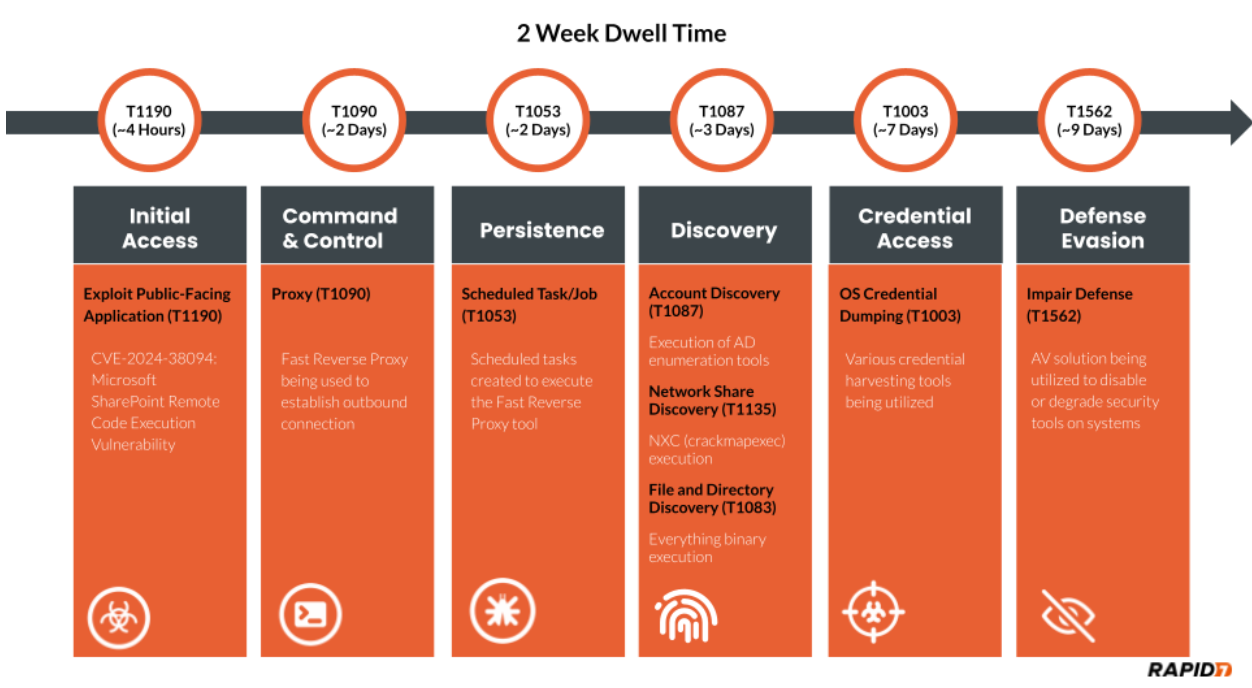
As with many incident response investigations, identified clues are not always chronological, thus requiring a timeline to be constructed to understand the narrative. We must attempt to discover how the attacker compromised the system or accessed the environment in the first place. In this specific investigation, the attacker had a dwell time of two weeks. The attacker’s actions are detailed chronologically in the figure below.

Investigating a SharePoint Compromise: IR Tales from the Field
Figure 1: MITRE Timeline

A great resource for identifying lateral movement involves analysis of authentication event logs from the domain controllers, specifically event ID 4624. Evidence indicated that malicious activity for this compromised Exchange service account involved more than just this single system. The source of unauthorized activity went back a week prior on a domain controller.

Analysis of the domain controller revealed that the attacker used this Exchange service account to authenticate via Remote Desktop Protocol (RDP). The attacker went on to disable Windows Defender Threat Detection (WDTD) on the system and added an exclusion for a malicious binary called msvrp.exe using the GUI. The malicious binary was placed in the C:\ProgramData\VMware\ folder but was not related to VMware. This binary is a tool called Fast Reverse Proxy (FRP), which allows external access to the system through a NAT-configured firewall. The FRP tool requires an .ini file to provide the necessary network configuration to establish an outbound connection. The .ini file’s external IP address has been provided in the Indicators of Compromise (IoCs) table in this blog post. Persistence was established for the FRP via scheduled tasks on the domain controller. Review of the C:\ProgramData\VMware\ folder used by the attacker revealed additional malicious binaries such as ADExplorer64.exe, NTDSUtil.exe, and nxc.exe. These tools were utilized to map the Active Directory environment, gather credentials, and scan systems.

Further analysis of authentication events from the domain controller indicated this malicious activity was sourced from a public-facing SharePoint server. Evidence indicated that the attacker executed Mimikatz, and there were signs of log tampering on the SharePoint server. It also indicated that a majority of system logging was disabled, and several key event log sources were absent during the investigation timeframe. Mimikatz has the ability to clear event logs and disable system logging. These malicious executions were tied to the local administrator account on the system. This would provide the necessary privileges for log tampering on the SharePoint server. However, some logs were spared, such as RDP log evidence. This indicated all authentication for the local administrator account was sourced from the local system to the local system during the in-scope time frame. The authentication information indicated that the potential initial access vector (IAV) would be tied to this SharePoint server. In light of this evidence, Rapid7 dug deeper into potential exploitation of the SharePoint services for an answer.

Rapid7 reviewed available SharePoint inetpub logs and identified the following GET and POST requests indicative of CVE-2024-38094 being exploited from the external IP address 18.195.61[.]200.

POST /_vti_bin/client.svc/web/GetFolderByServerRelativeUrl('/BusinessDataMetadataC atalog/')/Files/add(url='/BusinessDataMetadataCatalog/BDCMetadata.bdcm 
			
POST /_vti_bin/DelveApi.ashx/config/ghostfile93.aspx 

This vulnerability allows for remote code execution (RCE) on systems running Microsoft SharePoint from an external source. The proof-of-concept (PoC) code identified here was observed in available SharePoint log evidence. A great resource that explains the PoC code on Github can be found here. Utilizing this vulnerability, the attacker dropped a webshell on the system. The webshell was called ghostfile93.aspx, which generated numerous HTTP POST requests from the same external IP address tied to the exploit string within log evidence. After several hours of using the webshell, the attacker authenticated into the system using the local administrator account.

Initial access occurred two weeks prior to the start of the investigation. The attacker performed other notable TTPs during the dwell time. These TTPs involved utilizing several binaries to include everything.exe, kerbrute_windows_amd64.exe, 66.exe, Certify.exe, and attempts to destroy third-party backups. The binary everything.exe can index the NTFS file system for efficient searching across files, such as recently used files and network shares. Some of the most notable binaries include 66.exe, a renamed version of Mimikatz, and Certify.exe, which creates an ADFS certificate to utilize for elevated actions within the Active Directory environment. The remaining binary kerbrute_windows_amd64.exe has extensive capability for brute-forcing Active Directory Kerberos tickets. The attacker failed to compromise the third-party backup solution but attempted multiple methods, including access via the browser using compromised credentials and connecting over SSH.

As discussed previously, the installation of external AV products to disable security tooling was an interesting TTP identified during this investigation. Shortly after being blocked for attempted Impacket execution, Rapid7 identified the attacker leveraging an installation batch script called hrsword install.bat. The contents of this script indicate that the Huorong AntiVirus (AV) security solution was being installed. This script involved a service creation called sysdiag to execute the driver file sysdiag_win10.sys, which creates a VBS script execution parameter to execute HRSword.exe. Rapid7 observed this installation causing errors for security products on the system, potentially leading to a scenario in which the service or application would crash. These install files and all IOCs identified during this investigation have been provided in the IOC table contained within this blog.

Rapid7 customers

InsightVM and Nexpose customers can assess their exposure to the Microsoft SharePoint CVE-2024-38094 with authenticated vulnerability checks added in the July 09, 2024 content release.

Rapid7 used Velociraptor during this investigation to allow for remote triage and collection of forensic artifacts on the endpoint. A Velociraptor artifact has been created to hunt for strings related to the public PoC and log evidence identified during the investigation. The artifact can be found within the Rapid7 Labs VQL Repo here

InsightIDR and Managed Detection and Response customers have existing detection coverage through Rapid7’s expansive library of detection rules. Rapid7 recommends installing the Insight Agent on all applicable hosts to ensure visibility into suspicious processes and proper detection coverage. Below is a non-exhaustive list of detections that are deployed and will alert on behavior related to exploitation of this vulnerability.
Suspicious Commands Launched by Webserver
IIS Launching Discovery Commands
IIS Spawns PowerShell
Attacker Tool – Impacket
Attacker Tool – MimiKatz
Attacker Technique – Hash Dumping With NTDSUtil
Attacker Technique – Clearing Event Logs
Defense Evasion – Disabling Multiple Security or Backup Products

Rapid7 also recommends ensuring that SharePoint is patched to the latest version.

MITRE ATT&CK techniques

Tactic Technique Details
Initial Access Exploit Public-Facing Application (T1190) CVE-2024-38094: Microsoft SharePoint Remote Code Execution Vulnerability
Defense Evasion Impair Defense (T1562) AV solution being utilized to disable or degrade security tools on systems.
Discovery Account Discovery (T1087) Usage of AD enumeration tools
Command and Control Proxy (T1090) Fast Reverse Proxy being used to establish outbound connection
Discovery File and Directory Discovery (T1083) Everything.exe being observed on in-scope systems.
Discovery Network Share Discovery (T1135) nxc.exe being observed on in-scope systems.
Credential Access OS Credential Dumping (T1003) Various credential harvesting tools observed on in-scope systems
Persistence Scheduled Task/Job (T1053) Scheduled tasks observed on in-scope systems to execute the FRP tool.

Indicators of Compromise

Attribute Value Description
Filename and Path c:\users\Redacted\documents\everything-1.4.1.1024.x86\everything.exe Binary to locate files
SHA256 d3a6ed07bd3b52c62411132d060560f9c0c88ce183851f16b632a99b4d4e7581 Hash for everything.exe
Filename and Path c:\programdata\vmware\66.exe Renamed mimikatz.exe
SHA256 61c0810a23580cf492a6ba4f7654566108331e7a4134c968c2d6a05261b2d8a1 Hash for mimikatz.exe
Filename and Path c:\programdata\vmware\certify.exe Creates an ADFS certificate to utilize for elevated actions within the Active Directory environment.
SHA256 95cc0b082fcfc366a7de8030a6325c099d8012533a3234edbdf555df082413c7 Hash for certify.exe
Filename and Path c:\programdata\vmware\kerbrute_windows_amd64.exe Used to perform Kerberos pre-auth brute forcing.
SHA256 d18aa84b7bf0efde9c6b5db2a38ab1ec9484c59c5284c0bd080f5197bf9388b0 Hash for kerbrute_windows_amd64.exe
Filename and Path c:\programdata\vmware\msvrp.exe Fast Reverse Proxy tool for allowing external access to the system through a NAT configured firewall.
SHA256 f618b09c0908119399d14f80fc868b002b987006f7c76adbcec1ac11b9208940 Hash for msvrp.exe
Filename and Path c:\programdata\vmware\nxc.exe Newer version of the CrackMapExec Network Pentesting tool.
SHA256 95cc0b082fcfc366a7de8030a6325c099d8012533a3234edbdf555df082413c7 Hash for nxc.exe
Filename and Path c:\programdata\vmware\adexplorer64.exe Active Directory Enumeration Tool
SHA256 e451287843b3927c6046eaabd3e22b929bc1f445eec23a73b1398b115d02e4fb Hash for adexplorer64.exe
Filename and Path c:\users\Redacted\documents\h\hrsword install.bat Component of Huorong AV
SHA256 1beec8cecd28fdf9f7e0fc5fb9226b360934086ded84f69e3d542d1362e3fdf3 Hash for hrsword install.bat
Filename and Path c:\users\Redacted\documents\h\hrsword.exe Component of Huorong AV
SHA256 6ce228240458563d73c1c3cbbd04ef15cb7c5badacc78ce331848f5431b406cc Hash for hrsword.exe
Filename and Path c:\Windows\System32\drivers\sysdiag_win10.sys System driver component of Huorong AV
SHA256 acb5de5a69c06b7501f86c0522d10fefa9c34776c7535e937e946c6abfc9bbc6 Hash for sysdiag_win10.sys
Log-Based IOC POST /_vti_bin/client.svc/web/GetFolderByServerRelativeUrl(‘/BusinessDataMetadataC atalog/’)/Files/add(url=’/BusinessDataMetadataCatalog/BDCMetadata.bdcm POC code identified in SharePoint logs.
Log-Based IOC POST /_vti_bin/DelveApi.ashx/config/ghostfile93.aspx Webshell identified within SharePoint logs.
IP Address 54.255.89[.]118 IP address from .ini file for Fast Reverse Proxy tool
IP Address 18.195.61[.]200 Source IP address from exploitation and webshell communications

Modernize your legacy databases with AWS data lakes, Part 3: Build a data lake processing layer

Post Syndicated from Anoop Kumar K M original https://aws.amazon.com/blogs/big-data/modernize-your-legacy-databases-with-aws-data-lakes-part-3-build-a-data-lake-processing-layer/

This is the final part of a three-part series where we show how to build a data lake on AWS using a modern data architecture. This post shows how to process data with Amazon Redshift Spectrum and create the gold (consumption) layer. To review the first two parts of the series where we load data from SQL Server into Amazon Simple Storage Service (Amazon S3) using AWS Database Migration Service (AWS DMS) and load the data into the silver layer of the data lake, see the following:

Solution overview

Choosing the right tools and technology stack to build the data lake in order to build a scalable solution and have shorter time to market is critical. In this post, we go over the process of building a data lake, providing rationale behind the different decisions, and share best practices when building such a data solution.

The following diagram illustrates the different layers of the data lake.

The data lake is designed to serve a multitude of use cases. In the silver layer of the data lake, the data is stored as it is loaded from sources, preserving the table and schema structure. In the gold layer, we create data marts by combining, aggregating, and enriching data as required by our use cases. The gold layer is the consumption layer for the data lake. In this post, we describe how you can use Redshift Spectrum as an API to query data.

To create data marts, we use Amazon Redshift Query Editor. It provides a web-based analyst workbench to create, explore, and share SQL queries. In our use case, we use Redshift Query Editor to create data marts using SQL code. We also use Redshift Spectrum, which allows you to efficiently query and retrieve structured and semi-structured data from files stored on Amazon S3 without having to load the data into the Redshift tables. The Apache Iceberg tables, which we created and cataloged in Part 2, can be queried using Redshift Spectrum. For the latest information on Redshift Spectrum integration with Iceberg, see Using Apache Iceberg tables with Amazon Redshift.

We also show how to use RedshiftDataAPIService to run SQL commands to query the data mart using a Boto3 Python SDK. You can use the Redshift Data API to create the resulting datasets on Amazon S3, and then use the datasets in use cases such as business intelligence dashboards and machine learning (ML).

In this post, we walk through the following steps:

  1. Set up a Redshift cluster.
  2. Set up a data mart.
  3. Query the data mart.

Prerequisites

To follow the solution, you need to set up certain access rights and resources:

  • An AWS Identity and Access Management (IAM) role for the Redshift cluster with access to an external data catalog in AWS Glue and data files in Amazon S3 (these are the data files populated by the silver layer in Part 2). The role also needs Redshift cluster permissions. This policy must include permissions to do the following:
    • Run SQL commands to copy, unload, and query data with Amazon Redshift.
    • Grant permissions to run SELECT statements for related services, such as Amazon S3, Amazon CloudWatch logs, Amazon SageMaker, and AWS Glue.
    • Manage AWS Lake Formation permissions (in case the AWS Glue Data Catalog is managed by Lake Formation).
  • An IAM execution role for AWS Lambda with permissions to access Amazon Redshift and AWS

For more information about setting up IAM roles for Redshift Spectrum, see Getting started with Amazon Redshift Spectrum.

Set up a Redshift cluster

Redshift Spectrum is a feature of Amazon Redshift that queries data stored in Amazon S3 directly, without having to load it into Amazon Redshift. In our use case, we use Redshift Spectrum to query Iceberg data stored as Parquet files on Amazon S3. To use Redshift Spectrum, we first need a Redshift cluster to run the Redshift Spectrum compute jobs. Complete the following steps to provision a Redshift cluster:

  1. On the Amazon Redshift console, choose Clusters in the navigation pane.
  2. Choose Create cluster.
  3. For Cluster identifier, enter a name for your cluster.
  4. For Choose the size of the cluster, select I’ll choose.
  5. For Node type, choose xlplus.
  6. For Number of nodes, enter 1.

can

  1. For Admin password, select Manage admin credentials in AWS Secrets Manager if you want to use Secrets Manager, otherwise you can generate and store the credentials manually.

  1. For the IAM role, choose the IAM role created in the prerequisites.
  2. Choose Create cluster.

We chose the cluster Availability Zone, number of nodes, compute type, and size for this post to minimize costs. If you’re working on larger datasets, we recommend reviewing the different instance types offered by Amazon Redshift to select the one that is appropriate for your workloads.

Set up a data mart

A data mart is a collection of data organized around a specific business area or use case, providing focused and quickly accessible data for analysis or consumption by applications or users. Unlike a data warehouse, which serves the entire organization, a data mart is tailored to the specific needs of a particular department, allowing for more efficient and targeted data analysis. In our use case, we use data marts to create aggregated data from the silver layer and store it in the gold layer for consumption. For our use case, we use the schema HumanResources in the AdventureWorks sample database we loaded in Part 1 (FIX LINK). This database contains a factory’s employee shift information for different departments. We use this database to create a summary of the shift rate changes for different departments, years, and shifts to see which years had the most rate changes.

We recommend using the auto mount feature in Redshift Spectrum. This feature removes the need to create an external schema in Amazon Redshift to query tables cataloged in the Data Catalog.

Complete the following steps to create a data mart:

  1. On the Amazon Redshift console, choose Query editor v2 in the navigation pane.
  2. Choose the cluster you created and choose AWS Secrets Manager or Database username and password depending on how you chose to store the credentials.
  3. After you’re connected, open a new query editor.

You will be able to see the AdventureWorks database under awsdatacatalog. You can now start querying the Iceberg database in the query editor.

query-editor

If you encounter permission issues, choose the options menu (three dots) next to the cluster, choose Edit connection, and connect using Secrets Manager or your database user name and password. Then grant privileges for the IAM user or role with the following command, and reconnect with your IAM identity:

GRANT USAGE ON DATABASE awsdatacatalog to "IAMR:MyRole"

For more information, see Querying the AWS Glue Data Catalog.

Next, you create a local schema to store the definition and data for the view.

  1. On the Create menu, choose Schema.
  2. Provide a name and set the type as local.
  3. For the data mart, create a dataset that combines different tables in the silver layer to generate a report of the total shift rate changes by department, year, and shift. The following SQL code will return the required dataset:
SELECT dep.name AS "Department Name",
extract(year from emp_pay_hist.ratechangedate) AS "Rate Change Year",
shift.name AS "Shift",
COUNT(emp_pay_hist.rate) AS "Rate Changes"
FROM "dev"."{redshift_schema_name}"."department" dep
INNER JOIN "dev"."{redshift_schema_name}"."employeedepartmenthistory" emp_hist
ON dep.departmentid = emp_hist.departmentid
INNER JOIN "dev"."{redshift_schema_name}"."employeepayhistory" emp_pay_hist
ON emp_pay_hist.businessentityid = emp_hist.businessentityid
INNER JOIN "dev"."{redshift_schema_name}"."employee" emp
ON emp_hist.businessentityid = emp.businessentityid
INNER JOIN "dev"."{redshift_schema_name}"."shift" shift
ON emp_hist.shiftid = shift.shiftid
WHERE emp.currentflag = 'true'
GROUP BY dep.name, extract(year from emp_pay_hist.ratechangedate), shift.name;
  1. Create an internal schema where you want Amazon Redshift to store the view definition:

CREATE SCHEMA IF NOT EXISTS {internal_schema_name};

  1. Create a view in Amazon Redshift that you can query to get the dataset:
CREATE OR REPLACE VIEW {internal_schema_name}.rate_changes_by_department_year AS
SELECT dep.name AS "Department Name",
extract(year from emp_pay_hist.ratechangedate) AS "Rate Change Year",
shift.name AS "Shift",
COUNT(emp_pay_hist.rate) AS "Rate Changes"
FROM "dev"."{redshift_schema_name}"."department" dep
INNER JOIN "dev"."{redshift_schema_name}"."employeedepartmenthistory" emp_hist
ON dep.departmentid = emp_hist.departmentid
INNER JOIN "dev"."{redshift_schema_name}"."employeepayhistory" emp_pay_hist
ON emp_pay_hist.businessentityid = emp_hist.businessentityid
INNER JOIN "dev"."{redshift_schema_name}"."employee" emp
ON emp_hist.businessentityid = emp.businessentityid
INNER JOIN "dev"."{redshift_schema_name}"."shift" shift
ON emp_hist.shiftid = shift.shiftid
WHERE emp.currentflag = 'true'
GROUP BY dep.name, extract(year from emp_pay_hist.ratechangedate), shift.name
WITH NO SCHEMA BINDING;

If the SQL takes a long time to run or produces a large result set, consider using Redshift Unlike regular views, which are computed in the moment, the results from materialized views can be pre-computed and stored on Amazon S3. When the data is requested, Amazon Redshift can point to an Amazon S3 location where the results are stored. Materialized views can be refreshed on demand and on a schedule.

Query the data mart

Lastly, we query the data mart using a Lambda function to show how the data can be retrieved using an API. The Lambda function requires an IAM role to access Secrets Manager where the Redshift user credentials are stored. We use the Redshift Data API to retrieve the dataset we created in the previous step. First, we call the execute_statement() command to run the view. Next , we check the status of the run by calling the describe_statement() call. Finally , when the statement has successfully run, we use the get_statement_result() call to get the result set. The Lambda function shown in the following code implements this logic and returns the result set from querying the view rate_changes_by_department_year:

import json
import boto3
import time

def lambda_handler(event, context):
	client = boto3.client('redshift-data')

	# Use the Redshift execute statement api to query the data mart
	response = client.execute_statement(
	ClusterIdentifier='{redshift cluster name}',
	Database='dev',
	SecretArn='{redshift cluster secrets manager secret arn}',
	Sql='select * from {internal_schema_name}.rate_changes_by_department_year',
	StatementName='query data mart'
	)

	statement_id = response["Id"]
	query_status = True
	resultSet = []

	# Check the status of the sql statement, once the statement has finished executing we can retrive the resultset
	while query_status:
	if client.describe_statement(Id=statement_id)["Status"] == "FINISHED":

	print("SQL statement has finished successfully and we can get the resultset")

	response = client.get_statement_result(
	Id=statement_id
	)
	columns = response["ColumnMetadata"]
	results = response["Records"]
	while "NextToken" in response:
	response = client.get_servers(NextToken=response["NextToken"])
	results.extend(response["Records"])

	resultSet.append(str(columns[0].get("label")) + "," + str(columns[1].get("label")) + "," + str(columns[2].get("label")) + "," + str(columns[3].get("label")))

	for result in results:
	resultSet.append(str(result[0].get("stringValue")) + "," + str(result[1].get("longValue")) + "," + str(result[2].get("stringValue")) + "," + str(result[3].get("longValue")))

	query_status = False

	# In case the statement runs into errors we abort the resultset retrival
	if client.describe_statement(Id=statement_id)["Status"] == "ABORTED" or client.describe_statement(Id=statement_id)["Status"] == "FAILED":
	query_status = False
	print("SQL statement has failed or aborted")

	# To avoid spamming the API with requests on the status of the statement, we introduce a 2 second wait between calls
	else:
	print("Query Status ::" + client.describe_statement(Id=statement_id)["Status"])
	time.sleep(2)

	return {
	'statusCode': 200,
	'body': resultSet
	}

The Redshift Data API allows you to access data from many different types of traditional, cloud-based, containerized, web service-based, and event-driven applications. The API is available in many programming languages and environments supported by the AWS SDK, such as Python, Go, Java, Node.js, PHP, Ruby, and C++. For larger datasets that don’t fit into memory, such as ML training datasets, you can use the Redshift UNLOAD command to move the results of the query to an Amazon S3 location.

Clean up

In this post, you created an IAM role, Redshift cluster, and Lambda function. To clean up your resources, complete the following steps:

  1. Delete the IAM role:
    1. On the IAM console, choose Roles in the navigation pane.
    2. Select the role and choose Delete.
  2. Delete the Redshift cluster:
    1. On the Amazon Redshift console, choose Clusters in the navigation pane.
    2. Select the cluster you created and on the Actions menu, choose Delete.
  3. Delete the Lambda function:
    1. On the Lambda console, choose Functions in the navigation pane.
    2. Select the function you created and on the Actions menu, choose Delete.

Conclusion

In this post, we showed how you can use Redshift Spectrum to create data marts on top of the data in your data lake. Redshift Spectrum can query Iceberg data stored in Amazon S3 and cataloged in AWS Glue. You can create views in Amazon Redshift that compute the results from the underlying data on demand, or pre-compute results and store them (using materialized views). Lastly, the Redshift Data API is a great tool for running SQL queries on the data lake from a wide variety of sources.

For more insights into the Redshift Data API and how to use it, refer to Using the Amazon Redshift Data API to interact with Amazon Redshift clusters. To continue to learn more about building a modern data architecture, refer to Analytics on AWS.


About the Authors

Shaheer Mansoor is a Senior Machine Learning Engineer at AWS, where he specializes in developing cutting-edge machine learning platforms. His expertise lies in creating scalable infrastructure to support advanced AI solutions. His focus areas are MLOps, feature stores, data lakes, model hosting, and generative AI.

Anoop Kumar K M is a Data Architect at AWS with focus in the data and analytics area. He helps customers in building scalable data platforms and in their enterprise data strategy. His areas of interest are data platforms, data analytics, security, file systems and operating systems. Anoop loves to travel and enjoys reading books in the crime fiction and financial domains.

Sreenivas Nettem is a Lead Database Consultant at AWS Professional Services. He has experience working with Microsoft technologies with a specialization in SQL Server. He works closely with customers to help migrate and modernize their databases to AWS.

Modernize your legacy databases with AWS data lakes, Part 2: Build a data lake using AWS DMS data on Apache Iceberg

Post Syndicated from Shaheer Mansoor original https://aws.amazon.com/blogs/big-data/modernize-your-legacy-databases-with-aws-data-lakes-part-2-build-a-data-lake-using-aws-dms-data-on-apache-iceberg/

This is part two of a three-part series where we show how to build a data lake on AWS using a modern data architecture. This post shows how to load data from a legacy database (SQL Server) into a transactional data lake (Apache Iceberg) using AWS Glue. We show how to build data pipelines using AWS Glue jobs, optimize them for both cost and performance, and implement schema evolution to automate manual tasks. To review the first part of the series, where we load SQL Server data into Amazon Simple Storage Service (Amazon S3) using AWS Database Migration Service (AWS DMS), see Modernize your legacy databases with AWS data lakes, Part 1: Migrate SQL Server using AWS DMS.

Solution overview

In this post, we go over the process of building a data lake, providing the rationale behind the different decisions, and share best practices when building such a solution.

The following diagram illustrates the different layers of the data lake.

Overall Architecture

To load data into the data lake, AWS Step Functions can define a workflow, Amazon Simple Queue Service (Amazon SQS) can track the order of incoming files, and AWS Glue jobs and the Data Catalog can be used create the data lake silver layer. AWS DMS produces files and writes these files to the bronze bucket (as we explained in Part 1).

We can turn on Amazon S3 notifications and push the new arriving file names to an SQS first-in-first-out (FIFO) queue. A Step Functions state machine can consume messages from this queue to process the files in the order they arrive.

For processing the files, we need to create two types of AWS Glue jobs:

  • Full load – This job loads the entire table data dump into an Iceberg table. Data types from the source are mapped to an Iceberg data type. After the data is loaded, the job updates the Data Catalog with the table schemas.
  • CDC – This job loads the change data capture (CDC) files into the respective Iceberg tables. The AWS Glue job implements the schema evolution feature of Iceberg to handle schema changes such as addition or deletion of columns.

As in Part 1, the AWS DMS jobs will place the full load and CDC data from the source database (SQL Server) in the raw S3 bucket. Now we process this data using AWS Glue and save it to the silver bucket in Iceberg format. AWS Glue has a plugin for Iceberg; for details, see Using the Iceberg framework in AWS Glue.

Along with moving data from the bronze to the silver bucket, we also create and update the Data Catalog for further processing the data for the gold bucket.

The following diagram illustrates how the full load and CDC jobs are defined inside the Step Functions workflow.

Step Functions for loading data into the lake

In this post, we discuss the AWS Glue jobs for defining the workflow. We recommend using AWS Step Functions Workflow Studio, and setting up Amazon S3 event notifications and an SNS FIFO queue to receive the filename as messages.

Prerequisites

To follow the solution, you need the following prerequisites set up as well as certain access rights and AWS Identity and Access Management (IAM) privileges:

  • An IAM role to run Glue jobs
  • IAM privileges to create AWS DMS resources (this role was created in Part 1 of this series; you can use the same role here)
  • The AWS DMS job from Part 1 working and producing files for the source database on Amazon S3.

Create an AWS Glue connection for the source database

We need to create a connection between AWS Glue and the source SQL Server database so the AWS Glue job can query the source for the latest schema while loading the data files. To create the connection, follow these steps:

  1. On the AWS Glue console, choose Connections in the navigation pane.
  2. Choose Create custom connector.
  3. Give the connection a name and choose JDBC as the connection type.
  4. In the JDBC URL section, enter the following string and replace the name of your source database endpoint and database that was set up in Part 1: jdbc:sqlserver://{Your RDS End Point Name}:1433/{Your Database Name}.
  5. Select Require SSL connection, then choose Create connector.

Clue Connections

Create and configure the full load AWS Glue job

Complete the following steps to create the full load job:

  1. On the AWS Glue console, choose ETL jobs in the navigation pane.
  2. Choose Script editor and select Spark.
  3. Choose Start fresh and select Create script.
  4. Enter a name for the full load job and choose the IAM role (mentioned in the prerequisites) for running the job.
  5. Finish creating the job.
  6. On the Job details tab, expand Advanced properties.
  7. In the Connections section, add the connection you created.
  8. Under Job parameters, pass the following arguments to the job:
    1. target_s3_bucket – The silver S3 bucket name.
    2. source_s3_bucket – The raw S3 bucket name.
    3. secret_id – The ID of the AWS Secrets Manager secret for the source database credentials.
    4. dbname – The source database name.
    5. datalake-formats – This sets the data format to iceberg.

Glue Job Parameters

The full load AWS Glue job starts after the AWS DMS task reaches 100%. The job loops over the files located in the raw S3 bucket and processes them one at time. For each file, the job infers the table name from the file name and gets the source table schema, including column names and primary keys.

If the table has one or more primary keys, the job creates an equivalent Iceberg table. If the job has no primary key, the file is not processed. In our use case, all the tables have primary keys, so we enforce this check. Depending on your data, you might need to handle this scenario differently.

You can use the following code to process the full load files. To start the job, choose Run.

import sys, boto3, json
import boto3
import json
from awsglue.utils import getResolvedOptions
from pyspark.context import SparkContext
from awsglue.context import GlueContext
from awsglue.job import Job
from pyspark.sql import SparkSession

#Get the arguments passed to the script
args = getResolvedOptions(sys.argv, ['JOB_NAME',
                           'target_s3_bucket',
                           'secret_id',
                           'source_s3_bucket'])
dbname = "AdventureWorks"
schema = "HumanResources"

#Initialize parameters
target_s3_bucket = args['target_s3_bucket']
source_s3_bucket = args['source_s3_bucket']
secret_id = args['secret_id']
unprocessed_tables = []
drop_column_list = ['db', 'table_name', 'schema_name', 'Op', 'last_update_time']  # DMS added columns

#Helper Function: Get Credentials from Secrets Manager
def get_db_credentials(secret_id):
    secretsmanager = boto3.client('secretsmanager')
    response = secretsmanager.get_secret_value(SecretId=secret_id)
    secrets = json.loads(response['SecretString'])
    return secrets['host'], int(secrets['port']), secrets['username'], secrets['password']

#Helper Function: Load Iceberg table with Primary key(s)
def load_table(full_load_data_df, dbname, table_name):

    try:
        full_load_data_df = full_load_data_df.drop(*drop_column_list)
        full_load_data_df.createOrReplaceTempView('full_data')

        query = """
        CREATE TABLE IF NOT EXISTS glue_catalog.{0}.{1}
        USING iceberg
        LOCATION "s3://{2}/{0}/{1}"
        AS SELECT * FROM full_data
        """.format(dbname, table_name, target_s3_bucket)
        spark.sql(query)
        
        #Update Table property to accept Schema Changes
        spark.sql("""ALTER TABLE glue_catalog.{0}.{1} SET TBLPROPERTIES (
                      'write.spark.accept-any-schema'='true'
                    )""".format(dbname, table_name))
        
    except Exception as ex:
        print(ex)
        failed_table = {"table_name": table_name, "Reason": ex}
        unprocessed_tables.append(failed_table)
        
def get_table_key(host, port, username, password, dbname):
    
    jdbc_url = "jdbc:sqlserver://{0}:{1};databaseName={2}".format(host, port, dbname)
    
    connectionProperties = {
      "user" : username,
      "password" : password
    }
    
    spark.read.jdbc(url=jdbc_url, table='INFORMATION_SCHEMA.TABLE_CONSTRAINTS', properties=connectionProperties).createOrReplaceTempView("TABLE_CONSTRAINTS")
    spark.read.jdbc(url=jdbc_url, table='INFORMATION_SCHEMA.CONSTRAINT_COLUMN_USAGE', properties=connectionProperties).createOrReplaceTempView("CONSTRAINT_COLUMN_USAGE")
    df_table_pkeys = spark.sql("select c.TABLE_NAME, C.COLUMN_NAME as primary_key FROM TABLE_CONSTRAINTS T JOIN CONSTRAINT_COLUMN_USAGE C ON C.CONSTRAINT_NAME=T.CONSTRAINT_NAME WHERE T.CONSTRAINT_TYPE='PRIMARY KEY'")
    return df_table_pkeys


#Setup Spark configuration for reading and writing Iceberg tables
spark = (
    SparkSession.builder
    .config("spark.sql.extensions", "org.apache.iceberg.spark.extensions.IcebergSparkSessionExtensions")
    .config("spark.sql.catalog.glue_catalog", "org.apache.iceberg.spark.SparkCatalog")
    .config("spark.sql.catalog.glue_catalog.warehouse", "s3://{0}".format(dbname))
    .config("spark.sql.catalog.glue_catalog.catalog-impl", "org.apache.iceberg.aws.glue.GlueCatalog")
    .config("spark.sql.catalog.glue_catalog.io-impl", "org.apache.iceberg.aws.s3.S3FileIO")
    .getOrCreate()
)


#Initialize MSSQL credentials
host, port, username, password = get_db_credentials(secret_id)

#Initialize primary keys for all tables
df_table_pkeys = get_table_key(host, port, username, password, dbname)

#Read Full load csv files from s3
s3 = boto3.client('s3')
full_load_tables = s3.list_objects_v2(Bucket=source_s3_bucket, Prefix="raw/{0}/{1}".format(args['dbname'], args['schema']))

#Loop over files
for item in full_load_tables['Contents']:
    pkey_list = []
    table_name = item["Key"].split("/")[3].lower()
    print("Table name {0}".format(table_name))
    current_table_df = df_table_pkeys.where(df_table_pkeys.TABLE_NAME == table_name)

    # Only Process tables with at least 1 Primary key
    if not current_table_df.isEmpty():
        for i in current_table_df.collect():
            pkey_list.append(i["primary_key"])
    else:
        failed_table = {"table_name": table_name, "Reason": "No primary key"}
        unprocessed_tables.append(failed_table)
        # ToDo Handle these cases

    full_data_path = "s3://{0}/{1}".format(source_s3_bucket, item['Key'])
    full_load_data_df = (spark
                        .read
                        .option("header", True)
                        .option("inferSchema", True)
                        .option("recursiveFileLookup", "true")
                        .csv(full_data_path)
                        )

    primary_key = ",".join(pkey_list)

    if table_name not in unprocessed_tables:
        load_table(full_load_data_df, dbname, table_name)

When the job is complete, it creates the database and tables in the Data Catalog, as shown in the following screenshot.

Data lake silver layer data

Create and configure the CDC AWS Glue job

The CDC AWS Glue job is created similar to the full load job. As with the full load AWS Glue job, you need to use the source database connection and pass the job parameters with one additional parameter, cdc_file, which contains the location of the CDC file to be processed. Because a CDC file can contain data for multiple tables, the job loops over the tables in a file and loads the table metadata from the source table ( RDS column names).

If the CDC operation is DELETE, the job deletes the records from the Iceberg table. If the CDC operation is INSERT or UPDATE, the job merges the data into the Iceberg table.

You can use the following code to process the CDC files. To start the job, choose Run

import sys
import boto3
import json
from awsglue.utils import getResolvedOptions
from pyspark.context import SparkContext
from awsglue.context import GlueContext
from awsglue.job import Job
from pyspark.sql import SparkSession

# Get the arguments passed to the script
args = getResolvedOptions(sys.argv, ['JOB_NAME',
                           'target_s3_bucket',
                           'secret_id',
                           'source_s3_bucket',
                           'cdc_file'])
dbname = "AdventureWorks"
schema = "HumanResources"
target_s3_bucket = args['target_s3_bucket']
source_s3_bucket = args['source_s3_bucket']
secret_id = args['secret_id']
cdc_file = args['cdc_file']
unprocessed_tables = []
drop_column_list = ['db', 'table_name', 'schema_name', 'Op', 'last_update_time']  # DMS added columns
source_s3_cdc_file_key = "raw/AdventureWorks/cdc/" + cdc_file


# Helper Function: Get Credentials from Secrets Manager
def get_db_credentials(secret_id):
    secretsmanager = boto3.client('secretsmanager')
    response = secretsmanager.get_secret_value(SecretId=secret_id)
    secrets = json.loads(response['SecretString'])
    return secrets['host'], int(secrets['port']), secrets['username'], secrets['password']

# Helper Function: Column names from RDS
def get_table_colums(table, host, port, username, password, dbname):

    jdbc_url = "jdbc:sqlserver://{0}:{1};databaseName={2}".format(host, port, dbname)
    
    connectionProperties = {
      "user" : username,
      "password" : password
    }
    
    spark.read.jdbc(url=jdbc_url, table='INFORMATION_SCHEMA.COLUMNS', properties= connectionProperties).createOrReplaceTempView("TABLE_COLUMNS")
    columns = list((row.COLUMN_NAME) for (index, row) in spark.sql("select TABLE_NAME, TABLE_CATALOG, COLUMN_NAME from TABLE_COLUMNS where TABLE_NAME = '{0}' and TABLE_CATALOG = '{1}'".format(table, dbname)).select("COLUMN_NAME").toPandas().iterrows())
    return columns

# Helper Function: Get Colum names and datatypes from RDS
def get_table_colum_datatypes(table, host, port, username, password, dbname):

    jdbc_url = "jdbc:sqlserver://{0}:{1};databaseName={2}".format(host, port, dbname)
    
    connectionProperties = {
      "user" : username,
      "password" : password
    }
    
    spark.read.jdbc(url=jdbc_url, table='INFORMATION_SCHEMA.COLUMNS', properties= connectionProperties).createOrReplaceTempView("TABLE_COLUMNS")
    return spark.sql("select TABLE_NAME, COLUMN_NAME, DATA_TYPE from TABLE_COLUMNS WHERE TABLE_NAME ='{0}'".format(table))

# Helper Function: Setup the primary key condition
def get_iceberg_table_condition(database, tablename):
    
    jdbc_url = "jdbc:sqlserver://{0}:{1};databaseName={2}".format(host, port, database)
    
    connectionProperties = {
      "user" : username,
      "password" : password
    }
    
    spark.read.jdbc(url=jdbc_url, table='INFORMATION_SCHEMA.TABLE_CONSTRAINTS', properties=connectionProperties).createOrReplaceTempView("TABLE_CONSTRAINTS")
    spark.read.jdbc(url=jdbc_url, table='INFORMATION_SCHEMA.CONSTRAINT_COLUMN_USAGE', properties=connectionProperties).createOrReplaceTempView("CONSTRAINT_COLUMN_USAGE")
    
    condition = ''
    
    for key in spark.sql("select C.COLUMN_NAME FROM TABLE_CONSTRAINTS T JOIN CONSTRAINT_COLUMN_USAGE C ON C.CONSTRAINT_NAME=T.CONSTRAINT_NAME WHERE T.CONSTRAINT_TYPE='PRIMARY KEY' AND c.TABLE_NAME = '{0}'".format(table)).collect():
        condition += "target.{0} = source.{0} and".format(key.COLUMN_NAME)
    return condition[:-4]

    
# Read incoming data from Amazon S3
def read_cdc_S3(source_s3_bucket, source_s3_cdc_file_key):
    
    inputDf = (spark
                    .read
                    .option("header", False)
                    .option("inferSchema", True)
                    .option("recursiveFileLookup", "true")
                    .csv("s3://" + source_s3_bucket + "/" + source_s3_cdc_file_key)
                    )
    return inputDf

# Setup Spark configuration for reading and writing Iceberg tables
spark = (
    SparkSession.builder
    .config("spark.sql.extensions", "org.apache.iceberg.spark.extensions.IcebergSparkSessionExtensions")
    .config("spark.sql.catalog.glue_catalog", "org.apache.iceberg.spark.SparkCatalog")
    .config("spark.sql.catalog.glue_catalog.warehouse", "s3://{0}".format(target_s3_bucket))
    .config("spark.sql.catalog.glue_catalog.catalog-impl", "org.apache.iceberg.aws.glue.GlueCatalog")
    .config("spark.sql.catalog.glue_catalog.io-impl", "org.apache.iceberg.aws.s3.S3FileIO")
    .getOrCreate()
)

#Initialize MSSQL credentials
host, port, username, password = get_db_credentials(secret_id)

#Read the cdc file 
cdc_df = read_cdc_S3(source_s3_bucket, source_s3_cdc_file_key)

tables = cdc_df.toPandas()._c1.unique().tolist()

#Loop over tables in the cdc file
for table in tables:
    #Create dataframes for delets and for inserts and updates
    table_df_deletes = cdc_df.where((cdc_df._c1 == table) & (cdc_df._c0 == "D")).drop(cdc_df.columns[0], cdc_df.columns[1], cdc_df.columns[2], cdc_df.columns[3])
    table_df_upserts = cdc_df.where((cdc_df._c1 == table) & ((cdc_df._c0 == "I") | (cdc_df._c0 == "U"))).drop(cdc_df.columns[0], cdc_df.columns[1], cdc_df.columns[2], cdc_df.columns[3])
    
    #Update column names for the dataframes
    columns = get_table_colums(table, host, port, username, password, dbname) 
    selectExpr = [] 

    for column in columns: 
        selectExpr.append(cdc_df.where((cdc_df._c1 == table)).drop(cdc_df.columns[0], cdc_df.columns[1], cdc_df.columns[2], cdc_df.columns[3]).columns[columns.index(column)] + " as " + column)

    table_df_deletes = table_df_deletes.selectExpr(selectExpr) 
    table_df_upserts = table_df_upserts.selectExpr(selectExpr)
    
    #Process Deletes
    if table_df_deletes.count() > 0:
        
        print("Delete Triggered")
        table_df_deletes.createOrReplaceTempView('deleted_rows')
        
        sql_string = """MERGE INTO glue_catalog.{0}.{1} target
                        USING (SELECT * FROM deleted_rows) source
                        ON {2}
                        WHEN MATCHED 
                        THEN DELETE""".format(database, table.lower(), get_iceberg_table_condition(database, table.lower()))
        spark.sql(sql_string)
    
    if table_df_upserts.count() > 0:
        print("Upsert triggered")

        #Upsert Records when there are Schema Changes
        if len(table_df_upserts.columns) != len(columns):

            #Handle column deletes
            if len(table_df_upserts.columns) < len(columns):

                drop_columns = list(set(columns) - set(table_df_upserts.columns))

                for drop_column in drop_columns:
                    sql_string = """
                                    ALTER TABLE glue_catalog.{0}.{1}
                                    DROP COLUMN {2}""".format(dbname.lower(), table.lower(), drop_column)
                    spark.sql(sql_string)

            #Handle column additions
            elif len(table_df_upserts.columns) > len(columns):

                column_datatype_df = get_table_colum_datatypes(table, host, port, username, password, dbname)
                add_columns = list(set(table_df_upserts.columns) - set(columns))

                for add_column in add_columns:

                    #Set Iceberg data type
                    data_type = list((row.DATA_TYPE) for (index, row) in column_datatype_df.filter("COLUMN_NAME='{0}'".format(add_column)).select("DATA_TYPE").toPandas().iterrows())[0]

                    # Convert MSSQL Datatypes to Iceberg supported datatypes
                    if data_type.lower() in ["varchar", "char"]:
                        data_type = "string"

                    if data_type.lower() in ["bigint"]:
                        data_type = "long"

                    if data_type.lower() in ["array"]:
                        data_type = "list"

                    sql_string = """
                                    ALTER TABLE glue_catalog.{0}.{1}
                                    ADD COLUMN {2} {3}""".format(dbname.lower(), table.lower(), add_column, data_type)
                    spark.sql(sql_string)
                    
            #Create statement to update columns
            update_table_column_list = ""
            insert_column_list = ""
            columns = get_table_colums(table, host, port, username, password, dbname)             

            for column in columns:

                update_table_column_list+="""target.{0}=source.{0},""".format(column)
                insert_column_list+="""source.{0},""".format(column)

            table_df_upserts.createOrReplaceTempView('updated_rows')

            sql_string = """MERGE INTO glue_catalog.{0}.{1} target
                            USING (SELECT * FROM updated_rows) source
                            ON {2}
                            WHEN MATCHED 
                            THEN UPDATE SET {3} 
                            WHEN NOT MATCHED THEN INSERT ({4}) VALUES ({5})""".format(dbname.lower(), 
                                                                                      table.lower(), 
                                                                                      get_iceberg_table_condition(dbname.lower(), table.lower()), 
                                                                                      update_table_column_list.rstrip(","), 
                                                                                      ",".join(columns), 
                                                                                      insert_column_list.rstrip(","))

            spark.sql(sql_string)

    
print("CDC job complete")

The Iceberg MERGE INTO syntax can handle cases where a new column is added. For more details on this feature, see the Iceberg MERGE INTO syntax documentation. If the CDC job needs to process many tables in the CDC file, the job can be multi-threaded to process the file in parallel.


Configure EventBridge notifications, SQS queue, and Step Functions state machine

You can use EventBridge notifications to send notifications to EventBridge when certain events occur on S3 buckets, such as when new objects are created and deleted. For this post, we’re interested in the events when new CDC files from AWS DMS arrive in the bronze S3 bucket. You can create event notifications for new objects and insert the file names into an SQS queue. A Lambda function within Step Functions would consume from the queue, extract the file name, start a CDC Glue job, and pass the file name as a parameter to the job.

AWS DMS CDC files contain database insert, update, and delete statements. We need to process these in order, so we use an SQS FIFO queue, which preserves the order of messages in which they arrive. You can also configure Amazon SQS to set a time to live (TTL); this parameter defines how long a message stays in the queue before it expires.

Another important parameter to consider when configuring an SQS queue is the message visibility timeout value. While a message is being processed, it disappears from the queue to make sure that the message isn’t consumed by multiple consumers (AWS Glue jobs in our case). If the message is consumed successfully, it should be deleted from the queue before the visibility timeout. However, if the visibility timeout expires and the message isn’t deleted, the message reappears in the queue. In our solution, this timeout must be greater than the time it takes for the CDC job to process a file.

Lastly, we recommend using Step Functions to define a workflow for handling the full load and CDC files. Step Functions has built-in integrations to other AWS services like Amazon SQS, AWS Glue, and Lambda, which makes it a good candidate for this use case.

The Step Functions state machine starts with checking the status of the AWS DMS task. The AWS DMS tasks can be queried to check the status of the full load, and we check the value of the parameter FullLoadProgressPercent. When this value gets to 100%, we can start processing the full load files. After the AWS Glue job processes the full load files, we start polling the SQS queue to check the size of the queue. If the queue size is greater than 0, this means new CDC files have arrived and we can start the AWS Glue CDC job to process these files. The AWS Glue jobs processes the CDC files and deletes the messages from the queue. When the queue size reaches 0, the AWS Glue job exits and we loop in the Step Functions workflow to check the SQS queue size.

Because the Step Functions state machine is supposed to run indefinitely, it’s good to keep in mind that there will be service limits you need to adhere to. Namely, the maximum runtime, which is 1 year, and maximum run history size, i.e., state transitions or events for a state machine which is 25,000. We recommend adding an additional step at the end to check if either of these conditions are being met to stop the current state machine run and start a new one.

The following diagram illustrates how you can use Step Functions state machine history size to monitor and start a new Step Functions state machine run.

Step Functions Workflow

Configure the pipeline

The pipeline needs to be configured to address cost, performance, and resilience goals. You might want a pipeline that can load fresh data into the data lake and make it available quickly, and you might also want to optimize costs by loading large chunks of data into the data lake. At the same time, you should make the pipeline resilient and be able to recover in case of failures. In this section, we cover the different parameters and recommended settings to achieve these goals.

Step Functions is designed to process incoming AWS DMS CDC files by running AWS Glue jobs. AWS Glue jobs can take a couple of minutes to boot up, and when they’re running, it’s efficient to process large chunks of data. You can configure AWS DMS to write CSV files to Amazon S3 by configuring the following AWS DMS task parameters:

  • CdcMaxBatchInterval – Defines the maximum time limit AWS DMS will wait before writing a batch to Amazon S3
  • CdcMinFileSize – Defines the minimum file size AWS DMS will write to Amazon S3

Whichever condition is met first will invoke the write operation. If you want to prioritize data freshness, you should have a short CdcMaxBatchInterval value (10 seconds) and a small CdcMinFileSize value (1–5 MB). This will result in many small CSV files being written to Amazon S3 and will invoke a lot of AWS Glue jobs to process the data, making the extract, transform, and load (ETL) process faster. If you want to optimize costs, you should have a moderate CdcMaxBatchInterval (minutes) and a large CdcMinFileSize value (100–500 MB). In this scenario, we start a few AWS Glue jobs that will process large chunks of data, making the ETL flow more efficient. In a real-world use case, the required values for these parameters might fall somewhere that’s a good compromise between throughput and cost. You can configure these parameters when creating a target endpoint using the AWS DMS console, or by using the create-endpoint command in the AWS Command Line Interface (AWS CLI).

For the full list of parameters, see Using Amazon S3 as a target for AWS Database Migration Service.

Choosing the right AWS Glue worker types for the full load and CDC jobs is also crucial for performance and cost optimization. The AWS Glue (Spark) workers range from G1X to G8X, which have an increasing number of data processing units (DPUs). Full load files are usually much larger in size compared to CDC files, and therefore it’s more cost- and performance-effective to select a larger worker. For CDC files, it would be more cost-effective to select a smaller worker because files sizes are smaller.

You should design the Step Functions state machine in such a way that if anything fails, the pipeline can be redeployed after repair and resume processing from where it left off. One important parameter here is TTL for the messages in the SQS queue. This parameter defines how long a message stays in the queue before expiring. In case of failures, we want this parameter to be long enough for us to deploy a fix. Amazon SQS has a maximum of 14 days for a message’s TTL. We recommend setting this to a large enough value to minimize messages being expired in case of pipeline failures.

Clean up

Complete the following steps to clean up the resources you created in this post:

  1. Delete the AWS Glue jobs:
    1. On the AWS Glue console, choose ETL jobs in the navigation pane.
    2. Select the full load and CDC jobs and on the Actions menu, choose Delete.
    3. Choose Delete to confirm.
  2. Delete the Iceberg tables:
    1. On the AWS Glue console, under Data Catalog in the navigation pane, choose Databases.
    2. Choose the database in which the Iceberg tables reside.
    3. Select the tables to delete, choose Delete, and confirm the deletion.
  3. Delete the S3 bucket:
    1. On the Amazon S3 console, choose Buckets in the navigation pane.
    2. Choose the silver bucket and empty the files in the bucket.
    3. Delete the bucket.

Conclusion

In this post, we showed how to use AWS Glue jobs to load AWS DMS files into a transactional data lake framework such as Iceberg. In our setup, AWS Glue provided highly scalable and simple-to-maintain ETL jobs. Furthermore, we share a proposed solution using Step Functions to create an ETL pipeline workflow, with Amazon S3 notifications and an SQS queue to capture newly arriving files. We shared how to design this system to be resilient towards failures and to automate one of the most time-consuming tasks in maintaining a data lake: schema evolution.

In Part 3, we will share how to process the data lake to create data marts.


About the Authors

Shaheer Mansoor is a Senior Machine Learning Engineer at AWS, where he specializes in developing cutting-edge machine learning platforms. His expertise lies in creating scalable infrastructure to support advanced AI solutions. His focus areas are MLOps, feature stores, data lakes, model hosting, and generative AI.

Anoop Kumar K M is a Data Architect at AWS with focus in the data and analytics area. He helps customers in building scalable data platforms and in their enterprise data strategy. His areas of interest are data platforms, data analytics, security, file systems and operating systems. Anoop loves to travel and enjoys reading books in the crime fiction and financial domains.

Sreenivas Nettem is a Lead Database Consultant at AWS Professional Services. He has experience working with Microsoft technologies with a specialization in SQL Server. He works closely with customers to help migrate and modernize their databases to AWS.

Simplify and enhance Amazon S3 static website hosting with AWS Amplify Hosting

Post Syndicated from Donnie Prakoso original https://aws.amazon.com/blogs/aws/simplify-and-enhance-amazon-s3-static-website-hosting-with-aws-amplify/

We are announcing an integration between AWS Amplify Hosting and Amazon Simple Storage Service (Amazon S3). Now, you can deploy static websites with content stored in your S3 buckets and serve over a content delivery network (CDN) with just a few clicks.

AWS Amplify Hosting is a fully managed service for hosting static sites that handles various aspects of deploying a website. It gives you benefits such as custom domain configuration with SSL, redirects, custom headers, and deployment on a globally available CDN powered by Amazon CloudFront.

When deploying a static website, Amplify remembers the connection between your S3 bucket and deployed website, so you can easily update your website with a single click when you make changes to website content in your S3 bucket. Using AWS Amplify Hosting is the recommended approach for static website hosting because it offers more streamlined and faster deployment without extensive setup.

Here’s how the integration works starting from the Amazon S3 console:

Deploying a static website using the Amazon S3 console
Let’s use this new integration to host a personal website directly from my S3 bucket.

To get started, I navigate to my bucket in the Amazon S3 console . Here’s the list of all the content in that S3 bucket:

To use the new integration with AWS Amplify Hosting, I navigate to the Properties section, then I scroll down until I find Static website hosting and select Create Amplify app.

Then, it redirects me to the Amplify page and populates the details from my S3 bucket. Here, I configure my App name and the Branch name. Then, I select Save and deploy.

Within seconds, AWS Amplify has deployed my static website, and I can visit the site by selecting Visit deployed URL. If I make any subsequent changes in my S3 bucket for my static website, I need to redeploy my application in the Amplify console by selecting the Deploy updates button.

I can also use the AWS Command Line Interface (AWS CLI) for programmatic deployment. To do that, I need to get the values for required parameters, such as APP_ID and BRANCH_NAME from my AWS Amplify dashboard. Here’s the command I use for deployment:

aws amplify start-deployment --appId APP_ID --branchName BRANCH_NAME --sourceUrlType=BUCKET_PREFIX --sourceUrl s3://S3_BUCKET/S3_PREFIX

After Amplify Hosting generates a URL for my website, I can optionally configure a custom domain for my static website. To do that, I navigate to my apps in AWS Amplify and select Custom domains in the navigation pane. Then, I select Add domain to start configuring a custom domain for my static website. Learn more about setting up custom domains in the Amplify Hosting User Guide.

In the following screenshot, I have my static website configured with my custom domain. Amplify also issues an SSL/TLS certificate for my domain so that all traffic is secured through HTTPS.

Now, I have my static site ready, and I can check it out at https://donnie.id.

Things you need to know
More available features – AWS Amplify Hosting has more features you can use for your static websites. Visit the AWS Amplify product page to learn more.

Deployment options – You can get started deploying a static website from Amazon S3 using the Amplify Hosting console, AWS CLI, or AWS SDKs.

Pricing – For pricing information, visit Amazon S3 pricing page and AWS Amplify pricing page.

Availability – Amplify Hosting integration with Amazon S3 is now available in AWS Regions where Amplify Hosting is available. 

Start building your static website with this new integration. To learn more about Amazon S3 static website hosting with AWS Amplify, visit the AWS Amplify Hosting User Guide. 

Happy building,

— Donnie

A new release of Raspberry Pi OS

Post Syndicated from jzb original https://lwn.net/Articles/996332/

The Raspberry Pi project has announced
a new version of Raspberry Pi OS. It includes a number of
significant changes, the most notable of which is that the Raspberry
Pi Desktop now uses Wayland by default for all Pi models using the
labwc compositor:

For most of this year, we have been working on porting labwc to the
Raspberry Pi Desktop. This has very much been a collaborative process
with the developers of both labwc and wlroots: both have helped us
immensely with their support as we contribute features and
optimisations needed for our desktop.

This release also features Linux 6.6.51, improved touchscreen support, a new
screen configuration tool called raindrop, and more. See the
release
notes
for a full list of changes.

[$] An update on Apple M1/M2 GPU drivers

Post Syndicated from jake original https://lwn.net/Articles/995383/

The kernel graphics driver for the Apple M1 and M2 GPUs is, rather
famously, written in Rust, but it has achieved conformance with
various graphics standards, which is also noteworthy. At the X.Org Developers Conference
(XDC) 2024
, Alyssa Rosenzweig gave an update on the status of the
driver, along with some news about the kinds of games it can support (YouTube video, slides).
There has been lots of progress since her talk at XDC last year (YouTube video),
with, of course, still more to come.

Thunderbird for Android now available

Post Syndicated from jzb original https://lwn.net/Articles/996326/

The first stable release of the Thunderbird mail client for Android is now available:

Just over two years ago, we announced
our plans
to bring Thunderbird to Android by taking K-9 Mail under
our wing. The journey took a little
longer than we had originally anticipated
and there was a lot to
learn along the way, but the wait is finally over! For all of you who
have ever asked “when is Thunderbird for Android coming out?”, the
answer is – today!

It is immediately available on the Google
Play Store
, via GitHub
Releases
, or from the Thunderbird web site, and
it will be “coming soon” to the F-Droid repository for FOSS Android
applications. See the release
notes
for detailed information about Thunderbird 8.0 for
Android.

Simson Garfinkel on Spooky Cryptographic Action at a Distance

Post Syndicated from Bruce Schneier original https://www.schneier.com/blog/archives/2024/10/simson-garfinkel-on-spooky-cryptographic-action-at-a-distance.html

Excellent read. One example:

Consider the case of basic public key cryptography, in which a person’s public and private key are created together in a single operation. These two keys are entangled, not with quantum physics, but with math.

When I create a virtual machine server in the Amazon cloud, I am prompted for an RSA public key that will be used to control access to the machine. Typically, I create the public and private keypair on my laptop and upload the public key to Amazon, which bakes my public key into the server’s administrator account. My laptop and that remove server are thus entangled, in that the only way to log into the server is using the key on my laptop. And because that administrator account can do anything to that server­—read the sensitivity data, hack the web server to install malware on people who visit its web pages, or anything else I might care to do­—the private key on my laptop represents a security risk for that server.

Here’s why it’s impossible to evaluate a server and know if it is secure: as long that private key exists on my laptop, that server has a vulnerability. But if I delete that private key, the vulnerability goes away. By deleting the data, I have removed a security risk from the server and its security has increased. This is true entanglement! And it is spooky: not a single bit has changed on the server, yet it is more secure.

Read it all.

Security updates for Wednesday

Post Syndicated from jzb original https://lwn.net/Articles/996310/

Security updates have been issued by AlmaLinux (buildah), Debian (python-git, texlive-bin, and xorg-server), Mageia (chromium-browser-stable), Red Hat (kernel), SUSE (Botan, go1.22-openssl, go1.23-openssl, grafana, libgsf, pcp, pgadmin4, python310-pytest-html, python313, xorg-x11-server, and xwayland), and Ubuntu (nano, python-urllib3, and xorg-server, xwayland).

The Importance of Asset Context in Attack Surface Management.

Post Syndicated from Jon Schipp original https://blog.rapid7.com/2024/10/30/the-importance-of-asset-context-in-attack-surface-management/

The Importance of Asset Context in Attack Surface Management.

This is the last of the four blogs (Help, I can’t see! A Primer for Attack Surface Management Blog Series, The Main Components of an Attack Surface Management (ASM) Strategy, and Understanding your Attack Surface: Different Approaches to Asset Discovery)  covering the foundational elements of Attack Surface Management (ASM), and this topic covers one of the main drivers for ASM and why companies are investing in it, the context it delivers to inform better security decision making.

ASM goes far beyond traditional IT asset visibility by bringing in the relevant security context that helps teams better prioritize and remediate. In general, the more context that you can make sense of, the more equipped your teams will be to make good decisions and drive toward action.

A clear example of this can be seen in an investigation of a machine under an active threat recorded by your SIEM or XDR solution. You likely have thousands of assets in your environment where the security team is unclear about the machine’s purpose. You now leverage context from your ASM solution to learn that the machine has access to several critical business networks and that it has a high-risk exposure on it related to an ongoing active threat. It’s just a matter of time before compromise and lateral movement. This augmented context during an investigation enables you to immediately make this the number one priority for your team.

Another key example involves identities. By inventorying all the identities across your environment, you can easily determine which ones have MFA disabled, and further filter based on those that have administrative access to a business application. To improve this identity context even further,  you can pull in additional context from tools like KnowBe4 to understand how likely the user is to click on a phishing email based on their phishing training success rate. The marriage of identity data with security controls and business context helps teams better prioritize their most at-risk users for remediation.

Let’s look further at the key types of asset context that we believe are critical for effective ASM.

Business Context-Aware

The first, and arguably most important, is the asset’s business context. This enables teams to understand the business function and risk, as well as the chain of command for contact or remediation. Visibility into the chain of command provides teams with the system owner, primary user, and which department and leader they fall under.

This business context is often pulled from CMDBs such as ServiceNow, Directory Services, HR tools like Workday, and by ingesting tags from CSP and security tool data sources. To effectively leverage business context, organizations need to develop and maintain an information architecture across the environment. Business context also helps identify which assets are a key dependency for business critical applications.

Exposures & Security Controls-Aware

Understanding an asset’s vulnerabilities and exposures along with security control, mitigations, and business context is key to giving vulnerability teams the necessary means to make the best prioritization decisions. If a group of 100 machines all contain a Known Exploitable Vulnerability (KEV) that is being used in the wild by a specific piece of malware that is targeting your industry, your team may need to be up all night trying to remediate or mitigate this critical risk. But what if the majority of those same machines also have a security control or configuration in place that effectively causes that piece of malware to fail? Instead, your team can focus on a much smaller number within that group that lacks the required controls and focus on remediating those instead. Being able to harness all the available security context for assets enables teams to prioritize much more effectively.

Threat-Aware

Finally, threat context derived from SIEM, Threat Intelligence Platforms (TIP), and endpoint security tools enables security operations teams to gain insight into active threats and investigations when looking at an asset. It also enables teams to  threat-hunt across all asset data, understand the blast radius from a compromised machine, and use threat insights to prioritize response. If you can identify all machines that have a specific vulnerability and are also seeing TTPs related to it, remediation activities for these  machines can be prioritized.

Data Confidence, Aggregation & Correlation

A key factor in having confidence in security data and the context derived from it is having belief in the accuracy and integrity of the data itself. There are a few ways in which technology can help deliver that confidence. Because ASM is all about having visibility across your data and tooling silos, the final thing to consider is technology features related to an organization’s ability to analyze, troubleshoot, and configure data so that it matches your view of the attack surface. We can break this section into 3 main areas:

Unified Data Ingestion & Correlation

According to research from 451 Group, most security teams rely on between 11 and 30 different security tools to manage and secure their environments. Each of these tools only provides a partial view of the environment, and only from a particular perspective. As an example, Active Directory typically only sees Windows machines that are joined to the Domain Controller, DHCP only sees networked devices that have broadcasted and been given a lease, and CSPM tools only see cloud resources for Cloud Service Providers that have been configured.

Due to these visibility gaps, a holistic ASM solution must be able to see across these data silos and tools by ingesting and correlating data from many different sources, deduplicating it to deliver an accurate, continuously updated view of an organization’s asset landscape.

Data Transparency

Data transparency is all about giving users the ability to understand where their data has come from, how well the data is being ingested, and how the data is populated within the data model. This also enables users to follow & configure correlation logic. It is critical that you trust the data of a solution that is intended to become the ‘single source of truth’ for security data in your organization, so we cannot emphasize enough the importance of having the right visibility into how data is used in an ASM solution.

For reference, I’m including several examples of how data transparency is a core capability of Rapid7’s Surface Command.

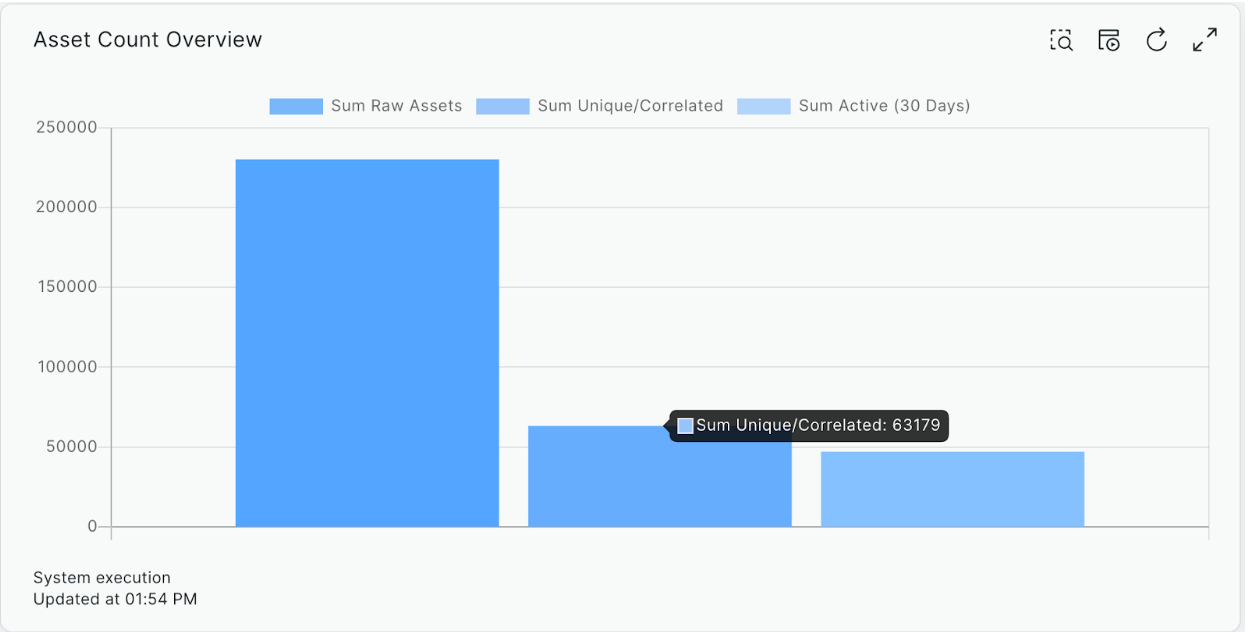
In the image below, we’re looking at the distribution of raw asset records to uniquely correlated assets in an organization. The system has received over 200,000 raw assets from many different data sources, and is able to narrow it down through its asset correlation algorithm to 63,179 unique assets.

The Importance of Asset Context in Attack Surface Management.

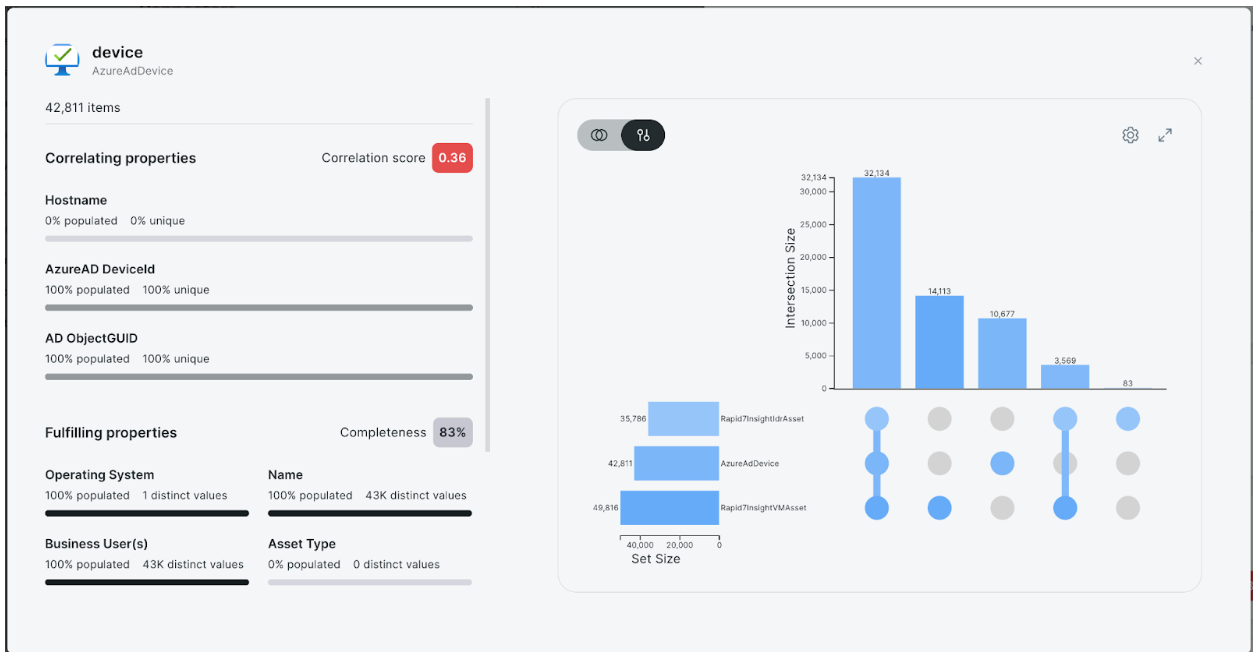
The next example shows correlation effectiveness and property fulfillment (data fields with actual values) for Azure AD’s Device type. This capability is available on a per-connector basis and can be used to see how well the data source in question is correlating with other data sources (i.e., are they seeing the same assets?), and also how much of the data is being fulfilled by the API which can help pinpoint configuration issues that are limiting your view of your attack surface.

The Importance of Asset Context in Attack Surface Management.

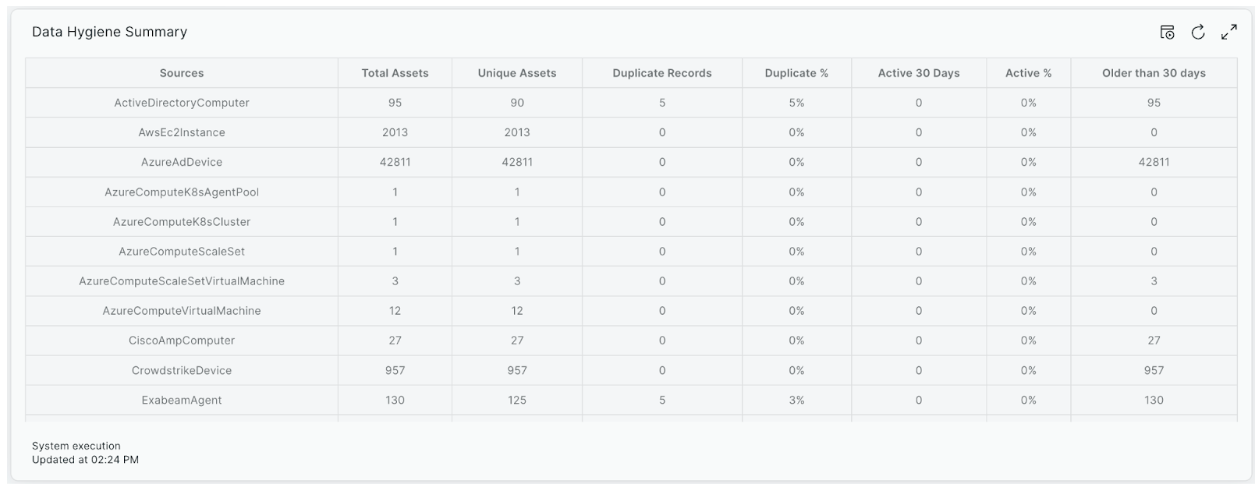
The final example is a table view of all the data sources coming into the system and key insights from them. This can be used to assess the quality of your data sources and to debug issues like when duplicate records occur. In that case, correlation rules can be updated to reduce those duplications so users get the best correlation, and thus the best and most accurate view of their attack surface.

The Importance of Asset Context in Attack Surface Management.

This transparency into data ingestion and correlation is also critical when working with other stakeholders in the business, ensuring that everyone is in alignment on the most accurate data.

Data Prioritization

The final key aspect to successful ASM is being able to customize data in the way that an organization wants to see it. Teams rely on some tools more than others, and the weighting of those tools should match the overall preferences of the business. If Active Directory is your source of truth for ‘business owner’ and ‘department’ information over ServiceNow CMDB, then the system should be able to re-correlate the data based on the way an organization sees and utilizes the data.

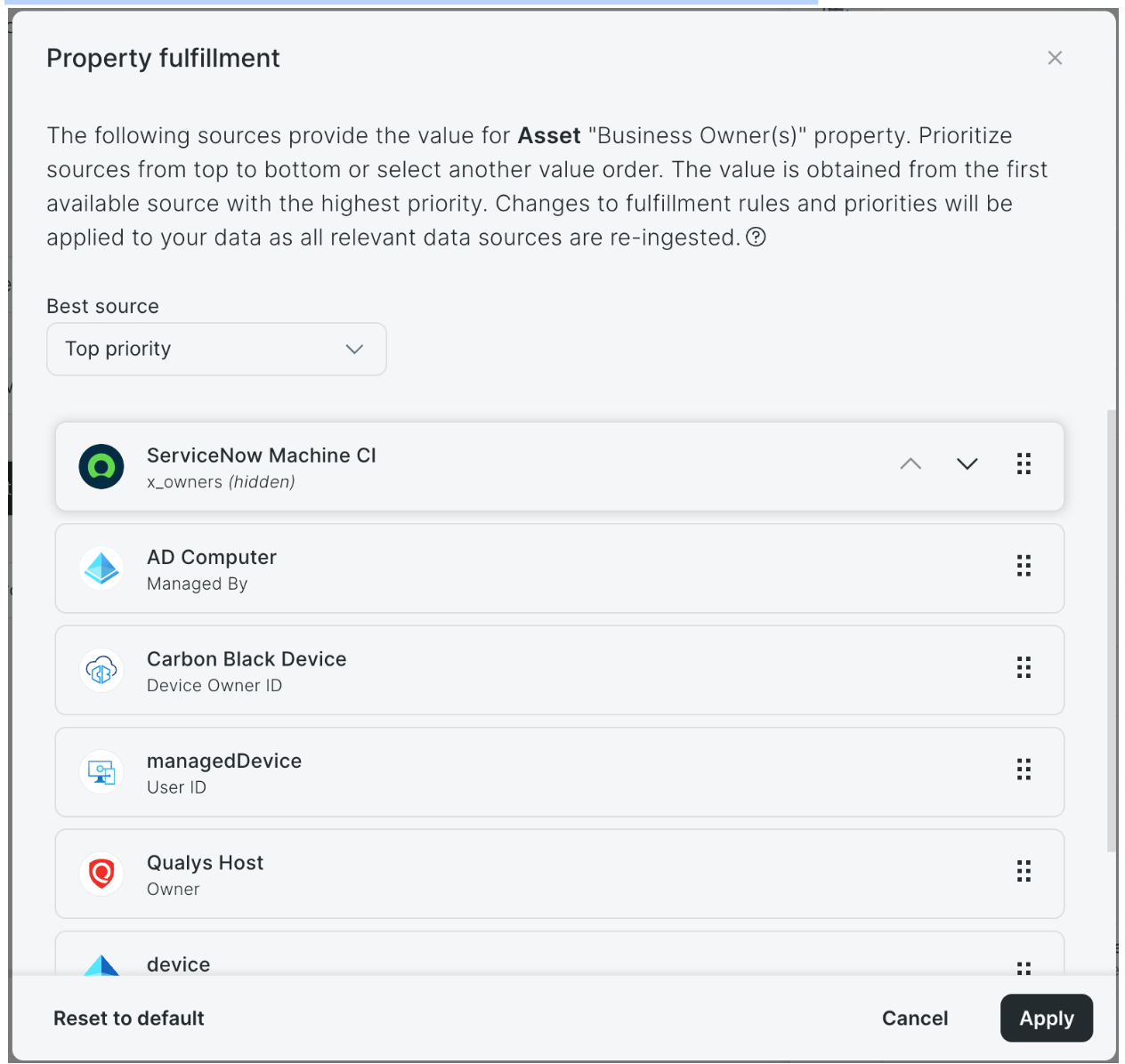
Below, we show an example of how we are able to configure data prioritization in Rapid7’s Surface Command. Weighting the data can be configured on a per-property basis, so any ingestible and correlatable field can be customized to prioritize which tool should be preferred in the event of a data conflict. This enables teams to select and leverage the tools that they trust the most for specific data and use cases, so the attack surface matches the way they see their environment.

The Importance of Asset Context in Attack Surface Management.
[Example: Where ServiceNow takes priority on the Business Owner of an asset, followed by Azure AD.]

Conclusion: The Value of Context in Attack Surface Management

Over the past four blogs, I have tried to cover some of the key benefits and use cases for ASM. Much of it comes down to the core value that you can only protect what you know about, but in reality, it’s more complex than that.

The context that ASM solutions can provide you about both the external threat, and internal cyber risks, help security teams focus on what is most critical to protecting their organization. With the ever-growing number of vulnerabilities and non-patchable exposures, it just isn’t practical to expect to address everything, so prioritization is key. This is where the real value of ASM lies.

Once we understand our overall security posture, which assets are the most critical to the business, which services are the most exposed to attacks, we have the context needed to drive an effective cybersecurity program. We can take these insights and make them actionable, working with colleagues in DevOps and IT to harden machines and patch the most high-risk vulnerabilities. If we are successful in finding the gaps before the attacker, then we should also reduce the burden downstream on our SOC and IR teams.

I hope you found this blog series valuable. I’d encourage you to explore more information on Rapid7’s market-leading attack surface and exposure management solutions at https://www.rapid7.com/products/command/attack-surface-management-asm/.

Backblaze Partners with Opti9 and Adds Canadian Data Region

Post Syndicated from Teresa Dodson original https://www.backblaze.com/blog/backblaze-partners-with-opti9-and-adds-canadian-data-region/

A decorative image showing the Backblaze and Opti9 logos.

Backblaze and Opti9 are partnering up to bring Backblaze B2 Cloud Storage to joint customers around the world as well as businesses in Canada who are required to keep their data within national borders.

The who and the why

Opti9 is the international leader in hybrid cloud solutions that delivers managed cloud services, application development and modernization, backup and disaster recovery, security, and compliance solutions to businesses around the world. By bringing Backblaze into their solution set, Opti9 is onboarding high performance, low cost cloud storage that works within all the solutions they provide.

Increasingly, companies seeking managed services support are demanding solutions made up of best-in-breed providers. While traditional cloud platforms work against this principle of interoperability, Backblaze and solution providers like Opti9 are committed to delivering cloud solutions without the limitations, complexity, and high pricing that are holding businesses back.

As Jim Stechyson, the President of Opti9 put it:

Backblaze and Opti9 focus on empowering businesses with the best cloud solutions available. Being able to integrate the high performance and low total cost of ownership of Backblaze’s object storage into our set of solutions will greatly enhance our ability to drive success for our customers.

How to get started

Interested resellers or customers who want to start working with Opti9 and Backblaze today can go to the Opti9 website. Check out our joint S3 compatible hot storage offering and book your demo to get started.

Book a Demo ➔ 

For customers based in Canada, Backblaze will be opening a new data region centered in Toronto in the first quarter of 2025. As part of the partnership, Opti9 will be the exclusive provider of server backup solutions in the Canadian channel for Backblaze B2 Reserve and the Powered by Backblaze program.

More about the new Backblaze data region in Canada

The new Canadian data region gives businesses the freedom to access Backblaze’s open, interoperable cloud solution, while still allowing customers to benefit from local storage and compliance. Located in Toronto, Ontario, the data center has been assessed and maintains a security program that addresses the requirements of SOC 1 Type 2, SOC 2 Type 2, ISO 27001, PCI DSS, and HIPAA. The region will be available to customers in the first quarter of 2025. 

If you’d like to receive notifications about the data region opening date and when you can start storing data in Canada, you can sign up for the waitlist today.

Notify Me ➔ 

The post Backblaze Partners with Opti9 and Adds Canadian Data Region appeared first on Backblaze Blog | Cloud Storage & Cloud Backup

Monitoring a Complex Infrastructure Environment with Zabbix

Post Syndicated from Nyein Chan Zaw original https://blog.zabbix.com/monitoring-a-complex-infrastructure-environment-with-zabbix/28954/

Inviting the members of our global community to share their Zabbix dashboards with us prompted a flood of fascinating responses, and we’re highlighting a few of the most interesting submissions here on our blog. This week’s entry comes to us from Nyein Chan Zaw, who is based in Bangkok, Thailand and works as an Infrastructure Specialist for Green Will Solution. Read on to see how he uses his Zabbix dashboard to monitor a highly intricate infrastructure in real time. 

I appreciate the chance to share my dashboard, and I would also like to share a use case that demonstrates the practical implementation of Zabbix for real-time infrastructure monitoring.

This Zabbix dashboard provides a comprehensive view of the network’s real-time health, server availability, traffic patterns, and key performance metrics of essential infrastructure components. It is designed for monitoring production, office, and virtual server zones, including network devices, physical servers, and virtual machines. The current view is the first page of a two-page dashboard, which focuses on general network monitoring:

The second page is dedicated solely to monitoring infrastructure nodes:

Key features monitored

Traffic Monitoring: The dashboard tracks real-time traffic from critical network uplinks, including AIS and TRUE, offering visibility into bandwidth usage (e.g., 64.50 Kbps and 13.05 Kbps). It also monitors internal traffic and key devices like the FortiGate firewall, helping ensure optimal network performance and security.

Host Health Monitoring: CPU and memory utilization for top hosts (e.g., GW-WINDOW11, GW-AD-DOMAIN) are displayed, enabling efficient resource management. Alerts are triggered for high resource usage, allowing for a proactive response to performance issues.

Disk Usage: Disk space on key hosts, such as the Zabbix virtual machine and other core servers, is monitored to avoid file system over-utilization, which can lead to potential service interruptions.

Availability Overview: The dashboard provides a summary of host availability, including how many are available, unavailable, or have unknown statuses. Monitoring methods like active agent and SNMP are also shown, giving an overall view of network health.

Visual Topology Map: A detailed network map shows the production, office, virtual, and test zones, along with devices and connections. This visualization aids in quickly identifying problem areas and understanding how systems are interlinked.

Severity and Problem Monitoring: The dashboard classifies issues by severity, from critical problems to warnings. Real-time issues (such as VM downtime or system failures) are highlighted, enabling the team to resolve issues quickly.

Performance Metrics: Graphs display performance metrics, such as bandwidth usage and CPU load, offering insights into system bottlenecks or overuse, particularly in critical devices like firewalls.

Impact

This Zabbix dashboard enables an infrastructure team to efficiently monitor network performance, manage resource usage, and ensure device availability. The clear visual interface helps quickly identify issues, reducing downtime and ensuring higher reliability of critical services.

Conclusion

The first page of the dashboard demonstrates Zabbix’s capabilities for centralized monitoring across large infrastructures. By integrating data from network devices, servers, and virtual machines, it empowers IT teams to make informed decisions and address issues before they escalate. The second page provides a detailed focus on the infrastructure nodes, ensuring that all critical systems are effectively monitored for optimal operation across the IT environment.

The post Monitoring a Complex Infrastructure Environment with Zabbix appeared first on Zabbix Blog.

Слаби амбиции, непознаване на избирателите – мижав резултат

Post Syndicated from Светла Енчева original https://www.toest.bg/slabi-ambitsii-nepoznavane-na-izbiratelite-mizhav-rezultat/

Слаби амбиции, непознаване на избирателите – мижав резултат

Когато парламентарните избори са толкова начесто, колкото през последните години, човек претръпва. И все по-малко се стряска от резултатите – както от прогресиращото раздробяване на парламента (в който за малко не влязоха 9 партии и коалиции), така и от поредната популистка партия, почти неочаквано преминала 4-процентовата бариера (в случая – партията на Радостин Василев МЕЧ).

Перспективите пред 51-вото Народно събрание

А не е да няма от какво да се стресне човек. Четири от деветте групи в новото Народно събрание („Възраждане“, БСП, ИТН и МЕЧ) са евроскептични и повече или по-малко проруски. Разделеното на две ДПС никога не се е славило с твърда геополитическа ориентация. Председателят на ГЕРБ нееднократно е показвал, че ако на някого не се харесват евроатлантическите му ценности, той има и други.

Така че алтернативите за съставяне на кабинет са няколко.

Първата е пореден нестабилен опит за проевропейско управление с участието на ГЕРБ и ПП–ДБ в коалиция било с ДПС – Доган, било с някоя от другите партии. След провала на кабинета на Николай Денков подобен опит от страна на ПП–ДБ трудно ще се прости от избирателите на коалицията. Още повече че няма основание да се очаква, че Пеевски няма и този път демонстративно да дърпа конците, независимо дали ДПС – Ново начало е формално в управлението, или не.

Втората алтернатива е ГЕРБ да се опита да състави правителство без ПП–ДБ. Това няма да е лесна задача, защото постигането ѝ включва още няколко партии и коалиции. На този етап Борисов изключва съвместно управление с „Възраждане“, а партията на Радостин Василев иска да участва в съставянето на мнозинство против ГЕРБ и ДПС.

Ако „Възраждане“ се опита да състави проруска коалиция без ГЕРБ и ПП–ДБ, в нея ще трябва да участва и ДПС – Ново начало, за да има тя мнозинство. А Костадин Костадинов едва ли би искал да получава публична подкрепа точно от Пеевски.

Вариант е и някаква форма на правителство на малцинството – със скрита подкрепа от страна на партии и коалиции, които уж са против, но когато се наложи, депутатите им услужливо не се регистрират за гласуване. Или гласуват предложенията на правителството, а после си намират оправдание.

И разбира се, отново може да не се състави редовно правителство, да имаме пореден служебен кабинет и поредни предсрочни избори.

Всъщност защо трябва да е така?

Ако има някаква изненада в резултатите от вота, тя е в избирателната активност, която е по-висока, отколкото на предходното гласуване на 7 юни 2024 г., макар да се очакваше тенденцията за намаляване на броя на отишлите до урните да се запази. И все пак едва малко под 39% от имащите право на глас са го упражнили, а останалите 61% не са.

За ниската избирателна активност има ред предпоставки: твърде честите предсрочни избори, липсата на перспектива някоя от политическите сили да управлява самостоятелно, съответно – безпредметността на голяма част от предизборните обещания, които поради липсата на подкрепящо мнозинство не могат да бъдат изпълнени.

Всичко това обаче е вярно само при наличие на изходната предпоставка, че гласуват има-няма една трета от избирателите. Ако някоя партия или коалиция успее да намери път към негласуващите, политическата картина в България може да бъде коренно различна. Но по нищо не личи това да се прави. Напротив, гласуването се е ограничило до твърдите ядра. С изключение на нововъзникващите популистки партии и ДПС – Ново начало. 

Когато не се поставят амбициозни цели и не се прави възможното те да се постигнат, а хоризонтът не стига много по-далече от носа, няма как да се очакват впечатляващи резултати.

Дори първата политическа сила – ГЕРБ – вече не си и поставя за цел да спечели повече от 50% от гласовете, за да може да управлява самостоятелно. Декларираната от партията цел, при чието постигане Бойко Борисов би станал отново премиер, беше едва 80 депутати – с 41 по-малко от необходимите за мнозинство. Друг е въпросът дали ГЕРБ изобщо иска да управлява самостоятелно.

ПП–ДБ от своя страна дори не дадоха заявка, че е възможно да спечелят изборите. Те се радват, че са на второ място, а не на трето или четвърто. Влязоха в кампанията с ясното убеждение, че няма да бъдат първи. И поставиха невъзможното за реализация условие да се избере равноотдалечен от всички партии премиер. А за тях не може да се каже, че не искат да управляват самостоятелно. Напротив – основният им проблем е, че няма други групи в парламента, които да споделят целите им.

Изобщо сещате ли се за послание от последната кампания, независимо на коя политическа сила, което да разбуни духовете? Да вдъхнови едни, да ядоса други, хората да говорят за него, да мотивира избиратели да отидат до урните? Сещате ли се за предложение – извън общото повишаване на доходите, – което да е насочено към представителите на определена социална група така, че да стигне до много от тях? Колко предложения за подобряване конкретно на вашия живот можете да изброите?

А междувременно в САЩ…

Докато в България се провеждат парламентарни избори, кандидатпрезидентската кампания в САЩ е в разгара си. Тамошният политическият пейзаж е различен от българския по ред причини.

Първо, политиката в Щатите е на практика двупартийна – не че не съществуват кандидати, които не са нито от републиканците, нито от демократите, но те нямат особени шансове. Второ, избирателната система е структурирана по коренно различен начин – от значение е не общият брой на гласувалите, а кой печели в отделните щати. Трето, самото общество и култура се отличават не само от българските, но и от европейските като цяло.

Като имаме предвид тези уточнения, политическите сили в България имат какво да научат от американските по отношение на провеждането на кампания. Особено предвид факта, че избирателната активност в САЩ през годините по-скоро нараства и е стигнала нива от около две трети от имащите право на глас.

На първо място, американските граждани не са тера инкогнита нито за политиците, нито за агенциите за изследване на общественото мнение (които никой в САЩ не нарича социологически). Избирателите са разделени в множество групи, всяка от които има определени типологични характеристики, ценности и интереси.

Няма просто жени например. Жените могат да бъдат млади или не, от предградията, от конкретен щат и населено място, с определена расова принадлежност, етнос, религия и пр. Или избирателите с латиноамерикански произход, които също не могат да се слагат под един знаменател. Имигрантите от Венесуела и Куба преобладаващо гласуват за републиканците, защото републиканците наричат демократите комунисти, а те точно от комунистите са избягали. На много чернокожи мъже пък им е трудно да гласуват за жена, била тя и чернокожа. И т.н., и т.н.

И демократите, и републиканците имат послания към определени групи и правят всичко по силите си тези послания да стигнат до своите адресати. В т.нар. колебаещи се щати буквално няколко гласа могат да бъдат решаващи за това кой ще стане следващият президент на САЩ. Затова кампаниите се опитват да стигнат до всеки.

Един от най-оспорваните щати е Пенсилвания. И макар евреите да са едва 2% от населението на страната, и републиканци, и демократи правят всичко по силите си да говорят с всеки евреин в щата и да спечелят гласа му.

И Доналд Тръмп, и Камала Харис се стараят да привличат максимален брой избиратели, макар и по различен начин. Тръмп избягва да излиза извън зоната си на комфорт и предпочита да се заобикаля с аудитория, която подкрепя – и усилва – посланията му. Харис от своя страна се опитва в максимална степен да компенсира факта, че избирателите не я познават добре, и не пропуска възможност да се представи – дори на територията на „вражеската“ телевизия Fox. Защото знае, че е в по-слаба позиция, и за да победи, трябва „да се вдигне за косата“.

Кандидат-президентката на демократите дори участва в телевизионна дискусия с избиратели, които още не са решили дали и за кого да гласуват. По време на дискусията ѝ се наложи да отговаря както на гласоподавателка, защитаваща палестинците, така и на еврейка, притеснена от антисемитизма в американските университети. И направи всичко по силите си отговорите ѝ да не отблъснат нито една от двете, колкото и трудно да изглежда това.

Какви са българските избиратели?

В България за избирателите обикновено се говори в много мъгляви категории, често натоварени с негативни конотации – „жълтопаветници“, „гербаджии“, „националисти“, „турци“, „роми“ и пр. Още по-мъгляво е възприемането на имащите право на глас като някакво единно цяло. То се изразява в твърдения, че българите са по дефиниция консервативни или пък че „не са готови“ за някоя по-либерална промяна.

Социологическите агенции правят по-детайлни разбивки на гласоподавателите – например по пол, възраст, населено място, образование, както и за кого са гласували на предишни избори. Но от техните анализи не следва особена промяна в поведението на политическите сили. Сякаш е природен факт, че едни гласуват така, други иначе, а повече от половината изобщо не гласуват.

Да вземем негласуващите. На последните избори най-малко са гласувалите в областите Сливен (28,78%), Кърджали (29,93%), Шумен (30,85%), Пловдив-окръг (31,71%). В София пък има значителна разлика между 23-ти МИР, където до урните са отишли най-голям дял избиратели спрямо цялата страна – 46,61%, и 24-ти МИР, в който бюлетина са пуснали едва 31,65%. Какви хора живеят на тези места? Какви са проблемите им? Защо около 70% от тях се чувстват непредставени?

Да се познават различни групи избиратели с техните ценности, интереси, страхове и надежди – без да се стига до типичната за САЩ детайлност – не е невъзможна задача. Не е нито твърде скъпо за джоба на парламентарно представените партии и коалиции, нито прекалено сложно да се направят количествени и качествени изследвания, чиито резултати да хвърлят светлина върху потенциалните гласоподаватели. И да се предложат решения за адекватни послания към тях.

Отказът да се опознаят избирателите стига до степен, в която те практически са все по-малко парламентарно представени. И макар по данни от 2023 г. над 60% от българските граждани да смятат, че демокрацията е най-добрата форма на управление, а към март 2024 г. около 60% категорично да подкрепят европейската ориентация на страната ни, рисковете за геополитически завой към Русия се увеличават.

Най-лесно е цялата отговорност да се прехвърля върху избирателите и те да бъдат обвинявани, че не гласуват, с което не само не си защитават интересите, а и увеличават тежестта на контролирания вот. По-трудно е да се намери път към тях, да се убеждават, да се предложат решения на проблемите им, да се дадат отговори на страховете им.

Трудно е, но е необходимо. Защото продължаването на поредицата от предсрочни избори не е най-лошото, което може да се случи. По-лошо ще е да се докараме до диктатура, в която изборите вече няма да имат съвсем никакво значение. 

How we reduced peak memory and CPU usage of the product configuration management SDK

Post Syndicated from Grab Tech original https://engineering.grab.com/reduced-memory-cpu-usage-grabx-sdk

Introduction

GrabX is Grab’s central platform for product configuration management. It has the capacity to control any component within Grab’s backend systems through configurations that are hosted directly on GrabX.

GrabX clients read these configurations through an SDK, which reads the configurations in a way that’s asynchronous and eventually consistent. As a result, it takes about a minute for any updates to the configurations to reach the client SDKs.

In this article, we discuss our analysis and the steps we took to reduce the peak memory and CPU usage of the SDK.

Observations on potential SDK improvements

Our GrabX clients noticed that the GrabX SDK tended to require high memory and CPU usage. From this, we saw opportunities for further improvements that could:

  • Optimise the tail latencies of client services.
  • Enable our clients to use their resources more effectively.
  • Reduce operation costs and improve the efficiency of using the GrabX SDK.
  • Accelerate the adoption of GrabX by Grab’s internal services.

SDK design

At a high-level, creating, updating, and serving configuration values via the GrabX SDK involved the following process:

Figure 1. Previous GrabX SDK design.
  1. The process begins when GrabX clients either create or update configurations. This is done through the GrabX web portal or by making an API call.
  2. Once the configurations are created or updated, the GrabX backend module takes over. It stores the new configuration into an SQL database table.
  3. The GrabX backend ensures that the latest configuration data is available to client SDKs.

    a. The GrabX backend checks every minute for any newly created or updated configurations.

    b. If there are new or updated configurations, GrabX backend creates a new JSON file. This file contains all existing and newly created configurations. It’s important to note that all configurations across all services are stored in a single JSON file.

    c. The backend module uploads this newly created JSON file to an AWS S3 bucket.

    d. The backend module assigns a version number to the new JSON file and updates a text file in the AWS S3 bucket. This text file stores the latest JSON file version number. The client SDK refers to this version file to check if a newer version of the configuration data is available.

  4. The client SDK performs a check on the version file every minute to determine if a newer version is available. This mechanism is crucial to maintain data consistency across all instances of a service. If any instance fell out of sync, it would be brought back in sync within a minute.
  5. If a new version of the configuration JSON file is available, the client SDK downloads this new file. Following the download, it loads the configuration data into memory. Storing the configuration data in memory reduces the read latency for the configurations.

Areas of improvement for existing SDK design

In this section we outline the areas of improvement we identified within the SDK design.

Service-based data partitioning

We saw an opportunity for service-based data partitioning. The configuration data for all services was consolidated into a single JSON file. Upon studying the data read patterns of client services, we observed that most services primarily needed to access configuration data specific to their own service. However, the present design required storing configuration data for all other services. This resulted in unnecessary memory consumption.

Retaining only new version of configuration in the same file

By using a single JSON file for storing old and new configuration data, we saw a significant increase in the size of the JSON file.

The SDK only needs the full data when it starts; the more common case is that it needs to stay updated with the latest configuration. Even in that scenario, the SDK needed to fetch a complete new JSON file every minute no matter the size of the updates. Consequently, the process of downloading, decoding, and loading high volumes of data at a high frequency (every minute) caused the client SDK to spike in memory and CPU usage.

More efficient JSON decoding

An additional factor which contributed to memory and CPU usage during the decoding phase was the inefficiency of the default JSON decode library to decode this large (>100MB) JSON file. Decoding this JSON file was heavy on available CPU resources, which tended to starve the service of its ability to handle incoming requests. This manifested as increasing the P99 latency of the service.

Figure 2. Graph illustrating the increased P99 latency due to CPU throttling for a service.

Implemented solution

We proposed modifications to the existing SDK design, which we discuss in this section.

Partition data by service

The proposed solution involved partitioning the data based on services. We chose this approach because a single configuration typically belonged to a single service, and most services primarily needed to read configurations that pertained to their own service.

Upon analysing the distribution of service-configuration, we discovered that 98% of client services required less than 1% of the total configuration data. Despite this, they were required to maintain and reload 100% of the configuration data. Furthermore, the service with the largest number of configurations only required 20% of the total configuration data.

Therefore, we proposed a shift towards service-based partitioning of configuration data. This allowed individual client services to access only the data they needed to read.

Figure 3. Graph showing the number of services with varying amounts of configurations.

Create separate JSON files for each configuration

Our proposal also included creating a separate JSON file for each configuration in a service. Previously, all data was stored in a single JSON file housed in an AWS S3 bucket, which supported a maximum of 3,500 write/update requests and 5,500 read requests per second.

By storing each configuration in a separate JSON file, we were able to create a different S3 prefix for each configuration file. These S3 prefixes helped us to maximise S3 throughput by enhancing the read/write performance for each configuration. AWS S3 can handle at least 3,500 PUT/COPY/POST/DELETE requests or 5,500 GET/HEAD requests per second for each partitioned Amazon S3 prefix.

Therefore, with each configuration’s data stored in a separate S3 file with a different prefix, the GrabX platform could achieve a throughput of 5,500 read requests and 3,500 write/update requests per second per configuration. This was beneficial for boosting read/write capacity when needed.

Implement a service-level changelog

We proposed to create a changelog file at the service level. In other words, a changelog file was created for each service. This file was used to keep track of the latest update version, as well as previous service configuration update versions. This file also recorded the configurations which were created or updated in each version. This enables the SDK to accurately identify the configurations that were created or updated in each update version. This was useful to update the specific configurations belonging to a service on the client side.

Implement service-based SDK

We proposed that SDK client services should be allowed to subscribe to a list of services for which they need to read configuration data. The SDK was initialised with data of the subscribed services and received updates only for configurations corresponding to the subscribed services.

Figure 4. This flowchart shows our proposed service-based SDK implementation.

The SDK only sought updates for the subscribed services. The client SDK needed to read the changelog file for each of the subscribed services, comparing the latest changelog version against the SDK version number. Whenever a newer changelog version was available, the SDK updated the variables with the latest version.

This approach significantly reduced the volume of data that the SDK needed to download, decode, and load into memory during both initialisation and each subsequent update.

Conclusion

In summary, we identified ways to optimise CPU and memory usage in the GrabX SDK. Our analysis revealed that frequent high resource consumption hindered the wider adoption of GrabX. We proposed a series of modifications, including partitioning data by service and creating separate JSON files for each configuration.

After benchmarking the proposed solution with a variety of configuration data sizes, we found that the solution has the potential to reduce memory utilisation by up to 70% and decrease the maximum CPU utilisation by more than 50%. These improvements significantly enhance the performance and scalability of the GrabX SDK.

Figure 5. Bar charts showcasing memory(MB) & CPU(%) utilisation for Service A before and after using the discussed solution.

Moving forward, we plan to continue optimising the GrabX SDK by exploring additional improvements, such as reducing its initialisation time. These efforts aim to make GrabX an even more robust and reliable solution for product configuration management within Grab’s ecosystem.

Join us

Grab is the leading superapp platform in Southeast Asia, providing everyday services that matter to consumers. More than just a ride-hailing and food delivery app, Grab offers a wide range of on-demand services in the region, including mobility, food, package and grocery delivery services, mobile payments, and financial services across 700 cities in eight countries.

Powered by technology and driven by heart, our mission is to drive Southeast Asia forward by creating economic empowerment for everyone. If this mission speaks to you, join our team today!

The collective thoughts of the interwebz