Post Syndicated from Matt Granger original https://www.youtube.com/watch?v=GzvJPy54r0E
STH Q3 2024 Letter from the Editor The Coolest Quarter
Post Syndicated from Patrick Kennedy original https://www.servethehome.com/sth-q3-2024-letter-from-the-editor-the-coolest-quarter/
In our STH Q3 2024 Letter from the Editor, we go into the state of STH and some of the cool things we have been learning
The post STH Q3 2024 Letter from the Editor The Coolest Quarter appeared first on ServeTheHome.
The Little Probe that Could
Post Syndicated from The History Guy: History Deserves to Be Remembered original https://www.youtube.com/watch?v=3K7G9CWDatk
Górny: The perils of transition to 64-bit time_t
Post Syndicated from corbet original https://lwn.net/Articles/992120/
Michał Górny describes
the challenges involved in transitioning Gentoo to year-2038-safe time
representations:
There is a general agreement that the way forward is to change
time_t to a 64-bit type. Musl has already switched to that, glibc
supports it as an option. A number of other distributions such as
Debian have taken the leap and switched. Unfortunately,
source-based distributions such as Gentoo don’t have it that
easy. So we are still debating the issue and experimenting, trying
to figure out a maximally safe upgrade path for our users.Unfortunately, that’s nowhere near trivial. Above all, we are
talking about a breaking ABI change.
Електронна система за разрешения за работа
Post Syndicated from Bozho original https://blog.bozho.net/blog/4373
Следващата точка от моите приоритети е:
„11. Облекчаване на привличането на висококвалифицирани специалисти от трети страни (напр. в ИТ сектора) чрез въвеждане на платформата за дигитализация на издаването на сини карти и премахване на бюрократични пречки.“
През 2022 г. като министър поставих началото на изграждането на централизираната електронна платформа за разрешения за работа. Тъй като процесите включват множество институции (МВР, ДАНС, МВнР, Агенция по заетостта), решихме МЕУ да координира и води процеса.
През 2024 г. системата вече е готова, но не се ползва, защото МВР настояват да бъде уредена в закон. Затова внесохме изготвения от МВР и МЕУ текст на закона, но два месеца вътрешната комисив не намери мотивация да го разгледа и това блокира приемането му в 50-ото НС.
Системата предоставя електронно заявяване на разрешения за работа, вкл. за висококеалифицирани експерти (синя карта), но не само. Позволява проследяване на процесите, едновременното изпълнение на проверки от няколко институции, случайно разпределение на преписки между служители и др. Това ще бъде сериозно облекчение от сегашното положение, при което се чака на тротоара пред дирекция „Миграция“ на МВР докато ти дойде редът.
Системата е важна за много сектори, в които не достига работна ръка и чрез нея се оптимизират процесите в администрацията за получаване на разрешения. Иначе казано, държавата ще изпълнява адекватно своите функции.
#26 #107

Материалът Електронна система за разрешения за работа е публикуван за пръв път на БЛОГодаря.
Godiva’s Ride
Post Syndicated from The History Guy: History Deserves to Be Remembered original https://www.youtube.com/watch?v=LwsAz-b6FeY
Comic for 2024.09.29 – Forehead
Post Syndicated from Explosm.net original https://explosm.net/comics/forehead
New Cyanide and Happiness Comic
Purview
Post Syndicated from Oglaf! -- Comics. Often dirty. original https://www.oglaf.com/purview/


The Principality of Sealand
Post Syndicated from The History Guy: History Deserves to Be Remembered original https://www.youtube.com/watch?v=ua3WHR7uhUM
Comic for 2024.09.28 – Gun To Your Head 2
Post Syndicated from Explosm.net original https://explosm.net/comics/gun-to-your-head-2
New Cyanide and Happiness Comic
LEVITTOWN: The Birth of Suburban America #sponsored
Post Syndicated from Geographics original https://www.youtube.com/watch?v=gSqf8yQ2BDE
The Best & Worst of the GFX100SII
Post Syndicated from Matt Granger original https://www.youtube.com/watch?v=ZwHJdvzKWOQ
Kasley Killam | The Art and Science of Connection | Talks at Google
Post Syndicated from Talks at Google original https://www.youtube.com/watch?v=3YW2jrnDOfg
New 36GB SK hynix HBM3E 12-High in Volume Production
Post Syndicated from Cliff Robinson original https://www.servethehome.com/new-36gb-sk-hynix-hbm3e-12-high-in-volume-production/
SK hynix joins the 36GB HBM3E 12-high stack club announcing that its HBM modules are now in volume production
The post New 36GB SK hynix HBM3E 12-High in Volume Production appeared first on ServeTheHome.
Securing Your Software Supply Chain with Amazon CodeCatalyst and Amazon Inspector
Post Syndicated from Piyush Mattoo original https://aws.amazon.com/blogs/devops/securing-your-software-supply-chain-with-amazon-codecatalyst-and-amazon-inspector/
Amazon CodeCatalyst is a unified service that streamlines the entire software development lifecycle, empowering teams to build, deliver, and scale applications on AWS.
DevSecOps is the practice of integrating security into all stages of software development. Rather than prioritizing features, it injects security into an earlier phase of the development process – baking it into design, coding, testing, deployment, and operations from the start. Extensive automation like policy checks, scanning, and more proactively uncovers risks.
Amazon Inspector Scan is a CodeCatalyst Action, a logical unit of work to be performed during a workflow run, which leverages software bill of materials (SBOM) generator (sbomgen) to produce a SBOM and ScanSbom to scan a provided CycloneDX 1.5 SBOM and report on any vulnerabilities discovered in that SBOM. An SBOM inventories third-party and open-source components in an application, documenting names, versions, licenses, dependencies, and more. It enables vital DevSecOps initiatives, such as checking an SBOM against CVE databases to rapidly identify vulnerable libraries needing remediation.
Introduction
This blog talks about the benefits of DevSecOps in general and the SBOM in particular. It provides a walkthrough of adding SBOM generation and scanning as a CodeCatalyst Action to an existing CodeCatalyst Workflow. A workflow is an automated procedure that describes how to build, test, and deploy your code as part of a CI/CD system. First, you will create a new Amazon CodeCatalyst project in the CodeCatalyst console. Next, you will modify the workflow to add the Amazon Inspector Scan action. Lastly, you will run the workflow and view the SBOM and vulnerabilities report.
Pre-requisites
- A CodeCatalyst space and associated AWS account.
- An AWS Identity and Access Management (IAM) role (that will be added to the Amazon CodeCatalyst space later) to provide Amazon CodeCatalyst service permissions to build and deploy applications.
- A CodeCatalyst environment connected to the associated AWS account.
Walkthrough
First, you will create a project using CodeCatalyst Blueprints. Blueprints setup a code repository with a working sample app, define cloud infrastructure and run pre-configured CI/CD workflows for your project.
Create a project from a blueprint
Go to your space by clicking your space name in the CodeCatalyst console. From your space, click Create Project. Upon selecting Start with a blueprint, you will select the Single-page application blueprint and click Next as shown in figure 1.

Figure 1 Amazon CodeCatalyst Create Project screen
You will then pick a suitable name for your project, for this post I will use SafeWebShip. Select the AWS IAM role associated with the space and account connection, then click on Create Project.
Next, you will take a look at the current workflow and add the Amazon Inspector Scan action to identify the packages and libraries that make up a software application and scan for vulnerabilities from the associated packages and libraries.
Review the current workflow
A workflow defines a series of steps, or actions, to take during a workflow run and can be assembled using YAML or a visual editor. Actions which require interaction with AWS resources like creation, modification, reading, and deletion occur in the customer’s AWS account, such as creating an Amazon Inspector task to scan an SBOM report.
Add SBOM generation and scanning to the workflow
To add the Amazon Inspector Scan action to the workflow:
- Navigate to the CI/CD menu on the left side of your screen, and then click Workflows
- Click on the onPushToMainPipeline workflow
- Click the edit button to make changes to the workflow
- Ensure the Visual tab is selected, then add a CodeCatalyst Action by clicking Actions at the top left of the screen
- In the new Actions catalog pop-up, search Amazon Inspector Scan. Click the + at the bottom right of the action card as shown in figure 2

Figure 2 Amazon CodeCatalyst Actions Catalog
- Click the Configuration tab of the action and rename the action to inspector_sbom by clicking the pencil under action name
- Select the environment from the Environment dropdown, AWS account connection and the Role you created earlier in the pre-requisite
- Scroll down to Path and ensure it is “./” which represents the root of the source repository. The tool will traverse all of the directories of the source repository for supported manifest files to scan
- The Scan Source should be REPO. The action can scan directories or source repository and a container image. For the purpose of this blog, you will be scanning an existing source repository
- The tool can be configured to run scanners that will inspect container images, packages, archive, directory, and binary scanners. For the purpose of this blog, you will be using javascript-nodejs scanner. You can skip the rest of the scanners. You can read the action’s documentation from the action’s catalog page for a full list of supported scanners
- Scroll down to Severity Threshold, type medium to fail the action if a vulnerability of medium or greater is found
- Skip Files determines the files to skip and should be public/ since you are scanning a public repository
- Depth specifies the depth of directory traversal when generating the SBOM. You should pick Depth as 1 to scan all the files in the root directory of the public repository. Other inputs that are relevant to container images can be ignored as the source repository is only being scanned
- The action produces two files, the SBOM in CycloneDX v1.5 format from sbomgen and the vulnerability report from ScanSbom. Click the Outputs tab of the action, under Artifacts click Add artifact
- Name the Build artifact name as SBOM
- Paste the Files produced by build with the followinginspector_sbom_report.json
- Click Add artifact again
- Name the Build artifact name as SBOM_VULNERABILITIES
- Paste the Files produced by build with the following
inspector_scan_report.json

Figure 3 Amazon CodeCatalyst Workflow Screen
As a best practice, you don’t want to build your project unless it has passed the security scan.
Do the following:
- From the visual diagram of the workflow, click the Build action
- With new menu pop-up to the right, in the pre-loaded inputs tab, and under Depends on – optional, select the Add actions dropdown menu and select the inspector_sbom action
- Click x next to the action name to leave the action input menu
Finally, in order to save our changes to the workflow do the following:
- Click Validate
- Once you see a banner at the top of the page that says the workflow definition is valid, click Commit then click Commit once more to publish the changes to the workflow.
Run the workflow and view artifacts
After committing your changes to the workflow. There should be a new workflow run automatically as the trigger to the workflow is a code push.
Currently, SBOM CycloneDX v1.5 is not supported via CodeCatalyst Reports. Therefore, the report can not be visualized under the Reports feature of Amazon CodeCatalyst. However, the SBOM in CycloneDX v1.5 and the scan report are provided as artifacts for you to download and are stored as part of a workflow run.
To access the reports, do the following:
- Navigate to the CI/CD menu on the left side of your screen, and then click Workflows
- Click on the onPushToMainPipeline workflow
- The current view is the Latest state, Click Runs
- When the workflow, or CI/CD pipeline, runs, it is referred to as a run. Runs that are in progress are under Active runs and Runs history contains all previous workflow runs. Click the Run ID under latest run
- Once the workflow run page loads, click Artifacts
- On the Artifacts page, you should notice SBOM, CycloneDX v1.5, and SBOM_VULNERABILITIES, scan of the SBOM for vulnerabilities as shown in figure 4. Both of these artifacts can be downloaded and viewed on your local machine

Figure 4 Amazon CodeCatalyst Workflow Artifact Screen
The SBOM report will be downloaded as inspector_sbom_report.json. In the SBOM report, all the components that make up the software application are available to view. Each listed component is identified by its name and version as shown in figure 5.

Figure 5 Amazon Inspector Scan SBOM Artifact
The scan of the SBOM report for vulnerabilities will be downloaded as inspector_scan_report.json. In the scan report example below, there are 41 medium vulnerabilities and 32 high vulnerabilities. Since the threshold was set to “medium,” the build failed so these vulnerabilities can be addressed.

Figure 6 Amazon Inspector Scan Vulnerability Artifact
The scan report details the vulnerabilities, links to the affected components, and contains information on the vulnerability like description and CVE reference identifier as shown in figure 6 and figure 7.

Figure 7 Amazon Inspector Scan Vulnerability Artifact continued
Clean Up
If you have been following along with building this workflow, you should delete the resources you deployed so you do not continue to incur charges.
First, delete the stack titled DevelopmentFrontendStack-* that has been deployed from the AWS CloudFormation console in the AWS account you associated when you launched the blueprint. Second, delete the project from CodeCatalyst by navigating to Project settings and clicking the Delete project button
Conclusion
In this blog, we demonstrated how you can integrate security practices into a development pipeline using Amazon CodeCatalyst and Amazon Inspector. You created a project from a blueprint that came pre-configured with a workflow. Next, you modified the workflow to add DevSecOps practices to the pipeline through SBOM generation and scanning. Finally, you ran the workflow and viewed the SBOM and vulnerabilities report. It is essential to secure application dependencies during modern software development. For improved software supply chain security, Amazon CodeCatalyst and Amazon Inspector connect effortlessly. Add this action to your existing or new workflows to improve code security. This is necessary in today’s circumstances to protect your software supply chain. Learn more about Amazon CodeCatalyst and get started today!
Електронно досъдебно производство
Post Syndicated from Bozho original https://blog.bozho.net/blog/4368
Вчера писах за моите 12 приоритета в следващиа парламент. Ще започна подробното представяне от последната точка:
„12. Въвеждане на електронно досъдебно производство, защото към момента досъдебните производства са папки с документи, които подлежат на подмяна, изтичане и нерегламентиран достъп и водят до неефективност.“
Досъдебната фаза е етапът на наказателното производство, на който се установява престъплението, извършва разследването, събират се доказателствата, прилагат се СРС-та (подслушване, следене), налагат се мерки за принуда (задържане, подписка и др.), установяват се обвиняемите и се подготвя обвинението, за да бъде внесено в съда.
Всичко това в момента е в папки на хартия. Това позволява доказателства да се подменят (някой да промени ДП на 10), да изтича информация, без да има сигурна следа кой е имал достъп (затова напр. разпити изтичат в предизборни кампании), да изтича информация в рамките на разследването.
Напр. за да се извърши претърсване, трябва разследващите (МВР напр.) да го поискат от прокурора, а той да поиска разрешение от съда. Документите за това преминават на хартия през няколко деловодства, с множество деловодители и докато дойде време за претърсването, престъпниците вече са разбрали.
Има единна иформационна система за противодействие на престъпността, която обаче не се използва за самите документи по досъдебното производство и за обмен с разследващите органи и със съда.
Дигитализацията на досъдебното производство ще може да ограничи и някои злоупотреби на прокуратурата, напр. около следствената тайна – в комбинация с други законови промени, които подготвяме, ще може (полу)автоматично да се установява коя информация е следствена тайна и коя – не.
От друга страна ще подпомогне прокурорите с представянети на цялата информация на едно място, показването на сходни престъпления, служебното извличане на данни за обвиняемите и др.
Често ни обвиняват, че реформата в прокуратурата, която искаме, се ограничава до смяната на главния прокурор. Нищо подобно – искаме да заложим всички предпоставки за ефективна работа на прокуратурата и за ограничаване на злоупотребите от нейна страна с политически цели.
#26 #107
Материалът Електронно досъдебно производство е публикуван за пръв път на БЛОГодаря.
Седмицата (23–28 септември)
Post Syndicated from Боряна Телбис original https://www.toest.bg/sedmitsata-23-28-septemvri/

Седмицата започна с един почивен ден, компенсиращ „несправедливия“ факт, че Денят на независимостта на България тази година се падна в неделя. По този начин ние като нация се възползвахме от изконното си право на последен дълъг уикенд в Гърция. Понякога си мисля, че ако пак така дружно като нация си останем в Гърция, отвъд границата, на наша територия, нищо няма да се промени. През три месеца ще има избори, все ще се намери кой да гласува – дето се вика, поне самите кандидат-депутати ще си гласуват. После ще си се коалират, ще си управляват, ще си играят на държава. А пък ние ще си почиваме, че то и бездруго си е голям зор да се оцелява в тази страна.
Но дългият уикенд свърши. Зимата идва, както казват в „Игра на тронове“. И се задава една дълга предизборна кампания. Колко пък да е дълга, ще кажете. Като се има предвид фактът, че това са седмите парламентарни избори за три години, кампанията, макар и само един месец, ми се струва не просто дълга, а непоносимо вечна. Като зимата, която идва.
Във връзка с изборите е и тазседмичният анализ на Емилия Милчева, озаглавен „Седмото пришествие на същите“. В него тя разглежда стратегиите за реденето на листите с кандидат-депутати. Там (и в листите, и в стратегиите) няма нищо вълнуващо и това е проблемът.
Съвсем скоро предстоят и изборите в САЩ, затова светът гледа към Америка с все по-голям интерес. В този брой на „Тоест“ имаме материал от Искрен Иванов, който също обръща поглед на запад, към Съединените щати, но не коментира изборите, а въпроса дали Америка губи стратегическата си инициатива. Какъв е отговорът според него – в текста на Искрен тук.
Към Запада ли гледаме, или се превръщаме в прилежни членове на Граждани за евразийско развитие? Това се чуди Светла Енчева в коментара си тази седмица. Защо ли се усеща, че с всеки следващ законопроект или предложение за изменение на съществуващо законодателство страната ни е тласкана към държавни и обществени модели, намиращи се в разрив с идеите на евроатлантическата общност, към която уж принадлежим?
Продължаваме да се мятаме между Запада и Изтока и се заклещваме някъде из Ориента с втората част от текста на Атанас Шиников „За ориенталския махмурлук, Корана и домашнярката“. В нея той продължава да нищи някои важни въпроси за алкохола в арабския свят. Изключително любопитна е и първата част. Ако сте я пропуснали, бързо да поправите грешката си тук.
Научните новини на Михаил Ангелов са суперинтересни. Има комети, астероиди, птичи грип, фораминифери (ако не знаете какво е това, ей сега ще разберете)… Накратко казано: научните новини са по-добрите новини! Препоръчвам ги горещо.
Тази седмица своя дебют при нас направи младата журналистка Теодора Станимирова. Тя разглежда изключително важната тема как България подкрепя своите глухи граждани. Какви са проблемите с практическото приложение на относително новия Закон за жестовия език, ни разказва Теодора.
Оставям ви със Стихотворението на месеца и с благодарност, че сме заедно. „Тоест“ е медия, която се издържа изцяло от подкрепата на верните си читатели. С други думи, ако вас ви няма, го няма и „Тоест“.
Приятно четене!
How the French Won the American Revolution
Post Syndicated from The History Guy: History Deserves to Be Remembered original https://www.youtube.com/watch?v=OjH5qlT0eP8
Squid Fishing in Japan
Post Syndicated from Bruce Schneier original https://www.schneier.com/blog/archives/2024/09/squid-fishing-in-japan.html
Fishermen are catching more squid as other fish are depleted.
Leverage IAM Roles for email sending via SES from EC2 and eliminate a common credential risk
Post Syndicated from Zip Zieper original https://aws.amazon.com/blogs/messaging-and-targeting/leverage-iam-roles-for-email-sending-via-ses-from-ec2-and-eliminate-a-common-credential-risk/
Sending automated transactional emails, such as account verifications and password resets, is a common requirement for web applications hosted on Amazon EC2 instances. Amazon SES provides multiple interfaces for sending emails, including SMTP, API, and the SES console itself. The type of SES credential you use with Amazon SES depends on the method through which you are sending the emails.
In this blog post, we describe how to leverage IAM roles for EC2 instances to securely send emails via the Amazon SES API, without the need to embed IAM credentials directly in the application code, link to a shared credentials file, or manage IAM credentials within the EC2 instance. By adopting the approach outlined in this blog, you can enhance security by eliminating the risk of credential exposure and simplify credential management for your web applications.
Solution Overview
Below we provide step-by-step instructions to configure an IAM role with SES permissions to use on your EC2 instance. This allows the EC2 hosted web application to securely send emails via Amazon SES without storing or managing IAM credentials within the EC2 instance. We present an option for running EC2 and SES in the same AWS account, as well as an option to accommodate running EC2 and SES in different AWS accounts. Both options offer a way to enhance security and simplify credential management.
Either option begins with creating an IAM role with SES permissions. Next, the IAM role is attached to your EC2 instance, providing it with the necessary permissions for SES without needing to embed IAM credentials in your application code or on a file in the EC2 instance. In option 2, we’ll add cross-account permissions that allow the code on the EC2 instance in account “A” to send email via the SES API in account “B”. We also provide a sample Python script that demonstrates how to send an email from your EC2 instance using the attached IAM role.
Option 1 – SES and EC2 are in a single AWS account
In a typical scenario where an EC2 instance is operating in the same AWS account as SES, the process of using an IAM role to send emails via SES is straightforward. In the steps below, you’ll configure and attach an IAM role to the EC2 instance. You’ll then update a sample Python script to use the permissions provided by the attached IAM role to send emails via SES. This direct access simplifies the SES sending process, as no explicit credential management is required in the code, nor do you need to include a shared credentials file on the EC2 instance.
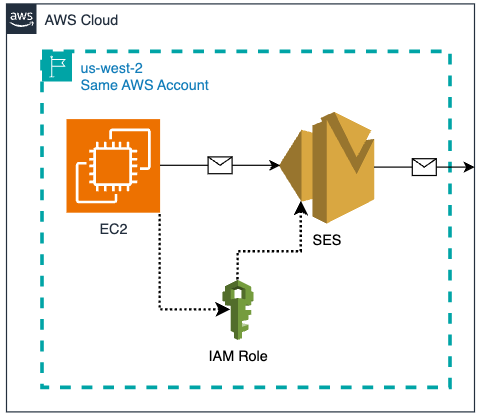
EC2 & SES in the same AWS Account
Prerequisites – single AWS account for EC2 and SES
- A single AWS account in a region that supports SES
- Verified domain or email identity in Amazon SES.
- Make note of a verified sending email address here: ___________
- EC2 instance (Linux) in running state
- If you don’t have a EC2 instance create one (Linux)
- Administrative Access to Amazon SES, IAM and EC2 consoles.
- Access to a recipient email address to receive test emails from the python script.
- Make note of a SES verified recipient email address to send test emails here: ___________
Step 1 – Create IAM Role for EC2 instance with SES Permissions
To start, create an IAM role that grants the necessary permissions to send emails using Amazon SES by following these steps:
- Sign in to the AWS Management Console and open the IAM console.
- In the navigation pane, choose “Roles,” and then choose “Create role.”
- Choose the trusted entity type as “AWS service” and select “EC2” as the service that will use this role, then click ‘Next’

- Search for and select the “AmazonSESFullAccess” policy from the list (or create a custom policy with the necessary SES permissions), then click ‘Next’.


- Provide a name for your role (e.g.,
EC2_SES_SendEmail_Role). - Click “Create role“.
Step 2 – Attach the IAM Role to EC2 instance.
Next, attach the IAM role to your EC2 instance:
- Open the EC2 Management Console.
- In the navigation pane, choose “Instances,” and select the running EC2 instance to which you want to attach the IAM role.
- With the instance selected, choose “Actions,” then “Security,” and “Modify IAM role.“

- Choose the IAM role you created (
EC2_SES_SendEmail_Role) from the drop-down menu and click “Update IAM role.”


Step 3 – Create a sample python script that sends emails from the EC2 instance with the attached role.
- Now that your EC2 instance is configured with the necessary permissions, you can set up an example Python script to send emails via Amazon SES using the IAM Role. Here, we’re using the AWS SDK for Python (Boto3), a powerful and versatile library to interact with the SES API endpoint. Before running the example script, ensure that Python, pip (the package installer for Python), and the Boto3 library are installed on your EC2 instance:
-
- Run the ‘
python3 –version‘ command to check if Python is installed on your EC2 instance. If Python is installed, the version will be displayed, otherwise you’ll receive a ‘command not found’ or similar error message.- If python is not installed, run the command ‘
sudo yum install python3 -y‘
- If python is not installed, run the command ‘
- Run the ‘
pip3 --version‘ command to check if pip is installed on your EC2 instance. If pip3 is installed, is installed, the version will be displayed, otherwise you’ll receive a ‘command not found’ or similar error message.- If pip3 is not installed, run the command ‘
sudo yum install python3-pip‘
- If pip3 is not installed, run the command ‘
- Install the Boto3 Library which allows Python scripts to interact with AWS services including SES. Run the command ‘
pip3 install boto3‘ to install (or update) Boto3 using pip.
- Run the ‘
- Save the code below as a Python file named ‘
sesemail.py‘ on your EC2 instance. - Edit
'sesemail.py‘ and replace the placeholder values of SENDER, RECIPIENT, and AWS_REGION with your values (see prerequisites). Do not modify any “” marks.
[copy]
import boto3
from botocore.exceptions import ClientError

SENDER = "[email protected]"
RECIPIENT = "[email protected]"
#CONFIGURATION_SET = "ConfigSet"
AWS_REGION = "us-west-2"
SUBJECT = "Amazon SES Test Email (SDK for Python) using IAM Role"
BODY_TEXT = ("Amazon SES Test (Python)\r\n"
             "This email was sent with Amazon SES using the "
             "AWS SDK for Python (Boto)."
            )

BODY_HTML = """<html>
<head></head>
<body>
  <h1>Amazon SES Test (SDK for Python) using IAM Role</h1>
  <p>This email was sent with
    <a href='https://aws.amazon.com/ses/'>Amazon SES</a> using the
    <a href='https://aws.amazon.com/sdk-for-python/'>
      AWS SDK for Python (Boto)</a>.</p>
</body>
</html>
            """

CHARSET = "UTF-8"

client = boto3.client('ses',region_name=AWS_REGION)

try:
    response = client.send_email(
        Destination={
            'ToAddresses': [
                RECIPIENT,
            ],
        },
        Message={
            'Body': {
                'Html': {
                    'Charset': CHARSET,
                    'Data': BODY_HTML,
                },
                'Text': {
                    'Charset': CHARSET,
                    'Data': BODY_TEXT,
                },
            },
            'Subject': {
                'Charset': CHARSET,
                'Data': SUBJECT,
            },
        },
        Source=SENDER,
    )
except ClientError as e:
    print(e.response['Error']['Message'])
else:
    print("Email sent! Message ID:"),
    print(response['MessageId'])
- Run ‘
python3 sesmail.py‘ to execute the Python script. - When ‘
python3 sesmail.py‘ runs successfully, an email is sent to theRECIPIENT(check the inbox), and the command line will display the sent Message ID.

Option 2 – SES and EC2 are in different AWS accounts
In some scenarios, your EC2 instance might operate in a different AWS account than SES. Let’s call the EC2 AWS account “A” and SES AWS account “B”. Because the AWS resources in account A don’t automatically have permission to access AWS resources account B, we need some way to allow the code on EC2 to assume a role in the SES Account using the AWS Security Token Service (STS). This involves a method that generates temporary credentials that include an access key, secret access key, and session token, which are only valid for a limited time.

EC2 & SES in different AWS Accounts
In the steps below, you’ll configure and attach an IAM role to the EC2 instance in account “A” such that it can run an example Python script. This Python script can use the permissions provided by the attached IAM role to send emails via SES in account “B”. This approach leverages cross-account access and simplifies sending email from the EC2 in account A via SES in account B. As with Option 1, no explicit credential management is required in the code running on EC2, nor do you need to include a shared credentials file on the Ec2 instance.
Prerequisites – different AWS accounts for EC2 and SES (use cross-account access)
- An AWS account “A” with:
- EC2 instance (Linux) in running state. (If you don’t have a EC2 instance, create one using Amazon Linux)
- Administrative Access to Amazon IAM and EC2 consoles.
- Make note of your “A” AWS account ID here: ________________
- An AWS account “B” with:
- Verified domain (or email identity for testing only) in Amazon SES
- Make note of a verified sending email address here: ___________
- Administrative Access to Amazon SES and IAM consoles.
- Make note of your “B” AWS account ID here: ________________
- In the steps below, you will create a “
SES_Role_for_account_A” role.- Make note of the ARN of the “
SES_Role_for_account_A” role here: ___________
- Make note of the ARN of the “
- Access to a recipient email address to receive test emails from the python script.
- Make note of a SES verified recipient email address to send test emails here: ___________
- Verified domain (or email identity for testing only) in Amazon SES
Step 1 – Create IAM Role in the SES “B” account
- Sign in to the SES “B” account via the AWS Management Console and open the IAM console.
- In the navigation pane, choose “Roles,” and then choose “Create role“.
- Choose the trusted entity type as ‘AWS account’ and select ‘Another AWS account’.

- Add the AWS account ID where your EC2 instance resides (AWS account “A” in the prerequisites) and click ‘Next’.
- Search for and select the “
AmazonSESFullAccess” policy or create a custom policy with the necessary SES permissions, then click ‘Next’. - Provide a name for your role (e.g., ‘
SES_Role_for_account_A').
- Click “Create role“.
- Copy the arn for the new
SES_Role_for_account_A(you’ll need the arn in the next step).


Step 2 – Create a IAM policy in the EC2 “A” account that allows this role to assume the SES_Role_for_account_A role you just created in the SES “B” Account.
- Sign in to the EC2 “A” account via the AWS Management Console and open the IAM console.
- In the navigation pane, choose “Policies,” and then choose “Create Policy”.
- Choose the service as ‘EC2’ and select policy editor as JSON.
- Copy the policy below, and in the policy editor, replace the Resource with the arn of the
SES_Role_for_account_Ain the SES account “B” (you created this in step 1).
[copy, paste into policy editor & replace the arn with SES_Role_for_account_A]
{
"Version": "2012-10-17",
"Statement": [
{
"Effect": "Allow",
"Action": "sts:AssumeRole",
"Resource": "arn:aws:iam::<SES_Account_ID>:role/<Role_Name>"
}
]
}
- Click ‘Next’ and provide a name for your role (e.g.,
EC2_Policy_for_account_B). - Click ‘Create the Policy’

Step 3 – Create an IAM role in the EC2 “A” account, and attach the previously created IAM policy (EC2_Policy_for_account_B) to it.
- In the EC2 “A” account IAM console navigation pane, choose “Roles,” and then choose “Create role.”
- Choose the trusted entity type as “AWS service” and select “EC2” as the service, then click ‘Next’.

- Filter by type “customer managed”, search for (
EC2_Policy_for_account_B) and select that policy and ‘Next’ (note – if you are using AWS Session Manger to remotely connect to your EC2 instance, you may need to add the “AmazonSSMManagedInstanceCore” policy to the role).

- Provide a name for your role (e.g.,
EC2_SES_in_account_B_role). - Click “Create role“.

Step 4 – Attach the IAM Role (EC2_SES_in_account_B_role) to the EC2 instance in AWS account “A”.
- Open the EC2 Management Console in AWS account “A”
- In the navigation pane, choose “Instances,” and select the instance to which you want to attach the
EC2_SES_in_account_B_roleIAM role. - With the instance selected, choose “Actions,” then “Security,” and “Modify IAM role.”

- Choose the IAM role you created (
EC2_SES_in_account_B_role) from the drop-down menu. - Click “Update IAM role.”

Step 5 – Create a sample python script that sends emails via SES in AWS account “B” from the EC2 instance in AWS account “A” using the EC2 attached role.
- Now that your EC2 instance is configured with the necessary permissions, you can set up an example Python script to send emails via Amazon SES in AWS Account “B” using the IAM Role on EC2 in AWS Account “A”. We’ll use the AWS SDK for Python (Boto3), a powerful and versatile library to interact with the SES API endpoint. Before running the example script, ensure that Python, pip (the package installer for Python), and the Boto3 library are installed on your EC2 instance:
-
- Run the ‘
python3 –version‘ command to check if Python is installed on your EC2 instance. If Python is installed, the version will be displayed, otherwise you’ll receive a ‘command not found’ or similar error message.- If python is not installed, run the command ‘
sudo yum install python3 -y‘
- If python is not installed, run the command ‘
- Run the ‘
pip3 --version‘ command to check if pip is installed on your EC2 instance. If pip3 is installed, is installed, the version will be displayed, otherwise you’ll receive a ‘command not found’ or similar error message.- If pip3 is not installed, run the command ‘
sudo yum install python3-pip‘
- If pip3 is not installed, run the command ‘
- Install the Boto3 Library which allows Python scripts to interact with AWS services including SES. Run the command ‘
pip3 install boto3‘ to install (or update) Boto3 using pip.
- Run the ‘
- Save the code below as a Python file named
cross_sesemail.pyon your EC2 instance.
4b. Editcross_sesemail.pyand replace the placeholder values of theROLE_ARNwith ARN of theSES_Role_for_account_Ayou created in SES Account “B” (see prerequisites), SENDER, RECIPIENT, and AWS_REGION with your values (see prerequisites). Do not modify any “” marks.
[copy, edit & replace the ROLE_ARN]
import boto3
from botocore.exceptions import ClientError

# Replace with your role ARN in SES Account
ROLE_ARN = "arn:aws:iam::<Account_ID>:role/<Role_Name>"

# Create an STS client
sts_client = boto3.client('sts')

# Assume the role
assumed_role = sts_client.assume_role(
    RoleArn=ROLE_ARN,
    RoleSessionName="SESSession"
)

# Extract the temporary credentials
credentials = assumed_role['Credentials']

# Create an SES client using the assumed role credentials
ses_client = boto3.client(
    'ses',
    region_name='us-west-2',
    aws_access_key_id=credentials['AccessKeyId'],
    aws_secret_access_key=credentials['SecretAccessKey'],
    aws_session_token=credentials['SessionToken']
)

# Email parameters
SENDER = "[email protected]"
RECIPIENT = "[email protected]"
SUBJECT = "Amazon SES Test (SDK for Python) using cross-account IAM Role"
BODY_TEXT = ("Amazon SES Test (Python)\r\n"
             "This email was sent with Amazon SES using the "
             "AWS SDK for Python (Boto) using IAM Role."
            )
BODY_HTML = """<html>
<head></head>
<body>
  <h1>Amazon SES Test (SDK for Python) using IAM Role</h1>
  <p>This email was sent with
    <a href='https://aws.amazon.com/ses/'>Amazon SES</a> using the
    <a href='https://aws.amazon.com/sdk-for-python/'>
      AWS SDK for Python (Boto)</a> using IAM Role.</p>
</body>
</html>
            """
CHARSET = "UTF-8"

# Send the email
try:
    response = ses_client.send_email(
        Destination={
            'ToAddresses': [RECIPIENT],
        },
        Message={
            'Body': {
                'Html': {
                    'Charset': CHARSET,
                    'Data': BODY_HTML,
                },
                'Text': {
                    'Charset': CHARSET,
                    'Data': BODY_TEXT,
                },
            },
            'Subject': {
                'Charset': CHARSET,
                'Data': SUBJECT,
            },
        },
        Source=SENDER,
    )
except ClientError as e:
    print(e.response['Error']['Message'])
else:
    print("Email sent! Message ID:"),
    print(response['MessageId'])
- Run the python script
python3 cross_sesemail.py. When the email is sent successfully, the command line output will display the message ID of the sent email, and the recipient will receive an email.

Conclusion:
By implementing IAM roles for EC2 instances with SES permissions, you can securely send emails via the SES APIs from your web applications without the need to store or manage IAM credentials within the EC2 instance or application code. This approach not only enhances security by eliminating the risk of credential exposure, but also simplifies the management of credentials. With the step-by-step guide provided in this blog post, you can easily configure IAM roles for your EC2 instances and start sending emails via the Amazon SES API in a secure and efficient manner, regardless of whether your EC2 and SES resources reside in the same or different AWS accounts.
Next Steps:
- Sign up for the AWS Free Tier and try out Amazon SES with IAM roles for EC2 instances as demonstrated in this blog post.
- Consult the AWS documentation on IAM Roles for Amazon EC2 and Amazon SES for more detailed instructions and best practices.
- Join the AWS Community Forums to ask questions, share experiences, and learn from other AWS users who have implemented similar solutions for secure email sending from their web applications.
About the Authors

Manas Murali M
Manas Murali M is a Cloud Support Engineer II at AWS and subject matter expert in Amazon Simple Email Service (SES) and Amazon CloudFront. With over 5 years of experience in the IT industry, he is passionate about resolving technical issues for customers. In his free time, he enjoys spending time with friends, traveling, and exploring emerging technologies.

Zip
Zip is an Amazon Pinpoint and Amazon Simple Email Service Sr. Specialist Solutions Architect at AWS. Outside of work he enjoys time with his family, cooking, mountain biking and plogging.