Nokia Shows Off Liquid Cooled O-RAN Concept at OCP Regional Summit 2023 Prague

Post Syndicated from Cliff Robinson original https://www.servethehome.com/nokia-shows-off-liquid-cooled-o-ran-concept-at-ocp-regional-summit-2023-prague-intel-ek/

At OCP Regional Summit 2023 in Prague, Nokia showed part of its liquid-cooled O-RAN concept along with the new Nokia Cloud RAN SmartNIC

The post Nokia Shows Off Liquid Cooled O-RAN Concept at OCP Regional Summit 2023 Prague appeared first on ServeTheHome.

Планът за възстановяване и устойчивост не е торба с пари

Post Syndicated from Bozho original https://blog.bozho.net/blog/4088

Тъй като често говорим за плана за възстановяване и устойчивост твърде общо, се създават грешни интерпретации. Затова ще вляза в конкретика.

Планът за възстановяване и устойчивост не е една торба пари, която България ще получи, ако приемем едни закони. Планът е дълъг списък от реформи, които включват изменения на закони и наредби, но далеч не само – инвестиции, действия на изпълнителната власт, процедури, възлагания, постигане на конкретни резултати. Ще дам два примера:

Първият е изграждането на високоскоростна интернет свързаност до всички 265 общински центъра и отвъд тях, за покриване ма отдалечени райони. За това не се изискват изменения на закони. Но се изисква много работа – планиране, комплексно разрешително от МРРБ (защото трябва да се копае за полагане на оптични кабели), нотификация на държавна помощ, провеждане на процедури за избор на изпълнители. В крайна сметка ще получим парите, ако постигнем целта – брой жители с високоскоростен интернет.

Вторият е пълна дигитализация на инвестиционното проектиране и разрешителните за строеж. В момента без печати по огромми листи с проекти, и бюрокрация на всяка стъпка, не можеш да построиш нито бизнес сграда, нито жилищна, нито дори пристройка. Тази мярка включва изграждане на централизирана система (подготовката за нея започма по наше време) и пълна промяна на процесите. Изисква и изменения в Закона за устройство на територия, за да бъдат узаконени новите, оптимизирани процеси.

Законите, които са необходими, отключват междинни плащания от Европейската комисия към България, за да може да ги инвестираме в планираните проекти. Но далеч не изчерпват реформите. Ако за една реформа беше достатъчно публикуването на нещо в Държавен вестник, щяхме да се барикадираме в печатницата на Държавен вестник и за две седмици да „реформираме“ всичко.

Планът за възстановяване и устойчивост е квази-управленска програма и изисква доста усилия, да бъде изпълнен. А когато бъде, плюсът няма да е, че едни пари са усвоени (това сме го виждали), а че ще има измерим резултат за хората.

Материалът Планът за възстановяване и устойчивост не е торба с пари е публикуван за пръв път на БЛОГодаря.

Седмицата (17–22 април)

Post Syndicated from Тоест original https://www.toest.bg/sedmitsata-17-22-april/

Седмицата (17–22 април)

Изминаващата „Светла“ седмица беше една от най-силните за българската литература през новото хилядолетие. Романът на Георги Господинов „Времеубежище“ в английския си превод – дело на Анджела Родел – премина от дългия в краткия списък на една от най-престижните световни литературни награди – The International Booker Prize, известна у нас като „Международен Букър“. Отличието се връчва всяка година за книга с художествена проза, написана на език, различен от английски, но преведена и издадена във Великобритания или Ирландия. (Отговор в цифри на въпроса защо номинацията за тази награда означава толкова много не само за писателите, но и в цялост за литературата, превода, книгоиздаването и читателството, ни дава краткият, но ясен Facebook пост на Гергана Димитрова.)

Разбира се, новината за номинацията не беше посрещната еднозначно у нас. По социалните тръби на общия ни неремонтиран дом моментално се разнесе дежурното недоволно хъхрене на задръстен водопровод, неизменно съпътстващо почти всеки успех на българин на чужда територия. Това отдавна не ни учудва – нито нас, нито вероятно самия Георги Господинов, свикнал, надяваме се, с нашенските емоционални меандри, в които щедро се разливат „радостта“ и „подкрепата“ на ближния.

Във всеки случай ние, както и, за щастие, повечето четящи в България му стискаме палци и му пожелаваме успех на 23 май, когато наградата ще бъде връчена на церемония в Лондон.

И след този неочакван свеж полъх се връщаме обратно в сумрачните зони на последните седмици, първо изборната и следизборната, после Страстната, а сега и „Светлата“, и се питаме има ли шанс мътните „водопроводни“ енергии, които тровят обществения ни разговор, все пак някога да се трансформират в смислен и правилно насочен гняв. Който да породи масово действие. Което да доведе до видим резултат. Например до значително повишаване на избирателната активност! А това автоматично би отнело от силата на всички успешни и неуспешни опити вотът да се контролира, маскира, фалшифицира, огъва, изкривява и пр. Разказ от първо лице за перипетиите на вота четете в „По изборите в Ихтиман“ от Александър Нуцов. Намигването към Алеко Константинов не е случайно, а политическият контекст изглежда не по-малко зловещ от описания в литературната ни класика.

Защо вотът на българите в чужбина е такъв, какъвто е, защо „Възраждане“ продължава да получава значителна подкрепа зад граница – тези и други угрижващи въпроси занимават Яна Хашъмова в „Патриотична или националистична е българската диаспора“. Едно от тревожните наблюдения е свързано с обучението, лансирано в българските неделни училища, където – според изследването на Хашъмова – патриотизмът традиционно е отстъпил място на тежки националистически клишета.

„Светлата“ седмица в „Тоест“ продължава да гази из разкаляния терен на парламентарните избори и на преките им последствия, а именно откриването на 49-тото Народно събрание. Статията на Светла Енчева „Страстите Христови на българската политика“ особено живописно разказва за лицемерната боголюбива реторика на президента, новоизбраните депутати, прокурора Гешев и прочее силни на деня в нашата иначе светска държава. Отделни епизоди от парламентарното православно театро, описано от Енчева, направо плачат да заживеят нов живот на tableaux vivants, като например великденският трапезен портрет на Корнелия Нинова с яйца, козунаци и живо зайче в шепа.

„Правителство. Хубаво е, но не е готово“ според Емилия Милчева, която анализира неловкото политическо танго между двете най-големи сили в парламента – ГЕРБ–СДС и ПП–ДБ. Ако преговорите за коалиционно правителство проработят в името на временна политическа стабилност, няколко важни и неотложни закона и печелене на дивиденти в навечерието на местните избори, чакат ни месеци на компромиси, но и на непрестанни настъпвания и подритвания в двойката (пардон, четворката) на танцуващите. А Борисов уж се оттегля със съзнанието, че „историческото му време е свършило“. Какво стои зад тази великденска саможертвена поза и кога (и дали) агнето ще захвърли маскарадния си костюм, предстои да видим.

И за да не ви отровим с политика, ето новата порция научни новини, поднесена ни от Михаил Ангелов, която ще ви изненада с някои от методиките на т.нар. прецизно земеделие. Една от тях буквално чува нуждите на растенията и регистрира нивата им на стрес много преди причинените щети да станат видими. (Мисля си колко хубаво би било подобни прецизни методики да се разработят и прилагат и в други сфери, например в образованието, където нивата на стрес на деца, родители и учители са отвъд измеримото, а нанесените щети изглеждат необратими.) Освен с тайния живот на растенията, научните новини тази седмица се занимават с човешки ембриони и (бактерио)фаги. Апропо последните може да се окажат ключови в бъдещи форми на лечение, заобикалящи антибиотиците.

Тази седмица Екатерина Петрова ни праща на езиково пътешествие из Магреба – „от дума на дума“ и от баир на баир из заснежения Атлас и преплетените лингвистични и митологически пътеки, водещи към името му. Твърдението в заглавието на есето – „Светът е голям и Атлас дебне отвсякъде“, – сами ще се убедите, не е ефектна метафора, а самата истина.

В рубриката „На второ четене“ Стефан Иванов насочва вниманието ни към книгата (новела и шест разказа) на полския писател Рафал Вояшински „Оланда“ (прев. Лъчезар Селяшки). Четох рецензията навръх Великден и това вероятно усили въздействието ѝ, както и убедеността ми да си набавя това четиво в най-скоро време. За да убедя и вас, ще завърша обзора на „Светлата“ седмица именно с финала на текста – всъщност цитат от „Оланда“. Но и въпрос, който комай по-често си струва да си задаваме:

Трябва да помним, моя златничка кокошчице, че Исус не е вдигнал къща, не е ходел в шест часа сутринта на работа, не е спестявал, не е заемал висока длъжност, не е имал обществено положение. Кой би желал такъв зет? Тогава какво правим ние? На кого подражаваме?

Та да повторим: какво правим ние? На кого подражаваме?

The Python Software Foundation on European cybersecurity

Post Syndicated from original https://lwn.net/Articles/929855/

This ten days old but hopefully better late than never: the Python Software
Foundation has put out an
article
describing how the proposed European “cyber resilience act”
threatens the free-software community.

Under the current language, the PSF could potentially be
financially liable for any product that includes Python code, while
never having received any monetary gain from any of these
products. The risk of huge potential costs would make it impossible
in practice for us to continue to provide Python and PyPI to the
European public.

The Internet Systems Consortium has also recently put out
a statement
on the proposal.

Hacking Pickleball

Post Syndicated from Bruce Schneier original https://www.schneier.com/blog/archives/2023/04/hacking-pickleball.html

My latest book, A Hacker’s Mind, has a lot of sports stories. Sports are filled with hacks, as players look for every possible advantage that doesn’t explicitly break the rules. Here’s an example from pickleball, which nicely explains the dilemma between hacking as a subversion and hacking as innovation:

Some might consider these actions cheating, while the acting player would argue that there was no rule that said the action couldn’t be performed. So, how do we address these situations, and close those loopholes? We make new rules that specifically address the loophole action. And the rules book gets longer, and the cycle continues with new loopholes identified, and new rules to prohibit that particular action in the future.

Alternatively, sometimes an action taken as a result of an identified loophole which is not deemed as harmful to the integrity of the game or sportsmanship, becomes part of the game. Ernie Perry found a loophole, and his shot, appropriately named the “Ernie shot,” became part of the game. He realized that by jumping completely over the corner of the NVZ, without breaking any of the NVZ rules, he could volley the ball, making contact closer to the net, usually surprising the opponent, and often winning the rally with an un-returnable shot. He found a loophole, and in this case, it became a very popular and exciting shot to execute and to watch!

I don’t understand pickleball at all, so that explanation doesn’t make a lot of sense to me. (I watched a video explaining the shot; that helped somewhat.) But it looks like an excellent example.

The blog post also links to a 2010 paper that I wish I’d known about when I was writing my book: “Loophole ethics in sports,” by Øyvind Kvalnes and Liv Birgitte Hemmestad:

Abstract: Ethical challenges in sports occur when the practitioners are caught between the will to win and the overall task of staying within the realm of acceptable values and virtues. One way to prepare for these challenges is to formulate comprehensive and specific rules of acceptable conduct. In this paper we will draw attention to one serious problem with such a rule-based approach. It may inadvertently encourage what we will call loophole ethics, an attitude where every action that is not explicitly defined as wrong, will be seen as a viable option. Detailed codes of conduct leave little room for personal judgement, and instead promote a loophole mentality. We argue that loophole ethics can be avoided by operating with only a limited set of general principles, thus leaving more space for personal judgement and wisdom.

Metasploit Weekly Wrap-Up

Post Syndicated from Dean Welch original https://blog.rapid7.com/2023/04/21/metasploit-weekly-wrap-up-7/

VMware Workspace ONE Access exploit chain

Metasploit Weekly Wrap-Up

A new module contributed by jheysel-r7 exploits two vulnerabilities in VMware Workspace ONE Access to attain Remote Code Execution as the horizon user.
First being CVE-2022-22956, which is an authentication bypass and the second being a JDBC injection in the form of CVE-2022-22957 ultimately granting us RCE.
The module will seamlessly chain these two vulnerabilities together, simplifying the whole process.

More speeeeeeed!

Our own adfoster-r7 has added caching to Ruby’s loadpath logic with the help of bootsnap to improve the bootup performance of Metasploit.
On the hardware we tested we were getting an average of 2-3 seconds reduced time to boot which is a really nice quality of life improvement.

New module content (3)

VMware Workspace ONE Access VMSA-2022-0011 exploit chain

Authors: jheysel-r7 and mr_me
Type: Exploit
Pull request: #17854 contributed by jheysel-r7
AttackerKB reference: CVE-2022-22957, CVE-2022-22956

Description: This PR adds an exploit chaining CVE-2022-22956 and CVE-2022-22957 to gain code execution as the horizon user on VMWare Workspace One Access. The first vulnerability, CVE-2022-22956, is an authentication bypass in OAuth2TokenResourceController ACS which allows a remote, unauthenticated attacker to bypass the authentication mechanism and execute any operation. The second vulnerability, CVE-2022-22957, is a JDBC injection RCE specifically in the DBConnectionCheckController class’s dbCheck method which allows an attacker to deserialize arbitrary Java objects which can allow remote code execution.

VMware Workspace ONE Access CVE-2022-22960

Authors: jheysel-r7 and mr_me
Type: Exploit
Pull request: #17874 contributed by jheysel-r7
AttackerKB reference: CVE-2022-22960

Description: This PR adds an exploit module targeting CVE-2022-22960, which allows the user to overwrite the permissions of the certproxyService.sh script so that it can be modified by the horizon user. This allows a local attacker with the uid 1001 to escalate their privileges to root access.

SPIP form PHP Injection

Authors: Julien Voisin, Laluka, and coiffeur
Type: Exploit
Pull request: #17711 contributed by jvoisin
AttackerKB reference: CVE-2023-27372

Description: This module exploits a PHP code injection in SPIP. The vulnerability exists in the oubli parameter and allows an unauthenticated user to execute arbitrary commands with web user privileges.

Enhancements and features (4)

  • #17809 from adfoster-r7 – Adds caching to Ruby’s load path logic to improve the bootup performance of msfconsole on startup, averaging 2-3 seconds faster boot time on the tested hardware.
  • #17820 from manishkumarr1017 – This PR fixes the Nagios XI authenticated modules to work with even when autocheck is disabled as well as refactors reusable code.
  • #17884 from adfoster-r7 – Adds database migration validation before attempting to run the test suite. Users who have not migrated their local test database will be notified of the steps required to resolve this issue.
  • #17892 from h00die – Adds additional documentation for the exploit/windows/misc/unified_remote_rce module.

Bugs fixed (7)

  • #17873 from zgoldman-r7 – Updates the scanner/ftp/ftp_login module to ensure that opened connections are correctly closed after attempting to log in. Additionally, this fixes a bug where the FTPTimeout option was being ignored after being set by a user.
  • #17882 from zeroSteiner – A bug has been fixed in the getsystem command where getsystem techniques 5 and 6 were crashing sessions on Windows 11 22H2. Additionally, Python Windows Meterpreter payloads have been updated to include memory lock/unlock abilities.
  • #17883 from adfoster-r7 – Fixes a crash when running the modules/auxiliary/scanner/lotus/lotus_domino_hashes module and the database is not active.
  • #17888 from bcoles – Fixes a crash when running the help setg command in msfconsole.
  • #17893 from h00die – Updates the documentation for the modules/exploit/linux/local/asan_suid_executable_priv_esc module to be in the correct location.
  • #17907 from jheysel-r7 – Fixes a crash when running the exploits/linux/http/vmware_workspace_one_access_vmsa_2022_0011_chain.rb module.
  • #17909 from adfoster-r7 – Fixes a Windows7 Meterpreter crash when in debug mode.

Documentation

You can find the latest Metasploit documentation on our docsite at docs.metasploit.com.

Get it

As always, you can update to the latest Metasploit Framework with msfupdate
and you can get more details on the changes since the last blog post from
GitHub:

If you are a git user, you can clone the Metasploit Framework repo (master branch) for the latest.
To install fresh without using git, you can use the open-source-only Nightly Installers or the
binary installers (which also include the commercial edition).

Prioritizing sustainable cloud architectures: a how-to round up

Post Syndicated from Kate Brierley original https://aws.amazon.com/blogs/architecture/prioritizing-sustainable-cloud-architectures-a-how-to-round-up/

With Earth Month upon us and in celebration of Earth Day tomorrow, 4/22, sustainability is top-of-mind for individuals and organizations around the world. But it doesn’t take a certain time of year to act toward the urgent need to innovate and adopt smarter, more efficient solutions!

Sustainable cloud architectures are fundamental to sustainable workloads, and we’re spotlighting content that helps build solutions to meet and advance sustainability goals. Here’s our recent post round up to make sustainable architectures meaningful and actionable for customers of all kinds:

Architecting for Sustainability at AWS re:Invent 2022

This post spotlights the AWS re:Invent 2022 sustainability track and key conversations around sustainability of, in, and through the cloud. It covers key uses cases and breakout sessions, including AWS customers demonstrating best practices from the AWS Well-Architected Framework Sustainability Pillar. Hear about these and more:

  • The Amazon Prime Video experience using the AWS sustainability improvement process for Thursday Night Football streaming
  • Pinterest’s sustainability journey with AWS from Pinterest Chief Architect David Chaiken

David Chaiken, Chief Architect at Pinterest, describes Pinterest’s sustainability journey with AWS

Let’s Architect! Architecting for Sustainability

The most recent sustainability focused Let’s Architect! series post shares practical tips for making cloud applications more sustainable. It also covers the AWS customer carbon footprint tool to help organizations monitor, analyze, and reduce their AWS footprint, and details how Amazon Prime Video used these tools to establish baselines and drive significant efficiencies across their AWS usage.

Prime Video case study for understanding how the architecture can be designed for sustainability

Optimizing your Modern Data AWS Infrastructure for Sustainability Series

This two-part blog series explores more specific topics relating to the Sustainability Pillar of the AWS Well-Architected Framework as connected to the Modern Data Architecture on AWS. What’s covered includes:

  1. Integrating a data lake and purpose-built data services to efficiently build analytics workloads to provide speed and agility at scale in Part 1 – Data Ingestion and Data Lake
  2. Guidance and best practices to optimize the components within the unified data governance, data movement, and purpose-built analytics pillars in Part 2 – Unified Data Governance, Data Movement, and Purpose-built Analytics

Modern Data Analytics Reference Architecture on AWS

How to Select a Region for your Workload Based on Sustainability Goals

Did you know workload Region selection significantly affects KPIs including performance, cost, and carbon footprint? For example, when an AWS Region is chosen based on the market-based method, emissions are calculated using the electricity that business purchases. Contracting and purchasing electricity produced by renewable energy sources like solar and wind are more sustainable. Region selection is is another part of the Well-Architected Framework Sustainability Pillar, and this blog post covers key considerations for choosing AWS Regions per workload.

Carbon intensity of electricity for South Central Sweden

Check back soon for more earth-friendly advice from our experts!

Protect your Amazon Cognito user pool with AWS WAF

Post Syndicated from Maitreya Ranganath original https://aws.amazon.com/blogs/security/protect-your-amazon-cognito-user-pool-with-aws-waf/

Many of our customers use Amazon Cognito user pools to add authentication, authorization, and user management capabilities to their web and mobile applications. You can enable the built-in advanced security in Amazon Cognito to detect and block the use of credentials that have been compromised elsewhere, and to detect unusual sign-in activity and then prompt users for additional verification or block sign-ins. Additionally, you can associate an AWS WAF web access control list (web ACL) with your user pool to allow or block requests to Amazon Cognito user pools, based on security rules.

In this post, we’ll show how you can use AWS WAF with Amazon Cognito user pools and provide a sample set of rate-based rules and advanced AWS WAF rule groups. We’ll also show you how to test and tune the rules to help protect your user pools from common threats.

Rate-based rules for Amazon Cognito user pool endpoints

The following are endpoints exposed publicly by an Amazon Cognito user pool that you can protect with AWS WAF:

  • Hosted UI — These endpoints are listed in the OIDC and hosted UI API reference. Cognito creates these endpoints when you assign a domain to your user pool. Your users will interact with these endpoints when they use the Hosted UI web interface directly, or when your application calls Cognito OAuth endpoints such as Authorize or Token.
  • Public API operations — These generate a request to Cognito API actions that are either unauthenticated or authenticated with a session string or access token, but not with AWS credentials.

A good way to protect these endpoints is to deploy rate-based AWS WAF rules. These rules will detect and block requests with high rates that could indicate an attempt to exceed your Amazon Cognito API request rate quotas and that could subsequently impact requests from legitimate users.

When you apply rate limits, it helps to group Amazon Cognito API actions into four action categories. You can set specific rate limits per action category giving you traffic visibility for each category.

  • User Creation — This category includes operations that create new users in Cognito. Setting a rate limit for this category provides visibility for traffic of these operations and threats such as fake users being created in Cognito, which drives up your Monthly Active User (MAU) costs for Cognito.
  • Sign-in — This category includes operations to initiate a sign-in operation. Setting a rate limit for this category can provide visibility into the abuse of these operations. This could indicate high frequency, automated attempts to guess user credentials, sometimes referred to as credential stuffing.
  • Account Recovery — This category includes operations to recover accounts, including “forgot password” flows. Setting a rate limit for this category can provide visibility into the abuse of these operations, malicious activity can include: sending fake reset attempts, which might result in emails and SMS messages being sent to users.
  • Default — This is a catch-all rate limit that applies to an operation that is not in one of the prior categories. Setting a default rate limit can provide visibility and mitigation from request flooding attacks.

Table 1 below shows selected Hosted UI endpoint paths (the equivalent of individual API actions) and the recommended rate-based rule limit category for each.

Table 1: Amazon Cognito Hosted UI URL paths mapped to action categories

Hosted UI URL path Authentication method Action category
/signup Unauthenticated User Creation
/confirmUser Confirmation code User Creation
/resendcode Unauthenticated User Creation
/login Unauthenticated Sign-in
/oauth2/authorize Unauthenticated Sign-in
/forgotPassword Unauthenticated Account Recovery
/confirmForgotPassword Confirmation code Account Recovery
/logout Unauthenticated Default
/oauth2/revoke Refresh token Default
/oauth2/token Auth code, or refresh token, or client credentials Default
/oauth2/userInfo Access token Default
/oauth2/idpresponse Authorization code Default
/saml2/idpresponse SAML assertion Default

Table 2 below shows selected Cognito API actions and the recommended rate-based rule category for each.

Table 2: Selected Cognito API actions mapped to action categories

API action name Authentication method Action category
SignUp Unauthenticated User Creation
ConfirmSignUp Confirmation code User Creation
ResendConfirmationCode Unauthenticated User Creation
InitiateAuth Unauthenticated Sign-in
RespondToAuthChallenge Unauthenticated Sign-in
ForgotPassword Unauthenticated Account Recovery
ConfirmForgotPassword Confirmation code Account Recovery
AssociateSoftwareToken Access token or session Default
VerifySoftwareToken Access token or session Default

Additionally, the rate-based rules we provide in this post include the following:

  • Two IP sets that represent allow lists for IPv4 and IPv6. You can add IPs that represent your trusted source IP addresses to these IP sets so that other AWS WAF rules don’t apply to requests that originate from these IP addresses.
  • Two IP sets that represent deny lists for IPv4 and IPv6. Add IPs to these IP sets that you want to block in all cases, regardless of the result of other rules.
  • An AWS managed IP reputation rule group: The AWS managed IP reputation list rule group contains rules that are based on Amazon internal threat intelligence, to identify IP addresses typically associated with bots or other threats. You can limit requests that match rules in this rule group to a specific rate limit.

Deploy rate-based rules

You can deploy the rate-based rules described in the previous section by using the AWS CloudFormation template that we provide here.

To deploy rate-based rules using the template

  1. (Optional but recommended) If you want to enable AWS WAF logging and resources to analyze request rates, create an Amazon Simple Storage Service (Amazon S3) bucket in the same AWS Region as your Amazon Cognito user pool, with a bucket name starting with the prefix aws-waf-logs-. If you previously created an S3 bucket for AWS WAF logs, you can choose to reuse it, or you can create a new bucket to store AWS WAF logs for Amazon Cognito.
  2. Choose the following Launch Stack button to launch a CloudFormation stack in your account.

    Launch Stack

    Note: The stack will launch in the N. Virginia (us-east-1) Region. To deploy this solution into other AWS Regions, download the solution’s CloudFormation template and deploy it to the selected Region.

    This template creates the following resources in your AWS account:

    • A rule group for the rate-based rules, according to the limits shown in Tables 1 and 2.
    • Four IP sets for an allow list and deny list for IPv4 and IPv6 addresses.
    • A web ACL that includes the rule group that is created, IP set based rules, and the AWS managed IP reputation rule group.
    • (Optional) The template enables AWS WAF logging for the web ACL to an S3 bucket that you specify.
    • (Optional) The template creates resources to help you analyze AWS WAF logs in S3 to calculate peak request rates that you can use to set rate limits for the rate-based rules.
  3. Set the template parameters as needed. The following table shows the default values for the parameters. We recommend that you deploy the template with the default values and with TestMode set to Yes so that all rules are set to Count. This allows all requests but emits Amazon CloudWatch metrics and AWS WAF log events for each rule that matches. You can then follow the guidance in the next section to analyze the logs and tune the rate limits to match the traffic patterns to your user pool. When you are satisfied with the unique rate limits for each parameter, you can update the stack and set TestMode to No to start blocking requests that exceed the rate limits.

    The rate limits for AWS WAF rate-based rules are configured as the number of requests per 5-minute period per unique source IP. The value of the rate limit can be between 100 and 2,000,000,000 (2 billion).

    Table 3: Default values for template parameters

    Parameter name Description Default value Allowed values
    Request rate limits by action category
    UserCreationRateLimit Rate limit applied to User Creation actions 2000 100–2,000,000,000
    SignInRateLimit Rate limit applied to Sign-in actions 4000 100–2,000,000,000
    AccountRecoveryRateLimit Rate limit applied to Account Recovery actions 1000 100–2,000,000,000
    IPReputationRateLimit Rate limit applied to requests that match the AWS Managed IP reputation list 1000 100–2,000,000,000
    DefaultRateLimit Default rate limit applied to actions that are not in any of the prior categories 6000 100–2,000,000,000
    Test mode
    TestMode Set to Yes to test rules by overriding rule actions to Count. Set to No to apply the default actions for rules after you’ve tested the impact of these rules. Yes Yes or No
    AWS WAF logging and rate analysis
    EnableWAFLogsAndRateAnalysis Set to Yes to enable logging for the AWS WAF web ACL to an S3 bucket and create resources for request rate analysis. Set to No to disable AWS WAF logging and skip creating resources for rate analysis. If No, the rest of the parameter values in this section are ignored. If Yes, choose values for the rest of the parameters in this section. Yes Yes or No
    WAFLogsS3Bucket The name of an existing S3 bucket where AWS WAF logs are delivered. The bucket name must start with aws-waf-logs- and can end with any suffix.
    Only used if the parameter EnableWAFLogsAndRateAnalysis is set to Yes.
    None Name of an existing S3 bucket that starts with the prefix aws-waf-logs-
    DatabaseName The name of the AWS Glue database to create, which will contain the request rate analysis tables created by this template. (Important: The name cannot contain hyphens.)
    Only used if the parameter EnableWAFLogsAndRateAnalysis is set to Yes.
    rate_analysis
    WorkgroupName The name of the Amazon Athena workgroup to create for rate analysis.
    Only used if the parameter EnableWAFLogsAndRateAnalysis is set to Yes.
    rate_analysis
    WAFLogsTableName The name of the AWS Glue table for AWS WAF logs.
    Only used if the parameter EnableWAFLogsAndRateAnalysis is set to Yes.
    waf_logs
    WAFLogsProjectionStartDate The earliest date to analyze AWS WAF logs, in the format YYYY/MM/DD (example: 2023/02/28).
    Only used if the parameter EnableWAFLogsAndRateAnalysis is set to Yes.
    None Set this to the current date, in the format YYYY/MM/DD
  4. Wait for the CloudFormation template to be created successfully.
  5. Go to the AWS WAF console and choose the web ACL created by the template. It will have a name ending with CognitoWebACL.
  6. Choose the Associated AWS resources tab, and then choose Add AWS resource.
  7. For Resource type, choose Amazon Cognito user pool, and then select the Amazon Cognito user pools that you want to protect with this web ACL.
  8. Choose Add.

Now that your user pool is being protected by the rate-based rules in the web ACL you created, you can proceed to tune the rate-based rule limits by analyzing AWS WAF logs.

Tune AWS WAF rate-based rule limits

As described in the previous section, the rate-based rules give you the ability to set separate rate limit values for each category of Amazon Cognito API actions.

Although the CloudFormation template has default starting values for these rate limits, it is important that you tune these values to match the traffic patterns for your user pool. To begin the tuning process, deploy the template with default values for all parameters, including Yes for TestMode. This overrides all rule actions to Count, allowing all requests but emitting CloudWatch metrics and AWS WAF log events for each rule that matches.

After you collect AWS WAF logs for a period of time (this period can vary depending on your traffic, from a couple of hours to a couple of days), you can analyze them, as shown in the next section, to get peak request rates to tune the rate limits to match observed traffic patterns for your user pool.

Query AWS WAF logs to calculate peak request rates by request type

You can calculate peak request rates by analyzing information that is present in AWS WAF logs. One way to analyze these is to send AWS WAF logs to S3 and to analyze the logs by using SQL queries in Amazon Athena. If you deploy the template in this post with default values, it creates the resources you need to analyze AWS WAF logs in S3 to calculate peak requests rates by request type.

If you are instead ingesting AWS WAF logs into your security information and event management (SIEM) system or a different analytics environment, you can create equivalent queries by using the query language for your SIEM or analytics environment to get similar results.

To access and edit the queries built by the CloudFormation template for use

  1. Open the Athena console and switch to the Athena workgroup that was created by the template (the default name is rate_analysis).
  2. On the Saved queries tab, choose the query named Peak request rate per 5-minute period by source IP and request category. The following SQL query will be loaded into the edit panel.
    -- Gets the top 5 source IPs sending the most requests in a 5-minute period per request category
    ‐‐ NOTE: change the start and end timestamps to match the duration of interest
    SELECT request_category, from_unixtime(time_bin*60*5) AS date_time, client_ip, request_count FROM (
      SELECT *, row_number() OVER (PARTITION BY request_category ORDER BY request_count DESC, time_bin DESC) AS row_num FROM (
        SELECT
          CASE
            WHEN ip_reputation_labels.name IN (
              'awswaf:managed:aws:amazon-ip-list:AWSManagedIPReputationList',
              'awswaf:managed:aws:amazon-ip-list:AWSManagedReconnaissanceList',
              'awswaf:managed:aws:amazon-ip-list:AWSManagedIPDDoSList'
            ) THEN 'IPReputation'
            WHEN target.value IN (
              'AWSCognitoIdentityProviderService.InitiateAuth',
              'AWSCognitoIdentityProviderService.RespondToAuthChallenge'
            ) THEN 'SignIn'
            WHEN target.value IN (
              'AWSCognitoIdentityProviderService.ResendConfirmationCode',
              'AWSCognitoIdentityProviderService.SignUp',
              'AWSCognitoIdentityProviderService.ConfirmSignUp'
            ) THEN 'UserCreation'
            WHEN target.value IN (
              'AWSCognitoIdentityProviderService.ForgotPassword',
              'AWSCognitoIdentityProviderService.ConfirmForgotPassword'
            ) THEN 'AccountRecovery'
            WHEN httprequest.uri IN (
              '/login',
              '/oauth2/authorize'
            ) THEN 'SignIn'
            WHEN httprequest.uri IN (
              '/signup',
              '/confirmUser',
              '/resendcode'
            ) THEN 'UserCreation'
            WHEN  httprequest.uri IN (
              '/forgotPassword',
              '/confirmForgotPassword'
            ) THEN 'AccountRecovery'
            ELSE 'Default'
          END AS request_category,
          httprequest.clientip AS client_ip,
          FLOOR("timestamp"/(1000*60*5)) AS time_bin,
          COUNT(*) AS request_count
        FROM waf_logs
          LEFT OUTER JOIN UNNEST(FILTER(httprequest.headers, h -> h.name = 'x-amz-target')) AS t(target) ON TRUE
          LEFT OUTER JOIN UNNEST(FILTER(labels, l -> l.name like 'awswaf:managed:aws:amazon-ip-list:%')) AS t(ip_reputation_labels) ON TRUE
        WHERE
          from_unixtime("timestamp"/1000) BETWEEN TIMESTAMP '2022-01-01 00:00:00' AND TIMESTAMP '2023-01-01 00:00:00'
        GROUP BY 1, 2, 3
        ORDER BY 1, 4 DESC
      )
    ) WHERE row_num <= 5 ORDER BY request_category ASC, row_num ASC
  3. Scroll down to Line 48 in the Query Editor and edit the timestamps to match the start and end time of the time window of interest.
  4. Run the query to calculate the top 5 peak request rates per 5-minute period by source IP and by action category.

The results show the action category, source IP, time, and count of requests. You can use the request count to tune the rate limits for each action category.

The lowest rate limit you can set for AWS WAF rate-based rules is 100 requests per 5-minute period. If your query results show that the peak request count is less than 100, set the rate limit as 100 or higher.

After you have tuned the rate limits, you can apply the changes to your web ACL by updating the CloudFormation stack.

To update the CloudFormation stack

  1. On the CloudFormation console, choose the stack you created earlier.
  2. Choose Update. For Prepare template, choose Use current template, and then choose Next.
  3. Update the values of the parameters with rate limits to match the tuned values from your analysis.
  4. You can choose to enable blocking of requests by setting TestMode to No. This will set the action to Block for the rate-based rules in the web ACL and start blocking traffic that exceeds the rate limits you have chosen.
  5. Choose Next and then Next again to update the stack.

Now the rate-based rules are updated with your tuned limits, and requests will be blocked if you set TestMode to No.

Protect endpoints with user interaction

Now that we’ve covered the bases with rate-based rules, we’ll show you some more advanced AWS WAF rules that further help protect your user pool. We’ll explore two sample scenarios in detail, and provide AWS WAF rules for each. You can use the rules provided as a guideline to build others that can help with similar use cases.

Rules to verify human activity

The first scenario is protecting endpoints where users have interaction with the page. This will be a browser-based interaction, and a human is expected to be behind the keyboard. This scenario applies to the Hosted UI endpoints such as /login, /signup, and /forgotPassword, where a CAPTCHA can be rendered on the user’s browser for the user to solve. Let’s take the login (sign-in) endpoint as an example, and imagine you want to make sure that only actual human users are attempting to sign in and you want to block bots that might try to guess passwords.

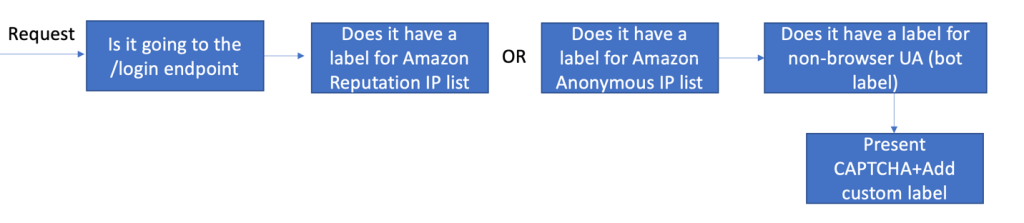
To illustrate how to protect this endpoint with AWS WAF, we’re sharing a sample rule, shown in Figure 1. In this rule, you can take input from prior rules like the Amazon IP reputation list or the Anonymous IP list (which are configured to Count requests and add labels) and combine that with a CAPTCHA action. The logic of the rule says that if the request matches the reputation rules (and has received the corresponding labels) and is going to the /login endpoint, then the AWS WAF action should be to respond with a CAPTCHA challenge. This will present a challenge that increases the confidence that a human is performing the action, and it also adds a custom label so you can efficiently identify and have metrics on how many requests were matched by this rule. The rule is provided in the CloudFormation template and is in JSON format, because it has advanced logic that cannot be displayed by the console. Learn more about labels and CAPTCHA actions in the AWS WAF documentation.

Figure 1: Login sample rule flow

Figure 1: Login sample rule flow

Note that the rate-based rules you created in the previous section are evaluated before the advanced rules. The rate-based rules will block requests to the /login endpoint that exceed the rate limit you have configured, while this advanced rule will match requests that are below the rate limit but match the other conditions in the rule.

Rules for specific activity

The second scenario explores activity on specific application clients within the user pool. You can spot this activity by monitoring the logs provided by AWS WAF, or other traffic logs like Application Load Balancer (ALB) logs. The application client information is provided in the call to the service.

In the Amazon Cognito user pool in this scenario, we have different application clients and they’re constrained by geography. For example, for one of the application clients, requests are expected to come from the United States at or below a certain rate. We can create a rule that combines the rate and geographical criteria to block requests that don’t meet the conditions defined.

The flow of this rule is shown in Figure 2. The logic of the rule will evaluate the application client information provided in the request and the geographic information identified by the service, and apply the selected rate limit. If blocked, the rule will provide a custom response code by using HTTP code 429 Too Many Requests, which can help the sender understand the reason for the block. For requests that you make with the Amazon Cognito API, you could also customize the response body of a request that receives a Block response. Adding a custom response helps provide the sender context and adjust the rate or information that is sent.

Figure 2: AppClientId sample rule flow

Figure 2: AppClientId sample rule flow

AWS WAF can detect geo location with Region accuracy and add specific labels for the location. These can then be used in other rule evaluations. This rule is also provided as a sample in the CloudFormation template.

Advanced protections

To build on the rules we’ve shared so far, you can consider using some of the other intelligent threat mitigation rules that are available as managed rules—namely, bot control for common or targeted bots. These rules offer advanced capabilities to detect bots in sensitive endpoints where automation or non-browser user agents are not expected or allowed. If you receive machine traffic to the endpoint, these rules will result in false positives that would need to be tuned. For more information, see Options for intelligent threat mitigation.

The sample rule flow in Figure 3 shows an example for our Hosted UI, which builds on the first rule we built for specific activity and adds signals coming from the Bot Control common bots managed rule, in this case the non-browser-user-agent label.

Figure 3: Login sample rule with advanced protections

Figure 3: Login sample rule with advanced protections

Adding the bot detection label will also add accuracy to the evaluation, because AWS WAF will consider multiple different sources of information when analyzing the request. This can also block attacks that come from a small set of IPs or easily recognizable bots.

We’ve shared this rule in the CloudFormation template sample. The rule requires you to add AWS WAF Bot Control (ABC) before the custom rule evaluation. ABC has additional costs associated with it and should only be used for specific use cases. For more information on ABC and how to enable it, see this blog post.

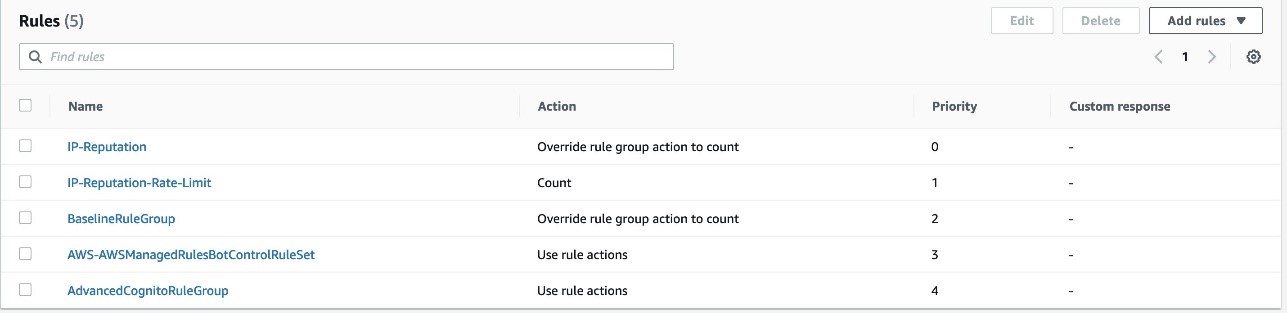
After adding these protections, we have a complete set of rules for our Hosted UI–specific needs; consider that your traffic and needs might be different. Figure 4 shows you what the rule priority looks like. All rules except the last are included in the provided CloudFormation template. Managed rule evaluations need to have higher priority and be in Count mode; this way, a matching request can get labels that can be evaluated further down the priority list by using the custom rules that were created. For more information, see How labeling works.

Figure 4: Summary of the rules discussed in this post

Figure 4: Summary of the rules discussed in this post

Conclusion

In this post, we examined the different protections provided by the integration between AWS WAF and Amazon Cognito. This integration makes it simpler for you to view and monitor the activity in the different Amazon Cognito endpoints and APIs, while also adding rate-based rules and IP reputation evaluations. For more specific use cases and advanced protections, we provided sample custom rules that use labels, as well as an advanced rule that uses bot control for common bots. You can use these advanced rules as examples to create similar rules that apply to your use cases.

If you have feedback about this post, submit comments in the Comments section below. If you have questions about this post, start a new thread on the re:Post with tag AWS WAF or contact AWS Support.

Want more AWS Security news? Follow us on Twitter.

Author

Maitreya Ranganath

Maitreya is an AWS Security Solutions Architect. He enjoys helping customers solve security and compliance challenges and architect scalable and cost-effective solutions on AWS.

Diana Alvarado

Diana Alvarado

Diana is Sr security solutions architect at AWS. She is passionate about helping customers solve difficult cloud challenges, she has a soft spot for all things logs.

Using the iPhone Recovery Key to Lock Owners Out of Their iPhones

Post Syndicated from Bruce Schneier original https://www.schneier.com/blog/archives/2023/04/using-the-iphone-recovery-key-to-lock-owners-out-of-their-iphones.html

This a good example of a security feature that can sometimes harm security:

Apple introduced the optional recovery key in 2020 to protect users from online hackers. Users who turn on the recovery key, a unique 28-digit code, must provide it when they want to reset their Apple ID password.

iPhone thieves with your passcode can flip on the recovery key and lock you out. And if you already have the recovery key enabled, they can easily generate a new one, which also locks you out.

Apple’s policy gives users virtually no way back into their accounts without that recovery key. For now, a stolen iPhone could mean devastating personal losses.

It’s actually a complicated crime. The criminal first watches their victim type in their passcode and then grabs the phone out of their hands. In the basic mode of this attack, they have a few hours to use the phone—trying to access bank accounts, etc.—before the owner figures out how to shut the attacker out. With the addition of the recovery key, the attacker can shut the owner out—for a long time.

The goal of the recovery key was to defend against SIM swapping, which is a much more common crime. But this spy-and-grab attack has become more common, and the recovery key makes it much more devastating.

Defenses are few: choose a long, complex passcode. Or set parental controls in a way that further secure the device. The obvious fix is for Apple to redesign its recovery system.

There are other, less privacy-compromising methods Apple could still rely on in lieu of a recovery key.

If someone takes over your Google account, Google’s password-reset process lets you provide a recovery email, phone number or account password, and you can use them to regain access later, even if a hijacker changes them.

Going through the process on a familiar Wi-Fi network or location can also help demonstrate you’re who you say you are.

Or how about an eight-hour delay before the recovery key can be changed?

This not an easy thing to design for, but we have to get this right as phones become the single point of control for our lives.

The collective thoughts of the interwebz