During Cloudflare’s Birthday Week in September 2024, we introduced a revamped Startup Program designed to make it easier for startups to adopt Cloudflare through a new credits system. This update focused on better aligning the program with how startups and developers actually consume Cloudflare, by providing them with clearer insight into their projected usage, especially as they approach graduation from the program.
Today, we’re excited to announce an expansion to that program: new credit tiers that better match startups at every stage of their journey. But before we dive into what’s new, let’s take a quick look at what the Startup Program is and why it exists.
A refresher: what is the Startup Program?
Cloudflare for Startups provides credits to help early-stage companies build the next big idea on our platform. Startups accepted into the program receive credits valid for one year or until they’re fully used, whichever comes first.
Beyond credits, the program includes access to up to three domains with enterprise-level services, giving startups the same advanced tools we provide to large companies to protect and accelerate their most critical applications.
We know that building a startup is expensive, and Cloudflare is uniquely positioned to support the full-stack needs of modern applications. Our goal is simple: ensure that you have access to the best of Cloudflare’s global network, without the barriers of cost or availability.
Since launching the revamped credits system in September, we’ve learned a lot from the startups in our program, including what they’re building, what they need, and where they need more flexibility. One of the most common requests was more credit tier options.
That’s why we’re introducing new tiers that provide even more options to startups as they scale.
Introducing additional credit tiers
The Cloudflare for Startups Program now offers four credit tiers:
Credit Amount
$5,000
$25,000
$100,000
$250,000
Stage
Bootstrapped, stealth startups
Up-and-coming startups
Seed-funded startups
Tier 1 startups
Description
For startups who are just getting started. This tier is great for building, testing, and iterating your product.
For startups with early adopters and proving product market fit.
For startups that have raised capital, and are experiencing high growth.
For scaling startups that belong to our Tier 1 VC and accelerator network, are building a mission-critical AI application, or are participating in our Workers Launchpad Program.
Criteria
Building a software-based product or service
Founded in the last 5 years
Valid and matching email address
$5,000 criteria plus:
Active LinkedIn
Funded up to $1M
$25,000 criteria plus:
Funded between $1M and $5M
Belong to any of our 250+ approved VC or Accelerator partners
$100,000 criteria plus:
High growth / AI companies, OR
Tier 1 VC & Accelerators
These tiers are designed to offer simplicity and clarity by aligning with where you are in your growth journey. (You can check out eligibility criteria and apply to the Startup Program here). These tiers are still subject to the same Cloudflare for Startups Terms of Service. Credits are valid for up to one year or when all credits are consumed (whichever comes first).
Why are we adding additional credit tiers?
We understand that each startup may have different needs depending on where they’re at in their journey. Some are just getting off the ground, others are scaling rapidly, and each has unique infrastructure needs. With this expansion, we’re reaffirming Cloudflare’s commitment to startups of all sizes, making it easier for you to access the right level of support and resources, exactly when you need them.
Whether you’re launching your MVP or preparing for your next funding round, Cloudflare is here to help you grow.
What can I use the credit tiers for?
The vast majority of Cloudflare products (including all products found on the pay-as-you-go plans) can be used on the Startup Program. Beyond going to the website to see what products are included, below are a few examples of what you can use your credits for:
Build AI applications
Store your training data in R2, build AI-powered agents (via Agents SDK) that autonomously perform tasks with Durable Objects and Workers, or use one of over 50 models to run inference tasks on Cloudflare’s global network.
Create immersive realtime experiences
Deliver live audio and video via our Realtime Kit, enhance the experience with an AI-powered chatbot running on Workers AI to transcribe the call, broadcast to large audiences with Stream.
Build durable multi-step applications
Design and run long-lived, multi-step processes like onboarding flows, document processing, or order fulfillment. Use Workflows to coordinate logic across Workers, Durable Objects, Queues, and AI tasks. Easily handle retries, timeouts, and state management without complex orchestration infrastructure.
What are startups saying about Cloudflare?
Webstudio’s no-code platform is powered by Cloudflare’s Developer Platform
“From a modern design tool, you’d expect real-time collaborative features and would like to have resources as close to users as possible. Since betting on the Developer Platform architecture, Cloudflare has done more for us than any other vendor out there!” – Oleg Isonen (Founder & CEO)
GrackerAI’s cybersecurity research engine runs on Cloudflare’s AI and serverless architecture
“Cloudflare’s fusion of edge computing and AI empowers developers to deploy and utilize AI models with unprecedented efficiency and scale, marking a significant leap forward in how we build and interact with intelligent systems.” – Deepak Gupta (Co-founder & CEO)
Render Better powers faster ecommerce experiences with Cloudflare Workers
“Each month Render Better optimizes billions of monthly requests for ecommerce visitors, delivering faster loading sites that make top brands millions more in revenue. We’re able to scale up with Cloudflare’s serverless workers, handling every request at the network edge within milliseconds, thanks to the rock solid, DX-friendly scope of the Developer Platform.” – James Koshigoe (Co-founder & CEO)
What will you build on Cloudflare?
We can’t wait to see what you will build on Cloudflare. Apply here to take advantage of the Cloudflare for Startups Program.
Microsoft discovered eleven vulnerabilities in GRUB2, including integer and buffer overflows in filesystem parsers, command flaws, and a side-channel in cryptographic comparison.
Additionally, 9 buffer overflows in parsing SquashFS, EXT4, CramFS, JFFS2, and symlinks were discovered in U-Boot and Barebox, which require physical access to exploit.
The newly discovered flaws impact devices relying on UEFI Secure Boot, and if the right conditions are met, attackers can bypass security protections to execute arbitrary code on the device.
Nothing major here. These aren’t exploitable out of the box. But that an AI system can do this at all is impressive, and I expect their capabilities to continue to improve.
Imagine that all of us—all of society—have landed on some alien planet and need to form a government: clean slate. We do not have any legacy systems from the United States or any other country. We do not have any special or unique interests to perturb our thinking. How would we govern ourselves? It is unlikely that we would use the systems we have today. Modern representative democracy was the best form of government that eighteenth-century technology could invent. The twenty-first century is very different: scientifically, technically, and philosophically. For example, eighteenth-century democracy was designed under the assumption that travel and communications were both hard.
Indeed, the very idea of representative government was a hack to get around technological limitations. Voting is easier now. Does it still make sense for all of us living in the same place to organize every few years and choose one of us to go to a single big room far away and make laws in our name? Representative districts are organized around geography because that was the only way that made sense two hundred-plus years ago. But we do not need to do it that way anymore. We could organize representation by age: one representative for the thirty-year-olds, another for the forty-year-olds, and so on. We could organize representation randomly: by birthday, perhaps. We can organize in any way we want. American citizens currently elect people to federal posts for terms ranging from two to six years. Would ten years be better for some posts? Would ten days be better for others? There are lots of possibilities. Maybe we can make more use of direct democracy by way of plebiscites. Certainly we do not want all of us, individually, to vote on every amendment to every bill, but what is the optimal balance between votes made in our name and ballot initiatives that we all vote on?
For the past three years, I have organized a series of annual two-day workshops to discuss these and other such questions.1 For each event, I brought together fifty people from around the world: political scientists, economists, law professors, experts in artificial intelligence, activists, government types, historians, science-fiction writers, and more. We did not come up with any answers to our questions—and I would have been surprised if we had—but several themes emerged from the event. Misinformation and propaganda was a theme, of course, and the inability to engage in rational policy discussions when we cannot agree on facts. The deleterious effects of optimizing a political system for economic outcomes was another theme. Given the ability to start over, would anyone design a system of government for the near-term financial interest of the wealthiest few? Another theme was capitalism and how it is or is not intertwined with democracy. While the modern market economy made a lot of sense in the industrial age, it is starting to fray in the information age. What comes after capitalism, and how will it affect the way we govern ourselves?
Many participants examined the effects of technology, especially artificial intelligence (AI). We looked at whether—and when—we might be comfortable ceding power to an AI system. Sometimes deciding is easy. I am happy for an AI system to figure out the optimal timing of traffic lights to ensure the smoothest flow of cars through my city. When will we be able to say the same thing about the setting of interest rates? Or taxation? How would we feel about an AI device in our pocket that voted in our name, thousands of times per day, based on preferences that it inferred from our actions? Or how would we feel if an AI system could determine optimal policy solutions that balanced every voter’s preferences: Would it still make sense to have a legislature and representatives? Possibly we should vote directly for ideas and goals instead, and then leave the details to the computers.
These conversations became more pointed in the second and third years of our workshop, after generative AI exploded onto the internet. Large language models are poised to write laws, enforce both laws and regulations, act as lawyers and judges, and plan political strategy. How this capacity will compare to human expertise and capability is still unclear, but the technology is changing quickly and dramatically. We will not have AI legislators anytime soon, but just as today we accept that all political speeches are professionally written by speechwriters, will we accept that future political speeches will all be written by AI devices? Will legislators accept AI-written legislation, especially when that legislation includes a level of detail that human-based legislation generally does not? And if so, how will that change affect the balance of power between the legislature and the administrative state? Most interestingly, what happens when the AI tools we use to both write and enforce laws start to suggest policy options that are beyond human understanding? Will we accept them, because they work? Or will we reject a system of governance where humans are only nominally in charge?
Scale was another theme of the workshops. The size of modern governments reflects the technology at the time of their founding. European countries and the early American states are a particular size because that was a governable size in the eighteenth and nineteenth centuries. Larger governments—those of the United States as a whole and of the European Union—reflect a world where travel and communications are easier. Today, though, the problems we have are either local, at the scale of cities and towns, or global. Do we really have need for a political unit the size of France or Virginia? Or is it a mixture of scales that we really need, one that moves effectively between the local and the global?
As to other forms of democracy, we discussed one from history and another made possible by today’s technology. Sortition is a system of choosing political officials randomly. We use it today when we pick juries, but both the ancient Greeks and some cities in Renaissance Italy used it to select major political officials. Today, several countries—largely in Europe—are using the process to decide policy on complex issues. We might randomly choose a few hundred people, representative of the population, to spend a few weeks being briefed by experts, debating the issues, and then deciding on environmental regulations, or a budget, or pretty much anything.
“Liquid democracy” is a way of doing away with elections altogether. The idea is that everyone has a vote and can assign it to anyone they choose. A representative collects the proxies assigned to him or her and can either vote directly on the issues or assign all the proxies to someone else. Perhaps proxies could be divided: this person for economic matters, another for health matters, a third for national defense, and so on. In the purer forms of this system, people might transfer their votes to someone else at any time. There would be no more election days: vote counts might change every day.
And then, there is the question of participation and, more generally, whose interests are taken into account. Early democracies were really not democracies at all; they limited participation by gender, race, and land ownership. These days, to achieve a more comprehensive electorate we could lower the voting age. But, of course, even children too young to vote have rights, and in some cases so do other species. Should future generations be given a “voice,” whatever that means? What about nonhumans, or whole ecosystems? Should everyone have the same volume and type of voice? Right now, in the United States, the very wealthy have much more influence than others do. Should we encode that superiority explicitly? Perhaps younger people should have a more powerful vote than everyone else. Or maybe older people should.
In the workshops, those questions led to others about the limits of democracy. All democracies have boundaries limiting what the majority can decide. We are not allowed to vote Common Knowledge out of existence, for example, but can generally regulate speech to some degree. We cannot vote, in an election, to jail someone, but we can craft laws that make a particular action illegal. We all have the right to certain things that cannot be taken away from us. In the community of our future, what should be our rights as individuals? What should be the rights of society, superseding those of individuals?
Personally, I was most interested, at each of the three workshops, in how political systems fail. As a security technologist, I study how complex systems are subverted—hacked, in my parlance—for the benefit of a few at the expense of the many. Think of tax loopholes, or tricks to avoid government regulation. These hacks are common today, and AI tools will make them easier to find—and even to design—in the future. I would want any government system to be resistant to trickery. Or, to put it another way: I want the interests of each individual to align with the interests of the group at every level. We have never had a system of government with this property, but—in a time of existential risks such as climate change—it is important that we develop one.
Would this new system of government even be called “democracy”? I truly do not know.
Such speculation is not practical, of course, but still is valuable. Our workshops did not produce final answers and were not intended to do so. Our discourse was filled with suggestions about how to patch our political system where it is fraying. People regularly debate changes to the US Electoral College, or the process of determining voting districts, or the setting of term limits. But those are incremental changes. It is difficult to find people who are thinking more radically: looking beyond the horizon—not at what is possible today but at what may be possible eventually. Thinking incrementally is critically important, but it is also myopic. It represents a hill-climbing strategy of continuous but quite limited improvements. We also need to think about discontinuous changes that we cannot easily get to from here; otherwise, we may be forever stuck at local maxima. And while true innovation in politics is a lot harder than innovation in technology, especially without a violent revolution forcing changes on us, it is something that we as a species are going to have to get good at, one way or another.
Our workshop will reconvene for a fourth meeting in December 2025.
Note
The First International Workshop on Reimagining Democracy (IWORD) was held December 7—8, 2022. The Second IWORD was held December 12—13, 2023. Both took place at the Harvard Kennedy School. The sponsors were the Ford Foundation, the Knight Foundation, and the Ash and Belfer Centers of the Kennedy School. See Schneier, “Recreating Democracy” and Schneier, “Second Interdisciplinary Workshop.”
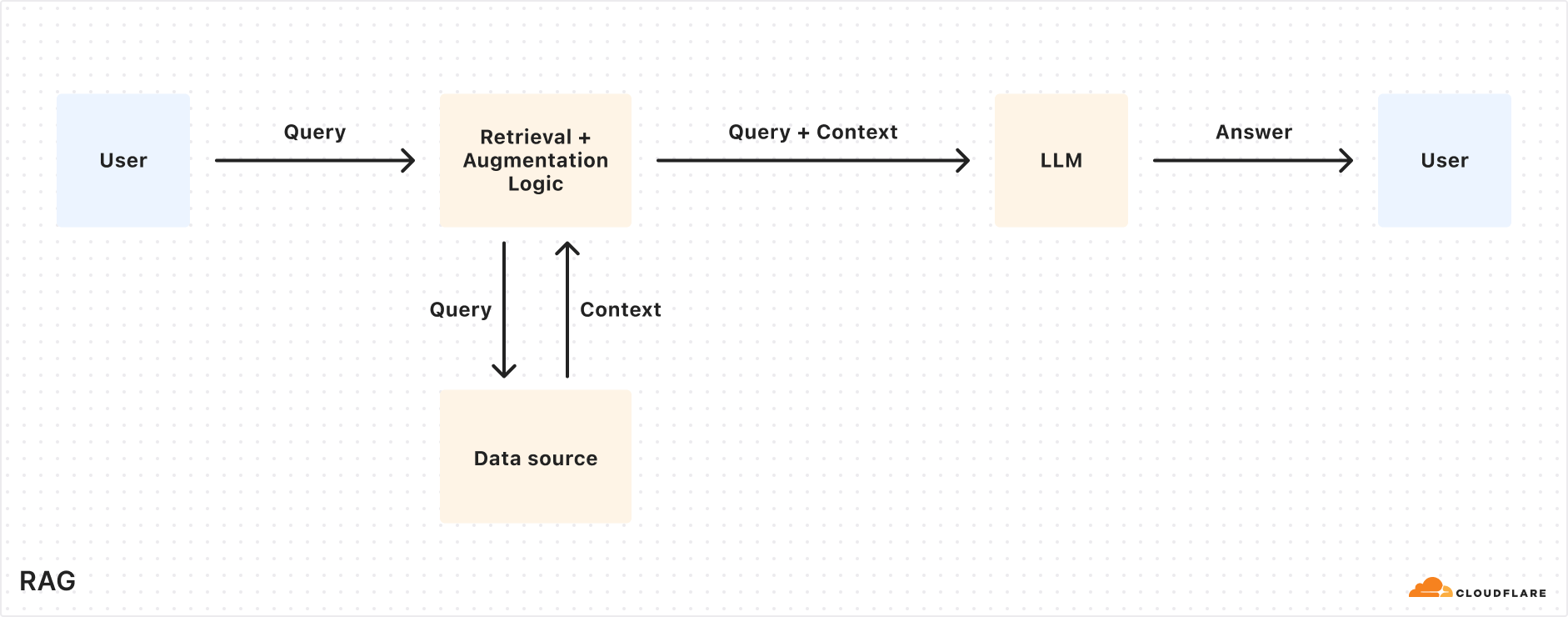
Today we’re excited to announce AutoRAG in open beta, a fully managed Retrieval-Augmented Generation (RAG) pipeline powered by Cloudflare, designed to simplify how developers integrate context-aware AI into their applications. RAG is a method that improves the accuracy of AI responses by retrieving information from your own data, and providing it to the large language model (LLM) to generate more grounded responses.
Building a RAG pipeline is a patchwork of moving parts. You have to stitch together multiple tools and services — your data storage, a vector database, an embedding model, LLMs, and custom indexing, retrieval, and generation logic — all just to get started. Maintaining it is even harder. As your data changes, you have to manually reindex and regenerate embeddings to keep the system relevant and performant. What should be a simple “ask a question, get a smart answer” experience becomes a brittle pipeline of glue code, fragile integrations, and constant upkeep.
AutoRAG removes that complexity. With just a few clicks, it delivers a fully-managed RAG pipeline end-to-end: from ingesting your data and automatically chunking and embedding it, to storing vectors in Cloudflare’s Vectorize database, performing semantic retrieval, and generating high-quality responses using Workers AI. AutoRAG continuously monitors your data sources and indexes in the background so your AI stays fresh without manual effort. It abstracts away the mess, letting you focus on building smarter, faster applications on Cloudflare’s developer platform. Get started today in the Cloudflare Dashboard!
Why use RAG in the first place?
LLMs like Llama 3.3 from Meta are powerful, but they only know what they’ve been trained on. They often struggle to produce accurate answers when asked about new, proprietary, or domain-specific information. System prompts providing relevant information can help, but they bloat input size and are limited by context windows. Fine-tuning a model is expensive and requires ongoing retraining to keep up to date.
RAG solves this by retrieving relevant information from your data source at query time, combining it with the user’s input query, and feeding both into the LLM to generate responses grounded with your data. This makes RAG a great fit for AI-driven support bots, internal knowledge assistants, semantic search across documentation, and other use cases where the source of truth is always evolving.
What’s under the hood of AutoRAG?
AutoRAG sets up a RAG pipeline for you, using the building blocks of Cloudflare’s developer platform. Instead of you having to write code to create a RAG system using Workers AI, Vectorize, and AI Gateway, you just create an AutoRAG instance and point it at a data source, like an R2 storage bucket.
Behind the scenes, AutoRAG is powered by two processes: indexing and querying.
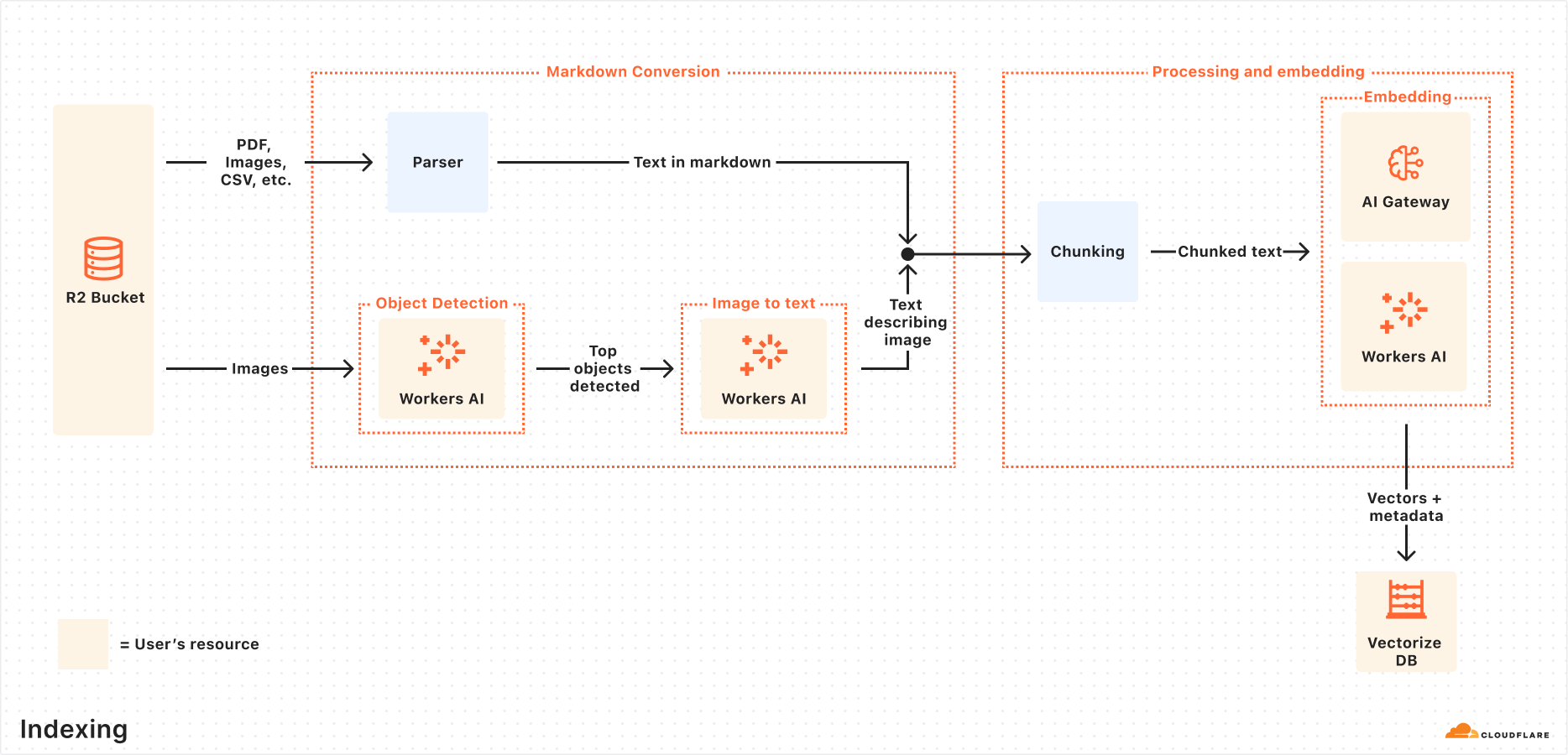
Indexing is an asynchronous process that runs in the background. It kicks off as soon as you create an AutoRAG, and automatically continues in cycles — reprocessing new or updated files after each previous job completes. During indexing, your content is transformed into vectors optimized for semantic search.
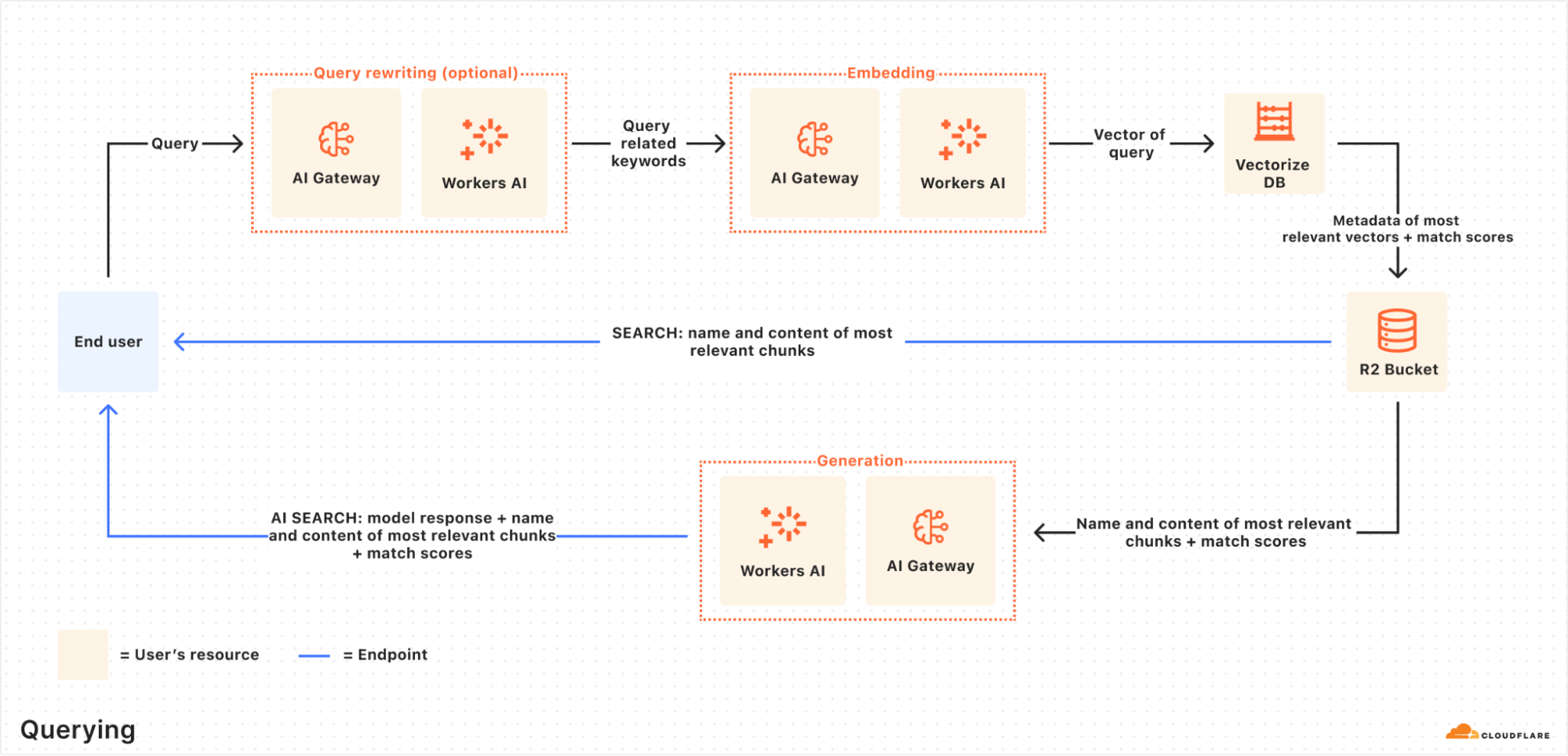
Querying is a synchronous process triggered when a user sends a search request. AutoRAG takes the query, retrieves the most relevant content from your vector database, and uses it to generate a context-aware response using an LLM.
Let’s take a closer look at how they work.
Indexing process
When you connect a data source, AutoRAG automatically ingests, transforms, and stores it as vectors, optimizing it for semantic search when querying:
File ingestion from data source: AutoRAG reads directly from your data source. Today, it supports integration with Cloudflare R2, where you can store documents like PDFs, images, text, HTML, CSV, and more for processing. Check out the RAG to riches in 5 minutes tutorial below to learn how you can use Browser Rendering to parse webpages to use within your AutoRAG.
Markdown conversion: AutoRAG uses Workers AI’s Markdown Conversion to convert all files into structured Markdown. This ensures consistency across diverse file types. For images, Workers AI is used to perform object detection followed by vision-to-language transformation to convert images into Markdown text.
Chunking: The extracted text is chunked into smaller pieces to improve retrieval granularity.
Embedding: Each chunk is embedded using Workers AI’s embedding model to transform the content into vectors.
Vector storage: The resulting vectors, along with metadata like source location and file name, are stored in a Cloudflare’s Vectorize database created on your account.
Querying process
When an end user makes a request, AutoRAG orchestrates the following:
Receive query from AutoRAG API: The query workflow begins when you send a request to either the AutoRAG’s AI Search or Search endpoint.
Query rewriting (optional): AutoRAG provides the option to rewrite the input query using one of Workers AI’s LLMs to improve retrieval quality by transforming the original query into a more effective search query.
Embedding the query: The rewritten (or original) query is transformed into a vector via the same embedding model used to embed your data so that it can be compared against your vectorized data to find the most relevant matches.
Vector search in Vectorize: The query vector is searched against stored vectors in the associated Vectorize database for your AutoRAG.
Metadata + content retrieval: Vectorize returns the most relevant chunks and their metadata. And the original content is retrieved from the R2 bucket. These are passed to a text-generation model.
Response generation: A text-generation model from Workers AI is used to generate a response using the retrieved content and the original user’s query.
The end result is an AI-powered answer grounded in your private data — accurate, and up to date.
RAG to riches in under 5 minutes
Most of the time, getting started with AutoRAG is as simple as pointing it to an existing R2 bucket — just drop in your content, and you’re ready to go. But what if your content isn’t already in a bucket? What if it’s still on a webpage or needs to first be rendered dynamically by a frontend UI? You’re in luck, because with the Browser Rendering API, you can crawl your own websites to gather information that powers your RAG. The Browser Rendering REST API is now generally available, offering endpoints for common browser actions including extracting HTML content, capturing screenshots, and generating PDFs. Additionally, a crawl endpoint is coming soon, making it even easier to ingest websites.
In this walkthrough, we’ll show you how to take your website and feed it into AutoRAG for Q&A. We’ll use a Cloudflare Worker to render web pages in a headless browser, upload the content to R2, and hook that into AutoRAG for semantic search and generation.
Step 1. Create a Worker to fetch webpages and upload into R2
We’ll create a Cloudflare Worker that uses Puppeteer to visit your URL, render it, and store the full HTML in your R2 bucket. If you already have an R2 bucket with content you’d like to build a RAG for then you can skip this step.
Create a new Worker project named browser-r2-worker by running:
npm create cloudflare@latest -- browser-r2-worker
For setup, select the following options:
What would you like to start with? Choose Hello World Starter.
Which template would you like to use? Choose Worker only.
Which language do you want to use? Choose TypeScript.
2. Install @cloudflare/puppeteer, which allows you to control the Browser Rendering instance:
npm i @cloudflare/puppeteer
3. Create a new R2 bucket named html-bucket by running:
npx wrangler r2 bucket create html-bucket
4. Add the following configurations to your Wrangler configuration file, so your Worker can use browser rendering and your new R2 bucket:
5. Replace the contents of src/index.ts with the following skeleton script:
import puppeteer from "@cloudflare/puppeteer";

// Define our environment bindings
interface Env {
	MY_BROWSER: any;
	HTML_BUCKET: R2Bucket;
}

// Define request body structure
interface RequestBody {
	url: string;
}

export default {
	async fetch(request: Request, env: Env): Promise<Response> {
		// Only accept POST requests
		if (request.method !== 'POST') {
return new Response('Please send a POST request with a target URL', { status: 405 });
		}

		// Get URL from request body
		const body = await request.json() as RequestBody;
		// Note: Only use this parser for websites you own
		const targetUrl = new URL(body.url);

		// Launch browser and create new page
		const browser = await puppeteer.launch(env.MY_BROWSER);
		const page = await browser.newPage();

		// Navigate to the page and fetch its html
		await page.goto(targetUrl.href);
		const htmlPage = await page.content();

		// Create filename and store in R2
		const key = targetUrl.hostname + '_' + Date.now() + '.html';
		await env.HTML_BUCKET.put(key, htmlPage);

		// Close browser
		await browser.close();

		// Return success response
		return new Response(JSON.stringify({
			success: true,
			message: 'Page rendered and stored successfully',
			key: key
		}), {
			headers: { 'Content-Type': 'application/json' }
		});
	}
} satisfies ExportedHandler<Env>;
6. Once the code is ready, you can deploy it to your Cloudflare account by running:
npx wrangler deploy
7. To test your Worker, you can use the following cURL request to fetch the HTML file of a page. In this example we are fetching this blog page to upload into the html-bucket bucket:
Select Create AutoRAG and complete the setup process:
Select the R2 bucket which contains your knowledge base, in this case, select the html-bucket.
Select an embedding model used to convert your data to vector representation. It is recommended to use the Default.
Select an LLM to use to generate your responses. It is recommended to use the Default.
Select or create an AI Gateway to monitor and control your model usage.
Name your AutoRAG as my-rag.
Select or create a Service API token to grant AutoRAG access to create and access resources in your account.
Select Create to spin up your AutoRAG.
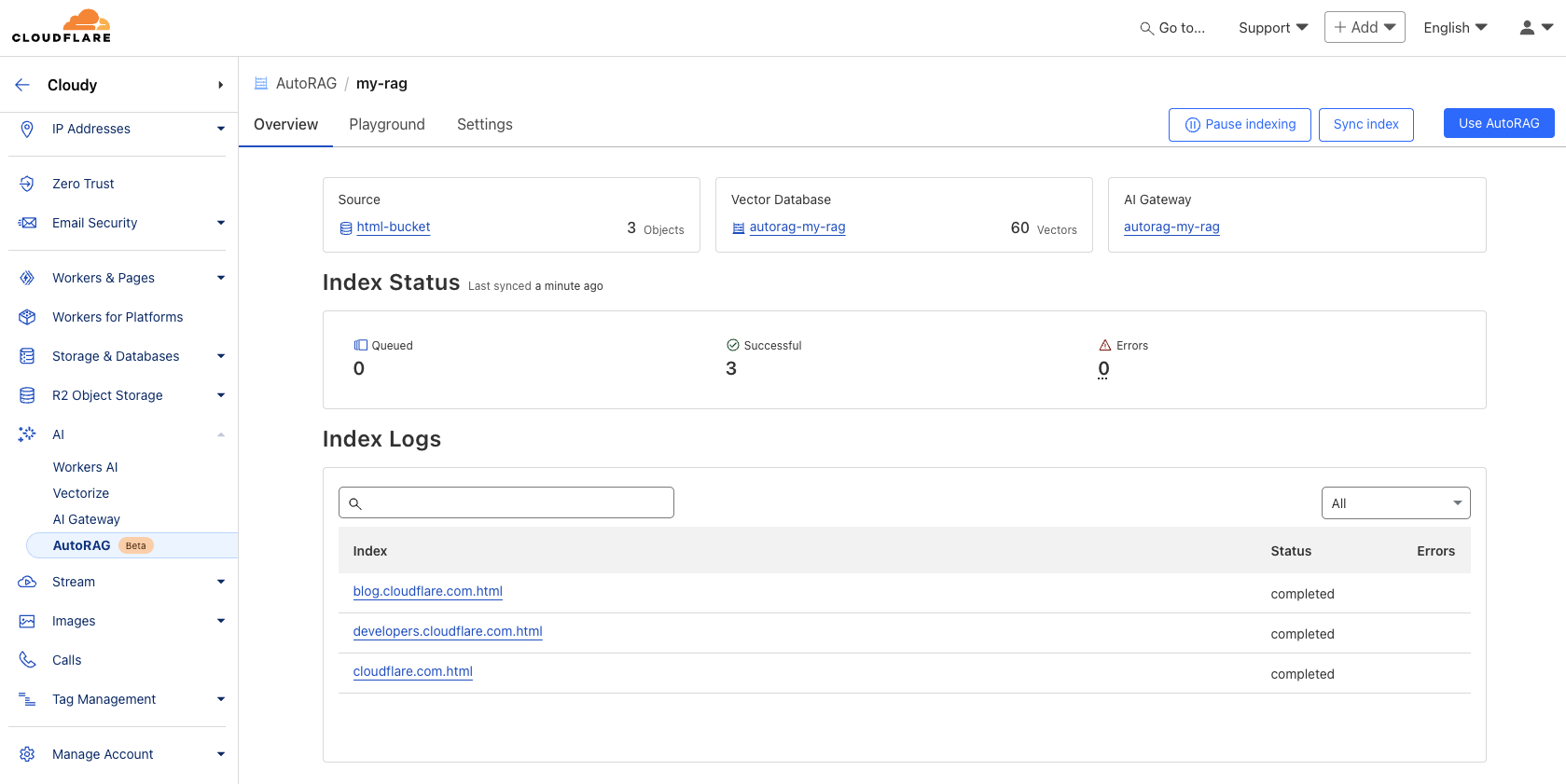
Once you’ve created your AutoRAG, it will automatically create a Vectorize database in your account and begin indexing the data. You can view the progress of your indexing job in the Overview page of your AutoRAG. The indexing time may vary depending on the number and type of files you have in your data source.
Step 3. Test and add to your application
Once AutoRAG finishes indexing your content, you’re ready to start asking it questions. You can open up your AutoRAG instance, navigate to the Playground tab, and ask a question based on your uploaded content, like “What is AutoRAG?”.
Once you’re happy with the results in the Playground, you can integrate AutoRAG directly into the application that you are building. If you are using a Worker to build your application, then you can use the AI binding to directly call your AutoRAG:
{
  "ai": {
    "binding": "AI"
  }
}
Then, query your AutoRAG instance from your Worker code by calling the aiSearch() method. Alternatively you can use the Search() method to get a list of retrieved results without an AI generated response.
const answer = await env.AI.autorag('my-rag').aiSearch({
   query: 'What is AutoRAG?'
});
For more information on how to add AutoRAG into your application, go to your AutoRAG then navigate to Use AutoRAG for more instructions.
Start building today
During the open beta, AutoRAG is free to enable. Compute operations for indexing, retrieval and augmentation incur no additional cost during this phase.
AutoRAG is built entirely on top of Cloudflare’s Developer Platform, using the same tools you’d reach for if you were building a RAG pipeline yourself. When you create an AutoRAG instance, it provisions and runs on top of Cloudflare services within your own account, giving you full visibility into performance, cost, and behavior with fewer black boxes.
Vectorize: stores vector embeddings and powers semantic retrieval.
Workers AI: converts images to markdown, generates embeddings, rewrites queries, and generates responses.
AI Gateway: tracks and controls your model’s usage.
To help manage resources during the beta, each account is limited to 10 AutoRAG instances, with up to 100,000 filesper AutoRAG.
What’s on the roadmap?
We’re just getting started with AutoRAG and we have more planned throughout 2025 to make it more powerful and flexible. Here are a few things we’re actively working on:
More data source integrations: We’re expanding beyond R2, with support for new input types like direct website URL parsing (powered by browser rendering) and structured data sources like Cloudflare D1.
Smarter, higher-quality responses: We’re exploring built-in reranking, recursive chunking, and other processing techniques to improve the quality and relevance of generated answers.
These features will roll out incrementally, and we’d love your feedback as we shape what’s next. AutoRAG is built to evolve with your use cases so stay tuned.
Try it out today!
Get started with AutoRAG today by visiting the Cloudflare Dashboard, navigate to AI > AutoRAG, and select Create AutoRAG. Whether you’re building an AI-powered search experience, an internal knowledge assistant, or just experimenting with LLMs, AutoRAG gives you a fast and flexible way to get started with RAG on Cloudflare’s global network. For more details, refer to the Developer Docs. Also, try out the Browser Rendering API that is now generally available for your browser action needs.
We’re excited to see what you build and we’re here to help. Have questions or feedback? Join the conversation on the Cloudflare Developers Discord.
It’s not a secret that at Cloudflare we are bullish on the future of agents. We’re excited about a future where AI can not only co-pilot alongside us, but where we can actually start to delegate entire tasks to AI.
While it hasn’t been too long since we first announced our Agents SDK to make it easier for developers to build agents, building towards an agentic future requires continuous delivery towards this goal. Today, we’re making several announcements to help accelerate agentic development, including:
New Agents SDK capabilities: Build remote MCP clients, with transport and authentication built-in, to allow AI agents to connect to external services.
Hibernation for McpAgent: Automatically sleep stateful, remote MCP servers when inactive and wake them when needed. This allows you to maintain connections for long-running sessions while ensuring you’re not paying for idle time.
Durable Objects free tier: We view Durable Objects as a key component for building agents, and if you’re using our Agents SDK, you need access to it. Until today, Durable Objects was only accessible as part of our paid plans, and today we’re excited to include it in our free tier.
Workflows GA: Enables you to ship production-ready, long-running, multi-step actions in agents.
AutoRAG: Helps you integrate context-aware AI into your applications, in just a few clicks
AI agents can now connect to and interact with external services through MCP (Model Context Protocol). We’ve updated the Agents SDK to allow you to build a remote MCP client into your AI agent, with all the components — authentication flows, tool discovery, and connection management — built-in for you.
This allows you to build agents that can:
Prompt the end user to grant access to a 3rd party service (MCP server).
Use tools from these external services, acting on behalf of the end user.
Call MCP servers from Workflows, scheduled tasks, or any part of your agent.
Connect to multiple MCP servers and automatically discover new tools or capabilities presented by the 3rd party service.
MCP (Model Context Protocol) — first introduced by Anthropic — is quickly becoming the standard way for AI agents to interact with external services, with providers like OpenAI, Cursor, and Copilot adopting the protocol.
We recently announced support for building remote MCP servers on Cloudflare, and added an McpAgent class to our Agents SDK that automatically handles the remote aspects of MCP: transport and authentication/authorization. Now, we’re excited to extend the same capabilities to agents acting as MCP clients.
Want to see it in action? Use the button below to deploy a fully remote MCP client that can be used to connect to remote MCP servers.
AI Agents can now act as remote MCP clients, with transport and auth included
AI agents need to connect to external services to access tools, data, and capabilities beyond their built-in knowledge. That means AI agents need to be able to act as remote MCP clients, so they can connect to remote MCP servers that are hosting these tools and capabilities.
We’ve added a new class, MCPClientManager, into the Agents SDK to give you all the tooling you need to allow your AI agent to make calls to external services via MCP. The MCPClientManager class automatically handles:
Transport: Connect to remote MCP servers over SSE and HTTP, with support for Streamable HTTP coming soon.
Connection management: The client tracks the state of all connections and automatically reconnects if a connection is lost.
Capability discovery: Automatically discovers all capabilities, tools, resources, and prompts presented by the MCP server.
Real-time updates: When a server’s tools, resources, or prompts change, the client automatically receives notifications and updates its internal state.
Namespacing: When connecting to multiple MCP servers, all tools and resources are automatically namespaced to avoid conflicts.
Granting agents access to tools with built-in auth check for MCP Clients
We’ve integrated the complete OAuth authentication flow directly into the Agents SDK, so your AI agents can securely connect and authenticate to any remote MCP server without you having to build authentication flow from scratch.
This allows you to give users a secure way to log in and explicitly grant access to allow the agent to act on their behalf by automatically:
Supporting the OAuth 2.1 protocol.
Redirecting users to the service’s login page.
Generating the code challenge and exchanging an authorization code for an access token.
Using the access token to make authenticated requests to the MCP server.
Here is an example of an agent that can securely connect to MCP servers by initializing the client manager, adding the server, and handling the authentication callbacks:
async onStart(): Promise<void> {
  // initialize MCPClientManager which manages multiple MCP clients with optional auth
  this.mcp = new MCPClientManager("my-agent", "1.0.0", {
    baseCallbackUri: `${serverHost}/agents/${agentNamespace}/${this.name}/callback`,
    storage: this.ctx.storage,
  });
}

async addMcpServer(url: string): Promise<string> {
  // Add one MCP client to our MCPClientManager
  const { id, authUrl } = await this.mcp.connect(url);
  // Return authUrl to redirect the user to if the user is unauthorized
  return authUrl
}

async onRequest(req: Request): Promise<void> {
  // handle the auth callback after being finishing the MCP server auth flow
  if (this.mcp.isCallbackRequest(req)) {
    await this.mcp.handleCallbackRequest(req);
    return new Response("Authorized")
  }

  // ...
}
Connecting to multiple MCP servers and discovering what capabilities they offer
You can use the Agents SDK to connect an MCP client to multiple MCP servers simultaneously. This is particularly useful when you want your agent to access and interact with tools and resources served by different service providers.
The MCPClientManager class maintains connections to multiple MCP servers through the mcpConnections object, a dictionary that maps unique server names to their respective MCPClientConnection instances.
When you register a new server connection using connect(), the manager:
Creates a new connection instance with server-specific authentication.
Initializes the connections and registers for server capability notifications.
async onStart(): Promise<void> {
  // Connect to an image generation MCP server
  await this.mcp.connect("https://image-gen.example.com/mcp/sse");

  // Connect to a code analysis MCP server
  await this.mcp.connect("https://code-analysis.example.org/sse");

  // Now we can access tools with proper namespacing
  const allTools = this.mcp.listTools();
  console.log(`Total tools available: ${allTools.length}`);
}
Each connection manages its own authentication context, allowing one AI agent to authenticate to multiple servers simultaneously. In addition, MCPClientManager automatically handles namespacing to prevent collisions between tools with identical names from different servers.
For example, if both an “Image MCP Server” and “Code MCP Server” have a tool named “analyze”, they will both be independently callable without any naming conflicts.
Use Stytch, Auth0, and WorkOS to bring authentication & authorization to your MCP server
With MCP, users will have a new way of interacting with your application, no longer relying on the dashboard or API as the entrypoint. Instead, the service will now be accessed by AI agents that are acting on a user’s behalf. To ensure users and agents can connect to your service securely, you’ll need to extend your existing authentication and authorization system to support these agentic interactions, implementing login flows, permissions scopes, consent forms, and access enforcement for your MCP server.
We’re adding integrations with Stytch, Auth0, and WorkOS to make it easier for anyone building an MCP server to configure authentication & authorization for their MCP server.
You can leverage our MCP server integration with Stytch, Auth0, and WorkOS to:
Allow users to authenticate to your MCP server through email, social logins, SSO (single sign-on), and MFA (multi-factor authentication).
Define scopes and permissions that directly map to your MCP tools.
Present users with a consent page corresponding with the requested permissions.
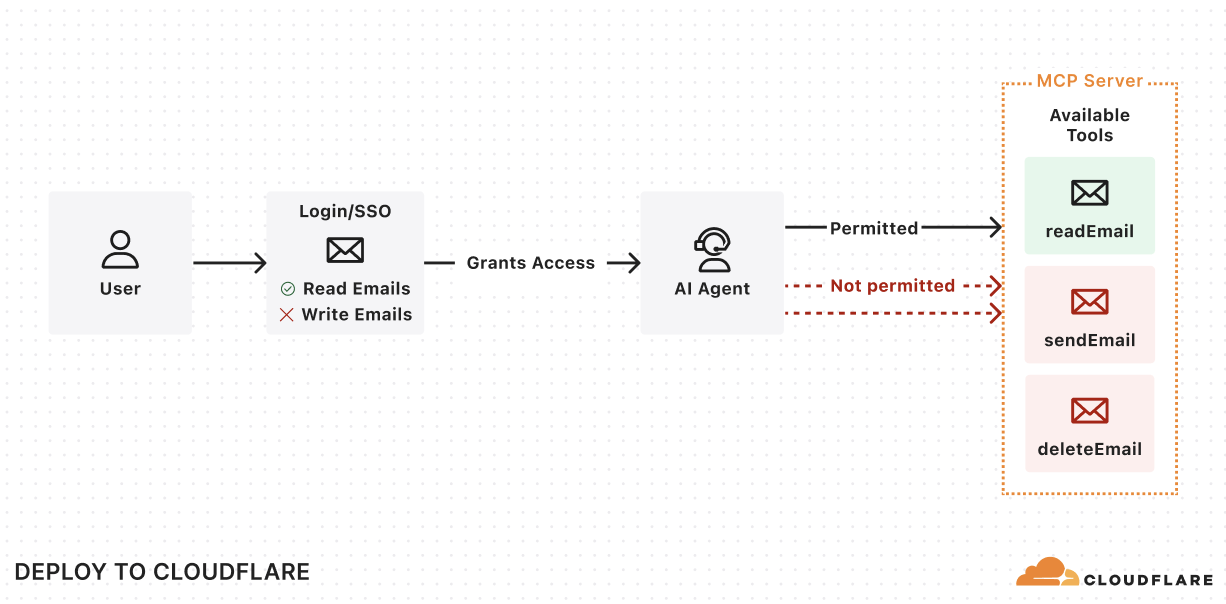
Enforce the permissions so that agents can only invoke permitted tools.
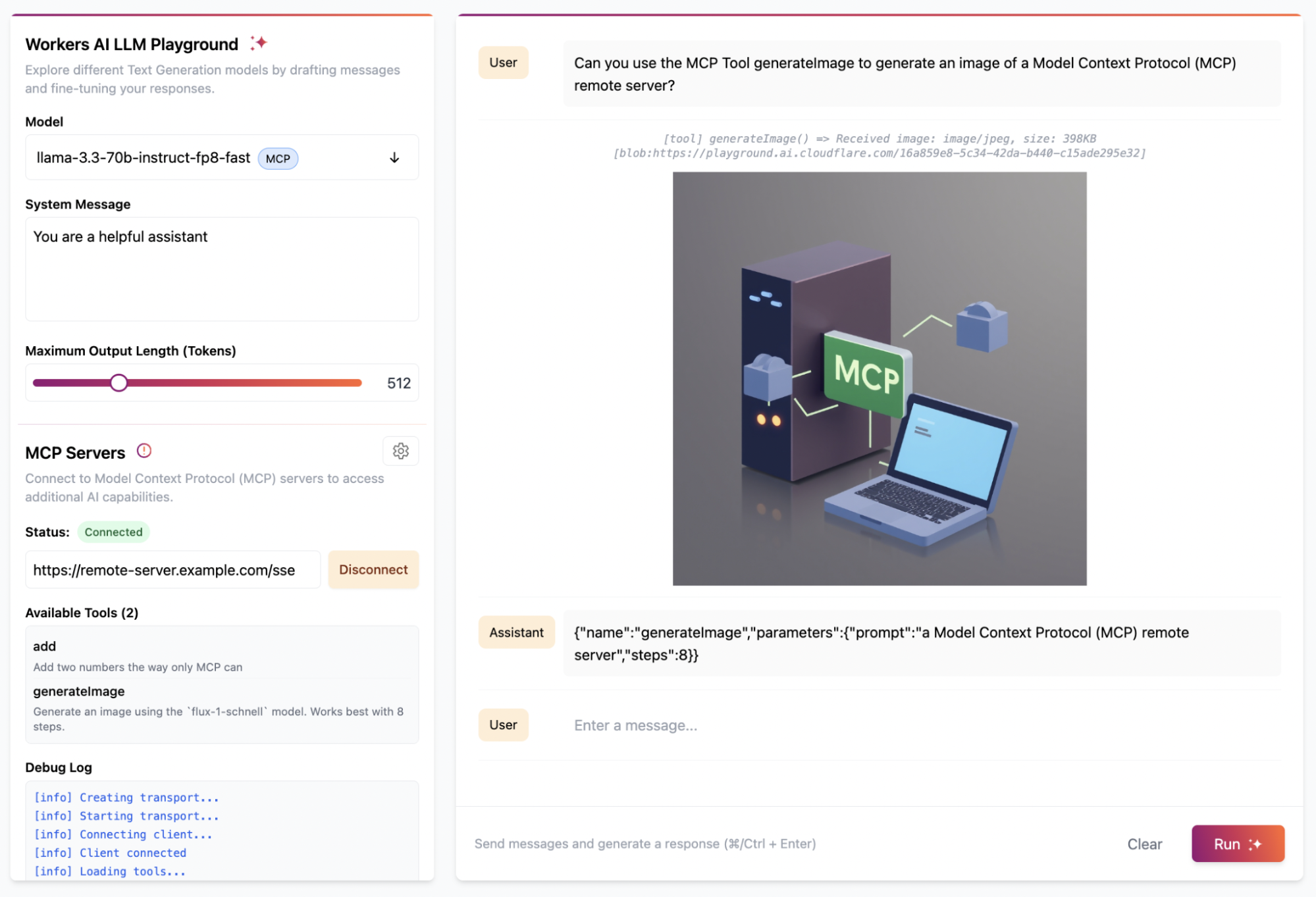
Get started with the examples below by using the “Deploy to Cloudflare” button to deploy the demo MCP servers in your Cloudflare account. These demos include pre-configured authentication endpoints, consent flows, and permission models that you can tailor to fit your needs. Once you deploy the demo MCP servers, you can use the Workers AI playground, a browser-based remote MCP client, to test out the end-to-end user flow.
Stytch
Get started with a remote MCP server that uses Stytch to allow users to sign in with email, Google login or enterprise SSO and authorize their AI agent to view and manage their company’s OKRs on their behalf. Stytch will handle restricting the scopes granted to the AI agent based on the user’s role and permissions within their organization. When authorizing the MCP Client, each user will see a consent page that outlines the permissions that the agent is requesting that they are able to grant based on their role.
For more consumer use cases, deploy a remote MCP server for a To Do app that uses Stytch for authentication and MCP client authorization. Users can sign in with email and immediately access the To Do lists associated with their account, and grant access to any AI assistant to help them manage their tasks.
Regardless of use case, Stytch allows you to easily turn your application into an OAuth 2.0 identity provider and make your remote MCP server into a Relying Party so that it can easily inherit identity and permissions from your app. To learn more about how Stytch is enabling secure authentication to remote MCP servers, read their blog post.
“One of the challenges of realizing the promise of AI agents is enabling those agents to securely and reliably access data from other platforms. Stytch Connected Apps is purpose-built for these agentic use cases, making it simple to turn your app into an OAuth 2.0 identity provider to enable secure access to remote MCP servers. By combining Cloudflare Workers with Stytch Connected Apps, we’re removing the barriers for developers, enabling them to rapidly transition from AI proofs-of-concept to secure, deployed implementations.” — Julianna Lamb, Co-Founder & CTO, Stytch.
Auth0
Get started with a remote MCP server that uses Auth0 to authenticate users through email, social logins, or enterprise SSO to interact with their todos and personal data through AI agents. The MCP server securely connects to API endpoints on behalf of users, showing exactly which resources the agent will be able to access once it gets consent from the user. In this implementation, access tokens are automatically refreshed during long running interactions.
To set it up, first deploy the protected API endpoint:
Then, deploy the MCP server that handles authentication through Auth0 and securely connects AI agents to your API endpoint.
“Cloudflare continues to empower developers building AI products with tools like AI Gateway, Vectorize, and Workers AI. The recent addition of Remote MCP servers further demonstrates that Cloudflare Workers and Durable Objects are a leading platform for deploying serverless AI. We’re very proud that Auth0 can help solve the authentication and authorization needs for these cutting-edge workloads.” — Sandrino Di Mattia, Auth0 Sr. Director, Product Architecture.
WorkOS
Get started with a remote MCP server that uses WorkOS’s AuthKit to authenticate users and manage the permissions granted to AI agents. In this example, the MCP server dynamically exposes tools based on the user’s role and access rights. All authenticated users get access to the add tool, but only users who have been assigned the image_generation permission in WorkOS can grant the AI agent access to the image generation tool. This showcases how MCP servers can conditionally expose capabilities to AI agents based on the authenticated user’s role and permission.
“MCP is becoming the standard for AI agent integration, but authentication and authorization are still major gaps for enterprise adoption. WorkOS Connect enables any application to become an OAuth 2.0 authorization server, allowing agents and MCP clients to securely obtain tokens for fine-grained permission authorization and resource access. With Cloudflare Workers, developers can rapidly deploy remote MCP servers with built-in OAuth and enterprise-grade access control. Together, WorkOS and Cloudflare make it easy to ship secure, enterprise-ready agent infrastructure.” — Michael Grinich, CEO of WorkOS.
Hibernate-able WebSockets: put AI agents to sleep when they’re not in use
Starting today, a new improvement is landing in the McpAgent class: support for the WebSockets Hibernation API that allows your MCP server to go to sleep when it’s not receiving requests and instantly wake up when it’s needed. That means that you now only pay for compute when your agent is actually working.
We recently introduced the McpAgent class, which allows developers to build remote MCP servers on Cloudflare by using Durable Objects to maintain stateful connections for every client session. We decided to build McpAgent to be stateful from the start, allowing developers to build servers that can remember context, user preferences, and conversation history. But maintaining client connections means that the session can remain active for a long time, even when it’s not being used.
MCP Agents are hibernate-able by default
You don’t need to change your code to take advantage of hibernation. With our latest SDK update, all McpAgent instances automatically include hibernation support, allowing your stateful MCP servers to sleep during inactive periods and wake up with their state preserved when needed.
How it works
When a request comes in on the Server-Sent Events endpoint, /sse, the Worker initializes a WebSocket connection to the appropriate Durable Object for the session and returns an SSE stream back to the client. All responses flow over this stream.
The implementation leverages the WebSocket Hibernation API within Durable Objects. When periods of inactivity occur, the Durable Object can be evicted from memory while keeping the WebSocket connection open. If the WebSocket later receives a message, the runtime recreates the Durable Object and delivers the message to the appropriate handler.
Durable Objects on free tier
To help you build AI agents on Cloudflare, we’re making Durable Objects available on the free tier, so you can start with zero commitment. With Agents SDK, your AI agents deploy to Cloudflare running on Durable Objects.
Durable Objects offer compute alongside durable storage, that when combined with Workers, unlock stateful, serverless applications. Each Durable Object is a stateful coordinator for handling client real-time interactions, making requests to external services like LLMs, and creating agentic “memory” through state persistence in zero-latency SQLite storage — all tasks required in an AI agent. Durable Objects scale out to millions of agents effortlessly, with each agent created near the user interacting with their agent for fast performance, all managed by Cloudflare.
Zero-latency SQLite storage in Durable Objects was introduced in public beta September 2024 for Birthday Week. Since then, we’ve focused on missing features and robustness compared to pre-existing key-value storage in Durable Objects. We are excited to make SQLite storage generally available, with a 10 GB SQLite database per Durable Object, and recommend SQLite storage for all new Durable Object classes. Durable Objects free tier can only access SQLite storage.
Cloudflare’s free tier allows you to build real-world applications. On the free plan, every Worker request can call a Durable Object. For usage-based pricing, Durable Objects incur compute and storage usage with the following free tier limits.
Workers Free
Workers Paid
Compute: Requests
100,000 / day
1 million / month included
+ $0.15 / million
Compute: Duration
13,000 GB-s / day
400,000 GB-s / month included
+ $12.50 / million GB-s
Storage: Rows read
5 million / day
25 billion / month included
+ $0.001 / million
Storage: Rows written
100,000 / day
50 million / month included
+ $1.00 / million
Storage: SQL stored data
5 GB (total)
5 GB-month included
+ $0.20 / GB-month
Find us at agents.cloudflare.com
We realize this is a lot of information to take in, but don’t worry. Whether you’re new to agents as a whole, or looking to learn more about how Cloudflare can help you build agents, today we launched a new site to help get you started — agents.cloudflare.com.
Netflix’s personalized recommender system is a complex system, boasting a variety of specialized machine learned models each catering to distinct needs including “Continue Watching” and “Today’s Top Picks for You.” (Refer to our recent overview for more details). However, as we expanded our set of personalization algorithms to meet increasing business needs, maintenance of the recommender system became quite costly. Furthermore, it was difficult to transfer innovations from one model to another, given that most are independently trained despite using common data sources. This scenario underscored the need for a new recommender system architecture where member preference learning is centralized, enhancing accessibility and utility across different models.
Particularly, these models predominantly extract features from members’ recent interaction histories on the platform. Yet, many are confined to a brief temporal window due to constraints in serving latency or training costs. This limitation has inspired us to develop a foundation model for recommendation. This model aims to assimilate information both from members’ comprehensive interaction histories and our content at a very large scale. It facilitates the distribution of these learnings to other models, either through shared model weights for fine tuning or directly through embeddings.
The impetus for constructing a foundational recommendation model is based on the paradigm shift in natural language processing (NLP) to large language models (LLMs). In NLP, the trend is moving away from numerous small, specialized models towards a single, large language model that can perform a variety of tasks either directly or with minimal fine-tuning. Key insights from this shift include:
A Data-Centric Approach: Shifting focus from model-centric strategies, which heavily rely on feature engineering, to a data-centric one. This approach prioritizes the accumulation of large-scale, high-quality data and, where feasible, aims for end-to-end learning.
Leveraging Semi-Supervised Learning: The next-token prediction objective in LLMs has proven remarkably effective. It enables large-scale semi-supervised learning using unlabeled data while also equipping the model with a surprisingly deep understanding of world knowledge.
These insights have shaped the design of our foundation model, enabling a transition from maintaining numerous small, specialized models to building a scalable, efficient system. By scaling up semi-supervised training data and model parameters, we aim to develop a model that not only meets current needs but also adapts dynamically to evolving demands, ensuring sustainable innovation and resource efficiency.
Data
At Netflix, user engagement spans a wide spectrum, from casual browsing to committed movie watching. With over 300 million users at the end of 2024, this translates into hundreds of billions of interactions — an immense dataset comparable in scale to the token volume of large language models (LLMs). However, as in LLMs, the quality of data often outweighs its sheer volume. To harness this data effectively, we employ a process of interaction tokenization, ensuring meaningful events are identified and redundancies are minimized.
Tokenizing User Interactions: Not all raw user actions contribute equally to understanding preferences. Tokenization helps define what constitutes a meaningful “token” in a sequence. Drawing an analogy to Byte Pair Encoding (BPE) in NLP, we can think of tokenization as merging adjacent actions to form new, higher-level tokens. However, unlike language tokenization, creating these new tokens requires careful consideration of what information to retain. For instance, the total watch duration might need to be summed or engagement types aggregated to preserve critical details.
Figure 1.Tokenization of user interaction history by merging actions on the same title, preserving important information.
This tradeoff between granular data and sequence compression is akin to the balance in LLMs between vocabulary size and context window. In our case, the goal is to balance the length of interaction history against the level of detail retained in individual tokens. Overly lossy tokenization risks losing valuable signals, while too granular a sequence can exceed practical limits on processing time and memory.
Even with such strategies, interaction histories from active users can span thousands of events, exceeding the capacity of transformer models with standard self attention layers. In recommendation systems, context windows during inference are often limited to hundreds of events — not due to model capability but because these services typically require millisecond-level latency. This constraint is more stringent than what is typical in LLM applications, where longer inference times (seconds) are more tolerable.
To address this during training, we implement two key solutions:
Sparse Attention Mechanisms: By leveraging sparse attention techniques such as low-rank compression, the model can extend its context window to several hundred events while maintaining computational efficiency. This enables it to process more extensive interaction histories and derive richer insights into long-term preferences.
Sliding Window Sampling: During training, we sample overlapping windows of interactions from the full sequence. This ensures the model is exposed to different segments of the user’s history over multiple epochs, allowing it to learn from the entire sequence without requiring an impractically large context window.
At inference time, when multi-step decoding is needed, we can deploy KV caching to efficiently reuse past computations and maintain low latency.
These approaches collectively allow us to balance the need for detailed, long-term interaction modeling with the practical constraints of model training and inference, enhancing both the precision and scalability of our recommendation system.
Information in Each ‘Token’: While the first part of our tokenization process focuses on structuring sequences of interactions, the next critical step is defining the rich information contained within each token. Unlike LLMs, which typically rely on a single embedding space to represent input tokens, our interaction events are packed with heterogeneous details. These include attributes of the action itself (such as locale, time, duration, and device type) as well as information about the content (such as item ID and metadata like genre and release country). Most of these features, especially categorical ones, are directly embedded within the model, embracing an end-to-end learning approach. However, certain features require special attention. For example, timestamps need additional processing to capture both absolute and relative notions of time, with absolute time being particularly important for understanding time-sensitive behaviors.
To enhance prediction accuracy in sequential recommendation systems, we organize token features into two categories:
Request-Time Features: These are features available at the moment of prediction, such as log-in time, device, or location.
Post-Action Features: These are details available after an interaction has occurred, such as the specific show interacted with or the duration of the interaction.
To predict the next interaction, we combine request-time features from the current step with post-action features from the previous step. This blending of contextual and historical information ensures each token in the sequence carries a comprehensive representation, capturing both the immediate context and user behavior patterns over time.
Considerations for Model Objective and Architecture
As previously mentioned, our default approach employs the autoregressive next-token prediction objective, similar to GPT. This strategy effectively leverages the vast scale of unlabeled user interaction data. The adoption of this objective in recommendation systems has shown multiple successes [1–3]. However, given the distinct differences between language tasks and recommendation tasks, we have made several critical modifications to the objective.
Firstly, during the pretraining phase of typical LLMs, such as GPT, every target token is generally treated with equal weight. In contrast, in our model, not all user interactions are of equal importance. For instance, a 5-minute trailer play should not carry the same weight as a 2-hour full movie watch. A greater challenge arises when trying to align long-term user satisfaction with specific interactions and recommendations. To address this, we can adopt a multi-token prediction objective during training, where the model predicts the next n tokens at each step instead of a single token[4]. This approach encourages the model to capture longer-term dependencies and avoid myopic predictions focused solely on immediate next events.
Secondly, we can use multiple fields in our input data as auxiliary prediction objectives in addition to predicting the next item ID, which remains the primary target. For example, we can derive genres from the items in the original sequence and use this genre sequence as an auxiliary target. This approach serves several purposes: it acts as a regularizer to reduce overfitting on noisy item ID predictions, provides additional insights into user intentions or long-term genre preferences, and, when structured hierarchically, can improve the accuracy of predicting the target item ID. By first predicting auxiliary targets, such as genre or original language, the model effectively narrows down the candidate list, simplifying subsequent item ID prediction.
Unique Challenges for Recommendation FM
In addition to the infrastructure challenges posed by training bigger models with substantial amounts of user interaction data that are common when trying to build foundation models, there are several unique hurdles specific to recommendations to make them viable. One of unique challenges is entity cold-starting.
At Netflix, our mission is to entertain the world. New titles are added to the catalog frequently. Therefore the recommendation foundation models require a cold start capability, which means the models need to estimate members’ preferences for newly launched titles before anyone has engaged with them. To enable this, our foundation model training framework is built with the following two capabilities: Incremental training and being able to do inference with unseen entities.
Incremental training : Foundation models are trained on extensive datasets, including every member’s history of plays and actions, making frequent retraining impractical. However, our catalog and member preferences continually evolve. Unlike large language models, which can be incrementally trained with stable token vocabularies, our recommendation models require new embeddings for new titles, necessitating expanded embedding layers and output components. To address this, we warm-start new models by reusing parameters from previous models and initializing new parameters for new titles. For example, new title embeddings can be initialized by adding slight random noise to existing average embeddings or by using a weighted combination of similar titles’ embeddings based on metadata. This approach allows new titles to start with relevant embeddings, facilitating faster fine-tuning. In practice, the initialization method becomes less critical when more member interaction data is used for fine-tuning.
Dealing with unseen entities : Even with incremental training, it’s not always guaranteed to learn efficiently on new entities (ex: newly launched titles). It’s also possible that there will be some new entities that are not included/seen in the training data even if we fine-tune foundation models on a frequent basis. Therefore, it’s also important to let foundation models use metadata information of entities and inputs, not just member interaction data. Thus, our foundation model combines both learnable item id embeddings and learnable embeddings from metadata. The following diagram demonstrates this idea.
Figure 2. Titles are associated with various metadata, such as genres, storylines, and tones. Each type of metadata could be represented by averaging its respective embeddings, which are then concatenated to form the overall metadata-based embedding for the title.
To create the final title embedding, we combine this metadata-based embedding with a fully-learnable ID-based embedding using a mixing layer. Instead of simply summing these embeddings, we use an attention mechanism based on the “age” of the entity. This approach allows new titles with limited interaction data to rely more on metadata, while established titles can depend more on ID-based embeddings. Since titles with similar metadata can have different user engagement, their embeddings should reflect these differences. Introducing some randomness during training encourages the model to learn from metadata rather than relying solely on ID embeddings. This method ensures that newly-launched or pre-launch titles have reasonable embeddings even with no user interaction data.
Downstream Applications and Challenges
Our recommendation foundation model is designed to understand long-term member preferences and can be utilized in various ways by downstream applications:
Direct Use as a Predictive Model The model is primarily trained to predict the next entity a user will interact with. It includes multiple predictor heads for different tasks, such as forecasting member preferences for various genres. These can be directly applied to meet diverse business needs..
Utilizing embeddings The model generates valuable embeddings for members and entities like videos, games, and genres. These embeddings are calculated in batch jobs and stored for use in both offline and online applications. They can serve as features in other models or be used for candidate generation, such as retrieving appealing titles for a user. High-quality title embeddings also support title-to-title recommendations. However, one important consideration is that the embedding space has arbitrary, uninterpretable dimensions and is incompatible across different model training runs. This poses challenges for downstream consumers, who must adapt to each retraining and redeployment, risking bugs due to invalidated assumptions about the embedding structure. To address this, we apply an orthogonal low-rank transformation to stabilize the user/item embedding space, ensuring consistent meaning of embedding dimensions, even as the base foundation model is retrained and redeployed.
Fine-Tuning with Specific Data The model’s adaptability allows for fine-tuning with application-specific data. Users can integrate the full model or subgraphs into their own models, fine-tuning them with less data and computational power. This approach achieves performance comparable to previous models, despite the initial foundation model requiring significant resources.
Scaling Foundation Models for Netflix Recommendations
In scaling up our foundation model for Netflix recommendations, we draw inspiration from the success of large language models (LLMs). Just as LLMs have demonstrated the power of scaling in improving performance, we find that scaling is crucial for enhancing generative recommendation tasks. Successful scaling demands robust evaluation, efficient training algorithms, and substantial computing resources. Evaluation must effectively differentiate model performance and identify areas for improvement. Scaling involves data, model, and context scaling, incorporating user engagement, external reviews, multimedia assets, and high-quality embeddings. Our experiments confirm that the scaling law also applies to our foundation model, with consistent improvements observed as we increase data and model size.
Figure 3. The relationship between model parameter size and relative performance improvement. The plot demonstrates the scaling law in recommendation modeling, showing a trend of increased performance with larger model sizes. The x-axis is logarithmically scaled to highlight growth across different magnitudes.
Conclusion
In conclusion, our Foundation Model for Personalized Recommendation represents a significant step towards creating a unified, data-centric system that leverages large-scale data to increase the quality of recommendations for our members. This approach borrows insights from Large Language Models (LLMs), particularly the principles of semi-supervised learning and end-to-end training, aiming to harness the vast scale of unlabeled user interaction data. Addressing unique challenges, like cold start and presentation bias, the model also acknowledges the distinct differences between language tasks and recommendation. The Foundation Model allows various downstream applications, from direct use as a predictive model to generate user and entity embeddings for other applications, and can be fine-tuned for specific canvases. We see promising results from downstream integrations. This move from multiple specialized models to a more comprehensive system marks an exciting development in the field of personalized recommendation systems.
C. K. Kang and J. McAuley, “Self-Attentive Sequential Recommendation,” 2018 IEEE International Conference on Data Mining (ICDM), Singapore, 2018, pp. 197–206, doi: 10.1109/ICDM.2018.00035.
F. Sun et al., “BERT4Rec: Sequential Recommendation with Bidirectional Encoder Representations from Transformer,” Proceedings of the 28th ACM International Conference on Information and Knowledge Management (CIKM ‘19), Beijing, China, 2019, pp. 1441–1450, doi: 10.1145/3357384.3357895.
J. Zhai et al., “Actions Speak Louder than Words: Trillion-Parameter Sequential Transducers for Generative Recommendations,” arXiv preprint arXiv:2402.17152, 2024.
F. Gloeckle, B. Youbi Idrissi, B. Rozière, D. Lopez-Paz, and G. Synnaeve, “Better & Faster Large Language Models via Multi-token Prediction,” arXiv preprint arXiv:2404.19737, Apr. 2024.
Abstract: We often interact with untrusted parties. Prioritization of privacy can limit the effectiveness of these interactions, as achieving certain goals necessitates sharing private data. Traditionally, addressing this challenge has involved either seeking trusted intermediaries or constructing cryptographic protocols that restrict how much data is revealed, such as multi-party computations or zero-knowledge proofs. While significant advances have been made in scaling cryptographic approaches, they remain limited in terms of the size and complexity of applications they can be used for. In this paper, we argue that capable machine learning models can fulfill the role of a trusted third party, thus enabling secure computations for applications that were previously infeasible. In particular, we describe Trusted Capable Model Environments (TCMEs) as an alternative approach for scaling secure computation, where capable machine learning model(s) interact under input/output constraints, with explicit information flow control and explicit statelessness. This approach aims to achieve a balance between privacy and computational efficiency, enabling private inference where classical cryptographic solutions are currently infeasible. We describe a number of use cases that are enabled by TCME, and show that even some simple classic cryptographic problems can already be solved with TCME. Finally, we outline current limitations and discuss the path forward in implementing them.
When I was writing Applied Cryptography way back in 1993, I talked about human trusted third parties (TTPs). This research postulates that someday AIs could fulfill the role of a human TTP, with added benefits like (1) being able to audit their processing, and (2) being able to delete it and erase their knowledge when their work is done. And the possibilities are vast.
Here’s a TTP problem. Alice and Bob want to know whose income is greater, but don’t want to reveal their income to the other. (Assume that both Alice and Bob want the true answer, so neither has an incentive to lie.) A human TTP can solve that easily: Alice and Bob whisper their income to the TTP, who announces the answer. But now the human knows the data. There are cryptographic protocols that can solve this. But we can easily imagine more complicated questions that cryptography can’t solve. “Which of these two novel manuscripts has more sex scenes?” “Which of these two business plans is a riskier investment?” If Alice and Bob can agree on an AI model they both trust, they can feed the model the data, ask the question, get the answer, and then delete the model afterwards. And it’s reasonable for Alice and Bob to trust a model with questions like this. They can take the model into their own lab and test it a gazillion times until they are satisfied that it is fair, accurate, or whatever other properties they want.
The paper contains several examples where an AI TTP provides real value. This is still mostly science fiction today, but it’s a fascinating thought experiment.
Cloudflare has a new feature—available to free users as well—that uses AI to generate random pages to feed to AI web crawlers:
Instead of simply blocking bots, Cloudflare’s new system lures them into a “maze” of realistic-looking but irrelevant pages, wasting the crawler’s computing resources. The approach is a notable shift from the standard block-and-defend strategy used by most website protection services. Cloudflare says blocking bots sometimes backfires because it alerts the crawler’s operators that they’ve been detected.
“When we detect unauthorized crawling, rather than blocking the request, we will link to a series of AI-generated pages that are convincing enough to entice a crawler to traverse them,” writes Cloudflare. “But while real looking, this content is not actually the content of the site we are protecting, so the crawler wastes time and resources.”
The company says the content served to bots is deliberately irrelevant to the website being crawled, but it is carefully sourced or generated using real scientific facts—such as neutral information about biology, physics, or mathematics—to avoid spreading misinformation (whether this approach effectively prevents misinformation, however, remains unproven).
It’s basically an AI-generated honeypot. And AI scraping is a growing problem:
The scale of AI crawling on the web appears substantial, according to Cloudflare’s data that lines up with anecdotal reports we’ve heard from sources. The company says that AI crawlers generate more than 50 billion requests to their network daily, amounting to nearly 1 percent of all web traffic they process. Many of these crawlers collect website data to train large language models without permission from site owners….
Presumably the crawlers will now have to up both their scraping stealth and their ability to filter out AI-generated content like this. Which means the honeypots will have to get better at detecting scrapers and more stealthy in their fake content. This arms race is likely to go back and forth, wasting a lot of energy in the process.
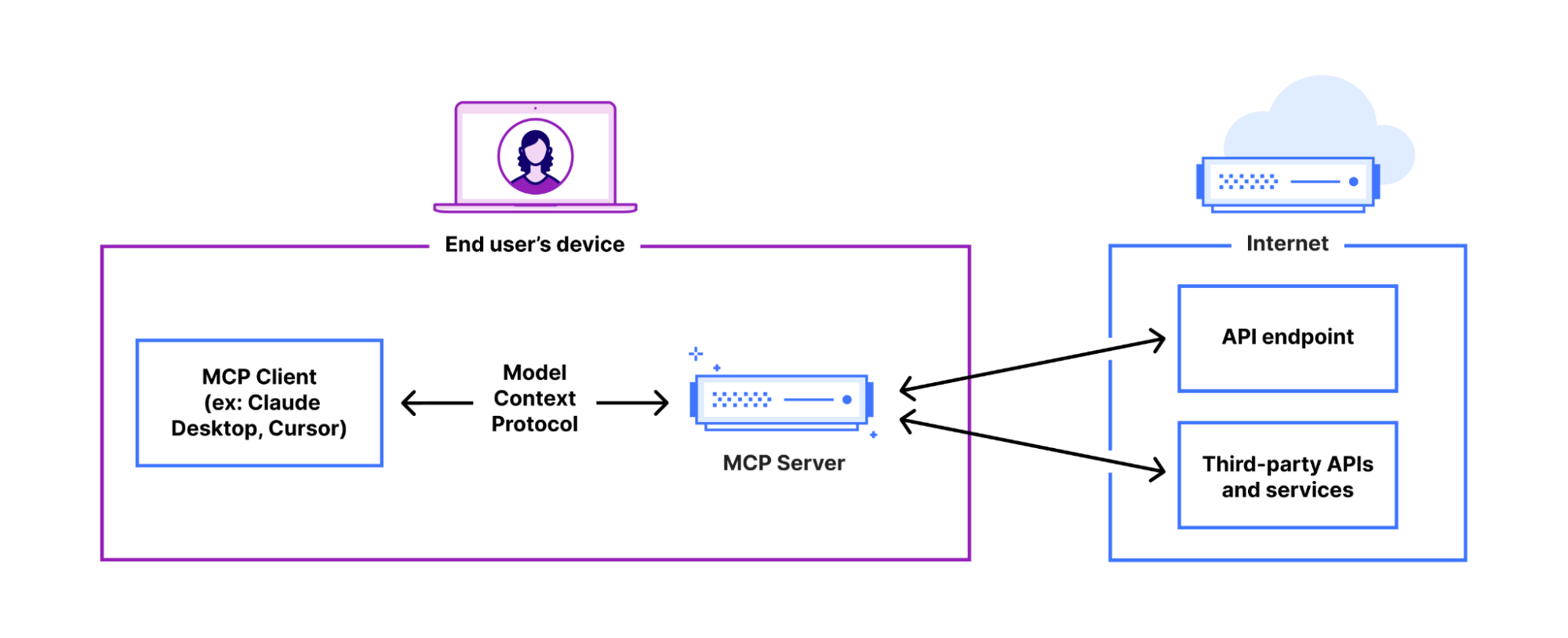
It feels like almost everyone building AI applications and agents is talking about the Model Context Protocol (MCP), as well as building MCP servers that you install and run locally on your own computer.
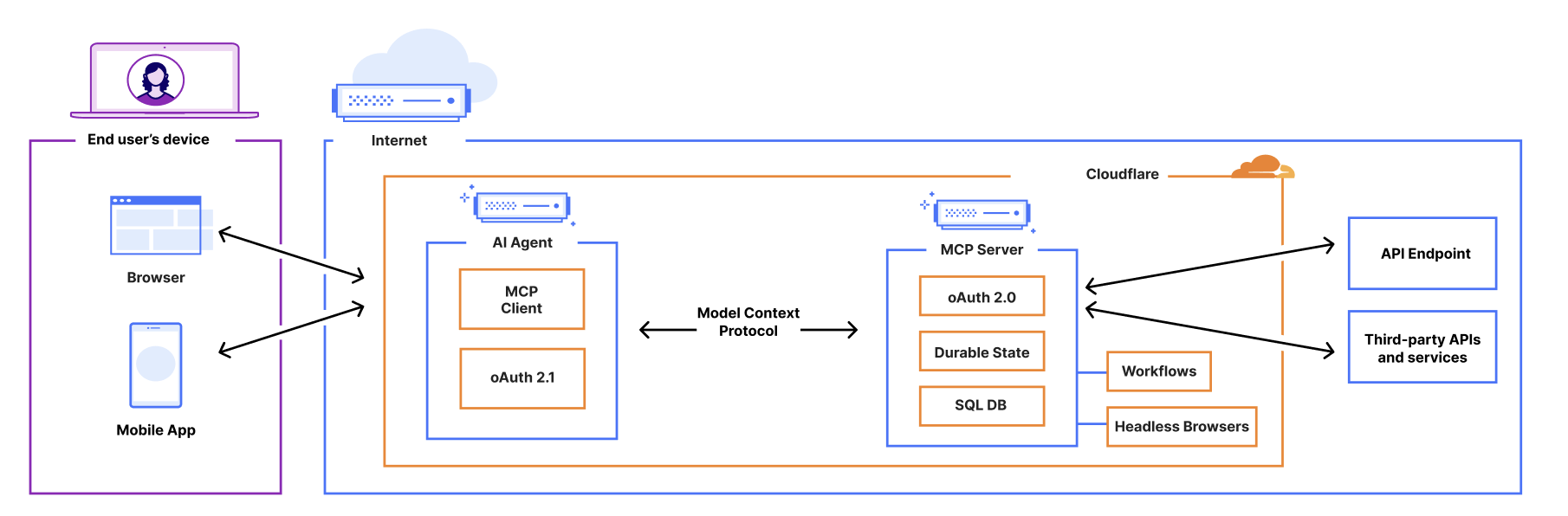
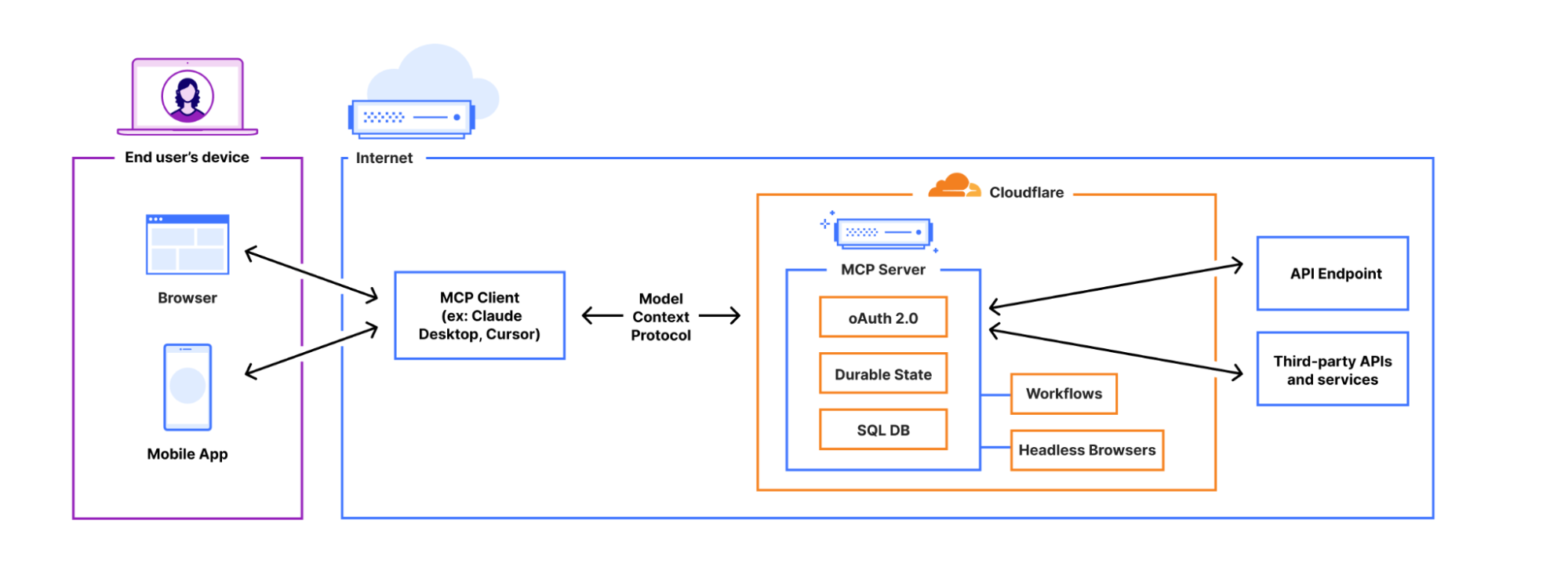
You can now build and deploy remote MCP servers to Cloudflare. We’ve added four things to Cloudflare that handle the hard parts of building remote MCP servers for you:
Unlike the local MCP servers you may have previously used, remote MCP servers are accessible on the Internet. People simply sign in and grant permissions to MCP clients using familiar authorization flows. We think this is going to be a massive deal — connecting coding agents to MCP servers has blown developers’ minds over the past few months, and remote MCP servers have the same potential to open up similar new ways of working with LLMs and agents to a much wider audience, including more everyday consumer use cases.
From local to remote — bringing MCP to the masses
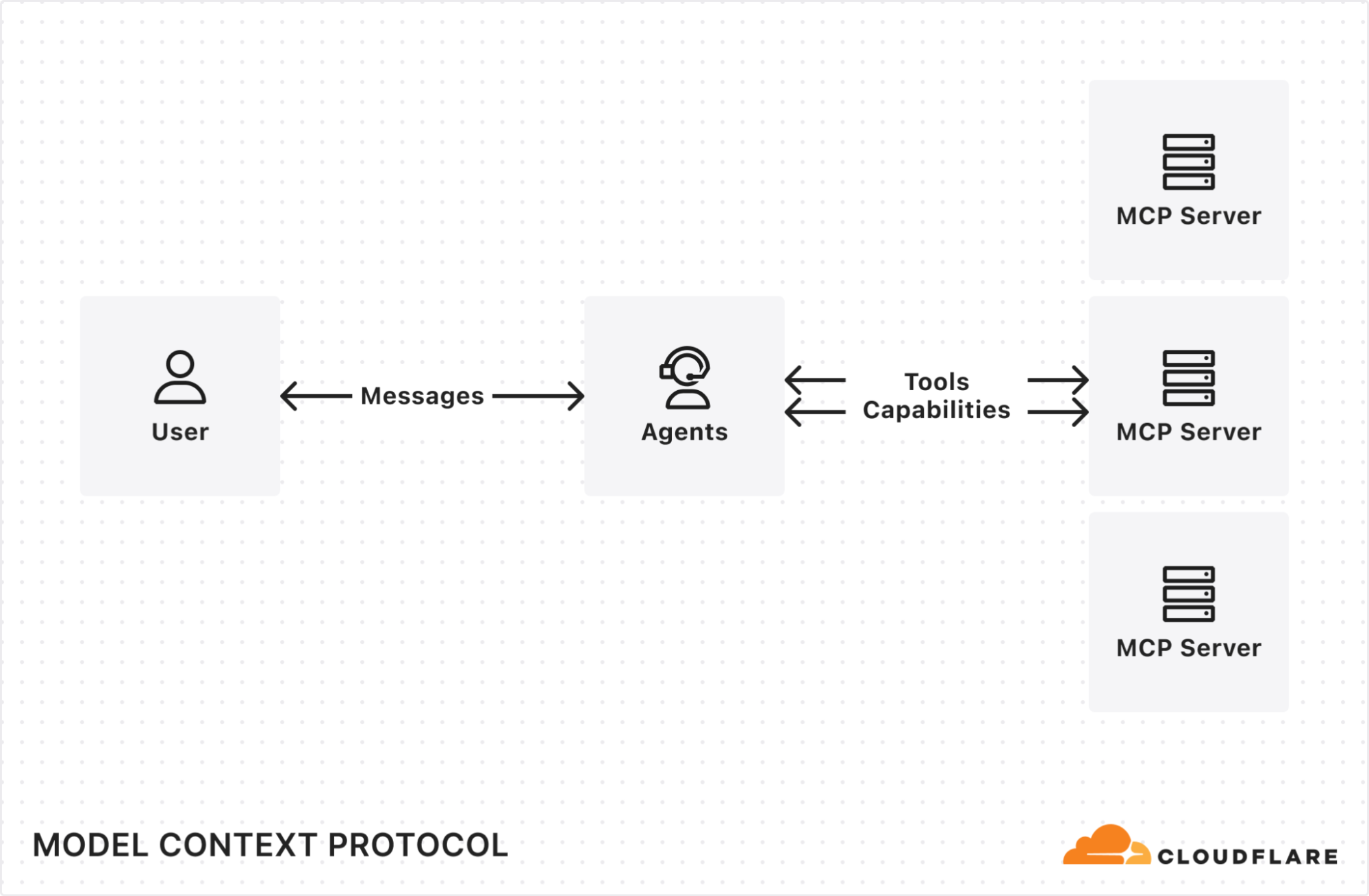
MCP is quickly becoming the common protocol that enables LLMs to go beyond inference and RAG, and take actions that require access beyond the AI application itself (like sending an email, deploying a code change, publishing blog posts, you name it). It enables AI agents (MCP clients) to access tools and resources from external services (MCP servers).
To date, MCP has been limited to running locally on your own machine — if you want to access a tool on the web using MCP, it’s up to you to set up the server locally. You haven’t been able to use MCP from web-based interfaces or mobile apps, and there hasn’t been a way to let people authenticate and grant the MCP client permission. Effectively, MCP servers haven’t yet been brought online.
Support for remote MCP connections changes this. It creates the opportunity to reach a wider audience of Internet users who aren’t going to install and run MCP servers locally for use with desktop apps. Remote MCP support is like the transition from desktop software to web-based software. People expect to continue tasks across devices and to login and have things just work. Local MCP is great for developers, but remote MCP connections are the missing piece to reach everyone on the Internet.
Making authentication and authorization just work with MCP
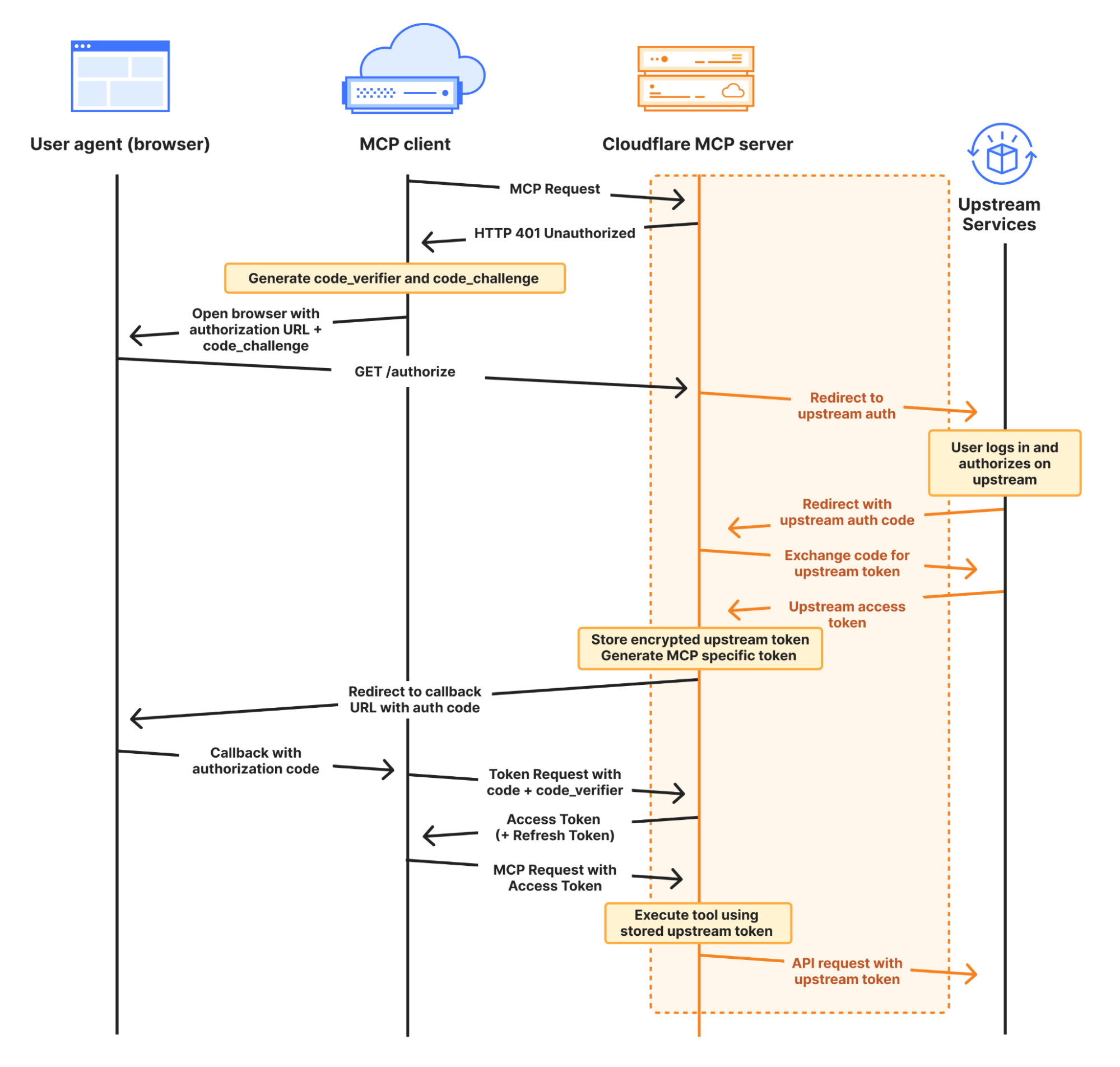
Beyond just changing the transport layer — from stdio to streamable HTTP — when you build a remote MCP server that uses information from the end user’s account, you need authentication and authorization. You need a way to allow users to login and prove who they are (authentication) and a way for users to control what the AI agent will be able to access when using a service (authorization).
MCP does this with OAuth, which has been the standard protocol that allows users to grant applications to access their information or services, without sharing passwords. Here, the MCP Server itself acts as the OAuth Provider. However, OAuth with MCP is hard to implement yourself, so when you build MCP servers on Cloudflare we provide it for you.
workers-oauth-provider — an OAuth 2.1 Provider library for Cloudflare Workers
When you deploy an MCP Server to Cloudflare, your Worker acts as an OAuth Provider, using workers-oauth-provider, a new TypeScript library that wraps your Worker’s code, adding authorization to API endpoints, including (but not limited to) MCP server API endpoints.
Your MCP server will receive the already-authenticated user details as a parameter. You don’t need to perform any checks of your own, or directly manage tokens. You can still fully control how you authenticate users: from what UI they see when they log in, to which provider they use to log in. You can choose to bring your own third-party authentication and authorization providers like Google or GitHub, or integrate with your own.
Here, your MCP server acts as both an OAuth client to your upstream service, and as an OAuth server (also referred to as an OAuth “provider”) to MCP clients. You can use any upstream authentication flow you want, but workers-oauth-provider guarantees that your MCP server is spec-compliant and able to work with the full range of client apps & websites. This includes support for Dynamic Client Registration (RFC 7591) and Authorization Server Metadata (RFC 8414).
A simple, pluggable interface for OAuth
When you build an MCP server with Cloudflare Workers, you provide an instance of the OAuth Provider paths to your authorization, token, and client registration endpoints, along with handlers for your MCP Server, and for auth:
import OAuthProvider from "@cloudflare/workers-oauth-provider";
import MyMCPServer from "./my-mcp-server";
import MyAuthHandler from "./auth-handler";

export default new OAuthProvider({
  apiRoute: "/sse", // MCP clients connect to your server at this route
  apiHandler: MyMCPServer.mount('/sse'), // Your MCP Server implmentation
  defaultHandler: MyAuthHandler, // Your authentication implementation
  authorizeEndpoint: "/authorize",
  tokenEndpoint: "/token",
  clientRegistrationEndpoint: "/register",
});
This abstraction lets you easily plug in your own authentication. Take a look at this example that uses GitHub as the identity provider for an MCP server, in less than 100 lines of code, by implementing /callback and /authorize routes.
Why do MCP servers issue their own tokens?
You may have noticed in the authorization diagram above, and in the authorization section of the MCP spec, that the MCP server issues its own token to the MCP client.
Instead of passing the token it receives from the upstream provider directly to the MCP client, your Worker stores an encrypted access token in Workers KV. It then issues its own token to the client. As shown in the GitHub example above, this is handled on your behalf by the workers-oauth-provider — your code never directly handles writing this token, preventing mistakes. You can see this in the following code snippet from the GitHub example above:
  // When you call completeAuthorization, the accessToken you pass to it
  // is encrypted and stored, and never exposed to the MCP client
  // A new, separate token is generated and provided to the client at the /token endpoint
  const { redirectTo } = await c.env.OAUTH_PROVIDER.completeAuthorization({
    request: oauthReqInfo,
    userId: login,
    metadata: { label: name },
    scope: oauthReqInfo.scope,
    props: {
      accessToken,  // Stored encrypted, never sent to MCP client
    },
  })

  return Response.redirect(redirectTo)
On the surface, this indirection might sound more complicated. Why does it work this way?
By issuing its own token, MCP Servers can restrict access and enforce more granular controls than the upstream provider. If a token you issue to an MCP client is compromised, the attacker only gets the limited permissions you’ve explicitly granted through your MCP tools, not the full access of the original token.
Let’s say your MCP server requests that the user authorize permission to read emails from their Gmail account, using the gmail.readonly scope. The tool that the MCP server exposes is more narrow, and allows reading travel booking notifications from a limited set of senders, to handle a question like “What’s the check-out time for my hotel room tomorrow?” You can enforce this constraint in your MCP server, and if the token you issue to the MCP client is compromised, because the token is to your MCP server — and not the raw token to the upstream provider (Google) — an attacker cannot use it to read arbitrary emails. They can only call the tools your MCP server provides. OWASP calls out “Excessive Agency” as one of the top risk factors for building AI applications, and by issuing its own token to the client and enforcing constraints, your MCP server can limit tools access to only what the client needs.
Or building off the earlier GitHub example, you can enforce that only a specific user is allowed to access a particular tool. In the example below, only users that are part of an allowlist can see or call the generateImage tool, that uses Workers AI to generate an image based on a prompt:
import { McpAgent } from "agents/mcp";
import { McpServer } from "@modelcontextprotocol/sdk/server/mcp.js";
import { z } from "zod";

const USER_ALLOWLIST = ["geelen"];

export class MyMCP extends McpAgent<Props, Env> {
  server = new McpServer({
    name: "Github OAuth Proxy Demo",
    version: "1.0.0",
  });

  async init() {
    // Dynamically add tools based on the user's identity
    if (USER_ALLOWLIST.has(this.props.login)) {
      this.server.tool(
        'generateImage',
        'Generate an image using the flux-1-schnell model.',
        {
          prompt: z.string().describe('A text description of the image you want to generate.')
        },
        async ({ prompt }) => {
          const response = await this.env.AI.run('@cf/black-forest-labs/flux-1-schnell', {
            prompt,
            steps: 8
          })
          return {
            content: [{ type: 'image', data: response.image!, mimeType: 'image/jpeg' }],
          }
        }
      )
    }
  }
}
Introducing McpAgent: remote transport support that works today, and will work with the revision to the MCP spec
The next step to opening up MCP beyond your local machine is to open up a remote transport layer for communication. MCP servers you run on your local machine just communicate over stdio, but for an MCP server to be callable over the Internet, it must implement remote transport.
The McpAgent class we introduced today as part of our Agents SDK handles this for you, using Durable Objects behind the scenes to hold a persistent connection open, so that the MCP client can send server-sent events (SSE) to your MCP server. You don’t have to write code to deal with transport or serialization yourself. A minimal MCP server in 15 lines of code can look like this:
import { McpAgent } from "agents/mcp";
import { McpServer } from "@modelcontextprotocol/sdk/server/mcp.js";
import { z } from "zod";

export class MyMCP extends McpAgent {
  server = new McpServer({
    name: "Demo",
    version: "1.0.0",
  });
  async init() {
    this.server.tool("add", { a: z.number(), b: z.number() }, async ({ a, b }) => ({
      content: [{ type: "text", text: String(a + b) }],
    }));
  }
}
After much discussion, remote transport in the MCP spec is changing, with Streamable HTTP replacing HTTP+SSE This allows for stateless, pure HTTP connections to MCP servers, with an option to upgrade to SSE, and removes the need for the MCP client to send messages to a separate endpoint than the one it first connects to. The McpAgent class will change with it and just work with streamable HTTP, so that you don’t have to start over to support the revision to how transport works.
This applies to future iterations of transport as well. Today, the vast majority of MCP servers only expose tools, which are simple remote procedure call (RPC) methods that can be provided by a stateless transport. But more complex human-in-the-loop and agent-to-agent interactions will need prompts and sampling. We expect these types of chatty, two-way interactions will need to be real-time, which will be challenging to do well without a bidirectional transport layer. When that time comes, Cloudflare, the Agents SDK, and Durable Objects all natively support WebSockets, which enable full-duplex, bidirectional real-time communication.
Stateful, agentic MCP servers
When you build MCP servers on Cloudflare, each MCP client session is backed by a Durable Object, via the Agents SDK. This means each session can manage and persist its own state, backed by its own SQL database.
This opens the door to building stateful MCP servers. Rather than just acting as a stateless layer between a client app and an external API, MCP servers on Cloudflare can themselves be stateful applications — games, a shopping cart plus checkout flow, a persistent knowledge graph, or anything else you can dream up. When you build on Cloudflare, MCP servers can be much more than a layer in front of your REST API.
To understand the basics of how this works, let’s look at a minimal example that increments a counter:
import { McpAgent } from "agents/mcp";
import { McpServer } from "@modelcontextprotocol/sdk/server/mcp.js";
import { z } from "zod";

type State = { counter: number }

export class MyMCP extends McpAgent<Env, State, {}> {
  server = new McpServer({
    name: "Demo",
    version: "1.0.0",
  });

  initialState: State = {
    counter: 1,
  }

  async init() {
    this.server.resource(`counter`, `mcp://resource/counter`, (uri) => {
      return {
        contents: [{ uri: uri.href, text: String(this.state.counter) }],
      }
    })

    this.server.tool('add', 'Add to the counter, stored in the MCP', { a: z.number() }, async ({ a }) => {
      this.setState({ ...this.state, counter: this.state.counter + a })

      return {
        content: [{ type: 'text', text: String(`Added ${a}, total is now ${this.state.counter}`) }],
      }
    })
  }

  onStateUpdate(state: State) {
    console.log({ stateUpdate: state })
  }

}
For a given session, the MCP server above will remember the state of the counter across tool calls.
From within an MCP server, you can use Cloudflare’s whole developer platform, and have your MCP server spin up its own web browser, trigger a Workflow, call AI models, and more. We’re excited to see the MCP ecosystem evolve into more advanced use cases.
Connect to remote MCP servers from MCP clients that today only support local MCP
Cloudflare is supporting remote MCP early — before the most prominent MCP client applications support remote, authenticated MCP, and before other platforms support remote MCP. We’re doing this to give you a head start building for where MCP is headed.
But if you build a remote MCP server today, this presents a challenge — how can people start using your MCP server if there aren’t MCP clients that support remote MCP?
We have two new tools that allow you to test your remote MCP server and simulate how users will interact with it in the future:
We updated the Workers AI Playground to be a fully remote MCP client that allows you to connect to any remote MCP server with built-in authentication support. This online chat interface lets you immediately test your remote MCP servers without having to install anything on your device. Instead, just enter the remote MCP server’s URL (e.g. https://remote-server.example.com/sse) and click Connect.
Once you click Connect, you’ll go through the authentication flow (if you set one up) and after, you will be able to interact with the MCP server tools directly from the chat interface.
If you prefer to use a client like Claude Desktop or Cursor that already supports MCP but doesn’t yet handle remote connections with authentication, you can use mcp-remote. mcp-remote is an adapter that lets MCP clients that otherwise only support local connections to work with remote MCP servers. This gives you and your users the ability to preview what interactions with your remote MCP server will be like from the tools you’re already using today, without having to wait for the client to support remote MCP natively.
We’ve published a guide on how to use mcp-remote with popular MCP clients including Claude Desktop, Cursor, and Windsurf. In Claude Desktop, you add the following to your configuration file:
Remote Model Context Protocol (MCP) is coming! When client apps support remote MCP servers, the audience of people who can use them opens up from just us, developers, to the rest of the population — who may never even know what MCP is or stands for.
Building a remote MCP server is the way to bring your service into the AI assistants and tools that millions of people use. We’re excited to see many of the biggest companies on the Internet are busy building MCP servers right now, and we are curious about the businesses that pop-up in an agent-first, MCP-native way.
On Cloudflare, you can start building today. We’re ready for you, and ready to help build with you. Email us at [email protected], and we’ll help get you going. There’s lots more to come with MCP, and we’re excited to see what you build.
Thank you for following along with another Security Week at Cloudflare. We’re extremely proud of the work our team does to make the Internet safer and to help meet the challenge of emerging threats. As our CISO Grant Bourzikas outlined in his kickoff post this week, security teams are facing a landscape of rapidly increasing complexity introduced by vendor sprawl, an “AI Boom”, and an ever-growing surface area to protect.
As we continuously work to meet new challenges, Innovation Weeks like Security Week give us an invaluable opportunity to share our point of view and engage with the wider Internet community. Cloudflare’s mission is to help build a better Internet. We want to help safeguard the Internet from the arrival of quantum supercomputers, help protect the livelihood of content creators from unauthorized AI scraping, help raise awareness of the latest Internet threats, and help find new ways to help reduce the reuse of compromised passwords. Solving these challenges will take a village. We’re grateful to everyone who has engaged with us on these issues via social media, contributed to our open source repositories, and reached out through our technology partner program to work with us on the issues most important to them. For us, that’s the best part.
We’re thrilled to announce that organizations can now protect their sensitive corporate network traffic against quantum threats by tunneling it through Cloudflare’s Zero Trust platform.
Cloudflare has made significant progress in boosting multi-factor authentication (MFA) adoption. With the addition of Apple and Google social logins, we’ve made secure access easier for our users.
We’re excited to announce that Cloudflare for Campaigns now includes Email Security, adding an extra layer of protection to email systems that power political campaigns.
Nearly half of login attempts across websites protected by Cloudflare involved leaked credentials. The pervasive issue of password reuse is enabling automated bot attacks on a massive scale.
Threat research from the network that sees the most threats
Gain real-time insights with our new threat events platform. This tool empowers your cybersecurity defense with actionable intelligence to stay ahead of attacks and protect your critical assets.
Cloudflare introduces a single platform for unified security posture management, helping protect SaaS and web applications deployed across various environments.
We are excited to announce support for Zero Trust datasets, and custom dashboards where customers can monitor critical metrics for suspicious or unusual activity
For Security Week 2025, we are adding several new DDoS-focused graphs, new insights into leaked credential trends, and a new Bots page to Cloudflare Radar.
With Cloudflare for AI, developers, security teams, and content creators can leverage Cloudflare’s network and portfolio of tools to secure, observe, and make AI applications resilient and safe to use.
Learn more about how Cloudflare developed an AI model to uncover malicious JavaScript intent using a Graph Neural Network, from pre-processing data to inferencing at scale.
It’s hard to tell the difference between web content produced by humans and web content produced by AI. We’re taking a new approach to making AI content distinguishable without impacting performance.
How Cloudflare uses generative AI to slow down, confuse, and waste the resources of AI Crawlers and other bots that don’t respect “no crawl” directives.
Firewall for AI discovers and protects your public LLM-powered applications, and is seamlessly integrated with Cloudflare WAF. Join the beta now and take control of your generative AI security
By building and integrating a new heuristics framework into the Cloudflare Ruleset Engine, we now have a more flexible system to write rules and deploy new releases rapidly
We’re introducing a new Application Security experience in the Cloudflare dashboard, with a reworked UI organized by use cases, making it easier for customers to navigate and secure their accounts
Cloudflare Aegis provides dedicated egress IPs for Zero Trust origin access strategies, now supporting BYOIP and customer-facing configurability, with observability of Aegis IP address utilization coming soon.
We are closing the cleartext HTTP ports entirely for Cloudflare API traffic. This prevents the risk of clients unintentionally leaking their secret API keys in cleartext during the initial request, before we can reject the connection at the server side.
Cloudflare now provides clientless, browser-based support for the Remote Desktop Protocol (RDP). It natively enables secure, remote Windows server access without VPNs or RDP clients, to support third-party access and BYOD security.
Cloudflare’s Data Loss Prevention is reducing false positives by using a self-improving AI-powered algorithm, built on Cloudflare’s Developer Platform, to improve detection accuracy through AI context analysis.
This post is a beginner’s guide to lattices, the math at the heart of the transition to post-quantum (PQ) cryptography. It explains how to do lattice-based encryption and authentication from scratch.
Cloudflare is now assessed at the IRAP PROTECTED level, bringing our products and services to the Australian Public Sector.
Tune in to the latest on Cloudflare TV
For a deeper dive on many of the great announcements from Security Week, check out our CFTV segments where our team shares even more details on our latest updates.
See you for our next Innovation Week
We appreciate everyone who’s taken the time to read Cloudflare’s Security Week blog posts or engage with us on these topics via social media. Our next innovation week, Developer Week, is right around the corner in April. We look forward to seeing you then!
The Atlantic has a search tool that allows you to search for specific works in the “LibGen” database of copyrighted works that Meta used to train its AI models. (The rest of the article is behind a paywall, but not the search tool.)
It’s impossible to know exactly which parts of LibGen Meta used to train its AI, and which parts it might have decided to exclude; this snapshot was taken in January 2025, after Meta is known to have accessed the database, so some titles here would not have been available to download.
Still…interesting.
Searching my name yields 199 results: all of my books in different versions, plus a bunch of shorter items.
The collective thoughts of the interwebz
Manage Consent
To provide the best experiences, we use technologies like cookies to store and/or access device information. Consenting to these technologies will allow us to process data such as browsing behavior or unique IDs on this site. Not consenting or withdrawing consent, may adversely affect certain features and functions.
Functional
Always active
The technical storage or access is strictly necessary for the legitimate purpose of enabling the use of a specific service explicitly requested by the subscriber or user, or for the sole purpose of carrying out the transmission of a communication over an electronic communications network.
Preferences
The technical storage or access is necessary for the legitimate purpose of storing preferences that are not requested by the subscriber or user.
Statistics
The technical storage or access that is used exclusively for statistical purposes.The technical storage or access that is used exclusively for anonymous statistical purposes. Without a subpoena, voluntary compliance on the part of your Internet Service Provider, or additional records from a third party, information stored or retrieved for this purpose alone cannot usually be used to identify you.
Marketing
The technical storage or access is required to create user profiles to send advertising, or to track the user on a website or across several websites for similar marketing purposes.