Tag Archives: AWS Partner Network

Introducing AWS Gateway Load Balancer – Easy Deployment, Scalability, and High Availability for Partner Appliances

Post Syndicated from Channy Yun original https://aws.amazon.com/blogs/aws/introducing-aws-gateway-load-balancer-easy-deployment-scalability-and-high-availability-for-partner-appliances/

Last year, we launched Virtual Private Cloud (VPC) Ingress Routing to allow routing of all incoming and outgoing traffic to/from an Internet Gateway (IGW) or Virtual Private Gateway (VGW) to the Elastic Network Interface of a specific Amazon Elastic Compute Cloud (EC2) instance. With VPC Ingress Routing, you can now configure your VPC to send all […]

Building Extensions for AWS Lambda – In preview

Post Syndicated from Julian Wood original https://aws.amazon.com/blogs/compute/building-extensions-for-aws-lambda-in-preview/

AWS Lambda is announcing a preview of Lambda Extensions, a new way to easily integrate Lambda with your favorite monitoring, observability, security, and governance tools. Extensions enable tools to integrate deeply into the Lambda execution environment to control and participate in Lambda’s lifecycle. This simplified experience makes it easier for you to use your preferred tools across your application portfolio today.

In this post I explain how Lambda extensions work, the changes to the Lambda lifecycle, and how to build an extension. To learn how to use extensions with your functions, see the companion blog post “Introducing AWS Lambda extensions”.

Extensions are built using the new Lambda Extensions API, which provides a way for tools to get greater control during function initialization, invocation, and shut down. This API builds on the existing Lambda Runtime API, which enables you to bring custom runtimes to Lambda.

You can use extensions from AWS, AWS Lambda Ready Partners, and open source projects for use-cases such as application performance monitoring, secrets management, configuration management, and vulnerability detection. You can also build your own extensions to integrate your own tooling using the Extensions API.

There are extensions available today for AppDynamics, Check Point, Datadog, Dynatrace, Epsagon, HashiCorp, Lumigo, New Relic, Thundra, Splunk, AWS AppConfig, and Amazon CloudWatch Lambda Insights. For more details on these, see “Introducing AWS Lambda extensions”.

The Lambda execution environment

Lambda functions run in a sandboxed environment called an execution environment. This isolates them from other functions and provides the resources, such as memory, specified in the function configuration.

Lambda automatically manages the lifecycle of compute resources so that you pay for value. Between function invocations, the Lambda service freezes the execution environment. It is thawed if the Lambda service needs the execution environment for subsequent invocations.

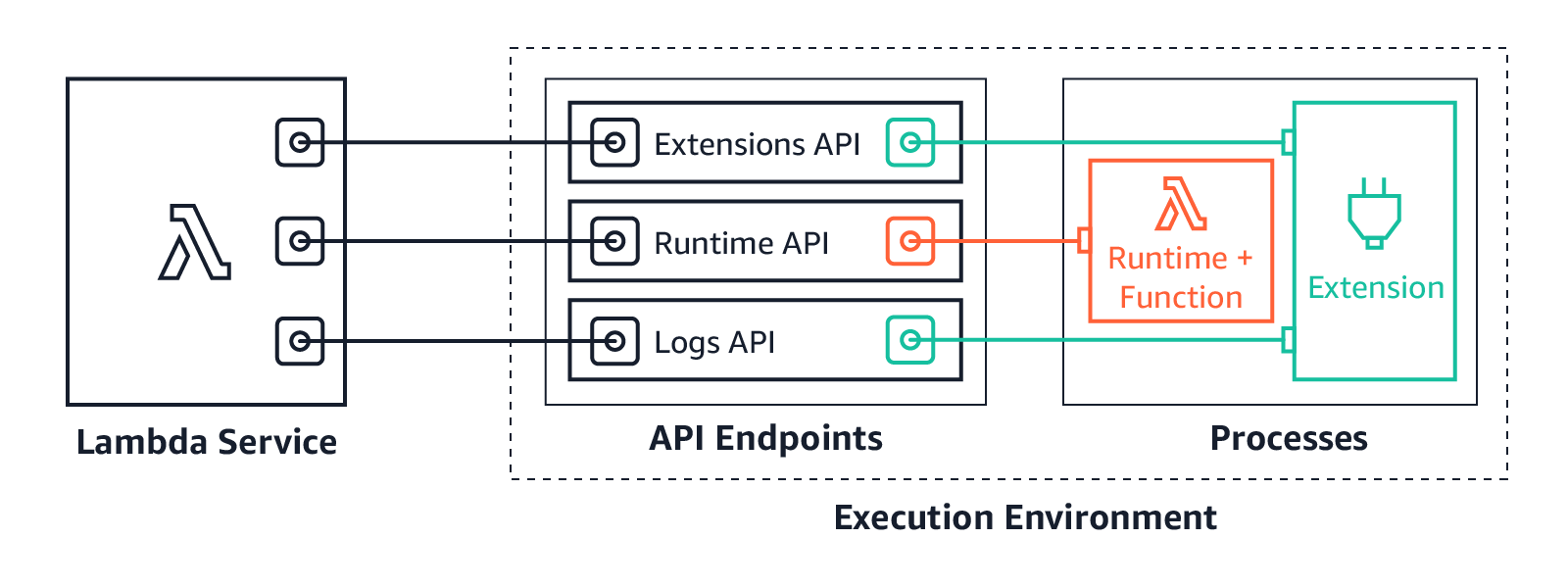
Previously, only the runtime process could influence the lifecycle of the execution environment. It would communicate with the Runtime API, which provides an HTTP API endpoint within the execution environment to communicate with the Lambda service.

Lambda and Runtime API

Lambda and Runtime API

The runtime uses the API to request invocation events from Lambda and deliver them to the function code. It then informs the Lambda service when it has completed processing an event. The Lambda service then freezes the execution environment.

The runtime process previously exposed two distinct phases in the lifecycle of the Lambda execution environment: Init and Invoke.

1. Init: During the Init phase, the Lambda service initializes the runtime, and then runs the function initialization code (the code outside the main handler). The Init phase happens either during the first invocation, or in advance if Provisioned Concurrency is enabled.

2. Invoke: During the invoke phase, the runtime requests an invocation event from the Lambda service via the Runtime API, and invokes the function handler. It then returns the function response to the Runtime API.

After the function runs, the Lambda service freezes the execution environment and maintains it for some time in anticipation of another function invocation.

If the Lambda function does not receive any invokes for a period of time, the Lambda service shuts down and removes the environment.

Previous Lambda lifecycle

Previous Lambda lifecycle

With the addition of the Extensions API, extensions can now influence, control, and participate in the lifecycle of the execution environment. They can use the Extensions API to influence when the Lambda service freezes the execution environment.

AWS Lambda execution environment with the Extensions API

AWS Lambda execution environment with the Extensions API

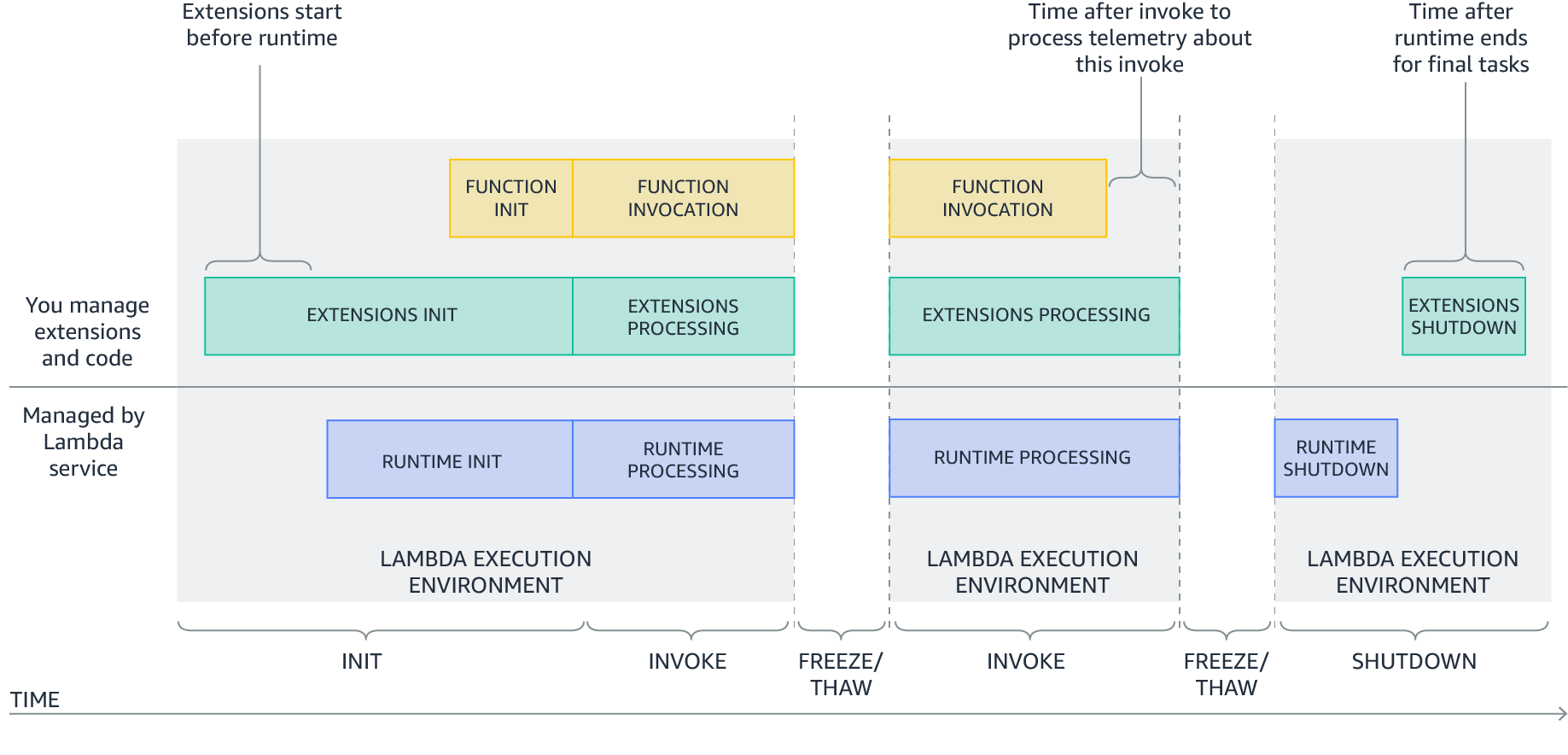
Extensions are initialized before the runtime and the function. They then continue to run in parallel with the function, get greater control during function invocation, and can run logic during shut down.

Extensions allow integrations with the Lambda service by introducing the following changes to the Lambda lifecycle:

  1. An updated Init phase. There are now three discrete Init tasks: extensions Init, runtime Init, and function Init. This creates an order where extensions and the runtime can perform setup tasks before the function code runs.
  2. Greater control during invocation. During the invoke phase, as before, the runtime requests the invocation event and invokes the function handler. In addition, extensions can now request lifecycle events from the Lambda service. They can run logic in response to these lifecycle events, and respond to the Lambda service when they are done. The Lambda service freezes the execution environment when it hears back from the runtime and all extensions. In this way, extensions can influence the freeze/thaw behavior.
  3. Shutdown phase: we are now exposing the shutdown phase to let extensions stop cleanly when the execution environment shuts down. The Lambda service sends a shut down event, which tells the runtime and extensions that the environment is about to be shut down.
New Lambda lifecycle with extensions

New Lambda lifecycle with extensions

Each Lambda lifecycle phase starts with an event from the Lambda service to the runtime and all registered extensions. The runtime and extensions signal that they have completed by requesting the Next invocation event from the Runtime and Extensions APIs. Lambda freezes the execution environment and all extensions when there are no pending events.

Lambda lifecycle for execution environment, runtime, extensions, and function.png

Lambda lifecycle for execution environment, runtime, extensions, and function.png

For more information on the lifecycle phases and the Extensions API, see the documentation.

How are extensions delivered and run?

You deploy extensions as Lambda layers, which are ZIP archives containing shared libraries or other dependencies.

To add a layer, use the AWS Management Console, AWS Command Line Interface (AWS CLI), or infrastructure as code tools such as AWS CloudFormation, the AWS Serverless Application Model (AWS SAM), and Terraform.

When the Lambda service starts the function execution environment, it extracts the extension files from the Lambda layer into the /opt directory. Lambda then looks for any extensions in the /opt/extensions directory and starts initializing them. Extensions need to be executable as binaries or scripts. As the function code directory is read-only, extensions cannot modify function code.

Extensions can run in either of two modes, internal and external.

  • Internal extensions run as part of the runtime process, in-process with your code. They are not separate processes. Internal extensions allow you to modify the startup of the runtime process using language-specific environment variables and wrapper scripts. You can use language-specific environment variables to add options and tools to the runtime for Java Correto 8 and 11, Node.js 10 and 12, and .NET Core 3.1. Wrapper scripts allow you to delegate the runtime startup to your script to customize the runtime startup behavior. You can use wrapper scripts with Node.js 10 and 12, Python 3.8, Ruby 2.7, Java 8 and 11, and .NET Core 3.1. For more information, see “Modifying-the-runtime-environment”.
  • External extensions allow you to run separate processes from the runtime but still within the same execution environment as the Lambda function. External extensions can start before the runtime process, and can continue after the runtime shuts down. External extensions work with Node.js 10 and 12, Python 3.7 and 3.8, Ruby 2.5 and 2.7, Java Corretto 8 and 11, .NET Core 3.1, and custom runtimes.

External extensions can be written in a different language to the function. We recommend implementing external extensions using a compiled language as a self-contained binary. This makes the extension compatible with all of the supported runtimes. If you use a non-compiled language, ensure that you include a compatible runtime in the extension.

Extensions run in the same execution environment as the function, so share resources such as CPU, memory, and disk storage with the function. They also share environment variables, in addition to permissions, using the same AWS Identity and Access Management (IAM) role as the function.

For more details on resources, security, and performance with extensions, see the companion blog post “Introducing AWS Lambda extensions”.

For example extensions and wrapper scripts to help you build your own extensions, see the GitHub repository.

Showing extensions in action

The demo shows how external extensions integrate deeply with functions and the Lambda runtime. The demo creates an example Lambda function with a single extension using either the AWS CLI, or AWS SAM.

The example shows how an external extension can start before the runtime, run during the Lambda function invocation, and shut down after the runtime shuts down.

To set up the example, visit the GitHub repo, and follow the instructions in the README.md file.

The example Lambda function uses the custom provided.al2 runtime based on Amazon Linux 2. Using the custom runtime helps illustrate in more detail how the Lambda service, Runtime API, and the function communicate. The extension is delivered using a Lambda layer.

The runtime, function, and extension, log their status events to Amazon CloudWatch Logs. The extension initializes as a separate process and waits to receive the function invocation event from the Extensions API. It then sleeps for 5 seconds before calling the API again to register to receive the next event. The extension sleep simulates the processing of a parallel process. This could, for example, collect telemetry data to send to an external observability service.

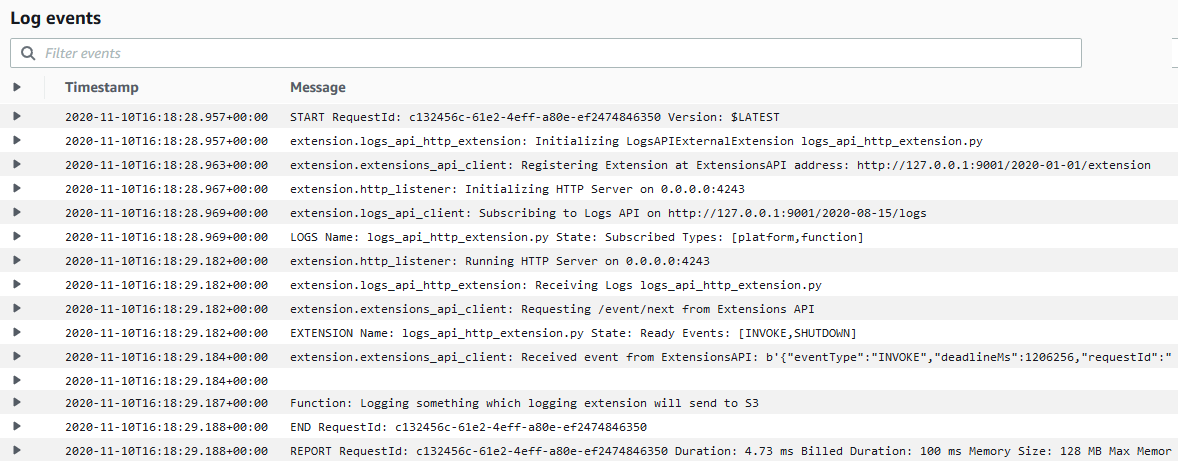
When the Lambda function is invoked, the extension, runtime and function perform the following steps. I walk through the steps using the log output.

1. The Lambda service adds the configured extension Lambda layer. It then searches the /opt/extensions folder, and finds an extension called extension1.sh. The extension executable launches before the runtime initializes. It registers with the Extensions API to receive INVOKE and SHUTDOWN events using the following API call.

curl -sS -LD "$HEADERS" -XPOST "http://${AWS_LAMBDA_RUNTIME_API}/2020-01-01/extension/register" --header "Lambda-Extension-Name: ${LAMBDA_EXTENSION_NAME}" -d "{ \"events\": [\"INVOKE\", \"SHUTDOWN\"]}" > $TMPFILE
Extension discovery, registration, and start

Extension discovery, registration, and start

2. The Lambda custom provided.al2 runtime initializes from the bootstrap file.

Runtime initialization

Runtime initialization

3. The runtime calls the Runtime API to get the next event using the following API call. The HTTP request is blocked until the event is received.

curl -sS -LD "$HEADERS" -X GET "http://${AWS_LAMBDA_RUNTIME_API}/2018-06-01/runtime/invocation/next" > $TMPFILE &

The extension calls the Extensions API and waits for the next event. The HTTP request is again blocked until one is received.

curl -sS -L -XGET "http://${AWS_LAMBDA_RUNTIME_API}/2020-01-01/extension/event/next" --header "Lambda-Extension-Identifier: ${EXTENSION_ID}" > $TMPFILE &
Runtime and extension call APIs to get the next event

Runtime and extension call APIs to get the next event

4. The Lambda service receives an invocation event. It sends the event payload to the runtime using the Runtime API. It sends an event to the extension informing it about the invocation, using the Extensions API.

Runtime and extension receive event

Runtime and extension receive event

5. The runtime invokes the function handler. The function receives the event payload.

Runtime invokes handler

Runtime invokes handler

6. The function runs the handler code. The Lambda runtime receives back the function response and sends it back to the Runtime API with the following API call.

curl -sS -X POST "http://${AWS_LAMBDA_RUNTIME_API}/2018-06-01/runtime/invocation/$REQUEST_ID/response" -d "$RESPONSE" > $TMPFILE
Runtime receives function response and sends to Runtime API

Runtime receives function response and sends to Runtime API

7. The Lambda runtime then waits for the next invocation event (warm start).

Runtime waits for next event

Runtime waits for next event

8. The extension continues processing for 5 seconds, simulating the processing of a companion process. The extension finishes, and uses the Extensions API to register again to wait for the next event.

Extension processing

Extension processing

9. The function invocation report is logged.

Function invocation report

Function invocation report

10. When Lambda is about to shut down the execution environment, it sends the Runtime API a shut down event.

Lambda runtime shut down event

Lambda runtime shut down event

11. Lambda then sends a shut down event to the extensions. The extension finishes processing and then shuts down after the runtime.

Lambda extension shut down event

Lambda extension shut down event

The demo shows the steps the runtime, function, and extensions take during the Lambda lifecycle.

An external extension registers and starts before the runtime. When Lambda receives an invocation event, it sends it to the runtime. It then sends an event to the extension informing it about the invocation. The runtime invokes the function handler, and the extension does its own processing of the event. The extension continues processing after the function invocation completes. When Lambda is about to shut down the execution environment, it sends a shut down event to the runtime. It then sends one to the extension, so it can finish processing.

To see a sequence diagram of this flow, see the Extensions API documentation.

Pricing

Extensions share the same billing model as Lambda functions. When using Lambda functions with extensions, you pay for requests served and the combined compute time used to run your code and all extensions, in 100 ms increments. To learn more about the billing for extensions, visit the Lambda FAQs page.

Conclusion

Lambda extensions enable you to extend Lambda’s execution environment to more easily integrate with your favorite tools for monitoring, observability, security, and governance.

Extensions can run additional code; before, during, and after a function invocation. There are extensions available today from AWS Lambda Ready Partners. These cover use-cases such as application performance monitoring, secrets management, configuration management, and vulnerability detection. Extensions make it easier to use your existing tools with your serverless applications. For more information on the available extensions, see the companion post “Introducing Lambda Extensions – In preview“.

You can also build your own extensions to integrate your own tooling using the new Extensions API. For example extensions and wrapper scripts, see the GitHub repository.

Extensions are now available in preview in the following Regions: us-east-1, us-east-2, us-west-1, us-west-2, ca-central-1, eu-west-1, eu-west-2, eu-west-3, eu-central-1, eu-north-1, eu-south-1, sa-east-1, me-south-1, ap-northeast-1, ap-northeast-2, ap-northeast-3, ap-southeast-1, ap-southeast-2, ap-south-1, and ap-east-1.

For more serverless learning resources, visit https://serverlessland.com.

Introducing AWS Lambda Extensions – In preview

Post Syndicated from Julian Wood original https://aws.amazon.com/blogs/compute/introducing-aws-lambda-extensions-in-preview/

AWS Lambda is announcing a preview of Lambda Extensions, a new way to easily integrate Lambda with your favorite monitoring, observability, security, and governance tools. In this post I explain how Lambda extensions work, how you can begin using them, and the extensions from AWS Lambda Ready Partners that are available today.

Extensions help solve a common request from customers to make it easier to integrate their existing tools with Lambda. Previously, customers told us that integrating Lambda with their preferred tools required additional operational and configuration tasks. In addition, tools such as log agents, which are long-running processes, could not easily run on Lambda.

Extensions are a new way for tools to integrate deeply into the Lambda environment. There is no complex installation or configuration, and this simplified experience makes it easier for you to use your preferred tools across your application portfolio today. You can use extensions for use-cases such as:

  • capturing diagnostic information before, during, and after function invocation
  • automatically instrumenting your code without needing code changes
  • fetching configuration settings or secrets before the function invocation
  • detecting and alerting on function activity through hardened security agents, which can run as separate processes from the function

You can use extensions from AWS, AWS Lambda Ready Partners, and open source projects. There are extensions available today for AppDynamics, Check Point, Datadog, Dynatrace, Epsagon, HashiCorp, Lumigo, New Relic, Thundra, Splunk SignalFX, AWS AppConfig, and Amazon CloudWatch Lambda Insights.

You can learn how to build your own extensions, in the companion post “Building Extensions for AWS Lambda – In preview“.

Overview

Lambda Extensions is designed to be the easiest way to plug in the tools you use today without complex installation or configuration management. You deploy extensions as Lambda layers, with the AWS Management Console and AWS Command Line Interface (AWS CLI). You can also use infrastructure as code tools such as AWS CloudFormation, the AWS Serverless Application Model (AWS SAM), Serverless Framework, and Terraform. You can use Stackery to automate the integration of extensions from Epsagon, New Relic, Lumigo, and Thundra.

There are two components to the Lambda Extensions capability: the Extensions API and extensions themselves. Extensions are built using the new Lambda Extensions API which provides a way for tools to get greater control during function initialization, invocation, and shut down. This API builds on the existing Lambda Runtime API, which enables you to bring custom runtimes to Lambda.

AWS Lambda execution environment with the Extensions API

AWS Lambda execution environment with the Extensions API

Most customers will use extensions without needing to know about the capabilities of the Extensions API that enables them. You can just consume capabilities of an extension by configuring the options in your Lambda functions. Developers who build extensions use the Extensions API to register for function and execution environment lifecycle events.

Extensions can run in either of two modes – internal and external.

  • Internal extensions run as part of the runtime process, in-process with your code. They allow you to modify the startup of the runtime process using language-specific environment variables and wrapper scripts. Internal extensions enable use cases such as automatically instrumenting code.
  • External extensions allow you to run separate processes from the runtime but still within the same execution environment as the Lambda function. External extensions can start before the runtime process, and can continue after the runtime shuts down. External extensions enable use cases such as fetching secrets before the invocation, or sending telemetry to a custom destination outside of the function invocation. These extensions run as companion processes to Lambda functions.

For more information on the Extensions API and the changes to the Lambda lifecycle, see “Building Extensions for AWS Lambda – In preview

AWS Lambda Ready Partners extensions available at launch

Today, you can use extensions with the following AWS and AWS Lambda Ready Partner’s tools, and there are more to come:

  • AppDynamics provides end-to-end transaction tracing for AWS Lambda. With the AppDynamics extension, it is no longer mandatory for developers to include the AppDynamics tracer as a dependency in their function code, making tracing transactions across hybrid architectures even simpler.
  • The Datadog extension brings comprehensive, real-time visibility to your serverless applications. Combined with Datadog’s existing AWS integration, you get metrics, traces, and logs to help you monitor, detect, and resolve issues at any scale. The Datadog extension makes it easier than ever to get telemetry from your serverless workloads.
  • The Dynatrace extension makes it even easier to bring AWS Lambda metrics and traces into the Dynatrace platform for intelligent observability and automatic root cause detection. Get comprehensive, end-to-end observability with the flip of a switch and no code changes.
  • Epsagon helps you monitor, troubleshoot, and lower the cost for your Lambda functions. Epsagon’s extension reduces the overhead of sending traces to the Epsagon service, with minimal performance impact to your function.
  • HashiCorp Vault allows you to secure, store, and tightly control access to your application’s secrets and sensitive data. With the Vault extension, you can now authenticate and securely retrieve dynamic secrets before your Lambda function invokes.
  • Lumigo provides a monitoring and observability platform for serverless and microservices applications. The Lumigo extension enables the new Lumigo Lambda Profiler to see a breakdown of function resources, including CPU, memory, and network metrics. Receive actionable insights to reduce Lambda runtime duration and cost, fix bottlenecks, and increase efficiency.
  • Check Point CloudGuard provides full lifecycle security for serverless applications. The CloudGuard extension enables Function Self Protection data aggregation as an out-of-process extension, providing detection and alerting on application layer attacks.
  • New Relic provides a unified observability experience for your entire software stack. The New Relic extension uses a simpler companion process to report function telemetry data. This also requires fewer AWS permissions to add New Relic to your application.
  • Thundra provides an application debugging, observability and security platform for serverless, container and virtual machine (VM) workloads. The Thundra extension adds asynchronous telemetry reporting functionality to the Thundra agents, getting rid of network latency.
  • Splunk offers an enterprise-grade cloud monitoring solution for real-time full-stack visibility at scale. The Splunk extension provides a simplified runtime-independent interface to collect high-resolution observability data with minimal overhead. Monitor, manage, and optimize the performance and cost of your serverless applications with Splunk Observability solutions.
  • AWS AppConfig helps you manage, store, and safely deploy application configurations to your hosts at runtime. The AWS AppConfig extension integrates Lambda and AWS AppConfig seamlessly. Lambda functions have simple access to external configuration settings quickly and easily. Developers can now dynamically change their Lambda function’s configuration safely using robust validation features.
  • Amazon CloudWatch Lambda Insights enables you to efficiently monitor, troubleshoot, and optimize Lambda functions. The Lambda Insights extension simplifies the collection, visualization, and investigation of detailed compute performance metrics, errors, and logs. You can more easily isolate and correlate performance problems to optimize your Lambda environments.

You can also build and use your own extensions to integrate your organization’s tooling. For instance, the Cloud Foundations team at Square has built their own extension. They say:

The Cloud Foundations team at Square works to make the cloud accessible and secure. We partnered with the Security Infrastructure team, who builds infrastructure to secure Square’s sensitive data, to enable serverless applications at Square,​ and ​provide mTLS identities to Lambda​.

Since beginning work on Lambda, we have focused on creating a streamlined developer experience. Teams adopting Lambda need to learn a lot about AWS, and we see extensions as a way to abstract away common use cases. For our initial exploration, we wanted to make accessing secrets easy, as with our current tools each Lambda function usually pulls 3-5 secrets.

The extension we built and open source fetches secrets on cold starts, before the Lambda function is invoked. Each function includes a configuration file that specifies which secrets to pull. We knew this configuration was key, as Lambda functions should only be doing work they need to do. The secrets are cached in the local /tmp directory, which the function reads when it needs the secret data. This makes Lambda functions not only faster, but reduces the amount of code for accessing secrets.

Showing extensions in action with AWS AppConfig

This demo shows an example of using the AWS AppConfig with a Lambda function. AWS AppConfig is a capability of AWS Systems Manager to create, manage, and quickly deploy application configurations. It lets you dynamically deploy external configuration without having to redeploy your applications. As AWS AppConfig has robust validation features, all configuration changes can be tested safely before rolling out to your applications.

AWS AppConfig has an available extension which gives Lambda functions access to external configuration settings quickly and easily. The extension runs a separate local process to retrieve and cache configuration data from the AWS AppConfig service. The function code can then fetch configuration data faster using a local call rather than over the network.

To set up the example, visit the GitHub repo and follow the instructions in the README.md file.

The example creates an AWS AppConfig application, environment, and configuration profile. It stores a loglevel value, initially set to normal.

AWS AppConfig application, environment, and configuration profile

AWS AppConfig application, environment, and configuration profile

An AWS AppConfig deployment runs to roll out the initial configuration.

AWS AppConfig deployment

AWS AppConfig deployment

The example contains two Lambda functions that include the AWS AppConfig extension. For a list of the layers that have the AppConfig extension, see the blog post “AWS AppConfig Lambda Extension”.

As extensions share the same permissions as Lambda functions, the functions have execution roles that allow access to retrieve the AWS AppConfig configuration.

Lambda function add layer

Lambda function add layer

The functions use the extension to retrieve the loglevel value from AWS AppConfig, returning the value as a response. In a production application, this value could be used within function code to determine what level of information to send to CloudWatch Logs. For example, to troubleshoot an application issue, you can change the loglevel value centrally. Subsequent function invocations for both functions use the updated value.

Both Lambda functions are configured with an environment variable that specifies which AWS AppConfig configuration profile and value to use.

Lambda environment variable specifying AWS AppConfig profile

Lambda environment variable specifying AWS AppConfig profile

The functions also return whether the invocation is a cold start.

Running the functions with a test payload returns the loglevel value normal. The first invocation is a cold start.

{
  "event": {
    "hello": "world"
  },
  "ColdStart": true,
  "LogLevel": "normal"
}

Subsequent invocations return the same value with ColdStart set to false.

{
  "event": {
    "hello": "world"
  },
  "ColdStart": false,
  "LogLevel": "normal"
}

Create a new AWS Config hosted configuration profile version setting the loglevel value to verbose. Run a new AWS AppConfig deployment to update the value. The extension for both functions retrieves the new value. The function configuration itself is not changed.

Running another test invocation for both functions returns the updated value still without a cold start.

{
  "event": {
    "hello": "world"
  },
  "ColdStart": false,
  "LogLevel": "verbose"
}

AWS AppConfig has worked seamlessly with Lambda to update a dynamic external configuration setting for multiple Lambda functions without having to redeploy the function configuration.

The only function configuration required is to add the layer which contains the AWS AppConfig extension.

Pricing

Extensions share the same billing model as Lambda functions. When using Lambda functions with extensions, you pay for requests served and the combined compute time used to run your code and all extensions, in 100 ms increments. To learn more about the billing for extensions, visit the Lambda FAQs page.

Resources, security, and performance with extensions

Extensions run in the same execution environment as the function code. Therefore, they share resources with the function, such as CPU, memory, disk storage, and environment variables. They also share permissions, using the same AWS Identity and Access Management (IAM) role as the function.

You can configure up to 10 extensions per function, using up to five layers at a time. Multiple extensions can be included in a single layer.

The size of the extensions counts towards the deployment package limit. This cannot exceed the unzipped deployment package size limit of 250 MB.

External extensions are initialized before the runtime is started so can increase the delay before the function is invoked. Today, the function invocation response is returned after all extensions have completed. An extension that takes time to complete can increase the delay before the function response is returned. If an extension performs compute-intensive operations, function execution duration may increase. To measure the additional time the extension runs after the function invocation, use the new PostRuntimeExtensionsDuration CloudWatch metric to measure the extra time the extension takes after the function execution. To understand the impact of a specific extension, you can use the Duration and MaxMemoryUsed CloudWatch metrics, and run different versions of your function with and without the extension. Adding more memory to a function also proportionally increases CPU and network throughput.

The function and all extensions must complete within the function’s configured timeout setting which applies to the entire invoke phase.

Conclusion

Lambda extensions enable you to extend the Lambda service to more easily integrate with your favorite tools for monitoring, observability, security, and governance.

Today, you can install a number of available extensions from AWS Lambda Ready Partners. These cover use-cases such as application performance monitoring, secrets management, configuration management, and vulnerability detection. Extensions make it easier to use your existing tools with your serverless applications.

You can also build extensions to integrate your own tooling using the new Extensions API. For more information, see the companion post “Building Extensions for AWS Lambda – In preview“.

Extensions are now available in preview in the following Regions: us-east-1, us-east-2, us-west-1, us-west-2, ca-central-1, eu-west-1, eu-west-2, eu-west-3, eu-central-1, eu-north-1, eu-south-1, sa-east-1, me-south-1, ap-northeast-1, ap-northeast-2, ap-northeast-3, ap-southeast-1, ap-southeast-2, ap-south-1, and ap-east-1.

For more serverless learning resources, visit https://serverlessland.com.

Field Notes: Building a Shared Account Structure Using AWS Organizations

Post Syndicated from Abhijit Vaidya original https://aws.amazon.com/blogs/architecture/field-notes-building-a-shared-account-structure-using-aws-organizations/

For customers considering the AWS Solution Provider Program, there are challenges to mitigate when building a shared account model with SI partners. AWS Organizations make it possible to build the right account structure to support a resale arrangement. In this engagement model, the end customer gets an AWS invoice from an AWS authorized partner instead of AWS directly.

Partners and customers who want to engage in this service resale arrangement need to build a new account structure. This process includes linking or transferring existing customer accounts to the partner master account. This is so that all the billing data from customer accounts is consolidated into the partner master account.

While linking or transferring existing customer accounts to the new master account, the partner must check the new master account structure. It should not compromise any customer security controls and continue to provide full control of linked accounts to the customer.  The new account structure must fulfill the following requirements for both the AWS customer and partner:

  • The customer maintains full access to the AWS organization and able to perform all critical security-related tasks except access to billing data.
  • The Partner is able to control only billing information and not able to perform any other task in the root account (master payer account) without approval from the customer.
  • In case of contract breach / termination, the customer is able to gain back full control of all accounts including the Master.

In this post, you will learn about how partners can create a master account with shared ownership. We also show how to link or transfer customer organization accounts to the new organization master account and set up policies that would provide appropriate access to both partner and customer.

Account Structure

The following architecture represents the account structure setup that can fulfill customer and partner requirements as a part of a service resale arrangement.

As illustrated in the preceding diagram, the following list includes the key architectural components:

Architectural Components

As a part of resale arrangement, the customer’s existing AWS organization and related accounts are linked to the partner’s master payer account. The customer can continue to maintain their existing master root account, while all child accounts are linked to the master account (as shown in the list).

Customers may have valid concerns about linking/transferring accounts to the owned master payee account and may come up with many ‘what-if’ scenarios for example “What if the partner shuts down environment/servers?”  or, “What if partner blocks access to child accounts?”.

This account structure provides the right controls to both customer and partner that would address customer concerns around the security of their accounts. This includes the following benefits:

  • Starting with access to the root account, neither customer nor partner can access the root account without the other party’s involvement.
  • The partner controls the id/password for the root account while the customer maintains the MFA token for the account. The customer also controls the phone number, security questions associated with the root account. That way, the partner cannot replace the MFA token on their own.
  • The partner only has billing access and does not control any other parts of account including child accounts. Anytime the root account access is needed, both customer and partner team need to collaborate and access the root account.
  • The customer or partner cannot assign new IAM roles to themselves, therefore protecting the initial account setup.

Security considerations in the shared account setup

The following table highlights both customer and partner responsibilities and access controls provided by the architecture in the previous section.

The following points highlight security recommendations to provide adequate access rights to both partner and customers.

  • New master payer/ root account has a joint ownership between the Partner and the Customer.
  • AWS account root users (user id/password) would be with Partner and MFA (multi-factor authentication) device with Customer.
  • IAM (AWS Identity and Access Management) role to be created under the master payer with policies “FullOrganizationAccess”, “Amazon S3” (Amazon Simple Storage Service), “CloudTrail” (AWS CloudTrail), “CloudWatch”(Amazon CloudWatch) for the Customer.
  • Security team to log in and manage security of the account. Additional permissions to be added to this role as needed in future. This role does not have ANY billing permissions.
  • Only the partner has access to AWS billing and usage data.
  • IAM role / user would be created under master payer with just billing permission for the Partner team to log in and download all invoices. This role does not have any other permissions except billing and usage reports.
  • Any root login attempts to master payer triggers a notification to Customer’s SOC team and the Partner’s Customer account management team.
  • The Partner’ email address is used to create an account so invoices can be emailed to the partner’s email. The Customer cannot see these invoices.
  • The Customer phone number is used to create a master account and the customer maintains security questions/answers. This prevents replacement of MFA token by the Partner team without informing customer.  The Customer wouldn’t need the Partner’s help or permission to login and manage any security.
  • No aspect of  the Master Payer / Root Partner team can login to the master payer/Root without the Customer providing an MFA token.

Setting up the shared master AWS account structure

Create a playbook for the account transfer activity based on the following tasks. For each task, identify the owner. Make sure that owners have the right permissions to perform the tasks.

Part I – Setting up new partner master account

  1. Create new Partner Master payee Account
  2. Update payment details section with the required details for payment in Partner Master payee Account
  3. Enable MFA in the Partner Master payee Account
  4. Update contact for security and operations in the Partner Master payee Account
  5. Update demographics -Address and contact details in Partner Master payee Account
  6. Create an IAM role for Customer Team in Partner Master Payee account. IAM role is created under master payer with “FullOrganizationAccess”, “Amazon S3”, “CloudTrail”, “CloudWatch” “CloudFormationFullAccess” for the Customer SOC team to login and manage security of the account. Additional permissions can be added to this role in future if needed.

Select the roles:

create role

7. Create an IAM role/user for Partner billing role in the Partner Master Payee account.

Part II – Setting up customer master account

1.      Create an IAM user in the customer’s master account. This user assumes role into the new master payer/root account.

aws management console


2.      Confirm that when the IAM user from the customer account assumes a role in the new master account, and that the user does not have Billing Access.

Billing and cost management dashboard

Part III – Creating an organization structure in partner account

  1. Create an Organization in the Partner Master Payee Account
  2. Create Multiple Organizational Units (OU) in the Partner Master Payee Account


3. Enable Service Control Policies from AWS Organization’s Policies menu.

service control policies

5. Create/Copy Multiple in to Partner Master Payee Account from Customer root Account.  Any service control policies from the customer root account should be manually copied to new partner account.

6. If customer root account has any special software installed for example, security, install same software in Partner Master Payee Account.

7. Set alerts in Partner Master Payee root account. Any login to the root account would send alerts to customer and partner teams.

8. It is recommended to keep a copy of all billing history invoices for all accounts to be transferred to partner organization. This could be achieved by either downloading CSV or printing all invoices and storing files in Amazon S3 for long term archival. Billing history and invoices are found by clicking Orders and Invoices on Billing & Cost Management Dashboard. After accounts are transferred to new organization, historic billing data will not be available for those accounts.

9. Remove all the Member Accounts from the current Customer Root Account/ Organization. This step is performed by customer account admin and required before account can be transferred to Partner Account organization.

10. Send an invite from the Partner Master Payee Account to the delinked Member Account

master payee account

11.      Member Accounts to accept the invite from the Partner Master Payee Account.

invitations

12.      Move the Customer member account to the appropriate OU in the Partner Master Payee Account.

Setting the shared security model between partner and customer contact

While setting up the master account, three contacts need to be updated for notification.

  • Billing –  this is owned by the Partner
  • Operations – this is owned by the Customer
  • Security – this is owned by the Customer.

This will trigger a notification of any activity on the root account. The contact details contain Name, Title, Email Address and Phone number.  It is recommended to use the Customer’s SOC team distribution email for security and operations, and a phone number that belongs to the organization, and not the individual.

Alternate contacts

Additionally, before any root account activity takes place, AWS Support will verify using the security challenge questionnaire. These questions and answers are owned by the Customer’s SOC team.

security challenge questions

If a customer is not able to access the AWS account, alternate support options are available at Contact us by expanding the “I’m an AWS customer and I’m looking for billing or account support” menu. While contacting AWS Support, all the details that are listed on the account are needed, including full name, phone number, address, email address, and the last four digits of the credit card.

Clean Up

After recovering the account, the Customer should close any accounts that are not in use. It’s a good idea not to have open accounts in your name that could result in charges. For more information, review Closing an Account in the Billing and Cost Management User Guide.

The Shared master root account should be only used for selected activities referred to in the following document.

Conclusion

In this post, you learned how AWS Organizations features can be used to create a shared master account structure.  This helps both customer and partner engage in a service resale business engagement. Using AWS Organizations and cross account access, this solution allows customers to control all key aspects of managing the AWS Organization (Security / Logging / Monitoring) and also allows partners to control any billing related data.

Additional Resources

Cross Account Access

Field Notes provides hands-on technical guidance from AWS Solutions Architects, consultants, and technical account managers, based on their experiences in the field solving real-world business problems for customers.