Following the example of the EU in implementing the General Data Protection Regulation (GDPR), many countries are implementing similar data protection laws. In response, many companies are forming teams that are responsible for data protection. Considering the volume of information that companies maintain, it’s essential that these teams are alerted when sensitive data is at risk.
This post shows how to deploy a solution that uses Amazon Macie to discover sensitive data. This solution enables you to set up automatic notification to your company’s designated data protection team via a Slack channel when sensitive data that needs to be protected is discovered by Amazon EventBridge and AWS Lambda.
The challenge
Let’s imagine that you’re part of a team that’s responsible for classifying your organization’s data but the data structure isn’t documented. Amazon Macie provides you the ability to run a scheduled classification job that examines your data, and you want to notify the data protection team when there’s new sensitive data to classify. Let’s build a solution to automatically notify the data protection team.
Solution overview
To be scalable and cost-effective, this solution uses serverless technologies and managed AWS services, including:
Macie – A fully managed data security and data privacy service that uses machine learning and pattern matching to discover and protect your sensitive data in Amazon Web Services (AWS).
EventBridge – A serverless event bus that connects application data from your apps, SaaS, and AWS services. EventBridge can respond to specific events or run according to a schedule. The solution presented in this post uses EventBridge to initiate a custom Lambda function in response to a specific event.
Lambda – Runs code in response to events such as changes in data, changes in application state, or user actions. In this solution, a Lambda function is initiated by EventBridge.
Solution architecture
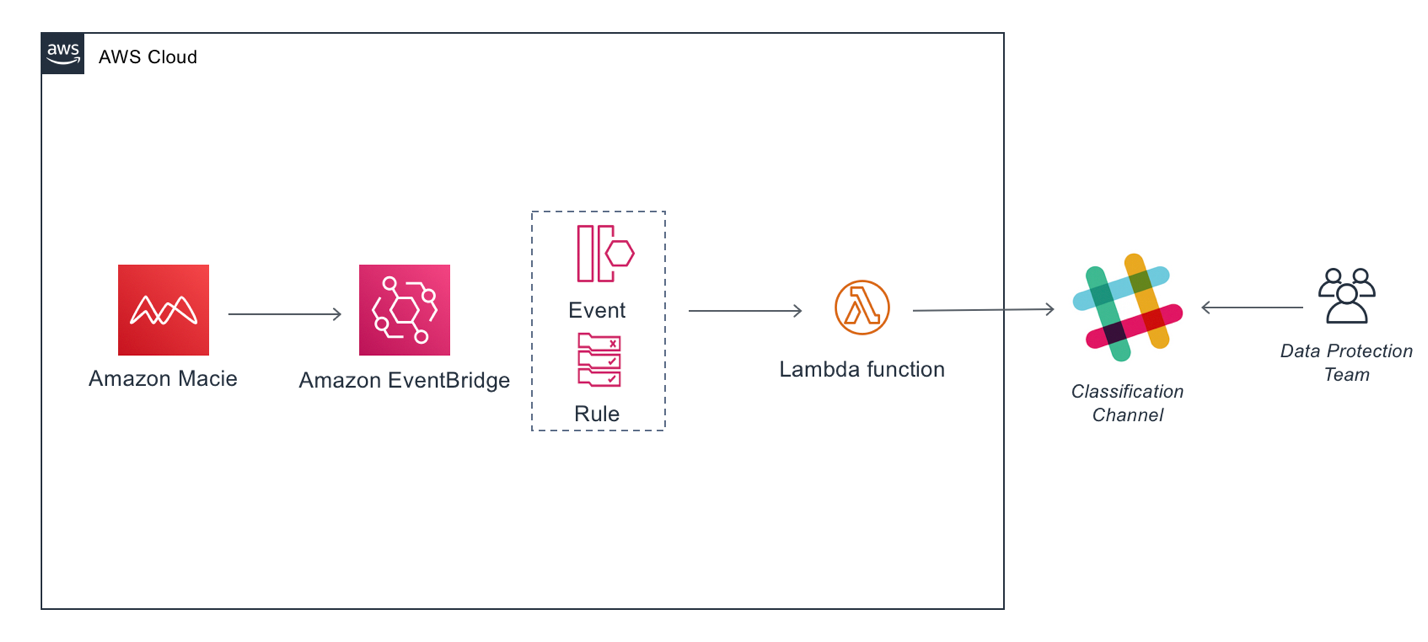
The architecture workflow is shown in Figure 1 and includes the following steps:
Macie runs a classification job and publishes its findings to EventBridge as a JSON object.
The EventBridge rule captures the findings and invokes a Lambda function as a target.
The Lambda function parses the JSON object. The function then sends a custom message to a Slack channel with the sensitive data finding for the data protection team to evaluate and respond to.
Figure 1: Solution architecture workflow
Set up Slack
For this solution, you need a Slack workspace and an incoming webhook. The workspace must be in place before you create the webhook.
Create a Slack workspace
If you already have a Slack workspace in your environment, you can skip forward, to creating the webhook.
If you don’t have a Slack workspace, follow the steps in Create a Slack Workspace to create one.
Development Slack Workspace – Choose the Slack workspace—either an existing workspace or one you created for this solution—to receive the Macie findings.
Choose the Create App button.
In the left menu, choose Incoming Webhooks.
At the Activate Incoming Webhooks screen, move the slider from OFF to ON.
Scroll down and choose Add New Webhook to Workspace.
In the screen asking where your app should post, enter the name of the Slack channel from your Workspace that you want to send notification to and choose Authorize.
On the next screen, scroll down to the Webhook URL section. Make a note of the URL to use later.
Deploy the CloudFormation template with the solution
The deployment of the CloudFormation template automatically creates the following resources:
A Lambda function that begins with the name named macie-to-slack-lambdafindingsToSlack-.
An EventBridge rule named MacieFindingsToSlack.
An IAM role named MacieFindingsToSlackkRole.
A permission to invoke the Lambda function named LambdaInvokePermission.
Note: Before you proceed, make sure you’re deploying the template to the same Region that your production Macie is running.
Note: To save the template, you can right click the Raw button at the top of the code and then select Save link as if you’re using Chrome, or the equivalent in your browser. This file is used in Step 4.
On the Welcome page, choose Create stack and then choose With new resources.
On Step 1 — Specify template, choose Upload a template file, select Choose file and then select the file template.yaml (the file extension might be .YML), then choose Next.
On Step 2 — Specify stack details:
Enter macie-to-slack as the Stack name.
At the Slack Incoming Web Hook URL, paste the webhook URL you copied earlier.
At Slack channel, enter the name of the channel in your workspace that will receive the alerts and choose Next.
Figure 2: Defining stack details
On Step 3 – Configure Stack options, you can leave the default settings, or change them for your environment. Choose Next to continue.
At the bottom of Step 4 – Review, select I acknowledge that AWS CloudFormation might create IAM resources, and choose Create stack.
Figure 3: Confirmation before stack creation
Wait for the stack to reach status CREATE_COMPLETE.
Running the solution
At this point, you’ve deployed the solution and your resources are created.
To test the solution, you can schedule a Macie job targeting a bucket that contains a file with sensitive information that Macie can detect.
Note: You can check the Amazon Macie documentation to see the list of supported managed data identifiers.
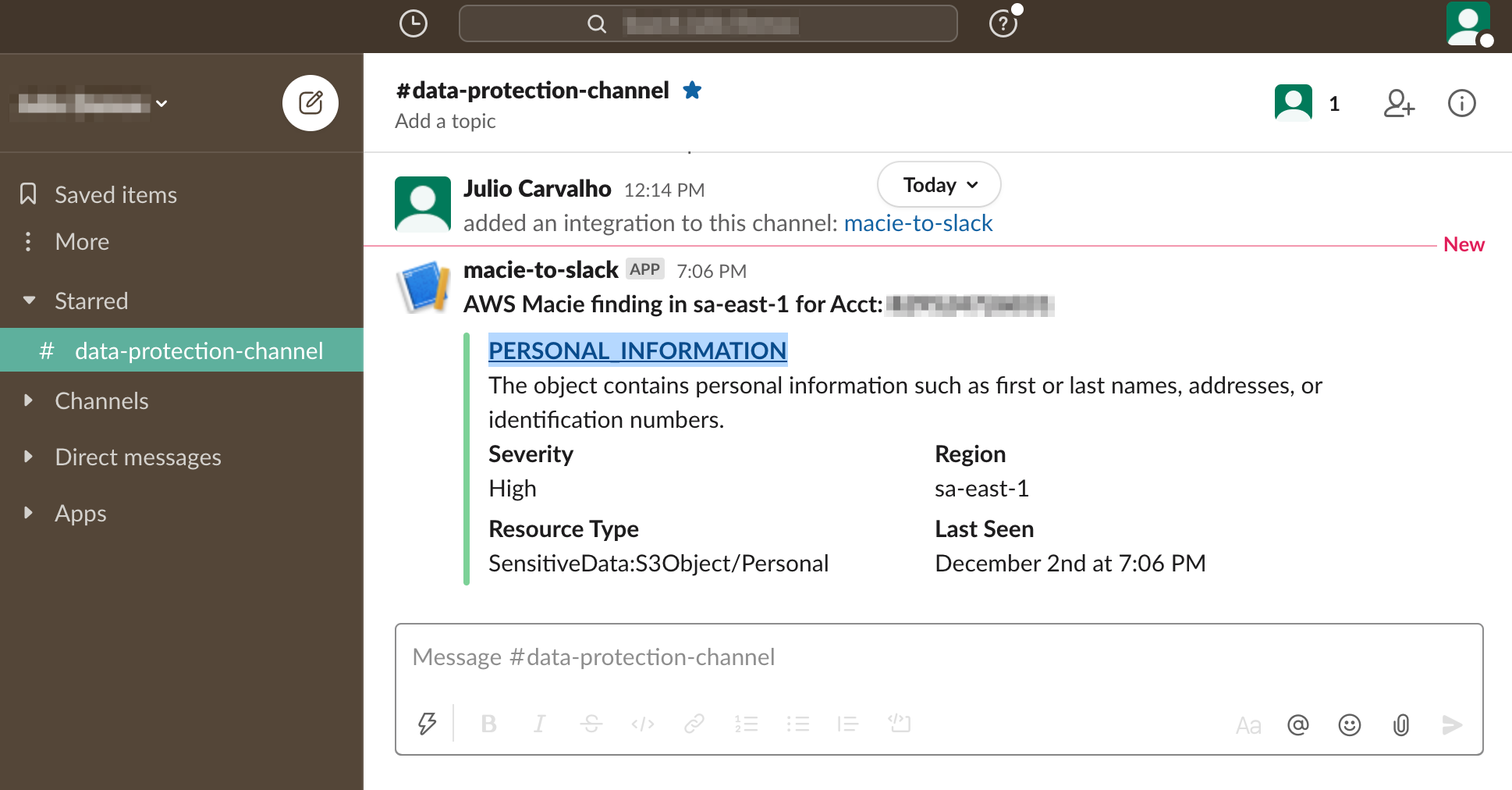
When the Macie job is complete, any findings are sent to the Slack channel.
Figure 4: Macie finding delivered to Slack channel
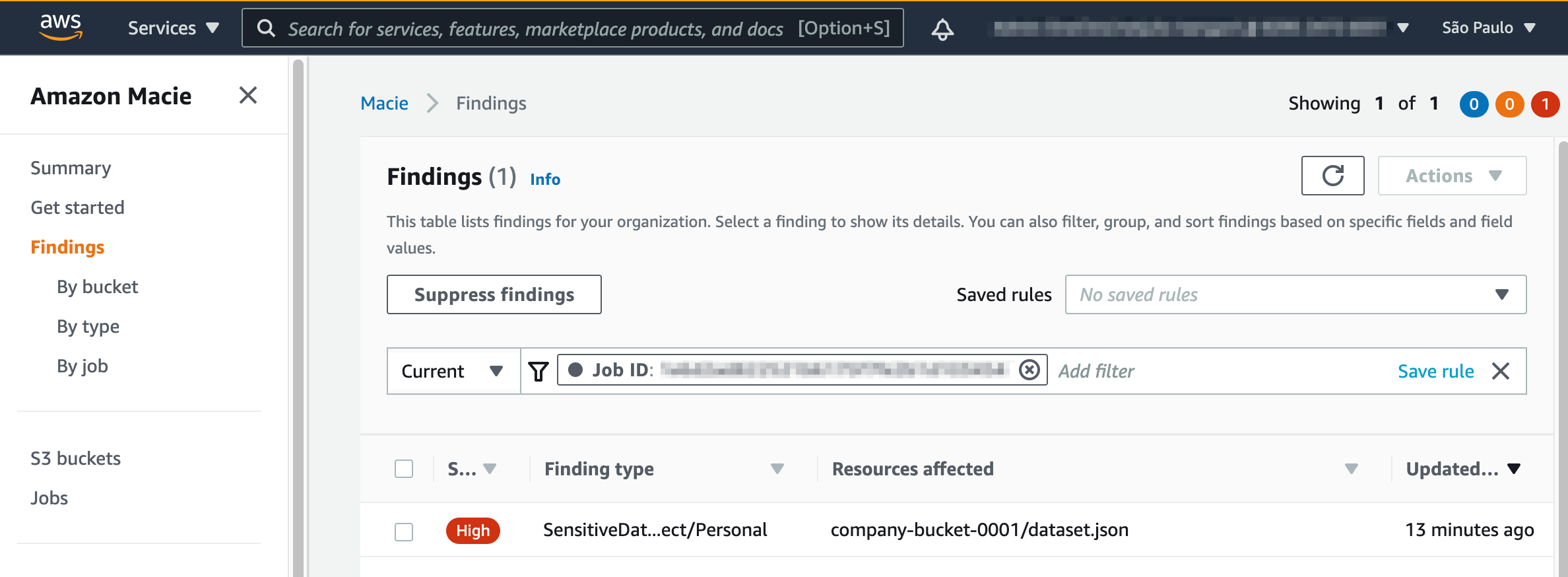
Select the link in the message sent to the Slack channel to open that finding in the Macie console, as shown in Figure 5.
Figure 5: Finding details
And you’re done!
Now your Macie finding results are delivered to your Slack channel where they can be easily monitored, reducing response time and risk exposure.
If you deployed this for testing purposes, or want to clean this up and move to your production account, you can delete the Cloudformation stack:
In this blog post we walked through the steps to configure a notification workflow using Macie, Lambda, and EventBridge to send sensitive data findings to your data protection team via a Slack channel.
Your data protection team will appreciate the timely notifications of sensitive data findings, giving you the ability to focus on creating controls to improve data security and compliance with regulations related to protection and treatment of personal data.
For more information about data privacy on AWS, see Data Privacy FAQ.
If you have feedback about this post, submit comments in the Comments section below.
Want more AWS Security how-to content, news, and feature announcements? Follow us on Twitter.
Many Amazon Web Services (AWS) customer workflows require ingesting sensitive and regulated data such as Payments Card Industry (PCI) data, personally identifiable information (PII), and protected health information (PHI). In this post, I’ll show you a method designed to protect sensitive data for its entire lifecycle in AWS. This method can help enhance your data security posture and be useful for fulfilling the data privacy regulatory requirements applicable to your organization for data protection at-rest, in-transit, and in-use.
An existing method for sensitive data protection in AWS is to use the field-level encryption feature offered by Amazon CloudFront. This CloudFront feature protects sensitive data fields in requests at the AWS network edge. The chosen fields are protected upon ingestion and remain protected throughout the entire application stack. The notion of protecting sensitive data early in its lifecycle in AWS is a highly desirable security architecture. However, CloudFront can protect a maximum of 10 fields and only within HTTP(S) POST requests that carry HTML form encoded payloads.
If your requirements exceed CloudFront’s native field-level encryption feature, such as a need to handle diverse application payload formats, different HTTP methods, and more than 10 sensitive fields, you can implement field-level encryption yourself using the Lambda@Edge feature in CloudFront. In terms of choosing an appropriate encryption scheme, this problem calls for an asymmetric cryptographic system that will allow public keys to be openly distributed to the CloudFront network edges while keeping the corresponding private keys stored securely within the network core. One such popular asymmetric cryptographic system is RSA. Accordingly, we’ll implement a Lambda@Edge function that uses asymmetric encryption using the RSA cryptosystem to protect an arbitrary number of fields in any HTTP(S) request. We will discuss the solution using an example JSON payload, although this approach can be applied to any payload format.
A complex part of any encryption solution is key management. To address that, I use AWS Key Management Service (AWS KMS). AWS KMS simplifies the solution and offers improved security posture and operational benefits, detailed later.
Solution overview
You can protect data in-transit over individual communications channels using transport layer security (TLS), and at-rest in individual storage silos using volume encryption, object encryption or database table encryption. However, if you have sensitive workloads, you might need additional protection that can follow the data as it moves through the application stack. Fine-grained data protection techniques such as field-level encryption allow for the protection of sensitive data fields in larger application payloads while leaving non-sensitive fields in plaintext. This approach lets an application perform business functions on non-sensitive fields without the overhead of encryption, and allows fine-grained control over what fields can be accessed by what parts of the application.
A best practice for protecting sensitive data is to reduce its exposure in the clear throughout its lifecycle. This means protecting data as early as possible on ingestion and ensuring that only authorized users and applications can access the data only when and as needed. CloudFront, when combined with the flexibility provided by Lambda@Edge, provides an appropriate environment at the edge of the AWS network to protect sensitive data upon ingestion in AWS.
Since the downstream systems don’t have access to sensitive data, data exposure is reduced, which helps to minimize your compliance footprint for auditing purposes.
The number of sensitive data elements that may need field-level encryption depends on your requirements. For example:
For healthcare applications, HIPAA regulates 18 personal data elements.
In California, the California Consumer Privacy Act (CCPA) regulates at least 11 categories of personal information—each with its own set of data elements.
The idea behind field-level encryption is to protect sensitive data fields individually, while retaining the structure of the application payload. The alternative is full payload encryption, where the entire application payload is encrypted as a binary blob, which makes it unusable until the entirety of it is decrypted. With field-level encryption, the non-sensitive data left in plaintext remains usable for ordinary business functions. When retrofitting data protection in existing applications, this approach can reduce the risk of application malfunction since the data format is maintained.
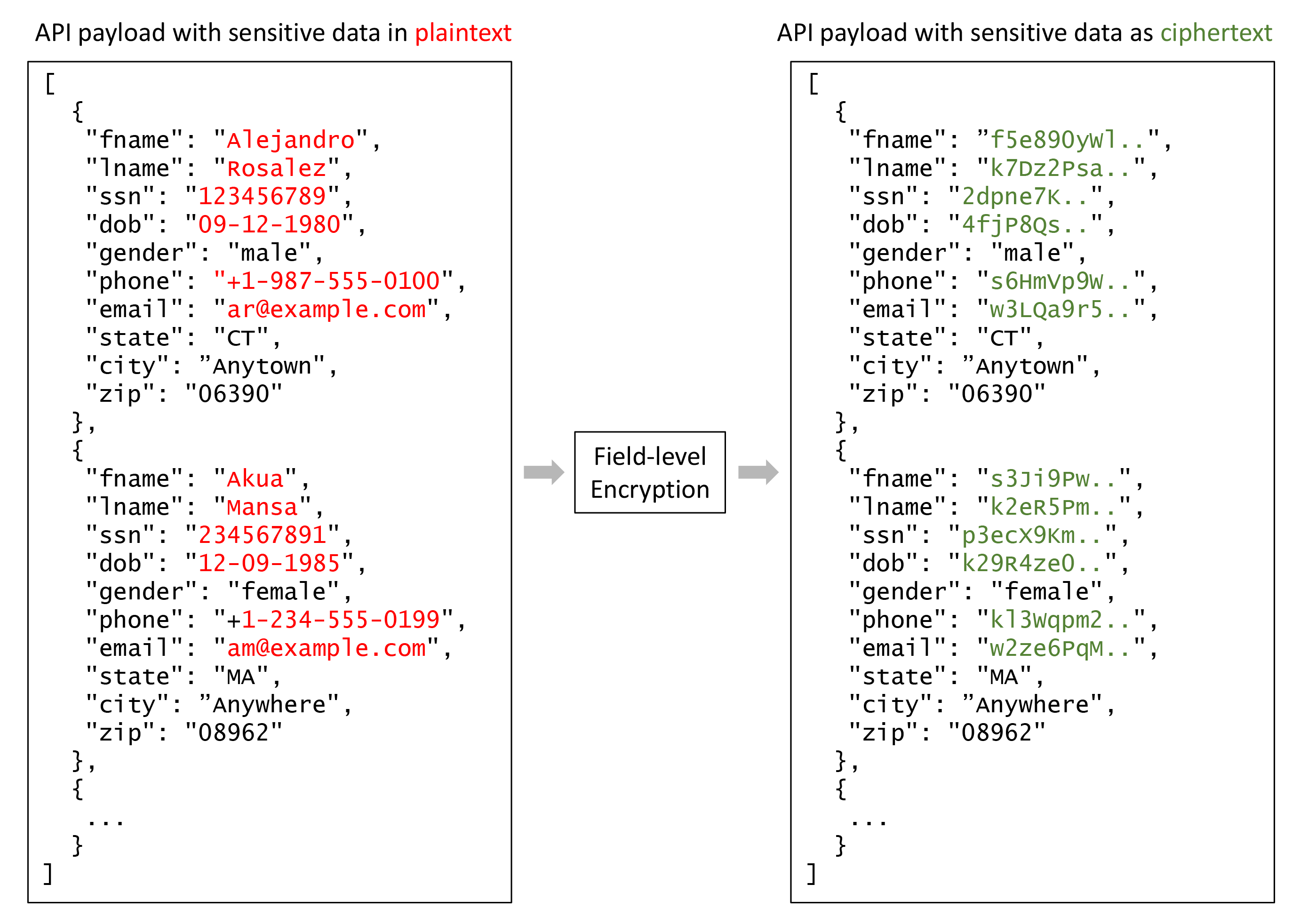
The following figure shows how PII data fields in a JSON construction that are deemed sensitive by an application can be transformed from plaintext to ciphertext with a field-level encryption mechanism.
Figure 1: Example of field-level encryption
You can change plaintext to ciphertext as depicted in Figure 1 by using a Lambda@Edge function to perform field-level encryption. I discuss the encryption and decryption processes separately in the following sections.
Field-level encryption process
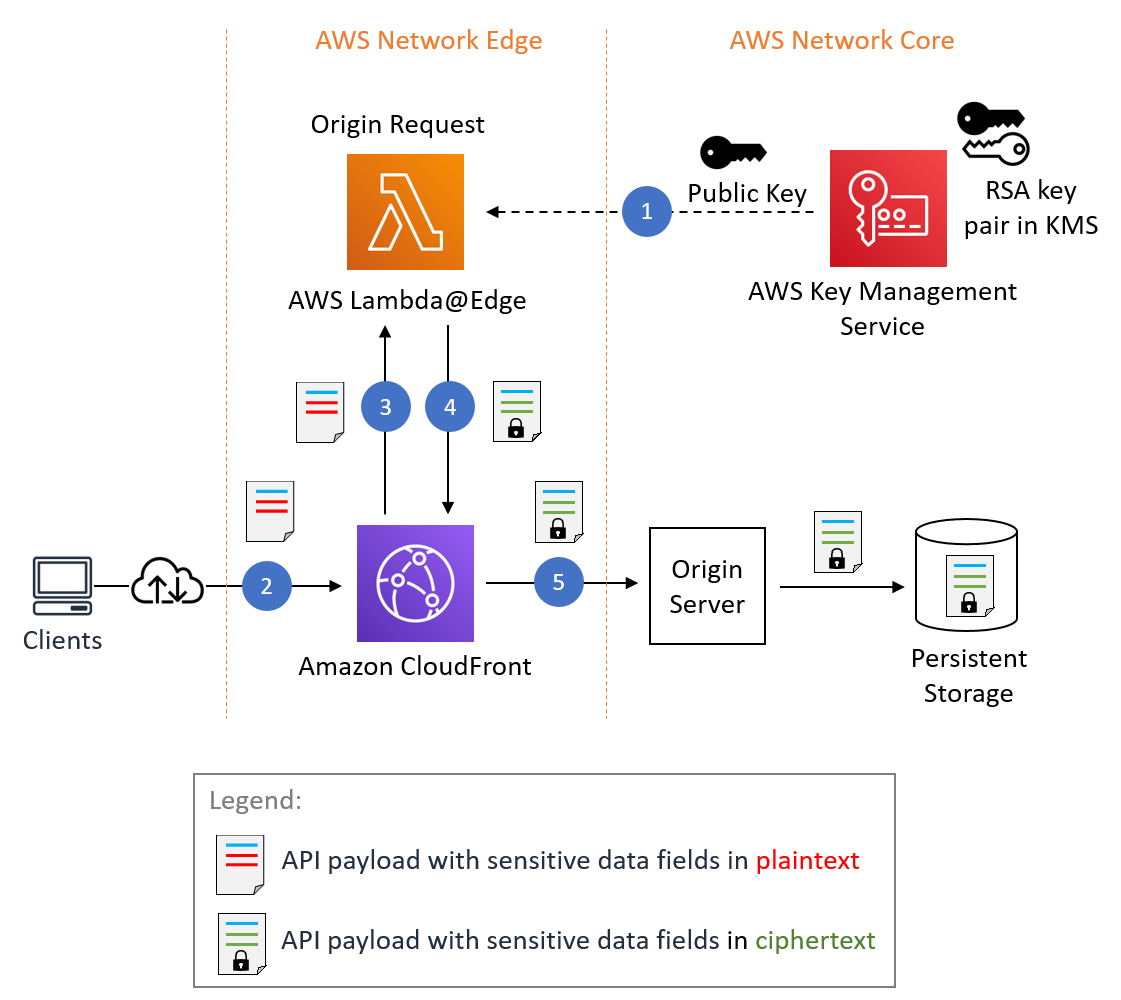
Let’s discuss the individual steps involved in the encryption process as shown in Figure 2.
Figure 2: Field-level encryption process
Figure 2 shows CloudFront invoking a Lambda@Edge function while processing a client request. CloudFront offers multiple integration points for invoking Lambda@Edge functions. Since you are processing a client request and your encryption behavior is related to requests being forwarded to an origin server, you want your function to run upon the origin request event in CloudFront. The origin request event represents an internal state transition in CloudFront that happens immediately before CloudFront forwards a request to the downstream origin server.
You can associate your Lambda@Edge with CloudFront as described in Adding Triggers by Using the CloudFront Console. A screenshot of the CloudFront console is shown in Figure 3. The selected event type is Origin Request and the Include Body check box is selected so that the request body is conveyed to Lambda@Edge.
Figure 3: Configuration of Lambda@Edge in CloudFront
The Lambda@Edge function acts as a programmable hook in the CloudFront request processing flow. You can use the function to replace the incoming request body with a request body with the sensitive data fields encrypted.
The process includes the following steps:
Step 1 – RSA key generation and inclusion in Lambda@Edge
You can generate an RSA customer managed key (CMK) in AWS KMS as described in Creating asymmetric CMKs. This is done at system configuration time.
Note: You can use your existing RSA key pairs or generate new ones externally by using OpenSSL commands, especially if you need to perform RSA decryption and key management independently of AWS KMS. Your choice won’t affect the fundamental encryption design pattern presented here.
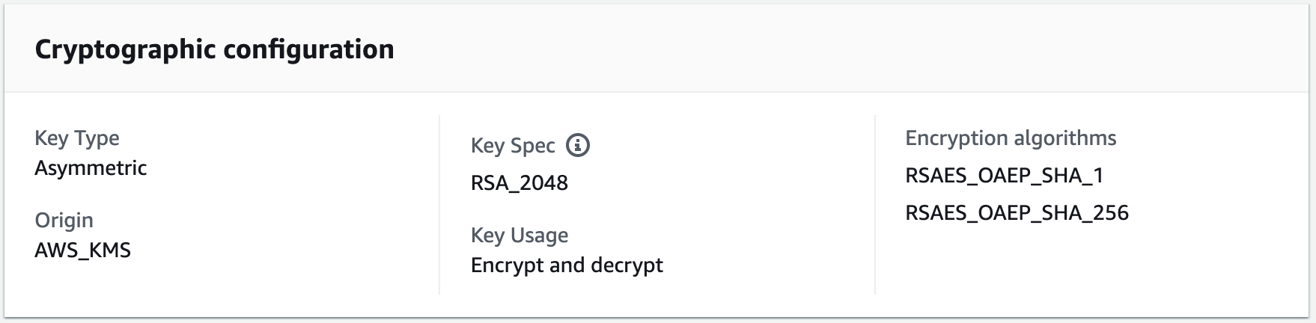
The RSA key creation in AWS KMS requires two inputs: key length and type of usage. In this example, I created a 2048-bit key and assigned its use for encryption and decryption. The cryptographic configuration of an RSA CMK created in AWS KMS is shown in Figure 4.
Figure 4: Cryptographic properties of an RSA key managed by AWS KMS
Of the two encryption algorithms shown in Figure 4— RSAES_OAEP_SHA_256 and RSAES_OAEP_SHA_1, this example uses RSAES_OAEP_SHA_256. The combination of a 2048-bit key and the RSAES_OAEP_SHA_256 algorithm lets you encrypt a maximum of 190 bytes of data, which is enough for most PII fields. You can choose a different key length and encryption algorithm depending on your security and performance requirements. How to choose your CMK configuration includes information about RSA key specs for encryption and decryption.
Using AWS KMS for RSA key management versus managing the keys yourself eliminates that complexity and can help you:
Enforce IAM and key policies that describe administrative and usage permissions for keys.
Manage cross-account access for keys.
Monitor and alarm on key operations through Amazon CloudWatch.
Audit AWS KMS API invocations through AWS CloudTrail.
Record configuration changes to keys and enforce key specification compliance through AWS Config.
Generate high-entropy keys in an AWS KMS hardware security module (HSM) as required by NIST.
Store RSA private keys securely, without the ability to export.
Perform RSA decryption within AWS KMS without exposing private keys to application code.
Categorize and report on keys with key tags for cost allocation.
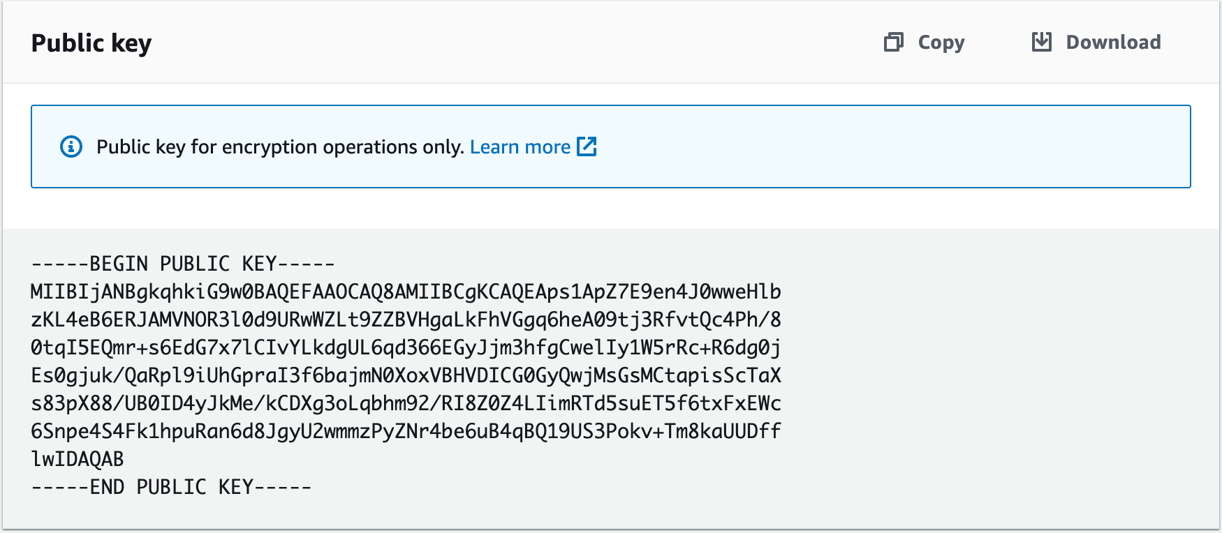
Figure 5: RSA public key available for copy or download in the console
Note: As we will see in the sample code in step 3, we embed the public key in the Lambda@Edge deployment package. This is a permissible practice because public keys in asymmetric cryptography systems aren’t a secret and can be freely distributed to entities that need to perform encryption. Alternatively, you can use Lambda@Edge to query AWS KMS for the public key at runtime. However, this introduces latency, increases the load against your KMS account quota, and increases your AWS costs. General patterns for using external data in Lambda@Edge are described in Leveraging external data in Lambda@Edge.
Step 2 – HTTP API request handling by CloudFront
CloudFront receives an HTTP(S) request from a client. CloudFront then invokes Lambda@Edge during origin-request processing and includes the HTTP request body in the invocation.
Step 3 – Lambda@Edge processing
The Lambda@Edge function processes the HTTP request body. The function extracts sensitive data fields and performs RSA encryption over their values.
The following code is sample source code for the Lambda@Edge function implemented in Python 3.7:
import Crypto
import base64
import json
from Crypto.Cipher import PKCS1_OAEP
from Crypto.PublicKey import RSA

# PEM-formatted RSA public key copied over from AWS KMS or your own public key.
RSA_PUBLIC_KEY = "-----BEGIN PUBLIC KEY-----<your key>-----END PUBLIC KEY-----"
RSA_PUBLIC_KEY_OBJ = RSA.importKey(RSA_PUBLIC_KEY)
RSA_CIPHER_OBJ = PKCS1_OAEP.new(RSA_PUBLIC_KEY_OBJ, Crypto.Hash.SHA256)

# Example sensitive data field names in a JSON object.
PII_SENSITIVE_FIELD_NAMES = ["fname", "lname", "email", "ssn", "dob", "phone"]

CIPHERTEXT_PREFIX = "#01#"
CIPHERTEXT_SUFFIX = "#10#"

def lambda_handler(event, context):
    # Extract HTTP request and its body as per documentation:
    # https://docs.aws.amazon.com/AmazonCloudFront/latest/DeveloperGuide/lambda-event-structure.html
    http_request = event['Records'][0]['cf']['request']
    body = http_request['body']
    org_body = base64.b64decode(body['data'])
    mod_body = protect_sensitive_fields_json(org_body)
    body['action'] = 'replace'
    body['encoding'] = 'text'
    body['data'] = mod_body
    return http_request


def protect_sensitive_fields_json(body):
    # Encrypts sensitive fields in sample JSON payload shown earlier in this post.
    # [{"fname": "Alejandro", "lname": "Rosalez", … }]
    person_list = json.loads(body.decode("utf-8"))
    for person_data in person_list:
        for field_name in PII_SENSITIVE_FIELD_NAMES:
            if field_name not in person_data:
                continue
            plaintext = person_data[field_name]
            ciphertext = RSA_CIPHER_OBJ.encrypt(bytes(plaintext, 'utf-8'))
            ciphertext_b64 = base64.b64encode(ciphertext).decode()
            # Optionally, add unique prefix/suffix patterns to ciphertext
            person_data[field_name] = CIPHERTEXT_PREFIX + ciphertext_b64 + CIPHERTEXT_SUFFIX
    return json.dumps(person_list)
The event structure passed into the Lambda@Edge function is described in Lambda@Edge Event Structure. Following the event structure, you can extract the HTTP request body. In this example, the assumption is that the HTTP payload carries a JSON document based on a particular schema defined as part of the API contract. The input JSON document is parsed by the function, converting it into a Python dictionary. The Python native dictionary operators are then used to extract the sensitive field values.
Note: If you don’t know your API payload structure ahead of time or you’re dealing with unstructured payloads, you can use techniques such as regular expression pattern searches and checksums to look for patterns of sensitive data and target them accordingly. For example, credit card primary account numbers include a Luhn checksum that can be programmatically detected. Additionally, services such as Amazon Comprehend and Amazon Macie can be leveraged for detecting sensitive data such as PII in application payloads.
While iterating over the sensitive fields, individual field values are encrypted using the standard RSA encryption implementation available in the Python Cryptography Toolkit (PyCrypto). The PyCrypto module is included within the Lambda@Edge zip archive as described in Lambda@Edge deployment package.
The example uses the standard optimal asymmetric encryption padding (OAEP) and SHA-256 encryption algorithm properties. These properties are supported by AWS KMS and will allow RSA ciphertext produced here to be decrypted by AWS KMS later.
Note: You may have noticed in the code above that we’re bracketing the ciphertexts with predefined prefix and suffix strings:
This is an optional measure and is being implemented to simplify the decryption process.
The prefix and suffix strings help demarcate ciphertext embedded in unstructured data in downstream processing and also act as embedded metadata. Unique prefix and suffix strings allow you to extract ciphertext through string or regular expression (regex) searches during the decryption process without having to know the data body format or schema, or the field names that were encrypted.
Distinct strings can also serve as indirect identifiers of RSA key pair identifiers. This can enable key rotation and allow separate keys to be used for separate fields depending on the data security requirements for individual fields.
You can ensure that the prefix and suffix strings can’t collide with the ciphertext by bracketing them with characters that don’t appear in cyphertext. For example, a hash (#) character cannot be part of a base64 encoded ciphertext string.
Deploying a Lambda function as a Lambda@Edge function requires specific IAM permissions and an IAM execution role. Follow the Lambda@Edge deployment instructions in Setting IAM Permissions and Roles for Lambda@Edge.
Step 4 – Lambda@Edge response
The Lambda@Edge function returns the modified HTTP body back to CloudFront and instructs it to replace the original HTTP body with the modified one by setting the following flag:
http_request['body']['action'] = 'replace'
Step 5 – Forward the request to the origin server
CloudFront forwards the modified request body provided by Lambda@Edge to the origin server. In this example, the origin server writes the data body to persistent storage for later processing.
Field-level decryption process
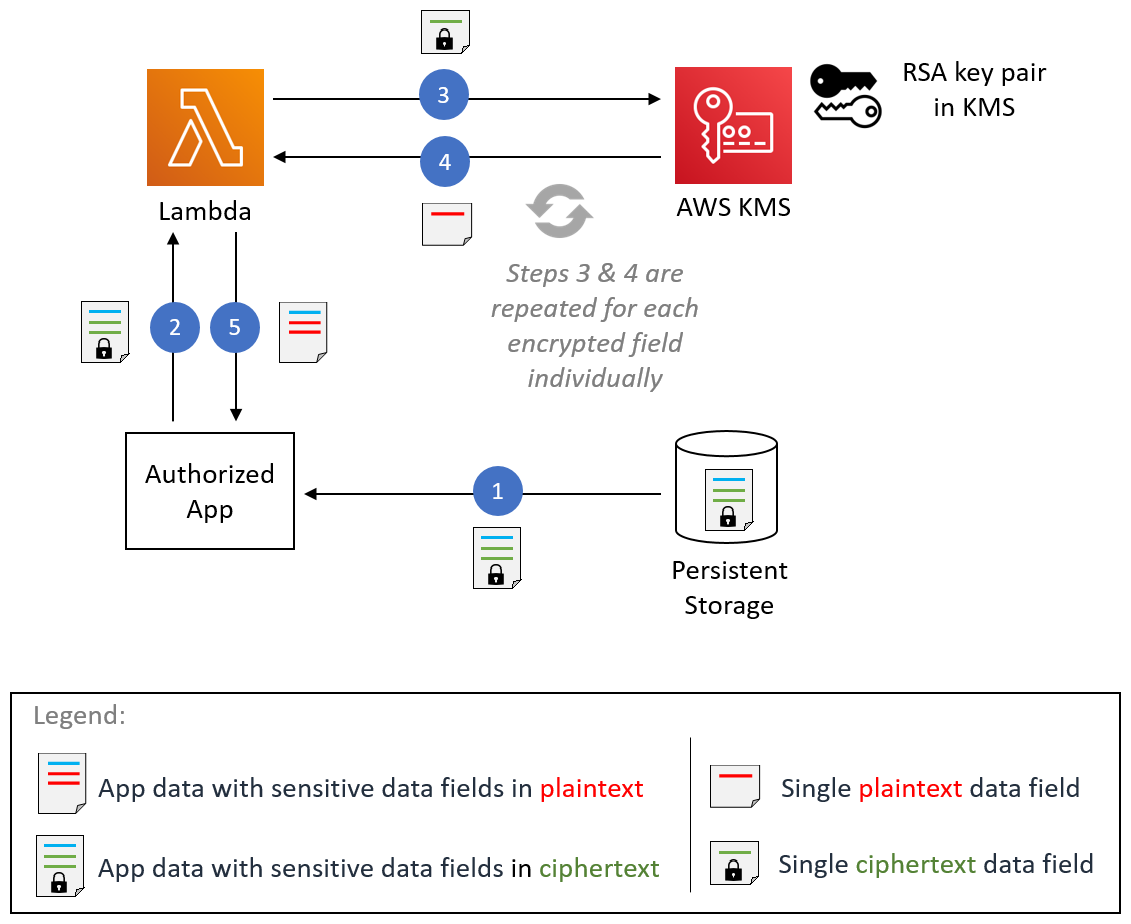
An application that’s authorized to access sensitive data for a business function can decrypt that data. An example decryption process is shown in Figure 6. The figure shows a Lambda function as an example compute environment for invoking AWS KMS for decryption. This functionality isn’t dependent on Lambda and can be performed in any compute environment that has access to AWS KMS.
Figure 6: Field-level decryption process
The steps of the process shown in Figure 6 are described below.
Step 1 – Application retrieves the field-level encrypted data
The example application retrieves the field-level encrypted data from persistent storage that had been previously written during the data ingestion process.
Step 2 – Application invokes the decryption Lambda function
The application invokes a Lambda function responsible for performing field-level decryption, sending the retrieved data to Lambda.
Step 3 – Lambda calls the AWS KMS decryption API
The Lambda function uses AWS KMS for RSA decryption. The example calls the KMS decryption API that inputs ciphertext and returns plaintext. The actual decryption happens in KMS; the RSA private key is never exposed to the application, which is a highly desirable characteristic for building secure applications.
Note: If you choose to use an external key pair, then you can securely store the RSA private key in AWS services like AWS Systems ManagerParameter Store or AWS Secrets Manager and control access to the key through IAM and resource policies. You can fetch the key from relevant vault using the vault’s API, then decrypt using the standard RSA implementation available in your programming language. For example, the cryptography toolkit in Python or javax.crypto in Java.
The Lambda function Python code for decryption is shown below.
import base64
import boto3
import re

kms_client = boto3.client('kms')
CIPHERTEXT_PREFIX = "#01#"
CIPHERTEXT_SUFFIX = "#10#"

# This lambda function extracts event body, searches for and decrypts ciphertext
# fields surrounded by provided prefix and suffix strings in arbitrary text bodies
# and substitutes plaintext fields in-place.
def lambda_handler(event, context):
    org_data = event["body"]
    mod_data = unprotect_fields(org_data, CIPHERTEXT_PREFIX, CIPHERTEXT_SUFFIX)
    return mod_data

# Helper function that performs non-greedy regex search for ciphertext strings on
# input data and performs RSA decryption of them using AWS KMS
def unprotect_fields(org_data, prefix, suffix):
    regex_pattern = prefix + "(.*?)" + suffix
    mod_data_parts = []
    cursor = 0

    # Search ciphertexts iteratively using python regular expression module
    for match in re.finditer(regex_pattern, org_data):
        mod_data_parts.append(org_data[cursor: match.start()])
        try:
            # Ciphertext was stored as Base64 encoded in our example. Decode it.
            ciphertext = base64.b64decode(match.group(1))

            # Decrypt ciphertext using AWS KMS
            decrypt_rsp = kms_client.decrypt(
                EncryptionAlgorithm="RSAES_OAEP_SHA_256",
                KeyId="<Your-Key-ID>",
                CiphertextBlob=ciphertext)
            decrypted_val = decrypt_rsp["Plaintext"].decode("utf-8")
            mod_data_parts.append(decrypted_val)
        except Exception as e:
            print ("Exception: " + str(e))
            return None
        cursor = match.end()

    mod_data_parts.append(org_data[cursor:])
    return "".join(mod_data_parts)
The function performs a regular expression search in the input data body looking for ciphertext strings bracketed in predefined prefix and suffix strings that were added during encryption.
While iterating over ciphertext strings one-by-one, the function calls the AWS KMS decrypt() API. The example function uses the same RSA encryption algorithm properties—OAEP and SHA-256—and the Key ID of the public key that was used during encryption in Lambda@Edge.
Note that the Key ID itself is not a secret. Any application can be configured with it, but that doesn’t mean any application will be able to perform decryption. The security control here is that the AWS KMS key policy must allow the caller to use the Key ID to perform the decryption. An additional security control is provided by Lambda execution role that should allow calling the KMS decrypt() API.
Step 4 – AWS KMS decrypts ciphertext and returns plaintext
To ensure that only authorized users can perform decrypt operation, the KMS is configured as described in Using key policies in AWS KMS. In addition, the Lambda IAM execution role is configured as described in AWS Lambda execution role to allow it to access KMS. If both the key policy and IAM policy conditions are met, KMS returns the decrypted plaintext. Lambda substitutes the plaintext in place of ciphertext in the encapsulating data body.
Steps three and four are repeated for each ciphertext string.
Step 5 – Lambda returns decrypted data body
Once all the ciphertext has been converted to plaintext and substituted in the larger data body, the Lambda function returns the modified data body to the client application.
Conclusion
In this post, I demonstrated how you can implement field-level encryption integrated with AWS KMS to help protect sensitive data workloads for their entire lifecycle in AWS. Since your Lambda@Edge is designed to protect data at the network edge, data remains protected throughout the application execution stack. In addition to improving your data security posture, this protection can help you comply with data privacy regulations applicable to your organization.
Since you author your own Lambda@Edge function to perform standard RSA encryption, you have flexibility in terms of payload formats and the number of fields that you consider to be sensitive. The integration with AWS KMS for RSA key management and decryption provides significant simplicity, higher key security, and rich integration with other AWS security services enabling an overall strong security solution.
By using encrypted fields with identifiers as described in this post, you can create fine-grained controls for data accessibility to meet the security principle of least privilege. Instead of granting either complete access or no access to data fields, you can ensure least privileges where a given part of an application can only access the fields that it needs, when it needs to, all the way down to controlling access field by field. Field by field access can be enabled by using different keys for different fields and controlling their respective policies.
In addition to protecting sensitive data workloads to meet regulatory and security best practices, this solution can be used to build de-identified data lakes in AWS. Sensitive data fields remain protected throughout their lifecycle, while non-sensitive data fields remain in the clear. This approach can allow analytics or other business functions to operate on data without exposing sensitive data.
If you have feedback about this post, submit comments in the Comments section below.
Want more AWS Security how-to content, news, and feature announcements? Follow us on Twitter.
Last year we published a blog post describing how our customers can transfer personal data in compliance with both GDPR and the new “Schrems II” ruling. In that post, we set out some of the robust and comprehensive measures that AWS takes to protect customers’ personal data.
Today, we are announcing strengthened contractual commitments that go beyond what’s required by the Schrems II ruling and currently provided by other cloud providers to protect the personal data that customers entrust AWS to process (customer data). Significantly, these new commitments apply to all customer data subject to GDPR processed by AWS, whether it is transferred outside the European Economic Area (EEA) or not. These commitments are automatically available to all customers using AWS to process their customer data, with no additional action required, through a new supplementary addendum to the AWS GDPR Data Processing Addendum.
Our strengthened contractual commitments include:
Challenging law enforcement requests: We will challenge law enforcement requests for customer data from governmental bodies, whether inside or outside the EEA, where the request conflicts with EU law, is overbroad, or where we otherwise have any appropriate grounds to do so.
Disclosing the minimum amount necessary: We also commit that if, despite our challenges, we are ever compelled by a valid and binding legal request to disclose customer data, we will disclose only the minimum amount of customer data necessary to satisfy the request.
These strengthened commitments to our customers build on our long track record of challenging law enforcement requests. AWS rigorously limits – or rejects outright – law enforcement requests for data coming from any country, including the United States, where they are overly broad or we have any appropriate grounds to do so.
These commitments further demonstrate AWS’s dedication to securing our customers’ data: it is AWS’s highest priority. We implement rigorous contractual, technical, and organizational measures to protect the confidentiality, integrity, and availability of customer data regardless of which AWS Region a customer selects. Customers have complete control over their data through powerful AWS services and tools that allow them to determine where data will be stored, how it is secured, and who has access.
For example, customers using our latest generation of EC2 instances automatically gain the protection of the AWS Nitro System. Using purpose-built hardware, firmware, and software, AWS Nitro provides unique and industry-leading security and isolation by offloading the virtualization of storage, security, and networking resources to dedicated hardware and software. This enhances security by minimizing the attack surface and prohibiting administrative access while improving performance. Nitro was designed to operate in the most hostile network we could imagine, building in encryption, secure boot, a hardware-based root of trust, a decreased Trusted Computing Base (TCB) and restrictions on operator access. The newly announced AWS Nitro Enclaves feature enables customers to create isolated compute environments with cryptographic controls to assure the integrity of code that is processing highly sensitive data.
AWS encrypts all data in transit, including secure and private connectivity between EC2 instances of all types. Customers can rely on our industry leading encryption features and take advantage of AWS Key Management Services to control and manage their own keys within FIPS-140-2 certified hardware security modules. Regardless of whether data is encrypted or unencrypted, we will always work vigilantly to protect data from any unauthorized access. Find out more about our approach to data privacy.
AWS is constantly working to ensure that our customers can enjoy the benefits of AWS everywhere they operate. We will continue to update our practices to meet the evolving needs and expectations of customers and regulators, and fully comply with all applicable laws in every country in which we operate. With these changes, AWS continues our customer obsession by offering tooling, capabilities, and contractual rights that nobody else does.
If you have feedback about this post, submit comments in the Comments section below.
Want more AWS Security how-to content, news, and feature announcements? Follow us on Twitter.
The collective thoughts of the interwebz
Manage Consent
To provide the best experiences, we use technologies like cookies to store and/or access device information. Consenting to these technologies will allow us to process data such as browsing behavior or unique IDs on this site. Not consenting or withdrawing consent, may adversely affect certain features and functions.
Functional
Always active
The technical storage or access is strictly necessary for the legitimate purpose of enabling the use of a specific service explicitly requested by the subscriber or user, or for the sole purpose of carrying out the transmission of a communication over an electronic communications network.
Preferences
The technical storage or access is necessary for the legitimate purpose of storing preferences that are not requested by the subscriber or user.
Statistics
The technical storage or access that is used exclusively for statistical purposes.The technical storage or access that is used exclusively for anonymous statistical purposes. Without a subpoena, voluntary compliance on the part of your Internet Service Provider, or additional records from a third party, information stored or retrieved for this purpose alone cannot usually be used to identify you.
Marketing
The technical storage or access is required to create user profiles to send advertising, or to track the user on a website or across several websites for similar marketing purposes.