Post Syndicated from The History Guy: History Deserves to Be Remembered original https://www.youtube.com/watch?v=HVu-wGSz0Ck
Yearly Archives: 2024
Morgan’s Great Raid
Post Syndicated from The History Guy: History Deserves to Be Remembered original https://www.youtube.com/watch?v=gpMbMzLrYkI
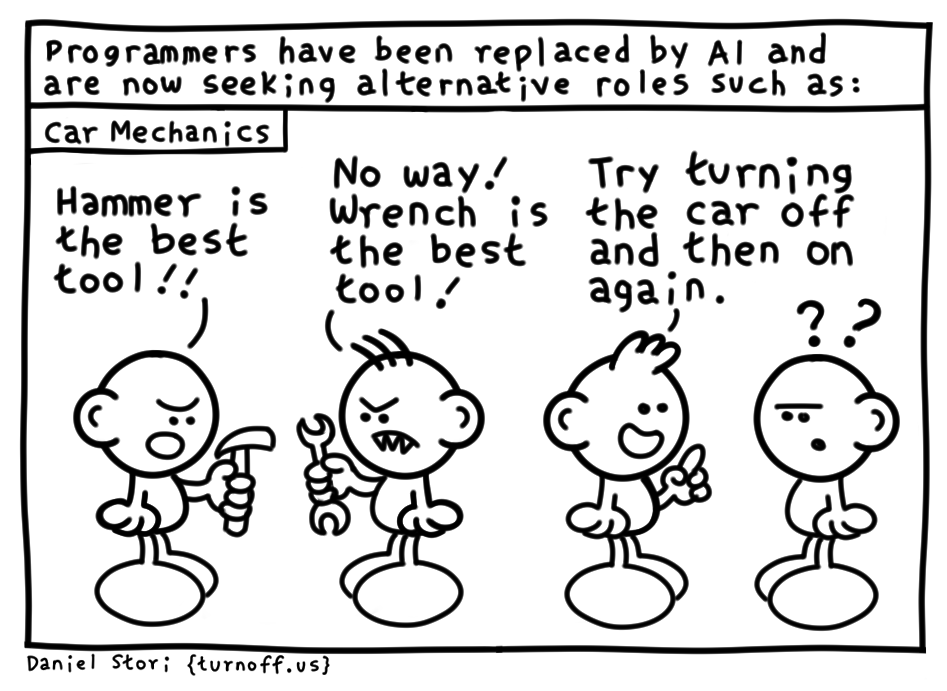
new job
Post Syndicated from turnoff.us original http://turnoff.us/geek/new-job/
That unmistakeable Sony Sports Yellow
Post Syndicated from Techmoan original https://www.youtube.com/watch?v=HXRrINa-Z9g
Седмицата (15–20 април)
Post Syndicated from Йовко Ламбрев original https://www.toest.bg/sedmitsata-15-20-april/

В седмицата, в която в Официалния вестник на ЕС бяха публикувани едновременно Европейският акт за свобода на медиите и Директивата за защита на публичните лица от неоснователни съдебни искове, одиозният вътрешен министър Калин Стоянов заведе именно такова дело срещу журналистите от разследващия сайт BIRD Атанас Чобанов и Димитър Стоянов. Затова и няма как да започнем другояче седмичния си редакционен обзор, освен с декларацията, че „Тоест“ напълно подкрепя призива на АЕЖ за оставка на министъра.
И няма как да не останем на темата правосъдие и справедливост, когато сред ключовите новини на седмицата е писмото на съдия Цариградска до Висшия съдебен съвет, което е изключително тъжен документ и поредно доказателство за прогнилите устои на правосъдната ни система. Най-болезненият въпрос е очевиден: ако тази система, която не желае или не може да защити съдия от собствените си редици, как можем да разчитаме, че ще защитава и въздава справедливост на всички граждани? По тази тема е и коментарът на Светла Енчева, озаглавен „Случаят на съдия Владислава Цариградска, или какво означава да няма правосъдие“.
Разбира се, постоянна основна тема до изборите на 9 юни ще бъдат политическите битки на предизборния терен. Очакванията са за пехливански борби, а не за джентълменски дуели. Прави впечатление, че и служебният кабинет на Димитър Главчев ни най-малко не възнамерява да стои неангажирано сред публиката. Очевидно приоритетна задача за първите дни на управлението му е да „изчегъртва“ кадрите на ПП–ДБ, останали на някакви позиции след „разглобката“. „Прегрупиране. Гербодепесарщина“ е заглавието на тазседмичния вътрешнополитически анализ на Емилия Милчева. Наистина няма как да се каже по-кратко. Нито по-точно.
„Заковани в 90-те. Разговор за зависимостта като проблем на личността и на обществото“ пък е заглавието на едно важно интервю на Надежда Цекулова с Кристина Янкулова, която е бивша наркозависима. Един разговор за дългия и труден път от зависимостта до излекуването. И за това колко важна е обществената подкрепа и емпатия за успешния завършек на това пътуване.
Миналия уикенд осъмнахме настръхнали с тревогите около въздушната атака с дронове и ракети от Иран към Израел. Близо седмица по-късно, в петък, Израел отвърна. След такива събития поредните илюзии за голямата ни дистанция от света от миналото се изпаряват във въздуха. И точно в този момент Стефан Иванов е избрал да припомни една книга, която той самият определя така:
Страхотна и страховита книга за света от вчера, изпълнен с омраза, варварство и войни. За света, който винаги има възможността да се превърне в света от днес.
Стефан се опитва да ни убеди, че в моменти, в които много хора се чувстват безсилни да се противопоставят на инерцията и безумието на тълпите, именно съпротивата на отделния човек има по-голямо значение. Прочетете за „История на един германец. Спомени 1914–1933“ от Себастиан Хафнер в редовната ни рубрика „На второ четене“.
Нека завършим с поредния епизод от северния пътепис на Светла Стоянова, който е и продължение на кулинарния ѝ разказ „Гренландия в чиния“. Разказ от първо лице от кухнята на един ресторант на края на света. С две звезди „Мишлен“.
Приятно четене!
П.П. Все още не сте дарители на „Тоест“? Включете се в месечната издръжка на медията с дарителски пакет. Медията е жива единствено благодарение на вас – нашите будни, критични и верни читатели.
Comic for 2024.04.20 – Baby Shark
Post Syndicated from Explosm.net original https://explosm.net/comics/baby-shark
New Cyanide and Happiness Comic
Friday Squid Blogging: Squid Trackers
Post Syndicated from Bruce Schneier original https://www.schneier.com/blog/archives/2024/04/friday-squid-blogging-squid-trackers.html
A new bioadhesive makes it easier to attach trackers to squid.
Note: the article does not discuss squid privacy rights.
As usual, you can also use this squid post to talk about the security stories in the news that I haven’t covered.
Read my blog posting guidelines here.
The Blasting of Blossom Rock
Post Syndicated from The History Guy: History Deserves to Be Remembered original https://www.youtube.com/watch?v=DtH2nb2hjKE
Quickly go from Idea to PR with CodeCatalyst using Amazon Q
Post Syndicated from Brendan Jenkins original https://aws.amazon.com/blogs/devops/quickly-go-from-idea-to-pr-with-codecatalyst-using-amazon-q/
Amazon Q feature development enables teams using Amazon CodeCatalyst to scale with AI to assist developers in completing everyday software development tasks. Developers can now go from an idea in an issue to a fully tested, merge-ready, running application code in a Pull Request (PR) with natural language inputs in a few clicks. Developers can also provide feedback to Amazon Q directly on the published pull request and ask it to generate a new revision. If the code change falls short of expectations, a new development environment can be created directly from the pull request, necessary adjustments can be made manually, a new revision published, and proceed with the merge upon approval.
In this blog, we will walk through a use case leveraging the Modern three-tier web application blueprint, and adding a feature to the web application. We’ll leverage Amazon Q feature development to quickly go from Idea to PR. We also suggest following the steps outlined below in this blog in your own application so you can gain a better understanding of how you can use this feature in your daily work.
Solution Overview
Amazon Q feature development is integrated into CodeCatalyst. Figure 1 details how users can assign Amazon Q an issue. When assigning the issue, users answer a few preliminary questions and Amazon Q outputs the proposed approach, where users can either approve or provide additional feedback to Amazon Q. Once approved, Amazon Q will generate a PR where users can review, revise, and merge the PR into the repository.

Figure 1: Amazon Q feature development workflow
Prerequisites
Although we will walk through a sample use case in this blog using a Blueprint from CodeCatalyst, after, we encourage you to try this with your own application so you can gain hands-on experience with utilizing this feature. If you are using CodeCatalyst for the first time, you’ll need:
- A CodeCatalyst space
- Amazon Q feature development in CodeCatalyst is currently in preview. To access this feature, ensure that you are using the Standard or Enterprise tier and the generative AI feature is enabled in your Space
Walkthrough
Step 1: Creating the blueprint
In this blog, we’ll leverage the Modern three-tier web application blueprint to walk through a sample use case. This blueprint creates a Mythical Mysfits three-tier web application with modular presentation, application, and data layers.

Figure 2: Creating a new Modern three-tier application blueprint
First, within your space click “Create Project” and select the Modern three-tier web application CodeCatalyst Blueprint as shown above in Figure 2.
Enter a Project name and select: Lambda for the Compute Platform and Amplify Hosting for Frontend Hosting Options. Additionally, ensure your AWS account is selected along with creating a new IAM Role.
Once the project is finished creating, the application will deploy via a CodeCatalyst workflow, assuming the AWS account and IAM role were setup correctly. The deployed application will be similar to the Mythical Mysfits website.
Step 2: Create a new issue
The Product Manager (PM) has asked us to add a feature to the newly created application, which entails creating the ability to add new mythical creatures. The PM has provided a detailed description to get started.
In the Issues section of our new project, click Create Issue
For the Issue title, enter “Ability to add a new mythical creature” and for the Description enter “Users should be able to add a new mythical creature to the website. There should be a new Add button on the UI, when prompted should allow the user to fill in Name, Age, Description, Good/Evil, Lawful/Chaotic, Species, Profile Image URI and thumbnail Image URI for the new creature. When the user clicks save, the application should leverage the existing API in app.py to save the new creature to the DynamoDB table.”
Furthermore, click Assign to Amazon Q as shown below in Figure 3.

Figure 3: Assigning a new issue to Amazon Q
Lastly, enable the Require Amazon Q to stop after each step and await review of its work. In this use case, we do not anticipate having any changes to our workflow files to support this new feature so we will leave the Allow Amazon Q to modify workflow files disabled as shown below in Figure 4. Click Create Issue and Amazon Q will get started.

Figure 4: Configurations for assigning Amazon Q
Step 3: Review Amazon Qs Approach
After a few minutes, Amazon Q will generate its understanding of the project in the Background section as well as an Approach to make the changes for the issue you created as show in Figure 5 below
(**Note: The Background and Approach generated for you may be different than what is shown in Figure 5 below).
We have the option to proceed as is or can reply to the Approach via a Comment to provide feedback so Amazon Q can refine it to align better with the use case.

Figure 5: Reviewing Amazon Qs Background and Approach
In the approach, we notice Amazon Q is suggesting it will create a new method to create and save the new item to the table, but we already have an existing method. We decide to leave feedback as show in Figure 6 letting Amazon Q know the existing method should be leveraged.

Figure 6: Provide feedback to Approach
Amazon Q will now refine the approach based on the feedback provided. The refined approach generated by Amazon Q meets our requirements, including unit tests, so we decide to click Proceed as shown in Figure 7 below.

Figure 7: Confirm approach and click Proceed
Now, Amazon Q will generate the code for implementation & create a PR with code changes that can be reviewed.
Step 4: Review the PR
Within our project, under Code on the left panel click on Pull requests. You should see the new PR created by Amazon Q.
The PR description contains the approach that Amazon Q took to generate the code. This is helpful to reviewers who want to gain a high-level understanding of the changes included in the PR before diving into the details. You will also be able to review all changes made to the code as shown below in Figure 8.

Figure 8: Changes within PR
Step 5 (Optional): Provide feedback on PR
After reviewing the changes in the PR, I leave comments on a few items that can be improved. Notably, all fields on the new input form for creating a new creature should be required. After I complete leaving comments, I hit the Create Revision button. Amazon Q will take my comments, update the code accordingly and create a new revision of the PR as shown in Figure 9 below.

Figure 9: PR Revision created.
After reviewing the latest revision created by Amazon Q, I am happy with the changes and proceed with testing the changes directly from CodeCatalyst by utilizing Dev Environments. Once I have completed testing of the new feature and everything works as expected, we will let our peers review the PR to provide feedback and approve the pull request.
As part of following the steps in this blog post, if you upgraded your Space to Standard or Enterprise tier, please ensure you downgrade to the Free tier to avoid any unwanted additional charges. Additionally, delete the project and any associated resources deployed in the walkthrough.
Unassign Amazon Q from any issues no longer being worked on. If Amazon Q has finished its work on an issue or could not find a solution, make sure to unassign Amazon Q to avoid reaching the maximum quota for generative AI features. For more information, see Managing generative AI features and Pricing.
Best Practices for using Amazon Q Feature Development
You can follow a few best practices to ensure you experience the best results when using Amazon Q feature development:
- When describing your feature or issue, provide as much context as possible to get the best result from Amazon Q. Being too vague or unclear may not produce ideal results for your use case.
- Changes and new features should be as focused as possible. You will likely not experience the best results when making large and complex changes in a single issue. Instead, break the changes or feature up into smaller, more manageable issues where you will see better results.
- Leverage the feedback feature to practice giving input on approaches Amazon Q takes to ensure it gets to a similar outcome as highlighted in the blog.
Conclusion
In this post, you’ve seen how you can quickly go from Idea to PR using the Amazon Q Feature development capability in CodeCatalyst. You can leverage this new feature to start building new features in your applications. Check out Amazon CodeCatalyst feature development today.
About the authors
Metasploit Weekly Wrap-Up 04/19/24
Post Syndicated from Jack Heysel original https://blog.rapid7.com/2024/04/19/metasploit-weekly-wrap-up-04-19-24/
Welcome Ryan and the new CrushFTP module
It’s not every week we add an awesome new exploit module to the Framework while adding the original discoverer of the vulnerability to the Rapid7 team as well. We’re very excited to welcome Ryan Emmons to the Emergent Threat Response team, which works alongside Metasploit here at Rapid7. Ryan discovered an Improperly Controlled Modification of Dynamically-Determined Object Attributes vulnerability in CrushFTP (CVE-2023-43177) versions prior to 10.5.1 which results in unauthenticated remote code execution. Metasploit’s very own Christophe De La Fuente did a fantastic job of turning this complex exploit into a smooth running Metasploit module. This release includes another unauthenticated remote code execution vulnerability in the oh so popular PostgreSQL management tool, pgAdmin. Written by Spencer McIntyre, the module exploits CVE-2024-2044 which is a path-traversal vulnerability in the session management that allows a Python pickle object to be loaded and deserialized.
New module content (3)
MongoDB Ops Manager Diagnostic Archive Sensitive Information Retriever
Author: h00die
Type: Auxiliary
Pull request: #18936 contributed by h00die
Path: gather/mongodb_ops_manager_diagnostic_archive_info
AttackerKB reference: CVE-2023-0342
Description: This adds an auxiliary module that leverages an information disclosure vulnerability (CVE-2023-0342) in MongoDB Ops Manager v5.0 prior to 5.0.21 and v6.0 prior to 6.0.12 to retrieve the SAML SSL Pem Key File Password, which is stored in plaintext in the application’s Diagnostics Archive.
CrushFTP Unauthenticated RCE
Authors: Christophe De La Fuente and Ryan Emmons
Type: Exploit
Pull request: #18918 contributed by cdelafuente-r7
Path: multi/http/crushftp_rce_cve_2023_43177
AttackerKB reference: CVE-2023-43177
Description: This exploit module leverages an Improperly Controlled Modification of Dynamically-Determined Object Attributes vulnerability (CVE-2023-43177) to achieve unauthenticated remote code execution. This affects CrushFTP versions prior to 10.5.1.
pgAdmin Session Deserialization RCE
Authors: Abdel Adim Oisfi, Davide Silvetti, and Spencer McIntyre
Type: Exploit
Pull request: #19026 contributed by zeroSteiner
Path: multi/http/pgadmin_session_deserialization
AttackerKB reference: CVE-2024-2044
Description: This adds an exploit for pgAdmin <= 8.3 which is a path traversal vulnerability in the session management that allows a Python pickle object to be loaded and deserialized. This also adds a new Python deserialization gadget chain to execute the code in a new thread so the target application doesn’t block the HTTP request.
Enhancements and features (0)
None
Bugs fixed (0)
None
Documentation
You can find the latest Metasploit documentation on our docsite at docs.metasploit.com.
Get it
As always, you can update to the latest Metasploit Framework with msfupdate
and you can get more details on the changes since the last blog post from
GitHub:
If you are a git user, you can clone the Metasploit Framework repo (master branch) for the latest.
To install fresh without using git, you can use the open-source-only Nightly Installers or the
commercial edition Metasploit Pro
The Buck Rogers Men
Post Syndicated from The History Guy: History Deserves to Be Remembered original https://www.youtube.com/watch?v=fSeTy56fdKU
Architecting for Disaster Recovery on AWS Outposts Racks with AWS Elastic Disaster Recovery
Post Syndicated from Macey Neff original https://aws.amazon.com/blogs/compute/architecting-for-disaster-recovery-on-aws-outposts-racks-with-aws-elastic-disaster-recovery/
This blog post is written by Brianna Rosentrater, Hybrid Edge Specialist SA.
AWS Elastic Disaster Recovery Service (AWS DRS) now supports disaster recovery (DR) architectures that include on-premises Windows and Linux workloads running on AWS Outposts. AWS DRS minimizes downtime and data loss with fast, reliable recovery of on-premises and cloud-based applications using affordable storage, minimal compute, and point-in-time recovery. Both services are billed and managed from your AWS Management Console.
Like workloads running in AWS Regions, it’s critical to plan for failures. Outposts are designed with resiliency in mind, providing redundant power, networking, and are available to order with N+M active compute instance capacity. In other words, for every physical N compute servers, you have the option of including M redundant hosts capable of handling the workload during a failure. When leveraging AWS DRS with Outpost, you can plan for larger-scale failure modes, such as data center outages, by replicating mission-critical workloads to other remote data center locations or the AWS Region.
In this post, you’ll learn how AWS DRS can be used with Outpost rack to architect for high availability in the event of a site failure. The post will examine several different architectures enabled by AWS DRS that provide DR for Outpost, and the benefits of each method described.
Prerequisites
Each of these architectures described below need the following:
- At least one Outpost rack
- Outpost(s) must be in Direct VPC Routing (DVR) mode
- Amazon S3 on Outposts (required for all AWS DRS replication destinations)
- An AWS Replication Agent installed on each source server
Public internet access isn’t needed, AWS PrivateLink and AWS Direct Connect are supported for replication and failback which is a significant security benefit.
Planning for failure
Disasters come in many forms and are often unplanned and unexpected events. Regardless of whether your workload resides on premises, in a colocation facility, or in an AWS Region, it’s critical to define the Recovery Time Objective (RTO) and Recovery Point Objective (RPO) which are often workload-specific. These two metrics profile how long a service can be down during recovery and quantify the acceptable amount of data loss. RTO and RPO guide you in choosing the appropriate strategy such as backup and recovery, pilot light, warm standby, or a multi-site (active-active) approach.
With AWS DRS, while failing back to a test machine (not the original source server), replication of the source server continues. This allows failback drills without impacting RPO, and non-disruptive failback drills are an important part of disaster planning to validate your recovery plan meets your expected RPO/RTO as per your business requirements.
How AWS DRS integrates with Outpost
AWS DRS uses an AWS Replication Agent at the source to capture the workload and transfer it to a lightweight staging area, which resides on an Outpost equipped with Amazon S3 on Outposts. This method also provides the ability to perform low-effort, non-disruptive DR drills before making the final cutover. The AWS Replication Agent doesn’t need a reboot nor does it impact your applications during installation.
When an Outpost’s subnet is selected as the target for replication or launch, all associated AWS DRS components remain within the Outpost, including the AWS DRS server conversion technology. These conversion servers convert source disks of servers being migrated so that they can boot and run in the target infrastructure, Amazon EBS volumes, snapshots, and replication servers. The replication servers replicate the disks to the target infrastructure. With AWS DRS you can control the data replication path using private connectivity options such as a virtual private network (VPN), AWS Direct Connect, VPC peering, or another private connection. Learn more about using a private IP for data replication.
AWS DRS provides nearly continuous replication for mission-critical workloads and supports deployment patterns including on-premises to Outpost, Outpost to Region, Region to Outpost, and between two logical Outposts through local networks. To leverage Outpost with AWS DRS, simply select the Outpost subnet as your target or source for replication when configuring AWS DRS for your workload. If you are currently using CloudEndure DR for disaster recovery with Outpost, see these detailed instructions for migrating to AWS DRS from CloudEndure DR.
DR from on-premises to Outpost
Outpost can be used as a DR target for on-premises workloads. By deploying an Outpost in a remote data center or colocation a significant distance from the source within the same geo-political boundary, you can replicate workloads across great distances and increase resiliency of the data while ensuring adherence to data residency policies or legislation.

Figure 1 – DR from on-premises to Outposts
In Figure 1, on premises sources replicate traffic from a LAN to a staging area residing in an Outpost subnet via the local gateway. This allows workloads to failover from their on-premises environment to an Outpost in a different physical location during a disaster.
The staging areas and replication servers run on Amazon Elastic Compute Cloud (Amazon EC2) with Amazon EBS volumes and require Amazon S3 on Outposts where the Amazon EBS snapshots reside.
The replication agent is responsible for providing nearly continuous, block-level replication from your LAN using TCP/1500 with traffic routing to Amazon EC2 instances using the Outposts local gateway.
DR from Outpost to Region
Since its initial release, Outpost has supported Amazon EBS snapshots written to Amazon S3 located in the AWS Region. Backup to an AWS Region is one of the most cost-effective and easiest-to-configure DR approaches, enabling data redundancy outside of your Outpost and data center.
This method also offers flexibility for restoration within an AWS Region if the original deployment is irrecoverable. However, depending on the frequency of the snapshots and the timing of the failure, backup, and recovery to the Region has the potential to have an RPO/RTO spanning hours depending on the throughput of the service link.
For critical workloads, AWS DRS can reduce RTO to minutes and RPO in the sub-second range. After creating an initial replication of workloads that reside on the Outpost, AWS DRS provides nearly continuous, block-level replication in the Region. Just like replication from non-AWS virtual machines or bare metal servers, AWS DRS resources, including Replication Servers, Conversion Servers, Amazon EBS Volumes, and Snapshots reside in the Region.

Figure 2 – DR from Outpost to Region
In Figure 2, data replication is performed over the service link from Amazon EC2 instances running locally on an Outpost to an AWS Region. The service link traverses either public Region connectivity or AWS Direct Connect.
AWS Direct Connect is the recommended option because it provides low latency and consistent bandwidth for the service link back to a Region, which also improves the reliability of transmission for AWS DRS replication traffic.
The service link is comprised of redundant, encrypted VPN tunnels. Replication traffic can also be sent privately without traversing the public internet by leveraging Private Virtual Interfaces with Direct Connect for the service link.
With this architecture in place, you can mitigate disasters and reduce downtime by failing over to the AWS Region using AWS DRS.
DR from Region to Outpost
AWS provides multiple Availability Zones (AZs) within a Region and isolated AWS Regions globally for the greatest possible fault tolerance and stability. The reliability pillar of AWS’s Well-Architected Framework encourages distributing workloads across AZs and replicating data between Regions when the need for distances exceeds those of AZs.
AWS DRS supports nearly continuous replication of workloads from a Region to an Outpost within your data center or colocation facility for DR. This deployment model provides increased durability from a source AWS Region to an Outpost anchored to a different Region.
In this model, AWS DRS components remain on-premises within the Outpost, but data charges are applicable as data egresses from the Region back to the data center and Amazon S3 on Outposts is required on the destination Outpost.

Figure 3 – DR from Region to Outpost
Implementing the preceding architecture diagram enables failover of critical workloads from the Region to on-premises Outposts seamlessly. Keep in mind that AWS Regions provide the management and control plane for Outpost, making it critical to consider probability and frequency of service link interruptions as a part of your DR planning. Scenarios such as warm standby with pre-allocated Amazon EC2 and Amazon EBS resources may prove more resilient during service link disruptions.
DR between two Outposts
Each logical Outpost is comprised of one or more physical racks. Logical Outposts are in independent colocations of one another, and support deployments in disparate data centers or colocation facilities. You can elect to have multiple logical Outposts anchored to different Availability Zones or Regions. AWS DRS unlocks options for replication between two logical Outposts, leading to increased resiliency and reducing the impact of your data center as a single point of failure. In the following architecture, nearly continuous replication captured from a single Outpost source is applied at a second logical Outpost.

Figure 4 – DR between two Outposts
Supporting both directional and bidirectional replication between Outposts can minimize disruption caused by events that take down a data center, Availability Zone, or even the entire Region result in minimal disruption. In the following architecture diagram, bidirectional data replication occurs between the Outposts by routing traffic via the local gateways, minimizing outbound data charges from the Region and allowing for more direct routing between deployment sites that could potentially span significant distances. AWS DRS cannot communicate with resources directly utilizing a customer-owned IP address pool (CoIP pool).

Figure 5 – DR between two Outposts – bidirectional
Architecture Considerations
When planning an Outpost deployment leveraging AWS DRS, it’s critical to consider the impact on storage. As a general best practice, AWS recommends planning for a 2:1 ratio consisting of EBS volumes used for nearly continuous replication and Amazon EBS snapshots on Amazon S3 for point-in-time recovery. While it’s unlikely that all servers would need recovery simultaneously, it’s also important to allocate a reserve of EBS volume capacity, which will launch at the time of recovery. Amazon S3 on Outpost is needed for each Outpost used as a replication destination, and the recommendation is to plan for a 1:1 ratio consisting of S3 on Outposts storage, plus the rate of data change. For example, if your data change rate is 10%, you’d want to plan for 110% S3 on Outpost use with AWS DRS.
Amazon CloudWatch has integrated metrics for EC2, Amazon EBS, and Amazon S3 capacity on Outposts, making it easy to create custom tailored dashboards and integrate with Simple Notification Service (Amazon SNS) for alerts at defined thresholds. Monitoring these metrics is critical in making sure that proper free space is available for data replication to occur unimpeded. CloudWatch has metrics available for AWS DRS as well. You can also use the AWS DRS service page in the AWS Console to monitor the status of your recovery instances.
Consider taking advantage of Recovery Plans within AWS DRS to make sure that related services are recovered in a particular order. For example, during a disaster, it might be critical to first bring up a database before recovering application tiers. Recovery plans provide the ability to group related services and apply wait times to individual targets.
Conclusion
AWS Outpost enables low latency, data residency, or data gravity-constrained workloads by supplying managed cloud compute and storage services within your data center or colocation. When coupled with AWS DRS, you can decrease RPO and RTO through a variety of flexible deployment models with sources and destinations ranging from on-premises, the Region, or another AWS Outpost.
Boudica: The Truth Behind the Legend
Post Syndicated from The History Guy: History Deserves to Be Remembered original https://www.youtube.com/watch?v=EXHwPu-3tdQ
DEADWOOD: The Most Notorious Town of the Wild West
Post Syndicated from Geographics original https://www.youtube.com/watch?v=ThUDJGRd9YY
The Bombing of Rabaul
Post Syndicated from The History Guy: History Deserves to Be Remembered original https://www.youtube.com/watch?v=1DfRJCgTrQs
Firefighters and a funeral procession
Post Syndicated from The History Guy: History Deserves to Be Remembered original https://www.youtube.com/watch?v=qzzxwA4_RU0
This is Intel Gaudi 3 the New 128GB HBM2e AI Chip in the Wild
Post Syndicated from Patrick Kennedy original https://www.servethehome.com/this-is-intel-gaudi-3-the-new-128gb-hbm2e-ai-chip-in-the-wild-intel-vision-2024/
This is Intel Gaudi 3 from Intel Vision 2024. The new modules are designed for scale-out AI inference and training with 24x 200GbE links
The post This is Intel Gaudi 3 the New 128GB HBM2e AI Chip in the Wild appeared first on ServeTheHome.
[$] Weighted memory interleaving and new system calls
Post Syndicated from daroc original https://lwn.net/Articles/969379/
Gregory Price recently posted
a patch set that adds support for weighted memory interleaving — allowing a
process’s memory to be distributed between
non-uniform memory access (NUMA)
nodes in a more controlled way.
According to his performance measurements, the patch set could provide a
significant improvement for computers with network-attached memory.
The patch set also
introduces new system calls and paves the way for future extensions
intended to give processes more control over their own memory.
Comic for 2024.04.19 – Get In, Bitch, We’re Going To A Better Place
Post Syndicated from Explosm.net original https://explosm.net/comics/get-in-bitch-were-going-to-a-better-place
New Cyanide and Happiness Comic
John Hunt Morgan and the "Great Raid."
Post Syndicated from The History Guy: History Deserves to Be Remembered original https://www.youtube.com/watch?v=javRpcosATk