All posts by Will Matos

Building with AI-DLC using Amazon Q Developer

Post Syndicated from Will Matos original https://aws.amazon.com/blogs/devops/building-with-ai-dlc-using-amazon-q-developer/

The AI-Driven Development Life Cycle (AI-DLC) methodology marks a significant change in software development by strategically assigning routine tasks to AI while maintaining human oversight for critical decisions. Amazon Q Developer, a generative AI coding assistant, supports the entire software development lifecycle and offers the Project Rules feature, allowing users to tailor their development practices within the platform.

Recently, AWS made its AI-DLC workflow open-source, enabling developers to create software using this methodology. This workflow is implemented in Amazon Q Developer through its Project Rules customization feature. In this post, we will demonstrate how the AI-DLC workflow operates in Amazon Q Developer using an example use case.

AI-DLC Workflow Overview

The AI-DLC workflow is the practical implementation of the AI-DLC methodology for executing software development tasks. As outlined in the AI-DLC Method Definition Paper, the workflow has three phases. These phases are Inception, Construction, and Operations. Inception involves planning and architecture. Construction focuses on design and implementation. Operations cover deployment and monitoring. Each phase includes distinct stages. These stages address specific software development life cycle functions. The workflow adapts to project requirements. It analyzes requests, codebases, and complexity. This analysis determines the necessary stages. Simple bug fixes skip planning. They go directly to code generation. Complex features need requirements analysis. They also require architectural design and detailed testing.

The workflow maintains quality and control through structured milestones and transparent decision-making. At each phase, AI-DLC asks clarifying questions, creates execution plans, and waits for approval. Every decision, input, and response is logged in an audit trail for traceability. Whether building a new microservice, refactoring legacy code, or fixing a production bug, AI-DLC scales its rigor to match needs—comprehensive when complex, efficient when simple, and always in control. Figure 1 shows the phases and stages within the adaptive AI-DLC workflow. The stages shown in green boxes are mandatory, while those in yellow boxes are conditional.
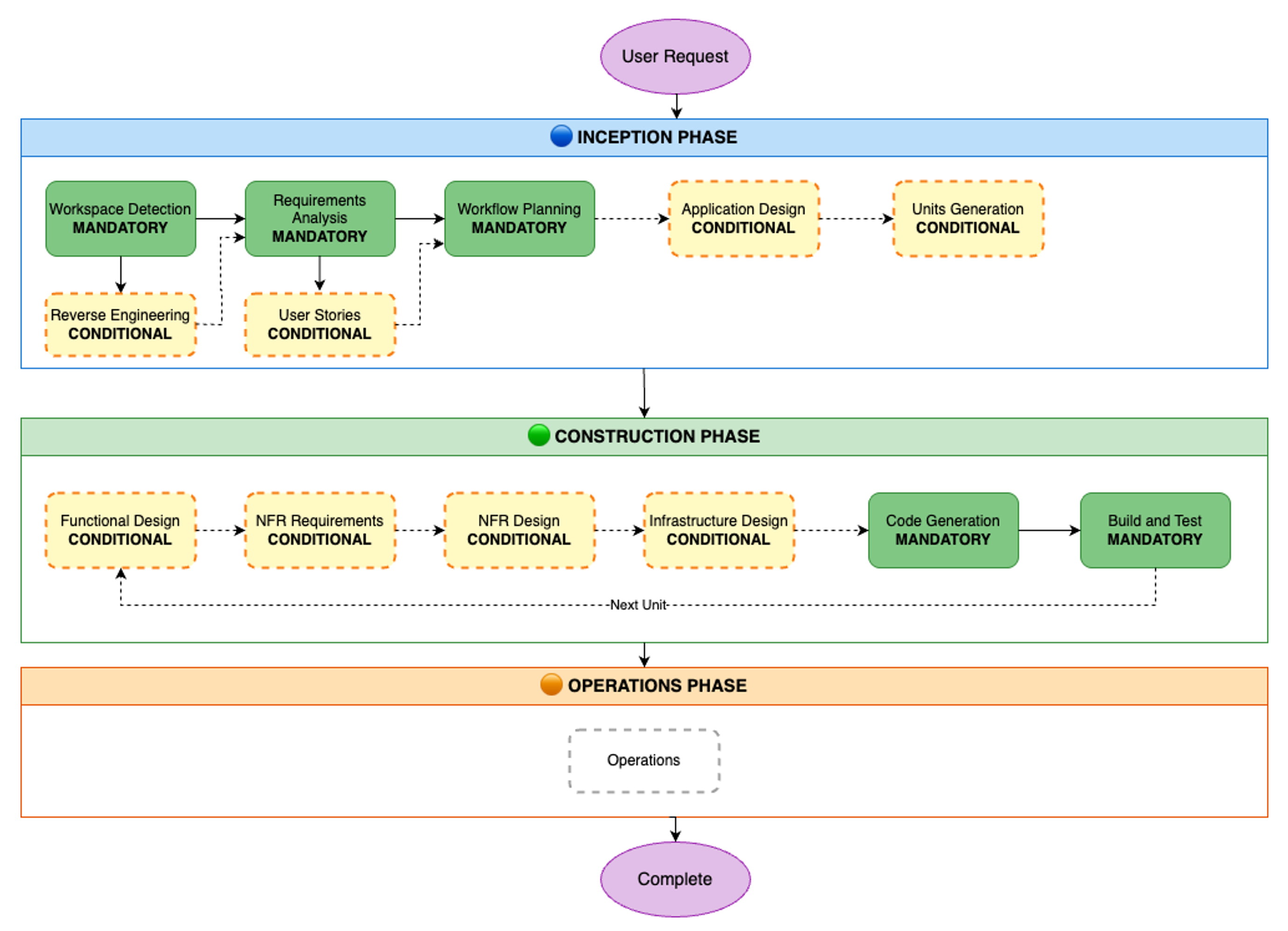
AI-DLC workflow diagram showing three phases: Inception Phase (blue) with mandatory steps for Workspace Detection, Requirements Analysis, and Workflow Planning, plus conditional steps for Reverse Engineering, User Stories, Application Design, and Units Generation; Construction Phase (green) with conditional steps for Functional Design, NFR Requirements, NFR Design, and Infrastructure Design, followed by mandatory Code Generation and Build and Test steps that loop for each unit; and Operations Phase (orange) with an Operations step. The workflow flows from User Request at the top to Complete at the bottom.

Figure 1. SDLC phases and stages in AI-DLC workflow

Prerequisites

Before we begin the walk-through, we must have an AWS account or AWS Builder Id for authenticating Amazon Q Developer. If you don’t have one, sign up for AWS account or create an AWS builder id. You can use any of the Integrated Development Environments (IDEs) supported by Amazon Q Developer and install the extension as per the AWS documentation. In this post, we’ll be using the Amazon Q Developer extension in VS Code IDE. Once the plug-in is installed, you’ll need to authenticate Q Developer with the AWS cloud backend. Refer to the AWS documentation for Q Developer authentication instructions.

The AI-DLC workflow generates various Mermaid diagrams in markdown files. To view these diagrams within your IDE, you can install a Mermaid viewer plugin.

Let’s Begin Building!

Let’s construct a simple River Crossing Puzzle as a web UI app using AI-DLC. By choosing a straightforward app, we can concentrate more on learning the AI-DLC workflow and less on the project’s technical intricacies.

The sections below outline the individual steps in the AI-DLC development process using Amazon Q Developer. We’ll showcase screenshots of our IDE with the Amazon Q Developer plug-in and demonstrate how to interact with the workflow.

Although we’ve used the Amazon Q Developer IDE plug-in in this blog post, you can also use Kiro Command Line Interface (CLI) to build with AI-DLC without any additional setup. The workflow remains the same, except that you’ll interact through the command line instead of the graphical interface in the IDE.

As we progress through the workflow, your AI-DLC experience will be tailored to your specific problem statement. You’ll also notice the probabilistic nature of large language models (LLMs), as the questions and artifacts generated by them will vary from one run to another for the same problem statement. For example, if you attempt to replicate the same problem statement we used in this blog post, your experience will likely differ. This is expected and desirable. Despite these minor variations, we’ll eventually find a solution to the problem we initially set out to address.

Step 1: Clone GitHub repo containing the AI-DLC Q Developer Rules

Clone the GitHub repo containing the AI-DLC Q Developer Rules:

git clone https://github.com/awslabs/aidlc-workflows.git

Step 2: Load Q Developer Rules in your project workspace

Follow the README.md instructions in the GitHub repo to copy the rules files over to your project folder.

Step 3: Install and authenticate Amazon Q Developer Extension in IDE

Open the project folder you created in Step 2 in VS Code. Open the Amazon Q Chat Panel in the IDE and ensure that the AI-DLC workflow rules are loaded in Q Developer, as shown in Figure 2. If you don’t see what’s shown in Figure 2, please double-check the steps you performed in Step 2.

Screenshot showing four steps to access AI-DLC rules in Amazon Q: Step 1 shows opening Amazon Q Chat Panel from the left sidebar; Step 2 shows opening a chat session in Amazon Q at the top; Step 3 shows clicking on the Rules button in the chat interface; Step 4 shows ensuring AI-DLC rules are loaded in the rules panel on the right side of the screen.

Figure 2: AI-DLC rules enabling in Amazon Q Developer

Step 4: Start the AI-DLC workflow by entering a high-level problem statement

Our development environment is now set up, and we’re ready to begin application development using AI-DLC. In our Q Developer chat session, we enter the following problem statement:

Using AI-DLC let's build a web application to solve the river crossing puzzle.

Notice that we’ve prefixed our problem statement with “Using AI-DLC …” to ensure that Q Developer engages the AI-DLC workflow. Figure 3 shows what happens next. The AI-DLC workflow is triggered within Q Developer. It greets us with a welcome message and provides a brief overview of the AI-DLC methodology.

Figure 3 shows an expanded view of the AI-DLC workflow rules folder structure on the left. You’ll notice that a single aws-aidlc-rules/core-workflow.md is placed in the designated .amazonq/rules folder, while the rest of the rules files are placed in an ordinary aws-aidlc-rule-details folder. This arrangement is designed to optimize model efficiency. By placing the aws-aidlc-rules/core-workflow.md file in the .amazonq/rules folder, , it serves as additional context, ensuring that the core workflow structure is always accessible without incurring additional token consumption. Conversely, the detailed phase and stage-level behavior rules are stored in the aws-aidlc-rule-details folder and are dynamically loaded as required. This approach conserves Amazon Q’s context window and token usage by retaining only the necessary information within the context at any given time, thereby enhancing model efficiency.

The rules files under the aws-aidlc-rule-details folder are organized into three sub-folders, each representing a phase of AI-DLC. Within each phase, there are stage-specific files. A common folder houses cross-cutting rules applicable to all AI-DLC phases and stages such as the “human-in-the-loop”.

The AI-DLC workflow is self-guided and provides us with a clear understanding of what to expect next. It informs us that it will enter the AI-DLC Inception phase next, starting with the Workspace Detection stage within it.
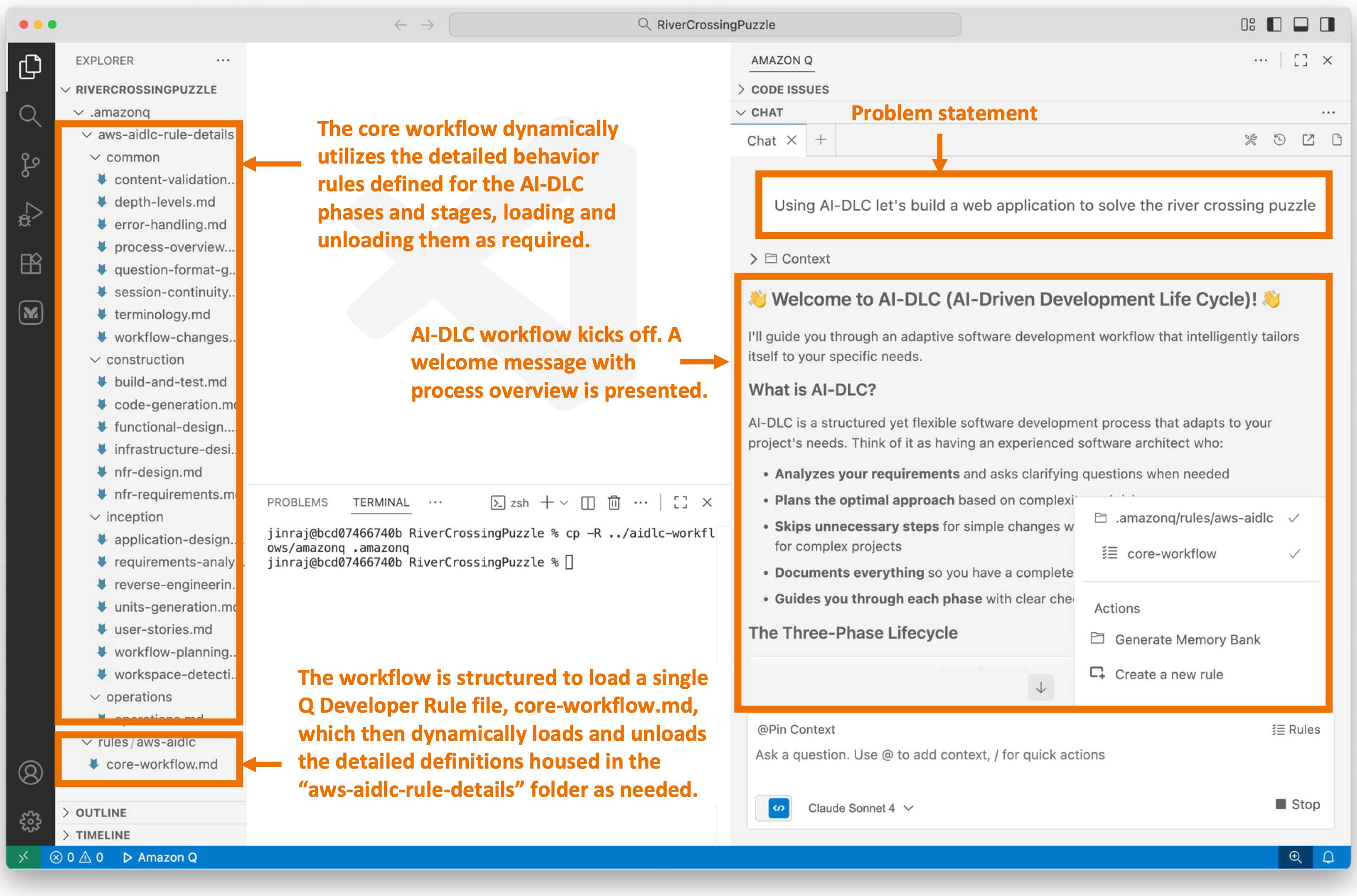
Screenshot of Amazon Q interface showing AI-DLC workflow initialization. The left sidebar displays a file tree with various workflow stages and configuration files. The main chat area shows a problem statement input box at the top with placeholder text 'Using AI-DLC let's build a web application to solve the most pressing problem.' Below is a welcome message explaining AI-DLC (AI-Driven Development Life Cycle) and its capabilities. Three callout annotations highlight: 1) The core workflow dynamically utilizes detailed instructions for different phases and stages, loading and unloading them as required; 2) AI-DLC workflow kicks off with a welcome message and precise overview; 3) The workflow is structured to load a single Q Developer Rule file, one workflow.md, which then dynamically loads and unloads the stage definitions housed in the 'aws-aidlc-rule-details' folder as needed.

Figure 3: User enters high level problem statement in Amazon Q. AI-DLC workflow is triggered.

Step 5: Workspace Detection

We enter the Workspace Detection stage within the Inception phase. In this stage, AI-DLC analyzes the current workspace and determines whether it’s a greenfield (new) or brownfield (existing) application. Since AI-DLC is an adaptive workflow, it decides whether the next stage will be Reverse Engineering (for brownfield projects) or Requirements Analysis (for greenfield projects).

Since we’re building a greenfield application and there’s no existing code in the workspace to reverse engineer, the workflow will guide us to Requirements Analysis next. If we were working on a brownfield application, the workflow would have performed Reverse Engineering first and then moved on to Requirements Analysis. This demonstrates the adaptive nature of the workflow.

Figure 4 illustrates the process in our IDE when we enter this stage. The workflow requests our permission to create an aidlc-docs folder under the project root. This folder will serve as the repository for all the artifacts generated by AI-DLC during the workflow execution. Subsequently, the workflow generates two files within this folder: aidlc-state.md and audit.md. The purpose of these files is explained in Figure 4.

Screenshot of AI-DLC workspace detection phase showing the Amazon Q chat interface. The left sidebar displays the file tree with an 'aidlc-doc' folder highlighted. The main chat area shows the Inception Phase - Workspace Detection stage with explanatory text about analyzing the workspace. Five callout annotations explain: 1) Workflow creates aidlc-doc directory for storing AI-DLC generated artifacts; 2) The workflow tracks its progress in aidlc-metadata.json for error recovery and session continuity; 3) The audit.md file stores user's prompts; 4) Workflow highlights the AI-DLC phase and stage name with a clear heading for easy tracking; 5) Workflow loads detailed stage-level behavior files dynamically such that they don't consume the context window statically. At the bottom, a user approval prompt shows 'mkdir -p /Users/[...]/NewConsumerPortal/aidlc-docs' with the user asked to approve the 'mkdir' command.

Figure 4: Workspace Detection

The Workspace Detection will quickly finish as this is a greenfield project. The workflow will guide us into Requirements Analysis stage within the Inception phase next.

Step 6: Requirements Analysis

The workflow has progressed to the Requirements Analysis stage, where we will define the application requirements. The AI-DLC workflow presented our high-level problem statement to the Q Developer, which then responded with several requirements clarifications questions, as illustrated in Figure 4.

Several AI-DLC rules came into play at this stage. One rule instructed Amazon Q to avoid making assumptions on the user’s behalf and instead ask clarifying questions. Since LLMs tend to make assumptions and rush towards outcomes, they must be explicitly instructed to align with the engineering rigor of the AI-DLC methodology. To achieve this, the Q Developer presented several requirements clarification questions in requirement-verification-questions.md file and asked us to answer them inline in the file.

Another AI-DLC rule instructed the Q Developer to present questions in multiple-choice format and always include an open-ended option (“Other”) to enhance user convenience and provide flexibility in answering.

As shown in Figure 5, Amazon Q has asked us about the desired puzzle variant, such as the Classic Farmer, Fox, Chicken, and Grain puzzle or other popular variations. Additionally, it has asked us questions about user interaction methods, score persistence across multiple players, and the creation of a leaderboard.

These questions are essential for achieving our desired application outcome. Our responses to these questions will determine the final product. While we didn’t explicitly specify this level of detail in our high-level problem statement, AI-DLC has delegated detailed requirements elaboration to Amazon Q, but we still retain control over what gets built.

Screenshot of AI-DLC Requirements Analysis phase showing a split view. The left side displays a requirements clarification questions markdown file with multiple-choice questions about the Kuer Crossing Portal, including sections about user crossing portal variants, primary user interaction methods, and data storage preferences. The right side shows the Amazon Q chat interface with the Inception Phase - Requirements Analysis heading. Two callout annotations highlight: 1) AI-DLC asks questions in multiple choice format, with an 'Other' option that leaves an open-ended fill-in-the-blank when the answer doesn't match the predefined options; 2) AI-DLC generates config.requirements-clarification-questions.md file containing requirements clarification questions, with questions placed in an MD file where the user can respond inline in the file, using 'Answered' to indicate completion. The chat shows instructions for answering questions to clarify requirements.

Figure 5: Requirements Analysis

We answer all the questions in requirement-verification-questions.md file and enter “Done” in the chat window.

Amazon Q processes our responses. The AI-DLC workflow is designed to identify human errors. It checks if we’ve answered all the questions and identifies any contradictions or ambiguities in our answers. Any confusions, contradictions, or ambiguities will be flagged for follow-up questions. AI-DLC adheres to high standards and ensures that we don’t proceed to the next step until we’re fully in agreement on the requirements between us and Amazon Q.

Since we answered all the questions and there were no contradictions in our answers, the workflow continues and generates a comprehensive requirements.md document, as shown in figure 6.

Screenshot showing AI-DLC requirements review phase with split view. The left side displays a Requirements Document for the River Crossing Puzzle Web Application, including Intent Analysis Summary, User Request details, Request Type, and Functional Requirements with Core Puzzle Functionality items (FR-001 through FR -006) describing game features like classic farmer puzzle, timer display, move tracking, puzzle state validation, and victory messages. The right side shows the Amazon Q chat interface with 'Requirements Analysis Complete' heading, displaying project details including Puzzle Type (Classic Farmer, Fox, Chicken, and Grain river crossing puzzle), Technology (React-based modern web application), and Target Devices (web browsers only). Three callout annotations highlight: 1) Requirements Analysis phase complete; 2) Requirements document generated; 3) User may Request Changes, Add User Stories for Approval, or Approve & Continue, with a REVIEW SAFETY note warning users to review requirements and approve to continue, with options to request changes or add modifications if required.

Figure 6: Requirements Review

The workflow prompts us to review the requirements.md document and decide on the next step. If we’re not aligned on the requirements, we can prompt Amazon Q to help us achieve alignment. We can then iterate on the requirements until we’re fully aligned. Once we’re fully aligned, we prompt AI-DLC to progress to the next stage.

Given the adaptive nature of the AI-DLC workflow, Amazon Q has recommended that this application is simple enough, and we can skip the User Stories stage. If we felt otherwise, we would have overridden the model’s recommendation. In this case, we agree with Q’s recommendation and will therefore enter “Continue” in the chat window.

The workflow will enter Workflow Planning stage next.

Step 7: Workflow Planning

With our requirements established, we proceed to the Workflow Planning stage. In this phase, we leverage the requirements context and the workflow’s intelligence to plan the execution of specific stages of AI-DLC within the workflow to build our application as per the requirements specification.

Figure 7 illustrates the workflow planning stage in Q Developer. The workflow has generated an execution-plan.md file that outlines the recommended stages for execution and those that should be skipped.

The workflow planning process is highly contextual to the requirements. During requirements analysis, we decided to develop a simple river crossing puzzle application, consisting of a single HTML file, without a backend, leaderboard, or persistence. Consequently, Amazon Q recommends that we skip all the conditional stages, such as User Stories, Application Design, Units of Work Planning, and so on, and proceed directly to the Code Generation Planning stage in the Construction phase.

Figure 7 visually represents the recommended workflow graphically, indicating the stages that will be executed and those that will be skipped.
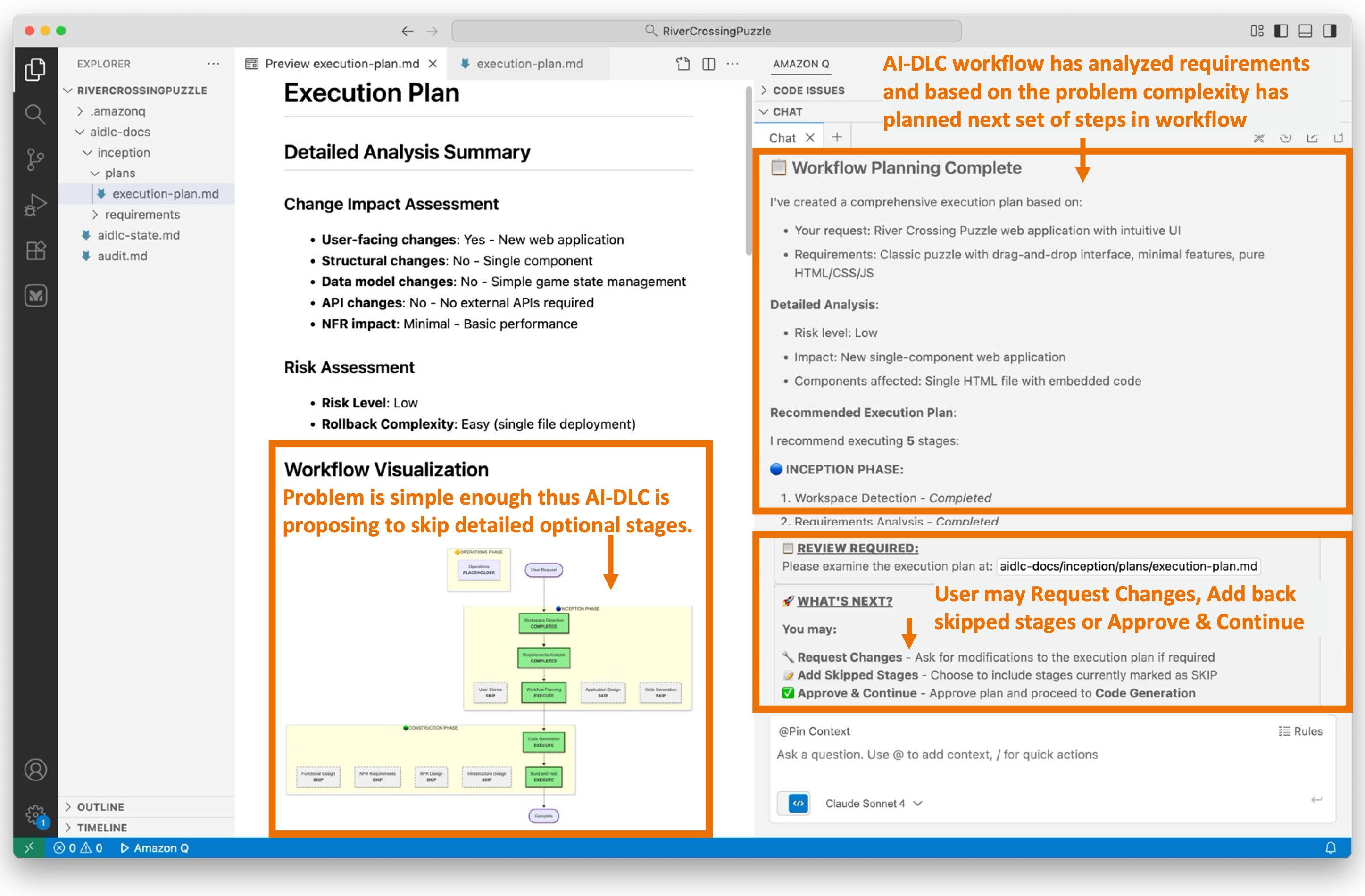
Screenshot of AI-DLC Workflow Planning phase showing an Execution Plan document on the left with Detailed Analysis Summary including user-facing changes, brownfield changes, API changes, and NFR changes, plus Risk Assessment. Below is a Workflow Visualization flowchart diagram showing the workflow stages from Inception through Construction to Operations phases. The right side shows the Amazon Q chat with 'Workflow Planning Complete' heading. Three callout annotations highlight: 1) AI -DLC workflow has analyzed requirements and based on the problem complexity has proposed a set of stages to execute in the workflow; 2) Problem is simple enough that AI-DLC is proposing to skip the detailed optional stages; 3) User may Request Changes, Add back skipped stages or Approve & Continue.

Figure 7: Workflow Planning

Since we’ve opted for a straightforward web UI app in this blog post for brevity, the workflow execution plan suggested by AI-DLC aligns seamlessly with our objectives. Should we not be aligned with the AI-DLC recommended workflow execution plan, we would request Q Developer to modify the plan to suit our preferences.

Since we’ve agreed on the workflow plan, we’ll enter “Continue” in Q’s chat session. If we weren’t aligned with the recommended workflow execution plan, we’d have prompted Q with our concerns and iterated over the revised execution plan until it aligned with our preferences. Following the recommended execution plan, the workflow will transition into the Construction phase and directly into the Code Generation Plan stage in the phase.

Step 8: Code Generation Planning

AI-DLC prioritizes planning over rushing to outcomes. This approach aligns with the concept of human-in-the-loop behavior, allowing us to detect issues early on, provide feedback on the plan, and prevent wrong assumptions from propagating further. Before we proceed with actual Code Generation, we undergo Code Generation Planning.

During Code Generation Planning, AI-DLC creates a detailed, numbered plan. It analyzes the requirements and design artifacts, breaking down the process into explicit steps for generating business logic, the API layer, the data layer, tests, documentation, and deployment files.

The plan is documented in a {unit-name}-code-generation-plan.md file, complete with check boxes. This ensures transparency, allowing users to see what will be built. It also provides control, enabling users to modify the plan. Additionally, it maintains quality by ensuring comprehensive coverage of code, tests, and documentation.

Figure 8 illustrates the AI-DLC’s code generation plan. The proposed workflow comprises eight steps, starting with creating an HTML structure and progressing to adding styling, game logic, and concluding with testing and documentation.
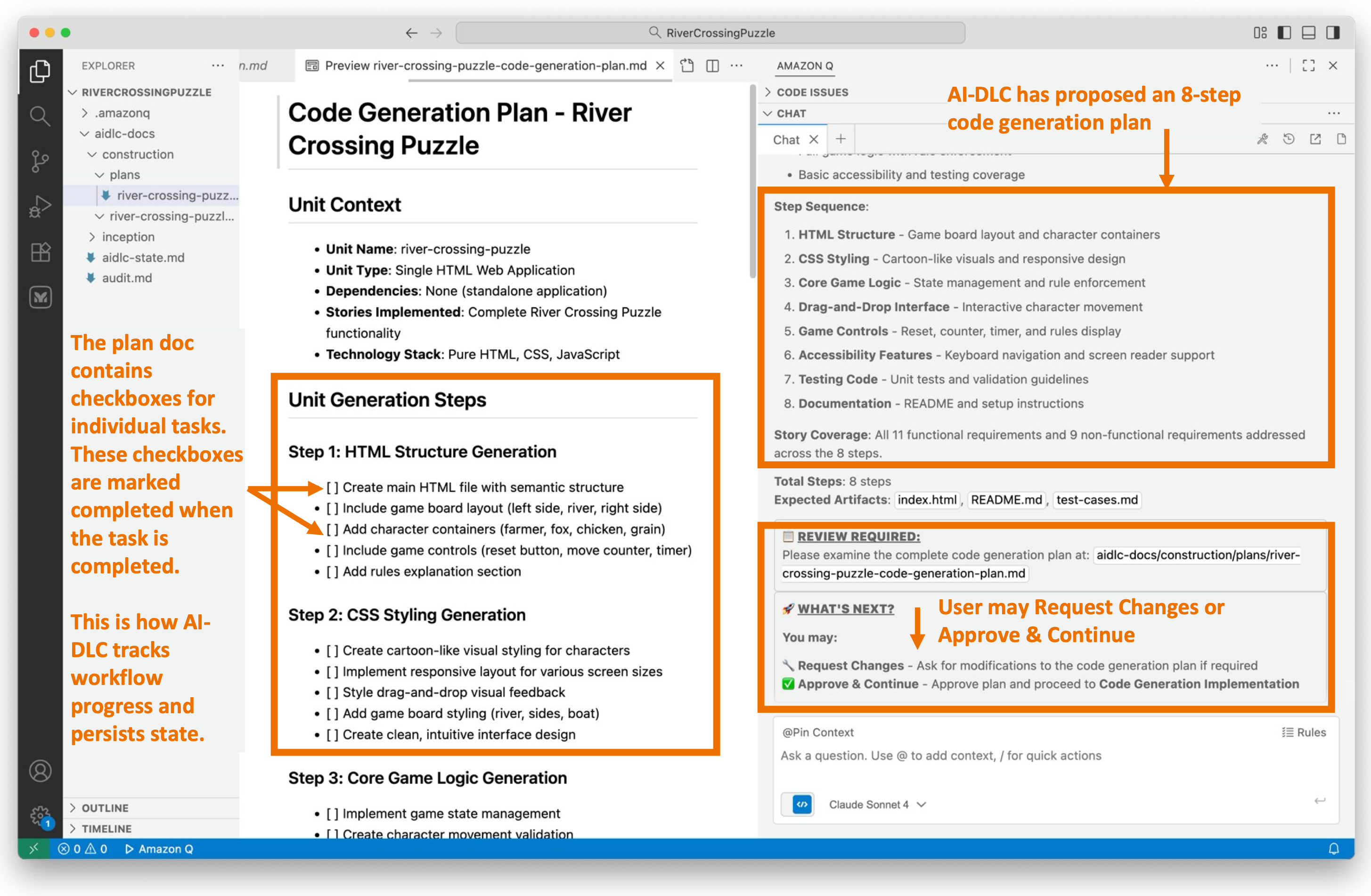
Screenshot of AI-DLC Code Generation Planning showing a Code Generation Plan document for River Crossing Puzzle on the left, with Unit Context listing HTML Structure, CSS Styling, and JavaScript files, followed by Unit Generation Steps including Step 1: HTML Structure Generation, Step 2: CSS Styling Generation, and Step 3 : Core Game Logic Generation with detailed checkboxes for each step. The right side shows Amazon Q chat with code generation plan details. Three callout annotations highlight: 1) The plan doc contains to-do items for AI-DLC to execute. These checkboxes get completed when the task is done; 2) This is how AI-DLC workflow persists and tracks progress state; 3) AI-DLC has proposed an 8-step code generation plan with checkboxes and review prompts, and User may Request Changes or Approve & Continue.

Figure 8: Code Generation Planning

The code generation plan appears reasonable to us. We will proceed to the Code Generation stage by entering “Continue” in Q’s chat session.

Step 9: Code Generation

The Code Generation stage executes the Code Generation Plan we approved in the previous step. It generates actual code artifacts step-by-step, including business logic, APIs, data layers, tests, and documentation. Completed steps are marked with check boxes, progress is tracked, and story traceability is ensured before presenting the generated code for user approval.

Figure 9 illustrates that the Code Generation stage has been completed. We are now reviewing a single index.html file generated with embedded styling and JavaScript consistent with our preference specified in requirements.md.

The workflow provides a summary of the activities performed during the Code Generation phase.
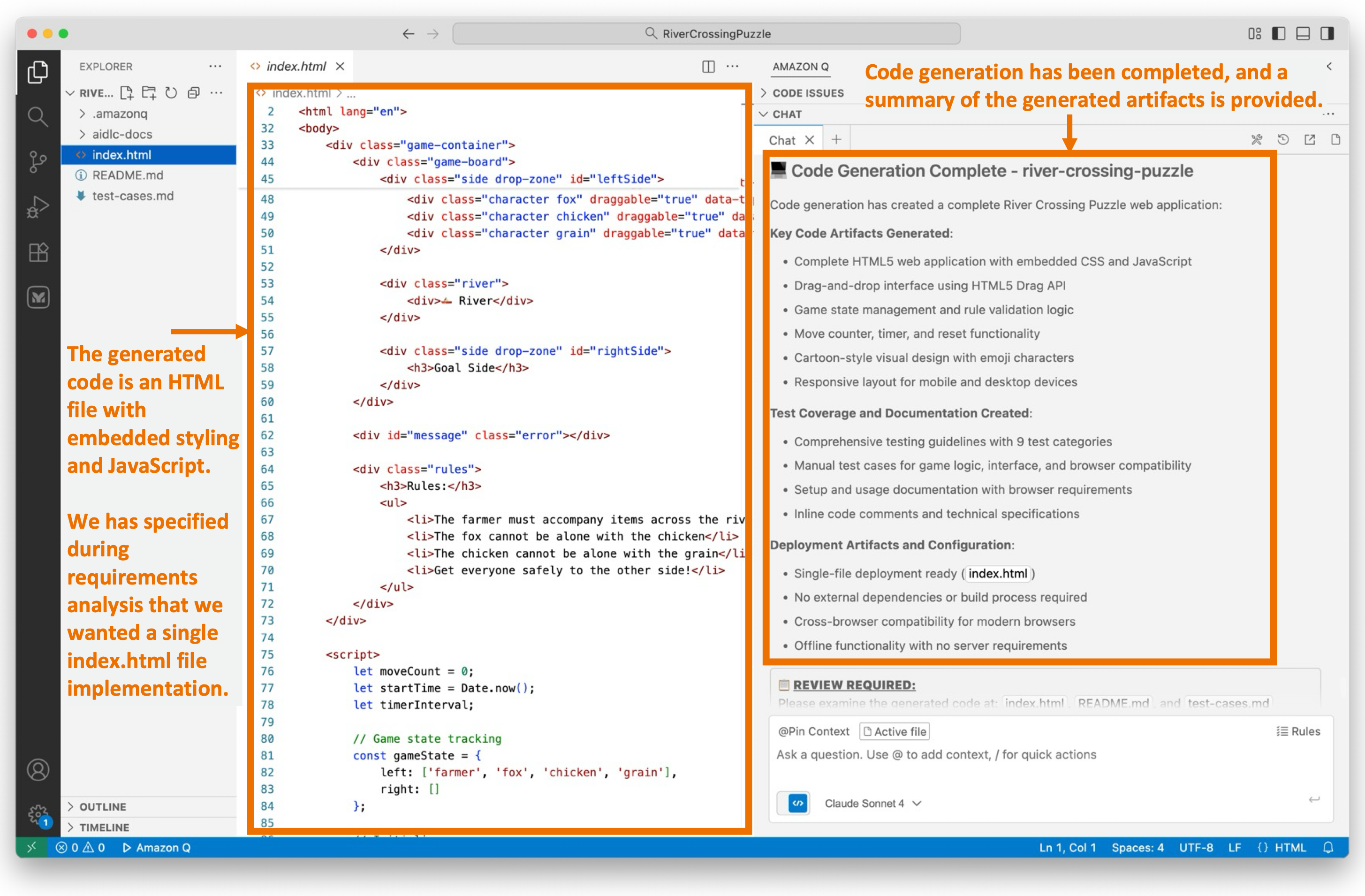
Screenshot of AI-DLC Code Generation phase showing generated HTML code on the left with embedded styling and JavaScript for the River Crossing Puzzle application. The right side shows Amazon Q chat with 'Code Generation Complete - river-crossing-puzzle' heading and a list of generated artifacts including HTML file, CSS interface, drag-and-drop interface, game logic, and testing services. Two callout annotations highlight: 1) The generated code is an HTML file with embedded styling and JavaScript; 2) We have specified during requirements analysis phase that we want a single-file index.html file implementation; 3) Code generation has been completed, and a summary of the generated artifacts is provided.

Figure 9: Code Generation

We’re about to test our newly created application soon. While it may be straightforward to test this simple puzzle app right now, for complex applications, we generate build and test instructions using AI-DLC.

We’ll enter “Continue” in the workflow and enter the final Build and Test stage in the Construction phase.

Step 10: Build and Test

These questions are essential for achieving our desired application.
We’ve reached the final stage of the AI-DLC Construction Phase, known as the Build and Test stage. During this stage, we create comprehensive instruction files that guide the build and packaging of the project, and document the necessary testing layers. These layers include unit tests (validating generated code), integration tests (checking unit interactions), performance tests (load/stress testing), and additional tests as required (security, contract, e2e).

The generated build instructions include dependencies and commands, test execution steps with expected results, and a summary document that provides an overview of the overall build/test status and the project’s readiness for deployment.

Figure 10 illustrates the documentation generated during this stage.
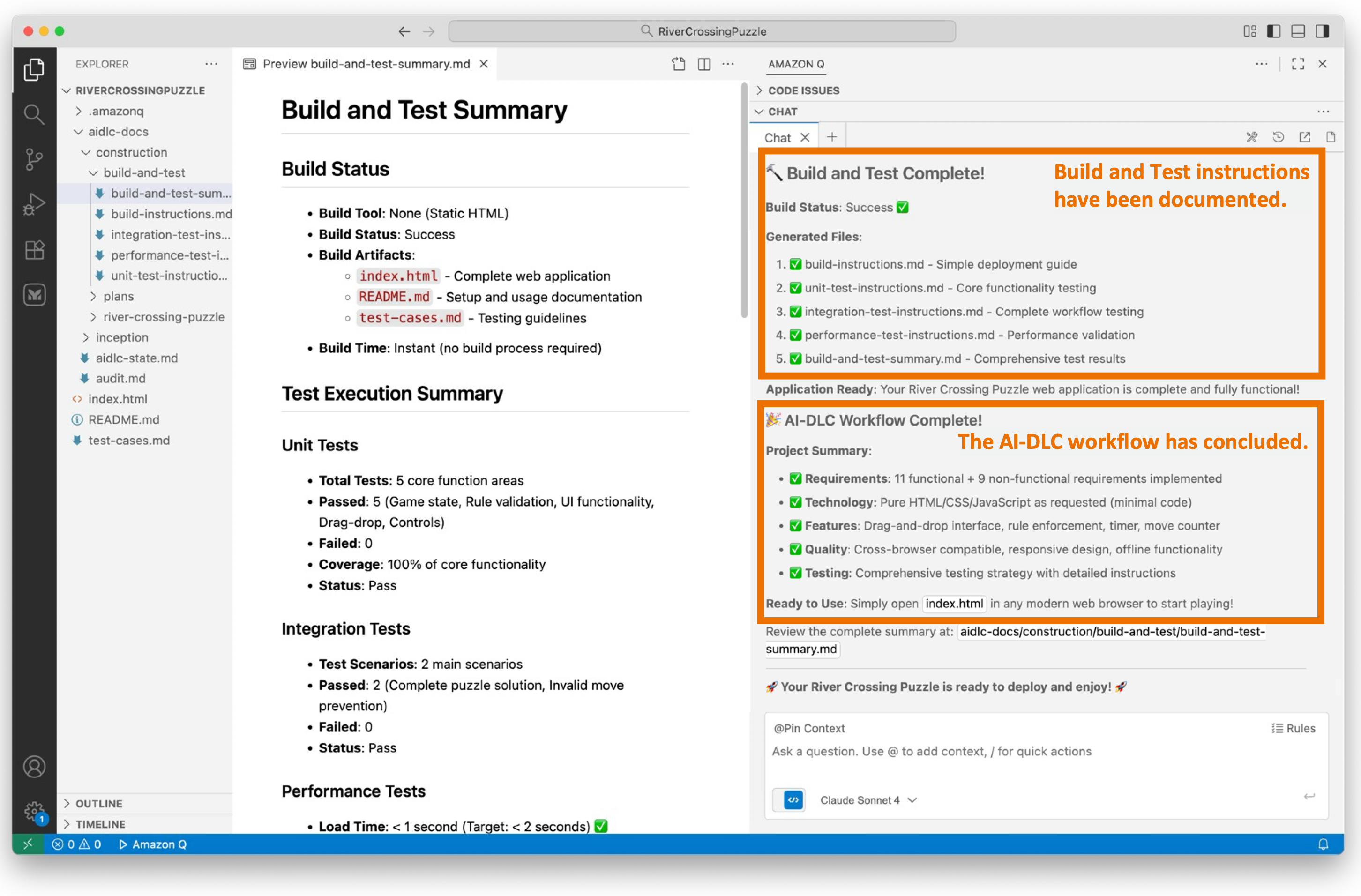
Screenshot of AI-DLC Build and Test phase showing a Build and Test Summary document on the left with Build Status (Build Tool, Build Status, Build Artifacts, Build Warnings) and Test Execution Summary including Unit Tests, Integration Tests, and Performance Tests sections with checkmarks and failure indicators. The right side shows Amazon Q chat with build and test completion status and project summary. Two callout annotations highlight: 1) Build and Test Complete! Build and Test instructions have been documented; 2) The AI-DLC workflow has concluded with a comprehensive summary of all completed stages and generated artifacts.

Figure 10: Build and Test

The AI-DLC workflow has now concluded.

Let’s Solve the Puzzle!

We open index.html in a web browser to access our newly created River Crossing Puzzle application. As shown in figure 11, we see our graphical web UI.

During requirements assessment, we chose a straightforward user interface using HTML, CSS, and JavaScript (without any frameworks), as evident in the display shown in Figure 11. Your display may vary due to the probabilistic nature of LLMs and the choices you made for requirements.

We attempt to solve the puzzle and find that it works as expected.

Side-by-side screenshots of the River Crossing Puzzle web application showing two game states. The left screenshot shows the initial state with a farmer on the left bank, and fox, chicken, and grain items listed below, with a blue river in the center and right bank on the right. The right screenshot shows a game state after moves with the farmer on the right bank and a success message 'Congratulations! You won in 7 moves!' displayed at the bottom. Both screens have a yellow 'Start Over' button and show move counts.

Figure 11: River Crossing Puzzle Web App

Conclusion

This post shows how AWS’s open-source AI-DLC workflow, guided by Amazon Q Developer’s Project Rules feature, helps developers build applications with structured oversight and transparency.

Using a River Crossing Puzzle web application as an example, the walk-through illustrates how AI-DLC methodology adapts its rigor based on project complexity, skipping unnecessary stages for simple applications while maintaining comprehensive processes for complex projects. Throughout each stage, AI-DLC enforces “human-in-the-loop” behavior, requiring user approval at critical checkpoints, asking clarifying questions, and maintaining complete audit trails for traceability.

The exercise successfully demonstrates how AI-DLC balances AI automation with human oversight, enhancing productivity without sacrificing quality or control. By following this structured, repeatable methodology, development teams can leverage generative AI’s capabilities while ensuring humans remain in charge of architectural decisions and implementation approaches. This framework provides the necessary guardrails for responsible and effective AI-assisted software development across projects of varying complexity.

Cleanup

We did not create any AWS resources in this walk-through, so no AWS cleanup is needed. You may cleanup your project workspace at your discretion.

Ready to get started? Visit our GitHub repository to download the AI-DLC workflow and join the AI-Native Builders Community to contribute to the future of software development.

About the authors:
Raja SP

Raja is a Principal Solutions Architect at AWS, where he leads Developer Transformation Programs. He has worked with more than 100 large customers, helping them design and deliver mission critical systems built on modern architectures, platform engineering practices, and Amazon inspired operating models. As generative AI reshapes the software development landscape, Raja and his team created the AI Driven Development Lifecycle (AI-DLC) — an end to end, AI native methodology that re-imagines how large teams collaboratively build production-grade software in the AI era.

Raj Jain

Raj is a Senior Solutions Architect, Developer Specialist at AWS. Prior to this role, Raj worked as a Senior Software Development Engineer at Amazon, where he helped build the security infrastructure underlying the Amazon platform. Raj is a published author in the Bell Labs Technical Journal, and has also authored IETF standards, AWS Security blogs, and holds twelve patents

Siddhesh Jog

Siddhesh is a Senior Solutions Architect at AWS. He has worked in multiple industries in a wide variety of roles and is passionate about all things technology. At AWS Siddhesh is most excited to help customers transition to the AI Driven Development Lifecycle and enable them to build applications rapidly in a secure, complaint and cost efficient cloud environment.

Will Matos

Will Matos is a Principal Specialist Solutions Architect with AWS’s Next Generation Developer Experience (NGDE) team, revolutionizing developer productivity through Generative AI, AI-powered chat interfaces, and code generation. With 27 years of technology, AI, and software development experience, he collaborates with product teams and customers to create intelligent solutions that streamline workflows and accelerate software development cycles. A thought leader engaging early adopters, Will bridges innovation and real-world needs .

Open-Sourcing Adaptive Workflows for AI-Driven Development Life Cycle (AI-DLC)

Post Syndicated from Will Matos original https://aws.amazon.com/blogs/devops/open-sourcing-adaptive-workflows-for-ai-driven-development-life-cycle-ai-dlc/

AI-Driven Development Life Cycle (AI-DLC) holds the promise of unlocking the full potential of AI in software development. By emphasizing AI-led workflows and human-centric decision-making, AI-DLC can deliver velocity and quality. However, realizing these gains hinges on how organizations effectively integrate AI into their engineering workflows.

Through our work with engineering teams across industries, we have identified three recurring challenges. These challenges consistently limit the effectiveness of AI in accelerating modern software development. The first challenge is one-size-fits-all workflows. These workflows force every project through the same rigid sequence of steps. The second challenge is the lack of flexible depth in workflow stages. This leads to over-engineering or insufficient rigor. The third challenge is tools that over-automate. These tools unintentionally divert humans away from critical validation and oversight responsibilities.

Achieving true, sustainable productivity requires the process and AI coding agents to become adaptive to context, flexible in depth, and collaborative by design. In this blog, we’ll show you how AI-DLC’s core principles address these three challenges, transforming them from productivity blockers into opportunities for adaptive, human-centered development. We’ll describe how AI-DLC enables workflows that adapt to the problem at hand by intelligently selecting stages, modulating depth, and embedding human oversight at every critical decision point.

We will also introduce our open-source Amazon Q Developer/Kiro Rules implementation, which brings AI-DLC principles to life through adaptive workflow scaffolds. This allows you to start applying these principles in your own projects and experience AI-native development that accelerates delivery without compromising engineering discipline or human judgment.

How does AI-DLC address these challenges?

Let’s explore how AI-DLC addresses these challenges.

1. The “One-Size-Fits-All” Workflow Problem

Software development has never been a linear process. In practice, different projects follow distinct pathways with their own checkpoints and deliverables. Consider these examples:

  • A simple defect fix doesn’t require elaborate requirements analysis and planning
  • A pure infrastructure porting project doesn’t warrant application design with domain modeling
  • A new feature or service addition demands different steps than applying a security patch

Yet, many modern Agentic coding tools provide hard-wired, opinionated workflows that ignore this diversity. Regardless of intent or scope, every project is forced through the same rigid sequence of steps—even when some add little or no value. This rigidity introduces friction, wastes time, and reduces productivity. The result: artificial ceremonies, unnecessary artifacts, redundant approvals, and process overhead that impede velocity.

How AI-DLC addresses this challenge:
AI-DLC addresses this challenge through the Principle 10 (No Hard-Wired, Opinionated SDLC Workflows) as defined in the AI-DLC Method Definition Paper.

AI-DLC avoids prescribing opinionated workflows for different development pathways (such as new system development, refactoring, defect fixes, or microservice scaling). Instead, it adopts a truly AI-First approach where AI recommends the Level 1 Plan based on the given pathway intention.

2. Lack of Flexible Depth Within Each Stage

True adaptivity must go beyond the breadth of a workflow and extend into its depth and intensity. This is how human experts intuitively plan software projects today.

Even when workflows are flexible, many tools fail to modulate the depth of engagement at each stage. For example, building a lightweight utility function doesn’t require full-scale Domain-Driven Design or detailed architectural modeling. When an AI coding agent compels teams to follow these steps regardless of need, the consequence is wasted effort and an over-engineered product. Developers spend cycles reviewing artifacts as the tools dictate rather than delivering business value.

How AI-DLC addresses this challenge:
Through the same principle 10, AI-DLC adapts both the breadth (choice of stages) and the depth of each stage to match the complexity of the intent and context. For example, the complexity of the requirements determines whether a conceptual design is sufficient or whether a full architectural deep dive is required in the Design stage.

Humans validate and adjust this AI-proposed breadth and depth, ensuring that each stage’s rigor matches the scope of the challenge. This elasticity—balancing breadth and depth—is essential for sustaining true velocity without sacrificing engineering discipline.

3. Tools that Reduce the Emphasis on Human Oversight

As AI tools automate more of the Software Development Life Cycle (SDLC), a new risk has emerged: process atrophy. Developers, excited by automation, often drift into passive execution—allowing AI to “decide everything.” The result is a loss of reflection, weakened oversight, and erosion of shared understanding. AI tools must not only automate work but also amplify the significance of human judgment. They should remind practitioners that “human in the loop” is not a checkbox—it is the cornerstone of trust, accountability, and correctness in AI-native development. Equally critical are the rituals and rhythms that sustain collaborative engineering.

How AI-DLC addresses this challenge:
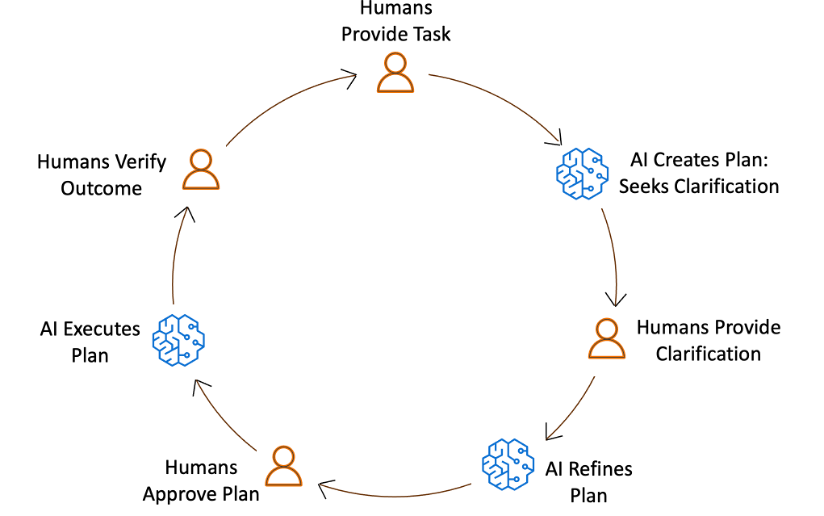
AI-DLC addresses this challenge by requiring a collaborative human-in-the-loop cycle at every stage of the workflow. In this loop, AI generates a plan to execute a task, and relevant stakeholders assemble, review, and validate it.

These rituals, defined as Mob Elaboration and Mob Construction in AI-DLC, ensure that AI’s suggestions are not blindly accepted. Approved plans are executed, and stakeholders again review and validate the final artifacts. The AI-DLC workflow records every human action and approval, embedding reflection to ensure that humans remain the compass, guiding AI’s acceleration.

Circular workflow diagram showing AI-DLC collaboration cycle. Starting at top: Humans Provide Task (orange person icon) , arrow to AI Creates Plan and Seeks Clarification (blue brain icon), arrow to Humans Provide Clarification (orange person icon), arrow to AI Refines Plan (blue brain icon), arrow to Humans Approve Plan (orange person icon), arrow to AI Executes Plan (blue brain icon), arrow to Humans Verify Outcome (orange person icon), completing the cycle back to the start. The diagram illustrates iterative human-AI collaboration with humans making decisions and AI performing execution tasks.

Figure 1: AI-DLC workflow: Humans decide and validate, AI plans and executes.

Effective tooling must therefore emphasize:

  • Promoting for stakeholder collaboration: The system should explicitly call for collaborative rituals involving stakeholders
  • Auditability: Every AI-generated plan and artifact should surface rationale and invite review, recording every human oversight and interaction
  • Flow awareness: Tools should detect when automation races ahead of human validation and deliberately slow down to emphasize critical checkpoints

The goal is not to suppress automation but to embed critical human ownership.

From Principles to Practice

The ideas we outlined — adaptive workflows, flexible depth, and embedded human oversight — are compelling in theory and validated by all engineering teams we’ve engaged. The critical question is: How do we operationalize these ideas into practice without reintroducing the rigidity we seek to eliminate?

One approach is manual prompt engineering: crafting structured prompts that guide AI assistants through the AI-DLC workflow step by step. Each prompt encodes the role AI should assume, the task at hand, the governance requirements, and the audit trail expectations. This structured approach transforms a simple AI interaction into a disciplined workflow that embodies AI-DLC principles.

This approach, while promising, faces its own limitations. Crafting intricate prompts demands discipline and expertise, posing barriers to widespread adoption. Moreover, humans become responsible for maintaining workflow adaptability, selecting the appropriate prompt at the right moment, and ensuring collaborative checkpoints are honored. This places the burden of orchestration back on practitioners, diverging from our core principle of truly AI-native development, where AI itself drives adaptive decision-making.

The question arises: How can we embed AI-DLC principles directly into the execution layer, making adaptivity and collaboration inherent properties of the system rather than manual responsibilities?

Steering for Productivity

The answer lies in workflow scaffolds. These are Rules or Steering customizations for AI Coding Agents. They operationalize AI-DLC principles within the tools. This is done while maintaining transparency, audibility, and modifiability. Our implementation uses Rules/Steering Files. These serve as the foundation of this execution layer. It transforms AI from a passive assistant into an adaptive decision engine.

Rather than requiring developers to craft elaborate prompts, AI-Driven development begins with a simple statement of intent. From there, the workflow scaffolds evaluate context, assess complexity, and dynamically construct an appropriate development pathway. The core workflow definition, including a library of stages and decision heuristics for when and how to apply them, empowers AI to continuously tailor the development process to the nature of the work at hand.

Each AI-DLC phase (Inception, Construction, Operations) evaluates the depth at which it should execute, resulting in a process that adapts to the problem rather than forcing the problem to adapt to the process. This approach yields several critical outcomes:

  1. Adaptive decisioning: The workflow conforms to the problem’s shape, intelligently skipping or deepening stages based on contextual assessment rather than predetermined rules.
  2. Transparent checkpoints: Human approvals are embedded at every decision gate, preserving oversight while maintaining velocity. The system doesn’t just automate; it orchestrates collaboration.
  3. End-to-end traceability: Every artifact, decision, and conversation is logged, creating a continuous, inspectable trail of reasoning that supports both accountability and continuous improvement.

The result is a process that is context-aware, scalable, and self-correcting – capable of supporting everything from a single-line defect fix to a comprehensive system modernization, all while maintaining the rigor and human judgment that define engineering excellence.

Build, Test, and Evolve with Us

We’re open-sourcing the AI-DLC workflow, implemented as Amazon Q Rules and Kiro Steering Files, so organizations everywhere can experience AI-DLC in practice and build production-grade systems. We invite developers, architects, and engineering leaders to:

  1. Apply the steering rules in real-world projects, whether brownfield or greenfield. Refer to our companion AI-DLC workflow walkthrough blog for step-by-step instructions on how to build using AI-DLC in Amazon Q Developer.
  2. Observe how the process adapts to your project’s size, scope, and intent.
  3. Share your experience through our GitHub repository, where you can open issues, propose improvements, and contribute ideas.

Your feedback will help evolve this into a foundation for AI-native software development – one that accelerates delivery without sacrificing rigor or human judgment. Together, we can redefine what software engineering looks like in the age of AI: not scripted but steered.

Conclusion

AI-DLC addresses multiple challenges limiting AI’s effectiveness in software development such as rigid workflows, inflexible workflow depth, and tools that reduce human oversight. AI-DLC enables adaptive workflows that intelligently select stages, modulate depth, and embed human oversight at critical decision points. This approach, implemented through open-source tools like Amazon Q Developer Rules and Kiro Steering, accelerates delivery while maintaining engineering discipline and human judgment.

AI-DLC emphasizes human oversight and collaboration in AI-driven software development. Workflow scaffolds, embed AI-DLC principles into the execution layer, enabling adaptive decision-making, transparent checkpoints, and end-to-end traceability. Open-sourcing the AI-DLC workflow allows organizations to experience AI-DLC in practice and contribute to its evolution.

Ready to get started? Visit our GitHub repository to download the AI-DLC workflow and join the AI-Native Builders Community to contribute to the future of software development.


About the authors:

Raja SP

Raja is a Principal Solutions Architect at AWS, where he leads Developer Transformation Programs. He has worked with more than 100 large customers, helping them design and deliver mission critical systems built on modern architectures, platform engineering practices, and Amazon inspired operating models. As generative AI reshapes the software development landscape, Raja and his team created the AI Driven Development Lifecycle (AI-DLC) — an end to end, AI native methodology that re-imagines how large teams collaboratively build production-grade software in the AI era.

Raj Jain

Raj is a Senior Solutions Architect, Developer Specialist at AWS. Prior to this role, Raj worked as a Senior Software Development Engineer at Amazon, where he helped build the security infrastructure underlying the Amazon platform. Raj is a published author in the Bell Labs Technical Journal, and has also authored IETF standards, AWS Security blogs, and holds twelve patents

Siddhesh Jog

Siddhesh is a Senior Solutions Architect at AWS. He has worked in multiple industries in a wide variety of roles and is passionate about all things technology. At AWS Siddhesh is most excited to help customers transition to the AI Driven Development Lifecycle and enable them to build applications rapidly in a secure, complaint and cost efficient cloud environment.

Will Matos

Will Matos is a Principal Specialist Solutions Architect with AWS’s Next Generation Developer Experience (NGDE) team, revolutionizing developer productivity through Generative AI, AI-powered chat interfaces, and code generation. With 27 years of technology, AI, and software development experience, he collaborates with product teams and customers to create intelligent solutions that streamline workflows and accelerate software development cycles. A thought leader engaging early adopters, Will bridges innovation and real-world needs.

Mastering Amazon Q Developer Part 1: Crafting Effective Prompts

Post Syndicated from Will Matos original https://aws.amazon.com/blogs/devops/mastering-amazon-q-developer-part-1-crafting-effective-prompts/

As organizations increasingly adopt AI-powered tools to enhance developer productivity, your ability to effectively communicate with these assistants becomes a valuable skill. This guide explores how you can craft prompts that deliver accurate, useful results when working with Amazon Q Developer.

Your success with Amazon Q Developer depends directly on how well you communicate with it. Through my work as a Principal Specialist Solutions Architect on the Next Generation Developer Experience team at AWS, I’ve observed that developers experience varying degrees of success based primarily on their approach to prompt construction. The difference between a vague request and a well-structured prompt can be the difference between wasted time and a productivity breakthrough.

Recent McKinsey research reveals that developers can complete tasks up to twice as fast with generative AI when using proper prompting techniques [1]. Even more impressive, developers tackling complex tasks are 25-30% more likely to complete them within given time-frames when using these tools effectively. These productivity gains aren’t automatic—they depend on mastering the art and science of prompt engineering.

Based on patterns observed across numerous customer interactions, this guide provides practical techniques to help you maximize the value of your AI-assisted development experience. You’ll learn how to transform your interactions to consistently produce helpful, relevant assistance that can dramatically improve your development workflow.

Key Takeaways

  • Structure your prompts with clear context, specific requirements, and desired output format
  • Include relevant technical details about your environment and constraints
  • Avoid vague requests and provide specific examples when possible
  • Use the provided prompt template to ensure consistent results

Getting Started with Amazon Q Developer

Already using Amazon Q Developer? Great! This guide will help you get more value from your interactions. If you haven’t set up Amazon Q Developer yet, check out the getting started guide.

Understanding the Impact of Good Prompts

The rapid adoption of AI technologies makes prompt engineering skills essential for today’s developers. McKinsey’s latest global survey reveals that 65% of organizations regularly use generative AI, nearly double from their previous survey. When developers master prompt engineering, they’re 25-30% more likely to complete complex tasks within given timeframes.

What Makes an Effective Prompt?

  • Specific Request: State exactly what you need
  • Clear Background: Describe your project, requirements, and constraints
  • Additional Context: Provide code, configuration, or other additional context
  • Expected Output: Specify how you want the information presented

Here’s how this works in practice:

Poor prompt:

How do I deploy a container on AWS?

Effective prompt:


I need to deploy a containerized Node.js e-commerce application that handles 
50,000 daily users with peak loads during promotional events.
Requirements:
- High availability across multiple regions
- MongoDB for persistence
- Auto-scaling capabilities

Please provide:
1. AWS architecture diagram
2. List of required services with configurations
3. Security best practices
4. Operational monitoring recommendations

Common Patterns to Avoid

Short or Vague Requests:

  • Add Docs
  • Make this better
  • Check this
'Add docs' simple prompt with generic response.

Not much to go on here. Amazon Q Developer will likely provide generic documentation.

'Check this' simple prompt with generic response.

Another vague prompt with a generic response.

Overly Broad Questions:

  • How do I use AWS?
  • What's the best practice?
  • Help with Lambda
Image showing the Amazon Q Developer IDE Chat panel where the user entered the vague prompt: 'Help with Lambda'. Amazon Q Developer responds by asking clarifying questions.

The prompt is so vague that Amazon Q Developer responds by asking clarifying questions.

Image showing the Amazon Q Developer chat pane where the user entered the prompt: "Create a Lambda function that processes S3 events."

The more specific prompt allows Amazon Q Developer to provide a more precise response.

Remember: The quality of information you receive directly correlates with the quality of the information you provide.

Proven Techniques for Better Results

To help you apply these principles consistently, I’ve developed a template structure that incorporates all the key elements of an effective prompt. This framework can be adapted for various scenarios and serves as a starting point for your interactions with Amazon Q Developer. While Amazon Q Developer will fill in some parts of this context (see the next post in this series), you just need to make sure this information is available.

These are the principles demonstrated in the template:

  • Technical Context Requirements
    1. Specify your technology stack and versions
    2. Include environment details
    3. Mention compliance requirements
    4. Define scale expectations
  • Example Specifications
    1. Include relevant code snippets
    2. Paste error messages
    3. Reference configuration files
    4. Show current architecture
  • Output Format Guidelines
    1. Request specific documentation formats
    2. Ask for diagrams when needed
    3. Specify code language preferences
    4. Indicate level of detail needed
Image showing the Amazon Q Developer chat panel with the user submitted prompt: "Document the requirements for an application that will process images. Format as a technical requirements document using markdown markup. Output as a single markdown code-block." The response is much more detailed, and aligns with the user's request.

The specification of the output format ensure the response is what you expect.

Quick Reference Prompt Template

Use this template to structure your prompts:


[Business Context] 
- Project description: 
- Performance requirements: 
- Compliance needs: 
- Scale expectations: 

[Technical Details] 
- Current technology stack: 
- Versions/dependencies: 
- Technical constraints: 
- Environment details: 

[Specific Request] 
- Task description: 
- Expected outcome: 
- Special considerations: 

[Output Format] 
- Desired format: 
- Level of detail: 
-  Examples needed: 
- Additional requirements:

Best Practices for Daily Use

Successfully working with Amazon Q Developer requires consistent application of proven practices. These guidelines, developed through extensive customer interactions, will help you maximize the value of your AI-assisted development experience.

  • Start with clear business objectives
  • Include relevant technical constraints
  • Specify performance requirements
  • Request specific output formats
  • Provide examples when possible

Through extensive customer interactions, we’ve found that following these practices consistently produces better results and reduces the need for follow-up clarification.

Take Action Now

Additional Resources

What’s Next?

In the next part of this series, we’ll explore advanced context management in Amazon Q Developer and dive into the new prompt catalog features. You’ll learn how to:

  • Build and maintain context across multiple interactions
  • Use the prompt catalog effectively
  • Handle complex, multi-step development tasks
  • Optimize responses for your specific use cases

Stay tuned, and start applying these techniques today to transform how you build on AWS!

About the author:

Will Matos

Will Matos is a Principal Specialist Solutions Architect at AWS, revolutionizing developer productivity through Generative AI, AI-powered chat interfaces, and code generation. With 25 years of tech experience, he collaborates with product teams to create intelligent solutions that streamline workflows and accelerate software development cycles. A thought leader engaging early adopters, Will bridges innovation and real-world needs.

How SmugMug Increased Data Modeling Productivity with Amazon Q Developer

Post Syndicated from Will Matos original https://aws.amazon.com/blogs/devops/how-smugmug-increased-data-modeling-productivity-with-amazon-q-developer/

This post is co-written with Dr. Geoff Ryder, Manager, at SmugMug.

Introduction

SmugMug operates two very large online photo platforms: SmugMug and Flickr. These platforms enable more than 100 million customers to safely store, search, share, and sell tens of billions of photos every day. However, the data science and engineering team at SmugMug and Flickr often faces complex data modeling challenges that require significant time to resolve.

These challenges arise due to several factors. First, the team has to contend with diverse datasets from different sources. Additionally, the database schema and tables are highly complex, and the team needs to quickly understand application (PHP) code and database table structures in order to generate the necessary complex database queries. Specifically, SmugMug uses Amazon Redshift as its cloud data warehouse to analyze patterns in petabyte-scale data stored in Amazon S3, as well as transactional data in Amazon Aurora and Amazon DynamoDB. This allows them to generate dozens of business reports daily.

However, the complexity increases further as many database tables also need to be imported from third-party organizations into Amazon Redshift, where they are joined with SmugMug and Flickr’s internal tables. In extreme cases, properly modeling all these database tables and handling issues like granularity, cardinality, timestamps and missing data could take years – an impractical timeline for the business. We are excited to walk through SmugMug’s data modeling use cases and how SmugMug uses Amazon Q Developer to improve the data science and engineering team’s productivity.

Discovering Amazon Q Developer

SmugMug was one of the first customers to pilot Amazon Q Developer (previously Amazon CodeWhisperer), the most capable AI-powered assistant for software development that re-imagines the experience across the entire software development lifecycle, making it easier and faster to build, secure, manage, optimize, operate, and transform applications on AWS. There are multiple Amazon Q Developer use cases at SmugMug and Flickr, such as using Amazon Q Developer agent (/dev) for software development (i.e. generating implementation plans and the accompanying code), generating inline code suggestions, asking Amazon Q Developer in chat about AWS services and best practices, and analyzing AWS usage and costs for Cloud Financial Management (CFM) needs. For the data science and engineering team specifically, the key feature is chatting with Amazon Q Developer in integrated development environments (IDEs) like Intellij DataGrip. The data analysts and data scientists at SmugMug and Flickr ask questions in Amazon Q Developer chat to analyze database schemas, generate data model diagrams from DDL (Data Definition Language) statements, convert queries between languages, automatically generate complex database queries for data analysis, generate code to validate table contents, and predict trends using ML (Machine Learning).

Implementing Amazon Q Developer

To solve the data modeling challenges SmugMug faced, the team collaborated closely with their AWS Account Team, AWS Professional Services, and the Amazon Q Developer service team to create and test a data modeling assistant solution using Amazon Q Developer.

As a first step, the data modeler needs to bring the right metadata to bear. For simpler cases, the commands “show view myschema.v” or “show table myschema.t“ retrieve DDL schema information about the specified view or table from Amazon Redshift into the IDE console.

Here’s an example using simulated data for a hypothetical company. For this typical company that handles orders for products, the result of typing “show table sample.orderinfo” and “show table sample.skuinfo”might be:

Image of SQL statement generated by the show table statement. "CREATE TABLE sample.skuinfo ( sku_id bigint ENCODE raw, sku_vendor bigint ENCODE az64, sku_category character varying(18) ENCODE lzo, sku_description character varying(255) ENCODE lzo, date_sku_created timestamp without time zone ENCODE az64, date_sku_updated timestamp without time zone ENCODE az64, pipeline_inserted_at timestamp without time zone ENCODE az64 ) DISTSTYLE KEY SORTKEY ( sku_id );"

Image of SQL statement generated by the show table statement. "CREATE TABLE sample.orderinfo ( order_id bigint ENCODE raw, shipper_id bigint ENCODE az64 distkey, product_id bigint ENCODE az64, quantity_ordered integer ENCODE az64, date_order_placed timestamp without time zone ENCODE az64 ) DISTSTYLE KEY SORTKEY ( order_id );"

This DDL text is now in the open tab. By selecting the text to highlight it, that DDL text becomes part of the context that Amazon Q Developer sees. The modeler can start asking questions about them in the Amazon Q Developer chat window in the IDE.

Diagram showing what is considered part of the context included in a request including the RAG query result, related documents when using the at-workspace key word, the highlighted text in the IDE open tab,the chat history, and the prompt.

In complex scenarios, establishing the correct modeling context requires a combination of schema information, legacy SQL, application source code in various programming languages, sample values, and natural language documentation. Amazon Q Developer addresses this by creating a local index of relevant files and content. When a question is asked using @workspace, this index is consulted to identify and include pertinent sections of code and information in the request. (See this article for additional details on workspace). The prompt plays a crucial role in measuring similarity, so providing comprehensive context within it is essential. To optimize this process, the IDE settings feature a tunable workspace index function, allowing for enhanced performance in identifying and incorporating relevant context.

Image showing the Amazon Q Settings window where you enable the Workspace feature by checking the "Workspace index" box. You can also change the number of worker threads used, and the maximum workspace index size in MB.

Workspace Index Settings

By adopting Amazon Q Developer as a team, we are able to jointly develop and share proprietary prompt text to address the four steps in our modeling process, as follows.

Step 1. Define the goal for the data modeling project

From prior knowledge, sketch a high-level goal for a data model. Gather the data for it manually, or by e.g. querying a vector database and adding its documents to the project.

For this example, we choose as the goal to compute aggregated metrics from a new table or view composed of two existing tables, sample.orderinfo and sample.skuinfo. These contain simulated data about product sales that are common to many companies. The order table is in the style of a fact table that logs customer orders, and the stock keeping unit (SKU) table is a dimension table that provides additional data points of interest about each order. The order and SKU information need to be combined by a join operation before we can compute the metrics. We would like Amazon Q Developer to tell us how to write that SQL join statement.

Step 2. Conduct an exploratory analysis and generate candidates

Next, prompt Amazon Q Developer for candidate foreign keys to join the tables, and for SQL code to execute those joins. Generate an entity-relationship diagram (ERD) as a visual aid. Prompts do not have to be complicated. For example:

@workspace What columns of database tables sample.orderinfo and sample.skuinfo 
would be best to join the two tables? Provide SQL code for the join. Draw an 
entity relationship diagram that shows the joins between the two tables, and 
includes only the fields involved in the join. Add a crow's foot cardinality 
marker to indicate a 1:many relationship, and add it next to the high 
cardinality table.

Image with the first part of the response to the prompt with the following text: "Based on the table schemas, sku_id is the appropriate column to join these tables. The relationship is likely one-to-many (1:M) where one SKU can appear in multiple orders. Here's the SQL join: SELECT o.order_id, o.sku_id, s.sku_description FROM sample.orderinfo o JOIN sample.skuinfo s ON o.sku_id = s.sku_id;

Image with the second part of the response to the prompt with the ASCII relationship diagram showing the join relationship.

Each time tables are joined together, new aggregated metrics become available to drive business insights. Now, for instance, we can find the top selling SKUs in October thanks to our results:

Image shows the top 5 results from the prior query showing the top skus in October.

Sometimes we need to look at code written in languages other than SQL to complete the data model. For example, the names of some vendors this company works with happen to appear in application PHP code as human readable strings, but are saved in the application database as numbers. The analytics data staged in Redshift only contain the numbers. So, we pull a copy of the PHP text file into @workspace, and ask Amazon Q Developer to translate the relevant string-integer mappings into a SQL case statement.

Image shows the selected PHP code with a switch statement mapping Vendor Ids to Vendor Names.

PHP Switch statement showing the mapping of Vendor Ids to String Names.

I am a Redshift database administrator and I am working on a data modeling 
problem. I would like to write SQL statements to join tables sample.orderinfo 
and sample.skuinfo. Please write that SQL to join the two tables. Also, I 
would like to write a SQL case statement to recover all string values defined 
in PHP that are represented as integer values in the database table.

The output of that prompt is shown below.

Image showing the updated SQL query that maps the Vendor Id to the Vendor Name.

Amazon Q Developer automatically detected the PHP switch case statement, converted to SQL, and added it to the final query. Many other programming languages are supported, and modelers should try this technique with other kinds of source code. Note that data scientists and analysts may not know where to look in complex application code for these details, so this discovery-plus-code translation step is a net new benefit to our company that is only possible thanks to Amazon Q Developer.

Step 3. Create code to test the analysis

Now we request SQL source code for a battery of small test queries. These can return cardinality, grain, arithmetic, and null count results.

Please write a short SQL test to compute counts of the key fields that are used 
in the joins, which will verify the cardinality assignments indicated in the 
entity relationship diagram above. The SQL test should compare distinct counts 
to total counts and null counts when it verifies the cardinality.

Image of resulting SQL queries to check cardinality.

Step 4. Validate the results of the analysis

Run the test queries to see if the candidate solution from step 2 meets our goals. The “Insert at cursor” button at the bottom of the response is handy for this. The data modeler can easily spot an error in the join logic and ERD from inspecting the output of the test query. (Or, if it’s hard to interpret the results, keep making the test queries simpler.) If errors arise from the AI misinterpreting or miscalculating a result, or from a vaguely worded prompt, simply adjust the prompt in step 2 to fix the known errors, and repeat steps 2 – 4.

Image showing the query results from the cardinality query.

After a few iterations, taking from seconds to at most tens of minutes each, the modeling errors have been worked out and we arrive at a valid production query.

Key Benefits and Results

With this Amazon Q Developer powered solution and iterative approach, SmugMug has achieved highly accurate data modeling results across numerous database tables. Once the correct modeling configuration is established, various useful outputs may become available.

We already described production SQL, unit tests, and ERDs for documentation. By the end of the process, because Amazon Q Developer has a good understanding of the data it just modeled in its chat history, it will also generate useful Python machine learning programs to predict business trends. Here is a prompt for that, and a partial screenshot of the Python output:

Please write Python code to implement a linear regression that predicts the 
quantity_ordered value based on other fields in the data set. Choose predictor 
variables that are less likely to cause multi-collinearity problems.

Image showing the python code generated to predict quantity_ordered value.

This only shows the model training step, but the full response included all library imports, a Redshift query, feature engineering steps, ML performance metrics, and code for plotting the metrics. And the AI can produce other types of predictive models. For example, you can try:

Please write Python code to implement an XGBoost model that predicts the 
quantity_ordered value based on other fields in the data set.

Ultimately, the solution has improved team productivity for both existing and new team members, while maintaining legacy knowledge needed to onboard new team members more efficiently. Key benefits include:

  1. Reducing SmugMug data analyst and scientist’s time spent on data modeling tasks from days to hours, allowing them to reallocate this time to other high-priority projects.
  2. Automating the generation of BI documentation and predictive ML, also saving crucial time.
  3. Providing net new value by translating application code constant definitions into SQL. Due to organizational boundaries, we would not have achieved this without an assist from the AI.

Future Plans and Expansion

SmugMug conducted the initial data modeling use case testing with over a dozen data science team members and analysts. We are moving on to analyze more complex tables and data schemas, and generating Python code in Amazon SageMaker for ML tasks like data preparation, training, inference, and MLOps. From our experience, Amazon Q Developer has become a preferred internal tool for development that has a data modeling component, and its use continues to expand to different groups around the company.

For SmugMug’s data modeling projects, we continue to enhance the four-step process described above. In order to gather the most relevant context to solve a problem, we build vector database collections to pull from schemas, older SQL code, application source code, BI tool content, and curated documentation. The vector search operation surfaces the right content, and spares data modelers from manually searching in different code archives. We use ChromaDB to do the searches, and bring the results from ChromaDB into the workspace as additional files.

Conclusion

Using Amazon Q Developer for data modeling use cases, SmugMug has managed to increase data science and engineering team productivity by up to 100% when compared to prior workflows. To explore how Amazon Q Developer can benefit your organization, get started here. If you have questions or suggestions, please leave a comment below.

About the Authors

Image of Dr. Geoffrey Ryder

Dr. Geoffrey Ryder

Dr. Geoff Ryder serves as the Manager of Data Science and Engineering at SmugMug, where he leads Team Prophecy in managing the company’s cloud-based data warehouse and analytics platforms. With a focus on leveraging the best AI tools, his team empowers photography clients to enhance their sales of both physical and digital photographic products. Geoff brings over two decades of experience in technical and business roles across Silicon Valley companies, and holds a PhD in Computer Engineering from UC-Santa Cruz.

Will Matos

Will Matos is a Principal Specialist Solutions Architect at AWS, revolutionizing developer productivity through Generative AI, AI-powered chat interfaces, and code generation. With 25 years of tech experience, and over 9 years with AWS, he collaborates with product teams to create intelligent solutions that streamline workflows and accelerate software development cycles. A thought leader engaging early adopters, Will bridges innovation and real-world needs.

Sreenivas Adiki

Sreenivas Adiki is a Sr. Customer Delivery Architect in ProServe, with a focus on data and analytics. He ensures success in designing, building, optimizing, and transforming in the area of Big Data/Analytics. Ensuring solutions are well-designed for successful deployment, Sreenivas participates in deep architectural discussions and design exercises. He has also published several AWS assets, such as whitepapers and proof-of-concept papers.

Kevin Bell

Kevin Bell is a Sr. Solutions Architect at AWS based in Seattle. He has been building things in the cloud for about 10 years. You can find him online as @bellkev on GitHub.

Corey Keane

Corey Keane is a Media and Entertainment (M&E) Sr. Account Manager at AWS. Corey has held a number of positions at Amazon and AWS throughout his 8 years with the company across M&E—including technical business development for strategic partnerships with international game developers, in addition to his current role managing AWS customers in the Media vertical. He leans on his pan-Amazon experience from working on other teams to identify new partnerships between our customers and other Amazon businesses to bring disruptive products to market.

AWS announces workspace context awareness for Amazon Q Developer chat

Post Syndicated from Will Matos original https://aws.amazon.com/blogs/devops/aws-announces-workspace-context-awareness-for-amazon-q-developer-chat/

Today, Amazon Web Services (AWS) announced the release of workspace context awareness in Amazon Q Developer chat. By including @workspace in your prompt, Amazon Q Developer will automatically ingest and index all code files, configurations, and project structure, giving the chat comprehensive context across your entire application within the integrated development environment (IDE).

Throughout the software development lifecycle, developers, and IT professionals face challenges in understanding, creating, troubleshooting, and modernizing complex applications. Amazon Q Developer’s workspace context enhances its ability to address these issues by providing a comprehensive understanding of the entire codebase. During the planning phase, it enables gaining insights into the overall architecture, dependencies, and coding patterns, facilitating more complete and accurate responses and descriptions. When writing code, workspace awareness allows Amazon Q Developer to suggest code and solutions that require context from different areas without constant file switching. For troubleshooting, deeper contextual understanding aids in comprehending how various components interact, accelerating root cause analysis. By learning about the collection of files and folders in your workspace, Amazon Q Developer delivers accurate and relevant responses, tailored to the specific codebase, streamlining development efforts across the entire software lifecycle.

In this post, we’ll explore:

  • How @workspace works
  • How to use @workspace to:
    • Understand your projects and code
    • Navigate your project using natural language descriptions
    • Generate code and solutions that demonstrate workspace awareness
  • How to get started

Our goal is for you to gain a comprehensive understanding of how the @workspace context will increase developer productivity and accuracy of Amazon Q Developer responses.

How @workspace works

Amazon Q Developer chat now utilizes advanced machine learning in the client to provide a comprehensive understanding of your codebase within the integrated development environment (IDE).

The key processes are:

  • Local Workspace Indexing: When enabled, Amazon Q Developer will index programming files or configuration files in your project upon triggering with @workspace for the first time. Non-essential files like binaries and those specified in .gitignore are intelligently filtered out during this process, focusing only on relevant code assets. This indexing takes approximately 5–20 minutes for workspace sizes up to 200 MB.
  • Persisted and Auto-Refreshed Index: The created index is persisted to disk, allowing fast loading on subsequent openings of the same workspace. If the index is over 24 hours old, it is automatically refreshed by re-indexing all files.
  • Memory-Aware Indexing: To prevent resource overhead, indexing stops at either a hard limit on size or when available system memory reaches a minimum threshold.
  • Continuous Updates: After initial indexing, the index is incrementally updated whenever you finish editing files in the IDE by closing the file or moving to another tab.

By creating and maintaining a comprehensive index of your codebase, Amazon Q Developer is empowered with workspace context awareness, enabling rich, project-wide assistance tailored to your development needs. When responding to chat requests, instructions, and questions, Amazon Q Developer can now use its knowledge of the rest of the workspace to augment the context of the currently open files.

Let’s see how @workspace can help!

Customer Use-Cases

Onboarding and Knowledge Sharing

You can quickly get up to speed on implementation details by asking questions like What are the key classes with application logic in this @workspace?
Animation showing Amazon Q Developer chat being prompted for "What are the key classes with application logic in this @workspace?". Q Developer responds with listing of classes and folders that are considered important with an explanation.

You can ask other discovery questions about how code works: Does this application authenticate players prior to starting a game? @workspace
Animation of a chat conversation demonstrating the workspace context capability in Amazon Q Developer. The user asks '@workspace Does this application authenticate players prior to starting a game?'. Q Developer responds with a detailed explanation of the application's behavior, indicating that it does not perform player authentication before starting a game.

You can then follow up with documentation requests: Can you document, using markdown, the workflow in this @workspace to start a game?
Animation of a chat conversation using the workspace context capability in Amazon Q Developer. The user requests '@workspace Can you document using markdown the workflow to start a game?'. Q Developer responds with detailed markdown-formatted documentation outlining the steps and code involved in starting a game within the application.

Project-Wide Code Discovery and Understanding

You can understand how a function or class is used across the workspace by asking: How does this application validate the guessed word’s correctness? @workspace
Animation of a chat conversation using the workspace context capability in Amazon Q Developer. The user inquires 'How does this application validate the guessed word's correctness? @workspace '. Q Developer provides an explanation detailing the specific classes and functions involved in validating a player's word guess within the application.

You can then ask about how this is communicated to the player: @workspace How are the results of this validation rendered to the web page?
Animation of a chat conversation using the workspace context capability in Amazon Q Developer. The user asks '@workspace How are the results of this validation rendered to the web page?'. Q Developer explains the process of rendering the validation results on the web page, including identifying the specific code responsible for this functionality.

Code Generation with Multi-File Context

You can also generate tests, new features, or extend functionality while leveraging context from other project files with prompts like @workspace Find the class that generates the random words and create a unit test for it.
Animation of a chat conversation using the workspace context capability in Amazon Q Developer. The user requests '@workspace Find the class that generates the random words and create a unit test for it'.

Project-Wide Analysis and Remediation

Create data flow diagrams that require application workflow knowledge with @workspace Can you provide a UML diagram of the data flow between the front-end and the back-end? Using your built-in UML Previewer you can view the resulting diagram.
Animation of a chat conversation using the workspace context capability in Amazon Q Developer. The user requests '@workspace Can you provide a UML diagram of the dataflow between the front-end and the back-end?'.

With @workspace, Amazon Q Developer chat becomes deeply aware of workspace’s unique code, enabling efficient development, maintenance, and knowledge sharing.

Getting Started

Enabling the powerful workspace context capability in Amazon Q Developer chat is straightforward. Here’s how to get started:

  1. Open Your Project in the IDE: Launch your integrated development environment (IDE) and open the workspace or project you want the Amazon Q to understand.
  2. Start a New Chat Session: Start a new chat session within the Amazon Q Developer chat panel if not already open.
  3. “Enable” Workspace Context :To activate the project-wide context, simply include @workspace in the prompt. For example: How does the authentication flow work in this @workspace? When enabled, the first time Amazon Q Developer sees the @workspace keyword for the current workspace, Amazon Q Developer will ingest and analyze the code, configuration, and structure of the project.
    1. If not already enabled, Amazon Q Developer will instruct you to do so.
    2. Select the check the box for Amazon Q: Local Workspace IndexAnimation showing how to Amazon Q Developer chat will indicate when workspace context is enabled and how to enable in settings.
  4. Try Different Query Types: With @workspace context, you can ask a wide range of questions and provide instructions that leverage the full project context:
    1. Where is the business logic to handle users in this @workspace?
    2. @workspace Explain the data flow between the frontend and backend.
    3. Add new API tests using the existing test utilities found in the @workspace.
  5. Iterate and Refine: Try rephrasing your query or explicitly including more context by selecting code or mentioning specific files when the response doesn’t meet your expectations. The more relevant information you provide, the better Amazon Q Developer can understand your intent. For optimal results using workspace context, it’s recommended to use specific terminology present in your codebase, avoid overly broad queries, and leverage available examples, references, and code snippets to steer Amazon Q Developer effectively.

Conclusion

In this post we introduced Amazon Q Developer’s workspace awareness in chat via the @workspace keyword, highlighting the benefits of using workspace when understanding code, responding to questions, and generating new code. By allowing Amazon Q Developer to analyze and understand your project structure, workspace context unlocks new possibilities for development productivity gains.

If you are new to Amazon Q Developer, I highly recommend you check out Amazon Q Developer documentation and the Q-Words workshop.

About the author:

Will Matos

Will Matos is a Principal Specialist Solutions Architect at AWS, revolutionizing developer productivity through Generative AI, AI-powered chat interfaces, and code generation. With 25 years of tech experience, he collaborates with product teams to create intelligent solutions that streamline workflows and accelerate software development cycles. A thought leader engaging early adopters, Will bridges innovation and real-world needs.