A Quick Look at CES 2022

Post Syndicated from Deral Heiland original https://blog.rapid7.com/2022/01/13/a-quick-look-at-ces-2022/

A Quick Look at CES 2022

The first thing I noticed about CES this year was COVID’s impact on the event, which was more than just attendance size. A large amount of the technology focused on sanitation, everything from using light to sanitize surfaces on point-of-sale systems to hand-washing stations.

A Quick Look at CES 2022

When I attend events such as this, which are not 100% security-related, I still approach them with a very strong security mindset and take the opportunity to talk to many of the vendors about the subject of security within their products. This often has mixed results, with many of those working the booths at CES having more focused knowledge on product functionality and capabilities, not technical questions related to product security.  This year was no different, but I still had fun talking about security with many of those working their product booth, and as usual, I had some great conversations.

For example, I love when I see a product that typically wouldn’t be considered smart technology, but then see that it has been retrofitted with some level of smart tech to expand its usefulness, like a toothbrush. This year, I headed right to those booths and started asking security questions, and I was surprised at the responses I got, even though security was not their area of expertise as, say, an oral hygienist. They were still interested in talking about security and made every effort to either answer my question or find the answer. They also were quick to start asking me questions around what they should be concerned with and how would products like theirs be properly tested.

A healthy curiosity

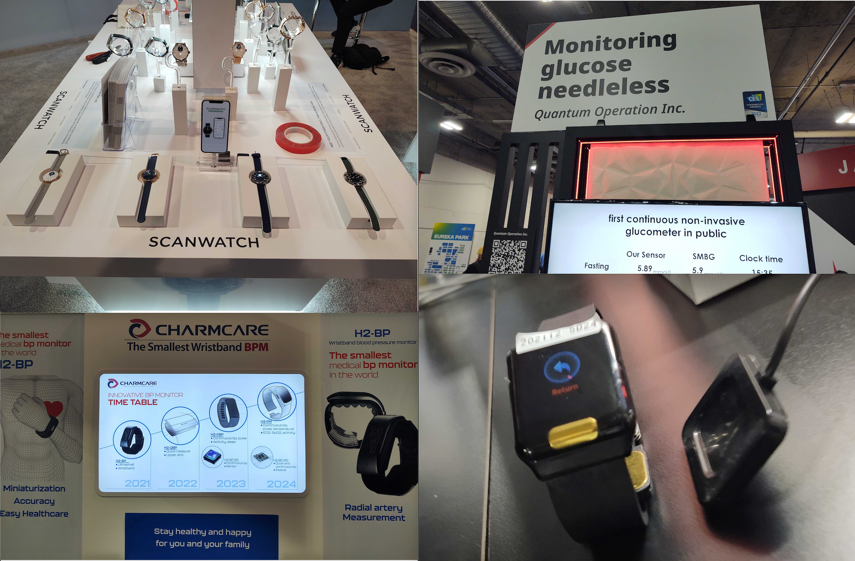
Moving on from there, as usual, I encountered wearable smart technology, which has always been a big item at CES. Going beyond the typical devices to track your steps, smartwatches continue to be improved with a focus on monitoring key health stats including blood pressure, oxygen levels, heart rate, EKG, and even blood sugar levels for diabetics.

A Quick Look at CES 2022

At Abbott’s booth, which had several products including the Libre Freestyle for monitoring blood glucose level, which is a product I use. Abbott is releasing a new sensor for this product that has a much smaller profile, and I’m looking forward to that. Since they had no live demos of their currently marketed Libre FreeStyle product, I volunteered to demo my unit for another CES attendee.

A Quick Look at CES 2022

One of the Abbott booth employees asked me why I still use their handheld unit and haven’t switched to their mobile application, which was perfect timing for me to start talking security. During the conversation, I told them that I hadn’t personally tested their mobile application and regularly avoid placing apps on my phone that I haven’t security-tested. They all chimed in and recommended that I test their mobile application and let them know if it has any issues that they need to fix. So, I guess I need to add that to my to-do list.

Facing the future

Next, I encountered the typical facial recognition systems we regularly see at CES — but now, they all appear to be able to measure body temperatures and identify you despite wearing a mask. Of course, they also now support contract tracing to help identify if you’ve encountered someone who is COVID-positive.  Also, many companies have made their devices more friendly by enabling them to automatically greet you at the door.

Personally, I always have reservations when it comes to facial recognition systems. Don’t get me wrong: I get the value they can bring. But sadly, in the long haul, I expect the data gathered will end up being misused, just like data gathered using other methods. Someone will find a way to commoditize this data if they aren’t already.

A Quick Look at CES 2022

Charged up

Another area I expected to see at CES was electric-vehicle (EV) technology, and I wasn’t disappointed. Some may think I’m weird, but my focus wasn’t necessarily on the expensive cars and flying vehicles, although they’re very interesting — it was the charging stations.

With US plans to deploy charging stations across the nation, there’s a large marketplace to support public and home charging systems, and there were many solutions of this kind on display at CES. Several of the vendors indicated they were looking to snap up some of that market share and were actively working to have their products certified in the US.  

With EV chargers most likely all being connected or potentially having the ability to impact the electric grid in various ways, I think security should play a big role in their design and deployment, and I took the opportunity to have some security discussions with several vendors. One vendor specifically designed and produced only EV charging hardware, not the software, and had staff at the event who could engage comfortably on the subject of security. Even though this organization hadn’t yet conducted any independent security testing on their product, they understood the value of doing so and asked a number of questions, including details on the processes and methodologies.

A Quick Look at CES 2022

Robots: Convenient or creepy?

What would CES be if we didn’t take a quick look at robot technology?  

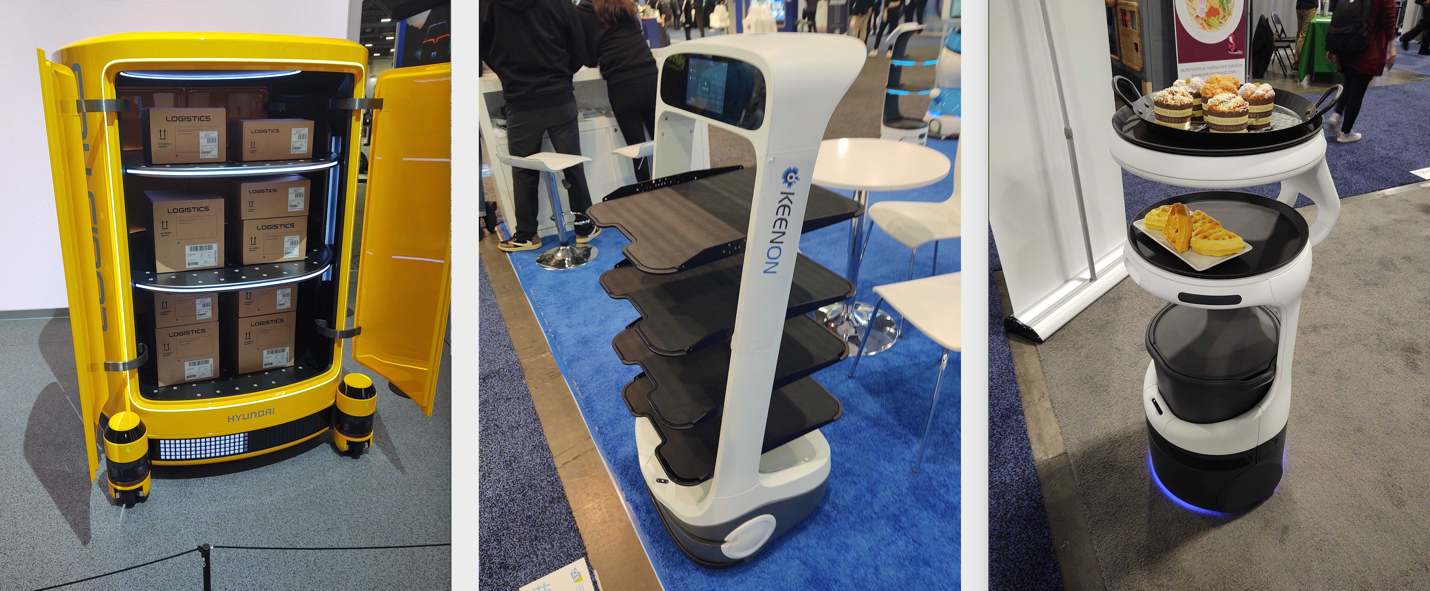
Like many, I’m intrigued and freaked out by robots  at the same time. The first ones to look at were the service robots, which are less creepy than others and could be very useful in activities like delivering parts on a shop floor or serving up refreshments at a party.

A Quick Look at CES 2022

The convenience of using robots for these tasks is great, and I look forward to seeing this play out some day at a party I am attending. Although, with the typical crowds I run with, I expect everyone will be trying to hack on it and paying very little attention to the food it’s serving.

Finally, I looked at the creepier side of robots. The UK pavilion had a robot that was able to have lifelike facial and hand gestures. I found these features to be very impressive. If this tech could be built to be mobile and handle human interactions, I would say we have advanced to a new level, but I expect this is only mimicking these features, and we still have further to go before we will be living the Jetsons.

A Quick Look at CES 2022

Also, Boston Dynamics and Hyundai were at CES.  Their advanced robotics work always impresses and also scares me a little, and I’m not alone.  My only disappointment was that I couldn’t get into the live demo of the technology. I waited in line, but the interest in the live show was high, and space was limited.  

With advancements in robotics like these, we must all give this some deep consideration and answer the questions: What will this tech be used for? And how can we properly secure it? Because if it’s misused or not properly secured, it can lead to issues we never want to deal with. With that said, this robot tech is amazing, and I expect it can be a real game-changer in a number of positive areas.

A Quick Look at CES 2022

NEVER MISS A BLOG

Get the latest stories, expertise, and news about security today.

Security updates for Thursday

Post Syndicated from original https://lwn.net/Articles/881303/rss

Security updates have been issued by Debian (epiphany-browser, lxml, and roundcube), Fedora (gegl04, mingw-harfbuzz, and mod_auth_mellon), openSUSE (openexr and python39-pip), Oracle (firefox and thunderbird), Red Hat (firefox and thunderbird), SUSE (apache2, openexr, python36-pip, and python39-pip), and Ubuntu (apache-log4j1.2, ghostscript, linux, linux-gcp, linux-gcp-5.4, linux-hwe-5.4, and systemd).

Handy Tips #20: Agentless metric collection with SSH checks

Post Syndicated from Arturs Lontons original https://blog.zabbix.com/handy-tips-20-agentless-metric-collection-with-ssh-checks/18795/

Collect the results of SSH commands with Zabbix agentless SSH checks.

In environments where Zabbix agent installation is forbidden either by company policies or due to restrictions on the monitored device, we can utilize one of the multiple agentless metric collection methods. One such type of metric collection method is Zabbix SSH checks.

Collect metrics with Zabbix SSH checks:

  • SSH checks are completely agentless
  • SSH checks can be executed by Zabbix server or Zabbix proxy

  •  SSH checks support Password or Public key authentication
  • Multiple commands can be executed one after another

Check out the video to learn how to collect metrics by using SSH checks.

How to collect metrics by using SSH checks:
 
  1. Navigate to Configuration → Hosts and find your host
  2. Click on the Items button next to the host name
  3. Press Create item button
  4. Provide item NameKey and select the Type of information
  5. Select the required Authentication method
  6. Enter the authentication parameters
  7. Populate the Executed script field with your SSH command
  8. Click the Add button
  9. Wait for the data to get collected
  10. Navigate to Monitoring → Latest data and find your Host and item
  11. Check if the metric has been collected successfully

Tips and best practices:
  • Zabbix preprocessing can be used to transform the collected metrics
  • A dedicated OS user can be defined and used for Zabbix SSH checks
  • SSHKeyLocation configuration parameter defines the location of the public and private keys for Public key authentication
  • It is recommended to use libssh version >= 0.9.5 

The post Handy Tips #20: Agentless metric collection with SSH checks appeared first on Zabbix Blog.

New free resources for young people to create 3D worlds with code in Unity

Post Syndicated from Janina Ander original https://www.raspberrypi.org/blog/free-resources-unity-game-development-3d-worlds/

Today we’re releasing an exciting new path of projects for young people who want to create 3D worlds, stories, and games. We’ve partnered with Unity to offer any young person, anywhere, the opportunity to take their first steps in creating virtual worlds using real-time 3D.

A teenage girl participating in Coolest Projects shows off her tech project.

The Unity Charitable Fund, a fund of the Tides Foundation, has awarded us a generous grant for $50,000 to help underrepresented youth learn to use Unity, upleveling their skills for future career success.

Create a world, don’t just explore it

Our new path of six projects for Unity is a learning journey for young people who have some experience of text-based programming and now want to try out building digital 3D creations.

Unity is the world’s leading platform for creating and operating real-time 3D and is hugely popular for creating 3D video games and virtual, interactive worlds and stories. The best thing about it for young people? While professional developers use Unity to create well-known games such as Pokémon Brilliant Diamond and Shining Pearl and Among Us, it is also free for anyone to use.

A boy participating in Coolest Projects shows off his tech project together with an adult.

Young people who learn to use Unity can do more and more complex things with it as they gain experience. Many successful indie games have been made in Unity — maybe a young person you know will create the next indie game sensation!

For young people, our new project path is the ideal introduction to Unity. The new project path:

  • Is for learners who have already coded some projects in Python or another text-based language.
  • Introduces the Unity software and how to write code for it in the programming language C# (pronounced ‘cee sharp’).
  • Guides learners to create a 3D role playing game or interactive story that they can tailor to suit their imaginations. Learners gain more and more independence with each project in the path.
  • Covers common elements such as non-playable characters, mini games, and bonuses.
A young person at a laptop

After young people have completed the path, they’ll have:

  • Created their very own 3D video game or interactive story they can share with their friends and family.
  • Gained familiarity with key functions of Unity.
  • Built the independence and confidence to explore Unity further and create more advanced games and 3D worlds.

Young people gain real-world skills while creating worlds in Unity

Since Unity is a platform used by professional digital creators, young people who follow our new Unity path gain real-world skills that are sought after in the tech sector. While they learn to express their creativity with Unity, young people improve their coding and problem-solving skills and feel empowered because they get to use their imagination to bring their ideas to life.

Two teenage girls participating in Coolest Projects shows off their tech project.

“Providing opportunities for underrepresented youth to learn critical tech skills is essential to Unity Social Impact’s mission,” said Jessica Lindl, Vice President, Social Impact at Unity. “We’re thrilled that the Raspberry Pi Foundation’s Unity path will allow thousands of student learners to take part in game design in an accessible way, setting them up for future career success.”

What you need to support young people with Unity Real-Time 3D

The project path includes instructions for how to download and install all the necessary software to start creating with Unity.

Before they can start, young people will need to:

  • Have access to a computer with enough processing power (find out more from Unity directly)
  • Have downloaded and installed Unity Hub, from where they need to install Unity Editor and Visual Studio Community Edition

For club volunteers who support young people attending Code Clubs and CoderDojos with the new path, we are going to run two free online workshops in February. During the workshops, volunteers will be introduced to the path and the software setup, and we’ll try out Unity together. Keep your eyes on the CoderDojo and Code Club blogs for details!

Three young people learn coding at laptops supported by a volunteer at a CoderDojo session.

Club volunteers, if your participants are creating Blender projects, they can import these into Unity too.

Young people can share their Unity creations with the world through Coolest Projects

It’s really exciting for us that we can bring this new project path to young people who dream about creating interactive 3D worlds. We hope to see many of their creations in this year’s Coolest Projects Global, our free online tech showcase for young creators all over the world!

The post New free resources for young people to create 3D worlds with code in Unity appeared first on Raspberry Pi.

Top 10 security best practices for securing backups in AWS

Post Syndicated from Ibukun Oyewumi original https://aws.amazon.com/blogs/security/top-10-security-best-practices-for-securing-backups-in-aws/

Security is a shared responsibility between AWS and the customer. Customers have asked for ways to secure their backups in AWS. This post will guide you through a curated list of the top ten security best practices to secure your backup data and operations in AWS. While this blog post focuses on backup data and operations in AWS Backup service, the recommended security best practices can be leveraged by organizations that utilize other backup solutions, such as backup tools from the AWS Marketplace.

Since security practices constantly evolve to mitigate new risks, it’s important that you conduct regular risk assessments to determine the applicability of security controls, and implement multiple layers of controls to mitigate risks to your data.

#1 – Implement a backup strategy

A comprehensive backup strategy is an essential part of an organization’s data protection plan to withstand, recover, and reduce any impact that might be sustained due to a security event. You should create an extensive backup strategy that defines which data must be backed up, how often data must be backed up, and monitoring of backup and recovery tasks. When you develop a comprehensive strategy for backing up and restoring data, you should first identify interruptions that may occur, and their potential business impact.

Your objective should be building a recovery strategy that brings your workload back up or avoids downtime within the acceptable Recovery Time Objective (RTO) and Recovery Point Objective (RPO). RTO is the acceptable delay between the interruption of service and restoration of service, and RPO is the acceptable amount of time since the last data recovery point. You should consider a granular backup strategy that includes all of the following: continuous backup cadence, Point-in-Time Recovery (PITR), file-level recovery, application data–level recovery, volume-level recovery, instance-level recovery, etc.

A well-designed backup strategy should include actions that can protect and recover your resources from ransomware, with detailed recovery requirements for your applications and their data dependencies. For example, while you establish preventive and detective controls to mitigate the risk of ransomware, you should also design the appropriate level of granularity for cross-region and/or cross-account copy and restore patterns, to ensure that administrators do not restore corrupt backup data in the event of a security event.

In some industries, when developing a backup strategy, you must also consider the regulations for data retention requirements. You should make sure your backup strategy is designed with the necessary retention requirements (per data classification level and/or resource type) sufficient to meet your regulatory needs.

Consult your security compliance teams to validate whether your backup resources and operations should be included or segmented from the scope of your compliance programs. In my experience as a PCI DSS Qualified Security Assessor (QSA), I’ve seen successful/more mature customers include backup and recovery as critical parts of their security program. This helps them understand where data is across their environment and appropriately define compliance scope.

Refer to Backup and Recovery Approaches Using AWS and the Reliability Pillar of the AWS Well-Architected Framework for architectural best practices for designing and operating reliable, secure, efficient, and cost-effective workloads in the cloud.

#2 – Incorporate backup in DR and BCP

Disaster recovery (DR) is the process of preparing, responding, and recovering from a disaster. It is an important part of your resiliency strategy, and concerns how your workload responds when a disaster strikes. A disaster could be a technical failure, human action, or natural event. A Business Continuity Plan (BCP) outlines how an organization intends to continue normal business operations during an unplanned disruption.

Your disaster recovery plan should be a subset of your organization’s business continuity plan (BCP) and you should incorporate AWS Backup procedures in your enterprise business continuity plan. For example, a security event that affects production data might require you to invoke a disaster recovery plan that fails over to backup data from another AWS Region. You should ensure that your employees are familiar with and have practiced using AWS Backup along with your organizational procedures, so that if disaster strikes, your organization can continue its normal operations with little or no service disruption.

#3 – Automate backup operations

Organizations should configure their backup plans and resource assignments to reflect their enterprise data protection policies. Automating and deploying backup policies or organization-wide backup plans allows you to standardize and scale your backup strategy. You can leverage AWS Organizations to centrally automate backup policies to implement, configure, manage, and govern backup activity across supported AWS resources by scheduling backup operations.

You should consider implementing infrastructure as code (IaC) and event-driven architecture as essential parts of your digital transformation and backup strategy, to improve productivity and govern infrastructure operations across multi-account environments. Automating backups allows you to reduce manual overhead from time-consuming configuration of your backups, minimizes the risk for errors, provides visibility on drift detection, and enhances backup policy compliance across multiple AWS workloads or accounts.

Implementing backup policies as code can help you meet data protection regulations, by configuring different requirements for your resource types, scaling your enterprise data protection strategy, and implementing lifecycle rules to specify how long before a recovery point either transitions to cold storage or is deleted, which can help optimize your costs.

When automating your backup operations, you can scale resource assignment options using AWS Tags and Resource IDs to automatically identify the AWS resources that store data for your business-critical applications and protect your data using immutable backups. This can help you prioritize security controls, such as access permissions and backup plans or policies.

#4 – Implement access control mechanisms

When thinking about security in the cloud, your foundational strategy should begin with a strong identity foundation to ensure a user has the right permissions to access data. Appropriate authentication and authorization can mitigate the risk of security events. The shared responsibility model requires AWS customers to implement access control policies. You can use AWS Identity and Access Management (IAM) service to create and manage access policies at scale.

When configuring access rights and permissions, you should implement the principle of least privilege by ensuring each user or system accessing your backup data or Vault is only given the permissions necessary to fulfill their job duties. Using AWS Backup, you should implement access control policies by setting access policies on backup vaults to protect your cloud workloads.

For example, implementing access control policies allows you to grant users access to create backup plans and on-demand backups, but still limit their ability to delete recovery points once they’ve been created. Using vault access policies, you can share a destination backup vault with a source AWS Account, user, or IAM role, as required by your business needs. Access policy can also allow you to share a backup vault with one or multiple accounts, or with your entire organization in AWS Organizations.

As you scale your workloads or migrate into AWS, you may need to centrally manage permissions to your backup vaults and operations. You should use service control policies (SCPs) to implement centralized control over the maximum available permissions for all accounts in your organization. This offers defense in depth, and ensures your users stay within the defined access control guidelines. To learn more, read how you can secure your AWS Backup data and operations using service control policies (SCPs).

To mitigate security risks such as unintended access to your backup resources and data, use AWS IAM Access Analyzer to identify any AWS Backup IAM role shared with an external entity such as AWS account, a root user, an IAM user or role, a federated user, an AWS service, an anonymous user, or other entity that you can use to create a filter.

#5 – Encrypt backup data and vault

Organizations increasingly need to improve their data security strategy, and may be required to meet data protection regulations as they scale in the cloud. The correct implementation of encryption methods can provide an additional layer of protection above foundational access control mechanisms providing a mitigation if your primary access control policies fail.

For example, if you configure overly permissive access control policies on your Backup data, your key management system or process can mitigate the maximum impact of a security event, since there are separate authorization mechanisms to access your data and encryption key which means that the backup data is only viewable as cipher text.

To get the most from AWS cloud encryption, you should encrypt data both in transit and at rest. To protect data in transit, AWS uses published API calls to access AWS Backup through the network using Transport Layer Security (TLS) protocol to provide encryption between you, your application and the Backup service. To protect data at rest, AWS offers cloud-native options of using AWS Key Managed System (KMS) or AWS CloudHSM which leverages Advanced Encryption Standard (AES) with 256-bit keys (AES-256), a strong industry-adopted algorithm for encrypting data. You should evaluate your data governance and regulatory requirements, and select the appropriate encryption service to encrypt your cloud data and backup vaults.

Encryption configuration differs depending on the resource type and backup operations across accounts or Regions. Certain resource types support the ability to encrypt your backups using a separate encryption key from the key used to encrypt the source resource. Since you are responsible for managing access controls to determine who can access your Backup data or vault encryption keys and under which conditions, you should use the policy language offered by AWS KMS to define access controls on keys. You can also use AWS Backup Audit Manager to confirm that your backup is properly encrypted.

To learn more, refer to the documentation on encryption for backups and backup copies.

AWS KMS multi-Region keys allows you to replicate keys from one Region into another. Multi-Region keys are designed to simplify encryption management when your encrypted data has to be copied into other Regions for disaster recovery. You should evaluate the need to implement multi-region KMS keys as part of your overall backup strategy.

#6 – Safeguard backups using immutable storage

Immutable storage allows organizations to write data in a Write Once Read Many (WORM) state. While in a WORM state, data can be written one time, read and used as often as needed after it has been committed or written to the storage medium. Immutable storage ensures data integrity is maintained and provides protection against deletes, overwrites, inadvertent and unauthorized access, ransomware compromise etc. Immutable storage offers an efficient mechanism to address potential security events with real impacts on your business operations.

Immutable storage can be used for better governance when paired with strong SCP restrictions, or can be used in a compliance WORM mode when the letter of the law (such as a legal hold) requires access to immutable data.

You can maintain data availability and integrity with AWS Backup Vault Lock to protect your backups* such that unauthorized entities cannot erase, alter or corrupt your customer or business data during the required retention period. AWS Backup Vault Lock helps you meet your organization’s data protection policies by preventing deletions by privileged users (including the AWS account root user), changes to your backup lifecycle settings, and updates that alter your defined retention period.

AWS Backup Vault Lock ensures immutability and adds an additional layer of defense that protects backups (recovery points) in your Backup Vaults, especially in highly- regulated industries with stringent integrity needs for backups and archives. AWS Backup Vault Lock makes sure your data is preserved along with a backup to recover from in case of unintended or malicious actions.

*The feature has not yet been assessed for compliance with the Securities and Exchange Commission (SEC) rule 17a-4(f) and the Commodity Futures Trading Commission (CFTC) in regulation 17 C.F.R. 1.31(b)-(c).

#7 – Implement backup monitoring and alerting

Backup jobs can fail. A failed job, such as backup, restore, or copy task, may have impact on subsequent steps in a process. When the initial backup job fails, there’s a high probability that other succeeding tasks will also fail. In such a scenario, you can best understand the course of events through monitoring and notification.

Enabling and configuring notifications to generate emails to monitor AWS Backup jobs gives you awareness of your backup activities, ensures you meet critical service-level agreements (SLAs), enhances your business-as-usual monitoring, and helps you meet compliance obligations. You can implement backup monitoring for your workloads by integrating AWS Backup with other AWS services and ticketing systems to perform automated investigation and escalation flows.

For example, use Amazon CloudWatch to track metrics, create alarms, and view dashboards, Amazon EventBridge to monitor AWS Backup processes and events, AWS CloudTrail to monitor AWS Backup API calls with detailed information on the time, source IP, users, and accounts making those calls, and Amazon Simple Notification Service (Amazon SNS) to subscribe to AWS Backup-related topics such as backup, restore, and copy events. Monitoring and alerting can provide organizational awareness for your backup jobs, which helps you respond to backup failures.

You can use AWS Backup Audit Manager to automatically generate evidence of your daily backup audit reports per account and Region. You can also scale your backup monitoring across multiple accounts by using a set of automation templates and dashboards (known as the backup observer solution) to obtain aggregated daily cross-account multi-Region AWS Backup reporting.

#8 – Audit backup configuration

Organizations should audit the compliance of AWS Backup policies against defined controls such as defined backup frequency. You should continuously and automatically track your backup activity and generate automatic reports to find and investigate backup operations or resources which are not compliant with your business requirements.

AWS Backup Audit Manager provides built-in, customizable, compliance controls that align with your business compliance and regulatory requirements. AWS Backup Audit Manager provides five backup governance control templates, including backup resources protected by backup plans, backup plan with a minimum frequency and minimum retention, etc. If you leverage infrastructure-as-code automation, you can use AWS Backup Audit Manager with AWS CloudFormation.

AWS Security Hub provides you with a comprehensive view of your security state in AWS and helps you check your environment against security best practices and industry standards such as AWS Foundational Security Best Practices controls. If you leverage AWS Security Hub within your cloud environment, we recommend you enable the AWS Foundational Security Best Practices, as it includes detective controls that can help with securing backups in AWS. The detective controls in AWS Backup Audit Manager and Security Hub are also mostly available as AWS managed rules in AWS Config.

#9 – Test data recovery capabilities

Ideally, any data stored as a backup must be able to be successfully restored when required. Your backup strategy must include testing your backups. A backup strategy is not effective if backed up data cannot be restored. You should regularly test your ability to find certain recovery points and restore them. While AWS Backup automatically copies tags from the resources it protects to the recovery points, tags are not copied from recovery points to the corresponding restored resources. To scale your inventory management and locate recovery points, you should consider retaining your tags on resources created by AWS Backup restore jobs, using AWS Backup events to trigger a tag replication process.

You can start your data recovery workflow by establishing data recovery patterns and then regularly test them. You should create a simple and repeatable process that allows you to perform continuous data recovery testing to increase confidence in your ability to recover backup data. For example, you can create a pattern to test a cross-account, cross-region restore operation from a central DR backup vault encrypted with a customer-managed KMS key to a source account backup vault encrypted with a different customer-managed KMS key.

If you don’t frequently test such restore operations, you may find that your assumptions on KMS encryption for cross-account, cross-region operations are incorrect. Oftentimes, the only backup recovery pattern that actually works is the path you test frequently. Through routine testing of supported backup resource types, you can spot early warnings that could potentially cause future disturbances and loss of critical data. If possible, maintain a limited but feasible number of recovery paths and patterns to prevent wasted storage space, optimize costs, and save time. It’s easier to fix the problem when a recovery test fails than losing valuable or critical data.

#10 – Incorporate backup in incident response plan

Security Incident Response Simulations (SIRS) are internal events that provide a structured opportunity to practice your incident response plan and procedures during a realistic scenario. It’s valuable to test your backup data and operations in creative SIRS activities to test yourself against the unexpected. This helps you validate your organizational readiness and develop comfort with the rare and unexpected. Your simulations must be realistic, and should involve cross-functional organizational teams required to respond to events.

Start with basic and easy simulation exercises, and work towards a full, complex event. For example, you can build a realistic model that consists of an Amazon Virtual Private Cloud and associated resources that simulate inadvertent overexposure of information or a potential data breach due to changes to policies and access control lists. Document lessons learned to evaluate how well your incident response plan worked, and to identify improvements that need to be made to future response procedures.

You can use AWS Backup to set up automated instance-level backups as AMIs and volume-level backups as snapshots across multiple AWS accounts. This can help your incident response team enhance their forensic process such as automated forensic disk collection, by providing a restore point that could reduce the scope and impact of potential security events such as ransomware.

Conclusion

In this blog post, I showed you the top ten security best practices and controls to protect your backup data in AWS. I encourage you to use these best practices to design and implement a backup and recovery strategy and architecture with multiple layers of controls that scales and achieves your business needs. To learn more about AWS Backup, refer to the AWS Backup documentation.

If you have feedback about this post, submit comments in the Comments section below. If you have questions about this post, start a new thread on the AWS Backup forum or contact AWS Support.

Further reading

Additional resources to consider:

Prescriptive Guidance: Backup and recovery approaches on AWS

Blog: Automate centralized backup at scale across AWS services using AWS Backup

Blog: Disaster Recovery (DR) Architecture on AWS, Part I: Strategies for Recovery in the Cloud

Blog: The importance of encryption and how AWS can help

Blog: Enhance the security posture of your backups with AWS Backup Vault Lock

Blog: Monitor, Evaluate, and Demonstrate Backup Compliance with AWS Backup Audit Manager

Blog: Create and share encrypted backups across accounts and Regions using AWS Backup

Blog: Simplify auditing your data protection policies with AWS Backup Audit Manager

Blog: Managing access to backups using service control policies with AWS Backup

Blog: Obtain aggregated daily cross-account multi-Region AWS Backup reporting

Want more AWS Security news? Follow us on Twitter.

Author

Ibukun Oyewumi

Ibukun is a Security Assurance Consultant at AWS. He focuses on helping customers architect, build, scale, and optimize security controls, risk management, and compliance.

[$] Relocating Fedora’s RPM database

Post Syndicated from original https://lwn.net/Articles/881107/rss

The deadlines
for various kinds of Fedora 36 change proposals have mostly passed at
this point, which led to something of a flurry of postings to the
distribution’s devel mailing list over the last month. One of those, for a seemingly fairly
innocuous relocation of the RPM database from /var to
/usr, came in right at the buzzer for system-wide changes on
December 29. There were, of course, other things going on around that
time, holidays, vacations, and so forth, so the discussion was relatively
muted until recently. Proponents have a number of reasons why they would like
to see the move, but there is resistance, as well, that is due, at least in part, to the
longstanding “tradition” of the location for the database.

Dynamically personalize your in-product user experience using Amazon Pinpoint in-app messaging

Post Syndicated from Pavlos Ioannou Katidis original https://aws.amazon.com/blogs/messaging-and-targeting/dynamically-personalize-your-in-product-user-experience-using-amazon-pinpoint-in-app-messaging/

Many businesses today struggle to align out-of-product messaging through channels such as email and SMS, with in-product messaging shown when a users is within a mobile or web application. Customers will present one message to a user through a targeted email, but once a user visits the application they are presented with different messaging. This creates confusion for the user, and reduces the chances of them performing a high-value action such as a purchasing a discounted product. Customers can get around this by hard coding certain messages into their application, however this is time consuming for development teams, and slower to implement as it requires a new release of a mobile or web client.

Amazon Pinpoint in-app messaging allows customers to create, target and display in-product messages to users dynamically without the need to update client-side code after initial implementation. This allows a non-technical persona such as a marketer to modify the application experience and target user messaging independently of a development team. This also allows the in-product messaging to share the user targeting as the out-of-app messaging. This creates consistent user messaging, and increases the chance a user performs a high value action.

The blog outlines how to create in-app endpoints, segments, and campaigns. Then how to fetch in-app messages, implement simple logic to control message prioritization, message caps, and to listen for events in order to show the message at the desired moment.

Solution Overview

Assume you are a retailer and want to display a banner with a promotion to all customers with a recent purchase over $500 when they launch the application. To deliver the above experience using the in-app messaging channel, you will need to create a dynamic customer segment where User.UserAttribute.LastPurchaseValue > $500, design an in-app message template with a call-to-action to claim the promotion, and create an in-app campaign. The in-app campaign will be triggered based on the customer event app_launch and only for customers who belong to the dynamic segment created above. To render the message and send in-app message engagement events back to Amazon Pinpoint, you will need to go through an one time setup that is explained in a later section of this blog. Monitor your in-app campaign performance across different metrics, using the Amazon Pinpoint campaign analytics dashboard.

In-app channel implementation can differ depending the use case and requirements. The creation of customer segments, message templates and campaigns can be done either via the Amazon Pinpoint console or programmatically using Amazon Pinpoint APIs. The in-app messages retrieval, rendering and recording of engagement events can either be build and managed from you or use AWS Amplify.

In the following sections you will be introduced to the seven components of the in-app channel and how they operate together:

  • Step 1: Creating in-app endpoints & segment
  • Step 2: Creating an in-app message template
  • Step 3: Creating an in-app campaign
  • Step 4: Querying available in-app messages for an Amazon Pinpoint customer
  • Step 5: Rendering in-app messages
  • Step 6: Recording in-app events
  • Step 7: In-app message display logic using SessionCap, DailyCap, TotalCap

Prerequisites

For this blog post, you should have the following prerequisites:

Step 1: Creating an Amazon Pinpoint customer segment

In Amazon Pinpoint, users can have one or more endpoints. An endpoint describes a unique address, such as an email or mobile number. Similar to other Amazon Pinpoint channels, you need to create or import in-app endpoints with Channel = IN_APP. To retrieve in-app messages for a user, you have to use their IN_APP endpoint id. Note that the Address is not a required field for in-app and can be left blank.

  1. Copy the text below and save it as CSV in your computer
    Id,ChannelType,Address,User.UserId,OptOut
    111,IN_APP,123,userid1,NONE
  2. Navigate to the Amazon Pinpoint console
  3. Select the Amazon Pinpoint project that you want to set up the in-app channel
  4. Navigate to the Segments’ section
  5. Choose Import a segment
  6. Select Upload files from your computer as Import method
  7. Select Choose files and find the CSV file you created in step 1
  8. Choose Create segment
  9. Navigate to AWS Cloudshell console and wait till the terminal loads
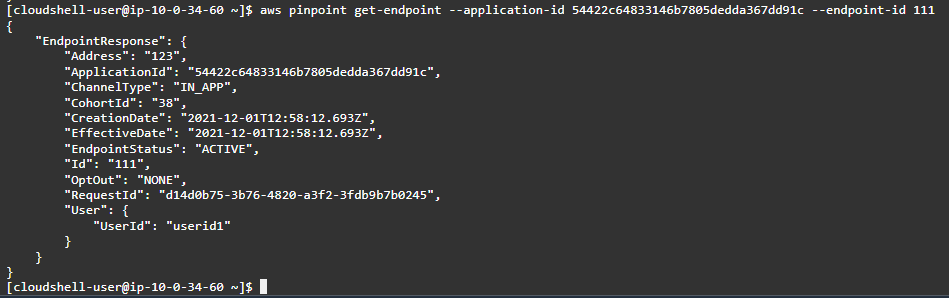
  10. Replace <Application id> with your Amazon Pinpoint application id in the following command aws pinpoint get-endpoint –application-id <Application id> —endpoint-id 111
  11. Execute the command in step 10 by pasting it in the AWS CloudShell terminal and press Enter. You should be able to see a response similar to the one below


Step 2: Creating an in-app Message Template

In-app message templates contain a variety of fields with some of them offering the option to choose from pre-defined values such as Header alignment and others in a form of free text such as Message. The end result is a banner that includes a Header, Message, Image, Button(s) and Custom data with all of them being fully customizable. While building an in-app template, you can preview the banner across Phone, Tablet and Browser. This preview is for reference purposes only as the rendering can vary according to the end user’s device as well as your preference on how to render it.

Note: The message template for in-app currently doesn’t support message helpers for personalization but it is a feature the Amazon Pinpoint product team is exploring.

  1. Navigate to Message templates
  2. Select Create template and choose In-app messaging as Channel
  3. Type my_first_in-app_message_template as Template name
  4. Complete the  section, as per your message requirements
  5. Select Create

Step 3: Creating an in-app Campaign

A campaign is a messaging initiative that engages a specific audience segment. A campaign sends tailored messages according to a schedule or customer event that you define.

  1. Navigate to your Amazon Pinpoint project and select Campaigns and Create a campaign
  2. Type my_first_in-app_campaign as Campaign name
  3. Select Standard campaign as Campaign type and In-app messaging as Channel
  4. Select Very important for Set prioritization. This configuration is specific to the in-app channel and it helps you identify the most important in-app message for an endpoint
  5. Select Next and choose the segment in-app-segment from the dropdown. This should be an imported segment that you created in Step 1: Creating an Amazon Pinpoint customer segment. The Segment estimate should show 1 endpoints
  6. Select Next and choose the in-app message template with the name my_first_in-app_message_template, then select Next
  7. An in-app campaign needs to have a Trigger event, which will determine when the in-app message will be displayed. You can add event Attributes and/or Metrics to make it more specific. To learn how to record events with Amazon Pinpoint visit Reporting events in your application. If you currently do not record any events in your Amazon Pinpoint project type test_event as Trigger events
  8. Select Start and End date and time for Campaign dates. Note that in-app campaigns need to start at least 15 minutes later from the time of publishing
  9. In the Edit campaign settings section you will find the fields, which specify the Maximum number of session messages viewed per endpoint (SessionCap), Maximum number of daily messages viewed per endpoint (DailyCap) and Maximum number of messages viewed per endpoint (TotalCap). These values indicate how many times the in-app message can be displayed to the customer for that in-app campaign within a session, day and in total respectively. In all three campaign setting fields enter the number 10 and select Override project-level setting where applicable Set prioritization, Trigger events and Caps are part of the in-app message payload that you receive when calling Amazon Pinpoint’s In-app messages REST API operation. You will use this information to decide whether to render or not that in-app message.
  10. Select Next scroll down and select Launch campaign

Step 4: Querying available in-app messages for an Amazon Pinpoint customer

To retrieve in-app messages for an Amazon Pinpoint customer, you will need to have their IN_APP endpoint id and either use the In-app messages REST API operation, one of the AWS SDKs that support Amazon Pinpoint, AWS Command Line Interface or AWS Amplify.

Note: AWS Amplify manages on your behalf the in-app messages request, rendering and tracking, thus if you are using AWS Amplify for Amazon Pinpoint in-app channel the steps below are not required.

In the request body you need to specify the IN_APP endpoint id. If there are any available in-app messages for that endpoint id, the response will contain a JSON object with the top ten active in-app messages based on their priority (the ten in app message response is a hard limit). Loop through the in-app messages and identify the one that meets the criteria based on the Trigger event and Prioritization.

  1. Navigate to the AWS CloudShell console
  2. Replace <Application id> with your Amazon Pinpoint application id in the following command aws pinpoint get-in-app-messages –application-id <Application id> —endpoint-id 111
  3. Execute the command in step 2 by pasting it in the AWS CloudShell terminal and press Enter. You should be able to see a response similar to the one below

The response should contain only one in-app campaign. You can see all the in-app message template data and campaign configuration are present in the response.

Note: Campaigns that have passed their end date, or have reached their daily or total cap limit won’t show in the response. In case the response contains more than one in app message with the same priority and they both haven’t exceeded their caps, you can use the in-app campaign start date to evaluate which one to display.

It is recommended to retrieve the in-app messages once per session and store them locally. That way in every event the customer triggers in your mobile / web app you would check against the in-app messages stored locally instead of performing additional calls to Amazon Pinpoint. This approach decreases the in-app channel cost as you pay per request.

You can perform the operation of retrieving in-app messages for an Amazon Pinpoint customer either client side or server side. Server side can be implemented using the architecture illustrated below, which utilizes Amazon API Gateway and AWS Lambda creating a development framework agnostic approach. Furthermore Amazon API Gateway is offering a great variety of authentication and authorization mechanisms.

The server side architecture depicted below doesn’t cover the use case for offline customers. If this is a requirement then it is recommend to store in-app messages and fetch them locally when the device doesn’t have internet connectivity. Once the device is connected back to the internet you can retrospectively send any in-app related events.

Note: If you are using AWS Amplify, it will retry to publish customer offline events that occurred once the device gets back online.

Step 5: Rendering in-app messages

Render the in-app messages yourself based on the in-app message API response or use AWS Amplify which will render it on your behalf. AWS Amplify allows you to provide your own In-App Messaging UI component to override the default Amplify provided UI.

Step 6: Recording in-app events

Measuring in-app campaigns’ performance is based on four metrics:

  • Message displayed: a message has been displayed to an end user
  • Message dismissed: a user has dismissed a message
  • Message clicked: a user has clicked through a message
  • Any event type: Any event that a user can trigger on the mobile or web app

Fire the above events either from client or server side as Amazon Pinpoint custom events. Amazon Pinpoint custom events can be recorded using put_events REST API operation or AWS SDKs that support Amazon Pinpoint.

Note: If you are using AWS Amplify, the in-app events will be recorded automatically

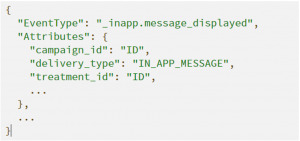
To have these events recorded under Amazon Pinpoint Campaign deliver metrics dashboard, you have to use the following EventType names:

  • Message displayed: _inapp.message_displayed
  • Message dismissed: _inapp.message_dismissed
  • Message clicked: _inapp.message_clicked
  • Any event type: No specific name is required

In addition to the EventType, a few other fields are required in order to attribute these events to the correct in-app campaign. Within the event attributes’ object of the request payload, the fields campaign_id and delivery_type must be provided. Campaign_id should match the InApp campaign_id, while the delivery_type should be IN_APP_MESSAGE. Additionally, the treatment_id is necessary if you are running an A/B test.

Note: If you do not use the above event names and attributes, you won’t see any events under Campaign delivery metrics and Campaign engagement rates on the Amazon Pinpoint console.

Step 7: In-app message display logic using SessionCap, DailyCap and TotalCap

Message display logic refers to the logic that stores and assesses the number of times a user has seen / interacted with the in-app message. Amazon Pinpoint calculates the DailyCap & TotalCap as long as you record the _inapp.message_displayed event or using AWS Amplify. For the SessionCap event you need to count the _inapp.message_displayed locally on your mobile / web application unless you are using AWS Amplify.

Note: When retrieving the in-app messages from Amazon Pinpoint, the payload contains the remaining number of times you can display the in-app message daily & total.

Conclusion

This post walks you through how to configure Amazon Pinpoint to send in-app messages to your customers when browsing your mobile / web application. Using this Amazon Pinpoint channel, you can now:

  • Create in-app segments, message templates and campaigns
  • Retrieve in-app messages per user
  • Render in-app messages
  • Record customer engagement data with the in-app message

Related links

To learn more about the technologies or features used to create this solution, explore the following pages:

A December to Remember — Or, How We Improved InsightAppSec in Q4 in the Midst of Log4Shell

Post Syndicated from Tom Caiazza original https://blog.rapid7.com/2022/01/12/a-december-to-remember-or-how-we-improved-insightappsec-in-q4-in-the-midst-of-log4shell/

A December to Remember — Or, How We Improved InsightAppSec in Q4 in the Midst of Log4Shell

Ho, ho, holy cow — what a wild way to wrap up the year that was. Thousands of flights were cancelled during Christmas week, nearly every holiday party became a super-spreader event, and we lost a legend in Betty White. In our neck of the woods, Log4Shell has been dominating the conversation for nearly the entire holiday season. But now that much of the initial fervor has passed, we wanted to take a moment to recap some of InsightAppSec and tCell’s Q4 highlights and give us all a little much-deserved break from the madness.

RBAC

It may not seem like much, but remote-based access control — or RBAC— is a game-changer for many teams looking to streamline their access to InsightAppSec. Essentially, we make it super simple to configure access to the platform perfectly for every member of your team, create tiers of accessibility for different job roles, and ensure everyone has exactly what they need to do their jobs on day one.

Included is a new pre-built remediator role, which was designed to only show developers what they need in order to address a that vulnerability. They can drill into it, see reference details and remediation steps, and replay the attack in their dev or staging environments, all in an easy, navigable interface. This new role helps prevent the back-and-forth between security and development passing vulnerability details.

The key to our new feature is scalability. Regardless of whether you have a team of 10 or a team of 1,000, each group will only have the permissions they need to view the data you want them to see — all without the back-and-forth that comes with creating permissions ad hoc. It’s a time-saver, for sure, but it can also reduce headaches and make costly mistakes far less likely. If you want to learn more check out our blog post on the subject (it’s got a cute Goldilocks theme — you’ll get the drift).

ServiceNow

Oh, yeah, we’re fully integrated with ServiceNow. It’s just a leader in IT service management, and InsightAppSec is fully integrated, working seamlessly, and available in the ServiceNow app store for, like, zero dollars. No biggie.

This integration offers a lot of great features that will save your team time and effort, improving everything from visibility, to prioritization, to remediation. In fact, remediation will happen even faster than it already does with updates automatically happening across both ServiceNow and InsightAppSec tickets. And it’s so simple and quick to install, you’ll be benefiting from it in minutes. Oh, and did we mention zero dollars?

Log4Shell

OK, break’s over. Yes, we made many improvements to InsightAppSec this quarter, but we would be remiss if we didn’t mention the ones we made for Log4Shell. The big one is a new InsightAppSec default attack template for Out of Band Injection specific to Log4Shell attacks. Attack templates are InsightAppSec’s bread and butter, testing every part of your application against known attack vectors. With this feature, we have an attack template that can automate a sophisticated attack by simulating an attacker on your website and injects code in your application. If the code is vulnerable, it calls a Log4j function to send a JNDI call to a Rapid7 server validating the exploitability of the application. This helps you identify and prioritize Log4Shell vulnerabilities before they become real threats.

For even more flexibility, we’ve added an attack module that actually does the out-of-band Log4Shell attack during testing. You can easily select this in the Log4Shell attack template, but you can can also create a custom template and add the new Log4Shell attack module to that.

We’ve also improved tCell’s ability to protect against Log4Shell attacks. We launched a new app firewall protection specifically for Log4Shell attacks. The new firewall lets our customers know if their apps have been attacked through the Log4Shell vulnerability and drill down to specifics on the attack. We’ve also created a default pattern that allows you to block well known Log4Shell patterns and as more become known, we will continue our updates.

Even more

While these were just a few of the major improvements we made to InsightAppSec and tCell this quarter, there were certainly a host of minor ones that are sure to make the platform easier and more efficient. They include custom NGINX builds and support for .Net 6.0 for tCell, Archiving Scan Targets, and customizing executive reports for InsightAppSec, among others.

Those are the highlights from the fourth quarter of 2021 from here in InsightAppSec-land. We’re well on our way to making Q1 2022 even better for our customers, though we can’t do anything about those flight cancellations. And while we’re at it, someone check on Keith Richards.

NEVER MISS A BLOG

Get the latest stories, expertise, and news about security today.

Configure AWS SSO ABAC for EC2 instances and Systems Manager Session Manager

Post Syndicated from Rodrigo Ferroni original https://aws.amazon.com/blogs/security/configure-aws-sso-abac-for-ec2-instances-and-systems-manager-session-manager/

In this blog post, I show you how to configure AWS Single Sign-On to define attribute-based access control (ABAC) permissions to manage Amazon Elastic Compute Cloud (Amazon EC2) instances and AWS Systems Manager Session Manager for federated users. This combination allows you to control access to specific Amazon EC2 instances based on users’ attributes. I show you how defined AWS SSO identity source attributes like login and department can be used, and how custom attributes like SSMSessionRunAs can be used to pass these attributes into Amazon Web Services (AWS) from an external identity provider (IdP) using  SAML 2.0 assertion.

AWS SSO added support for ABAC to enable you to create fine-grained permissions for your workforce in AWS using user attributes. Using user attributes as tags in AWS helps you simplify the process of creating fine-grained permissions in AWS and enables you to ensure that your workforce has access only to the AWS resources with matching tags.

The new feature works with any supported AWS SSO identity source. This post walks you through the steps to enable attributes for access control, create permission sets and manage assignments when using a supported external IdP as your identity source.

Solution overview

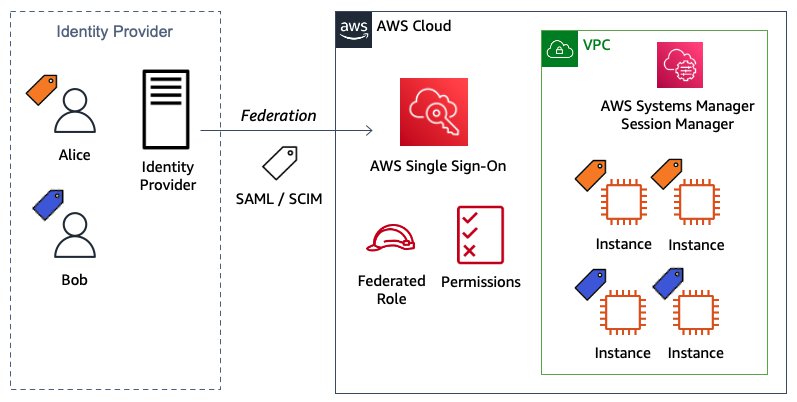
The following architecture diagram—Figure 1—presents an overview of the solution.

Figure 1: Solution architecture diagram

Figure 1: Solution architecture diagram

In the example in Figure 1, Alice and Bob are users who each have the attributes
login
, department, and SSMSessionRunAs. These attributes are created and updated in the external directory—Okta in this example—under those users’ profiles. The first two attributes are automatically synchronized by using System for Cross-domain Identity Management (SCIM) protocol between AWS SSO and Okta and configured within AWS SSO settings. The third custom attribute is passed directly from Okta into the AWS accounts as a new SAML assertion.

Both users are using the same AWS SSO custom permission set that allows them to launch a new Amazon EC2 instance with proper tags enforcement. Based on those tags, they can start, stop, and restart the EC2 instance if they are in the same department, and to terminate it if they are the owner. Also, they can connect using Session Manager if they’re in the same department. Users can sign in to those instances using the Linux OS user defined in the attribute SSMSessionRunAs.

Prerequisites

To perform the steps to use AWS SSO attributes for ABAC, you must already have deployed AWS SSO for your AWS Organizations and have connected with an external identity source using SAML and SCIM protocols. For more information, see Checklist: Configuring ABAC in AWS using AWS SSO.

You need two test users for implementing and testing the solution. You can use two existing users, or create new users named Alice and Bob to match the solution and testing described in the following sections.

Implement the solution

The basic steps to implement the solution are:

  1. Confirm in AWS SSO settings that you have defined an external IdP, authentication via SAML 2.0, and provisioning via SCIM protocol.
  2. Enable attributes for access control and define the two supported attributes: login and department.
  3. Create a new user attribute in the Okta Directory.
  4. Edit and confirm the users’ attributes defined in the Okta Directory profile.
  5. Configure the SAML attribute statement in the Okta AWS SSO application.
  6. Create a new permission set using an ABAC policy.
  7. Create an AWS account assignment to the users using the permission set created in the previous step.

Confirm AWS SSO configuration

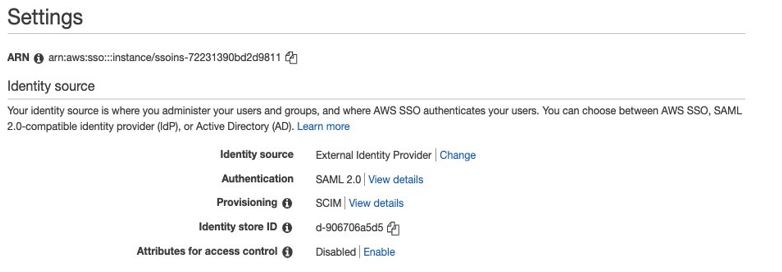
In this first step, you confirm that AWS SSO has been properly configured. Go to AWS SSO console SSO settings to check that the configuration of your identity source, authentication, and provisioning is as follows:

Identity source: External Identity Provider
Authentication: SAML 2.0
Provisioning: SCIM

  1. Confirm authentication is working as expected, by going to your user portal URL in a new browser instance (to ensure your user authentication doesn’t overwrite your existing authentication). The user portal offers a single place to access all the assigned AWS accounts, roles, and applications. For example, it should look like https://exampledomain.awsapps.com/start. Once you access it, the process automatically redirects the request to your external provider for authentication, and then returns the user to the AWS SSO user portal.
  2. To confirm provisioning, go to the AWS SSO console and choose Users from the right panel. You should see your Okta users assigned to the AWS SSO application being synchronized by SCIM protocol. Select any user to see the Created by SCIM and Updated by SCIM information for that user.

Enable AWS SSO attributes for access control

In this step, you enable ABAC and then configure AWS SSO attributes. This solution uses the Attributes for access control page in the AWS Management Console to enter the key and value pairs.

To enable attributes for access control

  1. Open the AWS SSO console.
  2. Choose Settings.
  3. On the Settings page, under Identity source, next to Attributes for access control, select Enable. As shown in Figure 2.
Figure 2: Attributes for access control settings (enable ABAC)

Figure 2: Attributes for access control settings (enable ABAC)

Once ABAC is enabled, you can select the attributes to be synchronized. For this use case, select login and department.

To select your attributes using the AWS SSO console

  1. Open the AWS SSO console.
  2. Choose Settings.
  3. On the Settings page, under Identity source, next to Attributes for access control, choose View details.
  4. On the Attributes for access control page, notice the Key and Value columns. This is where you will be mapping the attribute from your identity source to an attribute that AWS SSO passes as a session tag. Set the first key and value pair by entering login as the key and ${path:userName} as the value. Set the second key and value pair to department and ${path:enterprise.department}. The settings are shown in Figure 3 below.

    Figure 3: Map attributes using the Attributes for access control page

    Figure 3: Map attributes using the Attributes for access control page

  5. Choose Save changes.

Create a new attribute in Okta Directory

In this third step, you create the new custom attribute SSMSessionRunAs.

To create a new user attribute

  1. Open the Okta console.
  2. Under Directory, choose Profile Editor.
  3. Choose Edit Profile for Okta User (default).
  4. Under Attributes, choose Add Attribute as follows:
    Data type: Select String
    Display Name: Enter SSMSessionRunAs
    Variable Name: Enter SSMSessionRunAs
    Attribute Length: Select Less than and enter 10 (max).
  5. Choose Save.

Edit and confirm users’ attributes defined in Okta Directory profile

Now that you have the new attribute SSMSessionRunAs created, go to the users’ profiles to enter the Department and SSMSessionRunAs values for both users.

To edit and confirm users’ attributes

  1. Open the Okta console.
  2. Under Directory, choose People.
  3. Select user Bob.
  4. Under Profile tab choose Edit as follows:

    For the key Department, enter blue as the value.

    For the key SSMSessionRunAs, enter bob as the value.

  5. Choose Save.
  6. Repeat steps 1 through 5 for Alice. For the key Department, enter amber as the value and for SSMSessionRunAs, enter alice as the value.
  7. Confirm that the attributes of both users are defined in the external directory as follows:Username (login): [email protected]
    First name (firstName): Bob
    Last name (lastName): Rodriguez
    Display name (displayName): Bob
    Department (department): blue
    SSMSessionRunAs (SSMSessionRunAs): bob

    Username (login): [email protected]
    First name (firstName): Alice
    Last name (lastName): Rosalez
    Display name (displayName): Alice
    Department (department): amber
    SSMSessionRunAs (SSMSessionRunAs): alice

Configure SAML attribute statement in Okta AWS SSO application

The attribute SSMSessionRunAs isn’t available as an attribute within AWS SSO. However, you can include it by defining SAML attribute statements, which are inserted into the SAML assertions.

To create a new SAML attribute

  1. Open the Okta Application console.
  2. Choose AWS Single Sign-on application.
  3. On the Sign On tab, choose Edit Settings.
  4. Under SAML 2.0 Attributes Statements enter the following:
    • For Name, enter https://aws.amazon.com/SAML/Attributes/AccessControl:SSMSessionRunAs
    • For Name format, select URI Reference
    • For Value, enter user.SSMSessionRunAs
  5. Choose Save.

Create a new permission set using an ABAC policy

In this step, you create a permissions policy that determines who can access your AWS resources based on the configured attribute value. When you enable ABAC and specify attributes, AWS SSO passes the attribute value of the authenticated user into AWS Identity and Access Management (IAM) for use in policy evaluation.

To create a permission set

  1. Open the AWS SSO console.
  2. Choose AWS accounts.
  3. Select the Permission sets tab.
  4. Choose Create permission set.
  5. On the Create new permission set page, choose Create a custom permission set.
    1. Choose Next: Details.
    2. Under Create a custom permission set, enter a name that will identify this permission set in AWS SSO. This name will also appear as an IAM role in the user portal for any users who have access to it. For this solution, name it myCustomPermissionSetEC2SSM.
    3. Choose Create a custom permissions policy and paste in the following ABAC policy document:
      {
        "Version": "2012-10-17",
        "Statement": [
          {
            "Sid": "AllowDescribeList",
            "Action": [
              "ec2:Describe*",
              "ssm:Describe*",
              "ssm:Get*",
              "ssm:List*",
              "iam:ListInstanceProfiles",
              "cloudwatch:DescribeAlarms"
            ],
            "Effect": "Allow",
            "Resource": "*"
          },
          {
            "Sid": "AllowRunInstancesResources",
            "Effect": "Allow",
            "Action": "ec2:RunInstances",
            "Resource": [
              "arn:aws:ec2:*::image/*",
              "arn:aws:ec2:*::snapshot/*",
              "arn:aws:ec2:*:*:subnet/*",
              "arn:aws:ec2:*:*:key-pair/*",
              "arn:aws:ec2:*:*:security-group/*",
              "arn:aws:ec2:*:*:network-interface/*"
            ]
          },
          {
            "Sid": "AllowRunInstancesConditions",
            "Effect": "Allow",
            "Action": "ec2:RunInstances",
            "Resource": [
              "arn:aws:ec2:*:*:instance/*",
              "arn:aws:ec2:*:*:volume/*",
              "arn:aws:ec2:*:*:network-interface/*"
            ],
            "Condition": {
              "StringLike": {
                "aws:RequestTag/Name": "*"
              },
              "StringEquals": {
                "aws:RequestTag/Owner": "${aws:PrincipalTag/login}",
                "aws:RequestTag/Department": "${aws:PrincipalTag/department}"
              },
              "ForAllValues:StringEquals": {
                "aws:TagKeys": [
                  "Name",
                  "Owner",
                  "Department"
                ]
              }
            }
          },
          {
            "Sid": "AllowCreateTagsOnRunInstance",
            "Effect": "Allow",
            "Action": "ec2:CreateTags",
            "Resource": [
              "arn:aws:ec2:*:*:volume/*",
              "arn:aws:ec2:*:*:instance/*",
              "arn:aws:ec2:*:*:network-interface/*"
            ],
            "Condition": {
              "StringEquals": {
                "ec2:CreateAction": "RunInstances"
              }
            }
          },
          {
            "Sid": "AllowPassRoleSpecificRole",
            "Effect": "Allow",
            "Action": "iam:PassRole",
            "Resource": "arn:aws:iam::*:role/EC2UbuntuSSMRole"
          },
          {
            "Sid": "AllowEC2ActionsConditions",
            "Effect": "Allow",
            "Action": [
              "ec2:StartInstances",
              "ec2:StopInstances",
              "ec2:RebootInstances"
            ],
            "Resource": "*",
            "Condition": {
              "StringEquals": {
                "ec2:ResourceTag/Department": "${aws:PrincipalTag/department}"
              }
            }
          },
          {
            "Sid": "AllowTerminateConditions",
            "Effect": "Allow",
            "Action": [
              "ec2:TerminateInstances"
            ],
            "Resource": "*",
            "Condition": {
              "StringEquals": {
                "ec2:ResourceTag/Owner": "${aws:PrincipalTag/login}"
              }
            }
          },
          {
            "Sid": "AllowStartSessionConditions",
            "Effect": "Allow",
            "Action": [
              "ssm:StartSession"
            ],
            "Resource": "*",
            "Condition": {
              "StringEquals": {
                "ssm:resourceTag/Department": "${aws:PrincipalTag/department}"
              }
            }
          },
          {
            "Sid": "AllowTerminateSessionConditions",
            "Effect": "Allow",
            "Action": [
              "ssm:TerminateSession"
            ],
            "Resource": [
              "arn:aws:ssm:*:*:session/${aws:PrincipalTag/login}-*"
            ]
          }
        ]
      }
      

    4. Choose Next: Tags.
    5. Review the selections you made, and then choose Create.

The policy described above uses SAML session tags for the ABAC to define permissions based on attributes. These attributes are the tags passed in the AssumeRoleWithSAML operation when the SAML-based federation occurs.

A combination of global (aws:TagKeys, aws:PrincipalTag, aws:RequestTag) and service (ec2:ResourceTag, ec2:CreateAction, ssm:resourceTag) condition keys is used to assign the permissions.

To learn more about AWS global and service conditions keys, see AWS global condition context keys and The condition keys table for AWS services.

Assign users to an AWS account

In this step, you use the permission set created in the previous step to assign access to the users for a specified AWS account.

To assign access to users

  1. Open the AWS SSO console.
  2. Choose AWS accounts.
  3. Under the AWS organization tab, in the list of AWS accounts, select one or more accounts to which you want to assign access.
  4. Choose Assign users.
  5. On the Select users or groups page, select both test users from the list of users as shown in Figure 4.

    Note: You can use the search box to look for specific users.

    Figure 4: Select users to assign to AWS accounts

    Figure 4: Select users to assign to AWS accounts

  6. Choose Next: Permission sets.
  7. On the Select permission sets page, select the permission sets that you created in step 5 to apply to the users from the table as shown in Figure 5.

    Figure 5: Select permissions sets

    Figure 5: Select permissions sets

  8. Choose Finish to start the configuration of your AWS account. When configuration is complete, a message is displayed stating that you have successfully configured your AWS account as shown in Figure 6.

    Figure 6: Confirmation that configuration is complete

    Figure 6: Confirmation that configuration is complete

Test the solution

Now that you have everything in place, let’s test the solution. To test the solution, you’ll log in to AWS SSO, access the AWS account and check the event logs, and test the Amazon EC2 operations.

Log in to AWS SSO as Bob through your external IdP

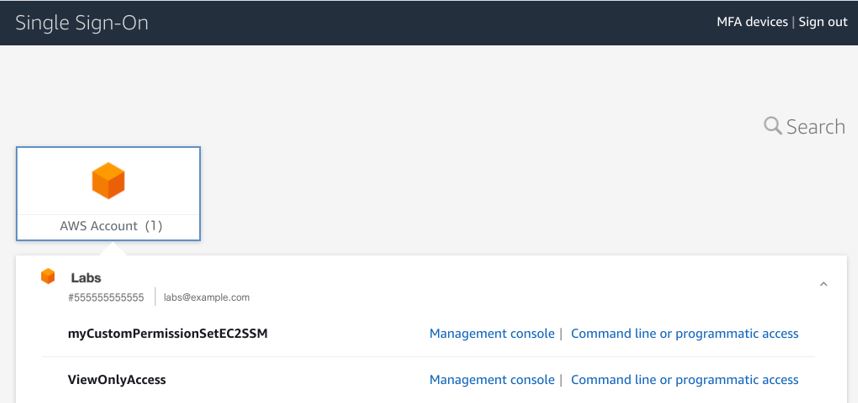
Enter the user portal URL in a browser window and log in to AWS SSO as Bob. AWS SSO redirects to the external provider for the log in process. After successful authentication, the external provider redirects to the AWS SSO portal, which shows you a list of the AWS accounts that you have access to. In this case, Bob has access to one AWS account as shown in Figure 7.

Figure 7: AWS SSO showing AWS accounts that the user has access to

Figure 7: AWS SSO showing AWS accounts that the user has access to

Access the AWS account using the permission set and confirm the event logs

Select the Management console link for the AWS account that has the myCustomPermissionSetEC2SSM permission set that you created earlier. This action federates into the AWS account and is logged in to AWS CloudTrail with the API AssumeRoleWithSAML. To confirm that the SAML session tags are being passed in the session, look at the API event log in the CloudTrail Event history console. In the following example, you can check the principalTags keys and their values under requestParameters.

{
     "eventVersion": "1.08",
     "userIdentity": {
          "type": "SAMLUser",
          "principalId": "d/UbWH0ijLBmlakaboZwi5CA/30=:[email protected]",
          "userName": "[email protected]",
          "identityProvider": "d/UbWH0ijLBmlakaboZwi5CA/30="
},
     "eventTime": "2021-05-13T16:08:48Z",
     "eventSource": "sts.amazonaws.com",
     "eventName": "AssumeRoleWithSAML",
     ...
     "requestParameters": {
        "sAMLAssertionID": "_5072d119-64f5-4341-aeed-30d9b7c24b5b",
        "roleSessionName": "[email protected]",
        "principalTags": {
            "SSMSessionRunAs": "bob",
            "department": "blue",
            "login": "[email protected]"
        },
        "durationSeconds": 3600,
        "roleArn": "arn:aws:iam::555555555555:role/aws-reserved/sso.amazonaws.com/AWSReservedSSO_myCustomPermissionSetEC2SSM_9e80ec498218bbea",
        "principalArn": "arn:aws:iam::555555555555:saml-provider/AWSSSO_5f872b6782a0507a_DO_NOT_DELETE"
    },
     "responseElements": {
     ...

Test EC2 operations

  1. Open the Amazon EC2 console:
    For this example, when opening the Amazon EC2 console there are already three running EC2 instances to test the ABAC policy that have been created with proper tags explained in the following step. From the top menu, you can also confirm the federated login AWSReservedSSO_myCustomPermissionSetEC2SSM_9e80ec498218bbea/[email protected] that represents the AWS SSO managed role and the user as shown in Figure 8.

    Figure 8: EC2 instances and user information

    Figure 8: EC2 instances and user information

  2. Launch a new EC2 instance:
    Start testing the ABAC policy by launching a new EC2 instance. This action is authorized only when you fill in the three required tags: Name, Owner, and Department.

    1. From the Amazon EC2 console, choose Launch Instances.
    2. Set the AMI, for this example select an Ubuntu-based OS.
    3. Set the Instance Type, a t2.micro will work.
    4. Configure the EC2 instance. Choose an IAM role to allow Systems Manager to manage the new EC2 instance. In this case, you have to create the IAM role EC2UbuntuSSMRole with the AWS managed policy AmazonEC2RoleforSSM attached in advanced with proper IAM permissions since the user Bob is not allow to do so. Then, you must use the user data to create the OS Ubuntu user—Bob—that you need to log in to the EC2 instance by using Session Manager. You can copy and paste the following to create the user “Bob”:#!/bin/bash
      sudo useradd -m bob
    5. Add storage using the default settings.
    6. Add tags. From the ABAC policy previously created, you can confirm that tag key Name can be anything as the condition StringLike is indicated with a wildcard (*). The tag keys Owner and Department have to match the principal session tags passed through federation. In this case, enter [email protected] as the key Owner, and enter blue as the Department, as shown in Figure 9.

      Figure 9: EC2 tags describing key value pairs

      Figure 9: EC2 tags describing key value pairs

    7. Configure security groups. When configuring security groups, you can choose an existing security group that doesn’t allow any inbound traffic to the SSH port. Since when using Session Manager you connect to the EC2 instance through an API that is going to be an outbound connection. This way you can safely leave the security group inbound rules close.
    8. Review and launch. It will ask you about selecting or creating a key pair. You don’t need one, because you’re using Session Manager. Proceed without selecting or creating a new SSH key pair. When launching the EC2 instance with the correct tag keys and values, you get the success message shown in Figure 10.
      Figure 10: EC2 success message launching an instance with the correct tags

      Figure 10: EC2 success message launching an instance with the correct tags

      If there are any missing tag keys or the values aren’t correct, the action will be denied as shown in Figure 11. For more information, you can decode the authorization error message using the API DecodeAuthorizationMessage.

      Figure 11: EC2 failed message launching an instance with incorrect tags

      Figure 11: EC2 failed message launching an instance with incorrect tags

  3. Stop, reboot, and terminate EC2 instances.
    The next tests are to be stop, reboot, and terminate the EC2 instances. In the ABAC policy you defined that only users who have the same department value as the resource can perform the first two actions. You can terminate and EC2 instance only if you are an owner. To stop, reboot, and terminate instances, open the EC2 Console, choose Instances, and select the instance you want to affect. Choose Instance state and choose the action you want to test: Stop instance, Reboot instance or Terminate instance.

    Trying to stop the EC2 instance amber-instance where Department is amber is shown in Figure 12.

    Figure 12: EC2 console showing how to stop an instance

    Figure 12: EC2 console showing how to stop an instance

    The action should fail as shown in Figure 13.

    Figure 13: EC2 instance failure message stopping an instance with wrong tags

    Figure 13: EC2 instance failure message stopping an instance with wrong tags

    Only when the department value of the EC2 instance is blue is it possible to stop or reboot the instance as shown in Figure 14.

    Figure 14: EC2 success message stopping an instance with correct tags

    Figure 14: EC2 success message stopping an instance with correct tags

    Only when the owner who launched the EC2 instance matches with the federated login is it possible to terminate the instance. Trying to terminate an EC2 instance that was launched by anyone other than the owner will lead to a failed action as shown in Figure 15.

    Figure 15: EC2 failed message terminating an instance with incorrect tags

    Figure 15: EC2 failed message terminating an instance with incorrect tags

  4. Try to modify tags. Because ABAC policies rely on tags, you cannot modify tags after the resources have been created. This is set in the ABAC policy statement AllowCreateTagsOnRunInstance in Create a new permission set using an ABAC policy. If you try to modify any tag keys or values on existing resources, the changes will be denied. For example, if you try to modify the owner of a tag on an existing EC2 instance, you get the “Failed to update tags” error message as shown in Figure 16.

    Figure 16: Failed message when attempting to modify tags

    Figure 16: Failed message when attempting to modify tags

  5. Connect to the EC2 instance using Session Manager.
    1. Test logging in to the EC2 instance by choosing the new instance and choosing Connect as shown in Figure 17.

      Figure 17: EC2 console selecting an instance to connect

      Figure 17: EC2 console selecting an instance to connect

    2.  Then choose the Session Manager tab and choose Connect as shown in Figure 18.
      Figure 18: EC2 console selecting Session Manager to connect

      Figure 18: EC2 console selecting Session Manager to connect

      This will open a new tab in the browser redirecting to a Systems Manager session where you can confirm that the Ubuntu OS user is Bob as shown in Figure 19.

      Figure 19: Systems Manager session started confirming Ubunto OS user

      Figure 19: Systems Manager session started confirming Ubunto OS user

      Note: By default, sessions are launched using the credentials of a system-generated account named ssm-user that is created on a managed instance. However, you can instead launch sessions using any OS user by enabling the run as feature in SSM. To learn more about this, see Enable run as support for Linux and macOS instances in the Systems Manager Session Manager user guide.

    3. Performing the same action in an EC2 instance with a different Department tag will lead to a denied action as shown in Figure 20. This is because the ABAC policy allows the StartSession action only when the Department key matches the Department value in the EC2 instance.

      Figure 20: Systems Manager StartSession failed message

      Figure 20: Systems Manager StartSession failed message

Conclusion

In this blog post, you learned how to use AWS SSO with the two methods of passing attributes to AWS account using session tags for ABAC. You also learned how to build policies with tags as conditions to simplify and reuse custom permission sets. You have seen working examples with services like EC2, and Systems Manager Session Manager. To learn more about ABAC policies, SAML session tags, and how to pass session tags in federation, see IAM tutorial: Use SAML session tags for ABAC and Passing session tags using AssumeRoleWithSAML.

If you have feedback about this post, submit comments in the Comments section below.

Want more AWS Security news? Follow us on Twitter.
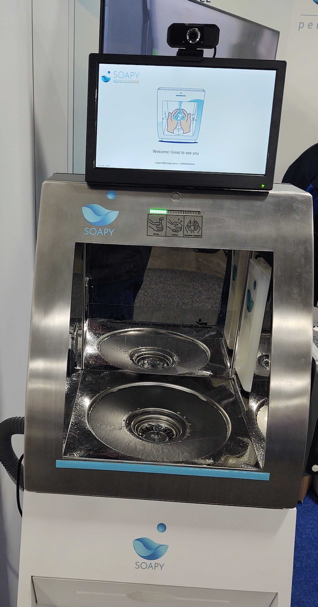
Author

Rodrigo Ferroni

Rodrigo Ferroni is a senior Security Specialist at AWS Enterprise Support. He is certified in CISSP, AWS Security Specialist, and AWS Solutions Architect Associate. He enjoys helping customers to continue adopting AWS security services to improve their security posture in the cloud. Outside of work, he loves to travel as much as he can. In every winter he enjoys snowboarding with his friends.

Creating a Multi-Region Application with AWS Services – Part 2, Data and Replication

Post Syndicated from Joe Chapman original https://aws.amazon.com/blogs/architecture/creating-a-multi-region-application-with-aws-services-part-2-data-and-replication/

In Part 1 of this blog series, we looked at how to use AWS compute, networking, and security services to create a foundation for a multi-Region application.

Data is at the center of many applications. In this post, Part 2, we will look at AWS data services that offer native features to help get your data where it needs to be.

In Part 3, we’ll look at AWS application management and monitoring services to help you build, monitor, and maintain a multi-Region application.

Considerations with replicating data

Data replication across the AWS network can happen quickly, but we are still limited by the speed of light. For this reason, data consistency must be considered when building a multi-Region application. Generally speaking, the longer a physical distance is, the longer it will take the data to get there.

When building a distributed system, consider the consistency, availability, partition tolerance (CAP) theorem. This theorem states that an application can only pick 2 out of the 3, and tradeoffs should be considered.

  • Consistency – all clients always have the same view of data
  • Availability – all clients can always read and write data
  • Partition Tolerance – the system will continue to work despite physical partitions

CAP diagram

Achieving consistency and availability is common for single-Region applications. For example, when an application connects to a single in-Region database. However, this becomes more difficult with multi-Region applications due to the latency added by transferring data over long distances. For this reason, highly distributed systems will typically follow an eventual consistency approach, favoring availability and partition tolerance.

Replicating objects and files

To ensure objects are in multiple Regions, Amazon Simple Storage Service (Amazon S3) can be set up to replicate objects across AWS Regions automatically with one-way or two-way replication. A subset of objects in an S3 bucket can be replicated with S3 replication rules. If low replication lag is critical, S3 Replication Time Control can help meet requirements by replicating 99.99% of objects within 15 minutes, and most within seconds. To monitor the replication status of objects, Amazon S3 events and metrics will track replication and can send an alert if there’s an issue.

Traditionally, each S3 bucket has its own single, Regional endpoint. To simplify connecting to and managing multiple endpoints, S3 Multi-Region Access Points create a single global endpoint spanning multiple S3 buckets in different Regions. When applications connect to this endpoint, it will route over the AWS network using AWS Global Accelerator to the bucket with the lowest latency. Failover routing is also automatically handled if the connectivity or availability to a bucket changes.

For files stored outside of Amazon S3, AWS DataSync simplifies, automates, and accelerates moving file data across Regions and accounts. It supports homogeneous and heterogeneous file migrations across Elastic File System (Amazon EFS), Amazon FSx, AWS Snowcone, and Amazon S3. It can even be used to sync on-premises files stored on NFS, SMB, HDFS, and self-managed object storage to AWS for hybrid architectures.

File and object replication should be expected to be eventually consistent. The rate at which a given dataset can transfer is a function of the amount of data, I/O bandwidth, network bandwidth, and network conditions.

Copying backups

Scheduled backups can be set up with AWS Backup, which automates backups of your data to meet business requirements. Backup plans can automate copying backups to one or more AWS Regions or accounts. A growing number of services are supported, and this can be especially useful for services that don’t offer real-time replication to another Region such as Amazon Elastic Block Store (Amazon EBS) and Amazon Neptune.

Figure 1 shows how these data transfer services can be combined for each resource.

Storage replication services

Figure 1. Storage replication services

Spanning non-relational databases across Regions

Amazon DynamoDB global tables provide multi-Region and multi-writer features to help you build global applications at scale. A DynamoDB global table is the only AWS managed offering that allows for multiple active writers in a multi-Region topology (active-active and multi-Region). This allows for applications to read and write in the Region closest to them, with changes automatically replicated to other Regions.

Global reads and fast recovery for Amazon DocumentDB (with MongoDB compatibility) can be achieved with global clusters. These clusters have a primary Region that handles write operations. Dedicated storage-based replication infrastructure enables low-latency global reads with a lag of typically less than one second.

Keeping in-memory caches warm with the same data across Regions can be critical to maintain application performance. Amazon ElastiCache for Redis offers global datastore to create a fully managed, fast, reliable, and secure cross-Region replica for Redis caches and databases. With global datastore, writes occurring in one Region can be read from up to two other cross-Region replica clusters – eliminating the need to write to multiple caches to keep them warm.

Spanning relational databases across Regions

For applications that require a relational data model, Amazon Aurora global database provides for scaling of database reads across Regions in Aurora PostgreSQL-compatible and MySQL-compatible editions. Dedicated replication infrastructure utilizes physical replication to achieve consistently low replication lag that outperforms the built-in logical replication database engines offer, as shown in Figure 2.

SysBench OLTP (write-only) stepped every 600 seconds on R4.16xlarge

Figure 2. SysBench OLTP (write-only) stepped every 600 seconds on R4.16xlarge

With Aurora global database, one primary Region is designated as the writer, and secondary Regions are dedicated to reads. Aurora MySQL supports write forwarding, which forwards write requests from a secondary Region to the primary Region to simplify logic in application code. Failover testing can happen by utilizing managed planned failover, which will change the active write cluster to another Region while keeping the replication topology intact. All databases discussed in this post employ eventual consistency when used across Regions, but Aurora PostgreSQL has an option to set the maximum a replica lag allowed with managed recovery point objective (managed RPO).

Logical replication, which utilizes a database engine’s built-in replication technology, can be set up for Amazon Relational Database Service (Amazon RDS) for MariaDB, MySQL, Oracle, PostgreSQL, and Aurora databases. A cross-Region read replica will receive these changes from the writer in the primary Region. For applications built on RDS for Microsoft SQL Server, cross-Region replication can be achieved by utilizing the AWS Database Migration Service. Cross-Region replicas allow for quicker local reads and can reduce data loss and recovery times in the case of a disaster by being promoted to a standalone instance.

For situations where a longer RPO and recovery time objective (RTO) are acceptable, backups can be copied across Regions. This is true for all of the relational and non-relational databases mentioned in this post, except for ElastiCache for Redis. Amazon Redshift can also automatically do this for your data warehouse. Backup copy times will vary depending on size and change rates.

A purpose-built database strategy offers many benefits, Figure 3 forms a purpose-built global database architecture.

Purpose-built global database architecture

Figure 3. Purpose-built global database architecture

Summary

Data is at the center of almost every application. In this post, we reviewed AWS services that offer cross-Region data replication to get your data where it needs to be quickly. Whether you need faster local reads, an active-active database, or simply need your data durably stored in a second Region, we have a solution for you. In the 3rd and final post of this series, we’ll cover application management and monitoring features.

Ready to get started? We’ve chosen some AWS Solutions, AWS Blogs, and Well-Architected labs to help you!

Related posts

Build event-driven data quality pipelines with AWS Glue DataBrew

Post Syndicated from Laith Al-Saadoon original https://aws.amazon.com/blogs/big-data/build-event-driven-data-quality-pipelines-with-aws-glue-databrew/

Businesses collect more and more data every day to drive processes like decision-making, reporting, and machine learning (ML). Before cleaning and transforming your data, you need to determine whether it’s fit for use. Incorrect, missing, or malformed data can have large impacts on downstream analytics and ML processes. Performing data quality checks helps identify issues earlier in your workflow so you can resolve them faster. Additionally, doing these checks using an event-based architecture helps you reduce manual touchpoints and scale with growing amounts of data.

AWS Glue DataBrew is a visual data preparation tool that makes it easy to find data quality statistics such as duplicate values, missing values, and outliers in your data. You can also set up data quality rules in DataBrew to perform conditional checks based on your unique business needs. For example, a manufacturer might need to ensure that there are no duplicate values specifically in a Part ID column, or a healthcare provider might check that values in an SSN column are a certain length. After you create and validate these rules with DataBrew, you can use Amazon EventBridge, AWS Step Functions, AWS Lambda, and Amazon Simple Notification Service (Amazon SNS) to create an automated workflow and send a notification when a rule fails a validation check.

In this post, we walk you through the end-to-end workflow and how to implement this solution. This post includes a step-by-step tutorial, an AWS Serverless Application Model (AWS SAM) template, and example code that you can use to deploy the application in your own AWS environment.

Solution overview

The solution in this post combines serverless AWS services to build a completely automated, end-to-end event-driven pipeline for data quality validation. The following diagram illustrates our solution architecture.

The solution workflow contains the following steps:

  1. When you upload new data to your Amazon Simple Storage Service (Amazon S3) bucket, events are sent to EventBridge.
  2. An EventBridge rule triggers a Step Functions state machine to run.
  3. The state machine starts a DataBrew profile job, configured with a data quality ruleset and rules. If you’re considering building a similar solution, the DataBrew profile job output location and the source data S3 buckets should be unique. This prevents recursive job runs. We deploy our resources with an AWS CloudFormation template, which creates unique S3 buckets.
  4. A Lambda function reads the data quality results from Amazon S3, and returns a Boolean response into the state machine. The function returns false if one or more rules in the ruleset fail, and returns true if all rules succeed.
  5. If the Boolean response is false, the state machine sends an email notification with Amazon SNS and the state machine ends in a failed status. If the Boolean response is true, the state machine ends in a succeed status. You can also extend the solution in this step to run other tasks on success or failure. For example, if all the rules succeed, you can send an EventBridge message to trigger another transformation job in DataBrew.

In this post, you use AWS CloudFormation to deploy a fully functioning demo of the event-driven data quality validation solution. You test the solution by uploading a valid comma-separated values (CSV) file to Amazon S3, followed by an invalid CSV file.

The steps are as follows:

  1. Launch a CloudFormation stack to deploy the solution resources.
  2. Test the solution:
    1. Upload a valid CSV file to Amazon S3 and observe the data quality validation and Step Functions state machine succeed.
    2. Upload an invalid CSV file to Amazon S3 and observe the data quality validation and Step Functions state machine fail, and receive an email notification from Amazon SNS.

All the sample code can be found in the GitHub repository.

Prerequisites

For this walkthrough, you should have the following prerequisites:

Deploy the solution resources using AWS CloudFormation

You use a CloudFormation stack to deploy the resources needed for the event-driven data quality validation solution. The stack includes an example dataset and ruleset in DataBrew.

  1. Sign in to your AWS account and then choose Launch Stack:
  2. On the Quick create stack page, for EmailAddress, enter a valid email address for Amazon SNS email notifications.
  3. Leave the remaining options set to the defaults.
  4. Select the acknowledgement check boxes.
  5. Choose Create stack.

The CloudFormation stack takes about 5 minutes to reach CREATE_COMPLETE status.

  1. Check the inbox of the email address you provided and accept the SNS subscription.

You need to review and accept the subscription confirmation in order to demonstrate the email notification feature at the end of the walkthrough.

On the Outputs tab of the stack, you can find the URLs to browse the DataBrew and Step Functions resources that the template created. Also note the completed AWS CLI commands you use in later steps.

If you choose the AWSGlueDataBrewRuleset value link, you should see the ruleset details page, as in the following screenshot. In this walkthrough, we create a data quality ruleset with three rules that check for missing values, outliers, and string length.

Test the solution

In the following steps, you use the AWS CLI to upload correct and incorrect versions of the CSV file to test the event-driven data quality validation solution.

  1. Open a terminal or command line prompt and use the AWS CLI to download sample data. Use the command from the CloudFormation stack output with the key name CommandToDownloadTestData:
    aws s3 cp s3://<your_bucket>/artifacts/BDB-1942/votes.csv

  2. Use the AWS CLI again to upload the unchanged CSV file to your S3 bucket. Replace the string <your_bucket> with your bucket name, or copy and paste the command provided to you from the CloudFormation template output:
    aws s3 cp votes.csv s3://<your_bucket>/artifacts/BDB-1942/votes.csv

  3. On the Step Functions console, locate the state machine created by the CloudFormation template.

You can find a URL in the CloudFormation outputs noted earlier.

  1. On the Executions tab, you should see a new run of the state machine.
  2. Choose the run’s URL to view the state machine graph and monitor its progress.

The following image shows the workflow of our state machine.

To demonstrate a data quality rule’s failure, you make at least one edit to the votes.csv file.

  1. Open the file in your preferred text editor or spreadsheet tool, and delete just one cell.

In the following screenshots, I use the GNU nano editor on Linux. You can also use a spreadsheet editor to delete a cell. This causes the “Check All Columns For Missing Values” rule to fail.

The following screenshot shows the CSV file before modification.

The following screenshot shows the changed CSV file.

  1. Save the edited votes.csv file and return to your command prompt or terminal.
  2. Use the AWS CLI to upload the file to your S3 bucket one more time. You use the same command as before:
    aws s3 cp votes.csv s3://<your_bucket>/artifacts/BDB-1942/votes.csv

  3. On the Step Functions console, navigate to the latest state machine run to monitor it.

The data quality validation fails, triggering an SNS email notification and the failure of the overall state machine’s run.

The following image shows the workflow of the failed state machine.

The following screenshot shows an example of the SNS email.

  1. You can investigate the rule failure on the DataBrew console by choosing the AWSGlueDataBrewProfileResults value in the CloudFormation stack outputs.

Clean up

To avoid incurring future charges, delete the resources. On the AWS CloudFormation console, delete the stack named AWSBigDataBlogDataBrewDQSample.

Conclusion

In this post, you learned how to build automated, event-driven data quality validation pipelines. With DataBrew, you can define data quality rules, thresholds, and rulesets for your business and technical requirements. Step Functions, EventBridge, and Amazon SNS allow you to build complex pipelines with customizable error handling and alerting tailored to your needs.

You can learn more about this solution and the source code by visiting the GitHub repository. To learn more about DataBrew data quality rules, visit AWS Glue DataBrew now allows customers to create data quality rules to define and validate their business requirements or refer to Validating data quality in AWS Glue DataBrew.


About the Authors

Laith Al-Saadoon is a Principal Prototyping Architect on the Envision Engineering team. He builds prototypes and solutions using AI, machine learning, IoT & edge computing, streaming analytics, robotics, and spatial computing to solve real-world customer problems. In his free time, Laith enjoys outdoor activities such as photography, drone flights, hiking, and paintballing.

Gordon Burgess is a Senior Product Manager with AWS Glue DataBrew. He is passionate about helping customers discover insights from their data, and focuses on building user experiences and rich functionality for analytics products. Outside of work, Gordon enjoys reading, coffee, and building computers.

How we ship GitHub Mobile every week

Post Syndicated from Taehun Kim original https://github.blog/2022-01-12-how-we-ship-github-mobile-every-week/

Every week, the GitHub Mobile team updates the GitHub Mobile apps on both iOS and Android with new features, bug fixes and improvements. Shipping a mobile app is not an easy task. Before a build goes out to our users’ hands, we must make sure the end result is properly built, all written tests are passed, and any critical issues are captured by testing. Also, we compose release notes with changes since our last update. All of these tasks can be quite time-consuming.

Since we’re a small team, repeating this release process every week would mean less time spent writing code or building new features. In order to focus on product development, we use a number of tools to automate the release process. In this post, I’ll share how we automate the build release process by using the iOS pipeline as an example.

A release candidate build is ready to go out to our beta users when these criteria are met:

  • A branch is created for addressing any hot fixes needed for the release candidate
  • The build is generated with a proper version number and uploaded to TestFlight
  • All unit and snapshot tests have passed
  • An issue is created to track the release process
  • Release notes are ready

GitHub provides great tools for continuous integration and delivery. We primarily use GitHub Actions to automate most of the steps to meet our criteria, plus some additional tools like fastlane.

Workflow visualized on GitHub.com
Steps to release a build. The icon on the top right of each step indicates if the step is executed automatically by an action or manually.
Steps to release a build. The icon on the top right of each step indicates if the step is executed by an action or a human engineer.

The figure above illustrates the entire process of making a build ready to ship. The gray steps are automated by GitHub Actions, while the blue steps are manually processed by our team. As you can see in the figure, most of the steps are automated. Only the final steps, like merging release-related changes or finalizing an app submission, require human interactions. We manually write release notes because humans are still better than machines at writing prose, but the materials are prepared by the automation, so the writing itself is not very time-consuming.

Let’s dive into some of the details.

Build and release

First, my team needs to generate an app binary for any given build. We define a job, which contains multiple steps for generating a build, going through the test cases, archiving, and uploading to TestFlight. We create a dedicated branch for each version we ship, so that we can go back and cherry-pick any changes we want to include. GitHub Actions has a great community support, and there are tons of open source actions we can use. For example, the peterjgrainger/action-create-branch action makes it easy to create a new release branch.

Once the branch has been created, we run fastlane to build, test, archive, and upload. In order to code-sign the binary and upload it to TestFlight, our action will need certificates and credentials to run these secure and authenticated commands. Those credentials are stored in GitHub Secrets, and they can be easily passed into an action without revealing them to would-be attackers.

Issue creation

Once a build is created and uploaded to TestFlight, we kick off another job. This one creates a GitHub issue to track any paperwork or manual processes needed in order to distribute the build. The issue serves as a playbook containing all steps to get the build out to our users including verification of release marketing materials, pre-launch manual tests, and even sharing the status with the team. By following this playbook, a release captain does not need to remember the steps, and any new folks can become a release captain with little training. The issue creation is easily done with GitHub CLI by adding a shell command in the GitHub Actions workflow YAML file, such as gh issue create -t {title} -b {body} -a {assignees} -l {labels}. Also, there are a number of open source actions like JasonEtco/create-an-issue, which makes it easy to create an issue with a template.

We manage the release engineer rotation with PagerDuty. In order to fetch the next release engineer via PagerDuty API, we also utilize open source actions, such as JamesIves/fetch-api-data-action. The release captain is then assigned to the issue so that we all know who is responsible for the release.

A sneak peak of a release tracking issue. Each step is described with a lot of details, so that one can just follow the instruction.

Release notes

With another parallel job, we prepare materials to compose release notes. Using fastlane, we collect all commits that have been pushed since the last release (alternatively, you can try another automation recently added to GitHub). The change logs are raw records of all commits and pull requests, meaning that this text alone is not suitable for release notes for our users. Thus, we create a text file with those raw change logs in our repo, and open a pull request where we can compose customer-friendly release notes. Opening a pull request is pretty easy with GitHub CLI. Adding a shell command, gh pr create -t {title} -b {body} -a {assignees}, -r {reviewers} -l {labels}, will automatically create a pull request as part of the job. An open source action such as peter-evans/create-pull-request is also useful to open a pull request.

We retrieve the next release engineer (the same way we retrieve one when creating an issue) and assign the engineer to the pull request. Once the engineer has finished writing customer-friendly release notes and another teammate has reviewed the change logs, we merge the pull request to store it in our repository.

Version number management

We have another parallel job for managing the build version numbers. Once a release candidate is created, we bump the version number in main so that everyone can begin with the next ship cycle. To prevent any errors, we do not push any code changes into main directly. Instead, a pull request to increment the version number update is opened by an action. The version update is done with small Bash and Ruby scripts, and the pull request is created via the same method we use for release notes.

Timeline for a build release. Once a build is created by the actions, it goes out to the public after a week of beta testing.

The figure above illustrates a timeline for a build release. The four jobs described, along with all of their steps, are defined in one single YAML file that defines a GitHub Actions workflow. The workflow is kicked off every Saturday morning so that the release engineer has all the materials when Monday rolls around. On Monday morning, the engineer ticks off all the steps described in the issue created by the workflow, sending the build out to our TestFlight beta users and then finally submitting to the build for App Store review. During the week, we monitor how beta testing is going. If we find a critical issue from the build, we fix it in main, cherry-pick the fix into the release branch, and upload another build. We have another GitHub Actions workflow that automates this additional build process, which is triggered whenever we push a code change into the release branch.

If the beta metrics for the week look good, with no crashes or regressions, we finally release the build on the App Store, a week after it began beta testing. In this way, our customers get solid GitHub Mobile updates every week.

🎉 Conclusion

In this post, I described how we ship GitHub Mobile apps every week with build release pipelines implemented using GitHub Actions. The community support for GitHub Actions is amazing, and there are so many powerful open source actions that you can use right away. If you want to have your own custom action and workflow, it is also quite easy to create one and re-use it across repositories or projects. With our release pipeline greatly improved by the automations powered by GitHub Actions, we have more time and focus for product development and spend less time waiting for Xcode to compile. By automating our release process and running it via GitHub Actions and GitHub Issues, it’s a lot easier to get new teammates onboarded as release engineers and shipping their new features to the App Store every week.

I hope this post helps people who wants to build solid CI/CD pipelines with GitHub tools. To learn more about automating your release process with GitHub Actions, check out the following resources:

IPython 8.0 released

Post Syndicated from original https://lwn.net/Articles/881158/rss

Version
8.0
of the IPython read-eval-print-loop implementation for Python is
out.

This major release comes with many improvements to the existing
codebase and several new features. These new features are code
reformatting with Black in the CLI, ghost suggestions, and better
tracebacks which highlight the error node, thus making complex
expressions easier to debug.

A New AWS Console Home Experience

Post Syndicated from Sébastien Stormacq original https://aws.amazon.com/blogs/aws/a-new-aws-console-home-experience/

If you are reading this blog, there is a high chance you frequently use the AWS Management Console. I taught AWS classes for years. During classes, students’ first hands-on experience with the AWS Cloud happened on the console, and I bet yours did too.

Until today, the home page of the console showed your most recently used services and a set of static links organized in sections, such as Getting Started with AWS, Build a Solution, or Explore AWS with links to training courses. However, we learned from our data that their usage is very different depending on your profile. You also told us it is cumbersome and time-consuming to navigate to different parts of the console to get an overview of important information for you.

We listened to your feedback, and I’m happy to announce a redesigned home page for the AWS Management Console. This new home page experience includes dynamic content, can be customized, and includes data from multiple AWS Regions.

The screenshot below shows the default view of this new console home page:

New console default layout

New console homepage action

The new Console Home is made of widgets. I may choose which widget to display on the page and where to include it. I may use the actions in the Actions drop down to customize my home page.

I may move and arrange widgets on the home page to organize the content as I want. When I click on the three little dots on the widget title bar, I may choose to remove the widget or resize it. I have the choice between Regular view and Extended view.

New console resize widget

At launch, the console provides eight widgets, and we will add more over time. Three widgets provide me with static links to learn how to build a solution or to explore AWS (Welcome to AWS, Build a Solution and Explore AWS). The other five are dynamic; their content depends on the usage of AWS by my applications and infrastructure:

  • AWS Health: this widget provides information on important events and changes
  • Cost and usage: this widget provides an overview of service costs, with a break down per AWS service.
  • Favorites: this widget shows a list of services that I have bookmarked
  • Recently visited: this widget provides the list of top recently visited services
  • Trusted Advisor: this widget provides recommendations to follow AWS best practices

AWS News Console List of widgets

As usual, we pay attention to the importance of not disturbing existing workflows and habits. You can use the new Console Home after opt-in. You can revert back to the old console home with a simple click.

This new Console Home is the first step to bring you more relevant content on this very first page you see every day. Stay tuned for more.

The new Console Home is available today in all AWS Regions at no additional cost. Go and customize your console homepage today.

— seb

Announcing Kubernetes Backup and Ransomware Protection via Kasten and Backblaze

Post Syndicated from Natasha Rabinov original https://www.backblaze.com/blog/announcing-kubernetes-backup-and-ransomware-protection-via-kasten-and-backblaze/

According to the Cloud Native Computing Foundation’s annual survey, Kubernetes use in production has increased 300% since 2016 to 83% of respondents. There’s no doubt that a fundamental shift has taken place over the past few years—applications are being deployed in container environments and those deployments are being managed by Kubernetes.

But customers that are deploying Kubernetes environments need a new tool to protect all of that data. Purpose-built for Kubernetes, Kasten by Veeam is that tool.

Now, through a new partnership, joint Kasten and Backblaze customers will be able to name Backblaze B2 Cloud Storage as a storage destination where they can store and protect copies of their applications affordably.

This partnership enables developers to:

  • Back up and restore production stateful Kubernetes applications.
  • Safeguard application data from ransomware encryption with Object Lock for immutability.
  • Support regulatory compliance and corporate disaster recovery mandates.

“Kubernetes containers are the standard for many organizations building, deploying, and scaling applications with portability and efficiency. Backblaze and Kasten together offer a compelling solution to support these organizations’ business continuity needs with set-and-forget-it ease and cost effectiveness.”
—Nilay Patel, VP of Sales and Partnerships, Backblaze

The joint solution is fully scalable at enterprise grade. What’s more, organizations only pay for storage used, with no data retention penalties for deleting past backups.

About Kasten

Owned by Veeam, Kasten is an award-winning market leader in Kubernetes backup. Their product was built natively for containers, and the software-only solution runs directly on your cluster within its own namespace.

Together, Kasten and Backblaze provide a simple, seamless integration for shared customers, focusing on ease of use.

“Backup and protection are paramount in a world in which data is everything and cyberattacks continue to rise. The Backblaze-Kasten partnership offers the application protection and disaster recovery support companies seek, with flexibility and freedom to choose their preferred storage partner.”
—Gaurav Rishi, VP of Product, Kasten by Veeam

How to Get Started With Backblaze B2 + Kasten

After creating your Backblaze B2 account, check out our Quickstart Guide for Kasten K10 and Backblaze B2 to create a Kasten namespace in your cluster and configure Backblaze B2 as a storage destination.

Customers can test the Kasten solution for free with clusters made up of 10 nodes or less. And Backblaze covers the first 10GB stored.

Data Protection That Scales With You

Kubernetes was built to provide scalability, giving businesses the flexibility to manage and optimize resources. Through this partnership, customers now have storage that matches that flexibility in Backblaze B2. With Backblaze, customers are able to scale their application backups as their applications scale.

Interested in learning more? Join us for a webinar on February 2, 2022 at 10 a.m. PST to discover how to add seamless ransomware protection to your Kubernetes environments—stay tuned for more details and a link to register. Or, if you are ready to future-proof your application, click here to get started today.

The post Announcing Kubernetes Backup and Ransomware Protection via Kasten and Backblaze appeared first on Backblaze Blog | Cloud Storage & Cloud Backup.

The collective thoughts of the interwebz