DAMON is a framework that allows user space
to influence and control the kernel’s memory-management operations. It
first entered the kernel with the 5.15 release, and has been gaining
capabilities ever since. At the 2023 Linux Storage, Filesystem,
Memory-Management and BPF Summit, DAMON author Seongjae Park provided
an overview of the current status of DAMON development and where it can be
expected to go in the near future.
Earlier this year, we blogged about an incident where we mistakenly throttled a customer due to internal confusion about a potential violation of our Terms of Service. That incident highlighted a growing point of confusion for many of our customers. Put simply, our terms had not kept pace with the rapid innovation here at Cloudflare, especially with respect to our Developer Platform. We’re excited to announce new updates that will modernize our terms and cut down on customer confusion and frustration.
A bit of background on our legal terms of service
We want our terms to set clear expectations about what we’ll deliver and what customers can do with our services. But drafting terms is often an iterative process, and iteration over a decade can lead to bloat, complexity, and vestigial branches in need of pruning. Now, time to break out the shears.
Snip, snip
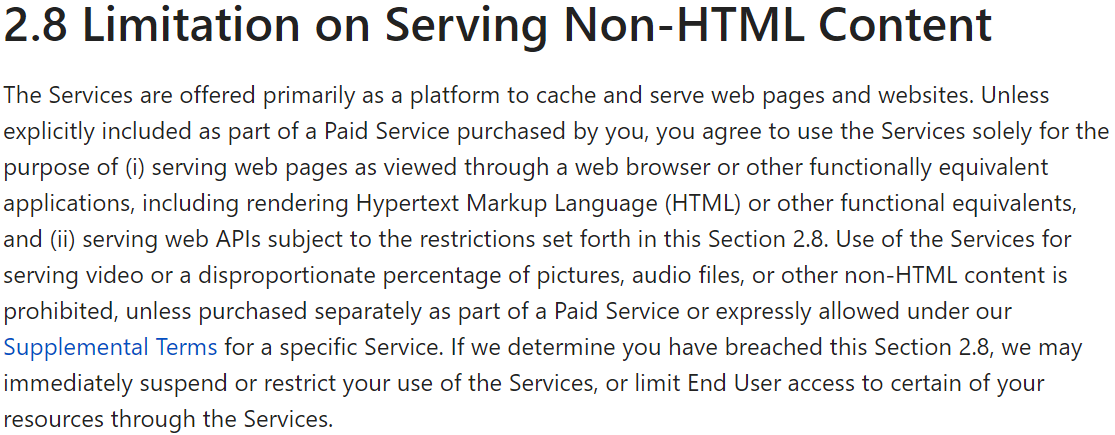
To really nip this in the bud, we started at the source–the content-based restriction housed in Section 2.8 of our Self-Serve Subscription Agreement:
Cloudflare is much, much more than a CDN, but that wasn’t always the case. The CDN was one of our first services and originally designed to serve HTML content like webpages. User attempts to serve video and other large files hosted outside of Cloudflare were disruptive on many levels. So, years ago, we added Section 2.8 to give Cloudflare the means to preserve the original intent of the CDN: limiting use of the CDN to webpages.
Over time, Cloudflare’s network became larger and more robust and its portfolio broadened to include services like Stream, Images, and R2. These services are explicitly designed to allow customers to serve non-HTML content like video, images, and other large files hosted directly by Cloudflare. And yet, Section 2.8 persisted in our Self-Serve Subscription Agreement–the umbrella terms that apply to all services. We acknowledge that this didn’t make much sense.
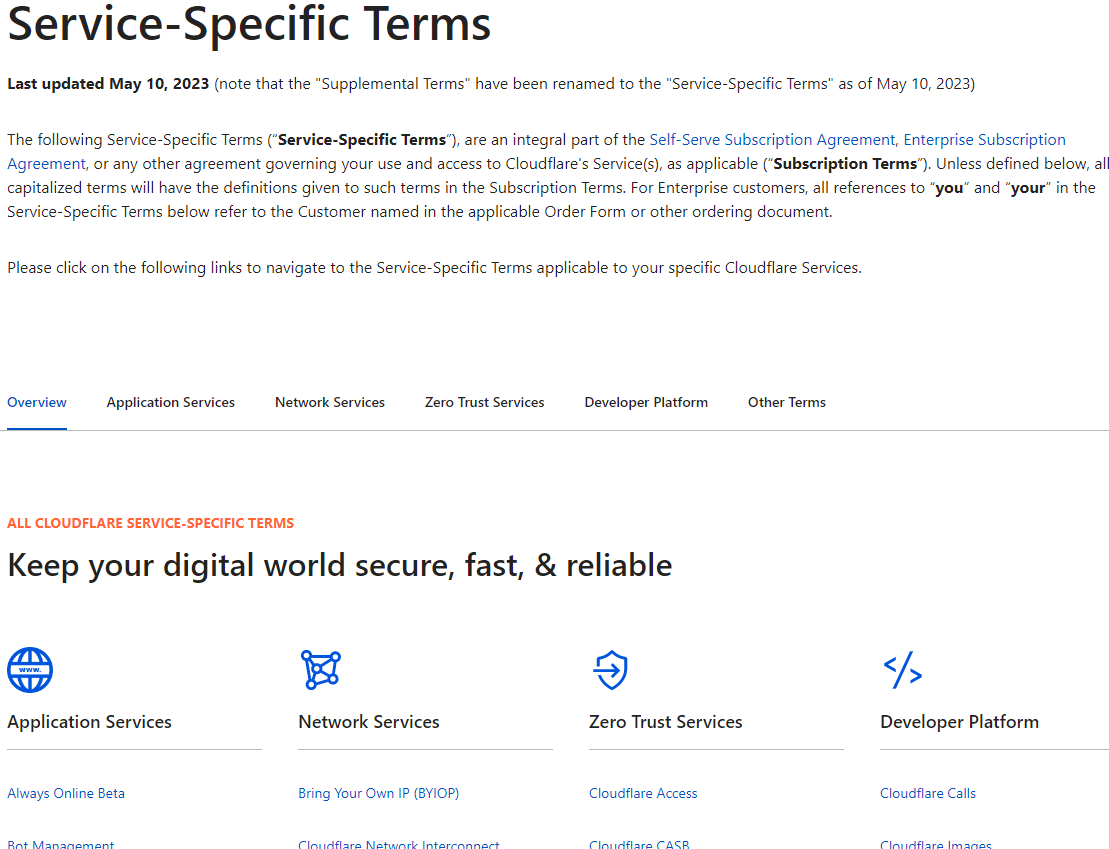
To address the problem, we’ve done a few things. First, we moved the content-based restriction concept to a new CDN-specific section in our Service-Specific Terms. We want to be clear that this restriction only applies to use of our CDN. Next, we got rid of the antiquated HTML vs. non-HTML construct, which was far too broad. Finally, we made it clear that customers can serve video and other large files using the CDN so long as that content is hosted by a Cloudflare service like Stream, Images, or R2. This will allow customers to confidently innovate on our Developer Platform while leveraging the speed, security, and reliability of our CDN. Video and large files hosted outside of Cloudflare will still be restricted on our CDN, but we think that our service features, generous free tier, and competitive pricing (including zero egress fees on R2) make for a compelling package for developers that want to access the reach and performance of our network.
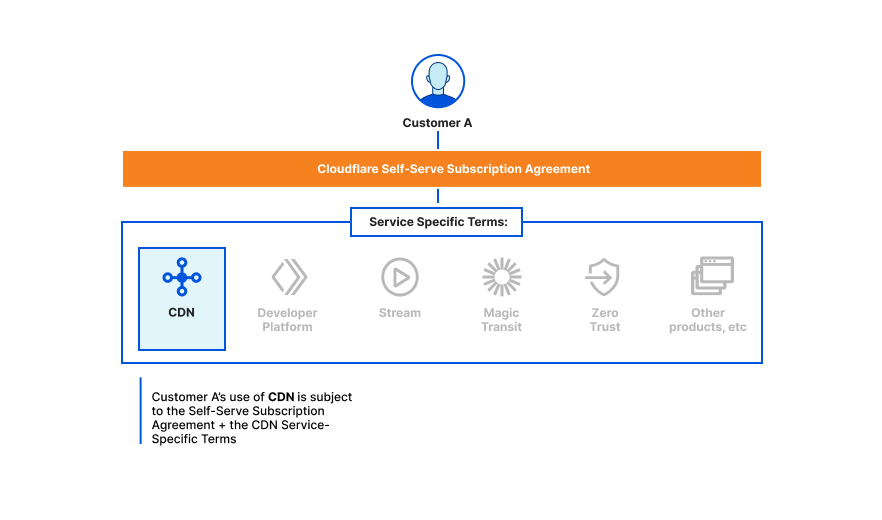
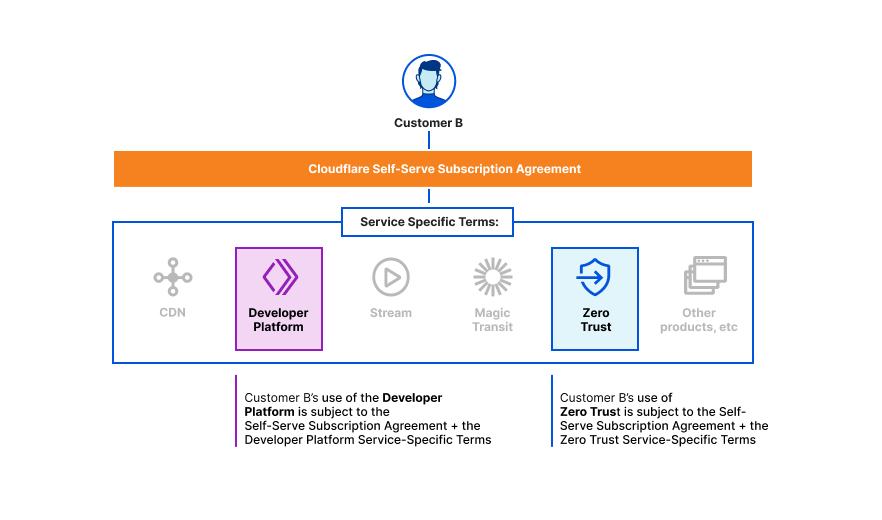
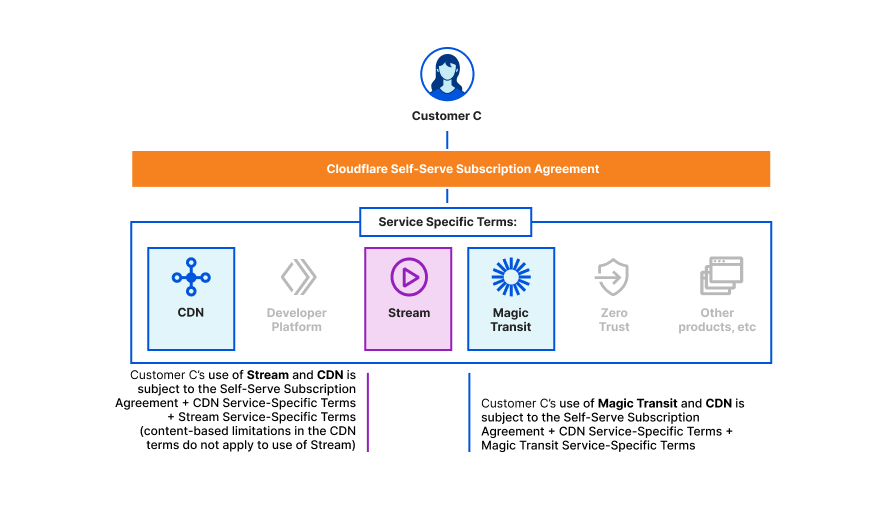
Here are a few diagrams to help understand how our terms of service fit together for various use cases.
Customer A is on a free, pro, or business plan and wants to use the CDN service:
Customer B is on a free, pro, or business plan and wants to use the Developer Platform and Zero Trust services:
Customer C is on a free, pro, or business plan and wants to use Stream with the CDN service and Magic Transit with the CDN service:
Quality of life upgrades
We also took this opportunity to tune up other aspects of our Terms of Service to make for a more user-first experience. For example, we streamlined our Self-Serve Subscription Agreement to make it clearer and easier to understand from the start.
We also heard previous complaints and removed an old restriction on benchmarking–we’re confident in the performance of our network and services, unlike some of our competitors. Last but not least, we renamed the Supplemental Terms to the Service-Specific Terms and gave them a major facelift to improve clarity and usability.
Users first
We’ve learned a lot from our users throughout this process, and we are always grateful for your feedback. Our terms were never meant to act as a gating mechanism that stifled innovation. With these updates, we hope that customers will feel confident in building the next generation of apps and services on Cloudflare. And we’ll keep the shears handy as we continue to work to help build a better Internet.
R2 is the ideal object storage platform to build data lakes. It’s infinitely scalable, highly durable (eleven 9's of annual durability), and has no egress fees. Zero egress fees mean zero vendor lock-in. You are free to use the tools you want to get the maximum value from your data.
Today we’re excited to announce our partnership with Snowflake so that you can use Snowflake to query data stored in your R2 data lake and load data from R2 into Snowflake. Organizations use Snowflake's Data Cloud to unite siloed data, discover, and securely share data, and execute diverse analytic workloads across multiple clouds.
One challenge of loading data into Snowflake database tables and querying external data lakes is the cost of data transfer. If your data is coming from a different cloud or even different region within the same cloud, this typically means you are paying an additional tax for each byte going into Snowflake. Pairing R2 and Snowflake lets you focus on getting valuable insights from your data, without having to worry about egress fees piling up.
Getting started
Sign up for R2 and create an API token
If you haven’t already, you’ll need to sign up for R2 and create a bucket. You’ll also need to create R2 security credentials for Snowflake following the steps below.
Generate an R2 token
1. In the Cloudflare dashboard, select R2.
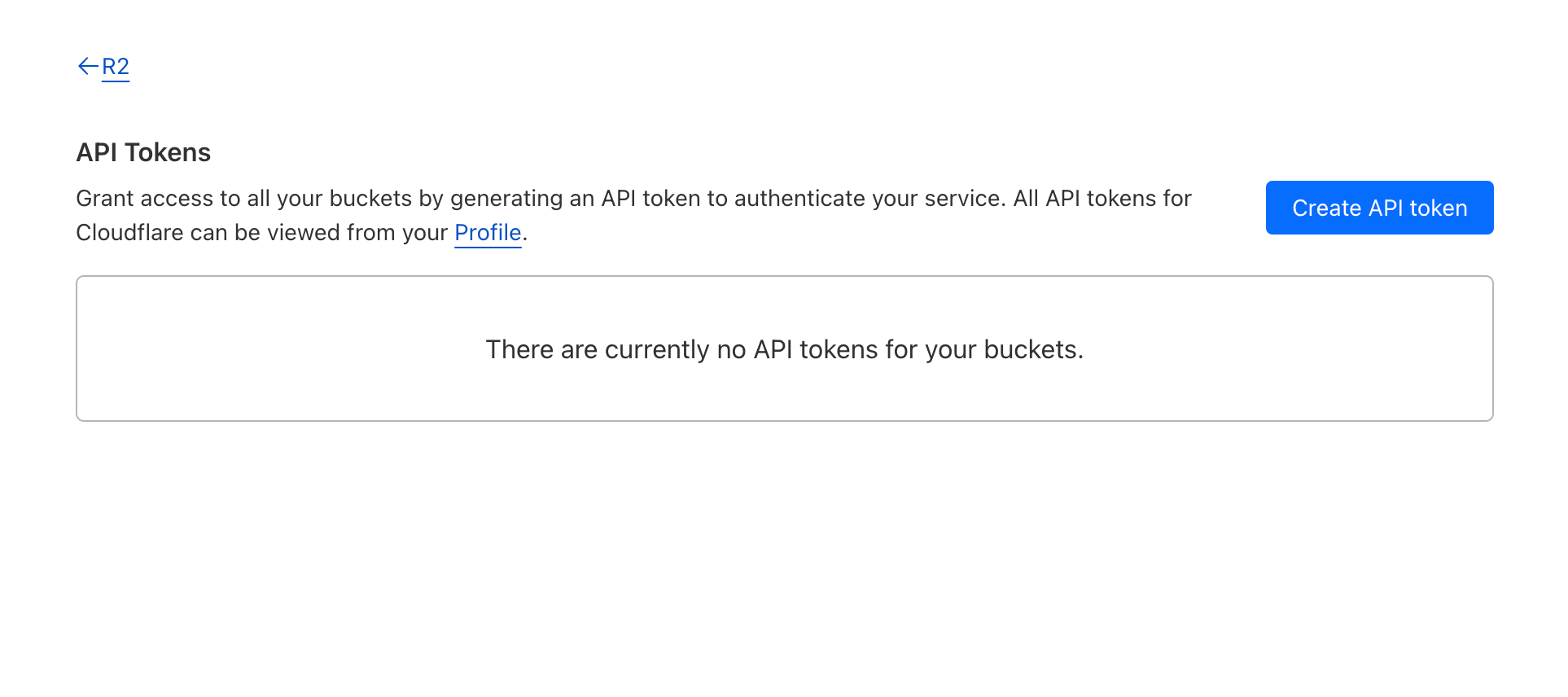
2. Select Manage R2 API Tokens on the right side of the dashboard.
3. Select Create API token.
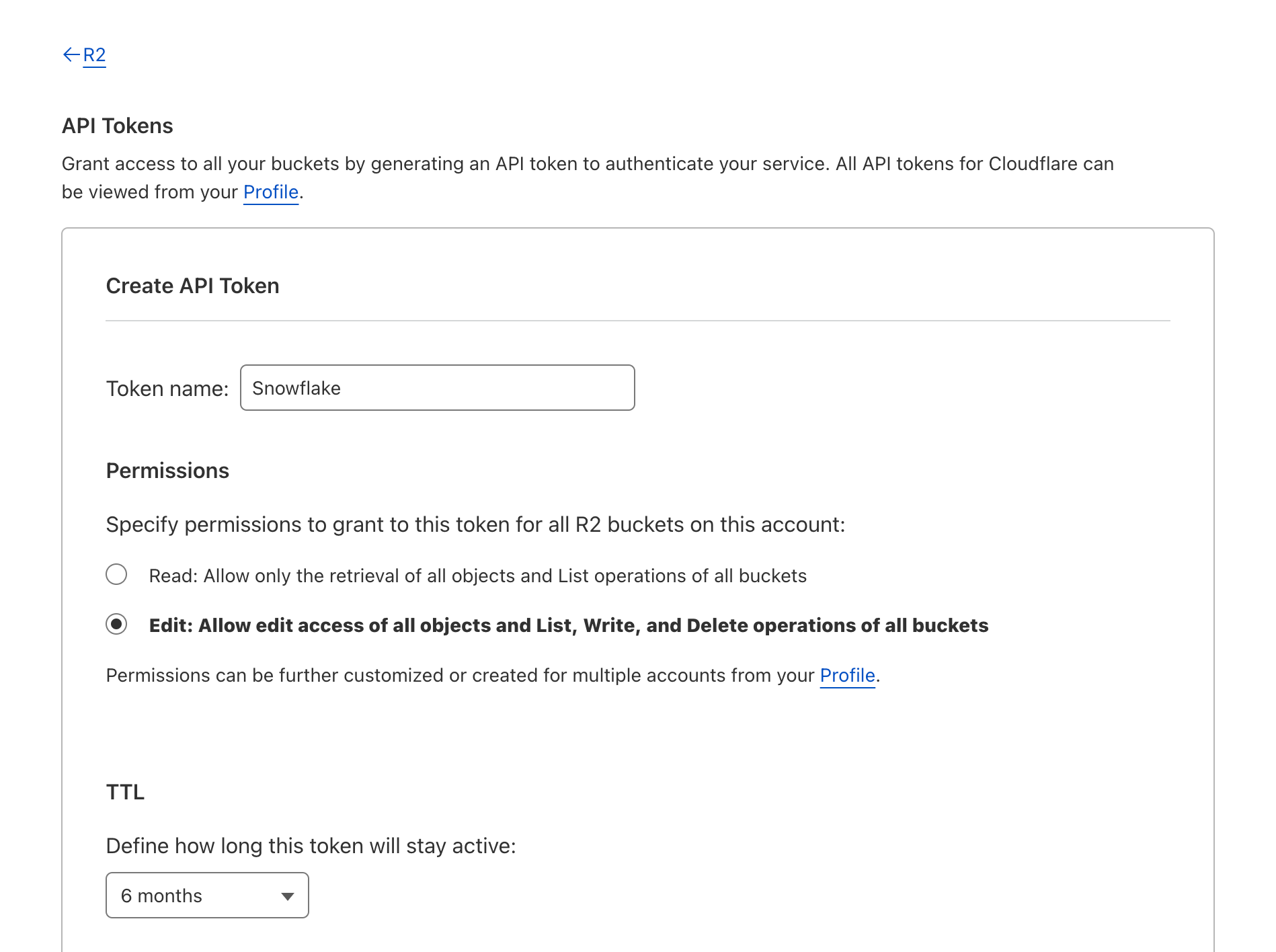
4. Optionally select the pencil icon or R2 Token text to edit your API token name.
5. Under Permissions, select Edit.
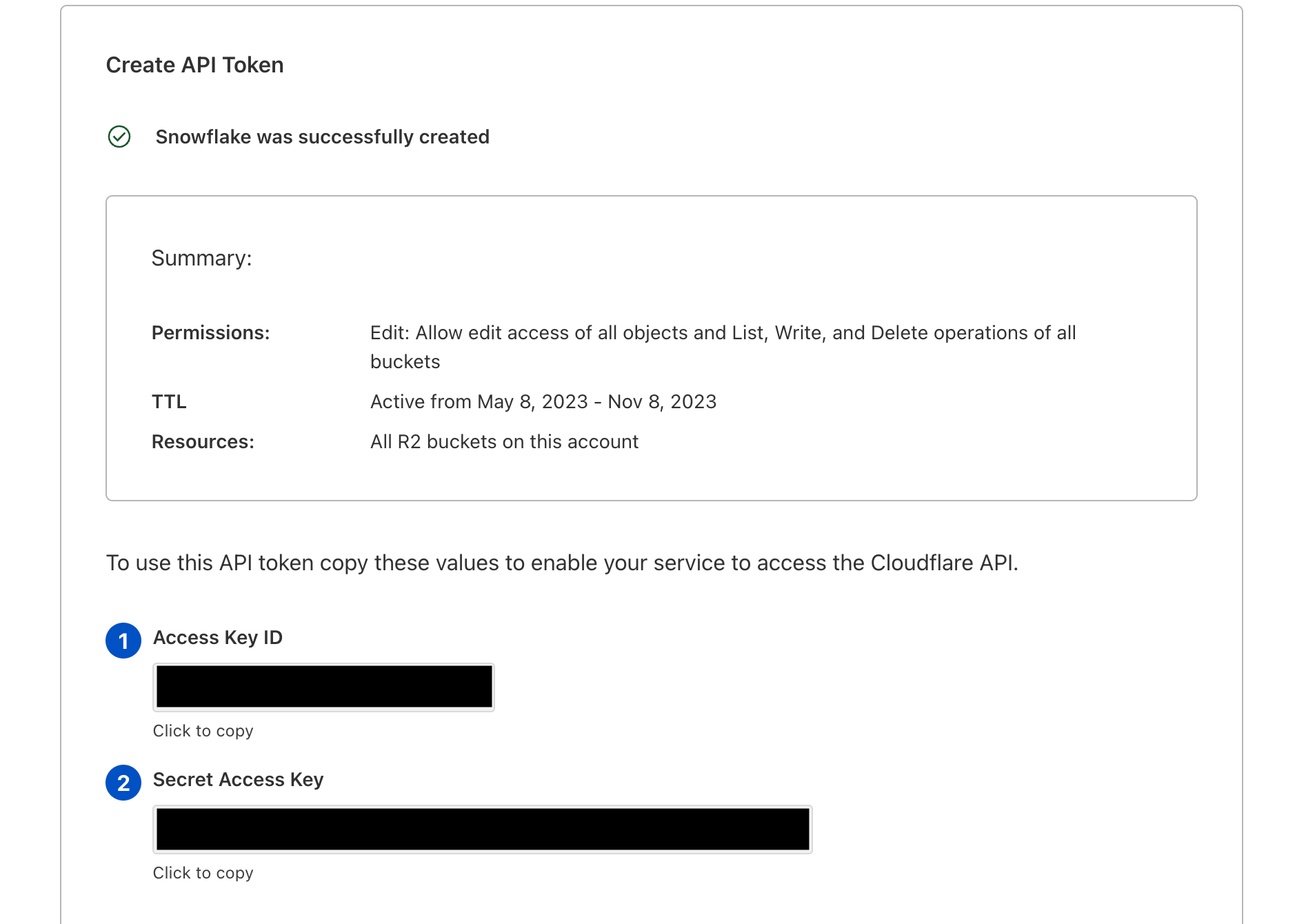
6. Select Create API Token.
You’ll need the Secret Access Key and Access Key ID to create an external stage in Snowflake.
Note: You may need to contact your Snowflake account team to enable S3-compatible endpoints in Snowflake. Get more information here.
Loading data into Snowflake
To load data from your R2 data lake into Snowflake, use the COPY INTO <table> command.
COPY INTO t1
  FROM @my_r2_stage/load/;
You can flip the table and external stage parameters in the example above to unload data from Snowflake into R2.
Querying data in R2 with Snowflake
You’ll first need to create an external table in Snowflake. Once you’ve done that you’ll be able to query your data stored in R2.
SELECT * FROM external_table;
For more information on how to use R2 and Snowflake together, refer to documentation here.
“Data is becoming increasingly the center of every application, process, and business metrics, and is the cornerstone of digital transformation. Working with partners like Cloudflare, we are unlocking value for joint customers around the world by helping save costs and helping maximize customers data investments,” – James Malone, Director of Product Management at Snowflake
Have any feedback?
We want to hear from you! If you have any feedback on the integration between Cloudflare R2 and Snowflake, please let us know by filling this form.
Be sure to check our Discord server to discuss everything R2!
One of the best feelings as a developer is seeing your idea come to life. You want to move fast and Cloudflare’s developer platform gives you the tools to take your applications from 0 to 100 within minutes.
One thing that we’ve heard slows developers down is the question: “What databases can be used with Workers?”. Developers stumble when it comes to things like finding the databases that Workers can connect to, the right library or driver that's compatible with Workers and translating boilerplate examples to something that can run on our developer platform.
Today we’re announcing Database Integrations – making it seamless to connect to your database of choice on Workers. To start, we’ve added some of the most popular databases that support HTTP connections: Neon, PlanetScale and Supabase with more (like Prisma, Fauna, MongoDB Atlas) to come!
Focus more on code, less on config
Our serverless SQL database, D1, launched in open alpha last year, and we’re continuing to invest in making it production ready (stay tuned for an exciting update later this week!). We also recognize that there are plenty of flavours of databases, and we want developers to have the freedom to select what’s best for them and pair it with our powerful compute offering.
On our second day of this Developer Week 2023, data is in the spotlight. We’re taking huge strides in making it possible and more performant to connect to databases from Workers (spoiler alert!):
Making it possible and performant is just the start, we also want to make connecting to databases painless. Databases have specific protocols, drivers, APIs and vendor specific features that you need to understand in order to get up and running. With Database Integrations, we want to make this process foolproof.
Whether you’re working on your first project or your hundredth project, you should be able to connect to your database of choice with your eyes closed. With Database Integrations, you can spend less time focusing on configuration and more on doing what you love – building your applications!
What does this experience look like?
Discoverability
If you’re starting a project from scratch or want to connect Workers to an existing database, you want to know “What are my options?”.
Workers supports connections to a wide array of database providers over HTTP. With newly released outbound TCP support, the databases that you can connect to on Workers will only grow!
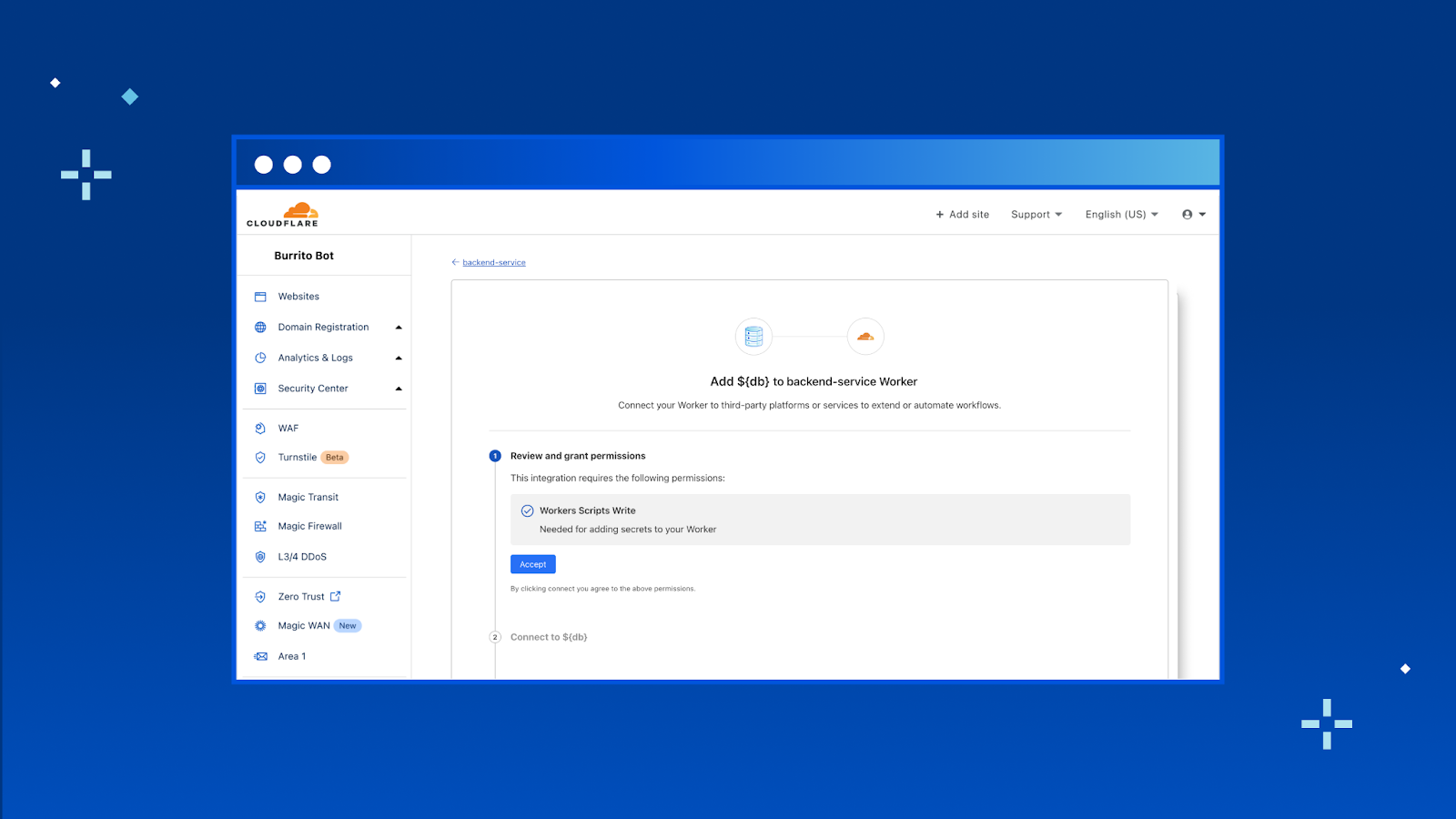
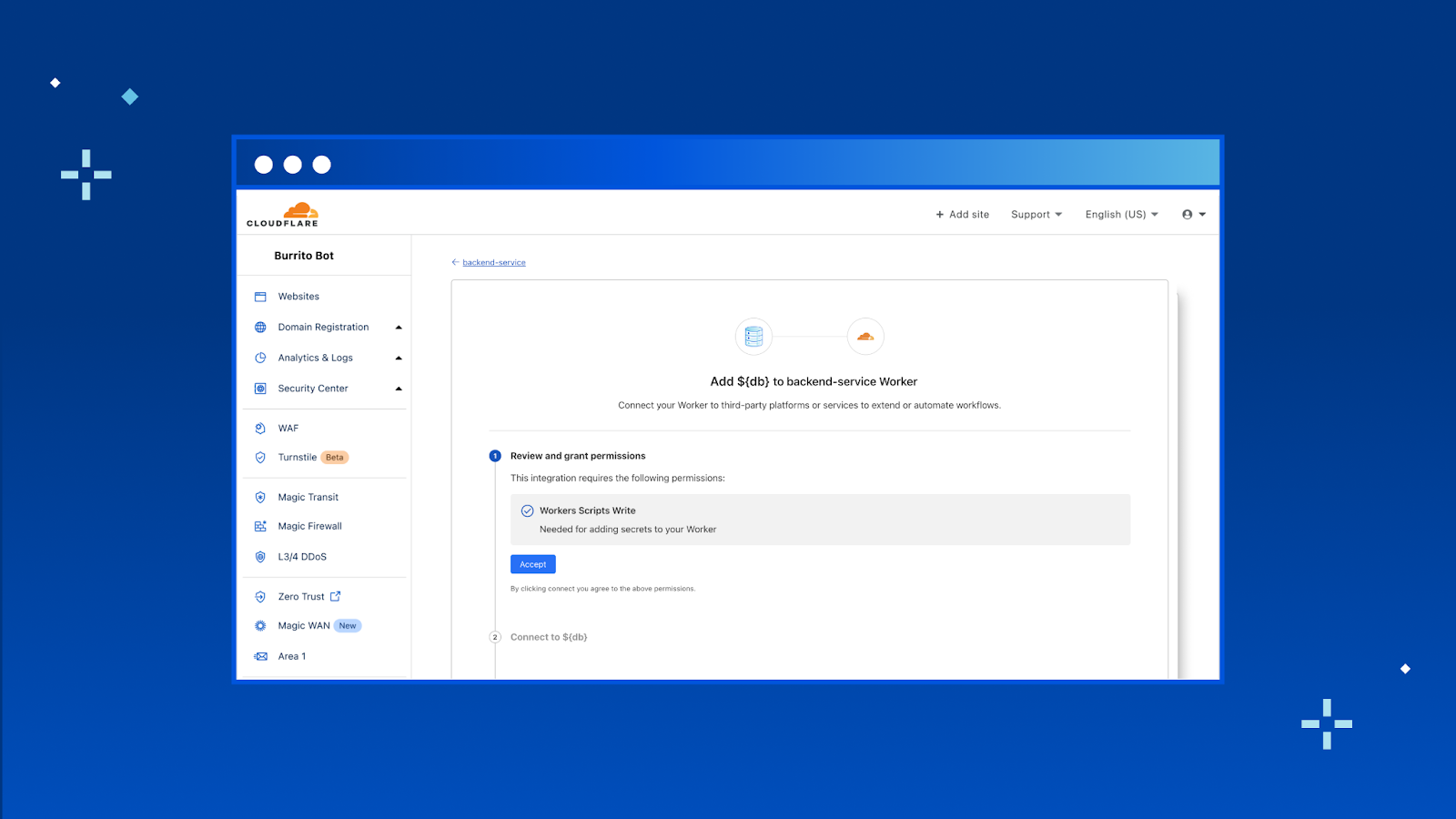
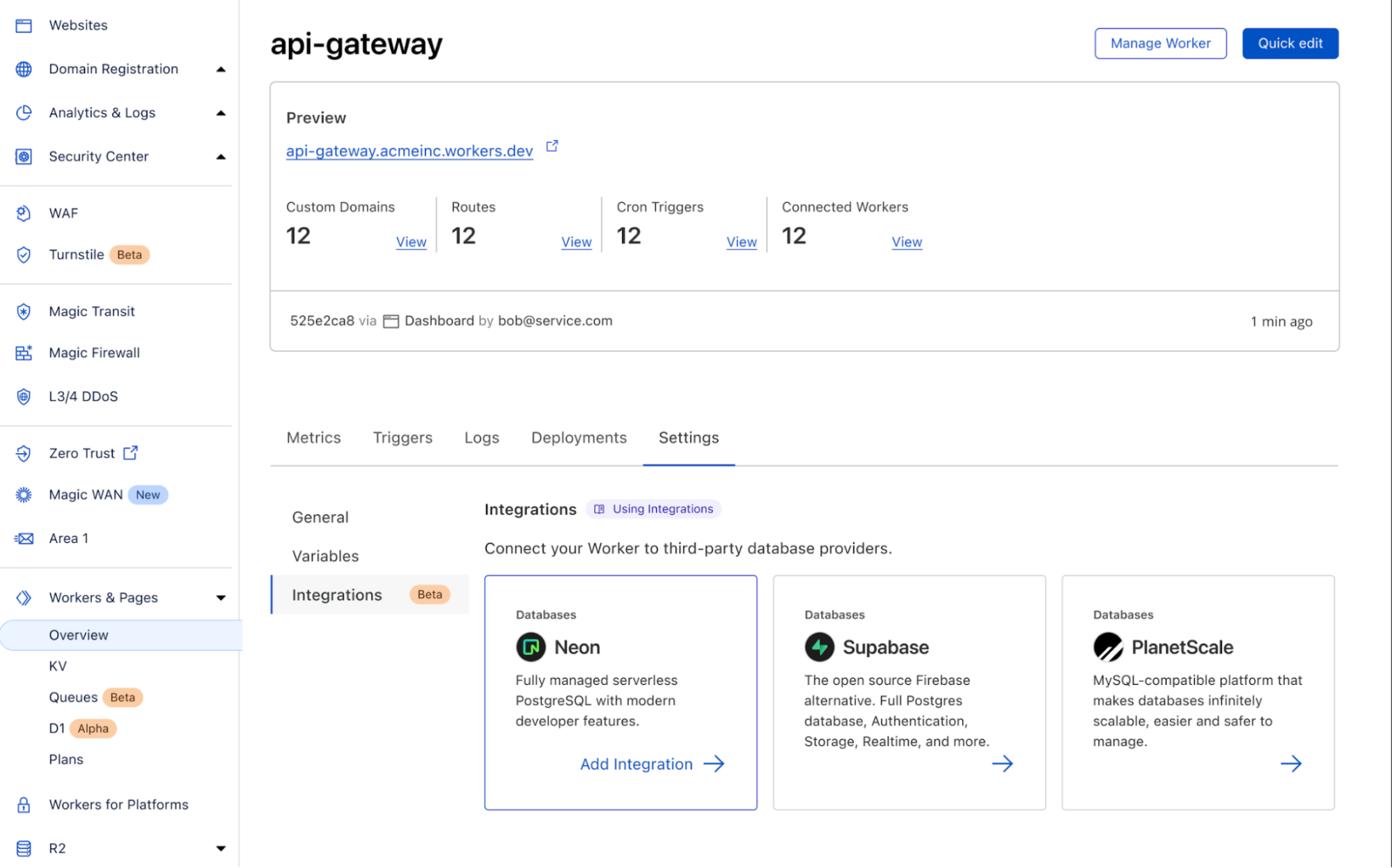
In the new “Integrations” tab, you’ll be able to view all the databases that we support and add the integration to your Worker directly from here. To start, we have support for Neon, PlanetScale and Supabase with many more coming soon.
Authentication
You should never have to copy and paste your database credentials or other parts of the connection string.
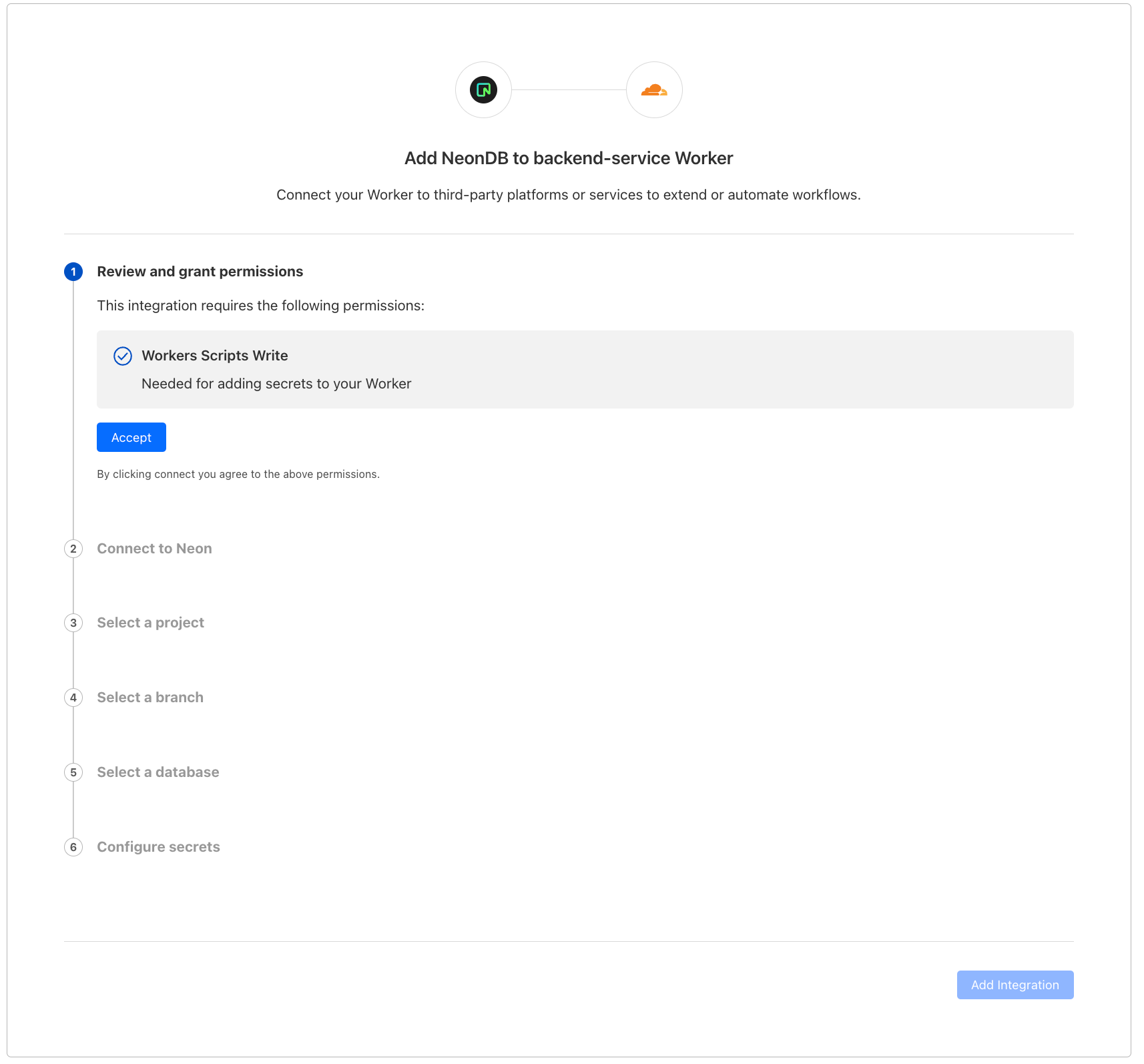
Once you hit “Add Integration” we take you through an OAuth2 flow that automatically gets the right configuration from your database provider and adds them as encrypted environment variables to your Worker.
Once you have credentials set up, check out our documentation for examples on how to get started using the data platform’s client library. What’s more – we have templates coming that will allow you to get started even faster!
That’s it! With database integrations, you can connect your Worker with your database in just a few clicks. Head to your Worker > Settings > Integrations to try it out today.
What’s next?
We’ve only just scratched the surface with Database Integrations and there’s a ton more coming soon!
While we’ll be continuing to add support for more popular data platforms we also know that it's impossible for us to keep up in a moving landscape. We’ve been working on an integrations platform so that any database provider can easily build their own integration with Workers. As a developer, this means that you can start tinkering with the next new database right away on Workers.
Additionally, we’re working on adding wrangler support, so you can create integrations directly from the CLI. We’ll also be adding support for account level environment variables in order for you to share integrations across the Workers in your account.
We’re really excited about the potential here and to see all the new creations from our developers! Be sure to join Cloudflare’s Developer Discord and share your projects. Happy building!
Today, we are excited to announce a new API in Cloudflare Workers for creating outbound TCP sockets, making it possible to connect directly to any TCP-based service from Workers.
Standard protocols including SSH, MQTT, SMTP, FTP, and IRC are all built on top of TCP. Most importantly, nearly all applications need to connect to databases, and most databases speak TCP. And while Cloudflare D1 works seamlessly on Workers, and some hosted database providers allow connections over HTTP or WebSockets, the vast majority of databases, both relational (SQL) and document-oriented (NoSQL), require clients to connect by opening a direct TCP “socket”, an ongoing two-way connection that is used to send queries and receive data. Now, Workers provides an API for this, the first of many steps to come in allowing you to use any database or infrastructure you choose when building full-stack applications on Workers.
Database drivers, the client code used to connect to databases and execute queries, are already using this new API. pg, the most widely used JavaScript database driver for PostgreSQL, works on Cloudflare Workers today, with more database drivers to come.
The TCP Socket API is available today to everyone. Get started by reading the TCP Socket API docs, or connect directly to any PostgreSQL database from your Worker by following this guide.
First — what is a TCP Socket?
TCP (Transmission Control Protocol) is a foundational networking protocol of the Internet. It is the underlying protocol that is used to make HTTP requests (prior to HTTP/3, which uses QUIC), to send email over SMTP, to query databases using database–specific protocols like MySQL, and many other application-layer protocols.
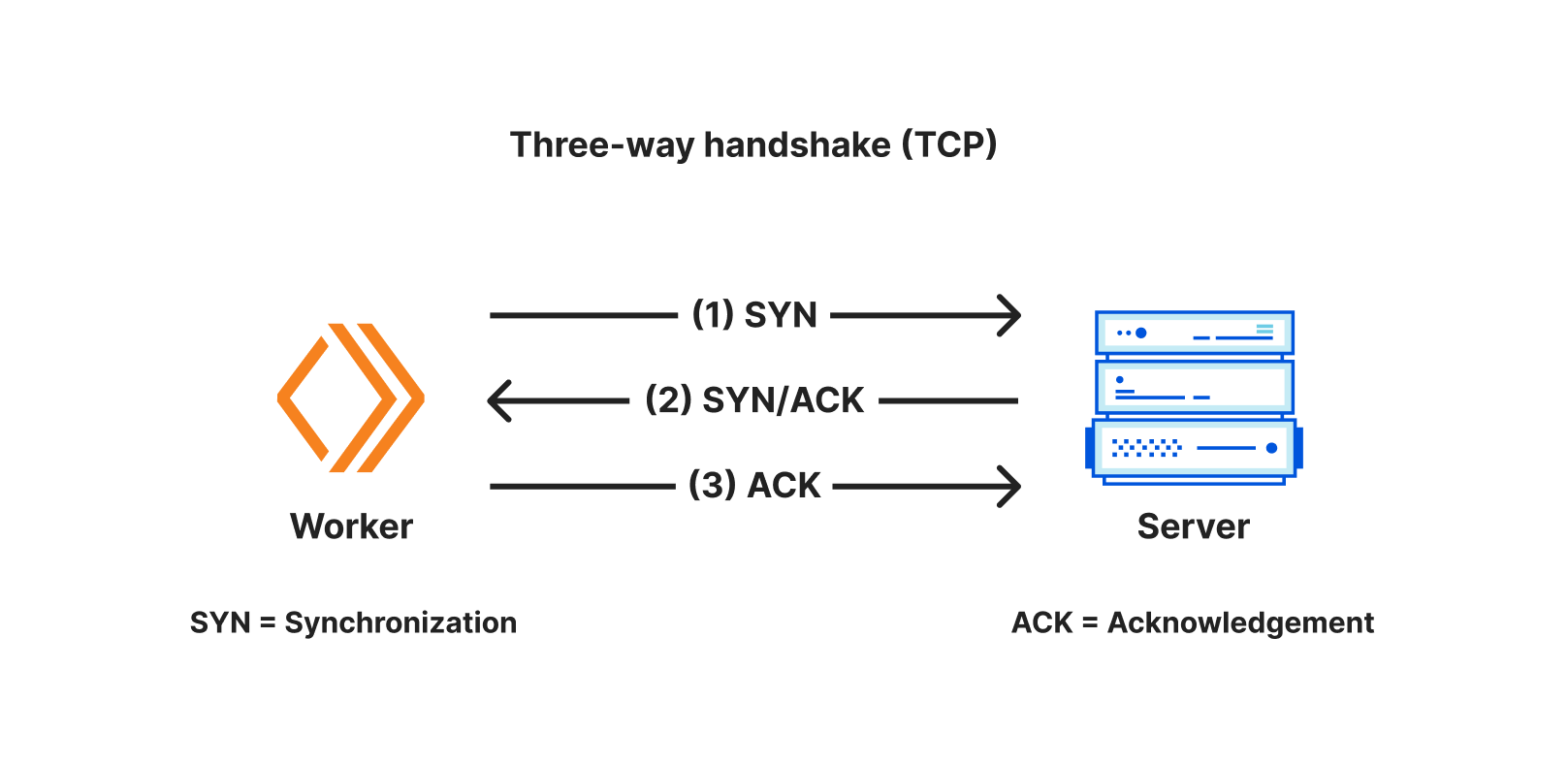
A TCP socket is a programming interface that represents a two-way communication connection between two applications that have both agreed to “speak” over TCP. One application (ex: a Cloudflare Worker) initiates an outbound TCP connection to another (ex: a database server) that is listening for inbound TCP connections. Connections are established by negotiating a three-way handshake, and after the handshake is complete, data can be sent bi-directionally.
A socket is the programming interface for a single TCP connection — it has both a readable and writable “stream” of data, allowing applications to read and write data on an ongoing basis, as long as the connection remains open.
connect() — A simpler socket API
With Workers, we aim to support standard APIs that are supported across browsers and non-browser environments wherever possible, so that as many NPM packages as possible work on Workers without changes, and package authors don’t have to write runtime-specific code. But for TCP sockets, we faced a challenge — there was no clear shared standard across runtimes. Node.js provides the net and tls APIs, but Deno implements a different API — Deno.connect. And web browsers do not provide a raw TCP socket API, though a WICG proposal does exist, and it is different from both Node.js and Deno.
We also considered how a TCP socket API could be designed to maximize performance and ergonomics in a serverless environment. Most networking APIs were designed well before serverless emerged, with the assumption that the developer’s application is also the server, responsible for directly handling configuring TLS options and credentials.
With this backdrop, we reached out to the community, with a focus on maintainers of database drivers, ORMs and other libraries that create outbound TCP connections. Using this feedback, we’ve tried to incorporate the best elements of existing APIs and proposals, and intend to contribute back to future standards, as part of the Web-interoperable Runtimes Community Group (WinterCG).
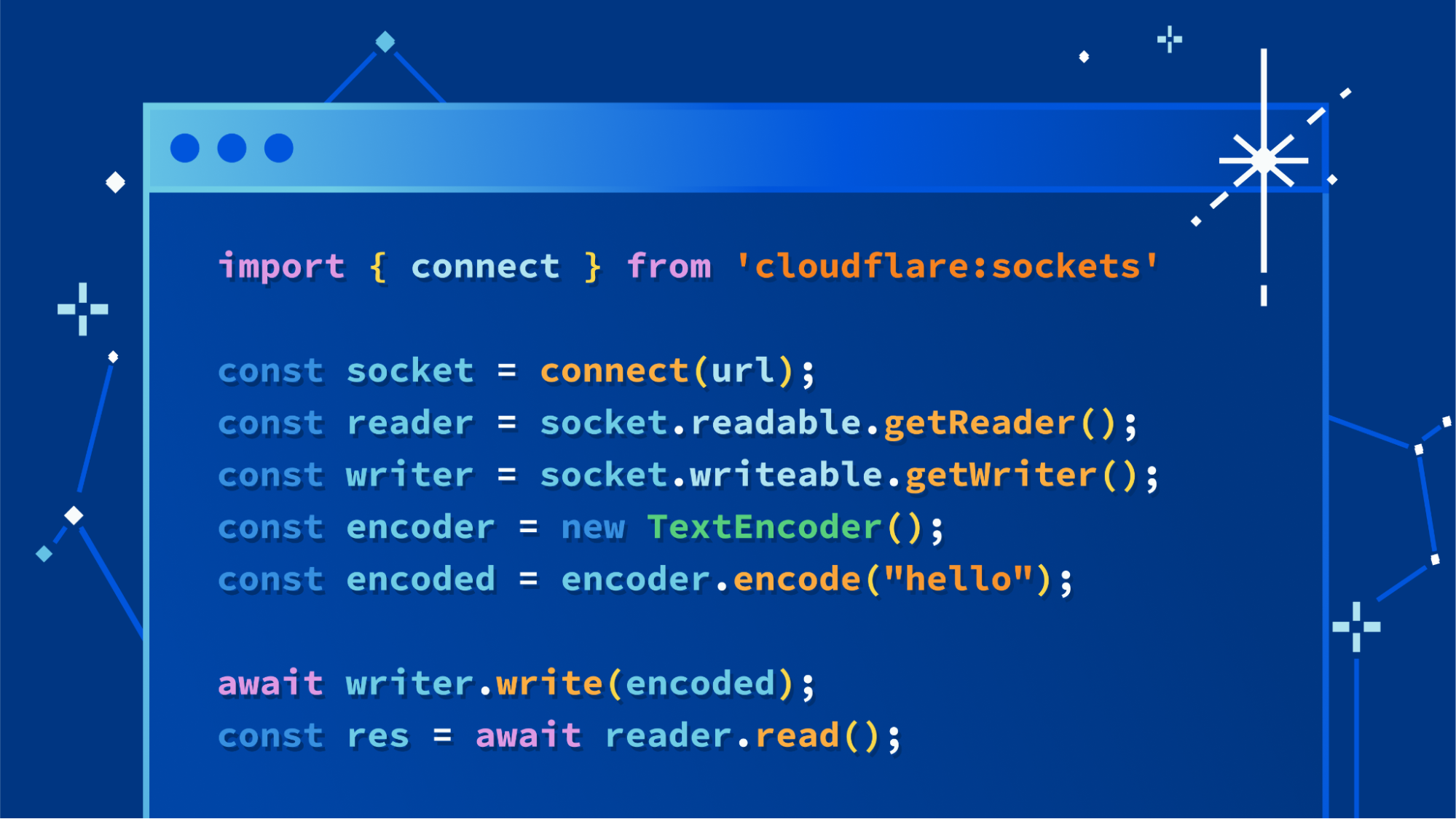
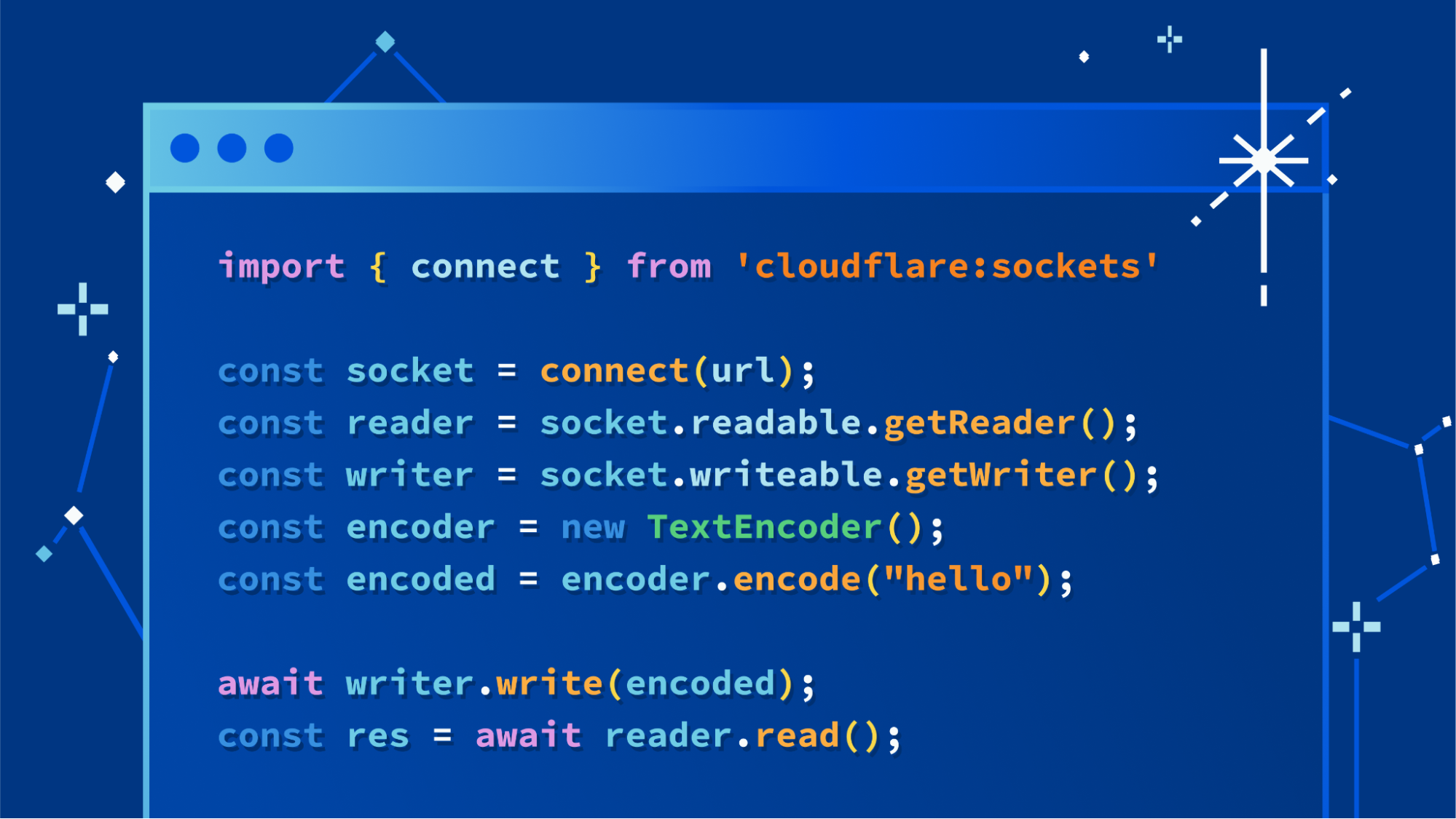
The API we landed on is a simple function, connect(), imported from the new cloudflare:sockets module, that returns an instance of a Socket. Here’s a simple example showing it used to connect to a Gopher server. Gopher was one of the Internet’s early protocols that relied on TCP/IP, and still works today:
Opportunistic TLS (StartTLS), without separate APIs
Opportunistic TLS, a pattern of creating an initial insecure connection, and then upgrading it to a secure one that uses TLS, remains common, particularly with database drivers. In Node.js, you must use the net API to create the initial connection, and then use the tls API to create a new, upgraded connection. In Deno, you pass the original socket to Deno.startTls(), which creates a new, upgraded connection.
Drawing on a previous W3C proposal for a TCP Socket API, we’ve simplified this by providing one API, that allows TLS to be enabled, allowed, or used when creating a socket, and exposes a simple method, startTls(), for upgrading a socket to use TLS.
// Create a new socket without TLS. secureTransport defaults to "off" if not specified.
const socket = connect("address:port", { secureTransport: "off" })

// Create a new socket, then upgrade it to use TLS.
// Once startTls() is called, only the newly created socket can be used.
const socket = connect("address:port", { secureTransport: "starttls" })
const secureSocket = socket.startTls();

// Create a new socket with TLS
const socket = connect("address:port", { secureTransport: "use" })
TLS configuration — a concern of host infrastructure, not application code
Existing APIs for creating TCP sockets treat TLS as a library that you interact with in your application code. The tls.createSecureContext() API from Node.js has a plethora of advanced configuration options that are mostly environment specific. If you use custom certificates when connecting to a particular service, you likely use a different set of credentials and options in production, staging and development. Managing direct file paths to credentials across environments and swapping out .env files in production build steps are common pain points.
Host infrastructure is best positioned to manage this on your behalf, and similar to Workers support for making subrequests using mTLS, TLS configuration and credentials for the socket API will be managed via Wrangler, and a connect() function provided via a capability binding. Currently, custom TLS credentials and configuration are not supported, but are coming soon.
Start writing data immediately, before the TLS handshake finishes
Because the connect() API synchronously returns a new socket, one can start writing to the socket immediately, without waiting for the TCP handshake to first complete. This means that once the handshake completes, data is already available to send immediately, and host platforms can make use of pipelining to optimize performance.
connect() API + DB drivers = Connect directly to databases
Many serverless databases already work on Workers, allowing clients to connect over HTTP or over WebSockets. But most databases don’t “speak” HTTP, including databases hosted on most cloud providers.
Databases each have their own “wire protocol”, and open-source database “drivers” that speak this protocol, sending and receiving data over a TCP socket. Developers rely on these drivers in their own code, as do database ORMs. Our goal is to make sure that you can use the same drivers and ORMs you might use in other runtimes and on other platforms on Workers.
Try it now — connect to PostgreSQL from Workers
We’ve worked with the maintainers of pg, one of the most popular database drivers in the JavaScript ecosystem, used by ORMs including Sequelize and knex.js, to add support for connect().
You can try this right now. First, create a new Worker and install pg:
name = "my-worker"
main = "src/index.ts"
compatibility_date = "2023-05-15"
node_compat = true
In just 20 lines of TypeScript, you can create a connection to a Postgres database, execute a query, return results in the response, and close the connection:
index.ts
import { Client } from "pg";

export interface Env {
  DB: string;
}

export default {
  async fetch(
    request: Request,
    env: Env,
    ctx: ExecutionContext
  ): Promise<Response> {
    const client = new Client(env.DB);
    await client.connect();
    const result = await client.query({
      text: "SELECT * from customers",
    });
    console.log(JSON.stringify(result.rows));
    const resp = Response.json(result.rows);
    // Close the database connection, but don't block returning the response
    ctx.waitUntil(client.end());
    return resp;
  },
};
To test this in local development, use the --experimental-local flag (instead of –local), which uses the open-source Workers runtime, ensuring that what you see locally mirrors behavior in production:
wrangler dev --experimental-local
What’s next for connecting to databases from Workers?
This is only the beginning. We’re aiming for the two popular MySQL drivers, mysql and mysql2, to work on Workers soon, with more to follow. If you work on a database driver or ORM, we’d love to help make your library work on Workers.
If you’ve worked more closely with database scaling and performance, you might have noticed that in the example above, a new connection is created for every request. This is one of the biggest current challenges of connecting to databases from serverless functions, across all platforms. With typical client connection pooling, you maintain a local pool of database connections that remain open. This approach of storing a reference to a connection or connection pool in global scope will not work, and is a poor fit for serverless. Managing individual pools of client connections on a per-isolate basis creates other headaches — when and how should connections be terminated? How can you limit the total number of concurrent connections across many isolates and locations?
Instead, we’re already working on simpler approaches to connection pooling for the most popular databases. We see a path to a future where you don’t have to think about or manage client connection pooling on your own. We’re also working on a brand new approach to making your database reads lightning fast.
What’s next for sockets on Workers?
Supporting outbound TCP connections is only one half of the story — we plan to support inbound TCP and UDP connections, as well as new emerging application protocols based on QUIC, so that you can build applications beyond HTTP with Socket Workers.
Earlier today we also announced Smart Placement, which improves performance by placing any Worker that makes multiple HTTP requests to an origin run as close as possible to reduce round-trip time. We’re working on making this work with Workers that open TCP connections, so that if your Worker connects to a database in Virginia and makes many queries over a TCP connection, each query is lightning fast and comes from the nearest location on Cloudflare’s global network.
We also plan to support custom certificates and other TLS configuration options in the coming months — tell us what is a must-have in order to connect to the services you need to connect to from Workers.
Get started, and share your feedback
The TCP Socket API is available today to everyone. Get started by reading the TCP Socket API docs, or connect directly to any PostgreSQL database from your Worker by following this guide.
We want to hear your feedback, what you’d like to see next, and more about what you’re building. Join the Cloudflare Developers Discord.
A new week has begun. Last week, there was a lot of news related to AWS. I have compiled a few announcements you need to know. Let’s get started right away!
Last Week’s Launches Let’s take a look at some launches from the last week that I want to remind you of:
New Amazon EC2 I4g Instances – Powered by AWS Graviton2 processors, Amazon Elastic Compute Cloud (Amazon EC2) I4g instances improve real-time storage performance up to 2x compared to prior generation storage-optimized instances. Based on AWS Nitro SSDs that are custom-built by AWS and reduce both latency and latency variability, I4g instances are optimized for workloads that perform a high mix of random read/write and require very low I/O latency, such as transactional databases and real-time analytics. To learn more, see Jeff’s post.
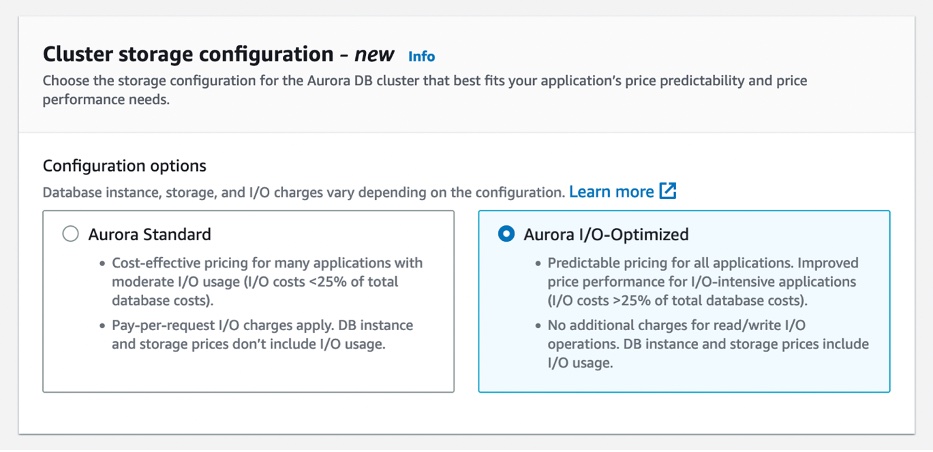
Amazon Aurora I/O-Optimized – You can now choose between two storage configurations for Amazon Aurora DB clusters: Aurora Standard or Aurora I/O-Optimized. For applications with low-to-moderate I/Os, Aurora Standard is a cost-effective option.
For applications with high I/Os, Aurora I/O-Optimized provides improved price performance, predictable pricing, and up to 40 percent costs savings. To learn more, see my full blog post.
AWS Management Console Private Access – This is a new security feature that allows you to limit access to the AWS Management Console from your Virtual Private Cloud (VPC) or connected networks to a set of trusted AWS accounts and organizations. It is built on VPC endpoints, which use AWS PrivateLink to establish a private connection between your VPC and the console.
AWS Management Console Private Access is useful when you want to prevent users from signing in to unexpected AWS accounts from within your network. To learn more, see the AWS Management Console getting started guide.
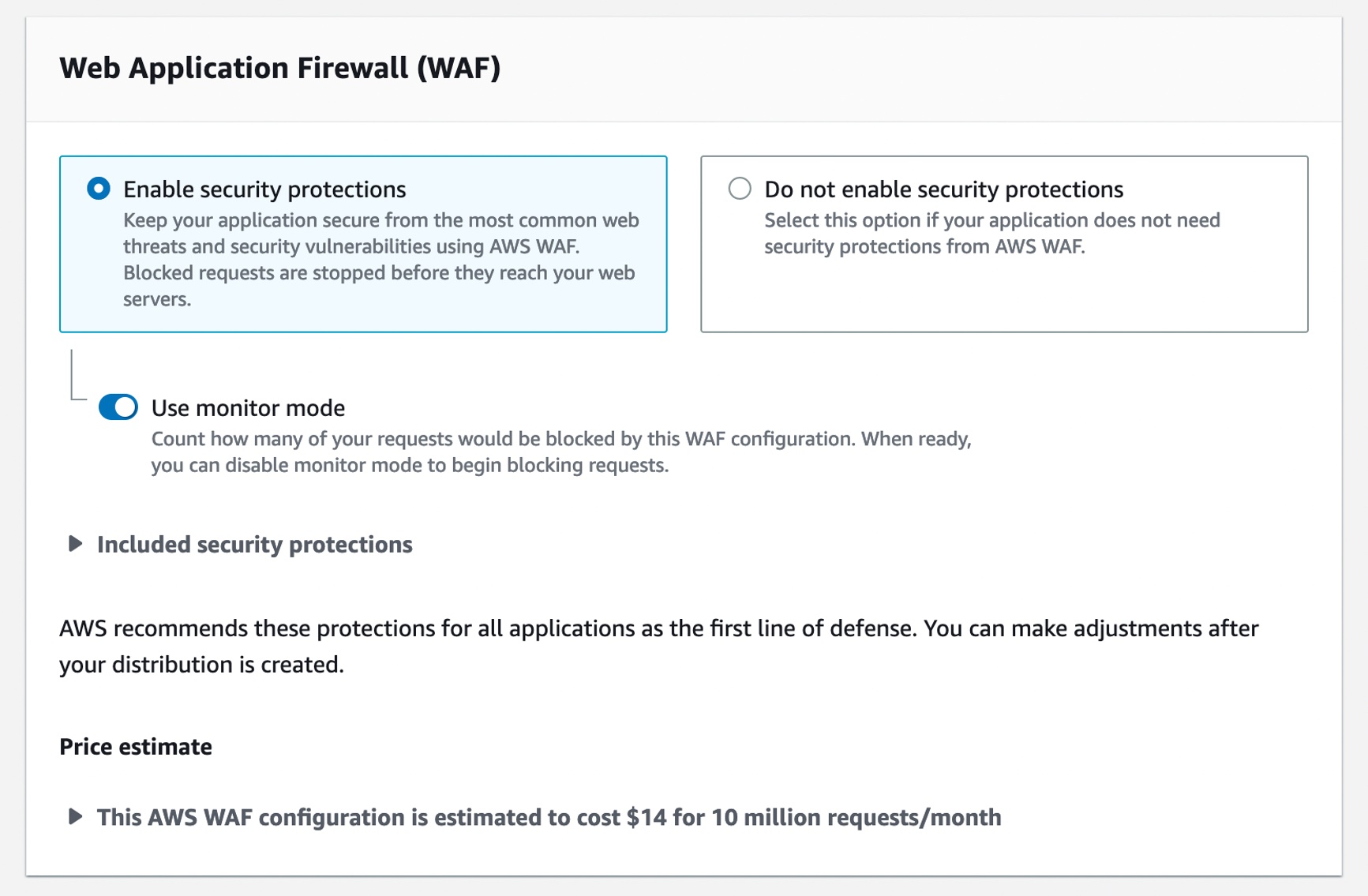
One-Click Security Protection on the Amazon CloudFront Console – You can now secure your web applications and APIs with AWS WAF with a single click on the Amazon CloudFront console. CloudFront handles creating and configuring AWS WAF for you with out-of-the-box protections recommended by AWS and this simple and convenient way to protect applications at the time you create or edit your distribution.
You may continue to select a preconfigured AWS WAF web access control list (ACL) when you prefer to use an existing web ACL. To learn more, see Using AWS WAF to control access to your content in the AWS documentation.
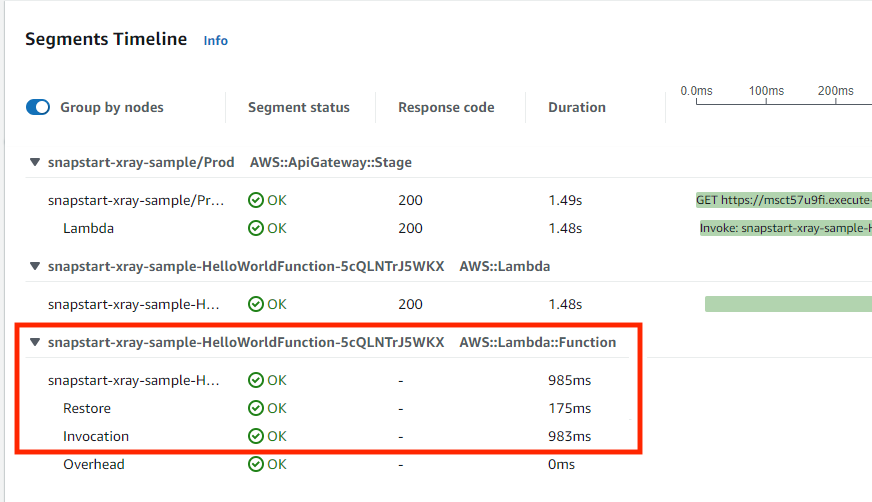
Tracing AWS Lambda SnapStart Functions with AWS X-Ray – You can use AWS X-Ray traces to gain deeper visibility into your function’s performance and execution lifecycle, helping you identify errors and performance bottlenecks for your latency-sensitive Java applications built using SnapStart-enabled functions.
With X-Ray support for SnapStart-enabled functions, you can now see trace data about the restoration of the execution environment and execution of your function code. You can enable X-Ray for Java-based SnapStart-enabled Lambda functions running on Amazon Corretto 11 or 17. To learn more about X-Ray for SnapStart-enabled functions, visit the Lambda Developer Guide or read Marcia’s blog post.
For a full list of AWS announcements, be sure to keep an eye on the What’s New at AWS page.
Open Source Updates Last week, we introduced new open-source projects and significant roadmap contributions to the Jupyter community.
Snapchange – Snapchange is a new open-source project to make fuzzing of a memory snapshot easier using KVM written by Rust. Snapchange enables a target binary to be fuzzed with minimal modifications, providing useful introspection that aids in fuzzing. Snapchange utilizes the features of the Linux kernel’s built-in virtual machine manager known as kernel virtual machine or KVM. To learn more, see the announcement post and GitHub repository.
Cedar – Cedar is a new open-source language for defining permissions as policies, which describes who should have access to what, and evaluating those policies. You can use Cedar to control access to resources such as photos in a photo-sharing app, compute nodes in a microservices cluster, or components in a workflow automation system. Cedar is also authorization-policy language used by the Amazon Verified Permissions, a scalable, fine-grained permissions management and authorization service for custom applications and AWS Verified Access managed services to validate each application request before granting access. To learn more, see the announcement post , Amazon Science blog post and Cedar playground to test sample policies.
Jupyter Community Contributions – We announced new contributions to Jupyter community to democratize generative artificial intelligence (AI) and scale machine learning (ML) workloads. We contributed two Jupyter extensions – Jupyter AI to bring generative AI to Jupyter notebooks and Amazon CodeWhisperer Jupyter extension to generate code suggestions for Python notebooks in JupyterLab. We also contributed three new capabilities to help you scale ML development faster: notebooks scheduling, SageMaker open-source distribution, and Amazon CodeGuru Jupyter extension. To learn more, see the announcement post and Jupyter on AWS.
Upcoming AWS Events Check your calendars and sign up for these AWS-led events:
AWS Serverless Innovation Day on May 17 – Join us for a free full-day virtual event to learn about AWS Serverless technologies and event-driven architectures from customers, experts, and leaders. Marcia outlined the agenda and main topics of this event in her post. You can register on the event page.
AWS Data Insights Day on May 24 – Join us for another virtual event to discover ways to innovate faster and more cost-effectively with data. Whether your data is stored in operational data stores, data lakes, streaming engines, or within your data warehouse, Amazon Redshift helps you achieve the best performance with the lowest spend. This event focuses on customer voices, deep-dive sessions, and best practices of Amazon Redshift. You can register on the event page.
AWS Silicon Innovation Day on June 21 – Join AWS leaders and experts showcasing AWS innovations in custom-designed EC2 chips built for high performance and scale in the cloud. AWS has designed and developed purpose-built silicon specifically for the cloud. You can understand AWS Silicons and how they can use AWS’s unique EC2 chip offerings to their benefit. You can register on the event page.
AWS re:Inforce 2023 – You can still register for AWS re:Inforce, in Anaheim, California, June 13–14.
AWS Community Day – Join community-led conferences driven by AWS user group leaders closest to your city: Chicago (June 15), and Philippines (June 29–30).
In a remotely presented, memory-management-track session at the 2023 Linux Storage, Filesystem,
Memory-Management and BPF Summit, Fred van der Linden pointed out that
the line dividing resources controlled by the kernel from those managed by
user space has moved back and forth over the years. He is currently
interested in making it possible for user space to take more control over
the management of memory resources. A proposal was discussed in general
terms, but it will require some real scrutiny on its way toward the
mainline, if it ever gets there.
Sourceware.org, which has long played host to many important projects, has
announced that it has become a member project of the Software Freedom
Conservancy — a move that has been in the
works for some time.
Recent discussions have inspired the Sourceware volunteers to think
carefully about the future and succession of the leadership for
this important hosting project. By joining SFC, Sourceware gains
access to strategic advice and governance expertise to recruit new
volunteers and raise funds to support work on Sourceware
infrastructure.
See this article for more background on
those recent discussions.
Overcommitting memory is a longstanding tradition in the Linux world
(and beyond); it is rare that an application uses all of the memory
allocated to it, so overcommitting can help to improve overall memory
utilization. In situations where memory has been overcommitted, though, it
may be necessary to respond quickly to ensure that applications have the
memory they actually need, even when those needs change. At the 2023 Linux Storage, Filesystem,
Memory-Management and BPF Summit, T.J. Alumbaugh (in the room) and
Yuanchu Xie (remotely)
presented a new mechanism intended to help hosts provide containerized
guests with the memory resources they need.
The collective thoughts of the interwebz
Manage Consent
To provide the best experiences, we use technologies like cookies to store and/or access device information. Consenting to these technologies will allow us to process data such as browsing behavior or unique IDs on this site. Not consenting or withdrawing consent, may adversely affect certain features and functions.
Functional
Always active
The technical storage or access is strictly necessary for the legitimate purpose of enabling the use of a specific service explicitly requested by the subscriber or user, or for the sole purpose of carrying out the transmission of a communication over an electronic communications network.
Preferences
The technical storage or access is necessary for the legitimate purpose of storing preferences that are not requested by the subscriber or user.
Statistics
The technical storage or access that is used exclusively for statistical purposes.The technical storage or access that is used exclusively for anonymous statistical purposes. Without a subpoena, voluntary compliance on the part of your Internet Service Provider, or additional records from a third party, information stored or retrieved for this purpose alone cannot usually be used to identify you.
Marketing
The technical storage or access is required to create user profiles to send advertising, or to track the user on a website or across several websites for similar marketing purposes.