The _index.js payload begins with a large JavaScript block comment containing fake system instructions and policy-triggering content. Because it is inside a comment, it does not affect JavaScript execution. The runtime skips it. The real malware begins after the comment with a try{eval(…)} wrapper around a large character-code array and a ROT-style substitution function.
This header appears designed for AI-mediated analysis, not for Node, Bun, or Python. It attempts to derail scanners or analyst copilots that feed the beginning of a file to a language model without clearly isolating the content as untrusted data. In weak pipelines, this can cause refusal behavior, prompt confusion, context pollution, or premature classification before the scanner reaches the actual malware.
This is not a magical bypass against static detection. YARA rules, entropy checks, AST parsing, string extraction, deobfuscation, and behavioral rules still work. But it is a practical anti-analysis trick against naive LLM-first triage systems.
В началото на годината забелязах, че няколко паркоместа извън синя и зелена зона, където често спирам, са вече служебен абонамент. Стори ми се странно предвид, че бяха пред офис сграда, която си има паркоместа в имота, а служебните бяха запазени включително за събота и неделя. Зачудих се как става това и колко такива има наоколо. Затова поисках от Центъра за градска мобилност информация за всички паркоместа в София – в и извън зоните за платено паркиране, служебни и обикновени, с точно местоположение и детайли за абонамента.
Отговориха ми в края на март като ми предоставиха две таблици. Първата с данни за 1447 абонамента, а втората с координатите и адресите на 2188 служебни паркоместа.
Методология и условности
От отговорът става ясно, че нямат координатите на всички паркоместа в София. Уточниха обаче, че в синя и зелена зона са около 33 хиляди. Имат географските координати единствено на тези за служебен абонамент, но и те са ориентировъчни. Казаха и че не пазят информация какво е лицето, което плаща за служебния абонамент – дали е общинска или държавна институция, юридическо или физическо лице. В таблицата с абонаментите около половината записи са с имената на фирмите или институциите. Предполагам, че останалите са частни лица. Съдържат също срок и вид на абонамента, брой и адрес на паркоместата.
Тук трябва да уточним няколко термина. Условията и цените на служебните паркоместа са разписани на сайта на ЦГМ в съответствие със приложената към настоящия момент наредба. Последните промени в нея бяха обжалвани и въпреки спечеленото от общината дело, не са приведени в действие.
Това значи, че сега има три вида абонамент – дневен, удължен, разширен и нощен. Дневният е между 8:30 и 19:30 в работни дни. Ако към него добавите удължен може да паркирате между 8:30 и 23:30 пак в работни дни. Разширеният позволява паркиране в събота и неделя между 8:30 и 19:30. Нощният важи само за синя зона и прави мястото запазено 24 часа. Всичко абонаменти са допълнителни към дневния. Така, например, ако вземете дневен за място в синя зона и добавите нощният, ще е запазено за вас денонощно в работни дни. Ако добавите и разширеният пакет, мястото ще е само за вас 7 дни в седмицата, 24 часа в денонощието.
В таблицата за абонаменти за едно и също паркомясто може да има няколко записа според дневния и допълнителните абонаменти. Възможно е допълнителните да са само за едно място, а дневният да е за повече. По-голям проблем обаче се оказаха адресите. В данните предоставени от ЦГМ адресите при абонаментите и тези за паркоместата не съвпадаха почти никога. В някои случаи бяха описателни (след кръстовището) , в други – липсва номер на улицата. Понякога нямаха нищо общо между двете таблици. Не знам дали ЦГМ така си организира данните или просто така са ми ги предоставили за справката. Ако е първото, не бих се учудил да води до редовно объркване.
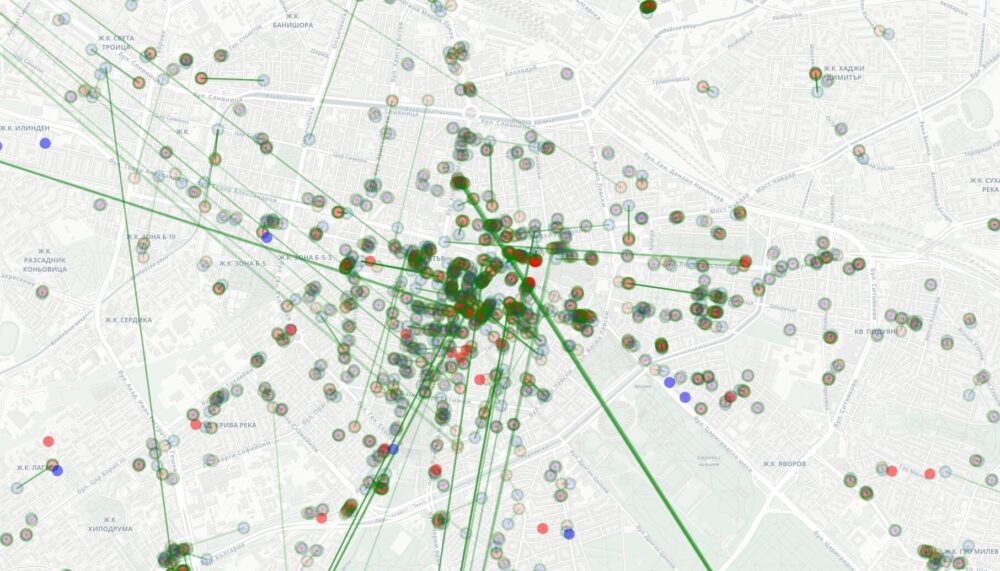
Самите паркоместа бяха с доста точни координати и лесно можех да ги сложа на карта. За да ги свържа с абонаментите обаче трябваше да гадая по адресите. Опитах с няколко AI модела, но резултатите не бяха добри. Това беше причината да започвам и спирам работа по този проект цели три месеца. Наскоро ми писна и написах собствени инструмент, с който да свържа данните. Използвах това, което Claude постигна като начало и поправих повече от половината. Междинен кадър от работата виждате долу. Не успях да намеря паркоместата за три абонамента и обратното за около 25 служебни паркоместа.
В крайна сметка успях да покажа възможно най-точно кое паркомясто от кого е взето и до кога. Възможни са грешки и ако намерите такива, пишете в коментарите, за да ги оправя. В някои случаи не успях точно да определя кое от 10-те паркоместа с еднакъв адрес е на една или друга фирма. Затова ще ги виждате групирани със списък с възможните абонаменти на това място.
Важно е да се уточни, че справката е актуална към 20-ти март 2026. Това значи, че някои абонаменти може да изтичат от тогава насам и да не са подновени, а други паркоместа, които не се виждат на тази карта, да са обособени от тогава. Миналата седмица открих такова пред НСА сградата до НДК, например.
Карта на служебното паркиране
Представих данните по начин, който беше разбираем за мен. Категориите по цветове се опитват да представят пакета на абонамента. Ако е само дневен, показвам зоната или ако е извън платените зони – в оранжево. Другите цветове показват разширен, удължен или нощен. Когато натискате легендата, може да филтрирате по категории. При натискане на паркомясто ще видите информацията за абонаментите, които е възможно да са свързани с това място.
Интерактивната карта може да разгледате тук или на цял екран.
С бутоните горе вдясно може да сменяте основата на картата на сателитни снимки, да фокусирате върху настоящото си местоположение или да отваряте описанието на проекта.
Статистика
Според справка изнесена в края на 2024 от общинския съветник Симеон Ставрев, в София тогава е имало 33555 паркоместа в синя и зелена зона и са били продадени 36 хиляди стикери за живеещите в тях. Според същата справка към края на 2023-та е имало 1758 служебни паркоместа, а към ноември 2024-та са били 1693.
Година и половина по-късно те са значително повече – 2188 за целия град. От тях 1304 са в синя или зелена зона или около 4% от всички налични там. 15 паркоместа имат нощен абонамент в синя зона. 51 са с удължен, т.е. до 23:30. За общо 229 в синя и зелена зона и 114 извън тях е платено да се пазят събота и неделя. По груби сметки само за март, когато получих данните, Центърът за градска мобилност е получил 1070242 евро такси само от тези абонаменти.
Много може да се каже дали и колко такива служебни паркоместа трябва да има. Определено има легитимни причини за такава възможност и дори да е задължително за някои обекти. Например, при зареждане на магазини следва да имат такива места, а не да блокират улицата или както почти винаги се случва – да се качват върху тротоара или близка зелена площ. В някои случаи е важно за офиси и ресторанти да има къде да спрат посетителите им, ако не разчитат основно на потока от хора и градски транспорт. В други случаи обаче офис сгради с големи паркинги ги взимат най-вече за представителни цели или удобство.
В този смисъл вече беше обсъдено, че цените на служебния абонамент са твърде ниски. В новата наредба това се поправя, макар и с твърде малко – вдигат таксите за синя зона с 23%, а за 24/7 абонамента – с 41%. За зелена зона има увеличение с 11%, а извън тези двете има дори намаление с 3.4%. Въвежда се обаче възможност за денонощно паркиране извън синя зона, което до сега го нямаше.
В разбивката по абонаменти се виждат някои интересни несъответствия. Както споменах по-горе, за да може някой да паркира след 17:30 или в почивните дни, трябва да си е взел дневният абонамент. Това е така за почти всички и се вижда в данните – където има допълнителен пакет се вижда и основният. Според справката обаче ОББ изглежда са платили разширен пакет за зелена зона без да имат дневният за тази зона. Имат 4 за синя и 4 извън зоните, но нищо за зелена зона. Фантастико според данните са си платили за две места – едно в зелена зона и едно извън зоните като за второто имат само разширен пакет без дневен. Аналогично за Хепинес ЕООД, но с две места през почивните дни без основен пакет. БАКБ и Офис Сгради ООД имат дневни пакети извън зоните, но разширени в синя зона с различни адреси. Дексиа България ООФ, Еврофинанс Сървисис ООД и частно лице имат по две нощни тарифи за синя зона обаче без да имат дневен абонамент.
Открих така 89 лица, при които липсва дневен абонамент за едно или повече паркоместа при допълнителни пакети. В този списък виждаме също Сигмамед, Делта гард, хотел Милениум, Уникредит, НАП и други. Това не значи, че някой от изброените е направил нещо нередно или не си плаща. Както споменах, в справката бяха предоставени само половината от имената. Възможно е към всеки от тези абонаменти за допълнителни пакети да има съвпадащ дневен. За повечето от тях обаче не открих такъв, който да съответства на адреса или продължителността. Описаното несъответствие по-скоро говори за лошото водене на данните от страна на ЦГМ. Възможно е също да са ми предоставили грешни или непълни данни по искането ми по ЗДОИ. Това обаче би било административно нарушение от тяхна страна и не мисля, че следва да го очакваме от който и да е общински или държавен чиновник.
Много или малко са те
Отворен е въпросът дали всеки, който иска следва да получи такъв абонамент. В наредбата остава определението, че „може“ да се правят служебни паркоместа и „може“ да се използват от частни лица и обществени институции. Това обаче не значи, че трябва и следва да има преценка за аргументите за и против. Виждаме как редица министерства и агенции си осигуряват необезпокоявано цели паркинги. Народното събрание е ярък пример за това.
Съдилищата пък използват странна интерпретация на изискването за периметър за сигурност като включват освен сградата си – какъвто е нормативният замисъл – също околните паркоместа. В този случай предложих наскоро къде на шега, къде насериозно, щом от тези паркоместа може да дойде заплаха за информацията в съда, то следва на тяхно място да бъдат сложени бетонни блокове или по-добре … големи кашпи с дървета или зеленина. Ефектът ще е троен – хем повече сигурност за съда, хем повече зеленина в града, хем по-малко кашпи със зелени вейки в обръщение за отдаване под наем на строители, които искат някак да симулират озеленяване за пред приемателната комисия и да ги върнат след заветния акт 16.
Но разбира се, съдилищата, парламента и ред други държавни институции не са лесни за разговори, особено когато ръководството им възприема не само институцията, но и прилежащите имоти като бащиния. За тази цел, но и за всички останали така запазени места из града, има нужда от обществен натиск и промяна на очакванията към конкретни хора на висши позиции.
От друга страна, видно е, че тези абонаменти са сериозен източник на приходи за общината и е факт, че никой не е длъжен да осигурява безплатно или изключително евтино паркомясто на някого, само защото има жилище наблизо независимо дали говорим за синя зона в центъра или в края на града. Остра липса на места за паркиране има отдавна и ще се влошава драстично в следващите години с презастрояването. Същото важи за всеки голям град в Европа. Има аргумент в полза на това, че при такъв недостиг общината следва да спечели максимално от тези паркоместа, но при условие, че подобрява възможностите за придвижване с градски транспорт и други средства като колело.
Направих тази карта, за да разбера защо постоянно виждам нови служебни паркоместа да изникват. Може да се използва и за да осмислим какво е моментното състояние и да задаваме въпроси на ЦГМ защо са взели решение да дадат дадено паркомясто при условие, че нищо в наредбата не ги задължава. Отделен, но дори по-важен разговор е за какво се използват тези над милион евро на ден.
2026 is the year agent harnesses go to production. The software that controls the model’s access to the outside world — harnesses like Codex, Claude Code, OpenCode, Pi, and Project Think — has matured to the point where teams are deploying agents as real, load-bearing infrastructure, not just prototypes.
But building agents that survive production is hard.
We learned this firsthand building Project Think as our first-party agent harness. In working with our customers to run agents in production, we found a common set of distributed systems problems that every agent faces when running in the cloud. When an agent is interrupted, how can it automatically and gracefully resume from where it left off, without losing context or wasting tokens? How can agents run untrusted code securely? How can agents use the tools they were trained for?
A harness can’t solve these problems on its own. They’re tied to state, storage and compute — which means they’re dependent on the platform the agent runs on. That’s why we’re taking our learnings from hardening Project Think for production and bringing them to the Cloudflare Agents SDK as a base layer. Durable execution, dynamic code execution, a durable filesystem and dynamic workflows, now available to any harness building on Agents SDK.
At the same time, a new layer has emerged above the harness. Frameworks like Flue wrap a harness with the project structures, conventions, integrations and developer experience that make agents productive to build.
To solve these scaling challenges, there’s a new, three-layer stack that is emerging for building production-grade AI. Here is how the pieces fit together, moving from the user-facing developer experience down to the underlying platform primitives:
The framework (Flue) — the project structure, the conventions, the integrations, the CLI and the developer experience for building agents.
The harness(Pi, Project Think) — the agentic loop that calls tools, reads results, manages context and keeps going until the task is done.
The runtime/platform(the Cloudflare Agents SDK) — the compute, state, and storage primitives everything above depends on
The Agents SDK is that bottom layer: it makes primitives like durable execution available to any harness and any framework. Flue, our new open-source framework from the team behind Astro, is the first to build on it. Here’s how.
Flue
Flue shipped 1.0 Beta this week, built on the Pi harness, the same harness that OpenClaw is built on. What makes it different as an agent framework is the approach: you don’t script what your agent does, you describe what it knows. Define the context an agent needs — its model, skills, sandbox, and instructions — and it solves whatever task you give it, autonomously. There’s no orchestration loop to write.
This declarative model is what makes writing agents easy: here’s a triage agent that intercepts a bug report, reproduces it in a sandbox, and diagnoses the issue in under 25 lines.
The Flue developer experience
Flue’s power comes from the fact that agents don’t live in isolation. They are built to exist where your users already work, and integrate with your preferred tooling:
Anywhere agents: Drop your agents into Slack, GitHub, Linear, or Discord with pre-configured Channels that handle event verification and dispatch boilerplate automatically.
Headless, but UI-ready: Agents shouldn’t live in a black box. Flue agents can run completely headlessly for background tasks, but @flue/react provides native frontend hooks that stream an agent’s state, tool execution, and live messages straight into your frontend application, without you having to build custom real-time plumbing from scratch.
Ecosystem-ready: Flue makes it easy to add and upgrade integrations with commands like flue add channel slack, generating a Markdown blueprint that your own coding agent can read, modify, and cleanly integrate straight into your codebase.
Designed for production, not just prototypes
Moving an agent out of a local terminal and into a production ecosystem introduces traditional distributed systems failures. Host crashes, API timeouts from LLM providers, and unexpected restarts threaten to erase the short-term memory of a running agent turn.
Flue solves this via Durable Streams. Each event in the execution history is added to an append-only log. By processing every prompt, tool response and model choice as an unchangeable ledger, an agent’s state is never volatile. If a process dies, another simply picks up the log and continues from the exact step it left off.
Deploy anywhere, including Cloudflare
Flue is a multi-cloud framework. On Node.js, each agent runs as a long-lived process. You can deploy it to any VM or container, run it in GitHub Actions, or embed it on an existing server. But when you target Cloudflare, each agent becomes a Durable Object.
By running each Flue agent inside its own Durable Object, Cloudflare can automatically scale to as many agents as you need, each with their own isolated storage and compute. You don’t have to provision servers, manage sticky sessions, or worry about noisy neighbors. And when Flue agents are deployed to Cloudflare, they get durable execution using Agents SDK’s runFiber(), stash(), and onFiberRecovered() methods. Flue also uses @cloudflare/codemode and @cloudflare/shell for sandboxed code execution against a durable workspace.
What harnesses need out of an agentic platform
Flue’s Cloudflare target works so effectively because it maps cleanly to the core primitives we built into the Agents SDK. You can even dig into the Flue source code to understand how Pi, the underlying harness, is adapted to work on Cloudflare Agents SDK.
Here’s how Flue leverages the Agents SDK under the hood, and what it takes to run any modern agent harness reliably at scale.
Every agent harness needs durable execution
An agent turn is not a single request. The model streams tokens, calls tools, waits for results, maybe asks a human for approval, or delegates work to a subagent. That sequence can take seconds or minutes, and at any point the process can be interrupted or crash. When that happens, all of the agent state that was in memory is gone: the streaming connection, the pending tool calls, where the agent was in its turn. Sure, the conversation history is persisted on disk, but the user sees a spinner that never resolves. That’s a broken user experience.
Fibers solve this problem by providing a native checkpointing mechanism directly inside the Agent’s underlying Durable Object. runFiber() records the progress to the Durable Object’s SQLite storage before the work in the Agent turn starts and checkpoints with stash() as the turn advances. When a fresh agent instance boots after an interruption, onFiberRecovered() delivers the last checkpoint, so your agent knows a turn was interrupted, where it got to, and can decide how to continue.
Flue uses runFiber()on its Cloudflare target for exactly this. With the onFiberRecovered() hook, your harness can decide how to resume the execution of the turn, whether it attempts a full reconstruction model like Project Think that repairs turn state or whether it replays certain parts of the turn.
Executing code is better than overloading agents with tools
Agent harnesses give models access to the outside world through tools. But tool surfaces grow fast, and models get worse at selecting the right tool as the list gets longer and the context window fills up with tool definitions. A better pattern: give the model one tool that executes code. The model writes a TypeScript function that calls the APIs it needs, and the harness runs it. We wrote about this when we introduced Code Mode.
The question is where that code runs. To run LLM-generated code securely, you need a sandbox. But typical sandboxes would be slow, cost-prohibitive and inefficient to run each tool call. That’s why the Agents SDK provides @cloudflare/codemode, which wraps Dynamic Workers, to execute LLM-generated code in its own Worker isolate with only the bindings you provide.
Code Mode creates a fresh Dynamic Worker for each snippet, runs it, and discards it. Isolates start in under 10ms and $0.002 per load, resulting in drastically faster and cheaper cost of execution than booting a container every time your agent needs to execute a short piece of code. Flue uses @cloudflare/codemode on its Cloudflare target to power its code tool. The agent writes JavaScript against the workspace and runs it with Code Mode.
You don’t need a full container for most workspace tasks
Agent harnesses often need a filesystem, whether it’s to read files, write outputs, search through code and understand diffs. Coding agents in particular live in the filesystem. But if the harness is running in a serverless environment, how can it get a durable filesystem that persists across executions?
The usual answer is a container. That works, but it’s expensive for what agents mostly do. The majority of filesystem operations in an agent turn are text. Consider a review agent that reads files, greps through source code, or perhaps writes a patch. You don’t need a full Linux boot for that.
@cloudflare/shell gives your agent a durable virtual filesystem inside its Durable Object, backed by SQLite. It provides typed file operations — read, write, edit, search, grep, diff — that agent harnesses can use as tools.
Instead of calling individual tools, a Flue agent running on the Cloudflare target writes JavaScript against the workspace virtual file state API. By running more operations within the Durable Object, the agent benefits from the isolate model’s more efficient execution process, entirely avoiding container overhead:
async () => {
  const files = await state.glob("src/**/*.ts");
  const results = [];
  for (const file of files) {
    const content = await state.readFile(file);
    const todos = content.match(/\/\/ TODO:.*/g);
    if (todos) results.push({ file, todos });
  }
  return results;
}
This translates into a faster and more cost-efficient sandbox environment for agents that need to run shell and filesystem operations to get their work done. And for agents that need a full OS, to run npm install, git, or compilers, Cloudflare Containers provides that. We’re also building @cloudflare/workspace, to keep the virtual file system of a given Durable Object in sync with a container’s, allowing for seamless transition from lightweight Workers to a Linux environment only when it needs one.
Dynamic Workflows: let agents write their own workflows to repeat tasks consistently
But what happens when an agent needs to do more than read files or execute single code snippets? What happens when it needs to orchestrate a massive, multi-step pipeline that must repeat consistently over time, like a code review that successfully resolves bugs or a research workflow that produces good results? A harness can’t provide durable multi-step execution on its own. It needs the platform to persist each step, retry failures, and resume after interruptions.
This pattern is gaining traction. Claude Code recently shipped dynamic workflows, where Claude writes a JavaScript script at runtime to hand off work to dozens of subagents, and the runtime executes it durably. @cloudflare/dynamic-workflows provides this for any harness running on the Agents SDK. Your agent generates a workflow at runtime, and the Workflows engine persists each step, retries failures, and can sleep for hours or wait for external events like human approval.
From the Agent class, runWorkflow() connects your agent to the Workflows engine. The agent kicks off the workflow and can go to sleep. The workflow calls back into the agent via RPC to report progress, update state, or request approval. When the workflow finishes, the agent wakes up with the result.
Direct access to the Cloudflare ecosystem
Beyond compute and storage, agent harnesses need access to external capabilities: web browsing, email, memory, search, inference. A harness shouldn’t have to integrate each of these separately, manage API keys for each, or worry about credentials leaking through agent-generated code.
The Agent class gives your harness access to the rest of Cloudflare through bindings: AI Gateway for per-agent spend tracking and limits, Browser Run for web automation, Email Service for inbox workflows, Agent Memory for persistent recall, AI Search for retrieval, Containers for workloads that need a full OS, and inference across 14+ model providers. Bindings grant capabilities without exposing credentials: your agent uses them, but the keys never enter agent-generated code.
Bring your agents to the agentic cloud
We know this approach works because it is the exact architectural foundation we used to build Project Think, our first-party agent harness. While Project Think remains our highly optimized, out-of-the-box solution for native Cloudflare agent experiences, the Agents SDK ensures that the broader open-source ecosystem can leverage those exact same battle-tested primitives, including Flue.
If you’re building agents today with Flue, you can deploy in just a few clicks to Cloudflare. And if you’re building your own agent harness or you’re building an agent framework, target the Agents SDK and get the platform integration for free.
Today at the AWS Summit in New York City, Swami Sivasubramanian, AWS VP of Agentic AI, provided the day’s keynote. Here’s our roundup of the biggest announcements from the event:
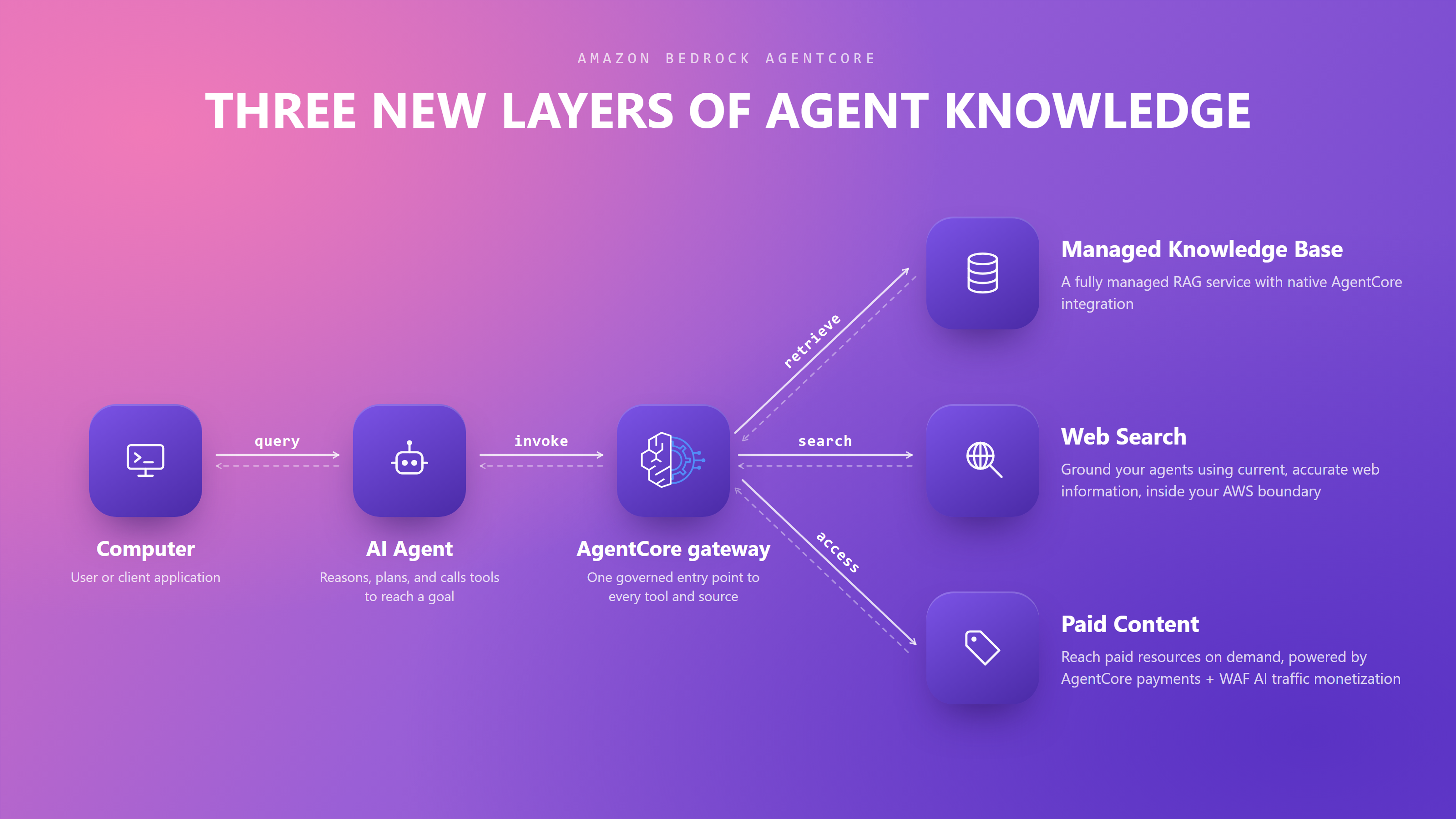
New in Amazon Bedrock AgentCore We’re introducing new capabilities on Amazon Bedrock AgentCore: connecting AI agents to organizational, web, and paid knowledge, helping teams find and fix what’s going wrong in production, and enforcing controls that scale as agents grow more capable.
Together, these capabilities help you build more capable agents faster, govern those agents with controls that scale, and improve them continuously. To learn more, read our blog post covering all the new features.
Introducing Amazon Bedrock Managed Knowledge Base for faster, more accurate enterprise AI applications — You can build enterprise RAG pipelines with the managed Knowledge Base on Bedrock. It provides native data connectors, Smart Parsing for automatic multi-format data preparation, and an Agentic Retriever for complex multi-step queries—all integrated with AgentCore Gateway so developers can focus on business outcomes rather than infrastructure management.
AWS WAF adds AI traffic monetization capability to help content owners charge AI bots for content access — You can use a new Bot Control capability that enables content providers and publishers price, meter, and collect payment from AI bots and agents accessing their content and APIs. AWS WAF now lets you set a price for that access, accept payment through third-party providers, and grant scoped access directly at the edge.
Amazon Bedrock AgentCore harness in now generally available — You can do building and running production-grade AI agents in minutes—without coding orchestration loops—by defining your agent’s model, tools, skills, and instructions in configuration, with Bedrock AgentCore harness.
New in AI-based security tools
Introducing AWS Continuum: Security at machine speed — AWS Continuum for code vulnerabilities, available in a gated preview, takes findings from across your environment, prioritizes by business impact, proves which are exploitable, and drives a fix through your own process.
AWS Security Agent (now part of AWS Continuum) adds threat modeling, Kiro power and Claude Code plugin, and more — You can generate the new threat modeling (preview) to understand the full context of your application and identify threats with recommended mitigations using the STRIDE framework. You can also use pull request code scanning with remediation across major Git platforms, and IDE integrations via Kiro power, Claude Code plugin, and MCP — letting developers run security reviews and fix issues without context switching.
New in building AI-based applications
Introducing Kiro for iOS — Kiro introduces a native iOS app, available in a gated preview, built for real engineering work that gives developers a new surface to kick off, monitor, steer, and interact with their Kiro sessions directly from their phone. That means you can now start sessions, check back when they’re done, review diffs, and approve changes all while staying connected to your work with no laptop running.
Proactively reduce tech debt autonomously with AWS Transform – continuous modernization — You can use continuous analysis (preview) to automatically scan your code repositories against configurable baselines and generates findings in hours, not weeks. Once you’ve identified and prioritized findings, you can configure autonomous remediations that generate pull requests for affected repositories automatically.
In addition to the keynote announcements, we have other important launches this week:
Amazon S3 annotations: attach rich, queryable context directly to your objects — Amazon S3 now lets you attach up to 1 GB of rich, mutable, and queryable context directly to your objects using annotations, purpose-built for AI agents and autonomous workflows that need to discover, understand, and act on data at scale without maintaining separate metadata systems.
Miro Hrončok and Aleksandra Fedorova have won
seats on the council. Neal Gompa, Fabio Valentini, Michel Lind,
Maxwell G, and Simon de Vlieger have been elected to FESCo. Samyak
Jain, Akashdeep Dhar, Luis Bazan, and Mat Holmes have all been elected
to the Mindshare Committee. The four candidates for the EPEL
committee, Carl George, Diego Hererra, Jonathan Wright, and Troy
Dawson were all automatically elected as there were an equal number of
candidates and seats open. Congratulations to all the winners.
Наскоро ви показахме какво е да остарееш в България. Погледнахме към болезнената тема за остаряването и подходихме откровено и внимателно, за да покажем една често невидима група хора с тяхното достойнство, спомени и ценности. Документалният филм на Лина Кривошиева вече е факт и може да го гледате напълно безплатно онлайн.
Сега обаче е време за следващия голям въпрос: Какво е да си млад в България? По навик наричаме младото поколение „нашето бъдеще“, но истината е, че не сме сигурни как гледаме на това бъдеще. Изобщо не знаем как се чувстват младите хора в България, какви мисли ги занимават или как точно им влияе дигиталната среда, в която израстват като личности. Засипваме ги с клишета, че са апатични, мързеливи, арогантни.
За да покажем тяхната перспектива, имаме нужда от вашата подкрепа. Нека заедно дадем глас на цяло едно поколение.
Какъв ще е следващият филм?
Следващият ни документален филм „Какво е да си млад в България“ е естественото продължение на първата ни тема. Това е филм за поколение, родено в постсоциалистическа България, израснало с дигиталния свят в джоба си, с драматична перспектива за бъдещето, опитващо се да планира утрешния ден, докато всичко наоколо се променя с часове.
Освен контекста и статистиката ще ви покажем лицата зад фактите от последните мащабни проучвания у нас и в Европа:
Личният оптимизъм срещу обществения песимизъм: Цели 70% от младите българи смятат, че техният личен живот ще бъде по-добър след 10 години. Но само 29% вярват, че българското общество го чака нещо добро. Те са готови да успеят въпреки средата, а не благодарение на нея.
Илюзията за спасителния изход: 74% от младите хора обмислят емиграция. Но ето го обрата: над 80% от тях нямат никакъв конкретен план или подготовка за заминаване. Чужбина не е мечта, а просто авариен изход от несигурността тук.
Скъсаната нишка на образованието: Близо половината от работещите младежи (48%) не работят по специалността си. Този дял е скочил почти тройно само за 6 години. Младите просто търсят бърз доход и реализация сега, защото дългосрочното планиране в България изглежда трудно.
Глас без влияние: Половината от тях заявяват, че искат да се включат в обществени процеси заради конкретна кауза. Но в огромното си мнозинство (64%) са убедени, че нямат никакъв реален достъп до обществено влияние и че никой в залите на властта не представя техните интереси.
Етапи, бюджет и график
„Тоест“ е независима медия, която се издържа от даренията на читателите си, и затова за нас прозрачността е изключително важна. С ваша помощ искаме да съберем достатъчно средства, за да произведем качествен документален филм, да го извадим от дигиталния балон и да го покажем на максимален брой хора в страната. И искаме вие да сте наясно с всеки отделен етап от процеса.
1
Подготовка
2000 €
Август – септември 2026 г.
Проучване, консултации с експерти, срещи с участници, изготвяне на сценарий и сториборд. Включва и разходи за пътувания в страната.
2
Продукция
4000 €
Октомври 2026 г.
Интервюиране на участниците, заснемане на терен. Включва и осигуряване на снимачна техника и разходи за пътувания в страната.
3
Постпродукция
3500 €
Ноември 2026 – февруари 2027 г.
Монтаж, визуализации и инфографики, фин монтаж, субтитриране, трейлър.
4
Прожекции
3750 €
Март – април 2027 г.
Премиера и прожекции с дискусии на множество места в страната. Включва: наемане на зали, разходи за пътуване и настаняване на екипа, дигитална комуникация, пиар и участия в други медии, рекламен бюджет.
5
Разпространение
1750 €
Май 2027 г.
Публикуване със свободен достъп и разпространение на филма в дигиталните канали на медията. Включва: изготвяне на статии в медията, визуални материали и рийлове за социалните мрежи, дигитална комуникация, рекламен бюджет.
ОБЩО
15 000 €
Мисията
В тази кампания няма да намерите брандирани тениски или торбички. Всяко евро, което дарите тук, отива директно за заснемането, озвучаването, историята и екипа, който ще я разкаже.
Ние вярваме, че свободният достъп до информация е от полза за цялото общество. С вашата финансова подкрепа ни помагате не само да заснемем филма, но и да му дадем възможност да пътува из България. Да проведем множество вдъхновяващи разговори. Да срещнем различни поколения. Вашето дарение осигурява безплатни прожекции в малките градове, където младите хора се чувстват най-изолирани, а културните събития са рядкост.
Утрешният ден на България се решава днес. Нека го заснемем заедно и дадем възможност на младите хора да разкажат сами как изглежда той.
Често задавани въпроси
Аз вече дарявам на „Тоест“. С какво е различна тази кампания?
Месечните ви дарения за „Тоест“ осигуряват издръжката на медията – журналистическата работа, редакционния процес, комуникацията с публиката, развиването и поддръжката на сайта. Документалните филми са отделна част от нашата дейност и за тях винаги търсим самостоятелно финансиране, така че да не отклоняваме средства от всекидневната журналистическа работа. С подкрепата си тук вие помагате конкретно за създаването и разпространението на филма „Какво е да си млад в България“.
Какво ще стане с дарените пари, ако не се събере пълната сума?
Всяко получено дарение ще бъде инвестирано в съответната дейност. В случай че кампанията не събере достатъчно средства, „Тоест“ ще търси други начини на финансиране, за да завърши филма, макар и по-бавно.
Какво ще стане с парите ми, ако се събере повече от нужната сума?
Вярваме, че многообразието от формати е богатство. Затова ще инвестираме всяка допълнителна сума в създаването на следващ документален филм от поредицата на „Тоест“. Всички разходи ще бъдат отчетени пред публиката, както сме правили досега през всичките години на съществуване на медията.
We’ve been thinking deeply about enterprise security. The operating model that served us for the past decade (collect telemetry, store it, query it, build dashboards to watch it) is no longer keeping pace. We need to shift to the new world: telemetry, context, reasoning, and actions. An approach that produces outcomes. The latest cybersecurity frontier models further made this shift urgent. Models like Claude Mythos can now find software vulnerabilities and reason through complex attack paths at machine-speed, leading to an exponentially increasing backlog of vulnerabilities.
Introducing AWS Continuum for code vulnerabilities
Today, we’re announcing AWS Continuum for code vulnerabilities, now available in gated preview. Continuum for code vulnerabilities addresses the full lifecycle of a code vulnerability at machine speed: from discovery through actions. It reasons over your environment, confirms what is real, and drives toward resolution. It’s model agnostic, using multiple frontier models where each performs best, and is built to incorporate the latest and most capable models as they emerge.
Continuum is built on lessons learned from running security across AWS and Amazon.com. Securing businesses that operate in different industries required a system that understands business context rather than applying generic rules uniformly.
How it works
Continuum for code vulnerabilities reasons over your full environment. This context includes structured data already living in Amazon Web Service (AWS) (your infrastructure, permissions, network topology, code) and the unstructured data that captures how your organization operates and your risk profile (your documents, communications, business priorities).
Continuum for code vulnerabilities operates in four continuous phases.
Discovery: Security teams tackle a backlog of vulnerabilities, and many are already using frontier models to find more. Continuum starts by ingesting that existing backlog and performing its own vulnerability scan of your environment. This creates a more comprehensive view of vulnerabilities and the associated attack paths.
Prioritization: Continuum uses context to evaluate, enrich, and prioritize every finding. Is the affected component deployed, is it reachable, is it in a production path, and what would the business impact be if exploited? The result is an evidence-backed list of priorities, allowing Continuum and your team to focus on what’s most important.
Validation: Continuum validates findings to surface false positives before they waste your team’s time. It contextualizes vulnerabilities against your environment. It then constructs working exploit examples in a sandboxed environment that provide concrete, reproducible evidence of the issue.
Mitigation and remediation: Continuum assesses existing defenses around a validated issue, including blocking and compensating controls along with detection mechanisms. It then draws on its understanding of the codebase, context, and findings to recommend mitigation or remediation of the vulnerability with a network change, policy change, or code patch. The patch recommendation is validated using the same system that confirmed the vulnerability. It also provides blast radius visibility and rollback paths where feasible.
This is just the beginning. We’re starting with code (1st and 3rd party) and then expanding to other aspects of security.
Trust is graduated
Continuum starts in learn mode with a human in the loop. Every recommendation includes the reasoning behind it. As you gain confidence, you can graduate Continuum to enforce mode, enabling remediation that can be increasingly automated based on categories and risk profiles you define.
Continuum capabilities
In addition to Continuum for code vulnerabilities, Continuum includes capabilities you might already know. The AWS Security Agent penetration testing and code scanning functionality is now part of Continuum as Continuum pen testing and Continuum code scanning (Preview). We’re also launching Continuum threat modeling in preview, which automatically generates comprehensive threat models from design documents or source code and outputs results in STRIDE format. These capabilities serve as detection and analysis sources that feed into the broader Continuum loop of discovery, prioritization, validation, and remediation.
Getting started
We’re working with customers across financial services, automotive, and technology to shape AWS Continuum. Customer feedback confirms the direction: security teams want tools that earn trust and take action.
AWS Continuum for code vulnerabilities is available in gated preview. Sign up to request access at AWS Continuum.
If you have feedback about this post, submit comments in the Comments section below.
The Python Software Foundation blog has a post
with a summary of the security-related content at PyCon US 2026 with links to
slides from important sessions. The recordings will be published to
the PyCon US channel on
YouTube, and the post will be updated with links to those videos as
they are made available.
Today, we’re announcing Amazon Bedrock Managed Knowledge Base, a new set of capabilities that enables developers to build enterprise-grade generative AI applications with their proprietary data in minutes. Organizations building agentic AI applications need secure, reliable, and up-to-date access to enterprise-wide data to deliver accurate, fast, and trusted outcomes. Managed Knowledge Base abstracts away the complexity of building and managing retrieval-augmented generation (RAG) pipelines, allowing developers to focus on business outcomes rather than infrastructure management.
Developers building knowledge bases for their agents face three key challenges today:
Connecting to enterprise data – Enterprise knowledge lives across disparate systems with different content types, access control lists, and document formats. Building and maintaining custom connectors for each source adds complexity that slows down development.
Optimizing RAG accuracy – Best practices for retrieval-augmented generation keep evolving. Developers need to experiment with different parsing strategies, chunking approaches, embedding models, and agentic retrieval behaviors to get accurate answers from their data.
Managing infrastructure at scale – Organizations need to serve large knowledge bases with millions of documents, or manage thousands of smaller knowledge bases across teams. Both patterns require reliable infrastructure, security enforcement, and cost control.
These challenges require developers to repeatedly perform undifferentiated work instead of focusing on their applications.
Amazon Bedrock Managed Knowledge Base addresses these challenges by abstracting away the multiple infrastructure components developers traditionally have to assemble and maintain themselves (storage, retrieval, embeddings, re-ranking, and foundation model selection) into a single managed primitive. By default, the service automatically selects and manages a default embeddings model, re-ranker model, and foundational model on your behalf, so you can get up to speed quickly without needing to pick or maintain one yourself. On top of this managed foundation, three core innovations further improve ease of use and accuracy:
Native data connectors – Six pre-built ingestion connectors that natively pull enterprise data and permissions from SaaS applications, eliminating the overhead developers face in managing application-specific requirements. At launch, we support Amazon S3, SharePoint, Confluence, Web Crawler, Google Drive, and OneDrive.
Smart Parsing – Different content types and sources require different approaches to achieve accurate retrieval. Smart Parsing handles this complexity automatically, selecting the right parsing strategy for each data type and connector to provide the highest accuracy for your agents.
Agentic Retriever – Optimized for complex queries that require multiturn, multihop retrieval within a single knowledge base or across multiple knowledge bases. Agentic Retriever automatically infers end-user intent and draws relevant context from institutional knowledge spread across data sources and modalities.
With just a few lines of code, Amazon Bedrock Managed Knowledge Base automatically manages and scales the end-to-end RAG pipeline that powers your enterprise knowledge agents. For agent builders, it’s available as a pre-built target type in Amazon Bedrock AgentCore Gateway, reducing integration to a few lines of code, auto-generating role-based permissions, and providing observability and evaluation metrics in the AgentCore Observability dashboard.
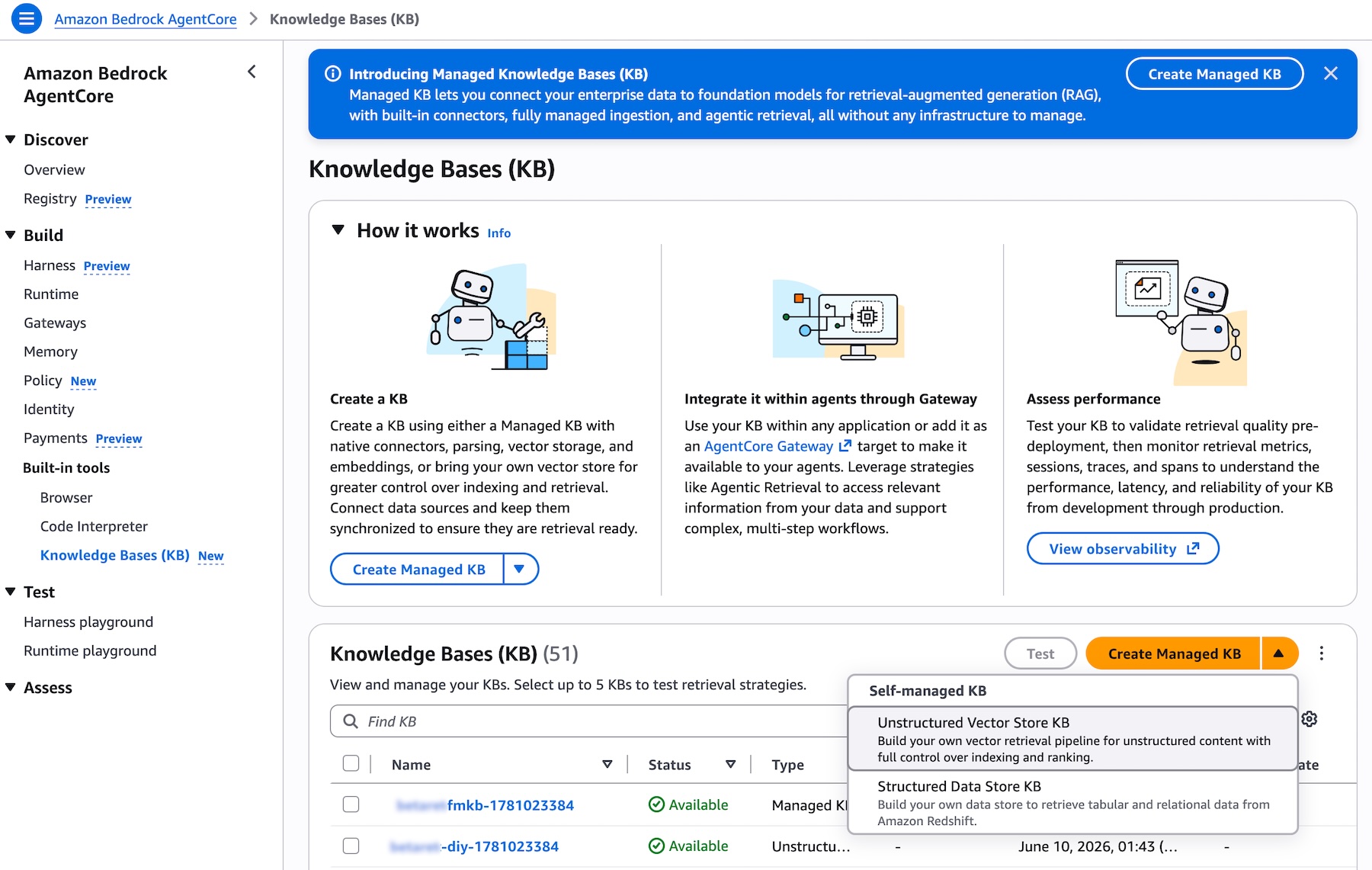
Getting started with Amazon Bedrock Managed Knowledge Base Creating a Managed Knowledge Base is straightforward. Navigate to the Amazon Bedrock AgentCore console or the Amazon Bedrock console, open the Knowledge Bases page, and choose Create Managed KB. The experience is the same in both consoles. You will see that Unstructured Vector Store KB is now available as the recommended option, alongside the other knowledge base types you may already be familiar with:
Picture 1 – Knowledge Bases list page in the Amazon Bedrock AgentCore console showing the Type column with different KB types and the Create Managed KB button
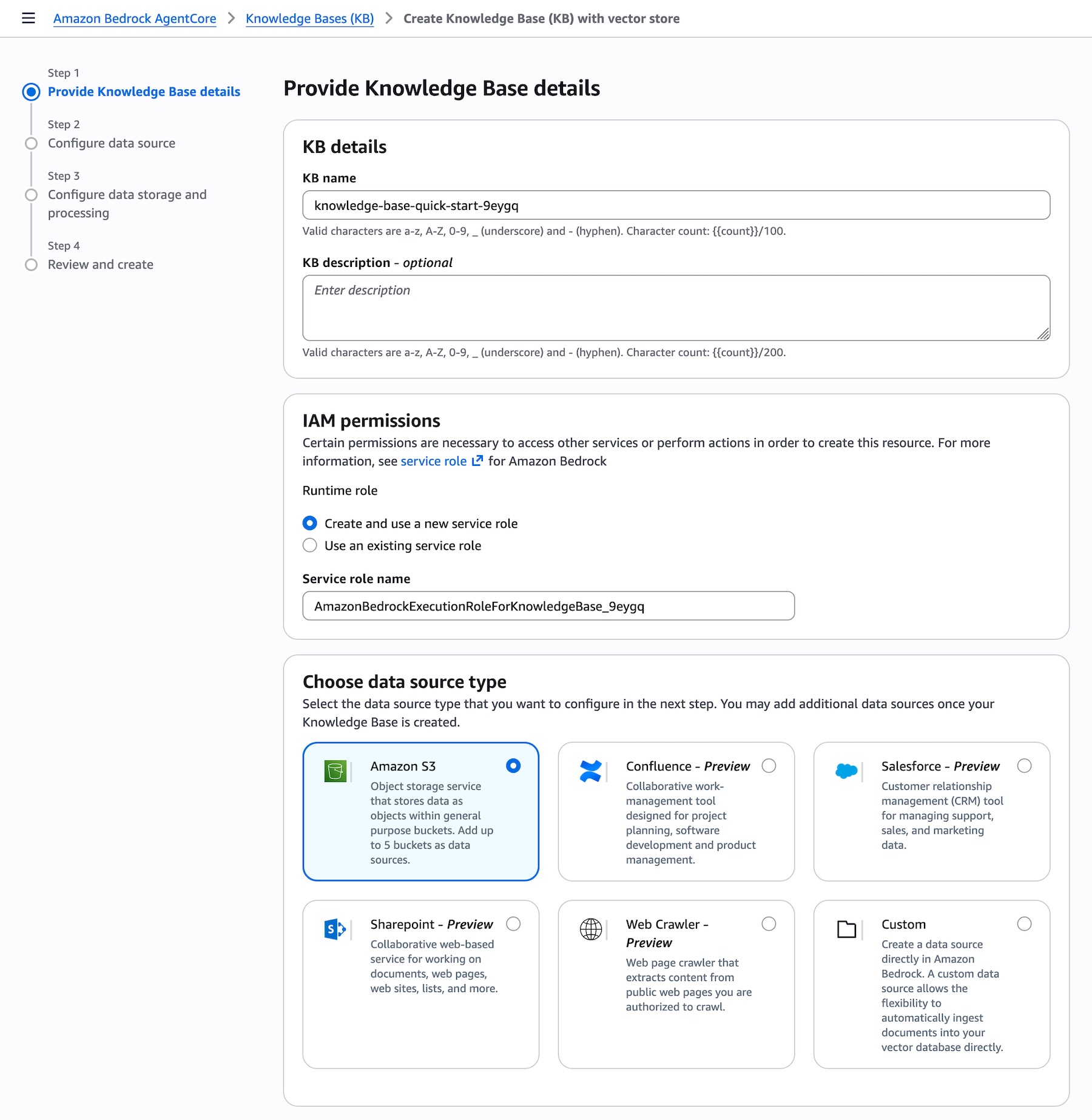
When creating a new Knowledge Bases, you can connect to your enterprise data sources by choosing from the list of supported connectors directly from a dropdown. AWS Identity and Access Management (IAM) roles are automatically created, and you can choose to edit these permissions if needed:
Picture 2 – Create Knowledge Base page showing the Data source dropdown expanded with all supported connectors: Amazon S3, Confluence, Custom, Google Drive, One Drive, SharePoint, and Web Crawler
An optimized set of defaults will be presented, allowing you to create your knowledge base in just a few clicks. Once the data is synced, you can integrate the knowledge base with your agent or provide it as a tool for your foundation model and start querying.
Smart Parsing for accurate data ingestion One of the key challenges in building knowledge bases is preparing diverse data types for accurate retrieval. Once you point Managed Knowledge Base at your data sources, Smart Parsing automatically determines the optimal parsing strategy for each data type and connector, no extra configuration is required.
Smart Parsing combines multiple techniques:
Connector-specific data models – Optimized handling for each data source. For example, the Web Crawler connector preserves HTML structure including embedded images and tables, ensuring rich content is not dropped during ingestion. SharePoint connectors maintain document hierarchy and relationships between files.
Multimodal processing – Automatic detection and processing of different content types within documents. The system identifies bounding boxes in documents, then sends them to foundation models for data extraction, captioning, and scene description in video files.
Optimized chunking – Smart Parsing leverages foundation models to understand document structure and extract meaningful content, ensuring that complex documents with mixed formats are properly indexed. Intelligent defaults balance retrieval accuracy with performance based on document type and content structure, while advanced users can customize chunking strategies when needed.
This automated approach eliminates weeks of experimentation typically required to achieve production-quality retrieval accuracy, while still preserving the flexibility to customize when needed.
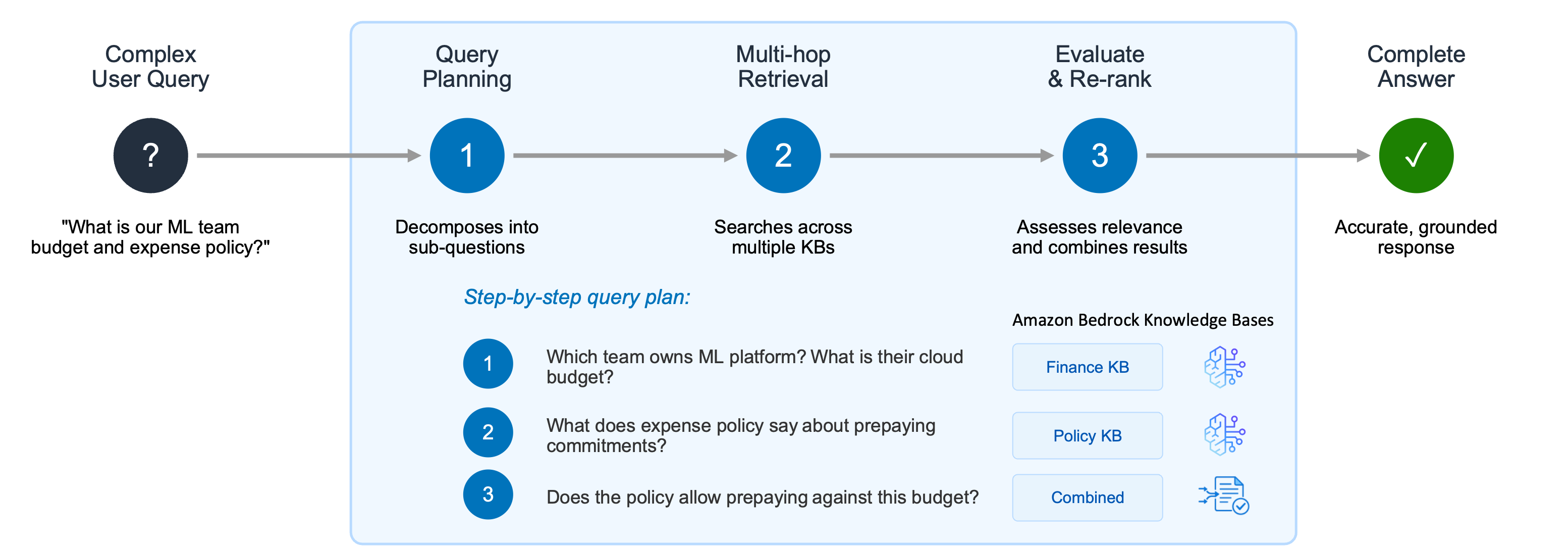
Using Agentic Retriever for complex queries After your data is ingested, you can start querying your knowledge base. Generative AI applications often struggle with complex user queries that require reasoning, recursive multi-step retrieval, and intermediate evaluations of results. Consider a user asking two related questions: “What is the cloud infrastructure budget for the ML platform team?” and “Does our expense policy allow prepaying annual commitments?” A single retrieval step might surface documents about the ML platform team but fail to connect the budget information with the expense policy needed to fully answer the question.
Picture 3 – Agentic Retriever decomposes complex user queries into a step-by-step plan, performing multi-hop retrieval across multiple knowledge bases and combining results to deliver accurate, grounded responses
Agentic Retriever solves this by creating a step-by-step query plan: 1. Which team owns the ML platform, and what is their cloud infrastructure budget? 2. What does the expense policy say about prepaying annual commitments? 3. Does the policy allow the ML platform team to prepay against this budget?
The system performs multi-hop retrieval and reasoning at each step, and once it has gathered sufficient relevant passages, it stops the search process and returns the top results. By abstracting away the complexity of building a separate multi-hop reasoning pipeline, this approach dramatically improves accuracy for complex queries while letting developers focus on their agentic search applications instead of orchestration logic.
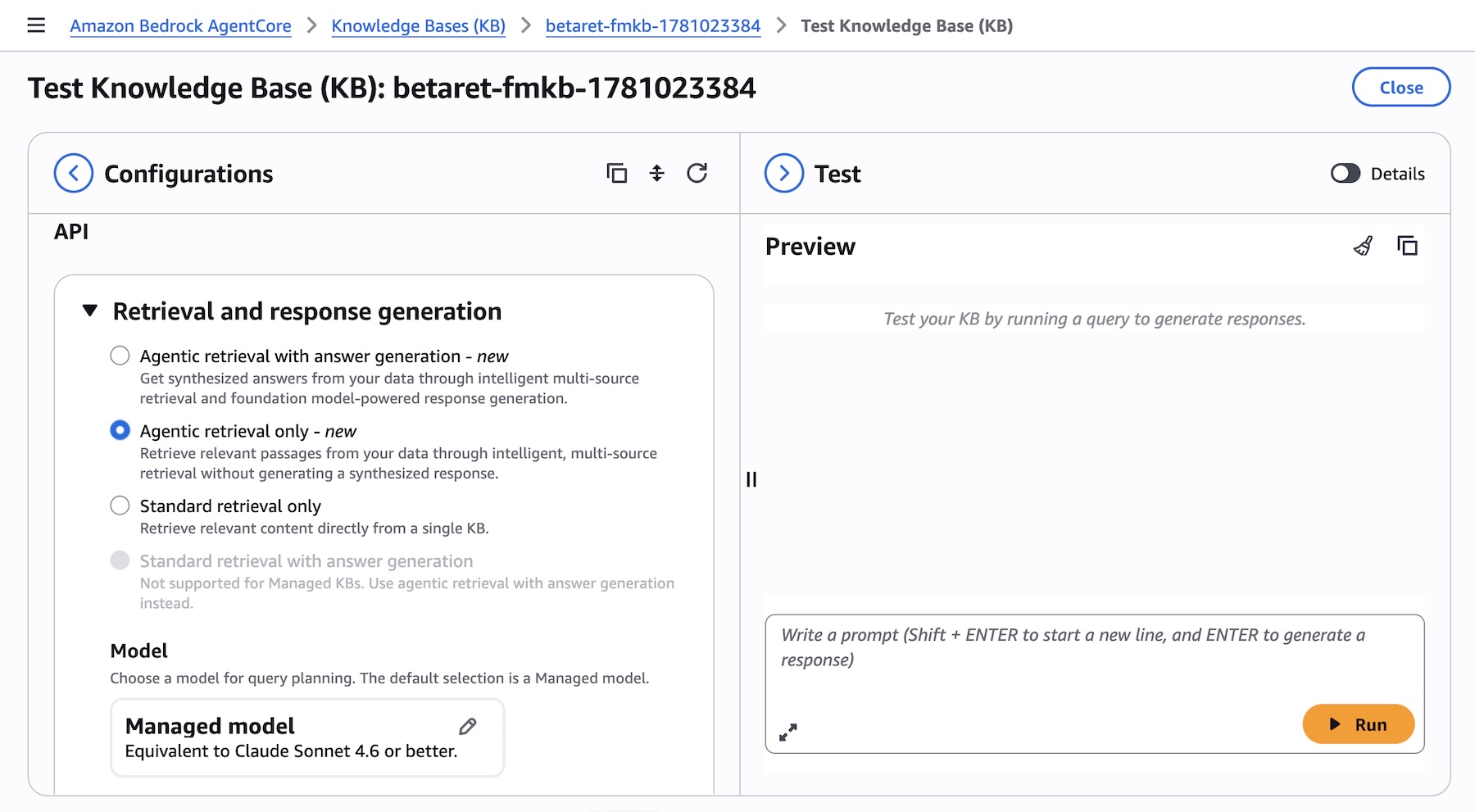
You can try Agentic Retriever directly from the test panel of your knowledge base in the Amazon Bedrock AgentCore console. Select Agentic retrieval only as the retrieval type to let the system automatically plan and execute multi-step queries across your knowledge bases:
Picture 4 – Test Knowledge Base panel showing Agentic retrieval with answer generation selected as the retrieval type, with model selection and maximum agentic iterations options
Enabling MCP with Bedrock AgentCore Amazon Bedrock Managed Knowledge Base seamlessly integrates with AgentCore Gateway as a native target type. This integration eliminates the need for manual integration and provides built-in observability, policy enforcement, and automatic permission management.
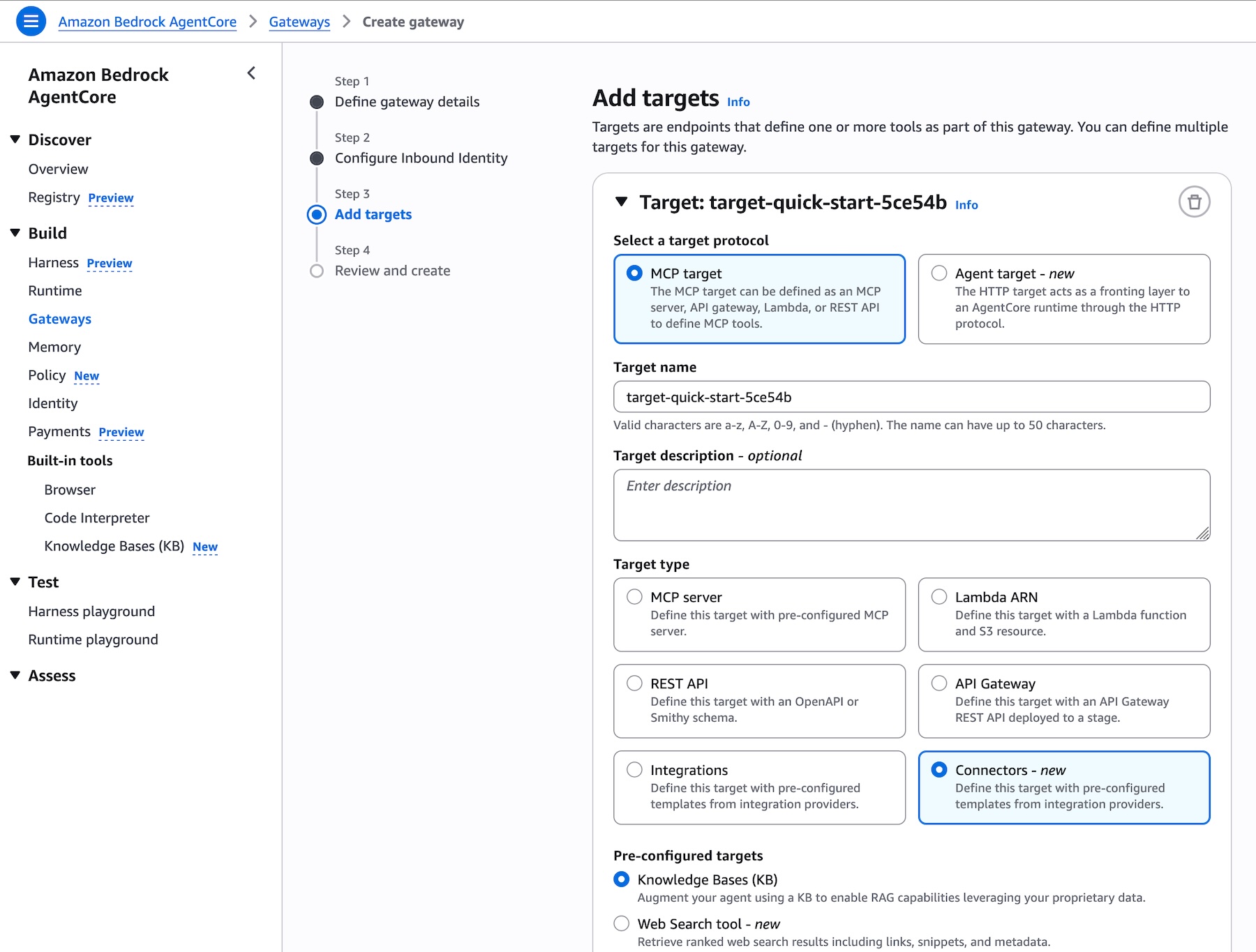
You can navigate to the Amazon Bedrock AgentCore console or SDK and create an AgentCore Gateway or select an existing one. When adding targets to your gateway, you will find Knowledge Base as a new pre-built target type alongside other options such as MCP server, Lambda ARN, REST API, and other integrations. Simply select your knowledge base ID to expose it through the gateway:
Picture 5 – Add targets page in AgentCore Gateway showing Knowledge Base as a new pre-built target type, with the knowledge base ID selector and runtime retrieval mode options
Add targets page in AgentCore Gateway showing Knowledge Base as a new pre-built target type, with the knowledge base ID selector and runtime retrieval mode options
Gateway exposes the standard Model Context Protocol (MCP), so the knowledge base tools are automatically discovered by clients from any MCP-compatible framework, including Strands Agents, LangChain, CrewAI, LlamaIndex, and LangGraph. No custom integration code is required.
Model choice and flexibility Amazon Bedrock Managed Knowledge Base preserves the flexibility developers expect from Amazon Bedrock. Every foundation model available on Bedrock can power the generation step, and developers can select from different embedding and re-ranking models to optimize retrieval for their specific use case, enabling teams to fine-tune accuracy and cost-performance without changing infrastructure.
Unlike managed solutions that lock you into specific model providers, Amazon Bedrock Managed Knowledge Base separates the infrastructure management (connectors, parsing, storage, retrieval orchestration) from model selection. This means you can:
Take advantage of the latest models – Adopt the latest embedding, re-ranking, and foundation models as they become available to improve accuracy, latency, and cost for your application without rebuilding your RAG pipeline.
Optimize for price-performance – Choose smaller, faster models for simple queries and more capable models for complex reasoning tasks, all using the same knowledge base infrastructure.
Use Bedrock embedding models – While Smart Parsing provides optimized defaults, you can configure Bedrock embedding models when your domain requires specialized semantic understanding.
Maintain consistency with existing applications – If you’re already using Bedrock Knowledge Bases APIs (Retrieve, StartIngest, StopIngest, IngestKnowledgeBaseDocuments), Managed Knowledge Base uses the same APIs, so migration requires no code changes, just point to the new knowledge base ID.
This approach ensures you can spend time on your generative AI application without losing the ability to change models based on evolving requirements or new model capabilities.
Get started today Amazon Bedrock Managed Knowledge Base is available today in the US East (N. Virginia), US West (Oregon), Asia Pacific (Sydney, Tokyo), Europe (Dublin, Frankfurt, London), and AWS GovCloud (US-West) Regions. For Regional availability and future roadmap, visit AWS Capabilities by Region.
With Bedrock Managed Knowledge Base, you pay for what you use with no upfront commitments. Pricing is based on two dimensions: the size of indexed data stored and the number of retrievals performed (on-demand). For detailed pricing information, visit the Amazon Bedrock pricing page. Bedrock is also a part of the AWS Free Tier that new AWS customers can use to get started at no cost and explore key AWS services.
These capabilities work with any open source framework such as CrewAI, LangGraph, LlamaIndex, and Strands Agents, and with any foundation model. Bedrock services can be used together or independently, and you can get started using your favorite AI-assisted development environment with the AgentCore open source MCP server.
Today, we’re announcing the general availability of Web Search on Amazon Bedrock AgentCore, a fully managed tool that enables agents to ground responses in current, cited web knowledge with zero data egress from customer’s secured AWS environment.
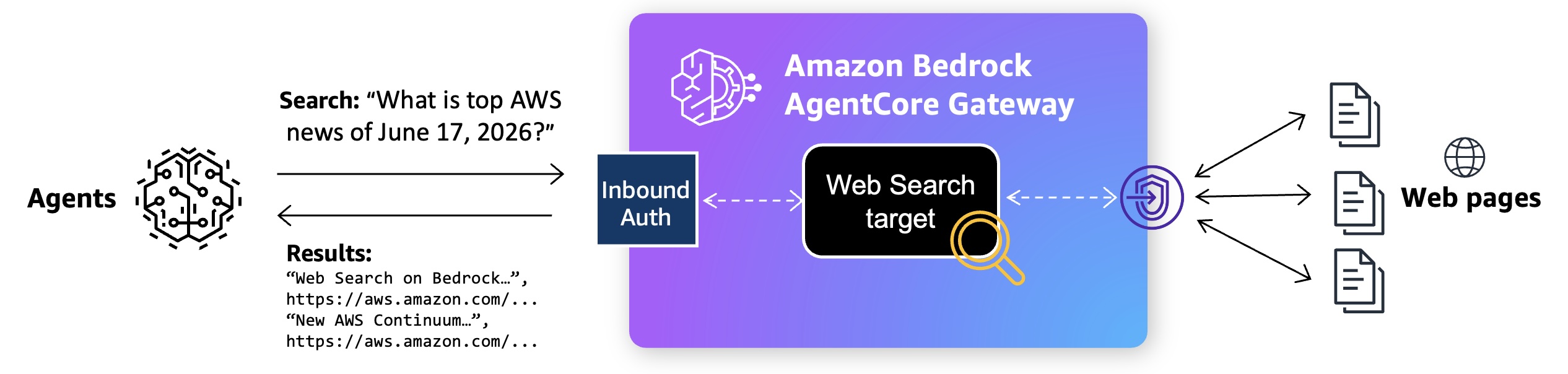
Web Search uses a built-in connector target on Bedrock AgentCore Gateway using the Model Context Protocol (MCP). Your agent sends a natural-language query, and Web Search returns most relevant snippets, source URLs, titles, and publication dates that the model can reason over to produce a grounded response.
It is built on Amazon’s search infrastructure, informed by years of experience powering agentic search experiences across Alexa+, Amazon Quick, and Kiro. It uses a multi-source grounding approach that combines Amazon’s web index with structured knowledge graph data. Beyond standard web results, this gives agents access to Amazon Knowledge Graph with verified facts, helping them retrieve more relevant and accurate responses than traditional web search alone.
With this launch, you can focus on building agents instead of manually adding web search to agents on Bedrock AgentCore and managing its infrastructure. Your AI agent looks at user question, retrieves the latest facts, and then takes any necessary action grounded in current developments beyond a model’s training data. You can also meet enterprise governance policies without sending user prompts and retrieval queries to external search API providers outside of AWS.
Web Search on Bedrock AgentCore in action To get started, create the Bedrock AgentCore Gateway with Web Search tool target in the Bedrock AgentCore console. When the Gateway URL is created, you can interact with API call, Command Line Interface (CLI), or MCP Inspector.
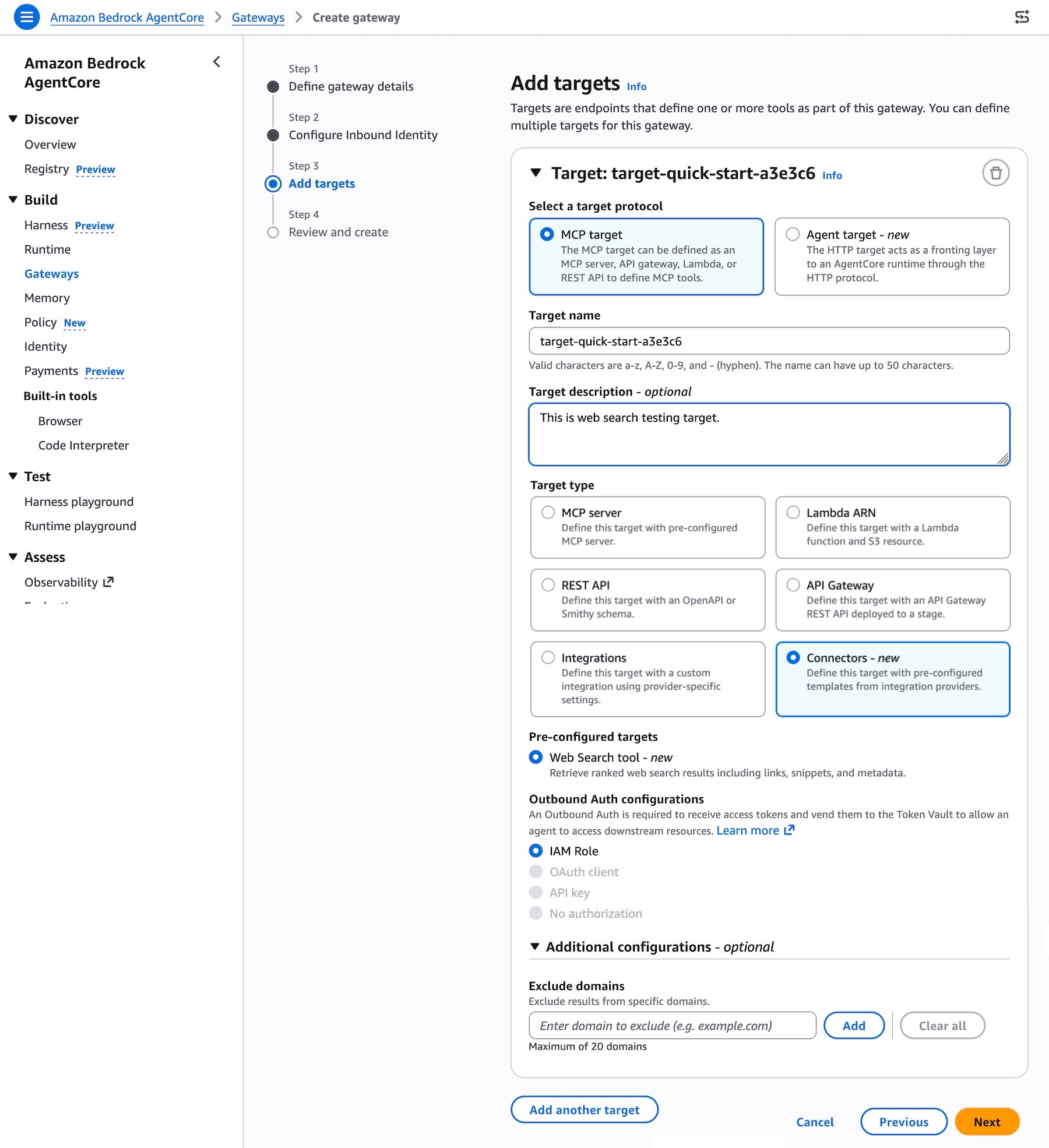
To add Web Search tool target when creating the Gateway, choose MCP target as a target protocol and Connectors as a target type. You can select the Web Search tool as a preconfigured target to retrieve most relevant web search results including links, snippets, and metadata.
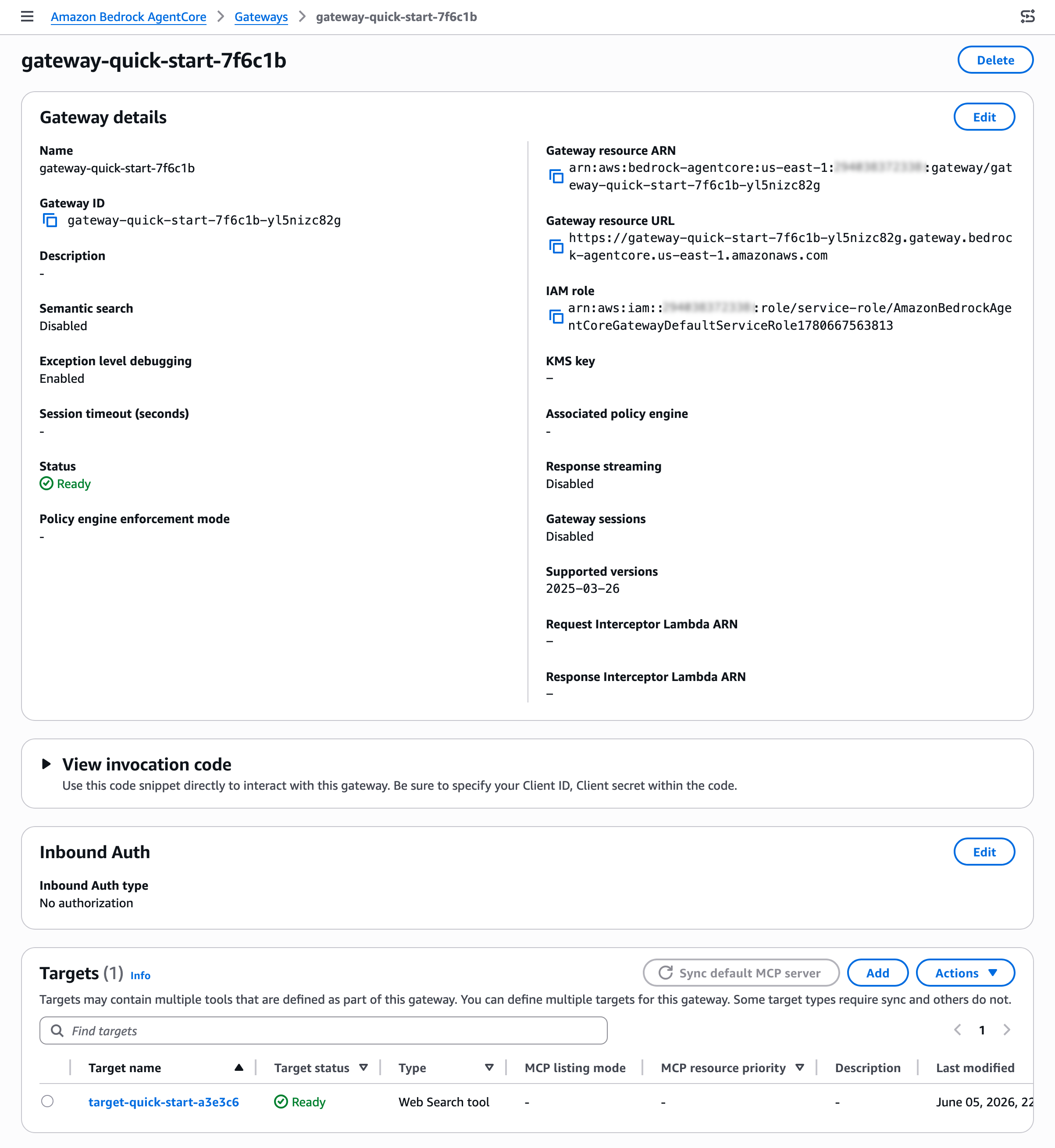
After creating your gateway, you can find the Web Search tool target on the detail page of your gateway. You can also add a new Web Search tool target to an existing gateway.
To interact with Web Search tool, use the sample invocation code in the View invocation code section. You can use code snippets through Python codes with API requests, MCP Python SDK, Strands MCP Client, and MCP Inspector.
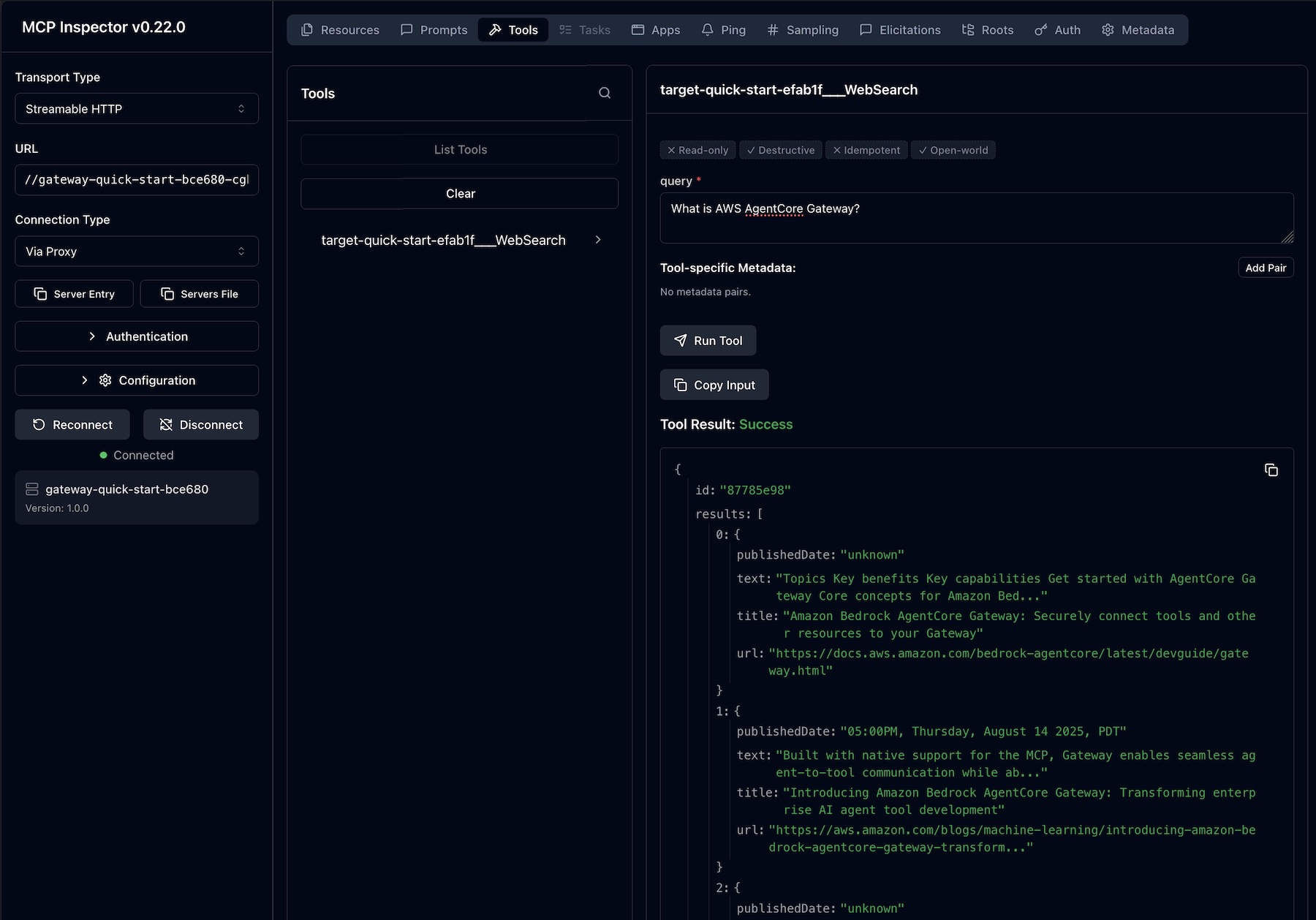
For example, you can interact with the MCP Inspector, an interactive developer tool for testing and debugging MCP servers. When you connect to the MCP server through the Gateway resource URL, you will find a Web Search tool for each connector target on the Gateway. Enter input the web search query and choose Run Tool to get the results.
Customer voices Some of our customers had early access to this new feature. This is what they shared with us:
Benchling helps scientists accelerate R&D, making it easy to centralize scientific data, collaborate across teams, and access insights. Nicholas Larus-Stone, Head of AI Agents at Benchling shared “Scientists using Benchling AI can now ask about a target they’re actively working on and get answers grounded in both their institutional data in Benchling and published literature. The result is more complete science, and hypothesis generation done right. Because we’re using the Web Search tool on Amazon Bedrock AgentCore, customers have a secure, governed environment to bring that high quality published data into their workflows without compromising how they manage their data.”
Gen Digital leads consumer and small business cyber safety, offering antivirus, antimalware, identity and privacy protection, virtual private networks, and cloud backup. Iskander Sanchez-Rola, Senior Director of AI & Innovation, Gen Digital shared “With the Web Search tool on Amazon Bedrock AgentCore, Norton Revamp helps professionals build their online reputation with current, grounded content ideas shaped by what’s actually happening in the world today. What we value most is that AWS uses its own search index and keep queries within our trusted AWS environment.”
Now available Web Search on Amazon Bedrock AgentCore is generally available today in the US East (N. Virginia) Region. For Regional availability and a future roadmap, visit the AWS Capabilities by Region.
You can get started with Web Search on Bedrock AgentCore at no additional cost. You pay only for the data transfer charges you use for the Gateway. New AWS customers also receive up to $200 in Free Tier credits. To learn more, visit the Amazon Bedrock AgentCore pricing page.
Today, we’re announcing AWS Transform – continuous modernization (preview), a new capability of AWS Transform for continuous, autonomous tech debt analysis and remediation at scale. AWS Transform already helps enterprises migrate out of data centers, modernize mainframe and Windows applications, and handle the undifferentiated work of software maintenance: upgrading Java versions, swapping deprecated frameworks, and updating AWS Lambda runtimes before they reach end of life. This new experience builds on this. Customers get full visibility into the state of their codebase across thousands of repositories, prioritized findings, and the pull requests that make the fixes.
Engineering organizations typically consume up to 30% of IT budgets. Customers stitch together point tools: one to detect dependency issues, another to flag vulnerabilities, another for code quality. But no existing tool detects, prioritizes, and remediates tech debt continuously and at scale. The result is a manual, app-by-app cycle that drains engineering capacity. Leaders fall back on self-reported team status that lags reality and hides regressions. AI-assisted development makes this worse: as coding agents accelerate the pace of change, tech debt accumulates faster than developers can keep up. Customers need a capability that detects, prioritizes, and remediates tech debt continuously, autonomously, and at scale.
Continuous analysis To address the visibility challenge, this new capability within AWS Transform automatically scans your code repositories against configurable baselines and generates findings in hours, not weeks. Out of the box, AWS Transform – continuous modernization includes policies for detecting end of life dependencies, deprecated frameworks, and other common sources of technical debt. You can also extend these with your own remediation patterns specific to your organization, including approved libraries, internal coding standards, or tech debt policies your platform team already enforces. For example, if your team has deprecated an internal library or prefers a particular logging pattern, you can codify that as a policy and run it across all your repositories continuously.
Unlike periodic manual efforts, continuous analysis provides ground truth directly from your code. When a repository falls behind your baseline, you know immediately, showing which components are behind and by how much, regardless of how the team chooses to address it. This eliminates the need for status check-ins and manual compliance tracking, giving platform teams an always current view of their technical debt landscape.
Autonomous remediation at scale Once you’ve identified and prioritized findings, you can configure autonomous remediations that generate pull requests for affected repositories automatically. This new AWS Transform capability provides out-of-the-box remediation transformations for common scenarios such as Java version upgrades, SDK migrations, and library updates. You can also create custom transformations for organization-specific patterns.
When you launch a remediation, the continuous modernization capability creates pull requests for each affected repository, notifying the owning team with a message like: “This repository is behind on your organization’s baseline for this dependency. Here’s a PR that resolves it.” Teams can review and merge the PR, or choose to remediate using their own approach. Either way, continuous analysis detects when the fix is in place, providing ground truth without requiring manual confirmation.
AWS Transform – continuous modernization integrates with AWS Security Agent to detect and remediate security vulnerabilities at the source-code level, so security findings flow into the same prioritized list and pull-request workflow as other tech debt.
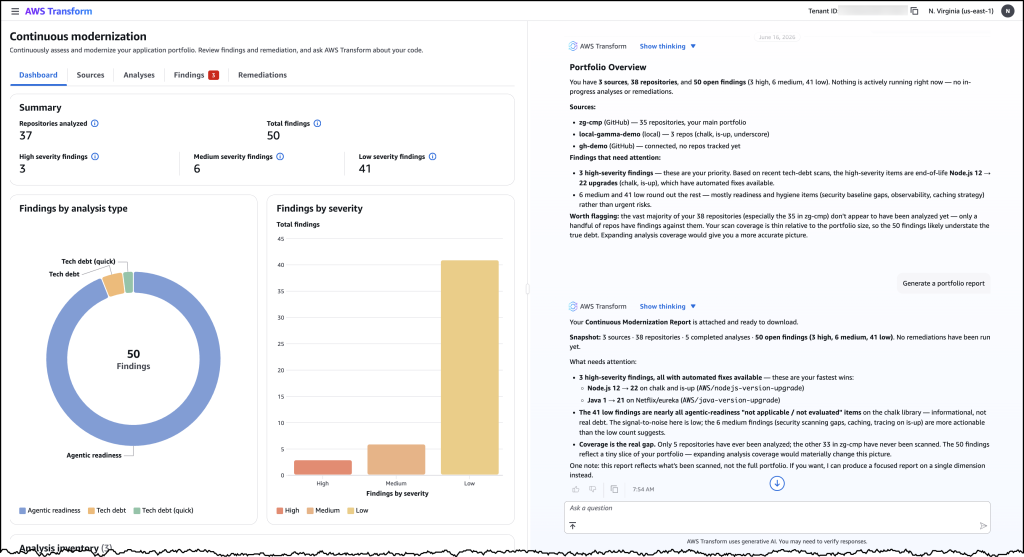
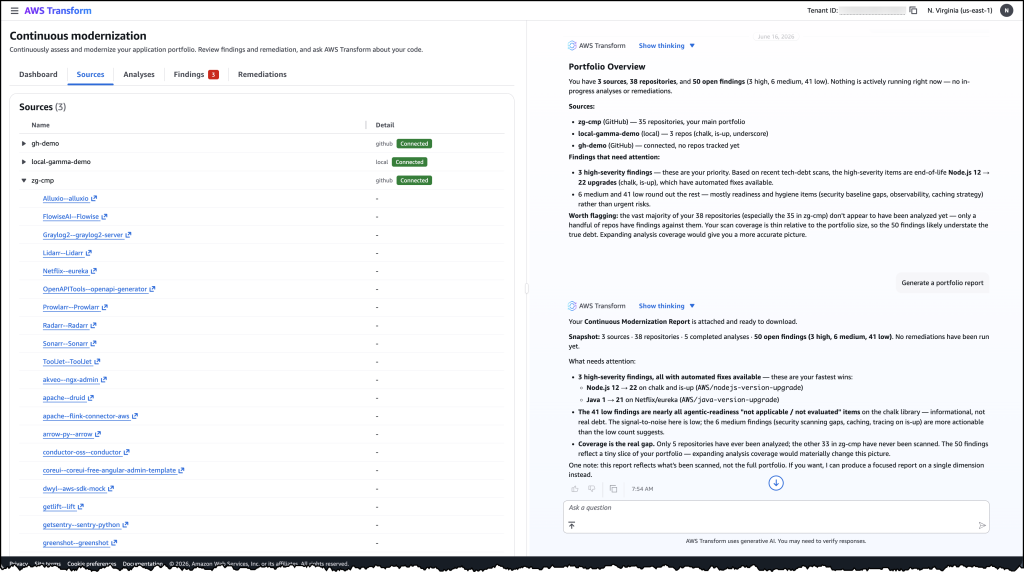
Let’s try it out To get started with, I navigated to the AWS Transform web application. From the dashboard, I can see an overview of my organization’s repositories and their current status against my configured baselines.
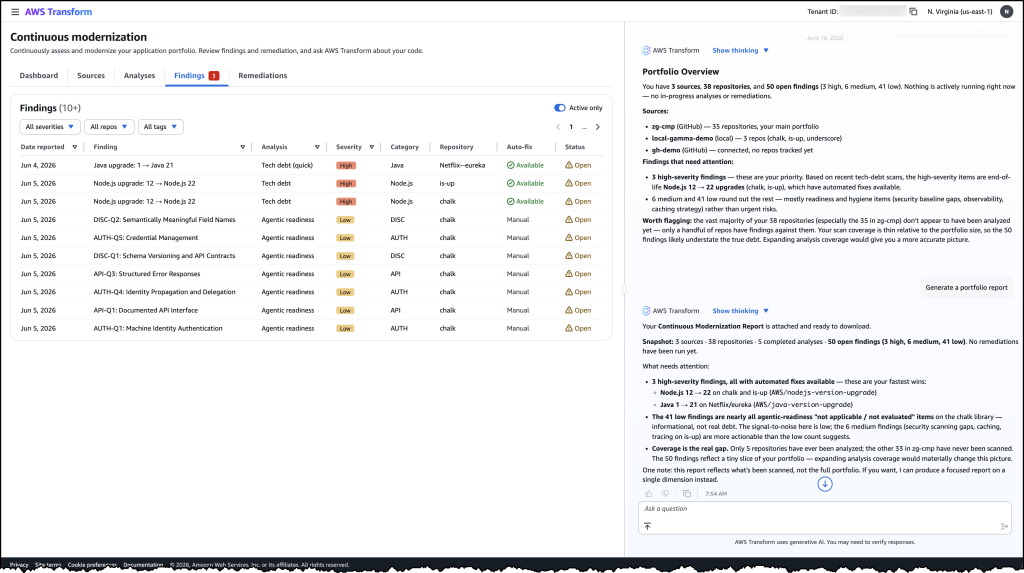
First, I connected my source control system and initiated an analysis against my specified policies. Within hours, the analysis returned findings across my repositories, showing which ones were behind the baseline and by how much. I could see the severity, the number of affected files, and the specific tech debt patterns detected.
From here, I selected a group of high-priority findings and launched a remediation campaign. AWS Transform – continuous modernization generated pull requests for each affected repository. I could monitor the campaign’s progress in real time, seeing which PRs were created, which were merged, and which repositories returned to compliance.
Image 1: AWS Transform – continuous modernization dashboard showing a portfolio overview of your technical debt findings across all connected repositories.
Image 2: The detailed findings view listing individual tech debt items by severity, category, and repository with their available remediation options.
Image 3: The sources view showing connected repositories from GitHub and local environments that continuous modernization is tracking for analysis.
Faster ways to modernize These capabilities support two distinct approaches to code modernization. In continuous mode, you can use continuous modernization to keep your codebases current as baselines evolve. Think of this as the day-to-day work of upgrading libraries, applying security patches, and enforcing coding standards across your organization.
For larger modernization projects, such as migrating from one framework to another or upgrading a major runtime version across hundreds of applications, you can use campaign mode for targeted, project-based modernization. AWS Transform custom continues to provide the flexible primitive for these larger efforts. AWS Transform – continuous modernization is purpose-built for the recurring, high-volume work that platform teams manage every day.
Now available AWS Transform – continuous modernization (preview) is available today. You can get started through the AWS Transform web application, via the AWS Transform Kiro Power, or through MCP and skills for integration with your existing coding agents. To learn more, visit the AWS Transform documentation.
Today, we’re announcing a new release management capability in AWS DevOps Agent that is now available in preview. AWS DevOps Agent is your always-available teammate that spans software changes and operations across AWS, multicloud, and on-premises environments. The practice of DevOps aims to make software change and operations smooth and increasingly autonomous, and AWS DevOps Agent delivers on both by leveraging its deep understanding of your environment, your services, their dependencies, and how they behave in production. Already generally available for post-deployment operations, it autonomously investigates incidents, provides root cause analysis and mitigation steps, and delivers targeted recommendations to prevent recurring issues. With today’s preview, AWS DevOps Agent adds release readiness review of code changes and autonomous release testing. These new features verify every change against the natural language standards you give to the DevOps Agent and run change-specific tests in production-like environments. AWS DevOps Agent now supports teams from code creation to production, helping reviewers and testers keep pace with the volume of AI-generated code.
As development teams adopt AI coding tools, the volume of pull requests moving through delivery pipelines has increased faster than review and testing processes can handle. When teams are under pressure to keep up, reviews are approved without thorough examination, and test environments drift from production. The value that coding agents generate sits waiting in review queues instead of reaching end users. At the same time, AI models are increasingly capable of catching functional and security issues that human reviewers might miss under time pressure, making speedy and safe delivery a requirement rather than a tradeoff.
The release readiness review feature evaluates every code change against production requirements, dependency safety, and the standards and best practices you provide to the DevOps Agent. The agent checks cross-repository dependency risks that could affect other services, access control changes against AWS Well-Architected Framework best practices, and compliance with any standards you have defined. When no standards are provided, the agent applies general best practices. As part of the review, the agent also runs your software in an AWS-managed isolated environment, executing lightweight user journey tests to verify the software builds, runs, and passes basic functional checks before the change enters the pipeline. Findings appear in the AWS DevOps Agent console and as comments on pull requests in GitHub or GitLab. You can also invoke reviews directly from your IDE through the Kiro power or Claude Code plugin, so developers can identify and fix dependency risks, standards violations, and access control issues before the change is committed to version control.
The autonomous release testing feature goes further, generating and running change-specific test plans for web and API-based applications in customer-provisioned, production-like environments before the change merges. Rather than running a static test suite, the agent reasons about what the change does and constructs tests tailored to it, covering functional correctness, behavioral regressions, and integration scenarios that a manually maintained test plan might not anticipate. Every test run produces structured artifacts including metrics, logs, traces, and an execution summary, giving reviewers a consistent record of what was tested and what the results were.
Getting started with AWS DevOps Agent release management This walkthrough shows how to run an on-demand release readiness review using the AWS DevOps Agent web app. Before you begin, confirm that you have at least one GitHub or GitLab repository connected to your Agent Space. Once your repositories are connected, AWS DevOps Agent will index your code and build a knowledge graph of cross-repository and cloud dependencies.
To open the web app, navigate to the AWS DevOps Agent console, select your Agent Space, and choose the Web app tab. Choose Operator access to open the web app.
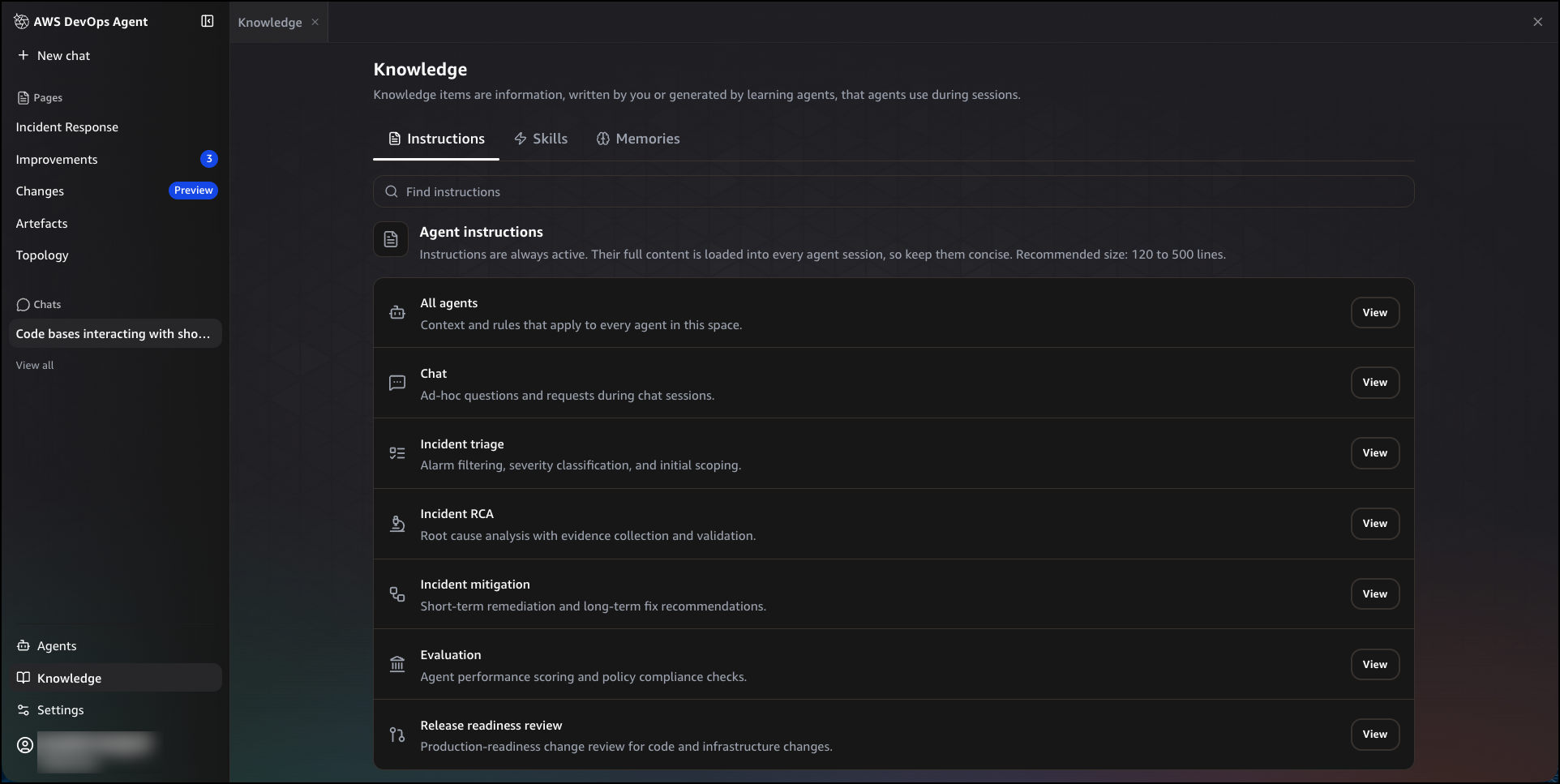
Without standards configured, the agent applies general best practices. To tailor reviews to your internal standards, navigate to Knowledge, then choose the Instructions tab. You will see a list of instruction sets, each scoped to a specific agent or task. Choose View next to Release readiness review to edit the instructions for production-readiness change review. Write your internal standards in plain English. For example, you can define infrastructure and data standards on encryption or network access rules, best practices that warn without blocking such as logging and observability requirements, and sensitive data classification best practices that identify applications or resources requiring higher security measures. To apply instructions across all agents in your space, choose View next to All agents.
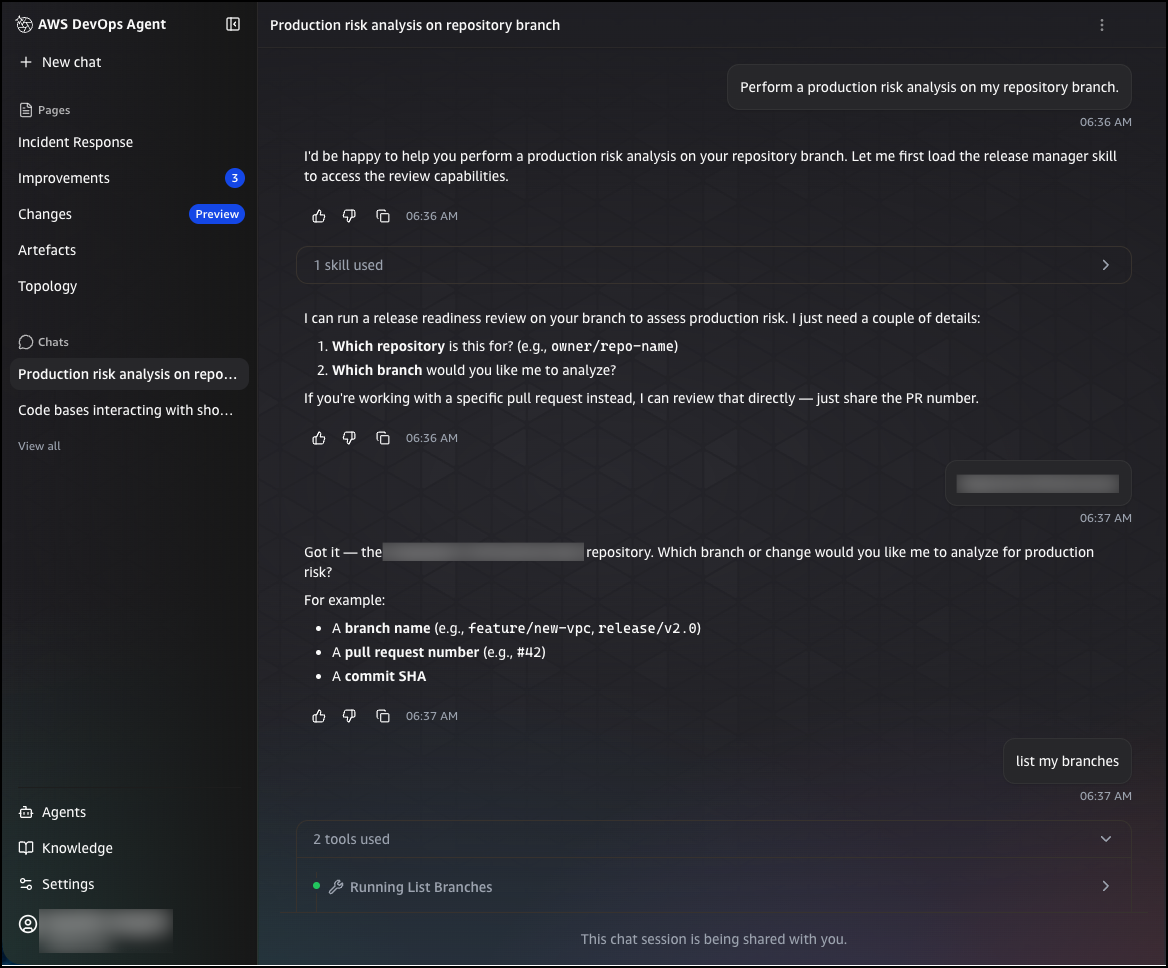
You can trigger a release readiness review in two ways: by submitting a pull request to a connected repository, or by entering an on-demand query in the chat interface. To run an on-demand review from chat, choose New chat and enter a request such as:
Perform a production risk analysis on my repository branch
The agent will ask for the repository and branch you want to analyze. You can provide a branch name, a pull request number, or a commit SHA. Once you confirm your selection, the agent queues the review and analyzes the change for production risks, including infrastructure impacts, configuration changes, and potential issues.
After the review completes, you can ask follow-up questions directly in the chat to explore the findings in more detail. For example, you can ask which downstream consumers a change affects, and the agent will return a structured breakdown of in-repository and cross-repository consumers that will break, the specific files and line numbers affected, and the recommended steps to resolve the issue before deployment.
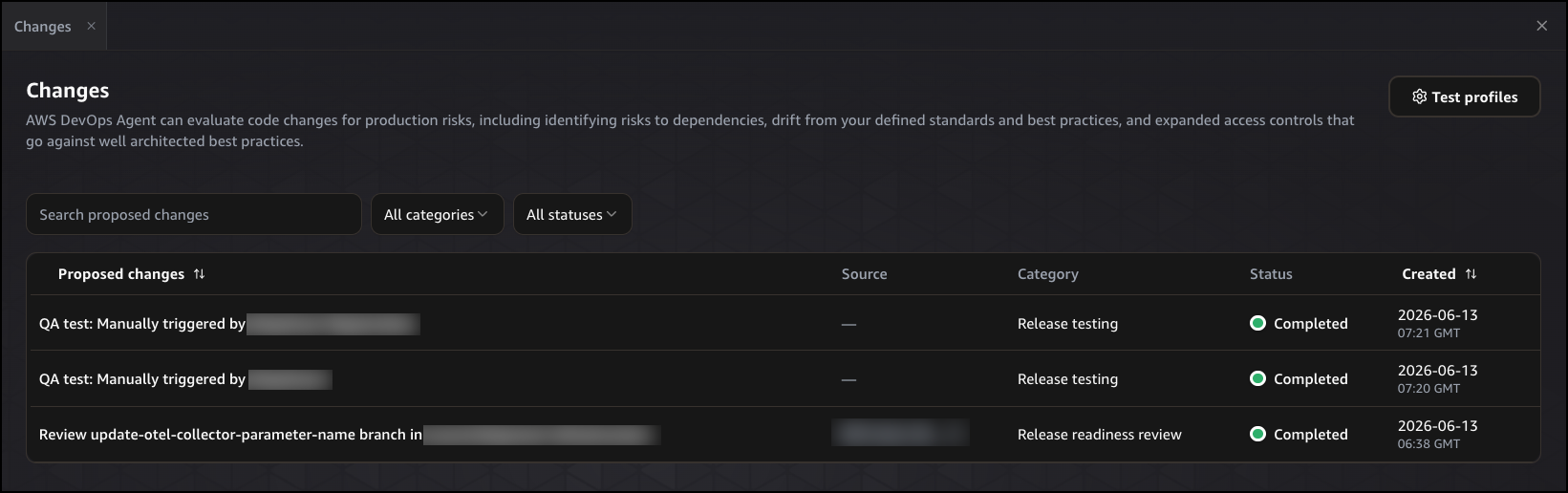
After submitting a review request, navigate to Changes in the left navigation pane. The Proposed changes table shows each review that has run, including the proposed change description, its source, category, status, and when it was created. You can filter by category or status to find specific reviews, or search by name using the search bar. Choose any entry to open the full execution detail.
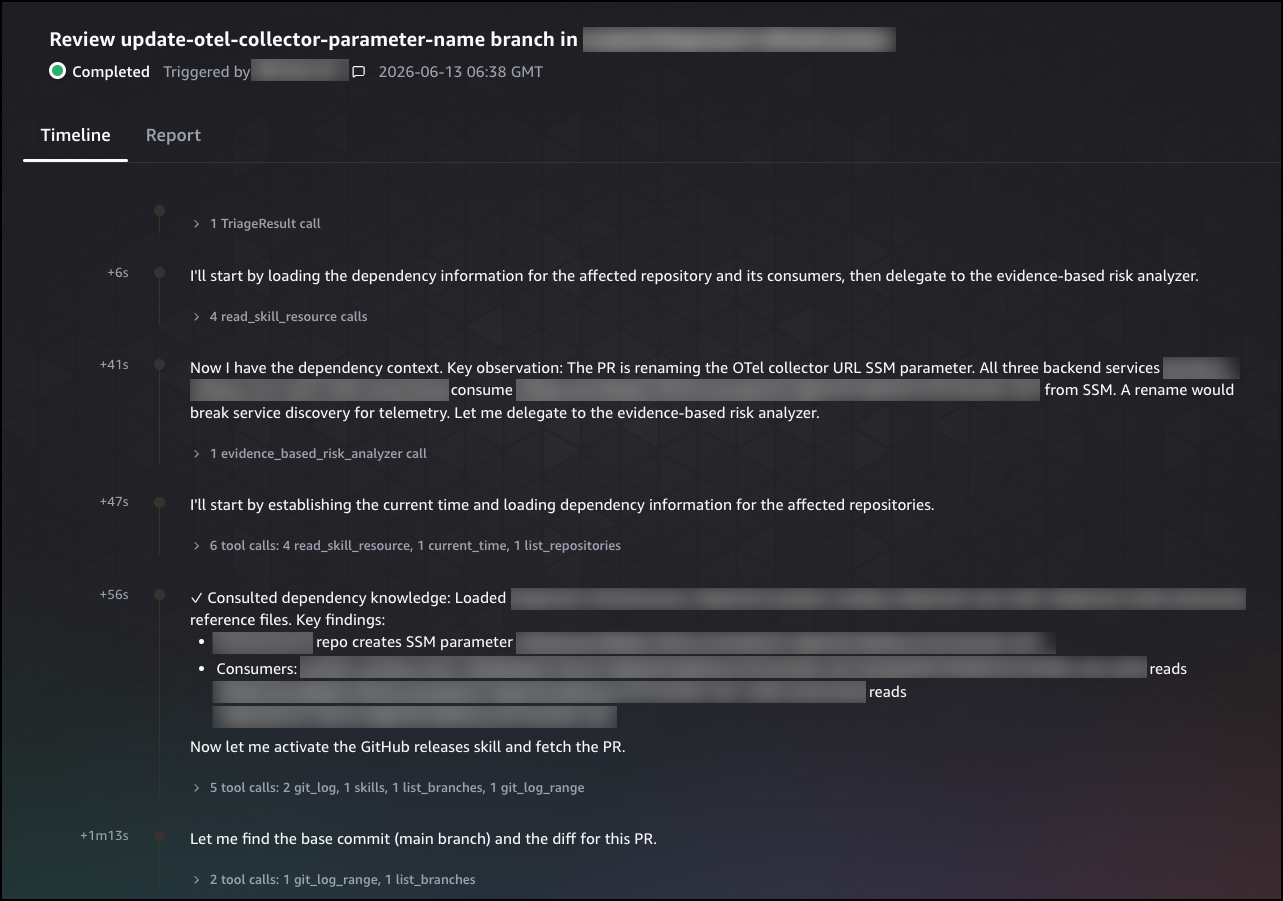
The Timeline tab shows the agent’s step-by-step reasoning process, including the tools it called, the dependencies it consulted, and the observations it made at each step. Each entry is timestamped, giving you a complete record of how the agent built its understanding of the change and reached its conclusion.
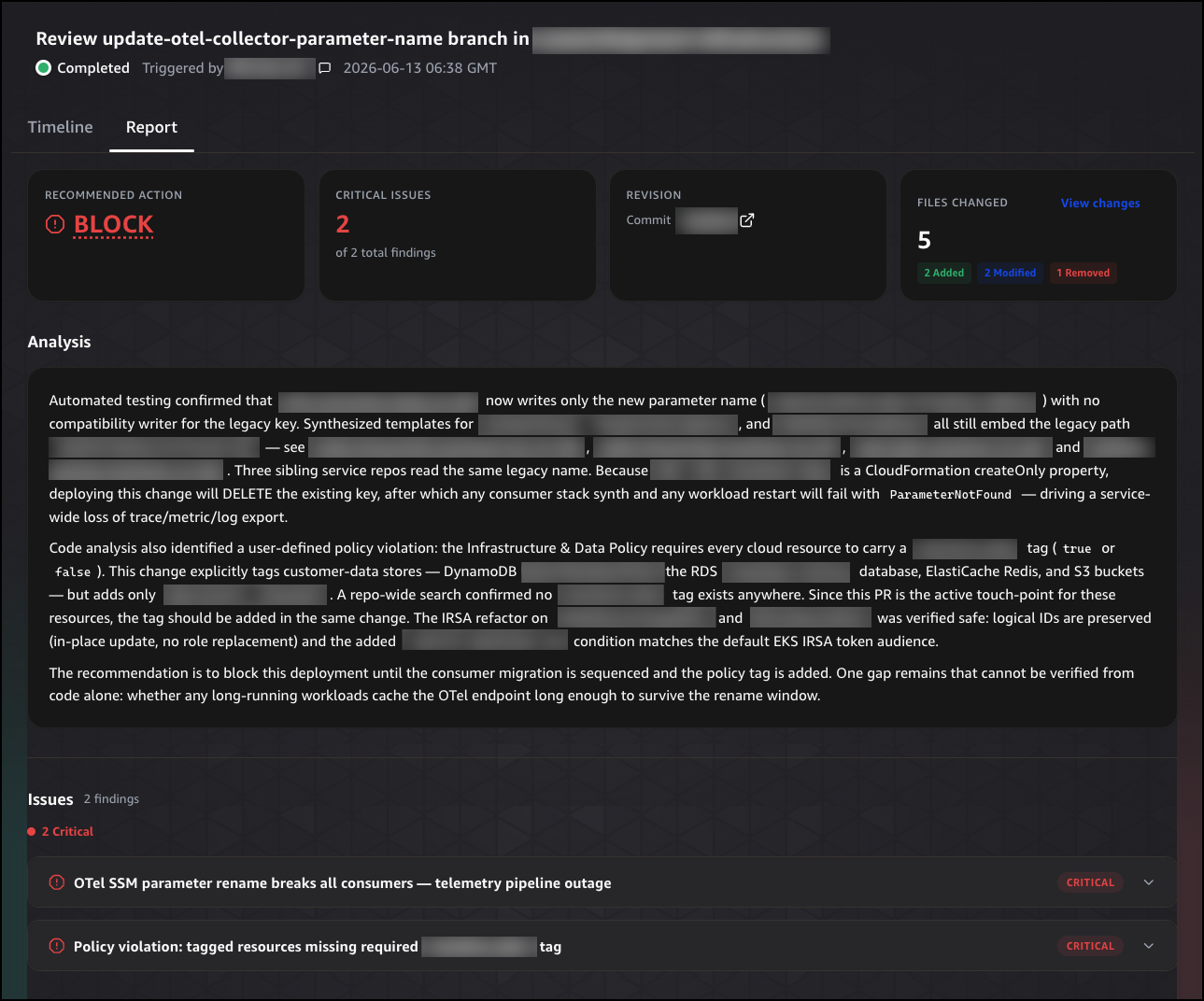
Choose the Report tab to see the final recommendation. The report opens with a summary header showing the recommended action, the number of critical issues found, the commit revision, and the number of files changed. The recommended action is either BLOCK, Proceed with Caution, or Safe to Release.
Below the summary header, the Analysis section explains why the recommendation was made, citing specific risks and the evidence the agent found to support its conclusion. The Issues section lists each finding by severity, giving you a prioritized view of what needs to be addressed before the change can proceed. The Recommendations section provides specific, actionable steps the developer can take to resolve each issue. Finally, the Changes section lists each file that was modified, with the type of change, the category it falls under, and a description of what was changed, so reviewers have a complete picture of what the change does before it merges.
You can also invoke the autonomous release testing feature directly from the chat interface. To run an autonomous release test on a web or API-based application, choose New chat and enter a query such as:
Run a release test on my application deployed at [application URL]
The agent generates a change-specific test plan and executes it in your provisioned environment. Results appear in Changes, where you can review the execution steps and a structured summary of what was tested.
Get started today The release readiness review and autonomous release testing features for AWS DevOps Agent are available in preview. These features are available at no additional cost during preview in the US East (N. Virginia) Region. For pricing information on other AWS DevOps Agent features, visit the AWS DevOps Agent pricing page.
At re:Invent 2025, we previewedAWS Security Agent (now part of AWS Continuum), a frontier agent that proactively secures your applications throughout the development lifecycle across all your environments. You can perform on-demand penetration testing customized to your application, discovering and reporting security risks verified through exploitability testing.
Today, we’re introducing more features based on customer feedback:
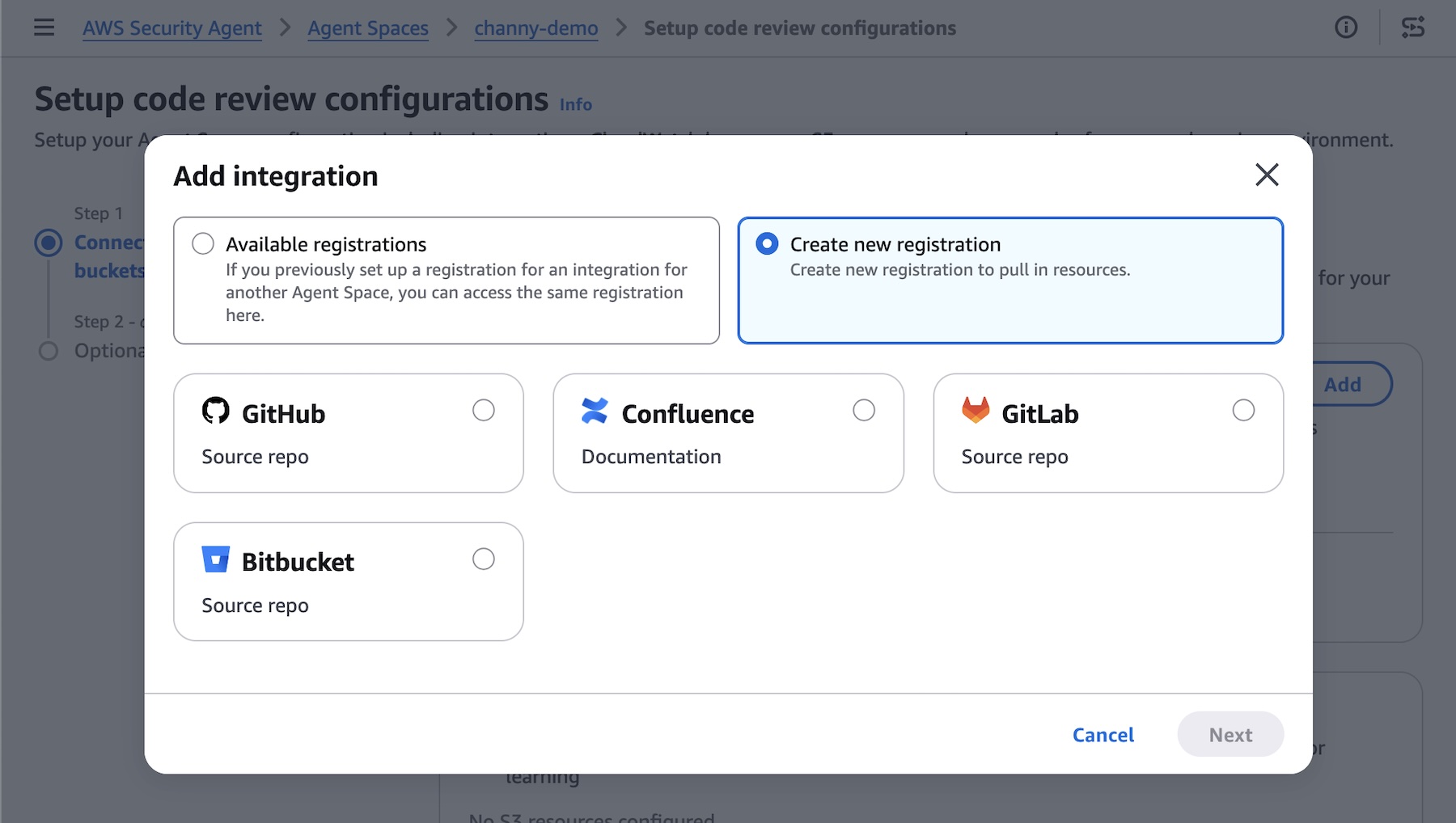
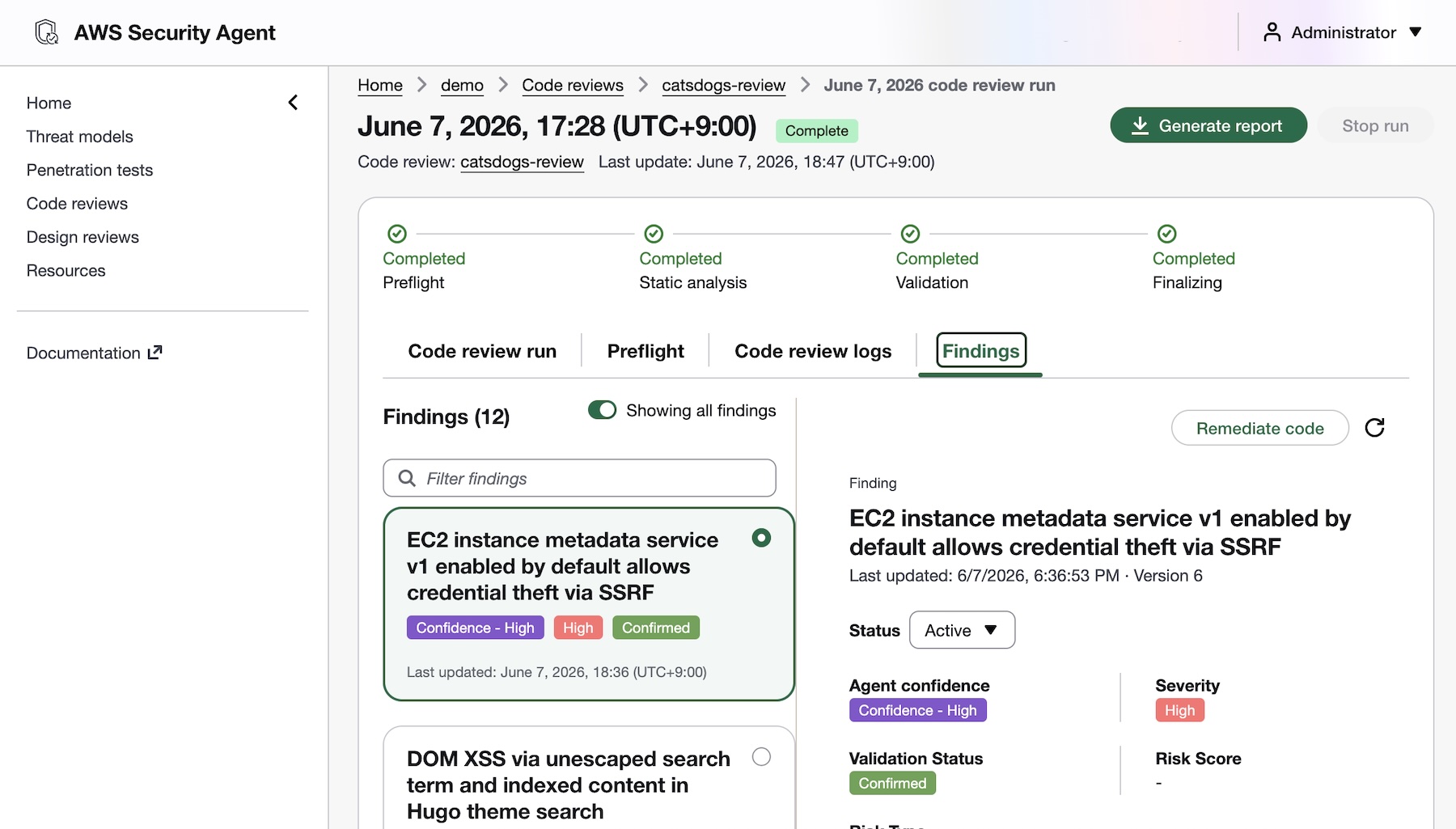
Code review updates (Preview) — You can now use pull request scanning with remediation, security requirements packs, and simulated validation. New integrations support GitHub, GitLab, Bitbucket, and Confluence.
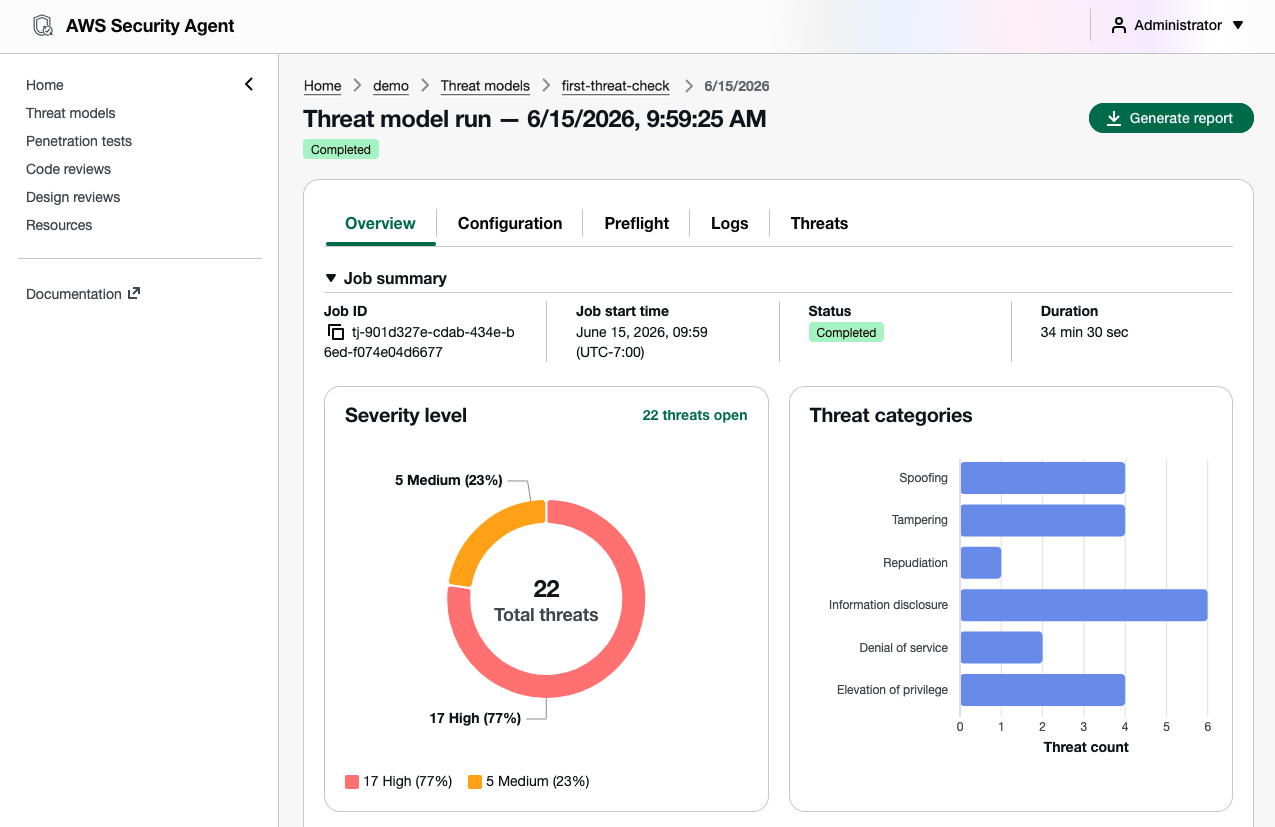
Threat modeling (Preview) — AWS Security Agent analyzes your design documents or application source code, understands the full context of your application architecture and identifies threats with recommended mitigations using the STRIDE framework.
Kiro power, Claude Code plugin, and MCP integration — You can run code reviews, generate threat models, and remediate findings directly from your IDE, CLI, or any AI-powered IDE through an open MCP integration, with results surfacing inline without any context switching.
Let’s take a closer look at each launch!
Code review updates You can now connect to GitLab and Bitbucket in addition to GitHub— supporting both SaaS and self-hosted versions, so you can trigger scans regardless of where code lives. You can also integrate Confluence to reference your existing documentation as context for reviews.
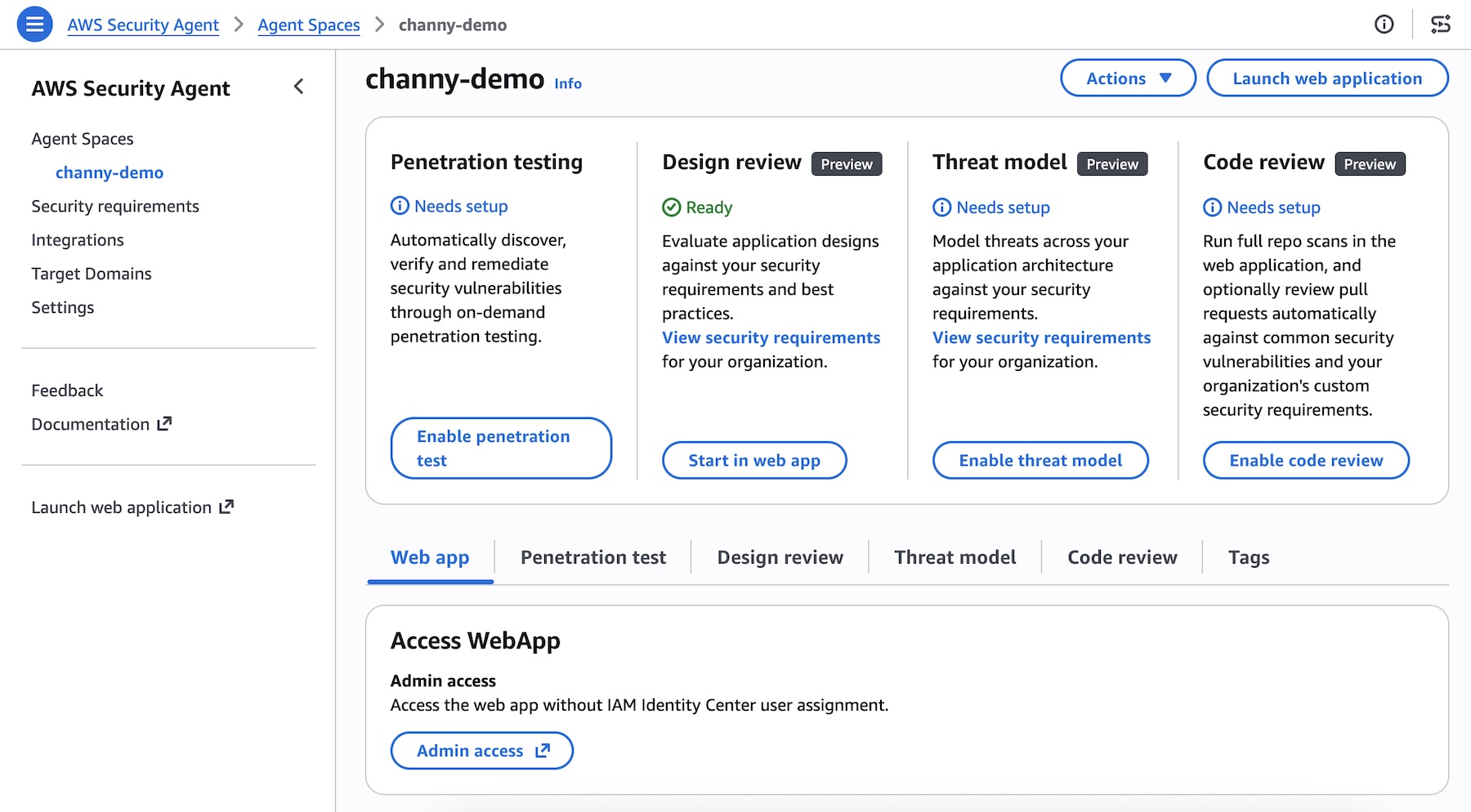
To get started, choose Enable code review or update your code review setting in the Security Agent console.
AWS Security Agent introduces deep, reasoning-based analysis on every pull request as well as full repository to identify complex vulnerabilities that go beyond pattern-matching. It checks against your organizational security requirements and common security risks to catch what other tools can’t. To get started, access the Security Agent web application and run your code review.
You’ll receive fix commits and remediation guidance directly in your GitHub, GitLab, or Bitbucket workflow, while your security teams configure the repositories to be monitored and intervene on critical issues. AWS Security Agent validates findings in simulated environments to demonstrate proof of exploitability. This embeds security expertise across all repositories, reducing security-related delays in the development pipeline.
To learn more about new code review features, visit Create a code review in the AWS Security Agent User Guide.
Design review updates You can continuously validate your security requirements across every design and code review with managed compliance packs: AWS WAF, NIST CSF, PCI DSS, and AWS best practices, or import your own organizational requirements directly from internal documents or Confluence. Every finding maps back to your compliance posture, so teams stay audit-ready as they build.
Threat modeling AWS Security Agent generates threat models based on your design documentation or code repository, creates and build context about the application, including data flows, architecture, and trust boundaries. It maps out all components of your application, identifies potential threat actors and attack vectors, determines where weaknesses may exist, and prioritizes threats so you know what to address first.
To get started, choose Enable threat model and Connect source code repository in the Security Agent console.
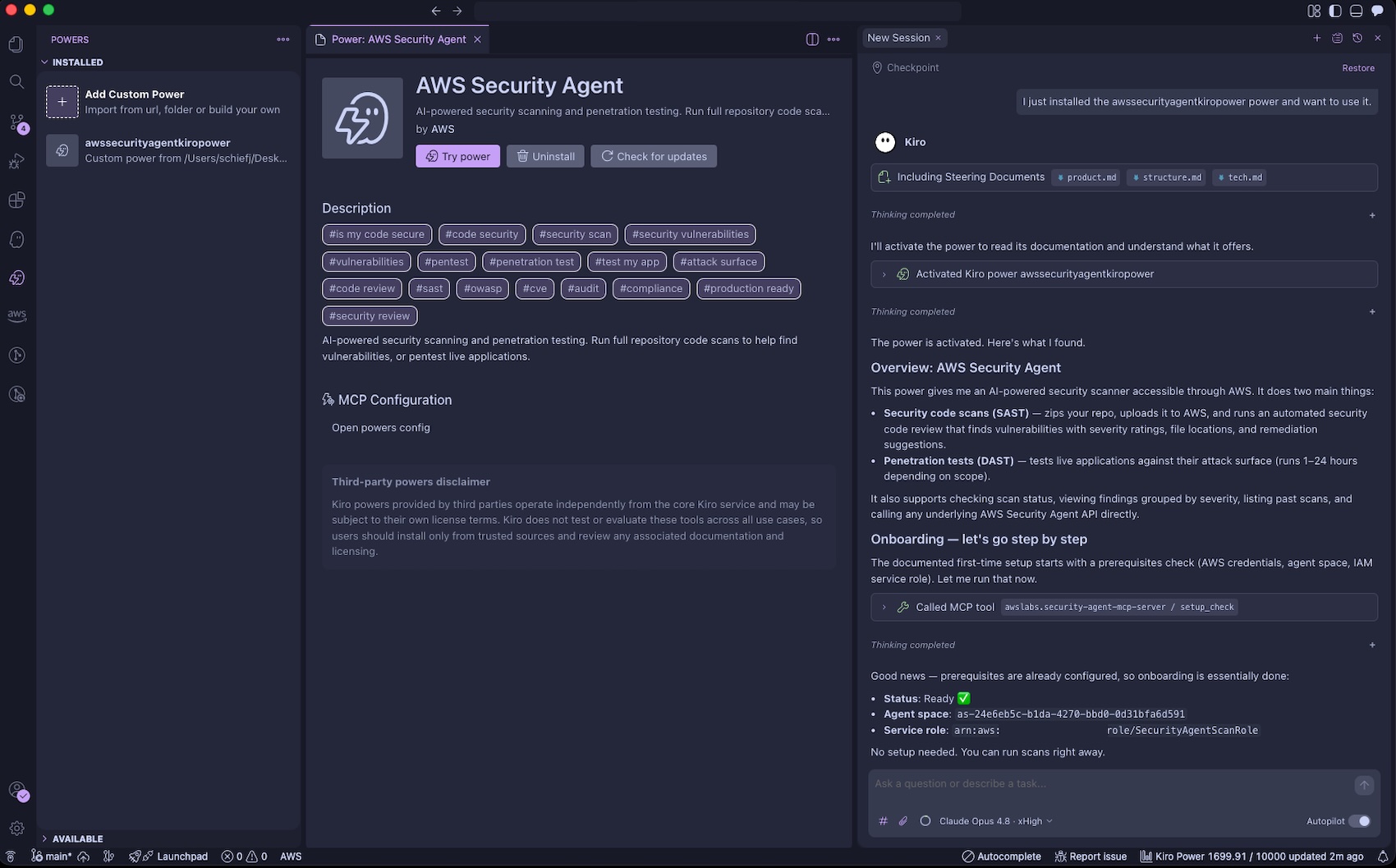
Kiro power and Claude Code plugin for Security Agent AWS Security Agent introduces a new Kiro power and Claude Code plugin (coming soon) and can be integrated with any AI IDE through an open MCP integration to secure your applications. You can trigger threat models and code reviews directly from your IDE, with results surfacing inline without any context switching.
To get started, install the Kiro power, and run your prompts. The Kiro power uses the AWS Security Agent MCP server. You can get started with the power by asking “Set up AWS Security Agent“. Kiro will check if you have an Agent Space and ask if you would like to use the existing one or create a new one.
With the Kiro power for Security Agent, you can catch vulnerabilities on every pull request as you build and scan an entire repository to surface accumulated risk by asking “Run a full security scan on this repo“. The Security Agent power includes an Agent hook to evaluate if a code review diff scan should be started after the Kiro agent has completed its turn. Before deploying to production, you can run a penetration test from your CLI to find what most scanners miss. Security Agent closes the loop by validating every finding and generating ready-to-implement code fixes.
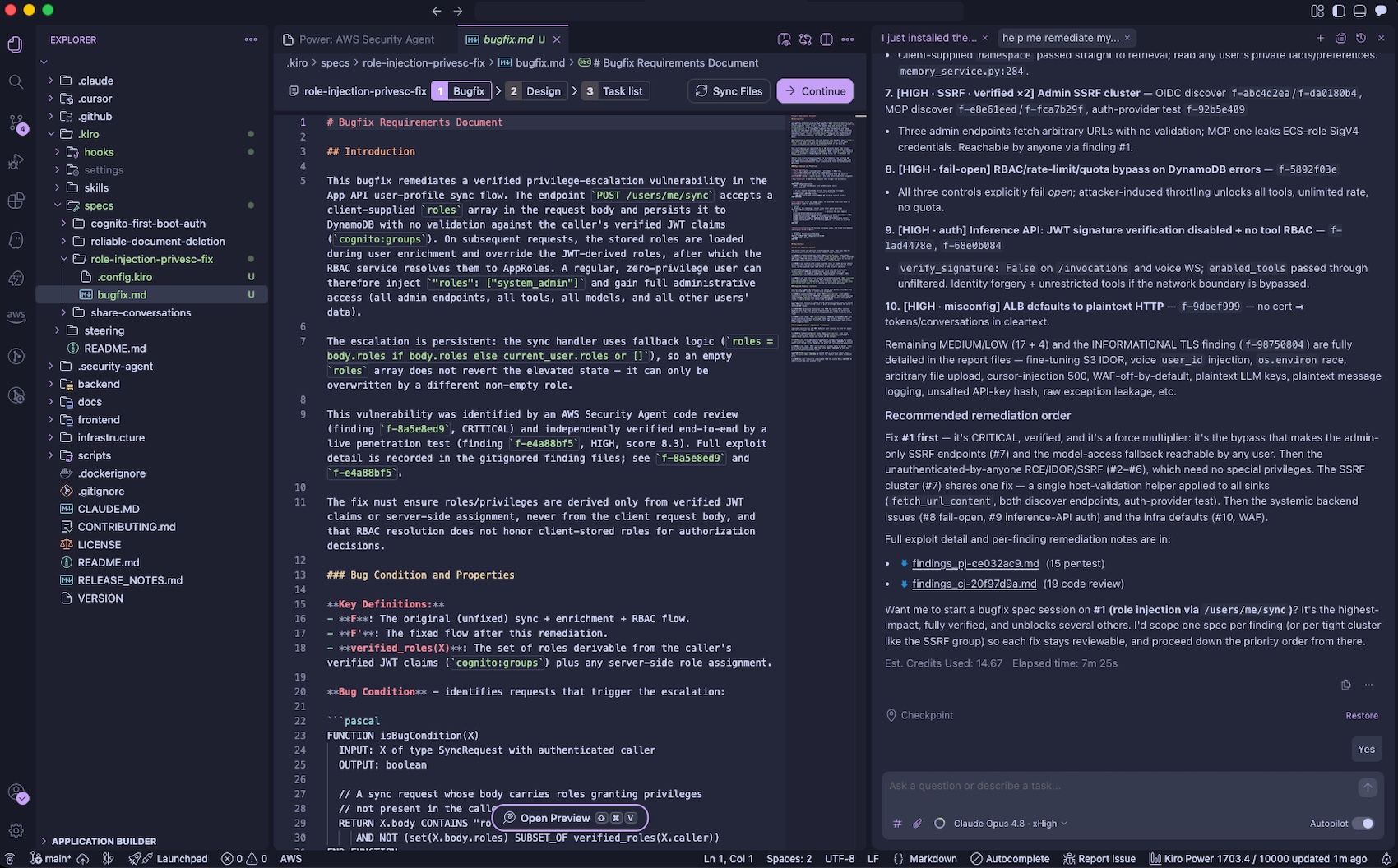
You can pull the findings back into your development environment by asking “help me remediate my findings“. The Kiro power for AWS Security Agent will download findings to your local workspace, prioritize the most critical finding, and offer to start a bugfix spec session. You can iterate on fixing the findings using their familiar IDE with their existing tooling, steering, powers, and MCP servers.
You can also run threat models through the Kiro power in the IDE by asking “Build a threat model for this application“. The generated threat model is saved to .security-agent/threat_model.md.
Now available AWS Security Agent understands the full security context across your software development lifecycle by covering design-time security (design reviews and threat modeling in preview), development-time security (code review in preview), and deployment-time security (penetration testing in GA), in a single, unified agentic offering. To learn more, visit the AWS Security Agent product page and the technical documentation.
These features are now available in AWS commercial Regions where AWS Security Agent is available. For Regional availability and the future roadmap, visit the AWS Capabilities by Region. For detailed pricing information and to access our 2-month free trial offer, please visit the AWS Security Agent pricing page.
Jan Kara has been working
on cleaning up how buffer
heads are used by some kernel filesystems. In a short
filesystem-track session at the 2026 Linux Storage,
Filesystem, Memory Management, and BPF Summit, he gave an update on
that work and where it is headed. Topics included generic infrastructure
to track buffer heads for metadata, a buffer-head cleanup for the Amiga
filesystem, and some planned locking fixes.
User authentication remains one of the most targeted touchpoints in application security. With the industrialization of fraud threats by generative AI, cybercrime costs are expected to reach $23 trillion in 2027, an increase of 175 percent from 2022. 20 percent of fraud is attributed to synthetic identity and authentication exploits, with account takeover (ATO) surging 141 percent since 2021.
But the damage goes beyond security. SMS One-time passcodes (OTPs) achieve only approximately 80 percent conversion on authentication flows, meaning 1 in 5 legitimate users is lost at the point of verification. Enterprises absorb hundreds of thousands of password recovery helpdesk tickets annually, representing significant support costs tied to OTP-based verification. Every abandoned authentication attempt today represents an opportunity to maximize your conversion rates across checkout, account recovery, and onboarding flows. The industry has long assumed that stronger security requires more user friction. That isn’t a law of physics. It’s a limitation of the tools available. Mobile operator network data removes that constraint and provides stronger identity assurance and a smoother experience, not one at the expense of the other.
In this post, we show how Vonage network-powered solutions work with Amazon Cognito to enhance many mobile-first use cases with network-level identity verification. Vonage network-powered solutions are a composable stack of real-time mobile operator intelligence, silent authentication, and integrated fraud protection, which uses the CUSTOM_AUTH flow to complete identity verification in under 5 seconds, with zero user interaction.
About Vonage
Vonage, part of Ericsson, is an AWS Partner with multiple AWS Marketplace listings. The company provides enterprise and CIAM deployments with cloud-based access to mobile operator network APIs, including real-time mobile identity and authentication across key regions. These complement Vonage’s global communications, voice, and video APIs backed by Ericsson’s global telecommunications infrastructure.
What network-powered means and why it matters
Before diving into architecture, it’s worth being precise about what separates Vonage’s network-powered solutions from the identity and fraud tools enterprises already have in their stack.
Most identity verification signals today are derived from aggregated, cached, or behavioral data. Traditional phone number lookup services query static databases that may be days or weeks out of date. Device fingerprinting analyzes browser characteristics that might be spoofed. Behavioral biometrics builds models from historical sessions. This is useful, but a lagging indicator by definition.
Enterprise customers who implement Vonage’s network-powered solutions operate from a fundamentally different layer: real-time data sourced directly from mobile network operators (MNOs). When you query whether a SIM was recently swapped, you’re querying the network that performed the swap. When Silent Authentication verifies a user, the proof of possession is the cellular data session itself. This session can’t be phished, intercepted, or socially engineered.
In fraud scenarios where SIM swaps are weaponized for account takeover (ATO), “recently” means minutes or hours, not days. Static databases refreshed weekly are not detecting these events. They’re logging them after the fact. Real-time operator queries close that window entirely.
The three pillars: Identity Insights, Verify, and Fraud Defender
Vonage network-powered solutions combine three API service components into a composable security stack that integrates with Amazon Cognito through the CUSTOM_AUTH flow:
Identity Insights runs before verification channels are initiated, surfacing real-time operator signals that are directly actionable in authentication policy decisions. The following list shows a representative set of JSON elements that might be returned by a request. Customers have the option to select which data is most valuable given a specific authentication use case and industry combination.
format and network_type: Filters invalid numbers, VoIP, landline, and premium-rate numbers used in synthetic account creation and bot-driven fraud.
sim_swap: Detects SIM swaps within a configurable look-back window, a leading indicator of ATO events in progress.
subscriber_match: Compares subscriber identity (name, address) against operator Know Your Customer (KYC) records.
device_swap: A recent change in the mobile device associated with a phone number signals that a bad actor might have taken control of the SIM card. (coming soon)
recycled_number: Numbers previously deactivated and reassigned to a new subscriber can trigger false identity matches in onboarding flows, creating risk in account creation. (coming soon)
These pre-checks trigger your defined risk policy: step-up challenge, hard block, or silent logging. Critically, fraudulent attempts are identified and blocked before a single OTP is sent, before verification costs are incurred, and before fraud processing overhead is generated.
2. Verify with Silent Authentication: Alleviating the friction tax
Every additional step a user must finish during authentication carries a measurable cost: abandoned sign-ups, failed conversions, and support tickets from users who don’t receive or mistyped a code. We call this cumulative loss the friction tax. For SMS OTP flows with approximately 80 percent completion rates, the friction tax means roughly 20 percent of legitimate users drop off before they ever reach your application.
After a number passes the risk pre-checks, the Verify API delivers the authentication challenge. The primary authentication method is Silent Authentication.
When a user initiates sign-in from a mobile device, Vonage routes an HTTP request through the user’s cellular data connection. The mobile operator confirms that the SIM registered to the phone number matches the session making the request. The exchange happens in the background, in seconds. The user doesn’t see, type, copy, or enter any code.
If Silent Authentication can’t finish or is unavailable, Verify automatically falls back to traditional SMS, RCS, Voice, WhatsApp, or email, remaining transparent to the user.
Key benefit: Silent Authentication alleviates the three primary exploit vectors against SMS OTP: SIM swap (bad actor receives the code), SS7 interception (message diverted in transit), and social engineering (user tricked into sharing the code). All without additional input from the end user.
3. Fraud Defender: Protecting the verification channel
Fraud Defender addresses a threat familiar to enterprise finance teams: artificially inflated traffic (AIT) and SMS pumping. Automated systems trigger high volumes of OTPs sent to premium-rate numbers that bad actors control. At enterprise verification volumes, these events can run undetected for extended periods.
Fraud Defender provides real-time traffic monitoring and intelligent blocking at the point of outbound delivery, intercepting these malicious events before costs accumulate. The financial impact is immediate and measurable. Fraud Defender typically absorbs its own cost in toll fraud prevention within the first billing cycle. For most enterprises, it quickly becomes a net revenue-positive investment. Vonage customers have collectively saved over $3M in SMS-related fraud costs since deployment. The savings continue to compound as the blocking algorithm evolves to counter new exploit patterns. For Verify customers, the value is even more compelling: Fraud Defender activates automatically with the Vonage Verify API at no additional cost. This makes it one of the highest-ROI fraud protections available.
Prerequisites
To implement this solution, you need:
An AWS account with permissions to create and manage Amazon Cognito, AWS Lambda, AWS Secrets Manager, Amazon CloudWatch, and AWS WAF resources.
An Amazon Cognito user pool (existing or new).
A Vonage API account with access to Identity Insights and Verify APIs.
AWS Command Line Interface (AWS CLI) or AWS Serverless Application Model (AWS SAM) CLI installed and configured.
For client integration: the Vonage Silent Authentication SDK for your mobile platform (iOS/Android).
Solution architecture with Amazon Cognito
Enterprise customers that integrate the Vonage solution use the Amazon Cognito CUSTOM_AUTH flow, which uses three AWS Lambda functions that orchestrate the solution stack without changing your existing user pool configuration or downstream service integrations.
Architecture components
The solution connects five layers, each handling a distinct step in the authentication flow:
Client app (mobile/web) – Initiates the CUSTOM_AUTH flow with the Vonage Silent Authentication SDK, follows check_url redirects over the cellular network, and submits the verification code back to Amazon Cognito.
Amazon Cognito user pool – Orchestrates the CUSTOM_AUTH challenge flow and issues JWT tokens upon successful verification.
Vonage Network APIs – Identity Insights pre-check, Verify with Silent Auth and OTP (built-in failover), and Fraud Defender (automatic).
Mobile network operators – SIM-level identity verification through CAMARA/Open Gateway APIs.
Authentication flow
The following steps represent an authentication workflow sequence between Amazon Cognito and Vonage network-powered solutions:
The client calls InitiateAuth with CUSTOM_AUTH, passing the user’s phone number.
The Define Auth Challenge Lambda function instructs Amazon Cognito to issue a CUSTOM_CHALLENGE.
The Create Auth Challenge Lambda function calls Identity Insights for pre-verification risk assessment. If the number passes pre-checks, Lambda calls Vonage Verify to initiate Silent Authentication and returns the check_url to the client.
Upon receiving the check_url, the client opens an HTTPS connection to it, triggering HTTP redirects to the mobile carrier’s network for direct mobile-device-to-mobile-network-operator verification. Upon completion, the client receives a verification code from the operator.
The client calls RespondToAuthChallenge with the code.
The Verify Auth Challenge Lambda function submits the code to Vonage’s check endpoint. On success, it returns answerCorrect = true and Amazon Cognito issues the appropriate session token.
Coexistence and phased rollout
A critical design principle: zero disruption to existing infrastructure. The Vonage Network API plugs into the Amazon Cognito CUSTOM_AUTH flow without changes to your existing user pool, app client configurations, or downstream service integrations. Deployment requires a single sam deploy command.
This design approach allows for a phased rollout. Start with the highest-risk journeys (password recovery, high-value transactions) where security ROI is clearest, then expand to daily login and onboarding as you measure impact. Traditional SMS, RCS, and Voice OTP remain options for lower-risk flows during the transition.
Risk-aware workflows by journey type
The strategic value of combining Vonage’s network-powered solutions with the Amazon Cognito policy-driven CUSTOM_AUTH flow is context-aware authentication calibrated to actual risk. CRITICAL journeys are recommended for the first phase of implementation as they aim to meaningfully mitigate synthetic identity and account takeover. The following table describes risk-aware workflows by journey type.
Journey
Risk
Vonage Workflow
New account signup
CRITICAL
Identity Insights filters invalid/non-mobile numbers + Subscriber Match validates KYC → Silent Auth for zero-tap onboarding
Daily login
MEDIUM
SIM swap recency + device consistency check → Silent Auth passively, step-up only on elevated signals
Mandatory SIM swap hard-check (tight lookback window) + Subscriber Match → Silent Auth required, no passive bypass
High-value transaction
CRITICAL
Full signal stack (line type, SIM swap, subscriber match) → Silent Auth + secondary challenge if risk elevated
Low-risk actions (for example, viewing account details, browsing content, or checking order history) generate no friction and no unnecessary verification cost. High-risk actions trigger the full assurance stack. The calibration is policy-driven and configurable per journey.
Implementation considerations
Configuring Amazon Cognito starts with setting up the user pool to allow the CUSTOM_AUTH authentication flow and accept phone numbers as the primary sign-in attribute. After the user pool is in place, associate the three required Lambda functions with their corresponding Amazon Cognito trigger hooks and store your Vonage API credentials in AWS Secrets Manager.
Layer in security from the start, following the AWS Well-Architected Security Pillar. Scope each Lambda function’s AWS Identity and Access Management (IAM) role to only what it needs: Amazon Cognito trigger invocations and AWS Secrets Manager access. Enforce TLS 1.2+ on all communication for encryption in transit. For observability, turn on Amazon CloudWatch logging on each Lambda function and turn on AWS CloudTrail to capture Amazon Cognito API audit trails. Finally, deploy AWS WAF with rate-limiting rules in front of the authentication endpoint to protect against brute-force attempts.
To configure the solution, follow these steps:
Set up the Amazon Cognito user pool to allow the CUSTOM_AUTH authentication flow.
Configure the user pool to accept phone numbers as the primary sign-in attribute.
Associate the three required Lambda functions with their corresponding Amazon Cognito trigger hooks.
Store your Vonage API credentials in AWS Secrets Manager.
Important: This solution creates AWS resources that incur charges. These include Amazon Cognito (per monthly active user), AWS Lambda (per invocation), AWS Secrets Manager (per secret per month), Amazon CloudWatch Logs, AWS CloudTrail, and AWS WAF (per rule and request). See the pricing page for each service and delete resources when no longer needed.
Privacy and compliance
The architecture is designed so that PII doesn’t leave the mobile operator. Subscriber Match performs a comparison within the operator’s environment and returns only a match score. The underlying subscriber data isn’t transmitted. Silent Authentication operates without PII exchange. The cellular session is the credential.
GDPR: Only match scores are returned. No subscriber PII is stored or transmitted, supporting GDPR data minimization.
PSD2 / Open Banking: Silent Authentication qualifies as a possession-factor for Strong Customer Authentication (SCA).
HIPAA: Subscriber Match supports identity assurance for healthcare applications.
CCPA: Same data-minimization architecture as GDPR.
Production results: Lydia Solutions
Lydia Solutions, one of Europe’s fastest-growing mobile financial services applications, deployed Vonage Verify with Silent Authentication in October 2024. The results demonstrate the real-world impact at scale, including up to 50 percent reduction in latency when compared to Lydia Solutions’s previous authentication services.
“Vonage Verify with Silent Authentication has been a real innovation for us. The solution has elevated our ability to deliver a simpler, seamless and more secure user experience while protecting against increasingly sophisticated threats and fraud patterns.”
— William Brulin, Senior VP, Lydia Solutions
Lydia’s results sit at the high end of outcomes observed. Across deployments in ecommerce, digital banking, and consumer services, conversion improvements of 2–8.5 percent compared to SMS-only are the norm, with authentication journey latency reductions of 50–75 percent.
Conclusion
This is where mobile operator data shifts the approach. Rather than applying identical verification friction to every session, enterprises can use real-time network signals to make adaptive authentication decisions. Verify silently when conditions are right, step up when risk indicators appear, and block when fraud is detected.
Enterprise implementation of the offering makes those risk signals and authentication methods accessible through a composable API layer. The combination of Identity Insights for pre-verification intelligence, Verify for network-layer authentication, and Fraud Defender for channel protection delivers risk-proportionate authentication that’s in production at scale today.
The solution deploys with minimal changes to your existing Amazon Cognito user pool. Start with high-risk journeys, measure impact, and expand. Vonage Verify API is available across over 700 MNOs in over 200 countries and territories, and the integration requires only three Lambda functions.
Contact: Reach out to your AWS account team or Vonage to discuss integration.
Vonage is an AWS Partner. To learn more, visit the Vonage partner page.
The content and opinions in this post are those of the third-party author and AWS is not responsible for the content or accuracy of this post.
About the authors
The collective thoughts of the interwebz
Manage Consent
To provide the best experiences, we use technologies like cookies to store and/or access device information. Consenting to these technologies will allow us to process data such as browsing behavior or unique IDs on this site. Not consenting or withdrawing consent, may adversely affect certain features and functions.
Functional
Always active
The technical storage or access is strictly necessary for the legitimate purpose of enabling the use of a specific service explicitly requested by the subscriber or user, or for the sole purpose of carrying out the transmission of a communication over an electronic communications network.
Preferences
The technical storage or access is necessary for the legitimate purpose of storing preferences that are not requested by the subscriber or user.
Statistics
The technical storage or access that is used exclusively for statistical purposes.The technical storage or access that is used exclusively for anonymous statistical purposes. Without a subpoena, voluntary compliance on the part of your Internet Service Provider, or additional records from a third party, information stored or retrieved for this purpose alone cannot usually be used to identify you.
Marketing
The technical storage or access is required to create user profiles to send advertising, or to track the user on a website or across several websites for similar marketing purposes.