Tag Archives: AI Bots

Forget IPs: using cryptography to verify bot and agent traffic

Post Syndicated from Thibault Meunier original https://blog.cloudflare.com/web-bot-auth/

With the rise of traffic from AI agents, what’s considered a bot is no longer clear-cut. There are some clearly malicious bots, like ones that DoS your site or do credential stuffing, and ones that most site owners do want to interact with their site, like the bot that indexes your site for a search engine, or ones that fetch RSS feeds.      

Historically, Cloudflare has relied on two main signals to verify legitimate web crawlers from other types of automated traffic: user agent headers and IP addresses. The User-Agent header allows bot developers to identify themselves, i.e. MyBotCrawler/1.1. However, user agent headers alone are easily spoofed and are therefore insufficient for reliable identification. To address this, user agent checks are often supplemented with IP address validation, the inspection of published IP address ranges to confirm a crawler’s authenticity. However, the logic around IP address ranges representing a product or group of users is brittle – connections from the crawling service might be shared by multiple users, such as in the case of privacy proxies and VPNs, and these ranges, often maintained by cloud providers, change over time.

Cloudflare will always try to block malicious bots, but we think our role here is to also provide an affirmative mechanism to authenticate desirable bot traffic. By using well-established cryptography techniques, we’re proposing a better mechanism for legitimate agents and bots to declare who they are, and provide a clearer signal for site owners to decide what traffic to permit. 

Today, we’re introducing two proposals – HTTP message signatures and request mTLS – for friendly bots to authenticate themselves, and for customer origins to identify them. In this blog post, we’ll share how these authentication mechanisms work, how we implemented them, and how you can participate in our closed beta.

Existing bot verification mechanisms are broken 

Historically, if you’ve worked on ChatGPT, Claude, Gemini, or any other agent, you’ve had several options to identify your HTTP traffic to other services: 

  1. You define a user agent, an HTTP header described in RFC 9110. The problem here is that this header is easily spoofable and there’s not a clear way for agents to identify themselves as semi-automated browsers — agents often use the Chrome user agent for this very reason, which is discouraged. The RFC states:
    “If a user agent masquerades as a different user agent, recipients can assume that the user intentionally desires to see responses tailored for that identified user agent, even if they might not work as well for the actual user agent being used.”  

  2. You publish your IP address range(s). This has limitations because the same IP address might be shared by multiple users or multiple services within the same company, or even by multiple companies when hosting infrastructure is shared (like Cloudflare Workers, for example). In addition, IP addresses are prone to change as underlying infrastructure changes, leading services to use ad-hoc sharing mechanisms like CIDR lists

  3. You go to every website and share a secret, like a Bearer token. This is impractical at scale because it requires developers to maintain separate tokens for each website their bot will visit.

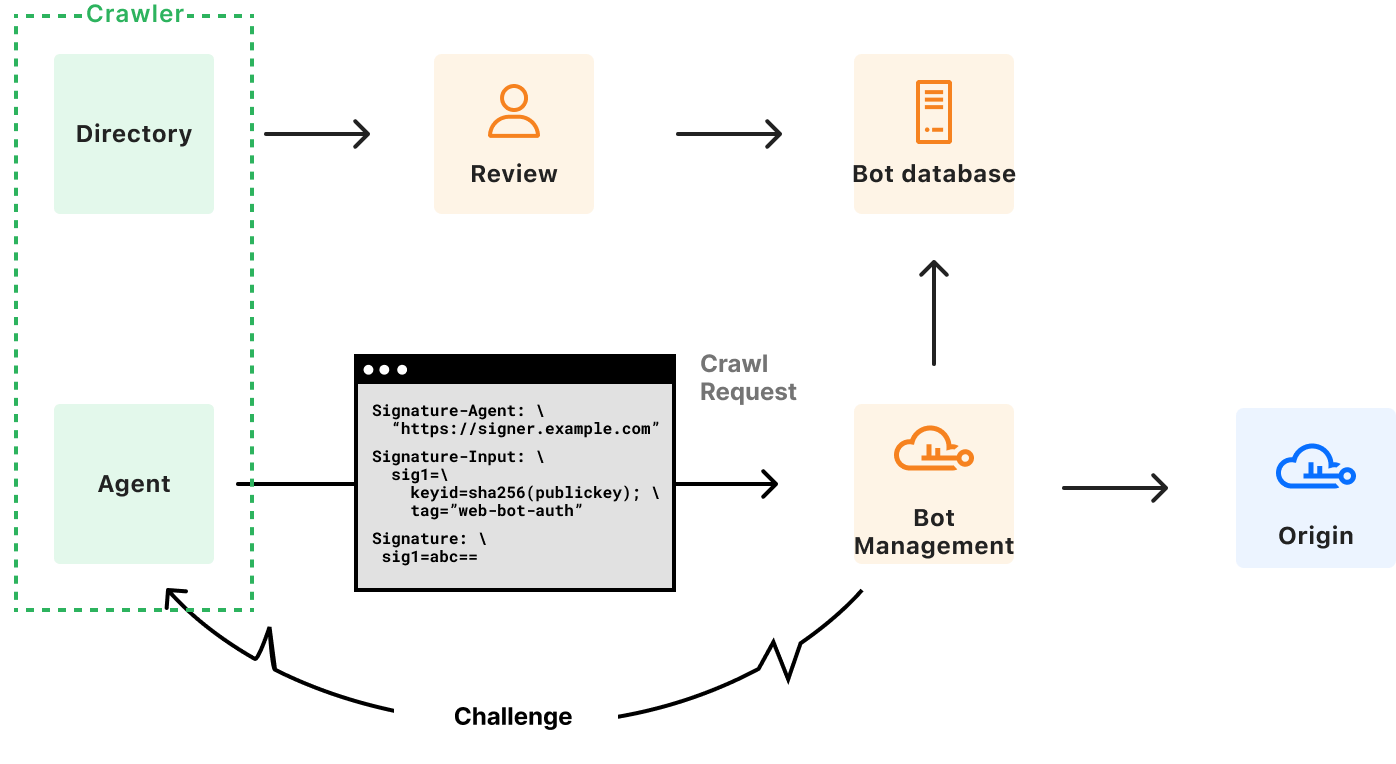
We can do better! Instead of these arduous methods, we’re proposing that developers of bots and agents cryptographically sign requests originating from their service. When protecting origins, reverse proxies such as Cloudflare can then validate those signatures to confidently identify the request source on behalf of site owners, allowing them to take action as they see fit. 


A typical system has three actors:

  • User: the entity that wants to perform some actions on the web. This may be a human, an automated program, or anything taking action to retrieve information from the web.

  • Agent: an orchestrated browser or software program. For example, Chrome on your computer, or OpenAI’s Operator with ChatGPT. Agents can interact with the web according to web standards (HTML rendering, JavaScript, subrequests, etc.).

  • Origin: the website hosting a resource. The user wants to access it through the browser. This is Cloudflare when your website is using our services, and it’s your own server(s) when exposed directly to the Internet.

In the next section, we’ll dive into HTTP Message Signatures and request mTLS, two mechanisms a browser agent may implement to sign outgoing requests, with different levels of ease for an origin to adopt. 

Introducing HTTP Message Signatures

HTTP Message Signatures is a standard that defines the cryptographic authentication of a request sender. It’s essentially a cryptographically sound way to say, “hey, it’s me!”. It’s not the only way that developers can sign requests from their infrastructure — for example, AWS has used Signature v4, and Stripe has a framework for authenticating webhooks — but Message Signatures is a published standard, and the cleanest, most developer-friendly way to sign requests.  

We’re working closely with the wider industry to support these standards-based approaches. For example, OpenAI has started to sign their requests. In their own words:   

“Ensuring the authenticity of Operator traffic is paramount. With HTTP Message Signatures (RFC 9421), OpenAI signs all Operator requests so site owners can verify they genuinely originate from Operator and haven’t been tampered with” – Eugenio, Engineer, OpenAI

Without further delay, let’s dive in how HTTP Messages Signatures work to identify bot traffic.

Scoping standards to bot authentication

Generating a message signature works like this: before sending a request, the agent signs the target origin with a public key. When fetching https://example.com/path/to/resource, it signs example.com. This public key is known to the origin, either because the agent is well known, because it has previously registered, or any other method. Then, the agent writes a Signature-Input header with the following parameters:

  1. A validity window (created and expires timestamps)

  2. A Key ID that uniquely identifies the key used in the signature. This is a JSON Web Key Thumbprint.  

  3. A tag that shows websites the signature’s purpose and validation method, i.e. web-bot-auth for bot authentication.

In addition, the Signature-Agent header indicates where the origin can find the public keys the agent used when signing the request, such as in a directory hosted by signer.example.com. This header is part of the signed content as well.

Here’s an example:

GET /path/to/resource HTTP/1.1
Host: www.example.com
User-Agent: Mozilla/5.0 Chrome/113.0.0 MyBotCrawler/1.1
Signature-Agent: signer.example.com
Signature-Input: sig=("@authority" "signature-agent");\
             	 created=1700000000;\
             	 expires=1700011111;\
             	 keyid="ba3e64==";\
             	 tag="web-bot-auth"
Signature: sig=abc==

For those building bots, we propose signing the authority of the target URI, i.e. crawler.search.google.com for Google Search, operator.openai.com for OpenAI Operator, workers.dev for Cloudflare Workers, and a way to retrieve the bot public key in the form of signature-agent, if present.

The User-Agent from the example above indicates that the software making the request is Chrome, because it is an agent that uses an orchestrated Chrome to browse the web. You should note that MyBotCrawler/1.1 is still present. The User-Agent header can actually contain multiple products, in decreasing order of importance. If our agent is making requests via Chrome, that’s the most important product and therefore comes first.

At Internet-level scale, these signatures may add a notable amount of overhead to request processing. However, with the right cryptographic suite, and compared to the cost of existing bot mitigation, both technical and social, this seems to be a straightforward tradeoff. This is a metric we will monitor closely, and report on as adoption grows.

Generating request signatures

We’re making several examples for generating Message Signatures for bots and agents available on Github (though we encourage other implementations!), all of which are standards-compliant, to maximize interoperability. 

Imagine you’re building an agent using a managed Chromium browser, and want to sign all outgoing requests. To achieve this, the webextensions standard provides chrome.webRequest.onBeforeSendHeaders, where you can modify HTTP headers before they are sent by the browser. The event is triggered before sending any HTTP data, and when headers are available.

Here’s what that code would look like: 

chrome.webRequest.onBeforeSendHeaders.addListener(
  function (details) {
	// Signature and header assignment logic goes here
      // <CODE>
  },
  { urls: ["<all_urls>"] },
  ["blocking", "requestHeaders"] // requires "installation_mode": "force_installed"
);

Cloudflare provides a web-bot-auth helper package on npm that helps you generate request signatures with the correct parameters. onBeforeSendHeaders is a Chrome extension hook that needs to be implemented synchronously. To do so, we import {signatureHeadersSync} from “web-bot-auth”. Once the signature completes, both Signature and Signature-Input headers are assigned. The request flow can then continue.

const request = new URL(details.url);
const created = new Date();
const expired = new Date(created.getTime() + 300_000)


// Perform request signature
const headers = signatureHeadersSync(
  request,
  new Ed25519Signer(jwk),
  { created, expires }
);
// `headers` object now contains `Signature` and `Signature-Input` headers that can be used

This  extension code is available on GitHub, alongside a  debugging server, deployed at https://http-message-signatures-example.research.cloudflare.com

Validating request signatures 

Using our debug server, we can now inspect and validate our request signatures from the perspective of the website we’d be visiting. We should now see the Signature and Signature-Input headers:  


In this example, the homepage of the debugging server validates the signature from the RFC 9421 Ed25519 verifying key, which the extension uses for signing.

The above demo and code walkthrough has been fully written in TypeScript: the verification website is on Cloudflare Workers, and the client is a Chrome browser extension. We are cognisant that this does not suit all clients and servers on the web. To demonstrate the proposal works in more environments, we have also implemented bot signature validation in Go with a plugin for Caddy server.

Experimentation with request mTLS

HTTP is not the only way to convey signatures. For instance, one mechanism that has been used in the past to authenticate automated traffic against secured endpoints is mTLS, the “mutual” presentation of TLS certificates. As described in our knowledge base:

Mutual TLS, or mTLS for short, is a method for mutual authentication. mTLS ensures that the parties at each end of a network connection are who they claim to be by verifying that they both have the correct private key. The information within their respective TLS certificates provides additional verification.

While mTLS seems like a good fit for bot authentication on the web, it has limitations. If a user is asked for authentication via the mTLS protocol but does not have a certificate to provide, they would get an inscrutable and unskippable error. Origin sites need a way to conditionally signal to clients that they accept or require mTLS authentication, so that only mTLS-enabled clients use it.

A TLS flag for bot authentication

TLS flags are an efficient way to describe whether a feature, like mTLS, is supported by origin sites. Within the IETF, we have proposed a new TLS flag called req mTLS to be sent by the client during the establishment of a connection that signals support for authentication via a client certificate. 

This proposal leverages the tls-flags proposal under discussion in the IETF. The TLS Flags draft allows clients and servers to send an array of one bit flags to each other, rather than creating a new extension (with its associated overhead) for each piece of information they want to share. This is one of the first uses of this extension, and we hope that by using it here we can help drive adoption.

When a client sends the req mTLS flag to the server, they signal to the server that they are able to respond with a certificate if requested. The server can then safely request a certificate without risk of blocking ordinary user traffic, because ordinary users will never set this flag. 

Let’s take a look at what an example of such a req mTLS would look like in Wireshark, a network protocol analyser. You can follow along in the packet capture here.

Extension: req mTLS (len=12)
	Type: req mTLS (65025)
	Length: 12
	Data: 0b0000000000000000000001

The extension number is 65025, or 0xfe01. This corresponds to an unassigned block of TLS extensions that can be used to experiment with TLS Flags. Once the standard is adopted and published by the IETF, the number would be fixed. To use the req mTLS flag the client needs to set the 80th bit to true, so with our block length of 12 bytes, it should  contain the data 0b0000000000000000000001, which is the case here. The server then responds with a certificate request, and the request follows its course.

Request mTLS in action

Code for this section is available in GitHub under cloudflareresearch/req-mtls

Because mutual TLS is widely supported in TLS libraries already, the parts we need to introduce to the client and server are:

  1. Sending/parsing of TLS-flags

  2. Specific support for the req mTLS flag

To the best of our knowledge, there is no public implementation of either scheme. Using it for bot authentication may provide a motivation to do so.

Using our experimental fork of Go, a TLS client could support req mTLS as follows:

config := &tls.Config{
    	TLSFlagsSupported:  []tls.TLSFlag{0x50},
    	RootCAs:       	rootPool,
    	Certificates:  	certs,
    	NextProtos:    	[]string{"h2"},
}
trans := http.Transport{TLSClientConfig: config, ForceAttemptHTTP2: true}

This example library allows you to configure Go to send req mTLS 0xfe01 bytes in the TLS Flags extension. If you’d like to test your implementation out, you can prompt your client for certificates against req-mtls.research.cloudflare.com using the Cloudflare Research client cloudflareresearch/req-mtls. For clients, once they set the TLS Flags associated with req mTLS, they are done. The code section taking care of normal mTLS will take over at that point, with no need to implement something new.

Two approaches, one goal

We believe that developers of agents and bots should have a public, standard way to authenticate themselves to CDNs and website hosting platforms, regardless of the technology they use or provider they choose. At a high level, both HTTP Message Signatures and request mTLS achieve a similar goal: they allow the owner of a service to authentically identify themselves to a website. That’s why we’re participating in the standardizing effort for both of these protocols at the IETF, where many other authentication mechanisms we’ve discussed here — from TLS to OAuth Bearer tokens –— been developed by diverse sets of stakeholders and standardized as RFCs.   

Evaluating both proposals against each other, we’re prioritizing HTTP Message Signatures for Bots because it relies on the previously adopted RFC 9421 with several reference implementations, and works at the HTTP layer, making adoption simpler. request mTLS may be a better fit for site owners with concerns about the additional bandwidth, but TLS Flags has fewer implementations, is still waiting for IETF adoption, and upgrading the TLS stack has proven to be more challenging than with HTTP. Both approaches share similar discovery and key management concerns, as highlighted in a glossary draft at the IETF. We’re actively exploring both options, and would love to hear from both site owners and bot developers about how you’re evaluating their respective tradeoffs.

The bigger picture 

In conclusion, we think request signatures and mTLS are promising mechanisms for bot owners and developers of AI agents to authenticate themselves in a tamper-proof manner, forging a path forward that doesn’t rely on ever-changing IP address ranges or spoofable headers such as User-Agent. This authentication can be consumed by Cloudflare when acting as a reverse proxy, or directly by site owners on their own infrastructure. This means that as a bot owner, you can now go to content creators and discuss crawling agreements, with as much granularity as the number of bots you have. You can start implementing these solutions today and test them against the research websites we’ve provided in this post.

Bot authentication also empowers site owners small and large to have more control over the traffic they allow, empowering them to continue to serve content on the public Internet while monitoring automated requests. Longer term, we will integrate these authentication mechanisms into our AI Audit and Bot Management products, to provide better visibility into the bots and agents that are willing to identify themselves.

Being able to solve problems for both origins and clients is key to helping build a better Internet, and we think identification of automated traffic is a step towards that. If you want us to start verifying your message signatures or client certificates, have a compelling use case you’d like us to consider, or any questions, please reach out.

Trapping misbehaving bots in an AI Labyrinth

Post Syndicated from Reid Tatoris original https://blog.cloudflare.com/ai-labyrinth/

Today, we’re excited to announce AI Labyrinth, a new mitigation approach that uses AI-generated content to slow down, confuse, and waste the resources of AI Crawlers and other bots that don’t respect “no crawl” directives. When you opt in, Cloudflare will automatically deploy an AI-generated set of linked pages when we detect inappropriate bot activity, without the need for customers to create any custom rules.

AI Labyrinth is available on an opt-in basis to all customers, including the Free plan.

Using Generative AI as a defensive weapon

AI-generated content has exploded, reportedly accounting for four of the top 20 Facebook posts last fall. Additionally, Medium estimates that 47% of all content on their platform is AI-generated. Like any newer tool it has both wonderful and malicious uses.

At the same time, we’ve also seen an explosion of new crawlers used by AI companies to scrape data for model training. AI Crawlers generate more than 50 billion requests to the Cloudflare network every day, or just under 1% of all web requests we see. While Cloudflare has several tools for identifying and blocking unauthorized AI crawling, we have found that blocking malicious bots can alert the attacker that you are on to them, leading to a shift in approach, and a never-ending arms race. So, we wanted to create a new way to thwart these unwanted bots, without letting them know they’ve been thwarted.

To do this, we decided to use a new offensive tool in the bot creator’s toolset that we haven’t really seen used defensively: AI-generated content. When we detect unauthorized crawling, rather than blocking the request, we will link to a series of AI-generated pages that are convincing enough to entice a crawler to traverse them. But while real looking, this content is not actually the content of the site we are protecting, so the crawler wastes time and resources. 
As an added benefit, AI Labyrinth also acts as a next-generation honeypot. No real human would go four links deep into a maze of AI-generated nonsense. Any visitor that does is very likely to be a bot, so this gives us a brand-new tool to identify and fingerprint bad bots, which we add to our list of known bad actors. Here’s how we do it…

How we built the labyrinth 

When AI crawlers follow these links, they waste valuable computational resources processing irrelevant content rather than extracting your legitimate website data. This significantly reduces their ability to gather enough useful information to train their models effectively.

To generate convincing human-like content, we used Workers AI with an open source model to create unique HTML pages on diverse topics. Rather than creating this content on-demand (which could impact performance), we implemented a pre-generation pipeline that sanitizes the content to prevent any XSS vulnerabilities, and stores it in R2 for faster retrieval. We found that generating a diverse set of topics first, then creating content for each topic, produced more varied and convincing results. It is important to us that we don’t generate inaccurate content that contributes to the spread of misinformation on the Internet, so the content we generate is real and related to scientific facts, just not relevant or proprietary to the site being crawled.

This pre-generated content is seamlessly integrated as hidden links on existing pages via our custom HTML transformation process, without disrupting the original structure or content of the page. Each generated page includes appropriate meta directives to protect SEO by preventing search engine indexing. We also ensured that these links remain invisible to human visitors through carefully implemented attributes and styling. To further minimize the impact to regular visitors, we ensured that these links are presented only to suspected AI scrapers, while allowing legitimate users and verified crawlers to browse normally.


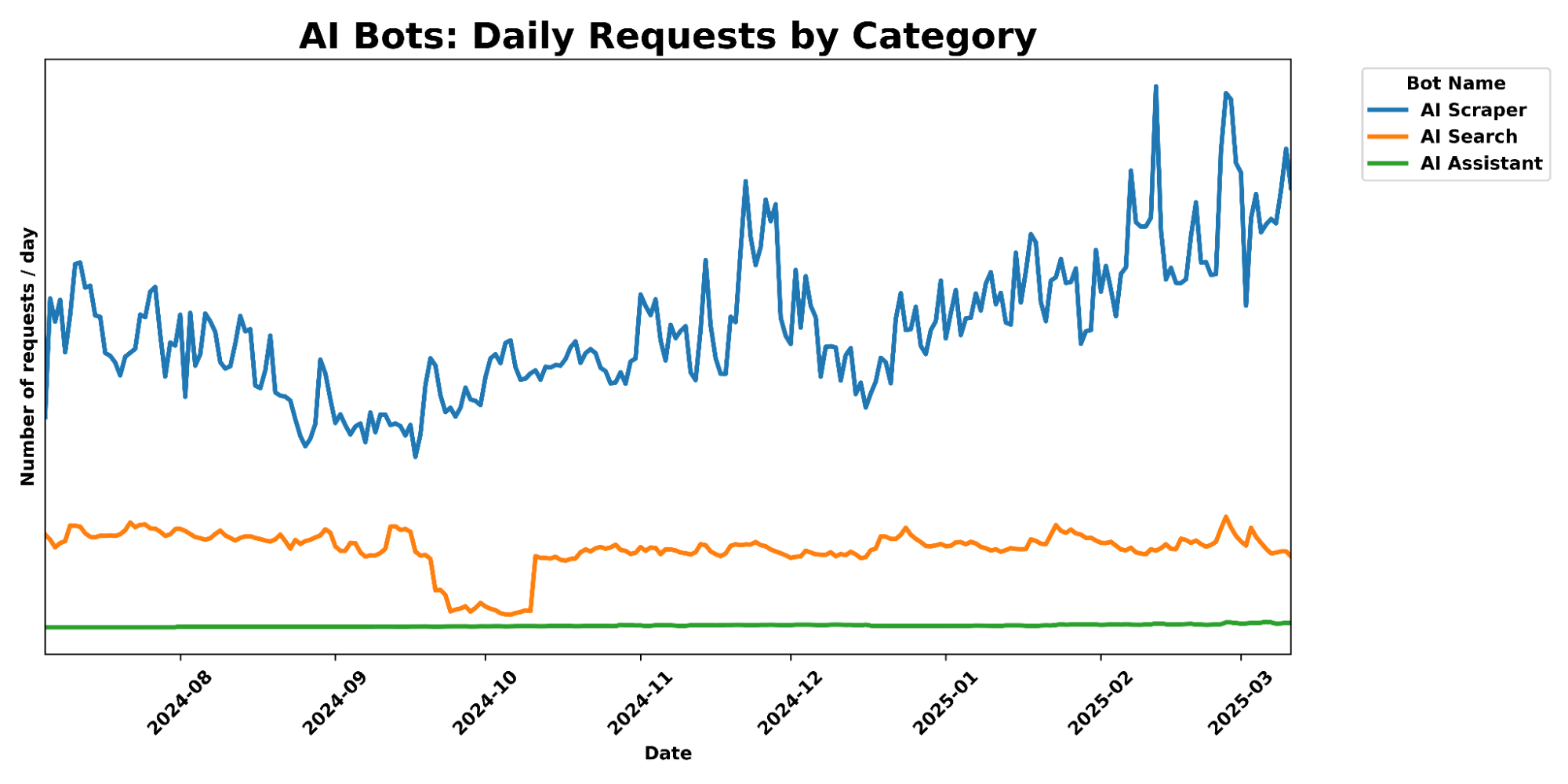
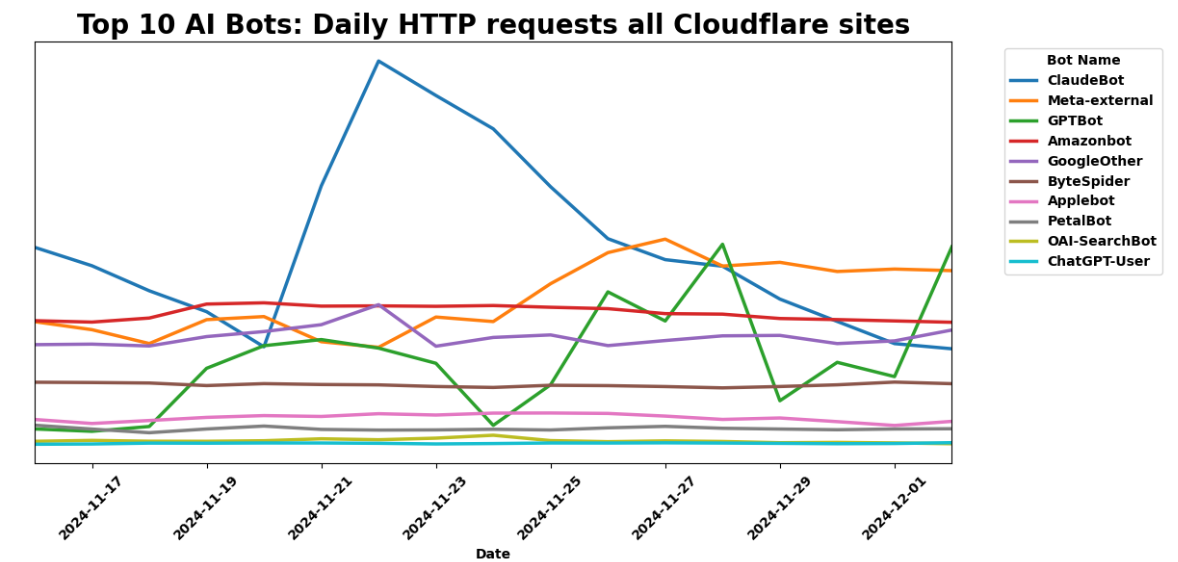
A graph of daily requests over time, comparing different categories of AI Crawlers.

What makes this approach particularly effective is its role in our continuously evolving bot detection system. When these links are followed, we know with high confidence that it’s automated crawler activity, as human visitors and legitimate browsers would never see or click them. This provides us with a powerful identification mechanism, generating valuable data that feeds into our machine learning models. By analyzing which crawlers are following these hidden pathways, we can identify new bot patterns and signatures that might otherwise go undetected. This proactive approach helps us stay ahead of AI scrapers, continuously improving our detection capabilities without disrupting the normal browsing experience.

By building this solution on our developer platform, we’ve created a system that serves convincing decoy content instantly while maintaining consistent quality – all without impacting your site’s performance or user experience.

How to use AI Labyrinth to stop AI crawlers

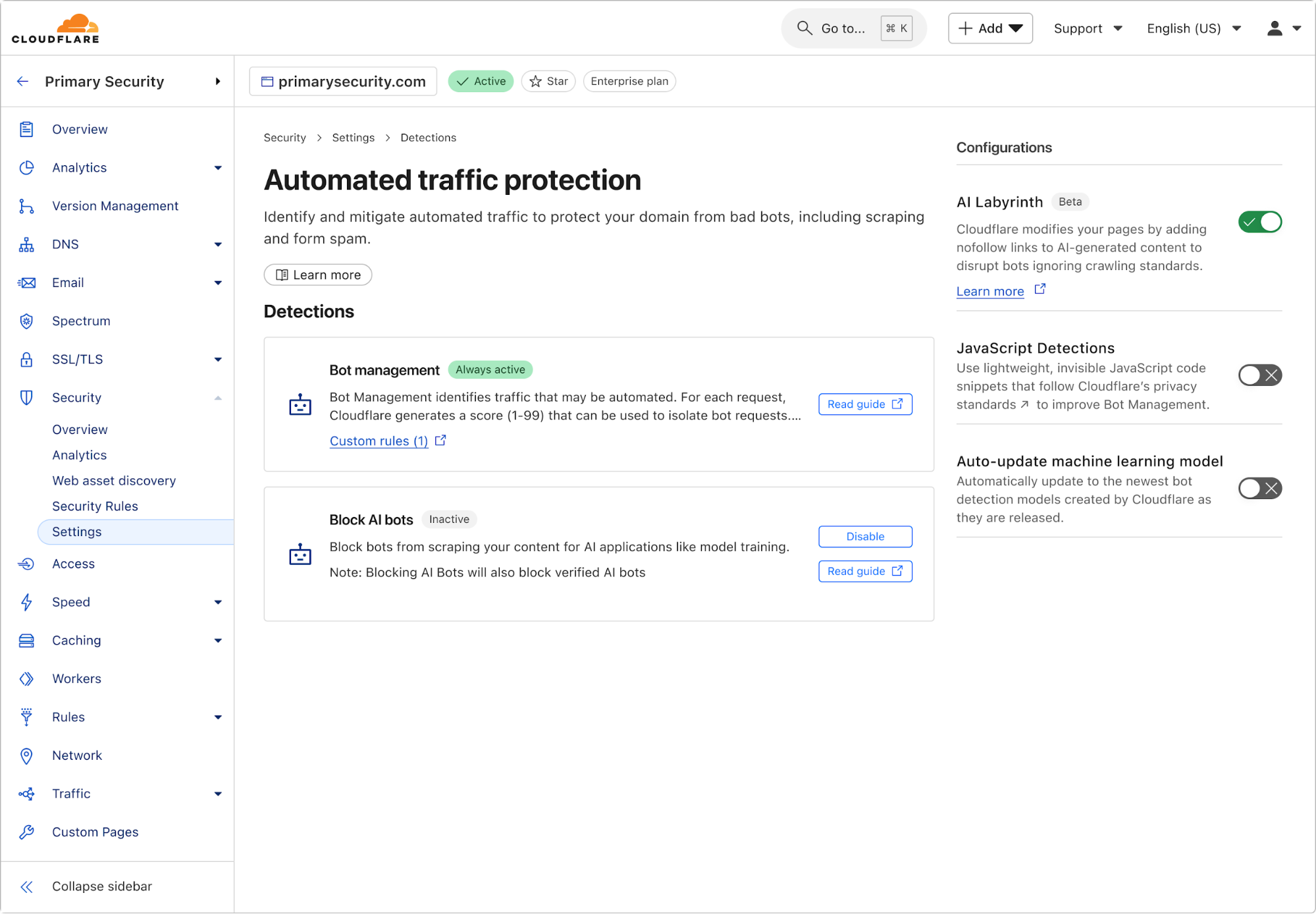
Enabling AI Labyrinth is simple and requires just a single toggle in your Cloudflare dashboard. Navigate to the bot management section within your zone, and toggle the new AI Labyrinth setting to on:


Once enabled, the AI Labyrinth begins working immediately with no additional configuration needed.

AI honeypots, created by AI

The core benefit of AI Labyrinth is to confuse and distract bots. However, a secondary benefit is to serve as a next-generation honeypot. In this context, a honeypot is just an invisible link that a website visitor can’t see, but a bot parsing HTML would see and click on, therefore revealing itself to be a bot. Honeypots have been used to catch hackers as early as the late 1986 Cuckoo’s Egg incident. And in 2004, Project Honeypot was created by Cloudflare founders (prior to founding Cloudflare) to let everyone easily deploy free email honeypots, and receive lists of crawler IPs in exchange for contributing to the database. But as bots have evolved, they now proactively look for honeypot techniques like hidden links, making this approach less effective.

AI Labyrinth won’t simply add invisible links, but will eventually create whole networks of linked URLs that are much more realistic, and not trivial for automated programs to spot. The content on the pages is obviously content no human would spend time-consuming, but AI bots are programmed to crawl rather deeply to harvest as much data as possible. When bots hit these URLs, we can be confident they aren’t actual humans, and this information is recorded and automatically fed to our machine learning models to help improve our bot identification. This creates a beneficial feedback loop where each scraping attempt helps protect all Cloudflare customers.

What’s next

This is only the first iteration of using generative AI to thwart bots for us. Currently, while the content we generate is convincingly human, it won’t conform to the existing structure of every website. In the future, we’ll continue to work to make these links harder to spot and make them fit seamlessly into the existing structure of the website they’re embedded in. You can help us by opting in now.

To take the next step in the fight against bots, opt-in to AI Labyrinth today.

Grinch Bots strike again: defending your holidays from cyber threats

Post Syndicated from Avi Jaisinghani original https://blog.cloudflare.com/grinch-bot-2024/

Grinch Bots are still stealing Christmas

Back in 2021, we covered the antics of Grinch Bots and how the combination of proposed regulation and technology could prevent these malicious programs from stealing holiday cheer.

Fast-forward to 2024 — the Stop Grinch Bots Act of 2021 has not passed, and bots are more active and powerful than ever, leaving businesses to fend off increasingly sophisticated attacks on their own. During Black Friday 2024, Cloudflare observed:

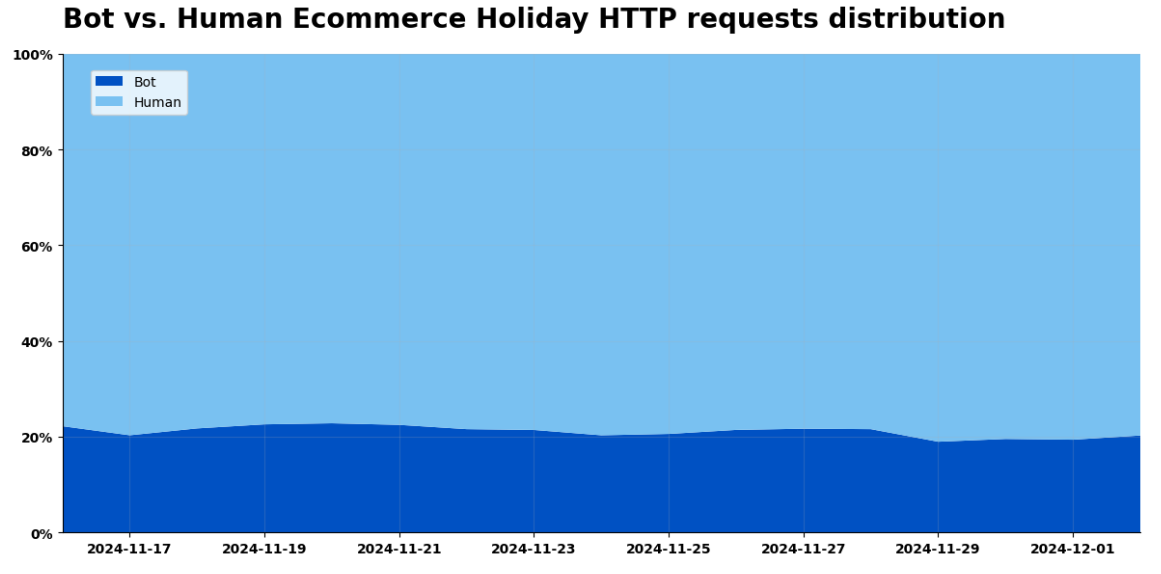
  • 29% of all traffic on Black Friday was Grinch Bots. Humans still accounted for the majority of all traffic, but bot traffic was up 4x from three years ago in absolute terms. 

  • 1% of traffic on Black Friday came from AI bots. The majority of it came from Claude, Meta, and Amazon. 71% of this traffic was given the green light to access the content requested. 

  • 63% of login attempts across our network on Black Friday were from bots. While this number is high, it was down a few percentage points compared to a month prior, indicating that more humans accessed their accounts and holiday deals. 

  • Human logins on e-commerce sites increased 7-8% compared to the previous month. 

These days, holiday shopping doesn’t start on Black Friday and stop on Cyber Monday. Instead, it stretches through Cyber Week and beyond, including flash sales, pre-orders, and various other promotions. While this provides consumers more opportunities to shop, it also creates more openings for Grinch Bots to wreak havoc.

Black Friday – Cyber Monday by the numbers

Black Friday and Cyber Monday in 2024 brought record-breaking shopping — and grinching. In addition to looking across our entire network, we also analyzed traffic patterns specifically on a cohort of e-commerce sites. 

Legitimate shoppers flocked to e-commerce sites, with requests reaching an astounding 405 billion on Black Friday, accounting for 81% of the day’s total traffic to e-commerce sites. Retailers reaped the rewards of their deals and advertising, seeing a 50% surge in shoppers week-over-week and a 61% increase compared to the previous month.

Unfortunately, Grinch Bots were equally active. Total e-commerce bot activity surged to 103 billion requests, representing up to 19% of all traffic to e-commerce sites. Nearly one in every five requests to an online store was not a real customer. That’s a lot of resources to waste on bogus traffic. Cyber Week was a battleground, with bots hoarding inventory, exploiting deals, and disrupting genuine shopping experiences.


The upside, if there is one, is that there was more human activity on e-commerce sites (81%) than observed on our network more broadly (71%). 

The Grinch Bot’s Modus Operandi

Cloudflare saw 4x more bot requests than what we observed in 2021. Being able to observe and score all this traffic at scale means we can help customers keep the grinches away. We also got to see patterns that help us better identify the concentration of these attacks: 

  • 19% of traffic on e-commerce sites was Grinch Bots

  • 1% of traffic to e-commerce sites was from AI Bots. 

  • 63% of login attempt requests across our network were from bots 

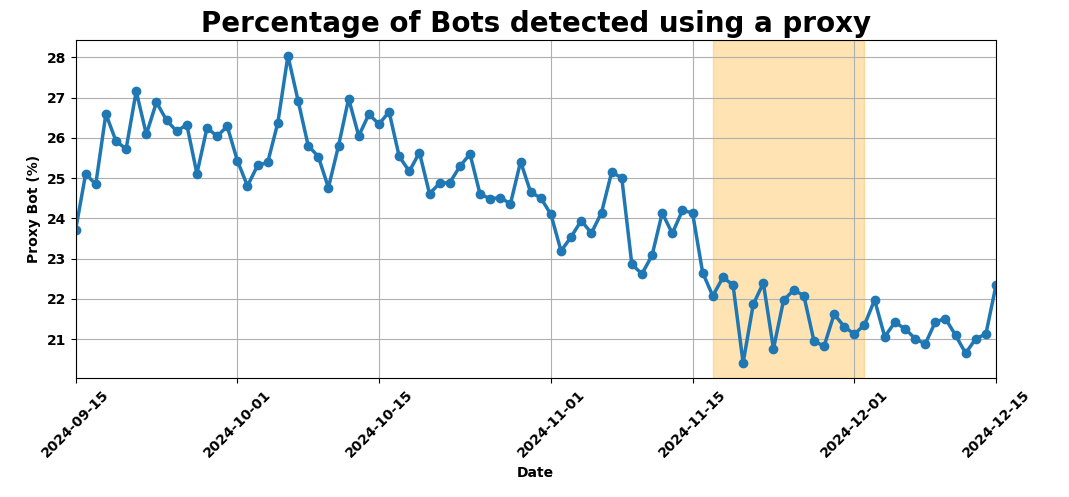
  • 22% of bot activity originated from residential proxy networks


What are all of these bots up to? 

AI bots

This year marked a breakthrough for AI-driven bots, agents, and models, with their impact spilling into Black Friday. AI bots went from zero to one, now making up 1% of all bot traffic on e-commerce sites. 

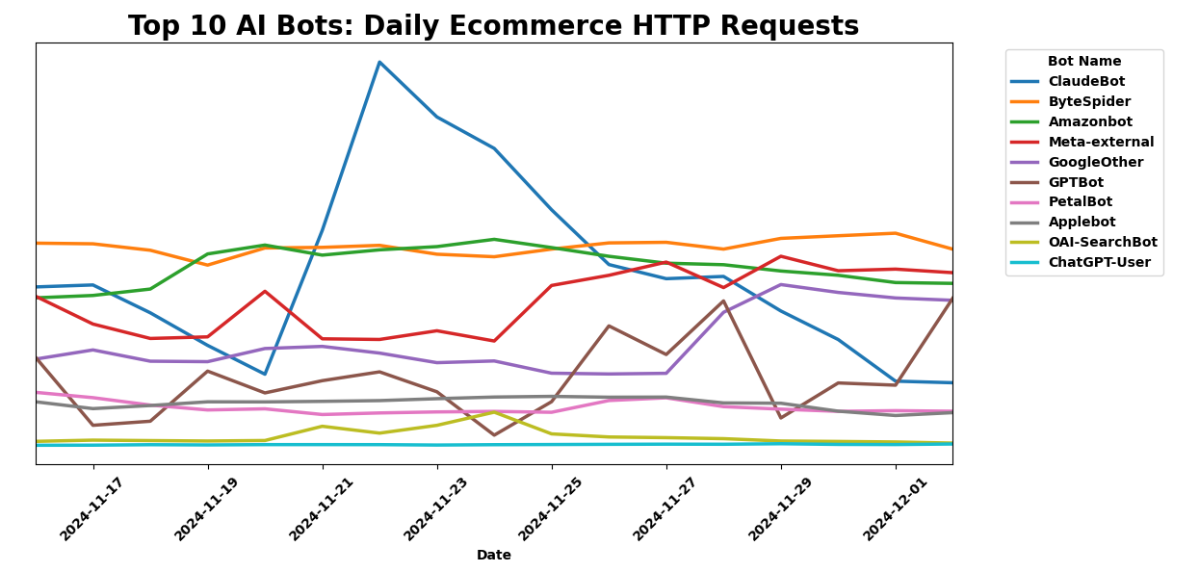
AI-driven bots generated 29 billion requests on Black Friday alone, with Meta-external, Claudebot, and Amazonbot leading the pack. Based on their owners, these bots are meant to crawl to augment training data sets for Llama, Claude, and Alexa respectively. 


We looked at e-commerce sites specifically to find out if these bots were treating all content equally. While Meta-External and Amazonbot were still in the Top 3 of AI bots reaching e-commerce sites, Bytedance’s Bytespider crawled the most shopping sites.


Account Takeover (ATO) bots

In addition to scraping, crawling, and shopping, bots also targeted customer accounts on Black Friday. We saw 14.1 billion requests from bots to /login endpoints, accounting for 63% of that day’s login attempts. 

While this number seems high, intuitively it makes sense, given that humans don’t log in to accounts every day, but bots definitely try to crack accounts every day. Interestingly, while humans only accounted for 36% of traffic to login pages on Black Friday, this number was up 7-8% compared to the prior month. This suggests that more shoppers logged in to capitalize on deals and discounts on Black Friday than in preceding weeks. Human logins peaked at around 40% of all traffic to login sites on the Monday before Thanksgiving, and again on Cyber Monday.  

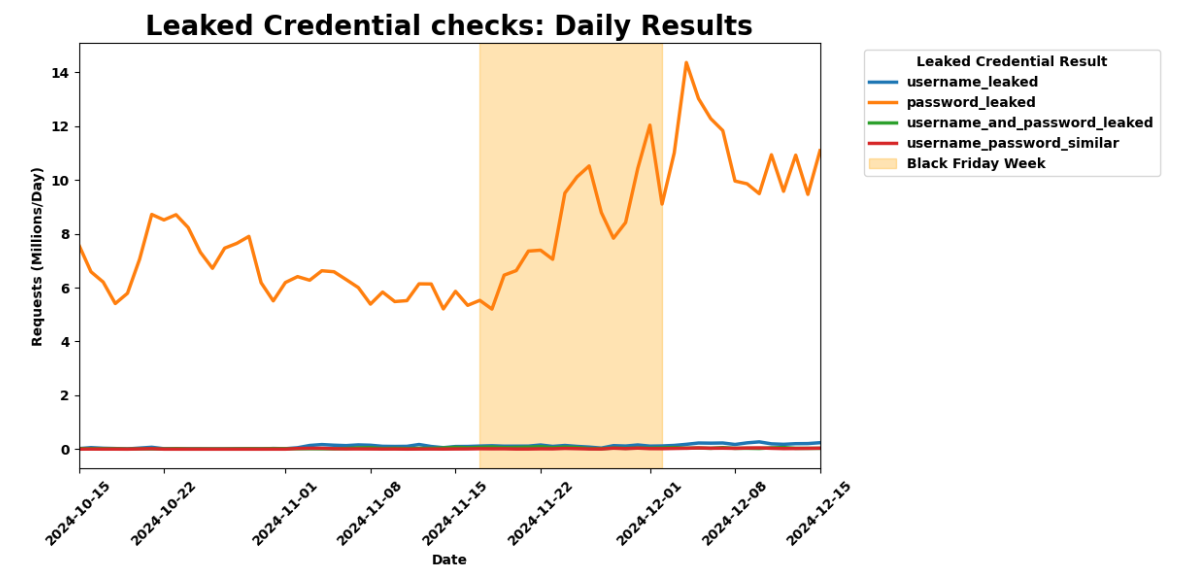
Separately, we also saw a 37% increase in leaked passwords used in login requests compared to the prior month. During Birthday Week, we shared how 65% of internet users are at risk of ATO due to re-use of leaked passwords. This surge, coinciding with heightened human and bot traffic, underscores a troubling pattern: both humans and bots continue to depend on common and compromised passwords, amplifying security risks.


Proxy bots: Regardless of whether they’re crawling your content or hoarding your wares, 22% of bot traffic originated from residential proxy networks. This obfuscation makes these requests look like legitimate customers browsing from their homes rather than large cloud networks. The large pool of IP addresses and the diversity of networks poses a challenge to traditional bot defense mechanisms that rely on IP reputation and rate limiting. 

Moreover, the diversity of IP addresses enables the attackers to rotate through them indefinitely. This shrinks the window of opportunity for bot detection systems to effectively detect and stop the attacks. The use of residential proxies is a trend we have been tracking for months now and Black Friday traffic was within the range we’ve seen throughout this year.


If you’re using Cloudflare’s Bot Management, your site is already protected from these bots since we update our bot score based on these types of network fingerprints. In May 2024, we introduced our latest model optimized for detecting residential proxies. Early results show promising declines in this type of activity, indicating that bot operators may be reducing their reliance on residential proxies. 

The Christmas “Yule” log: how customers can protect themselves

35% of all traffic on Black Friday was Grinch Bots. To keep Grinch Bots at bay, businesses need year-round bot protection and proactive strategies tailored to the unique challenges of holiday shopping.

Here are 4 yules (aka “rules”) for the season:

(1) Block bots: 22% of bot traffic originated from residential proxy networks. Our bot management score automatically adjusts based on these network signals. Use our Bot Score in rules to challenge sensitive actions. 


(2) Monitor potential Account Takeover (ATO) attacks: Bots often test stolen credentials in the months leading up to Cyber Week to refine their strategies. Re-use of stolen credentials makes businesses even more vulnerable. Our account abuse detections help customers monitor login paths for leaked credentials and traffic anomalies.


Check out more examples of related rules you can create.

(3) Rate limit account and purchase paths: Apply rate-limiting best practices on critical application paths. These include limiting new account access/creation from previously seen IP addresses, and leveraging other network fingerprints, to help prevent promo code abuse and inventory hoarding, as well as identifying account takeover attempts through the application of detection IDs and leaked credential checks.

(4) Block AI bots abusing shopping features to maintain fair access for human users. If you’re using Cloudflare, you can quickly block all AI bots by enabling our automatic AI bot blocking feature.  


What to expect in 2025? 

Over the next year, e-commerce sites should expect to see more humans shopping for longer periods. As sale periods lengthen (like they did in 2024) we expect more peaks in human activity on e-commerce sites across November and December. This is great for consumers and great for merchants.

More AI bots and agents will be integrated into e-commerce journeys in 2025. AI bots will not only be crawling sites for training data, but will also integrate into the shopping experience. AI bots did not exist in 2021, but now make up 1% of all bot traffic. This is only the tip of the iceberg and their growth will explode in the next year. We expect this to pose new risks as bots mimic and act on behalf of humans.

More sophisticated automation through network, device, and cookie cycling will also become a bigger threat. Bot operators will continue to employ advanced evasion tactics like rotating devices, IP addresses, and cookies to bypass detection.

Grinch Bots are evolving, and regulation may be slowing, but businesses don’t have to face them alone. We remain resolute in our mission to help build a better Internet … and holiday shopping experience.

Even though the holiday season is closing out soon, bots are never on vacation. It’s never too late or too early to start protecting your customers and your business from grinches that work all year round.

Wishing you all happy holidays and a bot-free new year!


AI Everywhere with the WAF Rule Builder Assistant, Cloudflare Radar AI Insights, and updated AI bot protection

Post Syndicated from Adam Martinetti original https://blog.cloudflare.com/bringing-ai-to-cloudflare

The continued growth of AI has fundamentally changed the Internet over the past 24 months. AI is increasingly ubiquitous, and Cloudflare is leaning into the new opportunities and challenges it presents in a big way. This year for Cloudflare’s birthday, we’ve extended our AI Assistant capabilities to help you build new WAF rules, added AI bot traffic insights on Cloudflare Radar, and given customers new AI bot blocking capabilities.  

AI Assistant for WAF Rule Builder


At Cloudflare, we’re always listening to your feedback and striving to make our products as user-friendly and powerful as possible. One area where we’ve heard your feedback loud and clear is in the complexity of creating custom and rate-limiting rules for our Web Application Firewall (WAF). With this in mind, we’re excited to introduce a new feature that will make rule creation easier and more intuitive: the AI Assistant for WAF Rule Builder. 


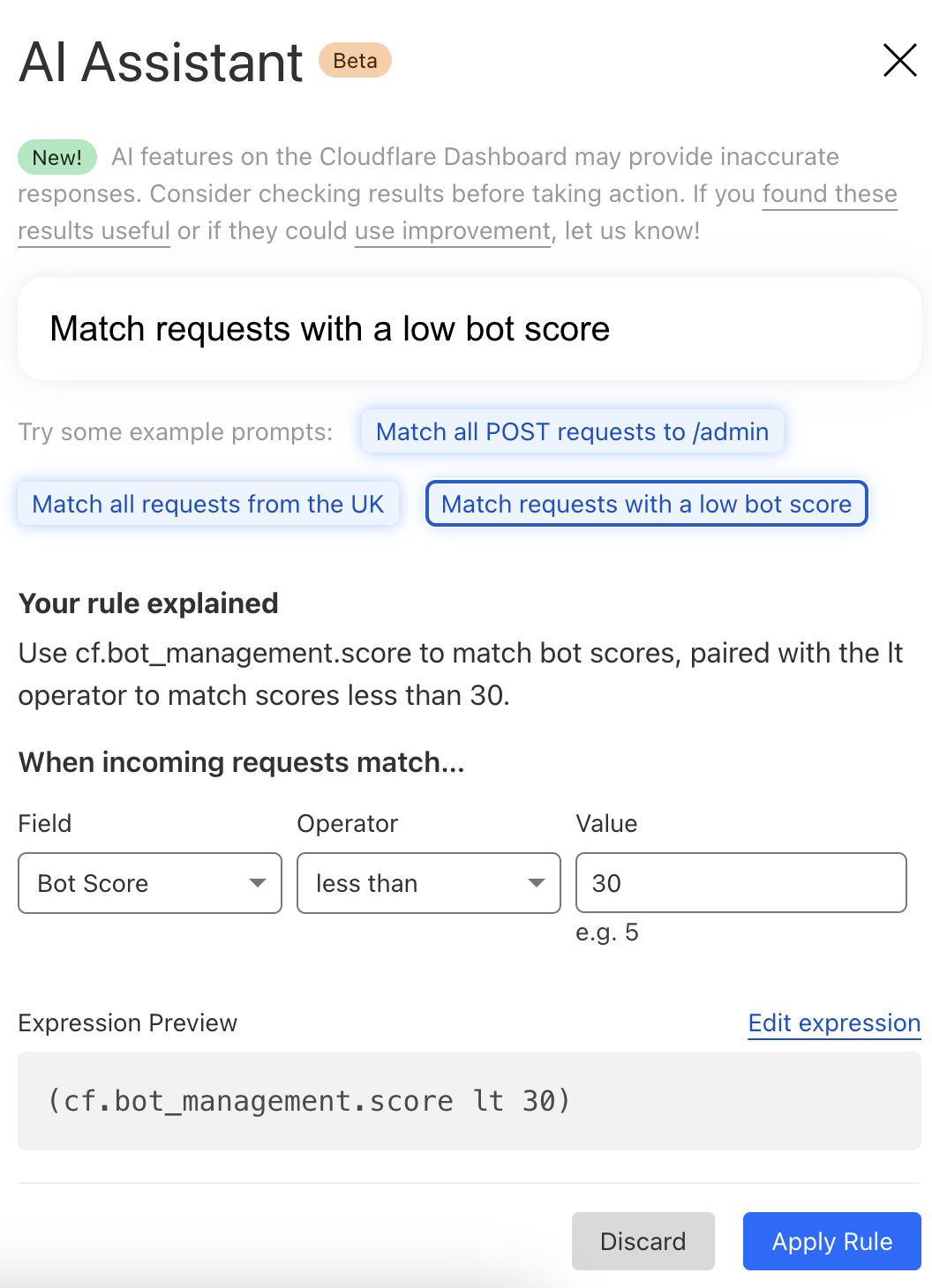
By simply entering a natural language prompt, you can generate a custom or rate-limiting rule tailored to your needs. For example, instead of manually configuring a complex rule matching criteria, you can now type something like, “Match requests with low bot score,” and the assistant will generate the rule for you. It’s not about creating the perfect rule in one step, but giving you a strong foundation that you can build on. 

The assistant will be available in the Custom and Rate Limit Rule Builder for all WAF users. We’re launching this feature in Beta for all customers, and we encourage you to give it a try. We’re looking forward to hearing your feedback (via the UI itself) as we continue to refine and enhance this tool to meet your needs.

AI bot traffic insights on Cloudflare Radar

AI platform providers use bots to crawl and scrape websites, vacuuming up data to use for model training. This is frequently done without the permission of, or a business relationship with, the content owners and providers. In July, Cloudflare urged content owners and providers to “declare their AIndependence”, providing them with a way to block AI bots, scrapers, and crawlers with a single click. In addition to this so-called “easy button” approach, sites can provide more specific guidance to these bots about what they are and are not allowed to access through directives in a robots.txt file. Regardless of whether a customer chooses to block or allow requests from AI-related bots, Cloudflare has insight into request activity from these bots, and associated traffic trends over time.

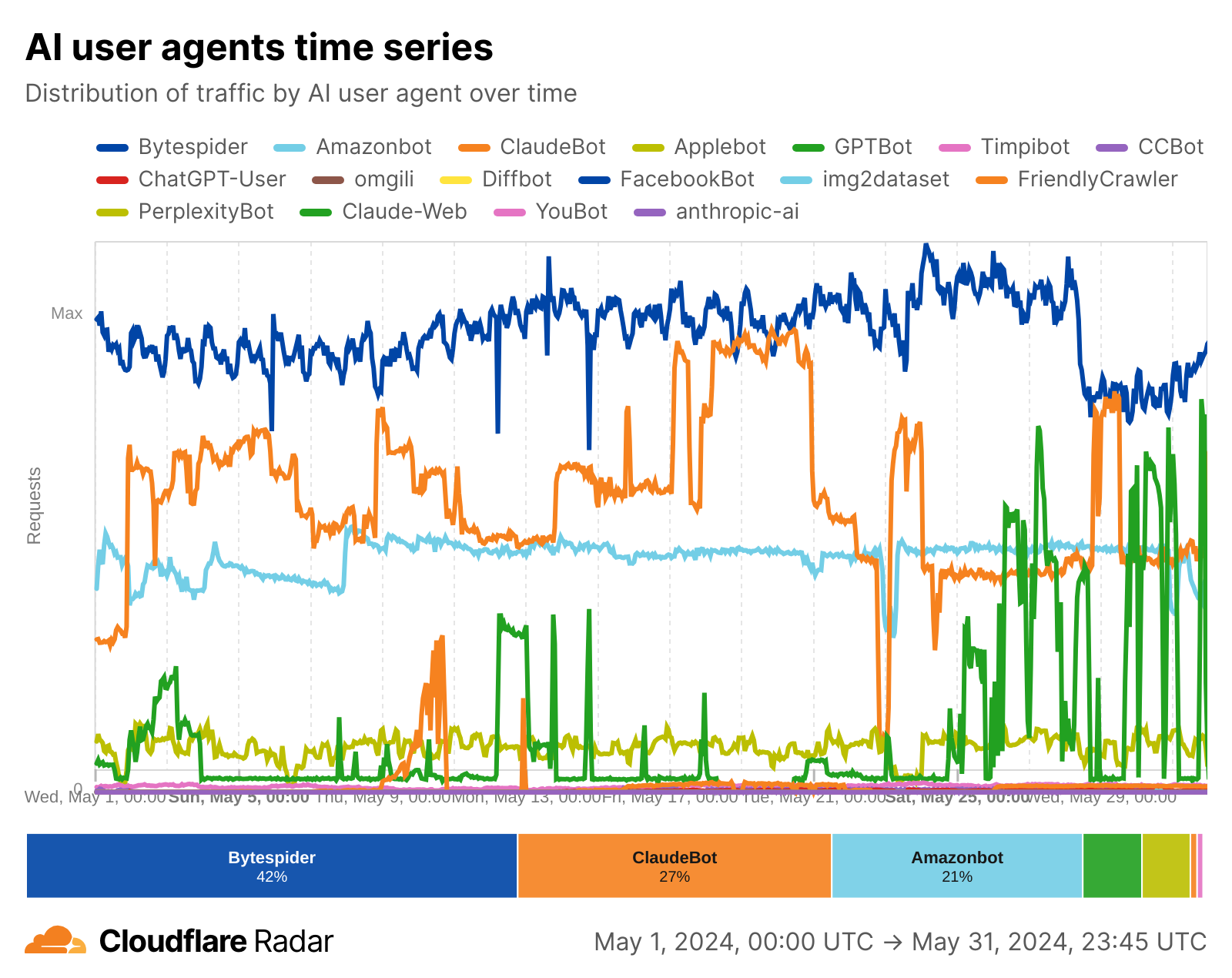
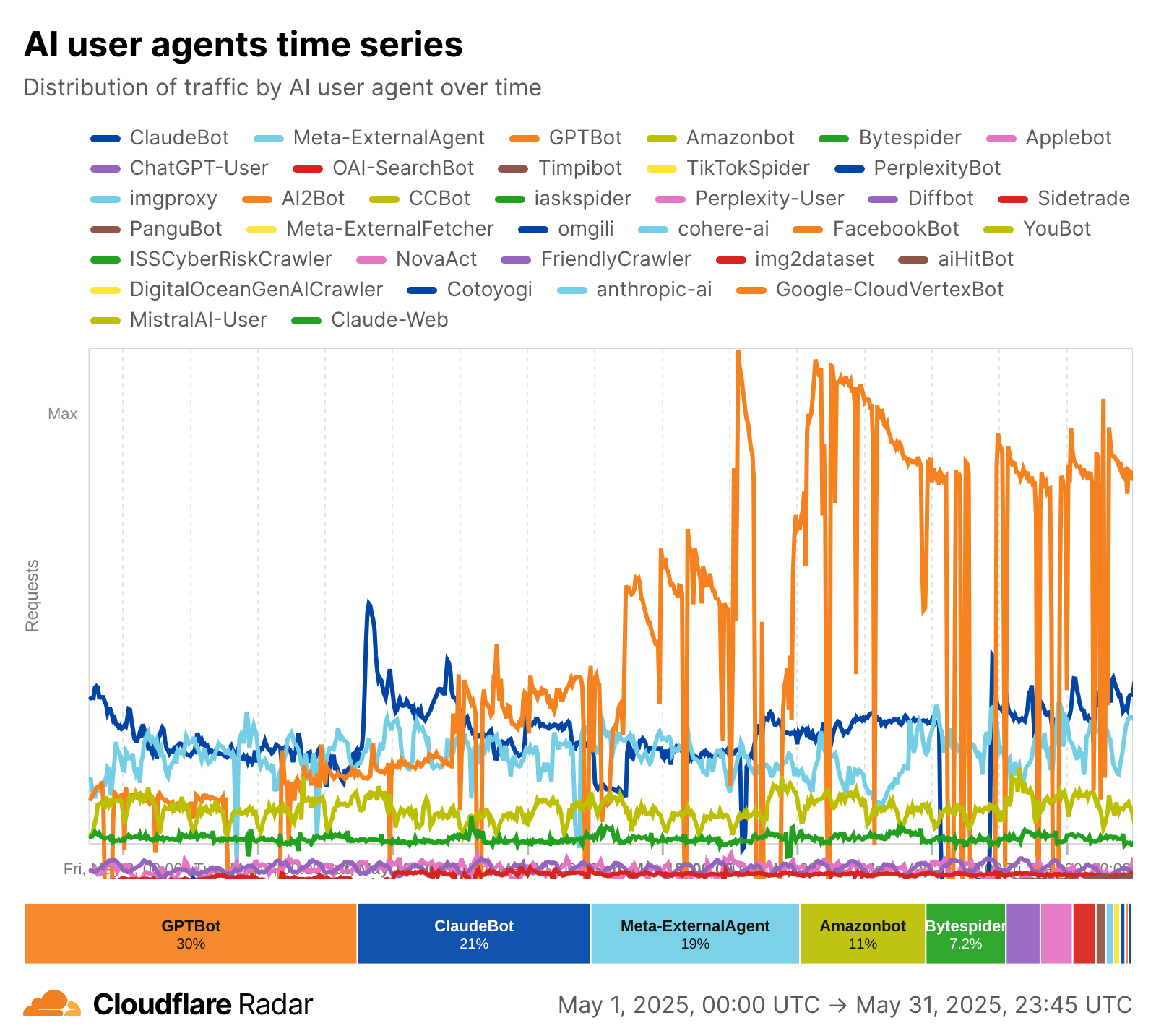
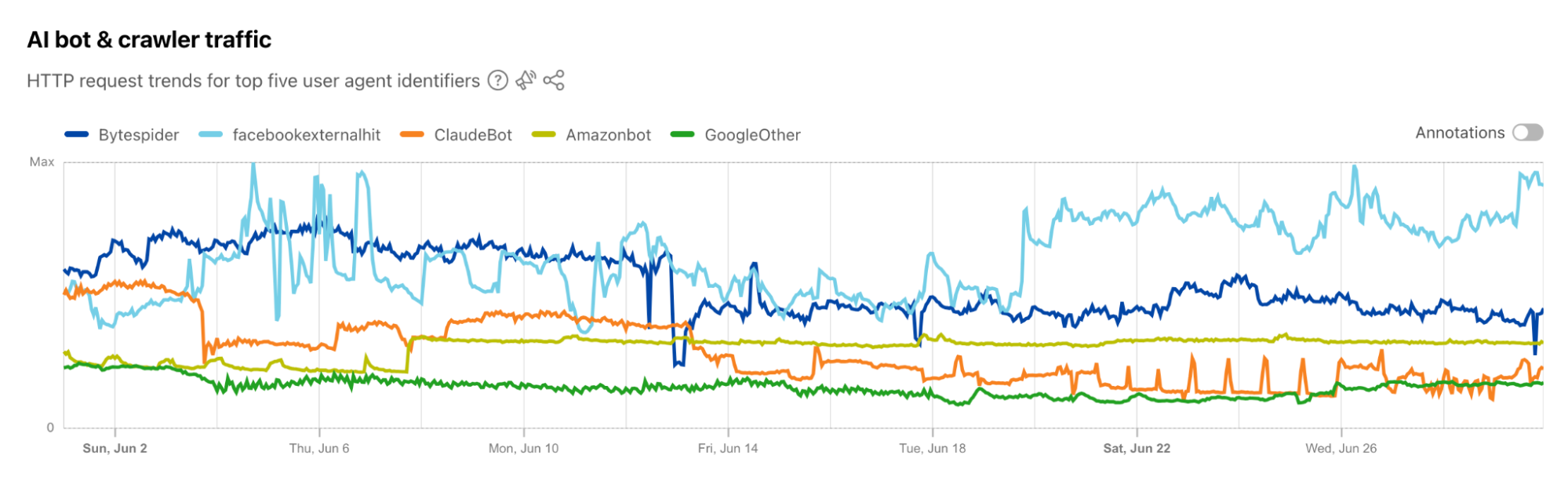
Tracking traffic trends for AI bots can help us better understand their activity over time — which are the most aggressive and have the highest volume of requests, which launch crawls on a regular basis, etc. The new AI bot & crawler traffic graph on Radar’s Traffic page provides insight into these traffic trends gathered over the selected time period for the top known AI bots. The associated list of bots tracked here is based on the ai.robots.txt list, and will be updated with new bots as they are identified. Time series and summary data is available from the Radar API as well. (Traffic trends for the full set of AI bots & crawlers can be viewed in the new Data Explorer.)


Blocking more AI bots


For Cloudflare’s birthday, we’re following up on our previous blog post, Declaring Your AIndependence, with an update on the new detections we’ve added to stop AI bots. Customers who haven’t already done so can simply click the button to block AI bots to gain more protection for their website. 

Enabling dynamic updates for the AI bot rule

The old button allowed customers to block verified AI crawlers, those that respect robots.txt and crawl rate, and don’t try to hide their behavior. We’ve added new crawlers to that list, but we’ve also expanded the previous rule to include 27 signatures (and counting) of AI bots that don’t follow the rules. We want to take time to say “thank you” to everyone who took the time to use our “tip line” to point us towards new AI bots. These tips have been extremely helpful in finding some bots that would not have been on our radar so quickly. 

For each bot we’ve added, we’re also adding them to our “Definitely automated” definition as well. So, if you’re a self-service plan customer using Super Bot Fight Mode, you’re already protected. Enterprise Bot Management customers will see more requests shift from the “Likely Bot” range to the “Definitely automated” range, which we’ll discuss more below.

Under the hood, we’ve converted this rule logic to a Cloudflare managed rule (the same framework that powers our WAF). This enables our security analysts and engineers to safely push updates to the rule in real-time, similar to how new WAF rule changes are rapidly delivered to ensure our customers are protected against the latest CVEs. If you haven’t logged back into the Bots dashboard since the previous version of our AI bot protection was announced, click the button again to update to the latest protection. 


The impact of new fingerprints on the model 

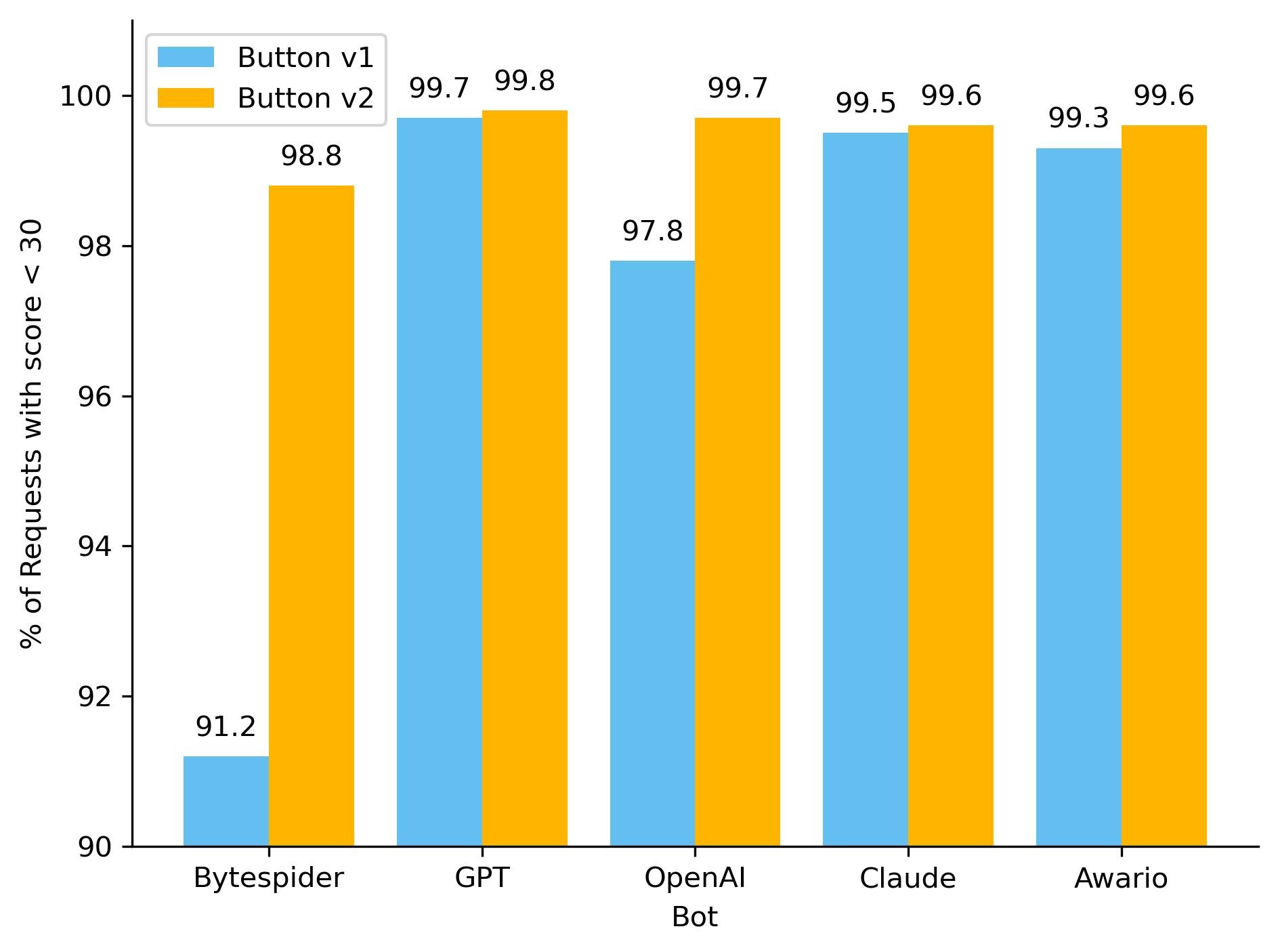
One hidden beneficiary of fingerprinting new AI bots is our ML model. As we’ve discussed before, our global ML model uses supervised machine learning and greatly benefits from more sources of labeled bot data. Below, you can see how well our ML model recognized these requests as automated, before and after we updated the button, adding new rules. To keep things simple, we have shown only the top 5 bots by the volume of requests on the chart. With the introduction of our new managed rule, we have observed an improvement in our detection capabilities for the majority of these AI bots. Button v1 represents the old option that let customers block only verified AI crawlers, while Button v2 is the newly introduced feature that includes managed rule detections.


So how did we make our detections more robust? As we have mentioned before, sometimes a single attribute can give a bot away. We developed a sophisticated set of heuristics tailored to these AI bots, enabling us to effortlessly and accurately classify them as such. Although our ML model was already detecting the vast majority of these requests, the integration of additional heuristics has resulted in a noticeable increase in detection rates for each bot, and ensuring we score every request correctly 100% of the time. Transitioning from a purely machine learning approach to incorporating heuristics offers several advantages, including faster detection times and greater certainty in classification. While deploying a machine learning model is complex and time-consuming, new heuristics can be created in minutes. 

The initial launch of the AI bots block button was well-received and is now used by over 133,000 websites, with significant adoption even among our Free tier customers. The newly updated button, launched on August 20, 2024, is rapidly gaining traction. Over 90,000 zones have already adopted the new rule, with approximately 240 new sites integrating it every hour. Overall, we are now helping to protect the intellectual property of more than 146,000 sites from AI bots, and we are currently blocking 66 million requests daily with this new rule. Additionally, we’re excited to announce that support for configuring AI bots protection via Terraform will be available by the end of this year, providing even more flexibility and control for managing your bot protection settings.

Bot behavior

With the enhancements to our detection capabilities, it is essential to assess the impact of these changes to bot activity on the Internet. Since the launch of the updated AI bots block button, we have been closely monitoring for any shifts in bot activity and adaptation strategies. The most basic fingerprinting technique we use to identify AI bot looking for simple user-agent matches. User-agent matches are important to monitor because they indicate the bot is transparently announcing who they are when they’re crawling a website. 

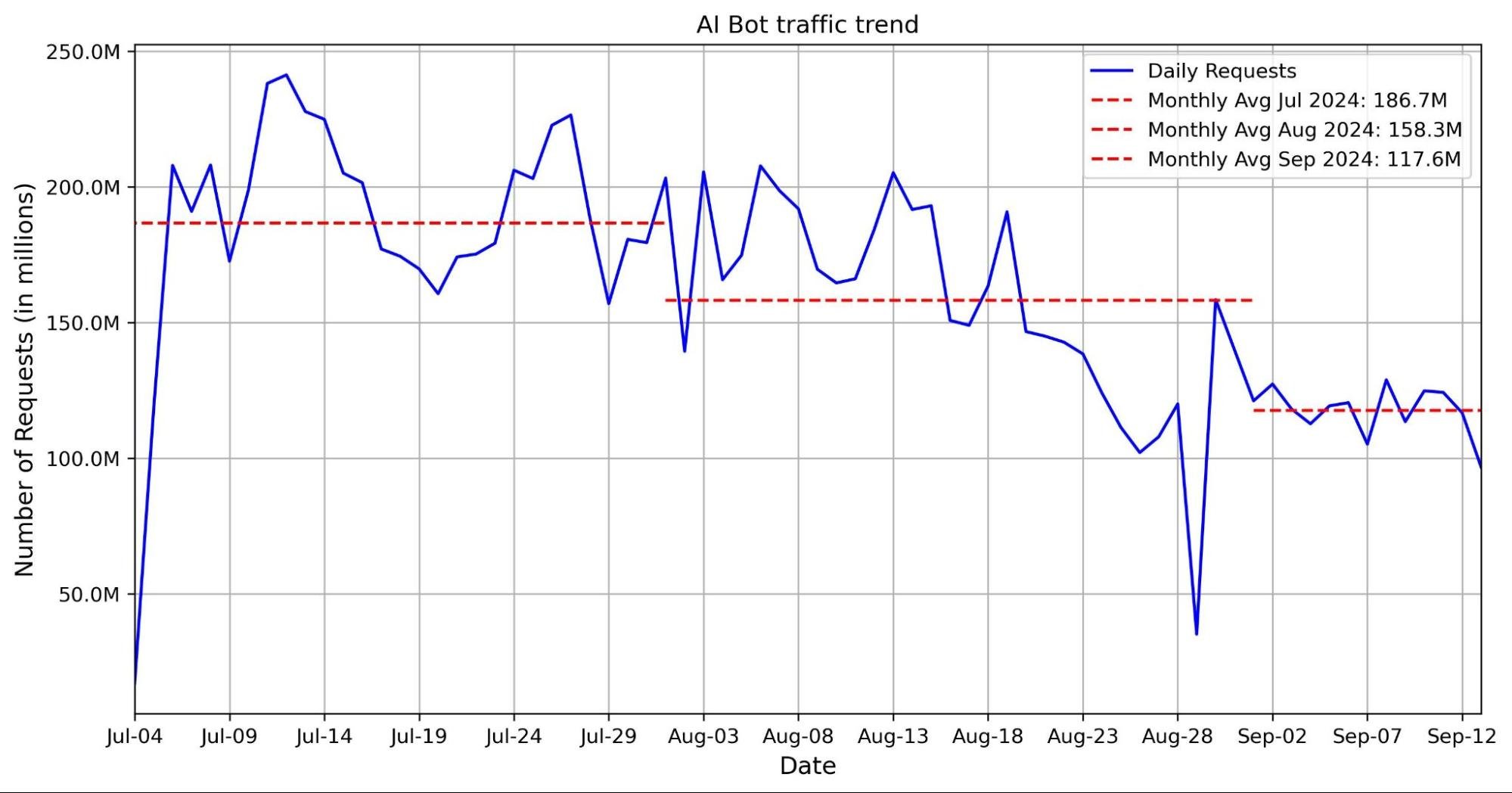
The graph below shows a volume of traffic we label as AI bot over the past two months. The blue line indicates the daily request count, while the red line represents the monthly average number of requests. In the past two months, we have seen an average reduction of nearly 30 million requests, with a decrease of 40 million in the most recent month.This decline coincides with the release of Button v1 and Button v2. Our hypothesis is that with the new AI bots blocking feature, Cloudflare is blocking a majority of these bots, which is discouraging them from crawling. 


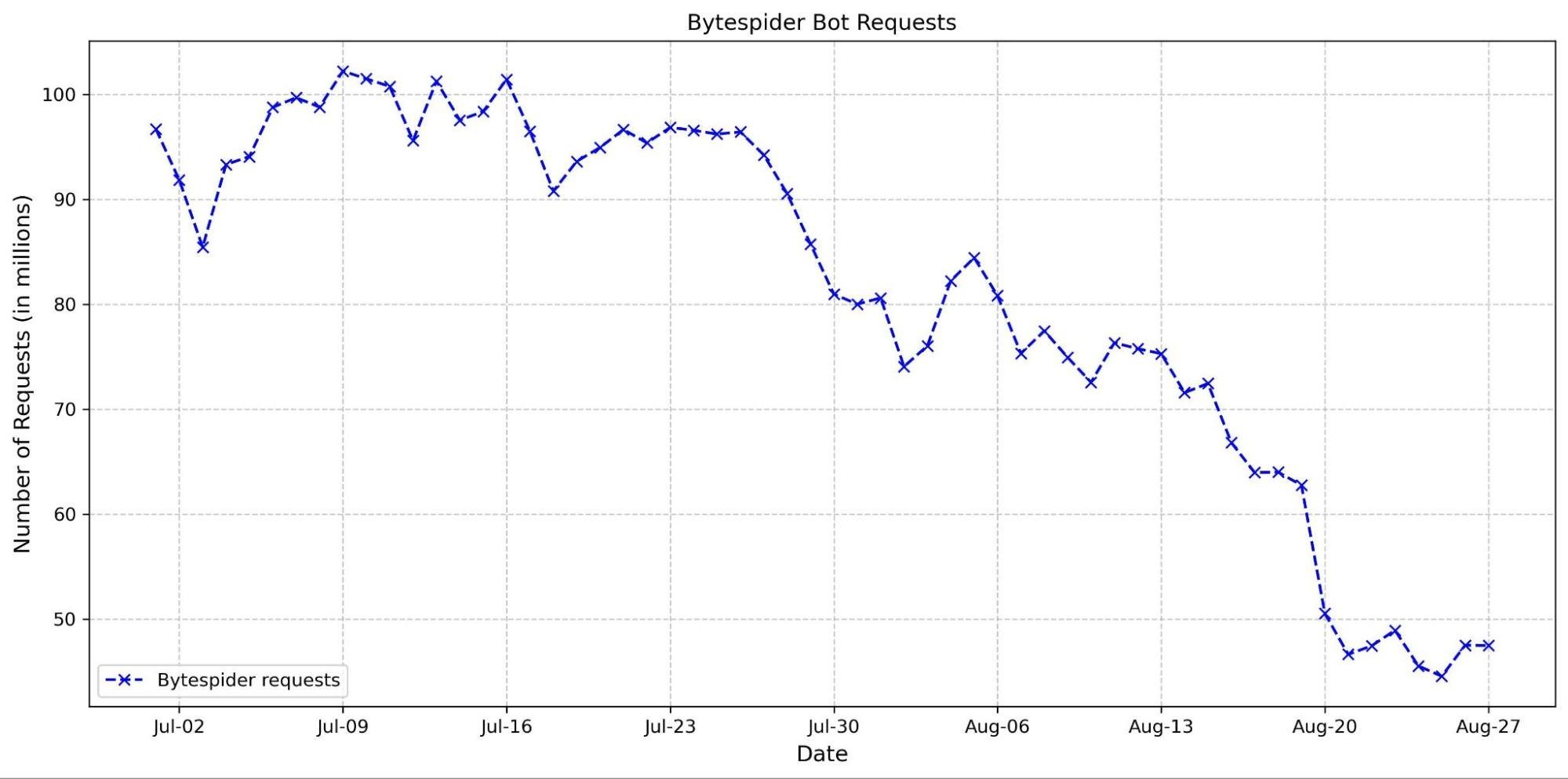
This hypothesis is supported by the observed decline in requests from several top AI crawlers. Specifically, the Bytespider bot reduced its daily requests from approximately 100 million to just 50 million between the end of June and the end of August (see graph below). This reduction could be attributed to several factors, including our new AI bots block button and changes in the crawler’s strategy.


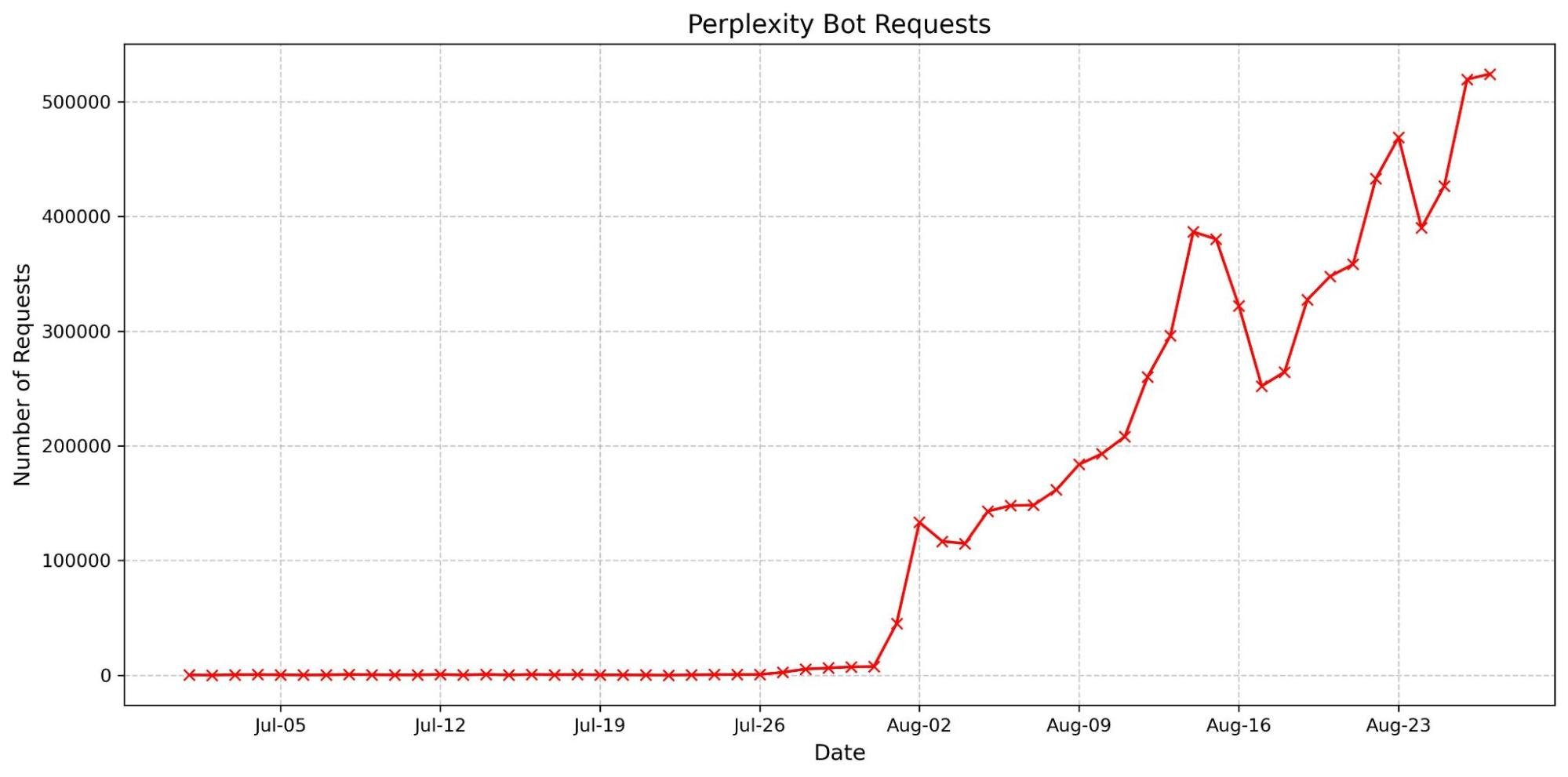
We have also observed an increase in the accountability of some AI crawlers. The most basic fingerprinting technique we use to identify AI bot looking for simple user-agent matches. User-agent matches are important to monitor because they indicate the bot is transparently announcing who they are when they’re crawling a website. These crawlers are now more frequently using their agents, reflecting a shift towards more transparent and responsible behavior. Notably, there has been a dramatic surge in the number of requests from the Perplexity user agent. This increase might be linked to previous accusations that Perplexity did not properly present its user agent, which could have prompted a shift in their approach to ensure better identification and compliance.


These trends suggest that our updates are likely affecting how AI crawlers interact with content. We will continue to monitor AI bot activity to help users control who accesses their content and how. By keeping a close watch on emerging patterns, we aim to provide users with the tools and insights needed to make informed decisions about managing their traffic. 

Wrap up

We’re excited to continue to explore the AI landscape, whether we’re finding more ways to make the Cloudflare dashboard usable or new threats to guard against. Our AI insights on Radar update in near real-time, so please join us in watching as new trends emerge and discussing them in the Cloudflare Community

Start auditing and controlling the AI models accessing your content

Post Syndicated from Sam Rhea original https://blog.cloudflare.com/cloudflare-ai-audit-control-ai-content-crawlers

Site owners have lacked the ability to determine how AI services use their content for training or other purposes. Today, Cloudflare is releasing a set of tools to make it easy for site owners, creators, and publishers to take back control over how their content is made available to AI-related bots and crawlers. All Cloudflare customers can now audit and control how AI models access the content on their site.

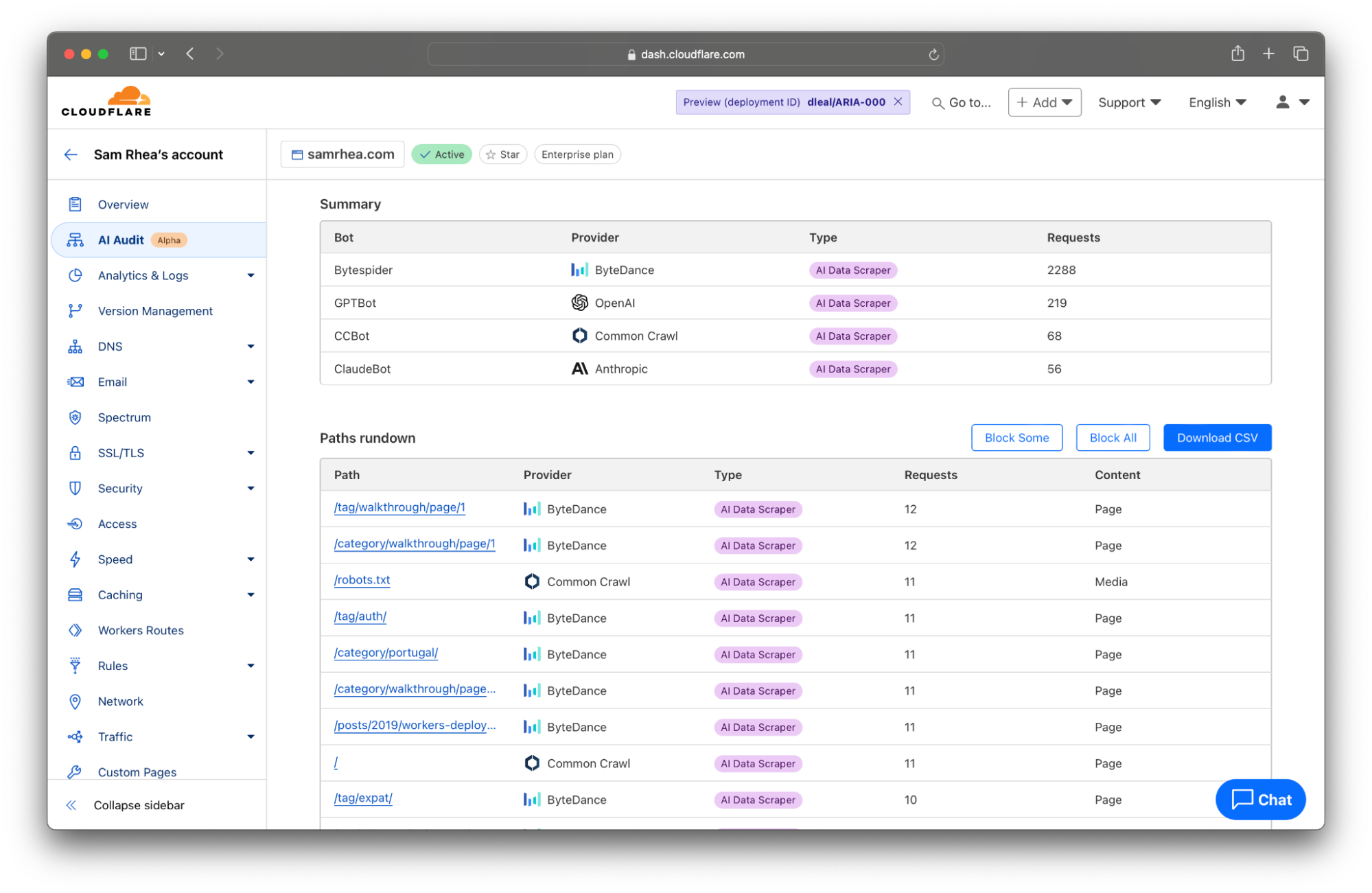
This launch starts with a detailed analytics view of the AI services that crawl your site and the specific content they access. Customers can review activity by AI provider, by type of bot, and which sections of their site are most popular. This data is available to every site on Cloudflare and does not require any configuration.

We expect that this new level of visibility will prompt teams to make a decision about their exposure to AI crawlers. To help give them time to make that decision, Cloudflare now provides a one-click option in our dashboard to immediately block any AI crawlers from accessing any site. Teams can then use this “pause” to decide if they want to allow specific AI providers or types of bots to proceed. Once that decision is made, those administrators can use new filters in the Cloudflare dashboard to enforce those policies in just a couple of clicks.

Some customers have already made decisions to negotiate deals directly with AI companies. Many of those contracts include terms about the frequency of scanning and the type of content that can be accessed. We want those publishers to have the tools to measure the implementation of these deals.  As part of today’s announcement, Cloudflare customers can now generate a report with a single click that can be used to audit the activity allowed in these arrangements.

We also think that sites of any size should be able to determine how they want to be compensated for the usage of their content by AI models. Today’s announcement previews a new Cloudflare monetization feature which will give site owners the tools to set prices, control access, and capture value for the scanning of their content.

What is the problem?

Until recently, bots and scrapers on the Internet mostly fell into two clean categories: good and bad. Good bots, like search engine crawlers, helped audiences discover your site and drove traffic to you. Bad bots tried to take down your site, jump the queue ahead of your customers, or scrape competitive data. We built the Cloudflare Bot Management platform to give you the ability to distinguish between those two broad categories and to allow or block them.

The rise of AI Large Language Models (LLMs) and other generative tools created a murkier third category. Unlike malicious bots, the crawlers associated with these platforms are not actively trying to knock your site offline or to get in the way of your customers. They are not trying to steal sensitive data; they just want to scan what is already public on your site.

However, unlike helpful bots, these AI-related crawlers do not necessarily drive traffic to your site. AI Data Scraper bots scan the content on your site to train new LLMs. Your material is then put into a kind of blender, mixed up with other content, and used to answer questions from users without attribution or the need for users to visit your site. Another type of crawler, AI Search Crawler bots, scan your content and attempt to cite it when responding to a user’s search. The downside is that those users might just stay inside of that interface, rather than visit your site, because an answer is assembled on the page in front of them.

This murkiness leaves site owners with a hard decision to make. The value exchange is unclear. And site owners are at a disadvantage while they play catch up. Many sites allowed these AI crawlers to scan their content because these crawlers, for the most part, looked like “good” bots — only for the result to mean less traffic to their site as their content is repackaged in AI-written answers.

We believe this poses a risk to an open Internet. Without the ability to control scanning and realize value, site owners will be discouraged to launch or maintain Internet properties. Creators will stash more of their content behind paywalls and the largest publishers will strike direct deals. AI model providers will in turn struggle to find and access the long tail of high-quality content on smaller sites.

Both sides lack the tools to create a healthy, transparent exchange of permissions and value. Starting today, Cloudflare equips site owners with the services they need to begin fixing this. We have broken out a series of steps we recommend all of our customers follow to get started.

Step 1: Understand how AI models use your site

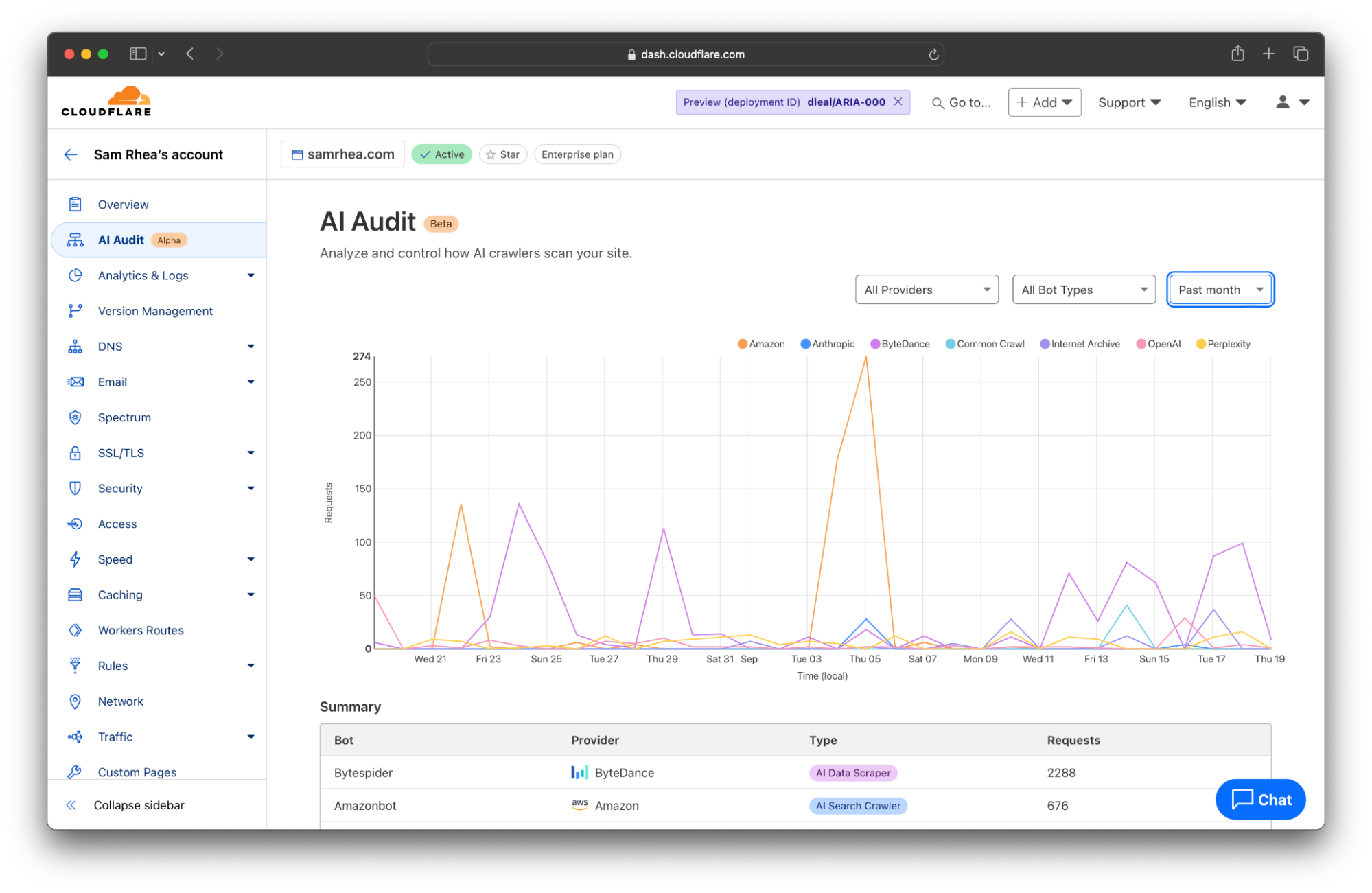
Every site on Cloudflare now has access to a new analytics view that summarizes the crawling behavior of popular and known AI services. You can begin reviewing this information to understand the AI scanning of your content by selecting a site in your dashboard and navigating to the AI Audit tab in the left-side navigation bar.


When AI model providers access content on your site, they rely on automated tools called “bots” or “crawlers” to scan pages. The bot will request the content of your page, capture the response, and store it as part of a future data training set or remember it for AI search engine results in the future.

These bots often identify themselves to your site (and Cloudflare’s network) by including an HTTP header in their request called a User Agent. Although, in some cases, a bot from one of these AI services might not send the header and Cloudflare instead relies on other heuristics like IP address or behavior to identify them.

When the bot does identify itself, the header will contain a string of text with the bot name. For example, Anthropic sometimes crawls sites on the Internet with a bot called ClaudeBot. When that service requests the content of a page from your site on Cloudflare, Cloudflare logs the User Agent as ClaudeBot.


Cloudflare takes the logs gathered from visits to your site and looks for user agents that match known AI bots and crawlers. We summarize the activity of individual crawlers and also provide you with filters to review just the activities of specific AI platforms. Many AI firms rely on multiple crawlers that serve distinct purposes. When OpenAI scans sites for data scraping, they rely on GPTBot, but when they crawl sites for their new AI search engine, they use OAI-SearchBot.

And those differences matter. Scanning from different bot types can impact traffic to your site or the attribution of your content. AI search engines will often link to sites as part of their response, potentially sending visitors to your destination. In that case, you might be open to those types of bots crawling your Internet property. AI Data Scrapers, on the other hand, just exist to read as much of the Internet as possible to train future models or improve existing ones.

We think that you deserve to know why a bot is crawling your site in addition to when and how often. Today’s release gives you a filter to review bot activity by categories like AI Data Scraper, AI Search Crawler, and Archiver.


With this data, you can begin analyzing how AI models access your site. That information might be overwhelming, especially if your team has not had time yet to decide how you want to handle AI scanning of your content. If you find yourself unsure on how to respond, proceed to Step 2.

Step 2: Give yourself a pause to decide what to do next

We talked to several organizations who know their sites are valuable destinations for AI crawlers, but they do not yet know what to do about it. These teams need a “time out” so they can make an informed decision about how they make their data available to these services.

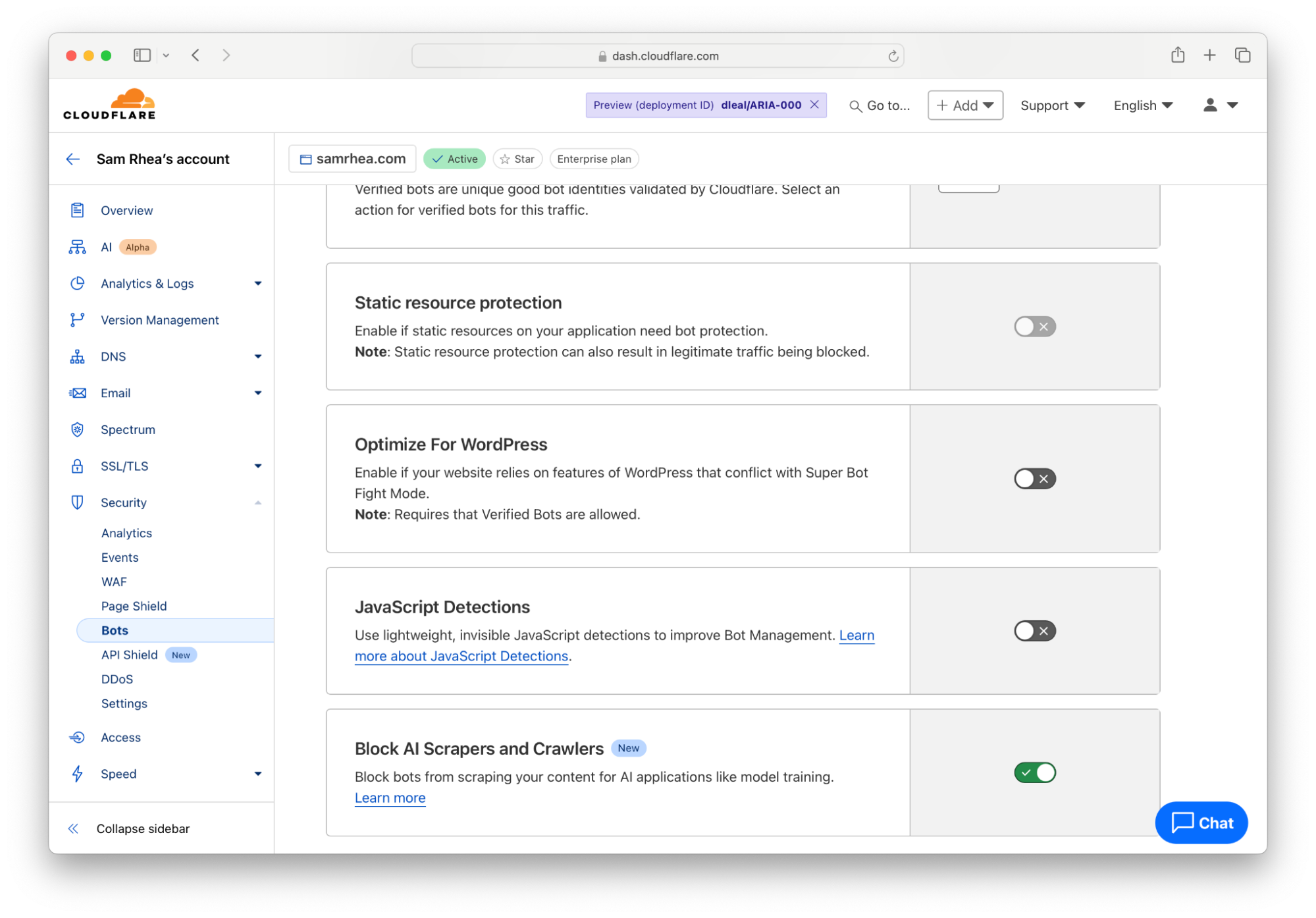
Cloudflare gives you that easy button right now. Any customer on any plan can choose to block all AI bots and crawlers to give yourself a pause while you decide what you do want to allow.

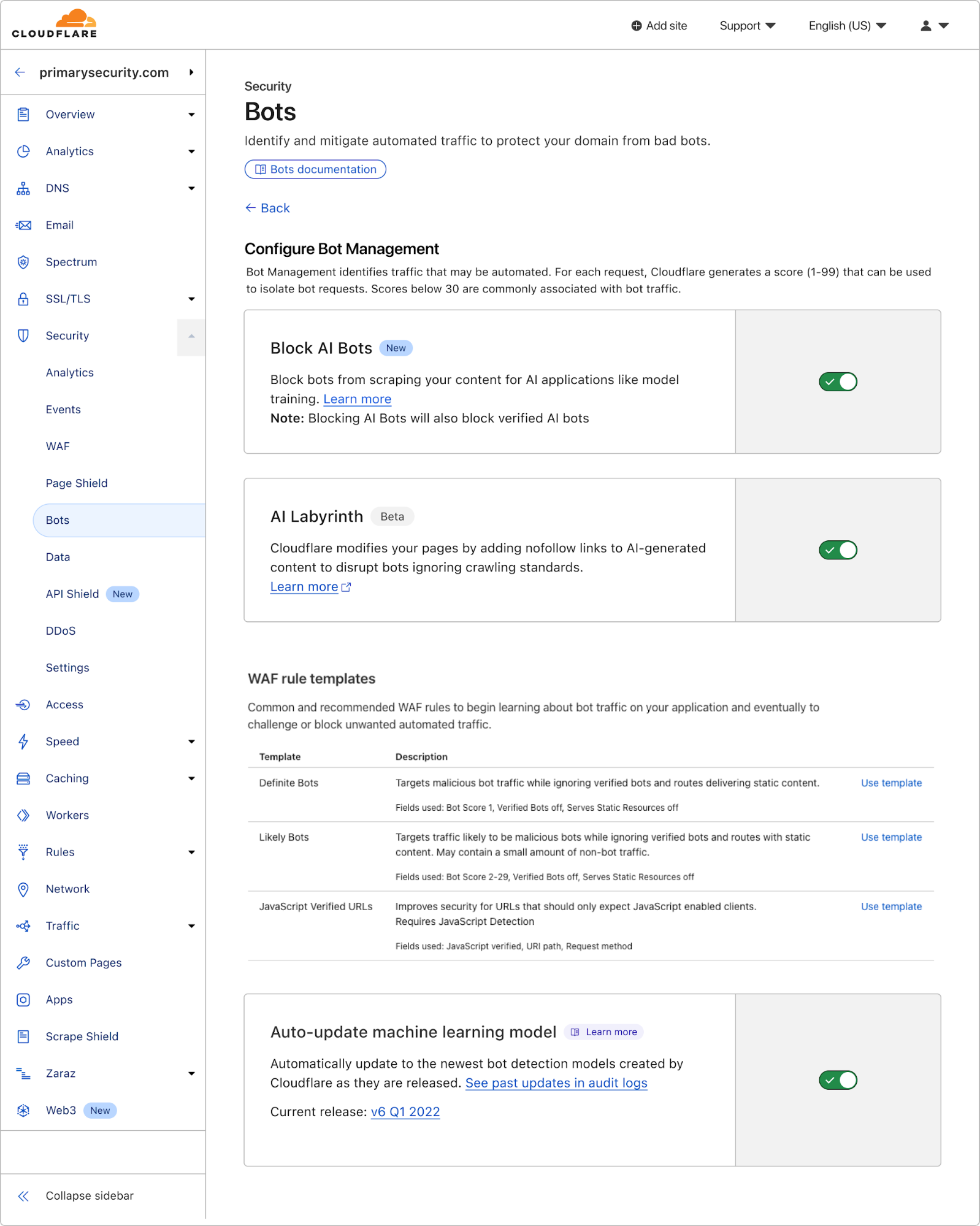
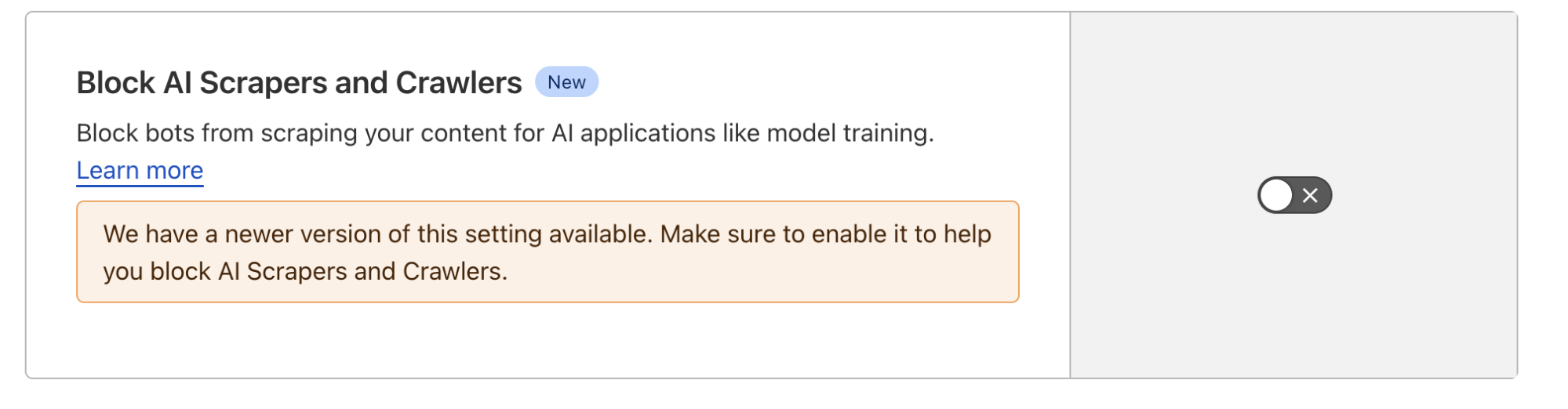
To implement that option, navigate to the Bots section under the Security tab of the Cloudflare Dashboard. Follow the blue link in the top right corner to configure how Cloudflare’s proxy handles bot traffic. Next, toggle the button in the “Block AI Scrapers and Crawlers” card to the “On” position.


The one-click option blocks known AI-related bots and crawlers from accessing your site based on a list that Cloudflare maintains. With a block in place, you and your team can make a less rushed decision about what to do next with your content.

Step 3: Control the bots you do want to allow

The pause button buys time for your team to decide what you want the relationship to be between these crawlers and your content. Once your team has reached a decision, you can begin relying on Cloudflare’s network to implement that policy.

If that decision is “we are not going to allow any crawling,” then you can leave the block button discussed above toggled to “On”. If you want to allow some selective scanning, today’s release provides you with options to permit certain types of bots, or just bots from certain providers, to access your content.

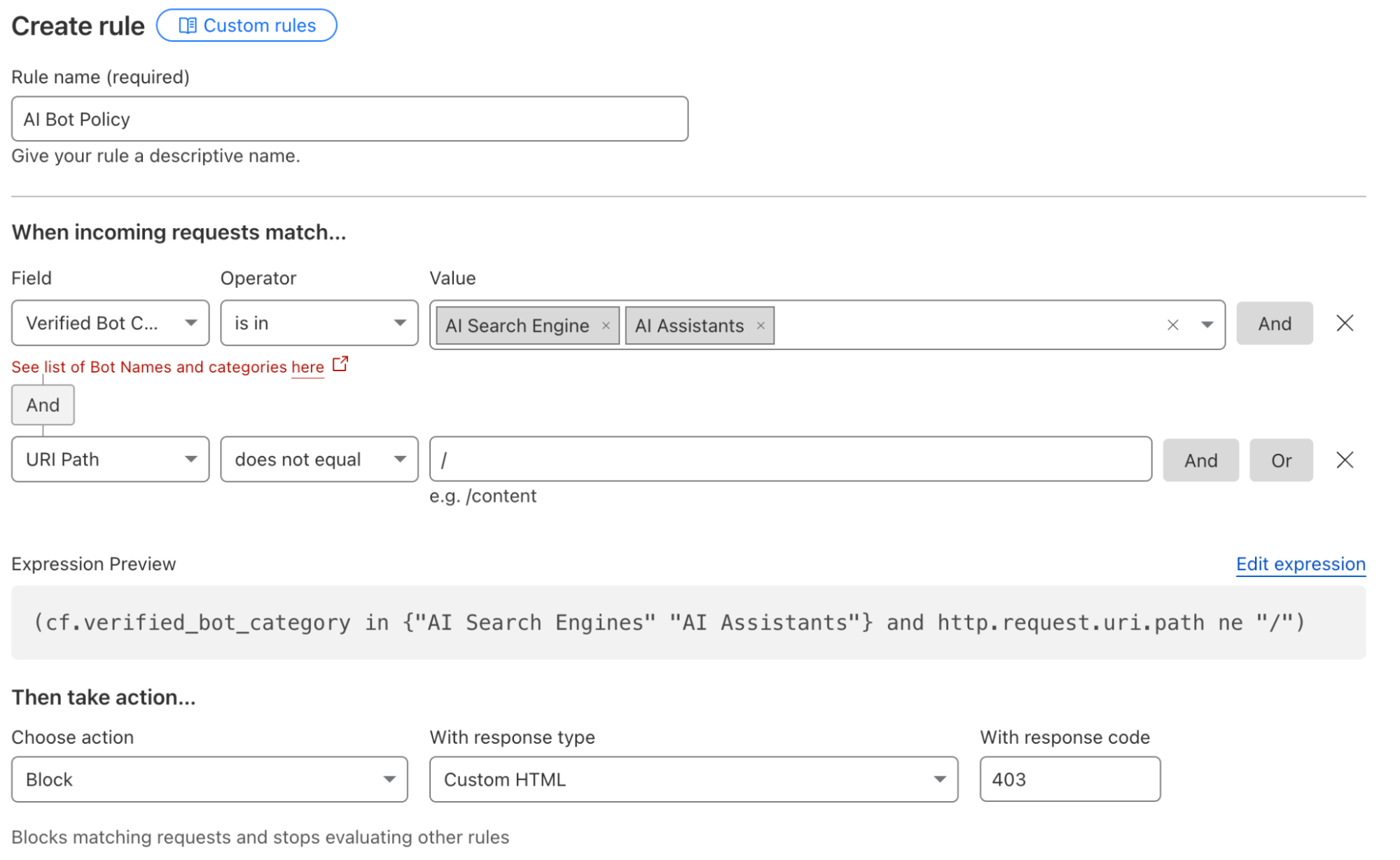
For some teams, the decision will be to allow the bots associated with AI search engines to scan their Internet properties because those tools can still drive traffic to the site. Other organizations might sign deals with a specific model provider, and they want to allow any type of bot from that provider to access their content. Customers can now navigate to the WAF section of the Cloudflare dashboard to implement these types of policies.


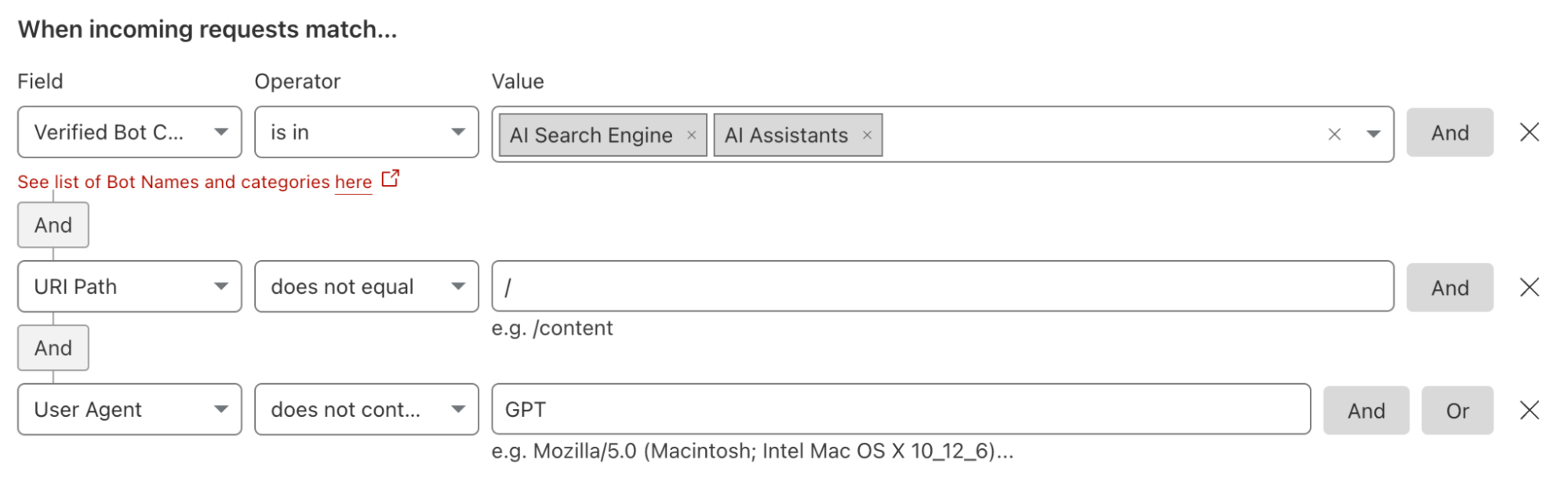
Administrators can also create rules that would, for example, block all AI bots except for those from a specific platform. Teams can deploy these types of filters if they are skeptical of most AI platforms but comfortable with one AI model provider and its policies. These types of rules can also be used to implement contracts where a site owner has negotiated to allow scanning from a single provider. The site administrator would need to create a rule to block all types of AI-related bots and then add an exception that allows the specific bot or bots from their AI partner.


We also recommend that customers consider updating their Terms of Service to cover this new use case in addition to applying these new filters. We have documented the steps we suggest that “good citizen” bots and crawlers take with respect to robots.txt files. As an extension of those best practices, we are adding a new section to that documentation where we provide a sample Terms of Service section that site owners can consider using to establish that AI scanning needs to follow the policies you have defined in your robots.txt file.

Step 4: Audit your existing scanning arrangements

An increasing number of sites are signing agreements directly with model providers to license consumption of their content in exchange for payment. Many of those deals contain provisions that determine the rate of crawling for certain sections or entire sites. Cloudflare’s AI Audit tab provides you with the tools to monitor those kinds of contracts.

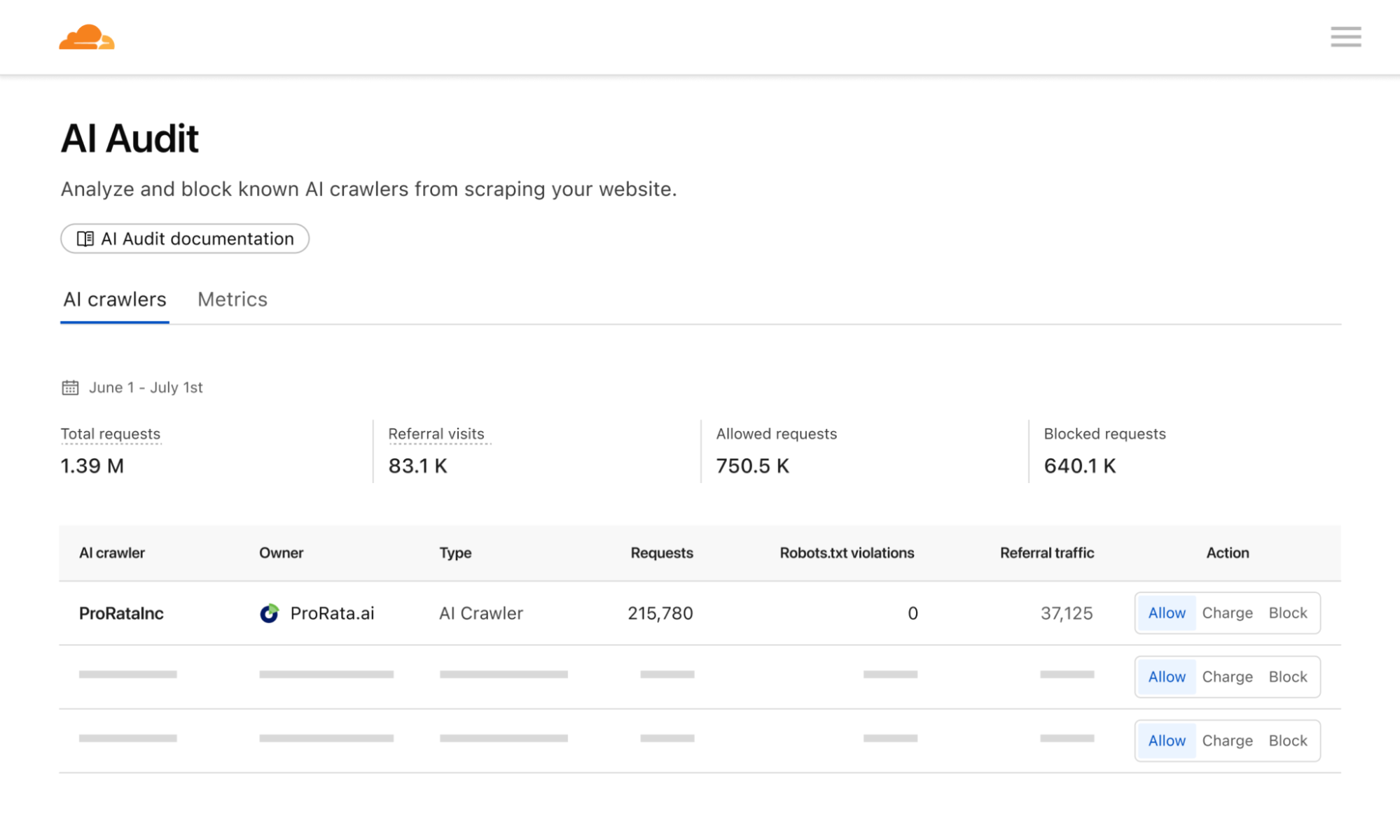
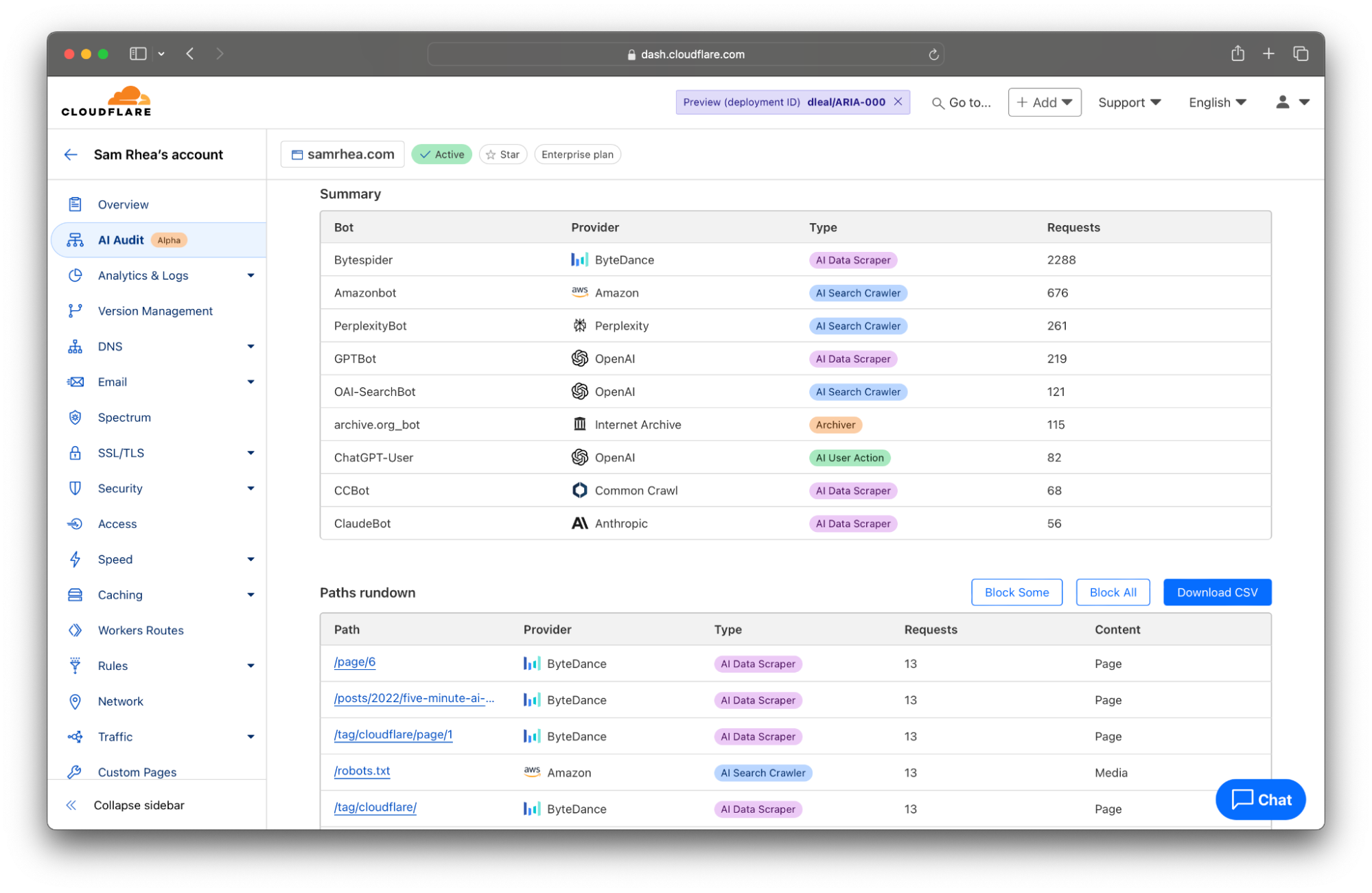
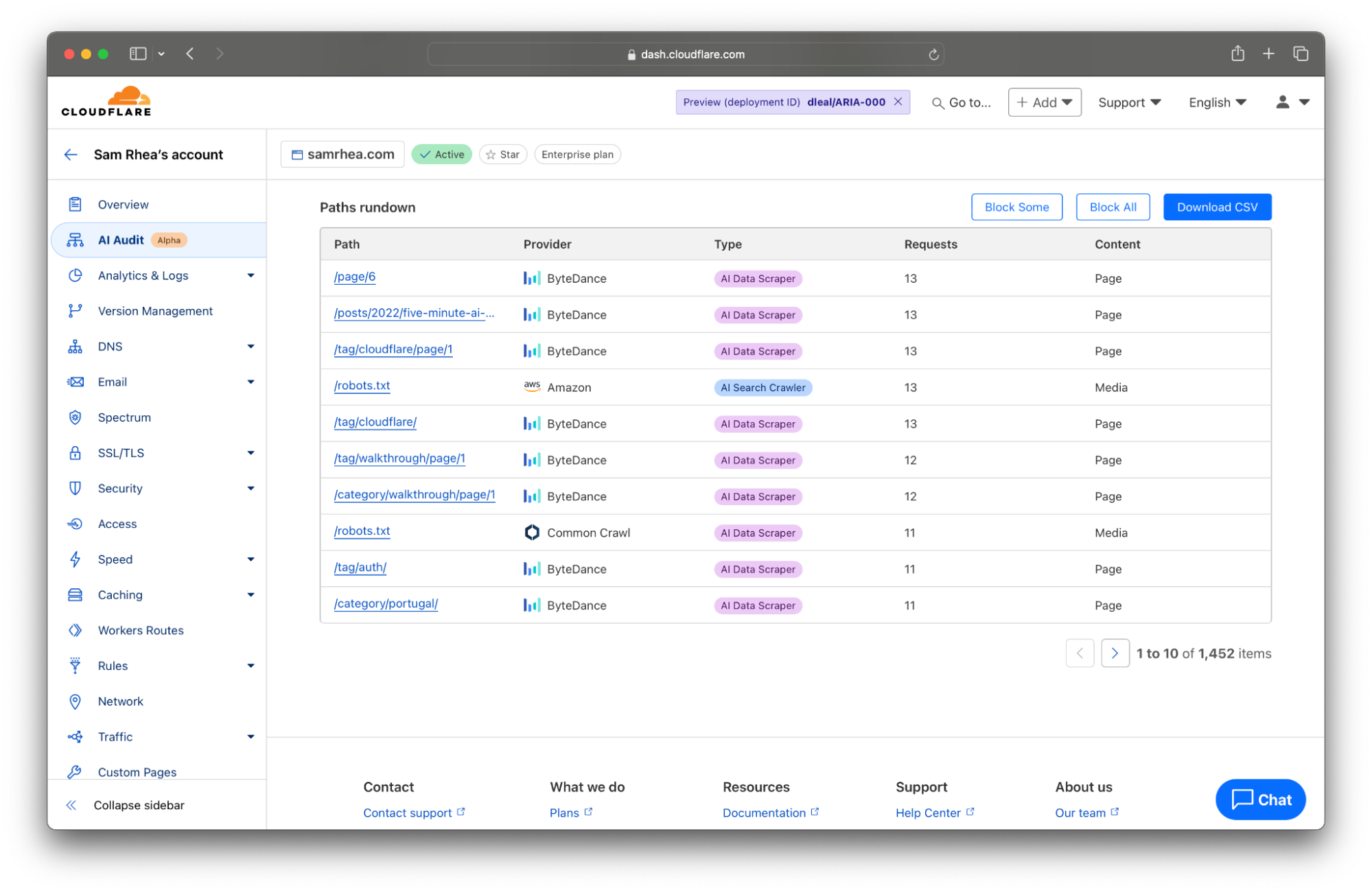
The table at the bottom of the AI Audit tool now lists the most popular content on your site ranked by the count of scans in the time period from the filter set at the top of the page. You can click the Export to CSV button to quickly download a file with the details presented here that you can use to discuss any discrepancies with the AI platform that you are allowing to access your content.


Today, the data available to you represents key metrics we have heard from customers in these kinds of arrangements: requests against certain pages and requests against the entire site.

Step 5: Prepare your site to capture value from AI scanning

Not everyone has the time or contacts to negotiate deals with AI companies. Up to this point, only the largest publishers on the Internet have the resources to set those kinds of terms and get paid for their content.

Everyone else has been left with two basic choices on how to handle their data: block all scanning or allow unrestricted access. Today’s releases give content creators more visibility and control than just those two options, but the long tail of sites on the Internet still lack a pathway to monetization.

We think that sites of any size should be fairly compensated for the use of their content. Cloudflare plans to launch a new component of our dashboard that goes beyond just blocking and analyzing crawls. Site owners will have the ability to set a price for their site, or sections of their site, and to then charge model providers based on their scans and the price you have set. We’ll handle the rest so that you can focus on creating great content for your audience.

The fastest way to get ready to capture value through this new component is to make sure your sites use Cloudflare’s network. We plan to invite sites to participate in the beta based on the date they first joined Cloudflare. Interested in being notified when this is available? Let us know here.


Declaring your AIndependence: block AI bots, scrapers and crawlers with a single click

Post Syndicated from Alex Bocharov original https://blog.cloudflare.com/declaring-your-aindependence-block-ai-bots-scrapers-and-crawlers-with-a-single-click


To help preserve a safe Internet for content creators, we’ve just launched a brand new “easy button” to block all AI bots. It’s available for all customers, including those on our free tier.

The popularity of generative AI has made the demand for content used to train models or run inference on skyrocket, and, although some AI companies clearly identify their web scraping bots, not all AI companies are being transparent. Google reportedly paid $60 million a year to license Reddit’s user generated content, Scarlett Johansson alleged OpenAI used her voice for their new personal assistant without her consent, and most recently, Perplexity has been accused of impersonating legitimate visitors in order to scrape content from websites. The value of original content in bulk has never been higher.
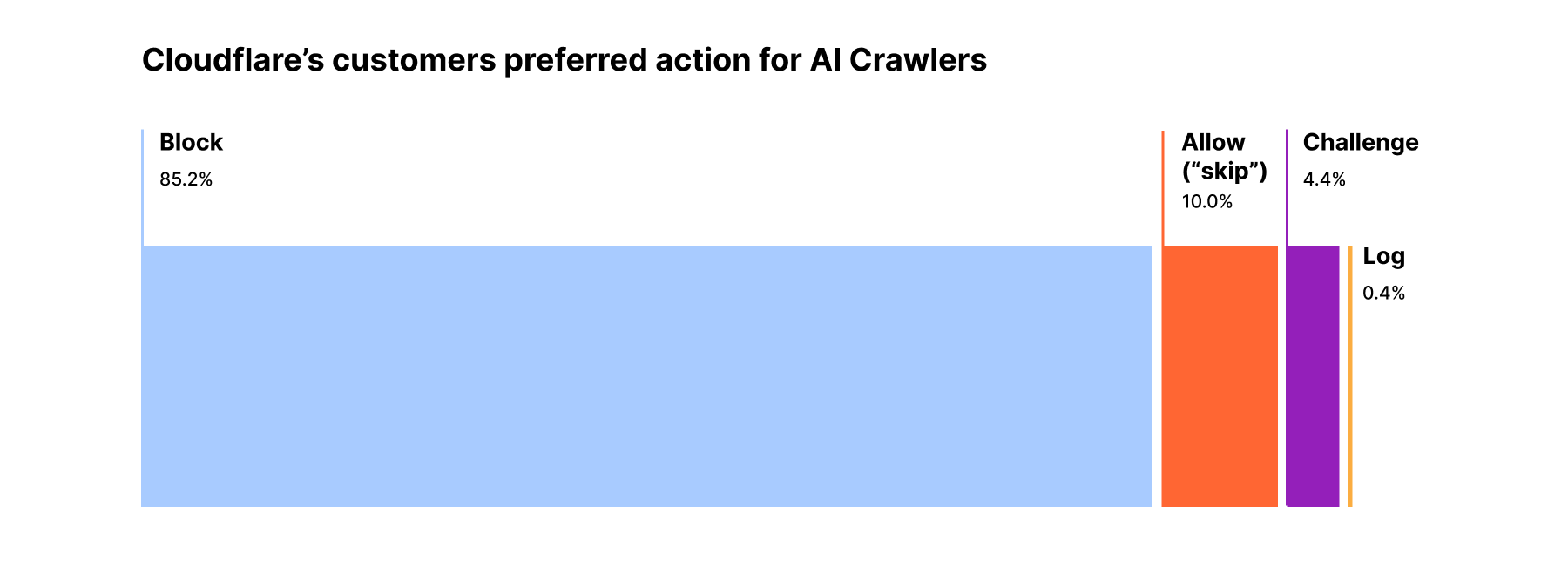
Last year, Cloudflare announced the ability for customers to easily block AI bots that behave well. These bots follow robots.txt, and don’t use unlicensed content to train their models or run inference for RAG applications using website data. Even though these AI bots follow the rules, Cloudflare customers overwhelmingly opt to block them.

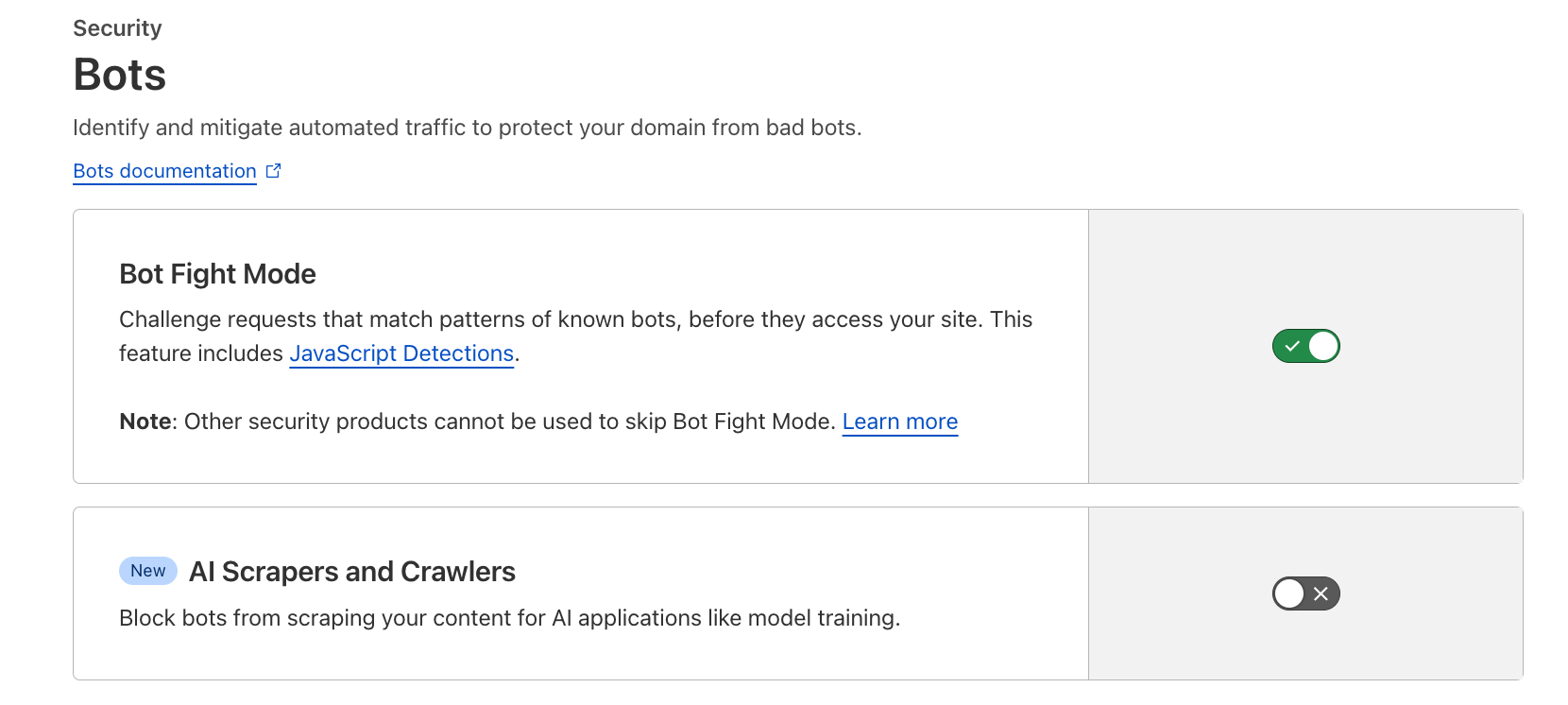
We hear clearly that customers don’t want AI bots visiting their websites, and especially those that do so dishonestly. To help, we’ve added a brand new one-click to block all AI bots. It’s available for all customers, including those on the free tier. To enable it, simply navigate to the Security > Bots section of the Cloudflare dashboard, and click the toggle labeled AI Scrapers and Crawlers.

This feature will automatically be updated over time as we see new fingerprints of offending bots we identify as widely scraping the web for model training. To ensure we have a comprehensive understanding of all AI crawler activity, we surveyed traffic across our network.

AI bot activity today

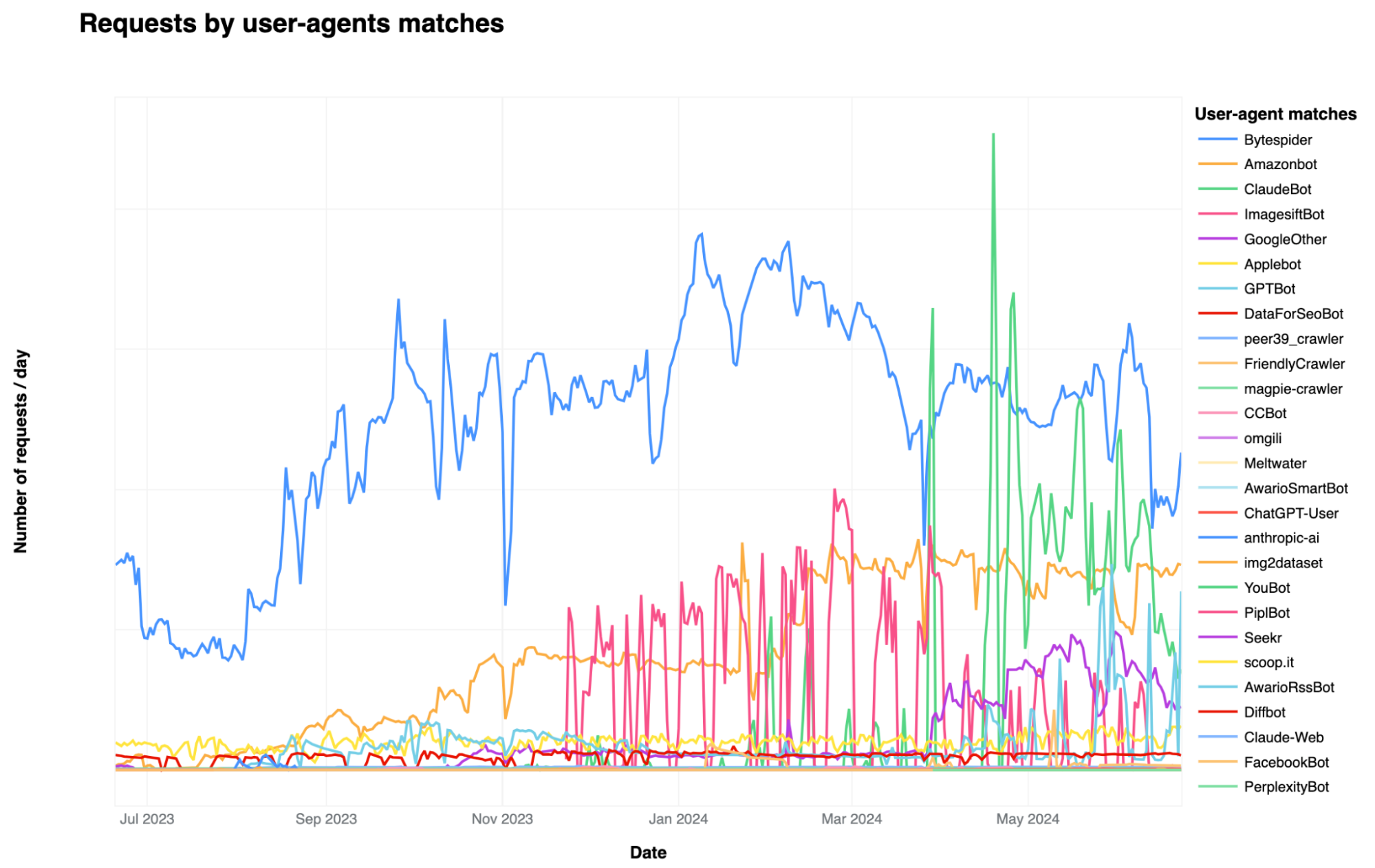
The graph below illustrates the most popular AI bots seen on Cloudflare’s network in terms of their request volume. We looked at common AI crawler user agents and aggregated the number of requests on our platform from these AI user agents over the last year:

When looking at the number of requests made to Cloudflare sites, we see that Bytespider, Amazonbot, ClaudeBot, and GPTBot are the top four AI crawlers. Operated by ByteDance, the Chinese company that owns TikTok, Bytespider is reportedly used to gather training data for its large language models (LLMs), including those that support its ChatGPT rival, Doubao. Amazonbot and ClaudeBot follow Bytespider in request volume. Amazonbot, reportedly used to index content for Alexa’s question-answering, sent the second-most number of requests and ClaudeBot, used to train the Claude chat bot, has recently increased in request volume.

Among the top AI bots that we see, Bytespider not only leads in terms of number of requests but also in both the extent of its Internet property crawling and the frequency with which it is blocked. Following closely is GPTBot, which ranks second in both crawling and being blocked. GPTBot, managed by OpenAI, collects training data for its LLMs, which underpin AI-driven products such as ChatGPT. In the table below, “Share of websites accessed” refers to the proportion of websites protected by Cloudflare that were accessed by the named AI bot.

AI Bot Share of Websites Accessed
Bytespider 40.40%
GPTBot 35.46%
ClaudeBot 11.17%
ImagesiftBot 8.75%
CCBot 2.14%
ChatGPT-User 1.84%
omgili 0.10%
Diffbot 0.08%
Claude-Web 0.04%
PerplexityBot 0.01%

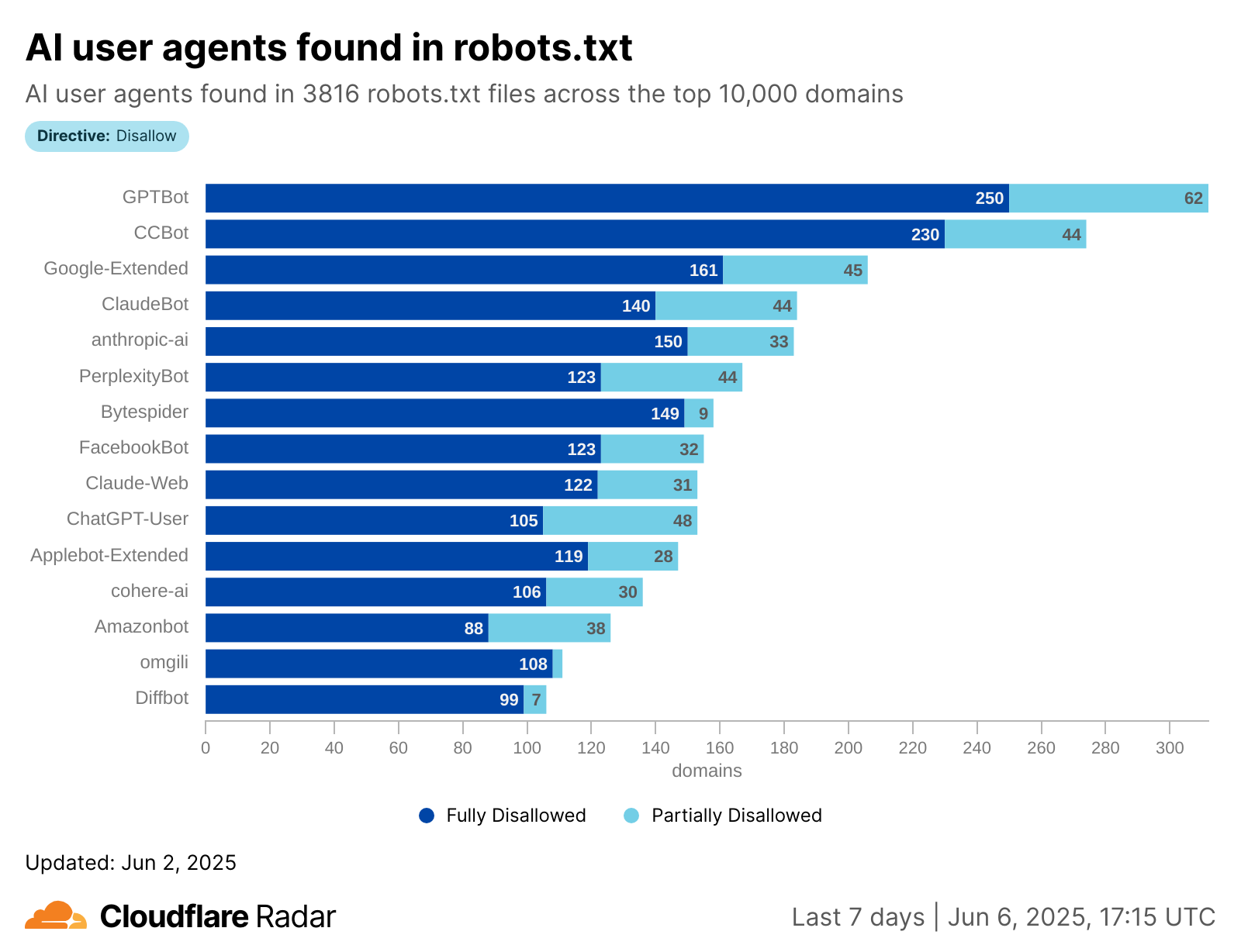
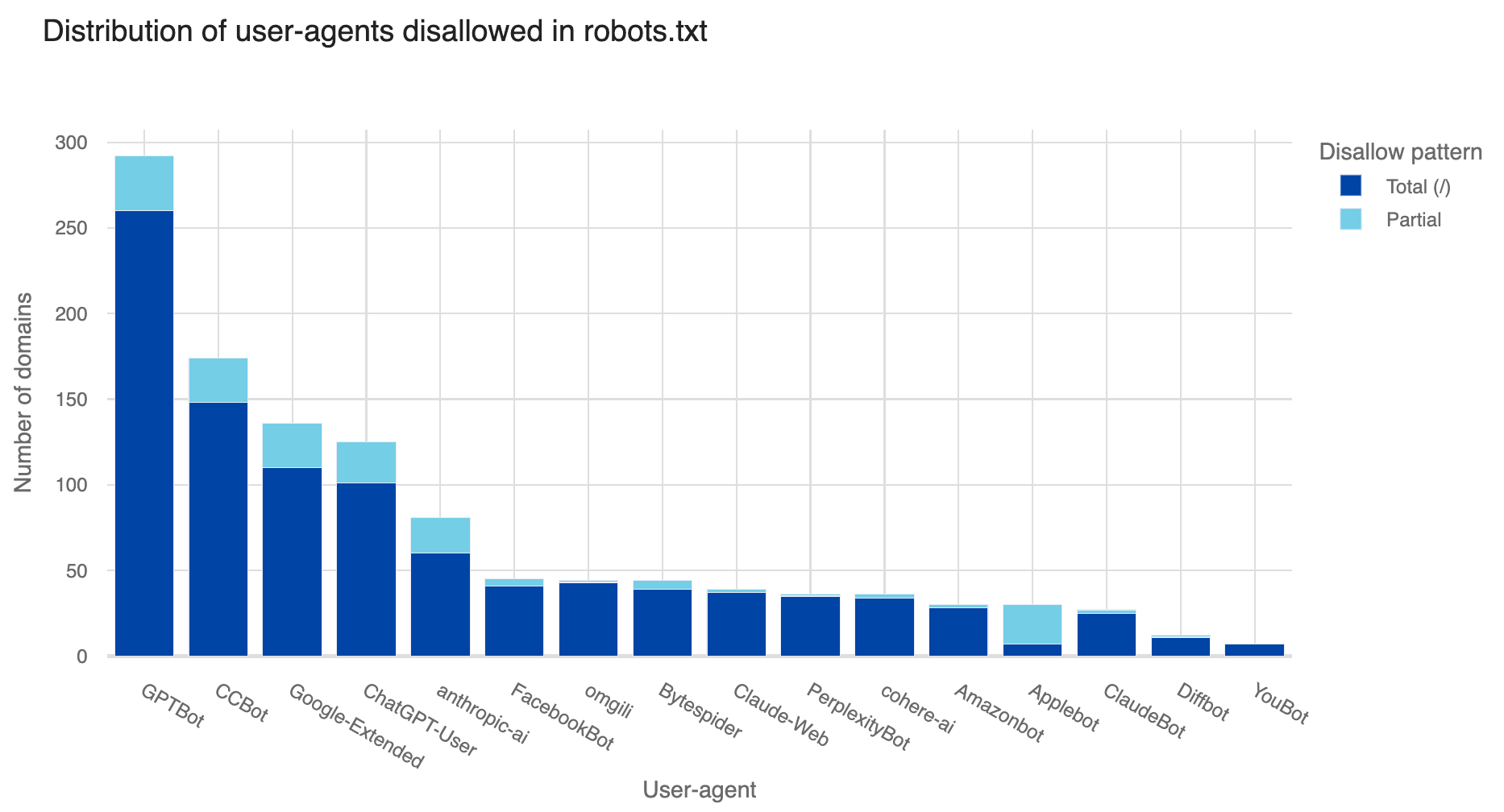
While our analysis identified the most popular crawlers in terms of request volume and number of Internet properties accessed, many customers are likely not aware of the more popular AI crawlers actively crawling their sites. Our Radar team performed an analysis of the top robots.txt entries across the top 10,000 Internet domains to identify the most commonly actioned AI bots, then looked at how frequently we saw these bots on sites protected by Cloudflare.

In the graph below, which looks at disallowed crawlers for these sites, we see that customers most often reference GPTBot, CCBot, and Google in robots.txt, but do not specifically disallow popular AI crawlers like Bytespider and ClaudeBot.

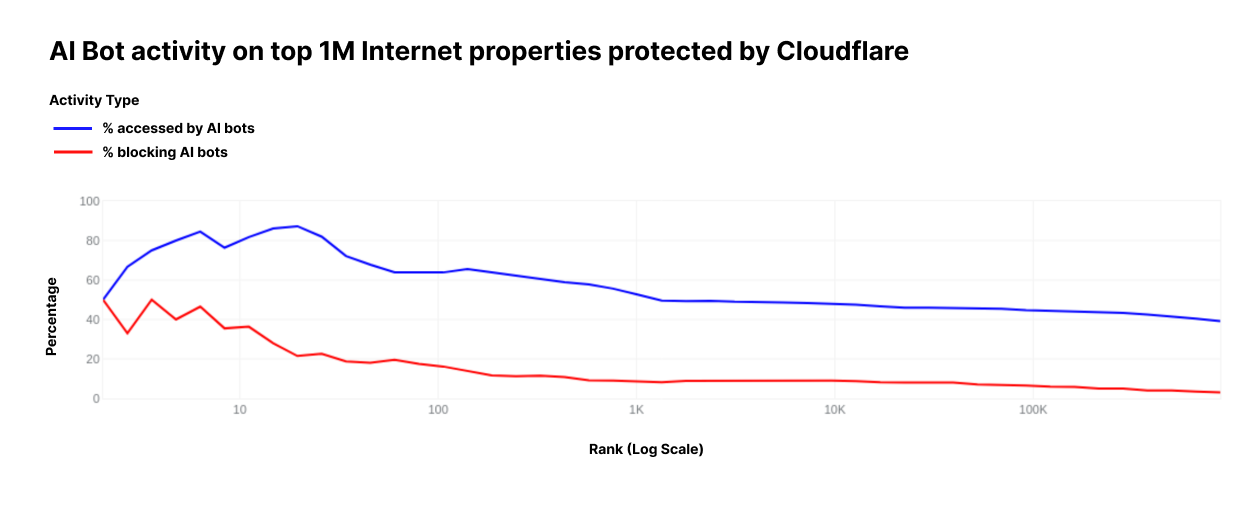
With the Internet now flooded with these AI bots, we were curious to see how website operators have already responded. In June, AI bots accessed around 39% of the top one million Internet properties using Cloudflare, but only 2.98% of these properties took measures to block or challenge those requests. Moreover, the higher-ranked (more popular) an Internet property is, the more likely it is to be targeted by AI bots, and correspondingly, the more likely it is to block such requests.

Top N Internet properties by number of visitors seen by Cloudflare % accessed by AI bots % blocking AI bots
10 80.0% 40.0%
100 63.0% 16.0%
1,000 53.2% 8.8%
10,000 47.99% 8.92%
100,000 44.53% 6.36%
1,000,000 38.73% 2.98%

We see website operators completely block access to these AI crawlers using robots.txt. However, these blocks are reliant on the bot operator respecting robots.txt and adhering to RFC9309 (ensuring variations on user against all match the product token) to honestly identify who they are when they visit an Internet property, but user agents are trivial for bot operators to change.

How we find AI bots pretending to be real web browsers

Sadly, we’ve observed bot operators attempt to appear as though they are a real browser by using a spoofed user agent. We’ve monitored this activity over time, and we’re proud to say that our global machine learning model has always recognized this activity as a bot, even when operators lie about their user agent.

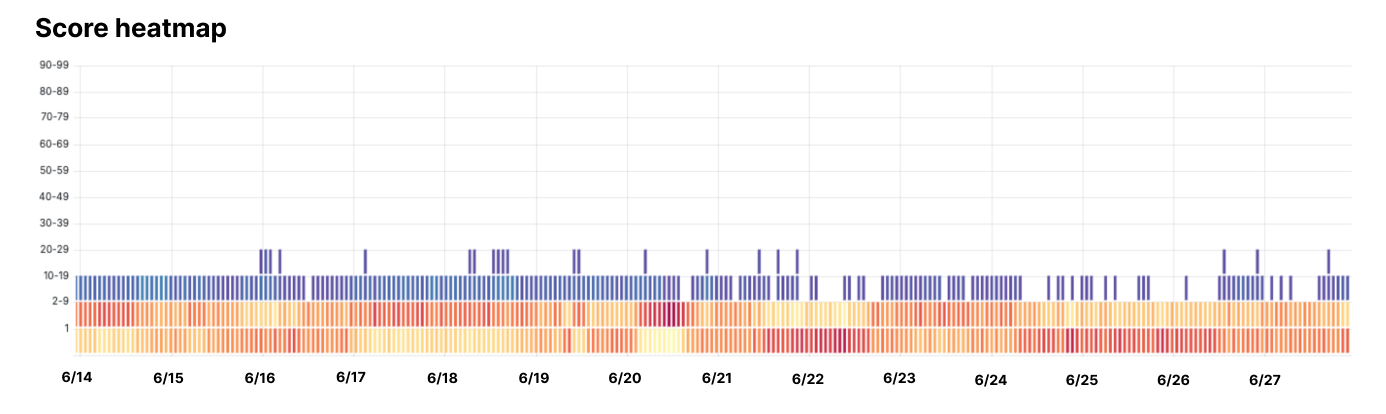
Take one example of a specific bot that others observed to be hiding their activity. We ran an analysis to see how our machine learning models scored traffic from this bot. In the diagram below, you can see that all bot scores are firmly below 30, indicating that our scoring thinks this activity is likely to be coming from a bot.

The diagram reflects scoring of the requests using our newest model, where “hotter” colors indicate more requests falling in that band, and “cooler” colors meaning fewer requests did. We can see the vast majority of requests fell into the bottom two bands, showing that Cloudflare’s model gave the offending bot a score of 9 or less. The user agent changes have no effect on the score, because this is the very first thing we expect bot operators to do.

Any customer with an existing WAF rule set to challenge visitors with a bot score below 30 (our recommendation) automatically blocked all of this AI bot traffic with no new action on their part. The same will be true for future AI bots that use similar techniques to hide their activity.

We leverage Cloudflare global signals to calculate our Bot Score, which for AI bots like the one above, reflects that we correctly identify and score them as a “likely bot.”

When bad actors attempt to crawl websites at scale, they generally use tools and frameworks that we are able to fingerprint. For every fingerprint we see, we use Cloudflare’s network, which sees over 57 million requests per second on average, to understand how much we should trust this fingerprint. To power our models, we compute global aggregates across many signals. Based on these signals, our models were able to appropriately flag traffic from evasive AI bots, like the example mentioned above, as bots.

The upshot of this globally aggregated data is that we can immediately detect new scraping tools and their behavior without needing to manually fingerprint the bot, ensuring that customers stay protected from the newest waves of bot activity.

If you have a tip on an AI bot that’s not behaving, we’d love to investigate. There are two options you can use to report misbehaving AI crawlers:

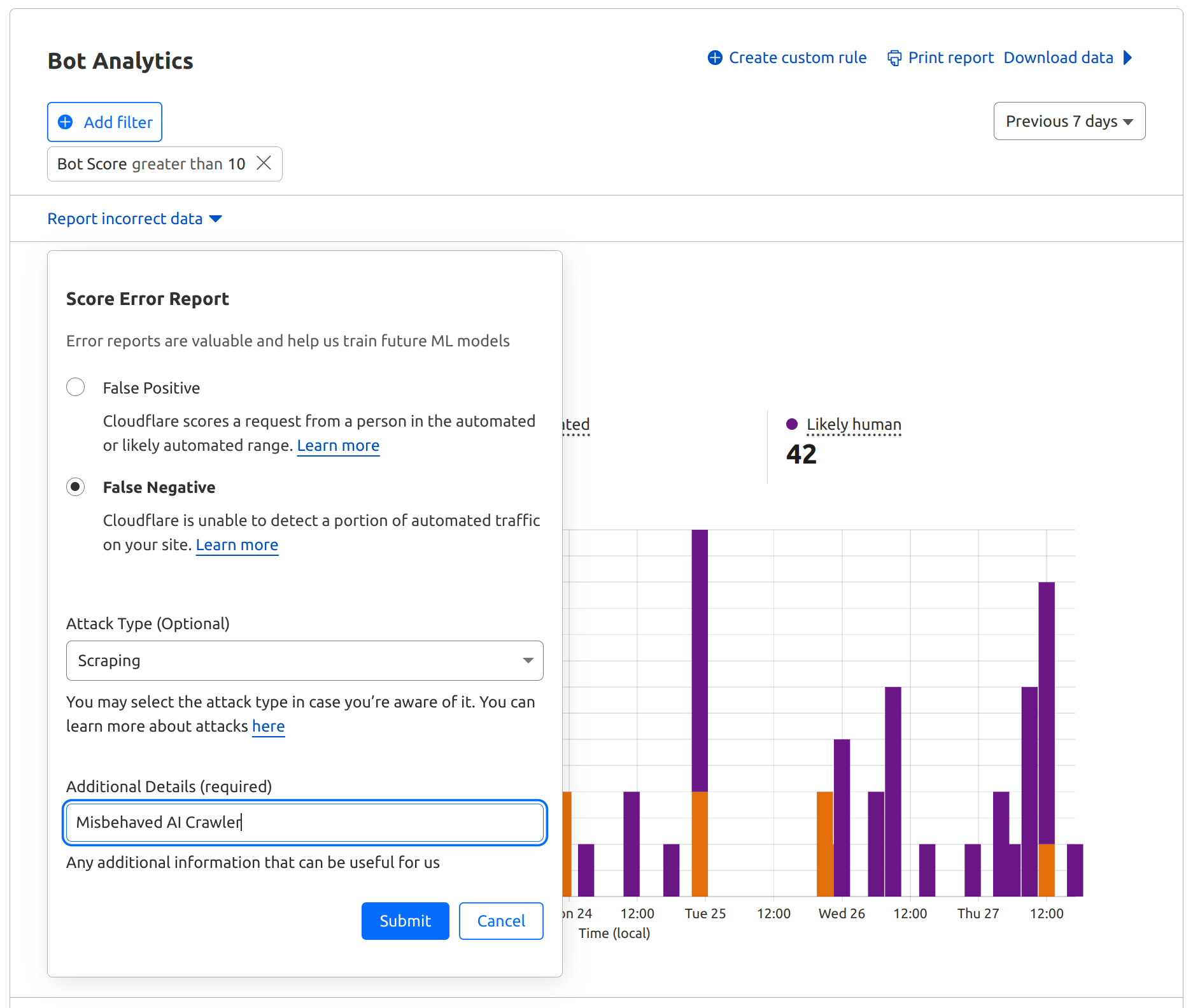
1. Enterprise Bot Management customers can submit a False Negative Feedback Loop report via Bot Analytics by simply selecting the segment of traffic where they noticed misbehavior:

2. We’ve also set up a reporting tool where any Cloudflare customer can submit reports of an AI bot scraping your website without permission.

We fear that some AI companies intent on circumventing rules to access content will persistently adapt to evade bot detection. We will continue to keep watch and add more bot blocks to our AI Scrapers and Crawlers rule and evolve our machine learning models to help keep the Internet a place where content creators can thrive and keep full control over which models their content is used to train or run inference on.