Tag Archives: Amazon Simple Storage Service (S3)

Building a difference checker with Amazon S3 and AWS Lambda

Post Syndicated from James Beswick original https://aws.amazon.com/blogs/compute/building-a-difference-checker-with-amazon-s3-and-aws-lambda/

When saving different versions of files or objects, it can be useful to detect and log the differences between the versions automatically. A difference checker tool can detect changes in JSON files for configuration changes, or log changes in documents made by users.

This blog post shows how to build and deploy a scalable difference checker service using Amazon S3 and AWS Lambda. The example application uses the AWS Serverless Application Model (AWS SAM), enabling you to deploy the application more easily in your own AWS account.

This walkthrough creates resources covered in the AWS Free Tier but usage beyond the Free Tier allowance may incur cost. To set up the example, visit the GitHub repo and follow the instructions in the README.md file.

Overview

By default in S3, when you upload an object with the same name as an existing object, the new object overwrites the existing one. However, when you enable versioning in a S3 bucket, the service stores every version of an object. Versioning provides an effective way to recover objects in the event of accidental deletion or overwriting. It also provides a way to detect changes in objects, since you can compare the latest version to previous versions.

In the example application, the S3 bucket triggers a Lambda function every time an object version is unloaded. The Lambda function compares the latest version with the last version and then writes the differences to Amazon CloudWatch Logs.

Additionally, the application uses a configurable environment variable to determine how many versions of the object to retain. By default, it keeps the latest three versions. The Lambda function deletes versions that are earlier than the configuration allows, providing an effective way to implement object life cycling.

This shows the application flow when multiple versions of an object are uploaded:
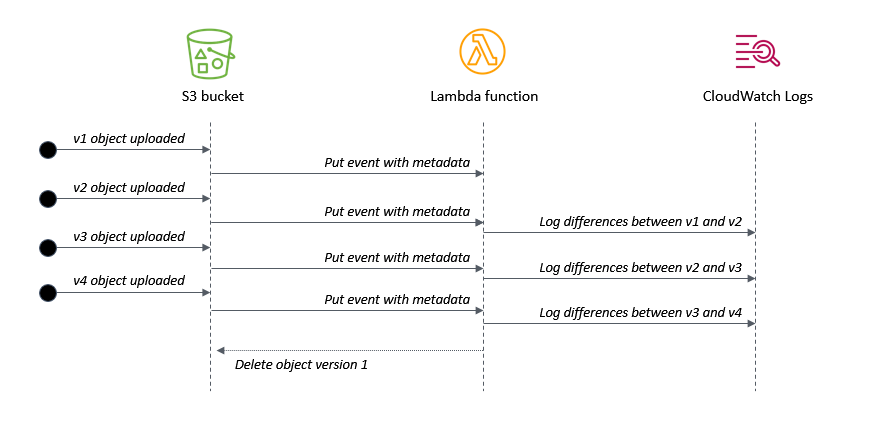
Application flow

  1. When v1 is uploaded, there is no previous version to compare against.
  2. When v2 is uploaded, the Lambda function logs the differences compared with v1.
  3. When v3 is uploaded, the Lambda function logs the differences compared with v2.
  4. When v4 is uploaded, the Lambda function logs the differences compared with v3. It then deletes v1 of the object, since it is earlier than the configured setting.

Understanding the AWS SAM template

The application’s AWS SAM template configures the bucket with versioning enabled using the VersioningConfiguration attribute:

  SourceBucket:
    Type: AWS::S3::Bucket
    Properties:
      BucketName: !Ref BucketName
      VersioningConfiguration:
        Status: Enabled      

It defines the Lambda function with an environment variable KEEP_VERSIONS, which determines how many versions of an object to retain:

  S3ProcessorFunction:
    Type: AWS::Serverless::Function 
    Properties:
      CodeUri: src/
      Handler: app.handler
      Runtime: nodejs14.x
      MemorySize: 128
      Environment:
        Variables:
          KEEP_VERSIONS: 3

The template uses an AWS SAM policy template to provide the Lambda function with an S3ReadPolicy to the objects in the bucket. The version handling logic requires s3:ListBucketVersions permission on the bucket and s3:DeleteObjectVersion permission on the objects in the bucket. It’s important to note which permissions apply to the bucket and which apply to the objects within the bucket. The template defines these three permission types in the function’s policy:

      Policies:
        - S3ReadPolicy:
            BucketName: !Ref BucketName      
        - Statement:
          - Sid: VersionsPermission
            Effect: Allow
            Action:
            - s3:ListBucketVersions
            Resource: !Sub "arn:${AWS::Partition}:s3:::${BucketName}" 
        - Statement:
          - Sid: DeletePermission
            Effect: Allow
            Action:
            - s3:DeleteObject
            - s3:DeleteObjectVersion
            Resource: !Sub "arn:${AWS::Partition}:s3:::${BucketName}/*" 

The example application only works for text files but you can use the same logic to process other file types. The event definition ensures that only objects ending in ‘.txt’ invoke the Lambda function:

      Events:
        FileUpload:
          Type: S3
          Properties:
            Bucket: !Ref SourceBucket
            Events: s3:ObjectCreated:*
            Filter: 
              S3Key:
                Rules:
                  - Name: suffix
                    Value: '.txt'     

Processing events from the S3 bucket

S3 sends events to the Lambda function when objects are created. The event contains metadata about the objects but not the contents of the object. It’s good practice to separate the business logic of the function from the Lambda handler, so the generic handler in app.js iterates through the event’s records and calls the custom logic for each record:

const { processS3 } = require('./processS3')

exports.handler = async (event) => {
  console.log (JSON.stringify(event, null, 2))

  await Promise.all(
    event.Records.map(async (record) => {
      try {
        await processS3(record)
      } catch (err) {
        console.error(err)
      }
    })
  )
}

The processS3.js file contains a function that fetches the object versions in the bucket and sorts the event data received. The listObjectVersions method of the S3 API requires the s3:ListBucketVersions permission, as provided in the AWS SAM template:

    // Decode URL-encoded key
    const Key = decodeURIComponent(record.s3.object.key.replace(/\+/g, " "))

    // Get the list of object versions
    const data = await s3.listObjectVersions({
      Bucket: record.s3.bucket.name,
      Prefix: Key
    }).promise()

   // Sort versions by date (ascending by LastModified)
    const versions = data.Versions
    const sortedVersions = versions.sort((a,b) => new Date(a.LastModified) - new Date(b.LastModified))

Finally, the compareS3.js file contains a function that loads the latest two versions of the S3 object and uses the Diff npm library to compare:

const compareS3 = async (oldVersion, newVersion) => {
  try {
    console.log ({oldVersion, newVersion})

    // Get original text from objects 
    const oldObject = await s3.getObject({ Bucket: oldVersion.BucketName, Key: oldVersion.Key }).promise()
    const newObject = await s3.getObject({ Bucket: newVersion.BucketName, Key: newVersion.Key }).promise()

    // Convert buffers to strings
    const oldFile = oldObject.Body.toString()
    const newFile = newObject.Body.toString()

    // Use diff library to compare files (https://www.npmjs.com/package/diff)
    return Diff.diffWords(oldFile, newFile)

  } catch (err) {
    console.error('compareS3: ', err)
  }
}

Life-cycling earlier versions of an S3 object

You can use an S3 Lifecycle configuration to apply rules automatically based on object transition actions. Using this approach, you can expire objects based upon age and the S3 service processes the deletion asynchronously. Lifecyling with rules is entirely managed by S3 and does not require any custom code. This implementation uses a different approach, using code to delete objects based on number of retained versions instead of age.

When versioning is enabled on a bucket, S3 adds a VersionId attribute to an object when it is created. This identifier is a random string instead of a sequential identifier. Listing the versions of an object also returns a LastModified attribute, which can be used to determine the order of the versions. The length of the response array also indicates the number of versions available for an object:

[
  {
    Key: 'test.txt',
    VersionId: 'IX_tyuQrgKpMFfq5YmLOlrtaleRBQRE',
    IsLatest: false,
    LastModified: 2021-08-01T18:48:50.000Z,
  },
  {
    Key: 'test.txt',
    VersionId: 'XNpxNgUYhcZDcI9Q9gXCO9_VRLlx1i.',
    IsLatest: false,
    LastModified: 2021-08-01T18:52:58.000Z,
  },
  {
    Key: 'test.txt',
    VersionId: 'RBk2BUIKcYYt4hNA5hrTVdNit.MDNMZ',
    IsLatest: true,
    LastModified: 2021-08-01T18:53:26.000Z,
  }
]

For convenience, this code adds a sequential version number attribute, determined by sorting the array by date. The deleteS3 function uses the deleteObjects method in the S3 API to delete multiple objects in one action. It builds a params object containing the list of keys for deletion, using the sequential version ID to flag versions for deletion:

const deleteS3 = async (versions) => {

  const params = {
    Bucket: versions[0].BucketName, 
    Delete: {
     Objects: [ ]
    }
  }

  try {
    // Add keys/versions from objects that are process.env.KEEP_VERSIONS behind
    versions.map((version) => {
      if ((versions.length - version.VersionNumber) >= process.env.KEEP_VERSIONS ) {
        console.log(`Delete version ${version.VersionNumber}: versionId = ${version.VersionId}`)
        params.Delete.Objects.push({ 
          Key: version.Key,
          VersionId: version.VersionId
        })
      }
    })

    // Delete versions
    const result = await s3.deleteObjects(params).promise()
    console.log('Delete object result: ', result)

  } catch (err) {
    console.error('deleteS3: ', err)
  }
}

Testing the application

To test this example, upload a sample text file to the S3 bucket by using the AWS Management Console or with the AWS CLI:

aws s3 cp sample.txt s3://myS3bucketname

Modify the test file and then upload again using the same command. This creates a second version in the bucket. Repeat this process multiple times to create more versions of the object. The Lambda function’s log file shows the differences between versions and any deletion activity for earlier versions:

Log activity

You can also test the object locally using the test.js function and supplying a test event. This can be useful for local debugging and testing.

Conclusion

This blog post shows how to create a scalable difference checking tool for objects stored in S3 buckets. The Lambda function is invoked when S3 writes new versions of an object to the bucket. This example also shows how to remove earlier versions of object and define a set number of versions to retain.

I walk through the AWS SAM template for deploying this example application and highlight important S3 API methods in the SDK used in the implementation. I explain how version IDs work in S3 and how to use this in combination with the LastModified date attribute to implement sequential versioning.

To learn more about best practices when using S3 to Lambda, see the Lambda Operator Guide. For more serverless learning resources, visit Serverless Land.

Optimizing your AWS Infrastructure for Sustainability, Part III: Networking

Post Syndicated from Katja Philipp original https://aws.amazon.com/blogs/architecture/optimizing-your-aws-infrastructure-for-sustainability-part-iii-networking/

In Part I: Compute and Part II: Storage of this series, we introduced strategies to optimize the compute and storage layer of your AWS architecture for sustainability.

This blog post focuses on the network layer of your AWS infrastructure and proposes concepts to optimize your network utilization.

Optimizing the networking layer of your AWS infrastructure

When you make your applications available to more customers, the packets that travel across the network will increase. Similarly, the larger the size of data, as well as the more distance a packet has to travel, the more resources are required to transmit it. With growing number of application users, optimizing network traffic can ensure that network resource consumption is not growing linearly.

The recommendations in the following sections will help you use your resources more efficiently for the network layer of your workload.

Reducing the network traveled per request

Reducing the data sent over the network and optimizing the path a packet takes will result in a more efficient data transfer. The following table provides metrics related to some AWS services that can help you find potential network optimization opportunities.

Service Metric/Check Source
Amazon CloudFront Cache hit rate Viewing CloudFront and Lambda@Edge metrics
AWS Trusted Advisor check reference
Amazon Simple Storage Service (Amazon S3) Data transferred in/out of a bucket Metrics and dimensions
AWS Trusted Advisor check reference
Amazon Elastic Compute Cloud (Amazon EC2) NetworkPacketsIn/NetworkPacketsOut List the available CloudWatch metrics for your instances
AWS Trusted Advisor CloudFront Content Delivery Optimization AWS Trusted Advisor check reference

We recommend the following concepts to optimize your network utilization.

Read local, write global

The following strategies allow users to read the data from the source closest to them; thus, fewer requests travel longer distances.

  • If you are operating within a single AWS Region, you should choose a Region that is near the majority of your users. The further your users are away from the Region, the further data needs to travel through the global network.
  • If your users are spread over multiple Regions, set up multiple copies of the data to reside in each Region. Amazon Relational Database Service (Amazon RDS) and Amazon Aurora let you set up cross-Region read replicas. Amazon DynamoDB global tables allow for fast performance and alleviate network load.

Use a content delivery network

Content delivery networks (CDNs) bring your data closer to the end user. When requested, they cache static content from the original server and deliver it to the user. This shortens the distance each packet has to travel.

  • CloudFront optimizes network utilization and delivers traffic over CloudFront’s globally distributed edge network. Figure 1 shows a global user base that accesses an S3 bucket directly versus serving cached data from edge locations.
  • Trusted Advisor includes a check that recommends whether you should use a CDN for your S3 buckets. It analyzes the data transferred out of your S3 bucket and flags the buckets that could benefit from a CloudFront distribution.
Comparison of accessing an S3 bucket directly versus via a CloudFront distribution/edge locations

Figure 1. Comparison of accessing an S3 bucket directly versus via a CloudFront distribution/edge locations

Optimize CloudFront cache hit ratio

CloudFront caches different versions of an object depending upon the request headers (for example, language, date, or user-agent). You can further optimize your CDN distribution’s cache hit ratio (the number of times an object is served from the CDN versus from the origin) with a Trusted Advisor check. It automatically checks for headers that do not affect the object and then recommends a configuration to ignore those headers and not forward the request to the origin.

Use edge-oriented services

Edge computing brings data storage and computation closer to users. By implementing this approach, you can perform data preprocessing or run machine learning algorithms on the edge.

  • Edge-oriented services applied on gateways or directly onto user devices reduce network traffic because data does not need to be sent back to the cloud server.
  • One-time, low-latency tasks are a good fit for edge use cases, like when an autonomous vehicle needs to detect objects nearby. You should generally archive data that needs to be accessed by multiple parties in the cloud, but consider factors such as device hardware and privacy regulations first.
  • CloudFront Functions can run compute on edge locations and Lambda@Edge can generate Regional edge caches. AWS IoT Greengrass provides edge computing for Internet of Things (IoT) devices.

Reducing the size of data transmitted

Serve compressed files

In addition to caching static assets, you can further optimize network utilization by serving compressed files to your users. You can configure CloudFront to automatically compress objects, which results in faster downloads, leading to faster rendering of webpages.

Enhance Amazon EC2 network performance

Network packets consist of data that you are sending (frame) and the processing overhead information. If you use larger packets, you can pass more data in a single packet and decrease processing overhead.

Jumbo frames use the largest permissible packet that can be passed over the connection. Keep in mind that outside a single virtual private cloud (VPC), over virtual private network (VPN) or internet gateway, traffic is limited to a lower frame regardless of using jumbo frames.

Optimize APIs

If your payloads are large, consider reducing their size to reduce network traffic by compressing your messages for your REST API payloads. Use the right endpoint for your use case. Edge-optimized API endpoints are best suited for geographically distributed clients. Regional API endpoints are best suited for when you have a few clients with higher demands, because they can help reduce connection overhead. Caching your API responses will reduce network traffic and enhance responsiveness.

Conclusion

As your organization’s cloud adoption grows, knowing how efficient your resources are is crucial when optimizing your AWS infrastructure for environmental sustainability. Using the fewest number of resources possible and using them to their fullest will have the lowest impact on the environment.

Throughout this three-part blog post series, we introduced you to the following architectural concepts and metrics for the compute, storage, and network layers of your AWS infrastructure.

  • Reducing idle resources and maximizing utilization
  • Shaping demand to existing supply
  • Managing your data’s lifecycle
  • Using different storage tiers
  • Optimizing the path data travels through a network
  • Reducing the size of data transmitted

This is not an exhaustive list. We hope it is a starting point for you to consider the environmental impact of your resources and how you can build your AWS infrastructure to be more efficient and sustainable. Figure 2 shows an overview of how you can monitor related metrics with CloudWatch and Trusted Advisor.

Overview of services that integrate with CloudWatch and Trusted Advisor for monitoring metrics

Figure 2. Overview of services that integrate with CloudWatch and Trusted Advisor for monitoring metrics

Ready to get started? Check out the AWS Sustainability page to find out more about our commitment to sustainability. It provides information about renewable energy usage, case studies on sustainability through the cloud, and more.

Other blog posts in this series

Related information

How Cimpress Built a Self-service, API-driven Data Platform Ingestion Service

Post Syndicated from Ethan Fahy original https://aws.amazon.com/blogs/architecture/how-cimpress-built-a-self-service-api-driven-data-platform-ingestion-service/

Cimpress is a global company that specializes in mass customization, empowering individuals and businesses to design, personalize and customize their own products – such as packaging, signage, masks, and clothing – and to buy those products affordably.

Cimpress is composed of multiple businesses that have the option to use the Cimpress data platform. To provide business autonomy and keep the central data platform team lean and nimble, Cimpress designed their data platform to be scalable, self-service, and API-driven. During a design update to River, the data platform’s data ingestion service, Cimpress engaged AWS to run an AWS Data Lab. In this post, we’ll show how River provides this data ingestion interface across all Cimpress businesses. If your company has a decentralized organizational structure and challenges with a centralized data platform, read on and consider how a self-service, API-driven approach might help.

Evaluating the legacy data ingestion platform and identifying requirements for its replacement

The collaboration process between AWS and Cimpress started with a discussion of pain points with the existing Cimpress data platform’s ingestion service:

  1. Changes were time consuming. The existing data ingestion service was built using Apache Kafka and Apache Spark. When a data stream owner needed new fields or changes in the stream payload schema, it could take weeks working with a data engineer. Spark configuration needed to be manually modified, tested, and then the Spark job had to be deployed to an operational platform.
  2. Scaling was not automated. The existing Spark clusters required large Amazon EC2 instances that were manually scaled. This led to an inefficient use of resources that was driving unnecessary cost.

Assessing these pain points led to the design of an improved data ingestion service that was:

  1. Fully automated and self-service via an API. This would reduce the dependency on engineering support from the central data platform team and decreased the time to production for new data streams.
  2. Serverless with automatic scaling. This would improve performance efficiency and cost optimization while freeing up engineering time.

The rearchitected Cimpress data platform ingestion service

Figure 1. River architecture diagram, depicting the flow of data from data producers through the River data ingestion service into Snowflake.

Figure 1. River architecture diagram, depicting the flow of data from data producers through the River data ingestion service into Snowflake.

The River data ingestion service provides data producers with a self-service mechanism to push their data into Snowflake, the Cimpress data platform’s data warehouse service. As seen in Figure 1, here are the steps involved in that process:

1. Data producers use the River API to create a new River data “stream.” Each Cimpress business is given its own Snowflake account in which they can create logically separated data ingestion “streams.” A River data stream can be configured with multiple data layers, fine-tuned permissions, entity tables, entry de-duplication, data delivery monitoring, and Snowflake data clustering.

2. Data producers get access to a River WebUI. In addition to the River API, end users are also able to access a web-based user interface for simplified configuration, monitoring, and management.

3. Data producers push data to the River API. The River RESTful API uses an Application Load Balancer (ALB) backed by AWS Lambda.

4. Data is processed by Amazon Kinesis Data Firehose.

5. Data is uploaded to Snowflake. Data objects that land on Amazon S3 initiate an event notification to Snowflake’s Snowpipe continuous data ingestion service. This loads the data from S3 into a Snowflake account.

All the AWS services used in the River architecture are serverless with automatic scaling. This means that the Cimpress data platform team can remain lean and agile. Engineering resources to infrastructure management tasks like capacity provisioning and patching are minimized. These AWS services also have pay-as-you-go pricing, so the cost scales predictably with the amount of data ingested.

Conclusions

The Cimpress data platform team redesigned their data ingestion service to be self-service, API-driven, and highly scalable. As usage of the Cimpress data platform has grown, Cimpress businesses operate more autonomously with speed and agility. As of today, the River data ingestion service reliably processes 2–3 billion messages per month across more than 1,000 different data streams. It drives data insights for more than 7,000 active users of the data platform across all of the Cimpress businesses.

Read more on the topics in this post and get started with building a data platform on AWS:

Swiftly Search Metadata with an Amazon S3 Serverless Architecture

Post Syndicated from Jiwan Panjiker original https://aws.amazon.com/blogs/architecture/swiftly-search-metadata-with-an-amazon-s3-serverless-architecture/

As you increase the number of objects in Amazon Simple Storage Service (Amazon S3), you’ll need the ability to search through them and quickly find the information you need.

In this blog post, we offer you a cost-effective solution that uses a serverless architecture to search through your metadata. Using a serverless architecture helps you reduce operational costs because you only pay for what you use.

Our solution is built with Amazon S3 event notifications, AWS Lambda, AWS Glue Catalog, and Amazon Athena. These services allow you to search thousands of objects in an S3 bucket by filenames, object metadata, and object keys. This solution maintains an index in an Apache Parquet file, which optimizes Athena queries to search Amazon S3 metadata. Using this approach makes it straightforward to run queries as needed without the need to ingest data or manage any servers.

Using Athena to search Amazon S3 objects

Amazon S3 stores and retrieves objects for a range of use cases, such as data lakes, websites, cloud-native applications, backups, archive, machine learning, and analytics. When you have an S3 bucket with thousands of files in it, how do you search for and find what you need? The object search box within the Amazon S3 user interface allows you to search by prefix, or you can search using Amazon S3 API’s LIST operation, which only returns 1,000 objects at a time.

A common solution to this issue is to build an external index and search for Amazon S3 objects using the external index. The Indexing Metadata in Amazon Elasticsearch Service Using AWS Lambda and Python and Building and Maintaining an Amazon S3 Metadata Index without Servers blog posts show you how to build this solution with Amazon OpenSearch Service or Amazon DynamoDB.

Our solution stores the external index in Amazon S3 and uses Athena to search the index. Athena makes it straightforward to search Amazon S3 objects without the need to manage servers or introduce another data repository. In the next section, we’ll talk about a few use cases where you can apply this solution.

Metadata search use cases

When your clients upload files to their S3 buckets, you’ll sometimes need to verify the files that were uploaded. You must validate whether you have received all the required information, including metadata such as customer identifier, category, received date, etc. The following examples will make use of this metadata:

  • Searching for a file from a specific date (or) date range
  • Finding all objects uploaded by a given customer identifier
  • Reviewing files for a particular category

The next sections outline how to build a serverless architecture to apply to use cases like these.

Building a serverless file metadata search on AWS

Let’s go through layers that are involved in our serverless architecture solution:

  1. Data ingestion: Set object metadata when objects are uploaded into Amazon S3. This layer uploads objects using the Amazon S3 console, AWS SDK, REST API, and AWS CLI.
  2. Data processing: Integrate Amazon S3 event notifications with Lambda to process S3 events. The AWS Data Wrangler library within Lambda will transform and build the metadata index file.
  3. Data catalog: Use AWS Glue Data Catalog as a central repository to store table definition and add/update business-relevant attributes of the metadata index. AWS Data Wrangler API creates the Apache Parquet files to maintain the AWS Glue Catalog.
  4. Metadata search: Define tables for your metadata and run queries using standard SQL with Athena to get started faster.

Reference architecture

Figure 1 illustrates our approach to implementing serverless file metadata search, which consists of the following steps:

  1. When you create new objects/files in an S3 bucket, the source bucket is configured with Amazon S3 Event Notification events (put, post, copy, etc.). Amazon S3 events provide the metadata information required for further processing and building the metadata index file on the destination bucket.
  2. The S3 event is sent to a Lambda function with necessary permissions on Amazon S3 using a resource-based policy. The Lambda function processes the event with metadata and converts it into an Apache Parquet file, which is then written into a target bucket. The AWS Data Wrangler API transforms and builds the metadata index file. The Lambda layer configures AWS Data Wrangler library for necessary transformations.
  3. AWS Data Wrangler also creates and stores metadata in the AWS Glue Data Catalog. DataFrames are then written into target S3 buckets in Apache Parquet format. The AWS Glue Data Catalog is then updated with necessary metadata. The following example code snippet writes into an example table with columns for year, month, and date for an S3 object.

wr.s3.to_parquet(df=df, path=path, dataset=True, mode="append", partition_cols=["year","month","date"],database="example_database", table="example_table")

  1. With the AWS Glue Data Catalog built, Athena will use AWS Glue crawlers to automatically infer schemas and partitions of the metadata search index. Athena makes it easy to run interactive SQL queries directly into Amazon S3 by using the schema-on-read approach.


Serverless S3 metadata search

Figure 1. Serverless S3 metadata search

Athena charges based on the amount of data scanned for the query. The data being in columnar format and data partitioning will save costs as well as improve performance. Figure 2 provides a sample metadata query result from Athena.

Athena sample metadata query results

Figure 2. Athena sample metadata query results

Conclusion

This blog post shows you how to create a robust metadata index using serverless components. This solution allows you to search files in an S3 bucket by filenames, metadata, and keys.

We showed you how to set up Amazon S3 Event Notifications, Lambda, AWS Glue Catalog, and Athena. You can use this approach to maintain an index in an Apache Parquet file, store it in Amazon S3, and use Athena queries to search S3 metadata.

Our solution requires minimal administration effort. It does not require administration and maintenance of Amazon Elastic Compute Cloud (Amazon EC2) instances, DynamoDB tables, or Amazon OpenSearch Service clusters. Amazon S3 provides scalable storage, high durability, and availability at a low cost. Plus, this solution does not require in-depth knowledge of AWS services. When not in use, it will only incur cost for Amazon S3 and possibly for AWS Glue Data Catalog storage. When needed, this solution will scale out effortlessly.

Ready to get started? Read more and get started on building Amazon S3 Serverless file metadata search:

Avoiding recursive invocation with Amazon S3 and AWS Lambda

Post Syndicated from James Beswick original https://aws.amazon.com/blogs/compute/avoiding-recursive-invocation-with-amazon-s3-and-aws-lambda/

Serverless applications are often composed of services sending events to each other. In one common architectural pattern, Amazon S3 send events for processing with AWS Lambda. This can be used to build serverless microservices that translate documents, import data to Amazon DynamoDB, or process images after uploading.

To avoid recursive invocations between S3 and Lambda, it’s best practice to store the output of a process in a different resource from the source S3 bucket. However, it’s sometimes useful to store processed objects in the same source bucket. In this blog post, I show three different ways you can do this safely and provide other important tips if you use this approach.

The example applications use the AWS Serverless Application Model (AWS SAM), enabling you to deploy the applications more easily to your own AWS account. This walkthrough creates resources covered in the AWS Free Tier but usage beyond the Free Tier allowance may incur cost. To set up the examples, visit the GitHub repo and follow the instructions in the README.md file.

Overview

Infinite loops are not a new challenge for developers. Any programming language that supports looping logic has the capability to generate a program that never exits. However, in serverless applications, services can scale as traffic grows. This makes infinite loops more challenging since they can consume more resources.

In the case of the S3 to Lambda recursive invocation, a Lambda function writes an object to an S3 object. In turn, it invokes the same Lambda function via a put event. The invocation causes a second object to be written to the bucket, which invokes the same Lambda function, and so on:

S3 to Lambda recursion

If you trigger a recursive invocation loop accidentally, you can press the “Throttle” button in the Lambda console to scale the function concurrency down to zero and break the recursion cycle.

The most practical way to avoid this possibility is to use two S3 buckets. By writing an output object to a second bucket, this eliminates the risk of creating additional events from the source bucket. As shown in the first example in the repo, the two-bucket pattern should be the preferred architecture for most S3 object processing workloads:

Two S3 bucket solution

If you need to write the processed object back to the source bucket, here are three alternative architectures to reduce the risk of recursive invocation.

(1) Using a prefix or suffix in the S3 event notification

When configuring event notifications in the S3 bucket, you can additionally filter by object key, using a prefix or suffix. Using a prefix, you can filter for keys beginning with a string, or belonging to a folder, or both. Only those events matching the prefix or suffix trigger an event notification.

For example, a prefix of “my-project/images” filters for keys in the “my-project” folder beginning with the string “images”. Similarly, you can use a suffix to match on keys ending with a string, such as “.jpg” to match JPG images. Prefixes and suffixes do not support wildcards so the strings provided are literal.

The AWS SAM template in this example shows how to define a prefix and suffix in an S3 event notification. Here, the S3 invokes the Lambda function if the key begins with ‘original/’ and ends with ‘.txt’:

  S3ProcessorFunction:
    Type: AWS::Serverless::Function 
    Properties:
      CodeUri: src/
      Handler: app.handler
      Runtime: nodejs14.x
      MemorySize: 128
      Policies:
        - S3CrudPolicy:
            BucketName: !Ref SourceBucketName
      Environment:
        Variables:
          DestinationBucketName: !Ref SourceBucketName              
      Events:
        FileUpload:
          Type: S3
          Properties:
            Bucket: !Ref SourceBucket
            Events: s3:ObjectCreated:*
            Filter: 
              S3Key:
                Rules:
                  - Name: prefix
                    Value: 'original/'                     
                  - Name: suffix
                    Value: '.txt'    

You can then write back to the same bucket providing that the output key does not match the prefix or suffix used in the event notification. In the example, the Lambda function writes the same data to the same bucket but the output key does not include the ‘original/’ prefix.

To test this example with the AWS CLI, upload a sample text file to the S3 bucket:

aws s3 cp sample.txt s3://myS3bucketname

Shortly after, list the objects in the bucket. There is a second object with the same key with no folder name. The first uploaded object invoked the Lambda function due to the matching prefix. The second PutObject action without the prefix did not trigger an event notification and invoke the function.

Using a prefix or suffix

Providing that your application logic can handle different prefixes and suffixes for source and output objects, this provides a way to use the same bucket for processed objects.

(2) Using object metadata to identify the original S3 object

If you need to ensure that the source object and processed object have the same key, configure user-defined metadata to differentiate between the two objects. When you upload S3 objects, you can set custom metadata values in the S3 console, AWS CLI, or AWS SDK.

In this design, the Lambda function checks for the presence of the metadata before processing. The Lambda handler in this example shows how to use the AWS SDK’s headObject method in the S3 API:

const AWS = require('aws-sdk')
AWS.config.region = process.env.AWS_REGION 
const s3 = new AWS.S3()

exports.handler = async (event) => {
  await Promise.all(
    event.Records.map(async (record) => {
      try {
        // Decode URL-encoded key
        const Key = decodeURIComponent(record.s3.object.key.replace(/\+/g, " "))

        const data = await s3.headObject({
          Bucket: record.s3.bucket.name,
          Key
        }).promise()

        if (data.Metadata.original != 'true') {
          console.log('Exiting - this is not the original object.', data)
          return
        }

  // Do work ... /     

      } catch (err) {
        console.error(err)
      }
    })
  )
}

To test this example with the AWS CLI, upload a sample text file to the S3 bucket using the “original” metatag:

aws s3 cp sample.txt s3://myS3bucketname --metadata '{"original":"true"}'

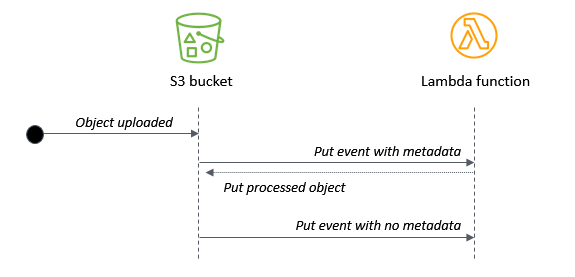
Shortly after, list the objects in the bucket – the original object is overwritten during the Lambda invocation. The second S3 object causes another Lambda invocation but it exits due to the missing metadata.

Uploading objects with metadata

This allows you to use the same bucket and key name for processed objects, but it requires that the application creating the original object can set object metadata. In this approach, the Lambda function is always invoked twice for each uploaded S3 object.

(3) Using an Amazon DynamoDB table to filter duplicate events

If you need the output object to have the same bucket name and key but you cannot set user-defined metadata, use this design:

Using DynamoDB to filter duplicate events

In this example, there are two Lambda functions and a DynamoDB table. The first function writes the key name to the table. A DynamoDB stream triggers the second Lambda function which processes the original object. It writes the object back to the same source bucket. Because the same item is put to the DynamoDB table, this does not trigger a new DynamoDB stream event.

To test this example with the AWS CLI, upload a sample text file to the S3 bucket:

aws s3 cp sample.txt s3://myS3bucketname

Shortly after, list the objects in the bucket. The original object is overwritten during the Lambda invocation. The new S3 object invokes the first Lambda function again but the second function is not triggered. This solution allows you to use the same output key without user-defined metadata. However, it does introduce a DynamoDB table to the architecture.

To automatically manage the table’s content, the example in the repo uses DynamoDB’s Time to Live (TTL) feature. It defines a TimeToLiveSpecification in the AWS::DynamoDB::Table resource:

  ## DynamoDB table
  DDBtable:
    Type: AWS::DynamoDB::Table
    Properties:
      AttributeDefinitions:
      - AttributeName: ID
        AttributeType: S
      KeySchema:
      - AttributeName: ID
        KeyType: HASH
      TimeToLiveSpecification:
        AttributeName: TimeToLive
        Enabled: true        
      BillingMode: PAY_PER_REQUEST 
      StreamSpecification:
        StreamViewType: NEW_IMAGE   

When the first function writes the key name to the DynamoDB table, it also sets a TimeToLive attribute with a value of midnight on the next day:

        // Epoch timestamp set to next midnight
        const TimeToLive = new Date().setHours(24,0,0,0)

        // Create DynamoDB item
        const params = {
          TableName : process.env.DDBtable,
          Item: {
             ID: Key,
             TimeToLive
          }
        }

The DynamoDB service automatically expires items once the TimeToLive value has passed. In this example, if another object with the same key is stored in the S3 bucket before the TTL value, it does not trigger a stream event. This prevents the same object from being processed multiple times.

Comparing the three approaches

Depending upon the needs of your workload, you can choose one of these three approaches for storing processed objects in the same source S3 bucket:


1. Prefix/suffix 2. User-defined metadata 3. DynamoDB table
Output uses the same bucket Y Y Y
Output uses the same key N Y Y
User-defined metadata N Y N
Lambda invocations per object 1 2 2 for an original object. 1 for a processed object.

Monitoring applications for recursive invocation

Whenever you have a Lambda function writing objects back to the same S3 bucket that triggered the event, it’s best practice to limit the scaling in the development and testing phases.

Use reserved concurrency to limit a function’s scaling, for example. Setting the function’s reserved concurrency to a lower limit prevents the function from scaling concurrently beyond that limit. It does not prevent the recursion, but limits the resources consumed as a safety mechanism.

Additionally, you should monitor the Lambda function to make sure the logic works as expected. To do this, use Amazon CloudWatch monitoring and alarming. By setting an alarm on a function’s concurrency metric, you can receive alerts if the concurrency suddenly spikes and take appropriate action.

Conclusion

The S3-to-Lambda integration is a foundational building block of many serverless applications. It’s best practice to store the output of the Lambda function in a different bucket or AWS resource than the source bucket.

In cases where you need to store the processed object in the same bucket, I show three different designs to help minimize the risk of recursive invocations. You can use event notification prefixes and suffixes or object metadata to ensure the Lambda function is not invoked repeatedly. Alternatively, you can also use DynamoDB in cases where the output object has the same key.

To learn more about best practices when using S3 to Lambda, see the Lambda Operator Guide. For more serverless learning resources, visit Serverless Land.

Connect Amazon S3 File Gateway using AWS PrivateLink for Amazon S3

Post Syndicated from Xiaozang Li original https://aws.amazon.com/blogs/architecture/connect-amazon-s3-file-gateway-using-aws-privatelink-for-amazon-s3/

AWS Storage Gateway is a set of services that provides on-premises access to virtually unlimited cloud storage. You can extend your on-premises storage capacity, and move on-premises backups and archives to the cloud. It provides low-latency access to cloud storage by caching frequently accessed data on premises, while storing data securely and durably in the cloud. This simplifies storage management and reduces costs for hybrid cloud storage use.

You may have privacy and security concerns with sending and receiving data across the public internet. In this case, you can use AWS PrivateLink, which provides private connectivity between Amazon Virtual Private Cloud (VPC) and other AWS services.

In this blog post, we will demonstrate how to take advantage of Amazon S3 interface endpoints to connect your on-premises Amazon S3 File Gateway directly to AWS over a private connection. We will also review the steps for implementation using the AWS Management Console.

AWS Storage Gateway on-premises

Storage Gateway offers four different types of gateways to connect on-premises applications with cloud storage.

  • Amazon S3 File Gateway – Provides a file interface for applications to seamlessly store files as objects in Amazon S3. These files can be accessed using open standard file protocols.
  • Amazon FSx File Gateway – Optimizes on-premises access to Windows file shares on Amazon FSx.
  • Tape Gateway – Replaces on-premises physical tapes with virtual tapes in AWS without changing existing backup workflows.
  • Volume Gateway –  Presents cloud-backed iSCSI block storage volumes to your on-premises applications.

We will illustrate the use of Amazon S3 File Gateway in this blog.

VPC endpoints for Amazon S3

AWS PrivateLink provides two types of VPC endpoints that you can use to connect to Amazon S3; Interface endpoints and Gateway endpoints. An interface endpoint is an elastic network interface with a private IP address. It serves as an entry point for traffic destined to a supported AWS service or a VPC endpoint service. A gateway VPC endpoint uses prefix lists as the IP route target in a VPC route table and supports routing traffic privately to Amazon S3 or Amazon DynamoDB. Both these endpoints securely connect to Amazon S3 over the Amazon network, and your network traffic does not traverse the internet.

Solution architecture for PrivateLink connectivity between AWS Storage Gateway and Amazon S3

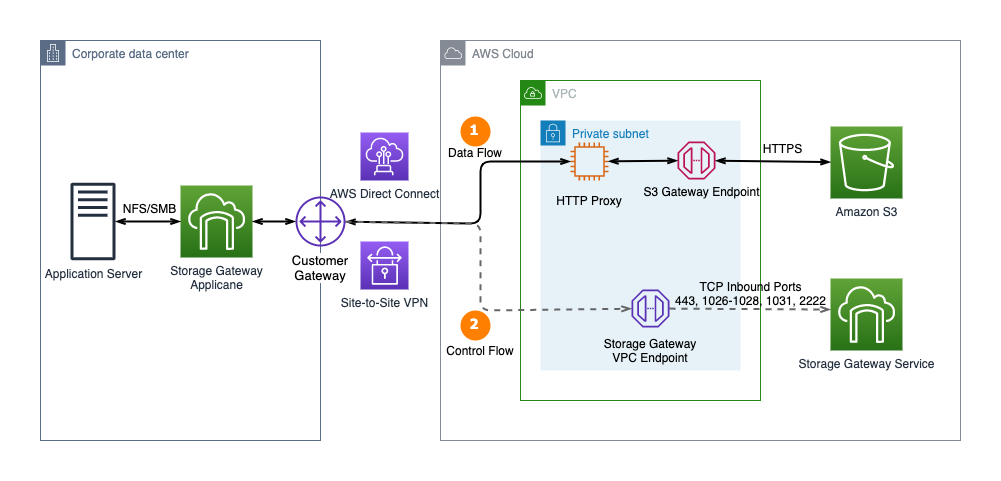
Previously, AWS Storage Gateway did not support PrivateLink for Amazon S3 and Amazon S3 Access Points. Customers had to build and manage an HTTP proxy infrastructure within their VPC to connect their on-premises applications privately to S3 (see Figure 1). This infrastructure acted as a proxy for all the traffic originating from on-premises gateways to Amazon S3 through Amazon S3 Gateway endpoints. This setup would result in additional configuration and operational overhead. The HTTP proxy could also become a network performance bottleneck.

Figure 1. Connect to Amazon S3 Gateway endpoint using an HTTP proxy

Figure 1. Connect to Amazon S3 Gateway endpoint using an HTTP proxy

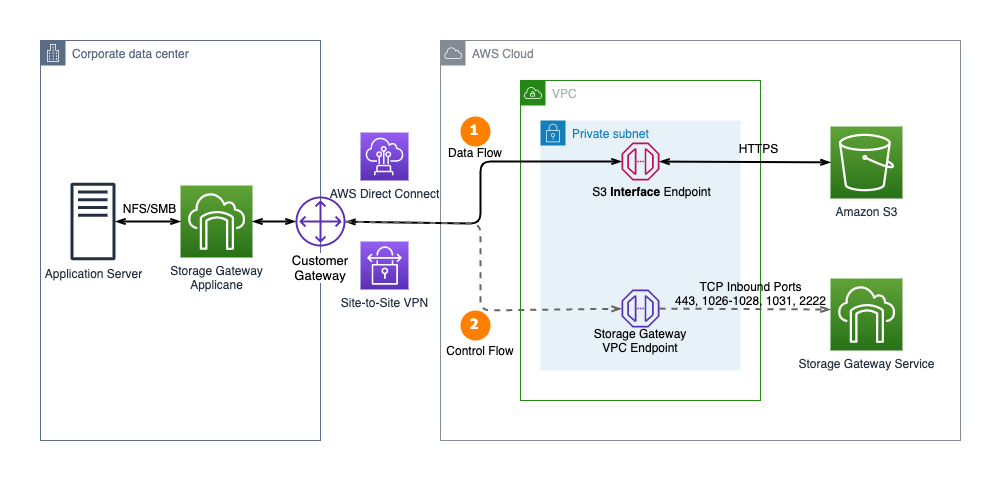
AWS Storage Gateway recently added support for AWS PrivateLink for Amazon S3 and Amazon S3 Access Points. Customers can now connect their on-premises Amazon S3 File Gateway directly to Amazon S3 through a private connection. This uses an Amazon S3 interface endpoint and doesn’t require an HTTP proxy. Additionally, customers can use Amazon S3 Access Points instead of bucket names to map file shares. This enables more granular access controls for applications connecting to AWS Storage Gateway file shares (see Figure 2).

Figure 2. AWS Storage Gateway now supports AWS PrivateLink for Amazon S3 endpoints and Amazon S3 Access Points

Figure 2. AWS Storage Gateway now supports AWS PrivateLink for Amazon S3 endpoints and Amazon S3 Access Points

Implement AWS PrivateLink between AWS Storage Gateway and an Amazon S3 endpoint

Let’s look at how to create an Amazon S3 File Gateway file share, which is associated with a Storage Gateway. This file share stores data in an Amazon S3 bucket. It uses AWS PrivateLink for Amazon S3 to transfer data to the S3 endpoint.

  1. Create an Amazon S3 bucket in your preferred Region.
  2. Create and configure an Amazon S3 File Gateway.
  3. Create an Interface endpoint for Amazon S3. Ensure that the S3 interface endpoint is created in the same Region as the S3 bucket.
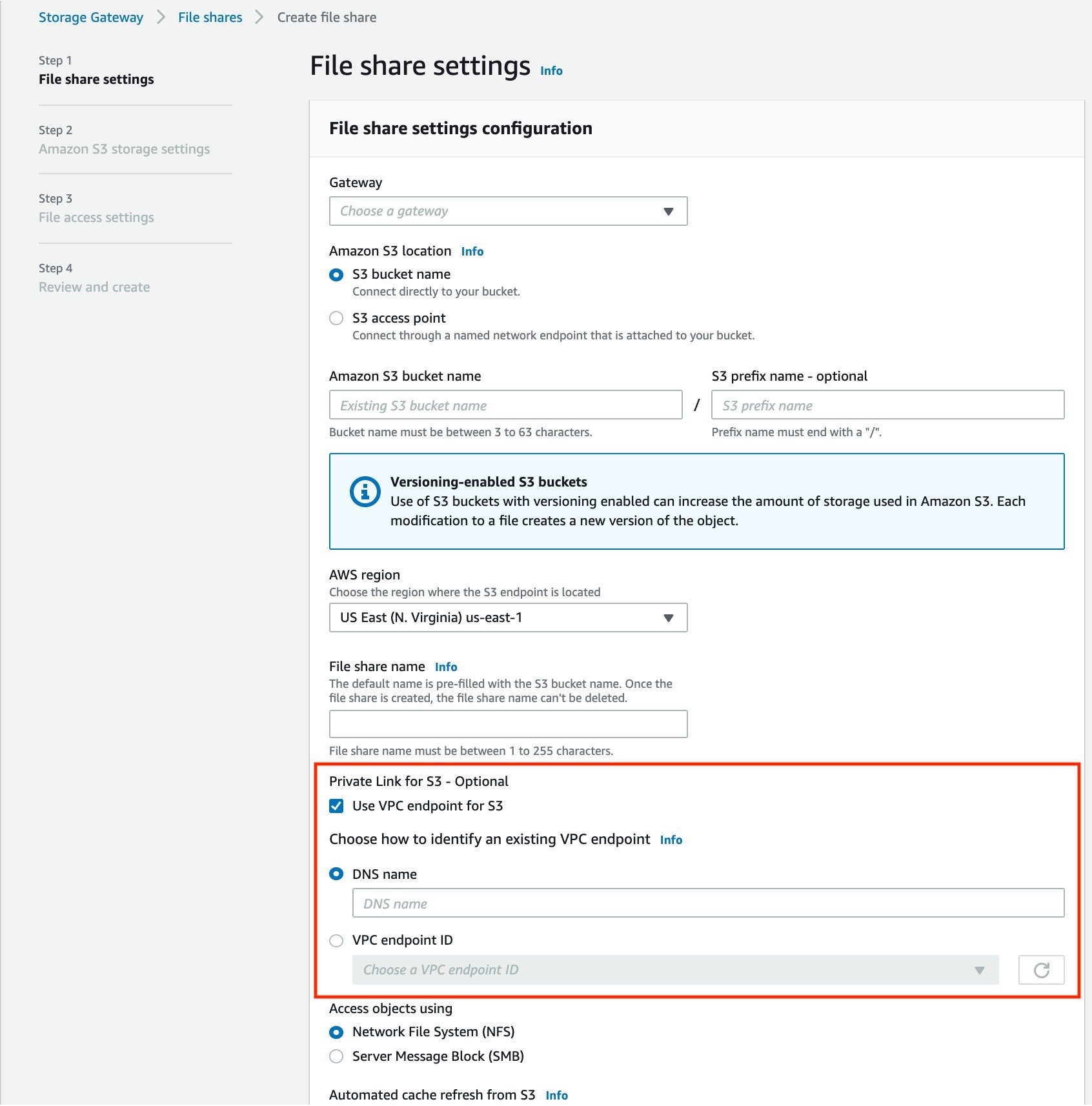
  4. Customize the File share settings (see Figure 3).
Figure 3. Create file share using VPC endpoints for Amazon S3

Figure 3. Create file share using VPC endpoints for Amazon S3

Best practices:

  • Select the AWS Region where the Amazon S3 bucket is located. This ensures that the VPC endpoint and the storage bucket are in the same Region.
  • When creating the file share with PrivateLink for S3 enabled, you can either select the S3 VPC endpoint ID from the dropdown menu, or manually input the S3 VPC endpoint DNS name.
  • Note that the dropdown list of VPC endpoint IDs only contains the VPCs created by the current AWS account administrator. If you are using a shared VPC in an AWS Organization, you can manually enter the DNS name of the VPC endpoint created in the management account.

Be aware of PrivateLink pricing when using an S3 interface endpoint. The cost for each interface endpoint is based on usage per hour, the number of Availability Zones used, and the volume of data transferred over the endpoint. Additionally, each Amazon S3 VPC interface endpoint can be shared among multiple S3 File Gateways. Each file share associated with the Storage Gateway can be configured with or without PrivateLink. For workloads that do not need the private network connectivity, you can save on interface endpoints costs by creating a file share without PrivateLink.

Verify PrivateLink communication

Once you have set up an S3 File Gateway file share using PrivateLink for S3, you can verify that traffic is flowing over your private connectivity as follows:

1. Enable VPC Flow Log for the VPC hosting the S3 Interface endpoint. This also hosts the Virtual Private Gateway (VGW), which connects to the on-premises environment.

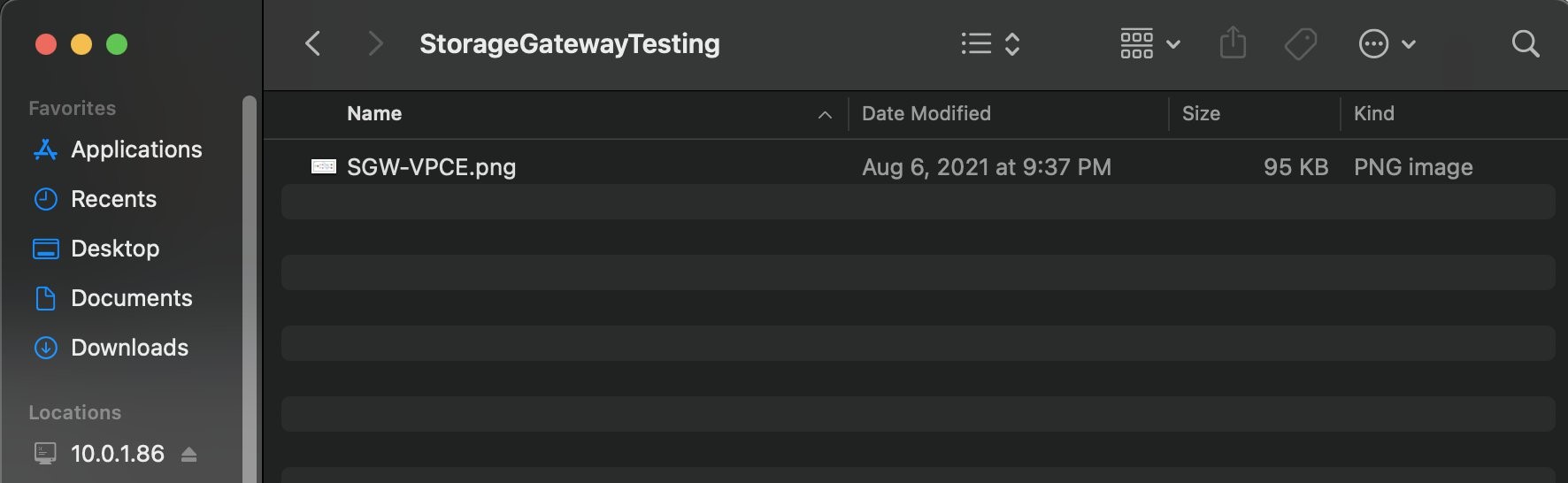
2. From your workstation, connect to your on-premises File Gateway over SMB or NFS protocol and upload a new file (see Figure 4).

Figure 4. Upload a sample file to on-premises Storage Gateway

Figure 4. Upload a sample file to on-premises Storage Gateway

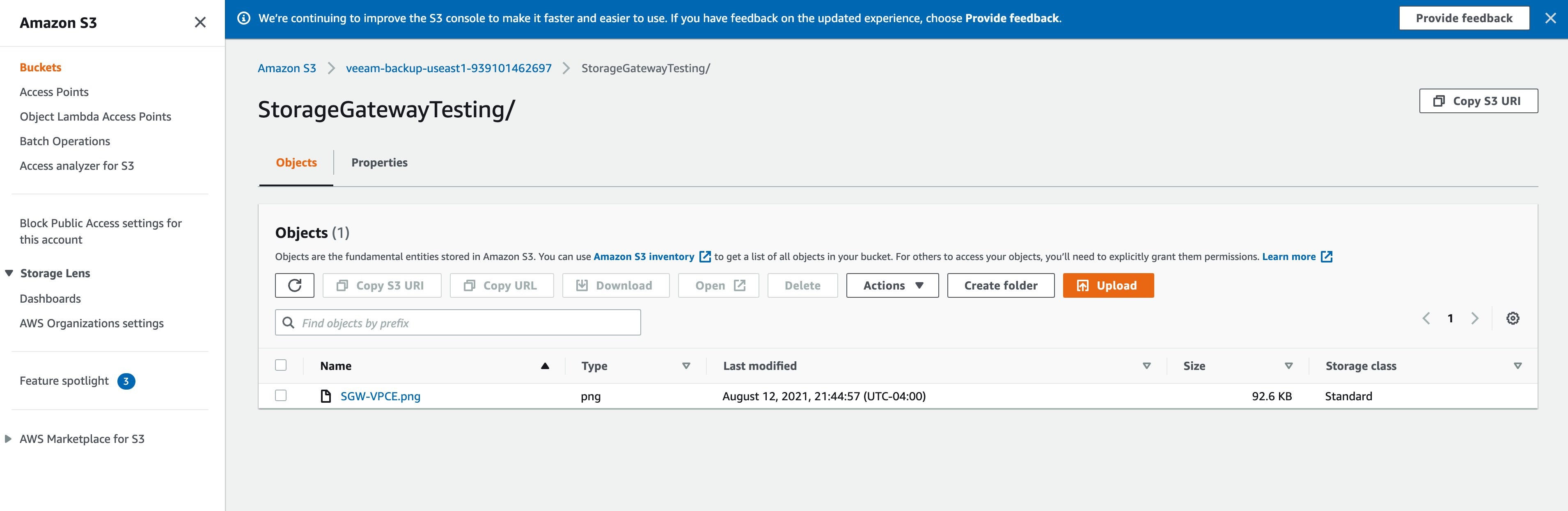
3. Navigate to the S3 bucket associated with the file share.  After a few seconds, you should see that the new file has been successfully uploaded and appears in the S3 bucket (see Figure 5).

Figure 5. Verify that the sample file is uploaded to storage bucket

Figure 5. Verify that the sample file is uploaded to storage bucket

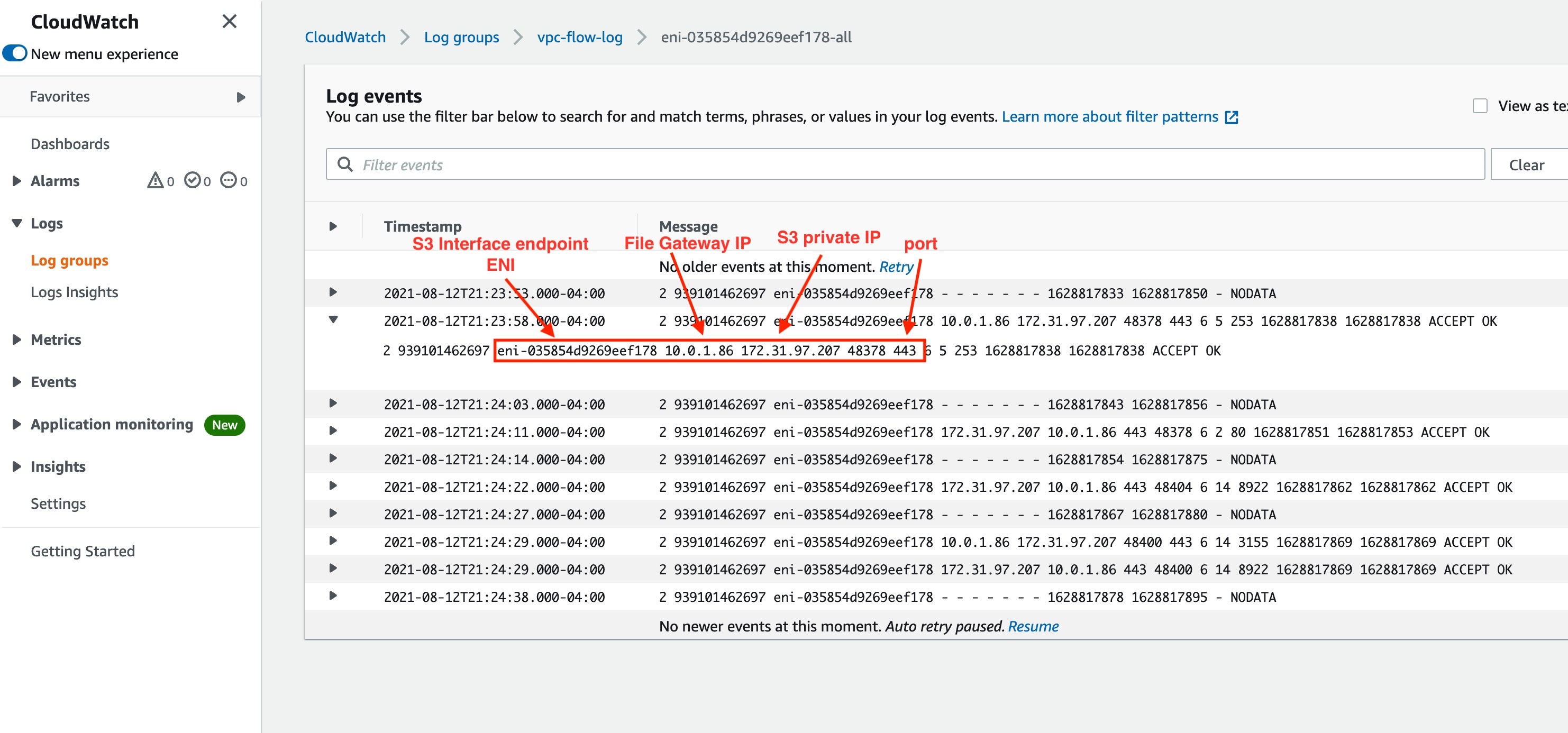
4. On the VPC flow log, look for the generated log events. You’ll see your S3 interface endpoint elastic network interface, your file gateway IP, Amazon S3 private IP, and port number, as shown in Figure 6. This verifies that the file was transferred over the private connection. If you do not see an entry, verify if the VPC Flow Logs have been enabled on the correct VPC and elastic network interface.

Figure 6. VPC Flow Log entry to verify connectivity using Private IPs

Figure 6. VPC Flow Log entry to verify connectivity using Private IPs

Summary

In this blog post, we have demonstrated how to use Amazon S3 File Gateway to transfer files to Amazon S3 buckets over AWS PrivateLink. Use this solution to securely copy your application data and files to cloud storage. This will also provide low latency access to that data from your on-premises applications.

Thanks for reading this blog post. If you have any feedback or questions, please add them in the comments section.

Further Reading:

How NortonLifelock built a serverless architecture for real-time analysis of their VPN usage metrics

Post Syndicated from Madhu Nunna original https://aws.amazon.com/blogs/big-data/how-nortonlifelock-built-a-serverless-architecture-for-real-time-analysis-of-their-vpn-usage-metrics/

This post presents a reference architecture and optimization strategies for building serverless data analytics solutions on AWS using Amazon Kinesis Data Analytics. In addition, this post shows the design approach that the engineering team at NortonLifeLock took to build out an operational analytics platform that processes usage data for their VPN services, consuming petabytes of data across the globe on a daily basis.

NortonLifeLock is a global cybersecurity and internet privacy company that offers services to millions of customers for device security, and identity and online privacy for home and family. NortonLifeLock believes the digital world is only truly empowering when people are confident in their online security. NortonLifeLock has been an AWS customer since 2014.

For any organization, the value of operational data and metrics decreases with time. This lost value can equate to lost revenue and wasted resources. Real-time streaming analytics helps capture this value and provide new insights that can create new business opportunities.

AWS offers a rich set of services that you can use to provide real-time insights and historical trends. These services include managed Hadoop infrastructure services on Amazon EMR as well as serverless options such as Kinesis Data Analytics and AWS Glue.

Amazon EMR also supports multiple programming options for capturing business logic, such as Spark Streaming, Apache Flink, and SQL.

As a customer, it’s important to understand organizational capabilities, project timelines, business requirements, and AWS service best practices in order to define an optimal architecture from performance, cost, security, reliability, and operational excellence perspectives (the five pillars of the AWS Well-Architected Framework).

NortonLifeLock is taking a methodical approach to real-time analytics on AWS while using serverless technology to deliver on key business drivers such as time to market and total cost of ownership. In addition to NortonLifeLock’s implementation, this post provides key lessons learned and best practices for rapid development of real-time analytics workloads.

Business problem

NortonLifeLock offers a VPN product as a freemium service to users. Therefore, they need to enforce usage limits in real time to stop freemium users from using the service when their usage is over the limit. The challenge for NortonLifeLock is to do this in a reliable and affordable fashion.

NortonLifeLock runs its VPN infrastructure in almost all AWS Regions. Migrating to AWS from smaller hosting vendors has greatly improved user experience and VPN edge server performance, including a reduction in connection latency, time to connect and connection errors, faster upload and download speed, and more stability and uptime for VPN edge servers.

VPN usage data is collected by VPN edge servers and uploaded to backend stats servers every minute and persisted in backend databases. The usage information serves multiple purposes:

  • Displaying how much data a device has consumed for the past 30 days.
  • Enforcing usage limits on freemium accounts. When a user exhausts their free quota, that user is unable to connect through VPN until the next free cycle.
  • Analyzing usage data by the internal business intelligence (BI) team based on time, marketing campaigns, and account types, and using this data to predict future growth, ability to retain users, and more.

Design challenge

NortonLifeLock had the following design challenges:

  • The solution must be able to simultaneously satisfy both real-time and batch analysis.
  • The solution must be economical. NortonLifeLock VPN has hundreds of thousands of concurrent users, and if a user’s usage information is persisted as it comes in, it results in tens of thousands of reads and writes per second and tens of thousands of dollars a month in database costs.

Solution overview

NortonLifeLock decided to split storage into two parts by storing usage data in Amazon DynamoDB for real-time access and in Amazon Simple Storage Service (Amazon S3) for analysis, which addresses real-time enforcement and BI needs. Kinesis Data Analytics aggregates and loads data to Amazon S3 and DynamoDB. With Amazon Kinesis Data Streams and AWS Lambda as consumers of Kinesis Data Analytics, the implementation of user and device-level aggregations was simplified.

To keep costs down, user usage data was aggregated by the hour and persisted in DynamoDB. This spread hundreds of thousands of writes over an hour and reduced DynamoDB cost by 30 times.

Although increasing aggregation might not be an option for other problem domains, it’s acceptable in this case because it’s not necessary to be precise to the minute for user usage, and it’s acceptable to calculate and enforce the usage limit every hour.

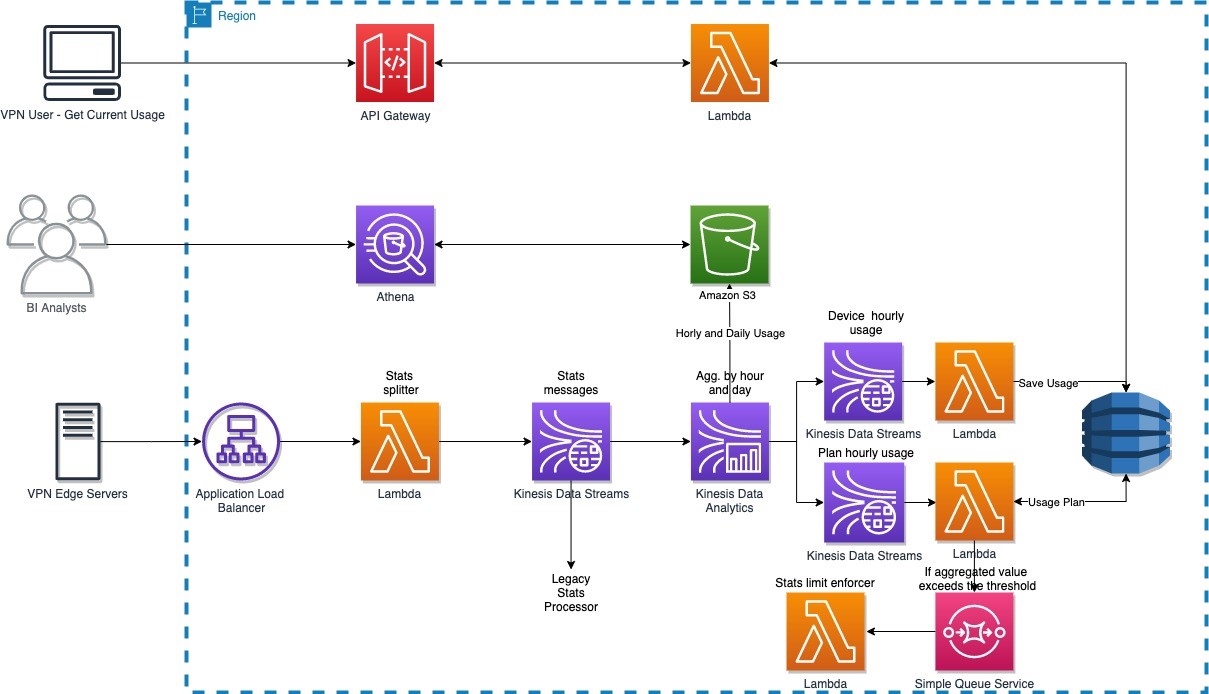
The following diagram illustrates the high-level architecture. The solution is broken into three logical parts:

  • End-users – Real-time queries from devices to display current usage information (how much data is used daily)
  • Business analysts – Query historical usage information through Amazon Athena to extract business insights
  • Usage limit enforcement – Usage data ingestion and aggregation in real time

The solution has the following workflow:

  1. Usage data is collected by a VPN edge server and sends it to the backend service through Application Load Balancer.
  2. A single usage data record sent by the VPN edge server contains usage data for many users. A stats splitter splits the message into individual usage stats per user and forwards the message to Kinesis Data Streams.
  3. Usage data is consumed by both the legacy stats processor and the new Apache Flink application developed and deployed on Kinesis Data Analytics.
  4. The Apache Flink application carries out the following tasks:
    1. Aggregate device usage data hourly and send the aggregated result to Amazon S3 and the outgoing Kinesis data stream, which is picked up by a Lambda function that persists the usage data in DynamoDB.
    2. Aggregate device usage data daily and send the aggregated result to Amazon S3.
    3. Aggregate account usage data hourly and forward the aggregated results to the outgoing data stream, which is picked up by a Lambda function that checks if account usage is over the limit for that account. If account usage is over the limit, the function forwards the account information to another Lambda function, via Amazon Simple Queue Service (Amazon SQS), to cut off access on that account.

Design journey

NortonLifeLock needed a solution that was capable of real-time streaming and batch analytics. Kinesis Data Analysis fits this requirement because of the following key features:

  • Real-time streaming and batch analytics for data aggregation
  • Fully managed with a pay-as-you-go model
  • Auto scaling

NortonLifeLock needed Kinesis Data Analytics to do the following:

  • Aggregate customer usage data per device hourly and send results to Kinesis Data Streams (ultimately to DynamoDB) and the data lake (Amazon S3)
  • Aggregate customer usage data per account hourly and send results to Kinesis Data Streams (ultimately to DynamoDB and Lambda, which enforces usage limit)
  • Aggregate customer usage data per device daily and send results to the data lake (Amazon S3)

The legacy system processes usage data from an incoming Kinesis data stream, and they plan to use Kinesis Data Analytics to consume and process production data from the same stream. As such, NortonLifeLock started with SQL applications on Kinesis Data Analytics.

First attempt: Kinesis Data Analytics for SQL

Kinesis Data Analytics with SQL provides a high-level SQL-based abstraction for real-time stream processing and analytics. It’s configuration driven and very simple to get started. NortonLifeLock was able to create a prototype from scratch, get to production, and process the production load in less than 2 weeks. The solution met 90% of the requirements, and there were alternates for the remaining 10%.

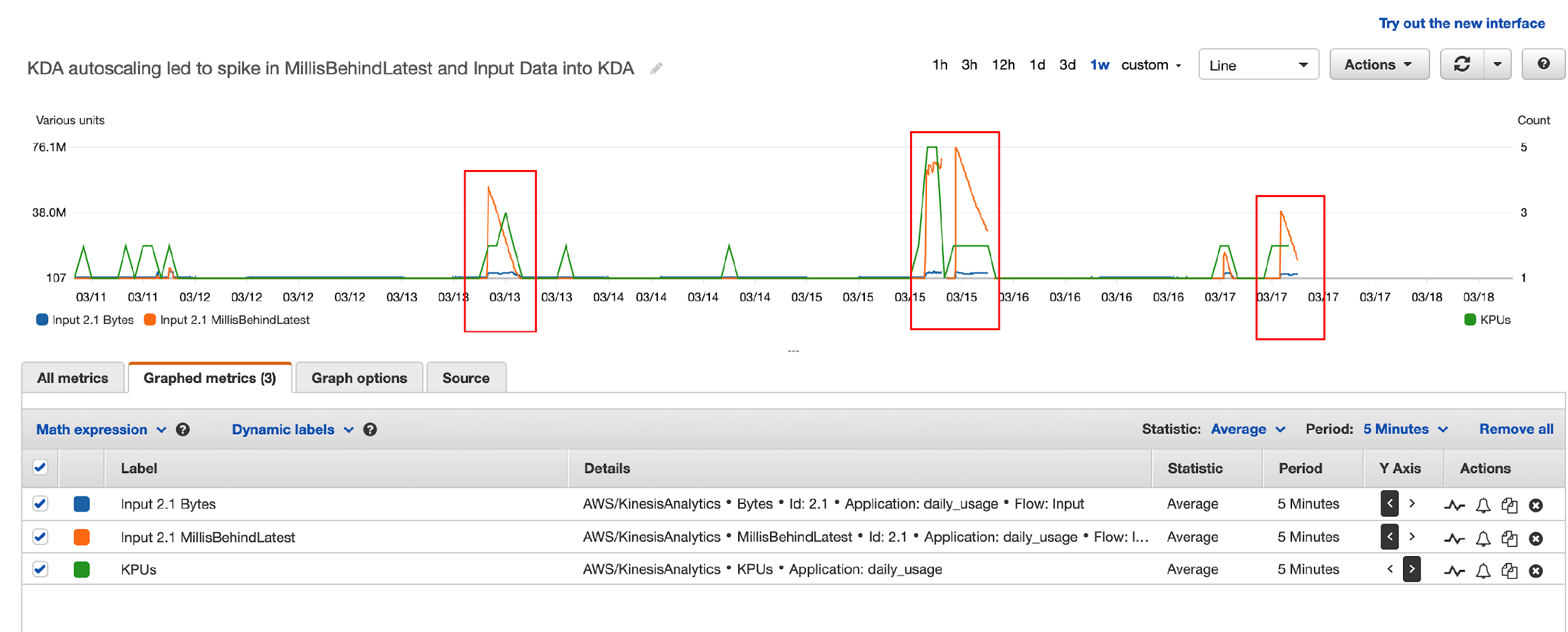
However, they started to receive “read limit exceeded” alerts from the source data stream, and the legacy application was read throttled. With Amazon Support’s help, they traced the issues to the drastic reversal of the Kinesis Data Analytics MillisBehindLatest metric in Kinesis record processing. This was correlated to the Kinesis Data Analytics auto scaling events and application restarts, as illustrated by the following diagram. The highlighted areas show the correlation between spikes due to autoscaling and reversal of MillisBehindLatest metrics.

Here’s what happened:

  • Kinesis Data Analytics for SQL scaled up KPU due to load automatically, and the Kinesis Data Analytics application was restarted (part of scaling up).
  • Kinesis Data Analytics for SQL supports the at least once delivery model and uses checkpoints to ensure no data loss. But it doesn’t support taking a snapshot and restoring from the snapshot after a restart. For more details, see Delivery Model for Persisting Application Output to an External Destination.
  • When the Kinesis Data Analytics for SQL application was restarted, it needed to reprocess data from the beginning of the aggregation window, resulting in a very large number of duplicate records, which led to a dramatic increase in the Kinesis Data Analytics MillisBehindLatest metric.
  • To catch up with incoming data, Kinesis Data Analytics started re-reading from the Kinesis data stream, which led to over-consumption of read throughput and the legacy application being throttled.

In summary, Kinesis Data Analytics for SQL’s duplicates record processing on restarts, no other means to eliminate duplicates, and limited ability to control auto scaling led to this issue.

Although they found Kinesis Data Analytics for SQL easy to get started, these limitations demanded other alternatives. NortonLifeLock reached out to the Kinesis Data Analytics team and discussed the following options:

  • Option 1 – AWS was planning to release a new service, Kinesis Data Analytics Studio for SQL, Python, and Scala, which addresses these limitations. But this service was still a few months away (this service is now available, launched May 27, 2021).
  • Option 2 – The alternative was to switch to Kinesis Data Analytics for Apache Flink, which also provides the necessary tools to address all their requirements.

Second attempt: Kinesis Data Analytics for Apache Flink

Apache Flink has a comparatively steep learning curve (we used Java for streaming analytics instead of SQL), and it took about 4 weeks to build the same prototype, deploy it to Kinesis Data Analytics, and test the application in production. NortonLifeLock had to overcome a few hurdles, which we document in this section along with the lessons learned.

Challenge 1: Too many writes to outgoing Kinesis data stream

The first thing they noticed was that the write threshold on the outgoing Kinesis data stream was greatly exceeded. Kinesis Data Analytics was attempting to write 10 times the amount of expected data to the data stream, with 95% of data throttled.

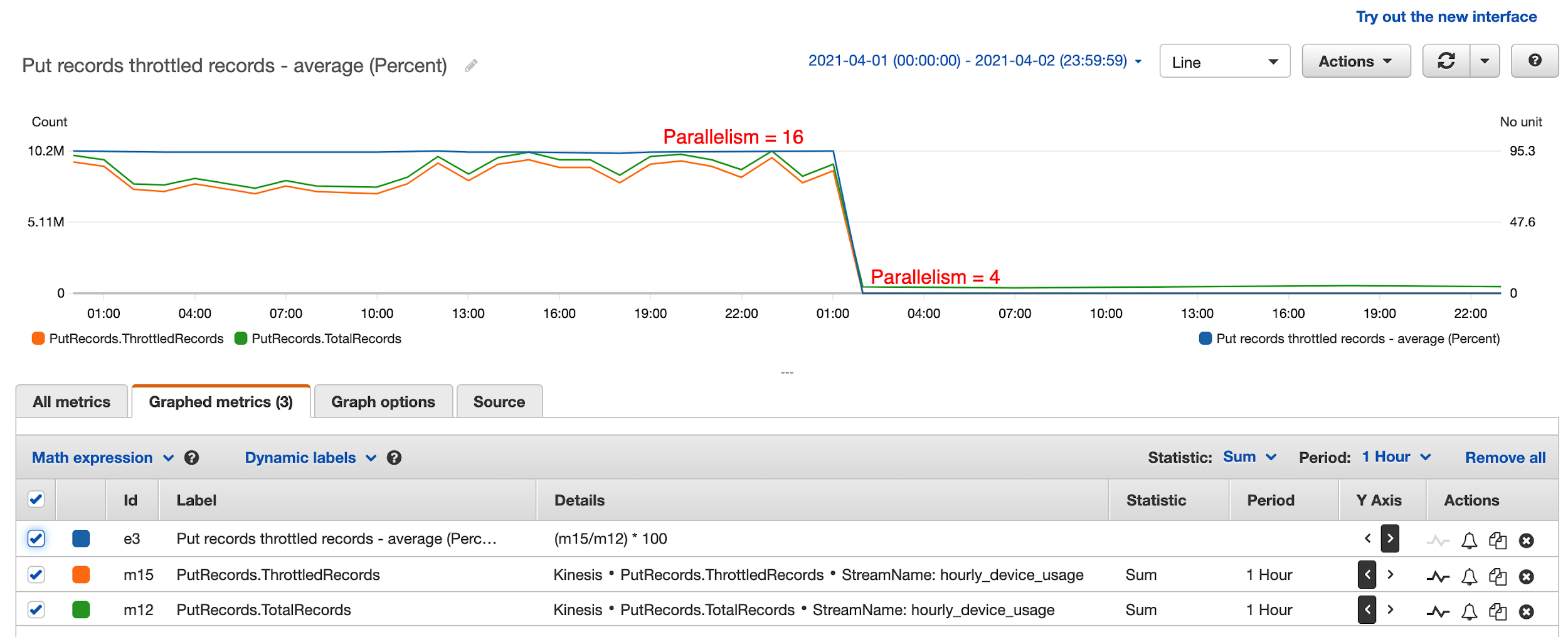
After a lengthy investigation, it turned out that having too much parallelism in the Kinesis Data Analytics application led to this issue. They had followed default recommendations and set parallelism to 12 and it scaled up to 16. This means that every hour, 16 separate threads were attempting to write to the destination data stream simultaneously, leading to massive contention and writes throttled. These threads attempted to retry continuously, until all records were written to the data stream. This resulted in 10 times the amount of data processing attempted, even though only one tenth of the writes eventually succeeded.

The solution was to reduce parallelism to 4 and disable auto scaling. In the preceding diagram, the percentage of throttled records dropped to 0 from 95% after they reduced parallelism to 4 in the Kinesis Data Analytics application. This also greatly improved KPU utilization and reduced Kinesis Data Analytics cost from $50 a day to $8 a day.

Challenge 2: Use Kinesis Data Analytics sink aggregation

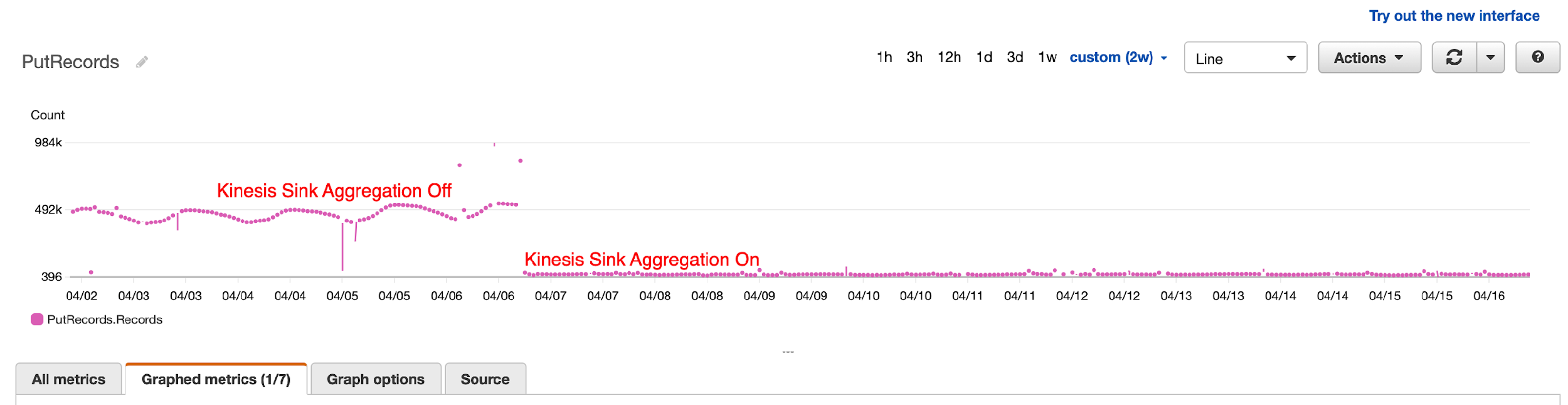
After tuning parallelism, they still noticed occasional throttling by Kinesis Data Streams because of the number of records being written, not record size. To overcome this, they turned on Kinesis Data Analytics sink aggregation to reduce the number of records being written to the data stream, and the result was dramatic. They were able to reduce the number of writes by 1,000 times.

Challenge 3: Handle Kinesis Data Analytics Flink restarts and the resulting duplicate records

Kinesis Data Analytics applications restart because of auto scaling or recovery from application or task manager crashes. When this happens, Kinesis Data Analytics saves a snapshot before shutdown and automatically reloads the latest snapshot and picks up where the work was left off. Kinesis Data Analytics also saves a checkpoint every minute so no data is lost, guaranteeing exactly-once processing.

However, when the Kinesis Data Analytics application shut down in the middle of sending results to Kinesis Data Streams, it doesn’t guarantee exactly-once data delivery. In fact, Flink only guarantees at least once delivery to Kinesis Data Analytics sink, meaning that Kinesis Data Analytics guarantees to send a record at least once, which leads to duplicate records sent when Kinesis Data Analytics is restarted.

How were duplicate records handled in the outgoing data stream?

Because duplicate records aren’t handled by Kinesis Data Analytics when sinks do not have exactly-once semantics, the downstream application must deal with the duplicate records. The first question you should ask is whether it’s necessary to deal with the duplicate records. Maybe it’s acceptable to tolerate duplicate records in your application? This, however, is not an option for NortonLifeLock, because no user wants to have their available usage taken twice within the same hour. So, logic had to be built in the application to handle duplicate usage records.

To deal with duplicate records, you can employ a strategy in which the application saves an update timestamp along with the user’s latest usage. When a record comes in, the application reads existing daily usage and compares the update timestamp against the current time. If the difference is less than a configured window (50 minutes if the aggregation window is 60 minutes), the application ignores the new record because it’s a duplicate. It’s acceptable for the application to potentially undercount vs. overcount user usage.

How were duplicate records handled in the outgoing S3 bucket?

Kinesis Data Analytics writes temporary files in Amazon S3 before finalizing and removing them. When Kinesis Data Analytics restarts, it attempts to write new S3 files, and potentially leaves behind temporary S3 files because of restart. Because Athena ignores all temporary S3 files, no further is action needed. If your BI tools take temporary S3 files into consideration, you have to configure the Amazon S3 lifecycle policy to clean up temporary S3 files after a certain time.

Conclusion

NortonLifelock has been successfully running a Kinesis Data Analytics application in production since May 2021. It provides several key benefits. VPN users can now keep track of their usage in near-real time. BI analysts can get timely insights that are used for targeted sales and marketing campaigns, and upselling features and services. VPN usage limits are enforced in near-real time, thereby optimizing the network resources. NortonLifelock is saving tens of thousands of dollars each month with this real-time streaming analytics solution. And this telemetry solution is able to keep up with petabytes of data flowing through their global VPN service, which is seeing double-digit monthly growth.

To learn more about Kinesis Data Analytics and getting started with serverless streaming solutions on AWS, please see Developer Guide for Studio, the easiest way to build Apache Flink applications in SQL, Python, Scala in a notebook interface.


About the Authors

Lei Gu has 25 years of software development experience and the architect for three key Norton products, Norton Secure Backup, VPN and Norton Family. He is passionate about cloud transformation and most recently spoke about moving from Cassandra to Amazon DynamoDB at AWS re:Invent 2019. Check out his Linkedin profile at https://www.linkedin.com/in/leigu/.

Madhu Nunna is a Sr. Solutions Architect at AWS, with over 20 years of experience in networks and cloud, with the last two years focused on AWS Cloud. He is passionate about Analytics and AI/ML. Outside of work, he enjoys hiking and reading books on philosophy, economics, history, astronomy and biology.

Creating a serverless face blurring service for photos in Amazon S3

Post Syndicated from James Beswick original https://aws.amazon.com/blogs/compute/creating-a-serverless-face-blurring-service-for-photos-in-amazon-s3/

Many workloads process photos or imagery from web applications or mobile applications. For privacy reasons, it can be useful to identify and blur faces in these photos. This blog post shows how to build a serverless face blurring service for photos uploaded to an Amazon S3 bucket.

The example application uses the AWS Serverless Application Model (AWS SAM), enabling you to deploy the application more easily in your own AWS account. This walkthrough creates resources covered in the AWS Free Tier but usage beyond the Free Tier allowance may incur cost. To set up the example, visit the GitHub repo and follow the instructions in the README.md file.

Overview

Using a serverless approach, this face blurring microservice runs on demand in response to new photos being uploaded to S3. The solution uses the following architecture:

Reference architecture

  1. When an image is uploaded to the source S3 bucket, S3 sends a notification event to an Amazon SQS queue.
  2. The Lambda service polls the SQS queue and invokes an AWS Lambda function when messages are available.
  3. The Lambda function uses Amazon Rekognition to detect faces in the source image. The service returns the coordinates of faces to the function.
  4. After blurring the faces in the source image, the function stores the resulting image in the output S3 bucket.

Deploying the solution

Before deploying the solution, you need:

To deploy:

  1. From a terminal window, clone the GitHub repo:
    git clone https://github.com/aws-samples/serverless-face-blur-service
  2. Change directory:
    cd ./serverless-face-blur-service
  3. Download and install dependencies:
    sam build
  4. Deploy the application to your AWS account:
    sam deploy --guided
  5. During the guided deployment process, enter unique names for the two S3 buckets. These names must be globally unique.

To test the application, upload a JPG file containing at least one face into the source S3 bucket. After a few seconds, the destination bucket contains the output file, with the same name. The output file shows blur content when the faces are detected:

Blurred faces output

How the face blurring Lambda function works

The Lambda function receives messages from the SQS queue when available. These messages contain metadata about the JPG object uploaded to S3:

{
    "Records": [
        {
            "messageId": "e9a12dd2-1234-1234-1234-123456789012",
            "receiptHandle": "AQEBnjT2rUH+kmEXAMPLE",
            "body": "{\"Records\":[{\"eventVersion\":\"2.1\",\"eventSource\":\"aws:s3\",\"awsRegion\":\"us-east-1\",\"eventTime\":\"2021-06-21T19:48:14.418Z\",\"eventName\":\"ObjectCreated:Put\",\"userIdentity\":{\"principalId\":\"AWS:AROA3DTKMEXAMPLE:username\"},\"requestParameters\":{\"sourceIPAddress\":\"73.123.123.123\"},\"responseElements\":{\"x-amz-request-id\":\"AZ39QWJFVEQJW9RBEXAMPLE\",\"x-amz-id-2\":\"MLpNwwQGQtrNai/EXAMPLE\"},\"s3\":{\"s3SchemaVersion\":\"1.0\",\"configurationId\":\"5f37ac0f-1234-1234-82f12343-cbc8faf7a996\",\"bucket\":{\"name\":\"s3-face-blur-source\",\"ownerIdentity\":{\"principalId\":\"EXAMPLE\"},\"arn\":\"arn:aws:s3:::s3-face-blur-source\"},\"object\":{\"key\":\"face.jpg\",\"size\":3541,\"eTag\":\"EXAMPLE\",\"sequencer\":\"123456789\"}}}]}",
            "attributes": {
                "ApproximateReceiveCount": "6",
                "SentTimestamp": "1624304902103",
                "SenderId": "AIDAJHIPREXAMPLE",
                "ApproximateFirstReceiveTimestamp": "1624304902103"
            },
            "messageAttributes": {},
            "md5OfBody": "12345",
            "eventSource": "aws:sqs",
            "eventSourceARN": "arn:aws:sqs:us-east-1:123456789012:s3-lambda-face-blur-S3EventQueue-ABCDEFG01234",
            "awsRegion": "us-east-1"
        }
    ]
}

The body attribute contained a serialized JSON object with an array of records, containing the S3 bucket name and object keys. The Lambda handler in app.js uses the JSON.parse method to create a JSON object from the string:

  const s3Event = JSON.parse(event.Records[0].body)

The handler extracts the bucket and key information. Since the S3 key attribute is URL encoded, it must be decoded before further processing:

const Bucket = s3Event.Records[0].s3.bucket.name
const Key = decodeURIComponent(s3Event.Records[0].s3.object.key.replace(/\+/g, " "))

There are three steps in processing each image: detecting faces in the source image, blurring faces, then storing the output in the destination bucket.

Detecting faces in the source image

The detectFaces.js file contains the detectFaces function. This accepts the bucket name and key as parameters, then uses the AWS SDK for JavaScript to call the Amazon Rekognition service:

const AWS = require('aws-sdk')
AWS.config.region = process.env.AWS_REGION 
const rekognition = new AWS.Rekognition()

const detectFaces = async (Bucket, Name) => {

  const params = {
    Image: {
      S3Object: {
       Bucket,
       Name
      }
     }    
  }

  console.log('detectFaces: ', params)

  try {
    const result = await rekognition.detectFaces(params).promise()
    return result.FaceDetails
  } catch (err) {
    console.error('detectFaces error: ', err)
    return []
  }  
}

The detectFaces method of the Amazon Rekognition API accepts a parameter object defining a reference to the source S3 bucket and key. The service returns a data object with an array called FaceDetails:

{
    "BoundingBox": {
        "Width": 0.20408163964748383,
        "Height": 0.4340078830718994,
        "Left": 0.727995753288269,
        "Top": 0.3109045922756195
    },
    "Landmarks": [
        {
            "Type": "eyeLeft",
            "X": 0.784351646900177,
            "Y": 0.46120116114616394
        },
        {
            "Type": "eyeRight",
            "X": 0.8680923581123352,
            "Y": 0.5227685570716858
        },
        {
            "Type": "mouthLeft",
            "X": 0.7576283812522888,
            "Y": 0.617080807685852
        },
        {
            "Type": "mouthRight",
            "X": 0.8273565769195557,
            "Y": 0.6681531071662903
        },
        {
            "Type": "nose",
            "X": 0.8087539672851562,
            "Y": 0.5677543878555298
        }
    ],
    "Pose": {
        "Roll": 23.821317672729492,
        "Yaw": 1.4818285703659058,
        "Pitch": 2.749311685562134
    },
    "Quality": {
        "Brightness": 83.74250793457031,
        "Sharpness": 89.85481262207031
    },
    "Confidence": 99.9793472290039
}

The Confidence score is the percentage confidence that the image contains a face. This example uses the BoundingBox coordinates to find the location of the face in the image. The response also includes positional data for facial features like the mouth, nose, and eyes.

Blurring faces in the source image

In the blurFaces.js file, the blurFaces function uses the open source GraphicsMagick library to process the source image. The function takes the bucket and key as parameters with the metadata returned by the Amazon Rekognition service:

const AWS = require('aws-sdk')
AWS.config.region = process.env.AWS_REGION 
const s3 = new AWS.S3()
const gm = require('gm').subClass({imageMagick: process.env.localTest})

const blurFaces = async (Bucket, Key, faceDetails) => {

  const object = await s3.getObject({ Bucket, Key }).promise()
  let img = gm(object.Body)

  return new Promise ((resolve, reject) => {
    img.size(function(err, dimensions) {
        if (err) reject(err)
        console.log('Image size', dimensions)

        faceDetails.map((faceDetail) => {
            const box = faceDetail.BoundingBox
            const width  = box.Width * dimensions.width
            const height = box.Height * dimensions.height
            const left = box.Left * dimensions.width
            const top = box.Top * dimensions.height

            img.region(width, height, left, top).blur(0, 70)
        })

        img.toBuffer((err, buffer) => resolve(buffer))
    })
  })
}

The function loads the source object from S3 using the getObject method of the S3 API. In the response, the Body attribute contains a buffer with the image data – this is used to instantiate a ‘gm’ object for processing.

Amazon Rekognition’s bounding box coordinates are percentage-based relative to the size of the image. This code converts these percentages to X- and Y-based coordinates and uses the region method to identify a portion of the image. The blur method uses a Gaussian operator based on the inputs provided. Once the transformation is complete, the function returns a buffer with the new image.

Using GraphicsMagick with Lambda functions

The GraphicsMagick package contains operating system-specific binaries. Depending on the operating system of your development machine, you may install binaries locally that are not compatible with Lambda. The Lambda service uses Amazon Linux 2 (AL2).

To simplify local testing and deployment, the sample application uses Lambda layers to package this library. This open source Lambda layer repo shows how to build, deploy, and test GraphicsMagick as a Lambda layer. It also publishes public layers to help you use the library in your Lambda functions.

When testing this function locally with the test.js script, the GM npm package uses the binaries on the local development machine. When the function is deployed to the Lambda service, the package uses the Lambda layer with the AL2-compatible binaries.

Limiting throughput with Amazon Rekognition

Both S3 and Lambda are highly scalable services and in this example can handle thousands of image uploads a second. In this configuration, S3 sends Event Notifications to an SQS queue each time an object is uploaded. The Lambda function processes events from this queue.

When using downstream services in Lambda functions, it’s important to note the quotas and throughputs in place for those services. This can help avoid throttling errors or overwhelming non-serverless services that may not be able to handle the same level of traffic.

The Amazon Rekognition service sets default transaction per second (TPS) rates for AWS accounts. For the DetectFaces API, the default is between 5-50 TPS depending upon the AWS Region. If you need a higher throughput, you can request an increase in the Service Quotas console.

In the AWS SAM template of the example application, the definition of the Lambda function uses two attributes to control the throughput. The ReservedConcurrentExecutions attribute is set to 1, which prevents the Lambda service from scaling beyond one instance of the function. The BatchSize in event source mapping is also set to 1, so each invocation contains only a single S3 event from the SQS queue:

  BlurFunction:
    Type: AWS::Serverless::Function
    Properties:
      CodeUri: src/
      Handler: app.handler
      Runtime: nodejs14.x
      Timeout: 10
      MemorySize: 2048
      ReservedConcurrentExecutions: 1
      Policies:
        - S3ReadPolicy:
            BucketName: !Ref SourceBucketName
        - S3CrudPolicy:
            BucketName: !Ref DestinationBucketName
        - RekognitionDetectOnlyPolicy: {}
      Environment:
        Variables:
          DestinationBucketName: !Ref DestinationBucketName
      Events:
        MySQSEvent:
          Type: SQS
          Properties:
            Queue: !GetAtt S3EventQueue.Arn
            BatchSize: 1

The combination of these two values means that this function processes images one at a time, regardless of how many images are uploaded to S3. By increasing these values, you can change the scaling behavior and number of messages processed per invocation. This allows you to control the throughput of the number of the messages sent to Amazon Rekognition for processing.

Conclusion

A serverless face blurring service can provide a simpler way to process photos in workloads with large amounts of traffic. This post introduces an example application that blurs faces when images are saved in an S3 bucket. The S3 PutObject event invokes a Lambda function that uses Amazon Rekognition to detect faces and GraphicsMagick to process the images.

This blog post shows how to deploy the example application and walks through the functions that process the images. It explains how to use GraphicsMagick and how to control throughput in the SQS event source mapping.

For more serverless learning resources, visit Serverless Land.

Integral Ad Science secures self-service data lake using AWS Lake Formation

Post Syndicated from Mat Sharpe original https://aws.amazon.com/blogs/big-data/integral-ad-science-secures-self-service-data-lake-using-aws-lake-formation/

This post is co-written with Mat Sharpe, Technical Lead, AWS & Systems Engineering from Integral Ad Science.

Integral Ad Science (IAS) is a global leader in digital media quality. The company’s mission is to be the global benchmark for trust and transparency in digital media quality for the world’s leading brands, publishers, and platforms. IAS does this through data-driven technologies with actionable real-time signals and insight.

In this post, we discuss how IAS uses AWS Lake Formation and Amazon Athena to efficiently manage governance and security of data.

The challenge

IAS processes over 100 billion web transactions per day. With strong growth and changing seasonality, IAS needed a solution to reduce cost, eliminate idle capacity during low utilization periods, and maximize data processing speeds during peaks to ensure timely insights for customers.

In 2020, IAS deployed a data lake in AWS, storing data in Amazon Simple Storage Service (Amazon S3), cataloging its metadata in the AWS Glue Data Catalog, ingesting and processing using Amazon EMR, and using Athena to query and analyze the data. IAS wanted to create a unified data platform to meet its business requirements. Additionally, IAS wanted to enable self-service analytics for customers and users across multiple business units, while maintaining critical controls over data privacy and compliance with regulations such as GDPR and CCPA. To accomplish this, IAS needed to securely ingest and organize real-time and batch datasets, as well as secure and govern sensitive customer data.

To meet the dynamic nature of IAS’s data and use cases, the team needed a solution that could define access controls by attribute, such as classification of data and job function. IAS processes significant volumes of data and this continues to grow. To support the volume of data, IAS needed the governance solution to scale in order to create and secure many new daily datasets. This meant IAS could enable self-service access to data from different tools, such as development notebooks, the AWS Management Console, and business intelligence and query tools.

To address these needs, IAS evaluated several approaches, including a manual ticket-based onboarding process to define permissions on new datasets, many different AWS Identity and Access Management (IAM) policies, and an AWS Lambda based approach to automate defining Lake Formation table and column permissions triggered by changes in security requirements and the arrival of new datasets.

Although these approaches worked, they were complex and didn’t support the self-service experience that IAS data analysts required.

Solution overview

IAS selected Lake Formation, Athena, and Okta to solve this challenge. The following architectural diagram shows how the company chose to secure its data lake.

The solution needed to support data producers and consumers in multiple AWS accounts. For brevity, this diagram shows a central data lake producer that includes a set of S3 buckets for raw and processed data. Amazon EMR is used to ingest and process the data, and all metadata is cataloged in the data catalog. The data lake consumer account uses Lake Formation to define fine-grained permissions on datasets shared by the producer account; users logging in through Okta can run queries using Athena and be authorized by Lake Formation.

Lake Formation enables column-level control, and all Amazon S3 access is provisioned via a Lake Formation data access role in the query account, ensuring only that service can access the data. Each business unit with access to the data lake is provisioned with an IAM role that only allows limited access to:

  • That business unit’s Athena workgroup
  • That workgroup’s query output bucket
  • The lakeformation:GetDataAccess API

Because Lake Formation manages all the data access and permissions, the configuration of the user’s role policy in IAM becomes very straightforward. By defining an Athena workgroup per business unit, IAS also takes advantage of assigning per-department billing tags and query limits to help with cost management.

Define a tag strategy

IAS commonly deals with two types of data: data generated by the company and data from third parties. The latter usually includes contractual stipulations on privacy and use.

Some data sets require even tighter controls, and defining a tag strategy is one key way that IAS ensures compliance with data privacy standards. With the tag-based access controls in Lake Formation IAS can define a set of tags within an ontology that is assigned to tables and columns. This ensures users understand available data and whether or not they have access. It also helps IAS manage privacy permissions across numerous tables with new ones added every day.

At a simplistic level, we can define policy tags for class with private and non-private, and for owner with internal and partner.

As we progressed, our tagging ontology evolved to include individual data owners and data sources within our product portfolio.

Apply tags to data assets

After IAS defined the tag ontology, the team applied tags at the database, table, and column level to manage permissions. Tags are inherited, so they only need to be applied at the highest level. For example, IAS applied the owner and class tags at the database level and relied on inheritance to propagate the tags to all the underlying tables and columns. The following diagram shows how IAS activated a tagging strategy to distinguish between internal and partner datasets , while classifying sensitive information within these datasets.

Only a small number of columns contain sensitive information; IAS relied on inheritance to apply a non-private tag to the majority of the database objects and then overrode it with a private tag on a per-column basis.

The following screenshot shows the tags applied to a database on the Lake Formation console.

With its global scale, IAS needed a way to automate how tags are applied to datasets. The team experimented with various options including string matching on column names, but the results were unpredictable in situations where unexpected column names are used (ipaddress vs. ip_address, for example). Ultimately, IAS incorporated metadata tagging into its existing infrastructure as code (IaC) process, which gets applied as part of infrastructure updates.

Define fine-grained permissions

The final piece of the puzzle was to define permission rules to associate with tagged resources. The initial data lake deployment involved creating permission rules for every database and table, with column exclusions as necessary. Although these were generated programmatically, it added significant complexity when the team needed to troubleshoot access issues. With Lake Formation tag-based access controls, IAS reduced hundreds of permission rules down to precisely two rules, as shown in the following screenshot.

When using multiple tags, the expressions are logically ANDed together. The preceding statements permit access only to data tagged non-private and owned by internal.

Tags allowed IAS to simplify permission rules, making it easy to understand, troubleshoot, and audit access. The ability to easily audit which datasets include sensitive information and who within the organization has access to them made it easy to comply with data privacy regulations.

Benefits

This solution provides self-service analytics to IAS data engineers, analysts, and data scientists. Internal users can query the data lake with their choice of tools, such as Athena, while maintaining strong governance and auditing. The new approach using Lake Formation tag-based access controls reduces the integration code and manual controls required. The solution provides the following additional benefits:

  • Meets security requirements by providing column-level controls for data
  • Significantly reduces permission complexity
  • Reduces time to audit data security and troubleshoot permissions
  • Deploys data classification using existing IaC processes
  • Reduces the time it takes to onboard data users including engineers, analysts, and scientists

Conclusion

When IAS started this journey, the company was looking for a fully managed solution that would enable self-service analytics while meeting stringent data access policies. Lake Formation provided IAS with the capabilities needed to deliver on this promise for its employees. With tag-based access controls, IAS optimized the solution by reducing the number of permission rules from hundreds down to a few, making it even easier to manage and audit. IAS continues to analyze data using more tools governed by Lake Formation.


About the Authors

Mat Sharpe is the Technical Lead, AWS & Systems Engineering at IAS where he is responsible for the company’s AWS infrastructure and guiding the technical teams in their cloud journey. He is based in New York.

Brian Maguire is a Solution Architect at Amazon Web Services, where he is focused on helping customers build their ideas in the cloud. He is a technologist, writer, teacher, and student who loves learning. Brian is the co-author of the book Scalable Data Streaming with Amazon Kinesis.

Danny Gagne is a Solutions Architect at Amazon Web Services. He has extensive experience in the design and implementation of large-scale high-performance analysis systems, and is the co-author of the book Scalable Data Streaming with Amazon Kinesis. He lives in New York City.