Tag Archives: AWS End User Messaging

re:Invent 2024: Your Amazon SES and AWS End User Messaging guide to AWS’s biggest event

Post Syndicated from Will Quillin original https://aws.amazon.com/blogs/messaging-and-targeting/reinvent-2024-your-amazon-ses-aws-end-user-messaging-guide-to-awss-biggest-event/

On December 2, AWS re:Invent conference returns to Las Vegas for our 13th year. With the conference approaching, our tailored sessions for Amazon SES and AWS End User Messaging will make your re:Invent experience worthwhile.

Discover new ideas and reaffirm your AWS skills

BIZ205: Simplify your email with Amazon SES and Amazon Q*

Monday, Dec 2nd| 12:00 PM–2:00 PM PST

  • Leverage public information and Amazon Q to evaluate your company’s entire email presence.
  • Build a managed email infrastructure that extends beyond inboxes and into all email applications across networks.

*Note: This session’s title is out of date in the re:Invent catalog.

BIZ209: Unlock higher email deliverability rates with Amazon SES

Monday, Dec 2nd| 10:00 AM–11:00 AM PST

  • Learn to identify and resolve common email deliverability issues using Amazon Simple Email Service (SES) and Virtual Deliverability Manager.
  • Solve real-world scenarios using diagnostic tools.
  • Get step-by-step guidance to improve email delivery rates and ensure messages reach their intended recipients.

BIZ206: Implementing resilient omni-channel notifications with AWS

Monday, Dec 2nd| 8:00 AM–10:00 AM PST

  • Learn how to build a resilient omni-channel notification system with fallback options.
  • Discover how to use AWS services like Amazon API Gateway, AWS Lambda, AWS End User Messaging, and Amazon SES to create a solution that monitors message delivery and automatically creates channel fallback options.

BIZ311: Send high-volume one-time passwords via SMS and email

Wednesday, Dec 4th| 9:00 AM–10:00 AM PST

  • Set up one-time passwords (OTPs) for multi-factor authentication, payment verification, and account recovery.
  • Gain insights into configuring SMS and email for high-volume, international, and resilient OTP sending.

BIZ301: Integrating SMS capabilities with AWS End User Messaging

Monday, Dec 2nd| 2:30 PM–3:30 PM PST
Wednesday, Dec 4th| 4:00 PM–5:00 PM PST

  • Designed for developers and technical individuals looking to add SMS sending to their applications.
  • Learn the fundamentals of SMS and how to set up AWS End User Messaging.

If you have signed up for re:Invent, you can directly reserve your spot in the sessions here (login required).

Map out your schedule with re:Invent attendee guides

With sessions up and down the Las Vegas Strip, planning your agenda is critical to make the most of your time at re:Invent. Find specific attendee guides below:

Explore the session catalog to see available sessions, including chalk talks, workshops, builders’ sessions, and more.

Can’t make it in-person? Join the virtual re:Invent 2024 experience

If you’re unable to travel to Vegas this year, you can still watch remotely! All keynotes and leadership sessions will be livestreamed and available on demand. After the event, breakout sessions will be available to stream; closed captioning is available as well. There will also be other livestreamed events, like behind-the-scenes programming, commentary from special guests, and more.

Register now to take your AWS knowledge to the next level. Plan your time in Las Vegas to make the most of the available sessions, get inspired by the global cloud community, and learn the latest from AWS.

Check out the FAQs for answers to all your re:Invent questions.

See you at re:Invent 2024!

Build a Secure One-Time Password Architecture with AWS

Post Syndicated from Bruno Giorgini original https://aws.amazon.com/blogs/messaging-and-targeting/build-a-secure-one-time-password-architecture-with-aws/

In today’s digital landscape, where cyberattacks continue to grow more sophisticated, the need for robust security measures has never been more paramount. One-Time Passwords (OTPs) have long been a crucial component of multi-factor authentication. They provide an additional layer of security to protect user accounts from unauthorized access.

The landscape of OTP delivery is evolving rapidly. While organizations increasingly favor more secure, phishing-resistant methods like passwordless solutions and hardware security keys, many still rely on SMS-based OTPs or require time to transition to newer technologies.

For organizations already leveraging Okta as their identity provider, AWS offers a comprehensive guidance on implementing phone-based multi-factor authentication. The “AWS Guidance for Okta Phone-Based Multi-Factor Authentication on AWS” provides a detailed reference architecture and implementation steps for integrating Okta with AWS services to deliver OTPs via SMS or voice calls.

This blog post offers a comprehensive guide for implementing a reliable, multi-channel OTP solution using AWS services including Amazon DynamoDB, Amazon Simple Email Service (SES), and AWS End User Messaging.

By the end of this blog, you’ll understand how to generate, store, and deliver OTPs via email, SMS, and voice. You’ll also learn best practices for secure OTP implementation. This solution serves organizations that need to maintain SMS-based OTP capabilities.

Let’s explore how to build a secure, multi-channel OTP solution on AWS.

AWS End User Messaging is the new name for Amazon Pinpoint’s SMS, MMS, push, WhatsApp, and text to voice messaging capabilities.

The authentication flow

Let’s imagine a hypothetical scenario where a bank customer want’s to access his online account:

Alex, a customer of the XYZ financial institution, needed to access their online account. They initiated the login process and requested an OTP from the mobile or web application provided by the bank. Upon receiving the request, the bank’s server created a user-specific session to handle the OTP generation and verification. A unique one-time password was then generated and sent to Alex’s registered mobile number via SMS. Alex received the OTP on their phone and had three attempts to enter the correct code within a 10-minute timeframe. This security measure prevented unauthorized access to their account. If Alex couldn’t receive the SMS, they had another option. They could request the bank to send the same OTP to their registered email address, if they had one on file. If Alex entered the correct OTP, the login process would be successful, and they would be granted access to their online banking services. However, if they exceeded the three attempts in the 10-minute time limit, their ability to login to the account would be temporarily suspended for security reasons and Alex would have to call the bank to lift the suspension or wait 2 hours to retry again. The bank implements this multi-factor authentication process with an alternative email-based OTP delivery. This approach safeguards Alex’s sensitive financial information and enhances the security of digital banking services. It also provides a backup option if the primary SMS channel is unavailable.

OTP user flow

Prerequisites

To use the code examples provided in this blog post, you’ll need to have the following AWS resources in place:

  1. AWS Account: Sign up for an AWS account at AWS website if you don’t have one.
  2. Verified Email Address in Amazon SES: Enable email delivery of OTPs by verifying an email address in Amazon SES service.
  3. AWS End User Messaging Configuration: You’ll need to configure the necessary origination identity in the AWS End User Messaging service to deliver the OTPs via SMS or voice.

With these prerequisites in place, you’ll be ready to use the code examples provided in the following sections to implement your secure OTP solution.

Architecture:

OTP architecture

Flow Explained:

  1. The user initiates the process by requesting an OTP.
  2. The request is sent through Amazon API Gateway.
  3. AWS Lambda receives the request and processes it.
  4. AWS KMS is used to encrypt the OTP for secure storage.
  5. The encrypted OTP and related information are stored in Amazon DynamoDB.
  6. AWS End User Messaging is used to send the OTP to the user via SMS, email, or voice, Amazon SES is used to send the OTP over email.
  7. When the user receives the OTP, they enter it in the portal for verification. The verification process encrypts the value with the key from AWS KMS and goes through the same flow (API Gateway -> Lambda)
  8. The Lambda decrypts the OTP for verification using KMS and compares it with the stored value in DynamoDB, which is also decrypted using the same KMS key.

Typical architecture for a secure one-time password (OTP) solution would involve the following components:

  1. Front-end Application: The OTP functionality is typically exposed through a web or mobile application, which serves as the user-facing interface.
  2. API Gateway: The front-end application interacts with the OTP solution through an API Gateway. This gateway serves as the entry point, providing scalable and secure access to underlying services.
  3. AWS Lambda: The business logic for generating, storing, and verifying the OTPs is handled by one or more AWS Lambda functions. These serverless functions are responsible for the core OTP-related operations.
  4. AWS KMS: Encrypts the OTP submitted for verification by the customer on the client side. AWS Lambda then decrypts it before verifying it against the OTP stored in Amazon DynamoDB.
  5. Amazon DynamoDB: The generated OTP encrypted and associated metadata, such as creation timestamp and expiration, are securely stored in an Amazon DynamoDB table.
  6. AWS End User Messaging: Used to deliver the OTPs to the users through various communication channels, such as SMS, and voice.
  7. Amazon SES: Deliver the OTPs to the users via email.

In a production environment, it’s also important to consider the following security measures:

  • AWS WAF (Web Application Firewall): To protect the API Gateway from common web-based attacks, such as SQL injection and cross-site scripting (XSS).
  • Authentication and Authorization Services: Ensuring that the front-end application and users are properly authenticated and authorized before accessing the OTP-related functionality. Visit Control and manage access to REST APIs in API Gateway to view the available methods of managing access to Amazon API Gateway.

This architecture enables organizations to build a comprehensive and secure one-time password solution. It protects users’ sensitive information and offers a seamless authentication experience.

Generating OTPs

To generate the OTPs, the server used the pyotp (link) library in Python. This library provides a secure random number generator to create unique, hexadecimal-encoded tokens. The server-side generation ensures that the OTPs are truly random and unpredictable, a crucial requirement for effective one-time password authentication.

The server generates a 6-character hexadecimal OTP, creating approximately 16.8 million possible unique combinations. This approach keeps codes short and easy for users to enter while maintaining security. After generation, the server securely stores the OTP and sends it to the user through the chosen delivery channel (SMS, email, or voice).

Sample Code:

import secrets
import pyotp

def generate_otp():
    """
    Generates a secure one-time password using the pyotp library.
    
    Returns:
        str: The generated one-time password.
    """
    # Generate a random base32 secret - https://pyauth.github.io/pyotp/
    totp = pyotp.TOTP(pyotp.random_base32())
    
    # Use the Time-based One-Time Password (TOTP) algorithm to generate a 6-digit OTP
    return totp.now()

It’s important to note that the generated OTP values should be encrypted on the client-side before being sent to the server for storage. This can be achieved by using AWS Key Management Service (KMS) to securely encrypt the OTP values.

By encrypting the OTP values before storing them in the DynamoDB table, you can further enhance the security of the solution and protect against potential data breaches. The encrypted values ensure that even if the database is compromised, the raw OTP values are not directly accessible.

Next, the encrypted OTP values are stored in the DynamoDB table, along with necessary metadata to manage the OTP lifecycle. This metadata includes creation timestamp, expiration, and verification attempts. The specifics of this storage process are covered in the ‘Securely Storing OTPs’ section.

Securely Storing OTPs

Once generated, the OTPs will be stored in an Amazon DynamoDB table. DynamoDB is a fully managed NoSQL database service that provides reliable, high-performance data storage and retrieval, making it an ideal choice for our secure OTP solution. To store the OTPs, you’ll create a DynamoDB table with the user_id as the primary key. This approach ensures that the same user can’t generate multiple OTPs. The put_item() operation will fail if it encounters a duplicate user_id value. Depending your use case, you can change this to be a random id or a concatenation of the user id and a random id.

Once generated, the OTPs are stored in an Amazon DynamoDB table. DynamoDB, a fully managed NoSQL database service, provides reliable, high-performance data storage and retrieval, making it ideal for our secure OTP solution.

To store the OTPs, create a DynamoDB table with the user_id as the primary key. This approach allows for efficient retrieval of a user’s current OTP. When storing a new OTP for a user:

  1. If no existing entry is found for the user_id, a new item is created.
  2. If an entry already exists, it’s updated with the new OTP, effectively overwriting the old one.

This method ensures that each user has only one active OTP at a time, while still allowing users to request new OTPs when needed (for example, if the previous one expired).

Depending on your use case, you can modify the primary key to be a random id or a concatenation of the user id and a random id for additional security.

In addition to the user_id and otp_code, we’ll also include the following attributes:

    • creation_timestamp: The timestamp indicating when the OTP was generated. This is compared with the timestamp of each attempt to ensure all attempts fall within the allowed time window.
    • ttl: The Unix timestamp representing the time-to-live (TTL) for the OTP, after which the DynamoDB item will be automatically deleted. Set this value to 24 hours from the creation time. This allows for a reasonable cleanup period while ensuring expired OTPs are removed from the database.
    • attempts: The number of remaining verification attempts for the OTP.
    • verified: A boolean flag indicating whether the OTP has been successfully verified.
    • locked: A boolean flag indicating whether the user’s account has been locked due to exhausted verification attempts.

Sample Code:

import time 
import boto3 
from datetime import datetime, timedelta 

dynamodb = boto3.resource('dynamodb')
table = dynamodb.Table('otp_main')
def store_otp(user_id, otp_code):
    """
    Stores the generated one-time password in an Amazon DynamoDB table with a creation timestamp, TTL, and remaining attempts.
    
    Args:
        user_id (str): The unique identifier for the user.
        otp_code (str): The generated one-time password.
    
    Returns:
        dict: The response from the DynamoDB put_item operation.
    """
    # Get the current timestamp
    creation_timestamp = datetime.now().isoformat()
    
    # Calculate the expiration time for the OTP (10 minutes from now)
    expiration_time = datetime.now() + timedelta(minutes=10)
    
    # Convert the expiration time to a Unix timestamp for the DynamoDB TTL
    ttl_value = int(time.mktime(expiration_time.timetuple()))
    
    # Store the OTP, creation timestamp, TTL, remaining attempts, and verification status in the DynamoDB table
    response = table.put_item(
        Item={
            'user_id': user_id,
            'otp_code': otp_code,
            'creation_timestamp': creation_timestamp,
            'ttl': ttl_value,
            'attempts': 3,
            'verified': False,
            'locked': False
        }
    )
    
    return response

We use the user_id as the primary key and store creation timestamp, TTL, remaining attempts, verification status, and account lock status. This approach ensures a secure and efficient OTP storage and retrieval process. This approach also allows for precise management of OTP expiration and account locking, as demonstrated in the Verifying OTPs section.

The encrypted OTP values are stored in the otp_code attribute. Encryption is performed on the client-side using a secure key management solution, like the AWS KMS client-side library. This ensures that the raw OTP values are never transmitted or stored in plain text, further enhancing the security of the solution.

Note: As an optional enhancement, you could use Amazon SQS with a visibility timeout set to the OTP validity period. A payload containing the user_id is sent to a Lambda function. After the visibility timeout, the function processes the SQS message and deletes the corresponding DynamoDB item. This approach provides greater precision compared to relying solely on DynamoDB TTL, though it adds complexity to the implementation. The current solution compares each verification attempt’s timestamp with the creation timestamp, ensuring that no attempts occur after the OTP has expired.

Delivering OTPs via Multiple Channels

Now that we have a secure way to generate and store the OTPs, it’s time to focus on delivering them to your users. Our solution leverages the AWS End User Messaging capabilities to provide a seamless and redundant OTP delivery experience across multiple communication channels.

Sending OTPs via SMS and Voice

AWS End User Messaging offers a versatile platform for OTP delivery across multiple channels, including email, SMS, voice calls, push notifications, and WhatsApp. This provides a redundant and convenient authentication experience for your users, ensuring they can receive their one-time passwords via their preferred method.

Sample Code:

import boto3

def send_otp_sms(mobile_number, otp_code, user_id, region_name):
    """
    Sends an OTP code to the user's mobile number using AWS End User Messaging SMS.
    
    Args:
        mobile_number (str): The phone number to send the OTP to.
        otp_code (str): The one-time password to be sent.
        user_id (str): The unique identifier for the user.
        region_name (str): The AWS region to use for the SESv2 client.
    
    Returns:
        dict: The response from the End User Messaging SMS send_text_message operation.
    """
    # Construct the SMS message with the OTP code
    message = f"""
    This is an AWS End User Messaging OTP message.

    Your one-time password is: {otp_code}.
    """
    
    try:
        # Create a new SMS-Voice v2 client
        aws_sms = boto3.client('pinpoint-sms-voice-v2')
        # Use the End User Messaging SMS client to send the SMS message
        response = aws_sms.send_text_message(
            DestinationPhoneNumber=mobile_number,
            MessageBody=message,
            MessageType='TRANSACTIONAL'
        )
        return {'StatusCode': 200, 'Response': response['MessageId']}
    except ClientError as e:
        error_message = e.response['Error']['Message']
        return {'StatusCode': 500, 'Response': error_message}

Sending OTPs via Email

To deliver OTPs via email, we’ll use the Amazon SES (Simple Email Service) SendEmail API. SES is a highly scalable and cost-effective email service. It can send notifications, alerts, and in our case, one-time passwords to users.

Sample Code:

import boto3
from botocore.exceptions import ClientError

def send_otp_email(user_id, email_address, otp_code, region_name):
    """
    Sends an OTP code to the user's email address using Amazon SESv2.
    
    Args:
        user_id (str): The unique identifier for the user.
        email_address (str): The email address to send the OTP to.
        otp_code (str): The one-time password to be sent.
        region_name (str): The AWS region to use for the SESv2 client.
    
    Returns:
        dict: The response from the SESv2 send_email operation.
    """
    try:
        # Create a new SESv2 client
        ses = boto3.client('sesv2', region_name=region_name)

        # Construct the email message with the OTP code
        message = "<p>Your one-time password is: </p> {otp_code}"
        html_body = message.format(otp_code=otp_code)

        # Use the SESv2 client to send the email
        response = aws_email.send_email(
            FromEmailAddress='[email protected]',
            Destination={
                'ToAddresses': [
                    email_address,
                ]
            },
            Content={
                'Simple': {
                    'Subject': {
                        'Charset': 'UTF-8',
                        'Data': 'Your AWS OTP code'
                    },
                    'Body': {
                        'Html': {
                            'Charset': 'UTF-8',
                            'Data': html_body
                        }
                    }
                }
            }
        )
        return {'StatusCode': 200, 'Response': response['MessageId']}
    except ClientError as e:
        error_message = e.response['Error']['Message']
        return {'StatusCode': 500, 'Response': error_message}

Verifying OTPs

The final piece of our secure OTP solution is the process of verifying the one-time passwords entered by your users. This is a crucial step in the authentication flow, as it ensures that only legitimate users are granted access to your applications or services.

The OTP verification logic is handled by a Lambda function that interacts directly with the DynamoDB table where the OTPs are stored. This Lambda function performs the following steps:

  1. Retrieve the stored OTP and its associated metadata from the DynamoDB table, using the user_id as the primary key. This metadata includes the creation timestamp and the number of remaining attempts.
  2. Decrypt the retrieved OTP value using the KMS client-side library, as the OTP was encrypted on the client side before being stored.
  3. Compare the unencrypted OTP value with the one entered by the user.
  4. Verify that the OTP has not expired by comparing the creation timestamp with the current time.
  5. If the OTP is valid and not expired, update the verification status in the DynamoDB table and delete the corresponding item.
  6. If the OTP is invalid or expired, deduct an attempt from the remaining attempts count stored in the DynamoDB table.
  7. If the remaining attempts count reaches zero, lock the user’s account and return an appropriate response.

Sample Code:

import boto3
from boto3.dynamodb.conditions import Key
from datetime import datetime, timedelta

dynamodb = boto3.resource('dynamodb')
table = dynamodb.Table('otp_main')

def verify_otp(otp_entered, user_id):
    """
    Verifies the one-time password entered by the user against the stored OTP in DynamoDB.
    
    Args:
        otp_entered (str): The one-time password entered by the user.
        user_id (str): The unique identifier for the user.
    
    Returns:
        dict: The result of the OTP verification, containing the verification status and the OTP code.
    """
    try:
        # Query the DynamoDB table to find the stored OTP for the given user
        response = table.query(
            KeyConditionExpression=Key('user_id').eq(user_id)
        )
        
        if 'Items' in response and response['Items']:
            for item in response['Items']:
                # decrypt the retrieved OTP value using the KMS client-side library
                if str(otp_entered) == decrypt_otp(item['otp_code'], user_id):
                    # Check if the OTP has expired
                    creation_timestamp = datetime.fromisoformat(item['creation_timestamp'])
                    if datetime.now() - creation_timestamp < timedelta(minutes=10):
                        # Update the verification status and delete the DynamoDB item
                        update_item = table.update_item(
                            Key={'user_id': user_id},
                            UpdateExpression='SET verified = :verified',
                            ExpressionAttributeValues={':verified': True}
                        )
                        table.delete_item(Key={'user_id': user_id})
                        return {'result': True, 'otp': item['otp_code']}
                    else:
                        # Deduct an attempt from the remaining attempts count
                        update_item = table.update_item(
                            Key={'user_id': user_id},
                            UpdateExpression='SET attempts = attempts - :1',
                            ExpressionAttributeValues={':1': 1}
                        )
                        if item['attempts'] <= 0:
                            # Lock the account if the attempts are exhausted
                            update_item = table.update_item(
                                Key={'user_id': user_id},
                                UpdateExpression='SET locked = :locked',
                                ExpressionAttributeValues={':locked': True}
                            )
                        return {'result': False, 'otp': item['otp_code']}
                else:
                    # Handle invalid OTPs
                    pass
        
        # If the OTP is not found or does not match, return a failure result
        return {'result': False, 'otp': None}
    except Exception as e:
        error_message = str(e)
        return {'result': False, 'error': error_message}

def decrypt_otp(encrypted_otp, user_id):
    """
    decryptes the OTP value using the KMS client-side library.
    
    Args:
        encrypted_otp (str): The encrypted OTP value stored in DynamoDB.
        user_id (str): The unique identifier for the user.
    
    Returns:
        str: The unencrypted OTP value.
    """
    # decrypt the OTP value using the KMS client-side library
    return decrypt_using_kms(encrypted_otp, user_id)


In this implementation, a Lambda function handles the OTP verification logic. This ensures sensitive operations like OTP decryption and managing expiration and attempt counts occur in a secure, serverless environment.

Best Practices

As you implement a secure one-time password solution, it’s important to consider the following best practices:

OTP Message Best Practices

When delivering OTPs via email, SMS, or voice, clearly specify the sender and the content of the message. For example, the email subject and body, as well as the SMS or voice message, should include information like:

“This is a one-time password from [Company Name] for payment confirmation of your flight ABC123.”

Security Reminder in OTP Messages

Include a security reminder in the OTP message to encourage users to report any unauthorized access attempts. For example:

“If you did not request this OTP, please call [phone number] to report it.”

This helps raise user awareness and provides a clear course of action if they suspect their account has been compromised.

Configuration Set / Originating Identity

Include appropriate configuration sets and Context or EmailTags when using AWS End User Messaging services to deliver OTPs. This records message delivery events and traces them to your organization. Read more about Amazon SES and AWS End User Messaging configuration sets.
For example, in the send_otp_sms() and send_otp_email() functions, you should include the following parameters:

response = aws_sms.send_text_message(
    DestinationPhoneNumber=mobile_number,
    MessageBody=message,
    MessageType='TRANSACTIONAL',
    ConfigurationSetName='otp-config-set',
    OriginationNumber='+12345678901',
    Context={
        'user_id': user_id
    }
)
response = ses.send_email(
    FromEmailAddress='[email protected]',
    Destination={'ToAddresses': [email_address]},
    Content={
        # ...
    },
    ConfigurationSetName='otp-config-set',
    EmailTags=[
        {
            'Name': 'user_id',
            'Value': user_id
        }
    ]
)

Deleting OTPs After Verification

After a successful OTP verification, it’s recommended to delete the corresponding DynamoDB item. This helps maintain a clean and up-to-date database, reducing the risk of unauthorized access or potential data breaches.

Tracking Verification Attempts

Consider adding a column in the DynamoDB table to track the number of verification attempts for each OTP. This can help you implement rate-limiting and other security measures to prevent brute-force attacks.

Encrypting OTPs on the Client-side

As mentioned earlier, the OTP values should be encrypted on the client-side using a secure key management solution, such as the AWS KMS client-side library. This ensures that the raw OTP values are never transmitted or stored in plain text, further enhancing the security of the solution.

Following these best practices ensures your one-time password solution is secure and user-friendly. It also maintains necessary controls and traceability for production use cases.

Conclusion

In this guide, we’ve demonstrated a secure, multi-channel One-Time Password (OTP) solution using AWS services. You can now generate, store, and deliver OTPs via email, SMS, and voice channels using Amazon DynamoDB, Amazon SES, and AWS End User Messaging.

We’ve covered several important points throughout this process. We discussed using a secure random number generator and encrypting algorithms to generate and store OTPs. This ensures strong protection for your users’ sensitive information. By integrating with Amazon SES and AWS End User Messaging, you provide users with a convenient, redundant authentication experience through multiple channels.

This guide equips you with tools to maintain SMS-based OTP capabilities. However, it’s important to note the industry’s shift towards more secure, phishing-resistant authentication methods. These include passwordless solutions and hardware security keys. We encourage you to explore and implement these newer technologies as you develop your OTP solution.

Looking ahead, consider potential enhancements to this solution. Integrating support for standards like FIDO2 WebAuthn and Passkeys could allow seamless authentication without traditional OTPs. Keep these options as backup or alternative methods. Also, consider incorporating a mechanism to escalate users to live support for authentication issues.

Implement the secure OTP solution outlined in this guide and continuously update your authentication strategies. This approach ensures your organization remains equipped to protect users and assets from evolving digital threats.

Enhancing Message Reach: An Omnichannel Approach Using WhatsApp, SMS, and Email with AWS

Post Syndicated from Pavlos Ioannou Katidis original https://aws.amazon.com/blogs/messaging-and-targeting/enhancing-message-reach-an-omnichannel-approach-using-whatsapp-sms-and-email-with-aws/

SMS, WhatsApp, and email are essential channels for communication, each offering distinct advantages. SMS is known for its high deliverability and broad accessibility, making it a reliable choice for reaching users even without internet access. However, SMS can be costly, and delivery failures may lead to opportunity costs, such as potential lost sales if users cannot access their account or complete payment verification. WhatsApp provides a richer user experience at a lower cost but depends on internet connectivity and users having signed up for an account, which limits its reach. Email, while cost-effective and suitable for delivering detailed content, often faces issues including spam filtering and lower open rates.

By combining intelligent fallback mechanisms with broadcast capabilities, this versatile solution addresses a wide spectrum of communication needs, from time-sensitive transactional messages to expansive marketing campaigns. It sets the stage for diverse and impactful applications across various industries. The fallback mechanism dynamically switches to a backup channel if the primary one fails, ensuring that messages reach recipients. Meanwhile, the broadcast feature allows the simultaneous delivery of messages across multiple channels, maximizing reach and engagement. Together, these approaches extend message reach, improve user experience, and ensure reliable communication across platforms.

Use Cases

This multi-channel messaging solution is highly versatile, making it suitable for various use cases:

  • OTP/Transactional Messaging: Timely and reliable delivery is critical for one-time passwords (OTP) and transactional notifications. The solution ensures these important messages are promptly delivered, utilizing fallback mechanisms across SMS, WhatsApp, and email in case of channel limitations or failures.
  • Marketing Messages: This solution optimizes message delivery by selecting the most cost-effective and reliable channel while using the broadcast feature to deliver marketing messages across multiple channels, maximizing reach and engagement.
  • Broadcast Messages: The broadcast option can be especially useful in sending high-priority or time-sensitive messages to a wide audience. Messages can be sent across multiple channels at once, increasing the likelihood that recipients will see the message in their preferred communication method.

Technical Solution

The architecture employs several AWS services to ensure reliable, cost-efficient message delivery:

  • Amazon API Gateway: Accepts incoming API requests, including message details like content, recipient, fallback channels, and whether the message is broadcast or single-channel.
  • Amazon Simple Queue Service (SQS): Manages the queuing of messages for both primary and fallback channels, as well as for broadcast messages, ensuring smooth processing and delivery.
  • AWS Lambda: The Primary Message Handler Lambda function sends messages via the selected channel (SMS, WhatsApp, or email). If the primary delivery fails, the fallback process is handled by a secondary Lambda function. For broadcast messages, the message is sent to all specified channels simultaneously.
  • Amazon DynamoDB: Stores message data and delivery statuses, enabling tracking of messages through all channels, including broadcast messages.
  • Amazon Simple Notification Service (SNS): Publishes delivery status updates and triggers the next steps based on whether the message was delivered or failed.
  • Amazon SES & End User Messaging Service: Email messages are sent via Amazon SES, while AWS End User Messaging handles SMS and WhatsApp delivery.

For a deeper technical breakdown of each component and the deployment steps, refer to the Github repository.

Architecture Diagram

omnichannel-fallback-solution

Sending an SMS, WhatsApp, or Email

When sending a message, the system first attempts delivery via the primary channel specified in the API request, whether that’s SMS, WhatsApp, or email. The message details are processed by the API Gateway, which triggers the Primary Message Handler Lambda function:

  • SMS: The message is sent via the End User Messaging Service. A delivery report is awaited to confirm whether the message was successfully delivered.
  • WhatsApp: Similarly, the message is delivered via End User Messaging. Real-time read receipts and delivery statuses are tracked and updated in DynamoDB.
  • Email: Email messages are sent through Amazon Simple Email Service (SES). The system tracks delivery confirmation events (like success or bounce) and updates the status in DynamoDB.
    In all cases, if delivery fails or confirmation isn’t received within a specified period, the system triggers the fallback mechanism specified in the API request. This mechanism attempts to deliver the message through the secondary channel, ensuring message delivery via an alternate method.

For broadcast messages, the system simultaneously delivers the message across all specified channels, ensuring the widest possible reach. For example, an emergency notification might be broadcast via SMS, WhatsApp, and email, allowing recipients to receive the message through whichever channel they prefer.

Monitoring Delivery Status

The system tracks delivery statuses for all three channels:

  • SMS: Delivery confirmations are provided by the SMS provider and published to an SNS topic. This triggers a Lambda function, which updates the message status in DynamoDB.
  • WhatsApp: Real-time delivery and read receipts from WhatsApp are received and processed similarly to SMS. SNS triggers a Lambda function to update DynamoDB.
  • Email: Delivery status for emails is tracked via events from Amazon SES (such as success, bounce, or rejection). These events are published to SNS, which triggers an update of the delivery status in DynamoDB.

The monitoring configured by this solution is solely for the fallback mechanism. It’s recommended to configure separately monitoring that you might require for storing and analyzing message engagement events.

Fallback to Secondary Channel

If the initial message delivery fails, the fallback mechanism is initiated, based on the fallback channel specified in the API request. The Primary Message Handler Lambda function places a request in the Secondary Channel Fallback Queue via SQS. The Secondary Message Handler Lambda function retrieves this request and sends the message through the secondary channel (for example, sending the message via WhatsApp if SMS delivery fails).

Deployment

Visit this GitHub repository for a detailed ReadMe and deployment guide of this solution.

Conclusion

This multi-channel messaging solution ensures reliable and efficient communication across SMS, WhatsApp, and email. By leveraging AWS services, the system guarantees message delivery through fallback mechanisms and a broadcast option. Whether sending one-time passwords, marketing communications, or emergency broadcasts, this solution adapts to different needs while optimizing costs and improving reach across multiple channels.

Build a Two-Way Email-to-SMS Service with Amazon SES and Amazon End User Messaging

Post Syndicated from Cheng Wang original https://aws.amazon.com/blogs/messaging-and-targeting/build-a-two-way-email-to-sms-service-with-amazon-ses-and-amazon-end-user-messaging/

Introduction

Businesses and organizations today struggle to effectively communicate with their customers, employees, or other stakeholders across the diverse range of digital channels they now use. One common problem arises when the requirement to exchange information quickly and reliably extends beyond traditional email. This issue challenges organizations where recipients lack immediate access to email. This applies to field workers, remote teams, or customers who prefer to communicate via text messages. It is vital to bridge this gap between email and SMS communication for timely updates, urgent notifications, and seamless collaboration. However, separate management of these disparate channels independently proves cumbersome and leads to inefficiencies.

To address this challenge, one approach is to leverage Amazon Simple Email Service (SES) and Amazon End User Messaging services to create a robust, scalable, and cost-effective messaging system. This system seamlessly bridges the gap between email and SMS, enhances the reach and delivery of your messages and streamlines your communication workflows. Ultimately, this approach delivers a superior experience for your audience, ensuring that critical information reaches recipients through their preferred channels in a timely and efficient manner.

This blog post will delve into the step-by-step process of building a solution that enables both Email-to-SMS and SMS-to-Email communication. This solution allows you to send SMS messages using email and receive any SMS replies on the same email address you used to send the original message. Furthermore, you can continue the conversation by replying to the email you receive in response. By the end, you’ll have the knowledge and tools necessary to revolutionize your communication strategy and deliver a superior experience to your audience.

Here are some of the use cases for this solution:

  • Real estate agents can use this solution to send listing updates to clients via SMS, and then receive client inquiries and responses as emails.
  • Customer service team can leverage the Email to SMS functionality to proactively reach out to customers with important notifications. Customers are able to respond directly via SMS.
  • Retailers can use this solution to send order confirmations, shipping updates, and promotional offers to customers via SMS. Customers are able to respond with inquiries or feedback that are then received as emails.
  • Medical practices and hospitals can leverage the Email to SMS functionality to quickly notify patients of appointment reminders, prescription refills, or other time-sensitive information. Patients can then respond via SMS, which gets converted to an email that the healthcare staff can access.

Solution Overview

The following figure shows the high level architecture for this solution.

Figure 1: Two-Way Email-To-SMS architecture

  1. Email Users send an email to the email address formatted as “mobile-number@verified-domain”. Amazon SES email receiving receives the email and triggers a receipt rule.
  2. The email is published to Amazon Simple Notification Service (SNS) topic (EmailToSMS) based on the receipt rule action, which triggers an AWS Lambda function (ConvertEmailToSMS). The ConvertEmailToSMS Lambda function performs the following actions:
    1. Receives the event from SNS and constructs a text message using the email body content.
    2. The constructed message is then sent to the “mobile-number” in the destination email address using the “SendTextMessage” API from AWS End User Messaging SMS. This is achieved by using a phone number in AWS End User Messaging SMS as the origination identity.
    3. The SMS message ID and source email address are stored as items in the Amazon DynamoDB table (MessageTrackingTable). This tracks email addresses for replies from SMS users.
  3. Mobile Users receive the SMS, and they have the option to reply to the phone number with two-way SMS messaging
  4. AWS End User Messaging receives the incoming SMS message from the Mobile Users. It then publishes this message to a SNS topic (SMSToEmail) for two-way SMS integration, which triggers a Lambda function (ConvertSMSToEmail). The ConvertSMSToEmail Lambda function performs the following actions:
    1. Retrieves the item from “MessageTrackingTable” using “previousPublishedMessageId” (SMS message ID) from the SNS event, and locate the corresponding email address.
    2. Sends the SMS message body to the Email Users using SES. This step uses “mobile-number@verified-domain” as the source email address, and the email address retrieved from the previous step as the destination.
  5. Email Users receive the email, and they have the option to reply to the email to continue the conversation. Mobile Users will receive the latest reply from Email Users.

Walkthrough

This section will dive into the step-by step process for the deployment. There are 4 steps to deploy this solution:

  1. Configure SES verified identity for email receiving and sending.
  2. Deploy the CloudFormation stack for the Email to SMS functionality.
  3. Deploy the CloudFormation stack for the SMS to Email functionality.
  4. Set up two-way SMS messaging in AWS End User Messaging SMS.

Note: the Lambda code for this solution is developed based on phone numbers and long code as the supported origination identity in Australia. You need to adjust the Lambda code (“format_phone_number” function) accordingly for this to work in your country.

Refer to this GitHub repository for the solution source code.

Prerequisites

Prerequisites for this walkthrough:

  1. Administrator-level access to an AWS account
  2. A domain or subdomain that you own to create SES verified identity
  3. An origination identity that supports two-way messaging, following Choosing an origination identity for two-way messaging use cases. Simulator phone numbers are available if you are in the US
  4. A mobile phone to send and receive SMS
  5. An email address to send and receive emails

Step 1: Configure SES Verified Identity

Follow the steps outlined in Creating a domain identity to create a verified identity for your domain in your AWS account. Confirm your domain identity is in the “Verified” status before proceeding to the next step:

Figure 2: Verified Identity

Step 2: Deploy Email to SMS functionality

The following steps create a CloudFormation stack to deploy the required components for Email to SMS functionality:

  1. Sign in to your AWS account.
  2. Download the email-to-sms.yaml for creating the stack.
  3. Navigate to the AWS CloudFormation page.
  4. Choose Create stack, and then choose With new resources (standard).
  5. Choose Upload a template file and upload the CloudFormation template that you downloaded earlier: email-to-sms.yaml. Then choose Next.
  6. Enter the stack name Email-To-SMS.
  7. Enter the following values for the parameters:
    • RuleName: The name of your SES Rule Set and receipt rule.
    • Recipient1: Domain name used for recipient condition in the SES Rule Set.
    • Recipient2: Domain name used for recipient condition in the SES Rule Set if you need additional recipients.
    • PhoneNumberId: Phone number ID of the phone number to send SMS messages.
  8. Choose Next, and then optionally enter tags and choose Submit. Wait for the stack creation to finish.

Now you have the required components to convert email to text, and sending it as SMS to a phone number using AWS End User Messaging SMS.

Note: if required, modify the following code in email-to-sms.yaml to format your phone numbers accordingly:

def format_phone_number(email_address):

    # Extract the local part of the email address (before @)

    local_part = email_address.split('@')[0]   

    # Remove the leading '0' and add '+61' for phone number (Australia)

    if local_part.startswith('0'):

        formatted_number = '+61' + local_part[1:]

    return formatted_number

Step 3: Deploy SMS to Email functionality

The following steps create a CloudFormation stack to deploy the required components for SMS to Email functionality:

  1. Sign in to your AWS account.
  2. Download the sms-to-email.yaml for creating the stack.
  3. Navigate to the AWS CloudFormation page.
  4. Choose Create stack, and then choose With new resources (standard).
  5. Choose Upload a template file and upload the CloudFormation template that you downloaded earlier: sms-to-email.yaml. Then choose Next.
  6. Enter the stack name SMS-To-Email.
  7. Enter the following values for the parameters:
    • EmailDomain: The email domain to use for the SMS-to-Email function
  8. Choose Next, and then optionally enter tags and choose Submit. Wait for the stack creation to finish.

Note: if required, modify the following code in sms-to-email.yaml to format your phone numbers accordingly:

def format_phone_number(phone_number):

    # Replace the '+61' with '0' from the phone number (Australia)

    formatted_number = f"0{mobile_number[3:]}"

    return formatted_number

Step 4: Set up Two-Way Messaging in AWS End User Messaging SMS

Follow the steps 1 – 5 outlined in Set up two-way SMS messaging for a phone number in AWS End User Messaging SMS.

For step 6:

  • For Destination type, choose Amazon SNS.
  • Choose Existing SNS standard topic.
  • For Incoming messages destination, choose the SNS topic created from Step 3 (default topic name is SMSToEmailTopic).
  • For Two-way channel role, choose Use SNS topic policies.
  • Choose Save changes.

This allows your origination identity (phone number) to receive incoming messages, which is then published to an SNS topic and converted into emails by Lambda.

Testing

To test the solution, send an email with the destination address of “mobile-number@verified-domain”. You should receive a SMS on your mobile with the following information:

Note: AWS End User Messaging SMS has character limit for SMS messages depending on the type of characters the message contains. This solution takes the first 160 characters of the email body by default, you can adjust the EmailToSMS Lambda function as required.

Reply directly to the SMS, you should receive an email at the same email address that sent the original email, with the following information:

  • Subject: Re:mobile-number
  • Body: SMS message content
  • Source email address: mobile-number@verified-domain

If you are not receiving the email or SMS, check the Lambda CloudWatch logs for troubleshooting.

Cleaning up

To remove unneeded resources after testing the solution, follow these steps:

  1. In the CloudFormation console, delete the Email-To-SMS stack
  2. In the CloudFormation console, delete the SMS-To-Email stack
  3. If applicable, in Amazon SES, delete the verified identities
  4. If applicable, in AWS End User Messaging, release the unused phone numbers

Additional Consideration

Conclusion

This blog has explored how organizations can leverage AWS services to build a flexible, two-way communication solution bridging the gap between email and SMS channels. By integrating Amazon SES and Amazon End User Messaging, businesses can reach their audience through multiple channels, ensuring timely and effective delivery of critical messages.

The detailed guide provided the knowledge to create a scalable, cost-effective system tailored to evolving communication needs – whether facilitating email-to-SMS or SMS-to-email exchanges. This unified approach to email and SMS capabilities empowers companies to address the common challenge of managing disparate communication platforms, streamlining workflows and enhancing responsiveness.

If you run into issues or want to submit a feature request, use the New issue button under the issues tab in the GitHub repository.

10DLC Registration Best Practices to Send SMS with AWS End User Messaging

Post Syndicated from Tyler Holmes original https://aws.amazon.com/blogs/messaging-and-targeting/10dlc-registration-best-practices-to-send-sms-with-amazon-pinpoint/

Updated 10/31/2024 to include additional Brand Registration steps for “Public Profit” companies

What is 10DLC?

Ten-Digit Long Code, or more commonly shortened as 10DLC, is intended specifically for sending Application-to-Person (A2P) SMS in the United States only. If you don’t send text messages to recipients in the US, then 10DLC doesn’t apply to you. 10DLC was designed to cover the volume and throughput middle ground between toll-free numbers on the low end and short codes on the high end. All senders using 10DLC are required to register both their company and their campaign(s), which is managed by a third-party company called The Campaign Registry (TCR). TCR maintains an industry-wide database of companies and use cases that are authorized to send messages, to US registered handsets, using 10DLC phone numbers.

How to Register for 10DLC

Registration can be done within the AWS console as well as programmatic registration via the SMS V2 API.

  1. Navigate to AWS End User Messaging
  2. Select “Registrations” from the left hand rail
  3. Click “Create registration” button
    1. If you have not already registered a company then select registration type “US 10DLC brand registration” as the Registration type and give it a “Registration friendly name” you will recognize later and proceed with the best practices below.
    2. If you have already successfully registered a company and require additional vetting proceed to “Additional Vetting” below
    3. If you have already successfully registered a company and completed the additional vetting process proceed to “Campaign Registration” below

To help ensure your registration is approved during this vetting process follow these best practices when registering.

Who Should Register for a 10DLC?

The information provided during registration should be for the company from whom SMS messages will be sent from.

  • Examples:
    • Example 1: Company X wants to send their customers alerts via SMS should their account be compromised and there is a need to reset passwords.
      • In this example the company being registered is Company X.
    • Example 2: Company Y is an Independent Software Vendor(ISV) with 100s of their customers using their software platform. Company Z wants to give their customers the ability to send SMS from within their platform.
      • In this example each of Company Y’s customers who want to send SMS will need to provide their information. Each of these customers will need their own separate 10DLC for each use case that Company Y wants to enable for their customers.
      • Company Y should define very clearly for their customers the types of messages that can be sent as each of their customers will be expected to send only messages that align with the Campaign(Use-Case) that they register for.
    • Example 3: Company Z is an Independent Software Vendor(ISV) with 100s of their customers using their software platform. Company Z wants to provide One-Time Password(OTP) codes via SMS.
      • In this example the company being registered will be Company Z.

10DLC Registration Best Practices

As you progress through the steps of 10DLC registration follow these best practices to ensure a smooth process. Begin here if you have not registered your company(ies) yet.

Company Registration Info and Additional Company and Contact Info

Best practices for Company Registration and Additional Company and Contact Info

  • Make sure to enter all information correctly.
  • Dependent on the country in which you have a Tax ID, enter into the Tax ID field one of the following:
    • US=EIN
    • CA=BN
    • Other=VAT
  • If you select “PUBLIC_PROFIT” as your “Legal form of organization” you MUST fill out the following fields and complete the external brand verification shown in the screenshots below in the section titled “Public Profit Brand Verification Email Process”
    • Make sure to complete:
      • Stock symbol
      • Stock exchange
      • Brand verification email – Make sure to provide your personal company email. You will receive an email from [email protected] to complete the brand verification.
  • Select the vertical that most closely aligns with your business
  • Make sure that your website is publicly accessible. Your registration will be denied if the reviewer cannot access the site.
  • It is a hard requirement to have both a support email and phone number
    • Make sure your support email and support phone number are both active
  • Make sure that your Company name and Email/Website domains match
    • If you register the company Amazon Inc. but then list a support email of [email protected] your registration will likely be rejected if you are considered a large enough brand that should have a dedicated email domain.

Public Profit Brand Verification Email Process – Required if you selected “PUBLIC_PROFIT” as your “Legal form of organization”

Once you submit your Brand Registration you will receive an email from [email protected] to complete the brand verification. This may take 1-3 days to arrive.

Step 1: Example email you will receive below

Step 2: Form to fill out from link in email

Step 3: Brand verification complete

Once you have completed and submitted your registration, as soon as you see your Brand Registration Status show as “Complete” you are ready to move on to “Brand Vetting.” Read “Additional Company Vetting for Potential Increased Quotas” below for next steps.

Additional Company Vetting for Potential Increased Quotas

Once you have completed the initial Company registration you have the following quotas assigned to your business:

  • AT&T: 1.25 Messages Per Second(MPS) or 75 Transactions Per Minute(TPM)
  • T-Mobile = 2000 messages/day

The quotas above do not mean that you cannot message recipients who use other carriers, these are just limits that these carriers have published. If the throughput above isn’t enough for your business’s needs you can apply for US 10DLC brand vetting, for a $40 fee.

  1. Click the “Create Registration” button again and select “US 10DLC brand vetting” as the “Registration type.”
  2. Select the radio button for the brand you previously registered. This vetting will be applied to that brand.
    1. If you have multiple brands you will need to do this for each of them

The Campaign Registry, a third-party provider, will then do a deeper vetting of the information you have already provided and will give your company a score that will determine the throughput and volume apportioned to you. Read here for a detailed breakdown of the possible scores and the quotas that are attached to them.
Note: Vetting doesn’t guarantee that your carrier throughput or daily volume will increase. It is possible for the vetting results to decrease carrier throughput and daily volume.

10DLC Campaign Registration

Once you have completed the registration process and the optional additional vetting you will need to register your Campaigns, which should align with your use-case(s). If you would like more detail for each of the 10DLC Campaign types that End User Messaging supports you can read more here.

Best Practices for Campaign Info

  • Campaign Description
    • Provide a clear and comprehensive overview of the campaign’s objectives and interactions the end-user would experience after opting in. Make sure to identify who the sender is, who the recipient is, and why messages are being sent to the intended recipient.
      • Example: One-Time Password messages are sent by Company X to its customers for purposes of authentication to log into our application.
  • Opt-In Workflow
    • The primary purpose of the Opt-in workflow is to demonstrate that the end user explicitly consents to receive text messages and understands the nature of the program. Your application is being reviewed by a 3rd party reviewer so make sure to provide clear and thorough information about how your end-users opt-in to your SMS service and any associated fees or charges. If the reviewer cannot determine how your opt-in process works then your application will be denied and returned.
    • The Opt-in workflow ideally is accessible by a 3rd party reviewer. If your Opt-in process requires a log-in, is not yet published publicly, is a verbal opt-in, or if it occurs on printed sources such as fliers and paper forms then make sure to thoroughly document how this process is completed by the end-user receiving messages. Provide a screenshot of the Call to Action in such cases. Host the screen shot on a publicly accessible website (like OneDrive or Google Drive) and provide the URL
    • The description has to be a minimum of 40 characters
    • The Opt-in location must include the following:
      • Program (brand) name
      • Link to a publicly accessible Terms & Conditions page
      • Link to a publicly accessible Privacy Policy page
      • Message frequency disclosure.
      • Customer care contact information
      • Opt-out information
      • “Message and data rates may apply” disclosure.
  • Opt-in keyword
    • This is optional but if you plan on allowing for opt-in by texting into your originator you should indicate that keyword here
  • Opt-in confirmation message
    • Provide the exact message that will be sent back to your end-users letting them know that they have successfully registered
      • Example
        • “Welcome to AnyCo! Reply “YES” to confirm your subscription and get special offers once a month. Msg & data rates may apply. Text ‘STOP’ to opt out.”
      •  Make sure to include:
        • Brand Name
        • It is best practice to do a “double opt-in” as seen in the example where the recipient will text back “YES” to confirm that they did want to register.
        • Include “Msg & data rates may apply” as seen in the example
        • Include opt-out language as seen in the example
  • Help Message
    • The “Help message” is the response that is required to be sent to end-users when they text the keyword “HELP” (or similar keywords). The purpose is to provide information to the end-user related to how they can get support or opt-out of the messaging program.
    • The message has to be a minimum of 20 characters and a maximum of 160 characters
    • The message must include:
      • Program (brand) name OR product description.
      • Additional customer care contact information.
        • It is mandatory to include a phone number and/or email for end-user support
    • The following is an example of a HELP response that complies with the requirements of the US mobile carriers:
      • ExampleCorp Account Alerts: For help call 1-888-555-0142 or go to example.com. Msg&data rates may apply. Text STOP to cancel.
  • Stop Message
    • The “Stop message” is the response that is required to be sent to end-users when they text the keyword “STOP” (or similar keywords). End-users are required to be opted out of further messages when they text the STOP (or equivalent) keyword to your number and confirms with them that they will no longer receive messages for the program.
    • The message has to be a minimum of 20 characters and a maximum of 160 characters
    • The message must include:
      • Program (brand) name OR product description
      • Confirmation that no further messages will be delivered
    • The following is an example of a compliant STOP response:
      • You are unsubscribed from ExampleCorp Account Alerts. No more messages will be sent. Reply HELP for help or call 1-888-555-0142.

Campaign Capabilities

Number capability: Choose whether or not the numbers you associate to an approved campaign can support voice outbound calling in addition to SMS. If you only require SMS you can leave the default selection of SMS-only. If you require voice calling, you should select voice as well. Selecting voice will increase the registration processing time.

Message Type: The content of your messages need to align with the Campaign Type and Message Type that you select here — if it’s misaligned your registration will be denied. You can’t change the message type on a campaign after it’s in an approved state.

Campaign Use Case

End User Messaging supports all of the standard use cases available to be sent via 10DLC and a single Special use case for communications from a non-religious registered 501(c)(3) charity aimed at providing help and raising money for those in need. For a more detailed listing of the campaign use cases supported visit this page.

Best Practices for Campaign Use Case

  • Select the Use case that most closely aligns to your use case.
    • All of the information that you provide during this process needs to align with this selection or your registration will be rejected
    • Make sure to ONLY select a Sub use case if you select a use case of MIXED or LOW_VOLUME
      • Note: The “Low Volume” and “Mixed” campaigns have lower quotas which are the same as a company that does not opt for the increased vetting detailed above:
        • AT&T: 1.25 Messages Per Second(MPS) or 75 Transactions Per Minute(TPM)
        • T-Mobile = 2000 messages/day
  • For each of the Yes/No drop down selections make sure to be truthful. These registrations are being done by humans who will be checking each of these. An untruthful answer can cause your registration to be rejected.
    • If you plan on using links within your messages remember that generic URL shorteners e.g.  “bit.ly/LONGLINK” will be rejected. If you would like to use shorteners make sure that it is a branded shortener such as “any.co/LONGLINK”
    • Subscriber opt-in
      • Subscriber opt-in is automatically set to “Yes” on your behalf. Explicit opt-in is required of all end-users regardless of your use case.
    • Subscriber opt-out
    • Subscriber Help
      • Carriers require that your SMS numbers reply to the ‘HELP’ keyword or similar at all times regardless of the numbers opt-in status. More information related to HELP auto-response requirements can be found in End User Messaging best practices documentation here
    • Direct Lending or Loan Arrangement
      • If you are a 1st party lender you can get approval for transactional use cases (loan transaction receipts, OTPs, etc.). If your company is related to the lending business then you must mark this as “yes“
    • Embedded Link
      • If you have supplied messaging examples with an embedded link you must mark this as a “yes.” If this is misaligned with your content then your registration will be rejected
        • Note: Generic link shorteners such as Bitly or TinyURL should not be used and may cause your registration to be rejected. Make sure that any links in your sample messages are branded and consistent with your domain
    • Embedded Phone Number
      • If you have supplied messaging examples with an embedded phone number you must mark this as a “yes.” If this is misaligned with your content then your registration will be rejected
    • Age-Gated Content
      • There is a potential to be rejected or for the campaign to be suspended later if your content includes age gated material and you do not mark “yes” here
      • If they are do they need to do anything different here?

Message Samples

Sample messages should reflect actual messages to be sent under the campaign you are registering for. It is critical to ensure that there is consistency between the use case, your campaign description, and the content of the messages.

Best Practices for Sample Messages

  • Sample messages should reflect actual messages to be sent under campaign
  • Indicate any templated fields that are variable with brackets and make sure to be clear with what information may be replaced
    • Example: Hi, [FirstName] this is Amazon inc. letting you know that your delivery is ready
  • Each sample message has to be a minimum of 20 characters. If you plan to use multiple message templates for this 10DLC campaign, include them as well
  • Sample messages should identify who is sending the message (brand name)
    • Ensure that at least one sample message includes your business name
  • Include opt-out language to at least 1 sample message
    • Example: You are unsubscribed from ExampleCorp Account Alerts. No more messages will be sent. Reply HELP for help or call 1-888-555-0142.
  • Make sure your messaging does not involve prohibited content such as cannabis, hate speech, etc. and that your use case is compliant with AWS Messaging Policy

What to do if your 10DLC campaigns are rejected

If your Company registration or Campaign registration is rejected please follow the steps here to create a case and the AWS Support team will provide information about the reasons that your 10DLC campaign registration was rejected in your AWS Support case.

How to Manage Global Sending of SMS with Amazon Pinpoint

Post Syndicated from Tyler Holmes original https://aws.amazon.com/blogs/messaging-and-targeting/how-to-manage-global-sending-of-sms-with-amazon-pinpoint/

Amazon Pinpoint has a global SMS reach, of 240 countries and regions around the world, enabling companies of all sizes to send SMS globally. Unlike the process of sending a personal message from your phone to someone in another country, sending Application to Person (A2P) messages, also known as bulk SMS, involves many more regulations and requirements that vary from country to country. In this post we will review best practices for sending Global SMS and share a selection of AWS resources to help you send SMS globally.

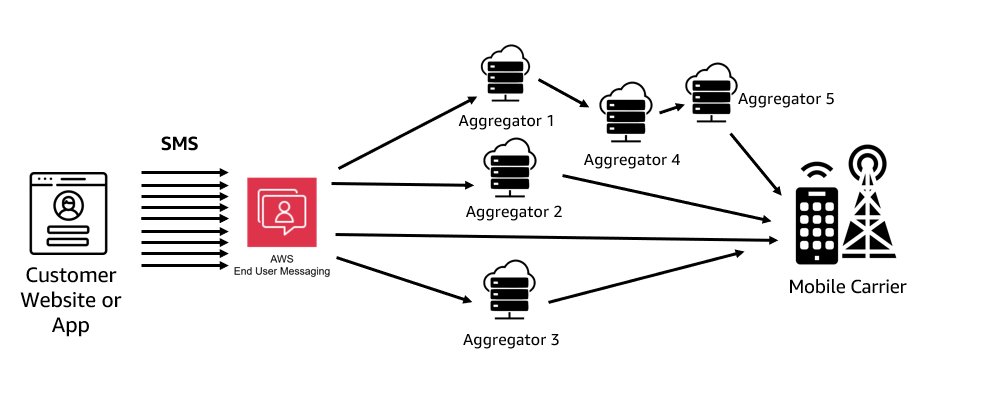
The first thing to understand about delivering SMS around the world is that it takes a vast network of components working seamlessly together around the globe to deliver an SMS globally. The image below gives a simple example of delivering an SMS in the United States. Mobile devices are at the center of this, connecting to mobile carriers or operators, who operate the infrastructure necessary for SMS transmission. Once you hit that send button from AWS, your message travels to an Aggregator, who has connections to Operators, Partners, and/or other Aggregators. The reason for this is that there is no one vendor who delivers globally. AWS uses many Aggregators that both enable us to send globally as well as improve resiliency and deliverability of your messages. The last stop on the journey is the Short Message Service Center (SMSC), a central hub that receives, stores, and forwards text messages. The SMSC acts as a gateway, routing your message to the recipient’s carrier or operator through a series of interconnected networks, thanks to agreements between different carriers known as interconnection agreements. The entire process is facilitated by the Signaling System 7 (SS7), a set of protocols that enables the exchange of information between telecommunication networks, ensuring messages reach their intended recipients.
Diagram showing how SMS is delivered using aggregators
Every country has its own regulations and processes that you need to comply with in order to successfully deliver SMS to handsets that are registered to a particular country. There are some countries with little regulation and others that will block all SMS traffic unless it has been registered with the proper authorities.

Each country’s requirements include the origination identities (OIDs) that their networks support, some of these include long codes (standard phone numbers that typically have 10 or more digits), short codes (phone numbers that contain between four and seven digits), and Sender IDs (names that contain 6–11 alphanumeric characters). Each of these types of origination identities has unique benefits and drawbacks and you will need one for each use case and country you plan on supporting. Here is a list of the countries that AWS currently sends to and the OIDs that are supported.

Pre-Planning and Country Selection
The first step to planning a global roll out of SMS is to know what countries you want to send to and what each of your use cases are. Put together a spreadsheet (Download Here Global SMS Planning Sheet) for each unique use case you have and the countries you plan on sending to with the below key details:

  • The volumes you expect to send to each country
  • The throughput (Also referred to as Messages per Second, MPS, Transactions per Second, or TPS) at which you expect to deliver these messages
  • Whether your use case is one-way or two-way
    • Not all countries support 2-way communications, which is the ability to have the recipient send a message back to the OID. Sender ID also does not support 2-way communication so if you are planning on using Sender ID you will need to account for how to opt recipients out of future communications.
  • Leave a column for the Origination Identity you will use for each country
  • Leave a column for whether this country requires advanced registration
  • Leave a column for any country specific limitations or requirements such as language limitations
  • Leave a column for the estimated time it takes to register
    • This chart has estimates for common countries but there are others that also have lead time in procuring an OID so please open a support case for review

Selecting an Origination Identity

Now that you have these details all in one place consult this table to determine what OIDs each country supports, and, if your use case requires it, which countries support two-way.

In countries where there are multiple options for OIDs there are several guidelines to consider when you’re deciding what type of origination identity to use:

  • Sender IDs are a great option for one-way use cases. However, they’re not available in all countries and if you are needing to opt-out your customers you will need to provide a way for them to do so since they are only one-way.
    • In some countries (such as India and Saudi Arabia), long codes can be used to receive incoming messages, but can’t be used to send outgoing messages. You can use these inbound-only long codes to provide your recipients with a way to opt out of messages that you send using a Sender ID.
  • Short codes are a great option for two-way use cases and have the highest throughput of all OIDs.
    • While short codes have a higher throughput they also come at a much higher cost than other OIDs so weigh your cost against your use case requirements.
  • In some countries, we maintain a pool of shared origination identities. If you send messages to recipients in a particular country, but you don’t have a dedicated origination identity in that country, we make an effort to deliver your message using one of these shared identities.
    • Shared identities are unavailable in some countries, including the United States and China.
    • Shared identities cannot be 2-way so make sure you have a way of opting customers out of communication

With these in mind consult this guide to help you decide which OID to use for each country and use case. Update your sheet as you review each country. Many of our customers opt for a phased roll-out, enabling SMS for the countries that do not require registration and can be put into production swiftly while working through the registration process for those countries that require it and bringing those to production as they are approved. A phased approach is also preferred as it allows customers to monitor for any problems with deliverability with a smaller volume than their full production workload.

Procurement and Registration of Origination Identities

In countries where registration is onerous it is important to have a few things about your process all in one place. Some registrations are very similar in the information that they ask for while others have special processes that you need to follow. Examples include:

Once you have decided on your OIDs for each of your countries you can begin the process of procuring them. Depending on where you plan on sending you may need to open a case to procure them. Short codes you also need to open a case but the process is slightly different so review the documentation here. If you are having trouble making a decision on OIDs you may have the option of engaging with AWS support or your Account Manager dependent on the support level you have opted for on your account.

Testing SMS Sending

Once you have procured OIDs and are ready to begin testing, it is essential that you set up a way of monitoring the events that Pinpoint generates. Pay attention to the Delivery Receipts (DLRs) that are returned back into the event stream. These provide you details on the success or failure of your sends. Pinpoint delivers all events via Amazon Kinesis, which needs to be enabled within each Project you are using. This is a common solution among our customers. It enables the stream, sends it to a user-specified S3 Bucket, and sets up Tables and Views within Amazon Athena, our serverless SQL query engine.. Kinesis can stream to many different destinations, including Redshift and HTTP endpoints, among many others. This gives you flexibility in how you deliver the events to their required locations. Monitoring SMS events is an important part of sending globally, these are the SMS Events that are possible to receive in your stream.

TPS limits can vary depending on the countries you’re sending to and the OIDs you’re using. If there’s a risk of exceeding these limits and triggering rate limiting errors, it’s crucial to devise a strategy for queuing your messages. Keep in mind, Amazon Pinpoint doesn’t offer queueing capabilities. Therefore, message queueing must be incorporated at your application level or by leveraging AWS services. For instance, you could deploy this commonly used architecture that’s adjustable according to your specific use case.

Once you have your monitoring solution in place, you are read to begin testing sends to real destination phone numbers. Keep in mind that at this point you are likely still in the Sandbox for SMS. This means you have much lower quotas for sending and can only send to verified phone numbers or the SMS Simulator numbers. Pinpoint includes an SMS simulator, which you can use to send text messages and receive realistic event records to 51 commonly sent to countries. Messages sent to these destination phone numbers are not sent over the carrier network but do incur the standard outbound SMS messaging rate for the country that the simulated phone number is based in.

Best Practices for Sending
Before beginning There are two common ways of sending SMS via Pinpoint. The first option is the Pinpoint API using the SendMessages Action, which you can send a direct message to as many as 100 recipients at a time. The second option is to use the SMS and Voice v2 API and the SendTextMessage Action, which has more options available to configure your sends and can send to a single recipient with each call. The V2 API is the preferred way of sending as it allows for more fine grained control over your messages and is the API upon which new functionality will be built. Keep in mind that sending via the API does not attribute any metrics back to an endpoint unless you are specifying an endpoint ID in your call, so if you are using other features of Pinpoint such as campaigns or journeys or sending via other channels such as email you will need to consider your strategy for measuring success and how you will tie all of your communication efforts together.

When sending SMS Pinpoint includes logic for selecting the best OID to send from based on the country code. If there are multiple OIDs available to send to a particular country Pinpoint will default to the highest throughput OID available in your Account/Region. If there are not OIDs specific to the country being sent to Pinpoint will default to SenderID or to a shared OID owned by Pinpoint in that order, if the country allows these OIDs to be used. Given this functionality the best practice for sending SMS is to not specify the OID needed to send to a specific country and to allow Pinpoint to select. You can restrict Pinpoint to send to only those countries that you have OIDs for by using Pools, and turning off Shared Routes, more on this below.

If you have multiple use cases and need to specify the correct OID for each, this is where the V2 API is useful. OIDs can be attached to Pools, which can be configured to serve a particular use case, and the pool can be specified in your SendTextMessage call. Sending using a PoolID and allowing Pinpoint to select the right OID from that pool for the destination phone number simplifies your sending process. This blogpost details the process for creating Pools and using them to send SMS.

As mentioned above Pools also serve an additional use case, which is to limit message sending to specific countries. Some countries allow messages without an OID. If you don’t modify your settings to disable this feature, Pinpoint will attempt to deliver messages to these countries, even if you don’t have an explicit OID for them. Restricting SMS sends only to countries that you have OIDs for can be accomplished by using Pools and configuring “SharedRoutesEnabled“ to false by using the UpdatePool Action. Once configured you will receive an error back if attempting to send to a destination phone number that you do not have an OID for in the Pool. This configuration gives you the ability to control your costs while simplifying your process.

Managing Opt-Outs

As we have seen, managing SMS in an environment of increasing global regulation is challenging. An area of importance that needs to be configured is how you plan on managing the ability for recipients to opt out of your communications. Pinpoint can automatically opt your customers out of SMS communications using predefined keywords such as, “stop” or “unsubscribe.” However, this would make for an Account wide opt-out, and not ideal for customers that have multiple use cases such as OTP and Marketing communications. This blogpost details the process of managing opt-outs for multiple use cases. The configuration is enabled through the V2 API and is another reason to standardize your process on this API.

Monitoring Sending

The last step in ensuring success for SMS sending is having a solid platform for monitoring your sending. SMS is not a guaranteed delivery channel. You will always receive an event for a successful send in the event stream but there is no guarantee of a return status event, if a DLR from a carrier is not sent. A list of SMS Events and possible statuses can be found here.

The first Event you should see returned when watching the Event Stream for an SMS send activity is the “PENDING” event. This means we’ve sent the message to the carrier, where it’s buffered, and we’re waiting for the carrier to return a status message. There are no status messages between the “PENDING” state and the “whatever happens next” state, so if the carrier is retrying, we simply stay in PENDING and do not create more events. If a message is successfully delivered and a DLR is sent back from the carrier then a new event will be generated with a status of “SUCCESSFUL/DELIVERED.”

Make sure to review all of the possible values for the record_status attribute so that you are aware of varying issues with your sending that can arise. For example, statuses such as “Blocked,” “Spam,” and “Carrier_Blocked“ can indicate systemic issues that should be investigated.

Updates sent from a carrier via a DLR can be delayed for up to 72 hours or never sent at all. This varies based on the carrier and the country being sent to. Should you require a higher level of reliability, you need to establish business logic around monitoring SMS messages. If messages remain in a PENDING status longer than your business requirements permit, you must make a decision on how to handle them. You need to consider whether missed or duplicated messages are acceptable, or if it’s preferable to retry messages that are stuck in pending. The following is an example architecture for failed SMS retries that you can adjust to your needs.

Conclusion

This post covers the general process for getting started with Global SMS but as you have learned each country presents a different challenge and the regulatory environment is constantly evolving. It’s important to make sure that you are receiving messages from AWS that detail new regulations, new feature launches, and other major announcements to continually improve your process and make sure your SMS are delivering at the highest rate possible.

Take the time to plan out your approach, follow the steps outlined in this blog, and take advantage of any resources available to you within your support tier.

Decide what origination IDs you will need here
Review the documentation for the V2 SMS and Voice API here
Review the Pinpoint API and SendMessage here
Check out the support tiers comparison here

Resources:
https://docs.aws.amazon.com/pinpoint/latest/userguide/channels-sms-countries.html
https://aws.amazon.com/blogs/messaging-and-targeting/how-to-utilise-amazon-pinpoint-to-retry-unsuccessful-sms-delivery/
https://datatracker.ietf.org/doc/html/draft-wilde-sms-uri-20#section-4
https://docs.aws.amazon.com/pinpoint/latest/developerguide/event-streams-data-sms.html
https://docs.aws.amazon.com/pinpoint/latest/userguide/channels-sms-limitations-opt-out.html
https://docs.aws.amazon.com/pinpoint/latest/userguide/channels-sms-simulator.html