Tag Archives: SSL

Introducing SSL/TLS Recommender

Post Syndicated from Suleman Ahmad original https://blog.cloudflare.com/ssl-tls-recommender/


Introducing SSL/TLS Recommender

Introducing SSL/TLS Recommender

Seven years ago, Cloudflare made HTTPS availability for any Internet property easy and free with Universal SSL. At the time, few websites — other than those that processed sensitive data like passwords and credit card information — were using HTTPS because of how difficult it was to set up.

However, as we all started using the Internet for more and more private purposes (communication with loved ones, financial transactions, shopping, healthcare, etc.) the need for encryption became apparent. Tools like Firesheep demonstrated how easily attackers could snoop on people using public Wi-Fi networks at coffee shops and airports. The Snowden revelations showed the ease with which governments could listen in on unencrypted communications at scale. We have seen attempts by browser vendors to increase HTTPS adoption such as the recent announcement by Chromium for loading websites on HTTPS by default. Encryption has become a vital part of the modern Internet, not just to keep your information safe, but to keep you safe.

When it was launched, Universal SSL doubled the number of sites on the Internet using HTTPS. We are building on that with SSL/TLS Recommender, a tool that guides you to stronger configurations for the backend connection from Cloudflare to origin servers. Recommender has been available in the SSL/TLS tab of the Cloudflare dashboard since August 2020 for self-serve customers. Over 500,000 zones are currently signed up. As of today, it is available for all customers!

How Cloudflare connects to origin servers

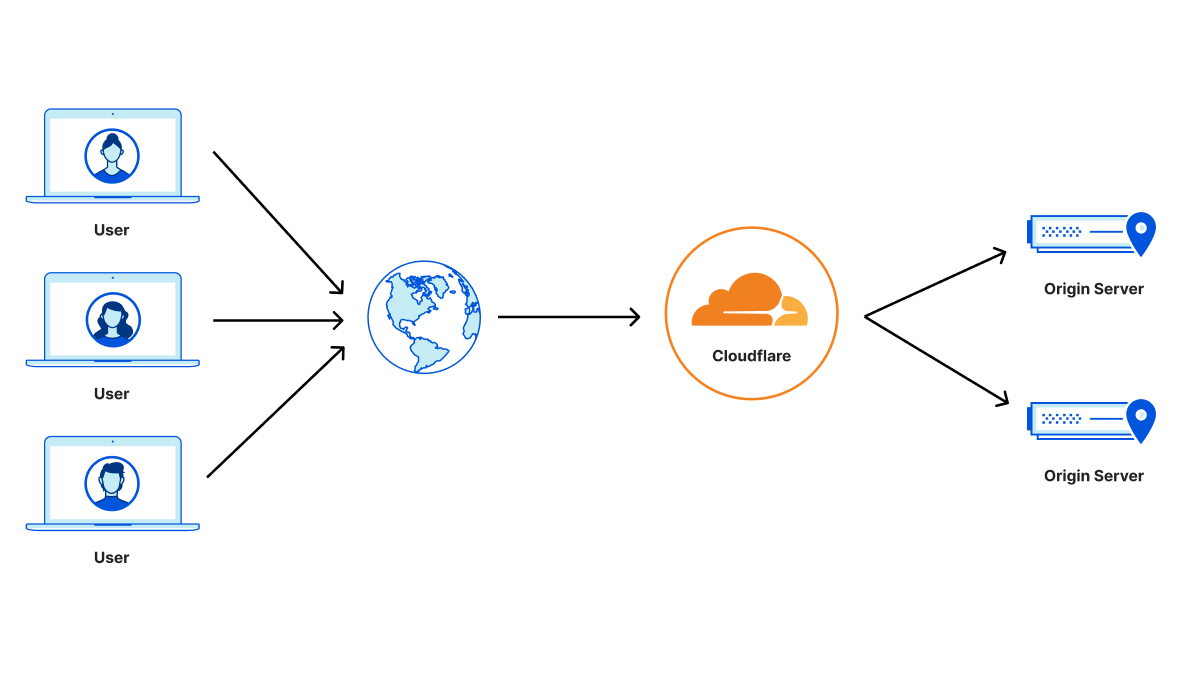
Cloudflare operates as a reverse proxy between clients (“visitors”) and customers’ web servers (“origins”), so that Cloudflare can protect origin sites from attacks and improve site performance. This happens, in part, because visitor requests to websites proxied by Cloudflare are processed by an “edge” server located in a data center close to the client. The edge server either responds directly back to the visitor, if the requested content is cached, or creates a new request to the origin server to retrieve the content.
Introducing SSL/TLS Recommender

The backend connection to the origin can be made with an unencrypted HTTP connection or with an HTTPS connection where requests and responses are encrypted using the TLS protocol (historically known as SSL). HTTPS is the secured form of HTTP and should be used whenever possible to avoid leaking information or allowing content tampering by third-party entities. The origin server can further authenticate itself by presenting a valid TLS certificate to prevent active monster-in-the-middle attacks. Such a certificate can be obtained from a certificate authority such as Let’s Encrypt or Cloudflare’s Origin CA. Origins can also set up authenticated origin pull, which ensures that any HTTPS requests outside of Cloudflare will not receive a response from your origin.

Cloudflare Tunnel provides an even more secure option for the connection between Cloudflare and origins. With Tunnel, users run a lightweight daemon on their origin servers that proactively establishes secure and private tunnels to the nearest Cloudflare data centers. With this configuration, users can completely lock down their origin servers to only receive requests routed through Cloudflare. While we encourage customers to set up tunnels if feasible, it’s important to encourage origins with more traditional configurations to adopt the strongest possible security posture.

Detecting HTTPS support

You might wonder, why doesn’t Cloudflare always connect to origin servers with a secure TLS connection? To start, some origin servers have no TLS support at all (for example, certain shared hosting providers and even government sites have been slow adopters) and rely on Cloudflare to ensure that the client request is at least encrypted over the Internet from the browser to Cloudflare’s edge.

Then why don’t we simply probe the origin to determine if TLS is supported? It turns out that many sites only partially support HTTPS, making the problem non-trivial. A single customer site can be served from multiple separate origin servers with differing levels of TLS support. For instance, some sites support HTTPS on their landing page but serve certain resources only over unencrypted HTTP. Further, site content can differ when accessed over HTTP versus HTTPS (for example, http://example.com and https://example.com can return different results).

Such content differences can arise due to misconfiguration on the origin server, accidental mistakes by developers when migrating their servers to HTTPS, or can even be intentional depending on the use case.

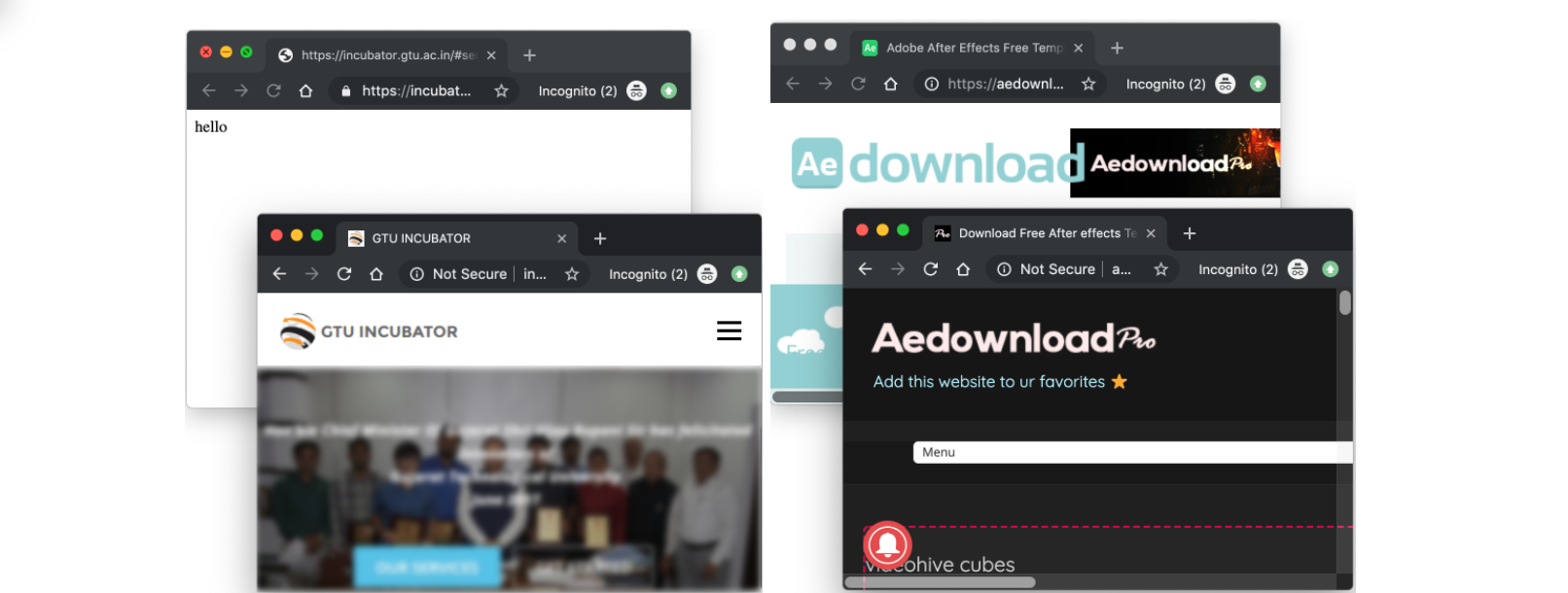
A study by researchers at Northeastern University, the Max Planck Institute for Informatics, and the University of Maryland highlights reasons for some of these inconsistencies. They found that 1.5% of surveyed sites had at least one page that was unavailable over HTTPS — despite the protocol being supported on other pages — and 3.7% of sites served different content over HTTP versus HTTPS for at least one page. Thus, always using the most secure TLS setting detected on a particular resource could result in unforeseen side effects and usability issues for the entire site.

We wanted to tackle all such issues and maximize the number of TLS connections to origin servers, but without compromising a website’s functionality and performance.
Introducing SSL/TLS Recommender
Content differences on sites when loaded over HTTPS vs HTTP; images taken from https://www.cs.umd.edu/~dml/papers/https_tma20.pdf with author permission

Configuring the SSL/TLS encryption mode

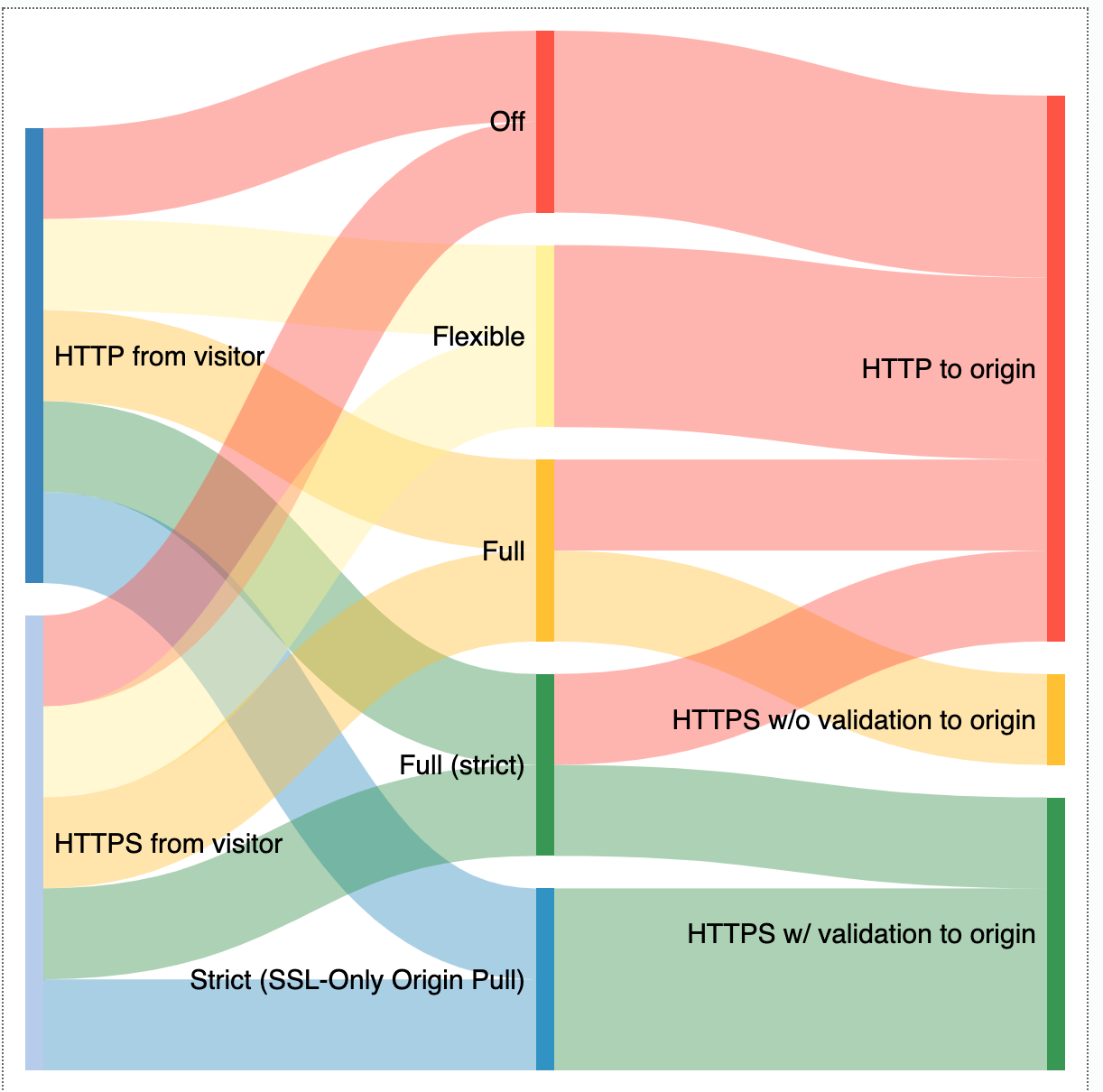
Cloudflare relies on customers to indicate the level of TLS support at their origins via the zone’s SSL/TLS encryption mode. The following SSL/TLS encryption modes can be configured from the Cloudflare dashboard:

  • Off indicates that client requests reaching Cloudflare as well as Cloudflare’s requests to the origin server should only use unencrypted HTTP. This option is never recommended, but is still in use by a handful of customers for legacy reasons or testing.
  • Flexible allows clients to connect to Cloudflare’s edge via HTTPS, but requests to the origin are over HTTP only. This is the most common option for origins that do not support TLS. However, we encourage customers to upgrade their origins to support TLS whenever possible and only use Flexible as a last resort.
  • Full enables encryption for requests to the origin when clients connect via HTTPS, but Cloudflare does not attempt to validate the certificate. This is useful for origins that have a self-signed or otherwise invalid certificate at the origin, but leaves open the possibility for an active attacker to impersonate the origin server with a fake certificate. Client HTTP requests result in HTTP requests to the origin.
  • Full (strict) indicates that Cloudflare should validate the origin certificate to fully secure the connection. The origin certificate can either be issued by a public CA or by Cloudflare Origin CA. HTTP requests from clients result in HTTP requests to the origin, exactly the same as in Full mode. We strongly recommend Full (strict) over weaker options if supported by the origin.
  • Strict (SSL-Only Origin Pull) causes all traffic to the origin to go over HTTPS, even if the client request was HTTP. This differs from Full (strict) in that HTTP client requests will result in an HTTPS request to the origin, not HTTP. Most customers do not need to use this option, and it is available only to Enterprise customers. The preferred way to ensure that no HTTP requests reach your origin is to enable Always Use HTTPS in conjunction with Full or Full (strict) to redirect visitor HTTP requests to the HTTPS version of the content.
Introducing SSL/TLS Recommender
SSL/TLS encryption modes determine how Cloudflare connects to origins

The SSL/TLS encryption mode is a zone-wide setting, meaning that Cloudflare applies the same policy to all subdomains and resources. If required, you can configure this setting more granularly via Page Rules. Misconfiguring this setting can make site resources unavailable. For instance, suppose your website loads certain assets from an HTTP-only subdomain. If you set your zone to Full or Full (strict), you might make these assets unavailable for visitors that request the content over HTTPS, since the HTTP-only subdomain lacks HTTPS support.

Importance of secure origin connections

When an end-user visits a site proxied by Cloudflare, there are two connections to consider: the front-end connection between the visitor and Cloudflare and the back-end connection between Cloudflare and the customer origin server. The front-end connection typically presents the largest attack surface (for example, think of the classic example of an attacker snooping on a coffee shop’s Wi-Fi network), but securing the back-end connection is equally important. While all SSL/TLS encryption modes (except Off) secure the front-end connection, less secure modes leave open the possibility of malicious activity on the backend.

Consider a zone set to Flexible where the origin is connected to the Internet via an untrustworthy ISP. In this case, spyware deployed by the customer’s ISP in an on-path middlebox could inspect the plaintext traffic from Cloudflare to the origin server, potentially resulting in privacy violations or leaks of confidential information. Upgrading the zone to Full or a stronger mode to encrypt traffic to the ISP would help prevent this basic form of snooping.

Similarly, consider a zone set to Full where the origin server is hosted in a shared hosting provider facility. An attacker colocated in the same facility could generate a fake certificate for the origin (since the certificate isn’t validated for Full) and deploy an attack technique such as ARP spoofing to direct traffic intended for the origin server to an attacker-owned machine instead. The attacker could then leverage this setup to inspect and filter traffic intended for the origin, resulting in site breakage or content unavailability. The attacker could even inject malicious JavaScript into the response served to the visitor to carry out other nefarious goals. Deploying a valid Cloudflare-trusted certificate on the origin and configuring the zone to use Full (strict) would prevent Cloudflare from trusting the attacker’s fake certificate in this scenario, preventing the hijack.

Since a secure backend only improves your website security, we strongly encourage setting your zone to the highest possible SSL/TLS encryption mode whenever possible.

Balancing functionality and security

When Universal SSL was launched, Cloudflare’s goal was to get as many sites away from the status quo of HTTP as possible. To accomplish this, Cloudflare provisioned TLS certificates for all customer domains to secure the connection between the browser and the edge. Customer sites that did not already have TLS support were defaulted to Flexible, to preserve existing site functionality. Although Flexible is not recommended for most zones, we continue to support this option as some Cloudflare customers still rely on it for origins that do not yet support TLS. Disabling this option would make these sites unavailable. Currently, the default option for newly onboarded zones is Full if we detect a TLS certificate on the origin zone, and Flexible otherwise.

Further, the SSL/TLS encryption mode configured at the time of zone sign-up can become suboptimal as a site evolves. For example, a zone might switch to a hosting provider that supports origin certificate installation. An origin server that is able to serve all content over TLS should at least be on Full. An origin server that has a valid TLS certificate installed should use Full (strict) to ensure that communication between Cloudflare and the origin server is not susceptible to monster-in-the-middle attacks.

The Research team combined lessons from academia and our engineering efforts to make encryption easy, while ensuring the highest level of security possible for our customers. Because of that goal, we’re proud to introduce SSL/TLS Recommender.

SSL/TLS Recommender

Cloudflare’s mission is to help build a better Internet, and that includes ensuring that requests from visitors to our customers’ sites are as secure as possible. To that end, we began by asking ourselves the following question: how can we detect when a customer is able to use a more secure SSL/TLS encryption mode without impacting site functionality?

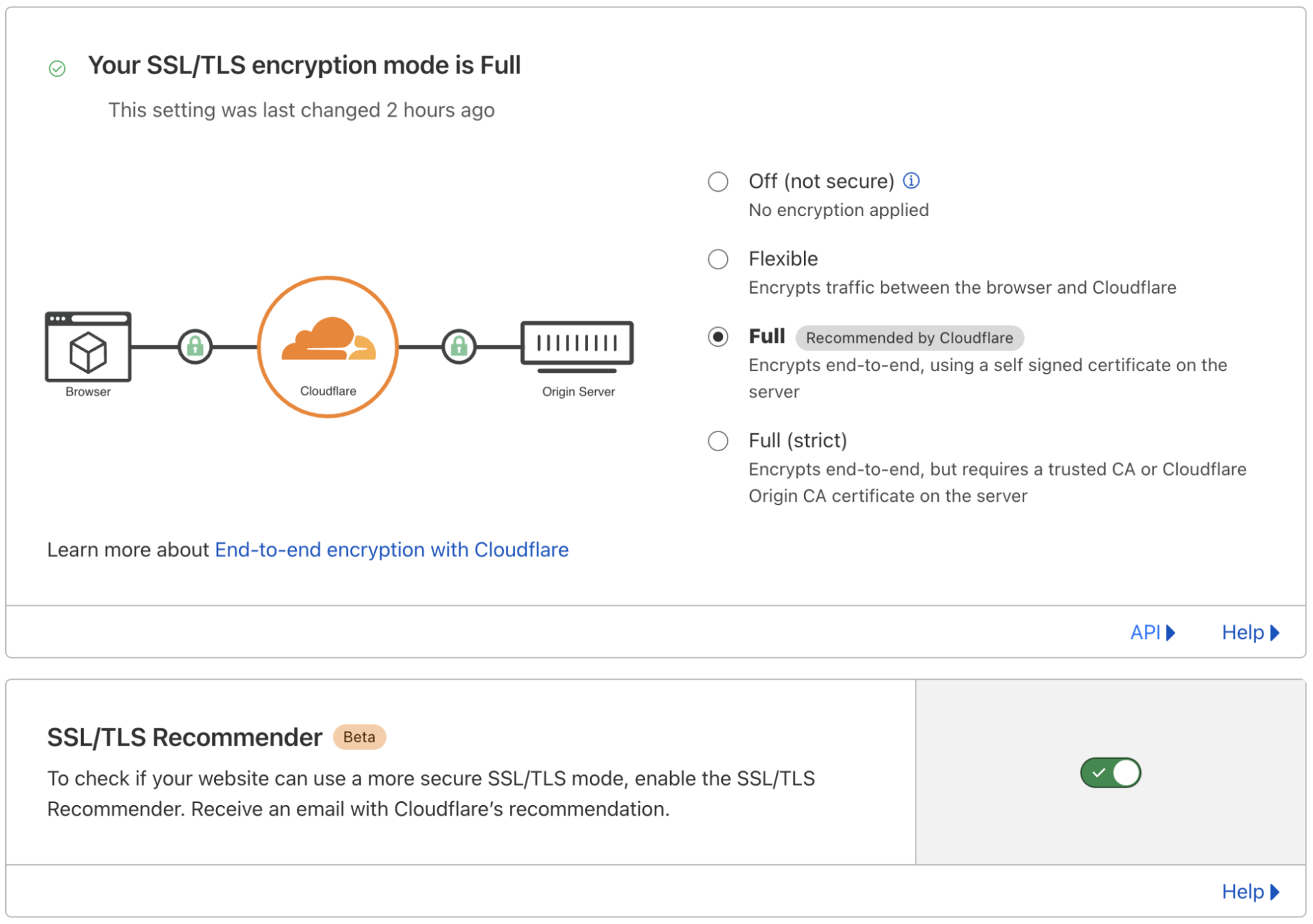
To answer this question, we built the SSL/TLS Recommender. Customers can enable Recommender for a zone via the SSL/TLS tab of the Cloudflare dashboard. Using a zone’s currently configured SSL/TLS option as the baseline for expected site functionality, the Recommender performs a series of checks to determine if an upgrade is possible. If so, we email the zone owner with the recommendation. If a zone is currently misconfigured — for example, an HTTP-only origin configured on Full — Recommender will not recommend a downgrade.
Introducing SSL/TLS Recommender

The checks that Recommender runs are determined by the site’s currently configured SSL/TLS option.

The simplest check is to determine if a customer can upgrade from Full to Full (strict). In this case, all site resources are already served over HTTPS, so the check comprises a few simple tests of the validity of the TLS certificate for the domain and all subdomains (which can be on separate origin servers).

The check to determine if a customer can upgrade from Off or Flexible to Full is more complex. A site can be upgraded if all resources on the site are available over HTTPS and the content matches when served over HTTP versus HTTPS. Recommender carries out this check as follows:

  • Crawl customer sites to collect links. For large sites where it is impractical to scan every link, Recommender tests only a subset of links (up to some threshold), leading to a trade-off between performance and potential false positives. Similarly, for sites where the crawl turns up an insufficient number of links, we augment our results with a sample of links from recent visitors requests to the zone to provide a high-confidence recommendation. The crawler uses the user agent Cloudflare-SSLDetector and has been added to Cloudflare’s list of known good bots. Similar to other Cloudflare crawlers, Recommender ignores robots.txt (except for rules explicitly targeting the crawler’s user agent) to avoid negatively impacting the accuracy of the recommendation.
  • Download the content of each link over both HTTP and HTTPS. Recommender makes only idempotent GET requests when scanning origin servers to avoid modifying server resource state.
  • Run a content similarity algorithm to determine if the content matches. The algorithm is adapted from a research paper called “A Deeper Look at Web Content Availability and Consistency over HTTP/S” (TMA Conference 2020) and is designed to provide an accurate similarity score even for sites with dynamic content.

Recommender is conservative with recommendations, erring on the side of maintaining current site functionality rather than risking breakage and usability issues. If a zone is non-functional, the zone owner blocks all types of bots, or if misconfigured SSL-specific Page Rules are applied to the zone, then Recommender will not be able to complete its scans and provide a recommendation. Therefore, it is not intended to resolve issues with website or domain functionality, but rather maximize your zone’s security when possible.

Please send questions and feedback to [email protected]. We’re excited to continue this line of work to improve the security of customer origins!

Mentions

While this work is led by the Research team, we have been extremely privileged to get support from all across the company!

Special thanks to the incredible team of interns that contributed to SSL/TLS Recommender. Suleman Ahmad (now full-time), Talha Paracha, and Ananya Ghose built the current iteration of the project and Matthew Bernhard helped to lay the groundwork in a previous iteration of the project.


Staging TLS Certificate: Make every deployment a safe deployment

Post Syndicated from Dina Kozlov original https://blog.cloudflare.com/staging-tls-certificate-every-deployment-safe-deployment/

Staging TLS Certificate: Make every deployment a safe deployment

Staging TLS Certificate: Make every deployment a safe deployment

We are excited to announce that Enterprise customers now have the ability to test custom uploaded certificates in a staging environment before pushing them to production.

With great power comes great responsibility

If you’re running a website or the API that’s behind a popular app, you know your users have high expectations: it can’t just be up and running; it also has to be fast and secure. One of the easiest and most standardized ways to secure connections is with the TLS protocol. To do that, you need to acquire a TLS certificate for your domain.

One way to get a certificate is by using a CDN provider, like Cloudflare. We make the process really easy by issuing certificates on your behalf. Not just that, but when your certificate is getting closer to its expiration date, we are responsible for re-issuing it. But, if you don’t want Cloudflare to issue the certificate on your behalf and want to obtain the certificate yourself, you can do so. You can either keep control of your private key, or generate a Certificate Signing Request (CSR) through Cloudflare, so we maintain the private key, but you can still use the certificate authority (CA) of your choice for the certificate. Once you get your certificate, you upload it to Cloudflare and voilà — your site is secure.

One of the downsides of obtaining your own certificate is that you’re in charge of its renewal, which comes with a great deal of responsibility. You have to ensure that any renewed certificate  will not cause TLS errors, causing your property to be unreachable by your users.

Now, you’re probably wondering, why is this so risky? What could go wrong?

It’s possible that when you renew a certificate, you forget to include one of your subdomains in the certificate. Another reason why your clients might see failures when you upload the new certificate is that some of those clients are pinning the old certificate.

The problem with pinning certificates

Certificate pinning allows Internet application owners to say “trust this certificate and no other” by pinning the certificate or public key to their service, or even to client devices. While this was originally intended to tighten security, certificate pinning has created many problems. We have seen customers shoot themselves in the foot with certificate pinning numerous times. There are a lot of things that could go wrong: you could pin the wrong certificate, or configure the wrong settings, which will bring your service down. It’s possible that you rely on a CDN for your certificate renewal and forgot to update your pin — again, blocking access to your service in the process. Alternatively, you can pin certificates to clients so that they refuse connections from servers that don’t have the same certificate. But when it comes to renewing that certificate, you have to make sure that your clients have the updated certificate, or they won’t be able to access your server. Instead, you can use tools like Cloudflare’s Certificate Transparency Monitoring which notifies you when certificates are being issued for your domain.

But, some of our customers do rely on this behavior. So for them, switching to a new certificate is a big change — one that can bring down their whole application. For this reason, they need to be able to test the new certificate to identify any problems that may occur before their customers see it.

A staging environment for certificate deployments

When it comes to your traffic, there are things you can’t predict. You can’t control if your customer’s browser is having a bad day, or if some ISP is having a network outage. When it comes to certificate deployment, the last thing you want is to be surprised. Imagine pushing out a new certificate, and realizing you’ve uploaded the wrong one only after customers complain they’ve lost access; or that you never updated your pin to your new certificate to begin with. Mistakes happen, but this type of outage can cause a lot of pain and lose you a lot of money and trust. The good news is that this is preventable.

We are giving customers the ability to find these problems before they’re encountered by real users. We’re doing this by giving customers the ability to test certificate deployment changes against a pair of staging IPs.

Imagine uploading a new certificate, finding any related problems, and fixing them in a way that doesn’t impact production traffic. That’s exactly what Staging Certificates allows you to do!

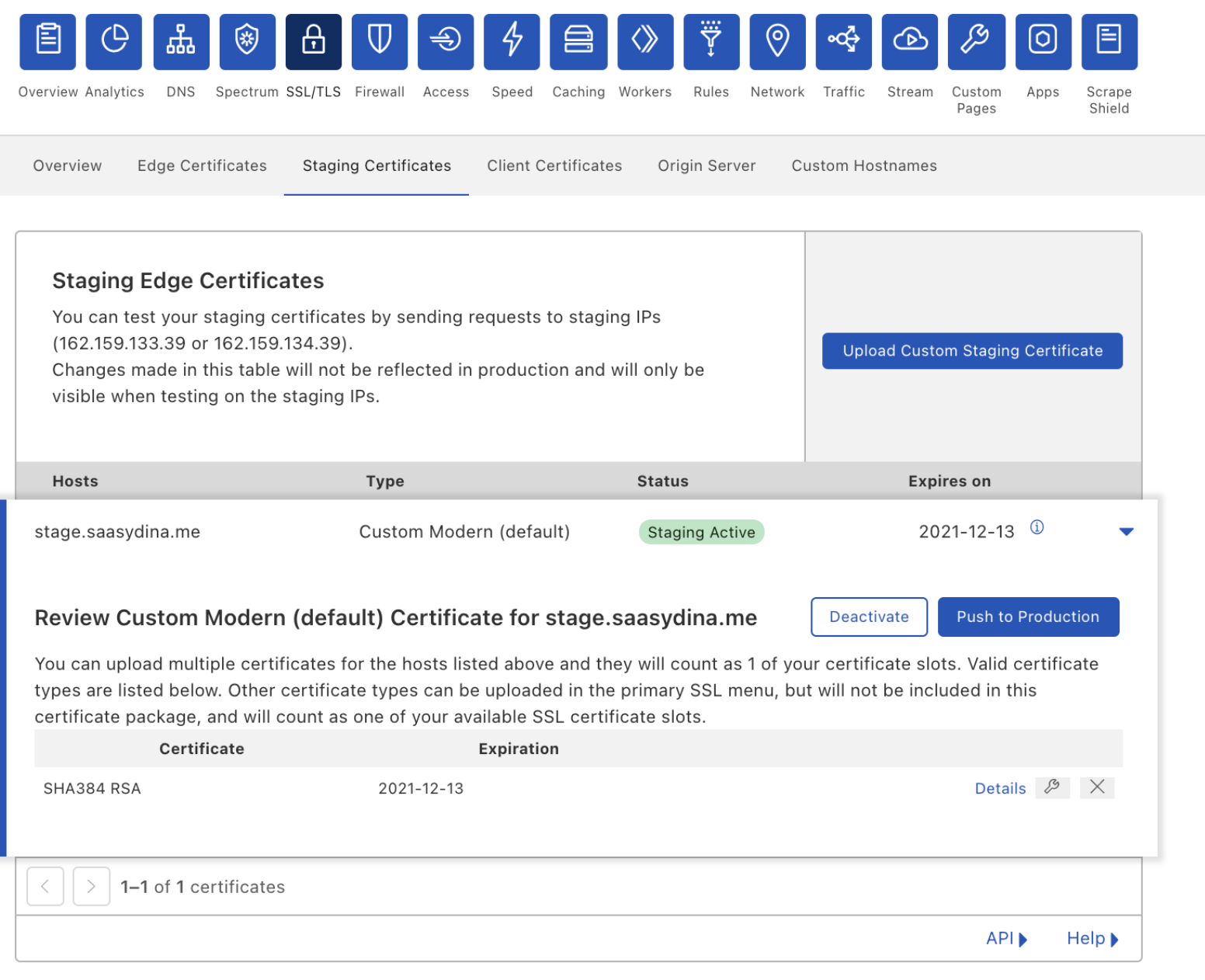
You can go to the Staging Certificates section under the SSL/TLS tab in the Cloudflare dashboard and upload a new certificate to our staging network. The staging network will replicate your production environment but will only be accessible through the Staging IPs.

Staging TLS Certificate: Make every deployment a safe deployment

Once you upload your certificate, you can make `curl` requests against the staging IPs to verify that it’s being served and that it covers all the hostnames that you need it to. If you’ve decided to pin your previous certificate, the staging environment helps you verify that your pins have been updated correctly and that TLS termination is successful.

Once you’re confident in your tests, you can push the certificate out to production.

Oh no, something went wrong

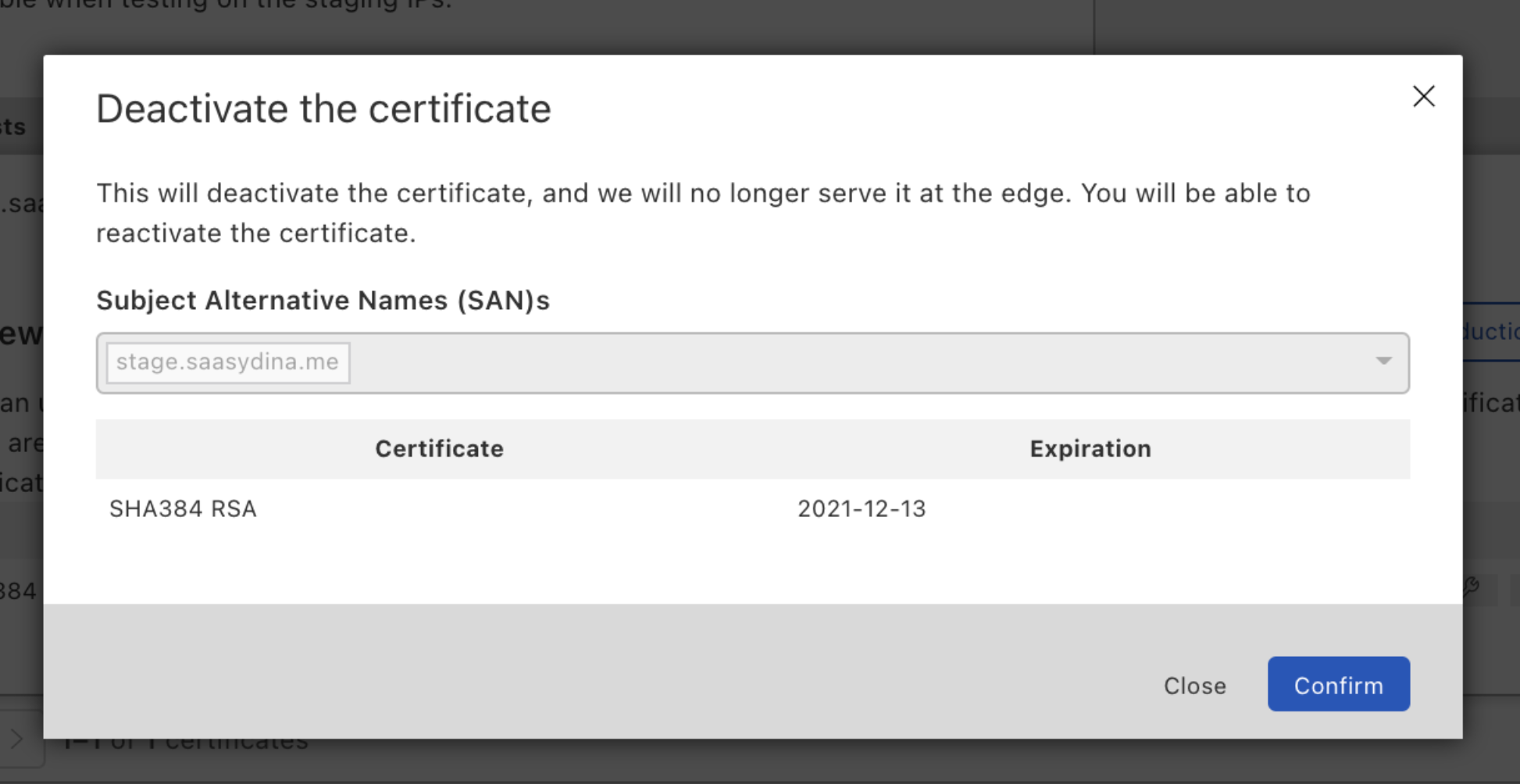
Mistakes happen. It’s possible that you found one client device whose pin you forgot to update. In that case, you can disable the certificate to quickly mitigate the problem by rolling back to the certificate that you were last serving.

Staging TLS Certificate: Make every deployment a safe deployment

What if you realize that this is a bigger issue, and you need more time to test? You can push the disabled certificate back to the staging environment, and when you’ve verified everything works correctly, push it back to production.

Staging changes: We’re just getting started

We want to de-risk every change you make. Staging your custom uploaded certificates is a start, but it doesn’t end there. In the future, we’ll allow you to stage certificate renewals for certificates issued through Cloudflare. We’re also planning to give customers the ability to test TLS configuration changes like minimum TLS or cipher suite settings.

If you’re interested in staying aware of these future developments, or you have some settings that you want to test in staging, reach out to your Account team and let them know!

Ready to test your next certificate deployment?

This feature is currently in Beta and available to Enterprise customers. If you want to use it, reach out to your Account team to get it enabled.

What’s new with Cloudflare for SaaS?

Post Syndicated from Dina Kozlov original https://blog.cloudflare.com/whats-new-with-cloudflare-for-saas/

What’s new with Cloudflare for SaaS?

What’s new with Cloudflare for SaaS?

This past April, we announced the Cloudflare for SaaS Beta which makes our SSL for SaaS product available to everyone. This allows any customer — from first-time developers to large enterprises — to use Cloudflare for SaaS to extend our full product suite to their own customers. SSL for SaaS is the subset of Cloudflare for SaaS features that focus on a customer’s Public Key Infrastructure (PKI) needs.

Today, we’re excited to announce all the customizations that our team has been working on for our Enterprise customers — for both Cloudflare for SaaS and SSL for SaaS.

Let’s start with the basics — the common SaaS setup

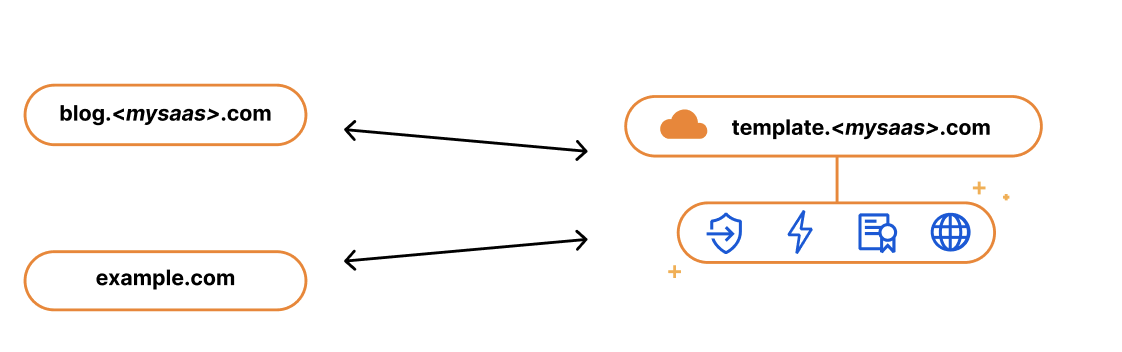
If you’re running a SaaS company, your solution might exist as a subdomain of your SaaS website, e.g. template.<mysaas>.com, but ideally, your solution would allow the customer to use their own vanity hostname for it, such as example.com.

The most common way to begin using a SaaS company’s service is to point a CNAME DNS record to the subdomain that the SaaS provider has created for your application. This ensures traffic gets to the right place, and it allows the SaaS provider to make infrastructure changes without involving your end customers.

What’s new with Cloudflare for SaaS?

We kept this in mind when we built our SSL for SaaS a few years ago. SSL for SaaS takes away the burden of certificate issuance and management from the SaaS provider by proxying traffic through Cloudflare’s edge. All the SaaS provider needs to do is onboard their zone to Cloudflare and ask their end customers to create a CNAME to the SaaS zone — something they were already doing.

The big benefit of giving your customers a CNAME record (instead of a fixed IP address) is that it gives you, the SaaS provider, more flexibility and control. It allows you to seamlessly change the IP address of your server in the background. For example, if your IP gets blocked by ISP providers, you can update that address on your customers’ behalf with a CNAME record. With a fixed A record, you rely on each of your customers to make a change.

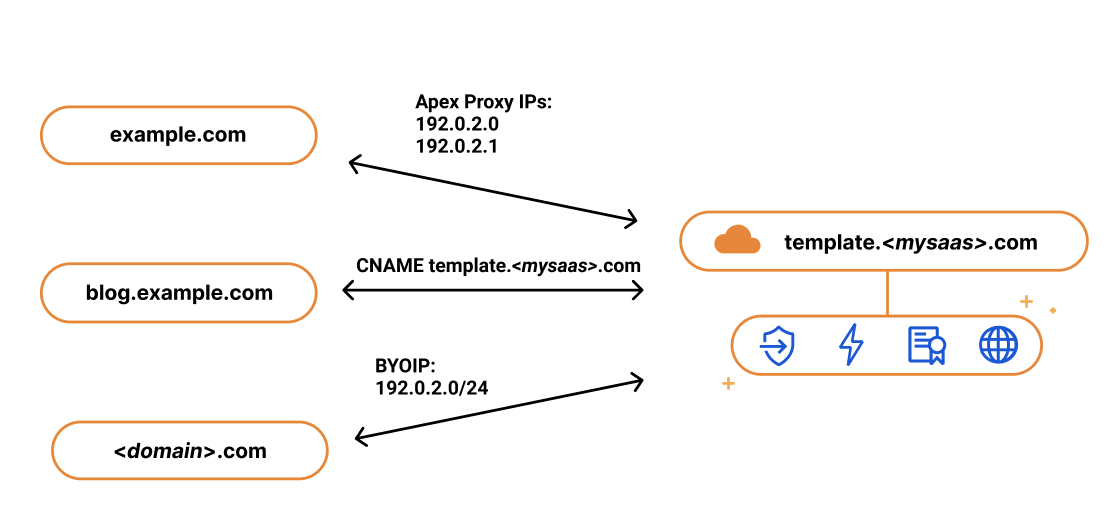
While the CNAME record works great for most customers, some came back and wanted to bypass the limitation that CNAME records present. RFC 1912 states that CNAME records cannot coexist with other DNS records, so in most cases, you cannot have a CNAME at the root of your domain, e.g. example.com. Instead, the CNAME needs to exist at the subdomain level, i.e. www.example.com. Some DNS providers (including Cloudflare) bypass this restriction through a method called CNAME flattening.

Since SaaS providers have no control over the DNS provider that their customers are using, the feedback they got from their customers was that they wanted to use the apex of their zone and not the subdomain. So when our SaaS customers came back asking us for a solution, we delivered. We call it Apex Proxying.

Apex Proxying

For our SaaS customers who want to allow their customers to proxy their apex to their zone, regardless of which DNS provider they are using, we give them the option of Apex Proxying. Apex Proxying is an SSL for SaaS feature that gives SaaS providers a pair of IP addresses to provide to their customers when CNAME records do not work for them.

Cloudflare starts by allocating a dedicated set of IPs for the SaaS provider. The SaaS provider then gives their customers these IPs that they can add as A or AAAA DNS records, allowing them to proxy traffic directly from the apex of their zone.

While this works for most, some of our customers want more flexibility. They want to have multiple IPs that they can change, or they want to assign different sets of customers to different buckets of IPs. For those customers, we give them the option to bring their own IP range, so they control the IP allocation for their application.

What’s new with Cloudflare for SaaS?

Bring Your Own IPs

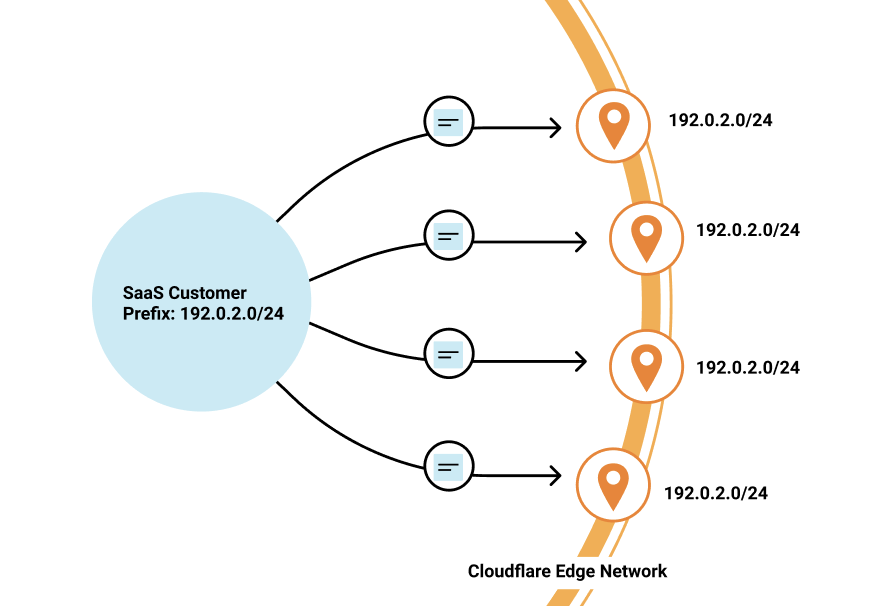
Last year, we announced Bring Your Own IP (BYOIP), which allows customers to bring their own IP range for Cloudflare to announce at our edge. One of the benefits of BYOIP is that it allows SaaS customers to allocate that range to their account and then, instead of having a few IPs that their customers can point to, they can distribute all the IPs in their range.

What’s new with Cloudflare for SaaS?

SaaS customers often require granular control of how their IPs are allocated to different zones that belong to different customers. With 256 IPs to use, you have the flexibility to either group customers together or to give them dedicated IPs. It’s up to you!

While we’re on the topic of grouping customers, let’s talk about how you might want to do this when sending traffic to your origin.

Custom Origin Support

When setting up Cloudflare for SaaS, you indicate your fallback origin, which defines the origin that all of your Custom Hostnames are routed to. This origin can be defined by an IP address or point to a load balancer defined in the zone. However, you might not want to route all customers to the same origin. Instead, you want to route different customers (or custom hostnames) to different origins — either because you want to group customers together or to help you scale the origins supporting your application.

Our Enterprise customers can now choose a custom origin that is not the default fallback origin for any of their Custom Hostnames. Traditionally, this has been done by emailing your account manager and requesting custom logic at Cloudflare’s edge, a very cumbersome and outdated practice. But now, customers can easily indicate this in the UI or in their API requests.

Wildcard Support

Oftentimes, SaaS providers have customers that don’t just want their domain to stay protected and encrypted, but also the subdomains that fall under it.

We wanted to give our Enterprise customers the flexibility to extend this benefit to their end customers by offering wildcard support for Custom Hostnames.

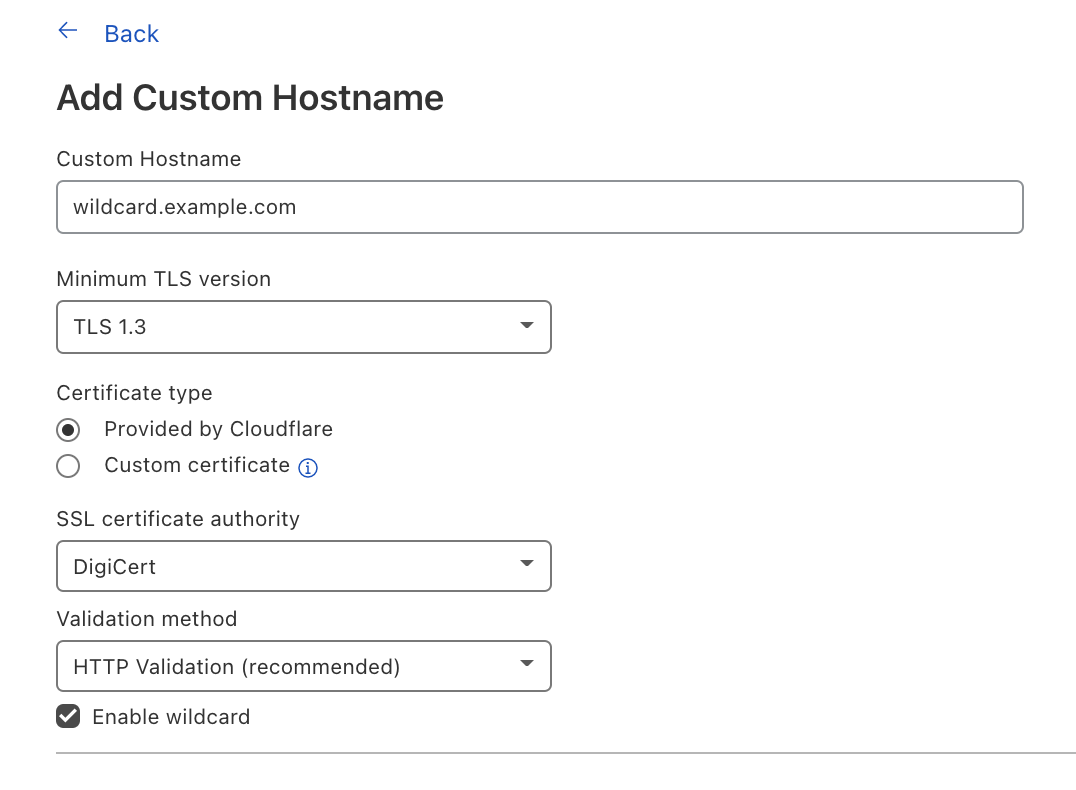
Wildcard Custom Hostnames extend the Custom Hostname’s configuration from a specific hostname — e.g. “blog.example.com” — to the next level of subdomains of that hostname, e.g. “*.blog.example.com”.

To create a Custom Hostname with a wildcard, you can either indicate Enable wildcard support when creating a Custom Hostname in the Cloudflare dashboard or when you’re creating a Custom Hostname through the API, indicate wildcard: “true”.

What’s new with Cloudflare for SaaS?

Now let’s switch gears to TLS certificate management and the improvements our team has been working on.

TLS Management for All

SSL for SaaS was built to reduce the burden of certificate management for SaaS providers. The initial functionality was meant to serve most customers and their need to issue, maintain, and renew certificates on their customers’ behalf. But one size does not fit all, and some of our customers have more specific needs for their certificate management — and we want to make sure we accommodate them.

CSR Support/Custom certs

One of the superpowers of SSL for SaaS is that it allows Cloudflare to manage all the certificate issuance and renewals on behalf of our customers and their customers. However, some customers want to allow their end customers to upload their own certificates.

For example, a bank may only trust certain certificate authorities (CAs) for their certificate issuance. Alternatively, the SaaS provider may have initially built out TLS support for their customers and now their customers expect that functionality to be available. Regardless of the reasoning, we have given our customers a few options that satisfy these requirements.

For customers who want to maintain control over their TLS private keys or give their customers the flexibility to use their certification authority (CA) of choice, we allow the SaaS provider to upload their customer’s certificate.

If you are a SaaS provider and one of your customers does not allow third parties to generate keys on their behalf, then you want to allow that customer to upload their own certificate. Cloudflare allows SaaS providers to upload their customers’ certificates to any of their custom hostnames — in just one API call!

Some SaaS providers never want a person to see private key material, but want to be able to use the CA of their choice. They can do so by generating a Certificate Signing Request (CSR) for their Custom Hostnames, and then either use those CSRs themselves to order certificates for their customers or relay the CSRs to their customers so that they can provision their own certificates. In either case, the SaaS provider is able to then upload the certificate for the Custom Hostname after the certificate has been issued from their customer’s CA for use at Cloudflare’s edge.

Custom Metadata

For our customers who need to customize their configuration to handle specific rules for their customer’s domains, they can do so by using Custom Metadata and Workers.

By adding metadata to an individual custom hostname and then deploying a Worker to read the data, you can use the Worker to customize per-hostname behavior.

Some customers use this functionality to add a customer_id field to each custom hostname that they then send in a request header to their origin. Another way to use this is to set headers like HTTP Strict Transport Security (HSTS) on a per-customer basis.

Saving the best for last: Analytics!

Tomorrow, we have a very special announcement about how you can now get more visibility into your customers’ traffic and — more importantly —  how you can share this information back to them.

Interested? Reach out!

If you’re an Enterprise customer, and you’re interested in any of these features, reach out to your account team to get access today!

Round 2 post-quantum TLS is now supported in AWS KMS

Post Syndicated from Alex Weibel original https://aws.amazon.com/blogs/security/round-2-post-quantum-tls-is-now-supported-in-aws-kms/

AWS Key Management Service (AWS KMS) now supports three new hybrid post-quantum key exchange algorithms for the Transport Layer Security (TLS) 1.2 encryption protocol that’s used when connecting to AWS KMS API endpoints. These new hybrid post-quantum algorithms combine the proven security of a classical key exchange with the potential quantum-safe properties of new post-quantum key exchanges undergoing evaluation for standardization. The fastest of these algorithms adds approximately 0.3 milliseconds of overheard compared to a classical TLS handshake. The new post-quantum key exchange algorithms added are Round 2 versions of Kyber, Bit Flipping Key Encapsulation (BIKE), and Supersingular Isogeny Key Encapsulation (SIKE). Each organization has submitted their algorithms to the National Institute of Standards and Technology (NIST) as part of NIST’s post-quantum cryptography standardization process. This process spans several rounds of evaluation over multiple years, and is likely to continue beyond 2021.

In our previous hybrid post-quantum TLS blog post, we announced that AWS KMS had launched hybrid post-quantum TLS 1.2 with Round 1 versions of BIKE and SIKE. The Round 1 post-quantum algorithms are still supported by AWS KMS, but at a lower priority than the Round 2 algorithms. You can choose to upgrade your client to enable negotiation of Round 2 algorithms.

Why post-quantum TLS is important

A large-scale quantum computer would be able to break the current public-key cryptography that’s used for key exchange in classical TLS connections. While a large-scale quantum computer isn’t available today, it’s still important to think about and plan for your long-term security needs. TLS traffic using classical algorithms recorded today could be decrypted by a large-scale quantum computer in the future. If you’re developing applications that rely on the long-term confidentiality of data passed over a TLS connection, you should consider a plan to migrate to post-quantum cryptography before the lifespan of the sensitivity of your data would be susceptible to an unauthorized user with a large-scale quantum computer. As an example, this means that if you believe that a large-scale quantum computer is 25 years away, and your data must be secure for 20 years, you should migrate to post-quantum schemes within the next 5 years. AWS is working to prepare for this future, and we want you to be prepared too.

We’re offering this feature now instead of waiting for standardization efforts to be complete so you have a way to measure the potential performance impact to your applications. Offering this feature now also gives you the protection afforded by the proposed post-quantum schemes today. While we believe that the use of this feature raises the already high security bar for connecting to AWS KMS endpoints, these new cipher suites will impact bandwidth utilization and latency. However, using these new algorithms could also create connection failures for intermediate systems that proxy TLS connections. We’d like to get feedback from you on the effectiveness of our implementation or any issues found so we can improve it over time.

Hybrid post-quantum TLS 1.2

Hybrid post-quantum TLS is a feature that provides the security protections of both the classical and post-quantum key exchange algorithms in a single TLS handshake. Figure 1 shows the differences in the connection secret derivation process between classical and hybrid post-quantum TLS 1.2. Hybrid post-quantum TLS 1.2 has three major differences from classical TLS 1.2:

  • The negotiated post-quantum key is appended to the ECDHE key before being used as the hash-based message authentication code (HMAC) key.
  • The text hybrid in its ASCII representation is prepended to the beginning of the HMAC message.
  • The entire client key exchange message from the TLS handshake is appended to the end of the HMAC message.
Figure 1: Differences in the connection secret derivation process between classical and hybrid post-quantum TLS 1.2

Figure 1: Differences in the connection secret derivation process between classical and hybrid post-quantum TLS 1.2

Some background on post-quantum TLS

Today, all requests to AWS KMS use TLS with key exchange algorithms that provide perfect forward secrecy and use one of the following classical schemes:

While existing FFDHE and ECDHE schemes use perfect forward secrecy to protect against the compromise of the server’s long-term secret key, these schemes don’t protect against large-scale quantum computers. In the future, a sufficiently capable large-scale quantum computer could run Shor’s Algorithm to recover the TLS session key of a recorded classical session, and thereby gain access to the data inside. Using a post-quantum key exchange algorithm during the TLS handshake protects against attacks from a large-scale quantum computer.

The possibility of large-scale quantum computing has spurred the development of new quantum-resistant cryptographic algorithms. NIST has started the process of standardizing post-quantum key encapsulation mechanisms (KEMs). A KEM is a type of key exchange that’s used to establish a shared symmetric key. AWS has chosen three NIST KEM submissions to adopt in our post-quantum efforts:

Hybrid mode ensures that the negotiated key is as strong as the weakest key agreement scheme. If one of the schemes is broken, the communications remain confidential. The Internet Engineering Task Force (IETF) Hybrid Post-Quantum Key Encapsulation Methods for Transport Layer Security 1.2 draft describes how to combine post-quantum KEMs with ECDHE to create new cipher suites for TLS 1.2.

These cipher suites use a hybrid key exchange that performs two independent key exchanges during the TLS handshake. The key exchange then cryptographically combines the keys from each into a single TLS session key. This strategy combines the proven security of a classical key exchange with the potential quantum-safe properties of new post-quantum key exchanges being analyzed by NIST.

The effect of hybrid post-quantum TLS on performance

Post-quantum cipher suites have a different performance profile and bandwidth usage from traditional cipher suites. AWS has measured bandwidth and latency across 2,000 TLS handshakes between an Amazon Elastic Compute Cloud (Amazon EC2) C5n.4xlarge client and the public AWS KMS endpoint, which were both in the us-west-2 Region. Your own performance characteristics might differ, and will depend on your environment, including your:

  • Hardware–CPU speed and number of cores.
  • Existing workloads–how often you call AWS KMS and what other work your application performs.
  • Network–location and capacity.

The following graphs and table show latency measurements performed by AWS for all newly supported Round 2 post-quantum algorithms, in addition to the classical ECDHE key exchange algorithm currently used by most customers.

Figure 2 shows the latency differences of all hybrid post-quantum algorithms compared with classical ECDHE alone, and shows that compared to ECDHE alone, SIKE adds approximately 101 milliseconds of overhead, BIKE adds approximately 9.5 milliseconds of overhead, and Kyber adds approximately 0.3 milliseconds of overhead.
 

Figure 2: TLS handshake latency at varying percentiles for four key exchange algorithms

Figure 2: TLS handshake latency at varying percentiles for four key exchange algorithms

Figure 3 shows the latency differences between ECDHE with Kyber, and ECDHE alone. The addition of Kyber adds approximately 0.3 milliseconds of overhead.
 

Figure 3: TLS handshake latency at varying percentiles, with only top two performing key exchange algorithms

Figure 3: TLS handshake latency at varying percentiles, with only top two performing key exchange algorithms

The following table shows the total amount of data (in bytes) needed to complete the TLS handshake for each cipher suite, the average latency, and latency at varying percentiles. All measurements were gathered from 2,000 TLS handshakes. The time was measured on the client from the start of the handshake until the handshake was completed, and includes all network transfer time. All connections used RSA authentication with a 2048-bit key, and ECDHE used the secp256r1 curve. All hybrid post-quantum tests used the NIST Round 2 versions. The Kyber test used the Kyber-512 parameter, the BIKE test used the BIKE-1 Level 1 parameter, and the SIKE test used the SIKEp434 parameter.

Item Bandwidth
(bytes)
Total
handshakes
Average
(ms)
p0
(ms)
p50
(ms)
p90
(ms)
p99
(ms)
ECDHE (classic) 3,574 2,000 3.08 2.07 3.02 3.95 4.71
ECDHE + Kyber R2 5,898 2,000 3.36 2.38 3.17 4.28 5.35
ECDHE + BIKE R2 12,456 2,000 14.91 11.59 14.16 18.27 23.58
ECDHE + SIKE R2 4,628 2,000 112.40 103.22 108.87 126.80 146.56

By default, the AWS SDK client performs a TLS handshake once to set up a new TLS connection, and then reuses that TLS connection for multiple requests. This means that the increased cost of a hybrid post-quantum TLS handshake is amortized over multiple requests sent over the TLS connection. You should take the amortization into account when evaluating the overall additional cost of using post-quantum algorithms; otherwise performance data could be skewed.

AWS KMS has chosen Kyber Round 2 to be KMS’s highest prioritized post-quantum algorithm, with BIKE Round 2, and SIKE Round 2 next in priority order for post-quantum algorithms. This is because Kyber’s performance is closest to the classical ECDHE performance that most AWS KMS customers are using today and are accustomed to.

How to use hybrid post-quantum cipher suites

To use the post-quantum cipher suites with AWS KMS, you need the preview release of the AWS Common Runtime (CRT) HTTP client for the AWS SDK for Java 2.x. Also, you will need to configure the AWS CRT HTTP client to use the s2n post-quantum hybrid cipher suites. Post-quantum TLS for AWS KMS is available in all AWS Regions except for AWS GovCloud (US-East), AWS GovCloud (US-West), AWS China (Beijing) Region operated by Beijing Sinnet Technology Co. Ltd (“Sinnet”), and AWS China (Ningxia) Region operated by Ningxia Western Cloud Data Technology Co. Ltd. (“NWCD”). Since NIST has not yet standardized post-quantum cryptography, connections that require Federal Information Processing Standards (FIPS) compliance cannot use the hybrid key exchange. For example, kms.<region>.amazonaws.com supports the use of post-quantum cipher suites, while kms-fips.<region>.amazonaws.com does not.

  1. If you’re using the AWS SDK for Java 2.x, you must add the preview release of the AWS Common Runtime client to your Maven dependencies.
    <dependency>
        <groupId>software.amazon.awssdk</groupId>
        <artifactId>aws-crt-client</artifactId>
        <version>2.14.13-PREVIEW</version>
    </dependency>
    

  2. You then must configure the new SDK and cipher suite in the existing initialization code of your application:
    if(!TLS_CIPHER_PREF_KMS_PQ_TLSv1_0_2020_07.isSupported()){
        throw new RuntimeException("Post Quantum Ciphers not supported on this Platform");
    }
    
    SdkAsyncHttpClient awsCrtHttpClient = AwsCrtAsyncHttpClient.builder()
              .tlsCipherPreference(TLS_CIPHER_PREF_KMS_PQ_TLSv1_0_2020_07)
              .build();
              
    KmsAsyncClient kms = KmsAsyncClient.builder()
             .httpClient(awsCrtHttpClient)
             .build();
             
    ListKeysResponse response = kms.listKeys().get();
    

Now, all connections made to AWS KMS in supported Regions will use the new hybrid post-quantum cipher suites! To see a complete example of everything set up, check out the example application here.

Things to try

Here are some ideas about how to use this post-quantum-enabled client:

  • Run load tests and benchmarks. These new cipher suites perform differently than traditional key exchange algorithms. You might need to adjust your connection timeouts to allow for the longer handshake times or, if you’re running inside an AWS Lambda function, extend the execution timeout setting.
  • Try connecting from different locations. Depending on the network path your request takes, you might discover that intermediate hosts, proxies, or firewalls with deep packet inspection (DPI) block the request. This could be due to the new cipher suites in the ClientHello or the larger key exchange messages. If this is the case, you might need to work with your security team or IT administrators to update the relevant configuration to unblock the new TLS cipher suites. We’d like to hear from you about how your infrastructure interacts with this new variant of TLS traffic. If you have questions or feedback, please start a new thread on the AWS KMS discussion forum.

Conclusion

In this blog post, I announced support for Round 2 hybrid post-quantum algorithms in AWS KMS, and showed you how to begin experimenting with hybrid post-quantum key exchange algorithms for TLS when connecting to AWS KMS endpoints.

More info

If you’d like to learn more about post-quantum cryptography check out:

If you have feedback about this post, submit comments in the Comments section below.

Want more AWS Security how-to content, news, and feature announcements? Follow us on Twitter.

Author

Alex Weibel

Alex is a Senior Software Engineer on the AWS Crypto Algorithms team. He’s one of the maintainers for Amazon’s TLS Library s2n. Previously, Alex worked on TLS termination and request proxying for S3 and the Elastic Load Balancing Service developing new features for customers. Alex holds a Bachelor of Science degree in Computer Science from the University of Texas at Austin.

Automated Origin CA for Kubernetes

Post Syndicated from Terin Stock original https://blog.cloudflare.com/automated-origin-ca-for-kubernetes/

Automated Origin CA for Kubernetes

Automated Origin CA for Kubernetes

In 2016, we launched the Cloudflare Origin CA, a certificate authority optimized for making it easy to secure the connection between Cloudflare and an origin server. Running our own CA has allowed us to support fast issuance and renewal, simple and effective revocation, and wildcard certificates for our users.

Out of the box, managing TLS certificates and keys within Kubernetes can be challenging and error prone. The secret resources have to be constructed correctly, as components expect secrets with specific fields. Some forms of domain verification require manually rotating secrets to pass. Once you’re successful, don’t forget to renew before the certificate expires!

cert-manager is a project to fill this operational gap, providing Kubernetes resources that manage the lifecycle of a certificate. Today we’re releasing origin-ca-issuer, an extension to cert-manager integrating with Cloudflare Origin CA to easily create and renew certificates for your account’s domains.

Origin CA Integration

Creating an Issuer

After installing cert-manager and origin-ca-issuer, you can create an OriginIssuer resource. This resource creates a binding between cert-manager and the Cloudflare API for an account. Different issuers may be connected to different Cloudflare accounts in the same Kubernetes cluster.

apiVersion: cert-manager.k8s.cloudflare.com/v1
kind: OriginIssuer
metadata:
  name: prod-issuer
  namespace: default
spec:
  signatureType: OriginECC
  auth:
    serviceKeyRef:
      name: service-key
      key: key
      ```

This creates a new OriginIssuer named “prod-issuer” that issues certificates using ECDSA signatures, and the secret “service-key” in the same namespace is used to authenticate to the Cloudflare API.

Signing an Origin CA Certificate

After creating an OriginIssuer, we can now create a Certificate with cert-manager. This defines the domains, including wildcards, that the certificate should be issued for, how long the certificate should be valid, and when cert-manager should renew the certificate.

apiVersion: cert-manager.io/v1
kind: Certificate
metadata:
  name: example-com
  namespace: default
spec:
  # The secret name where cert-manager
  # should store the signed certificate.
  secretName: example-com-tls
  dnsNames:
    - example.com
  # Duration of the certificate.
  duration: 168h
  # Renew a day before the certificate expiration.
  renewBefore: 24h
  # Reference the Origin CA Issuer you created above,
  # which must be in the same namespace.
  issuerRef:
    group: cert-manager.k8s.cloudflare.com
    kind: OriginIssuer
    name: prod-issuer

Once created, cert-manager begins managing the lifecycle of this certificate, including creating the key material, crafting a certificate signature request (CSR), and constructing a certificate request that will be processed by the origin-ca-issuer.

When signed by the Cloudflare API, the certificate will be made available, along with the private key, in the Kubernetes secret specified within the secretName field. You’ll be able to use this certificate on servers proxied behind Cloudflare.

Extra: Ingress Support

If you’re using an Ingress controller, you can use cert-manager’s Ingress support to automatically manage Certificate resources based on your Ingress resource.

apiVersion: networking/v1
kind: Ingress
metadata:
  annotations:
    cert-manager.io/issuer: prod-issuer
    cert-manager.io/issuer-kind: OriginIssuer
    cert-manager.io/issuer-group: cert-manager.k8s.cloudflare.com
  name: example
  namespace: default
spec:
  rules:
    - host: example.com
      http:
        paths:
          - backend:
              serviceName: examplesvc
              servicePort: 80
            path: /
  tls:
    # specifying a host in the TLS section will tell cert-manager 
    # what DNS SANs should be on the created certificate.
    - hosts:
        - example.com
      # cert-manager will create this secret
      secretName: example-tls

Building an External cert-manager Issuer

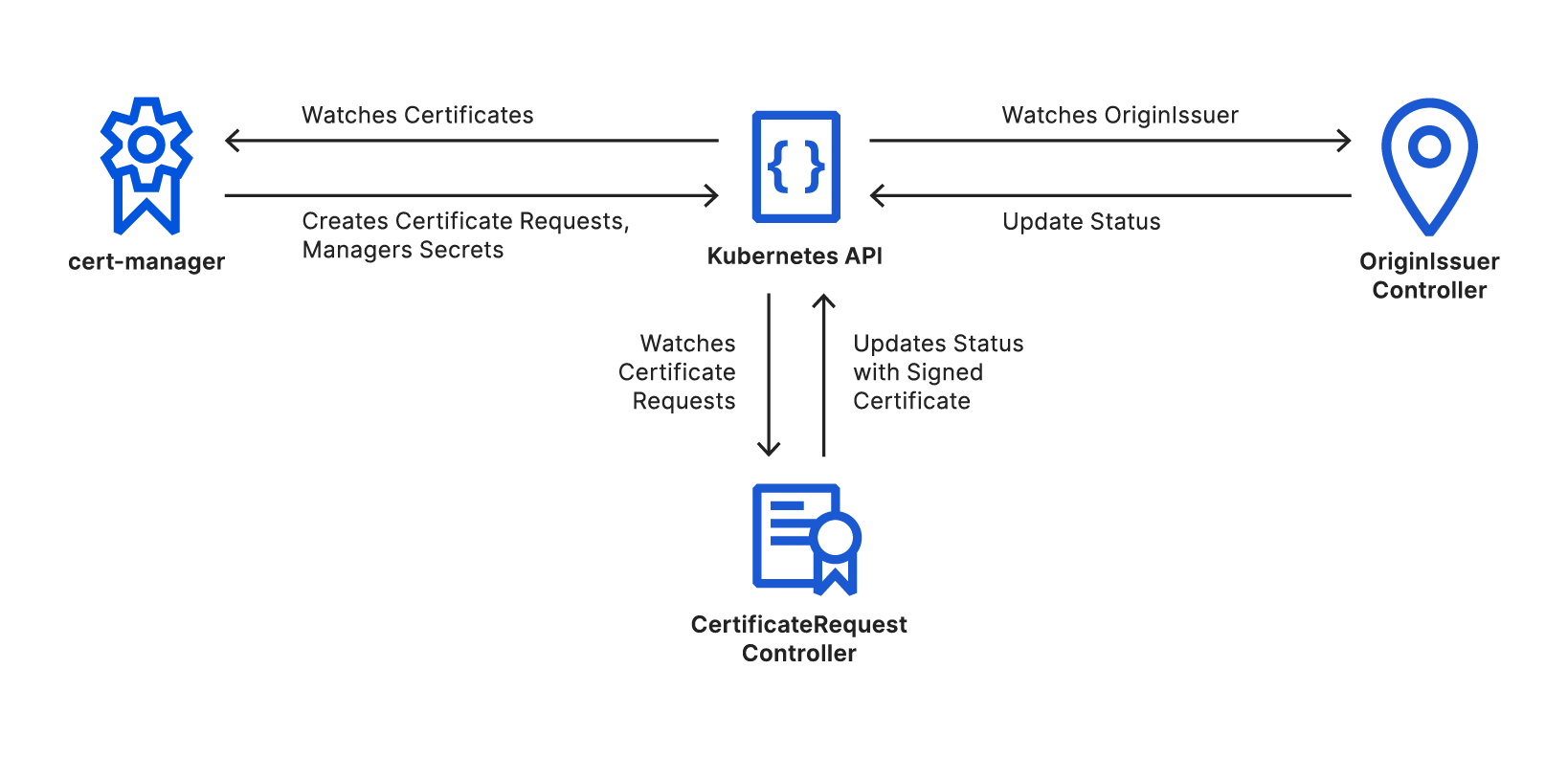
An external cert-manager issuer is a specialized Kubernetes controller. There’s no direct communication between cert-manager and external issuers at all; this means that you can use any existing tools and best practices for developing controllers to develop an external issuer.

We’ve decided to use the excellent controller-runtime project to build origin-ca-issuer, running two reconciliation controllers.

Automated Origin CA for Kubernetes

OriginIssuer Controller

The OriginIssuer controller watches for creation and modification of OriginIssuer custom resources. The controllers create a Cloudflare API client using the details and credentials referenced. This client API instance will later be used to sign certificates through the API. The controller will periodically retry to create an API client; once it is successful, it updates the OriginIssuer’s status to be ready.

CertificateRequest Controller

The CertificateRequest controller watches for the creation and modification of cert-manager’s CertificateRequest resources. These resources are created automatically by cert-manager as needed during a certificate’s lifecycle.

The controller looks for Certificate Requests that reference a known OriginIssuer, this reference is copied by cert-manager from the origin Certificate resource, and ignores all resources that do not match. The controller then verifies the OriginIssuer is in the ready state, before transforming the certificate request into an API request using the previously created clients.

On a successful response, the signed certificate is added to the certificate request, and which cert-manager will use to create or update the secret resource. On an unsuccessful request, the controller will periodically retry.

Learn More

Up-to-date documentation and complete installation instructions can be found in our GitHub repository. Feedback and contributions are greatly appreciated. If you’re interested in Kubernetes at Cloudflare, including building controllers like these, we’re hiring.