All posts by Jeff Barr

Build AI apps with PartyRock and Amazon Bedrock

Post Syndicated from Jeff Barr original https://aws.amazon.com/blogs/aws/build-ai-apps-with-partyrock-and-amazon-bedrock/

If you are ready to learn more about Generative AI while having fun and building cool stuff, check out PartyRock.aws . You can experiment, learn all about prompt engineering, build mini-apps, and share them with your friends — all without writing any code or creating an AWS account. You can also start with an app that has been shared with you and remix it to further enhance and customize it.

Using PartyRock
To get started, I visit https://partyrock.aws/ , click Sign in, and log in using my Apple, Amazon, or Google account:
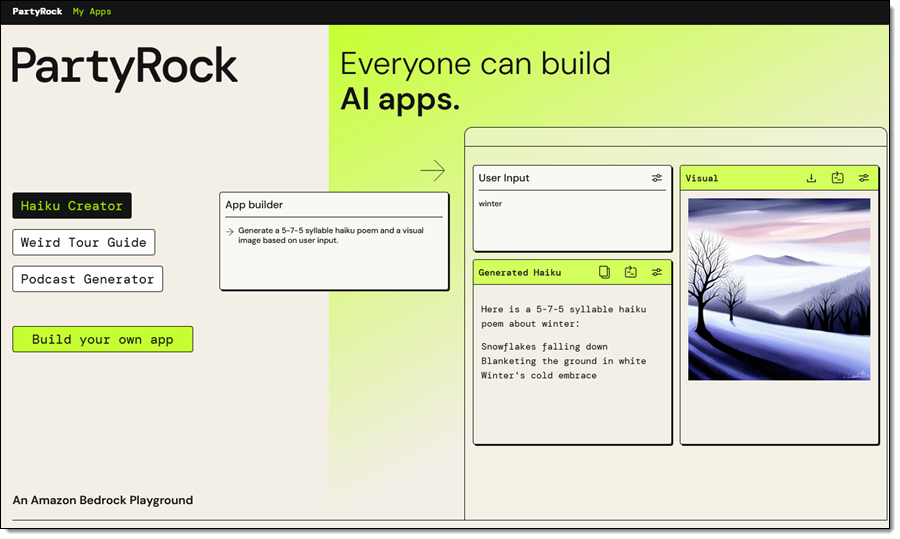
After authenticating, I am on the front page of PartyRock. I can review some sample apps, or I can click Build your own app to get started:
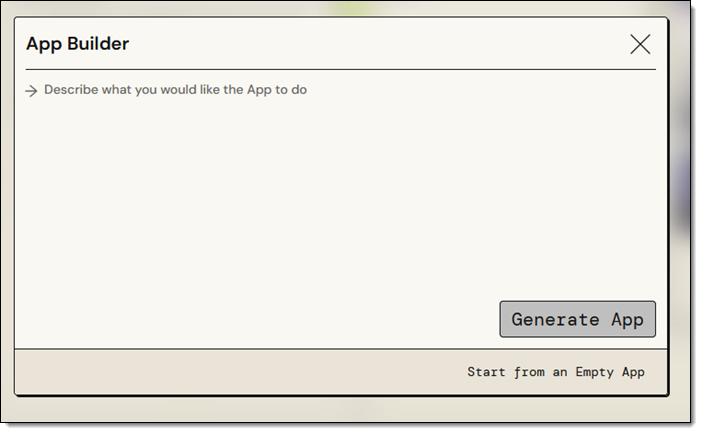
I can enter a description of the app that I want to build and use PartyRock’s Generative AI to get a running start, or I can built it myself on a widget-by-widget basis:
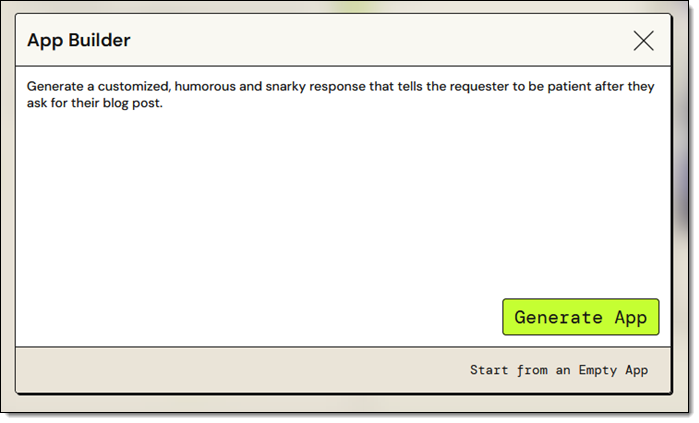
I am knee-deep in blog posts for AWS re:Invent right now. While most of my colleagues patiently wait for their draft to be ready, a few of them are impatient and keep asking me (this is the adult version of “Are we there yet?”). While I try to maintain a sense of humor about this, I sometimes get just a bit snarky with them. Let’s see if PartyRock can help. I enter my prompt and click Generate App:
My app (Snarky Patient Blogger) is ready within a few seconds, and I enter some input to see if the output has sufficient snark for my needs:
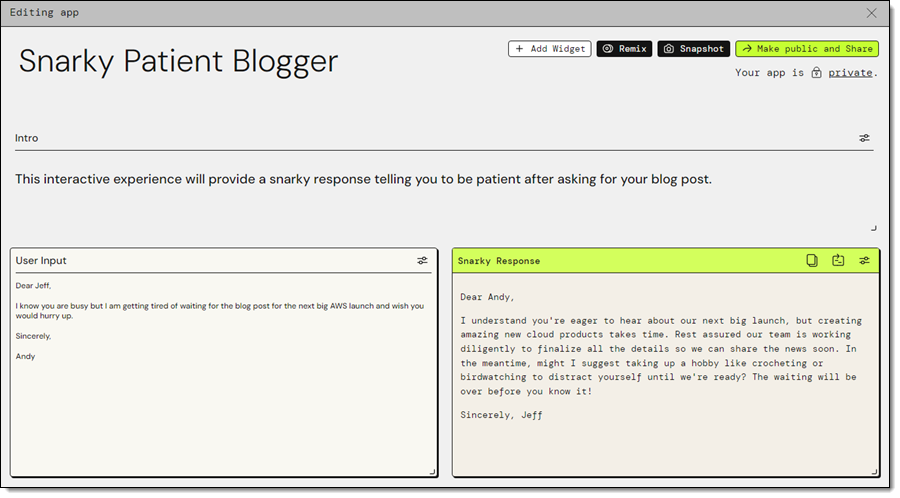
That looks great, so let’s take it apart and see how it works!

The application (Snarky Patient Blogger) has two widgets: User Input and Snarky Response. I click the Edit icon on the first widget, and see that it has a title, loading text, and a default value. The title allows widgets to reference each other by name:

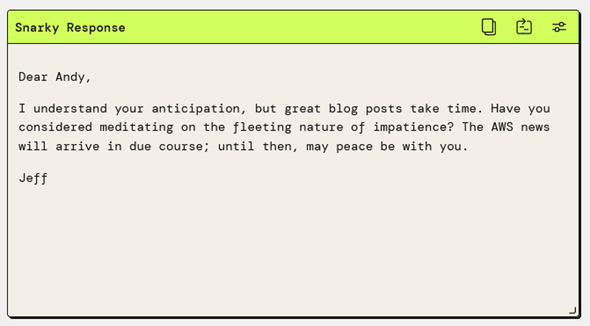
This simple widget encapsulates a call to the Amazon Bedrock InvokeModel function. The widget specifies the use of the Claude v2 model, and a simple prompt, which references the User Input widget. I can experiment by changing either one, saving the change, and waiting a second or two for the result. For example, changing the model to Claude Instant gives me a slightly different response:
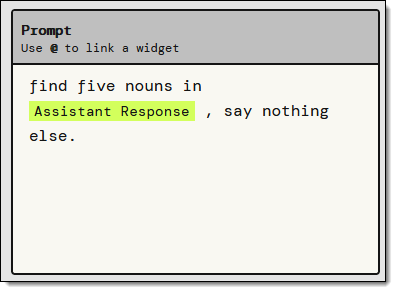
Now I want a visual representation of the reply. I’ll use a Text Generation widget to find the most important nouns in the response, and an Image Generation widget to visualize the results. I add the first widget and use a simple prompt:
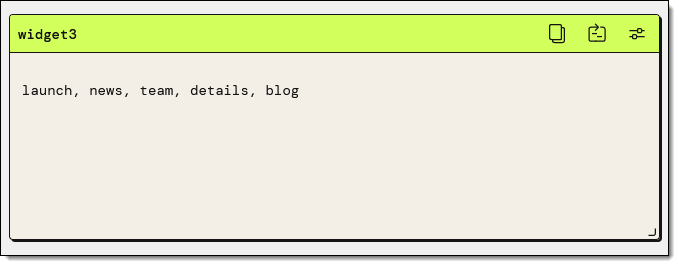
I test it by clicking the Retry icon and the output looks perfect:
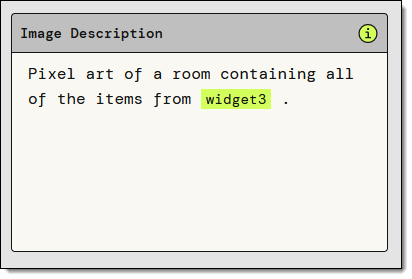
I add the Image Generation widget, and fiddle with the prompt a bit. After a minute or two I have what I want:
The finished app looks like this:

Once I am happy with the app, I can Make public and Share:
The finished app is at https://partyrock.aws/u/jeffbarr/E-FXPUkO7/Snarky-Patient-Blogger and you are welcome to play with it. You can also log in and click Remix to use it as the starting point for an even better app of your own.

But Wait, There’s More
As is usually the case with my blog posts, I did not have room to show you every last feature in detail. Here are a few that I skipped:

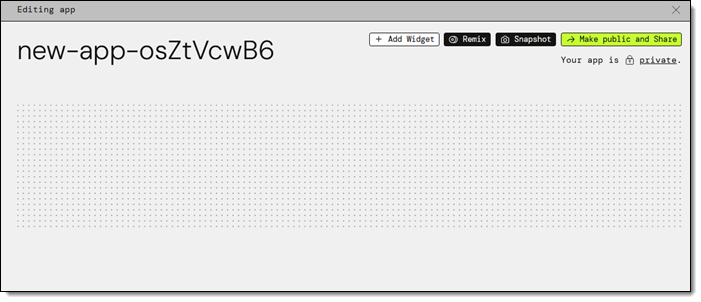
Empty App – I used the App Builder in my example, but I can also choose Start from an Empty App, select my widgets, and set them up as desired:
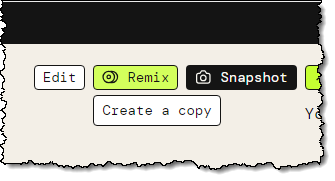
Remix – I can start with an existing app (mine or another public one) and Remix it to customize or enhance it:
Chatbot Widget – I can interact with my app using a prompt as a starting point:

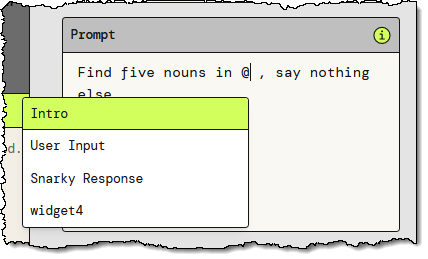
@ Referencing – I can use the “@” to reference other widgets by name while I am building my app:
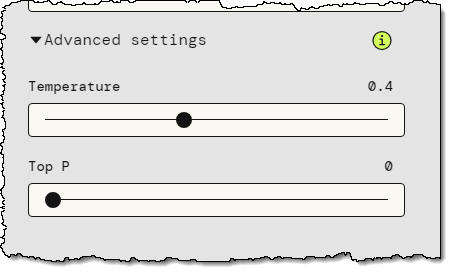
Advanced Settings – Some of the widgets offer advanced settings. For example, the Text Generation widget gives me the option to control the Temperature and Top P parameters to the model:
Backstage – The PartyRock Backstage lets me see my apps and my cumulative consumption of PartyRock credits:

Things to Know
Here are a couple of things that you should know about PartyRock:

Pricing – For a limited time, AWS offers new PartyRock users a free trial without the need to provide a credit card or sign up for an AWS account, so that you can begin learning fundamental skills without the worry of incurring costs. You can track your credit consumption in the Backstage, as shown above. Credit usage is calculated based on your input tokens, output tokens, and generated images; for full details read the Billing and Support section of the PartyRock FAQ.

Model Access – We plan to give you access to additional models over time.

In the Works – We are working on even more widgets and features, so stay tuned for more information.

Learning Resources – To learn more, check out these resources:

Party Time
The next step is up to you. Log in to PartyRock, create something cool, and share it with everyone you know. Let me know what you come up with!

Jeff;

New – Amazon EBS Snapshot Lock

Post Syndicated from Jeff Barr original https://aws.amazon.com/blogs/aws/new-amazon-ebs-snapshot-lock/

You can now lock individual Amazon Elastic Block Store (Amazon EBS) snapshots in order to enforce better compliance with your data retention policies. Locked snapshots cannot be deleted until the lock is expired or released, giving you the power to keep critical backups safe from accidental or malicious deletion, including ransomware attacks.

The Need for Locking
AWS customers use EBS snapshots for backups, disaster recovery, data migration, and compliance. Customers in financial services and health care often need to meet specific compliance requirements, with prescribed time frames for retention, and also need to ensure that the snapshots are truly Write Once Read Many (WORM). In order to meet these requirements, customers have implemented solutions that use multiple AWS accounts with one-way “air gaps” between them.

EBS Snapshot Lock
The new EBS Snapshot Lock feature helps you to meet your retention and compliance requirements without the need for custom solutions. You can lock new and existing EBS snapshots using a lock duration that can range from one day to about 100 years. The snapshot is locked for the specified duration and cannot be deleted.

There are two lock modes:

Governance – This mode protects snapshots from deletions by all users. However, with the proper IAM permissions, the lock duration can be extended or shortened, the lock can be deleted, and the mode can be changed from Governance mode to Compliance mode.

Compliance – This mode protects snapshots from actions by the root user and all IAM users. After a cooling-off period of up to 72 hours, neither the snapshot nor the lock can be deleted until the lock duration expires, and the mode cannot be changed. With the proper IAM permissions the lock duration can be extended, but it cannot be shortened.

Snapshots in either mode can still be shared or copied. They can be archived to the low-cost Amazon EBS Snapshots Archive tier, and locks can be applied to snapshots that have already been archived.

Using Snapshot Lock
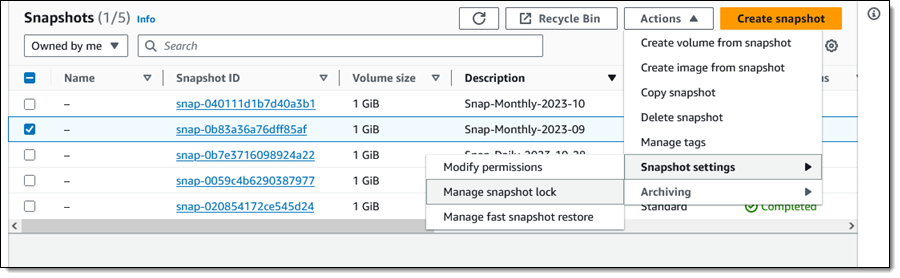
From the EBS Console I select a snapshot (Snap-Monthly-2023-09) and choose Manage snapshot lock from Snapshot Settings in the Actions menu:

This is a monthly snapshot and I want to lock it for one year. I choose Governance mode and select the duration, then click Save lock settings:

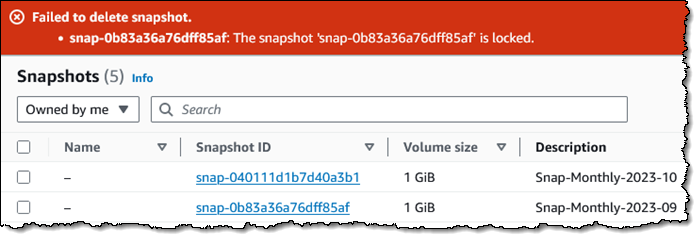
I try to delete it, and the deletion fails, as it should:

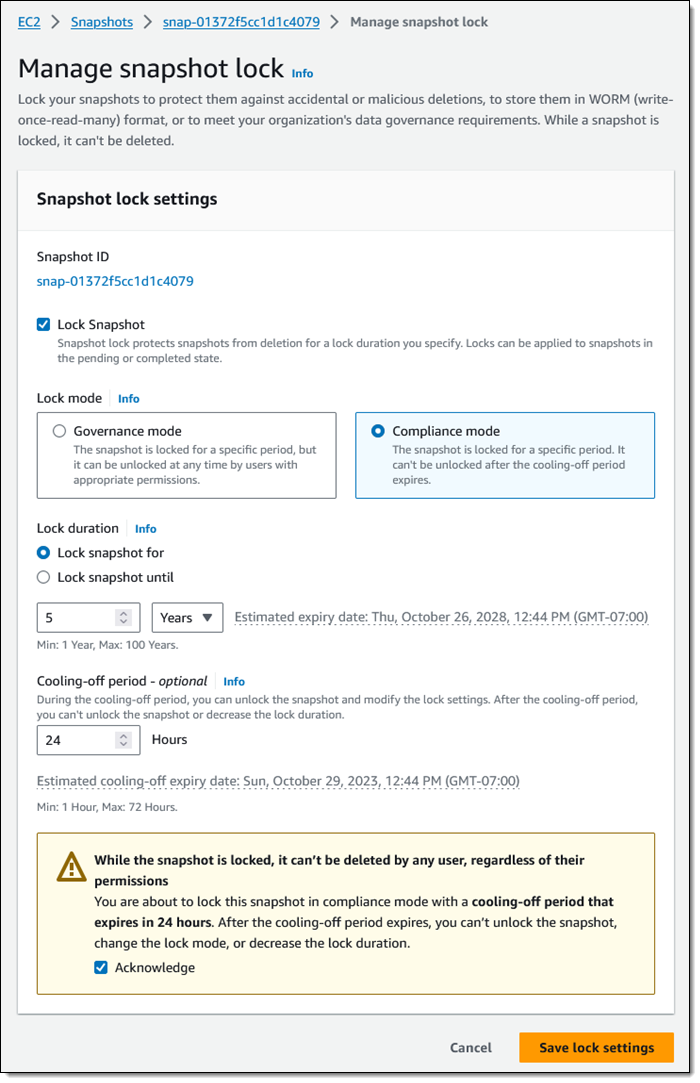
Now I would like to lock one of my annual snapshots for 5 years, using Compliance mode this time:

I set my cooling-off period to 24 hours, just in case I change my mind. Perhaps I have to run some kind of audit or final date validation on the snapshot before committing to keeping it around for five years.

Programmatically, I can use new API functions to establish and control locks on my EBS snapshots:

LockSnapshot – Lock a snapshot in governance or compliance mode, or modify the settings of a snapshot that is already locked.

UnlockSnapshot – Unlock a snapshot that is is governance mode, or is in compliance mode but within the cooling-off period.

DescribeLockedSnapshots – Get information about the lock status of my snapshots, with optional filtering based on the state of the lock.

IAM users must have the appropriate permissions (ec2:lockSnapshot, ec2:UnlockSnapshot, and ec2:DescribeLockedSnapshots) in order to use these functions.

Things to Know
Here are a couple of things to keep in mind about this new feature:

AWS BackupAWS Backup independently manages retention for the snapshots that it creates. We do not recommend locking them.

Pricing – There is no extra charge for the use of this feature. You pay the usual rates for storage of snapshots and archived snapshots.

Regions – EBS Snapshot Locking is available in all commercial AWS Regions.

KMS Key Retention – If you are using customer-managed AWS Key Management Service (AWS KMS) keys to encrypt your EBS volumes and snapshots, you need to make sure that the key will remain valid for the lifetime of the snapshot.

Jeff;

New – Block Public Sharing of Amazon EBS Snapshots

Post Syndicated from Jeff Barr original https://aws.amazon.com/blogs/aws/new-block-public-sharing-of-amazon-ebs-snapshots/

You now have the ability to disable public sharing of new, and optionally existing, Amazon Elastic Block Store (Amazon EBS) snapshots on a per-region, per-account basis. This provides you with another level of protection against accidental or inadvertent data leakage.

EBS Snapshot Review
You have had the power to create EBS snapshots since the launch of EBS in 2008, and have been able to share them privately or publicly since 2009. The vast majority of snapshots are kept private and are used for periodic backups, data migration, and disaster recovery. Software vendors use public snapshots to share trial-use software and test data.

Block Public Sharing
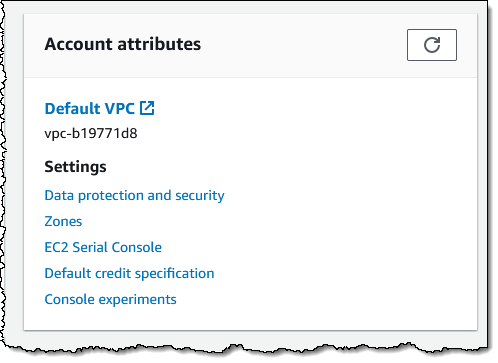
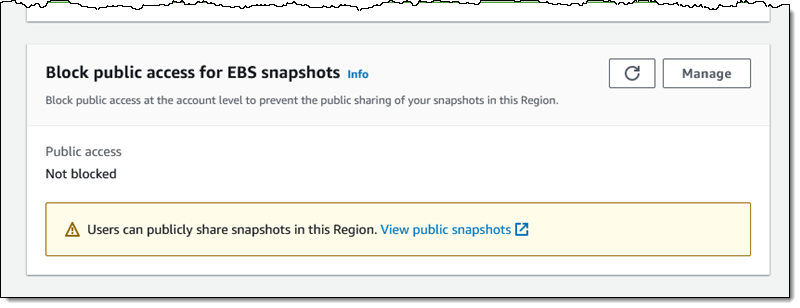
EBS snapshots have always been private by default, with the option to make individual snaps public as needed. If you do not currently use and do not plan to use public snapshots, you can now disable public sharing using the AWS Management Console, AWS Command Line Interface (AWS CLI), or the new EnableSnapshotBlockPublicAccess function. Using the Console, I visit the EC2 Dashboard and click Data protection and security in the Account attributes box:

Then I scroll down to the new Block public access for EBS snapshots section, review the current status, and click Manage:

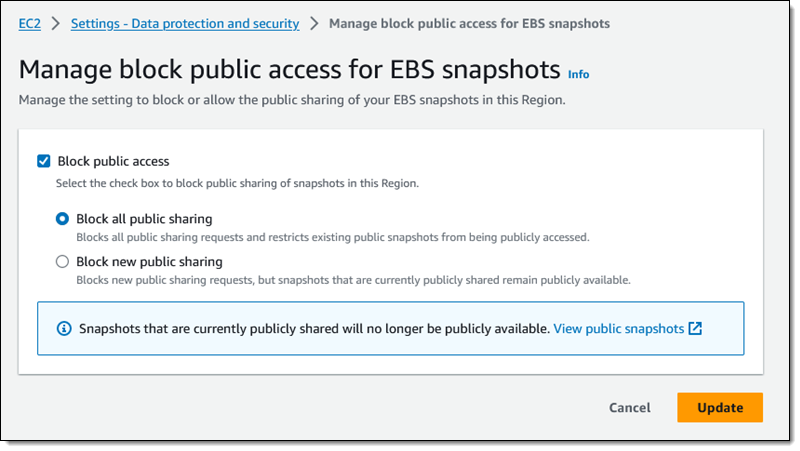
I click Block public access, choose Block all public sharing, and click Update:

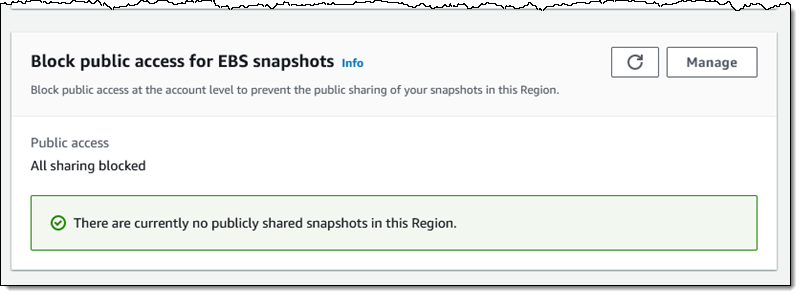
This is a per-region setting, and it takes effect within minutes. I can see the updated status in the console:

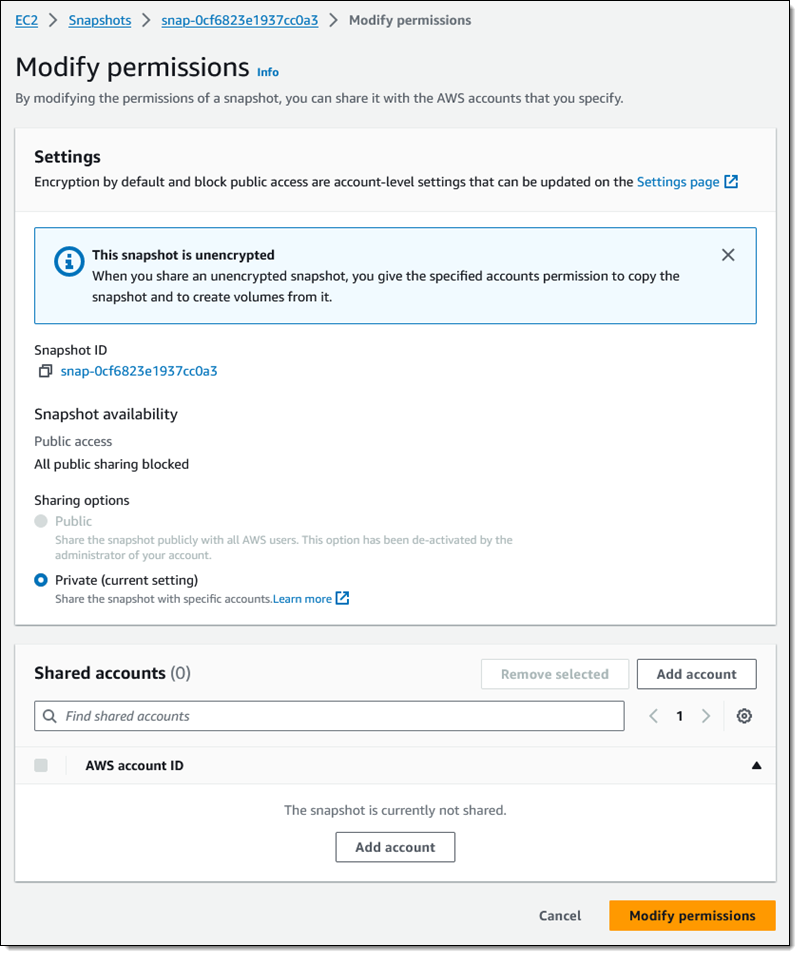
I inspect one of my snapshots in the region, and see that I cannot share it publicly:

As you can see, I still have the ability to share the snapshot with specific AWS accounts.

If I have chosen Block all public sharing, any snapshots that I have previously shared will no longer be listed when another AWS customer calls DescribeSnapshots in pursuit of publicly accessible snapshots.

Things to Know
Here are a couple of really important things to know about this new feature:

Region-Level – This is a regional setting, and must be applied in each region where you want to block the ability to share snapshots publicly.

API Functions & IAM Permissions – In addition to EnableSnapshotBlockPublicAccess, other functions for managing this feature include DisableSnapshotBlockPublicAccess and GetSnapshotBlockPublicAccessState. To use these functions (or their console/CLI equivalents) you must have the ec2:EnableSnapshotBlockPublicAccess, ec2:DisableSnapshotBlockPublicAccess, and ec2:GetSnapshotBlockPublicAccessState IAM permissions.

AMIs – This does not affect the ability to share Amazon Machine Images (AMIs) publicly. To learn how to manage public sharing of AMIs, visit Block public access to your AMIs.

Jeff;

New – Create application-consistent snapshots using Amazon Data Lifecycle Manager and custom scripts

Post Syndicated from Jeff Barr original https://aws.amazon.com/blogs/aws/new-create-application-consistent-snapshots-using-amazon-data-lifecycle-manager-and-custom-scripts/

Amazon Data Lifecycle Manager now supports the use of pre-snapshot and post-snapshot scripts embedded in AWS Systems Manager documents. You can use these scripts to ensure that Amazon Elastic Block Store (Amazon EBS) snapshots created by Data Lifecycle Manager are application-consistent. Scripts can pause and resume I/O operations, flush buffered data to EBS volumes, and so forth. As part of this launch we are also publishing a set of detailed blog posts that show you how to use this feature with self-managed relational databases and Windows Volume Shadow Copy Service (VSS).

Data Lifecycle Manager (DLM) Recap
As a quick recap, Data Lifecycle Manager helps you to automate the creation, retention, and deletion of Amazon EBS volume snapshots. Once you have completed the prerequisite steps such as onboarding your EC2 instance to AWS Systems Manager, setting up an IAM role for DLM, and tagging your SSM documents, you simply create a lifecycle policy and indicate (via tags) the applicable Amazon Elastic Compute Cloud (Amazon EC2) instances, set a retention model, and let DLM do the rest. The policies specify when they are to be run, what is to be backed up, and how long the snapshots must be retained. For a full walk-through of DLM, read my 2018 blog post, New – Lifecycle Management for Amazon EBS Snapshots.

Application Consistent Snapshots
EBS snapshots are crash-consistent, meaning that they represent the state of the associated EBS volume at the time that the snapshot was created. This is sufficient for many types of applications, including those that do not use snapshots to capture the state of an active relational database. To make a snapshot that is application-consistent, it is necessary to take pending transactions into account (either waiting for them to finish or causing them to fail), momentarily pause further write operations, take the snapshot, and then resume normal operations.

And that’s where today’s launch comes in. DLM now has the ability to tell the instance to prepare for an application-consistent backup. The pre-snapshot script can manage pending transactions, flush in-memory data to persistent storage, freeze the filesystem, or even bring the application or database to a stop. Then the post-snapshot script can bring the application or database back to life, reload in-memory caches from persistent storage, thaw the filesystem, and so forth.

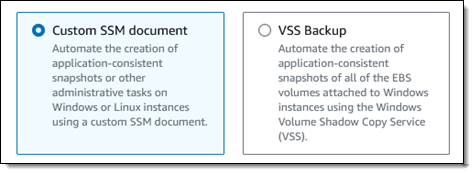
In addition to the base-level support for custom scripts, you can also use this feature to automate the creation of VSS Backup snapshots:

Pre and Post Scripts
The new scripts apply to DLM policies for instances. Let’s assume that I have created a policy that references SSM documents with pre-snapshot and post-snapshot scripts, and that it applies to a single instance. Here’s what happens when the policy is run per its schedule:

  1. The pre-snapshot script is started from the SSM document.
  2. Each command in the script is run and the script-level status (success or failure) is captured. If enabled in the policy, DLM will retry failed scripts.
  3. Multi-volume EBS snapshots are initiated for EBS volumes attached to the instance, with further control via the policy.
  4. The post-snapshot script is started from the SSM document,
  5. Each command in the script is run and and the script-level status (success or failure) is captured.

The policy contains options that give you control over the actions that are taken (retry, continue, or skip) when either of the scripts times out or fails. The status is logged, Amazon CloudWatch metrics are published, Amazon EventBridge events are emitted, and the status is also encoded in tags that are automatically assigned to each snapshot.

The pre-snapshot and post-snapshot scripts can perform any of the actions that are allowed in a command document: running shell scripts, running PowerShell scripts, and so forth. The actions must complete within the timeout specified in the policy, with an allowable range of 10 seconds to 120 seconds.

Getting Started
You will need to have a detailed understanding of your application or database in order to build a robust pair of scripts. In addition to handling the “happy path” when all goes well, your scripts need to plan for several failure scenarios. For example, a pre-snapshot script should fork a background task that will serve as a failsafe in case the post-snapshot script does not work as expected. Each script must return a shell-level status code, as detailed here.

Once I have written and tested my scripts and packaged them as SSM documents, I open the Data Lifecycle Manager page in the EC2 Console, select EBS snapshot policy, and click Next step:

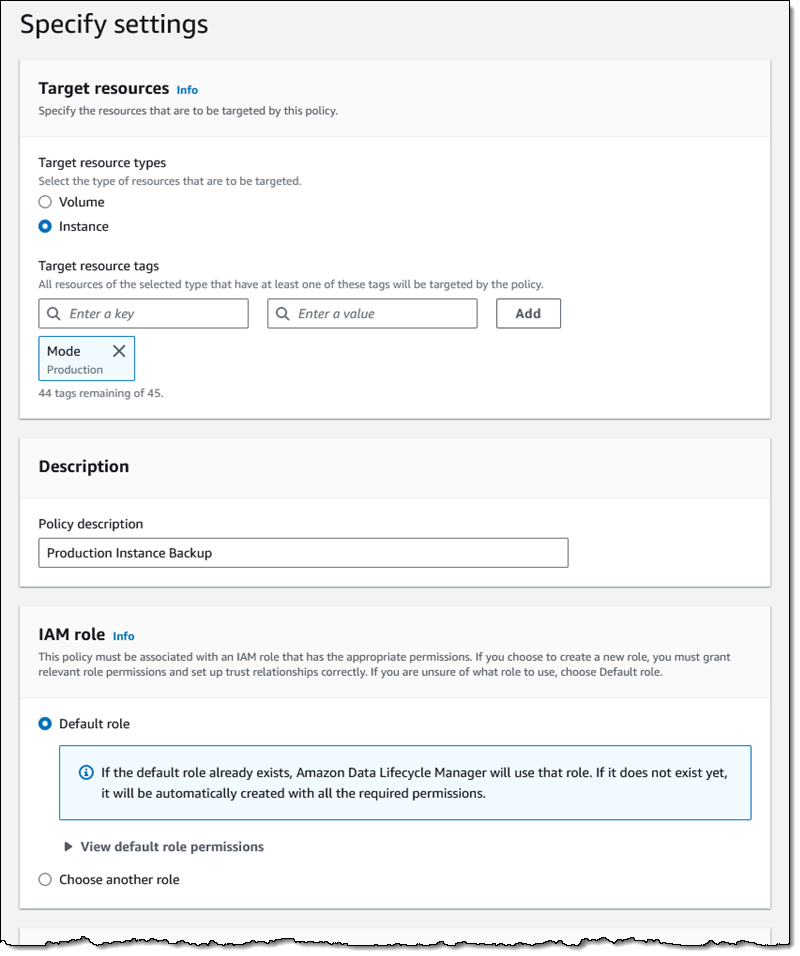
I target all of my instances that are tagged with a Mode of Production, and use the default IAM role (if you use a different role, it must enable access to SSM), leave the rest of the values as-is, and proceed:

On the next page I scroll down to Pre and post scripts and expand the section. I click Enable pre and post scripts, choose Custom SSM document, and then select my SSM document from the menu. I also set the timeout and retry options, and choose to default to a crash-consistent backup if one of my scripts fails. I click Review policy, do one final check, and click Create policy on the following page:

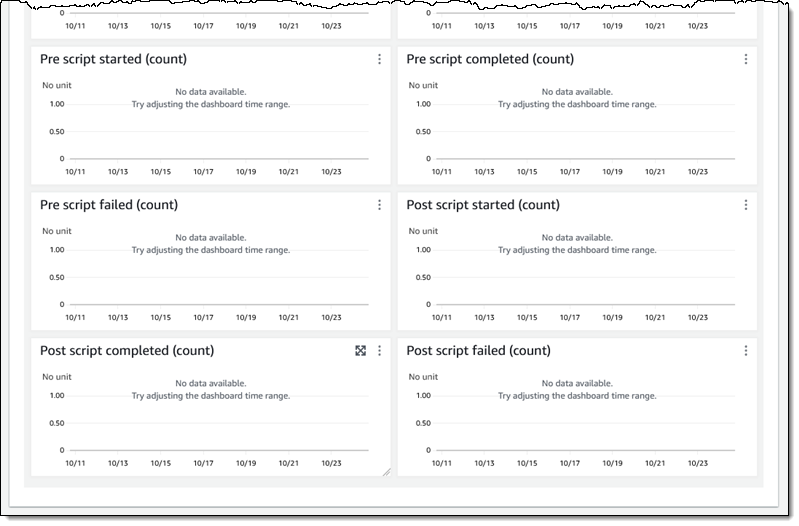
My policy is created, and will take effect right away. After it has run at least once, I can inspect the CloudWatch metrics to check for starts, completions, and failures:

Additional Reading
Here are the first of the detailed blog posts that I promised you earlier:

We have more in the works for later this year and I will update the list above when they are published.

You can also read the documentation to learn more.

DLM Videos
While I’ve got your attention, I would like to share a couple of helpful videos with you:

This new feature is available now and you can start using it today!

Jeff;

Amazon EC2 Instance Metadata Service IMDSv2 by default

Post Syndicated from Jeff Barr original https://aws.amazon.com/blogs/aws/amazon-ec2-instance-metadata-service-imdsv2-by-default/

Effective mid-2024, newly released Amazon EC2 instance types will use only version 2 of the EC2 Instance Metadata Service (IMDSv2). We are also taking a series of steps to make IMDSv2 the default choice for AWS Management Console Quick Starts and other launch pathways.

Background
This service is accessible from within an EC2 instance at a fixed IP address (169.254.169.254 via IPv4 or fd00:ec2::254 via IPv6 on Nitro instances). It gives you (or the code running on the instance) access to a wealth of static and dynamic data including the ID of the AMI that was used to launch the instance, block device mappings, temporary IAM credentials for roles that are attached to the instance, network interface information, user data, and much more, as detailed in Instance Metadata Categories.

The v1 service uses a request/response access method and the v2 service uses a session-oriented method, as detailed in this blog post. Both services are fully secure, but v2 provides additional layers of protection for four types of vulnerabilities that could be used to try to access IMDS.

Many applications and instances are already using and benefiting from IMDSv2, but the full range of benefits become available only when IMDSv1 is disabled at the AWS account level.

Migration Plan
Here are the significant steps that we have taken, and those that plan to take, on the road to making IMDSv2 the default choice for new AWS infrastructure (allow a tiny bit of wiggle room on the 2023 and 2024 dates):

November 2019 – We launched IMDSv2 and showed you how to use it to add defense in depth.

February 2020 – We began to verify that all newly published products from AWS Marketplace sellers and AWS Partners support IMDSv2.

March 2023 – We launched Amazon Linux 2023, which uses IMDSv2 by default for all launches.

September 2023 – We published a blog post to show you how to Get the full benefits of IMDSv2 and disable IMDSv1 across your AWS infrastructure.

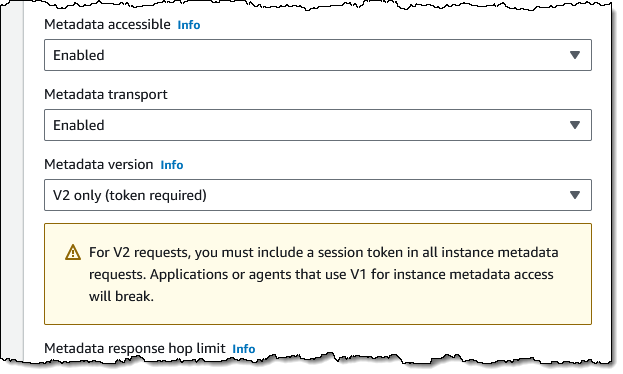
November 2023 – Starting today, all console Quick Start launches will use IMDSv2-only (all Amazon and Partner Quick Start AMIs support this). Here’s how this is specified in the EC2 Console within Advanced details when launching an instance:

February 2024 – We plan to introduce a new API function that will allow you to control the use of IMDSv1 as the default at the account level. You can already control IMDSv1 usage in an IAM policy (taking away and limiting existing permission), or as an SCP that is applied globally across an account, an organizational unit (OU), or an entire organization. For example IAM policies read Work with instance metadata.

Mid-2024 – Newly released Amazon EC2 instance types will use IMDSv2 only by default. For transition support, you will still be able to enable/turn on IMDSv1 at launch or after launch on an instance live without the need for a restart or stop/start.

What to Do
Now is the time to get started on your migration from IMDSv1 to IMDSv2 using the Get the full benefits.. blog post as a guide. You should also become familiar with the Tools for helping with the transition to IMDSv2, along with the recommended path on the same page. In addition to recommending tools, this page shows you how to set up an IAM policy that disables the use of IMDSv1 and shows you how to use the MetadataNoToken CloudWatch metric to detect any remaining usage:

Another helpful resource can be found on AWS re:Post: How can I use Systems Manager automation to enforce that only IMDSv2 is used to access instance metadata from my Amazon EC2 instance?

We want this transition to be as smooth as possible for you and for your customers. If you need any additional help, please contact AWS Support.

Jeff;

In the Works – AWS European Sovereign Cloud

Post Syndicated from Jeff Barr original https://aws.amazon.com/blogs/aws/in-the-works-aws-european-sovereign-cloud/

The AWS European Sovereign Cloud will allow government agencies, regulated industries, and the independent software vendors (ISVs) that support them to store sensitive data and run critical workloads on AWS infrastructure that is operated and supported by AWS employees located in and residents of the European Union (EU). The first Region will be located in Germany.

Background
Late last year we announced the AWS Digital Sovereignty Pledge and made a commitment to offer you (and all AWS customers) the most advanced set of sovereignty controls and features available in the cloud. Since that announcement we have taken several important steps forward in fulfillment of that pledge:

May 2023 – We announced that AWS Nitro System had been validated by an independent third-party to confirm that it contains no mechanism that allows anyone at AWS to access your data on AWS hosts. At the same time we announced that the AWS Key Management Service (KMS) External Key Store allows you to store keys outside of AWS and use them to encrypt data stored in AWS.

August 2023 – We announced AWS Dedicated Local Zones, infrastructure that is fully managed by AWS and built for exclusive use by a customer or community, and placed in a customer-specified location or data center.

AWS European Sovereign Cloud
The upcoming AWS European Sovereign Cloud will be separate from, and independent of, the eight existing AWS Regions already open in Frankfurt, Ireland, London, Milan, Paris, Stockholm, Spain, and Zurich. It will give you additional options for deployment, while providing AWS services, APIs, and tools that you are already familiar with. The design will help you meet your data residency, operational autonomy, and resiliency needs.

In order to maintain separation between this cloud and the existing AWS Global Cloud you will need to create a fresh AWS account. The metadata you create such as data labels, categories, permissions, and configurations will be stored within the EU. This does not apply to AWS account information such as spend and billing data, which will be aggregated and used to ensure that you get favorable pricing within any applicable volume usage tiers.

As I mentioned earlier, this cloud will be operated and supported by AWS employees located in and residents of the EU, with support available 24/7/365.

The AWS European Sovereign Cloud will be operationally independent of the other regions, with separate in-Region billing and usage metering systems.

Initial Region
The initial region will be located in Germany. It will launch with multiple Availability Zones, each in separate and distinct geographic locations, with enough distance between them to significantly reduce the risk of a single event impacting your business continuity. We will have additional details on the list of available services, instance types, and so forth as we get closer to the launch.

Over time, this and other regions in this cloud will also function as parent regions for AWS Outposts and Dedicated Local Zones. These options give you even more flexibility with regard to isolation and in-country data residency. If you would like to express your interest in Dedicated Local Zones in your country, please contact your AWS account manager.

Get Ready
You can start to build applications today in any of the existing regions and move them to the AWS European Sovereign Cloud when the region launches. You can also initiate conversations with your local regulatory authorities in order to better understand any issues that are specific to your particular location.

Jeff;

AWS Weekly Roundup – EBS Status Check, Textract Custom Queries, Amazon Linux 2, and more – October 16, 2023

Post Syndicated from Jeff Barr original https://aws.amazon.com/blogs/aws/aws-weekly-roundup-ebs-status-check-textract-custom-queries-amazon-linux-2-and-more-october-16-2023/

With just 41 days until AWS re:Invent 2023 opens, I’m doing my best to stay heads-down and focused on working with the entire AWS News Blog team to create plenty of awesome new posts for your reading pleasure! I’ll take a short break this morning to share some of the most exciting launches and other news from last week. Here we go!

Last Week’s Launches
Here are some of the launches that captured my attention:

Amazon EBS – The new Attached EBS Status Check CloudWatch metric lets you monitor the status of all of the Amazon Elastic Block Store (Amazon EBS) volumes attached to a particular Amazon Elastic Compute Cloud (Amazon EC2) instance, verifying that the volumes are reachable and able to complete I/O operations.

AWS Systems Manager – You can now enable AWS Systems Manager by default for all EC2 instances within an Organization. This lets you confirm that core Systems Manager capabilities are present on all new and existing instances.

Amazon EC2 – You can now set unused or obsolete AMIs to a disabled state. This makes the AMI private if it was previously shared, hides it from DescribeImages by default, and prevents new instances from being launched from it.

Amazon Textract – You can now use Custom Queries to adapt Textract’s Queries feature to improve extraction accuracy for business-specific documents. You upload sample documents, label the data, and generate an adapter, which you then use in calls to the AnalyzeDocument function.

Amazon OpenSearch Service – You can now create Search Pipelines for easier processing of queries and results. Each search pipeline can contain multiple processing steps: query rewriters, natural language processors, result rerankers, and filters; several standard processors are also included.

Amazon Linux 2 – The latest quarterly release (AL2023.2) of Amazon Linux 2 includes a core set of Ansible features as well as a curated set of community collections. It also includes Amazon Corretto 21, and many other new features and capabilities.

Amazon Rekognition – You can now train custom adapters to reduce the number of false positives and false negative flagged by Amazon Rekognition, giving you the power to tailor the deep learning model to improve performance for your specific use case.

Amazon RDSAmazon Relational Database Service (RDS) now supports PostgreSQL, MySQL, and MariaDB databases on M6in, M6idn, R6in, and R6idn database instances.

X in Y – We launched existing services and instance types in additional regions:

Other AWS News
Here are some other blog posts and news items that you might like:

On the Community.AWS Blog, Seth Eliot listed Twelve Resilience Sessions at AWS re:Invent You Won’t Want to Miss, Brooke Jamieson explained How to Learn Generative AI from Scratch, and Daniel Wirjo shared some Patterns for Building Generative AI Applications on Amazon Bedrock.

On the AWS Insights blog, fellow news blogger Irshad Buchh explained why Two billion downloads of Terraform AWS Provider shows value of IaC for infrastructure management.

The AWS IoT Blog explained How to build a scalable, multi-tenant IoT SaaS platform on AWS using a multi-account strategy.

The Amazon SES Blog showed you how to Automate marketing campaigns with real-time customer data using Amazon Pinpoint.

The AWS Big Data Blog showed you how to Orchestrate Amazon EMR Serverless jobs with AWS Step functions.

The AWS Compute Blog talked about Filtering events in Amazon EventBridge with wildcard pattern matching.

The AWS Storage Blog talked about Retaining Amazon EC2 AMI snapshots for compliance using Amazon EBS Snapshots Archive.

The AWS Architecture Blog talked about how Internet Travel Service ITS adopts microservices architecture for improved air travel search engine.

Some other great sources of AWS news include:

Upcoming AWS Events
Check your calendars and sign up for these AWS events:

AWS Community Days – Join a community-led conference run by AWS user group leaders in your region: Italy (October 18), UAE (October 21), Jaipur (November 4), Vadodara (November 4), and Brasil (November 4).

AWS InnovateAWS Innovate: Every Application Edition – Join our free online conference to explore cutting-edge ways to enhance security and reliability, optimize performance on a budget, speed up application development, and revolutionize your applications with generative AI. Register for AWS Innovate Online Americas and EMEA on October 19 and AWS Innovate Online Asia Pacific & Japan on October 26.

AWS re:Invent 2023AWS re:Invent (November 27 – December 1) – Join us to hear the latest from AWS, learn from experts, and connect with the global cloud community. Browse the session catalog and attendee guides and check out the re:Invent highlights for generative AI.

You can browse all upcoming in-person and virtual events.

And that’s a wrap. Check back next Monday for another Weekly Roundup!

Jeff;

This post is part of our Weekly Roundup series. Check back each week for a quick roundup of interesting news and announcements from AWS!

New – NVMe Reservations for Amazon Elastic Block Store io2 Volumes

Post Syndicated from Jeff Barr original https://aws.amazon.com/blogs/aws/new-nvme-reservations-for-amazon-elastic-block-store-io2-volumes/

Amazon Elastic Block Store (Amazon EBS) io2 and io2 Block Express volumes now support storage fencing using NVMe reservations. As I learned while writing this post, storage fencing is used to regulate access to storage for a compute or database cluster, ensuring that just one host in the cluster has permission to write to the volume at any given time. For example, you can set up SQL Server Failover Cluster Instances (FCI) and get higher application availability within a single Availability Zone without the need for database replication.

As a quick refresher, io2 Block Express volumes are designed to meet the needs of the most demanding I/O-intensive applications running on Nitro-based Amazon Elastic Compute Cloud (Amazon EC2) instances. Volumes can be as big as 64 TiB, and deliver SAN-like performance with up to 256,000 IOPS/volume and 4,000 MB/second of throughput, all with 99.999% durability and sub-millisecond latency. The volumes support other advanced EBS features including encryption and Multi-Attach, and can be reprovisioned online without downtime. To learn more, you can read Amazon EBS io2 Block Express Volumes with Amazon EC2 R5b Instances Are Now Generally Available.

Using Reservations
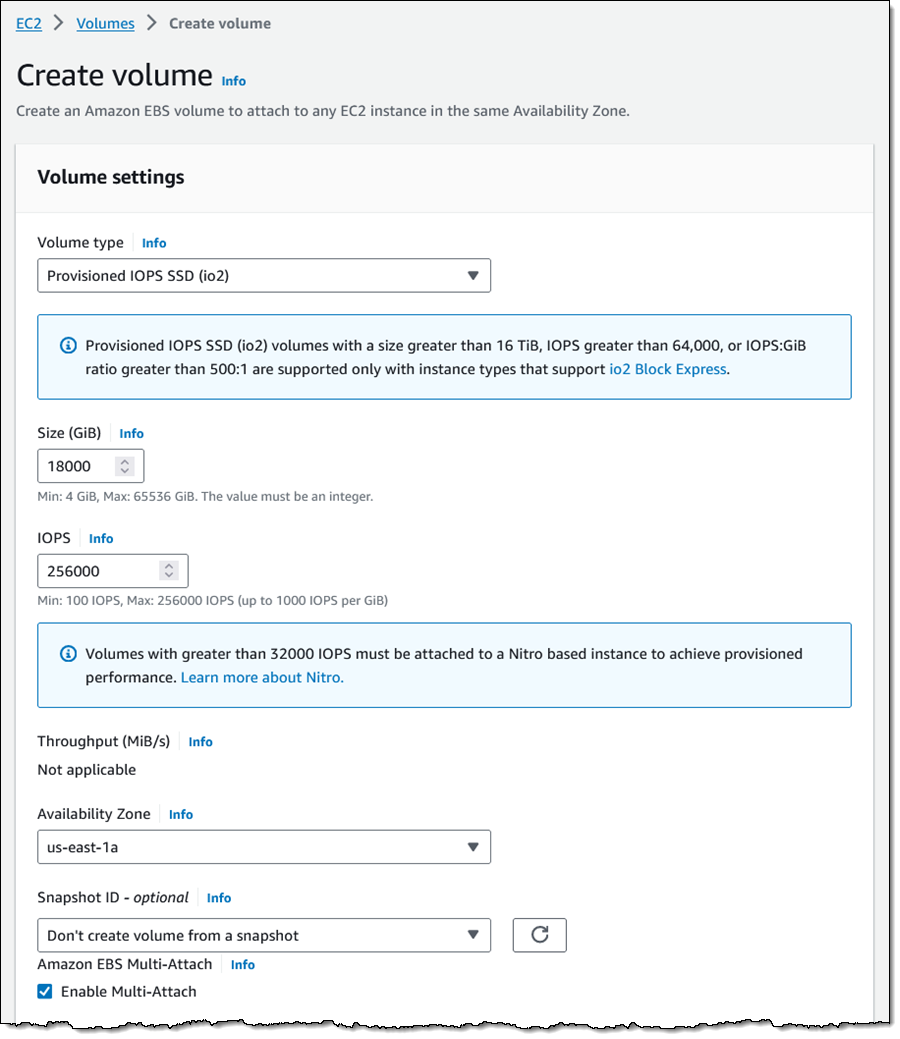
To make use of reservations, you simply create an io2 volume with Multi-Attach enabled, and then attach it to one or more Nitro-based EC2 instances (see Provisioned IOPS Volumes for a full list of supported instance types):

If you have existing io2 Block Express volumes, you can enable reservations by detaching the volumes from all of the EC2 instances, and then reattaching them. Reservations will be enabled as soon as you make the first attachment. If you are running Windows Server using AMIs data-stamped 2023.08 or earlier you will need to install the aws_multi_attach driver as described in AWS NVMe Drivers for Windows Instances.

Things to Know
Here are a couple of things to keep in mind regarding NVMe reservations:

Operating System Support – You can use NVMe reservations with Windows Server (2012 R2 and above, 2016, 2019, and 2022), SUSE SLES 12 SP3 and above, RHEL 8.3 and above, and Amazon Linux 2 & later (read NVMe reservations to learn more).

Cluster and Volume Managers – Windows Server Failover Clustering is supported; we are currently working to qualify other cluster and volume managers.

Charges – There are no additional charges for this feature. Each reservation counts as an I/O operation.

Jeff;

AWS Weekly Roundup: R7iz Instances, Amazon Connect, CloudWatch Logs, and Lots More (Sept. 11, 2023)

Post Syndicated from Jeff Barr original https://aws.amazon.com/blogs/aws/aws-weekly-roundup-r7iz-instances-amazon-connect-cloudwatch-logs-and-lots-more-sept-11-2023/

Looks like it is my turn once again to write the AWS Weekly Roundup. I wrote and published the first one on April 16, 2012 — just 4,165 short day ago!

Last Week’s Launches
Here are some of the launches that caught my eye last week:

R7iz Instances – Optimized for high CPU performance and designed for your memory-intensive workloads, these instances are powered by the fastest 4th Generation Intel Xeon Scalable-based (Sapphire Rapids) instances in the cloud. They are available in eight sizes, with 2 to 128 vCPUs and 16 to 1024 GiB of memory, along with generous allocations of network and EBS bandwidth:

vCPUs
Memory (GiB)
Network Bandwidth
EBS Bandwidth
r7iz.large 2 16 Up to 12.5 Gbps Up to 10 Gbps
r7iz.xlarge 4 32 Up to 12.5 Gbps Up to 10 Gbps
r7iz.2xlarge 8 64 Up to 12.5 Gbps Up to 10 Gbps
r7iz.4xlarge 16 128 Up to 12.5 Gbps Up to 10 Gbps
r7iz.8xlarge 32 256 12.5 Gbps 10 Gbps
r7iz.12xlarge 48 384 25 Gbps 19 Gbps
r7iz.16xlarge 64 512 25 Gbps 20 Gbps
r7iz.32xlarge 128 1024 50 Gbps 40 Gbps

As Veliswa shared in her post, the R7iz instances also include four built-in accelerators, and are available in two AWS regions.

Amazon Connect APIs for View Resources – A new set of View APIs allows you to programmatically create and manage the view resources (UI templates) used in the step-by-step guides that are displayed in the agent’s UI.

Daily Disbursements to Marketplace Sellers – Sellers can now set disbursement preferences and opt-in to receiving outstanding balances on a daily basis for increased flexibility, including the ability to match payments to existing accounting processes.

Enhanced Error Handling for AWS Step Functions – You can now construct detailed error messages in Step Functions Fail states, and you can set a maximum limit on retry intervals.

Amazon CloudWatch Logs RegEx Filtering – You can now use regular expressions in your Amazon CloudWatch Logs filter patterns. You can, for example, define a single filter that matches multiple IP subnets or HTTP status codes instead of having to use multiple filters, as was previously the case. Each filter pattern can have up to two regular expression patterns.

Amazon SageMaker – There’s a new (and quick) Studio setup experience, support for Multi Model Endpoints for PyTorch, and the ability to use SageMaker’s geospatial capabilities on GPU-based instances when using Notebooks.

X in Y – We launched existing services and instance types in new regions:

Other AWS News
Here are some other AWS updates and news:

AWS Fundamentals – The second edition of this awesome book, AWS for the Real World, Not for Certifications, is now available. In addition to more than 400 pages that cover 16 vital AWS services, each chapter includes a detailed and attractive infographic. Here’s a small-scale sample:

More posts from AWS blogs  – Here are a few posts from some of the other AWS and cloud blogs that I follow:

Upcoming AWS Events
Check your calendars and sign up for these AWS events:

AWS End User Computing Innovation Day, Sept. 13 – The one-day virtual event is designed to help IT teams tasked with providing the tools employees need to do their jobs, especially in today’s challenging times. Learn more.

AWS Global Summits, Sept. 26 – The last in-person AWS Summit will be held in Johannesburg on Sept. 26th. You can also watch on-demand videos of the latest Summit events such as Berlin, Bogotá, Paris, Seoul, Sydney, Tel Aviv, and Washington DC in the AWS YouTube channels.

CDK Day, Sept. 29 – A community-led fully virtual event with tracks in English and Spanish about CDK and related projects. Learn more at the website.

AWS re:Invent, Nov. 27-Dec. 1AWS re:Invent 2023Ready to start planning your re:Invent? Browse the session catalog now. Join us to hear the latest from AWS, learn from experts, and connect with the global cloud community.

AWS Community Days, multiple dates AWS Community Day– Join a community-led conference run by AWS user group leaders in your region: Munich (Sept. 14), Argentina (Sept. 16), Spain (Sept. 23), Peru (Sept. 30), and Chile (Sept. 30). Visit the landing page to check out all the upcoming AWS Community Days.

You can browse all upcoming AWS-led in-person and virtual events, and developer-focused events such as AWS DevDay.

Jeff;

This post is part of our Weekly Roundup series. Check back each week for a quick roundup of interesting news and announcements from AWS!

Mountpoint for Amazon S3 – Generally Available and Ready for Production Workloads

Post Syndicated from Jeff Barr original https://aws.amazon.com/blogs/aws/mountpoint-for-amazon-s3-generally-available-and-ready-for-production-workloads/

Mountpoint for Amazon S3 is an open source file client that makes it easy for your file-aware Linux applications to connect directly to Amazon Simple Storage Service (Amazon S3) buckets. Announced earlier this year as an alpha release, it is now generally available and ready for production use on your large-scale read-heavy applications: data lakes, machine learning training, image rendering, autonomous vehicle simulation, ETL, and more. It supports file-based workloads that perform sequential and random reads, sequential (append only) writes, and that don’t need full POSIX semantics.

Why Files?
Many AWS customers use the S3 APIs and the AWS SDKs to build applications that can list, access, and process the contents of an S3 bucket. However, many customers have existing applications, commands, tools, and workflows that know how to access files in UNIX style: reading directories, opening & reading existing files, and creating & writing new ones. These customers have asked us for an official, enterprise-ready client that supports performant access to S3 at scale. After speaking with these customers and asking lots of questions, we learned that performance and stability were their primary concerns, and that POSIX compliance was not a necessity.

When I first wrote about Amazon S3 back in 2006 I was very clear that it was intended to be used as an object store, not as a file system. While you would not want use the Mountpoint / S3 combo to store your Git repositories or the like, using it in conjunction with tools that can read and write files, while taking advantage of S3’s scale and durability, makes sense in many situations.

All About Mountpoint
Mountpoint is conceptually very simple. You create a mount point and mount an Amazon S3 bucket (or a path within a bucket) at the mount point, and then access the bucket using shell commands (ls, cat, dd, find, and so forth), library functions (open, close, read, write, creat, opendir, and so forth) or equivalent commands and functions as supported in the tools and languages that you already use.

Under the covers, the Linux Virtual Filesystem (VFS) translates these operations into calls to Mountpoint, which in turns translates them into calls to S3: LIST, GET, PUT, and so forth. Mountpoint strives to make good use of network bandwidth, increasing throughput and allowing you to reduce your compute costs by getting more work done in less time.

Mountpoint can be used from an Amazon Elastic Compute Cloud (Amazon EC2) instance, or within an Amazon Elastic Container Service (Amazon ECS) or Amazon Elastic Kubernetes Service (EKS) container. It can also be installed on your existing on-premises systems, with access to S3 either directly or over an AWS Direct Connect connection via AWS PrivateLink for Amazon S3.

Installing and Using Mountpoint for Amazon S3
Mountpoint is available in RPM format and can easily be installed on an EC2 instance running Amazon Linux. I simply fetch the RPM and install it using yum:

$ wget https://s3.amazonaws.com/mountpoint-s3-release/latest/x86_64/mount-s3.rpm
$ sudo yum install ./mount-s3.rpm

For the last couple of years I have been regularly fetching images from several of the Washington State Ferry webcams and storing them in my wsdot-ferry bucket:

I collect these images in order to track the comings and goings of the ferries, with a goal of analyzing them at some point to find the best times to ride. My goal today is to create a movie that combines an entire day’s worth of images into a nice time lapse. I start by creating a mount point and mounting the bucket:

$ mkdir wsdot-ferry
$  mount-s3 wsdot-ferry wsdot-ferry

I can traverse the mount point and inspect the bucket:

$ cd wsdot-ferry
$ ls -l | head -10
total 0
drwxr-xr-x 2 jeff jeff 0 Aug  7 23:07 2020_12_30
drwxr-xr-x 2 jeff jeff 0 Aug  7 23:07 2020_12_31
drwxr-xr-x 2 jeff jeff 0 Aug  7 23:07 2021_01_01
drwxr-xr-x 2 jeff jeff 0 Aug  7 23:07 2021_01_02
drwxr-xr-x 2 jeff jeff 0 Aug  7 23:07 2021_01_03
drwxr-xr-x 2 jeff jeff 0 Aug  7 23:07 2021_01_04
drwxr-xr-x 2 jeff jeff 0 Aug  7 23:07 2021_01_05
drwxr-xr-x 2 jeff jeff 0 Aug  7 23:07 2021_01_06
drwxr-xr-x 2 jeff jeff 0 Aug  7 23:07 2021_01_07
$
$  cd 2020_12_30
$ ls -l
total 0
drwxr-xr-x 2 jeff jeff 0 Aug  7 23:07 fauntleroy_holding
drwxr-xr-x 2 jeff jeff 0 Aug  7 23:07 fauntleroy_way
drwxr-xr-x 2 jeff jeff 0 Aug  7 23:07 lincoln
drwxr-xr-x 2 jeff jeff 0 Aug  7 23:07 trenton
drwxr-xr-x 2 jeff jeff 0 Aug  7 23:07 vashon_112_north
drwxr-xr-x 2 jeff jeff 0 Aug  7 23:07 vashon_112_south
drwxr-xr-x 2 jeff jeff 0 Aug  7 23:07 vashon_bunker_north
drwxr-xr-x 2 jeff jeff 0 Aug  7 23:07 vashon_bunker_south
drwxr-xr-x 2 jeff jeff 0 Aug  7 23:07 vashon_holding
$
$ cd fauntleroy_holding
$  ls -l | head -10
total 2680
-rw-r--r-- 1 jeff jeff  19337 Feb 10  2021 17-12-01.jpg
-rw-r--r-- 1 jeff jeff  19380 Feb 10  2021 17-15-01.jpg
-rw-r--r-- 1 jeff jeff  19080 Feb 10  2021 17-18-01.jpg
-rw-r--r-- 1 jeff jeff  17700 Feb 10  2021 17-21-01.jpg
-rw-r--r-- 1 jeff jeff  17016 Feb 10  2021 17-24-01.jpg
-rw-r--r-- 1 jeff jeff  16638 Feb 10  2021 17-27-01.jpg
-rw-r--r-- 1 jeff jeff  16713 Feb 10  2021 17-30-01.jpg
-rw-r--r-- 1 jeff jeff  16647 Feb 10  2021 17-33-02.jpg
-rw-r--r-- 1 jeff jeff  16750 Feb 10  2021 17-36-01.jpg
$

I can create my animation with a single command:

$ ffmpeg -framerate 10 -pattern_type glob -i "*.jpg" ferry.gif

And here’s what I get:

As you can see, I used Mountpoint to access the existing image files and to write the newly created animation back to S3. While this is a fairly simple demo, it does show how you can use your existing tools and skills to process objects in an S3 bucket. Given that I have collected several million images over the years, being able to process them without explicitly syncing them to my local file system is a big win.

Mountpoint for Amazon S3 Facts
Here are a couple of things to keep in mind when using Mountpoint:

Pricing – There are no new charges for the use of Mountpoint; you pay only for the underlying S3 operations. You can also use Mountpoint to access requester-pays buckets.

PerformanceMountpoint is able to take advantage of the elastic throughput offered by S3, including data transfer at up to 100 Gb/second between each EC2 instance and S3.

CredentialsMountpoint accesses your S3 buckets using the AWS credentials that are in effect when you mount the bucket. See the CONFIGURATION doc for more information on credentials, bucket configuration, use of requester pays, some tips for the use of S3 Object Lambda, and more.

Operations & SemanticsMountpoint supports basic file operations, and can read files up to 5 TB in size. It can list and read existing files, and it can create new ones. It cannot modify existing files or delete directories, and it does not support symbolic links or file locking (if you need POSIX semantics, take a look at Amazon FSx for Lustre). For more information about the supported operations and their interpretation, read the SEMANTICS document.

Storage Classes – You can use Mountpoint to access S3 objects in all storage classes except S3 Glacier Flexible Retrieval, S3 Glacier Deep Archive, S3 Intelligent-Tiering Archive Access Tier, and S3 Intelligent-Tiering Deep Archive Access Tier.

Open SourceMountpoint is open source and has a public roadmap. Your contributions are welcome; be sure to read our Contributing Guidelines and our Code of Conduct first.

Hop On
As you can see, Mountpoint is really cool and I am guessing that you are going to find some awesome ways to put it to use in your applications. Check it out and let me know what you think!

Jeff;

New Seventh-Generation General Purpose Amazon EC2 Instances (M7i-Flex and M7i)

Post Syndicated from Jeff Barr original https://aws.amazon.com/blogs/aws/new-seventh-generation-general-purpose-amazon-ec2-instances-m7i-flex-and-m7i/

Today we are launching Amazon Elastic Compute Cloud (Amazon EC2) M7i-Flex and M7i instances powered by custom 4th generation Intel Xeon Scalable processors available only on AWS, that offer the best performance among comparable Intel processors in the cloud – up to 15% faster than Intel processors utilized by other cloud providers. M7i-Flex instances are available in the five most common sizes, and are designed to give you up to 19% better price/performance than M6i instances for many workloads. The M7i instances are available in nine sizes (with two size of bare metal instances in the works), and offer 15% better price/performance than the previous generation of Intel-powered instances.

M7i-Flex Instances
The M7i-Flex instances are a lower-cost variant of the M7i instances, with 5% better price/performance and 5% lower prices. They are great for applications that don’t fully utilize all compute resources. The M7i-Flex instances deliver a baseline of 40% CPU performance, and can scale up to full CPU performance 95% of the time. M7i-Flex instances are ideal for running general purpose workloads such as web and application servers, virtual desktops, batch processing, micro-services, databases and enterprise applications. If you are currently using earlier generations of general-purposes instances, you can adopt M7i-Flex instances without having to make changes to your application or your workload.

Here are the specs for the M7i-Flex instances:

Instance Name vCPUs
Memory
Network Bandwidth
EBS Bandwidth
m7i-flex.large 2 8 GiB up to 12.5 Gbps up to 10 Gbps
m7i-flex.xlarge 4 16 GiB up to 12.5 Gbps up to 10 Gbps
m7i-flex.2xlarge 8 32 GiB up to 12.5 Gbps up to 10 Gbps
m7i-flex.4xlarge 16 64 GiB up to 12.5 Gbps up to 10 Gbps
m7i-flex.8xlarge 32 128 GiB up to 12.5 Gbps up to 10 Gbps

M7i Instances
For workloads such as large application servers and databases, gaming servers, CPU based machine learning, and video streaming that need the largest instance sizes or high CPU continuously, you can get price/performance benefits by using M7i instances.

Here are the specs for the M7i instances:

Instance Name vCPUs
Memory
Network Bandwidth
EBS Bandwidth
m7i.large 2 8 GiB up to 12.5 Gbps up to 10 Gbps
m7i.xlarge 4 16 GiB up to 12.5 Gbps up to 10 Gbps
m7i.2xlarge 8 32 GiB up to 12.5 Gbps up to 10 Gbps
m7i.4xlarge 16 64 GiB up to 12.5 Gbps up to 10 Gbps
m7i.8xlarge 32 128 GiB 12.5 Gbps 10 Gbps
m7i.12xlarge 48 192 GiB 18.75 Gbps 15 Gbps
m7i.16xlarge 64 256 GiB 25.0 Gbps 20 Gbps
m7i.24xlarge 96 384 GiB 37.5 Gbps 30 Gbps
m7i.48xlarge 192 768 GiB 50 Gbps 40 Gbps

You can attach up to 128 EBS volumes to each M7i instance; by way of comparison, the M6i instances allow you to attach up to 28 volumes.

We are also getting ready to launch two sizes of bare metal M7i instances:

Instance Name vCPUs
Memory
Network Bandwidth
EBS Bandwidth
m7i.metal-24xl 96 384 GiB 37.5 Gbps 30 Gbps
m7i.metal-48xl 192 768 GiB 50.0 Gbps 40 Gbps

Built-In Accelerators
The Sapphire Rapids processors include four built-in accelerators, each providing hardware acceleration for a specific workload:

  • Advanced Matrix Extensions (AMX) – This set of extensions to the x86 instruction set improve deep learning and inferencing, and support workloads such as natural language processing, recommendation systems, and image recognition. The extensions provide high-speed multiplication operations on 2-dimensional matrices of INT8 or BF16 values. To learn more, read Chapter 3 of the Intel AMX Instruction Set Reference.
  • Intel Data Streaming Accelerator (DSA) – This accelerator drives high performance for storage, networking, and data-intensive workloads by offloading common data movement tasks between CPU, memory, caches, network devices, and storage devices, improving streaming data movement and transformation operations. Read Introducing the Intel Data Streaming Accelerator (Intel DSA) to learn more.
  • Intel In-Memory Analytics Accelerator (IAA) – This accelerator runs database and analytic workloads faster, with the potential for greater power efficiency. In-memory compression, decompression, and encryption at very high throughput, and a suite of analytics primitives support in-memory databases, open source database, and data stores like RocksDB and ClickHouse. To learn more, read the Intel In-Memory Analytics Accelerator (Intel IAA) Architecture Specification.
  • Intel QuickAssist Technology (QAT) -This accelerator offloads encryption, decryption, and compression, freeing up processor cores and reducing power consumption. It also supports merged compression and encryption in a single data flow. To learn more start at the Intel QuickAssist Technology (Intel QAT) Overview.

Some of these accelerators require the use of specific kernel versions, drivers, and/or compilers.

The Advanced Matrix Extensions are available on all sizes of M7i and M7i-Flex instances. The Intel QAT, Intel IAA, and Intel DSA accelerators will be available on the m7i.metal-24xl and m7i.metal-48xl instances.

Details
Here are a couple of things to keep in mind about the M7i-Flex and M7i instances:

Regions – The new instances are available in the US East (Ohio, N. Virginia), US West (Oregon), and Europe (Ireland) AWS Regions, and we plan to expand to additional regions throughout the rest of 2023.

Purchasing Options – M7i-Flex amd M7i instances are available in On-Demand, Reserved Instance, Savings Plan, and Spot form. M7i instances are also available in Dedicated Host and Dedicated Instance form.

Jeff;

Prime Day 2023 Powered by AWS – All the Numbers

Post Syndicated from Jeff Barr original https://aws.amazon.com/blogs/aws/prime-day-2023-powered-by-aws-all-the-numbers/

As part of my annual tradition to tell you about how AWS makes Prime Day possible, I am happy to be able to share some chart-topping metrics (check out my 2016, 2017, 2019, 2020, 2021, and 2022 posts for a look back).

This year I bought all kinds of stuff for my hobbies including a small drill press, filament for my 3D printer, and irrigation tools. I also bought some very nice Alphablock books for my grandkids. According to our official release, the first day of Prime Day was the single largest sales day ever on Amazon and for independent sellers, with more than 375 million items purchased.

Prime Day by the Numbers
As always, Prime Day was powered by AWS. Here are some of the most interesting and/or mind-blowing metrics:

Amazon Elastic Block Store (Amazon EBS) – The Amazon Prime Day event resulted in an incremental 163 petabytes of EBS storage capacity allocated – generating a peak of 15.35 trillion requests and 764 petabytes of data transfer per day. Compared to the previous year, Amazon increased the peak usage on EBS by only 7% Year-over-Year yet delivered +35% more traffic per day due to efficiency efforts including workload optimization using Amazon Elastic Compute Cloud (Amazon EC2) AWS Graviton-based instances. Here’s a visual comparison:

AWS CloudTrail – AWS CloudTrail processed over 830 billion events in support of Prime Day 2023.

Amazon DynamoDB – DynamoDB powers multiple high-traffic Amazon properties and systems including Alexa, the Amazon.com sites, and all Amazon fulfillment centers. Over the course of Prime Day, these sources made trillions of calls to the DynamoDB API. DynamoDB maintained high availability while delivering single-digit millisecond responses and peaking at 126 million requests per second.

Amazon Aurora – On Prime Day, 5,835 database instances running the PostgreSQL-compatible and MySQL-compatible editions of Amazon Aurora processed 318 billion transactions, stored 2,140 terabytes of data, and transferred 836 terabytes of data.

Amazon Simple Email Service (SES) – Amazon SES sent 56% more emails for Amazon.com during Prime Day 2023 vs. 2022, delivering 99.8% of those emails to customers.

Amazon CloudFront – Amazon CloudFront handled a peak load of over 500 million HTTP requests per minute, for a total of over 1 trillion HTTP requests during Prime Day.

Amazon SQS – During Prime Day, Amazon SQS set a new traffic record by processing 86 million messages per second at peak. This is 22% increase from Prime Day of 2022, where SQS supported 70.5M messages/sec.

Amazon Elastic Compute Cloud (EC2) – During Prime Day 2023, Amazon used tens of millions of normalized AWS Graviton-based Amazon EC2 instances, 2.7x more than in 2022, to power over 2,600 services. By using more Graviton-based instances, Amazon was able to get the compute capacity needed while using up to 60% less energy.

Amazon Pinpoint – Amazon Pinpoint sent tens of millions of SMS messages to customers during Prime Day 2023 with a delivery success rate of 98.3%.

Prepare to Scale
Every year I reiterate the same message: rigorous preparation is key to the success of Prime Day and our other large-scale events. If you are preparing for a similar chart-topping event of your own, I strongly recommend that you take advantage of AWS Infrastructure Event Management (IEM). As part of an IEM engagement, my colleagues will provide you with architectural and operational guidance that will help you to execute your event with confidence!

Jeff;

New – AWS Public IPv4 Address Charge + Public IP Insights

Post Syndicated from Jeff Barr original https://aws.amazon.com/blogs/aws/new-aws-public-ipv4-address-charge-public-ip-insights/

We are introducing a new charge for public IPv4 addresses. Effective February 1, 2024 there will be a charge of $0.005 per IP per hour for all public IPv4 addresses, whether attached to a service or not (there is already a charge for public IPv4 addresses you allocate in your account but don’t attach to an EC2 instance).

Public IPv4 Charge
As you may know, IPv4 addresses are an increasingly scarce resource and the cost to acquire a single public IPv4 address has risen more than 300% over the past 5 years. This change reflects our own costs and is also intended to encourage you to be a bit more frugal with your use of public IPv4 addresses and to think about accelerating your adoption of IPv6 as a modernization and conservation measure.

This change applies to all AWS services including Amazon Elastic Compute Cloud (Amazon EC2), Amazon Relational Database Service (RDS) database instances, Amazon Elastic Kubernetes Service (EKS) nodes, and other AWS services that can have a public IPv4 address allocated and attached, in all AWS regions (commercial, AWS China, and GovCloud). Here’s a summary in tabular form:

Public IP Address Type Current Price/Hour (USD) New Price/Hour (USD)
(Effective February 1, 2024)
In-use Public IPv4 address (including Amazon provided public IPv4 and Elastic IP) assigned to resources in your VPC, Amazon Global Accelerator, and AWS Site-to-site VPN tunnel No charge $0.005
Additional (secondary) Elastic IP Address on a running EC2 instance $0.005 $0.005
Idle Elastic IP Address in account $0.005 $0.005

The AWS Free Tier for EC2 will include 750 hours of public IPv4 address usage per month for the first 12 months, effective February 1, 2024. You will not be charged for IP addresses that you own and bring to AWS using Amazon BYOIP.

Starting today, your AWS Cost and Usage Reports automatically include public IPv4 address usage. When this price change goes in to effect next year you will also be able to use AWS Cost Explorer to see and better understand your usage.

As I noted earlier in this post, I would like to encourage you to consider accelerating your adoption of IPv6. A new blog post shows you how to use Elastic Load Balancers and NAT Gateways for ingress and egress traffic, while avoiding the use of a public IPv4 address for each instance that you launch. Here are some resources to show you how you can use IPv6 with widely used services such as EC2, Amazon Virtual Private Cloud (Amazon VPC), Amazon Elastic Kubernetes Service (EKS), Elastic Load Balancing, and Amazon Relational Database Service (RDS):

Earlier this year we enhanced EC2 Instance Connect and gave it the ability to connect to your instances using private IPv4 addresses. As a result, you no longer need to use public IPv4 addresses for administrative purposes (generally using SSH or RDP).

Public IP Insights
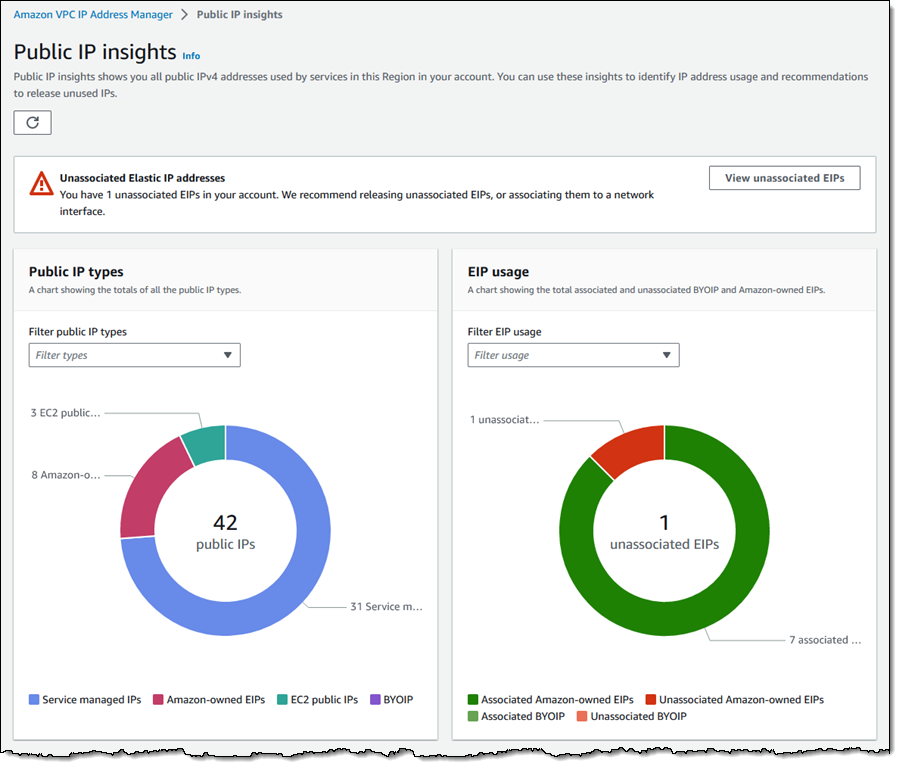
In order to make it easier for you to monitor, analyze, and audit your use of public IPv4 addresses, today we are launching Public IP Insights, a new feature of Amazon VPC IP Address Manager that is available to you at no cost. In addition to helping you to make efficient use of public IPv4 addresses, Public IP Insights will give you a better understanding of your security profile. You can see the breakdown of public IP types and EIP usage, with multiple filtering options:

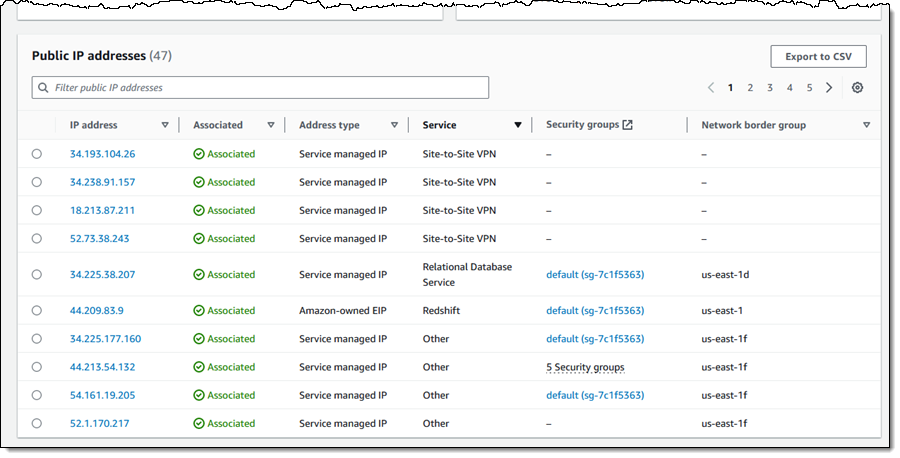
You can also see, sort, filter, and learn more about each of the public IPv4 addresses that you are using:

Using IPv4 Addresses Efficiently
By using the new IP Insights tool and following the guidance that I shared above, you should be ready to update your application to minimize the effect of the new charge. You may also want to consider using AWS Direct Connect to set up a dedicated network connection to AWS.

Finally, be sure to read our new blog post, Identify and Optimize Public IPv4 Address Usage on AWS, for more information on how to make the best use of public IPv4 addresses.

Jeff;

New: AWS Local Zone in Phoenix, Arizona – More Instance Types, More EBS Storage Classes, and More Services

Post Syndicated from Jeff Barr original https://aws.amazon.com/blogs/aws/new-aws-local-zone-in-phoenix-arizona-more-instance-types-more-ebs-storage-classes-and-more-services/

I am happy to announce that a new AWS Local Zone in Phoenix, Arizona is now open and ready for you to use, with more instance types, storage classes, and services than ever before.

We launched the first AWS Local Zone in 2019 (AWS Now Available from a Local Zone in Los Angeles) with the goal of making a select set of EC2 instance types, EBS volume types, and other AWS services available with single-digit millisecond when accessed from Los Angeles and other locations in Southern California. Since then, we have launched a second Local Zone in Los Angeles, along with 15 more in other parts of the United States and another 17 around the world, 34 in all. We are also planning to build 19 more Local Zones outside of the US (see the Local Zones Locations page for a complete list).

Local Zones In Action
Our customers make use of Local Zones in many different ways. Popular use cases include real-time gaming, hybrid migrations, content creation for media & entertainment, live video streaming, engineering simulations, and AR/VR at the edge. Here are a couple of great examples that will give you a taste of what is possible:

Arizona State University (ASU) – Known for its innovation and research, ASU is among the largest universities in the U.S. with 173,000 students and 20,000 faculty and staff. Local Zones help them to accelerate the delivery of online services and storage, giving them a level of performance that is helping them to transform the educational experience for students and staff.

DISH Wireless -Two years ago they began to build a cloud-native, fully virtualized 5G network on AWS, making use of Local Zones to support latency-sensitive real-time 5G applications and workloads at the network edge (read Telco Meets AWS Cloud to learn more). The new Local Zone in Phoenix will allow them to further enhance the strength and reliability of their network by extending their 5G core to the edge.

We work closely with these and many other customers to make sure that the Local Zone(s) that they use are a great fit for their use cases. In addition to the already-strong set of instance types, storage classes, and services that are part-and-parcel of every Local Zone, we add others on an as-needed basis.

For example, Local Zones in Los Angeles, Miami, and other locations have additional instance types; several Local Zones have additional Amazon Elastic Block Store (Amazon EBS) storage classes, and others have extra services such as Application Load Balancer, Amazon FSx, Amazon EMR, Amazon ElastiCache, Amazon Relational Database Service (RDS), Amazon GameLift, and AWS Application Migration Service (AWS MGN). You can see this first-hand on the Local Zones Features page.

And Now, Phoenix
As I mentioned earlier, this Local Zone has more instance types, storage classes, and services than earlier Local Zones. Here’s what’s inside:

Instance Types – Compared to all other Local Zones with the T3, C5(d), R5(d), and G4dn instance types, the Phoenix Local Zone includes C6i, M6i, R6i, and Cg6n instances.

EBS Volume Types  – In addition to the gp2 volumes that are available in all Local Zones, the Phoenix Local Zone includes gp3 (General Purpose SSD) , io1 (Provisioned IOPS SSD) , st1 (Throughput Optimized HDD), and sc1 (Cold HDD) storage.

Services – In addition to Amazon Elastic Compute Cloud (Amazon EC2), Amazon Elastic Block Store (Amazon EBS), AWS Shield, Amazon Virtual Private Cloud (Amazon VPC), Amazon Elastic Container Service (Amazon ECS). Amazon Elastic Kubernetes Service (EKS), Application Load Balancer, and AWS Direct Connect, the Phoenix LZ includes NAT Gateway.

Pricing Models – In addition to On-Demand and Savings Plans, the Phoenix Local Zone includes Spot.

Going forward, we plan to launch more Local Zones that are similarly equipped.

Opting-In to the Phoenix Local Zone
The original Phoenix Local Zone was launched in 2022 and remains available to customers who have already enabled it. The Zone that we are announcing today can be enabled by new and existing customers.

To get started with this or any other Local Zone, I must first enable it. To do this, I open the EC2 Console, select the parent region (US West (Oregon)) from the menu, and then click EC2 Dashboard in the left-side navigation:

Then I click on Zones in the Account attributes box:

Next, I scroll down to the new Phoenix Local Zone (us-west-2-phx-2), and click Manage:

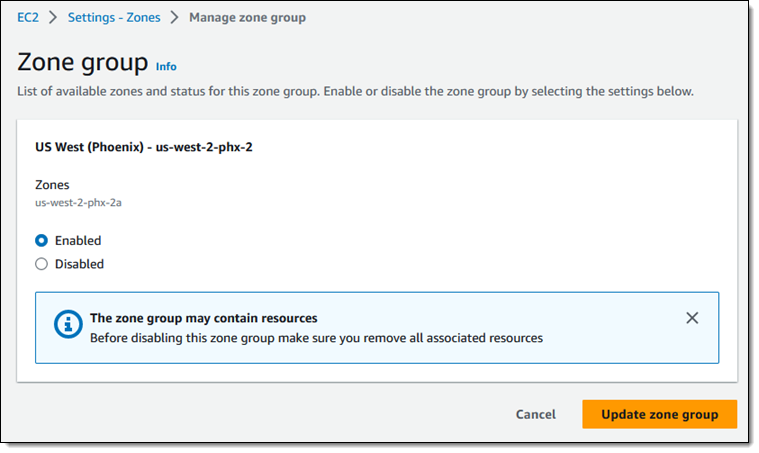
I click Enabled, and then Update zone group:

I confirm that I want to enable the Zone Group, and click Ok:

And I am all set. I can create EBS volumes, launch EC2 instances, and make use of the other services in this Local Zone.

Jeff;

AWS Week in Review – Redshift+Forecast, CodeCatalyst+GitHub, Lex Analytics, Llama 2, and Much More – July 24, 2023

Post Syndicated from Jeff Barr original https://aws.amazon.com/blogs/aws/aws-week-in-review-redshiftforecast-codecatalystgithub-lex-analytics-llama-2-and-much-more-july-24-2023/

Summer is in full swing here in Seattle and we are spending more time outside and less at the keyboard. Nevertheless, the launch machine is running at full speed and I have plenty to share with you today. Let’s dive in and take a look!

Last Week’s Launches
Here are some launches that caught my eye:

Amazon Redshift – Amazon Redshift ML can now make use of an integrated connection to Amazon Forecast. You can now use SQL statements of the form CREATE MODEL to create and train forecasting models from your time series data stored in Redshift, and then use these models to make forecasts for revenue, inventory, demand, and so forth. You can also define probability metrics and use them to generate forecasts. To learn more, read the What’s New and the Developer’s Guide.

Amazon CodeCatalyst – You can now trigger Amazon CodeCatalyst workflows from pull request events in linked GitHub repositories. The workflows can perform build, test, and deployment operations, and can be triggered when the pull requests in the linked repositories are opened, revised, or closed. To learn more, read Using GitHub Repositories with CodeCatalyst.

Amazon Lex – You can now use the Analytics on Amazon Lex dashboard to review data-driven insights that will help you to improve the performance of your Lex bots. You get a snapshot of your key metrics, and the ability to drill down for more. You can use conversational flow visualizations to see how users navigate across intents, and you can review individual conversations to make qualitative assessments. To learn more, read the What’s New and the Analytics Overview.

Llama2 Foundation Models – The brand-new Llama 2 foundation models from Meta are now available in Amazon SageMaker JumpStart. The Llama 2 model is available in three parameter sizes (7B, 13B, and 70B) with pretrained and fine-tuned variations. You can deploy and use the models with a few clicks in Amazon SageMaker Studio, and you can also use the SageMaker Python SDK (code and docs) to access them programmatically. To learn more, read Llama 2 Foundation Models from Meta are Now Available in Amazon SageMaker JumpStart and the What’s New.

X in Y – We launched some existing services and instances types in additional AWS Regions:

For a full list of AWS announcements, be sure to keep an eye on the What’s New at AWS page.

Other AWS News
Here are some additional blog posts and news items that you might find interesting:

AWS Open Source News and Updates – My colleague Ricardo has published issue 166 of his legendary and highly informative AWS Open Source Newsletter!

CodeWhisperer in Action – My colleague Danilo wrote an interesting post to show you how to Reimagine Software Development With CodeWhisperer as Your AI Coding Companion.

News Blog Survey – If you have read this far, please consider taking the AWS Blog Customer Survey. Your responses will help us to gauge your satisfaction with this blog, and will help us to do a better job in the future. This survey is hosted by an external company, so the link does not lead to our web site. AWS handles your information as described in the AWS Privacy Notice.

CDK Integration Tests – The AWS Application Management Blog wrote a post to show you How to Write and Execute Integration Tests for AWS CDK Applications.

Event-Driven Architectures – The AWS Architecture Blog shared some Best Practices for Implementing Event-Driven Architectures in Your Organization.

Amazon Connect – The AWS Contact Center Blog explained how to Manage Prompts Programmatically with Amazon Connect.

Rodents – The AWS Machine Learning Blog showed you how to Analyze Rodent Infestation Using Amazon SageMaker Geospatial Capabilities.

Secrets Migration – The AWS Security Blog published a two-part series that discusses migrating your secrets to AWS Secrets Manager (Part 1: Discovery and Design, Part 2: Implementation).

Upcoming AWS Events
Check your calendar and sign up for these AWS events:

AWS Storage Day – Join us virtually on August 9th to learn about how to prepare for AI/ML, deliver holistic data protection, and optimize storage costs for your on-premises and cloud data. Register now.

AWS Global Summits – Attend the upcoming AWS Summits in New York (July 26), Taiwan (August 2 & 3), São Paulo (August 3), and Mexico City (August 30).

AWS Community Days – Attend upcoming AWS Community Days in The Philippines (July 29-30), Colombia (August 12), and West Africa (August 19).

re:InventRegister now for re:Invent 2023 in Las Vegas (November 27 to December 1).

That’s a Wrap
And that’s about it for this week. I’ll be sharing additional news this coming Friday on AWS on Air – tune in and say hello!

Jeff;

New – Amazon FSx for NetAPP ONTAP Now Supports WORM Protection for Regulatory Compliance and Ransomware Protection

Post Syndicated from Jeff Barr original https://aws.amazon.com/blogs/aws/new-amazon-fsx-for-netapp-ontap-now-supports-worm-protection-for-regulatory-compliance-and-ransomware-protection/

Amazon FSx for NetApp ONTAP was launched in late 2021. With FSx for ONTAP you get the popular features, performance, and APIs of ONTAP file systems, with the agility, scalability, security, and resilience of AWS, all as a fully managed service.

Today we are adding support for SnapLock, an ONTAP feature that gives you the power to create volumes that provide Write Once Read Many (WORM) functionality. SnapLock volumes prevent modification or deletion of files within a specified retention period, and can be used to meet regulatory requirements and to protect business-critical data from ransomware attacks and other malicious attempts at alteration or deletion. FSx for ONTAP is the only cloud-based file system that supports SnapLock Compliance mode. FSx for ONTAP also supports tiering of WORM data to lower-cost storage for all SnapLock volumes.

Protecting Data with SnapLock
SnapLock gives you an additional layer of data protection, and can be thought of as part of your organization’s overall data protection strategy. When you create a volume and enable SnapLock, you choose one of the following retention modes:

Compliance – This mode is used to address mandates such as SEC Rule 17a-4(f), FINRA Rule 4511 and CFTC Regulation 1.31. You can use this mode to ensure a WORM file cannot be deleted by any user until after its retention period expires. Volumes in this mode cannot be renamed and cannot be deleted until the retention periods of all WORM files on the volume have expired.

Enterprise – This mode is used to enforce organizational data retention policies or to test retention settings before creating volumes in Compliance mode. You can use this mode to prevent most users from deleting WORM data, while allowing authorized users to perform deletions, if necessary. Volumes in this mode can be deleted even if they contain WORM files under an active retention period.

You also choose a default retention period. This period indicates the length of time that each file must be retained after it is committed to the WORM state, and can be as long as 100 years, and there’s also an Infinite option. You can also set a custom retention period for specific files or specific trees of files and it will apply to those files at the time that they are committed to the WORM state.

Files are committed to the WORM state when they become read-only (chmod -w on Linux or attrib +r on Windows). You can configure a per-volume autocommit period (5 minutes to 10 years) to automatically commit files that have remained as-is for the period, and you can also initiate a Legal Hold in Compliance mode in order to retain specific files for legal purposes.

You also have another interesting data protection and compliance option. You can create one volume without SnapLock enabled, and another one with it enabled, and then periodically replicate from the first one to the second using NetApp SnapVault. This will give you snapshot copies of entire volumes that you can retain for months, years, or decades as needed.

Speaking of interesting options, you can make use of FSx for ONTAP volume data tiering to keep active files on high-performance SSD storage and the other files on storage that is cost-optimized for data that is accessed infrequently.

Creating SnapLock Volumes
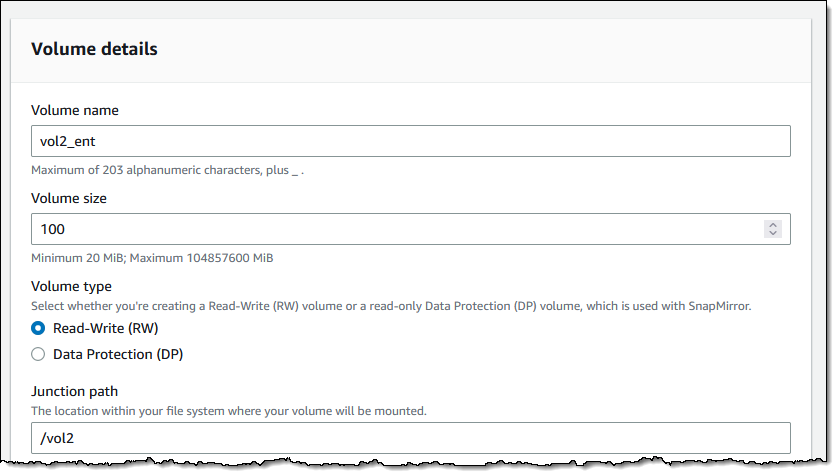
I can create new volumes and enable SnapLock with a couple of clicks. I enter the volume name, size, and path as usual:

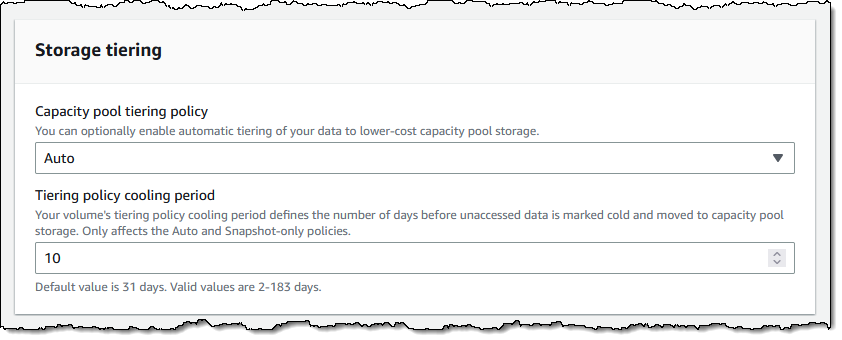
As I mentioned earlier, I can also make use of a capacity pool (this is set to Auto by default, and I set a 10 day cooling period):

I scroll down to the Advanced section and click Enabled, then select Enterprise retention mode. I also set up my retention periods, enable autocommit after 9 days, and leave the other options as-is:

I add a tag, and click Create volume to move ahead:

I take a quick break, and when I come back my volume is ready to use:

At this point I can mount it in the usual way, create files, and allow SnapLock to do its thing!

Things to Know
Here are a couple of things that you should know about this powerful new feature:

Existing Volumes – You cannot enable this feature for an existing volume, but you can create a new, SnapLock-enabled volume, and copy or migrate the data to it.

Volume Deletion – As I noted earlier, you cannot delete a SnapLock Compliance volume if it contains WORM files with an unexpired retention period. Take care when setting this to avoid creating volumes that will last longer than needed.

Pricing – There’s an additional GB/month license charge for the use of SnapLock volumes; check out the Amazon FSx for NetAPP ONTAP Pricing page for more information.

Regions – This feature is available in all AWS Regions where Amazon FSx for NetApp ONTAP is available.

Jeff;

New Amazon EC2 C7gn Instances: Graviton3E Processors and Up To 200 Gbps Network Bandwidth

Post Syndicated from Jeff Barr original https://aws.amazon.com/blogs/aws/new-amazon-ec2-c7gn-instances-graviton3e-processors-and-up-to-200-gbps-network-bandwidth/

The C7gn instances that we previewed last year are now available and you can start using them today. The instances are designed for your most demanding network-intensive workloads (firewalls, virtual routers, load balancers, and so forth), data analytics, and tightly-coupled cluster computing jobs. They are powered by AWS Graviton3E processors and support up to 200 Gbps of network bandwidth.

Here are the specs:

Instance Name vCPUs
Memory
Network Bandwidth
EBS Bandwidth
c7gn.medium 1 2 GiB up to 25 Gbps up to 10 Gbps
c7gn.large 2 4 GiB up to 30 Gbps up to 10 Gbps
c7gn.xlarge 4 8 GiB up to 40 Gbps up to 10 Gbps
c7gn.2xlarge 8 16 GiB up to 50 Gbps up to 10 Gbps
c7gn.4xlarge 16 32 GiB 50 Gbps up to 10 Gbps
c7gn.8xlarge 32 64 GiB 100 Gbps up to 20 Gbps
c7gn.12xlarge 48 96 GiB 150 Gbps up to 30 Gbps
c7gn.16xlarge 64 128 GiB 200 Gbps up to 40 Gbps

The increased network bandwidth is made possible by the new 5th generation AWS Nitro Card. As another benefit, these instances deliver the lowest Elastic Fabric Adapter (EFA) latency of any current EC2 instance.

Here’s a quick infographic that shows you how the C7gn instances and the Graviton3E processors compare to previous instances and processors:

As you can see, the Graviton3E processors deliver substantially higher memory bandwidth and compute performance than the Graviton2 processors, along with higher vector instruction performance than the Graviton3 processors.

C7gn instances are available in the US East (Ohio, N. Virginia), US West (Oregon), and Europe (Ireland) AWS Regions in On-Demand, Reserved Instance, Spot, and Savings Plan form. Dedicated Instances and Dedicated Hosts are also available.

Jeff;

New – Snowball Edge Storage Optimized Devices with More Storage and Bandwidth

Post Syndicated from Jeff Barr original https://aws.amazon.com/blogs/aws/new-snowball-edge-storage-optimized-devices-with-more-storage-and-bandwidth/

AWS Snow Family family devices are used to cost-effectively move data to the cloud and to process data at the edge. The enhanced Snowball Edge Storage Optimized devices are designed for your petabyte-scale data migration projects, with 210 terabytes of NVMe storage and the ability to transfer up to 1.5 gigabytes of data per second. The devices also include several connectivity options: 10GBASE-T, SFP48, and QSFP28.

Large Data Migration
In order to make your migration as smooth and efficient as possible, we now have a well-defined Large Data Migration program. As part of this program, we will work with you to make sure that your site is able to support rapid data transfer, and to set up a proof-of-concept migration. If necessary, we will also recommend services and solutions from our AWS Migration Competency Partners. After successful completion of the proof-of-concept you will be familiar with the Snow migration process, and you will be ready to order devices using the process outlined below.

You can make use of the Large Data Migration program by contacting AWS Sales Support.

Ordering Devices
While you can order and manage devices individually, you can save time and reduce complexity by using a large data migration plan. Let’s walk through the process of creating one. I open the AWS Snow Family Console and click Create your large data migration plan:

I enter a name for my migration plan (MediaMigrationPlan), and select or enter the shipping address of my data center:

Then I specify the amount of data that I plan to migrate, and the number of devices that I want to use concurrently (taking into account space, power, bandwidth, and logistics within my data center):

When everything looks good I click Create data migration plan to proceed and my plan becomes active:

I can review the Monitoring section my my plan to see how my migration is going (these are simply Amazon CloudWatch metrics and I can add them to a dashboard, set alarms, and so forth):

The Jobs section includes a recommended job ordering schedule that takes the maximum number of concurrent devices into account:

When I am ready to start transferring data, I visit the Jobs ordered tab and create a Snow job:

As the devices arrive, I connect them to my network and copy data to them via S3 (read Managing AWS Storage) or NFS (read Using NFS File Shares to Manage File Storage), then return it to AWS for ingestion!

Things to Know
Here are a couple of fun facts about this enhanced device:

Regions – Snowball Edge Storage Optimized Devices with 210 TB of storage are available in the US East (N. Virginia) and US West (Oregon) AWS Regions.

Pricing – You pay for the use of the device and for data transfer in and out of AWS, with on-demand and committed upfront pricing available. To learn more about pricing for Snowball Edge Storage Optimized 210 TB devices contact your AWS account team or AWS Sales Support.

Jeff;

Retiring the AWS Documentation on GitHub

Post Syndicated from Jeff Barr original https://aws.amazon.com/blogs/aws/retiring-the-aws-documentation-on-github/

About five years ago I announced that AWS Documentation is Now Open Source and on GitHub. After a prolonged period of experimentation we will archive most of the repos starting the week of June 5th, and will devote all of our resources to directly improving the AWS documentation and website.

The primary source for most of the AWS documentation is on internal systems that we had to manually sync with the GitHub repos. Despite the best efforts of our documentation team, keeping the public repos in sync with our internal ones has proven to be very difficult and time consuming, with several manual steps and some parallel editing. With 262 separate repos and thousands of feature launches every year, the overhead was very high and actually consumed precious time that could have been put to use in ways that more directly improved the quality of the documentation.

Our intent was to increase value to our customers through openness and collaboration, but we learned through customer feedback that this wasn’t necessarily the case. After carefully considering many options we decided to retire the repos and to invest all of our resources in making the content better.

Repos containing code samples, sample apps, CloudFormation templates, configuration files, and other supplementary resources will remain as-is since those repos are primary sources and get a high level of engagement.

To help us improvement the documentation, we’re also focusing more resources on your feedback:

We watch the thumbs-up and thumbs-down metrics on a weekly basis, and use the metrics as top-level pointers to areas of the documentation that could be improved. The incoming feedback creates tickets that are routed directly to the person or the team that is responsible for the page. I strongly encourage you to make frequent use of both feedback mechanisms.

Jeff;

New Storage-Optimized Amazon EC2 I4g Instances: Graviton Processors and AWS Nitro SSDs

Post Syndicated from Jeff Barr original https://aws.amazon.com/blogs/aws/new-storage-optimized-amazon-ec2-i4g-instances-graviton-processors-and-aws-nitro-ssds/

Today we are launching I4g instances powered by AWS Graviton2 processors that deliver up to 15% better compute performance than our other storage-optimized instances.

With up to 64 vCPUs, 512 GiB of memory, and 15 TB of NVMe storage, one of the six instance sizes is bound to be a great fit for your storage-intensive workloads: relational and non-relational databases, search engines, file systems, in-memory analytics, batch processing, streaming, and so forth. These workloads are generally very sensitive to I/O latency, and require plenty of random read/write IOPS along with high CPU performance.

Here are the specs:

Instance Name vCPUs
Memory
Storage
Network Bandwidth
EBS Bandwidth
i4g.large 2 16 GiB 468 GB up to 10 Gbps up to 40 Gbps
i4g.xlarge 4 32GiB 937 GB up to 10 Gbps up to 40 Gbps
i4g.2xlarge 8 64 GiB 1.875 TB up to 12 Gbps up to 40 Gbps
i4g.4xlarge 16 128 GiB 3.750 TB up to 25 Gbps up to 40 Gbps
i4g.8xlarge 32 256 GiB 7.500 TB
(2 x 3.750 TB)
18.750 Gbps 40 Gbps
i4g.16xlarge 64 512 GiB 15.000 TB
(4 x 3.750 TB)
37.500 Gbps 80 Gbps

The I4g instances make use of AWS Nitro SSDs (read AWS Nitro SSD – High Performance Storage for your I/O-Intensive Applications to learn more) for NVMe storage. Each storage volume can deliver the following performance (all measured using 4 KiB blocks):

  • Up to 800K random write IOPS
  • Up to 1 million random read IOPS
  • Up to 5600 MB/second of sequential writes
  • Up to 8000 MB/second of sequential reads

Torn Write Protection is supported for 4 KiB, 8 KiB, and 16 KiB blocks.

Available Now
I4g instances are available today in the US East (Ohio, N. Virginia), US West (Oregon), and Europe (Ireland) AWS Regions in On-Demand, Spot, Reserved Instance, and Savings Plan form.

Jeff;